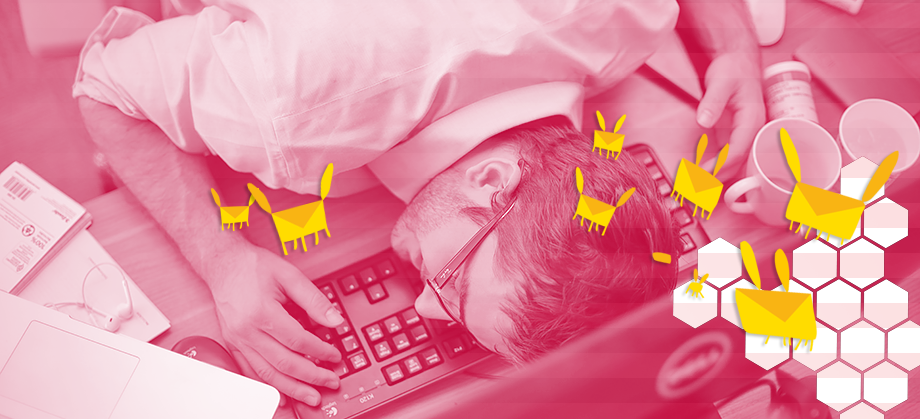
Last summer, I reached peak email despair.
I started using email when I was 6 years old to keep in touch with my grandmother, and I’ve used it ever since—to boss around group project members in high school, to stay abreast of campus events in college, and to send job applications after graduation. I would get more email than I sent by far, but I was always able to keep my inbox trim.
But when I joined Slate as the magazine’s interactives editor, the floodgates opened. Emails from my boss. From my boss’s boss. From public relations firms. Endless reply-all chains, useful information buried midthread. To deal with the hundreds of messages I received every day, I tried every email application I could find: Gmail, Microsoft Outlook, Apple Mail, Mozilla Thunderbird, and a variety of lesser-known apps. I set up vast systems of mailbox rules, invented elaborate organizational methods, and followed complex workflows. Still, whenever I tried to deal with email, my eyes would glaze over, and my brain would turn to sludge.
I was email-depressed. You may well be too. Lots of people are, but email is not on the laundry list of things that people routinely complain about, like weather or allergies or public transit. Nobody asks, “How was the email today?” And nobody replies, “Awful, just awful. New York just has the worst email.” But ask people directly, and you’ll see there’s an epidemic of email depression. Last year, Slate conducted an internal survey about email, asking editors and writers, “How do you feel about the amount of emails in your inbox?” The responses included: “Exhausted.” “Overwhelmed.” “Alarmed.” “Fucked.”
I assumed email, like most tech products, is a sleek creature, optimized by years of development to swim speedily through the Internet. I was wrong.
Someday, I’m sure, we’ll communicate through direct brain-to-brain interfaces; email will seem, to our great zombie hive mind, like cave drawings do to us now, and the primitiveness of the past will inspire only pity and amusement. But for now, email is as certain as death and taxes. Like death, it’s inevitable, despite the miracles of modern technology. Like taxes, it’s universally bemoaned yet unquestionably necessary. It’s so integral to our 21st-century lives that unplugging from it has become a test of endurance and will, like a marathon, or a quest for spiritual relief—a vow of digital silence.
Why does email have to be such a Sisyphean slog for the billions of people who use it? It was this question that swirled through my brain one late night as I gazed into the ever-growing pile of email in my inbox. An email from Slate’s editor in chief, asking me about the status of a project. A flight confirmation. An email from a job applicant. A press release from the company that constantly emails me about Olivia Munn’s red-carpet looks. My inbox seemed like a library havocked by a tornado, with torn pages scattered helter-skelter across the room. I spent as much time searching for messages in that mess as reading them. Organizing them seemed like a futile fight against entropy, and by the time I was done, I barely felt like responding to them—after all, responding would just yield more email. My email felt broken. If only there were a way to fix it.
Maybe I could, I realized. Could I use the same technologies that I employ every day to create maps and widgets for Slate to make my own email application? One that would make email easy to organize, intuitive to use, something other than awful? So I embarked on the biggest technical challenge I’ve ever undertaken: I set out to build the perfect email application for me. The task would take me months, plunge me into email’s Rube Goldberg infrastructure, and drive me slightly bananas. There’s a fundamental conflict at the heart of email, between what it was designed to do decades ago and how we use it today. That conflict is the reason pretty much every email program is fatally flawed. The only way to “fix” email might be to change how we approach it entirely.

My mission: Build an email client for my laptop that would make email as enjoyable as possible, mixing and matching my favorite features from a variety of other apps and adding a few of my own. This program would be the perfect client for me—not for every user, not for my co-workers, and not for strangers. I’d call it SlateMail.
I have a journalism degree, not a computer science degree. I make interactive widgets for Slate using the computer science I’ve picked up from a college elective, a couple of books, and the Internet. The only way I could pull off a project this daunting was by piggybacking on the open-source community, the millions of developers who share their code online for free in the hope that others will improve upon it and spur innovation. I relied especially on four open-source Javascript email modules: One to help my application talk to my email provider, one to parse email from my provider, one to help me build a text editor to compose email, and one to send email. Together, these modules saved me countless hours and thousands of lines of code. I resolved to make my own code open-source for good karma. (Would anyone actually want it? That was a whole other question.)
But the Internet couldn’t build the whole app for me. I’d have to stitch these components together into a usable solution. So I decided to dive right into the code. Needless to say, I spent my first couple days moving in the wrong direction. That’s because I started out assuming that email, like most tech products, is a sleek creature, optimized by years of evolutionary development to swim speedily through the great sea that is the Internet.
It's hard to remember that, because email didn't become mainstream until the turn of the century. But in fact it’s old enough that, like agriculture or fire, its origin is not precisely identifiable. Who deserves credit for it—or blame—is a contentious subject rooted in a semantic squabble about what types of electronic communication constitute “email.” If email is simply communication between two computer users, then it would be more appropriate to say that email simply started happening, at least as far back as the early 1960s. Then, users of a machine at MIT interacting via remote terminals would routinely leave files in shared directories with titles like “to Jack” or “to Steve.” In 1965, a user formalized this system with the “mail” command, which may be the first formal association of digital messaging to actual mail.
An academic journal about the history of computing tells the rest of the story: A group of computer scientists proposed the first standards in 1973, the year of Watergate and Roe v. Wade, making email's standards older than the average American. These first standards established little but the “from,” “subject,” and “date” headers that we’re all familiar with in email today. Computer scientists spent the rest of the decade arguing over minute aspects of email. Should email headers be machine-readable or human-readable? Should real names appear in the “to” field? Should the “date” field use a 12-hour or 24-hour standard? It was also in the 1970s that the “@” convention came into use and “reply” functions made it easier to respond to received emails. A computer scientist wrote the second set of standards in 1982, the same year another published the bedrock protocols of today’s worldwide Internet. Those standards defined email as it exists today and have been revised only slightly since.
The mailman wouldn’t dump hundreds of messages into your mailbox every day.
These standards, and protocols whose names you know from the error messages you see when your email doesn’t work (POP? IMAP? SMTP?), are managed by an international group of technologists called the Internet Engineering Task Force. They ensure that email’s two subsystems—providers and clients—play well together. Email providers are services that manage the exchange of email, such as Google, Apple iCloud, and Exchange servers. Email clients are the applications with which people read and compose emails. Apple Mail, Mozilla Thunderbird, Microsoft Outlook, and any mail apps on your phone: all email clients. Email clients that are associated with an email provider often bear its name—“Gmail” could mean either Google’s email client or Google’s email service, or both—but they’re two separate things. You could, for example, use Gmail the provider without Gmail the client at all. (If you read your Gmail on your iPhone’s default mail program, you already do.)
When Twitter wanted to add images to tweets, it just waved a magic wand, and bam! Suddenly everyone could tweet images. That’s not how change happens with email. Nobody “owns” email. There is no one at the top of the command chain that can change it overnight; there is no command chain. That’s powerful: It means any device that can connect to the Internet can also send and receive email. You could wash your hands of Google and Apple and Microsoft and turn your own computer into a mail server. But this decentralization also means there are many cooks in the kitchen: the providers, the clients, and the standardizers. As a result, change arrives more slowly than we’ve come to expect from other technologies.

The problem with email that became painfully clear to me while developing SlateMail is that there’s an incongruity between what it was made for and how we use it today. The mailman wouldn’t dump hundreds of messages into your mailbox every day. You wouldn’t compose a letter to everyone in your office asking if anybody would like to get burritos for lunch. But nevertheless, in crucial ways email still resembles slow, formal, encumbering, physical mail—even though it has displaced many other forms of communication: the phone call, the meeting, the fax, the pager, the desk fly-by. Due to email’s decentralization, clients, providers, and standardizers can only graft new functionalities onto the existing model. Thus, though innovation in email is happening, it’s characterized by features balancing cunningly and sometimes haphazardly atop an antiquated system—features that attempt to either restore email to its original metaphor or evolve it into something else entirely.
Imagine two people playing chess over the phone. One of them makes her first move, saying, “Pawn to C4.”
The other, making his own move, takes a deep breath and says: “A1: rook. B1: knight. C1: bishop. D1: queen. E1: king. F1: bishop. G1: knight. H1: rook. A2: pawn. B2: pawn. C2: blank. D2: pawn. E2: pawn. F2: pawn. G2: pawn. H2: pawn. A3: blank. B3: blank. C3: blank. D3: blank. E3: blank. F3: blank. G3: blank. H3: blank. A4: blank. B4: blank. C4: pawn. D4: blank. E4: blank. F4: blank. G4: blank. H4: blank. A5: blank. B5: blank. C5: blank. D5: pawn. E5: blank. F5: blank. G5: blank. H5: blank. A6: blank. B6: blank. C6: blank. D6: blank. E6: blank. F6: blank. G6: blank. H6: blank. A7: pawn. B7: pawn. C7: pawn. D7: blank. E7: pawn. F7: pawn. G7: pawn. H7: pawn. A8: rook. B8: knight. C8: bishop. D8: queen. E8: king. F8: bishop. G8: knight. H8: rook.”
Player 2, to make his move, has identified the state of every square on the board. What's wrong with this picture? It involves a lot of unnecessary communication. The players only need to convey how they’re changing the board, not the state of every square. A single statement, “Pawn to D5,” would suffice. Otherwise, the game would drag on for days.
Email is like this verbose chess player.
Imagine a hellish world in which every utterance must include a reiteration of all those preceding it. Welcome to email!
The first task I had to solve in building my email client was to synchronize email on my computer with the email on the email server. Virtually every desktop email client performs this sync every minute or so, so I expected there to be some common, efficient way of conducting this process. I expected my client could simply ask the server, “What’s changed since I last spoke with you?” The server would respond, “Well, I've got three new emails for you; here they are.” The client would tell the server, “These four emails here are now deleted, and these two emails here have now been read.” But in fact email doesn’t work this way.
Instead, the server acts like the verbose chess player. To properly sync via the standard protocol known as IMAP, the email client must query the server for a list of email IDs and their states (whether they’re read or unread), compare those with the IDs and states it already has, ask for the emails it's missing, delete whatever extra emails it's still holding on to, and ensure the states of the emails match. The amount of unnecessary data moving between the server and client as a result of these roundabout processes is hilarious. Your email client must download the statuses of potentially tens of thousands of email IDs, simply to reflect a single change. (Or no change!) It works, sure, but it also means that email clients move slower, demand more data, and siphon more bandwidth than they ought to.
Now, most of the time, you the user may not notice how inefficiently your email client is operating. But the syncing problem illustrates why email as a technology is slow to evolve: The framework on which you can make a new email program is overbuilt and clumsy, but it doesn’t change until enough providers and clients agree to do something about it. For example, in 2008 a member of the IETF developed a protocol called QRESYNC, which would allow the client to simply ask the server what’s changed instead of downloading a bunch of superfluous data. But many major providers, including Gmail and Outlook, still don’t support QRESYNC (pronounced CUE-ree-sink); neither does my work email provider. Why should they? Few clients support it—and why should those clients support it if the providers don’t? Nobody moves unless everyone pedals together. So SlateMail would remain frustratingly inefficient.
When Gmail launched as a public beta in 2007, one of its more remarkable features was the “conversation.” This feature groups related messages together by default so that you, the user, see each email in the context of a larger thread. In Gmail and many clients that implement it today, conversation threading also means that messages in the same thread appear as one single, collapsed email in your inbox, so your inbox is not clogged with 20 individual emails about the same subject. It’s a key innovation in email, a feature that brings the medium closer to how we’ve begun to use it: as a platform for democratic discussions involving several participants, like a virtual, ongoing brainstorming meeting. I would never use SlateMail without it. So I went digging into email’s underlying machinery to find a way to fetch a thread.
As it turns out, an email does not contain any metadata that explicitly identify its thread. As far as email’s protocols are concerned, the universal ingredients of email include mailboxes, keywords, and flags, but no conversations. There was no way for my email app to ask my email provider for all the messages in a conversation. Even so, Gmail and now other clients were somehow making conversation threading work. How?
As it turns out, Gmail wasn’t the first client to group related emails together like this. The feature dates back at least to old clients from the ’90s, like Netscape Mail, Grendel, Evolution, and Balsa. Without any conversation information from the IMAP protocol, these clients instead inferred it from the email’s content or metadata. The thread might be revealed by something as simple as a shared subject line, or an email might contain metadata indicating the message ID of the email to which it’s responding. Given all the messages in an account, a client could compile threads by tracing replies back to their original messages. The process involves an elaborate algorithm to account for the variety of ways clients use these hidden headers. It wasn’t until 2008 that this algorithm found its way into IMAP as a proposed extension to the protocol. This extension, called THREAD, would make it the responsibility of the email server to thread emails. Unfortunately, as with QRESYNC, neither Gmail nor Outlook support THREAD on their IMAP servers, so I had to implement the algorithm in my own client.
Then there’s the question of how those threaded messages are displayed. Here's a game for your next road trip: Carry on a conversation in which every participant must, after making her own original statement, repeat everything that the previous person said in its entirety. Continue as long as you can. Between two people, it might go something like this:
“What exit am I getting off on?”
“According to the map, Exit 45. You said, ‘What exit am I getting off on?’ ”
“I think it’s coming up. You said, ‘According to the map, Exit 45. You said, “What exit am I getting off on?” ’ ”
Now imagine an alternate reality in which you had to talk like this, a hellish world in which every utterance must include a reiteration of all those preceding it. Welcome to email!
When you hit the reply button in your email client, it automatically quotes the messages to which you are responding. Your reply thus contains two messages: Your new, original message and the full text of the message to which you are responding. That is, unless you are writing a reply to a reply. In that case, your reply contains three messages. Individual messages grow progressively fatter as the thread expands.
Because all these superfluous quoted messages would pollute threaded views, modern apps have taken to collapsing quoted messages so it’s easier for the user to scan a thread. But this process often fails, causing a thread to explode in an unsightly mass of quoted messages. Useless but dangerous, the quoted message is the appendix of email, overlooked until it bursts. Why do some threads go mad?
Because emails don’t appear to follow any single convention on how to treat quoted messages. In emails sent from Gmail's client, for example, a quoted message starts with a line like this:
On Wed, Feb 18, 2015 at 12:41 PM, Chris Kirk <panda@slate.com> wrote:
In emails sent from Outlook’s Web client, a quoted email starts with a horizontal rule, followed by something like this:
From: Kirk, Chris
Sent: Monday, February 23, 2015 10:30 AM
To: Dan Kois
Subject: Re: Fresca
Other clients simply start quoted messages with this:
-----Original Message-----
From: Chris Kirk
Sent: Monday, February 23, 2015 10:30 AM
To: Dan Kois
Subject: Re: Fresca
Such variability makes it nearly impossible to teach an email client to quickly recognize where the original message ends and the quoted message begins. Google even patented its method. It’s tricky business; if your method is too conservative, users will get annoyed by the mess of quoted messages below their emails; if it’s too liberal, it will eat precious lines of the new message.
To build the process on SlateMail, I looked, as I often do, to Stack Overflow, a community for coders to help one another with development challenges. I found only ill omens. When one user asked the community how to properly collapse quotes, a user warned, “You're in for a world of hurt.” A Facebook engineer explained on Quora that there is no clean solution. Bah, what would a real engineer with years of professional experience know anyway? I tried to make a clean solution. And I failed. I tweaked my solution. It still failed. Whatever method I tried, it would either gobble up chunks of new emails or be blind to huge sections of quote-gunk. I eventually gave up and resolved to have every message be automatically clipped to the first hundred or so characters except for the newest one. The user can just click a message to collapse or expand it. It's far from perfect—I hate clicking more than I need to—but it’ll get me by.
After three weeks of coding, I had a semifunctional email client. It could receive, display, and send email. Features I considered crucial, such as email threading and quoted message collapsing, worked somewhat reliably. There were other common features I wanted to add, features that most users would consider non-negotiable, such as search functionality and email address auto-completion. I knew such features could come with time, though. What I wanted to do is skip ahead and try to make SlateMail different. I wanted to make it an application that wouldn’t just receive, display, and send email, but help me deal with email.
When I think of managing email, I'm reminded of the famous scene from I Love Lucy, in which Lucy and Ethel are tasked with wrapping pieces of chocolate trundling along a conveyor belt. They begin confidently. “Well this is easy,” Lucy says. “Yeah, we can handle this OK,” Ethel replies. But the chocolates arrive faster and faster, and soon enough Lucy and Ethel are frantically shoving them in their mouths in a desperate, futile attempt to stay apace. That's how email felt to me, except you can't eat it when it starts to overwhelm you.
For example: I often find myself completely losing track of something that urgently requires my response, or struggling for several minutes to find a single email from a few weeks ago. That’s because email was not designed with the assumption that anyone would get hundreds of messages a day. To a computer, a direct email from your boss looks the same as your water bill. It's on you to put it where it needs to be. IMAP provides only two tools for this: mailboxes and flags. You're expected to sort your messages into mailboxes as if you're sorting paperwork into folders, and/or flag them with a limited set of colors. Do this long enough, however, and you'll soon end up like I did, rifling through an elaborate hierarchy to find the proper folder. The more complex your system of organization, the longer it takes you to organize or find each individual email, and the less useful the system becomes. Eventually, the time you spend maintaining the system outweighs the time it saves you.
What if it worked differently? What if we thought of a great workflow first and built an email application around it?
In 2011, Alex Obenauer and Josh Milas, two undergraduates at Virginia Tech, did just that. For a design class, Obenauer submitted a paper about an email client based on the idea of treating your inbox not like an inbox but like a to-do list. After all, every email in your inbox demands something from you: your brief attention, your reply, or some action like paying your water bill. After a successful Kickstarter campaign, they built Mail Pilot, an email client integrated tightly with this to-do list idea. In Mail Pilot, to mark an email as complete, you only need to hit the space bar, and the email will be literally crossed out on screen before disappearing into the “completed” folder. Most impressively, “deferring” an email allows you to select a date at which it will appear again at the top of your inbox—a feature that you can't replicate on any mainstream clients without third-party extensions (e.g. Boomerang for Gmail or MailTags for Apple Mail).
What if we thought of a great workflow first and built email an application around it?
Mail Pilot achieves all this by using the limited architecture of email in creative ways. Marking an email “complete” merely moves it to a special mailbox Mail Pilot automatically creates for completed messages. When the user defers an email to a future date, Mail Pilot creates a folder for that date, and when that date rolls around, it automatically displays the messages in that folder alongside the messages in your inbox. I replicated this feature in SlateMail: Selecting a thread and hitting the D key (for “done”) completes it, and hitting the S key (for “schedule”) defers it to a specific date.
But, still, I wanted more.
After people read and act on their emails, I’ve found that they fall into two categories: searchers or sorters. A sorter carefully divides his mail into different folders so that he can quickly find messages later. A searcher, meanwhile, thinks of her email as an infinite repository, and she has faith she’ll remember enough about an email in the future to find it once again when it’s needed using her client’s search function. Sorting requires discipline, and searching requires a sharp memory. I have neither.
Deep inside, I want to be a sorter. That’s because I spend far too much time every day querying my inbox for old emails. Searching for a message is a tedious process of trial and error; sometimes, all I can remember is the sender. But sorting never lasts that long; folders soon become subfolders and subfolders become sub-subfolders. The more elaborate my sorting system, the longer I needed to sort new mail—and the more likely I’d eventually have to search for that message anyway when I couldn’t tease out which sub-sub-subfolder I placed it in. Thus, I’ve drifted between sorting and searching, never truly fitting into either.
Maybe SlateMail could help.
Almost all of my important work-related communication can be divided into discrete projects. This essay is a project, completely independent from each of the interactive widgets I make. But I often feel like all the various threads that belong to a single project are floating in space. After taking projects off the back burner, I’ve found myself lost, struggling to remember what the last decisions and communications related to the project were.
So I developed an organizational concept called, yes, the “project”: a word or phrase that you can assign to a thread to connect it with others, regardless of whether they are in “done,” “open,” or “scheduled” mailboxes. Say my boss emails me to ask me when I’m finally going to send him my final draft of this story, and I want to associate that email with the other emails we’ve exchanged about this project. If I were relying on mailboxes, I would have to scan a list of boxes for my “SlateMail” mailbox. With SlateMail’s projects, I can just hit P, type “SlateMail,” and it’s instantly grouped with other emails I’ve tagged with “SlateMail.” No need to scan an ever-growing hierarchy for the correct folder. No laborious dragging and dropping. Just P, type, enter. Later, you just type a project name to pull up all the threads contained within it. Projects makes sorting easier and searching faster.
“Big deal!” you say. “You can do basically the same thing with Gmail’s labels.” Unlike labels, however, I’ve woven projects tightly in my application’s design. When I click an email that I’ve previously organized into a project, for example, I’ll see not only the messages in its thread but also a project pane displaying that thread in the context of all the threads in the same project, and which threads are open, scheduled, and done. What's more, I’ll see all the project's attachments for quick access.
So, how am I pulling this off within the limiting confines of IMAP? I’m not. The project data is stored only in SlateMail, not on the email server. For my needs now, that’s fine. Later, I can take inspiration from MailTags, an extension to Apple Mail that allows you to tag threads. MailTags saves tagging data by creating a new mailbox for each new tag and copying messages to it. This allows you to view all the messages belonging to a tag from a traditional mail client. It also means that if your computer blows up, all that tagging information is backed up on the IMAP server. Eventually, I can modify SlateMail to store project data in the same way.
My projects concept would help me wrap the chocolates more efficiently, but what if I could also slow down the conveyor belt? Often a developing reply-all storm has yielded all the useful information it’s ever going to; from here on out it’s just jokes and complications. So I borrowed Gmail’s “mute” function. Select a thread, hit M, and never see the thread pop up in your inbox again. Then, I gave myself a final treat: Select an email, hit B for “block,” and never hear from that sender again. Take that, Olivia Munn’s red-carpet looks!
At long last, I had built an email client of my dreams.
Bugs are inevitable. The more you code, the more bugs you’ll have. So it was no surprise that when I finally started to use SlateMail as my email client, it did weird things. It would crash in the middle of syncing. After I sent an email, I couldn’t select any others. The IMAP connection would randomly hang up, as if the server was just throwing up its hands and saying, “I can’t work with this thing anymore.”
Getting all of SlateMail’s parts to play together became my singular obsession. For a week I did little but sleep, eat, and debug. Sometimes, I could fix a bug in moments. In other cases, SlateMail would crash without an error message, and I would have to go through my code line by line to isolate the problem, a trial-and-error process spanning days. Because I relied so heavily on technology other people had built, there was a lot going on in my own app that I didn’t truly understand. I tracked one bug to a single line deep in the code in a programming language I don’t even know. In a few cases, glitches seemed so cryptic to me that instead of fixing them I added routines so the program would keep behaving normally in spite of them.
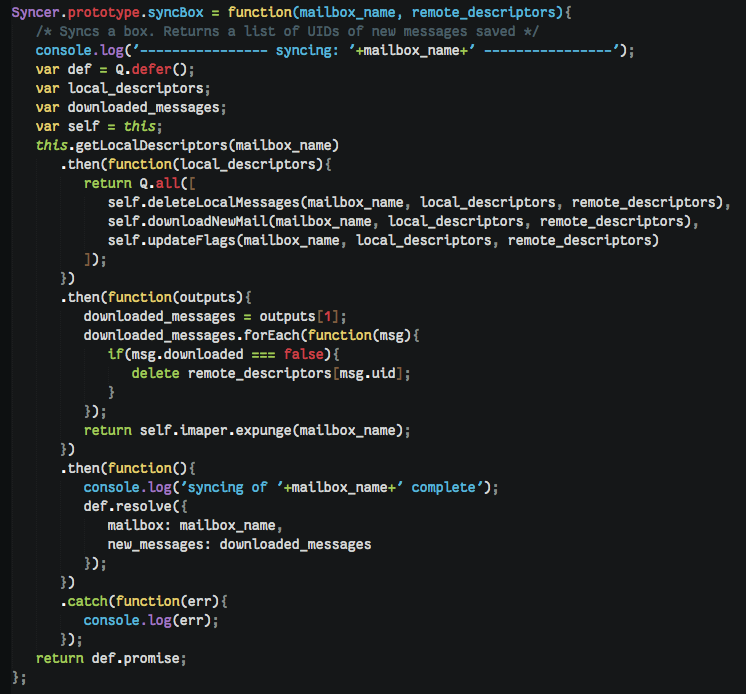
Screenshot of SlateMail code
I found the process frustrating, humbling, and strangely fun. I imagined I was on CSI—but instead of a person, it was my app dead on the floor, and I had to find out who killed it and how.
By trying to use my own app, I also realized how much I had forgotten to put into it. There’s a whole host of functions and rules that we expect from even the simplest email programs. We create new mailboxes. We select multiple messages and delete or move them together. When we select an email, navigate to a different mailbox, then come back, we expect the same email to be selected. When we look at our tree of mailboxes, we expect to see “Inbox” at the top, even though it doesn’t come first alphabetically.
I imagined I was on CSI—but instead of a person, it was my app dead on the floor, and I had to find out who killed it and how.
By that point SlateMail had taken over my life to a far greater extent than email ever had. Whenever I found time to think, I coded in my head. I improved the syncer on a walk to the grocery store. I built the mailbox tree standing on the subway. Miraculously, the pieces started to come together. After a few days, I could use SlateMail for an entire minute without something going horribly wrong. Then, two minutes, three minutes, four minutes!
Finally, enough parts worked that I could give SlateMail’s productivity features a true test run. Like Mail Pilot, Dropbox’s Mailbox, and Google’s new Inbox, SlateMail is designed around a workflow for new email. When an email arrives, you either take care of it and mark it as complete or defer it. The once-mythical Inbox Zero has become a daily experience for me using SlateMail. It’s a relief to know that the status of all my new emails is documented information, that each email is anchored with a completion status instead of floating in space. Theoretically, I’ll never forget to respond to an email again, and knowing that is tranquilizing. Every time I hit D and watch an email disappear from my inbox, I get a gratifying little endorphin rush. I did something today!
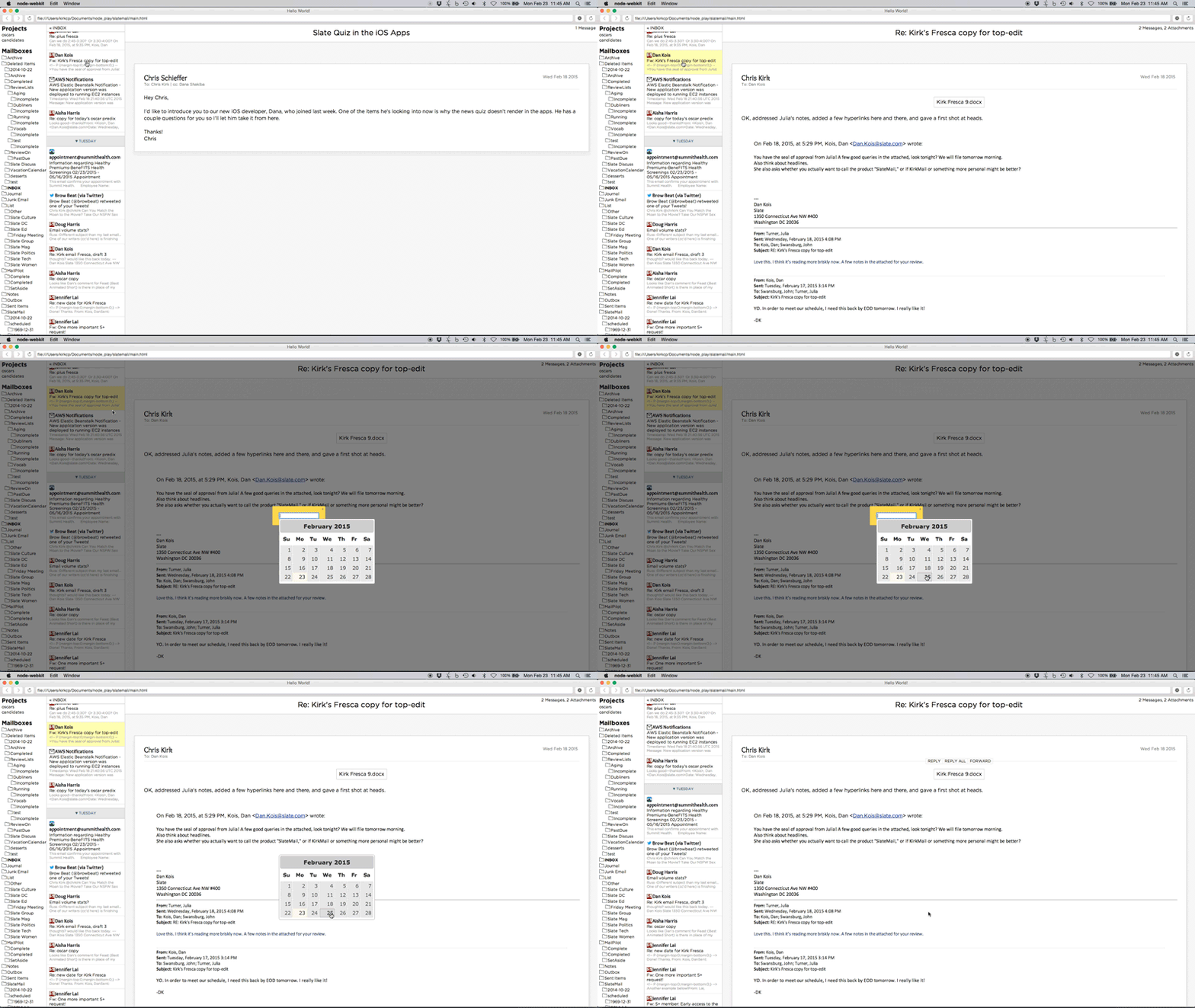
My projects feature has also been really useful. Instead of rifling through a monstrous folder hierarchy, trying to find that one folder where an email belonged, I tap P and type the project name. It’s the perfect sorting mechanism for a power user.
More importantly, SlateMail provides a broad view of a project that you don’t get in mainstream clients. With SlateMail’s project pane, I can see all the threads in a project, their completion states, and their attachments, all in one place. Let’s say I put this essay on the back burner and return to it in a couple of weeks. Where did I leave off? To whom do I still need to respond? Where is the most recent draft? Before SlateMail, I would rely on trial-and-error searching. Search emails from my boss. Search emails from my boss with attachments. Search emails from my boss directly to me with attachments older than two weeks. Too much work! Now, it’s as simple as clicking “projects” and typing “SlateMail.” My mail app finally reflects how I organize work mentally.
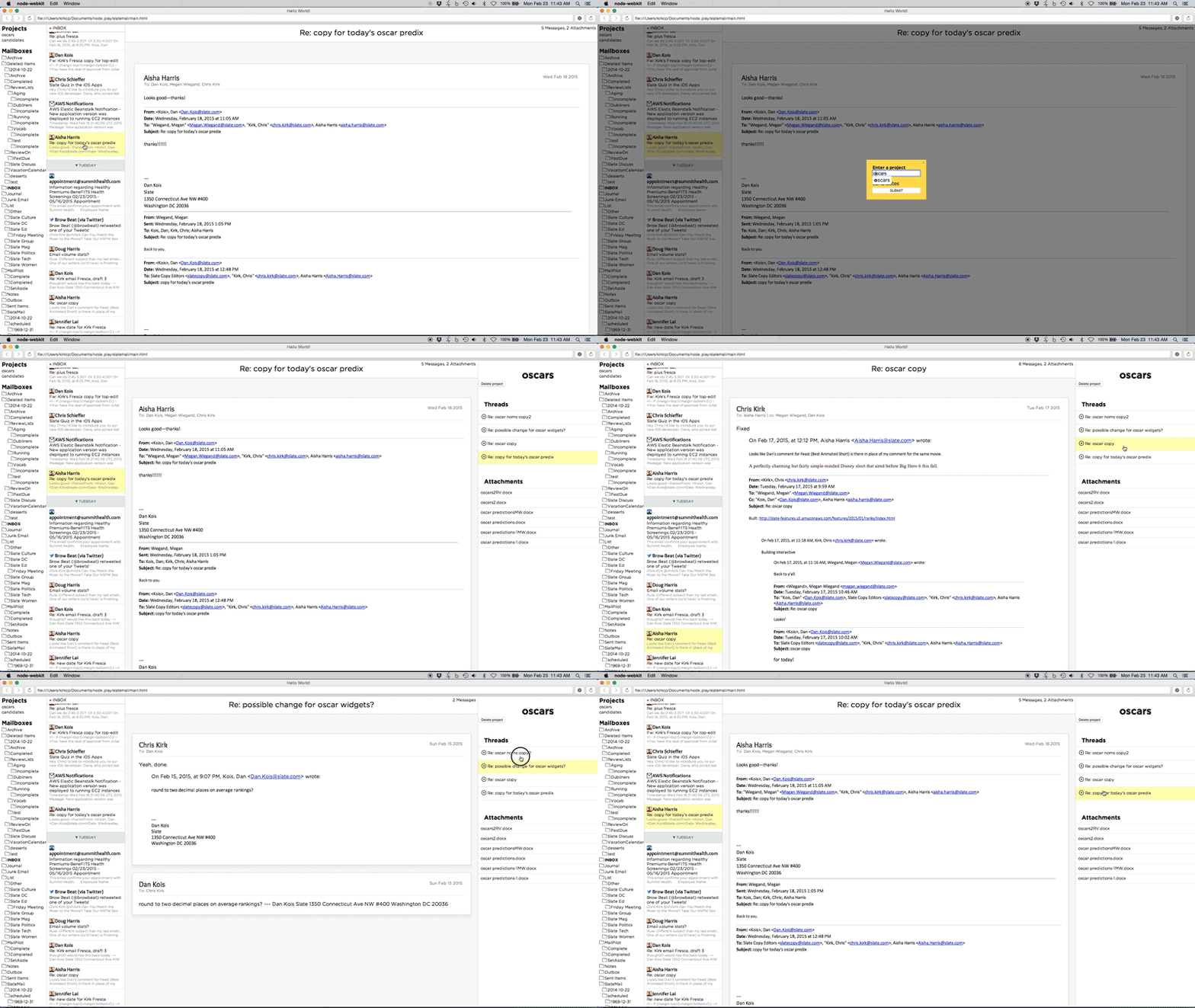
But my favorite feature by far is blocking senders. Sure, with most clients you can make mailbox rules or filters to weed people out, but SlateMail reduces that command to a single keystroke, and that makes me feel tyrannically powerful. When marketing scoundrels send me junk mail without the courtesy of an unsubscribe link, I simply press B to send them to the dungeons, never to be heard from again.
Nothing makes you appreciate the complexity of a technology, whether a toaster or an email application, like an attempt to build it yourself. In my quest to build a perfect email client for me, I saw how challenging it is to implement many of the features that we now take for granted, and harder still to invent new, better features.
For the end user, email's old infrastructure means slower, heavier apps and unreliable processes. But the larger consequence is hidden: Email apps are so hard to build correctly that they're rarely built at all. It's been more than a month, but SlateMail is still laughably buggy, and it’s missing features most people consider crucial, like search. I’m not sure that the application even works with most major email providers. If it does, there are a hundred opportunities for under-the-hood optimizations. How long would it take me to build a minimum viable product for most users, something that could put up even token competition in the email space? Years. But I promised to release SlateMail ready or not, so I hereby open it in all of its monstrosity to the world! Brave beta testers can download it here, and fellow developers can view my abominable code here. I’m eager to hear what people think of the product in its nascent state.
Email isn't a dragon to be slain. It's an old beast of burden, and we've abused it by throwing the whole spectrum of human communication on its tired back.
The barrier to entry is high, and as email evolves, it will only get higher. Email clients must avoid what software developers call “breaking changes”—modifications that wouldn't be backward-compatible, that would, in the case of email, put some clients or providers out in the cold. Everything has to work with everything else, even the ancient clients and providers people still use from a decade ago. “It's the plumbing in Manhattan,” Dave Baggett, founder of the email app Inky, told me. “You can complain all you want, but it's not going to be ripped out. It just can't. There are too many dependencies on it.” My email client will treat my email despair, but I don’t believe it can be cured. Email will never be what we want it to be. Reading through these protocols, writing all this code, I've realized why.
The problem isn’t email’s laborious syncing processes, or the exploding threads, or the medium’s off-putting formality, or even the volume of email we get. It’s that we’re changing faster than email can. We now expect our communication to be frictionless—we expect that we need merely to twitch to be understood. We expect our everyday apps to improve not once each decade but rather every month. The problem isn’t email. The problem is us.
Email isn't a dragon to be slain. It's an old beast of burden, and we've abused it by throwing the whole spectrum of human communication on its tired back. What if saving this loyal creature doesn't mean radically transforming it but merely easing its load? Maybe the dream of an email-free future isn't dead; maybe it just means a future in which email is merely a sliver of our communication rather than the whole pie. Already, Facebook and Snapchat and texting have relieved email's burden in the social sphere. Now, relief may be coming to the business world, where email yet remains the go-to tool for workplace communication.
Last year, Slate started to use Slack, one of a spate of new team collaboration tools. Like similar apps, such as Hall, Twoodo, and Hipchat, Slack is an instant messaging tool designed for the workplace. It allows a company to set up persistent chat rooms for specific topics of communication, called channels; the whole enchilada is only visible to Slate staffers, not anyone from the outside world. Now, staffers don't send out emails to indicate their whereabouts each morning; they simply post a few words in the #whereabouts channel. If New York staffers want to go out to lunch with co-workers, they simply alert the #slateny channel. Staffers can also chat directly with each other and create private chat rooms.
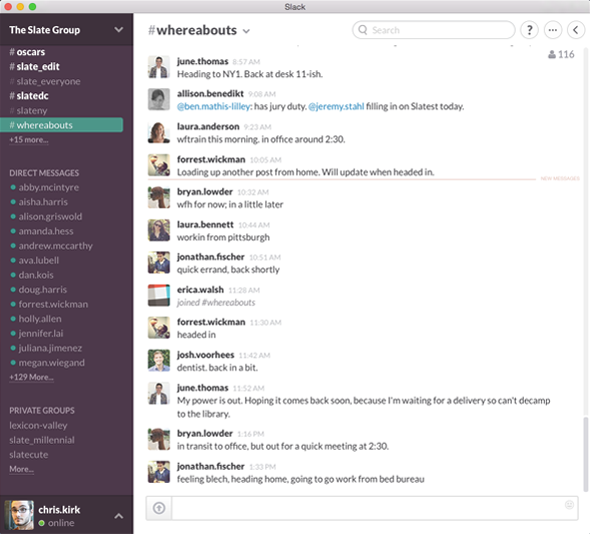 Slate
Slate’s #whereabouts Slack channel.
Screenshot courtesy of Slack
Many at Slate were skeptical at first. Wouldn't this just fracture our communication, force us to check two windows instead of one? I don't know precisely how much Slate's email volume has dropped since we started using Slack, but the word plummeted comes to mind. Mailing lists where panda-related debates once raged are now largely silent. Pithy retorts and bite-sized asks (and raging panda debates!) now belong to the Slack realm. Email, meanwhile, looks like mail again: the channel of the lengthy, semiformal message. I still hash out my projects in so many email threads, but now, when I need, say, a yes or a no from my boss or a URL from a developer, I don't draft a letter replete with salutations and signatures. “Email doesn’t disappear,” James Sherrett, Slack’s director of accounts, told me. “It just becomes a component of your communication.”
Tools like Slack won’t supplant email or cure email depression. But they offer a treatment and inspire a suggestion: As the providers and clients and standardizers nudge email into the future, maybe we should do a better job of fitting the tool to the task. Sure, that means experimenting with email apps and workflows to find the perfect combination for you or even, if you’re crazy, developing your own email client. But far more important is to lean a little less on this 50-year-old technology when so many other options are available to us: social media, team collaboration tools, even auditory corporeal interfacing (i.e., talking). The next time you’re about to send a quick email, don’t. Instead of forcing your contact to sync, thread, and triage, save email for the messages that fit the medium. Maybe together we’ll all find email happiness. How lovely the email was today!
Photos by Juliana Jiménez Jaramillo. Illustrations by Alex Eben Meyer. Layout compiled by Holly Allen.

 Expanded from



































![Googling inevitably reveals that my problem is caused by a known bug triggered by doing [the exact combination of things I want to do]. I can fix it, or wait a few years until I don't want that combination of things anymore, using the kitchen timer until then.](http://imgs.xkcd.com/comics/hard_reboot.png "Googling inevitably reveals that my problem is caused by a known bug triggered by doing [the exact combination of things I want to do]. I can fix it, or wait a few years until I don't want that combination of things anymore, using the kitchen timer until then.")