
Click here to go see the bonus panel!
Hovertext:
It's the only way to be sure.
Today's News:
 Chief Beef would like to remind you that fires can be put out by spraying the fire extinguishers, not throwing them.
 Can our new hero measure up to the might and legacy of Pinto Bean? He does have a sick hat...
Extended support for our expanding catalog of Linux games
A happy day for all worshipers of the mighty penguin! Ubuntu 16.04 LTS has been released and is fully supported by GOG.com, making your Linux gaming experience smoother and more stable than ever before.
Alongside the 16.04 release GOG.com will of course continue to support 14.04, although we suggest keeping your system updated to minimize the risk of running into any issues. Our support also extends to any future non-LTS releases, official Ubuntu flavors (like Kubuntu, Xubuntu, etc.), and derivatives (e.g. Linux Mint, elementaryOS etc.), so as long as your operating system is part of the Ubuntu family, you have nothing to worry about. Naturally, our technical support and refund policy apply to all these versions.
Our brave QA team has been tirelessly testing the games in our Linux catalog and we're happy to report that nearly all of them are already fully compatible with Ubuntu 16.04. The very few temperamental ones are getting fixed soon, so keep an eye out for patches.
AMD Radeon users should remember that the fglrx driver is removed from this release and they should use the opensource driver that is included in 16.04 by default. Read more about it here.
If you find yourself in need of technical support or more details regarding Linux matters, head to this FAQ. All the information in it will be updated soon.
Happy upgrades!

Your personal guide to the galaxy.
Rebel Galaxy, a swashbuckling space adventure from the developers of Torchlight, is available now, DRM-free on GOG.com with GOG Galaxy achievements and a 10% launch discount.
Action, exploration, discovery, trade, diplomacy. Can you ask for more in a title about the fantasy of space?
How about power? You're in command of a hulking, terrifying star destroyer. You will traverse the outer reaches of space doing what you can to get by - whether it's fending off or hunting pirates, exploring the unknown, mining, or scavenging - all the paths and choices are yours. Your riches can be wisely invested, or spent on a few more guns and a bigger chassis. But the huge universe open before you may just be more than you've bargained for. Just... Try to survive without blowing up everything.
Well, maybe you could also ask for a killer soundtrack. Done.
Check out the launch trailer, and set off on the biggest adventure of your life:

Mordremoth is rallying its forces, sending armies of Mordrem out of the Maguuma Jungle to test Central Tyria’s defenses. Drive back the invasion, and stop the jungle dragon from sinking its teeth into vulnerable territory!
From 9:00 a.m. Pacific Time (UTC-7) on September 10 through 9:00 a.m. Pacific Time (UTC-7) on September 14, Mordrem will be staging periodic incursions into Brisban Wildlands, Kessex Hills, and Diessa Plateau. Keep an eye on the world event UI, which will let you know when Mordremoth is launching its assault. Coordinate with other players to stop the Mordrem in their tracks, and you’ll earn Mordrem Blooms. Mordrem Blooms are the research samples the Durmand Priory seek. In exchange for the research samples, the Durmand Priory is offering concessions as a reward.
This event is recommended for players level 18 and up. If you’re just starting your journey into Tyria, you can prepare by exploring the game world, completing maps, learning your character’s abilities, and making friends to join forces with during the invasion. Guilds will be
seeking new members, so be on the lookout for one that’s right for you! In addition to all the perks of guild membership, you’ll have allies on your side during this tumultuous time.
ArenaNet developers will be joining players in the game throughout the invasion, so look for the red ArenaNet logo, and be sure to say hello. We’d also love to see your screenshots of the event, so tweet us your favorites @GuildWars2 or submit them to the official Guild Wars 2 Tumblr! Our team will be sharing the best of the best through our social-media channels through the week of September 13.
The hyperloop sounds like science fiction, Elon Musk’s pipe dream: leapfrog high-speed rail and go right to packing us into capsules that fling us across the country in hours using what are, essentially, pneumatic tubes. It sounds crazy, when you think about it.
It’s starting to look a little less crazy.
Hyperloop Transportation Technologies announced today that it has signed agreements to work with Oerlikon Leybold Vacuum and global engineering design firm Aecom. The two companies will lend their expertise in exchange for stock options in the company, joining the army of engineers from the likes of Boeing and SpaceX already lending their time to the effort.
Read 13 remaining paragraphs | Comments
Frontier Developments announced a major set of updates to space shooting/trading/exploration sim Elite: Dangerous this morning at the 2015 Gamescom conference: more ships, planetary landings, and a simultaneous release of the CQC arena combat module.
The first thing to hit will be CQC, which stands for "close-quarters combat." We had a chance to try out CQC at E3 a couple of months ago, and though the instant-action combat was fun, we weren’t terribly thrilled with the plan to launch CQC as a timed XBox One exclusive. Fortunately, Frontier has dropped that idea: when the CQC expansion launches in September, it will do so simultaneously on Windows, Mac, and XBox One (in fact, the entire game will officially be launched on XBox One at the same time).
Following CQC will be another free expansion, tentatively called Ships, focused on—obviously—ships. The update will raise the number of flyable vessels from the existing 20 to 30; several of the upcoming ships have been name-dropped by Frontier already (including the Panther Clipper, the Federal Corvette, the Imperial Eagle, the Federal Dropship Mk. II, and most recently the Cobra Mk IV). The Ships update is expected to be released this holiday season.
Read 4 remaining paragraphs | Comments
Windows 10, by default, has permission to report a huge amount of data back to Microsoft. By clicking through "Express Settings" during installation, you allow Windows 10 to gather up your contacts, calendar details, text and touch input, location data, and a whole lot more, and then send it all back to Microsoft so that it can be used for personalisation and targeted ads.
This isn't entirely unusual: recent versions of Windows, unless you explicitly say otherwise, have reported some kind of data back to Microsoft. Windows 10 definitely goes one step (well, a few steps) further though, primarily thanks to Cortana (which ideally needs to be personalised/optimised based on your voice inputs, calendar, contacts, etc.), and other "cloudy" features that somewhat necessitate the collection and squirting of personal data back to Microsoft.
That isn't to say you should be happy about this state of affairs, however. If you'd like to retain most of your privacy and keep your personal data on your PC, Windows 10 can be configured in that way. Just be warned that there are quite a few toggles that need to be turned off, and you'll lose some functionality as well (Cortana won't work, for example).
Warren.SmithLooked at my w10 notfiication last night, apparently they are distributing it in waves and I guess I haven't been in one yet.
While the IT managers of the world stress about Windows 10's buggy mail client, default browser, and dodgy domains, for the gamer, Microsoft's latest and greatest OS is an exciting proposition.
Windows 10, if you didn't know, comes with DirectX 12, which promises significant performance increases (particularly for AMD graphics card users), thanks to its new low-level API features. The trouble is, right now, there aren't actually any games out there that use DX12. While Nvidia and AMD have both launched new drivers to bring DX12 support to a range of their current GPUs, there's not a single DX12 game to play.
3DMark has a neat draw call benchmark that gives us some idea of how much faster DX12 will be, but it's entirely synthetic. One of the first games to actually use DX12 will be StarDock's upcoming RTS Ashes of the Singularity, with an early beta build showing a significant uplift in performance. We were hoping to check out a special benchmark build of the game this week, but sadly it's been pushed back.
One of the first Windows 10 features we learned about was the return of the Start menu, which is sort of funny, since the concept of the Start menu is over two decades old. Microsoft tried to replace it with the Start screen in Windows 8, and you only have to look at the adoption numbers to see how most consumers and businesses felt about it.
The Start menu has changed a lot over the years, but there are a handful of common elements that have made it all the way from Windows 95 to Windows 10. We fired up some virtual machines and traveled back in time to before there was a Start menu to track its evolution from the mid '90s to now.
Andrew Cunningham
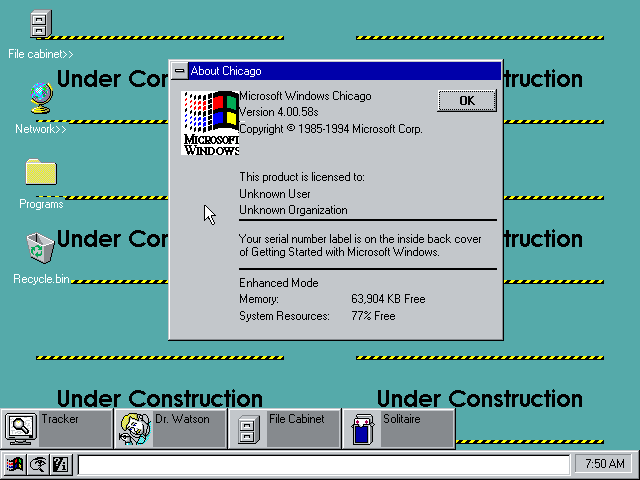
Windows Chicago is the bridge between Windows 3.x and 9x.
5 more images in gallery
What you’re looking at here is build 58s of “Chicago,” one of the earliest extant betas of what would go on to become Windows 95. Things still look awfully Windows 3.1-ish in many parts of this build, but you can see the seeds that would later grow into the familiar Start Menu, Taskbar, and My Computer features, among a few other things.
Read 40 remaining paragraphs | Comments
On Wednesday, Volkswagen said that a 22-year-old external contractor for the company had been killed by a robot at a production factory in Baunatal, Germany. Heiko Hillwig, a VW spokesperson speaking to the AP about the incident, said that the robot grabbed the worker and crushed him against a metal plate. The worker died later at a nearby hospital due to complications from his injuries.
Hillwig told the AP, "initial conclusions indicate that human error was to blame.” He added that the contractor was helping set up the robot and was inside the metal safety cage that usually separates personnel from the metal-manipulating robots. Another worker was present when the incident occurred, but because he was behind the barrier, he was unharmed. Ars has reached out to Volkswagen but has not yet received a response.
According to the Financial Times, "A Volkswagen spokesman stressed that the robot was not one of the new generation of lightweight collaborative robots that work side-by-side with workers on the production line and forgo safety cages.”
Read 3 remaining paragraphs | Comments
 Anyone taking bets on it being a 20th anniversary edition? September 2017?
If there's one thing more universally reviled that interstitial ads—you know, those full-page ads that force you to wait for a few interminable seconds before you can get to the content—it's auto-playing Flash ads, especially if they contain audio. Good news: The next version of Chrome will automatically block Flash content that isn't "central to the webpage."
Google has been working with Adobe for years to get Flash and Chrome to play nicely together, but clearly Google has decided that Flash usage on the Web needs to be curtailed and controlled just a little bit more.
Writing on the official Google Chrome Blog, Google's Tommi Li explains that this new feature is all about battery life: Flash animations still consume a large amount of CPU time, which in turn slurps down some of your laptop's vital lithium juice. By "intelligently" pausing any Flash elements that aren't central to the surfing experience—which is essentially a euphemism for "ads"—mobile users may experience a non-negligible boost in battery life.
Read 3 remaining paragraphs | Comments
After three long years of going hungry with six cores, red meat is finally back on the menu for enthusiasts. And not just any gamey slab full of gristle with shared cores, either. With its new eight-core Haswell-E CPU, Intel may have served up the most mouth-watering, beautifully seared piece of red meat in a long time.
And it’s a good thing, too, because enthusiast’s stomachs have been growling. Devil’s Canyon? That puny quad-core was just an appetizer. And that dual-core highly overclockable Pentium K CPU? It’s the mint you grab on your way out of the steak house.
No, what enthusiasts have craved and wanted—ever since Intel’s original clock-blocking job on the original Sandy Bridge-E—is a true, overclockable enthusiast chip with eight cores. So if you’re ready for a belt loosening belly full of enthusiast-level prime rib, pass the horseradish, get that damned salad off our table, and read on to see if Intel’s Haswell-E is everything we hoped it would be.

The first consumer Intel eight-core arrives at last
Being a member of the PC enthusiast class is not an easy path to follow. Sure, you get the most cores and priciest parts, but it also means you wait a hell of a long time between CPU upgrades. And with Intel’s cadence the last few years, it also means you get the leftovers. It’s been that way since Intel went with its two-socket strategy with the original LGA1366/LGA1156. Those who picked the big-boy socket always got the shaft.

The original Ivy Bridge in LGA1156 socket, for example, hit the streets in April of 2012. Intel then rewarded the small-socket crowd with its Haswell in June of 2013. It wasn’t until September of 2013 that big-boy socket users got Ivy Bridge-E for their LGA2011s. But with Haswell already tearing up the benchmarks, who the hell cared?
Well, that time has come with Haswell-E, Intel’s first replacement for the aging LGA2011 platform since 2011. For the first time since the original Pentium 4 Extreme Edition, paying the premium price actually nets you more: namely, the company’s first consumer eight-core CPU.
Overclocking to 4.5GHz and Beyond
We were a little leery of Haswell when it first launched last year. It was, after all, a chip seemingly tuned for the mobile/laptoppy world we were told was our post-PC apocalyptic future. Despite this, we recognized the chip as the CPU to have for new system builders. Clock for clock, its 22nm process tri-gate transistors put everything else to shame—even the six-core Core i7-3930K chip in many tasks. So it’s no surprise that when Intel took a quad-core Haswell, put it in the Xerox machine, and hit the copy button, we’d be ecstatic. Eight cores are decidedly better than six or four cores when you need them.
The cores don’t come without a cost though, and we don’t mean the usual painful price Intel asks for its highest-end CPUs. It’s no secret that more cores means more heat, which means lower clock speeds. That’s one of the rationales Intel used with the original six-core Core i7-3960X. Although sold as a six-core, the original Sandy Bridge-E was built using an eight-core die on which Intel had switched off two cores. Intel said it wanted to balance the needs of the many versus the needs of the few—that is, by turning off two of the cores, the part could hit higher clock speeds. Indeed, the Core i7-3960X had a base clock of 3.3GHz and Turbo Boost of 3.9GHz, and most could overclock it to 5GHz. The same chip packaged as a Xeon with all eight cores working—the Xeon E5-2687W—was locked down at 3.1GHz and mostly buzzed along at 3.4GHz.
Fully Unlocked
With the new Core i7-5960X—the only eight-core of the bunch—the chip starts at a seemingly pedestrian 3GHz with a Turbo Boost of one core up to 3.5GHz. Those subsonic clock speeds won’t impress against the Core i7-4790K, which starts at 4GHz.
You’ll fi nd more on how well Haswell-E performs against Haswell in our performance section, but that’s the price to be paid, apparently, to get a chip with this many cores under the heat spreader. Regarding thermals, Intel has increased the TDP rating to 140 watts versus the 130 watts of Ivy Bridge-E and Sandy Bridge-E.
If the low clocks annoy you, the good news is the part is fully unlocked, so overclocking has been approved. For our test units, we had tight deadlines, so didn’t get far with our overclocking efforts. But talking with vendors, most seem pleased with the clock speeds they’re seeing. One vendor told us overclocks of all cores at 4.5GHz are already obtainable, with newer microcode updates expected to improve that. With even the Devil’s Canyon Core i7-4790K topping out at 4.7GHz to 4.8GHz, a 4.5GHz is actually a healthy overclock for an eight-core CPU.
When you dive down into the actual cores though, much is the same, of course. It’s based on a 22nm process. It has “3D” trigate transistors and integrated voltage regulation. Oh, and it’s also the first CPU to feature an integrated DDR4 memory controller.
The memory stalemate is over
If you think Haswell-E has been a long wait, just think about DDR3, which made its debut as main memory in 2007 systems. Yes, 2007. The only component that’s lasted seven years in most enthusiasts’ systems might be the PSU, but it’s even rare to find anyone kicking a 500-watt PSU from 2007 these days. DDR4 has been in gestation seemingly as long, so why the delay? From what we can tell, resistance to yet another new memory standard when people thought the PC was dying has been the root delay. And it didn’t help that no one wanted to stick their head out first. RAM makers didn’t want to begin producing DDR4 in volume until AMD or Intel made chipsets for it, while AMD and Intel didn’t want to support it because of the costs it would add to PCs. The stalemate finally ends with Haswell-E, which integrates a quadchannel DDR4 memory controller into its die.
Initial launch speeds of DDR4 clock in at DDR4/2133. For those already running DDR3 at 3GHz or higher, a 2,133 data rate is a snooze, but you should realize that anything over 2,133 is overclocked RAM. With DDR4, the JEDEC speeds (the body that sets RAM standards) already has target data rates of 3,200 on the map. RAM vendors we’ve talked to are already shopping DIMMS near that speed.
But the best part of DDR4 may be its density message. For years, consumer DDR3 has topped out at 8GB on a DIMM. With DDR4, we should see 16B DIMMs almost immediately, and stacking of chips is built into the standard, so it’s possible we’ll see 32GB DIMMs over its lifetime. On a quad-channel, eight-DIMM motherboard, you should expect to be able to build systems with 128GB of RAM using non-ECC DIMMs almost immediately. DDR4 also brings power savings and other improvements, but the main highlights enthusiasts should expect are higher densities and higher clocks. Oh, and higher prices. RAM prices haven’t been fun for anyone of late, but DDR4 will definitely be a premium part for some time. In fact, we couldn’t even get exact pricing from memory vendors as we were going to press, so we’re bracing for some really bad news.
Now a feature to be blocked
Over the years, we’ve come to expect Intel to clock-block core counts, clock speeds, Hyper-Threading, and even cache for “market segmentation” purposes. What that means is Intel has to find ways to differentiate one CPU from another. Sometimes that’s by turning off Hyper-Threading (witness Core i5 and Core i7) and sometimes its by locking down clock speeds. With Haswell-E though, Intel has gone to new heights with its clock-blocking by actually turning off PCIe lanes on some Haswell-E parts.
At the top end, you have the 3GHz Core i7-5960X with eight cores. In the midrange you have the six-core 3.5GHz Core i7-5930K. And at the “low-end” you have the six-core 3.3GHz Core i7-5820K. The 5930K and the 5820K are virtually the same in specs except for one key difference: The PCIe lanes get blocked. Yes, while the Core i7-5960X and Core i7-5930K get 40 lanes of PCIe 3.0, the Core i7-5820K gets an odd 28 lanes of PCIe 3.0. That means those who hoped to build “budget” Haswell-E boxes with multiple GPUs may have to think hard about using the lowest-end Haswell-E chip. The good news is that for most people, it won’t matter. Plenty of people run Haswell systems with SLI or CrossFire, and those CPUs are limited to 16 lanes. Boards with PLX switches even support four-way GPU setups.
Still, it’s a brain bender to think that when you populate an X99 board with the lowest-end Haswell-E, the PCIe configuration will change. At least they’ll work, just more slowly. Intel says it worked with board vendors to make sure all the slots will function with the budget part.
Finally, the chipset high-end enthusiasts want, sort of
You know what we won’t miss? The X79 chipset. No offense to X79 owners, while the Core i7-4960X can stick around for a bit, X79 can take its under-spec’ed butt out of our establishment. Think we’re being too harsh? We don’t.
X79 has no native USB 3.0 support. And its SATA 6Gb/s ports? Only two. It almost reads like a feature set from the last decade. Fortunately, Intel has gone hog wild in overcompensating for the weaknesses of X79.
X99 has eight USB 2.0 ports and six USB 3.0 ports. For SATA 6Gb/s, Intel adds 10 ports to X99. Yes, 10. That gazongo number, however, is balanced out by two glaring omissions: no official SATA Express or M.2 support that came with Z97. Intel would only say motherboard vendors were free to implement it. We guess Intel left the feature off as the firm is a stickler for testing new interfaces before adding official support. At this point, SATA Express has been a noshow. After all, motherboards with SATA Express became available in May with Z97, yet we still haven’t seen any native SATA Express drives. We expect most vendors to simply add it through discrete controllers.

Intel overcompensated in SATA on X99 but oddly left SATA Express on the cutting-room floor.
One potential weakness of X99 is Intel’s use of the DMI 2.0. That offers roughly 2.5GB/s of transfer speed between the CPU and the south bridge or PCH, but with the board hanging 10 SATA devices, USB 3.0, Gigabit Ethernet, and 8 PCIe Gen 2.0 lanes off that link, there’s potential for massive congestion in a worst-case scenario. But, says Intel, you can just hang devices off the plentiful PCIe Gen 3.0 from the CPU.
That does bring up our last point: the PCIe lanes. There will be confusion over the PCIe lane configuration on systems with Core i7-5820K parts. With only 28 lanes available, there’s concern whole slots will be turned off. That won’t happen, Intel says. Instead, if you go with the low-rent ride, you simply lose bandwidth, but will still have more than you can get from a normal LGA1150-based Core i7-4770K. It will be confusing, but we expect motherboard vendors to sort it out.
Haswell-E does bring one more interesting PCIe configuration—the ability to run five graphics cards in the PCIe slots at x8 speeds. What for? Intel didn’t explain. Maybe mining configurations where miners are already running six GPUs. But mining doesn’t seem to need the bandwidth that a x8 slot would provide. The other possibility is a five-way graphics card configuration being planned by Nvidia or AMD. At this point it’s just conjecture, but one thing we know is that X99 is a welcome upgrade. Good riddance X79.

How many cores do you really need?
Like great technology philosopher Sir Mix-A-Lot says, we like big cores and we cannot lie. We want as many cores as legally available. But we recognize that not everyone rolls as hard as we do with a posse of threads. With Intel’s first eight-core CPU, consumers can now pick from two cores all the way to eight on the Intel side of the aisle—and then there’s Hyper-Threading to confuse you even more. So, how many cores do you need? We’ll give you the quick-and-dirty lowdown.
Two Cores
Normally, we’d completely skip dual-cores without Hyper-Threading because the parts tend to be the very bottom end of the pool Celerons. Our asterisk is the new Intel Pentium G3258 Anniversary Edition, or “Pentium K,” which is a real hoot of a chip. It easily overclocks and is dead cheap. It’s not the fastest in content creation by a long shot, but if we were building an ultra-budget gaming rig and needed to steal from the CPU budget for a faster GPU, we’d recommend this one. Otherwise, we see dual-cores as purely ultra-budget parts today.
Two Cores with Hyper-Threading
For your parents who need a reliable, solid PC without overclocking (you really don’t want to explain how to back down the core voltage in the BIOS to grandma, do you?), the dual-core Core i3 parts fulfill the needs of most people who only do content creation on occasion. Hyper-Threading adds value in multi-threaded and multi-tasking jobs. You can almost think of these chips with Hyper-Threading as three-core CPUs.
Four Cores
For anyone who does content creation such as video editing, encoding, or even photo editing with newer applications, a quad-core is usually our recommended part. Newer game consoles are also expected to push minimum specs for newer games to quadcores or more as well, so for most people who carry an Enthusiast badge, a quad-core part is the place to start.

It’s indeed a glorious thing to see a task manager with this many threads, but not everyone needs them.
Four Cores with Hyper-Threading
Hyper-Threading got a bad name early on from the Pentium 4 and existing software that actually saw it reduce performance when turned on. Those days are long behind us though, and Hyper-Threading offers a nice performance boost with its virtual cores. How much? A 3.5GHz Core i7 quad-core with Hyper-Threading generally offers the same performance on multi-threaded tasks as a Core i5 running at 4.5GHz. The Hyper-Threading helps with content creation and, we’d say, if content creation is 30 percent or less of your time, this is the place to be. It’s the best fit for 90 percent of enthusiasts.
Six Cores with Hyper-Threading
Once you pass the quad-core mark, you are moving pixels professionally in video editing, 3D modeling, or other tasks that necessitate the costs of a six-core chip or more. We still think that for 90 percent of folks, a four-core CPU is plenty, but if losing time rendering a video costs you money (or you’re ADD), pay for a six-core or more CPU. How to decide if you need six or eight cores? Read on.
Eight Cores with Hyper-Threading
Not everyone needs an eight-core processor. In fact, one way to save cash is to buy the midrange six-core chip. But, if time is money, an eight-core chip will pay for itself. For example, the eight-core Haswell-E is about 45 percent faster than the four-core Core i7-4790K chip. If your render job is three hours, that’s more time working on other paying projects. The gap gets smaller between the six-core and the eight-core, so it becomes about how much your time is worth. To give you an idea, the 3.3GHz Core i7-5960X is about 20 percent faster than the Core i7-4960X running at 4GHz.

The LGA2011-based Core i7-4960X (left) and the LGA2011-v3-based Core i7-5960X (middle) dwarf the Core i7-4790K chip (right). Note the change in the heat spreader between the older 4960X and 5960X, which now has larger “wings” to make it easier to remove the CPU. The breather hole, which allows for curing of the thermal interface material, has also been moved. Finally, while the chips are the same size, they‘re keyed differently to stop you installing a newer Haswell-E into an older Ivy Bridge-E board.
Performance junkies, rejoice! Haswell-E hits it out of the ballpark
For our testing, we set up three identical systems with the fastest available CPUs for each platform. Each system used an Nvidia GeForce GTX 780 with the same 340.52 drivers, Corsair 240GB Neutron GTX SSDs, and 64-bit Windows 8.1 Enterprise. Since we’ve had issues with clock speeds varying on cards that physically look the same, we also verified the clock speeds of each GPU manually and also recorded the multiplier, b-clock, and speeds the parts run at under single-threaded and multi-threaded loads.
So you know, the 3GHz Core i7-5960X’s would run at 3.5GHz on single-threaded tasks but usually sat at 3.33GHz on multithreaded tasks. The 3.6GHz Core i7-4960X ran everything at 4GHz, including multithreading tasks. The 4GHz Core i7-4790K part sat at 4.4GHz on both single- and multithreaded loads.
For Z97, we used a Gigabyte Z97M-D3H mobo with a Core i7-4790K “Devil’s Canyon” chip aboard. An Asus Sabertooth X79 did the duty for our Core i7-4960X “Ivy Bridge-E” chip. Finally, for our Core i7-5960X chip, we obtained an early Gigabyte X99-Gaming 5 motherboard. The board was pretty early but we feel comfortable with our performance numbers as Intel has claimed the Core i7-5960X was “45 percent” faster than a quadcore chip, and that’s what we saw in some of our tests.
One thing to note: The RAM capacities were different but in the grand scheme of things and the tests we ran, it has no impact. The Sabertooth X79 had 16GB of DDR3/2133 in quad-channel mode, the Z97M-D3H had 16GB of DDR3/2133 in dual-channel mode. Finally, the X99-Gaming 5 board had 32GB of Corsair DDR4/2133. All three CPUs will overclock, but we tested at stock speeds to get a good baseline feel.
For our benchmarks, we selected from a pile of real-world games, synthetic tests, as well as real-world applications across a wide gamut of disciplines. Our gaming tests were also run at very low resolutions and low-quality settings to take the graphics card out of the equation. We also acknowledge that people want to know what they can expect from the different CPUs at realistic settings and resolutions, so we also ran all of the games at their highest settings at 1920x1080 resolution, which is still the norm in PC gaming.

We used a Gigabyte X99 motherboard (without the final heatsinks for the voltageregulation modules) for our testing.
The Results
We could get into a multi-sentence analysis of how it did and slowly break out with our verdict but in a society where people get impatient at the microwave, we’ll give you the goods up front: Holy Frakking Smokes, this chip is fast! The Core i7-5960X is simply everything high-end enthusiasts have been dreaming about.
Just to give you an idea, we’ve been recording scores from $7,000 and $13,000 PCs in our custom Premiere Pro CS6 benchmark for a couple of years now. The fastest we’ve ever seen is the Digital Storm Aventum II that we reviewed in our January 2014 issue. The 3.3GHz Core i7-5960X was faster than the Aventum II’s Core i7-4960X running at 4.7GHz. Again, at stock speeds, the Haswell-E was faster than the fastest Ivy Bridge-E machine we’ve ever seen.
It wasn’t just Premiere Pro CS6 we saw that spread in either. In most of our tests that stress multi-threading, we saw roughly a 45 to 50 percent improvement going from the Haswell to the Haswell-E part. The scaling gets tighter when you’re comparing the six-core Core i7-4960X, but it’s still a nice, big number. We generally saw a 20 to 25 percent improvement in multithreaded tasks.
That’s not even factoring in the clock differences between the parts. The Core i7-4790K buzzes along at 4.4GHz—1.1GHz faster than the Core i7-5960X in multithreaded tasks—yet it still got stomped by 45 to 50 percent. The Core i7-4960X had a nearly 700MHz clock advantage as well over the eight-core chip.
The whole world isn’t multi-threaded, though. Once we get to workloads that don’t push all eight cores, the higher clock speeds of the other parts predictably take over. ProShow Producer 5.0, for example, has never pushed more than four threads and we saw the Core i7-5960X lose by 17 percent. The same happened in our custom Stitch.EFx 2.0 benchmark, too. In fact, in general, the Core i7-4790K will be faster thanks to its clock speed advantage. If you overclocked the Core i7-5960X to 4GHz or 4.4GHz on just four cores, the two should be on par in pure performance on light-duty workloads.
In gaming, we saw some results from our tests that are a little bewildering. At low-resolution and low-quality settings, where the graphics card was not the bottleneck, the Core i7-4790K had the same 10 to 20 percent advantage. When we ran the same tests at ultra and 1080p resolution, the Core i7-5960X actually had a slight advantage in some of the runs against the Core i7-4790K chip. We think that may be from the bandwidth advantage the 5960X has. Remember, we ran all of the RAM at 2,133, so it’s not DDR4 versus DDR3. It’s really quad-channel versus dual-channel.
We actually put a full breakdown of each of the benchmarks and detailed analysis on www.maximumpc.com if you really want to nerd out on the performance.
What You Should Buy
Let’s say it again: The Core i7-5960X stands as the single fastest CPU we’ve seen to date. It’s simply a monster for performance in multi-threaded tasks and we think that once you’ve overclocked it, it’ll be as fast as all the others in tasks that aren’t threadheavy workloads.
But Is It for You?
That performance, however, doesn’t mean everyone should start saving to buy a $1,000 CPU. No, for most people, the dynamic doesn’t change. For the 80 percent of you who fall into the average Joe or Jane nerd category, a four-core with Hyper-Threading still offers the best bang for the buck. It won’t be as fast as the eight-core, but unless you’re really working your rig for a living, made of money, or hate for your Handbrake encodes to take that extra 25 minutes, you can slum it with the Core i7-4790K chip. You don’t even have to heavily overclock it for the performance to be extremely peppy.
For the remaining 20 percent who actually do a lot of encoding, rendering, professional photo editing, or heavy multi-tasking, the Core i7-5960X stands as the must-have CPU. It’s the chip you’ve been waiting for Intel to release. Just know that at purely stock speeds, you do give up performance to the Core i7-4790K part. But again, the good news is that with minor overclocking tweaks, it’ll be the equal or better of the quad-core chip.
What’s really nice here is that for the first time, Intel is giving its “Extreme” SKU something truly extra for the $999 they spend. Previous Core i7 Extreme parts have always been good overclockers, but a lot of people bypassed them for the midrange chips such as the Core i7-4930K, which gave you the same core counts and overclocking to boot. The only true differentiation Extreme CPU buyers got was bragging rights. With Haswell-E, the Extreme buyers are the only ones with eight-core parts.
The Upgrade Dilemma
Bang-for-the-buck buyers also get a treat from the six-core Core i7-5820K chip. At $389, it’s slightly more expensive than the chip it replaces—the $323 Core i7-4820K—but the extra price nets you two more cores. Yes, you lose PCIe bandwidth but most people probably won’t notice the difference. We didn’t have a Core i7-5820K part to test, but we believe on our testing with the Core i7-5960X that minor overclocking on the cheap Haswell-E would easily make it the equal of Intel’s previous six-core chips that could never be had for less than $580.
And that, of course, brings us to the last point of discussion: Should you upgrade from your Core i7-4960X part? The easy answer to that is no. In pure CPU-on-CPU showdowns, the Core i7-4960X is about 20 percent slower in multi-threaded tasks, and in light-duty threads it’s about the same, thanks to the clock-speed advantage the Core i7-4960X has. There are two reasons we might want to toss aside the older chip, though. The first is the pathetic SATA 6Gb/s ports, which, frankly, you actually need on a heavy-duty work machine. The second reason would be the folks for whom a 20 percent reduction in rendering time would actually be worth paying for.

U.S. and Chinese researchers have come up with a potential solution for all the electronic waste that's created by obsolete semiconductors -- wooden chips. No, not the kind you decorate your yard with or use to fuel a camp fire, but biodegradable computer chips made out of cellulose nanofibril (CNF), an eco-friendly material that's derived almost entirely from wood.
Taking into consideration the rapid advances in technology and subsequent short lifespan of electronic devices due to frequent upgrades, the researchers claim that using a wood-based CNF substrate "is clearly an ideal substitution for electronics that exist today."
Since pure CNF film is vulnerable to water and moisture, the researchers coat the substrate with a special epoxy resin to make it much more hydrophobic.
"You don't want it to expand or shrink too much. Wood is a natural hydroscopic material and could attract moisture from the air and expand," project leader Zhiyong Cai said, according to New Electronics. "With an epoxy coating on the surface of the CNF, we solved both the surface smoothness and the moisture barrier."
One of the other benefits to wood-based chips is that they don't require the use of gallium arsenide (GaAs), a toxic material containing arsenic that's commonly found in high-speed communication devices like mobile phones and tablets.
As for the cost of these eco-friendly semiconductors, it would depend on the application.
Could an IBM mainframe from the 1960s mine Bitcoin? The idea seemed crazy, so I decided to find out. I implemented the Bitcoin hash algorithm in assembly code for the IBM 1401 and tested it on a working vintage mainframe. It turns out that this computer could mine, but so slowly it would take more than the lifetime of the universe to successfully mine a block. While modern hardware can compute billions of hashes per second, the 1401 takes 80 seconds to compute a single hash. This illustrates the improvement of computer performance in the past decades, most famously described by Moore's Law.
The photo below shows the card deck I used, along with the output of my SHA-256 hash program as printed by the line printer. (The card on the front of the deck is just for decoration; it was a huge pain to punch.) Note that the second line of output ends with a bunch of zeros; this indicates a successful hash.
Bitcoin, a digital currency that can be transmitted across the Internet, has attracted a lot of attention. If you're not familiar with how it works, the Bitcoin system can be thought of as a ledger that keeps track of who owns which bitcoins, and it allows these to be transferred from one person to another. The interesting thing about Bitcoin is there's no central machine or authority keeping track of things. Instead, the records are spread across thousands of machines on the Internet.
Read 23 remaining paragraphs | Comments
| archive - contact - sexy exciting merchandise - search - about | |||
 |
|||
| ← previous | April 15th, 2015 | next | |
|
April 15th, 2015: Remember yesterday's comic about marketing? Well GUESS WHAT: someone on Australia needs to read my comic more or at least realize it's supposed to be jokes and not actual business advice. OH WELL?? Are you in or near Spain? WELL GOOD, because that's where I am too! And I'll be at the 33rd Salón Internacional del Cómic de Barcelona this Friday, Saturday, and Sunday. Come say hi!! I will have a translator too so we can say hi in each other's languages! I AM REALLY EXCITED TO FIND THE BOUNDARIES OF WHAT THIS PERSON WILL AND WILL NOT TRANSLATE. – Ryan | |||
Warren.SmithAAAAAAAAAHHHHHHHG;IDJSAIGJEIW;NMGIEWNB;ILJMLWEHSAHWERHBESFDBN
 Find the best torrent software for you
One of our favorite BitTorrent clients, uTorrent, recently came under fire over complaints that an updated build silently installed a cryptocurrencly miner called EpicScale. Several uTorrent users took to the Internet to voice their displeasure over the situation, though it turns out there was plenty of blame to go around. On the user side, those affected by the mining software failed to read the fine print and gave EpicScale the green light to install. As for uTorrent, it could have done a better job letting users know what they were getting into, as the bundled software looked a lot like a Tos/EULA box.
EpicScale isn't a nerfarious software application. In fact, the program taps into unused CPU cycles to solve "math problems, for weather prediction, physics simulations, cryptography (including cryptocurrency mining), and more" and donates about 75 percent of the proceeds it generates to various charities.
In the end, we're still fans of uTorrent, though it's not the only BitTorrent client on the block. Far from it. To be clear, we don't condone using BitTorrent software to illegally download and share copyrighted files, but we do recognize it as a wonderful platform for legal content, especially large files like Linux ISOs, game updates and demos, non-copyrighted videos, and so forth. Therefore, we took it upon ourselves to gather up five worthy BitTorrent client alternatives to uTorrent, all of which are capable of getting the job done. Let's have a look.

Straight to the point, qBittorrent describes its main purpose as being an alternative to uTorrent, so it's a strong contender on hype alone. In practice, qBittorrent offers up a similar user interface to uTorrent, so if you're making the switch, you'll find that it's easy to use and navigate. And if you're worried about situations like cryptocurrency miners slipping underneath your nose and putting your CPU to work without your knowledge, you can rest easy knowing that qBittorrent doesn't bundle any other software in its installation, nor does it serve up ads.
As mentioned, we're fans of uTorrent, and likewise there's a lot to appreciate about qBittorrent as well. It's loaded with features, like integrated and customizable search (requires Python 2.x) on most of the popular BitTorrent search sites, it supports BitTorrent extensions, and it offers advanced controls for trackers, peers, and torrents.
All the basics are covered, like support for UPnP / NAT-PMP port forwarding, upload and download speed management, and support for proxy servers. You can also fine tune various functions like disk write cache size and other bits that most users will likely leave alone. In our experience with qBittorrent, tweaking wasn't necessary. The client had no trouble taking advantage of our broadband connection, both to search for torrents and when downloading large files.
Finally, qBittorrent earns brownie points for being open-source software that's available not only for Windows, but also Linux, Mac OS X, OS/2, FreeBSD, and even Haiku.
Free, www.qbittorrent.org

Deluge is another open-source, cross-platform BitTorrent client that somewhat resembles uTorrent, though it's not as fleshed out. It's a lightweight program free of hidden software and ads. There are a handful of first-party plugins that come pre-installed, like WebUI (start the web interface from within Deluge), Scheduler (limit Deluge bandwidth depending on schedule), Blocklist (download and import IP blocklists), and several others. It also supports a few dozen third-party browser and application plugins, which you can find here.
One of the neat things about Deluge is that it can run as a daemon or service, allowing you to install Deluge as a headless service that handles all BitTorrent activity and control it from a remote machine. You can then control the daemon using the Deluge client or through your browser.
Though it's lightweight, Deluge isn't short on features, like Local Peer Discovery, UPnP / NAT-PMP, proxy support, and support for private torrents, to name a few.
Free, http://deluge-torrent.org

Quick warning—be careful when installing BitComet, because like uTorrent, it tries to slip in other software during the install process. It also attempts to change your browser's default homepage, so don't click through the installation process haphazardly. In our experience with BitComet, a single screen presented both options (another software program and a new homepage). Uncheck them and proceed.
Once you get past the installation shenanigans, you're left with a popular and versatile BitTorrent client that lets you preview partial downloads before they're finished collecting bits from cyberspace. It also has a Torrent Share feature that lets you get torrent files directly from other BitComet users.
Advanced users will like having control over the read and write frequency of their storage drive, options you'll find by navigating to Tools > Option > Preferences > Advanced > Disk Cache. The advanced section also contains settings for scheduling bandwidth so that more is available at night when you're sleeping and less during the day when you're working on your PC (or vice versa), and the ability to set up remote downloads.
You should always scan downloaded files with an antivirus program before running them, and in BitComet, you can automate the task. That's nifty.
Unfortunately, the built-in search isn't all that great. It kicks searches out to your browser and is fairly limited in what it can find. We had much better luck searching on our own and then letting BitComet handle the torrent file. Otherwise, there's not a lot to complain about here.
Free, www.bitcomet.com

One of the more interesting BitTorrent clients is Tribler, a program that was developed by researchers at Delft University of Technology over a decade ago. They've since offered up its client with support for a subset of the TOR onion routing protocol, which allows everyone to function as a relay. Note that it's not using the TOR network, but its own custom version.
In other words, it has built-in anonymity. When you download a file, you're not grabbing bits of code directly from a seeder. Instead, all downloads go through other computers via three layers of proxies. This is supposed to make it more difficult to trace what you're doing, details of which you can read here.

At the same time, this isn't a free pass to steal copyrighted software. There's even an omnious warning during installation that the anonymity feature is experimental, and that by becoming an exit node for other users' downloads, you "could get in trouble in various countries." If you're freaked out by this, you can opt-out and still use Tribler.
Tribler is a continual work in progress and has the potential to be a privacy advocate's dream come true in the BitTorrent space. Regardless, if you're wanting a straightforward BitTorrent client that's easy to use, has built-in search that works well, and takes a minimalistic approach to downloading files, Tribler is a strong contender.
Free, www.tribler.org

Vuze Leap and Vuze are two separate BitTorrent clients by the same developers, both of which are free. The difference between the two is that Vuze Leap is a basic client for users who just want to download files with a lightweight program and don't have a need for plug-ins, remote access, and other advanced features, while Vuze offers several additional amenities for power users.
It's also worth mentioning that Vuze Leap doesn't have ads, but Vuze does (there's a paid version of Vuze that removes ads, but we're focusing on free clients here). However, Vuze Leap is only compatible with Windows, whereas Vuze also works on Mac and Linux. Got all that?
Whichever you choose depends on what you're looking for from a BitTorrent client. Either way, be careful during the installation process. During one of the steps, Vuze will attempt to install Yahoo Search, though at a glance, it appears to be a normal ToS screen. Hit Cancel to opt-out of the additional software and settings, and installation will proceed.
Both versions offer built-in search and media playback. They're also both fast.
Free, www.vuze.com

Beginning the long process of crafting a legendary weapon can be a daunting task, particularly acquiring the associated precursor weapon and gathering all of the materials needed to upgrade it to a legendary weapon. With Guild Wars 2: Heart of Thorns™, the new Map Bonuses system will give you a directed method for acquiring crafting materials. Getting a precursor will become an epic journey to discover the essence of your chosen legendary weapon, ending with a fully formed precursor ready to be crafted into its final legendary form. Let’s take a closer look at these two new systems.
In Heart of Thorns, you’ll have access to a special Mastery track for unlocking precursor crafting. Mastery tracks are a new progression system being introduced in the expansion that will allow you to put experience earned toward training specific abilities once you hit level 80. You can read all about them in this blog.
This particular Mastery track is all about legendary crafting, and the first three tiers are dedicated to guiding you through the three tiers required to craft the first set of precursors that were introduced with the original release of Guild Wars 2. Completing the first tier allows you to unlock the start of a journey to acquire any of these original-release precursors by visiting the Mastery vendor and choosing which precursor you want to work on first.

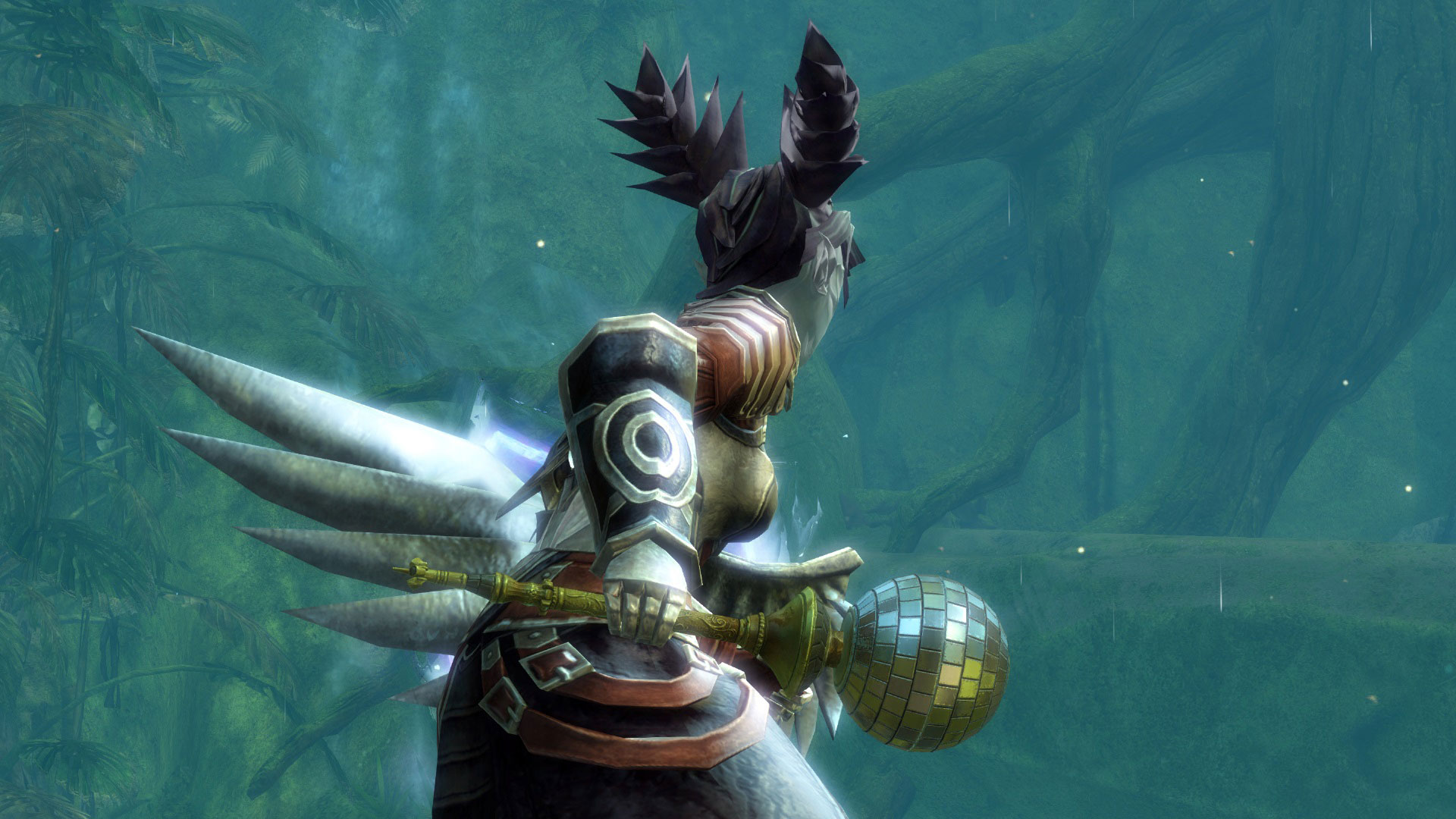
Each legendary weapon has two main themes that will be represented in the precursor journey. The first tier of a precursor journey starts with a collection built around one of these themes. Let’s use the Moot as an example. A moot is a norn celebration of prowess, so that’s the basis of our themes for the legendary mace named for it. The first collection is all about the hunt, so you’ll be proving your abilities by fighting fierce creatures around Tyria and acquiring a trophy to show for it. By completing this collection, you’ll unlock a recipe to craft the first iteration of your precursor—a nontradable exotic weapon with a distressed version of the existing precursor skin. It could use a little polish and refinement, which will be the focus of the second tier collection.
The second collection in your journey involves doing your research, talking to the experts, and honing your craft. You’ll need to barter for knowledge, seek out great minds and convince them to teach you their tricks, and prove your ability at the crafting workbench. All this work allows you to refine your base precursor into its next iteration. Completing this collection unlocks a recipe to do just that, resulting in another nontradable exotic weapon with the existing precursor skin.
The final collections in these precursor journeys return to the themes of their respective legendary weapon. For the Moot, this is where the celebrating starts. Since the Moot’s theme is all about partying, you’ll participate in a range of activities that include dancing with world leaders, setting off fireworks for the Spirits of the Wild, and sampling delicacies and libations from around Tyria. This final collection unlocks the recipe to craft the polished final iteration of the precursor. For all of our existing precursors, this is a tradable exotic weapon, but they will all be updated to use new skins that look much like the legendary weapons they’ll one day become. We like to think of these new precursor skins as the legendary weapon before it is embodied by its soul. Unlocking one of these new skins in your wardrobe will also unlock the two previous tiers of skins. So, should you get lucky and find a precursor out in the world, you won’t miss out on the skins.
This crafting system is an account-based activity, which means you’ll only be able to craft each precursor this way once. However, all of the currently existing precursor acquisition methods will remain intact in addition to this new acquisition method. That means that if you want a particular precursor more than once, you’ll have to fall back to the original methods of acquisition.
Once you have your completed precursor, you are free to begin the process of turning it into a legendary weapon. It’s a long process of gathering the required materials to craft gifts that will eventually be given to Zommoros—the djinn at the heart of the Mystic Forge—who in return gifts you with your powerful legendary weapon.
While the update to precursor acquisition makes for a huge change in the way we craft legendary weapons, our new Map Bonuses system will also make acquiring the materials you need a more directed activity. With Heart of Thorns, most explorable maps will have an associated set of bonus rewards that rotate on a regular basis. Starter maps will not be included in order to preserve the new-player experience. By completing events, jumping puzzles, and mini-dungeons in a map, you’ll be periodically awarded with one of its associated bonuses in addition to the normal rewards. For most maps, the bonus reward will be crafting materials. For instance, playing in Cursed Shore could reward you with ancient bones, charged cores, charged lodestones, or giant eyes during one rotation, and powerful venom sacs, glacial cores, glacial lodestones, or globs of ectoplasm during another rotation.
Maps like the Silverwastes or Dry Top that have a dedicated currency will work a little differently. For these maps, bandit crests and geodes have been something of a test for this concept, where you’re rewarded with these currencies through a bouncy chest for playing on the map. The Map Bonuses system is a more streamlined experience, and with Heart of Thorns, these maps will be updated to always award currencies through the Map Bonuses system. Moving forward, any map with a similar currency will also work within the Map Bonuses system.
The goals of this system are to provide ways for players to target the materials they need, let players know exactly where to obtain those materials, and help all explorable maps always feel like relevant and rewarding places to play.
I know you’re all dying for more information on new legendary weapons, but we’d like to delve into them more with a dedicated blog post in the future. For now, I’ll say that we’ve been working hard on new legendary weapons, the first handful of which will be introduced in Heart of Thorns, with more to come in subsequent updates. The methods by which you’ll craft these legendary weapons are similar to the existing system, but we’ve refined it into more of a journey, similar to precursor crafting. We also want to better preserve the prestige associated with crafting a legendary weapon, so the new legendary weapons, and their precursors, will not be tradable. Keep an eye out—we can’t wait to start showing them off when they’re ready!
| archive - contact - sexy exciting merchandise - search - about | |||
 |
|||
| ← previous | March 26th, 2015 | next | |
|
March 26th, 2015: My book To Be or Not to Be is now available as a game on iOS and Android! – Ryan | |||
Variety (along with basically every even remotely media-related website on the entire Internet) is carrying the news this morning that Fox has officially announced the return of The X-Files to television. Gillian Anderson and David Duchovny will be once again grabbing their trench coats and Maglights as FBI agents Scully and Mulder, and series creator Chris Carter will be returning as show runner.
When The X-Files aired in 1993, it started out in the so-called "death slot," at 9:00pm Eastern Time on Friday nights, so called because on Friday nights, everyone in the demographics that advertisers care about is out doing things rather than sitting at home watching TV. In spite of low initial viewing numbers, by its third season the show was Fox’s most-watched show in the coveted 18- to 49-year-old demographic (and it later peaked in the sixth season as Fox’s most-watched show, period). For a time in the late 1990s, The X-Files was everywhere—Mulder and Scully’s broody faces and will-they-won’t-they not-quite-romance became part of the entertainment fabric of the time, and the show’s influences still linger on powerfully in Hollywood (perhaps most notably, Breaking Bad creator Vince Gilligan was a writer and producer on The X-Files, and he attributes Bryan Cranston’s performance in an X-Files guest role as the main reason he was cast as Walter White).
The show came to an end in 2002 on a ratings down-note, mostly after Duchovny left the permanent cast list in seasons eight and nine, but it never went very far. A lopsided odd feature film in 2008 pulled in almost $69 million on a $30 million budget, proving that an audience was still out there and hungry for even a scrap of the continuing adventures of Mulder and Scully.
Read 2 remaining paragraphs | Comments

| archive - contact - sexy exciting merchandise - search - about | |||
 |
|||
| ← previous | March 19th, 2015 | next | |
|
March 19th, 2015: I made a shirt that's only available for a few days! :0 CHECK IT OUT:
 – Ryan | |||