
Shared posts
02 Oct 11:44

Google’s YouTube streaming subscription service is only weeks away
by Dan Bartram
It should come of no surprise that Google is planning on turning YouTube into a music streaming subscription service, focused on remixes, concerts, and up-and-coming artists, since we’ve heard it before, but that may be happening sooner than expected.
Google’s YouTube service is expected to offer audio-only listening, as well as screen-off playback. The service is expected to be coming in the next few weeks as well as a new ad-supported service.
Will you be signing up for the new service?
Deals, Discounts, Freebies, and More! Click here to save today!
The post Google’s YouTube streaming subscription service is only weeks away appeared first on AndroidGuys.
02 Oct 09:29
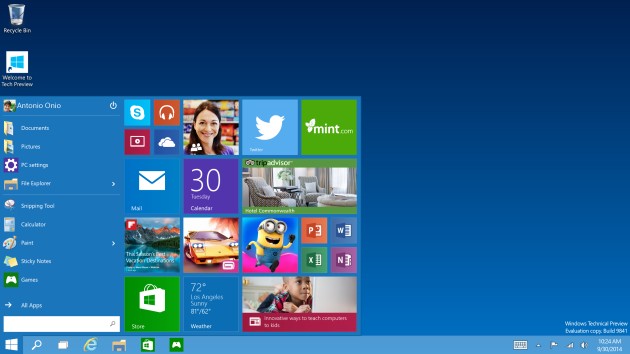 Still confused about why the new version of Windows is 10, instead of 9? Beyond the loosely defined numbering schemes that are all too common in tech (how many iPhones did it take to get to 6?), a note posted to Reddit could provide an answer. Reddit...
Rumor calls out Windows 95 as the reason Microsoft skipped version 9
by Richard Lawler
Still confused about why the new version of Windows is 10, instead of 9? Beyond the loosely defined numbering schemes that are all too common in tech (how many iPhones did it take to get to 6?), a note posted to Reddit could provide an answer. Reddit...
Roumen.ganeff and -1 others like this
01 Oct 15:01
Mining Bitcoin With Pencil and Paper
Mining bitcoin with a pencil and paper? While it would take you an eternity to mine a bitcoin, think of all the money you'll save not having to build mining rigs.
Comments
Roumen.ganeff likes this
01 Oct 12:45
Britons Sign Away First-Born Children For Free Wi-Fi
This story reminds me of that HUMANCENTiPAD South Park episode where no one would read the terms and conditions on anything.
Several Britons agreed to give up their eldest child in return for the use of free wifi, in an experiment to highlight the dangers of public Internet, published on Monday. In the short period the terms and conditions were live, six people signed up.
Comments
Roumen.ganeff likes this
01 Oct 11:28
A New Windows - Windows 10 Announced By Microsoft
by Brett Howse

It was only two years ago that Windows 8 was unleashed on the world. Microsoft tried to usher in an era of “Touch First” applications with a new look and feel for Windows. To say that Windows 8 was unsuccessful would be an understatement, and from both Microsoft’s and user’s perspectives, it was certainly a failure. Two years in, Windows 8 and its 8.1 derivative have struggled to gain market share over Windows 7 and XP, which still command the lion’s share of the desktop OS pie. A new interface, unfamiliar to users, did little to sway their wallets, and other market factors have come in to play as well.
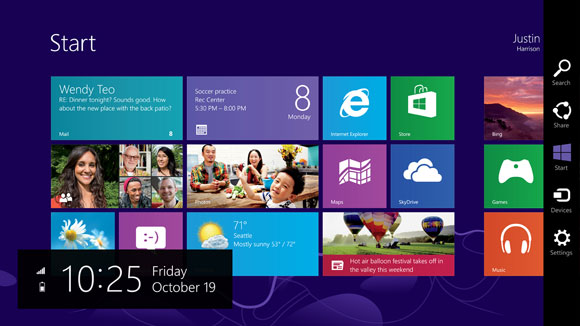
Looking back at Windows 8, it was a big change from a company that traditionally has been called too conservative. Gone was the familiar start menu, replaced with a full screen version. Gone was the ability to move and resize applications into “windows” and instead it was replaced with full screen apps that take command of your desktop. Gone was a lot of what made Windows, well Windows. Add in the fact that Windows 8 at its launch was only half complete, and it is not surprising that the market did not buy into the new world. There were two disjointed interfaces, but one person had to interact with both no matter what form factor they were on. If you are on a touch based tablet, much of the settings and controls were still found in the old Control Panel applets. The file explorer was on the desktop, which was difficult to use with touch. On the other side of the coin, traditional desktop PC users also had to learn the new Start Screen, charms, and other controls which were clearly made for “touch first” and not the mouse and keyboard. Within weeks of the Windows 8 launch, major players in its creation were let go, or given new duties.
Since the day one release of Windows 8, Microsoft has been trying to fix many of the issues people have with the new version of their operating system, and Windows 8.1 was a step in the right direction, fixing interfaces for both the touch interface and the desktop. Windows 8.1 Update, announced at BUILD earlier this year, was a truly desktop-centric update with new keyboard and mouse controls for use in the touch environment, and the ability to control Windows Store apps with a title bar. It was a big help, but also showed off at BUILD were features coming in a later version of Windows, and that version has now come.
Windows 10 is as dramatic a shift from Windows 8 as Windows 8 was to Windows 7. Gone is the start screen for the desktop, with the familiar start menu back. Gone is the full screen applications taking over your computer, with those applications now being relegated to windows as before. Gone is the touch first interface on top of an operating system primarily used with a keyboard and mouse. However this is not Windows 7.1, and nor should it be. Windows 8 certainly had its faults, but not everything about Windows 8 needed to be thrown out.
Windows 10 starts its journey as the Windows Technical Preview for Enterprises. Microsoft’s core customer base is the enterprise, and this is important that they are starting the discussion with this market group this time around. Beginning tomorrow, people can join the Windows Insider Program and download and install the latest version of Windows for themselves. Microsoft has made it clear though that this preview is actually a preview, and not meant for general availability. Expect some rough edges, and some bugs, which should be worked out by the time the OS ships. As for the consumer side of the story, Microsoft is planning to announce more on that front in early 2015, and for developers, BUILD will be coming sometime after that. The actual Windows 10 launch is listed as “later in the year” with the year being 2015.
There is a lot to go over, and once we get our hands on the preview build we can dig into the new OS and give a full breakdown on what is new. One of the biggest complaints about Windows 8 and 8.1, is that real people do not want a single interface on every device they own. They want a User Interface which is tailored to the usage model. With Windows 10, Microsoft promises to address this.
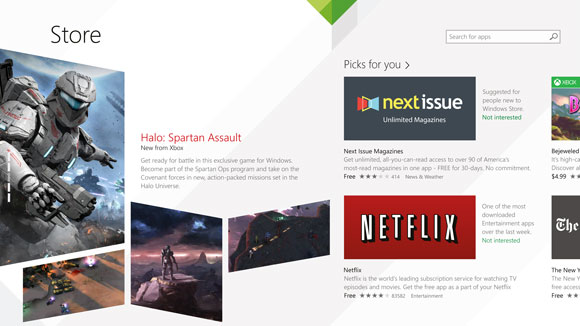
Before we can talk about Windows though, we need to briefly discuss the Windows Store. Windows Store apps are executed in WinRT, which is the Windows RunTime, replacing the old Win32 runtime. WinRT has some advantages as a new framework, with the ability to be resolution independent natively, and support the Windows contracts such as Share. At BUILD in 2014, Microsoft announced Universal Apps, which are a key feature of the Windows store that is not available on any other platform. There is a lot of confusion as to what a Universal App is, and what it is not is a single application that runs on a phone, PC, tablet, and console. A Universal App leverages the common WinRT framework available in Windows, Xbox One, and Windows Phone, to allow a developer to share a common code base, but use a suitable UI for each system, and have all of it available on all platforms seamlessly through the Windows Store. It is certainly a lofty idea, and one that has gained a bit of traction in the store. With Windows 10 though, the concept of a Universal App allows a developer to target a phone, Xbox, tablet, and desktop. If anything is the killer feature of Windows 10, this could be it. Time will tell of course and developers need to buy into WinRT for this to be a reality. Today’s announcement is not developer focused, so we will expect more news on the WinRT API updates later on, at the BUILD conference.
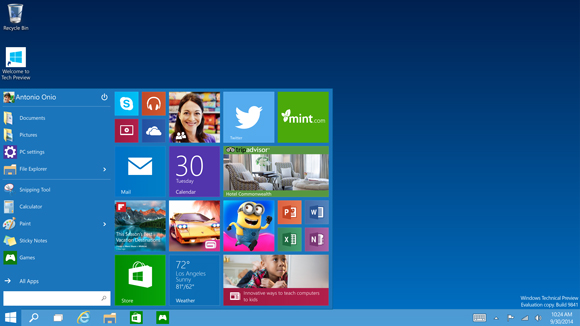
The first place to start, is going to be Start. On Windows 7, clicking the Start button brought up the Start Menu. Windows 8 dropped the start button altogether, but 8.1 brought it back even though it opened the Start Screen. On tablets, the start screen was fine, but on a desktop, it could be unwieldy. It interrupted your workflow to bring you into a new environment, where you can find the application you want and launch it. Windows 10 brings back the Start Menu, but with a twist. Rather than just the traditional start menu of Windows 7, a familiar start menu can now also be populated with Live Tiles from the Windows Store apps. But this is only on the desktop. Tablets will get a different interface, as will the phone. To quote Microsoft: “We’re not talking about one UI to rule them all – we’re talking about one product family, with a tailored experience for each device.”
If Windows 10 is going to be successful, the tailored experience for each device is the key. The new start menu is just the first step towards that, and is especially important for the enterprise and desktop user.
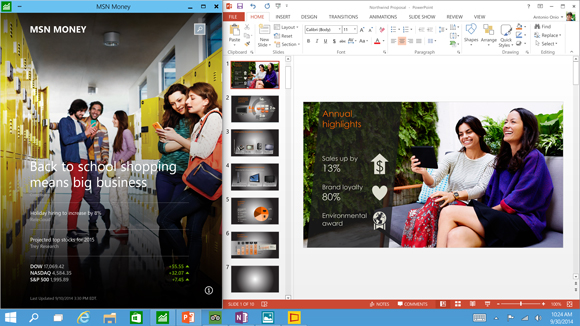
The next interface change, was also announced at BUILD, and that is the ability to run Windows Store apps within a window on the desktop. This is a big change for two reasons. First, on a desktop, full screen Windows Store apps are less useful. Generally you have multiple things going on at once, and to have a single app take over the screen is generally not ideal. The usefulness of Windows Store apps has instantly been increased. The other reason it is important is for developer buy-in. Even though Windows 8 did not light the world on fire as far as unit sales, it is still on hundreds of millions of devices. However the majority of those devices are going to be traditional desktops. Writing an application for the Windows Store practically precluded use by the majority of the user base. By putting these apps on the desktop, it opens up a much larger potential audience. Microsoft needs the Windows Store to be kick-started, and this is one way they can advance that goal.
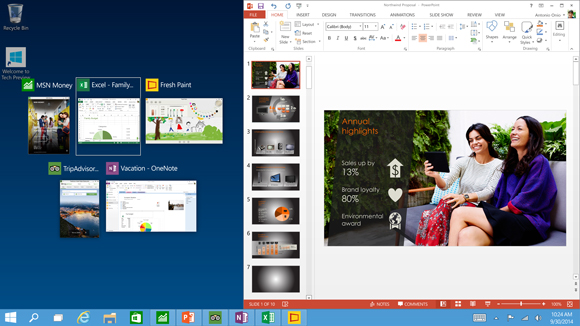
Windows Snap was also debuted in Windows 8, and it allowed two Windows Store apps to be snapped open, with one taking about 70% of the screen and the other using 30%. For multitasking, it was certainly better than other mobile operating systems from 2012, but it was a long way from Windows 7. Windows 8.1 improved Snap, and allows more than two apps to be snapped open on the screen at any one time, and for the snap percentage to be changed. Windows 10 is now offering another update on Snap. Apps can now be snapped to all four corners, giving more real estate to each app than before. Snap was a good feature, and this is a further improvement on it.
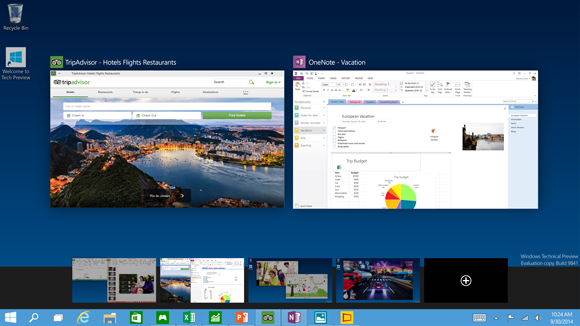
Another long requested feature is now coming to Windows 10 – multiple desktops. Desktops can be designated for different purposes, and users will be able to easily switch among them. There is a small but vocal group who have been asking for this for a long time, and they have finally been rewarded.
Sticking with the enterprise features, data security is always a big concern. Multifactor authentication based on smart cards or tokens is now built right into the OS. Bitlocker is still around, offering full device encryption, but Windows 10 now offers application and file level data separation, which can enable data protection even if that data leaves the device. Though they have not gone into a lot of detail as to how that is done, it likely leverages some of Microsoft’s other technologies such as Active Directory Rights Management Services.
Future updates to Windows should be easier for IT workers as well due to a new in-place upgrade option. And to go along with that, businesses will be able to choose whether to jump on the fast update consumer track, or lock down the updates to only deliver critical security patches, or somewhere in the middle. And this approach does not need to be at the enterprise level – different groups of machines can follow different update patterns depending on how critical the infrastructure is.
Windows 10 also supports Mobile Device Management (MDM) tools, as well as the traditional Active Directory and System Center approach to device management. This should be a boon to any small to mid-sized business who does not want to invest in a comprehensive solution.
Finally, the new Windows Store will allow volume license purchasing from within the store. Companies can re-claim licenses, and re-issue them to new devices. They can also create a custom store for their own computers which can include Windows Store and company-owned apps in the same interface.
Microsoft is trying hard to win back the Enterprise customers who have been turned off by Windows 8. Obviously we will have to wait and see if they are successful, but there is a lot to like in this new release. The “one UI to rule them all” model of Windows 8 has been put out to pasture, and instead replaced with a single platform, with a UI to suit the device it is running on.
Not all was bad about Windows 8, and it is good to see that some of the good ideas have been taken and molded into the new OS, but also tweaked at the same time to make them work better for the device they are on. The Universal App is a powerful idea, and one that has yet to make a big splash so far, but if the WinRT framework can be updated to make it more powerful, then it would certainly add a lot of power to Windows 10. Unlike Win32, WinRT apps support high DPI by default, which is more and more important as we move to higher resolution displays on all sizes of devices. The ability to log in to any Windows PC and get your own custom look and feel, including all of your applications, and data, is a powerful feeling. They have all of the tools they need to do this across all devices now, and it is exciting to see a glimpse at what the future may hold.
Once we get the actual install files for Windows 10, we will be able to provide more coverage on this major release of Windows.
Roumen.ganeff, Ronald.phillips likes this
01 Oct 11:21
 The problem with owning the rights to Twilight is that the story eventually ends, meaning that there's no more massively profitable movies with glitter guy, mumbling girl and the shirtless one with all the teeth. It's a problem that Lionsgate knows...
'Twilight' mini-movies are coming to Facebook
by Daniel Cooper
Roumen.ganeffglitter guy, mumbling girl and the shirtless one
right on the spot
The problem with owning the rights to Twilight is that the story eventually ends, meaning that there's no more massively profitable movies with glitter guy, mumbling girl and the shirtless one with all the teeth. It's a problem that Lionsgate knows...
Roumen.ganeff likes this
01 Oct 08:02
 Instead of announcing the next version of its iconic operating system in front of a massive crowd of thousands, Microsoft chose an intimate venue with 50 or so reporters to launch the new Windows, which it's calling Windows 10. The company looks at...
Microsoft's next OS is Windows 10, will ship later in 2015
by Brad Molen
Instead of announcing the next version of its iconic operating system in front of a massive crowd of thousands, Microsoft chose an intimate venue with 50 or so reporters to launch the new Windows, which it's calling Windows 10. The company looks at...
30 Sep 11:15
 Tired of waiting for George R. R. Martin to finish the next book in the Song of Ice and Fire series? So is the University of Canterbury's Richard Vale: he's created a statistical model based on the series' previous tomes to predict what might be in...
Mathematician tries to predict the next two 'Game of Thrones' books
by Sean Buckley
Tired of waiting for George R. R. Martin to finish the next book in the Song of Ice and Fire series? So is the University of Canterbury's Richard Vale: he's created a statistical model based on the series' previous tomes to predict what might be in...
Roumen.ganeff likes this
28 Sep 05:44
 We have so many questions about this video. How did YouTuber Mr.TVCow get those hoodies on the kittens? How many shots did it take to get the perfect scene of kittens falling onto a small pile of hay and running away? Where can we get one and/or all...
Murder is just adorable in Assassin's Kittens Unity
by Jessica Conditt
We have so many questions about this video. How did YouTuber Mr.TVCow get those hoodies on the kittens? How many shots did it take to get the perfect scene of kittens falling onto a small pile of hay and running away? Where can we get one and/or all...
Rtersieva, Roumen.ganeff likes this


28 Sep 05:35


Outage fears as Amazon's always on elastic cloud gets rebooted
by Chris Merriman
It's trying switching it off and switching it on again
28 Sep 05:31


Thor Takes On Cyber Criminals
by David Konow
It Takes a Hacker to Track a Hacker in Michael Mann's Next Thriller
26 Sep 12:14


Spoiler Alert: Statistician Predicts Future Chapters Of 'Game Of Thrones' Novels
by Rafi Letzter
Game Of Thrones Characters
Home Box Office
Desperate for details as you wait for the next installment in Game of Thrones? You're in luck. In what may be the first mathematics paper to include a spoiler alert, a New Zealand statistician has come up with a model to predict what's coming up in the final two (or three) Song Of Ice And Fire novels.
George R.R. Martin's hugely popular series is broken up into chapters told from the perspective of different characters. Richard Vale, a statistician at the University of Canterbury in Christchurch, used a method called Bayesian prediction to figure out how many chapters each character is likely to get in the next two books in the series—and how likely they are to die.
Predictions.
How many chapters will each character get in 'Winds of Winter'? The height of the bar over each number represents the probability of a character getting that number of chapters. If the bar reaches the '0.5' mark, the chance is 50 percent. If it reaches '1' the model is certain of that number of chapters.
Richard Vale
Bayesian prediction uses knowledge about the past to predict the future. For example, if a boy king started headlining more and more chapters in each novel, you might reasonably expect him to dominate even more in the coming books. If a towering knight had many chapters in the first three books, but her presence petered off in the fourth and fifth, you would not expect her to show up quite as much in the future. And of course, if a character died (or might die in a future novel), his or her odds of returning are quite low. This same method of making mathematical guesses helps your Roomba navigate your living room, and helps cognitive scientists understand human choice.
Vale says likelihood of a character getting at least one chapter in the coming books roughly represents the likelihood that the character is still alive (for now). Of course, the model doesn't account for Martin's ruthlessness. Eddard Stark had lots of chapters in the first book, but readers and viewers know how that turned out...
The model is has other imperfections. Most importantly, it doesn't take the plot of past books into account, only their chapter heads. It also doesn't consider that chapter count is a bit of a zero-sum game. That is, that if one character shows up often the others might get crowded out. It also ignores the likelihood that new characters will be introduced.
Still, we're glad that we can reasonably expect to read more of Jon Snow and Daenerys, and less of Sir Davos. (Davos is a good guy, but let's face it, his undying loyalty is annoying.)
Will Vale follow up with more predictions for the coming books? "We could continue to make predictions in the hope of getting one right," he wrote, "but there is no merit in this. We hope that it will be possible to review the model's performance following the publication of [book] six."
Roumen.ganeff, Spursfan123 likes this
26 Sep 12:12
Black Holes Do Not Exist
No black holes? There went the plot to countless science fiction books and movies.
By merging two seemingly conflicting theories, Laura Mersini-Houghton, a physics professor at UNC-Chapel Hill in the College of Arts and Sciences, has proven, mathematically, that black holes can never come into being in the first place. The work not only forces scientists to reimagine the fabric of space-time, but also rethink the origins of the universe.
Comments
26 Sep 08:00
 As neat as your smartwatch is, there are other existing wearables which, you know, can actually make the world a world a better place -- though that's not to say whatever you have on your wrist now is useless and for pure vanity purposes. Aptly named...
Wearable artificial kidney hopes to gain FDA approval soon
by Edgar Alvarez
As neat as your smartwatch is, there are other existing wearables which, you know, can actually make the world a world a better place -- though that's not to say whatever you have on your wrist now is useless and for pure vanity purposes. Aptly named...
Paul, Roumen.ganeff likes this
25 Sep 07:49
 Have you been anticipating Titan, Blizzard's first online role-playing game since World of Warcraft? Unfortunately, you're going to have to pin your hopes on some other title. The studio tells Polygon that it has cancelled Titan despite pouring seven...
Blizzard cancels its next-gen online game despite seven years of work
by Jon Fingas
Have you been anticipating Titan, Blizzard's first online role-playing game since World of Warcraft? Unfortunately, you're going to have to pin your hopes on some other title. The studio tells Polygon that it has cancelled Titan despite pouring seven...
25 Sep 06:00
 Ever since he was released from prison, legendary hacker (and social engineering expert) Kevin Mitnick has spent much of his time helping companies protect against internet attacks. However, his security consulting work recently entered murky...
Kevin Mitnick will sell you security exploits, if you have $100,000
by Jon Fingas
Ever since he was released from prison, legendary hacker (and social engineering expert) Kevin Mitnick has spent much of his time helping companies protect against internet attacks. However, his security consulting work recently entered murky...
Rtersieva, Roumen.ganeff likes this
23 Sep 16:05
People Having Fun With Statues (Part 2)Previously: Part One


Rtersieva, Roumen.ganeff and 3 others like this
23 Sep 06:10
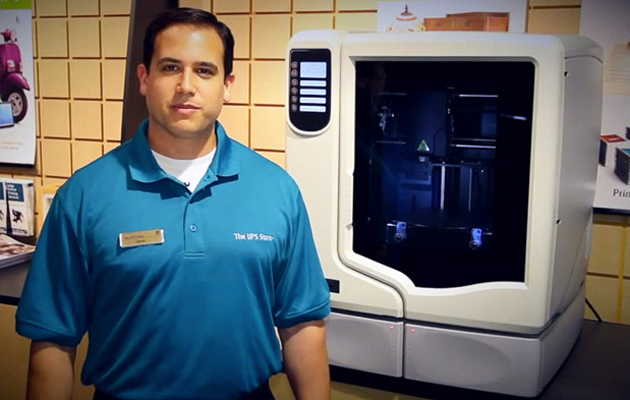 UPS' experiment with in-store 3D printers apparently went off without a hitch -- the shipping service has expanded the availability of 3D printing services from six test markets to nearly 100 locations across the US. While the hardware is still...
UPS now lets you use 3D printers in nearly 100 US stores
by Jon Fingas
UPS' experiment with in-store 3D printers apparently went off without a hitch -- the shipping service has expanded the availability of 3D printing services from six test markets to nearly 100 locations across the US. While the hardware is still...
Peconi, Roumen.ganeff and one other like this
23 Sep 05:50
DisplayPort Alternate Mode for USB Type-C Announced - Video, Power, & Data All Over Type-C
by Ryan Smith

Earlier this month the USB Implementers Forum announced the new USB Power Delivery 2.0 specification. Long awaited, the Power Deliver 2.0 specification defined new standards for power delivery to allow Type-C USB ports to supply devices with much greater amounts of power than the previous standard allowed, now up to 5A at 5V, 12V, and 20V, for a maximum power delivery of 100W. However also buried in that specification was an interesting, if cryptic announcement regarding USB Alternate Modes, which would allow for different (non-USB) signals to be carried over USB Type-C connector. At the time the specification simply theorized just what protocols could be carried over Type-C as an alternate mode, but today we finally know what the first alternate mode will be: DisplayPort.
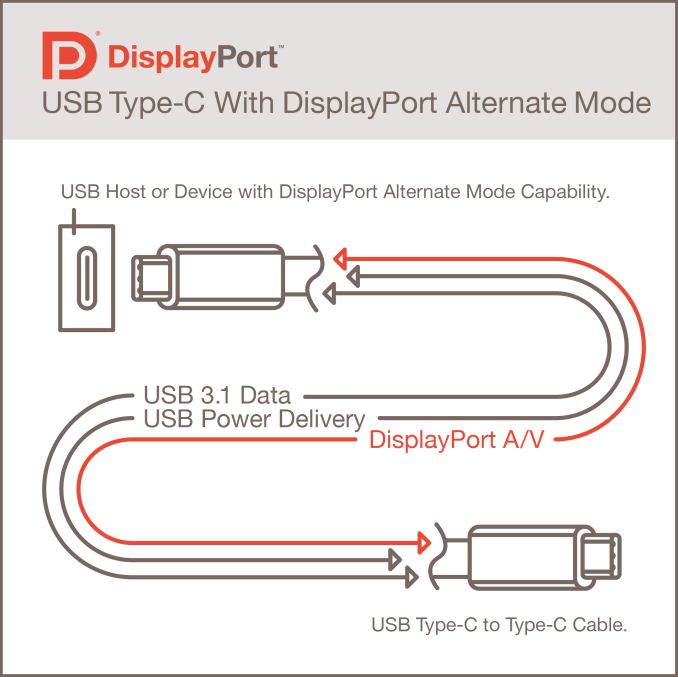
Today the VESA is announcing that they are publishing the “DisplayPort Alternate Mode on USB Type-C Connector Standard.” Working in conjunction with the USB-IF, the DP Alt Mode standard will allow standard USB Type-C connectors and cables to carry native DisplayPort signals. This is designed to open up a number of possibilities for connecting monitors, computers, docking stations, and other devices with DisplayPort video while also leveraging USB’s other data and power capabilities. With USB 3.1 and Type-C the USB-IF was looking to create a single cable that could carry everything, and now that DisplayPort can be muxed over Type-C, USB is one step closer to that with the ability to carry native video.
The Tech & The Spec
From a technical level the DP Alt Mode specification is actually rather simple. USB Type-C – which immediately implies using/supporting USB 3.1 signaling – uses 4 lanes (pairs) of differential signaling for USB Superspeed data, which are split up in a 2-up/2-down configuration for full duplex communication. Through the Alt Mode specification, DP Alt Mode will then in turn be allowed to take over some of these lanes – one, two, or all four – and run DisplayPort signaling over them in place of USB Superspeed signaling. By doing so a Type-C cable is then able to carry native DisplayPort video alongside its other signals, and from a hardware standpoint this is little different than a native DisplayPort connector/cable pair.
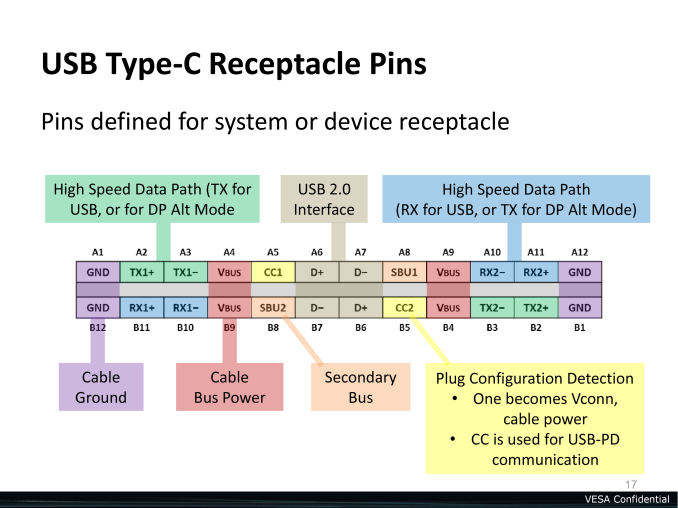
From a hardware perspective this will be a simple mux. USB alternate modes do not encapsulate other protocols (ala Thunderbolt) but instead allocate lanes to those other signals as necessary, with muxes at either end handling the switching to determine what signals are on what lanes and where they need to come from or go. Internally USB handles this matter via the CC sense pins, which are responsible for determining cable orientation. Alongside determining orientation, these pins will also transmit a Standard IDentification (SID), which will be how devices negotiate which signals are supported and which signals to use. After negotiation, the devices at either end can then configure themselves to the appropriate number of lanes and pin orientation.
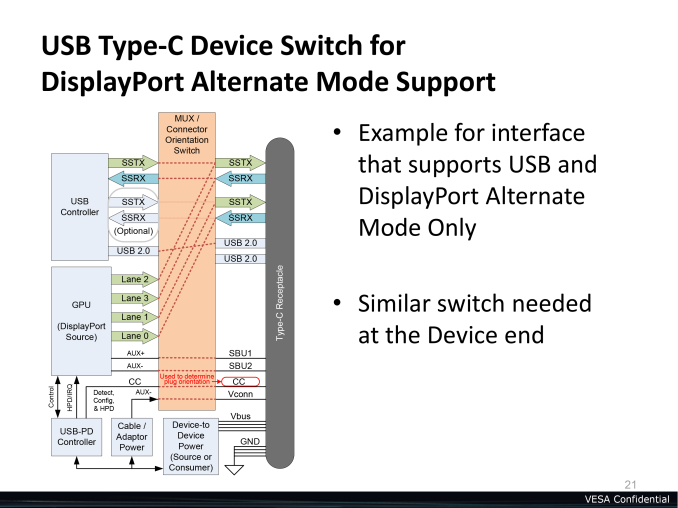
Along with utilizing USB lanes for DP lanes, the DP Alt Mode standard also includes provisions for reconfiguring the Type-C secondary bus (SBU) to carry the DisplayPort AUX channel. This half-duplex channel is normally used by DisplayPort devices to carry additional non-video data such as audio, EDID, HDCP, touchscreen data, MST topology data, and more. Somewhat perversely in this case, the AUX channel has even been used to carry USB data, which dutifully enough would still be supported here for backwards compatibility purposes.
Since the main DisplayPort lanes and AUX channel can be carried over Type-C, when utilized in this fashion Type-C is very close to becoming a superset of DisplayPort. In a full (4 lane) DisplayPort configuration, along with all of the regular DisplayPort features a Type-C cable also carries the standard USB 2.0 interface and USB power, which always coexist alongside alt mode. So even in these configurations Type-C allows dedicated high power and USB 2.0 functionality, something the DisplayPort physical layer itself is not capable of. And of course when using a less-than-full configuration, 2-3 of those lanes on the Type-C cable then can be left to running USB Superspeed signaling, allowing USB 3.1 data to be carried alongside the narrower DisplayPort signal.
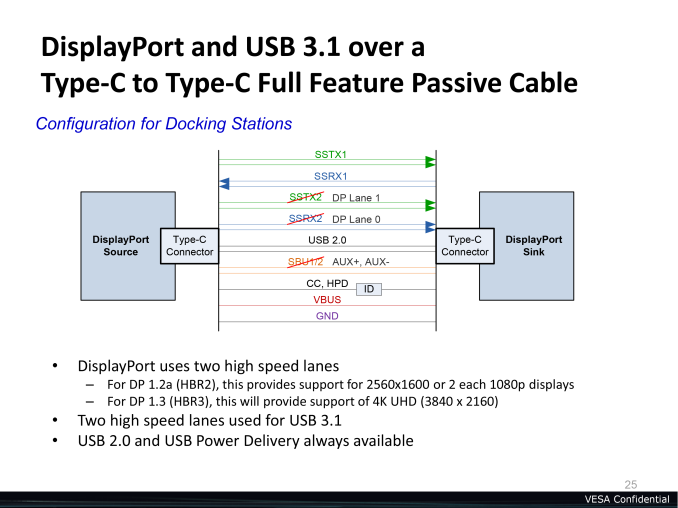
Meanwhile since DP Alt Mode means that Type-C carries native DisplayPort signaling, this enables several different interoperability options with other Type-C devices and legacy DisplayPort devices. On the hardware side Type-C ports can be used for the sink (displays) as well as the source (computers), so one could have a display connected to a source entirely over Type-C. Otherwise simple Type-C to DisplayPort cables can be constructed which from the perspective of a DisplayPort sink would be identical to a real DisplayPort cable, with the cable wired to expose just the DisplayPort signals to the sink. Or since these cables will be bidirectional, a legacy DisplayPort source could be connected to a Type-C sink just as well.
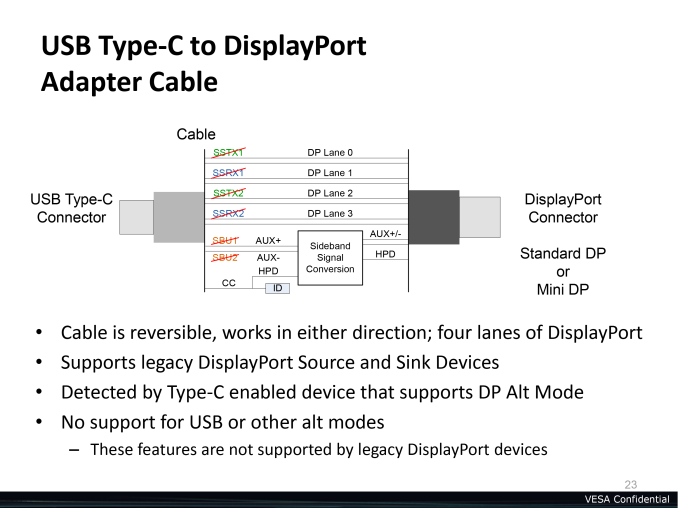
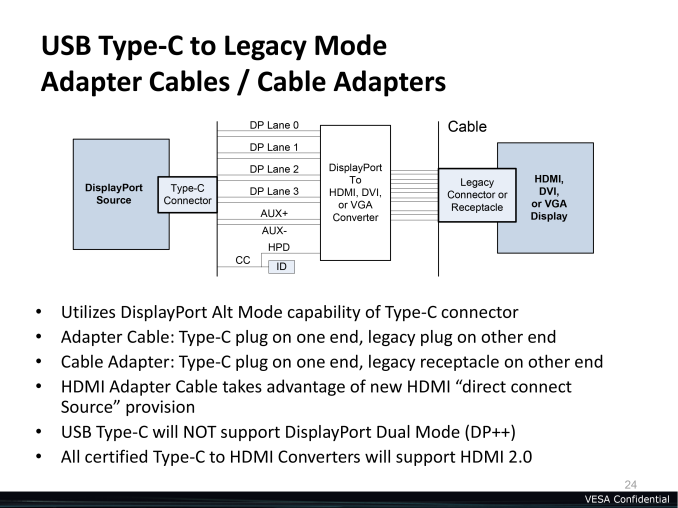
This also means that since DP Alt Mode is such a complete implementation of DisplayPort, that DisplayPort conversion devices will work as well. DisplayPort to VGA, DVI, and even HDMI 2.0 adapters will all work at the end of Type-C connection, and the VESA will be strongly encouraging cable makers to develop Type-C to HDMI 2.0 cables (and only HDMI 2.0, no 1.4) to make Type-C ports usable with HDMI devices. In fact the only major DisplayPort feature that won’t work over a Type-C connector is Dual-Mode DisplayPort (aka DP++), which is responsible for enabling passive DisplayPort adapters. So while adapters work over Type-C, all of them will need to be active adapters.
From a cabling standpoint DP Alt Mode will have similar allowances and limitations as USB over Type-C since it inherits the physical layer. DisplayPort 1.3’s HBR3 mode will be supported, but like USB’s Superspeed+ (10Gbps) mode this is officially only specified to work on cables up to 1M in length. Meanwhile at up to 2M in length DisplayPort 1.2’s HBR2 mode can be used. Meanwhile DP Alt Mode is currently only defined to work on passive USB cables, with the VESA seemingly picking their words carefully on the use of “currently.”
The Ecosystem & The Future
Because of the flexibility offered through the DP Alt Mode, the VESA and USB-IF have a wide range of options and ideas for how to make use of this functionality, with these ideas ultimately converging on a USB/DisplayPort ecosystem. With the ability to carry video data over USB, this allows for devices that make use of both in a fashion similar to Thunderbolt or DockPort, but with the greater advantage of the closer cooperation of the USB-IF and the superior Type-C physical layer.
At its most basic level, DP Alt Mode means that device manufacturers would no longer need to put dedicated display ports (whether DisplayPort, VGA, or HDMI) on their devices, and could instead fill out their devices entirely with USB ports for all digital I/O. This would be a massive boon to Ultrabooks and tablets, where the former only has a limited amount of space for ports and the latter frequently only has one port at all. To that end there will even be a forthcoming identification mark (similar to DP++) that will be used to identify Type-C ports that are DP Alt Mode capable, to help consumers identify which ports they can plug their displays into. The MUX concept is rather simple for hardware but I do get the impression that devices with multiple Type-C ports will only enable it on a fraction of their ports, hence the need for a logo for consumers to identify these ports. But we’ll have to see what shipping devices are like.
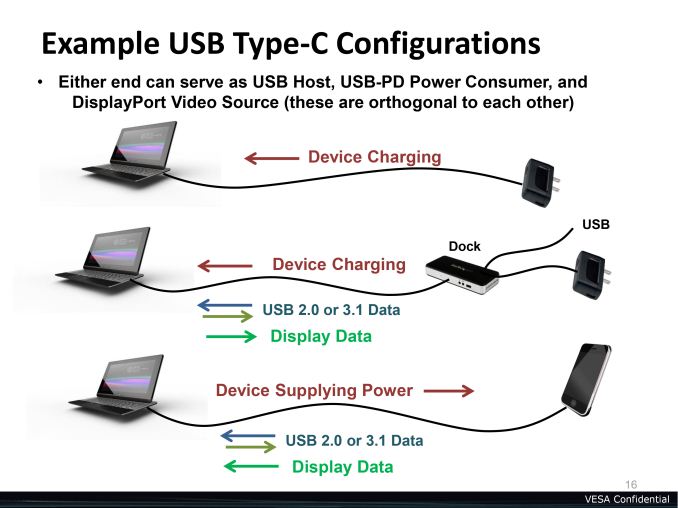
More broadly, this could be used to enable single-cable connectivity for laptops and tablets, with a single Type-C cable providing power to the laptop/tablet while also carrying input, audio, video, additional USB data, and more. This would be very similar to the Thunderbolt Display concept, except Type-C would be able to be a true single cable solution since it can carry the high-wattage power that Thunderbolt can’t. And since Type-C can carry DisplayPort 1.3 HBR3, this means that even when driving a 4K@60Hz display there will still be 2 lanes of USB Superspeed+ available for any devices attached to the display. More likely though we’ll see this concept first rolled out in dock form, with a single dock device connecting to an external monitor and otherwise serving as the power/data hub for the entire setup.
Speaking of which, this does mean that USB via DP Alt Mode will more directly be competing with other standards such as Thunderbolt at DockPort. Thunderbolt development will of course be an ongoing project for Intel, however for DockPort this is basically the end of the road. The standard, originally developed by AMD and TI before being adopted by the VESA, will continue on as-is and will continue to be supported over the DisplayPort physical layer as before. However it’s clear from today’s announcement that DisplayPort over USB has beaten USB over DisplayPort as the preferred multi-signal cabling solution, leaving DockPort with a limited duration on the market.
It’s interesting to note though that part of the reason DP Alt Mode is happening – and why it’s going to surpass DockPort – is because of the Type-C physical layer. In designing the Type-C connector and cabling, the USB-IF has specific intentions of having the Type-C connector live for a decade or more, just like USB Type-A/B before it. That means they’ve done quite a bit of work to future-proof the connector, including plenty of pins with an eye on supporting speeds greater than 10Gbps in the future.
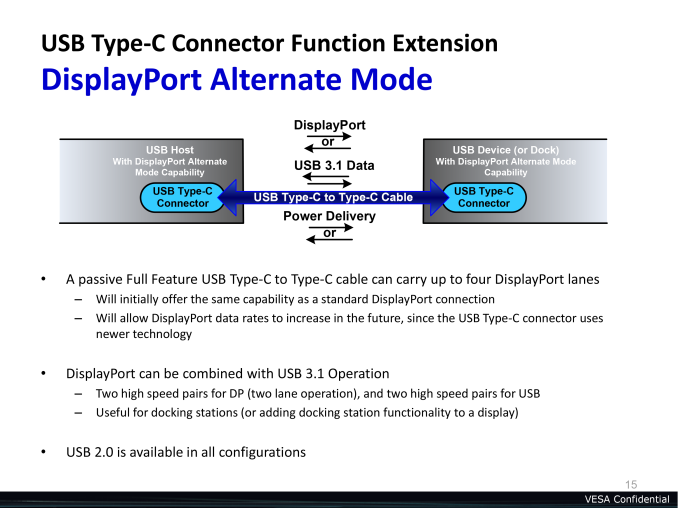
For that reason the possibility is on the table of ditching the DisplayPort physical layer entirely and relying solely on Type-C. Now to be clear this is just an option the technology enables, but for a number of reasons it would be an attractive option for the VESA. As it stands the DisplayPort physical layer tops out at 8.1Gbps per lane for HBR3, meanwhile Superspeed+ over Type-C tops out at 10Gbps per lane with the design goal of further bandwidth increases. As the complexity and development costs of higher external buses goes up, one could very well see the day where DisplayPort was merely the protocol and signaling standard for monitors while Type-C was the physical layer, especially since DisplayPort and USB Superspeed are so very similar in the first place due to both using 4 lanes of differential signaling. But this is a more distant possibility; for now the DP Alt Mode ecosystem needs to take off for the kinds of mobile devices it’s designed for, and only then would anyone be thinking about replacing the DisplayPort physical layer entirely.
Wrapping things up, the VESA tells us that they are going to hit the ground running on DP Alt Mode and are seeing quite a bit of excitement from manufacturers. The VESA is expecting the first DP Alt Mode capable devices to appear in 2015, which is the same year Type-C ports begin appearing on devices as well. So if everything goes according to schedule, we should see the first DP Alt Mode devices in just over a year.
The all-in-one cable concept has been a long time coming, and after DockPort and Thunderbolt stumbling the market does look ripe for DP Alt Mode. So long as the execution is there, the manufacturers are willing to use it, and device compatibility lives up to the promises. Getting video over USB is the ultimate Trojan horse – unlike mDP, USB is already everywhere and will continue to be – so this may very well be the X factor needed to see widespread adoption where other standards have struggled.
23 Sep 05:38


4chan hoax leads idiots to microwave their iPhones
by Dave Neal
You can kid a mooncalf
Roumen.ganeff likes this
22 Sep 08:29
 If you regularly follow geek culture, you've probably seen early versions of Dirk Loechel's spaceship comparison chart, which shows the relative sizes of vehicles from science fiction games, movies and TV shows. Well, it's finished -- and it's even...
Almost all the sci-fi spaceships you know are on this massive chart
by Jon Fingas
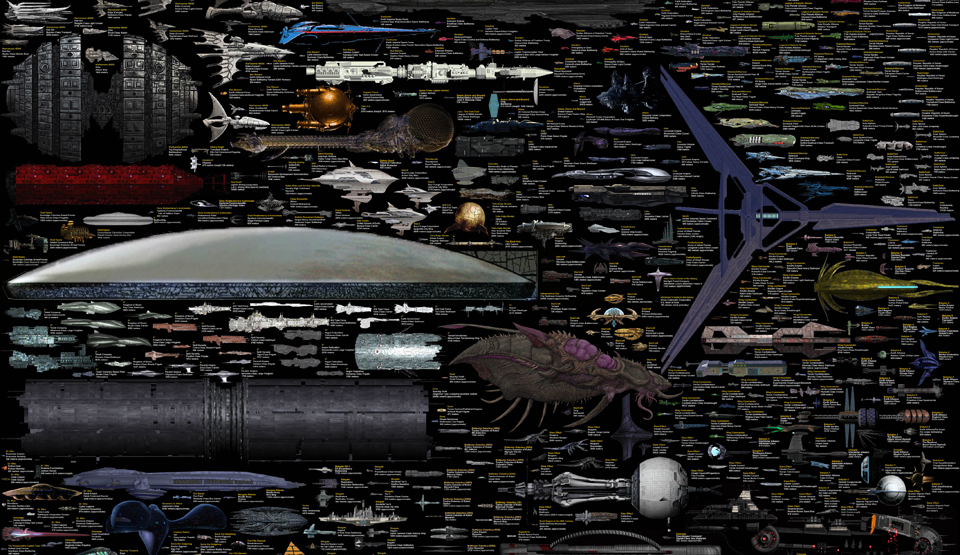
If you regularly follow geek culture, you've probably seen early versions of Dirk Loechel's spaceship comparison chart, which shows the relative sizes of vehicles from science fiction games, movies and TV shows. Well, it's finished -- and it's even...
Hartman.marcus, claudzim and 6 others like this
21 Sep 14:17

So Scotland has a lot of oil and possibly wants more freedom?
Hartman.marcus, David Pelaez and 4 others like this


20 Sep 17:53

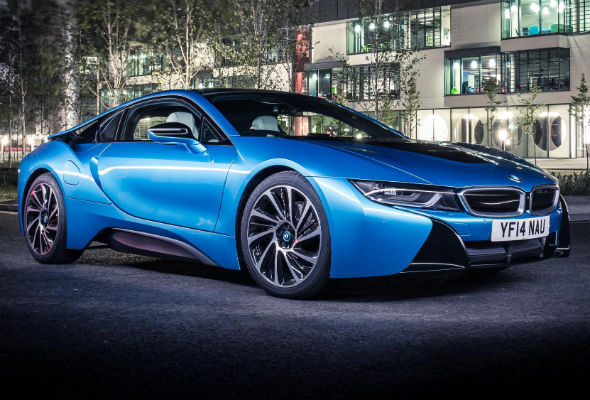
 The term "luxury" gets thrown around a lot when speaking about vehicles that are actually somewhat affordable like BMWs and Cadillacs, but Rolls-Royce and hotel magnate Stephen Hung (above in the wild suit) are proving what real opulence really is with the largest single order from the fabled British marque, ever. Hung is purchasing 30 custom examples of the Phantom Extended Wheelbase (pictured right) for $20 million. To push the deal even further over the top, two of the Phantoms are the most expensive examples ever commissioned.
This assemblage of über-luxury sedans isn't for Hung's personal collection. Instead, the cars are going to be part of the fleet for the swanky hotel and casino that he's opening in Macau, China, in 2016 called the Louis XIII. According to The Washington Post, when the 200-room resort opens, the Louis XIII is supposed to be one of the most mind-blowing places in the world, including a suite that costs $100,000 a night.
When completed, the 30 cars will be in matching crimson red to echo the exterior of the hotel. That color will be carried into the interior trim, as well, including the gauges, and the seats will have a checker board pattern. Each one will be outfitted with a bespoke clock from Graff Luxury Watches. The two most expensive Phantoms will get all of this attention, plus gold-plated trim covering the interior and exterior.
As this huge order suggests, Hung doesn't do anything on a small scale. If you need even more proof of that, Rolls-Royce isn't just providing him with the cars, the automaker is also helping to design the parking area to house them and training the staff to drive the special fleet. Scroll down to read the full announcement of this historic order.
Man orders $20M-worth of Rolls-Royce Phantoms
by Chris Bruce
Filed under: Car Buying, Sedan, Rolls-Royce, Design/Style, Luxury
The term "luxury" gets thrown around a lot when speaking about vehicles that are actually somewhat affordable like BMWs and Cadillacs, but Rolls-Royce and hotel magnate Stephen Hung (above in the wild suit) are proving what real opulence really is with the largest single order from the fabled British marque, ever. Hung is purchasing 30 custom examples of the Phantom Extended Wheelbase (pictured right) for $20 million. To push the deal even further over the top, two of the Phantoms are the most expensive examples ever commissioned.This assemblage of über-luxury sedans isn't for Hung's personal collection. Instead, the cars are going to be part of the fleet for the swanky hotel and casino that he's opening in Macau, China, in 2016 called the Louis XIII. According to The Washington Post, when the 200-room resort opens, the Louis XIII is supposed to be one of the most mind-blowing places in the world, including a suite that costs $100,000 a night.
When completed, the 30 cars will be in matching crimson red to echo the exterior of the hotel. That color will be carried into the interior trim, as well, including the gauges, and the seats will have a checker board pattern. Each one will be outfitted with a bespoke clock from Graff Luxury Watches. The two most expensive Phantoms will get all of this attention, plus gold-plated trim covering the interior and exterior.
As this huge order suggests, Hung doesn't do anything on a small scale. If you need even more proof of that, Rolls-Royce isn't just providing him with the cars, the automaker is also helping to design the parking area to house them and training the staff to drive the special fleet. Scroll down to read the full announcement of this historic order.
Continue reading Man orders $20M-worth of Rolls-Royce Phantoms
Man orders $20M-worth of Rolls-Royce Phantoms originally appeared on Autoblog on Fri, 19 Sep 2014 16:30:00 EST. Please see our terms for use of feeds.
Permalink | Email this | Comments
20 Sep 07:55
 Back in 2012, a UK company called Oxford Nanopore announced a chewing gum packet-sized DNA sequencer, something that people found hard to believe since rival machines can be as big as fridges. After dealing with technical issues and bugs (as well as...
MinION, the USB-sized DNA sequencer, goes through real-world testing
by Mariella Moon
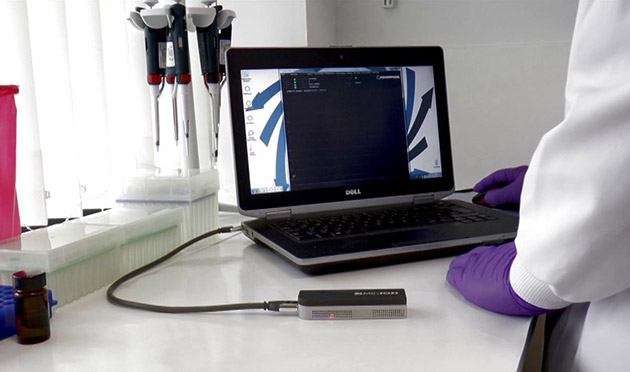
Back in 2012, a UK company called Oxford Nanopore announced a chewing gum packet-sized DNA sequencer, something that people found hard to believe since rival machines can be as big as fridges. After dealing with technical issues and bugs (as well as...
firehose, Damiani.guilherme and 4 others like this
20 Sep 07:55
 Back in February, NVIDIA trotted out the very first desktop GPUs to feature its new Maxwell architecture: the GeForce GTX 750 and 750i. These entry level cards were paragons of efficiency, but they were hardly strong examples of what the company's...
NVIDIA's latest GPU crams 4K images on 1080p displays
by Sean Buckley
Back in February, NVIDIA trotted out the very first desktop GPUs to feature its new Maxwell architecture: the GeForce GTX 750 and 750i. These entry level cards were paragons of efficiency, but they were hardly strong examples of what the company's...
Roumen.ganeff, Ronald.phillips likes this
20 Sep 05:37
 Remember the French law that, if passed, would make life impossible for companies like Uber, LeCab and Allocab? Last night the country's national assembly gave a Gallic thumbs-up to the rule. The biggest change is that drivers are now banned from...
France passes its anti-Uber law
by Daniel Cooper
Roumen.ganeffStoopid
Remember the French law that, if passed, would make life impossible for companies like Uber, LeCab and Allocab? Last night the country's national assembly gave a Gallic thumbs-up to the rule. The biggest change is that drivers are now banned from...
Randy Laue likes this