Submitted by: Unknown
AshHaushaltswaren
Shared posts
15 Aug 13:39
Prime Cheating Suspect: The Tooth Fairy
hetherington896 likes this
15 Aug 09:38
Tried to take a photo of a grasshopper on my windshield, but it looks like its giant and destroying the town.


12 Aug 07:26

An adorable missile launch and other great GIFs from artist Guillaume Kurkdjian
by Chris Ziegler
Digital artist Guillaume Kurkdjian posts a weekly original GIF to his Tumblr site Bisous les copains, each a twee three-dimensional scene from a stick figure universe (launching a missile, it turns out, can be absolutely adorable). When he's not animating, the Nantes, France-based Kurkdjian runs La Maison Wertn, profiling other artists around the world. Check out the full collection — from gazebos that won't stay upright, to campfires that keep going out — here.
AshHaushaltswaren likes this
31 Jul 10:01
Desperate times call for desperate measures
UPD: We have received a number of proposals that we are discussing right now. Chances are high that public The Old Reader will live after all
Since we launched first public version almost a year ago up until March 2013 we have been working on The Old Reader in “normal” mode. In March things became “nightmare”, but we kept working hard and got things done. First, we were out of evenings, then out of weekends and holidays, and then The Old Reader was the only thing left besides our jobs. Last week difficulty level was changed to “hell” in every possible aspect we could imagine, we have been sleep deprived for 10 days and this impacts us way too much. We have to look back.
The truth is, during last 5 months we have had no work life balance at all. The “life” variable was out of equation: you can limit hours, make up rules on time management, but this isn’t going to work if you’re running a project for hundreds of thousands of people. Let me tell you why: it tears us to bits if something is not working right, and we are doing everything we can to fix that. We can’t ignore an error message, a broken RAID array, or unanswered email. I personally spent my own first wedding anniversary fixing the migration last Sunday. Talk about “laid back” attitude now. And I won’t even start describing enormous sentimental attachment to The Old Reader that we have.
We would really like to switch the difficulty level back to “normal”. Not to be dreaded of a vacation. Do something else besides The Old Reader. Stop neglecting ourselves. Think of other projects. Get less distant from families and loved ones. The last part it’s the worst: when you are with your family, you can’t fall out of dialogues, nodding, smiling and responding something irrelevant while thinking of refactoring the backend, checking Graphite dashboard, glancing onto a Skype chat and replying on Twitter. You really need to be there, you need to be completely involved. We want to have this experience again.
That’s why The Old Reader has to change. We have closed user registration, and we plan to shut the public site down in two weeks. We started working on this project for ourselves and our friends, and we use The Old Reader on a daily basis, so we will launch a separate private site that will keep running. It will have faster refresh rate, more posts per feed, and properly working full-text search — we are sure that we can provide all this at a smaller scale without that much drama, just like we were doing before March.
The private site?
Accounts will be migrated to the private site automatically. We will whitelist everybody we know personally, along with all active accounts that were registered before March 13, 2013. And of course, we will migrate all our awesome supporters and people who donated to keep the project running (if you sent us bitcoins, please get in touch to get identified). Later this week your account will get a distinct indication whether it will be migrated to the private site or not. If you see that message and believe that it’s wrong, or if all your friends are getting migrated and you are left behind — please, drop us a line.
Give me my data!
You will have two weeks to export your OPML file regardless of our decision. OPML export link is located at the bottom of the Settings page — use the top-right menu to get there. All posts that you saved for later by using Pocket integration will obviously remain in your Pocket account.
But you could…
For those who would like to start the usual “VC, funding, mentor” or “charge for the damn thing” mantras — please, spare it. We’re not in the Valley where it might be super-easy, and, after all, not everyone wants to be an entrepreneur. We just love making a good RSS reader.
We really want The Old Reader to be a big and successful project, with usable free accounts. But this is not possible to achieve with what we have, so unless someone resourceful takes over the project and brings it to the next level, it is not gonna happen. We had over 2 000 new registrations after the blackout last week. This is amazing and sad at the same time.
If anyone is interested in acquiring The Old Reader and making it better, we are very open and accepting proposals at hello@theoldreader.com. We would be waiting for them for two weeks, supporting and maintaining The Old Reader as usual. Please don’t write us if you don’t have resources to maintain a site used by tens of thousands of people every day, or if you don’t know how you would improve The Old Reader. And please spare our time if you just want to buy the domain name and park a bunch of silly ads there — it’s not going to happen.
We value our community very much, and we will either pass the project to somebody who we know is going to take a good care of it, or we will switch it to private mode.
What next?
From one point of view, it’s not a big deal: “RSS is obsolete”, nobody died, we don’t owe anybody anything, you name it. Also, there are a lot of good readers around to choose from, a large part of them is smaller than The Old Reader and had not experienced growing pains of 80 000 daily active users in no time. But for us, it’s heartbreaking.
I will finally get back to work on my small studio — Bespoke Pixel — which has been run by my awesome partner all this time. Dmitry will keep being bright young software developer, making scalable and beautiful projects. Our team will stay together, and will keep working on making the private version of The Old Reader awesome.
We feel great responsibility for the project. We’d rather provide a smooth and awesome experience for 10 000 users than a crappy one for 420 000.
Sorry, each and everyone if we failed you. You are an incredible, supportive and helpful community. The best we could possibly hope for.
All the love,
Elena Bulygina and Dmitry Krasnoukhov
Cookiestork, Luke.stirling and 6 others like this
30 Jul 08:08

The Old Reader RSS app closes registration after months of 'hell'
by Nathan Olivarez-Giles
Google Reader is long gone and while a handful of new alternatives have popped up over the last few months, one popular option is essentially closing up shop: The Old Reader. In a blog post, the team behind the RSS reading web app said that they are giving up development on the product because they're simply exhausted from building the product. As of Monday, the web app is no longer accepting new users. And in two weeks, The Old Reader will turn into a private site for those who've registered before March 13th. If you're an Old Reader user who signed up after March 13th, the time to pull your data and move over to another product is now — user data is available for export in OPML files.
17 Jul 06:43
Geeksphone preps upgraded Peak+ Firefox OS phone, 25GB of cloud space for new users
by Jon Fingas

Geeksphone's Firefox OS-based Keon and Peak phones have mostly catered to developers; the company is now widening that audience with an upgraded phone for the public, the Peak+. While Geeksphone isn't saying exactly what's been tuned, it promises "new hardware upgrades" in response to community feedback. The firm is also offering 25GB in cloud storage to first-timers for all their web syncing needs. Reservations for the Peak+ will start in the days ahead, and would-be customers will likely want to sign up quickly -- Geeksphone is teasing a discount for the first wave of buyers.
Filed under: Cellphones, Mobile
Source: Geeksphone
15 Jul 16:54

The Nintendo Famicom turns 30 years old today
by T.C. Sottek
Most people may not have gotten their hands on a Nintendo Entertainment System until it was released in North America in 1985 and Europe in 1986, but 30 years ago today the NES' predecessor was unleashed on Japan as the Family Computer, or Famicom. Though it was launched earlier than the successful NES console, the Famicom had a much longer lifespan; while the NES was discontinued in 1995, Nintendo continued making new Famicom consoles all the way through 2003. Ars Technica has taken a detailed look at the NES' humble roots, which eventually led to widespread success for Nintendo's first console with swappable game cartridges.
myszor4444 likes this
12 Jul 06:46

Human-powered helicopter hovers accurately for 60 seconds, beats 'impossible' challenge
by Carl Franzen
A Canadian duo and their Kickstarter-funded, pedal-powered helicopter have won one of the longest-standing challenges in the history of aviation — keeping a human-powered aircraft hovering up in the air at height of at least 9.8 feet, within a 32.8 by 32.8-foot square, for 60 seconds minimum. The challenge, known as the Sikorsky prize, has withstood at numerous failed attempts since it was established in 1980, 33 years ago, even with a $250,000 bounty. But it was finally bested earlier in June by the Atlas, a gigantic human-powered helicopter designed by Cameron Richardson and Todd Reichert, aeronautical engineers from the University of Toronto, who cofounded a company AeroVelo.
09 Jul 06:27


How Clothes Should Fit Keeps You from Looking Sloppy
by Thorin Klosowski

We've all worn clothes that fit horribly before, and oftentimes it's just because we're terrible at finding the right fit. How Clothes Should Fit is a site that hopes to demystify how men's dress clothes are supposed to fit to make shopping and dressing process a bit easier.
    
|
Queridagaby, Corey and 2 others like this
03 Jul 08:39
Midweek Madness - Baldur's Gate: Enhanced Edition, 75% Off
by Valve
Save 75% on Baldur's Gate: Enhanced Edition during this week's Midweek Madness*!
Since its initial release in 1998, Baldur's Gate has entertained millions of fans around the globe and has received countless awards. This classic saga of mystery, intrigue, and adventure has set the standard for Dungeons & Dragons™ computer roleplaying games ever since.
Running on an upgraded and improved version of the Infinity Engine, Baldur's Gate: Enhanced Edition™ includes the entire Baldur's Gate adventure, the Tales of the Sword Coast expansion pack, and never-before-seen content including a new adventure and three new party members: the Calishite monk Rasaad yn Bashir, Neera the wild mage, and Dorn Il-Khan, the evil blackguard.
*Offer ends Thursday at 4PM Pacific Time

Since its initial release in 1998, Baldur's Gate has entertained millions of fans around the globe and has received countless awards. This classic saga of mystery, intrigue, and adventure has set the standard for Dungeons & Dragons™ computer roleplaying games ever since.
Running on an upgraded and improved version of the Infinity Engine, Baldur's Gate: Enhanced Edition™ includes the entire Baldur's Gate adventure, the Tales of the Sword Coast expansion pack, and never-before-seen content including a new adventure and three new party members: the Calishite monk Rasaad yn Bashir, Neera the wild mage, and Dorn Il-Khan, the evil blackguard.
*Offer ends Thursday at 4PM Pacific Time
26 Jun 15:02


Tutorial: Wie man seine Mails mit PGP verschlüsselt
by René

Ich überlege nicht erst seit der PRISM-Affäre, meine Mails mit PGP zu verschlüsseln, habe mich bislang aber aus reiner Faulheit und Zeitarmut bisher nicht damit befasst. Und jetzt ist wohl genau der richtige Zeitpunkt, diese Sache mal anzugehen. Max hat auf seinem Blog ein schönes Tutorial gepostet, das PGP und seine Anwendung erklärt, das ich hier mit seiner Erlaubnis komplett veröffentliche. Danke Max!
 Ihr wollt nicht, dass jeder Staatsbüttel eure Mails mitliest? Dann wäre jetzt ein guter Zeitpunkt, endlich mal PGP zu benutzen. Damit könnt ihr schon seit achwasweißichwievielen Jahren eure Mails so verschlüsseln, dass kein Schlapphut mitlesen kann. Der Haken: ihr müsst ca. 15 Minuten eures Lebens investieren, um euch mit dem Prinzip vertraut zu machen und noch einmal ein paar Minuten, um das auf eurem Rechner zu installieren.
Da in den letzten Tagen wenigstens einige der mir bekannten Blogger anfangen, PGP einzusetzen, dachte ich, ich klopp’ jetzt noch mal eine Anleitung heraus, wie PGP funktioniert und wie ihr das selbst einsetzen könnt.
Die Voraussetzungen:
- Ihr habt eine Mailadresse, an die ihr per POP3 oder IMAP heran kommt. Das geht auf jeden Fall bei GMX, Web.de, T-online und anderen Anbietern; wer eine eigene Domain á la www.huhuichbins.de hat und dort eine Mail-Adresse betreibt, weiß wahrscheinlich eh Bescheid.
- Ihr wisst, wie ihr eure Mails in einem eigenen Mailprogramm (Apple Mail, Outlook, Thunderbird o.ä.) lesen könnt. Wenn ihr eure Mails lest, indem ihr z.B. da oben www.gmx.de oder www.web.de eingebt, kann euch vielleicht mit Mailvelope geholfen werden.
Die Funktionsweise:
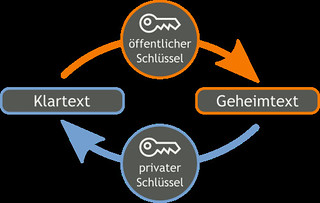
Das Prinzip der Mailverschlüsselung ist schnell erklärt. Jeder Teilnehmer hat 2 Schlüssel: einen privaten und einen öffentlichen. Der öffentliche wird an alle Leute gegeben, mit denen ihr komminuzieren wollt. Den privaten behaltet ihr immer nur für euch. Nie rausgeben. Klar?
Nehmen wir an, ihr wollt mit Berta verschlüsselt kommunizieren. Ihr gebt Berta euren öffentlichen Schlüssel, Berta gibt euch ihren öffentlichen Schlüssel. Nun könnt ihr Berta eine Mail schicken, die ihr mit Bertas öffentlichem Schlüssel abschließt.
Der Clou: Mails, die mit Bertas öffentlichem Schlüssel verschlüsselt wurden, können nur mit Bertas privatem Schlüssel wieder lesbar gemacht werden. Will Berta antworten, so verschlüsselt sie mit eurem öffentlichen Schlüssel, diese Mail ist nur mit eurem privaten Schlüssel zu öffnen. Das Ganze nennt sich Asymmetrische Kryptographie und wird bei Wikipedia nochmal mit anderen Worten erklärt.
Das Prinzip der öffentlichen und privaten Schlüssel setzt voraus, dass jeder Teilnehmer seinen privaten sowie die öffentlichen Schlüssel aller anderen Teilnehmer hat. Solche Schlüssel sind reine Textdateien und können prinzipiell per Mail verschickt werden. Komfortabler ist es jedoch, seinen öffentlichen Schlüssel auf einen sogenannten Keyserver hochzuladen, wo sich dann jeder andere den Schlüssel “abholen” kann. ACHTUNG: bevor ihr den letzten Schritt geht, möchte ich euch dringend raten, ein „Widerrufszertifikat“ (revocation certificate) für euren Schlüssel zu erstellen, denn nur damit könnt ihr einmal auf Keyservern veröffentlichte Schlüssel wieder „aus dem Verkehr ziehen“.

Der praktische Einsatz:
Wie ihr nun PGP auf eurem Rechner installiert, euch einen (oder mehrere) private und öffentliche Schlüssel generiert und diese dann einsetzt, haben andere schon besser beschrieben als ich das könnte.
- Anwender, die ihre Mails mit Thunderbird lesen und schreiben, klicken hier
- Mac-Benutzer, die ihre Mails mit Apple Mail lesen, klicken hier für eine kurze oder hier für eine ausführliche Anleitung.
- Update: Für Android-User gibt es hier eine offenbar ganz gute Anleitung, leider auf englisch. Allerdings ist zur Schlüsselerstellung wohl trotzdem Thunderbird mit EnigMail nötig. Wenn ihr etwas besseres wisst: her damit.
- Leute, die ihre Mails nur im Browser bei einem Webmailanbieter wie z.B. web.de oder gmx.de lesen, probieren es vielleicht mal mit Mailvelope, damit habe ich aber keine Erfahrung. Für diese Menschen wäre es sowieso dringend an der Zeit, sich Thunderbird herunterzuladen und sich an die Arbeit mit diesem großartigen Mailprogramm zu gewöhnen. Ganz im Ernst: ihr werdet es lieben, wenn ihr euch nur einmal darauf einlasst.
Nur Mut. Macht es! Wenn ihr noch niemanden zum Testen habt, hinterlasst hier einen Kommentar mit Mailadresse, ich helfe euch gerne bei den ersten Schritten ind die kryptographische Welt. Natürlich ist Mailverschlüsselung nur ein kleiner Teil des Bildes, ein sicheres Passwort gehört z.B. zwingend dazu. Wie ihr euch ein solches erstellt und es euch trotzdem merken könnt und viele weitere Tipps für den Digitalen Survivalist findet hier hier.
In diesem Sinne:
mQENBE8Lc4MBDADA/TMcFWnNu5i7OtxxmJA3fxdVjYjwRjqJsSuzI7pSYfAMLbWNeLGo/dHW
WCGO1RZT3bupUo8qfa8bL0wjjoH+q0CGMNZQMXyxH1cMILFMiWsL7eqCbHxfb68VGDgYhkgP
BhmEBxesMr5C2YVPjLkP4hAizi4/Uavn0yWUy0WDn7TN8wiSqV666nTMjdAuHPzT3gTNDd+v
PS: dieser Text darf so oft kopiert, angepasst, zensiert, restauriert, ausgedruckt, geschreddert, wiedereingescannt, verschickt, verfaxt und verbloggt werden bis das Internet platzt.
02 Jun 18:11

Infografik: Die 200 Rankingfaktoren der Google Websuche — GoogleWatchBlog — Wir auf


Infografik: Die 200 Rankingfaktoren der Google Websuche
by Jens
Gerade in Zeiten von Social Networks und dem damit verbundenen Überfluss an Informationen ist Googles Ranking wichtiger denn je. In einer aufwendig erstellten Infografik werden jetzt die 200 (!) Faktoren, sortiert in 10 Kategorien, zusammengefasst und kurz erklärt. Die Bibel für SEOs.
Tatsächlich sind mittlerweile schon 200 Faktoren die das Ranking in den Suchergebnisse beeinflussen – natürlich gibt Google diese aber natürlich nicht preis. Die einzelnen Faktoren basieren zu großen Teilen auf Forschungen und Erfahrungen von SEOs und können auch jederzeit von Google geändert oder abgeschafft werden.
Die Faktoren teilen sich in folgende Kategorien auf: Domain Factors, Page Factors, Site Factors, Backlink Factors, User Interaction, Special Algorithm Rules, Social Signals, Brand Signals, On-Site Webspam Factors, Off-Page Webspam Factors.

Infografik: Die 200 Rankingfaktoren der Google Websuche — GoogleWatchBlog — Wir auf
Ähnliche Postings
hamatoyoshi, AshHaushaltswaren and -1 others like this
22 May 08:14


Xbox One: Everything You Need to Know About Microsoft's New Console (Updating)
by Kyle Wagner

It's been eight years and nine days since Microsoft showed the world the Xbox 360 on May 12th, 2005. Today, we see what's next. The Xbox One.
|
|
AshHaushaltswaren likes this
19 May 19:54
Un-Zeitgemäß
by Harzzach
Da sitze ich wieder. Zum x-ten Male. Schaue auf die Klassenmöglichkeiten eines Titan Quest – Immortal Throne … … und weiß genau, dass ich in Zukunft noch sehr, SEHR viel länger und öfter vor diesem Spiel sitzen werde. Und dabei habe ich die Schwierigkeitsgrade “Epic” sowie “Legendary” mit neuen Runen und der Möglichkeit Misch-Klassen zu […]
17 May 19:18


How Can I Make My PowerPoint Presentations Amazing?
by Melanie Pinola

Dear Lifehacker,
I have been tasked to make a slideshow for an event at work. I don’t want to make a generic PowerPoint with just boring text or pictures. What are some ways I can enhance the slideshow so it looks impressive and knocks the socks off my audience?
|
|
Jon23516, Alexjherzog and 2 others like this
No more posts. Check out what's trending.