If you’re using Excel and have data split across multiple columns that you want to combine, you don’t need to manually do this. Instead, you can use a quick and easy formula to combine columns.
We’re going to show you how to combine columns in Excel using the ampersand symbol or the CONCAT function. We’ll also offer some tips on how to format the data so that it looks exactly how you want it.
How to Combine Columns in Excel
There are two methods to combine columns in Excel: the ampersand method and the concatenate formula. In many cases, using the ampersand method is quicker and easier than the concatenate formula. That said, use whichever you feel most comfortable with.
1. Combine Columns with the Ampersand Symbol
Click the cell where you want the combined data to go.
Type =
Click the first cell you want to combine.
Type &
Click the second cell you want to combine.
Press the Enter key.
For example, if you wanted to combine cell A2 and B2, the formula would be: =A2&B2
2. Combine Columns with the CONCAT Function
Click the cell where you want the combined data to go.
Type =CONCAT(
Click the first cell you want to combine.
Type ,
Click the second cell you want to combine.
Type )
Press the Enter key.
For example, if you wanted to combine cell A2 and B2, the formula would be: =CONCAT(A2,B2)
This formula used to be CONCATENATE, rather than CONCAT. While the former still works, it is being depreciated and you should use the latter to ensure compatibility with current and future versions of Excel.
More Than Two Cells
You can combine as many cells as you want using either method. Simply repeat the formatting like so:
=A2&B2&C2&D2 … etc.
=CONCAT(A2,B2,C2,D2) … etc.
Combine the Entire Column
Once you have placed the formula in one cell, you can use this to automatically populate the rest of the column. You don’t need to manually type in each cell name that you want to combine.
To do this, double click the bottom right corner of the filled cell. Alternatively, left click and drag the bottom right corner of the filled cell down the column.
Tips on How to Format Combined Columns
Your combined Excel columns could contain text, numbers, dates, and more. As such, it isn’t always suitable to leave the cells combined without formatting them.
To help you out, here are various tips on how to format combined cells. In our examples, we’ll refer to the ampersand method, but the logic is the same for the CONCAT formula.
1. How to Put a Space Between Combined Cells
If you had a “First name” column and a “Last name” column, you would want a space between the two cells.
To do this, the formula would be: =A2&” “&B2
This formula says to add the contents of A2, then add a space, then add the contents of B2.
It doesn’t have to be a space. You can put whatever you want between the speech marks, like a comma, a dash, or any other symbol or text.
2. How to Add Additional Text Within Combined Cells
The combined cells don’t just have to contain their original text. You can add whatever additional information you want.
Let’s say cell A2 contains someone’s name (e.g. Marge Simpson) and cell B2 contains their age (e.g. 36). We can build this into a sentence that reads “The character Marge Simpson is 36 years old”.
To do this, the formula would be: =”The character “&A2&” is “&B2&” years old”
The additional text is wrapped in speech marks and followed by an &. When referencing a cell, these don’t need speech marks. Note that you also need to include where you want the spaces to be—hence “The character ” with a space at the end, rather than “The character”.
3. How to Correctly Display Numbers in Combined Cells
If your original cells contain formatted numbers like dates or currency, you’ll notice that the combined cell strips the formatting.
You can solve this with the TEXT function, which you can use to define the required format.
Let’s say cell A2 contains someone’s name (e.g. Marge Simpson) and cell B2 contains their date of birth (e.g. 01/02/1980).
To combine them, you might think to use this formula: =A2&” was born on “&B2
However, that’ll output: Marge Simpson was born on 29252. That’s because Excel converts the correctly formatted date of birth into a plain number.
By applying the TEXT function, you can tell Excel how you want the merged cell to be formatted. Like so: =A2&” was born on “&TEXT(B2,”dd/mm/yyyy”)
That’s slightly more complicated than the other formulas, so let’s break it down:
=A2 – merge cell A2.
&” was born on “ – add the text “was born on” with a space on both sides.
&TEXT – add something with the text function.
(B2,”dd/mm/yyyy”) – merge cell B2, and apply the format of dd/mm/yyyy to the contents of that field.
You can switch out the format for whatever the number requires. For example, $#,##0.00 would show currency with a thousands separator and two decimals, # ?/? would turn a decimal into a fraction, H:MM AM/PM would show the time, and so on.
If you click a cell within the combined column, you’ll notice that it still contains the formula (e.g. =A2&” “&B2) rather than the plain text (e.g. Marge Simpson).
This isn’t a bad thing. It means that whenever the original cells (e.g. A2 and B2) are updated, the combined cell will automatically update to reflect those changes.
However, it does mean that if you delete the original cells or columns then it will break your combined cells. As such, you might want to remove the formula from the combined column and make it plain text.
To do this, right click the header of the combined column to highlight it, then click Copy.
Next, right click the header of the combined column again. This time, beneath Paste Options, select Values. Now the formula is gone and you’re left with plain text cells that you can edit directly.
How to Merge Columns in Excel
Instead of combining columns, you can also merge them. This will turn multiple cells across into one cell. Merging cells only keeps the values from the upper-left cell and discards the rest.
To do this, select the cells or columns that you want to merge. In the Ribbon, on the Home tab, click the Merge & Center button (or use the dropdown arrow next to it).
Burner phones, devices which are intended to be cheap, throwaway, and less invasive serve may different purposes. Whether you’re after a spare to throw in your bag when travelling or hoping to minimize surveillance, there are options out there that won’t break the bank.
We’ve rounded up some of the best burner phones available today to get you started.
Why Use a Burner Phone?
There are plenty of reasons why you might want a burner phone. While news reports often link them to criminality, these devices can be incredibly useful for all sorts of legitimate reasons. They tend to be quite hard-wearing, have great battery life, and, best of all, are pretty inexpensive.
Aside from that, burner phones can be useful to protect your identity. For instance, your smartphone will have a lot of personal data stored on it. Lose your phone and that can leave you at risk of identity theft. A simpler, less expensive phone will likely only have text messages, phone calls, and contacts on there.
Given that most options rely solely on 2G or 3G connections, you’re unlikely to be using the internet in the same way, aside from possibly accessing emails or getting directions. Taking all of this into account, let’s see what handsets we rate as some of the best burner phones.
If you grew up in the 1990s, then you’ll remember the original Nokia 3310, one of the most popular cell phones of all time. The Nokia 3310 3G is an update of the iconic device with a color screen and 3G capability. While this is almost two generations of wireless technology behind, so it won’t offer the fastest internet speeds, it does have its uses.
For example, it would come in useful for someone who is going to a festival for the weekend. You can call and text your friends if you lose them, and, thanks to the 3G, you could probably even locate them on a map. Aside from the 3G capabilities, the phone has a massive 27-day standby time—more than enough for a weekend away, for example. There’s even an updated version of Snake, the classic pre-internet mobile game, to play.
We reviewed the revived Nokia 3310 back in 2017. At the time, we didn’t think it offered value for money. However, the phone has evolved in the years since and has become one of the best affordable burner phones available.
As mentioned, burner phones tend to be fairly rugged. Case in point is the Plum Ram 7, which looks like something that could withstand a fall from the 37th story. The handset has a damage-limiting design, so it should be able to withstand a knock or two.
This handset is also 3G, so it will be able to access the internet, albeit without many of the features we’ve come to expect. This would be an excellent phone for hiking trips or similar pursuits. Its IP68 dust and water-resistant rating will ensure you won’t easily damage it if you drop it into the sand or a stream.
This cell phone is unlocked, too, meaning you can pop any SIM card from compatible carriers into it. Consequently, you can find the provider with the best coverage at your destination and use their network. The phone boasts a fantastic 35-hour talk time and 900-hour standby time.
Another Nokia, this time the revamped Nokia 8110 4G. However, unlike the 3310, this is a slider phone. Although largely a relic of a bygone era, these devices come equipped with a plastic covering over the buttons. This slides down to reveal the keypad so you can access the phone’s functions.
It is relatively inexpensive, and the sliding mouthpiece has an air of retro-cool. The 8110 outstrips the other burner phones on this list in terms of connectivity. Users can enjoy all the wonder of 4G, so you should have no problem with basic internet functions. It has a standby time of 25 days, which is the best part of a month.
It also has a talk time of 7.5 hours, so you will get plenty out of the battery. Just be aware that using the internet will drain the battery faster, so you would need to use it sparingly and ensure you turn data off when you aren’t using it. Interestingly, the original 8110 is the phone that Neo used in The Matrix!
The Alcatel QUICKFLIP 4044C is an excellent example of an inexpensive burner phone. Like the others on this list, it comes with a novel throwback feature. In this case, the 4044C is a flip phone. Although this design has seen a few modern revivals, namely the Motorola Razr 2020, it still has an element of nostalgic cool to it.
However, one additional feature that stands out is the HD Voice capabilities of the phone. This makes it an ideal choice for noisy environments like a concert or music festival, where you might not hear your friends on a regular phone. The HD Voice capabilities will filter out background noise, making a caller’s voice clearer.
The Zanco Tiny T1 has to take the prize for the most compact handset on this list. Well, it would do, as it is the world’s smallest phone. Sick and tired of lugging an unwieldy Samsung beefcake around with you? Then the Zanco Tiny is for you.
If you are going backpacking or hiking for photography purposes, you want all the weight in your camera equipment. You can pop this phone in any pocket, and you won’t even notice the difference. Thanks to the 14-option software-based voice changer, this is an excellent phone if you want to protect your identity, too.
It also has a 180-minute talk time and a three-day standby time. Ideal for those short weekend trips away, then. The great thing is, it is a very basic phone. So, if you are taking a distraction-free break from everyday life, you can still contact someone if you need to.
The Best Cheap Burner Phone for You
Whatever you need a cheap burner phone for, there are plenty on the market to choose from. Whether you’re heading to a festival, off camping for the weekend, or just want a cheap, basic handset, the phones included here definitely have you covered.
Kevin Kelly is Senior Maverick at Wired magazine. He co-founded Wired in 1993, and served as its Executive Editor for its first 7 years. His most recent book is The Inevitable, which is a New York Times and Wall Street Journal bestseller. His other books include the best-selling New Rules for the New Economy, the classic Out of Control, and his summary theory of technology in What Technology Wants. From 1984-1990 Kelly was publisher and editor of the Whole Earth Catalogs. He co-founded the Hackers’ Conference, and was involved with the launch of the WELL, a pioneering online service started in 1985. He also founded the popular Cool Tools website in 2003.
About the bag
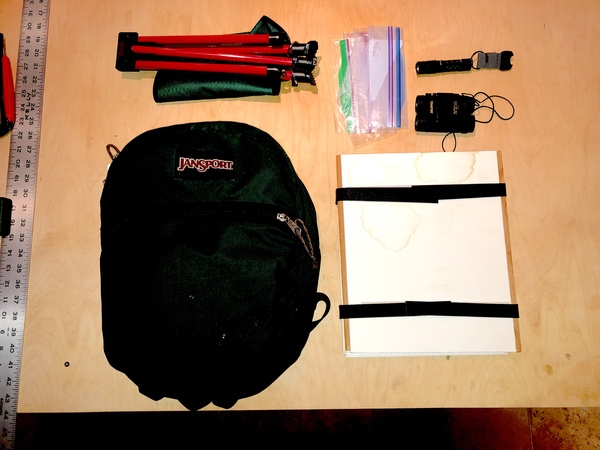
This is my day hiking bag. An ancient 20-year old JanSport bag with essentially 3 big pockets. I use it for day hikes. In addition to the items shown here, I’ll also carry some snacks and water. This is the closest current model JanSport bag.
What’s inside the bag
Homemade, super light-weight plant press for preserving plants and flowers from my hikes. Made from scrap pieces of foam core boards. I glued two layers for each side with strips of wood to corner the velcro straps. Inside are sheets of “couch” blotter paper to dry the plants.
A single AA battery LED light hangs inside the JanSport bag. Very light weight, but extremely bright and long lasting. To be used when darkness comes or to inspect underbrush. The one shown is no longer made. This one is near equivalent.
Tiny binoculars. I only use these occasionally, so I don’t want to carry the full weight of real birding binocs. At 8 x 21 magnification they are low powered, and sometimes called opera glasses. These inexpensive ones are helpful for short glimpses. Since they are very compact and very cheap, I don’t mind packing them. The ones I have are no longer made so this is an equivalent.
The lightest, smallest portable camp chair I could find. This fits in my daypack and unpacks into a tripod stool which lets me sit almost anywhere. While it is very compact, the TriLite Stool is not super comfortable, and not made for relaxing. It’s also tipsy, and easy to tip over in. But I use it only for short rests and for picnicking.
-- Kevin Kelly
[What's in YOUR bag? We want to hear about unusual and unusually useful items that you carry in your bag. We are especially interested in the specialized bags of doctors, athletes, repair techs, artists, gardeners, hikers, etc. Start by sending an email to claudia@cool-tools.org with a photo of the things in your bag (you can use your phone). If you get a reply from us, fill out the form. We’ll pay you $50 if we run your submission in our What’s in my bag? newsletter and blog.]
Alice Zilberberg is an internationally acclaimed, award-winning artist, recognized by curators, collectors, and art patrons across the globe. Born in Tallinn, Estonia, and raised in Israel, she currently resides in Toronto, Canada. A graduate of Ryerson University’s Photography program, she began her artistic practice by painting: a verve which remains very much present in her digital works. The winner of numerous prestigious competitions, her accolades include 1st place titles in competitions such as the International Photography Awards, the Julia Margaret Cameron Awards, and the Fine Art Photography Awards. You can find her on Instagram @alicezilberberg and on Facebook @alicezilberbergartist.
About the bag
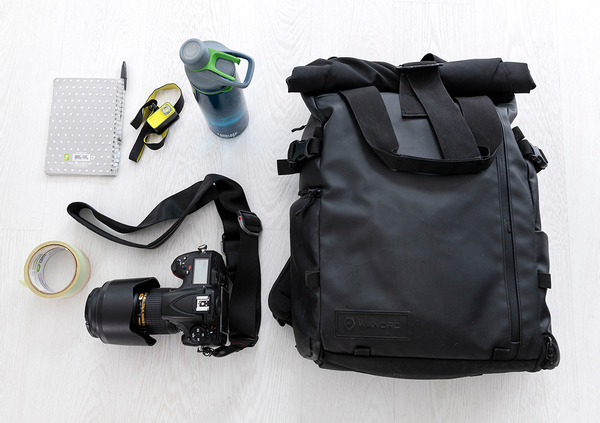
WANDRD PRVKE series Backpack ($184US, bag only)
This bag is one of those items that I will never part with, and with the quality in the make, this specific one will probably last me forever. As someone who needs to travel with a camera to go on day trips or travel a lot, this bag is my base for getting organized. It allows me to store photography equipment at the bottom, a laptop, and everyday things at the top of it. The weight distribution and an extra strap to place around my hip is great if I’m going to have this on my back for long. The multiple access points are essential, since at any moment on a trip I might want to take the camera out fast and conveniently. In airports, I take my laptop out in under 10 seconds, saving me so much time in security!
What’s inside the bag
Nikon D850 camera with a Nikon 27-70mm 1.2 lens ($5000US)
I love traveling with this camera. It provides me with everything I need for long shooting trips. The quality allows me to print my artwork at museum sizes later on. I have many lenses, most of them are prime, but this one is a nice go-to that allows me to cover widespread subject matter.
Peak Design camera strap ($65US)
With the kind of work I do, I find myself hiking a lot in order to shoot in nature. I find this strap one of the peak products out there in terms of shooting accessories. It allows me to keep the camera around my hip and walk comfortably while scouting an area for locations and shooting. It’s very well made, and like my bag, will probably last me a lifetime.
Notebook and pen ($3-$4US)
I like to carry around a simple lightweight and small notebook with me when I go away. I write down addresses for hotels, destinations, and creative ideas on the go in order not to rely on my phone to get to places. I wouldn’t want to get stuck somewhere if my phone died without having information written down on paper. For addresses, it’s easy to show a cab driver or a local a destination without handing out my pricey phone!
CamelBak water bottle ($11US)
Whether at home or while traveling, I always have this on me. I’m definitely addicted to having a source of water with me no matter where I am. Other than keeping hydrated, I am happy to reduce the world’s single-use plastics. Even in countries where the tap water is not recommended for drinking, I buy big amounts and fill this bottle twice a day to reduce waste!
[What's in YOUR bag? We want to hear about unusual and unusually useful items that you carry in your bag. We are especially interested in the specialized bags of doctors, athletes, repair techs, artists, gardeners, hikers, etc. Start by sending an email to claudia@cool-tools.org with a photo of the things in your bag (you can use your phone). If you get a reply from us, fill out the form. We’ll pay you $50 if we run your submission in our What’s in my bag? newsletter and blog.]
MAPLE VALLEY, Wash. -- A day after being found deep in the woods just west of Stevens Pass, Gia Fuda is recovering at a local hospital with scrapes and scratches and a bout of dehydration. Her parents tell KOMO News she is catching up on rest and trying ...
The flat iron steak began as an experiment in a meat science laboratory in 2001. Today, it’s a $630m-per-year culinary sensation. But what exactly does it take to discover a new cut of meat?
This edition of The Hustle was brought to you by Miso Robotics… Flipping the future of cooking on its head.
The Hustle is proud to deliver original longform journalism to your inbox every Sunday. This work would not be possible without the support of our sponsor, Miso Robotics. Please support them so we can continue to bring you the most interesting stories you’ll find anywhere.
The “invention” of the flat iron steak
The flat iron steak began as an experiment in a meat science laboratory in 2001. Today, it’s a $630m-per-year culinary sensation. But what exactly does it take to discover a new cut of meat?
Three years later, the world was introduced to the flat iron steak.
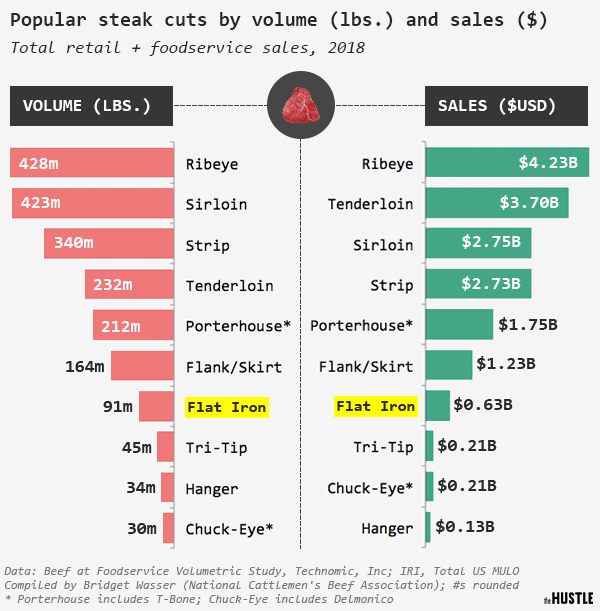
In its first several years of life, the flat iron steak — a very thin, very tender cut from beneath the shoulder blade of the cow — topped 92m pounds per year in sales, about as much as the porterhouse and the T-bone steak combined.
Back then, it was rare to see a new steak enter the market. The flat iron became a proof-of-concept for the industry — and it left the beef titans craving more new cuts.
Cows have been around for millenia. How, exactly, do you discover a new steak? And once you discover it, how do you convince the world to give it a shot?
To understand how this process works, we traced the journey of the flat iron steak from lab to table.
From “lab flunky” to meat scientist
You might introduce Chris Calkins as the co-discoverer of one of the most popular steaks in America. But his more understated title is “University of Nebraska professor of meat science.”
Calkins didn’t dream of becoming a meat scientist. As a kid, he used to say he wanted to work as a vet. He grew up in a small town in Washington with a father who’d spent much of his life on a ranch.
When his high school mentor, an agriculture teacher, left to become a meat science professor at Texas A&M, he told Calkins to apply.
Chris Calkins (University of Nebraska / photo illustration by The Hustle)
Sure enough, Calkins got in. And within the year, he’d become a full-fledged “meat lab flunky” — the undergrad tasked with the laboratory cleanup work. But he fell in love with the work. “I was attracted to it because there were objective things that you can measure,” Calkins says.
By the 1980s, after nearly a decade of schooling, Calkins landed his position at the University of Nebraska. He started out studying meat color and dry-aged versus wet-aged beef. But his big break didn’t come for another decade.
Back in the mid-1990s, the beef industry had a problem. An oversupply of meat had sent the price of a cow tumbling. By 1996, some supermarkets were selling beef at 25% to 50% off the 1993 levels.
With ranchers at risk of foreclosure and bankruptcy, the NCBA came up with a solution.
Cows, they decided, were being underutilized. There were too few popular steaks out there: Sure, everyone wanted to buy a filet mignon, but a handful of cuts couldn’t carry an entire industry. If meat execs wanted to bring up the price of a cow, they needed to make people fall in love with other steaks.
The trade group put out a meat-science bat signal — an urgent call for research proposals. Calkins submitted an idea, and the NCBA paired him up with Dwain Johnson from the University of Florida.
Zachary Crockett / The Hustle
Understanding their proposal requires a bit of knowledge about bovine anatomy.
When it comes to taste, not all cow parts are created equal. Our most beloved steak cuts — the filet mignon, the prime rib, the ribeye — typically come from the inner parts of the cow, like the rib and the loin. Those regions are least involved in locomotion, so they tend to have the softest (and best-tasting) muscles.
The least desirable parts of the cow were those ones on the end — the “chuck” (the foremost region) and the “round” (in the back). The chuck and the round were far tougher than, say, the loin, and while meat packagers would carefully cut expensive steaks out of the loin, they sold the chuck and the round as cheap ground beef.
Common beef wisdom said that you couldn’t cleave a nice steak out of the chuck or round. So, prices of each stayed low.
But Calkins and Johnson suspected that the industry might have it all wrong. What if there was a way to slice the chuck and the round that produced a steak as delicious as a tenderloin?
‘It’s like a puzzle’
The team split into two groups: In Nebraska, Calkins handled the compositional analysis, looking at things like water-holding capacity and fatness. Back in Florida, Johnson measured the tenderness profile and directed the taste test panel.
After an initial analysis, the duo picked 39 muscles from the chuck and the round that they wanted to examine most closely. What followed was a grueling, 3-year process of carving out the muscles and testing them for tenderness and flavor. Calkins and Johnson gathered up 140 different renditions of each muscle. In total, ~5.5k slabs shuttled in and out of their labs.
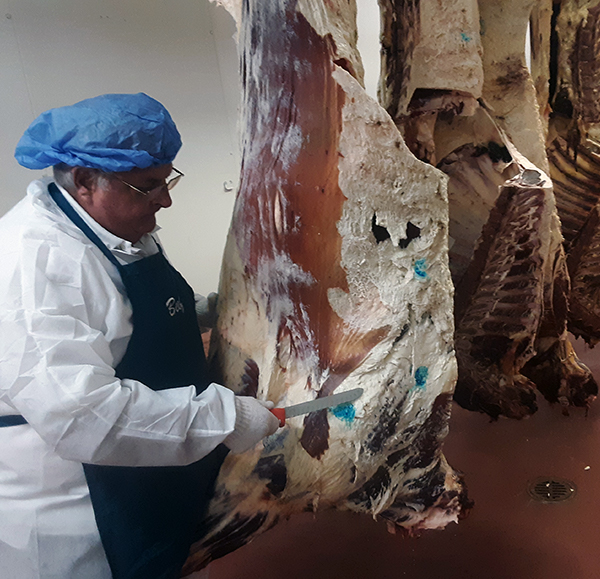
Calkins demonstrating some fresh cuts (courtesy of Chris Calkins)
Early on in the process, one muscle stuck out.
Embedded in the chuck was the infraspinatus, located just beneath the shoulder of the cow. When Calkins and Johnson first analyzed it, they realized it was extremely tender, much more so than the hard exterior of the chuck.
But down the middle of the muscle was a large, rough seam of connective tissue. If Calkins and Johnson wanted the infraspinatus to become a steak, they were going to have to figure out not just how to cut it, but how to do it efficiently.
Meat packaging plants, some of which process thousands of cows per day, constantly assess whether or not certain cuts are worth the extra effort. You can find the most delicious piece of meat in the world, but if it takes a packager 5 extra minutes to remove, then they won’t do it.
“It’s like a puzzle,” Calkins says. “Someone says, ‘Okay, here’s a muscle. Figure out how to cut it to make it accessible.’ So you try everything you can. You worry about how much labor it’s going to take. You worry about, can the industry produce this product?”
Calkins took a few stabs at the infraspinatus. The connective tissue was thicker on one side than the other, so at first he tried to cut it out only on the thicker side.
When that failed, he landed on the idea of just cutting the connective tissue out entirely. That also seemed to be a bust. “When we first cut this thing, we said, ‘Well that won’t work, it’s too thin,’” Calkins says.
Calkins and Johnson decided to test it anyway. When they started to cook the slice, something extraordinary happened: “It plumped up,” Calkins says. That thin piece of meat? It got bigger.
Dwain Johnson exploring a fresh slab of beef (courtesy of Dwain Johnson)
Before they got too excited, they needed to get other people to weigh in. Johnson was directing a sensory panel, which was made up of 12-15 people recruited from the University of Florida — a mix of professors, students, janitorial staff, and retired employees.
To qualify, the team went through 12 hours total of training on the ins and outs of measuring, say, tenderness. When Johnson served them a steak, they weren’t supposed to say whether or not they liked it, just whether it passed some objective markers of tenderness, juiciness, and flavor.
When Johnson gave them this ultra-tender cut from the chuck — soon to be known across the country as the flat iron steak — he realized he and Calkins might have a hit. “It stood out,” Johnson says. “As we were going through the process, we said, ‘This has potential.’”
A new steak goes to market
To hear Calkins tell it, when he first took the new steak to meat industry execs, their reaction was, “You’re kidding, right?” The flat iron was so thin.
“It took a while to convince processors to cut it. It took a while to get retailers and restaurants to understand what the steak was like,” Calkins says. “Then eventually, the whole industry said, ‘It looks like there is value in doing this.’”
To get the cut out there, Calkins and Johnson started going on tour. Sponsored by the National Cattlemen’s Beef Association, they visited conventions, where they showed chefs how to cut a flat iron steak. An event at the University of Nebraska introducing the new steak brought 100+ meatpackers and other industry bigwigs.
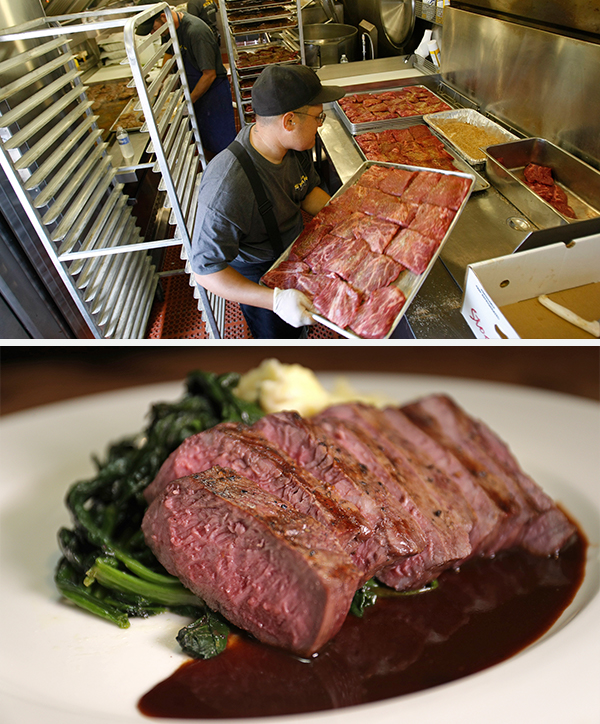
Top: A Los Angeles catering chef preps a rack of flat iron steaks in 2009 (Allen J. Schaben/Los Angeles Times via Getty Images); bottom: a grilled flat iron steak at Heritage of Sherborn in Sherborn, Massachusetts in 2016. (Barry Chin/The Boston Globe via Getty Images)
The NCBA started setting up shop in grocery stores. Representatives would man meat sample tables and say, “Hey, take a bite of this new steak. And people would go, ‘Oh my god, it’s so tender, where do I buy this?’” says Calkins.
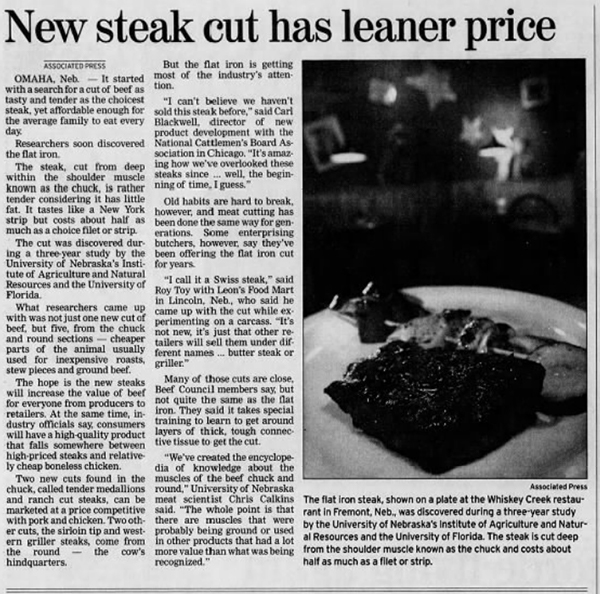
In November 2001, the flat iron steak began its public press run. In an Associated Press article, “New Steak Cut Has Leaner Price,” the wire service trumpeted the discovery of a slice of meat that “tastes like a New York strip but costs about half as much as choice filet or strip.” “It’s amazing how we’ve overlooked these steaks since… well, the beginning of time, I guess,” the director of the National Cattlemen’s Beef Association told the AP.
Of course, the idea of a “new” cut touched off some tricky politics about whether you can really discover a slice from an animal that has existed for millennia. One grocery, Leon’s Food Market, said that it had been cutting that same muscle and calling it the “Swiss Steak” before Calkins and Johnson ever entered the fray.
But beef experts noted that while the Swiss Steak shared some qualities with the flat iron, they weren’t a 1:1 match. “It takes special training to learn to get around layers of thick, tough connective tissue to get the cut,” the AP wrote.
Getting the flat iron steak into the beef ecosystem took more than just Calkins, Johnson, the NCBA, and the AP. Seeing the profit potential of a new cut of steak, an entire network of nonprofits and trade groups jumped into the mix.
A 2001 AP article tours the tenderness and affordability of the newest steak on the block (The Pantagraph/AP, via newspapers.com; 11/08/2001)
Diana Clark, a meat scientist at Certified Angus Beef — an organization for cattle breeders that appraises the quality of certain steaks — has spent years trying to popularize new and overlooked meat cuts.
In normal times, that means she regularly welcomes in groups of chefs and retail representatives into her Ohio office, where she demos new cuts. About 30 people are in and out each week. (Lately, she’s been trying out Zoom demonstrations.) Back in the early 2000s, Certified Angus Beef used the same strategy to promote the flat iron steak.
The way the supply chain works, Clark says, is that you have to corner the restaurant market first. The big distributors — Sysco, PFG, and US Foods — are reluctant to try a new cut until they’ve seen proof of demand.
“If they keep hearing, ‘We want this flat iron cut, we want this flat iron cut,’ then food distributors will listen,” Clark says.
That strategy worked. In the early 2000s, Applebee’s became one of the first major chains to put the flat iron on its menu. By 2006, Kroger’s added the flat iron to 1.8k of its stores. Suddenly, that strange little piece of steak that Calkins and Johnson extracted in a lab was everywhere.
A marketing manager for the NCBA told Calkins, “This was an 8-year overnight success.”
Beefing up the price of a cow
The flat iron wasn’t the only new steak to hit the market in the mid-2000s. Calkins and Johnson had identified a number of promising new cuts, and they soon noticed those discoveries — like the ranch steak and the petite tender — inching their way into grocery stores.
If the industry’s mission was to drive up the price of a cow, the plan worked in a big way. According to analytics service CattleFax, by 2009, these new steak cuts had added $50 to $70 to the value of a single cow.
Zachary Crockett / The Hustle (data via Bridget Wasser)
And beef bigwigs didn’t stop there. The end of the decade featured unveilings of new cuts from the chuck and the round that were first discovered by Calkins and Johnson. 5 rolled out in 2009, then another 6 hit the market a year later.
None has entered the zeitgeist quite as much as the flat iron steak. But even 2 decades later, that 1998 study has continued to shape what we eat.
When I asked Diana Clark what she sees on the horizon for the beef industry, she listed a few cuts that have caught her eye — the merlot steak, the Baltic steak. But one in particular has distinguished itself: the Denver steak.
That cut traces back to Calkins and Johnson. The Denver steak was the 4th-most tender slice in their study, taken from the chuck. It’s been around since 2009, when newspaper coverage called it a “distant cousin” of the New York strip. But only in the last few years has the industry really given the Denver steak a big marketing push.
“We’ve been promoting the Denver steak a lot more than we had in the past,” says Clark. “I can see it becoming the next flat iron.”
You ordered your burger medium-rare with mustard and it came out burnt with ketchup. Ugh.
We call that the quick-service quandary — when the food comes fast, but it’s also unreliable.
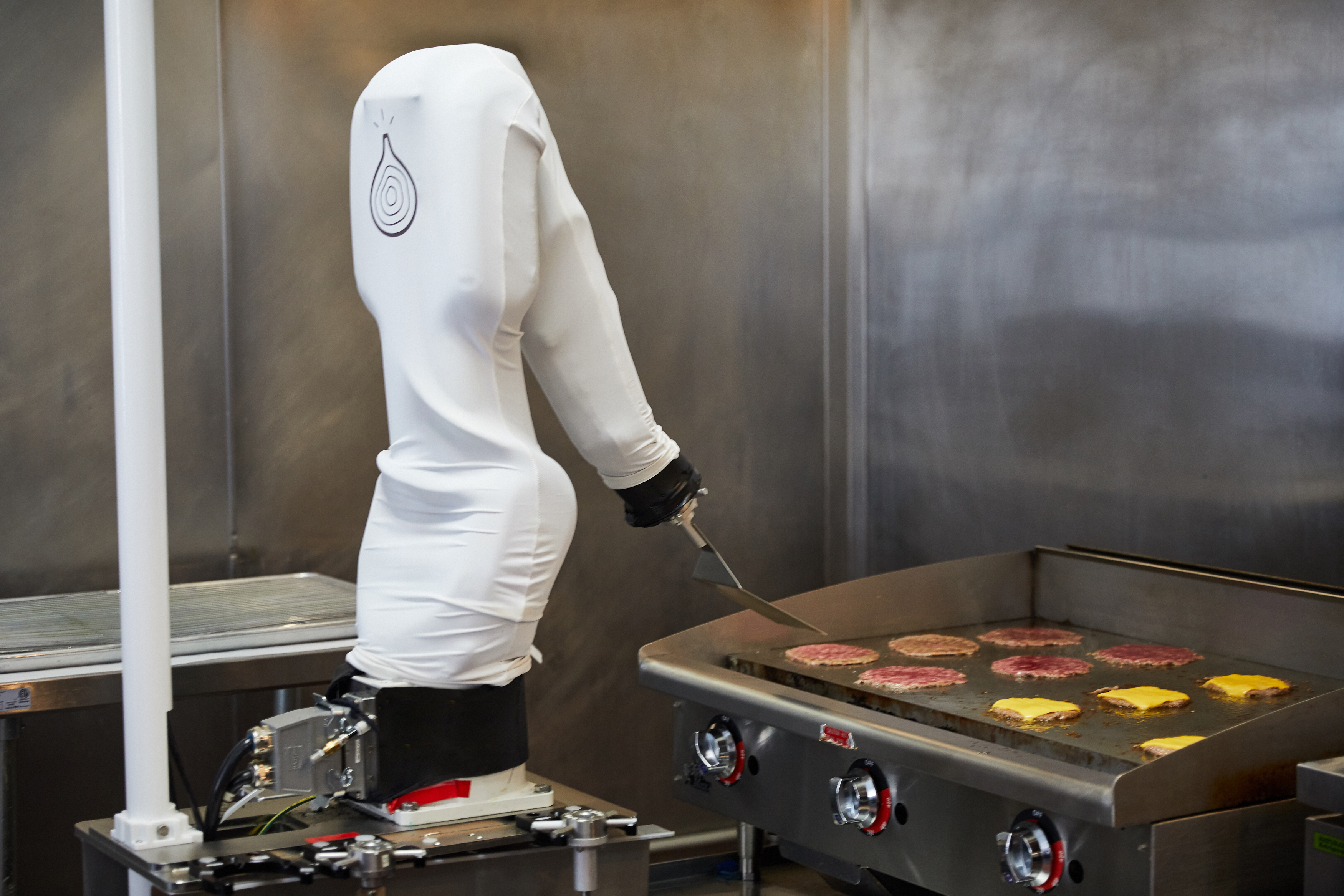
That’s all changing soon though, thanks to a new robot manning the grill at places like Dodgers Stadium and Caliburger: Miso Robotics’ own Flippy, who cooks every burger it touches to absolute perfection like some kind of chrome-plated Guy Fieri.
Innovate, automate, and elevate the commercial kitchen
Thanks to thermal vision (along with 12 different pending patents), this AI assistant chef is helping to address the challenges facing quick-service restaurants and cloud kitchens:
Economical: Flippy’s low hourly cost can give quick-service restaurants a 300% lift in margins
Scalable: Flippy has cooked 60K+ lbs of fried food and 12K+ burgers, and counting!
Responsible: Flippy makes for a safer work environment by keeping human workers away from dirty and dangerous kitchen tasks
So, here’s your opportunity: Get in on their SeedInvest fundraising round while it’s still open (and before Flippy starts making the rounds on Kimmel), and see where this investment takes you.
Part of a new series where we spotlight a trend from way back when that still feels relevant today.
Think Zoom schooling sounds novel? Seven decades ago, America was experimenting with a different sort of remote classroom.
In the 1940s, an intercom manufacturer called Executone Inc. began testing a new concept known as “telephone teaching.”
The target audience: Kids with polio or other long-term illnesses.
Telephone teaching was never supposed to replace the classroom. But it kept kids in school even if they were battling an illness — all they had to do was call in.
So how did it work?
Executone sent out 2 portable intercoms, one to the school and one to the student’s home. Then it gave the student a talk switch and a volume controller.
In 1958, South Dakota’s Rapid City Journal wrote about Karen Cavner, a high school student who broke both her legs in a car accident.
Karen’s friend Mary Ellen Seiler — who shared her schedule — carried her intercom to and from classes, leaving it on an empty desk during lectures.
Mostly, Karen just listened in. But “when called upon to recite or participate in group or class discussion,” the Journal reported, “the shut-in student can snap a switch and talk to the class.”
The project was a hit
By 1960, Executone had telephone learning systems in 46+ states and territories, with thousands of kids using them.
The only hitch? Visuals. As the Journal noted, “The teacher must merely remember the shut-in child is there but cannot see.”
There exists a Reddit subculture dedicated to doing nice things for complete strangers. One day, a stranger on the internet might send you a pizza. The next day, your mom might receive a birthday card from 30 people she has never met. You might even have a free Steam game donated to you.
The subculture is open to anyone. You just need to commit to pay it forward. Which means when someone does something nice for you, you do something nice for someone else. And so on. So, here are the best subreddits where strangers pay it forward. And you could be one of those strangers.
Random Kindness is the catch-all subreddit of this type. How kind you can be is the only limitation of this heartwarming place. It relies on the kindness of strangers and works on a system of offer and request. If you have something to give, the chances are that there is someone out there who would genuinely appreciate receiving it.
Monetary requests are a strict no-no. You cannot trade a gift for something better. As a rule, all donors should have an account that is at least 90 days old and boast 300 comment karma points on Reddit.
Random Kindness is a nice community where you can pay it forward with your heart.
RandomKindness does not allow gifts. But join this subreddit and you can be Santa Claus in someone’s life. The gifting relies on Amazon Wishlists. Make one and then insert it into your submission flair box. The colored flair tags appear next to your submission title when you post something on Reddit.
Community members can browse these wishlists and gift each other stuff from Amazon at random. Some people mention what they’ve purchased. Some people leave it as a surprise.
Above all, this subreddit is more friendly and social than any other of its type. The people on it hold special activities, contests, and even venture out into the real world together and meet up.
A Place for Card Kindness uses only cards and postcards to message kind words. This subreddit could hold a special place in your heart if it evokes a sense of nostalgia in you. Cards and postcards seem so outmoded today. But this community’s enthusiasm for them will surprise the skeptic in you.
Cards can be store-bought or handmade. It can even be a good ol’ birthday card if you fill the Birthday Calendar on the subreddit. Or it can just be a simple pick-me-up card for someone who’s down.
For instance, check out the Instagram feed or the screen above for a quick glance at the variety of offerings.
It’s safe to say that Reddit and the gaming community have had a long and close relationship. Many gaming subreddits are more active than the official forum communities from the game developers themselves. So, it shouldn’t be a surprise to learn that RandomActsOfGaming boasts more than 137,000 subscribers.
In particular, this subreddit is all about gaming giveaways. So many awesome things are being given away here for free. Steam codes aplenty along with stuff from publishers like the Humble Bundle. And sometimes, you can even walk away with a game of your own choosing.
By being a member of this subreddit you’re pretty much guaranteed to pick up a free game. Eventually. And if you’re short on patience, you can always check out one of these sites where you can download free PC games.
The subreddit’s tagline says it all: “Restoring Faith in Humanity, One Slice at a Time”. You have to be 18+ to enter this subreddit and start fulfilling each other’s requests for pizzas. Each random pizza is meant to deliver goodness. But no sob stories or mooching is allowed.
You will see little tags next to a Redditor’s entry that shows how many pizzas they have donated or received.
Interestingly, RAOP was the subject of a Stanford study in 2014 (PDF). Researchers looked at the language of the requests and how that made people go out of their way to send pizzas to strangers.
It’s safe to say that humanity never leaves its pets behind. This is the sentiment behind Random Acts of Pet Food that has people asking for help on behalf of animals. Many posts are about people down on their luck and unable to feed their pets good food.
And that’s a magnet for charitable folk jumping into the community with offers of surplus food. You will find many threads where compassion shines through and gratitude follows in response.
This subreddit sets out to prove that sharing a bit of spontaneous music with others goes a long way. The community contributes footage of performers that can take you by surprise. Like the daughter who is taken aback when her dad starts singing Ave Maria in the hotel lobby.
The subreddit has only two simple rules. The music has to be a random find and you have to keep it kind. Go ahead, make someone’s day.
You can always lean on a community for advice and help. A stranger might answer the call. The r/Assistance subreddit is all about that spirit of solidarity between Redditors. The subreddit is well moderated with a clear set of rules.
Use the flair tags on the right to filter through the requests, advice, and job offers among other things. You can also use the dropdown filter at the top to filter past posts. The gray “Request Fulfilled” tag suggests that people are eager to offer help.
NB: Stay aware of scams and scammers if you decide to participate in the community.
More Ideas to Inspire Kindness
These are the kinds of hidden online communities that can really rekindle your love for the internet. And there are other “random acts” subreddits for coffee, cookies, and Christmas too. Just remember that it’s always better to give than to receive!
While it may feel like it at times, there is no lack of kindness in the world. It may just be buried under the bad news and social media noise that we’re all exposed to on a daily basis. Which is where these Reddit search tips and tricks will prove useful.
Maintaining a daily journal is one of the best habits for mental well-being and reflection. But it’s a hard habit to build, so these apps and websites are tweaking the experience to make it easier to write a journal every day.
The basics of building a journaling habit are the same for all methods. You should be honest and write freely, do it at least once at the end of the day, and don’t be hard on yourself. Along the way, you can track mood and progress in journals, but the primary purpose is to reflect.
1. Swipe Journal (Android, iOS): Fastest Journal for People in a Hurry
Swipe Journal changes the traditional journal experience into a multiple-choice test. You won’t be writing or recording diary entries with this app. Instead, you’ll be tapping options. It’s a series of question-and-answer rounds that’s much faster than writing.
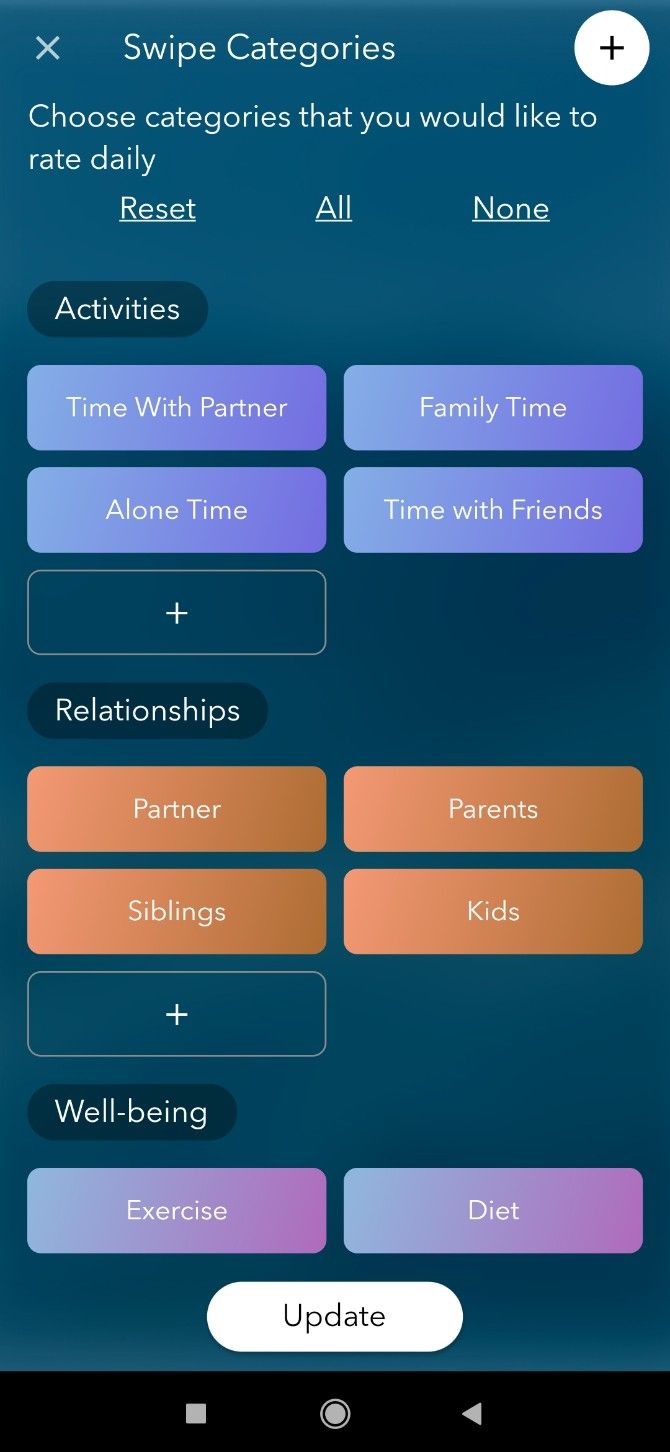
When you initially set up Swipe Journal, choose between several categories and cards to track. Categories include work, school, relationships, well-being, finance, and self development. Each category has multiple cards to track, and you can add custom cards or categories too.
Once you’ve chosen, Swipe Journal acts like a Tinder for journaling. You’ll see a card as a question, with answers being thumbs up, thumbs down, or next/earlier card. Go through the set to record and track your experiences daily. You can jump into statistics at any time to see how your mood about these individual topics has been over a long time.
2. Journalistic (Web): Micro-journaling With Twitter-Like Features
If you use Twitter, Medium, or Instagram, you’ll feel right at home with Journalistic for all your daily journal needs. The self-styled micro-journaling app is all about recording small thoughts whenever they come to you, rather than a dedicated daily journaling session.
Journalistic is a progressive web app that works perfectly on all mobile and desktop browsers. While there isn’t a character count or word count, the idea is to write short sentences quickly in your journal and move on.
You can use the Twitter syntax for easier searching and browsing. For example, use @ before a person’s name to quickly find all their mentions later, or hashtags to add searchable tags.
The app separates gems and ideas into separate categories, encouraging you to review your journal regularly. Take those soul-searching shower thoughts or inspired ideas and put them into their own section. There’s also a Dream journal for paid customers, but the premium version only offers that and a Dark mode, which is not necessarily worth paying for.
3. Journify (Android, iOS): Voice Diary to Record Journals as Audio Clips
You talk to Siri, Alexa, and OK Google, why can’t you talk to your diary? Journify believes in recording audio journal entries. It seems like something you’re more likely to check-in with since it takes less effort to just talk than write.
Click the play button and begin recording. You can pause the recording and resume later too, letting you record journal entries for the whole day at different points. Of course, you’re free to stop the recording and save it and then start a new audio entry. And you can also erase the entire entry by tapping “Restart” for fresh audio.
Add a title, up to five tags, and notes to each journal entry. You can then search or filter entries with these tags and titles. Journify also has a daily check-in to record your energy levels, sleep patterns, and motivation. The free version allows for up to five entries, with tiered paid options after that. Give it a shot as the first month is free.
4. Perspectiva (Web): Fresh Daily Prompts to Kickstart a Journaling Habit
If you’re trying to start a journaling habit without doing it before, you might face a problem of figuring out what to write every day. The simple prompts featured in most journaling apps aren’t good enough. Perspectiva kickstarts the habit by issuing fresh, thought-provoking prompts to choose from, thus giving you something to write about.
The app gives four different categories of prompts: general, parenting, stoicism, and COVID-19. Click any to generate a question which you can answer as your journal. Even if you don’t want to use the Perspectiva app for journaling, there’s a free Perspectiva Covid Prompts mini-app and newsletter to get prompts. You can then use those prompts to write in your own journal app.
The Perspectiva app is a simple journaling app with a clean interface. When you start writing a new entry, it also shows earlier entries as an inspiration or kick-off point. You can also activate it on Telegram to post Perspectiva updates through the messenger app.
Not everyone wants a digital journal app. If you prefer good old pen and paper, but want something that travels with you, Pocketmods are a great choice.
Anyone can build a Pocketmod out of a standard A4 or Letter-sized paper used in printers. It turns into an eight-sided mini booklet, small enough to fit into a wallet. And you can make as many of these as you want in an instant. By default, one can even use a blank Pocketmod as a journal, freeing you up to use the space as you want.
The Mood Diary Pocketmod variant is a journal to track up to four days in one booklet. Add your thoughts in the main section, while you can track mood, weather, sleep hours, exercise, medicines, and food intake in designated slots. Plus, those diagnosed with depression or anxiety can track their moods too.
In case you aren’t medically diagnosed, try the other Pocketmod from the same maker. This is a more detailed mood and emotion journal, where you track time, emotion, and its source as well as follow-up.
Print out the PDF that works best for you, then fold it up according to Pocketmod instructions. The DIY Planner website also has other journaling printables worth checking out.
Other Journal Apps to Boost Productivity and Mental Health
Oh, don’t start thinking these are the only digital journaling apps out there. The internet has so many diary apps that you’ll lose count of them. The point is to find an app that works for you, much like a good productivity system or a good therapist.
Sign up here to get Recomendo a week early in your inbox.
Discover newsletters by subject
Newsletter Stack is a directory of newsletters grouped by learning topics like COVID-19, Philosophy, Design, Wellness, etc. The website seems to be updated frequently. I signed up for all the Creativity topic newsletters, my favorite one is The Creative Independent, which explores the emotional facets of “creating” with a different working artist each weekday. — CD
Home vision test
About six months ago I bought an EyeQue Personal Vision Tracker for $25. It looks a bit like a microscope and attaches to a smartphone. After installing the app I was able to check my vision with it. The app gave me the same information as an optometrist’s prescription, which I used to buy inexpensive prescription eyeglasses online. I still plan to get eye health exams from an ophthalmologist from time to time, but this is a cheap and convenient way to find out what kind of lenses you need, especially in the middle of a pandemic when going into an optometrist’s office poses an infection risk. — MF
Plant-based burgers
I don’t eat beef, pork or lamb, but I still miss a good burger. I’m a big fan of veggie Impossible Burgers, but I like Beyond Meat’s burgers, cooked at home, even more. They are really delicious in flavor and texture. You can get patties of Beyond Burgers at Target, Walmart, and Costco, among other retailers. The rest of my family, who do eat beef, love these plant-based burgers too. — KK
Working from home tips
This may be a new thing for you. Working from Home Temporarily is a free 72-page ebook that offers extremely practical advice on how to set up this new lifestyle. Some of the stuff is obvious, but there’s a lot of great tips such as how to upgrade to good connectivity, how set office hours, how to share your home with others who are also working, etc. Available in 3 ebook formats, all free. — KK
Revisiting Standard Ebooks
A year or two ago I recommended Standard Ebooks as a resource for free reading. They have since updated their catalog with a lot of new titles, so I thought it was time to re-recommend them. They take public domain texts (by authors such as Robert E. Howard, Edith Wharton, Sarah Orne Jewett, Bertrand Russell), scour them for typographical errors, add excellent cover art, and format them for Kindle and other e-readers. The online catalog is a pleasure to browse, and includes a synopsis for each book. The latest entries include The Gambler by Fyodor Dostoevsky, Journey to the Center of the Earth by Jules Verne, Pellucidar by Edgar Rice Burroughs, The Time Traders by Andre Norton, A Midsummer Night’s Dream by William Shakespeare, A Tangled Tale by Lewis Carroll, The Marvelous Land of Oz by L Frank Baum, and Villette by Charlotte Brontë. Join the mailing list or subscribe to the RSS feed for updates on new books added to the catalog. — MF
Another musical time machine
Last week I recommended The Nostalgia Machine, and some readers reported that it was glitchy and did not work on their browser. Reader Micael suggested if you have Spotify, try searching for “year:1992” to get song and artist results from that year, and @JMWander recommended Radiooooo.com which lets you customize a music stream based on decade, country, and slow, fast or weird music. Thanks! — CD
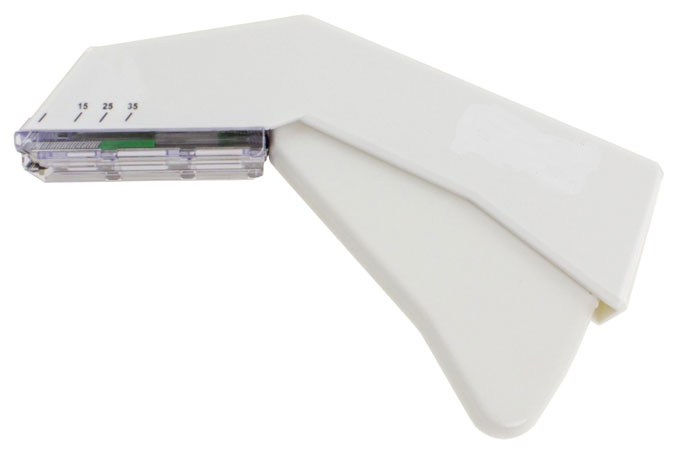
It seems like a gruesome concept but you can buy a skin stapler on Amazon that’s in a little sterile package. Normal people are not good at suturing but if you want to close a wound, a person with very little experience can actually close that wound back up with the skin stapler. It forms the staple as it pushes it into your skin in a pattern that doesn’t rip your skin. You start at one end of the wound and close it up slowly.
There’s lots of YouTube videos. You can practice on an orange at first.
Sign up here to get Recomendo a week early in your inbox.
Travel without moving
I just spent the last ten minutes on Window Swap staring out a window in Villalago, Italy, where I could see the mountains and hear birds chirping and church bells ringing. Anyone is welcome to submit video (and audio) of their window view, and with the click of a button you can bounce around all over the world. — CD
Telescoping aluminum ladder
Like magic, my 12-foot ladder will telescope down to less than 3 feet. I can throw this Telescoping Aluminum Ladder in the trunk of my car, but more importantly, I can effortlessly move it through our house under my arm when I need to reach high ceiling bulbs or skylights, etc. It collapses instantly when done and stores in a closet. It’s what a home ladder should be. There are a bunch of no-brand models, almost identical, for about $100. — KK
Characters that aren’t on your keyboard
A lot of characters aren’t on your keyboard, but you might find them useful. For example, ♠, ♣, ♥, and ♦. An easy way to browse and use these hidden characters is by visiting Symbololology, a one-page site with about 500 non-keyboard characters. Symbololology, where have you been all my life‽ — MF
Best virtual museum
Google hosts one of the best virtual museums in the world. They’ve scanned many thousands of the world’s masterpieces at super high resolution. So from my home I can visit their “Arts and Culture” site and by scrolling get very very close to the art — much closer than I could in a physical museum. I’ve seen many of the originals in their home museums, and I feel I was seeing them for the first time here. — KK
Over 180 useful Mac apps for $10 a month Setapp is a subscription service for Mac applications. I pay $10 a month for over 180 useful applications. I don’t use all of them, but the ones I use are indispensable throughout my day. I use Meeter to quickly enter scheduled Zoom meetings. I use Mosaic to move and place windows on my desktop. CleanMyMac X has a bunch of useful utilities to free up disk space and delete apps and large files. IM+ puts my Google chats and Slack groups into one convenient place. Downie makes it easy to download YouTube videos. Forecast bar is a great menu bar weather application. I could go on and on, but you get the idea. Setapp also adds new applications into their offerings frequently, and I’m always eager to check them out. If you have a Mac and are interested in design, productivity, and utilities, this is a no-brainer. (I’ve mentioned Setapp on Recomendo before but they’ve added so many useful apps to their collection that it was time for an update.) — MF
A notepad that follows you
After my recent computer upgrade, I lost my Papier chrome extension that I previously recommended for taking notes in your browser. The website no longer works and it doesn’t exist in the chrome store and I was really bummed because it’s so useful to just be able to open a tab and have a space to write out your to-do list, or do a brain dump, or collect quotes. Thankfully, I was able to find an alternative created by a Google AI designer called Mindful (Beta). What’s better about Mindful is that it syncs with my chrome account so I can access my notes on both my desktop and laptop. — CD
The author tracked the American outlaw’s steps through the Old West and South America.
It had been a long time since anyone had asked about the outlaws, and Señor Cranky Pants wasn’t eager to show me their room. But, finally, the desk clerk at the crumbling El Globo hotel, in Trelew, Argentina, snatched some keys off a hook and led me to the cramped quarters where Butch Cassidy and the Sundance Kid had, it was said, once stayed when they were in Patagonia, taking a stab at being legit ranchers.
The brass bed was not even queen-size, but the man insisted that in it had slept not just the two men but also their…
Gerald Selbee and his wife Marge figured out how to leverage the odds of the Massachusetts Lottery. Now, this video from Half as Interesting makes it seem like the math involved is difficult, but it's not, so don't let that scare you. The Massachusetts Lottery was once set up in a way that allowed this scheme to happen, but it's not now, and you won't have that kind of luck anywhere else. You can read a more in-depth account of the Selbee's lottery winnings here. -via Digg
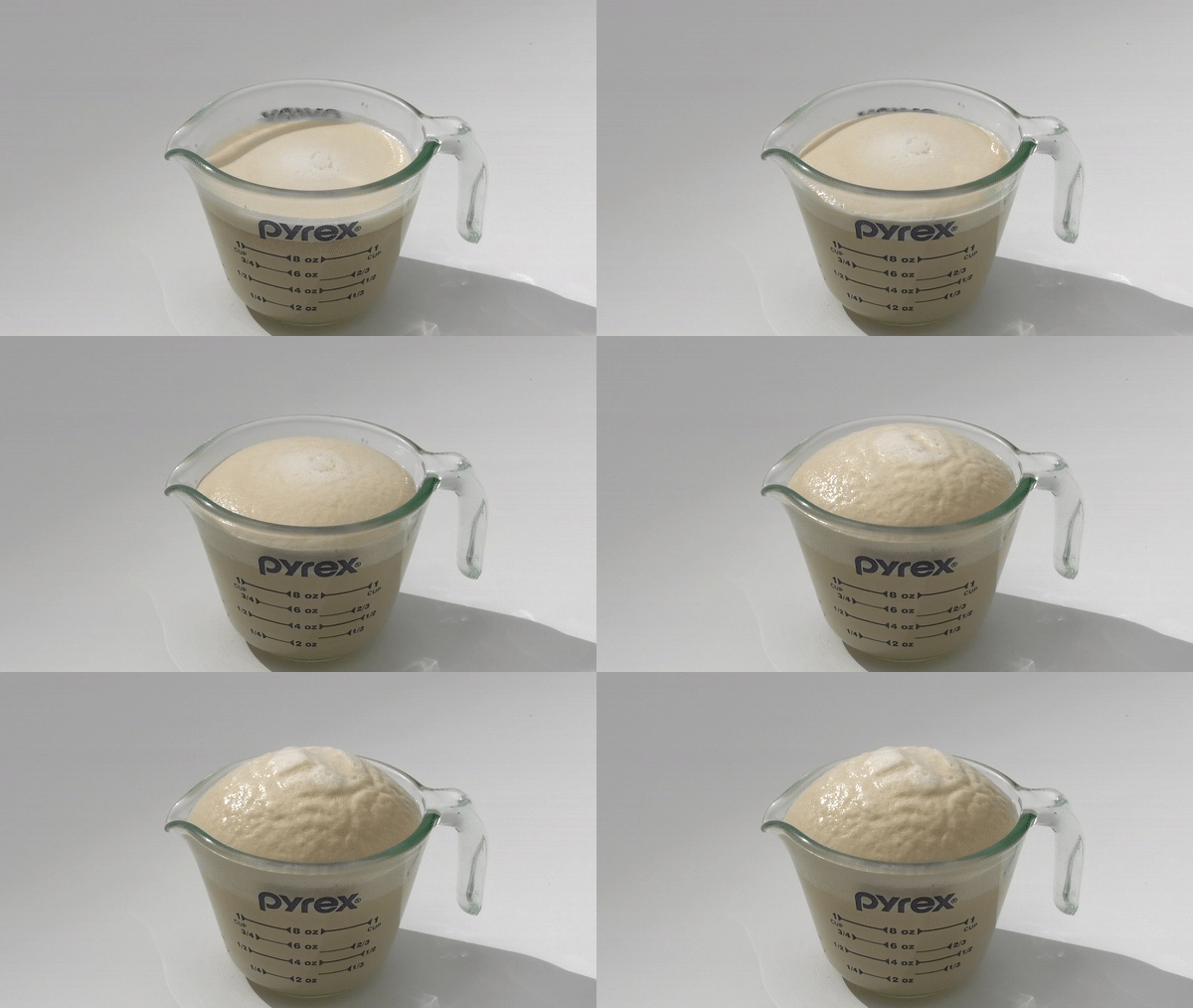
For the baker, it is used to make the bread rise and expand. But for the scientist, baker’s yeast is an organism worth examining in order to understand more about biological processes and diseases.
A number of biologists in the University at Buffalo College of Arts and Sciences regularly grow the species in their labs, and a few took time to discuss the wacky, wonderful science of S. cerevisiae.
"Yeast is a fungus that grows as a single cell, rather than as a mushroom," says Laura Rusche, Ph.D., UB associate professor of biological sciences.
Though each yeast organism is made up of just one cell, yeast cells live together in multicellular colonies. They reproduce through a process called budding, in which a "mother cell" grows a protrusion known as a "bud" that gets bigger and bigger until it's the same size as the mom.
Learn more about the amazing characteristics of the baker’s yeast over at PHYS.org.
(Image Credit: Douglas Levere / University at Buffalo)
Three months ago, Dr. John Ioannidis of Stanford University predicted dire social consequences if states enforced social distancing measures to curb a virus scientists didn't yet understand.
“I feel extremely sad that my predictions were verified,” Ioannidis said in a recent interview with Greek media.
Concerned about declining enrollments and parents reassuming control over their children’s education, some school districts are reportedly trying to block parents from removing their children from school for homeschooling.
Kiyosaki, who has previously praised bitcoin for its scarce properties, has warned "real estate and gold guys are being phased out"—and "the bitcoin world is coming into view right now"...
Book Freak is a weekly newsletter with short pieces of advice from books. Subscribe here.
Sponsor message: Scrivener is an application (Mac, Windows, and iOS) that helps writers complete longform writing projects. I’ve been using its powerful organization, research, and writing tools for years to write books and magazine articles. It’s the most well-designed software application I’ve ever used, and the tutorial videos and support are excellent. At $49 it’s a bargain. If you’re serious about writing, you should give Scrivener a try! – Mark
When life becomes overwhelming stop and reflect
“When life becomes too complicated and we feel overwhelmed, it’s often useful just to stand back and remind ourselves of our overall purpose, our overall goal. When faced with a feeling of stagnation and confusion, it may be helpful to take an hour, an afternoon, or even several days to simply reflect on what it is that will truly bring us happiness, and then reset our priorities on the basis of that. This can put our life back in proper context, allow a fresh perspective, and enable us to see which direction to take.”
Train your mind to be resilient to disturbing events
“Through training, we can change; we can transform ourselves. Within Buddhist practice there are various methods of trying to sustain a calm mind when some disturbing event happens. Through repeated practice of these methods we can get to the point where some disturbance may occur but the negative effects on our mind remain on the surface, like the waves that may ripple on the surface of an ocean but don’t have much effect deep down. And, although my own experience may be very little, I have found this to be true in my own small practice. So, if I receive some tragic news, at that moment I may experience some disturbance within my mind, but it goes very quickly. Or, I may become irritated and develop some anger, but again, it dissipates very quickly. There is no effect on the deeper mind. No hatred. This was achieved through gradual practice; it didn’t happen overnight.“
Begin every new encounter with a positive attitude
“If you approach others with the thought of compassion, that will automatically reduce fear and allow an openness with other people. It creates a positive, friendly atmosphere. With that attitude, you can approach a relationship in which you, yourself, initially create the possibility of receiving affection or a positive response from the other person. And with that attitude, even if the other person is unfriendly or doesn’t respond to you in a positive way, then at least you’ve approached the person with a feeling of openness that gives you a certain flexibility and the freedom to change your approach as needed.”
View your struggles as growth opportunities
“Imagine what it would be like if we went through life never encountering an enemy, or any other obstacles for that matter, if from the cradle to the grave everyone we met pampered us, held us, hand fed us (soft bland food, easy to digest), amused us with funny faces and the occasional ‘goo-goo’ noise. If from infancy we were carried around in a basket (later on, perhaps on a litter), never encountering any challenge, never tested – in short, if everyone continued to treat us like a baby. That might sound good at first. For the first few months of life it might be appropriate. But if it persisted it could only result in one becoming a sort of gelatinous mass, a monstrosity really – with the mental and emotional development of veal. It’s the very struggle of life that makes us who we are. And it is our enemies that test us, provide us with the resistance necessary for growth.”
I really appreciate the positive responses I get whenever I send out a newsletter. And, of course, I love all of the content submissions. If this newsletter is as useful and inspiring as some tell me it is, I’d love to spread the word and get more people inside the tent. Can you help? My pal, Kent Barnes, does a very helpful thing whenever a newsletter is published. He tweets something that he’s learned from it and then links to the newsletter (and my Twitter account). If you did that, too, it’d be a huge help.
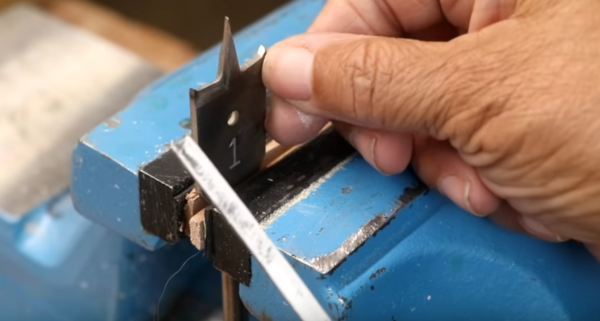
Sharpening Spade Bits
It’s easy to sharpen spade bits.
In another useful See Jane Drill video, Leah shows viewers how easy it is to sharpen spade bits with a flat file. This channel is clearly aimed at beginners, but there are often things in the videos that makers of any skill level can benefit from knowing (or being reminded of).
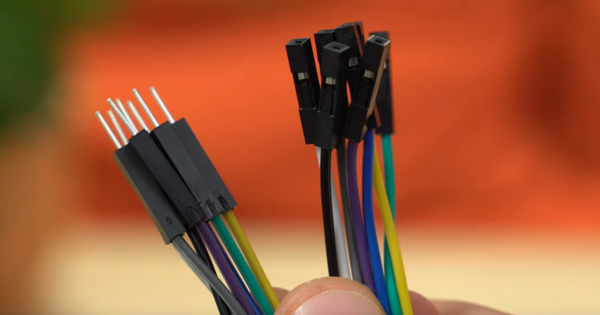
Making Your Own Dupont Connectors
DIY Duponts
Via Donald Bell’s always-excellent Maker Update, I learned of this video on how to make your own Dupont connectors. Dupont connectors are simple quick-connect jumper wire connectors often used in electronics projects. The video runs through how to crimp both male and female connectors (also known as Mini-PV) , what a good crimp should look like, and it runs through the tools you need.
Impact Wrench Dance Off?
Impact wrench head-to-head.
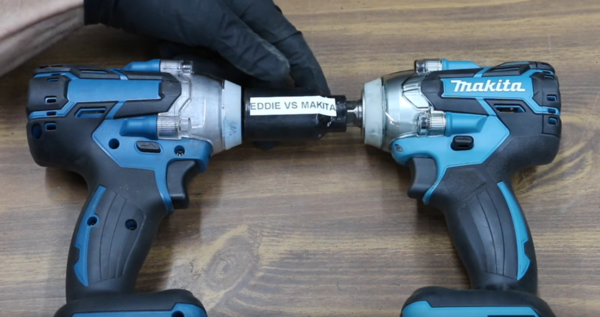
In this recent Project Farm video, Todd compares a $138 Makita XWT11Z 18V LXT Lithium-Ion Brushless Cordless 3-Speed ½” Sq. Drive Impact Wrench to an under-$30 knock-off he dubs Cousin Eddie. Putting them through various speed, endurance, and torture tests (and even a dance-off?), not surprisingly, the Makita smokes Cousin Eddie. But the real surprise is that, for less than 30 bones, Cousin Eddie isn’t half bad and a tool to consider for folks like me who have limited, light-duty needs for such a tool. Todd found Cousin Eddie on eBay.
Easy Paint Identifying
Paint the color on the outside so that you can clearly see it when stored.
Reader urnsbothends writes (in response to my item about hobby/craft paints):
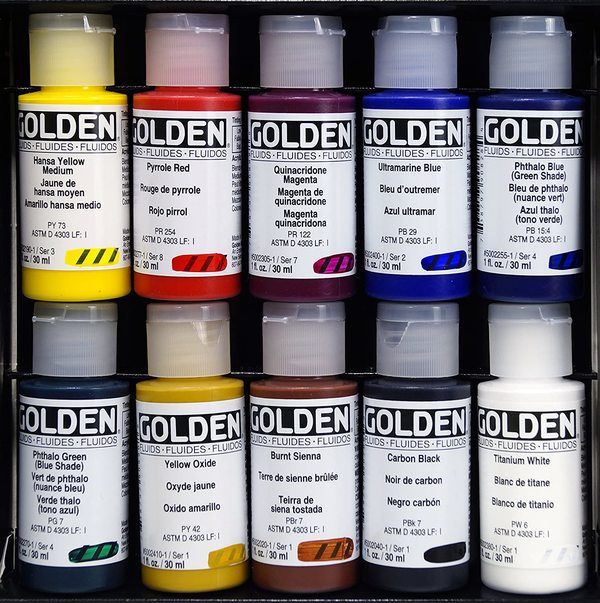
The best paints I use (Golden acrylics) have a spot on the label where paint from that batch and bottle is brushed across a patch of stripes so you can see the color, finish, translucency, texture, etc. You can recreate this with masking tape and Sharpie-ing the initial of the layer type (Base, Undercoat, Highlight, Wash, etc) and then painting a stripe across it, ideally on the part of the bottle that faces out when stored.
Classic Tip Reminder
Oldie but goodie.
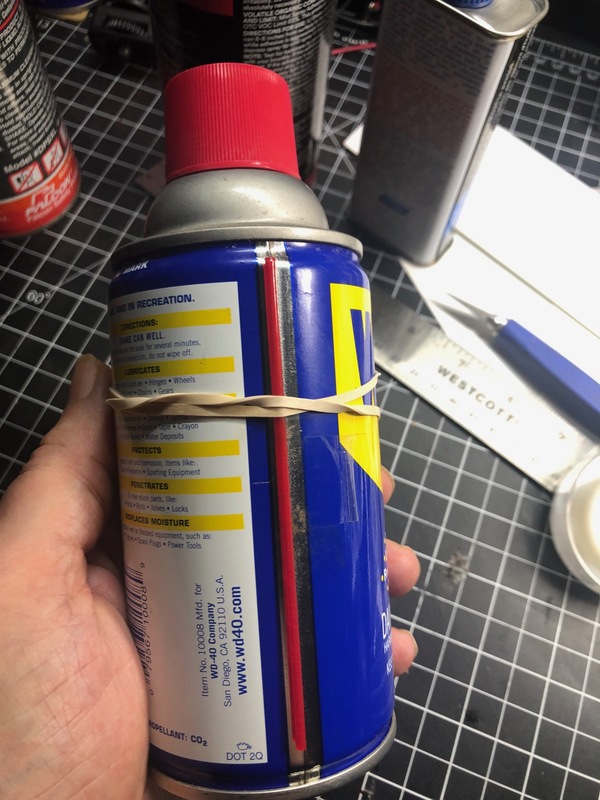
Last night, reaching for my WD-40 to lubricate some door hinges, I was reminded of one of the first truly useful tips I employed as a young offset printer. For any spray that uses a plastic “straw” applicator, rubber band the applicator to the can (or YOU WILL lose it). I assume most or all of my readers know this trick, but if not…
Teaching Technological Curiosity to Your Kids
I bumped into this idea on Twitter but can’t remember on whose account. To teach your kids scientific and technological curiosity, when a tool, appliance, toy, etc. breaks, rather than just throwing it out, ask your kids: “Do you want to take it apart and figure out how it works and what might be broken?” You may even be able to fix it, but either way, you’ll all gain a greater knowledge of what’s under the hood of the technology in your life and you’ll give your kids a richer understanding of how things work.
Maker’s Muse
Spotted on the Angry Chef Facebook group.
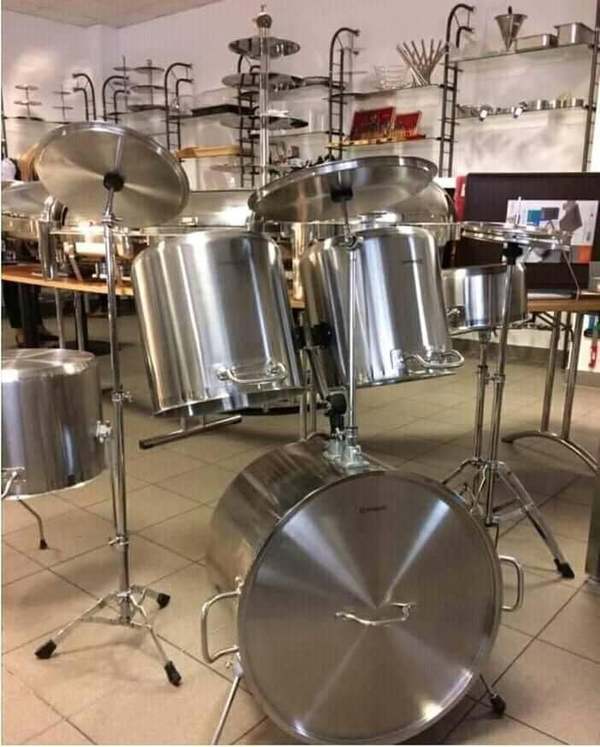
A key component of creativity is being able to see things outside of their categories – to see things as other things.
Shop Talk
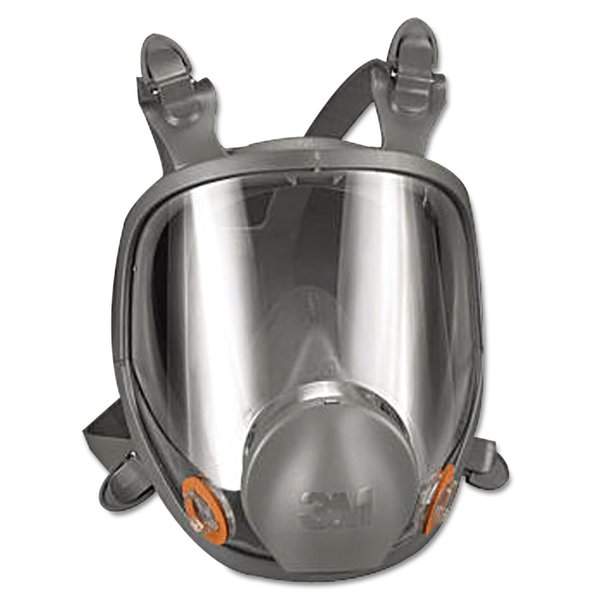
A 3M Full Face Respirator.
In response to my query about workshop safety in the COVID-19 era, reader Jeff Powers sent this wonderfully thoughtful and sensible outline of the guidelines used in his shared workshop. It’s long, but I thought I’d share in its entirety. Thanks, Jeff!
We are an architectural workshop/model shop in London and have a similar issue. We luckily have multiple workshop spaces (2 workshops, separate computer areas, a 3D print room, and CNC room). While some of the solutions are specific to our situation, hopefully some of them can help others.
1. Realisation by the team that the workshop is always an inherently risky place, and we should be used to taking precautions when we work anyway. From cleanliness, safe operation, and use of PPE, these habits just become slightly modified for COVID. Taking care and extra time before beginning a task and after it ends – to assess risk, cleanliness etc – is all the more important now, but should not significantly change any workflows. Safe operation is especially important during these times, you never want to go to the hospital with a workshop injury, but especially during these times, extra care should be observed so we don’t put any more unnecessary strain on the health care system.
2. We already use dust masks, nitrile gloves, and have very good mechanical workshop ventilation. We now just wear the PPE more, and all of the extraction is on all the time. And we have proper waste disposal for gloves. You can find services that recycle them properly.
3.On ventilation, here in the UK, we need to test it yearly, both local ventilation and the whole room. I would suggest any shop that can’t open windows for airflow, check their ventilation spec and cross reference against their gov’t authority recommendations. As in the case of all things COVID right now, we are cross-referencing with multiple gov’t guidance – as everyone is suggesting different requirements. We check UK, EU, US, CAN guidance, and ensure we are compliant with our local recommendations – but push for a higher level if possible.
4.We love the 3M respirators. We use them as we frequently paint in a spray room all day. Filters sold separately.
3M 6000 Series Full Face Mask Respirators – I really prefer this one for all-day use. Its fairly light and comfortable for what it is, and has built-in eye protection
5.We have found dust masks with air ventilators to reduce sweating and condensation. They are USB-chargeable and last a few hours before needing recharge. They are great for wearing lighter dust mask – and keeping your face cool(er).
3-Tiered Rack: you want ones that hold each box separately, not stacked on top of each other.
The racks make it much easier to grab gloves without fiddling with a box, and we can fit a box/package of disposable wipes in one of the box locations.
7. Where 2m distancing not possible – masks on.
8. Shared tools (fixed machines) – Disinfectant wipes are now located next to all fixed machines. Buttons, switches, and surfaces get a wipe before and after use.
9. Shared tools (larger hand power tools) – Disinfecting wipes again. We store them in Festool boxes – and wipes go in each box with the tool.
10. Shared tools (smaller) – For tools that are inexpensive and in multiples, every maker gets their own . For anything else: cleaned down , wiped, and put into a beauticians UV steriliser after use. We also have a Form 3 Cure that we use in a similar way, but it is not rated for it, and we don’t completely trust it. All tools left out go in the sterilizer at the end of the day.
11. Shared keyboards (laser cutters, 3D printers etc) – Wipe before and after each use. Change usage habits . We used to use them by just hopping on and off as needed. But now it means a few people on the laser stations for longer times doing whole cut lists.
We are looking at using keyboard covers and washing them during the day, but haven’t tested it completely.
12. Replacing any button that we can with a brass/copper pad/tape. The virus lasts less time on it than plastic or steel. Check if viable with electrical safety.
13. Shop sinks – Use it more frequently. And not just for pouring your tea down. And no eating in the workshop. Moisturiser is now just as important as soap and sanitizer!
14. Tables, Handles, Drawers etc. – Wipe down before use and at the end of day.
15. Workplace culture and support – Everyone is itching to be making and working – that’s what we love. But also, making sure people feel comfortable to speak up if they feel unwell or unsafe. We have a mutual stop work policy so that we all feel comfortable to stop our own work or someone else’s if we feel it’s unsafe or could be done better.
Also, if team discussions/meetings need to take place, they are limited to small groups, or outside, and kept short.
16. Outside of the workshop – In preparing the safety of our workshop, we realised that other areas/activities of the workplace are WAY riskier than the workshop for COVID. We are in central London, so most people take public transit to work. Kitchens and shared bathrooms are also high-risk vectors. These areas should be considered in the same way as workshop safety.
[Gareth’s Tips, Tools, and Shop Tales is published by Cool Tools Lab. To receive the newsletter a week early, sign up here.]
Time is the most precious commodity. We can’t create more time, so the best we can do is to save it. Through shortcuts and hacks, these websites and apps will help save time in many activities, and it all adds up.
Technology is all about speed, isn’t it? It helps us do things faster, or enables shortcuts that get the more done in less time. The internet is here to help you gain information faster by summarizing books or YouTube videos, or level-up your computer usage by learning keyboard shortcuts. It’s all about saving time and making the best use of it.
1. Sipreads (Web): Free Book Summaries by Real People
Don’t have the time to read a full book, but still want to know its best ideas? Sipreads is a free newsletter by two people who read books and summarize their salient points. Basile Samel and Ali Salah send one new book every week, while you can browse some of the previous summaries on the website.
Sipreads focuses on self-learning books, so you won’t find a summary of the latest Dan Brown novel here. Some of the famous titles already covered include Atomic Habits, The Subtle Art of Not Giving a F*ck, The Start-up of You, and How to Win Friends and Influence People. Nuggets of personal development wisdom in short time is the goal here.
The summaries are usually seven to ten minute reads. Both Basile and Ali have a concise writing style that turns the book’s major points into something like a Medium article, full of sub-headers and bullet points. And if you find that it works for you, then you can go read the full book. But you’re never left out of the conversation when people start discussing the book.
Writers on the internet often drone on and fluff up their writing with unnecessary words to lengthen the material and make it seem more authoritative, like this sentence. Don Patrick wants to cut the fat and give you an instant summary of any article with his AI extension.
Summarize the Internet isn’t the first extension offering this, but it takes a different approach. Patrick, an amateur language programmer with a deep interest in AI, ditched statistical methods and came up with a combination of word choice, sentence weaving, and story flow. As he explains, the target was for the summarizer to extract what the writer found important, minus what the reader finds unimportant (like introductions, examples, speculation, etc.)
After trying a few of these summary-making extensions, I can say Summarize the Internet is better at drawing out important points than others. Typically, a good article reduces to 50%, while a weak article reduces to 30% of its original length. While the extension’s pop-up pane is open, you can skim the main article in the tab too, in case you want to cross-reference.
Download: Summarize the internet for Chrome | Firefox (Free)
3. FizzD (Chrome): Summarize YouTube Videos Into Chapters and Highlights
Someone links you to a long YouTube video. Is it actually interesting or useful? FizzD uses AI to go through the video and summarize it into chapters, highlights, and key concepts, so you can browse a video like it was an article with sub-headers.
Once you install the extension, you’ll see a “Fizz It” button next to the Share and Save buttons under the video. Click it and wait for a minute for FizzD to work its magic. Soon, the video will have a few yellow dots, marking what FizzD thinks are chapters within the long video. Hover over a dot to see the chapter title, and click to jump to it.
In the top-right corner of the video pane, you’ll see two new overlays: Highlights and Key Concepts.
Highlights is a text summary of the main points of the video, but you can’t use them as timestamps. Key Concepts show up as blue dot timestamps, so you can see where one of the main subjects was discussed in different chapters.
FizzD is a fascinating implementation of AI in videos. It doesn’t work with every YouTube video and seems to be at its best in educational videos like TED talks and webinars.
4. Use the Keyboard (Web): Gorgeous Collection of Best Keyboard Shortcuts
Stop reaching for your mouse or trackpad to go from one window to another. Just press Alt+Tab (or Command+Tab) to switch windows. The most amount of time you can save on a computer is by learning keyboard shortcuts like this.
Use the Keyboard (UTK) is a gorgeous collection of keyboard shortcuts for the most-used programs, apps, and websites in 2020. It includes guides for software like Zoom, Slack, Gmail, Notion, Chrome, Netflix, Trello, and a bunch of other offline and online apps that you use on a daily basis.
It’s especially nice that the guide includes web apps because often such keyboard shortcut guides ignore them and you have to rely on browser shortcuts alone.
With one switch, UTK can flip between Windows and macOS shortcuts. You can also check the original reference for any sheet of shortcuts, which usually comes from the developer’s official notes. UTK’s neat and tidy interface is fantastic to look at, and you might want to convert it into PDFs to print.
While UTK serves apps, it doesn’t have shortcuts for operating systems. So make sure you check out our master list of all essential Windows keyboard shortcuts, which you can also download for free.
The internet is full of food writers sharing recipes, but there’s always a long preamble, right? The mood they were in, some story about how the recipe was handed down, and all those things you don’t need. These two recipe websites are about cooking quickly without wasting time.
The Skullery simply gives you recipes quickly. No registration, no meandering preambles, it’s all about cooking immediately. Your browser will remember favorites, you can change measures on-the-fly without going to another converter, and you can quickly browse or search for anything. The recipe has step-by-step instructions, which you can cross-off within the browser app too. It just works.
Hurry The Food Up is a vegetarian cooking blog with a time-oriented approach. Speed is key here, with most recipes being under 30 minutes. And yes, that includes both prep time and cook time. Choose your type of diet, time, and meal course to filter the recipes. Hurry The Food Up is also available as an app on Android.
These apps are excellent time-saving shortcuts to many of the things you do daily. But technology is only going to go so far in freeing up time for you. If you truly want to squeeze more out of your daily 24 hours, you need to learn time management and set goals.
Our guest this week is Len Cullum. Len is a woodworker living in Seattle, Washington, where he specializes in building Japanese style garden structures, architectural elements, and furniture. A perpetual student of craft, he’s also an occasional teacher and writer of how-to articles.
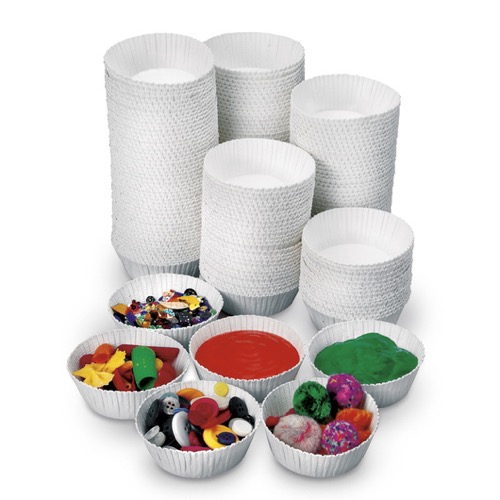
Stancup Disposable Art Cups ($10, 100pk)
These are small, low walled paper cups that I use while gluing, finishing, holding small parts. I’ve been using them for years, and while I’m not sure I’d call them indispensable, it’s kind of a drag if I run out of them. Anytime I need to control a bunch of little screws or do any sort of glue or finish, they’re just the ideal thing.
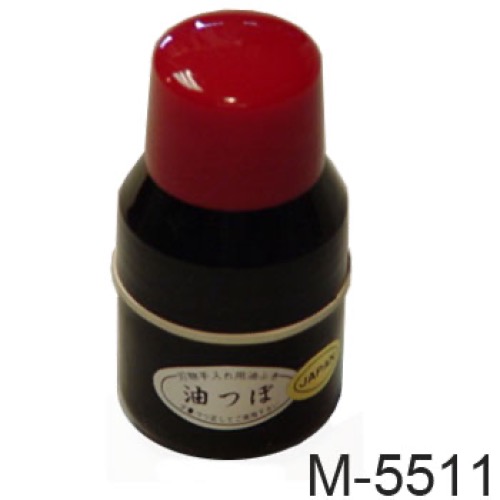
Camellia Oil Applicator ($14)
Because all of my chisels and planes are high carbon steel and iron, they are susceptible to rust, it’s important to oil them after sharpening. This goes for some of my hand made kitchen knives too. The go-to for Japanese tools is camellia oil. For years I bought it in small spray or squeeze bottles. They worked okay, but trying to keep sprayed oil from ending up on the wrong thing was always a hassle. A couple of years ago while wandering around Hida Tool in Berkley, I saw this little applicator on the shelf. I’d seen it on the website for years, but never with the top removed. Under the lid is a big felt dauber, and the refillable base is full of oil. It’s like using a sharpie to apply oil. It is so great. More than anything I use it on my kitchen knives.
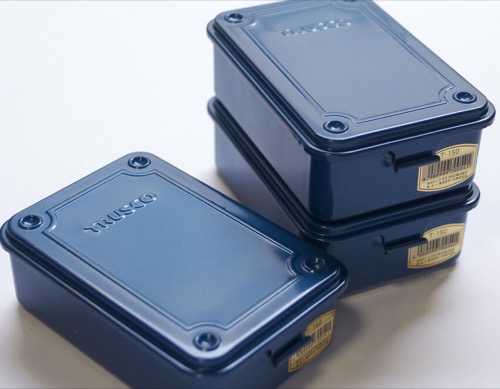
Trusco T-150 Storage Box ($15)
I first discovered the Tusco toolboxes when I was in Kyoto and wandered into a contractors supply shop. As I looked around I spotted this stack of cardboard boxes with some something blue showing out the ends. I slid one out and in my hand was this beautifully made little blue box. It seemed like something you’d find in your grandfather’s garage, stoutly made, well painted simple, but it was brand new. Figuring it was probably pretty expensive, I put it back, but then noticed the price ¥880 ($8.20). I thought it had to be a mistake, but when I awkwardly asked the shopkeeper, he confirmed it. I couldn’t believe it, so I bought four of them. I use them for random storage and to house all of the driver bits for my drill. You can find them in the states now, but they cost a bit more with shipping. Still totally worth it.
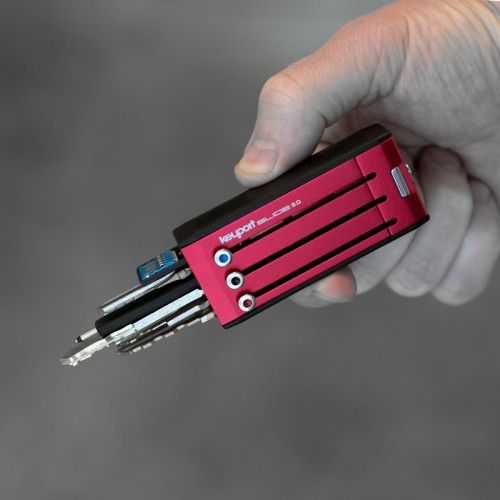
Keyport Slide 3.0 6-Port ($49)
I picked up my first Keyport Slide in I think 2012. I was riding a motorcycle and found the rattle of a key ring to be kind of annoying and cumbersome. I read about the slide and it seemed like a good solution.You push a little button and slide the key forward and it comes out the end, and slide it back in. I haven’t looked back since. I’m on my third one, getting a new one with each iteration, and I’ll never look back. I love it.
We have hired professional editors to help create our weekly podcasts and video reviews. Please consider supporting us on Patreon. We have great rewards for people who contribute! If you would like to make a one-time donation, you can do so using this link: https://paypal.me/cooltools.– MF
I got a lot of great submissions of words o’ wisdom from the father figures in your lives. A lot of them were tried and true, like “Measure twice, cut once,” “If it’s worth doing, it’s worth doing right,” “Don’t force it,” “If you can’t fix it the first time, get a bigger hammer!,” “When your only tool is a hammer, everything looks like a nail,” “It’s better to have it and not need it, than need it and not have it,” etc.
Here are some of my favorite submissions:
You can’t learn anything with your mouth open.
(I was asking too many questions at the time he told me this. – Randy Sanderson)
Is it complex or merely complicated?
(My Dad would often ask this when analyzing a mechanical system. -Randy Fischer)
Tight is tight. Too tight is loose.
(My Dad always reminded me of this whenever we worked on a project that required tightening a screw or bolt. – Big Mike)
Use the right tool and the tool will do the work.
(From my dad Bruno who was an automotive mechanic and business owner. – Marina Joyce)
Remove the potential energy.
(Said when storing materials. For instance, unlock vise grips before putting them in the toolbox, remove the igniter assembly from the solid rocket booster, that sort of thing. -Randy Fischer)
Always respect the mountain.
(Said at the top of a challenging ski slope, but a saying that applies to much more than skiing. -George Mokray)
It’s easy to make things difficult. It’s difficult to make things easy. -Marty Lang
Don’t put it down, put it away. -Robert George
Think fast and talk slow. Listen, analyze, evaluate, prepare a fallback strategy, then act. -Brain Collins
If you don’t ask, the answer is already no. – Michael Shiloh
Buy the best tools. You’ll only cry once. -Jim Cook
Expanding a Breadboard
Expanding small breadboards is easier than you might think.
Here’s one from my old Make: tips column: This little quick tip on Digicool Things demonstrates how you can easily expand many small breadboards. The type of boards that are clear plastic with a paper backing can be cut (by slicing through the paper) and joined to create the width of board you desire. In the video, he cuts and snaps off a power bus rail on one of two boards and then joins the boards. The remaining power bus on the other board becomes a center trench that ICs can straddle, leaving much more real estate on the expanded board for hooking up components.
Pay No Attention to the Name of that Fancy Paint!
Three shades of olive, never you mind their names!
If you work with craft acrylics or paints formulated for miniature painting (as I do), don’t pay any attention to the colorful product names (Boltgun Metal, Iraqi Sand, Gravedigger Denim). Flip the bottles over and only pay attention to the color seen inside. Some painters even organize their paints by storing them butt-out so that the color values can be seen. If you’re painting something, say in an olive drab, you want to find your undercoat color (a dark olive), basecoat color (a mid-tone olive), and your highlight (a light olive).
Toys!
Andrew playing with his new toy.
My friend Andrew Lewis posted this to his social media:
I just invested in a portable bandsaw as a result of watching Adam Savage’s “One Day Build” video on Tested and I have to say that it is a magnificent workflow-alteringly piece of equipment. When I think of how much time this tool could have saved me in the past, I feel like an idiot for not biting the bullet and buying it years ago.
I think that in my case, not investing in tools is almost a form of impostor syndrome. For years, I thought that I didn’t deserve expensive tools because I’m not worthy of them. It’s only in the last couple of years that I’ve looked at my accomplishments and thought “actually, I am good enough to use this.” And that’s why I’ve started to approach my workspace and my portfolio with much more confidence.
Recreating Serial Number Plates
Andrew playing with his new toy.
This is one that won’t apply to many of us, but it’s a cool trick that I thought bears sharing. It may have applicability elsewhere. On Hand Tool Rescue, Eric needed to replace the metal serial number plate on a 60s Flymo hover-mower that he was restoring. What he did was to hammer the original serial number onto metal foil tape and then print an image of the original label onto clear adhesive and affix that over the tape. Cut it, apply it, and it’s nearly as good-looking as the original (altho I wonder how waterproof it is).
Shop Talk
My friend Richard Gould, who works in museum exhibition construction, sent me this call for input:
Many of us are beginning to return to work – or soon will be. It’s a little more challenging, I think, in a shop environment. I was told today that we’d have a “clean desk” policy – given that we have our own desks, and how little time we spend at them, I’m unsure what COVID transmission risk is being addressed here. On the other hand, we have a great deal of shared tools and equipment. We have no direction on how we should keep those safe.
I’d be very interested in what ways that your readers are working safely with COVID in shared shop environments.
If you have any ideas for Richard and your fellow newsletter readers, please send them here.
[Gareth’s Tips, Tools, and Shop Tales is published by Cool Tools Lab. To receive the newsletter a week early, sign up here.]
While the tackle (and, well, some of the clothing choices) might look a bit of out date in this vintage gallery, the sights of anglers showing off giant striped bass will never go out of style. Here are some of the most classic northeast striper-fishing photos from the <i>Field & Stream</i> archives. (F&S Archives/)
A surf angler hoists a cow striped bass. (F&S Archives/)
Another giant bass comes to the beach. (F&S Archives/)
A northeast angler displays a decent fish caught off the rocks. (F&S Archives/)
He could’ve used a bigger boat… (F&S Archives/)
A pair of dapper anglers admire a cow striper. (F&S Archives/)
Great striped bass—but this sharpie scores bonus points for the skipper hat. (F&S Archives/)
t took teamwork to bring this monster back to the dock. (F&S Archives/)
A fly angler with a pair of nice schoolies. (F&S Archives/)
The M5 is one of the car world's most storied and beloved badges, and now it's getting tweaked for the 2021 model year with more tech and more creature comforts.