This is very sad and infuriating. A 15-year-old girl from Hagerstown, Maryland was riding her bike and collided with a car. When police arrived they told her an ambulance was going to take her to the hospital. She didn't want to go. She got back on her bike, but before she could get away, an officer grabbed her from behind. The next thing you know, she was roughed up, cuffed, put in the back of a patrol car, and then pepper sprayed. Instead of taking her to the hospital, the officers took her to the police station for interrogation.
It’s the first day of fall. The leaves are about to turn brown and your lawn will soon be littered with pumpkin spice lattes and Halloween costumes. Now’s the perfect time for this playlist of acoustic autumn songs.
The playlist, curated by Spotify, features the kind of simple acoustic songs you could play on your guitar on the back porch on a cozy fall evening. Featuring artists like Sufjan Stevens, The Barr Brothers, and Fleet Foxes, this list sets the perfect mood to transition out of the bright outdoor days of summer and into the cooler months.
Welcome to our Featured Playlist series. Each week, we’ll share a new themed playlist, embedded for your convenience! You can copy the track list to your service of choice, or listen right here. Have a sweet playlist of your own? Share it with us in the comments below!
The Google Play Store is packed inside of the newest stable build of Chrome OS and works on both the Acer Chromebook R11 and the Asus Chromebook Flip. If you don’t own a the R11 or Flip, you can expect support in the coming months.
The update also adds a beta version of the Google Play Store where you can download and run Android apps natively on your Chromebook. As you’d expect, this works better with some apps more than others since they’re designed for touchscreens, but it’s a nice addition overall. Oddly, it looks like the Google Play Store is disabled by default though, so you’ll need to pop into your Settings and check the box next to “Enable Google Play Store on your Chromebook” once you download the update.
Yahoo has confirmed that information from at least 500 million user accounts was stolen in 2014. While the information was leaked earlier today, it’s worse than we initially thought. If you have a Yahoo account, it’s time to change your password.
Yahoo is notifying potentially affected users right now, but the information that was accessed by what they’re calling a “state-sponsored actor” includes tons of personally identifiable information, though thankfully no credit card numbers or bank account information was accessed. Here’s what Yahoo released today:
A recent investigation by Yahoo! Inc. has confirmed that a copy of certain user account information was stolen from the company’s network in late 2014 by what it believes is a state-sponsored actor. The account information may have included names, email addresses, telephone numbers, dates of birth, hashed passwords (the vast majority with bcrypt) and, in some cases, encrypted or unencrypted security questions and answers. The ongoing investigation suggests that stolen information did not include unprotected passwords, payment card data, or bank account information; payment card data and bank account information are not stored in the system that the investigation has found to be affected. Based on the ongoing investigation, Yahoo believes that information associated with at least 500 million user accounts was stolen and the investigation has found no evidence that the state-sponsored actor is currently in Yahoo’s network. Yahoo is working closely with law enforcement on this matter.
Have you ever woken up and discovered that you have some new, mysterious bruise on your legs or arms? Well, there’s a simpler explanation than playing hockey in your sleep, and it’s all in how your skin is structured.
Some people, especially women, bruise easier than others. As dermatologist Dr. Joel Cohen explains over at Vice, this usually happens when a person has less collagen in their skin. Your skin has several layers that, among other things, protects the blood vessels underneath from damage. If you have a thinner layer of collagen, you can bruise more easily:
Collagen is “the main structural building block in the skin.” In the dermis, collagen forms a network of fibers that hold the rest of the skin together like a net. The collagen supports blood vessels so they are more protected from blunt force. Subcutaneous fat, on the other hand, does not structurally support the blood vessels—it’s padding. “It’s part of our buffer before we get down to the bone,” says Cohen. “It protects our bones and muscles from the outside world.”
Bruises also show through more easily when you have a thinner layer of collagen. While it can vary from person to person, women tend towards having a thinner collagen layer than men, which can result in light bruises happening more frequently. While bigger bruises still mean bigger trauma and shouldn’t be ignored, light bruises can occur from even small bumps you’d otherwise ignore.
Tane Sinclair-Taylor's image of a clownfish and a bleached anemone is one of the many remarkable biological photographs chosen as finalists and winners in Royal Society Publishing's 2016 contest. (more…)
Hi Google, it's me Rita. I believe we've met before. Somewhere between Gmail, Google Photos, and Chrome, you must know a lot about me. Things I might not want others to discover, so hushhhh. (There are thousands of people reading us, let's not tell them about my love for Winnie The Pooh.) But our relationship doesn't feel equal; I barely have any information about you. Your new guy, this Assistant you've sent here to talk to me, I'd like to get to know him better.
Chinese wearables maker Huami recently launched its latest product — the Amazfit smartwatch. Anhui Huami Information Technology Co. Ltd. launched its new connected wearable device in late August.
Huami, which is headquartered in the eastern Chinese city of Hefei, is better known as the maker of the Xiaomi fitness tracking wrist band which has sold more than 20 million units.
“The Xiaomi band reminds us of the success and glory we have achieved, while the smartwatch represents our ambitions for the future,” said Huang Wang, Huami chief executive officer.
Huami was established in early 2014 and financed by Shunwei Capital Partners and Xiaomi Corp, one of China’s leading electronics and smartphone makers. By August Huami had rolled out the Xiaomi wrist band on the market.
Since then, Morningside Ventures, Banyan Capital and Sequoia Capital invested another $35 million in Huami. And as the company’s valuation hits $800 million, is now preparing for a third round of funding, according to Huang.
Huami takes global second place
The company was ranked as second in the global wearables market, after U.S. rival Fitbit. As well, Forbes named Huami one of China’s 50 fastest growing technology firms in late 2015.
The company’s total sales revenue in 2015 was $151.5 million with 2016 projections expected to grow to $225 million.
According to a report on second-quarter wearable sales, Fitbit retained the top spot in the wearables market. It sold 5.7 million fitness trackers in Q2, a 28% year-on-year (YOY) growth. Xiaomi also retained its second place, but only had 2.5% growth YOY.
“Basic wearables, which include most fitness trackers, have benefited from a combination of factors: a clear value proposition for end-users, an abundant selection of devices from multiple vendors, and affordable price points,” said IDC’s Ramon Llamas.
If you could really feel your digital money — the way you can feel the metal of a quarter or the paper of a $20 bill — would you spend it more wisely? This is the question behind Scrip, a product concept from studio NewDealDesign. As companies like Apple make financial transactions as close to invisible as possible, NDD is imagining a future where every purchase is a literally weighty decision. And to realize this dream, it’s built something sleek, science fictional, and more than a little strange.
Scrip is a handsome copper lozenge that’s smooth on the bottom and stippled on top, with space for a tiny numerical screen at one end. In reality, it exists as a trio of solid, non-electronic mockups. But in NDD’s design, the tiny bumps on...
Since 2009, Atlas Obscura has been one of my favorite internet rabbit holes. I sometimes spend hours on the site, which collects curiosities from across the globe, bouncing from enchanted forests to Russian space-age monuments. Now, the site’s founders have turned their website’s broad array of knowledge into a book that compiles some of their best finds.
Atlas Obscura: An Explorer’s Guide to the World’s Hidden Wonders, written by Joshua Foer and Rylan Thuras, isn’t a traditional travel guide. You won’t find popular sites like the Pyramids of Giza, Stonehenge, or the Great Wall of China in its pages. Instead, you’ll learn about the Pyramids of Meroë, American Stonehenge, and Mount Roraima. It’s like traveling with a local, rather than...
To mark the occasion of his new Super PAC, Save the Day, Joss Whedon enlisted about a zillion of his celebrity buddies to help him make a pro-voter registration / anti-Trump PSA.
Unlike most celebrity PSAs, this one involves all of the celebrities acknowledging the cliche of celebrity PSAs. They promise that if you go out and vote, Mark Ruffalo will do a nude scene in his next movie. They also point out that the most famous person gets to be on screen last (it's Robert Downey Jr., but I would argue that it should have been my queen Julianne Moore!).
Whedon has to walk a very fine line here — the ad is serious but not too serious, meta but not exactly self-aware. It's funny, but in a Superbowl ads of 2004 kind of way....
Xiaomi made fitness tracking accessible with its $15 Mi Band. It is now doing the same for virtual reality.
It's an incredibly exciting time for virtual reality. The HTC Vive and Oculus Rift are catering to the enthusiast segment, and for those looking to experience what the medium has to offer on their smartphones, there's the Gear VR, Homido V2, and the budget Google Cardboard.
And now Xiaomi is getting into the fray with its first VR viewer, the Mi VR Play. Like all Xiaomi products, the Mi VR Play is designed to disrupt the segment it is targeting by lowering the barrier to entry for customers looking to try out the platform. The headset costs just $15, the same price as Cardboard. And like Cardboard, the VR Play accommodates any phone with a screen size between 4.7 inches and 5.7 inches.
The shell of the Mi VR Play is made out of Lycra, which minimizes weight and makes it more comfortable to wear for a prolonged duration. It weighs 209g, which is less than the plastic-based Gear VR's 345g. There's a textured button at the top for navigation, and the headset features anti-reflective aspheric lenses. You slot in your phone at the front by undoing the two-way zipper, and there's plenty of foam padding that holds the phone in place inside the headset.
The inside of the headset (the part where you stick your face in) is roomy, and it didn't pose any problems for my admittedly large head. You can use the headset while wearing glasses, but it'll be a tight fit. The viewer comes with a strap that wraps around your head, and a top strap that holds the headset in place and ensures that it doesn't wobble when you move your head around.
For $15, the Mi VR Play offers tremendous value for money.
Xiaomi will introduce customized variants of the VR Play in denim, floral, leopard, camouflage, and user-generated designs at a later date, but for now, the company is selling the default black variant of the headset. Right now, Samsung has the mobile VR segment cornered, and while Xiaomi isn't competing in the same category, it is making smartphone-based VR accessible to more customers, especially in emerging markets.
As the headset is designed for a Chinese audience, the Mi VR Play comes with a dedicated app that includes a selection of 360-degree videos from YouKu, China's equivalent of YouTube, Conde Nast Traveller, and others. Xiaomi is investing significant resources into expanding its digital content library, which will see the addition of more VR content. Xiaomi is also going to bring VR integration into MIUI shortly, which will lead to a better experience when using the headset with the company's phones.
The VR Play box contains a QR code that lets you download the app, but if you're like me and are interested in using the headset outside of China, you can just download the Google Cardboard app and be on your way.
All apps and games designed for Google Cardboard work just fine on the Mi VR Play. I tried out the viewer with Xiaomi's Mi 5 and Redmi Note 3, and the overall experience was identical on both phones.
Should you buy it? Yes!
The Mi VR Play is not as polished as the Gear VR, but at one-fifth the cost, it doesn't have to be. Essentially, the headset is a much more robust implementation of Cardboard. It is aimed at getting customers interested in mobile VR, and by pricing it for just $15, it will succeed in doing just that. While Lenovo's Ant VR viewer also sells for roughly the same price, it isn't anywhere near as good.
If you're interested in getting your hands on the Mi VR Play right now, you can do so from third-party sites like GearBest for $16. The site is also running a sale on other Xiaomi accessories, like the Mi Band 2.
Allo is Google's latest attempt at a messaging app that competes with the likes of WhatsApp and Facebook Messenger, both of which boast a userbase of over a billion users. The main differentiator for Allo is Google Assistant, a chatbot that provides answers to your queries by drawing on the search giant's machine learning smarts. AI is at the core of Google's strategy, with Assistant available on hundreds of millions of phones as well as the Google Home and Android TV.
These are the top Allo features you need to know. If you're just installing the app, be sure to check out our setup guide.
Your replies are now smarter
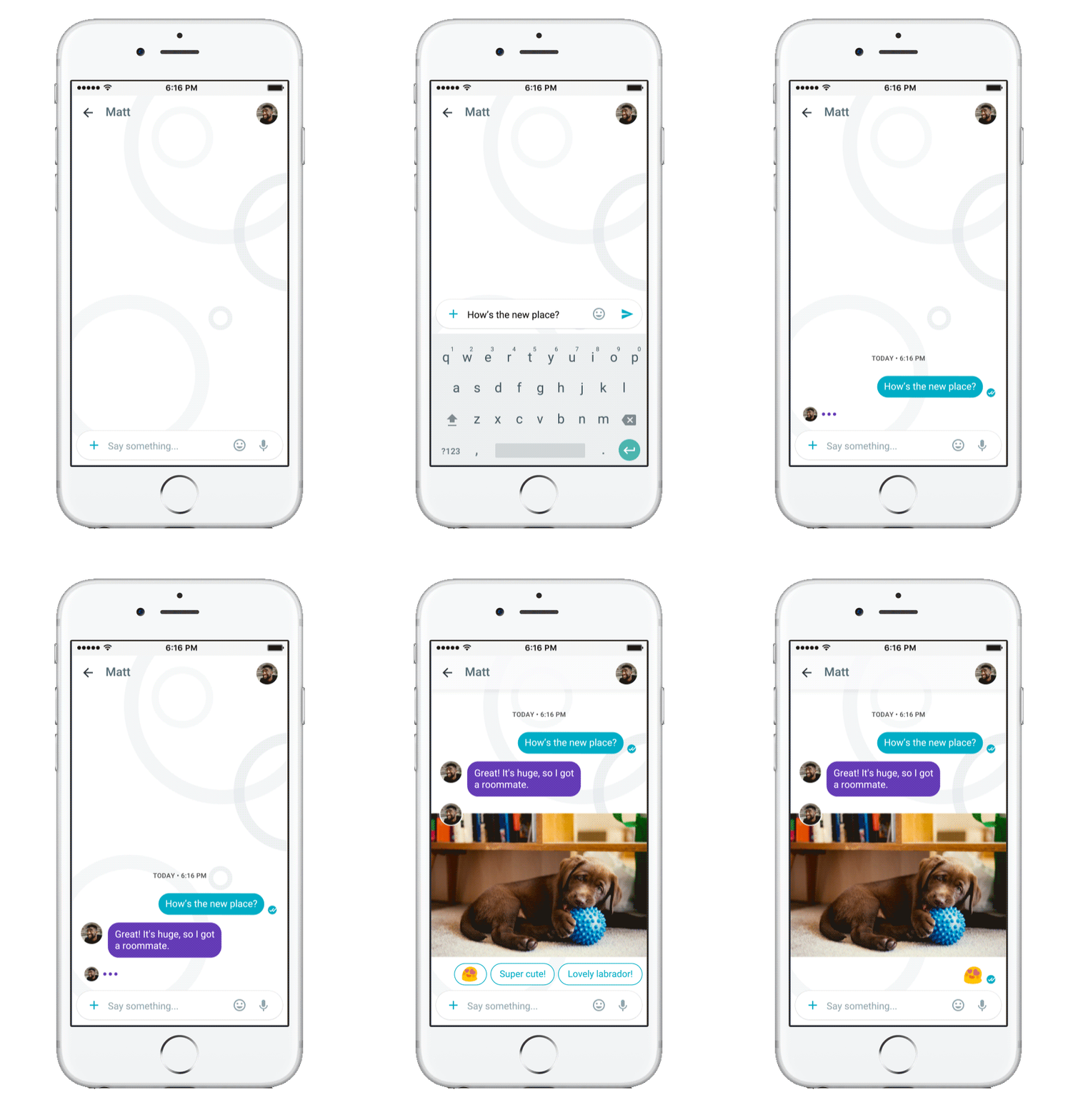
When you're chatting with your friends and family, Google Assistant offers a series of responses based on the context of the conversation. If you're sharing a picture of your cat, for instance, your friends will see options to reply with "Cute!", "Adorable!", "How fun!", and so on. For images that contain food, you'll see suggestions for nearby restaurants.
That's the good part. The not-so-great bit is where most canned responses are generic right now. I had an entire conversation with my colleague Russell Holly without typing a single word. That said, most of it went down like this (exclamation points courtesy of Google):
Google Assistant learns your messaging patterns over time, and it should hopefully offer more personalized suggestions.
When in doubt, emoji
When you don't want to type, you can use Allo's diverse set of emojis to get your message across. There's an emoji for most emotions (which should say a lot, really), occasions, pets, and social activities, so you're very well catered to in this regard.
Make Duo calls from within Allo
Allo is a text-only platform, but if you're interested in making video calls, you can now start a Duo call from within the messaging app. You'll see the icon for Duo in the conversation window, allowing you to jump into a video call without having to launch Duo.
Scribble away
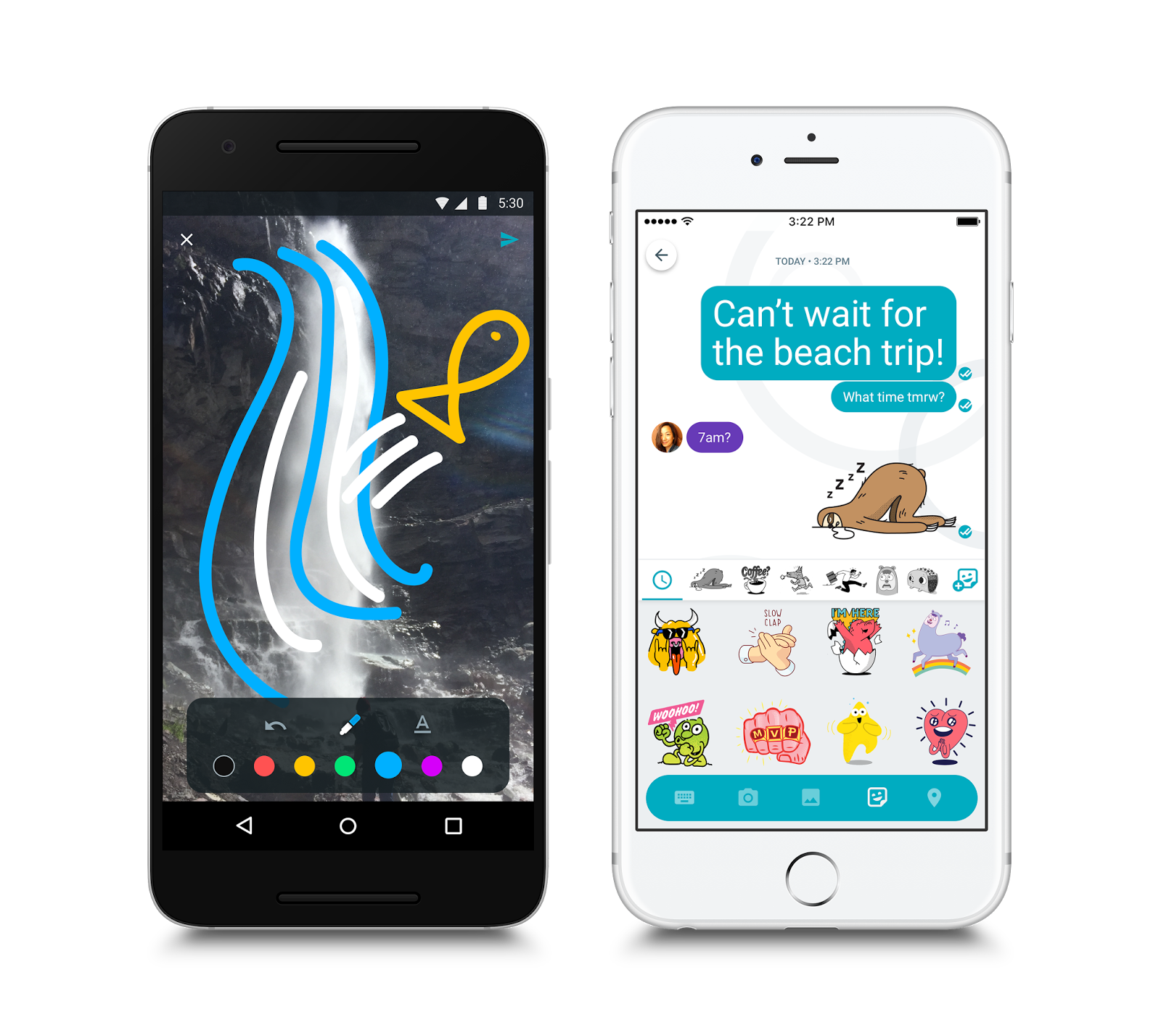
You can jazz up images you're sharing with friends by doodling on them, or adding text.
Emphasize your point with text
Allo has a nifty trick that lets you make your text larger or smaller. To achieve this effect, you have to press and hold the send button, and slide it up to enlarge text, and slide down to shrink it.
Use stickers for everything else
Google has worked with "independent artists and studios around the world" to launch 25 sticker packs for Allo. Messaging app Line pioneered the use of stickers in chats, and ever since most messaging platforms have gotten into the act.
Also, for some reason that I can't really fathom, a lot of the sticker packs are aimed at an Indian audience. There's even one about a "little Indian girl who loves her country and relishes any occasion to be patriotic." No clue what's going on there, but for the most part, stickers on Allo are just like on any other platform. Some will use it, but most users won't care.
Create your own stickers with selfies
Allo now lets you create a custom sticker set using your own selfies. All you have to do is take a selfie, and Google leverages its machine learning skills to "analyze the pixels of an image and algorithmically determine attribute values by looking at pixel values for for color, shape, and texture" to build a sticker pack that's based on your image.
The messaging app creates 22 stickers based on your likeness, but the downside is that you'll only be able to use the stickers within Allo.
Go incognito
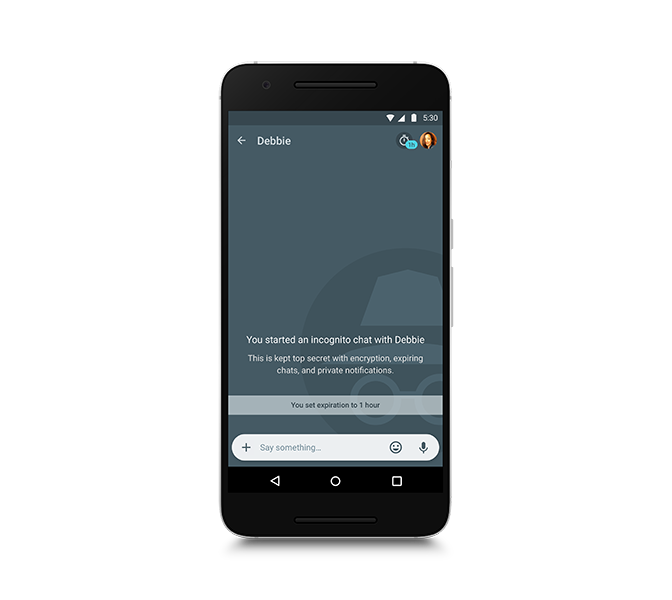
Allo offers an Incognito Mode that doesn't store a record of your conversation. You can set a timer specifying the duration of the chat, following which it will be automatically deleted. All ephemeral chats are overlaid with a grey incognito icon.
Ask Google Assistant anything
If you're feeling bored, Google Assistant offers a variety of ways to pass the time. You can have a conversation with the chatbot wherein you can ask it to tell jokes, recite poems, play games, serve up news headlines, sports scores, and much more. You can invoke the assistant directly from within a chat window by typing @google.
And yes, you can have an emoji party with the chatbot.
Restore your chats
Allo initially didn't have the option to save your chats across devices, but that feature is now available. You can set Allo to automatically create a backup of your chat history, and you'll be able to sync chats to a new device when setting up Allo again.
Room to grow
For all of its features, Allo can't be used as the default SMS client on your phone. It uses an SMS relay to communicate with contacts that don't have the service installed, but it won't be taking over Android Messages.
What do you guys think of Allo? Do you regularly use the messaging service? Let us know in the comments.
Updated July 2017 with sections on Duo calls, ability to restore chats, and selfie stickers.
Google just launched Allo, a new smart messaging app that comes with stickers, emoji, and a powerful assistant who can answer all your questions. Let’s take a look at its biggest features, and see if it’s worth moving all your conversations over to it.
Google Assistant Brings the Power of Google Directly to Your Conversations
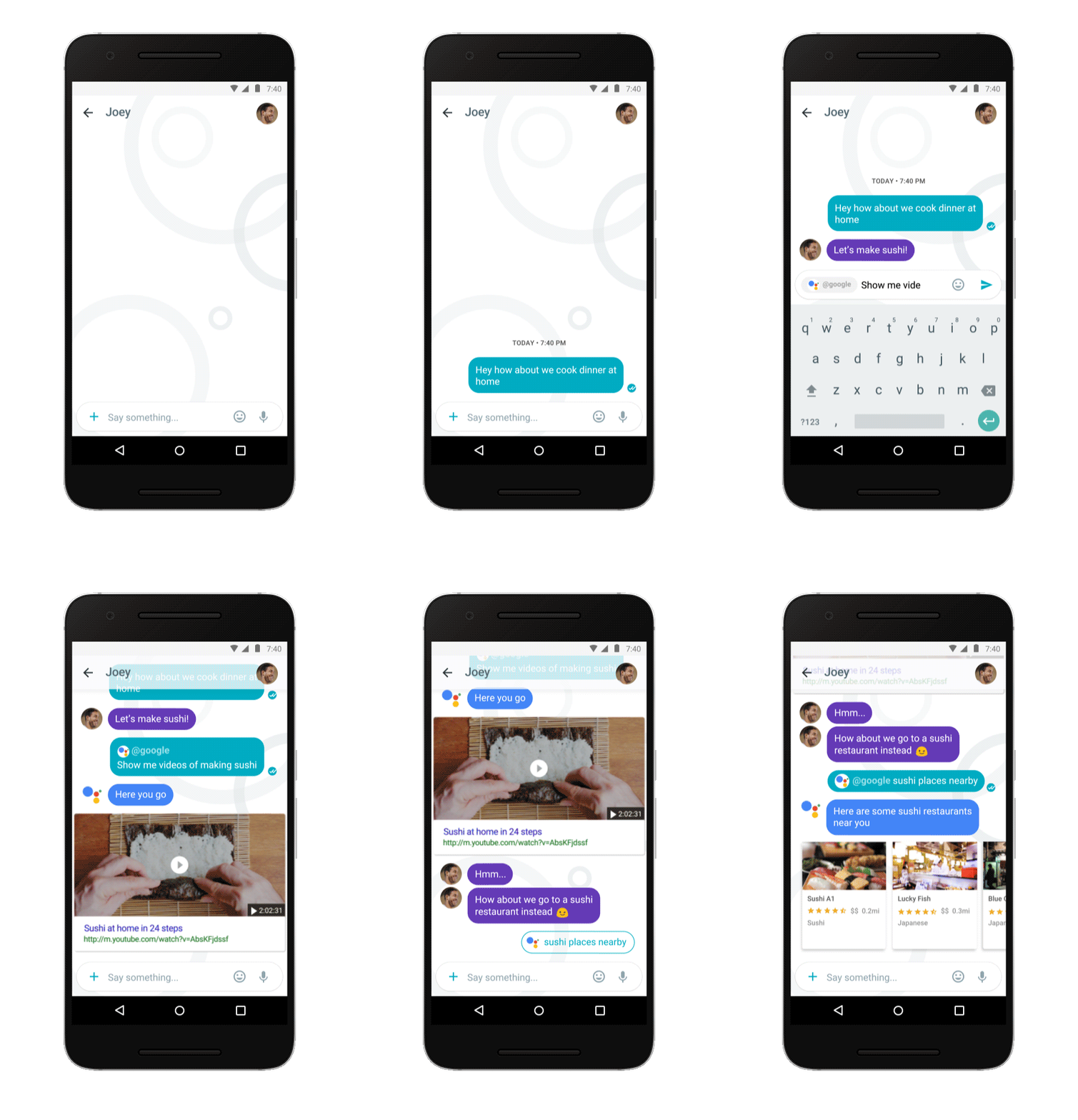
Google’s search and voice commands are a treasure trove of smart features that can make your life a little easier. Google Assistant brings that power to your texts and chats. In every conversation in Allo, you can add “@google” to a message to get input from Google Assistant. There’s also a dedicated conversation between you and Assistant where you can ask it questions directly. True to the name, it’s like having a personal assistant standing by, waiting to do whatever you need at a moment’s notice without leaving the app.
Assistant is handy whenever you’re making plans with other people. For example, say you’re trying to find a place to eat. In the middle of your chat, you can say “@google italian food near me” and Google will pull up restaurant listings. Tap one and you can get directions, call the restaurant, or view the menu.
Assistant also remembers its own context. For example, if you tap a restaurant, you can then ask “Is it open?” and Google understands that “it” refers to the restaurant you’re looking at. It will then tell you whether or not the place is open and what its hours are if necessary. We’re still exploring everything Google Assistant can do, but you can also ask Assistant “what can you do” to find even more features.
Smart Replies Make Quick Work of Simple Responses
Google’s been experimenting with Smart Replies in Inbox for a while now, and it looks like it’s paid off. In Allo, you’ll get a few suggestions for common or basic replies whenever you receive a message from someone. These will be simple replies like “Thanks!”, “Sounds good!” or “Sure thing!” While it might sound trite, in practice it’s super helpful for getting through the filler conversation that most of us don’t pay attention to, anyway.
Google Assistant Can Seamlessly Switch Between Voice and Typed Commands
Google’s Assistant uses conversational commands, but the fact that you can swap between using voice or text to get answers is especially cool. Typing on your phone is great until you need to lift something and don’t have a hand free, but still need to use your phone. In the Google Assistant chat conversation, you can tap the microphone to record a voice command. Say something like “Set a reminder for noon” and Assistant will start the process to add a reminder.
Here’s where it gets interesting, though. Google Assistant will reply with “What’s the reminder?” You can now type your reminder, tap one of the given smart replies, or tap the microphone to finish your message. You can even leave the conversation entirely and finish later. Assistant will remember exactly where you are. This can be super helpful if you’re trying to add an event to your calendar while hashing out details with other people. It also allows you to break up voice commands if, for example, you want to add a concert to your calendar but Google can’t quite pronounce the name of your favorite band.
Image Annotations Let You Mark Up Any Picture You Send
On top of taking and sending pictures from within the app, Allo also lets you edit images and add drawings or text on top of your photos. The annotation tools are a little bare-bones right now. You can only draw in seven colors and you can only add white text. Still, it’s handy for pointing out a part of a photo or just for goofing off, and expect there to be more tools, filters, and other gimmicks very soon
Incognito Chats Keep Your Chats Private, and Leave Out Google Assistant
While most chat apps push more secure, encrypted messaging, Allo takes a different approach. While messages are encrypted between your device and Google’s servers, they’re still readable by Google’s algorithms (though it’s unclear if a human could read them if they needed to.) They also store your chat logs by default. All of this is, according to Google, necessary in order to for Assistant to work.
Fortunately, if you’d like your privacy, you can enable Incognito chats. In this mode, your chats use the end-to-end Signal Protocol to keep your messages secure. This also means that even Google can’t read your messages. The trade-off is that Google Assistant is useless when your messages are encrypted, so you won’t have any smart replies or the other Google-y features, but you can also rest easy knowing that no one’s going to read your chat logs later.
Stickers, Games, and More Make Allo SurprisinglyFun
Google has made a lot of messaging apps, but most of them have pretty boring. Practical, perhaps, but they didn’t offer much to make people actually want to use them. Allo changes that. Out of the box, it supports a bunch of sticker packs and lets you download even more. Google Assistant even lets you play games with your chat partners.
Is there any good reason why my chat app needs to have an “Emoji Riddle” game? No, but it’s fun. Allo has an uphill journey ahead of it to convince everyone to use it, but the fact that it’s fun on top of being useful is a huge point in its favor.
by Shep McAllister on Gear, shared by Shep McAllister to Lifehacker
After a brutal pillow fight in the comments of our nomination post, we’ve narrowed this week’s Co-Op down to the final three pillows. Check out what our readers had to say below, and remember to vote on the bottom of the post. Don’t sleep on it too long though; voting closes on Friday.
Yep. I used to buy a new pillow four or five times a year. Then I got MyPillow three years ago. Haven’t bought a new one since. - Pinche Gringo
Absolutely agree with My Pillow. Was skeptical when hearing the cheesy commercials on XM radio (and now TV), but my wife gave in and bought one. Within two weeks, nightly neck pain that she’d had for years was gone. Going on three years with the pillow... and not an ounce of neck pain since. After she had it six months, I tried it... and it also got rid of my neck pain. We were very close to spending a large chunk of change on a new mattress... but My Pillow changed that! Now, my wife and I joke about the commercials... “just throw it in the wash like your favorite pair of jeans!” - triggerx
The Tempur-Pedic Symphony pillow! I love this thing so much I take mine to hotels.
It has a slightly convex side and a slightly concave side so you can flip it to whichever is most comfortable. It also fits well in a standard pillowcase unlike some of the stranger pillow shapes. The foam really has a good density that allows you to sink in while still offering good support. I’ve had mine nearly eight years now and it hasn’t broken down or lost its firmness. - Kay Mariev
This. On my back, I sleep on the concave side; on my side, I sleep on the flat side so my shoulder tucks into the nook on the concave side. Best pillow I have ever slept on. - ItinStin
Commerce Content is independent of Editorial and Advertising, and if you buy something through our posts, we may get a small share of the sale. Click here to learn more, and don’t forget to sign up for our email newsletter. We want your feedback.
The new conveyor system will open the week of October 3, ferrying books from the vast, subterranean archives beneath Bryant Park to researchers working in the Stephen A. Schwarzman Building on Fifth Avenue and 42nd Street.
(more…)
You could go in for the full-throated nostalgia of an instant printer like the Fujifilm Instax or that new dealie from Leica, or you can pick up one of these things and let your smartphone do all of the heavy lifting. HP’s new Sprocket is a pint-sized affair, priced at $130 — $70 less than the long-awaited Fujifilm Instax Share SP-2 and about the same as the company’s… Read More
The cost of Aloquin -- an acne cream based on iodoquinol and aloe, whose component ingredients cost virtually nothing -- was raised by 128% this week by manufacturer Novum Pharma, who now charge $9,561 for a 60g tube.
(more…)
That fitness tracker you got for Christmas promises to make you healthier — but it doesn’t promise weight loss. And now it looks like there’s a good reason why: people in a weight-loss study who used fitness trackers dropped about five pounds less than those who didn’t, according to a study published this week in JAMA.
For the study, 471 overweight people ages 18 to 35 were randomly assigned to one of two groups. Both groups received diet advice, instructions to exercise, and group counseling sessions. After six months, one group started using Fit Core by BodyMedia (which has since been discontinued) to use and the other didn’t. Everyone ended up thinner and healthier than before, though most people gained some weight back. But at the...
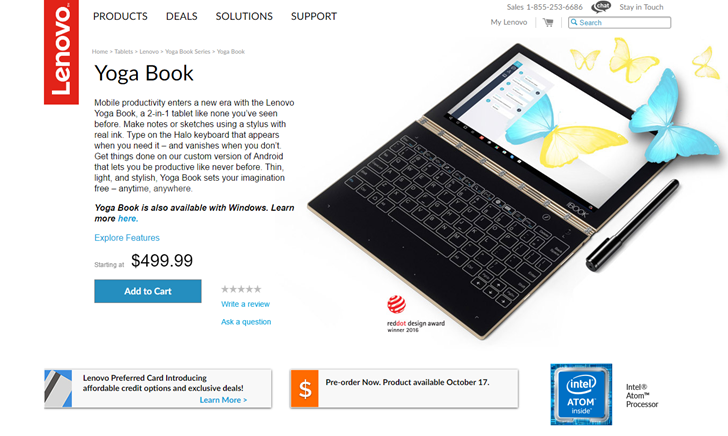
Lenovo turned a lot of heads when it announced its latest Yoga design, the Yoga Book. It's essentially a convertible laptop with a fold-back screen, complete with the Yoga line's well-regarded watch band hinge. But the Yoga Book has an ace up its sleeve: instead of a conventional keyboard, it uses a gigantic touch-sensitive panel that includes a dedicated keyboard mode, with virtual backlit "keys" that can be activated at a touch.
Got a new phone? Awesome! Here's how you can restore your apps and settings from your previous device.
Google has always synced calendar events, contacts, Drive documents, Gmail settings and other account-related information across devices, and since Android 5.0 Lollipop the company started offering the ability to restore apps to a new device. With Marshmallow, the feature was expanded to include app data as well as system settings, with all the information stored in the cloud. Android 7.0 and 8.0 doesn't bring changes to the backup service itself, but Google has placed more focus on privacy and how sensitive information is sent or stored.
If you're using the Google Now or Pixel Launcher, your home screen background, icon and widget layout, as well as the folder structure, is now saved to the cloud, allowing you to restore your settings to a new handset and retain your home screen layout.
Where does all this data get stored? Google is backing up the app data to Drive, allocating 25MB for each app. Data used by the backup system doesn't count toward your storage quota. Meanwhile, developers can choose to select what app data gets stored in the cloud and you can opt-out of the service at any time through your device settings.
Here's how you can restore your apps and settings when moving to a new Android phone.
How to enable the Android backup service
First, make sure you have the backup service running on your current phone.
Open Settings from the home screen or app drawer.
Navigate to Backup & reset.
Select Back up my data.
Toggle Back up my data to On.
Select Back to go back to Backup & reset.
Check that the correct Google account is associated in Backup account.
Toggle Automatic restore to On to restore settings and data when installing an app.
Now that you've enabled the Android backup service, your system settings and app data will be automatically saved to Drive. When you're switching to a new phone, you can rely on the service to restore your settings, apps, and associated data.
Note: The menu layout may not look exactly as above on your phone, but any phone running Lollipop and above should have an equivalent of Backup & reset.
How to restore apps and services on a new Android phone
Restoring apps is straightforward if you're using a handset running Lollipop and above. This setting is available to phones as they're booting up for the first time, or after they've been factory reset.
Select the arrow at the welcome screen to start setting up your handset.
Select the System language.
Log in to your home Wi-Fi network.
Select Accept and continue.
You can easily copy your Google accounts, apps, and data from another device, but for now, we'll not use this option.
In the Google services page, you can select whether you want to enable the backup service for your account.
Choose your preferences, and select Next.
If you want to add another email account, you can do so in the Add another email section. Otherwise, just select Not now and hit Next.
We now come to the Which device? section, which lets you select the device you want to restore from.
You'll see a list of all your previous devices, and when you've last used them.
Select a device to see all the apps available for restore.
If you want to restore all apps and settings, hit Restore.
Don't want everything restored? Hit the arrow next to Restore all.
Selectively choose which apps you want to restore.
Hit Restore to retrieve apps and settings from the cloud.
You can now set up fingerprint security and enable Google Now.
That's it! Once the initial setup is completed, apps and settings will be restored in the background.
Your privacy
Gathering data and sending it off to a remote server means it's outside the app sandbox and depends on Google and the people who made your phone to be doing the right things. That may not always be the case, as phone manufacturers have a lot of leeway when they make an Android-powered phone. Google's thoughts on the issue:
Caution: Because the backup transport can differ from device to device, Android cannot guarantee the security of your data while using backup. Be cautious about using backup to store sensitive data, such as usernames and passwords.
Google provides plenty of documentation on how to use the Backup service, so developers have the means to be cautious and do the right thing with sensitive data. Don't let this scare you away from using the service, but you do need to be aware.
How to see the amount of data synced to the cloud
Although you can't see what data is being backed up to the cloud, you can take a look at the amount of app data that's being stored. Here's how you can find out:
Open Google Drive from the home screen or app drawer.
In My Drive, select the hamburger menu from the top left corner.
Navigate to Settings.
Tap Manage backup.
You'll see a list of all the apps that are using the backup service.
The backup system works well for restoring apps and system settings, but app data remains an issue. When I did a clean Marshmallow install on the Moto G4 Plus and used the restore feature, apps like Fenix were already logged in, and my preferred settings for the Twitter client were intact from a previous phone. However, not all apps take advantage of the backup service, and with the feature limited to apps built on API level 23 (apps built for Marshmallow) and above, there are several older apps that aren't eligible. The biggest issue is that even though the service is free and requires no special cloud services, developers just aren;t using it.
The ability to restore apps and settings is available on all current phones running Android 6.0 and above, although there are a few outliers. Recent Xiaomi phones, for instance, do not offer the restore service at all. I had to manually install apps individually on the Play Store like it's 2013. The issue is more common in countries like India, where there is an influx of Chinese phones with heavily tweaked user interfaces.
In Western markets, this should not be an issue. If you're buying a phone from the likes of Samsung, LG, HTC, Sony, Motorola, or any other handset manufacturer that has a foothold in the U.S. market, you'll be able to use the restore functionality to retrieve your apps and settings data with ease.
How has your experience been with Android's restore feature? Let us know in the comments.
On Android, friends with Allo can bug you even if you haven't installed the app yet.
Google has built a unique trick into its new messaging app, Allo, which it surely hopes will help spread its reach throughout the vast Android user base. Allo can send messages to your Android friends, even if they don't have the app installed.
It'll look a little something like this:
Be prepared for confused responses from your friends.
The notification lets you respond through text along (as opposed to stickers, photos or anything like that), or alternatively ignore it altogether. There's also a button taking you straight to the Play Store install page for Allo.
How can Google do this? The notification is generated by Google Play Services, which is installed on just about every Android phone, and updates silently in the background.
For that reason, there's a good chance your Allo contact list will contain a good few people who don't have the app installed yet. And so be prepared for confusion when messaging people for the first time. The feature does seem to be a bit flaky, though. Some people without Allo installed who are on our contact lists aren't getting these "introductory" messages through Play Services, while others are.
Note: If you're messaging a contact who's not on Android, you may see a "free SMS" option, which lets you text them without paying the usual charges (by routing the message through Google.) However, it's not entirely clear why some contacts get the "free SMS" option, and others simply an "invite" button.
Google, as a platform holder, has a unique advantage over other chat apps in that it can allow Allo to reach anyone running the latest version of Play Services. Whether that's fair is debatable, but it's certainly a powerful way to drive installs of a new app.
Anyone receiving (or sending!) random Allo messages this morning? Getting confused replies back? Shout out in the comments!
Whether it’s planning a night out or just catching up, we all rely on messaging to stay in touch with friends and loved ones. But too often we have to hit pause on our conversations — whether it’s to check the status of a flight or look up that new restaurant. So we created a messaging app that helps you keep your conversation going, by providing assistance when you need it.
Today, we’re releasing Google Allo, a new smart messaging app for Android and iOS that helps you say more and do more right in your chats. Google Allo can help you make plans, find information, and express yourself more easily in chat. And the more you use it, the more it improves over time.
Respond quickly with Smart Reply Google Allo makes it easier for you to respond quickly and keep the conversation going, even when you’re on the go. With Smart Reply, you can respond to messages with just a tap, so you can send a quick “yup” in response to a friend asking “Are you on your way?” Smart Reply will also suggest responses for photos. If your friend sends you a photo of their pet, you might see Smart Reply suggestions like “aww cute!” And whether you’re a “haha” or “😂” kind of person, Smart Reply will improve over time and adjust to your style.
Express yourself with photos, emojis and stickers Chat is more than just text, so we’ve created a rich canvas for you to express yourself in Google Allo. You can make emojis and text larger or smaller in size by simply dragging the “send” button up or down. Make photos your own by scribbling on them before you send. And we’ve worked with independent artists and studios around the world to create more than 25 custom sticker packs, because sometimes a “sloth riding a pizza” says it all.
Meet your personal Google Assistant In Google Allo you’ll also be introduced to a preview edition of the Google Assistant. With your Assistant in Allo, you can have a conversation with Google — ask it questions and let it help you get things done directly in your chats. You no longer need to leave a conversation with friends just to grab an address, share your favorite YouTube video, or pick a dinner spot. Just type @google to bring your Assistant into any group chat. And of course, you can also chat one-one-one with your Assistant in Allo.
Here are just a few ways your Google Assistant can help in Google Allo:
Make plans with friends. You can easily move from discussing dinner with friends to making plans for the night, right in your chat. Just add the Assistant to your group chat and ask for movie times, local restaurants and more. You can also research travel destinations, flights and hotels together with friends.
Get answers. Get the latest info on everything from news, weather, traffic, sports, or your upcoming flights status. Ask the Assistant to send you daily updates on the information you care about.
Have some fun. Ask your Assistant to share that funny YouTube video or play games with friends right in your group chat — for instance you can compete to guess a movie title based on a series of emojis.
The Google Assistant is the next chapter in a journey Google has been on for many years to assist people in their everyday lives. We’re starting with a preview edition to show you just one way that your Assistant will work for you in chat. Over the coming months, your Assistant will be available in more Google products, working seamlessly throughout your day at home or on the go. The Assistant will initially be available in English, with more languages coming soon.
Chat in Incognito mode We take privacy and security seriously in Google Allo. All chats in Google Allo are encrypted using industry standard technologies like Transport Layer Security (TLS). But we went a step beyond this and we created a mode within Google Allo called Incognito (h/t Chrome). When you chat in Incognito mode, messages have end-to-end encryption and additional privacy features like discreet notifications and message expiration.
You can also message friends who aren’t yet using Google Allo through SMS or, for those using Android, app preview messages.
We can’t wait for you to say hello to Google Allo! We’re beginning to roll out Google Allo for Android and iOS, and the app will be available worldwide in the next few days.
Posted by Amit Fulay, Group Product Manager https://1.bp.blogspot.com/-nFYF134DSlw/V-Ig4YrEAQI/AAAAAAAATDA/qBJJHW4nGaAJJ6qN_qR-aqk5irwZb-XNACLcB/s1600/Screen%2BShot%2B2016-09-20%2Bat%2B10.55.14%2BPM.png Amit Fulay Group Product Manager Google
by Kristin Wong on Two Cents, shared by Andy Orin to Lifehacker
Getting out of debt isn’t easy, and while there’s plenty of practical advice to help, the psychological toll is a huge, often-overlooked obstacle. When you feel utterly powerless against debt, it only makes the process more difficult. While it takes money to get the job done, shifting your mindset to an empowered one will help you through the long slog to financial freedom.
InDear Debt, personal finance author Melanie Lockert describes her own story about paying over $80,000 worth of student loan debt in less than five years. She says that while all of the basic money advice is a necessary part of the plan, what helped her more than anything was changing the way she thought about money.
Learn to Practice Gratitude
It’s only natural to feel resentful when you’re paying off debt. You have to give up certain luxuries in order to pay down your balance, even small luxuries. When your balance is massive, it feels like you have to give up on those expenses forever. Lockert told us:
When I was in debt and struggling, I was upset by all of the things that I didn’t have. All of the things I couldn’t do. It was paralyzing and made me want to spend more on things to make myself feel better.
After dealing with depression, Lockert saw a therapist at her grad school to talk about her issues. At her therapist’s suggestion, she started writing down three things she was grateful for every day.
They could be anything at all. So I put things down like a warm cup of coffee, having a place to live and my family. Once I shifted my mindset and focused on what I was grateful for rather than what I was missing, I realized I didn’t need to spend on other things. I was already “rich” in many other ways.
Gratitude really can go a long way toward nixing some of the financial impulses that make it harder to get out of debt. A study published in Psychological Science (PDF) backs this up. Before being presented with a money decision, subjects were asked to write about an experience based on one of three emotions: happiness, gratitude, or “neutral.” Researchers then asked them if they wanted a little bit of money now or a larger amount later. The subjects who expressed gratitude were nearly twice as much more likely to delay their gratification and make the smarter overall financial decision. You can see how results varied:
I can relate to Lockert’s experience, too. I spent years operating with a mindset of scarcity. When I finally learned to be grateful for the stuff I had instead of worried about the stuff I didn’t, I felt more confident and empowered. This made it easier to stop emotional spending, but it also encouraged me to learn about investing, take risks in my career, and overcome my fear of money in general. When you feel confident and empowered, it’s easier to tackle overwhelming goals, too.
Jealousy is destructive in general, and when it comes to your finances, jealousy often leads to bad decisions. The whole concept of “keeping up with the Joneses” is based on jealousy. For example, like most people, when I feel jealous, I feel inadequate. In the past, when I felt inadequate, I would often compensate with buying clothes or other distractions. Subconsciously, I figured I looked good enough, I’d feel worthwhile. Not only is this emotionally destructive, it destroyed my finances, too.
The whole issue of jealousy comes down to desire. For some reason, whether you consciously recognize it or not, you desire something that the other person has. You want it in your life. The question is, why do you want it in your life? I like to use the “five whys” when handling a question like this. Whenever I’m trying to answer a “why” question, I repeat it five times, asking it of the answer I come up with for each question.
This method is useful because you get to the core of your jealousy and discover something much more productive: a goal. From a debt perspective, this is powerful because it keeps you on track with your goals and keeps you from making decisions that undo all of your good work, like spending on stuff you don’t need just to get back into debt. Not only can you keep jealousy from destroying your finances, you can actually turn into something much more productive. Lockert explains:
If you’re jealous of someone’s success, let that inspire you to work harder. If they can do it, so can you. Everyone has to start somewhere, and you can’t compare yourself to someone else’s journey.
In her book, Lockert explains how she used jealousy to her advantage, too, by networking. She reached out to peers she envied and asked for insight and career advice. This serves a practical and an emotional purpose. You turn your negative feelings into something more positive, which makes you less prone to buying crap you don’t need to compensate, digging further into debt. However, you also expand your network this way, opening yourself up to more earning opportunities.
That’s a lot easier said than done, though. Most people don’t have jobs that offer unlimited pay. Most people don’t have free time to pick up a second job or side gig. This is where resourcefulness comes in.
I realized that debt was ruling my life in more ways than one, and that my situation kept me in a negative feedback loop. I felt stuck and wasn’t sure how to get out of the situation. After feeling this way for more than a year, I knew I had to change, so I started to get into problem-solving mode. How could I get out of this situation? What could I do to turn this challenge into something else?
Sure, there are a lot of ways to earn extra money, but they might work for everyone. And there’s a lot of stuff people sell or rent around the house, but you might not have those things. At some point, you have to rule out the answers that don’t work for you and focus on opportunities instead. Lockert said:
Not being able to secure full-time work did a number on my self-esteem. I felt like I wasn’t worthy of a job or worthy of making money. Because of the struggle, I got into side-hustling to make more money. I worked as a brand ambassador, event assistant, pet sitter, mother’s helper, and more. I did whatever I could do. Once I stopped focusing on a traditional job, I realized there were money making opportunities all around me.
I started to believe I was a money-making machine and that I could leverage my skills, contacts and hustle into work. Work begets more work, especially if you do a killer job, follow-up and build your reputation.
Lockert started looking at her obstacles as opportunities. When I asked my mom how she managed to save ten thousand dollars and move us to a better neighborhood on a minimum wage salary, she said the same thing: opportunities aren’t always fun. For example, her “opportunity” was overtime at her awful job. “Most people would not see that as an opportunity,” she admitted. But all she cared about was how to support her goal to move, go to school, and get a better job.
Of course, that solution isn’t going to work for everyone. The point is: you have to figure out what works for you. Learning to look for opportunities to pay off your debt will go a long way. Lockert puts it this way:
It can be hard to see the silver lining while working through challenges, but if you focus on creating an opportunity out of a challenge, you can move through the challenging situation even faster — and stay sane while your world feels like it’s crumbling. It’s really about activating hope, when things may feel hopeless.
Most of the debt advice you read emphasizes the tools and tactics you need to get out of debt. Don’t get me wrong, those tools and methods aren’t just important to learn, they’re necessary. However, it’s easy to overlook the psychological toll of debt, and debt can really drag you down. It makes you feel defeated, helpless, and totally out of control. It’s difficult to conquer any goal when you feel that way. When you learn to deal with the emotional side of debt, it’s a lot easier to use those tools and methods effectively.
According to RCMP investigators, Leston Lawrence would make 210g "pucks" of gold using the mint's "dipping spoon," hide them up his butt, then pawn them for about $6,800, at the Ottawa Gold Buyers in the Westgate Shopping Centre, depositing the cheques at a Royal Bank in the same mall.
(more…)
Journalist Thomas Fuller returned to the United States after 27 years abroad, mainly in Asia. He moved to San Francisco and wrote about the reverse culture shock he experienced. The thing that struck him the most was the disparity between the wealthy (ganja yoga, organic ice cream sandwiches, vegan shoes, Bluetooth compatible toothbrushes) and the poor (outbursts of the mentally ill on the sidewalks, vaguely human forms inside cardboard boxes).
Greater Bangkok, a sprawling metropolis with more than 10 million people, has 1,300 homeless people, a survey this year found.
San Francisco has less than one-tenth Bangkok’s population but six times as many homeless people. I’m sure you could fill a book with the reasons for this. Ms. Nopphan believes that homelessness is more intractable in rich societies. “In wealthy countries there are systems for everything,” she said. “You’re either in the system or out of the system.” There is no in-between in America. In Bangkok, by contrast, rich and poor coexist. There are vast tracts of cheap, makeshift homes and a countryside where people in the cities can return to if they lose their jobs or hit hard times.
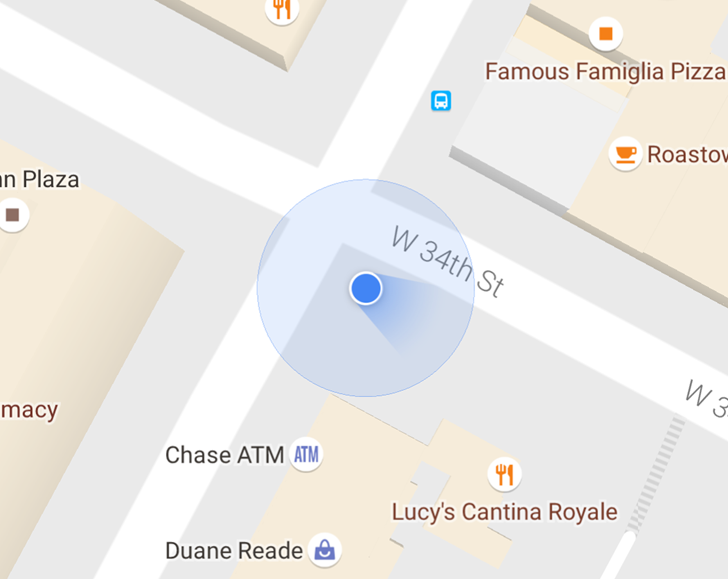
Last month a few Google Maps users started seeing a new display style for the direction indicator, that little arrow that shows which way your device is pointed (or at least which way it thinks it's pointed) on the primary maps and navigation interface. Specifically, it's no longer an arrow: it's a more general "beam" indicator that shows both the approximate direction you're facing and how accurate your device's orientation reporting is.
The music industry is growing once again thanks to paid streaming services. This year, the industry is on target to bring in the most revenue since the mid-2000s. If the numbers hold, 2016 will be the first time the music industry has seen its revenue increase year over year since the late '90s.









 You could go in for the full-throated nostalgia of an instant printer like the Fujifilm Instax or that new dealie from Leica, or you can pick up one of these things and let your smartphone do all of the heavy lifting. HP’s new Sprocket is a pint-sized affair, priced at $130 — $70 less than the long-awaited Fujifilm Instax Share SP-2 and about the same as the company’s…