Shared posts

20 Sep 20:08

Spigen Style Ring Review: The ultimate phone accessory

by Marc Lagace

Spigen's Style Ring is a multipurpose minimalist phone accessory you may just fall in love with.

So many smartphone accessories claim themselves to be a must-have accessory, but rarely do they actually live up to the advertised hype. More often than not, they end up in some drawer after a month or two for one reason or another — you've upgraded to a new phone that's not compatible with it, or you just got bored with using it.

The Spigen Style Ring may just be able to buck that trend. By incorporating so many handy features into one universal smartphone accessory, it basically become more and more essential the longer you use it.

And if you're also among the millions of folks swept up in Pokémon Go mania, you've spent countless hours running through your city trying to catch 'em all. During our own hunting adventures, we've come to realize the Style Ring is also the perfect Pokémon Go accessory.

No more death-gripping your phone

If you've own a smartphone for long enough, drop damage is inevitable. If you're lucky, it falls the "right way" and doesn't cause any permanent scuffs or cracks. With the Style Ring, you get an added layer of security when your phone is in hand. Slip your finger in the ring and you really don't have to worry about dropping your phone.

For Pokémon, the idea of not having to death grip your phone as you weave your way down streets and through parks tracking an elusive Pokémon is pretty novel. The Style Ring gives you the confidence and freedom to take off running when you hear someone yell about a wild Vaporeon — without ever having to worry about dropping your phone.

Perfectly car compatible

Another simple accessory included with every Style Ring is the Hook Mount, a little rubberized-plastic nub with mounting tape on the back. Wipe down a spot on your car's dashboard, adhere the Hook Mount, and you just installed one of the most minimalist car mounts for your phone on the market.

To mount your phone, you simply extend the ring, hook it on the mount, and push until you feel it pop into place. BAM! Your phone is secure and accessible to you as you drive. Perfect for controlling your music on the go, following along with turn-by-turn directions from Google Maps, or a quick swipe if you're near a PokéStop at a red light.

For Pokémon players who love to play while being driven around, the Style Ring lets you confidently lean out the window like a dog and really stretch your phone to get into range of distant PokéStop. As long as you've got the Style Ring on your finger, your phone is secure. We're definitely not recommending such behavior, we've just seen people doing it and it's only a matter of time before someone's phone slips and shatters on the pavement below.

Also works great on bike

If you're more of a Pokémon purist, maybe you prefer to bike around as you hatch and catch. With the Style Ring, you're able to maintain much better control of your bike while still managing to keep your phone literally on hand. This allows you to conveniently swipe PokéStops as you bike past, or pop off your bike at a moment's notice when you feel that vibration informing you a Pokémon is around.

This goes without saying, but as the game warns on load up, always be careful and alert when you're out and about. Heed the words of Professor Oak who frequently scolded you — there are time and places where you simply shouldn't be on your bike. Be considerate to your fellow trainers!

Better range for one-handed Pokéball throws

So we've talked about how the Style Ring can help you keep a better grip on your phone, but let's talk about how the Style Ring might help with some Pokémon Go fundamentals: catching Pokémon!

Spigen highlights how the Style Ring grants you a wider reach across larger smartphones. This added range will give you more control over your Poké Ball throws.

Once you're on that XP grind to to level up your trainer, every little addition helps. That means maximizing every Pokémon catch with a throw bonus. One of the coolest (and often frustrating) techniques is the curveball throw. It nets you an extra 10 XP, which should become automatic when you get the curveball down pat.

If you need to work on your curveball throws, we've got a guide for that!

And it's got other uses beyond Pokémon Go, too

On top of everything previously mentioned, the Style Ring also doubles as a kickstand, which is awesome. With the ability to tilt and swivel the ring 180 and 360 degrees respectively, you have the freedom to set up your phone any which way you want. Prop it up in portrait orientation on your work desk, or flip it to landscape for watching YouTube videos or Netflix.

There are many other clever uses for the Style Ring — you just need to use your imagination. Mobile Nation's own Kevin Michaluk is a huge fan of the Style Ring. On top of all the awesome functionality of the Style Ring mentioned above, he enjoys using it as a spin-the-phone game for determining who's going to pick up the cheque when out for dinner with friends.

Because of how the Style Ring secures to the back of your phone, removing it does takes some elbow grease. Best practise is to wedge something thin such as a guitar pick under a corner then slowly peel it back. But you can swap the Style Ring to another phone, which is great. Take care of your Style Ring and it may just outlive your device.

Oh, and if you're wondering, it doesn't quite work as a beer bottle opener. We tried.

Get it to match your phone

Spigen offers the Style Ring in five familiar colors — Space grey, Champagne Gold, Black, and White — so you should be able to find the right color to match your phone.

If only they came in Valor red, Mystic blue and Instinct yellow. (Psst! Spigen, you listening?)

An essential accessory, for average phone user, or the ultimate Pokémon Go fan!

See at Amazon

20 Sep 20:07

The cancer-causing chemical Erin Brockovich fought against is still in our water

by Angela Chen

Erin Brockovich may have made this cancer-causing chemical famous, but data from nationwide tests show it’s still in our water — and at potentially dangerous levels. The US Environmental Protection Agency should have enforced stricter standards on the chemical years ago, advocates say.

The chemical, called chromium-6 or hexavalent chromium, was featured in the movie Erin Brockovich, in which Julia Roberts plays an activist leading a lawsuit against Pacific Gas & Electric for contaminating water with it. Chromium-6 can be produced from industrial activities like producing stainless steel or manufacturing textiles.

The EPA still has no guideline for chromium-6 specifically

Today’s report, published by the Environmental Working Group,...

Continue reading…

20 Sep 17:13

A song composed by artificial intelligence in the style of the Beatles

by Mark Frauenfelder
maxresdefault-1

Enjoy this song by the Pre-Fab Four!

(more…)

20 Sep 17:10

Google brings non-news AMP links to its mobile search results

by Frederic Lardinois
google_pipe_2 When Google launched its AMP project for making mobile websites load faster, it was mostly about news sites and you’d only see AMP links in the Top Stories section of the company’s search results pages. About two months ago, Google also introduced a new demo site that showed what AMP support in mobile search would look for non-news sites like recipe and lyrics sites. Today, the… Read More
20 Sep 17:09

Google Now is dead: Latest beta of Search app erases references to Google Now

by David Ruddock

nowthatswhaticalldead

Version 6.5.26 of the beta Google Search app rolled out last night, and while at first the changes seemed minimal, we're seeing one thing this morning that is of particular interest: all references to Google Now have been removed.

Read More

Google Now is dead: Latest beta of Search app erases references to Google Now was written by the awesome team at Android Police.

20 Sep 14:34

Sainsbury’s exits digital entertainment, hands over e-book business to Kobo

by Ingrid Lunden
screen-shot-2016-09-20-at-15-21-18 Once again, a big retailer in the UK is pulling away from its ambitions to move into digital media. Supermarket giant Sainsbury’s preparing to exit the digital entertainment business. As part of that it will be outsourcing its e-book operations to Kobo, the online bookseller and maker of e-readers, owned by Japan’s Rakuten. The digital entertainment business, which is marketed… Read More
20 Sep 13:04

Watch the first trailer for Jennifer Lawrence and Chris Pratt's space romance-epic Passengers

by Andrew Liptak

After months of waiting, the trailer for Chris Pratt and Jennifer Lawrence’s movie Passengers has finally arrived.

The film follows Preston and Aurora, two passengers on a spacecraft traveling to a distant colony planet. Each were awoken decades before they were supposed to arrive at their destination, and are left to deal with the ship as it begins to malfunction. The trailer plays up the romance between the two characters as it opens, with Pratt’s Jim Preston asking Lawrence’s Aurora out on a date with a robot. Before too long, the reality of the terrifying situation that they both find themselves in begins to sink in: they’re light years from their destination, and the ship is beginning to malfunction. The film looks to be the...

Continue reading…

20 Sep 12:38

Android Pay in the UK: Everything you need to know

by Alex Dobie

Want to pay for stuff in the UK using Android Pay? Great! Here's what you need to know.

Android Pay is Google's mobile payments service, and it's now live in the UK. Much like Apple Pay, this means that if you have a supported handset and your bank allows it, you can securely pay for things in the real world without fumbling around for cards or cash.

Where can I use Android Pay in the UK?

Because the underlying technology is so similar, Android Pay should work anywhere contactless credit and debit cards are supported. That includes many of the big supermarkets and coffee shop chains, and the London Underground.

Is Android Pay the same as Samsung Pay?

No. Samsung Pay is Samsung's own payment service which uses slightly different technology, allowing it to work regardless of whether a contactless terminal is present. When Samsung Pay launches in the UK, Samsung phone owners with supported handsets will be able to use this, or Android Pay, to make payments on their phones.

Which phones are supported?

You'll need a phone running at least Android 4.4 KitKat with NFC support (near-field communication — that's the hardware that lets your phone securely transmit data to payment terminals). Most high-end Android phones sold in the past couple of years support NFC, as do many mid-range handsets. If you're not sure, try looking for NFC in Settings > Wireless and networks, or searching for it in the Settings app.

You don't need a fingerprint scanner to authenticate — you can use a pattern or PIN lock instead — but using Android Pay will be quicker and easier if your phone has one.

Which UK banks support Android Pay?

At the time of writing the following UK banks support Android Pay:

  • Bank of Scotland
  • First Direct
  • Halifax
  • HSBC
  • Lloyds Bank
  • M&S Bank
  • MBNA
  • Nationwide Building Society
  • Santander
  • Natwest
  • Royal Bank of Scotland
  • Ulster Bank
  • TSB

More local banks are likely to be added in the coming months, just as more banks have been joining Apple Pay since that service launched.

Notably absent from the list is Barclays. Barclays is currently pushing its own mobile payments app for Android, and the bank says it has "no plans" to join Android Pay at this time. So Barclays (and Barclaycard) customers might be left out in the cold if they don't want to use the bank's first-party app.

How do I get started?

Simply install the Android Pay app from Google Play and follow the instructions. If you already have a credit or debit card associated with your Google account, and your bank supports it, you'll be up and running in a few minutes.

Is there a limit to Android Pay in the UK?

For payments of £30 or less, you can pay with your phone by unlocking it and holding it over the payment terminal, just as you would a contactless credit card. For payments over £30 — assuming they're supported by your bank and the merchant — you'll need to authenticate using your fingerprint, PIN or pattern.

Is Android Pay secure to use?

Android Pay — and other phone-based payment methods — is arguably more secure than using a card alone, since your card details are never sent to the merchant. Instead a secure token, generated by Google in the cloud, is sent over NFC and used to authenticate your transaction.

Whether any electronic payment can ever be 100 percent secure is debatable, but there's nothing inherently more risky about using your phone to pay, assuming you take sensible security precautions to protect it from theft and misuse.


Are you using Android Pay in the UK? How are you finding the service so far? Shout out in the comments and let us know!

20 Sep 12:37

Google sends out invites for its October 4 Pixel phones event

by Frederic Lardinois
2016-09-19_1810 Google just sent out invites for an event in San Francisco on October 4th. Rumor has it that the company will reveal its next smartphones at the event. While the invite itself only features Google’s own logo, the company also just posted a teaser video and site that both strongly hint at a new phone. The URL for the teaser site is madeby.google.com, and unless something has… Read More
20 Sep 12:36

Opera’s desktop browser with a built-in VPN is now available to all

by Jon Russell
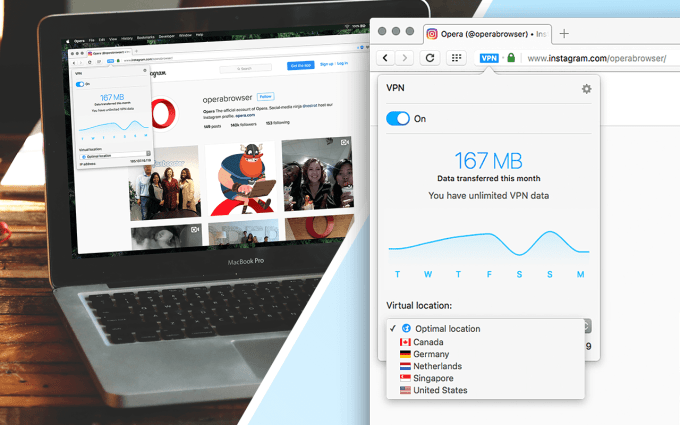
opera-desktop-vpn Opera has become the first browser maker to ship a desktop internet browser that includes an unlimited VPN service baked-in. Read More
20 Sep 12:34

Google will announce its next smartphone on October 4th

by Micah Singleton

Google has announced that it will be holding an event on October 4th in San Francisco, where it will likely unveil its latest smartphones (which may or may not be released under the Nexus brand). The company uploaded a short teaser video to YouTube that shows the date, as well as a smartphone-shaped rectangle, and the Google "G" logo. It also launched a new site that refers to the date as well as something "made by" Google. Google has yet to confirm what the phones will be called, but multiple reports have it dropping the Nexus name in favor of its "G" logo on the upcoming devices.

Continue reading…

20 Sep 12:32

Microsoft just unveiled a new Nokia phone

by Tom Warren

Microsoft is still making Nokia phones. In a surprise announcement this morning, the software giant unveiled its latest Nokia 216 feature phone. Despite announcing plans to sell its feature phone business to FIH Mobile, a subsidiary of Foxconn, for $350 million earlier this year, Microsoft is still launching new Nokia phones. The new Nokia 216 is one of the most basic phones that Microsoft manufactures, and it will be available in India next month for around $37. It includes a 2.4-inch QVGA display, with 0.3-megapixel cameras at the front and rear, running on the Series 30 OS with the Opera mini browser. It even has a headphone jack.

It's easy to understand why Microsoft continues to create feature phones, as the company still sells...

Continue reading…

19 Sep 23:44

Getting started with add-on camera lenses for your Android phone

by Cella Lao Rousseau

What are the different types of phone photography lenses available?

Let's cut to the chase: your Android phone's camera is a powerful little tool. With it you can capture vivid video, professional portraits, trippy time-lapses, and so much more, all without any extra bells and whistles weighing you down.

Phone photography lenses are incredibly quick, practical, and convenient tools to have in your back pocket, and the four most common kinds you'll come across are wide-angle, fisheye, macro, and telephoto lenses. They can take your Instagram posts to the next level, transform a get-together with friends into a memorable photo moment, and make your Snapchat stories all the more compelling to watch.

With phone photography blossoming online and amongst real-life pro photographers, having a few phone lenses ready to go can be a great way to switch things up in your shooting routine.

Here are the different, most common types of phone photography lenses to check out if you're looking to get creative and break the mold on basic, boring phone photography!

Wide-angle

Wide-angle lenses are a really great, straightforward way to add a bit of a different perspective to your Android photos and videos without making them look too terribly cluttered and over the top.

As a phone photographer shooting with a wide-angle, external lens, you'll be able to allow more of the background image to be captured in your photograph or video. If you want to get more technical with things like focal length, that's totally a-okay, but to keep things simple, it's key to essentially remember that the shorter the focal length is, the wide the field of view is, and therefore, more stuff can fit into your image.

Wide-angle lenses are fantastic because they can be used in a plethora of shooting styles, including portraiture, nature shots, food pics, large group shots, selfies, and so much more! By expanding and changing the way your Android phone sees things, you can really up the overall quality and look of your photos.

Remember, a wide-angle lens is used more to shift your perspective and make you get a creative, not warp your photo completely like other phone photography lenses.

Fisheye

If you've ever watched a GoPro video, you've probably noticed the familiar look of the camera lens: it's less intense than looking through a peephole, but more intense than a typical wide-angle lens. This look is called a fisheye effect, and it's an incredibly popular shooting tool amongst phone and professional photographers!

First used in the 1920s for meteorology and cloud formation, fisheye lenses have recently made a comeback (after a spike in popularity in the 60s) in everything from action photography, wedding photography, underwater photography, food photography, music videos, horror movies, portraiture, and so, so much more. A fisheye lens can be appropriate to use in almost any situation, giving the viewer a bit more of a 'I'm actually there in the photo!!!' perspective.

You can use a fisheye lens with your Android phone to add a super unique perspective and feel to your photos. Depending on how the lens is secured to your phone – via adhesive, magnets, a clip-on, or case – you can even imitate bigger-ticket video items like a GoPro camera with just your phone.

All you need is a little fisheye perspective, and a lot of creativity.

Macro

Sometimes, details are the most important things in a photo or a video. Capturing crisp, clear little flecks of dust, or the fine, hypnotic grain of wood, or even the sharp, jagged edges of fragmented, shattered glass goes the complete opposite of a fisheye or wide-angle lens, but with a macro lens attachment, you can really get up-close and personal with your subject.

Macro lenses are a pretty difficult tool to get used to, but they're relatively easy to shoot with once you get familiar with them. Depending on the strength of the lens – 10x to 20x is typically normal – you can capture intense detail that your Android phone's camera would gloss over completely.

With macro phone lenses, you want a lens that secures as close as possible to your phone's camera, making clip-on or even some magnetized lenses a bit unreliable. Using a macro lens that works with a rubber band assures that the lens is producing the clearest images and video without or with very little distortion.

Macro lenses are typically not a day-to-day shooting tool (unless you love how hyper-detailed and beautiful macro shots can be!), but depending on the quality of the piece you pick up, you can even find some macro lenses that capture images at a microscopic level.

Telephoto

Telephoto lenses are used for giving you that zoomed-in look on a photo without actually zooming in manually.

You're probably thinking, "Why can't I just zoom with my phone? This seems unnecessary." But when you use your Android device's zoom, you start to sacrifice the quality of the photo, the look of a video, or the overall detail of a picture. It's frustrating, but having a telephoto lens in your back pocket can do a lot of interesting things for your phone photography.

There are plenty of different strengths of telephoto lens you can buy, including 4x, 8x, 12x, and more. Of course phone lenses aren't as expensive as lenses for DSLR cameras, so you can pick up a few different types to play around with them and experiment creatively.

While most other external lenses for phones are quite small, telephoto lenses can get a bit bulkier. You can't always just attach a telephoto lens and start shooting because some may be too large for your phone to attach via magnet or clip (so a strap or case needs to be involved), while others need to be used with a stand or a mounting piece.

Telephoto lenses can bring some different looks to your phone photography and video without ruining your picture quality or sacrificing your creative vision.

What do you shoot with?

Is there a not-so-common phone photography lens that you can't get enough of? Let us know what you love shooting with in the comments below so we can check it out!

19 Sep 21:59

[Oops] It looks like Nest accidentally aired a commercial featuring the Google Pixel

by Ryan Whitwam

nest-pixel

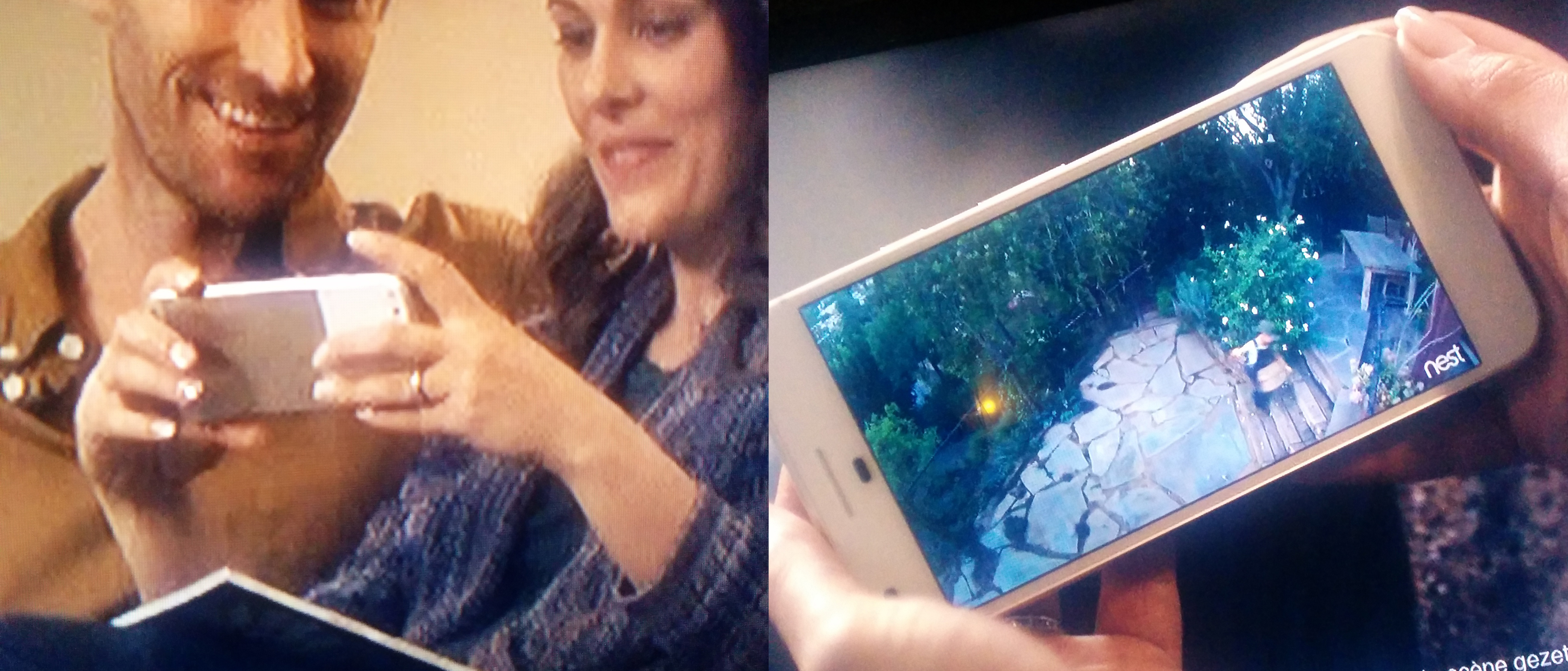
We get tips on an almost daily basis that purport to show an unannounced device popping up in a commercial or marketing material. These never turn out to be legit... except maybe this time. A Nest commercial aired in the Netherlands features a phone that looks a whole hell of a lot like the upcoming Google Pixel. This is a first for us.

In the ad, a woman is holding a phone with a very distinctive back (left above).

Read More

[Oops] It looks like Nest accidentally aired a commercial featuring the Google Pixel was written by the awesome team at Android Police.

19 Sep 21:55

The Ripple Rug: You know, for cats

by John Biggs
yodagrabs Of all the products I’ve seen this year, none are more worthy of our time and attention than the Ripple Rug. Created by Fred and Natasha Ruckel, the Ripple Rug is a rug with holes and lumps in it. Your cat can climb inside, stick its paws out, and generally get all up inside that business. It’s 35 inches on each side and made of recycled plastic bottles. Why is the Ripple Rug so… Read More
19 Sep 18:17

Washington Post: first newspaper ever to call for prosecution of its own source

by Cory Doctorow

headsman-block

The Washington Post was one of the newspapers that participated in the initial Snowden disclosures; Barton Gellman won a well-deserved Pulitzer for his work on them -- but now the paper's editorial board have called on the US government to imprison Edward Snowden, making it the first paper in US history to demand the prosecution of its own source, specifically to punish him for bringing them the story they published. (more…)

19 Sep 18:17

Done in your name: Survivors of CIA's torture-decade describe their ordeals

by Cory Doctorow

17ea6fb45cee462299b511a18233b9d2_18

For nearly a decade, the CIA kidnapped people from over 20 countries, held them without trial or counsel, and viciously tortured them, sometimes to death -- but the only person to serve jail time for the program is the man who blew the whistle on it, and that's thanks in part to Obama's insistence that "Nothing will be gained by spending our time and energy laying blame for the past." (more…)

19 Sep 18:14

Google Play Books Invites You to “Discover” a World of Reading

by Unknown
With more than 5 million books to read on the go, what will you discover next? Google Play Books is introducing Discover, a new way to find books by browsing the latest reviews, news, lists, videos and more.

Available in 75 countries on both iOS and Android and the web, Google Play Books is the world’s largest ebookstore and offers readers like you smart technology that caters to your lifestyle — where you can start reading a book on your tablet at night and pick up where you left off the next day from your smartphone, as well as easily browse, skim, highlight and make notes.

Discover launches today in the U.S. in the Google Play Books Android app, and is coming soon to iOS. The feature is designed to enhance your reading experience even further by helping you discover new books and find what’s right for you with:

  • The best stories from around the web — Is a book being made into a movie? Which novels does NPR recommend this fall? Discover identifies news, reviews, lists, and videos about books from trusted sources around the web, and brings them to readers in an easy to browse way.
  • A smart experience with personalized stories for you — Google’s algorithms will surface just the right stories based on the books you read on Play Books. When you’re reading an article or watching a video, Discover automatically pulls out the books that are mentioned, so you can start reading a free sample or buy the book in just a few taps.
2_devices.png
  • Weekly Highlights delivers a roundup of the best stories each week — Short on time? Weekly Highlights is a digest delivered each week, showcasing a roundup of the most important news, reviews and videos of the week, so you are always up to date with the stories that everyone is talking about.
  • Google Play Editorial showcases today’s biggest authors and books — With the launch of Discover we are introducing Google Play Editorial, where readers can find original articles, including author interviews, essays by favorite writers and book selections from some of the literary world’s leading voices. 

Whether you’re looking for a mystery, something funny, or the latest George R.R. Martin novel, come explore Google Play Books and discover new stories.

Posted by Eric Stromberg, Product Manager, Google Play 
Books Recently read Seveneves by Neal Stephenson
19 Sep 18:13

Supercharging Google Cardboard with VRidge

by Russell Holly

Your smartphone-based VR has another trick.

There's already a lot you can experience with Google Cardboard. Quick horror experiences to make your friends jump, exciting trips on roller coaster you may never go on yourself, and concerts to watch as though you're in the audience top a surprisingly long list of possibilities. There are hundreds of Google Cardboard apps available for anyone to try, but if you're looking for something to try that is just a step above your average app the folks behind VRidge want you to see what desktop-class VR is like without relying on Oculus or Valve for anything.

Read more at VR Heads!

19 Sep 18:10

Twitter's new, longer tweets have arrived

by Casey Newton

Tweets are holding steady at 140 characters, but a variety of additions to your tweets will no longer count against that limit. As The Verge reported last week, Twitter said today it was rolling out expanded tweets around the world. Media attachments including images, GIFs, videos, and polls will no longer count against the 140-character limit. Neither will quote tweets, though if include a link to another tweet in your own that will count as normal.

Continue reading…

19 Sep 18:10

The Devialet Immersive Theater System is almost dangerously loud

by Chaim Gartenberg

Devialet, the manufacturer of some of the loudest and most unique-looking speakers on the market, announced its Immersive Theater System last week, which uses the latest and most powerful version of its Phantom speakers, the Gold Phantom, to deliver some truly ridiculous sound.

Continue reading…

19 Sep 18:08

A faster way to share photos and videos, and all-new movies

by Google Blogs
Sharing all the photos from your weekend with friends can be hard: Not everyone uses the same apps, texting can be slow, and email has attachment limits.

Now, with Google Photos, you pick the photos, tap “share” and select the people you want to share with, instead of the apps — and we take care of the rest. If your friends are on Google Photos, they’ll get a notification. If you share via phone number, they’ll get a link to the photos and videos via SMS. And email addresses will get an email with a link from Google Photos. So you can spend less time toggling from app to app to share photos — dealing with failed texts or email attachment limits along the way — and more time enjoying life’s photo-worthy moments.


We’re also upping our game when it comes to automatic creations. Google Photos has always made movies for you using your recently uploaded photos. Now we’re going further, with new movies that are based on creative concepts — the kinds of movies you might make yourself, if you just had the time. And they’re not only limited to your most recent uploads.

One of the first concepts is designed to show your child growing up right before your eyes. Here’s an example:


We’re rolling out a couple more concepts this week, with more coming soon. Look out for a concept to commemorate the good times from this summer, and another one for formal events like weddings. And you don’t need to do a thing — these movies get made automatically for you.

These updates are rolling out today across Android, iOS, and the web.


Posted by David Lieb, Product Lead, Google Photos https://2.bp.blogspot.com/-IT1gpc5ZUtA/V-AYz6NEw1I/AAAAAAAAS_4/zyYAY6tVVig1_jlHpAANIlW1qCyNXHR1QCLcB/s1600/Screen%2BShot%2B2016-09-19%2Bat%2B9.55.02%2BAM David Lieb Product Lead Google Photos
19 Sep 17:06

See more, plan less – try Google Trips

by Google Blogs
Whether you’re juggling work, school, family, or just the demands of daily life, everyone needs a little break and a new adventure sometimes.

But knowing what to do once your vacation starts can turn what’s supposed to be fun into a lot of work. You might get recommendations from friends, professional travel guides, or online reviews — but figuring out how to squeeze everything you want to do into a finite window of time can be stressful, especially when you’re in a new place, often with limited access to the web. In fact, a GoodThink study showed that 74% of travelers feel the most stressful aspect of travel is figuring out the details.

We wanted to reduce the hassle and help travelers enjoy their hard-earned vacations. So today, we’re introducing a new mobile app to help you instantly plan each day of your trip with just a few taps of your finger: Google Trips.


Google Trips is a personalized tour guide in your pocket. Each trip contains key categories of information, including day plans, reservations, things to do, food & drink, and more, so you have everything you need at your fingertips. The entire app is available offline — simply tap the “Download” button under each trip to save it to your phone.


Choose your own adventure
For the top 200 cities in the world, Google Trips shows you a variety of day plans featuring the most popular daily itineraries. We’ve automatically assembled the most popular sights, attractions, and local gems into a full day’s tour — all based on historic visits by other travelers. Say you’re visiting Barcelona. You can choose from multiple day plans, like “Eixample District,” which maps out the can’t-miss buildings by Antoni Gaudi, the famous Spanish architect.


Plan each day of your trip like magic
Everyone has different interests and time constraints. No matter how popular an itinerary is, there’s no one-size-fits-all solution for the perfect day or the perfect trip. Google Trips can help you build your day around places you already know you want to visit.

Say your friends told you that you have to see the Sagrada Familia — and you’re looking for suggestions on things to do around that spot. Press the “+” button in the day plans tile to jump into a map view containing all the top attractions in your destination. If you’re time constrained, you can specify above the map whether you have just the morning or afternoon, versus a full day. Then simply tap and pin the Sagrada Familia to build your itinerary around it. Google Trips automatically fills in the day for you. If you want more options, tap the “magic wand” button for more nearby sights. You can pin any new spots you like, and if you want even more, each tap of the “magic wand” instantly gives you a new itinerary with updated nearby attractions like Palau Macaya or Parc del Guinardo, so you can build your own custom itinerary in minutes while munching on your morning churro.

For more details on how this works on our Research Blog.


All your travel info, all in one place
Keeping track of all your flight, hotel, car and restaurant reservations when you travel can be tough. With Google Trips, all your travel reservations are automatically gathered from Gmail and organized for you into individual trips, so you don’t have to search and dig up those emails. They’re waiting for you within the reservations tile, even without WiFi.


Vacations are a chance to recharge and experience new places and cultures. For your next trip, let us help you see all the sights you want to see, without all the work. Google Trips, available now on Android and iOS, has you covered from departure to return.

Posted by Stefan Frank, Product Manager, Google Trips https://2.bp.blogspot.com/-Yl145tls6Qc/V-BUTIka0fI/AAAAAAAATAI/3U0DEQu7IG4_FR6Hyu6x0zLe3-4dqDH3gCLcB/s1600/GoogleTrips_1.original.png Stefan Frank Product Manager Google Trips
19 Sep 17:04

Our favorite films of TIFF 2016

by Bryan Bishop

From the moment our boots hit Canadian soil for the 2016 Toronto International Film Festival, we were rushing out dispatches, writing reviews, talking to filmmakers, and — most importantly — seeing lots and lots of movies. Some of the TIFF screenings were world premieres, others were making their domestic debuts, and others may already be in your local multiplex (or on Netflix). With this year’s festival now behind us, we take a look at our favorites. These are the films we haven’t been able to stop thinking about — and that you’ll want to see as soon as you possibly can.

Courtesy of TIFF

Nocturnal Animals

First of all, can we agree that this is one of the most user-friendly film fests currently in operation?...

Continue reading…

19 Sep 17:02

HP detonates its timebomb: printers stop accepting third party ink en masse

by Cory Doctorow

HP-Printer-Logo

On September 13, owners of HP OfficeJet, OfficeJet Pro and OfficeJet Pro X began contacting third-party ink vendors by the thousand, reporting that their HP printers no longer accepted third-party ink. (more…)

19 Sep 17:02

Google announces new travel planning app: Google Trips

by Mark Frauenfelder
trips

I use TripIt for travel planning, but I'm going to give the new Google Trips a try. It stores your travel plans offline, so you don't need to have a Wi-Fi or cellular connection to find directions or access your itinerary.

When I installed it, it scanned my gmail and did a great job of finding my upcoming flight, restaurant, and hotel reservations.

Google Trips makes exploring the world easier by organizing your essential info in one place and making it available even offline. Get activity suggestions based on what’s nearby, customizeable day plans, and your travel reservations from Gmail.

AUTOMATIC TRIP ORGANIZATION
Your travel reservations are automatically gathered from Gmail and organized into individual trips. Each trip contains day plans, things to do, food and drink suggestions, and more.

BUNDLED RESERVATIONS
See your flight, hotel, rental car, and restaurant bookings in one place without having to search for them individually.

DAY PLANS
For several hundred of the world’s top places, find popular day plans organized on a map that you can customize based on your interests and available time.

NEARBY ATTRACTIONS
Find out when you’re near popular attractions (and whether they’re open) as well as reviews and ratings from other travelers.

THINGS TO DO
Every trip contains ideas for things to do automatically organized into useful categories like Top Spots and Indoors or Outdoors. For many of the world’s top places, you’ll get curated local suggestions and travel tips.

OFFLINE ACCESS
No Internet? No problem. Google Trips is available offline, so you’ll always have access to your info.

19 Sep 16:59

Prosecutors and defense lawyers agree - Chris Christie knew about bridge lane closures as they happened

by Mark Frauenfelder

Image: Wikipedia/Gage Skidmore

New Jersey governor Chris Christie has vehemently denied knowing anything about his staff's scheme to punish a local mayor by ordering lane closures on the George Washington Bridge in 2013. But today, prosecutors in the trial against two former Christie staffers charged with closing the lanes said Christie knew about it all along.

Via NYT:

Prosecutors from the United States attorney’s office said that two of the alleged co-conspirators in the case, David Wildstein and Bill Baroni, had bragged to the governor about the lane closings, and that they had been done to “mess” with the mayor of Fort Lee because he had declined entreaties to endorse the governor’s re-election.

The prosecutor, Vikas Khanna, instantly advised the jury that they should not consider the actions of “others” or wonder why they were not charged.

The details of the plot that Mr. Khanna laid out were largely familiar by now: that one of the defendants, Bridget Anne Kelly, sent an email in August 2013 saying “time for some traffic problems in Fort Lee” after confirming that the mayor of that borough would not endorse Mr. Christie. A month later, two of three access lanes to the George Washington Bridge were shut down, and the other defendant, Mr. Baroni, the highest ranking official at the Port Authority of New York and New Jersey, which runs the bridge, studiously ignored the mayor as he pleaded by text, email and a handwritten letter for the agency to reopen the lanes.

19 Sep 16:58

On "Adiemus" and the world's music

by Rob Beschizza
wnya

Karl Jenkins' "Adiemus" is apparently the most-performed piece of music in the world. A sweeping classical epic with vocals written in a mysterious imaginary language, it was composed for Delta Airlines, which wanted to copy British Airways' classic "Aria on Air" ad (itself by the spookily brilliant pairing of Malcolm McLaren and Yanni.) (more…)

19 Sep 12:38

Behind the Scenes of Marvellous Macro Insect Imagery

by Darren Rowse

This project by British photographer Levon Bliss and the Oxford University Museum of Natural History is a breathtaking. Levon spends weeks taking thousands of images of a single insect and then edits them together into incredibly high resolution images of these tiny creatures.

See more of Levon’s work on the Microsculpture site.

Learn About Macro Photography

While not on the scale of Levon’s project above we’ve compiled some Macro tutorials for those of you inspired to begin to explore this space.

The post Behind the Scenes of Marvellous Macro Insect Imagery by Darren Rowse appeared first on Digital Photography School.

19 Sep 12:33

Galaxy Note 7 UK exchange program begins [Updated]

by Alex Dobie

Exchange program hits its stride in the UK starting today — but no new Note 7 sales yet.

Update: We've updated this post with confirmation from Samsung on the update to cap "unsafe" Notes at 60% battery, and show a green battery icon in replacement units.

From today, Samsung will start swapping out potentially dangerous Galaxy Note 7s with new, safe units in the UK. In line with the company's announcement a couple of weeks back today's the day anyone with an early Note 7 unit in the UK can get a new replacement.

Samsung halted sales of the Galaxy Note 7 right before the official UK street date of September 2, so the only people with UK devices will have been pre-order customers who took advantage of Samsung's offer to get the phone three days early. (A significant number, but far fewer than would be out there had the retail launch gone ahead as planned.)

Samsung says customers should get in touch with the place they bought their Note from in order to arrange an exchange, if they haven't already been contacted.

UK customers will be contacted by the provider or operator from which they purchased the product in order to arrange their device exchange. If customers have not been contacted before 19 September they should contact the provider or operator themselves to arrange the exchange.

Samsung has also confirmed earlier reports that it'll issue a software update to limit potentially unsafe Note 7s to 60% battery charge, and make new "safe" handsets show a green battery icon. Both updates (presumably as part of the same firmware package) will land on British Note 7s from tomorrow.

Samsung will issue new software to all pre-ordered Note7 devices in Europe that will limit the battery charge to 60%. This software will begin rolling out to existing customers' devices this week (from September 20th in UK and Ireland). By actively limiting the ability of the device to charge to full capacity, Samsung aims to reduce the risk of incidents and simultaneously reinforce the message to customers that they should immediately replace their existing device with a new Note7.

Customers who exchange their existing device for a new Note7 can be fully confident that their replacement device is not affected by the battery cell issue, courtesy of a new UX update to the battery icon. Any Note7 device that shows a 'green' battery icon (previous software version is white) on the device notification bar, the 'Power Off' prompt screen or the Always-On Display can be assured that the device is safe for charging. This UX update will be rolled out from tomorrow in UK and Ireland.

There's still no word on exactly when new sales of the Note 7 will begin; a Samsung told AC "Our first priority is to support current Note7 owners who are participating in the Product Exchange Program. We will confirm new in store dates shortly."

Independent retailer Clove says stock has been delayed until "early October," while Carphone Warehouse is more pessimistic, saying October 21.