For many software developers and publishers, nothing is better than a paying customer. Money is always a great reward, and some of the most widely used software today was the end result of significant time and capital investment.
However, there are hundreds of software developers and publishers who willingly make their work available for free. Some of them are complimentary programs offered with paid products or services. Others are reincarnated free versions of formerly commercial software. In many cases, freeware providers just want to make a meaningful contribution, without any expectation of compensation or financial reward.
Here are 45 different free applications, programs, and utilities for Windows. We hope you find them as useful as we do!
We've seen plenty of robotsscalewalls over the years, from models that emit supersonic streams of air to gecko-inspired creations, but few can carry more than their own weight, much less handle rough terrain. Enter this unique Swiss-made machine, which handles both tasks with aplomb thanks to the rapid melting and cooling of its thermoplastic adhesive feet. Created by the whiz kids over at the Swiss Federal Institute of Technology, the plastic compounds in the contraption's tootsies melt at around 70 degrees Celsius (158 Fahrenheit), where they're tacky enough to stick and fill surface gaps. If the bot needs to take a step forward, a thermoelectric effect kicks in to cool the plastics down, detaching the foot in the process. Repeat the motion several times and you get a tiny climbing critter that's able to carry about six to seven times its own weight over complex surfaces, a feat that's sure to be of actual use someday. It's certainly more practical, though a lot less fun, than one that mixes cocktails. Go on after the break to see the little climber in action.
An anonymous reader writes "A change from 'need' based financial aid to a 'merit' based system coupled with a 'high tuition, high aid,' model is making it harder for poor students to afford college. According to The Atlantic: 'Sometimes, colleges (and states) really are just competing to outbid each other on star students. But there are also economic incentives at play, particularly for small, endowment-poor institutions. "After all," Burd writes, "it's more profitable for schools to provide four scholarships of $5,000 each to induce affluent students who will be able to pay the balance than it is to provide a single $20,000 grant to one low-income student." The study notes that, according to the Department of Education's most recent study, 19 percent of undergrads at four-year colleges received merit aid despite scoring under 700 on the SAT. Their only merit, in some cases, might well have been mom and dad's bank account.'"
This may be a coincidence, but according to MapLight, Senators who voted last week for the bill allowing states to directly collect taxes on sales via the Internet, AKA The Marketplace Fairness Act of 2013, received 40 times as much campaign donation money (yes, that's four-oh, not just four) from businesses in favor of the bill as those who voted against it received from businesses that were against Internet sales taxes. Was this bribery? Of course not! We're not some piddly fifth-world country. But it's a prime example of how money influences politics here in the good old USA, and it's far from the only one we've seen lately. In this video, MapLight Program Director Jay Costa shares a bunch more with us, along with tips on how to spot this sort of thing and some steps we voters can take to fight against both direct and indirect influence-buying. Note that all this is totally non-partisan; the politicians with the most influence -- whether local, state or federal -- get most of the available special interest money no matter what other agenda(s) they may have. And for those who want to learn more about who is spending their dollars to influence your representatives, Jay also suggests a look at these two money-in-politics resources: FollowTheMoney.org and OpenSecrets.org.
Picass0 writes with distressing news from the AP wire, about the AP: "The Justice Department secretly obtained two months of telephone records of reporters and editors for The Associated Press in what the news cooperative's top executive called a 'massive and unprecedented intrusion' into how news organizations gather the news." They obtained call records from a number of desk phones, and the personal phones of many news editors. The DOJ has not commented, but it may be related to the possibility that the CIA director leaked information on a foiled terror plot in Yemen last year.
nametaken writes with this excerpt from Slate: "From the state that brought you the nation's first ban on climate science comes another legislative gem: a bill that would prohibit automakers from selling their cars in the state. The proposal, which the Raleigh News & Observer reports was unanimously approved by the state's Senate Commerce Committee on Thursday, would apply to all car manufacturers, but the intended target is clear. It's aimed at Tesla, the only U.S. automaker whose business model relies on selling cars directly to consumers, rather than through a network of third-party dealerships. ... [The article adds] it's easy to understand why some car dealers might feel a little threatened: Tesla's Model S outsold the Mercedes S-Class, BMW 7 Series, and Audi A8 last quarter without any help from them. If its business model were to catch on, consumers might find that they don't need the middle-men as much as they thought." State laws imposing restrictions on manufacturers in favor of dealers aren't new, though; For more on ways that franchise operations have "used state regulations to protect their profits" long before Tesla was in the picture, check out this 2009 interview with Duke University's Michael Munger.
An anonymous reader writes "A Microsoft server accesses URLs sent in Skype chat messages, even if they are HTTPS URLs and contain account information. A reader of Heise publications notified Heise Security (link to German website, Google translation). They replicated the observation by sending links via Skype, including one to a private file storage account, and found that these URLs are shortly after accessed from a Microsoft IP address. When confronted, Microsoft claimed that this is part of an effort to detect and filter spam and phishing URLs."
In last week's Hacker Challenge, we asked you to share your best speaker hack. We received some great entries, but the winning hack shows us how to build a waterproof canister speaker.
Check out the description of the winning entry below and read about some of our other favorite entries.
Winner: Build a Waterproof Canister Speaker
GrayskuII made a waterproof canister speaker from a few common plumbing pieces, a $5 pair of computer speakers from Big Lots, batteries, and a marine speaker. The electronics only take up about a quarter of the pipe, so it leaves lots of room for a dry box area. GrakskuII attached a Velcro band with a carabiner to attach it to his golf bag or to inner tubes when he and friends head down the river on a summer afternoon.
Honorable Mentions
We got a lot of great entries and we'd be remiss if we didn't share some of our favorites. Here are some of the entries that really impressed us.
Build a Custom Boom Box From Recycled Parts
Sharad's friend gave him a car stereo and car speakers and in return asked for Sharad to make something cool for him. Since Sharad only needed the stereo itself, he decided to turn the car speakers into a customized boom box using materials he had around his shop. He worked up a layour and cut 3/16" acrylic sheets to form the body. He then used the car speakers, an amplifier board, and some cables to create a beautiful little iPod-capable boom box that really sounds quite nice.
Make a Speaker For Your Bicycle
Lifehacker3000 wanted a speaker for his bike. He found a Bluetooth speaker on Amazon that was the same width as a water bottle and secured it in his front water bottle cage with a thick rubber band from a bunch of broccoli. Now, he can listen to podcasts and music on long bike rides. He feels safer than when wearing earbuds and it sounds much better than stuffing the speaker into a bike pouch.
Turn a Vintage Trunk and Mason Jars Into a Portable Stereo
Cgoodson created a beautiful portable stereo using mason jars to house the speakers and a vintage trunk found at Hobby Lobby. He repurposed an old JBL Creature speakers system as the base, but replaced the actual speakers with higher quality drivers from an old Sony surround system. With some slight modification, those speakers fit nicely into the mason jars.
Cgoodson gutted the sub woofer from the JBL and fit it inside the small trunk along with the the rest of the internal components. He then rewired the touch capacitive volume controls from the original system and soldered the leads to two of the rivets on the front of the trunk. Now, he controls volume by touching the left and right rivets. He also rewired the speaker connections to 1/8 inch stereo jacks that are mounted to the back so that the whole system has a finished look. Finally, he felted and mounted a piece of wood with two holes inside the trunk that he can slip the jars into, meaning he can zip the whole thing up into a single unit for transport.
A big thanks to everyone who took the time to send us entries! Be sure to check back every week for a new challenge.
Stuck online and bored? Don't have cable and want to get your motorsports fix? Refuse to go to some seedy site for bootlegs? I'll show you seven professional racing series that are made available free of charge online.
IndyCar
Yes, believe it or not, the top-tier open wheel series in the US will just let you watch their races online for free. Formula One it ain't, but maybe that's a bit of a good thing.
If sports cars are your thing, they don't get much better than the ALMS. While a bit light on the prototypes, the GT racing is bar none the most competitive in the world. The laptime differential is usually only about half a second, and fields stay tight with battles happening throughout the race. If you've got enough time, they're even uploading vintage races from the last decade and a half.
They call themselves touring cars, but don't be fooled. These Teutonic beasts are built over a common carbon safety cell for good reason. These high-powered, high-downforce V8 Monsters are a cross between the tight racing of NASCAR and the technology and pit stops of F1. Do they make you pay for that awesomeness? Nope, free for everyone!
Coming back stateside, we have two more sports car series under one roof. First is the Rolex Series, with lower tech more strictly balanced sports cars than you find in ALMS, but with more tight racing and close quarters combat. They also provide the Continental Tire Sports Car Challenge free online, their lower level series where cars begin on the showroom and get modified into mid-level touring and GT machines.
We've written about World Challenge before, and how they're our favorite sports car series. If you like modified race cars that started life on the showroom floor, this gives you four more classes in two series to choose from. Both the Touring Car and GT series are available online.
So there you have it, seven series worth of free race cars along the entire spectrum of speed. You'll never be bored again. Did I miss a series that also has official free races online? Let everyone know in Kinja below.
Officials for the U.S. National Transportation Safety Board have recommended a nationwide lowering of the blood-alcohol level considered safe for operating a car. The threshold is currently 0.08% — the NTSB wants to cut that to 0.05%. "That's about one drink for a woman weighing less than 120 lbs., two for a 160 lb. man. More than 100 countries have adopted the .05 alcohol content standard or lower, according to a report by the board's staff. In Europe, the share of traffic deaths attributable to drunken driving was reduced by more than half within 10 years after the standard was dropped, the report said. NTSB officials said it wasn't their intention to prevent drivers from having a glass of wine with dinner, but they acknowledged that under a threshold as low as .05 the safest thing for people who have only one or two drinks is not to drive at all. ... Alcohol concentration levels as low as .01 have been associated with driving-related performance impairment, and levels as low as .05 have been associated with significantly increased risk of fatal crashes, the board said."
Digging nails into a chalkboard sounds like smooth jazz compared to the ongoing exploitation of the term “assault weapon.”
Knee-jerk media outlets are working mercilessly to gain support for the leftist gun-control agenda. Unethical journalists have formed an entire vocabulary of gun-demonizing terms, leading those who know nothing about guns to believe that “assault clips” are more dangerous than walking down a dark alley at night in Chicago.
Just as a reminder, firearms don’t have a brain, they don’t have feelings and they can’t make their own decisions. Calling a semi-automatic rifle an “assault rifle” brands an inanimate object with a negative connotation. In reality, the terms “freedom defender” or “modern musket” should be the politically-correct terms when referring to an instrument which nobly protects American liberties.
According to the NRA-ILA Glossary, “[if the term 'assault rifle' is] applied to any semi-automatic firearm regardless of its cosmetic similarity to a true assault rifle, the term is incorrect.” A true assault rifle is a select-fire weapon capable of continuously firing rounds as long as the trigger is depressed, or until it runs out of ammo. Real assault rifles are heavily regulated by the BATF, and require an extensive registration process for private civilian ownership.
Semi-automatic rifles such as the AR-15 shoot only one shot per trigger pull. Much to the surprise of people who rely on the evening news to learn about guns, the “AR” in “AR-15″ stands for “Armalite,” the name of the company that originally manufactured the rifle.
With all the misleading information forced upon the American public, the editors at G&A hit the floor of the 2013 NRA Show to find out your definition of an assault weapon.
by Cindy Cohn and Kurt Opsahl and Nate Cardozo and Nate Cardozo
Today the Associated Press reported that the Department of Justice has collected the telephone calling records of many of its reporters and editors. By obtaining these records, the DOJ has struck a terrible blow against the freedom of the press and the ability of reporters to investigate and report the news. As James Madison understood, "a popular government without popular information or the means of acquiring it is but a prologue to a farce or tragedy, or perhaps both." AP had it right when it told Attorney General Holder that it was "a serious interference with AP’s constitutional rights to gather and report the news."
The DOJ's decision to dive deep into these call records also shows the growing need to update our privacy laws to eliminate the outmoded Third Party Doctrine and to recognize that datamining has now reached the point where it no longer makes sense to treat calling records and other metadata related to our communications as if they aren't fully protected by the Constitution.
According to the AP, "the records obtained by the Justice Department listed outgoing calls for the work and personal phone numbers of individual reporters, for general AP office numbers in New York, Washington and Hartford, Conn., and for the main number for the AP in the House of Representatives press gallery." In all it included more than 20 telephone lines from April and May 2012.
While the government has not confirmed, the subpoenas appear to stem from an investigation into a government leak of information to the AP. This is not a sufficient excuse. Imagine if "Deep Throat," the informant critical to Woodward and Bernstein's investigation of the 1972 Watergate burglary, knew that his identity could be obtained through legal process. His career, and perhaps his life, would have been in serious jeopardy, and a cautious individual would have kept silent.
The widespread collection of information, as well as the apparent delay in notifying AP, both appear to be yet another violation the government's own regulations, 28 C.F.R. sec. 50.10. In 2010, the DOJ Inspector General reported on three other violations, involving the Washington Post and New York Times. The regulations require that, "wherever possible" subpoenas of records of the news media should be "directed at material information regarding a limited subject matter, should cover a reasonably limited period of time and should avoid requiring production of a large volume of unpublished material."
None of those limits appear to have been observed here. It seems impossible to imagine how a subpoena for all the records of call to and from AP's main switchboard, for example, is as narrowly tailored as the law required. Importantly, the regulations anticipate negotiation with the news media prior to subpoena, which also didn't occur. And in any event the regulations require notification to the news media within 45 days of any receipt of any information, with another 45 days possible with additional authorization. Since the timeframe of the records is a year ago, it seems likely that the government did not abide by this regulation either. While the regulations do not allow a lawsuit, violations of them can be grounds for discipline for governmental officials.
It is disturbing enough that the government appears to have violated its own regulations for subpoenas to the news media. However, this revelation also shows that we have a severe problem in protecting the privacy of our communications. It is critical to update our privacy laws and our understanding of the Constitution, and reflect the realities of what law enforcement can determine from our records and other metadata about our communications stored with our communications providers, be they phone companies, ISPs or social networks.
First, the third party doctrine is wholely inadequate for protecting privacy in the modern era. Citing this doctrine, the government consistently argues that any information given to a third party—like a phone company—has no Constitutional protection. Here, it's clear that the government was able to get the calling record information, secretly and in large quantities, because it didn't have to go to AP to get it. Instead, it went to the phone companies, who have little incentive to stand up for their customers and who may not have even realized that the information pertained to news media and so was protected by an extra regulation.
Justice Sotomayor recognized the growing problem with the third party doctrine in the recent U.S. v. Jones Supreme Court case, and signaled that it's the time that the Fourth Amendment caselaw be updated:
People disclose the phone numbers that they dial or text to their cellular providers, the URLS that they visit and the e-mail addresses with which they correspond to their Internet service providers, and the books, groceries and medications they purchase to online retailers . . . I would not assume that all information voluntarily disclosed to some member of the public for a limited purpose is, for that reason alone, disentitled to Fourth Amendment protection.
Second, this incident underscores that government access to records—information about our communications and movements over time—does impact our privacy. AP President Pruitt noted: "These records potentially reveal communications with confidential sources across all of the newsgathering activities undertaken by the AP during a two-month period, provide a road map to AP's newsgathering operations, and disclose information about AP's activities and operations that the government has no conceivable right to know." This sentiment was echoed by the Appellate Court in the Jones (then called U.S. v. Maynard) case in the context of GPS information: "A person who knows all of another travels can deduce whether he is a weekly church goer, a heavy drinker, a regular at the gym, an unfaithful husband, an outpatient receiving medical treatment, an associate of particular individuals or political groups and not just one such fact about a person, but all such facts."
Overall, this revelation of government's secret access to huge amounts of calling records as part of its leak investigation should not be such a surprise. The DOJ has long maintained that no one has any privacy interests in their call data records and has also engaged in unprecedented and aggressive prosecutions around government leaks.
But it should sound a wake-up call for the rest of us, including members of Congress and the courts. Government datamining of Americans' calling records and other metadata held by phone companies and ISPs should require more than a mere subpoena and should be protected by more than a hortatory regulation, whether the target is the news media or an ordinary citizen. Whether we get there by legislation or by updating our understanding of the Constitution to reflect the power of datamining to reveal the content of our "papers," we need to get there soon. Because it's clear that the DOJ remains firmly headed in the opposite direction.
Many automakers talk of building driver-focused machines; for its 50th birthday, Lamborghini is taking that idea to its logical extreme through the Egoista Concept. The commemorative supercar centers on a cabin that only allows room for the driver and a bare minimum of instruments, eliminating pesky distractions such as passengers and stereos. Lamborghini isn't exaggerating when it likens the interior to a jet fighter's cockpit -- the pilot gets a heads-up display as a matter of course, and has to climb over the car body just to crawl inside. We'd certainly like to give the narrow-purpose vehicle a spin when there's a 600HP, 5.2-liter V10 involved, although that's sadly unlikely. As hinted by the self-centered name, the Egoista Concept is built to let the company toot its own horn, and won't be sold -- anyone who gets a test drive will be part of a very exclusive (and likely ecstatic) club, as you might gather from the video after the break. We'll just have to make do with an Aventador, then.
Note: The model shown here is a prototype made from 3D printed plastic. The final version will be milled out of aluminum.
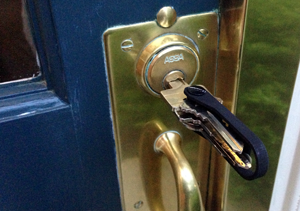
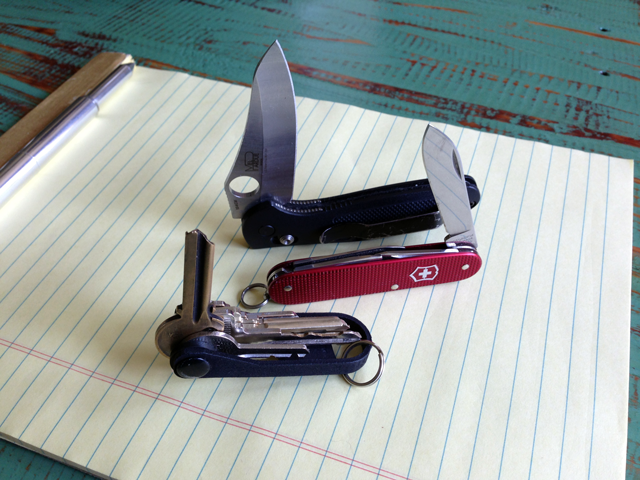
The BladeKey Bolt is a simple but well thought out device. Actually, you can probably guess how it operates just by looking at it. In a nutshell, it transforms your keychain into a pocket knife style key organizer.
No jingling. No poking. Just organized keys.
A Simple Design
The functional design of the BladeKey Bolt is something most will be familiar with. Anyone who has used a pocket knife will understand how it works because like I mentioned, it’s basically a Swiss Army knife for your keys.
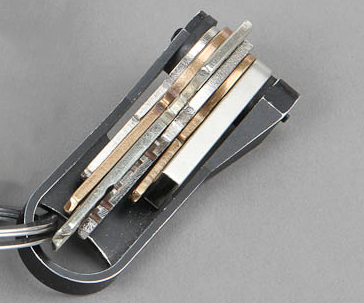
Three different configurations of the BladeKey are offered and in two colors. You can order a raw aluminum finish color or black anodized aluminum model that holds three, six or nine keys. Let’s say you find yourself using the nine key model with only six keys, just add a few rubber washers and the sizing will be as snug as it’s supposed to be.
Build Quality
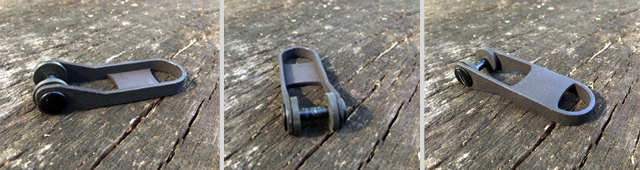
The initial BladeKey prototypes were made from ABS and Nylon Plastics and while strong, they eventually lost out to the look, feel and durability of aluminum. I’ve dropped and twisted this 3D printed version a few times and it’s withstood the abuse. I’m certain the aluminum version will only be better.
Bryan has the black anodized aluminum zip tie version, the BladeKey N9. That model was an early prototype as well. The Chicago bolt style is a big improvement over the zip tie version in terms of ease of use when adding or removing keys.
I know that the black anodized aluminum model will wear over time but I like having gear that shows signs of use.
Real World Use
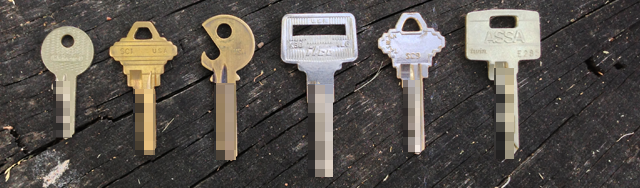
The first thing I wanted to do when I got my BladeKey prototype was dump my keys from my normal keychain and start organizing. I quickly found out that only a couple of my keys would fit unmodified. The binding post barrel diameter is 13/64 in (approximately 5.15 mm), so make sure your keys have a big enough hole to accommodate the binding post.
Depending on what keys you have, you may be ready to rock and roll right out of the box but if you have keys like mine, you better start charging your power drill. The actual drilling was a fairly simple process and I made sure to do it with the most basic equipment. I didn’t use a vise and just held the key up against the drill bit and hit the go switch. Make sure to wear gloves in case your hands slip but it only took a minute on most of my keys.
These were the keys I wanted to add to the BladeKey:
These are the the keys that fit without modification:
Adding and Removing Keys
Once you get your keys prepped (or maybe you don’t need to), just unscrew the Chicago bolt, slide your keys on, screw closed the bolt and you’re all set. That’s really it. In just a few minutes, I was good to go. I tested it out on my door locks, mailbox and my car and it worked just as expected. No more noisy jingling keychain!
It’s simple to add or remove keys and I found that finger tightening seems to provide the best tension. Obviously the tighter you screw down the bolt, the tighter the keys will be but if you go too tight, the keys towards the outside will be extremely hard to open.
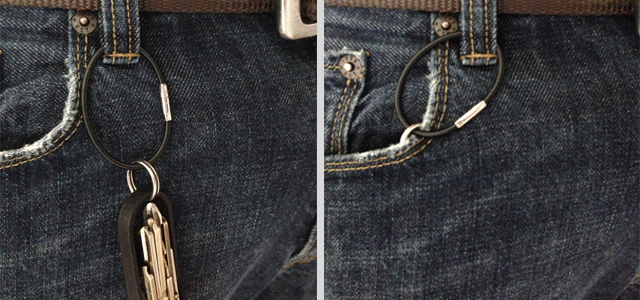
I’ve found that I like adding a small keyring to the BladeKey and attaching the entire setup to a front belt loop. This allows the BladeKey to be in my front pocket but not pulling heavily from the bottom of my pocket.
Notes and Critiques
By removing the rubber washers, I was able to insert six keys and a USB flash drive in the 6 key model BladeKey. After trying that for a week, I noticed it wasn’t ideal though because the rubber washers help to keep the keys evenly secure.
The obvious issue is that the BladeKey Bolt doesn’t fit all key types and some drilling/filing may be required. You can check the Kickstarter page for a sizing chart and key information. James, the creator of the BladeKey, also made a note in an email mentioning that he wanted to design and build the BladeKey from common off the shelf hardware. This was done for simplicity and to keep costs down.
With a single side hinge, pressure on the keys can be a bit uneven making the middle keys more loose than the ones on the end. This really isn’t a big deal but I wonder if a dual-sided option may work better.
In addition to using the larger rubber washer that was included, I toyed around with adding a smaller one to the middle of the keys. They were easy to find at my local hardware store and acted as a nice buffer/spacer.
Conclusion
I like it. I think it’s a fun and interesting way to organize my keys. A lot of people I showed it to also thought it was cool and are looking at getting one.
So, if you want to stop sounding like a janitor when you walk around, get yourself a BladeKey. Unless you are a janitor, in which case you should probably pick up a few.
The Chrome app store has seen a lot of improvements lately, but a lot of the apps that work inside Google Chrome still go under the radar. With that in mind, here are a few of our favorites you might not have seen yet.
Recently, Google has pushed for more offline apps in the Chrome Web Store. This means they operate just like an app on your computer, but they exist entirely in the Chrome browser. You can use these on a Chromebook, or any other computer you have with Chrome installed. That means they come in handy when you're working off a rental laptop, or just a computer without a lot of hard drive space.
While we're still waiting to get offline support for some apps, a number of these already work offline, so you don't need an internet connection to use them. The best part? In some cases they can actually replace space-consuming desktop software for when you're working on the go.
The Google Suite of Apps
If you're using Chrome, you already have the Google Drive app installed, but the rest of Google's apps don't come pre-packed into Chrome. The nice thing about all of Google's apps is that they all work offline. So, if you use an app like Google Calendar, Gmail Offline, or Google Keep, you can access all your data offline in the exact same way as you would online.
Another favorite from the Google suite is the Chrome Remote Desktop, which is a dead simple way to remotely access and control other computers. The fact is, if you use any of Google's services, their apps are well made and worth checking out.
Write Code with Codenvy IDE
Codenvy IDE is a surprisingly robust collaborative development environment. With it, you can code in HTML, Javascript, Java, Groovy, Ruby, PHP, and Python with a team of people. From there, you can even migrate everything straight to services like Heroku, Google App Engine, and more.
You'll find quite a few development tools in the Chrome Web Store, including CoffeeScript IDE, Application Craft, and the offline-compatible ShiftEdit, but what makes Codenvy IDE interesting is the collaborative features. Either way, you have a lot of solid options for coding right inside of Chrome.
Edit Audio with TwistedWave
TwistedWave is essentially trying to be Audacity for Chrome. It doesn't quite get there, but as a free (you'll need to sign up for a free account to get more 30 seconds of editing) audio editing tool that exists solely in your browser, TwistedWave gets the job done. You can easily edit audio files, cut them down, apply effects, and save everything to either Google Drive or SoundCloud. If you just need simple editing, Audio Cutter is a great way to trim clips and edit fades.
If you'd rather actually make music, both Audiotool and AudioSauna are both great mobile workstations.
Tomatoes Keeps You Productive with the Pomodoro Technique
The Pomodoro Technique of productivity is one of your favorites. All it requires is that you work in solid, 25 minutes blocks and track your working time. You can do this right in Chrome with Tomatoes, an app that not only tracks what you're up to, but also has a leaderboard to compete on.
If leaderboards aren't your thing, Timeout and Pomodoro.me are solid alternatives.
Get a Minimalist Writing Experience with Write Space
You won't find a shortage of minimalist writing apps on the desktop that cut out distraction so you can write, so it's no surprise that Write Space exists in Chrome. Write Space is simple, but you can customize the look of it, what you see, and it has a Google Docs-like persistent auto-save. It also works offline, so you don't need an internet connection to use it. If you're sick of menus and bloated writing apps, Write Space exists in your browser and doesn't get in the way.
For a similar experience with a typewriter aesthetic, check out Writer or the Dropbox-syncing WriteBox.
Edit Video with WeVideo
You're not going to find a video editor of the caliber of Final Cut Pro or Adobe Premiere inside of Google Chrome, but WeVideo is an editor that should get you through most novice needs. With WeVideo you can do a bunch of basic editing tricks, including trimming videos, splitting clips, and add a handful of effects. If you just need to make a quick compilation of your vacation videos on your laptop, or you're not that concerned with power, WeVideo does the job.
Edit Photos with Pixlr Editor
Chrome has a ton of different photo editors, but we like Pixlr Editor the most. With it, you can do basic color correction and editing, as well as use a bunch of popular filters like HDR, tilt-shift, and vignette. It's not going to replace Photoshop by any means, but as a lightweight browser tool it suits most people's needs.
For an even simpler option, BeFunky Photo Editor is easy to use but doesn't have a ton of features. Alternately, iPiccy does the bulk of the work for you.
Keep All Your Chats Private and Secure with CryptoCat
Sick of having all your online chats saved in a cloud server somewhere? Cryptocat is a totally private, secure, and anonymous chat client. That means none of your chats records are saved, and you can communicate with friends knowing that nobody is snooping in.
If security's not that big of a deal for you, the imo messenger is a one-stop app for all your various chat accounts, including Google Talk, AOL, Facebook, and plenty of others.
Of course, we've only touched the surface here. A number of your favorite apps, like Dropbox, Evernote,Pocket, Spotify, Feedly, Wunderlist, and plenty more have dedicated Chrome apps. It might seem a little silly to use them if you're not a Chromebook, but they can come in surprisingly handy on any computer you have that doesn't have a lot of hard drive space for more full-featured apps. Of course, if you are living just inside Chrome, these apps can make the experience a lot better.
At a little before 9:47 p.m., the message read: "An emergency has been declared in the terminal. Please evacuate." An airport police source said officers responded to the scene at the Tom Bradley International Terminal, believing the system had been hacked. But an airport spokeswoman said it was an honest mistake.
I think the real news has nothing to do with how susceptible those systems are to hacking. It's this line:
Castles said there were no reports of passengers evacuating the terminal and the problem was fixed within about 10 minutes.
So now we know: building evacuation announcements on computer screens are ineffective.
She said airport officials are looking into ways to ensure a similar problem does not occur again.
That probably means that they're going to make sure an erroneous evacuation message doesn't appear on the computer screens again, not that everyone doesn't ignore the evacuation message when there is an actual emergency.
You may not know it, but when airlines bump you from flights or lose your luggage, you're actually entitled to cash payouts to make up for the damages, not vouchers or free tickets for future travel on their airline. All you have to do is ask for them, and insist if they try to offer you something else.
We've mentioned the Passenger's Bill of Rights before, but a few things have changed since then, some of them in your favor. If you're planning some summer travel and wind up getting bumped from an overbooked flight, an airline will usually try and give you a voucher for a later flight or a flight on another day. If that's what you want, take it, but according to the folks at Airfare Watchdog, you can ask for more—specifically a cash payout of up to $1200 on the spot, depending on the delay in getting you to your destination.
Similarly, if your luggage is delayed and arrives later than you do, you're entitled to compensation for that as well. Some airlines will give you a few bucks to buy some toiletries or a discount on a future ticket, but the law says you can get up to $3300 on domestic flights and $1500 on international ones, depending on how long you're without your possessions. Remember, that's just for delayed luggage, not luggage that's lost entirely.
The whole list, wrapped up at MarketPlace at the link below, has some other surprises as well, like the fact that you're allowed to lock in a ticket price for up to 24 hours without payment, although most airlines don't make it easy to do so. Hit the link below to read more.
Glimpses of the Delta Six have been teasing an ultra-realistic and motion-enabled gaming controller since last fall, and now that it's back on Kickstarter, we've gone hands-on with a prototype to see just how it handles. Though hardware and software tweaks have been made since it first surfaced, its creator David Kotkin says the peripheral is roughly 80 percent complete. For example, the beta version we took for a spin was only compatible with the Xbox 360, but the final product is set to play nice with the PS3, PC and Wii U, in addition to next-genconsoles via a software update.
Hold the matte black prototype in your hands, and you'll notice it has a fair amount of heft to it. Its weight didn't take an immediate toll on this editor's arms, but some light fatigue was noticeable after about 20 or 30 minutes of play. The hardware is actually a stock airsoft gun that's been gutted and stuffed with Xbox 360 controller parts, a rechargeable battery and an Arduino. According to Kotkin, the faux firearm's code will be made open source, and users will be able to program it to their heart's content.
India has nearly 4 times the population of the USA. If India can do this then the NSA can also.
hypnosec tipped us to news that India is rolling out a new intrusive monitoring system, using the authority of a 2000 telecom law. Quoting The Times of India: "However, Pavan Duggal, a Supreme Court advocate specialising in cyberlaw, said the government has given itself unprecedented powers to monitor private Internet records of citizens. 'This system is capable of abuse,' he said. The Central Monitoring System, being set up by the Centre for Development of Telematics, plugs into telecom gear and gives central and state investigative agencies a single point of access to call records, text messages, and emails as well as the geographical location of individuals." Privacy advocates are worried about abuse, partially because India has no effective privacy legislation, and the "...Indian government under PM Manmohan Singh has taken an increasingly uncompromising stance when it comes to online freedoms, with the stated aim usually to preserve social order and national security or fight 'harmful' defamation."
Interval training, as we've mentioned before, is one of the most efficient ways to exercise. Yesterday we shared a routine that gives you a full-body workout with 12 exercises in 7 minutes. By request, here are videos that show how to do each of those exercises properly.
There are two variations: one with your arms going all the way up and one with your bent arm raised to shoulder height. This video shows the bent arm variation, which is helpful if you have shoulder issues. It's a good warm-up movement.
2. Wall Sit
In this exercise, you lean back onto a wall and slide down into a squat position so you have a 90-degree bend in your legs. Hold that position for up to 30 seconds, but make sure you don't slide down if you get fatigued.
3. Push Ups
To do a push up correctly, make sure your body is completely flat as you move up and down.
4. Abdominal Crunches
To do a crunch, keep your feet flat on the floor, hold your hands at the side of your head, and lift your chest. Avoid rounding your back or pulling your elbows inward. If you have back issues or want to try an easier variation, consider the reverse crunch or bicycle crunch.
5. Step-up Onto Chair
Start at about two feet away from the chair, and step up onto it powerfully. Repeat with the alternate leg leading.
6. Squat
To do a proper squat, put your feet shoulder-width apart, hold your arms forward, and go down until your thighs are about parallel with the floor. Don't let your knees go past your toes. For an easier modification, do this against a wall or pole.
7. Triceps Dip on Chair
This video shows an "easy" variation with your hands facing towards the back of your chair, as well as a way to make this more advanced with a second chair. Keep your torso straight as you lower yourself down until your arms are bent about 90 degrees.
8. Plank
For the plank pose, hold yourself in a push-up position, without lowering down.
9. High Knees Running in Place
To do a high knee run, you simply run in place. Move your arms in sync and hold your hands in a soft grip and relax your face.
10. Lunge
This video shows how to do the front-stepping lunge, but you can modify with a back or rear lunge (which might be easier on your knees) or alternate in side lunges.
11. Push Up and Rotation
In this exercise, you lower down in a push up, but as you come up, extend your arm and turn your body to face one side. Lower down again, then extend to the other side.
12. Side Plank
Finally, in the side plank, you're holding your body turned to one side. This video shows the beginner version, with the bottom leg bent for support, and more advanced versions with the bottom leg straightened out and your arm extended. Repeat on the other side.
You might have heard this simple tip before: Place a dry fluffy towel into the dryer with your wet clothes. The towel supposedly absorbs the moisture, reducing the drying time and using less energy. This does work, but with one caveat.
Dylan of Household Hacker put this life hack to the test. As the video above shows, the dry towel does reduce the moisture in the wet clothing. However, as Dylan points out, you have to take the towel out of the dryer after, say, 15 minutes for this to be effective. Otherwise, that towel is still contributing to the moisture in the dryer and even extending the drying time.
So, in short: Do put a dry towel in the dryer with your wet clothes for faster drying time, but take it out 15-20 minutes after.
I don't think that something should be both patentable and copywritable.
ais523 writes "The Federal Circuit has divided CLS Bank vs. Alice Corp., a case about various sorts of patents, including software patents. Although the judges disagreed, to a lesser or greater extent, on the individual parts of the ruling, more than half decided that the patents in question — algorithms for hedging risk — were ineligible patent matter, and that merely adding an 'on a computer'-like clause to an abstract algorithm does not make it patentable. Further coverage is available at Groklaw, or you can read the opinion itself (PDF)."
We've talked before about the things every computer user should know how to do, but we geeks are special: we want to go above and beyond, to explore every nook and cranny of our system and make everything easier. Here are ten ways to do just that.
10. Find New Uses for the Programs You Already Have
When your computer starts acting a little slow, a lot of people jump to their resource monitor to see what's causing problems. However, just looking at a bunch of charts and graphs isn't going to tell you what's wrong unless you really know what you're looking for. High CPU is a common problem with one app slowing your system down, and as soon as you close it, the issue should go away. High network activity could be the cause of slow internet or slow file transfers over the network. RAM usage, however, is where a lot of people get thrown off: high RAM usage isn't inherently a bad thing. Know the difference between good and bad RAM usage before you start blaming processes. If you want to keep an eye on your resources, check out our favorite system monitors for Windows, Mac, and Linux, too.
5. Learn to Crack Passwords (and Protect Yourself)
Everyone should know how to create a secure password, but responsible geeks can take it a step further by learning how to break into a comptuer. This skill—whether used on a Windows machineor a Mac—can really help you understand how computer thieves and hackers will try to get at your data. Learning the process means you know how to protect yourself against the process—not just with strong passwords but with encryption and other settings tweaks that keep thieves out. Similarly, you may also want to learn how to crack a Wi-Fi network's WEPand WPA password.
When all is said and done, this is probably way more than 10 tricks, but if you don't know any of the above, they should keep you busy for awhile. If you have an idea we didn't list, be sure to mention it in the comments below.
Some days, you leave work at 5 PM ready to pick up the kids, make a three-course meal, build a birdhouse, and hit the gym. Others, you walk in the door and collapse on the couch, begging for the sweet release of reality TV to soothe your inexplicably sore body along with a delivery pizza to fuel you up for a particularly intense eight hours of sleep.
Both days your “work” was just sitting at your desk, but one left you far more physically exhausted. Why? Well, were you thinking harder on pizza day?
Because as PopSci points out, a study headed by Samuele Marcora, a University of Kent Professor of Exercise Physiology, has proven that thinking hard really can leave your body exhausted. Researchers gave subjects one of two 90-minute tasks—one playing a mentally engaging computer test, and one watching documentaries on trains and Ferraris. Then they were asked to hop on a bike.
In almost all cases, the documentary watchers were able to peddle longer than those who’d been tested by a computer for an hour and a half. And in a twist of science, heart rate, respiration, and blood glucose levels were consistent between the two groups. (Apparently, there’s no known metric for force of will.)
But there is an important lesson we can learn, reading between the lines a bit. I find it particularly notable that as subjects hopped on the bike, both groups chose the same level of resistance—mentally fatigued or not. In other words, even though the mentally fatigued had less gas in the tank, they chose to work with the same level of challenge.
It means that when we’re mentally exhausted, we won’t always titrate our workload to fit.
The study’s authors believe their findings are most important to physical jobs, like military personnel. But I imagine, there really might be something to taking a leisurely day off work before a particularly taxing conference, set of meetings, or jewel heist. At least if you want the residual energy to party properly with your coworkers later.
Mark Wilson is a writer who started Philanthroper.com, a simple way to give back every day. His work has also appeared at Gizmodo, Kotaku, PopMech, PopSci, Esquire, American Photo, and Lucky Peach.
New submitter phrackthat writes with news that California State Senator Leland Yee (D-S.F.) says he wants regulations to track who owns and uses 3-D printers. Yee's comments come in response to the recent news of Defense Distributed's successful test-firing of a 3-D printed gun. "He's concerned that just about anyone with access to those cutting-edge printers can arm themselves. 'Terrorists can make these guns and do some horrible things to an individual and then walk away scott-free, and that is something that is really dangerous,' said Yee. He said while this new technology is impressive, it must be regulated when it comes to making guns. He says background checks, requiring serial numbers and even registering them could be part of new legislation that he says will protect the public. Yee added, 'This particular gun has no trace whatsoever.'"
For many software developers and publishers, nothing is better than a paying customer. Money is always a great reward, and some of the most widely used software today was the end result of significant time and capital investment.





 TwistedWave


