Shared posts

15 Jan 03:38

Creative Learning is Relational

by tombarrett

There is a great deal written about creativity these days, the need for it in our schools, ideas for fostering it in our physical environments and praise for those icons from the past and present who seem to epitomise the creative mindset. The following is a quote from Bruce Nussbaum, a writer and teacher, on the definition of creativity or being creative. The quote has always been something I reference as it so plainly states the key aspect of a creative approach.

Creativity is relational. Its practice is mostly about casting widely and connecting disparate dots of existing knowledge in new, meaningful ways. To be creative, you’ve got to mine your knowledge. You have to know your dots. – Bruce Nussbaum

As disarmingly simple as it is stated by Nussbaum we are still left with the question of how you actually take action – what can we do in the classroom to foster such dispositions and put into place such processes? I thought I would share a few ideas with you all from my experience of working with design thinking in the classroom for inquiry but also as a strategic process for school improvement.

Casting Widely

Design thinking inquiry processes would signpost the practice of “casting widely” as Immersion – an initial period of time where you are learning broadly about a curriculum topic. If we continue the analogy further – we are not casting a single line for a single target but looking to cast a net that gives us the flexibility and breadth of study. Designing and planning for learning experiences that are multi or trans-disciplinary is the order of the day here. We have the ability to engineer these broad learning experiences by thinking about other subject domains, other areas of study that are relevant and probably most importantly sharing our intentions with colleagues and students to help you find those missed opportunities.

Time for Tangents

With strong provocations and engaged learners you will have momentum during Immersion. This magical sense that your class are fuelling the inquiry themselves. However we have to be intentional again about providing time for tangential study. What I mean by this is ensuring there is enough room in your own planning so that groups or individuals, or even the whole class, can explore an unexpected idea to a satisfying degree of depth. All too often we tighten our grip on what has to be covered and dampen enthusiasm for exploring tangential ideas for study due to a lack of time. Nussbaum describes these ideas as “disparate dots” – give learners the time to be able to uncover these untrodden paths, pull back the vines and discover something new and unexpected. Importantly though we have to be intentional about this commitment of time, in my opinion, we can’t just bolt it on – we should be positive, back ourselves and plan for the fact that our engaged learners will discover some unexpected paths.

Developmental Learning Space

When we are working with a burgeoning amount of information we have to be able to make use of a space to keep those elements of interest and study within our eyeline. A developmental learning space grows with the learning experiences of the group or individual. Preferably this is a physical space or board that is populated with all of the “dots” of new and existing knowledge and learning experiences. Where there are physical limitations you might create a shared digital space, but for the youngest of learners the tangible output of our collective inquiry is most useful. I have often called this a project nest – a space that we can stand in front of and scan the “disparate dots” of our study so far.

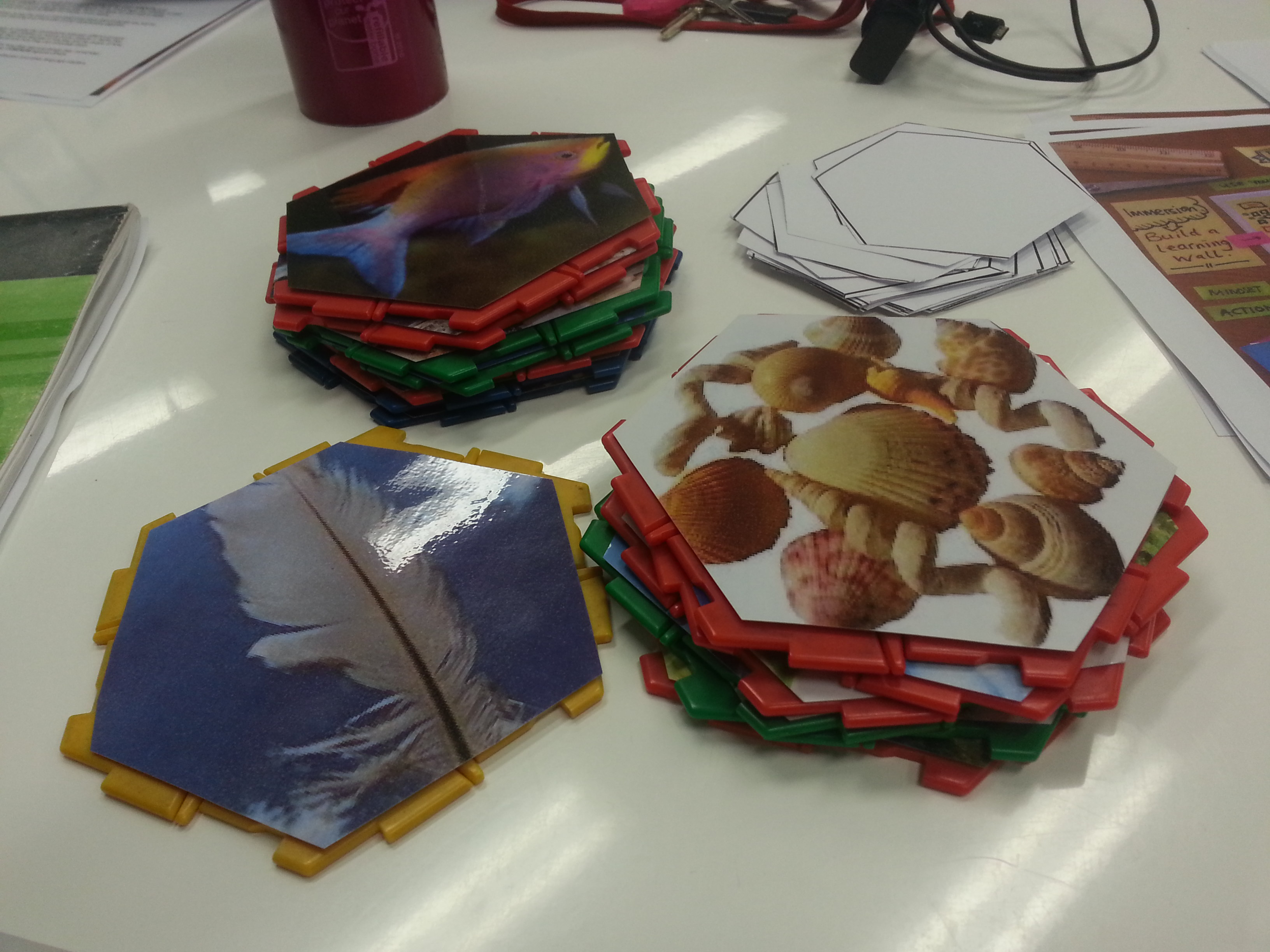
Teachers from Melbourne Catholic Schools working on hexagonal thinking task.

Making Connections

There are lots of ways to act upon Nussbaum’s intentions of connecting up the dots. When working with teachers we talk about the second step of design thinking inquiry being Synthesis – connecting our learning. A simple way to do this would be to use the physical artefacts collected in the classroom (see above) and move them around, sorting, ordering and rubbing them up against each to see what ideas emerge. Another activity to help would be the use of a hexagonal thinking task which helps learners filter for some of the most interesting pieces of information and then encourages them to tesselate the hexagons and justify the connections that emerge. Those of you who are familiar with the SOLO Taxonomy would of course have recognised Nussbaum’s phrase when he describes creativity as being “relational” – we could broadly state that learning is the same. We know that when learners begin to offer explanations of how ideas or knowledge relate to each other they are demonstrating much higher order thinking.

Use images for learners in the early years to support their thinking.

Mining Knowledge

I have been saving to the online bookmarking tool Delicious for a long time now and many years ago I soon realised that I was not really using the links that I saved with any regularity. But what I was doing was building a resource with which I could later dig, or mine for ideas. When returning to the thousands of links saved there I want to be able find and resurface ideas I have gathered. Nowadays I use Evernote (and still have any Tweeted links saved into Delicious and funnelled into Evernote) for the mining and it is a great way to find existing content for curriculum planning and for unearthing old links or resources. Another way to do this is by using the Evernote Web Clipper – an extension for Chrome – which provides search results from your Evernote account alongside a normal set of Google search results. You can switch this option on in the extension settings.

There are many more ways to put into action what Bruce Nussbaum states as the practice of creativity and it would be great to hear your thoughts in the comments on how else we can act on such intentions. Hopefully these practical ideas give you some simple steps to engineer the best conditions for creative learning.

19 Jun 04:36

SparkFun @ ALA Annual 2014 – Hardware and Coding!

by griffey

ALA Annual 2014 in Las Vegas is going to be a fantastic conference for a ton of reasons, but at least one of those reasons is that there is a new exhibitor that anyone interested in technology, coding, and general hardware hackery should get to know: SparkFun Electronics.

SparkFun is a company that not only makes awesome hardware and hardware kits, they have an amazing educational wing that works with schools and libraries to teach Maker skills to people across the country. I had the opportunity back in February to visit and learn from Sparkfun along with a handful of other Chattanooga librarians you may have heard of. Their educational materials are top-notch, and they are happy to work with libraries who want to teach Arduino, coding, soft circuits, and a few dozen other projects.

At ALA Annual they will be in the exhibit hall, Booth 1870, and will have a ton of interesting stuff to look at and play with. Sparkfun’s Jeff Branson along with Nate Hill from the Chattanooga Public Library will also be taking part in the LITA Library Code Year Interest Group Technology Speed Dating event on Saturday, June 28, in the Las Vegas Convention Center Room N119. That looks like an incredible lineup of presenters, and will be a great program.

In addition to all of that, they will be hosting a number of short classes in the Networking Uncommons if you want to get a quick 1/2 hour introduction to Arduino, AruBlock, Scratch, or Processing…or if you want to stick around for the whole shebang and have a 2 hour block of technology awesomeness. They will be doing two classes of each:

Saturday, June 28 – Networking Uncommons
3-3:30 Ardublock
3:30-4:00 Arduino
4:00-4:30 Scratch
4:30-5:00 Processing

Monday, June 30 – Networking Uncommons
10-10:30 Ardublock
10:30-11:00 Arduino
11:00-11:30-Scratch
11:30-12:00- Processing

If you have any interest at all in Maker technologies, I recommend showing up for one of these…Jeff from Sparkfun is a great instructor, and I guarantee it’ll be a good time. I hope to see you all there!

19 Jun 04:33

A Guide to Little-Known Image Collections with Millions of Free, Hi-Res Images

by Ellyssa Kroski

I’m often asked where to go to find high-quality and hi-resolution still images for reuse so I’ve put together this guide.  There have been several new image collections that have opened up to the public just within the past year that not many people are aware of yet, but they offer access to thousands, or in some cases millions of outstanding photographs that can be downloaded for free.  Here’s a quick guide to finding those collections.


The Metropolitan Museum of Art

met4
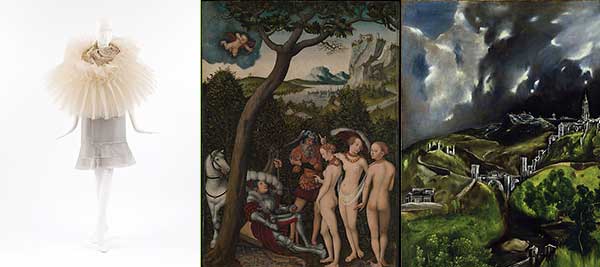
Last month, the Metropolitan Museum of Art made over 400,000 images available for free download for non-commercial use as a part of its Open Access for Scholarly Content initiative.  These beautiful images include the treasures owned and displayed by the Met such as famous paintings, armor, statues, art objects, and more.  All images can be found on this website and are identified with the acronym OASC.

Wellcome Library

wellcome4
In January, The Wellcome Library in London made 100,000 art and medicine images available online for open use.  This collection is where to look for offbeat, bizarre photos including medical art of all types including manuscripts, paintings, etchings, early photography and advertisements.  The images here are absolutely fantastic.  The images may be used for commercial or personal purposes, with an acknowledgement of the original source (Wellcome Library, London).


Getty Open Content Images

getty4
Last summer, the J. Paul Getty Trust announced that they will be “making roughly 4,600 high-resolution images of the Museum’s collection free to use, modify, and publish for any purpose.” There are now 87,000+ images in that collection.  Images include paintings, manuscripts, drawings, photographs, and more and feature works by masters Rembrandt, Van Gough, David, and more. Open content images are identified with a “Download” link which can be found by clicking into the “Primary Title” link to access the full record.


LIFE Photo Archive

life4
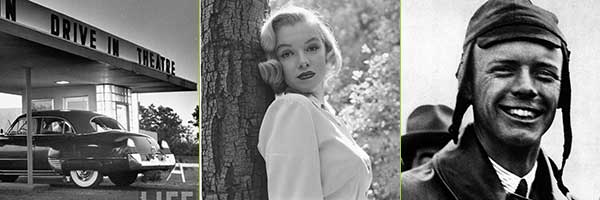
Search millions of photographs from the LIFE photo archive, stretching from the 1750s to today. Most were never published and are now available for the first time through the joint work of LIFE and Google.  Images include famous personalities such as Marilyn Monroe, Charles Lindbergh, etc. as well as photos of American history and Americana.  You can browse the collection from here or add “source:life” to any Google image search and search only the LIFE photo archive. For example: computer source:life.  These are for personal, non-commercial use only.


Museum of New Zealand

NZMuseum4
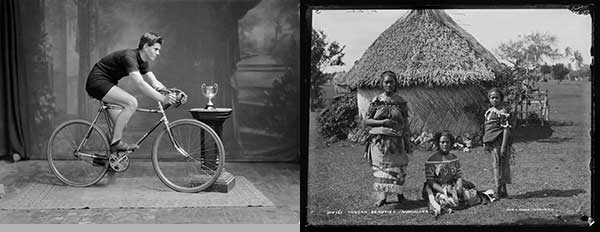
The Museum of New Zealand has recently made over 30,000 images available for download and re-use in high resolution as a part of its Collections Online library.  It’s best to search this page after first checking the “with downloadable images” check box so that you only get results that are free for download.  Each image specifies its license, many of which are remixable and have no copyright associated with them at all.


NOAA Photo Library

noaa4
The National Oceanic and Atmospheric Administration makes thousands of stunning high resolution images available for download for free.  The photo library is organized into collections such as the National Weather Service Collection containing over 4,000 weather-related images, the National Severe Storms Laboratory (NSSL) Collection, the Fisheries Collection, and many more, see the full list of collections here.  The photos can be viewed by browsing the galleries or the catalogs for each collection.  It’s better to view the catalogs in all cases since not all images are included in the galleries.  Most NOAA photos and slides are in the public domain and CANNOT be copyrighted while a few photos are known to have copyright restrictions are so noted. Credit MUST be given to the National Oceanic and Atmospheric Administration/Department of Commerce.


NARA

nara4
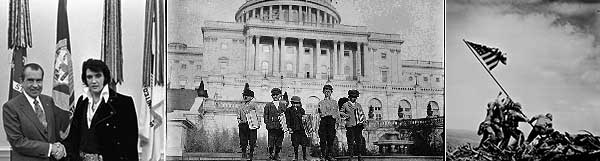
The National Archives and Records Administration offers a fantastic library of photographic images including photos of Churchill and Roosevelt, Nixon and Elvis, JFK and Jackie, World War II photos, and many many more historical photos.  You can find many of them through the above-linked online exhibits page, while others are available on their Flickr page,  and thousands more can be found within their Online Catalog.  All of the U.S. National Archives’ images that are part of The Flickr Commons are marked “no known copyright restrictions.” As for the rest of the site; “generally, materials produced by Federal agencies are in the public domain and may be reproduced without permission.”


United States Department of Agriculture

usda4
It’s not very well known, but the US Dept of Agriculture has some fantastic high res photos available for download that are copyright-free, public domain, images of crops, animals, insects, food, plants, and more.  I’ve been using their photos for many years now for art projects, there are over 2,000 images in their galleries.


NASA

nasa4
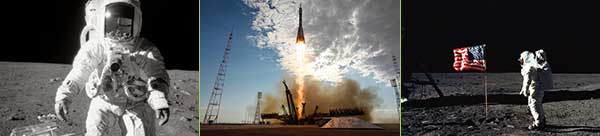
NASA has hi-res image collections available both on their website and on Flickr.  Here you can find images of the Mars Utopian Plain, the moom landing, astronauts, space shuttles, and so much more.  NASA images are generally not copyrighted.


Others

newoldstock


Searching the Web for Images by License


Google
google

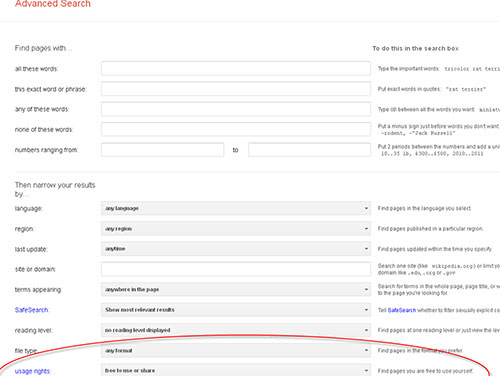
Google’s Advanced Search form allows you to specify usage rights in your search so you can be sure to return results that match your preferred license.


Flickr
flickr


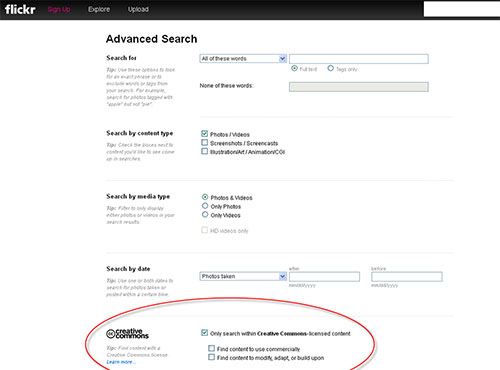
Flickr’s Advanced Search allows you to specify that your search only returns image results with Creative Commons licenses attached to them.

The post A Guide to Little-Known Image Collections with Millions of Free, Hi-Res Images appeared first on OEDB.org.

18 Mar 01:32

The Rise of Writing Literacies, Implications for Libraries

by mcruz
The Rise of Writing Literacies, Implications for Libraries Blog Image

The look of any library — school, academic, or public — is always dependent on local needs in a community, but the feature that has traditionally characterized all types of libraries is reading literacy and the tools and practices that support readers. Walk into any library and the feature that tends to dominate and define library for most people is the print collection housed in stacks and stacks of books. Even as libraries continue to transition to digital formats of eReading like databases and eBooks, most people associate print books and reading literacies with libraries.  

In the December 2013 Pew Research Center Report, “How Americans Value Public Libraries in Their Communities,” 95% surveyed said that “public libraries are important because they promote literacy and a love of reading” (Zickuhr et al. 1). Eight percent of participants who were sixteen or older and had used a public library or had a household member use a public library expressed that books and media were “very important” or “somewhat important” (Zickuhr et al. 2). Both public and school libraries often cite a strong collection of books as part of advocacy campaigns. These kinds of surveys are consistent with academic librarian Char Booth’s opinion that “…the image of the library as a reliable, quiet bastion of bookdom has the most dogged cultural persistence” (Booth, "Content, Container, or Concept? What The Card Catalog Tells Us”). 

School, academic, and public libraries around the country are rethinking programming, services, and collections for their communities to present opportunities not only for consumption but also for creating, sharing, and networking. While reading literacies continue to drive much of the programming and collections in libraries (particularly public and school libraries), an increasingly greater emphasis on digital, information, and new media literacies is prompting libraries to expand the possibilities for multiple modes of literacy and learning. 

As one might expect, budgets for physical and human resources, community needs and initiatives, local economic, academic, and political dynamics, and library administration philosophies all impact to what extent new practices are happening in any given library. These influences are evident in newer and emerging library practices, such as collections of non-print items like seeds, tools, and musical instruments; digital media production; community spaces for economic growth and innovation; scholarly research hubs; embedded instruction and instructional design; and makerspaces and DIY learning experiences. 

Yet, even with all the innovative and re-imagined possibilities for libraries as community spaces that encompass many forms of learning and literacy, the reading literacy narrative is still an overwhelming one, particularly in public and school libraries. In public libraries, look no further than federally and/or locally funded programs and grants as well as library literature related to summer reading and claims that it impacts children’s reading scores or school readiness. Public and elementary school library programs are often impacted by public campaigns and/or educational testing mandates for “grade-level reading” (a concept that is laden with all kinds of assumptions) as these libraries attempt to demonstrate they are supportive partners in their communities who contribute in tangible ways to children’s growth as readers. Library websites or pages for children often teem with reading-related content like booklists, reading activities and programming, recommended reads, book trailers, and book club information.

Very few people question that these efforts are often couched in positive intentions and that reading literacy is essential for learners of all ages. Reading is commonly viewed by most Americans as an essential skill in the pathway to equal opportunity as well as academic and economic success. Dr. Deborah Brandt observes that reading historically has been “…for being good — being good in worship, in citizenship, in school, in work…any kind of well-being one can think of has been associated at one time or another with reading” (163-64).  However, as libraries consider the ways they function as sponsors of literacy, is reading still the dominant literacy for the masses to acquire, or at least reading as we have known it? 

In Literacy and Learning: Reflections on Writing, Reading, and Society, a series of essays on changes in perspectives and beliefs about reading and writing, Brandt explores the ways that expectations and uses of literacies are shaped by economic and technological changes. Brandt argues that reading as we know it is being reshaped by writing:  

 “For perhaps the first time in the history of mass literacy, writing seems to be eclipsing reading as the literate experience of consequence. What happens when writing (and not just reading) becomes the grounds of mass literate experience, when more and more people ‘think about audiences’ as part of their daily routine engagement with literacy? How does a social shift in that and energy toward writing affect the ways that people develop their literacy and understand its worth?  And finally, how does the ascendant of a writing-based literacy create tension in a society where institutions organized a reading literacy, around a presumption that readers would be many and writers would be few? (161-162)

What accounts for the rise of writing as an essential form of literacy for the masses? Brandt traces the ascendance of writing in everyday and contemporary workplace life where writing, now essential for production and profit, is “increasingly itself…the product that is bought and sold as it embodies knowledge, information, invention, service, social relations, news — that is, the products of the new economy” (164). In addition, Brandt reminds us that writing has not been as privileged until now because of the “ways that it has been sponsored and valued…as it rises in prominence, we need to consider how it might alter the way literacy develops over the life span, how it will reposition reading within writing, how these shifts will change the ways that literacy finds meaning and value in our institutions and social life, and how in turn that might change our institutions and social life” (166). As points of access to learning and literacy across the span of an individual’s lifetime, libraries cannot afford to ignore Brandt’s arguments for writing as the emerging preeminent form of literacy. 

I believe it is fair to say that most libraries operate under the assumption that there are indeed more readers than writers. However, if we accept Brandt’s assertion that writing, not reading, is now the chief literacy to acquire, cultivate, and develop over a lifetime, how will that change the way libraries conceptualize their role as a sponsor of literacy in their communities? How might this shift impact the education and training of librarians?How might libraries embracing writing literacies amplify the possibilities for the ways libraries can transform their communities? What might a school, academic, or public library look like if it becomes a community center for writing in multiple modes and formats? How might libraries contribute to the ongoing conversation of what it means to write and compose in print and digital mediums? If libraries take on this role as a “steward of a new mass literacy,” how might they effectively partner with community institutions like schools and nonprofits to collaboratively “protect and equalize access to literacy,” a resource Brandt identifies as “central to our democratic possibilities” (175)? If writing literacies become a new focal point for libraries, the possibilities for partnerships can change dramatically. 

Libraries are in a prime position to be a hub for critical literacy development as well as a disruptive partner in disruption as K-12 public schools wrestle with assessment-driven forms of writing and higher education continually confronts academically privileged forms of writing. Instead of focusing on public school and public library partnerships that are collection- and resource-centric, what if libraries and schools instead partnered to function as a collaborative hive for writing in print, digital, and artistic formats?  

The Connected Learning model offers us guiding principles in developing collaborative writing experiences for youth that connect academic, interest driven, and peer or mentor oriented spheres of learning (“What Is Connected Learning?”). What if a public library became a National Writing Project site where youth librarians and classroom teachers from schools in the community designed and participated in professional learning activities together to grow their knowledge and understanding of writing literacies? In turn, libraries and classrooms could function as cohesive spaces that enable students to cross learning boundaries during and after the school day to engage in multiple forms of writing.  

How might youth librarians and teachers work together to advance new understandings among themselves and within their learning communities of what it means to compose? How might this work help validate and honor new forms of writing and young people’s out-of-school literacy practices? How might they work together to reframe writing not just as an end product but as a medium for inquiry for young people? How might we together help youth negotiate social tensions and construct identity in the context of their lives through writing as part of a pathway to learning (Smith)? How might academic libraries that work with writing centers or house writing centers in collaboration with academic faculty support and nurture students as scholarly writers, yet take a critical literacy stance on writing with undergraduate and graduate students to open doors for other forms of writing that might not be legitimized in academia but hold value (Elmborg and Hook)?

Public libraries can also be a catalyst for equality and economic empowerment in the lives of adult learners, across all economic lines, who are often shut out of opportunities for literacy instruction and development in workplaces. As opportunities for literacy learning in the workplace may wax and wane due to economic reasons, stratification of workers along job descriptions and titles, or career changes in the face of a rapidly changing economic landscape, libraries have the opportunity to be a constant access point of literacy development by providing learning experiences for their communities that respond to the changing nature of writing as a means of production (Brandt 171-73). School, public, and academic libraries can serve as writing studios that support self-sponsored literacy practices. Imagine how libraries might impact civic engagement and personal agency by more intentionally advancing and championing both creative and informational kinds of writing in multiple mediums that help people compose and publish their stories, histories, and narratives. 

In closing, many librarians will readily take on Brandt’s call to action while purists will resist and argue that the teaching of writing is not in the sphere of libraries or part of “library science.” I would argue, though, that libraries cannot silo themselves off from their communities when there is so much at stake. For libraries to ignore the importance of teaching writing across all ages, needs, and contexts is to fail to be a participatory space for learning in our communities. Who will serve as a sponsor of literacy in the development of writing literacies in the absence of libraries if we fail to partner with educational institutions and businesses in our communities to identify and address the needs of writers? Libraries that minimize writing literacies ultimately fail to provide equitable access to literacy opportunities to all members of their communities.

While this call to action may seem radical, there are school, academic, and public libraries that are expanding their roles as sponsors of literacy when it comes to writing in multiple modalities and helping other cultural institutions and spaces for learning redefine what it means to “compose.” In my next series of upcoming posts, I’ll examine how school, academic, and public libraries are taking an inquiry stance on literacy by supporting communities of writers of all ages, framing writing literacies as participatory practices, challenging orthodox definitions of what it means to write, and helping their communities create, compose, remix genres, and share texts for multiple purposes.

Works Cited

Booth, Char. “Content, Container, or Concept? What The Card Catalog Tells Us.” Weblog post. Info-mational. Wordpress, 3 Oct. 2011. Web. 02 Mar. 2014.

Brandt, Deborah. “How Writing Is Remaking Reading.” Literacy and Learning: Reflections on Writing, Reading, and Society. San Francisco, CA: Jossey-Bass, 2009. 161-76. Print.

Elmborg, James K., and Sheril Hook, eds. Centers for Learning: Writing Centers and Libraries in Collaboration. Chicago: Association of College and Research Libraries, 2005. Print.

Smith, Anna. “What Do We ‘Let the Page Be’?” Developing Writers. N.p., 11 Feb. 2014. Web. 02 Mar. 2014.

What Is Connected Learning?” Connected Learning. Digital Media Learning and Research Hub, n.d. Web. 02 Mar. 2014.

Zickuhr, Kathryn, Lee Rainie, Kristen Purcell, and Maeve Duggan. How Americans Value Public Libraries in Their Communities. Rep. Pew Research Center, 11 Dec. 2013. Web. 02 Mar. 2014. 

Banner image credit: US Army Garrison Red Cloud - Casey

26 Feb 02:39

Introducing Dictation.io, Screenshots & Listen v2

by Amit Agarwal

It was a slightly busy week. I’ve launched a new website – dictation.io - and  also pushed upgraded versions of several other web apps hosted on ctrlq.org.

Most CtrlQ apps now sport a consistent look, several bugs have been squashed, the performance has improved and, best of all, the usage limits have been dropped. Here’s the complete list:

  • dictation.io – This is a voice recognition app for Chrome that converts your voice into text. The transcribed text is automatically stored in your browser or you can share on Dropbox and Google Drive.
  • YouTube Near Me – This is a Google Maps + YouTube mashup that helps you discover geo-tagged videos around your current location.
  • Web Screenshots – This lets you capture full-length high-resolution screenshots of web pages and you can run Screenshots on the desktop or mobile devices.
  • Listen – This is the text-to-speech app that converts your words into spoken voice. The daily quota has been dropped and you can enjoy unlimited sessions.
  • YouTube Copy –  This adds an old feature to YouTube that Google has silently dropped – the ability to clone someone else’s playlist into your own account.
  • Secure Passwords – This is password manager that saves you from the hassle of remembering multiple passwords. Watch the video demo to learn more.

Should you discover any bugs or have any feature suggestions, please do let me know. Thanks!

Dictation


This story, Introducing Dictation.io, Screenshots & Listen v2, was originally published at Digital Inspiration on 25/02/2014 under Internet
26 Jul 01:48

How To Roll Your Own Summer Coding Camp

by Lauren Orsini

Learning to code can empower you to become master of your own (Web) domain, oand maybe even land you a new, high paying job. So what are you waiting for?

Sure, a lot of us put off learning to code because it’s intimidating or we feel we don’t have the time. But today, thanks to no shortage of free resources online, it’s a lot easier and more convenient than ever to learn to code. And in summer, while the days are longest, anyone can make the time. (Confidential to Australia: Pity, mate!) 

Here are a few courses of action you could take, whether you’ve got the whole summer or just a couple hours to devote to the pursuit of knowledge: 

If You’ve Got A Month

Maybe the kids are at summer camp and you’ve got unexpectedly quiet weeknights for now. Whatever the reason, a month is a perfect time to learn a whole new language.

Since you know you’ll be around, sign up for a month on Treehouse or Code School. Each costs $25 per month. Plus, you can put your membership on hold when you’re done so you don’t pay when you’re not using it. 

While a month seems like an overwhelmingly long time to devote to something, keep yourself focused by choosing just one of Treehouse’s “Learning Adventures” or Code School’s “Paths.” Since you’re paying for it, it’s tempting to dabble in a little of everything, but staying the course will keep you from becoming a jack of all trades, master of none. 

In linear courses, the difficulty will continue to increase until you’re working at the same level (if not with the same expertise) as the pros. If your goal is to get a new job out of this, racking up the points in a “learning adventure” or “path” is the way to go.

If You’ve Got A Long Weekend

No plans for Labor Day? Spend the weekend conceiving and then executing your own program. They say the best way to learn to code is to come up with a project you want to do, and a long weekend is just long enough for that. 

Here’s one example: Upload your first project to GitHub. GitHub is a great community in which to share, showcase, and get help on your code work. The link goes to GitHub’s own tutorial on putting your first project online. 

Here’s another: Build your first website. In 2013, there are so many ways to make a personal website without a lot of technical know-how or even much money. You could start a blog on Blogger.com or WordPress.com for free. With Weebly, you could even build an online store for free and get that business plan off the ground. With virtually no technical barriers, it’s simply about dedicated a weekend to executing your goal. 

If You’ve Got One Day

Plan ahead and scan Meetup for technology related groups in your city. I’m talking social gatherings for tech-minded people, hackathons, and educational coding lectures and tutorials. Chances are, you’re not the only person looking to dive into new tech skills.

Meetups are a great way to find friends and mentors that will hold you accountable for your goals. People who will ask you why you weren’t at the last Python tutorial. And of course, Meetup.com will send you regular reminders about what’s going on in your area. 

If You’ve Got One Hour

Is summer boredom creeping in? Even an hour is enough time to dip your toes in. Take a few Codecademy lessons. I recommend beginning with Web Fundamentals. You can zoom through HTML Basics in no time. 

On the off chance that you do get hooked, Codecademy is free, so you can devote an hour to it whenever the mood strikes, without worrying about payments or contracts. 

If You’ve Got One Minute

First of all, I’m going to call BS since it definitely took you longer than a minute to read this article. If you’ve got time for that, you’ve got time to write down your goals. Are you interested in learning a new language? Finding a tech-savvy coding mentor? Launching a new business online? Perhaps even transitioning to a new job that requires tech skills (but not a degree)? Write it all down and figure it out. 

Finally, bookmark this article for when you’ve got more than a minute, so you can decide which of these plans of actions will best help you meet your goal. Good luck!

Lead image via Flickr user JossSmithson, CC 2.0

14 Jun 22:05

Thumb Your Nose At the NSA With Raspberry Pi

by Roberto Baldwin
Thumb Your Nose At the NSA With Raspberry Pi
Adafruit has created a handy how-to to help you build a wireless access point that anonymizes your internet browsing using Tor and a Raspberry Pi.


13 Jun 02:14

10 Treehouse, Dollhouse, and other Truly Unique Libraries – Part I

by Ellyssa Kroski

I’ve been very interested in the use of library space lately as well as the design of libraries be they traditional, mobile, pop-up or other types and in my research I’ve come across some truly unique and interesting libraries.  Here are five with five more coming up later this week.


ecological

ecological2


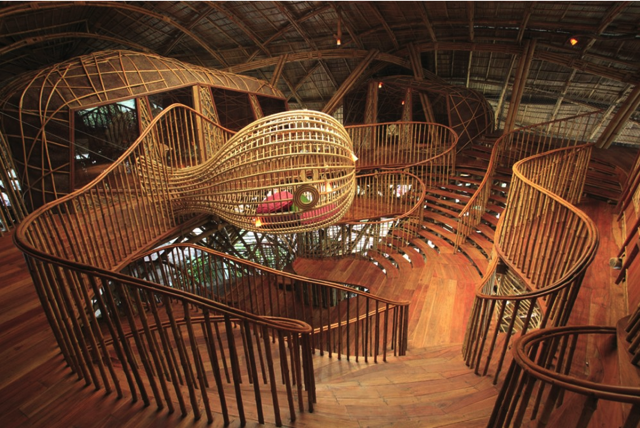
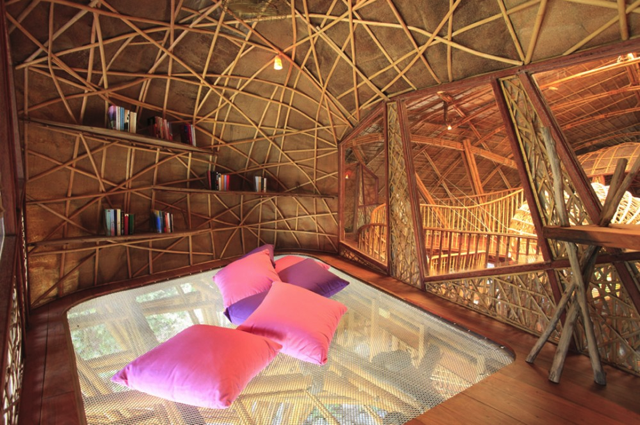
1) Ecological Children’s Activity and Education Center

The Soneva Kiri resort in Koh Kood, an island in the Gulf of Thailand, has built a Children Activity and Learning Centre with a library space.  Shaped like a giant manta ray, this unique library structure is built into a rocky slope near the sea and provides an Auditorium/Cinema for films, lectures and plays, a library with books on permaculture and local traditions, an Art room, a Music room and Fashion room.  More coverage here.


queen_mary

Fougasse story for Queen Mary's dolls' house

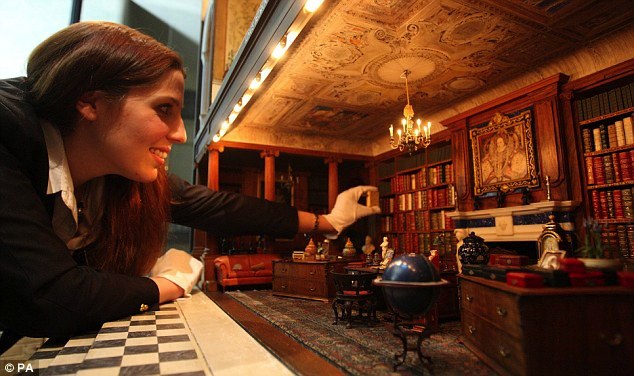
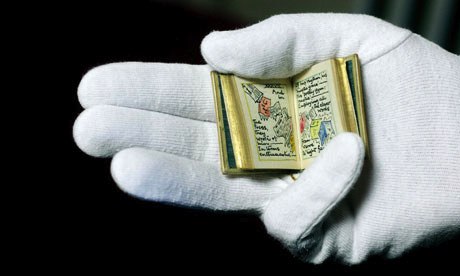
2) Queen Mary’s Dollhouse Library

Queen Mary’s Dollhouse is the largest and most famous dollhouse in the world.  It has working elevators and toilets as well as a 171-volume library containing some short works which were authored specifically for the dollhouse.  The miniature tomes have been bound in leather by the well-known bookbinders Sangorski & Sutcliffe.  More coverage here and here.


mass_instruction

mass_instruction2


3) Weapons of Mass Instruction Mobile Library

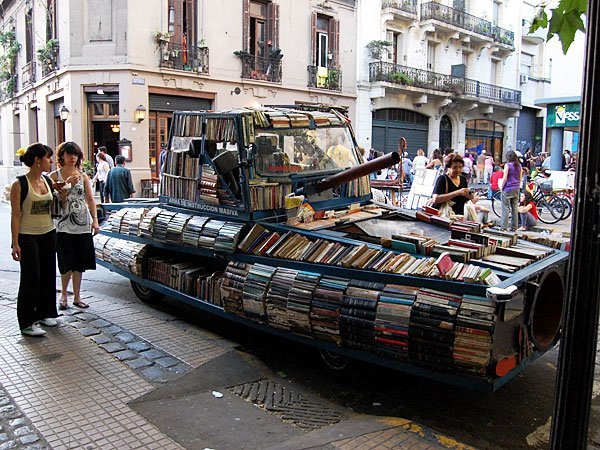
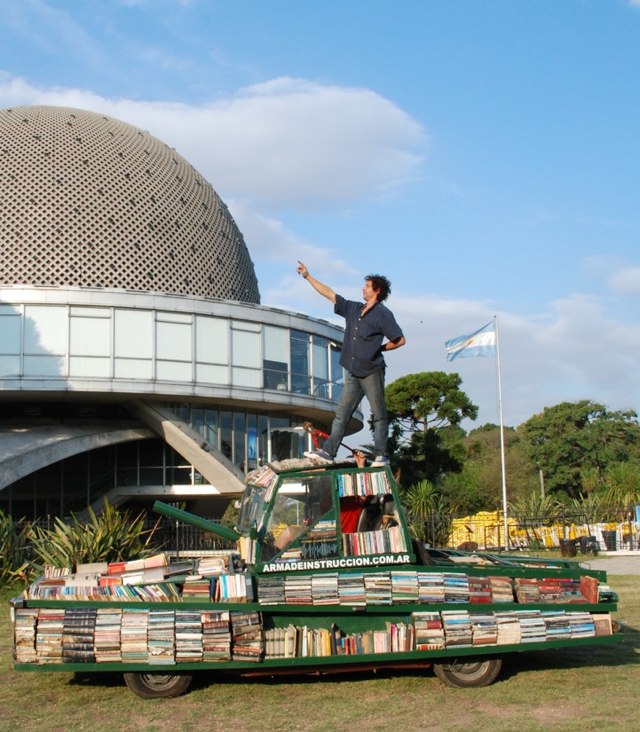
This mobile library shaped like a tank contains approximately 900 books and wanders the streets of Buenos Aires “attacking its people with knowledge”. The brainchild of artist Raul Lemesoff, the vehicle is actually made out of a 1979 Ford Falcon which Lemesoff regularly restocks to provide people with free books.  More coverage here.


contemporary

contemporary2


4) |CON|Temporary Library Installation

In October of 2012, the Center for Contemporary Art located in an ancient abandoned Turkish Bath in Plovdiv, Bulgaria had a temporary library designed in the largest and main room.  The library held books of contemporary art in and was shaped like a spiral ladder climbing toward the top of the dome because “Art and books is what raise us up spiritually”.  More coverage here.


treehouse2

treehouse


5) The Tree House Gallery Library

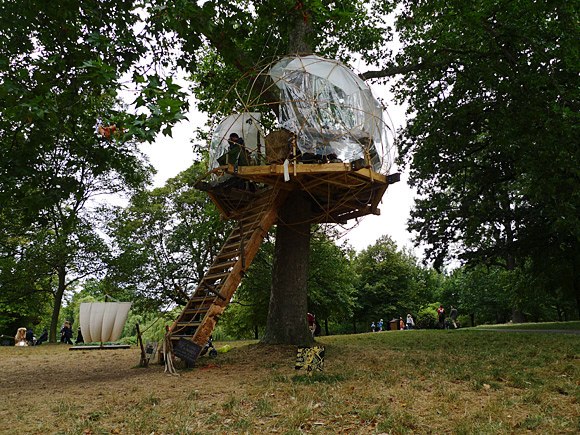
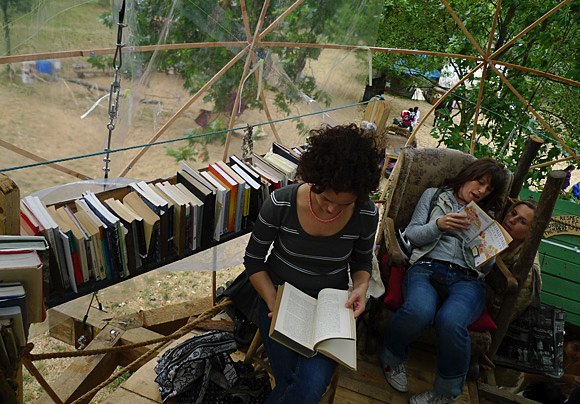
This temporary library was set-up in London’s Regent’s Park as part of the Royal Parks summer events programme in 2012.  The work was led by artists and designers Claudia Moseley and Steph Smith and based on the design of  architects Henry Adams and Oliver Oglivie of OO Architects.  More coverage here.


The post 10 Treehouse, Dollhouse, and other Truly Unique Libraries – Part I appeared first on OEDB.org.

12 Apr 14:04

10 Stellar Presentations from Computers in Libraries 2013

by Ellyssa
Matt Hamilton

Wish I could have been there this year.

Info Today’s informative Computers in Libraries conference just wrapped up yesterday in Washington, DC. If you didn’t get a chance to attend you may want to check out these terrific presentations by talented info pros!

1.) Augmented Reality & Next-Gen Libraries

Michelle Liu, Assistant Professor of Information Technology, Marymount University
Mason Yang, Electronic Services Librarian, , Marymount University
Nathan Flinchum, Community Technology Center Librarian, Public Services, Roanoke Public Libraries

This session discusses, augmented reality, ranked as an emerging tech by recent Horizon Reports. Flinchum illustrates how augmented reality tools can bring local history to life, creating interactive exhibits anywhere. He shares some of the free tools and techniques to push your historical collection out into your community! The third presentation discusses the next-gen library with a blended virtual and physical space perhaps using a “Double” robot as your surrogate to browse a library rare books collection in a library building while sitting at your dorm, finding information about library hours and maps by scanning QR codes on the wall of the library building, watching instructional videos on how to make double sided copies via Aurasma or Layar apps on your smart phone, or sharing what you are reading from a book in real time with your teammates through Google Project Glass. This is not science fiction; hear how the next-gen library will look as a place to foster learning, sharing, collaboration, and innovation.


2.) Enabling Innovation

James King, Information Architect, NIH Library, National Institutes of Health and Past President, DC Chapter of SLA
Innovation and change are critical for all libraries.This unstructured discussion focuses on creating an innovative environment and includes information about the Kansas library community’s culture that has included innovation for many years.


3.) UX & Accessibility Pecha Kucha

Randy Oldham, Web Development Librarian, University of Guelph
This lightening round looks at making services usable to people in different situations and is jam-packed with information. Oldham highlights tools to test the accessibility level of your websites and the requirements of WCAG 2.0.


4.) Metrics That Work

Karen Krugman, Chief, Research Library & Archives, Export-Import Bank of the United States
Are senior leaders getting the right message from your management reports? Are your reports a useful vehicle for your department or just part of the routine information you deliver to your manager? Do you want to learn how to communicate the importance of all of your library’s contributions to your organization but find that your metrics lack substance? Join our experienced leaders for this practical session to learn why management reporting is so critical for libraries, discover current management reporting trends, hear about management reporting at three federal libraries and see sample management reports, learn what statistics to track, how to turn them into real management information, and how to present your metrics effectively. Included are a list of metrics you can use in your own management reports.


5.) Becoming TechCentral

CJ Lynce, TechCentral Manager, Cleveland Public Library
Building a technology center, makerspace, or technology commons in a public library is about more than buzzwords. Integral to the success of any large-scale technology project is an understanding of the user community. Cleveland Public Library staff share the lessons learned as the TechCentral project moved from idea to reality. They discuss the Tech Toybox, a electronic device lending program, and myCloud, a virtualized desktop experience offered to public computer users.


6.) LibGuides: Sustaining & Embedding Strategies

Kim Vassiliadis, Head, User Experience, UNC-Chapel Hill Libraries
With tools such as LibGuides, librarians are able to quickly create course/subject guides for their classes or departments. But do they have sustainability, accuracy, and quality? University Library at UNC is shifting from encouraging librarians to create more guides for every information need to identifying high-quality, high-use subject guides that can be easily maintained over time. Find out how UNC inventoried and assessed the existing subject guides. Learn about the workflow process developed to take on the maintenance of guides.


7.) Mobile Discovery & Search

Ron Burns, Vice President of Global Software Services, EBSCO Publishing
Discovery — making library resources searchable and delivered to all users no matter where they are physically located and what Internet devices they use is definitely a challenge today. Our panel begins with a discussion of how new mobile web technologies such as “responsive design” are affecting content provider’s development strategies, how today’s most popular content sources and types are driving future “native app” requirements (e.g., ebooks, audio, medical resources, cloud accessible saved items), and what the future mobile strategies might look like. Then our expert searchers provide some tips and tricks for mobile search and discovery.


8.) Top Tips From Top Searchers

Greg Notess, Reference Team Leader, Montana State University
Our expert searchers share new techniques and tools as well as their secret tips and tricks.


9.) Mobilizing the User Experience: Mobile First and Responsive Design

Nina McHale, Web Developer, Digital Services, Arapahoe Library District
McHale examines strategies that libraries can adapt to employ “Mobile First” (the mobile user at the heart of development) and “Responsive Web Design,” two emerging web development trends, and discusses the implications these approaches have on the delivery of online library services.


10.) The Future of Libraries: Uncertainty & Imagination:Evolving Libraries Through Technology

Daniel W. Rasmus, Futurist & Author, Listening to the Future and Bellevue College, iPhone Life Magazine, PopMatters
Our speaker, a futurist, shares the secrets of listening to the future. He focuses on the types of questions we should be asking, the signs we should be paying attention to, and the implications for our organizations today—and tomorrow. He describes techniques such as scenarios, in particular stories, that can help us navigate uncertainty and continue to innovate in the face of change.

The post 10 Stellar Presentations from Computers in Libraries 2013 appeared first on OEDB.org.

04 Apr 18:44

Show Us The Data: Time For Companies To Reveal What They Know About Us

by John Paul Titlow

California has proposed a potentially groundbreaking consumer privacy law. The Right To Know Act, if approved, would require companies to divulge what kind of data they have on individual consumers, as well as with whom they're sharing that information. 

We need this. Not only should California pass this law, but it should be emulated far and wide. And while it's a good start, The Right To Know Act is really just the beginning of what's needed.

The vast quantity of personal data that companies collect, store and sell is mind-boggling. We caught a glimpse of some of this massive and now-routine data mining during the presidential campaign. Outside of the election cycle, it continues full force as marketers and financial institutions amass private information about consumers, sell it to one another and use it in ways that aren't entirely clear. Much of it is totally obvious and innocent. Some of it probably isn't. We don't know. That's the problem.

The Ongoing Personal Data Explosion 

Of course, this data is just going to keep exploding. The proliferation of smartphones has generated enough privacy questions to keep lawyers and legislators busy for a generation. We're just beginning to grapple with those issues and now Google wants us to wear computers on our faces. As we move toward wearable computers, connected cars and smart homes, the sheer volume of data about our personal lives is going to grow exponentially. 

There's a lot we stand to gain from these advances in personal technology, just as we have with smartphones and tablets. But before we plough forward into this otherwise awesome future, we should probably take a minute and think about some of the less exciting implications. Privacy is at the top of the list.

The Right To Know Act sounds like a sensible attempt to set up the kind of consumer privacy framework we'll need to have in place if we don't want things to get too weird in the future.

Whether or not we actually regulate the ways companies use this data is another question, which we'll also need to deal with. In the meantime, what the Right To Know Act will do is simply allow consumers to know exactly what data exists and and to learn a little bit about how it's being used.

"This Law Is About Transparency"

"This law is about transparency and access, not new restrictions on data sharing," writes the Electronic Frontier Foundation (EFF), one of the supporters of the bill. "It helps consumers, regulators, policymakers, and the world at large shine a light onto the largely hidden, highly lucrative world of the personal data economy."

To Europeans, this concept isn't anything radical. As Ars Technica points out, the European Union has laws like this on the books already, as it should. The principle of habeas data, as it's known, is just a part of digital life there. 

How likely is passage of the bill? Plenty of firms will loathe it, but it will be interesting to see how tolerant the more privacy-friendly tech companies are of the idea. It's hard to predict the bill's fate, but when it comes to implementing forward-thinking privacy laws, California has a pretty decent track record.

The premise is that simple: Companies know a lot about us, and we, as consumers, have a right to know what they know. Whether or not we can do anything about it, we at least deserve to know. They are, after all, our lives.