Cet article explore les défis de la mise à l’échelle des WebSockets pour les applications modernes en temps réel. Il aborde les techniques pour gérer les déploiements sans interruption, maintenir des connexions stables et utiliser des protocoles de repli comme les événements envoyés par le serveur (SSE), essentiels pour les réseaux restrictifs.
Apple-designed chips powering Macs, iPhones, and iPads contain two newly discovered vulnerabilities that leak credit card information, locations, and other sensitive data from the Chrome and Safari browsers as they visit sites such as iCloud Calendar, Google Maps, and Proton Mail.
The vulnerabilities, affecting the CPUs in later generations of Apple A- and M-series chip sets, open them to side channel attacks, a class of exploit that infers secrets by measuring manifestations such as timing, sound, and power consumption. Both side channels are the result of the chips’ use of speculative execution, a performance optimization that improves speed by predicting the control flow the CPUs should take and following that path, rather than the instruction order in the program.
A new direction
The Apple silicon affected takes speculative execution in new directions. Besides predicting control flow CPUs should take, it also predicts the data flow, such as which memory address to load from and what value will be returned from memory.
Après une année complexe et particulièrement polarisée, le tant attendu chiffre d'affaires de LVMH s'est établi à 84,7 milliards d'euros en 2024, soit +1% en organique.
Quantum Computing is an experimental technology that uses quantum physics to do a whole bunch of tasks much faster than traditional computers.
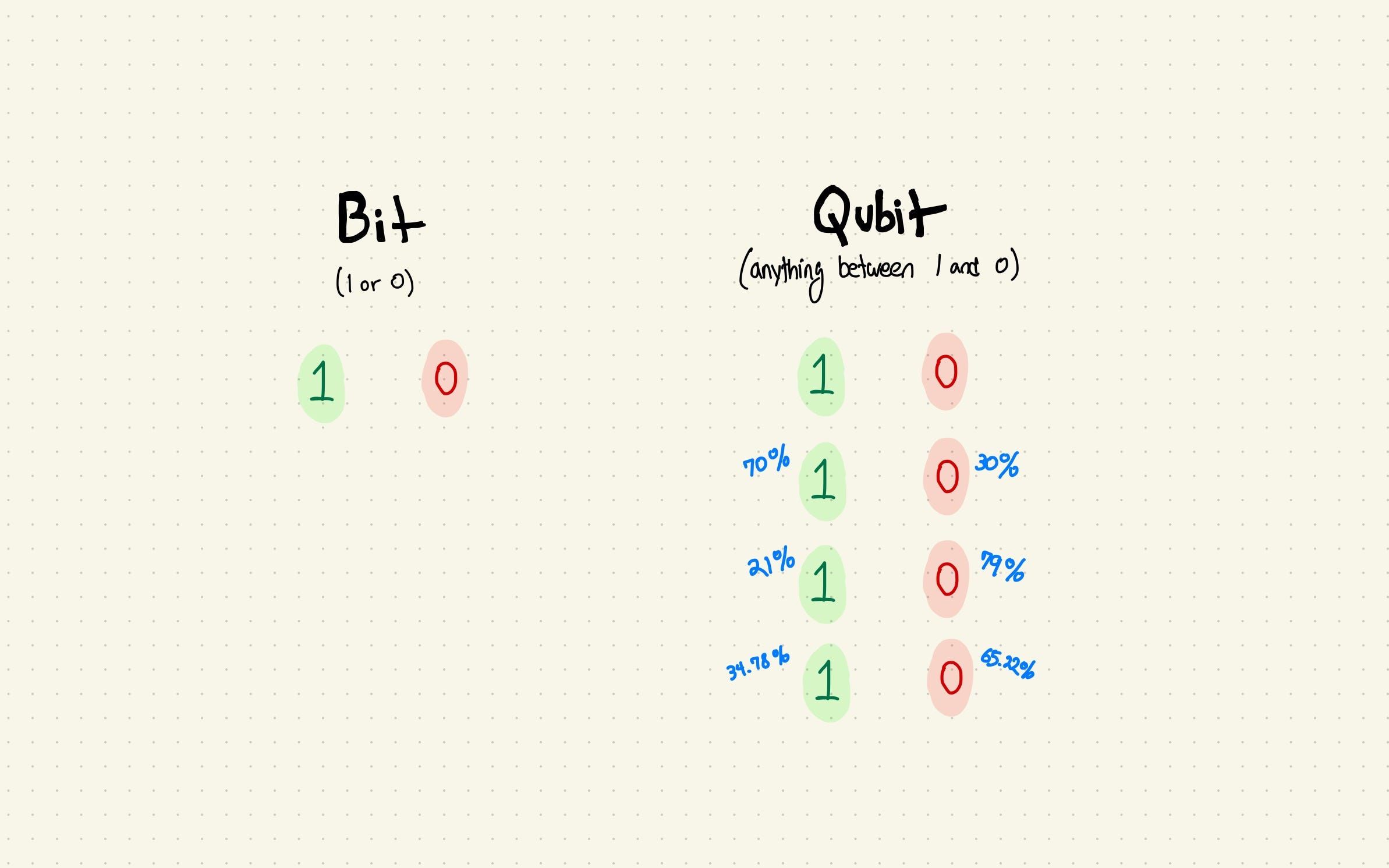
Traditional computers (like your laptop) rely on bits that can only be two things: 1 or 0
Qubits – the quantum equivalent – can be both 0 & 1 at the same time, which means they can make super fast (at some things) computers
Making qubits actually do stuff we want is hard (some need to be colder than space, some can only be controlled with tiny powerful lasers & all of them are unpredictable)
The technology is still experimental, mostly run in labs by big companies like Google
It seems like quantum has been in the news more lately, especially with Google’s recent quantum chip release. So there has never been a better time to try and break it down!
(This is a guest post from Conor at Project Eleven, an applied quantum computing and cryptography lab. More on them later.)
Traditional computers: ones and zeros
Back in the 1600s, “computers” referred to clever people who could add more numbers in their heads than they had fingers or toes. Today, it usually means a device with a screen that runs apps, connects to the internet & sucks you into a regular doom scrolling session.
While they might seem worlds apart, both of these share a common core: behind every Instagram scroll or email is a series of mathematical operations. If computing is fundamentally about solving math problems, the next question is: can we find better ways to solve them?
Before diving in and answering this question, you first need to understand the basics of classical computers - the OGs of the modern computing world. For everyday tasks like sending emails, binging Netflix, or devouring cat videos, our modern “classical” computers do a stellar job. But how do they actually work under the hood?
At the most basic level, these machines speak a language of zeros and ones—bits. You can imagine them as tiny on (1) / off (0) switches. Flip them fast enough, and you can represent any piece of digital information—numbers, letters, entire video streams—all by combining those bits in the right pattern. The fancy terms you might’ve heard, like transistors, and processor cores (like CPUs and GPUs), are just ways of flipping those bits more efficiently or in special ways for certain tasks.
For example, here’s the word “computer” in binary:
Now, as amazing as these bit-flipping powerhouses are, they still run into a wall for certain problems: modeling huge molecules, finding insanely optimized routes through bustling traffic, or simulating the bizarre world of quantum physics. Classical machines either take ages or can’t even scratch the surface, because ultimately they handle tasks one (very fast) step at a time. At some point, you need a new approach—enter quantum.
Qubits: way more than ones and zeros
If the basic unit of a classical computer is the bit, then the quantum equivalent is the qubit (quantum bit)—and qubits have a knack for being… well, promiscuous. Unlike bits that stick to 0 or 1, qubits can be 0, 1, or any blend of both at the same time.
Picture a coin spinning endlessly in midair: it’s simultaneously heads, tails, and everything in between. This is called superposition. We don’t usually think of a flipping coin like this, but quantum mechanics insists that until you peek (measure), the coin is all outcomes at once. One interpretation, called Many Worlds, even suggests each unobserved possibility spawns a new universe. Yep, that’s right. Every time you flip a coin a new universe is created (maybe). You can literally be god from your desk (in theory).
If bits are the monogamous members of the computing world, qubits are the quantum Casanovas—exploring every possibility until the moment you measure them, at which point they settle down into a single reality. As bizarre as superposition sounds, the key point is that a single qubit’s ability to represent multiple values simultaneously allows it to store a significantly larger amount of information than a traditional bit.
Interference: the ripple effect
A qubit in superposition is powerful on its own, but the real magic happens when multiple qubits are used together. Multiple qubits can interfere with one another—like overlapping waves in a pond. We can exploit this interference so that “correct” answers build each other up (constructive interference) and “wrong” answers cancel out (destructive interference).
To see how different this is from classical computing, imagine a game show where you have a hundred doors to check, but only one of them holds the grand prize. A classical contestant opens the first door, sees no prize, moves on to the second, and so on—just extremely fast. If you want to go faster, you either add more classical contestants (a bunch of classical computers working in parallel) or you build a more powerful single classical contestant who checks doors more rapidly. But it’s still a one-door-at-a-time process.
A quantum computer, on the other hand, checks all doors at once, then uses interference to make the correct door stand out when it’s time to reveal the prize. It’s not magic—it still requires careful setup—but the key is that qubits can explore multiple possibilities simultaneously. By orchestrating superposition and interference in just the right way, quantum machines can often find the winning door in a single shot. That’s a radically different approach from brute-force checking, and it’s why quantum might solve some of our most complex problems a whole lot faster. But how do we control these qubits?
Quantum Gates: controlling the chaos
In a classical computer, bits pass through tiny electronic gates that flip them from 0 to 1 or combine them in straightforward ways—these gates effectively control the math of the classical system.
In a quantum computer, quantum gates perform similar operations like combining and flipping qubit values but can also do something far wilder. They can control how qubits move through their superposition of many possible values and how they interfere to reinforce or eliminate specific outcomes. In other words, quantum gates control the math of the quantum world.
Think of each quantum gate as a hand on two crucial knobs: superposition (how much 0 or 1 a qubit is blending) and interference (whether a qubit’s waves boost or cancel another’s). String enough of these gates together in the right order, and you have a quantum algorithm—a roadmap for turning “lots of possible answers” into “the right one” at measurement. Essentially, gates are how we transform “many possible answers at once” into “the right answer, right now”.
So what’s the latest?
At this stage, quantum computers are highly specialized machines housed in labs and look more like alien chandeliers than a classical computer. One of the biggest hurdles is fragility. Qubits require near absolute zero temperatures (-273.15 degrees Celsius/-459.67 degrees Fahrenheit) or near-perfect vacuums because even a trace of heat or stray radiation can knock them out of superposition. This is one of the biggest engineering challenges facing quantum computers today.
Beyond that, qubits are inherently probabilistic. Unlike their deterministic classical counterparts, you can nudge a qubit toward the correct answer, but sometimes it will still spin out a random result. Catching and correcting these slip-ups—called error correction—is another huge obstacle. Researchers are devising ways to use extra qubits that detect and repair errors on the fly, but it’s a delicate, resource-intensive process that is crucial to get right before we can build large scale quantum computers.
These obstacles may sound daunting, but they haven’t deterred companies like Google, IBM, Microsoft—and startups like IonQ, or PsiQuantum—from pouring billions into quantum computing. Even these early machines hint at solutions to problems classical computers struggle with, such as:
Drug Discovery: Quantum simulations can handle molecular complexities that overwhelm classical machines, speeding up the design of new treatments and potentially shortening R&D timelines.
Material Science: By accurately modeling atoms and their interactions, quantum computing can unlock advanced materials—from more efficient batteries to superconductors that revolutionize energy use.
AI & Machine Learning: Quantum methods could accelerate training times and open up new model architectures.
Encryption: Quantum computers can break current cryptography (including blockchains). Researchers are racing to develop “post-quantum” encryption that protects data against future quantum attacks. This is the initial focus of our work at Project Eleven - particularly protecting Bitcoin.
Understanding Consciousness: for those among us who are philosophically inclined, a line of theories has arisen implying that consciousness is in some way a quantum state. Quantum computers could even help us reach a better understanding of ourselves.
While these breakthroughs are mostly proof-of-concept right now, the drive to refine and scale quantum systems continues—fueled by the promise of finally cracking challenges that have long stumped classical machines.
What does the future look like?
For now, quantum computers remain specialized machines tackling niche but high-impact tasks. Over time, industries like finance, logistics, and healthcare may adopt quantum methods behind the scenes—leading to faster drug discovery, more efficient supply chains, or stronger data security, all without altering your everyday scrolling habits.
But here’s the crux: quantum isn’t a quicker version of what we already have; it’s a different approach altogether. Where classical machines flip bits one by one, quantum harnesses superposition and interference to tackle problems bits can barely touch.
About Project Eleven
Project Eleven is an applied quantum computing and cryptography lab working to ensure the digital world is ready for the coming quantum era. Check them out and follow them on X.
faytech’s 65″ Interactive Fitting Mirror Solution, showcased at CES 2025, represents a transformative leap in retail and customer interaction technology. Developed in collaboration with ENZO Custom, this innovative solution is already deployed in over 20 locations across the United States, offering an engaging and futuristic approach to suit customization. Learn more about faytech at https://www.faytech.com
Check out my faytech booth tour video at CES 2025 here https://www.youtube.com/watch?v=gza4M08DfWY&list=PL7xXqJFxvYvjgZ-GYRasAn2Tos5CKEXIk&index=3
The 65″ mirror features a 4K resolution LCD display optically bonded behind the reflective glass, making the screen invisible when turned off. It includes advanced 10-point capacitive multi-touch functionality, a 48MP built-in camera, integrated speakers, and a customizable 360-degree LED light strip. The LED strip supports adjustable brightness and color temperature, enhancing the user experience in various environments.
Primarily designed for fitting rooms, this interactive mirror allows users to explore and customize ENZO Custom’s suit designs. Customers can manipulate 3D suit models, choosing colors and materials directly through the touchscreen interface. At the push of a button, the mirror seamlessly transitions between display and reflection modes, maintaining its practical elegance.
Looking ahead, the device is being equipped with augmented reality (AR) and artificial intelligence (AI) try-on features. These upgrades aim to address challenges in fitted clothing, such as precise shoulder and arm measurements. Powered by a Ryzen 7 processor with integrated graphics, the mirror is optimized for handling advanced 3D rendering and future innovations.
The system’s versatility extends beyond retail spaces. Its sleek design and VESA 400 mounting system make it ideal for hotels, hospitality venues, and event spaces, adapting effortlessly to diverse applications. Its striking appearance and functionality make it a compelling addition to any environment.
ENZO Custom’s software, integrated into the mirror, provides a seamless user experience, with plans to expand its deployment to 30 locations by mid-2025. Additionally, the customization platform is accessible online, allowing users to experiment with designs remotely via ENZO Custom’s website.
The technology’s potential extends far beyond suit customization. With its built-in camera and powerful processing capabilities, the interactive mirror could be adapted for applications like virtual makeovers, personalized lighting for events, or dynamic hotel room enhancements, underscoring its broad appeal.
As CES attendees witnessed, faytech’s Interactive Fitting Mirror not only showcases cutting-edge technology but also redefines customer engagement, bridging the gap between digital and physical retail. Its innovative features and potential for future development mark it as a standout at CES 2025
Description by Chatgpt.
This video was filmed at CES 2025 in Las Vegas USA, check out all my CES 2025 videos here: https://www.youtube.com/playlist?list=PL7xXqJFxvYvglnj4eE-BVnVzrj9XyerqI
This video was filmed using the DJI Pocket 3 ($669 at https://amzn.to/4aMpKIC using the dual wireless DJI Mic 2 microphones with the DJI lapel microphone https://amzn.to/3XIj3l8 ), watch all my DJI Pocket 3 videos here https://www.youtube.com/playlist?list=PL7xXqJFxvYvhDlWIAxm_pR9dp7ArSkhKK
Join https://www.youtube.com/charbax/join for Early Access to my videos as soon as I upload them before they go public.
For the past two Valentine’s Days, my wonderful girlfriend has gifted me beautiful Lego Star Wars frames from Qutiecreativedesigns, and I’m so in love with them! Sure, I’ve got plenty of geeky frames in my house, but the two I’ve featured above are among my favorites! As you’ll see if you visit Qutiecreativedesigns’ shop, there’s plenty of other ones too, and I’ll make sure to include a few extras below!
It might now show in my pictures, but these are 3D frames with actual LEGO minifigs inside! They’re really adorable!
I’ve also contacted the owner of the store, Jacqueline, who assured me that everyone would get their order in time for Valentine’s day if they place their order in the next few days! She also provided with a promo code for 15% off: GEEKSARESEXY15 (Use at Checkout). Please note that the code will only work until Feb 14th!
The range of materials suitable for even the cheapest laser cutter is part of what makes them such versatile and desirable tools. As long as you temper your expectations, there’s plenty of material to cut with your 40 watt CO2 laser or at least engrave—just not glass; that’s a tough one.
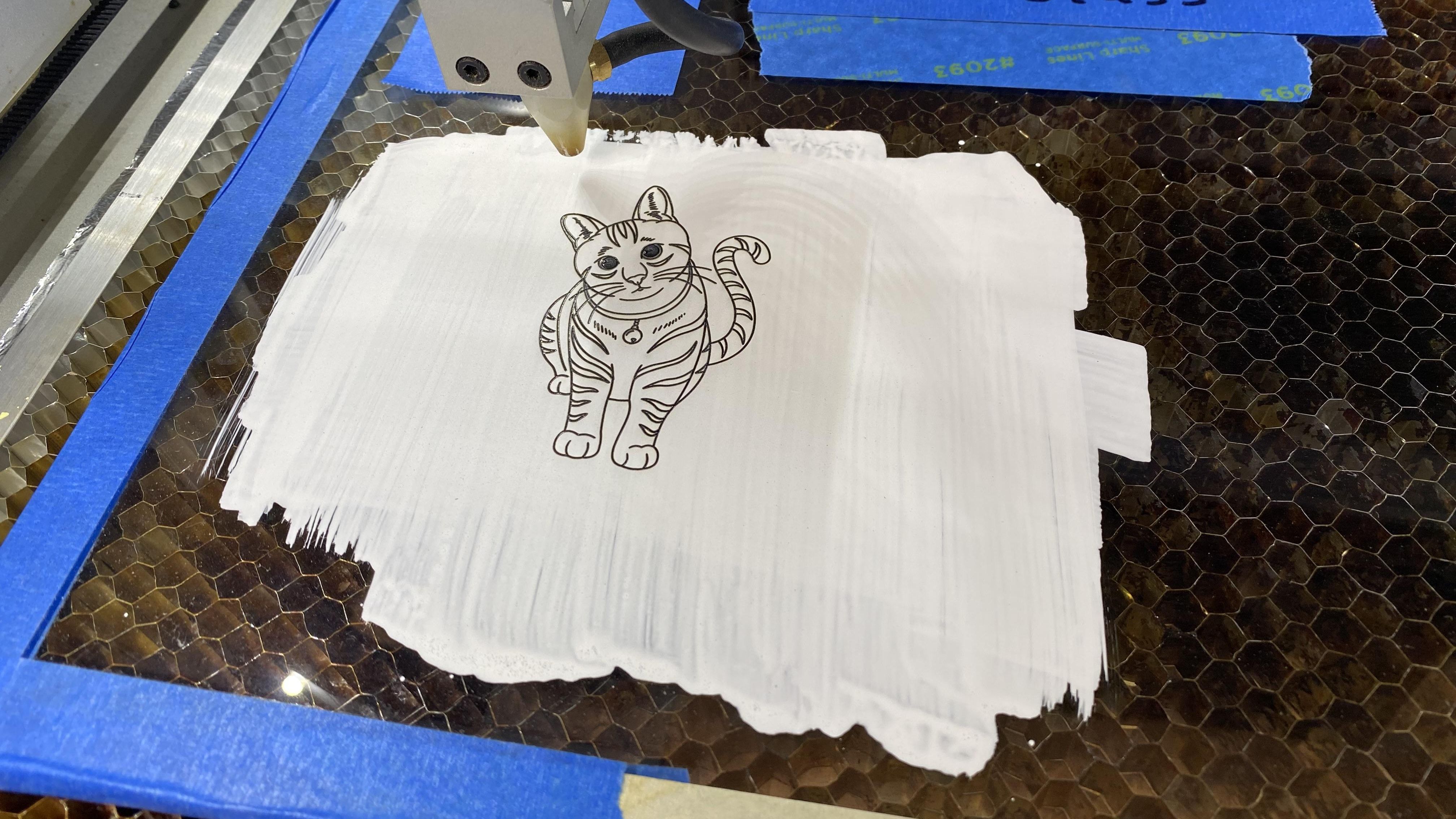
Or is it? According to [rschoenm], all it takes to engrave glass is a special coating. The recipe is easy: two parts white PVA glue, one part water, and two parts powdered titanium dioxide. The TiO2 is the important part; it changes color when heated by the laser, forming a deep black line that adheres to the surface of the glass. The glue is just there as a binder to keep the TiO2 from being blasted away by the air assist, and the water thins out the goop for easy spreading with a paintbrush. Apply one or two coats, let it dry, and blast away. Vector files work better than raster files, and you’ll probably have to play with settings to get optimal results.
With plain float glass, [rschoenm] gets really nice results. He also tried ceramic tile and achieved similar results, although he says he had to add a drop or two of food coloring to the coating so he could see it against the white tile surface. Acrylic didn’t work, but there are other methods to do that.
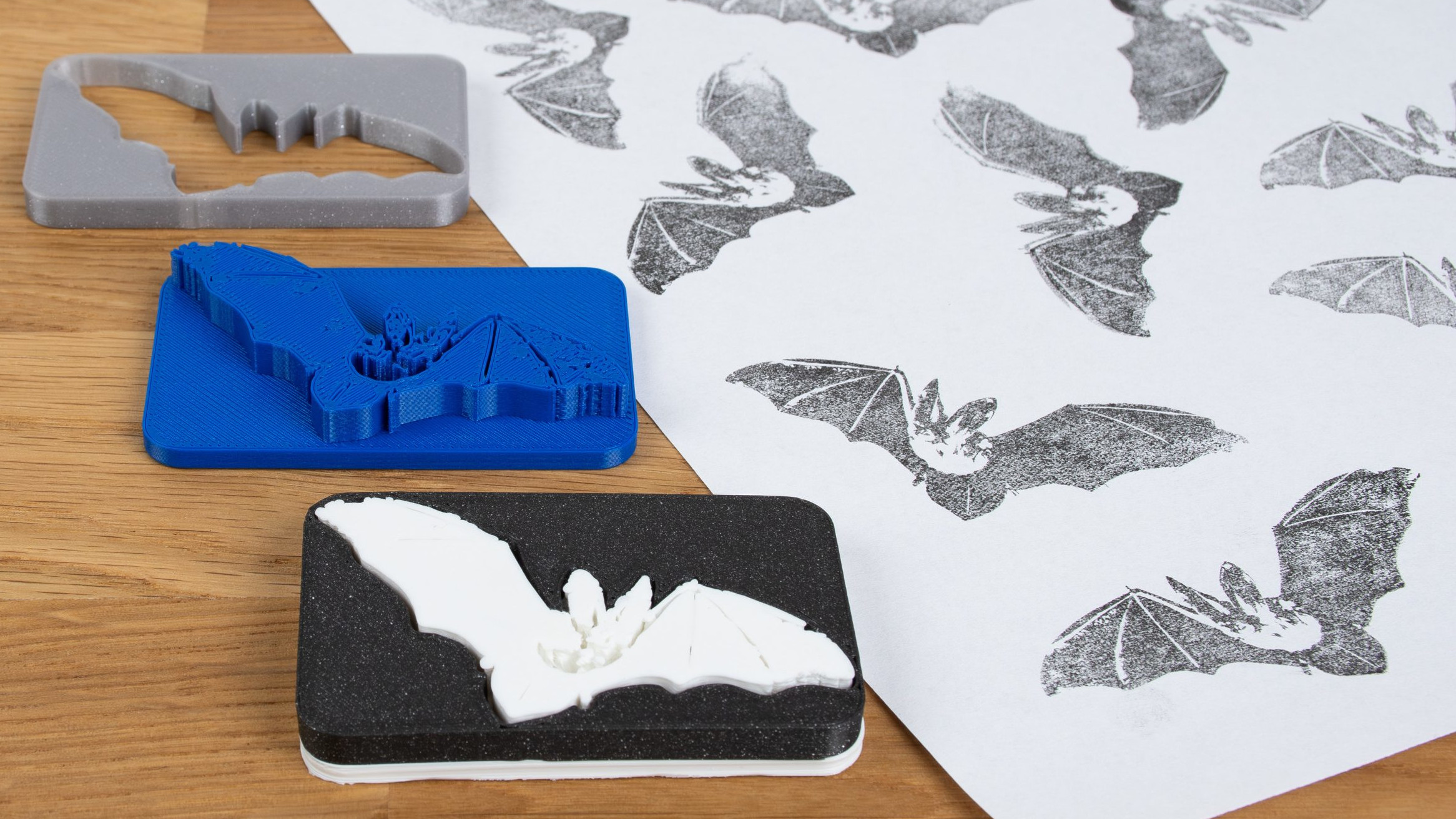
Ink stamps can be fun to make and use, and 3D printers are uniquely positioned to create quality stamps of all kinds with just a little care. As with most things, the devil is in the details and the best results will require some extra work. Luckily, [Prusa] has a blog post that goes through how to 3D print the best stamps and includes concrete recommendations and tips to get the most out of the process.
Resin printers can create stamps too, just ensure a flexible material is used.
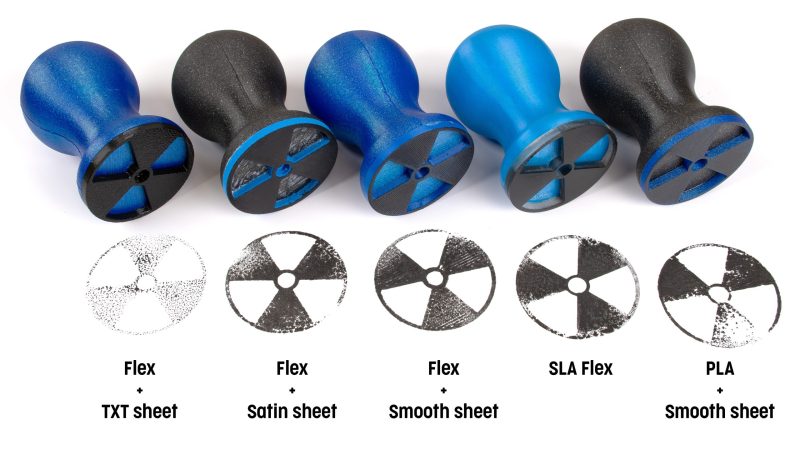
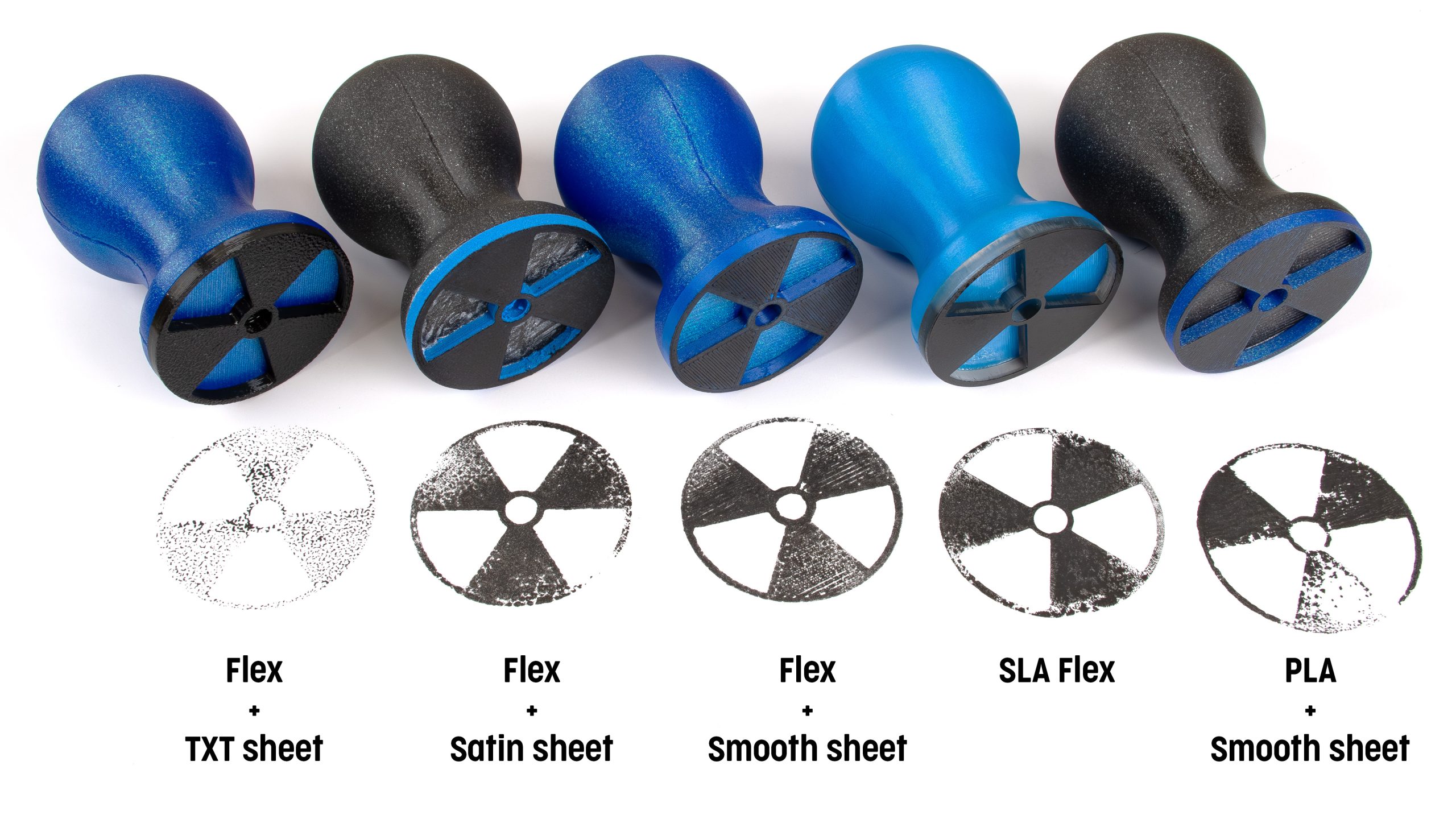
What makes a good 3D-printed stamp? It should be easy to use, transfer an image cleanly, and retain ink reasonably well. To hit these bases, printing the stamp face out of a flexible material is probably the most important, but a flat and smooth stamp surface is equally crucial. Satin-finish build plates will give a weathered look to the stamp, but textured build plates in general are no good.
As for the design, turning an image into a 3D object can be a bit challenging for novices, but there are tools that make that much easier now than it used to be. Some slicers allow importing .svg files (scalable vector graphics) with which to emboss or deboss objects, and online tools as well as free software like Inkscape will let folks covert images into .svg format.
Flexible filaments tend to be stringy so they should be dried before use, especially if the stamp design has a lot of separate elements that invite stringing. Any flex filament should do the job, but of course some specific filament brands perform better than others. Check out the full blog post for specific recommendations.
Pausing a print and inserting a pre-printed support piece (removed after the print completes) helps form big overhangs.
The remaining tricky element is that flexible filaments also tend to be poor at bridging, and if one is printing a stamp face-down on the build plate (to get that important, ultra-flat face) then the upper inside of the stamp may need some support for it to come out right. As [Prusa] suggests, this is a good place to use a manual, drop-in pre-printed support piece. Or if one has the ability to print in multiple materials, perhaps print the support structure in PLA since it is just about the only material that won’t completely weld itself to flex filaments. Of course, if one is designing the stamp entirely in CAD, then the best option would be to chamfer the stamp elements so supports aren’t necessary in the first place. Finally, don’t overlook the value of a physical design that makes handling easy and attractive.
I’m in the process of organizing all the information I collected at CES and want to combine it with things I see at SPIE’s AR/VR/MR next week. Many companies showed AR glasses with AI capability at CES, and many more are in the works. Next Wednesday at 4:05PM, I am going to be on a Panel at SPIE’s AR/VR/MR to discuss the subject.
Most AR with AI glasses use diffractive waveguides with monochrome green MicroLEDs or with X-Cube combined three-chip MicroLEDs for full color. Some are using LCOS or DLP full-color microdisplays. I also expect to see some using Lumus’s reflective waveguides rather than diffractive waveguides. Some are using birdbath (ex., old Xreal) and freeform (ex. Xreal One Pro and P&G Metalens 2). I plan to discuss these other designs and their trade-offs after SPIE AR/VR/MR.
Halliday stands out in that it has a very different optical design for their AR/AI glasses, and it received a lot of attention from the media at CES. I only had time to get to their booth early Friday morning, and unfortunately, there was no one at the booth at that time. At least one YouTube video I saw during CES reported that Halliday was using lasers, but I have since confirmed that it uses a green MicroLED with projection optics. The Reddit Topic Halliday Glasses – Smart Glasses with AI Assistant reported (correctly) that the optics worked similarly to the MojoVision Contact lens display.
This article considers the pros and cons of Halliday’s optics in AR glasses as well as some of the other Halliday design decisions.
Halliday Glasses
Rather than using waveguides or other combining optics (such as a birdbath or freeform optics), Halliday glasses have a single (monocular) projector that projects directly into the eye. It uses a monochrome green MicroLED for the display device and a set of mirror optics (more details on the optics later).
The projector is manually aimed in the direction of the eye via a horizontal slider and up/down rotation. Rotating the front ring of the projector lens changes the diopter/focus to adjust for vision differences.
To see the image, the user must rotate their eyes up in order to look into the projector located at the top of the frame. The slider and up/down adjustment must be made so that the user can rotate their eye to look axially into the projector. While adjustment does not have to be perfect, the eye box is much smaller than with most other optics, such as waveguides, but is larger than direct laser scanning, such as North Focals (see: North’s Focals Laser Beam Scanning AR Glasses – “Color Intel Vaunt”).
Shown below is a still from Halliday’s Kickstarter Video (below left) and from a ben’s gadget reviews video (below right) demonstrating how the user has to rotate their eyes upward. To see the image. If you want to see what it takes and feels like, put on a pair of glasses and try to look at the middle of the top of the frames.
Looking up like this with the eyes is not very comfortable for most people to do for any length of time, and the first big drawback of Halliday’s glasses. As my friend David Bonelli (from Pulsar) pointed out, it is not really “AR” as you are looking at an image in the frames and not overlaid with the real world.
Another “human factor” is the social issue. The user will not be looking at people when using the display but rather very awkwardly looking up. It will be obvious to any observer that the person is looking up at something.
Halliday’s optics work is similar to the MojoVision contact lens optics, but it is scaled up since it is farther from the eye. A figure (below left) from a Spy Eye (became MojoVision) patent shows how the optics work. Light from the MicroLED that hits the curved secondary mirror (350) is reflected to the larger concaved primary mirror, which then directs the “image forming rays” out around the outside of the small secondary toward the eye. The effect of the primary and secondary mirrors is to move the focus from being very close (as the display is very close to the eye)to very far (likely near infinity). You can see the primary mirror blocking the light in the closeup of the display optics (below right).
Looking again at the MojoVision patent figure (above left), you will see “stray rays 347.” One of the inherent problems with this design is that LEDs tend to output Lambertian (somewhat diffuse) light, which means that light rays from the LEDs are going to be emitted with a wide range of angles. The range of angles can be reduced somewhat by using Microlenses, which most MicroLED microdisplays have. However, even with microlenses, a large percentage of the light rays are still going to miss the absorbing sidewalls and the secondary mirror and come out as “stray rays.” These stray rays will cause some level of overall glow everywhere in the image, but more prominently in a ring around the outside of the image. This glow and ring can be seen in the Smartphone view above (upper right).
After CES, Halliday put out a YouTube video, Halliday AI Glasses: CEO Shares Insights Behind the Vision and Concept of Our Product! This video includes some through-the-optics views taken with a cell phone camera, and a few still captures are shown below. The stray light causes some glow around the individual text. As the amount of text in the image grows (from left to right), the ring of (stray) light in the outer ring gets brighter. BTW, I do appreciate that Halliday put out honest/true through the optics videos.
The images below are screen captures from ben’s gadget reviews video of Halliday with the display on and off and taken from different angles. In the lower right image, you can see the Primary mirror and the back of the secondary mirror. The upper right image shows the horizontal and up/down rotational adjustment of the projector.
Below is a diagram of a Cassegrain telescope from Wikipedia, which shows why I call the MojoVision/Halliday optics a “reverse telescope” optics. The MicroLED display is put roughly where the eye would be, and then the projected image comes out where the light would go into the telescope.
Pro’s of Halliday’s Optics
Diffractive Waveguide “Rainbow”
Halliday’s optical design has major advantages in terms of brightness/efficiency and the ability to use ordinary prescription lenses. Below is an outline of what I see as the most obvious advantages of Halliday’s optics:
Efficiency and Brightness – By shooting light directly into the eye, this optical design is vastly more efficient than any combiner/waveguide approach. This means that the display can be bright enough for outdoor use and uses much less battery power.
Works with ordinary lenses for any prescription – Since the projector projects directly into the eye and not off or through the prescription lenses, any ordinary lens will work.
Privacy and no forward projection
Eliminates external light capture, which causes rainbow artifacts (example from a diffractive waveguide on the right)
Halliday, in their marketing material, claims that it is less bulky and heavy than waveguide-based AR headsets. While this may be true for “full-featured” AR glasses, there are many “minimalist” AR glasses with waveguides similar in size and weight.
Con’s of Halliday’s Optics
Unfortunately, there are also some severe drawbacks inherent in Halliday’s optical design.
Having to look up with the eyes is a major fundamental problem, as has been discussed previously. I think for most people, it will be painful to use for long periods, and it will be distracting to see people looking awkwardly up to see the image.
The eye box, or where the image can be seen, is relatively small. If the projector is not aim well or the glasses shift position, it might not be possible to see the image at all.
The glow/loss of contrast due to stray light is inherent in the optical design.
It would seem to be limited in the ability to increase resolution. The display device has to be small, or the optics will get too large to fit in the frames. Due to physics, there is a limit to how small the pixels can be, so going to a higher resolution will likely require a bigger display and bigger mirrors.
Support color, which many consumers will want, will likely have to wait for full-color MicroLEDs to become available and at a reasonable price point.
Halliday’s Input Methods
Halliday will be supporting capacitive touch on the frames, a capacitive touch ring (included with the glasses), and voice input. According to Halliday’s CEO, the touch ring is their preferred input method. I don’t know anyone who particularly likes capacitive tough on the frames, but it seems to be a necessary basic level of input on most AR glasses. Halliday says they will be supporting voice input, but the CEO says it is his least preferred input method.
The problem I find with ring and slider-type input devices is that you are typically forced into a sequential tree where you have to go through a series of branches to get to what you want. Voice lets one go directly to what they want (if they can remember the right word). I think that one of the long-term expectations of AR/AI glasses is that AI will improve so that it will understand better what you want with a few words. You certainly don’t want to be going through a series of selection menus with voice input with other people around.
Speakers but No Camera – Like Even Realities’ G1
As I wrote in Even Realities G1: Minimalist AR Glasses with Integrated Prescription Lenses, I think it is a big miss for AR/AI glasses, Including Halliday, not to have camera input. It is one of the features that seems to have made Meta Raybands take off. Beyond the obvious picture-taking, cameras enable AI image recognition which is a gateway to endless possibilities.
Both Halliday and Even Realities have given the size and power consumption (and thus weight) excuse for not including a camera. I appreciate that supporting the power of the camera and, more importantly, the wireless data communication of a smartphone will drive up the power budget. I know the old Google Glass Glass-Holes memes, but there are cameras everywhere and on every smartphone, and I think camera input will be a fundamental requirement if AR/AI is going to succeed.
Halliday’s Post-CES CEO Video Discussing Design Decisions
I very much appreciate Halliday’s “Halliday AI Glasses: CEO Shares Insights Behind the Vision and Concept of Our Product!” video (below). The CEO goes through the operation and what was behind many of their design decisions. While I don’t agree with all their decisions, it is interesting to understand the philosophy of their design, and I used this information when writing this article.
Conclusion
There is a lot to like about the way Halliday has marketed their product. I particularly appreciated that their latest videos include true/real images through the optics. I like the way the CEO came out and explained their design decisions. They were very successful at CES in garnering media attention, both with the press and media influencers. But all that said and absolutely nothing personal, on a technical level I don’t like it as a product.
While their optical approach is different and has some significant advantages, I believe the disadvantages are so massive that they greatly outweigh the many advantages. I think the need to look up rather severely is a huge problem. They may be able to get away with it in a short demo, but I believe the average person (there may be exceptions) will find it painful with longer use. Additionally, a person regularly looking up is going to look strange.
As stated in the article, I think anyone wanting to have “AI” glasses is going to have to figure out how to support a camera. I don’t think that “lower power and lower weight” is a good excuse, and if “privacy/Glass-hole” is the issue, then AI glasses will be doomed from the start. Having camera input, I think, will be the bigger potential driver of AI glasses.
I also believe Halliday’s optical design is a bit of a dead end in terms of improving resolution due to the size limitation of the display and image quality due to the stray light.
Appendix: Some of My History – The TMS320C80 Multimedia, Video and Image Processor
Thanks to this blog, I am best known today as someone who writes about Augmented and Mixed Reality. But from 1977 through 1997, I was a Graphics, Imaging, and CPU I.C. designer and architect. My work included:
Designed the TMS9918, the first Sprite Chip (the term “Sprite” was coined for this design). I co-defined how the sprites worked and defined the DRAM interface (the 9918 was the first consumer device to connect directly to DRAMs).
Led the design of two 16-bit CPUs (TMS9955 and TMS99000)
Defined and led the design of the first programmable graphic processor, the TMS34010 (and later the TMS34020), and was the technical leader of the TMS340 Family from the 1983s through 1990. The TMS34010 was the first CPU to directly interface with DRAM and Multiport Video Memory (they were co-designed).
Defined the first Multiport Video Memory (VRAM) and helped make it an industry standard. This development directly led to the first Synchronous DRAM (SDRAM)
Led the definition and technical team developing the TMS320C80 MVP, the first fully programmable image processor that integrated a RISC CPU with Floating Point and Four 32-bit DSPs on a single chip.
It was the TMS320C80 MVP effort that I was reminded of when making my statement about the importance of video/image input for AR/AI glasses. I started working on the TMS320C80 in 1989 (it took 5 years to develop, design, and make the 320C80, starting with a team of two people in 1989). I believe then, and I do now, that image input is the future. Below are links to a 1982 IEEE CG&A and a 1994 Byte article that I wrote that gives an overview of the TMS320C80.
Une percée technologique chinoise bouleverse l'industrie sidérurgique mondiale. Des chercheurs ont mis au point une méthode révolutionnaire de production d'acier, 3 600 fois plus rapide que les procédés traditionnels. Cette innovation promet de réduire drastiquement l'empreinte carbone du...
Nvidia's GeForce RTX 5090 starts at $1,999 before you factor in upsells from the company's partners or price increases driven by scalpers and/or genuine demand. It costs more than my entire gaming PC.
The new GPU is so expensive that you could build an entire well-specced gaming PC with Nvidia's next-fastest GPU in it—the $999 RTX 5080, which we don't have in hand yet—for the same money, or maybe even a little less with judicious component selection. It's not the most expensive GPU that Nvidia has ever launched—2018's $2,499 Titan RTX has it beat, and 2022's RTX 3090 Ti also cost $2,000—but it's safe to say it's not really a GPU intended for the masses.
At least as far as gaming is concerned, the 5090 is the very definition of a halo product; it's for people who demand the best and newest thing regardless of what it costs (the calculus is probably different for deep-pocketed people and companies who want to use them as some kind of generative AI accelerator). And on this front, at least, the 5090 is successful. It's the newest and fastest GPU you can buy, and the competition is not particularly close. It's also a showcase for DLSS Multi-Frame Generation, a new feature unique to the 50-series cards that Nvidia is leaning on heavily to make its new GPUs look better than they already are.
How many things are much nicer than wrapping yourself snugly under the covers in bed and ignoring the world for a little longer? That's the meaning of the 18th-century dialect word Snerdle.
Snerdle (verb) is from Yorkshire dialectologist Joseph Wright's English Dialect Dictionary. He gives the definition of snerdle, with examples, as:
SNERDLE, v. [snə̄·dl.] To nestle closely; to wrap up comfortably in bed; to go comfortably off to sleep. “Snerdle the child up; make it comfortable.” “The children are snerdling together nicely.” “I think the baby will soon snerdle off.”
Shared by British lexicographer and etymologist Susie Dent in her book Word Perfect: Etymological Entertainment Every Day, snerdling suits a grey, chilly, rainy winter day—which is what we have here—or, at times, hiding from current events.
Susie also lets us know: "Snuzzle, snoodge, and snerdle: all verbs in the English Dialect Dictionary for snuggling under the covers as though your life depended on it."
Like snerdling? There's also the old Scottish word hurkle-durkle. Hurkle-durkling is revelling in staying in bed long after you should have gotten up. Aaah, bliss.
OpenAI is releasing a “research preview” of an AI agent called Operator that can “go to the web to perform tasks for you,” according to a blog post. “Using its own browser, it can look at a webpage and interact with it by typing, clicking, and scrolling,” OpenAI says. It’s launching first in the US for subscribers of OpenAI’s $200 per month ChatGPT Pro tier.
Operator relies a “Computer-Using Agent” model that combines GPT-4o’s vision capabilities with “advanced reasoning through reinforcement learning” to be able to interact with GUIs, OpenAI says. “Operator can ‘see’ (through screenshots) and ‘interact’ (using all the actions a mouse and keyboard allow) with a browser, enabling it to take action on the web without requiring custom API integrations,” according to OpenAI.
Operator can use reasoning to “self-correct,” and if it gets stuck, it will give the user control. It will also ask the user to take over when a website asks for sensitive information like login credentials and “should” ask for a user to approve actions like sending an email. OpenAI also says that Operator has been designed to “refuse harmful requests and block disallowed content.”
A research preview of Operator, an agent that can use its own browser to perform tasks for you. pic.twitter.com/wkBBDIlVqj
OpenAI says that it’s collaborating with companies such as DoorDash, Instacart, OpenTable, Priceline, StubHub, Thumbtack, Uber so that Operator “addresses real-world needs while respecting established norms.” But the company cautions that not everything might work as you expect just yet; the tool currently has problems with “complex interfaces like creating slideshows or managing calendars.”
Down the line, OpenAI says it plans to bring Operator to Plus, Team, and Enterprise users and “integrate these capabilities into ChatGPT.”
Ce n'est plus l'École des fans, mais l'école des robots. Ce mardi 21 janvier 2025, la Chine a inauguré son premier centre de formation de robots humanoïdes dans le district de Pudong (Shanghai). Baptisé Humanoid Robot Kylin Training Ground, il compte accueillir 100 robots cette année et jusqu'à 1000 en 2027 afin de les surentraîner.Les ingénieurs de...
NRF 2025 is now over, and with the clarity that exhaustion brings a few days later, I felt that what the world needs is the 423rd version of: the top five takeaways from my time at NRF.
At CES 2025, XREAL unveiled its latest augmented reality (AR) glasses, the XREAL One Pro, building upon the success of the previously launched XREAL One. The One Pro features a custom flat-prism lens design, achieving an industry-leading 57-degree field of view (FOV) within an 11mm profile, enhancing both visual immersion and comfort. This design allows users to experience a virtual display of up to 447 inches, providing a cinematic viewing experience.
Central to the One Pro’s performance is XREAL’s proprietary X1 spatial computing chip, enabling three degrees-of-freedom (3DoF) spatial computing. This technology allows users to anchor virtual screens in physical space, creating a stable and interactive AR environment. The X1 chip also reduces motion-to-photon latency to as low as 3 milliseconds, minimizing motion sickness and enhancing user comfort.
The XREAL One Pro is designed for extended wear, weighing just 87 grams. It offers adjustable interpupillary distance (IPD) options, accommodating a wide range of users to ensure optimal visual clarity and comfort. Additionally, the glasses feature enhanced audio output fine-tuned by Bose, delivering superior mid-to-high frequencies for a more natural and immersive sound experience.
A notable accessory is the optional detachable camera, XREAL Eye, which integrates seamlessly into the glasses. This modular component allows users to capture first-person point-of-view photos and videos, with future updates planned to enable multimodal AI capabilities, expanding the glasses’ functionality.
XREAL also introduced the Beam Pro, a handheld spatial computing device designed to complement the One Pro glasses. The Beam Pro provides users with a simple way to access social media, streaming entertainment, and gaming platforms in a 3D-aware AR environment. It features dual 50MP cameras, enabling users to create their own high-definition spatial videos and images.
Collaborations with industry leaders were highlighted during CES 2025. XREAL partnered with BMW Group to showcase in-car entertainment experiences, demonstrating 3D content for passengers using the XREAL One Series within a BMW X3 M50. Additionally, collaborations with Google and Qualcomm Technologies were announced, focusing on integrating AR experiences with Android platforms and leveraging Snapdragon processors for enhanced performance.
XREAL’s commitment to advancing AR technology is evident in its continuous innovation and strategic partnerships. By focusing on user comfort, immersive experiences, and expanding the AR ecosystem through collaborations, XREAL aims to redefine how users interact with digital content in both personal and professional settings.
Description by Chatgpt.
My full video coverage from #CES2025 in Las Vegas USA is sponsored by Synaptics, check out all my Synaptics videos here: https://www.youtube.com/playlist?list=PL7xXqJFxvYvhAbQoe9YN4c84SqXxIY3fQ
This video was filmed at CES 2025 in Las Vegas USA, check out all my CES 2025 videos here: https://www.youtube.com/playlist?list=PL7xXqJFxvYvglnj4eE-BVnVzrj9XyerqI
This video was filmed using the DJI Pocket 3 ($669 at https://amzn.to/4aMpKIC using the dual wireless DJI Mic 2 microphones with the DJI lapel microphone https://amzn.to/3XIj3l8 ), watch all my DJI Pocket 3 videos here https://www.youtube.com/playlist?list=PL7xXqJFxvYvhDlWIAxm_pR9dp7ArSkhKK
Join https://www.youtube.com/charbax/join for Early Access to my videos as soon as I upload them before they go public.
NRF: Retail’s Big Show is one of the most highly anticipated events in the retail industry, uniting the brightest minds in technology and innovation from around the world.
This year, Vista Technology Support had the privilege of attending once again, allowing us to dive into groundbreaking innovations, connect with industry leaders, engage with disruptive tech pioneers, and uncover the future game changers set to redefine the retail and hospitality landscapes.
From AI powered solutions to the next wave of immersive customer experiences, the show offered us a glimpse into the future of these industries. The cutting-edge technology on display promises to revolutionise the industry, and it’s exciting to see how these advancements will propel the industry forward.
In this article, we’ll share our key takeaways, insights, and recommendations from the show, so you can stay ahead of the curve and leverage the latest innovations to elevate your strategies.
The rise of generative in retail AI
Generative AI was a trend you couldn’t escape at this year’s expo, and it’s quickly becoming a game-changer for the retail and hospitality sectors, offering businesses innovative ways to improve operational efficiency, elevate customer experiences, and bolster loss prevention efforts.
In these sectors, managing large scale operations efficiently can be a challenge. Generative AI is helping businesses automate routine tasks such as inventory management, staff scheduling, and demand forecasting. By analysing historical data, AI algorithms can predict sales trends, optimise stock levels, and better understand consumer behaviours.
We saw a great example of this type of AI being used by Target, who have teamed up with Zebra Technologies, using their latest product, built in collaboration with Google Cloud and Qualcomm, providing retail and hospitality stores with a gen AI open source model on its handheld devices.
We were particularly impressed with how the hand held device was able to use computer vision, machine learning and Google Gemini chat, as well as EDGE technology to keep cloud storage and interactions to a minimum. Read more about their exciting development here and how it’s being used to enhance in-store operations.
AI powered loss prevention
Loss prevention, both in terms of theft and operational inefficiency, is a major concern for businesses in retail and hospitality. So, what is the solution?
We are now seeing generative AI integrate with smart cameras and sensors to monitor inventory in real-time, flagging discrepancies between physical stock and sales records, as well as recognising suspicious behaviour and notifying staff in real-time.
Fujitsu showcased how they’re using Human Motion Analytics to analyse human behaviours in stores. This technology combines high-
definition image analysis, and AI technology to analyse and visualise the skeletal motion of humans. The platform supports the systemisation of human movement measurement and detection in multiple fields, based on high precision skeletal recognition - offering an extra, more informed layer of in-store security.
Check out the new product here, which is set to begin trials in UK grocery stores soon.
Similarly, AI can track unusual transaction patterns at Point of Sale terminals, helping to identify and mitigate theft. A new and exciting product showcased by Bizerba showed how efficient retail loss prevention combined with self-checkout systems can help businesses reduce theft while improving the customer experience.
Their Supersmart S3 Scan & Go Loss Prevention System offers features such as unscanned item detection, real-time fraud alerts, and fast, seamless checkout processes.
AI computer vision and machine learning leverages existing CCTV systems
As well as being able to enhance security and mitigate loss, industry leaders are leveraging legacy CCTV systems integrated with AI to gain real-time consumer data insights to benefit both them and the customer.
This was a key theme at the show and multiple vendors had various versions of the technology on show. These tools are being used to identify best-selling products, understand shopper demographics, and address operational challenges.
We witnessed firsthand how MeldCX, with their impressive Viana application powered by Intel, utilises AI powered CCTV to track valuable data such as retail footfall, the time it takes to prepare specific drinks at a coffee shop and which aisles are less frequented by customers.
In a similar vein, WaitTime, the anonymous crowd/occupancy management software demonstrated how legacy CCTV cameras can be repurposed to perform a wide range of business data functions and insights.
These insights can inform businesses of where products are more or less profitable based on the effort or time spent by colleagues in store preparing products - specialist coffees were used as a specific example for this case. The technology also demonstrated how the customer journey can be improved and help inform future proofing.
In conclusion, the growing buzz around generative AI in the retail and hospitality sectors is a clear indication that we’re on the cusp of a transformation. As we’ve seen, AI’s potential to enhance customer experiences, streamline operations, and drive innovation is unparalleled.
Generative AI is poised to shape the future of how we shop, dine, and interact with brands. With the pace of development accelerating, it’s certain that the next generation of shopping will be significantly influenced by these technologies, offering both businesses and consumers exciting new possibilities. The future is bright, and it’s AI powered.
However, it is still important that businesses conduct thorough research before following the trends. As AI continues to gain traction as a buzzword within the industry, it is essential for businesses to have a clear understanding of their objectives and how this technology can best serve their specific needs.
We’ll be taking a deeper dive into each of these topics and more recommendations we have over the coming weeks, so keep up-to-date on our social media and website for more updates.
If you would like to chat to us about how you can get these products in your stores, or find out what solutions you may need, contact one of our experts today for a consultation: sales@vistasupport.com
Expérience client hors normes, designs inspirants, technologie de personnalisation... Poussez les portes des magasins innovants inaugurés en 2024 dans les rues de New York.
Rokid’s latest offerings, unveiled at CES 2025, include the Rokid Glasses and Rokid AR Spatial, both designed to integrate augmented reality (AR) and artificial intelligence (AI) into daily life. The Rokid Glasses, weighing just 49 grams, feature real-time language translation, object recognition, and a first-person camera for capturing photos and videos. These glasses utilize waveguide technology to project information directly into the user’s field of view, facilitating seamless multitasking. They also offer customizable clip-on lenses for users with myopia or astigmatism, ensuring comfort and accessibility.
You can check my previous video with Rokid from CES 2016 showing what I thought was the “Best of CES 2016” here: https://www.youtube.com/watch?v=-TAHZ6pg2KY
The Rokid AR Spatial glasses provide an immersive experience with a 300-inch virtual display powered by Sony’s micro-OLED technology. This setup delivers a 100,000:1 contrast ratio and up to 600 nits of brightness, ensuring vivid visuals. Notably, these glasses include an intelligent myopia and pupillary adjustment system, accommodating users with varying vision needs without requiring additional prescription inserts. The AR Spatial glasses are designed for applications such as gaming, entertainment, and productivity, offering a versatile tool for both personal and professional use.
Rokid’s commitment to accessible AR technology is further demonstrated through their Smart Tour Solutions, which combine AI and AR to enhance cultural and tourism experiences. By integrating AR glasses with features like 3D holographic guides and virtual reenactments, Rokid transforms museums and landmarks into interactive environments, enriching visitor engagement.
These innovations highlight Rokid’s dedication to advancing human-computer interaction, making AR and AI technologies more practical and integrated into everyday activities. By focusing on user-centric design and functionality, Rokid aims to lead the next wave of AR adoption across various sectors, including education, tourism, and remote collaboration.
Description by Chatgpt.
This video was filmed at CES 2025 in Las Vegas USA, check out all my CES 2025 videos here: https://www.youtube.com/playlist?list=PL7xXqJFxvYvglnj4eE-BVnVzrj9XyerqI
This video was filmed using the DJI Pocket 3 ($669 at https://amzn.to/4aMpKIC using the dual wireless DJI Mic 2 microphones with the DJI lapel microphone https://amzn.to/3XIj3l8 ), watch all my DJI Pocket 3 videos here https://www.youtube.com/playlist?list=PL7xXqJFxvYvhDlWIAxm_pR9dp7ArSkhKK
Join https://www.youtube.com/charbax/join for Early Access to my videos as soon as I upload them before they go public.
Google has announced a variety of new AI features at Samsung’s Galaxy Unpacked event. | Image: Google
Google’s AI assistant Gemini is now able to carry out tasks across multiple apps in a single interaction, in an update announced today alongside the launch of Samsung’s new Galaxy S25 series. Those phones are also Samsung’s first to feature Gemini as the default on-device assistant, relegating Bixby to the app drawer. Those changes are part of a raft of other updates from Google including improvements to the AI-powered Circle to Search.
With today’s update, Gemini is able to carry out more complex multimodal tasks. You might ask it to find a dog-friendly Italian restaurant and send it to your friend, or pull up your NFL team’s upcoming games and add them to your calendar, all in a single prompt.
Source: Google
Gemini gives you the chance to confirm multi-app actions before it goes ahead.
The multi-app support is built on top of Gemini’s existing app extensions, which cover a spread of Google apps and limited third-party options including WhatsApp and Spotify. Today’s update adds Samsung’s own apps to that list for S25 users — including Samsung Calendar, Notes, Reminder, and Clock — but other multi-extension prompts are available now to all Gemini users across the web, Android, and iOS.
Source: Google
Gemini Live can give you photography feedback.
Gemini Live, the assistant’s voice-based conversational mode, is also getting an upgrade, though this one is currently limited to the Galaxy S25 and S24 phones and Google’s own Pixel 9 series. Owners of those devices will be able to share images, files, and YouTube videos to the chat interface, asking Gemini for feedback and information. Google also says that Project Astra features like screen sharing and live video streaming will come to Gemini on Android in the coming months.
With all those upgrades in tow, Samsung has made Gemini the default virtual assistant on the new S25 phones, finally replacing its own Bixby assistant. You can still access Bixby on the phones — the app is preinstalled — but by default, long-pressing the power button will now open up Gemini instead.
Circle to Search is getting improvements, too. It will be able to automatically recognize phone numbers, email addresses, and URLs so you can interact with them more easily. The AI Overviews in search results have also been expanded to work with more kinds of visual search results, increasing the probability that using Circle to Search on an image of a place, artwork, or object will generate an AI Overview in the results.
Finally, Google also announced changes that should make it easier to pair braille screen readers and hearing aids to Android devices.
Google announced the new features alongside Samsung’s launch of the Galaxy S25, S25 Plus, and S25 Ultra at Galaxy Unpacked today. Two hours earlier, the companies revealed a new Galaxy Watch for Kids mode on Samsung’s Galaxy Watch 7 LTE. It adds kid-friendly apps and watchfaces plus improved parental controls.
Coup de tonnerre dans le monde de l'IA : Donald Trump, dès son entrée à la Maison Blanche, abroge le décret sur l'intelligence artificielle de Joe Biden. Une décision qui relance le débat sur l'éthique et la régulation technologique au moment ou TRUMP annonce 500 milliards de dollars dans de nouveau...
At CES 2025 in Las Vegas, Synaptics introduced significant advancements to their User Presence Detection technology, showcasing how it enhances user interaction and privacy across a variety of scenarios. Designed for seamless integration into modern PCs, the system leverages sensors and smart algorithms to respond dynamically to user behavior, improving functionality in video conferencing, workspace privacy, and power management.
One key feature presented was a gesture-based mute/unmute function for video calls. This solves a common issue where users struggle to locate the mute button during meetings. With a simple gesture, users can quickly toggle audio, streamlining video conferencing experiences. Synaptics has also addressed concerns about accidental exposure when stepping away from the screen. If a user walks away during a call, the system automatically blocks their video feed and mutes the microphone, ensuring no unintended sharing of private moments.
Privacy extends further with the “over-the-shoulder muting” feature, which detects when someone approaches from behind. In such cases, the system automatically mutes audio, preventing unintended eavesdropping. Additionally, the system is designed to interact only with the logged-in user. It recognizes their presence, blurs screens when they step away, and locks the device if unauthorized individuals attempt to access it.
The technology also supports granular screen privacy. For example, in shared workspaces or environments like loan offices, only the active screen remains visible while others blur. This functionality extends to dimming screens to conserve energy, offering a customizable balance between privacy and power efficiency. Users can configure the settings to blur, dim, or perform both actions simultaneously.
Synaptics has integrated this innovation into consumer products, with Dell recently launching Pro PCs equipped with these capabilities. Using existing RGB cameras in devices, the system can detect user presence, blur screens, and lock machines when users walk away. With Windows Hello face detection enabled, devices wake, unlock, and log in as soon as the user approaches, providing a seamless, ready-to-use experience.
The company envisions broadening this technology beyond laptops, aiming for inclusion in webcams, monitors, and docking stations. Expanding the detection field through these peripherals would enhance user convenience and further integrate smart presence features into everyday devices. The goal is to create a “smart area” that ensures secure, intuitive, and efficient interactions across multiple platforms.
As this technology reaches more real-world applications, Synaptics positions itself as a leader in user presence detection. Their innovations not only cater to security and efficiency but also reimagine how users interact with their digital environments in an increasingly connected world.
Description by Chatgpt.
My full video coverage from #CES2025 in Las Vegas USA is sponsored by Synaptics, check out all my Synaptics videos here: https://www.youtube.com/playlist?list=PL7xXqJFxvYvhAbQoe9YN4c84SqXxIY3fQ
This video was filmed at CES 2025 in Las Vegas USA, check out all my CES 2025 videos here: https://www.youtube.com/playlist?list=PL7xXqJFxvYvglnj4eE-BVnVzrj9XyerqI
This video was filmed using the DJI Pocket 3 ($669 at https://amzn.to/4aMpKIC using the dual wireless DJI Mic 2 microphones with the DJI lapel microphone https://amzn.to/3XIj3l8 ), watch all my DJI Pocket 3 videos here https://www.youtube.com/playlist?list=PL7xXqJFxvYvhDlWIAxm_pR9dp7ArSkhKK
Join https://www.youtube.com/charbax/join for Early Access to my videos as soon as I upload them before they go public.
Après avoir dressé le bilan du marché du luxe en 2024, le cabinet d'études Bain & Company et la Fondation Altagamma détaillent leur prévisions quant aux perspectives du secteur pour les années à venir.
Des chercheurs américains ont réussi à créer un nouveau matériau composé de couches en deux dimensions entrelacées, avec plus de 100 000 milliards de liaisons mécaniques au cm². Il pourrait permettre la création de gilets pare-balles et autres armures bien plus résistants.
This week, sports retail giant Decathlon recently highlighted how it started leveraging Apple iOS Reality Capture technology to provide shoppers using its smartphone app with augmented 3D visualisations of products. With the new feature, Decathlon customers can place digital versions of products in their homes before buying.
The service enables users to view what a product may look like by observing an augmented reality rendition through an iOS camera, placing it in the world around them.
Smartphones increasingly power the augmented reality market; most individuals worldwide have access to a smartphone and, therefore, lite-AR services. Adoption starts there; the more people start using AR integrations on their smartphones, the closer general audiences will get to more advanced variations of AR and, therefore, broader XR markets.
From construction to retail and eCommerce, use cases like the recent Decathlon example showcase how businesses leverage AR technology today. They are starting a broader long-haul journey, allowing more sophisticated immersive technology to become integral to the buyer’s journey and other end users.
More on Decathlon’s AR Integrations
The Decathlon smartphone app uses Apple object capture to place interactive AR models of products such as RR2K sneakers and other sportswear in a spatial environment. According to Decathlon technology leaders, the new AR feature will drive more informed buying decisions via an immersive shopping experience.
Users can access this visualisation without leaving the smartphone application. The feature is currently exclusive to Apple iOS devices for users in France and Belgium. No further news on other regional availability is confirmed.
The news comes as other international shopping and retail groups, such as Walmart, Shopify, and Amazon, experiment with smartphones.
Smart Phone AR Adoption Rates
Many businesses today are utilizing immersive technology without relying on headsets. Smartphones and tablets offer incredible capabilities to support augmented reality and immersive services for brands and workplaces.
Smartphones are powerful tools that are widely accessible, with global penetration rates much higher than those of headsets. Brand owners prefer not to create solutions for a specific device as the hardware landscape constantly evolves. Therefore, cross-device compatibility is crucial, as it can cover a service that supports AR service that works on a range of devices, not just wearables.
Leveraging cloud technology also allows for seamless experiences across multiple devices. Customers could be using their iPads or laptops, so it’s essential for brands to consider how they can scale their solutions across various channels.
As AR grows in influence, the end devices and use cases will grow. To properly leverage this market, firms that recognise the potential of XR on mobile could be getting the keys to unlock the future of business innovation.
Lors d’une conférence de presse à la Maison-Blanche, Donald Trump, entouré de Sam Altman (OpenAI), Masayoshi Son (SoftBank) et Larry Ellison (Oracle), a annoncé la création de Stargate. Ce projet colossal vise à investir 500 milliards de dollars dans des infrastructures pour l’intelligence artificielle (IA) aux États-Unis, avec un démarrage immédiat...
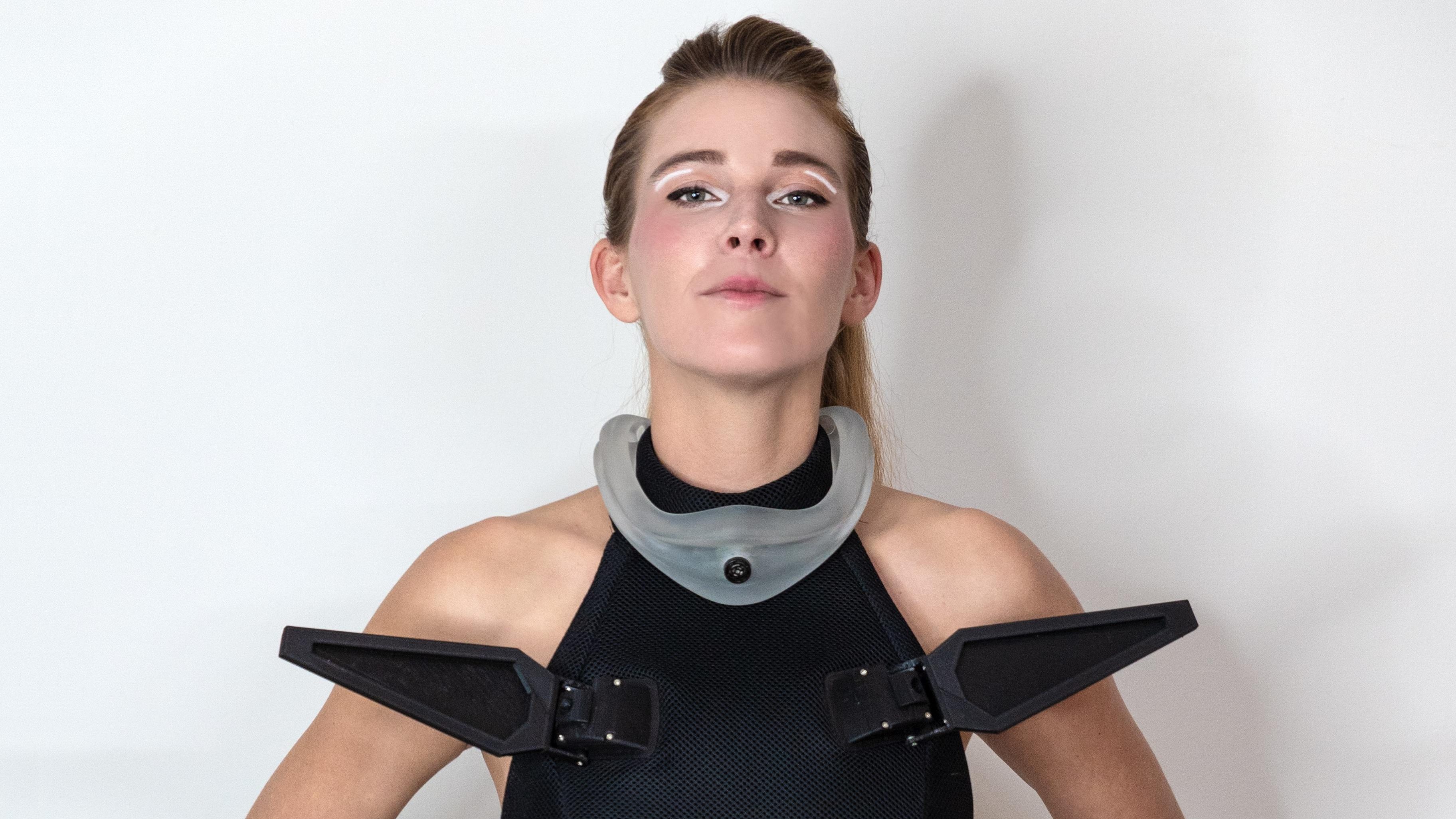
By and large, our clothes don’t actively move. They’re simple pieces of fabric assembled to sit nicely on our bodies, and little more. [anoukwipprecht] created something a little more technological and confronting, though, with the Robotic Open-Source Scale Dress.
Right from the drop, you can see what the dress is all about. It’s an open-shoulder design that has eight large moving scales mounted on the front. These scales are printed, and each features its own servo for independent movement. The scale baseplates are designed to hide the servos themselves, creating a sleeker look that hides the mechanism underneath. Each baseplate is also perforated with holes, allowing it to be sewn on to the base garment in a stout fashion. The dress itself is created with thick neoprene fabric, enabling it to take the weight of the scale assemblies without sagging or pulling away from the body. You can even customize the scales in various ways—such as adding feathers instead.
The dress is a neat piece, and would catch eyes for its pointy scales alone. The fact that they can start moving at any time only increases the garment’s impact. We’ve seen some other great fashionable uses of 3D printing before, too, like these awesome printed shoes. Meanwhile, if you’re printing your own garments in your home lab, don’t hesitate to let us know! Or, even better… wear them to the next Hackaday event!














/cdn.vox-cdn.com/uploads/chorus_asset/file/25841887/google_gemini_multimodal_extensions.gif) Source: Google
Source: Google
/cdn.vox-cdn.com/uploads/chorus_asset/file/25841886/google_gemini_live_images_demo.gif) Source: Google
Source: Google