La justice américaine valide l’accord géant entre Anthropic et des auteurs. Derrière le chèque, un point reste brûlant pour toute l’IA générative.
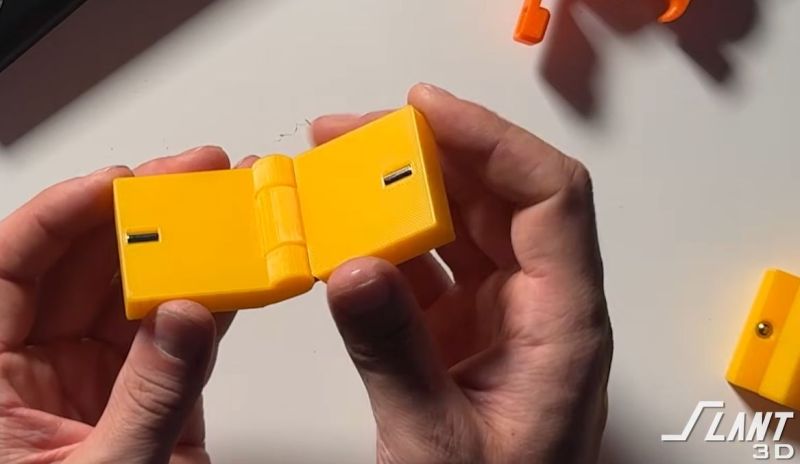
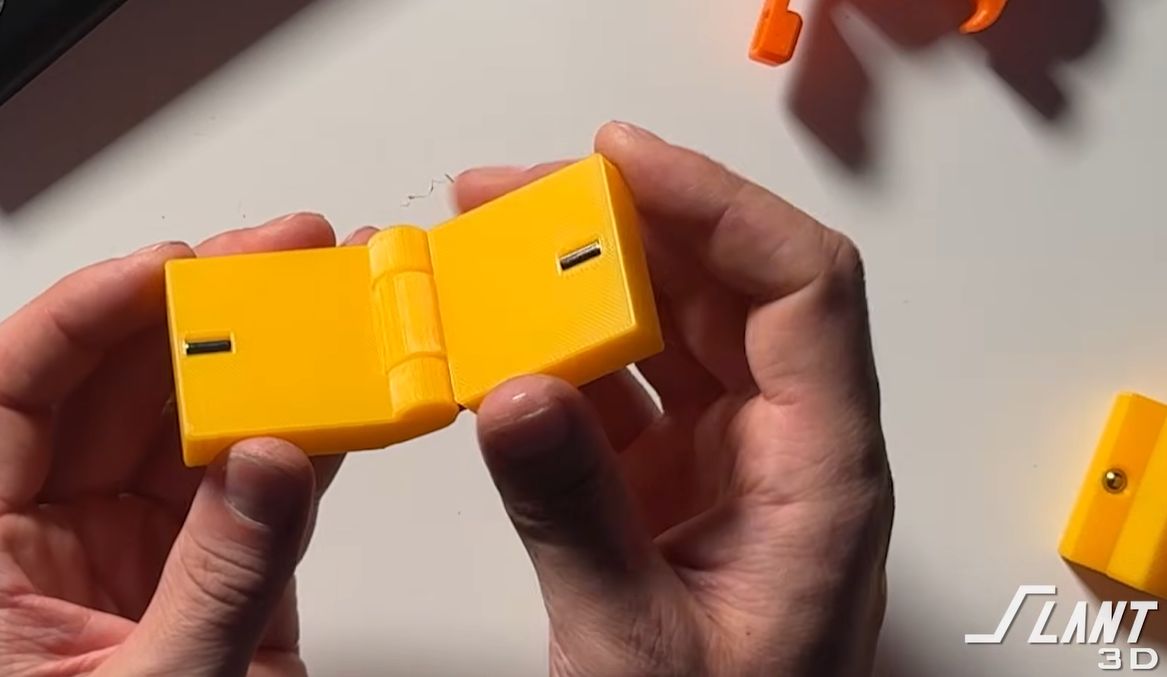
Magnets are awesome, so it’s no wonder we love to add them to our 3D prints. Doing so in a way that will actually last is harder, with thermal creep being one reason a simple friction fit will loosen over time, and using super glue to hold a magnet in place can be messy. In a recent video, [Slant 3D] covers seven ways to install magnets in 3D prints without resorting to glue, along with the advantages and disadvantages of each.
With friction, the argument is that you can still use them, but you’d want to use something like cylindrical magnets rather than flat magnets to increase the friction with the thermoplastic. Using an arbor press rather than human primate hand power is also beneficial.
Rather than installing magnets halfway through a print with all the logistics that entails, you can use side slots to install said magnet into, which is much easier, but as with all embedded magnets, you get that plastic barrier between the magnet and its target.
Other methods involve using a bit of extra material that you need to push the magnet past, using something like an arbor press, so the magnets should never just fall out. A wildcard here: spherical magnets, which can be locked in using a similar method, while automatically orienting themselves to an opposing magnet.
The final tip is to never use two magnets in a magnetic lock. Instead, use a cheaper ball bearing or a similar plain metal part on one side instead. Magnets tend to be much more brittle than whatever stainless steel ball bearing or washer you can use on the other side.
Of course, people will always try to install magnets during an FDM print, but before they try to do that anyway, they really should learn about the fascinating ways in which magnets can ruin print beds, destroy nozzles, and otherwise make a total mess of a print. Magnets seem magical. Maybe they are.
Votre CV en ligne sur le site de France Travail, un métier en tension, un rendez-vous raté il y a 2 ans ? Ce sont 3 des 26 variables qu'un algorithme épluche pour décider si votre dossier part au contrôle. Voilà où on en est.
La Quadrature du Net a publié aujourd'hui, avec la cellule investigation de Radio France, le document interne qui le décrit, présenté au comité d'éthique IA de France Travail le 10 décembre dernier. Son petit nom, c'est "Ciblage du Contrôle de la Recherche d'Emploi" et sous ce titre pompeux, se trouve un arbre de décision entraîné sur 60 000 contrôles passés, qui vous range dans un profil "suspect" ou "non suspect". Les suspects atterrissent alors sur une liste de gens à contrôler en priorité.
Pour l'instant, il tourne sur les ruptures conventionnelles, via 2 campagnes de 7 000 tests environ, mais France Travail veut déjà "étendre l'utilisation du modèle à d'autres publics" et "transmettre chaque mois des listes de contrôle ciblés".
On a donc la liste des 26 variables, mais pas les règles. Personne ne sait donc comment l'arbre les combine, ni à partir de quel seuil vous basculez du côté "suspect". La Quadrature le reconnaît elle-même : "nous ne sommes donc pas en mesure de déterminer, via des simulations, quelles populations sont les plus ciblées par cet outil". Ils ont demandé le code source mais n'y croient pas trop...

Du coup personne ne peut vérifier si le truc discrimine ou pas ! Parmi les variables retenues, y'a la présence d'une activité non salariée, exactement le critère que la CNAF utilise dans son algorithme de scoring pour dégrader la note des gens en emploi précaire, donc si vous bricolez 3 heures en micro-entreprise pour arrondir vos fins de mois, bah ça se paye niveau algo, apparemment :-((. Fallait pas se bouger.
En mai 2025, le directeur général de France Travail déclarait à la Commission d'accès aux documents administratifs "qu'aucun algorithme n'est utilisé dans le cadre du "CRE rénové"", en réponse à une saisine de journalistes de Cash Investigation et voilà que quelques mois plus tard, en interne, on présentait au comité d'éthique cet algorithme "Ciblage du Contrôle de la Recherche d'Emploi".
Alors c'est vrai, les deux formulations ne désignent pas EXACTEMENT le même bout de la chaîne, ok mais apparemment on n'a pas la même définition de ce qu'est une IA "éthique" et "transparente". À mon avis, leur charte est sérieusement à revoir. Dans le document trouvé par la Quadrature, au paragraphe "Pourquoi recourir à l'IA ?", la réponse c'est que ça permettrait une "suppression des a priori" en proposant "des dossiers à contrôler sur la base de critères objectifs" sauf que choisir qui on contrôle, c'est une décision politique, et pas un problème de tri.
La Quadrature parle de "* la transformation d'un problème politique ... en un problème purement technique*", et perso je vois surtout que plus personne n'a à signer la décision maintenant puisque c'est l'IA magique qui décide tout... C'est facile la vie.
Et pendant ce temps, c'est une machine à contrôler les gens qui monte fortement en régime avec 200 000 contrôles en 2017, 730 000 en 2025, et un objectif gouvernemental de 1,5 million en 2027, annoncé par Gabriel Attal.
Avec les allocataires du RSA, inscrits d'office à France Travail depuis le 1er janvier 2025, ça fait plus de 6 millions de personnes potentiellement profilées chaque mois, et vous en faites peut-être partie sans le savoir. Le contrôle lui-même reste mené par un agent (pas une IA, un vrai humain, je précise parce que ce mot agent est trompeur de nos jours ^^), mais c'est la machine qui désigne qui passe sur le grill !
Et l'opacité n'est pas un accident de parcours puisque France Travail a refusé de communiquer la moindre info sur MatchFt, l'IA qui vous envoie des SMS d'offres d'emploi, et sur ChatFt, celle déployée auprès des conseillers. Même pas la documentation technique ou l'analyse d'impact. Pire, face à la CADA , l'institution "n'a même pas pris la peine de motiver sa décision". Même pas un courrier ! Voilà, pour la transparence, on repassera...
C'est pour moi, le même délire que le blocage administratif sans juge ou la reconnaissance faciale en libre-service pour la police dont je vous parlais. C'est une décision unilatérale qui vous tombe dessus, sans explication, et sans recours facile à mettre en œuvre. Sauf qu'ici c'est votre allocation chômage qui est sur la table... J'avais déjà creusé ce que l'IA fait à nos institutions , vous pouvez y jeter un œil.
Bref, La Quadrature appelle à l'abandon de l'algorithme et le document complet est en ligne, donc allez-y jeter un œil.
Un hacker ayant piraté la plateforme de génération musicale Suno a partagé avec 404 Media le détail des sources d'entraînement de l'entreprise.


Seeed Studio’s reCamera Pro is an AI camera powered by a Rockchip RV1126B quad-core Cortex-A53 SoC with a 3 TOPS NPU for on-device AI vision, but also large language models (LLMs), vision language models (VLMs), as well as speech-to-text (STT) and text-to-speech (TTS) with built-in audio capabilities.
It offers a powerful update to the earlier reCamera modular AI camera based on an SG2002 RISC-V AI SoC, with up to 4GB RAM, 16GB eMMC flash, an 8MP camera sensor supporting up to 4K @ 30 FPS, an M12 lens mount, a built-in 1W speaker, two microphones, Gigabit Ethernet with PoE, dual-band WiFi 5 connectivity, a USB-C port for power and data, and and expansion through a GPIO and MIPI DSI connectors.
reCamera Pro specifications:


Seeed Studio also shared some AI benchmarks for reference:
The reCamera Pro competes against other Rockchip RK1126B AI cameras, such as the Firefly CQ38W-1126B, and one of its main benefits is its compact size. In some ways, it visually reminds me of the CamThink NeoEyes NE301, but that’s a different device based on an STM32N6 microcontroller with much higher efficiency and much lower performance.
Seeed Studio has opened pre-orders for the Camera Pro 2GB for $299.90, with shipping scheduled for July 29, 2026, and should eventually show up on AliExpress alongside the earlier reCamera model. The 4GB variant will become available in the next 3 months.
The post reCamera Pro “Open AI Camera” supports computer vision, LLM, VLM, STT, and TTS workloads appeared first on CNX Software - Embedded Systems News.
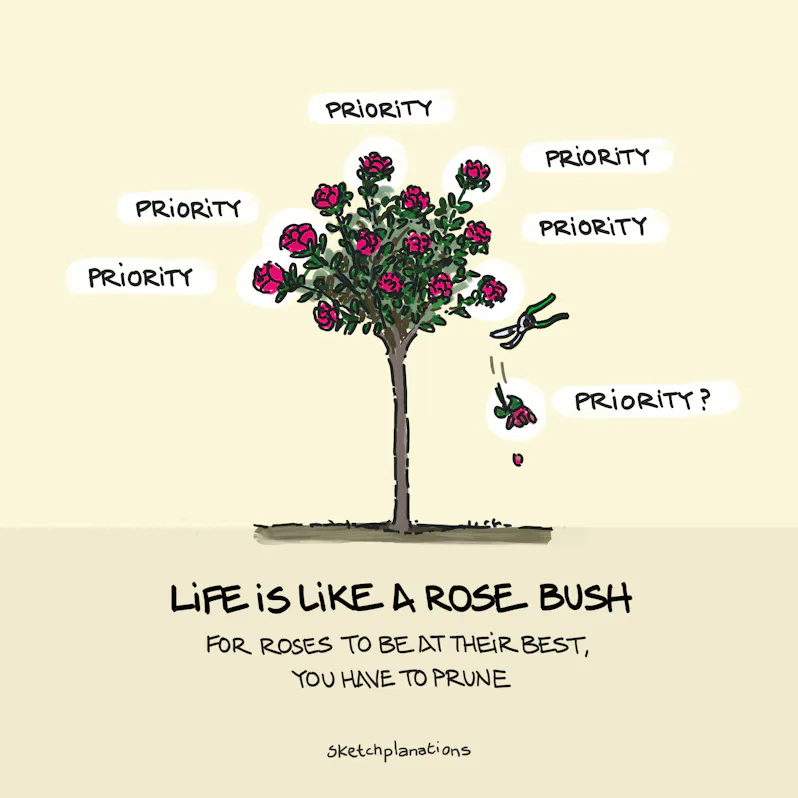
Imagine your life is a rose bush. Each passion, interest, or piece of your attention at any time is a flower. To allow each bud to blossom, you give it your attention and care.
At different times in my life, I’ve had flowers blooming for family, my partner, music, studying, football, staying fit, hiking, exploring, new friend groups, being a father, working on a house, this project, swimming, my career, photography, drawing, a video game and more.
Thinking of my life like a rose bush encourages me to realise that putting all my attention across all of these flowers means none of them can be as full. There is only so much time and attention I can give.
It leads me to what I think of as The Rose Bush Rule: a rose blooms best when past blooms are pruned.
In order for another interest or passion to come in, it may be necessary to prune an existing bloom. When you do that, you give yourself more time and attention to the new things you care about and allow them to blossom to the full.
The same may be true for a business as in life. Too many competing priorities ultimately diminishes all of them and leaves you constantly switching focus.
Just like saying “no”, I don’t find it easy to prune things I enjoy or consider part of myself. But perhaps it’s just what I need. Is there anything you might benefit from pruning so other flowers can bloom?
I learned this metaphor from James Clear’s essay, What to Do When You Have Too Many Ideas and Not Enough Time, and he learned it from Travis Dommert. As James wrote:
“…new growth is natural and it's normal for tasks and ideas to creep into your life, but full growth and optimal living requires pruning.
We All Need to Cut Good Branches“
Also see:
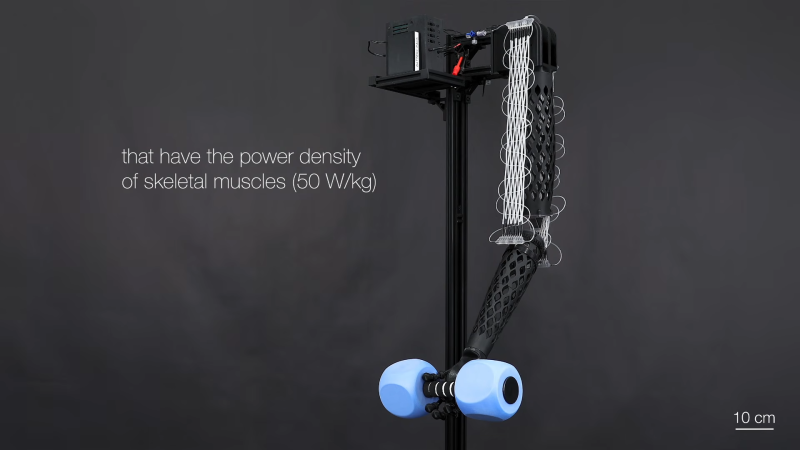
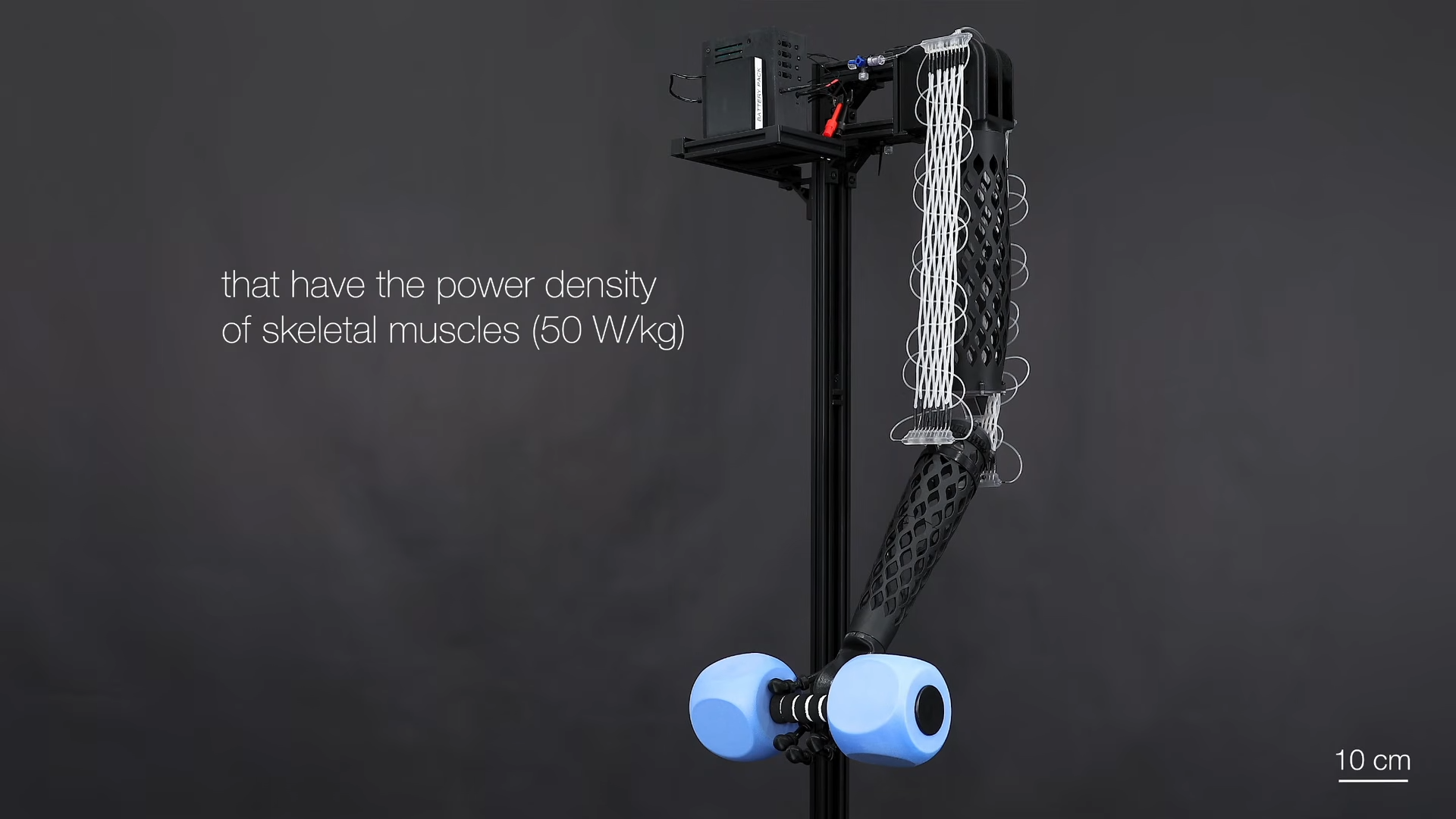
At the current rate of robotics development, you might assume that we’re close to Skynet taking over. However, while we likely wouldn’t do well in a physical fight against a robot, we can at least keep the bragging rights of having the cooler actuators. Or at least, that was the case before a new actuator came into town — introducing “Electrofluidic Fiber Muscles”.
Traditional robotic actuators use motors of some kind with a variety of gearboxes or linkages to turn rotational movement into usable movement. This isn’t always the most effective way to run some robotics movements, especially when modeling humans. This is why many have turned to pressurized modes of actuation. Though most don’t show quite the promise of the new player.
Electrofluidic Fiber Muscles use pressure to shorten muscle strands, similar to past actuators. However, these are a tad different, taking advantage of electrofluidic pressure. A small current under high voltage is able to drive a pressure gradient in a long tube. This tube can then be connected to both an extensor and flexor portion of an actuating circuit, similar to a biological mechanical system. Better yet, this driving pressure pump can be spun around the fibers themselves, making a tight package.
Unfortunately, it will probably be a bit till we see this inside a hobbyist robot. Until then, make sure to check out some other actuator feats!
"Climatiser son appartement, c'est réchauffer celui du voisin." Vous l'avez forcément déjà entendue, cette bonne blague là... C'est comme ça que commence la dernière vidéo de Numerama, où durant 23 minutes, Julien Cadot démonte une par une les idées reçues sur la climatisation.
Et j'ai trouvé ça passionnant et d'utilité publique, donc je vous la partage. Le point de départ, c'est que la clim et la pompe à chaleur qu'on vous subventionne à coups de milliers d'euros, c'est rigoureusement le même objet. Même compresseur, même fluide, même physique. En France, on a quand même réussi le tour de force d'avoir une technologie qu'on subventionne l'hiver et qu'on diabolise l'été, comme il le dit dans la vidéo.
Je ne vais pas vous refaire la vidéo, elle se suffit largement à elle-même. L'îlot de chaleur urbain ? Les clims de TOUT Paris pèsent à peu près autant sur la température des rues que le trafic automobile dont personne ne parle jamais. Les fluides "1000 fois pires que le CO2" ? Un combat gagné il y a 30 ans, votre clim récente tourne au R32 voire au propane. On nous vend la peur d'un combat que la science a réglé depuis longtemps et je me demande bien pourquoi...
Et avec le kWh français ultra décarboné, si un pays sur Terre peut être climatisé proprement, c'est bien la France. Alors pourquoi s'en priver ??? La canicule de 2003 a tué 15 000 personnes. Celle de juin dernier compte déjà un bon millier de morts, à 85 % des plus de 65 ans, souvent chez eux dans des chambres à 35°C. Alors Julien pose la vraie question : faut-il continuer à sacrifier l'endroit où les gens vivent pour garder le trottoir un demi-degré plus frais ? Surtout que vu le climat qui attend nos villes dans 20 ans , les nuits fraîches ne reviendront pas.
Et moi, ce qui me sidère, c'est la réticence des gens. Je parle pas de ceux qui n'ont pas d'argent pour en faire poser une. Je parle de ceux qui ont la thune mais que ça embête de faire installer une clim, parce que "l'écologie" ou je ne sais quoi d'autre. Même des vieux qui souffrent dans leur maison, il faut vraiment insister pour les convaincre... Dur dur. Les anti-clim, pour moi, c'est comme les antivax. Ce sont des gens qui se reposent sur des trucs entendus il y a des années, qui se sont arrêtés là et qui se refilent des infos périmées entre eux. C'est dommage quand même de littéralement mourir de chaud juste par connerie.
Et l'administration n'aide pas, avec des PLU meurtriers qui nous interdisent les unités extérieures en façade. C'est dire le niveau de connerie institutionnelle dans ce pays.
Perso je déménage bientôt en location, et là il n'y a pas la clim, et en plus il y a une véranda... je pense que je vais devoir prendre une clim portable, alors que c'est le pire des 2 mondes, bruyant et énergivore, mais bon, c'est pas chez moi. J'essaierai quand même de convaincre la propriétaire d'en faire installer une vraie, quitte à en payer une petite partie. Je lui ferai regarder la vidéo, tiens.
Et si vous sautez le pas : comptez quelques milliers d'euros pour une clim fixe posée par un pro, prenez des modèles silencieux pour les chambres, et anticipez dès cet hiver parce que les installateurs sont débordés chaque été. L'article de Numerama détaille tout ça par écrit si vous voulez aller plus loin.
Voilà, vive la clim ! Et si un anti-clim vous ressort le coup des fluides qui trouent la couche d'ozone, offrez-lui un calendrier, parce que visiblement sa capacité à comprendre le monde s'est arrêtée en 1995.
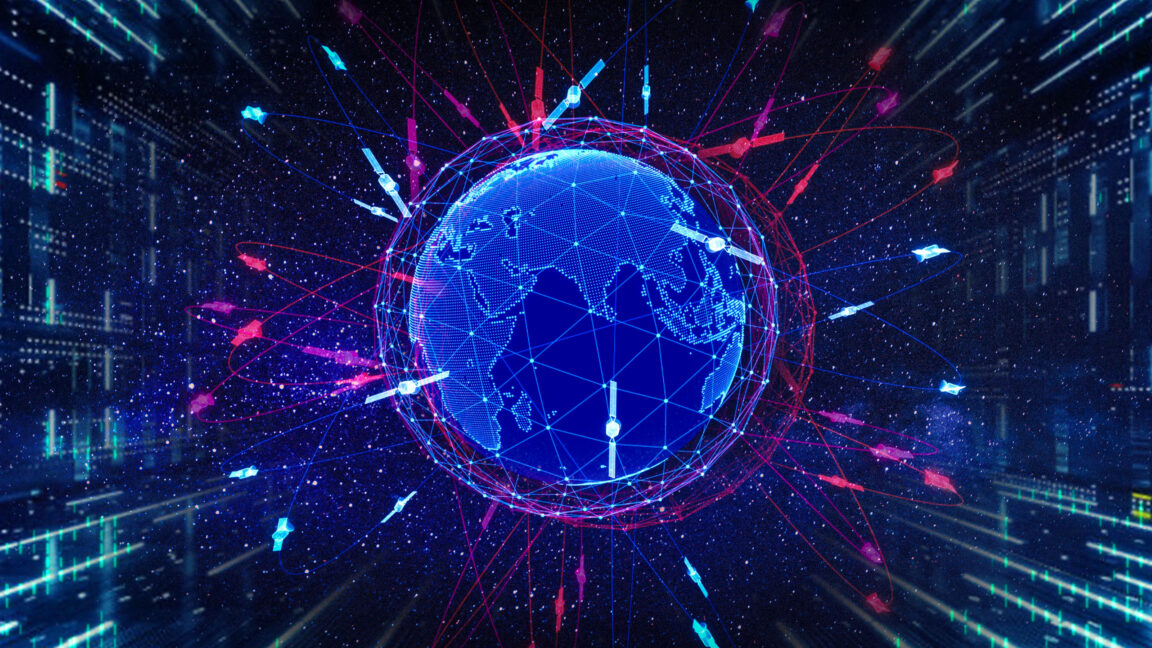
SpaceX has pinned the bulk of its future value on orbital data centers. Not rockets. Not spacecraft.
Instead, it envisions launching and maintaining a constellation of 1 million satellites capable of generating 120 GW to power tens of millions—and potentially up to 100 million—frontier-class GPUs for data center services.
The company's founder, Elon Musk, revealed plans for this massive constellation months ago, but until recently, the scope of the individual satellites was largely unknown. That changed in June, when Musk and Ian Dahl, director of satellite engineering for SpaceX, spoke in a promotional video about the company's plans to develop the first iteration of an orbital data center, called an AI1 satellite. The video finally provided the company's numbers about the satellite's size and power capabilities.
Many companies silently assume that everybody wants more AI in their lives. That people are craving new AI features, new AI products, new AI workflows — that would all magically replace all existing outdated practices and broken ways of working.
But in reality, it seems like people don’t want more AI at all — at least not in the way most AI leaders envision it. Unsurprisingly, many AI features have low adoption and retention — at a very high cost of delivery, and a high risk of reputation damage.
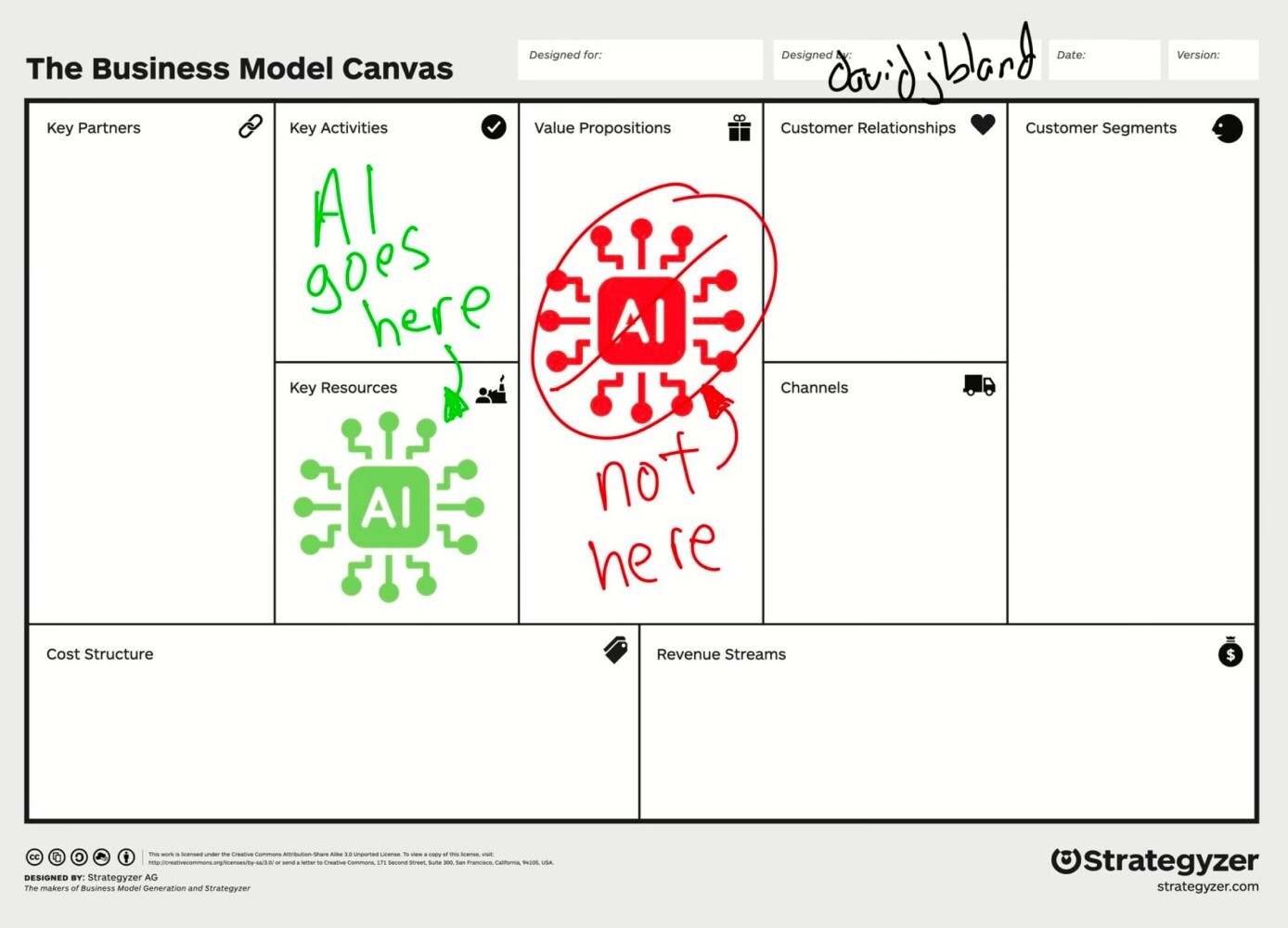
It’s remarkably difficult to make a strong argument with senior leadership, but AI is not a value proposition. New AI features don’t magically make for happy or excited customers. Because AI features are often bolt-ons and separate tools for employees to use, they typically take people out of their regular way of working.
AI is pretty good at amplifying shortcuts and shortcomings in organizations — from data quality to decision making. It can’t magically fix years of accumulated quick patches, technical debt, broken culture and internal politics. If anything, they become more visible with AI as inconsistencies or conflicting priorities and get handed directly to users, who are then left to make sense of the mess themselves.
Because in most organizations, work typically requires hopping on and off between plenty of disconnected and fragmented systems, with a new AI tool, they now have yet another system that they also need to hop on and off. Often it produces more work, and typically it’s not particularly rewarding work either.
On top of that, people are very much aware of the cost of finding and fixing AI hallucinations. Asking AI to generate a response might feel easier than writing from scratch, but it has a cost:

For many people, AI isn’t something they can proactively choose and explore on their own — it arrives uninvited, at someone else’s pace. On top of that, plenty of messages amplify fears and worries about AI replacing work — so it’s hardly surprising that the perception of AI isn’t excitement. It’s resistance to change and deep anxiety about one’s place in a world that seems to be changing without them.
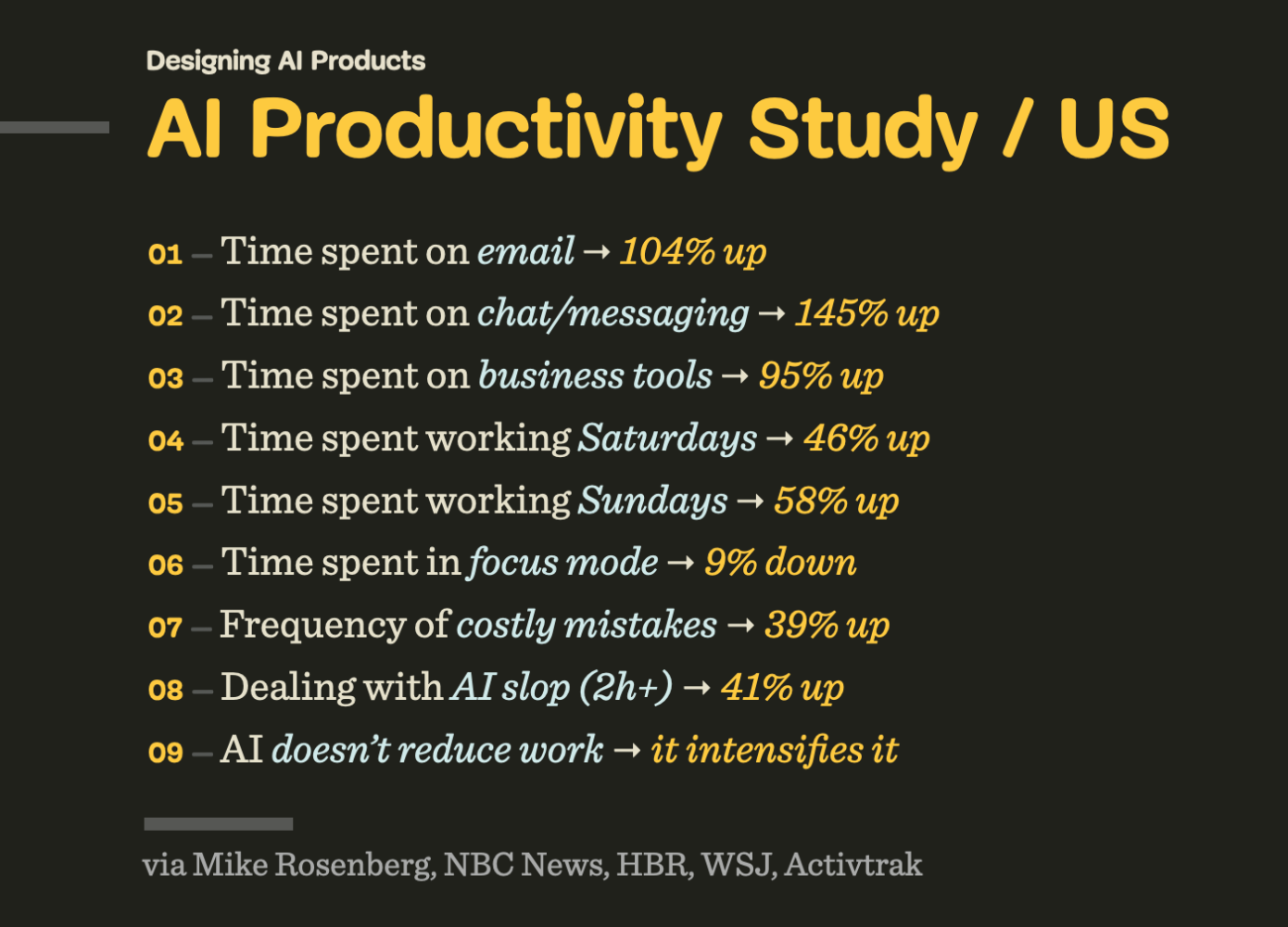
At best, AI features might be silently accepted or nodded away. At worst, AI raises concerns, doubts, caution — and calls for a healthy dose of skepticism. And sometimes it’s perceived as a threat or liability — because unlike other features, AI is neither predictable nor reliable.
People don’t dream of AI art museums or AI fridges or AI hotel reception or AI-narrated children’s books. They don’t want their children to have romantic AI partners. Most people don’t want to actively manage (and clean up after) a swarm of AI agents roaming in their bank accounts and acting on their behalf in the real world. And most notably, people don’t really want a magical box to speak to or type into all the time.
I’m always puzzled by the comparison of AI features with how unreliable humans are. But people don’t compare software with other people. They compare features with features — and if one feature in one product is unreliable, while a similar feature works flawlessly in another, they choose the latter. It’s not about AI or not AI, but rather what works consistently and reliably, and what doesn’t.
Many conversations about AI are conversations about the speed of delivery. But to many people, there is little value in increasing the speed of delivery. They want to do things well, with enough time to think and make good decisions. They also want to enjoy the time they spend working on things, rather than just ship faster. There is an enormous feeling of reward and achievement that slowly disappears, one vibe-coded change at a time.
People don’t change much. And after all these years, they (still) want features that are fast, accessible, reliable, predictable and useful — every single time. And ideally not the ones that replace their entire workflow, but that augment their way of working — and that take over the most mundane, annoying, and boring tasks that they find no pleasure in.

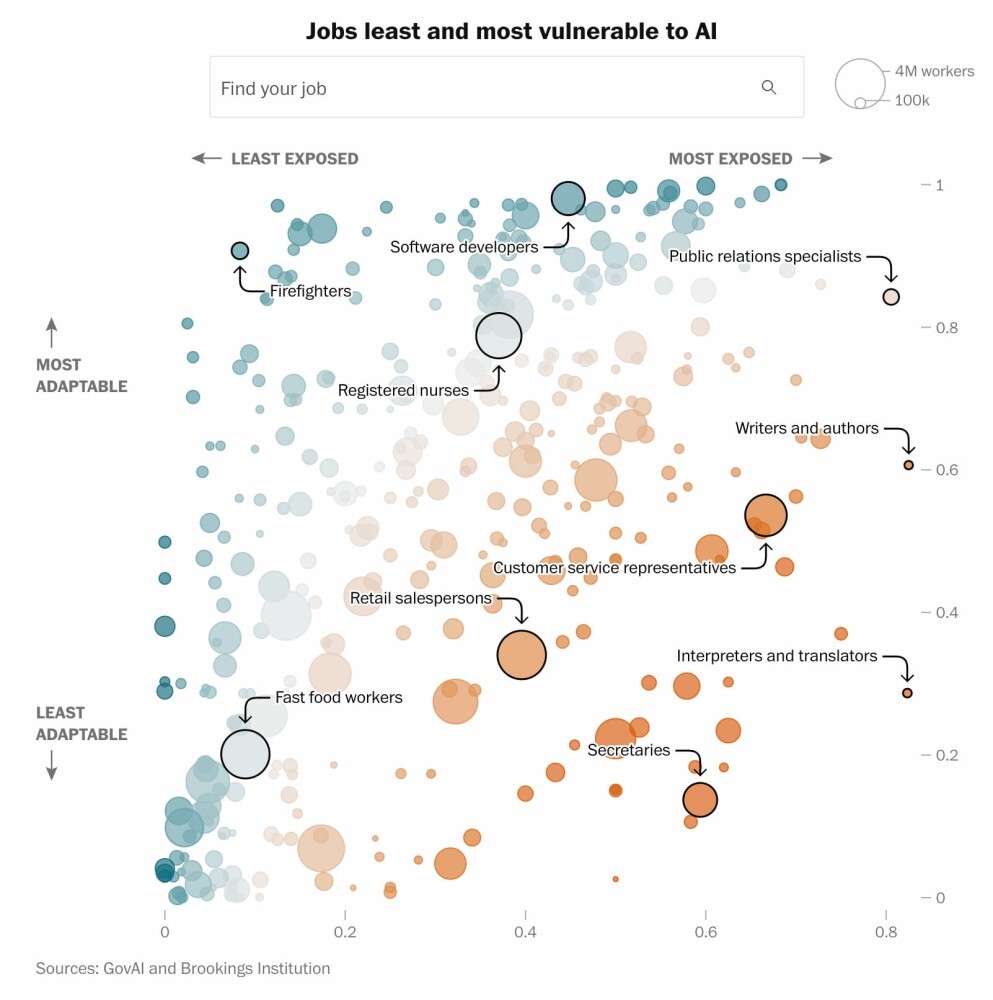
Many jobs are exposed to AI automation, but in many of them there is a rewarding, unique, creative part that requires taste, point of view, and perhaps even human intuition. And if AI automates boring parts of it, that’s an advantage for everyone. That’s also what enhances productivity and brings more joy in daily life.
When AI automates tedious and mentally exhausting tasks, its value is much easier to grasp. But for that, AI shouldn’t feel like a bolt-on. It should be deeply integrated into people’s existing workflows. It must also match existing mental models that they have developed and fine-tuned for years or decades. AI should adapt to how people think and make decisions, not the other way around.
And it doesn’t really matter if these features are branded as “AI”, “smart” or “automation”. However, they must work well for people using them. And that means that people must be aware of use cases where it actually helps them, and be inspired to find more use cases on their own.
Ironically, tools that work well there aren’t “AI-first” — they are “AI-second”. Subtle, humble, calm, ambient, taking a supportive role in the background for work that otherwise is remarkably dull and unnecessary.
I don’t want to read books written by AI. I don’t want to gaze upon paintings by AI. I don’t want AI to teach my children. I don’t want to have an AI therapist. I don’t want AI making my medical decisions. I want AI to do all the physical and mental labor that taxes me so I can read books written by humans and go to art galleries to engage with art made by humans. I want AI that makes my life easier rather than forces me to change myself.
— Bo Young Lee
Perhaps I’m missing a bigger picture, and perhaps I’m just old school — but I really do like people. Their stories, their thinking, their emotions, their enthusiasm, their laughing. AI can be remarkably helpful in many situations, but so are people. And between the two, I would favor spending time with a human — however imperfect they are — every single time.
No, people don’t need more AI in their lives — they need AI to automate all the boring stuff they have to deal with every day, so they have more time and headspace to do things that they actually love and enjoy doing. That doesn’t mean spending more time with AI — but spending more time with people they love.
Meet Design Patterns For AI Interfaces, Vitaly’s new video course with practical examples from real-life products — with a live UX training happening soon. Jump to a free preview.

30 video lessons (10h) + Live UX Training.
100 days money-back-guarantee.
30 video lessons (10h). Updated yearly.
Also available as a UX Bundle with 3 video courses.
 (yk)
(yk)
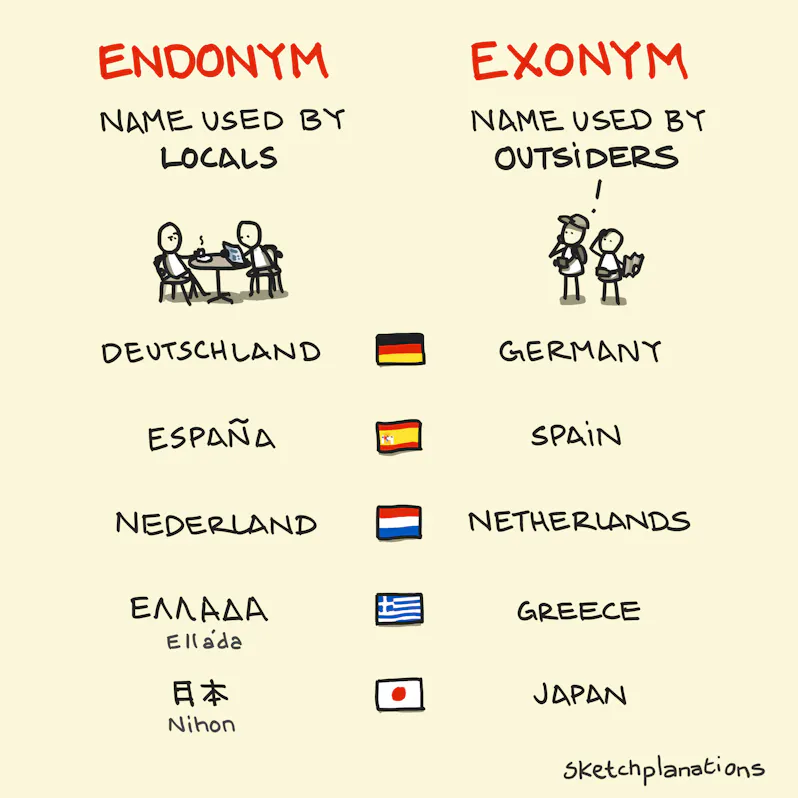
When I was first learning French at school, I was confused to see that London was known as Londres. It already had a name that people in the UK use. Why did it need another? Then, of course, I gradually realised that I was doing the same with names all over the world.
Germany is called Deutschland by Germans. Spain is called España. Italy, Italia. And on and on. I grew up knowing Holland, only later realising the proper English name is the Netherlands (low countries), but to the Dutch who live there, it’s Nederland.
It was only years later that I learned about endonyms and exonyms.
Sometimes it can lead to genuine confusion. In a piece of family history, while driving through Italy with friends as a young man, I’m told my Dad decided to steer clear of what looked like the “gritty Northern industrial town” of Firenze, not realising they had just driven past Florence, one of the most beautiful cities in Europe and the birthplace of the Renaissance.
Onym derives from the Greek word “onoma,” meaning “name.” For example, as we have in anonymous: without a name.
Endonym is made up of end- (within) and -onym (name). So endonyms are literally the name from within—what the natives call it. Endonyms are sometimes called autonyms as a self-name—what I call myself—from auto- (self).
Exonym is made up of ex- (outside) and -onym (name), making it the name from outside.
Just as eponyms always have a story, exonyms always have a reason.
As an oversimplification, exonyms may exist from differences in language and letters (some languages lack the sounds of others), ease of pronunciation, literal translation (eg Pays Bas means Low Countries in French, just as the Netherlands does in English), and historical reasons.
To my understanding, in 2022, Turkey asked the UN to use its endonym, Türkiye, for all affairs. However, “Turkey” remains a common English exonym. For now at least.
Exonyms are frequently political and often contentious. They’re also not just for countries. The British, who mapped and named many things around the world, are responsible for many exonyms, many of which have since been officially changed. To name just a few:
Exonyms are language-specific. Back to London, Londres is London in French. But in Finnish it’s Lontoo. Wikipedia’s article on endonyms and exonyms gives a remarkable array of names for London:
I had no idea.
We’re in the middle of the FIFA World Cup 2026, and there are many good examples of endonyms and exonyms. And many more people now know where the Cape Verde Islands are and where the small island of Curaçao is. Here are some of the endonyms and their English exonyms from countries that have been competing.
In case you wanted more name words to talk about:
While I can be reasonably authoritative on what the British call London, I am not, of course, an authority on what all the endonyms are around the world. Those listed here are to the best of my knowledge. Apologies if I have made any mistakes. If you notice something I should fix/improve, please let me know 🙏
Correction: I had 🇬🇷 Elláda / ΕΛΛΑΔΑ - Greece in my World Cup list, but sadly they failed to qualify this time.
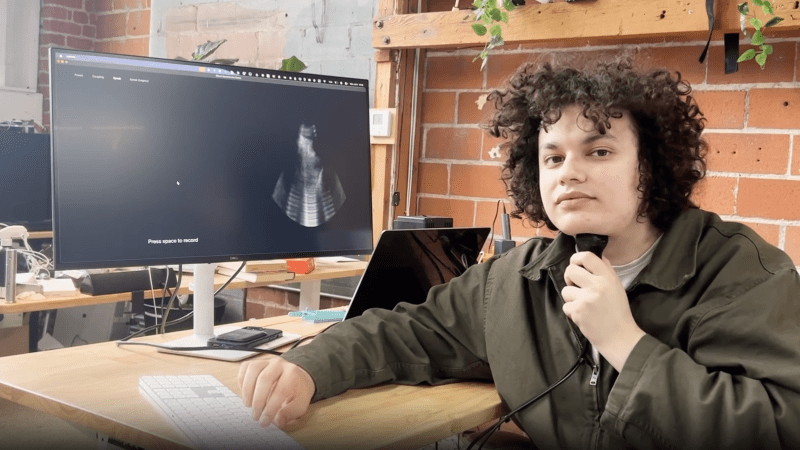
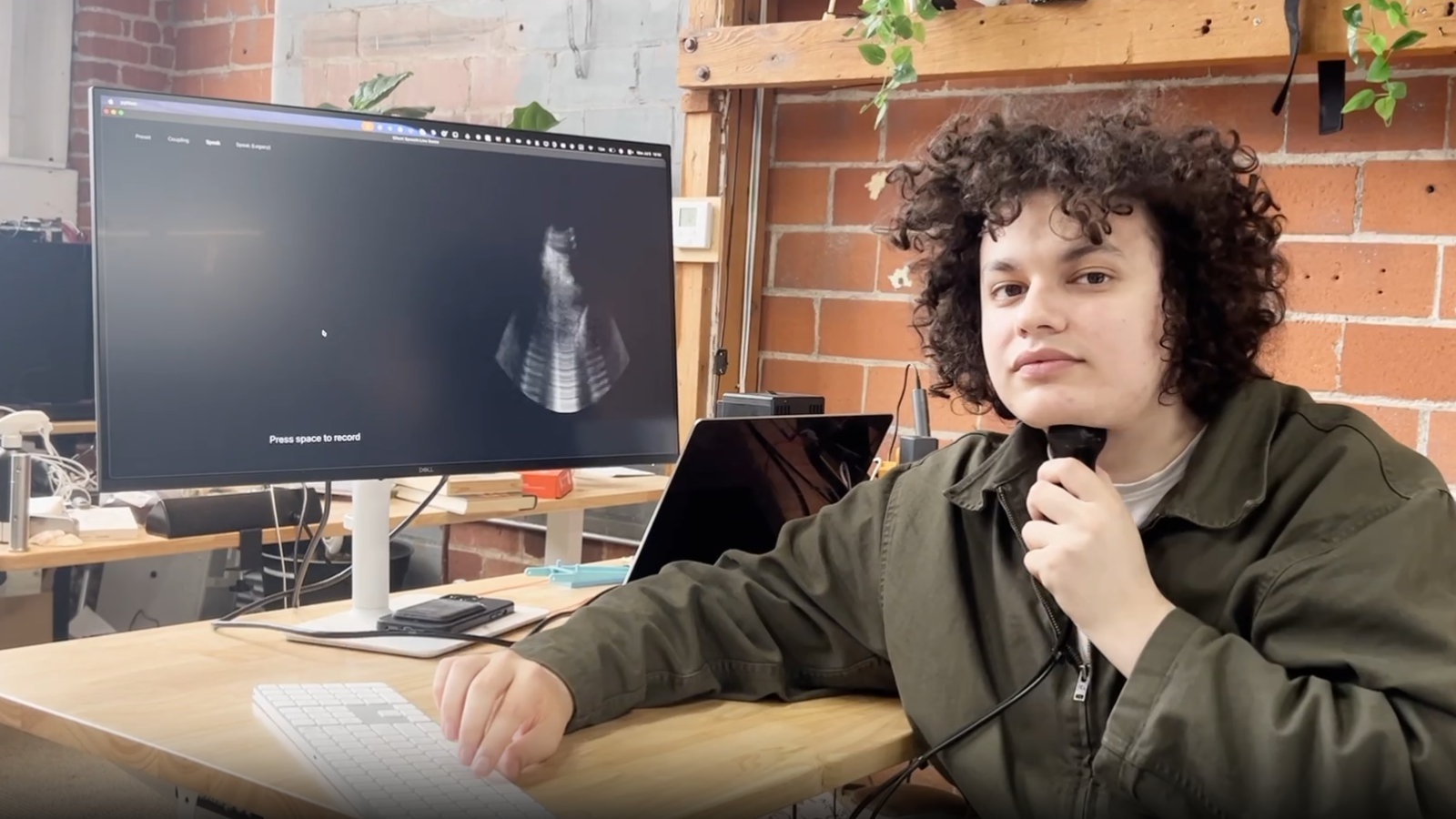
Speaking is much faster than typing, and while it’s an increasingly convenient way to interact with computers, it’s hardly private. Providing speech privacy in a way we haven’t seen before is this prototype tongue-reading system that uses machine learning and ultrasound to read tongue movements and turn them into decoded speech. Not only can a user speak without emitting a sound, since it doesn’t read sound waves it’s completely immune to noisy environments.
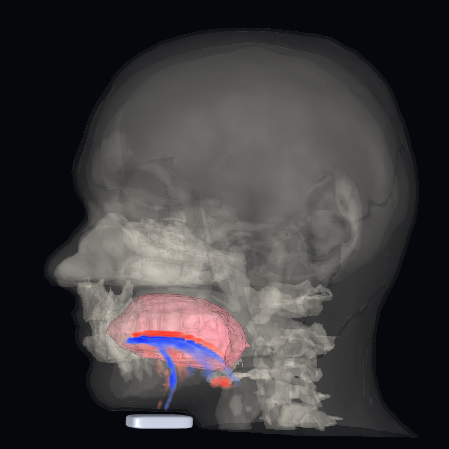
It turns out that tongue movements are a very rich source of information about speech, and an ultrasound probe under the chin takes very clear video of a tongue. With a dataset consisting of only around 50 hours of training data, the system has a 15.6% error rate and generalizes across different speakers (as long as they speak with similar accents).
That error rate may seem high at first glance, but keep in mind this is for a prototype system built in a month around a relatively small training dataset. All indications are that better results are just a matter of better training.
Probably the biggest drawback at the moment is the size of the ultrasound probe and the way it must be held under one’s chin like a contact microphone, but at the moment the probe is an off-the-shelf model that is hardly optimized for either size, weight, or wearability. If the system seems promising enough, a probe resembling an adhesive patch might even be possible.
It’s certainly a different approach from others we’ve seen in the past, including whispering while inhaling and reading lip and mouth movements.
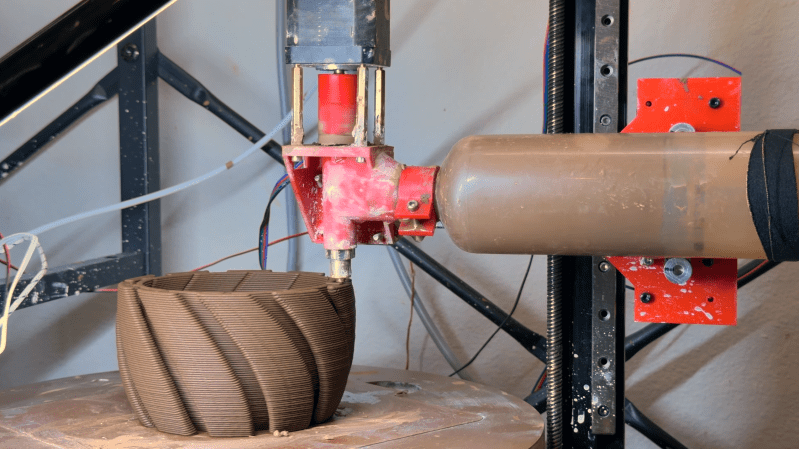
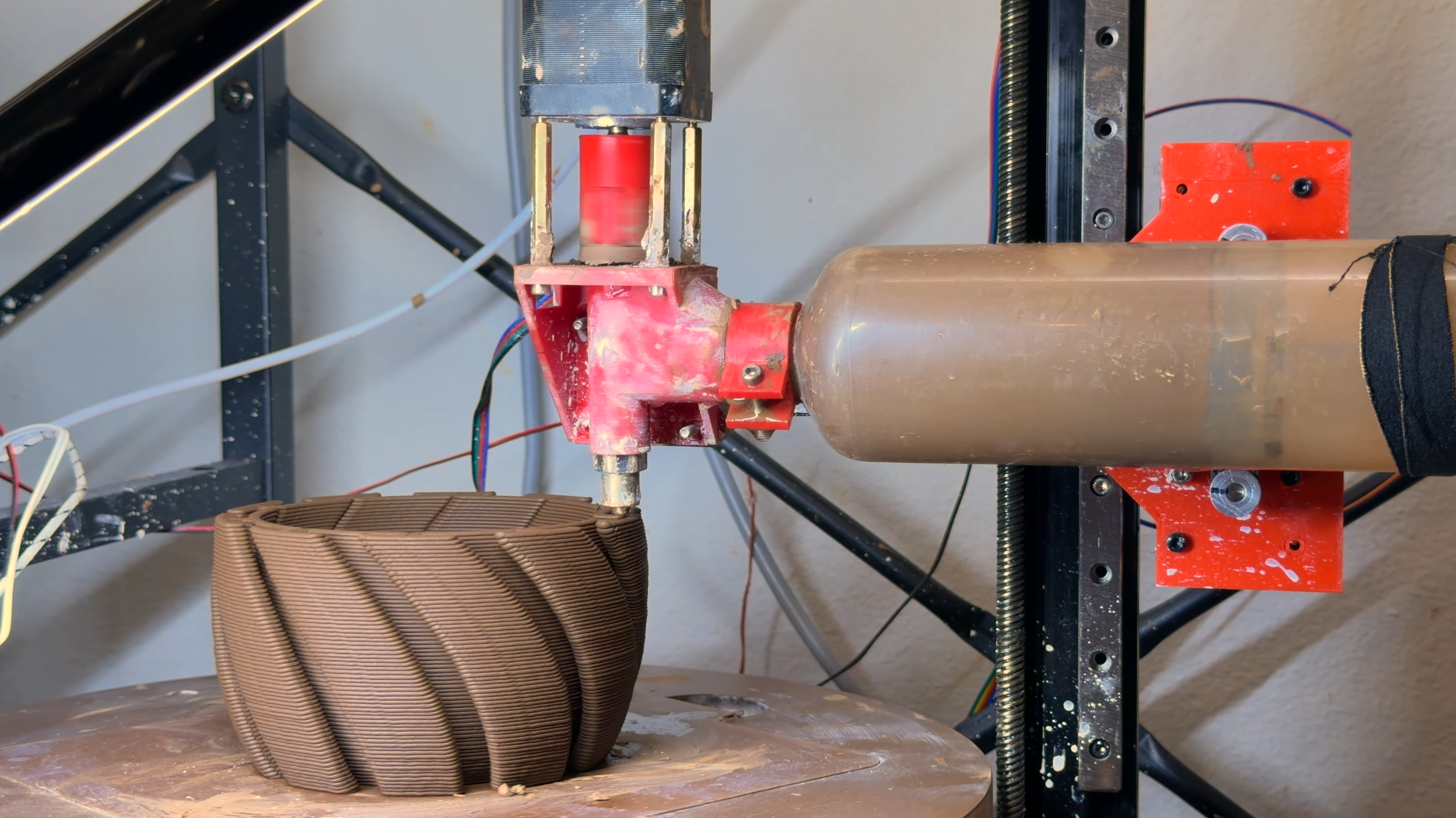
Ceramic 3D printers, despite using the same fundamental mechanism as standard FDM printers, are much harder to find. Part of this comes down to the material properties of fired ceramics versus thermoplastics, but they’re also significantly harder to build; for example, in his ceramic printer build, [Joshua Bird] had to deal with severe material shrinkage, collapsing bridges, and the surprisingly abrasive effects of clay.
The centerpiece of the printer is the clay extruder: an air compressor pushes clay along a tube into the extruder, which uses an auger to squeeze the clay through the nozzle, while a gap at the top lets trapped air escape. The extruder has enough control for successful retractions, but rheology remained a challenge: the clay needed to be soft enough to flow through the nozzle, but stiff enough to form bridges without collapsing. [Joshua] thus pressurized the clay as much as possible, making it possible to use stiffer clay mixtures. The extruder’s greatest challenge was longevity: [Joshua] tried many 3D-printed plastic augers, but the clay abraded them all much too quickly, often in under an hour of use; a 3D-printed stainless steel extruder solved this.
Printing in ceramic isn’t a simple process: for each part, [Joshua] had to mix the clay, load it into the tube, clean the extruder, actually print the object, let it dry, fire it, apply glaze, and fire it again. The clay’s shrinkage during drying and firing destroyed many prints, but [Joshua] was nevertheless able to print a double-walled cup, a decorative climbing-themed cup, and even a chain-mail mesh.
The 3D printer’s motion system is a polar design, an adaptation of his earlier non-planar 3D printer, which might eventually make it easier to print overhangs. We’ve previously seen a similar auger-based clay extruder, an approach reminiscent of direct-granule FDM printing.
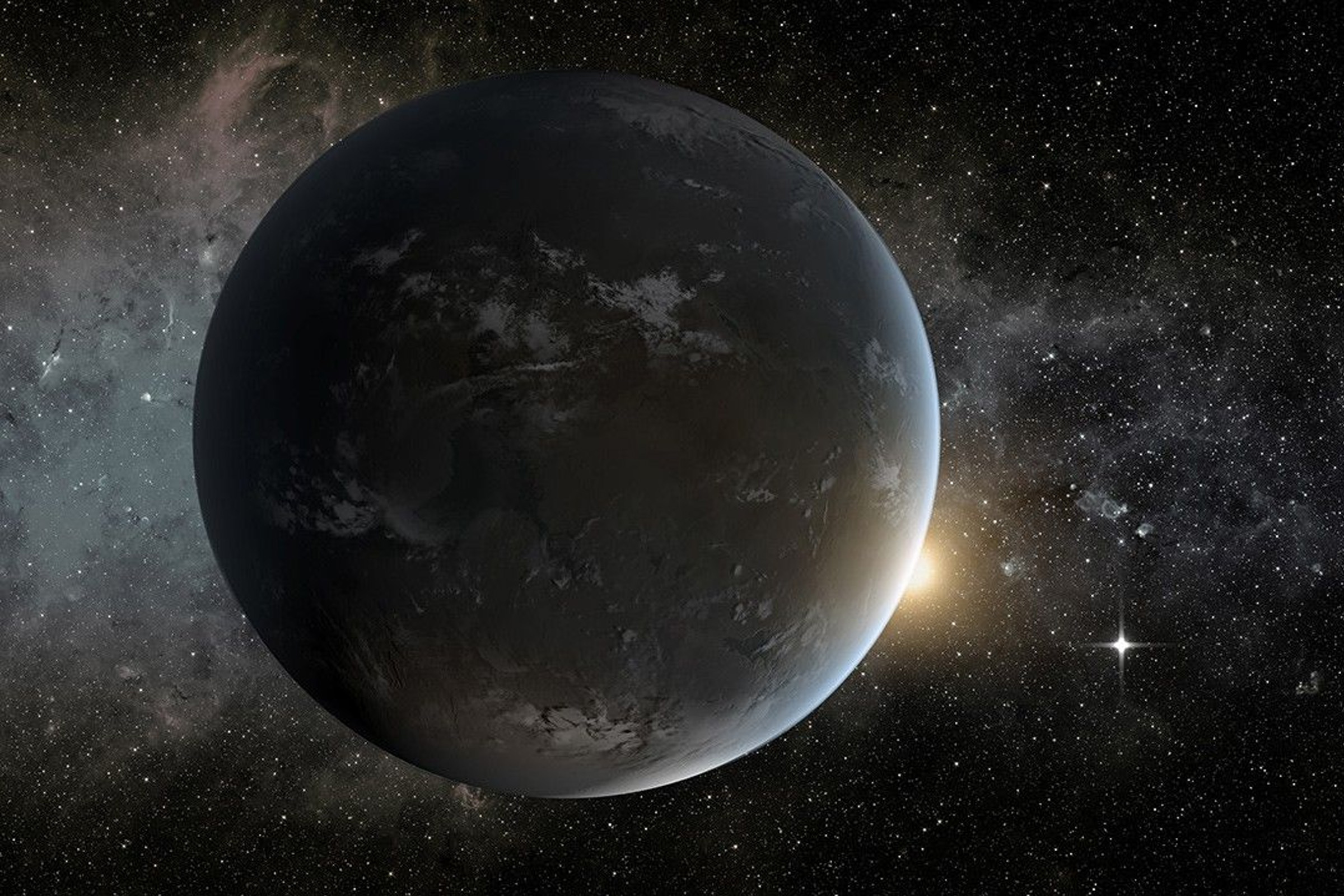
A recently discovered exoplanet only 25 light years away resembles our own planet a lot more than once thought.
The distant world, dubbed GJ 3378b, orbits inside the habitable zone of a red dwarf star — a type of star that is much smaller and cooler than our Sun — where temperatures are just right for liquid water to form on the surface.
But initially, its case for potentially supporting life beyond that looked grim. Astronomers suspected it was a rocky world, but its mass was at least five times more than Earth — or what astronomers called a “super-Earth.” Along with its incredible surface gravity, such a heavy world would possess a crushing atmosphere that would smother any chance of hosting life.
That no longer appears to be the case, however. In a new study published in The Astrophysical Journal, researchers from the University of California, Irvine, took a second look at the exoplanet, finding that it’s a much more manageable twice the mass of Earth. Combined with its proximity to our solar system, it’s one of the most tantalizing nearby candidates for potentially supporting life yet.
“This one’s exciting,” lead author Paul Robertson, a UC Irvine associate professor of astronomy, said in a statement about the work. “It’s one of our closest cosmic neighbors. 25 light-years sounds like a long way, but the Milky Way is about 100,000 light-years across, so in that respect it’s our next-door neighbor.”
There’s more detective work that needs to be done before we know how hospitable to life GJ 3378b is. The biggest question mark is its atmosphere. Does it have one, and is it robust enough to protect against the radiation of its star? And how much pressure does it exert?
It’s a delicate balance. “If you scale the Earth down to the size of an apple,” Robertson explained, “its atmosphere would be about as thick as the skin of the apple.” This is just the right amount to support liquid water and have breathable air, while still providing protection against space radiation, he added.
There’s also a raging debate in astronomy over whether red dwarf systems are habitable at all. These stars are believed to be highly volatile, regularly unleashing powerful solar flares. Because their habitable zones are smaller, that puts a potential life-supporting realm much closer to these outbursts, which could strip them of their atmosphere and sterilize any burgeoning life. Being so close to the star also means that any such planets are likely to be tidally locked, in which the star’s gravity prevents them from rotating so that one side is facing the star at all times.
More on space: Saturn’s Icy Moon Is the Perfect Place to Settle, NASA Scientist Argues
The post Scientists Say They’ve Identified an Earth-Like Planet Right Next Door appeared first on Futurism.
Satellites perform a delicate dance to maintain their orbit, by locking themselves to a speed just fast enough to counteract the downward pull of gravity.
To stop their orbit from decaying too much, satellites use small in-space thrusters, which broadly speaking, fall into two categories: chemical or electric. The former uses a combustible fuel source that gets accelerated through a nozzle, while the latter uses electrical energy to convert propellant into kinetic energy.
Now, New Zealand space startup Zenno Astronautics says it’s tested an entirely new type of thruster that, unlike either of those conventional technologies, uses superconducting magnets to maintain a satellite’s orbit and orientation. As Space.com reports, the magnets convert solar energy directly into momentum, effectively harnessing the Earth’s magnetic field itself.
“Energy is the one thing that is abundant in space, and you can use it to energize the magnet to create a magnetic acceleration device,” Zenno Astronautics CEO and founder Max Arshavsky told the site. “It gives you acceleration without fuel.”
The company’s “Supertorquer” system, attached to a Mira satellite developed by Impulse Space, was launched into space as part of a SpaceX rideshare mission in November.
“It’s a technology that allows a spacecraft to not tumble violently in space and point in the right direction,” Arshavsky told Space.com.
When the spacecraft needs to move, superconducting coils draw energy from a solar powered battery.
“The unit has multiple superconducting magnets that are positioned in different axes,” Arshavsky added. “When we power up the magnets, they generate a magnetic field, which interacts with Earth’s magnetic field, and because we can control the magnetic field on the satellite, we can control the way in which it turns with respect to Earth.”
During its test last fall, the Supertorquer successfully altered the Mira satellite’s orientation on command, just as designed.
For superconducting magnets to work, they have to be cooled to extremely low temperatures. On Earth, that requires cryogenic liquids, which are ill-suited for a satellite. Even in space, the satellite is warmed up to around 68 degrees Fahrenheit by the Sun’s rays, which meant that Zenno had to get creative.
Using a heat pump, the extensively insulated magnet system expels heat to allow the coils to power up at temperatures as low as 77 kelvin, or -321 degrees Fahrenheit. Zenno claims its cooling system is highly efficient, drawing only up to 48 watts at peak.
The startup has some ambitious plans and is hoping to scale up the system to enable future spacecraft to perform docking maneuvers or even help propel them to the Moon or Mars by exclusively relying on solar power. How feasible those lofty plans will turn out to be remains to be seen, but the startup is optimistic.
Arshavsky even suggested that superconducting magnets could create “umbrellas of magnetic fields” that could “shield people in space” from harmful levels of radiation.
More on satellite thrusters: NASA Fires Up Futuristic Plasma Thruster Designed to Take Us to Mars
The post Scientists Test New Spacecraft Thruster That Uses No Fuel, Just Earth’s Magnetic Field, in Orbit appeared first on Futurism.
Bon, je pense que tout le monde ici connaît le principe des téléphones e-Ink. C'est un smartphone avec un écran à encre électronique, ce qui permet de profiter de toute la modernité d'un téléphone Android sans flinguer ses yeux. Bref, c'est super bien pour lire, prendre des notes, etc. Mais par contre, c'est foutu d'afficher une vidéo correctement. Ou de vous mettre un Google Map pour un trajet en voiture. Sans laisser des traînées fantômes dégueulasses derrière chaque mouvement fait à l'écran.
Mais bon, c'est le jeu, ma pauvre Lucette, vous gagnez en confort, mais vous perdez le reste. Toutefois, c'était sans compter sur Big Me qui vient de dégainer sa parade sur Kickstarter. Et leur idée, elle est incroyable, lol : Coller un second écran au dos du smartphone. Bah ouais, fallait y penser.

Ce smartphone s'appelle le HiBreak Dual 2 et c'est donc un téléphone avec deux faces. Devant vous avez un écran e-ink couleur de 6,13 pouces pour tout ce qui demande de la concentration, pour tout ce qui est lecture, prise de notes avec un stylet et j'en passe. Et de l'autre, derrière, vous avez un LCD de 5 pouces qui prend le relais dès que vous voulez mater une vidéo, scroller un Instagram plein de couleurs ou regarder vos photos.
Sous le nom pompeux de "premier grand téléphone e-ink couleur à double écran", il y a surtout un vrai smartphone. C'est un MediaTek Dimensity 8300, 12 Go de RAM, 256 Go de stockage, un capteur photo de 50 Mpx, la double SIM 5G, le NFC et Android 16 avec le Play Store complet. Vous ne troquez donc pas votre téléphone principal contre un gadget bridé... Là vous avez les deux dans la main.
Le truc que Bigme met très en avant dans sa com, c'est surtout le rafraîchissement de la dalle e-ink, jusqu'à 80 images par seconde, ce qu'ils présentent comme un record du secteur. Pour de l'encre électronique c'est énorme, là où la plupart des liseuses rament à quelques rafraîchissements par seconde. Je demande à voir en vrai, parce que le chiffre annoncé et le ressenti sur ce genre de dalle, ça fait souvent deux. Si vous voulez juger de ce que l'e-ink a dans le ventre côté fluidité, jetez un œil au Modos Flow qui pousse justement le refresh à fond .

Maintenant, là où je bloque un peu, c'est sur l'idée elle-même. L'intérêt d'un téléphone e-ink, pour beaucoup, c'est le côté radical avec un écran moche exprès, pas de couleur, pas de vidéo, histoire de vous décoller de l'appareil. En ajoutant un bel écran LCD couleur au dos, Bigme règle le problème technique mais réintroduit pile ce que certains venaient fuir. Donc c'est moins un téléphone de détox qu'un téléphone qui vous laisse le choix... À vous de voir de quel côté vous penchez.
Et puis il y a ce petit détail qui fâche... c'est un putain de Kickstarter encore. Les tarifs de la campagne tournent autour de 574 à 769 dollars selon l'édition en early bird, avant de grimper ensuite, et rien n'est livré tant que le financement n'a pas abouti. Bigme n'en est pas à son premier appareil e-ink, ce qui rassure un peu mais comme d'hab avec Kickstarter, vous pariez sur une promesse, et pas sur un produit déjà dans son carton.
Reste que l'idée est sympa et si le double écran tient ses promesses, c'est peut-être la façon la plus honnête de faire cohabiter le calme de l'e-ink et le reste de votre vie numérique.
Source : Yanko Design
Putain, c'est abusé, vous allez voir ! Peter Stokes, 19 ans, accusé d'appartenir au groupe Scattered Spider, enchaînait les VPN et changeait de pays pour brouiller les pistes mais le FBI l'a quand même coincé. Et vous savez grâce à quoi ?
Hé bien grâce à un petit numéro planqué dans son Windows. C'est Microsoft qui l'a mouchardé aux enquêteurs et ça a suffi pour le relier à une intrusion malgré tous ses VPN.
Et alors me direz-vous, vous aussi vous avez un numéro sur votre machine qui peut servir à vous identifier... Ce truc s'appelle le GDID, pour Global Device Identifier et c'est un identifiant unique qui est attribué lors de chaque installation de Windows. Il sert à la télémétrie, au rapport de plantage, à la vérification des licences et surtout il reste constant même après des mises à jour.
Vous ne le voyez jamais, vous ne l'avez jamais choisi, et il ne bouge pas d'un poil quand vous changez d'adresse IP. Normal, un VPN protège la couche réseau, mais pas ce que laisse fuiter votre OS. Et ça on l'apprend dans la plainte de 39 pages qui a été rendue publique début juillet, où elle expliquait comment Microsoft a fourni au FBI l'historique des adresses IP rattachées à ce GDID précis.
Les enquêteurs n'ont eu qu'à croiser ça avec les comptes perso de Stokes, de son compte Apple à ses comptes de gaming, en passant par Snapchat et Facebook, pour finalement découvrir des adresses IP à Tallinn, New York, ou encore la Thaïlande, ce qui correspond exactement à ses déplacements.
Le mec pouvait empiler 10 VPN s'il le voulait, Microsoft le suivait à la trace quand même. Et c'est là que ça me hérisse le poil, parce que le problème, ce n'est pas que la justice ait serré un type accusé d'avoir extorqué des millions. Ça, c'est le boulot du FBI, et tant mieux s'ils l'ont arrêté.
Non, le vrai problème, c'est que Microsoft dispose d'un identifiant permanent sur plus d'un milliard de machines, qu'ils ne communiquent pas dessus, qu'ils le partagent tranquille sur demande, et qu'on ne peut même pas le désactiver.
Alors on fait quoi ? Bah déjà, on arrête de subir. Vous pouvez installer Windows 11 sans compte Microsoft pour couper une partie de la laisse, désactiver la télémétrie facultative pour limiter les autres fuites, ou carrément regarder du côté d'une stack privacy européenne . Aucune de ces astuces ne touchera au GDID par contre, car il n'y a aucun bouton pour ça, et c'est bien ça le fond du problème.
Mais bon, j'imagine que des petits malins vont sortir des logiciels qui vont permettre soit de désactiver ce numéro ... Et là, vous pourrez compter sur moi pour que je vous le partage. Quoi qu'il en soit, quand vous utilisez Windows, gardez juste en tête que vous n'êtes jamais vraiment seul. Et que quelqu'un vous épie en permanence... Brrrr.
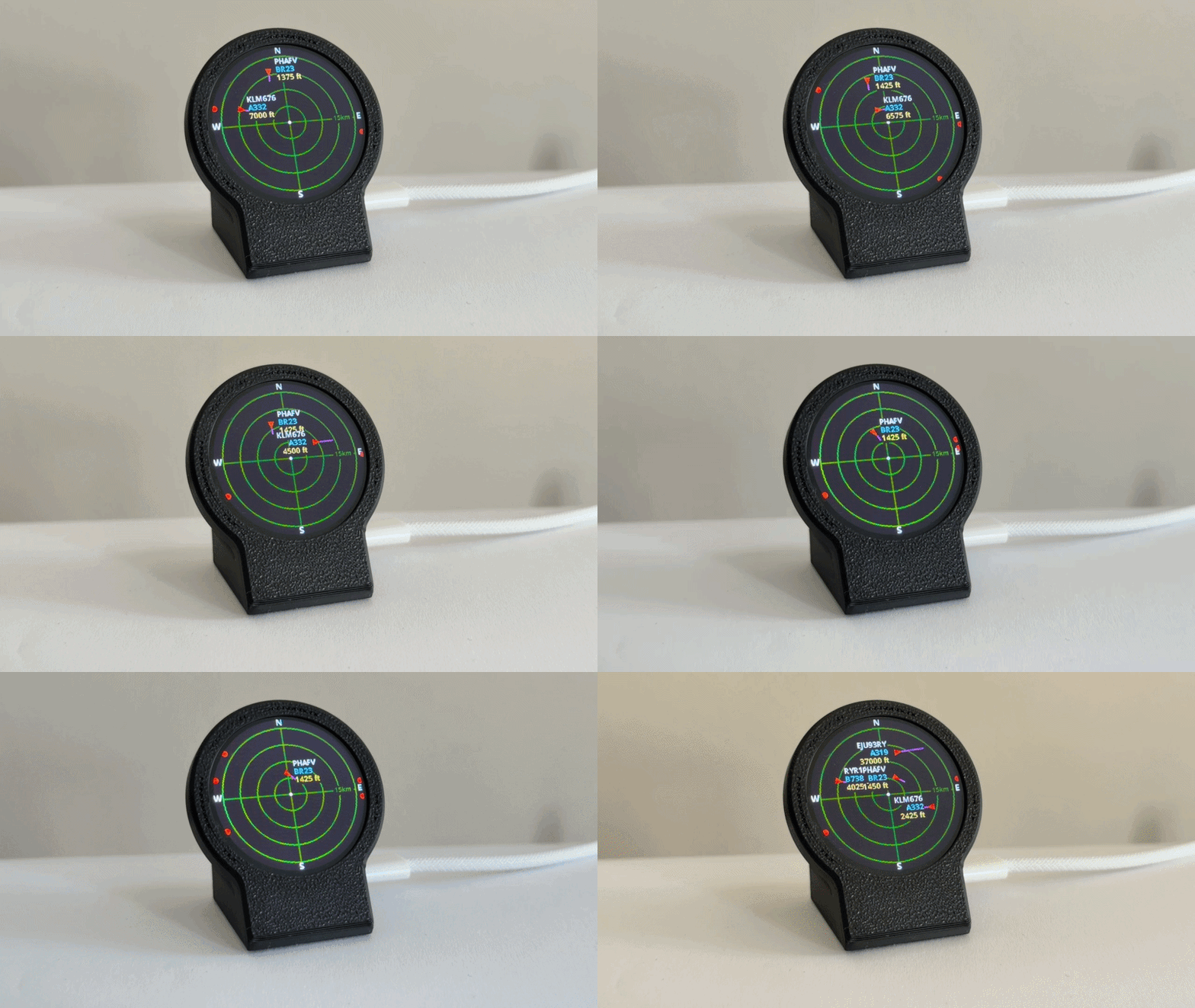
We know, we know. Despite being called ESP32-Plane-Radar, this project from [Mateusz Juszczyk] isn’t actually using radar. But thanks to the round LCD this desktop gadget does a fantastic job of recreating a classic radar display, and by pulling in Automatic Dependent Surveillance–Broadcast (ADS-B) data, the visuals even match nearby real-world aircraft.
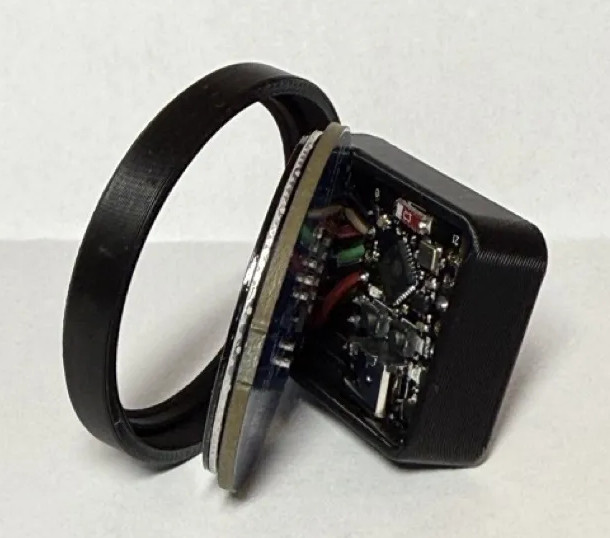 Perhaps the best part of this project is just how easy it is for others to get in on the action. Although the presentation certainly looks professional — and expensive, if we’re being honest — there’s nothing particularly exotic going on here. Specifically, there’s ESP32-C3 Super Mini behind the scenes cranking through the ADS-B data and pushing it out to a circular GC9A01 display. A minimalistic 3D printed enclosure holds both components, and while it’s undeniably slick as-is, we can’t help but think there’s potential here for more elaborate designs.
As you probably guessed from the lack of a radio in the parts list, the code [Mateusz] provides doesn’t actually sniff ADS-B out of the air. It connects to the local network over WiFi, and then hits adsb.fi to pull in crowdsourced flight data. Since the device has to connect to the network anyway, the code also offers up a web-based configuration interface which puts a little more polish on what’s already an impressive presentation.
We used a round GC9A01 display on the Vectorscope back in 2023, so if anyone ports this over to their old Supercon badge we’d love to see it in action.
Thanks to [Mauricio] for the tip.

Dubai-based smart contact lenses startup XPANCEO announced it’s expanding a partnership with China’s JBD to co-develop a new micro-display designed specifically for smart contact lenses.
Previously, the companies co-developed a printed circuit board with integrated micro-display, as well as a unique optical system capable of forming a near-eye image for easy focus.
Now XPANCEO is deepening ties with JBD, the Shanghai-based micro display company, to co-develop the tiny displays that could one day be in consumer smart contacts of the future.
Notably, JBD is behind some positively miniscule XR displays; one such display we saw back at CES 2020 was smaller than a penny, but capable of a blinding 3,000,000 nits.

The companies say the partnership will focus on scalability and manufacturability, which could lead to their first mass-market production run of specialized contact lens microdisplays. That said, the pieces are still coming together.
Packing everything into a contact lens form factor is a major feat, with XPANCEO noting it should be around the thickness of a human hair to ensure optimal comfort and wearability.
Another critical challenge is brightness management, since light levels must be carefully balanced to ensure ocular safety while remaining strong enough to see clearly and comfortably. Since images are projected directly onto the user’s retina, prospective smart lenses can make use of lower brightness than smart of AR glasses, the companies say.
In May, XPANCEO revealed it struck a similar partnership with France-based solid-state battery startup ITEN, which aims to solve another big challenge in ocular wearables; conventional batteries are thick, not durable enough, and aren’t suitable to be used in in devices worn directly on the human eye.
And while XPANCEO has its work cut out for it, the company seems to be in the best possible position, as the company secured its Series A financing round in July 2025 to the tune of $250 million, garnering it a $1.35 billion valuation.
The post Smart Contact Lenses Move Closer to Reality as XPANCEO Expands JBD Display Partnership appeared first on Road to VR.


PocketMage is an open-source hardware, ESP32-S3 personal digital assistant (PDA) with a primary, sun-readable 3.1-inch E Ink display, a secondary 1.8-inch OLED for high-refresh rate feedback, a full tactile QWERTY keyboard, and a capacitive scroll bar.
The device also features a microSD card slot for storage, a buzzer for audio/sound feedback, a USB-C port for charging the 1,200 mAh battery or connecting a USB keyboard, as well as an RTC and an FPC connector for GPIO expansion.
PocketMage specifications:


The PocketMage PDA runs a wizard-inspired OS described as “a character-filled operating system that makes every interaction feel like magic”. Based on FreeRTOS, it features a built-in software suite with a text editor, a dictionary, a terminal, and more. It also supports side-loading 3rd-party applications through the Bazaar app store, including a calculator, a text-based web browser, a Tarot card reader, an e-book reader, and so on.
The project is open-source hardware with the KiCad hardware design files, software, and documentation under the Apache-2.0 Open Source Hardware license. You’ll find all resources on GitHub, and you can easily install the latest firmware for your hardware through a web installer.

The closest alternative is probably the open-source hardware Picocalc based on a Raspberry Pi Pico W or Pico 2 W, which features a 4-inch IPS display with 320×320 resolution, stereo speakers, and a backlit QWERTY keyboard. The overall design is different, and it’s not quite as pocketable since it’s larger at 167 x 97 mm.
The ESP32-S3-based personal digital assistant has just launched on Crowd Supply with a $100,000 funding target. Rewards start at $185 for a DIY kit to be assembled by the user, or you can pledge $235 for a fully assembled unit. In either case, two colors are available: “Royal Purple” and “Parchment”. Shipping is free to the US and adds $12 to the rest of the world. Backers will have to be patient, as deliveries are scheduled to start by the end of March 2027.
The post PocketMage – An ESP32-S3-based Personal Digital Assistant (Crowdfunding) appeared first on CNX Software - Embedded Systems News.
Anthropic publie un nouveau papier de recherche qui affirme avoir localisé, dans les entrailles de Claude, un espace neuronal jouant le rôle d'une mémoire de travail consciente. Derrière la métaphore neuroscientifique, l'entreprise américaine glisse aussi des enseignements pour la détection de comportements malveillants dans les modèles d'IA.
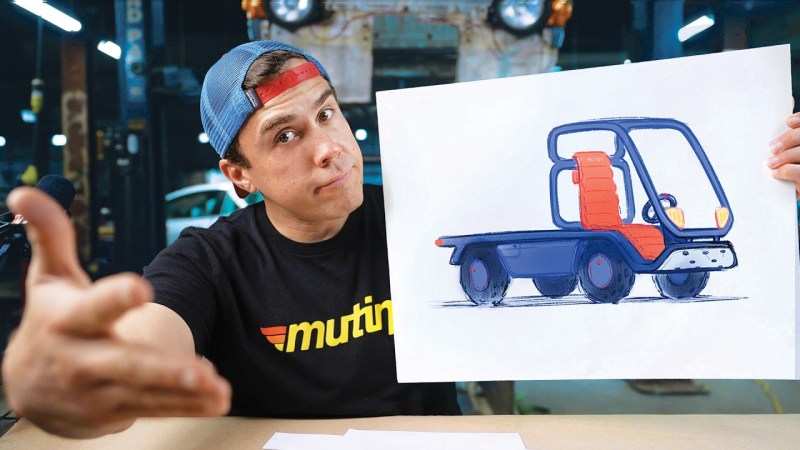
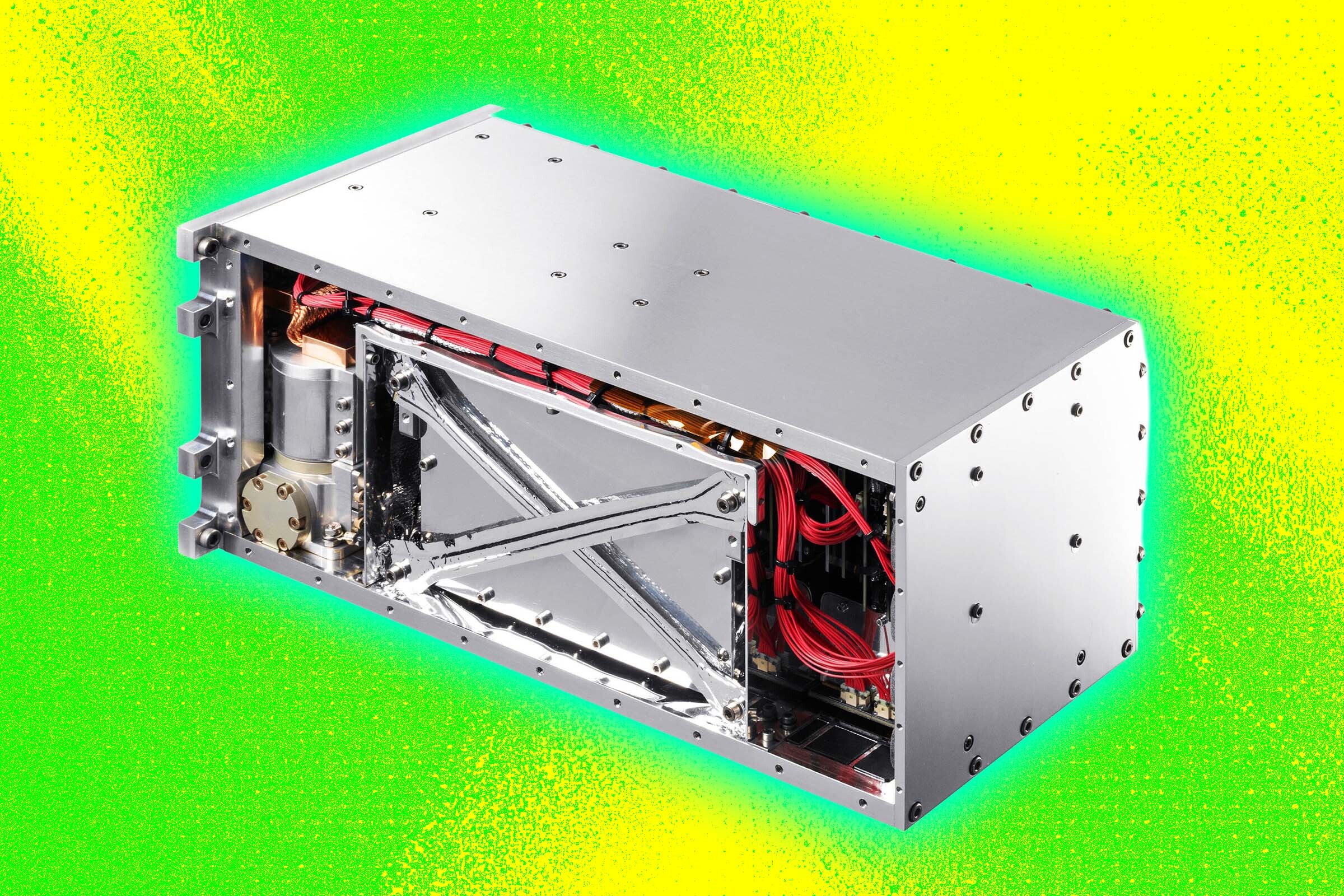
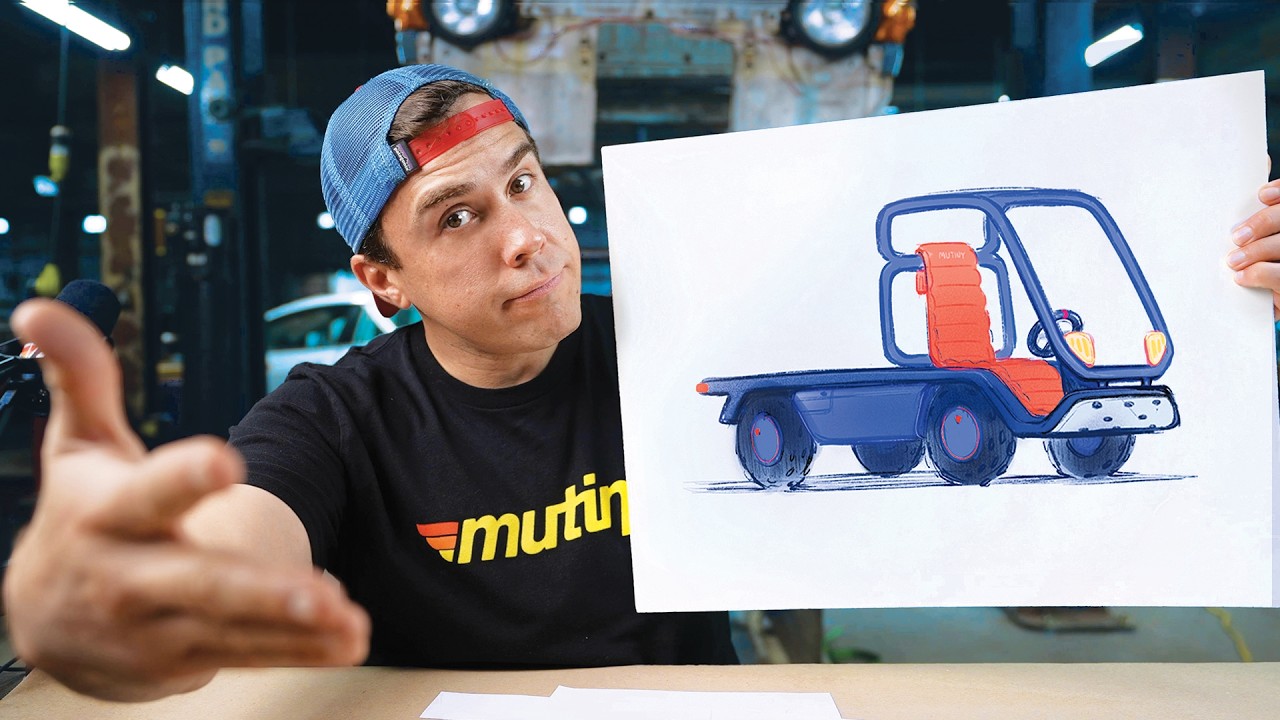
Cheap vehicles are thin on the ground in 2026, but [Andy Didorosi] thinks he has the answer for low-speed applications with an open source kei truck.
Still in the early design phase, [Didorosi] has an old factory in Detroit that has been home to his bus transportation business for the last several years, as well as the Sendpai kei truck project to make the world’s fastest kei truck. His vision is to make an affordable kit car truck that anyone can build in the comfort of their own garage. The current plan includes hub motors, which have so far not made it into any production EVs in the US, likely due to the problem with high unsprung weight.
While making a new vehicle from scratch is difficult, the project is targeting a modest set of capabilities at the beginning. The truck will be eschewing safety for low cost, which is probably fine for low-speed off-road use as a utility vehicle. Safety will of course get more important as speed increases. Once the design is sufficiently nailed down, [Didorosi] hopes to sell fully assembled trucks that are compliant with US Low Speed Vehicle (LSV) requirements. This would allow it on roads with posted speed limits below 35 mph.
Will Mutiny succeed where efforts like OScar, CarBEN, or Wikispeed could not prevail? Only time will tell. We hope they’ll keep the Minimal Motoring Manifesto in mind, and in the meantime, you should check out this kei camper or an EV-swapped kei truck that looks like it runs on a giant drill battery.
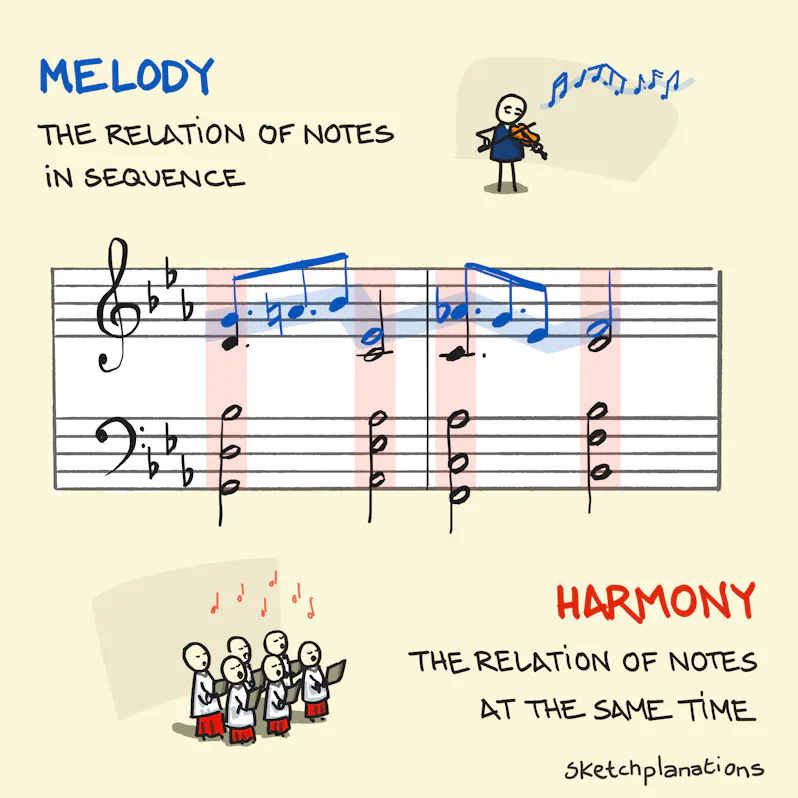
Two simple ideas at the heart of music: melody and harmony.
I had a general awareness of both of these, but came across this wonderful, clear distinction:
In other words, melody is about notes over time; harmony is about notes together.
The simplicity of melody and harmony makes them beautiful metaphors for so much. If your life is in harmony, the different parts fit together well. The melody may be the journey or story of your life over time. Melody is like a line and harmony the landscape.
The example in the sketch is a simplified passage from Let Go - Reprise (sheet music) on my piano EP Deep Down and Not Forgotten.
Melody is simply how we interpret a series of notes heard in order. A linear succession made up of pitch and rhythm.
As in this example, melody is often the top notes of a piano part. But a melody could be in the middle, or you can have multiple melodies running simultaneously.
It’s remarkable to me that what we call melody we pick out automatically from the mass of sound over time. A good melody can stay with you for life.
I don’t know how our brains process this, but I distinctly remember, as a teenager, the sudden realisation that the way we hear and interpret the sound of a note depends entirely on the preceding sounds. I found this particularly striking in Shostakovich’s beautiful Piano Concerto No. 2, which has both beautiful melodies and harmonies. I tried to recreate the effect—much less successfully—in my piano piece The Space Between, the artwork of which is based on my sketch of the Japanese concept Ma: the role space plays in your art.
Harmony is the relationship between sounds heard at the same time. It’s nice when these sounds go together well, but technically harmony doesn’t have to be harmonious.
Harmony has both a vertical dimension of different notes (or frequencies) stacked together and a horizontal dimension as those sounds change over time.
In the sketch, the left-hand notes (on the bottom set of lines) with the red background are held for longer than the notes in the melody and so actually sound at the same time as the blue notes connected by the bars. So the blue notes also become part of the harmony. In my piano music, I use the pedal a lot, which sustains the sound of notes, and create harmonies by layering multiple notes over time.
--
As with chess, I find myself in awe of the incredible diversity of combinations it’s possible to create from the simple ideas of melody and harmony.
I came across the simplicity of the distinction in Autobiography of a Yogi where he writes:
“Melody is the relation of successive notes. Harmony is the relation of simultaneous notes.” Simple.
Also see:
Les humains font vraiment des trucs de dingues. Surtout les scientifiques !!
On a 2 biochimistes de l'Université du Minnesota (Kate Adamala et Aaron Engelhart) qui viennent de créer SpudCell, la première cellule artificielle capable de boucler un cycle de vie complet comme une vraie.
Je vais simplifier mais en gros, ils ont mélangé 150 ingrédients comme des lipides, des ribosomes, des enzymes et quelques brins d'ADN, et ont fini par obtenir une cellule artificielle, qui peut grandir, recopier son génome et se diviser en deux par elle-même.
Il faut savoir qu'une cellule normale utilise ce qu'on appelle un cytosquelette pour réussir à se diviser comme un ballon qu'on écraserait. Mais SpudCell n'a pas de cytosquelette. Du coup, à la place, ce sont des protéines de fusion qui s'accumulent encore et encore à la surface de sa membrane et qui se serrent tellement les coudes que la cellule finit par se couper en 2.

Et le truc encore plus incroyable, c'est que sur 5 générations environ, une variante bidouillée pour produire un peu plus de ces protéines a carrément pris le dessus sur la souche d'origine en mode "C'est la sélection naturelle qui gagne, baby".
Sauf que non, t'as rien de naturel, et t'es même pas vivante. Je vous rassure nos chercheurs n'ont pas recréé la vie et ils le disent eux-mêmes, SpudCell est très rudimentaire, bien loin de ce qu'on peut retrouver dans la nature. Je vois plutôt ça comme un nano robot en fait. Et comme la cellule n'est pas capable de fabriquer ses propres ribosomes (ce sont les chercheurs qui lui apportent en plus de sa nourriture), elle est loin d'être autonome et ne pourrait pas survivre hors de son bocal.
Mais n'empêche, ça prouve qu'on peut faire tourner les fonctions les plus fondamentales du vivant sans avoir besoin d'ingrédient magique. On est dans le même délire, je trouve que ces IA qui dessinent déjà de l'ADN qui n'existe nulle part dans la nature , sauf qu'ici c'est un vrai objet physique qui se réplique.
Suite à cela, Adamala en a profité pour lancer Biotic , une structure censée standardiser tout ce bazar, parce qu'aujourd'hui chaque labo réinvente la roue dans son coin. Mais je tiens quand même à vous rassurer, on est très loin des bactéries miroir qui donnent des sueurs froides aux biologistes. Comme je vous le disais, SpudCell ne survivrait même pas à un courant d'air, donc pas d'inquiétude.
Dernier petit détail qui compte sauf pour les fans de Didier, l'étude est pour l'instant un preprint qui n'a pas encore été relu par les pairs donc en attendant, on regarde ça avec des yeux qui brillent, mais on garde le champagne au frais ^^.