Shared posts

27 Aug 20:32

Google Says Local Content Could Come Back to Chromecast

by Robert Sorokanich on Gizmodo, shared by Whitson Gordon to Lifehacker

Google Says Local Content Could Come Back to Chromecast

Yesterday, Google upset lots of folks by pulling the plug on the most awesome aspect of Chromecast, the ability to play local content through a third-party app. Today, the company's saying it was an inadvertent mistake, and that local content will stay. What gives?

Soon after Chromecast arrived, developer Koushik Dutta put together a stream-everything app called Aircast. It worked a lot like an Android version of Apple AirPlay, meaning you could push pretty much any video to the Google wonder dongle. In yesterday's automatic Chromecast update (which happens automatically when the device is powered on and can't be avoided), that functionality was lost. Dutta looked at the update and decided that it broke the local streaming function intentionally.

Google's statement says that's not the case, and blames Google Cast's newness while swearing that it loves local content capability:

We’re excited to bring more content to Chromecast and would like to support all types of apps, including those for local content. It's still early days for the Google Cast SDK, which we just released in developer preview for early development and testing only. We expect that the SDK will continue to change before we launch out of developer preview, and want to provide a great experience for users and developers before making the SDK and additional apps more broadly available.

According to Dutta, local content's disappearance still looks like it was done purposefully, so the vow of support for such apps seems a lot like a backtrack on Google's part. To be fair, mirroring from an open Chrome tab was never off the table, and for $35 the Chromecast is still pretty impressive. Guess we'll just have to wait and see whether it supports the kind of apps that could make it out-and-out awesome.

27 Aug 20:25

22 Years Later, The Linux And Open Source "Cancer" Is Wonderfully Benign

by Matt Asay

Linus Torvalds in his younger days.Linus Torvalds in his younger days.

Twenty-two years ago Linux was born as a "(free) operating system" that founder Linus Torvalds was quick to downplay as "just a hobby" that wouldn't "be big and professional." My, but how times have changed. So much so that Linux now dominates mobile (Android), servers and cloud. No wonder that Microsoft CEO Steve Ballmer derided Linux in 2001 as a "cancer" that "attaches itself... to everything it touches." 

He was right. At least, as it relates to Linux's effect on Microsoft.

Earlier this week Torvalds celebrated the 22nd birthday of Linux by cheekily calling Linux "just a hobby, even if it's big and professional" now in a way he never envisaged back in 1991. To help gauge just how far we've come since then, I asked Eucalyptus CEO (and fellow Finn) Marten Mickos and Cloudera Chief Strategy Officer Mike Olson to help put open source in perspective. Both men have had an outsized impact on open source, particularly the business of open source, and neither were shy about estimating open source's impact.

On The Maturing Power Of Open Source

One of the amazing things to have watched over the years is the market's growing acceptance of this oddball movement, as Mickos highlights:

People didn't know what it was, how it worked, why people did it, how it could produce great software, etc. That's why the LAMP stack made it onto the front page of Fortune Magazine—it was so new and intriguing. Incumbents fought it. Now they embrace it (or at least pretend to).

Those who did open source just did it. Back then it was relatively few projects with relatively few people in them. Today there are probably 100-1000X the number of projects.

And while open source was born as an alternative way to develop and distribute software, it has become something more, as Olson intimates:

I've been pleased to see the ideas behind open source migrate to other important domains, and for APIs to become a kind of currency in the way that source code used to be. I think that open source was really a way to adopt the principles of scientific collaboration—i.e., publish your results, let your peers review and refine your work—to a field that badly needed it. I hope—I believe!—we are doing the same thing now with data and, to some extent, to services via cloud APIs.

On Torvalds' Other Big Innovation... And Getting Along

Arguably one of the biggest things to happen to software development in a long, long time is GitHub, the wildly popular code repository. While Torvalds didn't start GitHub, he did create git, the actual distributed version control system software itself. The creation of git is something that Olson credits with a very significant side effect:

It's been really interesting to watch git emerge. I think of myself as pretty deep in software, but I really wasn't paying it any attention five years ago. Remember when "fork" was an insult? Git encourages forking. It's changed the way that open source projects work by fomenting more diversity.

While not referencing git, Mickos describes a similar benefit of open source's peculiar licensing:

The purpose of the free and open source license and the governance model is not really to enable like-minded people to collaborate, although that's a benefit too. It's about enabling unlike-minded people to collaborate. The beauty of open source is that people who dislike each other can produce code for the same product.

In fact, while a genial person, Torvalds exemplifies one of the other characteristics of open source: a penchant for blunt, sometimes harsh, criticism. But this, insists Mickos, is one of the hallmarks of how open source succeeds:

When people complain about your open source project, you need to hear them as saying "I would love to love you, but right now I cannot." If nobody is opposed to your open source product/project, you are not really being popular... If you on a sustaining basis can truly love harsh feedback and if you can truly show enthusiasm and appreciation for contributions of whatever magnitude and type, you can be wonderfully successful in open source.

Where Do We Go From Here?

For Olson, sitting as he does at the heart of the Big Data movement, open source's future is wide open:

Open source has gone from a weird thing off on the fringes of hackerdom, through "cancer" and "communism," to absolute mainstream. People now think intelligently about its different attributes—a collaborative development model, a frictionless distribution model, and a powerful way to win platform dominance.

Mickos, a key player in the growing cloud market, suggests that while open source developers may have lost a bit of their bite, their impact remains unbounded, if more circumspect:

In the early days of open source it seemed that open source developers were true cowboys—out on their own, following their own individual paths, valuing their nearly unlimited freedom. Today many open source developers are happy to be salaried employees of companies that don't really stand for open source on a corporate level (Google, HP, IBM, Oracle, etc.). There is a voluntary submissiveness today that wasn't as common before.

There is still a lot of unbridled enthusiasm, often bordering on naiveté—with all the amazing upsides and inevitable downsides that this will bring.

Mickos goes on to conclude that "Some people will spend any amount of time to save money. Some will spend money to save time. Without money, open source will die." There's a whole lot of money in open source these days. Just counting recent venture capital raised by the cloud and data companies amounts to hundreds of millions of dollars.

But the soul of open source has not been corrupted. Thanks, in no small degree, to Linus Torvalds and his Quixotic endeavor to change the world with something small that turned into something huge. 

27 Aug 15:44

Chris Carter Lands A New Pilot At Amazon

Chris Carter Lands A New Pilot At Amazon

The After may stream online

The next issue of Empire (hitting shops on Thursday) features an exclusive interview with X-Files creator Chris Carter. We excerpted some quotes from him about the possibility of a third Mulder and Scully film, but he’s also now landed a new TV gig, setting up a pilot with Amazon.

Following the recent splurge of comedy and cartoon pilots (including an unsuccessful stab at bringing Zombieland to the small screen), Amazon has now commissioned an episode of a new Carter show called The After.

With a script from the man himself, The After is a thriller that revolves around a mysterious, unexplained event. In the vein of The X-Files, it incorporates elements of science fiction, suspense, and real-world fear and paranoia. The potential series already has the backing of indie TV studio Georgeville Television, which, together with the presence of Carter, makes it an appetising proposition with Amazon, which is looking to compete with Netflix and Hulu in scripted series.

Of course, now we have to wait and see if the series gets picked up once the pilot is submitted…


27 Aug 15:36

33 Best New Android Apps From The Last 2 Weeks (8/13/13 - 8/26/13)

by Jeremiah Rice

roundup_icon_largeWelcome to the roundup of the best new Android applications, games, and live wallpapers that went live in the Play Store or were spotted by us in the previous 2 weeks or so.

This is the app roundup. The game roundup from this week can be found here.

Please wait for this page to load in full in order to see the AppBrain widgets, which include ratings and pricing info.
Done With This Post? You Might Also Like These:

33 Best New Android Apps From The Last 2 Weeks (8/13/13 - 8/26/13) was written by the awesome team at Android Police.


27 Aug 15:34

NYPD officer who arrested NYT photographer indicted

by Rob Beschizza
Russ Buettner: "A New York City police officer who had arrested a photographer working for The New York Times has been indicted on three felony counts and five misdemeanors accusing him of fabricating the reasons for the arrest."


27 Aug 15:28

"Read Later" Apps Compared: Pocket vs. Instapaper vs. Readability

by Whitson Gordon

"Read Later" Apps Compared: Pocket vs. Instapaper vs. Readability

Chances are, you stumble upon a lot of articles during the day that look interesting, but that you don't have time to read right now. Lots of services have cropped up to solve this problem, and today we're looking at the most popular three and pitting them against one another: Pocket, Instapaper, and Readability. Here's how they stack up.

We've touched on this subject a few times before, and this article originally appeared back in March of 2012 (which is why some of the comments are outdated). However, with the years come new names, new features, and more. So, we've updated this comparison to include the latest versions of each app.

Pocket (Formerly Read It Later)

"Read Later" Apps Compared: Pocket vs. Instapaper vs. Readability

Pocket was the first of these bookmark and read later services back when it was called Read It Later, and as such has an impressive spread of supported devices and apps. It's also come a long way in the looks department, and has some killer features that make it our favorite of the three.

Price: Free

Supported Devices: Pocket has official apps for iOS, Android, Chrome, and the web. There are also third party clients for Windows Phone, BlackBerry, WebOS, and others available.

Supported Apps: Pocket has, by a good margin, the most support among third party apps. If you want to save articles from Pulse, Flipboard, the Onion, TweetBot, the Alien Blue Reddit Client, and other apps, Pocket is the service to use. It also has browser extensions for Firefox, Chrome, and Safari, and a bookmarklet that works in any browser. For everything else, it has an easy save-by-email function. You can view the full list of supported apps here.

Interface & Features: Pocket is probably the most feature-packed of the three clients. Apart from the features mentioned above, Pocket can also:

  • Save embedded video in any article so you can watch them inline. No other read-it-later app does this (though you must unfortunately be online for this feature to work in Pocket).
  • Send articles to other people via email, or—even better—straight to other Pocket users.
  • Choose from two different fonts, multiple font sizes, and three different color palettes (black on white, white on black, and sepia).
  • Choose from two views on the home screen: a tiled "card" view and a traditional list view.
  • Tag articles for easier browsing

Who Should Use It: When in doubt, Pocket probably supports your device of choice and the apps you use. It has a solid feature set and a well put together interface, plus it's supported by nearly everyone that supports a bookmark and read later app. Currently, it's our favorite read later service.

Instapaper

"Read Later" Apps Compared: Pocket vs. Instapaper vs. Readability

Instapaper was long popular with the iOS crowd, but has since expanded to other platforms. Its always been praised for its design, but we think its biggest strength lies in its article discovery. Not only can you save articles you found on the web, but the ability to follow your friends on Instapaper is a great way to pick up a few more, plus the Editor's Picks help you find articles you wouldn't have otherwise read. It's mainly focused on the Mac and iOS side of things, but has a lot of third party support on other platforms too.

Price: $3.99 on iOS, $2.99 on Android. Instapaper also offers a $1/month subscription service that lets you search your entire archive of articles, which is handy.

Supported Devices: Instapaper officially only supports iOS, Android, and the Kindle. You can also export your articles in ePub format, for use on any ereader that supports it.

Supported Apps: Instapaper doesn't have quite as many supported apps as Pocket, and many of them are iOS and Mac apps (like Reeder, NetNewsWire, and Tweetbot), but the list is still impressive. You can also submit articles via a bookmarklet or by email. Check out Instapaper's list of supported apps for more information.

Interface & Features: Instapaper has a very pretty interface, and has grown to include a solid list of features. Apart from the above, Instapaper also lets you:

  • Choose from 14 different fonts, multiple font sizes, paragraph spacing, and line spacing options as well as three color palletes. Instapaper has more choices for customizing the reader interface than any other app of its type.
  • Follow other people on Instapaper and read articles they've "liked"
  • Discover popular articles others are reading through Instapaper's "The Feature" section (which is a little wonky and includes a lot of duplicates, but is still a great way to find stuff to read)
  • Choose from two views on the home screen: a tiled "card" view and a traditional list view.
  • Scroll through articles by tilting your device back and forth.
  • Define words you don't know using an offline dictionary.
  • Organize articles in folders for easier browsing.
  • Search your entire archive of articles (pro subscription only).

Who Should Use It: If you love choosing between a bunch of different fonts, like novel features like tilt scrolling, and have other friends using Instapaper, this app is for you. In our experience, it doesn't always work as well as other apps at stripping and presenting articles, but as far as design configurability goes, it's the most powerful of the three.

Readability

"Read Later" Apps Compared: Pocket vs. Instapaper vs. Readability

Readability has always been a big name in making web articles more readable, but it's way behind the times on the bookmark service and mobile apps. Still, while it may not be as mature and feature-filled as its cousins, its simplicity may win over people who just want to get reading.

Price: Free

Supported Devices: Readability supports iOS, Android, and Kindle devices, and it has extensions for Firefox, Chrome, and Safari, plus the usual bookmarklets and add-by-email features.

Supported Apps: Readability doesn't have a lot of app integration, though it does work with a few popular ones, like Pulse, Reeder, Flipboard, Tweetbot, Longofm, and iCab Mobile. Check out Readability's apps page for more info.

Interface & Features: Readability looks pretty similar to Instapaper, but with fewer options. We think it looks a little nicer and its gestures and animations really make its interface nice, but it isn't nearly as feature-filled as the other apps. With it, you can:

  • Navigate the app with a number of handy gestures
  • Tag articles for easier browsing
  • See what other people are reading with the "Top Reads" list, which is an awesome way to find new articles
  • Choose from two views on the home screen: a tiled "card" view and a traditional list view.
  • Choose from five different fonts, five text sizes, five settings for column width, and two color palletes (light and dark).

Who Should Use It: Readability is probably the prettiest in our opinion, both in interface design, gestures, and animations, but it doesn't have a ton of features or support a lot of apps. If you just want something simple, Readability will work fine, but otherwise, we'd recommend skipping it in favor of Pocket or Instapaper.

27 Aug 15:28

Birdsong.fm Helps You Work (or Relax) to the Sounds of Singing Birds

by Alan Henry

Birdsong.fm Helps You Work (or Relax) to the Sounds of Singing Birds

Web/iOS: We've talked about services that help you relax or help you be more productive with the sounds of falling rain, coffee shop buzz, or multiple soundscapes that you can choose, but if singing birds helps you focus (like it does for me), Birdsong.fm delivers in droves.

At first blush, Birdsong.fm is simple: an animated background and some singing birds in the background, maybe accompanied by a few other nature sounds. You could just leave it there and go back to work—that would be enough if you work indoors, face a grey cubicle wall, or it's the dead of winter and you could use a dash of spring.

Click the menu button in the top right to see more options. From there you can grab the free iPhone and iPad app so you don't have to be tethered to your computer (additional sounds and landscapes are available in the app as in-app purchases), or you can click to buy a high-quality mp3 of the audio so you can listen to it anytime, anywhere, on any device. Finally, if you fork over your email address, you get access to the "Nest," which gives you access to additional soundscapes, including a summer scene, a rainforest, and a few others, along with first access to new soundscapes as they're added. Hit the link below to give the service a spin.

Birdsong.fm

27 Aug 15:22

Samsung confirms 'Galaxy Gear' smartwatch coming September 4th

by Aaron Souppouris

A Samsung executive has confirmed speculation that it will unveil a new smartwatch, the Galaxy Gear, at an event next week. Lee Young-hee, executive vice president of Samsung Mobile, tells the Korea TImes that the device will be based on Android and feature a "non-flexible" display. Lee calls the Galaxy Gear a "wearable concept device," which raises the question: will Samsung sell its smartwatch to the mass market? Lee adds that Samsung is "confident that the Gear will add meaningful momentum to the mobile industry," implying the device is just an early exploration of a potential market, rather than one aimed at mainstream adoption.

In the same interview, Lee also confirms that the Galaxy Note III, a sequel to the popular tablet /...

Continue reading…

26 Aug 22:42

New findings about the human genome bring us closer to schizophrenia treatment

by Vlad Savov

An international team of doctors from the University of North Carolina, MIT, Harvard, and the Karolinska Institutet in Stockholm have taken a major step toward pinpointing the genetic causes of schizophrenia. The mental illness affecting some 24 million people worldwide has so far proven incurable, however this latest advance "provides the hitherto strongest clues" to its genetic underpinnings.

Studying blood samples from 5,001 schizophrenia sufferers and 6,243 healthy subjects, the researchers identified 22 genetic risk factors for the disease, 13 of which are newly discovered. These are locations in the human genome where some common genetic variations have been associated with the presence of schizophrenia. The new findings are...

Continue reading…

26 Aug 22:42

Yahoo starts handing out abandoned IDs to new users, now charges $1.99 to request a name

by Adi Robertson

Yahoo has officially begun an ambitious recycling of unused account names. Last month, it launched a plan to deactivate old accounts that hadn't been used in the past year, freeing up short and desirable email addresses for a new batch of people. Now, it's started doling out the very first repurposed names. If you put your top five choices on a wish list by August 7th, Yahoo will let you know today if one of them is available. If not, you'll be automatically moved to a "watch list," which will keep your picks queued up for three years. As old accounts go dark, Yahoo will dole them out accordingly.

The plan to resurface old addresses fits with an effort to revamp Yahoo's oft-ignored email and web tools, but it's raised privacy and...

Continue reading…

26 Aug 22:35

HTC Mini+ is a phone for your phone

by Alex Dobie

HTC Mini+HTC launched the HTC Mini companion handset in China last year, and now it appears the next version of the device is heading for a wider launch.

Following a recent update for the European HTC One which added support for the "Mini+," the second-gen "phone for your phone" has been listed on HTC's international site.

The HTC Mini+ (not to be confused with the One Mini, a standalone smartphone) connects to your HTC phone and has a 1.5-inch 4 gray OLED display with 128x128 resolution. (Yep, that's a slight step down from the HTC One's 1080p SuperLCD3 with 468ppi.)

Once paired, the Mini+ can be used to make calls, control your TV (through IR, presumably), view text messages and even take pictures from your phone's camera at a distance. There's also a built-in laser pointer and "slideshow remote control" for controlling PowerPoint presentations. A built-in 320mAh battery provides up to 9 hours of talk time, or 95 hours on standby.

The device is listed as being compatible with the HTC One mini, HTC Butterfly s, HTC Desire 200, HTC Desire 500 — presumably the full-sized HTC One isn't on that list yet because the required software update hasn't reached all the countries in which it's sold.

There's no word on when the Mini+ will be available to buy, nor how much it'll cost — but given that it's already on HTC's site, we're guessing the wait won't be too long.

Source: HTC; via: the::unwired


26 Aug 22:25

Baby goat discovers mirrors

by Xeni Jardin
[Video Link, thanks Theremina!]


26 Aug 14:17

Paysafecard Begins Banning VPN Providers

by Ernesto

paysafePayment services are increasingly taking action against VPN providers, and as of today paysafecard can be added to the list.

Paysafecard is a popular prepaid coupon sold at 450,000 sales points in dozens of countries. It is accepted by Internet companies worldwide, including many gambling sites and file-hosting services such as RapidShare and Netload.

The payment method recently gained the interest of iPredator, a VPN provider launched by Pirate Bay founder Peter Sunde. After losing Visa and Mastercard as a payment option, as well as recent troubles with PayPal, the Swedish VPN provider needed another payment option.

However, when iPredator decided to sign up with paysafecard the alarm bells began to ring in the company’s compliance department. “We don’t work with VPN services,” was the reply paysafecard sent, denying the application.

Hoping to get some more details on this strong anti-VPN stance TorrentFreak contacted the company. paysafecard’s PR Specialist Michaela Unger informed us that they don’t accept VPN services because these allow users to spoof IP addresses.

“In terms of security it is seen as a very high risk for paysafecard, because you cannot trace where the information is coming from,” Unger says.

“In many cases VPN services are used for businesses which have something to hide – this can be any illegal business because if the IP address is spoofed, you cannot trace where all the information is coming from. People can hide a lot of illegal content and you will never be able to detect the original source,” she adds.

Paysafecard is the first payment method to confirm a VPN ban. Earlier this year the Swedish payment service provider Payson outlawed anonymizing services as well, but only for Visa and Mastercard payments.

Interestingly, paysafecard still lists a VPN provider as one of their merchants, but this will probably change in the near future.

It is unclear what evidence of abuse the company has seen. There are obviously plenty of legal uses for VPNs. The news, however, does follow a trend in which online payment systems take action against VPNs.

For example, one large European payment processor informed iPredator that they have been put on a blacklist of services that are not allowed to accept credit card payments. TorrentFreak previously asked both MasterCard and Visa about the claims of an operational blacklist, but both companies denied one exists.

Mastercard’s Senior Vice President of External Communications, Andrew Bowins, told us that they have no policy to ban VPN services, but that they occasionally disconnect merchants who violate their terms.

“We don’t currently have a policy that unilaterally prohibits VPNs or anonymizers. That said, in order to protect the integrity of the payment system and its participants, we do review merchants to determine whether their models are in compliance with our rules,” Bowins told TorrentFreak.

Neither MasterCard nor Visa could confirm that iPredator was allowed to process credit card payments.

The big question is, why are VPNs slowly starting to lose access to online payment systems? Is it all a coincidence or are we witnessing a coordinated push against anonymizer services? Are there any agreements being made behind the scenes to target these services?

If that’s indeed what’s going on, how long before VPNs become illegal?

Source: Paysafecard Begins Banning VPN Providers

26 Aug 08:59

Five Best Video Converters

by Alan Henry

Five Best Video Converters

If you're getting your movie and TV show library in order, it helps to have all of your video in one format that you know every device you own can play without issue. However, if your collection spans years of downloads, rips, and saved copies, your files can be all over the place. This week we're going to look at five of the best video conversion tools that can faithfully get your media library organized and ready to watch anytime, anywhere.

Earlier in the week we asked you which video converters are the best. You weighed in with more options than we could possibly highlight, but after tallying them all up, there were five that stood out above the others. Here's what you said, in no particular order:

MPEG Streamclip (Windows/OS X)

Five Best Video Converters

MPEG Streamclip is a powerful video player, editor, and conversion tool for Mac and Windows. It's great at transcoding, but it's also a great organizational tool for all of your video and media. If you opt to use it as a player, you can play all manner of video file through it, but from a video transcoding and conversion perspective, it's fast, flexible, and completely free. Those of you who nominated it pointed out that it may not be the newest video conversion app out there, and it may not be the prettiest, but it gets the job done and can convert just about anything to just about anything else quickly, easily, and without complaining—and that's what's important.


Format Factory (Windows)

Five Best Video Converters

Format Factory is a free, richly featured video conversion tool that can convert a laundry list of video formats to a wealth of popular, supported formats. Its interface leaves a bit to be desired, but it offers you a ton of conversion options and tweaks to make sure all of your videos are the same, or each video is just right. The utility even promises to repair broken audio or video if it can process it. You can use quick presets to convert videos for mobile devices, and even rip DVDs. Those of you who praised Format Factory noted that you've never had a video format that the tool couldn't convert to another format that you actually needed, and hey—it can also convert almost any video format to GIF, which is a pretty nice trick.


Handbrake (Windows/OS X/Linux)

Five Best Video Converters

Video conversion and transcoding it actually Handbrake's bread and butter. Even though it's useful for a ton of other things (not to mention it's your favorite DVD ripping tool, with the caveat that you need VLC installed), at its core it does a fantastic job of converting and transcoding video from one format to another, while giving you all the features, tweaks, and options you need to make sure it plays smoothly on whatever device or screen you plan to send it to. It's one of those tools that has single push-button options if that's what you want, or deeper tweaks if you prefer those. Even with its options, it's not the most detailed and option-rich app in the roundup, as many of you pointed out. Many of you did praise the fact that Handbrake is free, open-source, cross platform, and gets the job done quickly—and doesn't discriminate by codec, either.


Freemake Video Converter (Windows)

Five Best Video Converters

Freemake Video Converter is, as the name implies, completely free, and a great tool if you're looking for more options than you could possibly need in a package that's actually really attractive and fun to use. Freemake supports over 200 video formats and outputs in virtually every popular format you can think of, and can even convert online videos to mp3. There are simple presets for iOS and Android devices, as well as other tablets, handheld game consoles, and other devices. If you don't like the presets in the app, you can really customize your own. You can cut, join, and rearrange videos to create seamless final products, and more. Those of you who nominated it pointed out that first, all this power is completely free, doesn't hesitate to leverage the power of your PC's hardware to power through those conversions, and can handle anything you throw at it—seriously, anything.


SUPER (Windows)

Five Best Video Converters

SUPER, by eRightSoft, is another powerful video conversion utility, but in this case, it's probably one of the most underrated conversion tools we've seen. It's feature list is pages long, but suffice to say that it can convert to and from more video formats and types than you could ever need with more options than you could ever possibly use. If you want absolute and total control over your videos, this might be the tool for you, and it's completely free. However, its depth of options and interface aren't exactly the prettiest and can be dense to the average user looking for quick conversion operations. Plus, in order to use SUPER, you'll also wind up downloading its video player and recording tools. Those of you who praised it noted its learning curve and ridiculous wealth of options and tweaks, but once you're familiar with it, it's hard to use something else.


Now that you've seen the top five, it's time to put them to a vote to determine the Lifehacker favorite:

Honorable mentions this week go out to FFmpeg (Windows/OS X/Linux), the GPL-licensed conversion utility that many other video converters are based on, and even other HTPC apps and video players use for on-the-fly transcoding. You can go right to the source and grab it for free for whatever platform you're using. It makes converting, streaming, and even recording audio and video super-simple and fits in nicely with other applications and operations. Best of all, it's being actively developed, so even if the others in the roundup fall by the wayside, FFmpeg will probably live on.

Have something to say about one of the contenders? Want to make the case for your personal favorite, even if it wasn't included in the list? Remember, the top five are based on your most popular nominations from the call for contenders thread from earlier in the week. Don't just complain about the top five, let us know what your preferred alternative is—and make your case for it—in the discussions below.

The Hive Five is based on reader nominations. As with most Hive Five posts, if your favorite was left out, it's not because we hate it—it's because it didn't get the nominations required in the call for contenders post to make the top five. We understand it's a bit of a popularity contest, but if you have a favorite, we want to hear about it. Have a suggestion for the Hive Five? Send us an email at tips+hivefive@lifehacker.com.

Photo by trekkyandy.

26 Aug 08:57

Mozilla's Firefox OS Gives The Open Web Top Billing On Mobile

by Frederic Lardinois
Screenshot 2013-08-25 at 11.59.04

Mozilla was late to mobile and now it’s trying to catch up. For a while now, the nonprofit has been releasing mobile versions of its Firefox browser for Android, but its most ambitious project to date is its Firefox OS mobile operating system for smartphones.

Earlier this month, the Chinese handset manufacturer ZTE made the first set of its entry-level unlocked $80 Firefox OS phones available in the U.S. and the U.K. and quickly sold out the first batch of about 1,000 devices in each country. In Europe, the devices were already on sale through Deutsche Telekom in Poland and Telefonica in Colombia, Spain and Venezuela.

Earlier this month, I got a chance to talk to Mozilla’s Principal Developer Evangelist Christian Heilmann to talk about what this project means for developers. The company also sent me a review unit of the ZTE Open.

As Heilmann stressed when I talked to him, the phone is meant to fill what Mozilla believes is a “massive gap in the mobile space.” Right now, the organization rightly argues, mobile connectivity to the web is only for “the rich people in the modern world.” Android and iOS devices aren’t even available in many parts of the world, and the fact that you often need a credit card to fully use them puts them out of reach for a large number of potential users, especially in developing countries. The ZTE Open (and Firefox OS itself) then, Heilmann noted, is targeted at a market that is not covered by other phones.

Eager to set my expectations right for when I received the phone, Heilmann likened it to a family sedan that we shouldn’t compare to an F1 car. After using the ZTE Open for a while, that’s definitely true in this case. It’s clearly an $80 phone, but as a device that is meant to bring web connectivity to people who don’t currently have it — or can’t afford it — it succeeds.

Given the price, it’s no surprise that it’s still a bit sluggish at times. Firefox OS itself also still needs some polish around many edges. The sluggishness especially shows when you use the virtual keyboard. It’s often not clear when you press a link in the browser, for example.

Still, thanks to its focus on web apps, it’s pretty straightforward to use Facebook and Twitter, manage your email and text messages or to listen to music or the radio (and, of course, make phone calls). Most mobile platforms don’t treat the web as a first-class citizen and they definitely don’t make it easy for developers to distribute their apps over the web. On Firefox OS, developers get two options for distributing their apps: they can do so from their own website or — as so-called “privileged apps” — through Mozilla’s marketplace. For security reasons, apps that are distributed outside of Mozilla’s store, however, don’t get full access to all of the device’s hardware features (geolocation, gyros, etc.).

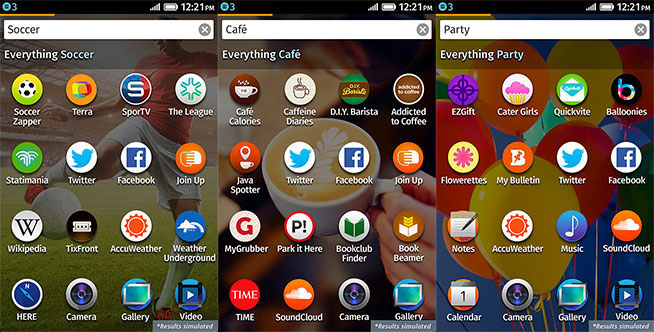
App discovery, by the way, is one of the cooler features of Firefox OS. Just swipe all the way to the left-most screen and you get a search bar. Type in something like “photography” and the screen will show you apps you already have installed on your device and a list of related service. For photography, this list includes the likes of Flickr, Picasa, Pinterest and Tumblr, for example. Type in “music” and you get links to SoundCloud, YouTube, Metro Lyrics, MTV, Last.fm and many others. Click on any of these, and you’re taken right to these service’s web apps. If you like them, just swipe up from the bottom of the screen to pin them to your home screen.

If you are a developer who wants to port existing mobile web apps to Firefox OS, the whole procedure is extremely easy and doesn’t involve much more than writing a manifesto to package it for Firefox OS. It’s so easy that when Heilmann reached out to those who had already done so, most weren’t really able to tell him much because it only took them a few minutes to do. Apps that want to use the platform to its full potential, of course, take a bit more work, but even there, the focus on HTML5, CSS and JavaScript opens the platform up to a wide range of developers who wouldn’t previously have considered writing apps for smartphones (similar to what Microsoft is doing with HTML5 on its Windows platform).

For many users, Mozilla hopes, Firefox OS will mark the first time they’ll use the open web on a phone. This is something developers should keep in mind as they design apps for the platform, Heilmann noted, as you can’t always expect that users are already familiar with all of the usage paradigms most of us have grown accustomed to over years of using touchscreen phones.

Overall then, the ZTE Open with Firefox is an interesting first look at the potential of Firefox OS. It’s not the world’s most amazing phone by a long shot, but I would never bet against the open web and with that at the core of Firefox OS, the operating system definitely has a chance to be successful in the long run.


25 Aug 19:35

How to Find Your Missing Phone

by Andrew Tarantola on Gizmodo, shared by Whitson Gordon to Lifehacker

How to Find Your Missing Phone

Oh boy, now you've done it. Not only are you supremely hungover from last night's rager, but your phone is nowhere to be found. Could you have left it at the bar, in a cab, in the gutter somewhere? Who knows! But don't panic, there's a host of apps that do. Here's how to find your phone when it goes missing.

While there's no guarantee you'll recover your device, these tips and apps will put you in the best position to get back what you lost. Or, if it comes to it, to make sure no one can get at the information that's on there.

Android

How to Find Your Missing Phone

Android Device Manager

Doesn't matter if your phone is lost behind the couch or somewhere in Tahiti, your most direct option for finding a lost Android phone is Google's newly introduced Android Device Manager (ADM) feature. Essentially an Android version of the iOS Find My iPhone service, ADM allows users to locate, track, ping, and, if need be, remotely wipe their devices—all from a web browser.

The ping feature will ring the phone at maximum volume, even if it is set to vibrate or silent. If you figure you've dropped it somewhere outside of your immediate vicinity, log on to the ADM dashboard to see its location, anywhere in the world, to within a 22-meter radius. And if you discover you can't retrieve or recover the phone, ADM allows you to remotely wipe the device's contents (you will have to enable Factory Resets prior to losing the phone though). Plus, it's completely free and likely already installed.

The one shortcoming? ADM does not offer a means of remotely locking your phone. Ring and full-on self-destruct are your only options.


How to Find Your Missing Phone

Bit Defender Anti-Theft

If you'd like a middle ground between doing nothing and obliterating everything on your phone from afar, take a look at BitDefender's Anti-Theft app. It allows you to locate and erase your phone, as ADM does, but throws in a remote lock as well. This keeps your phone secure against the prying eyes and wandering fingers until you pick it up.

What's more, Bit Defender can only be uninstalled by authorized users. If someone tries to bypass that by swapping SIM cards, BD will text the new number to a phone of your choosing, force the phone to answer your call, and then remotely wipe the phone via SMS command. Once you get the thief on the line, you should probably yell something to the effect of, "IF I CAN'T HAVE HER, NO ONE WILL" just before sending the self-destruct text. Drama! Excitement! Destruction!

These extra features don't come free; you have to pony up an annual subscription of $4. But given that the full anti-theft service extends to all your devices—laptops, phones, and tablets alike—that four bucks is a good investment.


Lookout

Another solid freemium option is Lookout Security & Antivirus by Lookout Mobile Security. This total security suite protects your phone against loss or theft as well as provides continuous protection against a variety of nasty bits of online code.

For $3 a month (or $30 annually), you get the antivirus service, backup and restore features to save and reload your Google contacts, photos, and call history, and a swath of sneaky anti-theft options. In addition to the standard map-based location, tracking and forced ringing features, Lookout also offers Signal Flare, which saves the phone's last known location when the battery dies, and the Lock Cam, which emails you a picture of anyone that incorrectly enters the lock screen combo three times.


How to Find Your Missing Phone

Plan B

Bit Defender's a great choice, but what if you've lost your phone without installing it beforehand? There's always Plan B.

Plan B is a remotely installed, barebones tracker app. First, open a browser window and log on to Google Play. Install the app onto your phone via Play, wait ten minutes for it to download and install, then text "locate" to your number from another phone. The app will triangulate its position based on Wi-Fi and GPS signals and send you a single email if it's sitting still, or continuously for a duration of 10 minutes if the device is on the move. You just have to keep texting "locate" until you catch up with it (and hope that the battery's still going).


iOS

How to Find Your Missing Phone

Find My iPhone

The original lost phone tracking service for iOS is still your best option. This free app locates and tracks your lost or stolen Apple devices—not just iPhones but iPads and MacBooks as well—not to mention ringing the unit, displaying a message for whoever finds it, and remotely lock or wipe the device altogether. The app is free on iTunes.

How to Find Your Missing Phone

GadgetTrak

For a little more advanced protection, GadgetTrak offers remotely activated GPS location tracking, push notifications to trick a thief into giving away his position, and the ability to use your lost phone's camera to take a picture of whomever took it from the comfort of your home. It'll cost you $4, but that's peanuts compared to a brand new phone.


Any Phone

How to Find Your Missing Phone

I Can't Find My Phone

Not every lost phone situation requires a full-on app assault to resolve; it's just as often a matter of tracking down which pile of clothes your handset is hiding under. Open ICantFindMyPhone.com in a new browser window, enter your phone number into the text field, and the site will automatically ring your mobile. Just pray you didn't leave it in silent mode. Where's My Cell Phone performs a similar function as well. Both are platform agnostic.


How to Find Your Missing Phone

MissingPhones.org

This one's a little bit more of a long shot, but there is, in fact, a universal lost and found for smartphones. If you know your lost phone's IMEI (often found on the back of your device or on its battery, or dial *#06# to have it sent to you), you can register it here and hope that the kind stranger who finds it knows what MissingPhones.org is. And while it's a bit of a hail mary, it's not like it's any less effective than the last real-life lost and found you've rummaged through.


An Ounce of Prevention

However useful these apps and services are, your best chances for success will come before you even lose your phone in the first place.

  • Connecting people: Put your contact information somewhere on your phone that's easily accessible. Whether it's your email address engraved on the back (your resale value takes a hit) or putting it on your lockscreen (which doesn't do much if your battery dies) or both, you improve the odds of getting your phone back tremendously if you just give whoever finds it the means to get in touch.
  • Use a drunk phone: Have an old handset laying around? Have a friend who's about to ditch theirs for an upgrade? Don't throw it out. Instead, keep it around for nights you might be more, er, primed to lose your phone, and put the SIM from your day to day device—the one you care about—into the beater. That way your friends can still reach you at your number on a wild night out, and losing it won't be (as much of) a hassle.
  • Get Registered: While it's not as much help right now, by November the national stolen phone registry will be up and running. Carriers will coordinate with the government both to track phones reported as stolen, and to deny them voice/data access. While it might not get your phone back, it'll at least increase your odds—and make sure that the thief doesn't use your smartphone to steal your personal info or identity.

There unfortunately is no singular, perfect solution for recovering your phone. The apps and techniques described above will give you a fighting chance for recovery, though. Until then, keep your phone close and don't leave the bar without it.

Top image: Shutterstock/tomasovic_net

24 Aug 19:50

Megaupload Shutdown Hurt Smaller Films, Helped Blockbusters

by Ernesto

megauploadIt is no secret that the MPAA was one of the instigators of the Megaupload investigation, which ultimately led to the shutdown of the company January last year.

According to the Hollywood studios the file-hosting site kept people away from the box office, resulting in hundreds of millions in losses. However, new data shows that this claim may not hold ground, at least not for all movies.

This week researchers from Munich School of Management and Copenhagen Business School published new data that reveals how the effects of the shutdown vary based on the size of the movie, defined by the number of cinema screens it shows on.

The researchers extended a previous paper and the new analysis is based on 10,272 movies showing in 50 countries. Based on this data they found that only very large movies benefited from the shutdown, while revenue for most smaller and medium-sized movies decreased.

“We find that box office revenues of a majority of movies did not increase. While for a mid-range of movies the effect of the shutdown is even negative, only large blockbusters could benefit from the absence of Megaupload,” the researchers write.

We contacted Christian Peukert, one of the authors, who confirms the counter-intuitive finding.

“The results of our analysis suggest that the shutdown of Megaupload did not – as one might expect – generally increase box office revenues of movies,” Peukert tells TorrentFreak.

Looking at the overall picture the data suggests that average post-shutdown revenues are roughly 12% lower. This is also visible in the figure below which clearly shows a drop in revenue after January 2012.


Box office revenues before and after the shutdown

revenuesovertime

What’s striking about the findings is that the shutdown effects are not the same for all movies. According to the researchers the negative impact on smaller movies can be explained by a drop in word-of-mouth promotion from pirates, which affects smaller movies more.

“Smaller movies usually have smaller marketing campaigns, making word-of-mouth therefore a more important success driver. If some of this word-of-mouth effect is then taken away with the shutdown of illegal content, performance of smaller movies is likely to be hit harder,” the paper notes.

The increase in blockbuster revenues, on the other hand, is the classic replacement effect the MPAA had expected. That is, people pay for a box office ticket instead of downloading the movie for free. Word-of-mouth promotion may also occur for blockbusters, but the data shows that it’s outweighed by the replacement effect

“It could be that for most movies both effects balance, but for some movies the promotional effect outweighs the replacement effect and vice versa. If the promotional effect was especially important for smaller movies with lower traditional marketing budgets, this would explain our findings,” Peukert tells TorrentFreak.

The researchers ruled out several alternative explanations and also looked into the impact of Megaupload’s demise on the availability of pirated titles. Using The Pirate Bay as a comparison, they find that the shutdown had no significant effect on the availability of pirated movies on the Internet.

“The one striking implication of this study is that it is difficult to reduce negative effects of online piracy by shutting down the supply of illegal downloads,” Peukert says.

As any study of this kind, however, the statistical findings have to be used with caution.

“It is important to keep in mind that any statistical analysis can only provide estimates. The precision of an estimation always depends on a number of factors, such as method and type of data. We therefore prefer the most conservative, qualitative interpretation of our findings,” Peukert notes.

It will be interesting to see how Hollywood interprets the findings. When the researchers published an early working paper last year based on a limited set of movies, the MPAA said the results were “not clear or compelling” and that it would reserve comment until the full paper is published.

For Kim Dotcom and his team the research is not likely to change much. They continue their legal battles in the United States and New Zealand, which may take a few more years.

Source: Megaupload Shutdown Hurt Smaller Films, Helped Blockbusters

24 Aug 19:49

Hive: A BitTorrent-Enabled Unlimited Cloud Storage Sharing Network

by Andy

hivelogoEven with the growing popularity of the Internet the majority of users still have a tendency to associate saving files with local hard drives, optical media and USB storage.

In the past few years, however, things have begun to change. Increases in Internet speeds, cost reductions for online storage and a need to sync or share files between multiple devices has pushed us further towards the cloud.

These days it’s likely that the savvy Internet user will be using Dropbox, Mega or any one of the hundreds of other cloud storage companies around today, storing content remotely and enjoying the freedom to move from device to device without the burden of constantly transferring files.

While there is plenty of choice in the cloud, most services have a key selling point while holding back on certain features. Dropbox is the current king when it comes to syncing content between multiple devices but unless you want to pay, storage is limited to 2GB. Mega, on the other hand, currently lacks some of Dropbox’s features but offers a massive 50GB of storage without asking for a penny, all supported by industry-leading encryption.

Today we take a look at another cloud storage service that doesn’t compete head on with either Dropbox or Mega but will be of interest to BitTorrent users wanting to grab and share content with friends at super high speeds.

Hive is a product offered by QVIVO, an established unlimited cloud storage service aimed at the content sharing/syncing market.

“QVIVO is a very personal cloud media service so we wanted to try something a little more social with Hive. Hive not only gives you free unlimited cloud storage for all common files and formats but lets you create a network of friends that can share your files with a single click,” Hive founder and CEO Liam McCallum told TorrentFreak.

Of course, while storing and sharing files is all very nice, what really attracted us to Hive is the way users are able to upload content to their accounts. In addition to a drag and drop interface to dump local content into the cloud, Hive is also able to pull in media from BitTorrent swarms.

“BitTorrent is an incredibly efficient file transfer technology, and if used properly can help ease network congestion,” McCallum explains. “Consumer broadband is still relatively slow when uploading so allowing users to add content to their Hive through BitTorrent technology eases the burden of having to upload everything yourself. Instead of uploading that Linux iso just drag and drop the torrent link onto Hive and we’ll retrieve it for you.”

Hive1

And it really is that easy. As can be seen from the screenshot above the Hive interface is clean and minimal. Theres a directory structure displayed on the left for keeping various types of content in order (music, movies, documents, pending transfers) and a straightforward drag-and-drop interface copes with local files plus .torrent and magnet links.

Once a magnet or torrent is dragged to the appropriate spot, Hive nips into the corresponding torrent swarms, grabs the content, and conveniently places it in your very own Hive account. If it’s a video Hive will then encode it so it can be played with its embedded video player, which is a bit like having your own personal BitTorrent-powered YouTube.

But of course, content is all very nice but it’s best enjoyed with friends and this is where Hive’s social aspects come into play. Users of the service can invite their friends into their own sharing circle where they are free to view each other’s content, listen to each other’s music, copy it to their own Hive or download it, all in complete privacy. Any files users don’t want to share can be locked away with a click.

Hive2

“Hive files are in no way public. Your files will only be available to you and your trusted list of friends,” McCallum explains. “There are no public pages that users can discover or download your files from, and all pages and download links are locked and encrypted over SSL. We take the privacy of our members extremely seriously which is why we chose Germany and Switzerland as our data centre locations of choice.”

To the old school file-sharer Hive will probably evoke memories of Direct Connect hubs that allowed individuals to share content privately within their social circles. But well over a decade later things have improved no end and building a sharing environment is as simple as inviting established Facebook or Twitter friends and everyone pooling content.

Currently in its beta period, Hive is free to use with no limits although access to premium features is expected to cost a few bucks in the future.

“After the beta we’ll charge for features such as media streaming for under 10 bucks a month – but the monthly price will get cheaper with the more friends you have in your Hive, even free once you invite 100 friends,” McCallum concludes.

It’s certainly interesting to watch the cloud market develop and especially nice when a company throws BitTorrent into the mix – that always makes sense.

Source: Hive: A BitTorrent-Enabled Unlimited Cloud Storage Sharing Network

24 Aug 19:47

Preload Entire YouTube Videos By Disabling Dash Playback

by Shep McAllister

Preload Entire YouTube Videos By Disabling Dash Playback

A few years ago, YouTube switched to a streaming protocol called Dynamic Adaptive Streaming over HTTP, or DASH for short. While it's more efficient in most cases, you probably know it best as the thing that only lets you preload the video a few seconds ahead of the playhead, no matter how fast your connection is. Luckily, it's easy to disable.

First, you'll need to add YouTube Center to your browser of choice, either as an extension or as a user script. Once that's done, you'll notice a gear icon in the upper right corner of YouTube. From this dropdown menu, go to YouTube Center Settings > Player, and uncheck Dash Playback. Now, YouTube videos will be able to preload in their entirety, which is awesome if you're on a slow connection, or if you're jumping around from point to point.

YouTube Center obviously has a lot else going on, so be sure to poke around once you've cured this particular grievance.

Update: As has been pointed out in the comments, you'll need to enable developer mode in Chrome to install the extension, since it's not coming from the Chrome Web Store.

YouTube Center (Free) | GitHub via Ghacks

24 Aug 11:54

Important baby panda news

by Maggie Koerth-Baker

Mei Xiang, the female panda who lives at the Smithsonian National Zoo, gave birth today. Above is a screen shot from the Zoo's Panda Cam, showing the baby shortly after birth.

Why should you care about this not-quite-yet-but-soon-to-be adorable baby animal more than you care about any other adorable baby animal? Because the scientific oddities of panda reproduction make its story very interesting.

First, it's incredibly difficult for pandas to get knocked up. They're only fertile once a year and have trouble successfully mating in captivity. Mei Xiang was artificially inseminated with the sperm of two different male pandas back in March. All of Mei Xiang's cubs have been conceived this way, but the artificial inseminations don't always work. She gave birth once in 2005 to Tai Shan who now lives in China. It was another 7 years before a second pregnancy took, but the unnamed cub only lived for six days.

Second, you can't tell whether or not pandas are pregnant until there either is or isn't a baby panda.

They go through the same symptoms and physical changes either way and nobody even knows exactly how long the panda gestation period is.

Plus, they're notoriously difficult to successfully ultrasound. In fact, Mei Xiang's last ultrasound on August 5 showed no sign of a fetus.

Basically, panda reproduction is weird.

So, break out the bubbly for this new, little cub with a bit more enthusiasm than might be applied to, say, a litter of rabbits.


24 Aug 11:51

Lenovo’s PC ‘Start menu’ may just be another form of bloatware

by Brad Reed
Lenovo Windows 8 Start Menu CriticismIf something sounds too good to be true, then that probably means it's bloatware. Ars Technica reports that Lenovo's new Start menu replacement for Windows 8 PCs probably won't deliver the traditional Start menu experience that many PC users have been looking for. Essentially, the third-party Start menu from SweetLabs that Lenovo is pre-loading onto its new PCs has an annoying habit of constantly prompting you to buy new apps that you probably don't want.

Continue reading...
24 Aug 11:50

Yahoo Acquires Image-Recognition Startup IQ Engines To Improve Flickr Photo Organization & Search

by Chris Velazco
iq-engines

Oh, so you thought Yahoo’s acquisition spree was over? Not even close. A Yahoo spokesperson has confirmed that the revitalized web giant has snapped up yet another company — this time it’s an image-recognition startup called IQ Engines.

Yahoo has declined to disclose the terms of the deal, but the IQ Engines team confirmed in a statement on its website that they have been tapped to join the Flickr team where they will work on “improving photo organization and search for the community.”

IQ Engines first made a splash back in 2010 when it snapped up $1 million in funding for crafting an API that would allow its customers (think online retailers and app developers) to provide a visual search engine of sorts that could automatically categorize images on the fly. It later appeared at that year’s DEMO Conference, where our own Alexia Tsotsis picked it as one of the show’s most impressive startups.

Eventually, the startup would come to maintain two APIs. The first was called SmartCamera, and it was geared mostly toward retailers who wanted users to interact with products and brand logos by scanning them with their smartphone cameras. The other API, SmartAlbum, allows for photo analysis and facial recognition for online photo albums and mobile apps — if I were a betting man, I’d wager this is the bit Yahoo is really after.

Those APIs were adopted by a host of high-profile customers including retailers Best Buy, Old Navy, and Tesco, though the APIs they had access to will be shut down in 30 days. More recently, though, IQ Engines locked up a $3.8 million Series B from Third Point Ventures and Motorola Solutions’ venture arm (not to be confused with the totally separate mobile division that Google now owns).

So what’s the IQ Engines team going to do now? While IQ Engines’ main bread and butter was offering image-recognition APIs, it was also working on a mobile photo album application called Glow that organizes the images on your smartphone into categories based on automatically generated tags. As seen in a demo video (below) released back in July, the app is not only smart enough to tag photos based on location, but also their contents. A quick bit of tapping meant users would be able to view all their sunset photos, or all the photos that prominently feature faces in them. Given the team’s statement, it wouldn’t be a shock to see them try to bring some of this contextual intelligence to Flickr as a whole, though the Flickr mobile app seems like a more logical starting point.


23 Aug 22:07

Krome Sends Select Notifications From Your Phone to Your Computer

by Eric Ravenscraft

Krome Sends Select Notifications From Your Phone to Your Computer

Android/Windows/Chrome: Both Android and Chrome have some pretty powerful notification systems. Krome brings the two together by allowing you to send messages from your phone to your desktop.

Krome is a two-part system. Install the Android app on your phone or tablet, and then install the Chrome extension on your browser (Windows-only right now). You can either set your device to send all notifications, or select just certain apps that are relayed to your computer. Additionally, you can reply to SMS messages directly from your browser.

Krome | Google Play Store

Krome | Chrome Web Store

23 Aug 16:52

Alexis Denisof to star in Grimm.

23 Aug 16:34

Seven Free Add-ins and Apps to Supercharge Microsoft Office

by Melanie Pinola

Seven Free Add-ins and Apps to Supercharge Microsoft Office

Microsoft Office is already a robust, feature-filled office suite. If you want to make it even easier and boost your productivity, here are seven awesome, free add-ins and apps for your downloading pleasure.

What Are Office Add-ins and Apps?

First, a brief overview of these utilities, if you’re not already familiar: Office add-ins are exactly what they sound like. They're plugins that add extra features or custom commands to Office programs such as Word, Excel, PowerPoint, and Outlook. They’re easy to install and manage from the program’s main menu, and there are hundreds of free and paid options to help you accomplish whatever you need to in Office (not unlike the extensions in your browser). And, like browser extensions, they do have one downside: add-ins increase the startup time for Office programs, so you’ll need to be judicious in which ones you install.

With Office 2013, add-ins are now called Office “Apps.” Apps are more connected to the web while add-ins for 2010 and older versions tend to rely on VBA, macros, and other legacy Office conventions. Older add-ins will still work with Office 2013, but the newer Apps only work with the latest Office suite.

Here are some of the most useful free ones available.

Add-ins for Microsoft Office 2013 and Earlier

Office Tabs

Seven Free Add-ins and Apps to Supercharge Microsoft Office

Office Tabs (note: updated link) adds a tabbed view to Office 2010 and earlier Word, Excel, and PowerPoint documents (as well as Publisher, Access, Project, and Visio in the paid enterprise version). So if you’re working on a dozen Word documents at the same time, you can more easily switch between them, save and close all the docs in one click, and also add documents to groups. We’ve mentioned Office Tabs before. If you're using Office 2013, you'll need to spring for the updated, though paid version from Extend Office; the latest version adds the ability to display the tabs in a left- or right-hand navigation bar, which is great if you’re short on vertical screen real estate.

Search Commands

Seven Free Add-ins and Apps to Supercharge Microsoft Office

Search Commands, from Microsoft’s Office Labs, helps you find commands you need in Microsoft Word, Excel, and PowerPoint (32/64-bit versions, Office 2007 or 2010 but should also work with 2013). If you’ve ever wondered “How do I do that in Microsoft Office?” this is a handy add-in to have installed. Type in what you’re looking to do in the search field to find commands and be taken instantly to the related menus (Mac users should already be familiar with this feature, since it's in every app on OS X). It’s a whole lot faster, at least, that trudging through help files.

Excel Utilities

Seven Free Add-ins and Apps to Supercharge Microsoft Office

Excel Utilities from Apps Pro offers 30 shortcuts and selection tools that spreadsheet pros probably use on a daily basis. These include one-click access buttons and keyboard shortcuts for things like conditional formatting, data validation, unhiding or rehiding worksheets, and more. If you’re using Excel 2007 or higher, the new ribbon tab for Excel Utilities puts these shortcuts within easy reach.

Apps Pro, founded by Microsoft MVP Rob Bovey, also offers a free XY Chart Labeler add-in, which lets you add labels to XY chart data points.

ASAP Utilities

Seven Free Add-ins and Apps to Supercharge Microsoft Office

Another suite of utilities for Excel, the popular ASAP Utilities, includes over 300 features and shortcuts. These include exporting worksheets as separate files, sorting sheet tabs by name or color, auto-naming multiple worksheets, and selecting cells based on formatting, content, and more. The add-in is free for home and student users, and works in 32-bit versions of Excel 2010 and 2013 as well as earlier Excel versions going back to Excel 2000.

VisualBee

Seven Free Add-ins and Apps to Supercharge Microsoft Office

VisualBee turns bare or ugly PowerPoint presentations into something more stylish and presentable in just a couple of clicks. It works with PowerPoint 2007 and 2010 and comes with a large collection of free templates and images. Animations and transitions are also built-in, but you can turn those off and modify any of the templates after they’re applied to your slides.

Apps for Office 2013

There aren’t quite as many of the newer apps for Office 2013 in the new Office Store, because it’s relatively new. However, these apps hold a lot of promise because they can pull in updates and data in real-time. I haven’t tested the two below, since I’m still using Office 2010, but they seem to be universally useful ones to try out if you're using the latest Office suite.

Search the Web

Seven Free Add-ins and Apps to Supercharge Microsoft Office

Search the Web adds a Google (no, not Bing) search panel within Word, Excel, Project, and PowerPoint 2013. Thanks to the add-in, you don’t have to leave your document and switch to your browser to Google the info you need—including images from Google’s image search.

Bing Dictionary (English)

Seven Free Add-ins and Apps to Supercharge Microsoft Office

Bing Dictionary for Word and Excel 2013 is a more intelligent or at least web-connected dictionary from Microsoft. The company describes it as such:

Special features include: fresh linguistic content, web-scale collocations, and powerful search capabilities that let users enter words as they sound. Additionally, users can explore English with functionality like wild cards that can suggest letters, words or phrases, optionally specified by part-of-speech. Behind these features are an ever-expanding and massive dataset derived through mining the web. By continuously discovering and distilling high quality language knowledge on the Internet, Bing Dictionary can present a continuous English lexicon.

More Specific Add-ins and Apps

The seven above just scratch the surface, as there are companies dedicated to solely to developing plugins for Microsoft Office. You can find add-ins for science and math, random number generators, and just about every category of Outlook and Exchange plugins you can think of. You’ll also find a ton of paid plugins as well, including NetCentrics GTDOA for Outlook ($75), which GTD creator David Allen helped design. In short, if there’s something you need to do in Microsoft Office that doesn’t seem easy or built-in, chances are there’s a third-party solution that can help.

23 Aug 13:48

Snowden accuses UK government of leaking documents about itself in smear campaign

by Adi Robertson

Glenn Greenwald and Edward Snowden have struck back at an Independent story purportedly written from a Snowden leak — and at the UK government. Earlier today, The Independent reported that the UK's GCHQ agency operated a secret surveillance station somewhere in the Middle East, apparently breaking its first piece of news from Snowden's findings. The station was allegedly used for tapping directly into fiber optic cables in the region, collecting data for the UK's comprehensive Tempora program about the "'political intentions of foreign powers,' terrorism, proliferation, mercenaries and private military companies, and serious financial fraud."

But the story went beyond the location of the base. The Independent claimed it was doing...

Continue reading…

23 Aug 13:47

Steve Ballmer to retire as Microsoft CEO

by Vlad Savov

Microsoft has just announced that CEO Steve Ballmer will retire within the next 12 months. He will step down from his post as soon as the process of choosing his successor has been completed. Ballmer has written an open email to the Microsoft team explaining the decision and the strategy for "moving forward." He had this to say in the official Microsoft press release:

"We have embarked on a new strategy with a new organization and we have an amazing Senior Leadership Team. My original thoughts on timing would have had my retirement happen in the middle of our company’s transformation to a devices and services company. We need a CEO who will be here longer term for this new direction."

Ballmer's successor atop the Microsoft...

Continue reading…

23 Aug 13:00

Larry Lessig and EFF sue music licensing company over bogus YouTube copyright claims

by Cory Doctorow

When Larry Lessig used a clip from "Lisztomania" by the French band Phoenix in a lecture, he was pretty sure that it was fair use -- after all, he's written several books on copyright and teaches at Harvard Law. But Liberation Music, who claim the license to the song, had the video of Lessig's lecture removed from YouTube several times, and threatened Lessig with a lawsuit for sending counter-claims asserting that he was in the right. So now, Lessig and the Electronic Frontier Foundation are suing Liberation Music and plan on making some good fair use caselaw. Fair use caselaw is in short supply, because most claims are settled out of court, but I have a feeling this one is going to go all the way.

Earlier this year, Liberation Music, which claims to own the license to the Phoenix song, began the process to block the video through YouTube's copyright infringement system. After the company submitted a DMCA takedown notice, Lessig filed a counter-notice that asserted the clips were fair use. After Liberation Music threatened to sue Lessig, he retracted the notice. But Lessig did not concede this issue. Instead, he enlisted EFF's help to take Liberation Music to court.

"There's a long and sorry history of content owners abusing copyright to take down fair uses, but this one is particularly shocking," said EFF Intellectual Property Director Corynne McSherry. "Based on nothing more than a few clips illustrating Internet creativity, Liberation Music took down an entire lecture by one of the leading experts in the world on copyright and fair use. This kind of abuse has to stop."

Lawrence Lessig Strikes Back Against Bogus Copyright Takedown (Thanks, Dave!)


23 Aug 12:50

New Agents of S.H.I.E.L.D. TV trailer.

http://youtu.be/ro4nYzpyxvc

Fill yer boots.

23 Aug 12:49

Ben Affleck Is The New Batman

Ben Affleck Is The New Batman

For the Man Of Steel match-up sequel

Ben Affleck Is The New Batman

Lewis G. Wilson. Robert Lowery. Adam West. Michael Keaton. Val Kilmer. George Clooney. Christian Bale. To the list of men who have physically portrayed Batman on the big screen, we can now add Ben Affleck, who assumes the mantle of the Dark Knight for the still formally untitled Batman Vs. Superman film that Zack Snyder will direct for Warner Bros.

The superhero mash-up, announced by Snyder at this year’s Comic-Con, pointed to an older actor to take on the cowl as a counterpoint to Henry Cavill’s more youthful Superman. Several contenders including Josh Brolin were mooted, but Warners has gone for someone the studio has a strong connection with, both in front of and, more successfully following the likes of Argo and Gone Baby, Gone, behind the camera.

Affleck will only be on acting duty for the new film, but Snyder is clearly happy with his choice. “Ben provides an interesting counter-balance to Henry’s Superman. He has the acting chops to create a layered portrayal of a man who is older and wiser than Clark Kent and bears the scars of a seasoned crime fighter, but retain the charm that the world sees in billionaire Bruce Wayne,” the Man Of Steel director said in a statement picked up by Variety. “I can’t wait to work with him.”

As for the choice, it has already provoked a strong reaction online, with some raising the spectre of Daredevil and others worrying that his personality will overwhelm the role. We’re happy to wait and see what he does with the part, and how his interpretation of the Caped Crusader fits into the world Snyder has established. He’s certainly got a lot to live up to given the success of Bale’s time in the suit, but at least Affleck knows the pressure he’s under. Introducing a brand new take on the character in a film that will also have to service Kal-El is still a big task to nail, but again, no one has seen a frame of the film yet, so it’s a little early to judge.

Batman Vs. Superman, or whatever it ends up being called, is scheduled for the crowded marketplace of summer 2015, with a US release on July 17 of that year.

[[Poll931]]