Shared posts

23 Aug 12:55

Video Site Chill Offers New Tools For Giving ‘Insider Access' To Fans

by Anthony Ha
camp takota chill

Chill, the Kleiner Perkins-backed site where independent filmmakers and other content creators can sell directly to fans, has some new features for engaging those fans even before the movie (or other project) has been completed.

You can see these features in action in the page for Camp Takota, an upcoming film featuring YouTube stars Grace Helbig, Hannah Hart and Mamrie Hart. In exchange for providing their contact information, fans get access to behind-the-scenes videos, photos, and blog posts before anyone else.

“Behind-the-scenes content is not a new concept,” acknowledged Chill co-founder Brian Norgard. What Chill can do, however, is use that content for “community activation.” With this content, creators are offering a lot more incentive to provide your contact info than just a generic message of “sign up for my email list!”

Then, once the movie is done, they can reach out to those fans to preorder the film, and promote it. One point of comparison is Kickstarter, where project backers usually get access to exclusive, behind-the-scenes content, but in this case the request for financial support comes after you’ve been following the project, not before.

Not that Chill expects the content to be exclusive forever, Norgard added. He predicted that a lot of this behind-the-scenes stuff could get used elsewhere, for example posted to YouTube, but the Insider Access page will serve as a “centralized” repository where members should get access first: “You want to reward the super fans.”

There are currently three Insider Access projects on the Chill site — in addition to Camp Takota, there’s crowdfunding documentary Kickstarted and “film noir comedy” Kill Me, Deadly. Those projects have seen a total of more than 70,000 sign-ups, the vast majority (53,000) for Camp Takota.

There should be more Insider Access projects going up soon, Norgard said, and they won’t be limited to movies — Chill is also working with a few musicians. And eventually he wants to make it a self-serve feature for anyone selling content on the site.


23 Aug 12:54

Chrome Beta adds universal image search, new gestures for tabs and zooming

by Andrew Martonik

Chrome Beta

New navigation paradigms are more natural, cut down on accidental actions

Chrome Beta has just received a notable update that changes many of the usage and gesture paradigms in the browser. Most notable are the new ways to switch tabs — a swipe down on the toolbar expands the tab switcher (previously only revealed with a tap of the tab button), and swipe left or right along the toolbar to switch between open tabs. This is a far more intuitive way to manage your tabs, and completely prevents accidental tab switching when scrolling pages.

For navigating the Chrome Beta menu, you can now tap the overflow menu button and keep your finger pressed, sliding down the menu options and releasing your finger on the one you'd like to select. Google has also implemented a new one-finger zooming paradigm that is most memorable from Google Maps — double tap the screen and hold the second tap to either slide up or down to zoom in or out on the page.

read more


23 Aug 12:53

Censoring The Pirate Bay Is Futile, Research Shows

by Ernesto

tpbThe Pirate Bay is arguably the most censored website on the Internet. Courts all around the world have ordered Internet providers to block subscriber access to the torrent site, and more are expected to follow.

The idea behind these blockades is that they will help to decrease online piracy. However, research increasingly suggests that this aim is not being fulfilled. In fact, the blocking attempts may actually be having the opposite effect.

Today, University of Amsterdam researchers, together with Tilburg University’s CentERdata, released a new report which evaluates how the Dutch Pirate Bay blockade affected local piracy habits.

Titled “Baywatch,” the paper uses survey results as well as data from BitTorrent trackers to assess the effectiveness of the blocking measures.

The report finds that of all respondents who admit that they’ve downloaded files from illegal sources over the past half-year, between 20 and 25 percent say they stopped or downloaded less after the Pirate Bay blockade came into effect.

While this could be interpreted as a clear success for the blockade, the researchers don’t see any evidence for this in the rest of the data.

“This would suggest a small negative effect of the intervention on the percentage of the population who download copyright protected content from illegal sources. However, no such effect is found.”

In fact, the percentage of UPC, KPN, Tele2 and T-Mobile subscribers who admit to downloading or streaming from illegal sources over the past six months went up from 15.7% before the blockade, to 18.4% after. For two other ISPs, Ziggo and XS4ALL, the percentage increased over time as well, settling at 25.2%.


Downloading & streaming from illegal sources per blocking situation

ivir-block

The researchers believe that the increased piracy rates can in part be explained by people who picked up the downloading or streaming habit after the blockades went into effect.

“[Although] a small share of downloaders report a decrease in their downloading activities after the blocking, this effect is not reflected in the overall numbers, possibly because there are other consumers who have started downloading from illegal sources,” the researchers write.

In addition, they note that affected Pirate Bay users may have simply started using other means to get unauthorized content. In any case, there appears to be no negative long-term effect of the court ordered-blockade on the overall piracy rate.

“Blocking access to TPB has had no lasting net impact on the overall number of downloaders from illegal sources, as people learn to use alternatives to TPB.”

In addition to the survey data the researchers also monitored several popular BitTorrent swarms. Here they also found no clear impact of the blockade. Initially the market share of blocked ISPs appeared to decline, but this picked up later.

The researchers believe that this can be explained by the fact that subscribers find ways to circumvent the blockades.

The above, paired with the survey responses, leads the researchers to conclude that after an initial decrease in piracy the “market” quickly returned to the old situation. In other words, censoring The Pirate Bay proves to be ineffective in the long run.

This is not the first research to come to this conclusion. Previously the ineffectiveness of the blockades was highlighted by several Dutch and UK Internet providers, who claimed that BitTorrent traffic didn’t decline after the blockades were implemented.

Whether this will stop copyright holders’ efforts to demand additional and wider blockades is doubtful though – thus far it certainly hasn’t.

Source: Censoring The Pirate Bay Is Futile, Research Shows

22 Aug 23:15

Top 10 Android games released this week: Asphalt 8: Airborne, Retro Runners, Exp3D

by Steve Raycraft

Welcome back to Android Gaming Weekly, our weekly recap on new game releases. We still plan to cover upcoming releases and games we’re playing, but this column is dedicated to new games you can install and start playing right now. Check out our top picks and let us know if you have any suggestions for next week in the comments below.

Dots: A Game About Connecting

Description: The task is simple; connect as many same-colored dots as you can in 60 seconds. Get competitive by connecting Twitter and Facebook to see your friends’ scores on the High Scores list. For the first time in Dots, an un-timed, moves based mode is available; kick back and take your time while planning strategic moves.

Dragons of Atlantis: Heirs

Description: The Ancients fled Atlantis in the wake of a cataclysm. The savage Anthropus overran the Lost Continent. The Dragons are dying. It’s up to you to rebuild ruined cities, rediscover ancient wisdom and save the Dragons of Atlantis!

Asphalt 8: Airborne

Description: The best Android arcade racing game series reaches a new turning point! Perform dynamic, high-speed aerial stunts in an intense driving experience powered by a brand-new physics engine!

Retro Runners

Description: Get ready for a big challenge in this awesome racing game with a nostalgic 8-bit style! Get as far as you can, dodging obstacles and enemies while collecting coins and special items!

Contra: Evolution

Description: Contra: Evolution is the first official Contra game for Google Play, bringing all the run-and-gun action of the 1988 original with 21st century graphics and controls to the palm of your hands.

BattleFriends in Tanks

Description: Battle friends or strangers using one of many special weapons and become a field marshal. Get ready for the ultimate in turn-based mayhem!

Gentlemen!

Description: A Victorian era head-to-head arcade battle for tablets 7 inches and up! Take on your friends in this frantically paced duel game. Knives, bombs, homing pigeons – choose your weapon wisely, and master the art of the gravity flip. An honorable duel, a dapper delight.

Champs: Battlegrounds

Description: Lead your squad to victory in Champs: Battlegrounds, an action-packed squad based strategy game with fast-paced real-time combat. Choose your Champs, build your squad, battle through the campaign or challenge other players and upgrade your army with more powerful Champs.

Exp3D

Description: Move your ship around by touching the screen to dodge enemy bullets. Your special weapon reloads over time., When it’s fully loaded double-tap anywhere or touch its icon to unleash its power. Some enemies drop orbs; grab them to upgrade your ship and unlock new content.

Dragon & Shoemaker

Description: Dragon & Shoemaker is a challenging and extremely addictive 3D side-scrolling platform game, based on one of the most popular Polish legends about Shoemaker and the evil Dragon. The game will take you on a journey across an early medieval world of Cracow and its surroundings. Your goal is to guide Shoemaker through five different and exciting locations and to become Cracow’s legendary Hero – the Dragon Slayer.

COMING SOON

22 Aug 23:14

Pandora Plans To Lift Its 40-Hour Free Mobile Listening Cap On Sept. 1

by Anthony Ha
pandora-radio

During this afternoon’s earnings call, Pandora executives said that they would lift for the 40-hour monthly cap on free mobile listening that was announced back in February.

This is actually the second time Pandora has instituted a free cap and then lifted it again — it last lifted the cap in September 2011.

CFO Mike Herring said the decision was based on two factors. First, he described the cap as a “blunt tool” for limiting usage and costs, and in the time since, the company has developed more “surgical techniques” (such as skip limits), that control costs without affecting the listener experience as obviously. He also said that due to improvements the business, particularly in the advertising business, Pandora can now “monetize those hours from 41 onward at a much higher rate.”

Herring also noted that when the mobile cap was reinstituted, usage dropped 10 percent. He said lifting the cap won’t lead to a corresponding jump, due to the measures he hinted at earlier that are limiting usage: “We don’t expect a big spike in hours. We do expect the hours to go up.” And Herring suggested that without the cap, subscriptions won’t grow dramatically, and he predicted that they’ll make up 20 percent of the company’s revenue for the year.

One thing that Herring didn’t directly connect with the news was increased competition — an issue that’s looming large with the upcoming launch of iTunes Radio, where there hasn’t been any cap reported. However, he did touch on competition in another portion of the call, saying, “We are no strangers to intense competition.”

Those earnings, by the way, beat Wall Street estimates, with revenue up 58 percent year-over-year. The company predicts that it will be profitable for the full year.

Here’s the script for Herring’s initial remarks during the call:

Our investment in advertising infrastructure and implementing smart levers such as reducing song skipping and limiting mobile listening have helped us drive monetization and manage content costs, as reflected by the increase in RPM and a decrease in content costs as a percentage of revenue. When we introduced the 40 hour mobile listening limit, we were confident that our scale – over 7% of total radio listening and Pandora’s number one ranking in most major markets – would allow us to take this action without impacting our key monetization initiatives in driving the disruption of the radio advertising market and driving our mobile advertising leadership. As our results have shown, the continued strong growth in our advertising revenue allowed us to cover the increased royalty costs with dollars left over to invest back into the business.

With these tools in hand, and insight into how they work, we are resetting our levers in September. Notably, Pandora plans to eliminate the blanket 40-hour-per-month limit on free mobile listening effective September 1st. In the 6 months since we first implemented the free mobile listening limitation, we have gained critical insights into our user population that has given us greater control of our business. Because of these insights Pandora has implemented both other surgical levers to control content cost and new features that will allow for greater product usage. With these tools in place we are well positioned to continue to both optimize the cost structure of the business and further monetization progress.


22 Aug 21:51

Here, there and everywhere: Google Keep reminds you at the right time

by Unknown
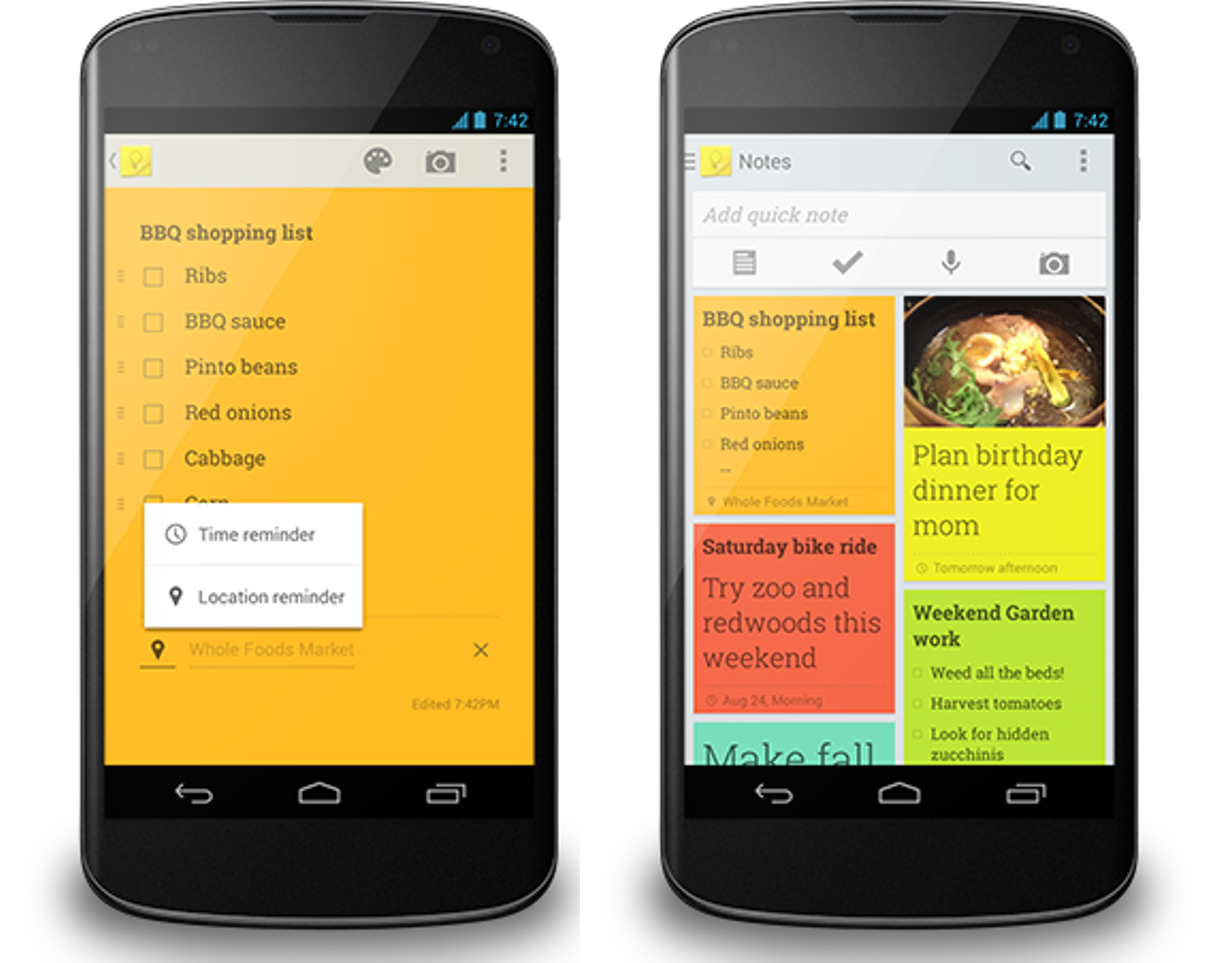
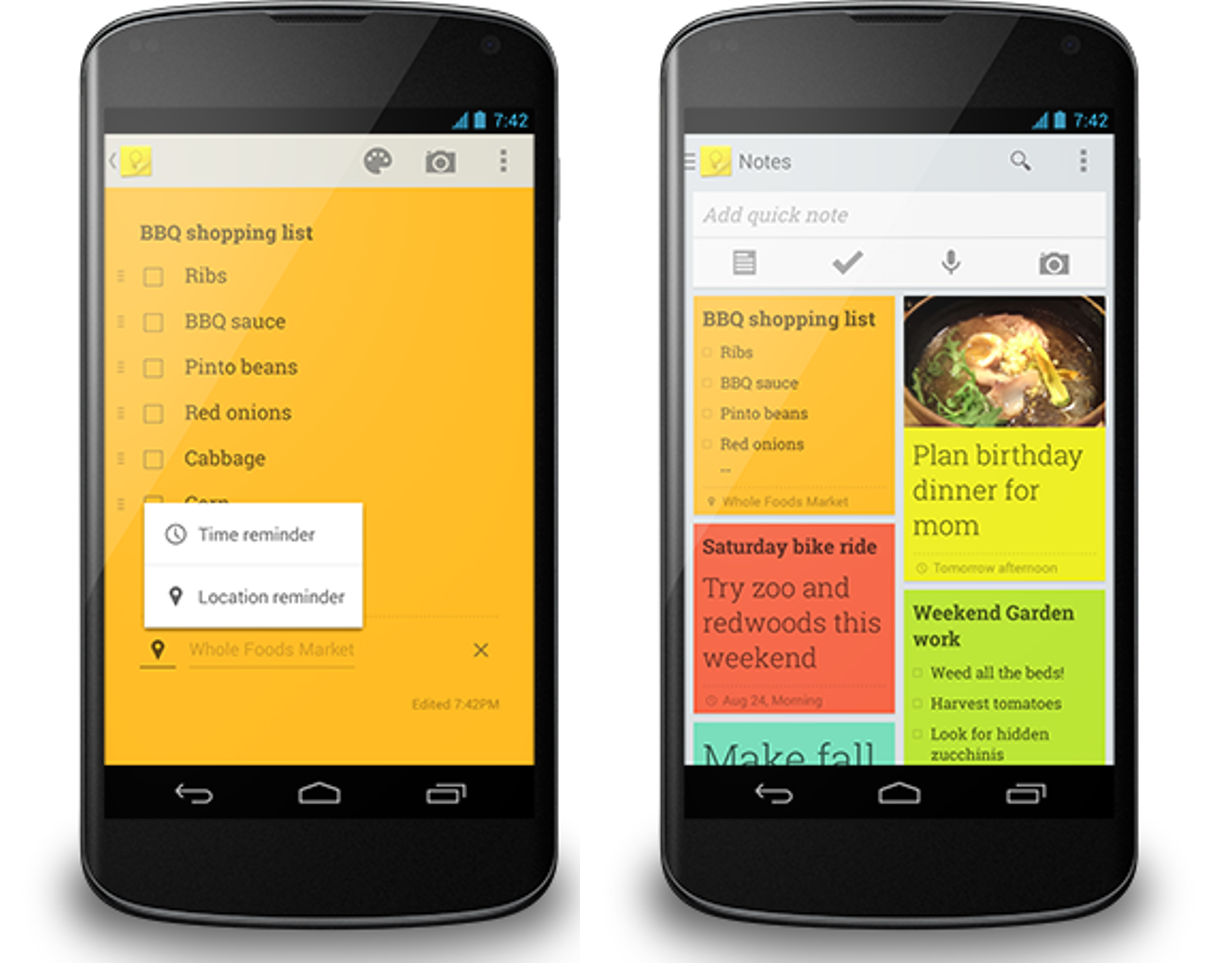
Notes are a good way to keep track of all you have to do, but most of us need a little nudge now and then. Google Keep can remind you of important tasks and errands at just the right time and place. For example, Keep works with Google Now to remind you of your grocery list when you walk into your favorite grocery store, and nudges you on Thursday night to take out the trash.

To get started, select the “Remind me” button from the bottom of any note and choose the type of reminder you want to add. You can add time-based reminders for a specific date and time, or a more general time of day, like tomorrow morning. Adding a location reminder is incredibly easy too—as soon as you start typing Google Keep suggests places nearby.

 
Of course, sometimes plans change. If you get a reminder you’re not ready to deal with, simply snooze it to a time or place that’s better for you.


It’s now even easier to get to all of your notes using the new navigation drawer, which includes a way to view all of your upcoming reminders in one place. And for people who want more separation between their home and work lives, the drawer also lets you easily switch between your accounts. 


And finally, we've made it easier to add your existing photos to a Google Keep note on Android. When you tap the camera icon you can choose between taking a new photo or adding one you already have from Gallery.

The new update is gradually rolling out in Google Play, and available now on the web at http://drive.google.com/keep and in the Chrome App.

Posted by Erin Rosenthal, Product Manager
22 Aug 20:16

Lenovo now installing old-fashioned Start menus on Windows 8 PCs

by Brad Reed
Lenovo Windows 8 Start MenuAlthough Microsoft is indeed bringing back a version of the Start button with its upcoming Windows 8.1 update, it's still not bringing back the full Start menu that's long been a staple of the Windows experience. Lenovo, however, is aiming to fix this by bringing the Start menu back on its own. Bloomberg reports that Lenovo plans to "pre-install SweetLabs' Pokki software, which provides a replacement for the dearly departed Windows Start menu" on new Windows 8 PCs that it will start shipping in the coming weeks.

Continue reading...
22 Aug 14:56

Fresh Meat: 10 new Android apps worth checking out

by Steve Raycraft

New apps need lovin’ too, right? Every day there are thousands of new entries on the Google Play store, but many go unnoticed and never receive the attention they deserve. We’ve shown in the past that this community can discover great apps and launch them to new heights. Our weekly column Fresh Meat highlights new apps with less than 100k installs. Browse our new Android app picks below and let us know which ones you enjoy.

Sound Seeder Music Player

Sound Seeder

Description: Sound Seeder is a Music Player that streams your music to other Android devices via WiFi. Listen to your music on your phone and connect additional Android devices as wireless speakers. All connected speakers play your song simultaneously and in sync as one large sound system.

NOOK Video

NOOK Video

Description: Watch movies and TV shows instantly with NOOK Video™ for Android™ — no subscription required! You can buy or rent, and then stream or download content across all your Android devices. If you have an UltraViolet™ Collection, it’s accessible*, too!

Mashable

Mashable

Description: Download the official Mashable app, which alerts you whenever a story is starting to go viral, so that you’ll know what everyone’s talking about before they’re talking about it. This beautiful design adapts responsively to your device’s size, from a phone to a mini to a full-size tablet, so you can be assured the app will look great on whatever you’re carrying.

HabitRPG

HabitRPG

Description: A habit-building program which treats your life like a Role Playing Game. Level up as you succeed, lose HP as you fail, earn money to buy weapons and armor, compete with your friends.

Timely Alarm Clock

Timely

Description: Timely is the beautiful Alarm Clock for Android, featuring a stunning user experience and revolutionary cloud integration to backup and synchronize your alarms with multiple devices.

Gigwalk

Gigwalk

Description: Gigwalk is a new way to get paid while building your professional profile. With Gigwalk, you can connect with businesses looking to get local contract work done. Build a great profile on the Gigwalk app, and you’ll never miss an opportunity to find local contract work with thousands of businesses.

Geekbench 3

Geekbench 3

Description:  Find out how fast your phone or tablet is with Geekbench 3. Geekbench 3 includes several new tests designed to simulate real-world scenarios. These new tests are designed to quickly and accurately measure mobile processor performance. Every test included with Geekbench 3 is multi-core aware. This allows Geekbench 3 to measure the full potential of your device’s processor.

Way2ride

Way2Ride

Description: With the Way2ride taxi app now available in New York City, there’s no more fumbling for your wallet to pay at the end of the ride. Just scan a credit card, set your tip preference, and you’re ready to ride.

avast! Mobile Backup

avast! Mobile Bsackup

Description: avast! Mobile Backup is a free Android backup solution provided by the makers of the top-rated and award-winning free avast! Mobile Security app with antivirus and anti-theft. This app is FREE, but if you would like to backup music, video and apps, then you need to buy the Premium version (can be done later, from within the free version).

Electric Zoo

Electric Zoo

Description: The Electric Zoo app is your one-stop-shop for all things Electric Zoo 2013. Use this app to find out when your favorite acts are playing, create your personal schedule for the weekend and discover new acts.

22 Aug 13:46

Google Now Adds Cards for Concerts, Car Rentals, Commuting, and More

by Alan Henry

Google Now Adds Cards for Concerts, Car Rentals, Commuting, and More

Android: Google Now is our favorite virtual assistant for Android, and now it's even better. Google unveiled several new cards, including one for car rental details, one that shows you the last bus or train on your commute, another that notifies your loved ones when you're on the way home, and more.

The Car Rental card is designed for people who travel and don't want to fumble for paper or an email looking for a rental reservation number. The new card will just show you your rental information as soon as you arrive at your destination. The updated transit cards will show you when the last bus or train leaves your location for home so you don't miss it on the way home from a concert or late night show.

Speaking of concerts, the new Concert card displays your ticket information as soon as you get to the venue so if they accept digital tickets, yours will be right on-screen when you arrive. Plus, you'll know where your seats are and be able to get there quickly. When you leave, the new commute sharing card will notify your friends or loved ones that you're on the way home so they know when you'll get back.

Some other cards have been updated too. The TV card can now pick out news and other key phrases from shows you're watching and show you relevant news—so if you're watching local news and actually want to learn more about a topic, Google Now can show you. Similarly, the Search card has been updated with reminders, so if you're looking for a musician or an actor, you can tap "remind me" to be notified when they're in a new movie, release a new album, or otherwise make the news. Hit the link below to read all the updates, or to grab the latest version from Google Play.

Google Search (Free) | Google Play via The Android Community on Google+

22 Aug 13:42

Google brings Street View to the zoo

by Amar Toor

Google this week added several major zoos to its Street View and Maps services, allowing users to get up close and personal with exotic animals from around the world. The company announced the new features in a blog post published Wednesday, touting them as a way to see rare wildlife "right from your living room."

Among the most notable additions are China's Chengdu Research Base of Giant Panda Breeding — home to more than 30 percent of the world's endangered Giant Panda species — and the San Diego Zoo in California. Other US locations include zoos in Atlanta, Chicago, and Houston, in addition to several parks in Europe, Japan, and Southeast Asia. These zoos join a handful of other wildlife parks already available on Street View,...

Continue reading…

22 Aug 13:41

Yahoo is number one in web traffic for the first time since 2011, says ComScore

by Adrianne Jeffries

Yahoo has topped ComScore's list of the top 50 web properties in July 2013, outpacing Google for the first time since May 2011. The data does not include traffic from the company's most recent acquisition, the 133 million-blog strong Tumblr network. And while Yahoo has been on a buying spree, its other recent acquisitions did not have significant web traffic of their own.

That means Yahoo has upped its traffic to existing properties, although it's hard to know which. Popular Yahoo sites include Flickr, Yahoo News, Yahoo Finance, and yes, Yahoo Answers. In May, Yahoo redesigned Flickr and added new features, so the photo-sharing network may be responsible for the bump. However, it's hard to decisively say that from the data...

Continue reading…

22 Aug 13:37

Wayra-Backed Tank Top Movies Launches To Help UK Users Navigate Myriad Of VOD Services

by Steve O'Hear
Screen Shot 2013-08-12 at 18.12.25

There are myriad video on-demand and movie-streaming services in the U.K., from big hitters such as Amazon-owned Lovefilm, to lesser-known brands such as DSG’s KnowHow. In fact, so crowded is the space, you’d be forgiven for thinking that VOD is a commodity business. Except that the movie catalogs — and in some cases prices – that these services are able to offer vary greatly, with those companies with the deepest pockets sometimes picking up content on an exclusive basis. Plus each service operates within the context of arcane distribution models based on predefined ‘release’ windows that see movie studios dictate when new releases eventually make their way to on-demand and movie subscription-based streaming or free-to-view.

Movie fans don’t care about that stuff, of course. They just want an easy way to discover, find and watch movies they’ll enjoy, no matter on what online service they are made available. Enter Tank Top Movies, which launches today to help U.K. movie watchers do just that. Part search engine, part movie recommendation engine, the company, backed by Telefonica’s Wayra startup accelerator, lets users search across 18 movie services in the U.K., add movies to a unified ‘watch list,’ be alerted when movies become available, and click through to begin watching.

“If you want to watch a movie at home tonight in the U.K., there are around 13,000 different films to choose from, and at least 20 different legal services,” says Tank Top Movies co-founder Liz Rice, who noted that each service licenses different content, and have different commercial models — free to view, subscription, and pay-as-you-go. “As users, we thought it was crazy that a relaxing evening watching a movie would be preceded by 20 minutes of tedious searching around to see what’s playing on the different services we use, cross-checking with sites like Rotten Tomatoes to see whether the films are any good. In most cases, the on-demand film services really don’t offer a great user experience for browsing what’s on.”

It was faced with this problem that the founding team — members of which have previously worked at Skype, Last.fm, Just-Eat and Metaswitch Networks — decided to build a service that consolidated the experience. “With Tank Top Movies we’re aiming for ‘serendipitous discovery,’” says Rice. “We use various factors, including critic and user ratings, recency and your previous choices to create a personalized list that’s fun to browse, where we hope you’ll quickly find something you’d like to watch, from across the services you use. You can build a watchlist for keeping track of the films you want to see, and if you missed a film at the cinema, we can notify you as soon as it’s out on one of the on-demand services you use.”

Rice says the company is also trialling widgets for film websites, “so that any film blogger or publisher can connect their readers directly with the film they’re writing about.”

Tank Top Movies makes money from any available affiliate revenue generated from the leads it produces, though the primary business model is a more ambitious data play: It wants to help the film industry better understand their audience by selling aggregated viewer behaviour and preferences back to them — but only when, and if, it’s able to reach enough scale to be in a position to do so.

All of which hasn’t gone unnoticed by other players in the industry, not least Netflix which pulled the plug on Tank Top Movies earlier this month, meaning that the startup is unable to list Netflix’s content in its index. It’s easy to presume that the movie streaming giant wasn’t too keen on a service that enabled users to compare competing offerings so transparently, though I suspect it was Tank Top’s universal watch list feature that likely caused the fall out.

“It’s disappointing that Netflix asked to be removed, and it’s strange because you’d think that any on-demand movie service would be happy to receive visitors looking for a film that they can watch on that service,” says Rice, adding that Netflix appears to tolerate similar functionality offered by Fan TV in the U.S.

“Fortunately there are plenty of other streaming services in this country, and in fact Netflix were only the fifth most popular on our site in terms of clicking out to movies, so it hasn’t caused too much disruption to the majority of our users.”


22 Aug 13:36

Google Exploring Location-Dependent Security Settings For Smartphone Unlock

by Darrell Etherington
unlockpattern

Google has a patent application published today (via Engadget) that would make the standard system of unlocking a device much more intelligent, using a smartphone’s built-in sensor to change your security settings on a sliding basis depending on where the phone finds itself. This would allow a user to make it easier to unlock a phone while in the comfort of their own home, while making it more difficult when the device is in a public place.

The invention is clearly designed to make it harder for a stranger or unwanted intruder to access your phone and its data when it may be easily lifted from your pocket or bag while in transit or at a public location like a cafe. In the end it’s a convenience feature, more than a security one, since the most secure option would be to use the most intrusion-resistant method of screen locking available at all times. But making things easier to access at home makes a lot of sense, in terms of decreasing friction and potential displeasure with the general user experience.

The patent as described also contains a provision that would allow for a third authentication method to be set for a second so-called “familiar area.” This would allow for a number of different possibilities, like setting different levels of security for home, work and the rest of the world, for instance. It’s a handy and noteworthy wrinkle in the patent app, since it could also make it possible to essentially set up a specific security profile required in professions where on-site security of data and mobile devices is paramount.

There are a lot of ways this could potentially be useful, in fact, and it’s one of those context-based features that Google seems to be focusing on with Google Now and recent updates to apps like Keep. In the future, you have a different phone depending on where you go, and that’s something most of the tech giants seem to be working on.


21 Aug 21:50

Channel 4 to air 'Agents of S.H.I.E.L.D.' in UK in "massive deal".

21 Aug 21:49

The Difference Between Antivirus and Anti-Malware (and Which to Use)

by Alan Henry

The Difference Between Antivirus and Anti-Malware (and Which to Use)

Antivirus is a confusing matter—it's called antivirus, but there are tons of other types of malware out there. So...do those programs also scan for spyware, adware, and other threats? Here's how to make heads or tails of it all, and which tools you can trust to keep your PC clean.

We may be beyond the days where viruses made the evening news, but that doesn't mean that viruses and other malware are gone forever. They're there, more than happy to infect your computer and add it to a botnet or spam everyone in your contact list. On the bright side though, with some common sense, a good understanding of what you’re up against, and the right tools, you can keep your PC safe pretty easily.

De-Mystifying Viruses, Malware, and Other Threats

The Difference Between Antivirus and Anti-Malware (and Which to Use)

Let's start with the differences between "viruses" and "malware." Viruses are a specific type of malware (designed to replicate and spread), while malware is a broad term used to describe all sorts of unwanted or malicious code. Malware can include viruses, spyware, adware, nagware, trojans, worms, and more. However, because viruses (and to a lesser extent, trojans and worms) made headlines a few years ago, most security companies focused their marketing on them, which is why they're called "antivirus."

Other tools call themselves "anti-malware," but malware is a broad term that includes viruses—so it isn't clear which threats they cover either. So, we set out to find out which tools cover which threats, and how to keep yourself 100% covered.

How to Tell Which Tools Scan for Which Threats

The Difference Between Antivirus and Anti-Malware (and Which to Use)

Many people think their anti-malware tool also protects them from viruses, even when when it doesn't, and vice-versa. We talked to some of the big players in both fields to figure out what their apps will and won't protect you from. Here's what they said:

Avast! Free Antivirus

When we asked the folks at Avast (our favorite antivirus tool) whether their tool scanned for malware besides viruses, they responded with an emphatic yes. When we probed a bit deeper and asked about the different types of malware that Avast protects its users from, Director of Viruslab Operations Jiri Sejtko explained it this way:

Avast scans for and protects customers from all varieties of malware. Viruses were extremely “popular” in the ‘90s, which is when the term “Antivirus” became common, but today viruses are the minority when it comes to malware. There are, however, a few at-large viruses currently evolving and spreading, these include “Sality” and “Virut”. More common than viruses is malware like Trojans, Worms, Backdoors, Exploits, Adware, and PUP (Potentially Unwanted Programs), which can include communication clients, remote desktops and password revealers, just to name a few.

The focus of online criminals has shifted and therefore malware has changed. Criminals see today’s online society as an opportunity to steal personal data including credit card and banking details, pins and passwords, and information such as home addresses, phone numbers and even the names of family members. Criminals can, for example, write malicious code and distribute it in the form of a trojan. The trojan can collect personal data which can be sold to crime organizations who can then steal money directly from the victims bank account.

Avast’s immense user base consists of more than 184 million people worldwide, each of whom is connected to the Avast cloud, this allows each file execution to be analyzed online. As soon as malware is detected within the user base a close to real time update is sent to all users, providing almost immediate protection against all the newest malware.

Bottom line? Avast protects you from the "classic" threats like viruses, worms, and trojans, but also offers protection against adware, bots, and other exploits.

Avast's response was particularly interesting because they went out of their way to point out that Avast also protects you from a lot of the new security threats that have appeared in recent years, like hacks that hijack social network accounts or steal passwords. Additionally, it gives us some insight into how Avast updates its clients in real time whenever new threats are detected, without forcing users to download massive virus definition packages or database uplifts (one of the things we like about it so much).

McAfee

McAfee's response was significantly more terse than the other companies we spoke to, but it's also the most clear. When we asked them if they protected their users from more than just viruses, they said yes. When we asked what exactly, they said "viruses and malware including Trojans, worms, spyware, rootkits, and keyloggers."

The level of protection that McAfee offers however, depends largely on the specific McAfee product you're running. All of McAfee's paid software packages include antivirus and antimalware protection, from the $35 McAfee AntiVirus Plus to the $63 McAfee Total Protection. As you move to more expensive products, you get other features like protection for your Facebook or Twitter accounts, identity theft protection, cloud-based backup services, and more.

However, it wasn't clear whether McAfee will protect you from some of the more nuanced threats like zero day exploits, toolbars you've installed, or browser vulnerabilities. If you're thinking about a premium product (which we’ll talk about later), your best bet is to read the description of the software suite you want very carefully before buying. Most antivirus companies depend on you being confused and just buying the most expensive package because you think it offers the most protection, when it may just include a bunch of features you don't need.

Norton

Symantec, who makes Norton, was a bit more forthcoming. They explained first that all Norton security tools all scan all forms of malware (including viruses), and that they encourage their users to (correctly) think about malware in broader terms. When we asked them what they specifically protect their users against, they broke it into four categories: Infectious malware, web threats, concealment malware, and mobile malware.

Infectious malware consists of viruses and worms; the types of malware you're probably already familiar with, and the types that almost every security tool will scan for and help you remove. Web threats, on the other hand, are some of the more advanced forms of malware we see on a regular basis today. They include keyloggers, spyware, adware, bots, and even ransomware. Concealment malware includes trojans, backdoors, rootkits, and even fake antivirus software. Mobile malware affects smartphones and tablets.

The Symantec representative we spoke to explained that there are Norton products that protect against all of these threats, and then others that mix and match features based on the level of protection you need. Like we said with McAfee, it's up to you, the consumer, to make sure you're buying a product that offers the level of protection you need without paying for something you don't. On the bright side though, all of the Norton products offer this basic level of protection, from the $40 Norton Antivirus all the way up to the $60 Norton 360. Every product page has a comparison chart on it so you can make sure you're buying the right version for you.

Malwarebytes Anti-Malware

Since some anti-malware utilities are trying to expand into the on-access malware scanning game, we figured we would ask what Malwarebytes, one of our favorite anti-malware tools, will and won't protect its users against. Malware Industry Analyst Adam Kujawa explained that Malwarebytes aims to detect as much malware as possible. However, their focus isn't on those classic threats like viruses and worms:

Malwarebytes Anti-Malware hunts down most often zero-day or zero-hour malware, a term our community uses to explain malware that has been newly created and released on the web. Zero-hour malware can be any type of malware out there that traditional antivirus products have a hard time detecting, so it's an additional security measure to protect the user from the kind of malware they are most likely to encounter while surfing the web. Most zero-hour malware is distributed in drive-by exploits or even via hacked accounts such as Facebook, Twitter or Skype. Some of the most commonly detected malware by our products include the Zeus banker Trojan, as well as other Trojan malware with the same purpose, such as Reveton ransomware and other types of ransomware that attempt to extort users into paying ridiculous fee, and an array of fake antivirus software (we call them rogue antivirus) that usually allow additional malware to be installed.

More recently, we have begun detecting what we call "Potentially Unwanted Programs" (PUPs). PUPs usually refer to adware or other types of software that really doesn't do anything but slow down your system and bombard you with advertisements. We decided that if we are protecting our users from the scum of the net that tries to steal their money via extortion or theft, we should also protect them from the scum of the net that tries to do it legitimately, by fooling the users into thinking their products are useful, when in reality they harm the system and cause more problems for the user. However, the default settings on our scanner only flag the software as potentially unwanted but leave it unchecked for removal. While we advise our users to avoid using this kind of software, since it isn't classified as malware, we don't automatically remove it and leave it up to the user to decide whether or not it's valuable for them. We understand that some users are used to having fifteen search bars in their browser window and prefer to keep it that way.

Malware that we don't target is usually older types that might not have been seen for a few years—we leave that protection up to the antivirus software vendors, since their specialty is protecting the user from known and dangerous malware. In doing so, we are allowed to target specifically the new malware that constantly changes and poses the biggest threat to the average user, who faces possible attacks directly from the web rather than from other sources. At the same time, we always have, and always will, advise our users to use our product in addition to an antivirus, to be doubly protected from the old and the new.

Put simply, Malwarebytes aims to protect you against all manner of malware, but common viruses and older threats aren't included. Their goal is to stay on the forefront and protect users from new exploits, trojans, backdoors, adware, and spyware. For everything else, you'll want a traditional on-access security tool.

Our Recommendation: Use One On-Access Antivirus Tool and One On-Demand Anti-Malware Tool

The Difference Between Antivirus and Anti-Malware (and Which to Use)

So here's the bottom line: Most of the popular tools out there will scan for all types of malware. However, you should always make sure your tool does as well. Coupled with good browsing and downloading hygiene, a good security tool should keep you pretty well protected.

However, no one tool can catch everything. So, we suggest you install one security tool (preferably Avast, our favorite) that scans for as much as possible, and that has an on-access scanning engine that protects you from threats while you surf the web, install applications, and open files. Then, install another anti-malware tool (like Malwarebytes Anti-Malware) that you can occasionally use on demand to make sure nothing got through or has been overlooked. With this combination, you'll protect yourself from as much as possible, and it won't cost you a thing.

Note that it's not a good idea to use two security tools that both run all the time in the background on your computer. They'll likely interfere with each other, and possibly even slow down your computer. Use one that runs in the background, and one that runs on-demand, and disable the background one when you run your on-demand one.

When It's Worth Paying For a Premium Security Tool

The Difference Between Antivirus and Anti-Malware (and Which to Use)

Premium security products, like Norton and McAfee, are difficult to recommend, even though they offer complete protection in a single (albeit expensive) package. Remember, you're probably looking at $20-$50/yr (in some cases more) in addition to their purchase prices. Even with today's threats, there's surprisingly little that a subscription-based product can offer that free tools don't already provide. The only instance we can think of is if your work (or play) takes you to the seedier parts of the internet, like the dark web, or you share a PC with someone who's browsing and downloading habits are less restrained than yours. If that's the case, you might consider paying for a premium service that scans for everything, all the time, in one app.

Still, you should make the call. If you can get one of those suites and its updates for free from your work or school, then by all means, grab it. (My alma mater used to give out free copies of McAfee, along with free updates for life, and my old job used to give out free antivirus to anyone who worked from home so they could install it on their home computers before connecting via VPN).


In the end, good browsing habits and common sense should be your first line of defense against malware, spyware, and viruses. However, we recommend running a good security suite in the background and an on-demand malware tool to cover everything else. That way you're always protected, and you can scan your system for malware whenever you want to.

Some security experts are saying that 2013 may be the malware's biggest year ever, so just because the evening news doesn't talk about these threats anymore doesn't mean they're not still a problem. Whatever you choose to do, don't assume that your antivirus is protecting you from malware, or vice versa. Read the features of the apps you choose carefully, and make sure you have your bases covered.

Photos by Robert S Donovan, Pavel Ignatov (Shutterstock), and Carlos Varela.

21 Aug 21:47

Give Your Desktop the Need for Speed with These Wallpapers

by Adam Dachis

Give Your Desktop the Need for Speed with These Wallpapers

You can start to feel a little stationary when sitting at a computer all day, but some fast-paced images can move you right along. Set your desktop to some speedy wallpapers and race to your next task.

Give Your Desktop the Need for Speed with These Wallpapers

Yamaha R1

Download this wallpaper | The Paper Wall 1920x1080

Give Your Desktop the Need for Speed with These Wallpapers

Dashboard

Download this wallpaper | The Paper Wall 1920x1080

Give Your Desktop the Need for Speed with These Wallpapers

Cheetah

Download this wallpaper | The Paper Wall 1920x1080

Give Your Desktop the Need for Speed with These Wallpapers

Cheetah Cub

Download this wallpaper | The Paper Wall 1366x768

Give Your Desktop the Need for Speed with These Wallpapers

Headlight Trails

Download this wallpaper | The Paper Wall 1920x1080

Give Your Desktop the Need for Speed with These Wallpapers

Space DeLoreans

Download this wallpaper | The Paper Wall 1920x1080

Give Your Desktop the Need for Speed with These Wallpapers

Dumbo Race

Download this wallpaper | The Paper Wall 1920x1200

Give Your Desktop the Need for Speed with These Wallpapers

Twirl

Download this wallpaper | The Paper Wall 1920x1200

Give Your Desktop the Need for Speed with These Wallpapers

Race Car

Download this wallpaper | 1920x1200 The Paper Wall

Give Your Desktop the Need for Speed with These Wallpapers

A Good, Old-Fashioned Race

Download this wallpaper | The Paper Wall 1600x1605

For more great wallpapers, check out our previous Wallpaper Wednesdays. Got any great wallpapers you'd like to share? Email me a link with "Wallpaper Wednesday" in the subject line. Submitting your own work is highly encouraged!

21 Aug 20:08

UK Serious Crime Agency proposes ban on small cellphones that don't look like cellphones

by Cory Doctorow

The UK Serious Organised Crime Agency is having a total freakout about miniature phones that look like automobile keyfobs, like this one. They are apparently being smuggled into prisons (and many are marketed for this purpose), and so SOCA is contemplating a ban on cellphones that are small and don't look like cellphones. Which will totally work. Totally.

If SOCA sounds familiar, that's because they're the ones who covered up serious crimes by the richest and most powerful companies and individuals in the country and are still not cooperating in their prosecution.

"We're now working closely with the Serious Organised Crime Agency and Trading Standards to remove these small mobiles from sale in the UK, as well as legislating to block phone signals in prisons."

More than 7,000 phones and Sim cards were confiscated in prisons in England and Wales last year.

UK considers ban on mobile phones like car key fobs [Leo Kelion/BBC]


21 Aug 19:15

Domestication changes animal behavior

by Maggie Koerth-Baker
A domesticated ferret has more in common with a domesticated dog, behavior wise, than with its own wild cousins. At The Thoughtful Animal, Jason Goldman writes about research that shows how domestication changes animals' social cognitive skill set, leading to creatures that are more likely to respond to very human social cues like eye contact and pointing.


21 Aug 19:14

Cyveillance, Comcast's creepy copyright threat-deliverer, also helps the Secret Service

by Rob Beschizza

The "Guaranteed takedowns in 5 hours or less" that web-watching outfit Cyveillance promises aren't so guaranteed when they're illegal: a lesson in the Streisand Effect having just been dealt to its client, Comcast, by a particularly ill-advised attempt to bully TorrentFreak into removing public court documents.

But it's not their first rodeo, and Cyveillance has always been as trivially sleazy about it as they are now. Here's a blog entry from 2003 complaining about its efforts to hide what it does.

Cyveillance uses a couple of dirty tricks when they crawl the web. First, they ignore the robot exclusion protocol. ... Another problem with the way Cyveillance crawls is that they provide fradulent header information in the HTTP request. ... You could try to keep Cyveillance out of your web site by blocking their network. The problem is that if enough people do this, they may try to hide their origin to get around the blocks. That would be a pretty sleazy thing to do, but no more sleazy than what they do already.

Here's another post about this outfit, which points out that the parent company, QinetiQ, is a now-privatized former branch of British Intelligence agency DERA, which "since its formation has made numerous acquisitions, primarily of United States-based companies."

Which should make the fact that it also works for Uncle Sam's own spooks unsurprising. [PDF link]

Cyveillance, a subsidiary of QinetiQ of North America, is under contract by the Secret Service to search available information related to the Secret Service and its missions. The information captured by Cyveillance is reviewed by Cyveillance personnel to identify the results that appear to fall within the parameters of the Secret Service’s stated requirements. Potentially relevant information related to the Agency’s missions is forwarded to Secret Service personnel who determine whether further investigation is required to assess the content (e.g., to determine if it is a viable or potentially viable threat). If further investigation is deemed necessary, the information obtained through Cyveillance is incorporated into the Protective Research Information Management System (PRISM-ID)1 , an existing Secret Service system. Content that relates to the Secret Service brand (i.e., mention of the Secret Service name) is forwarded to Secret Service personnel for informational purposes only; following its review, this information is deleted and is not retained by the Agency.

But let's look at the real problem here. Really, Cyveillance? That's the name they picked. Just imagine the focus group where they cooked that up.

Hello, everyone. Thanks for coming today, and thanks for watching that presentation. There's coffee over there by the vending machine, and--George, we put decaf in the other carafe?--yes, right there in the green carafe. There'll be some snacks out soon, too. If you look at the form, you'll see a number of candidate names and branding insignia for the company whose product you just saw described. What I want you to do is rate each candidate from one to ten for each of the associations next to it. That's right, yes, just draw it right in there. One to ten each for "Warmth," "Competence," and "Evil cyberpunk dystopia." Then we'll start the discussion. George, the donuts.


21 Aug 19:07

New Zealand approves domestic spying with warrants

by Jacob Kastrenakes

As debate rages in the United States over the limits put on government spying, New Zealand legislators have moved to clarify what is and isn't legal for one of its own intelligence agencies. According to The New Zealand Herald, the country passed a law today that will give its Government Communications Security Bureau (GCSB) increased power to spy on New Zealand citizens' communications. The GCSB will still require a warrant when doing so, but such spying will now be explicitly legal in the first place.

Continue reading…

21 Aug 19:03

Outlook.com users can now rename an account to any email alias

by Tom Warren

After killing off linked accounts in favor of aliases back in June, Microsoft is now simplifying its approach to secondary email addresses on Outlook.com. The software maker has long supported the ability to rename an Outlook.com primary email address to a newly created alias, but existing aliases were always left out. Microsoft is now rolling out a change to its alias support today that lets Outlook.com users rename their primary email address to any secondary existing alias.

Outlook.com already supports sign in with any alias linked to an account, but the rename will set the new address as the primary and alter the email address shown on the Windows 8 Start Screen and Xbox dashboard. Microsoft previously revealed it's working on the...

Continue reading…

21 Aug 19:03

Nearly A Year Later, Twitter Triggers Return to IFTTT With Official Support

by Matthew Panzarino
285

Today, the ‘Internet glue’ service IFTTT gets a fresh set of Twitter triggers that allow users to build recipes that react to tweets, favorites, retweets and more. This allows users to return to archiving tweets to Dropbox, saving links and images, building lists off of favs and much more.

IFTTT (If THIS then THAT) is a service that allows users to define a trigger (a new RSS feed item, a new tweet) and an action (tweet it for me, put it in my dropbox) to form a recipe that can be used and shared. It connects dozens of different internet services together to make it easy to use the internet the way that you want to.

Just over a year ago, Twitter announced changes to its API for developers that effectively capped third-party clients, hardened the rules for displaying tweets and much more. As a result of those rules, IFTTT chose to voluntarily shutter its Twitter triggers until it could build ones that complied with the new rules.

It took a while, says Leor Stern, IFTTT’s Head of Business Development, for the company to get the bandwidth to revisit the triggers. Stern, who joined IFTTT earlier this year, says that they’ve been busy building out the platform and soliciting companies for newer, more robust triggers.

It’s worth noting that the original triggers were removed voluntarily by IFTTT, after the rule changes were announced by Twitter. Not that it would have had much choice in the end, as they didn’t jive with the new tweet display rules, among others.

In order to get the triggers back, IFTTT went to Twitter and talked them through the service, what it did and what it could offer both Twitter users and the service. IFTTT, says Stern, has a vision of ‘scripting the ultimate way for people to personalize the way that they engage with the web’. The pitch resonated with the people at Twitter and they began working with IFTTT to get the new triggers built to comply with the new API and Twitter’s current vision for its own service.

It probably didn’t hurt, either, that it’s been a while since the changes went through, and things have calmed down a tad. After the changes were announced, there was significant backlash in the developer community and a general feeling of unease about how some apps would survive. There was also a period of flux in which some of the exact limits and strictures of the new rules weren’t clear.

Now we’re well clear of that and Twitter has settled into its new media role, and developers are working within the frameworks they’ve been given.

To that end, the new channel is launching with a concise set of Triggers and actions, and will be built out over time based on continued work with Twitter and user feedback. There’s already a bunch of new recipes that take advantage of the new triggers, which you can check out here.

The new triggers are ‘New tweet by you’, ‘New tweet by you with hashtag’, ‘New link by you and new favorite by you’. The new actions are ‘Post a tweet’, ‘Post a tweet with image’, ‘Add user to list’, ‘Update profile picture’ and ‘Update bio’. Some triggers have the ability to include regular tweets as well as retweets and replies.

If you’re sensing a trend, you’re probably on the nose. All of the current triggers are based on handling your content, not anyone else’s. This is not about detecting tweets from other accounts and performing actions based on those. This is all about being a ‘personal tool’, at least for now.

But that doesn’t mean that you can’t mix and match data from outside Twitter and IFTTT to create some pretty useful stuff. I’m really happy, for instance, to regain the ability to automatically tweet based on specific RSS feeds. And those of you who are archive happy will love the actions that let you send every link you tweet to Pocket, or every image you tweet to Dropbox.

Here’s one that saves everything you fave to Pocket, for instance:

And there’s also some cool hardware integration stuff with Philips Hue and WeMo. This means you can, for instance, tweak the color of your lighting with a tweet:

For now, the triggers and actions are fairly straightforward, but IFTTT, it says, is concentrating on rebuilding the Twitter channel to its ‘former glory’, if not more. So it should be interesting to see what they accomplish with official sanction from Twitter and a bevy of new users to tweak and prod new recipes into being.

Disclosure: IFTTT sent me socks a while back. They’re cozy, but it’s over 100 degrees every day here so I don’t really wear them.


21 Aug 19:03

LinkedIn Revamps Pulse Apps With Faster Search, More Discovery Tools

by Sarah Perez
pulse-explore-group

When LinkedIn acquired newsreader Pulse earlier this year for $90 million, it said the Pulse apps would remain and the two companies would instead find ways to work together. Today, LinkedIn continues to make good on those promises with an update to the Pulse mobile apps on both iOS and Android, which introduce improvements to search, discovery and recommendations.

This is one of many updates the Pulse app has received since becoming a part of LinkedIn. Throughout the spring and summer, for example, Pulse has seen other, minor releases that have allowed users to share stories directly from the app to LinkedIn, as well as save stories in “read later” services like Evernote, Pocket and Instapaper, among other things.

With today’s update, Pulse has redesigned the user experience in an effort to make it easier for users to find new publications, channels and people to read, via a series of changes that include things like the ability to preview a source before adding it, as well as a new optimized search experience. Pulse’s search is similar in some ways to competitor Flipboard, as it doesn’t only search for articles, but also content from around social media sites and the wider web, including Google, YouTube, Facebook and Tumblr, for example.

Now, the app allows users to search by general interest as well, in order to find relevant publications to subscribe to in Pulse. The app will also offer a curated section of editorially chosen recommendations that are featured at the top of its content catalog, much like Flipboard does with its “Flipboard Picks.”

LinkedIn declined to share the number of active users in Pulse, but says the app has been “activated” by more than 30 million users, which is the same number reported at the time of the acquisition in April. The number of Pulse publishers hasn’t changed, either, at least by official counts, which still place it at 750+.

In addition, the company also isn’t providing much of a roadmap in terms of how LinkedIn and Pulse will be further integrated in the future, but there are some places where it would make sense. This includes, of course, the company’s home for news reading with “LinkedIn Today,” which helps to surface stories about users’ personal and professional interests. One could imagine that taste preferences, bookmarks and subscriptions would be able to flow back and forth between the Pulse app and LinkedIn Today at some point, perhaps.

The updated Pulse mobile apps are live now in Google Play and iTunes.


21 Aug 19:02

Google Updates Its Keep Note-Taking App With Reminders, Location-Based Alerts And Google Now Integration

by Frederic Lardinois
fHfyHOBX-dedULtUznew4rsL5ixGnlkmRcEZ3RexL_62K70AghLaIsN-DLPBTCEC8LxW=w340

When Google launched Keep for Android and the web a few months ago, it was essentially a basic note-taking application. Today, the company is launching a major update that turns it into a far more useful application. The update, which will start rolling out today, is centered around the new “Remind me” button, which now lets you schedule time-based reminders and location-based alerts that hook into Google Now.

When you walk into a grocery store now (and your grocery list is tagged with the store’s location), you will get a Google Now alert to remind you of all the milk and cereal you have to buy. To make this easier, Keep now also auto-completes nearby places.

As Google notes, you can obviously snooze any of these reminders and choose a time or place “that’s better for you.”

With this update, Google is also bringing a new navigation drawer to the app that lets you quickly switch between different accounts (great if you have a home and work to-do list, for example) and allows you to see all your upcoming reminders in one place.

Also new in this update is the ability to quickly add existing photos from your Android phone to Keep.

Google Now is quickly evolving to become Google’s main hub for alerts of all kinds and today’s Keep integration is yet another sign that the company continues to push Now’s feature set forward. Field Trip, which launched on Google Glass today, would be another natural candidate for Google Now integration, but for the time being, it’s still a separate product (as many of Google’s Niantic Labs experiments are).


21 Aug 17:04

PSA: As Of Play Store v4.3.10, You Can Finally Disable Automatic Updates For Certain Apps And 'Update All' Will Honor These Settings

by Cameron Summerson

play

Automatic app updates are a convenient way to stay up-to-date. The problem is, not everyone wants every app to update automatically. Thus, the Play Store has had an option for a while to disable automatic updates for specific applications, which could then be manually updated at the user's discretion.

However, therein laid another problem: the "Update All" option ignored this setting, and, once tapped, updated all apps with new versions available – including those that were set to not auto-update.

Done With This Post? You Might Also Like These:

PSA: As Of Play Store v4.3.10, You Can Finally Disable Automatic Updates For Certain Apps And 'Update All' Will Honor These Settings was written by the awesome team at Android Police.


21 Aug 17:02

Songs of the Day

by Bill Crider
The Soundtrack of Summer 1963 

This was the summer after my college graduation.  I worked at the Red Arrow freight line in Mexia, Texas, until the end of August and then moved to Corsicana, Texas, to teach 11th grade English.  An experience I'll never forget, and I'll bet some of the students won't, either, though they might wish they could.
21 Aug 17:01

Bradley Manning sentenced to 35 years in prison

by Xeni Jardin

Pfc. Bradley #Manning sentenced to 35 yrs (w 1294 days credit) . Reduced E-1. Forfeit of all pay & allowances. Dishonorably discharged.

— Alexa O'Brien (@carwinb) August 21, 2013

In a courtroom at Fort Meade today, Judge Army. Col. Denise Lind delivered the sentence in the trial of Bradley Manning: 35 years in a military prison, less 1,294 days for time served at Quantico. The 25-year-old former intelligence analyst was convicted of charges related to sharing more than 700,000 secret government documents with Julian Assange and Wikileaks. The transparency organization published those documents online, and shared them with news organizations.

Manning faced a maximum of up to 90 years in prison, and receives credit for 3.5 years already served in custody, some of which was in solitary confinement. Human rights advocates say solitary confinement is a form of torture. No minimum sentence applied; Judge Lind convicted him last month of most charges brought against him by the government, including 6 violations of the US Espionage Act of 1917.

From Ft. Meade, Firedoglake's Kevin Gosztola writes, "Guards quickly escorted Manning out of the courtroom as supporters in the gallery shouted, 'We’ll keep fighting for you, Bradley,' and also told him he was a hero."

Alexa O'Brien, who has been covering the trial at Fort Meade nearly every day for the past 20 months, has created this detailed chart explaining how various charges were merged, leading to the sentence Manning received today.

Pfc. Manning's sentence is 5 years longer than a man who passed "sophisticated defense secrets to communist East Germany," notes Kevin Gosztola at Firedoglake.

As Quinn Norton writes at Medium, "Private Bradley Manning didn’t kill anyone, or rape anyone, but by nabbing information from his commanders and giving it to WikiLeaks, he lit up the world, like a match discarded into a great parched forest."

Defense attorney David Coombs has previously said that he plans to pursue all available options for appeal, which may include the Supreme Court. It is very rare that the nation's highest court will agree to review cases of military law, but this may be a likely exception. Other options include a presidential pardon.

Kevin Gosztola:

Manning is unlikely to serve his entire sentence in prison. He will immediately be able to petition for clemency from the court martial Convening Authority Major General Jeffrey Buchanan. A clemency and parole board in the Army can look at his case after a year. After that initial review, he can then ask the board to assess his sentence on a yearly basis for clemency purposes. Manning has to serve a third of his sentence before he can be eligible for parole. Appeals application to the Army Criminal Court of Appeals will automatically be entered after the sentence is issued. If Manning or his lawyers do find issues to press, they can take the case to the Court of Appeals of the Armed Forces and then possibly the US Supreme Court. There is “good behavior” credit, which can be as much as ten days for each month of his confinement.

Here are transcript of court proceedings [PDF], captured by stenographers who were crowdfunded and hired by Freedom of the Press Foundation.

Manning's attorney will give a press conference at 130pm ET. Follow this Twitter list, for updates from reporters who are there at the Fort Meade media operations center. Tweets from them gathered, below.


Inside media center: Crowd-funded stenographer getting set for sentencing announcement. Press still being inspected & processed. #Manning

— Kevin Gosztola (@kgosztola) August 21, 2013

When considering proportionality, #Manning will be punished to far greater extent than any soldiers or officers involved in torture

— Kevin Gosztola (@kgosztola) August 21, 2013

When #Manning sentence is handed down, compare to sentences for spies for Iraq and East Germany http://t.co/gkL1SbYBW3

— Matt Sledge (@mgsledge) August 21, 2013

Bradley #Manning to be sentenced at 10 AM. David Coombs to give press conference at 1:30 PM. Protest at White House at 7:30 PM. #FreeBrad

— Nathan Fuller (@nathanLfuller) August 21, 2013

Accord to @SaveBradley Coombs to make application after sentencing to President Obama to pardon, for clemency, and time served. #Manning

— Alexa O'Brien (@carwinb) August 21, 2013

Here is a IMAGE of how #Manning 's conviction was merged for sentencing purposes. He faces MAX 90 years. No MIN. pic.twitter.com/27fI4T75Hs

— Alexa O'Brien (@carwinb) August 21, 2013

Journalists are asking for a camera to be FIXED on #Manning so they can see his reaction from the media operations center. #Manning

— Alexa O'Brien (@carwinb) August 21, 2013

The Internet will be cut off as soon as the court is called to order. #Manning

— Alexa O'Brien (@carwinb) August 21, 2013

PAO director informs media not to sneak in cell phones or won't be able to get credentials in military district of Washington #Manning

— Kevin Gosztola (@kgosztola) August 21, 2013

Journalists will not be able to file (get up, use phone) regarding the sentencing until after she recesses Court. #Manning

— Alexa O'Brien (@carwinb) August 21, 2013

What #WikiLeaks revealed: http://t.co/5G6GWzBwHo (torture, corruption, govt-corporate collusion, abuse) #Manning

— Nathan Fuller (@nathanLfuller) August 21, 2013

Bradley #Manning's defense implored Judge Lind for a sentence that "allows him to have a life" http://t.co/1QWlrQVJAB

— Nathan Fuller (@nathanLfuller) August 21, 2013

Amnesty Intl: "President Obama should commute US Army Private Bradley #Manning’s sentence to time already served"

— Matt Sledge (@mgsledge) August 21, 2013


21 Aug 16:52

Gut feelings: the future of psychiatry may be inside your stomach

by Carrie Arnold

Her parents were running out of hope. Their teenage daughter, Mary, had been diagnosed with a severe case of obsessive–compulsive disorder (OCD), as well as ADHD. They had dragged her to clinics around the country in an effort to thwart the scary, intrusive thoughts and the repetitive behaviors that Mary felt compelled to perform. Even a litany of psychotropic medications didn’t make much difference. It seemed like nothing could stop the relentless nature of Mary’s disorder.

Their last hope for Mary was Boston-area psychiatrist James Greenblatt. Arriving at his office in Waltham, MA, her parents had only one request: help us help Mary.

Greenblatt started by posing the usual questions about Mary’s background, her childhood,...

Continue reading…

21 Aug 16:49

Box Doubles Its Free Plan To 10GB, Creates New $5/Month, 100GB Storage Tier For Small Firms

by Alex Wilhelm
2013-08-20_20h02_40

Box, an enterprise-facing cloud document and file storage service, today opened a new front in the online storage war by doubling its free plan to 10GB of space, and added a new, low-cost paid plan to its mix to help attract smaller companies.

Compare this to Microsoft, which, through SkyDrive, will give you 7GB; Google will give you 15GB of storage across Gmail and its storage product Drive; and Dropbox, the runt of the litter, offers 2GB.

Unlike most of its competing services, however, Box isn’t incredibly focused on growing its free user base. It sells paid versions of its product to companies, large and small, driving revenue growth. Widely tipped to be heading toward an IPO, Box likes to trumpet the pace of its economic expansion, citing 150 percent revenue growth in 2012, and expectations of at least 100 percent growth in 2013. Box claims 180,000 business customers.

As Box matures, the company is slowly building out its pricing scheme. With the addition of the new Starter tier, the company will have five main pricing levels. Starter will cost $5 per seat per month, and contain 100GB of storage and a 2GB file size limit.

Its goal is simple: Get smaller companies on Box. Its sales staff appears to be quite successful at attracting large customers. However, Box’s free accounts, now expanded, I suspect are not a great conduit for organic enterprise conversion. But the new Starter plan likely falls into the price range of smaller companies, perhaps that start on the free plan and max out their capacity. Small businesses in time become larger companies.

Regardless of your cloud choice, it’s fact that declining storage costs are being passed along to both consumers and customers.

Top Image Credit: Kiran Foster


21 Aug 13:26

Netflix Introduces ‘My List,' A Personalized Instant Queue For Users All Over The World

by Ryan Lawler
Netflix My list

Netflix is continually working to make its streaming video service more personalized, adding features that will make individual users keep coming back for more. The company’s latest effort in that direction is its introduction of the “My List” feature, which provides a new way for users all around the world to save a list of movies and TV shows they want to watch later.

Over the years, Netflix has worked hard to provide the most relevant movie and TV titles recommendations to its viewers. And for the most part, it’s succeeded in that quest: After all, most of its viewing comes from the recommendations that are made on its users’ home screens.

Even so, there are a number of times when a user will stumble upon a title that he might want to watch, but maybe not right now. Let’s say a horror film is recommended but it might not be the right moment to watch it… It could be that a girlfriend or a kid is in the room, or maybe he’s just not in the mood to see teenagers hacked and slashed into bits. Maybe he’d rather watch Steel Magnolias for the 40th time instead.


In those cases, the subscriber will be able to click the ‘Add To My List’ button in the video’s description, and it will be added to a group of titles that you can come back to and watch later.

For U.S. users, the ‘My List’ functionality will resemble a feature that Netflix had long made available to its users — the idea of an Instant Queue. That feature had been born out of Netflix’s DVD business, back when having a queue of titles mailed to its users actually mattered. Users could swap movies they wanted to see up and down the list, allowing them to manage which DVD would arrive in their mailbox next.

The problem was that streaming users didn’t use the Instant Queue in the same fashion. They might have added movies or TV shows to their queues as de facto bookmarks to remind themselves of titles that they wanted to come back to. But the ordering was largely haphazard, and frankly didn’t provide a whole lot of value unless they were the type of people to check off movies that they’d seen and cleared them off the list.

And for some users, the Instant Queue became sort of a collector’s bookshelf, where they kept all the titles they wished to come back to and watch over and over again. (I know, because I was in this latter camp.)

The introduction of the ‘My List’ feature keeps some of the same functionality of the Instant Queue, such as saved videos being displayed across all devices used by a subscriber. But the company is also seeking to improve on the experience in many ways. For instance, the list will be featured prominently on the user’s home screen, providing easy access to the titles that have been saved there. It will also be rolled out to all Netflix subscribers, not just those who live in the U.S.

More importantly, though, the list isn’t necessarily tied to the order in which titles were added. It doesn’t behave in the way the Instant Queue did, with titles added more recently appearing at the very bottom of the list. Instead, the ‘My List’ order is dynamically updated on the home screen, to display titles that you’re most likely to want to watch. That automated sorting is a big step up from the manual sorting that users had been faced with in their Instant Queues.

That said, if you’re a stickler for managing the order in which the movies you want to come back to appear, you can skip the automation and fix the list yourself in the “My List Management” section of your account page. And if you don’t really use it at all, the “My List” row will make its way down the recommended content on your home screen.

The “My List” feature, which is becoming available today, is just the latest in Netflix’s efforts to create a more personalized experience for its users. That includes the recent addition of individual user profiles, a feature that began to appear earlier this month.

For Netflix, the more personalized the experience is, the more video that its viewers are likely to watch. And the more video its viewers watch, the longer they stay subscribed to the service. With that in mind, providing users with a new feature that will give them the ability of saving titles they want to watch later only makes sense.