Google sometimes gives us a hint of what it's working on if you're willing to dig for it. Buried in the new Chrome Beta for Android update is something called contextual search. It's not completely functional right now, but you can take a peek at some aspects of it.
To enable contextual search in Chrome Beta, go to chrome://flags/#contextual-searchin the address bar. Tap enable to activate this feature, then restart the browser using the button that pops up.
A nice scoop from Geek.com's Russell Holly today, who confirmed what became was apparent after both the Galaxy S5 and the HTC One M8 booted up with "Powered by Android" displayed prominently on the splash screen. Those who like to pick nits have long pointed out whenever a manufacturer doesn't bother to mention their Android phone uses Android. Not really a problem now for those who want to use Google's proprietary apps. [Geek.com]
Over-the-counter liquid bandages are great for sealing up minor cuts and scrapes, but sutures are still required to close most surgical incisions and deeper wounds. A group of scientists at the University of Maryland, however, have devised a way to apply a layer of 370 nanometer-wide biodegradable fibers to close and protect wounds using a standard airbrush machine.
If you live in the northern part of the world hopefully you will start to see some signs of spring soon. I know where I live we still have some of the yucky cold white stuff but I got flowers for my birthday and they brightened my week, so I was inspired to do a collection of them to brighten yours!
Even if you’re in the southern half of the world you can still enjoy pretty flowers and know they’ll be back soon. Can’t you just smell them?
To most consumers it is common sense that they can make a backup copy of media they own, but in the UK this is currently illegal.
After a public consultation and a thorough inspection of local copyright legislation, the UK Government decided to change current laws in favor of consumers. The changes have been in the planning stage for a few years, but this summer they will finally be implemented.
Starting in July people are free to make copies of DVDs, CDs and other types of media, as long as it’s for personal use. To inform the public about these upcoming changes the Government has just released a consumer guide, summing up citizens’ new rights.
“Copyright law is being changed to allow you to make personal copies of media you have bought, for private purposes such as format shifting or backup,” the UK’s Intellectual Property Office writes.
“The changes will mean that you will be able to copy a book or film you have purchased for one device onto another without infringing copyright.”
The UK Government stresses that the changes will make current copyright law more reasonable, and doesn’t expect that copyright holders will suffer any significant harm. However, the changes could generate extra revenue for the technology sector, increasing revenue by £31 million per year.
“This measure will benefit technology firms by removing barriers and costs and improving entry to technology markets which rely on consumers being able to make private copies,” the government concluded previously.
Under the updated law people will also be able to legally store copies of their music and movies in the cloud. However, the Government stresses that giving others access to your files will remain illegal.
“You will be permitted to make personal copies to any device that you own, or a personal online storage medium, such as a private cloud. However, it will be illegal to give other people access to the copies you have made, including, for example, by allowing a friend to access your personal cloud storage,” the guide explains.
Similarly, people are free to sell any media they purchase, but all backup copies will have to be destroyed.
The mismatch between the law and public opinion became apparent through a Government-commissioned survey, which found that 85% of consumers already thought that DVD and CD ripping was legal. More than one-third of all consumers admitted that they’d already made copies of media they purchased.
Besides the new private copying rights, the upcoming amendments will also broaden people’s fair use rights. For example, people no longer have to ask permission to quote from or parody the work of others, such as a news report or a book, as long as it’s “fair dealing” and the source is recognized.
From a public point of view the amendments are certainly a welcome change to the restrictive copyright laws that are in place currently, but they are also fashionably late. For those who are interested, a full overview of the upcoming changes is available here.
Once again, the "piracy-stricken" motion picture association has had a banner year, with box office revenue breaking all records (as they've done in most recent years). The biggest gains this year come from China -- a market condemned by the studios as a hive of piracy.
Some of the best news in the report is that American movies are seeing success in China, which has become the first international market to reach more than $3 billion in movie sales. The Chinese enthusiasm for US-produced movies comes despite the fact that China continues to restrict the number of foreign-made films that can be released in theaters to 34 imports a year.
But the country at the top of the MPAA's sales charts is also at the top of its piracy target list. Last year, the MPAA placed China on the list of the “most notorious” markets for distributing pirated movies and TV shows. As reported by the LA Times, MPAA spokesperson Michael O’Leary has explained:
The criminals who profit from the most notorious markets through the world threaten the very heart of our industry and in doing so threaten the livelihoods of the people who give it life. These markets are an immediate threat to legitimate commerce, impairing legitimate markets' viability and curbing US competitiveness.
Despite prolific piracy, China's increase in sales has been positively "meteoric," MPAA chief Chris Dodd said at a press conference yesterday, noting a 27 percent increase.
Most ebook sellers try to lock you into a particular ecosystem. If you don't mind buying from the same company every time, this isn't too bad, but you lose the ability to comparison shop, as well as making it difficult to switch apps. Fortunately, there's a way around this problem.
How to Find the Best Price
In most other areas of life, we usually do comparison shopping for a better price. The trouble with ebook lock-in is that if your whole library is on the Kindle, you won't want to buy a book from another store. This is silly. We'll show you how to share books between libraries in a minute, but first you need books to start with!
Ebook search site Luzme is a handy tool for comparing book pricing among various stores. In addition to showing you prices for a given title across several services (including Kindle, Google Play, iTunes, Nook, Sony, and others), it also shows you how the price has changed over time so you can see if it's at a particular low point or if it it's likely to fluctuate at all.
Consolidate Your Books into One Ereader
Regardless of where you buy your ebooks, you probably want to be able to read all of your books in a single place.The best way to do this is to move all of your books into one service. While none of the major bookstores offer a direct way to port your library to their competitors, it's possible to convert and upload them to most.
If you decide to follow this guide for all of your books, you should probably choose a target service based on which app you enjoy reading with the most (you know, the way it should be). However, it's harder to upload outside books to some services than others. For example, it's technically possible to read Epub books on a Kindle, but it's a little convoluted
and might require manually moving files every time. For this guide, we'll use Google Play Books as our target because, once the conversion process is completed, you can upload an Epub to your library once and it will immediately be available on all your devices.
Convert Your Books to Epub and Remove the DRM
The first step to consolidating your library is to convert your ebooks to the proper format. For this guide, we'll convert to Epub since it's the most versatile format, but the app we're going to use supports converting between a variety of formats, so you can strip the DRM and add it to just about any device you want. For this example, we'll show you how to convert Kindle books. This guide builds on our previous guide on how to strip DRM from your ebooks
. If you don't care about converting your books, you can check out that guide for simplified instructions.
Download and install the above software. Open up Calibre, head to preferences, and install the DRM removal plugin (check out our previous guide
if you need more detailed instructions on how to do this). Now we'll set up a folder to monitor that will automatically import, strip the DRM from, and convert any file we put in it into the Epub format.
Open up Calibre and select "Preferences" along the top (you may need to press the ">>" button to expand the menu if it's not present).
Under "Import/Export" select "Adding Books".
Select the "Automatic Adding" tab.
Choose a folder where you'd like to import books from in the top box. It can be anywhere.
Check the box that says "Automatically convert added files to the current output format" if it's not already checked.
Click Apply. You may need to restart Calibre. If so, return to the Preferences pane when it's done restarting.
Click "Common Options."
Click the "Page Setup" section.
Under "Output profile" select Default Output Profile. This will create a generic, DRM-free Epub file that you can upload to any service you choose. If you want to create a file of a different format, you can select it here, but keep in mind this will apply to any file you place in the folder you're monitoring, so if you need to change it again, you'll have to come back here.
Under "Input profile" select the type of book you'll be importing. In this case, that would be Kindle.
Once you have this initial process set up, you can begin converting your library. In the Kindle desktop app, download your books to your computer. You can find the Kindle books in your Documents library in the "My Kindle Content" folder. Move these files to the folder you created in the previous section. Calibre should automatically import them, strip the DRM, and add them to your library.
This guide covers how to download Kindle ebooks and upload them to Google Play, but the Calibre software should work for nearly every permutation of formats by switching profiles. The only thing you'll need to do is download the files from your preferred service. Here's a list of download instructions for some of the bigger ebook services:
One alternative, if you don't want to bother with downloading, converting, and re-uploading a bunch of files is to use a single application to index all your books. You won't be able to read them through the software, but you can add all your ebooks (or paper books!) to these apps and note which service you bought them on. It won't solve the problem of having to install multiple apps to read them, but at least you won't have to go hunting for them.
Good Reads: This service is one of the better web-based library services. You can search for books by title, author, or ISBN. You can read reviews or write your own, note when you starting and finished reading the book and how many times you've read it. If you want to distinguish between different ebook services, you can place your books on distinct "shelves."
Calibre: The same software we used to remove the DRM and convert your ebooks earlier is actually its own library management software. Not only can it sort your books, but you can read them on the desktop.
Collectorz: One of the more feature-filled library management apps, Collectorz provides high-quality cover art, metadata, and reviews of your books all in one place. The service has apps for Windows, OS X, iOS and Android, and even an included cloud syncing function. The downside is that the app costs $30 for the standard version and $50 for pro with extra filtering, search, and export options. If you're a heavy ebook reader, however, it may be worth the cost.
The state of locked-in ebook ecosystems can lead one to believe that it's impossible to have just one place to read all your books. However, with a little work, you can usually read your books when and where you want.
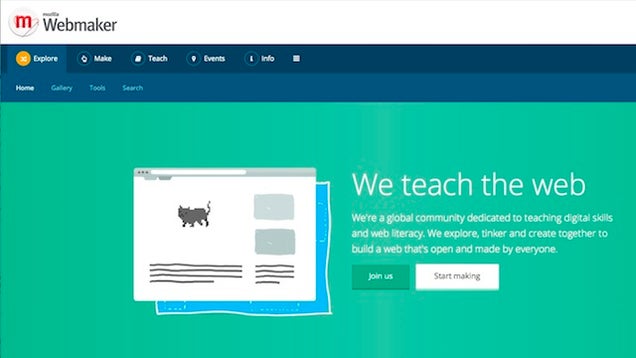
If you're interested in building your own website, or developing a web app or service for others to use, you'll need to get familiar with how the web works and the tools you'll need to develop for it. Mozilla's Webmaker project can help you learn, with fun, interactive activities and lesson plans designed for people of all skill levels.
Webmaker is actually a global project by the folks at Mozilla designed to teach people web literacy—that is, pull back the veil on how the web works and your favorite sites and apps function, and so you can learn to build for the web yourself. The general idea, according to Mozilla, is that there's no better way to learn the mechanics and culture of the web than by playing around and hacking it in a safe, fun environment.
Webmaker has three major components—the Thimble interactive, collaborative code editor that demystifies HTML, CSS, and Javascript, and corrects you as you write it (and shows you the results of what you write as you write it), X-Ray Goggles, which lets you view the source of any element on a web page—then change and tweak it to see what effect it would have on a real website, and Popcorn, an HTML5 media tool that shows you how to layer videos, images, audio embeds, and other rich media on web sites.
The Thimble editor just picked up an educational award, and the whole project is designed to break from a simple cirriculum of lessons (a la Codecademy and the like) and instead focus on getting hands-on with web design and development. If you're interested, or thinking about building your own website or webapps, it's worth a look. Hit the link below for more information.
Apparently this came out a week ago, and nobody told me, so I hold each and every one of you personally responsible. If you'd like to get a sneak peek at the next book in the "A Song of Ice and Fire" series from author George R.R. Martin (aka "Game of Thrones"), you can do so on the official "A Game of Thrones Guide" (aka "A World of Ice and Fire") app from Random House.
We'll tell you just a tad more after the break, but be warned: Spoilers are ahead if you're way behind in the series and wonder about the fate of a certain character.
Google strives to be as transparent as possible about government data requests. The company believes users deserve to know when a user has their data requested by the government and how often it happens to users in general. With this report for the year of 2013, we see that government data requests are increasing at a steady rate and show no signs of slowing down.
These requests generally stem from criminal investigations and don’t have anything to do with the “NSA surveillance” being talked about in the media. These are legal warrants to obtain data from Google. But even then, Google goes through great lengths to only provide the necessary data and no more. To illustrate the process of giving up data, Google created a cute video on the subject.
Is it worrying that government data requests are rising? A little, but do consider that these are legal warrants. Still, it isn’t very comforting that your data can be read at any time. Have any of you ever received a notice that your data has been given up by Google? I haven’t heard of it happening to anyone yet but I’d love to know. Leave a comment!
Never to be outdone in any consumer electronics category — especially by LG — Samsung is introducing a new range of LED "Smart Bulbs" for residential lighting. The new line consists of a standard lightbulb shape, a higher-performance lamp style (in two variants) and a more efficient tube form factor. The basic Smart Bulb will provide up to 15,000 hours — equivalent of 10 years of normal use — of lighting, with the ability to dim down to just 10 percent brightness and tune from 2700K to 6500K for different ranges of whites.
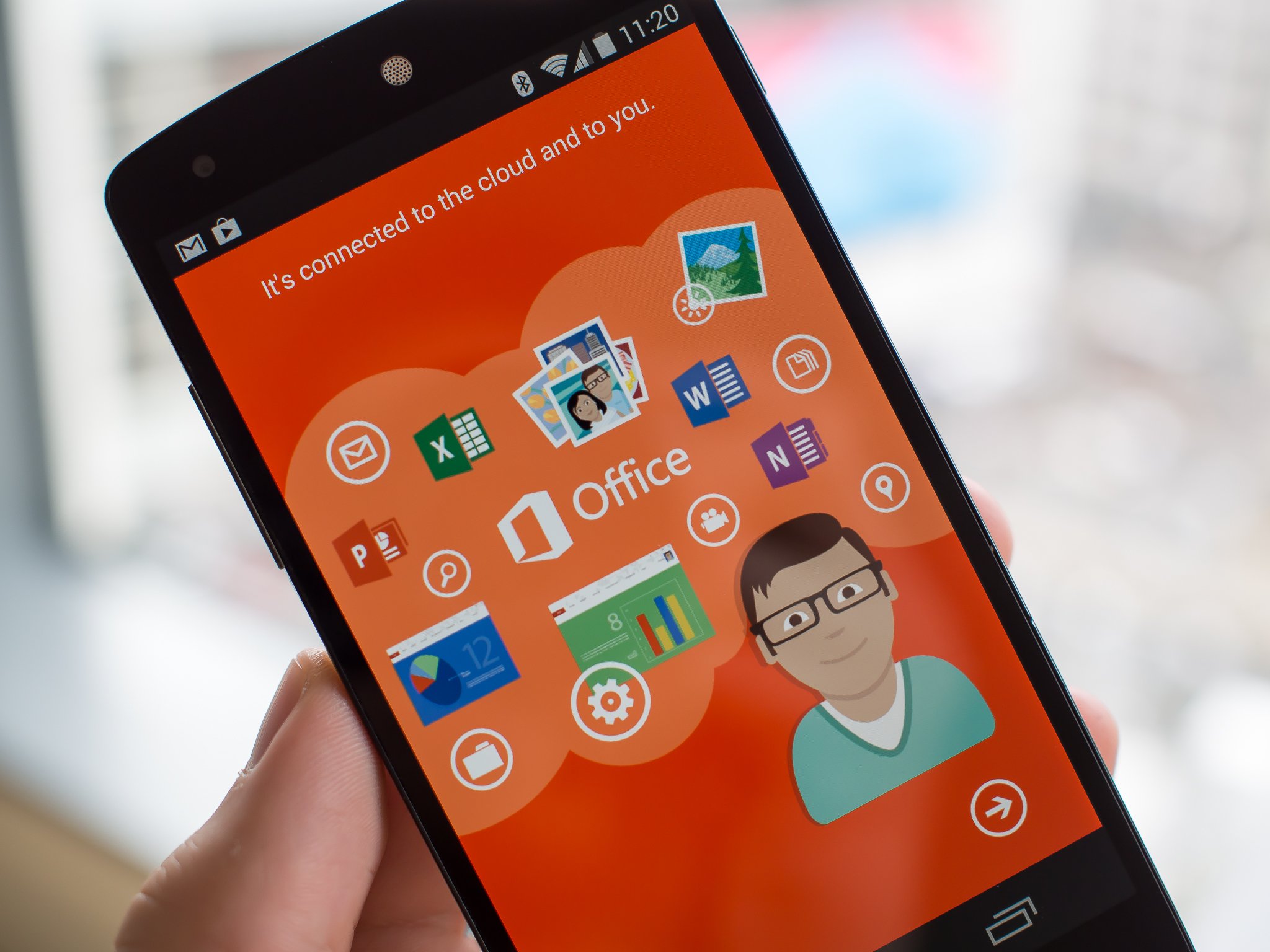
Office document viewing and editing on your phone now completely free — no subscription required
Update: The latest version of Office for Android is now in the Play Store, removing the requirement of an Office 365 subscription.
Original story: Alongside the much-awaited announcement of Office for the iPad, Microsoft dropped a bit of a bombshell today by making Office for Android completely free to use on phones. The app itself has always been free, but you needed to have a paid Office 365 subscription in order to make any use of it.
Now it's open to everyone so long as they're using an Android phone (or iPhone), giving you the ability to fully view and edit Microsoft Office documents without any restriction, just as you would expect on a Windows Phone. This is a pretty big step towards getting more folks interested in eventually paying for Office on the desktop, considering the ubiquity of Google Docs and the myriad of other office solutions on mobile devices.
We're still waiting for the update to go live in the Play Store (it just hit the Apple App Store moments ago), but once the latest build is up you will no longer need to log in with an Office 365-linked Microsoft account to edit. Keep your eyes on the Play Store at the link above.
Have you ever tried to really read through Google and Facebook's privacy policies? If you have then you might find that your eyes start to glaze over after just a few paragraphs. Now ZDNet reports that French consumers group UFC-Que Choisir has filed a lawsuit against Google, Facebook and Twitter for having privacy policies that are "illegible" and "incomprehensible" to the average user and that should be rewritten to make more sense. UFC-Que Choisir has slammed all three companies in the past for writing opaque policies that give the companies a lot of leeway for potentially violating their users' privacy.
Researchers from the University of Tokyo in cooperation with the University of Kyoto and Japan’s National Institute for Materials Science are studying a new technology that would significantly improve charging times for Lithium-ion (Li-ion) batteries, which could then be applied to various products including electric vehicles as well as smartphones and tablets.
Amazon may be preparing to switch up its streaming strategy in a big way. The Wall Street Journal reports that the company is planning a free, ad-supported streaming service that will offer both regular video content and music videos to all customers — not just those subscribed to Amazon Prime. The Journal says this service could stream Amazon's original programming (currently also exclusive to Prime customers) along with other licensed content.
That's to be expected, perhaps, but there are aspects of the rumored service that would mark new ground for Amazon. For example, the Journal claims Amazon may offer free music video streams to its online shoppers. Searching for Lady Gaga or Daft Punk would bring up their recent music videos,...
Although the dream of blocking sites in the United States was completely crushed along with the now-dead SOPA legislation, music and movie companies across Europe have enjoyed a much smoother ride.
Torrent sites such as The Pirate Bay and KickassTorrents are blocked in several countries around the EU and in the UK, for example, dozens of ‘pirate’ domains are now blocked at the ISP level.
A notable case originating from Austria, however, has been on hold pending a decision from the Court of Justice of the European Union. The dispute saw movie companies Constantin Film Verleih and Wega Filmproduktionsgesellschaft complain that local ISP UPC Telekabel Wien had been providing subscriber access to illegal streaming site Kino.to, a site now shuttered following police action.
The movie companies previously obtained interim injunctions to have UPC block the site, despite UPC arguing that it couldn’t be held responsible for a site that it had absolutely nothing to do with. UPC also noted that there was no court ruling indicating its customers had broken the law.
To settle the matter the Austrian Supreme Court asked the Court of Justice to clarify whether a company that provides Internet access to those using an illegal website could be required to block that site. Today the Court of Justice handed down its long-awaited decision.
The Court found that a person who makes copyrighted material available to the public without permission from rightsholders is using the services of the Internet service provider of the people accessing that content. EU law does not require a specific relationship between the person infringing copyright and the intermediary against whom any injunction has been issued, the Court found.
Addressing UPC’s concerns that none of its customers had been deemed by a court to have acted unlawfully, the EU Court said that proof was not necessary as the law is in place not only to bring an end to infringement, but also to prevent it.
The EU Court added that since any ISP targeted by an injunction is free to carry out its obligations in a way that fits its circumstances, blocking orders do not therefore restrict an ISP’s freedom to conduct its business.
Any injunction must, however, must be proportional so as not to unnecessarily stop subscribers from lawfully accessing information. Furthermore, any blocking measures must have the effect of preventing access to copyrighted content or at least make it more difficult. National courts are required to ensure that these conditions are met.
The take-home from today’s ruling, which follows last year’s advice from the Advocate General, is clear: ISPs can be required to block access to infringing sites but any injunction must be balanced and proportional.
MyColorScreen's Themer is already an impressively powerful app for making your phone look cool. But for something that's supposed to encourage customization, it's surprisingly limiting - you can choose from a wide variety of user-created homescreens, but there aren't many options for tweaking them. With the latest update, Themer gives end users the ability to add some flair of their own via icon packs.
Themer should work with the vast majority of icon packs that are already in the Play Store and designed for more typical launchers like Nova and Apex.
Reqallable has been available for the Sony Smartwatch 2 and some other devices for a while now, and today it has also been released for the Pebble smartwatch. The app reimagines your notifications, providing you only with what you need, when you need it.
Rather than sending along all of your notifications that you may not necessarily need, recallable filters out the important ones depending on where you are — at home, driving, at work — and forwards them to your Pebble. You can even reply to messages right from your watch with a set of pre-formatted replies. Reqallable also factors in travel times for your appointments depending on your actual location.
The app is available now for Android users and is a free download from Google Play and the Pebble appstore.
reqallable For Pebble: Lets Smartwatch Wearers Put Their Phone Away
reqallable App Lets Pebble Users Communicate Straight from the Watch: Extracts "Act Now" Content from Emails and Texts; Allows Replies Directly from Watch; Screens Notifications when Busy
MOFFETT FIELD and MOUNTAIN VIEW, Calif., March 27, 2014 /PRNewswire/ -- reQall (www.reqall.com), the award-winning developer of proactive intelligent assistant technologies, today launches reqallable for the Pebble Smartwatch, the first context-aware app to intelligently manage notifications, identify critical information and let you act on what matters most in email and text messages. Available now for free in Pebble's smartwatch appstore for Android, reqallable understands where you are, what you're doing and who's important to you to intelligently screen messages, highlight critical details and requests, and let you respond without reaching for your phone.
"reqallable expands the utility of Pebble by optimizing your email, text message and notifications experience," said Pebble CEO and founder, Eric Migicovsky. "It's hard to imagine a more transformative interface for a smartwatch than a technology that contextually understands who is important to you, when to buzz you, what to present you at a glance, and permits responses and actions directly from the watch."
reqallable automatically determines and prioritizes messages from important contacts based on your calendar, communications, activity and location. For example, if you've scheduled a meeting, reqallable will alert you to messages from participants, temporarily elevating those contacts to VIP status while holding back other messages until the meeting has finished. When a message arrives, reqallable parses emails and texts to present only the most critical details, and even offers pre-formatted responses like "This is fine," "Please call," or "Let's meet," for quick replies.
"Pebble users are early-adopters of wearables and view the smartwatch as the next stratum of personal communication tools. reqallable helps Pebble become a more fully-functioning device by managing and modulating when it's a good time – or not – for an interruption, and gives the wearer tools for a quick reply without having to reach for their smartphone," commented Rao Machiraju, co-founder and CEO of reQall. "reQall was founded based on award-winning research conducted at MIT that entailed wearing a device to understand human behavior. The goal was to intelligently automate personal assistance tasks on behalf of the user: with reqallable, that's exactly what we've achieved."
reqallable for Pebble is the third smartwatch app launch for reQall, which introduced reqallable for the Sony Smartwatch in January, followed by reqallable for the Samsung Gear in February. New apps for other devices will be released over the coming months.
reqallable is available in beta for Pebble, Sony Smartwatch, all Android phones, and soon will be on Samsung Gear. More information can be found at www.reqallable.com. The App can be downloaded at Pebble's AppStore and Google Play.
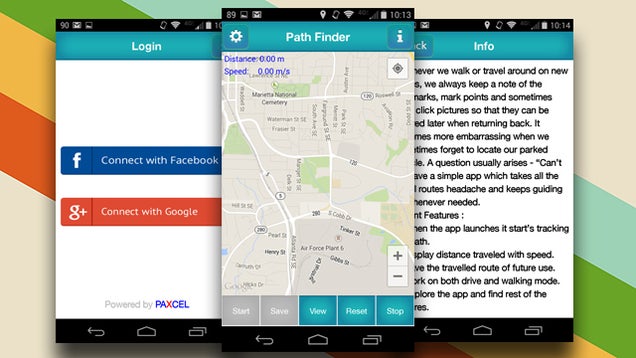
When you need to do something simple like find your way back to way back to your car, you can always mark your location on a map
. However, if you want to track the entire path back to where you started from, Path Finder can help.
The app begins tracking your movements wherever you are to begin with. You can tell it when to stop tracking and, at any time, open up the app to see the way back to your original location. It's pretty straightforward and, while it might not be necessary all the time, it can be a lifesaver if you get lost in an area without adequate signage.
Hot on the heels of Google Drive's massive storage price cuts
, iDrive has announced competitive pricing for its online backup and syncing service. For roughly the same price as Google Drive, you get double the storage space, split between your backup sets and synced files. And it's half off today.
For example, Google Drive's 1TB plan is $10 a month ($120/year). iDrive offers 1TB of online backup plus another 1TB of syncing through a special iDrive folder for $149.50 a year ($74.75/year for the first year if you signup today). Google Drive offers 100GB for $1.99 a month ($23.88/year); iDrive's 300GB plan (300GB backup + 300GB sync) is $49.50 a year.
Confused? You're not alone. I asked iDrive why the space is split up like that, when Google Drive, Dropbox, and other services just give you one bucket. I was told:
Actually no one splits it up because there aren't many other companies if any out there that do both true backup and sync, so it's unique to us. Backup and Sync work in different ways under the hood, our internal test show that separating those into two buckets (Backup/Sync), enables better performance and makes it easier for users to manage their data with those two separated.
So you get traditional backups (incremental and compressed backups to save network bandwidth, backup logs, scheduled and real-time settings, and so on) and a separate Drive- and Dropbox-like folder that syncs across Windows, Mac, Android, and iOS. It makes sense for situations like when you have a large amount of videos, photos, and media files you want backed up but not taking up all your space on other devices.
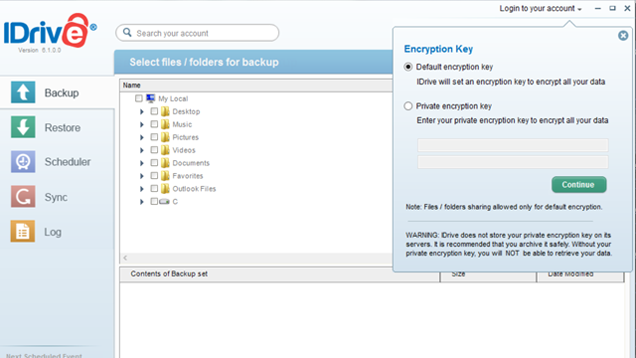
Besides the extra space, iDrive offers some compelling other features you don't typically find elsewhere. You can set your own encryption key for your data, which means extra protection for both your backups and your synced folder. Also, the free iDrive Express service makes it faster to backup and retrieve your data: Upon request, iDrive will send you an external drive you can transfer up to 3 TB of data to; send it back and they'll upload the data for you. You can similarly request a storage device to retrieve your data off of.
I played with the service a bit this week and found backups to be quick and simple, and sync works fine too. If you'd like to try it out without ponying up for a yearly plan yet, iDrive offers a free 5GB plan (5GB backup plus 5GB sync). iDrive has been around since at least 2008
, so that might give you some confidence at least in the service. (Reviews around the web are a bit mixed, but both Notebook Review and Wired gave it a 9 out of 10.)
After countless months of rumors, it looks like Amazon is finally getting ready to take the wraps off its TV set-top box. Unnamed sources tell Re/code that Amazon will unveil its new video streaming device on April 2nd, which just happens to be next Wednesday. It's still unknown at this time whether Amazon's device will be a full set-top box like Apple TV or whether it will be a USB dongle capable of streaming video from the web like Chromecast. The other wild card at play here will be the new device's gaming capabilities: Some reports we've read have claimed that the device will let you stream all your PC games to your television, which would essentially make it act as something of a poor man's gaming console. At any rate, whatever Amazon is up to we'll find out about it in less than a week.
It's taken a while but the moment has finally arrived for iPad users who are also fans of Microsoft's world-class productivity software. Microsoft on Thursday announced that it is bringing a touch-centric versions of key Office suite apps — including Word, Excel and PowerPoint — to the iPad for the first time, roughly nine months after Microsoft unveiled Office for the iPhone. Microsoft says that bringing Office to Apple's tablet is a way to "empower people to be productive" and to "do more across all devices."
YouTube is the latest victim in Turkey’s ongoing assault on social media. This comes one week after Turkey revoked access to Twitter within its borders. The removal of YouTube happened just hours after a leaked recording was published on YouTube that was reportedly a conversation of Turkey’s foreign minister, spy chief and a top general discussing different plans that could lead Turkey… Read More
At a press event today, Lithium Technologies confirmed reports that it has closed the acquisition of Klout.
Re/code first reported on the deal back in February, saying that it was "signed but not closed", then Fortune reported yesterday that the price was nearly $200 million. Read More
Twitter is full of conversations about music, and the company wants those tweets to be important outside the world of the social network. To that end, Twitter has now partnered with Billboard to work on real-time charts that the companies hope will be "the new industry standard for tracking and surfacing the conversation around music as it happens."
The charts will monitor conversations about artists, tracks, and albums, and it will show which top musicians are the most talked about at any given moment. Another chart will highlight up-and-coming acts, many of which stir up buzz on social networks long before they're recognized by major industry players. Once the charts launch in the next few weeks, Billboard will publish them on its...
In case you were wondering, no, Disney has not decided to go the route of so many superheroes and set the clock at Hundred Acre Wood back to explore where Winnie The Pooh got his honey obsession or whether Tigger was created by a pharmaceutical trial gone wrong. Brett Ratner’s RatPac Entertainment is instead exploring the genesis of the character itself.
The company has nabbed the film rights to Lindsay Mattick and Sophie Blackall’s book Finding Winnie, which is scheduled to arrive on bookshelves later next year. Mattick’s tome traces how her great-grandfather, Harry Colebourn, bought an orphaned bear cub in Ontario as he was about to be posted to Europe during World War I.
Nicknaming the animal Winnie because Colebourn came from Winnipeg, he took the cub to England, where she served as the mascot for his regiment. When Colebourn was sent to France, he left her at London Zoo and then donated her there so she could be properly cared for as she grew. It’s there that Winnie The Pooh creator A. A. Milne encountered her, thanks to his son’s constant visits to the zoo. The rest is literary and film/toy/merchandising history. If the story sounds familiar, it might be because you’re either a big Winnie fan or you saw the 2004 TV movie, which featured Michael Fassbender as Colebourn.
It’s early days for this one, and Ratner and his producing partners are looking for filmmakers to develop it. Perhaps they’ll aim for a Saving Mr. Banks-style story…
Webmail is great, portable, and accessible everywhere, but desktop email clients have a ton of great benefits too. From encryption you can trust to easy backups, there are a ton of great features you can only get—or get easily—with a desktop client like Postbox, Thunderbird, or Outlook. Here are some of the best ones.
We've already discussed how to tell if you should be using a desktop email client
versus webmail, so we won't rehash the pros and cons here. Both options are great, and you're free to use whichever one fits your needs the best—or use both. Even so, there are some great things you can do with a desktop client that you either can't do at all (or at least can't do easily) with your browser and webmail. Here are some of the ones that stand out.
Manage Your Mail Offline
Not everyone needs offline access to their email, but if you do, being able to work from a train, on a long flight without Wi-Fi, or anywhere you have room for a laptop but no connectivity is a windfall. Sure, in today's always-connected world Wi-Fi is everywhere and you can always tether to a mobile device, but sometimes that's just not an option. There's something wonderful about being able to fire up your email client, and even though it's not updated, you can still read messages you've received, queue up responses to auto-send when you do have a connection, organize messages in categories and folders, flag items and assign them priorities, and so on. Once you reconnect, everything you've done will be applied.
For example, where Gmail has "Canned Replies," Outlook's "Email Templates" help you never have to write the same message twice. Here's how to set them up, and use them even offline. In Thunderbird, you can use Clippings or Quicktext to get the same effect, and in Postbox has the feature built-in. All of the clients allow you to read and compose offline, and will automatically process any outgoing messages or sorting operations once you're reconnected.
Get Better, More Robust Backups of Everything
There's no better backup than the one you take and manage yourself, and even if you prefer to use webmail, there's a good case for setting up a desktop app as an IMAP client just so you have a persistent backup of your mail somewhere on your hard drive—that, presumably, you then have backed up both to external media and offsite
. Best of all, you can back up more than just your inbox—you can back up all of your sent messages, your contacts, your priorities and folder structure, everything you need to pick up and move to a different provider if you ever had to. Since you control it, you can encrypt it and store it wherever you choose.
Sure, you're still at the mercy of your email provider, but those people with Yahoo accounts probably remember back in December when the service was down for days. Even Outlook was down for a few days last year, not too long after its launch. Data loss wasn't an issue back then, but in the future it could be, and there's an even bigger threat when you don't back up your own mail: What if your provider decides to close your account for some non-email-related reason?
When we talked about the cloud services that do and don't respect your privacy
, we shared stories of people whose Microsoft accounts were shuttered because of an issue with SkyDrive (now OneDrive) or Xbox Live. Those people subsequently lost access to their Microsoft email. When Google takes action against someone for violating their TOS for Google Music, Drive, Google+, or even YouTube, the Gmail account you have connected to that is subject to scrutiny as well. In the best cases, they'll let you get your data from Google Takeout, but if you're the target in the sights of a massive company's beauracracy, do you really want to trust them to give you time and tools to get your data out? It's easier all around to just do it yourself.
Handle Attachments Like a Pro
Probably the best thing about using a desktop client on the regular is that I can choose where my attachments are hosted before I send them to someone else, and I can choose where they go when I get the message. For example, with Sparrow for Mac, if I drag an attachment into the body of the message directly, it's uploaded to Dropbox and my recipient will see the attachment and a link to download it from Dropbox in the message. No stuffed inboxes, or corporate email quotas to struggle with. If I drag the file to the bottom of the message, it's directly attached to the message, giving them the ability to download it directly from the message, or route it anywhere they prefer.
When we talked about awesome Thunderbird plug-ins
, we highlighted Dropbox for Filelink, which does the same thing, only it supports Dropbox, Box, Ubuntu One, and more. Postbox has Dropbox support built-in. There are a number of tools to do the same thing with Outlook, including GsyncIt and Maildrop. If you want your incoming attachments to go right to Dropbox, there are ways to do this too, including the amazing Send to Dropbox, or just use IFTTT to get the job done the moment an email with an attachment lands in your inbox.
Use Solid Encryption You Can Trust
You don't have to use a desktop email client to encrypt your messages, but if you want the best possible encryption, you really should
. The best part is that while it can be clunky to set up, it's not difficult, and if you dedicate a little time to it, you'll be up and running in a few minutes. The benefits of encrypting your email—or at least having the option to encrypt important emails like financial documents, private emails, or anything else sensitive—are huge. Using a desktop client for encryption means that everything—your personal keys and those you've gotten from other people, your key generation tools, are all local and in your own hands, instead of sitting on someone else's server somewhere, or only available to you through a closed-source tool or add-on. Best of all, there are encryption tools available for every major email client, including the three big ones here.
Become a Category Wielding, Message Flagging, Inbox Filtering Master
Most webmail clients have great filtering options and incredible spam controls, and that's all great, but when it comes to organizing your own mail so it works for you, there's no beating the wealth of options that a desktop client offers. Postbox and Thunderbird pack filters, flags, categories, and priorities, but Outlook takes things to a whole other level if you use it properly
and to the fullest of its ability. With just a little time, you can get familiar with the ins and outs of Outlook, and start filtering messages by sender or whether they're addressed right to you, color-coding messages for follow up, and more.
In the Postbox and Thunderbird world, you can extend the built-in flagging and priority features with add-ons like Quickfilters make organizing your mail as easy as dragging and dropping, QuickFolders turn your frequent inboxes and folders into tabs. Send Later give you true send-it-later functionality, much like Outlook's built-in feature. Personal Level Indicators help you see whether that message is really for you, or a blast to tons of people. Don't get us wrong, Gmail's inbox tabs and indicators for personal or important senders are great, and Outlook.com's "sweep" feature are helpful too, but you can't beat flags, categories, folders, and filters to give you total control over your mailbox.
At the end of the day, you may not need all of this power, especially if you only interact with your mail on your phone, or if you don't work out of your inbox every day. Even if you do, slinging color-coded, priority flagged, and encrypted messages, may sound like too much effort for you. That's fine—you don't have to get hundreds of messages a day to appreciate a desktop client, though. Webmail is great, make no mistake, but sometimes you have to roll up your sleeves and get dirty to stay organized.
Leef on Wednesday announced a new accessory for Android smartphones and tablets that can help users solve any storage-related issues, especially for devices that don’t have a microSD slot that would offer support for storage expansion. The Leef Access is a tiny dongle that can extend the memory available on Android devices by supporting additional microSD cards. The device plugs directly into a microUSB port and it’s just 9mm thick, which means it won’t be extremely bulky compared to the mobile device it connects to.
Now this is a good idea. In the age of the smartphone as an extension of our bodies, people's faces are always buried in their iPhones and Android phones while they walk around. We see people walking into each other and into stationary objects all the time on trips to and from our Times Square office. Is there nothing that can save these poor souls from awkward collisions? Thankfully, Apple may soon come to their rescue with a brand new invention... that was already invented years ago.
Apple has filed for a patent (via AppleInsider) that adds further fuel to the fire around the possibility it will use sapphire glass for future device displays. The the new application describes how an oleophobic (oil-repelling) coating might be added to sapphire glass to make it smudge and fingerprint-resistant. So far, we’ve seen most of the evidence around Apple’s sapphire display… Read More
 Google sometimes gives us a hint of what it's working on if you're willing to dig for it. Buried in the new Chrome Beta for Android update is something called contextual search. It's not completely functional right now, but you can take a peek at some aspects of it.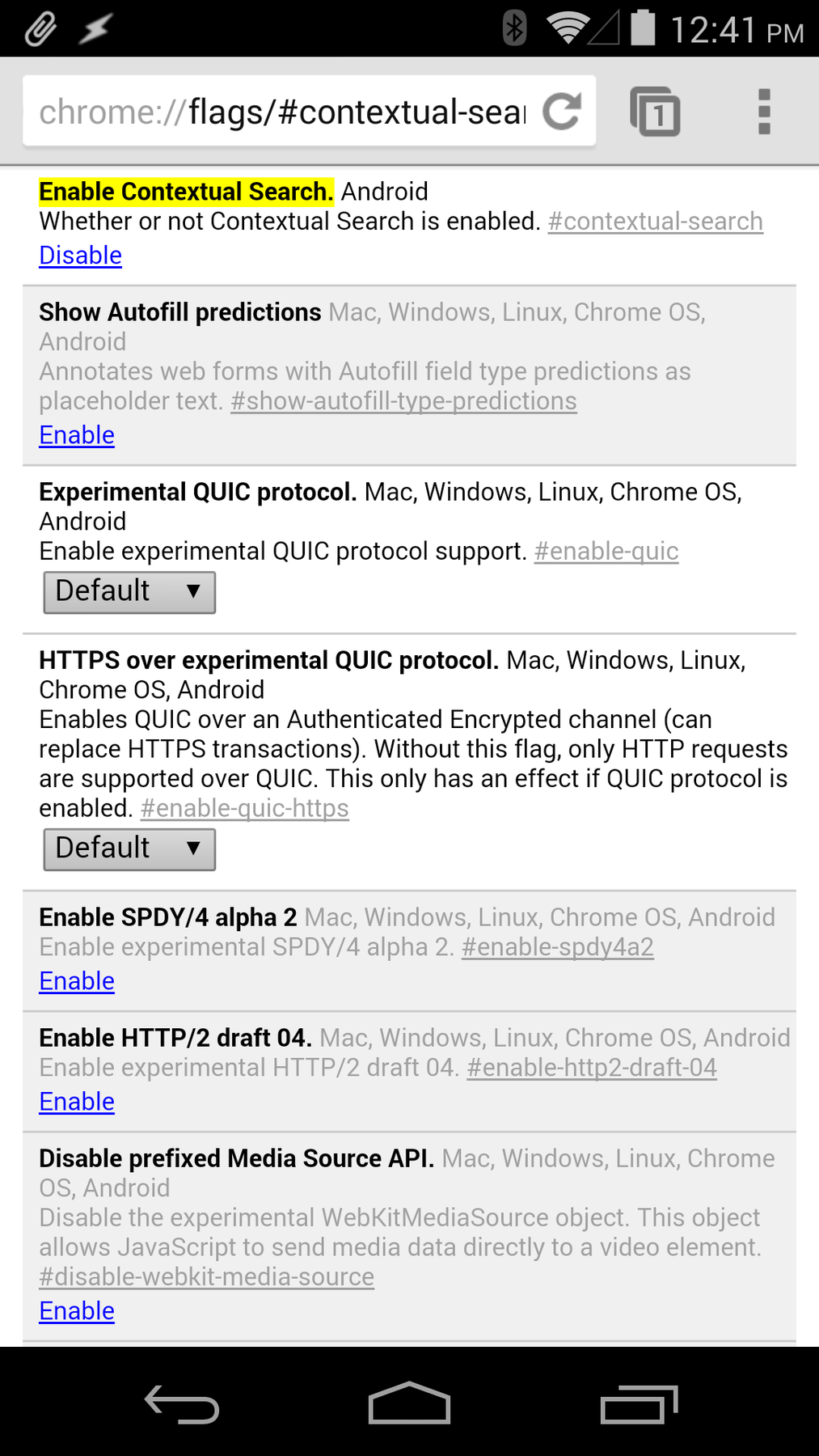






































 To most consumers it is common sense that they can make a backup copy of media they own, but in the UK this is currently illegal.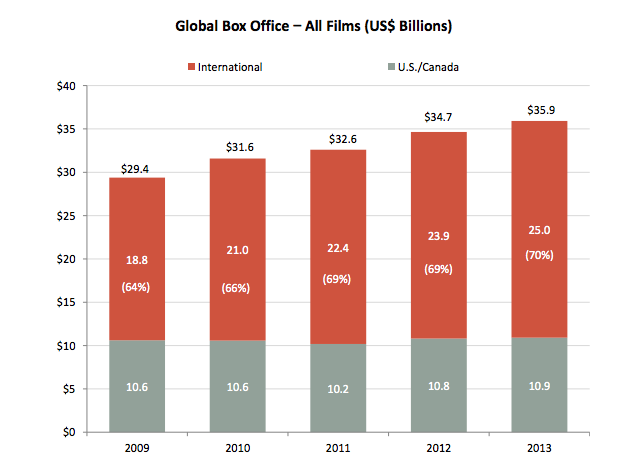







 Although the dream of blocking sites in the United States was completely crushed along with the now-dead SOPA legislation, music and movie companies across Europe have enjoyed a much smoother ride.