Vodafone UK sends word that it's reduced the price of three of its older Android smartphones on PAYG, as part of a promotion running this weekend. The deals include the last two Samsung flagships, a couple of weeks out from the global Galaxy S5 launch. The Galaxy S3, previously £170, now costs £119, and the Galaxy S4 falls from £475 to £330. Meanwhile the Vodafone Smart Mini III drops to £52, down from £75.
Bcstevieb
Shared posts
Most Popular VPN Service Provider: Private Internet Access

When you need a good VPN, whether it's for security on unfamiliar networks or staying anonymous and private, you have plenty of options. Last week we asked you for your picks , then looked at the five best VPN service providers . Now we're back to crown our winner.

Voting was tight, and the leader shifted several times over the course of the running, but Private Internet Access pulled ahead in the final tally to take the top spot with over 25% of the votes cast. That should give you an idea how close everything was, but PIA does offer all of the security and encryption features you could want from a VPN, along with servers in multiple locations to get around location blocks, options to connect your router for an always-on connection, and multiple encryption and connectivity methods.
TorGuard picked up second place with over 24% of the vote, earning your praise for its commitment to privacy, and multiple plans and options for different users with different needs. In third place with 23% of the vote was IPVanish, which many of you praised for its blazing fast speed. CyberGhost VPN picked up fourth place with over 18% of the vote, and rolling your own VPN brought up the rear with over 8% of the overall vote.
For more on all of these and the honorable mentions not mentioned here, make sure to head back to the full hive five feature for details.
The Hive Five is based on reader nominations. As with most Hive Five posts, if your favorite was left out, it didn't get the nominations required in the call for contenders post to make the top five. We understand it's a bit of a popularity contest. Have a suggestion for the Hive Five? Send us an email at tips+hivefive@lifehacker.com!
How to Make GIMP Work More Like Photoshop

Over six months ago, I stopped using Adobe Photoshop and switched to the open source alternative, GIMP, for all my personal photography projects. This wasn't the impossible task that most people believe it is.
This post originally appeared on Riley Brandt's Photography Blog.
Users often claim that Photoshop is absolutely essential to their workflow . Across the internet, forum users are ridiculed for even suggesting that someone try to replace Photoshop with GIMP.
But times have changed. Photoshop isn't the killer app that it used to be. I spend about 90% of my time in Lightroom and only 10% in Photoshop. This is the same for many other professionals. We've all switched to the RAW format, so we use RAW photo editors most of the time. Photoshop is often just used for final touch ups.
For the reduced role that Photoshop now plays in many photographers' workflows, GIMP is surprisingly capable . However, transitioning to GIMP can be frustrating because the keyboard shortcuts, tools, and interface are different from Photoshop's. Hopefully these setup tips can help make Photoshop users feel much more at home in GIMP.
First: Find Your GIMP Folder
In this tutorial, we'll be tweaking some configuration files in the GIMP's settings folder. This is in a different place on every system. So, mark down where this folder is, and keep it in mind for future steps:
Windows: C:\Users\[your user name]\.gimp-2.8
Mac OS X: ~/Library/Application Support/GIMP/2.8/ (You may have to unhide the Library folder first)
Linux: ~/.gimp-2.8
From here on out, we'll refer to this as .../.gimp-2.8, which you can just replace with the above paths. Now let's get started!
Set Up Photoshop Keyboard Shortcuts in GIMP

By simply replacing one configuration file, you can have Photoshop's keyboard shortcuts enabled in GIMP. This, by far, is the most helpful thing I did to make my transition to GIMP easier. In fact, I am almost useless in GIMP without it.
Since GIMP and Photoshop are not exactly the same, there are a few differences. You can view a list of all the keyboard shortcuts here.
- Download the ps-menurc file from freeshell.org
- In GIMP's ...\.gimp-2.8 folder, rename the file "menurc" to "menurc-backup"
- Rename the ps-menurc file you downloaded to "menurc" (with no .txt extension) and move it to ...\.gimp-2.8
- Relaunch GIMP for the changes to take effect
Note: After installing the configuration file, you may have a few shortcuts that conflict with one another, so I recommend going to Edit > Keyboard shortcuts and making sure everything is in line with this chart. I also recommend binding "[" to Decrease Brush Size More, and "]" to Increase Brush Size More to speed up brush size changes.
Install a "Layer From Current Selection" Replacement

In Photoshop, CTRL+J can be used for more than just duplicating the current layer, it can make a new layer from the current selection. This is a really handy tool that I use very often in Photoshop. You can add the same function to GIMP's Layer menu with a plugin called Layer via Copy/Cut.
- Download the plugin Layer via Copy/Cut
- Install it by dragging the layer-via-copy-cut.py file to .../.gimp-2.8/plug-ins/ (and if you're on Linux, make sure the file is executable)
- With your current layer active, make a selection
- In the main menu, choose Layer > Layer via Copy
- Your selection will be copied to a new layer
Combining the "Layer via Copy" feature with layer masks is a great way to create composite images in GIMP. The two can also be a capable (but less efficient) replacement to the patch tool in Photoshop.
Make "Snap to Canvas Edge" the Default

Something I find really frustrating in GIMP is that by default, layers don't snap to the edge of the canvas (or the grid) when I move them. Even worse, you have to enable it every single time you open an image. Fortunately, as open source software is so customizable, this can easily be changed.
- Open .../.gimp-2.8/gimprc with a text editor
- At the bottom, add the two lines:
(default-snap-to-canvas yes)
(default-snap-to-grid yes)
- Save and close
Disable "Show Layer Boundary" by Default

Something I never got used to in GIMP is the yellow and black dotted line that surrounds the active layer. Though it can be helpful at times, I definitely prefer to have it disabled by default.
- From the main menu, navigate to Edit > Preferences > Image Windows > Appearance
- Uncheck Show Layer Boundary under Normal Mode and also Fullscreen Mode
- Restart GIMP to for the changes to take effect
You can always temporarily turn it back on by clicking on View in the main menu and choosing Show Layer Boundary.
Make the Move Tool Function Like Photoshop's

By default, the Move Tool in GIMP is set to Pick a Layer or Guide. With this option set, it behaves a bit more like Inkscape or Illustrator because you can also move things that are not on the current layer (like the background). If you are a long time Photoshop user, this is very strange.
To make it function like Photoshop, you can set the default behavior to Move the Active Layer.
- Select the Move Tool for the Tool Box in the left panel
- In the Tool Options dialogue box check Move the Active Layer
- From the main menu navigate to Edit > Preferences > Tool Options > Save Tool Options Now
- Restart GIMP
Install a "Content Aware Fill" Replacement

The useful "Content Aware Fill" feature that showed up in Photoshop CS5 actually originated as a GIMP plugin called "Resynthesizer." It allows you to select something you want to remove from an image, and with the push of a key, it's gone without a trace.
The Heal Selection plugin (aka smart remove) is a great replacement for Content Aware Fill. To install it, just download the Resynthesizer and Heal Selection plugins and drag the necessary files to .../.gimo-2.8/plug-ins.
If you're using Linux, you can also install these and many other useful plugins via Thorsten Stettin's PPA by running:
sudo add-apt-repository ppa:otto-kesselgulasch/gimpsudo apt-get updatesudo apt-get install gimp-plugin-registry
Once installed, you can make a selection, and then navigate to Filters > Enhance > Heal Selection. Voila!
Install ICC Color Profiles

You can download high quality, freely available ICC color profiles (like sRGB) online and use them in GIMP. Windows, Mac, and Linux users can get sRGB ICC profiles directly from the International Color Consortium. If you are running Ubuntu, or any of its derivatives like Linux Mint or elementary OS, you can get them directly from the repositories. Just search for "icc color profiles" in your package manager. They will be copied to /usr/share/color/icc/.
For the photographers shooting in the Abode RGB color space (which has a wider color gamut than sRGB), you can download the color profiles from Adobe's website. This package also includes CMYK color profiles. You will be required to agree to Adobe's EULA. I recommend copying the files to /usr/share/color/icc/ on Linux, or another safe folder on Windows or Mac.
Once you have the color profiles on your disk, you need to let GIMP know where they are. From the main menu in GIMP, go to Edit > Preferences > Color Management. Make sure Mode of Operation is set to Color Managed Display, and select your RGB and CMYK ICC files in the drop down menus below.
Of course, your monitor has already been color calibrated, right? Nobody would be silly enough to try and color balance a photo without first calibrating their monitor... right?
Install the CMYK Conversion Plugin

If you want to convert an image from the RGB color space to CMYK in GIMP, you can do so with the Separate+ plugin. However, there are a couple of limitations. The Arch Linux wiki has a great write-up about the limitations (as well as how to soft-proof an image). Separate+ can do a few things:
- Separate a RGB image
- Attach ICC profiles to separated image files
- Convert from one RGB profile to another
- Soft-proof colors
You can also install it from the GIMP Plugin Registry just like we have with other plug-ins up to this point. If you're running Linux and installed the "gimp-plugin-registry" package from the PPA I mentioned previously, you already have it.
To convert your image to CMYK in GIMP:
- From the main menu, navigate to Image > Separate > Separate
- This will give you a new image that looks inverted and has four separate layers
- Go to Image > Separate > Export to export your image to a .tiff file
In my experience as a professional photographer, it's actually the graphic designers and printers that who require CMYK support. Whether it's for a magazine, a newspaper or even a billboard ad, I've never had someone request a photo in the CMYK color space. In fact, they always request that the photos are in the RGB color space, then they do the conversion themselves.
Customize Your Workspace

Enable Single-Window Mode
This seems like an obvious step, but I've met several GIMP users who didn't even know it was an option. Photoshop users will feel much more at home when they have their tools, menus, panels and workspace together in one window.
From the main menu, simply navigate to Windows > Single-Window Mode.
Dockable Dialogues
To free up a lot of space on the left side panel, move the Tool Options dock to the bottom right panel. Then resize your left panel to something much thinner.
If you want GIMP to really mimic Photoshop, you can move the Layers dialogue to the bottom right panel. Personally, I've grown to like my Layers at the top and the Tool Options at the bottom.

Switching from Photoshop to GIMP: Tips from a Pro | Riley Brandt Photography
Riley Brandt is a photographer and Linux lover at the University of Calgary.
Want to see your work on Lifehacker? Email Andy.
Cloud Pricing Is Racing To Zero, As Amazon Just Underscored
Amazon has cut the price of its online storage and compute services again, the 42nd time that the company has slashed prices on Amazon Web Services.
The price cut, announced at the AWS Summit in San Francisco, comes as little surprise. Just the day before, Google slashed its prices for Google Cloud Platform. The Amazon price cuts to AWS include:
- A 51% average reduction for Amazon S3 with tier prices decreasing from 36% to 65%
- For Amazon E2, the M3 instance type will see a 38% reduction while the C3 instance will have a 30% price decrease. Other EC2 instances (M1, M2, C1 and CC2) will be reduced between 10% and 40%.
- Amazon RDS (Relational Database) will be reduced 28% on average. The ElasticCache will have a 34% average reduction in price.
- Amazon EMR (Elastic MapReduce) will have between a 27% and 61% reduction.
With the price cuts from Amazon and Google, Microsoft is all be certain to reduce its Azure cloud prices in the near future, perhaps next week at the Microsoft Build developer conference in San Francisco. The three companies are locked into a war for developer attention, cutting prices in what has become a cutthroat market for cloud and computing services.
Google Play Music finally lets you upload songs through the browser

Google Play Music has long been a solid option for uploading and accessing your music collection wherever you are, but using the Music Manager app to actually get your songs into the cloud wasn't always the smoothest or most intuitive process. However, a new feature tucked away in the experimental "labs" section of Play Music should make this process a lot easier — users can now upload whatever music they want straight through the browser using simple drag-and-drop. If the songs are matched with Google's vast music library, they'll be added automatically; otherwise they're simply uploaded.
In addition to uploading through the browser, users can also select a number of folders that the service will monitor and grab music from whenever...
Everything you could possibly want to know about the new HTC One (M8)

The brand new HTC One (M8) is kind of a big deal. Announced on Tuesday following months of leaks and rumors, the M8 is HTC's new flagship phone that the struggling vendor hopes will be the catalyst it needs to turn things around. It also just so happens to be the best Android phone on the planet right now, though that's certainly no guarantee that sales will follow. Coverage of HTC's new flagship phone has been coming hot and heavy on BGR for the past day and a half, so here is a quick rundown that offers links to everything you could possibly want to know about the HTC One (M8).
UK tax authority used anti-terror law to spy on whistleblower who disclosed sweetheart deal for Goldman Sachs

The UK tax authority HMRC abused the country's controversial anti-terrorism law to spy on a whistleblower and journalists at the Guardian after it was embarrassed by the revelation that it had given a sweetheart deal to Goldman Sachs. Osita Mba revealed a government oversight body that HMRC forgave GBP10M in interest owed by Goldman Sachs after a failed tax-evasion scheme, and in the ensuing public furore, HMRC's top executives invoked RIPA, the country's anti-terror law, to spy on its employees and on Guardian journalists in order to discover the identity of the leaker. Under RIPA, HMRC is able to spy on the nation's emails, Internet traffic, text messages, phone records and other sensitive data.
Lin Homer, the head of HMRC has appeared before a Parliamentary committee to explain its use of anti-terror spying powers to uncover the identity of a whistleblower whose personal information is protected by legislation, and was unrepentant, and would not rule out doing it again in the future.
Margaret Hodge, the committee chair, expressed shock at this. But it was under her party's last government, the Blair regime, that RIPA was put into place, over howls of protest from campaigners who predicted that it would be used in just this way.
The MP told Homer she was particularly surprised "that you made a request under Ripa, which is there to deal with terrorism". She asked for assurances that HMRC would "never again use these powers on a whistleblower".
However, Homer declined to offer Hodge the desired reassurance, responding: "You know that we cannot offer carte blanche assurances for evermore that we won't use these … I have other duties of care to parliament and other individuals."
Using the Public Interest Disclosure Act, Mba wrote in confidence to the National Audit Office (NAO) and two parliamentary committees in 2011 saying that the then head of tax, Dave Hartnett, had "let off" Goldman Sachs from paying at least £10m in interest.
HMRC criticised for using terror laws against tax whistleblower [Rajeev Syal/The Guardian]
(via Techdirt)
(Image: HMRC Evasion Campaign Poster, HMRC, CC-BY) ![]()
Last.fm shuts down radio subscription service, keeps Spotify partnership alive

After going paid subscription-only last year, Last.fm announced today that its subscription radio streaming service will no longer be available. The company sites on its blog the music industry's rapid change for the decision, which could be referring to the overwhelming popularity of services like Pandora, Spotify, and Rdio.
How Android Service Packs Are Finally Fixing Manufacturer Skins

Yesterday, HTC announced its new One handset , along with a ton of new features. One of the lesser-touted but potentially more significant features is the new HTC Service Pack. This background app allows HTC to distribute its Sense applications independent of OTA updates. HTC is now the third company to follow this very encouraging trend: unbundling of apps and services.
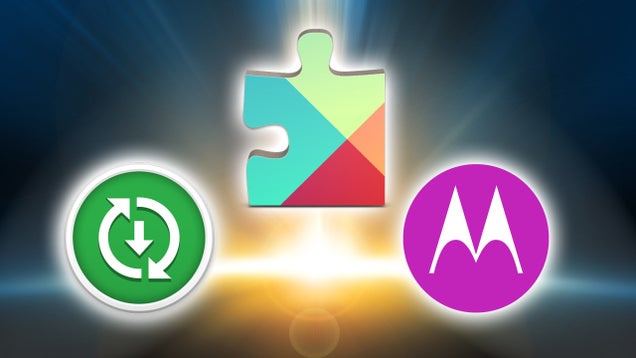
We've talked about Google Play Services before. Motorola continued the trend of creating a separate services APK with Motorola Contextual Services. HTC's new Service Pack is a continuation of what Google and Motorola started. The company is now the third to begin moving as much of its Android modifications to the Play Store, instead of building them in to firmware updates.
Unbundling Circumvents the Complicated Update Process

Back in December, HTC released an elaborate infographic detailing how Android updates get from Google to you. Now, this process is already long and complicated because it involves getting the new version of Android from Google, dealing with chipset manufacturers, negotiating carrier modifications to the platform, and submitting the potential update for testing and certification with both government and industry organizations. Frankly, the fact that this can all occur in only a few months for some phones is astounding.
One of the big roadblocks, however, is manufacturer skins. Love 'em or leave 'em, skins are the biggest way manufacturers compete with each other and without them, there's a lot less incentive for companies to invest in amazing new phones. The trouble is that skins hold up Android updates (and themselves) by being lumped in with the rigorous and complicated vetting process described above. If HTC adds a feature in Sense, and a bug is discovered, the whole update gets delayed. That KitKat update you wanted has to go back to the digital assembly line because BlinkFeed is misbehaving.
By unbundling its apps and services from firmware updates and distributing them via the Play Store, HTC makes it easier to get new versions of Android or maintenance releases out to its devices faster. How much faster is unclear—remember, skins are only one part of the very complicated puzzle—but it's certainly less complex. Not only that, but it means that updating the apps themselves is faster.
This is something both HTC and Motorola have started doing. Most if not all of the apps that Motorola made for it's Moto line of phones are distributed via the Play Store and updated when new features become available, rather than waiting for the next firmware update. While HTC has only just released its new apps to the Play Store, it will be doing the same thing. This whole process goes beyond mere updates, though.
Unbundling Frees Your Phone to Have New Experiences

The big problem with manufacturer skins is that, contrary to what we'd like to believe, they're not skin deep . There's a reason they were built in to the phone to begin with. They sometimes require new interface elements, shared features between apps, and new APIs that Google hasn't gotten around to yet. In the early days, some of these were critical features that Android has since included. Now that Android covers most of the basics, though, Google, HTC and Motorola are able to release their own pack of services and APIs via the Play Store that enable their other apps to function.
These service packs act as a toolkit for other apps. Much of the functionality that would be built into the firmware of a phone can be distributed this way, which is what allows bundled apps to be distributed separately. For example, here's a list of just a few of the things that Google Play Services includes:
- Game achievements and multiplayer functions.
- Account authentication.
- Maps and location services.
- Notification sync services.
- Cloud sync of app data.
If this list doesn't make sense to you, that's okay. These services are for developers! What it means for you is that when you see Google Maps data inside an app, when you clear a notification on your tablet and it disappears from your phone, or when you get an achievement in Play Games, the developer used Play Services to get it done. HTC doesn't have public documentation for its service pack, likely because it's only used internally, but the concept is the same. Shared functions that would otherwise have to be built into your phone's firmware can be placed in service packs.
The result is that now, experiences are portable. Just about any device can get pretty close to stock Android just by installing a few apps. Not only that, but HTC has said that it plans to bring its trademark BlinkFeed launcher to other devices. In short, your HTC One can run stock Google apps, and your Nexus 5 could potentially run HTC-branded services. It's like a smartphone gift of the magi.
This isn't limited to manufacturers either. While the attempt was not very popular, Facebook tried to introduce its own launcher/user interface in a very similar fashion. Facebook Home replaced your home screen and lock screen, plus a modified notification system solely for Facebook pings. This was announced alongside a phone dedicated to the platform that didn't take off, but many more people were able to try it out because it was released to the Play Store.
Of course, it's a little hard to get too excited about these alternative experiences if they're not that great. While Sense and Facebook Home had their fans, it's safe to say that stock Android is still the favorite to win. However, by unbundling these experiences from hardware, users can swap between them without having to root their device and flash a ROM, and everything from app updates to new firmware rollouts happen faster because they're not bogging each other down.
Lest we get ahead of ourselves and think that we've entered a glorious new era of skin-free devices and consumer choice, it's important to note that unbundling software from handsets doesn't fix everything. For starters, just because HTC separates its services out doesn't mean it won't come on your device. You'll just have the option of installing something different. Additionally, hardware drivers, system-level APIs, and certain other software will still need to be distributed via OTA updates, which keeps things slow. Plus, having some apps available isn't the same as having an entire ROM with a particular skin. While Google's the best at making its software available on non-Google/Nexus devices, you still can't download apps like the stock camera or calculator to any old phone.
Nonetheless, this is still better than the alternative. The more software distributed via the Play Store, the less it slows down updates. And the more of these apps and services that are distributed as separate entities, the more users can pick and choose which ones they like best without having to wed themselves to a single manufacturer. It's a long road to that golden utopia (and we might never get there; Samsung still hasn't stepped in this direction), but this is a good start.
LastPass Updated To Version 3.2 With Automatic Password Entry For Apps And Chrome Browser
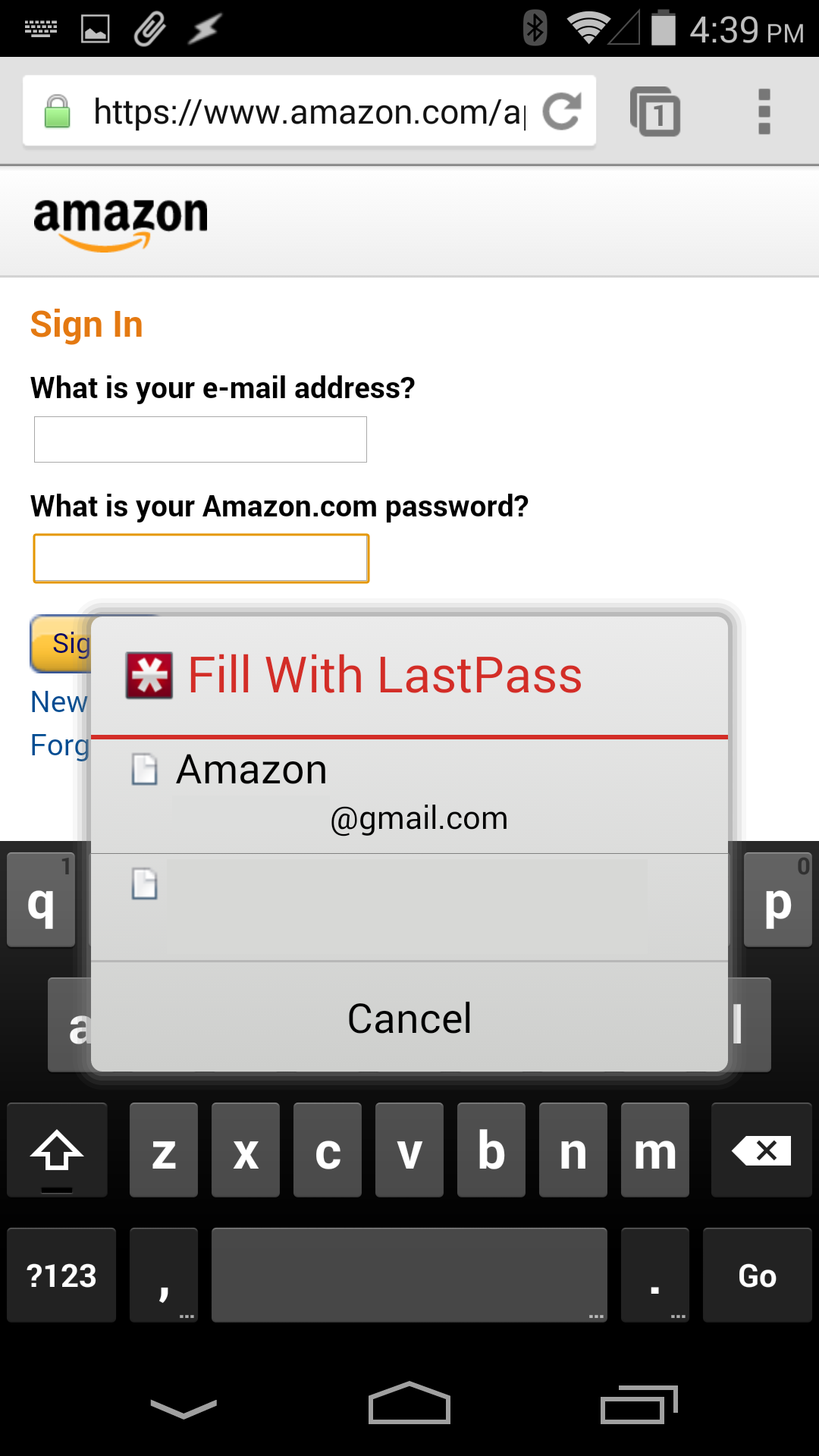
Few -if any- password managers have gained a following quite like LastPass. It's secure, extensively cross-platform, and easy to use. When up-and-coming competitor PasswordBox hit the scene last month with the ability to insert login credentials directly into native apps, it left many LastPass users anxiously requesting the same feature. The wait is finally over as LastPass for Android has been updated to enable automatic fill-in for apps and Chrome.
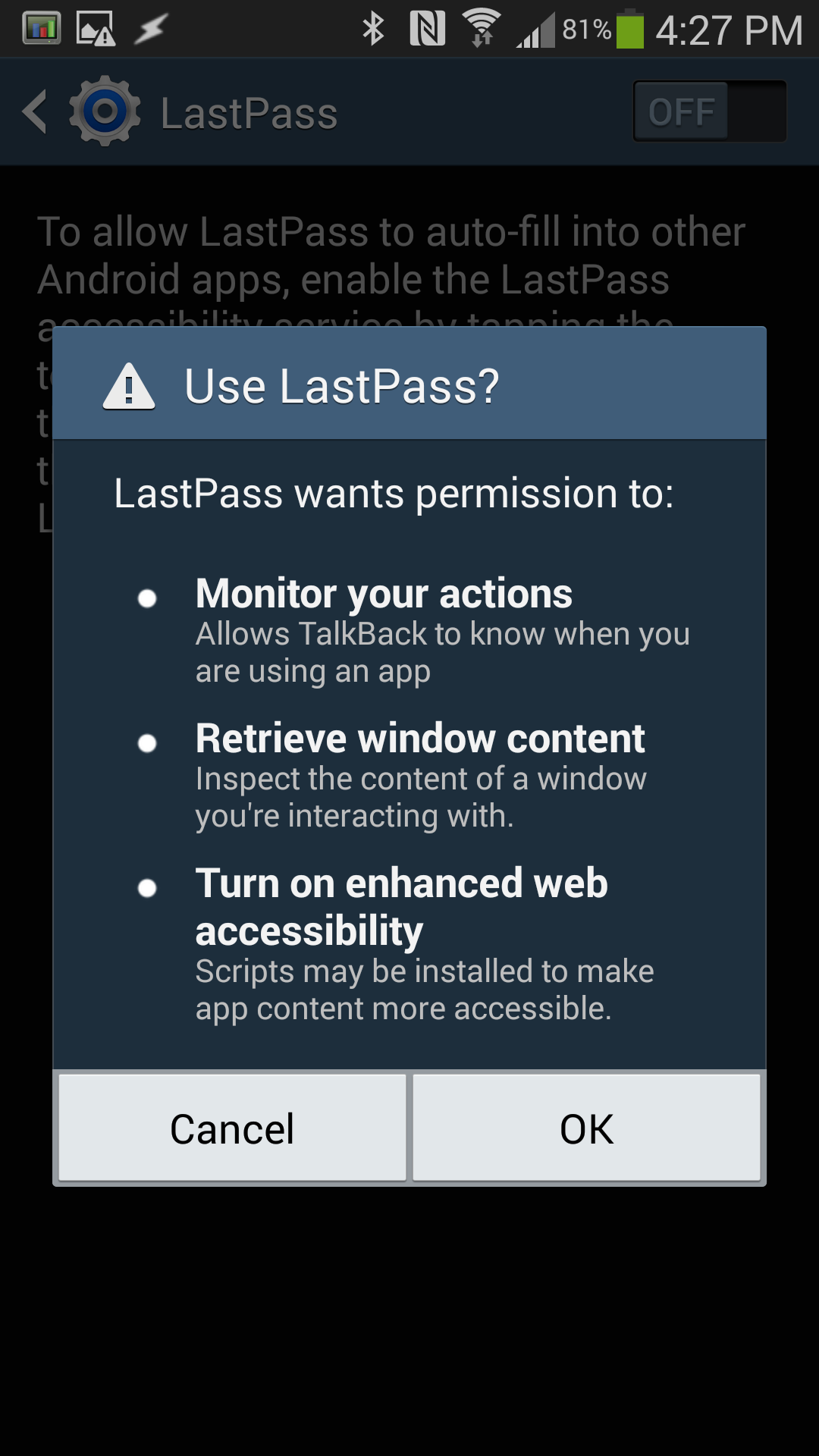
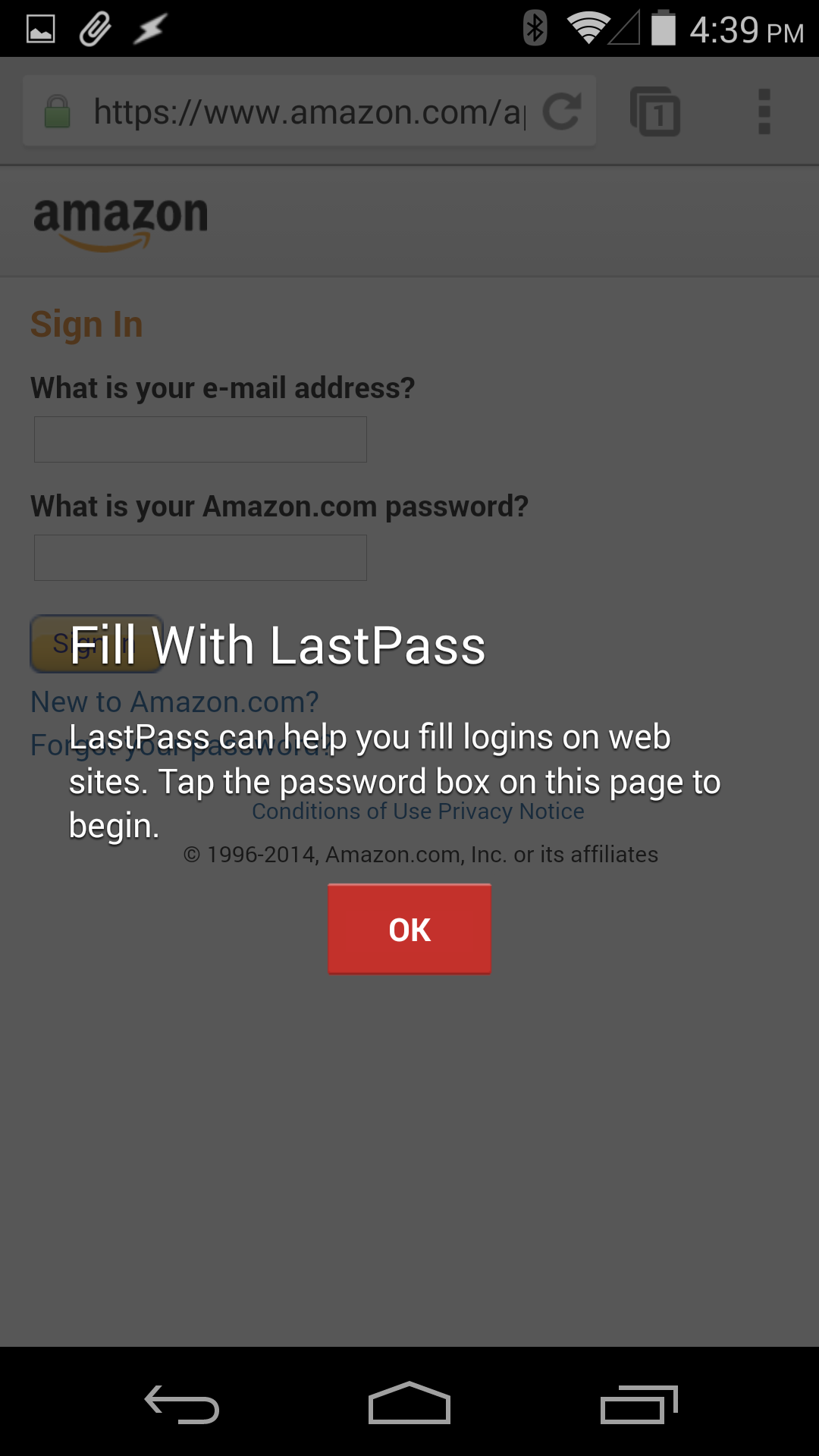
LastPass blocks screenshots within the app, thus the photos
Like PasswordBox, LastPass is using the Accessibility Services API in Android to enable automatic fill-in.

- Looking For An Easy Way To Log In To Sites/Apps On Your Mobile Device? Check Out PasswordBox's New One-Tap Login Feature
- LastPass Gets A Massive Update To 3.0, Is Finally Holo-fied
- Chrome For Android (Stable) Update: Autofill And Password Sync, Standard Performance And Stability Improvements
- Chrome Beta For Android Now Supports Password Sync And Autofill [Updated]
LastPass Updated To Version 3.2 With Automatic Password Entry For Apps And Chrome Browser was written by the awesome team at Android Police.
Google Merges Account Activity Reports Into Dashboard, Does Away With Monthly Schedule
Mankind loves to obsess over numbers, statistics, and data. Ok, maybe not everybody is stuck on tracking every last thing that happens; but if you're reading this site, there's a good chance you're already checking your monthly activity reports each time Google fires off an email reminder. That addiction to numbers is about to get much more interesting. Google is merging the monthly activity report with Dashboard to produce a super-sized page full of facts and stats about how you're using Google's services.

- Partake In Some Self-Reflection With Google's New Account Activity Feature, Track Your Own Data For A Change
- PSA: Google Has A New Security Dashboard And Account Sign-In History
- Chitika Mobile War Reveals Lots Of Goodies: Android Device Market Cap, iOS Fragmentation, And More
- Latest Android Distribution Stats Now Available – Jelly Bean Reaches 1.2%, Gingerbread Still Dominates At 57.5%
Google Merges Account Activity Reports Into Dashboard, Does Away With Monthly Schedule was written by the awesome team at Android Police.
EE announces cheaper LTE plans and £99 'Kestrel' 4G phone
British mobile operator EE is making a big play for the budget market today, with the unveiling of new, low-cost LTE price plans and an £99 4G phone to use them with. EE's new 4G plans start at £13.99 per month for 500MB of data and EE's new, own-branded "Kestrel" handset, built by Huawei. The device features a 4.5-inch qHD display, a 1.2GHz Snapdragon 400 processor and Cat. 4 LTE support.
Use Ice Cubes and Your Dryer to Steam Out Wrinkles

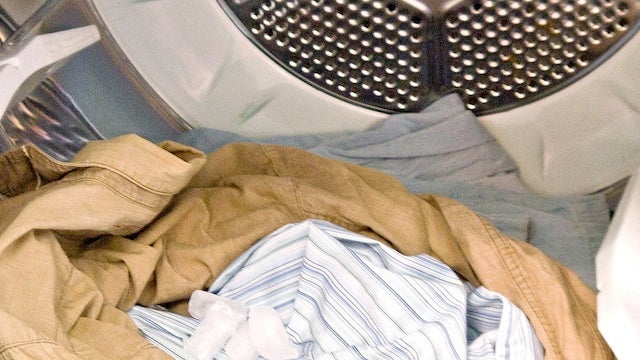
If you're too busy to iron, but you need a shirt or pair of pants smooth and wrinkle-free for an interview, a night out, or just so you look good, this time-saving tip can help. Toss a couple of ice cubes (not too many) in the dryer with your wrinkled clothes. Run it on its hottest setting. It's strange, but it works.
Full disclosure: I have no qualms ironing. We've talked about ways to de-wrinkle your clothes without ironing before, and they work well, but ironing isn't hard, and usually it's just way more effective than trying to hack your way to wrinkle-free clothes. Still, when the folks at PopSugar sent this one over to us, I decided to give it a try, and it works well—as long as you don't have a lot of clothes in with your ice cubes.
This trick works if you have a couple of shirts, or maybe a shirt and a pair of slacks or pants. Jeans, heavy fabrics, or too many clothes and you lose the benefit. As you run the dryer, the ice cubes melt (and seriously, we mean like two or three ice cubes, not a handful, no matter how big your dryer is. In fact, this works best with a big dryer, few clothes, and a few cubes.) to water, which eventually gets hot enough to become steam. That steam—along with the hot temperatures—smooth out the wrinkles. It's like the shower trick and the dryer trick all rolled into one.
Hit the link below to see a few photos of the tip. It's simple, and in the right circumstances, it can free you up to do other things while your wrinkly clothes take care of themselves.
No Iron? No Problem! Use Ice Cubes to Steam Wrinkles | PopSugar
Twitter Files For Lawsuits In Turkish Courts To Challenge The Country’s Access Ban
Make Scented Linen Powder to Keep Your Sheets Fresher for Longer

Scented linen powder keeps your sheets feeling and smelling fresher for longer. A little goes a long way, so it lasts awhile, and home blog Apartment Therapy explains how you can make it yourself for practically no money.
All you need is two cups of baking soda and some fresh herbs or citrus peel for ingredients. If you don't have a jar you can shake it out of, a pint glass jar with screw-on lid works great if you poke some holes in the top with a nail. From there you just need to blend and dry your herbs and combine them with the baking soda. It's pretty simple, but you can find the detailed instructions at the full post on Apartment Therapy. When you've got your finished mixture, it just takes a little sprinkle to do its job.
How to Make Scented Linen Powder | Apartment Therapy
Facebook buying Oculus VR for $2 billion

Facebook plans to purchase Oculus VR, maker of the Oculus Rift virtual reality headset, for $2 billion. The deal is comprised of $400 million in cash and 23.1 million shares of Facebook stock. Facebook announced its surprise purchase via a blog post. CEO Mark Zuckerberg has also revealed Facebook's reasons for the deal. "Oculus's mission is to enable you to experience the impossible. Their technology opens up the possibility of completely new kinds of experiences," Zuckerberg says. "Immersive gaming will be the first, and Oculus already has big plans here that won't be changing and we hope to accelerate."
Cities won't talk about spying devices disguised as cell phone towers
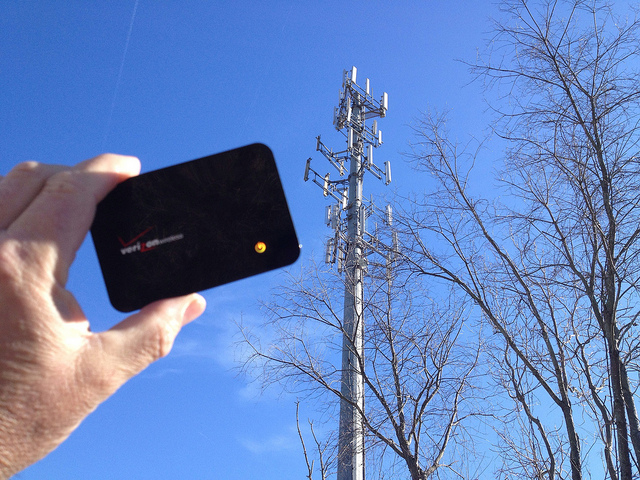
Stingrays are cell phone tracking and monitoring devices disguised as cell phone towers. Harris, the corporation that sells the majority of stingrays, "profited an average of over $533 million in each of the last five years," according to filings with the Securities and Exchange Commission. Ars Techica reports that "Harris requires its law enforcement clients to sign ... nondisclosure agreements that forbid those agencies from publicly revealing whether they use the stingray."
Look, we got the cyperpunk dystopia of our dreams! Cities won't talk about spying devices disguised as cell phone towers
(Image: Cogdogblog CC share-alike)![]()
The One Thing HTC Did Right With The HTC One M8
The greatest paradox in the smartphone wars is that of HTC. The smartphone manufacturer had a critical hit on its hands in 2013 with the HTC One, a beautiful and functional Android device that was a top choice for many reviewers last year. But the phone didn’t sell and HTC's profits and revenue suffered, so the future for the company remains uncertain.
HTC’s survival depends on how its next great flagship smartphone performs, and by the looks of the new HTC One M8 announced today, the company might have another critical success on its hands.
HTC’s biggest flaw last year had little to do with the One's software, hardware or design. It was that it built up so much hype and then shipped late.
The original HTC One was announced in mid-February with the promise it would be in stores by March. By the end of April, it was still nowhere to be found; the hype cycle passed it by when Samsung announced the Galaxy S4 and shipped it the following period.
HTC lost its window to dominate the news cycle, get its smartphones in consumer hands and build network effects. In the end, the HTC One was a good-looking device that fairly few people actually bought.
This year's follow-up to the HTC One will be available to 230 carriers across the world in 100 different countries and ship to most of them by the end of April.
HTC has learned from its mistakes. The One M8 is available today to order in the U.S. and will ship to most countries internationally on April 10 or by the end of April. It starts at $650 for 16 GB versions and will be available on contract for $199 through carriers in the U.S. You can walk into a Verizon store in the U.S. right now and buy the new HTC One M8 or order it from any one of the three of the four major American carriers (outside of T-Mobile, which hasn't announced availability except for sometime in April) and have it arrive this week.
For HTC, that is nothing short of a miracle.
Oh, and the phone is pretty snazzy too.
Top Of The Line For The One M8
HTC is one company that judges the wind of mobile very well while adhering to its own game. The new HTC One (despite the really awful M8 moniker) is everything that reviewers liked about the original HTC One, and then some.
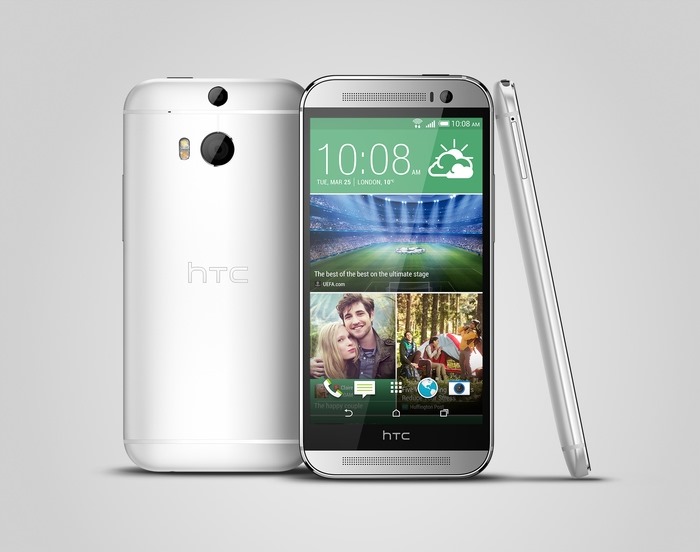
Any discussion of HTC phones starts with design. The HTC One M8 is a little bigger than its predecessor with a 5-inch screen with a 440 pixel-per-inch display. The body is bigger and has the same “Boom” speakers, though they have been redesigned to be louder and clearer. HTC is employing the brand new Snapdragon 801 quad-core processor that Qualcomm announced earlier this year, which means the HTC One M8 will release with top-of-the-line internal specs to go along with its sleek industrial design.
The metal unibody from the original HTC One is back in the M8 model, with 90% metal (as opposed to 70% in the last version) and a polished mirror finish and hairline texture. HTC will release the M8 in a variety of metallic colors, including gold, gray and silver.
The battery on the HTC One M8 is 2,600 mAh and HTC has promised both power-saving and “ultra power-saving” modes. In ultra power-saving mode, the battery can last up to two weeks on standby, basically only receiving and sending texts and phone calls. Power-saving modes are commonplace on devices running Android these days.
The Camera Is Seeing Double
HTC likes to get tricky with the cameras on its phones. The One M8 has two back cameras, including one with a 28 mm lens that uses HTC's so-called “Ultra Pixel” technology, which purportedly captures more light than a regular megapixel camera. The second camera on the HTC One M8, positioned above the main camera, captures detailed depth information about a scene through hardware. It knows which objects are closer to the camera which are further away and can use its hardware—as opposed to software—to tell the difference. It's really not all that different from what other smartphone cameras do, but basically, the second camera on the HTC One M8 is a hardware depth sensor that acts like HDR software. The idea of the camera is impressive, but an initial review from The Verge says the quality is only mediocre.
The front camera on the HTC One M8 is a 5-megapixel, wide-angle camera that, from a specs perspective, is one the best to be featured on the front of a smartphone.
HTC is opening the camera hardware up to developers through an API to build upon its new features.
The Sixth Sense
HTC has done a couple of good things to the launcher it traditionally lays on top of its products, called HTC Sense. Now in its sixth iteration (HTC playfully calls "Sense 6" as the "Sixth Sense"), HTC shows it has learned some lessons about software deployment.
HTC has completely redesigned Sense, pixel by pixel. It has also opened it up. BlinkFeed, the newsfeed-like homescreen introduced in the first HTC One, is now open to developers so they can provide contextual information for users. FitBit and Foursquare are the first partners in the new BlinkFeed, showing both location-relevant information and exercise statistics to users of those services.
Importantly, HTC Sense updates will soon be available through Google Play. Instead of waiting for a full firmware update that needs to be run through the carriers, HTC can just update Sense as if it were an app in Google Play.
HTC said it will also release Google Play and Developer editions of the HTC One M8, which will not feature the full Sense 6 launcher.
HTC has also changed the homescreen on the One M8 to receive gesture controls for simple actions like telling the time or seeing one's notifications without needing to press the power button. In this way, HTC has basically created its own type of capabilities for the One M8 similar to Motorola and its Moto X smartphone, thanks to the X8 computing system. The HTC One M8 can sense proximity, speed and motion through sensors that always stay on but remain at low power, so as not to drain the phone's battery.
The bottom line? It looks like HTC has a winner on its hands with the HTC One M8. It will be critically reviewed by all smartphone illuminati and many users will probably like it if they buy one. Whether people actually do buy this new phone will go a long way in answering the paradox that is HTC’s market position and future viability.
Google Launches Managed Virtual Machines, Gives Developers A Middle Ground Between Compute And App Engine
AT&T to Netflix: if you don't bribe us to do our job, you're asking for a "free lunch"
AT&T Senior Executive Vice President of Legislative Affairs James Cicconi has written a monumentally stupid attack on Reed Hasting's call for Net Neutrality. Cicconi says, "there is no free lunch, and there’s also no cost-free delivery of streaming movies. Someone has to pay that cost. Mr. Hastings’ arrogant proposition is that everyone else should pay but Netflix."
What Cicconi ignores is that Netflix is paying its ISPs to be connected to the Internet. And AT&T's customers are paying to be connected to the Internet. And AT&T's customers are asking to have the service they are paying for to be connected to the service Netflix is paying for. AT&T is then demanding that Netflix pay it a bribe in order to carry out the service that its customers are paying for.
If you're an AT&T customer paying for a 4MB/s DSL line, you have entered into a commercial arrangement whereby AT&T delivers you the bytes you ask for as quickly and efficiently as it can. You're not entering into an arrangement whereby AT&T can, if it notices that many of its customers really like a service, charge that service for the privilege of giving AT&T customers what they're already paying for.
Imagine if AT&T was a city-bus with an exclusive contract to serve your town, and it noticed that a lot of passengers were getting off at a certain stop every day to visit a restaurant. What AT&T is doing is saying "We will no longer stop near that restaurant unless it pays us a bribe," (and they're hinting, "We will stop at a competing restaurant if they do pay a bribe"). When the restaurant objects, AT&T says, "Hey, there's no such thing as a free lunch."
This isn't "just business" -- it's extortion.
When Netflix delivered its movies by mail, the cost of delivery was included in the price their customer paid. It would’ve been neither right nor legal for Netflix to demand a customer’s neighbors pay the cost of delivering his movie. Yet that’s effectively what Mr. Hastings is demanding here, and in rather self-righteous fashion. Netflix may now be using an Internet connection instead of the Postal Service, but the same principle applies. If there’s a cost of delivering Mr. Hastings’s movies at the quality level he desires – and there is – then it should be borne by Netflix and recovered in the price of its service. That’s how every other form of commerce works in our country. It’s simply not fair for Mr. Hastings to demand that ISPs provide him with zero delivery costs – at the high quality he demands – for free. Nor is it fair that other Internet users, who couldn’t care less about Netflix, be forced to subsidize the high costs and stresses its service places on all broadband networks.
As we all know, there is no free lunch, and there’s also no cost-free delivery of streaming movies. Someone has to pay that cost. Mr. Hastings’ arrogant proposition is that everyone else should pay but Netflix. That may be a nice deal if he can get it. But it’s not how the Internet, or telecommunication for that matter, has ever worked.
Who Should Pay for Netflix? [James Cicconi/AT&T Public Policy Blog]
(Image: AT&T Death Star, a Creative Commons Attribution (2.0) image from aaronpk's photostream) ![]()
How to Stream Your Media Anywhere with Dropbox and Google Drive

Google and Dropbox have some ridiculously low-priced 1TB storage options. With so much space for so little money, what could you do with it? Well, for starters, you could turn them into your own personal media servers.
Chances are, if you're into rolling your own media machine, you've checked out services like Plex—our favorite media server—that allow you to stream from one of your devices to another. This is an excellent solution, but it also means you're limited by your own hardware and bandwidth. With Dropbox and Google Drive, that's all handled for you. You get your own space on the internet where you can access your media from anywhere you want. You'll just need a few tools to help you out.
First: Upload Your Files
Before you get started streaming files from Dropbox or Google Drive, you'll need to put something there. There are a few ways you can easily get your media into the cloud.
Use the Dropbox or Google Drive Client

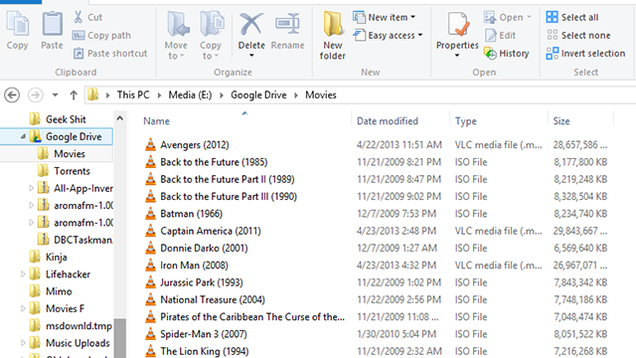
Dropbox has a pretty great desktop client, but it wouldn't be hard to forgive you for eschewing the Google Drive client. While it works a lot like Dropbox, the syncing client was a little slower and less reliable than Dropbox when it first came out. However, if you want to upload your files en masse, it's a pretty easy option. You can also add Google Drive to your right click menu so it's even easier to get files onto Google's servers.
Save Files Directly From the Web to Google Drive

If you find files on the web you'd like to add to your collection, you can use the previously mentioned Download to Dropbox extension to send it directly to Dropbox. For Drive, you can do the same thing with Google's own Save to Google Drive extension. You can use both for individual files or images of whole web pages.
Save Space with Play Music

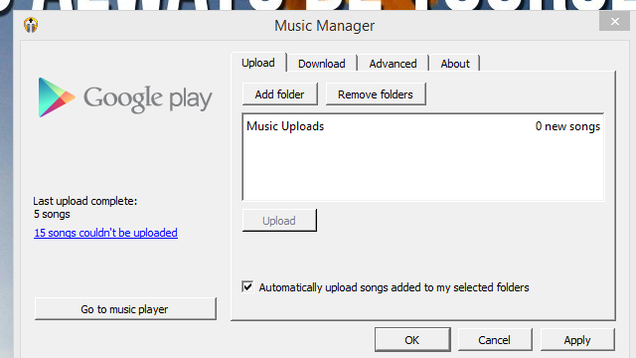
For storing video or photos, Dropbox and Google Drive are the way to go. However, for music, you also have the option of uploading your collection to Google Play. The upside to using Play Music is that you can store up to 20,000 songs and they don't count against your storage limit. The downside, though, is that you're pretty much limited to Google's own app. If you're okay with using Play Music, this is can help avoid hitting that limit. However, if you'd prefer to use a different music player, stick with the above methods for uploading songs.
View Your Files
So, hours later, you've got the entire Marvel Cinematic Universe uploaded to your the cloud and you need to get your Avengers on. Depending on how you want to view your videos, you have a wide variety of options to choose from.
Watch Your Movies in Kodi (Formerly XBMC)

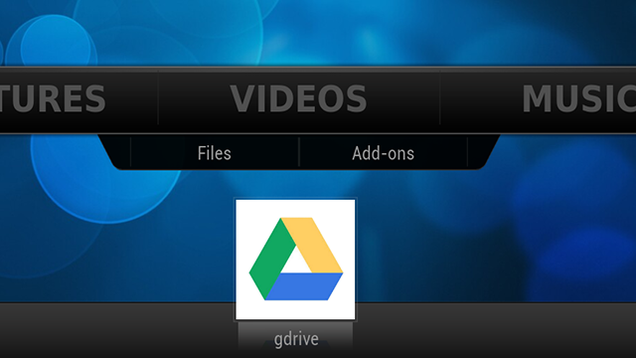
If you're using Kodi (the new name for XBMC) on your HTPC, you can use the dbmc and gdrive add-ons to connect your storage accounts. Load up the add-ons and you'll get a list of all the videos uploaded to your storage and click on them to stream them over the internet. You can check out our guide on XBMC add-ons for installation instructions here.
To make it a little bit easier to access your cloud files, you can add a shortcut to the Videos sub-section of the main menu. To enable this:
- Go to System > Settings.
- Select "Appearance."
- Under "Skin" select "Settings."
- Select "Add-on shortcuts."
- Under "Home Page Videos Submen" select "Add-on 1."
- Select the "dbmc" add-on.
- Repeat for "gdrive."
Note: Depending on your custom skin, this option may be in a different location or might behave differently. These instructions are for the default "Confluence" skin.
Now, from the main menu, you can select the dbmc or gdrive add-ons from the Videos section at XBMC's main menu and play your videos right away.
Stream Your Videos to Chromecast
The Chromecast started out as a pretty-okay Netflix device. Now that the app floodgate has opened, though, there are tons of things you can do with it. One of those things is stream your video directly from Dropbox or Google Drive via Koush's AllCast app. In addition to streaming local media from your phone to your Chromecast, you can also pull up videos, photos, or music from your personal cloud storage.
Send to Your Gaming Consoles/DLNA TV
One of the most versatile ways to send media between devices is DLNA. With a DLNA streaming service, you can send your media to your Xbox, Playstation, or any number of supported televisions. To do this, you can use Plex Media Server—which, combined with Dropbox and Google Drive, will let you stream videos from your Drive storage right to any device in your home.
To use Plex to stream your content, first you'll need the premium service Plex Pass ($4/mo or $30/year). Once you have the upgraded account, open up the Plex web server and create a videos library (click the + button next to your server name and follow the wizard to add at least one folder from your computer). Once that's done, here's how to add your cloud storage content:
- Go to Plex.tv and log in.
- Click your Username in the top right corner.
- Click Cloud Sync.
- Authorize any accounts you want to access via Plex (both Dropbox and Google Drive are listed here).
- Click "Launch" to open the Plex/Web server.
- Open one of your video libraries in Plex/Web.
- On the left side of the screen, click Sync.
- Select "Cloud Sync" from the "Choose Destination" box that pops up.
- Choose a title for this collection and click "Sync."
Now these videos will be added to your Plex library. This means anywhere you could stream your other media to is now a target for your cloud media. The process to stream content to your DLNA-enabled console will depend on the device. At the start of this section, you'll see a video on how to stream to an Xbox 360, but you can check out our full guide on turning your video game console into a streaming media center here.
Listen to Your Music (Without Google Play)

As stated before, if you want to use Play Music for your music library, all you need is the Music Manager app and Google's own services. However, if you elected to go the Dropbox/Drive route, there are a few apps you can use to access your music remotely without having to sync your entire library.
AudioBox is a Chrome-based music app that incorporates your music from both Dropbox and Google Drive (as well as Box.net, SoundCloud, and OneDrive). Android app Beat (not to be confused with anything by Dre) can similarly stream music stored in both storage services. On the iPhone, Vibe can do the same thing.
Spec showdown: HTC One (M8) versus the competition
The all new HTC One has landed! We’re working on getting some quality hands-on time with the device at HTC’s launch event in New York City, but we thought you’d enjoy seeing how HTC’s flagship phone stacks up against the competition when it comes to pure specs. On paper, the new HTC One (M8) is fairly comparable to the Samsung Galaxy S5 and the Sony Xperia Z2. Sony, Samsung, and HTC have their minor differentiating hardware factors and magic sauce that they’ve baked into the software, but the biggest differences are most noticeable when you compare the external design of the phones.
If you’re looking to buy the best spec’d phone, you should probably consider the Sony Xperia Z2, but features like BoomSound, Duo Camera, a fingerprint scanner or even a heart rate monitor make Samsung and HTC’s flagship phones appealing options since they offer something unique to the smartphone experience.
Did HTC get specs right with the all new HTC One?
HTC's First One M8 Commercials Feature Gary Oldman And Lots Of Blah Blah Blah...
HTC's Robert Downey Jr. commercials were famously terrible, but maybe the company is going to get it right with a different A-list actor. The first commercial for the HTC One M8 features Gary Oldman saying "blah" a lot.
The commercial opens with a dark room and Gary Oldman sitting behind a desk. "Blah blah," he says. "Blah blah blah..." and so on. HTC is apparently relying on Gary Oldman being Gary Oldman.

- [New App] Commercial Break For Android Sends Alerts When TV Shows Come Back On, Also Supports Live Programming
- T-Mobile's HTC One S Getting A Small 'Security Enhancement' Update
- The Amazing Spider-Man From Gameloft Lands In The Play Store, Lets You Swing From Rooftops For $7
- [Video] Samsung Shows Off The Galaxy S III's "Inspired By Nature" Display And Design
HTC's First One M8 Commercials Feature Gary Oldman And Lots Of Blah Blah Blah... was written by the awesome team at Android Police.
HTC One Review (M8)
The HTC One has done what few phones have done before. A year after its release, it still holds up. That’s not always the case with a smartphone, and HTC’s had its share of phones that disappointed in the long-term. The HTC One, however? Still a good buy.
But time is ticking for that original HTC One, also known by its codename, M7. Today, it’s been replaced by a new HTC One. A sleeker, more powerful, slightly larger HTC One. The M8.
And what’s more — it’s available for purchase today.
The original HTC One was the company’s first major push into an all- (OK, mostly) metal construction, milling out a single block of aluminum for what was a pretty striking phone. But the new HTC One? Downright futuristic. More metal. A more impressive design. A bigger display. And the best software HTC’s ever put together, with HTC Sense 6 and its wealth of features running atop Android 4.4.2 KitKat.
The new HTC One is, quite simply, the best smartphone HTC has ever made.
But it’s not without a few quirks. Join us as we walk you through the new HTC One, as only Android Central can do.
HTC Dodges Carrier Update Lag By Separating Sense 6 Features Across Multiple Google Play Apps
MarkAsRead Adds a Read Button to Gmail Notifications

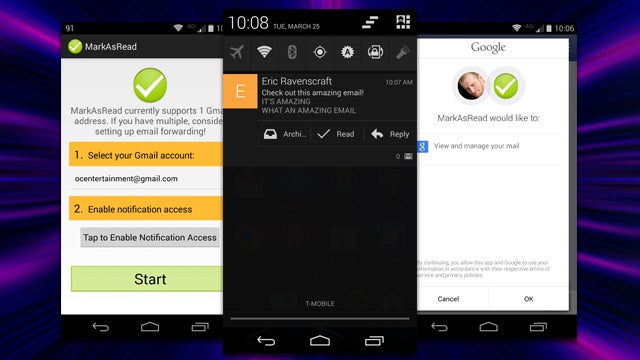
Android: One of the coolest features Google added to Android's notifications recently was the ability to archive email directly from the shade. Some things, however, don't need to be archived. If you'd prefer to just mark the email as read, MarkAsRead finally gives you the option.
While it may exist in that nebulous category of apps that we won't need if (and hopefully, when) Google implements it in Gmail proper, the one-off service monitors your incoming notifications and simply adds a "Read" button in between "Archive" and "Reply." Right now MarkAsRead only works on a single account, but multiple account support is on the roadmap.
MarkAsRead | Google Play Store via Android Police
New HTC One shown side-by-side with original model in extensive comparison video

The HTC One (M8) is not even official yet, although it may as well be considering the numerous leaks that have revealed almost everything there is to know about the handset. An extensive video comparison between the upcoming smartphone and last year’s HTC One (M7) flagship has been posted on YouTube by TechSmartt, which walks us through the differences between the two devices when it comes to overall design elements, full specs, software features, camera experience, battery life and even highlights performance differences based on various benchmark tests.
Air pollution causes one of every eight deaths per year

Air pollution is a major issue for cities around the world, with regular dangerously high pollution levels in China coupled with recent warnings in Paris and London. While China’s air pollution alone led to 1.2 million premature deaths in 2010, the World Health Organisation (WHO) is revealing today that 7 million people died from polluted air worldwide in 2012. The latest findings are more than double previous estimates, meaning one in eight deaths worldwide are caused by air pollution.
Of the 7 million deaths, the WHO report notes that more than half (4.3 million) were caused by indoor air pollution, largely due to households using wood, coal, or biomass stoves. While the effects of air pollution aren’t obvious immediately, it’s...