Shared posts

28 May 05:30

Do Your Real-Life Friends Bug You With Their Online Personas?

by Anita Li
Facebook-annoying
Feed-twFeed-fb

In real-life, your friends are great — they're normal, fun-loving people — until, that is, they log online. After that, your friends become social-media monsters, sharing too-personal status updates and humble-bragging all over the interwebz.

Sound familiar? It's a disconnect that YouTube user blimeycow describes in his latest video, "I like you in real life (but not on the Internet)." Some annoying online-exclusive behaviors include: compulsive selfie-taking, Internet-whining and song-lyric posting

Have your friends ever bugged you with their online personas? Give us examples in the comments, below. Read more...

More about Real Life, Watercooler, Videos, and Conversations
28 May 00:57

Screenshots of Despair: Your Computer Doesn't Like You

by Annie Colbert
Sad-computer
Feed-twFeed-fb

The Internet has a new way to bum you out

Behold, Screenshots of Despair, a Tumblr dedicated to sharing the web's most depressing screengrabs. That's right — you no longer need to peruse your Facebook friend's beach-vacation photos or log in to your bank account to experience a moment of glum.

Or maybe, you'll find the bright side, and just be thankful these screenshots weren't taken from your computer.

Image via iStockphoto, antonbrand Read more...

More about Tumblr, Humor, Watercooler, and Pics
19 May 00:29

NYPD wrongfully seize wrong SD card

by Jason Weisberger

Photography is not a Crime shares the story:

New York City police officers arrested a woman who was video recording them from a public sidewalk as they conducted some type of “vehicle safety checkpoint.”

The officers apparently stole a memory card from a camera, which turned out to be the wrong one, allowing us to view the video.


17 May 01:16

Google Glass rooted and hacked to run Ubuntu live at Google I/O

by Myriam Joire

Google Glass rooted and hacked to run Ubuntu live at Google IO

Today at Google I/O the company held a session entitled "Voiding your Warranty" where employees demonstrated how to root Google Glass and install Ubuntu on it. What you're seeing above is a screenshot from a laptop running a terminal window on top and showing the screencast output from Glass on the bottom -- here running the standard Android launcher. The steps involve pushing some APKs (Launcher, Settings and Notepad) to the device using adb, then pairing Glass with a Bluetooth keyboard and trackpad. It's then possible to unlock the bootloader with fastboot and flash a new boot image to gain root access. From there you have a full access to Glass -- just like that! Running Ubuntu requires a couple more apps to be installed (Android Terminal Emulator and Complete Linux Installer).

Developing...

Filed under: Wearables, Mobile, Google

Comments

17 May 01:16

Photo


17 May 01:10

Get On The Daft Train! Because This Soul Train Daft Punk Mashup Is A-maz-ing

by Lyndsey

Sure you’ve seen the animals dancing to Daft Punk’s Pharrell Williams collab “Get Lucky” but have you seen people from the ’70s dance to it? In lace up gladiator sandals? I assure you, you’re missing out. Soul Train and “Get Lucky” might as well have been made for each other; I’m so stealing all of their moves. The ones I can do that is. Which is probably none of them. #whitepeopleproblems


A special shout out to red pants guy for his advanced wobble legs move (2:37).


The post Get On The Daft Train! Because This Soul Train Daft Punk Mashup Is A-maz-ing appeared first on POPHANGOVER.

17 May 01:10

IN CHARGE DURING 'TEA PARTY' TARGETING, NOW RUNS IRS OBAMACARE OFFICE...

D G

This is terrible and pure cancer.


IN CHARGE DURING 'TEA PARTY' TARGETING, NOW RUNS IRS OBAMACARE OFFICE...


(Third column, 5th story, link)
Related stories:
17 May 01:09

MIT crafts analog circuits from living bacteria

by Jon Fingas
D G

it hassss begunnnnn MORTAL KOMBAT!!!!!!!!!!!

MIT crafts analog circuits from living bacteria

Previous work on using organisms as circuitry has usually involved shoehorning parts of the digital world into a very analog environment. MIT has just found an approach that uses the subtlety of the natural world to its advantage: the circuits themselves are analog. By combining genes that produce similar molecules in response to different inputs, the school's scientists have created bacterial cells that perform basic math -- the exact quantity or ratio of a given molecule is the answer. The approach offers a much wider range of results than a binary circuit (10,000 versus 2), and it exploits the cell enzymes' inherent ratio awareness to do some of the hard work. MIT wants more variety in genetic ingredients before it can produce a truly universal system, but its work could lead to organic sensors that are much simpler and more precise than their digital peers.

Filed under: Science

Comments

Via: ExtremeTech

Source: MIT

17 May 01:08

Photo


14 May 23:33

Special FX Done Right [1:46]

by Brotha Jonze

Special FX x Soccer = excellence.

14 May 02:06

Google abruptly shuts down search-by-SMS portal

Users cut off without notice, apparently for good

Without warning, Google has shut down the gateway that allowed mobile users to access its search engine via SMS text, effectively cutting off from the service customers who lack data plans.…

14 May 00:36

How To Puke In Space And Other Important Things We Learned From ISS Commander Chris Hadfield

by Rebecca Boyle
Chris Hadfield

Wearin' o' the green in space.

via Twitter

Water, bread, eyes and vomit all do weird things in space. Chris Hadfield, who abandons his post as ISS commander today, explains.

Today, Canadian Space Agency astronaut Chris Hadfield passed command of the International Space Station to cosmonaut Pavel Vinogradov. Hadfield's command has been so much fun, because he not only plays guitar and tweets prolifically; he also gamely answers almost any kind of question in a series of space FYI videos.

Lots of things are different in space, and after 50 years of the space program, we take some of them for granted. Hadfield expertly reminds us why living in space is an amazing thing.

Surely you have seen his rendition of David Bowie's "Space Oddity" -- if not, you must watch it immediately. But Hadfield has produced other classics, so we decided to round up some favorites here. Below, learn how astronauts throw up; how they wash their hands in space; how they cry; what happens when they wring out a washcloth; and why they love space tortillas, among many other weird and awesome facts.

How to wash your hands in space

How to deal with space sickness

"This bag has to stay with me in space for months, so we want a really good barf bag."

There's no crying in space.

What happens when you wring out a washcloth?

"We may have the coolest washcloths ever."

How to make a tasty sandwich

Astronauts can't have bread.

How do you brush your teeth?

Toothbrushes can fix space stations and keep astronauts' teeth shiny...but how do you clean the brushes?


14 May 00:35

Willie the Chihuahua Expresses His Hatred of Baths

by tastefullyoffensive.com
14 May 00:33

Burger built in lab costs $325,000 to produce, 'tastes reasonably good'

by Melissa Grey

Burger built in lab costs $325,000 to produce, 'tastes reasonably good'

Dr. Mark Post of the University of Maastricht has carefully cultivated the most expensive burger you will probably never eat. Using stem cells and the science of tissue engineering, Post and his team have developed a method for creating an edible product called in-Vitro meat, which they hope to present in burger form at a special event in London next month. Despite the burger's artificial origins, Post claims it "tastes reasonably good."

The in-Vitro burger was designed as a proof-of-concept to address the problem of a growing global population with a rapidly dwindling food supply. Even so, it's unlikely that lab-grown meat will be as widely available as White Castle anytime soon since creating it is an expensive, time-consuming process -- a single burger costs about $325,000 to produce. Each pricey patty begins its life as cells sourced from the necks of slaughterhouse cows, which are then developed in a growth serum comprised of fetal calf stem cells. After three weeks, those cells divide into a strip of meat, about half an inch long. Combine about 20,000 of those tissue strips and you've got yourself a burger. If that doesn't get your taste buds tingling, we don't know what will.

Filed under: Science, Alt

Comments

Via: The Verge

Source: The New York Times

14 May 00:15

I See a Python in Your Future

I See a Python in Your Future

DEEZ PYTHONS, FOOL! FWABOOM!!!

Trolling is a art.

Submitted by: Unknown

Tagged: psychic , punch , punched , funny
14 May 00:14

Nintendo Arcade Cabinet

by John Farrier

1

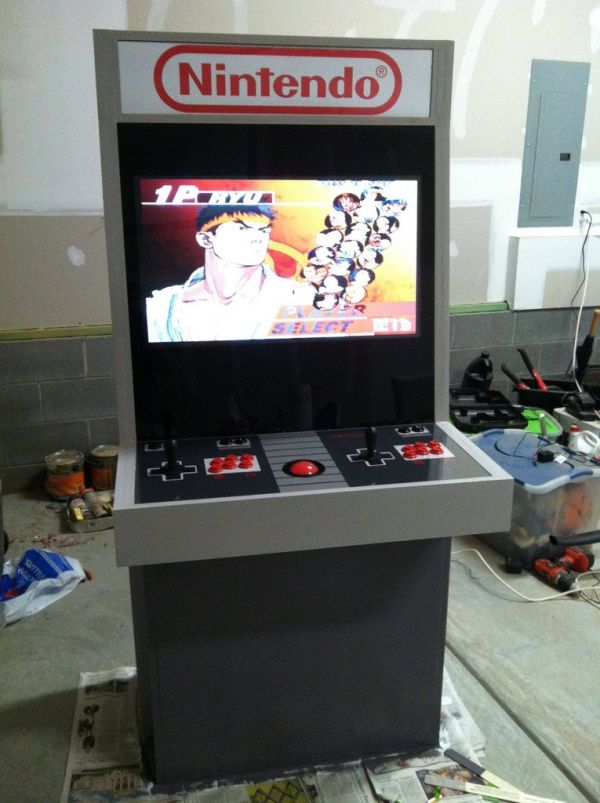
Redditor mystery_smelly_feet spent $2,000 and 2 months of work building this magnificent arcade cabinet that looks like a classic Nintendo Entertainment System. It has a PC inside with emulators that permit him to play the old games.

Link -via Technabob

14 May 00:14

Computer Cases Roundup

by David Murphy

7 computer cases reviewed: Cooler Master HAF XB,Thermaltake Soprano, Corsair Carbide 200R, and more!

If you thought that the only innovation in modern chassis design was the (long-awaited) switch from USB 2.0 ports to USB 3.0 ports at all price levels, you haven’t seen anything yet.  The cases in our roundup this time around really run the gamut of features: From inexpensive cases that attempt to deliver a lot of functionality without fattening up the price tag, to simple-looking chassis that hide a wealth of must-haves, to some of the most eye-opening cases we’ve seen – that don’t quite stack up once you look beyond their crazy offerings. In other words, it’s a typical computer cases roundup.

Just to lay out our criteria a bit, here are some of the elements we’re typically looking for when we run the magnifying glass over a computer case: Features that take time and effort out of the installation or upgrade process, like screwless drive bays.  Minimal annoyances – like having to snap off a case’s entire front panel just to remove its drive bay covers.  Adequate cooling, ideally positioned such that one’s hard drives, video cards, and general motherboard area all receive a steady stream of air.  And, of course, strong cable management: Nobody likes to open up a case and find a Medusa.

Beyond that, the great computer case race is anyone’s to win.  As for how each manufacturer balances “cool” with “functional,” you’ll have to read on for all the gory details!

Cooler Master HAF XB

Don’t call this case “stumpy.”  It bites.

Cooler Master’s HAF XB computer case is a hybrid design that attempts to kill two PC birds with one stone: An open-air design for system builders who want to be able to swap out their components like a pit stop, and a standard, covered chassis for those who like having four walls and a roof around their system’s precious parts from time to time.  For the most part, it works—but we would have love to have seen a few tweaks to make the system even easier to use for the frequent parts-swapper.

The cube-like case leaves little room for error.  Its 17.5x13x16.5-inch size split into a top and bottom half on the inside: Your ATX, Micro-ATX, or Mini-ITX motherboard rests up-top—pray you don’t have a huge cooler overtop your CPU, as you get just under six and a half inches of vertical space (from the silicon on your motherboard) to play with if you have any intention of attaching a 20-centimeter fan to the case’s top.  The bottom portion of the HAF XB is where you’ll precariously thread your 7-inch-or-shorter power supply; connect up the case’s two front hot-swap bays; stuff your optical drive in one of the case’s two, tool-free 5.25-inch bays; or slap some SSDs in the four additional 2.5-inch bays provided.

It’s not very often you see a manufacturer going for the fabled, “cube design,” but this is not your standard case by any stretch of the imagination.

It’s not very often you see a manufacturer going for the fabled, “cube design,” but this is not your standard case by any stretch of the imagination.

As for the hybrid bit we previously mentioned, Cooler Master has designed the open-air case to work just like that, with the case’s sides and top bare to the world.  However, when you want to transform the chassis into a normal, box-like enclosure, you just need to reattach the case’s sides and top with the provided thumbscrews.

While the process is certainly easy for those who have ever screwed in a side panel before (that’s most of you reading this), we wish that Cooler Master could have used the kind of thumbscrews that remain attached to the case (or panel) after you’ve loosened them.  Losing those at a LAN party would be a real nightmare.  That, or Cooler Master could have used quick-snap latches instead – an even stronger match for this Transformer of a computer case.

The beauty of Cooler Master’s split-insides concept is that you only have the annoyance of stringing cables around the lower half once. Most of the parts you’ll likely manipulate sit up top.

The beauty of Cooler Master’s split-insides concept is that you only have the annoyance of stringing cables around the lower half once. Most of the parts you’ll likely manipulate sit up top.

The case gives you a lot of expandability for its size— including room for seven PCIe devices in all and videocards up to 13.1 inches in length—as well as two USB 3.0 ports on the front and two beefy, 1,800-RPM, 12-centimeter fans directly behind that for air intake. If you’re crazy enough to try water-cooling given the tight confines of this chassis, it does support a single 24-centimeter radiator on the front if you first remove these fans in addition to a single 12-centimeter radiator on the case’s rear.  While indentations on the rear of the chassis indicated a place where tubing could have been threaded, Cooler Master oddly omits any rubberized holes for doing so.

The Cooler Master HAF XB isn’t for beginners.  You’re going to get to pretend you’re a surgeon when you try to thread wires around the inside of this tight chassis, even given the HAF XB’s system-builder focus.  It’s still a compelling case for tinkerers that comes with plenty of useful features, and one that’s worth looking into for those afraid to (or uninterested in) making the switch to a fully open-air design. Just don’t try to water-cool it.


Cooler Master HAF XB
Plus

Hot-swap drive bays, easy-to-access motherboard maintenance, excellent cooling

Minus

Removable panels need more than thumbscrews, tight chassis for huge CPU coolers and basic PSU installation

score:8

$99, www.coolermaster.com

CoolerMaster Scout 2

Cooler Master makes it easy to carry this case around. 

There’s no doubt in our minds that the design of Cooler Master’s Storm Scout 2 chassis is going to draw eyeballs.  On the outside, it’s a beautiful case – punctuated ever-so-slightly by red LED fan viewable through the case’s windowed side panel and ever-so-dramatically by the case’s unique, rubber-coated steel handle up top.

Looks can be deceiving. From the outside, this case is a winner. But from the inside, we’re a bit skeptical.

Looks can be deceiving. From the outside, this case is a winner. But from the inside, we’re a bit skeptical.

The case’s inside is less eye-catching. We love the three screwless 5.25-inch drive bays that merely require you to flick a switch from “open” to “lock” to secure your components in place.  However, we’re a little turned off by the flimsier rails that Cooler Master delivers to secure up to seven, 3.5-inch hard drives in place; drive trays would have been better.  Additionally, four of the drive bays have to go if you’re using a video card that’s larger than 28.7 centimeters in length – and there’s no easy way to just pull them out sans screwdriver.

Thumbscrews are your new friends for the case’s seven PCIe expansion slots, and you’ll have to install both standoffs and screws for your motherboard.  That said, the Storm Scout 2 makes cable management easier with the five holes (three rubberized) Cooler Master cuts right into the motherboard tray–though they could have been a little bigger.

Our biggest problem with the Storm Scout 2 is its cooling—not due to its potential, as the case supports up to nine fans in total (a mix of 12- and 14-centimeter fans, but mostly 12-centimeter).  Rather the case ships with just one fan preinstalled: The aforementioned 12-centimeter LED fan on the case’s rear.  You can toggle the light on and off, as the flames shooting out from your hot components will be all the dramatic lighting you really need. 

Two USB 3.0 and two USB 2.0 ports adorn the case’s front, which you can hide with a little pull-down cover if you so desire.  It’s another one of the many tricks Cooler Master stuffs into the Storm Scout 2’s hat; we just wish we could have some more fans, too.

CoolerMaster Scout 2
Plus

Super-mobile case, easy cable management and good connectivity

Minus

Poor prebuilt cooling (one fan!), requires sacrifice of drive bays for larger videocards, flimsier rails for hard drive installation

score:6

$99, www.coolermaster.com

MSI Stealth

You’ll love this case’s color scheme, we promise

Were there an award for “best case color scheme,” MSI’s Stealth computer case wins by a mile from its lovely black and light-blue-accented aesthetic.  As for the case’s design, however, MSI packs in a few problems to balance out the good bits.

Just wait until you pop off the side of this chassis: a pretty world of blackand-blue awaits you.

Just wait until you pop off the side of this chassis: a pretty world of black and blue awaits you.

We never thought we’d have to struggle so much with this case just to get a simple optical drive secured into one of its three free bays.  That involves popping off the front panel just so you can remove the 5.25-inch bay covers–annoyance number one–and then somehow use the case’s big, blue locking mechanisms of fail to roughly secure your drive in place.  Spoiler: They not very secure.

MSI does provide full trays for the four hard drives the case supports, which alleviates our frustration somewhat. It also packs two graphics card stabilizers right above that–a fun and quasi-useful addition that allows the case to support video cards up to 31 centimeters in length, but some extra 2.5-inch bays might have been more useful in general.

What the case lacks in big, fat cable routing holes (you get four small, thin ones), it makes up for in the ludicrous amount of space between the rear of the motherboard tray and the case’s right side panel. You could hide a garden hose in this case, not just your power supply cables.

A single 12-centimeter fan in the front balances out a similarly sized blue LED fan in the front, positioned directly next to the hard drive bays.  On the top of the case’s front are two USB 3.0 ports, two USB 2.0 ports, and a special USB port that dovetails with your MSI motherboard’s “SuperCharger” functionality for speedy device charging.  If you haven’t drunk MSI’s Flavor Aid, however, it’s just a standard USB 2.0 connection. Great looks, polarizing design: The MSI Stealth chassis leaves us feeling a little blue.

MSI Stealth
Plus

Lovely aesthetic, plenty of room for huge videocards, front-panel connectivity with an MSI-themed bonus

Minus

Videocard stabilizers seem silly, horrible 5.25-inch bay locking mechanism (and installation process)

score:7

$99, us.msi.com

Click the next page to check out our new kick-ass best-of-the-best case!


ThermalTake New Soprano

A soprano could sing inside of this case and you’d never hear it.

Find a chassis that successfully combines practical noise dampening, useful features, and cooling can be a bit of a needle in the haystack sometimes—but in this case (pardon the pun), that’s Thermaltake’s New Soprano.  The solid construction of this chassis creates an upgrading or installation experience that’s free of frustration.  Our only complaint with the case, if you could really call it that, is that it lacks pizazz.

This case might look fairly simple on the outside, but it has just about everything you’d ever want or need. Trust us.

This case might look fairly simple on the outside, but it has just about everything you’d ever want or need. Trust us.

That said, give us function over pretty lights any day.

The jet-black exterior of the case uses a front-panel door to create a sleek, uncluttered aesthetic by allowing you to hide your components when you aren’t specifically using them.  The door doubles as an excellent noise-dampener and, we argue, a heavier-than-you-might-expect blunt object for use when squaring off against midnight intruders or zombie hordes.

Two USB 3.0 ports sit alongside two USB 2.0 ports on the top-front of the case; we’re even more enthusiastic about the built-in hot-swap hard drive docking station for 2.5-inch or 3.5-inch drives that Thermaltake’s constructed on the top of the chassis itself.  It’s a delightful and unexpected addition to the case that brings a lot of additional connectivity without harming the case’s overall look or feel.

On the inside, Thermaltake uses four simple locking mechanisms to keep your 5.25-inch device held tightly.  Installing an optical drive requires you to remove the drive bay’s front panels— easily done without having to rip off any part of the case’s front.  Four screwless hard drive trays rest behind the case’s secret weapon: A huge, blue-LED, 20-centimeter fan that delivers plenty of air over your drives without blowing out your eardrums to do so.  Above the primary 3.5-inch bays rests a single additional 3.5-inch drive bay and a single 2.5-inch bay for your solid-state needs (both not screwless). Thermaltake positions the thumbscrews for the case’s seven expansion slots on the exterior of the case.  While that saves you a little room on the inside—giving the case space for a video card up to 12.2-inches in length—it also means that it’s really hard to actually use your fingers to tighten or loosen the screws.

Thermaltake pulls out all the stops to make it as easy as possible for you to install or upgrade parts—minus the expansion slots, which will require a screwdriver.

Thermaltake pulls out all the stops to make it as easy as possible for you to install or upgrade parts—minus the expansion slots, which will require a screwdriver.

Motherboard standoffs are built directly into the case–an excellent touch that saves would-be system builders a bit of time and hassle.  A huge hole on the upper half of the motherboard tray exposes your CPU area for easier installation of aftermarket coolers, and that’s joined by five other holes on the tray itself (four rubberized) for cable management.  There’s plenty of room between the rear of the tray and the case’s right side panel, even including the acoustical foam that Thermaltake’s attached to the panel to give your ears a respite.

The only other fan in the case is a single, 12-centimeter exhaust fan attached to its rear, and the only other fan you can install beyond that would be an optional 12-centimeter intake fan on the case’s bottom.  That’s the trade-off of having a “sound-proof” rig: more potential for heat.  However, Thermaltake’s done a masterful job of addressing this issue while building out a case that’s packed with just about everything you’d want to have—assuming you care more about function than flash.

Thermaltake New Soprano VO900M1N2N
Plus

Good cooling, great soundproofing, mostly easy installation, slick aesthetics

Minus

Expansion slots a little fussy with thumbscrews, case isn’t extraordinarily “flashy”

score:9ka

$119, www.thermaltakeusa.com

Xclio Touch 787

Meet the future, and the past, of cases.

This kills us—it absolutely kills us. The Xclio Touch 787 has one of the most innovative, fun-to-use, Star-Trekian features we’ve ever seen on a case.  And the substantial air-cooling on this case feels just a few miles per hour short of a category four.  It looks good; it’s one of the few cases that we actually really enjoy interacting with on a daily basis.

Words fail us. The touchscreen controls on this case must be seen to be believed.

Words fail us. The touchscreen controls on this case must be seen to be believed.

But why, oh why, does Xclio have no idea how to build hard drive mounts?

Allow us to explain. The single most noteworthy and compelling feature of the Touch 787 is—as the name alludes—the giant touch-sensitive panel on front of the case’s top. It looks as if it was ripped out of a standard Star Trek: TNG episode, and it functions about as well. After wiring up the panel with a standard Molex connection, you can tap its huge, circular buttons to turn the case’s fans on and off; adjust their speeds to low, medium, or high; turn the fans’ lights on and off; or lock and unlock the panel itself (to prevent accidental bumping).

Call it gimmicky if you want, but the responsiveness of the controls – and pretty blue lighting when you’ve activated an option – is just downright cool. Unfortunately, Xclio seems to have spent most of its R&D on this case on just that— the panel. Or perhaps the fans, as this system comes with no fewer than ten 12-centimeter fans in total: One on the case’s rear, two on the top, one in the front, and six (!) on the case’s side panel. Cooling overkill? Yes. We appreciate the enthusiasm, but one large fan on the side panel (for example) could have pushed plenty of air at a lower RPM and noise level.

All the standard features on this case are the same as what you’d expect to find in this price range: Cable mounting holes, motherboard tray cutouts behind the CPU, locking mechanisms for the case’s three free 5.25-inch bays, et cetera. We’re not going to waste words going over these, simply because the design of the case’s 3.5-inch bays—or lack thereof— presents a critical flaw in any user’s enjoyment of this wind tunnel of a chassis.

It’s too bad that Xclio didn't put some more thought into this case’s internals. As is, they’re not very good.

It’s too bad that Xclio didn't put some more thought into this case’s internals. As is, they’re not very good.

To access the case’s two actual hard drive bays, you have to unscrew and take apart a stupid bar of-sorts that runs vertically from the case’s bottom to just under its 5.25-inch bays. Upon further inspection, however, Xclio actually wants you to mount your drives to this bar as well, just floating out there in mid-air. Presumably, Xclio wants to put nothing between the intake fan and your system’s motherboard, but it’s a bad design concept that’s ugly for cable management, annoying to work with, and makes absolutely no sense whatsoever: It’s the very definition of, “If it ain’t broke…”

If it wasn’t for Xclio’s choices in designing its mounting “system” for hard drives, we’d consider this case–loud and over-the-top as it might be–to actually be something worth considering if for nothing else than its uniqueness. The more we think about it, however, the more Xclio’s design decisions tease the idea that they don’t actually know how to build a functional case, just a really cool-looking one.

Xclio Touch 787
Plus

Amazing touch-panel controls, good cable management, more cooling than you’ll ever need.

Minus

Very loud, horrible design for hard drive mounting, plenty of wiring to manage even before you put any parts into the case.

score:5

$149, www.xclio.com

Click the next page to read reviews on the budget computer cases.


The Battle of the Inexpensive Cases

Want a case on the cheap?  Be sure you don’t get what you’re paying for… 

Here we go—a descent into the budget barrel.  It’s understandable that you might be a little concerned about the quality of offerings you’re going to see in the sub-$100 case market.  You have every right to be: Just go to your local geeky retailer of choice and check out some of the horrible cases on the shelves that get offered up at rock-bottom prices.  We wouldn’t want to put our worst enemy’s motherboard into those; why should you install yours?

Of course, you can find some real diamonds in the rough, but you’re definitely going to have to do a little digging to uncover quality, inexpensive cases – especially given the sacrifices manufacturers typically have to make in order to hit these low price targets. We’ve dragged up two of these budget cases to show you just what we mean by the differences you’ll find at this end of the spectrum: Take a look!

Antec One

This case might be inexpensive, but there’s so much more Antec could have done

One… singular sensation is not this chassis.  The mid-tower Antec One feels a little flimsy in a few areas, which otherwise detracts from some of the better elements in this ultra-inexpensive case. 

The Antec One comes with three 5.25-inch bays that use pre-attached locking mechanisms to keep your devices all snug and attached.  However, this is the kind of case that requires you to pop off the entire front panel in order to remove the grilled covers over the empty bays— be careful with that, as we definitely broke off some of the tabs on these covers when trying to remove them ourselves.

The Antec is light enough that you could probably balance it on your fingers and spin it like a basketball. (You-Tube that, if you try).

The Antec is light enough that you could probably balance it on your fingers and spin it like a basketball. (You-Tube that, if you try).

Antec positions the entrance for the case’s five 3.5-inch bays on the opposite side of the chassis–the right of the case, if you’re looking at it from the front, rather than the left.  This decision boggled us at first, but the more we thought about it, it makes sense: You would have to pop off both sides of the case anyway were you to install the drives from the left side of the chassis (using the provided rails) and this method allows Antec manages to build in some additional space for much-needed cable management.  It’s just a little weird at first.

The case’s seven expansion card brackets don’t come with screws pre-installed into the case; a bit of an annoyance for those looking to ensure that the flimsy tabs stay on at all times.  We do, however, like the recessed side pane that sits behind a huge hold cut out for the top half of one’s motherboard: Cable-management and CPU cooler installations are a breeze.

Antec slaps two 12-centimeter fans in the top-rear corner of the case; none over the hard drives.  You get two USB 3.0 ports on the case’s front; that’s it. That’s the Antec One: A price-conscious chassis that’s good in a pinch, but could be a lot better.

Antec One
Plus

Hard drive bay design is odd at first, but functional; screwless 5.25-inch bays; good cable management

Minus

Lacks screws on PCI brackets, no cooling on hard drives, frustrating 5.25-inch device installation

score:6

$49, www.antec.com

Corsair Carbide 200R

It’s not “super” inexpensive, but it’s worth saving pennies for

Delightful.  Truly delightful.  That’s the best way to sum up Corsair’s sub-$100 Carbide 200R mid-tower chassis.  It’s roomy, it’s well-designed, and—most importantly— it doesn’t invite any annoying features or ill-designed elements along for its inexpensive ride.

200r

The Carbide 200R doesn't win huge points for its looks, but there's a lot going on inside this chassis for its low price.

All of the Carbide 200R’s drive bays are completely screwless, a wonderful touch for those looking to make modifications to their system without busting out the tool kit.  Popping off the flat, solid panels covering the case’s three 5.25-inch bays is easy and destruction-free— almost as easy as it is to slide and lock up to four 3.5-inch hard drives into the case’s left-facing bays.  You can use screws to attach up to four 2.5-inch drives into a provided internal enclosure if you really don’t want your solid-state-drives to jiggle.

Motherboard standoffs are built directly into the Carbide 200R: Just slap down your board, grab a few screws, and you’re set.  Five different cable routing holes cut directly into the tray make it easy for you to hide your ugly wires, and a large area cut out behind the top of the motherboard tray speeds along the (often agonizing) process of aftermarket CPU cooler installation.

The case comes with a single 12-centimeter fan in the rear and the front.  While we would have preferred that the front fan was placed to push some air over your hard drives, at least it’s able to direct much-need cooling on your video card (up to 11.8-inches long).  You can also stick up to five additional 12- or 14-centimeter fans around the case’s top, side, and bottom, as well as one more 12-centimeter fan in the front (covering your hard drives).

The case comes with two USB 3.0 ports on the front—more importantly, popping off the front panel to do any modifications to the Carbide 200R doesn’t result in a tangle of wires coming with it.  It’s these little touches, and more, that make this case such an inexpensive delight.

Corsair Carbide 200R
Plus

Plenty of drive bays, lots of options for additional cooling, a great emphasis on reducing the amount of screwdriver time needed

Minus

Front preinstalled fan could have pushed more air over the hard drives directly, 2.5-inch bays still require screws

score:9

$60, www.corsair.com

14 May 00:13

You Told Me to Replace the Doorknob...

You Told Me to Replace the Doorknob...

...and I did. So what's the problem?

Submitted by: SapphireBeam

14 May 00:12

Watch Dogs developers consult with internet security firm for more realistic hacking

by Ian Birnbaum

Ubisoft Montreal is making an effort to present players of the upcoming Watch Dogs with a more realistic depiction of hacking than usual. The studio behind Far Cry and Assassin’s Creed is recruiting help from internet security firm Kaspersky Lab to flesh out the “sexed-up” depiction of hacking found in, oh, every Hollywood movie ever.

“[Kaspersky Lab has] really hardcore experts there on hacking. We send them some of our designs and we ask them feedback on it, and it’s interesting to see what gets back. Sometimes they say, ‘Yeah, that’s possible, but change that word,’ or, ‘That’s not the way it works,’” Watch Dogs Senior Producer Dominic Gray told Joystiq.

I’m overjoyed that the dreaded hacking minigame will be a restrained animal in Watch Dog’s futuristic Chicago setting. Unlike other games, hacking won’t be a word puzzle or a series of tubes that unlocks a secret room or a treasure chest full of gold. Hacking is Watch Dogs protagonist Aiden Pearce’s bread and butter, his main weapon in daily life. The challenge for players won’t be successfully beating a Frogger emulator, but in shooting a guard while they jump into an alley and hacked traffic lights stop traffic long enough for their explosives to go off.

“It’s not about the minigame that will let me open the door, it’s the fact that I’m making a plan,” Gray said. “I’m making a plan of how I’m going to chain hacking, shooting, traveling the city and driving to achieve an objective.”

As someone who is routinely terrible at hacking minigames, this news could not be more welcome. A 100% true depiction of hacking, of course, probably wouldn’t make for a fun game, so I expect there to be plenty of liberties taken. Anything that keeps us out of Swordfish territory, though, can only make for a better game in the end.

Watch Dogs will be released this November. Check out our full preview here.

The post Watch Dogs developers consult with internet security firm for more realistic hacking appeared first on PC Gamer.


14 May 00:11

Chocolate Nikes

by noreply@blogger.com (Joanne Casey)
D G

looks like poop

14 May 00:10

REPORT: Bilderberg merging with GOOGLE under the stewardship of Schmidt...

D G

what the fuck drudge

muh filters!


REPORT: Bilderberg merging with GOOGLE under the stewardship of Schmidt...


(First column, 13th story, link)
Related stories:
14 May 00:05

OMG Pre-Natal Life Coaching

by sayomg

omg Pre-Natal Life Coaching

What will your baby be when it grows up?
13 May 23:58

The Depressing Lives Of China's Porn Inspectors

by Adam Taylor

Pornography Inspector

Despite China's ongoing sexual revolution, pornography is still illegal. Under Chinese law, anyone found to be producing and distributing obscene material can get three years in jail.

The country requires many pornography censors to find and censor content considered obscene, and it's not always easy work.

70-year-old Liu Xiaozhen is one such censor, employed at Hunan province's "eliminate pornography and illegal publications" office. The office had to watch and classify 700 DVDs confiscated in April alone.

Over the weekend Liu granted a rare interview to ND News, describing the stresses and perils of his job.

The interview is in Chinese, but well worth watching even if you don't understand:

"You have to watch even if you don't want to watch," Liu says, according to the South China Morning Post. "But when you're in this job, you have to watch very closely, and once you've watched, you classify."

Recalling his first day, Liu said that it was "awkward, my face and ears turned red and my heart skipped a beat."

The requirements for the job don't seem high, the SCMP notes — candidates must be married and undergo training.

Recently, a job posting seeking a "chief pornography identifier" for internet company Anquan.org went viral, eventually reposted at least 125,000 times on the microblogging site Weibo. The position was said to pay 200,000 yuan ($32,280) a year.

While some observers dismissed the job posting as a publicity stunt, online companies do have their own censorship programs in place — one study found that pornography was "almost universally" censored on Weibo.

Please follow Business Insider on Twitter and Facebook.

Join the conversation about this story »


13 May 23:22

henryclervall: google gets kinky


henryclervall:

google gets kinky

13 May 23:22

Google's Atari Breakout Easter Egg

by Alex Chitu
Is this the first Google Image Search Easter Egg? Search for [atari breakout] and you can play Atari's Breakout game. It's an arcade game introduced in April 1976. The game has an interesting story that involves Steve Jobs and Steve Wozniak and it influenced Steve Wozniak's design for the Apple II computer.

"In the game, a layer of bricks lines the top third of the screen. A ball travels across the screen, bouncing off the top and side walls of the screen. When a brick is hit, the ball bounces away and the brick is destroyed. The player loses a turn when the ball touches the bottom of the screen. To prevent this from happening, the player has a movable paddle to bounce the ball upward, keeping it in play."

Google uses image search results for [atari breakout] instead of bricks, so the game is self-referential.


{ via TechCrunch, thanks Florian K. }
13 May 23:22

MORGAN STANLEY: The Tesla Debate Has Changed (TSLA)

by Sam Ro

tesla roadster

Shares of Tesla have gone gangbusters since the company shocked the world with its first profitable quarter ever last Wednesday.

The stock is up over 50% since last Wednesday.

Anytime a company tells investors that things are better-than-expected, the investors respond positively buy boosting the stock price.

However, the magnitude of Tesla's move suggests there is more to it than just good news.

"The Tesla debate has moved on from questions of viability to measuring the success and sustainable competitive advantage of the business, triggering a dramatic compression of the stock’s implied risk premium," said Morgan Stanley's Adam Jonas in a note to clients today.

In other words, the market has concluded that Tesla is the real thing.

Indeed, this change in expectations has also changed how analysts need to think about valuing the company.

"Our rating, estimates and price target are under review, pending our analysis of changes to the company’s business model, addressable market and the associated risks," said Jonas. "Taking nothing away from the accomplishments of the Tesla team, triangulating the fundamental valuation with the share price is more challenging than for other stocks."

SEE ALSO: How Tesla Went From Near-Failure To Stunning Profitability In Just A Few Years >

Please follow Money Game on Twitter and Facebook.

Join the conversation about this story »


13 May 23:21

Evil But Funny

by noreply@blogger.com (Joanne Casey)
13 May 04:18

What Is a DDoS Attack? [MakeUseOf Explains]

by Simon Slangen

ddos attackThe term DDoS whistles past whenever cyber-activism rears up its head en-masse. These kind of attacks make international headlines because of multiple reasons. The issues that jumpstart those DDoS attacks are often controversial or highly political. Since a large number of regular users are affected by the attacks, it’s an issue that plays with the people.

Perhaps most importantly, a lot of people don’t know what constitutes a DDoS attack. Despite its rising frequency, looking at the paper’s headlines, DDoS attacks can be anything from digital vandalism to fully-fledged cyber-terrorism.

So what does a DDoS, or Distributed Denial of Service attack entail? How does it work, and how does it affect the intended target and its users? These are important questions, and  this is what we’re going to be focusing on in this instance of MakeUseOf Explains.

Denial Of Service

Before we tackle the issue of DDoS, or Distributed Denial of Service attacks, let’s look at the larger group of Denial of Service (DoS) issues.

Denial of Service is a broad issue. Simply put, a website experiences DoS issues when it is no longer able to service its regular users. When too many people flock to Twitter, the Fail Whale pops up, indicating that the website has reached and passed maximum capacity. In essence, Twitter experiences DoS.

Most of the time, these issues are instigated without malicious intent. A large website links to a small website, which isn’t built for the same level of traffic.

ddos attack

A Denial of Service Attack, then, indicates malicious intent. The attacker spends effort trying to instigate DoS issues. The techniques used here vary wildly – a DoS attack refers to the intended result of the attack, not the way it is executed. Generally, by hogging the system’s resources, it can render the system unavailable to its regular users, ultimately even crashing the system and taking it down entirely.

Distributed (DDoS) Attacks

The difference between Distributed Denial of Service (DDoS) and regular DoS attacks is the scope of the attack. Where a DoS is carried out by a single attacker using a single system, a Distributed attack is carried out across multiple attacking systems.

Voluntarily Participating Agents

Sometimes multiple attackers join up, each willingly participating in the attack. Software that’s used to stress-test systems, or software specifically designed to wreck havoc is installed on each system. For the attack to work, it needs to be coordinated. Coordinated through IRC chat rooms, forums, or even Twitter feeds, the attackers throw themselves en-masse on a single target, trying to flood it with activity to disrupt usage, or crash the system.

what is a ddos attack

When PayPal, Visa and MasterCard started boycotting WikiLeaks near the end of 2010, WikiLeaks supporters carried out a coordinated DDoS, temporarily taking down the homepage of multiple websites. Similar attacks have targeted other banks and even national security agencies.

What’s important to remember here is that the website storefront is flooded and crashed, whereas the bank’s and security agencies’ internal networks are usually left untouched, as explained in XKCD comic 932, shown above.

Zombie Systems Or Botnets

A Distributed Denial of Service attack requires multiple attack systems. It doesn’t usually require multiple attackers. Often, large-scale attacks are not carried out through the attacker’s own computer, but through a large number of infected zombie systems. Attackers can abuse a zero day vulnerability and use a worm or a trojan horse to gain control over a large number of compromised systems. The attacker then uses these infected systems to mount an attack against its target. Infected systems used this way are often called bots or zombie systems. A collection of bots is called a botnet.

Although the website targeted by the DDoS attack is usually portrayed as the sole victim, users with infected systems that are part of the botnet are similarly affected. Not only are their computers used in illicit attacks, their computer’s and Internet connection’s resources are consumed by the botnet.

Attack Types

As mentioned before, a DDoS attack only states the intent of the attack – robbing a system of its resources and making it unable to perform its intended service. There are several ways to achieve this goal. The attacker can hog the system’s resources, or even push the system over the brink and make it crash. In severe cases, a Permanent Denial of Service (PDoS) attack, also known as phlashing, wreaks so much havoc on its target that hardware components need to be entirely replaced before being able to recommence normal operation.

We’ll take a look at two important attack methods. This list is by no means comprehensive. A bigger list can be found on Wikipedia’s DoS article.

ICMP Flood

The ICMP (or Internet Control Message Protocol, but that’s less important) is an integral part of the Internet Protocol. An ICMP flood attack is carried out by bombarding a network with network packages, using up resources and crashing it. One type of attack is a Ping Flood, a simple DoS attack where the attacker effectively overwhelms its target with ‘ping’ packets. The idea here is that the attacker’s bandwidth is larger than its target’s.

what is a ddos attack

A Smurf attack is a smarter way of ICMP flooding. Some networks let network clients broadcast messages to all other clients by sending it to a single broadcast address. A Smurf attack targets this broadcast address and makes its packages look as if they came from within the target. The target broadcasts these packages to all network clients, effectively serving as an amplifier for the attack.

(S)SYN Flood

A (S)SYN Flood relies on the essential operating principles of network communication. During normal operations, a client starts communication by sending the server a TCP/SYN package, essentially telling the server it wishes to communicate. The server, upon receiving the package, creates a connection to communicate with the client and sends back acknowledgement and a reference to the communication channel.

The client sends back an acknowledgement in turn, and starts its communication with the server. However, if the client does not answer with that second acknowledgement, the server asumes it didn’t arrive properly (as happens reasonably often) and resends it.

ddos attack

A (S)SYN Flood abuses this mechanic by sending countless of TCP/SYN packages (each with a different, fake origination specified). Each package prompts the server to create a connection and keep sending acknowledgements. Before long, the server has used up its own resources with half-open connections. This principle is illustrated in the comic above, drawn and posted by Redditor verisimilarity.

As explained above, DDoS attacks are varied but have a singular purpose: (temporarily) keeping authentic users from using the target system. Does this agree with your initial ideas on DDoS attacks? Let us know in the comments section.

Image credit: Shutterstock

The post What Is a DDoS Attack? [MakeUseOf Explains] appeared first on MakeUseOf.

13 May 04:17

Red Velvet Crêpes

by John Farrier

crepes

The brother and sister cooking duo Bob and Carlene Deutscher prepared a luxurious Mother's Day breakfast. Their crêpe batter contains cocoa and apple cider and the filling has strawberries and heavy cream. This is how breakfast should be on every day of the week!

Link -via Tasteologie

13 May 04:17

Photo