Shared posts

25 Jun 16:13

19 Useful PDF Converters Accessible on One Site

by Saikat Basu
pod-pdf-convert

The best thing about the Portable Document Format is that it can be used across all machines and smartphones. The second-best thing about any PDF document is that there are a ton of free PDF tools available on the web today which can help you do just about anything with a PDF document. Then why are we bothering with a vanilla site that calls itself CleverPDF? The short answer is that this simple one-page site holds 19 PDF tools and converters that can save you a lot of work. Think of it as a Swiss Army knife for your PDF...

Read the full article: 19 Useful PDF Converters Accessible on One Site

25 Jun 16:13

6 Things You Didn’t Realize Your iPhone Is Tracking

by Brad Jones
iphone-tracking

More than ever before, it’s important to keep an eye on your privacy. Between advertisers that monitor our online activity and the constant threat of phishing attacks, it’s smart to be vigilant. Your iPhone likely tracks more than you think, but the good news it that it’s mostly pretty innocuous stuff. Apple allows its iPhones to track users so that they can provide a better service. Some will find this invasive, and seek to disable as much of this functionality as possible. However, if you’re comfortable with it, allowing your iPhone to track certain activities can save you time and...

Read the full article: 6 Things You Didn’t Realize Your iPhone Is Tracking

25 Jun 16:12

How to Turn Any Dumb Device Into a Smart Home Tool

by Bryan Wolfe
turn-devices-smart

When you think of smart devices, your first thought is likely about expensive learning thermostats or home security cameras. However, you don’t need to spend a lot of money to begin transforming your house into a smart home. Really, all it takes is a TP-Link Smart Plug or two, which sells for less than $30 each. In this article, you’ll learn more about how this tiny device can turn any dumb device into a smart one. You’ll also learn about similar products on the market and how to integrate them into your home. Yes, It’s Smart Once set up, the TP-Link...

Read the full article: How to Turn Any Dumb Device Into a Smart Home Tool

25 Jun 16:12

Google Wants to Help You Find a Better Job

by Dave Parrack

Google is making it easier for you to find your next job. To achieve this admirable goal, it’s launching Google for Jobs. And the first element of this is an improvement to Google Search which means you may find your next job on Google itself. With a little help from job sites. Whenever you want to find something online you probably Google it. Just like the rest of us. However, when you Google for jobs you’ll find results for job sites, and need to go to one of them to actually find a new career opportunity. Or at least that...

Read the full article: Google Wants to Help You Find a Better Job

25 Jun 16:10

22 Essential iPhone Keyboard Tips and Tricks

by Khamosh Pathak
tips-tricks-iphone-ipad-keyboard

Apple’s mobile devices are great productivity machines, brimming with apps for getting work done on the go. You might be using intelligent email apps and smart task management apps, but have you considered upgrading your iOS keyboard game?

There are small tricks for the keyboard on your iPhone or iPad that end up saving a lot of time, taps, and frustration down the line. If you type a lot on your iPhone or iPad, here are all the best keyboard tips and tricks for you to learn.

1. Use QuickPath to Type With Swipes

QuickPath swipe line on iPhone keyboard

The QuickPath feature on your iPhone keyboard makes it possible to type faster than ever by swiping instead of tapping. All you need to do is swipe from one letter to the next until you’ve spelled an entire word, then lift your finger to make it appear onscreen.

If QuickPath misinterprets your swipes, tap the delete button once to delete the entire word. Then swipe it out again or start tapping to type as usual.

2. Drag and Drop the Cursor

Drag and drop cursor in Notes app

You often need to move the cursor on your iPhone or iPad to start typing somewhere new. Apple makes it easy to do so by allowing you to drag and drop the cursor wherever you want it, no matter which app you’re using.

3. Use Trackpad Mode for Better Cursor Control

3D touch keyboard trackpad mode

Tap and hold on the Space button to make the keyboard transform into a trackpad. Without lifting your finger, slide across this trackpad area to move the cursor exactly where you want it to be, including the middle of a word.

You can even use this keyboard trick mode to select text on your iPhone or iPad screen. While moving the cursor, tap with a second finger to start selecting text.

If your iPhone supports 3D Touch, press firmly to enter trackpad mode anywhere on the keyboard, without needing to hold the space button. Squeeze again to start selecting text.

On an iPad, enter trackpad mode by moving two fingers across the keyboard. You can’t select text at the same time with this method, unfortunately.

4. Double or Triple-Tap to Select

Selected text in Notes app

Double-tap to select a single word or triple-tap to select the entire paragraph. After you do so, use the popup menu to edit the text. This iOS and iPadOS keyboard tip makes it easy to select text to copy and cut from your iPhone or iPad.

5. Pinch to Copy, Cut, and Paste

Copy alert from Notes app

Pinch in with three fingers to copy the selected text on your iPhone or iPad. Then pinch a second time to cut the selection. After moving the cursor somewhere new, pinch out with three fingers to paste your selection.

These keyboard gesture tricks are easiest to use on an iPad, where you have more space. If you have an iPad Pro, there are other Smart Keyboard shortcuts you can use to copy and paste as well.

6. Copy and Paste With the Universal Clipboard

If you use multiple Apple devices—an iPhone and an iPad, for example—you can use the universal clipboard to copy text from one device and paste it to the other. There’s nothing special you need to do for this; simply use the standard copy and paste functions on each device.

If it doesn’t work, make sure both devices are connected to the same network with Wi-Fi and Bluetooth turned on. Also, make sure they’re both using the same Apple ID account.

7. Swipe to Undo and Redo

Undo alert from Notes app

If you make a mistake while typing, swipe from right-to-left with three fingers to undo your last action. You can do this multiple times to keep undoing the last edits you made or the last words you typed.

If you accidentally use undo too many times, swipe from left-to-right with three fingers to redo instead.

8. Shake to Undo

shake to undo

Swiping with three fingers can be fiddly on a small iPhone screen. Fortunately, you can also shake your entire iPhone or iPad to undo as well. You need to do this with a bit of vigor. After you do so, a popup appears to ask if you’d like to undo your last action.

9. Replace a Double Space With a Period

You don’t have to go into the punctuation keyboard after typing a sentence—simply double-tap the Space button to automatically type a period. This simple keyboard trick makes it much easier to type long paragraphs quickly on your iPhone or iPad.

10. Shift Key Tricks on Your iPhone and iPad Keyboard

shifty key gesture

Swipe directly from the Shift key to the letter you want to capitalize. To use this trick on an iPad, you need to make the keyboard smaller, but once you do so you can access other characters with it as well.

You can also tap on the Shift key twice to turn on Caps Lock for your iPhone or iPad keyboard, shown by an extra line on the Shift icon. Alternatively, tap and hold on the Shift key with one finger while tapping on the letter you want to capitalize with another.

11. Swipe Across From Numbers and Punctuation

numeric key swipe gesture

When typing on your iPhone or iPad, you should see a 123 or an ABC button in the bottom-left corner for alternative keyboards. To quickly type a number, punctuation mark, or letter, just swipe from this button to the character you want.

This is a super quick trick for typing numbers and punctuation on your iPhone without switching keyboards.

12. Pull Down for Alternate Characters on iPad

iPad keyboard pulling down to number

On an iPad, you should see gray numbers and punctuation marks above each letter on the keyboard. Simply swipe down on a letter and release to type the gray character instead of the black one. This tip makes it simple to type numbers and punctuation marks on an iPad keyboard.

13. Tap and Hold on a Letter for More Options

Alternate characters for letter A on iPhone keyboard

Foreign languages frequently use accented characters or alternative punctuation marks that you rarely find in English. The easiest way to type these characters on an iPhone or iPad keyboard is to tap and hold on a letter, revealing all the available variations.

That might include accented versions of a particular letter (à, á, and â) or alternative punctuation marks (¿, ¡, and €). You can also use this keyboard trick to change the color of your iPhone and iPad emojis.

14. Disable QuickType for More Space

Predictive option in Keyboard settings on iPhone

Alongside auto-correct, the keyboard in iOS and iPadOS also has a predictive text feature that Apple calls QuickType. It appears at the top of the keyboard showing three words it thinks you want to type. Tap one of these words at any time so you don’t need to finish typing it, or disable the feature entirely to get more space on your screen.

To disable the QuickType predictions, go to Settings > General > Keyboard and turn off Predictive. This keyboard secret is particularly useful on devices with a smaller screen, like the iPhone SE.

15. Create Custom Text Replacement Shortcuts

text replacement

With Text Replacement, you can expand text shortcuts into complete words, phrases, or sentences that you type frequently. This could be your email address, your postal address, or any boilerplate text you find yourself using a lot.

Open the Settings app on your iPhone or iPad and go to General > Keyboard > Text Replacement. Tap the Add (+) button and type out the complete phrase along with the shortcut you want to use. Be sure to make your shortcut unique, so you won’t type it by mistake.

Next time you’re using the keyboard on your iPhone or iPad, type out the shortcut then hit Space to make it expand into the complete phrase.

16. Reject Autocorrect Replacements

Popup showing alternate spellings for a word

Your iPhone or iPad automatically corrects misspelled words as you type, often doing such a good job that you don’t even notice. But it isn’t perfect. Sometimes autocorrect replaces a word it thinks you spelled wrong with something totally different.

To undo these autocorrect mistakes, tap the Delete button until you get back to the replaced word. A popup menu appears with alternative replacements, including what you originally typed on the left. Tap any of the options to use that word instead.

17. Use the Microphone to Dictate Text

Dictation keyboard on iPhone

Why type when you can speak to your iPhone or iPad instead? Both iOS and iPadOS have a built-in dictation feature in the keyboard that works impressively well, even when you aren’t connected to the internet.

While the keyboard is open, tap on the Microphone icon in the bottom-right corner and start dictating. When you’re finished, tap the Keyboard icon to stop. Your iPhone or iPad underlines any words that might be wrong in blue.

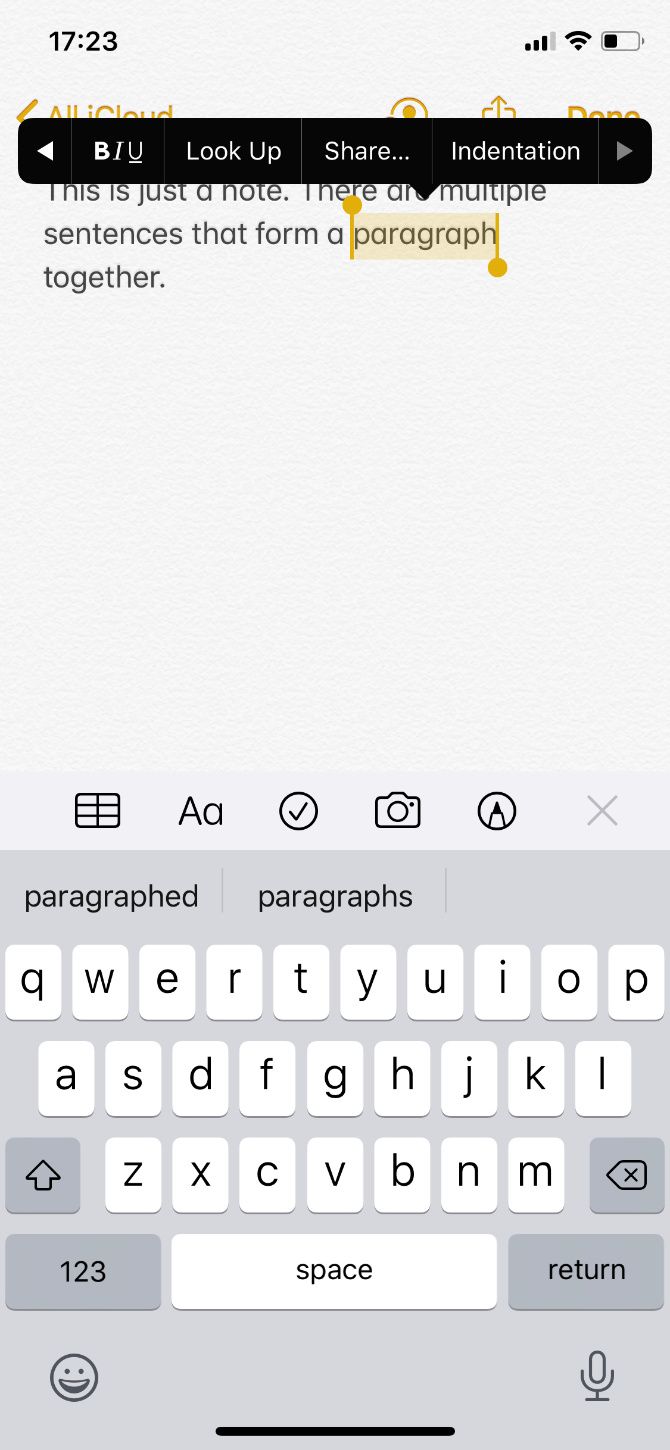
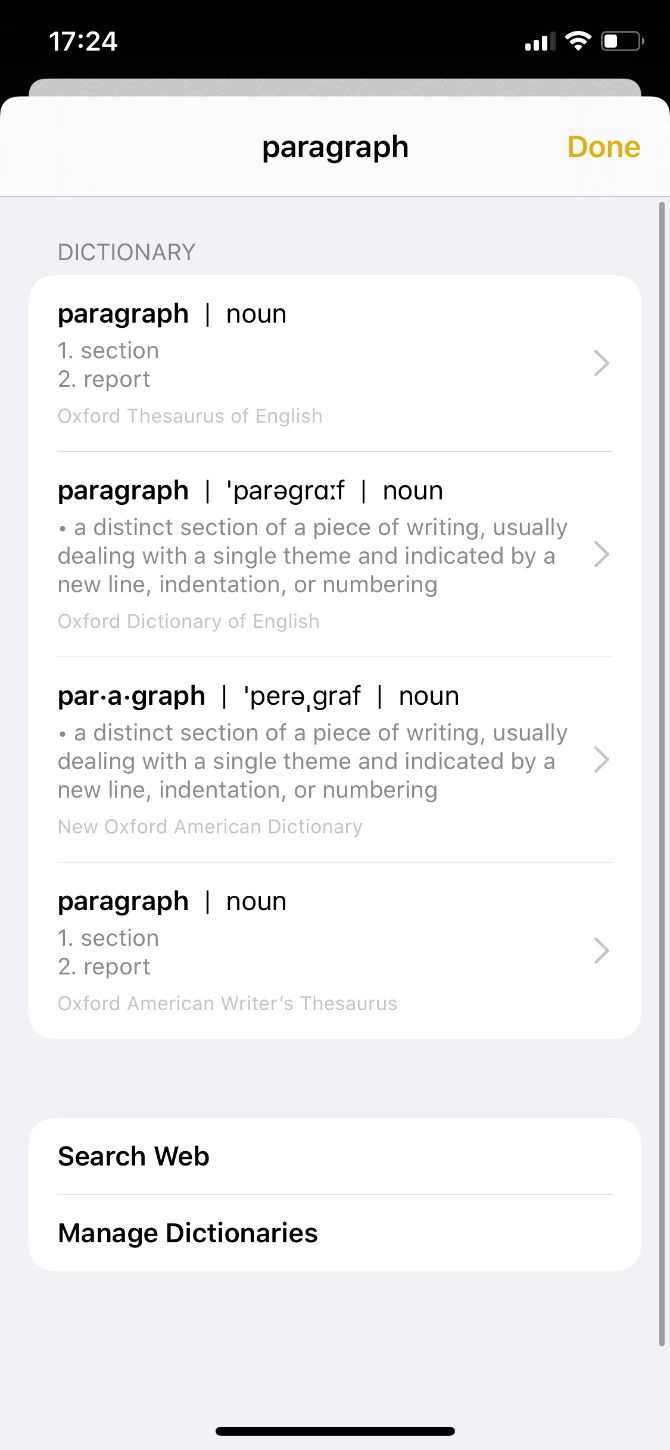
18. Look Up Dictionary Definitions

You can look up the definition of a word you just typed without leaving your app using this handy iPhone and iPad trick. All you need to do is double-tap to select a word, then tap Look Up from the popup menu.

It’s also possible to do this when reading in the Books app or browsing the web in Safari. In fact, there are lots of other hidden Safari tricks like this you could learn as well.

19. Try Landscape Mode on Plus-Sized iPhones

essential ios keyboard tips and tricks 4

If you’re using an iPhone Plus model, turn your iPhone sideways to use the keyboard in landscape mode. Alongside the regular set of keys, this also lets you cut, copy, paste, and access formatting tools right alongside the keyboard.

20. Enable One-Handed Typing

One-handed keyboard on iPhone

If you’ve ever struggled to reach across the keyboard while using your iPhone with one hand, this is the trick for you. The one-handed keyboard shifts the keyboard to the left or right of your screen, making it easier to reach with a single hand.

Tap and hold the Keyboard or Emoji icon in the bottom-left corner to reveal a popup menu, then tap the left or right-handed keyboard at the bottom.

After your keyboard moves to the side of the screen, tap the large arrow that appears to move it back to the center when you’re finished.

21. Shrink, Move, and Split the iPad Keyboard

Small keyboard on iPad

Pinch in with two fingers on the center of the keyboard to shrink to an iPhone-sized keyboard. Drag and drop using the bar at the bottom to move this keyboard anywhere on the screen. And pinch out to go back to normal. You can also swipe to type using QuickPath on this smaller keyboard.

Alternatively, to split your iPad keyboard in two, pinch out with two fingers from the center of the keyboard. It should separate into two halves—one at either side of the screen—letting you type with your thumbs. Pinch the two halves together to go back to normal.

22. Hide the Keyboard

Sometimes the keyboard appears when you don’t need it. When this happens, it takes up half the screen and makes it difficult to see what’s beneath. Simply swipe down from the center of your iPhone or iPad screen to hide the keyboard in these situations.

Do More With Third-Party iPhone Keyboards

All these tips and tricks make the iPhone and iPad keyboard pretty awesome, but it’s not the only option. There are plenty of third-party keyboards available to download from the App Store which add completely new typing options as well.

Google’s Gboard keyboard has an integrated Google search bar. Fleksy lets you use gestures to type. And Chroma injects exciting colors to your keyboard. Find out more about these keyboards and more in our rundown of the best iPhone keyboard apps.

Read the full article: 22 Essential iPhone Keyboard Tips and Tricks

25 Jun 16:08

5 New Ways to Watch YouTube and Find Videos

by Mihir Patkar
new-ways-watch-youtube

YouTube still has more videos uploaded to its website for public consumption than anything else on the internet. But finding those videos is not as fun an experience as it once was. Let’s face it, we’ve all gotten a bit bored with the same old YouTube interface. Not too long ago, YouTube unveiled a redesign for its website. It also included a secret Dark Mode. But even these aren’t doing the trick. What you sometimes need is a completely new way to browse YouTube or watch the videos on it. 1. YouTube Roulette (Web): Random Videos, Played Endlessly Much like...

Read the full article: 5 New Ways to Watch YouTube and Find Videos

25 Jun 15:26

Will It Sous Vide? A Boozy Chocolate-Cherry Sundae

by Claire Lower on Skillet, shared by Alice Bradley to Lifehacker

Welcome to this week’s edition of Will It Sous Vide?, the weekly column where I usually make whatever you want me to with my immersion circulator.

Read more...

25 Jun 15:16

The Dream School

25 Jun 15:10

Science Is Unlocking The Secrets Of 'Seeing' Through Sound

by Eric Mack, Contributor
Scientists are studying the notion of human echolocation with hopes that it may one day be possible to teach the visually impaired and others how to navigate the world through sound like a bat winging its way through a pitch black cave, but without the wings.
25 Jun 14:54

In 10 Years, Your iPhone Won't Be a Phone Anymore...


In 10 Years, Your iPhone Won't Be a Phone Anymore...


(Second column, 14th story, link)


25 Jun 13:18

Tool of Titans

by mark

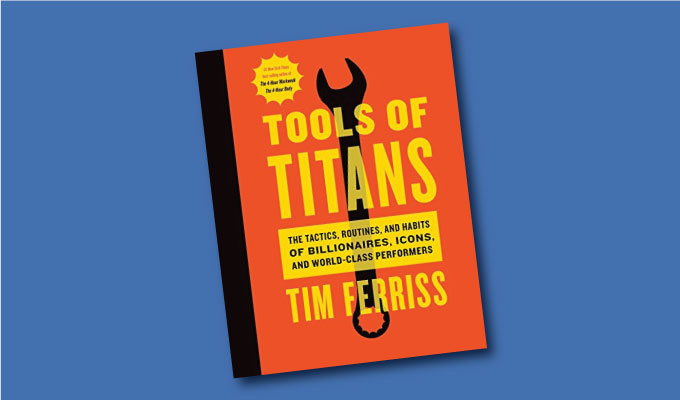
This is the most dog-eared book I own. It is a massive whack on the side of the head. Nearly every one of its 670 pages contains a mind grenade, some aha or reminder of an aha. Self-improvement expert Tim Ferriss has been deconstructing the best practices of successful people in his wildly popular podcast series, and in this book he heroically distills those hundreds of hours into short powerful stand-alone paragraphs. Tim then adds his own comments based on his experience as a human guinea pig willing to try any improvement hack at least once. The result is a crowded, overflowing Whole Earth Catalog of self betterment. Browse anywhere and you’ll be rewarded with hard-worn practical advice to increase your achievement in three categories: healthy, wealthy and wise. I was surprised by how much actionable insight there are in this tome. And I keep returning to it to find more.

-- KK

Tools of Titans: The Tactics, Routines, and Habits of Billionaires, Icons, and World-Class Performers

By Timothy Ferriss

2016, 707 pages

International Amazon link

Available from Amazon

Sample Excerpts:

Joe De Sena

Do you have any quotes you live your life by or think of often?

“It could always be worse.”

*

Pavel Tsatsouline

“ … when you are a leader, people are going to mimic your behavior, at a minimum …. It’s a guarantee. So here’s the key piece of advice, this is all he said: ‘Calm is contagious.’”

*

Chade-Meng Tan

Take One Breath a Day

I may be the laziest mindfulness instructor in the world because I tell my students that all they need to commit is one mindful breath a day. Just one. Breathe in and breathe out mindfully, and your commitment for the day is fulfilled. Everything else is a bonus.

*

Coach Sommer

If the commitment is to a long-term goal and not to a series of smaller intermediate goals, then only one decision needs to be made and adhered to. Clear, simple, straightforward. Much easier to maintain than having to make small decision after small decision to stay the course when dealing with each step along the way. This provides far too many opportunities to inadvertently drift from your chosen goal. The single decision is one of the most powerful tools in the toolbox.  

*

Productivity tricks for the Neurotic, Manic-Depressive, and Crazy (Like Me)

For each item, ask yourself: “If this were the only thing I accomplished today, would I be satisfied with my day?” “Will moving this forward make all the other to-dos unimportant or easier to knock off later?” Put another way: “What, if done, will make all the rest easier or irrelevant?”

*

Tony Robbins

Is there a quote that guides your life?

“It’s a belief: Life is always happening for us, not to us. It’s our job to find out where the benefit is. If we do, life is magnificent.”

The best investment he’s ever made?

Buffet told him, “ Investing in yourself is the most important investment you’ll ever make in your life … There’s no financial investment that’ll ever match it, because if you develop more skill, more ability, more insight, more capacity, that’s what’s going to really provide economic freedom. … It’s those skill sets that really make that happen.”

*

Casey Neistat

“What is the ultimate quantification of success? For me, it’s not how much time you spend doing what you love. It’s how little time you spend doing what you hate.”

*

Peter Thiel

“So if you’re planning to do something with your life, if you have a 10-year plan of how to get there, you should ask: Why can’t you do this in 6 months?”

*

Seth Godin

If you generate enough bad ideas, a few good ones tend to show up

“People who have trouble coming up with good ideas, if they’re telling the truth, will tell you they don’t have many bad ideas. But people who have plenty of good ideas, if they’re telling the truth, will say they have even more bad ideas. So the goal isn’t to get good ideas; the goal is to get bad ideas. Because once you get enough bad ideas, then some good ones have to show up.”

Try sitting at a different table

“Everyone who can hear this has more power than they think they do. The question is, what are you going to do with that power?”

First, ten people

“The blog post I point people to the most is called ‘First, Ten,’ and it is a simple theory of marketing that says: tell ten people, show ten people, share it with ten people; ten people who already trust you and already like you. If they don’t tell anybody else, it’s not that good and you should start over. If they do tell other people, you’re on your way.”

*

James Altucher

“Here’s magic trick: If you can’t come with 10 ideas, come up with 20 ideas … You are putting too much pressure on yourself. Perfectionism is the ENEMY of the idea muscle … it’s your brain trying to protect you from harm, from coming up with an idea that is embarrassing and stupid and could cause you to suffer pain. The way you shut this off is by forcing the brain to come up with bad ideas.”

The world doesn’t need your explanation. On saying “No”:

“I don’t give explanations anymore, and I’ll catch myself when I start giving explanations like ‘Oh, I’m sorry, I can’t make it. I have a doctor’s appointment that day. I’m really sick. I broke my leg over the weekend’ or something. I just say, ‘I can’t do it. I hope everything is well.’”

*

Justin Boreta

Do you live your life by any quotes?

“Life should not be a journey to the grave with the intention of arriving safely in a pretty and well preserved body, but rather to skid in broadside in a cloud of smoke, thoroughly used up, totally worn out, and loudly proclaiming ‘Wow! What a Ride!’” — Hunter S. Thompson, The Proud Highway: Saga of a Desperate Southern Gentleman, 1955-1967

*

Best advice ever received? “The question I ask whenever I’m straining for extended periods is, “What would this look like if it were easy?” — Tim Ferris

*

How to earn your freedom

It comes from Oliver Stone’s Wall Street, when the Charlie Sheen character—a promising big shot in the stock market—is telling his girlfriend about his dreams.

“I think if I can make a bundle of cash before I’m 30 and get out of this racket,” he says, “ I’ll be able to ride my motercycle across China.”

When I first saw this scene on video a few years ago, I nearly fell of my seat in astonishment. After all, Charlie Sheen or anyone else could work for 8 months as a toilet cleaner and have enough money to ride a motorcycle across China.

*

Astro Teller

The benefits of thinking 10X versus 10%

“When you go after a moonshot—something that’s 10 times bigger, not 10% bigger—a number of things happen …. First of all, when you’re going 10% bigger, you’re competing against everybody. Everybody’s trying to go 10% bigger. When you’re trying to go 10 times bigger, you’re there by yourself. For me, [take asteroid mining as an example]. I don’t have a lot of asteroid mining competition out there, or prospecting. Or take human longevity, trying to add 40 years in health lifespan with HLI. There are not a lot of companies out there [attempting this]. The second thing is, when you are trying to go 10 times bigger, you have to start with a clean sheet of paper, and you approach the problem completely differently. I’ll give you my favorite example: Tesla. How did Elon start Tesla and build from scratch the safest, most extraordinary car, not even in America, but I think in the world/ It’s by not having a legacy from the past to drag into the present. That’s important. The third thing is when you try to go 10 times bigger versus 10% bigger, it’s typically not 100 times harder, but the reward is 100 times more.”

*

B.J. Novak

The importance of the “blue sky” period

For 2 to 4 weeks, the writers’ room banter was each person asking, “What if …?” over and over again. Crazy scenarios were encouraged, not penalized. Every idea, no matter what, was valid during this period. The idea generation and filtering/editing stages were entirely separate. As B.J. explained, “To me, everything is idea and execution and, if you separate idea and execution, you don’t put too much pressure on either of them.”

*

BJ Miller

“Don’t believe everything you think.”

This was BJ’s answer to “what would you put on a billboard?” He wasn’t sure of the source but attributed it to a bumper sticker.

*

Conquering Fear = Defining Fear

“Set aside a certain number of days, during which you shall be content with the scantiest and cheapest fare, with coarse and rough dress, saying to yourself the while: ‘Is this the condition that I feared?’” — Seneca

25 Jun 13:15

Interview with Tim Ferriss, Author of Four #1 NYT/WSJ Bestsellers

by cooltools

Please consider supporting the Cool Tools Show podcast on Patreon! – MF

Our guest on the Cool Tools Show this week is Tim Ferriss. Tim was listed as one of Fast Company‘s “Most Innovative Business People” and one of Fortune’s “40 under 40.” He’s an early-stage technology investor and advisor (Uber, Facebook, Alibaba, and 50+ others) and the author of four #1 New York Times and Wall Street Journal bestsellers, including The 4-Hour Workweek and Tools of Titans: The Tactics, Routines, and Habits of Billionaires, Icons, and World-Class Performers (reviewed on Cool Tools). He is the host of The Tim Ferriss Show podcast, which has exceeded 150 million downloads and has been selected for “Best of iTunes” three years running.

Subscribe to the Cool Tools Show on iTunes | RSS | Transcript | Download MP3 | See all the Cool Tools Show posts on a single page
Tim’s Tools:
vicejacket
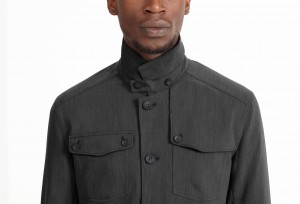
Nau Vice II Blazer ($280)
“It is a jacket that I roll up to travel with constantly. What makes it unique is a number of different factors. You can roll it up and throw it on a black t-shirt and you look like you’re ready for a business dinner or a formal or semi-formal occasion, so it saves me the trouble of packing a lot of collared shirts, for instance. … Plenty of pockets, but there are lapels so you can get away with murder. You can wear it in a light rain or you could wear it at a nice dinner. It is an incredibly flexible piece of clothing. … The fabric blends that are used tend not to wrinkle, number one. Two, it has folds and pockets and lapels that for whatever reason, make any wrinkles less noticeable. …I get it down to about a roll that is 10 inches in length and about three to four inches in diameter.”
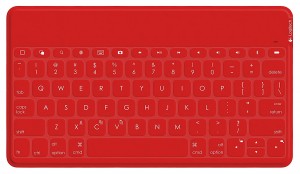
keyboardlogitech
Logitech Ultra-Portable keyboard ($34)
“In my bag of tricks. I have a Logitech bluetooth keyboard and just to put this in perspective, it is slightly larger than say a paperback book, like a 5 x 8 inch trim paperback book. It is narrow enough that I will very often stick it into a journal to protect it and it’s probably the width of eight to ten paperback pages. And it holds a charge very, very well so I use this often times if I have any issue with my laptop. I can pair it to my iPhone, which is a larger-sized iPhone and balance the iPhone or lean it against a glass of iced tea and I can get any writing done that I need to get done. Also, if I feel like taking a day trip, but not taking this backpack, which is one of my main pieces of luggage and stuffed full of stuff, it’s kind of heavy, I can take the keyboard and my iPhone and head off to some coffee shop say ten to 15 minutes away without carrying all of my gear with me.”
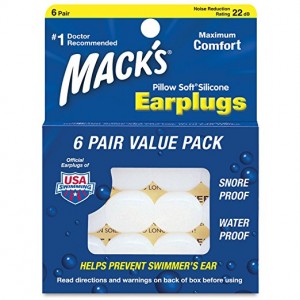
earplugs
Mack’s Pillow Soft Silicone Earplugs ($4)
“[Max silicone earplugs] unlike foam earplugs are not inserted into the ear canal and then left to expand. These are effectively smeared over the ear opening and you have in all caps – DO NOT INSERT, JUST COVER EAR OPENING. These I found through swimmers in fact and they are very waxy and almost look like candies … some type of caramel, but they’re white colored and I find them to block sound much more effectively than any type of foam ear plug … I definitely reuse these. I would say if I had to guesstimate, I would say four to five nights and then they start to lose their adherence, because they get less tacky over time. The most important feature or benefit that I don’t want to overlook is that as someone who tends to rotate from back to side, so I sleep on my back and on my side, foam earplugs will very often hurt. They’ll get pushed into your ear when you roll onto your side. That is not the case with these.”
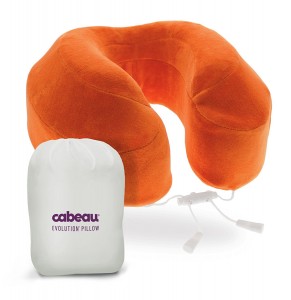
travelpillowcabeau
Cabeau Evolution Memory Foam Travel Pillow ($40)
“Most of [travel pillows] are very uninspiring and even less effective for helping me sleep. What I found is not only does [this pillow] help me sleep if I’m sitting upright, but it’s also very, very helpful for getting to sleep when I’m laying prone, whether it’s on an airplane or even a hotel room, if the pillows are of dubious quality. … It’s self expanding, so you can think of it almost like a sponge-like material that you can compress down and then when you release it, it inflates or I should say rather expands automatically. … It is a horseshoe-shaped, if you imagine a horseshoe being hung around the back of your neck, that is the shape. It can clip in the front and the design is such that there’s a ridge that supports basically the occipital area at the base of the skull. … It’s the most comfortable neck pillow that I have found.”
Screen Shot 2017-06-20 at 4.31.28 PM
Apnea Trainer ($3)
“So another app that I use a lot when I’m traveling and I use it at home as well is called Apnea Trainer and I don’t use it for it’s tended use. I have an off-label use. Apnea Trainer is used by people who are training for free diving and want to improve their breath hold times. There are different types of tempos that you can use for different types of training, so there is Pranayama breathing. There is the apnea breathing which would say be a ratio of inhale, hold, exhale or inhale, hold, exhale, hold. … What I found is that if I only have, say five to ten minutes and I don’t have time for my usual morning meditation, which I like to do, that five to ten minutes of breathing training with a voice that will countdown for you is very much grounding for the rest of the day.”
yellowtec

Yellowtec iXm microphone
($760)
“This is a microphone that can capture just tremendous quality of audio. It automatically equalizes and it has playback buttons on the side. It all records to an SD card that’s inserted in the bottom and it’s battery powered so that you can take it on the road. Everything is contained and housed in this one unit, that then goes in a tiny zip-up bag, so this just lives really inside my backpack, so if I don’t have a chance to bring more gear or don’t want to bring more gear, I can use this anytime, anywhere and shizam.

Kevin’s Tools:
Screen Shot 2017-06-20 at 4.31.11 PM
myTracks (FREE)
“What it does is it makes a GPS log for our travel, wherever you’re going and the important thing is it does it without having to have cellular service somewhere because in these foreign countries, I don’t normally turn my cell phone service off, but it’s still getting GPS signals and just with that information, is enough to create a GPS log of a journey. The advantage to that is one, you have a record of your journey and you can import into Google Earth just with a KML format, but more importantly, if you have a camera that has a clock as they all do these days, you can synchronize your clock to the local time and you’ll have a way to time stamp and geotag your photographs.”

Cheap compact umbrella with top spray painted silver to reflect the sun, keeping it cooler
“I just had an ordinary cheap, black, really compact umbrella that I carry in my little camera bag all the time and I spray painted the top of it silver so that it reflects the light and it makes it a little bit cooler on the inside, because just with a black umbrella, it tends to absorb that infrared and reradiate it back down on your head. By having a silver reflective layer, it bounces at least 60% of that back into the sky and it’s a lot cooler. There are versions of the silver umbrella that are extremely lightweight. They’re not as collapsible as the ones I have, but they’re made for hiking. I think there’s called the Silver Dome if I’m not mistaken and they weigh only a few ounces, and people out west, if you’re climbing even into high altitudes, a lot of the long-distance hikers now carry an umbrella, portable shade and they walk along under the shade. Shade follows them and it really makes a huge difference when you’re backpacking because you can really work up a sweat in a hat. It doesn’t allow your head to cool off, but the umbrella does.

25 Jun 13:08

Oysters Worth Killing for

by David Gladow

There’s a saying here:  That the oysters are worth killing for.  And that’s not just an expression, but rather a statement of fact.

Murder Point Oysters derive their name from a tragic incident years ago, but they are distinct in other ways.  They are exclusively grown in the waters of the Gulf of Mexico using a long line method developed in Australia. The oysters are spawned from the species Crassostrea virginica, also known as the Eastern/American oyster. Murder Point Oysters thrive in the unique conditions off Alabama’s coastline, which produces a full, rich, creamy taste with a light metallic finish and a drop of butter in each one.

There are many elements that can affect an oyster’s outcome, but here at Murder Point the most important element is love. look for them at most fine dining restaurants. In mid July of this year they are planning to open a store on Wintzell Avenue in Bayou La Batre. For more information go to www.murderpointoysters.com

The post Oysters Worth Killing for appeared first on The Southern Weekend.

23 Jun 18:11

Legos in Bulk

by mark

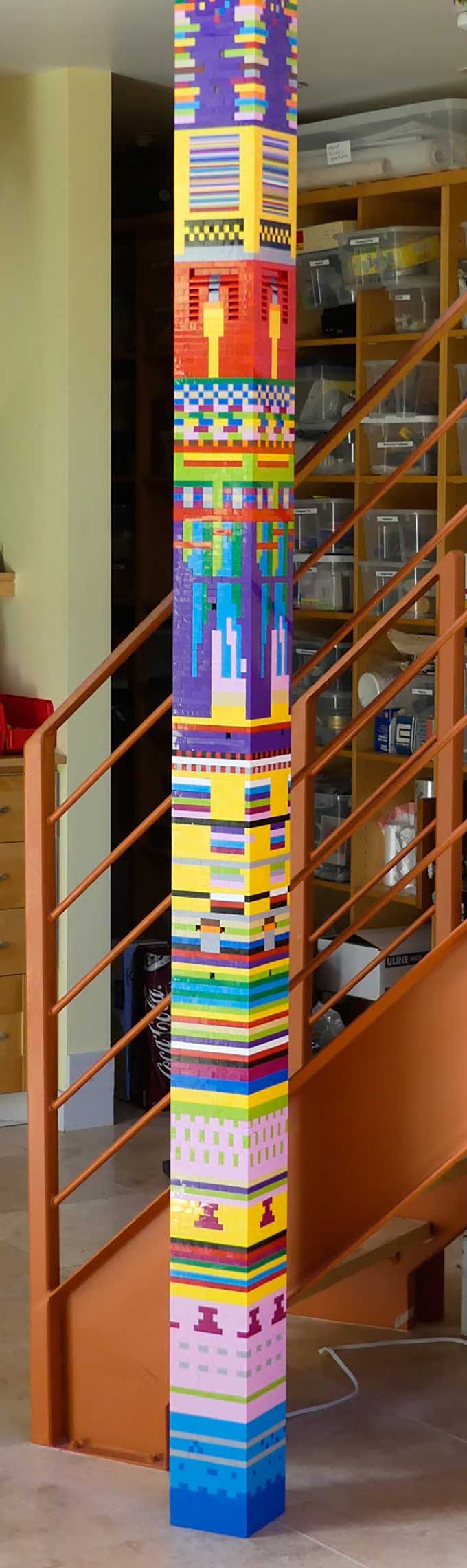
Legos are a forever toy. Without moving parts, they last a really long time, can be assembled and reassembled in infinite arrangements, and have a long-term appeal even for old kids like me. But they are relatively expensive if you want to make something big. Seeking out the best discount boxes from Lego, or from resellers, they cost about 10 cents per piece. Smaller sets are even more expensive. I wanted to build a wall of Legos, but there was no easy way to buy standard bricks in bulk from Lego. So I went to the Chinese and found a whole army of knock-off Legos from China available on Amazon. They cost about 2.5 cents per piece.

The best option for the standard blocks are packs of 1,000 bricks for about $25. I recently needed 15,000 pieces for a 25 foot tower of Lego I am building, so I bought bulk packs from five different knock-off vendors. All five sources sell bricks that are pretty indistinguishable and interchangeable with authentic Lego — and with each other.  They are about 99.8 percent exact. When building my tower, once or twice I notice a very slight gap between one level that would not be there in genuine Lego. Also there can be very slight variation in color, especially between vendors; the yellow of one is not 100% the yellow of the other. There is a slighter variation of color within one source but it is not noticeable unless you build in a solid color. For 99% of most uses, these subtle variations will not be a problem, and the fit will not be a problem. Reviewers on Amazon who actually counted the number of pieces included verify that you do get at least 1,000 pieces. Out of 10,000 pieces so far I’ve only encountered 6 pieces that were malformed.  Some Amazon customers have complained that the larger bricks are less durable than the real thing when disassembling, but I am not joining and unjoining parts, so I can’t tell. For my purposes these work great.

So which knock-off to use? Because these bulk bags are sold as “random” selections it is hard to say. Toysopoly included more browns and orange bricks than the other brands, but I detected some color variance from other brands. Big Bag of Bricks had a lot of purple. They also had a pack with lots of Lego pastels  — light blue and pink. I used Play Platoon and Wonderbricks and Brickyard and didn’t notice anything special but a random assortment, with different amounts of gray, or roof tiles. None of these include any special items beyond basic bricks. Any of them will be perfectly acceptable substitutes for real Lego if you need large quantities. At the time of my purchases, Big Bag of Bricks had the cheapest prices, at $25 per 1000 pieces.

Prices go up and down. I use CamelCamelCamel and The Tracktor to track the lowest prices for these packs and buy whichever one goes lowest, which has been Big Bag of Bricks in recent months.

11OuGpQ9Y6GPG3guzFKFLD-YTKoKCBS1tFMa1n38

-- KK

Big Bag of Bricks, 1000 pieces ($25)

23 Jun 18:10

BaggingThe Future: 7 Ways Grocery Will Change By 2020

by Bryan Pearson, Contributor
From a shortage of time to a shortage of space, capacity will be the factor that influences supermarkets in the near future. As more merchants seek ways to meet the shopper’s need to put food on the table, supermarkets are bound to respond. This story explores seven predictions.
23 Jun 18:08

The Stolen Human Toe Used to Make Cocktails Has Been Returned

by Erik Shilling

In Dawson City, in Canada's Yukon Territory, there is a bar called the Sourdough Saloon which serves a drink called the "Sourtoe Cocktail," which is a shot of whiskey with an amputated toe. As the Sourdough Saloon explains, "you can drink it fast, you can drink it slow, but your lips have gotta touch the toe.”

Which is great.

But early Sunday morning, the toe—there is just one toe in circulation currently, though the Sourdough Saloon has gone through many toes over the years—was stolen, apparently by a (possibly drunk) man who had previously boasted of his intention to steal the toe, according to a press release issued by the bar.

Yesterday brought better news. Royal Canadian Mounted Police reported that the toe had been returned:

On Tuesday afternoon, June 20th, Dawson City RCMP received a phone call from the alleged suspect, stating that he had placed the toe in the mail, addressed to the Downtown Hotel. The man then called the Downtown Hotel and provided the same message to staff, along with a verbal apology.

Earlier today, on Thursday, June 22nd, the expected package was received. To ensure the package was safe to open, Corporal Jeff Myke from Dawson City RCMP attended the location to open it.

Located inside the package was an apology letter, as well as the stolen toe.

At the time that the package was opened, the toe was believed to be in good condition.

Which is good news, and a nice ending for a story that looked for a minute like it might end poorly (the bar's owner came out firing in the news release, referring to the thief as a "low life," which are fighting words.)

Here is a picture of the toe, which I've so far avoided showing you because it is gross:

Canada.

23 Jun 18:06

Why the Amish Are Building America’s RVs

by Allison Yates
article-image

The Amish settlements of Nappanee and Elkhart-La Grange are less than an hour’s drive apart and both about a three-hour drive north of Indianapolis, Indiana. The flat, almost treeless landscape is home to horse stables and barns, white wooden houses, antiquated farming equipment and nearly 30,000 Amish. Regardless of the decade, these communities seem to remain constant in appearance.

Permissible technology for the Amish varies by community depending on the bishop—the local religious leader who determines the rules. Some, like Northern Indiana’s Amish, allow gas to power laundry machines and indoor lighting, or business owners to use cell phones and email at work. Generally, though, modern technology beyond work purposes is prohibited, and no matter how progressive the community, operating a motor vehicle, even for work, is out of the question.

But there’s more than meets the eye, and it only takes a bit longer in the region to take notice—the number of Recreational Vehicles (RVs) such as campers, fifth-wheel trailers, or motorhomes. Trailers are pulled behind trucks, and tour bus-sized coaches squeeze through the small-town streets.

According to the Recreational Vehicle Industry Association, RV manufacturing is a $50 billion business in the United States, employing nearly 300,000 Americans. Most of the RVs in America—80 percent—are made in Northern Indiana.

article-image

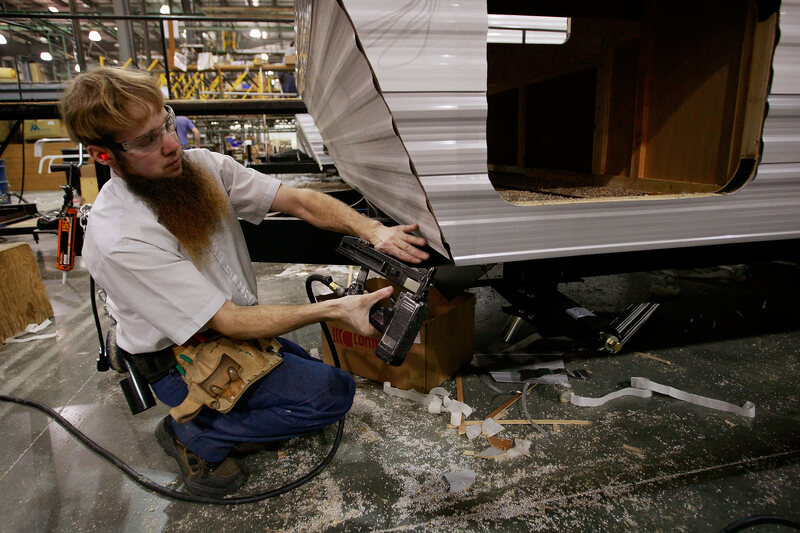
The Amish in this region don’t just live near the RV epicenter—they’re building the vehicles. According to Steve Nolt, Senior Scholar at the Young Center for Anabaptist and Pietist Studies at Elizabethtown College, most of the Amish men under 65 work in factories. The majority of these manufacturing plants either assemble RVS or supply parts such as cabinets or windows.

Such increased Amish involvement in the non-Amish workplaces has had irrevocable consequences on their community. In the PBS documentary American Experience: The Amish, Donald B. Kraybill even called the shift the “most significant and the most consequential change since they came to North America.”

Unlike other Amish communities across the U.S., Northern Indiana Amish have always had some relationship to the outside world. After they came to the region in the 1840s, they didn’t live in such close proximity to non-Amish as they do now, but they were never isolated.

When most Amish men were farmers, it was common for them to work seasonally with non-Amish in town, on more traditional things like cabinet making or carpentry, or even making cigar boxes, boats and band instruments. Nolt, who conducted interviews in the late ‘90s with Amish workers in the boat-making industry, said interviewees pointed to the fact that making the wooden boats was similar to wood working.

article-image

So when Milo Miller started the first RV manufacturer in Elkhart County in 1933, it wasn’t out of the realm for Amish to begin participating in the seasonal work it offered—something Nolt explained was an “already established pattern that seemed inviting.” And there were a lot of chances to participate in this industry. Miller’s company quickly started to attract more suppliers and manufacturers to the region. By 1948, Elkhart County had already been dubbed the “RV Capital of the World” and continued to supply America’s post-war demand for affordable recreation.

Yet, how did the RV situation shift from a comfortable, seasonal job for some of the Amish, to employing 56.3 percent of men in the Nappanee settlement and 53 percent in the Elkhart-LaGrange settlement, according to Nolt’s data?

The big reason, says Nolt, is what he called an “economic squeeze and demographic crisis,” a shift in the 1980s that pushed the Amish (and other farmers across the country) from the farms into the factory. By the time the 1980s Farm Crisis hit, Amish families had already grown larger and larger,and there were fewer opportunities for them to own land. Today, most people who own farms inherited them. Buying land and farming is not only out of most people’s price ranges, but it’s a tough business to compete with America’s mega-farms.

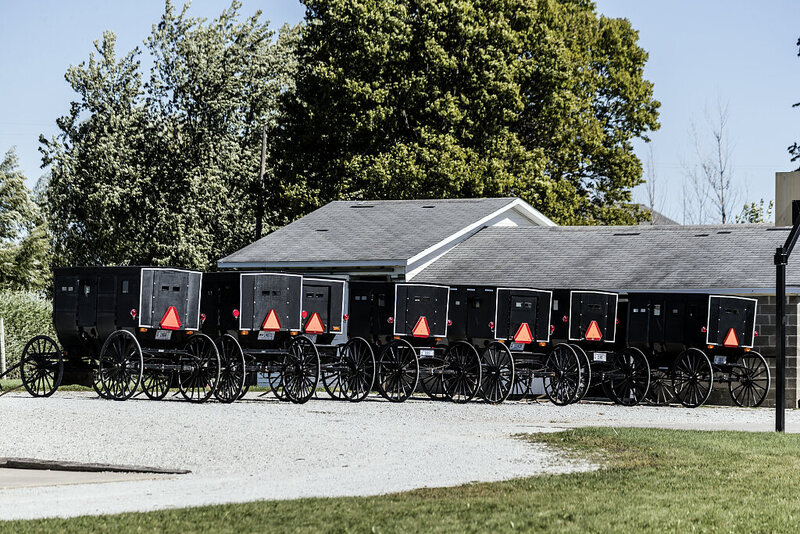
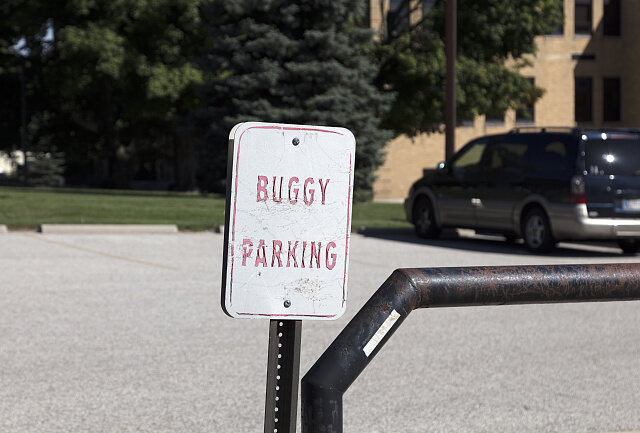
The strong RV industry provided jobs for Northern Indiana’s Amish once farming was no longer a plausible option. Year-round, Amish men go into work at 4:00-5:00am, riding into town in a bike or buggy, and working until they complete their day’s quota. The faster they work, the sooner they go home. In Newmar’s Nappanee factory, for example, once workers finish eight RVs, they’re done for the day. Some might not even have to work a full eight-hour day, and wages are relatively high—reported to be around $4,000 a month and up.

article-image

The more the factory work immerses the Amish in the outside world, though, the more they struggle to find a place to thrive economically while holding onto their values. The transition from occasional seasonal work to the majority of men working in factories has created a cultural conflict that few anticipated.

“The good thing is they put a lot of meat on the table and feed a lot of families,” says Ola Yoder, the Amish CEO of Kountry Wood Products and a former factory worker. The change it’s caused is “tremendous, and I’m not sure if it’s a good thing.” Born in an Amish community in Arthur, Illinois, he moved to the Nappanee settlement over four decades ago when he heard the factory jobs were paying “a big $5” an hour. Now, it’s upwards of $15.00.

Although many believe the high factory wages create a fairer society—the rate forces Amish businesses to pay competitive rates, otherwise they’d lose employees to RV industry—others allude to the potential for problems. Two of the Amish’s most important values are humility and equality, but Amish factory workers now speak openly about wages and compare them often. With their increased salaries, they buy bigger boats and advanced hunting equipment, stirring a subtle hierarchy.

Erik Wesner, author of Success Made Simple: An Inside Look at Why Amish Businesses Thrive and the man behind the popular blog Amish America, has written about local perceptions of the industry. Wesner explains that given the volume of manufacturers in the region, it’s hard to generalize one workplace over the other, but Amish have three major concerns with the industry: money, work environment, and stress. Compared to traditional farm work, “it’s a fast-paced environment, it’s stressful, there’s swearing, stories about drugs,” says Wesner. “By the nature of the work, you have to be sharp and on your toes.”

article-image

M. Yoder, an Amish man who works in a trailer factory in Shipshewana, said he doesn’t “like getting mad at all” but he can’t help but feel the pressure of the adrenaline. He’s had arguments with his superiors. The speed required has also made him wasteful–it’s easier to throw away excess materials in a time crunch than put them back where they belong.

L. Yoder would rather be working on his apple orchard or taking care of his bee colonies, but to be able to pay his high mortgage (a trade-off he made to be able to live on expensive property close to friends and family) he feels like he has no other choice than to work in the factories.

The RV industry in northern Indiana has long been a benefit to the local communities, Amish and non-Amish, as well as depended on the strong workforce the region provided. The Amish factory workers, who otherwise would never have contact with motor vehicles, are doing fast-paced physical labor and reaping the economic benefits, but not without a cost. Less time on the fields means more time with families and more money means the ability to buy expensive land—something that the community is grateful for. The critics, though, are quick to point out their skepticism. They have to ask, says Ola Yoder, “Where’s this going to end up at?”

23 Jun 18:05

7 Things You Need to Build a Low-Cost YouTube Studio

by Christian Cawley
low-cost-youtube-studio

You’ve been making some YouTube videos, and they’re gaining popularity. You want to make a step to the next level, and build a dedicated YouTube studio (or use a portion of a room) but there’s a problem. Money. Yeah. Once again, the lucre is holding you back. But does it really have to be this way? Do you genuinely need a YouTube studio? And if you do, does it really need to cost you the money you think? Well, we’re big fans of saving money here at MakeUseOf. Let’s find out how you can get started with your YouTube studio...

Read the full article: 7 Things You Need to Build a Low-Cost YouTube Studio

21 Jun 01:20

The Northernmost Town in America

The Northernmost Town in America
Barrow, Alaska. Where the sun never sets and sometimes never rises, the ground is frozen all year round, and it snows in the summer. For much of the year, the...

Visit Uncrate for the full post.
21 Jun 01:20

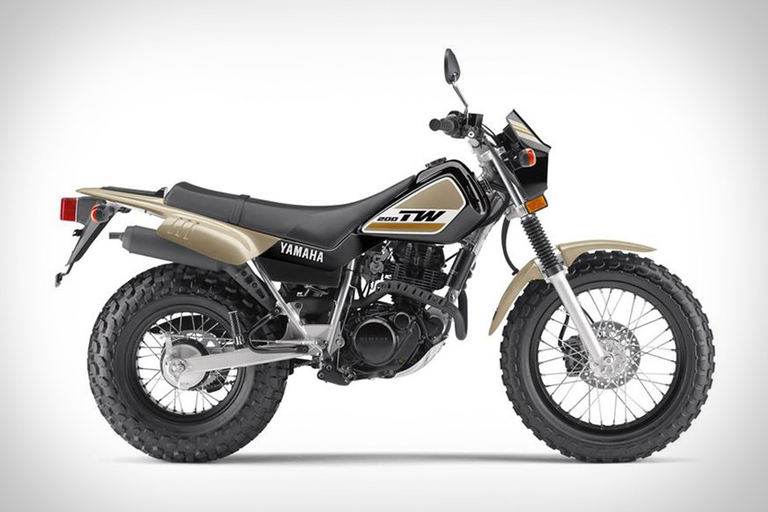
Yamaha TW200 Motorcycle

A good bike for beginners doesn't mean it has to feel like a toy for more experienced riders. Yamaha's TW200 perfectly fills that niche in a dual-sport, good for the...

Visit Uncrate for the full post.
21 Jun 01:17

Reinventing the Toilet

by Miss Cellania

Worldwide, 2.4 billion people don't have access to toilets, and a billion don't even have latrines or outhouses. Plumbing and sewer systems are expensive to build, and many places either have too little water to run them, or too much water, which makes it hard to keep sewage out of the freshwater supply. The answer may be a new technology that uses no water, and even recycles human waste. Virginia Gardiner designed the toilet called the Loowatt.

In Loowatt’s waterless flush design, the waste is sealed into a biodegradable bag underneath the toilet with not a drop of water being spilled. Once full, the bag is replaced by a service team, and the waste is brought (yes, hand-delivered) to Loowatt’s pilot waste-processing facility, where it’s converted to fertiliser and biogas.

This very manual setup sounds very archaic compared to the slick and convenient arrangements of the Western world. But sanitation experts think that in the era of climate change, when droughts and floods are becoming increasingly common, the West may have something to learn from the little waterless loos piloted in penniless Madagascan neighbourhoods. With the world’s population ever-increasing, places that historically relied on water for sanitation may have to reconsider how they flush.

Read how the Loowatt was conceived, and how it could change people's lives. -via Digg

(Image credit: Tomasz Kuran aka Meteor2017)

21 Jun 01:17

Ready to Strike: The New .38 Special Colt Cobra – Full Review.

by Jon Hodoway

The new Cobra in .38 Special from Colt gives revolver fans a great new option in concealed carry snubbies. Read on for the full review.

The post Ready to Strike: The New .38 Special Colt Cobra – Full Review. appeared first on GunsAmerica Digest.

21 Jun 01:12

Your Guide to Summer Boating with Dogs

by Erin B

Summer boating with dogs

Summertime, and the boating’s easy…

Well, maybe not easy per se, but we’ll help try to make summer boating safe and fun. That goes double if you head out on the water with your dog this summer.

Warmer weather naturally draws people to their boats, which is a great way to beat higher temperatures. However, keep in mind, summer heat poses a higher risk to pets than humans.

A dog’s body is not very good a cooling down; they only release heat through the limited number of sweat glands between their toes and by panting. This means your pups can easily overheat.

Before you set off on a summer cruise, take a look at these tips to keep your dog safe and sound at sea.

Thanks to K9ofMine for this infographic. Happy summer boating!

dog-boating-safety-infographic-2

The post Your Guide to Summer Boating with Dogs appeared first on Southern Boating & Yachting.

21 Jun 01:12

Soft Water Solutions

by Erin B

Prevent damage to your boat’s fit and finish with a portable water softening system.

Soft WaterWhile cruising long distances or making extended voyages, it can be difficult to maintain consistent access to soft water. Instead, you may find that dockages only have access to hard water, which often contains a large quantity of certain dissolved minerals. While minerals such as calcium and magnesium aren’t harmful to your health, they can lead to inefficiencies and even damage your boat. Luckily for cruisers, portable water softeners can safely and effectively transform hard water through softening methods, saving you both time and money.

Although portable water softening systems operate by transforming hard water to soft water, hard water isn’t inherently undesirable. It isn’t harmful to human health, and it can even be beneficial due to its rich mineral content. It also can reduce the solubility of potentially toxic metal ions like those from copper and lead. However, hard water is incompatible with soap, will dry out your skin and hair, and can also damage pipes and plumbing fixtures. Using soft water instead of hard water will prevent scale build-up and residue during a washdown of your boat, preserving both the fit and finish.

Hardness in water is usually caused by the presence of calcium and magnesium or other dissolved minerals that become trapped. Certain geographical areas are notorious for hard water issues: the upper Midwest (Minnesota, Iowa and North Dakota), the south-central U.S. (Texas, New Mexico and California) and Florida. Areas with a large amount of limestone combined with well water systems will also experience water hardness.

What’s the best way to determine whether your water supply is delivering hard or soft water? One of the easiest ways to determine water hardness is to look at the formation of suds. Hard water produces noticeably less lather when it interacts with soap than does soft water. Furthermore, a white precipitate (usually soap scum) is produced. Another way to measure water hardness is to figure out how many grains per gallon are present in the water by using a pre-packaged kit. WET SPOT (softwetspot.com) offers one that’s exceptionally sensitive and accurate. Keep in mind, however, that due to variances in mineral presence, pH and water temperature, there isn’t a single-number scale used to determine what differentiates hard and soft water. A good rule of thumb to follow is that 3 or fewer grains per gallon is considered slightly hard water, while more than 14 grains per gallon is considered extremely hard water.

So now that you’ve confirmed the presence of hard water, what can you do? The first step is to choose a portable water softener. Many portable models are perfect for cruisers due to their ease of installation and slimmer profile. They also work equally as well as commercial or residential water softener systems, with the added bonus of manual recharging, meaning that no electrical hook-ups are required. This makes a portable softener a great addition to your travel kit before leaving the dock.

For portable water softeners to work during normal conditioning, the raw, untreated water must enter the system through an inlet at the top of a resin tank. The resin contains sodium, which is used to dilute the concentration of magnesium, calcium and other minerals. The water then seeps down through the resin bed. Scale and hardness are then collected on the ion exchange sites of the resin. The result is quality, conditioned water that leaves your boat spot-free after rinsing by preventing iron staining, scale build-up, soap film, and water spots.

While there are many portable water softening systems on the market, choosing the best one for your vessel and your needs depends on a few factors. The capacity of a portable system is determined by how many grains it can filter. Larger boats will obviously require larger-capacity systems than smaller ones. As an example, WET SPOT builds its models in three varieties: the plus, the heavy duty and the super. Each are built for varying degrees of water hardness and usage rates.

Keep in mind that there are some portable water softeners on the market that use table salt instead of the product-specific water softening salt. There are a few advantages built into being able to use table salt tablets for water softening. Because table salt is readily available, it’s easy to acquire at any time. Furthermore, two salt tablets will be able to process around 1,000 gallons of hard water.

Make your travels easier and preserve the life of your boat’s finish. Your water will taste and smell better while also improving the lifespan of your appliances and utilities. Don’t get caught away from the dock without this essential cruiser resource, and be ready to enjoy soft water and a spot-free shine every single time.

By Susanna Botkin, Southern Boating May 2017

The post Soft Water Solutions appeared first on Southern Boating & Yachting.

21 Jun 00:55

How to Make a Time Lapse Video

iStock 532849204 min

Time lapse videos are one of my favorite things to do with my camera.

Don't get me wrong - still photography is fun too, but there's just something about seeing the passage of time in my videos that is a little extra special.

Part of the reason why I enjoy creating time lapses is because they're so much easier to make than I originally thought.

I figured you had to have tons of expensive gear and all sorts of experience in photography to make one - I was wrong.

And that was pleasantly surprising!

Here's a quick but comprehensive guide to creating time lapse videos - even if you're a complete beginner.

Find a Subject

iStock 497288540 min

The first task of making a time lapse is finding a subject that will change over time and therefore change from frame to frame in your time lapse video.

Landscapes come immediately to mind, as do sunrises, sunsets, the night sky, and the hustle and bustle of a city street.

Here are a few more ideas in case those don't float your boat:

  • Ice melting
  • Something being built
  • An artist creating their work
  • Flowers opening
  • Rotting fruit

These ideas are easily tackled in a single day, but don't discount longer periods of time, either.

iStock 627674610 min

Since time lapse videos are a collection of individual frames, you can create a video that transports viewers across weeks, months, or even years.

If that sounds more your style, try some of these ideas:

  • Track a pregnancy each day for the entirety of the process
  • Document your cross-country or around-the-world trip
  • Take a selfie each day for a year
  • Take a photo of your kid or pet each day for a year

The key, of course, is to consider how much time you have to dedicate to the process, and then choose a subject that fits into your schedule.

Get the Settings Figured Out

iStock 538580490 min

There are a few considerations to make when creating a time lapse video that will determine how the final product looks.

First, if the subject is something that changes slowly over time (like taking a selfie each day for a year) then you really only need one shot a day.

However, if the subject changes rapidly (like ice melting), you'll need many more photos - perhaps one every 15-20 seconds.

Second, you also need to think about how the time lapse appears when played back. Will it be smooth or blocky?

Smooth shots obviously are quite seamless from one to the next; blocky shots have the appearance of an abrupt change from one image to the next.

To get smooth shots, you need more images at shorter intervals between shots. To get blocky shots, you need fewer images at longer intervals between shots.

Which method you pick is totally up to you - there is no right or wrong answer.

This will take a little experimentation on your part to figure out what look you like the best (and which type of look best suits your subject, too).

Just as an aside, most movies are shown between 20-30 frames per second (fps). If you're going for a smooth look, aim to mimic that frame rate.

Check out an example of a smooth time lapse above by Alpine Labs.

Example Interval

iStock 527894422 min

Let's say you want a 30-second movie of ice melting at 24fps.

To determine how many frames you need, you simply multiply the length of the movie by the frame rate, like so:

30x24 = 720 frames

Now, you have to estimate how long it takes for the ice to melt in real time.

Assuming it takes one hour, which is 3,600 seconds, you'd divide the length of the event by the number of frames:

3,600/720 = 5

That means you need to take a photo every five seconds to create your movie.

Taking the Shots

Now it comes time to actually take the photos at the interval you've determined.

This involves a few pieces of gear:

  • Camera
  • Tripod
  • Camera remote
  • Neutral density filter

For a more detailed explanation of time lapse video gear, check this guide.

One thing I want to point out, though is that you can make it much easier for yourself to create time lapse videos if you get outfitted with the right kind of camera remote.

On the one hand, you can use a simple intervalometer to establish the time between each shot.

These remotes tend to be pretty simple with few controls, but they get the job done.

On the other hand, you can opt for a next-generation camera remote like Pulse by Alpine Labs.

This thing is like magic because it doesn't just allow you to set the interval between shots, but it also allows you to determine the length of the movie, change the exposure settings, and do so wirelessly from your mobile phone.

Even better, Pulse has built-in time lapse video settings, so you can start making time lapses right out of the box without having to mess around with all that math.

Heck, Pulse even gives you the ability to ramp exposures, which allows you to shoot time lapses from day to night while getting well-exposed images each and every time.

It'll even work if you leave the immediate area, too...

Unlike other remotes, all you have to do is get your settings lined out, and Pulse will handle it from there. You can go hike around, take some still photos, or get some shut eye!

See how to use Pulse for time lapses in the video below by Alpine Labs:

Not bad, right?

Pulse isn't just for time lapses, though. It's ideal for long exposures, still photography, and real-time video too.

You can view thumbnails right on your phone, and the histogram, too.

And since it's controlled via Bluetooth, you can trigger Pulse from up to 100 feet away.

You can even control three Pulse-enabled cameras right from your smartphone. Just imagine the time lapse possibilities there!

Check out Pulse, and see just how versatile it really is.

Post-Processing

iStock 636669558 min

Once you have the shots you need, it's time to edit and assemble them in post-processing.

In terms of editing, you can do as much or as little as you like, but by all means, create an action to automate the process.

In programs like Photoshop, you can practice editing on one photo out of the many that will comprise the time lapse, and after you get it just right, create an action to repeat that same process for the entire batch of images using the Automat Batch command.

Once you do that, just select the folder where your photos are saved, determine the source, and make a new folder to place the edited photos. Start the action you created, let Photoshop do its thing, and you'll have a set of photos for your time lapse that are primed and ready to become your video!

From there, you can use any number of movie-making programs to create the video, including putting the images together, adding music, titles, and the like.

For a detailed guide on editing a time lapse video using Adobe Premiere Pro, check out the video below by Eye Stocker:

There you have it! A quick guide to get you started in time lapse photography.

It might seem a bit overwhelming at first, but as you get experience, creating time lapse videos will become second nature.

That's especially true if you use Pulse by Alpine Labs to help you along the way!


We Recommend


21 Jun 00:54

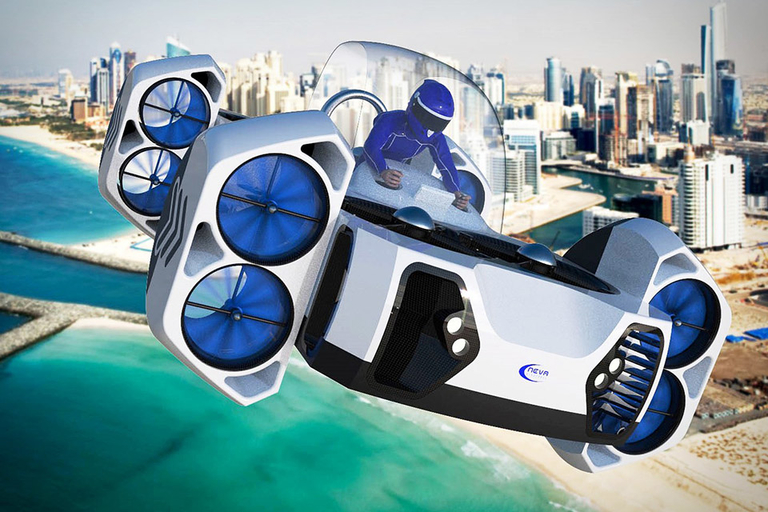
Neva AirQuadOne Flying Vehicle

It's not a flying car. But the Neva AirQuadOne Flying Vehicle might be your most realistic bet for a personal airborne craft you can use in the near future. As...

Visit Uncrate for the full post.
21 Jun 00:49

Amazon Prime Photos Has An Incredible Secret Feature Photographers Will Love

by Ian Morris, Contributor
Amazon's Prime Photos allows you to store as many images as you like, but there's something even better about it if you're a keen photographer.
21 Jun 00:48

ROASTED MISSION FIGS WITH OLIVE OIL, HONEY AND THYME - OCRegister


OCRegister

ROASTED MISSION FIGS WITH OLIVE OIL, HONEY AND THYME
OCRegister
I love figs' honey-filled flavor and flower-petal aroma. Roasting Mission figs with herbs, spices and a pinch of salt turns them into an inviting warm dessert. Serve roasted figs with yogurt, crème fraiche or mascarpone. Accompany with crisp cookies if ...

21 Jun 00:48

Video: How to Make an Emergency Mulberry Fly Kit

by Joe Cermele

Use a cheap beer sleeve to fool suckermouths on topwater

Use a cheap beer sleeve to fool one suckermouth after the next…
21 Jun 00:47

Bargain Hunter: Six Deals on Hot New Cooking Gear

by Spencer Neuharth
Good deals on top outdoor cooking gear…