Shared posts

09 Mar 17:16

Those virtual battlegrounds ...

by swardley

In this post I'd like to discuss why I believe video games will become a new battleground for the soul of a country.  Before I start, I will need to cover some basics. However, I'm also going to have to make a few assumptions including :-

a) that you know how to map

b) that you've read my posts on mapping culture 

c) you're familiar with my discussion on the issue of digital sovereignty

If not, well you might struggle with this but let us try it anyway. I'm going to start with the latest version of the culture map and dig a little bit more into several parts. I'm going to do this through a lens of power.

The basics

figure 1 - the culture map.


The map is an imperfect representation of the concept of culture itself including the components that make it. At the top of the map are the two anchors of "Me" and "We". How much do we focus on ourselves and how much do we focus on others and the wider society. Each of us have a bit of both. In some collectives (i.e. some nations) there is a stronger "We" focus, in others it's more about the individual. You can see some of this in the nation state responses to COVID.

When we focus on the "We", we're focused on our collectives ability to control our environment (see figure 2 below). It's all about power with others i.e. we can defend or build a new land, we can create freedoms for everyone. Often this is represented through concepts like co-operation, labour unions and in our social contract to each other. As MLK pointed out "the freedom of collective bargaining” has been critical to many of our most cherished rights.

figure 2 - the culture map and collective power.


When we focus on the "Me", we're focused on our individuality and our agency i.e. our ability to make choices, to change things and to exploit the environment to suit ourselves. Not everyone has the same agency. In the West, the wealthy have more agency than the poor. As the Adventures of Stevie V would say "money talks". That agency requires us to have some power over the collectives that we belong to and hence power over others. Often this is represented through concepts like hierachy, ownership and exclusion. I've show this in figure 3.

figure 3 - the culture map and agency


But there is another form of power worth noting. That is the power that I have but which I gift to others. The behaviour of gifting often appears in collectives that have strong beliefs (i.e. values) on sharing. For example, many sections of the open source movement are based upon these beliefs. Not all mind you, some collectives (and companies are collectives, same as nations, families, churches and any group of people) view open source as more of a marketing tool or as a means to accelerate the diffusion of their products or as a form of gameplay to undermine competitors. What they tend to believe in is diffusion of their product which is not necessarily the same as sharing. Hence you can often see a different set of behaviours with such open source companies changing licensing rules because others in their communities are being more successful. Yes, it's "open" but they want to retain power over others rather than it's open and we've gifted power to others. I've represented this in figure 4 and the link from power through behaviours (i.e. sharing of power) to values (i.e. we believe in sharing).

figure 4 - the culture map and gifting power to others.


In the above there are three basic types of power - with, over and to. Now, why the connection to the Adventures of Stevie V? 

Well, there are many ways to adjust the beliefs (i.e. values) of a collective. You could nudge behaviour (encouraging more of this, less of that) or create new threats (i.e. new collectives we're competing against). As an aside, it's worth noting that when we are in competition, there are many forms of gameplay that can be deployed e.g. direct conflict, co-operation, alliance and collaboration. Your choice of gameplay maybe limited by your values i.e. direct conflict does not suit a collective that is focused on the "We" and sharing. However, we can use that threat of conflict to change our own values and hence enable other forms of gameplay. You can also influence values by embedding them in technology but we covered that in the "Digital Sovereignty" discussion. Another way to change values is to alter memories i.e. rituals, symbols and heroes. The most effective way to do this is with Art.

Art is a powerful means of changing values and hence behaviour in others. Hollywood and Walt Disney was used to promote Western values, Bob Dylan became the bard that crystallised the values of the 1960s, even a song like "Money talks" can have some influence.

So what about video games?

Video games are art. 

Let us first skip past the tendency of the industry to try and turn children into addicts with cheap psychological tricks in return for money. Yes, it's abhorrent. Ignoring that, the games themselves have values embedded within them whether it's belief in property (the hoarding of gold coins) or fairness or sharing or whatever the creator wishes. The very act of creating a video game will embed our values within it whether the action to add them was conscious or not. Video games are now so widespread and immersive that they must be considered a powerful channel for spreading values and they rival radio, television and film. These are all enablement systems for values, allowing our values to diffuse to other collectives. Unfortunately as with digital sovereignty, as with Brexit, as with COVID and as with most aspects of life then we don't map or even understand the basic components of the supply chain. That doesn't mean others can't or won't exploit this space.

If you think China is simply reducing video game usage in children for reasons of addiction, I would suggest you consider that it is also limiting exposure to unfavourable beliefs. In the battle between nations, kinetic warfare occurs when all other means have failed i.e. direct conflict is the lowest form of warfare. Whilst alliances, collaboration and co-operation are far better, the most powerful forms are when you simply persuade others to just become you by altering their behaviours, values, memories, rituals ... you get the picture ... or was that the Hollywood blockbuster?

Others are starting to explore these areas i.e. sugar games and project violacea, These forms of play will no doubt intensify with the development of progammable video (with systems like Synthesia) as the virtual and real worlds blur. You'll not only have to face the prospect of artifical collectives radicalising people in social media (something which has to some extent become industrialised) but also the programming of values into children through the games they play. 

Well, it's happening already even if it is accidental. Fortunately, people are starting to talk more about this subject i.e. Tyler Cowen on How Gaming Will Change Humanity as We Know It.

The new battleground will be video games and I don't just mean running around fragging some newbie.

10 Nov 03:08

Guess Who's Back?

by Darla

After many many many years of missing in the blogosphere I was recently asked to be a guest on the Nokia Chronicles podcast!  The hosts, Adrian Hughes and Justin Cohen helped me relive a time in my life that I sometimes missed and often thought about.  It was great to revisit that time period and discuss all the amazing things that went on in the world of Nokia back then.  It was such an honor to even be remembered, so I'm dedicating this post to Nokia Chronicles!!

The podcast is available via Spotify and Apple Podcast.... give a listen and tell me what you think. Don't forget to subscribe to Nokia Chronicles!! <3 


10 Nov 03:06

Metabase as a lightweight app server

by Jon Udell

In A virtuous cycle for analytics I said this about Metabase:

It’s all nicely RESTful. Interactive elements that can parameterize queries, like search boxes and date pickers, map to URLs. Queries can emit URLs in order to compose themselves with other queries. I came to see this system as a kind of lightweight application server in which to incubate an analytics capability that could later be expressed more richly.

Let’s explore that idea in more detail. Consider this query that finds groups created in the last week.

with group_create_days as (
  select
     to_char(created, 'YYYY-MM-DD') as day
  from "group"
  where created > now() - interval '1 week'
)
select 
  day,
  count(*)
from group_create_days
group by day 
order by day desc 

A Metabase user can edit the query and change the interval to, say, 1 month, but there’s a nicer way to enable that. Terms in double squigglies are Metabase variables. When you type {{interval}} in the query editor, the Variables pane appears.

Here I’m defining the variable’s type as text and providing the default value 1 week. The query sent to Postgres will be the same as above. Note that this won’t work if you omit ::interval. Postgres complains: “ERROR: operator does not exist: timestamp with time zone – character varying.” That’s because Metabase doesn’t support variables of type interval as required for date subtraction. But if you cast the variable to type interval it’ll work.

That’s an improvement. A user of this Metabase question can now type 2 months or 1 year to vary the interval. But while Postgres’ interval syntax is fairly intuitive, this approach still requires people to make an intuitive leap. So here’s a version that eliminates the guessing.

The variable type is now Field Filter; the filtered field is the created column of the group table; the widget type is Relative Date; the default is Last Month. Choosing other intervals is now a point-and-click operation. It’s less flexible — 3 weeks is no longer an option — but friendlier.

Metabase commendably provides URLs that capture these choices. The default in this case is METABASE_SERVER/question/1060?interval=lastmonth. For the Last Year option it becomes interval=lastyear.

Because all Metabase questions that use variables work this way, the notion of Metabase as rudimentary app server expands to sets of interlinked questions. In Working in a hybrid Metabase / Postgres code base I showed the following example.

A Metabase question, #600, runs a query that selects columns from the view top_20_annotated_domains_last_week. It interpolates one of those columns, domain, into an URL that invokes Metabase question #985 and passes the domain as a parameter to that question. In the results for question #600, each row contains a link to a question that reports details about groups that annotated pages at that row’s domain.

This is really powerful stuff. Even without all the advanced capabilities I’ve been discussing in this series — pl/python functions, materialized views — you can do a lot more with the Metabase / Postgres combo than you might think.

For example, here’s a interesting idiom I’ve discovered. It’s often useful to interpolate a Metabase variable into a WHERE clause.

select * 
from dashboard_users
where email = {{ email }} 

You can make that into a fuzzy search using the case-insensitive regex-match operator ~*.

select * 
from dashboard_users
where email ~* {{ email }}

That’ll find a single address regardless of case; you can also find all records matching, say, ucsc.edu. But it requires the user to type some value into the input box. Ideally this query won’t require any input. If none is given, it lists all addresses in the table. If there is input it does a fuzzy match on that input. Here’s a recipe for doing that. Tell Metabase that {{ email }} a required variable, and set its default to any. Then, in the query, do this:

select * 
from dashboard_users
where email ~*
  case 
    when {{ email }} = 'any' then ''
    else {{ email}}
  end

In the default case the matching operator binds to the empty string, so it matches everything and the query returns all rows. For any other input the operator binds to a value that drives a fuzzy search.

This is all very nice, you may think, but even the simplest app server can write to the database as well as read from it, and Metabase can’t. It’s ultimately just a tool that you point at a data warehouse to SELECT data for display in tables and charts. You can’t INSERT or UPDATE or ALTER or DELETE or CALL anything.

Well, it turns out that you can. Here’s a Metabase question that adds a user to the table.

select add_dashboard_user( {{email}} )

How can this possibly work? If add_dashboard_user were a Postgres procedure you could CALL it from psql, but in this context you can only SELECT.

We’ve seen the solution in Postgres set-returning functions that self-memoize as materialized views. A Postgres function written in pl/python can import and use a Python function from a plpython_helpers module. That helper function can invoke psql to CALL a procedure. So this is possible.

We’ve used Metabase for years. It provides a basic, general-purpose UX that’s deeply woven into the fabric of the company. Until recently we thought of it as a read-only system for analytics, so a lot of data management happens in spreadsheets that don’t connect to the data warehouse. It hadn’t occurred to me to leverage that same basic UX for data management too, and that’s going to be a game-changer. I always thought of Metabase as a lightweight app server. With some help from Postgres it turns out to be a more capable one than I thought.


1 https://blog.jonudell.net/2021/07/21/a-virtuous-cycle-for-analytics/
2 https://blog.jonudell.net/2021/07/24/pl-pgsql-versus-pl-python-heres-why-im-using-both-to-write-postgres-functions/
3 https://blog.jonudell.net/2021/07/27/working-with-postgres-types/
4 https://blog.jonudell.net/2021/08/05/the-tao-of-unicode-sparklines/
5 https://blog.jonudell.net/2021/08/13/pl-python-metaprogramming/
6 https://blog.jonudell.net/2021/08/15/postgres-and-json-finding-document-hotspots-part-1/
7 https://blog.jonudell.net/2021/08/19/postgres-set-returning-functions-that-self-memoize-as-materialized-views/
8 https://blog.jonudell.net/2021/08/21/postgres-functional-style/
9 https://blog.jonudell.net/2021/08/26/working-in-a-hybrid-metabase-postgres-code-base/
10 https://blog.jonudell.net/2021/08/28/working-with-interdependent-postgres-functions-and-materialized-views/
11 https://blog.jonudell.net/2021/09/05/metabase-as-a-lightweight-app-server/
12 https://blog.jonudell.net/2021/09/07/the-postgres-repl/

10 Nov 03:05

Media Computation today: Runestone, Snap!, Python 3, and a Teaspoon Language

by Mark Guzdial

I don’t get to teach Media Computation1 since I moved to the University of Michigan, so I haven’t done as much development on the curriculum and infrastructure as I might like if I were teaching it today. I did get a new version of JES (Jython Environment for Students) released in March 2020 (blog post here), but have rarely even started JES since then.

But using Jython for Media Computation is so 2002. Where is Media Computation going today?

I’ve written a couple of blog posts about where Media Computation is showing up outside of JES and undergraduate CS. Jens Moenig has been doing amazing things with doing Media Computation in Snap! — see this blog post from last year on his Snap!Con keynote talk. SAP is now offering a course From Media Computation to Data Science using Snap! (see link here). Barbara Ericson’s work with Runestone ebooks (see an example blog post here) includes image manipulation in Python inside the browser at an AP CS Principles level (see example here). The amazing CS Awesome ebook that Beryl Hoffman and Jen Rosato have been doing with Barb for AP CS A includes in-browser coding of Java for the Picture Lab (see example here).

I was contacted this last January by Russ Tuck and Jonathan Senning. They’re at Gordon College where they teach Media Computation, but they wanted to do it in Python 3 instead of Jython. You can find it here. It works SO well! I miss having the image and sound explorers, but my basic demos with both images and sounds work exactly as-is, with no code changes. Bravo to the Gordon College team!

On the right is Python 3 code doing Media Computation. On the left are two images -- the original in the middle, and a red-reduced image on the far left.

Most of my research these days is grounded in Task-Specific Programming languages, which I’ve blogged about here (here’s a thread of examples here and here’s an announcement of funding for the work in social studies). We now refer to the project as Teaspoon Computing or Teaspoon Languages — task-specific programming => TSP => Teaspoon. We’re adding a teaspoon of computing into other subjects. Tammy Shreiner and I have contributed a chapter on Teaspoon computing to a new book by Aman Yadav and Ulf Dalvad Berthelsen (see announcement of the book here).

We have a new Teaspoon language, Pixel Equations, that uses Media Computation to support an Engineering course in a Detroit Public School. Here, students choose a picture as input, then (1) enter the boolean equations for what pixels to select and (2) enter equations for new red, green, and blue values for those pixels. The conditionals and pixel loops are now implicit.

In several of our tools, we’re now exploring bilingual or multilingual interfaces, inspired by Sara Vogel’s work on translanguaging (see paper here) and Manuel Pérez-Quiñones’s recent work on providing interfaces for bilingual users (see his TED talk here and his ACM Interactions paper here). You can see in the screenshot below that colors can be referenced in either English or Spanish names. We’re now running participatory design sessions with teachers using Pixel Equations.

I’m planning a series of blog posts on all our Teaspoon languages work, but it’ll take a while until I get there.


  1. For new readers, Media Computation is a way of introducing computing by focusing on data abstractions used in digital media. Students write programs to manipulate pixels of a picture (to create photo filters), samples of a sound (e.g., to reverse sounds), characters of a text, and frames of a video (for video special effects). More at http://mediacomputation.org ↩

10 Nov 03:04

Adventures in onomastic bureaucracy

Turns out that for someone with my combination of legal statuses, it’s possible to end up in a loop that looks something like:

  1. I try to change the name on my bank account
  2. They ask for a new state ID
  3. The new state ID people ask for a new social security card
  4. The social security card people ask for a new passport
  5. The new passport people ask for an educational transcript or a bank bill
  6. Because I’m a UW employee as well as a student… the educational transcript people ask for an updated bank account
  7. GOTO 1

This is not surprising, but it is deeply, deeply annoying. Sigh.

10 Nov 03:03

The glorious freedom of starting over

by Josh Bernoff

Sometimes losing everything is an opportunity. Forty years ago, in late December, I broke up with my wife. After years of unhappiness, it had become clear that the we didn’t belong together. She requested that I leave the apartment the next morning. I had a small suitcase full of clothes and nothing else. I called … Continued

The post The glorious freedom of starting over appeared first on without bullshit.

10 Nov 03:02

This Week in Glean: Data Reviews are Important, Glean Parser makes them Easy

by chuttenc

(“This Week in Glean” is a series of blog posts that the Glean Team at Mozilla is using to try to communicate better about our work. They could be release notes, documentation, hopes, dreams, or whatever: so long as it is inspired by Glean.) All “This Week in Glean” blog posts are listed in the TWiG index).

At Mozilla we put a lot of stock in Openness. Source? Open. Bug tracker? Open. Discussion Forums (Fora?)? Open (synchronous and asynchronous).

We also have an open process for determining if a new or expanded data collection in a Mozilla project is in line with our Privacy Principles and Policies: Data Review.

Basically, when a new piece of instrumentation is put up for code review (or before, or after), the instrumentor fills out a form and asks a volunteer Data Steward to review it. If the instrumentation (as explained in the filled-in form) is obviously in line with our privacy commitments to our users, the Data Steward gives it the go-ahead to ship.

(If it isn’t _obviously_ okay then we kick it up to our Trust Team to make the decision. They sit next to Legal, in case you need to find them.)

The Data Review Process and its forms are very generic. They’re designed to work for any instrumentation (tab count, bytes transferred, theme colour) being added to any project (Firefox Desktop, mozilla.org, Focus) and being collected by any data collection system (Firefox Telemetry, Crash Reporter, Glean). This is great for the process as it means we can use it and rely on it anywhere.

It isn’t so great for users _of_ the process. If you only ever write Data Reviews for one system, you’ll find yourself answering the same questions with the same answers every time.

And Glean makes this worse (better?) by including in its metrics definitions almost every piece of information you need in order to answer the review. So now you get to write the answers first in YAML and then in English during Data Review.

But no more! Introducing glean_parser data-review and mach data-review: command-line tools that will generate for you a Data Review Request skeleton with all the easy parts filled in. It works like this:

  1. Write your instrumentation, providing full information in the metrics definition.
  2. Call python -m glean_parser data-review <bug_number> <list of metrics.yaml files> (or mach data-review <bug_number> if you’re adding the instrumentation to Firefox Desktop).
  3. glean_parser will parse the metrics definitions files, pull out only the definitions that were added or changed in <bug_number>, and then output a partially-filled-out form for you.

Here’s an example. Say I’m working on bug 1664461 and add a new piece of instrumentation to Firefox Desktop:

fog.ipc:
  replay_failures:
    type: counter
    description: |
      The number of times the ipc buffer failed to be replayed in the
      parent process.
    bugs:
      - https://bugzilla.mozilla.org/show_bug.cgi?id=1664461
    data_reviews:
      - https://bugzilla.mozilla.org/show_bug.cgi?id=1664461
    data_sensitivity:
      - technical
    notification_emails:
      - chutten@mozilla.com
      - glean-team@mozilla.com
    expires: never

I’m sure to fill in the `bugs` field correctly (because that’s important on its own _and_ it’s what glean_parser data-review uses to find which data I added), and have categorized the data_sensitivity. I also included a helpful description. (The data_reviews field currently points at the bug I’ll attach the Data Review Request for. I’d better remember to come back before I land this code and update it to point at the specific comment…)

Then I can simply use mach data-review 1664461 and it spits out:

!! Reminder: it is your responsibility to complete and check the correctness of
!! this automatically-generated request skeleton before requesting Data
!! Collection Review. See https://wiki.mozilla.org/Data_Collection for details.

DATA REVIEW REQUEST
1. What questions will you answer with this data?

TODO: Fill this in.

2. Why does Mozilla need to answer these questions? Are there benefits for users?
   Do we need this information to address product or business requirements?

TODO: Fill this in.

3. What alternative methods did you consider to answer these questions?
   Why were they not sufficient?

TODO: Fill this in.

4. Can current instrumentation answer these questions?

TODO: Fill this in.

5. List all proposed measurements and indicate the category of data collection for each
   measurement, using the Firefox data collection categories found on the Mozilla wiki.

Measurement Name | Measurement Description | Data Collection Category | Tracking Bug
---------------- | ----------------------- | ------------------------ | ------------
fog_ipc.replay_failures | The number of times the ipc buffer failed to be replayed in the parent process.  | technical | https://bugzilla.mozilla.org/show_bug.cgi?id=1664461


6. Please provide a link to the documentation for this data collection which
   describes the ultimate data set in a public, complete, and accurate way.

This collection is Glean so is documented
[in the Glean Dictionary](https://dictionary.telemetry.mozilla.org).

7. How long will this data be collected?

This collection will be collected permanently.
**TODO: identify at least one individual here** will be responsible for the permanent collections.

8. What populations will you measure?

All channels, countries, and locales. No filters.

9. If this data collection is default on, what is the opt-out mechanism for users?

These collections are Glean. The opt-out can be found in the product's preferences.

10. Please provide a general description of how you will analyze this data.

TODO: Fill this in.

11. Where do you intend to share the results of your analysis?

TODO: Fill this in.

12. Is there a third-party tool (i.e. not Telemetry) that you
    are proposing to use for this data collection?

No.

As you can see, this Data Review Request skeleton comes partially filled out. Everything you previously had to mechanically fill out has been done for you, leaving you more time to focus on only the interesting questions like “Why do we need this?” and “How are you going to use it?”.

Also, this saves you from having to remember the URL to the Data Review Request Form Template each time you need it. We’ve got you covered.

And since this is part of Glean, this means this is already available to every project you can see here. This isn’t just a Firefox Desktop thing. 

Hope this saves you some time! If you can think of other time-saving improvements we could add once to Glean so every Mozilla project can take advantage of, please tell us on Matrix.

If you’re interested in how this is implemented, glean_parser’s part of this is over here, while the mach command part is here.

:chutten

10 Nov 03:02

I love this made-up sound machine

One of the side-effects of being a plain text dogmatist is that I don’t have images on my blog, so I’m going to have to describe this, and you’re going to have to actually follow a hyperlink if you want to see it (and honestly nobody does that).

HERE’S THE THING: BF-130 Dronal Birdsong Transducer which has the description, A made-up sound machine discovered in a forest clearing.

It’s an image of a blocky device that looks like a component of an old-school hi-fi, and it’s standing on tall black legs in a blurred out forest. On the front is a label: BF-130 Dronal [etc].

Tap, grab, and pan the image – it’s a 3D model.

Tap the image of the power button on the device: drone music plays. Turn the three dials on the device to adjust the music.

That’s it.

This is, to me, somehow, and I can’t put my finger on why: CAPTIVATING.

(Yes it’s being sold as an NFT, a “non-fungible token,” which is an emerging technology to associate rights like “ownership” with digital assets such as 3D models, which are otherwise - in the old world - infinitely replicable. But that’s not what I’m talking about right now.)


Similarly captivating:

The Buddha Machine device by China-based electronic music act FM3, here described on their Wikipedia page:

Roughly the size of a pack of cigarettes, the device features a single toggle switch to cycle through samples, a combined power and volume dial, and an integrated speaker. The device contains a chip holding nine digitally encoded drones, ranging in length from 1.5 to 40 seconds. The name and idea is derived from a popular Chinese device that intones repeating loops of Buddhist chanting.

It’s gorgeous. You hold it in your hand and press a switch to hear, with some static, via a cheap audio chip through a cheap plastic speaker through the mass-produced output of the vast factories of China: the sound of the cosmos.

I’ve got one upstairs, and I hope desperately that the battery hasn’t leaked. Mine is green.


The thing is that I don’t sit on Apple Music or YouTube listening to drone loops like this. (Okay I admit I have lost a couple hours to large gong YouTube but who hasn’t.)

And yet.

Here I am,

staring at the simulation of a fictional device in a forest that doesn’t exist, tuned into the sound 100%.

So my M.O. is to watch out for surprising moments of experience like this. It doesn’t matter if it doesn’t make any sense logically, or if it seems absurd, or how tiny it is. But VR feels like this, and physical things connected to the internet felt like this once upon a time, and GPT-3 generated text still feels like this (here are my posts),_and my take is that once you can identify something which is the kernel of a viscerally _new experience, then that’s something like rare primordial matter that you can shape with your hands into something fuller in the future. I don’t need to understand it.

There are ways to experience digital sound that are better and more transporting than the ways we currently experience digital sound, that’s all I’m noting here. That’s funny.

10 Nov 03:02

The Postgres REPL

by Jon Udell

R0ml Lefkowitz’s The Image of Postgres evokes the Smalltalk experience: reach deeply into a running system, make small changes, see immediate results. There isn’t yet a fullblown IDE for the style of Postgres-based development I describe in this series, though I can envision a VSCode extension that would provide one. But there is certainly a REPL (read-eval-print loop), it’s called psql, and it delivers the kind of immediacy that all REPLs do. In our case there’s also Metabase; it offers a complementary REPL that enhances its power as a lightweight app server.

In the Clojure docs it says:

The Clojure REPL gives the programmer an interactive development experience. When developing new functionality, it enables her to build programs first by performing small tasks manually, as if she were the computer, then gradually make them more and more automated, until the desired functionality is fully programmed. When debugging, the REPL makes the execution of her programs feel tangible: it enables the programmer to rapidly reproduce the problem, observe its symptoms closely, then improvise experiments to rapidly narrow down the cause of the bug and iterate towards a fix.

I feel the same way about the Python REPL, the browser’s REPL, the Metabase REPL, and now also the Postgres REPL. Every function and every materialized view in the analytics system begins as a snippet of code pasted into the psql console (or Metabase). Iteration yields successive results instantly, and those results reflect live data. In How is a Programmer Like a Pathologist Gilad Bracha wrote:

A live program is dynamic; it changes over time; it is animated. A program is alive when it’s running. When you work on a program in a text editor, it is dead.

Tudor Girba amplified the point in a tweet.

In a database-backed system there’s no more direct way to interact with live data than to do so in the database. The Postgres REPL is, of course, a very sharp tool. Here are some ways to handle it carefully.

Find the right balance for tracking incremental change

In Working in a hybrid Metabase / Postgres code base I described how version-controlled files — for Postgres functions and views, and for Metabase questions — repose in GitHub and drive a concordance of docs. I sometimes write code snippets directly in psql or Metabase, but mainly compose in a “repository” (telling word!) where those snippets are “dead” artifacts in a text editor. They come to life when pasted into psql.

A knock on Smalltalk was that it didn’t play nicely with version control. If you focus on the REPL aspect, you could say the same of Python or JavaScript. In any such case there’s a balance to be struck between iterating at the speed of thought and tracking incremental change. Working solo I’ve been inclined toward a fairly granular commit history. In a team context I’d want to leave a chunkier history but still record the ongoing narrative somewhere.

Make it easy to understand the scope and effects of changes

The doc concordance has been the main way I visualize interdependent Postgres functions, Postgres views, and Metabase questions. In Working with interdependent Postgres functions and materialized views I mentioned Laurenz Albe’s Tracking View Dependencies in Postgres. I’ve adapted the view dependency tracker he develops there, and adapted related work from others to track function dependencies.

This tooling is still a work in progress, though. The concordance doesn’t yet include Postgres types, for example, nor the tables that are upstream from materialized views. My hypothetical VSCode extension would know about all the artifacts and react immediately when things change.

Make it easy to find and discard unwanted artifacts

Given a function or view named foo, I’ll often write and test a foo2 before transplanting changes back into foo. Because foo may often depend on bar and call baz I wind up also with bar2 and baz2. These artifacts hang around in Postgres until you delete them, which I try to do as I go along.

If foo2 is a memoized function (see this episode), it can be necessary to delete the set of views that it’s going to recreate. I find these with a query.

select 
  'drop materialized view ' || matviewname || ';' as drop_stmt
from pg_matviews 
where matviewname ~* {{ pattern }}

That pattern might be question_and_answer_summary_for_group to find all views based on that function, or _6djxg2yk to find all views for a group, or even [^_]{8,8}$ to find all views made by memoized functions.

I haven’t yet automated the discovery or removal of stale artifacts and references to them. That’s another nice-to-have for the hypothetical IDE.

The Image of Postgres

I’ll give R0ml the last word on this topic.

This is the BYTE magazine cover from August of 1981. In the 70s and the 80s, programming languages had this sort of unique perspective that’s completely lost to history. The way it worked: a programming environment was a virtual machine image, it was a complete copy of your entire virtual machine memory and that was called the image. And then you loaded that up and it had all your functions and your data in it, and then you ran that for a while until you were sort of done and then you saved it out. And this wasn’t just Smalltalk, Lisp worked that way, APL worked that way, it was kind of like Docker only it wasn’t a separate thing because everything worked that way and so you didn’t worry very much about persistence because it was implied. If you had a programming environment it saved everything that you were doing in the programming environment, you didn’t have to separate that part out. A programming environment was a place where you kept all your data and business logic forever.

So then Postgres is kind of like Smalltalk only different.

What’s the difference? Well we took the UI out of Smalltalk and put it in the browser. The rest of it is the same, so really Postgres is an application delivery platform, just like we had back in the 80s.


1 https://blog.jonudell.net/2021/07/21/a-virtuous-cycle-for-analytics/
2 https://blog.jonudell.net/2021/07/24/pl-pgsql-versus-pl-python-heres-why-im-using-both-to-write-postgres-functions/
3 https://blog.jonudell.net/2021/07/27/working-with-postgres-types/
4 https://blog.jonudell.net/2021/08/05/the-tao-of-unicode-sparklines/
5 https://blog.jonudell.net/2021/08/13/pl-python-metaprogramming/
6 https://blog.jonudell.net/2021/08/15/postgres-and-json-finding-document-hotspots-part-1/
7 https://blog.jonudell.net/2021/08/19/postgres-set-returning-functions-that-self-memoize-as-materialized-views/
8 https://blog.jonudell.net/2021/08/21/postgres-functional-style/
9 https://blog.jonudell.net/2021/08/26/working-in-a-hybrid-metabase-postgres-code-base/
10 https://blog.jonudell.net/2021/08/28/working-with-interdependent-postgres-functions-and-materialized-views/
11 https://blog.jonudell.net/2021/09/05/metabase-as-a-lightweight-app-server/
12 https://blog.jonudell.net/2021/09/07/the-postgres-repl/

10 Nov 03:02

Attaching a generated file to a GitHub release using Actions

by Simon Willison

For Datasette Desktop I wanted to run an action which, when I created a release, would build an asset for that release and then upload and attach it.

I triggered my action on the creation of a new release, like so:

on:
  release:
    types: [created]

Assuming previous steps that create a file called app.zip in the root of the checkout, here's the final action step which worked for me:

      - name: Upload release attachment
        uses: actions/github-script@v4
        with:
          script: |
            const fs = require('fs');
            const tag = context.ref.replace("refs/tags/", "");
            // Get release for this tag
            const release = await github.repos.getReleaseByTag({
              owner: context.repo.owner,
              repo: context.repo.repo,
              tag
            });
            // Upload the release asset
            await github.repos.uploadReleaseAsset({
              owner: context.repo.owner,
              repo: context.repo.repo,
              release_id: release.data.id,
              name: "app.zip",
              data: await fs.readFileSync("app.zip")
            });

It uses actions/github-script which provides a pre-configured octokit/rest.js client object.

The uploadReleaseAsset() method needs the owner, repo, release_id, name (filename) and the file data.

These are mostly available, with the exception of release_id. That can be derived for the current release based on the context.ref value - strip that down to just the tag, then use getReleaseByTag() to get a release object. release.data.id will then be the numeric release ID.

My full workflow is at https://github.com/simonw/datasette-app/blob/0.1.0/.github/workflows/release.yml

10 Nov 02:59

Video Embeds All Removed

by Ton Zijlstra

I removed all embedded videos from this blog, as part of the ongoing mission of ensuring no third parties can track readers of this blog. There were 4 types of video embeds in this blog.

  • Qik.com embeds of live streaming I did on occasion. Qik is no longer active and I simply removed all embeds.
  • 23Video embeds, which E used for FabLab related videos. While 23Video still exists, E’s account is no longer active, so I simply removed those embeds as well.
  • YouTube embeds, which I all replaced with a still image and a link. Some videos were no longer online.
  • Vimeo embeds, which I also replaced with a still image and a link. Interestingly enough, Vimeo embeds were not working for videos Vimeo listed as ‘unrated’. In those cases you would need to be logged into Vimeo to see them, defeating the purpose of embedding them. There were also Vimeo videos where I am certain noone has access to the account anymore (as they were channels for projects I was involved in). I wonder what will happen to them over time.

This was a straight forward effort, as I hadn’t embedded many videos here in the first place (40-50 in total).

What stood out to me was that of all those videos, two videos were no longer on YouTube because they were moved to a self hosted environment (videos of the C3 conferences, no surprise given the background of its organisers). A good move, but probably still hard to do for many, and without the easy reach YT and others provide.

07 Nov 02:11

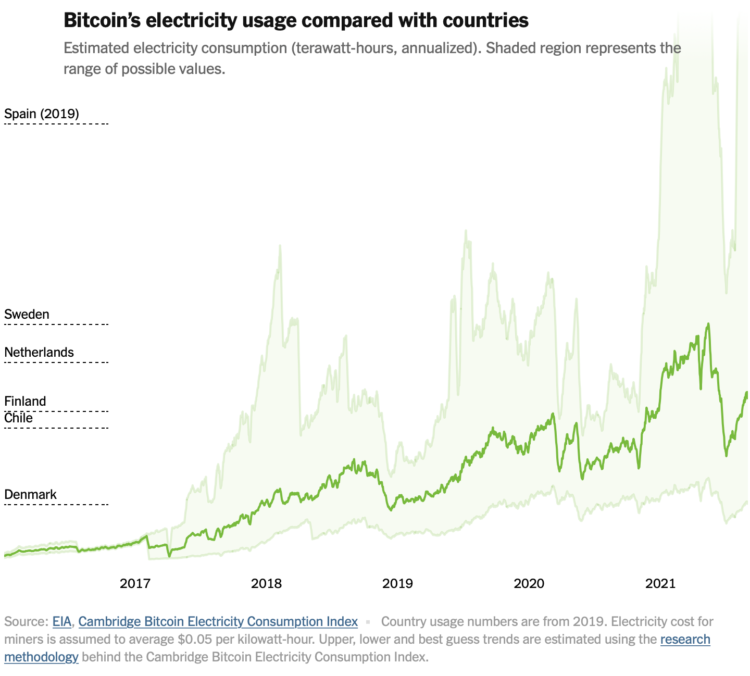
Bitcoin power usage

by Nathan Yau

You might have heard that Bitcoin uses a lot of electricity. More than some countries. You might have wondered how that could be possible. The New York Times explains with a set of graphics and illustrations.

Tags: Bitcoin, electricity, New York Times

06 Nov 04:07

BNN: ‘Forever changed’: CEOs are dooming business travel — maybe for good

by Volker Weber

Business travel has “forever changed,” Greg Hayes, CEO of jet-engine maker Raytheon Technologies Corp., said in a Bloomberg Radio interview in July. About 30 per cent of normal commercial air traffic is corporate-related but only half of that is likely mandatory, he said. … Having saved billions from slashed travel budgets during the pandemic with only a marginal impact on operations, companies, banks, consulting firms and government offices will be hard pressed to explain why they’d return to their old ways. … “We don’t think business travel will ever return to 2019 levels,” said Will Hawkley, the global head of travel and leisure at KPMG LLP. “Corporates are looking at their bottom-line, their environmental commitments, the demand from employees for more flexible working and thinking: Why do I have to bring that back?”

Alexander Michael Pearson, Tara Patel and William Wilkes, Bloomberg News

The planet thanks you.

More >

20 Sep 02:58

COVID Claustrophobia

by peter@rukavina.net (Peter Rukavina)

The house I grew up in didn’t have a true attic, but it did have an interconnected web of crawlspaces wending around the gabled roof, and at least once I was called to make the crawl thorough the spaces at the behest of my father. The reason why escapes me, but two memories remain: one was the experience itself, and the other was that part of the reason for my recruitment was that my father was claustrophobic.

As far as I can recall my father wasn’t afraid of anything—that seems like an odd thing to write, but I truly can’t think of anything—and so that he was afraid of small spaces was notable. As was the word claustrophobic, which must have been uttered at some point, and struck me as being rather exotic.

I don’t consider myself claustrophobic, and I’ve been in my fair share of submarines and subterranean passageways and tiny elevators without panicking that I’m pretty certain I didn’t inherit the quality from my father.

But COVID claustrophobia is something else entirely.

I first experienced it this summer at The Haviland Club when attending an Island Fringe show there. While I was assured that all the COVID protocols were adhered to, sitting in closer proximity to other people than I’d sat in 18 months felt deeply uncomfortable. I almost had to leave.

And so while many friends and acquaintances have plunged into attending concerts and movies, eating indoors at restaurants with abandon, it’s been all I can do to attend Pen Night twice and to have a few carefully-curated meals out-in.

I make no claims to a moral high ground here, and I suspect that I’m being overly cautious given the actual risks involved.

Indeed I imagine this doesn’t have much to do with COVID at all, and more with more full-throated expression of a pre-existing social anxiety than usual, brought on by spending a year and a half in relative seclusion.

There is likely a dollop of grief-involvement mixed in: when I stop to think about it, the notion that Catherine died and then, two months later, we were all locked inside our houses for months on end, was deeply weird. And not a typical grief pathway.

I’ve been reading The Body Keeps the Score, and the passage that’s jumped out at me most so far is this:

Imagination is absolutely critical to the quality of our lives. Our imagination enables us to leave our routine everyday existence by fantasizing about travel, food, sex, falling in love, or having the last word—all the things that make life interesting. Imagination gives us the opportunity to envision new possibilities—it is an essential launchpad for making our hopes come true. It fires our creativity, relieves our boredom, alleviates our pain, enhances our pleasure, and enriches our most intimate relationships. When people are compulsively and constantly pulled back into the past, to the last time they felt intense involvement and deep emotions, they suffer from a failure of imagination, a loss of mental flexibility. Without imagination there is no hope, no chance to envision a better future, no place to go, no goal to reach.

That the world pressed pause at the very moment my life got flipped-turned upside down, at the very moment I was trying to figure out a new kind of normal: that was freaky and destabilizing. Imagination was what I needed more than anything, and COVID did a good job stanching it; is it any wonder, at this point, that I’m reluctant to power the engines up to full and resume my regular diet of public engagement.

Perhaps I am not alone in this?

20 Sep 02:52

Is there a way out of password hell?

by Doc Searls

Passwords are hell.

Worse, to make your hundreds of passwords safe as possible, they should be nearly impossible for others to discover—and for you to remember.

Unless you’re a wizard, this all but requires using a password manager.†

Think about how hard that job is. First, it’s impossible for developers of password managers to do everything right:

  • Most of their customers and users need to have logins and passwords for hundreds of sites and services on the Web and elsewhere in the networked world
  • Every one of those sites and services has its own gauntlet of methods for registering logins and passwords, and for remembering and changing them
  • Every one of those sites and services has its own unique user interfaces, each with its own peculiarities
  • All of those UIs change, sometimes often.

Keeping up with that mess while also keeping personal data safe from both user error and determined bad actors, is about as tall as an order can get. And then you have to do all that work for each of the millions of customers you’ll need if you’re going to make the kind of money required to keep abreast of those problems and providing the solutions required.

So here’s the thing: the best we can do with passwords is the best that password managers can do. That’s your horizon right there.

Unless we can get past logins and passwords somehow.

And I don’t think we can. Not in the client-server ecosystem that the Web has become, and that industry never stopped being, since long before the Internet came along. That’s the real hell. Passwords are just a symptom.

We need to work around it. That’s my work now. Stay tuned here, here, and here for more on that.


† We need to fix that Wikipedia page.

20 Sep 02:49

LG C1

What happened was, our TV is ten years old and (following on some renovations) we could use one at the cabin for rainy winter evenings. So I bought a 48" LG C1 4K OLED screen (48" is the smallest in the C1 line), which is kind of this year’s hot TV. It’s not a life-changer, but the world of TV has shifted some in a decade, so here’s a dispatch from the front. Includes a pointer to a truly great TV stand.

By the way, this thing seems to be on sale at all the big boxes, which is a little weird given the global supply-chain crunch. We got ours at Costco, but in the US it seems Amazon has ’em cheaper. [Caution: Affiliate link.]

OLED

The Wirecutter and several other review sites I visited seemed pretty unanimous that LG and Sony OLED are ahead of the pack, and LG is quite a bit cheaper. Also I liked the look of the sets. OLED, compared to other display technologies, is said to offer more dynamic range, better color gamut, faster pixels, and other goodies.

What they keep coming back to is “blacker blacks”, so bear that in mind.

LG C1 TV

Blacker blacks!

4K

It means, basically, 3840×2160, which is to say 8,294,400 pixels. Does anyone really need that many? I got interested in the subject back in 2013 when 4K was new, and wrote code to figure out if there’s any value-add compared to regular HD (1920x1080, a mere 2,073,600 pixels).

In Is 4K BS? I concluded that the pixel count probably didn’t matter, but boy did that blog piece ever go viral, so I ended up writing More Things About TV, which noted (among other things) that the 4K spec also bumps the frame rate and color depth. And here too, blacker blacks come up.

So, does it make a difference?

Yeah, but… well, first of all, modern TVs have way smaller bezels, so even though our video cave is pretty small, we were able to replace a 42" model with a 48". And that does add impact. Also, these days they’re thinner and sleeker and generally easier on the eye — among other things, the backs are smooth black surfaces without vents and other uglification. So in fact I could have squeezed in the 55" but it’s OK, what we got is big enough.

As for the rest, well — and here’s the important part — it really depends on the source. Like a lot of people, our family watches streaming services, mostly episodic TV but some movies, and also live sports via a cable provider. Except for baseball, for which we subscribe to MLB.tv. The cable is still on 720p, no 4K there.

So, if you have a well-photographed, well-produced show, and if its visual palette is sort of noir, then yeah, a big 4K OLED is going to make you smile and say “Wow!” A couple of examples would be Lupin on Netflix and especially The Expanse on Prime. In particular the later seasons. Space, baby!

As for live sports, the story isn’t good. The picture comes nowhere near pushing the edge of what the screen can do. Note that MLB.tv is 4K as opposed to cable’s 720p, but still. You get a close-up on a batter’s face and OK, it’s dramatic, but then the crowd shots and wide whole-field views are super-disappointing. I know that they can do better. I wonder what the bottleneck is, and suspect it’s just stingy management that’s unwilling to pay up to pump more bits through the wires.

I’ve been thinking about dumping cable and subscribing to one or two sports streamers (in Canada, Sportsnet and TSN). It might save money; if it got me a better picture it’d be a no-brainer. But I suspect the problem isn’t with the streamers, it’s at the source, with the leagues. Anyhow, interesting territory.

Software

These days you have to worry about your TV’s operating system. The LGs come wth “WebOS”; when I saw that name I thought “Didn’t that used to be the nice Palm thing that was killed by iOS and Android?” It turns out that this is that; a distant successor, anyhow, that’s weaved back and forth between owners and in and out of Open-Source respectability. See WebOS on Wikipedia for details. Anyhow, it’s cool that the TV runs Linux.

And it’s pleasant enough to interact with. But mostly we don’t, because the little Roku box that drove the previous TV still works fine, and it spits out 4K and has Netflix and Prime and (unlike WebOS) MLB and plenty of other nice stuff. It turns out Roku is Linux too, so there.

I generally like Roku, it seems to pretty well Just Work and get out of the way. But I suppose they’ll turn out to be evil, just like every other big player in the entertainment ecosystem.

Privacy

Modern TVs spy on you. They are part of the global adTech ecosystem, a dismal, dark, diseased, and dysfunctional landscape that, generally speaking, contains nothing good.

“I’ll get a dumb TV,” you exclaim, “Then they can’t track me!” Well no, but your cable box still is, and if you have a Roku or a Chromecast or really any other widget that routes entertainment bytes from the Internet to your eyeballs, it’s probably tracking the hell out of you.

My neighbor has erected a small but exotic-looking “digital antenna” on his roof and tells me he gets lots of channels in rock-solid first-class high-resolution high def. And yep, nobody’s tracking him. But, no internet goodies for him either.

The situation isn’t hopeless. In my case, I care about the TV itself, the Roku, and the cable box. A bit of Web search reveals, for anything reasonably modern (in my case, the Roku & LG), how to minimize tracking. I’ve done that of course, but in my heart I think they’re probably lying liars who are watching my unhealthy affection for big soccer tournaments and anything with good space battles or that has Idris Elba.

And bear in mind that your mobile phone is tracking you all the time too, as are bushels and bushels of JavaScript embedded in pretty well every Web page you visit. So I’m going to suggest that the TV may not be the most intrusive internet-connected device decorating your lifestyle.

But I still hate being watched in the TV cave, and think someone should pass draconian legislation to end this travesty.

Imperfections

We are happy customers of Logitech Harmony remotes, which are now being discontinued because Logitech is evil and hates customers. I joyfully discovered that the C1 TVs are in the Harmony database; maybe one of the last things to be added? So I reconfigured our remote’s setup but now it won’t sync with any of our computers. There are a bunch of workarounds and hacks we haven’t tried yet, and if all else fails you can buy a new Harmony on eBay, still pretty cheap.

My heart sinks at the prospect of operating a system with a Roku and a cable box and disk player and a PlayStation and a Chromecast, all plugged into an A/V receiver, without some sort of universal remote. Wish us luck. And it seems totally batshit crazy that there isn’t a good business to be built around solving this problem.

One other thing. We watch Netflix & Prime via the Roku, but now the TV has them too. Maybe the picture is better that way? But I haven’t figured out how to make the Marantz AV receiver route the HDMI Audio Return Channel (ARC) from the TV to the speakers. I’ll probably wrestle it to the ground eventually.

Hardware elevation and VESA joy

There’s a problem with the LG TVs: They ship with this ugly low-riding plasticky-silver stand that positions the screen just barely above whatever surface it’s sitting on. Which raises the question: Where do the speakers go? Assuming that you don’t want to use the shitty ones built into the TV.

Whether you’ve got a (*sigh*) sound-bar or (as in our case) a pair of very decent little PSB Alpha speakers with an outboard subwoofer, these are things that want to sit under the TV. But with that base they can’t.

I’m here to help. I spent an absurd amount of time searching for “tv stands” and “monitor risers” and other permutations, thus routing money from Amazon to Google because all the unsatisfactory answers had Amazon at the top of the list, and that doesn’t come for free.

It took forever, but I hit pay dirt, in the form of the STAND-TV00Y (great product name there) from an outfit called VIVO. Based on this product, I will definitely have a close look at VIVO next time I need to configure a desk/monitor combo.

VIVO Universal Tabletop TV Stand for 22 to 65 inch LCD Flat Screens

Our TV, like this one, is backed by a brick wall. I couldn’t resist this picture from the VIVO website, even though I’m deeply concerned about what’s in that ominous wooden ladle. I’m pretty sure the Worried Jungle People shouldn’t let the Stoned Jungle Person drink it.

Pardon me for going all fanboy, but this is brilliant. It comes with (and I sob that this should be such a rare thing) crystal-clear unambiguous directions for putting it together that Just Work.

I mentioned VESA (a.k.a. FDMI), which is the standard that describes how to fasten TVs to stands and booms and walls and so on. The VIVO uses that and my first experience with it is good. Except for, the stand comes with a little plastic multipouch containing a remarkable number of different-sized fastening bolts, because I guess VESA didn’t standardize that.

Should you upgrade?

Most people with TVs that work OK probably shouldn’t. But ten years’ progress does make a difference.

19 Sep 17:11

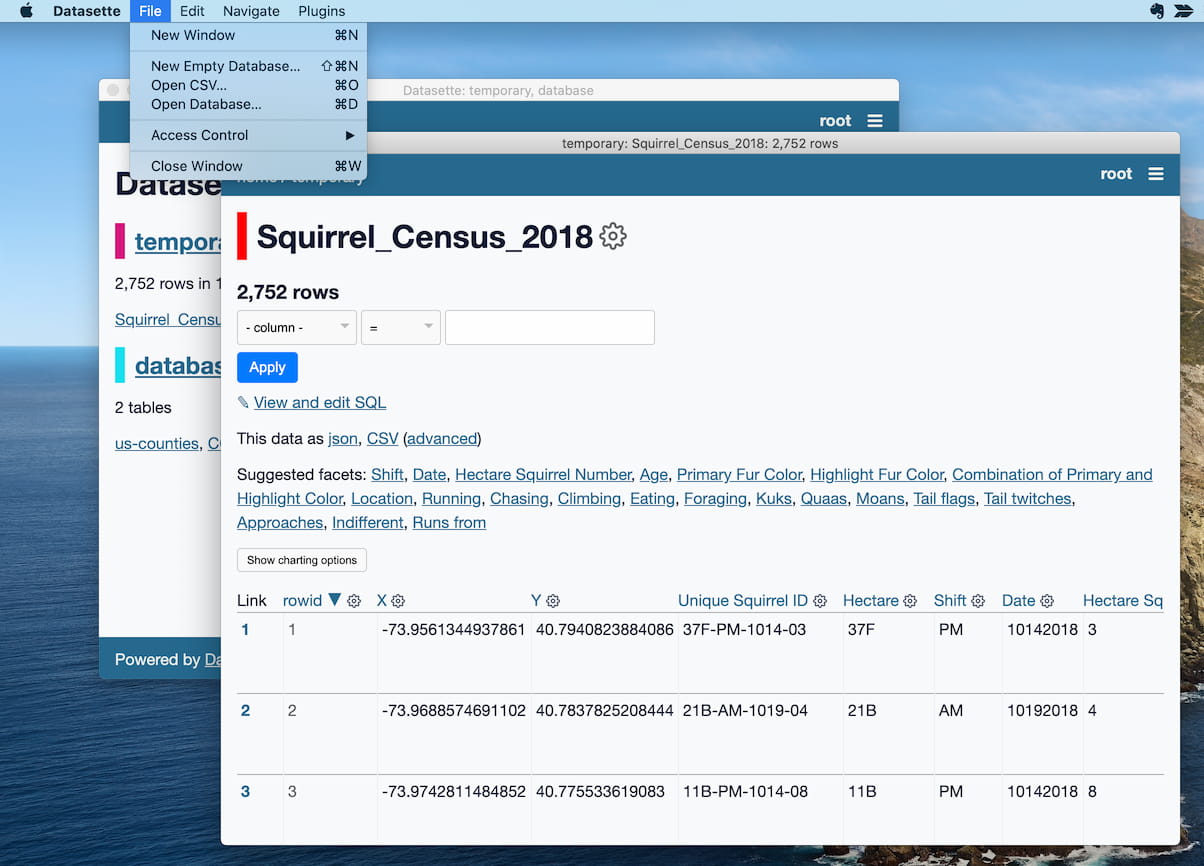
Datasette Desktop - a macOS desktop application for Datasette

I just released version 0.1.0 of the new Datasette macOS desktop application, the first version that end-users can easily install. I would very much appreciate your help testing it out!

Datasette Desktop

Datasette Desktop screenshot

Datasette is "an open source multi-tool for exploring and publishing data". It's a Python web application that lets you explore data held in SQLite databases, plus a growing ecosystem of plugins for visualizing and manipulating those databases.

Datasette is aimed at data journalists, museum curators, archivists, local governments, scientists, researchers and anyone else who has data that they wish to explore and share with the world.

There's just one big catch: since it's a Python web application, those users have needed to figure out how to install and run Python software in order to use it. For people who don't live and breath Python and the command-line this turns out to be a substantial barrier to entry!

Datasette Desktop is my latest attempt at addressing this problem. I've packaged up Datasette, SQLite and a full copy of Python such that users can download and uncompress a zip file, drag it into their /Applications folder and start using Datasette, without needing to know that there's a Python web server running under the hood (or even understand what a Python web server is).

Please try it out, and send me feedback and suggestions on GitHub.

What the app does

This initial release has a small but useful set of features:

  • Open an existing SQLite database file and offer all of Datasette's functionality, including the ability to explore tables and to execute arbitrary SQL queries.
  • Open a CSV file and offer the Datasette table interface (example here). By default this uses an in-memory database that gets cleared when the app shuts down, or you can...
  • Import CSV files into tables in on-disk SQLite databases (including creating a new blank database first).
  • By default the application runs a local web server which only accepts connections from your machine... but you can change that in the "File -> Access Control" menu to allow connections from anyone on your network. This includes Tailscale networks too, allowing you to run the application on your home computer and then access it securely from other devices such as your mobile phone anywhere in the world.
  • You can install plugins! This is the most exciting aspect of this initial release: it's already in a state where users can customize it and developers can extend it, either with Datasette's existing plugins (69 and counting) or by writing new ones.

How the app works

There are three components to the app:

  • A macOS wrapper application
  • Datasette itself
  • The datasette-app-support plugin

The first is the macOS application itself. This is currently written with Electron, and bundles a full copy of Python 3.9 (based on python-build-standalone by Gregory Szorc). Bundling Python is essential: the principal goal of the app is to allow people to use Datasette who aren't ready to figure out how to install their own Python environment. Having an isolated and self-contained Python is also a great way of avoiding making XKCD 1987 even worse.

The macOS application doesn't actually include Datasette itself. Instead, on first launch it creates a new Python virtual environment (currently in ~/.datasette-app/venv, feedback on that location welcome) and installs the other two components: Datasette and the datasette-app-support plugin.

Having a dedicated virtual environment is what enables the "Install Plugin" menu option. When a plugin is installed the macOS application runs pip install name-of-plugin and then restarts the Datasette server process, causing it to load that new plugin.

The datasette-app-support plugin is designed exclusively to work with this application. It adds API endpoints that the Electron shell can use to trigger specific actions, such as "import from this CSV file" or "attach this SQLite database" - these are generally triggered by macOS application menu items.

It also adds a custom authentication mechanism. The user of the app should have special permissions: only they should be able to import a CSV file from anywhere on their computer into Datasette. But for the "network share" feature I want other users to be able to access the web application.

An interesting consequence of installing Datasette on first-run rather than bundling it with the application is that the user will be able to upgrade to future Datasette releases without needing to re-install the application itself.

How I built it

I've been building this application completely in public over the past two weeks, writing up my notes and research in GitHub issues as I went (here's the initial release milestone).

I had to figure out a lot of stuff!

First, Electron. Since almost all of the user-facing interface is provided by the existing Datasette web application, Electron was a natural fit: I needed help powering native menus and bundling everything up as an installable application, which Electron handles extremely well.

I also have ambitions to get a Windows version working in the future, which should share almost all of the same code.

Electron also has fantastic initial developer onboarding. I'd love to achieve a similar level of quality for Datasette some day.

The single biggest challenge was figuring out how to bundle a working copy of the Datasette Python application to run inside the Electron application.

My initial plan (touched on last week) was to compile Datasette and its dependencies into a single executable using PyInstaller or PyOxidizer or py2app.

These tools strip down a Python application to the minimal required set of dependencies and then use various tricks to compress that all into a single binary. They are really clever. For many projects I imagine this would be the right way to go.

I had one big problem though: I wanted to support plugin installation. Datasette plugins can have their own dependencies, and could potentially use any of the code from the Python standard library. This means that a stripped-down Python isn't actually right for this project: I need a full installation, standard library and all.

Telling the user they had to install Python themselves was an absolute non-starter: the entire point of this project is to make Datasette available to users who are unwilling or unable to jump through those hoops.

Gregory Szorc built PyOxidizer, and as part of that he built python-build-standalone:

This project produces self-contained, highly-portable Python distributions. These Python distributions contain a fully-usable, full-featured Python installation as well as their build artifacts (object files, libraries, etc).

Sounds like exactly what I needed! I opened a research issue, built a proof-of-concept and decided to commit to that as the approach I was going to use. Here's a TIL that describes how I'm doing this: Bundling Python inside an Electron app

(I find GitHub issue threads to be the ideal way of exploring these kinds of areas. Many of my repositories have a research label specifically to track them.)

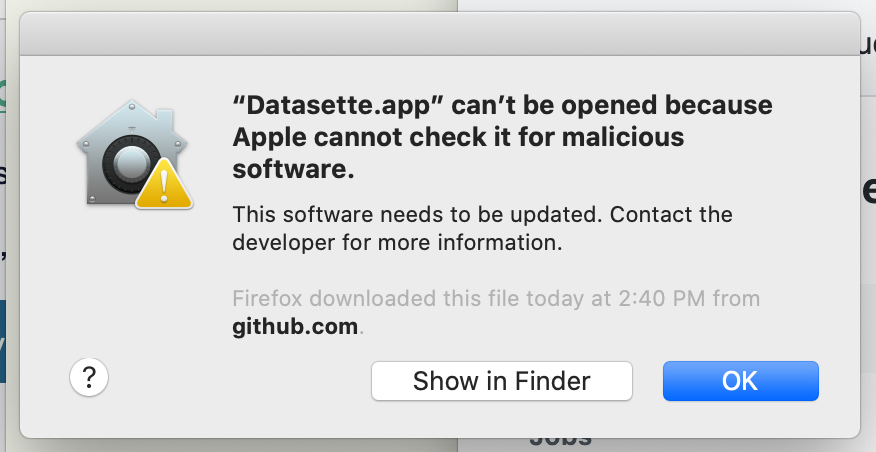
The last key step was figuring out how to sign the application, so I could distribute it to other macOS users without them facing this dreaded dialog:

Datasette.app can't be opened because Apple cannot check it for malicious software

It turns out there are two steps to this these days: signing the code with a developer certificate, and then "notarizing" it, which involves uploading the bundle to Apple's servers, having them scan it for malicious code and attaching the resulting approval to the bundle.

I was expecting figuring this out to be a nightmare. It ended up not too bad: I spent two days on it, but most of the work ended up being done by electron-builder - one of the biggest advantages of working within the Electron ecosystem is that a lot of people have put a lot of effort into these final steps.

I was adamant that my eventual signing and notarization solution should be automated using GitHub Actions: nothing defangs a frustrating build process more than good automation! This made things a bit harder because all of the tutorials and documentation assumed you were working with a GUI, but I got there in the end. I wrote this all up as a TIL: Signing and notarizing an Electron app for distribution using GitHub Actions (see also Attaching a generated file to a GitHub release using Actions).

What's next

I announced the release last night on Twitter and I've already started getting feedback. This has resulted in a growing number of issues under the usability label.

My expectation is that most improvements made for the benefit of Datasette Desktop will benefit the regular Datasette web application too.

There's also a strategic component to this. I'm investing a lot of development work in Datasette, and I want that work to have the biggest impact possible. Datasette Desktop is an important new distribution channel, which also means that any time I add a new feature to Datasette or build a new plugin the desktop application should see the same benefit as the hosted web application.

If I'm unlucky I'll find this slows me down: every feature I build will need to include consideration as to how it affects the desktop application.

My intuition currently is that this trade-off will be worthwhile: I don't think ensuring desktop compatibility will be a significant burden, and the added value from getting new features almost for free through a whole separate distribution channel should hopefully be huge!

TIL this week

Releases this week

08 Sep 02:04

Twitter Favorites: [Sean_YYZ] ‘Sidewalk Closed’ signs “are a scourge for pedestrians, turning the city into the world’s least fun obstacle course… https://t.co/hgTl82tbPC

Sean Marshall @Sean_YYZ
‘Sidewalk Closed’ signs “are a scourge for pedestrians, turning the city into the world’s least fun obstacle course… twitter.com/i/web/status/1…
08 Sep 02:04

Twitter Favorites: [Kimli] Good morning to all my beautiful vaccinated friends!

Scope Creep @Kimli
Good morning to all my beautiful vaccinated friends!
04 Sep 16:48

2021-09-03 General

by Ducky

Vaccines

This tweet has this nice graph, made with data pulled from the Public Health England Variants of Concern Technical Briefing 22.

Variants

This preprint from Denmark says that people who were not fully vaccinated were 2.8x times as likely to get hospitalized for Delta as for Alpha.  (For people who were fully vaccinated, there wasn’t much difference.)  They caution, however, that this might be due to different testing patterns, age distributions, or social behaviour.


In the study described in this preprint, they pitted antibodies from the blood of people vaxxed with Pfizer and people who had gotten had been sick with COVID-19 against different VOCs: Alpha, Beta, and Gamma.  They found that the antibodies didn’t work nearly as well against those VOCs than they did against COVID Classic, especially against Beta.  People who had had COVID-19 disease but had not been hospitalized had particularly crummy antibodies.

This might be moot, given how Delta waaay out-competes Alpha, Beta, and Gamma.


There has been concern that Delta is unusually dangerous for kids. This report from the US CDC says that the proportion of sick kids isn’t much different with Delta as in the past.

(Yes, there have been a lot of articles about pediatric wards in the US filling up, but that’s partly because ALL the wards in the US are filling up and because there’s a lot of kids sick with RSV right now.)

Long COVID

This preprint found four markers in the blood which correlate highly (75%) with Long COVID. This is good, it not only could lead to a test for Long COVID (useful for convincing doctors that it is not all in the head) but also give clues to why it is happening and therefore how to treat it.

Recommended Reading

This is another great article about the “are vaxxes losing effectiveness” debate, talking about all the reasons why it is hard to tell.

04 Sep 16:45

The Greatest Rock Song Lyrics

by Dave Pollard


image by limitrofe on pixabay, CC0

This post will likely stir up some outrage, since poetry is so subjective, and music lyrics are especially so. Dave Barry has become quite famous for his survey and book of the worst song lyrics ever, but awfulness is much easier to identify than greatness.

Some musicians have become almost as famous for their poetry as for their music, and several of the lyrics that would make my list are from such artists. Then there are the writers like Anna Tivel whose lyrics are frequently stunning, so much so the accompanying music just is no match for it.

The best lyricists, it seems, tend to burn out — they write great stuff in their youth, and then coast on much weaker stuff thereafter. Still, if I could produce even a handful of songs like the best of Neil Young or James Taylor (“and where will we hide, when it comes from inside?“), I’d probably coast in my old age too, especially if I’d taken as many drugs as those two. James also wrote the music for Reynolds Price’s extraordinary poem New Hymn.

Two artists who’ve published separate books of poetry are Bob Dylan, who has written lyrically extraordinary songs like Love Is Just a Four-Letter Word and Like a Rolling Stone, and Jewel, who gave us wry and piercing songs like Who Will Save Your Soul?

The clever collaborations of the Beatles and George Martin gave us (at the time) brilliant, original lyrics in songs like You Never Give Me Your Money (with its reprise in Carry That Weight later in the album). The lyrics of Come Together are also very witty (“hold you in his arms, yeah you can feel his disease”).

My favourite Canadian lyricist is Marc Jordan, who has penned a number of remarkable songs including the gut-wrenching Little Lambs.

And of course we can’t forget the world’s most biting lyricist, Tom Waits, who wrote the incomparable How’s It Gonna End?

So how’s this gonna end? With my choice for favourite rock song lyrics of all time. Back to Bob Dylan, though the song sounds much better when sung by his friend Joan Baez: Sad-Eyed Lady of the Lowlands.

I can hear the howls of protest. Impenetrable! Perhaps, but I think its use of incongruous, evocative imagery and synesthetic phrasing are unparalleled in the genre. I think it’s just stunning. Really worthy of his Literature Nobel. Such a shame that shortly afterwards, following his motorcycle accident, his creative power seemed, IMO, to dwindle to a trickle of its former self.

With your mercury mouth in the missionary times
And your eyes like smoke and your prayers like rhymes
And your silver cross, and your voice like chimes
Who do they think could bear you?
With your pockets well protected at last
And your streetcar visions which you place on the grass
And your flesh like silk, and your face like glass
Who could they get to ever carry you?

Sad-eyed lady of the lowlands
Where the sad-eyed prophets say that no man comes
My warehouse eyes, my Arabian drums
Should I put them by your gate
Or sad-eyed lady, should I wait?

With your sheets like metal and your belt like lace
And your deck of cards missing the jack and the ace
And your basement clothes and your hollow face
Who among them to think he could outguess you?
With your silhouette when the sunlight dims
Into your eyes where the moonlight swims
And your match-book songs and your gypsy hymns
Who among them would try to impress you?

Sad-eyed lady of the lowlands
Where the sad-eyed prophets say that no man comes
My warehouse eyes, my Arabian drums
Should I leave them by your gate
Or, sad-eyed lady, should I wait?

The kings of Tyrus with their convict list
Are waiting in line for their geranium kiss
And you wouldn’t know it would happen like this
But who among them really wants just to kiss you?
With your childhood flames on your midnight rug
And your Spanish manners and your mother’s drugs
And your cowboy mouth and your curfew plugs
Who among them do you think could resist you?

Sad-eyed lady of the lowlands
Where the sad-eyed prophets say that no man comes
My warehouse eyes, my Arabian drums
Should I leave them by your gate
Or, sad-eyed lady, should I wait?

The farmers and the businessmen, they all did decide
To show you the dead angels were that they used to hide
But why did they pick you to sympathize with their side?
How could they ever mistake you?
They wished you’d accepted the blame for the farm
But with the sea at your feet and the phoney false alarm
And with the child of the hoodlum wrapped up in your arms
How could they ever have persuaded you?

Sad-eyed lady of the lowlands
Where the sad-eyed prophets say that no man comes
My warehouse eyes, my Arabian drums
Should I leave them by your gate
Or, sad-eyed lady, should I wait?

With your sheet-metal memory of Cannery Row
And your magazine-husband who one day just had to go
And your gentleness now, which you just can’t help but show
Who among them do you think would employ you?
Now you stand with your thief, you’re on his parole
With your holy medallion in your fingers now that hold
And your saintlike face and your ghostlike soul
Who among them could ever think he could destroy you?

Sad-eyed lady of the lowlands
Where the sad-eyed prophets say that no man comes
My warehouse eyes, my Arabian drums
Should I leave them by your gate
Or, sad-eyed lady, should I wait?

04 Sep 16:45

"If men could get pregnant, abortions would be available at Jiffy Lube."

“If men could get pregnant, abortions would be available at Jiffy Lube.” - | Betty White
04 Sep 15:30

mapsontheweb:Australia if all the glaciers in the world melt..


mapsontheweb:

Australia if all the glaciers in the world melt..

04 Sep 04:15

Windows Terminal Preview 1.11 Release

by Kayla Cinnamon

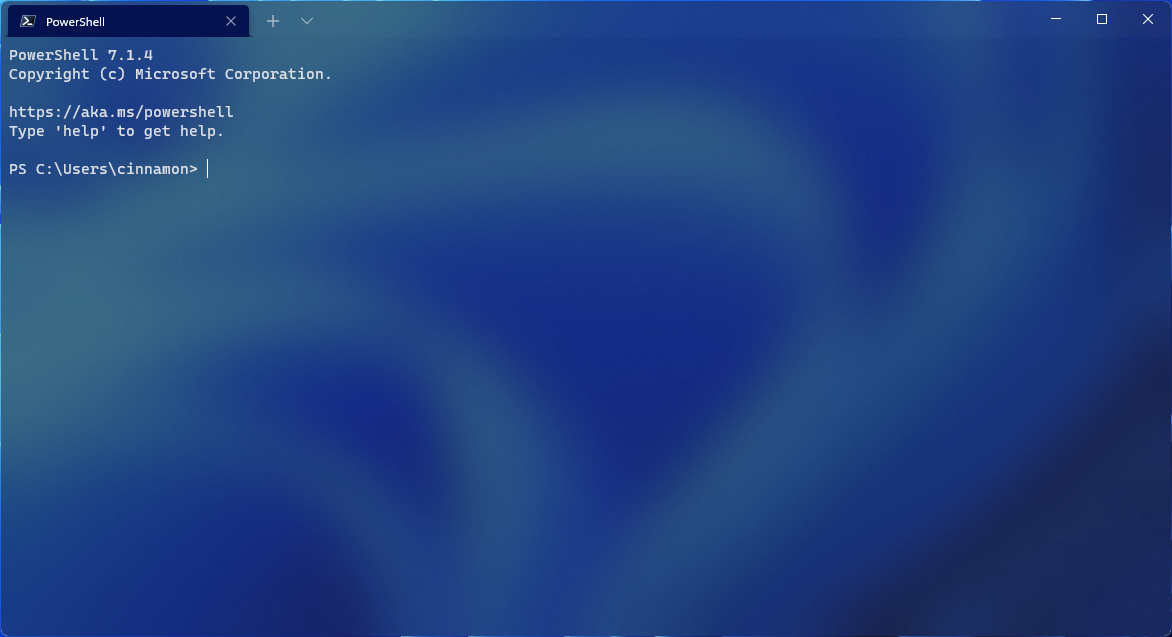
Happy Windows Terminal release day! This release brings Windows Terminal Preview up to version 1.11 and Windows Terminal up to 1.10. The Windows Terminal release will roll out through the Windows Insider Program before going to retail Windows versions in order to catch any outstanding bugs that may appear. All of the features from our previous release are now in Windows Terminal, except for the default terminal setting, the editable actions page, and the Defaults page of the settings UI. Both builds of terminal can be installed from the Microsoft Store or from the GitHub releases page. Let’s dive into what’s new!

Acrylic title bar

A new setting has been added where you can make your title bar acrylic (Thanks @matthew4850!). This setting can be found on the Appearance page of the settings UI or can be set in your settings.json file using "useAcrylicInTabRow": true as a global setting.

👉 Note: You will have to restart your terminal in order for this to take effect.

Image acrylic tab row

Minimize to system tray

You can now optionally minimize your terminal to the system tray. Two new global boolean settings were added for this functionality: minimizeToNotificationArea and alwaysShowNotificationIcon. When minimizeToNotificationArea is set to true, minimizing a window will send it to the notification area and hide it from the taskbar. When alwaysShowNotificationIcon is set to true, the tray icon is always shown, regardless of the minimizeToNotificationArea setting.

👉 Note: These settings are not yet in the settings UI and can only be set in the settings.json file.

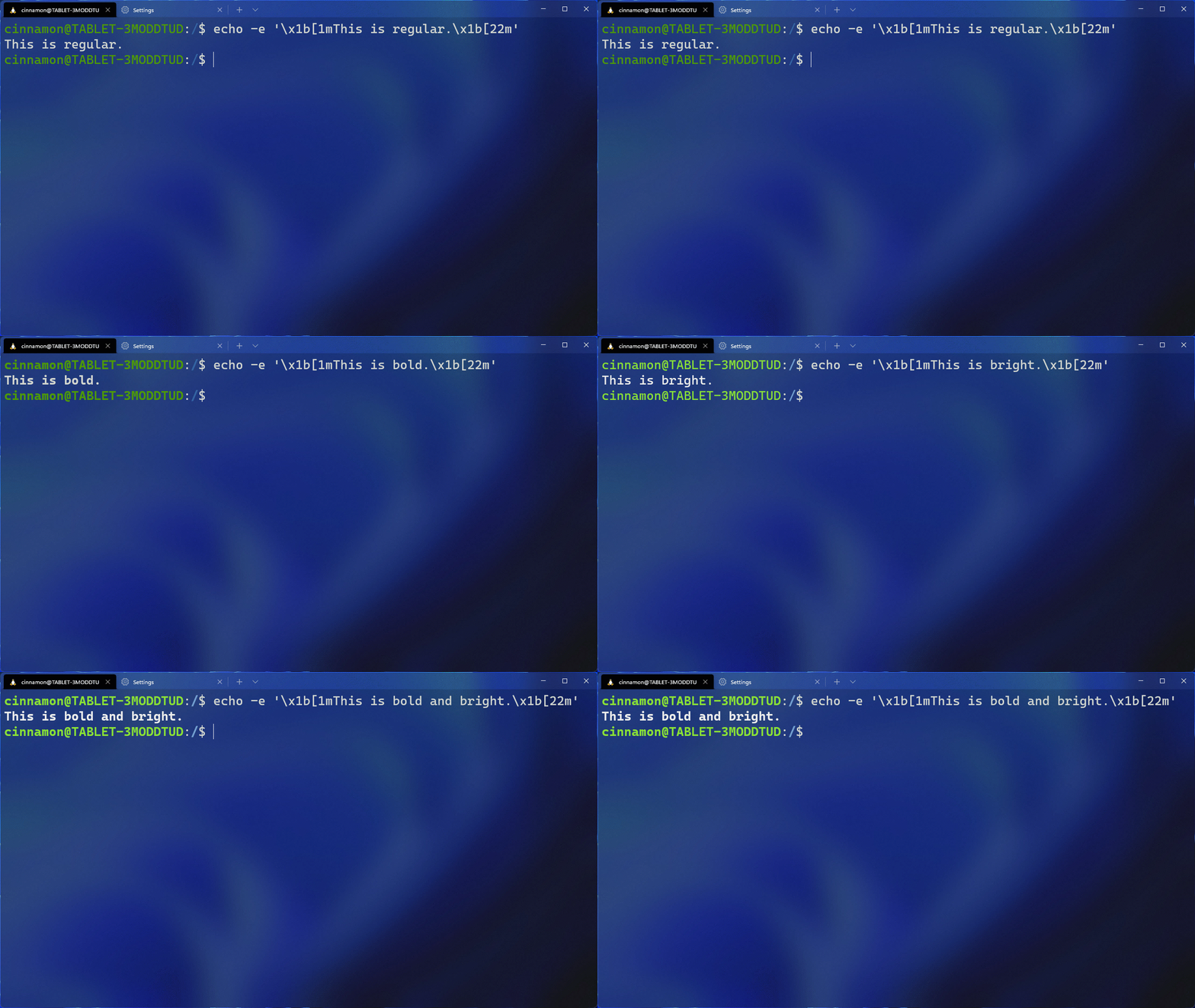
Intense text style

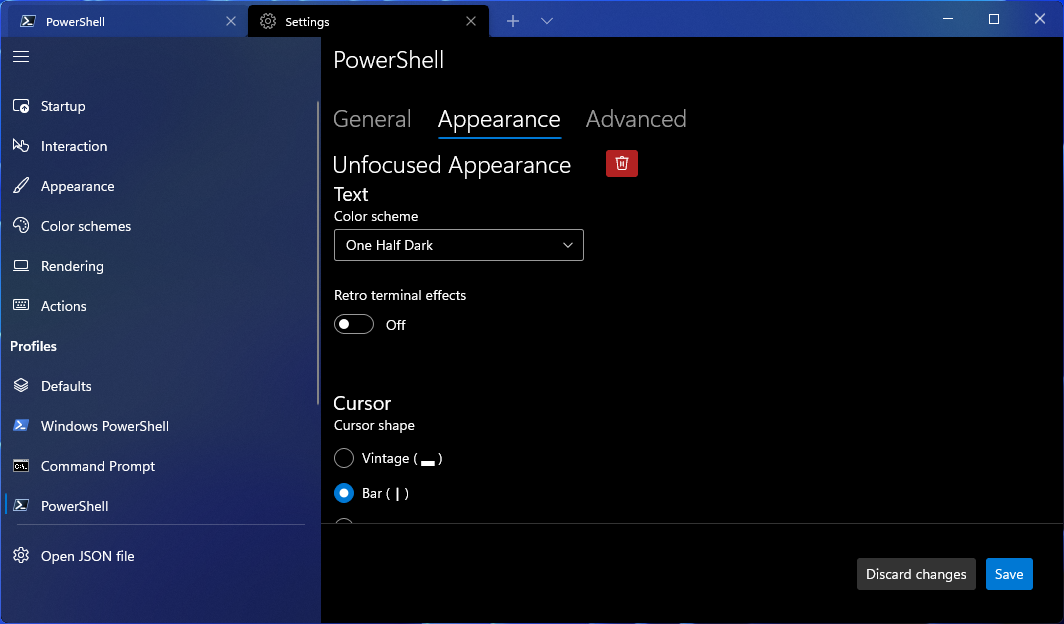
You can now choose how you want intense text to appear in your terminal by using the intenseTextStyle profile setting. You can either set your style to be bold, bright, both bold and bright, or have no additional styling added to it. This setting can also be found in the settings UI on the Profile Appearance page.

// Renders intense text as both bold and bright
"intenseTextStyle": "all"

// Renders intense text as bold
"intenseTextStyle": "bold"

// Renders intense text as bright
"intenseTextStyle": "bright"

// Renders intense text as normal
"intenseTextStyle": "none"

Image Intense text formatting

Font features and axes

The font object now accepts OpenType features and axes in the settings.json file. For more detailed information on OpenType, check out the docs for features as well as the docs for axes.

For example:

// Enables ss01 and disables ligatures
"font": {
    "face": "Cascadia Code",
    "features": {
        "ss01": 1,
        "calt": 0
    }
}

// Sets the font to italic
"font": {
    "face": "Cascadia Code",
    "axes": {
        "ital": 1
    }
}

Changes to default terminal behavior

When launching the terminal via the default terminal setting, the terminal will now use no profile rather than your default profile. The settings that will apply to the terminal when invoked as the default terminal will be dictated by the contents of the “Defaults” section, or profiles.defaults, in settings. Additionally, launching default terminal will now respect your windowingBehavior setting.

❗ Breaking change notice: This behavior also applies to the wt action and command line invocations without an explicit profile (i.e. wt -- cmd.exe).

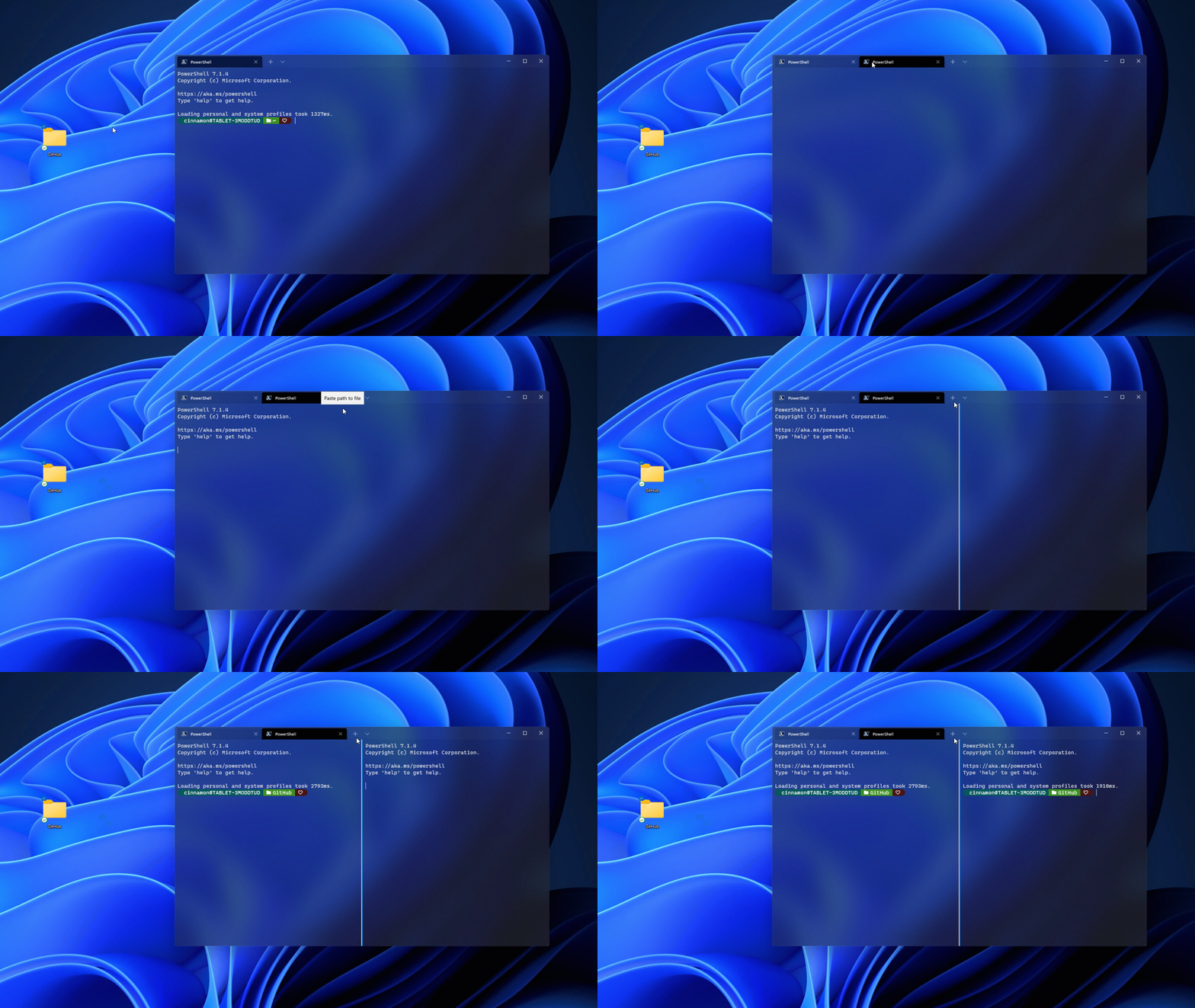
Drag and drop path in ‘+’ button

You can now drag and drop directories and files onto the ‘+’ button, which will then open a new tab, pane, or window using the given starting path (Thanks @Daniel599!). When holding Alt, a new pane will open. When holding Shift, a new window will open. Without any key modifiers, a new tab will open.

Image Drag and drop

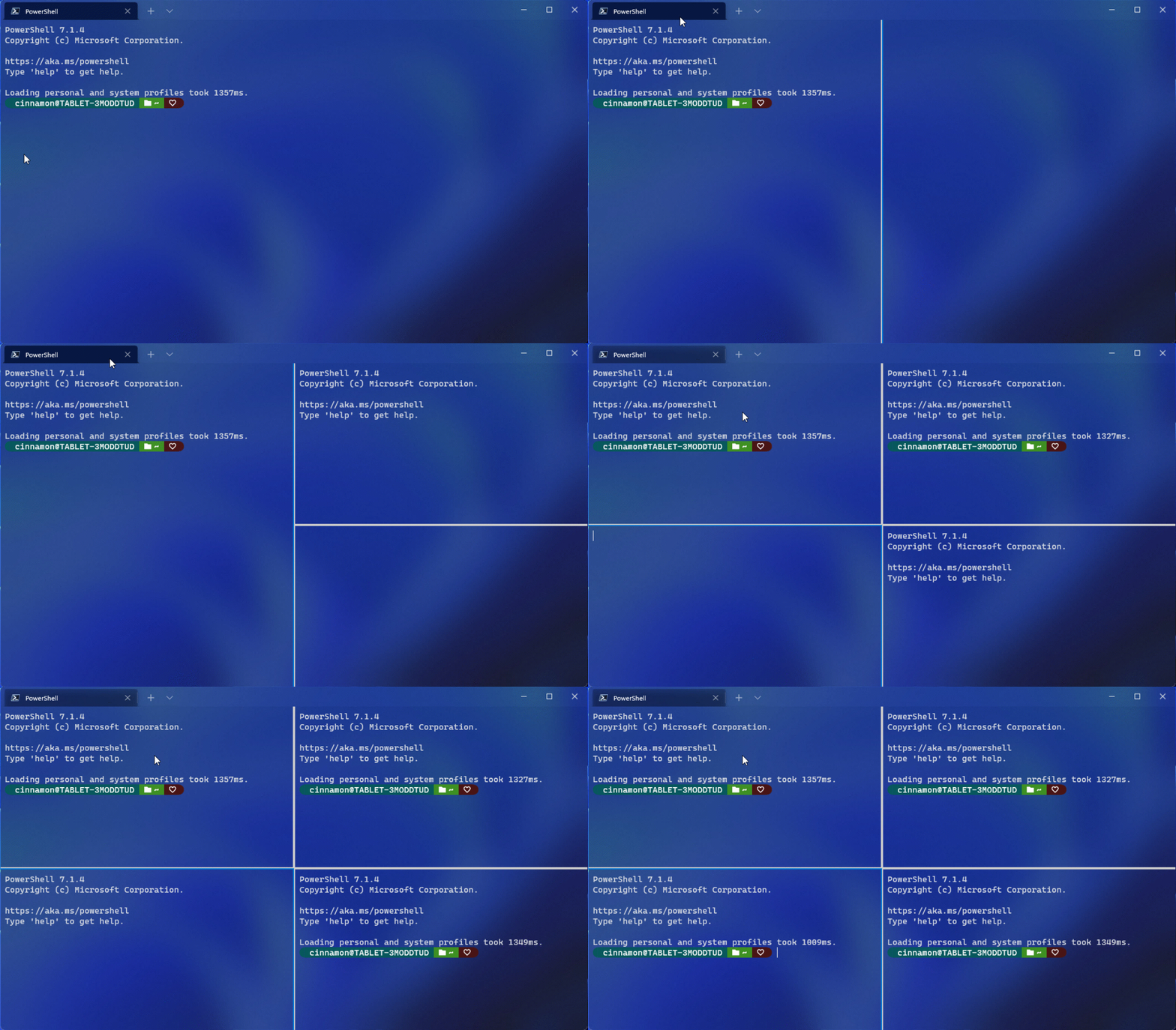
Pane updates

The pane functionality has seen a lot of improvements with this release. A huge thank you goes out to Schuyler Rosefield (@Rosefield) who made many of our pane contributions! Here are some of the highlights:

Move pane to tab

Using the movePane action, you can now move a pane to a new or existing tab (Thanks @Rosefield!). You can also use the command palette to move your panes.

Image Move pane

Swap panes within a tab

Using the swapPane action, you can now swap the places of two panes within a tab (Thanks @Rosefield!). You can also use the command palette to swap your panes.

Image Swap pane

Split tab in context menu

You can now right click on a tab and select Split Tab to split the active profile into a new pane.

Image Split tab

Settings UI updates

We are always trying to improve the settings UI experience and we have some updates in this release:

Unfocused appearance

The appearance settings that apply to your profile when unfocused are now in the settings UI.

Image unfocused appearance

Key chord editor for actions

When adding keys to your actions, you now only have to type the key chord, rather than spelling out all of the keys (i.e. c-t-r-l).

Miscellaneous improvements

🛠 Dynamically generated profiles can now be deleted (Finally! Sorry for the long wait on this one. 😊).

🛠 On newer versions of Windows, startingDirectory can now accept Linux paths when launching a WSL profile.

🛠 Tabs created with wt and default terminal instances will now have the launched command line as their title, instead of the default profile name.

🛠 You can now navigate through panes in creation order using nextPane and previousPane (Thanks @Rosefield!).

🛠 Navigating through panes with the move-focus action works much better and now also works correctly on startup.

🛠 The toggleSplitOrientation action has been added and it switches a pair of panes from a vertical to a horizontal layout (Thanks @Rosefield!).

🛠 The taskbar will now show the progress state of all of the panes/tabs combined, regardless of which is in focus. This is helpful if you’re running a build in an unfocused tab, for example.

🛠 You can now use sc() and vk() for binding keys, which allows many more keys to be bindable.

Bug fixes

🐛 Alt+Space can now be unbound from the system menu so that you can send ESC Space to the Terminal (Thanks @FWest98!).

🐛 Snapping the “quake” window to another display will now properly update its size.

🐛 The nextTab and prevTab actions now work correctly when used through wt or the command palette (Thanks @Don-Vito!).

🐛 initialPosition now takes into account window borders.

🐛 Generating WSL distro profiles should be much more stable now.

🐛 The default profile dropdown menu will no longer take off into space when scrolling.

Top contributors

We had a ton of fantastic contributors for this release. Here are those who have especially made an impact:

Contributors who opened the most non-duplicate issues

🏆 Rosefield

🏆 vefatica

🏆 marioegghead2

🏆 hensz

🏆 codeofdusk

Contributors who created the most merged pull requests

🏆 Rosefield

🏆 Don-Vito

🏆 skyline75489

Contributors who provided the most comments on pull requests

🏆 Rosefield

🏆 Don-Vito

🏆 skyline75489

Cheers!

If you want to learn more about Windows Terminal features, you can check out our docs site. If you have any questions, feel free to reach out to Kayla (@cinnamon_msft) on Twitter. As always, bug reports and feature requests can be filed on our GitHub. We hope you enjoy this latest release!

Image signatures

The post Windows Terminal Preview 1.11 Release appeared first on Windows Command Line.

04 Sep 04:15

Open external links in an Electron app using the system browser

by Simon Willison

For Datasette.app I wanted to ensure that links to external URLs would open in the system browser.

This recipe works:

function postConfigure(window) {
  window.webContents.on("will-navigate", function (event, reqUrl) {
    let requestedHost = new URL(reqUrl).host;
    let currentHost = new URL(window.webContents.getURL()).host;
    if (requestedHost && requestedHost != currentHost) {
      event.preventDefault();
      shell.openExternal(reqUrl);
    }
  });
}

The will-navigate event fires before any in-browser navigations, which means they can be intercepted and cancelled if necessary.

I use the URL() class to extract the .host so I can check if the host being navigated to differs from the host that the application is running against (which is probably localhost:$port).

Initially I was using require('url').URL for this but that doesn't appear to be necessary - Node.js ships with URL as a top-level class these days.

event.preventDefault() cancels the navigation and shell.openExternal(reqUrl) opens the URL using the system default browsner.

I call this function on any new window I create using new BrowserWindow - for example:

mainWindow = new BrowserWindow({
  width: 800,
  height: 600,
  show: false,
});
mainWindow.loadFile("loading.html");
mainWindow.once("ready-to-show", () => {
  mainWindow.show();
});
postConfigure(mainWindow);
04 Sep 04:14

The Wall

by Rui Carmo
This is an extremely accurate depiction of the current state of affairs.

04 Sep 04:10

Allen Pike on the Persistent Gravity of Cross Platform

Allen Pike: The Persistent Gravity of Cross Platform

In practice, the tradeoff is about more than “cheap vs. good”. Unintuitively, sometimes native tech can actually be the cheapest way to achieve a certain goal, and sometimes cross-platform technologies actually lead to better products, even for very well-funded companies. So what is a useful way to think about the tradeoff?

Over the last decade I’ve talked to people at hundreds of companies about how they’re developing and supporting apps, helping them evaluate and plan native and cross-platform app work. While there are a lot of factors that go into this technology decision, there’s one that I think is particularly illuminating.

More and more apps written with web tech (such as Electron) are showing up on the Mac desktop everyday. I understand why, but I don't have to like it.

04 Sep 04:09

Fission 2.7.1 Is Now Available; Fission Exits the Mac App Store

by Paul Kafasis

We’ve just posted Fission 2.7.1, the latest version of our audio editor. This update provides a handful of small improvements, as well as initial support for MacOS 12 (Monterey). 1

For most of Fission’s users, getting this update will be a snap. If you purchased Fission directly from our site, just select “Check for Update” from the Fission menu, and you’ll be all set.

As of today’s release, Fission is no longer being sold via the Mac App Store. If you’re a new user looking to purchase Fission, you can do so directly through our site. That’s now the exclusive place to purchase a license for Fission.

Mac App Store Customers: Get the Direct Version

We want to be sure to our customers who previously purchased Fission via the Mac App Store are taken care of as well. To that end, we will be transitioning you over to our directly distributed version.

This transition process is fast, free, and follows the same system we used successfully with Piezo in 2016. Verified purchasers of the Mac App Store version of Fission can obtain a complimentary license key for the directly distributed version, enabling you to continue using the latest versions of Fission without interruption.

We encourage you to make that transition immediately. To get started, click below:

 Transition to the Direct Version →


Future Mac App Store Distribution

For almost twenty years, we’ve sold our software directly to our customers via our online store. Our fast and secure purchase process has served our customers very well. Since the Mac App Store opened in 2011, we’ve also experimented there. However, despite a decade of feedback from countless developers and users, Apple has made scant few changes and the store remains beset with issues. When you couple the many shortcomings and issues with Apple’s restrictive policies that preclude most of our software from appearing there, the Mac App Store is clearly a poor fit for us. With the removal of Fission, we no longer have any products in the Mac App Store.

We know that some users prefer to purchase software through the Mac App Store, and we’ll continue evaluating it for use as a sales channel in the future. Unfortunately, at present, it is simply not a viable distribution channel for us. If that changes, we will of course consider providing our software there again.

In the meantime, we’ll be focusing our efforts on providing a fast and easy experience testing and purchasing our software right from our website. We have always provided a seamless purchase process via our store, and we always will.


Footnotes:

  1. With this update, Fission joins Farrago in offering initial support for Monterey. We’re hard at work on updates for the rest of our product line, so keep an eye on our Status page for more details on updates to Airfoil, Audio Hijack, Loopback, Piezo, and SoundSource, all coming soon. ↩︎

04 Sep 04:00

Covid Trajectories

I updated the covdata package for the first time in a while, as I’ll be using it to teach in the near future. As a side-effect, I ended up taking a look at what the ongoing polarization or divergence of the COVID experience is like in different parts of the United States. Here I use county-level data to draw out some of the trends. The idea is to take the time series of COVID-19 deaths and split it into deciles by some county-level quantity of interest. I look at how Republican the county is based on the two-party vote share for the 2016 Presidential election, and also at population density. For each of those quantities we place each county in a decile, aggregate the mortality counts, and draw a line for each decile. The expectation is that we’ll see divergence at the very start mostly just for whatever decile New York city counties end up in, because they were hit the hardest by far early on, but then the partisan stuff kicks in as COVID spreads everywhere and county-level responses (both individual and governmental) start to vary. County density and partisan strength are well-correlated, of course.

The daily mortality counts are sourced from the New York Times, which as a series is a little noisy but will do for this exercise because the aggregation to a weekly moving average and by decile smooths a lot of the noise. Density and population data come from the Census. Election data are from the MIT Election Lab. I’d have used their 2020 county data, but at first glance it seemed to be missing about eight hundred counties. 2016 will do fine. Here are the graphs.

Partisan trajectory graph

Partisanship and COVID deaths at the county level.

Population density trajectory graph

Population density and COVID deaths at the county level.

I’m not entirely happy with the presentation here just because the more lines you have the harder it is to follow what’s happening. In addition there are several alternative ways we might aggregate this, but when the time-dimension is primary it’s hard to avoid lines. Though not impossible. I may experiment a little more.

The code and data are on GitHub.

04 Sep 04:00

Notes for an annotation SDK

by Jon Udell

While helping Hypothesis find its way to ed-tech it was my great privilege to explore ways of adapting annotation to other domains including bioscience, journalism, and scholarly publishing. Working across these domains showed me that annotation isn’t just an app you do or don’t adopt. It’s also a service you’d like to be available in every document workflow that connects people to selections in documents.

In my talk Weaving the Annotated Web I showcased four such services: Science in the Classroom, The Digital Polarization Project, SciBot, and ClaimChart. Others include tools to evaluate credibility signals, or review claims, in news stories.

As I worked through these and other scenarios, I accreted a set of tools for enabling any annotation-aware interaction in any document-oriented workflow. I’ve wanted to package these as a coherent software development kit, that hasn’t happened yet, but here are some of the ingredients that belong in such an SDK.

Creating an annotation from a selection in a document

Two core operations lie at the heart of any annotation system: creating a note that will bind to a selection in a document, and binding (anchoring) that note to its place in the document. A tool that creates an annotation reacts to a selection in a document by forming one or more selectors that describe the selection.

The most important selector is TextQuoteSelector. If I visit http://www.example.com and select the phrase “illustrative examples” and then use Hypothesis to annotate that selection, the payload sent from the client to the server includes this construct.

{
  "type": "TextQuoteSelector", 
  "exact": "illustrative examples", 
  "prefix": "n\n    This domain is for use in ", 
  "suffix": " in documents. You may use this\n"
}

The Hypothesis client formerly used an NPM module, dom-anchor-text-quote, to derive that info from a selection. It no longer uses that module, and the equivalent code that it does use isn’t separately available. But annotations created using TextQuoteSelectors formed by dom-anchor-text-quote interoperate with those created using the Hypothesis client, and I don’t expect that will change since Hypothesis needs to remain backwards-compatible with itself.

You’ll find something like TextQuoteSelector in any annotation system. It’s formally defined by the W3C here. In the vast majority of cases this is all you need to describe the selection to which an annotation should anchor.

There are, however, cases where TextQuoteSelector won’t suffice. Consider a document that repeats the same passage three times. Given a short selection in the first of those passages, how can a system know that an annotation should anchor to that one, and not the second or third? Another selector, TextPositionSelector (https://www.npmjs.com/package/dom-anchor-text-position), enables a system to know which passage contains the selection.

{
  "type": "TextPositionSelector", 
  "start": 51
  "end": 72, 
}

It records the start and end of the selection in the visible text of an HTML document. Here’s the HTML source of that web page.

<div>
    <h1>Example Domain</h1>
    <p>This domain is for use in illustrative examples in documents. You may use this
    domain in literature without prior coordination or asking for permission.</p>
    <p><a href="https://www.iana.org/domains/example">More information...</a></p>
</div>

Here is the visible text to which the TextQuoteSelector refers.

\n\n Example Domain\n This domain is for use in illustrative examples in documents. You may use this\n domain in literature without prior coordination or asking for permission.\n More information…\n\n\n\n

The positions recorded by a TextQuoteSelector can change for a couple of reasons. If the document is altered, it’s obvious that an annotation’s start and stop numbers might change. Less obviously that can happen even if the document’s text isn’t altered. A news website, for example, may inject different kinds of advertising-related text content from one page load to the next. In that case the positions for two consecutive Hypothesis annotations made on the same selection can differ. So while TextPositionSelector can resolve ambiguity, and provide hints to an annotation system about where to look for matches, the foundation is ultimately TextQuoteSelector.

If you try the first example in the README at https://github.com/judell/TextQuoteAndPosition, you can form your own TextQuoteSelector and TextPositionSelector from a selection in a web page. That repo exists only as a wrapper around the set of modules — dom-anchor-text-quote, dom-anchor-text-position, and wrap-range-text — needed to create and anchor annotations.

Building on these ingredients, HelloWorldAnnotated illustrates a common pattern.

  • Given a selection in a page, form the selectors needed to post an annotation that targets the selection.
  • Lead a user through an interaction that influences the content of that annotation.
  • Post the annotation.

Here is an example of such an interaction. It’s a content-labeling scenario in which a user rates the emotional affect of a selection. This is the kind of thing that can be done with the stock Hypothesis client, but awkwardly because users must reliably add tags like WeakNegative or StrongPositive to represent their ratings. The app prompts for those tags to ensure consistent use of them.

Although the annotation is created by a standalone app, the Hypothesis client can anchor it, display it, and even edit it.

And the Hypothesis service can search for sets of annotations that match the tags WeakNegative or StrongPositive.

There’s powerful synergy at work here. If your annotation scenario requires controlled tags, or a prescribed workflow, you might want to adapt the Hypothesis client to do those things. But it can be easier to create a standalone app that does exactly what you need, while producing annotations that interoperate with the Hypothesis system.

Anchoring an annotation to its place in a document

Using this same set of modules, a tool or system can retrieve an annotation from a web service and anchor it to a document in the place where it belongs. You can try the second example in the README at https://github.com/judell/TextQuoteAndPosition to see how this works.

For a real-world demonstration of this technique, see Science in the Classroom. It’s a project sponsored by The American Association for the Advancement of Science. Graduate students annotate research papers selected from the Science family of journals so that younger students can learn about the terminology, methods, and outcomes of scientific research.

Pre-Hypothesis, annotations on these papers were displayed using Learning Lens, a viewer that color-codes them by category.

Nothing about Learning Lens changed when Hypothesis came into the picture, it just provided a better way to record the annotations. Originally that was done as it’s often done in the absence of a formal way to describe annotation targets, by passing notes like: “highlight the word ‘proximodistal’ in the first paragraph of the abstract, and attach this note to it.” This kind of thing happens a lot, and wherever it does there’s an opportunity to adopt a more rigorous approach. Nowadays at Science in the Classroom the annotators use Hypothesis to describe where notes should anchor, as well as what they should say. When an annotated page loads it searches Hypothesis for annotations that target the page, and inserts them using the same format that’s always been used to drive the Learning Lens. Tags assigned by annotators align with Learning Lens categories. The search looks only for notes from designated annotators, so nothing unwanted will appear.

An annotation-powered survey

The Credibility Coalition is “a research community that fosters collaborative approaches to understanding the veracity, quality and credibility of online information.” We worked with them on a project to test a set of signals that bear on the credibility of news stories. Examples of such signals include:

  • Title Representativeness (Does the title of an article accurately reflect its content?)
  • Sources (Does the article cite sources?)
  • Acknowledgement of uncertainty (Does the author acknowledge uncertainty, or the possibility things might be otherwise?)

Volunteers were asked these questions for each of a set of news stories. Many of the questions were yes/no or multiple choice and could have been handled by any survey tool. But some were different. What does “acknowledgement of uncertainty” look like? You know it when you see it, and you can point to examples. But how can a survey tool solicit answers that refer to selections in documents, and record their locations and contexts?

The answer was to create a survey tool that enabled respondents to answer such questions by highlighting one or more selections. Like the HelloWorldAnnotated example above, this was a bespoke client that guided the user through a prescribed workflow. In this case, that workflow was more complex. And because it was defined in a declarative way, the same app can be used for any survey that requires people to provide answers that refer to selections in web documents.

A JavaScript wrapper for the Hypothesis API

The HelloWorldAnnotated example uses functions from a library, hlib, to post an annotation to the Hypothesis service. That library includes functions for searching and posting annotations using the Hypothesis API. It also includes support for interaction patterns common to annotation apps, most of which occur in facet, a standalone tool that searches, displays, and exports sets of annotations. Supported interactions include:

– Authenticating with an API token

– Creating a picklist of groups accessible to the authenticated user

– Assembling and displaying conversation threads

– Parsing annotations

– Editing annotations

– Editing tags

In addition to facet, other tools based on this library include CopyAnnotations and TagRename

A Python wrapper for the Hypothesis API

If you’re working in Python, hypothesis-api is an alternative API wrapper that supports searching for, posting, and parsing annotations.

Notifications

If you’re a publisher who embeds Hypothesis on your site, you can use a wildcard search to find annotations. But it would be helpful to be notified when annotations are posted. h_notify is a tool that uses the Hypothesis API to watch for annotations on individual or wildcard URLs, or from particular users, or in a specified group, or with a specified tag.

When an h_notify-based watcher finds notes in any of these ways, it can send alerts to a Slack channel, or to an email address, or add items to an RSS feed.

At Hypothesis we mainly rely on the Slack option. In this example, user nirgendheim highlighted the word “interacting” in a page on the Hypothesis website.

The watcher sent this notice to our #website channel in Slack.

A member of the support team (Hypothesis handle mdiroberts) saw it there and responded to nirgendheim as shown above. How did nirgendheim know that mdiroberts had responded? The core Hypothesis system sends you an email when somebody replies to one of your notes. h_notify is for bulk monitoring and alerting.

A tiny Hypothesis server

People sometimes ask about connecting the Hypothesis client to an alternate server in order to retain complete control over their data. It’s doable, you can follow the instructions here to build and run your own server, and some people and organizations do that. Depending on need, though, that can entail more effort, and more moving parts, than may be warranted.

Suppose for example you’re part of a team of investigative journalists annotating web pages for a controversial story, or a team of analysts sharing confidential notes on web-based financial reports. The documents you’re annotating are public, but the notes you’re taking in a Hypothesis private group are so sensitive that you’d rather not keep them in the Hypothesis service. You’d ideally like to spin up a minimal server for that purpose: small, simple, and easy to manage within your own infrastructure.

Here’s a proof of concept. This tiny server clocks in just 145 lines of Python with very few dependencies. It uses Python’s batteries-include SQLite module for annotation storage. The web framework is Pyramid only because that’s what I’m familiar with, but could as easily be Flask, the ultra-light framework typically used for this sort of thing.

A tiny app wrapped around those ingredients is all you need to receive JSON payloads from a Hypothesis client, and return JSON payloads when the client searches for annotations to anchor to a page.

The service is dockerized and easy to deploy. To test it I used the fly.io speedrun to create an instance at https://summer-feather-9970.fly.dev. Then I made the handful of small tweaks to the Hypothesis client shown in client-patches.txt. My method for doing that, typical for quick proofs of concept that vary the Hypothesis client in some small way, goes like this:

  • Clone the Hypothesis client.
  • Edit gulpfile.js to say const IS_PRODUCTION_BUILD = false. This turns off minification so it’s possible to read and debug the client code.
  • Follow the instructions to run the client from a browser extension. After establishing a link between the client repo and browser-extension repo, as per those instructions, use this build command — make build SETTINGS_FILE=settings/chrome-prod.json — to create a browser extension that authenticates to the Hypothesis production service.
  • In a Chromium browser (e.g. Chrome or Edge or Brave) use chrome://extensions, click Load unpacked, and point to the browser-extension/build directory where you built the extension.

This is the easiest way to create a Hypothesis client in which to try quick experiments. There are tons of source files in the repos, but just a handful of bundles and loose files in the built extension. You can run the extension, search and poke around in those bundles, set breakpoints, make changes, and see immediate results.

In this case I only made the changes shown in client-patches.txt:

  • In options/index.html I added an input box to name an alternate server.
  • In options/options.js I sync that value to the cloud and also to the browser’s localStorage.
  • In the extension bundle I check localStorage for an alternate server and, if present, modify the API request used by the extension to show the number of notes found for a page.
  • In the sidebar bundle I check localStorage for an alternate server and, if present, modify the API requests used to search for, create, update, and delete annotations.

I don’t recommend this cowboy approach for anything real. If I actually wanted to use this tweaked client I’d create branches of the client and the browser-extension, and transfer the changes into the source files where they belong. If I wanted to share it with a close-knit team I’d zip up the extension so colleagues could unzip and sideload it. If I wanted to share more broadly I could upload the extension to the Chrome web store. I’ve done all these things, and have found that it’s feasible — without forking Hypothesis — to maintain branches that maintain small but strategic changes like this one. But when I’m aiming for a quick proof of concept, I’m happy to be a cowboy.

In any event, here’s the proof. With the tiny server deployed to summer-feather-9970.fly.dev, I poked that address into the tweaked client.

And sure enough, I could search for, create, reply to, update, and delete annotations using that 145-line SQLite-backed server.

The client still authenticates to Hypothesis in the usual way, and behaves normally unless you specify an alternate server. In that case, the server knows nothing about Hypothesis private groups. The client sees it as the Hypothesis public layer, but it’s really the moral equivalent of a private group. Others will see it only if they’re running the same tweaked extension and pointing to the same server. You could probably go quite far with SQLite but, of course, it’s easy to see how you’d swap it out for a more robust database like Postgres.

Signposts

I think of these examples as signposts pointing to a coherent SDK for weaving annotation into any document workflow. They show that it’s feasible to decouple and recombine the core operations: creating an annotation based on a selection in a document, and anchoring an annotation to its place in a document. Why decouple? Reasons are as diverse as the document workflows we engage in. The stock Hypothesis system beautifully supports a wide range of scenarios. Sometimes it’s helpful to replace or augment Hypothesis with a custom app that provides a guided experience for annotators and/or an alternative display for readers. The annotation SDK I envision will make it straightforward for developers to build solutions that leverage the full spectrum of possibility.

End notes

https://www.infoworld.com/article/3263344/how-web-annotation-will-transform-content-management.html

Weaving the annotated web