Shared posts

11 Sep 05:54

My Mid-2018 Book Report

by Rui Carmo

I just finished reading Creative Selection, which was a serendipitously great way to cap off this year’s GoodReads challenge (I’ve been reading over 50 books a year for the past 4 years), and it seems like a good point in time to do another book post. Creative Selection is a great book if you’re into product development of any kind, and I wholeheartedly recommend it, but there are many more interesting books out there, so here’s a short report of what I’ve been reading.

At this point in time, I tend to read three kinds of books: technical ones (which I usually don’t account for, since technical books these days are often long-winded and redundant), inspirational ones (stuff like Creativity Inc., Hit Refresh, etc., but also general science), and a lot of Sci-Fi.

My long(ish) commutes and all too common trips to Porto lend themselves nicely to the first two kinds, and my evenings are usually spent trying to forget as much about work as humanly possible–hence the (virtual1) stacks of Sci-Fi I routinely plow through.

As always, Summer break was a high point in my reading cycle, and I expect to be reading slightly less books as some TV shows make their return. Sadly, The Expanse, which is likely the best Sci-Fi book offshoot in the past decade, will take a while longer to come back, but I can wait.

So without further ado, here’s a somewhat random “Top 5” selection from my recent reads, in hopes they’ll be of interest to you:

  • Why We Sleep, which I was (ironically) reading during a mostly sleepless week.
  • Masters Of Doom, Carmack’s and Romero’s epic tale back in the Doom/Quake years, which I had gotten a couple of years back but never managed to start.
  • Ignition, an amazing trip through the history of rocketry as seen from the perspective of propellants, full of humorous (and sometimes explosive) anecdotes.
  • Space Opera, a fun romp through the kind of blissfully mind-cleansing nonsense that the Hitchhiker’s Guide to the Galaxy first hammered our brains out with, but notched up to eleven by regaling us with the gibbering madness of Eurovision blown up to galactic proportions.
  • The Jennifer Morgue. If, like me, you’ve been putting off reading Stross’ Laundry series because you were put off by the first book, the second is a lot more fun. I’m now well into the fifth book, but I’m pacing myself since despite having put off this series for years, I want to make them last.

I’m now on the first few chapters of The Calculating Stars, and it shows a lot of promise as well–I might have more to say about it soon.


  1. I mostly read on my Kindle or the Kindle apps, and only miss paper when I try to read academic papers (which are a pain to go through on most devices). ↩︎

11 Sep 05:54

Why NetNewsWire 5 Doesn’t Support Nested Folders

I was asked on the NetNewsWire Slack group about supporting nested folders — folders inside other folders — and I realized the answer deserves a blog post, because it brings up some larger issues.

But first, some technical stuff.

RSS readers have moved over the years toward tagging as opposed to folders.

A structure where feeds can have multiple tags is the same thing as a structure where you have multiple folders but not nested folders, and a feed can appear in more than one folder.

So that’s what NetNewsWire does, because this looks like a de facto standard to me.

That’s part of the reason, but there’s more…

Simplicity

In earlier versions of NetNewsWire there were too many features that added to the fiddliness of the app.

Those features were invitations to the user to comb and revise their system. They could customize colors and fonts, create deep folder structures, archive articles on disk, and so on.

Over the years I’ve learned that these kinds of things often detract from an app. Every decision is a moment of anxiety for the user. The user wonders: is this the right call? Did I consider all the issues? Can I change it later?

And the user may be motivated to come back and re-do those decisions.

I don’t want my software to do that to you.

Furthermore: simplicity is itself appealing. Delight comes in getting the most power from the smallest effort.

Adding features may make the app more appealing to people who want those specific features — but it chips away at simplicity as a feature, and some people will go look for something less complicated.

To be clear, though, this approach isn’t right for every app. It depends on what you want the app to be. I like Acorn for its relative simplicity over Photoshop, for instance — but Photoshop absolutely needs to be what it is for people like Brad Ellis to get their work done.

I have the luxury of not needing to make money from this, and I also have the luxury of knowing there are other really good RSS readers. I’m not required to make this particular app the RSS reader for every single person.

Bugs

Our industry has not only been poor ethically, it’s also been substandard at just plain old quality. Sure, the economics of it are partly to blame. It motivates people to sell out their users and to ship broken software.

“Move fast and break things” is a motto that seems to apply to the industry at large. I think it’s wrong, because there’s a human cost to this.

Again — because I have the luxury, because I don’t have deadlines or commercial concerns — I can do something different: I can ship software with no bugs. Zero.

I’ll be more precise: if a bug is any ticket in the issue tracker, then of course there are always bugs. I’m talking about known, reproducible defects.

My plan is to never release a shipping version that has any such defects. I believe that’s a feature in itself.

But that’s much more easily done with a simpler app. Every added feature adds to the combinatorial complexity of the app, and the app becomes harder to test and harder to get right.

My commitment to zero defects outweighs my commitment to adding features.

Time

And I do want to add features. There are some features I haven’t seen in other RSS readers — even earlier versions of NetNewsWire — that I want to do.

I think (I hope) they’ll be fun and useful and that you’ll like them. (We’ll see, of course!)

But when I spend time adding some features from an older version of NetNewsWire, I’m not doing the new features that this new world NetNewsWire wants.

My Pitch

You might end up disappointed, when NetNewsWire 5.0 ships, that some feature you used in an earlier version of NetNewsWire isn’t there. I totally understand that.

But my pitch is this — or will be (it’s not shipping yet): try an app with zero known defects, where performance is critical, where careful, considered design and simplicity are valued, where there is room for future innovation, where development happens in the open, and see if you like it despite the missing things you wish it had.

You might find you do! And you might not, which is okay — as I mentioned earlier, there are other really good RSS readers, which is a great thing.

PS You can join the Slack group too — just send me email.

PPS I could change my mind in the future about nested folders. Very few decisions are set in stone. But the above is all the things on my mind as I make decisions about things like this.

11 Sep 05:54

NewsBlur Blurblog: The Resistance to To-Do Lists

sillygwailo shared this story from Getting Things Done® - David Allen's GTD® Methodology.

The main reason people resist to-do listsDavid Allen

I understand the resistance to to-do lists, and the complaints about keeping them. I’ve noticed a couple of reasons for this. The main one is that most to-do lists are incomplete lists of still un-clarified “stuff.” Looking at them creates as much stress as they might have relieved in the first place. Typically what people have on their lists (if they have them at all) are things like “Mom,” and “bank,” and “marketing VP.” It’s great that they have captured something that has their attention, but there are still critical decisions to make with some critical thinking about that content. Why “Mom?” Well, her birthday is coming up in a couple of weeks. What are you going to do about Mom’s birthday? Well, I’m not sure yet. So, looking at “Mom” on a list reminds you of thinking and decision-making you haven’t done yet. And, at the moment, you don’t have the energy or mental bandwidth to think or make that decision. So, some part of you says, “Stop reminding me that I’m overwhelmed!”

So, it’s not to-do lists per se that are uncomfortable—it’s just that the content of them is still unclear. If you have determined a specific next action about “Mom,” such as “Call sister” to get her input on how to celebrate mom’s birthday, that item on a “Calls” list will be a lot more attractive and easy to engage with. I doubt anyone would say that a grocery list is a bad thing when you go to the market to shop for Mom’s birthday dinner, no matter how big the list.


If your list are incomplete, you’ll resist them

A second reason there may be a resistance to to-do lists is that they are often incomplete, so you really won’t trust either your lists or your brain to give you the full story. There are things on your lists, but there are still many things in your head you’re trying to track and be reminded about. (And your head is a terrible office!) So, you don’t trust that the contents of your “external brain” have really captured it all, and then you can’t trust either your system or your head. This is a major source of mental fatigue and stress for most people.


So, what are your options?

So, what are your options? Simply put, keep track of all your commitments out of your head, on lists, or none of them! I would be fascinated if someone could intellectually justify halfway in-between. Either your head is the place to hold your reminders, or it isn’t. (You can guess my answer.) I find it somewhat amusing that people in our courses get upset with us because of the size of their lists. Look—those are their lists, not ours!

And the problem with having any reminders of commitments you’ve made kept in your head, is that the place that holds them in your psyche seems to have no sense of past or future. They are all “Do now!” messages in that place. So you’ll be awakened at 3am with the thought about Mom’s birthday, when you can’t do anything about it. Stress.

That said, if you already have, can, or would like to simplify your life such that you keep track of nothing in an external system, and you simply follow your internal hunches and inclinations, with the appropriate things showing up spontaneously for you to focus on, in the moment—yay! I love doing nothing, planning nothing, and doing what I feel like doing, when I feel like doing it. But I still need to keep track of the things I need to do, to justify the money I’m asking my clients to pay me for what I may be doing for them. That requires that I keep track of appointments, phone numbers, projects to complete, and actions I need to take, to produce the value I’m asked to be producing for them.


The Solution

Gravitating away from to-do lists? Either keep them or don’t.

–David Allen


This essay appeared in David Allen’s Productive Living Newsletter. Subscribe for free here.


11 Sep 05:53

Twitter Favorites: [CatherineOmega] Vancouver: Low turnout means your vote counts more than usual. Unsure who to support for mayor? No problem, turn ou… https://t.co/pUcj68uuAf

Catherine Winters @CatherineOmega
Vancouver: Low turnout means your vote counts more than usual. Unsure who to support for mayor? No problem, turn ou… twitter.com/i/web/status/1…
11 Sep 05:53

Don’t Get Sucked Into The Community Tactics Quagmire

by Richard Millington

A quick reminder this is the final week to sign up for our Strategic Community Management course. We won’t be running this course again this year.

If you’re not sure whether you should sign up, consider how many tactics you’re engaging in today.

If your community strategy is any good, you should be working on just 3 to 7 tactics each week.

That’s it.

Your goal is to commit all your time, resources, and energy to executing a tiny number of tactics extremely well instead of lots of tactics badly.

This is how you delight your members and make your community completely unique.


The problem is most people aren’t even close to this.

Most people are engaging in a dozen or more tactics each week. One community manager last week gave me a list which included:

  • Initiating new discussions.
  • Replying to current discussions.
  • Creating the newsletter.
  • Writing new blog posts.
  • Organizing AMAs.
  • Organizing webinars.
  • Removing spam.
  • Updating the gamification system.
  • Running the MVP program.
  • Welcoming newcomers.
  • Chasing up lost members.
  • Collecting and analyzing community data.
  • Presenting the community to bosses.
  • Escalating problems to the product team.
  • Writing a new onboarding series.
  • Updating the FAQ with new questions.

That’s 16+ different tactics.

You’re never going to make any real progress if you’re dividing your time into tiny chunks while hoping for big results.

When you’re constantly jumping from one tactic to the next, spending a few minutes on each every day, you’re undermining your own community efforts.


Real progress comes from doubling down on the tactics which really matter.

Much of our work with clients is explaining what tactics they can stop doing to double down on the ones that move the needle.

This is the trick to making immediate, remarkable, progress towards any goal. All things being equal, when you commit more resources to something you can achieve much more.

For example, do you think your members prefer to join a community where they can get answers to questions or a community which is systematically building the biggest database of expertise in that field.

Do you think your members prefer to join an MVP program which sends them swag or which gets them on a call with the CEO to discuss their concerns once a quarter?

Do you think your members prefer to join a community which shares useful tips, or one which publishes a book containing the best advice from your members each year?

Do you think your members want another hour-long expert webinar to go to or a professionally filmed and edited list of the top 5 tips shared by your community’s top experts from that webinar?

Do you think your newcomers want to be included in an @mention list or get a personal mentor, a private call, and someone who takes the time to find out what they need.

The list goes on and on. Once you start spending 10 hours per week on a tactic instead of 1 to 2, you can build a completely unique community.


The problem is most people aren’t even close to this.

There tend to be three reasons why most people don’t do this today.

1) You don’t know what your members want. This happens when your audience research is bad, you haven’t properly segmented your members, and you don’t know what tactics to focus on.

2) You don’t know what’s working. This happens when you haven’t built dashboards to check what’s working/not working. Most people keep adding new tactics without removing those that don’t work. You have less time to spend on each tactic.

3) You’re scared. Perhaps the most common. You’re worried about killing a tactic because a small group of vocal members like it. You don’t want to make anyone upset.

Getting Strategic About Tactics

If you sign up for the course, we will help you escape this tactics quagmire by building proper audience segments to know what your members need, developing dashboards to know what’s working, and equipping you with the mindset to face down the vocal minority.

If you want to join us, click here.

This is your final week to join us.

11 Sep 05:53

How do things compose across domains?

by Eric Normand

A few episodes ago I talked about how things compose. But I didn’t get into how things compose across domains. For instance, how do actions compose with calculations? Let’s get into that, and what it reveals about our work as functional programmers.

Transcript

Eric Normand: How do things compose across domains? Hi, my name is Eric Normand. These are my thoughts on functional programming.

A couple of episodes ago, maybe four episodes ago, I talked about how things compose. Just to review. When two actions compose, it creates a new action. You can compose either in sequence or in parallel, calculations, compose. They create a new calculation.

That’s basically, function composition as it’s normally defined. I like to be a little looser and say you can actually have a calculation that the output of that calculation goes into any of the arguments, not just the first argument of the next function. Two pieces of data can combine, can compose. That really depends on the data structure.

Stuff can compose into a tuple or into a sequence or into a HashMap with the keys and values being the bits of data. What I realized was I didn’t talk about how things composed across domains. What happens if you have an action and you compose it with a calculation?

Let’s go over that now. We’ll have to review the three domains and what they mean, so actions real quickly, there’s a rule of thumb, it’s called time or times. Does it depend on the time it is called or how many times it is called? If either of those is true then it is an action. Sending an email twice is different from sending it once. Calling that twice has a different effect.

Calculations don’t depend on the time. They can calculate a value based on the arguments. They are opaque, meaning you don’t know what it’s going to do until you call it, till you run that. Then finally data is totally transparent, self-describing, self-identical. Meaning it is what it is and you can interpret it in multiple ways, doesn’t run. It’s totally inert.

Eric Normand profile image
Eric Normand
@ericnormand
twitter logo

Calculations don’t depend on the time. They can compute a value based on the arguments. They are opaque, meaning you don’t know what it’s going to do until you call it.

ed.gr/12gb

Tue Nov 27 16:01:41 +0000 2018
Twitter reply actionTwitter retweet action0Twitter like action1

What happens when you compose an action with a calculation? This is something easy like you want to uppercase a string that’s totally a calculation. It doesn’t matter when you call. It’s always going to give you the same answer. You’re doing uppercase string and then you’re going to print it out.

Printing it out is obviously an action because if you print it out twice, it’s different from printing once or zero times. We’re doing a calculation and then an action. We want to compose those up into something else that does both of those things.

Here’s the question. What is that thing? That’s like print uppercase. It obviously also depends on the time or times, because it’s still printing. That thing that you compose the two into is an action. You’ll see if you, just by thinking about a lot of examples, anytime you have an action and you compose it with anything else, it’s going to be an action.

You can’t lose that dependence on time. We see that anything composed with an action, anything meaning, any calculation or any data composed with an action is going to lead to another action. Similarly, we could ask what happens if we compose a calculation with data.

This is called a Clojure normally where you have some data that’s in the scope of the function. Now, this is part of that function for good. It’s going to influence the calculation, but, of course, that can’t change, so it’s still timeless. It’s still a calculation. It’s totally opaque like other calculations.

It’s not self-describing. It’s hard to define equals for it, like data is very easy to describe equals for. You have data plus calculation is going to give you a new calculation. If you arrange things in that order. The order that things progress to. Meaning you look at data plus data is data. Then data plus calculation moves up to this other level.

Then calculation plus action, all that moves up to the actions. We have this kind of migration. Maybe we should turn it up the other way, so that stuff is going down or tends to move down. From data, it moves to calculations and then from calculation, it moves down to action.

This is just a natural tendency because there’s no way to remove the time except by effort. You actually have to change your code and refactor stuff to extract out the parts that aren’t actions into calculations, whereas it’s so easy to just put two things together and now you have more actions in your code.

There’s this natural tendency in our code bases, even a functional languages code base, even something strict like Haskell. There’s a tendency for things to slip down into actions. Also, stuff in data will slip down into calculations.

It’s just a natural tendency because we like to compose things and things are just going to move down that way. One of the things that we have to do as programmers to remain vigilant too, is that we always want to counteract that natural tendency by pushing stuff back up this ladder into data.

That explains one reason why functional programmers are so reticent to use actions. It’s because they start to infect everything. It’s much better if you could avoid that, to begin with.

All right, thank you. My name is Eric Normand. I’d love to discuss this further. You can reach me on Twitter, I’m @ericnormand. You can also email me at eric@lispcast.com. Awesome. See you later.

The post How do things compose across domains? appeared first on LispCast.

11 Sep 05:52

Legislating For Mandatory Software Updates

by Tony Hirst

From the Automated and Electric Vehicles Act 2018, I notice the following:

4 Accident resulting from unauthorised software alterations or failure to update software

(1) An insurance policy in respect of an automated vehicle may exclude or limit the insurer’s liability under section 2(1) for damage suffered by an insured person arising from an accident occurring as a direct result of—
(a) software alterations made by the insured person, or with the insured person’s knowledge, that are prohibited under the policy, or
(b) a failure to install safety-critical software updates that the insured person knows, or ought reasonably to know, are safety-critical.

(2) But as regards liability for damage suffered by an insured person who is not the holder of the policy, subsection (1)(a) applies only in relation to software alterations which, at the time of the accident, the person knows are prohibited under the policy.

(3) Subsection (4) applies where an amount is paid by an insurer under section 2(1) in respect of damage suffered, as a result of an accident, by someone who is not insured under the policy in question.

(4) If the accident occurred as a direct result of—
(a) software alterations made by an insured person, or with an insured person’s knowledge, that were prohibited under the policy, or
(b) a failure to install safety-critical software updates that an insured person knew, or ought reasonably to have known, were safety-critical,the amount paid by the insurer is recoverable from that person to the extent provided for by the policy.

(5) But as regards recovery from an insured person who is not the holder of the policy, subsection (4)(a) applies only in relation to software alterations which, at the time of the accident, the person knew were prohibited under the policy.

(6) For the purposes of this section—
(a) “software alterations” and “software updates”, in relation to an automated vehicle, mean (respectively) alterations and updates to the vehicle’s software;
(b) software updates are “safety-critical” if it would be unsafe to use the vehicle in question without the updates being installed.

It looks like this is the first time that “software update” appears in legislation..

Is this the start of things to come?

And what tools exist on the legislation.gov.uk and parliament.uk websites to make it easier to keep track of such phrases in passed, enacted and draft legislation?

PS Michael posted some useful thoughts lately on why the Parliament website isn’t for everyone. It also reminded of an important rule when writing bids for outreach activities: “if you claim the project event is for everybody, that means it’s targeted at nobody and won’t be funded”. After all, who should go, and why?

11 Sep 05:52

Robot Workers?

by Tony Hirst

A lazy post that does nothing much more than rehash and link bullet points from the buried lede that is someone else’s post…

It seems like folk over at the Bank of England have been in the news again about robots taking over human jobs (Bank of England chief economist [Andy Haldane] warns on AI jobs threat); this follows on from a talk earlier this year by Mark Carney at the Public Policy Forum in Toronto [slides] and is similar in kind to other speeches coming out of the Bank of England over the last few years (Are Robots Threatening Jobs or Are We Taking Them Ourselves Through Self-Service Automation?).

The interview(?) was presumably in response to a YouGov survey on Workers and Technology: Our Hopes and Fears associated with the launch of a Fabian Society and Community Commission on Workers and Technology.

(See also a more recent YouGov survey on “friends with robots” which asked “In general, how comfortable or uncomfortable do you think you would be working with a colleague or manager that was a robot?” and “Please imagine you had received poor service in a restaurant or shop from a robot waiter/ shop assistant that is able to detect tone and emotion in a human’s voice… Do you think you would be more or less likely to be rude to the robot, than you would to a human waiter/ shop assistant, or would there be no difference? (By ‘rude’, we mean raising your voice, being unsympathetic and being generally impolite… )“.)

One of the job categories that is being enabled by automation is human trainers that help generate the marked up data that feeds the machines. A recent post on The Lever, “Google Developers Launchpad’s new resource for sharing applied-Machine Learning (ML) content to help startups innovate and thrive” [announcement] asks Where Does Data Come From?. The TLDR answer?

  • Public data
  • Data from an existing product
  • Human-in-the-loop (e.g. a human driver inside an “autonomous” vehicle)
  • Brute force (e.g. slurping all the data you can find; hello Google/Facebook etc etc)
  • Buying the data (which means someone is also selling the data, right?)

A key part of many machine learning approaches is to use labelled datasets that the machine learns from. This means taking a picture of a face, for example, that a human has annotated with areas labelled “eyes”, “nose”, “mouth”, and then training the ‘pootah to try to identify particular features in the photographs that allow the machine to identify those labels with those features, and hopefully the corresponding elements in a previously unseen photo.

Here’s a TLDR summary of part of the Lever post, concerning where these annotations come from:

  • External annotation service providers
  • Internal annotation team
  • Getting users to generate the labels (so the users do folk in external annotation service providers out of a job…)

The post also identifies several companies that provide external annotation services… Check them out if you want to get a glimpse of a future of work that involves feeding a machine…

  • Mechanical Turk: Amazon’s marketplace for getting people to do piecemeal bits of work for pennies that other people often sell as “automated” services, which you might have though meant “computerised”. Which it is, in that a computer assigns the work to essential anonymous, zero hours contract workers. Where it gets really amusing is when folk create bots to do the “human work” that other folk are paying Mechanical Turk for
  • Figure Eight: a “Human-in-the-Loop Machine Learning platform transforms unstructured text, image, audio, and video data into customized high quality training data”… Sounds fun, doesn’t it? (The correct answer is probably “no”);
  • Mighty AI: “a secure cloud-based annotation software suite that empowers you to create the annotations you need for developing and validating autonomous perception systems”, apparently.. You get a sense of how it’s supposed to work from the blurb:
    • “Mighty Community”, a worldwide community that provides our customers with timely, high-quality annotations, offloading the burden to find, train, and manage a pool of annotators to generate ground truth data.
    • Expert global community allows for annotations 24 hours/day
    • Training on Mighty Tools eliminates annotator on-boarding time
    • Available at a moment’s notice to instantly scale customer annotation programs
    • Community members covered by confidentiality agreement
    • Automated annotation management process with Mighty Studio
    • Close integration with Mighty Quality eliminates the need to find and correct annotation errors
  • Playment: “With 300,000+ skilled workers ready to work round-the-clock on Playment’s mobile and web app, we can generate millions of labels in a matter of hours. As the workers do more work, they get better and Playment is able to accomplish much more work in lesser time.” (And then when they’ve done the work, the machine does the “same” work with reduced marginal cost… Hmm, thinks, how do the human worker costs (pennies per task) compare with the server costs for large ML services?)

Happy days to come, eh…?

11 Sep 05:52

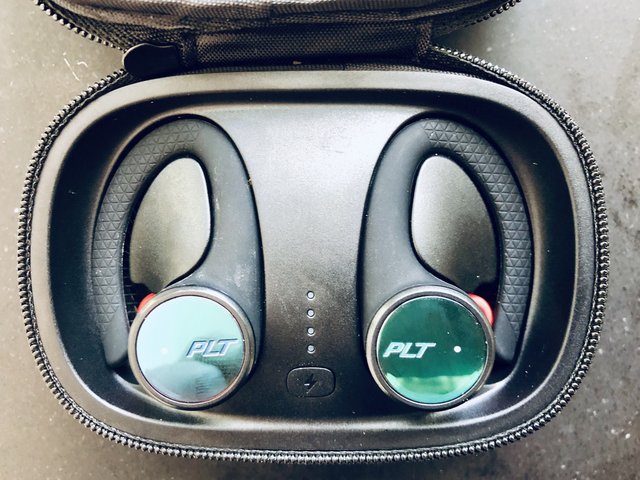
Plantronics BackBeat FIT 3100 :: Sitzt bombenfest und verträgt eine Menge Wasser

by Volker Weber

IMG 4351

Seit einer Woche teste ich das neueste Headset der Plantronics FIT Serie. Es hat gegenüber anderen beliebten Sport-Headsets eine besonders angenehme Eigenschaft: Man hört seine Umgebung noch. Die Ohrstöpsel schließen den Gehörgang nicht ab und haben dennoch einen vollen Klang. Auch die Apple AirPods funktionieren so. Das FIT 3100 hat einen Ohrbügel, der für einen bombenfesten Sitz sorgt, und es ist nach IP56 zertifiziert. Das heißt, es ist nach Klasse 5 gegen Staub und Klasse 6 gegen Wasser geschützt. Man kann es also bis einem Meter Wassertiefe eintauchen. Nicht, dass man damit schwimmen gehen würde, aber Schweiß macht dem Headsets definitiv nichts aus.

IMG 4349

Fünf Stunden lang kann man Musik hören, das reicht auch für längere Workouts. Das sehr stabile Aufbewahrungsetui kann das Headset mit dem eigenen Akku zweimal aufladen. So kommt man insgesamt auf 15 Stunden. Sind beide leer, lädt ein beliebiges Netzteil erst das Headset und dann das Etui. Ein sehr kurzes Ladekabel USB-A auf MicroUSB ist im Deckel verstaut und gut gegen Verlieren geschützt.

IMG 4405

Hier sieht man das Original FIT das neue FIT 3100. Während das FIT noch einen sehr flexiblen Bügel zwischen den beiden Ohrhörern hatte, ist das FIT 3100 komplett kabellos. Ich fand die Konstruktion des FIT sehr gelungen, aber sie hat prinzipbedingt einen Nachteil: Die Länge des Bügels ist nicht anpassbar, aber Menschen haben unterschiedlich große Köpfe.

IMG 4412 IMG 4413

Der Bügel des Fit geht gerade so um meinen Schädel, bei der Scheffin dagegen wippt er hinter dem Kopf und kämpft mit den Haaren. Das Fit 3100 dagegen passt auf alle Köpfe, aber nicht unbedingt alle Ohren. Ich habe durchschnittliche große Ohren, auf einer Skala von XXS bis XXL vielleicht L. Bei mir ist das Fit 3100 superbequem. Ich habe es jeden Tag stundenlang getragen und es hat niemals genervt, noch weniger als die AirPods. Auch mit dem Brillenbügel ist es anders als das etwas knappere FIT nicht kollidiert.

IMG 4416

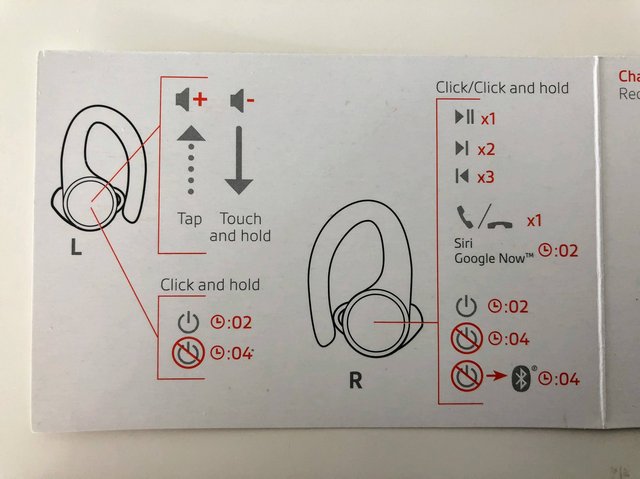
Das Headset lässt sich bedienen, in dem man drauf tippt oder drückt. Das ist etwas mühselig zu lernen, bietet aber alle Funktionen an, die das Headset hat. Um es lauter zu machen, tippt man wiederholt auf die linke Seite. Leiser wird es, wenn man die linke Seite antippt und dann den Finger drauf lässt. Ein- und Ausschalten ist nicht nötig, wenn man das Aufbewahrungsetui benutzt, das passiert dann automatisch. Ansonsten drückt man zwei Sekunden zum Einschalten oder vier Sekunden zum Ausschalten, auf beiden Seiten. Rechts kann man mit einmal drücken (nicht tippen) die Pausefunktion auslösen, zweimal ist nächster Track, dreimal vorheriger. Telefongespräche nimmt man mit einmal drücken an oder legt wieder auf. Zwei Sekunden drücken ruft den Assistenten des Telefons. Das ist alles vom Zustand des Headsets abhängig. Ist es aus, heißt zwei Sekunden einschalten, ist es an, wird Siri gerufen. Ist das Headset an, heißt vier Sekunden ausschalten, ist es aus, dann heißt es einschalten und dann pairen.

Wie gesagt, das lernt man, wenn man ein bisschen übt. Erfreulicherweise spricht das Headset und sagt Sachen wie "Power on", "Headset Connected", "Pairing" oder "Phone Connected". Und dann merkt man, dass die linke Seite andere Sachen sagt als die rechte. Die rechte Seite hält die Verbindung zum Telefon, die linke redet mit der rechten. Und das funktioniert nicht nur in geschlossenen Räumen, wo die Wellen von Wänden reflektiert werden, sondern auch draußen. Da hat es bei kabellosen Kopfhörern schon böse Überraschungen gegeben.

Und wie klingt es? Ganz prima, ohne fette Bässe, aber laut genug. Ich lasse es meistens auf ca 50% laufen und bekomme noch mit, wenn mich jemand anspricht. Telefonieren aber würde ich nur im Notfall damit. Ein Mikro am rechten Ohr reicht nur gerade so aus, dass man sich verständlich machen kann. Trägt man es auf dem Fahrrad, dann bekommt man mit, wenn sich ein Auto nähert und im Wald hört man die Vögel noch, wenn man nicht so laut aufdreht. Ich habe es sowohl mit iPhone, diversen Androids als auch mit der Apple Watch probiert. Da haben wir es: Ein bequemes Headset für den Sport, dass nicht vollständig von der Umwelt isoliert.

Und ist die Oberfläche des FIT 3100 nun blau oder grün? Kommt drauf an, aus welcher Richtung das Licht drauf fällt. :-)

More >

[Nachtrag: Das Bild da oben ist gestellt. Die Scheffin benutzt privat nur ganz wenig Technik: Kindle Oasis zum Lesen, iPhone mit Voyager Edge für Facetime und iPad mit BackBeat Sense für Videos.]

11 Sep 05:52

Night lights mapped as terrain

by Nathan Yau

You’ve probably seen the maps of Earth at night. It gives you a good idea of activity around the world, through the eyes of light. As an experiment and a shift in view, Jacob Wasilkowski mapped the light as terrain.

Tags: light, terrain

11 Sep 05:52

Three Years of Club MacStories

by Federico Viticci

When I introduced Club MacStories three years ago, I had no idea our crazy plan for a members-only newsletter would eventually grow into a key component of MacStories that now makes up for roughly half of its annual revenue. I remember reading a final version of my announcement post and telling my girlfriend we'd be lucky to hit 100 members in the first month. It took less than 30 minutes to surpass that number after the announcement went live. I couldn't be more grateful to all the readers who signed up, keep reading Club MacStories to this day, and spread the word among their friends and family.

In hindsight, while my initial calculations were dramatically (and almost comically) wrong, I still stand by the underlying sentiment I shared in my introductory post:

The MacStories you know and love will continue as long as I have the strength to write. I want this website to be my legacy, as it's all I've ever learned to do sufficiently well in my adult life so far. I love MacStories too much to imagine not having it. Most importantly, MacStories will continue to be a free and open website because we want as many people as possible to read our stories.

But, at the same time, I'm also ready for more – something a bit more focused and dedicated to our biggest fans, built with care every week and delivered with the same passion that we put into MacStories every day.

If I were to introduce Club MacStories today, I would pretty much use the same words. MacStories is all I've ever created myself as an adult, and I can't even imagine the possibility of having to do something else as a job. One way or another, this is what I want to keep doing for as long as I can. And while I've been fortunate enough to keep growing MacStories with the help of John, Ryan, Alex, and the rest of the team, I also feel like there needs to be a dedicated, more focused space for readers who really like what we do at MacStories and want more from it every week. That's where Club MacStories comes in, and it's exactly what we've been trying to do since September 2015.


In the past three years, we've delivered a total of 178 newsletters (142 issues of MacStories Weekly, plus 36 Monthly Log issues) to thousands of members who, in the process, also received access to free eBook downloads, discounts on Mac and web apps, and other exclusive perks.

A sample of MacStories Weekly sections.

A sample of MacStories Weekly sections.

MacStories Weekly, the main offering of a Club MacStories subscription delivered every week on Friday, has grown a lot since its humble beginnings in Issue 1. Now in addition to app favorites, app collections, and tips and tricks, MacStories Weekly features:

  • A regular Workflow Corner section, in which I share advanced automation techniques and downloadable shortcuts for the Shortcuts app (née Workflow). There is an archive where you can see the dozens of shortcuts I created for Club members over the past few years;
  • Longform interviews with friends of MacStories, including designers, developers, podcasters, and other interesting people;
  • The Extension, a regular column that acts as, well, an extension of MacStories with opinion pieces and editorials.

The success of Club MacStories has allowed us to expand the sections we produce on a weekly basis while also keeping a focused approach. For example, we've been able to bring in Stephen Hackett with a regular column for the Monthly Log, answer questions from members in a regular Q&A section of Weekly, and experiment with iPads Around the World – a member-driven section to highlight interesting use cases for the iPad in different work contexts.

Of course though, we're not stopping here. In addition to refinements and new sections we're considering for the future of MacStories Weekly, we've been busy planning an extra-special anniversary month to celebrate three years of Club MacStories. While we had "anniversary month" events in 2016 and 2017, neither of them featured the amount of exclusive content and perks we've put together this year.

Here's a preview of what is coming to Club MacStories in the month of September, starting later this week:

  • This Friday (September 14), Club MacStories members will get exclusive access to a selection of discounts on great Mac and web apps. We've assembled a collection of over 50 deals from 30 developers that will be available for two weeks for every existing Club member;
  • My iOS 12 review, due to be published the day iOS 12 launches to the public, will also be offered as a free eBook for Club members. Just like its web counterpart, the eBook version supports inline footnotes, image galleries, and embedded videos, which look great in Apple Books;
  • For the first time, my iOS review will also include a variety of Club-only shortcuts (i.e. workflows) for the new Shortcuts app. There will be example shortcuts available free for everyone, but some of them will be limited to Club members;
  • Following the release of my iOS 12 review, we'll upload a new episode of the members-only AppStories Unplugged podcast, featuring a discussion about my process for researching, writing, and editing the iOS 12 review;
  • The issue of MacStories Weekly publishing the week of iOS 12's release will also feature an in-depth look at my setup for creating the iOS 12 review this summer, including apps and scripts I used;
  • Finally, there will be at least another surprise related to my iOS 12 review, with a special discount for Club members.

I'm incredibly excited about the Club-only perks we've put together to celebrate its third anniversary this month; I can't wait for members to see what we've been working on since June.

The Next Three Years

Over the past three years, the support of Club members has allowed MacStories to expand and given us a renewed enthusiasm for everything we do in our corner of the Apple community.

Club members have pushed me to learn more about the apps I use every day, giving me the freedom to experiment with advanced iOS automation and go beyond the topics I'd normally cover on MacStories. More than ever before, the success of Club MacStories means MacStories as a whole can continue being an indie, self-funded, profitable operation that covers apps, Apple news, and developer stories with passion and integrity. I couldn't be more thankful to anyone who signed up and tried Club MacStories since our journey began three years ago.

If your annual renewal is coming up, I hope you'll consider remaining a Club member – we have a lot of content planned for the future, starting this week. And if you just learned about Club MacStories and are intrigued by the idea of exclusive weekly perks, I hope you'll give it a try, even if just for a month. Putting the newsletters together every week is a lot of work, but we love every minute of it; our goal is to make sure that everybody finds the Club a good investment, and we always welcome any kind of feedback on the content we produce. You can find some free samples of Club MacStories content here.

Three years ago, I wrote that my goal was to keep writing MacStories for as long as I could. That hasn't changed, but today I can also say that I can't imagine MacStories without the Club. We learned a lot in the past three years; we want to keep learning, creating useful content for our members, and expanding MacStories and Club MacStories together.

The future is bright, exciting, and full of shortcuts I can't wait to create for MacStories readers and Club members.

Thank you all for supporting Club MacStories so far. Here's to the next three years.


Support MacStories Directly

Club MacStories offers exclusive access to extra MacStories content, delivered every week; it's also a way to support us directly.

Club MacStories will help you discover the best apps for your devices and get the most out of your iPhone, iPad, and Mac. Plus, it's made in Italy.

Join Now
11 Sep 05:51

Work/life balance and challenging work: you can have both

You want to work on cutting edge technology, you want challenging problems, you want something interesting. Problem is, you also want work/life balance: you don’t want to deal with unrealistic deadlines from management, or pulling all-nighters to fix a bug.

And the problem is that when you ask around, people tell say you need to work long hours if you want to work on challenging problems. That’s just how it is, they say.

To which I say: bullshit.

You can work on challenging problems and still have work/life balance. In fact, you’ll do much better that way.

My apparently impossible career so far

Just as a counter-example, let me tell you how I’ve spent the past 14 years. Among other things, I’ve worked on:

  • A component of the flight search product that now powers Google Flights (flight search is hard—my team was working on the stuff on slides 44-48).
  • The prototype for what was then cutting edge container storage technology, a prototype that helped my company raise a $12 million Series A—and then we turned it into a production ready distributed system.
  • A crazy/useful Kubernetes local development tool.
  • Most recently, scientific image processing algorithms and processing pipeline.

All of these were hard problems, and interesting problems, and challenging problems, and none of them required working long hours.

Maybe those past 14 years are some sort of statistical aberration, but I rather doubt it. You can, for example, go work on some really tricky distributed systems problems over at Cockroach Labs, and have Fridays off to do whatever you want. (Not a personal endorsement: I know nothing about them other than those two points.)

Long hours have nothing to do with interesting problems

There is no inherent relationship between interesting problems and working long hours. You’re actually much more likely to solve hard problems if you’re well rested, and have plenty of time off to relax and let your brain do its thing off in the background.

The real origin of this connection is a marketing strategy for a certain subset of startups: “Yes, we’ll pay you jack shit and have you work 70 hours a week, but that’s the only way you can work on challenging problems!”

This is nonsense.

The real problem that these companies are trying to solve is “how do I get as much work out of these suckers with as little pay as possible.” It’s an incompetent self-defeating strategy, but there’s enough VCs who think exploitation is a great business model that you’re going to encounter it at least some startups.

The reality is that working long hours is the result of bad management. Which is to say, it’s completely orthogonal to how interesting the problem is.

You can just as easily find bad management in enterprise companies working on the most pointless and mind-numbingly soul-crushing problems (and failing to implement them well). And because of that bad management you’ll be forced to work long hours, even though the problems aren’t hard.

Luckily, you can also find good management in plenty of organizations, big and small—and some of them are working on hard, challenging problems too.

Avoiding bad workplaces

So how do you avoid exploitative workplaces and find the good ones? By asking some questions up front. You shouldn’t be relying on luck to keep you away from bad jobs; I made that mistake once, but never again.

Long ago I was interviewing for a job in NYC, and I mentioned that I wanted to continue working on open source software in my spare time. Here’s how the rest of the conversation went:

Interviewer: “Well, that’s fine, but… we used to have an employee here who did some non-profit work. We could never tell if their mind was here or on their volunteering, and it didn’t really work out. So we want to make sure you’ll be really focused on your job.”

Me: “Did they do their volunteering during work hours?”

Interviewer: “Oh, no, they only did that on their own time, it was just that they left at 5 o'clock every day.”

At that point I realized that, while I was willing to exchange 40 hours a week for a salary, I was not willing to exchange my whole life. I escaped that company by accident because they were so blatant about it, but you can do better.

Finding the job you want

When you’re interviewing for a job, don’t just ask about the problems they’re working on. You should also be asking about the work environment and work/life balance.

You can do so tactfully and informatively by asking things like “What’s a typical work day like here?” or “How are deadlines determined?” (You can get a good list of questions over at Culture Queries.)

There are companies out there that do interesting work and have work/life balance: do your research, ask the right questions, and you too will be able to find them.


It’s Friday afternoon. You just can’t write another line of code—but you’re still stuck at the office...

What if every weekend could be a 3-day weekend?

11 Sep 05:51

Official: Google Chrome 69 kills off the World Wide Web (in URLs)

Shaun Nichols, The Register, Sept 23, 2018


Icon

This, I think, is going to become a bigger issue, and it has a lot to do with the way the underlying structure of the web is beginning to change. On the surface, web browsers (specifically, Safari and Chrome) have begun to obscure the URL. The URL identifies the web site address of the page you're looking at (and usually, but not always, corresponds to a specific IP address, which is the site's numerical address). This is being done iteratively - the new version of Chrome removes the 'https' and the 'www' from URLs. Why? The Register's theory is hat this is " hiding the fact that a webpage is served using Google's phone-friendly site-gobbling AMP system." But I think it has to do with the use of content distribution networks (CDN) generally, and with the idea that the URL is becoming disassociated with the IP address generally.

Web: [Direct Link] [This Post]
11 Sep 05:51

When will Peter Fassbender apologize?

by Gordon Price

Headline from Global: “Former minister responsible for TransLink still supports LRT …:

Suggested revision:

Former minister whose government imposed a referendum to ensure rapid-transit would never get funded in Metro Vancouver now thinks a ton of money should be spent to get it to his riding.

What percent of voters in Langley opposed funding for Translink?

75 percent.

That was Peter Fassbender’s riding – the BC Liberal minister responsible for Translink at the time.  He’s now running for mayor of the City of Langley.

Before he says anything else, it’s time he apologized for that disastrous referendum (which looks to have resulted in millions more in costs) and acknowledges the political cynicism that rationalized it.

11 Sep 05:47

Seth Godin on Customer Service

by Matt
11 Sep 05:47

How you can make a progressive web app in an hour

ryanwhocodes, freecodecamp, Sept 24, 2018


Icon

OK, I spent way more than an hour on this. Be warned. So, a progressive web app (PWA) is a web page that functions offline as well as online, and is typically used on a mobile device. It does this by means of a 'service worker' that manages a local cache of static resources and intercepts calls to remote servers to cache results and use the cache is the dynamic results aren't available. The article I'm linking to here won't really show you how to make a progressive web app, but it does provide a template for one. If you want to actually make a PWA then go to this Google page and follow the step-by-step instructions. Now I made a simple weather app you can see here but be warned - it doesn't work out of the box. It worked OK locally using the Chrome server, but I had to move all the images to make it work on my website, and it was a bear getting it to work on Firebase (probably because of caching issues).

Web: [Direct Link] [This Post]
11 Sep 05:46

What’s In a Name — Part 2

by Ken Ohrn

Name recognition is one of the big factors in electability, something to be factored in when predicting an election’s outcome. But in Vancouver’s 2018 civic election, here’s a weird anomaly in the mayoral contest.

One candidate is named Kennedy Stewart. He’s got some built-in name recognition due to a previous life as federal NDP MP in Burnaby South.

But twice in the last few days, real-life people in my life have referred to him as “Kennedy”. And now this from Mainstreet Research, discussing their latest polling:

Any name will do, just pick one of mine.

Questions swarm. Will this cause confusion as voters eagerly scan the ballot for “Kennedy”, and can’t find it? Should Mr. Stewart change his name? Is he a person who wants to be known only by his first name? Like Elvis. Or Rihanna. Or Yogi. Or Adele. Or Oprah.

This name thing extends even to Mr. Stewart’s web site.

Call me “Kennedy”
11 Sep 05:46

Criticisms & Cures for Facilitating in Complexity

by Nancy White
My friend and colleague Eva Schiffer asked the most delightful question after I wrote about Facilitating in Complex Contexts.  “How do you dive into and acknowledge complexity and then get s*&% done?” I love that Eva framed this as a classic Wicked Question focusing on the AND versus either/or! I’m finally circling back to share what I learned. … Continue reading Criticisms & Cures for Facilitating in Complexity

Source

11 Sep 05:46

Which has better packages, Python or PHP?

by tychay

Answered in Quora

Q: Which has better packages, Python or PHP?

It depends on the target utility. In the Python world, the most common package installer is pip; the PHP world didn’t settle on a dominant format/installation for packages until composer, and that was relatively recently (last 4 years).

The reason for this is because PHP is a language almost exclusively designed for websites, and the economy of the open-source world has found that a dedicated application, instead of a framework or library could serve the bulk of most commercial needs. For instance, a single application, WordPress, four years ago (2014) accounted for nearly 20% of all websites and 50% of all blogs. There is little need package management when a single download and install (or a single click during ISP/hosting account creation or visit to site like Bitnami) can set up everything a typical website might need, fully under your control, with its own package infrastructure (plugin and theme ecosystem) where the underlying language (PHP) is pretty much irrelevant to the user.

Other languages like Ruby (with gems) or Go (import) or Javascript (with npm) which matured later and are more general purpose had a more robust package management and installation system. PHP Composer, in fact, is most modeled on npm.

Python, like Perl, predates these languages, but its general purpose demanded package management early in its development. However, because of this, pip takes less advantage of web conventions that npm does. Python has the added headache of version compatibility with its core runtime. Still pip is perfectly workable and relatively seamless and easy to use.

So which has better packages? The answer is it depends on the domain. In nearly any language you can find an adequate package for any of your needs, but overall you will find the packages are higher quality, more up-to-date, and sometimes just better overall in the domain the language seems to target well.

In my opinion, packages for data science/AI/ML applications, Python packages are second to none. As a PHP expert, I wouldn’t even bother looking in Composer for them and would instead find a PHP extension that binded to a dedicated engine optimized for the problem area or write a dedicated solution/web service in Python/flask and call it from PHP. If, for some crazy reason, I needed to do this entirely within PHP, I would search for the best solution in Python and see if someone has a port for that in PHP.

I would expect the same in DevOps for Python, but right now that space, like blogging (WordPress), seems to have dedicated solutions where a domain-specific language has abstracted one from the language-specific package management solution. For instance, in the configuration management space the top four applications are: Puppet, Chef, Ansible, and SaltStack. Of those four, I believe only one (Chef) exposes the underlying language (Ruby), and it does this to the DevOps engineer no more than WordPress exposes PHP to a blogger.

For server-side web-based packages, I feel PHP and Composer are going to have a solution for any problem PHP itself is capable of solving. That is a restricted set, however, as more and more work for web applications is being done on the client-side in Javascript and there is already an adequate toolchain for that (as well as a package management system in npm). Other web-based languages will probably have adequate solutions in this space with decreasing order/quality: Ruby (on Rails), Javascript (NodeJS), Python, Go, Perl, Java… The web problem is now pretty discovered at this point so there is less a need to adopt the bleeding edge in the web problem.

11 Sep 05:40

Apple’s 2018 iPad Pro could switch to USB-C: analyst

by Patrick O'Rourke
10.5-inch iPad Pro

It looks like the next version of Apple’s iPad Pro could make the jump to USB-C — at least in some capacity.

While this rumour is somewhat difficult to believe, frequently accurate KGI Securities Apple analyst, Ming-Chi Kuo, says that Apple’s 2018 iPad Pro will feature USB-C, as first reported by MacRumors.

What’s unclear is if Kuo means that the iPad Pro will swap out the Lightning port for a USB-C plug, or if a Lightning-to-USB-C adapter will be included with the tablet. The latter possibility seems more likely, given that Apple has stuck with Lightning for all of its portable devices, with its MacBook line of laptops being the only exception.

Other iPad Pro related rumours include the new version of the tablet featuring reduced bezels, Face ID functionality borrowed from the iPhone X and upcoming iPhone XS, and, as a result, a notch.

That said, other conflicting rumours hint that the tablet won’t feature a notch, but that its bezels will be greatly reduced. The 2018 iPad Pro’s design is also expected to be revamped with a new unibody design. Finally, rumours also point to the tablet including an 8W power adapter.

The iPad Pro is expected to still be sold in 10.5-inch and 12.9-inch variants, just like the current 2017 version of the tablet.

While it’s possible we might still catch a glimpse of Apple’s new iPad at the company’s September 12th hardware event, it’s likely that Apple will hold an additional event in October focused on the often-rumoured MacBook Air and the new version of its iPad Pro.

For a comprehensive round-up of Apple rumours, follow this link.

Source: MacRumors 


The post Apple’s 2018 iPad Pro could switch to USB-C: analyst appeared first on MobileSyrup.

11 Sep 05:40

Sonos is about to get a lot smarter with IFTTT support

by Brad Bennett

Sonos has been a major player in the connected speaker market for a long time, yet the company’s products have never played nice with IFTTT — at least not until now.

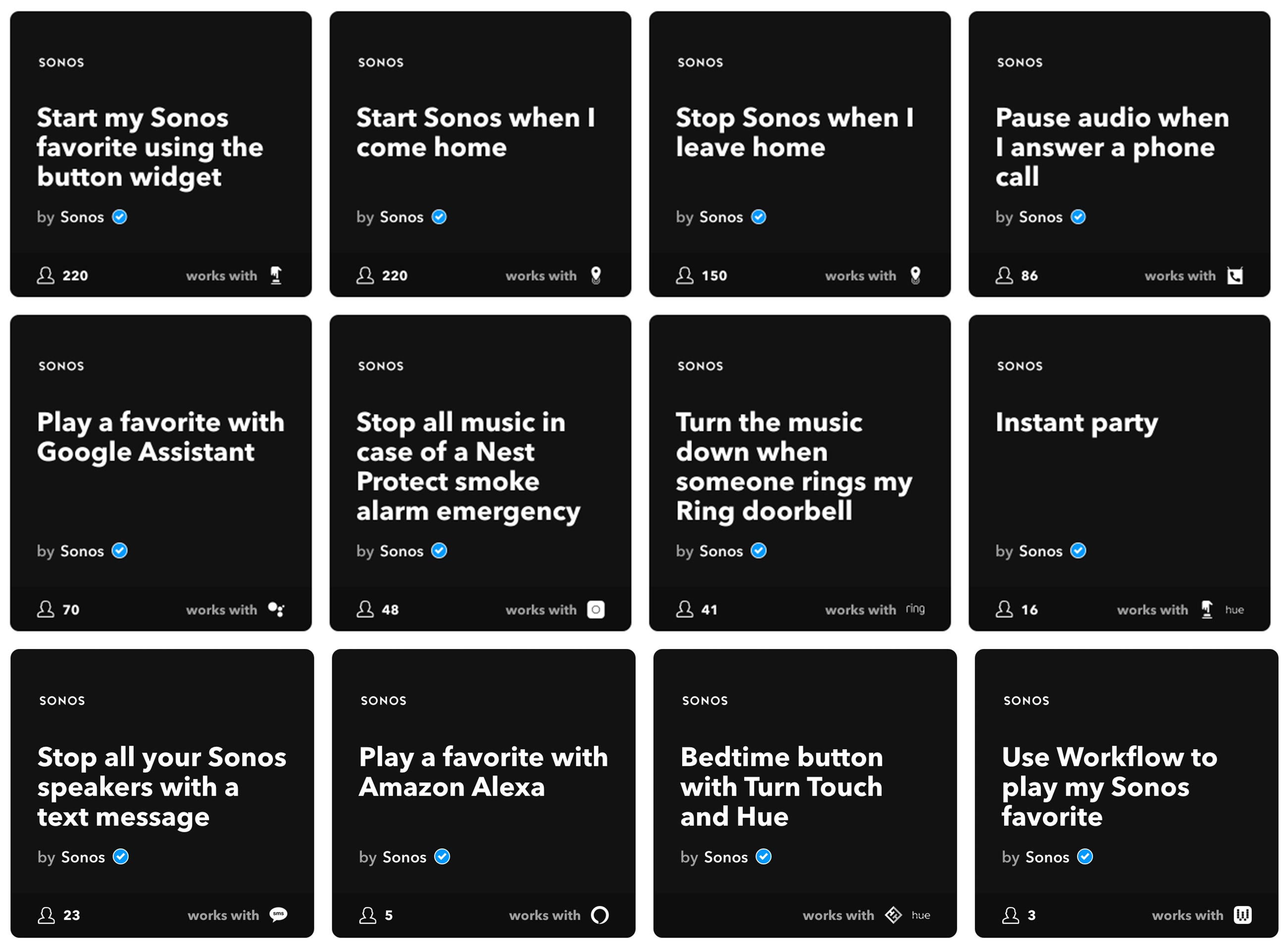
IFTTT is a platform that’s capable of tieing internet-connected devices together. It’s difficult to explain, but you set it to do things like automatically turn on music when you come home, or stop all the music if a Wi-Fi-connected smart fire alarm starts going off.

Adding IFTTT to Sonos’ already top-tier multi-room audio technology makes this skill incredibly useful. There are already a variety of app recipes that have taken advantage of Sonos’ new skills.

There’s a ton of app recipes that work with an assortment of other IoT devices like Philips Hue lights, Amazon Alexa and Ring doorbells.

More than anything this partnership looks to add future-looking smart home capabilities to Sonos’ various speakers. To browse the rest of the Sonos pre-created IFTTT recipes, click here.

Source: Sonos, IFTTT

The post Sonos is about to get a lot smarter with IFTTT support appeared first on MobileSyrup.

11 Sep 05:40

Google Pixel users experiencing bootloop issue after Android P update

by Dean Daley

A number of Google Pixel users — who own either the Pixel, Pixel XL, Pixel 2 and Pixel 2 XL — are experiencing issues after updating to Android P, according to various reports.

Users are getting stuck in a bootloop, which causes their devices to restart repeatedly rendering them useless.

Though it’s unclear how often this problem occurs, none of the Pixel smartphones in our office have experienced the bug. That said, we’ve had multiple MobileSyrup readers contact us regarding the problem.

We’ve also notice that many users have turned to the Pixel user forum to complain about the issue. The forum post, originally written on August 8th, has more than 550 comments and while not every single comment is a complaint, there are plenty of users stating that they’re also experiencing the issue.

Some users have completely reset their device to fix the issue, while others are reporting that turning off the phone via Safe Mode and turning it back on multiple times will fix the problem.

It’s unclear if Google is aware of the issue. However, we’ve reached out to the company to see if there is an incoming fix.

Let us know in the comments below if you’ve also experienced the issue.

Source: Google Pixel Forum

The post Google Pixel users experiencing bootloop issue after Android P update appeared first on MobileSyrup.

10 Sep 15:52

The Constant Consumer

by Drew Austin

Every day, the imperative to perceive oneself as a customer grows across a range of experiences and institutions: in the shopping centers and business improvement districts that have replaced public squares and parks; in the schools and hospitals, where offerings are tailored not to general social welfare but to individual consumer choice and what each can afford; and in the gym, where exercise, nutrition, and other forms of wellness have been redefined as personal lifestyle choices.

If the customer is always right, then you’re never wrong when you’re consuming. No contemporary company has offered that Faustian bargain more broadly and aggressively than Amazon. In a previous era, being at home meant you probably weren’t shopping. The mall was, as Ian Bogost noted in an essay for the Atlantic, where “consumerism roared and swelled but, inevitably, remained contained.” Freeing consumerism from that containment was one of the internet’s earliest applications, streamlining the process of shopping at home, and later, on phones.

Recent technologies have enabled the role of customer to be fused with the newer role of user, who inhabits an entire system rather than a specific transaction

Recent technologies have enabled the role of customer to be fused with the newer role of user, who inhabits an entire system rather than a specific transaction. Exploring that transition, writer Kevin Slavin describes how the experience of app-based food delivery narrows one’s perspective: “For users, this is what it means to be at the center: to be unaware of anything outside it.” Those apps’ minimal interfaces, requiring little more than the push of a button to order food, conceal the labor and logistical sophistication that make it possible. Users don’t need to understand the messy complexity that supports their simplified solipsism. In Slavin’s example, that insight wouldn’t help them order more food, so the user experience excludes it. 

Amazon similarly merges the customer and the user within its own optimized environments, letting these subjects exist at the center of an ever-expanding system. Imagine an avid Amazon customer’s typical day living with a near future iteration of the platform: He wakes up and speaks his first words of the morning to his Amazon Echo in the kitchen, asking Alexa to order toothpaste after noticing he was running low. Upon checking his email, he gives Alexa a few more instructions, adding social engagements and reminders to his calendar, checking the weather, and finally opening the garage door once he’s ready to leave for work. At the office throughout the day, idle shopping fills his distracted moments. He browses books, clothing, and even furniture, placing orders within seconds, many of which automatically appear in his shopping cart based on patterns from his activity history (he even knows that some of what he buys will be waiting at home tonight). During the evening commute another Alexa-enabled device in his car prompts him to send his sister a birthday card, an action he asks Alexa to do for him. He stops by Whole Foods to pick up groceries — as an Amazon Prime member, it’s always the most cost-effective option in his neighborhood. He arrives home to find a variety of Amazon packages stacked neatly on the living room coffee table, delivered throughout the day by part-time contractors who let themselves into the house via the smart lock on the front door. The soundtrack to his entire day is provided by Amazon Music, in which his Prime membership has automatically enrolled him for a small monthly fee. Few parts of this hypothetical day, which is already within the realm of possibility, remain untouched by Amazon’s user experience.

Amazon, as much as any single company, is transforming the environments in which we live and embedding itself within the fabric of daily existence. Beyond individual experience, those changes also manifest themselves in the physical environment. Many physical retail stores have been rendered obsolete as Amazon and other online retailers started undercutting them on price and offering a wider selection. (Bookstores experienced this first but it eventually spread to almost every form of retail.) Sidewalks and building lobbies have become staging areas for packages, with delivery vehicles exacerbating traffic and obstructing bike lanes as piles of brown Amazon boxes increasingly take up space. As Amazon and food delivery apps eliminate some of the most common reasons to leave one’s house one wonders what sort of neighborhood life will be sustainable in affluent urban areas. 

In light of Amazon’s all-encompassing ambitions, the strategy behind several of the company’s most important product initiatives — Alexa, Amazon Prime, physical retail stores (including Amazon Go and Whole Foods), and Amazon Key — becomes clearer. These products seek to redefine what being a customer means by immersing us more completely within the Amazon universe. Formerly, being a customer was a role one assumed upon physically entering a store or ordering something from a company. Amazon promises to create a newer type of environment, a hybrid of the digital and the physical, that lets us permanently inhabit that role: the world as Everything Store, which we’re always inside.


Amazon represents its efforts to erase the remaining bulwarks against consumerism as its “customer obsession.” Throughout Amazon’s existence, the company has claimed that traditional corporate priorities, from high-profile retail partnerships to short-term profitability to the company’s stock price, have always ranked below customer satisfaction. Early in the company’s history, CEO Jeff Bezos sometimes insisted on keeping one seat open at the conference room table during meetings “for the customer,” and he still scans customer feedback himself, escalating problems to relevant departments with emails that consist of a single question mark.

Part of being “right” was being offered choices to be right about

Bezos’s letter to Amazon’s shareholders on April 18, 2018, praised the company’s customers for being “divinely discontent,” unfailingly raising their expectations beyond whatever standard a company sets for them. In the letter, Bezos likens this force to nothing less than evolution — “We didn’t ascend from our hunter-gatherer days by being satisfied” — and goes on to describe the “customer empowerment phenomenon” that informs Amazon’s approach: Consumers’ access to product reviews, price comparisons, and shipping timelines has created a space where they and not retailers call the shots. To succeed in this landscape, Bezos suggests, companies must respond to their customers’ ever-increasing power by treating them like the linchpins that they are; whoever does this best will rightfully dominate its market.

Amazon’s obsession with customers appears to have endeared them, again and again, to a public that should know better: Earlier this year, Amazon announced that Prime memberships had surpassed 100 million globally, with more new members joining in 2017 than in any previous year. The company’s second-quarter sales in 2018 grew 39 percent versus the previous year. Many have started welcoming Amazon’s physical presence into their homes, with Alexa-enabled devices ranking among the company’s best-selling items. “Customer obsession” is a happier narrative for this dominance than one of aggressive market capture, anti-competitive tactics, and ruthless labor exploitation. Like “support the troops,” or “what about the children,” caring about the customer seems like an impregnable position to take. It’s a more specific iteration of Google’s “Don’t Be Evil”: How could a consumer-focused company be evil, when we are all consumers? What could be wrong with the company being focused on our needs?

But that is the fundamental problem: Amazon’s constant praise of the customer implies we are all already customers and nothing more — that we should understand “consumer” as our core identity. The company’s endless praise for the consumer role is part of its intent to disarm us, to invite us to enter its universe of deals and recommendations and to internalize the status of permanent customer — and specifically, Amazon’s customer. Overall, Amazon’s most important product is how it creates and refines a world in which the Everything Store converges with just plain everything and, being ubiquitous, becomes invisible.


We dream of being creators, friends, neighbors, or citizens, but rarely of being customers. The customer role used to be temporary and specific — buying something from a seller — and not an aspirational identity. What happened?

In the 19th century, industrialization and mass production yielded an unprecedented flood of goods. Commerce was suddenly no longer constrained by supply but demand. Stimulating consumption became crucial; making customer a primary and perpetual identity was a key solution. To achieve this, retailers worked to make feelings of agency and significance available to people, but only on condition of being a customer. This approach is articulated by a slogan often attributed to department store magnate Henry Gordon Selfridge in 1909: “The customer is always right.”

If being a customer feels so great, as the past century has trained us, what happens when the consumer experience encompasses us so completely that we forget we’re customers at all?

Part of being “right” was being offered choices to be right about. Whereas Henry Ford once famously joked that customers could buy a car in any color they wanted, as long as it was black, such narrow standardization proved a less viable course as mass markets became saturated. Rather then sell products on their basic utility, advertising began to orient itself toward identity, selling the idea that individuals could reveal their unique selves through purchases. Edward Bernays, a nephew of Sigmund Freud, pioneered this approach in the 1920s, purporting to link goods to individuals’ inner desires. By the logic of identity-driven advertising, wanting more things corresponded to greater personal depth. Being a customer gave one access to not only a cornucopia of goods but also the rich recesses of one’s psyche.

These processes have only become more sophisticated over the decades. At the individual level, unrestrained identification with the customer role has foreclosed other identities we might imagine for ourselves, such as political activism, resource stewardship, and community participation. David Harvey, in A Brief History of Neoliberalism (2005), diagnoses a late 20th century shift toward “a market-based populist culture of differentiated consumerism and individual libertarianism.” In this culture, at the structural level, businesses must cater to the customer identity to survive. In lieu of tolerating moderate inconvenience, higher prices, and some potentially awkward human interactions in order to support local businesses, the logic of efficient and limitless customer service offers fast food chains and big-box stores, which offer cheaper goods and routinized retail interactions. These, in turn, are now in the process of being supplanted by Amazon.

Consumerist approaches aren’t the best solutions to many problems, but at present they’re often the easiest to imagine and most realistic to implement, if only because they have the support of the corporate powers that benefit from them. The transition toward consumerism across so many domains exemplifies a phenomenon that writer Sarah Perry calls a tiling structure, a system that “tiles the world with copies of itself.” Tiling structures flourish because they solve certain problems well enough that they become more or less mandatory, and block alternate solutions. Perry cites billboards, strip malls, and big-box retail stores as particularly visible examples of tiling structures. By minimizing their costs relative to the revenue they generate while externalizing negative impacts such as poor pedestrian access and unpleasant aesthetics, they spread throughout suburbia in the 20th century, entrenching sprawl as the default format of American retail. Even identity-oriented marketing itself is a tiling structure: It has worked well enough for those with something to sell that it has gradually pervaded the commercial landscape, leaving its detrimental social and personal effects for someone else to fix.

Tiling structures have introduced customer-service logic to cultural spaces that were once sheltered from markets. Communities based on common interests, shared identity, or physical proximity, from neighborhoods to political groups to religious institutions, must now respond to their constituents’ increased mobility and access to information by treating them like the empowered customers that Bezos described to his shareholders — customers who will leave if they find something better elsewhere. Individualized, personal-identity-based appeals replace collective orientations. As a tiling structure, this shift occurs because it works for the group implementing it, not because it’s best for everyone.

The best example of this transition may be the neighborhood itself. Living in a city, for many, resembles a pure customer experience, in which buying or renting an apartment or home determines one’s relationship with a place more than membership in any kind of community. Residents commonly don’t know their neighbors and oppose local developments that serve a greater good at their own expense. Real estate agents even appeal to individual identity to brand various locations and increase their appeal. Higher education, similarly, has recategorized students as customers, emphasizing efficiency and consumer choice over education’s role as a socially useful endeavor to participate in.

Our lives are increasingly oriented toward a global system of consumerism mediated by massive, scale-seeking platforms rather than smaller, more localized groupings. Robert Putnam’s Bowling Alone, published in 2000, documented declining participation in labor unions, fraternal organizations, and religious groups, partially attributing that decline to socially atomizing technologies like television and the internet (which was relatively young at the time) — both key facilitators of consumer culture. Many of the fading forms of social engagement Putnam describes have their own shortcomings, like restrictiveness and discrimination, but their benefits are undeniable, ranging from personal happiness to civic involvement.

As globalized platform consumerism erases more of what preceded it, replacing intricate social arrangements with individual links to large impersonal systems, it’s harder to remember what we’ve lost. Less and less equipped to imagine ourselves as anything but customers or users within those systems, we adopt the desires that companies like Amazon can best satisfy: convenience, choice, and frictionless consumption. These developments may be replacing another consumer system that wasn’t necessarily worth preserving itself, but beyond those visible changes, we face a new risk: becoming users offline, in the physical world. The more Amazon can control our experience of that environment, the less we’ll care what’s outside the system it creates.

Amazon’s true objective, it seems, is a full infiltration of the world rather than ongoing refinement of a walled garden confined to the internet. Instead of scaring its customers with its totalizing ambition, the company has successfully marketed this arrangement as  desirable. To permanent customers, further gains in convenience, choice, price, and delivery speed are pure benefits. If life is meant to be a series of consumer experiences, they might as well happen as seamlessly as possible.

Years ago, Amazon’s “1-click” purchasing option seemed to remove all remaining friction from online shopping, but there was still a long way to go. The company’s more recent initiatives respond to deeper psychological friction that might prevent us from purchasing a product using Amazon’s platform. In a reprise of what happened a century ago, manufacturing and distribution have again progressed to a point where the customer is the greatest constraint on commerce. A single-click purchase still requires opening Amazon’s website or app, but people spend plenty of time away from their device screens. The Amazon Echo and other Alexa-enabled devices, placed throughout our homes like furniture, connect more directly to our supposedly subconscious impulses by letting us simply speak our desires and translating those words into Amazon orders. We might change our minds by the time we get around to opening an app, after all.

Amazon Prime complements this arrangement, letting us become formal members of the Amazon ecosystem and feel like we’re always already inside the Everything Store. The company’s physical retail stores — Amazon Go, Amazon Books, and now Whole Foods — extend that territory to the urban space that Amazon had previously bypassed. And home technologies like Amazon Key reopen the home at the conclusion of the order, inviting the company’s delivery workers to let themselves in and drop off our merchandise.

Writer Matthew Stewart, describing the urbanist vision revealed through Amazon’s patent filings, characterized its strategy as “a colonization of everyday experience; a concerted effort to control an all encompassing infrastructure of home, office and retail automation, one in which the city becomes a giant fulfillment center, and humans mere inventory pickers.” More than removing friction from its user experience, Amazon wants to be our environment.

In realizing such a totalizing vision, Amazon faces an obstacle: If being a customer feels so great, as the past century has trained us, what happens when the consumer experience encompasses us so completely that we forget we’re customers at all? The minor friction of 1-click ordering pleasantly reminds us how easy it is to be one of Amazon’s empowered customers, the object of the company’s obsession. Will we remember that feeling if “smart” devices can effectively read our minds and our desires subtly manifest themselves in our homes?

This quandary returns us to the definition of user. A user isn’t just an evolved customer but a qualitative transformation of that role: one who occupies a system and creates value for the system’s owner by merely being there, just as Google and Facebook’s users generate valuable data by partaking of their services. Those platforms, for all their seeming omnipresence, haven’t figured out how to expand beyond their digital containers. This is Amazon’s ambitious vision: The world is its platform, and instead of being customers, we will just become users whether we are looking at screens or not.

10 Sep 15:52

TFW you reject your own submission

by Jonathan Edwards

Dear Jonathan,

We’re sorry to inform you that your submission #12

Title: Direct Programming

was rejected, and will not be presented at the LIVE 2018 workshop. Your reviews are included below; all papers were reviewed by 3 people. We had a record 22 submissions this year, and were only able to accept 10, so making the decision was hard.

We would like to take this opportunity to thank you for your submission and we hope you find the reviewers’ comments helpful.

– Roly, Ravi and Jonathan

Review #12A
=================================================================

Overall merit
————-
3. Weak accept

Reviewer expertise
——————
3. Knowledgeable

Paper summary
————-
This submission presented a prototype of a direct manipulation programming environment that records the actions that the programmer performs on a tree structured “document” in an editable history. It also records intermediate states when evaluating procedures and allows the programmer to view and perform some modifications to the program by selecting from menus.

Comments for author
——————-
There were a number of interesting technical ideas in this presentation. I was particularly intrigued by the idea of an editable history of edit actions, and in the operation that abstracts portions of the history into a formula. This sort of direct manipulation of history seems to represent a fertile avenue for further exploration, so I would be happy to see this work presented at the workshop. The presentation was quite well-organized and clear, with appropriately simple examples and careful explanations. I’d love to play around with the presented tool (it would be nice if it had a name).

However, I gave the submission a “weak accept” because the qualitative claims seem to be unnecessarily grandiose — why is it necessary to claim that the interface is for “normal/regular people” (what does that mean?) or that the “notional machine is not a robot — it is yourself”? In fact, the system is fundamentally oriented around a rather complex programming language (it seems to have some sort of stack-based imperative semantics, combined with some reactive features, and an idiosyncratic transactional semantics for conditionals). The programmer will need to develop an understanding of its rather subtle semantics to be able to use the system effectively, just as in any other programming environment.

The direct manipulation features (which mostly seem to be simple context menus that insert low-level operations into the program) and live programming features seem like valuable cognitive aids and time-saving conveniences, but to claim that they eliminate the need to understand the programming model (“notional machine”) is shockingly bold, especially when the author has neither evidence, nor even an idea of how to operationalize these kinds of claims such that evidence could be gathered.

Why not just describe the interesting features of the programming environment being designed, explain precisely the benefits these features _might_ provide in various settings, and leave out the grand claims about reinventing or democratizing programming? (I hope that the LIVE community as a whole starts having these discussions about humility in framing our work!)

Finally, it would have been nice to see more related work mentioned. In particular, the Hazelnut edit action calculus explores the idea of a formalized language of edit actions (see the paper by Omar et al at POPL 2017). Another related project is “Expressions of Change”: http://www.expressionsofchange.org/. Many aspects of the system also reminded me of Smalltalk, but no direct comparison was made.

* * * * * * * * * * * * * * * * * * * * * * * * * * * * * * * * * * * * * *

Review #12B
=================================================================

Overall merit
————-
3. Weak accept

Reviewer expertise
——————
3. Knowledgeable

Paper summary
————-
This video proposes a programming environment that combines Programming-by-Demonstration (PbD) and live programming (LP) for beginners. A programming step starts manipulating the current set of states, which contains a list of variable-and-value pairs. The manipulation, such as applying some built-in operation, is recorded as executable code in a neighboring pane. The recorded code can be edited, whose effect is immediately reflected on the states pane—where LP comes in. The video then discusses a bit more advanced constructs such as functions, conditional branches, and looping.

Comments for author
——————-
As the video claims, a combination of PbD and LP would be a novel idea. In this sense, this work is worth presenting at the workshop.

The motivation (or a part of the motivations) of the work, which is for beginners’ learning, should have been clarified at the beginning of the talk. Otherwise, the audience would start thinking about more complicated and generalized programming situations.

It is better to distinguish the terms programming-by-example and programming-by-demonstration. The former usually means systems that deduce a program from pairs of input and output, while the latter means systems that converts the user’s operations into code. This work falls into the latter.

While the idea of combining PbD and LP could be useful to learners, the mechanisms for programming constructs beyond assignments (i.e., functions, looping and conditional branches) are rather complicated. This is maybe I am too biased to read traditional programming languages. But I am not sure if the efforts on learning those mechanisms (in addition to the concepts of those constructs) can be reduced from a situation where the programmer uses the traditional syntax with this kind of liveness support.

* * * * * * * * * * * * * * * * * * * * * * * * * * * * * * * * * * * * * *

Review #12C
=================================================================

Overall merit
————-
2. Weak reject

Reviewer expertise
——————
3. Knowledgeable

Paper summary
————-
This presentation describes direct programming, a novel approach which
incorporates the programming in the live environment.

Comments for author
——————-
I find this paper highly relevant for the workshop. Nevertheless I am
not sure what is the intended usage of the presented tool. The authors
agree that this is not a programming platform. The other potential use
is for educational purposes, but again I cannot see how it can help
students since one cannot even demonstrate a simple sorting algorithm.

Furthermore, there is a constant misuse of the “programming by
example” (PBE) expression. In PBE, there is a list of inputs and
outputs, and the PBE engine has to synthesize a program P which
returns given outputs for given inputs. Note that program P is not
known and has to be synthesized. In this work, the authors apply a
known program to a single example and then their tool propagates this
known program to other given inputs.

On a positive note, I really like the GUI for presented work. I
believe that this GUI and user interactions reflect the real spirit of
live coding.

10 Sep 15:51

Fast Company Innovation by Design Award for Common Voice

by Mozilla

Today Common Voice — our crowdsourcing-initiative for an open and publicly available voice dataset that anyone can use to train speech-enabled applications — was honored as a Finalist in the Experimental category in Fast Company’s 2018 Innovation by Design Awards.

Fast Company states that Innovation by Design is the only competition to honor creative work at the intersection of design, business, and innovation. 

The awards, which can be found in the October 2018 issue of Fast Company, on stands September 18th, recognize people, teams, and companies solving problems through design. After spending a year researching and reviewing applicants Fast Company is honoring an influential and diverse group of 398 leaders in fashion, architecture, graphic design and data visualization, social good, user experience, and more. To see the complete list go to: https://www.fastcompany.com/innovation-by-design/2018

“The future of design is about more than coddling users,” says Stephanie Mehta, editor-in-chief of Fast Company. “It’s about giving them power over their technology.” We as Mozilla couldn’t agree more. And not only to the extent of how they use technology but also how and for whom it is being developed. The recognised Common Voice experience didn’t “just happen” by chance. From the very beginning, the team around the Open Innovation project has been diligent about bringing in additional minds and perspectives from day-to-day users and experts likewise, testing and revising prototypes, all while challenging initial, strongly held assumptions. Another visible result of this is the ongoing, collaborative iteration of the project website and contribution methods with the project’s diverse communities.

For those interested in how human-centered research and design has shaped the direction of Common Voice, the Open Innovation Team has kicked-off a series of articles to share learnings about the application of Service Design to Open Source projects. These will include how  communities and new experiments may benefit from, and engage with, this perspective. To read more, visit the Open Innovation Medium Blog.

The Innovation by Design Award is the second distinction for the project, after Tech publication InfoWorld, along with Open Source software developer Black Duck, named Common Voice one of the seven Open Source Rookies of the Year for 2018. Back then Common Voice made the cut from an initial list of roughly 11,000 Github/openhub projects.

The post Fast Company Innovation by Design Award for Common Voice appeared first on The Mozilla Blog.

10 Sep 15:51

Guess the weight, win a thing!

by Alex Bate

Today marks the four-year anniversary of Nicola Early joining the Raspberry Pi team. Nicola works as Administrator at Pi Towers and is responsible for so many things that I dare not try to list them all. But among all her tasks, the most important one is the care and maintenance of the office rubber band ball.

Pi Towers Raspberry Pi Rubber Band Ball

The rubber band ball chronicles

Every working day for the last four years, whenever the postman delivers the packs of letters, Nicola has had at least one new rubber band to collect. And so over time, the ball has grown and grown and grown.

Nicola is very protective of the ball, so if you come to her desk in search for a rubber band, you’ll have to withstand her glare as she reluctantly removes one from her expanding collection.

Pi Towers Raspberry Pi Rubber Band Ball

If we are to consider that, in the UK, there are about 261 working days in a year, and Nicola has been working at Pi Towers for four years, it’s fair to estimate the ball consists of at least 1044 bands.

So our question for you is this:

How much does the ball weigh?

Submit your guess in the comments below*, or in the tweet, Facebook post, or Instagram post for this blog, and the closest guess will win a Raspberry Pi T-shirt and, if we can manage it without her noticing, a band from the very ball in question.

Pi Towers Raspberry Pi Rubber Band Ball

To take part, you need to submit your guess in grams by midnight next Monday 17 September. Multiple guesses on the same platform from the same account will be ignored — so behave.

*Members of the Raspberry Pi team may not take part, as there are scales on Nicola’s desk, and I don’t trust any of you.

The post Guess the weight, win a thing! appeared first on Raspberry Pi.

10 Sep 15:51

En vrac du lundi

by Tristan

photo de compteur de moto indiquant un voyage de 538,8km

538,8km sur ma vieille moto V-Strom 650 avec un seul plein (réservoir de 22L), merci l’éco-conduite : 4,08 L/100 km !

10 Sep 15:50

The Rough STM18 Intro Round Output

by Ton Zijlstra

At the Smart Stuff That Matters unconference we did an ‘anecdote circle lite’ as an introductory activity. Participants discussed in small groups about their latest move to a different house, in terms of the biggest disappointment and most pleasant surprise of living in a new house/neigbourhood/city.

While one participant talked, the others in the group would write down things that stood out for them. This served as raw input for putting together the program of the day. Below the photo of all the remarks that ended up on one of our living room windows, is the transcription of all 130+ post-its. It is unsorted and in random order. Some of the post-its read like they’d deserve their own blogpost to explore.

stm18

  • City is experienced more than the place, the place lived more than the city
  • Does smart stuff make us faster? Smart slow stuff: yoga, walk the dog, pillow, alone time, just be, mountain bike
  • Get in town by changing speed
  • Move (=1) integrating connected to social fabrics (=2)
  • turning old hous into a living space
  • material things vs digital: like e-book collection
  • segregation big city, hard to connect
  • big new build house, spoiled? comfort
  • old owners of the house had own way of doing things (and we have the implications)
  • de-smart, why needed? “Lekker zelf knoeien
  • Combination green city garden station, freedom + comfort
  • moving from big to small, small to big
  • different transitions together with moving houses
  • the fence that is permeable (privacy + see through and contact)
  • shed-own space, tinker space
  • get to know people on the street
  • there are kids in the neighbourhood, but we hardly see them
  • it is more stressful when you know more
  • physical limitations, short range, 500m
  • travel time vs family time
  • self reliance, responsibility, freedom critical
  • plants and music
  • where to find coffee
  • un-smarting, light
  • children help bring/make community
  • technology also ‘blinds’ local jewels
  • approach newcomers
  • learning from overhearing experts
  • takes meeting many potential friends to find one
  • moving to area with different culture is interesting
  • small community very comfortable
  • small talk = life blood of community
  • when do you live in a city or just use a house
  • connections matter
  • transition issues – how not to get crazy in the process
  • you don’t want to be sharks with sharks, you want to be a shark with a fish
  • expanding and contraction
  • tinkerspace
  • energy
  • interhuman connection
  • view of a green toolshed, lots of travel time for work
  • eyeglass 2016 meltdown travel
  • accessibility in the city
  • rediscovering the city when not able to walk far
  • home = your own stuff? (living together!)
  • never moved, ice damage, 2 yrs
  • segregated cultures
  • to the hague, busy, rules and fines, large differences
  • standing out from the crowd is hard
  • slow moving, gradually
  • to make friends you need to see them in new environments/situations for next level
  • big city, big street, no social cohesion
  • smalll town -> big city
  • groups stay separate
  • sharing with other people to connect -social media, -online communications, free online courses
  • smart stuff to feel home: old fashioned slow stuff
  • living in 2 places, moving without moving
  • having a group that makes you feel at home
  • yard work = meeting people
  • social fabric in neighbourhoods, how to reach eachother
  • smart vs responsibility
  • homeschooling techniques & stories
  • stm starts with people, human, after that technology
  • anti-squatting: live in a room that is not designed for it / community
  • you have to move, even when moving
  • liked a 30s-40s home, but appreciates the comfort of a brand new one.
  • house with a garden, everything around the corner. Feeling the need for less ‘smart’
  • The stuff you bring to a new home define feeling at home
  • the first move breaks you
  • MSTM14 – best travel experience
  • hired house vs bought house, changes vs stable
  • amsterdam -> borg. Wow I’m living here now, jazz musicians
  • not being at home after moving busy at work
  • staying out of algorithmic propaganda world
  • when you build a new house you have to imagine how it will turn out. You buy it ‘on paper’. Conformity=expectations of society
  • outside city -> center, old house requires a lot of work, what do you really need?
  • smart slow stuff, algoritmic propaganda world
  • house is where I am, flexible/portable housel
  • live in an ambulance
  • connecting to people in building.
  • welcoming neighbours
  • moving evolves the world (e.g. neanderthals) and your family (e.g. ancestors)
  • discovering other similar people
  • home for kids so different for parent. time/part in life
  • kids do better understanding systems
  • needs from social fabric depends on the situation
  • social needs interaction
  • rules for making friends: it’s work, you need to set out to make friends
  • being somewhere new for a month inspiration
  • home is a combination of green and the comfort of good facilities
  • freedom
  • silence
  • “central”
  • being there needs a decision
  • unpredictability is cool too
  • serendipity?!
  • bumping into people is important
  • home ~~~~~ discovery
  • erasing traces / tracks
  • understand the city depends on the way of transport
  • Airbnb is not about living only
  • how to find chemistry
  • small road to a small town with 70 people
  • childhood roots us
  • what could possibly go wrong while moving
  • transitions are key stress factors
  • 1st home physical co??? with the space
  • walk cycle go by boat
  • discovery needs slowness
  • building informal network
  • moving is losing
  • noise
  • heart vs wallet
  • right side of town
  • freedom from family
  • more development after my development
  • cats own the house
  • all the friends you haven’t made (yet)
  • via Facebook a small room in Amsterdam
  • when do you still bump into friends by accident
  • a simple light switch works better than any app
  • hack your kid: online games -no money -earn money by irl activities
  • kids: boat —> steer, morning ritual, egg timer, backlog
  • color coding, feedback, move board along
  • yes you can forbid things (hack your kid)
  • connecting with people in buiding + new intro of people living in same building
  • warmth vs energy bills
  • adapt to little negative things
  • back in the city
  • architecture influences interaction / community
  • having a house you can walk around
  • NL-Hungry->USA->Turkey->NL (neighbours) – kids running through
  • old church now serves as a community center
10 Sep 15:45

Samsung Galaxy S9 and S9+, six months later

by Ted Kritsonis

It’s been six months since Samsung first unveiled the Galaxy S9 and S9+ and both devices have carried forward the company’s iterative path with each successive launch.

It’s fitting that this review comes around the same time Samsung released the Galaxy Note 9. The two lines have become so intertwined, past differences are increasingly blurring into obvious similarities. What was once more of a binary choice is now coming down to a matter of taste.

These two devices were truly the biggest leap — not forward from a technology perspective, but rather toward what the Note line had been doing before. What the Note 8 got wrong, the Galaxy S9 and S9+ tried to fix. And that trend continued with the Note 9.

Despite that, there is plenty to like about this pair of devices. Months have passed, and its lower price only looks more attractive next to other expensive devices.

The device

It’s not surprising Samsung’s design philosophy maintains its attractiveness over time. Even the Galaxy S7 still looks good by today’s standards. The all-glass form factor has been done before, except that’s there’s an elegance to the S9/S9+ that is hard to deny. They’re pretty phones, and they still feel that way months later.

They’re also very delicate. Like the iPhone X, with its all-glass build, I found myself clutching both handsets the same way. A case certainly helps, but only a rugged one would give me real peace of mind. I’ve never been prone to accidentally dropping any phone, but it’s also that any contact or friction with other items, like in a pocket, that are a cause for concern. To me, when you have something elegant, you want to keep it that way.

Functionally, both devices have some interesting caveats. Putting the fingerprint sensor under the camera lens is arguably the biggest one, simply because of how convenient it is being there. I prefer it over using the iris scanner or face recognition, though I do wish Samsung would’ve placed it closer to the middle of the device, especially with the larger S9+.

Samsung Galaxy S9+

It contrasts with the curved display, which I find less and less useful. Samsung seems to agree because it’s done nothing of real consequence with it since 2016. Third-party developers have been lukewarm supporting it, though I readily admit there’s a surprising number of panels to download for the edge interface.

The S9+, especially, feels like a Note 8, primarily because of the large 6.2-inch Super AMOLED and dual lens camera layout. Samsung added a mechanical aperture to it, which can be useful when used properly. The S9, on the other hand, doesn’t have two lenses, though it does have the variable aperture. From wireless charging to the headphone jack and on to battery life, the similarities between these three devices are continuous.

Under the hood, the components have held up well thus far. As much as Samsung has been praised (and rewarded by all the consumers buying their phones) for its design and functional purpose, the company’s devices haven’t always aged well. And yet, the S9/S9+ seem to have stemmed that tide just a little bit. Hiccups, lag and crashes are practically non-existent, hopefully ushering in an era where a Samsung flagship isn’t measured by its longevity relative to manageable degradation.

The software

On the face of it, Samsung has reduced its overbearing presence within its software overlay. Under the surface, however, the ‘Samsung Experience becomes one of necessary acceptance rather than adamant acquiescence. It feels bloated over time, and I blame the redundancy inherent in the whole thing.

Why Samsung insists on having its own web browser is beyond me. It’s never as good as third-party ones anyway. In the past, the company shielded users from its excesses by using its Galaxy Apps app as a repository. If you completely ignored it, you could get by without really embracing anything Samsung was offering.

Looking at the preloaded apps, there is a bunch of stuff in there that speaks to the company’s ecosystem. Gear devices, SmartThings, memberships, or other stuff that arguably should’ve been abandoned already. I don’t know if Samsung Health has a large number of regular users, but I can’t imagine it does. It’s never worked well, and pales in comparison to other more dedicated third-party options.

Samsung Galaxy S9 software

One of the issues, at least for me, is that despite the apps being put to the side, the whole Samsung Experience feels like an app unto itself. Every part of Android has been given some sort of paint job that becomes all the more prevalent when compared to stock Android devices like the Pixel 2.

Even so, Samsung’s software is a fact of life that has clearly gained some confidence with users. The company wouldn’t sell as many units as it does otherwise. But more needs to be done to effectuate a clearer vision on how it can be more useful. For example, the Always-On display needs some change, especially when it comes to administering notifications. Giving me the gist of what’s come in is okay, but I still have to take an extra step or two just to do something with it.

The app launcher could use a few tweaks, as well. Putting the most recent apps at the top is one of those small moves that adds real convenience. Other Android handsets have it, Samsung doesn’t. There is a barrage of notifications and settings directly tied to something the company is trying to sell users on, be it an app to help copy data over to a new device, or Bixby, or Galaxy Apps, or whatever else is available.

I’m harping on the user experience here, and I know it sounds like a lot of griping, but it has more to do with how well these two phones have actually run so far. I’m just saying the right tweaks would only make it better.

I was impressed at how well games played on them. Media streaming is excellent. Phone calls and messaging are top notch. Photo and video editing don’t seem to make anything stutter, either. In other words, actually doing stuff on these phones doesn’t put up roadblocks that totally hinder one’s intent. Demanding apps run smoothly, and the automatic screen brightness is noticeably better than it once was, helping save battery life in the process.

Android updates

It’s probably never going to happen, but a Samsung flagship that runs something closer to stock Android would be special. The Samsung Experience software (plus carrier foot-dragging) complicates the Android update process, as it is, and it’s unclear when either of these devices will get to Android 9.0 Pie.

Delays in getting full OS updates has become par for the course with Android phones, in general, unless you’ve got a Pixel in hand. But for Samsung, the delays are even more unfortunate because two of the leading Android flagships aren’t going to run the latest version until months after it rolled out.

Galaxy S9 software

Monthly security patch updates were a bit slow to come out after launch until the last big update in July brought things up to speed.

As I write this, both the S9 and S9+ I’m using are on the June 1 patch, though I’ve seen others online on the July 1 or even August 1 patches. These should come out like clockwork to be consistent with Samsung’s focus on security.

Bixby

Samsung is pushing Bixby hard, but the hill appears to be getting steeper to climb from where I’m sitting. The conundrum here is not just how effective and ‘smart’ the company’s voice assistant can be, but also how well it ties in to everything people would use it for.

As is, the platform is more a verbal-guidance system for stuff within the S9/S9+ than anything else. Sure, it’s cool that I can tell either phone to snap a photo, take a screenshot or send a message to someone, but I have little control beyond Samsung’s own borders.

The Spotify integration announced at the Note 9 launch in Brooklyn will also come to the S9/S9+, as would the ability to order an Uber or make restaurant reservations. These are good starting points to winning more hearts and minds, except that Google Assistant runs perfectly fine on both phones. For the sake of reviewing the platform, I kept Bixby going, but I eventually just enabled Google Assistant, too.

Bixby can try to give me context, like translating a sign, or telling me where I can find a certain product (through Bixby Vision), but again, it never feels natural. Plus, I have no control over smart home devices unless I have a Samsung SmartThings Hub at home. Compatibility in different aspects remains the biggest hurdle to getting this voice assistant beyond what feels like an experiment.

The camera

Having already reviewed the camera for both phones, there’s no need to repeat myself, though I was looking for something that would change between then and now. Samsung did release an update in July that included camera improvements.

Those tweaks were for stabilizing the AR Emoji and Super Slo-Mo modes, both of which were acquired tastes from the start. Super Slo-Mo is a nice novelty that excites most when capturing an absolutely salient moment in a clip. The problem is getting that right takes multiple attempts, and once light gets dimmer, a snowfall of noise packs the footage. These were the devices Samsung first introduced the mode, which it now also put into the Note 8, lock, stock and barrel. At 720p, the resolution is still too low to work with.

Samsung Galaxy S9+ charging port

The same is true of AR Emoji. This was a mode Samsung felt would resonate over time, but I’m not seeing it. At times creepy, and at other times, bizarre, the mode isn’t quite accurate or cutesy enough to make a case for being a standout feature people want. Maybe it’s just me, but I still see people preferring Snapchat or Instagram to use filters and animate themselves.

The camera comes down to the basics, which is shooting photos and video. I’ve seen other reviewers be less enthused with the variable aperture, but I see it as a real boon because it relies less on software to handle exposure. Fixed apertures are standard on phones, so to have the option of two is helpful when shooting in low-light. I found the best use was in Pro mode where it helped me rely a little less on shutter speed and ISO.

The battery

If there’s one thing the Note 8 has over these two phones, it’s a more efficient battery. The S9+, in particular, is saddled with a smaller 3,500mAh battery that can struggle with heavier usage. The Note 8 has a 3,300mAh battery, and while it’s still early into its lifespan, it showed me better performance from the get-go.

As it stands…

Much of what I’ve noted isn’t all that positive, but that’s not to say either of these phones are bad. They do the main things very well, like general usage, smooth performance, great photos and elegant design. It’s not the sum that’s bad, it’s some of the parts that force compromises.

The edge displays make these phones more susceptible to damage, yet they may otherwise be neglected as usable features. Hardware performance is slick, except the software sometimes feels imposingly weighted. The camera shoots wonderfully, albeit with gimmicky settings and modes tacked on.

These compromises become far more apparent over time. While some of them can be tucked away and ignored, others are more omnipresent. There is plenty of room for customization, what with third-party launchers and uninstalling or disabling apps, among other tweaks, but I would venture that most casual users don’t do that.

These are still $1,000 phones, but they will continue to depreciate now that the Note 9 is out, and rumours circulate about what the Galaxy S10 will have. Six months from now, these might teeter further down toward mid-range pricing.

The post Samsung Galaxy S9 and S9+, six months later appeared first on MobileSyrup.

10 Sep 15:45

Apple’s entry-level 6.1-inch LCD smartphone is called the iPhone XC: report

by Patrick O'Rourke
iPhone XC

With Apple’s ‘Gather Round’ keynote just a few days away, we’re coming down to the wire concerning the leaks and speculation surrounding the event.

The latest news, which comes courtesy of leaker Ben Deskin ‘@VenyaGeskin1,’ as first reported by 9to5Mac, reveals that Apple will reportedly name its often-rumoured entry-level 6.1-inch LCD smartphone, the iPhone XC. This is the first time information regarding the name of the more affordable smartphone has appeared.

If the leaked images are accurate, the iPhone XC will be available in red, white and blue. Other rumours surrounding the smartphone hint that it will feature 3GB of RAM, rather than the 4GB included with the iPhone XS and iPhone XS Max. Also, the device will likely ditch Apple’s 3D Touch pressure-sensitive technology, as well as wireless Qi charging.

There’s also a leaked slide pulled from a China-based carrier marketing presentation circulating on Weibo, a Chinese social media platform. This slide tips that Apple’s smartphone lineup will consist of the iPhone XS, the iPhone XS Plus — rather than the iPhone XS Max moniker — and the iPhone XC.

News has already leaked that Apple is rumoured to call its next-generation 5.8-inch OLED smartphone the iPhone XS, while its larger 6.5-inch OLED-clad sibling will be named the iPhone XS Max.

For a comprehensive round-up of rumours and speculation surrounding Apple’s upcoming fall hardware event, following this link.

Image credit: Ben Deskin ‘@VenyaGeskin1’

Source:Ben Deskin ‘@VenyaGeskin1,’ Macotakara Via: 9to5Mac 

The post Apple’s entry-level 6.1-inch LCD smartphone is called the iPhone XC: report appeared first on MobileSyrup.