Kjetil Golid made an interactive that lets you generate a noise field using a gradient from an image of your choosing. Fun. And excellent wallpaper material.
Kjetil Golid made an interactive that lets you generate a noise field using a gradient from an image of your choosing. Fun. And excellent wallpaper material.
As requested, we’ve completed a full, scene-by-scene, truthiness analysis of Bohemian Rhapsody.
The results for our fact-checking of the 2018 movie about Freddie Mercury’s life, starring Rami Malek, have been added to our Based On a True True Story? interactive. What was the real nature of his relationship with Mary Austin? Did he really meet Jim Hutton after a party? We’ve got the answers.
» Comb through our findings
» Explore the data
I’ve been on something of a code rollercoaster over the last few days, fumbling with Jupyter server proxy settings in MyBinder, and fighting with OpenRefine, but I think I’ve stumbled on a new pattern that could be quite handy. In fact, I think it’s frickin’ ace, even though it’s just another riff, another iteration, on what we’ve been able to do before (e.g. along the lines of deploy to tutum, Heroku or zeit.now).
(It’s probably nothing that wasn’t out there already, but I have seen the light that issues forth from it.)
One of the great things about MyBinder is that it helps make you work reproducible. There’s a good, practical, review of why in this presentation: Reproducible, Reliable, Reusable Analyses with BinderHub on Cloud. One of the presentation claims is that it costs about $5000 a month to run MyBinder, covered at the moment by the project, but following the reference link I couldn’t see that number anywhere. What I did see, though, was something worth bearing in mind: “[MyBinder] users are guaranteed at least 1GB of RAM, with a maximum of 2GB”.
For OpenRefine running in MyBinder, along with other services, this shows why it may struggle at times…
So, how can we help?
And how can we get around the fact of not knowing what other stuff repo2docker, the build agent for MyBinder, might be putting into the server, or not being able to use Docker compose to link across several services in the Binderised environment, or having to run MyBinder containers in public (although it looks as though evil Binder auth in general may now be available?)
One way would be for institutions to chip in the readies to help keep the public MyBinder service free. Another way could be a sprint on a federated Binderhub in which institutions could chip in server resource. Another would be for institutions to host their own Binderhub instances, either publicly available or just available to registered users. (In the latter case, it would be good if the institutions also contributed developer effort, code, docs or community development back to the Jupyter project as a whole.)
Alternatively, we can roll our own server. But setting up a Binderhub instance is not necessarily the easiest of tasks (I’ve yet to try it…) and isn’t really the sort of thing your average postgrad or data journalist who wants to run a Binderised environment should be expected to have to do.
So what’s the alternative?
To my mind, Binderhub offers a serverless sort of experience, though that’s not to say no servers are involved. The model is that I can pick a repo, click a button, a server is started, my image built and a container launched, and I get to use the resulting environment. Find repo. Click button. Use environment. The servery stuff in the middle — the provisioning of a physical web server and the building of the environment — that’s nothing I have to worry about. It’s seamless and serverless.
Another thing to note is that MyBinder use cases are temporary / ephemeral. Launch Binderised app. Use it. Kill it.
This stands in contrast to setting services running for extended periods of time, and managing them over that period, which is probably what you’d want to do if you ran your own Binderhub instance. I’m not really interested in that. I want to: launch my environment; use it; kill it. (I keep trying to find a way of explaining this “personal application server” position clearly, but not with much success so far…)
So here’s where I’m at now: a nearly, or not quite, serverless solution; a bring your own server approach, in fact, using Digital Ocean, which is the easiest cloud hosting solution I’ve found for the sorts of things I want to do.
Its based around the User data text box in a Digital Ocean droplet creation page:

If you pop a shell script in there, it will run the code that appears in that box once the server is started.
But what code?
That’s the pattern I’ve started exploring.
Something like this:
#!/bin/bash

#Optionally:
export JUPYTER_TOKEN=myOwnPA5%w0rD

#Optionally:
#export REFINEVERSION=2.8

GIST=d67e7de29a2d012183681778662ef4b6
git clone https://gist.github.com/$GIST.git
cd $GIST
docker-compose up -d
which will grab a script (saved as a set of files in a public gist) to download and install an OpenRefine server inside a token protected Jupyter notebook server (the OpenRefine server runs via a Jupyter server proxy (see also OpenRefine Running in MyBinder, Several Ways… for various ways of running OpenRefine behind a Jupyter server proxy in MyBinder).
Or this (original gist):
#!/bin/bash

#Optionally:
#export JUPYTER_TOKEN=myOwnPA5%w0rD

GIST=8fa117e34c62b7f80b6c595b8ba4f488

git clone https://gist.github.com/$GIST.git
cd $GIST

docker-compose up -d
that will download and install a docker-compose set of elements:
(The latter example includes a zip file that you can’t upload via the Gist web interface; so here’s a recipe for adding binary files (zip files, image files) to a Github gist.)
So what do you need to do to get the above environments up and running?
docker flavour;#!/bin/bash);letmein; or the token you added in the User data script, if you did), or use it to set a different password at the bottom of the login page;If that sounds too hard / too many steps, there are some pictures to show you what to do in the Creating a Digital Ocean Docker Droplet section of this post.
It’s really not that hard…
Though it could be easier. For example, if we had a “deploy to Digital Ocean” button that took the something like the form: http://deploygist.digitalocean.com/GIST and that looked for user_data and maybe other metadata files (region, server size, etc) to set a server running on your account and then redirect you to the appropriate webpage.
We don’t need to rely on just web clients either. For example, here’s a recipe for Connecting to a Remote Jupyter Notebook Server Running on Digital Ocean from Microsoft VS Code.
The next thing I need to think about is preserving state. This looks like it may be promising in that regard? Filestash [docs]. This might also be worth looking at: Pydio. (Or this: Grpahite h/t @simonperry.)
For anyone still still reading and still interested, here are some more reasons why I think this post is a useful one…
The linked gists are bother based around Docker deployments (it makes sense to use Docker, I think, because a lot of hard to install software is already packaged in Docker containers), although they demonstrate different techniques:
What I have tried to do in the docker-compose.yml and Dockerfile files is show a variety of techniques for getting stuff done. I’ll comment them more liberally, or write a post about them, when I get chance. One thing I still need to do is a demo using nginx as a reverse proxy, with and without simple http auth. One thing I’m not sure how to do, if indeed it’s doable, is proxy services from a separate container using Jupyter server proxy; nginx would provide a way around that.

The most misleading word in this headline is "philanthropic". Our investment in music isn't charity. The story talks about government support for Canadian music, and even makes it clear that the funding program (through organizations like the Canada Music Fund and FACTOR) "wasn’t altruism... You need variety and good quality." Government investment not only creates success, it protects artists. “When the record breaks, they aren’t walking around L.A. signing (bad) record and management deals because that’s all they got.” Why is this important? Because we should be doing the same thing for open educational resources. The investment not merely supports the content itself, it supports the people making the content.
Web: [Direct Link] [This Post]
Today, Mozilla, Consumers International, the Internet Society, and eight other organizations are urging Amazon, Target, Walmart, and Best Buy to stop selling insecure connected devices.
Why? As the Internet of Things expands, a troubling pattern is emerging:
[1] Company x makes a “smart” product — like connected stuffed animals — without proper privacy or security features
[2] Major retailers sell that insecure product widely
[3] The product gets hacked, and consumers are the ultimate loser
This has been the case with smart dolls, webcams, doorbells, and countless other devices. And the consequences can be life threatening: “Internet-connected locks, speakers, thermostats, lights and cameras that have been marketed as the newest conveniences are now also being used as a means for harassment, monitoring, revenge and control,” the New York Times reported last year. Compounding this: It is estimated that by 2020, 10 billion IoT products will be active.
Last year, in an effort to make connected devices on the market safer for consumers, Mozilla, the Internet Society, and Consumers International published our Minimum Security Guidelines: the five basic features we believe all connected devices should have. They include encrypted communications; automatic updates; strong password requirements; vulnerability management; and an accessible privacy policy.
Now, we’re calling on four major retailers to publicly endorse these guidelines, and also commit to vetting all connected products they sell against these guidelines. Mozilla, Consumers International, and the Internet Society have sent a sign-on letter to Amazon, Target, Walmart, and Best Buy.
The letter is also signed by 18 Million Rising, Center for Democracy and Technology, ColorOfChange, Consumer Federation of America, Common Sense Media, Hollaback, Open Media & Information Companies Initiative, and Story of Stuff.
Currently, there is no shortage of insecure products on shelves. In our annual holiday buyers guide, which ranks popular devices’ privacy and security features, about half the products failed to meet our Minimum Security Guidelines. And in the Valentine’s Day buyers guide we released last week, nine out of 18 products failed.
Why are we targeting retailers, and not the companies themselves? Mozilla can and does speak with the companies behind these devices. But by talking with retailers, we believe we can have an outsized impact. Retailers don’t want their brands associated with insecure goods. And if retailers drop a company’s product, that company will be compelled to improve its product’s privacy and security features.
We know this approach works. Last year, Mozilla called on Target and Walmart to stop selling CloudPets, an easily-hackable smart toy. Target and Walmart listened, and stopped selling the toys.
In the short-term, we can get the most insecure devices off shelves. In the long-term, we can fuel a movement for a more secure, privacy-centric Internet of Things.
Read the full letter, here or below.
Dear Target, Walmart, Best Buy and Amazon,
The advent of new connected consumer products offers many benefits. However, as you are aware, there are also serious concerns regarding standards of privacy and security with these products. These require urgent attention if we are to maintain consumer trust in this market.
It is estimated that by 2020, 10 billion IoT products will be active. The majority of these will be in the hands of consumers. Given the enormous growth of this space, and because so many of these products are entrusted with private information and conversations, it is incredibly important that we all work together to ensure that internet-enabled devices enhance consumers’ trust.
Cloudpets illustrated the problem, however we continue to see connected devices that fail to meet the basic privacy and security thresholds. We are especially concerned about how these issues impact children, in the case of connected toys and other devices that children interact with. That’s why we’re asking you to publicly endorse these minimum security and privacy guidelines, and commit publicly to use them to vet any products your company sells to consumers. While many products can and should be expected to meet a high set of privacy and security standards, these minimum requirements are a strong start that every reputable consumer company must be expected to meet. These minimum guidelines require all IoT devices to have:
1) Encrypted communications
The product must use encryption for all of its network communications functions and capabilities. This ensures that all communications are not eavesdropped or modified in transit.
2) Security updates
The product must support automatic updates for a reasonable period after sale, and be enabled by default. This ensures that when a vulnerability is known, the vendor can make security updates available for consumers, which are verified (using some form of cryptography) and then installed seamlessly. Updates must not make the product unavailable for an extended period.
3) Strong passwords
If the product uses passwords for remote authentication, it must require that strong passwords are used, including having password strength requirements. Any non-unique default passwords must also be reset as part of the device’s initial setup. This helps protect the device from vulnerability to guessable password attacks, which could result in device compromise.
4) Vulnerability management
The vendor must have a system in place to manage vulnerabilities in the product. This must also include a point of contact for reporting vulnerabilities and a vulnerability handling process internally to fix them once reported. This ensures that vendors are actively managing vulnerabilities throughout the product’s lifecycle.
5) Privacy practices
The product must have a privacy policy that is easily accessible, written in language that is easily understood and appropriate for the person using the device or service at the point of sale. At a minimum, users should be notified about substantive changes to the policy. If data is being collected, transmitted or shared for marketing purposes, that should be clear to users and, in line with the EU’s General Data Protection Regulation (GDPR), there should be a way to opt-out of such practices. Users should also have a way to delete their data and account. Additionally, like in GDPR, this should include a policy setting standard retention periods wherever possible.
We’ve seen headline after headline about privacy and security failings in the IoT space. And it is often the same mistakes that have led to people’s private moments, conversations, and information being compromised. Given the value and trust that consumers place in your company, you have a uniquely important role in addressing this problem and helping to build a more secure, connected future. Consumers can and should be confident that, when they buy a device from you, that device will not compromise their privacy and security. Signing on to these minimum guidelines is the first step to turn the tide and build trust in this space.
Yours,
Mozilla, Internet Society, Consumer’s International, ColorOfChange, Open Media & Information Companies Initiative, Common Sense Media, Story of Stuff, Center for Democracy and Technology, Consumer Federation of America, 18 Million Rising, Hollaback
The post Retailers: All We Want for Valentine’s Day is Basic Security appeared first on The Mozilla Blog.
With warmer weather, outdoor adventures, and springtime on our minds, here at Blix Electric Bikes we want to kick-start your spring adventures by giving away a brand new Vika Travel! Whether you are looking to get active, find a new way to commute, or add a little fun to your camping trips, the Blix foldable Vika Travel ebike is perfect! Get ready to unfold your Blix electric bike and explore. One lucky winner will receive a brand new Vika Travel folding electric bike.
How to Enter:
Rules and regulations located on entry form. This giveaway is in no way sponsored by Facebook or Instagram.
Perks of the Vika Travel:
The Vika Travel is Blix Bike's lightest weight, folding electric bike perfect for the daily commuter, RVer, or someone struggling with mobility issues. With four levels of pedal assist and a throttle, the Vika Travel is powerful on both flat and hilly terrain. Conquer those hills with ease, ride farther distances, and don't let your physical limitations stop you from getting outside and active once again. An electric bike helps make exercise fun and doable for everyone!

Additionally, the Vika Travel easily folds to fit in most small spaces such as the trunk of your car, your RV shower, apartment, or public transportation. Taking your Blix on road trips, to the lake, or with you to work is hassle free. Moreover, the smaller frame is accessible to riders of most heights providing effortless on/off maneuvering. This spring, get ready to explore new places, push yourself to ride further, and reduce your carbon footprint with a Vika Travel.
Learn more about the Vika Travel
Follow us to stay up to date on the giveaway!

Wireless TV headphones allow you to enjoy TV shows, movies, and video games without disturbing people around you. After spending dozens of hours researching the available options and testing 20 systems, we’re confident that the Sennheiser RS 165 is the best one available today. It’s easy to set up, sounds much better than the competition, and produces almost no latency between the audio and video (a major problem with many systems).
There’s still snow everywhere — but the sun just came out, and I heard some birdsong, and I looked outside and saw a couple robins.
Disruption is honest. What’s the difference between disruption and innovation? Well, innovation is a false promise. It says that it’s going to be easy, we’re going to find the answer in a certain timeline with an investment. It’s something that the CEO imbues a group of people to say, “Go and innovate. Come up with […]
The post Truth Drop: Disruption vs Innovation appeared first on Charlene Li.
Dianna has been eavesdropping:
Overheard yesterday on the bus. A millennial quite serious and slightly horrified: “Oh, no! I couldn’t go to an English-speaking veterinarian. My cat only speaks French.”
When we got off the bus in the pouring snow we were greeted by a total stranger with a cheery Merry Christmas!
And cycling the seawall:
Department of Good News/Bad News. A few weeks ago as I biked alongside the bank of daffodils on English Bay, I told them that they were too optimistic. It was too early to bloom. They didn’t listen, and so this… which makes the geese happy.

As the Bruntlett’s head off today to The Netherlands (story in the PriceTalk’s podcast), this is a good time to repost a link to their award-winning Cycle Chic videos. In particular, this all-time favourite:
And this one (my favourite, rather self-evidently) that we reference in the podcast:
 A number of years back my thesis advisor retired and I made the trip to Boston to join in the celebration. One of the observations that has stuck with me was that the curtain was going up on Act 3 of my advisor’s career.
The reason it hit me was that I was being forced into a similar transition but not by choice. The metaphor of the curtain coming up on another act was a lot more empowering than the feeling of the curtain falling to end the performance. That helped me switch from licking my wounds to contemplating what to make of the next act.
Two things have become more clear as this act has unfolded. First, this act has called for me to step from the wings onto the stage. Not all the time, there is still work to be done from the wings, but I have to step into the light. Second, it turns out that there is no script for Act 3; Act 3 will be improv.
Now, the truth is that life is improv, but it can feel safe to pretend that there is a script. If you’ve been pretending there is a script, then making it up as you go feels like you must be cheating somehow.
There was a time when I ran the training function for Diamond Technology Partners, the consulting firm I co-founded with nine other partners and fifteen staff. When we had grown to several hundred professionals a few years later, one of our staff came to me with a proposal. Rik had been an actor before he became a consultant and convinced me that any consultant would be a better consultant with some basic improv training.
We ran the experiment with help from Second City in Chicago—a world class improv company. I joined in the initial sessions myself; much easier to evaluate an experiment from the inside than from the sidelines. It was a success but seen as a bit too threatening to the conventional wisdom by people with the power to say no. I was pushed out shortly after for other reasons and that is a story for another day.
But the improv perspective was a demarcation point in my thinking that only became clear in retrospect.
One of the mistakes that made me uncomfortable taking the stage was believing that you had to have your lines memorized to perform. I had learned one level of truth in the quest for expertise; experts were people with knowledge and answers. You wanted to find the person who wrote the book to get the best answers. If you wrote the book, then you’d better have the answers.
With two books written so far, you would think I would have also learned some deeper truths as well. But, having head and heart out of balance makes certain lessons slow to sink in. Thinking about the differences between scripted performance and improv was one of the elements in getting back to a more balanced place.
Among the fundamental principles of improv are the notions of accepting what is happening in front of you as the only meaningful starting point and of subordinating your personal agenda to letting the collaborative process play out.
What that translates into for my work is that the process is about exploring questions and digging into uncertainties not about starting with predetermined answers. That may seem trite and trivially obvious but honest inquiry is tremendously hard to do inside most organizations. The most powerful demonstration of true expertise is to be comfortable not knowing and trusting that the answers will appear after you’ve worked through the questions.
The essential part of that journey is working through the mess in the middle. There are powerful forces and temptations to rush through that stage. Developing and maintaining the strength to resist is a continuing demand.
The post Dealing with the messy middle; accepting the wisdom of improv appeared first on McGee's Musings.
Bei meinem Apple Pencil ist anscheinend die Tinte leer. Schreibt nicht mehr. :-)
Da ist irgendwas im Busch. Habe bereits das iPad neu gestartet, Hard Reset (+ - On), Bluetooth an/aus, Pencil entfernt und neu hinzugefügt. Noch jemand Ideen?
Update: Binnen Minuten gelöst! Die Spitze war nicht richtig fest geschraubt. Facepalm!
After speaking to a dozen or so product managers over the past two years, it’s fairly clear community ideation isn’t close to achieving its potential.
At worst, ideation areas of a community become a dumping ground for the same complaints any customer support rep could easily name. Sometimes they’re the last resort when a customer complains about a problem an organization can’t fix (“hey, why not suggest it as an idea and maybe an engineer will see it?”).
Ideas suffer from three common problems.
1) The ideas are bad. Members often suggest ideas which are unfeasible (inconsiderate of constraints), unique to their situation (i.e. no broader business benefit), or simply outside of the company’s strategy. Often ideas just haven’t been fully thought through or fully formed.
2) It’s hard to respond to ideas. If you get a lot of ideas, it’s not always feasible to respond to every idea. Which ideas do you respond to? The best? The most recent? Those with the most support? Those from top members/best customers? Idea areas often become a ghost town of formerly popular ideas.
3) The ideas aren’t executed. Ideas are just one signal product managers have to determine what to work on next. Ideas come from customer support staff, focus groups, long-term corporate strategy, the CEO, and plenty of other channels. No product manager is going to focus solely on executing customer ideas (and their job might be boring if they did).
To do ideation better we need to help members create better ideas, effectively respond to ideas, and develop a system to execute ideas.
Getting Members To Submit Better Ideas
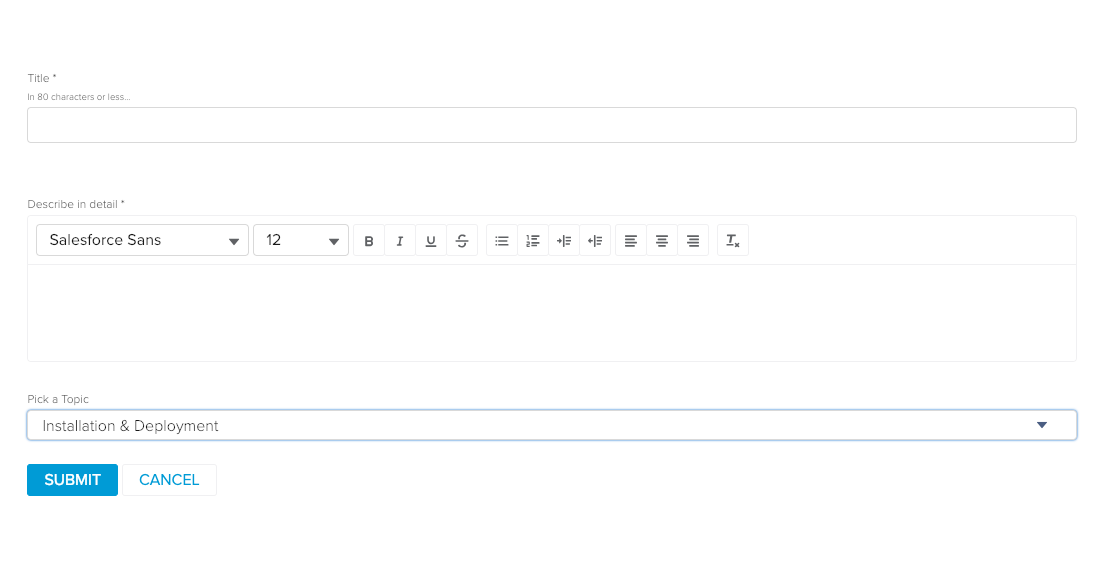
Idea submission is usually pretty terrible, here’s an example:
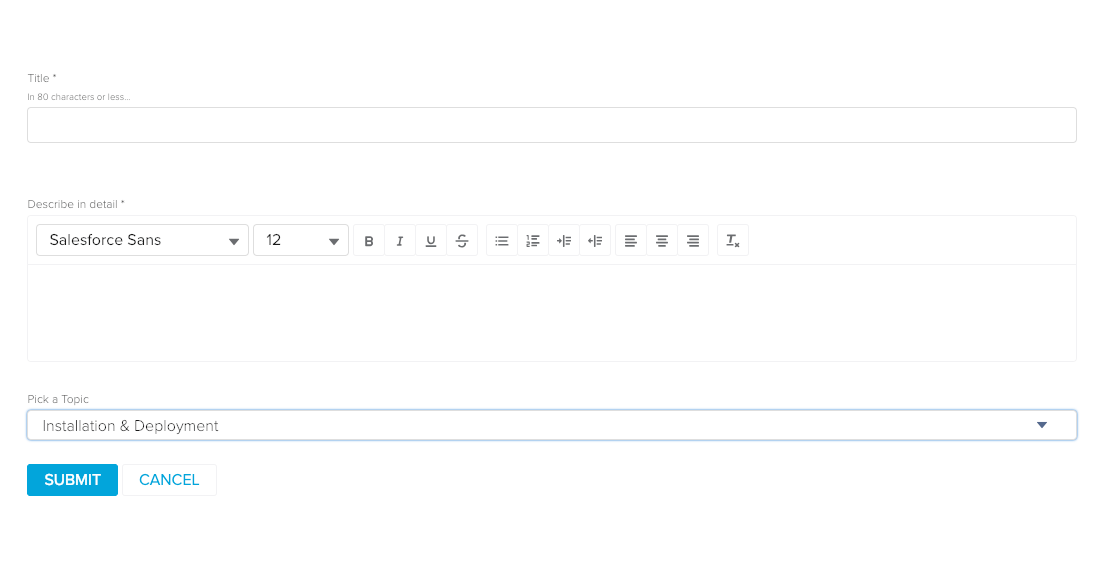
When ideas are cheap to submit, you can expect to get a lot of cheap ideas.
We need to add friction at this stage. Force members to do some more legwork to submit an idea (otherwise it’s just a customer service complaint). It’s better to imagine themselves pitching the idea rather than submitting the idea (think Dragon’s Den, but without the silliness).
Revamp your idea form to include separate options for:
1) The problem they’re trying to solve. What is the specific problem they need to resolve? Provide an example and include some helpful tips to members to define the problem.
2) The business outcome of solving the problem. What will be the business impact if they solve the problem? Provide examples and in-form nudges.
3) Clearly describe the solution. How it works, any relevant examples, and why this solution has been chosen.
4) List other use cases for the solution. Does it only apply to the member or could it be useful to others? Can it solve other problems too?
5) Highlight the popularity of the idea. Is there any research, comments, posts, or information which suggests this idea could apply to others.
6) Promote your idea. Once members have submitted an idea they should need to promote and lobby others to support the idea. This provides a reasonable standard to judge the popularity of the idea.
You will get far fewer ideas, but the ideas you do get will contain far more useful signals for product managers.
You might find the solution isn’t as valuable as members clearly defining the problem and business impact of solving the problem.
Responding Effectively to Ideas
If you’re not prepared to respond to every idea, don’t have an ideas section.
Of course, if you’re getting 50 ideas a day, it’s going to be hard to respond to every one. So you need help from your colleagues or other community members. This help should fall into three areas.
1) Improving the quality of the idea. This can be provided by other members (or the community team). This is when the idea isn’t complete, has been suggested before, it needs further work before it can move into the ‘need validation/acknowledged’ phase.
2) Progressing the idea to ‘acknowledge/validated’. Once it has achieved this level, the community manager or other staff can put this into the ‘in consideration’ stage. During this process, the member should be encouraged to get others to support the idea, provide any further information, and help others.
3) In consideration. If the idea seems popular, then it should be routed to the relevant product manager for a monthly/quarterly review of ideas. At this stage, they can be added to the roadmap, rejected, or analyzed for elements which are useful to other areas of the business. It is best to have a fixed date for this.
4) Added to the roadmap, partially used, rejected. Don’t let ideas linger forever without ever receiving a response. Every idea should either be approved/tweaked and added to the roadmap, sent back down for further information, partially used, or rejected as impractical/not significant enough to make a big business difference.
Develop a Better System For Gathering Ideas
To achieve the above, you probably also need a better system for routing ideas to the right person, understanding and explaining what ideas are needed (and when).
1) Sharing the roadmap. To submit good ideas members need to know what’s on the current product roadmap. Within reason, this should be made public to members in the pitch process. Let members suggest ideas for specific time-zones of the roadmap.
2) Set time-limited feedback or challenges. Unsolicited ideas can be useful, but so can using the ideas section to solicit specific feedback on specific topics at specific times. Likewise, they can set specific challenges with prizes for members who submit the best ideas to tackle a challenge.
3) Previews of upcoming features. Any time an engineer or product manager has a question, they should be able to call for feedback as an idea within the community.
Community idea areas have incredible potential, but in their current form, they rarely deliver a fraction of what they promise. You can change that.
After calls for increased transparency and accountability from Mozilla and partners in civil society, Facebook announced it would open its Ad Archive API next month. While the details are still limited, this is an important first step to increase transparency of political advertising and help prevent abuse during upcoming elections.
We’re committed to a new level of transparency for ads on Facebook (1/3) https://t.co/A9WeKGYHXO
— Rob Leathern (@robleathern) February 11, 2019
Facebook’s commitment to make the API publicly available could provide researchers, journalists and other organizations the data necessary to build tools that give people a behind the scenes look at how and why political advertisers target them. It is now important that Facebook follows through on these statements and delivers an open API that gives the public the access it deserves.
The decision by Facebook comes after months of engagement by the Mozilla Corporation through industry working groups and government initiatives and most recently, an advocacy campaign led by the Mozilla Foundation.
This week, the Mozilla Foundation was joined by a coalition of technologists, human rights defenders, academics, journalists demanding Facebook take action and deliver on the commitments made to put users first and deliver increased transparency.
“In the short term, Facebook needs to be vigilant about promoting transparency ahead of and during the EU Parliamentary elections,” said Ashley Boyd, Mozilla’s VP of Advocacy. “Their action — or inaction — can affect elections across more than two dozen countries. In the long term, Facebook needs to sincerely assess the role its technology and policies can play in spreading disinformation and eroding privacy.”
And in January, Mozilla penned a letter to the European Commission underscoring the importance of a publicly available API. Without the data, Mozilla and other organizations are unable to deliver products designed to pull back the curtain on political advertisements.
“Industry cannot ignore its potential to either strengthen or undermine the democratic process,” said Alan Davidson Mozilla’s VP of Global Policy, Trust and Security. “Transparency alone won’t solve misinformation problems or election hacking, but it’s a critical first step. With real transparency, we can give people more accurate information and powerful tools to make informed decisions in their lives.”
This is not the first time Mozilla has called on the industry to prioritize user transparency and choice. In the wake of the Cambridge Analytica news, the Mozilla Foundation rallied tens of thousands of internet users to hold Facebook accountable for its post-scandal promises. And Mozilla Corporation took action with a pause on advertising our products on Facebook and provided users with Facebook Container for Firefox, a product that keeps Facebook from tracking people around the web when they aren’t on the platform.
While the announcement from Facebook indicates a move towards transparency, it is critical the company follows through and delivers not only on this commitment but the other promises also made to European lawmakers and voters.
The post Facebook Answers Mozilla’s Call to Deliver Open Ad API Ahead of EU Election appeared first on The Mozilla Blog.

Reflecting on my post from the other day, Doug Belshaw suggests that OLDaily might be classified as an 'elderblog'. This term is adapted from gaming, where an elder game is "a game where most players have completed a full playthrough and are focusing on second-order play." For me, No Man's Sky fits this - I've completed the main quests in 'Next' and have advanced to the next galaxy, where I spend my time leisurely exploring and hunting pirates. "An Act 2 game-within-a-game emerges for experienced players who have exhausted the nominal game."
Web: [Direct Link] [This Post]
This article is based on a research study (8 page PDF) arguing that unique experiences are more pleasurable. It uses this study to explain the effectiveness of games, in certain circumstances, to teach a range of skills. It then references a private school (called Quest to Learn) to expand on the discussion of gaming in learning; this is the advocacy and marketing part of the article. "The most success (i.e., larger effect sizes) incorporated specific game design elements, including collaboration, competition, role playing, and exploration and discovery." Related: a completely different interpretation of the same type of research study.
Web: [Direct Link] [This Post]Apple is, according to the Wall Street Journal, driving a hard bargain with publishers ahead of the launch of its rumored News subscription service:
Apple Inc.’s plan to create a subscription service for news is running into resistance from major publishers over the tech giant’s proposed financial terms, according to people familiar with the situation, complicating an initiative that is part of the company’s efforts to offset slowing iPhone sales. In its pitch to some news organizations, the Cupertino, Calif., company has said it would keep about half of the subscription revenue from the service, the people said. The service, described by industry executives as a “Netflix for news,” would allow users to read an unlimited amount of content from participating publishers for a monthly fee. It is expected to launch later this year as a paid tier of the Apple News app, the people said.
The rest of the revenue would go into a pool that would be divided among publishers according to the amount of time users spend engaged with their articles, the people said. Representatives from Apple have told publishers that the subscription service could be priced at about $10 a month, similar to Apple’s streaming music service, but the final price could change, some of the people said…
Another concern for some publishers is that they likely wouldn’t get access to subscriber data, including credit-card information and email addresses, the people said. Credit-card information and email addresses are crucial for news organizations that seek to build their own customer databases and market their products to readers.
Probably the most obvious way to understand this story is that it, along with the report that Apple would have a launch event on March 25, appear to be attempts to negotiate through the media. I’m reminded of the January 2010 report in the Wall Street Journal that Apple’s impending tablet would cost $1,000; when Steve Jobs announced the iPad three weeks later, the $499 starting price seemed like a bargain. Perhaps leaking a 50/50 revenue share, along with an impending deadline for negotiations, is a way to make a 60/40 or 70/30 revenue share seem like a reasonable compromise?
Let’s back up for a moment: Apple News has grown to be a major force in publishing, at least in terms of traffic. According to a New York Times story that Apple cooperated with, the service “is read regularly by roughly 90 million people.” That has translated into traffic for news publishers that, according to Slate, often outpaces Facebook post-last January’s algorithm change.
The problem, as Digiday explained, is that traffic — which is almost completely realized within the Apple News app, not on publisher’s web pages — comes with minuscule amounts of revenue. Yes, Apple News allows for advertising, but that advertising is either sold (poorly) by Apple or sold directly by the publisher with no allowance for either programmatic ads nor data about users.
So why do publishers bother?
There are a number of factors that should ring familiar to anyone familiar with the travails of publishers on the Internet.
To start, Apple News readers visit Apple News and, for the most part, read what Apple News presents to them; the front-page may be human-selected, as Apple sought to make clear in that New York Times article, but just as is the case with algorithmic selection (which is what determines what users see for the rest of Apple News, it just happens to be called “Suggested by Siri”), no one publication is favored:

On one hand, this is obviously not good for publishers: there is limited wherewithal to build brand affinity, there is no customer data shared (for purposes of follow-up, much less ads), and as noted above, there really isn’t much money to be made.
On the other hand, what are publishers really giving up? Readers going to the Apple News app have already made the decision to not visit a particular publisher’s website directly, and, given that digital content has zero marginal cost, why not support Apple News on the off chance some article hits it big?
It should be noted that publisher pages within Apple News complicate this narrative a bit: on one hand, they are a place to build brand affinity; on the other hand, they are more likely to cannibalize direct visits to the publisher’s website. But how many Apple News users are likely to switch to a browser for a particular publisher should they leave Apple News?
What is happening is Aggregation: Apple News attracts the users, which means publishers are coming onto Apple’s platform on Apple’s terms, which makes Apple News more attractive to users, making publishers ever more reticent to leave even though they aren’t getting much out of the deal.
For suppliers, the antidote for Aggregation is to go direct to consumers; the key is to embrace the same forces that drive Aggregation. First, the addressable market should be the entire world, not just a limited geographic area. Second, the same sort of automated payment tools available to advertisers on Aggregators can be leveraged for consumers; indeed, the tools for consumers, particularly given the lower dollar amounts and decreased need for paperwork, can be as simple as Apple Pay, and they can scale indefinitely. Third, a freemium approach to content means that social networks can be used for user-generated marketing.
Apple News as currently construed is actually somewhat helpful in this regard: publishers can push subscription-only content (as well as free content) into Apple News, and give users the option to subscribe using the App Store. For example, the Wall Street Journal elected to make the piece that triggered this Article free:

However, the next story over, about Google Cloud, requires a subscription:
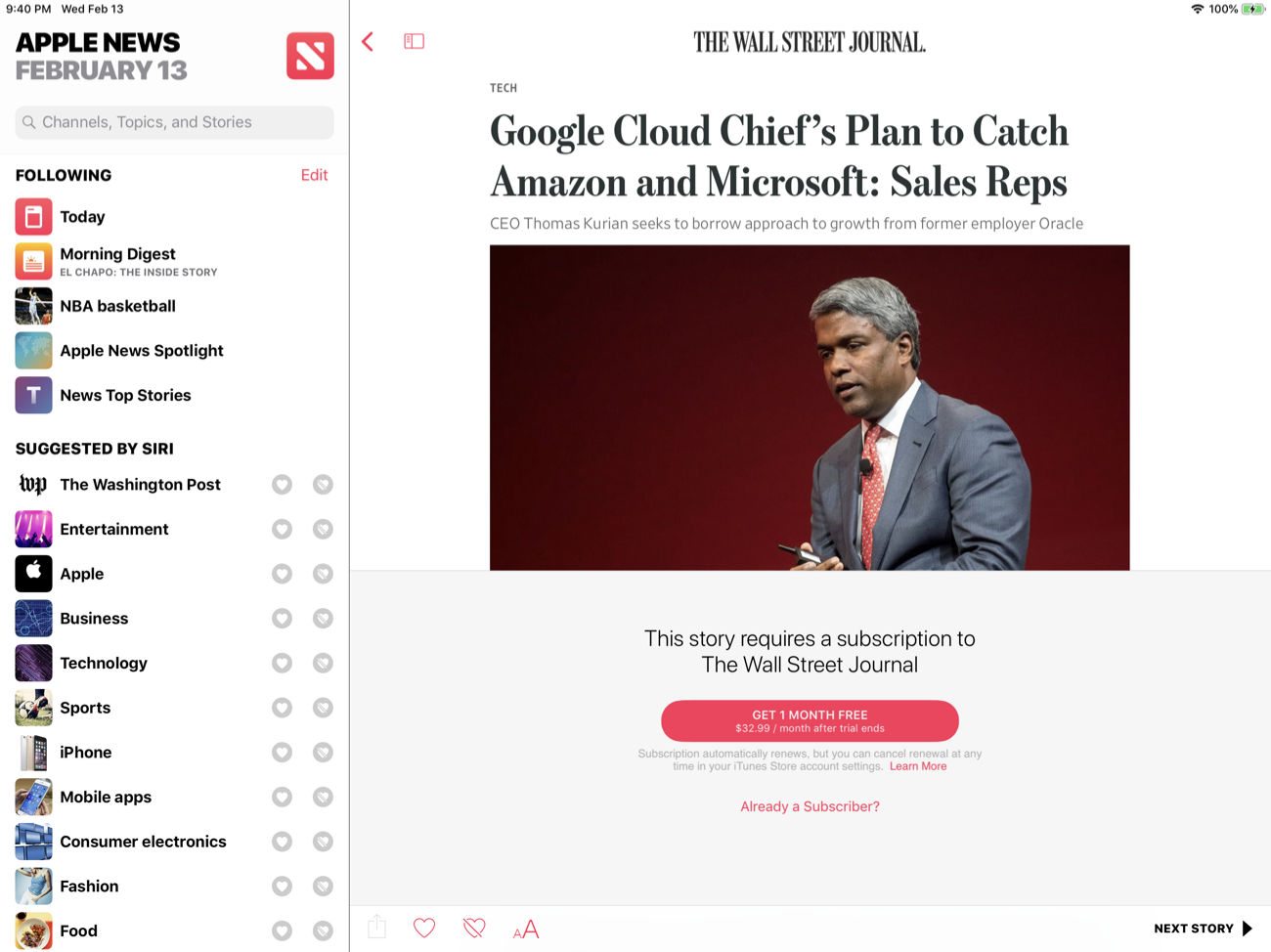
It’s not perfect: clicking on that subscription link means the publisher has to pay Apple 30% the first year and 15% after that, and they don’t get any customer data (unless the customer creates an account in order to use their subscription on other platforms). Still, to my mind it is somewhat less egregious than Apple’s restrictions on in-app purchase; Apple News is driving the customer to a publisher’s content and charging accordingly (as opposed to taking a tax simply because there is no alternative to the App Store), but at the end of the day the publisher is still establishing a direct paying relationship with a subscriber.
What Apple is reportedly building now, though, is decidedly different. The so-called “Netflix of News” — although, given that Apple will pay out on a marginal basis as opposed to buying content, a better descriptor would be the Spotify of News — would entail customers paying one monthly fee to Apple which Apple distributes to publishers based on what subscribers read.
Publishers should be very clear about the implications of this model: it is not a direct-to-consumer model. Rather, it is an Aggregation model that happens to monetize via subscriptions instead of ads. That means it has all of the same problems for publishers that are posed by Aggregators:
That last point is the most important, and should weigh heavily on publishers that have committed to the subscription model. What makes subscriptions work is an alignment between editorial and business model: the former is incentivized by quality and differentiation because the payoff is a customer with a high lifetime value; the New York Times put this succinctly in their 2020 Report:
We are, in the simplest terms, a subscription-first business. Our focus on subscribers sets us apart in crucial ways from many other media organizations. We are not trying to maximize clicks and sell low-margin advertising against them. We are not trying to win a pageviews arms race. We believe that the more sound business strategy for The Times is to provide journalism so strong that several million people around the world are willing to pay for it. Of course, this strategy is also deeply in tune with our longtime values. Our incentives point us toward journalistic excellence.
The proposed Apple News model, on the other hand, which pays out according to reader engagement, pushes in the opposite direction — the Facebook direction. The motivation is “to maximize clicks” and “win a pageviews arms race”, with some “time-spent” variables mixed in; sure, the driver isn’t low-margin advertising, but shifting the means of monetization doesn’t change the ends as far as incentives go.
It is absolutely worth noting what a great deal for consumers an Apple News subscription bundle would be: I totally get the idea of subscription fatigue, and having one place to get all of the best journalism would be amazing. That, though, doesn’t mean that Apple News wouldn’t be an Aggregator: that confirms it! Aggregators win because consumers prefer them, leaving publishers no choice but to go where the consumers are.
To that end, I am sure that a significant number of publications will sign up for Apple’s offering; clearly the company is confident enough to leak a date. And, frankly, many publications should: most publishers are already locked into the volume game when it comes to their editorial direction, and Apple News subscription payouts will be additive to the bottom line.
Publishers that have truly committed to subscriptions, though, should say no: not only will it be difficult to make up revenue that will be cannibalized lower per-customer payouts from Apple News, but more importantly a reversion to a model predicated on page views will hurt their business in the long run. This is especially the case if Apple News becomes a major revenue driver; yes, digital content can be distributed with zero marginal cost, but the incentive cost should not be discounted — it works directly against the quality imperative that is the critical factor in making the Aggregator-avoiding direct-to-consumer business model work.
I wrote a follow-up to this article in this Daily Update.

Agenda recently passed the milestone of its first full year in public release, with the Mac version debuting last January and the iOS app a few months later. The team behind Agenda has been keeping busy ever since, with improvements like Siri shortcuts, dark mode, accent colors, and most recently, images and file attachments. Today's update to version 5.0 on iOS and the Mac is relatively minor by comparison, but it still offers a few valuable additions. There are new options for your text environment, like the ability to set a custom line spacing and use an extra small text size, plus you can now perform multi-tag and multi-person searches. The improvement that stands out most, however, is Agenda's newly expanded support for external keyboards on iPad.
When we published our MacStories Selects awards for 2018, Agenda was our pick for App Debut of the Year. Its strong 1.0 followed by a string of noteworthy updates made it an easy choice. In a separate Selects category, Best App Update, we recognized Things 3.6 because of its unparalleled support for external keyboards. I'm happy to report that with today's update Agenda has taken a page from Things' book and made much of its interface accessible without lifting your fingers from the keyboard.
Open Agenda 5 on the iPad with a connected keyboard and you can immediately start navigating the app with the arrow keys. The primary sidebar – where your On the Agenda and Today screens live, along with your list of areas, projects, and saved searches – supports up and down arrow inputs, and you can move from there to the right to enter your note lists. When you've highlighted the note you want to edit, pressing Return will activate editing mode on the title line, with a second Return press moving your cursor into the body of your note. When you're done writing, ⌘` exits editing mode and brings you back to navigation mode.
Being able to navigate Agenda's interface, moving between sidebar and notes seamlessly using only the keyboard, is a nice improvement over many other apps, which tend to require at least a tap or two on-screen every time you want to switch "modes" in the app, such as moving between an editor and a note list. Apple Notes is another example of keyboard support done well in this area. Where Agenda surpasses even a solid app like Apple Notes though is in the sheer number of keyboard shortcuts it provides.

Only a sampling of the shortcuts Agenda provides.
There are so many shortcuts available now that, once you learn them all, you'll be able to keep your fingers far more often where they belong in a writing app: on the keyboard.
Despite all the positive ways Agenda's keyboard support has expanded, there remain a few glaring oversights in keyboard navigation that keep the app from providing the same level of experience as Things 3. For example, you can't add images or other file attachments to a note without touching the screen, nor can you navigate through search results using the keyboard, a limitation that extends to several other sub-menus that pop up when doing things like creating a new note or navigating a project's table of contents. Agenda has most of the basics covered, but that makes it all the more painful when you run up against an area where the app seemingly forgets the keyboard exists. Hopefully those areas will be addressed in a future update.
If you haven't yet checked out 2018's MacStories Selects App Debut of the Year, now's as good a time as any – especially if you use an iPad. Agenda is a strong, unique take on the note-taking genre, and there are few modern productivity apps receiving the same level of strong development work as this.
Agenda 5 is available on iOS and the Mac.
Club MacStories offers exclusive access to extra MacStories content, delivered every week; it's also a way to support us directly.
Club MacStories will help you discover the best apps for your devices and get the most out of your iPhone, iPad, and Mac. Plus, it's made in Italy.
Join Now
Yesterday Benjamin Mayo released Tabs to Links, a Mac utility that can grab the links and page titles from your open Safari tabs and send them to another app. The app is as simple as it sounds, but its thoughtful touches make it a tool I expect to use often.
Tabs to Links features a one-window design with minimal chrome that’s dominated by a list of webpage titles and links. The contents of the app’s window can be automatically updated as you open and close tabs by selecting the ‘Automatically Refresh in Background’ option in the View menu. If the option is turned off though, you can still refresh the list by clicking the refresh button on the right side of the app’s toolbar. I expect I’ll leave automatic refreshing turned on most of the time, but the advantage of turning the feature off is that it allows you to create a snapshot of your current tabs without the concern that if you accidentally close a tab or window, you’ll affect your list of links.
The center of the toolbar features a dropdown list of open Safari windows that shows the number of open tabs and the title of the active tab, making it easy to switch between lists of links for each open window. It’s worth noting that the list of links in the center of Tabs to Links’ window is limited to active links. Safari has a setting in its General preferences tab that allows you to restore windows and tabs from your last browsing session when you launch the app. It’s an option I use for those times when I accidentally quit Safari instead of closing a tab. The trouble is, when you restore a Safari window, the tabs are restored, but the webpages don’t load until you click on each of them. As a result, unless a restored tab has been opened after a restore, that tab won’t appear in Tabs to Links.
To reduce Tabs to Links’ sparse window chrome even further, the app has an option in the View menu to hide the toolbar, which is worth considering if you’re working in a single window with automatic list refreshing turned on because, in that scenario, you don’t need access to the toolbar functionality. The app also supports Mojave’s dark mode, so it will look at home however you have your Mac set up.
The bottom of the Tabs to Links window includes a couple of additional options. The first is a ‘Trim titles’ checkbox. If you have several tabs open to the same website, which appends the site’s name or other text to the end of the page title, ‘Trim titles’ will remove it. Below is an example of a list of several MacStories articles I opened in Safari. In Tabs to Links, the title of each article includes the name of the site at the end of the page’s title. With ‘Trim titles’ selected, ‘MacStories’ is grayed out and not included when the list of page titles is copied.

Trim titles disabled (top) and enabled (bottom).
Finally, there’s a ‘Share Links…’ button in the lower right-hand corner of the window, which allows the list of titles and links to be copied to the clipboard or to other apps on your Mac that have implemented a compatible share extension. By default, titles and links are copied as rich text. As a result, pasting to apps like Notes and Pages will generate a list of linked webpage titles, but pasting into a plain text editor only pastes the titles. If all you want are the URLs in the list, you can hold down the Option key which transforms the ‘Share Links…’ button into a ‘Share Links Without Titles…’ button. There are also keyboard shortcuts for Share Links (⌘+C) and Share Links Without Titles (⌥+⌘+C).
One thing I’d like to see in a future update of Tabs to Links is better support for plain text editors in the form of an option to copy a Markdown-formatted version of titles and links. Also, I love the idea of working with a compact list of webpages instead of moving between tabs in Safari, and would like to see Tabs to Links’ list become more versatile. For example, I want to be able to preview a webpage from the app and drag an entry out of the list as a .webloc file for saving elsewhere. An open button to jump to a page in your list that may no longer be open in Safari would be a great addition too.
Less than two weeks ago, Federico and I covered a few of our favorite utility apps on AppStories. I love handy little Mac and iOS utilities that make everyday tasks easier. Some of the very best are also the simplest, while paying close attention to small details that let users adapt their tools to the way they work. I spend a lot of time moving between tabs in Safari copying article titles and links for AppStories show notes and MacStories articles. While there are a few additional features I’d like to see added to Tabs to Links, especially Markdown support, it’s an app I expect to use a lot because, like many of my favorite utilities, it takes a repetitive task and makes it easier and faster to accomplish.
Tabs to Links is available on the Mac App Store for $2.99.
Club MacStories offers exclusive access to extra MacStories content, delivered every week; it's also a way to support us directly.
Club MacStories will help you discover the best apps for your devices and get the most out of your iPhone, iPad, and Mac. Plus, it's made in Italy.
Join Now
Among the various Samsung smartphone leaks, details about the company’s upcoming smartwatch have also surfaced online indicating that it is bringing the One UI interface to the user’s wrist.

The wearable reportedly called the Galaxy Watch Active, will not feature the rotating bezel found on the company’s past wearables. However, the South Korean-based company will instead use other ways to navigate the device’s interface.
The Galaxy Watch Active will reportedly feature an improved heart rate tracker and will notify the user if their resting heart rate raises to a certain level. The watch’s auto-detection will also reportedly work towards recognizing more exercises as well. The Galaxy Watch, which released in 2018, was only able to detect six exercises and can monitor 36 exercises.
The Galaxy Watch Active will reportedly also sport a number of new watch faces.
Samsung is expected to release the Galaxy Watch Active at its Unpacked Event on February 20th.
While this leak came from SamMobile, the publication has since taken down its leak.
Via: 9to5Google
The post Rumoured Samsung Galaxy Watch Active leaks online with One UI enhancements appeared first on MobileSyrup.

New information about Samsung’s upcoming Galaxy Buds Bluetooth earbuds has surfaced online.
The details, related to battery and storage sizes, come courtesy of SamMobile.
According to the leak, the Galaxy Buds will sport a 58mAh battery while the charging case will feature a 252mAh battery. The case also offers wireless charging support.
Both the buds and the case feature a smaller battery than the 2018 IconX. However, rumours suggest that Samsung will let the S10 series wirelessly charge the Galaxy Buds, so perhaps the South Korean company is counting on that.
The Buds also include IPx2 water resistance, Bluetooth 5.0, and 8GB of storage.
Reportedly, Samsung will launch the S10 with the Galaxy Buds.
While this rumour came from SamMobile, the publication has since taken down its leak. It’s possible that Samsung has spoken to SamMobile about the leak or the publication no longer trust its source.
Source: SamMobile
The post More details about the Samsung Galaxy Buds emerge: report appeared first on MobileSyrup.

Instagram is testing a web version of Instagram Direct, according to a recent leak.
The leak comes from known leaker Jane Manchun Wong, and she says that the web version of Instagram on mobile and desktop are getting the chat feature.
Sadly, this isn’t a stand-alone web-app like Facebook’s Messenger platform, but it will be convenient for people that use Instagram as their primary chat app.
Instagram’s Direct on Web will also be available on desktop pic.twitter.com/Y3iTIdDwKV
— Jane Manchun Wong (@wongmjane) February 12, 2019
There’s no word on when the feature will roll out, but Wong says that Instagram is testing it internally right now.
Source: Jane Manchun Wong Via: TechCrunch
The post Instagram reportedly testing web version of chat feature appeared first on MobileSyrup.

Apple is reportedly planning to hold a keynote on March 25th where the company will reveal its often-rumored news subscription platform, according to a BuzzFeed News report.
The publication says that anticipated upcoming Apple products like Apple’s next-generation AirPods, the rumoured iPad Mini 5 and the company’s AirPower wireless charging mat, will not make an appearance at the keynote
The event will instead be services focused, with the company’s new Apple News-powered subscription platform being the focal point, according to the publication. The keynote will reportedly take place in Cupertino, California at the tech giant’s Steve Jobs Theatre.
That said, BuzzFeed News’ sources did not say if Apple’s video streaming platform will be shown off for the first time at the event. The standalone video service is rumoured to be set for an April launch. It’s unclear if Apple’s movie and TV streaming service will also launch in Canada in April.
Given that Apple has a history of holding events in March where it reveals both products and services, it’s not surprising that the tech giant is once again planning a keynote for the end of that month.
There have also been rumours that Apple is experiencing pushback from publishers regarding the upcoming news subscription platform’s 50 percent revenue share, according to a recent report from The Wall Street Journal.
Apple News has yet to officially launch in Canada, though the news aggregation platform is available in the latest iOS 12.2 public beta. It’s unclear when the tech giant plans to release the full version of the platform in Canada.
The number of Canadian publications featured in the beta Canadian version of Apple News is minimal, with CBC, La Presse, CTV News and The Toronto Star being the major publications involved in the platform. Apple also recently confirmed to The Canadian Press that publishers would be able to sell subscriptions through Apple News in Canada, but declined on going into specifics.
Back in late January, The Globe and Mail reported that Steve Maich, the former senior vice-president of publishing at Rogers, will lead Apple’s News operation in Canada.
BuzzFeed News says that Apple declined to comment on the report.
Source: BuzzFeed News, The Wall Street Journal, The Globe and Mail, The Canadian Press
The post Apple planning ‘News’ event for March 25th: report appeared first on MobileSyrup.

According to a new public opinion poll, 57 percent of Canadians think Canada should not allow Huawei to participate in providing 5G telecommunications network equipment.
Research Co. published the poll on February 12th, indicating that of the 1,000 adults that were polled, 23 percent believe Canada should still work with Huawei, while 20 percent are not sure.
It is important to note that Research Co says of the 57 percent that think Canada should not work with Huawei, 62 percent voted for the Conservative Party and 55 percent voted for the NDP in the last federal election.
Canada has had a frosty relationship with China since December after Vancouver authorities arrested Huawei’s global CFO Meng Wanzhou. The U.S. charged 13 counts of bank and wire fraud against Meng, Huawei and its subsidiary Skycom in mid-January. Meng currently faces extradition to the U.S.
At the time, Canada said it was a country that follows the rule of law and as such Meng will go through the necessary judiciary steps to determine whether she gets extradited to the U.S. or not.
According to the poll, 63 percent of Canadians felt that the approach Canadian authorities have taken was right. Twenty-five percent do not agree, while 12 percent are not sure.
“Most Canadians approve of the decisions that the federal government has taken on this file,” said Mario Canseco, president of Research Co. in a February 12th press release. “Most are also wary of enabling Huawei to play a role in Canada’s future telecommunications networks.”
Huawei Canada has been working with Bell and Telus to deploy 5G network equipment, the next iteration of mobile network technology. However, last Thursday when Bell reported its Q4 2018 earnings results, the carrier’s CEO George Cope said a ban of Huawei would not impact Bell’s timeline to bring 5G technology to the Canadian market.
“If there was a ban or we chose a different supplier than Huawei, we are quite comfortable and all those developments would be addressed within our traditional capital intensity envelope and therefore no impact from a capital expenditure program.” Cope said during the conference call.
Bell, along with its competitor Telus, have invested millions of dollars to prepare for their future 5G technology rollout. If a ban is implemented by the federal government, the carriers could stand to lose as much as $1 billion CAD.
Innovation, Science and Economic Development Minister Navdeep Bains told MobileSyrup during a sit-down interview that whether or not Canada bans Huawei, his department will still support the carriers.
Telus will be reporting its Q4 2018 on February 14th and might address its views on rolling out 5G and its relationship with Huawei.
The results of the poll are based on an online study that was conducted between February 2nd and 5th. The margin of error is plus or minus 3.1 percentage points, 19 out of 20 times.
Source: Research Co.
The post 57 percent of Canadians feel Canada should not work with Huawei: poll appeared first on MobileSyrup.

Prolific device leaker Evan Blass has shared a leaked render of LG’s upcoming G8 ThinQ flagship smartphone.
As you can see from the render, seen below, the G8 ThinQ will feature an iPhone X-style notch. In a recently issued press release, LG confirmed the G8 will feature built-in face authentication thanks to the addition of a time-of-flight camera. That part of the smartphone is clearly visible in the image Blass shared. LG has also teased that its next smartphone will feature a touchless gesture-based navigation mode.
On its back, the G8 features a rear-facing capacitive fingerprint sensor, as well as a dual camera array. Along the bottom of the device, we see that the G8 will continue to feature a headphone jack, as well as a USB-C port for data transfer and charging purposes.
LG G8 ThinQ pic.twitter.com/ytPzOP3Rlo
— Evan Blass (@evleaks) February 12, 2019
In conjunction with another recent leak from XDA Developers, it appears LG will offer the G8 in at least two different colours: black, as seen above, and a graphite-like colour.
Earlier this week, a Reddit leak, courtesy of an employee at a Canadian retailer, suggested the upcoming smartphone will cost $1,200 off contract in Canada.
LG will likely launch the G8 at its upcoming Mobile World Congress keynote, which is scheduled for February 24th. At the same event, the company has promised to unveil its first 5G-capable smartphone. It’s currently unclear if the G8 will include 5G connectivity.
What do you think of the G8? Let us know in the comment section of this article.
Source: Twitter
The post Here’s our best look yet at the LG G8 ThinQ appeared first on MobileSyrup.

A recent APK teardown of Google Maps 10.10 by 9to5Google reveals that the Mountain View, California-based tech giant might not be storing users location data as one may expect.
The teardown reveals some code that suggests users can choose if Maps keeps their data. Otherwise, it will automatically delete the data after a while.
If Google adds this feature, that’s one less app you’ll have to worry about having your data.
The next discovery is a tool called ‘Personal Events.’ When enabled, locations and routes from a user’s Google Calendar events will appear on the map.
Additionally, 9to5Google found code that says you’ll be able to preview the first and last legs of a journey, although there was no mention of what that means, exactly.
To get the latest version of Google Maps, you can sign up for the beta on the Play Store page.
Source: 9to5Google
The post Google may automatically delete location history in upcoming Maps update appeared first on MobileSyrup.

Google’s Internet of Things (IoT) platform, Android Things, is changing focus to help manufacturers build Assistant-enabled devices.
Dave Smith, a developer advocate for IoT at Google, said in a blog post that the search giant spent the last year working with partners to create consumer products “powered by Android Things with the Google Assistant built-in.”
Smith says that the successes Google saw doing that have encouraged a focus shift for the Android Things platform.
Google will now use Android Things as a platform for manufacturers to build devices like Google Home smart speakers and smart displays.
Further, the company won’t provide support for production system-on-modules (SoMs) based on NXP, Qualcomm and MediaTek hardware through the public developer platform.
For the unfamiliar, a SoM is a board-level circuit which integrates a system function into a single module and typically serves a specific purpose, similar to a system-on-a-chip (SoC).
While Google won’t provide support for production SoMs, Smith says Android Things will continue to be a platform for experimenting with and building smart and connected devices. The company will continue to provide system images for popular hardware like the Raspberry Pi 3B and NXP i.MX7D through the Android Things console.
Developers will be able to use these to create new builds and push app updates for up to 100 devices for non-commercial use.
Google offers other solutions for developers looking to commercialize IoT products in 2019. For example, the company’s Cloud IoT Core provides secure device connectivity at scale, and the upcoming Cloud IoT Edge runtime can help manage a suite of edge computing services.
Those looking for on-device machine learning applications can look forward to Google’s upcoming Edge TPU development boards.
Source: Android Developers Blog
The post Google changes focus, Android Things now a platform to make smart home devices appeared first on MobileSyrup.