


Ver post completo: Fujifilm acaba de lanzar una nueva cámara que te permite tomar fotos como si fuera cualquier decada desde 1930 a 2020.
If you’re a developer, you’ll likely want to use AI to boost your productivity and help you save time on menial, repetitive tasks. And nearly every recruiter these days will expect you to understand how to work with AI tools effectively. But there’s no real manual for this – you figure it out by doing.
While AI tools can be very helpful, some people believe that using them makes you less of a developer. But I don’t believe that’s the case.
The problem begins when you accept an AI’s output without review or understanding and push it straight to production. This increases debugging time and introduces avoidable errors, especially since AI can hallucinate when it lacks proper context. As the developer, you must always remain in control.
I had an interview where I was given four project use cases, each with a strict time slot, and all deliverables had to be built and pushed within 24 hours. They asked me if I knew how to use AI to boost productivity, and I confidently said yes. What I did not realize at the time was that the technical assessment itself was designed to test exactly that. It wasn’t just about whether I could write code, but whether I could also use AI effectively while still thinking like an engineer.
If there is one skill worth adding to your toolkit this year as an engineer, it’s learning how to use AI properly. That means understanding prompt engineering, knowing when to rely on AI, and most importantly, staying in control as the driver while AI remains the tool.
In this guide, we’ll move beyond the hype and look at the practical reality of engineering in the age of AI. We’ll cover the mental models required to use these tools safely, how to avoid the "verification gap" where bugs hide in plain sight, and take a tour of the current toolkit, from simple editors to autonomous agents. Finally, we’ll walk through a real-world Flutter workflow to show you exactly how to integrate these skills into your daily coding routine.
Before you install every extension in the marketplace, you need to ground yourself in the fundamentals. AI is a multiplier, not a substitute. If you multiply zero by a million, you still get zero.
So here are the key skills you’ll need if you want to use AI effectively:
Code literacy is non-negotiable: You must be able to read and understand code faster than you can write it. If you can’t spot a logic error or a security vulnerability in an AI-generated snippet, you are introducing technical debt that will be difficult to pay off later.
System design thinking: AI is great at writing functions, but terrible at architecture. You need to know how the pieces fit together – database schemas, API contracts, state management – before you ask AI to build them.
Debugging skills: When AI code fails (and it will), it often fails in obscure ways. You need the grit and knowledge to dig into stack traces without relying on the AI to "fix it" blindly in an infinite loop.
To truly master AI, you need to look beyond the tools themselves. While knowing which extension to install is helpful, a comprehensive approach requires addressing the workflow changes and psychological shifts that come with AI-assisted development.
Many resources out there touch on the "what," but to move from a junior user to a senior practitioner, you must understand the "how." The following five concepts focus on the Senior Engineer’s perspective: managing risk, maintaining quality, and ensuring that your skills grow rather than atrophy.
The biggest mistake developers make is treating AI like a senior architect when it should be viewed as a talented but inexperienced junior intern: it’s fast and can type faster than you, it’s eager and will always give an answer even when it’s guessing, and it lacks context about the full history and nuanced business logic behind a codebase.
The reason for this specific mindset is about trust and verification. When a junior developer starts on their first day, you likely don’t trust them to push to production immediately – not because they aren't smart, but because they lack the historical context of the codebase and haven't proven their judgment yet. Instead, you review their pull requests line-by-line.
You should treat AI with that same level of initial scrutiny. If you wouldn’t blindly merge a PR from a new hire without understanding how it handles edge cases, you shouldn’t blindly merge code from ChatGPT or Gemini, either.
There is a cognitive phenomenon every AI user encounters: it’s much harder to read code than to write it. This is the case because when you write code yourself you build a mental map of the logic as you type.
But when AI generates fifty lines of code in a second, you skip that mental mapping process, and the danger is that you glance at the code, it looks correct syntactically, and you accept it – with the consequence that two weeks later, when a bug appears, you have no memory of how that function works since you never actually “wrote” it.
In this case, the solution is to force yourself to trace the execution and, if you don’t immediately grasp the logic, ask the AI to explain the code line-by-line before you accept it.
If you’re worried about AI writing buggy code, the best safety net is writing the tests first, since surprisingly AI is often better at writing tests than implementation code. This is because tests describe behavior, which LLMs excel at parsing.
The workflow is to first prompt the test – for example, “Write a Jest unit test for a function that calculates tax, handling 0%, negative numbers, and missing inputs” – then verify that the test cases make sense and cover edge cases. Only after that should you ask the AI to generate the function to pass those specific tests.
This reverses the risk: instead of hoping the AI code works, you define “working” first via the test and force the AI to meet that standard.
AI is a “velocity tool,” but it works differently depending on the phase of work. From 0 to 1 (creation), AI is excellent because it kills the “blank page syndrome” by giving you a skeleton to start with. From 1 to N (refactoring), AI truly shines but is often underused.
So don’t just use AI to write new code. You can also use it to clean old code with prompts like “Rewrite this function to be more readable,” “Convert this promise-chain syntax to async/await,” or “Identify any potential race conditions in this block.”
There’s a legitimate fear that relying on AI will make you a “worse” developer over time. If you’re working with Flutter and you never write a TextFormField validator or a StreamBuilder function again, will you forget how they work?
To prevent this, use the “Tutor” Strategy: use AI to teach, not just to solve. Avoid prompts like “Write a regex to validate an email,” which only gives you code, and instead ask for explanations like “Explain how to implement an email validator in Flutter, breaking down each part of the logic”. By doing this, you gain both knowledge and code.
Make it a habit to ask “Why?” whenever AI suggests a widget, package, or pattern you haven’t used. Have it compare alternatives, and turn each coding session into a learning session that strengthens your Flutter or general development skills.
To control an AI tool, you must understand its nature. Large Language Models (LLMs) are not "knowledge bases" or "search engines" in the traditional sense. Rather, they are prediction engines.
When you ask an AI to write a Dart function, it isn't "thinking" about computer science logic. It’s calculating the statistical probability of the next token (word or character) based on the millions of lines of code it has seen during training.
The trap: It prioritizes plausibility over truth. It will confidently invent a library import that doesn't exist because the name sounds like a library that should exist.
The fix: Treat AI output as a "suggestion," not a solution. If you don't understand why the code works, you are not ready to commit it.
AI likely isn’t going to replace your job, and it’s not going to stop junior developers from being hired. What puts developers at risk is relying on AI without understanding the fundamentals.
As Sundar Pichai once shared, more than a quarter of all new code at Google is generated by AI, then reviewed and accepted by engineers. This allows engineers to move faster and focus on higher-impact work. That’s the reality today.
No product manager expects you to take longer to build a feature, fix a bug, or optimize performance. You are expected to be an expert at programming and competent at using AI assistants to get work done efficiently.
If there’s one technical limitation you must understand, it’s the Context Window. Think of the context window as the AI's "short-term working memory." Every time you chat with an AI, you are feeding it data. But this bucket has a limit. Here are a couple issues you’ll need to be aware of:
Context rot: If you have a chat session that is 400 messages long, the AI often "forgets" the instructions you gave it at the start.
Context pollution: If you paste five different files that aren't relevant to the bug you are fixing, you confuse the model. It’s like trying to solve a math problem while someone shouts random history facts at you.
To combat these issues, you’ll need to learn to curate context. Don't just dump your whole repo into a chat. Select only the specific files, interfaces, and error logs relevant to the immediate task.
I haven’t fully mastered AI development myself, but I started intentionally embracing it in the middle of last year – and my perspective has changed. While some AI tools still feel experimental, many are genuinely helping developers solve problems.
Here is a breakdown of the current landscape, from simple helpers to full-blown agents.
These tools live in your IDE. They are your pair programmers.
Copilot provides both autocomplete and a chat interface, making it ideal for generating boilerplate code, writing unit tests, or explaining legacy code.
To get started, install the VS Code extension, then start typing a function name or write a descriptive comment like // function to parse CSV and return JSON, and let Copilot autocomplete the implementation for you. You can read more about Copilot’s features here.

Gemini Code Assist is Google’s enterprise-grade AI for developers. It can read your entire codebase thanks to its massive context window, allowing it to answer questions, suggest refactors, and help navigate complex, multi-file projects. It’s especially useful for large codebases and cloud-native GCP development.
To start using it, install the plugin in IntelliJ or VS Code, connect your Google Cloud project, and use the chat to ask about functions, classes, or files across your repo. You can read more about its features here.
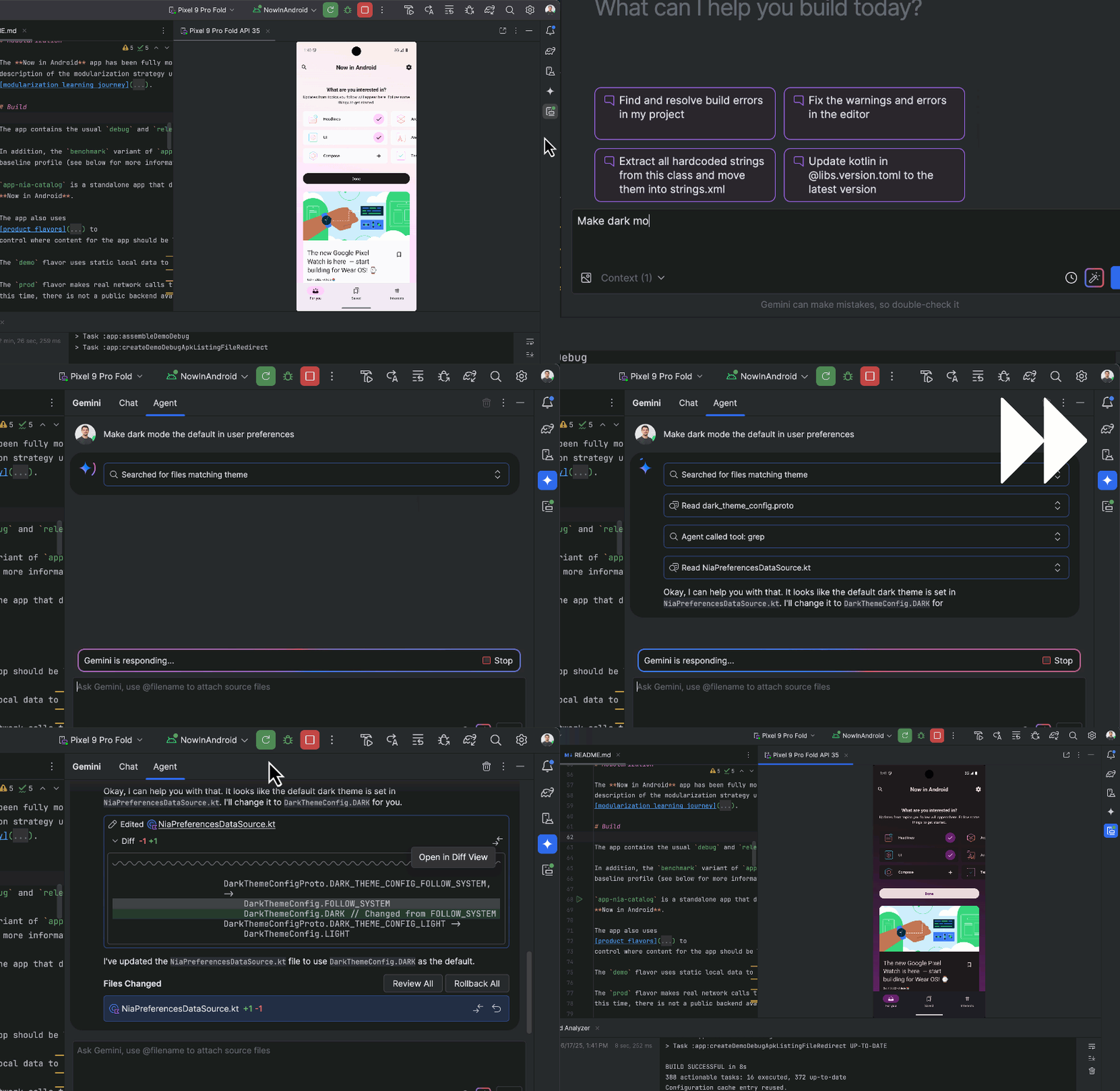
These aren't just plugins. Instead, the entire editor is built around AI.
Cursor is a fork of VS Code that integrates AI deeply into your workflow, allowing it to “see” your terminal errors, documentation, and entire codebase. It’s best for rapid iteration, with features like “Tab” that predict your next edit, not just your next word.
To get started, download the Cursor IDE (it imports your VS Code settings), open a file, hit Cmd+K (or Ctrl+K), and type a prompt like “Refactor this component to use React Hooks” to let AI assist you directly in your code. You can learn more about Cursor here.

Firebase Studio is a web-based, agentic environment for full-stack development, letting you go from zero to a deployed app quickly using Google’s ecosystem, including Auth, Firestore, and hosting. It combines Project IDX with Gemini to scaffold backend and frontend code simultaneously, making it ideal for building production-ready applications fast.
Google AI Studio, on the other hand, is focused on AI-assisted prototyping and code generation, letting you experiment with prompts, generate snippets, test models, and explore AI-driven ideas before integrating them into a full workflow like Firebase Studio.
To get started, you can learn more about Firebase Studio, and Google AI Studio

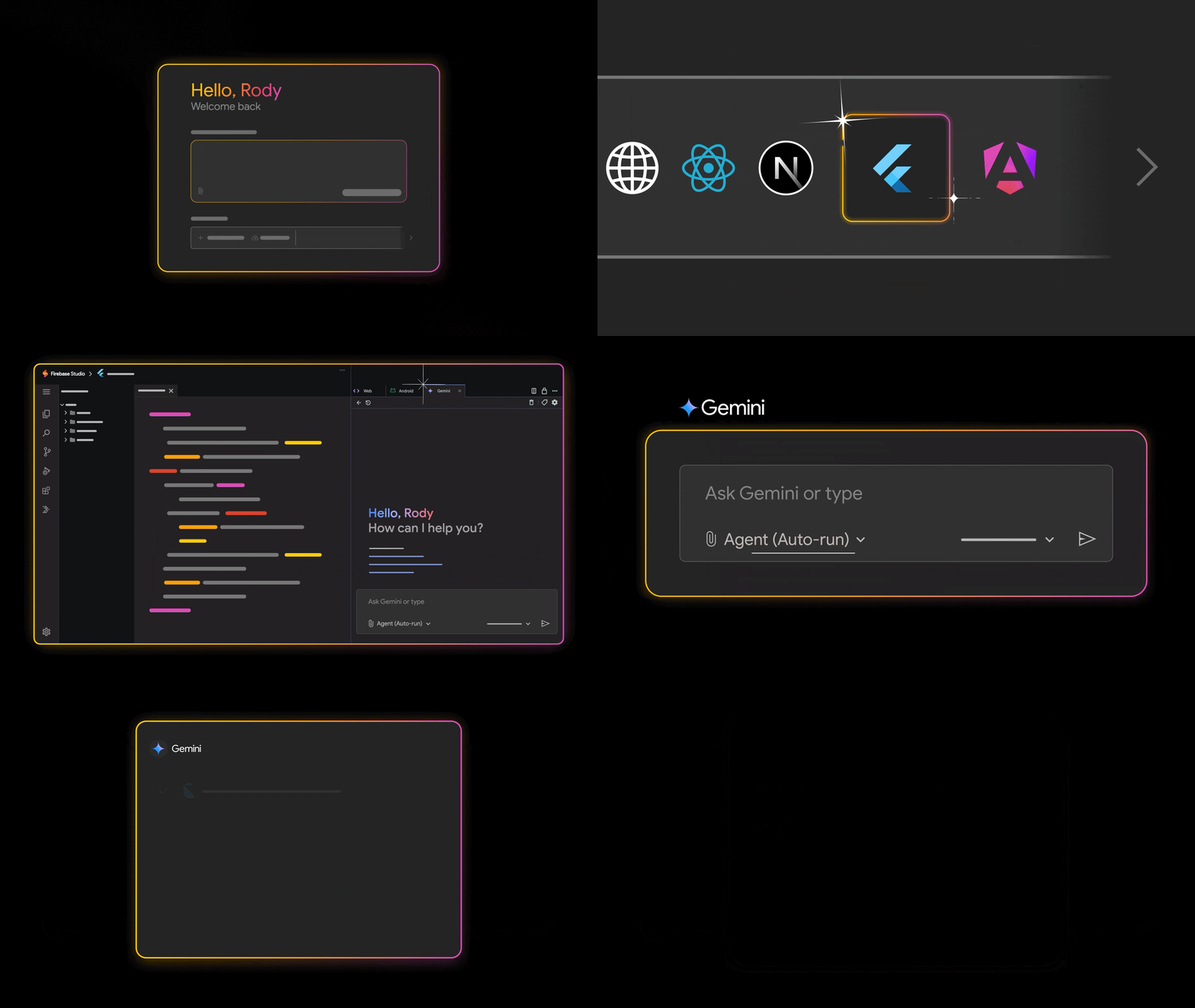
Google Antigravity is an agentic AI–first integrated development environment (IDE) created by Google that embeds autonomous AI agents directly into the coding workflow. This lets them understand codebases, plan and execute multi-step engineering tasks such as feature implementation, refactoring, and debugging, and produce reviewable outputs. It goes beyond traditional autocomplete tools to focus on completing real software development work.
You can learn more about Antigravity here.

These tools don't just write code – they perform actions (run commands, manage files).
Gemini CLI and Claude Code are AI-powered command-line interfaces that let you chat with the AI and have it execute terminal commands for you. They’re best for DevOps tasks, complex refactors across multiple files, and setting up development environments.
To get started, install the CLI via your terminal, authenticate, and then type commands like gemini "analyze the logs in /var/log and summarize errors" or claude "scaffold a new Next.js project with Tailwind" to let AI handle the work directly in your terminal.
To learn more, you can read more about Gemini CLI, and Claude Code here.

MCP is an open standard by Anthropic that lets AI securely connect to your data sources, databases, Slack, local files, and more, so it can “know” your specific business context. It’s best for building custom AI workflows that require direct access to proprietary or internal data.
To get started, the process is a bit more advanced than it is for other AI tools. You’ll need to run an MCP server (similar to a local server) that exposes your database to an AI client like Claude Desktop, allowing the AI to safely query your data. For an additional reference, check out the Figma MCP server documentation.
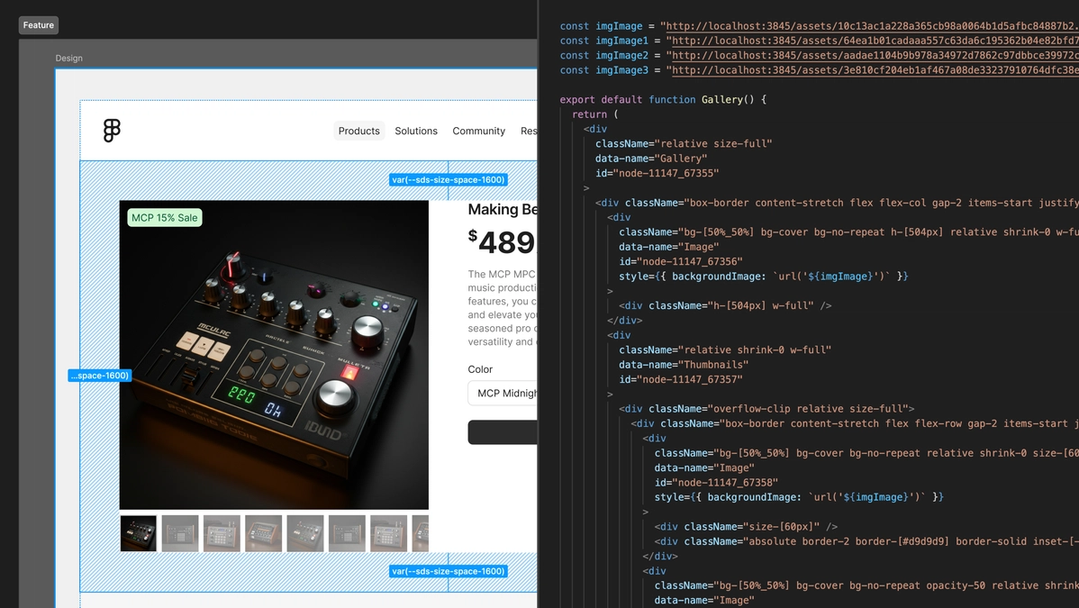
These tools focus on generating visual layouts or entire app structures.
v0 is a text-to-app tool that converts plain-language prompts into functional UIs. It typically generates React components with Tailwind styling, making it ideal for quickly prototyping dashboards or MVPs.
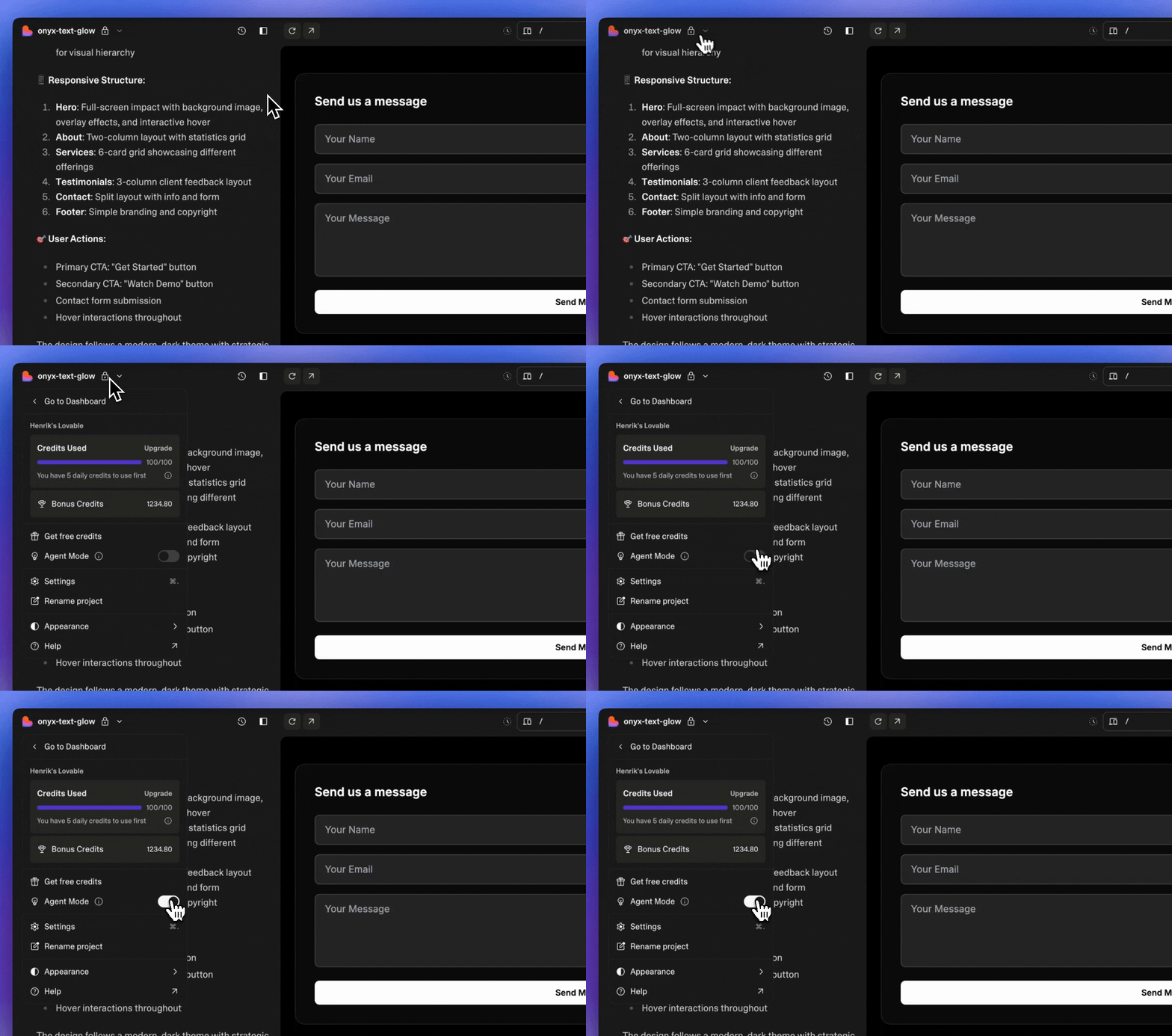
Lovable focuses on rapid frontend prototyping by turning design ideas or written prompts into live web interfaces without manual coding, helping teams iterate visually.
And Stitch specializes in creating complex UI layouts from text, supporting interactive and responsive components, so developers can generate production-ready React/Tailwind code for multi-component pages and copy it directly into their projects.
To get started with these tools, you can check out their docs here:
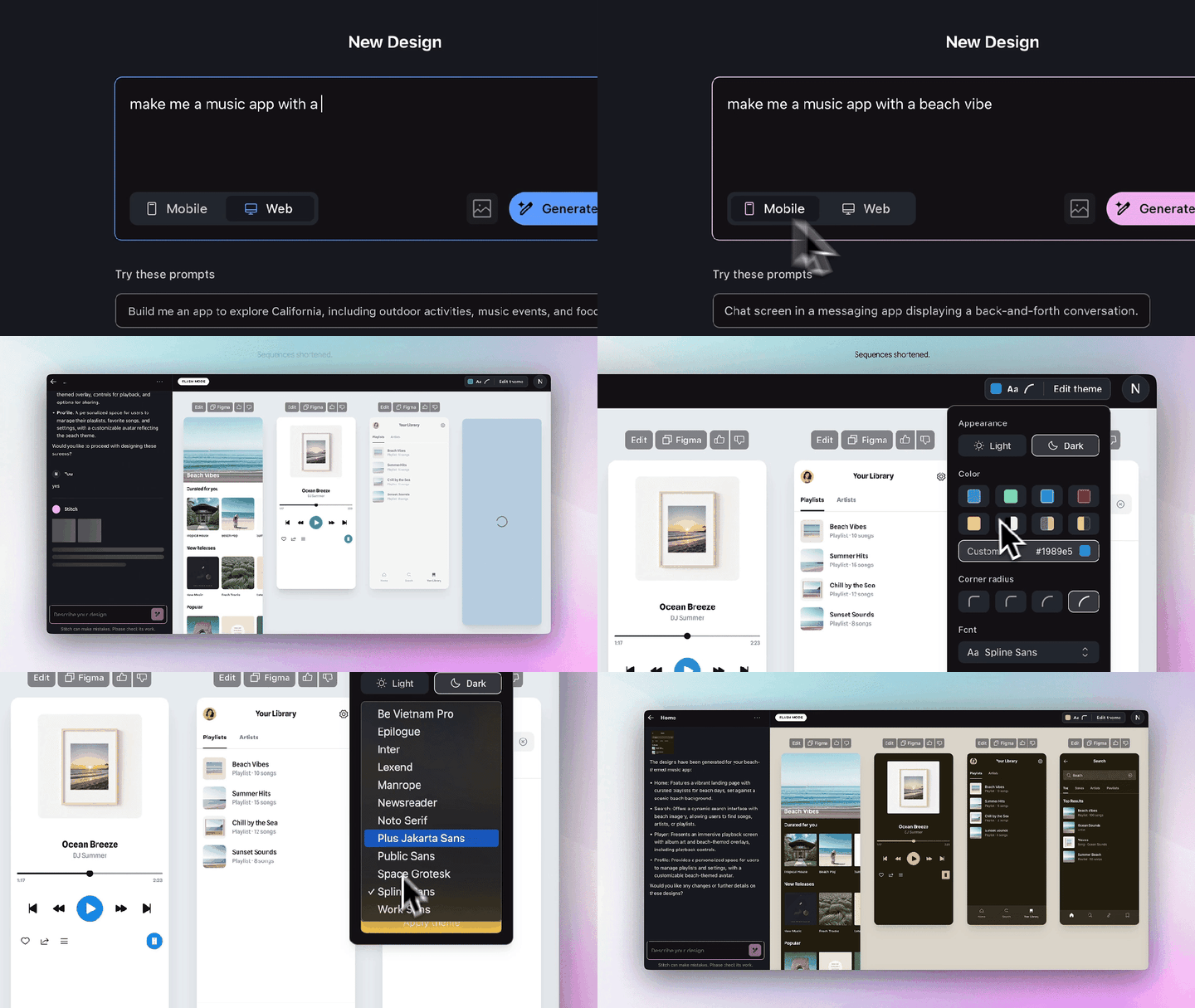
This SDK is a tool that lets AI generate UI widgets dynamically based on user conversations, transforming chatbots from simple text interfaces into interactive experiences – like showing a flight picker or other screens. It’s best for building chatbots that need to render “screens” instead of just responding with text.
To get started, you can check out the google/flutter-genui repository, set up a Flutter project that listens to an LLM stream, and render widgets on the fly as the AI responds.
The Builder.io Figma plugin allows you to take designs created in Figma and automatically convert them into production-ready frontend code or Builder.io components. It bridges the gap between design and development by letting designers and developers quickly turn visual layouts into working web pages or app interfaces, without manually recreating the design in code.
It also supports interactive elements and responsive layouts, making it ideal for rapid prototyping and accelerating the design-to-development workflow.


Now that you’re familiar with some of the most popular AI tools out there right now, you’ll need to know the basics of prompt engineering techniques so you can effectively talk to your LLM.
"Prompt Engineering" sounds like a buzzword, but it’s actually just referring to effective communication with an LLM. A lot of the bad code generated by AI is the result of lazy or ineffective prompting.
Instead of typing something vague and relatively unhelpful, like*"Write a function to sort a list,"* use the C.A.R. framework:
Context: Who is the AI? What is the environment?
Example: "Act as a Senior Go Engineer. We are working in a cloud-native environment using AWS Lambda."
Action: What specifically do you want?
Example: "Write a function that sorts a list of User objects by 'LastLogin' date. Handle edge cases where the date is null."
Result: How do you want the output formatted?
Example: "Provide only the code snippet and one unit test. Do not add conversational filler."
By constraining the AI, you force it to narrow its probabilistic search, resulting in much higher-quality code.
You do not need to learn how to use all of these tools – but being familiar with some of them and aware of what’s out there will help prepare you for where software development is heading.
Here’s how you can combat the overwhelm and actually get started honing your skills:
Pick one tool: Start with Cursor or GitHub Copilot. They have the lowest barrier to entry.
Start changing your workflow: Instead of Googling a regex or a Dart string separation syntax, ask the AI to show you an example and explain how it works.
Review everything: Treat the AI like a junior intern. It’s eager to please but often wrong, so make sure you read every line of code it generates and understand how it works.
Prompt iterate: If the output is bad, don't just delete it. Refine your prompt and work with the AI to improve the code. You can say things like "This code is inefficient," or "Use the repository pattern for this."
Let’s look at what this looks like in practice. Imagine you need to build a luxury car rental page that displays car categories and vehicle types. This is a classic UI challenge involving structured layouts, clean visual hierarchy, and smooth user interaction.
Instead of typing "make a car app home page," type this detailed request into Cursor or Copilot:
"Create a Flutter
HomePagewidget for a luxury car rental app. Use aCustomScrollViewwith aSliverAppBarthat expands to show a high-res image of a Featured Car. Below that, include a horizontalListViewfor categories (SUV, Sports, Electric) and a vertical list ofCarCardwidgets. Use a dark theme withColors.grey[900]background and gold accents."

The AI generates the code, but you won’t want to run it yet. Instead, read through it carefully to catch common Flutter pitfalls, such as placing a vertical ListView inside a CustomScrollView without using SliverList or SliverToBoxAdapter, hardcoding widget heights that can cause overflows on smaller screens, and using NetworkImage without a placeholder or error builder.

Before adding the widget to your main navigation, carefully review the AI-generated code to ensure it meets quality standards.
You’ll want to check that it follows Flutter best practices, such as proper widget composition and use of const where possible. Make sure it’s memory-safe with no dangling controllers or listeners, and that the code is readable and maintainable with clear variable naming, indentation, comments, and structure. You’ll also want to check that performance is optimized for smooth scrolling, efficient image loading, and minimal widget rebuilds.
For this project, which is just a UI prototype, you don’t need to check things like error handling, accessibility, or security – but for general projects, those additional checks should also be considered.
Only once the code passes these checks should you integrate it into your main project. This step ensures you’re not blindly trusting the AI output but actively confirming that it’s robust, clean, and production-ready.
I copied the code, opened Android Studio, and pasted it into main.dart in a new Flutter project. You can also easily run it on DartPad.dev. Here are the screenshots showing it in action:


If you look at the project preview now, you’ll notice the category chips look plain. You can reply to the AI:
"The category chips look boring. Refactor the horizontal list to use
ChoiceChipwidgets with a custom border radius, and add a simpleHeroanimation to the car images so they transition smoothly to a details page."

By following this loop – Prompt, Review, Verify, Iterate – you can solve complex, highly specific Flutter problems without getting stuck in the weeds, while ensuring the final code is memory-safe and robust.
The quality of the output is also determined by the model you use. Strong reasoning-focused models like Claude Opus 4.5, Gemini 3 Pro, and similar high-capacity models tend to produce more accurate architectural decisions, cleaner Flutter patterns, and fewer subtle lifecycle or performance issues.
As we rush to adopt these tools, it is easy to overlook the implications of sending our code to third-party servers.
The primary security risk is data leakage. When you paste API keys, database credentials, or proprietary algorithms into a public LLM, that data leaves your local machine. If the model providers use your chat history to train future versions of their models, your trade secrets or private keys could theoretically be surfaced in another user's autocomplete suggestions months later. This is why "sanitizing" your input, removing secrets and PII (Personally Identifiable Information), is non-negotiable.
Beyond security, there are significant ethical and legal gray areas regarding copyright and ownership. Since LLMs are trained on billions of lines of open-source code, there is an ongoing debate about whether AI-generated code infringes on existing licenses. If an AI reproduces a specific, licensed algorithm verbatim without attribution, using that code in a commercial product could expose your company to legal liability.
To combat these risks, you should advocate for enterprise-grade agreements (like GitHub Copilot Business), which contractually guarantee that your code will not be used for model training. If you cannot afford enterprise tiers, consider using local, open-weights models (using tools like Ollama) for sensitive tasks, ensuring your data never leaves your network.
Finally, always keep a "human in the loop." AI should be treated as a drafting tool, not a decision-maker, ensuring that a human is always accountable for the final output.
I haven’t fully mastered using AI myself, but my perspective has shifted: while some tools still feel experimental, many are already solving real problems and making development easier, the very purpose computers were designed for.
Don’t let the fear of being “replaced” paralyze you. The developers at the most risk are those who refuse to adapt. Take control, experiment, and integrate AI into your workflow.
Now is the time to put this into practice. Start small by testing a specific prompt in a tool like Cursor or Gemini, or challenge yourself with a timed mini-project to simulate an AI-assisted workflow, similar to an interview scenario. These exercises will give you hands-on experience and reveal how AI can amplify your skills, streamline repetitive tasks, and unlock new ways of solving problems.
The future of development isn’t about AI replacing you. Rather, it’s about using it to make you a faster, smarter, and more capable developer.
Sundar Pichai on AI Code at Google: On Alphabet’s Q3 2024 earnings call, CEO Sundar Pichai revealed that more than 25% of all new code at Google is generated by AI, then reviewed and accepted by engineers. This is a massive benchmark for "The Reality of AI Development."
The Model Context Protocol (MCP) Announcement: This is the official introduction of the open standard you mentioned in your "Agentic Tools" section. It was created by Anthropic and recently donated to the Agentic AI Foundation under the Linux Foundation.
The Google Antigravity Announcement: This is the official introduction of Google Antigravity, an agentic AI development platform by Google that embeds autonomous AI agents directly into the software development workflow. It introduces an agent-first IDE experience where AI can plan, execute, and verify complex engineering tasks across the editor, terminal, and connected tools, moving beyond traditional code completion or chat-based assistance.
Cursor’s "Composer" and Visual Editor: Cursor recently released a visual editor that allows you to drag-and-drop elements and edit code through a browser preview, which bridges the gap between design and code.
GitHub Copilot Agents & MCP: GitHub has officially integrated MCP into Copilot, allowing the coding agent to connect to external tools like Slack, Jira, or your own local databases.
Claude Code CLI (Autonomous Tasks): Documentation on how the Claude CLI handles "checkpointing," allowing you to rewind code if an autonomous agent goes down the wrong path.
v0 by Vercel: Vercel’s official platform for "Generative UI." It uses React, Tailwind, and Shadcn UI to turn prompts into full-screen previews.
GenUI SDK for Flutter: The official documentation for the Google/Flutter team's "Generative UI" experiment, which allows AI to render widgets on the fly.
GitHub Data on Developer Velocity: GitHub’s research shows that developers using AI complete tasks up to 55% faster than those who don't.

Un vídeo revela cómo un hombre que se identificó como médico fue apartado mientras la víctima agonizaba sin recibir atención sanitaria ...
etiquetas: ice, estados unidos, renee nicole good
» noticia original (www.catalunyapress.es)

Los soldados daneses deben abrir fuego incluso sin órdenes si tropas de EE.UU. intentan capturar Groenlandia por la fuerza, según una directiva de 1952 que el Ministerio de Defensa de Dinamarca confirmó que sigue vigente, informaron medios nacionales.
etiquetas: dinamarca, eeuu, groenlandia
» noticia original (es.euronews.com)

El agente de ICE que disparó con resultado fatal a Renee Good, de 37 años, en Minneapolis el miércoles ha sido identificado como Jonathan Ross, que es el mismo agente que fue arrastrado 40 metros en Bloomington en junio del año pasado. El Departamento de Seguridad Nacional ha confirmado a Fox9 que es el mismo agente del incidente del arrastre.
etiquetas: ice, minneapolis, renee good, jonathan ross
» noticia original (www.fox9.com)

Autobuses en Bangladesh, y otros países del sudeste asiático, compitiendo por pasajeros y visitas en Youtube en carreteras abiertas al tráfico.
etiquetas: autobuses, bangladesh
» noticia original (www.youtube.com)
La inmensa mayoría de los repartidores y las ya clásicas furgonetas de Amazon tienen los días contados en España. La empresa ha comenzado a implantar por todo el país un nuevo sistema de reparto: serán
El interés máximo no podría superar el 22% para los préstamos de baja cuantía con los actuales niveles del mercado

La imposición de la DGT sigue generando ríos de tinta por su escasa visibilidad, falta de privacidad e inseguridad para los conductores que la utilizan. Al margen de su precio, malísima visibilidad y la retirada repentina de la homologación a cuatro modelos de la V16, la controversia llegó por su geolocalización. Las balizas cuentan con una tarjeta SIM que permite rastrear una señal GPS, la cual se envía a la Dirección General de Tráfico tras un accidente. La realidad es que permite ver en qué punto kilométrico exacto se encuentra el vehículo,
etiquetas: v16, dgt, robos, conductores
» noticia original (www.vozpopuli.com)

With more choices for a quick bite, the market share for pizza in the United States has taken a hit over the past few years. Heather Haddon for the Wall Street Journal:
Americans still eat a lot of pizza. Pizza chains generated around $31 billion in sales from their restaurants in 2024, the market-research firm Technomic said. On any given day, around one in 10 Americans will partake of a slice, according to the Agriculture Department. Young people drive much of the consumption.
Pizza’s dominance in American restaurant fare is declining, however. Among different cuisines, it ranked sixth in terms of U.S. sales in 2024 among restaurant chains, down from second place during the 1990s, Technomic said.
Remember when the only delivery option was pizza?
Tags: pizza, Wall Street Journal

5 minutos después…
Junqueras, tras su reunión con Pedro Sánchez en la Moncloa: “El acuerdo de financiación representará para Cataluña un aumento en su capacidad presupuestaria de un 12%”.
Ver post completo: Hoy Pedro ha tenido una reunión de esas en las que le acaba sacando pasta del bolsillo a un sevillano mileurista para dársela a un catalán con piso en la playa.

Necesitas una pantalla y un ratón. Me parece formato muy bueno para los que andamos cambiando de «campamento base» pero no necesitamos algo 100% portátil. Con un ratón y un cable usb-c podrás apañarte allá donde haya un monitor (o podrás llevarte tú uno portátil).

Ver post completo: HP ha lanzado un ordenador con forma de teclado.
A reader writes:
I need to partner with a team whose manager rejected me for a job, and I’m struggling to have a positive attitude.
A year ago, I applied to an internal role for which I met 90% of the criteria on the nose. It was a team doing the same work as I did but in another part of the company, and the gap in qualifications was akin to having experience grooming llamas but not alpacas – it’s highly transferrable. I have great performance reviews, scoring the elusive 5/5, and I had completed an internal leadership program that is supposed to highlight me as a candidate for internal roles. I didn’t expect to be handed the role but I did think I was a strong internal candidate and expected, if not an interview, maybe a note from the recruiter or hiring manager about why the skillset wasn’t a fit or what might make me more competitive if another opening came around.
I got crickets. Not even a form rejection. I just happened to see on the site that I was “not selected” and that was that.
Fast forward and I am now working in that business unit, but not on that team. And I’ve learned I will likely be tasked with working with them to create new processes and systems because I have a skill and experience that they do not. The team, manager included, has been perfectly polite and fine to work with. The issue is on my side – every time I provide useful information, help troubleshoot, suggest improvements … a bit of me thinks, “Why should I help you? You didn’t want me before!”
I know it wasn’t a personal affront, but I do feel snubbed and am not sure how to get past it.
Hiring isn’t pass/fail! You could have been entirely capable of doing the job well but someone else was just stronger. Maybe they had more directly applicable experience or an additional skillset that the manager thought the team could benefit from, or it might not even be related the job description at all — it could be something like the person they hired having the right sort of thick skin to deal with some of their difficult customers (or direct experience with a particular customer, or a particular kind of tact, or all sort of other traits that you wouldn’t necessarily know from the outside they cared about). Or they might have already had a candidate in mind who they wanted to hire — like someone who they’d worked with before or who they knew through networking or had interviewed for another job previously.
Ultimately, you can’t really know. There are so many possible reasons for why they didn’t interview you that it’s not very useful to speculate. But when it’s an internal role, you can ask! Realistically, it’s probably too late now since a year has gone by, but ideally when they didn’t interview you last year, you could have contacted the hiring manager and asked for feedback on how to be a stronger candidate for their team in the future. Who knows, you might have heard “we’ve been trying to hire this candidate for years and they were finally available and realistically we weren’t going to pass them up so we didn’t want to waste your time” or “it wasn’t emphasized enough in the job description, but we really wanted skill X for this role” or all sorts of other things that might have left you with a much better understanding of what happened.
Since it’s a little late for that conversation now, the best thing you can do is to just figure that there’s some explanation along those lines that would make sense — or at least makes sense to them — and that it wasn’t an intentional slight or a devaluing of what you offer.
And for what it’s worth, it’s not out of line for them to seek help from you now! You work for the same company, you presumably have useful skills that are relevant to what they’re doing, and the fact that they recognize that and want to collaborate with you doesn’t mean they clearly made the wrong call earlier. It means that you have things of value to offer — but that’s not the same thing as being the best hire for their very specific set of circumstances and needs last year.
The post I need to partner with a team that rejected me for a job appeared first on Ask a Manager.

El jefe de policía de Minneapolis, Brian O'Hara, habló el jueves con «CBS Mornings» y afirmó que el tiroteo mortal de una ciudadana estadounidense por parte de un agente federal «era totalmente previsible». «Reconocemos que, evidentemente, esto se ha ido gestando a lo largo de varias semanas», dijo O'Hara. «Espero que, independientemente de la ideología política de cada uno, podamos reconocer que la pérdida de una vida humana es una tragedia y que no queremos agravarla con una situación que pueda provocar la destrucción o más daños a esta comun
etiquetas: minneapolis, protestas, asesinato, mujer, ice
» noticia original (www.cbsnews.com)

El análisis de un famoso analista de blockchain conecta las transferencias que financiaron la apuesta en Polymarket con cuentas ligadas a "Steve Witkoff", el mismo nombre del enviado especial de EEUU en Oriente Medio y socio empresarial de Trump. Witkoff compartió la pasada semana varias reuniones con el presidente de EEUU en Mar-a-Lago, cuando la decisión de capturar a Maduro ya había sido tomada
etiquetas: witkoff, maduro, cripto, polymarket
» noticia original (www.elespanol.com)

Good, madre de tres hijos, murió durante un operativo de ICE contra la migración irregular. La mujer era ciudadana estadounidense, según le dijeron dos fuentes federales a la cadena CBS, socia de la BBC en Estados Unidos. De momento se desconoce la identidad del agente que la mató. El suceso ha provocado protestas en esta ciudad del estado de Minesota, en el norte del país, así como una fuerte polémica política a nivel nacional.
etiquetas: ice, renee nicole good, mineápolis
» noticia original (www.bbc.com)
Hace dos días, el seis de enero, se cumplieron cinco años del asalto al Capitolio. Senserrich dijo entonces que el ataque, parte de una estrategia caótica y deliberada del entonces presidente saliente Donald Trump, había sido un intento de golpe de estado. No ha cambiado de opinión.
etiquetas: trump, usa
» noticia original (open.substack.com)

Vox saluda que Trump prohíba a empresas comprar viviendas, pero Sumar le recuerda que lo rechazó en el Congreso El portavoz de Vivienda de Vox, Carlos Hernández Quero, ha saludo la propuesta del presidente de Estados Unidos, Donald Trump, para prohibir a las grandes empresas comprar viviendas unifamiliares. La reacción ha provocado el reproche del portavoz de Vivienda de Sumar en la Cámara Baja, Alberto Ibáñez, puesto que los de Santiago Abascal votaron en contra de una propuesta similar en el Congreso en noviembre de 2025.
etiquetas: vivienda, trump, españa, vox, eeuu
» noticia original (www.europapress.es)

“Las palabras importan”, ha dicho. Para ser incluso más claro recordó que lo sucedido "en realidad es privar a una persona de su libertad cuando estaba en su domicilio en contra de su voluntad y esto en castellano se llama secuestro.
etiquetas: mensaje, joaquim bosch, captura, secuestro, maduro
» noticia original (www.publico.es)

Ocurrió en primavera hace 66 millones de años y explica la extinción del 75 % de las especies vegetales y animales que por entonces vivían, incluidos todos los dinosaurios no avianos. Pero "si aquella roca sideral no se hubiera estrellado y sin la consiguiente destrucción que ocasionó, no existiríamos" - agrega Riley Black quien en su libro, Los últimos días de los dinosaurios: un asteroide, extinción y el comienzo de un nuevo mundo, explora como pocos autores han hecho los días, semanas, meses y años posteriores a la catástrofe global.
etiquetas: dinosaurios, asteroide, yucatán, trágico, entrevista
» noticia original (www.heraldo.es)
El secretario general de la OTAN asegura que Estados Unidos debe tener mayor presencia en Groenlandia de la que tiene ahora ante la amenaza de los barcos rusos y chinos. Trump dijo en marzo que Rutte sería “decisivo” para la anexión.
Los equipos de búsqueda de Indonesia no lograron encontrar este jueves al niño español de 10 años desaparecido tras el naufragio el 26 de diciembre en el Parque Nacional de Komodo de un barco turístico donde viajaba junto a su familia, de los cuales tres han fallecido y dos fueron rescatados.
"El decimocuarto día de búsqueda no arrojó resultados", dijo de manera escueta Fathur Rahman, oficial de la Agencia Nacional para Búsqueda y Rescate (BASARNAS) y responsable de la misión, en una rueda de prensa.
El oficial subrayó las duras condiciones meteorológicas a las que hoy se enfrentaron los rescatistas, por la lluvia incesante en varias de las zonas acotadas, grandes olas y fuertes corrientes submarinas. "Las fuertes corrientes y el mal tiempo dificultaron la búsqueda. Sin embargo, los rescatistas continúan la misión hasta esta tarde", señala el escrito.
Fathur Rahman, el oficial de BASARNAS que coordina la misión, ya apuntó ayer que, conforme al pronóstico del tiempo, se esperaba lluvia durante todo el día en algunos lugares del área de búsqueda, como las islas de Padar, Serai, Rinca y Komodo -parte del Parque Nacional de Komodo-.
El dispositivo, formado hoy por 168 efectivos repartidos en 18 embarcaciones, también incluyó personal sobre el terreno para revisar a pie algunas playas y sitios de costa.
Los barcos amarrados en el puerto de Labuan Bajo, desde donde se coordina parte del operativo, zarparon esta mañana alrededor de una hora más tarde de su horario habitual, con las primeras luces del día.
Hasta el puerto, como cada mañana desde el accidente, acudieron familiares del desaparecido para mostrar su apoyo al trabajo de los rescatistas indonesios y agradecer su labor.
Los equipos de búsqueda aprobaron en la noche del miércoles extender -por tercera ocasión- el despliegue hasta el viernes, si bien esta noche está previsto que analicen los resultados para decidir el siguiente paso.
Para la ampliación, las autoridades tuvieron en cuenta tanto la solicitud formal realizada ayer por la Embajada de España en Indonesia como la petición de las familias de realizar "un último esfuerzo".
El hallazgo el martes de los restos mortales de una tercera víctima junto a los restos del casco del barco siniestrado, a unos 14 kilómetros de distancia del punto donde se sospecha se hundió la nave, supone que los equipos se centren a partir de ahora en peinar la superficie marina y las zonas costeras.
Las víctimas mortales son Fernando Martín, exfutbolista y entrenador del equipo femenino B del Valencia CF; un hijo de este; y una hija de su esposa, Andrea Ortuño, quien fue rescatada tras el accidente junto a otra de sus hijas. El menor que permanece desaparecido, de 10 años, es hijo de la superviviente y de una expareja. Martín y Ortuño habían contraído matrimonio recientemente.