Shared posts

31 May 20:39

CodeSOD: Tri-State Boolean

by Jane Bailey

Five-leaf Clover, Megan McCarty128

"Lindsay."

Lindsay did her best to ignore her co-worker, Asher. Ever since management had removed cubicle walls (to "facilitate communication"), it had been a never-ending trial focusing on fixing bugs with the world's most annoying webdev prodding her every few minutes to talk about some inane television reference or sports event.

"Lindsay."

Lindsay closed her eyes, picturing the Maui beaches where she hoped to be reclining in two days time. Surely she could hold out that long, right?

"Lindsay!"

"What?!" She snapped, ripping off her headphones to look at his screen.

"Did you see that P1?"

Stunned that Asher was actually bothering her about, wonder of all wonders, work, Lindsay closed her travel agent's website and pulled up the bug tracker.

Sure enough, she'd been assigned a P1 defect. In the self-service component of the Procurement website, all users were able to download a spreadsheet containing the price lists for...

Lindsay gave a low whistle. "Is that every client's price sheet?"

Asher nodded, face grim. Pricing was a strictly held secret in the business-to-business world; if one client found out another was getting a deal they didn't qualify for, there'd be hell to pay. Only admins should've had download privileges, but somehow, that download button was enabled for every user of the site.

Priority one was usually reserved for "the entire site is down." A price sheet leak was pretty much the one exception.

It was easy enough for Lindsay to pull up and duplicate. She wondered how long the button had been incorrectly enabled. There was no indication in the ticket. Lindsay called the user, who explained they'd just noticed the problem. "But who knows how long it's been that way?"

Crap. It wasn't just a simple matter of reviewing what had changed since the last build. Lindsay pulled her headphones back on, switching from relaxing white-noise to something more upbeat while she brought up the debugger. Three grueling hours later, she found the reason why any and every user was able to download the price sheet:


if(userCanDownload != true && file != null || userCanDownload != false)
{
	EnableDownloadButton();
}
Else
{
	DisableDownloadButton();
}

"Huh," she said, tilting her head slightly to the side as she puzzled over the inanity.

"What?" asked Asher, coming up behind her.

"You know... somehow I expected FILE_NOT_FOUND."

[Advertisement] Release! is a light card game about software and the people who make it. Play with 2-5 people, or up to 10 with two copies - only $9.95 shipped!
19 Apr 00:46

When You're the NFL Commish, Getting E-Medical Record Interoperability's a Cinch

by Soulskill
Mrdenny

now

Lucas123 writes: The NFL recently completed the rollout of an electronic medical record (EMR) system and picture archiving & communication system (PACS) that allows mobile access for teams to player's health information at the swipe of a finger — radiological images, GPS tracking information, and detailed health evaluation data back to grade school. But as NFL football players are on the road a lot, often they're not being treated at hospitals or by specialists whose own EMRs are integrated with the NFL's; it's a microcosm of the industry-wide healthcare interoperability issue facing the U.S. today. The NFL, however, found achieving EMR interoperability isn't so much a technological issue as a political one, and if you have publicity on your side, it's not that difficult. NFL CIO Michelle McKenna-Doyle, who led the NFL's EMR rollout, said a call from a team owner to a hospital administrator typically does the trick. Even NFL Commissioner Roger Goodell once made the call to a hospital CEO, "and things started moving in the next couple of days," McKenna-Doyle said. "They're very aware of the publicity."

Share on Google+

Read more of this story at Slashdot.

19 Apr 00:34

Twitter Moves Non-US Accounts To Ireland, and Away From the NSA

by timothy
Mark Wilson writes Twitter has updated its privacy policy, creating a two-lane service that treats U.S. and non-U.S. users differently. If you live in the U.S., your account is controlled by San Francisco-based Twitter Inc, but if you're elsewhere in the world (anywhere else) it's handled by Twitter International Company in Dublin, Ireland. The changes also affect Periscope. What's the significance of this? Twitter Inc is governed by U.S. law; it is obliged to comply with NSA-driven court requests for data. Data stored in Ireland is not subject to the same obligation. Twitter is not alone in using Dublin as a base for non-U.S. operations; Facebook is another company that has adopted the same tactic. The move could also have implications for how advertising is handled in the future.

Share on Google+

Read more of this story at Slashdot.

19 Apr 00:18

Running vSphere in Amazon or Google Compute

by Keith Townsend
EMC logo
Intel and AMD adding virtualization support to CPU’s marked a watershed moment in the history of virtualization. AMD-V and Intel VT closed the gap in performance between physical workloads and virtualized workloads. Hardware based support virtualization support allowed not only
19 Apr 00:17

Humanizing IT

by Jason Gaudreau
EMC logo
Typically when we think about technology, we talk about the products and features. For instance, in several of my posts over the past few months I have explored the new capabilities of VMware vRealize Operations Manager 6.0. Some of the topics included the new merged user interface, policy based alerting, and reporting. All of these are important components of the technology, but it doesn't illustrate the value of the tool to the business. This is something that is hard for most technologist to put into context, we have been working in enterprise datacenters for most of our careers, which has not provided us the opportunity to be connected to the core business initiatives.

Humanizing IT, it almost sounds like a contradiction in terms, most people would consider technology as a set of computational instructions to provide solutions to business opportunities and challenges. And while that is the underlying foundation, I think that technology has significant impact on the core value of a business, which IT professionals find hard to conceptualize. Although companies are trying to make a profit, successful organizations deliver products or services that change the world for the better. They want to design something that improves quality of life.

Sometimes technology can help redefine an industry, the Apple iPod, iPhone, and iPad can be seen as examples of technology that revolutionized several industries. But, it wasn't the technology or the device that was important, it was improving the quality of life for people, they could open Yelp on the iPhone to discover restaurants in the area or utilize social media to stay connected with colleagues and friends.

One of the accounts I support is a healthcare account, healthcare companies are utilizing technology to improve the health of patients and lower costs. Improve the health of patients, helping people live healthier and longer lives. That is the core value of a healthcare provider. Technology is transforming that industry with breakthroughs in research, treatments, digital communications, and big data.

Although it may appear far removed, if you are a VMware administrator supporting 30 to 40 vSphere clusters that are running hospital applications, such as patient services, research, and employee services; the technology you support is the calcium in the backbone of the company's core value. VMware technology may be a part of the basic infrastructure component supporting an electronic health record (EHR) solution. Electronic health records is helping to integrate systems that were disparate into a single platform, which allows for more efficient and better care of patients. Again, back to the core value of a healthcare provider, virtualization technology is supporting the EHR system that improves the health of patients.

For a healthcare provider, the business value of VMware vRealize Operations Manager is to support early detection of performance, configuration, and capacity issues that could impact systems that support the health of patients. In my Proactive Monitoring post I wrote, "vRealize Operations Manager is the ultrasound of your datacenter. Without proactive monitoring tools, we can only analyze what is on the surface, which means we typically respond to IT system issues after there is a major incident. When we have vRealize Operations Manager, it gives us a set of tools that helps us analyze the health, risk, and efficiency of our environment."

When asked about the value of vRealize Operations Manager, the response should be, "It ensures we have a stable and efficient infrastructure environment for the applications that help improve the health of our patients."

The response shouldn't include:

  • It provides historical workload demand and utilization for physical resources
  • A key feature is capacity planning and what if scenarios
  • There are custom dashboards that can provide detailed VM and host information
  • Policy based alerting, which provides more concise troubleshooting

    Those are product features and capabilities, but it is not the core value of the technology. Technology has the ability to help be transformational and have a much bigger impact than most of us take into account in the companies we support.
    19 Apr 00:13

    Microsoft Acquires Datazen to Bring On-premise Mobile BI

    by tlachev

    Microsoft announced today that it acquired Datazen Software. This is a great news because an on-premise mobile dashboard solution has been a big pain point with Microsoft BI. SharePoint Excel Services and Reporting Services are mobile-friendly but Power View is still Silverlight-based. And, customers have been skeptical about the time it will take for Microsoft to deliver a true mobile-ready on premise solution that complements its cloud-based Power BI.

    I haven't personally used Datazen but its looks very promising especially considering that "In particular, SQL Server customers love Datazen, because it is optimized for SQL Server Analysis Services and the overall Microsoft platform, enabling rich, interactive data visualization and KPIs on all major mobile platforms: Windows, iOS and Android". And, the price is right: "As of today, SQL Server Enterprise Edition customers with version 2008 or later and Software Assurance are entitled to download the DataZen Server software at no additional cost. This means millions of people around the world will now be able to visualize and interact with data on their mobile devices, using the native mobile apps available at no charge at the respective app stores."

    The Datazen architecture is server-based and installs on Windows Server IIS.

    19 Apr 00:13

    Types of NoSQL databases

    by James Serra

    A NoSQL database provides a mechanism for storage and retrieval of data that is modeled in means other than the tabular relations used in relational databases.  NoSQL is often interpreted as Not-only-SQL to emphasize that they may also support SQL-like query languages.  Most NoSQL databases are designed to store large quantities of data in a fault-tolerant way.

    NoSQL is simply the term that is used to describe a family of databases that are all non-relational.  While the technologies, data types, and use cases vary wildly amount them, it is generally agreed that there are four types of NoSQL databases:

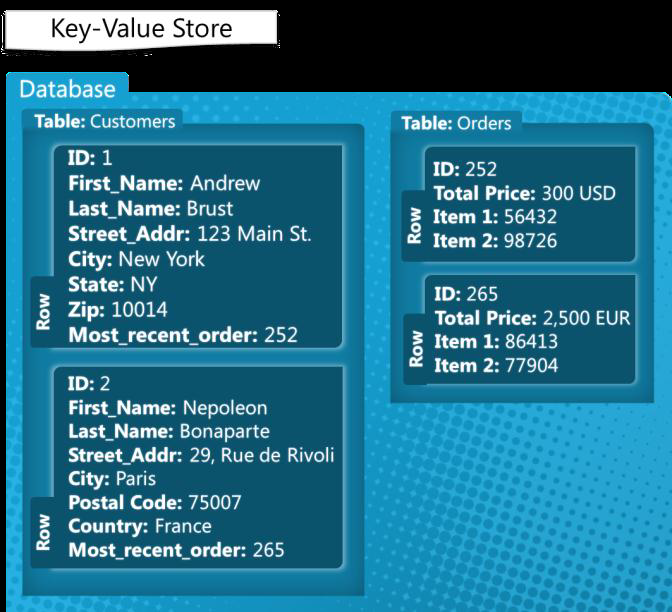
    • Key-value stores – These databases pair keys to values.  An analogy is a files system where the path acts as the key and the contents act as the file.  There are usually no fields to update, instead, the entire value other than the key must be updated if changes are to be made.  The simplicity of this scales well but it can limit the complexity of the queries and other advanced features.  Examples are: Dynamo, MemcacheDB, Redis, Riak, FairCom c-treeACE, Aerospike, OrientDB, MUMPS, HyperDex, Azure Table Storage (see Redis vs Azure)
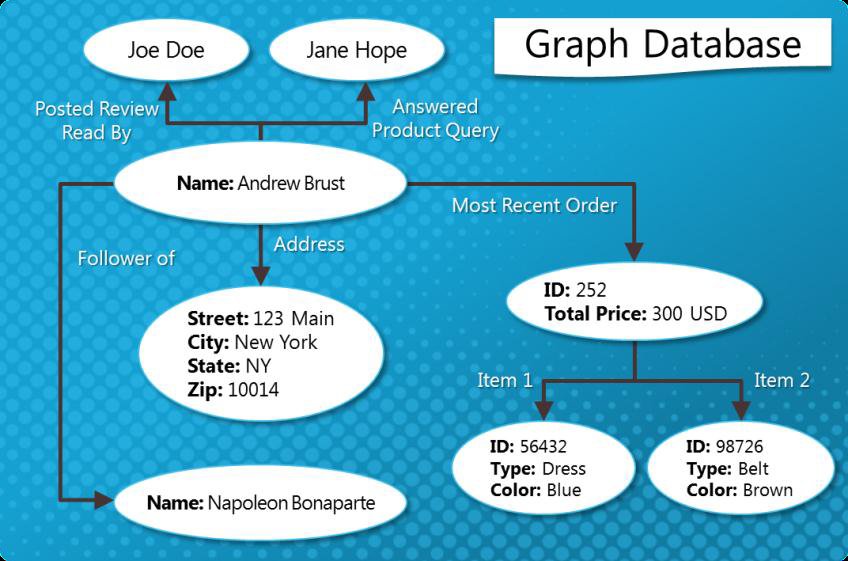
    • Graph stores – These excel at dealing with interconnected data.  Graph databases consist of connections, or edges, between nodes.  Both nodes and their edges can store additional properties such as key-value pairs.  The strength of a graph database is in traversing the connections between the nodes.  But they generally require all data to fit on one machine, limiting their scalability.  Examples include: Allegro, Neo4J, InfiniteGraph, OrientDB, Virtuoso, Stardog, Sesame
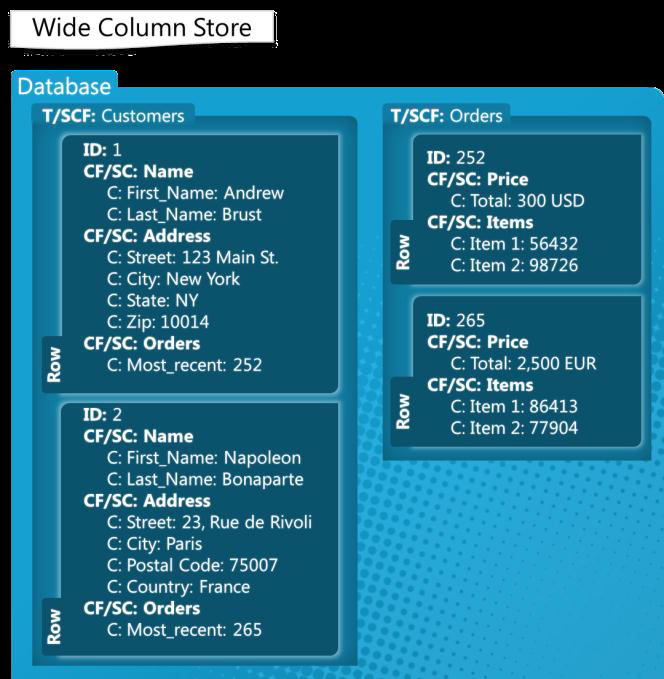
    • Column stores – Relational databases store all the data in a particular table’s rows together on-disk, making retrieval of a particular row fast.  Column-family databases generally serialize all the values of a particular column together on-disk, which makes retrieval of a large amount of a specific attribute fast.  This approach lends itself well to aggregate queries and analytics scenarios where you might run range queries over a specific field.  Examples include: Accumulo, Cassandra, Druid, HBase, Vertica
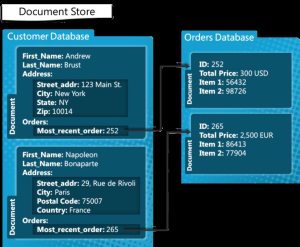
    • Document stores – These databases store records as “documents” where a document can generally be thought of as a grouping of key-value pairs (it has nothing to do with storing actual documents such as a Word document).  Keys are always strings, and values can be stored as strings, numeric, Booleans, arrays, and other nested key-value pairs.  Values can be nested to arbitrary depths.  In a document database, each document carries its own schema — unlike an RDBMS, in which every row in a given table must have the same columns.  Examples include: Lotus Notes, Clusterpoint, Apache CouchDB, Couchbase, MarkLogic, MongoDB, OrientDB, Qizx, Cloudant, Azure DocumentDB (see MongoDB vs. Azure DocumentDB and An Overview of Microsoft Azure DocumentDB)

    0247_image_090D49834477_image_523FC8B1

    7026_image_644C0C3E2311_image_42DC40D5

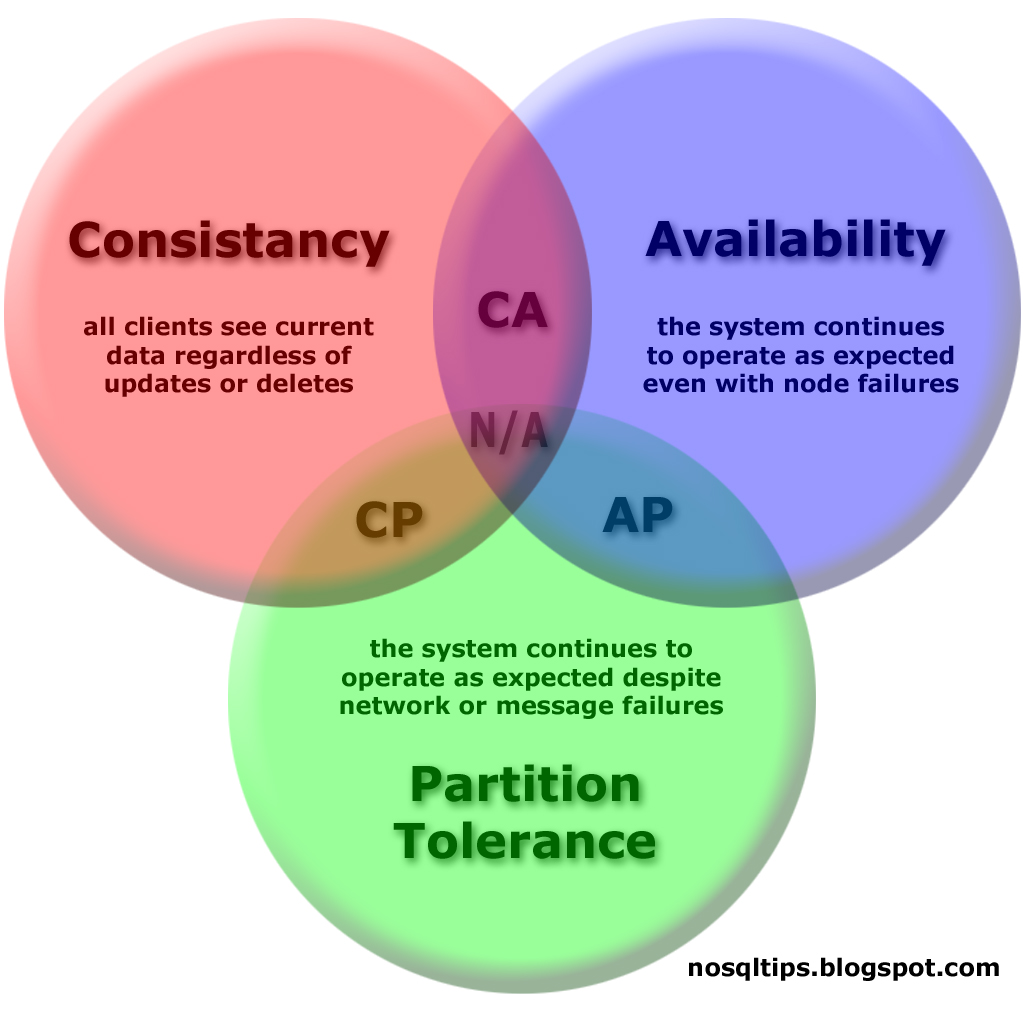
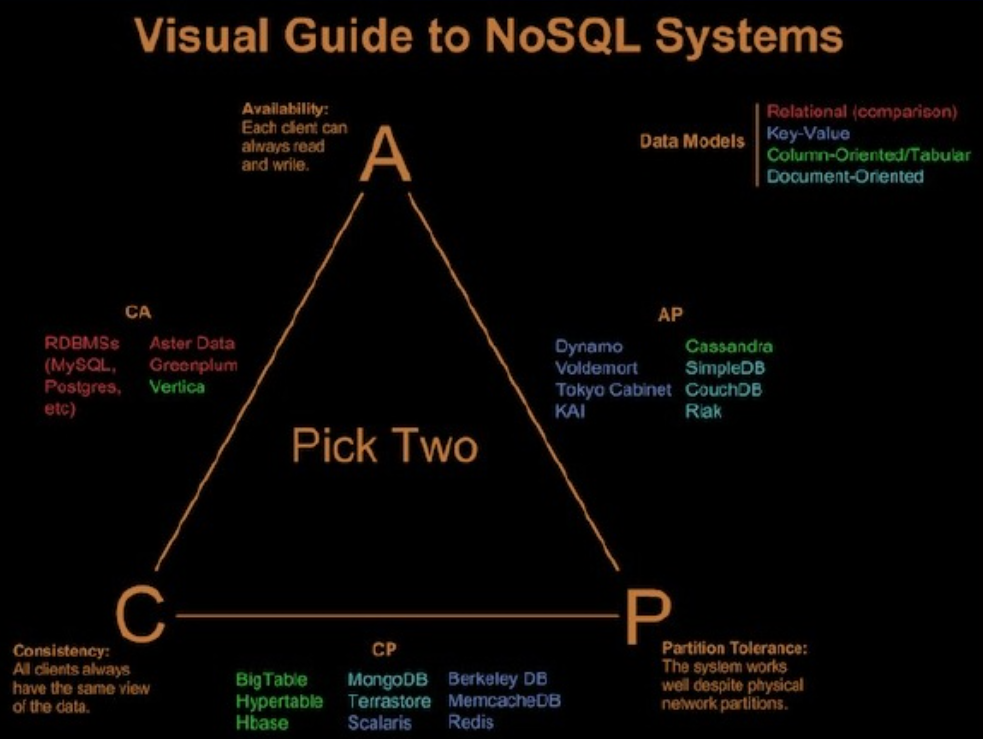
    The CAP Theorem states that it is impossible for a distributed computer system to simultaneously provide all three of the following guarantees:

    • Consistency (all nodes see the same data at the same time)
    • Availability (a guarantee that every request receives a response about whether it succeeded or failed)
    • Partition tolerance (the system continues to operate despite arbitrary message loss or failure of part of the system)

    CAP_Diagram_dist copy

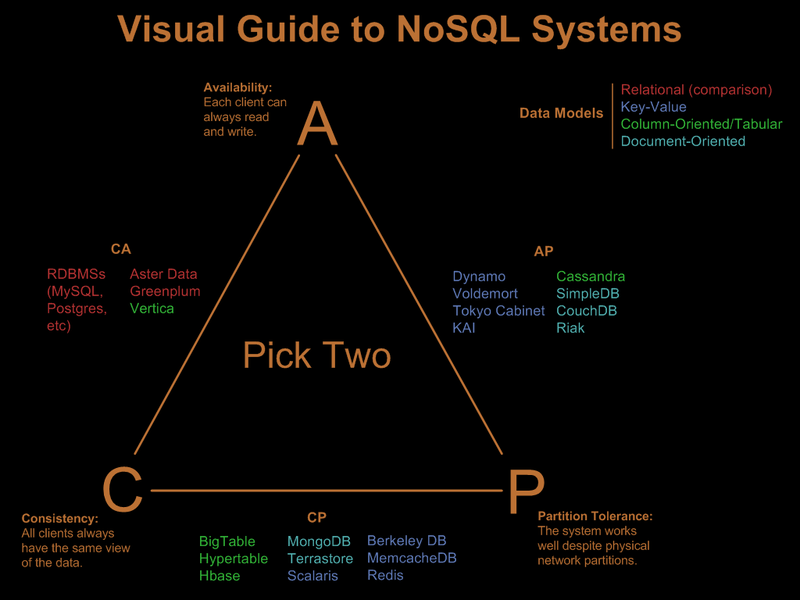
    Since you can only pick two guarantees, here is a list of NoSQL system broken out by the two that they support:

    medium_media_httpfarm5static_mevIk

    Here is a quick summary of the most popular NoSQL products by group:

    • Key-value stores
      • Riak – Offers high availability, fault tolerance, operational simplicity, and scalability.  Riak is one of the more sophisticated data stores.  It offers most of the features found in others, then adds more control over duplication.  Although the basic structure stores pairs of keys and values, the options for retrieving them and guaranteeing their consistency are quite rich.
      • Redis – Like CouchDB and MongoDB, Redis stores documents or rows made up of key-value pairs.  Unlike the rest of the NoSQL world, it stores more than just strings or numbers in the value.  It will also include sorted and unsorted sets of strings as a value linked to a key, a feature that lets it offer some sophisticated set operations to the user.  There’s no need for the client to download data to compute the intersection when Redis can do it at the server.  Redis is also known for keeping the data in memory and only writing out the list of changes every once and a bit.  Some don’t even call it a database, preferring instead to focus on the positive by labeling it a powerful in-memory cache that also writes to disk.  Traditional databases are slower because they wait until the disk gets the information before signaling that everything is OK.  Redis waits only until the data is in memory, something that’s obviously faster but potentially dangerous if the power fades at the wrong moment.
    • Document stores
      • MongoDB – Is designed for scale, flexible data aggregation and to store files of any size.  It has rich querying, high availability and full indexing support and is fast being adopted by many businesses.  Uses GridFS instead of HDFS.  MongoDB is designed for OLTP workloads. It can do complex queries, but it’s not necessarily the best fit for reporting-style workloads.  Or if you need complex transactions, it’s not going to be a good choice.  However, MongoDB’s simplicity makes it a great place to start.  MongoDB eschews the traditional table-based relational database structure in favor of JSON-like documents with dynamic schemas (MongoDB calls the format BSON), making the integration of data in certain types of applications easier and faster.  MongoDB is built to store data as an object in a dynamic schema, instead of a tabular database like SQL.
      • Coachbase – Can be used both as a document database that stores JSON documents or a pure key-value database.  Click here for how it compares to MongoDB.  CouchDB stores documents, each of which is made up of a set of pairs that link key with a value.  The most radical change is in the query. Instead of some basic query structure that’s pretty similar to SQL, CouchDB searches for documents with two functions to map and reduce the data.  One formats the document, and the other makes a decision about what to include.
    • Column stores
      • Cassandra – Born at Facebook and built on Amazon’s Dynamo and Google’s BigTable, it is a distributed storage system for managing very large amounts of structured data spread out across many commodity servers, while providing highly available service with no single point of failure.  It is essentially a hybrid between a key-value and a column-oriented (or tabular) database.  Most agree it is better than Hbase and MongoDB.  It can be used for both OLTP and data warehousing.  It replaces HDFS with the Cassandra File System (CFS).  Cassandra does not support joins or subqueries and emphasizes denormalization.
      • HBase – Patterned after Google BigTable, HBase is designed to provide fast, tabular access to the high-scale data stored on HDFS.  It is well suited for sparse data sets, which are common in many big data use cases.  HBase offers two broad use cases. First, it gives developers database-style access to Hadoop-scale storage, which means they can quickly read from or write to specific subsets of data without having to wade through the entire data store.  Most users and data-driven applications are used to working with the tables, columns, and rows of a database, and that’s what HBase provides.  Second, HBase provides a transactional platform for running high-scale, real-time applications. In this role, HBase is an ACID-compliant database that can run transactional applications.  That’s what conventional relational databases like Microsoft SQL Server are mostly used for, but HBase can handle the incredible volume, variety, and complexity of data encountered on the Hadoop platform.  Like other NoSQL databases, it doesn’t require a fixed schema, so you can quickly add new data even if it doesn’t conform to a predefined model.  It can be used for lightweight OLTP.  Tables are de-normalized for speed (so no joins), but updates can be slow.  HBase does not use Hadoop’s MapReduce capabilities directly, though HBase can integrate with Hadoop to serve as a source or destination of MapReduce jobs
    • Graph
      • Neo4j – Neo4J lets you fill up the data store with nodes and then add links between the nodes that mean things. Social networking applications are its strength.  The code base comes with a number of common graph algorithms already implemented.  If you want to find the shortest path between two people — which you might for a site like LinkedIn — then the algorithms are waiting for you.
      • OrientDB – It is a document-based database, but the relationships are managed as in graph databases with direct connections between records.  It supports schema-less, schema-full and schema-mixed modes.  It has a strong security profiling system based on users and roles and supports SQL as a query language.  OrientDB uses a new indexing algorithm called MVRB-Tree, derived from the red–black tree and from the B+ tree; this reportedly has benefits of having both fast insertions and fast lookups.

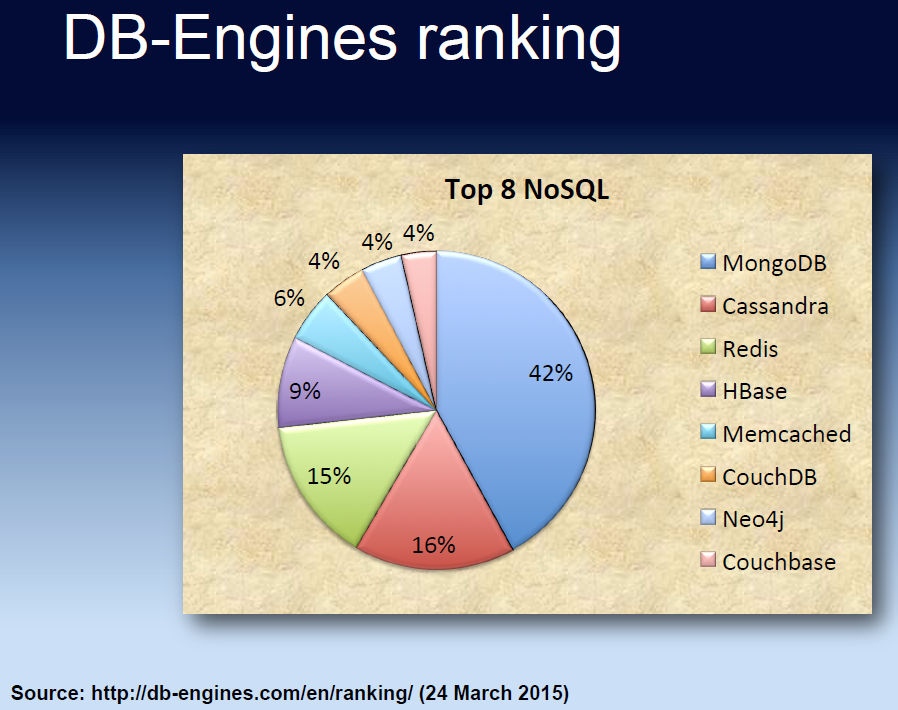
    Untitled picture

    But I’ll leave you with this note: Although NoSQL databases are becoming more popular, according to DB-Engines Ranking they only make up about 12% of the total database market when you include relational databases!

    More info:

    Visual Guide to NoSQL Systems

    List Of NoSQL Databases

    Thumbtack: NoSQL Database Comparison by Ben Engber

    MongoDB, Cassandra, and HBase — the three NoSQL databases to watch

    What is Apache Cassandra?

    DB-Engines database popularity ranking

    NoSQL showdown: MongoDB vs. Couchbase

    NoSQL standouts: New databases for new applications

    The Rise and Fall of the NoSQL Empire (2007–2013)

    What’s better for your big data application, SQL or NoSQL?

    Considerations for using NoSQL technology on your next IT project

    Difference between SQL and NoSQL : Comparision

    SQL vs NoSQL Database Differences Explained with few Example DB

    NoSQL Introduction

    Getting Acquainted with NoSQL on Windows Azure

    Data Store Map (full PDF map) – 451 Research

    Which NoSQL Solution is Right For You?

    Four and a Half Types of NoSQL Databases, and When to Use Them

    Understanding NoSQL on Microsoft Azure

    IT pros talk top enterprise NoSQL architecture challenges

    19 Apr 00:12

    More Useful MVA Training Options

    by Greg Low

    I find many of the MVA courses great for quickly getting across concepts or areas that I haven’t worked with before.

    This month, the local MVP program has asked me to highlight the following MVA courses. The first two in particular look useful for SQL folk. The third one provides good background:

    Azure IaaS Technical Fundamentals

    Deep Dive into Networking Storage and Disaster Recovery Scenarios

    Embracing Open Source Technologies to Accelerate and Scale Solutions

    If you watch them, let me know what you think.

    19 Apr 00:12

    My MVA course about SQL Server on Azure - PaaS or Iaas?

    by Damian

    If you are tired today maybe you could take your time and spend the whole weekend with the SQL Server 2014 and Azure?

    The new MVA course is ready :) and waiting for you. Just visit the link http://bit.ly/1CXZT90 and enjoy. Watch out - it's in Polish :)

    The topics covered:

    • SQL Server as IaaS  - means SQL Server on the Azure VM
    • SQLServer as PaaS - means Azure SQL Database
    • IaaS vs PaaS - what to choose and when

    more comming....


    One of the the next MVA course I am going to prepare will be about... wait for it.....  Oracle & Azure ;)


    Cheers

    Damian 

    19 Apr 00:11

    What is MVP V-Conf?

    by MVP Award Program


    (Please visit the site to view this video)

    The MVP Virtual Conference (MVP V-Conf) is a new, virtual, 2-day event that showcases how the best and brightest independent technology experts are using Microsoft technologies today. Tune in and see what the community of power users are saying about the mobile-first, cloud-first world of possibility with Microsoft re-imagined.
     
    These sessions will be presented by Americas’ Region Microsoft Most Valuable Professionals (MVPs), who are exceptional community leaders who are passionate about sharing their real-world knowledge of Microsoft products with their IT Pro, developer and consumer communities around the world.
     
    The theme of this first conference is “The Power of Community” where we will showcase how the community can help one another learn, thrive and grow, and demonstrate how Microsoft’s MVPs shape these technical communities. 
      
    The MVP V-Conf Keynote address will be delivered by Steven Guggenheimer, Corporate Vice President of the Developer eXperience (DX) group at Microsoft Corp.


    MVP V-Conf will be a live event broadcast on May 14th and May 15th, 2015. Sign up for sessions in English, Spanish or Portuguese tracks that span IT Professional, Developer and Consumer topics.
    • IT Pro Track
    • Developer Track
    • Consumer Track
    • LATAM Track (Spanish)
    • Brazil Track (Portuguese)


    Why MVP V-Conf?
     
    LEARN FROM RISING STARS AND INDUSTRY ICONS
    Come learn from the best and brightest in the tech world today. All of the sessions will all be delivered by the Americas’ Region Microsoft MVPs. These MVPs are experts who present at premiere conferences, independent community events and local user groups all over the globe.
     
    LEARN TECHNICAL CONTENT RELEVANT TO YOU
    This is a technical conference focused on helping attendees to learn and develop skills for everything from everyday technical work to wackier weekend projects.  Whether it is on the IT Pro, Dev or Consumer side of things, you can bet that the content of MVP V-Conf will be cutting edge, exciting and relevant.


    General MVP V-Conf Information
     
    The sessions will be broadcasted live via EventBuilder. Each session will be a 50 minute presentation and have real-time Q&A via live chat.
     
    Click the “Agenda” link to get an overview of the sessions, the “Sessions” link to read detailed descriptions, or the “Speakers” page to view presenters and moderators. The information about IT Professional (IT Pro) Track sessions is highlighted in blue, Developer (Dev) Track sessions in red, Consumer Tracksessions in orange, LATAM Track webcasts in Spanish in green, and the Brazilian Track webcasts in Portuguese in yellow.
     
     
    Event Registration
     
    To attend the event webcast(s) it's necessary to register in advance of the virtual event. You can click on the registration button click here.


    FAQ
     
    Q: Is there a social networking hashtag to use when talking about this event?
    A: Refer to MVP V-Conf in social media by using the hashtag #MVPvConf for the event and #mvpbuzz for the MVP Award Program.
     
    Q: How was MVP V-Conf born?
    A: The first iteration of this event was conceived and originally organized by Brazilian MVPs, under the name MVP Showcast with support from the MVP Award Program. It has now evolved to become the MVP V-Conf, a series of webcasts with speakers from all the Americas region (US, Canada, LATAM, Brazil). In 2011, this initiative started in Brazil as a virtual event that was designed to talk about Microsoft technologies in a series of webcasts. The themes evolved over the years from virtualization (MSVirtualization 2011), to general Infrastructure Technologies in (MVP IT Showcast 2012), to Infrastructure Technologies and Development in the following years (MVP Showcast 2013/2014).
     
    Q: When will the final schedule be available?
    A: Early April 2015.
     
    Q: Who can attend the webcasts?
    A: Any person who registers for MVP V-Conf.
     
    Q: Can I attend sessions in different tracks?
    A: Yes, you can attend any session you like in any track as long as you register for the event.
     
    Q: Can I attend only one session?
    A: Yes. 
     
    Q: Will *.ics files be available per session so I can get reminded about those sessions I plan to attend?
    A: Yes. Pre-registered attendees can download the *.ics files for sessions of interest as a calendar reminder. 
     
    19 Apr 00:11

    IoT: Do you really should have knowledge in electronics?

    by Sergiy Baydachnyy

    Usually I don’t like to talk about something abstract but today people are asking me the same things like “What is the best board to create own project?” or “How to buy thousands of Galileo/Raspberry/Arduino boards to start production?” or “What is the next step if we already have a prototype?” So, I decided to share my OWN opinion about all these things.

    When I was studying at the university I didn’t like Delphi and used C++ and Visual Studio for all my assignments and labs. But, finally, I got some experience in Delphi when somebody asked me to create a prototype of an analytic application “for tomorrow”. The prototype had to contain many graphics, tables and forms but at that time I needed to wait 2 more years for .NET and Windows Forms. So, I simply used Delphi to create it because Delphi contained all needed components and didn’t require much knowledge in Pascal. That’s why almost all students in my class didn’t use C++ but used Delphi. They simply didn’t want to be software developers but needed a tool which would help them to make prototypes and labs very quickly without deep knowledge there. We just had different answers to the question “Should we really have knowledge in software development?” Because I had positive answer I spent much time to learn object oriented programming, Windows API, Assembler etc. but all these things were not needed for pure mathematics.

    I believe that we have the similar situation in IoT today and things like Arduino, Raspberry, Netduino, different sensors etc. are our “Delphi components”. But we are developers and today we need to answer the question “Do I really have to have knowledge in electronics?” Frankly speaking, I don’t think so. Of course, it’s easy to buy several common sensors, connect them to a board and develop something but what about things like price, the right PCB design, user experience, power consumption etc. Usually we don’t think about all these things when we are implementing a prototype. We just want to get working model. But your working model usually doesn’t have any common things with device which will go to production like my Delphi prototype didn’t have any common parts with the final product.

    Just check some toys in the market like different robots, nano bugs, talking pandas etc. All these things even don’t have any microcontroller inside. Do you have enough knowledge to build a robot which will move around your house, avoid obstacles and follow some algorithms? And you should not use any microcontrollers and development at all.

    Some things like flight controller boards contain chips like ATMega and even Arduino IDE compatible but I wonder if you are ready to build the board like this from scratch to satisfy you own solution and make it better?  

    So, my advice is simple. If you are going to create some cool prototypes just use existing components and make it fast because everything is changing quickly. But if you start thinking about production and have some ideas about who will invest money into your project – it’s time to invite engineers to your team and start building your project from scratch.

    19 Apr 00:10

    Check correct path policy of RDMs

    by Gabrie van Zanten

    Our vSphere version combined with EMC VNX MCX OE version advices Round Robin as path policy. For RDMs used by a Microsoft Cluster however, Most-Recently-Used is the adviced policy. If a Microsoft Cluster has the incorrect path policy, there is a hughe latency on the RDM. We have noticed that reboot of the ESXi host or forced rescan of the HBA will reset the path policy selection.

    To be able to keep an eye on unwanted changes in path policy, we use the famous vCheck by Alan Renouf and added our own plugin. 

    $Report = @()
    $GevondenMRULuns = 0
    $Header = "" 
    
    foreach($vm in (Get-View -ViewType VirtualMachine)){
     $vm.Config.Hardware.Device | where {$_.gettype().Name -eq "VirtualDisk"} | %{
     if("physicalMode","virtualmode" -contains $_.Backing.CompatibilityMode){
     $diskUUID = $_.Backing.LunUuid.Substring(10,32)
     $esx = Get-View $vm.Runtime.Host
     $lun = $esx.Config.StorageDevice.ScsiLun | where {$_.CanonicalName.Split(".")[1] -eq $diskUUID}
     if($lun){
     $lunscsi = Get-VMHost $esx.Name | Get-ScsiLun -CanonicalName $lun.CanonicalName 
    
     If( $lunscsi.MultipathPolicy -ne "MostRecentlyUsed" )
     {
     # NOT mru
     $row = "" | Select ESXiHost, CanonicalName, MultiPathPolicy, VMName, Status
     $row.ESXiHost = $esx.name
     $row.CanonicalName = $lun.canonicalname
     $row.MultiPathPolicy = $lunscsi.Multipathpolicy
     $row.VMName = $vm.Name
     $row.Status = "ERROR"
     $Report += $row
    
     }
     else
     {
     # MRU
     $GevondenMRULuns = $GevondenMRULuns + 1
    
     $row = "" | Select ESXiHost, CanonicalName, MultiPathPolicy, VMName, Status
     $row.ESXiHost = $esx.name
     $row.CanonicalName = $lun.canonicalname
     $row.MultiPathPolicy = $lunscsi.Multipathpolicy
     $row.VMName = $vm.Name
     $row.Status = "CORRECT"
     $Report += $row
    
     }
     }
     }
     }
    }
    
    $Header = "RDMs with incorrect pathpolicy $(@($Consol).Count-1), RDMs with CORRECT pathpolicy $GevondenMRULuns"
    $Title = "RDMs with incorrect path"
    $Comments = "Path policy can either by Fixed Path, Most Recently Used or Round Robin. For physical RDMs the MRU policy is adviced"
    $Display = "Table"
    $Author = "Gabrie van Zanten"
    $PluginVersion = "1"
    $PluginCategory = "vSphere"
    
    # Output to console
    $Report
    
    $Header
    
    </pre>
    <pre>


    See full post at: Check correct path policy of RDMs

    18 Apr 23:51

    Updated patterns & practices guidance for the Azure Developer

    by Jerry Nixon

    The patterns & practices team has been working on developing Azure architecture guidance. We’re happy to announce that first round of guidance is now available to public at https://github.com/mspnp/azure-guidance. The purpose of this project is to provide architectural guidance to enable developers to build and deploy world-class systems using Azure.

    image


    These documents focus on the essential aspects of architecting systems to make optimal use of Azure, and summarize best practice for building cloud solutions. The current set of guidance documents contains the following items. Note that this is a living project. We welcome feedback, suggestions, and other contributions to those items.

    1. API Design describes the issues that you should consider when designing a web API.
    2. API Implementation focusses on best practices for implementing a web API and publishing it to make it available to client applications.
    3. Autoscaling Guidance summarizes considerations for taking advantage of the elasticity of cloud-hosted environments
    4. Background Jobs Guidance describes the options available, and best practices for implementing tasks that should be performed in the background.
    5. Content Delivery Network (CDN) Guidance provides general guidance and good practice for using the CDN to minimize the load on your applications, and maximize availability and performance.
    6. Caching Guidance summarizes how to use caching with Azure applications and services to improve the performance and scalability of a system.
    7. Data Partitioning Guidance describes strategies that you can use to partition data to improve scalability, reduce contention, and optimize performance.
    8. Monitoring and Diagnostics Guidance provides guidance on how to track the way in which users utilize your system, trace resource utilization, and generally monitor the health and performance of your system.
    9. Retry General Guidance covers general guidance for transient fault handling in an Azure application.
    10. Retry Service Specific Guidance summarizes the retry mechanism features for the majority of Azure services, and includes information to help you use, adapt, or extend the retry mechanism for that service.
    11. Scalability Checklist summarizes best practices for designing and implementing scalable services and handling data management.
    12. Availability Checklist lists best practices for ensuring availability in an Azure application.

    Please join our gitter chat for any questions or suggestions. We’ll continue releasing guidance on each architectural aspect of cloud services.

    18 Apr 23:44

    Net neutrality

    by RGK

    I have been hearing a lot about “net neutrality” recently. I understand the federal court are getting involved.

    John McEnroe, Jr. is a former World No. 1 professional tennis player often rated among the greatest tennis players of all time, especially for his touch on the volley. He was well-known for screaming at officials for calls at the net. He came to Lincoln recently to play a charity match. That got me thinking.

    Do you know of any good reason the federal courts, through this “net neutrality” litigation, should now be overseeing tennis?

    Just more federal judicial overreach if you ask me!

    images

    RGK


    Filed under: Uncategorized Tagged: John McEnroe, judicial overreach, net neutrality
    18 Apr 23:42

    Code Quality

    I honestly didn't think you could even USE emoji in variable names. Or that there were so many different crying ones.
    14 Apr 20:12

    Opportunity

    Mrdenny

    now

    We all remember those famous first words spoken by an astronaut on the surface of Mars: "That's one small step fo- HOLY SHIT LOOK OUT IT'S GOT SOME KIND OF DRILL! Get back to the ... [unintelligible] ... [signal lost]"
    14 Apr 19:31

    Seven Minutes in Heaven

    by Remy Porter

    Steven quietly bowed his head as the planning meeting began. Their leader, messiah, and prophet was Jack, and today’s sermon was was the promise of Heaven- Heaven being the codename of their ground-up rewrite of their e-commerce solution.
    Franz Von Stuck - Sisyphus
    Jack sat at the head of the table, in front of the projection screen. Behind him glowed the Spreadsheet of Pending Tasks, and the cells surrounded his head like rectangular halos. His eyes glowed with the power of his vision. “In Heaven, our customers will be able to customize everything. Everything!”

    Jack had lead the development on Heaven’s predecessor. Like Heaven, it was endlessly customizable. It was also slow, buggy, impossible to maintain, utterly incomprehensible, and tied to a deceased proprietary technology stack. Jack had climbed the mountain and brought back word from management: a total rewrite.

    “We made some mistakes in our last version,” Jack admitted, “but this new version won’t suffer from the legacy of history. We’re making a clean break with the past. I’ve already gotten a great start on the project.”

    Steven didn’t groan, but couldn’t fully suppress his shudder. Jack’s coding style had a lot of quirks, but his worst quirk was that he never deleted a line of code. If a line of code were no longer used, he’d wrap a conditional block around it, e.g. if VERSION < 1.2 { doThisDeadThing(); } else { doTheProperThing(); } Jack also tended to over-engineer… everything.

    Jack’s great start didn’t include any e-commerce functionality, but it included Jack’s greatest invention yet- JSQL (Jack’s Smart Query Language, or as most people knew it, Job Security Query Language). The language itself was simple: JSON documents, loosely modeled on MongoDB’s query language, but without any aggregate functions and broken filtering syntax.

    Worse than that, they weren’t really using a NoSQL database. Jack had read that NoSQL was highly customizable, and decided to implement his own NoSQL database… on top of MySQL. This mostly meant a table with the columns: PK_ID, KEY, VALUE, PARENT_ID. PARENT_ID, of course, was a foreign key back to PK_ID, which allowed him to build arbitrary document structures if you nested the relationships deeply enough.

    It was ugly, it was slow, and it didn’t work. After a few weeks getting nowhere with the system, Steve decided to bring it up at the next planning meeting. “We’ve debugged a hundred issues in the JSQL layer- this week. And it’s not really getting us anything- most of our data is still relational in nature, we’re just storing it as documents. We should just switch to a normal database design.”

    “But then,” Jack proclaimed, “our users won’t be able to customize everything!”

    “Do our customers really need to define arbitrary data-structures to represent their products? Couldn’t we just give them some metadata tables or something?”

    “Maybe,” Jack said, “the JSQL layer isn’t for you. Perhaps you need to work on HARP. Yes, I think you’ll work on HARP now. You’re more of a UI person, anyway.”

    Steven wasn’t a UI person, but that was okay, HARP wasn’t the UI layer.The Heavenly Application Rendering Platform “simplified” user interface development. Like JSQL, it was its own language, a declarative language that mixed presentation and behavior into the same big ball of mud, then shoved that ball of mud against the rest of the application code until bits of it leaked over everything. Changes to HARP could successfully break JSQL. Steven found this out when he broke JSQL repeatedly.

    The project ground on, weeks turned to months, months to more months, and after nearly a year of work, the application had exactly zero e-commerce functionality. Steven had tried to sneak some in when Jack forgot to assign him tasks on building their Inner-Platform, but Jack broke the functionality when he completely re-wrote HARP over one weekend.

    This lack of progress got the attention of the CEO, who rounded Jack and the project team up for a meeting to identify the problem. Jack once again took a seat at the head of the table, with his Spreadsheet of Pending Tasks giving him the managerial aura he wanted to project. “As you can see from the burndown, we’re making great progress,” Jack said.

    The CEO nodded sagely, as Jack pointed out the many, many completed tasks on the spreadsheet.

    “We’ve made great progress on nothing,” Steven said, hoping the CEO would listen to reason. “We’re building this framework that solves the wrong problem- our real problem is, ‘how do our customers sell things?’ Instead, we’re building our own database engine and writing programming languages!”

    “If we didn’t do that, our customers wouldn’t be able to program their own stores,” Jack said.

    Why would they want to? Making everything customizable just gives our users more ways to break everything. What business wants to program their own storefront? They want to buy something ready to go and tweak the look and feel!”

    “Our users should be able to customize everything,” Jack said.

    The CEO nodded sagely. “Yes, I like the idea of everything being customizable. That sounds great, guys. Let’s go and make the best e-commerce app ever!”

    Jack didn’t take kindly to Steven’s heresy. Steven’s eternal punishment (or, at least his punishment until he found a new job) was the Sisyphean task of trying to roll e-commerce functionality into Heaven, only to have Jack’s every check-in break his changes entirely. By the time Steven left for greener pastures, Heaven still had no core functionality, but had grown an impressively bloated database engine.

    [Advertisement] Use NuGet or npm? Check out ProGet, the easy-to-use package repository that lets you host and manage your own personal or enterprise-wide NuGet feeds and npm repositories. It's got an impressively-featured free edition, too!
    14 Apr 19:18

    After EFF Effort, Infamous "Podcasting Patent" Invalidated

    by timothy
    Ars Technica reports some good news on the YRO front. An excerpt: A year-and-a-half after the Electronic Frontier Foundation created a crowd-funded challenge to a patent being used to threaten podcasters, the patent has been invalidated. In late 2013, after small podcasters started getting threat letters from Personal Audio LLC, the EFF filed what's called an "inter partes review," or IPR, which allows anyone to challenge a patent at the US Patent and Trademark Office. The order issued today by the USPTO lays to rest the idea that Personal Audio or its founder, Jim Logan, are owed any money by podcasters because of US Patent No. 8,112,504, which describes a "system for disseminating media content representing episodes in a serialized sequence." The article points out, though, that the EFF warns Personal Audio LLC is seeking more patents on podcasting. Mentioned within: Adam Carolla's fight against these patents and our Q&A with Jim Logan.

    Share on Google+

    Read more of this story at Slashdot.

    14 Apr 18:47

    Microsoft Pushes For Public Education Funding While Avoiding State Taxes

    by Soulskill
    theodp writes: After stressing how important the funding of Washington State education — particularly CS Ed — is to Microsoft, company general counsel Brad Smith encountered one of those awkward interview moments (audio at 28:25). GeekWire Radio: "So, would you ever consider ending that practice [ducking WA taxes by routing software licensing royalties through Nevada-based Microsoft Licensing, GP] in Nevada [to help improve WA education]?" Smith: "I think there are better ways for us to address the state's needs than that kind of step." Back in 2010, Smith, Steve Ballmer, and Microsoft Corporation joined forces to defeat Proposition I-1098, apparently deciding there were better ways to address the state's needs than a progressive income tax.

    Share on Google+

    Read more of this story at Slashdot.

    14 Apr 18:41

    New York State Spent Millions On Program For Startups That Created 76 Jobs

    by samzenpus
    Mrdenny

    now

    Nerval's Lobster writes Last year, the New York state government launched Start-Up NY, a program designed to boost employment by creating tax-free zones for technology and manufacturing firms that partner with academic institutions. Things didn't go quite as planned. In theory, those tax-free zones on university campuses would give companies access to the best young talent and cutting-edge research, but only a few firms are actually taking the bait: According to a report from the state's Department of Economic Development, the program only created 76 jobs last year, despite spending millions of dollars on advertising and other costs. If that wasn't eyebrow-raising enough, the companies involved in the program have only invested a collective $1.7 million so far. The low numbers didn't stop some state officials from defending the initiative. "Given the program was only up and running for basically one quarter of a year," Andrew Kennedy, a senior economic development aide to Governor Cuomo, told Capital New York, "I think 80 jobs is a good number that we can stand behind."

    Share on Google+

    Read more of this story at Slashdot.

    14 Apr 18:40

    Republicans Introduce a Bill To Overturn Net Neutrality

    by Soulskill
    New submitter grimmjeeper writes: IDG News reports, "A group of Republican lawmakers has introduced a bill that would invalidate the U.S. Federal Communications Commission's recently passed net neutrality rules. The legislation (PDF), introduced by Representative Doug Collins, a Georgia Republican, is called a resolution of disapproval, a move that allows Congress to review new federal regulations from government agencies, using an expedited legislative process." This move should come as little surprise to anyone. While the main battle in getting net neutrality has been won, the war is far from over. The legislation was only proposed now because the FCC's net neutrality rules were just published in the Federal Register today. In addition to the legislation, a new lawsuit was filed in the U.S. Court of Appeals for the District of Columbia Circuit by USTelecom, a trade group representing ISPs.

    Share on Google+

    Read more of this story at Slashdot.

    14 Apr 18:39

    US Dept. of Education Teams With Microsoft-Led Teach.org On Teacher Diversity

    by Soulskill
    theodp writes: Citing a new study that suggests academic achievement can benefit when children are taught by a teacher of their own race, the NY Times asks, Where Are the Teachers of Color? Towards that end, the Times reports that "Teach.org, a partnership between the Department of Education and several companies, teachers unions and other groups, is specifically targeting racial minorities for recruitment." Teach.org describes itself as a "public-private partnership led by Microsoft, State Farm and the U.S. Department of Education." To the consternation of some, the U.S. Dept. of Education delegated teacher recruitment to Microsoft in 2011. With its 2.2% African American/Black and 3.9% Latino/Hispanic tech workforce, who better to increase diversity than Microsoft, right?

    Share on Google+

    Read more of this story at Slashdot.

    14 Apr 18:33

    Bad habits : Focusing only on disk space when choosing keys

    by Aaron Bertrand
    Mrdenny

    now

    While Jeff Atwood and Joe Celko seem to think that the cost of GUIDs is no big deal (see Jeff's blog post, "Primary Keys: IDs versus GUIDs," and this newsgroup thread, entitled "Identity Vs. Uniqueidentifier"), other experts – more specifically index and architecture experts focusing on the SQL Server space – tend to disagree. For example, Kimberly Tripp goes over some details in her post, "Disk Space is Cheap – THAT'S NOT THE POINT!", where she explains that the impact isn't just on disk space and fragmentation, but more importantly on index size and memory footprint.

    What Kimberly says is really true – I come across the "disk space is cheap" justification for GUIDs all the time (example from just last week). There are other justifications for GUIDs, including the need to generate unique identifiers outside the database (and sometimes before the row is actually created), and the need for unique identifiers across separate distributed systems (and where identity ranges are not practical). But I really want to dispel the myth that GUIDs don't cost all that much, because they do, and you need to weigh these costs into your decision.

    I set out on this mission to test the performance of different key sizes, given the same data across the same number of rows, with the same indexes, and roughly the same workload (replaying the *exact* same workload can be quite challenging). Not only did I want to measure the basic things like index size and index fragmentation, but also the effects these have down the line, such as:

    • impact on buffer pool usage
    • frequency of "bad" page splits
    • overall impact on realistic workload duration
    • impact on average runtimes of individual queries
    • impact on runtime duration of after triggers
    • impact on tempdb usage

    I will use a variety of techniques to investigate this data, including Extended Events, the default trace, tempdb-related DMVs, and SQL Sentry Performance Advisor.

    Setup

    First, I created a million customers to put into a seed table using some built-in SQL Server metadata; this would ensure that the "random" customers would consist of the same natural data throughout each test.

    CREATE TABLE dbo.CustomerSeeds
    (
      rn INT PRIMARY KEY CLUSTERED,
      FirstName NVARCHAR(64),
      LastName NVARCHAR(64),
      EMail NVARCHAR(320) NOT NULL UNIQUE,
      Active BIT
    );
     
    INSERT dbo.CustomerSeeds WITH (TABLOCKX) (rn, FirstName, LastName, EMail, [Active])
    SELECT rn = ROW_NUMBER() OVER (ORDER BY n), fn, ln, em, a
    FROM 
    (
      SELECT TOP (1000000) fn, ln, em, a = MAX(a), n = MAX(NEWID())
      FROM
      (
        SELECT fn, ln, em, a, r = ROW_NUMBER() OVER (PARTITION BY em ORDER BY em)
        FROM
        (
          SELECT TOP (2000000)
            fn = LEFT(o.name, 64), 
            ln = LEFT(c.name, 64), 
            em = LEFT(o.name, LEN(c.name)%5+1) + '.' 
                 + LEFT(c.name, LEN(o.name)%5+2) + '@' 
                 + RIGHT(c.name, LEN(o.name+c.name)%12 + 1) 
                 + LEFT(RTRIM(CHECKSUM(NEWID())),3) + '.com', 
            a  = CASE WHEN c.name LIKE '%y%' THEN 0 ELSE 1 END
          FROM sys.all_objects AS o CROSS JOIN sys.all_columns AS c 
          ORDER BY NEWID()
        ) AS x
      ) AS y WHERE r = 1 
      GROUP BY fn, ln, em 
      ORDER BY n
    ) AS z 
    ORDER BY rn;
    GO
     
    SELECT TOP (10) * FROM dbo.CustomerSeeds ORDER BY rn;
    GO

    Your mileage may vary, but on my system, this population took 86 seconds. Ten representative rows (click to enlarge):

    Sample CustomersSample Customers

    Next, I needed tables to house the seed data for each use case, with a few extra indexes to simulate some sort of reality, and I came up with short suffixes to make all kinds of diagnostics easier later:

    data type default compression use case suffix
    INT IDENTITY none I
    INT IDENTITY page + row Ic
    BIGINT IDENTITY none B
    BIGINT IDENTITY page + row Bc
    UNIQUEIDENTIFIER NEWID() none G
    UNIQUEIDENTIFIER NEWID() page + row Gc
    UNIQUEIDENTIFIER NEWSEQUENTIALID() none S
    UNIQUEIDENTIFIER NEWSEQUENTIALID() page + row Sc

    Table 1: Use cases, data types, and suffixes

    Eight tables all told, all borne from the same template (I would just change the comments around to match the use case, and replace $use_case$ with the appropriate suffix from the table above):

    CREATE TABLE dbo.Customers_$use_case$ -- I,Ic,B,Bc,G,Gc,S,Sc
    (
      CustomerID INT NOT NULL IDENTITY(1,1),
      --CustomerID BIGINT NOT NULL IDENTITY(1,1),
      --CustomerID UNIQUEIDENTIFIER NOT NULL DEFAULT NEWID(),
      --CustomerID UNIQUEIDENTIFIER NOT NULL DEFAULT NEWSEQUENTIALID(),
      FirstName NVARCHAR(64) NOT NULL,
      LastName NVARCHAR(64) NOT NULL,
      EMail NVARCHAR(320) NOT NULL,
      Active BIT NOT NULL DEFAULT 1,
      Created DATETIME NOT NULL DEFAULT SYSDATETIME(),
      Updated DATETIME NULL,
      CONSTRAINT C_PK_Customers_$use_case$ PRIMARY KEY (CustomerID)
    ) --WITH (DATA_COMPRESSION = PAGE)
    GO
    ;
    CREATE UNIQUE INDEX C_Email_Customers_$use_case$ ON dbo.Customers_$use_case$(EMail)
      --WITH (DATA_COMPRESSION = PAGE)
    ;
    GO
    CREATE INDEX C_Active_Customers_$use_case$ ON dbo.Customers_$use_case$(FirstName, LastName, EMail)
      WHERE Active = 1
      --WITH (DATA_COMPRESSION = PAGE)
    ;
    GO
    CREATE INDEX C_Name_Customers_$use_case$ ON dbo.Customers_$use_case$(LastName, FirstName) 
      INCLUDE (EMail)
      --WITH (DATA_COMPRESSION = PAGE)
    ;
    GO

    Once the tables were created, I proceeded to populate the tables and measure many of the metrics I alluded to above. I restarted the SQL Server service in between each test to be sure they were all starting from the same baseline, that DMVs would be reset, etc.

    Uncontested Inserts

    My eventual goal was to fill the table with 1,000,000 rows, but first I wanted to see the impact of the data type and compression on raw inserts with no contention. I generated the following query – which would populate the table with the first 200,000 contacts, 2000 rows at a time – and ran it against each table:

    DECLARE @i INT = 1;
    WHILE @i <= 100
    BEGIN
      INSERT dbo.Customers_$use_case$(FirstName, LastName, Email, Active)
        SELECT FirstName, LastName, Email, Active
        FROM dbo.CustomerSeeds AS c
        ORDER BY rn
        OFFSET 2000 * (@i-1) ROWS
        FETCH NEXT 2000 ROWS ONLY;
      SET @i += 1;
    END

    Results (click to enlarge):

    200K Insert duration

    Each case took about 12 seconds (without compression) and 16 seconds (with compression), with no clear winner in either storage mode. The effect of compression (mainly on CPU overhead) is pretty consistent, but since this is running on a fast SSD, the I/O impact of the different data types is negligible. In fact the compression against BIGINT seemed to have the biggest impact (and this makes sense, since every single value less than 2 billion would be compressed).

    More Contentious Workload

    Next I wanted to see how a mixed workload would compete for resources and generally perform against each data type. So I created these procedures (replacing $use_case$ and $data_type$ appropriately for each test):

    -- random singleton updates to data in more than one index
    CREATE PROCEDURE [dbo].[Customers_$use_case$_RandomUpdate]
      @Customers_$use_case$ $data_type$
    AS
    BEGIN
      SET NOCOUNT ON;
     
      UPDATE dbo.Customers_$use_case$
        SET LastName = COALESCE(STUFF(LastName, 4, 1, 'x'),'x')
        WHERE CustomerID = @Customers_$use_case$;
    END
    GO
     
    -- reads ("pagination") - supporting multiple sorts
    -- use dynamic SQL to track query stats separately
    CREATE PROCEDURE [dbo].[Customers_$use_case$_Page]
      @PageNumber INT = 1,
      @PageSize   INT = 100,
      @sort       SYSNAME
    AS
    BEGIN
      SET NOCOUNT ON;
     
      DECLARE @sql NVARCHAR(MAX) = N'SELECT CustomerID, 
         FirstName, LastName, Email, Active, Created, Updated
        FROM dbo.Customers_$use_case$
        ORDER BY ' + @sort + N' OFFSET ((@pn-1)*@ps) 
        ROWS FETCH NEXT @ps ROWS ONLY;';
     
      EXEC sys.sp_executesql @sql, N'@pn INT, @ps INT',
        @PageNumber, @PageSize;
    END
    GO

    Then I created jobs that would call those procedures repeatedly, with slight delays, and also – simultaneously – finish populating the remaining 800,000 contacts. This script creates all 32 jobs, and also prints output that can be used later to call all of the jobs for a specific test asynchronously:

    USE msdb;
    GO
     
    DECLARE @typ TABLE(use_case VARCHAR(2), data_type SYSNAME);
    INSERT @typ(use_case, data_type) VALUES
    ('I', N'INT'),              ('Ic',N'INT'),
    ('B', N'BIGINT'),           ('Bc', N'BIGINT'),
    ('G', N'UNIQUEIDENTIFIER'), ('Gc', N'UNIQUEIDENTIFIER'),
    ('S', N'UNIQUEIDENTIFIER'), ('Sc', N'UNIQUEIDENTIFIER'); 
     
    DECLARE @jobs TABLE(name SYSNAME, cmd NVARCHAR(MAX));
    INSERT @jobs(name, cmd) VALUES
    (  N'Random update workload', 
       N'DECLARE @CustomerID $data_type$, @i INT = 1;
         WHILE @i <= 500
         BEGIN
           SELECT TOP (1) @CustomerID = CustomerID FROM dbo.Customers_$use_case$ ORDER BY NEWID();
           EXEC dbo.Customers_$use_case$_RandomUpdate @Customers_$use_case$ = @CustomerID;
           WAITFOR DELAY ''00:00:01'';
           SET @i += 1;
         END'),
    (  N'Populate customers',
       N'SET QUOTED_IDENTIFIER ON;
         DECLARE @i INT = 101;
         WHILE @i <= 500
         BEGIN
           INSERT dbo.Customers_$use_case$(FirstName, LastName, Email, Active)
             SELECT FirstName, LastName, Email, Active
             FROM dbo.CustomerSeeds AS c
             ORDER BY rn
             OFFSET 2000 * (@i-1) ROWS
             FETCH NEXT 2000 ROWS ONLY;
           WAITFOR DELAY ''00:00:01'';
           SET @i += 1;
         END'),
    (  N'Paging workload 1',
       N'DECLARE @i INT = 1, @sql NVARCHAR(MAX);
         WHILE @i <= 1001
         BEGIN -- sort by CustomerID
           SET @sql = N''EXEC dbo.Customers_$use_case$_Page @PageNumber = @i, @sort = N''''CustomerID'''';'';
           EXEC sys.sp_executesql @sql, N''@i INT'', @i;
           WAITFOR DELAY ''00:00:01'';
           SET @i += 2;
         END'),
    (  N'Paging workload 2',
       N'DECLARE @i INT = 1, @sql NVARCHAR(MAX);
         WHILE @i <= 1001
         BEGIN -- sort by LastName, FirstName
           SET @sql = N''EXEC dbo.Customers_$use_case$_Page @PageNumber = @i, @sort = N''''LastName, FirstName'''';'';
           EXEC sys.sp_executesql @sql, N''@i INT'', @i;
           WAITFOR DELAY ''00:00:01'';
           SET @i += 2;
         END');
     
    DECLARE @n SYSNAME, @c NVARCHAR(MAX);
     
    DECLARE c CURSOR LOCAL FAST_FORWARD FOR
    SELECT name = t.use_case + N' ' + j.name, 
           cmd  = REPLACE(REPLACE(j.cmd, N'$use_case$', t.use_case),
                  N'$data_type$', t.data_type)
      FROM @typ AS t CROSS JOIN @jobs AS j;
     
    OPEN c; FETCH c INTO @n, @c;
     
    WHILE @@FETCH_STATUS <> -1
    BEGIN
      IF EXISTS (SELECT 1 FROM msdb.dbo.sysjobs WHERE name = @n)
      BEGIN
        EXEC msdb.dbo.sp_delete_job @job_name = @n;
      END
     
      EXEC msdb.dbo.sp_add_job
        @job_name  = @n, 
        @enabled   = 0, 
        @notify_level_eventlog = 0, 
        @category_id = 0, 
        @owner_login_name = N'sa';
     
      EXEC msdb.dbo.sp_add_jobstep 
        @job_name  = @n, 
        @step_name = @n, 
        @command   = @c,
        @database_name = N'IDs';
     
      EXEC msdb.dbo.sp_add_jobserver 
        @job_name = @n,
        @server_name = N'(local)';
     
      PRINT 'EXEC msdb.dbo.sp_start_job @job_name = N''' + @n + ''';';
     
      FETCH c INTO @n, @c;
    END

    Measuring the job timings in each case was trivial – I could check start/end dates in msdb.dbo.sysjobhistory or pull them from SQL Sentry Event Manager. Here are the results (click to enlarge):

    Runtimes for all 4 jobs

    And if you wanted to have a little less to digest, just look at the average and maximum runtimes across the four jobs (click to enlarge):

    Avg & Max runtimes for jobs

    But even in this second graph there is not really enough variance to make a compelling case for or against any of the approaches.

    Query Runtimes

    I took some metrics from sys.dm_exec_query_stats and sys.dm_exec_trigger_stats to determine how long individual queries were taking on average.

      Population

      The first 200,000 customers were loaded quite quickly – under 20 seconds – due to no competing workloads. Once the four jobs were running simultaneously, however, there was a significant impact on write durations due to concurrency. The remaining 800,000 rows required at least an order of magnitude more time to complete, on average. Here are the results of averaging out each 2,000 customer insert (click to enlarge):

      guid_query_pop

      We see here that compressing an INT was the only real outlier – I have some theories on that, but nothing conclusive yet.

      Paging Workloads

      The average runtimes of the paging queries also seem to have been significantly affected by concurrency compared to my test runs in isolation. Here are the results (click to enlarge):

      guid_query_page

      (Paging 1 = order by CustomerID, Paging 2 = order by LastName, FirstName.)

      We see that for both Paging 1 (order by CustomerID) and Paging 2 (order by names), there is a significant impact on run time due to compression (up to ~700%). Both GUIDs seem to be the slowest horses in this race, with NEWID() performing the worst.

      Update Workloads

      The singleton updates were quite fast even under heavy concurrency, but there were still some noticeable differences due to compression, and even some surprising differences across data types (click to enlarge):

      guid_query_update

      Most notably, the updates to the rows containing GUID values were actually faster than the updates containing INT/BIGINT, when compression was in use. With native storage, the differences were less noteworthy (but INT was still a loser there).

      Trigger Statistics

      Here are the average and maximum runtimes for the simple trigger in each case (click to enlarge):

      tempdb_trigger

      Compression seems to have a much larger impact here than data type choice (though this would likely be more pronounced if some of my update workload had updated many rows instead of consisting solely of single-row seeks). The maximum for sequential GUID is clearly an outlier of some sort that I did not investigate (you can tell it is insignificant based on the average still being in line across the board).

      What were these queries waiting on?

      After each workload, I also took a look at the top waits on the system, throwing away obvious queue/timer waits (as described by Paul Randal), and irrelevant activity from monitoring software (like TRACEWRITE). Here were the top 3 waits in each case (click to enlarge):

      guid_waits

      In most cases, the waits were CXPACKET, then LATCH_EX, then SOS_SCHEDULER_YIELD. In the use case involving integers and compression, though, SOS_SCHEDULER_YIELD took over, which implies to me some inefficiency in the algorithm for compressing integers (which may be completely unrelated to the algorithm used to squeeze BIGINTs into INTs). I did not investigate this further, nor did I find justification for tracking waits per individual query.

    Disk Space / Fragmentation

    While I tend to agree that it's not about the disk space, it's still a metric worth presenting. Even in this very simplistic case where there is only one table and the key is not present in all of the other related tables (which would surely exist in a real application), the difference is significant. First let's just look at the reserved column from sp_spaceused (click to enlarge):

    sp_spaceused - reserved (KB)

    Here, BIGINT only took a little more space than INT, and GUID (as expected) had a bigger jump. Sequential GUID had a less significant increase in space used, and compressed a lot better than traditional GUID, too. Again, no surprises here – a GUID is bigger than a number, full stop. Now, GUID proponents might argue that the price you pay in terms of disk space is not that much (18% over BIGINT without compression, around 50% with compression). But remember that this is a single table of 1 million rows. Imagine how that will extrapolate when you have 10 million customers and many of them have 10, 30, or 500 orders – those keys could be repeated in a dozen other tables, and take up the same extra space in each row.

    When I looked at fragmentation after each workload (remember, no index maintenance is being performed) using this query:

    SELECT index_id, 
      FROM sys.dm_db_index_physical_stats
      (DB_ID(), OBJECT_ID('dbo.Customers_$use_case$'), -1, 0, 'DETAILED');

    The results made for much less interesting visuals; all non-clustered indexes were fragmented over 99%. The clustered indexes, however, were either very highly fragmented, or not fragmented at all (click to enlarge):

    guid_fragmentation

    Fragmentation is another metric that often means much less when we're talking about SSDs, but it is important to note all the same, since not all systems can afford to be blissfully unaware of the impact fragmentation can have on I/O patterns. I believe that using non-sequential GUIDs, on a more I/O-bound system, the impact of this fragmentation alone would be drastically amplified on most of the other metrics in this test.

    Buffer Pool Usage

    This is where being judicious about the amount of disk space used by your tables really pays off – the bigger your tables are, the more space they take up in the buffer pool. Moving data in and out of the buffer pool is expensive, and again, this is a very simplistic case where the tests were run in isolation and there weren't other applications and databases on the instance competing for precious memory.

    This is a simple measure of the following query at the end of each workload:

    SELECT total_kb
      FROM sys.dm_os_memory_broker_clerks
      WHERE clerk_name = N'Buffer Pool';

    Results (click to enlarge):

    guid_bpool

    While most of this graph is not surprising at all – GUID takes more space than BIGINT, BIGINT more than INT – I did find it interesting that a Sequential GUID took up less space than a BIGINT, even without compression. I've made a note to perform some page-level forensics to determine what kind of efficiencies are taking place here under the covers.

    tempdb Usage

    I'm not sure what I was expecting here, but after each workload, I gathered the contents of the three tempdb-related space usage DMVs, sys.dm_db_file|session|task_space_usage. The only one that seemed to show any volatility based on data type was sys.dm_db_file_space_usage's extent_allocation_page_count. This shows that – at least in my configuration and this specific workload – GUIDs will put tempdb through a slightly more thorough workout (click to enlarge):

    guid_tempdb

    "Bad" Page Splits

    One of the things I wanted to measure was the impact on page splits – not normal page splits (when you add a new page) but when you actually have to move data between pages to make room for more rows. Jonathan Kehayias talks about this in more depth in his blog post, "Tracking Problematic Pages Splits in SQL Server 2012 Extended Events – No Really This Time!," which also provides the basis for the Extended Events session I used to capture the data:

    CREATE EVENT SESSION [BadPageSplits] ON SERVER
      ADD EVENT sqlserver.transaction_log
      (WHERE operation = 11 AND database_id = 10)
      ADD TARGET package0.histogram
      (
        SET filtering_event_name = 'sqlserver.transaction_log',
            source_type = 0, 
            source = 'alloc_unit_id'
      );
    GO
    ALTER EVENT SESSION [BadPageSplits] ON SERVER STATE = START;
    GO

    And the query I used to plot it:

    SELECT t.name, SUM(tab.split_count)
    FROM 
    (
      SELECT 
        n.value('(value)[1]', 'bigint') AS alloc_unit_id,
        n.value('(@count)[1]', 'bigint') AS split_count
      FROM
      (
        SELECT CAST(target_data as XML) target_data
          FROM sys.dm_xe_sessions AS s 
          INNER JOIN sys.dm_xe_session_targets AS t
              ON s.address = t.event_session_address
          WHERE s.name = 'BadPageSplits'
          AND t.target_name = 'histogram'
      ) AS x
      CROSS APPLY target_data.nodes('HistogramTarget/Slot') as q(n)
    ) AS tab
    INNER JOIN sys.allocation_units AS au
        ON tab.alloc_unit_id = au.allocation_unit_id
    INNER JOIN sys.partitions AS p
        ON au.container_id = p.partition_id
    INNER JOIN sys.tables AS t
        ON p.object_id = t.[object_id]
    GROUP BY t.name;

    And here are the results (click to enlarge):

    Page splits

    Although I've already noted that in my scenario (where I'm running on fast SSDs) the indisputable difference in I/O activity does not directly impact overall run time, this is still a metric you'll want to consider – particularly if you don't have SSDs or if your workload is already I/O-bound.

    Conclusion

    While these tests have opened my eyes a little wider about how long-running perceptions I've had have been altered by more modern hardware, I'm still quite staunchly against wasting space on disk or in memory. While I tried to demonstrate some balance and let GUIDs shine, there is very little here from a performance perspective to support switching from INT/BIGINT to either form of UNIQUEIDENTIFIER – unless you need it for other less tangible reasons (such as creating the key in the application or maintaining unique key values across disparate systems). A quick summary, showing that NEWID() is the worst choice across many of the metrics where there was a substantial difference (and in most of those cases, NEWSEQUENTIALID() was a close second)):

    Metric Clear Loser(s)?
    Uncontested Inserts - draw -
    Concurrent Workload - draw -
    Individual queries – Population INT (compressed)
    Individual queries – Paging NEWID() / NEWSEQUENTIALID()
    Individual queries – Update INT (native) / BIGINT (compressed)
    Individual queries – AFTER trigger - draw -
    Disk Space NEWID()
    Clustered Index Fragmentation NEWID()
    Buffer Pool Usage NEWID()
    tempdb Usage NEWID()
    "Bad" Page Splits NEWID()

    Table 2: Biggest Losers

    Feel free to test these things out for yourself; I can assemble my full set of scripts if you'd like to run them in your own environment. The short-winded purpose of this entire post is quite simple: there are many important metrics to consider aside from the predictable impact on disk space, so it shouldn't be used alone as an argument in either direction.

    Now, I don't want this line of thinking to be restricted to keys, per se. It really should be thought about whenever any data type choice is being made. I see datetime being chosen often, for example, when only a date or smalldatetime is needed. On transactional tables, this too can yield to a lot of wasted disk space, and this trickles down to some of these other resources as well.

    In a future test I'd like to compare results for a much larger table (> 2 billion rows). I can simulate this with INT by setting the identity seed to -2 billion, allowing for ~4 billion rows. And I'd like the workload and disk space/memory footprint comparisons to involve more than a single table, since one of the advantages to a skinny key is when that key is represented in dozens of related tables. I was monitoring for autogrow events, but there were none, since the database was pre-sized large enough to accommodate the growth, and I didn't think to measure actual log usage inside the existing log file, so I'd like to test again with the defaults for log size and autogrowth, and this time measuring DBCC SQLPERF(LOGSPACE);. Would also be interesting to time rebuilds and measure log usage as a result of those operations, too. Finally, I'd like to make I/O a more relevant factor by finding a server with mechanical hard disks – I know there are plenty out there, but in some shops they're pretty scarce.

    The post Bad habits : Focusing only on disk space when choosing keys appeared first on SQLPerformance.com.

    14 Apr 18:03

    Out of Memory Errors in SSIS When Loading 32 bit DLLs

    by Greg Low

    Was speaking with a customer today about an issue where they were receiving “Out of Memory” exceptions when trying to load a 32 bit PostgreSQL ODBC driver from within an SSIS package.

    When the package was run from the command line using Dtexec, all was fine. When the package was run from within the SSIS Catalog, the same package refused to run. They had presumed it was some issue to do with 32 bit vs 64 bit drivers. The customer resolved it by installing the latest 64 bit PostgreSQL ODBC drivers.

    However, it’s important to know that when you see an “Out of Memory” error on attempting to load a 32 bit DLL, it usually doesn’t mean anything about memory at all.

    Under the covers, in 32 bit Windows, loading an accessing a function in a DLL was performed by:

    1. Making an API call to LoadLibrary() – this brought the DLL into memory if it wasn’t already present

    2. Making an API call to GetProcAddress() – because the DLL could be located anywhere in memory, there was a need to locate the actual memory address of the procedure in the DLL in its loaded location

    3. Making a call to the address returned by the GetProcAddress() call.

    With my previous developer hat on, there are several places where I’ve seen this go wrong.

    One is that people don’t check the return address from GetProcAddress(). It can return null if the procedure isn’t found. So someone who writes code that just immediately calls the address returned without checking if it is null, would end up generating the previous infamous “this program has performed an illegal operation and will be shut down” message that we used to see.

    The less common problem was that LoadLibrary() had its own qwerks. The worst was that if it could not locate the DLL, the error returned was “Out of Memory”. I always thought that was one of the silliest error messages to ever come out of Windows, but it’s entirely relevant here.

    When you see an “Out of Memory” error when attempting to load a 32 bit DLL, it’s time to check whether the DLL can be located by the process. The easiest (although not the cleanest) would be to make sure the DLL is in the GAC (global assembly cache).

    14 Apr 18:02

    What is RESOURCE_GOVERNOR_IDLE and why you should not ignore it completely

    by JackLi

    If you have query that runs slow, would you believe it if I tell you that you instructed SQL Server to do so?  This can happen with Resource Governor.

    My colleague Bob Dorr has written a great blog about Resource Governor CPU cap titled “Capping CPU using Resource Governor – The Concurrency Mathematics”.

    Today,, I will explore a customer scenario related to this topic. We have had a customer who complained that their queries ran slow.  Our support captured data and noticed that wait type “RESOURCE_GOVERNOR_IDLE” was very high.   Below is SQL Nexus Bottleneck Analysis report.

    image

    My initial thought was that this should be ignorable. We have many wait types that are used for idle threads for many different queues when queues are empty.   This must be one of those.

    Since I haven’t seen it, I decided to check in the code.  It turned out to be significant.  This wait type is related to resource governor CPU cap implementation (CAP_CPU_PERCENT).     When you enable CAP_CPU_PERCENT for a resource pool, SQL Server ensures that pool won’t exceed the CPU cap.   If you configure 10% for CAP_CPU_PERCENT, SQL Server ensures that you only use 10% of the CPU for the pool.  If you pound the server (from that pool) with CPU bound requests, SQL Server will insert ‘idle consumer’ into runnable queue to take up the quantum that pools is not entitled to.   While the ‘idle consumer’ is waiting, we put RESOURCE_GOVERNOR_IDLE to indicate that the ‘idle consumer’ is taking up quantum.   here is what what the runnable queues for a particular resource pool would look like with and without CAP_CPU_PERCENT configured.

    image  image

    Not only you will see that wait type in sys.dm_os_wait_stats, but also you will see ring buffer entries like below:

    select * from sys.dm_os_ring_buffers
    where ring_buffer_type ='RING_BUFFER_SCHEDULER' and record like '%SCHEDULER_IDLE_ENQUEUE%'
    <Record id = "139903" type ="RING_BUFFER_SCHEDULER" time ="78584090"><Scheduler address="0x00000002F0580040"><Action>SCHEDULER_IDLE_ENQUEUE</Action><TickCount>78584090</TickCount><SourceWorker>0x00000002E301C160</SourceWorker><TargetWorker>0x0000000000000000</TargetWorker><WorkerSignalTime>0</WorkerSignalTime><DiskIOCompleted>0</DiskIOCompleted><TimersExpired>0</TimersExpired><NextTimeout>6080</NextTimeout></Scheduler></Record>


    Conclusion:

    If you see wait type RESOURCE_GOVERNOR_IDLE, don’t ignore it.  You need to evaluate if you are setting the CPU cap correctly.  It may be what you wanted.  But you it may be that you have capped it too low and the queries are impacted in a way you didn’t intend to.  If it’s what you intended to do, you will need to explain to your user that they are “throttled”.

    Demo

    For the demo, observe how long the query runs before and after the CPU cap is configured.


    --first measure how long this takes
    select count_big (*) from sys.messages m1 cross join sys.messages m2  -- cross join sys.messages m3

    go
    --alter to 5 (make sure you revert it back later)
    ALTER RESOURCE POOL [default]
    WITH ( CAP_CPU_PERCENT = 5 );
    go
    ALTER RESOURCE GOVERNOR RECONFIGURE;
    go

    --see the configuration
    select * from sys.dm_resource_governor_resource_pools

    go

    --now see how long it takes
    select count_big (*) from sys.messages m1 cross join sys.messages m2  -- cross join sys.messages m3


    go
    --While the above query is running, open a different connection and run the following query
    --you will see that it keeps going up. note that if you don't configure CAP_CPU_PERCENT, this value will be zero
    select * from sys.dm_os_wait_stats where wait_type ='RESOURCE_GOVERNOR_IDLE'

    image

    go


    --revert it back
    ALTER RESOURCE POOL [default]
    WITH ( CAP_CPU_PERCENT = 100 );
    go
    ALTER RESOURCE GOVERNOR RECONFIGURE;
    go


    Jack Li | Senior Escalation Engineer | Microsoft SQL Server

    14 Apr 18:02

    Free eBook: Data Science in the Cloud with Azure Machine Learning

    by Sergio Govoni

    Microsoft has recently presented the cloud platform: Azure Machine Learning.

    Azure Machine Learning provides an easy-to-use and powerful set of cloud-based data transformation and machine learning tools.

    If you want to know more, you can download, for free, the eBook Data Science in the Cloud with Microsoft Azure Machine Learning and R that covers the basics of manipulating data, as well as constructing and evaluating models in Azure Machine Learning.

    Enjoy the book!

    14 Apr 18:02

    Who is Active and Azure SQL Database

    by Adam Machanic
    Mrdenny

    now

    This blog has moved! You can find this content at the following new location: http://dataeducation.com/sp_whoisactive-and-azure-sql-database/...(read more)
    14 Apr 18:00

    Still running SQL Server 2005? Now is the time to upgrade

    by SQL Server Team

    Can you believe it’s been 10 great years since SQL Server 2005 was released? Extended support for this offering will end on April 12, 2016. Before support ends, you’ll need a plan for migrating remaining instances of SQL Server 2005. But, why wait to migrate when you have an opportunity to provide new value to your business now with a modern data platform? Many customers are already experiencing the benefits of upgrading to SQL Server 2014. GE Healthcare, for example, wanted a more flexible, scalable platform to deliver applications to healthcare providers worldwide. They met this goal using a cross-platform cloud strategy with SQL Server 2014 and Microsoft Azure. With SQL Server on Azure VMs, GE Healthcare can accelerate time-to-market, cuts costs and enable compliance for more customers.

    If you’re hesitant to make this move, it is important that you know what end of support means for your business. After the end of support date, hotfixes and security updates will no longer be provided. The costs to maintain security and support as well as the potential liabilities associated with compliance audits can make it more expensive to stay on the old version than to upgrade. Now is the time to take advantage of new technology to support your business with SQL Server 2014, SQL Server 2014 in a VM (on-premises or in Azure), and/or Azure SQL Database.

    Read more about SQL Server 2005 end of support on the Official Microsoft Blog and start planning your upgrade today. 

    14 Apr 18:00

    SHOWPLAN permission denied even if the database isn’t actually used

    by Rob Farley

    To view a query plan, you need SHOWPLAN permission on the database level at least. You have this if you have CONTROL DATABASE, or CONTROL SERVER, or if you have ALTER TRACE at the instance level. I know this last one because it’s mentioned in Books Online on the ‘Database Permissions’ page, not because it’s particularly intuitive.

    As a consultant, I sometimes deal with customers who are reluctant to grant me the kind of access level that I would like to have to work on queries. SHOWPLAN is something that I will almost always request, though, and generally it’s considered harmless enough. I want to be able to show plans, so SHOWPLAN is part of what I like to have when writing any kind of query. Actually, I often find myself requesting ALTER TRACE, because it covers SHOWPLAN across all databases. Without it, you can find yourself in a situation where you sometimes get this error

    image

    , because a view, function, or stored procedure accesses a database that you haven’t been granted access to. Maybe it contains sensitive information – maybe you don’t have security clearance, for example, but there is a table in that database that is referenced for part of of process you need to look into. I’m not going to get into the why, or the reasons why you could request better access, or anything like that – that’s not the point of this post. The point of this post is to talk about something which I learned about SHOWPLAN across databases that aren’t actually used in query. And it’s part of this month’s T-SQL Tuesday, hosted by Mike Donnelly (@SQLMD).TSQL2sDay150x150

    I was thinking about this situation though – having cross-database queries and not having SHOWPLAN on all of the referenced databases – and about the fact that views often contain more information than you necessarily need. This got me back to my Redundant Joins material (which I should reblog about, as I haven’t written about it properly on sqlblog.com), and that the Query Optimizer can simplify out joins which aren’t actually used at all.

    Something occurred to me which I didn’t know the answer to, so I did a bit of research, found the answer, making it something I wanted to write about for this T-SQL Tuesday about  new things learned.

    Imagine a view, a table-valued function, a sub-query, just some table expression, which references (joins to) a lookup table but doesn’t need to. If we’re not interested in the data in the lookup table, this join is only needed if it’s matching multiple rows, or being used as a filter (which can’t happen if it’s a left outer join), or if it’s a right outer or full outer join (and therefore wanting to return all the rows in the lookup table, even those not mentioned in the left-hand set). If it’s not used, it’s redundant, and won’t be part of the query plan.

    Annoyingly, the simplification phase, when redundant joins are removed, is done AFTER permissions are checked. This is easy to demonstrate. Let’s consider a user which has VIEW DEFINITION rights on a table, but not SELECT rights. This user can run sp_help, and see all the metadata associated with the table. This user can query sys.columns and see the rows there, one for each column in the table. But to run the query SELECT TOP (0) * FROM dbo.someTable; , which is purely metadata, permission is denied.

    The reason I know it’s only metadata is because running as a more-privileged user, the query plan shows me this (as shown here, using AdventureWorks2012.Production.Production instead of dbo.soimeTable).

    image

    This query does not select data from the table. If it did, we’d see a Seek or a Scan here. This query never needs to access the table. It is explicitly told to fetch no rows from it. The only thing we use here is metadata, and we do have permission to get that.

    And yet the less-privileged user can’t run this query. Metadata isn’t a problem, but the permissions are tested first, and the query is rejected.

    image

    Permissions are checked once the query has been parsed. If an object is used in the query, then SELECT permission is required. If an object is updated, then UPDATE permission is needed, even if it’s logically impossible to update any actual rows (try WHERE 1=2 if you need to check).

    Now once a plan is in cache, VIEW SERVER STATE is needed to be able to view it. And if you have VIEW SERVER STATE, then you can view the plans that are in cache, even if you don’t have permissions to run the queries.

    ...which brings me to SHOWPLAN.

    SHOWPLAN is different to VIEW SERVER STATE – it doesn’t apply to the plan cache. The plan cache is an instance-level thing, and a database permission like SHOWPLAN isn’t going to cut it.

    To view the plan of a query that’s not in cache, you need SHOWPLAN permission. And you need to be able to run the query – even if the query isn’t actually going to touch the tables. I wouldn’t mind being able to look at plans to offer tuning advice without having to have permission to run the query, but this is just one of those things.

    Sadly, it extends to databases. If a database is referenced by a query, even if it’s not used, then you need to have SHOWPLAN permission on that database (or ALTER TRACE at the instance level, as I mentioned earlier).

    So if a view references a database for a lookup, and your query uses that database, you won’t be able to see the query plan of any query that uses it. You can have SHOWPLAN permission in the database where your data is, and with another user, you could verify that your plan doesn’t even touch the other database. But if it mentions it at all, you need SHOWPLAN on that database.

    The script below will let you reproduce this if you want.

    @rob_farley 


    create login test with password ='test'
    go
    create database test
    go
    use test
    go
    create user test for login test
    alter role db_owner add member test

    go
    create table dbo.test (test int);
    go


    grant showplan to test
    go
    use AdventureWorks2012
    go
    create user test for login test
    grant select on Production.Product to test
    deny showplan to test
    go

    use test
    go

    execute as login = 'test'
    go
    select t.*
    from dbo.test t
    left join (select top (1) 1 from AdventureWorks2012.Production.Product) t2(c) on t.test = t2.c
    go
    revert
    go

    execute as login = 'test'
    go
    set showplan_xml on
    go
    select t.*
    from dbo.test t
    left join (select top (1) 1 from AdventureWorks2012.Production.Product) t2(c) on t.test = t2.c
    go
    set showplan_xml off
    go
    revert
    go

    --Original user:
    set showplan_xml on
    go
    select t.*
    from dbo.test t
    left join (select top (1) 1 from AdventureWorks2012.Production.Product) t2(c) on t.test = t2.c
    go
    set showplan_xml off
    go

    ----Cleanup
    --use AdventureWorks2012
    --go
    --drop user test
    --drop database test
    --drop login test

    14 Apr 18:00

    How to cleanup transaction logs, Validation issues and Staging tables

    by mattande
    Master Data Services till recently didn’t have a supported way to clean the transaction logs, validation issues history and Staging tables. For a MDS system with lot of data changes and ETL processes over the period these tables can grow exponentially and lead to performance degradation and storage space issues. To overcome this problem in “ Cumulative update 15 for SQL Server 2012 SP1 ” we are providing some helper Stored Procedures which users can call to clean the tables. What is cleaned? All...(read more)