Shared posts

14 Apr 20:07

Office 365 Multi-Factor Authentication with Microsoft Azure Active Directory

by MVP Award Program

Editor’s note: The following post was written by Office 365 MVP Nuno Árias Silva.

Office 365 with Microsoft Azure Active Directory is an enterprise-level identity and access management cloud solution. Office 365 with Microsoft Azure Active Directory Premium, built on top of the core offering of Azure AD, provides a robust set of capabilities to empower enterprises with more demanding needs on identity and access management. In this article will show the features of the integration of Office 365 with this premium offering with Multi-factor authentication.


Multi-factor authentication increases the security of user logins when sign in for cloud in traditional scenario with just a user and a password. With Multi-Factor Authentication, users are required to acknowledge a phone call, text message, or an app notification on their smartphone after correctly entering their password. Only after this second authentication factor has been satisfied can a user sign in.


The advantages of using Azure Multi-factor authentication are:

  • More security, fewer hoops
  • Real-time monitoring and alerts
  • Deploy it on-premises or in the cloud
  • Works with Office 365, Salesforce and more
  • More protection for Azure administrators
  • Build it into your applications


The main differences between Multi-Factor Authentication for Office 365 compared to Microsoft Azure MFA are:


Multi-Factor Authentication
for Office 365

Microsoft Azure Multi-Factor Authentication

Administrators can Enable/Enforce MFA to end-users

Yes

Yes

Use Mobile app (online and OTP) as second authentication factor

Yes

Yes

Use Phone call as second authentication factor

Yes

Yes

Use SMS as second authentication factor

Yes

Yes

App passwords for non-browser clients (e.g., Outlook, Lync)

Yes

Yes

Default Microsoft greetings during authentication phone calls

Yes

Yes

Remember Me (Public Preview coming in June)

Yes

Yes

IP Whitelist (currently in Public Preview)


Yes

Custom greetings during authentication phone calls


Yes

Fraud alert


Yes

Event Confirmation


Yes

Security Reports


Yes

Block/Unblock Users


Yes

One-Time Bypass


Yes

Customizable caller ID for authentication phone calls


Yes

MFA Server – MFA for on-premises applications


Yes

MFA SDK – MFA for custom apps


Yes


How to configure and enable Azure Multifactor authentication on Office 365

The first steps to configure are:


  1. Sign-up for Azure subscription
    1. The first step is to sign-up for an Azure subscription. If you already have an Azure subscription, skip to the next step.
    2. Create a Multi-Factor Auth Provider
      1. In the Azure Management Portal create a Multi-Factor Auth Provider. https://msdn.microsoft.com/en-us/library/azure/dn376346.aspx#create
      2. Enable Multi-Factor Authentication on your users
        1. To enable Multi-Factor Authentication on your Office 365 users see https://technet.microsoft.com/en-us/library/7a9c56cf-72f1-4797-8e86-a9a2d9569ef6#enableuser
        2. Send email to end users to notify them about MFA
          1. For an example email template see https://technet.microsoft.com/en-us/library/7a9c56cf-72f1-4797-8e86-a9a2d9569ef6#emailtemplate
          2. Have a user sign-in and complete the registration process
            1. To sign-in the first time and complete the registration process see https://msdn.microsoft.com/en-us/library/azure/dn394276.aspx
            2. Configure app passwords for non-browser apps (such as …Outlook etc.).
              1. To configure app passwords see https://msdn.microsoft.com/en-us/library/azure/dn270518.aspx#apppassword


For advanced settings such as fraud alert, one-time bypass, and configuring your own customized voice messages see https://technet.microsoft.com/en-us/library/dn376348.aspx


After you have configured Multi-Factor Authentication on Azure integrated to Office 365 you can sign-in to Azure Portal and select Manage.


Here you can see some functions that are available.


After all these steps configured your organization is ready to leverage security with advanced features of Azure Multi-Factor Authentication


Azure Multi-Factor Authentication (Azure MFA) helps reduce organizational risk and enable regulatory compliance by providing an extra layer of authentication in addition to a user’s account credentials. For that purpose, it leverages for additional authentication a convenient form factor that the users already have (and care about): their phone. During sign in, users must also authenticate using the mobile app or by responding to an automated phone call or text message before access is granted. An attacker would need to know the user’s password and have in their possession of the user’s phone to sign in.  As a solution for both cloud-based and on-premises applications.

Multi-factor authentication is becoming the new standard for securing access and how businesses ensure trust in a multi-device, mobile, cloud world.

Final Note:

Microsoft is currently in the process of updating the Office 2013 client applications to support Multi-Factor Authentication through the use of the Active Directory Authentication Library (ADAL). These updates will be coming to various Office 2013 clients over the next serveral months.

This will mean that once these updates are available, app passwords will no longer be required for Office 2013 clients. However, until these updates are available, app passwords will still be required.

Currently the following Office 2013 clients no longer require the use of app passwords:

• Office 2013 for IOS

• Office 2013 for OS X


Introduction to ADAL based authentication


The ADAL based authentication stack enables the Office 2013 clients to engage in browser-based authentication (also known as passive authentication) where the user is directed to a web page from the identity provider to authenticate.

For additional information on these updates see: Office 2013 updated authentication enabling Multi-Factor Authentication and SAML identity providers here - http://blogs.office.com/2014/11/12/office-2013-updated-authentication-enabling-multi-factor-authentication-saml-identity-providers


Support Links:


Azure Multi-Factor Authentication

                http://azure.microsoft.com/en-us/services/multi-factor-authentication


Securing access to cloud services - Information for Administrators

                http://technet.microsoft.com/en-us/library/dn394289.aspx


Azure Active Directory Editions

                http://msdn.microsoft.com/library/azure/dn532272.aspx 


About the author

Nuno is a Manager at Capgemini Portugal - Microsoft Solutions Architect - MVP Office 365 at Capgemini (Microsoft Gold Partner) for Microsoft Office 365, Exchange, Private Cloud, Infrastructure, Active Directory, SQL and Auditing Microsoft Products, support at pre-sales and sales areas.  Specialist in Office 365, with a focus on Exchange, Virtualization, Azure and System Center: With more than 17 years’ experience in Datacenter Architectures, with Master in Information Technologies, Nuno has 30+ certifications (MCSE, MCITP, MCSA and MCTS among others). Experience in enterprise environments: He has worked several industries, including Aerospace, Transportation, Energy, Manufacturing, Financial Services, Government, Health Care, Telecoms and IT Services, Gas-Oil Company in different countries and continents. Assisted Microsoft in the development of workshops and special events and case studies, and as a speaker at several Microsoft events. Contributes with several articles and publications in various blogs and communities.  Follow him on Twitter @nunoariassilva 

About MVP Monday

The MVP Monday Series is created by Melissa Travers. In this series we work to provide readers with a guest post from an MVP every Monday. Melissa is a Community Program Manager, formerly known as MVP Lead, for Messaging and Collaboration (Exchange, Lync, Office 365 and SharePoint) and Microsoft Dynamics in the US. She began her career at Microsoft as an Exchange Support Engineer and has been working with the technical community in some capacity for almost a decade. In her spare time she enjoys going to the gym, shopping for handbags, watching period and fantasy dramas, and spending time with her children and miniature Dachshund. Melissa lives in North Carolina and works out of the Microsoft Charlotte office.


14 Apr 20:07

SQL Server High Availability in the Azure Cloud Part 1: The Basics

by MVP Award Program

Editor’s note: The following post was written by Cluster MVP David Bermingham.  David will do a multi-part series which will go more in-depth on this popular topic

SQL Server High Availability in the Azure Cloud Part 1: The Basics

Thinking about deploying SQL Server in Windows Azure IaaS? If so, you will want to make sure you follow this series of articles that will explain everything you need to know about keeping SQL Server up and running in Windows Azure. This first article will introduce you to some basic Azure concepts which provide the framework for high availability. Subsequent articles will dive deeper into the actual implementation of AlwaysOn Availability Groups and Failover Cluster Instances and the requirements to actually get them working in Azure.

Before we get started, let me make it clear that we will be discussing SQL Server deployed in Azure IaaS. We are not talking about the Azure SQL Database, the database-as-a-service offering in Azure.  Azure IaaS allows you to deploy and manage your own VMs and SQL Server implementations much as if you were deploying them in your own data center. You are responsible for the configuration, maintenance and ongoing management of SQL Server.

Part of that responsibility is planning for high availability and disaster recovery in your implementation. While you may assume that by simply deploying your SQL Server instances in Azure that you automatically have high availability, you are mistaken. If you read the Azure service level agreement (SLA) you will find this statement.  

 “For Cloud Services, we guarantee that when you deploy two or more role instances in different fault and upgrade domains, your Internet facing roles will have external connectivity at least 99.95% of the time.”

You probably have a lot of questions after reading that statement. What is a Fault Domain? What is an Upgrade Domain? How can I deploy two instances of SQL Server to take advantage of the 99.95% “external connectivity” guarantee?

Let’s break it down and tackle each question one at a time.

(For more information about Azure SLA, see the Microsoft article "Microsoft Azure SLA.")

Fault Domains

Essentially a Fault Domain is a section of the Azure platform that shares no common single point of failure with another Fault Domain within the same geographic region of the Azure Cloud. Microsoft defines a Fault Domain as a “rack of computers”.  In order to qualify for the SLA, you need to have at least two VMs running in different Fault Domains.

With something like web servers or application servers this makes sense. Simply put two VMs up and load balance between the two and you are done. However, with SQL Server instances there is a little more involved. You can’t simply load balance between two instances of SQL Server, you will need to implement AlwaysOn Availability Groups or Failover Cluster Instances with 3rd party replication software to keep the databases in sync and provide failover capability across the two Fault Domains.

Deploying AlwaysOn in Azure has a few requirements that are unique to Azure. Later in this series we will discuss those requirements in detail including: Failover Cluster limitations, Internal Load Balancers and Client Listeners.

Upgrade Domains

While Fault Domains can provide availability for unplanned downtime associated with hardware failures, Upgrade Domains provide the ability to manage planned downtime associated with Microsoft’s maintenance of the Azure platform itself. While most Azure platform maintenance can be done without impacting the availability of a VM, some maintenance will require the rebooting of your VM.

By placing each of your SQL Server AlwaysOn instances in a different Upgrade Domain you can be sure that if your primary server goes offline during the maintenance period your backup server will assume the role as the active server, minimizing your downtime associated with planned maintenance. We can be sure of this because Microsoft only ever does maintenance of one Upgrade Domain at a time.

Later in this series we will discuss the specifics of how to put VMs into a Fault Domain and Upgrade Domain, but for now know that in order to facilitate this process you must put both instances of SQL Server  in what is Azure calls an Availability Set.

(For more information about Fault Domains and Upgrade Domains, see the Microsoft article "Manage the availability of virtual machines.")

99.95% External Connectivity Guarantee

What does 99.95% External Connectivity Guarantee mean? In their detailed Service Level Agreement Microsoft basically says that if you have <99.95% availability during a particular monthly billing cycle you are entitled to a 10% credit on your bill if you submit your claim within 2 months of the close of the billing period. If all of your VMs in an Availability Group are unavailable for more than ~21 minutes, you are entitled to a 10% Azure credit. The SLA also states that if you experience <99.9% availability (~43 minutes downtime), you get a 25% Azure credit.

However, this is just an external connector guarantee, this does not guarantee that SQL Server is up and running. In order to provide true high availability for SQL Server you will need to implement AlwaysOn AG or FCI which detects and recovers application level failures.

Summary

While Microsoft gives you the tools and framework to provide high availability within the Azure cloud, it is still incumbent upon the administrator to put the pieces together to ensure availability. Over the next few articles in this series we will take a deeper look at how to put the pieces together to implement a highly available SQL Server implementation within the Azure cloud. Later in this series we will explore hybrid cloud options that allow you to have not only high availability within the Azure cloud, but also a “Plan B” option should Azure itself experience an outage that spans multiple Fault Domains or geographic regions.

Summary

Windows Azure IaaS is a powerful platform for deploying business critical applications. All of the tools required to build a highly available infrastructure are in place. Knowing how to leverage those tools, especially in regards to providing High Availability for SQL Server, can take a little research and trial and error. I hope that this article has helped point you in the right direction and has reduced the amount of research and trial and error that you will have to do on your own. As with most Cloud Service, new features become available very rapidly and the guidance in the article may become outdated or even wrong in some cases rather rapidly. For the latest guidance, please refer to my blog Clustering for Mere Mortals where I will attempt to update guidance as things in Azure evolve.

About the author


David Bermingham is recognized within the technology community as a high availability expert and has been honored by his peers by being elected to be a Microsoft MVP in Clustering since 2010. David’s work as director of Technical Evangelist at SIOS has him focused on evangelizing Microsoft high availability and disaster recovery solutions as well as providing hands on support, training and professional services for cluster implementations. David hold numerous technical certifications and draws from over twenty years of experience IT, including work in the finance, healthcare and education fields, to help organizations design solutions to meet their high availability and disaster recovery needs. David has recently begun speaking on deploying highly available SQL Servers in the Azure Cloud and deploying Azure Hybrid Cloud for disaster recovery.

About MVP Monday


The MVP Monday Series is created by Melissa Travers. In this series we work to provide readers with a guest post from an MVP every Monday. Melissa is a Community Program Manager, formerly known as MVP Lead, for Messaging and Collaboration (Exchange, Lync, Office 365 and SharePoint) and Microsoft Dynamics in the US. She began her career at Microsoft as an Exchange Support Engineer and has been working with the technical community in some capacity for almost a decade. In her spare time she enjoys going to the gym, shopping for handbags, watching period and fantasy dramas, and spending time with her children and miniature Dachshund. Melissa lives in North Carolina and works out of the Microsoft Charlotte office


14 Apr 19:35

The Big Box Hot Box

by TJ Mott

The average big-box hardware store is like a small city. They have every piece of hardware or tool imaginable (except, of course, the one you’re looking for). You’ll find no less that 15 aisles of power tools stocked with everything from battery operated screwdrivers to arc welders. To store all these tools, you can purchase the 6-foot-tall rolling toolbox, with a 20-watt stereo, built-in beer chiller, wi-fi connectivity, and a Twitter or Facebook app. One aisle over, there’s row after row of pristine white toilets, occupied by a small army of playing children. Near the back of the store, nestled between endless rows of storm doors and windows is a quaint “grocery” section, as if someone uprooted and transplanted a gas station convenience store, and trimmed away all of the bits that weren’t junk food. Finally, outside the building, is the drive-thru lumber yard, where you drive to the end to purchase your 20 cubic feet of mulch and invariably get stuck behind an idling vehicle abandoned by a socially-clueless DIY-er who either disappeared on an epic quest to find help loading 200 short tons of bagged white river rock into his 1993 Ford Ranger, or more likely, thought it was a convenient parking spot while he left for an 8-week sabbatical on a mountain in Tibet.

Home Depot - Waterloo, Ontario

Scott loved working in such a store while going to college for an IT degree. He didn’t work on the floor, where the poor retail staff dealt with angry customers trying to negotiate down the price of a few 2x4’s, or trying to return 1000 pounds of tile (which was clearly defective because it shattered when they dropped it on concrete). Scott was the store’s IT tech, doing all the tasks that Bob, the store’s “IT Associate” and self-proclaimed “computer expert”, should know how to do but didn’t.

Scott got an after-hours call that the computer system was entirely down, and Bob couldn’t figure out the problem. This was strange, since Bob was the “expert”. The small server closet, designed and installed by Bob, was supposed to be entirely redundant. The server had a hot spare and both systems had redundant power supplies.

“Scott, glad you’re here!” a panicked cashier greeted him as he ran into the store. “We can’t run any transactions and the customers are getting furious!”

Scott quickly made his way to the small closet in the back of the office area. Both servers were off, with no power at all. Pushing the power buttons did nothing. Meanwhile, he could hear irate customers with access to power tools and sledgehammers berating the helpless cashiers whose registers were offline.

He traced the power cables from the server and facepalmed when he discovered the problem. Each server had two power supplies. The first power supplies were plugged into a nice, long-corded surge protector, which connected to the wall outlet. The backup power supplies were plugged into a $3.50 power strip somebody had pulled from the store’s shelves. Those cords weren’t long enough to reach a separate outlet, thus it was plugged into… the first surge protector!

The room was fairly warm, and with the full load of two “redundant” circuits, the surge protector had overheated and tripped its breaker. Scott rewired the power supplies into an actual redundant fashion, reset the surge protector, and had the registers back up and running within half an hour. He called it a day and went back home.

Until an hour later, when the cashiers called him back in: everything was down again. Now that the servers didn’t die when it got mildly warm in the room, it had turned into a furnace. Bob, the “expert”, was busy trying to fan the heat out with a towel when Scott arrived. Scott set up one of the industrial fans in the store to ventilate the room and called maintenance to get someone to look at the HVAC system.

The fan got the servers cool enough to keep running, but Scott and Bob waited around to see what maintenance found. One of the technicians grabbed them. “Did you know the thermostat was set to 45ºF?”

“What?” Scott blurted.

“Of course,” Bob said. “Computers should be as cold as possible. They run better.”

“Not that cold!” Scott said.

“Well, you can’t keep them that cold,” the tech said. “The AC unit just runs continuously, and the coils get so cold that they start to freeze. Literally- your AC unit is a block of ice right now. Leave it off for a few hours, and then turn it back on at a reasonable temperature.”

That day, Bob and Scott followed their instructions, but Bob remained unconvinced about these warnings. As the seasons transitioned into summer, he cranked the thermostat lower and lower. Through the hottest months of the year, Bob caused six more heat-related outages as he did his best to destroy the AC unit. Fortunately, they worked in a hardware store. Scott installed a lock-box over the thermostat and told Bob that maintenance had done it.

[Advertisement] BuildMaster is more than just an automation tool: it brings together the people, process, and practices that allow teams to deliver software rapidly, reliably, and responsibly. And it's incredibly easy to get started; download now and use the built-in tutorials and wizards to get your builds and/or deploys automated!
14 Apr 19:24

Heartbleed One Year Later: Has Anything Changed?

by Soulskill
darthcamaro writes: It was on April 7, 2014 that the CVE-2014-0160 vulnerability titled "TLS heartbeat read overrun" in OpenSSL was first publicly disclosed — but to many its a bug known simply as Heartbleed. A new report from certificate vendor Venafi claims that 76% of organizations are still at risk, though it's a statistic that is contested by other vendors as well as other statistics. Qualys' SSL Pulse claims that only 0.3 percent of sites are still at risk. Whatever the risk is today, the bottom line is that Heartbleed did change the security conversation — but did it change it for the better or the worse? A related article explores how Heartbleed could have been found earlier.

Share on Google+

Read more of this story at Slashdot.

14 Apr 19:22

Netflix Algorithm Tells You When Your Best Employee Is About To Leave You

by timothy
An anonymous reader writes "Former Netflix data scientist Mohammad Sabah has used the basis of the video-streaming company's movie-recommendation engine to create a new system to predict when valuable employees are likely to leave your company for pastures new. The new application 'Workday Talent Insights' uses the basis of the engine to correlate diverse factors such as interval between promotions and current length of tenure with equivalent job opportunities at employment websites, in order to gauge 'corporate restlessness', and provide options for employers who identify potential leavers."

Share on Google+

Read more of this story at Slashdot.

14 Apr 19:21

Ten US Senators Seek Investigation Into the Replacement of US Tech Workers

by samzenpus
dcblogs notes this story about a bipartisan group of U.S. senators that has asked for an investigation into whether companies are firing American workers and replacing them with foreign workers for the sake of cutting costs. "Ten U.S. senators, representing the political spectrum, are seeking a federal investigation into displacement of IT workers by H-1B-using contractors. They are asking the U.S. Department of Justice, the Department of Homeland Security and the Labor Department to investigate the use of the H-1B program "to replace large numbers of American workers" at Southern California Edison (SCE) and other employers. The letter to Attorney General Eric Holder and the secretaries of the two other departments, was signed by U.S. Sen. Chuck Grassley (R-Iowa), chairman of the Senate Judiciary Committee, which has oversight over the Justice Department. The other signers are Sens. Richard Durbin (D-Ill.), a longtime ally of Grassley on H-1B issues; Jeff Sessions (R-Ala.), Richard Blumenthal (D-Conn.), Sherrod Brown (D-Ohio), David Vitter (R-La.), Claire McCaskill (D-Mo.), Bill Cassidy (R-La.), Bernard Sanders (I-Vt.), James Inhofe (R-Okla.). Neither California senator signed on. "Southern California Edison ought to be the tipping point that finally compels Washington to take needed actions to protect American workers," Sessions said. Five hundred IT workers at SCE were cut, and many had to train their replacements."

Share on Google+

Read more of this story at Slashdot.

14 Apr 18:10

Creating a large data warehouse in Azure

by James Serra

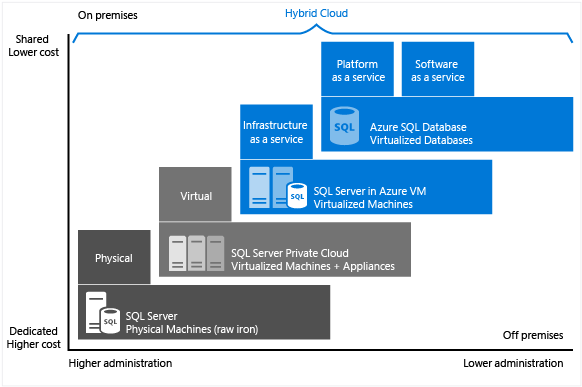
Microsoft Azure provides you two options when hosting your SQL Server-based data warehouse: Microsoft Azure SQL Database and SQL Server in Azure Virtual Machine.  Which one is appropriate based on the size of the data warehouse?  What are some hardware features to choose from for an Azure VM for a large data warehouse?

Let’s look at each option.

Microsoft Azure SQL Database is a Platform-as-a-service (PaaS), or more specifically a relational database-as-a-service.  It is built on standardized hardware and software that is owned, hosted, and maintained by Microsoft.  You can develop directly on the service using built-in features and functionality.  When using Azure SQL Database, you pay-as-you-go with options to scale up or out for greater power.  Azure SQL Database has a max database size of 1TB (see Azure SQL Database Service Tiers and Performance Levels).  Also, not all the SQL Server 2014 Transact-SQL statements are supported in Azure SQL Database (see Azure SQL Database Transact-SQL Reference) and it does not support SQL Server instance level features (such as, SQL Server Agent, Analysis Services, Integration Services, or Reporting Services).  But there are some features that land first in Azure SQL Database before on-prem SQL Server, such as Row-Level Security and Dynamic Data Masking.  Note that Azure SQL Database has built-in fault tolerance infrastructure capabilities that enable high availability as well as business continuity options (see Azure SQL Database Business Continuity).  So this option is only appropriate if you have a relatively small data warehouse that does not require full SQL support.

The other option that will almost always be the correct choice for a large data warehouse is to create a Azure VM that has SQL Server 2014 installed, resulting in an Infrastructure-as-a-service (IaaS).  This allows you to run SQL Server inside a virtual machine in the cloud.  Similar to Azure SQL Database, it is built on standardized hardware that is owned, hosted, and maintained by Microsoft.  When using SQL Server in a VM, you can either bring your own SQL Server license to Azure (by uploading a Windows Server VHD to Azure) or use one of the preconfigured SQL Server images in the Azure portal.  If going with a preconfigured image you should choose “SQL Server 2014 Enterprise Optimized for Data Warehousing on Windows Server 2012 R2” (see VM Images Optimized for Transactional and DW workloads in Azure VM Gallery) which will attach 15 data disks (12 disks for a 12TB data pool and 3 disks for a 3TB log pool).  You will also need to choose the virtual machine size for your VM.  Note you can setup high availability and disaster recovery solutions (see High Availability and Disaster Recovery for SQL Server in Azure Virtual Machines).  This resulting VM will be very similar to an on-prem SQL Server solution except for the various hardware configurations that you have to choose from for your virtual machine size.

If you look at the Azure Virtual Machines Pricing for SQL Server, here are the options you would want to consider for your virtual machine size:

  • A7, 8 cores, 56GB memory, 605GB max disk size, 16 Persistent 1TB Data Disks Max, $3/hr SQL Enterprise
  • A9, 16 cores, 112GB RDMA memory, 382GB max disk size, 40Gbit/s InfiniBand, 16 Persistent 1TB Data Disks Max, $6/hr SQL Enterprise
  • D14, 16 cores, 112GB memory, 800GB max disk size (SSD), 32 Persistent 1TB Data Disks Max, cpu 60% faster than A-series, $6/hr SQL Enterprise
  • G5, 32 cores, 448GB memory, 6596GB max disk size (SSD), 64 Persistent 1TB Data Disks Max, cpu Xeon E5 v3, $12/hr SQL Enterprise.  See Largest VM in the Cloud

The “Persistent 1TB Data Disks” refers to connecting external attached drives but be aware that network bandwidth can be a bottleneck.  From Virtual Machine and Cloud Service Sizes for Azure you can see for G5 you can add 64 of 1TB data disks yielding the potential total volume size of up to 64 TB.  See How to Attach a Data Disk to a Windows Virtual Machine to attach a drive and give it a new drive letter, or attach drives to use as a storage space which is a way to make multiple disks appear as one (see Windows Server 2012 Storage Virtualization Explained).

If this still is not enough disk size for your data warehouse, you will need to use an on-prem SQL Server solution or an MPP solution such as Microsoft’s Analytics Platform System.

There is a script you can download (see Deploy a SQL Server Data Warehouse in Windows Azure Virtual Machines) that allows a user to create a *Data Warehousing* optimized VM on Azure running SQL Server 2012 or SQL Server 2014 and will also attach empty disks to the VM to be used for SQL Server data and log files.

untitled

For info on how to connect to an Azure VM using SSMS, click here.  To connect SSMS to an Azure SQL database, click here.

If you are concerned about data throughput from on-prem to azure, check out the ExpressRoute service.  ExpressRoute enables dedicated, private, high-throughput network connectivity between Azure datacenters and your on-premises IT environments.  Using ExpressRoute, you can connect your existing datacenters to Azure without having to flow any traffic over the public Internet, and enable–guaranteed network quality-of-service and the ability to use Azure as a natural extension of an existing private network or datacenter.

More info:

Introduction to Automating Deployment of SQL Server in Azure IaaS Virtual Machines

Understanding Azure SQL Database and SQL Server in Azure VMs

Inside Microsoft Azure SQL Database

Automating Image-Based Deployment of SQL Server on Azure IaaS VMs – Preparing OS Image

14 Apr 18:10

Community Spotlight: Grant Fritchey, Red Gate Software

by SQL Server Team

In honor of the upcoming PASS Business Analytics conference, we wanted to take some time to spotlight the great work happening in the SQL and BI communities across the world. The conference is focused on business analytics, but PASS offers many great community activities for SQL Server and beyond. Learn about the various local and digital opportunities to connect with the PASS community here.

Name: Grant Fritchey
Role: Product Evangelist, Red Gate Software
Location: Grafton, MA, USA

What is an exciting project that you’re working on right now?

I’m helping to build a set of classes to teach people how to automate their database deployments in support of Database Lifecycle Management. Development is moving faster and faster in order to keep up with the demands of business. Because of this, databases must also be deployed faster and faster. But, you still have to ensure the protection of the vital business information stored within your databases. In the class I’m working on, we’ll show you how to get your database into source control alongside your application and how to perform continuous integration with databases. We’re going to cover all sorts of mechanisms for automating database deployments and database testing in order to work Database Lifecycle Management right into your Application Lifecycle Management.

What are your current analytics and/or database challenges, and how are you solving?

The main challenges we have with databases are the same ones we’ve always had: performance and uptime. The thing is, we have blazing fast hardware these days. Or, if you’re looking at online solutions like Azure, we have very large VMs as well as methods for sharing across servers and databases. All this means that the underlying architectures of our database systems can perform very well. But, we still have to deal with the database design and the T-SQL code being run against the database. More and more we’re taking advantage of ORM tools such as Entity Framework, which really do speed up development. But, around 10% of the queries still need to be coded by hand in order to ensure adequate performance. Add to this the fact that we need to deploy all this while still ensuring up-time on the databases… Figuring out how to get adequate functionality in place without affecting up-time is tough work.

How does data help you do your job better?

Decisions on what to do with systems need to be based on information, not guesses. Data gathered about my systems shows me where I need to prioritize my work and directs choices on resource allocation.

What’s your favorite example of how data has provided an insight, a decision, or a shift in how business gets done?

Recently I found that I was seeing a serious “observer affect” in how I was collecting performance data. While tuning queries I was using STATISTICS IO and STATISTICS TIME. I normally do this all the time. As I was adjusting the code, I wasn’t seeing the kind of performance improvements I expected. In fact, some of my solutions seemed to be working even worse. I was a little surprised because I thought I was following a good methodology, and so I tried turning off all the STATISTICS capturing and just used Extended Events. Suddenly, the tuning started was working extremely well. I went back and experimented until I discovered that for some of my queries STATISTICS IO was actually impacting query execution, affecting both the time and the reads. Turning it off cleared the problem completely. I’ve now changed to using extended events most of the time in order to minimize, or eliminate, that issue. Best of all, I’m able to use these within Azure SQL Database as well as in my earthed servers.

What or who do you read, watch, or follow to help grow your data skills?

I go to SQLSkills.com over and over, sometimes multiple times in a day. It’s one of the single best resources for detailed SQL Server information. I also go to SQLServerCentral.com regularly to ask and answer questions. It’s a great resource for expanding your knowledge.

What’s your favorite SQL command and why?

RESTORE DATABASE: Because it has saved my job and the companies I’ve worked for so many times.

How does Azure help you protect your local databases?

There are a couple of ways you can use Azure to extend local capabilities. The first, and probably the easiest, is to use Azure Blob Storage as a means of ensuring that you have off-site storage of your backup files. You could pretty easily write a PowerShell script that copies your backups to Azure Storage. But, starting in SQL Server 2012, you can also issue a backup command to go straight to Azure Storage. Either way, you can be sure there’s a copy of your backups in case you suffer a catastrophic event locally.

Another way to extend your local capabilities to the cloud is to set up a virtual network. You can incorporate Azure Virtual Machines directly into your local network. Because of this, you can set up Availability Groups between Azure VMs and your local machines. This would enable you to have a failover setup to Azure, allowing for additional protection of your data and your systems.

Are there other ways Azure can be used in combination with local databases?

It’s my opinion that every developer should be using a local copy of SQL Server for their development. This is to allow them to experiment, learn, and, well, break stuff, without affecting anyone else. But, some laptops might be underpowered, or this could in some way violate a corporate policy. As a workaround, people can take advantage of the fact that SQL Database covers the vast majority of standard SQL Server functionality, at the database level. This makes it a great place to develop and test databases, especially if you’re already developing applications for Azure. You only need to keep the database around while you’re developing, and because you can keep the size small, the costs are extremely minimal.

Any other benefits for Azure in combination with local machines?

Tons. For one, expanded capacity. What if you need to get a lot more servers online quickly, but you’re hurting on disk space, or the servers are on back-order? Go back to that virtual network we talked about earlier. Set that up and now you can very quickly, even in an automated fashion through PowerShell, add SQL Server machines to your existing systems.

Another thing you could do, although this not something I’ve tried yet, is take advantage of the fact that in SQL Server 2014 you can actually add file groups that are in Azure Blob Storage. Do you need extra disks, right now, that you can’t get from the SAN team? Well, if you can afford a bit of latency, you can just expand immediately into Azure Storage. I’d certainly be cautious with this one, but it’s exciting to think about the expanded capabilities this offers for dealing with certain kinds of disk space emergencies.

Thanks for joining us, Grant!

Know someone doing cool work with data? Nominate them for a spotlight in the comments.

14 Apr 18:09

Analysing SQLBlog using Power Query

by jamiet

In December 2011 I wrote a blog post entitled Querying RSS feed subscriber count on Google Reader using Data Explorer‏ in which I used a product called Data Explorer, that was in beta at the time, to find out how many people subscribed on Google Reader to various bloggers on http://sqlblog.com. Here were the results:

It was a nice demo of what was possible using Data Explorer however it did have some limitations, mainly that I had to type in the list of bloggers and their URLs. It would have been much more elegant to have Data Explorer request a list of bloggers from http://sqlblog.com and iterate over that list, querying for information about each in turn.

Times move on and today, 3 and a bit years later, Google Reader is defunct and Data Explorer has morphed into Power Query. It looks different and has lots of new features which make it much more conducive to garnering information from the web. I thought it might be time well spent (and kinda fun) to revisit my previous blog post and see if Power Query can collate more useful information regarding http://sqlblog.com than it could back then.


tl;dr

If you can’t be bothered reading the detail of this post then just take a look at this screenshot that I shared on Twitter earlier today of a Power BI dashboard that shows information pertaining to http://sqlblog.com:

image

This dashboard shows:

That screenshot is taken from http://powerbi.com which is a place where Power BI reports (that are based on Power Query queries) can be stored and shared. Unfortunately they can only be shared with people whose email domain is the same as yours so I can’t share a link directly to the page which is a real shame because Power BI reports are interactive and the benefit is much greater when one is able to interact with them. If you would like this situation to change (and you should) then go and vote for these requests:

The real work here goes on in the Power Query query that retrieves the data that underpins these reports. If you’d like to know more about that, read on!

The Power Query part

Power Query is, to all intents and purpose, a draggy-droppy-pointy-clicky UI over a functional language called M. The M queries that I built to obtain the data depicted above I have shared in this github gist: https://gist.github.com/jamiekt/bac21f6169a9853dcef5 or you could download as a Power BI Designer file: sqlblog.pbix. Whether you copy-and-paste the M code or you download the .pbix you will need to download and install Power BI Designer in order to run the queries and see the resultant data.

One caveat to running the queries, ensure you have created a Data Source setting on your machine for http://sqlblog.com, it should look just like this:

image

Retrieving data from a website using Power Query is essentially a web scraping exercise. Here are the steps the M query basically goes through to retrieve this information:

  SNAGHTML34123979

    • For each link in the list of monthly archives
      • retrieve the monthly archive
      • for each blog post summary in the monthly archive
        • retrieve the title and number of comments
  image

That’s pretty much it. The code looks a bit gnarly at first glance but all its essentially doing is navigating the DOM and following a few hyperlinks.

The reports

The reports are Power View reports. Power View is fairly intuitive so I don’t think its worth talking about it here too much. I do however think it is worth showing some examples of the insights that Power View can provide on top of this data.

How many blog posts and how many comments on SQLBlog

image image

Slicing by blogger

Charting all of the blog posts and ordering by number of comments is useful, that’s how we see that Marco Russo’s post DateTool dimension: an alternative Time Intelligence implementation is the most popular:

image

However if we introduce a slicer we can analyse a single blogger’s blog posts, let’s take Aaron Bertrand for example seeing as he has posted the most:

image

Aaron’s most popular blog post (going by the number of comments) is his ditty from October 2010 Fun with software : uninstalling SQL Server 2008 R2 Evaluation Edition.

How many bloggers ARE there on http://sqlblog.com

image

62!

Taking it further

There is a heck of a lot of other data available on http://sqlblog.com should one want to go and fetch it and Power Query makes it really easy to do that. It would be interesting, for example, to chart the tally of blog posts per month and see when “peak blog month” occurred. I’ll leave that as an exercise for the reader.

@Jamiet

14 Apr 18:08

On-Demand Hotfix for Availability Groups in SQL Server 2014

by AaronBertrand
Last week, Microsoft released an on-demand hotfix for SQL Server 2014, which you shgould consider installing if you are using Availability Groups and any of the relevant databases use CLR user-defined types (UDTs). The symptom is described in KB #3042370 , and you should get enough info just from the title to convince you to apply it: KB #3042370 : An AlwaysOn secondary replica crashes or raises error 3961 when the AlwaysOn database has CLR UDT in SQL Server 2014 The actual hotfix has to be downloaded...(read more)
14 Apr 18:08

SQL Server Diagnostic Information Queries for March 2015

I revised several of the queries this month in all five versions of the script.  Once again, the main enhancements are additional comments and documentation about the queries, including more information about how to interpret the results. 

Rather than having a separate blog post for each version, I have just put the links for all five major versions in this single post. There are two separate links for each version. The first one on the top left is the actual query script, and the one below on the right is the matching blank results spreadsheet.  

SQL Server 2005 Diagnostic Information Queries

SQL Server 2005 Blank Results

SQL Server 2008 Diagnostic Information Queries

SQL Server 2008 Blank Results

SQL Server 2008 R2 Diagnostic Information Queries

SQL Server 2008 R2 Blank Results

SQL Server 2012 Diagnostic Information Queries

SQL Server 2012 Blank Results

SQL Server 2014 Diagnostic Information Queries

SQL Server 2014 Blank Results

The basic idea is that you should run each query in the set, one at a time (after reading the directions for that query). It is not really a good idea to simply run the entire batch in one shot, especially the first time you run these queries on a particular server, since some of these queries can take some time to run, depending on your workload and hardware. I also think it is very helpful to run each query, look at the results and think about the emerging picture of what is happening on your server as you go through the complete set.

You need to click on the top left square of the results grid in SSMS to select all of the results, and then right-click and select “Copy with Headers” to copy all of the results, including the column headers to the Windows clipboard. Then you paste the results into the matching tab in the blank results spreadsheet. There are also some comments on how to interpret the results after each query.

About half of the queries are instance specific and about half are database specific, so you will want to make sure you are connected to a database that you are concerned about instead of the master system database. Running the database-specific queries while being connected to the master database is a very common mistake that I see people making when they run these queries.

Note: These queries are stored on Dropbox. I occasionally get reports that the links to the queries and blank results spreadsheets do not work, which is most likely because Dropbox is blocked wherever people are trying to connect.

I also occasionally get reports that some of the queries simply don’t work. This usually turns out to be an issue where people have some of their user databases in 80 compatibility mode, which breaks many DMV queries.

It is also very important that you are running the correct version of the script that matches the major version of SQL Server that you are running. There is an initial query in each script that tries to confirm that you are using the correct version of the script for your version of SQL Server. If you are not using the correct version of these queries for your version of SQL Server, some of the queries are not going to work correctly.

If you want to understand how to better run and interpret these queries, you should consider listening to my three latest Pluralsight courses, which are SQL Server 2014 DMV Diagnostic Queries – Part 1SQL Server 2014 DMV Diagnostic Queries – Part 2 and SQL Server 2014 DMV Diagnostic Queries – Part 3. All three of these courses are pretty short and to the point, at 67, 77, and 68 minutes respectively. Listening to these three courses is best way to thank me for maintaining and improving theses scripts…

Please let me know what you think of these queries, and whether you have any suggestions for improvements. Thanks!

14 Apr 18:08

Power BI Designer March Update includes Google Analytics Connector

by Greg Low

The Power BI team have released details of their March update to the standalone Power BI designer.

You’ll find details of the update here: http://blogs.msdn.com/b/powerbi/archive/2015/03/26/7-new-updates-to-the-power-bi-designer-preview-march-2015.aspx

The first thing I noticed is just how much faster the tool operates. The blog post mentioned performance enhancements but I really, really noticed them.

One particular enhancement  that I wanted to call out was the additional of a connector for Google Analytics. I’ve been trying that this morning and have found it really easy to use. All the standard categories appear as available sets of data:

image

I’ve picked those that I’m interested in:

image

Then added them to a report:

image


Very easy. And it’s clear which type of device/operating system we need to continue to ensure the best experience on at SQL Down Under.

14 Apr 18:08

Indexed View Maintenance in Execution Plans

by Paul White

Though they come with many restrictions and some important implementation caveats, indexed views are still a very powerful SQL Server feature when correctly employed in the right circumstances. One common use is to provide a pre-aggregated view of underlying data, giving users the ability to query results directly without incurring the costs of processing the underlying joins, filters, and aggregates every time a query is executed.

Although new Enterprise Edition features like columnar storage and batch mode processing have transformed the performance characteristics of many large queries of this type, there is still no faster way to obtain a result than to avoid all the underlying processing completely, no matter how efficient that processing might have become.

Before indexed views (and their more limited cousins, computed columns) were added to the product, database professionals would sometimes write complex multi-trigger code to present the results of an important query in a real table. This sort of arrangement is notoriously difficult to get right in all circumstances, particularly where concurrent changes to the underlying data are frequent.

The indexed views feature makes all this much easier, where it is sensibly and correctly applied. The database engine takes care of everything needed to ensure data read from an indexed view matches the underlying query and table data at all times.

Incremental Maintenance

SQL Server keeps indexed view data synchronized with the underlying query by automatically updating the view indexes appropriately whenever data changes in the base tables. The cost of this maintenance activity is borne by the process changing the base data. The extra operations needed to maintain the view indexes are silently added to the execution plan for the original insert, update, delete, or merge operation. In the background, SQL Server also takes care of more subtle issues concerning transaction isolation, for example ensuring correct handling for transactions running under snapshot or read committed snapshot isolation.

Constructing the extra execution plan operations needed to maintain the view indexes correctly is not a trivial matter, as anyone who has attempted a "summary table maintained by trigger code" implementation will know. The complexity of the task is one of the reasons that indexed views have so many restrictions. Limiting the supported surface area to inner joins, projections, selections (filters), and the SUM and COUNT_BIG aggregates reduces the implementation complexity considerably.

Indexed views are maintained incrementally. This means the query processor determines the net effect of the base table changes on the view, and applies only those changes necessary to bring the view up to date. In simple cases, it can calculate the necessary deltas from just the base table changes and the data currently stored in the view. Where the view definition contains joins, the indexed view maintenance portion of the execution plan will need to access the joined tables as well, but this can usually be performed efficiently, given appropriate base table indexes.

To simplify the implementation further, SQL Server always uses the same basic plan shape (as a starting point) to implement indexed view maintenance operations. The normal facilities provided by the query optimizer are employed to simplify and optimize the standard maintenance shape as appropriate. We will now turn to an example to help bring these concepts together.

Example 1 – Single Row Insert

Suppose we have the following simple table and indexed view:

CREATE TABLE dbo.T1 
(
    GroupID integer NOT NULL, 
    Value   integer NOT NULL
);
GO
INSERT dbo.T1
    (GroupID, Value)
VALUES
    (1, 1),
    (1, 2),
    (2, 3),
    (2, 4),
    (2, 5);
GO
CREATE VIEW dbo.IV
WITH SCHEMABINDING
AS
SELECT
    T1.GroupID, 
    SumValue = SUM(T1.Value),
    NumRows = COUNT_BIG(*)
FROM dbo.T1 AS T1
WHERE
    T1.GroupID BETWEEN 1 AND 5
GROUP BY 
    T1.GroupID;
GO
CREATE UNIQUE CLUSTERED INDEX cuq
ON dbo.IV (GroupID);

After that script is run, the data in the sample table looks like this:

Sample data

And the Indexed view contains:

Indexed View Contents

The simplest example of an indexed view maintenance plan for this setup occurs when we add a single row to the base table:

INSERT dbo.T1
    (GroupID, Value)
VALUES
    (3, 6);

The execution plan for this insert is shown below:

Single Row Insert Execution Plan

Following the numbers in the diagram, the operation of this execution plan proceeds as follows:

  1. The Table Insert operator adds the new row to the base table. This is the only plan operator associated with the base table insert; all remaining operators are concerned with the maintenance of the indexed view.
  2. The Eager Table Spool saves the inserted row data to temporary storage.
  3. The Sequence operator ensures the top branch of the plan runs to completion before the next branch in the Sequence is activated. In this special case (inserting a single row), it would be valid to remove the Sequence (and the spools at positions 2 and 4), directly connecting the Stream Aggregate input to the output of the Table Insert. This possible optimization is not implemented, so the Sequence and Spools remain.
  4. This Eager Table Spool is associated with the spool at position 2 (it has a Primary Node ID property that provides this link explicitly). The spool replays rows (one row in the present case) from the same temporary storage written to by the primary spool. As mentioned above, the spools and positions 2 and 4 are unnecessary, and feature simply because they exist in the generic template for indexed view maintenance.
  5. The Stream Aggregate computes the sum of Value column data in the inserted set, and counts the number of rows present per view-key group. The output is the incremental data needed to keep the view synchronized with the base data. Note, the Stream Aggregate does not have a Group By element because the query optimizer knows only a single value is being processed. However, the optimizer does not apply similar logic to replace the aggregates with projections (the sum of a single value is just the value itself, and the count will always be one for a single row insert). Computing the sum and count aggregates for a single row of data is not an expensive operation, so this missed optimization is not much to be concerned about.
  6. The join relates each calculated incremental change to an existing key in the indexed view. The join is an outer join because the newly-inserted data might not correspond to any existing data in the view.
  7. This operator locates the row to be modified in the view.
  8. The Compute Scalar has two important responsibilities. First, it determines whether each incremental change will affect an existing row in the view, or whether a new row will have to be created. It does this by checking to see if the outer join produced a null from the view side of the join. Our sample insert is for group 3, which does not currently exist in the view, so a new row will be created. The second function of the Compute Scalar is to calculate new values for the view columns. If a new row is to be added to the view, this is simply the result of the incremental sum from the Stream Aggregate. If an existing row in the view is to be updated, the new value is the existing value in the view row plus the incremental sum from the Stream Aggregate.
  9. This Eager Table Spool is for Halloween Protection. It is required for correctness when an insert operation affects a table that is also referenced on the data access side of the query. It is technically not required if the single-row maintenance operation results in an update to an existing view row, but it remains in the plan anyway.
  10. The final operator in the plan is labelled as an Update operator, but it will perform either an Insert or an Update for each row it receives depending on the value of the "action code" column added by the Compute Scalar at node 8. More generally, this update operator is capable of inserts, updates, and deletes.

There is quite a bit of detail there, so to summarize:

  • The aggregate groups data changes by the unique clustered key of the view. It computes the net effect of the base table changes on each column per key.
  • The outer join connects the per-key incremental changes to existing rows in the view.
  • The compute scalar calculates whether a new row should be added to the view, or an existing row updated. It computes the final column values for the view insert or update operation.
  • The view update operator inserts a new row or updates an existing one as directed by the action code.

Example 2 – Multi-row Insert

Believe it or not, the single-row base table insert execution plan discussed above was subject to a number of simplifications. Although some possible further optimizations were missed (as noted), the query optimizer still managed to remove some operations from the general indexed view maintenance template, and reduce the complexity of others.

Several of these optimizations were allowed because we were inserting just a single row, but others were enabled because the optimizer was able to see the literal values being added to the base table. For example, the optimizer could see that the group value inserted would pass the predicate in the WHERE clause of the view.

If we now insert two rows, with the values "hidden" in local variables, we get a slightly more complex plan:

DECLARE
    @Group1 integer = 4,
    @Value1 integer = 7,
    @Group2 integer = 5,
    @Value2 integer = 8;
 
INSERT dbo.T1
    (GroupID, Value)
VALUES
    (@Group1, @Value1),
    (@Group2, @Value2);

Multi-row hidden values execution plan

The new or changed operators are annotated as before:

  1. The Constant Scan provides the values to insert. Previously, an optimization for single-row inserts allowed this operator to be omitted.
  2. A explicit Filter operator is now required to check that the groups inserted to the base table match the WHERE clause in the view. As it happens, both new rows will pass the test, but the optimizer cannot see the values in the variables to know this in advance. Additionally, it would not be safe to cache a plan that skipped this filter because a future reuse of the plan could have different values in the variables.
  3. A Sort is now required to ensure the rows arrive at the Stream Aggregate in group order. The sort was previously removed because it is pointless to sort one row.
  4. The Stream Aggregate now has a "group by" property, matching the unique clustered key of the view.
  5. This Sort is required to present rows in view-key, action code order, which is required for correct operation of the Collapse operator. Sort is a fully blocking operator so there is no longer any need for an Eager Table Spool for Halloween Protection.
  6. The new Collapse operator combines an adjacent insert and delete on the same key value into a single update operation. This operator is not actually required in this case, because no deletion action codes can be generated (only inserts and updates). This appears to be an oversight, or perhaps something left in for safety reasons. The automatically-generated parts of an update query plan can become extremely complex, so it is hard know for sure.

The properties of the Filter (derived from the view's WHERE clause) are:

Filter properties

The Stream Aggregate groups by the view key, and computes the sum and count aggregates per group:

Stream Aggregate properties

The Compute Scalar identifies the action to take per row (insert or update in this case), and computes the value to insert or update in the view:

Compute Scalar properties

The action code is given an expression label of [Act1xxx]. Valid values are 1 for an update, 3 for a delete, and 4 for an insert. This action expression results in an insert (code 4) if no matching row was found in the view (i.e. the outer join returned a null for the NumRows column). If a matching row was found, the action code is 1 (update).

Note that NumRows is the name given to the required COUNT_BIG(*) column in the view. In a plan that could result in deletions from the view, the Compute Scalar would detect when this value would become zero (no rows for the current group) and generate a delete action code (3).

The remaining expressions maintain the sum and count aggregates in the view. Notice though that the expression labels [Expr1009] and [Expr1010] are not new; they refer to the labels created by the Stream Aggregate. The logic is straightforward: if a matching row was not found, the new value to insert is just the value computed at the aggregate. If a matching row in the view was found, the updated value is the current value in the row plus the increment computed by the aggregate.

Finally, the view update operator (shown as a Clustered Index Update in SSMS) shows the action column reference ([Act1013] defined by the Compute Scalar):

image

Example 3 – Multi-row Update

So far we have only looked at inserts to the base table. The execution plans for a deletion are very similar, with just a few minor differences in the detailed calculations. This next example therefore moves on to look at the maintenance plan for a base table update:

DECLARE 
    @Group1 integer = 1,
    @Group2 integer = 2,
    @Value integer = 1;
 
UPDATE dbo.T1
SET Value = Value + @Value
WHERE GroupID IN (@Group1, @Group2);

As before, this query uses variables to hide literal values from the optimizer, preventing some simplifications from being applied. It is also careful to update two separate groups, preventing optimizations that can be applied when the optimizer knows only a single group (a single row of the indexed view) will be affected. The annotated execution plan for the update query is below:

Multi-row update

The changes and point of interest are:

  1. The new Split operator turns each base table row update into a separate delete and insert operation. Each update row is split into two separate rows, doubling the number of rows after this point in the plan. Split is part of the split-sort-collapse pattern needed to protect against incorrect transient unique key violation errors.
  2. The Stream Aggregate is modified to account for incoming rows that can specify either a delete or an insert (due to the Split, and determined by an action code column in the row). An insert row contributes the original value in sum aggregates; the sign is reversed for delete action rows. Similarly, the row count aggregate here counts insert rows as +1 and delete rows as –1.
  3. The Compute Scalar logic is also modified to reflect that the net effect of the changes per group might require an eventual insert, update, or delete action against the materialized view. It is not actually possible for this particular update query to result in a row being inserted or deleted against this view, but the logic required to deduce that is beyond the optimizer's current reasoning abilities. A slightly different update query or view definition could indeed result in a mixture of insert, delete, and update view actions.
  4. The Collapse operator is highlighted purely for its role in the split-sort-collapse pattern mentioned above. Note that it only collapses deletes and inserts on the same key; unmatched deletes and inserts after the Collapse are perfectly possible (and quite usual).

As before, the key operator properties to look at to understand the indexed view maintenance work are the Filter, Stream Aggregate, Outer Join, and Compute Scalar.

Example 4 – Multi-row Update with Joins

To complete the overview of indexed view maintenance execution plans, we will need a new example view that joins several tables together, and includes a projection in the select list:

CREATE TABLE dbo.E1 (g integer NULL, a integer NULL);
CREATE TABLE dbo.E2 (g integer NULL, a integer NULL);
CREATE TABLE dbo.E3 (g integer NULL, a integer NULL);
GO
INSERT dbo.E1 (g, a) VALUES (1, 1);
INSERT dbo.E2 (g, a) VALUES (1, 1);
INSERT dbo.E3 (g, a) VALUES (1, 1);
GO
CREATE VIEW dbo.V1
WITH SCHEMABINDING
AS
SELECT 
    g = E1.g, 
    sa1 = SUM(ISNULL(E1.a, 0)), 
    sa2 = SUM(ISNULL(E2.a, 0)), 
    sa3 = SUM(ISNULL(E3.a, 0)), 
    cbs = COUNT_BIG(*) 
FROM dbo.E1 AS E1
JOIN dbo.E2 AS E2
    ON E2.g = E1.g
JOIN dbo.E3 AS E3
    ON E3.g = E2.g
WHERE
    E1.g BETWEEN 1 AND 5
GROUP BY
    E1.g;
GO
CREATE UNIQUE CLUSTERED INDEX cuq
ON dbo.V1 (g);

To ensure correctness, one of the indexed view requirements is that a sum aggregate cannot operate on an expression that might evaluate to null. The view definition above uses ISNULL to meet that requirement. A sample update query that produces a pretty comprehensive index maintenance plan component is shown below, together with the execution plan it produces:

UPDATE dbo.E1 
SET g = g + 1, 
    a = a + 1;

Join maintenance plan

The plan looks quite large and complicated now, but most of the elements are exactly as we have already seen. The key differences are:

  1. The top branch of the plan includes a number of extra Compute Scalar operators. These could be more compactly arranged, but essentially they are present to capture the pre-update values of the non-grouping columns. The Compute Scalar to the left of the Table Update captures the post-update value of column "a", with the ISNULL projection applied.
  2. The new Compute Scalars in this area of the plan compute the value produced by the ISNULL expression on each source table. In general, projections on the joined tables in the view will be represented by Compute Scalars here. The sorts in this area of the plan are present purely because the optimizer chose a merge join strategy for cost reasons (remember, merge requires join-key sorted input).
  3. The two join operators are new, and simply implement the joins in the view definition. These joins always appear before the Stream Aggregate that computes the incremental effect of the changes on the view. Note that a change to a base table can result in a row that used to meet the join criteria no longer joining, and vice versa. All these potential complexities are handled correctly (given the indexed view restrictions) by the Stream Aggregate producing a summary of the changes per view key after the joins have been performed.

Final Thoughts

That last plan represents pretty much the full template for maintaining an indexed view, though the addition of nonclustered indexes to the view would add additional operators spooled off the output of the view update operator as well. Aside from an extra Split (and a Sort and Collapse combination if the view's nonclustered index is unique), there is nothing very special about this possibility. Adding an output clause to the base table query can also produce some interesting extra operators, but again, these are not particular to indexed view maintenance per se.

To summarise the complete overall strategy:

  • Base table changes are applied as normal; pre-update values may be captured.
  • A split operator may be used to transform updates into delete/insert pairs.
  • An eager spool saves base table change information to temporary storage.
  • All tables in the view are accessed, except the updated base table (which is read from the spool).
  • Projections in the view are represented by Compute Scalars.
  • Filters in the view are applied. Filters may be pushed into scans or seeks as residuals.
  • Joins specified in the view are performed.
  • An aggregate computes net incremental changes grouped by clustered view key.
  • The incremental change set is outer joined to the view.
  • A Compute Scalar calculates an action code (insert/update/delete against the view) for each change, and computes the actual values to be inserted or updated. The computational logic is based on the output of the aggregate and the result of the outer join to the view.
  • Changes are sorted into view key and action code order, and collapsed to updates as appropriate.
  • Finally, the incremental changes are applied to the view itself.

As we have seen, the normal set of tools available to the query optimizer are still applied to the automatically-generated parts of the plan, meaning that one or more of the steps above may be simplified, transformed, or removed entirely. However, the basic shape and operation of the plan remains intact.

If you have been following along with the code examples, you can use the following script to clean up:

DROP VIEW dbo.V1;
DROP TABLE dbo.E3, dbo.E2, dbo.E1;
DROP VIEW dbo.IV;
DROP TABLE dbo.T1;

The post Indexed View Maintenance in Execution Plans appeared first on SQLPerformance.com.

14 Apr 18:08

Why won’t you implement my little feature request, Microsoft?

by jamiet

I’ve been an active member of the Microsoft developer community* for many years now and in that time one of my frustrations has been numerous futile attempts to get new features into SQL Server and SQL Server Integration Services. As of today, 27th March 2015, I’ve submitted 109 bugs and 289 suggestions

SNAGHTMLa9a5190

to Microsoft Connect and while there are occasional successes (TOKEN function in SSIS sticks in my mind as one feature request that led directly to inclusion in the product**) the most common response is “Closed as won’t fix” (which is almost a meme in itself these days). I’m as guilty as anyone at getting irate at such responses.

In the cold light of day I like to think I can be empathetic kind of guy and can accept that getting a feature implemented in a behemoth product such as SQL Server perhaps is not as simple as a developer bashing out a few lines of code and committing to source control. With that in mind today (thanks to Paul Stovell) I stumbled upon a very old blog post from Eric Lippert  How many Microsoft employees does it take to change a lightbulb? which explains some of the contortions one has to go through to get a feature implemented in a Microsoft product and only one of these (the first one) actually involves writing the code.

SNAGHTMLaaae882

Now granted there is an argument to say they’re making it more difficult than it needs to be and 12 years on from that blog post shipping software is arguably easier than it was back then, but its worth remembering that implementing features for millions of customers is likely a different category of problem to any that us developers who use these products have to deal with (the product I work on arguably counts its customers in tens rather than millions). Call me a Microsoft apologist if you like, you might be right, but I do think that some people should perhaps weigh up what their “5 minute fix” actually entails before they start ranting about “Closed as wont fix” on social media. I include myself in that.

@Jamiet 

* assuming you consider SQL server developers to be members of the Microsoft developer community. That is up for debate of course.

**I remember Matt Masson telling me at the time that he implemented this on a plane journey home to Canada one day

14 Apr 18:07

Performance and Stability Related Fixes in Post-SQL Server 2012 SP2 Builds

As of March 27, 2015, there have been five Cumulative Updates (CU) for the Service Pack 2 branch of SQL Server 2012. There have been a fairly high number of hotfixes in every one of these Cumulative Updates, as more people are using SQL Server 2012. If you are running SQL Server 2012, I really think you should be running the latest SQL Server 2012 Service Pack and Cumulative Update. Right now, that means Service Pack 2, CU5 (Build 11.0.5582), which was released on March 16, 2015.

If you are still on the SQL Server 2012 SP1 branch, then you want to be on SP1 CU15. But really, you should be on the SP2 branch as soon as possible. Table 1 shows the SQL Server 2012 SP2 CU builds that have been released so far.

Build Description Release Date
11.0.5058 SP2 RTM June 10, 2014
11.0.5532 SP2 CU1 July 23, 2014
11.0.5548 SP2 CU2 September 15, 2014
11.0.5556 SP2 CU3 November 17, 2014
11.0.5569 SP2 CU4 January 19, 2015
11.0.5582 SP2 CU5 March 16, 2015

Table 1: SQL Server 2012 SP2 CU Builds


You can follow the KB article link below to see all of the CU builds for the SQL Server 2012 Service Pack 2 branch.

SQL Server 2012 SP2 Build Versions

Like I did for the SQL Server 2012 SP1 branch, I decided to scan the hotfix list for all of the Cumulative Updates in the SP2 branch, looking for performance and general reliability-related fixes for the SQL Server Database Engine. I came up with the list below, but this listing is completely arbitrary on my part. You may come up with a completely different list, based on what specific SQL Server 2012 features you are using.

Here are the fixes in the Service Pack 1 branch:

SQL Server 2012 SP2 Cumulative Update 1 (Build 11.0.5532), 43 total public hot fixes

FIX: Intense query compilation workload does not scale with growing number of cores on NUMA hardware and results in CPU saturation in SQL Server

FIX: Assertion failure when you execute a query specifying TOP N and ORDER BY in SQL Server

FIX: Poor cardinality estimation when the ascending key column is branded as stationary in SQL Server

FIX: Poor performance on I/O when you execute select into temporary table operation in SQL Server 2012

FIX: Parallel deadlock or self-deadlock occurs when you run a query that results in parallelism in SQL Server 2012

FIX: Data corruption occurs in clustered index when you run online index rebuild in SQL Server 2012 or SQL Server 2014


SQL Server 2012 SP2 Cumulative Update 2 (Build 11.0.5548), 43 total public hot fixes

FIX: SQL Cache Memory decreases and CPU usage increases when you rebuild an index for a table in SQL Server

FIX: Incorrect result when you execute a query that uses WITH RECOMPILE option in SQL Server 2012

FIX: Memory leak occurs when you start and stop an XEvent session repeatedly in SQL Server 2012

FIX: Cannot reclaim unused space by using shrink operation in the table that contains a LOB column in SQL Server

FIX: Undetected deadlock occurs when you use a sequence object in SQL Server 2012

FIX: Performance improvement for SQL Server Spatial data access in SQL Server 2012

FIX: A severe error occurs when you run a query that uses CTEs against the partitioned tables in SQL Server 2012

FIX: UPDATE STATISTICS performs incorrect sampling and processing for a table with columnstore index in SQL Server 2012


SQL Server 2012 SP2 Cumulative Update 3 (Build 11.0.5556), 32 total public hot fixes

FIX: Poor performance for cdc.fn_cdc_get_net_changes_<capture_instance> in SQL Server 2012 SP2

FIX: “Non-yielding Scheduler” condition occurs when you run a complex query in SQL Server 2012

FIX: INSERT performance decreases in merge replication that uses precomputed partitions in SQL Server 2012

FIX: Error when you execute statistics update on a table that has sql_variant data type in SQL Server 2012

FIX: Large chain of blocking occurs when you use merge replication in SQL Server 2012


SQL Server 2012 SP2 Cumulative Update 4 (Build 11.0.5569), 36 total public hot fixes

FIX: High CPU consumption when you use spatial data type and associated methods in SQL Server 2012 or SQL Server 2014

FIX: Sequence object generates duplicate sequence values when SQL Server 2012 is under memory pressure

FIX: SQL Server is in script upgrade mode for a long time after you apply a SQL Server hotfix or security update

FIX: DBCC CHECKDB and DBCC CHECKTABLE take longer to run when SQL CLR UDTs are involved in SQL Server 2012


SQL Server 2012 SP2 Cumulative Update 5 (Build 11.0.5582), 27 total public hot fixes

FIX: SOS_CACHESTORE spinlock contention on system table rowset cache causes high CPU usage in SQL Server 2012 or 2014

FIX: SOS_CACHESTORE spinlock contention on ad hoc SQL Server plan cache causes high CPU usage in SQL Server 2012 or 2014

FIX: Memory leak in USERSTORE_SCHEMAMGR and CPU spikes occur when you use temp table in SQL Server 2012

FIX: AlwaysOn availability groups are reported as NOT SYNCHRONIZING

FIX: Complex parallel query does not respond in SQL Server 2012

FIX: Performance issue occurs when you use sqlncli11.dll ODBC driver to access SQL Server in an application

FIX: SQL Server 2012 shuts down unexpectedly when you run DBCC CHECKDB and the rollback recovery on the snapshot fails


Once again, the idea here is to give you a lot of concrete reasons to want to stay current with the latest SQL Server 2012 SP and CU, by pointing out some of the more valuable fixes in each CU in the Service Pack 2 branch.  If my opinion does not sway everyone, this relatively new Microsoft KB article might be more convincing:

Recommended updates and configuration options for SQL Server 2012 and SQL Server 2014 used with high-performance workloads

Happily, Microsoft has been updating this KB article with new information, so you might want to read it again, if you have not done so already.

14 Apr 18:07

Backup to azure

by simonsabin
Azure for storage of backups is great its cheap and you can easily store them compressed and encrypted. If bandwidth isn’t an issue away you go. Microsoft introduced Backup to URL for SQL 2014 and back ported it to SQL 2012 SP1 CU2. This is great as you...(read more)
14 Apr 18:06

Data Mining Algorithms – Hierarchical Clustering

by Dejan Sarka

Clustering is the process of grouping the data into classes or clusters so that objects within a cluster have high similarity in comparison to one another, but are very dissimilar to objects in other clusters. Dissimilarities are assessed based on the attribute values describing the objects.

There are a large number of clustering algorithms. The major methods can be classified into the following categories.

  • Partitioning methods. A partitioning method constructs K partitions of the data, which satisfy the following requirements: (1) each group must contain at least one object and (2) each object must belong to exactly one group. Given the initial K number of partitions to construct, the method creates initial partitions. It then uses an iterative relocation technique that attempts to improve the partitioning by moving objects from one group to another. There are various kinds of criteria for judging the quality of the partitions. Some most popular include the k-means algorithm, where each cluster is represented by the mean value of the objects in the cluster, and the k-medoids algorithm, where each cluster is represented by one of the objects located near the center of the cluster.
  • Hierarchical methods. A hierarchical method creates a hierarchical decomposition of the given set of data objects. These methods are agglomerative or divisive. The agglomerative (bottom-up) approach starts with each object forming a separate group. It successively merges the objects or groups close to one another, until all groups are merged into one. The divisive (top-down) approach starts with all the objects in the same cluster. In each successive iteration, a cluster is split up into smaller clusters, until eventually each object is in one cluster or until a termination condition holds.
  • Density-based methods. Methods based on the distance between objects can find only spherical-shaped clusters and encounter difficulty in discovering clusters of arbitrary shapes. So other methods have been developed based on the notion of density. The general idea is to continue growing the given cluster as long as the density (number of objects or data points) in the “neighborhood” exceeds some threshold; that is, for each data point within a given cluster, the neighborhood of a given radius has to contain at least a minimum number of points.
  • Model-based methods. Model-based methods hypothesize a model for each of the clusters and find the best fit of the data to the given model. A model-based technique might locate clusters by constructing a density function that reflects the spatial distribution of the data points. Unlike conventional clustering, which primarily identifies groups of like objects, this conceptual clustering goes one step further by also finding characteristic descriptions for each group, where each group represents a concept or a class.

A hierarchical clustering model training typically starts by calculating a distance matrix – a matrix with distances between data points in a multidimensional hyperspace, where each input variable defines one dimension of that hyperspace. Distance measure can be a geometrical distance or some other, more complex measure. A dendrogram is a tree diagram frequently used to illustrate the arrangement of the clusters produced by hierarchical clustering. Dendrograms are also often used in computational biology to illustrate the clustering of genes or samples. The following set of pictures shows the process of building an agglomerative hierarchical clustering dendrogram.

image imageimage imageimage

image

image imageimage imageimage

Cluster analysis segments a heterogeneous population into a number of more homogenous subgroups or clusters. Typical usage scenarios include:

  • Discovering distinct groups of customers
  • Identifying groups of houses in a city
  • In biology, deriving animal and plant taxonomies
  • Can even make predictions once the clusters are built and distribution of a target variable in the clusters is calculated.
14 Apr 18:06

There is insufficient system memory in resource pool 'internal' to run this query.

by Artemakis Artemiou [MVP]
Even though you might get the above error message for different occasions, one thing is for sure, it has to do with memory management. :) SQL Server allows you to limit the maximum memory that can be utilized by its Database Engine. You can use this feature in order to allow the OS to have access to memory that cannot be used by SQL Server and thus ensure stability. However you have to remember
14 Apr 18:05

Advice to New Bloggers

by kevin

PREAMBLE

If you’ve been reading my blog for a while, you know that I travel and speak quite a lot. A frequent question I’m asked at these events is “I want to start blogging, but don’t know where to start. What do you recommend?” This is a such a common and natural question as to be almost existential at it’s root. In most every context where we move from the known to the unknown, from taking that first international trip to learning how to swim, we might first begin by saying “I’m uncertain. Where do I start?”

CAj51KuVEAAazgv

Success in any of these situations can be distilled down to a single word – DOING. You can plan and plot for months, attempting to foil every possible risk and mitigate every unpleasant possibility, but you will never progress without the doing of the thing. As Nike says, “Just do it”.

I have had the benefit of talking to a lot of really talented writers, from poetry to fiction to non-fiction, and no matter what tact they take they always have to knuckle down and do it. Some like to plan ahead for all of their major points, and they’re successful in that approach. Others like to start writing without a plan, letting their characters and the thesis of their article take shape as they write. But in all of those situations, they sit down and write.

So my first piece of advice is to carve out a pre-defined, well-bounded block of time to write every single week. In my case, I have blocked off Monday mornings on my Outlook calendar for writing. And that’s what I do every Monday morning. You should too, even if it’s just a half-hour once per month, you’ll make much more progress than if you say to yourself “I’ll write when I have time”. Block off the time and respect it – don’t dodge it or blow it off as something that’s disposable. In other words, don’t let your own self-discipline be your biggest obstacle.

FIND YOUR VOICE

Another common follow-up question I get is “I know I want to write, but I don’t know what to say”. On this point, I have a couple tips to get you started. I find, however, that once someone has spent some time blogging reliable, this becomes much less of an issue. But here are some ideas about how to find your voice as a blogger:

  1. Write advice to your younger self: You’ve struggled to get the knowledge and experience you’ve accumulated. Some of the things you’ve learned were hard won. You wished you’d had it easier. Conversely, there are tens of thousands of IT professionals who are now struggling with exactly the same exasperating situation(s) you’d conquered in the past. Use that as your starting point – write a blog post explaining that trying time and how you’d handle it then if only you knew what you know now. (Incidentally, as I went to publish this post, my buddy Brent Ozar (b | t) did this very thing in this blog post called Sentences to My Younger Selves. It’s a great read).
  2. Catalog your own knowledge: Similarly, some things that we learn are hard to retain or we have to train a bunch of people on the topic several times a year. Maybe me know a tough process so well that others in our organization are constantly asking us about it. Maybe writing something down helps cement something we’ve learned into our permanent memory. Maybe we don’t use a technique or process very often. For example, I write a newsletter for SQL Sentry every month. Personally, if I do something only once per month, I never really and truly learn it by heart. Knowing that, I wrote a post for myself (and perhaps for use by my successor) to document in step-by-step detail exactly how I manage this rather complex, multi-person process. You could do the same for the things you learn working with SQL Server. And you’ll feel a unique sense of pride months or years later when you do an Internet search on that topic and your post appears as the top hit from Google or Bing.
  3. Write about what you want to learn: This is an approach that my buddy Aaron Bertrand (b | t)  is a master of and is something you can see demonstrated every week in his new blog posts on SQLPerformance.com. In this case, you might be wondering about a specific technical questions and, finding no good answer to the question with an Internet search, set about researching the topic yourself. For example, you might be wondering “What’s faster? Option A or Option B” Well, guess what? There are likely to be thousands of others wondering the same thing across the Internet. That means they are the audience you’ll be answering by researching the answer and blogging your findings. You’ll literally be improving their lives. Wow!
  4. Speak to your values: Even in purely technical writing, we have personal values to are reflected in what we have to say. For example, let’s say you’ve written a blog post about various kinds of high-availability and disaster recovery options that your enterprise has thought about implementing. When you write about your conclusions, be sure to describe the values that drove your conclusion. Was low-price a bigger factor than resilience? Was ease of management a bigger factor than performance? When you explain your motivations and values in light of technological questions, your readers begin to connect with you on a deeper level and from that connection you can build stronger rapport with your readers.

If you start writing from one of those three points of view, you’ll always have something valuable to say.

NUTS AND BOLTS BLOGGING ADVICE

Here are a few tips about the more procedural, nuts and bolts of blogging:

  1. Start reading http://www.problogger.net/: They literally wrote the Bible on blogging. Reading their stuff will both: A) blow your mind with their awesome information, and B) make you feel really inadequate. Option B is what I spend most of my time experiencing, since I already know a lot of their recommendations. But don’t have the time or (frequently) the drive to implement their recommendations. But even if you implement a fraction of their recommendations, you’ll be better than 90% of the other bloggers out there. And they have a great book of the same name. Buy it.
  2. Fully invest in social media and make that a part of your blogging: You might not be very active on social media. That’s a mistake. Get at least a Facebook, LinkedIn, and Twitter account. If you prefer, create separate accounts for your professional life, so that your friends don’t see your technical content and your blog readers don’t see how cute your kitten. (In my case, I started on social media before the recommendation was self-evident. Now, public and private personas are hopelessly entangled). Fwiw, the SQL Server community is HUGE on Twitter. So don’t ignore it, if for no other reason than to publicize your posts to the Twittersphere.
  3. Include a picture: I didn’t know about this until recently, but it makes a big difference in how Google ranks your pages when someone searches on a given topic. Also, when naming pictures, use a naming standard such as “johnqpublic.net – powerpivot example 014.jpg”. That way, if someone searches on Google Images, you’ll get the full dose of SEO goodness.
  4. All things being equal, go with a WordPress blog: If you haven’t chose a blogging platform, you won’t go wrong with a Wordpress blog. It’s fast. It’s easy. There are lots of inexpensive consultants who can help, if you ever need it. And there are plenty of good, plug-in widgets add nearly endless customization and special features. Want a widget to announce your your new blogs to your social media channels? There are a dozen (or more). Want a widget to automate backups? Lots of those. Want better SEO ranking? Already written. For that matter, let’s talk about a couple specific examples….
  5. WordPress widgets. Make sure to get some of the other really useful WordPress widgets:

A) Grab Yost SEO, Moz, or Jetpack SEO plug-in.

B) Get one of the social widgets I mentioned earlier. I use Sociable for WordPress. These do two things for you. First, they enable you to post directly to your social media channels either on a schedule or immediately upon publication. Second, they enable little “Share Now” links for readers to post to their social media channels as they read. SEO goodness!

C) Get a WordPress backup widget of some kind. I currently use WP-DBBackup at the moment, but it only backs up the post text, not images or other files like slide decks. Afaik, I’ll have to spend a little money for a full-site backup widget.

D) Askimet for spam comment filtering.

E) You might like a Related Posts widget. Since I’ve been blogging a long time, I’ve got a lot of content. This widget automatically puts a little entry at the bottom of a blog post which says “You might like to read these:” and shows links to other posts by me and others.

And don’t forget to pace yourself. There’s no need to hurry. You’ve got a lot of good things to say. But you don’t have to say everything at once. I recommend a pace of no more than two blog posts per week. As time goes on, you can alter the pace (if you want to). It’s not really a very bad thing to put out a bazillion posts in the early days of your blog. However, you haven’t caught a lot of traction with a lot of readers yet. So when you string it out over a longer period of time, you can build your readership with a steady, consistent release schedule. As I always say, when dealing with people it is better to consistently exceed expectations than to be occasionally brilliant AND occasionally absent.

Does this all make sense? What sort of questions do you have?

-Kev

-Follow me on Twitter!
-Google Author

The post Advice to New Bloggers appeared first on Kevin Kline.

14 Apr 18:05

Backup checksum default option in SQL Server 2014

The SQL Server team snuck in a new server configuration option in the 2014 release (I bet thanks to this Connect item even though it’s still Active), and it’s not documented so I just stumbled upon it recently.  If you run:

SELECT * FROM [sys].[configurations] ORDER BY [name];

you’ll see that there are 70 rows in the output (in 2012 there were 69) and the new one is:

backup checksum default

The option is disabled (set to 0) by default.  To enable it, simply run:

EXEC sp_configure ‘backup checksum default’, 1; GO RECONFIGURE WITH OVERRIDE; GO

As a quick reminder, adding the CHECKSUM syntax to the backup command forces SQL Server to verify any existing page checksums as it reads pages for the backup, and it calculates a checksum over the entire backup.  Remember that this does not replace CHECKDB (check out Paul’s post – A SQL Server DBA myth a day: (27/30) use BACKUP WITH CHECKSUM to replace DBCC CHECKDB – for more details).  So what does this server option do?  Well, since it’s not yet documented (I filed a Connect item here) I did some testing to confirm what I was expecting.

Within Management Studio I ran a simple backup statement:

BACKUP DATABASE [AdventureWorks2014] TO  DISK = N’C:\Backups\AdventureWorks2014_checksumtest.bak’;

Then I checked the output in msdb:

SELECT [bs].[database_name], [bs].[backup_start_date], [bs].[backup_finish_date], [bs].[has_backup_checksums], [bs].[user_name], [bm].[physical_device_name] FROM [msdb]..[backupset] [bs] JOIN [msdb]..[backupmediafamily] [bm] on [bs].[media_set_id] = [bm].[media_set_id];
3 31 2015 12 46 45 PM 1024x52 Backup checksum default option in SQL Server 2014

Backup information from msdb


Check it out…with the server option enabled, I don’t have to include the CHECKSUM syntax to have SQL Server perform the backup checksum.

If you’re running SQL Server 2014, I highly recommend enabling this option for your instances, and if you rely on Glenn’s scripts for instance reviews, I know he’s adding a note about this to the next set icon smile Backup checksum default option in SQL Server 2014

14 Apr 18:04

On-Demand Hotfix for Parallel Batch-Mode Deadlocks in SQL Server 2014

by AaronBertrand
This blog has moved! You can find this content at the following new location at SQLBLog. org : https://sqlblog.org/2015/04/01/on-demand-hotfix-for-parallel-batch-mode-deadlocks-in-sql-server-2014...(read more)
14 Apr 18:04

Coping with Little Data

by John Paul Cook
With all of the hype about Big Data, Little Data is being overlooked. Not every business has zetabytes of data. Businesses that have a few bits here and maybe a few bytes there are being overlooked, but there is hope on the horizon. The most fundamental...(read more)
14 Apr 18:04

Stored Procedure Execution with Parameters, Variables, and Literals

In Nov 2014, SQLskills made an offer to user group leaders to deliver remote user group sessions in 2015 and we’ve been having great fun delivering them. So far the team has delivered 34 sessions and we have 72 signed up! At my last session (for the San Diego SQL Server User Group), I delivered a session on stored procedures. It was great fun and I had a few questions at the end that made me come up with some new sample code… that’s where this post is coming from!

The question was because I said to make note of something being a parameter and not a variable (during the lecture) and so the question was – what’s the difference and how does that change the behavior?

Definitions

Parameters are values that are being passed into a stored procedure. Since these are part of the call to execute the procedure; these are “known” during compilation / optimization (but, that’s only IF SQL Server has to compile / optimize, more on that in a minute)

Variables are assigned at runtime and therefore are “unknown” during compilation / optimization.

Literals are known at all times as they are exactly that – a simple / straightforward value

Review this heavily commented stored procedure:

CREATE PROCEDURE ParamVarLit
    (@p1    varchar(15)) -- defining the parameter name @p1 AND the data type
AS
-- Declarations / assignments
DECLARE @v1 varchar(15); -- defining the variable name @v1 AND the data type
SELECT @v1 = @p1;        -- assigning the variable to the parameter input value

DECLARE @v2 varchar(15); -- defining the variable name @v2 AND the data type
SELECT @v2 = 'Tripp';    -- assigning the variable to a literal value

                         -- Note: also acceptible is this format
                         -- DECLARE @v2 varchar(15) = 'Tripp'

-- Statement 1 (using a parameter)
SELECT [m].*
FROM [dbo].[member] AS [m]
WHERE [m].[lastname] = @p1 

-- Statement 2 (using a variable)
SELECT [m].*
FROM [dbo].[member] AS [m]
WHERE [m].[lastname] = @v1; -- or @v2, these will work EXACTLY the same way!

-- Statement 3 (using a literal)
SELECT [m].*
FROM [dbo].[member] AS [m]
WHERE [m].[lastname] = 'Tripp';
GO

In the stored procedure you can see that there’s one input parameter, we’ll assign that when we call the stored procedure.

We can assign parameters by name (line two) or we can assign them by position (note, when you have a lot of parameters this can be frustrating)

EXEC [dbo].[ParamVarLit] @p1 = 'Tripp' -- assignment by name
EXEC [dbo].[ParamVarLit] 'Tripp'       -- assignment by position

Outside of that, everything else is being defined / assigned  within the stored procedure.

Setup

Now, we have to see how each of them works from an optimization perspective. To do this, I’m going to use a sample database called Credit. You can download a copy of it from here. Restore the 2008 database if you’re working with 2008, 2008R2, 2012, or 2014. Only restore the 2000 database if you’re working with 2000 or 2005.

Also, if you’re working with SQL Server 2014, you’ll potentially want to change your compatibility mode to allow for the new cardinality estimation model. However, I often recommend staying with the old CE until you’ve done some testing. To read a bit more on that, check out the section titled: Cardinality Estimator Options for SQL Server 2014 in this blog post.

So, to setup for this demo – we need to:

(1) Restore the Credit sample database

(2) Leave the compatibility mode at the level restored (this will use the legacy CE). Consider testing with the new CE but for this example, the behavior (and all estimates) don’t actually change.

(3) Update a row and add an index – use this code:

USE Credit;
GO

UPDATE [dbo].[member]
    SET [lastname] = 'Tripp'
    WHERE [member_no] = 1234;
GO

CREATE INDEX [MemberLastName] ON [dbo].[member] ([Lastname]);
GO

Execution

To execute this procedure it’s simple – just use one of the execution methods above and make sure that you turn on “Show Actual Execution Plan” from the Query, drop-down menu.

EXEC [dbo].[ParamVarLit] @p1 = 'Tripp' -- assignment by name
GO

This is what you’ll see when you execute:

ExecutionPlans 1024x802 Stored Procedure Execution with Parameters, Variables, and Literals


Notice that the first statement and the third statement both use an index to look up the row but statement two does not. Why? It’s all tied to whether or not the value was “known” at the time of optimization. And, most importantly – this procedure was the executed when there wasn’t already a plan in cache. Because there wasn’t already a plan in cache, SQL Server was able to optimize this procedure for the parameters passed in at THIS execution. This does NOT happen for subsequent executions.

More specifically, when the statement KNOWS that the value is ‘Tripp’ (statement 1 knows because it’s getting optmized for ‘Tripp’ and statement 3 knows because the value is hard-coded for ‘Tripp’) then SQL Server can look to the statistics to determine how much data is going to be processed. In this case, SQL Server estimates that there are very few rows with a last name of ‘Tripp’ (from the statistics, it thinks there’s only 1). As a result, an index would be helpful to find this highly selective result so it chose a plan to use an index.

For statement 2 though, SQL Server doesn’t seem to know to use an index. Why? Because here the variable (@v1) was unknown at the time of compilation / optimization. The variable is not assigned until actual execution but execution only occurs after a plan has been generated. So, the problem with variables is that SQL Server doesn’t know their actual values until after it’s chosen a plan. This can be both good and bad. Remember, SQL Server has to do something… So, in this case, SQL Server uses an average to estimate the rows and come up with a plan. This average comes from the density_vector component of a statistic rather than this histogram. If your data is reasonably evenly distributed then this can be good. And, it also means that the plan won’t change change after it’s kicked out of cache and a different execution occurs with different parameters. Some have learned this trick and have used it with success – but, only because their data is either evenly distributed OR the executions are using values that all resemble the average.

NOTE: This is EXACTLY the same behavior as using the OPTION (OPTIMIZE FOR UNKNOWN) clause on the statement within the stored procedure.

In this case, however, ‘Tripp’ is NOT like the average value and so the plan for statement 2 is not ideal for a variable assigned to ‘Tripp’. The data has a lot of duplicates and the average number of rows for most names is quite high (where an index is no longer userful). However, ‘Tripp’ is really not an average data value here and so the plan might be good for most other values. But, in this case, it’s not good for the value Tripp.

Execute the procedure again but supply a different value for @p1:

EXEC [dbo].[ParamVarLit] @p1 = 'Anderson' -- assignment by name
GO

This is what you’ll see when you execute with ‘Anderson’ AFTER having created a plan for ‘Tripp’:

ExecutionPlans 1024x802 Stored Procedure Execution with Parameters, Variables, and Literals

Wait – there’s no difference?

Nope, absolutely none! Really, review every aspect of your output /plan [not the actual values] and you’ll see it’s exactly the same! The plan that you see is always the estimated plan and the estimated plan is chosen when the stored procedure is optimized / compiled. Optimization / compilation occurs only when there isn’t already a plan in cache for that procedure.

Why are they the same?

The parameter – ‘Tripp’ was used on the first execution and this is what was “sniffed” and use for optimization. When I say “sniffed” all that means is that the value was KNOWN such that the optimizer could look at the statistics (and specifically the histogram) to estimate how many rows had a last name of ‘Tripp.’ It turns out that the estimate was 1. You can see this by hovering over the Index Seek in the first statement:

Diagrams Stored Procedure Execution with Parameters, Variables, and Literals


If you were to kick this plan out of cache and re-execute with ‘Anderson’ then something interesting would happen:

EXEC [sp_recompile] '[dbo].[ParamVarLit]';
GO

EXEC [dbo].[ParamVarLit] @p1 = 'Anderson';
GO

Results in this plan:

Statement1Estimate Anderson 1024x778 Stored Procedure Execution with Parameters, Variables, and Literals

There’s really one incredibly important observation here: ONLY the first statement’s plan changed!

The first statement’s plan changed because on this execution SQL Server was able to “sniff” the parameter and optimize / compile a plan specific to it. More specifically, when the statement KNOWS that the value is ‘Anderson’ (again, only statement 1 knows this) then SQL Server can look to the statistics to determine how much data is going to be processed. In this case, SQL Server estimates that there are numerous rows with a last name of ‘Anderson’ (from the statistics, estimates 385 rows). As a result, the data is not selective enough to warrant using an index so in this case, SQL Server uses a table scan. (shown as a clustered index scan solely because the table has a clustered index)

Bringing It All Together

Parameters are evaluated and sniffed ONLY when a plan is being created. This ONLY happens when a plan is NOT already in the cache. And, sniffing is fantastic for THAT specific execution because “sniffing” a parameter lets SQL Server use the histogram component of statistic to determine the estimate. While the histogram is not always perfect, it’s usually a more accurate way of estimating rows. But, this can also lead to parameter sniffing problems where subsequent executions don’t perform well because the plan in cache wasn’t optimized for their values. There are many solutions to this problem, I covered a few of the options here: Building High Performance Stored Procedures.

Variables are ALWAYS deemed “unknown” and they cannot be sniffed. In this case, SQL Server doesn’t have a value to lookup in a statistic’s histogram. Instead, SQL Server uses an average to estimate the rows and come up with a plan. But. as I mentioned – this can be sometimes good and sometimes bad.

The literal is the easiest of them all. SQL Server knows this value and there’s absolutely nothing that will ever change that value. This can be sniffed and it will use the histogram getting the best estimate to use for optimization.

Play around with this sample procedure. Review the plans and the estimates v. actuals. Next week I’ll dive more into the statistics themselves and where the specific estimates are coming from!

Have fun and thanks for reading!
k

14 Apr 18:03

Invoke-SqlCmd4 - A Superior SQL Commandlet

by Greg Low

Recently, I wrote about one of the issues with the Invoke-SqlCmd commandlet where it sets the ApplicationName when you use the parameter that should set the host.

Fellow MVP Ben Miller sent me a copy of the Invoke-SqlCmd3 that they were using. It was much better.

I then realized that there were many other options missing from these commandlets (such as options for Database Mirroring and Availablity Groups) and so I set about improving it.

Ben has posted it to the PowerShell Code Repository. You’ll find Invoke-SqlCmd4 here:

http://poshcode.org/5810

This version of the commandlet will allow setting many other parameters (and it sets the ApplicationName and HostName correctly). The parameters are:

  1. [Parameter(Position = 0, Mandatory=$true)] [string]$ServerInstance,

  2. [Parameter(Position = 1, Mandatory = $false)] [string]$DatabaseName,

  3. [Parameter(Position = 2, Mandatory = $false)] [string]$Query,

  4. [Parameter(Position = 3, Mandatory = $false)] [string]$UserName,

  5. [Parameter(Position = 4, Mandatory = $false)] [string]$Password,

  6. [Parameter(Position = 5, Mandatory = $false)] [Int32]$QueryTimeout = 600,

  7. [Parameter(Position = 6, Mandatory = $false)] [Int32]$ConnectionTimeout = 30,

  8. [Parameter(Position = 7, Mandatory = $false)] [string]$ApplicationName = "PowerShell SQLCMD",

  9. [Parameter(Position = 8, Mandatory = $false)] [string]$HostName,

  10. [Parameter(Position = 9, Mandatory = $false)] [ValidateSet("ReadOnly", "ReadWrite")] [string] $ApplicationIntent,

  11. [Parameter(Position = 10, Mandatory = $false)] [ValidateScript({test-path $_})] [string]$InputFile,

  12. [Parameter(Position = 11, Mandatory = $false)] [ValidateSet("DataSet", "DataTable", "DataRow")] [string]$OutputAs = "DataRow",

  13. [Parameter(Position = 12, Mandatory = $false)] [string]$FailoverPartnerServerInstance,

  14. [Parameter(Position = 13, Mandatory = $false)] [bool]$IsMultiSubnetFailover = $false

Hope that helps someone.

14 Apr 18:03

PASS 2014 top-10 sessions available to watch online

by Paul Randal

PASS has just released the top-10 rated sessions from the 2014 PASS Summit for everyone to watch for free!

My Advanced Data Recovery Techniques session is in there, as is Erin’s session on Five Execution Plan Patterns To Watch For.

Congratulations to everyone who made the top-10, and very cool to see that SQLskills is the only company that has more than one speaker in the top-10 – woohoo!

You can watch all the sessions online on-demand at http://www.sqlpass.org/Events/PASSSummit/BestofPASSSummit2014.aspx.

Enjoy!

The post PASS 2014 top-10 sessions available to watch online appeared first on Paul S. Randal.

09 Apr 20:39

What is a data lake?

by James Serra

A “data lake” is a storage repository, usually in Hadoop, that holds a vast amount of raw data in its native format until it is needed.  It’s a great place for investigating, exploring, experimenting, and refining data, in addition to archiving data.  There are various products that you can use to build a data lake, such as Microsoft’s Azure Data Lake repository.  Data lakes are becoming much more needed as there are now so many data sources that companies can use to make better business decisions, such as social networks, review web sites, online news, weather data, web logs, and sensor data.  All of these “big data” sources result in rapidly increasing data volumes and new data streams that all need to be analyzed. Some characteristics of a data lake include:

  • A place to store unlimited amounts of long-term data in any format inexpensively, as Hadoop is usually a much lower cost repository
  • Allows collection of data that you may or may not use later: “just in case”
  • Allows for easy integration of structured data, semi-structured data (e.g. XML, HTML), unstructured data (e.g. text, audio, video), and machine-generated data (e.g. sensor data)
  • A way to describe any large data pool in which the schema and data requirements are not defined until the data is queried: “just in time” or “schema on read
  • Complements an Enterprise Data Warehouse (EDW) and can be seen as a data source for the EDW – capturing all data but only passing relevant data to the EDW
  • Frees up expensive EDW resources (storage and processing), especially for data refinement
  • Exploit the full power of a Hadoop cluster to speed up ETL processing over SMP data warehouse solutions
  • Allows for data exploration to be performed without waiting for the EDW team to model and load the data, adding the benefit that it may turn out after exploration the data is not useful saving the EDW team from wasting resources
  • An excellent area to run extreme analytics, such as running millions of scoring models concurrently on millions of accounts to detect fraud on credit cards, which is typically not a workload you would see running in a data warehouse
  • A place to land streaming data, for example, from IoT devices or Twitter.  This data can also be analyzed during ETL processing (i.e. scoring Twitter sentiment)
  • An on-line archive for data warehouse data that is no longer analyzed on a frequent basis
  • Some processing in better done on Hadoop than ETL tools like SSIS
  • Also called bit bucket, staging area, landing zone or enterprise data hub (Cloudera)

To use some pictures to show the benefit of a data lake, here is the traditional approach for a data warehouse environment:

dl1

But as we introduce larger data volumes into this environment along with non-relational data, we run into problems:

dl2

The impact if we keep the current architecture:

  • Drop useful data by introducing ETL “bias”
  • Potentially insightful data is lost
  • Create latency as volumes increase and sources change
  • Duplicate data through staging environments to support ETL
  • Expensive “reactive” hardware to support processing scale requirements

So we take a new approach, where the non-relational data is copied to a data lake and refined, and then copied to the data warehouse.  Meanwhile, much of the relational data can keep being fed directly to the data warehouse using the current ETL, bypassing the data lake:

dl3

Note the use of ELT instead of ETL (loading the data into the data lake and then processing it).  This can speed up transformations as the data lake is usually in a Hadoop cluster that can transform data much faster than an ETL tool.  Many data warehouse solutions that use MPP technology have already switched to ELT and load data to staging tables in the MPP appliance and then transform the data to take advantage of the power of parallel SQL processing.  By changing the architecture for the analyst’s needs, we get the following benefits:

  • Entire “universe” of data is captured and maintained
  • Mining of data via transformation on read leaves all data in place
  • Refineries leverage the power of the cloud and traditional technologies
  • Integration with traditional data warehousing methodologies
  • Scale can be pushed to cloud for more horsepower
  • Orchestration of data is a reality (less rigid, more flexible, operational)
  • Democratization of predictive analytics, data sets, services and reports

A question I hear a lot is “Should we store relational data in the data lake?”.  In most cases it is not necessary to copy relational source data into the data lake and then into the data warehouse, especially when keeping in mind the effort to migrate existing ETL jobs that are already copying source data into the data warehouse, but there are some good uses cases to do just that:

  1. Wanting to offload the data refinement to Hadoop, so the processing and space on the EDW is reduced
  2. Wanting to use some Hadoop technologies/tools to refine/filter data that are not supported by your EDW (i.e. JSON, images, video)
  3. Landing zone for unstructured data, as it can ingest large files quickly and provide data redundancy
  4. ELT jobs on EDW are taking too long because of increasing data volumes and increasing rate of ingesting (velocity), so offload some of them to the Hadoop data lake
  5. There may be cases when you want to move EDW data to Hadoop, refine it, and move it back to EDW (offload processing, need to use Hadoop tools)
  6. The data lake is a good place for data that you “might” use down the road. You can land it in the data lake and have users use SQL via Polybase to look at the data and determine if it has value

Note there are technologies, such as PolyBase, that allow end-users to query data in a data lake using regular SQL, so they are not required to learn any Hadoop-related technologies.  In fact PolyBase allows the end-user to use SQL, or any reporting tool that uses SQL, to join data in a relational database with data in a Hadoop cluster.

As the diagram below shows, data from all types of sources can be brought into the data lake and transformed/filtered/cleaned/refined.  Within the data lake you will likely want to have various stages of the data, such as raw and cleaned.  There should also be governance on the data in the data lake, something I see many companies skipping (see Apache Atlas Project Proposed for Hadoop Governance).

The cleaned data is then copied to any analytic platform, as some analytical workloads go beyond the traditional analytical workloads seen in data warehouses and are more likely to be processed on platforms more suited to these kind of workloads, such as analysis of data in motion and graph analysis.  The spectrum of analytical workloads is now so broad they cannot all be dealt with in a single enterprise data warehouse.  But also keep in mind that production reports can be generated right from the data lake in additional to the data lake being an area for exploratory analysis.

Untitled picture

More info:

Hadoop and Data Warehouses

The Modern Data Warehouse

Analysts Warn of Data Lake ‘Fallacy’ in Big Data Analytics

Make Sure Your Data Lake is Both Just-in-Case and Just-in-Time

Top Five Differences between Data Lakes and Data Warehouses

Hadoop vs Data Warehouse: Apples & Oranges?

Martin Rennhackkamp: Data Lake, Data Lake vs Data Warehouse, Building a Data Lake, Revolt against the Data Lake as Staging Area

Design Tip #174 Does Your Organization Need an Analytic Sandbox?

The Data Lake: A Brief SWOT Analysis

The Hadoop Data Refinery and Enterprise Data Hub

Gartner Says Beware of the Data Lake Fallacy

Data Lake vs Data Warehouse: Key Differences

Why Do I Need A Data Lake?

Hadoop Data Lakes in the Modern Data Platform

09 Apr 20:39

Using Data for Product Recalls to Keep People Alive

by John Paul Cook
I just received a phone call from Kroger with a recorded message informing me that someone in my household purchased Blue Bell ice cream that may be part of the Listeria recall. As both a nurse and a database technologist who is very concerned about health, privacy, and security, I found the call interesting on many levels. The call was possible because of Kroger’s customer loyalty program. Kroger knows both how to contact my family and what we purchase. Of course, it requires that we opt-in to the...(read more)
09 Apr 20:38

Check the health of your storage paths

by Gabrie van Zanten

For you vSphere environment you always want to make sure that all paths to your storage system are connected. That is why in our vSphere environment we run a daily morning check that tells us if there are any death paths between hosts and storage. Before upgrades of our SAN or flare code upgrades of our storage arrays, we also make sure there are no death paths in our vSphere environement. Although this looks to be a good practise, we never realised until a few weeks ago, that after rescanning a host with death paths, the rescan can make the path completely dissapear. We did use a script to check a host for number of total paths connected, but that total can sometimes camouflage the loss of an even number of paths.

With the help of Luc Dekens (Thank you Luc!!!) we now have a new script that we run in our vCheck every day. Per host each LUN should be connected over four paths (in our environment) and the script shows LUNs on a per host basis that have less than four paths. If your environment has a different number of paths, you can easily change this in the script.

To be used in Alan Renouf’s vCheck:


# Start of Settings
# Set the Recommended number of paths per LUN
$report= @()
$esxilist = Get-VMHost
$RecLUNPaths = "4"
# End of Settings

foreach( $esxvm in $esxilist){
$esx = Get-VMHost -Name $esxvm
$esxcli = Get-EsxCli -VMHost $esxvm
$hba = Get-VMHostHba -VMHost $esx -Type FibreChannel | Select -ExpandProperty Name

$esxcli.storage.core.path.list() |
Where{$hba -contains $_.Adapter} |
Group-Object -Property Device | %{

if( $_.Group.Count -ne 4 )
{
$row = "" | Select ESXihost, Lun, Datastore, NrPaths
$row.ESXihost = $esxvm.name
$row.NrPaths = $_.Group.Count
$row.Lun = $_.Name

$diskname = $_.Name
$datastore = get-datastore | Where-Object {$_.extensiondata.info.vmfs.extent.diskname -like "$diskname"}
$row.Datastore = $datastore.name

$report += $row
#Write-Host $row
$row
}
}
}

$Title = "Check LUNS have the recommended number of paths"
$Header = "LUNs not having the recommended number of paths ($RecLUNPaths): $(@($missingpaths).count)"
$Comments = "Not enough storage paths can effect storage availability in a FC SAN environment"
$Display = "Table"
$Author = "Gabrie van Zanten, Luc Dekens"
$PluginVersion = 1.0
$PluginCategory = "vSphere"

And to be complete, here is the vCheck plugin for death paths as well:


$deadluns = @()
foreach ($esxhost in ($HostsViews | where {$_.Runtime.ConnectionState -match "Connected|Maintenance"})) {
$esxhost | %{$_.config.storageDevice.multipathInfo.lun} | %{$_.path} | ?{$_.State -eq "Dead"} | %{
$myObj = "" | Select VMHost, Lunpath, State
$myObj.VMHost = $esxhost.Name
$myObj.Lunpath = $_.Name
$myObj.State = $_.state
$deadluns += $myObj
}
}

$deadluns

$Title = "Hosts Dead Lun Path"
$Header = "Dead LunPath : $(@($deadluns).count)"
$Comments = "Dead LUN Paths may cause issues with storage performance or be an indication of loss of redundancy"
$Display = "Table"
$Author = "Alan Renouf, Frederic Martin"
$PluginVersion = 1.1
$PluginCategory = "vSphere"


See full post at: Check the health of your storage paths

09 Apr 20:38

Setting up a VPN and Remote Desktop back into your home with a Synology (from an iPhone)

by Scott Hanselman

It's amazing that I can basically be my own IT Department. The kinds of things we can do in our homes as individuals with off-the-shelf hardware would have needed an IT Dept of a dozen just 10 years ago, ya know? Amazing.

I wanted to be able to VPN into my home and remotely access my machines and files. I do very much realize there are a lot of different options to do this, and have been for years. From GoToMyPc to Hamachi, again, there's dozens of ways. I wanted a VPN solution I could use on my iPhone/iPad and Surface. I wanted it to be standards-based and not require any additional software installations.

I have a a Synology 1511+ NAS appliance and I love it. It's not just a file server, it's an everything server, in my house. I use it for Plex, it hosts my files and photos, it manages my surveillance cameras and acts as a camera DVR, it runs a Minecraft Server, it's a Git server, it even runs Docker.

The Synology will act as my VPN server as well.

Here's how I set up four things. The Synology, my Router, my iOS device, and my Windows PC/Surface.

The result is I can now remote into my home and manage things from any device I own.

Setting up a Synology for L2TP VPN

First, in the Synology Package Manager, ensure that you've got the Synology VPN Server package installed and running.

Adding VPN Server on Synology

You should give some though as to which VPN technique you want to use. I decided on L2TP, although there is some concern the NSA has weakened it. Benefits are that it's on all major platform, it's generally considered secure, and it's easy to setup.

Select L2TP (or whatever you want), and Enable it. Notice also that I selected my INTERNAL DNS server. I found this worked best for me when trying to access internal resources. You can also setup a hosts file if you want to just hit a few things inside your house.

L2TP in Synology

Now click on Privilege. Just give the minimum privileges to the user that needs them. NO need to give VPN access to users who won't use it.

VPN Server in Synology

Setup your Router for VPN (L2TP)

My router is a Linksys WRT1900ac that I like very much. It supports port forwarding, and the Synology can often talk directly to a router and request open ports. However, there's something to be said for handling things yourself. It lets you know exactly what's going on, and it can be less of a "black box."

Login to your router and in this case of L2TP, forward UDP ports 1701, 500, and 4500. On my Linksys, it's under Security, Apps and Gaming.

The Device IP is the internal IP address of your Synology. It's best to have your Synology use a Static IP address, or at least have a DHCP reservation so this IP doesn't change and things stop lining up.

Port Forwarding in a Router

Also, ensure that your Router is passing L2TP traffic as well. I changed this under Security.

L2TP Passthrough

At this point, you should be able to at least try to connect to your house via VPN. I did this as a quick test by taking my iPhone off the wireless networking (thereby being on the open internet) and VPN'ing back in.

If you succeed, you should be able to see yourself in the VPN Server | Connection List area on our Synology.

VPN Server

Here's what I did on my iDevice to setup VPN.

Setting up iOS/iPhone/IPad for VPN

From the iOS Settings app, go General | VPN. Touch Add VPN Configuration. I selected L2TP and put in my Server name or IP and named the account "home."

NOTE: If you don't want to use your IP address, you can use the Synology.me dynamic DNS feature built into your Synology, or any one of many dynamic DNS systems that will give you a nice domain like "myhanselmanhouse.foofoo.com" or whatever. You can also, if you like, setup a CNAME with your own domain and point it to that dynamic domain. So vpn.hanselman.com could be your server, if you wanted.

With L2TP you'll need your username and password, as well as a Shared Secret. That's like another password. Specifically the Secret text box in iOS is the "pre-shared key" from your Synology L2TP VPN setup.

Add VPN in iOS

At this point you'll get a nice VPN option on your Settings app under Personal Hotspot that wasn't there before. You can turn it on and off now, easily.

VPN Connecting in Settings

Once I'm VPN'ed in I can see a [VPN] indicator in the top status bar. I've installed the FREE Microsoft Remote Desktop Client for iOS.

RD Client on an iPhone - Remote Desktop

And here's me VPN'ed into my home PC from my iPhone. This of course, can be done on Android and Windows Phone as well.

Remoted into my desktop at home with RDP

It looks small, but in reality it's very usable, especially from an iPad with a Bluetooth Keyboard.

Setting up L2TP VPN on Windows 8.1

Now I'll setup VPN back to home on my Windows 8.1 machine. For some reason this was super easy in Windows 7, but in Windows 8.1 there isn't a clear way to just add a L2TP VPN. You can add other simpler (or Vendor) VPNs in a straightforward manner, but not L2TP.

Just hit the Windows key (or Start Menu) and type "Add VPN." When you get to the VPN management screen, you'll see this and can fill it out.

Adding VPN

But L2TP VPN setup with a pre-shared key requires some more work. If you know of a simpler way, let me know. I can see about three different ways to get to the same result.

Go ahead and create a new VPN connection with the menu above. Select Microsoft as the VPN type and put in your server address and optionally name and password. This will create the VPN connection.

Pay attention now. Go back to the Start Menu and type "Network Connection." You want the first item called "View Network Connection" (a classic control panel, not a fullscreen 'metro' one).

Opening Network Connections

From there, you'll open a classic control panel and see your VPN connection. Right click and click Properties.

Network Connections with VPN

Click Security, make sure L2TP is set, then click Advanced Settings.

L2TP VPN in Windows 8'

Put your pre-shared key there.

Setting a preshared key

Connect to your home VPN and have fun

Of course, please do remember to use strong passwords, strong pre-shared keys, and change them. Don't be lazy.

At this point you can connect to your home/office and work to your heart's content.

VPN Connection in Windows 8

For some of you this is "duh" or old hat, but for me it was something I just never got around to doing. Mostly laziness prevented. But just last week I had to drive 30 miles back to my house from a dinner in order to move a file from my Desktop into Dropbox. I'm pretty sure I'm not the only reasonably smart techie with a story like that. This VPN setup would have meant I could do that from my phone and it would have saved me a big hassle and over an hour of my time.

RELATED LINKS


© 2015 Scott Hanselman. All rights reserved.
     
09 Apr 20:37

Microsoft honors Star Trek with Visual Studio 2015 USS Enterprise Edition

by Jerry Nixon

And then there were three. The Visual Studio team has announced the convergence of their Premium and Ultimate editions into a single Visual Studio Enterprise with MSDN edition. Is this a nod to the most famous starship in the galaxy? I think it is. But mums the word when it comes to what’s on the mind of our engineering and marketing gurus.

In my mind, it’s Visual Studio [USS] Enterprise Edition with MSDN. Period.

“Enterprise grade solution with advanced capabilities for teams working on projects of any size or complexity, including advanced testing and DevOps”

The Visual Studio team is reaching new frontiers in pricing as well. The astounding entry fee of $10k+ for Visual Studio Ultimate has been pruned back to make our excellence in tooling and integration even more available to our enterprise community of developers. The new pricing for Visual Studio Enterprise edition with MSDN is: $5,999 (new) and $2,569 (renewal). Those numbers are based on the current, Microsoft Store online pricing. More

Today is April Fools day, but Visual Studio really does have a new name! It’s just that the new name doesn’t officially include USS. But, I’ll always be whispering it!

LLAP!