


Read more of this story at Slashdot.
Read more of this story at Slashdot.
Read more of this story at Slashdot.
Read more of this story at Slashdot.
You can download the latest version of ClearTrace from my consulting site: scaleSQL Consulting.
I’ve decided to stop using the year as part of the version. I did that to match SQL Server branding but it doesn’t work for ClearTrace. The current build supports SQL Server 2008, SQL Server 2008 R2, SQL Server 2012, and SQL Server 2014. It tries to load the most recent SMO and goes backwards until it successfully loads an SMO library. Always use the most recent version of ClearTrace and it should support any current SQL Server.
If you’re having issues with ClearTrace you can visit the new ClearTrace Support Forums. That’s the best place to ask questions or report bugs.
 The latest build adds a number of features. The first is an option that doesn’t reprocess trace files. I regularly generate large traces that have many files and I’m too impatient to wait for them all to finish. The script I use generates a unique name for each trace file. This option allows me to skip the trace files that have already been loaded.
I also fixed a pseudo-memory leak that had been hanging around for a LONG time. One of my early uses of ClearTrace was for a client that had lots of prepared SQL. In the trace file I would find lots of sp_execute 32423445 or some such. That number identifies the prepared SQL statement. ClearTrace captures the statement that prepares that SQL and reports back the actual SQL executed. This was all being stored in memory. Either I wasn’t clearing it properly or I didn’t understand how it got cleared but this structure was ballooning up. I’d regularly fill up memory to just under 2GB and watch the application crash. Now the application clears this structure after each trace file. If you want better handling of prepared SQL just increase the trace file size. That will capture more of the prepared SQL statements.
Trace Groups allow you to group traces together. They are especially helpful to view changes over time. I typically have one trace group per server. I’ve seen users that have dozens and dozens of trace groups with all kinds of fancy names. So I made the Trace Group Name drop down wider and hopefully easier to work with.
 If you capture statement level traces and you have lots of nested stored procedures you’ll see lots of EXEC statements in your list of statements. If you end up a few layers deep you can see LOTS of EXEC statements. So I added an entry to the Events drop down filter to exclude statements that start with EXEC. All it does is eliminate anything that starts with “EXEC”. So far it’s been helpful.
I also fixed the history tab to work better with statements. And by “better” I mean it actually works now. You should get a statements history without the application blowing up.
(And if you downloaded build 46 please update to build 47. It’s just minor bug fixes around how statements are displayed in the grid. Or not displayed as was happening in some situations.)
And that’s it. Give it a try and let me know any issues in the ClearTrace forums.
Originally appearing in my monthly column at Database Trends & Applications magazine.

It’s the holiday season, a time for cheer and goodwill towards men. That got me thinking about the whole “most wonderful time of the year” tune playing in the background and how that has some special implications for the SQL Server world. Here’s a bit of context: I’m writing this article for you in the midst of the biggest gathering of SQL Server professions in any given year, the PASS Summit. One of the most visible activities when attendees get together for the very first time at the registration desk or the assembly hall for the first keynote address is the huge number of hugs, backslapping, fist bumps, high fives, and a variety of other happy and genuine reunions.
Without #SQLFamily we wouldn’t have #sqlhugs, #sqlrun, #sqlhelp, and more importantly #sqlpass. @tradney (Tim Radney on Twitter)
#SQLFamily is like zombies, it’s all about hearts and brains. (Cindy Gross on Facebook)
And here’s a crazy detail about these reunions – these people are meeting for the very first time. But they have known each other and interacted with each other all year long. You see, there’s an interesting characteristic of the SQL Server community that is rarely replicated in other niches of the IT world. It’s called SQLFamily, and it refers to the strong sense of belonging and community goodwill shared by many members in this community. It’s such a popular aspect of the community that it’s a heavily used Twitter hashtag in its own right.
So what is SQLFamily? Read the rest of this article at HERE.
-Kevin
Connect with me online! Facebook | Twitter | LinkedIn | SlideShare | YouTube | Google Author
The post DBTA – For #SQLFamily, a Most Wonderful Time of the Year! appeared first on Kevin Kline.
This article describes the index rebuild process as well as index maintenance for clustered Columnstore indexes and is directed towards SQL 2014. In SQL 2016, there have been several index maintenance enhancements that will be covered in a separate post.
Overview of Columnstore index build or rebuild process
Building (or rebuilding) a Columnstore index can be a resource intensive operation. Index creation time can be 1.5 times longer than a regular b-tree and resource consumption as well as duration depends on a few factors other than physical resources that include
Plan for Index Rebuild of a Non-Partitioned Table with 6 billion rows:

Plan for Index Rebuild of a partitioned table with 6 billion rows spread across 22 partitions

The Columnstore index is built in 2 phases indicated by the plans above:
From the first segment build, we know how much memory was needed. Based on this knowledge we activate only N number of threads whose total memory grant will fit into the memory that was granted earlier. This number of threads activated is represented in the plan as “Effective Degree of Parallelism” and can be checked against the actual degree of parallelism as seen in the diagram.

The Memory Grant information is also available from the Query Plan.

During the life of the index build, additional memory can be granted within resource governor limits and low memory conditions are checked as well. If a Low memory condition is detected, the segment will be trimmed before it reaches the 1 million row mark.
A segment can be trimmed or closed before the 1 million mark from an index build perspective if
Columnstore Index Build Extended Events
There are a couple Extended Events that can help in diagnosing index build and segment quality related issues.
a. Column_store_index_build_throttle - indicates if the DOP has been throttled.

b. Column_store_index_build_low_memory – tells us if a segment is trimmed due to low memory condition

c. Column_store_index_build_process_segment – gives us the segment that was trimmed and the trim_reason. This list isn’t exhaustive, 1 = Low Memory, 2 = Dictionary full

Columnstore Index build test cases:
The following table depicts Index build results on a non-partitioned table with 6 billion rows. While observing the numbers we can see that the higher the DOP the higher the CPU. Also the higher the DOP, given more threads are spawned, the memory grant goes up.
Note: There wasn’t a noticeable difference when the same tests were performed on a partitioned table. The benefits of having Columnstore index on a partitioned table include being able to rebuild an index at the partition level, partition elimination in conjunction with segment elimination and ability to archive data efficiently.
This is a 6 billion row table that was tested, SQL Server has 60 cores.
StartTime
EndTime
Duration
MAXDOP
Actual DOP
max_grant_kb
CPU
4/10/15 8:02 AM
4/10/15 8:27 AM
0:24:50
64
60
28989608
85%
4/10/15 8:28 AM
4/10/15 9:07 AM
0:39:40
32
32
15461128
50%
4/10/15 9:08 AM
4/10/15 10:08 AM
1:00:13
16
16
7730568
28%
4/10/15 10:09 AM
4/10/15 11:53 AM
1:43:59
8
8
3865288
13%

If you look at the perfmon charts below and the timings, Rebuild index for a Columnstore index does not scale linearly. This is because the Global dictionary is built in serial as discussed, and is a constant irrespective of MAXDOP for the index build. As you see in the perfmon images below, the dictionary build time takes a larger percentage of the overall time the higher the degree of parallelism.
MAXDOP 32: Building the Global dictionary takes around 20% of the total index build time with MAXDOP 32.

MAXDOP 64: Building the Global dictionary takes around 29% of the total index build time when maxdop is 64.

Columnstore Index Maintenance
There are 2 operations from a Columnstore Index maintenance perspective
INDEX REORGANIZE: This manually moves closed ROWGROUPS into compressed columnar storage and this is done online. You do not have to do this, the tuple mover will ultimately move a closed rowgroup into columnar storage but the tuple mover is single threaded so issuing an index reorganize is a way to manually invoke compression on a closed row group.
INDEX REBUILD: This can be done at a partition Level for a partitioned table, and is an offline index build and at this point there isn’t an ONLINE equivalent. The Rebuild reads and recompresses all the data in the specified partition or the entire index. In an updatable Columnstore, deletes of data that reside in a compressed rowgroup are logical deletes. You can encounter situations where majority of the data in a rowgroup could be deleted. In such cases in order to reclaim that space, you have to REBUILD the index for the partition in question. Another reason one would want to rebuild an index on the partition is to improve rowgroup quality if you have a large number of rowgroups each having a small number of rows. In this case rebuilding an index can consolidate smaller row groups into larger ones which could help both from the compression perspective as well as from the query performance perspective.
Here is a sample script which can help identify partitions that are good candidates to be rebuilt based on some thresholds defined in the script.
/*---------------------------------------------------------------------------------
The sample scripts are not supported under any Microsoft standard support program or service
and are intented as a supplement to online documentation.The sample scripts are provided AS IS without warranty
of any kind either expressed or implied. Microsoft further disclaims all implied warranties including,
without limitation, any implied warranties of merchantability or of fitness for a particular purpose.
#--------------------------------------------------------------------------------- */

 /*
 Rebuild index statement is printed at partition level if
  a. RGQualityMeasure is not met for @PercentageRGQualityPassed Rowgroups
    -- this is an arbitrary number, what we are saying is that if the average is above this number, don't bother rebuilding as we consider this number to be good quality rowgroups
 b. Second constraint is the Deleted rows, currently the default that is set am setting is 10% of the partition itself. If the partition is very large or small consider adjusting this
 c. In SQL 2014, post index rebuild,the dmv doesn't show why the RG is trimmed to < 1 million in this case in SQL 2014.
   - If the Dictionary is full ( 16MB) then no use in rebuilding this rowgroup as even after rebuild it may get trimmed
   - If dictionary is full only rebuild if deleted rows falls above the threshold
  */

 if object_id('tempdb..#temp') IS NOT NULL
 drop table #temp
 go

 Declare @DeletedRowsPercent Decimal(5,2)
 -- Debug = 1 if you need all rowgroup information regardless
 Declare @Debug int =0
 -- Percent of deleted rows for the partition
 Set @DeletedRowsPercent = 10
 -- RGQuality means we are saying anything over 500K compressed is good row group quality, anything less need to re-evaluate.
 Declare @RGQuality int = 500000
 -- means 50% of rowgroups are < @RGQUality from the rows/rowgroup perspective
 Declare @PercentageRGQualityPassed smallint = 20
 ;WITH CSAnalysis
 ( object_id,TableName,index_id,partition_number,CountRGs,TotalRows,
  AvgRowsPerRG,CountRGLessThanQualityMeasure,RGQualityMeasure,PercentageRGLessThanQualityMeasure
  ,DeletedRowsPercent,NumRowgroupsWithDeletedRows)
 AS
 (SELECT object_id,object_name(object_id) as TableName, index_id,
  rg.partition_number,count(*) as CountRGs, sum(total_rows) as TotalRows, Avg(total_rows) as AvgRowsPerRG,
  SUM(CASE WHEN rg.Total_Rows <@RGQuality THEN 1 ELSE 0 END) as CountRGLessThanQualityMeasure, @RGQuality as RGQualityMeasure,
  cast((SUM(CASE WHEN rg.Total_Rows <@RGQuality THEN 1.0 ELSE 0 END)/count(*) *100)  as Decimal(5,2))  as PercentageRGLessThanQualityMeasure,
  Sum(rg.deleted_rows * 1.0)/sum(rg.total_rows *1.0) *100 as 'DeletedRowsPercent',
  sum (case when rg.deleted_rows >0 then 1 else 0 end ) as 'NumRowgroupsWithDeletedRows'
  FROM  sys.column_store_row_groups rg
  where rg.state = 3
  group by rg.object_id, rg.partition_number,index_id
),
CSDictionaries  --(maxdictionarysize int,maxdictentrycount int,[object_id] int, partition_number int)
 AS
 (   select max(dict.on_disk_size) as maxdictionarysize, max(dict.entry_count) as maxdictionaryentrycount
  ,max(partition_number) as maxpartition_number,part.object_id, part.partition_number
  from sys.column_store_dictionaries dict
  join sys.partitions part on dict.hobt_id = part.hobt_id
  group by part.object_id, part.partition_number
)
 select a.*,b.maxdictionarysize,b.maxdictionaryentrycount,maxpartition_number
 into #temp from CSAnalysis a
 inner join CSDictionaries b
 on a.object_id = b.object_id and a.partition_number = b.partition_number


-- Maxdop Hint optionally added to ensure we don't spread small amount of rows accross many threads
-- IF we do that, we may end up with smaller rowgroups anyways.
 declare @maxdophint smallint, @effectivedop smallint
 -- True if running from the same context that will run the rebuild index.
 select @effectivedop=effective_max_dop from sys.dm_resource_governor_workload_groups
 where group_id in (select group_id from sys.dm_exec_requests where session_id = @@spid)

 -- Get the Alter Index Statements.
  select 'Alter INDEX ' + QuoteName(IndexName) + ' ON ' + QuoteName(TableName) + '  REBUILD ' +
 Case
 when maxpartition_number = 1 THEN ' '
 else  ' PARTITION = ' + cast(partition_number as varchar(10))
 End
  + ' WITH (MAXDOP ='  + cast((Case  WHEN (TotalRows*1.0/1048576) < 1.0 THEN 1 WHEN (TotalRows*1.0/1048576) < @effectivedop THEN  FLOOR(TotalRows*1.0/1048576) ELSE 0 END) as varchar(10)) + ')'
 as Command
 from #temp a
 inner join
 ( select object_id,index_id,Name as IndexName from sys.indexes
    where type in ( 5,6) -- non clustered columnstore and clustered columnstore
 ) as b
on b.object_id = a.object_id and a.index_id = b.index_id
where ( DeletedRowsPercent >= @DeletedRowsPercent)
-- Rowgroup Quality trigger, percentage less than rowgroup quality as long as dictionary is not full
 OR ( ( ( AvgRowsPerRG < @RGQuality and TotalRows > @RGQuality) AND PercentageRGLessThanQualityMeasure>= @PercentageRGQualityPassed)
  AND maxdictionarysize < ( 16*1000*1000)) -- DictionaryNotFull, lower threshold than 16MB.
 order by TableName,a.index_id,a.partition_number

-- Debug print if needed
if @Debug=1
  Select getdate() as DiagnosticsRunTime,* from #temp
  order by TableName,index_id,partition_number
else
  Select getdate() as DiagnosticsRunTime,* from #temp
  -- Deleted rows trigger
  where ( DeletedRowsPercent >= @DeletedRowsPercent)
  -- Rowgroup Quality trigger, percentage less than rowgroup quality as long as dictionary is not full
  OR ( ( ( AvgRowsPerRG < @RGQuality and TotalRows > @RGQuality) AND PercentageRGLessThanQualityMeasure>= @PercentageRGQualityPassed)
  AND maxdictionarysize < ( 16*1000*1000)) -- DictionaryNotFull, lower threshold than 16MB.
  order by TableName,index_id,partition_number
-- Add logic to actually run those statements
Summarizing some of the best practices:
Denzil Ribeiro
Program Manager SQL/Azure CAT
MSDB is a system database used by SQL Server. MSDB stores all sorts of data, such as backup and restore history, SQL Agent job history, log shipping monitor history, SSIS packages, Database Engine Tuning Advisor data, and Service Broker queue data. Just like user databases, msdb needs regular maintenance, including index optimizations and, more importantly, regular purging.
By default, there is no method to purge or delete backup and restore history from msdb. It is kept forever until you set up a manual or automated process to delete the data. By not purging this data, msdb will continue to grow, which means reading and writing to those tables can become slower and impact the speed of your backup jobs.
Most third party tools and reputable maintenance solutions include processes for clearing out backup and restore history to prevent this from becoming an issue. An easy way to know if you are purging backup history or not is to query msdb directly:
SELECT CONVERT(CHAR(100), SERVERPROPERTY('Servername')) AS Server,
  msdb.dbo.backupset.database_name,
  msdb.dbo.backupset.backup_finish_date,
  CASE msdb..backupset.type
    WHEN 'D' THEN 'Database'
    WHEN 'L' THEN 'Log'
  END AS backup_type
FROM msdb.dbo.backupmediafamily
INNER JOIN msdb.dbo.backupset ON msdb.dbo.backupmediafamily.media_set_id = msdb.dbo.backupset.media_set_id
ORDER BY msdb.dbo.backupset.backup_finish_date;
If you have backup or restore history dating back more than 90 days, then you should investigate if there is a regulatory requirement that mandates that you must keep the historical information about those backups for a specific period. If there isn’t a requirement, then you should consider purging data older than a certain time period. Backup history isn’t needed in order to restore your databases, and we recommend purging it on a regular basis to keep msdb at a reasonable size. Keeping 90 days or less is the range I typically recommend to clients.
To setup a process to purge the backup and restore history, create a job that executes the sp_delete_backuphistory stored procedure in msdb and pass it a date parameter. The stored procedure will delete all backup and restore history older than the date you provide. You can also create a Database Maintenance Plan and use the Clean Up History task.
The Database Engine Tuning Advisor, also known as DTA, is a tool that developers and Database Administrators can use to help tune a database. DTA leverages the msdb database to store tuning history and other supporting objects.
I routinely find remnants of DTA in msdb on clients’ production servers. When I find these tables, I query them directly to determine if DTA is still being used. Luckily, I have yet to find a client actively running DTA against production, as it can significantly impact performance. Once I confirm and communicate with the client, I drop the DTA tables from msdb. In some cases this frees up multiple gigabytes of space. As a precaution, I also take the time to explain the performance impact that running DTA against production can cause and encourage my clients that any future use should be done on a development server.
On occasion, I will find a client who inadvertently unchecked the box to limit the size of the job history log. This is an easy mistake to make if you have a busy server and the log keeps rolling over so quickly that you don’t have any useful job history to reference when troubleshooting SQL Server Agent jobs. A better approach is to increase the maximum job history log size (in rows) to a much higher value rather than leave it to grow unrestricted.
In the cases where clients had unrestricted job growth, the sysjobhistory table had grown excessively large and needed to be purged. The best way to purge the history is to use sp_purge_jobhistory and pass in a date parameter. The stored procedure will delete all job history older than the date you provide. If you must keep a minimum number of days of SQL Server Agent history, limiting the job history log based on rows isn’t effective. Instead, do not limit the size of the job history log and also schedule a job that will run sp_purge_jobhistory and pass in a date parameter for the minimum number of days of job history that you need. It is common to use a value of 14 or 30 days.
Recently I encountered an issue with a client where msdb had grown to 14GB in size. After an attempt to update the instance to a current service pack, the upgrade failed applying the scripts to msdb and caused msdb to grow exponentially again. After some research we discovered Service Broker was enabled for event notifications but it was not properly configured. For over a year event notifications were being queued, but were not being routed.
In checking the sys.transmission_queue I found that the service broker in the target database was unavailable, and service broker was administratively disabled. I then checked to see what event notifications were setup by querying sys.server_events_notifications and found only one entry: capture all error log events. I then queried sys.transmissions_queue to see how many events were in the queue and found several million records there.
After discussing this with the client and explaining the findings, we agreed that the best course of action was to drop the event notification and clear the current queue by creating a new broker. To do this I executed ALTER DATABASE msdb SET NEW_BROKER. This was done after hours and after a good full backup of msdb.
After clearing the transmission_queue and removing the event I was able to reduce msdb from 14GB to 300MB. Prior to correcting this issue, the msdb database had the highest disk latency on the instance and the client was experiencing regular deadlocks. After implementing this change, as well as other optimizations, the client’s user experience greatly improved.
Early in my DBA career I inherited a consolidation server that had a few hundred databases that were Log Shipped to a secondary server in another datacenter. This server had been up and running for several years and was shipping the logs every 15 minutes. Not only did this instance suffer from not purging the backup history, it also was not properly clearing the Log Shipping monitor history. Once I purged the backup history and checked the size of msdb it was still showing more used space than it should. I ran a script to show me the total size of each table and found that the log_shipping_monitor_history_detail table was very large. In this case I was able to run sp_cleanup_log_shipping_history to purge the history and get msdb back to normal size.
Optimizing indexes in msdb is just as important as your user databases. Many times I have found clients who are optimizing user databases but not the system databases. Since the msdb database is heavily used by SQL Server Agent, Log Shipping, Service Broker, SSIS, backup and restore, and other processes, the indexes can get highly fragmented. Ensure that your index optimization jobs also include your system databases, or at least msdb. I’ve seen index optimizations free up several gigabytes of space from highly fragmented indexes within msdb.
Neglecting msdb can negatively impact the performance of your environment. It’s crucial to monitor the size of msdb, as well as the processes that use it, to ensure that it performs optimally. Backup and restore history is the most common reason for the msdb database to bloat, however Database Engine Tuning Advisor, SQL Server Agent history, service broker, log shipping and lack of index maintenance can all contribute to excessive growth of msdb and impact the performance of the database.
The post The Importance of Maintenance on MSDB appeared first on SQLPerformance.com.
 I’ve been posting about this for the last few years and I’ve finally carved out some time during my staycation to decommission our discussion group servers. This is long overdue, I know. But like any caring ListMistress, it’s been hard to say “it’s time”. It’s about 5 years past time, actually.
I know that some of you have expressed an interested in having me just continue to host these with no updates. But the technology the WebBoard software runs on is too old and out of support to do so. While there have been several physical servers over the years (starting with just mailing list software running on a PC in my basement), the vendor of the most recent software has been out of business for more than seven years. The software was running last on Windows 2003 and SQL Server 2000. And while I could likely install the software on an updated server, the installation process for this application requires a call home to a mothership that has long left the universe. So that’s not an option. There are also other considerations in that the original vendor took no steps to make the software very security-mindful and that has always bothered me.
The server (and database) I’m decommissioning today was put into production in 1998. Clinton was having a bad year, the International Space Station was just being built and InfoAdvisors had been incorporated for about a year.
I wish I had time to sort through some of our posts to see what the most fun, debatable or encouraging ones were. But what I do remember is that we built a community of data professionals who worked to make sure that everyone else working in the data field had the right resources to be successful. I will keep my database backup around and might spend some time rooting through it to find some gems. If you have some memories you’d like to share, please do so in the comments below.
we built a community of data professionals who worked to make sure that everyone else working in the data field had the right resources to be successful.
Many of you were just lurkers, reading the content, occasionally asking for help (printing with ERwin, getting macros to work in ER/Studio, figuring out what the heck a conceptual model is, etc.) But some of you did wonderful things by answering so many posts and providing user-to-user support to help others get stuff done (image shows some of our most frequent posters). And some of you came for the debate. You know who you are.
I thought I’d share some stats with you about our community. Not all of these were data boards, but since our non-data ones were trivial, I’m not going to bother filtering out. While we’ve archived a great deal of content over the decades. And, again, this is data active on the server right now, not over the entire life of our communities.
These also were adjusted over the years, but we hosted communities for:
Casewise Corporate Modeler
Data Modeling (various boards)
DBartisan
ER/Studio
ERwin
IT Methods
Other Data Modeling Tools (various boards)
Platinum Repository
PowerDesigner
Rational/InfoSphere Data Architect
Silverrun
Visible Analyst
Zachman Framework
Unlike almost all other online communities, we actively moderated every post to our boards. That means that a human being read every post to ensure it was on topic and not spam. We could have not have done that without the help of our volunteer moderators:
Rick Davis
Rob Drysdale
Scot Fearnside
Garry Gramm
Jeremy Janzen
Carol Lehn
Ray McGlew
Fran Palmeri
Karel Vetrovsky
Many of us are still active on other boards and social media. You should reach out to them and say thanks. They made this all happen.
I looked at web-based discussion software for my blog. I may still install some, but they all miss the feature that I really want – Email and web-based discussions, all integrated. The other issue is that there are now so many places on the web with data-focused discussions that I’m not sure standing up another one will add much value.
Here are some of the places you can go to get some data modeling community vibes:
http://community.embarcadero.com
http://scn.sap.com/community/powerdesigner
There are also the usual internet locations of LinkedIn, Facebook and Twitter. But most of these are, let’s be candid, full of spam. I can’t really recommend any single source there.
I’m also still the moderator of dm-discuss on Yahoo Groups. I suggest you join that group if you are looking for vendor-independent discussions about data management and modeling.
I ran the infrastructure for these online communities, but you, readers and sometimes posters, delivered the content, which was the most important part. I’m hanging up my ListMistress tiara and using my Twitter to influence IT professionals to love their data now. I encourage you to find some non-data oriented communities and start influencing them to think about data, too. Then join some of the data ones and start helping each other, too.
I’m still here, still loving data. It’s just the server that is moving to a farm where it can play with other servers. I hope to see you in one these other communities.
Karen
ListMistress (ret.)
Trouble with Founders (from Ben C.)
A few of my friends (all CS people) were attending a startup mixer hosted at a little airport near our university. At one point, we all got kind of bored of talking with everyone, so we stepped outside to look at the planes. Soon enough, some business people in suits noticed the nerds talking outside so slowly started approaching.
They started talking with us, trying not to be too obvious about their intents. They asked where we were from and we told them our college. We asked what brought them here, and they said they were starting a company. We asked what it was for and they responded "Data Analytics". At this point, we were a little curious, so we tried to get some more information, and then they gave us their wonderful pitch.
"Ok so you know Star Trek?"
"Yes." most of us replied - after all, this was a group of CS geeks after all.
One of the suits laughed, "Heh. Great! Ok, so imagine you're Kirk, you turn to Spock, your technology officer and tell him, Spock, we've got a problem with the warp drive! And then Spock will plug data into his machine and tell you what's wrong. That's what we want our machine to do. It's going to like Siri but for data analytics."
Then, the other suit piped up, "Ok, here's the kicker: it's going to be agile coded, entirely in HTML5!"
At this point, my friends and I started glancing at each other, trying to keep it together.
One friend in the group decided to ask another question, "So, are you guys technical?"
"Oh no man, we're dreamers, we're entirely conceptual, although my friend here(One co-founder points to the other), he's much more technical than I am."
At this point, the technical fellow seems to want to show that he knows how to talk to us nerds.
"So ya, it's entirely in HTML5, all in the cloud, except, one thing I want to do, I want to kill this whole cloud thing, it's all just a network of computers, it's been around for ever, I hate that cloud name, just call it a network, but our network will be different. It will be an intelligent network that will be completely client-focused...Network 3.0. By leveraging the social web, we'll redefine the semantic web, and then get filthy rich!"
At this point, we just smiled and nodded, waiting for our opportunity to sneak off.
Moral of the story, if you're pitching a startup to CS people, first off you should get your Star Trek facts right, and also, you should really not suggest coding up one of the most advanced data analytics programs in a markup language.
Wasted Candidate (from Marcus D.)
A promising candidate for an open coder position emailed his CV and it was so good that we invited him to a half-day interview the following morning. A spoken interview proceeded by a 1 hour written test.
So this candidate comes and I am called by entrance people to pick him up. He is 5 minutes early, which is good. When I get there I was told that the candidate went back to parking lot to secure his bicycle and to just wait for him to come back. I see candidate from the window, hesitantly going one side near the loading dock (we are in a private park with lots of buildings, so it's common for people to be a bit disoriented), then another side near the parking areas(may be i should help him find his bicycle), then a third side around the garbage bins where I finally lost sight of him. I waited a total of 25 minutes when I received a call from Human Resources:
"He said he won't stay for interview, because we didn't treat him with enough consideration."
"What?!"
"He said he didn't appreciate we didn't tell him main entrance was closed"
I was dumbfounded. There's a huge map at the gate telling everybody where the current entrance is, (with a bicycle, it's a 2 minutes trip). For crying out loud, he actually spoke to someone who was in the building.
"And he said he came for an interview, but not for a technical test, he is not prepared for that"
Despite his credentials, I decided that it was best to accept the loss of this potential candidate.
What's the Square Root of Stupid? (from snoofle)
I applied for this job to upgrade an antiquated legacy system to modern technology. I expected all sorts of "How-would-you xxx?" type questions, but not like this:
Interviewer: How would you calculate a square root (java)?
Me: Math.sqrt(double)
I: What if there were no square root function?
M: I'd Google for John Carmack's formula to calculate it.
I: What if you couldn't use Google?
M: Assuming you mean no access to the internet, since I don't happen to know how to calculate a square root, I'd ask someone...
I: What if there were nobody to ask?
M: I'm not a math whiz; I'd drive to a bookstore and get a book on how to do it.
I: What if there were no bookstore?
M: Ok, so you want me to come up with a formula I've told you I don't know, in the next 10 seconds, without access to any of the usual reference sources?
I thanked him for his time and got up to leave when the interviewer countered "we're not through". I pointed out that he knew nothing of my skills, but I now knew everything I needed to know about him, that HE failed the interview, that he had wasted enough of my time, thanked him for his, and walked out.
 [Advertisement] BuildMaster is more than just an automation tool: it brings together the people, process, and practices that allow teams to deliver software rapidly, reliably, and responsibly. And it's incredibly easy to get started; download now and use the built-in tutorials and wizards to get your builds and/or deploys automated!


 [Advertisement] Use NuGet or npm? Check out ProGet, the easy-to-use package repository that lets you host and manage your own personal or enterprise-wide NuGet feeds and npm repositories. It's got an
impressively-featured free edition, too!
[Advertisement] Use NuGet or npm? Check out ProGet, the easy-to-use package repository that lets you host and manage your own personal or enterprise-wide NuGet feeds and npm repositories. It's got an
impressively-featured free edition, too!
Next, next, next, next, next... you know the drill.
Except that when installing SQL, it’s simply not good enough. The defaults might not work for you, and that makes this post qualify for this month’s T-SQL Tuesday, hosted by Andy Yun (@sqlbek).

Most things are fine, but there is one page which you really shouldn’t ignore. And it’s not even obvious. But if you’re just clicking Next, next, next, then you might easily miss it.
When you reach this page:

please make sure you don’t just hit Next without looking at the Collation tab. It looks like this:

Now, I don’t particularly care what you decide to put here. But you shouldn’t just set it blindly. If you are installing a new server and you need it to be consistent with what you’ve used before, go and look at the collation setting on your old instance. This is ridiculously important.
You see, people are lazy. And when I say people, I mean developers. And when I say developers, I mean bad developers. (There was a thing recently that said that “Women’s Soccer” should now be called simply “Soccer”. I agree with this. There shouldn’t have to be a differentiation between a game played by a particular type of people, except perhaps “American Football”, which is obviously called “football” because they use their feet so much. Oh right, about developers. I hope as time passes, developers become better. But for now, when I say “Developers”, I mean bad developers.)
So when a developer creates a temporary table, they do something like:
CREATE TABLE #resultset (col1 varchar(20) NOT NULL, col2 int NOT NULL);
And then they populate it with some data, and then they use it in another query. Like this:
SELECT t.*
FROM dbo.SomeTable t
JOIN #resultset r ON t.code = r.col1;
This is code that has worked for years. But if you have ignored the collation setting and the instance collation is different to the database collation, you will get an error. The system won’t know whether two strings are supposed to be the same or not. Is ‘abc’ the same as ‘àbç’, if one tells you to ignore accents and the other says not to? The system can’t decide. It’s even more complex than that, because two strings might be identical, but it won’t know how to look them up if the alphabet orders letters differently. It can’t decide and gives an error. It goes in the too-hard basket.
Of course, a nice responsible developer will have created the temporary table like this, and then the problem never occurs:
CREATE TABLE #resultset (col1 varchar(20) COLLATE DATABASE_DEFAULT NOT NULL, col2 int NOT NULL);
But let’s face it – this is rare. Most people write database code without thinking about the collation settings, and that’s a problem. Most of us are bad developers.
The error you get is the one described here: https://connect.microsoft.com/SQLServer/feedback/details/324910/collation-error-behaviour-option. This is a Connect item which I raised in January 2008 (7.5 years ago), which has 47 upvotes, and which was closed in 2011 as “Won’t Fix”. It was looking likely for a while (at least when using tempdb), but then they must’ve realised it wasn’t particularly important. Ultimately, it could give unexpected results if you’re not confident about which language you’re using, and it’s potentially better to give an explicit error than to let your query work but give the wrong results.
SELECT *
FROM dbo.Sports
WHERE Name = 'football';
Msg 468, Level 16, State 9, Line 1
Cannot resolve the collation conflict... ;)
We recently started working with the new Personal Data Management Gateway for Power BI. Overall, we really like it but the error messages in most of Power BI have left much to be desired.
One error that we were encountering made us feel like the service was flaky as it seemed to happen randomly. When we tried to refresh a dataset, we got this error:

The Power BI team came to the rescue and worked out what was happening. Turns out that you cannot currently refresh more than once every 5 minutes. That also includes within 5 minutes of your initial upload. Unfortunately, this is the error returned when you attempt it.
Apparently this 5 minute limit is going to be removed soon and hopefully that will be one less error we might see.
A digest of great articles originally appearing at SQLPerformance.com.

Read Committed Snapshot Isolation
Paul White ( b | t ) has been doing a phenomenal series on SQL Server behavior under each of the major isolation levels. This particular post details the inner workings of READ COMMITTED SNAPSHOT, but there are more articles on this specific isolation level as well. I recommend Paul’s content generally, but this is an especially good series of articles, if you’re not up to speed on isolation levels and how they can alter SQL Server’s default performance.
How Automatic Updates to Statistics Can Affect Query Performance
Erin Stellato ( b | t ) of SQLskills hits on one of my favorite advanced topics in this detailed post about auto-updating statistics. Many DBAs, in my experience, simply ignore statistics in general and the auto-updating behaviors of SQL Server in particular. There are definitely situations where you should not leave updating statistics to a mindless automated process. (I’m a big advocate of updating statistics outside of business hours, btw). Find out more in this excellent post.
Dude, who owns that #temp table?
The more recent the version of SQL Server, the more situations in which it uses temp tables behind the scenes. With that in mind, have you ever wanted to know who is responsible for temp table creation (and when)? Aaron Bertrand ( b | t ) shows you how in this Extended Events walk-through.
Read more SQL Sentry happenings in our monthly eNews at: http://www.sqlsentry.com/company/more-news
The post ICYMI – Read Committed Snapshot Isolation, How Automatic Updates to Statistics Can Affect Query Performance, #temp table appeared first on Kevin Kline.

I get asked to help teams increase the performance of their database (hint: indexes, query tuning and correct datatypes, in that order) or to help the scale it out for increasing workloads. But when I open it up to take a look, I see something that looks more like this meme.
All those cheats, workarounds and tricks they’ve used are going to make the engine optimizers work harder, make the tuning of queries that much harder and in the end it’s going to cost so much more to make it “go faster” or “go web scale”.
Where are the nail clippers in your data models and databases?

…looks like to me.
Sure, you’ve got your own home-grown database security system all designed and working in development. And then you ask me to confirm that it’s “safe”. I’ll tell ya “it’s safe as long as you don’t actually put any data in it”.
(Originally appearing at ForITPros.com).
I was recently chatting with a friend who was seeking advice about difficulties in their job. This was a job which, a year ago, she described as her dream job. It quickly became evident to her that it was actually a nightmare job. The company, her coworkers, and her boss were all dysfunctional in one or more ways and it was making her life miserable. One of her big questions was “What sort of questions could I have asked during the interview that would’ve helped me foresee what it’d actually be like to work there?”
Many times, we intuitively know that you won’t get the job offer if you can’t establish a bit of rapport with the interviewer, prove your value to the organization and remove reservations about employing you. Many candidates also know that they’re basically in a competition of sorts with other candidates. So even when you demonstrate ample enthusiasm for the work and interest in the employer, you know you might get knocked out of the competition because you have a few errors on your resume or a few less qualifications than the other candidates.
What a lot of candidates seem to forget in the face of interview jitters is that this is also your best opportunity to discover if the employer is a good fit for you. In a sense, not only are they interviewing you, you are also interviewing them.
Read the rest of this article at HERE.
-Kevin
Connect with me online! Facebook | Twitter | LinkedIn | SlideShare | Google Author
The post Professional Development – Interviews are a Two-way Street appeared first on Kevin Kline.
This blog is based on SQL Server 2014 CU7’s updated release of SQLNCLI11 and MSSQLODBC drivers.
The basics behind KEYSET cursor behavior are described here: https://msdn.microsoft.com/en-us/library/windows/desktop/ms675119(v=vs.85).aspx
The critical part of the referenced link is the keyset cursors ability to see changes in the data.
When you open the cursor the sp_cursoropen or sp_cursorprepexec procedure is called returning a cursor handle to the ODBC client. You then use the SQLFetch API to retrieve 1 or more rows. You have a choice of using SQLBindCol or SQLGetData to retrieve the data for the given columns in your result set.
Shown here is a single row (SQLFetch) scenario using SQLGetData for each column instead of bindings.
| ODBC Call | Client TDS Request | Server TDS Response |
| SQLPrepare SQLExecute | sp_cursorprepexec | Returns cursor handle to client |
|
For Each ROW SQLFetch |
sp_cursoroption TXTPTR_ONLY (1) sp_cursorfetch | Returns row data for all columns and only TEXTPTR values for blob column |
|
For Each Column SQLGetData |
sp_cursor REFRESH (40) or sp_cursoroption TEXT_DATA (3) sp_cursor REFRESH (40) | Returns row data for all columns and only TEXTPTR values for blob column If the column to be retrieved is a blob (TXTPTR ONLY) return TEXT_DATA and refresh row data for all columns |
Formula: Same Row Returned = (Number of Columns +1) (SQLGetData REFRESH for each column + original SQLFetch)
The chatty nature of REFRESH, as each column is retrieved, surprised me a bit until I did my own testing. You can fetch column 2. Change column 3 at the server and then allow the client to call SQLGetData for column 3 and you see the new data. Without the REFRESH call the intent of the KEYSET cursor to handle data changes could not be accomplished.
Here is an annotated example.
select iID, strData, tData, dtEntry from tblTest
This results in the following behavior:
The same row data is returned to the client 5 times but the actual blob is only streamed beginning at step #4.
*As part of the investigation I found a bug. Once the blob column retrieves the text_data the driver fails to issue TEXT_PTR only for subsequent column data retrieval. The 5th event above would actually return the entire blob instead of the pointer. To avoid the additional, TDS overhead, place your blob column at the end of the column list.
Note: Prior to the SQL 2014 CU7 fix the SQL Server ODBC drivers may not set the TEXT_PTR option. This issue caused each REFRESH and the original FETCH to return the entire blob stream, impacting network bandwidth and performance.
Optimizing The Round Trips
The way to optimize this is to use column bindings and SQLSetPos with a refresh option only when required.
Using SQLBindCol before the SQLFetch allows column data to be retrieved during the SQLFetch call. Indicating a reasonable buffer size of the blob columns is the next step in your optimization. Perhaps you can use an 4K buffer to retrieve the majority of your blobs. Then use a local memcpy of the actual blob into your final destination. An indirect column binding, if you will.
If the temporary blob buffer is too small the SQLFetch returns SUCCESS_WITH_INFO indicating string right truncation. Looking at the bound length indicators you can determine which of the columns was too small. Rebind the column and use SQLSetPos with a refresh to retrieve the data. (Resetting of the binding may be necessary before the next SQLFetch invocation.)
BYTE bBlob[4096];sqlrc = SQLBindCol(hstmt, 1, SQL_C_BINARY, bBlob, 1024, &iBlobState); // Initial 1K for sample
sqlrc = SQLBindCol(hstmt, 2, SQL_C_WCHAR, strData, 64, &istrDataState);
sqlrc = SQLBindCol(hstmt, 3, SQL_INTEGER, &iData, 0, NULL);
sqlrc = SQLBindCol(hstmt, 4, SQL_C_WCHAR, strData2, 64, NULL);
sqlrc = SQLFetch (hstmt); // Retrieves data from SQL Server, streaming entire TEXT_DATA, you want this to work the majority of the time !! if(true == truncated)
{
// Allocate new buffer as needed
sqlrc = SQLBindCol(hstmt, 1, SQL_C_BINARY, bBlob, iBlobState, &iBlobState);
sqlrc = SQLSetPos(hstmt, iRow, SQL_REFRESH, SQL_LOCK_NO_CHANGE); // Round trip to SQL Server, streaming entire TEXT_DATA – Avoid this path as much as possible to optimize performance
}
// Final storage, local copy instead of across the wire retrieval for actual length
memcpy(bFinal, bBlob, iBlobState);
The optimization technique allows you to retrieve the majority of rows in a single network trip. Using SQLGetData for data retrieval encounters
the additional overhead.Binding Array
ODBC allows binding of an array for a column and a multiple row fetch operation. This can also be helpful but requires a bit more work to retrieve the truncated blob data. In order to retrieve a specific row that encountered the short transfer, clear current bindings, set the rowset position for the cursor and use SQLGetData.
BYTE bBlob[2][64];
SQLINTEGER iBlobState[2];
WCHAR strData[2][64];
int iData;
WCHAR strData2[2][64];
sqlrc = SQLBindCol(*hstmt, 1, SQL_C_BINARY, bBlob, 64, iBlobState);
sqlrc = SQLBindCol(*hstmt, 2, SQL_C_WCHAR, strData, 128, NULL);
sqlrc = SQLBindCol(*hstmt, 3, SQL_INTEGER, &iData, 0, NULL);
sqlrc = SQLBindCol(*hstmt, 4, SQL_C_WCHAR, strData2, 128, NULL);
sqlrc = SQLFetch(*hstmt);
if (SQL_SUCCESS_WITH_INFO && iBlobLen is short)
{
//======================================================================a
// Clear all bindings so we don't have any references to mess up memory
//
// NOTE: This means the SQLGetData can be different from the original fetch data
//======================================================================
sqlrc = SQLBindCol(*hstmt, 1, SQL_C_BINARY, NULL, 0, NULL);
sqlrc = SQLBindCol(*hstmt, 2, SQL_C_WCHAR, NULL, 0, NULL);
sqlrc = SQLBindCol(*hstmt, 3, SQL_INTEGER, NULL, 0, NULL);
sqlrc = SQLBindCol(*hstmt, 4, SQL_C_WCHAR, NULL, 0, NULL);
// For just the blob row
sqlrc = SQLSetPos(*hstmt, 2, SQL_POSITION, SQL_LOCK_NO_CHANGE); // Update position to row with short transfer of blob
BYTE bBlob2[64] = {};
sqlrc = SQLGetData(*hstmt, 1, SQL_C_BINARY, bBlob2, 64, NULL); // Get blob that was short into new buffer not original array
sqlrc = SQLSetPos(*hstmt, rows_fetched, SQL_POSITION, SQL_LOCK_NO_CHANGE); // need to call this after to advance to next set of rows as on next SQLFetch call
}
// FIX BINDINGS AND LOOP ON NEXT FETCH GROUP
Make sure you have the correct driver version installed: http://blogs.msdn.com/b/psssql/archive/2015/07/14/getting-the-latest-sql-server-native-client.aspx
Bob Dorr - Principal SQL Server Escalation Engineer
No, not in my systems.
Corruption does happen from time to time. At LobsterPot Solutions we get calls from people now and then who have corruption in their databases, that want help getting them repaired. Generally, it’s not too much of a problem, although I’ve seen some doozies over time. (And if you need help, get in touch!)
Interestingly, I don’t think many DBAs practise solving corruption issues very often. They might test restores, and even test getting data back from a salvaged LDF file, but rarely would they test any of the stranger corruption scenarios. I’ve never put it on a high priority – I know lots of ways to get data out of tables, and know how to get data out of pages using DBCC PAGE... but I wouldn’t say that I practise solving corruption very often. There are so many different ways that a database can become corrupted, and 99% of the time, the data can be salvaged using some very standard approaches.
So it was good to see Steve Stedman (@SQLEmt) run a series of Corruption Challenges – ten corrupt databases, all of which could be repaired without data loss, but never using the standard DBCC CHECKDB repair option. I noticed the first one part way into the allotted time, and thought it would be a useful exercise to see if I could solve them all. Let’s face it – when someone gets in touch because they have a problem, they want to be reassured that they’re dealing with someone who knows what they’re doing.
All ten challenges have now appeared, and not only have I solved every one of them – a feat only shared by Andre Kamman of the Netherlands and Neil Abrahams of the UK – but I’ve also won three of the events, more than anyone else, allowing me to finish top of the scoreboard!
Winning the competition was never my intention – I’m just pleased to have been able to know that there were no challenges that beat me, which hopefully means that my customers are still in capable hands.
My challenge to you is to grab the ten databases that Steve has made available, and without looking at the solutions that are all posted, see how you go. At the very least it will be good practice for when you have to deal with the real thing.
The history of sparse file support capabilities has lead to confusion that I would like to clear up.
Sparse files ARE SUPPORTED on NTFS and REFS. SQL Server 2014 takes full advantage of the sparse support for online DBCC and database snapshots.
There are older blogs indicating limited support for sparse files on REFS that are outdated. REFS supports sparse files and does not encounter the limitation (665) as seen on NTFS deployments.
Confusion seems to stem from the limited support in SQL Server 2012. The REFS file system does not support large, secondary streams. Online DBCC uses a snapshot approach and prior to SQL Server 2014 placed the information in a secondary stream. Since the stream can’t support the SQL Server file sizes online DBCC could not be supported on REFS.
SQL Server 2014 creates a separate file, in the same location as the parent file, and marks it for sparse allocations when creating snapshot targets. This allows full support of Online DBCC and snapshot databases stored on REFS.
Another point of confusion is the reporting in Windows File Explorer. There are conditions where the file explorer indicates the same size on disk as allocated for sparse file. This is incorrect as the file on disk is often smaller than the target allocation.
Bob Dorr - Principal SQL Server Escalation Engineer
As a person administering or supporting a SQL Server install base you will get asked this question very frequently: Which build of SQL Server are you using? If all the SQL Server instances that you manage are at the same build level then you will know exactly what that build number corresponds to. Also you need to be aware of the translation of a specific build number to its corresponding service pack level and cumulative update/security update levels. But in reality you are managing multiple versions of the product at different service pack levels and cumulative update/security update levels. So normally what people do is either go to the internet to query for the build number or create quick reference cheat sheets for some frequently used build numbers in their organization.
How will you react if we told you that starting today you will not need to worry about all that anymore? Extremely excited? Yes. We are too. Download and install the CU released today and you will notice what we are talking about. Starting with this month CU – SQL Server 2012 Service Pack 2 Cumulative Update 7, you will notice a very visible change in 2 places: SELECT @@VERSION and SQL Server Error log.
Here is a quick snippet of the outputs with the change highlighted:


So now with this change you will be able to quickly identify the servicing update level of your SQL Server installations. You will be able to determine the version of the product, the service pack level, cumulative update level or security update level.
You will notice that this change will propagate to all future servicing updates released from this point onwards. This was the outcome of great collaboration between the product group and the support team combined with great feedback from the community members. Keep your feedback flowing and we can continue to enhance this information and make it available through other interfaces that exist in the product to make it easier for you to perform identification and inventory management easier.
Suresh Kandoth [SQL Server Escalation Team – Microsoft]
A digest of great articles originally appearing at SQLPerformance.com.

Dirty Secrets of the CASE Expression
Aaron Bertrand ( b | t ) of SQL Sentry takes a look at some unexpected behavior with the CASE expression and some of its derivatives. Did you know that Aaron is both an uber-genius and a curling fanatic? Improbable, I know.
An Unexpected Side-Effect of Adding a Filtered Index
Paul White’s ( b | t ) deep dive post explains some of the limitations in the special use and usefully special kind of index, the filtered index. When applied in the appropriate scenarios, filtered indexes can greatly improve query performance. But there are some dangers of performance degradation and risk of deadlocks when used improperly.
Knee-Jerk Wait Statistics : PAGEIOLATCH_SH
Paul Randal ( b | t ) of SQLskills adds another chapter in his continuing series on knee-jerk reactions to wait statistics, this time focusing on PAGEIOLATCH_SH. If you don’t know much about wait statistics, be sure to read Paul’s blog post series at SQLskills, starting with Wait statistics, or please tell me where it hurts.
Comparing Windows Azure Virtual Machine Performance
Thinking about the cloud? Glenn Berry ( b | t ) of SQLskills gets into the nitty-gritty details of cost and performance on the various options in Microsoft Azure virtual machines.
Read more SQL Sentry happenings in our monthly eNews at: http://www.sqlsentry.com/company/more-news
The post ICYMI – Adding Filtered Indexes, Wait Statistics, Comparing Windows Azure Performance appeared first on Kevin Kline.
The type and number of locks acquired and released during query execution can have a surprising effect on performance (when using a locking isolation level like the default read committed) even where no waiting or blocking occurs. There is no information in execution plans to indicate the amount of locking activity during execution, which makes it harder to spot when excessive locking is causing a performance problem.
To explore some less well-known locking behaviours in SQL Server, I will reuse the queries and sample data from my last post on calculating medians. In that post, I mentioned that the OFFSET grouped median solution needed an explicit PAGLOCK locking hint to avoid losing badly to the nested cursor solution, so let us start by having a look at the reasons for that in detail.
The grouped median test reused the sample data from Aaron Bertrand's earlier article. The script below recreates this million-row setup, consisting of ten thousand records for each of a hundred imaginary sales people:
CREATE TABLE dbo.Sales
(
    SalesPerson integer NOT NULL,
    Amount integer NOT NULL
);

WITH X AS
(
    SELECT TOP (100)
        V.number
    FROM master.dbo.spt_values AS V
    GROUP BY
        V.number
)
INSERT dbo.Sales WITH (TABLOCKX)
(
    SalesPerson,
    Amount
)
SELECT
    X.number,
    ABS(CHECKSUM(NEWID())) % 99
FROM X
CROSS JOIN X AS X2
CROSS JOIN X AS X3;

CREATE CLUSTERED INDEX cx
ON dbo.Sales
    (SalesPerson, Amount);
The SQL Server 2012 (and later) OFFSET solution created by Peter Larsson is as follows (without any locking hints):
DECLARE @s datetime2 = SYSUTCDATETIME();

DECLARE @Result AS table
(
    SalesPerson integer PRIMARY KEY,
    Median float NOT NULL
);

INSERT @Result
    (SalesPerson, Median)
SELECT
    d.SalesPerson,
    w.Median
FROM
(
    SELECT SalesPerson, COUNT(*) AS y
    FROM dbo.Sales
    GROUP BY SalesPerson
) AS d
CROSS APPLY
(
    SELECT AVG(0E + Amount)
    FROM
    (
        SELECT z.Amount
        FROM dbo.Sales AS z
        WHERE z.SalesPerson = d.SalesPerson
        ORDER BY z.Amount
        OFFSET (d.y - 1) / 2 ROWS
        FETCH NEXT 2 - d.y % 2 ROWS ONLY
    ) AS f
) AS w (Median);

SELECT Peso = DATEDIFF(MILLISECOND, @s, SYSUTCDATETIME());
The important parts of the post-execution plan are shown below:
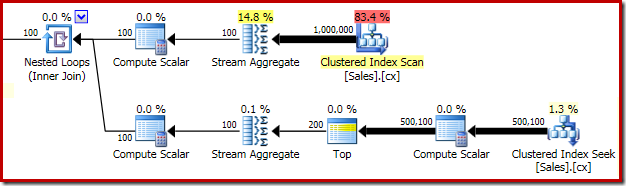
With all required data in memory, this query executes in 580 ms on average on my laptop (running SQL Server 2014 Service Pack 1). The performance of this query can be improved to 320 ms simply by adding a page granularity locking hint to the Sales table in the apply subquery:
DECLARE @s datetime2 = SYSUTCDATETIME();

DECLARE @Result AS table
(
    SalesPerson integer PRIMARY KEY,
    Median float NOT NULL
);

INSERT @Result
    (SalesPerson, Median)
SELECT
    d.SalesPerson,
    w.Median
FROM
(
    SELECT SalesPerson, COUNT(*) AS y
    FROM dbo.Sales
    GROUP BY SalesPerson
) AS d
CROSS APPLY
(
    SELECT AVG(0E + Amount)
    FROM
    (
        SELECT z.Amount
        FROM dbo.Sales AS z WITH (PAGLOCK) -- NEW!
        WHERE z.SalesPerson = d.SalesPerson
        ORDER BY z.Amount
        OFFSET (d.y - 1) / 2 ROWS
        FETCH NEXT 2 - d.y % 2 ROWS ONLY
    ) AS f
) AS w (Median);

SELECT Peso = DATEDIFF(MILLISECOND, @s, SYSUTCDATETIME());
The execution plan is unchanged (well, aside from the locking hint text in showplan XML of course):
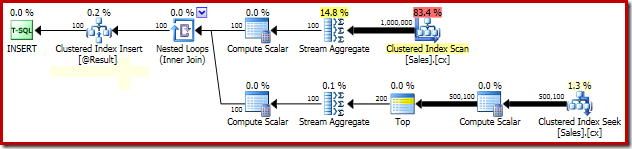
The explanation for the dramatic improvement in performance due to the PAGLOCK hint is quite simple, at least initially.
If we manually monitor locking activity while this query executes, we see that without the page locking granularity hint, SQL Server acquires and releases over half a million row level locks while seeking the clustered index. There is no blocking to blame; simply acquiring and releasing this many locks adds a substantial overhead to this query's execution. Requesting page level locks reduces the locking activity greatly, resulting in much improved performance.
This particular plan's locking performance issue is confined to the clustered index seek in the plan above. The full scan of the clustered index (used to compute the number of rows present for each sales person) uses page level locks automatically. This is an interesting point. The detailed locking behaviour of the SQL Server engine is not documented in Books Online to any great extent, but various members of the SQL Server team have made a few general remarks over the years, including the fact the unrestricted scans tend to start off taking page locks, whereas smaller operations tend to start off with row locks.
The query optimizer does make some information available to the storage engine, including cardinality estimates, internal hints for isolation level and locking granularity, which internal optimizations may be safely applied and so on. Again, these details are not documented in Books Online. In the end, the storage engine uses a variety of information to decide which locks are required at run time, and at which granularity they should be taken.
As a side note, and remembering that we are talking about a query executing under the default locking read committed transaction isolation level, note that the row locks taken without the granularity hint will not escalate to a table lock in this case. This is because the normal behaviour under read committed is to release the previous lock just before acquiring the next lock, meaning that only a single shared row lock (with its associated higher-level intent-shared locks) will be held at any particular moment. Since the number of concurrently-held row locks never reaches the threshold, no lock escalation is attempted.
The performance test for a single median calculation uses a different set of sample data, again reproduced from Aaron's earlier article. The script below creates a table with ten million rows of pseudo-random data:
CREATE TABLE dbo.obj
(
    id  integer NOT NULL IDENTITY(1,1),
    val integer NOT NULL
);

INSERT dbo.obj WITH (TABLOCKX)
    (val)
SELECT TOP (10000000)
    AO.[object_id]
FROM sys.all_columns AS AC
CROSS JOIN sys.all_objects AS AO
CROSS JOIN sys.all_objects AS AO2
WHERE AO.[object_id] > 0
ORDER BY
    AC.[object_id];

CREATE UNIQUE CLUSTERED INDEX cx
ON dbo.obj(val, id);
The OFFSET solution is:
DECLARE @Start datetime2 = SYSUTCDATETIME();

DECLARE @Count bigint = 10000000
--(
--    SELECT COUNT_BIG(*)
--    FROM dbo.obj AS O
--);

SELECT
    Median = AVG(1.0 * SQ1.val)
FROM
(
    SELECT O.val
    FROM dbo.obj AS O
    ORDER BY O.val
    OFFSET (@Count - 1) / 2 ROWS
    FETCH NEXT 1 + (1 - @Count % 2) ROWS ONLY
) AS SQ1;

SELECT Peso = DATEDIFF(MILLISECOND, @Start, SYSUTCDATETIME());
The post-execution plan is:

This query executes in 910 ms on average on my test machine. Performance is unchanged if a PAGLOCK hint is added, but the reason for that is not what you might be thinking…
You might be expecting the storage engine to choose page-level shared locks anyway, due to the clustered index scan, explaining why a PAGLOCK hint has no effect. In fact, monitoring the locks taken while this query executes reveals that no shared locks (S) are taken at all, at any granularity. The only locks taken are intent-shared (IS) at the object and page level.
The explanation for this behaviour comes in two parts. The first thing to notice is that the Clustered Index Scan is below a Top operator in the execution plan. This has an important effect on cardinality estimates, as shown in the pre-execution (estimated) plan:

The OFFSET and FETCH clauses in the query reference an expression and a variable, so the query optimizer guesses at the number of rows that will be needed at runtime. The standard guess for Top is one hundred rows. This is a terrible guess of course, but it is enough to convince the storage engine to lock at row granularity instead of at the page level.
If we disable the "row goal" effect of the Top operator using documented trace flag 4138, the estimated number of rows at the scan changes to ten million (which is still wrong, but in the other direction). This is enough to change the storage engine's locking granularity decision, so that page-level shared locks (note, not intent-shared locks) are taken:
DECLARE @Start datetime2 = SYSUTCDATETIME();

DECLARE @Count bigint = 10000000
--(
--    SELECT COUNT_BIG(*)
--    FROM dbo.obj AS O
--);

SELECT
    Median = AVG(1.0 * SQ1.val)
FROM
(
    SELECT O.val
    FROM dbo.obj AS O
    ORDER BY O.val
    OFFSET (@Count - 1) / 2 ROWS
    FETCH NEXT 1 + (1 - @Count % 2) ROWS ONLY
) AS SQ1
OPTION (QUERYTRACEON 4138); -- NEW!

SELECT Peso = DATEDIFF(MILLISECOND, @Start, SYSUTCDATETIME());
The estimated execution plan produced under trace flag 4138 is:

Returning to the main example, the hundred-row estimate due to the guessed row goal means that the storage engine elects to lock at the row level. However, we only observe intent-shared (IS) locks at the table and page level. These higher-level locks would be quite normal if we did see row-level shared (S) locks, so where did they go?
The answer is that the storage engine contains another optimization which can skip the row-level shared locks in certain circumstances. When this optimization is applied, the higher-level intent-shared locks are still acquired.
To summarize, for the single-median query:
OFFSET clause means the optimizer guesses cardinality.
The single median query would have had the same row-locking performance problem as the grouped median (due to the query optimizer's inaccurate estimate) but it was saved by a separate storage engine optimization that resulted in only intent-shared page and table locks being taken at runtime.
You may be wondering why the Clustered Index Seek in the grouped median test did not take advantage of the same storage engine optimization to skip row-level shared locks. Why were so many shared row locks used, making the PAGLOCK hint necessary?
The short answer is that this optimization is not available for INSERT...SELECT queries. If we run the SELECT on its own (i.e. without writing the results to a table), and without a PAGLOCK hint, the row lock skipping optimization is applied:
DECLARE @s datetime2 = SYSUTCDATETIME();

--DECLARE @Result AS table
--(
--    SalesPerson integer PRIMARY KEY,
--    Median float NOT NULL
--);

--INSERT @Result
--    (SalesPerson, Median)
SELECT
    d.SalesPerson,
    w.Median
FROM
(
    SELECT SalesPerson, COUNT(*) AS y
    FROM dbo.Sales
    GROUP BY SalesPerson
) AS d
CROSS APPLY
(
    SELECT AVG(0E + Amount)
    FROM
    (
        SELECT z.Amount
        FROM dbo.Sales AS z
        WHERE z.SalesPerson = d.SalesPerson
        ORDER BY z.Amount
        OFFSET (d.y - 1) / 2 ROWS
        FETCH NEXT 2 - d.y % 2 ROWS ONLY
    ) AS f
) AS w (Median);

SELECT Peso = DATEDIFF(MILLISECOND, @s, SYSUTCDATETIME());
Only table- and page-level intent-shared (IS) locks are utilised, and performance increases to the same level as when we use the PAGLOCK hint. You will not find this behaviour in the documentation of course, and it could change at any time. Still, it is good to be aware of.
Also, in case you were wondering, trace flag 4138 has no effect on the storage engine's locking granularity choice in this case because the estimated number of rows at the seek is too low (per apply iteration) even with the row goal disabled.
Before drawing conclusions about the performance of a query, be sure to check the number and type of locks it is taking during execution. Though SQL Server usually chooses the 'right' granularity, there are times when it can get things wrong, sometimes with dramatic effects on performance.
The post Locking and Performance appeared first on SQLPerformance.com.
Starting SQL Server 2012, we support creating database on a remote SMB file share without requiring a trace flag. You can even configure SQL cluster to use SMB file share for databases. This is documented here.
When creating or opening data or log files, SQL Server calls various file manipulation API including an WIN32 API called DeviceIoControl to send commands to the device driver for various operations.
I want to bring your attention that not all third party SMB device supports all device IO Control code used by SQL Server when calling API DeviceIoControl.
Recently we worked with a customer who was configuring to use a third party network attached storage device to store all their databases remotely on an SMB share.
They kept receiving the following error whenever they perform the following:
2015-06-04 13:14:19.97 spid9s Error: 17053, Severity: 16, State: 1.
2015-06-04 13:14:19.97 spid9s DoDevIoCtlOut() GetOverlappedResult() : Operating system error 1(Incorrect function.) encountered.
Through debugging, we learned that the failure came when SQL Server calls DeviceIoControl using device control code FSCTL_FILESYSTEM_GET_STATISTICS. This API is called for creating and opening any data or log file.
But this particular third party device driver doesn’t support device io control code FSCTL_FILESYSTEM_GET_STATISTICS. In other words, the error occurred because the storage driver doesn’t support it device code FSCTL_FILESYSTEM_GET_STATISTICS in windows API DeviceIoControl call.
If you experience similar errors as above with third party device, first test to see if you can create database on Windows file share without error. If you can do it with Windows file share but not vendor’s SMB share, please contact your storage vendor to get verification on what they support.
A few very important notes:
Jack Li |Senior Escalation Engineer | Microsoft SQL Server
Originally appearing in my monthly column at Database Trends & Applications magazine.
In my last column, available HERE, I described some of the findings contained in an intriguing new survey sponsored by Ntirety, a remote database administration service provider, and published by Unisphere Research. You can read the full survey with analysis at HERE.
One of the most startling and significant responses in the survey showed that 41% of data professionals intend to leave the field within the next 10 years. In that article, I also covered some of the broader industry growth and hiring trends along with an analysis of the survey itself. Here, I want dive into the survey findings from the viewpoint of the DBA job seeker.
Read the rest of this article at HERE.
-Kevin
Connect with me online! Facebook | Twitter | LinkedIn | Blog | SlideShare | YouTube | Google Author
The post DBTA – Does the Looming Shortage in DBAs Spell Opportunity? appeared first on Kevin Kline.
Editor’s note: The following post was written by Office365 MVP Geoff Evelyn as part of our Technical Tuesday series.
One of the most compelling challenges for Office 365 is centralised monitoring. Those working in the SharePoint arena will know only too well importance of monitoring and reporting across the platforms they manage. This is not simply from a technical but also from proof of service; the availability and evolution of those services. Proof that, the team responsible for monitoring internal SharePoint resources and servers also have a level in comfort in providing likewise monitoring for Office 365. Evolution to be able to identify over time changes in the services provided so that there are no surprises to stakeholders (both technical and business). Particularly for those organisations using centralised monitoring tools such as System Centre Operations Manager for monitoring infrastructure, the issue would be how to include service provision monitoring which exists outside of the on-premise infrastructure, so that it is possible to centralise alerting, notification, messages from those external service into on-premise environment monitoring.
From the Office365 angle, there is a wealth of monitoring availability all available from the Office 365 Dashboard available on each tenant (otherwise known as a subscription) in the Admin section of Office 365. This is a per tenant centralised provision giving service overviews and health covering all Office 365 services (Exchange, Identity Service, Portal, Rights Management, SharePoint, Skype and Yammer). There is also the Service Health page giving 30 days service level history concerning Office 365 features, including a page giving planned maintenance information.
From a service monitor perspective, whilst this is of course presents great options, there could be some challenges. If there are a number of Office 365 tenants to manage, things can become quite unwieldy if not virtually impossible in trying to identify service status from a single point. Additionally, additional conundrums arise when faced with managing hybrid and disconnected services, such as on-premise SharePoint (including associated services), and separated Office 365 tenants for external clients and partners. The key difficulty therefore, is the ability to monitor messages, alerts and notifications from the multitude of Office365 tenants without having to hop between monitoring systems pages in each.
System Centre Operations Manager 2012 R2 is a great monitoring tool of choice when it comes down to identifying service levels and performance for on-premise infrastructure. System Centre Operations Manager 2012 R2 crucially provides a unified management platform that covers service provider and azure environments. Service provider and Azure environments simply need to be added using 'Management Packs'. Microsoft have released an Office 365 Management Pack which provides System Centre Operations Manager 2012 R2 the ability to connect into Office 365 tenants. This is seen as a method by which the issues described above could be solved.
This article will describe how to download the Office 365 Management Pack, import and then use the services and features in that Management Pack.
1 A note about installing System Centre 2012
The key pre-requisite of the Office 365 Management Pack is System Centre Operations Manager 2012 R2. This article does not altogether assume you have installed it, or even are knowledgeable about the product. Therefore, for those not sure how to install System Centre Operations Manager 2012, it is a comprehensive and depending how deeply you wish to go, quite involved. There is a lot of information out there and links to that information is given in the Summary section.
I decided to go for a test installation, to help me write this article instead of using my full blown System Centre Operations Manager. I deployed System Centre Operations Manager into a single server VM. Information, specifics of the VM and installation guides on how to do that is also given in the Summary section.
2 What is the Office365 Management Pack
Basically, the pack allows you to use the administrative section of System Centre Operations Manager to add Office 365 Subscriptions. This is an important step since you would enter all the tenants that you need to monitor and is particularly useful in the dashboard. Once done, you can then use the discover services and features available for each of the subscriptions. Those features include the ability to get notified when Office 365 incidents occur, and visualise those alerts in the included dashboard.
The management pack, once deployed communicates with the relevant subscribed tenants to obtain information from Office 365 features, services and subscription. The below screen-shot shows the monitoring dashboard which gives the sections of information available, such as service status, active and resolved incidents and the message centre.

3 Installing the Management Pack
The Office 365 Management pack includes basic instructions for installation. I followed this guide to implement ten Office 365 subscriptions. Once the pack is installed into System Centre Operations Manager, you will need to ensure that you can configure System Centre Operations Manager to communicate and discover information from the Office 365 tenant.
Essentially, what needs to be done is:
1. Implement a special account in the Office 365 tenant which has administrative access to the tenant so that System Centre Operations Manager can subscribe to that tenant.
2. Configure the tenant as a subscription
3. Customise your System Centre Operations Manager Workspace so that you have a centralised dashboard
3.1 Installing the Pack to Disc
The following procedure describes how to install the management pack for Office 365.
First, download the Management Pack. The link is located below.
1: Run the MSI:

2: Choose the default directory. 
3: Confirm the installation of the MSI:
Note the installation directory which is where the pack will be installed to. You will need to import the pack once this procedure is completed.
3.2 Importing the Pack into System Centre
Once the pack is installed, you will need to visit the System Centre Operations Manager, go into the Administrative section, to install the management pack.
1: Access System Centre Operations Manager Administration, then access the Management Packs section.
Once in the management packs section, you will need to Import the Management Pack for Office365. The following screen-shot shows the Management Pack selection area, and the Import Management Packs section. 
The Import Management Packs section is where you will select the downloaded Office 365 Management Pack. When done, the next dialog displayed is the Import Management Packs dialog. Since we downloaded the management pack, we simply take it from disk.

You will see an Online Catalog Connection dialog (shown below) asking if you would like to search the online catalog for dependencies. This is not required for the Office 365 management pack, so you can select NO from that dialog. 
Locate the downloaded Management Pack, and then you will be presented with information concerning its version, release date, status, and license terms. The Office Management pack only shows the initial version of 7.0.5115.0 (shown below). 
At this stage, we all ready to carry out the installation of the Office 365 Management pack. Select install to proceed with the installation. Once done, you will notice the Management Pack listed in the Administration pane.
3.3 Adding Office 365 Subscriptions
The key benefit of using Office 365 in System Centre Operations Manager 2012 is the ability to monitor multiple subscriptions (tenants) from one dashboard. The next thing to configure the management pack is to add all the subscriptions that needs to be monitored. This is done by accessing the Office365 Subscriptions page which is located in the Administration pane. 
The Office 365 subscription panel will be displayed when selecting the Office 365 option from the Administration pane. Here, you can add, edit or delete subscriptions. Each subscription requires that an Office 365 account is defined so that the subscription can be saved in System Centre Operations Manager. Each subscription requires an account is specifically set in the relevant Office 365 tenants. That account is then used to connect System Centre Operations Manager to the relevant tenant. To do this, access the Office 365 tenant admin page. Go into the Active Users page, and then add a new user, and do not assign any licenses to that user. Assign that user admin rights. Note the username and the password.
Then, access the subscription panel by selecting the Office 365 option from the Administration pane in System Centre Operations Manager. That will display the Office 365 subscription panel. Click Add subscription to add the name of the tenant, the user name and password as created in Office 365 users. The below screen-shot shows an example: 
Select the NEXT button once you have entered the subscription details for the Office 365 tenant that you wish to monitor. Doing this will display the option to select a Management Server Resource Pool. Resource pools are pretty cool. They ensure the continuity of monitoring by providing multiple management servers that can take on monitoring workflows if one of the management servers becomes unavailable. You can create resource pools for specific purposes. For example, you might create a resource pool of management servers that are located in the same geographic area to provide network device monitoring. When System Centre Operations Manager is installed the default pool is the 'All Management Servers Resource Pool'.
For the purpose of the installation of a subscription you could choose the All Management Servers Resource Pool. If you are interested in utilising Resource Pools in the future or wish to find out more information, check out the link given in the Summary section. The below screen-shot shows the selection of the All Management Servers Resource pool as part of adding a new subscription.
Once you have selected the resource pool, select the Add Subscription button. This will then add the subscription into the Subscriptions panel. Repeat this process to add any other relevant Office 365 tenants.
4 Setting Out your Workspace
Now onto the setting up of the various dashboards, alerts, and notifications available in the Office 365 Management Pack. First, we will need to select the areas we want to monitor and add them into the Workspace. Before doing that, we will need to appraise the contents of the management pack.
To do this, access the Monitoring section of System Centre Operations Manager, then expand the Office 365 section in the Monitoring pane. 
The Office 365 section shows two areas of monitoring available to you.
· Active Alerts shows information about each incident occurred across all the subscriptions applied in the System Centre Operation Manager Office 365 subscriptions list. Active alerts will get generated for each Active or Resolved incident. This includes, for each alert, the resolution state, how old the alert is, and the priority assigned. Each alert can be expanded to show more information including full description of the incident and methods to alter who should be assigned the alert for example.
· Office 365 Monitoring Dashboard (a screen shot is shown here) shows information for all the subscriptions and status indicator against each of the Office 365 subscriptions. There are five segments (otherwise known as widgets) in the dashboard:
1. Subscription Health. The health (icon - red/yellow/green) and name of the subscription. Each subscription can be selected. When a subscription is selected, System Centre Operations Manager will drill down and display in the other segments status, incidents and messages to the subscription selected.
2. Service Status. Shows the name of the services available in the subscription and for each the number of active incidents.
3. Active Incidents. Shows the Severity (status icon - red/yellow/green), the source (subscription), the kind of incident, description, status, affected services and the ID of the incident.
4. Resolved Incidents. Shows the same information as the Active Incidents.
5. Message Centre. One of my favourite sections, of course :) - this shows information concerning general updates carried out in Office 365, in terms of items like What's New, Updated Features, What's around the corner and more.
The point about these two areas in the monitoring section is for you to then take these into your workspace and carry out customisation to suit your way of working. As said earlier, the My Workspace section allows you to centralise the Office 365 monitoring with any other monitoring of the infrastructure into one place which is easy to locate.
To do this, you will need to right-click the area in the monitoring pane to display the context menu (see the below screen-shot). From that menu select 'Add to My Workspace'. Once done, you will need to enter a title for the area, and a group that it will appear in.

I went and did this for the Active Alerts and the Office 365 Monitoring Dashboard, and then I visited the My Workspace section (screen-shot below).
The My Workspace section shows the areas of monitoring that you have decided you want to monitor. On mine, I want to monitor SharePoint 2013 on-premise, Windows Computers, Service State and Office 365. Let’s take a look at the two areas in question, Active Alerts, and the Monitoring Dashboard.
4.1 Active Alerts
Office 365 Active Alerts allows you to get a central view of all messages concerning the incidents on all the subscriptions in one window. You can personalise the view and select columns you wish displayed. You can also the sorting and grouping. You can also rename the title of the view so that you can recognise it easily in the other areas that you have listed in the Workspace area. For example, SharePoint 2013 Management Pack has Active Alerts section in it, so it probably is important to rename so it’s clear which is which when displayed with the Office 365 Management Pack Active Alerts section. The below screen-shot shows the Workspace section, with the areas I want to monitor. The Active Alerts from Office 365 Management Pack has been added and customised. The title has been renamed, and I have added the description field to the list. I have sorted by Source then Severity. That means I can see messages grouped by the subscription (the Office 365 Tenant) and the severity (information, critical, etc.) 
The following screen-shot shows two sources (two Office 365 tenants) showing clearly that the authorization to the second has failed (most likely a password incorrectly entered). The key thing here is the fact that you can see the critical messages against each source. 
Each alert displayed can be drilled into to obtain further information. For example, on the first item displayed in the above screen-shot (Resolved Incident MO25200) I can bring up the Alert Context to understand more about the incident and what was done to resolve the issue. Of course, this information could be obtained on the portal, but doing this in the Operations Manager centrally is definitely more productive! 
Additionally, each alert can give me more information about how to solve the issue. For example, one of my tenants was not able to authorize against System Centre. By bringing up the Product Knowledge on the alert I was able to see ways in which I could solve the issue. 18
Each alert can be controlled in terms of management. You can assign individuals and Ticket IDs to the alert. You can also, once the alert issue has been resolved mark it as Closed. This will remove the alert so that you can concentrate on the unresolved incidents. 
4.2 The Monitoring Dashboard
The Monitoring Dashboard centralises all active, resolved, service status and all messages into one dashboard. The great aspect about the dashboard is the ability to filter messages. 
5 Summary
System Center 2012 Operations Manager R2 is designed to help configure and manage applications, services, computers, and VMs in mid-sized to large enterprises. The Office 365 Management Pack adds the ability for those using this tool to extend the monitoring into one or more Office 365 under their control. This article shows just a fraction of the ability that there is using the Office 365 Management Pack. Whilst on my voyage of discovery I noted other very useful items which in the context of service delivery are vitally important.
· Reporting - the ability to view over time aspects such as availability, uptime, configuration changes.
· Custom field manipulation to store more information concerning Alerts (help the monitoring system become more of a helpdesk)
· Override some of the ways the alert surfaces, such as priority, severity, etc.
I will be writing more about these features and options in further articles to explain more how System Centre 2012 R2 Operations Manager can be tailored and linked, and particularly where in the land of support they can be extremely useful.
5.1 More Information
There are places you should visit to get more information concerning System Centre 2012 R2 and the Office 365 Management Pack.
System Centre Operations Manager R2.
Gives overviews, features, purchasing, resources and the ability to evaluate System Centre Operations Manager 2012 R2.
http://www.microsoft.com/en-us/server-cloud/products/system-center-2012-r2/Overview.aspx
System Centre Operations Manager Management Pack for Office 365
Gives details, basic installation instructions, system requirements.
http://www.microsoft.com/en-gb/download/details.aspx?id=43708
How to work with Resource Pools in System Centre Operations Manager
A resource pool allows to you define collections of management servers used to distribute work amongst themselves including continuity.
https://technet.microsoft.com/en-gb/library/hh230706.aspx

About the author
With more than 30 years' experience in information technology and more than 10 years’ experience in SharePoint covering development, design and implementation. Geoff works in SharePoint information systems design, architecture, implementation, planning, governance and automation, all in the land of SharePoint service delivery. Geoff is a multiple author, a Fellow of the Institute of the Analysts and Programmers, a Fellow of the Institute of Computer Technology, a Member of the Chartered Institute for IT and Engineering Technology, a Prince 2 Practitioner, and an MVP Mentor.
 When you're rude/crisp/sharp/whatever to someone in a PR or Issue, your meanness may have turned off the next generation of open source committer. It's that simple. When folks are just starting out as Code Newbies their initial interactions in this new world matter.
I've been doing this for over 20 years. There's knowledge and (hopefully) wisdom that I've gained in all that time, assuming it's not the same year of experience twenty times. Along with all that time that I (and you!) put in comes great responsibility. We need to think as a community about stewardship, sustainability, and successor management.
There are folks in open source - successful folks - that think that all this talk of "niceness" is overrated. "Talk is cheap, show me the code" is a fun thing to say. But no, talk isn't cheap. It's not cheap, yes, it takes time and patience, but it IS important.
As we try to move towards more representative teams and expand the leadership beyond the old network, this somehow controversial idea of being welcoming and patient to new people is even more important.
There are many folks out there with skills and knowledge that are not joining open source because their initial attempts to contributed were rebuffed.
Jesse Pollak posted two great tweets last week that really point out what's wrong with open source, especially for new people just starting out.
What’s wrong with open source software communities in one DM. Let’s change this. pic.twitter.com/ydCkWae3sl
— Jesse Pollak (@jessepollak) July 18, 2015
Jesse pledged a "no meanness" rule. I join him in this pledge and encourage you to also.
New rule: no meanness on OSS libraries I help maintain. Even people asking not-so-informed Qs should be met with kindness and gratitude.
— Jesse Pollak (@jessepollak) July 1, 2015
I've thought similar things before.
Be kind to amateurs, there are more of them than professionals and they're looking to all of you to see how to act.
— Scott Hanselman (@shanselman) April 14, 2015
Sound like too much work? There are ways to built a welcoming culture into the process. Here's some ideas. I'm interested in yours also.
Have you helped with an open source project? Did you had a bad initial experience? Did it slow you down?
Perhaps you had a great one and your first pull request was awesome? I'd like to hear your story.
Sound off in the comments!
Sponsor: Big thanks to Infragistics for sponsoring the feed this week. Responsive web design on any browser, any platform and any device with Infragistics jQuery/HTML5 Controls. Get super-charged performance with the world’s fastest HTML5 Grid - Download for free now!


In vSphere Upgrade Saga: Planning for vSphere 6.0, I discussed the need to plan your upgrade as well as the need to delay your upgrade until your third-party software has caught up with VMware’s latest release. I now have all the bits for my critical third-party components, and it is time to first upgrade them.
The critical third-party components are:
Why do these first? Third-party tools have a tendency to fail when major upgrades are made to vCenter and vSphere, not to mention all the other tools in the environment. Going to vSphere 6 is a major upgrade, and therefore all dependencies must be updated or met first. These are my major dependencies. You should know your own before you launch into an upgrade to vSphere 6.
The upgrade of each component went smoothly. One thing HP and Veeam have done over the years is to ensure that upgrades go smoothly. This was not always the case, but it has been recently.
HP StoreVirtual 12.0: The upgrade to HP StoreVirtual 12.0 was the smoothest full release upgrade I have ever done for HP StoreVirtual. The key is to first upgrade the CMC, then upgrade each node using the newly upgraded CMC.
HP Matrix Operating Environment 7.4.1: The upgrade of the HP Matrix Operating Environment to version 7.4.1 also went on without any issues. It is a minor upgrade of my HP SIM and other tools.
HP OneView 7.5.2: The HP OneView 7.5.2 for VMware vCenter upgrade also went smoothly. All my settings were preserved, so I did not have to “rehook” backup my HP StoreVirtual or HP SIM server. This upgrade backed up settings, removed the old version, and installed the new version with no issues whatsoever. Further Note: HP OneView 7.6 is required for full vSphere 6.0 integration.
Veeam Backup 8.0 Update 2: Yes, there is currently a Veeam Backup 9, but for now I am on 8.0, which requires Update 2 to work with vSphere 6. Once more, a simple upgrade, with no issues major or minor. Further Note: Veeam Backup 8.0 Update 2b is required for full vSphere 6.0 Integration.
The last item to check was why vCenter suddenly went offline. That was due to some of my VMware licenses expiring. My lab environment uses the licenses I receive from VMware as a vExpert, and I had not switched over to the latest set. When they had expired in the past, it was painful to use the new ones. vCenter 5.5 made this a simpler task, and my hosts, VMs, and all other items have had their licenses renewed. Granted, I also have my original purchased licenses, which never expire.
So, the next item on my list is to ensure I can upgrade by making sure I have the proper license for my vSphere Environment.
The post vSphere Upgrade Saga: vSphere 6.0, Third-Party appeared first on AstroArch Consulting, Inc.
There are many steps to the upgrade of vSphere, as outlined by KB Article 2109760, with the steps for my environment starting at step 4 (vCNS). However, before I could start my upgrade, I had to upgrade any third-party systems first, as well as to upgrade any Microsoft Windows Servers. Everything went fine for vCNS, View Composer, and View Connection Server. However, problem creep started with the View security server (not really on the list, but if you update the Connection Server, you have to upgrade any security servers at the same time).
The first problem I faced was the need to redeploy my Horizon View (steps 5–6) DMZ vCNS (step 4) Edge appliance. Yes, redeploy: a reboot would not fix the problem. The VMware Tools daemon would not start, which would keep VIX from working, which keeps the firewall from being updated. A redeploy fixed this problem.
The next problem was with vCenter (step 7) itself. First, you MUST read the documentation. Do not try to do this if you have not read the upgrade documentation. Even so, it took me three times to complete the upgrade. I believe that there were several issues, which I addressed using the following:
Eventually, I figured it was a drive issue, as in the CD-ROM had to be the D: drive and not an E: drive, or it was a disk space issue. I ended up using my Windows 8 Fusion VM, so the ISO is on D: drive and has lots of spare disk space. So, I am not sure which was the real culprit.
Then, I had to “resync” vCNS, vLI, Veeam, etc. with the new vCenter 6 due to certificate issues. Eventually, I need non-VMware produced certificates—getting there.
vCenter Operations 5.8.4 would not resync, but I planned on upgrading and so did that instead using instructions at www.settlersoman.com/how-to-migrate-vmware-operations-manager-5-8-x-to-vrealize-operations-manager-6-0/. The migration step worked just fine. Since I did not properly set the IP address of the vRealize Operations (vROPS) 6.0.1 (step 8) instance, I had to do this step two times, which was fine, as the migration works regardless. Resync just took deleting the migrated instance of vCenter connector and adding in a new one with the proper credentials.
For vRealize Orchestrator (vRO) (step 8), I had to reset the root password. I found the following to help with this: https://tournasdimitrios1.wordpress.com/2011/01/22/hack-the-password-protected-single-user-mode-on-linux/. This is one reason why vCenter access should be seriously restricted! Console access can cause all sorts of issues. Actually, all my VAMI-based virtual appliances had expired passwords. Some allow you to log in as root using the expired password, but then you need to change it. vRO did that, but I mistyped the password and did not know the keys. The method I found allowed me to use pam_tally2 to clear any failed login attempts as well as to reset the password.
VMware Data Protection (VDP) (step 8) required following KB Article #2111900 first to allow the proper SSL ciphers to work with modern browsers.
vSphere Replication (VR) (step 8) required me to use KB Article #2112332 to help with lookup service registration. However, since I did not have the previous fingerprint for the lookup service, I had to reinstall VR. I only used this for one VM, so it was not a major issue for me.
Virtual Infrastructure Navigator (VIN) (step 8) suffered the same problem as VR, so I also reinstalled that application. It will take some time for all the connections to be seen again: roughly one week. I also experienced an “Unable to load” error from within the vSphere Web Client related to VIN.
VMware Support Assistant (VSA) also gave me issues with an “Unable to load” error from within the vSphere Web Client. This tool was not part of my vCloud Suite bundle but could be downloaded separately. Once installed, it cleaned up another “Unable to load” error. This is a reinstall, as it only ships as an OVA and since most everything is on the VMware site for support, there is no need to migrate anything over.
In clearing up all the “Unable to load” errors, I realized I also had issues with HP OneView, which has an update as of April 2015. This is something I missed when I last did an upgrade, in March, for this third-party component. Be sure to upgrade to HP OneView for VMware vCenter 7.6.
The Site Recovery Manager (SRM) (step 9) upgrade required me to have registered the proper version of VR. This led me down the road to reinstalling VR and VIN, as well as fixing HP OneView. Once those other items were fixed, then everything installed and worked fine within the vSphere Web Client.
vSphere Management Assistant (vMA) also needs to be upgraded, but since I do not modify this image, the only thing necessary to upgrade it is to replace it with the new OVF.
After all of those upgrades, I found that the best browser for the vSphere Web Client was Chrome, as the Client Integration Plug-in would not work properly with Firefox or IE, which is required for using the Deploy OVF menu item. In addition, I had to disable the “Use hardware acceleration when available” option within Chrome’s settings to get the vSphere Web Client pages (and other SSL-based pages) to appear when running Chrome within a VM, unless you wish to delete all content, history, cookies, and cache from the browser every launch.
Now all the preparation work is completed before we upgrade vSphere ESXi itself.
The post vSphere Upgrade Saga: 6.0 Upgrade through SRM appeared first on AstroArch Consulting, Inc.
First came the in-person roadtrip.

That Kline family won’t be nearly as good at this as us Griswolds!
Two weeks riding the highways from Nashville, TN to Chicago, IL to St. Louis, MO and back.
One thousand four hundred miles in a minivan with my wife and four daughters.
Eight PASS user groups. Twelve presentations.
Over three hundred attendees.
Two hundred t-shirts.
Eight winners of a license for Plan Explorer PRO.
And through it all
…
ONE TOILET.

Merry Christmas! The … uh … bathroom was full!
I’ve gotten lots of requests for the slide decks, the scripts, inquiries about the #SQLVacation contest running through July 31st, and other things to follow-up on. In order to make life easy for me, I’ve put all of the answers in one place on my SQL Sentry blog page. Click the link to get all of the goodies.
Connect with me online! Facebook | Twitter | LinkedIn | Blog | SlideShare | YouTube | Google Author
The post SQLVacation Slides and Scripts appeared first on Kevin Kline.
![clip_image006[7]](http://blogs.msdn.com/cfs-file.ashx/__key/communityserver-blogs-components-weblogfiles/00-00-00-50-01-metablogapi/1541.clip_5F00_image0067_5F00_19932560.jpg "clip_image006[7]")