Shared posts

28 Jul 01:41

Storage – Erasure Coding and RAID – A Few Good Links

by dan

Erasure coding has been around for a little while now, and if you’ve ever sat through a presentation from a cloud storage provider talking about resiliency of data at scale, you may have heard it mentioned. It occurred to me that I’ve just assumed that people know what it is, and that’s not fair. I was going to do a post explaining what it is, but figured a quick post with some links to some articles I found of use would be more useful. Because what’s the point of the internet if I can’t be lazy and link to things on it?

Here’re some useful research papers to start with:

The “press” also has some useful articles on the topic. I recommend you have a look at these two:

Some of my preferred analysts have written a bit on the topic:

Josh has also done a great deep-dive on the Nutanix version of erasure coding (EC-X) that you can see here.

My favourite post, though, is this one: Dummies Guide to Erasure Coding.


24 Jul 07:21

VMware Workstation – “The host is currently using the device”

by Simon Seagrave

I hit a problem recently in VMware Workstation (v11) where I couldn’t connect a USB storage device to my VM, as it claimed that “The connection for the USB device x  was unsuccessful – The host is currently using the device …”.  I knew that there weren’t any application or OS process accessing it, so thought it may be the USB pen drive itself.

VMware Workstation USB 3 issue problem

Looking within the Windows Explorer window I confirmed that the OS could see the device and that it was accessible (see below).

VMware Workstation USB 3 problem

I had the USB key inserted into one of the two front USB ports of my PC, both USB 3.0 ports.

Moving the drive to one of the USB 2.0 ports on the back of my PC, and then trying to connect the USB pen drive to my VM, it worked successfully without any warnings or errors.  I repeated the process to ensure that it wasn’t a fluke, though I could replicate the same warning message again and then have it work in the rear USB 2.0 port, but not a front or rear USB 3.0 port.

Below: After inserting the USB pen drive into a USB 2.0 port, I could then connect it to the VM within Workstation, and have it be presented up to the VMware vSphere install I was performing (for a bootable pen drive copy of vSphere).

The connection for the USB device was unsuccessful

Having a quick scour of the internet pulled up a few articles (eg: this VMware KB for an earlier version of Workstation) indicating that there can sometimes be “issues” between VMware Workstation and USB 3.0 ports.  There will no doubt be a technical reason for this, but for now I’m happy just using a USB 2.0 port and thought that I’d pass on my experience to others, who may find themselves with the same warning message.  I should also point out, that there other known instances where legacy USB 2.0 devices have issues connecting  via USB 3.0 ports, so it may be an incompatibility between the chipset/driver used on the devices and the controller used by the USB 3.0 port.

The post VMware Workstation – “The host is currently using the device” appeared first on TechHead and was written by Simon Seagrave.

05 Jul 22:47

How to use Process Monitor and Process Explorer

by Scott Hanselman

I was chatting with Phil Haack today about a weird little bug/feature we were seeing in GitHub for Windows. I don't have the source code for the application, but I wanted to explore what was going on and get some insight so I could give Phil a decent bug report.

He and I spent some time on Skype sharing screens today and he commented "we should be recording this." So I went back and did just that.

Please take a moment and Subscribe to my YouTube Channel here: http://youtube.com/shanselman

In this short video I remind folks how Procmon and ProcExp work, how powerful they are and I learn some interesting things about GitHub for Windows!

Let me know if you find short videos like these useful, and if you do, suggest topics in the comments!

Also, a reminder, if you've got non-technical family or friends who want help with Windows 8, give them a YouTube Playlist designed just for them! http://hanselman.com/windows8


© 2015 Scott Hanselman. All rights reserved.
     
05 Jul 22:41

Cannot determine next value for a sequence

by Greg Low

One of the most anticipated new features in SQL Server 2012 was the introduction of sequences. Prior to SQL Server 2012, developers had a choice of IDENTITY columns or a roll-your-own table mechanism.

Sequences allow us to create a schema-bound object that is not associated with any particular table. For example, if I have a Sales.HotelBookings table, a Sales.FlightBookings table, and a Sales.VehicleBookings table, I might want to have a common BookingID used as the key for each table. If more than the BookingID was involved, you could argue that there is a normalization problem with the tables but we'll leave that discussion for another day.

Recently when working with sequences however, I found a problem with their implementation. It works as described but is not useful.

So let's start by creating the schema and the sequence:

image


We could then use this schema as the default value for each of the three tables:

image

All this is as expected. One question that often arises though, is "how do I know the last value for a given sequence". The answer provided is to query the sys.sequences view. We can do this as follows:

image

The current_value colum in sys.sequences is defined as follows:

Datatype: sql_variant NOT NULL

The use of sql_variant here makes sense as the view needs to be able to provide the current value for all sequences, regardless of data type. Sequences can be created with any built-in integer type. According to BOL, the possible values are:

  • tinyint - Range 0 to 255
  • smallint - Range -32,768 to 32,767
  • int - Range -2,147,483,648 to 2,147,483,647
  • bigint - Range -9,223,372,036,854,775,808 to 9,223,372,036,854,775,807
  • decimal and numeric with a scale of 0.
  • Any user-defined data type (alias type) that is based on one of the allowed types.

The output of that column is described as:

The last value obligated. That is, the value returned from the most recent execution of the NEXT VALUE FOR function or the last value from executing the sp_sequence_get_range procedure. Returns the START WITH value if the sequence has never been used.

And this is where I have a problem with how it's defined. When you have never retrieved a value from the sequence, there is no last value obligated. What it does return is the first value that will be generated, but has not yet been generated:

clip_image001

The documentation is correct but the behaviour is bizarre. I believe that this column should return NULL. Otherwise, there is no way to tell that this value has not yet been generated.

If I generate a new value and then query it again ie:

image

Note that the same value is returned:

clip_image001[1]

It's only when I request it another time, that I see the expected value:

clip_image002

So the problem is that when you read the current value from the sys.sequences view, there's no way to know if this is the last value obligated or the next one that will be obligated.

I'd really like to see this behaviour changed. Given that the SQL Server team rates backwards compatibility highly, an alternative would be to add a new column to sys.sequences that indicates that the sequence has never been used. There is a column is_exhausted. At a pinch, that could be set for new sequences.

Thoughts?

If you agree, you can vote here: https://connect.microsoft.com/SQLServer/feedback/details/1461552

05 Jul 22:41

So Long, and Thanks for All the Scripts!

by andyleonard
With mixed emotions, I just read The End of an Era – SQLFool scripts are now open-sourced . After two book projects together, I admire Michelle ( New Blog | @SQLFool ) immensely. More than that, I consider her a friend. It’s exciting to (try to) keep...(read more)
05 Jul 22:40

Knee-Jerk Wait Statistics : CXPACKET

by Paul Randal

In several of my posts over the last year I’ve used the theme of people seeing a particular wait type and then reacting in a “knee-jerk” fashion to the wait being there. Typically this means following some poor Internet advice and taking a drastic, inappropriate action or jumping to a conclusion about what the root cause of the issue is and then wasting time and effort on a wild-goose chase.

One of the wait types where knee-jerk reactions are strongest, and where some of the poorest advice exists, is the CXPACKET wait. It’s also the wait type that is most commonly the top wait on people’s servers (according to my two big wait types surveys from 2010 and 2014 – see here for details), so I’m going to cover it in this post.

What does the CXPACKET wait type mean?

The simplest explanation is that CXPACKET means you’ve got queries running in parallel and you will *always* see CXPACKET waits for a parallel query. CXPACKET waits do NOT mean you have problematic parallelism – you need to dig deeper to determine that.

As an example of a parallel operator, consider the Repartition Streams operator, which has the following icon in graphical query plans:

Repartition Streams operator

And here’s a picture that shows what’s going on in terms of parallel threads for this operator, with degree-of-parallelism (DOP) equal to 4:

Parallel threads diagram  (click to enlarge)

For DOP = 4, there will be four producer threads, pulling data from earlier in the query plan, the data then goes back out to the rest of the query plan through four consumer threads.

You can see the various threads in a parallel operator that are waiting for a resource using the sys.dm_os_waiting_tasks DMV, in the exec_context_id column (this post has my script for doing this).

There is always a control thread for any parallel operator, which by historical accident is always thread ID 0. The control thread always registers a CXPACKET wait, with the duration equal to the length of time the operator takes to execute each time it is run by the plan.

The only time non-control threads will register CXPACKET waits is if they complete before the other threads in the operator. This can happen if one of the threads gets stuck waiting for a resource for a long time, so look to see what the wait type is of the thread not showing CXPACKET (using my script above) and troubleshoot appropriately. This can also happen because of a skewed work distribution among the threads, and I’ll go into more depth on that case in my next post here (it’s caused by out-of-date statistics and other cardinality estimation problems).

Unexpected parallelism?

Given that CXPACKET simply means you’ve got parallelism happening, the first thing to look at is whether you expect parallelism for the query that’s using it. My query will give you the query plan node ID where the parallelism is happening (it pulls out the node ID from the XML query plan if the wait type of the thread is CXPACKET) so look for that node ID and determine whether the parallelism makes sense.

One of the common cases of unexpected parallelism is when a table scan happens where you’re expecting a smaller index seek or scan. You’ll either see this in the query plan or you’ll see lots of PAGEIOLATCH_SH waits (discussed in detail here) along with the CXPACKET waits (a classic wait statistics pattern to look out for). There are a variety of causes of unexpected table scans, including:

  • Missing nonclustered index so a table scan is the only alternative
  • Out-of-date statistics so the Query Optimizer thinks a table scan is the best data access method to use
  • An implicit conversion, because of a data type mismatch between a table column and a variable or parameter, which means a nonclustered index cannot be used
  • Arithmetic being performed on a table column instead of a variable or parameter, which means a nonclustered index cannot be used

In all these cases, the solution is dictated by what you find the root cause to be.

But what if there’s no obvious root case and the query is just deemed expensive enough to warrant a parallel plan?

Preventing parallelism

Among other things, the Query Optimizer decides to produce a parallel query plan if the serial plan has a higher cost than the cost threshold for parallelism, an sp_configure setting for the instance. The cost threshold for parallelism (or CTFP) is set to five by default, which means that a plan doesn’t have to be very expensive to trigger the creation of a parallel plan.

One of the easiest ways to prevent unwanted parallelism is to increase the CTFP to a much higher number, with the higher you set it, the less likely parallel plans will be created. Some people advocate setting CTFP to somewhere between 25 and 50, but as with all tweakable settings, it’s best to test various values and see what works best for your environment. If you’d like a bit more of a programmatic method to help picking a good CTFP value, Jonathan wrote a blog post showing a query to analyze the plan cache and produce a suggested value for CTFP. As examples, we have one client with CTFP set to 200, and another set to the maximum – 32767 – as a way of forcibly preventing any parallelism whatsoever.

You might wonder why the second client had to use CTFP as a sledgehammer method for preventing parallelism when you’d think they could simply set the server ‘max degree of parallelism’ (or MAXDOP) to 1. Well, anyone with any permission level can specify a query MAXDOP hint and override the server MAXDOP setting, but CTFP cannot be overridden.

And that’s another method of limiting parallelism – setting a MAXDOP hint on the query you don’t want to go parallel.

You could also lower the server MAXDOP setting, but that’s a drastic solution as it can prevent everything from using parallelism. It’s common nowadays for servers to have mixed workloads, for instance with some OLTP queries and some reporting queries. If you lower the server MAXDOP, you’re going to hobble the performance of the reporting queries.

A better solution when there’s a mixed workload would be to use CTFP as I described above or to utilize Resource Governor (which is Enterprise-only I’m afraid). You can use Resource Governor to separate the workloads into workload groups, and then set a MAX_DOP (the underscore isn’t a typo) for each workload group. And the good thing about using Resource Governor is that the MAX_DOP cannot be overridden by a MAXDOP query hint.

Summary

Don't fall into the trap of thinking that CXPACKET waits automatically mean you’ve got bad parallelism happening, and certainly don’t follow some of the Internet advice I’ve seen of slamming the server by setting MAXDOP to 1. Take the time to investigate why you’re seeing CXPACKET waits and whether it’s something to be addressed or just an artifact of a workload that’s running correctly.

As far as general wait statistics are concerned, you can find more information about using them for performance troubleshooting in:

In the next article in the series, I'll discuss skewed parallelism and give you a simple way to see it happening. Until then, happy troubleshooting!

The post Knee-Jerk Wait Statistics : CXPACKET appeared first on SQLPerformance.com.

05 Jul 22:39

Disaster recovery 101: fixing a broken boot page

by Paul Randal

One of the corruptions that can stymie all efforts at disaster recovery is broken boot page. If the boot page can’t be processed, the database can’t be brought online or even put into emergency mode. I first demonstrated how to work around this in my session on Advanced Data Recovery Techniques at PASS in 2014 and here I’d like to walk through the steps of what to do.

First of all, I’ll create a broken boot page in a test database:

-- Drop old database
USE [master];
GO

IF DATABASEPROPERTYEX (N'Company', N'Version') != 0
BEGIN
	ALTER DATABASE [Company] SET SINGLE_USER WITH ROLLBACK IMMEDIATE;
	DROP DATABASE [Company];
END

-- Create database and table
CREATE DATABASE [Company] ON PRIMARY (
    NAME = N'Company',
    FILENAME = N'D:\SQLskills\Company.mdf')
LOG ON (
    NAME = N'Company_log',
    FILENAME = N'D:\SQLskills\Company_log.ldf');
GO

USE [Company];
GO

CREATE TABLE [Sales] (
	[SalesID] INT IDENTITY,
	[CustomerID] INT DEFAULT CONVERT (INT, 100000 * RAND ()),
	[SalesDate] DATETIME DEFAULT GETDATE (),
	[SalesAmount] MONEY DEFAULT CONVERT (MONEY, 100 * RAND ()));

CREATE CLUSTERED INDEX [SalesCI] ON [Sales] ([SalesID]);
GO

-- Populate the table
SET NOCOUNT ON;
GO

INSERT INTO [Sales] DEFAULT VALUES;
GO 5000

-- Create some nonclustered indexes
CREATE NONCLUSTERED INDEX [SalesNCI_CustomerID] ON [Sales] ([CustomerID]);

CREATE NONCLUSTERED INDEX [SalesNCI_SalesDate_SalesAmount] ON [Sales] ([SalesDate]) INCLUDE ([SalesAmount]);
GO

-- Create a good backup
BACKUP DATABASE [Company] TO DISK = N'C:\SQLskills\OldCompany.bck'
WITH INIT;

-- And detach it
USE [master]
GO

EXEC sp_detach_db N'Company';
GO

Now I’ll corrupt it using a hex editor. The one I like to use is called HxD and it’s a freeware tool you can download from here.
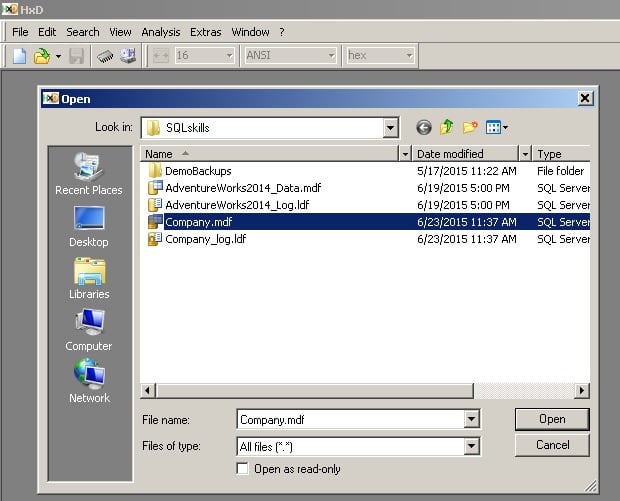
image1

And then go to the offset of the boot page. It’s page 9 always, so the offset is 8192 x 9 = 73728.
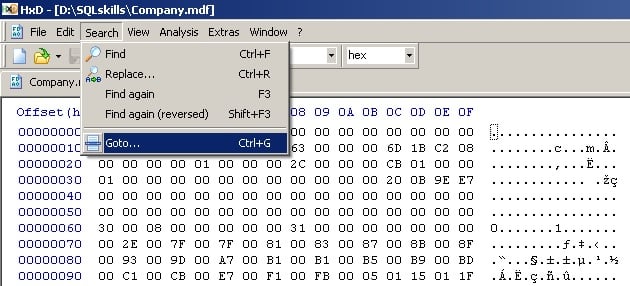
image2

And make sure to select the ‘dec’ option to input the number in decimal, offset from beginning of the file:
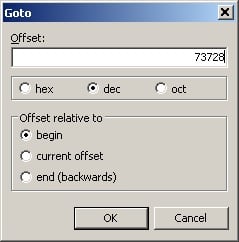
image3

You’ll see the boot page contents, including the name of the database:
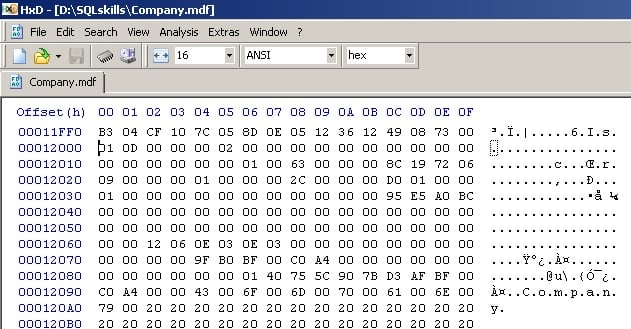
image4

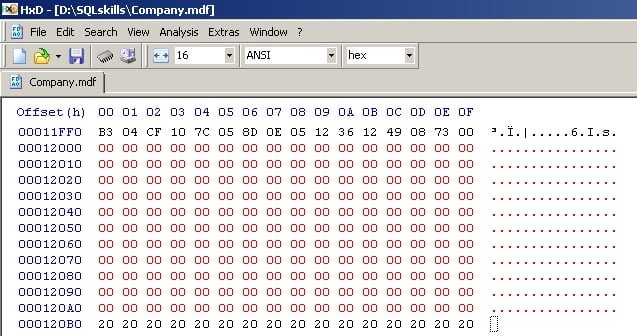
Highlight all the lines down to the database name, and then right-click and select Fill selection…
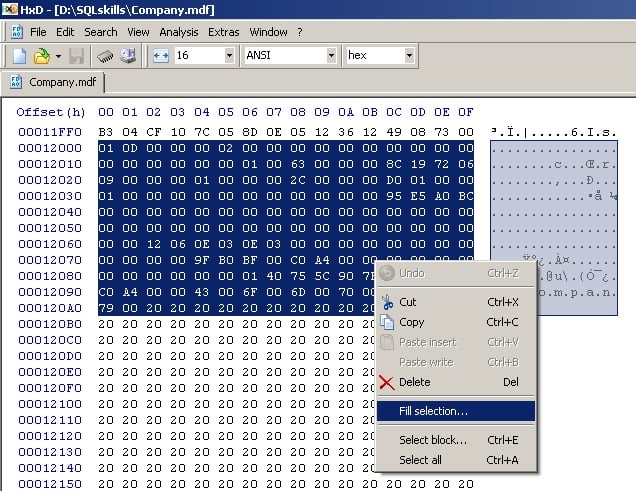
image5

And then select the default to fill that area with zeroes:
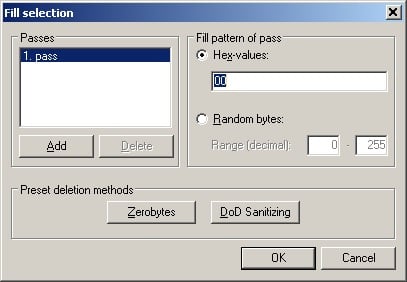
image6

Which will make it look like this:

image7

Then hit the disk icon to save the file. Ignore any security errors you get about the ownership of the backup file.

Throughout the rest of these steps, if you get “Access is denied” from SQL Server, you need to change the security in the directory you’re using so the SQL Server service account has the correct file permissions.

You will also see different messages through some of these steps depending on which version of SQL Server you’re using – I’m using SQL Server 2014.

Exit from HxD.

Now we’re ready to try to salvage this database.

First I’ll try to attach it:

USE [master];
GO

-- Try attaching it again
EXEC sp_attach_db @dbname = N'Company', 
    @filename1 = N'D:\SQLskills\Company.mdf', 
    @filename2 = N'D:\SQLskills\Company_log.ldf';
GO
Msg 1813, Level 16, State 2, Line 5
Could not open new database 'Company'. CREATE DATABASE is aborted.
Msg 824, Level 24, State 2, Line 5
SQL Server detected a logical consistency-based I/O error: incorrect pageid (expected 1:9; actual 0:0). It occurred during a read of page (1:9) in database ID 6 at offset 0x00000000012000 in file 'D:\SQLskills\Company.mdf'.  Additional messages in the SQL Server error log or system event log may provide more detail. This is a severe error condition that threatens database integrity and must be corrected immediately. Complete a full database consistency check (DBCC CHECKDB). This error can be caused by many factors; for more information, see SQL Server Books Online.

The attach failed. You can verify this yourself by looking in sys.databases for the database – it’s not there.

I’ll try a hack-attach. I copied off the corrupt database files, and then create the dummy database and set it offline (to release SQL Server’s locks on the files):

CREATE DATABASE [Company] ON PRIMARY (
    NAME = N'Company',
    FILENAME = N'D:\SQLskills\Company.mdf')
LOG ON (
    NAME = N'Company_log',
    FILENAME = N'D:\SQLskills\Company_log.ldf');
GO

ALTER DATABASE [Company] SET OFFLINE;
GO

Then delete the dummy database files, and copy in the original corrupt database files. And then try to bring the database online again, completing the hack-attach:

ALTER DATABASE [Company] SET ONLINE;
GO
Msg 5181, Level 16, State 5, Line 33
Could not restart database "Company". Reverting to the previous status.
Msg 5069, Level 16, State 1, Line 33
ALTER DATABASE statement failed.
Msg 824, Level 24, State 2, Line 33
SQL Server detected a logical consistency-based I/O error: incorrect pageid (expected 1:9; actual 0:0). It occurred during a read of page (1:9) in database ID 6 at offset 0x00000000012000 in file 'D:\SQLskills\Company.mdf'.  Additional messages in the SQL Server error log or system event log may provide more detail. This is a severe error condition that threatens database integrity and must be corrected immediately. Complete a full database consistency check (DBCC CHECKDB). This error can be caused by many factors; for more information, see SQL Server Books Online.

Hmmm… but did it work?

SELECT DATABASEPROPERTYEX (N'Company', N'STATUS');
GO
SUSPECT

Yes! Now let’s try doing an emergency-mode repair:

ALTER DATABASE [Company] SET EMERGENCY;
GO
ALTER DATABASE [Company] SET SINGLE_USER;
GO
Msg 824, Level 24, State 2, Line 43
SQL Server detected a logical consistency-based I/O error: incorrect pageid (expected 1:9; actual 0:0). It occurred during a read of page (1:9) in database ID 6 at offset 0x00000000012000 in file 'D:\SQLskills\Company.mdf'.  Additional messages in the SQL Server error log or system event log may provide more detail. This is a severe error condition that threatens database integrity and must be corrected immediately. Complete a full database consistency check (DBCC CHECKDB). This error can be caused by many factors; for more information, see SQL Server Books Online.

Nope – it’s not going to work because the broken boot page won’t allow the database to be accessed at all.

Now we’ll fix it, again using a hex editor.

First off I’ll set the database offline again, copy off the broken files, and drop the database so it’s gone from SQL Server.

ALTER DATABASE [Company] SET OFFLINE;
GO

-- ***** Copy off the corrupt files

DROP DATABASE [Company];
GO

Now I’ll restore an older copy of the database and set it offline so I can open the files with HxD:

RESTORE DATABASE [Company] FROM
DISK = N'C:\SQLskills\OldCompany.bck'
WITH REPLACE;
GO

ALTER DATABASE [Company] SET OFFLINE;
GO

In HxD, I then open the restored copy of the database AND the corrupt database, and go to the boot page offset in both, just as I did in the setup phase above:
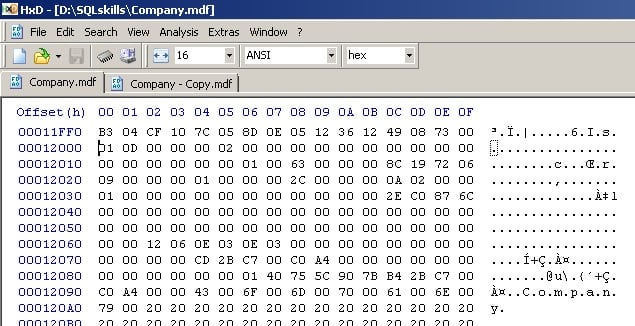
image8

And you can see that the boot page is intact in the restored copy.

Next, I’ll highlight from 12000 (hexadecimal) down to, but not including, 14000, and then right-click and hit Copy to copy the whole 8192 bytes. These offsets are the same in every database.
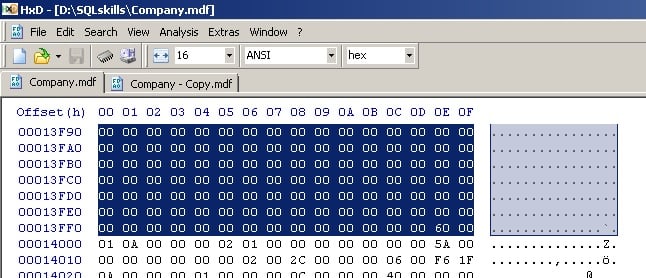
image9

Then go to the corrupt file, at offset 12000 (same in every database), right-click and select Paste Write to overwrite the broken boot page:
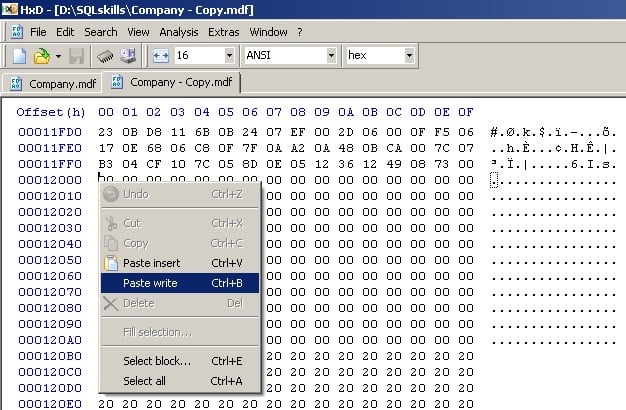
image10

And you’ll see everything between 12000 and 14000 (same in every database) go red:
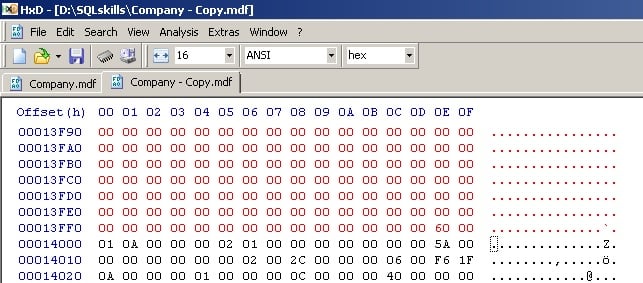
image11

Now save the file and exit HxD.

Delete the restored files, and rename the corrupt files to their correct names. You’ll notice that HxD created a backup copy of the file we just changed – you can ignore it.

ALTER DATABASE [Company] SET ONLINE;
GO
Msg 5181, Level 16, State 5, Line 79
Could not restart database "Company". Reverting to the previous status.
Msg 5069, Level 16, State 1, Line 79
ALTER DATABASE statement failed.
Msg 9003, Level 20, State 9, Line 79
The log scan number (45:16:0) passed to log scan in database 'Company' is not valid. This error may indicate data corruption or that the log file (.ldf) does not match the data file (.mdf). If this error occurred during replication, re-create the publication. Otherwise, restore from backup if the problem results in a failure during startup.
Msg 3414, Level 21, State 1, Line 79
An error occurred during recovery, preventing the database 'Company' (6:0) from restarting. Diagnose the recovery errors and fix them, or restore from a known good backup. If errors are not corrected or expected, contact Technical Support.

Good – the 824 message is gone, but now you can see we have another issue: all the LSNs in the boot page are incorrect now as we’re now using an older boot page that doesn’t match the more recent transaction log. Emergency mode and/or emergency-mode repair is necessary to either access the data or repair the corrupt database.

ALTER DATABASE [Company] SET EMERGENCY;
GO
ALTER DATABASE [Company] SET SINGLE_USER;
GO
DBCC CHECKDB (N'Company', REPAIR_ALLOW_DATA_LOSS) WITH NO_INFOMSGS;
GO
Warning: The log for database 'Company' has been rebuilt. Transactional consistency has been lost. The RESTORE chain was broken, and the server no longer has context on the previous log files, so you will need to know what they were. You should run DBCC CHECKDB to validate physical consistency. The database has been put in dbo-only mode. When you are ready to make the database available for use, you will need to reset database options and delete any extra log files.

In this case there were no other corruptions, so all emergency-mode repair had to do is rebuild the transaction log.

Now we can get in to the database and access the data.

Note: the data is likely to be transactionally inconsistent. If you continue to use the database in production following this procedure, you do so entirely at your own risk.

If you don’t have a backup of the original database, you can use any database as a source for a good boot page – just make sure it has the same name as the one you’re trying to fix. Bear in mind that the further away from a recent backup of the original database, the more trouble you’ll have trying to get crash recovery to work.

And there you have it – no longer do broken boot pages have to curtail data recovery efforts.

Enjoy!

The post Disaster recovery 101: fixing a broken boot page appeared first on Paul S. Randal.

05 Jul 22:39

Disaster recovery 101: fixing a broken boot page

One of the corruptions that can stymie all efforts at disaster recovery is broken boot page. If the boot page can’t be processed, the database can’t be brought online or even put into emergency mode. I first demonstrated how to work around this in my session on Advanced Data Recovery Techniques at PASS in 2014 and here I’d like to walk through the steps of what to do.

First of all, I’ll create a broken boot page in a test database:

-- Drop old database
USE [master];
GO

IF DATABASEPROPERTYEX (N'Company', N'Version') > 0
BEGIN
	ALTER DATABASE [Company] SET SINGLE_USER WITH ROLLBACK IMMEDIATE;
	DROP DATABASE [Company];
END

-- Create database and table
CREATE DATABASE [Company] ON PRIMARY (
    NAME = N'Company',
    FILENAME = N'D:\SQLskills\Company.mdf')
LOG ON (
    NAME = N'Company_log',
    FILENAME = N'D:\SQLskills\Company_log.ldf');
GO

USE [Company];
GO

CREATE TABLE [Sales] (
	[SalesID] INT IDENTITY,
	[CustomerID] INT DEFAULT CONVERT (INT, 100000 * RAND ()),
	[SalesDate] DATETIME DEFAULT GETDATE (),
	[SalesAmount] MONEY DEFAULT CONVERT (MONEY, 100 * RAND ()));

CREATE CLUSTERED INDEX [SalesCI] ON [Sales] ([SalesID]);
GO

-- Populate the table
SET NOCOUNT ON;
GO

INSERT INTO [Sales] DEFAULT VALUES;
GO 5000

-- Create some nonclustered indexes
CREATE NONCLUSTERED INDEX [SalesNCI_CustomerID] ON [Sales] ([CustomerID]);

CREATE NONCLUSTERED INDEX [SalesNCI_SalesDate_SalesAmount] ON [Sales] ([SalesDate]) INCLUDE ([SalesAmount]);
GO

-- Create a good backup
BACKUP DATABASE [Company] TO DISK = N'C:\SQLskills\OldCompany.bck'
WITH INIT;

-- And detach it
USE [master]
GO

EXEC sp_detach_db N'Company';
GO

Now I’ll corrupt it using a hex editor. The one I like to use is called HxD and it’s a freeware tool you can download from here.

image1

And then go to the offset of the boot page. It’s page 9 always, so the offset is 8192 x 9 = 73728.

image2

And make sure to select the ‘dec’ option to input the number in decimal, offset from beginning of the file:

image3

You’ll see the boot page contents, including the name of the database:

image4

Highlight all the lines down to the database name, and then right-click and select Fill selection…

image5

And then select the default to fill that area with zeroes:

image6

Which will make it look like this:

image7

Then hit the disk icon to save the file. Ignore any security errors you get about the ownership of the backup file.

Throughout the rest of these steps, if you get “Access is denied” from SQL Server, you need to change the security in the directory you’re using so the SQL Server service account has the correct file permissions.

You will also see different messages through some of these steps depending on which version of SQL Server you’re using – I’m using SQL Server 2014.

Exit from HxD.

Now we’re ready to try to salvage this database.

First I’ll try to attach it:

USE [master];
GO

-- Try attaching it again
EXEC sp_attach_db @dbname = N'Company', 
    @filename1 = N'D:\SQLskills\Company.mdf', 
    @filename2 = N'D:\SQLskills\Company_log.ldf';
GO
Msg 1813, Level 16, State 2, Line 5
Could not open new database 'Company'. CREATE DATABASE is aborted.
Msg 824, Level 24, State 2, Line 5
SQL Server detected a logical consistency-based I/O error: incorrect pageid (expected 1:9; actual 0:0). It occurred during a read of page (1:9) in database ID 6 at offset 0x00000000012000 in file 'D:\SQLskills\Company.mdf'.  Additional messages in the SQL Server error log or system event log may provide more detail. This is a severe error condition that threatens database integrity and must be corrected immediately. Complete a full database consistency check (DBCC CHECKDB). This error can be caused by many factors; for more information, see SQL Server Books Online.

The attach failed. You can verify this yourself by looking in sys.databases for the database – it’s not there.

I’ll try a hack-attach. I copied off the corrupt database files, and then create the dummy database and set it offline (to release SQL Server’s locks on the files):

CREATE DATABASE [Company] ON PRIMARY (
    NAME = N'Company',
    FILENAME = N'D:\SQLskills\Company.mdf')
LOG ON (
    NAME = N'Company_log',
    FILENAME = N'D:\SQLskills\Company_log.ldf');
GO

ALTER DATABASE [Company] SET OFFLINE;
GO

Then delete the dummy database files, and copy in the original corrupt database files. And then try to bring the database online again, completing the hack-attach:

ALTER DATABASE [Company] SET ONLINE;
GO
Msg 5181, Level 16, State 5, Line 33
Could not restart database "Company". Reverting to the previous status.
Msg 5069, Level 16, State 1, Line 33
ALTER DATABASE statement failed.
Msg 824, Level 24, State 2, Line 33
SQL Server detected a logical consistency-based I/O error: incorrect pageid (expected 1:9; actual 0:0). It occurred during a read of page (1:9) in database ID 6 at offset 0x00000000012000 in file 'D:\SQLskills\Company.mdf'.  Additional messages in the SQL Server error log or system event log may provide more detail. This is a severe error condition that threatens database integrity and must be corrected immediately. Complete a full database consistency check (DBCC CHECKDB). This error can be caused by many factors; for more information, see SQL Server Books Online.

Hmmm… but did it work?

SELECT DATABASEPROPERTYEX (N'Company', N'STATUS');
GO
SUSPECT

Yes! Now let’s try doing an emergency-mode repair:

ALTER DATABASE [Company] SET EMERGENCY;
GO
ALTER DATABASE [Company] SET SINGLE_USER;
GO
Msg 824, Level 24, State 2, Line 43
SQL Server detected a logical consistency-based I/O error: incorrect pageid (expected 1:9; actual 0:0). It occurred during a read of page (1:9) in database ID 6 at offset 0x00000000012000 in file 'D:\SQLskills\Company.mdf'.  Additional messages in the SQL Server error log or system event log may provide more detail. This is a severe error condition that threatens database integrity and must be corrected immediately. Complete a full database consistency check (DBCC CHECKDB). This error can be caused by many factors; for more information, see SQL Server Books Online.

Nope – it’s not going to work because the broken boot page won’t allow the database to be accessed at all.

Now we’ll fix it, again using a hex editor.

First off I’ll set the database offline again, copy off the broken files, and drop the database so it’s gone from SQL Server.

ALTER DATABASE [Company] SET OFFLINE;
GO

-- ***** Copy off the corrupt files

DROP DATABASE [Company];
GO

Now I’ll restore an older copy of the database and set it offline so I can open the files with HxD:

RESTORE DATABASE [Company] FROM
DISK = N'C:\SQLskills\OldCompany.bck'
WITH REPLACE;
GO

ALTER DATABASE [Company] SET OFFLINE;
GO

In HxD, I then open the restored copy of the database AND the corrupt database, and go to the boot page offset in both, just as I did in the setup phase above:

image8

And you can see that the boot page is intact in the restored copy.

Next, I’ll highlight from 12000 (hexadecimal) down to, but not including, 14000, and then right-click and hit Copy to copy the whole 8192 bytes. These offsets are the same in every database.

image9

Then go to the corrupt file, at offset 12000 (same in every database), right-click and select Paste Write to overwrite the broken boot page:

image10

And you’ll see everything between 12000 and 14000 (same in every database) go red:

image11

Now save the file and exit HxD.

Delete the restored files, and rename the corrupt files to their correct names. You’ll notice that HxD created a backup copy of the file we just changed – you can ignore it.

ALTER DATABASE [Company] SET ONLINE;
GO
Msg 5181, Level 16, State 5, Line 79
Could not restart database "Company". Reverting to the previous status.
Msg 5069, Level 16, State 1, Line 79
ALTER DATABASE statement failed.
Msg 9003, Level 20, State 9, Line 79
The log scan number (45:16:0) passed to log scan in database 'Company' is not valid. This error may indicate data corruption or that the log file (.ldf) does not match the data file (.mdf). If this error occurred during replication, re-create the publication. Otherwise, restore from backup if the problem results in a failure during startup.
Msg 3414, Level 21, State 1, Line 79
An error occurred during recovery, preventing the database 'Company' (6:0) from restarting. Diagnose the recovery errors and fix them, or restore from a known good backup. If errors are not corrected or expected, contact Technical Support.

Good – the 824 message is gone, but now you can see we have another issue: all the LSNs in the boot page are incorrect now as we’re now using an older boot page that doesn’t match the more recent transaction log. Emergency mode and/or emergency-mode repair is necessary to either access the data or repair the corrupt database.

ALTER DATABASE [Company] SET EMERGENCY;
GO
ALTER DATABASE [Company] SET SINGLE_USER;
GO
DBCC CHECKDB (N'Company', REPAIR_ALLOW_DATA_LOSS) WITH NO_INFOMSGS;
GO
Warning: The log for database 'Company' has been rebuilt. Transactional consistency has been lost. The RESTORE chain was broken, and the server no longer has context on the previous log files, so you will need to know what they were. You should run DBCC CHECKDB to validate physical consistency. The database has been put in dbo-only mode. When you are ready to make the database available for use, you will need to reset database options and delete any extra log files.

In this case there were no other corruptions, so all emergency-mode repair had to do is rebuild the transaction log.

Now we can get in to the database and access the data.

Note: the data is likely to be transactionally inconsistent. If you continue to use the database in production following this procedure, you do so entirely at your own risk.

If you don’t have a backup of the original database, you can use any database as a source for a good boot page – just make sure it has the same name as the one you’re trying to fix. Bear in mind that the further away from a recent backup of the original database, the more trouble you’ll have trying to get crash recovery to work.

And there you have it – no longer do broken boot pages have to curtail data recovery efforts.

Enjoy!

The post Disaster recovery 101: fixing a broken boot page appeared first on Paul S. Randal.

05 Jul 22:38

New official blog for SQL Server Integration Services (SSIS)

by SQLMaster

Here is an exciting news from SSIS product team about a dedicated blog site on the subject matter.

Checkout new SSIS product team blog site and  any new announcements and updates will be published on this site. For any previous posts on this subject, they have been archived under old SSIS site.

So here you go to add another bookmark on SSIS related information.


05 Jul 22:38

Different Types of Facts and Fact Tables in Data warehouse Design

by SqlBI

In the previous post

Different Types of Dimensions used in Data warehouse Design.

we have discussed most commonly used types of Dimensions in Data warehouse Design.

And as promised in this post I will be discussing most commonly used types of Facts and Types of Fact tables.

But before going into Fact and Fact Tables lets see what  “Rapidly Changing Dimensions” is and how we handle that from the last blog post.

Rapidly changing Dimensions are dimensions where attributes are changing more often than normal.

i.e Customer Age,Rating.

To handle these types of attributes,We can create mini Dimensions which have only attribute that is changing rapidly.

Shown bellow we have split age attribute as new dimension ,This newly created Dimension called Rapidly Changing dimension.

Original Dimensions


Rapidly changing DimensionsUpdate Original Dimension


Now lets talk through Facts and Fact Tables

What are the Facts in Data warehouse?

Facts are the values or measurements which represent a business process at the same grain level.

i.e. Sales price of a particular product is the fact about product.

In simple terms,Facts are the Numbers or values which can be sliced and diced with various dimensions.

Types of Facts

There are three types of facts:

  1. Additive Facts
  2. Non-additive Facts
  3. Semi-Additive Facts

We will look in to these Fact types with examples.

1. Additive Facts

Additive Facts are the Facts that can be summed up through all dimensions associated in data warehouse.

I.e. Sales Price of a Product.

AdditiveFacts

2.Non Additive Facts

Non Additive Facts can not be summed for any dimensions related to Fact table in Data warehouse.

Some facts are completely non additive such as ratios,% of Profit, Profit margin etc.

Usually,These  types of facts or measures derived in OLAP (CUBE) layer of solution as Calculations.

Non Additive Facts


In Above diagram Net Profit Margin is Non Additive Fact which can not be summed by  Customer or Date.

i.e. if on the 1st net profit margin is 10% for Customer A and on 2nd it is 25% for same customer ,We can not Summarize it as 35% for Customer A for both days.

3.Semi-Additive Facts

These are the facts which can be summed up against all the dimensions in Data warehouse except Time dimensions.

It is very import type of facts.

Classic example of it is Account balance in Fact table.


Semi-Additive


In Above example Balance amount can not be aggregated over the time.

i.e. for A customer Balance on 1st of June is £100,in 2nd June is £150. so Balance for A customer on 2nd June can not be done as £100+£150=£250.

Now we will go into different types of Fact Tables used in data warehouse design.

What are the Fact Tables?

Fact Tables are the most import part of Data warehouse.They mainly contains Facts about the business process.

I.e. Sales price of the product which is the part of Sales (business process).

Types of Fact Tables

Most of the fact tables fall in one of the following types of fact tables.In a Data warehouse project,We may need to use  either one ,two or all of them.Selections of the Fact tables in Data warehouse depends on the Business needs.

Each fact tables addresses specific requirements presented by Business.

  1. Transaction Fact Tables
  2. Accumulating Snapshot Fact Tables
  3. Periodic Snapshot Fact Tables

Lets walk through each of them one by one.

1.Transaction Fact Tables

  • These are most commonly used fact tables.
  • Each row in this table represent a specific event in business process.
  • They  contain more foreign keys than other types as they maintain relationship to all possible dimensions.
  • They  get heavily sliced and diced to get answers by business users.
  • Facts in these type of tables are mostly Additive in nature.

I.e. Sales Fact table shown below,which contains single row for every sales orders.it also have foreign key relationship with most of the dimensions i.e. Customer,Date,Order No,Sales amount etc.

2015_06_23_20_04_45_Tx.png_Windows_Photo_Viewer

2. Accumulating Snapshot Fact Tables

This type of Fact table will represent entire life cycle  of a business process  from the beginning to end of the process (i.e. sales Order Processing,Claim Processing).

Each record in this type of table represent one entity of the respective business process and then this record will be getting updated every time as per the current status of the entity.

Lets take an example of the Sales order, a typical Sales order going through following phases.

  • Order generated
  • Picking order
  • Packing order
  • Shipping order

In fact table we will have one record for one order and this record getting update based on the status of the order when Data warehouse processing taking places

Following diagram will give overview how Fact table holds information for a typical Sales Order and you can see when order is shipped all respective columns getting updated accordingly.

Order Placed


Order Picked

Order packed


Order shipped

3.Periodic Snapshot Fact Tables

This table represent Snapshot of a business process for specific period of time.In this Fact table grain may not be at the business process level.It summarize the activity for a span of time, it can be month,year or week.

In the following figure we can see Sales and Discount for customers at Monthly period.

This table will update every time data warehouse getting processed.

Periodic SnapShot

This table will give information at the Monthly period.

These are the mainly used Fact tables in Data warehouse design.

Hope this will be useful and informative post.

In next post,I will discuss How we can use Project Parameters in  BIML (Business Intelligence Markup Language)?

As always please do share your thoughts and comments !!!!

Happy Learning

SqlBI

05 Jul 22:38

SQL Server 2016 : sys.dm_exec_function_stats

by Aaron Bertrand

In SQL Server 2016 CTP 2.1, there is one new object that appeared after CTP 2.0: sys.dm_exec_function_stats. This is intended to provide similar functionality to sys.dm_exec_procedure_stats, sys.dm_exec_query_stats, and sys.dm_exec_trigger_stats. SQL Server 2016 : sys.dm_exec_function_stats So it is now possible to track aggregate runtime metrics for user-defined functions.

Or is it?

In CTP 2.1 at least, I could only derive any meaningful metrics here for regular scalar functions – nothing was registered for inline or multi-statement TVFs. I am not surprised about the inline functions, since they are essentially expanded before execution anyway. But since multi-statement TVFs are often performance problems, I was hoping they would show up too. They do still appear in sys.dm_exec_query_stats, so you can still derive their performance metrics from there, but it can get tricky to perform aggregations when you really do have multiple statements that perform some share of the work – nothing is rolled up for you.

Let's take a quick look at how this plays out. Let's say we have a simple table with 100,000 rows:

SELECT TOP (100000) o1.[object_id], o1.create_date
  INTO dbo.src
  FROM sys.all_objects AS o1
  CROSS JOIN sys.all_objects AS o2
  ORDER BY o1.[object_id];
GO
CREATE CLUSTERED INDEX x ON dbo.src([object_id]);
GO
-- prime the cache
SELECT [object_id], create_date FROM dbo.src;

I wanted to compare what happens when we investigate scalar UDFs, multi-statement table-valued functions, and inline table-valued functions, and how we see what work was done in each case. First, imagine something trivial that we can do in the SELECT clause, but that we may want to compartmentalize away, like formatting a date as a string:

CREATE PROCEDURE dbo.p_dt_Standard
  @dt_ CHAR(10) = NULL
AS
BEGIN
  SET NOCOUNT ON;
  SELECT @dt_ = CONVERT(CHAR(10), create_date, 120)
    FROM dbo.src
    ORDER BY [object_id];
END
GO

(I assign the output to a variable, which forces the entire table to be scanned, but prevents the performance metrics from being influenced by the efforts of SSMS to consume and render the output. Thanks for the reminder, Mikael Eriksson.)

A lot of times you'll see people putting that conversion into a function, and it can be scalar or TVF, like these:

CREATE FUNCTION dbo.dt_Inline(@dt_ DATETIME)
RETURNS TABLE
AS
  RETURN (SELECT dt_ = CONVERT(CHAR(10), @dt_, 120));
GO
 
CREATE FUNCTION dbo.dt_Multi(@dt_ DATETIME)
RETURNS @t TABLE(dt_ CHAR(10))
AS
BEGIN
  INSERT @t(dt_) SELECT CONVERT(CHAR(10), @dt_, 120);
  RETURN;
END
GO
 
CREATE FUNCTION dbo.dt_Scalar(@dt_ DATETIME)
RETURNS CHAR(10)
AS
BEGIN
  RETURN (SELECT CONVERT(CHAR(10), @dt_, 120));
END
GO

I created procedure wrappers around these functions as follows:

CREATE PROCEDURE dbo.p_dt_Inline
  @dt_ CHAR(10) = NULL
AS
BEGIN
  SET NOCOUNT ON;
  SELECT @dt_ = dt.dt_
    FROM dbo.src AS o
    CROSS APPLY dbo.dt_Inline(o.create_date) AS dt
    ORDER BY o.[object_id];
END
GO
 
CREATE PROCEDURE dbo.p_dt_Multi
  @dt_ CHAR(10) = NULL
AS
BEGIN
  SET NOCOUNT ON;
  SELECT @dt_ = dt.dt_
    FROM dbo.src
    CROSS APPLY dbo.dt_Multi(create_date) AS dt
    ORDER BY [object_id];
END
GO
 
CREATE PROCEDURE dbo.p_dt_Scalar
  @dt_ CHAR(10) = NULL
AS
BEGIN
  SET NOCOUNT ON;
  SELECT @dt_ = dt = dbo.dt_Scalar(create_date)
    FROM dbo.src
    ORDER BY [object_id];
END
GO

(And no, the dt_ convention you're seeing is not some new thing I think is a good idea, it was just the simplest way I could isolate all of these queries in the DMVs from everything else being collected. It also made it easy to append suffixes to easily distinguish between the query inside the stored procedure and the ad hoc version.)

Next, I created a #temp table to store timings, and repeated this process (both executing the stored procedure twice, and executing the body of the procedure as an isolated ad hoc query twice, and tracking the timing of each one):

CREATE TABLE #t
(
  ID INT IDENTITY(1,1), 
  q VARCHAR(32), 
  s DATETIME2, 
  e DATETIME2
);
GO
 
INSERT #t(q,s) VALUES('p Standard',SYSDATETIME());
GO
 
EXEC dbo.p_dt_Standard;
GO 2
 
UPDATE #t SET e = SYSDATETIME() WHERE ID = 1;
GO
 
INSERT #t(q,s) VALUES('ad hoc Standard',SYSDATETIME());
GO
 
DECLARE @dt_st CHAR(10);
  SELECT @dt_st = CONVERT(CHAR(10), create_date, 120)
    FROM dbo.src
    ORDER BY [object_id];
GO 2
 
UPDATE #t SET e = SYSDATETIME() WHERE ID = 2;
GO
-- repeat for inline, multi and scalar versions

Then I ran some diagnostic queries, and here were the results:

sys.dm_exec_function_stats

SELECT name = OBJECT_NAME(object_id), 
  execution_count,
  time_milliseconds = total_elapsed_time/1000
FROM sys.dm_exec_function_stats
WHERE database_id = DB_ID()
ORDER BY name;

Results:

name        execution_count    time_milliseconds
---------   ---------------    -----------------
dt_Scalar   400000             1116

That is not a typo; only the scalar UDF shows any presence in the new DMV.

sys.dm_exec_procedure_stats

SELECT name = OBJECT_NAME(object_id), 
  execution_count,
  time_milliseconds = total_elapsed_time/1000
FROM sys.dm_exec_procedure_stats
WHERE database_id = DB_ID()
ORDER BY name;

Results:

name            execution_count    time_milliseconds
-------------   ---------------    -----------------
p_dt_Inline     2                  74
p_dt_Multi      2                  269
p_dt_Scalar     2                  1063
p_dt_Standard   2                  75

This is not a surprising result: using a scalar function leads to an order-of-magnitude performance penalty, while the multi-statement TVF was only about 4x worse. Over multiple tests, the inline function was always as fast or a millisecond or two faster than no function at all.

sys.dm_exec_query_stats

SELECT 
  query = SUBSTRING([text],s,e), 
  execution_count, 
  time_milliseconds
FROM
(
  SELECT t.[text],
    s = s.statement_start_offset/2 + 1,
    e = COALESCE(NULLIF(s.statement_end_offset,-1),8000)/2,
    s.execution_count,
    time_milliseconds = s.total_elapsed_time/1000
  FROM sys.dm_exec_query_stats AS s
  OUTER APPLY sys.dm_exec_sql_text(s.[sql_handle]) AS t
  WHERE t.[text] LIKE N'%dt[_]%' 
) AS x;

Truncated results, re-ordered manually:

query (truncated)                                                       execution_count    time_milliseconds
--------------------------------------------------------------------    ---------------    -----------------
-- p Standard:
SELECT @dt_ = CONVERT(CHAR(10), create_date, 120) ...                   2                  75
-- ad hoc Standard:
SELECT @dt_st = CONVERT(CHAR(10), create_date, 120) ...                 2                  72
 
-- p Inline:
SELECT @dt_ = dt.dt_ FROM dbo.src AS o CROSS APPLY dbo.dt_Inline...     2                  74
-- ad hoc Inline:
SELECT @dt_in = dt.dt_ FROM dbo.src AS o CROSS APPLY dbo.dt_Inline...   2                  72
 
-- all Multi:
INSERT @t(dt_) SELECT CONVERT(CHAR(10), @dt_, 120);                     184                5
-- p Multi:
SELECT @dt_ = dt.dt_ FROM dbo.src CROSS APPLY dbo.dt_Multi...           2                  270
-- ad hoc Multi:
SELECT @dt_m = dt.dt_ FROM dbo.src AS o CROSS APPLY dbo.dt_Multi...     2                  257
 
-- all scalar:
RETURN (SELECT CONVERT(CHAR(10), @dt_, 120));                           400000             581
-- p Scalar:
SELECT @dt_ = dbo.dt_Scalar(create_date)...                             2                  986
-- ad hoc Scalar:
SELECT @dt_sc = dbo.dt_Scalar(create_date)...                           2                  902

An important thing to note here is that the time in milliseconds for the INSERT in the multi-statement TVF and the RETURN statement in the scalar function are also accounted for within the individual SELECTs, so it does not make sense to just add up all of the timings.

Manual timings

And then finally, the timings from the #temp table:

SELECT query = q, 
    time_milliseconds = DATEDIFF(millisecond, s, e) 
  FROM #t 
  ORDER BY ID;

Results:

query             time_milliseconds
---------------   -----------------
p Standard        107
ad hoc Standard   78
p Inline          80
ad hoc Inline     78
p Multi           351
ad hoc Multi      263
p Scalar          992
ad hoc Scalar     907

Additional interesting results here: the procedure wrapper always had some overhead, though how significant that is might be truly subjective.

Summary

My point here today was merely to show the new DMV in action, and set expectations correctly – some performance metrics for functions will still be misleading, and some will still not be available at all (or at least be very tedious to piece together for yourself).

I do think this new DMV covers one of the biggest pieces of query monitoring that SQL Server was missing before, though: that scalar functions are sometimes invisible performance killers, because the only reliable way to identify their usage was to parse the query text, which is far from foolproof. Never mind the fact that that won't allow you to isolate their impact on performance, or that you'd have to have known to be looking for scalar UDFs in the query text in the first place.

Appendix

I've attached the script: DMExecFunctionStats.zip

Also, as of CTP1, here is the set of columns:

database_id object_id type type_desc
sql_handle plan_handle cached_time last_execution_time execution_count
total_worker_time last_worker_time min_worker_time max_worker_time
total_physical_reads last_physical_reads min_physical_reads max_physical_reads
total_logical_writes last_logical_writes min_logical_writes max_logical_writes
total_logical_reads last_logical_reads min_logical_reads max_logical_reads
total_elapsed_time last_elapsed_time min_elapsed_time max_elapsed_time

Columns currently in sys.dm_exec_function_stats

The post SQL Server 2016 : sys.dm_exec_function_stats appeared first on SQLPerformance.com.

05 Jul 22:38

Ten Years with the PASS Summit

by AllenMWhite
I can't begin to tell you how honored I am to have been selected to present at the PASS Summit 2015 in Seattle this year. It's especially noteworthy for me in that this will be the tenth consecutive year I will have presented at the Summit. The Program Committee works hard to put together a slate of sessions that will help all data professionals working with the SQL Server platforms learn more so they can provide greater value to their employers and customers. (I know personally now, as I was a member...(read more)
05 Jul 22:37

Upcoming end of support for SQL Server 2005

by psssql

<This is reposted from http://blogs.msdn.com/b/sql_server_team/archive/2015/05/27/upcoming-end-of-support-for-sql-server-2005.aspx>


Please note that SQL Server 2005 will be out of extended support on Apr 12, 2016. If you are still running SQL Server 2005 after April 12, 2016, you will no longer receive security updates. Please see http://www.microsoft.com/en-us/server-cloud/products/sql-server-2005/default.aspx for upgrade options.


More information about SQL Server 2005 support policy is available at https://support.microsoft.com/en-us/lifecycle/search/default.aspx?alpha=sql%20server%202005&Filter=FilterNO.


Product

Version

SP

Mainstream Support End
  Date

Extended Support End
  Date

Options / Notes

SQL Server

2005

SP4

04/12/2011

04/12/2016

Technical support continues
  till 04/12/2016, yet mainstream (hotfix) support ends as of 04/12/2011;
  options for hotfix support after 04/12/2011:

ð  Continue with self-help

ð  Upgrade to the latest
  supported service pack for SQL Server 2005 or SQL Server 2008 or SQL Server
  2008 R2

ð  Extended hotfix support
  agreement

05 Jul 22:37

Interesting Read: Why Agile, Lean and Six Sigma must die …

by SQLMaster

In the recent times this is one of the best reading, knowing facts & world outside of technology world!

Every large system (whether a line of business or specific IT project) contains multiple components. Those components have a relationship with each other (known as position) but they’re also evolving. ..read more from from Simon Wardley’s Why Agile, Lean and Six Sigma must die …post.

Don’t stop there, a follow on topic is more interesting too:  Position, Flow and Movement.


05 Jul 22:37

ICYMI - Troubleshooting SQL Performance Issues, Missing Indexes, and DROP and TRUNCATE TABLE

by KKline
Troubleshooting SQL Server CPU Performance Issues This outstanding article from Joe Sack ( b | t ) of SQLskills.com steps you through a methodical and insightful series of DMVs and queries that can pinpoint CPU issues on your SQL Server instances. Don’t just blindly create those "missing" indexes! Our own Aaron Bertrand ( b | t ) discusses ways to get better and more balanced information used in decisions about creating new indexes than offered as suggestions by native SQL Server tools. The Myth...(read more)
05 Jul 22:37

DBTA - Russian Hackers Steal 1.2b Internet Credentials: Or, Why the Heck Does this Keep Happening?!

by KKline
I'm decidedly old-school in a few of my habits. My morning routine, barring anything out of the ordinary, is one such example. Typically, I'll get up between 6:30 to 7:00 am, grab my first cup of coffee, and then chat with my daughters for a few minutes before seeing them off to school. Next, I make a bowl of oatmeal (a great choice for diabetics like me), pour a second cup of coffee, and browse the local paper, The Tennessean, while I have breakfast. On the morning of August 5, I had the added pleasure...(read more)
05 Jul 22:34

CodeSOD: A Convoluted Time Machine

by Jane Bailey

Backward Clock - geograph.org.uk - 548623

The web team and the JDE development team rarely see eye-to-eye in Cho's company. Cho, the JDE developer, worked in a world full of Oracle databases and important financial records. Andrew, a web developer, worked in a world full of MS-SQL and sales appointments. So when Andrew asked Cho to put together a job that would remove debt records older than six years so they'd stop showing up in his sales reports, he figured she had things well in hand.

"Six years?" mused Cho. "I'll have to build a custom function to figure out the start and end dates... I'll get back to you."

Two weeks after launch, several production incidents had been traced back to this new functionality. Of course, Cho had gone on vacation, so it was up to Andrew to dive into the seedy world of Oracle databases and debug the function...


 /* Cast today's date to a character value */
 v_end_date_char := TO_CHAR ( TRUNC ( SYSDATE ) , 'MM/DD/YYYY' );

 /* WI requires removal of debt 6 years back, so obtain the year for
 the purpose of building a 6 year old date */
 v_year := TO_CHAR ( TO_NUMBER ( SUBSTR ( v_end_date_char, 7, 4 ) ) - 6 );

 /* Check for leap year */
 IF ( ( TO_NUMBER ( SUBSTR ( v_end_date_char, 1, 2 ) ) = 2 ) AND
 ( TO_NUMBER ( SUBSTR ( v_end_date_char, 4, 2 ) ) = 29 ) ) THEN
 /* Adjust for a leap year and build date six years ago */
 v_end_date_char := '02/28/' || v_year;

 ELSE
 /* Build the two digit day of the year */
 v_day := TO_CHAR ( TO_NUMBER ( SUBSTR ( v_end_date_char, 4, 2 ) ) );

 /* Build the two digit month of the year */
 v_month := TO_CHAR ( TO_NUMBER ( SUBSTR ( v_end_date_char, 1, 2 ) ) );

 /* Build the character representation of the date six years ago */
 v_end_date_char := v_month || '/' || v_day || '/' || v_year;

 END IF;

 /* Build date for query to compare with duedt field */
 v_end_date := TO_DATE ( v_end_date_char, 'MM/DD/YYYY' );


Andrew stared at the function for a solid thirty minutes before reaching for the delete key. A quick Google search revealed a much cleaner way of getting the date:


 add_months(sysdate, -72)
 
 
[Advertisement] Scout is the best way to monitor your critical server infrastructure. With over 90 open source plugins, robust alerting, beautiful dashboards and a 5 minute install - Scout saves youvaluable engineering time. Try the server monitoring you'll 👍 today.Your first 30 days are free on us. Learn more at Scout.
05 Jul 22:24

News Roundup: I'm Not Married to the Idea

by Remy Porter

A bit more than 15 years ago, the software industry was barreling straight into a crisis: the dreaded Y2K bug. Vital software was going to fail in odd ways, banks weren’t going to handle transactions, planes weren’t going to fly, nuclear reactors weren’t going to react, cats and dogs living together, mass hysteria, real wrath of God type stuff.

The software industry rallied, software got patched, and at the stroke of midnight, not much actually happened. Over the past week, a different bug has been keeping a small pool of software developers up at night. Welcome to the world of Y2Gay.

In a landmark decision, the United States Supreme Court revised the business requirements and integrity constraints on the marriage relationship, removing some legacy constraints and essentially updating to better reflect the actual needs of their end users. This policy decision now has to be implemented in every state, county, town and hamlet across the country. Every change breaks somebody’s workflow, and this one is no exception.

Shortly after the decision was made, stories like this started cropping up. Making software changes, especially in an IT shop as small and disorganized as a local county office (which in many cases have only one staff member doing IT) is a uniquely challenging task. In what might be the first authentic miracle in Texas, Williamson County managed to get a software update out before a week went by.

Other states are having their own rush to fix their software. St. Tammany Parish in Louisiana called their IT tech back from vacation. In the meantime, someone noticed that they still have pens in Louisiana, so they’re just printing the old forms and correcting the language by hand. Poor Denton County, Texas does not have pens, and didn’t issue updated licenses until Monday.

Kentucky is another state that still has pens:

But the Kentucky County Clerk’s Association is telling clerks that shouldn’t be a problem. Simply print out the old form and scratch out the words “bride” and “groom” and replace them with “first party” and “second party.”
… new clerks may not know they can do that

And in Oklahoma, not only are there software glitches, but one county “…is using analog forms designed for typewriters to issue licenses, although no one had yet applied.”

The recent changes in the US aren’t the first time software design and this particular social issue have intersected. Back in 2013, when the Federal government attempted to modernize their view of marriage, the DOD glitched out as well. Around the same time, Nintendo was patching an opposite “glitch”- removing gay marriage from a game, which looks stupid and ignorant to us modern people in the far off year of 2015.

In the end, this might not be changing requirements, as much as it might be poor assumptions. We’ve all seen articles like Falsehoods Programmers Believe About Time and Falsehoods Programmers Believe About Names. The choices we make in writing software can reveal our own assumptions and biases, and it behooves us in the industry to keep that in mind when interpreting business requirements. @qntm explores that idea from a database design perspective, both before the Supreme Court’s decision, and after.

Finally, from all of us here at TDWTF, this change isn’t merely fabulous- it’s brillant.

[Advertisement] Use NuGet or npm? Check out ProGet, the easy-to-use package repository that lets you host and manage your own personal or enterprise-wide NuGet feeds and npm repositories. It's got an impressively-featured free edition, too!
05 Jul 22:10

Demystifying Azure Cloud Service: Cloud Services and Virtual Machines – Part 3

by Adarsha Datta

I have noticed that there is a general sense of mystery around Azure Cloud Service. Some equate it to Cloud Services in general while others get confused with the relation of Azure Cloud Service and Virtual Machines while some one else gets confused about using Azure Web Apps (formerly Websites) with webjobs over Azure Cloud Service. If you have been in a similar dilemma as I have been in the past, I will try and clarify the confusion and get you started on Azure Cloud Service through this tutorial series.

image

Demystifying Azure Cloud Services – Part 1

Demystifying Azure Cloud Services: Cloud Service or WebApp? – Part 2

So we have covered basics of Cloud Services and how are Cloud Services different from WebApps. In this post, we will dig into how does cloud service relate to virtual machines. As explained in Part 1, Azure as a cloud platform had started with Cloud Services and then when the requirement came to gaining more control on the instances hosting the website, this gave rise to infrastructure as a service in the form of virtual machines. Hence, as we understand it today virtual machines are essentially a collection of virtual hardware resources such as cpu, ram and storage disks which are logically grouped together and presents itself to us a virtual machine.

From a cloud service perspective: Cloud Services (web and worker roles) are hosted on instances and these instances can be thought of as virtual machines with limited access and control.

From a Virtual Machine perspective: Virtual machines are built on the cloud service architecture. VMs reside in a role which resides in a cloud service. This was done to take advantage of the load balancing and other capabilities of cloud services.

In the current portal, when ever you create a Virtual Machine, you always specify a cloud service  (either existing or create a new one) in which the VM will reside. The new preview portal has clarified the confusion by not referring it as Cloud Service but as domain name while creating the VM as shown in the diagram below.

image 

If you are wondering why I have made the last statement bold is because a whole lot of us have been wanting this change and it is finally here. This clears a lot of confusion about the relationship between VMs and cloud services.

Although VM still uses cloud services, but is aptly renamed as domain name since that is exactly what the cloud service does, ie assigns a domain name or a public DNS to the VMs. VMs within the cloud service interacts through ports. The ports, also called as endpoints, can be created as private or public. If public, and set to Auto, the cloud service assigns a port number to the VM automatically. The VM interacts with the outside world through this public port. VMs interact with each other within the same cloud service through these ports. Lets explain this through a scenario.

Consider the following environment:

  • 3 Virtual Machines: vmtest1, vmtest2, vmtest3
  • All VMs in the same domain (formerly cloud service): vmtest.cloudapp.net
  • Assigned public port numbers (either created manually or automatically): vmtest1:3333, vmtest2:3334, vmtest3:3335

Now if someone from the public domain wants to communicate with vmtest2, they will want to refer to: vmtest.cloudapp.net:3334. Once vmtest.cloudapp.net receives a request for traffic to port 3334, it will redirect the traffic to vmtest2.

To clarify this further, while creating VMs, you assign (or create a new) a domain name. You can have multiple VMs within the same domain. Think of the domain as a container of VMs. This domain was initially called as Cloud Service. When a domain is not assigned in a virtual network, it is referred to as a Stand Alone Cloud Service ( or Domain). VMs within the same stand alone domain interact with each other through public ports and the traffic goes through the public internet. If you don't want the traffic to go through the public internet, define a virtual network and assign the domain to this virtual network in which case, the communication between the virtual machines will not go through the public internet. More on cloud services and virtual network in following posts of this tutorial series.

A snapshot of a cloud service (in the preview portal) with multiple instances is shown below:

image

As you can see, the name of the cloud service is MarsLunchLearn. This has 5 VMs which uses the same domain name marslunchlearn.cloudapp.net. In the Roles and Instances section you can see that the role is name of the VM itself, however if we had a web or a worker role, the role would be names as web or worker respectively.

Summary

  • Cloud Services act as containers for roles (web or worker) and instances (virtual machines).
  • From a VM perspective, cloud services are referred to as domains now (in preview portal.azure.com) which still performs as a load balancer and traffic manager for the VMs in it
  • A single VM cannot be a part of 2 different domains (or cloud services), however multiple VMs can be a part of a single domain (or cloud service).
  • Once you delete all the VMs in a domain (or cloud service), the domain still exists and needs to be deleted exclusively in case you want to reuse the name

Hope the confusion between cloud services and virtual machines are clarified. If you still have further questions or doubts please reach out to @AdarshaDatta. In the next post I will cover Virtual networks and Cloud Services and how are they related. Stay tuned!


05 Jul 21:35

Virtual SAN – Disk Hotplug

by Peter Keilty
EMC logo
Yesterday the VMware Compatibility Guide for Virtual SAN was significantly updated to reflect recent certification completed by the team. I should point out that one of the great things about Virtual SAN is that it is a true Software Defined Storage solution in that VMware doesn’t force specific hardware upon customers. This being said, we know […]
05 Jul 21:35

Oracle Database Resilience on Vblock System

by Sam Lucido
EMC logo

Bitly URL: http://bit.ly/1BVlzrq

Tweet this document:

#Oracle Database Resilience on Vblock system

Follow us on Twitter:

Visit the EMC store:

Click here to learn more about EMC’s Solutions for Oracle

VCE holds the #1 market position for Integrated Infrastructure Systems, with 46 percent, according to Gartner. The Vblock 540 system(one member of the VCE group) delivers an agile and resilient system to ensure that enterprise class services are delivered without compromising service levels.The enterprise-class Vblock system 540 is durable and fully redundant,ensuring the highest levels of availability for critical applications and resources.The system incorporates EMC XtremIO storage, with vastly improved data efficiency. It  is an agile, intelligent, and resilient system. It uses dynamic and intelligent capabilities to guarantee required application performance levels.  Coming to the components of Vblock 540 systems, following are present :-

yy6.png


As we can see above that XtremIO forms the storage part of Vblock 540 while XtremIO Data Protection (XDP) is a technology whose primary function is to protect data from SSD failures while allowing failed devices to remain in place using XDP’s “hot space” feature until a convenient window is arranged. This helps in the protection of Oracle data to a greater extent. Should a subsequent failure occur, XDP’s hot space feature will simply utilize remaining
free capacity in the array to perform the required recovery operation. This can be done for as many as five failed SSDs per X-Brick, or until no free space remains in the array.


In Vblock 540 we use VPLEX deployment options for business continuity, resilience, scale out cluster architecture  and data mobility. It helps in protecting the oracle database from operating system, network, and hardware related problems via VMware vCentre Server Heartbeat. It is a clustering solution with primary and secondary nodes operating in active-passive mode. It keeps the vCentre Server instances synchronized. The Vblock and VPLEX solution is demonstrated in Figure 1.


yy7.png

Figure 1. VPLEX Implementation in VBlock


Below are some Failure Scenarios which are being taken care by the VPLEX solution.


Non Cross-Cluster Connect Scenario

VPLEX Behavior

Impact/Observed VMware HA Behavior

Single VPLEX BE path failure


VPLEX continues to operate using an alternate path to the same BE array.  Distributed virtual volumes exposed to the ESXi hosts have no impact.

None


Single FE path failure


The ESXi server is expected to use alternate paths to the distributed virtual volumes.

None

BE array failure at site A


VPLEX continues to operate using the array at site B. When the array is recovered from the failure, the storage volume at site A is resynchronized from site B automatically.

None
BE array failure at site B
VPLEX continues to operate using the array at site A. When the array is recovered from the failure, the storage volume at site B is resynchronized from site A automatically. None


In summary, there are many solutions by which the resilience is enforced in the Vblock solutions. In this blog, we talked about VPLEX, vsphere and other storage solutions which is basically XtremIO. There  are other components within Vblock 540 which enforces resilience. The most fascinating and important point is that the sanctity of oracle database in Vblock 540 is maintained by all the hardware,software and virtualized components of Vblock as mentioned above.

20 Jun 06:50

QNAP – Manually Mounting a Belligerent eSATA Drive Filesystem

by dan

It seems I’m complaining about my oldest QNAP every other week. Arguably, given the sweat equity invested in these devices, I’d be better off just replacing it. But I persist nonetheless. Recently I had to evacuate the array again and replace a drive. No, I know I shouldn’t have to do that but … look, fine. Anyway, I had used a combination of eSATA docked HDDs, a Windows 7 HTPC and some USB drives (basically whatever had capacity) to copy the data off. When I had the NAS sorted, I started to copy data back. This all went fine until I got to the last SATA drive. I kept getting a message that the filesystem wasn’t recognised. Even though the NAS had created said NTFS filesystem for me. It was a bit weird.

qnap1

The solution, after a bit of searching, was to manually mount the filesystem and copy off the files. Here’s how to do it.

Firstly, you can identify the device via dmesg.

[150521.371058] scsi 2:0:0:0: Direct-Access     Seagate  ST2000DL003-9VT1 CC32 PQ: 0 ANSI: 5
[150521.377213] Check proc_name[ahci].
[150521.389517] sd 2:0:0:0: [sdza] 3907029168 512-byte logical blocks: (2.00 TB/1.81 TiB)
[150521.396630] Check proc_name[ahci].
[150521.403685] sd 2:0:0:0: [sdza] Write Protect is off
[150521.409037] sd 2:0:0:0: [sdza] Mode Sense: 00 3a 00 00
[150521.409217] sd 2:0:0:0: Attached scsi generic sg676 type 0
[150521.415783] sd 2:0:0:0: [sdza] Write cache: enabled, read cache: enabled, doesn't support DPO or FUA
[150521.448217]  sdza: sdza1 sdza2 sdza3 sdza4
[150521.469368] sd 2:0:0:0: [sdza] Attached SCSI disk

Create a mount point on the NAS to mount the device to.

[~] # cd /mnt
[/mnt] # ls
HDA_ROOT/ HDB_ROOT/ HDC_ROOT/ HDD_ROOT/ HDE_ROOT/ HDF_ROOT/ QUPNP/    config/   ext/
[/mnt] # mkdir tmpmnt

Once that’s done, you can mount the device. In this case I’m using ntfs-3g as I know it’s a NTFS filesystem. If you’re using something else, like ext4, then the mount command will be different.

[/mnt] # ntfs-3g /dev/sdza3 /mnt/tmpmnt/
[/mnt] # cd /mnt/tmpmnt/
[/mnt/tmpmnt] # ls
movies/
[/mnt/tmpmnt] #

And you can then copy the files to where you need them to be. Note that while I said this was a problem with eSATA, it was really a problem with the filesystem, not the transport mechanism, as using USB didn’t work either.


20 Jun 00:39

Scientists Have The Best Responses to Nobel Winner's Sexist Comments Using #distractinglysexy

Mrdenny

now

sexism,twitter,jobs,list,clever,scientists,sexy

Nobel Winner Tim Hunt recently made some grossly sexist comments and Scientists have been responding to them on #distractinglysexy.

Submitted by:

Tagged: sexism , twitter , jobs , list , clever , scientists , sexy
20 Jun 00:02

Losing Your Job Is Only One Status Update Away

twitter,fired,job,list,facebook

Social media is a dangerous place, do yourself a favor and keep your disdain to yourself. Here are 10 people who didn't appreciate their jobs and have no idea how the Internet works.

Submitted by: Brittney

Tagged: twitter , fired , job , list , facebook
19 Jun 23:55

June 30th Leap Second Could Trigger Unexpected Issues

by Soulskill
Mrdenny

now

dkatana writes: On January 31, 2013, approximately 400 milliseconds before the official release of the EIA Natural Gas Report, trading activity exploded in Natural Gas Futures. It is believed that was the result of some fast computer trading systems being programmed to act, and have a one-second advance access to the report. On June 30th a leap second will be added to the Network Time Protocol (NTP) to keep it synchronized with the slowly lengthening solar day. In this article, Charles Babcock gives a detailed account of the issues, and some disturbing possibilities: The last time a second needed to be added to the day was on June 30, 2012. For Qantas Airlines in Australia, it was a memorable event. Its systems, including flight reservations, went down for two hours as internal system clocks fell out of synch with external clocks. The original author of the NTP protocol, Prof. David Mills at the University of Delaware, set a direct and simple way to add the second: Count the last second of June 30 twice, using a special notation on the second count for the record. Google will use a different approach: Over a 20-hour period on June 30, Google will add a couple of milliseconds to each of its NTP servers' updates. By the end of the day, a full second has been added. As the NTP protocol and Google timekeepers enter the first second of July, their methods may differ, but they both agree on the time. But that could also be problematic. In adding a second to its NTP servers in 2005, Google ran into timekeeping problems on some of its widely distributed systems. The Mills sleight-of-hand was confusing to some of its clusters, as they fell out of synch with NTP time. Does Google's smear approach make more sense to you, or does Mills's idea of counting the last second twice work better? Do you have a better idea of how to handle this?

Share on Google+

Read more of this story at Slashdot.

19 Jun 21:16

Karen’s Rules for Being Lazy

by Karen Lopez
Mrdenny

now


image

My Dataversity Heart of Data Modeling webinar this month was titled The Best Data Modeler is a Lazy Data Modeler.

In this presentation I discuss tips for automating more of the mindless tasks in data modeling (printing, publishing, complex by rote naming of objects and more).  My rules for when to automate a task:

  • Don’t spend time doing things that a computer is faster and better at
  • Automation is your friend
  • Don’t try to automate everything at once
  • Don’t try to rebuild an entire data modeling tool in a script
  • Focus modeling time on mindful things, not mindless ones
  • If you’ve automated it, you must ask vendors to make it a feature in their tool

Check out the recording when it goes live this week.  And if you have examples of automation that we didn’t cover, let me know.  I’d love to talk about them (and use them in my own data modeling activities).

19 Jun 06:53

Not able to use PFX format certificate in SQL Server?

by JackLi

[Update  8/24/2015

This issue has been fixed by SQL Server 2014 SP1 cumulative update 2.  See KB https://support.microsoft.com/en-us/kb/3082513 for more details.

]


If you have a security certificate in PFX format that is generated by Microsoft Certificate store, you can not use it directly in SQL Server.   But you can use PVKConverter.exe tool to convert to PVK/DER format that can be used by SQL Server.   KB “How to use PFX-formatted certificates in SQL Server” has documentation on using this tool.

We have a customer who reported to us that they were not able to use their certificate even after they did the conversion.  They got various errors like below:

Msg 15297, Level 16, State 56, Line 1 The certificate, asymmetric key, or private key data is invalid.

Msg 15474, Level 16, State 6, Line 8 Invalid private key. The private key does not match the public key of the certificate.

After digging and debugging, we learned that  it is because the serial number of their certificate was too long.   Currently SQL Server only allows serial number up to 16 bytes.   But customer’s certificate had 19 bytes for the serial number.

You can check your certificate’s serial number by using certutil.exe –dump option or just use certificate manager (certmgr.msc) and check the property details as shown below.  In this example, the serial number is exactly 16 bytes.


image


Now the question is why customer’s certificate had 19 bytes of serial number?  They told me that they generated the certificate using Microsoft Certificate store.

It turned out that you can actually have some control over the serial number through HighSerial as documented in “Custom CA Configuration”.   If you set it to 0 like ( “certutil -setreg ca\highserial 0” ), you will get 10 byte serial number for future certificate generation (after you configure and restart your certificate service).   There are various other options in the document that you can explore and control length and content of your certificate’s serial number.


Update

This issue has been fixed by SQL Server 2014 SP1 cumulative update 2.  See KB https://support.microsoft.com/en-us/kb/3082513 for more details.


Jack Li |Senior Escalation Engineer | Microsoft SQL Server

twitter| pssdiag |Sql Nexus

19 Jun 06:50

ISP Breaking Net Neutrality? The FCC's Got a Complaint Form For That

by timothy
Mrdenny

Now

Presto Vivace writes with news from The Consumerist that the FCC has updated its consumer help center with a revamped form for complaining about an unsatisfactory ISP. From the article: Among the issues concerned consumers can complain about, the form now contains "open internet/net neutrality," right there alphabetically between "interference" and "privacy." So what, specifically, qualifies as a net neutrality violation you can complain about? The FCC has guidance for that, too. In general, paraphrased, it's a problem if there's: Blocking: ISPs may not block access to any lawful content, apps, services, or devices. Throttling: ISPs may not slow down or degrade lawful internet traffic from any content, apps, sites, services, or devices. Paid prioritization: ISPs may not enter into agreements to prioritize and benefit some lawful internet traffic over the rest of it on their networks.

Share on Google+

Read more of this story at Slashdot.

19 Jun 06:35

Encryption Would Not Have Protected Secret Federal Data Says DHS

by samzenpus
HughPickens.com writes: Sean Gallagher reports at Ars Technica that Dr. Andy Ozment, Assistant Secretary for Cybersecurity in the Department of Homeland Security, told members of the House Oversight and Government Reform Committee that in the case of the recent discovery of an intrusion that gave attackers access to sensitive data on millions of government employees and government contractors, encryption would "not have helped" because the attackers had gained valid user credentials to the systems that they attacked—likely through social engineering. Ozment added that because of the lack of multifactor authentication on these systems, the attackers would have been able to use those credentials at will to access systems from within and potentially even from outside the network. "If the adversary has the credentials of a user on the network, they can access data even if it's encrypted just as the users on the network have to access data," said Ozment. "That did occur in this case. Encryption in this instance would not have protected this data." The fact that Social Security numbers of millions of current and former federal employees were not encrypted was one of few new details emerged about the data breach and House Oversight member Stephen Lynch (D-Mass.) was the one who pulled the SSN encryption answer from the teeth of the panel where others failed. "This is one of those hearings where I think that I will know less coming out of the hearing than I did when I walked in because of the obfuscation and the dancing around we are all doing here. As a matter of fact, I wish that you were as strenuous and hardworking at keeping information out of the hands of hackers as you are in keeping information out of the hands of Congress and federal employees. It's ironic. You are doing a great job stonewalling us, but hackers, not so much."

Share on Google+

Read more of this story at Slashdot.

19 Jun 06:34

86.2 Million Phone Scam Calls Delivered Each Month In the US

by timothy
An anonymous reader writes with a report from Help Net Security which assigns some numbers to the lucrative fraud-by-phone business in the U.S. -- and it's not just the most naive who are vulnerable. "Phone fraud continues to threaten enterprises across industries and borders, with the leading financial institutions' call centers exposed to more than $9 million to potential fraud each year," says the article. "Pindrop analyzed several million calls for threats, and found a 30 percent rise in enterprise attacks and more than 86.2 million attacks per month on U.S. consumers. Credit card issuers receive the highest rate of fraud attempts, with one in every 900 calls being fraudulent." What's been your experience with fraudulent robocalls? I've been getting them on a near-daily basis -- fake credit card alerts, "computer support" malware-install attempts, and more -- for a few years now, which makes whitelisting seem attractive. ("Bridget from account services" has been robo-calling a lot lately, and each time she says it is my final notice.) My biggest worry is that the people behind these scams, like spammers, will hire copywriters who can fool many more people.

Share on Google+

Read more of this story at Slashdot.