Shared posts

10 Oct 09:06

SanDisk Announces FlashSoft 4.0 for vSphere 6

by dan

SanDisk recently announced their next generation of FlashSoft software for vSphere. I was fortunate enough to receive a briefing from Rich Petersen and thought I’d share a few thoughts.

Firstly, you can check out FlashSoft 4 for vSphere 6 here. Here’s a post from Rich on the subject too. While you may be familiar with SanDisk via flash cards and USB sticks, they’ve also been doing a fair bit with host-side caching software in recent years.
There’re a few reasons you might choose to use host-side caching via SSDs in your host:

  • Improved VM density
  • It’s an easy way to add improved performance without necessarily upgrading your SAN

Some of the benefits of FlashSoft include

  • IO removed from the SAN (out of the kernel)
  • Write-back caching

VAIO

Last VMworld, VMware announced vSphere APIs for IO filtering (VAIO). Chris has a nice write-up on it here.

  • Uses “IO Filters” for integrating storage services
  • Caching and Replication first, others coming in the future
  • VMware Storage Policy-Based Management (SPBM)
  • Services are installed, managed and maintained as “native components”
  • vCenter is “control point” for SDS with 3rd-party storage services
  • Data services for storage functions running at the host level
  • Third Party Solutions can be certified VMware Ready


VAIO


FlashSoft 4.0

SanDisk are positioning this release of FlashSoft as a successor to vFRC (a product that I think highly of but haven’t seen much in the field). So what does this release offer?

  • Write-back as well as write-through
  • VVOLs, VMFS, NFS, VSAN
  • VMware-native data service
  • Installed, managed, maintained by vCenter
  • Integrated through SPBM (storage policy-based management)
  • Certified VMware ready

Some of the benefits of this release include performance, stability, ease of administration, versatility and resilience.
SanDisk pointed out that, while vFRC will be still be supported, it is limited in the sense that cache resources were allocated on a per-VM basis (static not dynamic), and it was only available in the Enterprise Plus edition. Note that FlashSoft is supported in all vSphere versions except Essentials, as it does not support VAIO.

Interestingly, FlashSoft uses the vMotion network to share data between cache pairs, and uses the same mechanism to provision SSDs (VFFS) as you did with vFRC.

FlashSoft_cache

Here’s how cache writes work with the write-back caching:

  1. Cache write hit from VM in server A
  2. Data replication to SSD on Server B begins
  3. Data is copied to replication space on SSD in server B
  4. Data is concurrently recorded on cache in server A
  5. Write acknowledged from server B
  6. Write acknowledged to VM in server A

So how do you buy it? SanDisk currently have agreements in place with Dell, Lenovo, HP and HDS for FlashSoft to be bought with a server. The VAIO APIs are in tech preview with the general availability projected for vSphere 6 U1. From a roadmap perspective, FlashSoft 4.0 will be the caching software for offered by SanDisk moving forward, offering existing IO-turbine customers the ability to upgrade.


Final Thoughts

I like the concept host-side caching a lot. I think it’s a clever way to leverage occasionally stretched resources without having to go the monolithic storage upgrade route. SanDisk are understandably excited about this announcement, particularly with the tight integration with vSphere 6. It certainly looks good on paper, and I’m looking forward to getting some stick time with the product when it’s available.

24 Sep 06:31

Student jobs at Microsoft FAQ

by Susan Ibach

MSFT_logo_rgb_C-GrayI get a lot of questions about internship and full time jobs at Microsoft from students. This blog post answers some of the most frequently asked questions about jobs at Microsoft.

In this post I will do my best to answer some of the most common questions I am asked by students interested in working for Microsoft. I spoke to a number of different Microsoft recruiters in different parts of the company to put together the answers. 

This post is part of a series that provides you with all the information you need to create an online resume and student jobs at Microsoft. If you missed the rest of the series you can check it out here

I have broken the information into four sections:

General recruiting questions

What’s the best advice you can give a student who wants a job at Microsoft

Apply early! In September! Nothing is more frustrating than getting an application from a fantastic student when all the positions have been filled.

How do I apply for an internship/co-op job at Microsoft?

Microsoft.com/university

I am graduating and looking for a full-time position where do I apply?

Microsoft.com/university

If I am graduating can I still apply for internship positions?

No. You will not be considered for internship positions if you have graduated

There is no recruiter at my school! How can I still get a job?

Microsoft.com/university

I want to work for the Gaming Studio how do I apply?

Microsoft.com/university

There are recruiters who specifically focus on hiring for the Gaming Studios, so keep an eye out for job postings for positions specifically at the Gaming Studios. If you see one it is worth applying specifically for that position even if you already submitted your resume to Microsoft.com/university

I’m in first year/second year can I get an internship at Microsoft?

First year and second year students should check out the Explore program. Explore is a 12 week internship where you rotate through different software engineering roles. Only 1st or 2nd year students are eligible. This is a great way to get good job experience early in your career.

I am a foreign student and do not have a Visa for the United States is this an issue?

Microsoft will sponsor work permits for internships and full time roles in the U.S.

How do I find my local recruiter?

There is a Find recruiters link on the Microsoft.com/university site

clip_image002

Got any tips on how go get an interview? Or how to rock my interview?

Check out the tips at Microsoft.com/university

clip_image004

How do I find out if there are recruiting events in my area

There is a Find events link on the Microsoft.com/university site

clip_image005

Graduate Student questions

I am a graduate student how do I apply for a job at Microsoft?

Microsoft.com/university

There are positions on some teams where a graduate degree is either a requirement, or increases your chance of getting a position.

How do I get a job at Microsoft Research?

segoe_msr_logoMicrosoft Research (MSR) has their own recruiting process

MSR offers internship opportunities at research locations around the world. Intern candidates must be students enrolled in a relevant field of study, such as computer science, engineering, or social sciences with a focus on computer technology. The majority of our interns are PhD candidates; however, in some instances we also accept master’s and bachelor's students who demonstrate a serious interest in research.
Apply at research.microsoft.com/intern

There are also Post-doc research opportunities with Microsoft Research. Candidates should have a strong academic record in CS or a relevant technical area. They must have completed the requirements for a PhD including submission of their thesis. They are hired for a one or two year fixed term appointment

Apply at research.microsoft.com/careers

Canadian job questions

Maple_Leaf.svgI want to work for the Microsoft Canada Excellence Center in Vancouver how do I apply?

This is a fairly new office that does not have any of the usual internships, and has very few new-hire positions. Your most likely avenue to getting a job at the Vancouver Developer Center is to apply for a position in Redmond, and as you follow your career path at Microsoft look for an opportunity to apply for a role at the Vancouver Development Centre.

What about the Microsoft Foundry Internship program

The Foundry program is an internship program run out of the Vancouver Development Centre where students studying computer science, design and human computer interaction are invited to build apps for Microsoft’s newest and most exciting platforms and devices. Visit the Vancouver Foundry Internship Program website for more information


Foundryteam

What’s the timing for Foundry programs

Vancouver usually posts jobs in late August. Positions are posted at Polytechnique, McGill, Simon Fraser University, University of British Columbia, and University of Toronto. Waterloo students are recruited for positions in Boston.

Is the Foundry program exclusively for Canadian students?

Applicants for roles in Vancouver must be enrolled at a Canadian university. Foreign students studying in Canada at an accredited university also qualify. If you are at a college enrolled in a four year accredited program you can also apply.

How do I apply for the Foundry program?

When you search the Microsoft jobs site for Canada you won’t see the Foundry jobs posted. So apply directly to the US site Microsoft.com/university and make note of Foundry as your desired program.

What sort of students are they looking for in the Foundry program?

Foundry program students have an entrepreneurial attitude and can deal well with ambiguity. The problems they get are very open ended. They have to work as a team to solve that problem and put together something that will ship.

Do I need to be completing my third year to apply for positions in the Foundry program?

The Foundry program hires a mix of students across different years. 

What’s the best piece of advice you could give someone applying to the Foundry program?

Share a portfolio of something you created that wasn’t just a class assignment such as an app you have published or a website you maintain.

Are there any other Microsoft jobs in Canada?

Canada has the MACH program for graduating students. This is generally for non technical students in programs such as business and marketing.

We have occasional internship positions, most of these are business/marketing positions out of the Microsoft Canada Toronto/Meadowvale office. Recruiting for these positions is usually done through the co-op department of schools near Toronto.

We have the Microsoft Student Partner (MSP) program, this is a volunteer position. MSPs work with the Developer Experience team in Canada helping educate students and faculty at their schools about the Microsoft student programs and developer technologies offered by Microsoft. In Canada, you can apply for this program by emailing mspcanada@microsoft.com . MSPs in Canada are invited to apply for an intern position on the Developer Experience team. MSPs are typically students in Computer Science or other technical programs. If you are not from Canada visit www.microsoftstudentpartners.com to find out how to apply for the MSP program in your country.

Business student questions

Most important piece of advice you can share?

Have a passion for technology and the job you are applying for. We are looking for people who are passionate about what they do!

I am a business student how do I apply for a job at Microsoft in Seattle?

Apply online at Microsoft.com/university select the non technical drop down. Note that some US based business roles do not support visas.

Are there full time jobs for business students graduating in Canada?

The only full time jobs for graduating students are through the MACH program, any other position in Microsoft Canada you will be competing with others who may already have many years of work experience.

What is the MACH program?

The MACH program is the Microsoft Academy for College Hires. This is a two year program to help students transition into their profession in a work environment. You get regular mentoring, professional coaching and developmental skills training. You are also connected to a global network of MACH hires.

How do I apply for the MACH program in Canada?

Microsoft.com/careers - select Canada – search for MACH - create a job alert for the keyword MACH. Apply for each role individually – but pick the right ones make sure it’s a role that interests you where you are a good fit! Do not simply blanket apply to all MACH positions, no-one is the perfect fit for every MACH role posted. The team that hires the MACH is looking for someone to develop and work on their team for a few years, so showcasing your interest in their specific position increases your chances of being considered

Are there restrictions on who can apply for MACH positions?

Yes, MACH roles are designed for entry level graduates. Candidates should have less than 18 months combined corporate work experience (including co-op terms), should have completed a Bachelor’s, Master’s, or PhD and you have to have graduated within the last year.

What about the MBA MACH program

Generally any MACH position is open for undergraduates and MBA graduates. If the position goes to a MBA graduate then there will be different expectations in terms of their responsibilities and skill level when they join. Some positions are only open to MBA MACHs. An MBA MACH has different eligibility requirements from an undergraduate MACH, you can only be out of school within the last 6 months, and no more than 7 years of combined work experience.

How do I stand out from the rest?

Of course this is one of the most commonly asked questions. The best answer I can share is to showcase what you have done outside the classroom! Do you enter hackathons? Have you been teaching yourself a technology that is not covered in school on your own? Have you published an app? Entered a competition? Do you help organize a conference? Are you on the executive for a student club? All these things show general skills managers want in an employee such as the ability to work on a team or a passion to learn and grow!

From a technical perspective, the cloud is a hot topic right now in IT. If you can walk into an interview and talk about services or websites you have created or tried on the Microsoft Azure (Microsoft’s cloud offering), that can also give you an edge!

Here are a few Microsoft programs you may want to check out as well to help you stand out.

  • Visit DreamSpark.com and sign up for free Azure so you can try out different features in the cloud. DreamSpark also gives students software for free!
  • Enter Imagine Cup!
  • Try new technology and earn rewards (in Canada only) through Developer Movement
  • Consider applying to become a Microsoft Student Partner and organize technical events at your school. Canadian students apply by emailing mspcanada@microsoft.com We generally accept applications in April & May for the following school year.  If you are a student in another country visit www.microsoftstudentpartners.com to apply.
24 Sep 06:14

SQL 2014 queries under a strobe light

by Rob Farley

I just wrote a post about Live Query Statistics. Let me show you how this technology in SQL Server 2014 can be used for some amazingly cool (nerdy cool, at least) stuff.

Behind the scenes, LQS uses a DMV called sys.dm_exec_query_profiles. When you run a query with SET STATISTICS PROFILE ON, the engine puts data into this DMV for every operator in the plan that produces data (which doesn’t include the SELECT operator, or Compute Scalar, for example). What SSMS does while you’re watching a long-running query is poll this DMV over and over to get the progress data, so that you can see it in those moments between kicking off the query and its completion.

When you use LQS on a relatively quick query, say, one that completes in a single second, you can’t exactly watch this information come through. You might be able use a debugger, and pause operation of your server for a moment while you step through it, but this is far from ideal. And yet a query that completes in a single second might actually need some work. What if this query needs to be able to run many times per second, and you’re looking for strategies to tune every last bit out of it?

Clearly LQS is going to be no use.

But the workings behind it... that’s another matter. Let me show you.

When botanists are wanting to study what happens in the flight of an insect, they take lots of photographs, often using a strobe light to capture a moment with as little blur as possible. It allows for incredibly detailed images, like the ones you can see in this article from the Daily Mail in the UK.

(Image only linked from source – please let me know if it’s not there, but also go and look at the amazing pictures that this guy takes)

I don’t know how many times this insect flapped its wings between each image that was captured, but I think you’ll agree that with enough images, it would be possible to learn a lot about the way that the wing-flapping takes place.

This is the same as what I’m doing with queries in SQL Server 2014.

Suppose I run a query over and over, with statistics profile turned on. The code here runs my sub-second query over and over for six minutes.

--set statistics profile on

declare @t datetime = dateadd(minute,6,getdate());

while (@t > getdate())
begin

select p.Name, sum(d.OrderQty) as Qty
from Sales.SalesOrderDetail d
join Production.Product p
on p.ProductID = d.ProductID
group by p.Name;

end

I used an SSMS window for this, and told SSMS to discard the results. I only need to run it once to see the results – I just care about the profile stats. Incidentally, it returns 266 rows.

Now, I know that the plan that’s being used here is:

image

The Node_IDs of these operators are 1 (the Join), 2 (the Aggregate), 3 (the Scan on SalesOrderDetail), and 7 (the Scan on Product). These numbers have gaps just because of the inner workings of the Query Optimizer. And they go from left to right because that’s how a plan runs. The SELECT calls Node 1, which calls Nodes 2 and 7, and Node 2 calls Node 3.

So during five of the six minutes that my query was running over and over and over, I went into a different window and polled the DMV every half a second.

set nocount on
go

declare @t datetime = dateadd(minute,5,getdate());

while (@t > getdate())
begin

insert dbo.rf_strobe
select getdate() as myquerytime, *, 'Hash Match'
from sys.dm_exec_query_profiles

waitfor delay '0:00:00.5'

end

I had made a table which matched the DMV, with a couple of extra columns thrown in. One to record when I captured the moment (so that I could differentiate between moments), and one (called ‘comment’) to comment which query I was monitoring. The DMV contains the sql_handle and plan_handle, so I could’ve differentiated between them later, but I wanted to be able to differentiate between them more easily than that.

This data gave me 597 different values for ‘myquerytime’, 597 different moments captured. I don’t know how many different times my query ran in that time – probably far more than 597, although I wouldn’t have really cared if it were less. These 597 moments each had up to 4 rows, showing how each operator was going in its cycle.

There are columns in the DMV for all kinds of attributes, but the one that I was most interested in was the row_count, which tells me how many rows the operator has produced. There are columns about CPU, but as I’m looking at a query which runs in a small number of milliseconds, I’m more interested in the number of rows its produced.

Here’s a some of the data that’s in my table.

image

You can see that when I polled the DMV at 19:28:20.303, Node 3 (the Clustered Index Scan on SalesOrderDetail) had pushed 25241 rows, and no rows had been outputted by the other three. Half a second later, the snapshot showed 91044 rows from that node. Another half a second, and it was 54279, and in the poll at 19:28:21.807, the scan had served up all its rows, and there was output from the other three operators.

Each of these is like a strobe image, capturing a moment in the life of the query.

To recreate how the query runs, we need to piece them together. To do this, I’m going to assume that the outputted rows are done in the same order each time (which is a reasonable assumption when I’m running the query over and over in quick succession, with no changing parameters or conditions). By summing the row_count across all the operators in each poll, I can order the polls. A quick bit of pivotting...

select row_number() over (order by OverallRowCount) as rownum, *
from
(
select    
    count(*) + sum(row_count) as OverallRowCount,
    max(case when node_id = 1 then row_count end) as HashMatchJoin,
    max(case when node_id = 2 then row_count end) as HashMatchAgg,
    max(case when node_id = 3 then row_count end) as CIXScan,
    max(case when node_id = 7 then row_count end) as IXScan
from dbo.rf_strobe
where comment = 'Hash Match'
group by myquerytime
) s
order by rownum
;

...and I can see the query start:

image

..and the moment when the Clustered Index Scan stops outputting more rows:

image

...and the end of the query.

image

Notice that almost all the time we polled the DMV to see how the query was going, data was still being pulled out of SalesOrderDetail. It was only 96.1% (574/597) of the way into the query that data started to be outputted from the blocking Hash Aggregate. And because a Hash Match Join blocks until the hash table has been completed, we have to wait even longer before we eventually start pulling data from the Product table, when we pull up to 504 rows to find the 266 rows of interest.

I’m sure you can get a feel for how this query is running from this information.

But let’s compare this to what happens if I force a Nested Loop join instead of the Hash Match Join. This plan:

image

I repeated the collection of data, running the same query over and over but with OPTION (LOOP JOIN), and a different comment in the polled data. I also decided to use dynamic SQL to query my strobe table to save rewriting the pivot for each plan.

declare @comment varchar(100) = 'Forced Loop Join';
declare @qry nvarchar(max) =
'select row_number() over (order by OverallRowCount) as rownum, *
from
(
select
    count(*) + sum(row_count) as OverallRowCount
' + (select ', max(case when node_id = ' + cast(node_id as varchar(10)) + '
                    then row_count end) as [' +
                    cast(node_id as varchar(10)) + ': ' + physical_operator_name + ']'
        from dbo.rf_strobe
        where comment = @comment
        group by node_id, physical_operator_name
        order by node_id
        for xml path(''),type).value('.','nvarchar(max)')
+ '
from dbo.rf_strobe
where comment = @comment
group by myquerytime
) s
'
;
exec sp_executesql @qry, N'@comment varchar(100)', @comment = @comment;

It started very similarly, but was very different towards the end.

The Scan seemed to go for a longer portion of the plan – 98.5% (587/596), but as the Hash Match Aggregate started producing rows, the Nested Loop was pulling the row from the Seek and returning it to the SELECT operator before pulling the next row in. You can see the row_count going up equally across the three operators, which is very different to what we saw with the Hash Match Join.

image

A factor I hadn’t considered before became evident at the end. In the Hash Match Join example, we saw a bunch of moments when all the rows had produced their data, which aren’t there in the Nested Loop example. The result of the query is no different, but the tear-down time is much quicker with the Nested Loop – presumably because the Hash Table used for the join doesn’t need to be dropped. I didn’t expect this to be as significant as it seems to be, but we certainly managed to catch six images – about 1% of them – when the operators had all stopped returning data, but the query was still hanging around as far as the DMV was concerned. With everything else being identical, I can only assume it’s down to the Hash Table having more to do to shut down than the Nested Loop.

Just for fun, I tested the pivot query itself, giving 582 strobe images.

image

image

The first thing to notice is that the Compute Scalar operators didn’t report anything, as expected.

image

The next is that the right-most Sort was blocking, and had a significant pause after the Scan finished – about 35 rows or 6% of the query time.

image

The Stream Aggregate doesn’t block, but the left-most Sort, which has called the Stream Aggregate (via two Compute Scalars) does, following which there’s another pause (but smaller – fewer rows), after which the Segment and Sequence Project operators don’t block.

image

At the end of the query we have about 80 rows – well over 10% of the query time – after the Sequence Project has outputted its last row.

image

image

Now – there is more that I will learn about this still, and I have been making some assumptions about whether the DMV polling gives a sufficiently random moment. But from the things I’ve seen, there is definitely information about queries that I haven’t seen before and which require some further research.

Finally, I spent a bit of time looking at visualisation options for this. I immediately thought of the Power View play axis that’s on scatter charts, but sadly I didn’t have enough luck coming up with an effective visualisation very quickly. I had felt like Hans Rosling with his scatter chart about birth rates, and used LAG and MAX() OVER() to come up with a speed of row production compared to the total, but I kept getting the “representative sample” message, which wasn’t conducive. I’m sure it won’t be long before this visualisation would be easy, and for the purposes of analysis, I was more interested in exploring the data rather than making it look pretty.

Strobe photography is very impressive. I just never thought it would apply to T-SQL queries.

@rob_farley

24 Sep 06:13

Understanding Rebinds and Rewinds

by Wayne Sheffield

Rebind-Rewind-0

Maybe you’re the type of SQL person that digs into execution plans. If so, you might have noticed that when you hover over an operator, that in the popup is an entry for “Actual Rebinds” and “Actual Rewinds” – and that they are usually 0. In this post, we will explore what a rebind / rewind is, when they are used, and how they differ from each other.

There are two types of operators in execution plans – Logical and Physical. The Logical operators describe conceptually what needs to be performed, and the physical operators do it.
There are three actions that a physical operator does:
1. It is initialized. This is performed by calling the Init() method. When the Init() method is called, the physical operator will instantiate itself, and set up any required data structures.
2. It collects data. This is performed by calling the GetNext() method to get the next row of data (or the first row if this is the first time it’s called).
3. It closes. This is performed by calling the Close() method. When called, the method performs object clean-up and shuts the operator down.

If your query has correlated values being passed from one object to another, then every time the value changes, the operator must be reevaluated. When this happens, the Init() method is called. The Rebind property counts the number of times that this reevalaution was necessary (the number of times that the Init() method was called). This will also be the number of unique sets of data in the outer query being passed to the inner query.
A Rewind simply means that the set of correlated values were not changed, so the inner result set can be reused.

Since this only deals with correlated queries, not all operators will report values for Rebind / Rewind. In fact, only a few operators will report values:
Nonclustered Index Spool
Remote Query
Row Count Spool
Sort
Table Spool
Table-valued Function

Additionally, Rebinds / Rewinds will only be present on operators on the inner side of a loop join.

Now that we know what a Rebind / Rewind is, let’s see this in action. For this test, we’ll use the AdventureWorks database.
In the Person.BusinessEntityAddress table, there are a few values for AddressTypeID. These values are defined in the Person.AddressType table.
To see the values, run this query:

Source code    
SELECT AddressTypeID, COUNT(*)
FROM Person.BusinessEntityAddress BEA
GROUP BY BEA.AddressTypeID WITH CUBE;

Running this query will show that there are three unique values, and the number of rows for each of these values. Additionally, the “WITH CUBE” returns a total row.

Source code    
AddressTypeID
------------- -----------
2             18774
3             805
5             35
NULL          19614


Since a Table-valued Function will allow a Rebind / Rewind, here is a short multi-statment table-valued function that will get the Name of the AddressType from the Person.AddressType table:

Source code    
CREATE FUNCTION Person.GetAddressType(@AddressTypeID INTEGER)
RETURNS @Results TABLE (Name NVARCHAR(50))
AS
BEGIN
INSERT INTO @Results
SELECT Name
FROM Person.AddressType
WHERE AddressTypeID = @AddressTypeID;
RETURN
END;
GO

Even though an Inline Table-Valued Function would perform much better, it’s work would be inlined into the query plan and the Table-valued Function operator would not be used. A multi-statement table-valued function is needed to show the Table-valued Function operator.

Now let’s turn on the Actual Execution plan, and then run the following query:

Source code    
SET STATISTICS IO ON;
GO
SELECT BEA.AddressTypeID, ca.Name
FROM Person.BusinessEntityAddress BEA
CROSS APPLY Person.GetAddressType(AddressTypeID) ca
ORDER BY BEA.AddressTypeID;
GO
SET STATISTICS IO OFF;
GO

When you look at the execution plan and hover over the Table-valued Function operator, you will see:

Rebind-Rewind-1

From the first query, we can see that we had three unique AddressTypeID values. Since the query is ordered by AddressTypeID, every time the value changed, a Rebind occurred. However, as long as the AddressTypeID value doesn’t change, other rows will trigger a rewind – to reuse the result set from the function with that value. The sum of the Rebinds and Rewinds is the number of rows applied to the operator from the outer query.

When you look at the IO statistics on the Messages tab, we can see that a table variable had 3 scans, for a total number of logical reads of the same number of rows that were applied to the function.

If the values were not in the AddressTypeID order, then additional rebinds might have to occur. Let’s change the query to:

Source code    
SELECT BEA.AddressTypeID, ca.Name
FROM Person.BusinessEntityAddress BEA
CROSS APPLY Person.GetAddressType(AddressTypeID) ca
ORDER BY BEA.BusinessEntityID;

When it is run, it will now show:
Rebind-Rewind-2

The IO statistics also show 75 scans.

Since the AddressTypeID is in a more random order now, every time the value changed, the Table-valued Function operator had to be reinitialized. Obviously, the more rebinds you have, the more work that SQL Server needs to do when re-initializing.

Summary:
Rebind – the number of rows passed from an outer operator that caused a correlated inner operator to be reinitialized due to different values.
Rewind – the number of rows in the correlated inner operator that could be processed by reusing the inner result set.

Reference: Showplan Logical and Physical Operators

Related posts:

How do different types of functions compare performance wise?

Comparing Inline and Multi-Statement Table-Valued Functions

24 Sep 06:12

In-Memory OLTP files –what are they and how can I relocate them?

by JackLi

In SQL 2014 and above, you can create memory optimized tables with In-Memory OLTP feature.   When you use this feature, SQL Server actually generates native code to optimize performance.  As a result, there will be dll, pdb files plus other intermediate files.  In fact, native optimization is one of three pillars of high performance.  The other two are no lock/no latch implantation and optimizing for in memory (no buffer pool handling).

Each stored procedure or table will have separate set of files generated.   These are managed by SQL Server and you don’t need to worry about them normally.  But we actually got a report from customer lately and they got the following error when starting their database

"Msg 41322, Level 16, State 13, Line 0
MAT/PIT export/import encountered a failure for memory optimized table or natively compiled stored procedure with object ID 214291823 in database ID 6. The error code was 0x80030070".

The error 0x80030070 is operating system error for ERROR_DISK_FULL “There is not enough space on the disk”.

It turned out that customer has lots of memory optimized objects (tables and stored procedures) and that resulted in lots of files generated.

Where do these files get stored?

They are stored in the default location of database file for the server instance. 

SQL will always create a subfolder like <default data file location>\xtp\<dbid> and then store files.  The file names follow the convention of xtp_<p or t>_<dbid>_<objected>.*.     For example, when I created a sample In-Memory OLTP with just one memory optimized table named t, my instance of SQL Server generated the following files.  

image


if you query sys.dm_os_loaded_modules, you will see the native dlls loaded. see a screenshot below.

image

Additionally, these files will be always deleted and recreated for the following conditions

  1. SQL Server restarts
  2. Offline/online database
  3. drop and recreate a table or procedure


How can I relocate these files?

If you want these files stored in a different location, all you need to do is to change default data file location.  SQL Server Management Studio allows you to do that.   But you will need to restart SQL Server after the change.  Once you do that, the In-Memory OLTP related files will be in the new location.

image


Jack Li |Senior Escalation Engineer | Microsoft SQL Server

twitter| pssdiag |Sql Nexus

24 Sep 06:12

SQL Server 2016 Community Technology Preview 2.3 is available

by SQL Server Team

The SQL Server engineering team is pleased to announce the immediate availability of SQL Server 2016 August monthly public preview release CTP 2.3. This release fully embraced the “Cloud First” tenet, as this release build was deployed to SQL Azure Database service first, running in production prior to the release build.

To learn more about the release, visit the SQL Server 2016 preview page. To experience the new, exciting features in SQL Server 2016 and the new rapid release model, download the preview or try the preview by using a virtual machine in Microsoft Azure and start evaluating the impact these new innovations can have for your business. Have questions? Join the discussion of the new SQL Server 2016 capabilities at MSDN and Stack Overflow. If you run into an issue or would like to make a suggestion, you can let us know using Microsoft’s Connect tool. We look forward to hearing from you!


This preview release is packed with new features and improvements....

Row Level Security is now supported with In-memory OLTP tables. Users can now apply row-level security policies to memory-optimized tables. In addition to SCHEMABINDING, predicate functions and inline TVFs should include the compilation hint WITH NATIVE_COMPILATION. UDFs created with this hint can be used in both native modules and interop queries, and as security predicates on both memory-optimized and disk-based tables. UDFs created without this hint can only be used in interop queries, and as predicates on disk-based tables. The following built-in security functions are supported by In-memory OLTP, intended for use in RLS predicates:

  • IS_MEMBER({‘group’ | ‘role’})
  • IS_ROLEMEMBER (‘role’ [, ‘database_principal’])
  • IS_SRVROLEMEMBER (‘role’ [, ‘login’])
  • ORIGINAL_LOGIN()
  • SESSION_USER
  • CURRENT_USER
  • SUSER_ID([‘login’])
  • SUSER_SID([‘login’] [, Param2])
  • SUSER_SNAME([server_user_sid])
  • SYSTEM_USER
  • SUSER_NAME
  • USER
  • USER_ID([‘user’])
  • USER_NAME([id])
  • CONTEXT_INFO()


An exciting Core Engine Scalability improvement is made available in this release - dynamically partition thread safe memory objects by NUMA node or by CPU. This improvement will enable higher scalability of high concurrency workloads running on NUMA hardware. Thread safe memory objects (of type CmemThread) will be dynamically promoted to be partitioned by NUMA node or by CPU based on workload characteristics and contention factor. In SQL 2012 and SQL 2014, TF8048 is needed to promote memory objects that are partitioned by node to be partitioned by CPU. This improvement not only eliminated the need for the trace flag, and also dynamically determine partition based on contention.

CTP2.3 includes In-memory data warehouse (columnStore) performance optimizations, NCCI can now be created on tables with triggers, enabled with CDC/Change Tracking. For better insight of Column Store, three new fields to the sys.dm_db_column_store_row_group_physical_stats dynamic management view:

transition_to_compressed_state

tinyint

Operation that caused transition to compressed state

0 => UNKNOWN_UPGRADED_FROM_PREVIOUS _VERSION

1 => NOT_APPLICABLE

2 => INDEX_BUILD

3 => TUPLE_MOVER

4 => REORG_NORMAL

5 => REORG_FORCED

6 => BULKLOAD

7 => MERGE

transition_to_compressed_state_desc

nvarchar(60)

NOT_APPLICABLE -> It is not applicable for delta store or this compressed rowgroup existed before database upgrade

INDEX_BUILD -> The rowgroup was compressed as part of index create/rebuild

TUPLE_MOVER => The rowgroup was compressed as part of background Tuple Mover

REORG_NORMAL => The closed delta rowgroup was compressed as part of invocation of closed delta rowgroups. One implication is that TM is falling behind

REORG_FORCED => The open rowgroup was compressed

BULKLOAD -> The rowgroup was compressed as part of bulkload operation

MERGE -> The rowgroup was compressed as part of MERGE operation that compressed one or more compressed rowgroups.


has_vertipaq_optimization

Bit

Vertipaq optimization is used when rowgroups are compressed into columnar storage to improve compression achieved by rearranging the order of the rows in the row group. This optimization is automatically applied when building column store index or when directly bulk loading data into columnar format or when data transitions from delta store to columnar storage format. However, this optimization is skipped for delta rowgroups when there are one or more NCIs on the column store index to minimize changes needed to maintain mapping index

1 => Yes

        0    => No


SQL Server Analysis Service (SSAS) ships several exciting performance improvements in this release:

  • DAX query performance improvement, optimizations to the Tabular engine. These optimizations are mostly focused around reducing the “chattiness” between client tools that use DAX and the server (and eventually the storage engine for both VertiPaq and DirectQuery storage modes). In addition to query optimizations, measure executions have been streamlined as well.
  • DirectQuery enhancements. It now generates simpler queries that will provide better performance.
  • Now includes support for variables in DAX. Variables can now store the result of an expression as a named variable, which can then be passed as an argument to other measure expressions. Once resultant values have been calculated for a variable expression, those values do not change, even if the variable is referenced in another expression.

You can read the new SSAS post to learn more about these improvements.

SQL Server Reporting Services (SSRS) includes a couple of enhancements:

  • An updated version of Report Builder with a modern theme.
  • Report rendering for modern browsers built on HTML5 standards.

You can read the Reporting Services post to learn more about these improvements.

SQL Server Integration Service (SSIS) released oData v4 protocol support, SSIS Error Column support, and advanced logging levels in CTP 2.3. Previous SSIS catalog only provides four kinds of logging level None, Basic, Performance and Verbose. The new advanced logging level remove the inflexibility of previous logging levels:

  • New mechanism to collect the event context when events are fired
  • New ssis_logreader role with permission to access all the view related to SSISDB operation logs
  • New logging level customization to define logs and events collection
  • Allow the collection of event context such as variable value, task properties and connection string
  • New RuntimeLineage logging level to collect data for dynamic lineage. This function is provided through lineage library. There is a known issue that this feature doesn’t work upgrading from earlier preview build of SQL2016, the fix is work-in-progress.


Continue the momentum, Master Data Service added three improvements in this release:

  • Many to many derived hierarchy
  • Excel Addin Business rule management
  • Merge conflicts


Query Execution with improved diagnostics for memory grant usage in this release. The following new XEvents added to facilitate better diagnostics of memory grant usage and issues. Showplan xml is extended to include memory grant usage per thread and iterator (additions in “RunTimeCountersPerThread” element).

  1. query_memory_grant_blocking
  2. query_memory_grant_resource_semaphores
  3. query_memory_grant_usage (details on ideal vs granted vs used memory)


DBCC CHECKDB Improvements in this release include: 1) Persisted computed columns and filtered indexes validation. Persisted computed columns are frequently used. DBCC CHECKDB can take long time to complete with persisted columns. This improvement provides an option to do persisted column validation under EXTENDED_LOGICAL_CHECKS; 2) Performance improvement when validating a table with thousands of partitions.

24 Sep 06:10

Microsoft Broadens Its Analytics Options

by Shannon Kempe

by Jelani Harper Blair Frank recently posted on PCWorld that, “Microsoft announced Thursday that it will be acquiring VoloMetrix, a Seattle-based company that provides analytics to help businesses better understand how their organization works. According to a blog post by Rajesh Jha, Microsoft's corporate vice president in charge of Outlook and Office 365, the deal…

The post Microsoft Broadens Its Analytics Options appeared first on DATAVERSITY.

24 Sep 06:10

Educator Grants for Microsoft Azure

by Karen Lopez

Are you an educator teaching at an accredited university or college?  Do you want Azure cloud subscription grants for you and your students?  All you need to do is register with some basic information at:

https://www.microsoftazurepass.com/azureu

The current grant amounts (subject to change and regional differences, of course) for reference:

Azure Grant $250/month instrcutor, $100 month Student

If you teach a technology-related course, you may be eligible for these grants.  Remember, Azure includes more than Microsoft technologies, so these grants can cover a wide variety of course subjects.

24 Sep 06:09

Unusual errors with Distributed Replay

by Gail

I’ve come to really like Distributed Replay in the last couple of years. I’ve used it to do a scale test, I’ve used it to test a workload for performance regressions before upgrading. It has a lot of possibilities.

One problem with it is there’s no GUI, so configuring it requires a fair bit of time spent playing around on the command line or in the depths of Component Services.

Another problem is that there aren’t a lot of people using it, so there isn’t a lot of detail on what to do if something goes wrong.

Make that ‘when something goes wrong’, DReplay is a little finicky.

The more common errors are firewall and COM related and they appear in several blog posts, a search for the error code usually turns up a resolution. However there was an error which I ran into recently which turned up exactly 0 results in google. So, to fix that problem, here’s a description of the error, the circumstances and what turned out to be the cause of the error.

To start, the scenario. The preprocess of the trace files had been done, the firewall configured, the COM setting changes made. The services were running, no errors showing in the logs. I’d used DReplay on the machine previously with the same processed trace file and it had worked fine. This time, however…

DReplay

“Error DReplay   Failed to get client information from controller.”

After turning up nothing in google, I spent half the afternoon checking logs, restarting the services, restarting the computer, checking and rechecking the firewall and the COM settings. I finally went and checked the details of the controller and client services.

DReplayController.png

Anyone spotted the problem yet? For those who haven’t, let me highlight pieces of those last two screenshots.

DReplay_Small

DReplayController_Small

Distributed Replay is not instanced. If there are two versions of SQL Server installed on the machine, and this laptop has SQL 2012 and SQL 2014, and the replay controller and client were installed with both, then the service points to the executables from the most recent installation. The older version’s executables are still there however, and they still execute. They throw errors, but the errors do not, in any way, indicate that there’s a version problem.

The above error is what the Replay option of DReplay returns. If the preprocess is run from the incorrect directory, the error returned is “Error DReplay   Object reference not set to an instance of an object.”

DReplayPreprocess

The fix is as simple as changing to the correct directory and running the correct version of DReplay, the one that matches the version which the services point to.

24 Sep 06:09

Configuring Pass-Through Windows Authentication in Datazen

by Davide Mauri

I’ve been working with Datazen lately (I’m working with a customer that literally felt in love with it) and one of the last thing we tried as a port of a POC before going into real development, is integration with Windows Authentication.

It’s really easy to do that, you just follow instructions here (in the section “Authentication Mode”)

http://www.datazen.com/docs/?article=server/installing_server

and it just works. As documentation suggest, you just have to specify the domain name and that’s it.

Of course, after that, you may also want to enable pass-through authentication, so that once a user tries to access a dashboard via HTML interface, Datazen will use the logon credential, without going through and additional logon screen.

Here things can be tricky if you just follow that documentation here:

http://www.datazen.com/docs/?article=server/configuring_integrated_windows_authentication

which is correct but only to a certain degree. Everything is correct, it’s only missing to say a *very* important thing that you have to know to make sure that it works as expected: you have to provide ALL FOUR SETTINGS (Server, UserName, Domain, Password) in order to make it work.

If you forgot to do it during installation, no problem, you can do it later setting the

  • ad_server
  • ad_username
  • ad_domain
  • ad_password

configuration values as explained here:

http://www.datazen.com/docs/?article=server/server_core_settings

After that, the magic happens, and everything works perfectly

PS

Of course you have to have configured Kerberos Authentication and Delegation correctly, but that’s another story.

24 Sep 06:08

Interesting things about INSTEAD OF triggers

by Paul White

Note: This post was originally published only in our eBook, High Performance Techniques for SQL Server, Volume 2. You can find out about our eBooks here.

Summary: This article examines some surprising behaviour of INSTEAD OF triggers and reveals a serious cardinality estimation bug in SQL Server 2014.

Triggers and Row Versioning

Only DML AFTER triggers use row versioning (in SQL Server 2005 onward) to provide the inserted and deleted pseudo-tables inside a trigger procedure. This point is not clearly made in much of the official documentation. In most places, the documentation simply says that row-versioning is used to build the inserted and deleted tables in triggers without qualification (examples below):

Row Versioning Resource Usage
Understanding Row Versioning-Based Isolation Levels
Controlling Trigger Execution When Bulk Importing Data

Presumably, the original versions of these entries were written before INSTEAD OF triggers were added to the product, and never updated. Either that, or it is a simple (but repeated) oversight.

Anyway, the way row-versioning works with AFTER triggers is quite intuitive. These triggers fire after the modifications in question have been performed, so it's easy to see how maintaining versions of the modified rows enables the database engine to provide the inserted and deleted pseudo-tables. The deleted pseudo-table is constructed from versions of the affected rows before the modifications took place; the inserted pseudo-table is formed from the versions of the affected rows as at the time the trigger procedure started.

Instead Of Triggers

INSTEAD OF triggers are different because this type of DML trigger completely replaces the triggered action. The inserted and deleted pseudo-tables now represent changes that would have been made, had the triggering statement actually executed. Row-versioning cannot be used for these triggers because no modifications have occurred, by definition. So, if not using row versions, how does SQL Server do it?

The answer is that SQL Server modifies the execution plan for the triggering DML statement when an INSTEAD OF trigger exists. Rather than modifying the affected tables directly, the execution plan writes information about the changes to a hidden worktable. This worktable contains all the data needed to perform the original changes, the type of modification to perform on each row (delete or insert), as well as any information needed in the trigger for an OUTPUT clause.

Execution plan without a trigger

To see all this in action, we will first run a simple test without an INSTEAD OF trigger present:

CREATE TABLE Test
(
    RowID integer NOT NULL, 
    Data integer NOT NULL,
 
    CONSTRAINT PK_Test_RowID
    PRIMARY KEY CLUSTERED (RowID)
);
GO
INSERT dbo.Test
    (RowID, Data)
VALUES
    (1, 100),
    (2, 200),
    (3, 300);
GO
DELETE dbo.Test;
GO
DROP TABLE dbo.Test;

The execution plan for the delete is very straightforward:
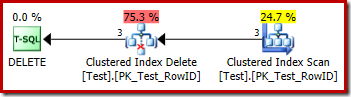
DELETE plan with no trigger

Each row that qualifies is passed directly to a Clustered Index Delete operator, which deletes it. Easy.

Execution plan with an INSTEAD OF trigger

Now let's modify the test to include an INSTEAD OF DELETE trigger (one that just performs the same delete action for simplicity):

CREATE TABLE Test
(
    RowID integer NOT NULL, 
    Data integer NOT NULL,
 
    CONSTRAINT PK_Test_RowID
    PRIMARY KEY CLUSTERED (RowID)
);
GO
INSERT dbo.Test
    (RowID, Data)
VALUES
    (1, 100),
    (2, 200),
    (3, 300);
GO
CREATE TRIGGER dbo_Test_IOD
ON dbo.Test
INSTEAD OF DELETE
AS 
BEGIN
    SET NOCOUNT ON;
 
    DELETE FROM dbo.Test
    WHERE EXISTS
    (
        SELECT * FROM Deleted
        WHERE Deleted.RowID = dbo.Test.RowID
    );
END;
GO
DELETE dbo.Test;
GO
DROP TABLE dbo.Test;

The execution plan for the DELETE is now quite different:
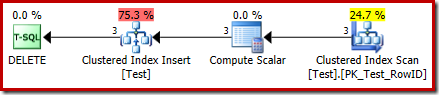
Delete plan with an instead of trigger

The Clustered Index Delete operator has been replaced by a Clustered Index Insert. This is the insert to the hidden worktable, which is renamed (in the public execution plan representation) to the name of the base table affected by the delete. The renaming occurs when the XML show plan is generated from the internal execution plan representation, so there is no documented way to see the hidden worktable.

As a result of this change, the plan therefore appears to perform an insert to the base table in order to delete rows from it. This is confusing, but it does at least disclose the presence of an INSTEAD OF trigger. Replacing the Insert operator with a Delete might be even more confusing. Perhaps the ideal would be a new graphical icon for an INSTEAD OF trigger worktable? Anyway, it is what it is.

The new Compute Scalar operator defines the type of action performed on each row. This action code is an integer, with the following meanings:

  • 3 = DELETE
  • 4 = INSERT
  • 259 = DELETE in a MERGE plan
  • 260 = INSERT in a MERGE plan

For this query, the action is a constant 3, meaning every row is to be deleted:
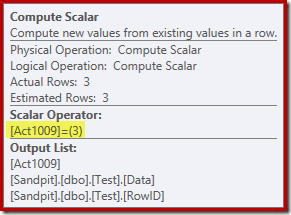
Compute Scalar properties

Update Actions

As an aside, an INSTEAD OF UPDATE execution plan replaces a single Update operator with two Clustered Index Inserts to the same hidden worktable – one for the inserted pseudo-table rows, and one for the deleted pseudo-table rows. An example execution plan:

Instead of Update Plan

A MERGE that performs an UPDATE also produces an execution plan with two inserts to the same base table for similar reasons:
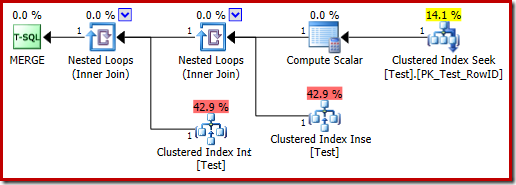
MERGE UPDATE plan

The Trigger Execution Plan

The execution plan for the trigger body also has some interesting features:
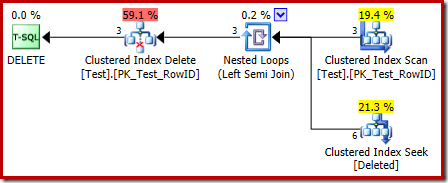
Trigger body plan

The first thing to notice is that the graphical icon used for the deleted table is not the same as the icon used in AFTER trigger plans:
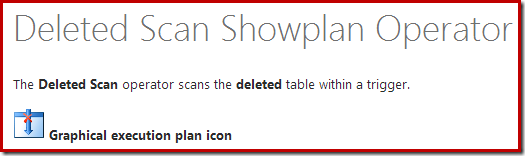
Deleted scan showplan operator

The representation in the INSTEAD OF trigger plan is a Clustered Index Seek. The underlying object is the same internal worktable we saw earlier, though here it is named deleted instead of being given the base table name, presumably for some sort of consistency with AFTER triggers.

The seek operation on the deleted table might not be what you were expecting (if you were expecting a seek on RowID):
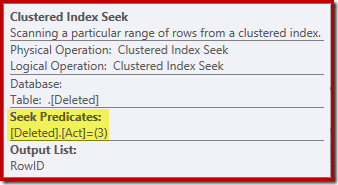
Deleted Seek

This 'seek' returns all rows from the worktable that have an action code of 3 (delete), making it exactly equivalent to the Deleted Scan operator seen in AFTER trigger plans. The same internal worktable is used to hold rows for both inserted and deleted pseudo-tables in INSTEAD OF triggers. The equivalent of an Inserted Scan is a seek on action code 4 (which is possible in a delete trigger, but the result will always be empty). There are no indexes on the internal worktable aside from the non-unique clustered index on the action column alone. In addition, there are no statistics associated with this internal index.

The analysis so far might leave you wondering where the join between the RowID columns is performed. This comparison occurs at the Nested Loops Left Semi Join operator as a residual predicate:
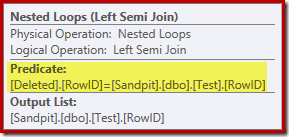
Residual predicate

Now that we know the 'seek' is effectively a full scan of the deleted table, the execution plan chosen by the query optimizer seems pretty inefficient. The overall flow of the execution plan is that each row from the Test table is potentially compared with the entire set of deleted rows, which sounds a lot like a cartesian product.

The saving grace is that the join is a semi join, meaning the comparison process stops for a given Test row as soon as the first deleted row satisfies the residual predicate. Nevertheless, the strategy seems a curious one. Perhaps the execution plan would be better if the Test table contained more rows?

Trigger test with 1,000 rows

The following script can be used to test the trigger with a larger number of rows. We will start with 1,000:

CREATE TABLE Test
(
    RowID integer NOT NULL, 
    Data integer NOT NULL,
 
    CONSTRAINT PK_Test_RowID
    PRIMARY KEY CLUSTERED (RowID)
);
GO
SET STATISTICS XML OFF;
SET NOCOUNT ON;
GO
DECLARE @i integer = 1;
WHILE @i <= 1000
BEGIN
    INSERT dbo.Test (RowID, Data)
    VALUES (@i, @i * 100);
 
    SET @i += 1;
END;
GO
CREATE TRIGGER dbo_Test_IOD 
ON dbo.Test 
INSTEAD OF DELETE 
AS 
BEGIN
    SET NOCOUNT ON;
 
    DELETE FROM dbo.Test
    WHERE EXISTS
    (
        SELECT * FROM Deleted
        WHERE Deleted.RowID = dbo.Test.RowID
    );
END;
GO
SET STATISTICS XML ON;
GO
DELETE dbo.Test;
GO
DROP TABLE dbo.Test;

The execution plan for the trigger body is now:
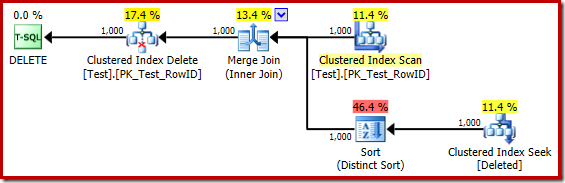
1000 row trigger plan

Mentally replacing the (misleading) Clustered Index Seek with a Deleted Scan, the plan looks generally pretty good. The optimizer has chosen a one-to-many Merge Join instead of a Nested Loops Semi Join, which seems reasonable. The Distinct Sort is a curious addition though:
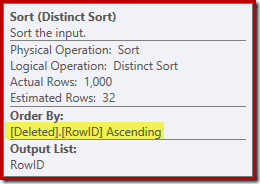
Sort properties

This sort is performing two functions. First, it is providing the merge join with the sorted input it needs, which is fair enough because there is no index on the internal worktable to provide the necessary order. The second thing the sort is doing is to distinct on RowID. This might seem odd, because RowID is the primary key of the base table.

The issue is that rows in the deleted table are simply candidate rows that the original DELETE query identified. Unlike an AFTER trigger, these rows have not been checked for constraint or key violations yet, so the query processor has no guarantee they are in fact unique.

Generally, this is a very important point to bear in mind with INSTEAD OF triggers: there is no guarantee that the rows provided meet any of the constraints on the base table (including NOT NULL). This is not only important for the trigger author to remember; it also limits the simplifications and transformations the query optimizer can perform.

A second issue shown in the Sort properties above, but not highlighted, is that the output estimate is just 32 rows. The internal worktable has no statistics associated with it, so the optimizer guesses at the effect of the Distinct operation. We 'know' the RowID values are unique, but without any hard information to go on, the optimizer makes a poor guess. This issue will return to haunt us in the next test.

Trigger test with 5,000 rows

Now modify the test script to generate 5,000 rows:

CREATE TABLE Test
(
    RowID integer NOT NULL, 
    Data integer NOT NULL,
 
    CONSTRAINT PK_Test_RowID
    PRIMARY KEY CLUSTERED (RowID)
);
GO
SET STATISTICS XML OFF;
SET NOCOUNT ON;
GO
DECLARE @i integer = 1;
WHILE @i <= 5000
BEGIN
    INSERT dbo.Test (RowID, Data)
    VALUES (@i, @i * 100);
 
    SET @i += 1;
END;
GO
CREATE TRIGGER dbo_Test_IOD 
ON dbo.Test 
INSTEAD OF DELETE 
AS 
BEGIN
    SET NOCOUNT ON;
 
    DELETE FROM dbo.Test
    WHERE EXISTS
    (
        SELECT * FROM Deleted
        WHERE Deleted.RowID = dbo.Test.RowID
    );
END;
GO
SET STATISTICS XML ON;
GO
DELETE dbo.Test;
GO
DROP TABLE dbo.Test;

The trigger execution plan is:
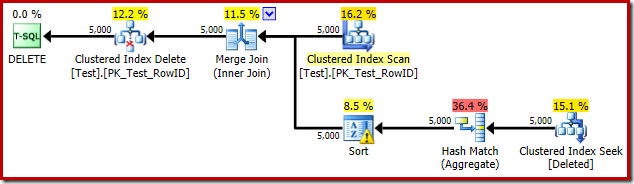
5000 row trigger plan

This time the optimizer has decided to split the distinct and sort operations. The distinct on RowID is performed by the Hash Match (Aggregate) operator:
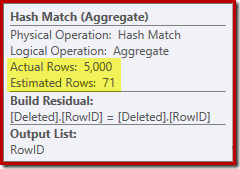
Hash match operator properties

Notice the optimizer's estimate for the output is 71 rows. In fact, all 5,000 rows survive the distinct because RowID is unique. The inaccurate estimate means that an inadequate fraction of the query memory grant is allocated to the Sort, which ends up spilling to tempdb:
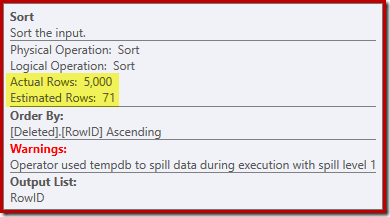
Sort properties

This test has to be performed on SQL Server 2012 or higher in order to see the sort warning in the execution plan. In prior versions, the plan contains no information about spills – a Profiler trace on the Sort Warnings event would be needed to reveal it (and you would need to correlate that back to the source query somehow).

Trigger test with 5,000 rows on SQL Server 2014

If the previous test is repeated on SQL Server 2014, in a database set to compatibility level 120 so the new cardinality estimator (CE) is used, the trigger execution plan is different again:
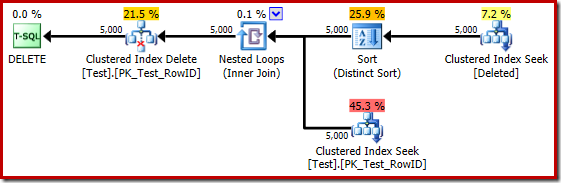
5000 row plan on 2014

In some ways, this execution plan seems like an improvement. The (unnecessary) Distinct Sort is still there, but the overall strategy seems more natural: for each distinct candidate RowID in the deleted table, join to the base table (so verifying that the candidate row actually exists) and then delete it.

Unfortunately, the 2014 plan is based on worse cardinality estimates than we saw in SQL Server 2012. Switching SQL Sentry Plan Explorer to display the estimated row counts shows the problem clearly:
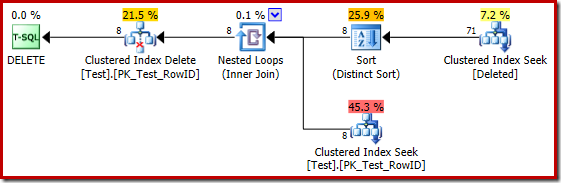
Estimated plan

The optimizer chose a Nested Loops strategy for the join because it expected a very small number of rows on its top input. The first issue occurs at the Clustered Index Seek. The optimizer knows the deleted table contains 5,000 rows at this point, as we can see by switching to Plan Tree view and adding the optional Table Cardinality column (which I wish were included by default):
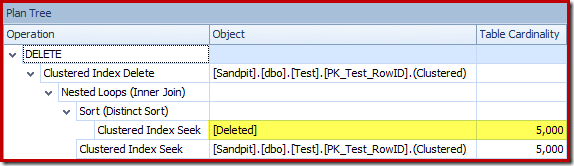
Plan tree view

The 'old' cardinality estimator in SQL Server 2012 and earlier is smart enough to know that the 'seek' on the internal worktable would return all 5,000 rows (so it chose a merge join). The new CE is not so smart. It sees the worktable as a 'black box' and guesses at the effect of the seek on action code = 3:
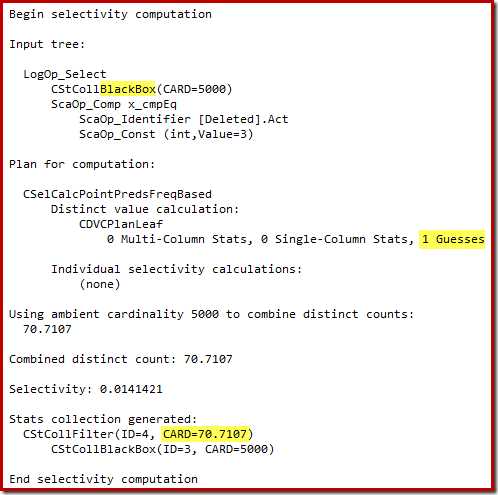
Black box calculation

The guess of 71 rows (rounded up) is a pretty miserable outcome, but the error is compounded when the new CE estimates the rows for the distinct operation on those 71 rows:
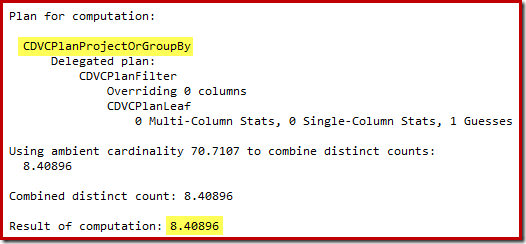
Distinct estimate

Based on the expected 8 rows, the optimizer chooses the Nested Loops strategy. Another way to see these estimation errors is to add the following statement to the trigger body (for test purposes only):

SELECT COUNT_BIG(DISTINCT RowID)
FROM Deleted;

The estimated plan shows the estimation errors clearly:
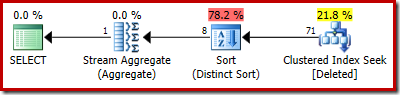
Estimated plan

The actual plan still shows 5,000 rows of course:
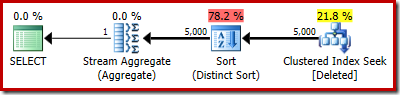
Actual plan

Or you could compare estimate versus actual at the same time in Plan Tree view:
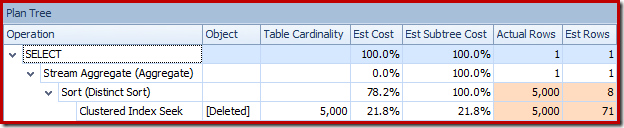
Plan tree view

A million rows…

The poor guess-estimates when using the 2014 cardinality estimator cause the optimizer to select a Nested Loops strategy even when the Test table contains a million rows. The 2014 new CE estimated plan for that test is:
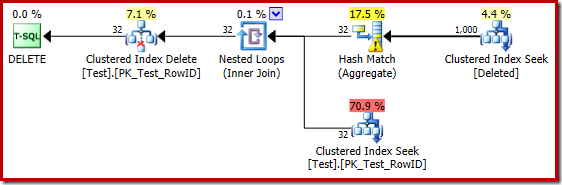
Million row estimated plan

The 'seek' estimates 1,000 rows from the known cardinality of 1,000,000 and the distinct estimate is 32 rows. The post-execution plan reveals the effect on the memory reserved for the Hash Match:
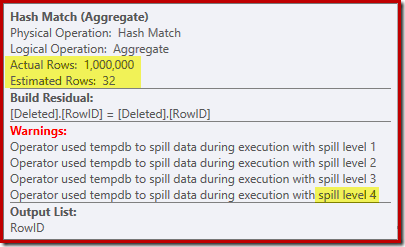
Hash Spills

Expecting only 32 rows, the Hash Match gets into real trouble, recursively spilling its hash table before eventually completing.

Final Thoughts

While it is true that a trigger should never be written to do something that can be achieved with declarative referential integrity, it is also true that a well-written trigger that uses an efficient execution plan can be comparable in performance to the cost of maintaining an extra nonclustered index.

There are two practical problems with the above statement. First (and with the best will in the world) people don't always write good trigger code. Second, getting a good execution plan from the query optimizer in all circumstances can be difficult. The nature of triggers is that they are called with a wide range of input cardinalities and data distributions.

Even for AFTER triggers, the lack of indexes and statistics on the deleted and inserted pseudo-tables means plan selection is often based on guesses or misinformation. Even where a good plan is initially selected, later executions may reuse the same plan when a recompilation would have been a better choice. There are ways to work around the limitations, primarily through the use of temporary tables and explicit indexes/statistics but even there great care is required (since triggers are a form of stored procedure).

With INSTEAD OF triggers, the risks can be even greater because the contents of the inserted and deleted tables are unverified candidates – the query optimizer cannot use constraints on the base table to simplify and refine its execution plan. The new cardinality estimator in SQL Server 2014 also represents a real step backwards when it comes to INSTEAD OF trigger plans. Guessing at the effect of a seek operation that the engine introduced itself is a surprising and unwelcome oversight.

The post Interesting things about INSTEAD OF triggers appeared first on SQLPerformance.com.

24 Sep 06:08

Do you know a Data Hoarder?

by Larisa Bedgood

by Larisa Bedgood Are you a data hoarder? If your data looks a bit like this, read on. Many businesses are feeling the pressures of data overload. How Companies Use Data Businesses are stockpiling more data than ever before. From machine-generated data, social sentiment, transactional data, and emails, many companies feel as if they are…

The post Do you know a Data Hoarder? appeared first on DATAVERSITY.

24 Sep 06:07

New Article: Dynamic Data Masking in SQL Server 2016 and Azure SQL DB

by RickHeiges
My latest article on a new feature (Dynamic Data Masking) coming to SQL Server 2016 and Azure is now available. Dynamic Data Masking essentially displays characters instead of real data to non-privileged users. The data is not stored as a masked values. As with anything, there are pros and cons with this approach. It is another tool in the toolbelt to help keep data secure. Combining DDM with other security features may be the right solution for your situation. Here is the link to the article . Enjoy...(read more)
24 Sep 06:06

PASS Elections: Fuzzy Math

by RickHeiges
The following is an observation and not a swipe at the process. As I understand the current process , the regional seats are filled first before the open seats are filled. We have 4 excellent candidates running for 3 seats on the PASS BoD this year. One...(read more)
24 Sep 06:05

Getting data into Azure Blob Storage

by James Serra

If you have on-prem data and want to copy it to Azure Blob Storage in the cloud, what are all the possible ways to do it?  There are many, and here is a quick review of them:

AzCopy: A popular command-line utility designed for high-performance uploading, downloading, and copying data to and from Microsoft Azure Blob Storage.  See Getting Started with the AzCopy Command-Line Utility

Azure Import/Export Service: Used to transfer large amounts of file data to Azure Blob storage in situations where uploading over the network is prohibitively expensive or not feasible by sending one or more hard drives containing that data to an Azure data center.  See Use the Microsoft Azure Import/Export Service to Transfer Data to Blob Storage

SSIS: The Microsoft SQL Server 2014 Integration Services (SSIS) Feature Pack for Azure provides SSIS the capability of connecting to Azure Blob Storage.  It enables you to create SSIS packages that transfer data between an Azure Blob Storage and on-premises data sources.  See Microsoft SQL Server 2014 Integration Services Feature Pack for Azure and SSIS Feature Pack for Azure

Azure Data Factory (ADF): With the latest ADF service update and Data Management Gateway release, you can copy from on-premises file system and SQL Server to Azure Blob.  See Azure Data Factory Update – New Data Stores and Move data to and from Azure Blob using Azure Data Factory and Move data to and from SQL Server on-premises or on IaaS (Azure VM) using Azure Data Factory.  UPDATE: Released on March 18th was a Copy Wizard within ADF that gives you an interactive data movement experience to easily move data between Azure Blob Storage, Azure SQL Database, Azure SQL Data Warehouse, On-Premises SQL Server, Azure Data Lake, Oracle, MySQL, DB2, Sybase, PostgreSql and Teradata using a simple and code free wizard.  It supports both one-time and scheduled copy operations.

FTP: Deployed in an Azure worker role, this code creates an FTP server that can accept connections from all popular FTP clients (like FileZilla, for example) for command and control of your blob storage account.  See FTP to Azure Blob Storage Bridge

Other Command-line Utilities: See Azure Command-Line Interface (CLI), CloudCopy Command Line Tool

Graphical Clients: Windows Azure Storage explorers that can be used to enumerate and/or transfer data to and from blobs.  See Azure Storage Explorer, Blob Transfer Utility for Windows Azure Blob Storage, CloudBerry Explorer.  For more, see Windows Azure Storage Explorers

PowerShell/Cmdlets, .NET SDK, .NET Azure Storage Client, JavaScript CLI: Work with Azure storage programmatically.  See Uploading data with Windows PowerShell and Uploading data with the Microsoft .NET Framework and Uploading data with the Azure Storage SDK and Using the Azure CLI with Azure Storage

Azure Portal: Allows downloading, deleting and editing certain properties of Blob files.  For the old portal, this is done by going to the Azure Portal, choosing Storage, clicking on the Storage Name, and clicking Containers.  Then click on a container and you will then see a list of the Blob files in that container and at the bottom is options to Download, Edit, and Delete.  For the new portal, this is done by going to the Azure Portal, choosing Storage accounts, clicking on the storage account, and clicking on the Blobs service.  Then click on a container and you will then see a list of the Blob files in that container.  Click on one of the files and you will see options to Download and Delete.

PolyBase: A technology that allows SQL to be used across relational data stores and non-relational Hadoop data.  See APS Polybase for Hadoop and Windows Azure Blob Storage (WASB) Integration.  This is to move data to/from APS or SQL DW or SQL Server 2016 and Azure Blob Storage

Note that for on-prem to cloud transfers, there is a service call Azure ExpressRoute to give you a faster pipe.

If you have on-prem data that you want to copy to the Azure Data lake, the above technologies that can accomplish this so far are: SSIS (via a custom task), ADF, PowerShell/Cmdlets.NET SDKJavaScript CLI, or the Azure Portal.

More info:

Upload data for Hadoop jobs in HDInsight

Migrate Your Data

24 Sep 06:05

SQL Server 2016 Temporal Tables and Type II Data Warehouse Dimensions

by andyleonard
SQL Server 2016 introduces temporal tables, an interesting and “data warehouse-y” addition to the relational database. So how do temporal tables work? They add a couple columns to a table that are used to track the date a row is inserted or last updated,...(read more)
24 Sep 06:05

Public School Means Public Data: Data Security Awareness

by Cathy Nolan

by Cathy Nolan By now your child is back in school or maybe you are taking a class to further your education or get your MBA. Like a lot of areas using technology, schools are trying to cope with the influx of digital learning tools and the potential for data privacy leaks as more and…

The post Public School Means Public Data: Data Security Awareness appeared first on DATAVERSITY.

24 Sep 06:05

Idera to Buy Embarcadero Technologies–Update

by Karen Lopez

image

This news arrived today:

http://www.reuters.com/article/2015/09/17/sponsored-mmvolume-idUSL1N11N1L820150917

Jefferies is also leading a US$425m covenant-lite credit to back Idera’s acquisition of Embarcadero Technologies. Idera is backed by TA Associates. The deal, which launches on Thursday, includes a US$25m revolving credit, a US$300m first-lien term loan and a US$100m second-lien term loan.

So last year we had Embarcadero attempting to purchase ERwin from CA, now today we have Idera, makers of SQL Server focused database-related solutions, moving towards buying Embarcadero.

The Embarcadero-buying-ERwin deal fell through, in part, due to regulatory concerns over market consolidation of the database/data modeling tool business.  I’m wondering how regulators will feel about this consolidation of tools.

I’ve worked with both vendors in the past.  Both are based in Austin, Tx.  Standing by to see what happens next.

UPDATE:  I’m now seeing official communications about the sale, with a very aggressive closing date.  This is in contrast to the prolonged, ultimately failed acquisition attempt by Embarcadero for CA’s ERwin Data Modeler product.

Thoma Bravo, a leading private equity investment firm, today announces the sale of Embarcadero Technologies, a leading provider of software solutions for application and database development, to Idera, Inc., an application and server management software provider. The exit represents the culmination of a long and successful partnership between Thoma Bravo and Embarcadero Technologies. The deal is expected to close in mid-October, subject to normal closing conditions and approvals.

http://www.businesswire.com/news/home/20151007006216/en/Thoma-Bravo-Announces-Sale-Embarcadero-Idera#.VhfF5vlVhBc

http://www.theregister.co.uk/2015/10/08/embarcadero_database_and_app_dev_company_sold_to_idera/

24 Sep 06:04

Big Data Projects Increasingly Not Initiated by CIOs

by A.R. Guess

by Angela Guess Clint Boulton reports for CIO.com, “The number of big data projects enterprises are investing in or plan to invest in have increased to 76 percent in 2015 from 73 percent in 2014, according to a Gartner survey of 437 IT and business leaders. While the increase is small, what’s perhaps more telling…

The post Big Data Projects Increasingly Not Initiated by CIOs appeared first on DATAVERSITY.

24 Sep 06:04

Azure D-Series VM Prices Go Down

by tlachev

I'm optimizing a SQL Server OLTP mirrored database hosted on an Azure VM. After load testing, it was clear that CPU is the primary resource constraint so I suggested an upgrade to a higher A-series machine alongside other reconfiguration and storage changes. Meanwhile, I've noticed that starting in October, the D-Series pricing goes down. Moreover, D-series include a SSD temporary drive to host the temp database and buffer extensions. And, according to Microsoft, D-series have "60% faster processors than the A-series". In this case, to save the customer money, I recommended a D-Series VM with less cores than the A-series VM upgrade I had in mind.

24 Sep 06:04

Artificial Intelligence Software Can Take (and Do Pretty Well on) the SATs

by A.R. Guess

by Angela Guess John Markoff reports for the New York Times, “An artificial intelligence software program capable of seeing and reading has for the first time answered geometry questions from the SAT at the level of an average 11th grader. The achievement, in which the program answered math questions it had not previously seen, was…

The post Artificial Intelligence Software Can Take (and Do Pretty Well on) the SATs appeared first on DATAVERSITY.

24 Sep 06:04

Capturing the $1.6 trillion data dividend

by David Hobbs-Mallyon

Knowing your data means knowing your business. Your data platform is what gains you that knowledge. Data has become one of the most valuable assets for organizations and is increasingly the focus for understanding customers, the market, and future opportunities. What may come as a surprise, however, is that the use of data in driving business decisions translates into a concrete financial advantage.

Consider the findings of a recent IDC study, which identified “financial and productivity benefits directly linked to better data-driven decision making.” In concrete terms, these benefits translate to a $1.6 trillion opportunity over the next four years for organizations that maximize the value from data. That “data dividend” is 6 percent more than companies can expect if they aren’t getting the most value from their data. ("Capturing the $1.6 Trillion Data Dividend," by Dan Vesset, Henry D. Morris, and John F. Gantz, May 2014.)

This IDC study identifies four key areas of investment, each of which, the study says, “delivers value to organizations and can improve the success of data and analytics projects.” Table 1 lists these for areas and how they benefitted the organizations participating in the study.

Table 1: Key Areas of Investment to Capture the $1.6 Data Dividend

Area of Investment Description  Value when implemented
New Data Types and Sources Adding new data types and sources: e.g., supplementing transactional data with customer behavior/demographics; geolocation applications, mobile devices, social media, document management systems Exceeded expectations by 50 percent more often than organizations that did not expand data types and sources
New Analytics  Expanding the number and type of analytic techniques, e.g., adding predictive analytics , using such techniques as MapReduce with SQL Server Exceeded expectations by 100 percent more often than organizations that did not expand data types and sources
New Users  Expanding the number and type of users with access to the organization’s data and analytics, and outputs  Exceeded expectations by 78 percent more often than organizations that did not expand data types and sources


SQL Server is the world’s most widely used enterprise data platform. If you want to capture the data dividend, The Microsoft data platform delivers the capabilities required and assures you the best Total Cost of Ownership (TCO). SQL Server experts who work with customers every day attest to the value that SQL Server provides to their clients. For example, Kevin Hazzard (a C# MVP and Software Development Practice Leader of SQL Server consulting firm, Linchpin People) speaks from experience when he says, “It’s the stability and price/performance ratio that keeps our customers happy with SQL Server. They are sticking with or moving to Microsoft’s database platform because it’s solid and has a reputation for heavy lifting at a reasonable price.”

Serving Your Data Platform Needs

As you evaluate your current data platform to determine its fitness for helping you thrive in today’s data-driven economy, you’ll hear a lot about each vendor’s features and functionality and what you get for your investment. With all the claims, today, it’s more important than ever that you really understand what you really get from features that sound similar and that you truly see what differentiates one data platform from another. That’s why this blog will be focusing on industry challenges and trends and how you can make decisions that will help you address the today’s needs and future growth.

As SQL Server continues to evolve, you’ll see Microsoft expand and improve on the data platform’s built-in capabilities while remaining focused on ensuring your data’s security, offering the best performance, maintaining mission-critical support, and providing the highest return on investment (ROI) and TCO. To help you understand how SQL Server and the Microsoft data platform can help you collect the data dividend for your organization, let us know what challenges you face, what concerns you have, and what your decision-making process demands. We want to hear from you. Use the comments feature to let us know what you think of this post, or email us at SQLServerSocialMedia@microsoft.com. To learn more about getting faster insights from any data, please visit our new data management and analytics site.

24 Sep 06:03

I am Data Science, and you can too! (or, Buck is Back)

by BuckWoody
My Progression and My Passion I’ve been working in Information Technology for about 30 years. I started here at Microsoft … Continue reading →...(read more)
24 Sep 06:03

Repairing a replication subscriber

by Gail

It’s a question which has come up a couple of times. If a subscriber of a transactional replication publication becomes corrupt, is running CheckDB with repair allow data loss safe?

The theory is, since the subscriber is a copy of another database, allowing CheckDB to discard data in the process of repairing won’t actually cause data loss (the data is still there in the publisher).

As with many things, it’s partially true, however there’s a little more to it that just that.

To see why, let’s set up some replication and intentionally corrupt some data in the subscriber and run a repair.

First, the source DB. I’m going to keep it really simple so that we can see the effects. A database with a single table called Customers, populated with 100 000 rows via SQLDataGenerator. The filler column simulates other columns that would be in a real table.

CREATE TABLE Customers (
CustomerID INT IDENTITY PRIMARY KEY,
FirstName VARCHAR(50),
Surname VARCHAR(50),
AccountNumber CHAR(15) UNIQUE,
AccountStatus VARCHAR(25),
Filler CHAR(200) DEFAULT ''
)

Once populated, we set up a transactional replication publication with default settings, and for simplicity have the subscriber be a second database on the same instance.  we query the table on the subscriber, we have exactly the same number of rows as the publisher has.

ReplicationSubscriber

To simulate a misbehaving IO subsystem, I’m going to take the subscription DB offline, open the mdf in a hex editor, scribble on top of a few pages in the user table, then bring the DB back online. A checkDB returns a couple of pages of errors ending with:

CHECKDB found 0 allocation errors and 16 consistency errors in table ‘Customers’ (object ID 421576540).

CHECKDB found 0 allocation errors and 18 consistency errors in database ‘ReplicationSubscriber’.

repair_allow_data_loss is the minimum repair level for the errors found by DBCC CHECKDB (ReplicationSubscriber).

Minimum level to repair is REPAIR_ALLOW_DATA_LOSS and, based on the error messages, doing so will deallocate five pages. Let’s run the repair and then see what’s left in the table.

ReplicationSubscriber After Repair

We’ve lost 155 rows from the Customers table. The replication publisher still has them, but the subscriber now does not. So what happens if someone makes some data modifications on the publisher and changes one of the rows that was lost at the subscriber?

UPDATE dbo.Customers
SET AccountStatus = 'Closed'
WHERE CustomerID = 48700;
GO

INSERT INTO dbo.Customers
(FirstName,
Surname,
AccountNumber,
AccountStatus
)
VALUES  ('Mary',
'White',
'4985563214AN'
'Pending'
)

Give it a few seconds to replicate and then let’s check the table in the publisher. The new customer isn’t there… If we go and have a look at the replication, it’s throwing errors.

BrokenReplication

“The row was not found at the Subscriber when applying the replicated command. “, which is quite true, the row’s not there any longer.

What’s happened is that one of the rows updated on the publisher was lost when CheckDB repaired the database. The rows lost due to the repair weren’t automatically fetched from the publisher, there’s no mechanism in transactional replication for that to happen. Hence when the row was updated on the publisher, the update statement was replicated and the row on the subscriber couldn’t be found, causing the replication to fail, retry and fail again. It will keep failing until it is either reinitialised or the missing row is manually added to the subscriber.

What we needed to have done, to prevent this outcome, was after the CheckDB deallocated pages, to manually (or with something like SQLDataCompare) to sync the subscriber with the publisher and explicitly add back the rows which were on the deallocated pages. The primary key values must be kept the same, as that’s what replication uses to identify which rows in the subscriber need to be updated.

So to go back to the original question, yes it’s probably fine to run CheckDB with repair on a replication subscription, providing that the data deallocated as part of the repair is manually synced from the publisher afterwards. If it isn’t, the replication will break as soon as one of the rows affected by the repair is updated or deleted at the publisher.

24 Sep 05:59

Moving Your SQL Databases to Azure – Things to Know

by MVP Award Program

Editor’s note: The following post was written by SQL Server MVP Martina White as part of our Technical Tuesday series.

SQL Azure is a compelling platform for data storage. It's cheap, reliable, and highly accessible. However, it's not identical to SQL Server on-premise, and there are a number of things to be aware of when considering a move from one platform to the other, or simply adopting it. This article will walk through what the various SQL Azure options are, outline the processes involved in moving data form on-prem to Azure, and call out some "gotchas", or things to be aware of when operating a SQL Azure database.

COMPARISON WITH ON-PREM
Azure SQL is SQL Server behind the scenes, so most of the functionality is already there including tables, views, stored procedures, triggers, functions, primary and foreign keys and clustered indexes. Of course there is no Windows authentication, and it currently uses SQL authentication only.

SQL Azure allows for logical vs physical administration. There is no to need maintain, balance, upgrade or patch the server as this is all done by Microsoft. You have no control over the physical database and log files and cannot get to them. Therefore, you cannot detach and attach databases as you cannot get to the physical drives. You also can't reboot the server, so if you end up with a runaway query you may have to open a support ticket. Killing the session doesn't always work.

Most tools work with SQL Azure database, including:
• .NET Framework via ADO.NETC / C++ via ODBC
• Java via Microsoft JDBC provider
• PHP vis Microsoft PHP provider
• Frameworks such as OData, Entity Framework WCF Data Services, NHibernate

Your application talks to the primary database, but there are actually 3 copies kept in sync. There are always 3 copies of the database for high availability during disaster recovery. If your database should go down, one of the secondary copies will be promoted to be the primary database, and new third copy will be created.

There is a requirement for tables in a SQL Azure database to have a clustered index. This is necessary to keep the 3 copies of the database in sync.

The maximum SQL Azure database size is currently 500GB, but you can get around this using SQL federations and partitioning your data across multiple nodes.

There are a number of partially supported and unsupported features. A few of the ones I run into regularly are:
• You cannot use the USE [databasename] sql statement. You must physically switch between databases in your application.
• Remove from indexes - NOT FOR REPLICATION
• Remove from your tables - WITH (PAD_INDEX = OFF, STATISTICS_NORECOMPUTE = OFF, IGNORE_DUP_KEY = OFF, ALLOW_ROW_LOCKS = ON, ALLOW_PAGE_LOCKS = ON) ON [PRIMARY]

You can review a full list of unsupported features here: https://azure.microsoft.com/en-us/documentation/articles/sql-database-transact-sql-information/

TOOLS
SQL Azure database does use transact SQL. There are a number of ways to connect to the database, including Windows Azure Management Portal, SSMS (2008 R2 or newer), or command line utilities such as SQLCMD and BCP. You can move data to and from your SQL Azure database using anything that can connect to the database, such as SSIS, SSMS. When it comes to migrating your database to SQL Azure there is a great article on what to consider, here: https://azure.microsoft.com/en-us/documentation/articles/sql-database-cloud-migrate/

When I migrate a database from SQL to SQL Azure, I typically follow this process using SSMS:

• Create a blank database on the SQL Azure database server
• Generate the scripts from the original database to create the database objects, excluding users
• Do a find and replace to remove any unsupported features such as the two mentioned above
• Run the create database object scripts against the new SQL Azure database
• Create the users and apply permissions for the new database
• Use SSMS or SSIS to copy the data over to the new database.

The SQL Database Management Portal is a web based, scaled down version of SSMS. You can create objects, and run queries and execution plans. But there is no GUI interface for some of the security features like creating users and logins. I find that it's a friendlier experience to create the database server in the portal, and do everything else using SSMS.

BACKUP

SQL Azure databases are protected by an automatic backup system. The length of time the backups are retained depends on what tier you buy – 7 days for Basic, 14 days for Standard and 35 days for Premium. The point-in-time restore is a self-service feature that costs you nothing unless you use it. If you use it, you pay regular rates for the new database that gets restored. You get all of the protection without any additional cost.

SECURITY

You are in complete control the IP specific access to SQL Azure Database, at both the server AND database level. No one has access by default. At the server level you go into the Management Portal and add your IP in order to be able to connect remotely to the database. Or if you prefer a more granular level of security you can add a firewall rule at the database level to allow specific IPs to connect. Yes, every time your IP changes, you have to update your firewall rules.

SERVICE TIERS AND PERFORMANCE LEVELS

There are three tiers, with several levels of performance within them. I will summarize the Microsoft definitions.
• Basic: Best suited for a small size database, supporting typically one single active operation at a given time.
• Standard: The go-to option for most cloud applications, supporting multiple concurrent queries.
• Premium: Designed for high transactional volume, supporting a large number of concurrent users and requiring the highest level of business continuity capabilities.

Within the tiers are various performance levels. The definition of a Performance Level includes something called a Database Throughput Unit (DTU. DTUs provide a way to describe the relative capacity of a performance level of Basic, Standard, and Premium databases. DTUs are based on a blended measure of CPU, memory, reads, and writes. As DTUs increase, the power offered by the performance level increases. For example, a performance level with 5 DTUs has five times more power than a performance level with 1 DTU. There is more involved, such as maximum concurrent requests, logins and sessions, but at a high level these are the performance levels from which you can choose:
 

You'll want to monitor and play with the levels to find the optimum for you needs. There is a Monitor tab for each database in the Azure Portal where you can review the performance. You can easily change the performance level on the fly. If you are anticipating heavier use, you can up the performance level for a period of time, and then drop it back down when the heavy use period is over. You only pay for the performance while it was selected.

COSTS

The pricing varies greatly depending on how many databases you have, how long they have been up, how big they are, what performance level you select, etc. Microsoft advertises no upfront cost, no termination fees, pay only for what you use, and pay by the hour.

Costs can range anywhere from $7 per month for the Basic tier, $19 - $183 per month for a 250GB database in the Standard tier, to $566 to $8500 per month in the Premium tier.


HOW TO PROVISION A SQL AZURE DATABASE

Create a Windows Azure Platform account
If you don't already have one, you'll need to create a Windows Azure Platform account. There is a one month free trial on offer. This will give you access to all the Azure services including VMs, SQL databases, websites, AD, etc. To sign up go to  http://azure.microsoft.com/. Sign in to the Microsoft Azure Portal at https://manage.windowsazure.com.

Create a Database Server
When you are ready to create a SQL Azure database, you must first add a server to your subscription on which the database will reside in the cloud. Azure will provision it to the least busy server available in the cloud. Health of physical servers are monitored and maintained by Microsoft. You don't manage these servers yourself. Microsoft does this for you. You don't need to wait for I.T. to provision a server for you, which could take weeks. Simply sign in, create a server and the admin login credentials, and start adding databases. You can have a server and databases set up in a matter of minutes. To automate server provisioning you can also use PowerShell or REST API calls directly.

Below is an image of the Microsoft Azure Portal. Notice that we are looking at the SQL Databases, Servers tab. You can add a new server by clicking the add button at the bottom of the screen.
 

• Log in to Windows Azure Management Portal.
• Create a SQL database server.
• Create admin login credentials for that server. This will be used like the SA account.
• Choose the subscription to which you want to add the server, and choose region of the data center where you would like the server to reside.
• You do not get to choose the name of the server. It's randomly generated.
• Decide if you will "Allow Windows Azure Services", the default is yes. If you were to create a Windows Azure website or cloud service, then services would have access to SQL Azure database server and databases.  You can edit this setting the server Configure tab if you change your mind later.
• Click OK. The server will be created in a matter of seconds.

Add Firewall Rules at Server Level
Once you have created the server, you will grab the name of the server, and will likely want to connect to it using SSMS or some other tool. You will connect using the url yourservername.database.windows.net. Your connection will fail, until you add your IP address to the firewall rules.

To add firewall rules and enable service access:
• Click on the database server you created.
• Select the Configure tab.
• You will see your current IP address near the top of the screen
• Add a rule to allow the IP address range that will be connecting to the database and give it a name


Now you can connect via automatically generated FQDN (xxx.database.windows.net) which initially contains only the master database.

Create a Database

When you create a new database there a number of settings from which to choose, including Service Tiers and Performance Level.

Note: There is an option to select WEB or BUSINESS edition, but this will be retired in September 2015.
Edition: Web (select 1GB or 5GB) or Business (select 10GB to 150GB)

If you create a database in SSMS, it will automatically create a 1GB web edition unless you specify otherwise. To create a database in SSMS you can run this sql script:
CREATE DATABASE <yourdatabasename> (Edition ='Business', Maxsize=150gb)

• Key in your database name
• Choose which subscription you are adding this database to
• Choose the Service Tier
• Choose the Performance Level
• Choose the Collation
• Choose on which database server you want the database to reside


Add Firewall Rules at Database Level:
You can add firewall rules at the database server level or at the database level. You can do this at the database level using the stored procedure sp_set_database_firewall_rule.

Run this SQL command against your database:
EXEC sp_set_database_firewall_rule N'MyRule', '100.100.1.1','100.100.1.1'

To look up existing database firewall rules use this query:
SELECT * FROM sys.database_firewall_rules

There are a number of differences and adjustments you may need to make to move to SQL Azure, from unsupported SQL features to managing firewall security. If these are not an issue for you, there is great opportunity to leverage the ease, scalability and reliability of SQL Azure databases. You pay only for what you use and someone else manages the server maintenance, upgrades and backups. It's a sweet deal.

About the author
Martina is a senior consultant in business intelligence. She has 15 years of experience spanning agriculture, healthcare, insurance, education, government, utilities, spirits and wines, retail, manufacturing and software industries in Canada and the U.S., in all aspects of the project life cycle from requirements gathering and strategy to solution development. Martina holds the Microsoft Most Valuable Professional (MVP) status in the SQL space. Her blog is widely followed with 200,000 visitors per year and growing. Her focus is currently in business information solutions including requirements gathering, recommendations on best approach, data warehouse design, cube development and reporting solutions development. She is recognized as a subject matter expert in the Microsoft SQL Server product suite. She also holds PMI’s Project Management Professional (PMP®) credential since 2005.


24 Sep 05:57

[PODCAST] #16 – EMC XtremIO with CTO, Itzik Reich

by Simon Seagrave

EMC XtremIO - Itzik ReichEMC XtremIO is an exciting all-flash array offering, that offers not only performance (as you’d expect from an all-flash array) and scalability, but also has exciting and cost-saving features such as de-duplication & compression.

Itzik Reich, CTO of EMC XtremIO, takes us through what XtremIO is, it’s features, how it fits into the EMC portfolio of storage products and also how it compares to other all-flash array offerings currently in the market.  He also let’s us know what we can expect from the XtremIO team in the near future.

EMC XtremIO

Do you like your flash storage?  If so, then this is the episode for you!

Links Mentioned:

XtremIO Website

EMC XtremIO Page

Itzik’s Blog – well worth a look!

Itzik on Twitter

Subscribe on iTunes

Subscribe to the Data Center Insiders Podcast via iTunes

The post [PODCAST] #16 – EMC XtremIO with CTO, Itzik Reich appeared first on TechHead and was written by Simon Seagrave.

24 Sep 05:56

The Butterfly Effect of Technology Community

by Scott Hanselman
Butterfly Effect by Rhett Maxwell used under CC

The Butterfly Effect is everywhere, truly. The best part is, due to confirmation bias, once you start looking for it you'll see it everywhere. ;)

The Butterfly Effect: This effect grants the power to cause a hurricane in China to a butterfly flapping its wings in New Mexico. It may take a very long time, but the connection is real. If the butterfly had not flapped its wings at just the right point in space/time, the hurricane would not have happened. - Chaos Theory

If you see something cool, share it. If you learn something interesting, share it, and share it in multiple ways. Even a small thing can add up to a big payoff.

I got a great email from a reader this week from Neil of TheSmartFinish. Neil has a small business doing woodworking for connected homes and creates decorative mounts for Nest Thermostats. I have a Nest so Neil reached out to share what he's created.

I tweeted about it. A tiny thing, to be clear. I don't tweet about everything, and I DO get a lot of requests for tweets. My tweets are at my discretion, and I read about it, and shared it.

Got a @Nest Thermostat? Check out these GORGEOUS handmade wooden mounts! http://thesmartfinish.com/

— Scott Hanselman (@shanselman) August 4, 2015

After a while I thought that Nest should be featuring his stuff themselves. A random tweet from me only goes so far, so I publically told @nest they should feature/RT Neil's stuff. At this point, my butterfly has flapped its wings and I've moved on.

@shanselman Ha! Agreed, we're big fans of what he's made. Something's in the works ;) @Automated_Home

— Nest (@nest) August 5, 2015

Fast forward and I get the email from Neil. These tweets got some attention and @nest DID actually tweet about him!

We're big fans of this custom wood mount for the Nest Learning Thermostat crafted by @Automated_Home. #nestinthewild pic.twitter.com/Yp5nuTR5wk

— Nest (@nest) August 13, 2015

This gave him valuable legitimacy and ultimately there was a great article on his project at VentureBeat. Other than the poor title as there are no "ex-marines" - Meet the ex-marine who builds artisanal mounts for connected homes - it's a cool write-up. Now his business is starting to get some new visibility, which is great!

Why am I sharing this story? Absolutely not to toot any horns - certainly not mine - but rather to remind us all about the power of the little things.

I've received hundreds of emails over the last few years with folks sharing stories about "I read this and it got me thinking about" or "listening to this podcast made me quit my job and move overseas" or "my spouse and I were inspired by this post and I switched jobs" and on and on. One reader started a Diabetes non-profit after reading a blog post. Another changed her job and has moved into an industry she really believes in. You might tweet a job opening but never realize that it was the beginning of a move across the country for someone you'll never meet!

I'm a firm believer of the idea that if you put good out there, good stuff will happen. What we do with our tweets, blogs, presentations, podcasts, and books is tiny. We fly our little butterfly wings and try to influence and motivate. What's really amazing are the powerful hurricanes that YOU, Dear Reader, harness for positive change in your life and in the lives of others.

Please, share your Butterfly Effect Stories in the comments! What small things have propelled a huge change in your life?

* Butterfly Effect Photo by Rhett Maxwell used under CC


Sponsor: Many thanks to Accusoft for sponsoring the feed this week. If you haven’t yet, check out their Prizm Content Connect, an HTML5 document viewer that allows you to view and edit documents directly in your browser.


© 2015 Scott Hanselman. All rights reserved.
     
24 Sep 05:56

Free Training at Microsoft Virtual Academy - Introduction to ASP.NET 5

by Scott Hanselman

In 2013, Jon Galloway, Damian Edwards, and myself went up to film a LIVE 8 hour long Microsoft Virtual Academy training session called "Building Web Apps with ASP.NET Jump Start." We returned in 2014 with "Building Modern Web Apps with ASP.NET." Both of these are free, and are effectively a full day each of content.

Just a few weeks back here in September of 2015, we recorded "Introduction to ASP.NET 5." This is 100 to 200 level beginner content that starts at the beginning. If you're just getting started with ASP.NET 5 (currently in Beta) or perhaps you have been meaning to dig into the new stuff in ASP.NET 5 but haven't gotten around to it, this a good place to start.

image_08347e93-9435-4eab-865f-611c432b2562

Introduction to ASP.NET 5

We cover

  • Introduction to ASP.NET 5
  • Introduction to Visual Studio
  • Introducing Model View Controller (MVC6)
  • Getting Started with Models, Views, and Controllers
  • Debugging Web Applications
  • Configuration Data
  • Publishing Your Application
  • Using Data with Entity Framework

In the final three segments, we work with Damian Edwards to dissect every line of code in the real-world cloud-deployed application that runs our weekly standup at http://live.asp.net.

  • Exploring live.asp.net
  • Managing Data on live.asp.net
  • Advanced Features in live.asp.net

It's a full day of detailed video training with assessments after each video. You can seek around, of course, or download the videos for offline viewing. We are pretty happy with how it turned out.

We'll be returning to Microsoft Virtual Academy over the next several months to record 300-400 level advanced content as well as a Cross-Platform specific show for Mac and Linux users who want to develop and deploy ASP.NET applications. I hope you enjoyed it, we all worked very hard on it.


Sponsor: Big thanks to my friends at Infragistics for sponsoring the feed this week! Responsive web design on any browser, any platform and any device with Infragistics jQuery/HTML5 Controls.  Get super-charged performance with the world’s fastest HTML5 Grid - Download for free now!


© 2015 Scott Hanselman. All rights reserved.
     
24 Sep 05:54

Cloud Platform Release Announcements for September 2, 2015

by Cloud Platform Team

This is a blog post of a new ongoing series of consolidated updates from the Cloud Platform team.


In today’s mobile first, cloud first world, Microsoft provides the technologies and tools to enable enterprises to embrace a cloud culture. Our differentiated innovations, comprehensive mobile solutions and developer tools help all of our customers realize the true potential of the cloud first era.

You expect cloud-speed innovation from us, and we’re delivering across the breadth of our Cloud Platform product portfolio. Below is a consolidated list of our latest releases to help you stay current, with links to additional details if you’d like more information. In this update:

  • GS-Series virtual machines, D-series price reductions, and more
  • Advanced Threat Analytics (ATA) General Availability
  • Revolution R Enterprise in Azure Marketplace Public Preview
  • SQL Server 2016 CTP 2.3 Public Preview
  • Announcement of the new JDBC 4.2 for SQL Server Driver
  • Visual Studio 2012 Updates 5 General Availability
  • New Power BI content packs for Adobe Analytics and Azure Mobile Engagement
  • Azure SQL Database - P11 Offer General Availability
  • Azure SQL Database Elastic Database Basic and Premium tiers in public preview

GS-Series virtual machines, D-series price reductions, and more

Today we’re excited to announce a variant of G-series, the GS-series, which combines the compute power of G-series with the performance of Premium Storage to create powerful VMs for your most storage and compute intensive applications. Powered by the Intel Xeon E5 v3 family processors, the GS-series can have up to 64TB of storage, provide 80,000 IOPs (storage I/Os per second) and deliver 2,000 MBps of storage throughput. The GS-series offers the highest disk throughput performance, by more than double, of any VM type offered by any hyperscale public cloud provider. Furthermore, both the G-series and GS-series offer up to 20 Gbps of network bandwidth, more than double that of the closest VMs of any hyperscale public cloud provider.

While the GS-series will provide you the largest VMs and the fastest storage in the public cloud, the D-series and DS-series in Azure provide a good combination of CPU performance, memory and local SSD for most common workloads. We’re continuously striving to make these more accessible at lower price points, and are pleased to announce today that we’re reducing the prices on D-series and DS-series instances by as much as 27%. The price changes will take effect on October 1st.

We also announced the ability to diagnose boot-up issues with VMs running Windows or Linux, and a new Service Bus tier called the Azure Service Bus Premium Messaging.

Please read the Azure blog for more information.

Advanced Threat Analytics (ATA) General Availability

Cybersecurity is no longer a subject just for IT. From the datacenter to the board room, it’s become a widespread concern as the frequency of the attacks continues to grow. There’s a lot at stake: customer privacy, brand reputation, and possibly significant financial loss.

We understand how much pain these security threats cause your organization. In order to help you identify these advanced attacks before they cause damage, we previewed a new cyber-security product, Microsoft Advanced Threat Analytics (ATA), back in May 2015.

Leveraging User and Entity Behavioral Analytics (UEBA), this innovative technology is designed to help you identify a key blind spot: suspicious user and entity activity. It also helps to identify known malicious attacks, security issues, and risks using security researchers’ work regionally and globally.

We are excited to let you know that Microsoft Advanced Threat Analytics is now generally available! You can download the evaluation bits and implement ATA in your organization. To learn more about this release, please read this blog post.

Revolution R Enterprise in Azure Marketplace Public Preview

Revolution R Enterprise 7.4.1 (RRE) is now available as a technical preview on Microsoft Azure for both Windows and Linux virtual machines in the Azure Marketplace. This release in Azure Marketplace is the first step in Microsoft’s plan to integrate Revolution R Enterprise with the Azure Analytics products, including HDInsight, Machine Learning, and Stream Analytics.

Through the Azure Marketplace, users can run computations on data sets up to 1 terabyte on cloud-based Windows and Linux multi-CPU instances from 4 to 32 vCPUs (virtual CPUs), accessing data copied from an Azure data store, including blob storage or SQL Server, or accessed directly through an ODBC connection. Utility pricing for both versions starts at $1.50 per 4-cores per hour with no long-term commitments. During this preview period RRE users will be supported through a monitored Azure forum.

The Windows version of RRE is accessed with Windows Remote Desktop and includes Revolution’s Visual Studio-based IDE for R developers (Revolution R Enterprise DevelopR). Access to the Linux version of RRE is via SSH with R access through the RGui. Alternatively, customers have the option of bringing their own license for a favorite IDE such as RStudio, or RStudio Server, or StatET.

A 30-day free trial is available with no software charge, though standard Azure cloud usage charges still apply. Get your free trial of RRE in Azure Marketplace.

SQL Server 2016 CTP 2.3 Public Preview

The SQL Server 2016 Community Technology Preview (CTP) 2.3 is now available for download!

In SQL Server 2016 CTP 2.3, part of our new rapid preview model, we have made enhancements to several features that customers can try in their SQL Server 2016 development and test environments.

In SQL Server 2016 CTP 2.3, available for download today, customers will see enhancements in several key areas:

  • Row Level Security support for in-memory OLTP tables
  • A core engine scalability improvement, dynamically partitioning thread safe memory objects by NUMA or CPU, which enables higher scalability
  • In-memory data warehouse (column tore) performance optimizations
  • Many-to-many derived hierarchies in Master Data Services
  • Several performance improvements to SQL Server Analysis Services, including DAX query performance

For additional details, please visit the detailed SQL Server 2016 CTP 2.3 Engineering blog.

Learn more about setting up a SQL Server 2016 CTP 2.3 preview test environment today! To experience the new, exciting features in SQL Server 2016 and the new rapid release model, download the preview or try the preview by using a virtual machine in Microsoft Azure and start evaluating the impact these new innovations can have for your business.

Announcing the new JDBC 4.2 for SQL Server Driver

We are pleased to announce availability of the Microsoft JDBC 4.2 Driver for SQL Server! The updated driver provides robust data access to Microsoft SQL Server and Microsoft Azure SQL Database for Java-based applications.

The JDBC Driver for SQL Server is a Java Database Connectivity (JDBC) type 4 driver that implements full compliance with the JDBC specifications 4.1 and 4.2 and supports Java Development Kit (JDK) version 1.8. There are several additional enhancements available with the driver:

  • The updated XA Transaction feature includes new timeout options for automatic rollback of unprepared transactions.
  • New SQLServerBulkCopy class enables developers to quickly copy large amounts of data into tables or views in SQL Server and Azure SQL Database databases from other databases. For more details about what is currently supported in the bulk copy feature preview, please refer to What’s New in the JDBC driver.

The JDBC driver is part of SQL Server and the Microsoft Data Platform’s wider interoperability program, with drivers for PHP 5.6, Node.js, JDBC, ODBC and ADO.NET already available.

Customers can download the JDBC 4.2 driver here.

Visual Studio 2012 Updates 5 GA

In Team Foundation Server 2015 we introduced a new feature Team Project Rename. This update for Visual Studio 2012 is primarily focused on the ability to update local workspaces after a team project is renamed. If you are using Visual Studio 2012 and have updated to Team Foundation Server 2015, you should consider installing this update.

New Power BI content packs for Adobe Analytics and Azure Mobile Engagement

Power BI continues to make it easier for users to connect to their data, providing pre-built solutions for popular services as part of the experience. This month we added content packs for Adobe Analytics and Azure Mobile Engagement. Adobe Analytics is part of the Adobe Marketing Cloud and can be used to analyze your customer data. You can view where your visitors are coming from, what days they come the most frequently, and how long they're staying as well as several metrics based on e-commerce data, CRM attributes, engagement, etc. Now you can use Power BI to monitor, explore and visualize your Adobe Analytics data. With an out-of-box content pack, you can connect and discover insights from your data immediately.

Azure Mobile Engagement is an app analytics service that allows developers to track their application's performance helping them increase retention and app usage. Using the Power BI Azure Mobile Engagement content pack you can quickly connect to an out-of-box dashboard, a set of reports and a curated data set, and instantly get insights into how well your app is doing.

Subscribers to these supported services can now quickly connect to their account from Power BI and see their data through live dashboards and interactive reports that have been pre-built for them. Getting started with data visualization and analysis has never been easier, for additional information visit the Power BI blog.

Azure SQL Database - P11 Offer Generally Available
Pricing | SQL Database webpage

As more customers build more powerful applications in Azure using Azure SQL Database, we've seen strong demand for more options to scale both performance and database size. To help meet this demand, we’ve announced two new performance levels within our Premium service tier: P4 and P11.

P4 makes it easier for customers to scale performance with more granularity, while P11 offers greater performance and larger database size. And, as previously announced, the P6 offering is now available to replace P3, with no impact to database cost or service.

Customers who create or assign performance levels in code or scripts can visit the Create Database documentation webpage for more information.

One of the advantages of running SQL Database on Azure is the ability to dynamically change database performance to adapt to changing workload demands. These new performance levels help you to scale your performance and to meet the demands of your application workloads.

Azure SQL Database Elastic Database Basic and Premium tiers in public preview
Pricing | SQL Database webpage

Elastic databases support SaaS applications that have many databases and unpredictable database resource demands. Now you can use the flexibility of elastic databases to support both explosive growth and competitive SaaS business models. Instead of overprovisioning databases to meet peak demand, you can combine elastic databases in a pool where a large number of them leverage the same resources, all within a budget that you control. This can be much more efficient than dedicating resources to each database individually—and that can mean cost savings.

Now in public preview, the Basic tier enables small, less demanding databases to be combined in a pool, while the Premium tier allows larger, more demanding databases to be pooled. In addition to the public preview release of Basic and Premium, we have increased the maximum database per pool for the Standard tier from 100 database to 200 databases.

For more information about elastic databases, please visit the Tame explosive growth with elastic databases documentation webpage.

24 Sep 05:54

Cloud Platform Release Announcements for September 16, 2015

by Cloud Platform Team

This is a blog post of a new ongoing series of consolidated updates from the Cloud Platform team.

In today’s mobile first, cloud first world, Microsoft provides the technologies and tools to enable enterprises to embrace a cloud culture. Our differentiated innovations, comprehensive mobile solutions and developer tools help all of our customers realize the true potential of the cloud first era.

You expect cloud-speed innovation from us, and we’re delivering across the breadth of our Cloud Platform product portfolio. Below is a consolidated list of our latest releases to help you stay current, with links to additional details if you’d like more information. In this update:

  • Consumer identity and access management in the cloud: Azure Active Directory B2C
  • Share resources with your partners with B2B collaboration
  • Enable easier configuration management from the cloud
  • Azure Backup IaaS VM Protection Generally Available
  • Cloud Platform System Update 2 Generally Available
  • Power BI Content Pack Generally Available
  • Revolution R Open 3.2.2 Generally Available
  • Azure SQL Database – Web & Business Retirement
  • Visual Studio Tools for Applications 2015 Generally Available
  • Windows 10 Tools 1.1 Generally Available


Consumer identity and access management in the cloud: Azure Active Directory B2C

Azure Active Directory, the secure cloud identity platform that handles billions of authentications per day, extends its capabilities to manage consumer identities with a new service: Azure Active Directory B2C, now in public preview. Active Directory B2C is a highly available, global, identity management service for consumer-facing applications that scales to hundreds of millions of identities. It can be easily integrated across mobile and web platforms. Your consumers can log on to all your applications through fully customizable experiences by using their existing social accounts or by creating new credentials.

Learn more about Azure AD B2C.

Share resources with your partners with B2B collaboration

B2B collaboration, a new feature of Azure Active Directory, currently in public preview, simplifies management and improves security of partner access to corporate resources including SaaS apps such as Office 365, Salesforce and more, Azure Services and every mobile, cloud and on-premises claims-aware application.

B2B collaboration improves security, as partners manage their own accounts and enterprises can apply security policies to partner identities access.

Azure Active Directory B2B collaboration is easy to configure with simplified signup for partners of all sizes even if they don’t have their own Azure AD via an email-verified process. It is also easy to maintain with no external directories or per partner federation configurations.

Make your Azure Active Directory the center of your cross-organization collaboration.

Azure Active Directory B2B collaboration will be provided at no additional cost with all Azure AD editions.

Learn more about Azure AD B2B collaboration.

Enable easier configuration management from the cloud

A new breed of configuration management tools has been created to manage applications, platforms and cloud infrastructure, with high availability. The need for these new tools arises from the increase in scale and rapid rate of change, provided by the cloud environments. Windows PowerShell Desired State Configuration (DSC) provides a configuration management platform that is flexible enough to function reliably and consistently in each stage of the software deployment lifecycle, as well as during scale-out scenarios, required in the cloud.

Today with Azure Automation Desired State Configuration (DSC), we take it one step further providing an even easier configuration management experience. You can now author and manage PowerShell Desired State Configurations, import DSC resources, and generate DSC node configurations, all in the cloud. Available in public preview, Automation DSC is offered in free and basic tiers, and will be included in the Microsoft Operations Management Suite add-on when the service becomes generally available. For more information, visit the Azure Automation DSC Overview webpage.

Azure Backup IaaS VM Protection Generally Available

Azure Backup can perform online backups of Azure IaaS Windows and Linux VMs, and restore them as needed. You can use PowerShell to do backups, restores, monitor jobs, alert on job failures and generate  reports. You can retain copies of your applications and data for years to meet regulatory requirements.

In addition to protecting Azure IaaS VMs, Azure Backup can protect data on your corporate laptops and in your datacenter. Azure Backup protects Windows Clients data, and shared Files and Folders. With first class integration with SC DPM, Azure Backup can protect Microsoft SharePoint, Microsoft Exchange, SQL Server, Hyper-V VMs and other application data.

Use of Backup for backing up IaaS VMs in Azure is currently charged at a 50% preview discount over regular list prices. On 10/16, pricing will switch to list prices.

Azure backup is now available through Microsoft Operations Management Suite – the all-in-one IT management solution for Windows or Linux, across on-premises or any cloud environments.

The Azure Backup web page will give you more details about the features and capabilities.

Cloud Platform System Update 2 Generally Available

Microsoft Cloud Platform System (CPS) Update 2 adds new capabilities and maintenance updates. With Update 2 it is now possible to leverage the Azure public cloud as recovery site for disaster recovery using Azure Site Recovery (ASR).

Update 2 includes additional backup options with Data Protection Manager (DPM) being used either on the CPS rack itself, an external DPM server in the same, or a remote data center allowing not only for off-stamp backups but also different media and backup retention times.

Security is always a key concern, and this is not different with CPS. In Update 2 we added the ability to encrypt data at rest using Bitlocker drive encryption to encrypt management, tenant, and backup data.

CPS has been evaluated for compliance with the most current FedRAMP Moderate baseline. Customers seeking FedRAMP certification can now use a precompiled System Security Plan (SSP) template and a Customer Responsibility Matrix (CRM) which provides a significant reduction in time, cost, and resources required by the process.

Updates to the software components as well as firmware updates round out this update pack.

CPS Update 2 will be available on September 29th, 2015 to all CPS customers. Learn more.

Power BI Content Pack Generally Available

Power BI continues to make it easier for users to connect to their data, providing pre-built solutions for popular services as part of the experience. This month we added content packs for tyGraph and Webtrends. tyGraph allows you to easily gain deeper insights into your Yammer data. Power BI allows you to analyze and monitor that data, by offering out-of-box content built from your tyGraph data. This content pack includes a dashboard, a set of reports and a curated dataset to explore and provide insights such as the Measure of Active Engagement (The MAE Score) and content consumption metrics such as File Views and File Downloads.

Webtrends helps companies make sense of their customer data to drive digital marketing success. Users have the ability to observe, analyze and deliver insights on the visitor journey across web, social, mobile and SharePoint channels. With the release of the Webtrends content pack, users will now have the ability to use Power BI to monitor, analyze, and visualize their Webtrends analytics data. The out-of-the-box content enables users to connect and begin to discover insights immediately.

Subscribers to these supported services can now quickly connect to their account from Power BI and see their data through live dashboards and interactive reports that have been pre-built for them. Getting started with data visualization and analysis has never been easier, for additional information visit the Power BI page.

Revolution R Open 3.2.2 Generally Available

Revolution R Open, the enhanced open source R distribution from Revolution Analytics and Microsoft, is now available for download. This update brings multithreaded performance to the latest update to the R engine from the R Core Group, which includes several improvements and bug fixes. Significant amongst these is default support for HTTPS connections, making it easy to follow the best practices for R security recommended by the R Consortium.

Revolution R Open uses a CRAN snapshot taken on August 27, 2015; you can review highlights of new and updated R packages introduced since RRO 3.2.1 at our Package Spotlight page. Don't forget you can always use packages released after this date using the built-in checkpoint package or by using any CRAN mirror. (By the way, the checkpoint package also now downloads packages using HTTPS.)

RRO 3.2.2 is available for download now at the link below for Windows, Mac and Linux systems, and is 100% compatible with R 3.2.2. If you're new to Revolution R Open, here are some tips to get started, and there are many data sources you can explore with RRO. As always, thanks go to the contributors to the R Project upon which RRO is built.

MRAN: Download Revolution R Open

Azure SQL Database Web and Business Retirement

On September 12, 2015 the Azure SQL Database Web and Business editions were retired in favor of our new Basic, Standard, and Premium database service tiers. The new tiers are designed to provide highly predictable performance and include features like point-in-time-restore and hourly billing that are not available in the Web and Business editions. With Azure SQL Database Update (V12), we introduced more performance than the previous version (V11), an extended T-SQL surface area, and more.

What is happening now:

  • Auto-upgrades of Web/Business database to Basic/Standard on V12 servers have started for customers that renewed their databases after September 12, 2014.
  • Customers with an enterprise agreement (EA) signed before September 12, 2014 will be able to continue to create Web/Business databases until the end of the agreement.
  • Customers with more than 30 databases customers will not be upgraded until 90 days after elastic database pools are GA.
  • Customers will receive a 14-day prior notification of the scheduled upgrade date.
  • S0 is the new default database on all server versions.
  • Starting in October, Web/Business CREATE DATABASE calls in T-SQL, PowerShell and REST APIs will result in S0 databases.
  • Starting in October, version 2 CREATE LOGICAL SERVER in PowerShell and REST APIs will result in version 12 servers.

Don't wait, migrate yourself to the Basic, Standard, and Premium tiers and start taking advantage of the new benefits not available in Web and Business. Download our step-by-step guidance.

For more information, read the Azure Blog.

Visual Studio Tools for Applications 2015 Generally Available

The latest version of Visual Studio Tools for Applications 2015 provides support for Visual Studio 2015. VSTA lets you add and run customizations in applications that integrated with VSTA. The tools can work installed into Visual Studio or as a standalone tool. In standalone mode, end-user customizations can be loaded, compiled and run. Installing VSTA into Visual Studio provides the additional benefits of being able to edit and debug your customizations.

Windows 10 Tools 1.1 Generally Available

Windows 10 Tools 1.1 GA supports developers to create Universal Windows Platform apps using Visual Studio. This release includes the Windows 10 Tools bundle, remote tools, the Windows SDK and Emulator and other updates across the tool chain to support Windows 10 development in Visual Studio.