Last week, I wrote about the limitations of Always Encrypted as well as the performance impact. I wanted to post a follow-up after performing more testing, primarily due to the following changes:
- I added a test for local, to see if network overhead was significant (previously, the test was only remote). Though, I should put "network overhead" in air quotes, because these are two VMs on the same physical host, so not really a true bare metal analysis.
- I added a few extra (non-encrypted) columns to the table to make it more realistic (but not really that realistic).
  DateCreated  DATETIME NOT NULL DEFAULT SYSUTCDATETIME(),
  DateModified DATETIME NOT NULL DEFAULT SYSUTCDATETIME(),
  IsActive     BIT NOT NULL DEFAULT 1
Then altered the retrieval procedure accordingly:
ALTER PROCEDURE dbo.RetrievePeople AS BEGIN SET NOCOUNT ON; SELECT TOP (100) LastName, Salary, DateCreated, DateModified, Active FROM dbo.Employees ORDER BY NEWID(); END GO - Added a procedure to truncate the table (previously I was doing that manually between tests):
CREATE PROCEDURE dbo.Cleanup
AS
BEGIN
  SET NOCOUNT ON;
  TRUNCATE TABLE dbo.Employees;
END
GO
- Added a procedure for recording timings (previously I was manually parsing console output):
USE Utility; GO CREATE TABLE dbo.Timings ( Test NVARCHAR(32), InsertTime INT, SelectTime INT, TestCompleted DATETIME NOT NULL DEFAULT SYSUTCDATETIME(), HostName SYSNAME NOT NULL DEFAULT HOST_NAME() ); GO CREATE PROCEDURE dbo.AddTiming @Test VARCHAR(32), @InsertTime INT, @SelectTime INT AS BEGIN SET NOCOUNT ON; INSERT dbo.Timings(Test,InsertTime,SelectTime) SELECT @Test,@InsertTime,@SelectTime; END GO - I added a pair of databases which used page compression – we all know that encrypted values don't compress well, but this is a polarizing feature that may be used unilaterally even on tables with encrypted columns, so I thought I would just profile these too. (And added two more connection strings to
App.Config.)<connectionStrings> <add name="Normal" connectionString="...;Initial Catalog=Normal;"/> <add name="Encrypt" connectionString="...;Initial Catalog=Encrypt;Column Encryption Setting=Enabled;"/> <add name="NormalCompress" connectionString="...;Initial Catalog=NormalCompress;"/> <add name="EncryptCompress" connectionString="...;Initial Catalog=EncryptCompress;Column Encryption Setting=Enabled;"/> </connectionStrings> - I made many improvements to the C# code (see the Appendix) based on feedback from tobi (which led to this Code Review question) and some great assistance from co-worker Brooke Philpott (@Macromullet). These included:
- eliminating the stored procedure to generate random names/salaries, and doing that in C# instead
- using
Stopwatchinstead of clumsy date/time strings - more consistent use of
using()and elimination of.Close() - slightly better naming conventions (and comments!)
- changing
whileloops toforloops - using a
StringBuilderinstead of naive concatenation (which I had initially chosen intentionally) - consolidating the connection strings (though I am still intentionally making a new connection within every loop iteration)
Then I created a simple batch file that would run each test 5 times (and repeated this on both the local and remote computers):
for /l %%x in (1,1,5) do (        ^
AEDemoConsole "Normal"          & ^
AEDemoConsole "Encrypt"         & ^
AEDemoConsole "NormalCompress"  & ^
AEDemoConsole "EncryptCompress" & ^
)
After the tests were complete, measuring the durations and space used would be trivial (and building charts from the results would just take a little manipulation in Excel):
-- duration

SELECT HostName, Test,
  AvgInsertTime = AVG(1.0*InsertTime),
  AvgSelectTime = AVG(1.0*SelectTime)
FROM Utility.dbo.Timings
GROUP BY HostName, Test
ORDER BY HostName, Test;

-- space

USE Normal; -- NormalCompress; Encrypt; EncryptCompress;

SELECT COUNT(*)*8.192
  FROM sys.dm_db_database_page_allocations(DB_ID(),
    OBJECT_ID(N'dbo.Employees'), NULL, NULL, N'LIMITED');
Duration Results
Here are the raw results from the duration query above (CANUCK is the name of the machine that hosts the instance of SQL Server, and HOSER is the machine that ran the remote version of the code):
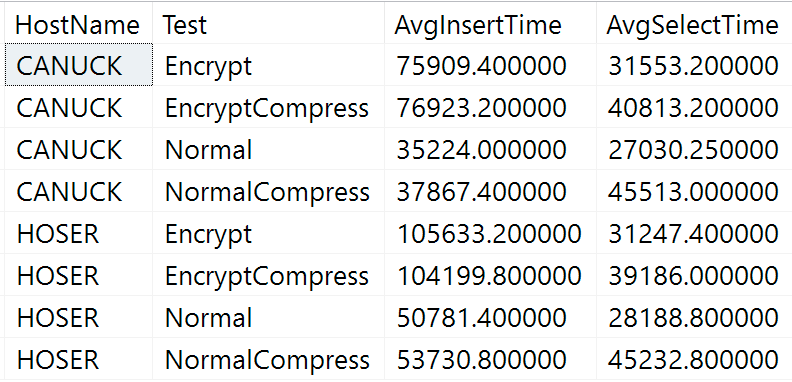 Raw results of duration query
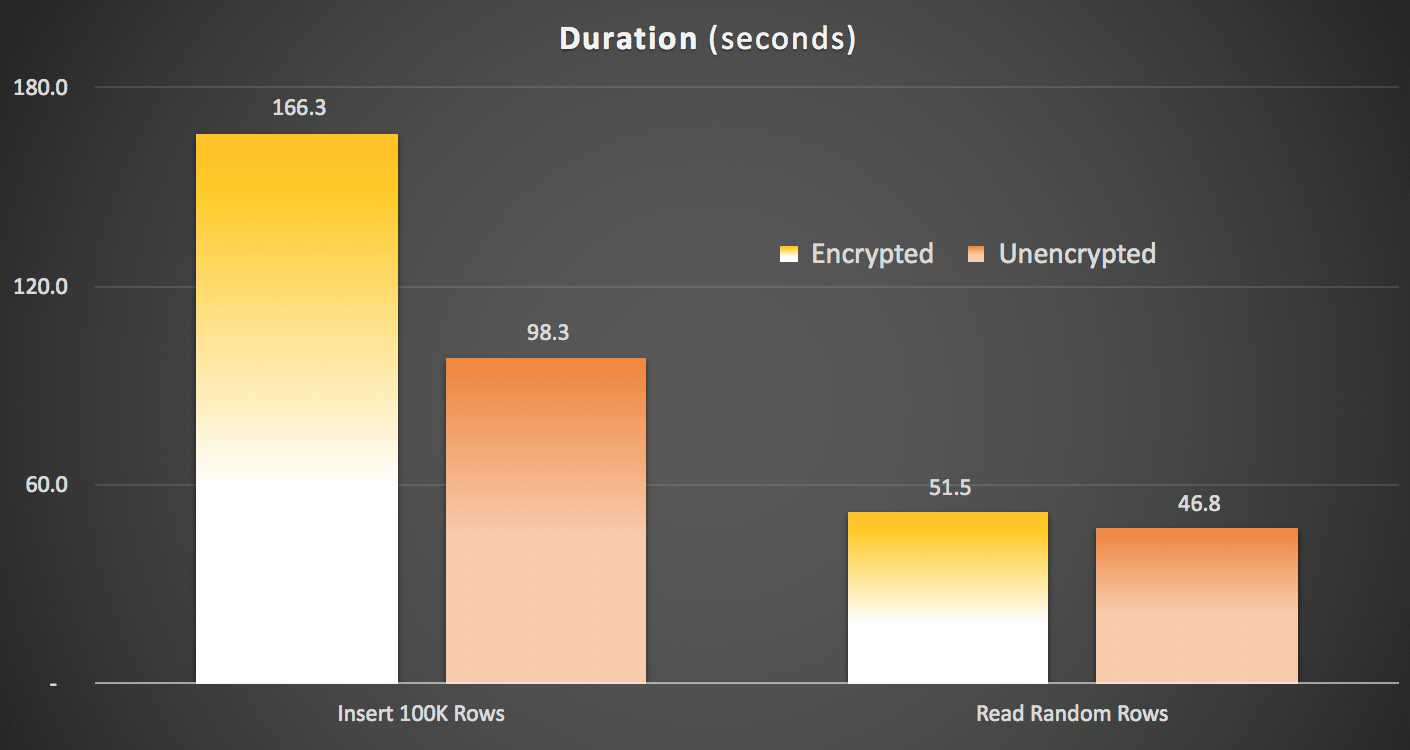
Obviously it will be easier to visualize in another form. As shown in the first graph, remote access had a significant impact on the duration of the inserts (over 40% increase), but compression had little impact at all. Encryption alone roughly doubled the the duration for any test category:
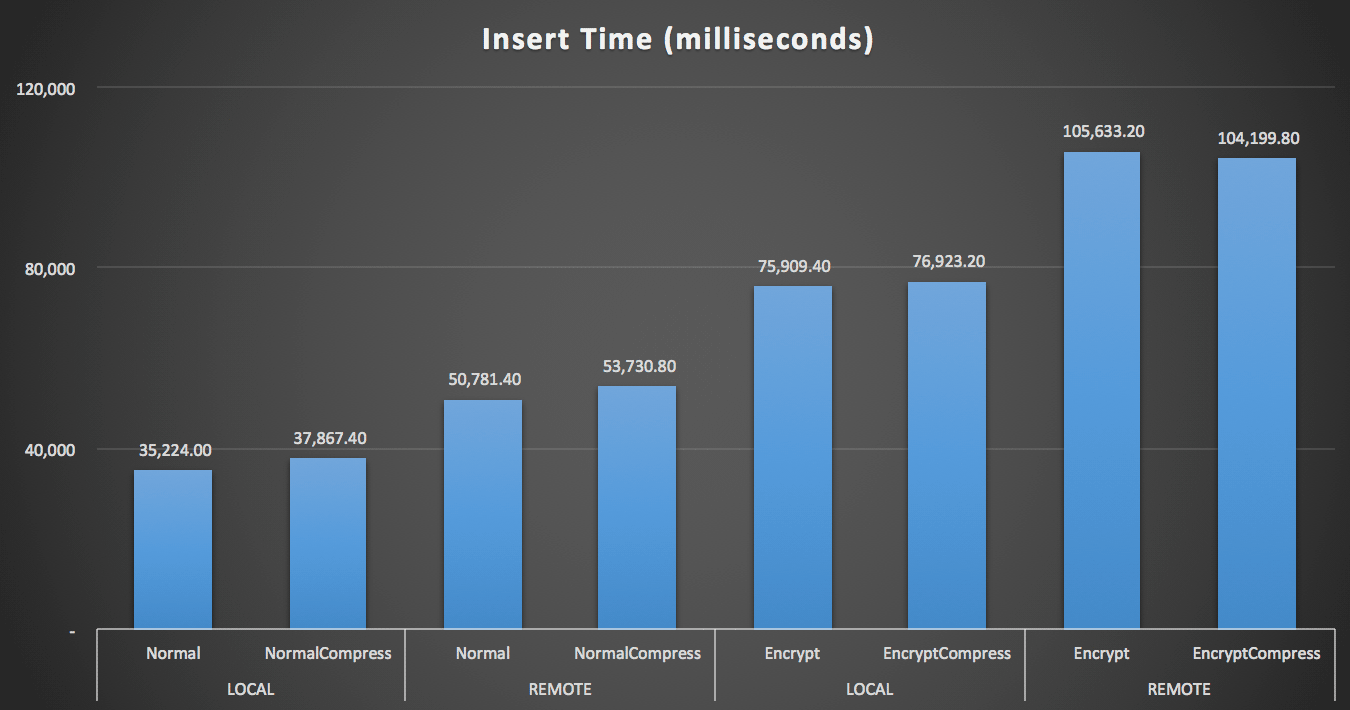 Duration (milliseconds) to insert 100,000 rows
For the reads, compression had a much bigger impact on performance than either encryption or reading the data remotely:
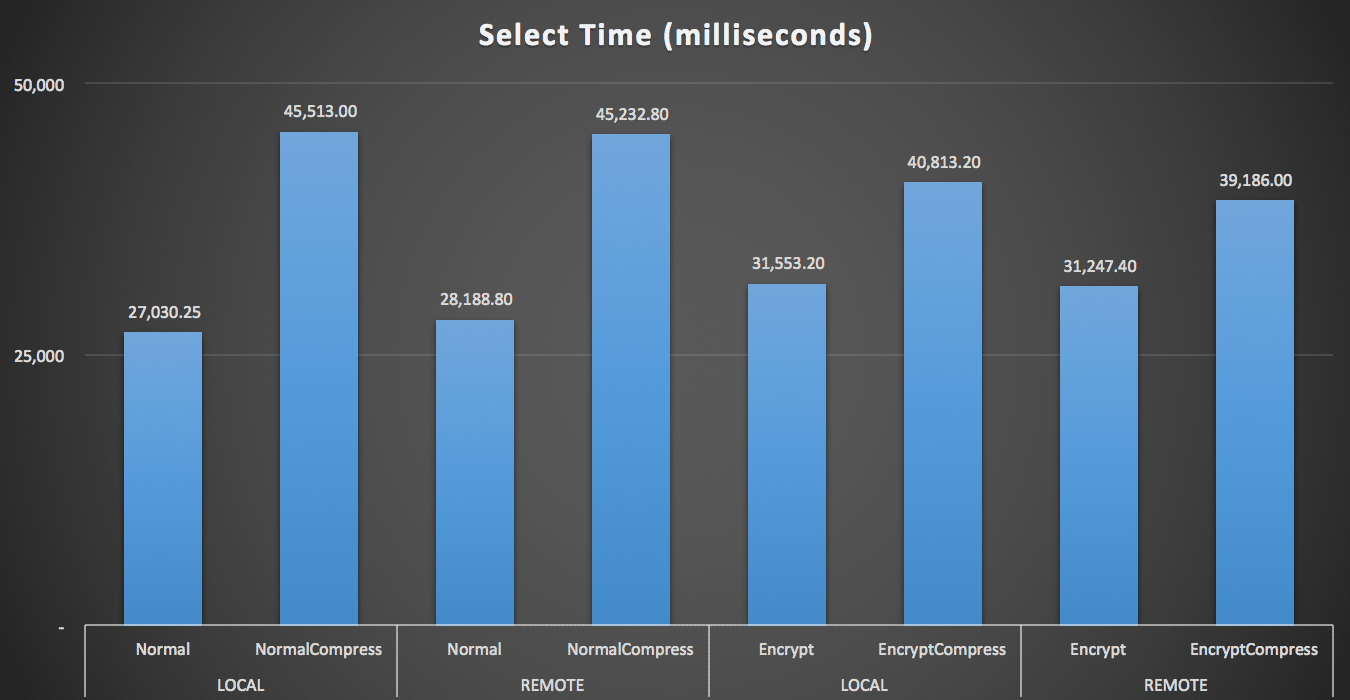 Duration (milliseconds) to read 100 random rows 1,000 times
Space Results
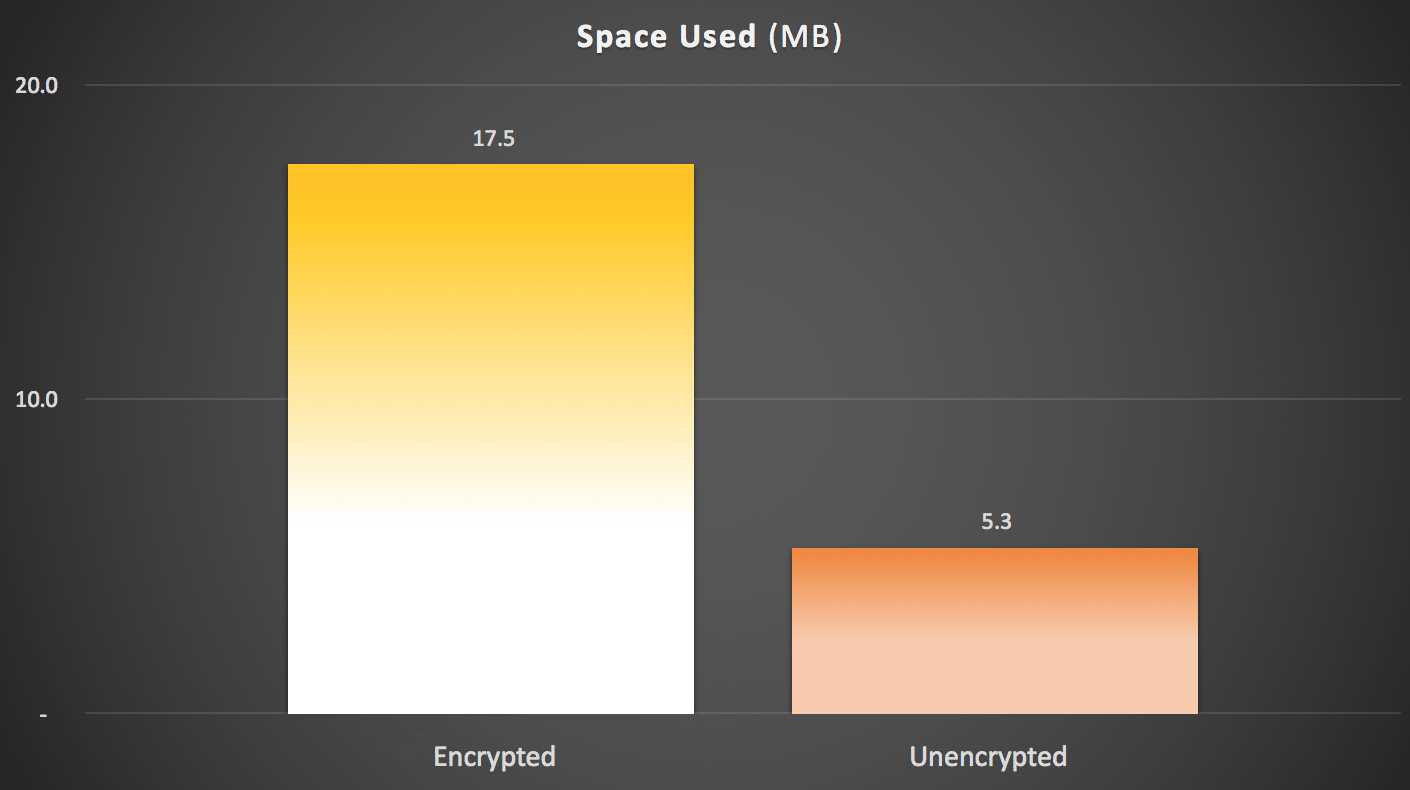
As you might have predicted, compression can significantly reduce the amount of space required to store this data (roughly in half), whereas encryption can be seen impacting data size in the opposite direction (almost tripling it). And, of course, compressing encrypted values doesn't pay off:
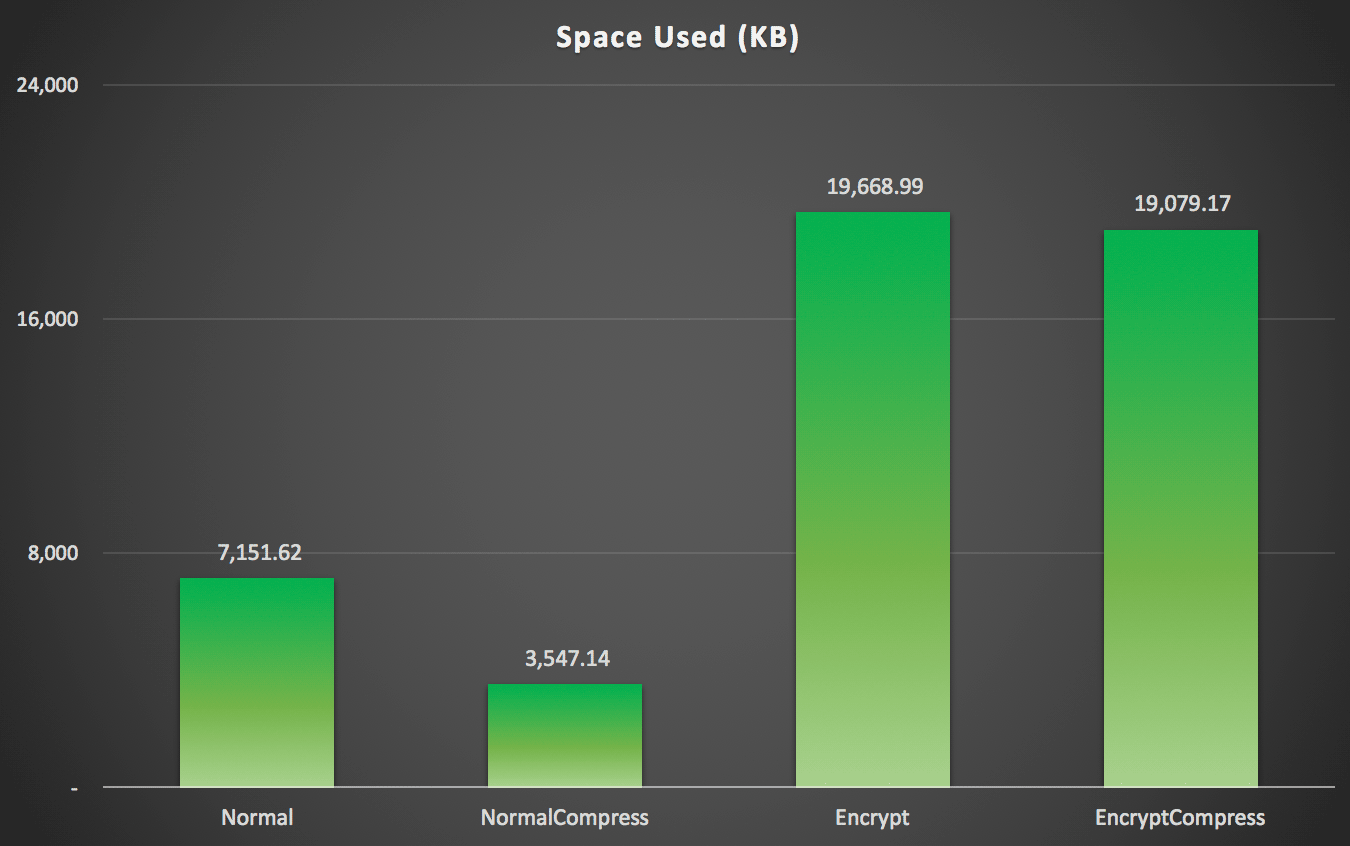 Space used (KB) to store 100,000 rows with or without compression and with or without encryption
Summary
This should give you a rough idea of what to expect the impact to be when implementing Always Encrypted. Keep in mind, though, that this was a very particular test, and that I was using an early CTP build. Your data and access patterns may yield very different results, and further advances in future CTPs and updates to the .NET Framework may reduce some of these differences even in this very test.
You'll also notice that the results here were slightly different across the board than in my previous post. This can be explained:
- The insert times were faster in all cases because I am no longer incurring an extra round-trip to the database to generate the random name and salary.
- The select times were faster in all cases because I am no longer using a sloppy method of string concatenation (which was included as part of the duration metric).
- The space used was slightly larger in both cases, I suspect because of a different distribution of random strings that were generated.
Appendix A – C# Console Application Code
using System;
using System.Configuration;
using System.Text;
using System.Data;
using System.Data.SqlClient;

namespace AEDemo
{
    class AEDemo
    {
        static void Main(string[] args)
        {
            // set up a stopwatch to time each portion of the code
            var timer = System.Diagnostics.Stopwatch.StartNew();

            // random object to furnish random names/salaries
            var random = new Random();

            // connect based on command-line argument
            var connectionString = ConfigurationManager.ConnectionStrings[args[0]].ToString();

            using (var sqlConnection = new SqlConnection(connectionString))
            {
                // this simply truncates the table, which I was previously doing manually
                using (var sqlCommand = new SqlCommand("dbo.Cleanup", sqlConnection))
                {
                    sqlConnection.Open();
                    sqlCommand.ExecuteNonQuery();
                }
            }

            // first, generate 100,000 name/salary pairs and insert them
            for (int i = 1; i <= 100000; i++)
            {
                // random salary between 32750 and 197500
                var randomSalary = random.Next(32750, 197500);

                // random string of random number of characters
                var length = random.Next(1, 32);
                char[] randomCharArray = new char[length];
                for (int byteOffset = 0; byteOffset < length; byteOffset++)
                {
                    randomCharArray[byteOffset] = (char)random.Next(65, 90); // A-Z
                }
                var randomName = new string(randomCharArray);

                // this stored procedure accepts name and salary and writes them to table
                // in the databases with encryption enabled, SqlClient encrypts here
                // so in a trace you would see @LastName = 0xAE4C12..., @Salary = 0x12EA32...
                using (var sqlConnection = new SqlConnection(connectionString))
                {
                    using (var sqlCommand = new SqlCommand("dbo.AddEmployee", sqlConnection))
                    {
                        sqlCommand.CommandType = CommandType.StoredProcedure;
                        sqlCommand.Parameters.Add("@LastName", SqlDbType.NVarChar, 32).Value = randomName;
                        sqlCommand.Parameters.Add("@Salary", SqlDbType.Int).Value = randomSalary;
                        sqlConnection.Open();
                        sqlCommand.ExecuteNonQuery();
                    }
                }
            }

            // capture the timings
            timer.Stop();
            var timeInsert = timer.ElapsedMilliseconds;
            timer.Reset();
            timer.Start();

            var placeHolder = new StringBuilder();

            for (int i = 1; i <= 1000; i++)
            {
                using (var sqlConnection = new SqlConnection(connectionString))
                {
                    // loop through and pull 100 rows, 1,000 times
                    using (var sqlCommand = new SqlCommand("dbo.RetrieveRandomEmployees", sqlConnection))
                    {
                        sqlCommand.CommandType = CommandType.StoredProcedure;
                        sqlConnection.Open();
                        using (var sqlDataReader = sqlCommand.ExecuteReader())
                        {
                            while (sqlDataReader.Read())
                            {
                                // do something tangible with the output
                                placeHolder.Append(sqlDataReader[0].ToString());
                            }
                        }
                    }
                }
            }

            // capture timings again, write both to db
            timer.Stop();
            var timeSelect = timer.ElapsedMilliseconds;

            using (var sqlConnection = new SqlConnection(connectionString))
            {
                using (var sqlCommand = new SqlCommand("Utility.dbo.AddTiming", sqlConnection))
                {
                    sqlCommand.CommandType = CommandType.StoredProcedure;
                    sqlCommand.Parameters.Add("@Test", SqlDbType.NVarChar, 32).Value = args[0];
                    sqlCommand.Parameters.Add("@InsertTime", SqlDbType.Int).Value = timeInsert;
                    sqlCommand.Parameters.Add("@SelectTime", SqlDbType.Int).Value = timeSelect;
                    sqlConnection.Open();
                    sqlCommand.ExecuteNonQuery();
                }
            }
        }
    }
}
The post Always Encrypted Performance : A Follow-Up appeared first on SQLPerformance.com.




 Experiencing the “Cannot change the host configuration” and or Call “HostDatastoreSystem.QueryVmfsDatastoreCreateOptions” for object “datastoreSystem-xxxx” on vCenter Server error message when trying to add disk storage to your VMware vSphere ESXi host? If so, check out my video below where I run through the easy to follow steps in resolving this issue.



 This is just a quick post to confirm that VMware vSphere/ESXi 6 runs on the HP Proliant ML110 G6. Although this is now an older server, it is still very much capable and I know that there are still quite a few being used in home/work labs, hence this post.




![clip_image002[7]](http://blogs.msdn.com/cfs-file.ashx/__key/communityserver-blogs-components-weblogfiles/00-00-00-50-01-metablogapi/0574.clip_5F00_image0027_5F00_41F7F018.png "clip_image002[7]")