Shared posts

26 Mar 07:40

Atlantis Computing Announces HyperScale CX-4 and Dell Partnership

by dan

It’s been a little while since I talked about Atlantis Computing and things have developed a bit since then. They’ve added a bunch of new features to USX, including, amongst other things:

I was recently lucky enough to have the opportunity to be briefed on their latest developments by Priyadarshi Prasad, Senior Director of Product Management at Atlantis Computing.


HyperScale CX-4

Atlantis Computing recently announced a new addition to their HyperScale range of products – the CX-4. If you’re familiar with the existing HyperScale line-up, you’ll realise that this is aimed at the smaller end of the market. Atlantis have stated that “[t]he CX-4 appliance is a two-node hyperconverged integrated system with compute, all-flash storage, networking and virtualisation designed for remote offices, branch offices (ROBO) and “micro” data centres”.

Atlantis HyperScale Box Shot

Atlantis Computing have previously leveraged Cisco, HP, Lenovo and SuperMicro for their hardware offerings and this has continued with the CX-4. The SuperMicro specs are as follows:

Atlantis_CX-4_Spec


Dell FX2

Atlantis also let me know that “Dell is teaming with Atlantis to provide the entire line of Atlantis HyperScale all-flash hyperconverged appliances on their PowerEdge FX2 platform. Atlantis HyperScale CX-4, CX-12 and CX-24 appliances are now available on Dell servers through Dell distributors and channel partners in the U.S., Europe and Middle East, shipped directly to customers”. Here’s an artist’s interpretation of the FX2.

Dell_FX2_FC630_Front_edited

As far as the CX-4 goes, the Dell differences are as follows:

  • Form factor – 2U 2N or 2U 4N
  • Memory per Node – 256GB – 768GB
  • Redundant Integrated 10GbE switch


Resiliency

Resiliency for the cluster comes by way of a mirror relationship between the two nodes in the CX-4 appliance. Atlantis also provides the ability to define an external tie-breaker virtual machine (VM). In keeping with the ROBO theme, this can be run at a central site, and multiple data centres / appliances can use the same tie-breaker VM. There is also high availability logic in the CX-4 system itself.

The tie-breaker is ostensibly there to keep in contact with the nodes and understand whether they’re up or not. In the event of a split-brain scenario, there is a fight for the tie-breaker (a single token). But what happens if the tie-breaker VM is unavailable (e.g. the WAN link is down)? There’s also an internal tie-breaker operating between the nodes, handled by a service VM on each node.

Atlantis_Witness


Simplicity and Scale

One of the key focus areas for Atlantis has been on simplicity, and they’ve gone to great lengths to build a solution and supporting framework ensuring that the deployment, operation and support of these appliances is simple. There’s a single point of support (Atlantis), network connectivity is straightforward, you can have IP configuration done at the factory, and everything can be managed either centrally via USX Manager or individually if required.

The CX-4 can be used as a gateway to the CX-12 if you like, simply by adding another CX-4 (2 nodes). Or you can choose to scale out, depending on your particular use case.


Further Reading and Final Thoughts

Atlantis also recently commissioned a survey that was conducted by Scott D. Lowe at ActualTech Media. You can read the results of “From the Field: Software Defined Storage and Hyperconverged Infrastructure in 2016” here. It provides an interesting insight into what is happening out there in the big, bad world at the moment, and is definitely worth a read. Scott, along with David M. Davis and James Green, has also written a book – “Building a Modern Data Center – Principles and Strategies of Design”. You can reserve your copy here. While I’m linking to articles of interest, this white paper from DeepStorage.net on the Atlantis USX solution is worth a look (registration required).

I really like the focus by Atlantis on simplicity. Particularly if you’re looking to deploy these things in a fairly remote destination.

Secondly, the built-in resiliency of the solution allows for operational efficiencies (you don’t have to get someone straight out to the site in the event of a node failure). I also like the fact that you can use these as a starting point for a HCI deployment, without a significant up-front investment. Finally, the use of all-flash helps with power and cooling, which can be a real problem in remote sites that don’t have high quality data centre infrastructure options available.

I’ve been impressed with Atlantis in the discussions I’ve had with them, and I like the look of what they’ve done with the CX-4. It strikes me that they’ve thought about a number of different scenarios and use cases, and they’ve also thought about working with customers beyond the purchase of the first appliance. Given the street price of these things, it would be worthwhile investigating further if you’re in the market for a hyperconverged solution.

26 Mar 07:38

When did we stop caring about memory management?

by Scott Hanselman

MEMORY! - Image from Wikimedia CommonsThis post is neither a rant nor a complaint, but rather, an observation.

There's some amazing work happening over in the C#-based Kestrel web server. This is an little open source webserver that (currently) sits on libuv and lets you run ASP.NET web applications on Windows, Mac, or Linux. It was started by Louis DeJardin but more recently Ben Adams from Illyriad Games has become a primary committer, and obsessive optimizer.

Kestrel is now doing 1.2 MILLION requests a second on benchmarking hardware (all published at https://github.com/aspnet/benchmarks) and it's written in C#. There's some amazing stuff going on in the code base with various micro-optimizations that management memory more intelligently.

Here's my question to you, Dear Reader, and I realize it will differ based on your language of choice:

When did you stop caring about Memory Management, and is that a bad thing?

When I started school, although I had poked around in BASIC a bit, I learned x86 Assembler first, then C, then Java. We were taught intense memory management and learned on things like Minix, writing device drivers, before moving up the stack to garbage collected languages. Many years later I wrote a tiny operating system simulator in C# that simulated virtual memory vs physical memory, page faults, etc.

There's a great reference here at Ravenbook (within their Memory Pool System docs) that lists popular languages and their memory management strategies. Let me pull this bit out about the C language:

The [C] language is notorious for fostering memory management bugs, including:

  1. Accessing arrays with indexes that are out of bounds;
  2. Using stack-allocated structures beyond their lifetimes (see use after free);
  3. Using heap-allocated structures after freeing them (see use after free);
  4. Neglecting to free heap-allocated objects when they are no longer required (see memory leak);
  5. Failing to allocate memory for a pointer before using it;
  6. Allocating insufficient memory for the intended contents;
  7. Loading from allocated memory before storing into it;
  8. Dereferencing non-pointers as if they were pointers.

When was the last time you thought about these things, assuming you're an application developer?

I've met and spoken to a number of application developers who have never thought about memory management in 10 and 15 year long careers. Java and C# and other languages have completely hidden this aspect of software from them.

BUT.

They have performance issues. They don't profile their applications. And sometimes, just sometimes, they struggle to find out why their application is slow.

My buddy Glenn Condron says you don't have to think about memory management until you totally have to think about memory management. He says "time spent sweating memory is time you're not writing your app. The hard part is developing the experience is that you need to know when you need to care."

I've talked about this a little in podcasts like the This Developer's Life episode on Abstractions with guests like Ward Cunningham, Charles Petzold, and Dan Bricklin as well as this post called Please Learn to Think about Abstractions.

How low should we go? How useful is it to know about C-style memory management when you're a front-end JavaScript Developer? Should we make it functional then make it fast...but if it's fast enough, then just make it work? The tragedy here is that if it "works on my machine" then the developer never goes back to tighten the screws.

I propose it IS important but I also think it's important to know how a differential gear works, but that's a "because" argument. What do you think?


Sponsor: Big thanks to Infragistics for sponsoring the blog this week! Responsive web design on any browser, any platform and any device with Infragistics jQuery/HTML5 Controls.  Get super-charged performance with the world’s fastest HTML5 Grid - Download for free now!


© 2016 Scott Hanselman. All rights reserved.
     
20 Jan 23:51

Performance issues related to security roles in Analysis Services Tabular #ssas #tabular

by Marco Russo (SQLBI)

I have experienced (on difference customer’s databases) some performance issues related to security in SSAS Tabular models. The symptoms are that certain queries, pivot table, or reports, have good performance when you connect as a database administrator, but end users see bad performance no matter what selection and filter they use.

I wrote an article, Security Cost in Analysis Service Tabular, which explains how security is implemented and the different techniques that could be used, depending on the size (number of rows) of tables involved. It’s a tough start of the year, it is certainly not an “easy read”, but I wanted to write the information that will help me (and many others!) to remember what is going on and to evaluate possible solutions.

In my experience, a common situation is a star schema where you apply security on many dimensions. Such approach will create multiple joins in the storage engine queries generated for any measure, because rows in the fact table have to be filtered according to the security, even if the dimension is not included in the filters of the report. There are no silver bullets for this issue, specific optimizations might vary depending on specific data volume and security rules. However, knowing where is the problem is always the first step towards the solution.

20 Jan 23:51

Databas(ics)

by BuckWoody
The beginnings of data science is data. Data are things that you know about, well, other things, so it makes … Continue reading →...(read more)
20 Jan 23:51

Tip # 9 – Automatically Shrinking Your Database

by Chris Shaw

Top 10 Tips for SQL Server Performance and Resiliency

This article is part 9 in a series on the top 10 most common mistakes that I have seen impact SQL Server Performance and Resiliency. This post is not all-inclusive.

Most common mistake #9: Automatically Shrinking Your Database

This is a topic that has been written about frequently, and most often, I try not to re-hash what many people have already blogged about.  However, as often as I see this I would be amiss if I did not add auto shrink to the list.

Often you will see IT professionals approaching their tasks from different angles.  Consider if you were a Systems Admin and you knew you needed some additional storage on a server you might send a request to the storage admin requesting an additional 50 gigs, or whatever amount you need.  As a Database Professional, you would be wise to not only include the size of storage that you need but also the performance specifications that you require.  As a DBA, we need to understand that SQL Server management may not always translate well to other types of systems management.  Now granted this should be no surprise, it is understand we do not approach all things the same way, but where this comes into play is the understanding we all have different backgrounds.  We became DBA’s from different career paths.

If you are new to being a Database Administrator or the Primary focus of your job is not to be a DBA you may see the benefits of shrinking a database automatically.  If the database shrinks by itself, it might be considered self-management; however, there is a problem when doing this.

When you shrink a data file SQL Server goes in and recovers all the unused pages, during the process it is giving that space back to the OS so the space can be used somewhere else.  The downstream effect of this is going to be the fact your indexes are going to become fragmented.  This can be demonstrated in a simple test.

I have a database in my lab based on the Chicago Crime Stats.  I have been doing a lot of testing in the database with an automated indexing script, that has me inserting a deleting a large number of rows at different times.  Over time this database has become rather large for my small lab, it is time to shrink it down to a more manageable size.  The first thing done is to check what the status of my indexes is.

This is a simple query that will return all the indexes in the database with its fragmentation level.

SELECT db_name() as [database],
      Object_Name(ps.object_id) as [table],
      i.name as Index_Name,
      round(avg_fragmentation_in_percent, 0) as Frag
FROM sys.dm_db_index_physical_stats(db_id(), null, null, NULL, NULL) ps
            Join sys.indexes i on ps.Object_ID = i.object_ID and ps.index_id = i.index_id


The results look like this:

image1


More or less the indexes are looking good; there is not a lot of fragmentation except in the one table (that is a discussion for later topics). What happens if I shrink the whole database, to include not only the log but also the data file as well?


Use the following T-SQL:

DBCC ShrinkDatabase ([ChicagoCrimeStats])

Rerunning the index fragmentation script, I now receive these results:

image2


If I have queries that use the IDX_Crimes_Frag_XCORD_Clustered index, there is a real good chance the performance on that query is going to degrade.

There are times when you may need to shrink a file, some considerations could be after a large delete of records or maybe you archived much of the data out of the database.  These sort of operations remove data leaving your databases with a lot of free space.  This free space can be reclaimed by using the DBCC Shrinkfile or DBCC Shrinkdatabase T-SQL commands, however be aware you should re-index after those statements are run.

It is not a bad thing to shrink a database as long as you do it in a controlled manor with proper maintenance afterwards.

Top 10 Tips for SQL Server Performance and Resiliency

  1. Improper Backups
  2. Improper Security
  3. Improper Maintenance
  4. Not having a Baseline
  5. SQL Server Max Memory
  6. Change History
  7. Disaster Recovery Plans
  8. TempDB
12 Jan 23:32

SQLQueryStress: The Source Code

by Adam Machanic
Back in 2006, I created a very simple tool called SQLQueryStress . The goal of this tool was to enable the user to test a single query under some form of load -- up to 200 simultaneous threads. I wrote this tool primarily for a book I was working on at the time, and used it for most of the examples therein. And after that, truth be told, I decided that the tool was not very useful. I use it for demos in almost every presentation I give -- it's great for showing simple contention scenarios -- but...(read more)
12 Jan 23:30

Why use a GUID for a clustering key?

by Jeremiah Peschka

Conventional wisdom in the database world is that nobody should ever use a GUID for a clustering key. And the people who do are clearly awful people who hate kittens and everything good in the world. I’ve probably even gotten up in somebody’s business about this before. The problem with common knowledge is that it may not always be right. After all, common knowledge used to be that the moon made you crazy.

Think like an architect

Before discounting GUIDs as a clustered index, think about what your application requires.

Software and database architects take into account an application’s requirements as they go through the design process. It’s necessary to think about how an application needs to identify data as it’s generated – you might have to generate values for the clustering key in the application tier long before an object graph is persisted to the database. Or you might want to make sure that you have more than 2,147,483,647 possible keys (you could double that if you start at -2,147,483,648).

I've got your BIGINT right here!

I’ve got your BIGINT right here!

“But what about BIGINT“, you shout. With modern use cases (like the Internet of Things) it’s possible to generate tremendous volumes of data. Long ago, I worked at a utility company. Every meter could generate readings at whatever frequency the business wanted. More frequent readings allow better long term trending, forecasting, and pricing but at a cost. With storage now being stupendously cheap (I have around 6 TB of raw SSD capacity in my desktop), it’s possible to store huge amounts of data.

Let’s think through the requirements:

  • A single meter could generate 1 reading per minute which is 1,440 readings per day.
  • Over 1 year that’s 525,600 readings per power meter.
  • For a 32-bit integer, that’s 8,171 meter years of readings. We could exhaust that in a few years with any reasonable number of homes using our utility.
  • For a 64-bit integer, that’s 35,096,545,041,304 meter years of readings.
    • There are 3 million households in New York City.
    • Let’s say we get half of them on our service.
    • That’s still 23 million meter years.

So, what would we need GUIDs for?

We might need GUIDs if pre-processing occurs in the application to associate multiple data points with one another (foreign keys). Or if we anticipate having even more data coming into the system. With increases in metering and monitoring technology, it’s possible that we could be collect additional sensor data to go along with all of those meter readings (think HVAC and lighting information combined with weather station data). GUIDs can also help avoid intermediate page contention in write heavy workloads.

But the randoms!

GUIDs are random, at least as generated by SQL Server’s NEWID function. And, as we all know, randomness is bad because it causes fragmentation in our data structures. Here’s the deal – unless you are only appending data to the end of a table with no indexes, all of your inserts will cause fragmentation.

Sure, GUIDs may cause fragmentation in the clustered index on your base table. Can you conclusively prove, outside of a contrived example, that the primary performance problem in your application is fragmentation caused by GUIDs? And that this isn’t just free space on disk? Remember – if you have indexes, you’re going to have out of order inserts into those indexes. Are you positive the poor performance isn’t just your awful code or bad indexing or maybe just out of date stats?

Before blaming the randomness of GUIDs, do your homework and prove where the bottlenecks exist in your application. Fix those. Find the next bottleneck. Rinse. Repeat.

What’s the takeaway?

It’s important to understand the reasons that you’re using one datatype over another. Understand the application’s patterns before you make a decision – database decisions last forever. OK, maybe they don’t last forever, but bad database decisions become difficult to change once you have any significant data volume present. Do your homework, understand how your choices affect you, and don’t be afraid to go against conventional wisdom when you know what’s right for your application.


Buratino (Pinocchio)” by Matt Shalvatis is licensed under CC BY-NC-SA 2.0


12 Jan 23:29

Resolve to Architect for Zero Database Downtime in 2016

by Michelle McLean

Learn more about Michelle McLean. It’s an inconvenient truth – we live in an ‘always on’ world. Consumer expectations to get what they want, exactly when the want it, has never been more evident than this year’s holiday season. 2015 has shattered records for eCommerce traffic and overall online spend. Retailers including Target and Neiman […]

The post Resolve to Architect for Zero Database Downtime in 2016 appeared first on DATAVERSITY.

12 Jan 23:29

Tuning : A Good Place to Start

by Tim Radney

Note: This post was originally published only in our eBook, High Performance Techniques for SQL Server, Volume 4. You can find out about our eBooks here.

I regularly get asked the question, "Where do I start when it comes to trying to tune a SQL Server instance?" My first response is to ask them about the configuration of their instance. If certain things are not configured properly then starting to look at long-running or high-cost queries right away could be wasted effort.

I have blogged about common things administrators miss where I share many of the settings that administrators should change from a default installation of SQL Server. For performance-related items, I tell them they should check the following:

  • Memory settings
  • Updating statistics
  • Index maintenance
  • MAXDOP and cost threshold for parallelism
  • tempdb best practices
  • Optimize for ad hoc workloads

Once I get past the configuration items, I ask if they have looked at file and wait statistics as well as high-cost queries. Most of the time the response is "no" – with an explanation that they aren't sure how find that information.

Typically the common compliant when someone's stating they need to tune a SQL Server is that it's running slow. What does slow mean? Is it a certain report, a specific application, or everything? Did it just start happening, or has it been getting worse over time? I start by asking the usual triage questions of what the memory, CPU, and disk utilization is compared to when things are normal, did the problem just start happening, and what recently changed. Unless the client is capturing a baseline, they don't have metrics to compare against to know if current stats are abnormal.

Nearly every SQL Server that I work on hosts more than one user database. When a client reports that the SQL Server is running slow, most of the time they are concerned about a specific application that is causing issues for their customers. A knee-jerk reaction is to immediately focus on that particular database, however often times another process could be consuming valuable resources and the application's database is being impacted. For example, if you have a large reporting database and someone kicked off a massive report that saturates the disk, spikes CPU, and flushes the plan cache, you can bet that the other user databases would slow down while that report is being generated.

I always like to start by looking at the file stats. For SQL Server 2005 and up, you can query the sys.dm_io_virtual_file_stats DMV to get I/O statistics for each data and log file. This DMV replaced the fn_virtualfilestats function. To capture the file stats, I like to use a script that Paul Randal put together: capturing IO latencies for a period of time. This script will capture a baseline and, 30 minutes later (unless you change the duration in the WAITFOR DELAY section), capture the stats and calculate the deltas between them. Paul's script also does a bit of math to determine the read and write latencies, which makes it much easier for us to read and understand.

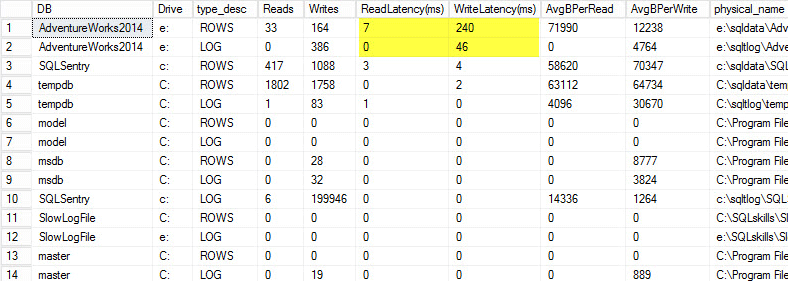
On my laptop I restored a copy of the AdventureWorks2014 database onto a USB drive so that I would have slower disk speeds; I then kicked off a process to generate a load against it. You can see the results below where my write latency for my data file is 240ms and write latency for my log file is 46ms. Latencies this high are troublesome.

File latencies

Anything over 20ms should be considered bad, as I shared in a previous post: monitoring read/write latency. My read latency is decent, but the AdventureWorks2014 database is suffering from slow writes. In this case I would investigate what is generating the writes as well as investigating my I/O subsystem performance. If this had been excessively high read latencies I would start investigating query performance (why is it doing so many reads, for instance from missing indexes), as well as overall I/O subsystem performance.

It is important to know the overall performance of your I/O subsystem, and the best way to know what it's capable of is by benchmarking it. Glenn Berry talks about this in his article analyzing I/O performance for SQL Server. Glenn explains latency, IOPS, and throughput and shows off CrystalDiskMark which is a free tool that you can use to baseline your storage.

After finding out how the file stats are performing, I like to look at wait stats by using the DMV sys.dm_os_wait_stats, which returns information about all the waits that occurred. For this I turn to another script that Paul Randal provides in his capturing wait statistics for a period of time blog post. Paul's script does a little math for us again but, more importantly, it excludes a lot of the benign waits that we typically don't care about. This script also has a WAITFOR DELAY and is set to 30 minutes. Reading wait stats can be a bit more tricky: You can have waits that appear to be high based on percentage, but the average wait is so low that it isn't anything to worry about.

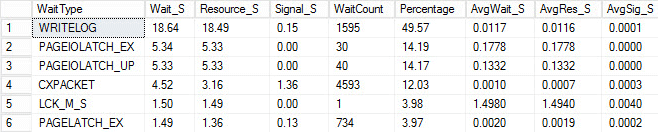
I kicked off the same load process and captured my wait stats, which I have shown below. For explanations for many of these wait types you can read another one of Paul's blog posts, wait statistics, or please tell me where it hurts, plus some of his posts on this blog.

Wait stats

In this contrived output, the PAGEIOLATCH waits could be indicating a bottleneck with my I/O subsystem, but could also be a memory issue, table scans instead seeks, or a host of other issues. In my case, we know it is a disk issue, since I am storing the database on a USB stick. The LCK_M_S wait time is very high, however there is only one instance of the wait. My WRITELOG is also higher than I would like to see, but is understandable knowing the latency issues with the USB stick. This also shows CXPACKET waits, and it would be easy to have a knee-jerk reaction and think you have a parallelism/MAXDOP issue, however the AvgWait_S counter very low. Be careful when using waits for troubleshooting. Let it be a guide to tell you things that aren't the problem as well as giving you a direction of where to go look for issues. Proper troubleshooting is correlating behaviors from multiple areas to narrow down the problem.

After looking at the file and wait statistics I then start digging into the high cost queries based on the issues I found. For this I turn to Glenn Berry's Diagnostic Information Queries. These sets of queries are the go-to scripts that many consultants use. Glenn and the community are constantly providing updates to make them as informational and robust as possible. One of my favorite queries is the top cached queries by execution count. I love finding queries or stored procedures that have high execution_count coupled with high total_logical_reads. If those queries have tuning opportunities then you can quickly make a big difference to the server. Also included in the scripts are top cached SPs by total logical reads and top cached SPs by total physical reads. Both of these are good for looking for high reads with high execution counts so you can reduce the number of I/Os.

In addition to Glenn's scripts, I like to use Adam Machanic's sp_whoisactive to see what is currently running.

There is a lot more to performance tuning than just looking at file and wait stats and high-cost queries, however that's where I like to start. It is a way to quickly triage an environment to start determining what's causing the issue. There is no completely fool proof way to tune: what every production DBA needs is a checklist of things to run through to eliminate and a really good collection of scripts to run through to analyze the health of the system. Having a baseline is key to quickly ruling out normal vs. abnormal behavior. My good friend Erin Stellato has an entire course on Pluralsight called SQL Server: Benchmarking and Baselining if you need help with setting up and capturing your baseline.

Better yet, get a state-of-the-art tool like SQL Sentry Performance Advisor that will not only collect and store historical information for profiling and trending, and give easy access to all of the details mentioned above and more, but it also gives the ability to compare activity to built-in or user-defined baselines, efficiently maintain indexes without lifting a finger, and alert or automate responses based on a very robust custom conditions architecture. The following screen shot depicts the historical view of the Performance Advisor dashboard, with disk waits in orange, database I/O at the bottom right, and baselines comparing the current and previous period on every graph (click to enlarge):

Quality monitoring tools are not free, but they provide a ton of functionality and support that allow you to focus on the performance issues on your servers, instead of focusing on queries, jobs, and alerts that may allow you to focus on your performance issues – but only once you get them right. There is often great value in not re-inventing the wheel.

The post Tuning : A Good Place to Start appeared first on SQLPerformance.com.

12 Jan 23:29

Tip # 8 – Default TempDB Settings

by Chris Shaw

Top 10 Tips for SQL Server Performance and Resiliency

This article is part 8 in a series on the top 10 most common mistakes that I have seen impacting SQL Server Performance and Resiliency. This post is not all inclusive.

Most common mistake #8: Default TempDB Settings

By default when you install SQL Server the TempDB database is not optimized.  For SQL Servers that use the TempDB even moderately, I recommend optimizing it for the best performance.  The TempDB is the storage area that SQL Server uses to store data for a short periods of time, information that can be found in the TempDB include temporary tables, and data that is being sorted for query results. The data in the TempDB is so temporary that each time the SQL Server service restarts, the TempDB is recreated.

Due to the specific nature of the data in TempDB and the frequency of use it is important to ensure you have the most optimal configuration.

Optimizing the TempDB is so important that Microsoft is changing how it is installed with SQL Server 2016 to encourage the optimization of Temp DB.  How do you optimize TempDB?  It’s not difficult at all if you follow these few pointers:

Place your Temp DB on that fastest storage you have.  Ultimately this storage should be pounding out a latency less than 5 milliseconds.  Does your server have access to SSD storage?  If so that is a great place for the TempDB.

There are a great number of studies that have been done to determine the ideal number of files you should split your Temp DB over.  With my experience I tend to create one temp DB file for each processor core on the server, however I don’t do this until I find there is some contention in the TempDB.

Grow your TempDB to the size you need it.  Your TempDB is going to be recreated each time your service is restarted, so if your default database size is smaller than the normal operational size  you are going to have to go through some grow events.  Speaking of growth events, it is better to have controlled growth rather than a number of little growth events, so we recommend reviewing the auto growth size.

Top 10 Tips for SQL Server Performance and Resiliency

  1. Improper Backups
  2. Improper Security
  3. Improper Maintenance
  4. Not having a Baseline
  5. SQL Server Max Memory
  6. Change History
  7. Disaster Recovery Plans


12 Jan 23:28

When ALTER TABLE doesn’t work

by Jeremiah Peschka

We’re all used to being able to change things whenever we want. Heck, I put on a different pair of socks just to write this blog post! They’re my bloggin’ socks.

But, back to the topic at hand, we’re used to being able to use ALTER TABLE commands to change tables in SQL Server. And, in fact, most of the time that just works.

In-Memory OLTP and ALTER TABLE

Way back in SQL Server 2014, when we first got In-Memory OLTP, it wasn’t possible to change a table once you’d created it. Instead you had to:

  • Create a new, identical, table.
  • Copy data into the new table.
  • Drop the original table.
  • Create a new table with the same name as the original table.
  • Copy data into the new/original table.
  • Drop the copied table.
  • Have enough memory for all of this to work.

That’s a lot of work, but it’s theoretically not that tricky for an experienced DBA. Plus, savvy DBAs could probably automate this if they really wanted to. Thankfully, ALTER TABLE works in SQL Server 2016 on In-Memory OLTP tables. At least, according to SQL Server Books Online.

And, for the most part, it does work. You can use  ALTER TABLE to add nonclustered indexes to existing tables, to add columns, or to do just about everything that you’d want to do.

Just About… ALTER TABLE

What’s the “just about everything” for?

One of the big features in SQL Server 2016 is that it’s possible to put a columnstore index on a memory optimized table.

ZOMGWTFBBQ?!!!!!!1!shiftone!1!!!!

Yeah, you heard me. You can basically wear a pair of sports cars like rollerskates with SQL Server 2016. But there’s a catch. A big, smelly, gas guzzling, crippling catch:

ALTER TABLE failing on a memory optimized table with a clustered columnstore index

Say ALTER TABLE one more time, I dare you!

wat

Once you’ve put a clustered columnstore index on a memory optimized table, you’re done. You’ll need to define all of your DEFAULTs, foreign keys, unique constraints, etc during table creation. Thankfully, this is all supported by SQL Server 2016’s CREATE TABLE statement.

If you’re thinking about implementing In-Memory OLTP to take advantage of falling memory prices, be very careful during your initial design. If you think that you’ll need to run analytical queries against the memory optimized tables, you may find that index tuning changes from a simple process to dance that goes “drop create rinse repeat”.

Note: Columnstore indexes on memory optimized tables is specifically called out as being functional in SQL Server 2016 CTP 3.2, which I’m using.

12 Jan 23:26

JSON in SQL Server 2016: Part 4 of 4

by Jovan Popovic (MSFT)

Exporting Data as JSON - FOR JSON

In this final post of our four-part JSON series, we showcase the ability to format query results as JSON text using the FOR JSON clause. If you are familiar with the FOR XML clause, you will easily understand FOR JSON.

When you add the FOR JSON clause at the end of a SQL SELECT query, SQL Server will take the results, format them as JSON text, and return them to the client. Every row will be formatted as one JSON object, values in cells of the result set will be generated as values of JSON objects, and column names or aliases will be used as key names. We have two kinds of FOR JSON clauses:

  • FOR JSON PATH: Enables you to define the structure of an output JSON using the column names/aliases. If you put dot-separated names in the column aliases, JSON properties will follow the naming convention. This feature is similar to FOR XML PATH where you can use slash separated paths.
  • FOR JSON AUTO Automatically creates nested JSON sub arrays based on the table hierarchy used in the query. Again, this is similar to FOR XML AUTO.

JSON text that is generated with a FOR JSON clause can be transformed back to the relational form using OPENJSON.

Conclusion

JSON functions in SQL Server enable you to query and analyze JSON data as well as transform JSON to relational domains, and relational data to JSON. They allow you to integrate SQL Server with external systems that produce or consume JSON data without additional transformations in the application layer.

SQL Server also provides a hybrid storage model where you can combine relational data and JSON. This model enables you to make trade-offs between high performance data access and flexibility/rapid developments. You can use the same indexing techniques both on standard columns and values in JSON text.

The hybrid model retains all the benefits of the SQL Server engine with fully powerful query language and ACID transactions. It also boasts well-known management and security models, several features that work with JSON functions, and a wide ecosystem of tools compatible with SQL Server.

Check out the other posts in this four-part series in the links below, or learn more in the SQL Server 2016 blogging series.

JSON in SQL Server 2016: Part 1 of 4

JSON in SQL Server 2016: Part 2 of 4

JSON in SQL Server 2016: Part 3 of 4

12 Jan 23:24

The Next Evolution of Automation is Machine Learning

by A.R. Guess

by Angela Guess Tony Bradley recently opined in DevOps.com, “Automation is the fuel that drives DevOps. Automating routine, repeatable tasks is one of the defining characteristics of DevOps culture. As artificial intelligence (AI) and machine learning improve, the scope and complexity of the tasks that can be automated increases, which raises the bar for all […]

The post The Next Evolution of Automation is Machine Learning appeared first on DATAVERSITY.

12 Jan 23:23

The Human Element in Big Data Analytics May Become a Thing of the Past

by A.R. Guess

by Angela Guess Rick Delgado recently wrote in Dataconomy, “Most experts agree that while big data uses some of the most advanced technology available to businesses, doing so without someone to guide it — the human element, so to speak — would be a mistake. Human thought processes have become a vital ingredient to achieving […]

The post The Human Element in Big Data Analytics May Become a Thing of the Past appeared first on DATAVERSITY.

12 Jan 23:23

FTC Warns Businesses to Be Wary of Discrimination Via Big Data

by A.R. Guess

by Angela Guess Katherine Noyes reports in InfoWorld, “If your company uses big data, be aware: the FTC is watching, and it’s concerned. For all its potential benefits, big data can lead to discrimination and worsen economic disparity, the Federal Trade Commission warned in a new report that includes caveats and guidelines for businesses. Entitled […]

The post FTC Warns Businesses to Be Wary of Discrimination Via Big Data appeared first on DATAVERSITY.

12 Jan 23:21

Preview the newest ODBC SQL Server Driver for Windows and Linux

by SQL Server Team

We are pleased to announce the community technology preview of Microsoft ODBC Driver 13 for SQL Server on Windows and Linux, supporting Ubuntu, RedHat and SUSE distributions! The updated driver provides robust data access to Microsoft SQL Server and Microsoft Azure SQL Database via ODBC on Windows and Linux platforms.

Always Encrypted for Windows and Linux

You can now use Always Encrypted with the Microsoft ODBC Driver on Linux and Windows. Always Encrypted is a new SQL Server 2016 and Azure SQL Database security feature that can help prevent sensitive data from being seen in plaintext in a SQL Server instance. It lets you transparently encrypt the data in the application, so that SQL Server will only handle the encrypted data and not plaintext values. Even if the SQL instance or the host machine is compromised, an attacker gets ciphertext of the sensitive data. In order to use the Always Encrypted feature, you have to use a supported driver such as ADO.NET or the ODBC 13 Driver for SQL Server Preview to encrypt the plain text data then store the encrypted data inside SQL Server 2016 CTP2 and above or Azure SQL Database. Similarly, you will use a capable driver like the new ODBC driver or ADO.NET to decrypt the data.

Internationalized Domain Names for Windows

Internationalized Domain Names (IDNs) allow your web server to use Unicode characters for server name, enabling support for more languages. Using the new Microsoft ODBC Driver 13 for SQL Server on Windows Preview, you can convert a Unicode serverName to ASCII compatible encoding (Punycode) when required during a connection. This conversion is enabled by setting the property serverNameAsACE to true. Otherwise, if the DNS service is configured to allow the use of Unicode characters, use the default serverNameAsACE property value of false.

Linux ODBC drivers add Ubuntu support

The preview ODBC drivers for Linux now supports Ubuntu, RedHat and SUSE. This is Microsoft’s first ODBC Driver for SQL Server release supporting Ubuntu. You can now enjoy enterprise level support while connecting to SQL Server from Ubuntu. It also updates the drivers to unixODBC driver manager 2.3.1 support.

Learn more

The ODBC driver is part of SQL Server and the Microsoft Data Platform’s wider interoperability program, with drivers for PHP 5.6, Node.js, JDBC, and ADO.NET already available. Look for more features in coming releases as we continue to build out support for Linux in our ODBC driver.

We invite you to explore the latest the Microsoft Data Platform has to offer via a trial of Microsoft Azure SQL Database or by trying the new SQL Server 2016 CTP.

For more information see documentation on the Microsoft Developer Network.

Questions? Join the discussion of the new driver capabilities at MSDN and stackoverflow. If you run into an issue or would like to make a suggestion, let us know via Connect.

12 Jan 23:21

Join Effects With UPDATE

by Rob Farley

A lot of people don’t like UPDATE with a FROM clause. I’m going to explore what’s going on, both logically and within the query plan. And I’m doing this for T-SQL Tuesday #74, hosted by Robert Davis (@sqlsoldier). TSQL2sDay150x150[3]

I’m going to use a fresh copy of AdventureWorks2012. I’m using SQL 2012 SP3, but the things I’m looking at should apply to most versions. I’m going to use Production.Product and Production.ProductSubcategory. The Product table has a ProductSubcategoryID column with a foreign key in place, although this column allows nulls, as not every product must be within a subcategory.

Our standard UPDATE query doesn’t have a FROM clause. It’s just “UPDATE ... SET ... WHERE ...”, and if we need to hook into other tables, we use sub-queries. Let’s look at why this is significant.

The WHERE clause filters rows. A sub-query in the WHERE clause still only filters rows, either by being a scalar expression used in one of the predicates, or being a single-column table expression used in an IN predicate, or a table expression used in an EXISTS clause. Any other tables used in sub-queries in the WHERE clause can only be used to help filter the table being updated – they can’t affect the SET clause at all, or cause a row to be updated multiple times.

Some examples are like this:

UPDATE Production.Product
SET DiscontinuedDate = SYSDATETIME()
WHERE ProductSubcategoryID = (SELECT s.ProductSubcategoryID FROM Production.ProductSubcategory s WHERE s.Name = 'Tights');

UPDATE Production.Product
SET DiscontinuedDate = SYSDATETIME()
WHERE ProductSubcategoryID IN (SELECT s.ProductSubcategoryID FROM Production.ProductSubcategory s WHERE s.ProductCategoryID = 4);

UPDATE Production.Product
SET DiscontinuedDate = SYSDATETIME()
WHERE EXISTS (SELECT * FROM Production.ProductSubcategory s 
              WHERE s.ProductCategoryID = 4 
              AND s.ProductSubcategoryID = Production.Product.ProductSubcategoryID);

Using other tables in the SET clause generally means something that returns a scalar value, although this could become more complex using CASE. Still though, the logical impact on the overall query is notable. Something in the SET clause cannot be used to filter the values being updated, or to update a value multiple times. The SET clause is a list of “column = <scalar expression>” clauses, in which each column must come from the table (or table expression) being updated (which means I don’t think it should ever have a table alias), and cannot be listed multiple times. As the expression is scalar, it can’t produce multiple rows or columns.

UPDATE Production.Product
SET DiscontinuedDate = (SELECT MAX(s.ModifiedDate)
                        FROM Production.ProductSubcategory s 
                        WHERE s.ProductSubcategoryID = Production.Product.ProductSubcategoryID)
WHERE ProductSubcategoryID IN (SELECT s.ProductSubcategoryID FROM Production.ProductSubcategory s WHERE s.ProductCategoryID = 4);

Now, all UPDATE statements could be written like this. As an update statement cannot change the number of rows in a table, the net effect on any table is a single row of change (I know triggers could be used to have a larger effect, but that’s a separate topic). I’ve met plenty of people over the years who will argue for never using a FROM clause in an UPDATE clause.

You see, a FROM clause can have more of an effect than these sub-queries.

Let’s think about what introducing extra tables via a FROM clause can do. For now, let’s start with what’s going on in a SELECT query, when you turn a FROM clause into a FROM ... JOIN clause.

1. It can let you access data in the columns of those tables, to use in predicates or expressions.

2. It can let you filter the data in the base table, by only allowing rows which match, such as when using an inner join or right outer join.

3. It can cause rows in the base table to be returned multiple times, if multiple rows in the joined table match a single row in the base table.

4. It can introduce NULL rows, if a full or right outer join is being done (or a left outer join with the base table second) and there are rows in the joined table that don’t match any rows in the base table.

The particular combination of these will affect the type of join performed by your SELECT query – such as a Semi Join which does number 2, but none of the others. And if it does none, then the join is redundant and won’t appear in the query plan at all.

So how does this work in an UPDATE statement?

There are two possible ways that a FROM clause can work – one is to include the table being updated in the FROM clause, and the other is to have it NOT included in the FROM clause. If it doesn’t appear in the FROM clause, then predicates to define the matching criteria must be included in the WHERE clause to avoid updating every row. If it does appear in the FROM clause, then I would recommend using the table alias in the UPDATE clause rather than the name of the table itself.

(Interestingly PDW does not support “UPDATE ... FROM ... JOIN”, although “UPDATE ... FROM ... WHERE” is fine.)

So this is fine:

UPDATE Production.Product
SET DiscontinuedDate = s.ModifiedDate
FROM Production.ProductSubcategory s
WHERE s.ProductSubcategoryID = Production.Product.ProductSubcategoryID;

As is this:

UPDATE p
SET DiscontinuedDate = s.ModifiedDate
FROM Production.Product p
JOIN Production.ProductSubcategory s
ON s.ProductSubcategoryID = p.ProductSubcategoryID;

But please be careful about:

UPDATE Production.Product
SET DiscontinuedDate = s.ModifiedDate
FROM Production.Product p
JOIN Production.ProductSubcategory s
ON s.ProductSubcategoryID = p.ProductSubcategoryID;

It works, but I don’t consider it safe. Because you have the potential to update a table which isn’t mentioned in the FROM clause, you could find yourself inadvertently updating every row in Production.Product. There are safeguards to prevent it happening – this next example gives an error:

UPDATE Production.Product
SET DiscontinuedDate = SYSDATETIME()
FROM Production.Product p
WHERE Production.Product.ProductSubcategoryID IS NOT NULL;

, although this one doesn’t, and updates every row in the table – after all, we have a CROSS JOIN going on, because I’ve listed the wrong table.

UPDATE Production.Product
SET DiscontinuedDate = SYSDATETIME()
FROM Production.ProductSubcategory p
WHERE p.ProductSubcategoryID IS NOT NULL;

If I’m writing queries, it’s generally fine. But if there’s a system which produces dynamic SQL, I start to worry. I’d rather update the alias, and be completely clear about what’s going on.

So let’s go with the idea of using the table alias in the UPDATE clause when using the FROM clause, and choosing to always include the table being updated in the FROM clause. Unless we’re using PDW, of course.

But the impact of those join effects... let’s look at them.

Earlier, we saw this query. An inner join between Product and ProductSubcategory.

UPDATE p
SET DiscontinuedDate = s.ModifiedDate
FROM Production.Product p
JOIN Production.ProductSubcategory s
ON s.ProductSubcategoryID = p.ProductSubcategoryID;

Now, because s.ProductSubcategoryID is known to be unique (it’s the primary key on s), there is no way that this can cause ‘multiple updates’ to Product. Things are okay here, but filtering could certainly apply. A join is done to get the values from ProdcutSubcategory, and the rows are fed into the Clustered Index Update operator.

image[12]

Filters are okay here. UPDATE is happy with filters, whether they’re implemented using the WHERE clause or via an ON clause.

But what if the unique index weren’t there? Then we might see duplicate rows – the next join effect.

ALTER TABLE [Production].[Product] DROP CONSTRAINT [FK_Product_ProductSubcategory_ProductSubcategoryID];
ALTER TABLE [Production].[ProductSubcategory] DROP CONSTRAINT [PK_ProductSubcategory_ProductSubcategoryID];

Now what does the plan look like – we should see a Table Scan instead of a Clustered Index Scan because we just dropped the PK, but what other differences?

image[16]

It looks very similar, but now throws a Distinct Sort in there. You see, an Update isn’t going to do multiple updates. It won’t allow it. So it does a Distinct Sort on the PK of the Product table, and uses whichever value it cares to for the update.

Another option it could’ve used would’ve been to use an Aggregate operator (because GROUP BY and DISTINCT are essentially the same thing), in which case it would’ve needed to apply an aggregate function to s.ModifiedDate while grouping by the Product PK. Which aggregate? The ANY() aggregate, of course – because it doesn’t care which value to use, it just has to be a valid one. I can get this plan by using an OPTION (FAST 1) query hint, because that will avoid doing the Sort, as a Sort is blocking. It also turns the Hash Match into a Nested Loop, because it really wants to get that first row through as quickly as possible. It’s a slower query, but lets us see the ANY() aggregate.

image[25]

So we can see that if a multiple rows are going to be returned by the FROM clause, this will get shrunk down to a single one. This is how that third ‘join effect’ is handled.

Be really careful about this. It’s a bad thing, and the reason why purists don’t like to see a FROM clause in an UPDATE statement.

The next (and final – yay!) join effect is to have NULLs introduced.

Let’s start by putting those constraints back in:

ALTER TABLE [Production].[ProductSubcategory] ADD  CONSTRAINT [PK_ProductSubcategory_ProductSubcategoryID] PRIMARY KEY CLUSTERED
([ProductSubcategoryID] ASC) WITH (PAD_INDEX = OFF, STATISTICS_NORECOMPUTE = OFF, SORT_IN_TEMPDB = OFF, IGNORE_DUP_KEY = OFF, ONLINE = OFF, ALLOW_ROW_LOCKS = ON, ALLOW_PAGE_LOCKS = ON) ON [PRIMARY];
ALTER TABLE [Production].[Product]  WITH CHECK ADD  CONSTRAINT [FK_Product_ProductSubcategory_ProductSubcategoryID] FOREIGN KEY([ProductSubcategoryID])
REFERENCES [Production].[ProductSubcategory] ([ProductSubcategoryID]);
ALTER TABLE [Production].[Product] CHECK CONSTRAINT [FK_Product_ProductSubcategory_ProductSubcategoryID];

...and let’s put a RIGHT JOIN in there (for purely academic reasons – I know you’d never do this in real life, although you might put a LEFT JOIN in with the base table second). This means that our FROM clause will return an extra row for each ProductSubcategory that has no Products. There aren’t any of them in AdventureWorks2012, but the Query Optimizer doesn’t know that.

Before I go any further, let’s quickly make something clear. With a right outer join, the result set of the join contains rows that don't exist in the base table. Obviously we can't update those – there's nothing in the base table for those rows. But we’re going to look at how the query plan handles this situation.

UPDATE p
SET DiscontinuedDate = s.ModifiedDate
FROM Production.Product p
RIGHT JOIN Production.ProductSubcategory s
ON s.ProductSubcategoryID = p.ProductSubcategoryID;

There are two things of note here in the query plan (apart from the fact that it has put the base table second and used a left join):

image[29]

For a start, we still see a Distinct Sort! I can assure you that the unique constraint is in there. If I remove the keyword ‘RIGHT’ I go back to my original version without any distinctifying operator. But the thing that’s new here is that Filter. Let’s look at what the Filter is doing:

image[36]

It’s filtering on “[IsBaseRow1001] IS NOT NULL”. That value is coming from the Product table, and is simply checking to see whether the row coming out of the Join operator is a match or not. It’s testing to see if we actually have a row in the base table to update. It could’ve tested ProductID for NULL for this, like we would in a query, but I guess it’s quicker to test IsBaseRow for being NULL than to test ProductID. I don’t know much about IsBaseRow1001, but I can tell that it’s not more than a single byte. The Estimated Row Size on the Scan of Product was 15B in the original query, and is 16B in this query. But I’m just guessing here. Theoretically it’s not needed at all, of course, and for testing, could have been a single bit.

Or the Query Optimizer could have turned the join into an inner join. After all, we’re not interested in updating a non-row. As much as it’s interesting to see IsBaseRow1001 coming through, I can’t help but think that turning that join operator into an inner join would’ve done the trick. But as we don’t see LEFT JOIN + NULL being turned into an Anti Semi Join either, I’m not too surprised that this translation isn’t happening either.

Because there could be multiple Subcategories without Products, there is a possibility of non-unique ProductIDs – the NULLs – coming out of the Join operator. But these are the only ones that could be duplicates, because each Product has at most a single matching ProductSubcategoryID in s. Therefore, once the NULLs have been removed by the Filter, the QO should be able to know that the data coming out of the Filter is unique on ProductID, but it doesn’t use this information, and needs a distinctifying operator to be sure.

The Distinct Sort is still on ProductID, but a FAST 1 hint turns it into a Hash Aggregate this time instead of a Stream Aggregate. The reason for this is that a Nested Loop over the Product table isn’t going to find the ProductSubcategories that don’t have Products (although it could if it understood the translation to Inner Join). Therefore, it still performs a Hash Aggregate, does the filter for IsBaseRow1001, and then does a Hash Match (Flow Distinct) on ProductID.

It’s interesting to see that we have a Build Residual here on ProductID, despite ProductID being an integer.

image[47]

You see, normally in a Hash Match on an integer we wouldn’t see a residual because the hash function produces an integer. It’s because ProductID could have been NULL. The nullability of the column coming through obviously wasn’t change by the Filter (and let’s face it – it didn’t test ProductID for NULL, it tested IsBaseRow1001).

Quick interlude for showing that the hash function produces a 32-bit value, and doesn’t need a residual check when hashing on a non-nullable integer (while a nullable integer needs more than 32 bits):

Compare the plans of these two queries. The Hash Match operator in the first one doesn’t have a Probe Residual, because s.ProductCategoryID doesn’t allow NULLs. The Hash Match operator in the second does have a Probe Residual, because p.ProductSubcategoryID does allow NULLs, and a nullable integer can cause clashes in the hash table.

SELECT *
FROM Production.ProductSubcategory s
JOIN Production.ProductCategory c ON c.ProductCategoryID = s.ProductCategoryID
OPTION (HASH JOIN);

SELECT *
FROM Production.Product p
JOIN Production.ProductSubcategory s ON s.ProductSubcategoryID = p.ProductSubcategoryID
OPTION (HASH JOIN);

Also consider the Hash Match operator in the following query:

CREATE TABLE dbo.rf_BigInts (id BIGINT NOT NULL PRIMARY KEY);

SELECT *
FROM dbo.rf_BigInts t1
JOIN dbo.rf_BigInts t2 ON t2.id = t1.id
OPTION (HASH JOIN);

DROP TABLE dbo.rf_BigInts;

, where we see a Probe Residual on a non-nullable bigint (a lot more than 32 bits). This tells me that bigints can have clashes in the hash table, despite non-nullable integers not showing this.

Oh yes, we were looking at the Build Residual.

If we went back to an Inner Join with FAST 1, where we got a Stream Aggregate, and turn that into a Hash Match on the non-nullable ProductID, we can see that our Build Residual disappears.

ALTER TABLE [Production].[Product] DROP CONSTRAINT [FK_Product_ProductSubcategory_ProductSubcategoryID];
ALTER TABLE [Production].[ProductSubcategory] DROP CONSTRAINT [PK_ProductSubcategory_ProductSubcategoryID];

UPDATE p
SET DiscontinuedDate = s.ModifiedDate
FROM Production.Product p
JOIN Production.ProductSubcategory s
ON s.ProductSubcategoryID = p.ProductSubcategoryID
OPTION (HASH JOIN, FAST 1);

image[40]

Let’s do a bit of a summary...

If you’re doing an UPDATE, you can only update each row in that table one time, no matter what kind of impact your FROM clause might want to have on the base table. You may feel like it's going to update some rows multiple times, but that's not how it works 

Each of the join effects is either applied (in the case of a filter) or mitigated (in the case of duplicates or NULLs), so that you can access the data in other tables without fear of having a bad effect on your UPDATE, but don’t do it! Because you can’t tell which value gets picked up by the ANY() aggregate (or first row by a distinctifying operator), you should avoid duplicates completely, so that your UPDATE finds a single value to update each row with.

And I would encourage you to use table aliases in your UPDATE clause if you use a FROM clause with a JOIN – but if you don’t use a JOIN, then make sure you include the match in your WHERE clause.

@rob_farley

12 Jan 23:19

CDO Slides: The Difference Between Business Sponsored and Business Led

by Shannon Kempe

The Difference Between Business Sponsored and Business Led from DATAVERSITY To view the On Demand recording of this presentation, click HERE>> About the Webinar Is sponsorship the same as leading? It is a proven fact that strong sponsorship is crucial for the success of any transformation in an organization, and EIM and DG is no different. […]

The post CDO Slides: The Difference Between Business Sponsored and Business Led appeared first on DATAVERSITY.

12 Jan 23:19

4 Ways CIOs Can Minimize the Impact of a Data Breach

by A.R. Guess

by Angela Guess Andrew Froehlich recently wrote in InformationWeek, “Several high-profile data breach cases from last year have put security front-and-center for many CIOs and IT professionals I work with on a daily basis. It’s also the one area CIOs tend to lose the most sleep over. While no organization can be completely protected, strategies […]

The post 4 Ways CIOs Can Minimize the Impact of a Data Breach appeared first on DATAVERSITY.

12 Jan 23:18

The Importance of Big Data and Data Visualization

by Jessica Folliett

What is Big Data and how can Data Visualization help enterprises leverage their Big Data assets better? Some people know what that buzzword really means, whereas others just claim to know what it means so they won’t look inferior in the eyes of others. While it is a trending topic, the reality of Big Data […]

The post The Importance of Big Data and Data Visualization appeared first on DATAVERSITY.

12 Jan 23:18

Advent of Code, Day 7

by Wayne Sheffield

In my previous post, I introduced you to the Advent of Code programming challenge, and explained how I’m going through the days, solving both parts of each puzzle. Continuing on, today we have day 7. In this challenge, Santa brought little Bobby Tables a bunch of wire and bitwise logic gates. Unfortunately, Bobby needs some help in getting this all assembled. The assembly instructions (here) tell you how to hook the wires up the the gates. A signal is provided to each wire by a gate, another wire, or a specific value. Each wire can only get a signal from one source, but it can provide its signal to multiple destinations. All of the instructions are 16-bit, in the range 0-65535. The instructions are in the form:

123 -> x
456 -> y
x AND y -> d
x OR y -> e
x LSHIFT 2 -> f
y RSHIFT 2 -> g
NOT x -> h
NOT y -> i

In this example, signal 123 is provided to wire x. Signal 456 is provided to wire y. A bitwise AND is performed on x and y, and the results are sent to wire d. A bitwise OR is performed on X and Y, and the results are sent to wire e. The value of wire x is bit-shifted to the left by 2 and sent to wire f. The value of wire y is bit-shifted to the right by 2 and sent to wire g. A bitwise NOT is performed on x and sent to wire h. Finally, a bitwise NOT is performed on x and sent to wire i. The final results of these will be:

d: 72
e: 507
f: 492
g: 114
h: 65412
i: 65079
x: 123
y: 456

In SQL Server, all of these bitwise operations can be performed, some more easily than others. The directly supported bitwise operators in SQL Server are:

Operator
& (Bitwise AND)
&= (Bitwise AND EQUALS)
| (Bitwise OR)
|= (Bitwise OR EQUALS)
^ (Bitwise Exclusive OR)
^= (Bitwise Exclusive OR EQUALS)
~ (Bitwise NOT)

Did you notices that the left-shift and right-shift bitwise operations are missing? In searching for these, I found this excellent post from Adam Machanic where he shows how to perform them (please read this for an explanation of what they are and how they work), but in a nutshell the left-shift can be performed by multiplying the value by the POWER(2, x) function, where x is the number of digits to shift. The right-shift can be performed by dividing the value by POWER(2, x). For more in Adam’s series on bitmask operations, see the bitmask category on his blog.

Now, to explain the NOT operator. What is does is reverse every bit of the value. In SQL Server, all of the numeric data types are signed, so that they can also represent a negative number. However, notice above that this was specified to be an unsigned value (values 0-65535). Thus, the bitwise NOT doesn’t work the way that we would expect it to – it makes the result be a negative number. So, what we need to do is to subtract the value from 65535.

For the above operations, let’s look at how we would perform these in SQL Server:

DECLARE @x INTEGER = 123;
DECLARE @y INTEGER = 456;
DECLARE @d INTEGER = @x & @y;
DECLARE @e INTEGER = @x | @y;
DECLARE @f INTEGER = @x * POWER(2, 2);
DECLARE @g INTEGER = @y / POWER(2, 2);
DECLARE @h INTEGER = 65535-@x;
DECLARE @i INTEGER = 65535-@y;
 
SELECT 'Actual Values', @d [@d], @e [@e], @f [@f], @g [@g], @h [@h], @i [@i], @x [@x], @y [@y] UNION ALL
SELECT 'Expected Values', 72, 507, 492, 114, 65412, 65079, 123, 456;

And we can see that we get the expected results.

Okay, time to attack this challenge. What we need to determine is what is the value being returned from wire “a”. First off, we will load in the instructions:

DECLARE @InputText VARCHAR(MAX);
SELECT  @InputText = REPLACE(FileText, CHAR(10), '')
FROM    OPENROWSET(BULK 'D:\AdventOfCode\Day07.txt', SINGLE_CLOB) UselessAlias(FileText)

These instructions are short enough to not need to be split into segments, so we can proceed straight to the next step, in which a temporary table is created to hold these instructions. In this query, I also determine which bitwise operation is being performed, what the destination wire is, and what the source locations are. I’m also generating a SQL statement to run to use to update the destination. All of this information, and a placeholder to store the resultant value, are all put into this temporary table.

  1. IF OBJECT_ID('tempdb.dbo.#temp') IS NOT NULL DROP TABLE dbo.#temp;
  2. CREATE TABLE #temp (
  3. ItemNumber INTEGER PRIMARY KEY CLUSTERED,
  4. Item VARCHAR(8000),
  5. [AND] BIT,
  6. [OR] BIT,
  7. [NOT] BIT,
  8. [LSHIFT] BIT,
  9. [RSHIFT] BIT,
  10. Destination VARCHAR(2) UNIQUE,
  11. Source1 VARCHAR(15),
  12. Source2 VARCHAR(15),
  13. SQLCMD VARCHAR(8000),
  14. Value INTEGER
  15. );
  16.  
  17. WITH cte1 AS
  18. (
  19. SELECT ds.*
  20. , ca0.[AND]
  21. , ca0.[OR]
  22. , ca0.[NOT]
  23. , ca0.[LSHIFT]
  24. , ca0.[RSHIFT]
  25. , ca3.Destination
  26. , CASE WHEN ca0.[NOT] = 1 THEN SUBSTRING(ds.Item, ca4.PosSpace1+1, ca5.PosSpace2 - ca4.PosSpace1 - 1)
  27. ELSE ca7.Source1
  28. END AS Source1
  29. , CASE WHEN ca0.[AND] = 1 OR ca0.[OR] = 1 OR ca0.LSHIFT = 1 OR ca0.RSHIFT = 1 THEN SUBSTRING(ds.Item, ca5.PosSpace2+1, ca6.PosSpace3 - ca5.PosSpace2 - 1)
  30. ELSE NULL
  31. END AS Source2
  32. -- unremark to see these values
  33. --, ca5.*, ca6.*, ca7.PosSpace3
  34. FROM Sandbox.dbo.DelimitedSplit8K(@InputText, CHAR(13)) ds
  35. -- if charindex value <> 0, bit value will be 1.
  36. CROSS APPLY (SELECT CONVERT(BIT, CHARINDEX('AND', ds.Item)) AS [AND]
  37. , CONVERT(BIT, CHARINDEX('OR', ds.Item)) AS [OR]
  38. , CONVERT(BIT, CHARINDEX('NOT', ds.Item)) AS [NOT]
  39. , CONVERT(BIT, CHARINDEX('LSHIFT', ds.ITEM)) AS [LSHIFT]
  40. , CONVERT(BIT, CHARINDEX('RSHIFT', ds.ITEM)) AS [RSHIFT]) ca0
  41. -- Get everything from the last space. So, reverse the string, and get everything up to the first space.
  42. CROSS APPLY (SELECT REVERSE(Item)) ca1(RItem)
  43. CROSS APPLY (SELECT CHARINDEX(' ', ca1.RItem)) ca2(Pos)
  44. CROSS APPLY (SELECT REVERSE(LEFT(ca1.RItem, ca2.Pos-1))) ca3(Destination)
  45. -- Get the first space
  46. CROSS APPLY (SELECT CHARINDEX(' ', ds.Item)) ca4(PosSpace1)
  47. -- Get the second space
  48. CROSS APPLY (SELECT CHARINDEX(' ', ds.Item, ca4.PosSpace1 + 1)) ca5(PosSpace2)
  49. -- Get the third space
  50. CROSS APPLY (SELECT CHARINDEX(' ', ds.Item, ca5.PosSpace2 + 1)) ca6(PosSpace3)
  51. -- Get everything from the first character up to the first space.
  52. CROSS APPLY (SELECT LEFT(ds.Item, ca4.PosSpace1 - 1)) ca7(Source1)
  53. WHERE Item > ''
  54. --AND ca3.Destination <> 'b'
  55. )
  56. INSERT INTO #temp (ItemNumber,Item,[AND],[OR],[NOT],[LSHIFT],[RSHIFT],Destination,Source1,Source2,SQLCMD,Value)
  57. SELECT  *
  58.         -- declare the needed variables
  59. ,       'DECLARE @Source1 INTEGER, @Source2 INTEGER, @Value INTEGER;' +
  60.         -- select the destination values from those sources
  61.         'SELECT @Source1 = Value FROM #temp WHERE Destination = ''' + cte1.Source1 + ''';' +
  62.         -- source2 isn't needed for all operations, so handle it if it is null
  63.         ISNULL('SELECT @Source2 = Value FROM #temp WHERE Destination = ''' + cte1.Source2 + ''';', '') +
  64.         -- set the value based upon the operation to be performed
  65.         'SET @Value = ' +
  66.             CASE WHEN cte1.Source2 IS NULL AND cte1.Source1 LIKE '[0-9]%' THEN CONVERT(VARCHAR(15), Source1)
  67.                  WHEN cte1.Source2 IS NULL AND cte1.[NOT] = 1 THEN '65535 - @Source1'
  68.                  WHEN cte1.Source2 IS NULL THEN '@Source1'
  69.                  WHEN cte1.[AND] = 1 AND cte1.Source1 LIKE '[0-9]%' THEN CONVERT(VARCHAR(15), Source1) + ' & @Source2'
  70.                  WHEN cte1.[AND] = 1 THEN '@Source1 & @Source2'
  71.                  WHEN cte1.[OR]  = 1 THEN '@Source1 | @Source2'
  72.                  WHEN cte1.LSHIFT= 1 THEN '@Source1 * POWER(2, ' + CONVERT(VARCHAR(15), Source2) + ')'
  73.                  WHEN cte1.RSHIFT= 1 THEN '@Source1 / POWER(2, ' + CONVERT(VARCHAR(15), Source2) + ')'
  74.             END +
  75.             -- if the operation generates a result, assign the value to the specified destination
  76.             ';IF @Value IS NOT NULL UPDATE #temp SET Value = @Value' +
  77.             ' WHERE Destination = ''' + cte1.Destination + ''';' AS SQLCMD
  78. ,       CONVERT(INTEGER, NULL) AS Value
  79. FROM    cte1;

When this is being assembled, the wires and gates are put together in a random order. It’s not until everything is connected up that the signals will flow through the wires. So, the code needs to recursively process this data until everything has been assembled, and then it can determine what the desired value is.  Additionally, and just like the last puzzle, a cursor is going to be needed so that the values assigned from one operation are available to the next one(s) that can use it. In the above code, the SQL statement that is dynamically created and that will be run in the cursor can be seen. That dynamic code needs to get and store the source values for the operations, perform the proper bitwise operation, and then update the destination with the calculation. All of these statements will be performed in the following loop, which recursively repeats until there is an output on wire a. Finally, we get the results for wire a:

DECLARE @ROWCOUNT INTEGER;
DECLARE @a              INTEGER = NULL
,       @LoopNbr        INTEGER = 0
 
WHILE @a IS NULL
BEGIN
    SET @LoopNbr += 1;
    RAISERROR('
 
*******************************************************************************
Loop # %i
*******************************************************************************
', 10, 1, @LoopNbr) WITH NOWAIT;
 
    /* declare variables */
    DECLARE @SQLCMD VARCHAR(MAX);
 
    DECLARE curItems CURSOR FAST_FORWARD READ_ONLY FOR 
    SELECT  SQLCMD
    FROM    #temp
    WHERE   Value IS NULL
    ORDER BY ItemNumber;
 
    OPEN curItems;
 
    FETCH NEXT FROM curItems INTO @SQLCMD;
 
    WHILE @@FETCH_STATUS = 0
    BEGIN
        EXECUTE (@SQLCMD);
        SET @ROWCOUNT = @@ROWCOUNT;
        IF @ROWCOUNT > 0 RAISERROR(@SQLCMD, 10, 1) WITH NOWAIT;
        FETCH NEXT FROM curItems INTO @SQLCMD;
    END;
 
    CLOSE curItems;
    DEALLOCATE curItems;
 
    SELECT  @a = value 
    FROM    #temp 
    WHERE   Destination = 'a';
END;
 
SELECT  *
FROM    #temp
WHERE   Destination = 'a';

For Part 2, we are to change the value being supplied to wire b from it’s currently assigned value (1674) to 46065. We need to report on the new value for wire “a”. To accomplish this, I just inserted this bit of code before the cursor code:

Source code    
UPDATE  #temp
SET     Source1 = 46065,
        SQLCMD = REPLACE(SQLCMD, '1674', '46065')
WHERE   Destination = 'b';

The post Advent of Code, Day 7 appeared first on Wayne Sheffield.

04 Dec 16:20

Join and Query hints – serious DBAs need to learn this

by jchang
For a long time, I have refrained from endorsing the use of Join and Query Hints. The reason is that there is no such thing as query hints in SQL Server except for a few simple items. The key options listed under Microsoft SQL Server Hints (Transact-SQL)...(read more)
04 Dec 16:20

Knowing Which Statistical Formula to Use

by BuckWoody
What, Why, How In a previous Notebook entry, I showed you where you can learn Statistics. It’s one of the … Continue reading →...(read more)
04 Dec 16:18

SQL Server 2016 Top Features

by Artemakis Artemiou [MVP]
SQL Server 2016, Azure SQL DB and related cloud technologies, are Microsoft's implemented vision for a complete data platform that offers everything that has to do with data management, transformation, knowledge extraction from structured, semi-structured and unstructured data and beyond.

At a recent community event, I talked about SQL Server 2016 and its top features and i can assure you, SQL Server 2016 comes with a rich set of exciting new features as well as many enhancements to features shipped with earlier SQL Server releases such as In-Memory OLTP! The features I consider the most significant in the upcoming release of SQL server are:

Stretch Database
Stretch Database stores historical data in the Microsoft Azure cloud. It runs in the background and provides a seamless access to both local and remote data. Among other, it can be used for archiving processes.

Built-In JSON Support
JSON stands for JavaScript Object Notation and it is widely used for data representation in the data services world. With JSON support, you can format query results as JSON by adding the FOR JSON clause to a SELECT statement in SQL Server. Also, you can converts JSON data to rows and columns by calling the OPENJSON rowset provider function.

In-Memory OLTP Enhancements
The In-Memory OLTP Engine uses non-blocking multi-version optimistic concurrency control that is having multiple version of rows of data loaded in memory thus eliminating both locks and latches. It features Memory-optimized tables (Durable & Non-Durable) and Natively-compiled stored procedures and when they are utilized in a plethora of scenarios, they can offer significant performance boost. In-Memory OLTP was first introduced in SQL Server 2014. In SQL Server 2016 a large number of improvements is provided having as a highlight the following: support for all collations, support for DML triggers in memory-optimized tables and support for more T-SQL constructs in natively-compiled SPs.

Query Store
With Query Store you can get insights on query plan choice and performance. You can also quickly find performance differences caused by changes in query plans.

Temporal Tables
Temporal Tables is a new type of user table. It was introduced in ISO/ANSI SQL 2011. The main role of temporal tables is to keeps a full history of data changes. This allows easy point in time analysis. In temporal tables, the period of validity for each row is managed by the system (i.e. Database Engine). Some benefits of Temporal Tables are: auditing of all data changes/data forensics, data reconstruction/recovery, trends monitoring over time, etc.

TempDB Enhancements
You can now configure TempDB via SQL Server 2016 installation wizard. For example you can set the number of data files and growth settings, as well set multiple volumes for TempDB database files. Additionally, now all TempDB file will grow at the same time so there is no need any more for the Trace flags 1117 and 1118.

PolyBase
With PolyBase you can access data stored in Hadoop or Azure Blob Storage with T-SQL Statements. As of that, you can query semi-structured data and join the results with relational data sets stored in SQL Server. PolyBase is optimized for Data Warehousing workloads and it is intended for analytical query scenarios.

Always Encrypted
This feature is designed to protect sensitive data. It allows clients to encrypt sensitive data inside client applications and never reveal the encryption keys to the Database Engine. To this end, through a transparent encryption for the client applications, data is not visible to the DBA. In order for the client to be able to decrypt the data you just need to install an Always Encrypted-enabled driver installed on the client computer.

Dynamic Data Masking
Dynamic Data Masking in another data protection feature in SQL Server 2016. It limits sensitive data exposure by masking it to non-privileged users. The masking rules are applied in the query results and you designate how much of the sensitive data to reveal and to who. The Dynamic Data Masking feature provides four types of masks: Default, Email, Custom String and Random. A simple example of Dynamic Data Masking is to display only the last 4 digits of a phone number to the support personnel of an IT Department.

Row Level Security
Row Level Security controls access to rows in a table based on the characteristics of the user executing a query. An example is having salesmen see only sales they did and not all the sales in a table. The access restriction logic is located in the database tier and access restrictions are applied always and cannot be skipped.

SQL Server R Services
With SQL Server’s support for R you can call the R language runtime through T-SQL and thus uncover new insights and create predictions on top of your data.

In subsequent articles I will be presenting each one of the above features with comprehensive description and many demos!

References: 
MSDN Library Article: What's New in SQL Server 2016, November Update

See also...
In-Memory OLTP Simulator
SimpleTalk Article: Introducing SQL Server In-Memory OLTP 


04 Dec 16:18

SQL Server 2016: Advanced Capabilities without Expensive Add-Ons

by David Hobbs-Mallyon

What does the industry leading SQL Server 2016 have in common with spaghetti sauce? Just the fact that if you need something, “it’s in there.” With SQL Server 2016 the advanced capabilities you need in a data platform are built in. You don’t need to purchase expensive add-ons to get necessary functionality immediately: Looking for real-time operational analytics that will help you gain insights to advance your business? It’s in there. Need outstanding performance and scalability? It’s in there: SQL Server 2016 includes optimized in-memory technology that produces up to 30x transactional performance and over100x faster queries for data warehouse and BI workloads.

As the digital economy evolves, it’s ever more crucial for your data platform to include capabilities that allow you to study past data—such as operational and social media data—to identify potential trends, or to analyze the results of campaigns or events, or to predict outcomes based on past and current data. Therefore, if you’re like most decision makers, you’re deeply concerned about how technology can enable your organization to keep up with industry trends and adapt business strategies to meet demands. Indeed, industry research shows that such concerns have been growing in the past few years. For example, in 2010, 37% of those surveyed by MIT/SLOAN Management review believed that business analytics created a competitive advantage in their organization. In 2011, that percentage increased to 58%, in 2012 the percentage had grown to 67%, and percentage continues to rise.

“Today the adoption of in-memory analytics is growing in the hopes it can deliver speed, deeper insights and allow companies to do more with the data they have to solve a variety of business problems” (Tapan Patel, In-Memory Analytics: Get Faster, Better Insights from Big Data). SQL Server 2016 addresses this need, and In-Memory processing will now enable real-time operational insights on data, both in-memory and on disk. In contrast to other in-memory technologies, SQL Server 2016 uniquely provides the speed of in-memory with operational analytics. Not only will OLTP performance be enhanced, but an increase in concurrency means customers can now take advantage of even higher parallel compute (double the compute, from 64 CPUs to 128) and memory allocations (in Terabytes).

With SQL Server 2016, operational analytics “is in there.”

SQL Server 2016 was designed to enable advanced operational analytics and to do so at industry-leading scale. Witness the fact that the top three TPC-H performance benchmarks for data warehousing workloads are held by SQL Server for non-clustered scale-up performance. And the right to deploy the SQL Server massive parallel processing (MPP) data warehousing appliance is included with the SQL Server 2016 Enterprise Edition license. Again, “it’s in there,” and at half the cost of Oracle Exadata.

As the leader in the most recent Gartner Magic Quadrant for Operational Database Management Systems, surpassing Oracle in both execution and vision, SQL Server is the advanced data platform for mission-critical applications, analytics, scalability, and performance—with everything, including innovation, built in. Upcoming blog posts in this series will dive into the technical details and explain how built-in in-memory analytics, real-time operational analytics, and in-memory OLTP can give your organization an edge in today’s digital economy.

To learn more about SQL Server 2016, see what’s new in SQL Server 2016.

See the other posts in the SQL Server 2016 blogging series.

04 Dec 16:18

MultiSubnet = TRUE Is Now Default Behavior

by psssql

I get to be the a good new messenger today.    We have made changes to the SQL Server Client Provider.  The provider detects when multiple IP addresses are present for a listener.  

The links below detail the behavior making it easier for your multi-subnet AlwaysOn deployments.

Improved MultiSubnet Listener Behavior With Newly Released SQL Client Provider in .NET 4.6.1 

.NET Framework 4.6.1 is now available! 

Bob Dorr -  Principal SQL Server Escalation Engineer

04 Dec 16:18

Dreams of the Perfect Database

by A.R. Guess

by Angela Guess Paul Ford recently wrote in New Republic, “Throughout my working life as a web programmer I have always had access to cheap or free databases. Databases are specialized software for creating, storing, managing, and analyzing data. Data is just stuff, or rather, structured stuff: The cells of a spreadsheet, the structure of […]

The post Dreams of the Perfect Database appeared first on DATAVERSITY.

04 Dec 16:17

Electronic Health Records Credited with Saving 87,000 Lives

by A.R. Guess

by Angela Guess Greg Slabodkin reports for Health Data Management, “Thanks in part to widespread adoption of electronic health records, an estimated 87,000 fewer hospital patients died and nearly $20 billion in costs were saved because of reduced hospital-acquired conditions from 2010 to 2014. According to the Department of Health and Human Services, hospital patients […]

The post Electronic Health Records Credited with Saving 87,000 Lives appeared first on DATAVERSITY.

04 Dec 16:17

Setting Unicorns Aside and Building Better Data Science Teams

by A.R. Guess

by Angela Guess Thor Olavsrud recently wrote in CIO.com, “When it comes to big data, one thing seemingly everyone can agree on is that organizations face a shortfall of data science talent. After all, the ideal data scientists aren’t just wunderkinds in advanced mathematics and statistics, they’re creative, non-linear thinkers with excellent communication skills. In […]

The post Setting Unicorns Aside and Building Better Data Science Teams appeared first on DATAVERSITY.

04 Dec 16:17

Data recovery: investigating weird SELECT failures around corruption

by Paul Randal

An interesting corruption problem cropped up on the MCM distribution list yesterday and after I figured it out, I thought it would make a good blog post in case anyone hits a similar problem.

In a nutshell, the problem was corruption such that a simple SELECT * query failed, but a SELECT * query with an ORDER BY clause worked.

Let’s investigate!

Creating the scenario

First I’ll create the specific corruption. I’m going to create a simple table with a clustered index, and sizing the rows so there’s only one per page.

CREATE DATABASE [Company];
GO

USE [Company];
GO

CREATE TABLE [test] (
	[c1] INT IDENTITY,
	[c2] UNIQUEIDENTIFIER DEFAULT NEWID (),
	[c3] CHAR (4100) DEFAULT 'a');
GO
CREATE CLUSTERED INDEX [test_cl] ON [test] ([c1], [c2]);
GO

SET NOCOUNT ON;
GO

INSERT INTO [test] DEFAULT VALUES;
GO 10000

Now I’ll delete one of the rows, creating a page with a single ghost record on it, which I can see using DBCC PAGE on the first PFS page in the database.

DELETE FROM [test] WHERE [c1] = 150;
GO

DBCC TRACEON (3604);
DBCC PAGE ([Company], 1, 1, 3);
GO
<snip output for brevity>
(1:289)      - (1:295)      =     ALLOCATED   0_PCT_FULL                     Mixed Ext
(1:296)      - (1:437)      =     ALLOCATED   0_PCT_FULL                              
(1:438)      -              =     ALLOCATED   0_PCT_FULL Has Ghost                    
(1:439)      - (1:8087)     =     ALLOCATED   0_PCT_FULL                              

So page (1:438) is the one that had the row with key value 150 on it. It’s still allocated and linked into the clustered index structure though, so I’ll force the Access Methods code to ‘see’ it by doing a scan that’ll include it, and that will queue the page up for cleaning by the Ghost Cleanup Task.

SELECT COUNT (*) FROM [test] WHERE [c1] &amp;lt; 200;
GO

And now if I wait 10 seconds and look at the PFS page again, I can see it’s been cleaned and deallocated – it’s no longer part of the clustered index. (You’ll notice that the PFS byte still says that the page has a ghost record; that’s because when a page is deallocated, the only PFS bits that are changed are the allocation status.)

DBCC PAGE ([Company], 1, 1, 3);
GO
<snip output for brevity>
(1:289)      - (1:295)      =     ALLOCATED   0_PCT_FULL                     Mixed Ext
(1:296)      - (1:437)      =     ALLOCATED   0_PCT_FULL                              
(1:438)      -              = NOT ALLOCATED   0_PCT_FULL Has Ghost                    
(1:439)      - (1:8087)     =     ALLOCATED   0_PCT_FULL                              

Nothing’s corrupt at this point, so let’s cause some problems.

Creating the corruption

First off I’m going to zero out page (1:438) using DBCC WRITEPAGE:

ALTER DATABASE [Company] SET SINGLE_USER;
GO

DECLARE @offset INT;
SELECT @offset = 0;

WHILE (@offset < 8185)
BEGIN
	DBCC WRITEPAGE (N'Company', 1, 438, @offset, 8, 0x0000000000000000, 1);
	SELECT @offset = @offset + 8;
END;
GO

ALTER DATABASE [Company] SET MULTI_USER;
GO

And there’s still no corruption here, because page (1:438) is a deallocated page.

So now I’ll corrupt it by forcing it to be allocated again. For this I need to find the offset of the PFS byte for page (1:438) using a hex dump of the PFS page and looking for a page that has the PFS bits matching the PFS output for page (1:438) above. The page only has the ‘Has Ghost’ bit set, which is 0x08.

DBCC PAGE ([Company], 1, 1, 2);
GO
<snip>
Memory Dump @0x00000000185EA000

00000000185EA000:   010b0000 00000000 00000000 00000000 00000000  ....................
00000000185EA014:   00000100 63000000 0200fc1f 01000000 01000000  ....c.....ü.........
00000000185EA028:   12010000 fd000000 01000000 00000000 00000000  ....ý...............
00000000185EA03C:   7944876a 01000000 00000000 00000000 00000000  yD‡j................
00000000185EA050:   00000000 00000000 00000000 00000000 00009c1f  ..................œ.
00000000185EA064:   44444444 00004444 60647060 74706070 60607060  DDDD..DD`dp`tp`p``p`
00000000185EA078:   60707060 40404040 40404040 61706070 60606070  `pp`@@@@@@@@ap`p```p
00000000185EA08C:   60706060 60706060 60706060 60606070 40404040  `p```p```p`````p@@@@
00000000185EA0A0:   40404040 40404040 40404030 60706060 70607060  @@@@@@@@@@@0`p``p`p`
00000000185EA0B4:   70706070 70606060 70607060 70607060 70607060  pp`pp```p`p`p`p`p`p`
00000000185EA0C8:   70607060 70607060 70606060 60607060 60706070  p`p`p`p`p`````p``p`p
00000000185EA0DC:   60706070 60706070 60707070 60607060 60706060  `p`p`p`p`ppp``p``p``
00000000185EA0F0:   60706060 70606060 60606060 70607060 60706060  `p``p```````p`p``p``
00000000185EA104:   60606060 60606060 40000000 00000000 60606060  ````````@.......````
00000000185EA118:   60606060 60606060 60606060 60606060 60606060  ````````````````````
00000000185EA12C:   40404040 40404040 40404040 40404040 40404040  @@@@@@@@@@@@@@@@@@@@
00000000185EA140:   40404040 40404040 40404040 40404040 40404040  @@@@@@@@@@@@@@@@@@@@
00000000185EA154:   60606060 64646260 40404040 40404040 40404040  ````ddb`@@@@@@@@@@@@
00000000185EA168:   40404040 40400000 00000000 40400000 00000000  @@@@@@......@@......
00000000185EA17C:   40404040 00000000 70606060 60606060 40404040  @@@@....p```````@@@@
00000000185EA190:   40404040 40404040 40404040 40404040 40404040  @@@@@@@@@@@@@@@@@@@@
00000000185EA1A4:   40404040 40404040 40404040 40404040 40404040  @@@@@@@@@@@@@@@@@@@@
00000000185EA1B8:   40404040 40404040 40404040 40404040 40404040  @@@@@@@@@@@@@@@@@@@@
00000000185EA1CC:   40404040 40404040 40404040 40404040 40404040  @@@@@@@@@@@@@@@@@@@@
00000000185EA1E0:   40404040 40404040 40404040 40404040 40404040  @@@@@@@@@@@@@@@@@@@@
00000000185EA1F4:   40404040 40404040 40404040 40404040 40404040  @@@@@@@@@@@@@@@@@@@@
00000000185EA208:   40404040 40404040 40404040 40404040 40400840  @@@@@@@@@@@@@@@@@@.@
00000000185EA21C:   40404040 40404040 40404040 40404040 40404040  @@@@@@@@@@@@@@@@@@@@
00000000185EA230:   40404040 40404040 40404040 40404040 40404040  @@@@@@@@@@@@@@@@@@@@
<snip>

Can you spot the 0x08 byte? It’s at offset 0x21a on the page.

I can force page (1:438) to become allocated again by setting that byte offset in the PFS page to 0x40, again using DBCC WRITEPAGE.

DBCC WRITEPAGE (N'Company', 1, 1, 538, 1, 0x40);
GO

And now if I run DBCC CHECKDB, I can see some corruption:

DBCC CHECKDB (N'Company') WITH NO_INFOMSGS;
GO
Msg 8909, Level 16, State 1, Line 68
Table error: Object ID 0, index ID -1, partition ID 0, alloc unit ID 0 (type Unknown), page ID (1:438) contains an incorrect page ID in its page header. The PageId in the page header = (0:0).
CHECKDB found 0 allocation errors and 1 consistency errors not associated with any single object.
Msg 8928, Level 16, State 1, Line 68
Object ID 245575913, index ID 1, partition ID 72057594040614912, alloc unit ID 72057594045857792 (type In-row data): Page (1:438) could not be processed.  See other errors for details.
CHECKDB found 0 allocation errors and 1 consistency errors in table 'test' (object ID 245575913).
CHECKDB found 0 allocation errors and 2 consistency errors in database 'Company'.
repair_allow_data_loss is the minimum repair level for the errors found by DBCC CHECKDB (Company).

And the final step is to make the database read-only:

ALTER DATABASE [Company] SET READ_ONLY;
GO

Investigating the corruption

In the case described in the DL, there was no backup and so the client wanted to extract as much data as possible.

Running a simple SELECT * didn’t work, like so:

SELECT * FROM [test];
GO

The query will start to give results and then fail with:

Msg 824, Level 24, State 2, Line 74
SQL Server detected a logical consistency-based I/O error: incorrect pageid (expected 1:438; actual 0:0). It occurred during a read of page (1:438) in database ID 10 at offset 0x0000000036c000 in file 'C:\Program Files\Microsoft SQL Server\MSSQL12.SQL2014\MSSQL\DATA\Company.mdf'.  Additional messages in the SQL Server error log or system event log may provide more detail. This is a severe error condition that threatens database integrity and must be corrected immediately. Complete a full database consistency check (DBCC CHECKDB). This error can be caused by many factors; for more information, see SQL Server Books Online.

But if I run a SELECT * that has ordering, it works fine:

SELECT * FROM [test] ORDER BY [c1];
GO

What’s going on?

Explanation

The explanation is to do with how the two scans work for the SELECT statements.

The first scan is doing what’s called an allocation order scan. This is where the Access Methods decides not to use the index structure to give back the records. An allocation order scan has three requirements:

  • The query plan must allow for an unordered scan of the index
  • The index must be bigger than 64 pages
  • The data in the index must be guaranteed not to change

The allocation order scan uses the IAM pages to load a scanning object and then zip through the extents in allocation order, using the PFS pages to determine which pages in the extents are allocated and should be read and processed by the scan.

The second scan is doing a normal ordered scan, which navigates down to the left-hand side of the leaf level in the index and then follows the leaf-level page linkages to scan through the index.

So where does the corruption come in?

The page that I corrupted and then forced to be allocated again isn’t linked in to the leaf-level of the index, and so the ordered scan doesn’t attempt to read it. However, because it’s allocated, the allocation order scan thinks it’s a valid part of the extent that contains it and so tried to read it, resulting in the 823 error.

The key to having this scenario is that the database is set to read-only, which satisfies the third requirement for an allocation order scan. If you set the database back to read-write, and then run the first SELECT statement, it will work perfectly because the allocation order scan requirements aren’t being met any longer.

You can read more about allocation order scans in this great post from Paul White.

Summary

A lot of the time when dealing with database corruption and trying to effect comprehensive data recovery without backups, you’ll run into weird situations like this. When you do, step back, look at the query plan for what you’re doing, and think about what the Access Methods is doing under the covers to implement the query plan. And then think about how to work around that so you can continue getting more data back.

Hope this helps!

The post Data recovery: investigating weird SELECT failures around corruption appeared first on Paul S. Randal.