Shared posts

04 Dec 16:27

Ten Reasons PostgreSQL is Better Than SQL Server

by Jeremiah Peschka

Why would anyone want to use PostgreSQL instead of SQL Server? There are a lot of factors to consider when choosing how to store your data. Sometimes we need to look deeper than the standard choice and consider something new. If you’re starting a brand new project, where should you store your data? Here are ten reasons why you might want to consider PostgreSQL over SQL Server.

Releases Every Year

Let’s face it, waiting three to five years for new functionality to roll out in any product is painful. I don’t want to constantly be learning new functionality, but on the flip side I don’t want to be writing hack solutions to critical business problems because I know something is coming down the pipe, but I can’t wait for a few more years before I implement it myself. Rapid release cycles guarantee that the PostgreSQL development team is able to quickly ship the features that users need and make frequent improvements.

Starting with version 9.0, the PostgreSQL release cycle has switched to a yearly cycle. Before that, PostgreSQL released whenever the features were done. Looking at the major releases on Wikipedia, it’s obvious that major releases still rolled out about once every 18 months. An 18 month release cycle isn’t bad for any software product, much less a mission critical one like a database.

True Serialization

Snapshot isolation guarantees that all reads in a transaction see a consistent snapshot of data. In addition, a transaction should only commit if the ways that it changes data don’t conflict with other changes made since the snapshot was taken. Unfortunately, snapshots allow anomalies to exist. It’s possible to create a situation where two valid transactions occur that leave the database in an inconsistent state – the database doesn’t pass its own rules for data integrity.

Serializable snapshot isolation was added to PostgreSQL in version 9.1. SSI emulates strict serial execution – transactions behave as if they are executing one after another. If there is a conflict, or even a potential conflict, the database engine throws an error back to the caller (who is left to figure out the appropriate next step).

Serializable snapshot isolation sounds painful. The kicker is that it makes it possible for databases to behave in ways that work to guarantee an even stronger level of consistency. Applications can be developed to assume that data modification will fail and subsequently retry failed transactions. The true benefit is that well written software can avoid data inconsistencies and maintain the illusion that all is operating as it should be.

Sane Defaults, Ridiculous Tuning

Okay, to be fair PostgreSQL ships with some ridiculously conservative shared memory settings. Most other PostgreSQL settings are conservative, but general enough for most generic workloads. Many people deploying PostgreSQL will not have to make many changes to PostgreSQL (probably just increasing shared_buffers to 25% of total RAM to start).

Once a PostgreSQL installation is up and running, there are a number of settings that can be changed. The best part, though, is that most of these settings can be changed at the server, database, user, or even individual query level. It’s very common to have mixed workload servers – most activity on the server is basic CRUD, but a small percentage of activity are reports that need to be aggressively tuned. Instead of moving the individual reports out to running on separate space (either separate servers, databases, or even in separate resource pools in the same database), we can simply tune a few queries to use the appropriate parameters including the memory to allocate for sorting and joins.

Unlogged Tables

Are you sick of trying to get minimally logged bulk inserts to work? Me too. Instead of trying various mechanisms to minimally log some tables, PostgreSQL give us option of creating an unlogged table – simply add theUNLOGGED directive to a create table statement and everything is ready to go.

Unlogged tables bypass the write ahead log; they aren’t crash safe, but they’re stupid fast. Data in an unlogged table will be truncated after the server crashes or there is an unclean shutdown, otherwise it’ll still be there. They’re also excluded from replication to a standby server. This makes unlogged tables ideal for ETL or other data manipulation processes that can easily be repeated using source data.

KNN for Geospatial… and More

Yeah, I hear ya, SQL Server will have this soon, but PostgreSQL already has it. If K Nearest Neighbor searches are critical for your business, you’ve already gone through some pain trying to get this working in your RDBMS. Or you’ve given up and implemented the solution elsewhere. I can’t blame you for that – geospatial querying is nice, but not having KNN features is a killer.

PostgreSQL’s KNN querying works on specific types of indexes (there are a lot of index types in PostgreSQL). Not only can you use KNN querying to find the 5 nearest Dairy Queens, but you can also use a KNN search on other data types. It’s completely possible to perform a KNN search and find the 10 phrases that are closest to “ice cream”.

KNN search capability makes PostgreSQL a serious contender for anyone looking at implementing geospatial querying. The additional flexibility puts PostgreSQL in a leadership position for many other kinds of search driven applications.

Transaction-Controlled Synchronous Replication

One of the easiest ways to keep another copy of your database is to use some kind of database replication. SQL Server DBAs will largely be used to transactional replication – a dedicated agent reads the SQL Server log, collects outstanding commands, and then ships them over to the subscriber where they are applied.

PostgreSQL’s built-in replication is closer to SQL Server’s mirroring than SQL Server’s replication (PostgreSQL’s replication has a readable standby). Log activity is hardened on the primary and then streamed to the secondary. This can either happen synchronously or asynchronously. Up until PostgreSQL 9.1, replication was an all or nothing affair – every transaction was either synchronous or asynchronous. Developers can set a specific transaction by setting the synchronous_replication configuration value for that single transaction. This is important because it makes it possible to write copious amounts of data to logging tables for debugging purposes but not have performance be impacted by synchronously committing writes to the log tables.

Any time we have more choice in how we develop our applications, I’m happy.

Writeable CTEs

CTEs are great for reads, but if I need to do something more complex with them, there are other issues involved. An example is going to make this much easier. Let’s say I want to delete stale data, but I want to store it in an archive table. To do this with SQL Server, the easiest route (from a development standpoint) is going to be to elevate my isolation level to at least snapshot, if not serializable, and use isolation levels to guarantee that no data will be changed. I could also load the PK value of the comments to be deleted into a temp table and reference that multiple times.

Both methods work, but both methods have problems. The first requires that the code be run in a specific isolation level. This relies on specific settings to be in place that may not be available. The code could also be copied out of the procedure and run in SSMS, leading to potential anomalies where a few rows are deleted but not archived. That’s no big deal for spam comments, but it could be critical in other situations. The second method isn’t necessarily bad, there’s nothing wrong with it, but it involves extra code noise. That temporary table isn’t necessary to solve our problem and is a byproduct of dealing with different isolation levels.

PostgreSQL has a different way to solve this problem: writeable CTEs. The CTE is constructed the same way it would be constructed in T-SQL. The difference is that when we’re using PostgreSQL, the data can be modified inside the CTE. The output is then used just like like the output of any other CTE:

CREATE TABLE old_text_data (text_data text); 

WITH deleted_comments AS ( 
  DELETE FROM comments 
  WHERE comment_text LIKE '%spam%' 
  RETURNING comment_id, email_address, created_at, comment_text 
) 
INSERT INTO spam_comments 
SELECT * 
FROM deleted_comments 

This can be combined with default values, triggers, or any other data modification to build very rich ETL chains. Under the covers it may be doing the same things that we’ve outlined from SQL Server, but the conciseness is beneficial.

Extensions

Ever want to add some functionality to SQL Server? What about keep up to date on that functionality? This can be a huge problem for DBAs. It’s very easy to skip a server when you roll out new administrative scripts across your production environment. Furthermore, how do you even know which version you have installed?

The PostgreSQL Extension Network is a centralized repository for extra functionality. It’s a trusted source for open source PostgreSQL libraries – no sneaky binaries are allowed. Plus, everything in PGXN is versioned. When updating PGXN provided functionality, the extension takes care of the update path for you – it knows how to make sure it’s up to date.

There are extensions for things ranging from K-means clustering, Oracle compatibility functions, to remote queries to Amazon S3.

Pushing this functionality out into extensions makes it easy for developers and DBAs to build custom packages that look and act like core functionality of PostgreSQL without trying to get the package through the PostgreSQL release process. These packages can then be developed independently, advance at their own rate, and provide complex functionality that may not fit within the release plan of the PostgreSQL core team. In short, there’s a healthy ecosystem of software being built around PostgreSQL.

Rich Temporal Data Types

One of my favorite features of PostgreSQL is the rich support for temporal data types. Sure, SQL Server 2008 finally brought some sophistication to SQL Server’s support for temporal data, but it’s still a pretty barren landscape. Strong support for temporal data is critical in many industries and, unfortunately, there’s a lot of work that goes on in SQL Server to work around the limitations of SQL Server’s support for temporal data.

PostgreSQL brings intelligent handling of time zones. In addition to supporting the ISO 8601 standard (1999-01-08 04:05:06 -8:00), PostgreSQL supports identifying the time zone by an abbreviation (PST) or by specifying a location identifier (America/Tijuana). Abbreviations are treated like a fixed offset from UTC, location identifiers change with daylight savings rules.

On top of time zone flexibility, PostgreSQL has an interval data type. Theinterval data type is capable of storing an interval of up to 178,000,000 years with precision out to 14 digits. Intervals can measure time at a number of precisions from as broad as a year to as narrow as the microsecond.

Exclusion Constraints

Have you ever tried to write any kind of scheduling functionality using SQL Server? If you have, you’ll know that when you have business requirements like “two people cannot occupy the same conference room at the same time”, you’ll know that this difficult to enforce with code and usually requires additional trips to the database. There are many ways to implement this purely through application level code and none of them lead to happy users or developers.

PostgreSQL 9.0 introduced exclusion constraints for columns. In short, we define a table and then add an additional constraint that includes a number of checks where at least one of the checks is false. Exclusion constraints are supported under the hood by indexes, so these operations are as quick as our disks and the index that we’ve designed. It’s possible to use exclusion constraints in conjunction with temporal or geospatial data and make sure that different people aren’t reserving the same room at the same time or that plots of land don’t overlap.

There was a presentation at the 2010 PGCon that going into the details of exclusion constraints. While there is no video, the slides are available and they contain enough examples and explanations to get you started.

Bonus Feature – Cost

It’s free. All the features are always there. There are no editions of PostgreSQL – the features always exist in the database. Commercial support is available from a number of companies, some of them even provide additional closed source features, but the core PostgreSQL database is always available, always free, and always contains the same features.

Getting Started

Want to get started with PostgreSQL? Head on over to the download page and pull down a copy for your platform of choice. If you want more details, the documentation is thorough and well written, or you can check out the tutorials in the wiki.

04 Dec 16:27

Naming conventions are poison.
by Jeremiah Peschka

I’m not referring to sensible naming conventions like “table names are always [singular|plural]” or “method names should be short but descriptive.” Those naming conventions are fine. They’re safe. They protect us from the stupidity of future generations of us (or at least uncaffeinated versions of ourselves).

Poisonous naming conventions are the naming conventions that assume something about the physical implementation of a thing. When you name an attribute DCreatedAt because it’s a date, or objAppointment because it’s an object, or even when you name a table t_Users or tbl_Permissions, you’re poisoning the world. It’s not because I shouldn’t have to worry about typing too much or reading the code – I can guarantee you that your code is shit. The poison comes from the realization that your decision is only valid for today. Nothing says that your date will remain a valid date. Nothing says that the account number will always be a number; starting tomorrow someone could add letters to the numbers and n_AccountNumber stops meaning anything.

You’ve poisoned your future self. You can’t look at a piece of code and anticipate what you’re going to find. With rigid physical naming conventions, the instant that something is changed in the model there are a limited number of choices available.

  1. Do nothing. At this point the model is suspect and we have to resort to metadata and remembering exceptions to make sure we know which columns are really integral, which are dates, and which are strings. At this point, I hate you. Forever.
  2. Change everything. Every database query that uses the column will need to change. Every use of an object’s attributes will need to change. Miles of code will be changed and tested. At this point I hate you, but not forever.

If there were no explicit reference to the underlying implementation, then I don’t need to hate you. I can just be confused that the metadata has changed and mildly annoyed that AccountNumber is now a string instead of an integer, but whatever. Some form of IntelliSense or metadata inspection is going to help me figure out what data type is living underneath that attribute. I don’t need to care – the software is caring for me.

The same thing happens when we drop down to the physical level – when I encounter a table named tbl_PileOfGoats I have to wonder what the original data modeler was thinking, or if they even were thinking. Ignoring the problem of modeling a pile of goats, there’s the problem of implementation. What constitutes a pile of goats? What if at some later date, we need to split out goat piles into multiple tables to support long term goat management technology? Logically we might end up with Goats, PilesOfGoats, and GoatsInPiles. At this point we have to replace the table tbl_PileOfGoats with a view named tbl_PileOfGoats. Suddenly, I can’t even trust tables to actually be tables in the database.

By forcing a rigid, implementation-based, naming convention on our systems we remove any notion of modeling in the true sense of modeling; we’ve removed any abstraction that we can make by forcing users and consumers to be grossly aware of the implementation details. It shouldn’t matter if CreatedAt is stored as a date, time, or milliseconds since the theatrical release date of Breakin’ 2: Electric Boogaloo, it’s just a value that is referenced to produce some sort of meaning. That meaning is separate from the implementation. In an object-oriented world, CreatedAt doesn’t even need to be a single value. C# and Java give developers the ability to create properties that hide automatic getter and setter methods – several other attributes, objects, or even external service calls can be used to provide the value of an attribute.

There’s no value in forcing a one time implementation decision into the naming conventions of your model. It limits expansion – not by imposing a physical limitation, but by imposing limitations in the mental model of the people using your system. When a few key identifiers in a system can’t be trusted to supply correct information, none of them can be trusted. A system with only a few incorrect types encoded in attribute names is as useful as a system with no types encoded in attribute names.

The next time you need to design a database, remember that you’re modeling the data and not the implementation.

04 Dec 16:26

Hash Joins on Nullable Columns

by Paul White

This article explores some less well-known query optimizer features and limitations, and explains the reasons for extremely poor hash join performance in a specific case.

Sample Data

The sample data creation script that follows relies on an existing table of numbers. If you do not have one of these already, the script below can be used to create one efficiently. The resulting table will contain a single integer column with numbers from one to one million:

WITH Ten(N) AS 
(
    SELECT 1 UNION ALL SELECT 1 UNION ALL SELECT 1 UNION ALL 
    SELECT 1 UNION ALL SELECT 1 UNION ALL SELECT 1 UNION ALL 
    SELECT 1 UNION ALL SELECT 1 UNION ALL SELECT 1 UNION ALL SELECT 1
)   
SELECT TOP (1000000) 
	n = IDENTITY(int, 1, 1)
INTO   dbo.Numbers
FROM   Ten T10,
       Ten T100,
       Ten T1000,
       Ten T10000,
       Ten T100000,
       Ten T1000000;
 
ALTER TABLE dbo.Numbers
ADD CONSTRAINT PK_dbo_Numbers_n
PRIMARY KEY CLUSTERED (n)
WITH (SORT_IN_TEMPDB = ON, MAXDOP = 1, FILLFACTOR = 100);

The sample data itself consists of two tables, T1 and T2. Both have a sequential integer primary key column named pk, and a second nullable column named c1. Table T1 has 600,000 rows where even-numbered rows have the same value for c1 as the pk column, and odd-numbered rows are null. Table c2 has 32,000 rows where column c1 is NULL in every row. The following script creates and populates these tables:

CREATE TABLE dbo.T1
(
	pk integer NOT NULL,
	c1 integer NULL,
	CONSTRAINT PK_dbo_T1 
		PRIMARY KEY CLUSTERED (pk)
);
 
CREATE TABLE dbo.T2
(
	pk integer NOT NULL,
	c1 integer NULL,
	CONSTRAINT PK_dbo_T2 
		PRIMARY KEY CLUSTERED (pk)
);
 
INSERT dbo.T1 WITH (TABLOCKX)
	(pk, c1)
SELECT 
	N.n,
    CASE 
        WHEN N.n % 2 = 1 THEN NULL
        ELSE N.n
    END
FROM dbo.Numbers AS N
WHERE
	N.n BETWEEN 1 AND 600000;
 
INSERT dbo.T2 WITH (TABLOCKX)
	(pk, c1)
SELECT
	N.n,
    NULL
FROM dbo.Numbers AS N
WHERE
	N.n BETWEEN 1 AND 32000;
 
UPDATE STATISTICS dbo.T1 WITH FULLSCAN;
UPDATE STATISTICS dbo.T2 WITH FULLSCAN;

The first ten rows of sample data in each table looks like this:

Sample data

Joining the two tables

This first test involves joining the two tables on column c1 (not the pk column), and returning the pk value from table T1 for rows that join:

SELECT T1.pk 
FROM dbo.T1 AS T1
JOIN dbo.T2 AS T2
	ON T2.c1 = T1.c1;

The query will actually return no rows because column c1 is NULL in all rows of table T2, so no rows can match the equality join predicate. This may sound like an odd thing to do, but I am assured it is based on a real production query (greatly simplified for ease of discussion).

Note that this empty result does not depend on the setting of ANSI_NULLS, because that only controls how comparisons with a null literal or variable are handled. For column comparisons, an equality predicate always rejects nulls.

The execution plan for this simple join query has some interesting features. We will look first at the pre-execution ('estimated') plan:

Two-table join estimated plan

The warning on the SELECT icon is just complaining about a missing index on table T1 for column c1 (with pk as an included column). The index suggestion is irrelevant here.

The first real item of interest in this plan is the Filter:

Filter operator properties

This IS NOT NULL predicate does not appear in the source query, though it is implied in the join predicate as mentioned previously. It is interesting that it has been broken out as an explicit extra operator, and placed before the join operation. Note that even without the Filter, the query would still produce correct results – the join itself would still reject the nulls.

The Filter is curious for other reasons as well. It has an estimated cost of exactly zero (even though it is expected to operate on 32,000 rows), and it has not been pushed down into the Clustered Index Scan as a residual predicate. The optimizer is normally pretty keen to do this.

Both these things are explained by the fact this Filter is introduced in a post-optimization rewrite. After the query optimizer completes its cost-based processing, there are a relatively small number of fixed plan rewrites that are considered. One of these is responsible for introducing the Filter.

We can see the output of cost-based plan selection (before the rewrite) using undocumented trace flags 8607 and the familiar 3604 to direct textual output to the console (messages tab in SSMS):

Trace flag 8607 output

The output tree shows a hash join, two scans, and some parallelism (exchange) operators. There is no null-rejecting Filter on the c1 column of table T2.

The particular post-optimization rewrite looks exclusively at the build input of a hash join. Depending on its assessment of the situation, it may add an explicit Filter to reject rows that are null in the join key. The effect of the Filter on estimated row counts is also written into the execution plan, but because cost-based optimization is already completed, a cost for the Filter is not computed. In case it is not obvious, computing costs is a waste of effort if all cost-based decisions have already been made.

The Filter remains directly on the build input rather than being pushed down into the Clustered Index Scan because main optimization activity has completed. The post-optimization rewrites are effectively last-minute tweaks to a completed execution plan.

A second, and quite separate, post-optimization rewrite is responsible for the Bitmap operator in the final plan (you may have noticed it was also missing from the 8607 output):

Bitmap properties

This operator also has a zero estimated cost for both I/O and CPU. The other thing that identifies it as an operator introduced by a late tweak (rather than during cost-based optimization) is that its name is Bitmap followed by a number. There are other types of bitmaps introduced during cost-based optimization as we will see a bit later on.

For now, the important thing about this bitmap is that it records c1 values seen during the build phase of the hash join. The completed bitmap is pushed to the probe side of the join when the hash transitions from build phase to the probe phase. The bitmap is used to perform early semi-join reduction, eliminating rows from the probe side that cannot possibly join. if you need more details on this, please see my previous article on the subject.

The second effect of the bitmap can be seen on the probe-side Clustered Index Scan:

Clustered Index Scan properties

The screenshot above shows the completed bitmap being checked as part of the Clustered Index Scan on table T1. Since the source column is an integer (a bigint would also work) the bitmap check is pushed all the way into the storage engine (as indicated by the 'INROW' qualifier) rather than being checked by the query processor. More generally, the bitmap may be applied to any operator on the probe side, from the exchange down. How far the query processor can push the bitmap depends on the type of the column and the version of SQL Server.

To complete the analysis of the major features of this execution plan, we need to look at the post-execution ('actual') plan:

Two-join actual execution plan

The first thing to notice is the distribution of rows across threads between the T2 scan and the Repartition Streams exchange immediately above it. On one test run, I saw the following distribution on a system with four logical processors:

Scan thread distribution

The distribution is not particularly even, as often the case for a parallel scan on a relatively small number of rows, but at least all threads received some work. The thread distribution between the same Repartition Streams exchange and the Filter is very different:

Filter thread distribution

This shows that all 32,000 rows from table T2 were processed by a single thread. To see why, we need to look at the exchange properties:

Exchange properties

This exchange, like the one on the probe side of the hash join, needs to ensure that rows with the same join key values end up at the same instance of the hash join. At DOP 4, there are four hash joins, each with its own hash table. For correct results, build-side rows and probe-side rows with the same join keys must arrive at the same hash join; otherwise we might check a probe-side row against the wrong hash table.

In a row-mode parallel plan, SQL Server achieves this by repartitioning both inputs using the same hash function on the join columns. In the present case, the join is on column c1, so the inputs are distributed across threads by applying a hash function (partitioning type: hash) to the join key column (c1). The issue here is that column c1 contains only a single value – null – in table T2, so all 32,000 rows are given the same hash value, as so all end up on the same thread.

The good news is that none of this really matters for this query. The post-optimization rewrite Filter eliminates all rows before very much work is done. On my laptop, the query above executes (producing no results, as expected) in around 70ms.

Joining three tables

For the second test, we add an extra join from table T2 to itself on its primary key:

SELECT T1.pk 
FROM dbo.T1 AS T1
JOIN dbo.T2 AS T2
	ON T2.c1 = T1.c1
JOIN dbo.T2 AS T3 -- New!
	ON T3.pk = T2.pk;

This does not change the logical results of the query, but it does change the execution plan:

Three-table estimated execution plan

As expected, the self-join of table T2 on its primary key has no effect on the number of rows that qualify from that table:

Self join plan fragment

The distribution of rows across threads is also good in this plan section. For the scans, it is similar to before because the parallel scan distributes rows to threads on demand. The exchanges repartition based on a hash of the join key, which is the pk column this time around. Given the range of different pk values, the resulting thread distribution is also very even:

Self join thread row distribution

Turning to the more interesting section of the estimated plan, there are some differences from the two-table test:

Three-table join plan fragment

Once again, the build-side exchange ends up routing all rows to the same thread because c1 is the join key, and hence the partitioning column for the Repartition Streams exchanges (remember, c1 is null for all rows in table T2).

There are two other important differences in this section of the plan compared with the previous test. First, there is no Filter to remove null-c1 rows from the build side of the hash join. The explanation for that is tied to the second difference – the Bitmap has changed, though it is not obvious from the picture above:

Bitmap properties

This is an Opt_Bitmap, not a Bitmap. The difference is that this bitmap was introduced during cost-based optimization, not by a last-minute rewrite. The mechanism that considers optimized bitmaps is associated with processing star-join queries. The star-join logic requires at least three joined tables, so this explains why an optimized bitmap was not considered in the two-table join example.

This optimized bitmap has a non-zero estimated CPU cost, and directly affects the overall plan chosen by the optimizer. Its effect on the probe-side cardinality estimate can be seen at the Repartition Streams operator:

Bitmap effect on probe-side exchange

Note the cardinality effect is seen at the exchange, even though the bitmap is eventually pushed all the way down into the storage engine ('INROW') just as we saw in the first test (but note the Opt_Bitmap reference now):

Optimized bitmap applied to scan

The post-execution ('actual') plan is as follows:

Three-table actual plan

The predicted effectiveness of the optimized bitmap means the separate post-optimization rewrite for the null Filter is not applied. Personally, I think this is unfortunate because eliminating the nulls early with a Filter would negate the need to build the bitmap, populate the hash tables, and perform the bitmap-enhanced scan of table T1. Nevertheless, the optimizer decides otherwise and there is just no arguing with it in this instance.

Despite the extra self-join of table T2, and the extra work associated with the missing Filter, this execution plan still produces the expected result (no rows) in quick time. A typical execution on my laptop takes around 200ms.

Changing the data type

For this third test, we will change the data type of column c1 in both tables from integer to decimal. There is nothing particularly special about this choice; the same effect can be seen with any numeric type that is not integer or bigint.

ALTER TABLE dbo.T1
ALTER COLUMN c1 decimal(9,0) NULL;
 
ALTER TABLE dbo.T2
ALTER COLUMN c1 decimal(9,0) NULL;
 
ALTER INDEX PK_dbo_T1 ON dbo.T1 
REBUILD WITH (MAXDOP = 1);
 
ALTER INDEX PK_dbo_T2 ON dbo.T2 
REBUILD WITH (MAXDOP = 1);
 
UPDATE STATISTICS dbo.T1 WITH FULLSCAN;
UPDATE STATISTICS dbo.T2 WITH FULLSCAN;

Reusing the three-join join query:

SELECT T1.pk 
FROM dbo.T1 AS T1
JOIN dbo.T2 AS T2
	ON T2.c1 = T1.c1
JOIN dbo.T2 AS T3
	ON T3.pk = T2.pk;

The estimated execution plan looks very familiar:

Three-table join using a decimal type

Aside from the fact that the optimized bitmap can no longer be applied 'INROW' by the storage engine due to the change of data type, the execution plan is essentially identical. The capture below shows the change in scan properties:

Scan properties

Unfortunately, performance is rather dramatically affected. This query executes not in 70ms or 200ms, but in around 20 minutes. In the test that produced the following post-execution plan, the runtime was actually 22 minutes and 29 seconds:

Actual execution plan

The most obvious difference is that the Clustered Index Scan on table T1 returns 300,000 rows even after the optimized bitmap filter is applied. This makes some sense, since the bitmap is built on rows that contain only nulls in the c1 column. The bitmap removes non-null rows from the T1 scan, leaving just the 300,000 rows with null values for c1. Remember, half the rows in T1 are null.

Even so, it seems strange that joining 32,000 rows with 300,000 rows should take over 20 minutes. In case you were wondering, one CPU core was pegged at 100% for the entire execution. The explanation for this poor performance and extreme resource usage builds on some ideas we explored earlier:

We already know, for example, that despite the parallel execution icons, all rows from T2 end up on the same thread. As a reminder, the row-mode parallel hash join requires repartitioning on the join columns (c1). All rows from T2 have the same value – null – in column c1, so all rows end up on the same thread. Similarly, all rows from T1 that pass the bitmap filter also have null in column c1, so they also repartition to the same thread. This explains why a single core does all the work.

It might still seem unreasonable that hash joining 32,000 rows with 300,000 rows should take 20 minutes, especially since the join columns on both sides are null, and will not join anyway. To understand this, we need to think about how this hash join works.

The build input (the 32,000 rows) creates a hash table using the join column, c1. Since every build-side row contains the same value (null) for join column c1, this means all 32,000 rows end up in the same hash bucket. When the hash join switches to probing for matches, each probe-side row with a null c1 column also hashes to the same bucket. The hash join must then check all 32,000 entries in that bucket for a match.

Checking the 300,000 probe rows results in 32,000 comparisons being made 300,000 times. This is the worst case for a hash join: All build side rows hash to the same bucket, resulting in what is essentially a Cartesian product. This explains the long execution time and constant 100% processor utilization as the hash follows the long hash bucket chain.

This poor performance helps explain why the post-optimization rewrite to eliminate nulls on the build input to a hash join exists. It is unfortunate that the Filter was not applied in this case.

Workarounds

The optimizer chooses this plan shape because it incorrectly estimates that the optimized bitmap will filter out all the rows from table T1. Though this estimate is shown at the Repartition Streams instead of the Clustered Index Scan, this is still the basis of the decision. As a reminder here is the relevant section of the pre-execution plan again:

Bitmap estimate plan fragment

If this were a correct estimate, it would take no time at all to process the hash join. It is unfortunate that the selectivity estimate for the optimized bitmap is so very wrong when the data type is not a simple integer or bigint. It seems a bitmap built on an integer or bigint key is also able to filter out null rows that cannot join. If this is indeed the case, this is a major reason to prefer integer or bigint join columns.

The workarounds that follow are largely based on the idea of eliminating the problematic optimized bitmaps.

Serial Execution

One way to prevent optimized bitmaps being considered is to require a non-parallel plan. Row-mode Bitmap operators (optimized or otherwise) are only seen in parallel plans:

SELECT T1.pk 
FROM
(
    dbo.T2 AS T2
    JOIN dbo.T2 AS T3
	ON T3.pk = T2.pk
) 
JOIN dbo.T1 AS T1
    ON T1.c1 = T2.c1
OPTION (MAXDOP 1, FORCE ORDER);

That query is expressed using slightly different syntax with a FORCE ORDER hint to generate a plan shape that is more easily comparable with the previous parallel plans. The essential feature is the MAXDOP 1 hint.

MAXDOP 1 estimated plan

That estimated plan shows the post-optimization rewrite Filter being reinstated:

Filter properties

The post-execution version of the plan shows that it filters out all rows from the build input, meaning the probe side scan can be skipped altogether:

Actual MAXDOP 1 plan

As you would expect, this version of the query executes very quickly – about 20ms on average for me. We can achieve a similar effect without the FORCE ORDER hint and query rewrite:

SELECT T1.pk 
FROM dbo.T1 AS T1
JOIN dbo.T2 AS T2
	ON T2.c1 = T1.c1
JOIN dbo.T2 AS T3
	ON T3.pk = T2.pk
OPTION (MAXDOP 1);

The optimizer chooses a different plan shape in this case, with the Filter placed directly above the scan of T2:

MAXDOP 1 actual plan

This executes even faster – in about 10ms – as one would expect. Naturally, this would not be a good choice if the number of rows present (and joinable) were much larger.

Turning Off Optimized Bitmaps

There is no query hint to turn off optimized bitmaps, but we can achieve the same effect using a couple of undocumented trace flags. As always, this is just for interest value; you would not want to ever use these in a real system or application:

SELECT T1.pk 
FROM dbo.T1 AS T1
JOIN dbo.T2 AS T2
	ON T2.c1 = T1.c1
JOIN dbo.T2 AS T3
	ON T3.pk = T2.pk
OPTION (QUERYTRACEON 7497, QUERYTRACEON 7498);

The resulting execution plan is:

Plan with optimzed bitmaps disabled

The Bitmap there is a post-optimization rewrite bitmap, not an optimized bitmap:

Bitmap properties

Note the zero cost estimates and Bitmap name (rather than Opt_Bitmap). without an optimized bitmap to skew the cost estimates, the post-optimization rewrite to include a null-rejecting Filter is activated. This execution plan runs in about 70ms.

The same execution plan (with Filter and non-optimized Bitmap) can also be produced by disabling the optimizer rule responsible for generating star join bitmap plans (again, strictly undocumented and not for real-world use):

SELECT T1.pk 
FROM dbo.T1 AS T1
JOIN dbo.T2 AS T2
	ON T2.c1 = T1.c1
JOIN dbo.T2 AS T3
	ON T3.pk = T2.pk
OPTION (QUERYRULEOFF StarJoinToHashJoinsWithBitmap);

Plan with star join rule disabled

Including an explicit filter

This is the simplest option, but one would only think to do it if aware of the issues discussed so far. Now that we know we need to eliminate nulls from T2.c1, we can add this to the query directly:

SELECT T1.pk 
FROM dbo.T1 AS T1
JOIN dbo.T2 AS T2
	ON T2.c1 = T1.c1
JOIN dbo.T2 AS T3
	ON T3.pk = T2.pk
WHERE
    T2.c1 IS NOT NULL;  -- New!

The resulting estimated execution plan is perhaps not quite what you might be expecting:

Estimated plan with explicit null rejection

The extra predicate we added has been pushed into the middle Clustered Index Scan of T2:

Scan properties

The post-execution plan is:

Actual plan with WHERE clause

Notice that the Merge Join shuts down after reading one row from its top input, then failing to find a row on its lower input, due to the effect of the predicate we added. The Clustered Index Scan of table T1 is never executed at all, because the Nested Loops join never gets a row on its driving input.

Final thoughts

This article has covered a fair amount of ground to explore some less well-known query optimizer behaviours, and explain the reasons for extremely poor hash join performance in a specific case.

It might be tempting to ask why the optimizer does not routinely add null-rejecting filters prior to equality joins. One can only suppose that this would not be beneficial in enough common cases. Most joins are not expected to encounter many null = null rejections, and adding predicates routinely could quickly become counter-productive, particularly if many join columns are present. For most joins, rejecting nulls inside the join operator is probably a better option (from a cost model perspective) than introducing an explicit Filter.

It does seem that there is an effort to prevent the very worst cases from manifesting through the post-optimization rewrite designed to reject null join rows before they reach the build input of a hash join. It seems that an unfortunate interaction exists between the effect of optimized bitmap filters and the application of this rewrite. It is also unfortunate that when this performance problem does occur, it is very difficult to diagnose from the execution plan alone.

For now, the best option seems to be aware of this potential performance issue with hash joins on nullable columns, and to add explicit null-rejecting predicates (with a comment!) to ensure an efficient execution plan is produced, if necessary. Using a MAXDOP 1 hint may also reveal an alternative plan with the tell-tale Filter present.

As a general rule, queries that join on integer type columns and go looking for data that exists tend to fit the optimizer model and execution engine capabilities rather better than the alternatives.

Acknowledgements

I want to thank SQL_Sasquatch (@sqL_handLe) for his permission to respond to his original article with a technical analysis. The sample data used here is heavily based on that article.

I also want to thank Rob Farley (blog | twitter) for our technical discussions over the years, and especially one in January 2015 where we discussed the implications of extra null-rejecting predicates for equi-joins. Rob has written about related topics several times, including in Inverse Predicates – look both ways before you cross.

The post Hash Joins on Nullable Columns appeared first on SQLPerformance.com.

04 Dec 16:26

Will SQL Server use ‘incomplete’ or ‘dirty’ statistics during online index rebuild?

by JackLi

We had a customer who opened an issue with us and wanted to know the behavior of statistics during online index rebuild.  Specifically, he suspected that SQL Server might have used ‘incomplete’ statistics because his application uses read uncommitted isolation level.

This type of questions comes up frequently.  I thought I’d share my research and answers to this customer so that readers will benefit from this blog.

In order to answer the question more accurately, let’s be specific.     Let’s call Stats1 for index1’s statistics before online index rebuild and stats2 is after online index rebuild.   Furthermore, let’s call Stats3 for any incomplete stats during the index rebuild.   Now the question becomes:  during online index index rebuild  for index1 (started but not completed), which stats will my query (compiled during online index rebuild) use (stats1, stats2 or stats3)?

Here are few key points that answer the above question:

  1. First of all, there is no stats3.  SQL Server never stuffs in flight stats to stats blob for use during online index rebuild.  Even you are under dirty read, you won’t get non-existing stats3.
  2. During online index rebuild, stats1 (old stats) continues to be available for use until the very end
  3. Stats2 (new stats) will be updated at very end of index rebuild .
  4. During the brief period when SQL switches to new stats (stats2), no one can access stats at all.  Even with read uncommitted isolation level, you can’t access it.    This is because SQL Server acquires schema modification lock at the very last of online index rebuild to make changes in meta data including stats change.   Even you have read uncommitted isolation level, you still need schema stability lock for the table.  You can’t have that when schema modification lock is granted by someone else.  In short, you will never see anything in between.  You either see before (stats 1) or after (stats2).
  5. After online index rebuild, all queries involved in the tables will need to recompile .

What about Index reorg?

REORG does nothing related to statistics update. In other word, REORG doesn’t update stats for the index at all.    I have posted a blog.   In the interest of finding impact of reorg on locks and recompile, I did more research.  Re-org won’t cause recompile of your query or hold schema modification lock.  It requests a schema stability lock which is much ligher weight.  Reorg does acquires and releases x locks on pages or rows.  But these have no effect on stats or queries in read uncommitted isolation levels.  In otherwords, your query in read uncommitted isolation will continue to run without any impact.  Re-org only help on data is accessed physically.   No stats update, no recompile. 

What is the duration of schema stability locks

for online index rebuild, duration of schema-modification lock (for rebuild, sql acquire schema modification lock) is very brief towards the end.  All it does is to do metadata update?

Jack Li |Senior Escalation Engineer | Microsoft SQL Server

twitter| pssdiag |Sql Nexus

04 Dec 16:25

Savepoints and conditional transactions

by Gail

This is the second in a short series on transactions. In the previous part I discussed nested transactions and showed that they actually don’t exist. SQL has syntax which may suggest that nested transactions exist, but it’s just a syntactical lie.

One thing I suggested in that post was that transactions should be started and committed (or rolled back) at one level only.

That’s a nice idea, but it often doesn’t work when dealing with existing systems which may have been developed with less attention to transactions than ideal. What happens when a stored procedure needs to run in a transaction and potentially roll back its changes, but can be called either within an existing transaction or independently?

The answer to that comes in two parts, first the conditional starting of a transaction and secondly save points.

I should mention that this is fairly advanced transaction management, it’s not something I see in production code very often. It should be considered carefully before being used, as if the people supporting the code don’t understand this, there could be trouble.

Let’s start with some setup. Some random tables and a stored procedure which inserts into parent and child tables.

CREATE TABLE Parent (
    SomeID INT IDENTITY PRIMARY KEY,
    SomeRandomValue VARCHAR(50),
    NotificationRequired BIT DEFAULT 0
);

CREATE TABLE Child (
    SomeOtherID INT IDENTITY PRIMARY KEY,
    ParentID INT,
    State INT,
    SomeValue INT
);

CREATE TABLE Notifications (
    ParentID INT,
    NotificationText VARCHAR(1000),
    NotificationDate DATETIME DEFAULT GETDATE()
);

Let’s say an outer procedure which may insert into the parent table, inserts into the child table and then calls another procedure. The other procedure inserts a notification into a table.

CREATE PROCEDURE OuterProc (@SomeValue VARCHAR(50), @SomeOtherValue INT)
AS

DECLARE @ParentID INT;

BEGIN TRY
    BEGIN TRANSACTION

    IF NOT EXISTS ( SELECT  1
                    FROM    dbo.Parent
                    WHERE   SomeRandomValue = @SomeValue )
        BEGIN
            INSERT  INTO dbo.Parent
                    (SomeRandomValue)
            VALUES  (@SomeValue);

            SELECT  @ParentID = @@IDENTITY;
        END
    ELSE
        SELECT  @ParentID = SomeID
        FROM    dbo.Parent
        WHERE   SomeRandomValue = @SomeValue;

    INSERT  INTO dbo.Child
            (ParentID, SomeValue)
    VALUES  (@ParentID, @SomeOtherValue);

    UPDATE  dbo.Parent
    SET     NotificationRequired = 1
    WHERE   SomeID = @ParentID;

    EXEC NotificationProc @ParentID;

    COMMIT TRANSACTION
END TRY
BEGIN CATCH
    ROLLBACK TRANSACTION;
-- other error handling here
END CATCH
GO

There are some potential race conditions in there, but let’s ignore those for now, it’s not the point of this post.

The requirement for the notification procedure is that if it throws an error all of its changes must be undone however the changes in the outer procedure must still commit. The notification procedure can be called independently or from within the OuterProc

The starting code for the notification procedure is:

CREATE PROCEDURE NotificationProc (@AnID INT)
AS
    UPDATE  dbo.Parent
    SET     NotificationRequired = 0
    WHERE   SomeID = @AnID

    INSERT  INTO dbo.Notifications
            (ParentID,
             NotificationText,
             NotificationDate
            )
            SELECT  SomeID,
                    SomeRandomValue,
                    GETDATE()
            FROM    dbo.Parent
            WHERE   SomeID = @AnID;

GO

This currently has no transaction management at all. Let’s start by implementing the first requirement, if called from outside of any transaction, it must begin a transaction and either commit or rollback all changes.

To do this, we can check the value of @@Trancount to see whether a transaction should be started or not.

CREATE PROCEDURE NotificationProc (@AnID INT)
AS
    DECLARE @Independent BIT = 0;
    IF @@TRANCOUNT = 0  -- proc called from outside of any transaction
        SET @Independent = 1;

    BEGIN TRY
        IF @Independent = 1
            BEGIN TRANSACTION;

        UPDATE  dbo.Parent
        SET     NotificationRequired = 0
        WHERE   SomeID = @AnID;

        INSERT  INTO dbo.Notifications
                (ParentID,
                 NotificationText,
                 NotificationDate
                )
                SELECT  SomeID,
                        SomeRandomValue,
                        GETDATE()
                FROM    dbo.Parent
                WHERE   SomeID = @AnID;

        IF @Independent = 1
            COMMIT TRANSACTION;

    END TRY
    BEGIN CATCH

        IF @Independent = 1
            ROLLBACK TRANSACTION;

        THROW;

    END CATCH;

GO

The THROW is there so that any error can be passed up to the caller to be logged or otherwise handled. It also ensures that it fires any catch block in the calling code.

That’s the first half, the transaction handling if called independently, but it doesn’t help with the second requirement, that the changes made in the notification procedure roll back if there’s an error, but leave the changes made in the calling procedure unaffected and the transaction open. To do that, we need a savepoint.

From Books Online:

A user can set a savepoint, or marker, within a transaction. The savepoint defines a location to which a transaction can return if part of the transaction is conditionally canceled. If a transaction is rolled back to a savepoint, it must proceed to completion with more Transact-SQL statements if needed and a COMMIT TRANSACTION statement, or it must be canceled altogether by rolling the transaction back to its beginning.

It’s not a nested transaction, it’s not like Oracle’s autonomous transactions, it’s just a point within the transaction to which we can roll back to. It lets us undo the most recent part of a transaction.

ALTER PROCEDURE NotificationProc (@AnID INT)
AS
    DECLARE @Independent BIT = 0;
    IF @@TRANCOUNT = 0  -- proc is being called from outside of any transaction
        SET @Independent = 1;

    BEGIN TRY
        IF @Independent = 1
            BEGIN TRANSACTION;
        ELSE
            SAVE TRANSACTION Notifications; -- Define a savepoint which we can roll the transaction back to.

        UPDATE  dbo.Parent
        SET     NotificationRequired = 0
        WHERE   SomeID = @AnID;

        INSERT  INTO dbo.Notifications
                (ParentID,
                 NotificationText,
                 NotificationDate
                )
                SELECT  SomeID,
                        SomeRandomValue,
                        GETDATE()
                FROM    dbo.Parent
                WHERE   SomeID = @AnID;

        IF @Independent = 1
            COMMIT TRANSACTION;

    END TRY
    BEGIN CATCH

        IF @Independent = 1
            ROLLBACK TRANSACTION; -- roll back the entire transaction
        ELSE
            ROLLBACK TRANSACTION Notifications; -- roll back to the save point

        SELECT  ERROR_NUMBER(),
                ERROR_MESSAGE(),
                ERROR_LINE(); -- In reality, log this somewhere

    END CATCH;

GO

Looks good, let’s test. To test, I’m going to add a check constraint to the Notifications table that will be violated by the insert in the Notification procedure. This is to simulate the kind of errors that can happen in a real system (key violations, data type conversion failures, check constraint violations, etc). I’ll also add some sample data to the Parent table.

ALTER TABLE Notifications ADD CONSTRAINT Testing CHECK (NotificationDate > '2020-01-01')

INSERT INTO dbo.Parent (SomeRandomValue, NotificationRequired)
VALUES  ('abc',0), ('def',1),('ghi',0),('jkl',1),('mno',1);

First test, outside of a transaction. The requirement is that neither of the changes in the proc remain after the execution (because of the error)

SELECT SomeID, SomeRandomValue, NotificationRequired FROM dbo.Parent WHERE SomeID = 2;

EXEC dbo.NotificationProc @AnID = 2;

SELECT SomeID, SomeRandomValue, NotificationRequired FROM dbo.Parent WHERE SomeID = 2;
SELECT * FROM dbo.Notifications WHERE ParentID = 2;

IndependentTransaction

Success. When run independently the two data modifications were run in a transaction and when the error occurred, were rolled back.

Now let’s try from within an existing transaction. The changes made in the outer procedure (insert of a row into Child and update NotificationRequired to 1 in Parent must commit, but the changes made in the inner proc must not)

SELECT SomeID, SomeRandomValue, NotificationRequired FROM dbo.Parent WHERE SomeID = 1;

EXEC dbo.OuterProc @SomeValue = 'abc', @SomeOtherValue = 7;

SELECT SomeID, SomeRandomValue, NotificationRequired FROM dbo.Parent WHERE SomeID = 1;
SELECT SomeOtherID, ParentID, SomeValue FROM dbo.Child WHERE ParentID = 1;
SELECT * FROM dbo.Notifications WHERE ParentID = 1;

NestedTransaction

Again, exactly the desired behaviour. The changes made in the outer procedure were committed, the changes in the inner procedure, the procedure where the error was thrown, were rolled back.

Used correctly, savepoints can be a powerful mechanism for managing transactions in SQL Server. Unfortunately they’re not well known and as such their use can also make code much harder for later developers to debug.

The next part of the series on transactions will look at why (and why not) you’d want to name a transaction.

The full list is:

  1. A Mess of Nested Transactions
  2. Savepoints and conditional transactions (This post)
  3. Why would you want to name a transaction?
  4. When naming transactions causes an error
04 Dec 16:25

Always Encrypted in SQL Server & Azure SQL Database

by SQL Server Team

This post was authored by Joseph Sirosh, Corporate Vice President of the Data Group at Microsoft.

Most data breaches involve the theft of critical data such as social security or credit card numbers. What if you could store these sensitive data elements encrypted in your database, allowing decryption only at the point of use by people or applications that need to access or process that data? For example, an admitting nurse at a doctor’s office may have a business need to access a patient’s unencrypted social security number, but that data may not need to be visible anywhere else in the system.

With the introduction of the Always Encrypted capability in SQL Server 2016 and Azure SQL Database you can now do exactly that. Your database data remains encrypted at all times during computations and query processing. This industry-first technology was developed jointly by Microsoft Research and the Data Group to offer our customers unparalleled data security.

We have enhanced the SQL Server client drivers to work in conjunction with SQL Server to decrypt and encrypt data at the point of use, requiring only minimal modifications to your applications. Encryption keys are managed outside of the database for maximum safety and separation of duties. Only authorized users with access to decryption keys can see unencrypted data while using your applications. 

As illustrated in the schematic below, the client driver encrypts the data on the client side using the keys only the client knows before sending encrypted data to the database. When the client application retrieves data from an encrypted column, the driver transparently decrypts the data before returning it to the application.

The security guarantees provided by Always Encrypted represent a shift in the industry and will help customers protect critical data in their on-premises, hosted and cloud databases.

Take the example of Financial Fabric, an ISV that offers the ‘DataHub’ aggregation and analytics service to hedge funds. They are an early adopter and beneficiary, relying on Always Encrypted to help protect sensitive data about their investors and their holdings, including investors’ names, addresses and their assets. Subhra Bose, the CEO of Financial Fabric, has referred to Always Encrypted as nothing less than a “game changer for the financial industry.”

To simplify the adoption of Always Encrypted, SQL Server Management Studio now includes the new Column Encryption Wizard. With just a few clicks this wizard will:

  1. Create the necessary encryption keys and store them in a secure location of the user’s choice,
  2. Generate the encryption metadata based on the choice of columns to be encrypted, and, if applicable,
  3. Encrypt any existing data without the user ever having to call a single encryption function or worry about new encryption syntax.

For more information on Always Encrypted including how to get started today, be sure to check out these additional resources:

At Microsoft we are working hard to keep our customers’ data safe, both on premises and in the cloud. Always Encrypted in SQL Server and Azure SQL DB represents an important step in that journey. We hope many of you give it a spin and share your thoughts and experiences with us.

- Joseph
Follow me on Twitter

04 Dec 16:25

The Role of Machine Learning in Cybersecurity

by A.R. Guess

by Angela Guess Alex Woodie recently wrote in Datanami, “It may surprise the casual observer, but machine learning is not widely leveraged in the IT security field at this time. Notwithstanding credit card fraud detection systems and network device makers that are using advanced analytics, the systems that automate common security activities in practically every […]

The post The Role of Machine Learning in Cybersecurity appeared first on DATAVERSITY.

04 Dec 16:25

You’re Doing it Wrong: Generalizations about Generalizations

by Karen Lopez

What Could Go Wrong Complicated Data Model Thumbnail Plus Darth Vader

I have a couple of presentations where I describe how generalized data modeling can offer both benefits and unacceptable costs.  In my Data Modeling Contentious Issues presentation, the one where we vote via sticky notes, we debate the trade-offs of generalization in a data model and database design.  In 5 Classic Data Modeling Mistakes, I talk about over-generalization.

Over the last 20 some years (and there’s more “some” there than ever before), I’ve noticed a trend towards more generalized data models.  The means that instead of having a box for almost every noun in our business, we have concepts that have categories.  Drawing examples from the ARTS Data Model, instead of having entities for:

  • Purchase Order
  • Shipping Notice
  • Receipt
  • Invoice
  • etc

…we have one entity for InventoryControlDocument that has a DocumentType instance of Purchase order, Shipping Notice, Receipt, Invoice, etc.

See what we did there?  We took metadata that was on the diagram as separate boxes and turned them into rows in a table in the database.  This is brilliant, in some form, because it means when the business comes up with a new type of document we don’t have to create a new entity and a new table to represent that new concept.  We just add a row to the DocumentType table and we’re done.  Well, not exactly…we probably still have to update code to process that new type…and maybe add a new user interface for that…and determine what attributes of InventoryControlDocument apply to that document type so that the code can enforce the business rules.

Ah! See what we did there this time?  We moved responsibility for managing data integrity from the data architect to the coders.  Sometimes that’s great and sometimes, well, it just doesn’t happen.

So my primary reason to raise generalization as an issue is that sometimes data architects apply these patterns but don’t bother to apply the governance of those rules to the resulting systems.  Just because you engineered a requirement from a table to a row does not mean it is no longer your responsibility.  I’ve even seen architects become so enamoured with moving the work from their plate to another’s that they have generalized the heck out of everything while leaving the data quality responsibility up to someone else.  That someone else typically is not measured or compensated for data integrity, either.

Sometimes data architects apply these patterns but don’t bother to apply the governance of those rules to the resulting systems

Alec Sharp has written a few blog posts on Generalizations. These posts have some great examples of his 5 Ways to Go Wrong with Generalisation.   I especially like his use of the term literalism since I never seem to get the word specificity out when I’m speaking. I recommend you check out his 5 reasons, since I agree with all of them.

1 – Failure to generalize, a.k.a. literalism

2 – Generalizing too much

3 – Generalizing too soon

4 – Confusing subtypes with roles, states, or other multi-valued characteristics

5 – Applying subtyping to the wrong entity.

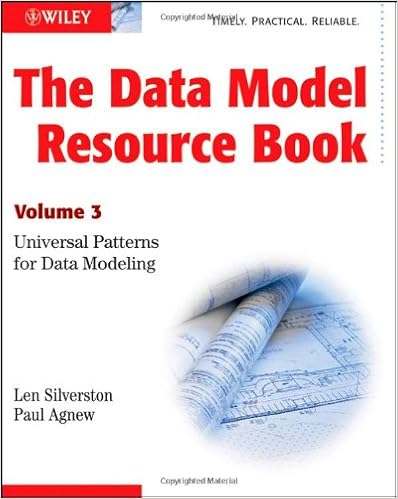
By the way, Len Silverston and Paul Agnew talk about levels of generalization in their The Data Model Resource Book, Vol 3: Universal Patterns for Data Modeling book (affiliate link).  Generalization isn’t just a yes/no position.  Every data model structure you architect has a level of generalization.

Every data model structure you architect has a level of generalization.

I’m wondering how many of you who have used a higher level of generalization and what you’ve done to ensure that the metadata you transformed into data still has integrity?

Leave your recommendations in the comments.

Update: I updated the link to Alec’s blog post.  Do head over there to read his points on generalization.

04 Dec 16:25

Announcing Sparkline Visual

by tlachev

A sparkline is a miniature graph, typically drawn without axes or coordinates. Commonly used on dashboards, sparklines typically visualize trends over time, such as to show profit over the past several years. Although other Microsoft reporting tools, such as Excel and Reporting Services include sparkline elements, Power BI doesn't have one. That is until now.

I contributed a "classic" sparkline custom visual to the Power BI Visuals Gallery. Once you import and add the sparkline to a report, you bind the sparkline to data using the Data tab of the Visualization pane. For example, you can aggregate a Freight field added the Value area over the CalendarQuarterDesc field added to the Category area. The resulting graph will sho how freight fluctuates over time. You can use any field to group the data, not just a field from the Date table.

The sparkline supports several formatting options. The General section lets you change the line color and width. The default properties are "steelblue" as a color and one pixel for the line width. The Animation section lets you turn on an animation effect that draws the line gradually from left to right (who says that Power BI visuals have be to static?) Although in general I advise against animations and other visual distractors in real-life reports, I wanted to emphasize the point that Power BI visuals can support anything clients-side JavaScript can do. The Duration setting controls how fast the line draws (the default setting is 1,000 milliseconds) and the Delay settings controls the interval between redraws (the default is 3,000 milliseconds). The sparkline supports also a tooltip. When you hover anywhere on the viewport, a tooltip pops up that shows the name of the field added to the Value area and the data point values.

The main limitation of the current implementation is that similar to the Power BI gauge visualization, it doesn't render over multiple lines, such as for each product category on rows. Preferably, at some point Power BI would support a repeater control similar to the SSRS Tablix region. This would allow nesting the sparkline into other visualizations, such as a table, that will repeat the sparkline for each row. As Power BI stands now, the only way to implement this feature is to draw the visual for each value of the category field, which would require also drawing labels for the row categories. However, it doesn't repeat on rows, the sparkline could be used to display multiple measures arranged either horizontally or vertically as the screenshot shows. Another limitation related to the previous I've just discussed is that it supports only a single field in the Category area and a single field in the Value area. In other words, the sparkline is limited to one measure and one group. Continuing on the list of limitations, the tooltip displays the same information irrespective where you hover on the sparkline viewport as opposed to showing just the value of the data point behind the cursor.

I hope you'll find my sparkline useful not only for your real-life projects but also for learning how to implement custom visuals.

04 Dec 16:24

Introduction to Storage Spaces Direct for SQL Server

by Glenn Berry

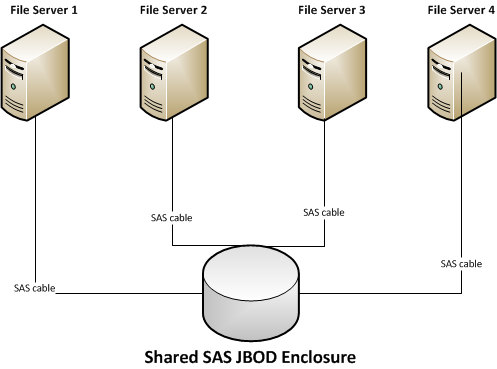
Windows Server 2012 introduced a new feature called Scale-Out File Server (SOFS). Historically, SOFS has mainly been used as a shared storage tier (as an alternative to a shared SAN) for Hyper-V virtualization hosts, but this feature is also useful for SQL Server 2012 and newer, which can store both system and user database files on SMB 3.0 file shares for both stand-alone and clustered instances of SQL Server. SOFS is made up of a set of clustered file servers that make up a transparent failover file server cluster. The database server connects to the SOFS using SMB 3.0 networking (which requires Windows Server 2012 or newer on both the file servers and the database servers). You also need one or more JBOD enclosures that each SOFS cluster node is connected to using SAS cables. Network adapters with Remote Direct Memory Access (RDMA) capability using SMB Direct are required on both sides of the connection. RDMA network adapters are available in three different types: Internet Wide Area RDMA Protocol (iWARP), Infiniband, or RDMA over Converged Ethernet (RoCE).

Storage Spaces is used to aggregate the SAS disks of the JBOD enclosure(s). Virtual disks are created from the aggregated SAS disks, providing resiliency against disk or enclosure failure, as well as enabling SSD/HDD tiered storage and write-back caching. In Windows Server 2012 and 2012 R2, an HA storage system using Storage Spaces requires all of the disks to be physically connected to all of the storage nodes. To allow for the disks to be physically connected to all storage nodes, they need to be SAS disks and they need to be installed in an external JBOD chassis with each storage node having physical connectivity to the external JBOD chassis.

An example of this type of deployment is shown in Figure 1:

Figure 1: Windows Server 2012 and 2012 R2 Shared JBOD Scale-Out File ServerFigure 1: Windows Server 2012 and 2012 R2 Shared JBOD Scale-Out File Server

The two main weaknesses of SOFS is the cost and complexity of the SAS storage tier, and the fact that only SAS HDDs and SSDs are supported (meaning no lower cost SATA HDDs or SSDs). You also cannot use local internal drives or PCIe storage cards in the individual file server nodes with SOFS in Windows Server 2012 R2.

Storage Spaces Direct

One of the more exciting new features in Windows Server 2016 is called Storage Spaces Direct (S2D), which enables organizations to use multiple, clustered commodity file server nodes to build highly available, scalable storage systems with local storage, using SATA, SAS, or PCIe NVMe devices. You can use internal drives in each storage node, or direct-attached disk devices using “Just a Bunch of Disks” (JBOD) where each JBOD is only connected to a single storage node. This eliminates the previous requirement for a shared SAS fabric and its complexities (which was required with Windows Server 2012 R2 Storage Spaces and SOFS), and also enables using less expensive storage devices such as SATA disks. 

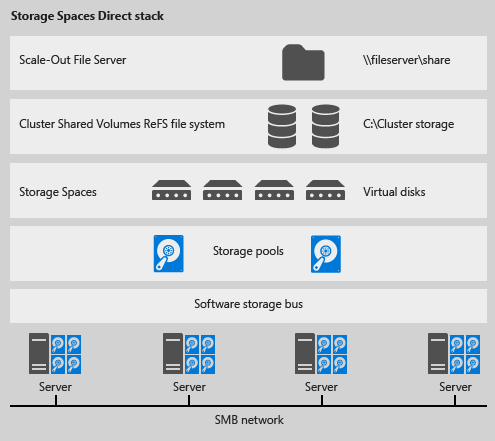
In order to use S2D, you need at least four clustered file servers that each can have a mixture of internal drives (SAS or SATA), PCIe flash storage cards, or direct-attached disk devices that will be pooled using Storage Spaces. Up to 240 disks can be in a single pool, shared by up to 12 file servers. A Software Storage Bus replaces the SAS layer of a shared SAS JBOD SOFS. This software storage bus uses SMB 3.1.1 networking with RDMA (SMB Direct) between the S2D cluster nodes for communications. The Storage Spaces feature aggregates the local and DAS disks into a storage pool, where one or more virtual disks are created from the pool. The virtual disks (LUNs) are formatted with Resilient File System (ReFS) and then converted into cluster shared volumes (CSVs), which make them active across the entire file server cluster.

The S2D stack is shown in Figure 2:

Figure 2: Storage Spaces Direct (S2D) stack (Image Credit: Microsoft)Figure 2: Storage Spaces Direct (S2D) stack (Image Credit: Microsoft)

The reason why this matters so much for SQL Server database professionals is that S2D will give you another high performance deployment choice for your storage subsystem that will work with stand-alone SQL Server instances, with traditional FCI instances (that require shared storage), and with instances that are using AlwaysOn AG nodes.

If you have the proper network adapters (not your garden variety, embedded Broadcom Gigabit Ethernet NICs) for both your clustered file servers and for your database servers, you will be able to take advantage of SMB Direct and RDMA so that the SMB network can deliver extremely high throughput, with very low latency, and low CPU utilization by the network adapters, which enables the remote file server to resemble local storage from a performance perspective. The new S2D feature will make it easier and less expensive to deploy a Scale-Out File Server cluster that can deliver extremely high performance for SQL Server usage. Not only will this work for bare-metal, non-virtualized SQL Server instances, it will also be a good solution for virtualized SQL Server instances, where the virtualization host can get much better I/O performance than from a typical SAN.

For example, if you have a 56Gb InfiniBand (FDR) host channel adapter (HCA) plugged into a PCIe 3.0 x8 slot of your database server (or virtualization host server) and your file servers, that will give you about 6.5GB/sec of sequential throughput for each connection. I have some more detailed information about sequential throughput speeds and feeds here. Currently, you have to use PowerShell to deploy and manage Storage Spaces Direct. This TechNet article has some good information and examples of how to test S2D in Windows Server 2016 Technical Preview 3.

By the time Windows Server 2016 and SQL Server 2016 are GA, we will probably have the new 14nm Intel Xeon E5-2600 v4 "Broadwell-EP" processor, that will have up to 22 physical cores per socket and 55MB of shared L3 cache, along with DDR4 2400 memory support. This new processor family will work with existing server models, such as the Dell PowerEdge R730, since it is socket compatible with the current 22nm "Haswell-EP" family processors. This will give you the best underlying server hardware platform to take full advantage of S2D.

The post Introduction to Storage Spaces Direct for SQL Server appeared first on SQLPerformance.com.

04 Dec 16:24

Do You Need to Update Your PASS Profile or SQL Saturday Speaker Profile?

by andyleonard
I recently needed to update my PASS and SQL Saturday speaker profiles. I emailed my good friend and Awesome Community Person Karla Landrum for help, and Karla kindly responded with detailed instructions that even I could follow. I decided to capture and share my experience updating my PASS and SQL Saturday profiles. Updating Your PASS Profile   Log into http://sqlpass.org . Click on your name in the upper right corner of the PASS web site. Click the “myProfile” link on the left side of the page:...(read more)
04 Dec 16:24

Datatypes or Data Types?

by Karen Lopez

I conducted a Twitter poll last week about how to spell DATATYPE (or is it DATA TYPEs?).  Many compound words start out as two separate words, then get hyphenated, then concatenated to a new word.  We saw this with:

data base –> data-base –> database

I keep seeing data types spelled both ways (and never as data-type).

Ted Codd used DATA TYPE in his 12 Rules for a Relational Database Product.

Embarcadero ER/Studio and CA ERwin Data Modeler use DATATYPE in their products and occasionally use DATA TYPE in their help or documentation.

Oracle uses both spellings in their documentation.  Microsoft sticks heavily to DATA TYPE.

Twitter polls last for 24 hours and not all clients can see or vote on them. So consider this more of a fun question on social media.

image

How do you spell this concept? Are there other words you find with a variety of spellings?

04 Dec 16:24

By 2018, Half of All Ethics Violations Will Result from Improper Data Analytics

by A.R. Guess

by Angela Guess Dick Weisinger recently wrote in the Formtek blog, “Algorithmic-based decision making is increasingly being deployed, but at least at this point in time, the decision to roll out and rely primarily on data analytic results may not be the right one.  A second point is that improper interpretation of statistics and analytics […]

The post By 2018, Half of All Ethics Violations Will Result from Improper Data Analytics appeared first on DATAVERSITY.

04 Dec 16:23

Dan Holmes : Custom Built Statistics

by Guest Posts

Post by Dan Holmes, who blogs at sql.dnhlms.com.

SQL Server Books Online (BOL), whitepapers, and many other sources will show you how and why you might want to update statistics on a table or index. However, you only get one way to shape those values. I will show you how you can create the statistics exactly the way you want within the bounds of the 200 steps available.

Disclaimer: This works for me because I know my application, my database, and my user’s regular workflow and application usage patterns. However, it does use undocumented commands and, if used incorrectly, could make your application perform significantly worse.

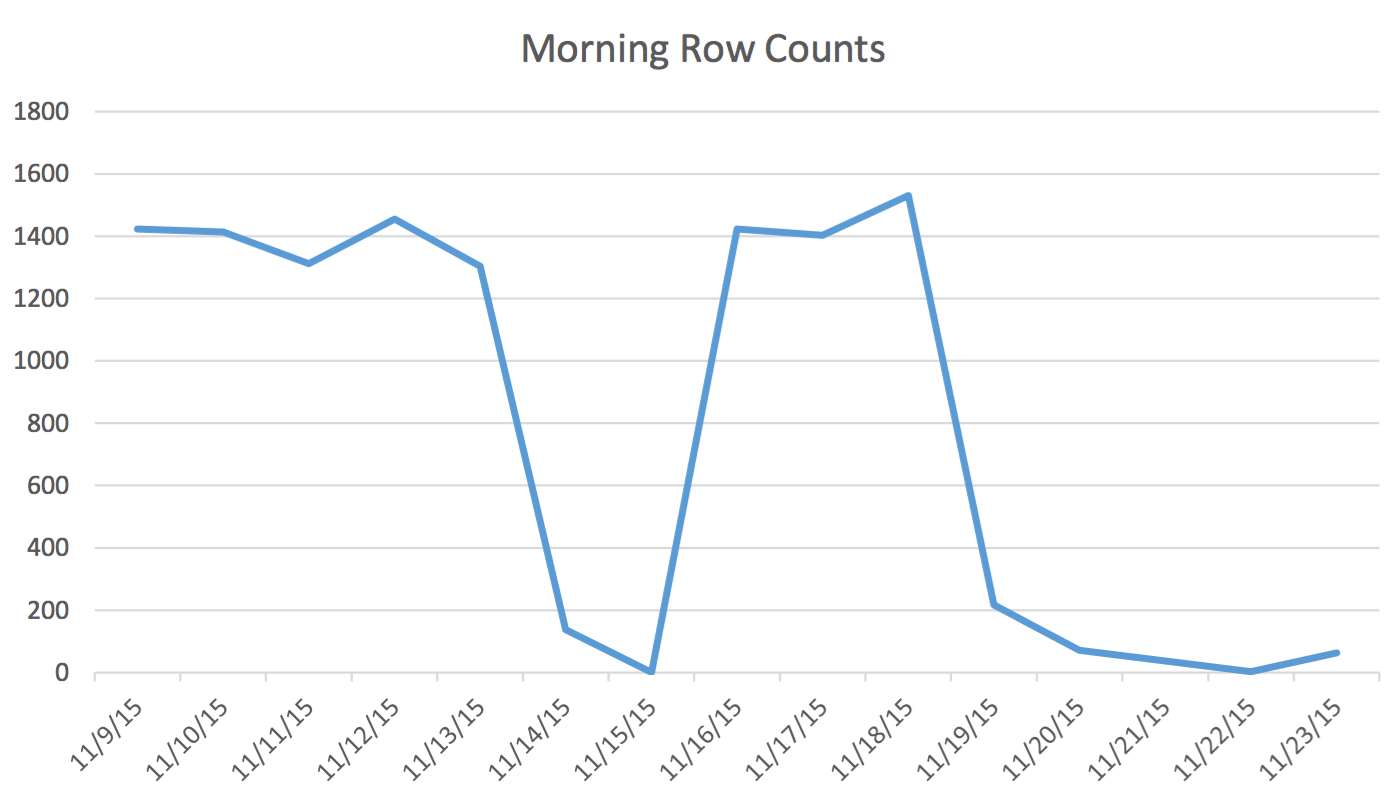
In our application, the Scheduling user is regularly reading and writing data that represents events for tomorrow and the next couple of days. Data for today and earlier is not used by the Scheduler. First thing in the morning, the data set for tomorrow starts at a couple hundred rows and by midday can be 1400 and higher. The following chart will illustrate the row counts. This data was collected on the morning of Wednesday November 18, 2015. Historically, you can see that the regular row count is approximately 1,400 except for weekend days and the next day.

Morning Row Counts

For the Scheduler the only pertinent data is the next few days. What is happening today and happened yesterday isn’t relevant to his activity. So how does this cause a problem? This table has 2,259,205 rows which means the change in row counts from morning to noon will not be enough to trigger a SQL Server initiated statistics update. Furthermore, a manually scheduled job that builds statistics using UPDATE STATISTICS populates the histogram with a sample of all the data in the table but may not include the relevant information. This row count delta is enough to change the plan. However, without a statistics update and an accurate histogram, the plan will not change for the better as the data changes.

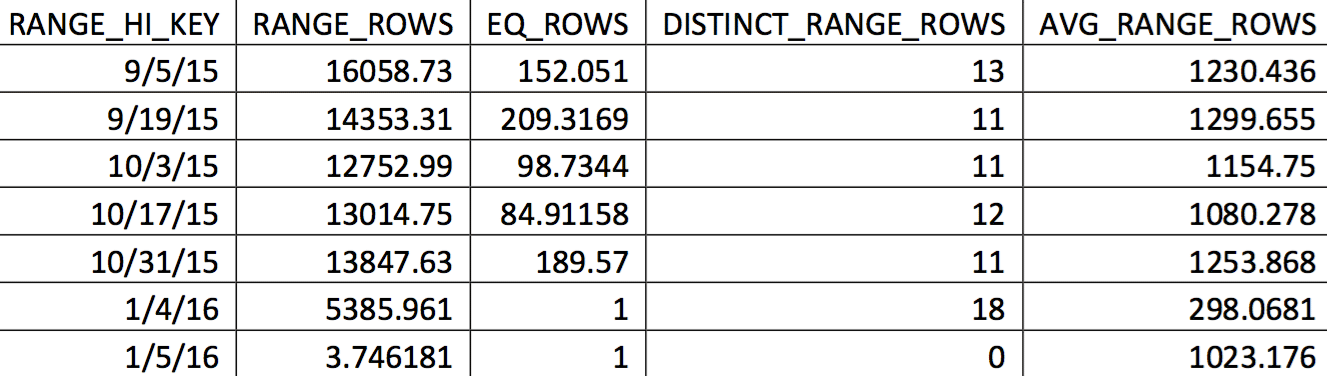
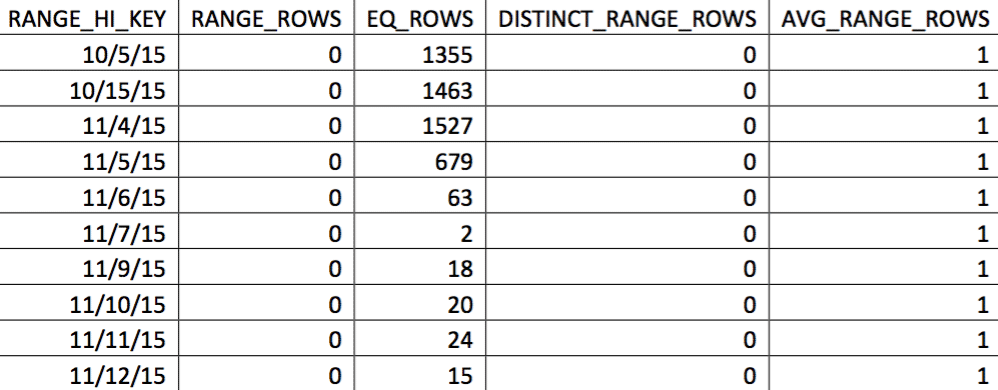
A relevant selection of the histogram for this table from a backup dated on 11/4/2015 might look like this:

dbccOutput

The values of interest are not reflected accurately in the histogram. What would be used for the date of 11/5/2015 would be the high value 1/4/2016. Based on the graph, this histogram is clearly not a good source of information for the optimizer for the date of interest. Forcing the values of use into the histogram isn’t reliable, so how can you do that? My first attempt was to repeatedly use the WITH SAMPLE option of UPDATE STATISTICS and query the histogram until the values I needed were in the histogram (an effort detailed here). Ultimately, that approach proved to be unreliable.

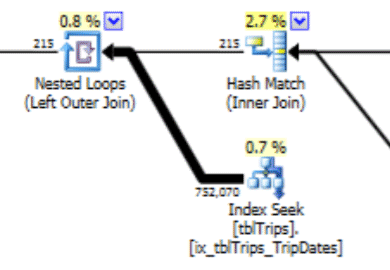
This histogram can lead to a plan with this type of behavior. The underestimate of rows produces a Nested Loop join and an index seek. The reads are subsequently higher than they should be because of this plan choice. This will also have an effect on statement duration.

dh_plan1

What would work much better is to create the data exactly how you want it, and here’s how to do that.

There is an unsupported option of UPDATE STATISTICS: STATS_STREAM. This is used by Microsoft Customer Support to export and import statistics so they can get an optimizer recreate without having all the data in the table. We can use that feature. The idea is to create a table that mimics the DDL of the statistic we want to customize. The relevant data is added to the table. The statistics are exported and imported into the original table.

In this case, it is a table with 200 rows of not NULL dates and 1 row that includes the NULL values. Additionally, there is an index on that table that matches the index that has the bad histogram values.

The name of the table is tblTripsScheduled. It has a non-clustered index on (id, TheTripDate) and a clustered index on TheTripDate. There are a handful of other columns, but only the ones involved in the index are important.

Create a table (temp table if you want) that mimics the table and index. The table and index looks like this:

CREATE TABLE #tbltripsscheduled_cix_tripsscheduled(
       id INT NOT NULL
       , tripdate DATETIME NOT NULL
       , PRIMARY KEY NONCLUSTERED(id, tripdate)
);
 
CREATE CLUSTERED INDEX thetripdate ON #tbltripsscheduled_cix_tripsscheduled(tripdate);

Next, the table needs to be populated with 200 rows of data that the statistics should be based on. For my situation, it is the day-of through the next sixty days. The past and beyond 60 days is populated with a "randomish" selection of every 10 days. (The cnt value in the CTE is a debug value. It does not play a role in the final results.) The descending order for the rn column ensures that the 60 days are included, and then as much of the past as possible.

DECLARE @date DATETIME = '20151104';
 
WITH tripdates
AS 
(
  SELECT thetripdate, COUNT(*) cnt
  FROM dbo.tbltripsscheduled
    WHERE NOT thetripdate BETWEEN @date AND @date
    AND thetripdate < DATEADD(DAY, 60, @date) --only look 60 days out GROUP BY thetripdate
    HAVING DATEDIFF(DAY, 0, thetripdate) % 10 = 0
  UNION ALL
  SELECT thetripdate, COUNT(*) cnt
  FROM dbo.tbltripsscheduled
    WHERE thetripdate BETWEEN @date AND DATEADD(DAY, 60, @date)
    GROUP BY thetripdate
), 
tripdate_top_200
AS 
(
  SELECT *
  FROM 
  (
    SELECT *, ROW_NUMBER() OVER(ORDER BY thetripdate DESC) rn
    FROM tripdates
  ) td
  WHERE rn <= 200
)
INSERT #tbltripsscheduled_cix_tripsscheduled (id, tripdate) 
SELECT t.tripid, t.thetripdate
FROM tripdate_top_200 tp
INNER JOIN dbo.tbltripsscheduled t ON t.thetripdate = tp.thetripdate;

Our table is now populated with every row that is valuable for the user today and a selection of historical rows. If the column TheTripdate was nullable, the insert would have also included the following:

UNION ALL
SELECT id, thetripdate
FROM dbo.tbltripsscheduled
WHERE thetripdate IS NULL;

Next, we update the statistics on the index of our temp table.

UPDATE STATISTICS #tbltrips_IX_tbltrips_tripdates (tripdates) WITH FULLSCAN;

Now, export those statistics to a temp table. That table looks like this. It matches the output of DBCC SHOW_STATISTICS WITH HISTOGRAM.

CREATE TABLE #stats_with_stream
(
       stream VARBINARY(MAX) NOT NULL
       , rows INT NOT NULL
       , pages INT NOT NULL
);

DBCC SHOW_STATISTICS has an option to export the statistics as a stream. It is that stream that we want. That stream is also the same stream that the UPDATE STATISTICS stream option uses. To do that:

INSERT INTO #stats_with_stream --SELECT * FROM #stats_with_stream
EXEC ('DBCC SHOW_STATISTICS (N''tempdb..#tbltripsscheduled_cix_tripsscheduled'', thetripdate)
  WITH STATS_STREAM,NO_INFOMSGS');

The final step is to create the SQL that updates the statistics of our target table, and then execute it.

DECLARE @sql NVARCHAR(MAX);
SET @sql = (SELECT 'UPDATE STATISTICS tbltripsscheduled(cix_tbltripsscheduled) WITH
STATS_STREAM = 0x' + CAST('' AS XML).value('xs:hexBinary(sql:column("stream"))',
'NVARCHAR(MAX)') FROM #stats_with_stream );
EXEC (@sql);

At this point, we have replaced the histogram with our custom-built one. You can verify by checking the histogram:

DBCC Output

In this selection of the data on 11/4, all the days from 11/4 onwards are represented, and the historical data is represented and accurate. Revisiting the portion of the query plan shown earlier, you can see the optimizer made a better choice based on the corrected statistics:

dh_plan2

There is a performance benefit to imported stats. The cost to compute the stats are on an "offline" table. The only downtime for the production table is the duration of the stream import.

This process does use undocumented features and it looks like it could be dangerous, but remember there is an easy undo: the update statistics statement. If something goes wrong, the statistics can always be updated using standard T-SQL.

Scheduling this code to run regularly can greatly help the optimizer produce better plans given a data set that changes over the tipping point but not enough to trigger a statistics update.

When I finished the first draft of this article, the row count on the table in the first chart changed from 217 to 717. That is a 300% change. That is enough to change the behavior of the optimizer but not enough to trigger a statistics update. This data change would have left a bad plan in place. It is with the process described here that this problem is solved.

References:

The post Dan Holmes : Custom Built Statistics appeared first on SQLPerformance.com.

04 Dec 16:23

Big Data and the Mainframe

by A.R. Guess

by Angela Guess Ken Hess recently wrote in ZDnet, “By a virtual show of hands, who loves mainframes? No one? Really? I get it. It’s not really something that people love or hate; it just is. By another virtual show of hands, have you worked on or do you currently work with mainframes? OK, so […]

The post Big Data and the Mainframe appeared first on DATAVERSITY.

04 Dec 16:22

UK Contractors - As you were, for now at least

I think there were are few sighs of relief around the country yesterday after the chancellor finished giving his autumn financial statement to parliament. For the past few weeks there has been plenty of reports of doom and gloom from the various media channels suggesting that the end was nigh for contractors and freelancers due to new legislation to be imposed by the government. However after sitting through the hour or so long speech, I was largely left wondering just how unfounded most of the reports were as George Osbourne barely said a word around contractors/contracting other than the expected additional funds HMRC are going to receive to further combat tax evasion/avoidance schemes.

Analysis is starting to do the rounds and as far as I can tell, if you are a contractor working through a limited company then it is going to be largely business as usual. The new apprentice levy is fully offset for businesses earning 3m or less and the travel and subsistence relief will be restricted for only those working through a personal service company where IR35 applies. Changes to the dividends  weren’t mentioned so don’t expect anything to be any different to that already announced previously.

I previously commented on not really seeing any benefits working through an umbrella company and now with the apprentice levy, there is another 0.5% reason to not work through an umbrella. I can’t imagine those companies absorbing the levy so that’ll be passed onto their workers I suspect. Additionally going forward, if things do change around IR35 and further travel and subsistence restrictions are imposed then umbrella workers are probably going to be the first affected.

I don’t believe for one second that these are the end of the changes to the contracting workspace and I fully expect things to be toughened up further in the next year or so with stricter changes to IR35. I can also see many people transitioning from personal service companies and umbrella’s to limited companies or even taking perm roles until the dust fully settles. One thing I am actually quite pleased about with the government is that they haven’t rushed through an ill thought out bad piece of legislation that helps no-one and instead they are continuing to consult on the matters. They could have legislated some pretty harsh new rules regarding IR35 if the media was to believed but for now at least, it seems to be business as usual

Enjoy..!

Follow me on twitter @sqlserverrocks

Subscribe to my blog RSS feed

Comment on this or any of my posts or contact me directly from http://www.olcot.co.uk

04 Dec 16:22

Anti-Harassment Policies and Codes of Conduct

by Rob Farley

I was a director on the PASS board back in 2012 when our having a Code of Conduct was first raised. A number of conferences had experienced bad situations, particularly around sexist behaviour, and it was very appropriate for PASS to take a stand and say “We don’t want this kind of thing to happen to PASS members.”

We ALL wanted to make sure that the PASS community was a safe community – one which people could be part of without having to worry about whether there would be an “incident”. No one wanted the PASS Summit, or a SQL Saturday, or any PASS-related event, to incur an “incident”. We considered that the only acceptable number of incidents was zero.

That said, there was a certain amount of awkwardness – particularly in the days leading up to the official discussion about the proposed Code of Conduct. There was a genuine fear about how a Code of Conduct would affect the tone of PASS events. Nobody wanted to be removed from an event because of a seemingly innocuous comment, but even more, no one wanted there to be an incident of harassment. And this fear expressed itself in awkwardness, bordering on flippancy.

As the globalisation committee (a subsection of the board including some advisors – all of whom knew about the proposed Code) sat around to discuss globalisation, the first time there was a double-entendre, instead of raising an eyebrow or saying “Oh really?” or something else, the expression of the day was “There’s a Code of Conduct violation right there...”. It was a reflection of the nervousness that people felt around what the impact would be. People wanted to maintain the informal atmosphere of the meeting, but didn’t know how to react to a double-entendre in light of the future Code of Conduct – remembering that we ALL wanted PASS to become a safer community for our members.

We don’t tolerate harassment at all. But at what point do things become harassment? At first it felt like we were trying to define it.

As an Australian, I see a certain amount of banter about New Zealanders. It goes both ways, and the jokes are apparently very similar. They joke that we treat our sheep in particular ways, and we say the same about them. In the 1980s, the Kiwi Prime Minister Robert Muldoon said that New Zealanders moving to Australia raised the average IQ of both countries, which I think is a fantastic sledge! To suggest that people leaving New Zealand must be less smart than the average Kiwi, but still smarter than the average Australian, is a beautifully crafted rib. Is it racist? By definition, perhaps – but I doubt anyone felt vilified by it.

“By definition, perhaps” was the phrase that worried me.

I knew that if we defined the Code of Conduct wrongly, then I, and many others, could easily be in breach of it. I knew that if I reacted to a double-entendre with a raised eyebrow, that could be seen as sexualising a situation. I knew that if I joked that a Tottenham fan in the room was of lower intelligence than an Arsenal fan, then that could be seen as harassment. Maybe not by the Spurs fan, but by someone else watching, who might think that I genuinely insulted them. Even to suggest that a developer has no respect of data (as many PASS presenters might suggest in a session) could be seen as unfairly assigning undesirable attributes to people. It was a concern.

So instead of raising an eyebrow, instead of reacting to any situation in my usual way, I reacted with “There’s a Code of Conduct violation right there...”. It still achieved the joke, but in a way that acknowledged my fears of what the Code might imply. It wasn’t appropriate, and I’m sorry. The correct thing to do would have been to have just bitten my tongue and ignore it. I also wasn’t the only one in that situation – I think just about everyone in the room did the same.

We all wanted a policy, but we didn’t know how it was going to affect us.

As we discussed it, we were able to work out that really what we wanted was not a Code of Conduct that defined what we allowed and what we didn’t allow, because we would never have been able to get that right. What we wanted was to adopt a stance that said “We do not tolerate harassment”, and to have a procedure for what happens if someone feels harassed. What we wanted was an Anti-Harassment Policy.

Let me express that again:

We do not tolerate harassment.

And I don’t want to define what harassment means for an individual. I don’t want to define that certain types of touching are okay and others are not. I don’t want to define that particularly types of eye-contact count as harassment. I don’t want to define the words that can be used to describe body parts (like if someone falls and says they’ve hurt their backside – do they need to be careful about the word they use?), or what counts as “acceptable swearing” at a party. If we define this, then we run the risk that someone might go right up to the defined line in harassing someone, but we haven’t provided a course of action for the victim because the harasser hasn’t broken the “Code of Conduct”.

I do want to have well-documented processes for how to react if someone feels harassed, because I want the person who feels harassed to know they have a course of action open to them.

I think a Code of Conduct should be around expected behaviour in particular situations. A Code of Conduct says that a session presenter should wear a collared shirt not a T-shirt. A Code of Conduct says that a sponsor should respect the geographic boundaries of other vendors’ booths. A Code of Conduct shouldn’t say “You must not use someone’s nationality as the subject of a joke” – because when Australia was beaten in the final of the Rugby World Cup, that’s an opportunity to rib them about it, but the principle of standing against racism is incredibly valid. If I suggest that Americans are stupid for considering that “could care less” means the same as “could not care less” – am I crossing the line? It probably depends on a lot of other factors.

Let me say it again:

I do not tolerate harassment.

I simply recognise that what some people see as harassment, others see as friendly banter. Should Bradley Ball, Joe Sack, and Buck Woody be offended about jokes regarding their names? I don’t know. That’s entirely up to them in the situation, and the context of what’s said. Sometimes they might be fine with it, other times they might not. That’s their right. No one else gets to dictate their reaction. Should Kevin Kline have been upset that I sang Happy Birthday to him loudly, in public situations, repeatedly, for a whole day? I try to monitor those situations, and back off if they seem to be getting upset. Is my detector of people’s personal lines sometimes faulty? Sadly, yes.

I do not tolerate my own harassment of others.

If you have ever felt harassed by me, I’m personally sorry and honestly regret it. I know I joke. I know I often joke at other people’s expense. But I never mean to harass.

My personal Code of Conduct varies according to the company that I’m keeping – there are times that it’s okay to point out a double-entendre, but a job interview is probably not that time. My personal Anti-Harassment Policy is not variable. I don’t tolerate harassment, and if you ever feel harassed by me, tell me. If I don’t stop (though I hopefully always do stop), then tell me again, or tell a friend of mine and get them to help me stop (because I have probably misinterpreted you – if I say ‘Oi’ to someone who calls me fat, that doesn’t necessarily mean I’m feeling harassed, even though my extra kilos bothers me and I really don’t like it being pointed out).

PASS has an Anti-Harassment Policy. As the SQL community, we don’t tolerate it, and we know what to do if someone feels harassed.

Defining harassment is tough – it’s subjective, and individual. Making a stance to say “we don’t tolerate it” and “if you harass someone, here’s how we will respond” is a good thing.

Let me say that again:

The PASS community doesn’t tolerate harassment.

@rob_farley

04 Dec 16:22

SSD Form Factor and interface

by jchang
There is a curious quiet from the enterprise storage community on form factor and interface direction for solid state storage, be it NAND Flash, Intel 3D XPoint or other. On the client-side, personal computing, both desktop and mobile, show clear direction in favoring both the M.2 form factor and PCI-E as the preferred interface for SSD storage. There is a backward compatibility option in M.2 to work with either SATA or PCI-E interface, but I do not think this will be widely used. SATA or hard disks...(read more)
04 Dec 16:22

Press Release: DATAVERSITY to Host a Virtual Conference to Teach Data Governance Strategies

by Laura Lucht

November 30, 2015 – DATAVERSITY Education, LLC announced the agenda and opened registration for the company’s first-ever virtual conference Enterprise Data Governance Online (EDGO). The free online event will be held at http://edgo.dataversity.net on January 27th, 2016 from 8:00 am to 3:30 pm Pacific Time. EDGO is the newest event to be added to DATAVERSITY’s […]

The post Press Release: DATAVERSITY to Host a Virtual Conference to Teach Data Governance Strategies appeared first on DATAVERSITY.

04 Dec 16:21

What You Are Missing by Sticking with SQL Server 2005: Data Architects Version

by Karen Lopez

File:Voskhod spacecraft IMP 'Globus' navigation instrument, front view.jpgOn 12 April 2011 it was Yuri’s Night — the night we space fans celebrate Yuri Gagarin’s 1961 history-setting flight into space.  In 2011 we were celebrating 50 years of manned spaceflight. On that same day in 2011, we reached the end of support for SQL Server 2005 SP4. On 12 April 2016 we will reach the end of extended support for SQL Server 2005. That means no more hotfixes, no help from Microsoft and no love for your data still living in SQL 2005 databases.

I’m hoping your organization is already on its way to upgrading and migrating data and applications to newer versions of SQL Server.  SQL Server 2016 is already being used in production by early access customers. No matter which version you will be migrating to, I want to share with you some of the features and perks you’ll have available to you now that you are moving away from a dead version. Of course there are hundreds of enhancements that have happened since 2005, but today I’m focusing on those that a data architect would want to use in a database design for enhanced performance, security and data quality.

Columnstore Indexes

If you are designing for data warehouse type solutions, this is the closest thing we have for a "turbo switch" for SQL Server. Columnstore Indexes achieve high compression rates since they store columns together instead of storing rows together. They also support much faster query performance for batch and aggregation queries. They typically achieve 10x performance increases, sometimes even more. This feature was introduced in SQL Server 2012, but you’ll want the advances to this feature that came with SQL Server 2014.

SEQUENCEs

SEQUENCEs have been around in other DBMSs for a while, but were introduced in SQL Server 2012.  These special objects work much like IDENTITY columns, but offer more flexibility and use cases.  The main feature is that you can grab a sequence (or a bunch of them)  before you insert a row.  Many developers use GUIDs for similar reasons, but GUIDs are much longer and therefore had performance downsides. SEQUENCEs are integer types.

New Data Types

So many new data types have been introduced since SQL Server 2005, but the ones that really stand out for me are DATE, TIME, DATETIMEOFFSET, the geospatial types, and the deprecation of timestamp.

It wasn’t until SQL Server 2008 that we had access to data types that comprised only the DATE or TIME portion of a point in time. So we had to do all kinds of conversions just to strip out unwanted data (00:00:00). We also had to make room to store that unwanted precision. Storing millions of rows of unneeded zeros hurts performance, both operationally and for backup and recovery.

SQL Server 2008 also introduced DATETIMEOFFSET, which allows us to track data in context of its time zone. If you remember the days when meeting invites did not include this important piece of information, you’ll know why this is important.

The spatial data types GEOGRAPHY and GEOMETRY and have added a new and feature-rich way of tracking places, their geometry plus special features that make it much easier to answer questions like "which is the closest" or "is this address located in this neighbourhood".  If your data story includes location points, you’ll want to use these.

SQL Server was always an oddball when it came to the data type TIMESTAMP. In other DBMSs, this data type was one that included date and time, to a very large precision. In SQL Server, TIMESTAMP is a type of row version identifier that has nothing to do with TIME. So data architects migrating from other DBMSs were often bitten when they used the wrong data type. Microsoft announced in 2008 that it was depreciating TIMESTAMP and recommending the use of ROWVERSION, which is similar (but not the same) in functionality.

Encryption

SQL Server 2016 currently includes support of Always Encrypted, a feature that does just that: it support the encryption of data from application to database and back, so that it is better protected than solutions that encrypt data once it is written to the database. I’m always reminding you that keeping your CIO out of jail is part of your job description, right?

Always Encrypted flow

Data Archiving

As our data gets bigger and bigger, the size of our databases is growing as well. That means that performance takes a hit. Developers want us to take shortcuts on data quality to improve performance because size matters. One of the ways to help manage data volumes is to move "cold" data to other storage locations. Starting in SQL Server 2016, we can stretch a database to Azure, which means that data that isn’t accessed as often can be stored in the cloud and retrieved when needed. This allows our hot data to be local and fast, while the cooler data is more economical to store and still there and your application doesn’t even have to manage this difference.

JSON Support

In SQL Server 2016 we are getting support for JSON processing.  This isn’t the same as a JSON data type like we have with XML, but a set of import and export features for providing relational data as JSON documents and brining JSON data into SQL Server.  Now you won’t have to manage all those curly brackets on your own.

One Last Thing…

As vendors withdraw support for their products, third party tool makers do so as well. If you are supporting older, out of support versions of databases, it’s likely that your data modeling, data quality and data integration tools are also dropping support for these solutions. You’ll be left supporting database systems without vendor support and without professional enterprise class modeling and design tools.  I know how hard it is to keep track of databases that my tools can’t connect with.  Don’t let sticking with an old version be the end of data modeling support for that data.

If you like geeking out about space and data types, you might want to check out my 1 April 2014 post on a new data type.

Show Your Data Some Love

These are just a tiny number of the types of features that will be available to you when you upgrade to modern versions of SQL Server. The advent of security, data quality and performance features are leaving your old solutions behind, putting your data at risk and leaving your customer data feeling unloved.  There’s a data space race going on. Don’t live your company using old technology to manage data. Go fix that!

04 Dec 16:21

Get the most out of SQL Server 2016

by SQL Server Team

Blog post series to highlight new features and enhancements available with SQL Server 2016.

Data, and the ability to extract actionable intelligence from it, is driving transformation in how we do business today. With SQL Server 2016, it’s never been easier to capture, transform, mash-up, analyze and visualize any data, of any size, at any scale in its native format. Plus, you can do all of this while using familiar tools, languages and frameworks in a trusted environment, both on-premises and in the cloud — with what Corporate Vice President of Microsoft’s Data Group Joseph Sirosh calls “the best SQL Server release in history.”

In the recent Gartner Magic Quadrant for Operational Database Management Systems, Microsoft is positioned as an industry leader, rated the highest in execution and furthest in vision. SQL Server 2016 builds on this leadership, and comes packed with powerful built-in features.

In our upcoming SQL Server 2016 post series, kicking off December 3, 2015, you can learn about our new technologies, discover best practices, and gain product insights from the engineers who built it. Our engineers are lined up to share specifics from their area of expertise.

The series will cover:

  • App and data performance features: Discover enhancements of In Memory OLTP and real-time Operational Analytics.
  • Data security features: Learn about Always Encrypted technology, an industry-first that helps protect data at rest and in motion, on-premises and in the cloud.
  • Business intelligence: Gain insights into rich visualizations as we cover SQL Server 2016’s BI capabilities and additions, including the upcoming release of Mobile BI resulting from our Datazen acquisition.
  • Big Data and analytics: Uncover ways to use Advanced Analytics, including a walk-through of how to use R, the popular Big Data scientist language which is now a part of SQL Server. We’ll also provide details on PolyBase, which allows you to extract value from unstructured and structured data using your existing T-SQL skills.
  • Hybrid and cloud: Learn about SQL Database, backup improvements and Stretch Database, which enables stretching a single database between on-premises and Azure.

Read the current posts from this blog series:

Start using SQL Server Community Technology Preview (CTP) 3.2 today

To experience the new, exciting features in SQL Server 2016 and the new rapid release model, download the CTP 3.2 Preview or try it in Microsoft Azure. Then, start evaluating the impact these new innovations can have for your business.

Have questions? Join the discussion of the new SQL Server 2016 capabilities at MSDN and StackOverflow. If you run into an issue or would like to make a suggestion, you can let us know using Microsoft’s Connect tool. We look forward to hearing from you.

04 Dec 16:20

Time to Consider “Avant-Garde” Databases?

by A.R. Guess

by Angela Guess Alex Woodie recently wrote for Datanami, “In a new research report, Gartner advises clients to consider the new “avant-garde” of new relational databases from vendors like MemSQL, NuoDB, and VoltDB when projects call for large amounts of scalability and elasticity on industry-standard hardware, while retaining the precepts of relational tables and SQL. […]

The post Time to Consider “Avant-Garde” Databases? appeared first on DATAVERSITY.

04 Dec 16:20

Big Data Doctrine: Warehouse vs. Data Lakes

by Thomas Hazel

Learn more about author Thomas Hazel. It’s been five years since the term “Data Lake” was coined/credited to James Dixon. Since then the concept has continued to evolve and gain momentum. Data Lakes are the new kids on the block with respect to Big Data management and a stark contrast to traditional Data Warehouse solutions […]

The post Big Data Doctrine: Warehouse vs. Data Lakes appeared first on DATAVERSITY.

13 Nov 23:25

What’s driving your data model?

by Rob Farley

If data modelling were easier, I doubt there would be as many books on the subject, and we wouldn’t have multiple methodologies to consider.

I’m not going to explore the different methodologies here – that’s almost a religious argument these days, and I am more than happy to let you adopt whichever method you like. Instead, I want to challenge you to think about what is driving your design, and what makes you consider whether it suits your business or not.

Time and time again I see companies that use software to help them run their business. Sometimes this is an off-the-shelf system or a cloud-based solution; sometimes it’s a bespoke system built by software developers. I’m definitely in favour of using software, and wonder how people operate without it these days.

...but how much is your business driven by the software? I see a lot of businesses being led by their software, rather than having the software adapt to the business. For the most part, I’m fine with either. There is a lot to be gained by using systems developed by similar businesses, and taking advantage of lessons learned by others. Letting that software help guide internal processes can be very useful.

But I don’t think that applies to data models – you should at least consider how much it does.

I don’t like to write about specific customer situations, so I’m not going to describe a particular anecdote in great detail here. But I want to say that I frequently see environments where the models used within data warehouses don’t describe the business that’s going on – they describe the software that’s used.

Many data professionals look at a data warehouse as a platform for reporting, built according to the available data sources. I disagree with this.

The models within a data warehouse should describe the business. If it doesn’t, it’s a data model gone wrong.

What is the central thing that your business does? What is the main interest point? What do you need to look after? For me, this forms the core of the warehouse.

The core of the warehouse is not necessarily the main fact table, but could be one of the main dimensions. If you’re a store, do you care about sales, or do you care about customers? The difference is subtle, but might drive some important design elements.

Two clothing stores might use the same back-end systems for their point-of-sales systems, and might have the same loyalty system set up to persuade people to keep coming back. But one store might have a focus of getting customers back, driving brand loyalty which leads to dedicated fans and word-of-mouth sales. The other store might be more about piquing interest from people walking past the door, and trying to get them to come in and pick up a bargain. Of course, there will be an element of both in both stores, but the culture amongst the staff will be slightly different, as the first tries to identify the customer, tries to make sure that the customer feels cared for, and tries to form a relationship with the customer. It’s less important that the customer buys something, so long as they are going to return. The second sees the customer as a way to get a sale, while the first sees the sale (or even the lack of a sale!) as a way to get a customer. I’m sure you can think of stores in each category.

It would be very easy to create the same data warehouse for both stores, using a standard retail environment. But are the needs of the stores adequately met?

There is no doubt that both stores need sales to stay afloat – the retail business requires it. But if your business culture has slightly different concerns to the industry standard, then the data model should cater for that. Perhaps you need a way of scoring customer loyalty, and some path analysis to see what helps a customer reach a particular level of engagement. Perhaps you need to start collecting extra data. Maybe the stores could consider awarding points for simply visiting the store, even if no sales are actually made. Is the person who works from a cafe and buys just one cup of coffee all morning good for business, or bad for business? Can your data model help explore this, or are you designing a system which only handles the data in your transactional system?

I like to come back to the description of a data warehouse being the single source of truth for an organisation. Many people consider this an issue for data quality – that once data is in the warehouse, it’s trusted and can be used for business analytics. But it should go beyond that. The data warehouse should have transformed the data as kept by the various software packages into data which describes the business, becoming the source of truth about the business. The reports and dashboards across this data should help identify the culture of the organisation, by highlighting the its values and ideals.

The starting point for a data warehouse design should not be “What are the facts we need to measure?” but rather “What are we about as a business?” – often similar, but occasionally not. Ask what success looks like and what questions will address that.

Don’t ignore the bottom line, but also don’t ignore what's really important to the business.

@rob_farley 

This post was prompted by the seventy-second monthly T-SQL Tuesday, hosted this month by Mickey Stuewe (@sqlmickey).

TSQL2sDay150x150

13 Nov 23:25

The given network name is unusable because there was a failure trying to determine if the network name is valid for use by the clustered SQL instance

by psssql

Have you seen this message before? We see our customers encounter this message while performing SQL Server installation. If there is a problem, you will normally get this message in the “Instance Configuration” page of the “new SQL Server Failover Cluster setup” sequence.

Here is how the screen appears with the message at the bottom:

image

After you provide the SQL Server Network Name and instance name, you will click Next. At this point the setup program performs a few validations. If those validations fail, then you will notice the error message at the bottom of the screen. If you click on the error message, you will see the some additional information embedded in this message at the end which is not visible by default in this view. Here is an example:

image

In general you might encounter one of the following messages:

The given network name is unusable because there was a failure trying to determine if the network name is valid for use by the clustered SQL instance due to the following error: 'The network address is invalid.'

The given network name is unusable because there was a failure trying to determine if the network name is valid for use by the clustered SQL instance due to the following error: 'Access is denied.

The troubleshooting steps and resolution for these situations depends on the what the last part of the error message indicates. Let’s take a quick look at how the setup program performs the validation of the network name. The setup program calls the Windows API NetServerGetInfo and passes two parameters: The network name that you typed in the setup screen and level 101. There are multiple outcomes from this Windows API call:

1. The API call returns OS error code 53 [The network path was not found]. This tells the setup program that network name provided in the setup program is good to use since nobody is currently using that same name in the network. This is what you ideally want to happen. Setup can proceed to the next steps.

2. The API call returns success. This tells the setup program that there is another computer active with this same name and hence we cannot use the network name provided in the setup screen. This is essentially a duplicate name scenario. This is straight forward and you can provide a different name to be used by setup.

3. The API call returns other unexpected failure states like the following:

RPC error code 1707 which translates to "The network address is invalid"
Security error code 5 which translates to "Access is denied"

    These are the same error messages you actually get on the setup screen in the last part of that long error message. Now, let us review the steps you can take to troubleshoot these errors and resolve them.

As a first step, you can isolate this issue to this specific API call and remove SQL server setup from the picture. You can take the sample code for Windows API NetServerGetInfo to build a console application and pass the same network name as parameter to this call. Observe which one of the error codes discussed above is returned back. You need to get back OS error 53 but you might be getting 1707 or 5 as error codes.

If you now use Process Monitor to track the activity, you will notice a CreateFile call to \\SQL-VNN-TEST\PIPE\srvsvc encounter a BAD NETWORK NAME or ACCESS DENIED.

If you do not have the required permissions to create computer objects, make sure that the computer objects are pre-staged with the appropriate permissions as described in the document: Failover Cluster Step-by-Step Guide: Configuring Accounts in Active Directory. Also validate that there is no stale entry in the DNS server that is pointing this network name to a different IP address. If possible, clean up all entries related to this network name from the active directory and other name resolution servers like DNS. It will be a good idea to create entries for this network name fresh as described in the section “Steps for prestaging the cluster name account” and “Steps for prestaging an account for a clustered service or application”.

In the past when our networking team debugged this, they noticed that the error code changes (from 53 to 1707) while the network request is flowing through the various drivers in the network stack. RDBSS will show the correct error code but when the request reaches MUP it gets changed to one of the incorrect error codes we finally encounter. Typically this happens when there is some filter driver sitting in the network stack and intercepting these calls and eventually changing the return codes. So next step for you will be to review all processes and services that are running on this system and evaluate if you can disable or remove the non-critical ones just during the installation or troubleshooting timeframe.

Check if this problem happens only for a specific name or any network name that you pass for the validation. This can help establish the fact that there is a generic network issue at play than looking up a specific network name.

It will be great to hear from you if you encountered this issue and which one of the above steps you used to resolve this issue. Also if there is something we have overlooked, please let us know so we can add them to this list of steps to resolve this issue.

Thanks,

Suresh Kandoth – SQL Server Escalation Services

13 Nov 23:24

Using Power BI Custom Visualizations

by noreply@blogger.com (Jessica M. Moss)
Power BI (https://powerbi.microsoft.com) is Microsoft’s tool that provides fast analysis and reporting to developers and business users.  Microsoft releases features on a monthly basis to this tool, so this post may be out of date before it’s even published!  One of the more recent releases includes the ability to create and publish custom visualizations for use by others.

Power BI Visuals Gallery
The Power BI Visuals Gallery is where you can publish, search, and download custom visuals for use in Power BI Desktop and the Power BI website.  People in the community and Microsoft have published visualizations that enhance the dashboard experience and still interact with the other visualizations as though they came from out-of-the-box! (On a side note, do we need to stop saying out-of-the-box now that everything is cloud-first…)  The types of visuals run the gamit from charts, graphs, animations, and slicers.

Searching for a Custom Visual
To start, go to the Power BI Visuals Gallery: https://app.powerbi.com/visuals.


For example, Microsoft released a custom visual that handles advanced slicing, known as the Chiclet Slicer.  Once you find that visual (or another that you like), click on it, and click the “Download Visual” button.


It warns you that this isn’t supported by Microsoft, but if you like living on the edge, click “I agree”. (I chuckled a little that the visualization published by Microsoft is not supported by Microsoft, but I’m not complaining - I’m just happy to have this cool tool!)


The visualization will download as a *.pbiviz (Power BI Visualization) file to your desktop.

Installing a Custom Visual
Next, you need to install the custom visualization.  This shows the install process for Power BI Desktop, but the process is similar to the Power BI Website.  Kick off the install through the File > Import menu or by clicking the ellipses (…) in the Visualizations pane.


Select your downloaded .pbiviz custom visualization, and you will be warned yet again to make sure you really, really, really want to import the custom visualization.  If so, click the “Import” button.


And hurray, you have installed the visual!

Verifying the Custom Visual
You can check to see that the visual is installed by looking at the visualization pane within Power BI Desktop.  You will see the new visualization in the Visualization pane, available for your use.


When you next open the report, you will get a message warning you about custom visuals again. Just select “Enable custom visuals”, and you are all set.  Happy dashboarding!


Versions: Power BI Visuals Gallery on 11/2/2015, Power BI Desktop v2.28.4190.122

13 Nov 23:24

Learn First or Use First?

by BuckWoody
Journal A good friend of mine asked a question the other day that I’ve been asked before – and I … Continue reading →...(read more)
13 Nov 23:24

Please help improve SQL Server statistics!

by Aaron Bertrand

A long time ago, I used to publish Connect digests – little posts that highlighted a few bug reports or suggestions on Connect that I thought deserved more attention. Now, I will say this: I am not really a big fan of a system where the person with the most friends willing to vote gets his or her way, because the SQL Server team should be able to ignore or defer noise, and focus on the most important and impactful bugs or suggestions. But that is not how they do thing in Redmond. So, today, I have a request: help me by voting and commenting on these three Connect items, all of which aim to improve how SQL Server statistics work.

(Note that comments hold much more weight than mere vote counts, so please state your business case, if you have one that is sharable.)

MAXDOP hint for UPDATE STATISTICS

SQL Server 2016 has added a MAXDOP hint for DBCC CHECK commands, so why not for stats updates? On partitioned tables this can have a great impact on the rest of the workload. We should also be able to override the system-defined MAXDOP for automatic stats updates, but for now I'd be happy with more control over manual statistics management. The request is captured in the following Connect item:

Let the query optimizer see partition-level stats

Erin Stellato has blogged about the benefits of incremental stats here, but really hit the nail on the head about its problems in this post: Incremental Statistics are NOT used by the Query Optimizer. Please read through that and then vote and comment on the item I just created (I can't believe I never noticed that a DCR didn't already exist for this):

Auto-stats should consider the number of rows in a filtered index/stat

Currently, relying on automatic updates to filtered indexes and statistics is like Waiting for Godot – the algorithm uses the number of rows in the table when determining the churn threshold, not the number of rows in the index. This means that most filtered indexes – and indeed the most useful filtered indexes – will never be updated automatically. (I talk about this here, and Kimberly Tripp talks about it here and here. I'm sure others have blogged about it too.) I think it's time for this to change – if you agree, please vote and comment on Joe Sack's item (the title indicates filtered statistics, but it really relates to both):

The post Please help improve SQL Server statistics! appeared first on SQLPerformance.com.

13 Nov 23:24

New Tabular Schema in SQL Server 2016

by tlachev

Those of you who had to generate programmatically Tabular models or make changes to the schema would agree that it was more complicated that it should have been. That's because Tabular borrowed the schema from Multidimensional so objects had to be defined in different places and in the SSAS MD terminology (dimensions, DSVs, etc). SQL Server 2016 CTP3 brings a new and much more simplified Json-based schema for describing SSAS Tabular models. To see it, you need to configure your workspace database in SQL Server 2016 (1200) compatibility mode. SSMS doesn't yet support the new schema but you can take a look at Model.bim once you create your project. When you open the source of the Model.bim file you'll see something completely different than the XML schema you were used to:

{

"name": "SemanticModel",

"id": "SemanticModel",

"compatibilityLevel": 1200,

"readWriteMode": "readWrite",

"model": {

"culture": "en-US",

"dataSources": [

{

"name": "DW",

"connectionString": "Provider=SQLNCLI11;Data Source=.;Initial Catalog=AdventureworksDW2016CTP3;Integrated Security=SSPI;Persist Security Info=false",

"impersonationMode": "impersonateServiceAccount",

"annotations": [

{

"name": "ConnectionEditUISource",

"value": "SqlServer"

},

{

"name": "PasswordRemoved"

}

]

}

],

"tables": …

So faster Tabular schema operations in SQL 2016 and much easier model auto-generation. Now all we need is a programmatic way to work with the new schema and this should probably come soon.

13 Nov 23:24

Machine Learning: How Can a Robot Apply for a Job?

by Simon Pecovnic

About Simon Pecovnik There was a session on the BBC recently about different aspects of Artificial Intelligence (AI). It touched on ethics, the public image of it, and many other things. The area most talked about was, “Will a robot take your job?” How can a robot apply for a job? That’s an easy one: Online, […]

The post Machine Learning: How Can a Robot Apply for a Job? appeared first on DATAVERSITY.