Shared posts

10 May 20:46

Docker for Windows Beta announced

by Scott Hanselman

Docker Desktop AppI'm continuing to learn about Docker and how it works in a developer's workflow (and Devops, and Production, etc as you move downstream). This week Docker released a beta of their new Docker for Mac and Docker for Windows. They've included OS native apps that run in the background (the "tray") that make Docker easier to use and set up. Previously I needed to disable Hyper-V and use VirtualBox, but this new Docker app automates Hyper-V automatically which more easily fits into my workflow, especially if I'm using other Hyper-V features, like the free Visual Studio Android Emulator.

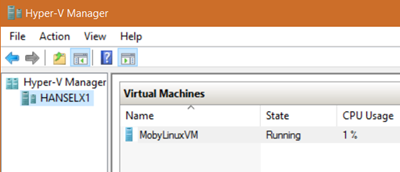
I signed up at http://beta.docker.com. Once installed, when you run the Docker app with Hyper-V enabled Docker automatically creates the Linux "mobylinux" VM you need in Hyper-V, sets it up and starts it up.

"Moby" the Docker VM running in Hyper-V

After Docker for Windows (Beta) is installed, you just run PowerShell or CMD and type "docker" and it's already set up with the right PATH and Environment Variables and just works. It gets setup on your local machine as http://docker but the networking goes through Hyper -V, as it should.

The best part is that Docker for Windows supports "volume mounting" which means the container can see your code on your local device (they have a "wormhole" between the container and the host) which means you can do a "edit and refresh" type scenarios for development. In fact, Docker Tools for Visual Studio uses this feature - there's more details on this "Edit and Refresh "support in Visual Studio here.

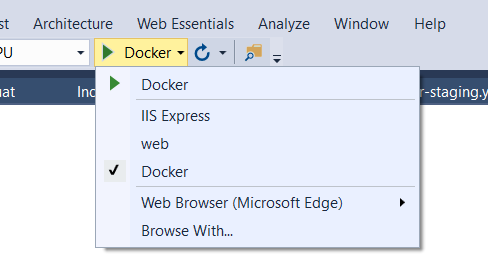
The Docker Tools for Visual Studio can be downloaded at http://aka.ms/dockertoolsforvs. It adds a lot of nice integration like this:

Docker in VS

This makes the combination of Docker for Windows + Docker Tools for Visual Studio pretty sweet. As far as the VS Tools for Docker go, support for Windows is coming soon, but for now, here's what Version 0.10 of these tools support with a Linux container:

  • Docker assets for Debug and Release configurations are added to the project
  • A PowerShell script added to the project to coordinate the build and compose of containers, enabling you to extend them while keeping the Visual Studio designer experiences
  • F5 in Debug config, launches the PowerShell script to build and run your docker-compose.debug.yml file, with Volume Mapping configured
  • F5 in Release config launches the PowerShell script to build and run your docker-compose.release.yml file, with an image you can verify and push to your docker registry for deployment to other environment

You can read more about how Docker on Windows works at Steve Lasker's Blog and also watch his video about Visual Studio's support for Docker in his video on Ch9 and again, sign up for Docker Beta at http://beta.docker.com.


Sponsor: Thanks to Seq for sponsoring the feed this week! Need to make sense of complex or distributed apps? Structured logging helps your team cut through that complexity and resolve issues faster. Learn more about structured logging with Serilog and Seq at https://getseq.net.


© 2016 Scott Hanselman. All rights reserved.
     
10 May 20:46

Developers can run Bash Shell and user-mode Ubuntu Linux binaries on Windows 10

by Scott Hanselman

UPDATE: I've recorded a 30 min video with developers from the project as well as Dustin from Ubuntu about HOW this works if you want more technical details.

As a web developer who uses Windows 10, sometimes I'll end up browsing the web and stumble on some cool new open source command-line utility and see something like this:

A single lonely $

In that past, that $ prompt meant "not for me" as a Windows user.

I'd look for prompts like

C:\>

or

PS C:\>

Of course, I didn't always find the prompts that worked like I did. But today at BUILD in the Day One keynote Kevin Gallo announced that you can now run "Bash on Ubuntu on Windows." This is a new developer feature included in a Windows 10 "Anniversary" update (coming soon). It lets you run native user-mode Linux shells and command-line tools unchanged, on Windows.

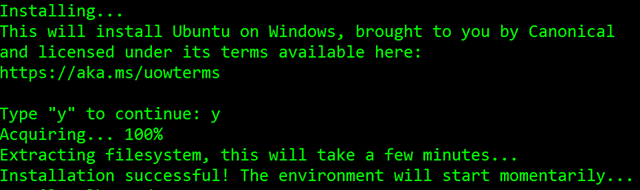
After turning on Developer Mode in Windows Settings and adding the Feature, run you bash and are prompted to get Ubuntu on Windows from Canonical via the Windows Store, like this:

Installing Ubuntu on Windows

This isn't Bash or Ubuntu running in a VM. This is a real native Bash Linux binary running on Windows itself. It's fast and lightweight and it's the real binaries. This is an genuine Ubuntu image on top of Windows with all the Linux tools I use like awk, sed, grep, vi, etc. It's fast and it's lightweight. The binaries are downloaded by you - using apt-get - just as on Linux, because it is Linux. You can apt-get and download other tools like Ruby, Redis, emacs, and on and on. This is brilliant for developers that use a diverse set of tools like me.

This runs on 64-bit Windows and doesn't use virtual machines. Where does bash on Windows fit in to your life as a developer?

If you want to run Bash on Windows, you've historically had a few choices.

  • Cygwin - GNU command line utilities compiled for Win32 with great native Windows integration. But it's not Linux.
  • HyperV and Ubuntu - Run an entire Linux VM (dedicating x gigs of RAM, and x gigs of disk) and then remote into it (RDP, VNC, ssh)
    • Docker is also an option to run a Linux container, under a HyperV VM

Running bash on Windows hits in the sweet spot. It behaves like Linux because it executes real Linux binaries. Just hit the Windows Key and type bash.

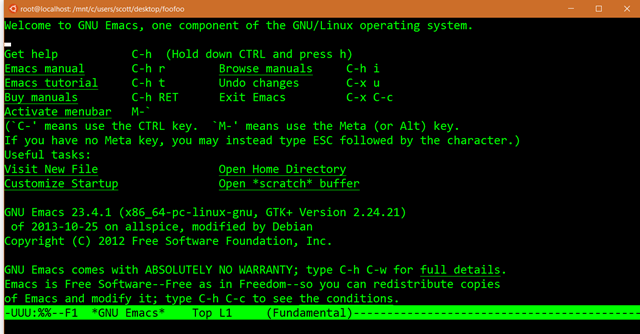
After you're setup, run apt-get update and get a few developer packages. I wanted Redis and Emacs. I did an apt-get install emacs23 to get emacs. Note this is the actual emacs retrieved from Ubuntu's feed.

Running emacs on Windows

Of course, I have no idea how to CLOSE emacs, so I'll close the window. ;)

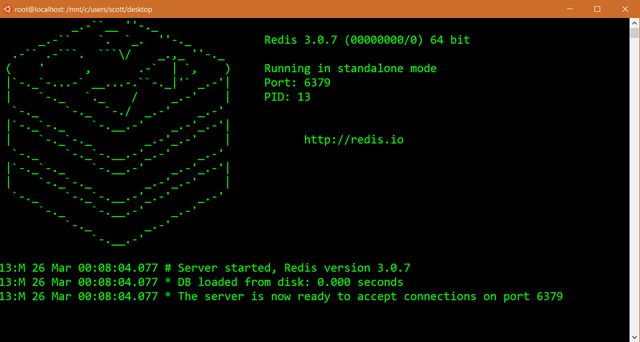
Note that this isn't about Linux Servers or Server workloads. This is a developer-focused release that removes a major barrier for developers who want or need to use Linux tools as part of their workflow. Here I got Redis via apt-get and now I can run it in standalone mode.

Running Redis Standalone on Windows

I'm using bash to run Redis while writing ASP.NET apps in Visual Studio that use the Redis cache. I can then later deploy to Azure using the Azure Redis Cache, so it's a very natural workflow for me.

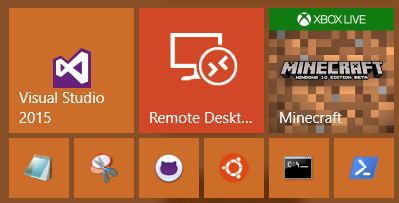
Look how happy my Start Menu is now!

A happy start menu witih Ubuntu

Keep an eye out at http://blogs.msdn.microsoft.com/commandline for technical details in the coming weeks. There's also some great updates to the underlying console with better support for control codes, ANSI, VT100, and lots more. This is an early developer experience and the team will be collection feedback and comments. You'll find Ubuntu on Windows available to developers as a feature in a build Windows 10 coming soon. Expect some things to not work early on, but have fun exploring and seeing how bash on Ubuntu on Windows fits into your developer workflow!


Sponsor:  BUILD - it’s what being a developer is all about so do it the best you can. That’s why Stackify built Prefix. No .NET profiler is easier or more powerful. You’re 2 clicks and $0 away, so build on! prefix.io


© 2016 Scott Hanselman. All rights reserved.
     
10 May 20:45

EMC Announces VxRail

by dan

Yes, yes, I know it was a little while ago now. I’ve been occupied by other things and wanted to let the dust settle on the announcement before I covered it off here. And it was really a VCE announcement. But anyway. I’ve been doing work internally around all things hyperconverged and, as I work for a big EMC partner, people have been asking me about VxRail. So I thought I’d cover some of the more interesting bits.

So, let’s start with the reasonably useful summary links:

  • The VxRail datasheet (PDF) is here;
  • The VCE landing page for VxRail is here;
  • Chad’s take (worth the read!) can be found here; and
  • Simon from El Reg did a write-up here.


So what is it?

Well it’s a re-envisioning of VMware’s EVO:RAIL hyperconverged infrastructure in a way. But it’s a bit better than that, a bit more flexible, and potentially more cost effective. Here’s a box shot, because it’s what you want to see.

VxRail_002

Basically it’s a 2RU appliance housing 4 nodes. You can scale these nodes out in increments as required. There’s a range of hybrid configurations available.

VxRail_006

As well as some all flash versions.

VxRail_007

By default the initial configuration must be fully populated with 4 nodes, with the ability to scale up to 64 nodes (with qualification from VCE). Here are a few other notes on clusters:

  • You can’t mix All Flash and Hybrid nodes in the same cluster (this messes up performance);
  • All nodes within the cluster must have the same license type (Full License or BYO/ELA); and
  • First generation VSPEX BLUE appliances can be used in the same cluster with second generation appliances but EVC must be set to align with the G1 appliances for the whole cluster.


On VMware Virtual SAN

I haven’t used VSAN/Virtual SAN enough in production to have really firm opinions on it, but I’ve always enjoyed tracking its progress in the marketplace. VMware claim that the use of Virtual SAN over other approaches has the following advantages:

  • No need to install Virtual Storage Appliances (VSA);
  • CPU utilization <10%;
  • No reserved memory required;
  • Provides the shortest path for I/O; and
  • Seamlessly handles VM migrations.

If that sounds a bit like some marketing stuff, it sort of is. But that doesn’t mean they’re necessarily wrong either. VMware state that the placement of Virtual SAN directly in the hypervisor kernel allows it to “be fast, highly efficient, and be able to scale with flash and modern CPU architectures”.

While I can’t comment on this one way or another, I’d like to point out that this appliance is really a VMware play. The focus here is on the benefit of using an established hypervisor (vSphere), and established management solution (vCenter) and a (soon-to-be) established software defined storage solution (Virtual SAN). If you’re looking for the flexibility of multiple hypervisors or incorporating other storage solutions this really isn’t for you.


Further Reading and Final Thoughts

Enrico has a good write-up on El Reg about Virtual SAN 6.2 that I think is worth a look. You might also be keen to try something that’s NSX-ready. This is as close as you’ll get to that (although I can’t comment on the reality of one of those configurations). You’ve probably noticed there have been a tonne of pissing matches on the Twitters recently between VMware and Nutanix about their HCI offerings and the relative merits (or lack thereof) of their respective architectures. I’m not telling you to go one way or another. The HCI market is reasonably young, and I think there’s still plenty of change to come before the market has determined whether this really is the future of data centre infrastructure. In the meantime though, if you’re already slow-dancing with EMC or VCE and get all fluttery when people mention VMware, then the VxRail is worth a look if you’re HCI-curious but looking to stay with your current partner. It may not be for the adventurous amongst you, but you already know where to get your kicks. In any case, have a look at the datasheet and talk to your local EMC and VCE folk to see if this is the right choice for you.

10 May 20:40

Considerations around validation errors 41305 and 41325 on memory optimized tables with foreign keys

by Denzil Ribeiro

Reviewed by: Jos de Bruijn; Joe Sack, Mike Weiner, Mike Ruthruff, Kun Cheng

Transactions on memory optimized tables in SQL Server 2014, SQL Server 2016 and Azure SQL Database are implemented with an optimistic concurrency model with multi-version concurrency control. Each transaction has its own transactionally consistent version of rows and the inherent assumption is that there aren’t any conflicts. Unlike on-disk tables, there is no locking and write-write conflicts are detected (error 41302) if concurrent transactions update the same rows. Even to maintain higher isolation levels, locks aren’t taken and hence validation has to occur at transaction commit time.

To recap a transaction lifetime there are 3 phases as described below, in this blog we will focus more on the validation phase

Capture

For more details see the books Online article : https://msdn.microsoft.com/en-us/library/dn133169.aspx

On transaction commit, you have to validate that no other transaction has updated or changed the rows you have read if using the Repeatable Read isolation level, or that no phantom rows were inserted into the range that you have read if the isolation level is Serializable. If all validation succeeds, then the transaction commits.

The summary of the validation errors is in the article Guidelines for Retry Logic for Transactions on Memory-Optimized Tables .

  • 41305. The current transaction failed to commit due to a repeatable read validation failure.
  • 41325. The current transaction failed to commit due to a serializable validation failure.

While testing a customer workload we encountered a delete transaction that was under the Snapshot Isolation level that was still failing with one of the validation errors 413235 listed above. This was puzzling, because under the Snapshot isolation level, you don’t expect to fail with repeatable read validation errors.

SQL Server 2016 did introduce support for foreign keys on memory optimized tables along with many other surface area improvements for In-memory OLTP as detailed here. Foreign keys do introduce a difference in the behavior with regards to validation that you may not expect. If you update or delete data from a table which has foreign key relationships, validation for adherence of those relationships has to happen under a higher isolation level in order to ensure that no rows are changed such that the constraint is violated. This means that if a constraint is violated due to DML performed in concurrent transactions, then the commit will fail with a validation failure. On-disk tables on the other hand acquire row locks or key locks on the tables involved in foreign constraints and concurrent transactions trying to delete or update those rows will be blocked. Unlike on-disk tables, memory optimized tables are lock free and hence validations at the right isolation level are required to ensure correctness.

Let’s take a look at a simple master/detail table relationship. Scripts to reproduce are at the end of the article in the appendix.

  • tblMaster is the master table
  • tblDetails is the child table has a foreign key that is defined on the tblMaster table’s EventID column

Exhibit 1: Validation errors due to lack of supporting indexes

In the sequence defined in the diagram below, you see that the statements themselves were executed at the Snapshot Isolation Level and yet the error we get is a “repeatable read” validation error, something we do not necessarily expect. Also Transaction 1 below is actually updating a row with EventID =4, which isn’t one of the rows that Transaction 2 is deleting and hence we did not expect this error. This is an example of a repeatable read validation error that was avoidable with proper indexing. When it comes to foreign keys always add an index on the Foreign key to support lookups as we will see shortly.

Sequence Transaction 1 Transaction 2
1  BEGIN TRAN
 
2  DELETE FROM tblMaster WITH (SNAPSHOT) WHERE ID = 5
 
3 UPDATE tbldetails WITH (SNAPSHOT)
SET EventName = ‘Event22’
WHERE EventID = 4 and languageID = 1
 
4  COMMIT
 
5  Msg 41305, Level 16, State 0, Line 18
The current transaction failed to commit due to a repeatable read validation failure.
 

Given the errors, we then looked at the execution plan of the delete statement, which shed some light on the root cause. Looking at the plan below, you can see a scan on the tblDetails table that reads the entire table, and then applies a filter to get the few rows affected. Since the entire table is read, that qualifies as the “read set” of the delete. Updating a row in that read set results in a repeatable read validation though it technically does not violate the constraint.


The output of dm_db_xtp_transactions shows the same read set being shown if you capture this before the commit for the transaction.

SELECT xtp_transaction_id,transaction_id,session_id
	,state_desc,result_desc,read_set_row_count,write_set_row_count
	,scan_set_count,commit_dependency_count
FROM sys.dm_db_xtp_transactions


Seeing that the Plan was suboptimal and was acquiring a larger read set than was needed due to lack of proper indexing, creating an index on the appropriate foreign key columns resulted in a different plan and the read set was then much smaller as we aren’t scanning the entire table.

ALTER TABLE tblDetails
ADD INDEX idxtblDetails_EventID NONCLUSTERED(EventID)


Adding this index removed these repeatable read validation errors resulting from rows being updated that were not in the range being deleted. This was a case of an avoidable validation error.

Exhibit 2: Serializable validation errors due to DML pattern

In the sequence below, the delete is done with SNAPSHOT isolation level, yet the error message that we get indicates a serializable validation error. This validation error occurs as we are inserting a value into the child table with the same key that we are deleting off the parent which would end up being a violation of the constraint. This is an expected validation error and is fundamentally due to application data entry order.

Sequence Transaction 1 Transaction 2
1  BEGIN TRAN
 
2  DELETE FROM tblMaster WITH (SNAPSHOT) WHERE ID = 5
3 INSERT INTO tbldetails VALUES (5,900001,’Event1′,’US’) 
4  COMMIT
 
5  Msg 41325, Level 16, State 0, Line 39
The current transaction failed to commit due to a serializable validation failure. 
 

If you did the same sequence of operations on memory optimized tables serially from one transaction, you would get the following behavior where the insert would fail as it conflicted with the key in the master table.

Sequence Transaction 1
1 BEGIN TRAN
 
2 DELETE FROM tblMaster WITH (SNAPSHOT) WHERE ID = 5
 
3  INSERT INTO tbldetails VALUES (5,900001,’Event1′,’US’) 
4 COMMIT
 
5 Msg 547, Level 16, State 0, Line 56
The INSERT statement conflicted with the FOREIGN KEY constraint “FK_tblDetails_tblMaster”. The conflict occurred in database “HKCCI”, table “dbo.tblMaster”, column ‘Id’.
The statement has been terminated.

If we did this same set of operations on disk based tables, at the default isolation level which is READCOMMITTED, the behavior would be below. Transaction 1 is the one that fails in this case and while Transaction 2 is open, transaction 1 is blocked.

Sequence Transaction 1 ( disk based ) Transaction 2 ( disk based)
1  BEGIN TRAN
 
2  DELETE FROM tblMaster_ondisk WHERE ID = 5
 
3  INSERT INTO tbldetails_ondisk VALUES (5,900001,’Event1′,’US’) 
à Blocked
4  COMMIT
 
5
  Msg 547, Level 16, State 0, Line 11
The INSERT statement conflicted with the FOREIGN KEY constraint “FK_tblDetails_tblMaster_ondisk”. The conflict occurred in database “HKCCI”, table “dbo.tblMaster_ondisk”, column ‘Id’.

Exhibit 3: Repeatable read validation errors due to DML pattern

Below is an example of an expected occurrence of a repeatable read validation error. In this case a value is inserted into the read-set of the rows affected by the delete and specifically into that range being deleted. This is due to how data is being inserted by the application and has to be handled and retried with the guidelines specified in Guidelines for Retry Logic for Transactions on Memory-Optimized Tables

Sequence Transaction 1 (in-memory) Transaction 2 (in-memory)
1  BEGIN TRAN
2  INSERT tbldetails (EventID) VALUES (5)  
3 DELETE FROM tblMaster WITH (SNAPSHOT) WHERE ID = 5 
4  COMMIT
 
5  Msg 41305, Level 16, State 0, Line 18
The current transaction failed to commit due to a repeatable read validation failure. 

Doing this same sequence on an on-disk table results in the delete being blocked and finally failing with a constraint violation error.

Sequence Transaction 1 (on disk) Transaction 2 ( on disk)
1  BEGIN TRAN
 
2  INSERT tbldetails_ondisk (EventID) VALUES (5)
 
3 DELETE FROM tblMaster_ondiskWHERE ID = 5
–>  This  statement is blocked
4  COMMIT
 
5  Msg 547, Level 16, State 0, Line 20
The DELETE statement conflicted with the REFERENCE constraint “FK_tblDetails_tblMaster_ondisk”. The conflict occurred in database “HKCCI”, table “dbo.tblDetails_ondisk”, column ‘EventId’

In either of the cases Extended Events with the error_number event can help in figuring out where in your application code validation errors are being raised to take the appropriate actions.

CREATE EVENT SESSION [TraceUserErrors_Validation] ON SERVER 
ADD EVENT sqlserver.error_reported(
    ACTION(package0.event_sequence,sqlserver.client_app_name,sqlserver.client_hostname
		,sqlserver.query_hash_signed,sqlserver.query_plan_hash_signed,sqlserver.session_id
		,sqlserver.sql_text,sqlserver.tsql_frame)
    WHERE ([package0].[equal_int64]([error_number],(41325)) 
			OR [package0].[equal_int64]([error_number],(41305)) 
			OR [error_number]=(41300) 
			OR [error_number]=(41301)))
ADD TARGET package0.event_file 	(SET filename=N'c:\Temp\TraceUserErrors_Validation.xel'
				,max_file_size=(250),max_rollover_files=(2)),
ADD TARGET package0.histogram	(SET filtering_event_name=N'sqlserver.error_reported'
				,source=N'error_number',source_type=(0))
WITH (EVENT_RETENTION_MODE=ALLOW_SINGLE_EVENT_LOSS)
GO


Output of the histogram target gives you a quick look at number of validation errors occurring grouped by the error number.

Summarizing, with the introduction of foreign key support for In-Memory OLTP, it is imperative to index the keys appropriately so that joins are efficient not only for explicitly defined joins, but also for validations that happen under the covers when you insert, update or delete a row so that we avoid unexpected validation errors.

For other validation errors, given the optimistic concurrency , applications using memory optimized tables should also include retry logic for valid cases of validation errors as specified in the article Guidelines for Retry Logic for Transactions on Memory-Optimized Tables

Appendix: TSQL Scripts to reproduce the behavior

 Setup Script:

USE [master]
GO
/****** Object:  Database [HKCCI]    Script Date: 3/24/2016 9:37:53 AM ******/
CREATE DATABASE InMemoryOLTP
ON  PRIMARY ( NAME = N'HKCCI', FILENAME = N'c:\temp\InMemoryOLTP.mdf'), 
FILEGROUP [HKCCI_InMemory] CONTAINS MEMORY_OPTIMIZED_DATA  DEFAULT
(NAME = N'HKCCI_InMemory', FILENAME = N'c:\temp\InMemoryOLTP' , MAXSIZE = UNLIMITED)
 LOG ON ( NAME = N'HKCCI_log', FILENAME = N'c:\temp\InMemoryOLTP_log.ldf')
GO

USE InMemoryOLTP
go
-- Master
SET ANSI_NULLS ON
GO
SET QUOTED_IDENTIFIER ON
GO
CREATE TABLE [dbo].[tblMaster]
(
	[Id] [int]  NOT NULL,
	[ExternalId] [int] NOT NULL,
	[IsActive] [bit] NOT NULL,
	[UTCStartTime] [datetime2](7) NOT NULL,
INDEX [NC_tblMaster_ExternalId] NONCLUSTERED ([ExternalId] ASC),
 CONSTRAINT [PK_tblMaster] PRIMARY KEY  NONCLUSTERED HASH ([Id]) WITH ( BUCKET_COUNT = 32000),
) WITH ( MEMORY_OPTIMIZED = ON , DURABILITY = SCHEMA_AND_DATA )
GO

-- Details table
CREATE TABLE [dbo].[tblDetails]
(
	[DetailID] int identity,
	[EventId] [int] NOT NULL,
	[LanguageId] [int] NOT NULL,
	[EventName] [nvarchar](512) COLLATE SQL_Latin1_General_CP1_CI_AS NULL,
	[CountryName] [nvarchar](512) COLLATE SQL_Latin1_General_CP1_CI_AS NULL

INDEX [NC_tblDetails_LanguageId] NONCLUSTERED ([LanguageId] ASC),
 CONSTRAINT [PK_tblDetails]  PRIMARY KEY NONCLUSTERED HASH ([DetailID]) WITH ( BUCKET_COUNT = 32768),
) WITH ( MEMORY_OPTIMIZED = ON , DURABILITY = SCHEMA_AND_DATA )
GO
ALTER TABLE [dbo].[tblDetails]  WITH CHECK ADD  CONSTRAINT [FK_tblDetails_tblMaster] FOREIGN KEY([EventId])
REFERENCES [dbo].[tblMaster] ([Id])
GO

--insert some data
INSERT INTO tblmaster VALUES ( 1,1,1,getutcdate())
INSERT INTO tblmaster VALUES ( 2,2,1,getutcdate())
INSERT INTO tblmaster VALUES ( 3,3,1,getutcdate())
INSERT INTO tblmaster VALUES ( 4,4,1,getutcdate())
INSERT INTO tblmaster VALUES ( 5,5,1,getutcdate())
INSERT INTO tblmaster VALUES ( 6,6,1,getutcdate())
GO

-- Translations
WITH Nbrs_3( n ) AS ( SELECT 1 UNION SELECT 0 ),
 Nbrs_2( n ) AS ( SELECT 1 FROM Nbrs_3 n1 CROSS JOIN Nbrs_3 n2 ),
 Nbrs_1( n ) AS ( SELECT 1 FROM Nbrs_2 n1 CROSS JOIN Nbrs_2 n2 ),
 Nbrs_0( n ) AS ( SELECT 1 FROM Nbrs_1 n1 CROSS JOIN Nbrs_1 n2 ),
 Nbrs ( n ) AS ( SELECT 1 FROM Nbrs_0 n1 CROSS JOIN Nbrs_0 n2 )
INSERT INTO tblDetails SELECT top 5000 1,ROW_NUMBER()  OVER (ORDER BY NEWID()) as LanguageID, 'Event1','AU' FROM Nbrs
GO

WITH Nbrs_3( n ) AS ( SELECT 1 UNION SELECT 0 ),
 Nbrs_2( n ) AS ( SELECT 1 FROM Nbrs_3 n1 CROSS JOIN Nbrs_3 n2 ),
 Nbrs_1( n ) AS ( SELECT 1 FROM Nbrs_2 n1 CROSS JOIN Nbrs_2 n2 ),
 Nbrs_0( n ) AS ( SELECT 1 FROM Nbrs_1 n1 CROSS JOIN Nbrs_1 n2 ),
 Nbrs ( n ) AS ( SELECT 1 FROM Nbrs_0 n1 CROSS JOIN Nbrs_0 n2 )
INSERT INTO tblDetails SELECT top 5000 2,ROW_NUMBER()  OVER (ORDER BY NEWID()) as LanguageID, 'Event2','AU'FROM Nbrs
GO

--insert into EventTranslations values(2,3,'Event1','FR')
WITH Nbrs_3( n ) AS ( SELECT 1 UNION SELECT 0 ),
 Nbrs_2( n ) AS ( SELECT 1 FROM Nbrs_3 n1 CROSS JOIN Nbrs_3 n2 ),
 Nbrs_1( n ) AS ( SELECT 1 FROM Nbrs_2 n1 CROSS JOIN Nbrs_2 n2 ),
 Nbrs_0( n ) AS ( SELECT 1 FROM Nbrs_1 n1 CROSS JOIN Nbrs_1 n2 ),
 Nbrs ( n ) AS ( SELECT 1 FROM Nbrs_0 n1 CROSS JOIN Nbrs_0 n2 )
INSERT INTO tblDetails SELECT top 5000 3,ROW_NUMBER()  OVER (ORDER BY NEWID()) as LanguageID, 'Event3','CA' FROM Nbrs
GO
WITH Nbrs_3( n ) AS ( SELECT 1 UNION SELECT 0 ),
 Nbrs_2( n ) AS ( SELECT 1 FROM Nbrs_3 n1 CROSS JOIN Nbrs_3 n2 ),
 Nbrs_1( n ) AS ( SELECT 1 FROM Nbrs_2 n1 CROSS JOIN Nbrs_2 n2 ),
 Nbrs_0( n ) AS ( SELECT 1 FROM Nbrs_1 n1 CROSS JOIN Nbrs_1 n2 ),
 Nbrs ( n ) AS ( SELECT 1 FROM Nbrs_0 n1 CROSS JOIN Nbrs_0 n2 )
INSERT INTO tblDetails
SELECT TOP 10000 4,ROW_NUMBER()  OVER (ORDER BY NEWID()) as LanguageID, 'Event4','UK' FROM Nbrs 
GO
SELECT COUNT(*) from tblDetails
GO

Validation Transaction 1 script:

--**********Step 1 ( Validation_transaction1.sql)
-- Open the Tran and Delete Parent Table
-- You can enable Execution Plans for this, does a Scan on EventTranslations
BEGIN TRAN
DELETE FROM tblMaster WITH (SNAPSHOT) WHERE ID = 5
GO

-- Now Execute Step2 from Validation_Transaction2.sql file

---************** Step 3
-- you should hit the error
/*
Msg 41305, Level 16, State 0, Line 6
The current transaction failed to commit due to a repeatable read validation failure. */
COMMIT
GO

---************** Step 4 ( Validation_transaction1.sql)
--- FIX and repeat Step 1 , Step 2, and Step 3.
ALTER TABLE tblDetails 
ADD INDEX idxtblDetails_EventID NONCLUSTERED(EventID)
GO

-- ************** Step 5 ( Validation_transaction1.sql)
-- Lets try to repro the Serializable error
DELETE FROM tblDetails WITH (SNAPSHOT) WHERE EventID = 1
BEGIN TRAN
DELETE FROM tblMaster WITH (SNAPSHOT) WHERE ID = 1
GO

-- Now Execute ***Step6 **** from Validation_transaction2.sql

--******Step 7 ( Validation_transaction1.sql)
/*
Msg 41325, Level 16, State 0, Line 31
The current transaction failed to commit due to a serializable validation failure. */

COMMIT
GO

---************** Step 8 ( Validation_transaction1.sql)
delete from tblDetails where eventid = 5
delete from tblmaster where id = 5
go
insert into tblMaster WITH (SNAPSHOT) values(5,2,1,getdate())
GO
BEGIN TRAN
INSERT tbldetails  WITH (SNAPSHOT) VALUES(5,-2,'Event111','US') 
GO
 
--********** Step 10 ( Validation_transaction1.sql
/*
Msg 41305, Level 16, State 0, Line 58
The current transaction failed to commit due to a repeatable read validation failure.
*/
COMMIT
GO

Validation Transaction 2 script:

--***** Step 2 ( Validation transaction 2.sql)
UPDATE tbldetails WITH (SNAPSHOT) 
SET EventName = 'Event221' 
WHERE EventID = 4 and languageID = 1

--- Now Execute Step 3 from the Validation_transaction1.sql file

--********* Step 6 ( Validation_transaction2.sql)
INSERT INTO tbldetails VALUES (1,900001,'Event1','US')

--***** Step 9 ( Validation_transaction2.sql )
DELETE FROM tblMaster WITH (SNAPSHOT) WHERE ID = 5

10 May 20:40

UPDATE with OUTPUT clause – Triggers – and SQLMoreResults

by Peter Scharlock

NOTE:  the code in this BLOG is TSQL instead of ODBC calls.  Since ODBC can be hard to understand and other API’s will have the same basic issues, I decided to use the simpler and more concise TSQL, which should also appeal to a wider audience.


An ISV I work with recently ran into an interesting problem; here is the description and solution.


PROBLEM:

Adding an unexpected trigger caused application code to fail due to incomplete SQL Syntax, and not reading through all returned results.


The ISV wanted to utilize the OUTPUT Clause of the UPDATE statement in their ODBC (SNAC) based application. The OUTPUT clause is very useful in providing data back to the application regarding the row, or rows, which were updated (or: inserted / deleted).  In the example I use below, the application is interested in knowing the date/time of the updated row(s).


This could be accomplished by issuing the following statement:

UPDATE T SET COL2 = @Pcol2, COL3 = getdate() OUTPUT CAST(INSERTED.COL3 AS varchar(30))WHERE COL1 = @Pcol1


The ISV coded up the application expecting a return value for number of rows affected, and if that value was greater than 0 then it also returned the value of the inserted date/time.


This worked well, until an external Partner application added a trigger to the table listed in the UPDATE statement.


Example: CREATE TRIGGER [dbo].[TTrigger1] on [dbo].[T] after update as update t2 set col3 = 0


Now the application failed on the UPDATE statement with the following error message:

[Microsoft][SQL Native Client][SQL Server]The target table 'T' of the DML statement cannot have any enabled triggers if the statement contains an OUTPUT clause without INTO clause.


The error message is self-explanatory, but was a surprise to the ISV application (and the application developer).  The developer did not expect a trigger to ever be created on the table.

There are two different methods of getting OUTPUT data from an UPDATE statement;

·       UPDATE with the OUTPUT clause only – this returns output results directly as part of the statement. This option cannot have a trigger defined on the table.

·       UPDATE with OUTPUT and INTO clauses – this returns the output a specific table, or table variable. This option must be used if there is any possibility the table will have a trigger on it at any point.

·       See the following website for complete the OUTPUT Clause documentation:

http://msdn.microsoft.com/en-us/library/ms177564.aspx

The developer then utilized the following syntax to send the same statement to SQL Server, and also to get the expected result back: declare @p165 table (col2 varchar(30));UPDATE T SET COL2 = ?, COL3 = getdate() OUTPUT CAST(INSERTED.COL3 AS varchar(30)) into @p165 WHERE COL1 = 1;select * from @p165


Now a subtlety occurred, can you guess what it was? If you guessed that additional results are returned you are correct.

The ODBC code returned data in a loop utilizing the following API calls:  SQLFetch, SQLNumResultCols, SQLRowCount, SQLMoreResults:

·       The first results returned were the number of rows affected by the trigger, not the number of rows affected by the UPDATE statement, which was what the application was actually expecting

·       The second set of results were the number of rows affected by the UPDATE statement

·       The third set of results were the number of rows returned by the SELECT statement reading the table variable

·       And finally, the actual data from the updated row(s) – which is what we really wanted in the first place!

So, the lessons to be learned here are:

1.   Be aware that triggers will affect your UPDATE statements if utilizing the OUTPUT clause

2.    You should utilize the INTO clause to avoid the issue

3.    Always use SQLMoreResults to read all of the result-sets that could be returned from SELECT, UPDATE, INSERT, or DELETE statements.

4.    Triggers should include the ‘SET NOCOUNT ON’ statement to avoid returning the ‘affected number of rows’.

SOLUTION:

The application was changed to utilize the INTO clause, and SQLMoreResults was used to return all the resulting data.  Using SET NOCOUNT ON in trigger logic is also a best practice that prevents additional results ‘Rows affected’ from being generated.


Here is a script to duplicate the issues I’ve described:

USE tempdb

GO

------You may want to run this script in steps from comment – to comment

------so you can follow along, instead of running the entire script at once


CREATE TABLE t(

      [col1] [int] NOT NULL,

      [col2] [varchar](30) NULL,

      [col3] [datetime] NULL

) ON [PRIMARY]

GO

insert into t values (1,'abc', getdate())

insert into t values (1,'abc', getdate())

insert into t values (1,'abc', getdate())

GO

select * from t

GO

UPDATE t SET col2 = 'Peter', col3 = getdate()

OUTPUT CAST(INSERTED.col3 AS varchar(30))WHERE col1 = 1

GO

select * from t

GO

------So far everything is good, Now let’s add the new table and the trigger

CREATE TABLE t2(

      [col1] [int] NULL,

      [col2] [datetime] NULL

) ON [PRIMARY]

GO

insert into t2 values (2, getdate())

insert into t2 values (2, getdate())

GO

select * from t2

GO

------In this example, the trigger: ttr1 will update the rows

------of a second table: t2

CREATE TRIGGER ttr1 on t after update as update t2 set col1 = 0

GO

------OK, let’s try now with the trigger on

UPDATE t SET col2 = 'Peter', col3 = getdate() OUTPUT CAST(INSERTED.col3 AS varchar(30))WHERE col1 = 1

GO

------Chances are good you got the following error message

--Msg 334, Level 16, State 1, Line 1

--The target table 't' of the DML statement cannot have any enabled triggers --if the statement contains an OUTPUT clause without INTO clause.

----- let’s fix that now.

declare @p1 varchar(30)

UPDATE t SET col2 = 'Peter', col3 = getdate() OUTPUT CAST(INSERTED.col3 AS varchar(30))into @p1 WHERE col1 = 1

GO

------Notice this failed as well with the following error message

--Msg 1087, Level 16, State 1, Line 2

--Must declare the table variable "@p1".

------We need to use a table

------for this to work correctly we must use a table or

------a table variable where the ‘INTO’ data will reside,

------and be retrieved from

declare @p1 table (col2 varchar(30))

UPDATE t SET col2 = 'Peter', col3 = getdate() OUTPUT CAST(INSERTED.col3 AS varchar(30))into @p1 WHERE col1 = 1

select * from @p1

--Now you get what we were originally looking for

--    the date/times of the rows that were updated

--Look at the results under the 'Messages' tab as well...

--you will see the number of rows affected:

--    2 for the rows inserted as part of the trigger

--    3 for the rows Updated

--    and 3 for the rows we selected from the table variable

--Now, you can see that the application must utilize SQLMoreResults if it

--wants to return all the valid results.


Cross Posted from http://blogs.microsoft.com/mssqlisv
10 May 20:40

OPTIMIZE FOR UNKNOWN – a little known SQL Server 2008 feature

by Peter Scharlock

Using parameterized queries is a well known SQL Server Best Practice. This technique ensures caching and reuse of existing query execution plans (instead of constantly compiling new plans), as well as avoiding SQL injection by mandating that input data be data type safe.

See more about SQL Server parameterization Best Practices here: http://blogs.msdn.com/sqlprogrammability/archive/2007/01/13/6-0-best-programming-practices.aspx

An application that I work with presented me with an interesting dilemma; It wanted to utilize the benefits of plan reuse but the parameter values that the application initially sends to SQL Server are not representative of the values passed in the subsequent re-execution of the statement. SQL Server compiled and cached a ‘good’ plan for the first parameter values. Unfortunately, this had the unintended side effect of caching a poor execution plan for all subsequent parameter values. To make this clearer let’s look at the following example query;

Select * from t where col1 > @P1 or col2 > @P2 order by col1;

Let’s assume for simplicities sake that col1 is unique and is ever increasing in value, col2 has 1000 distinct values and there are 10,000,000 rows in the table, and that the clustered index consists of col1, and a nonclustered index exists on col2.

Imagine the query execution plan created for the following initially passed parameters: @P1= 1 @P2=99

These values would result in an optimal queryplan for the following statement using the substituted parameters:

Select * from t where col1 > 1 or col2 > 99 order by col1;

Now, imagine the query execution plan if the initial parameter values were:  @P1 = 6,000,000 and @P2 = 550.

As before, an optimal queryplan would be created after substituting the passed parameters:

Select * from t where col1 > 6000000 or col2 > 550 order by col1;

These two identical parameterized SQL Statements would potentially create and cache very different execution plans due to the difference of the initially passed parameter values. However, since SQL Server only caches one execution plan per query, chances are very high that in the first case the query execution plan will utilize a clustered index scan because of the ‘col1 > 1’ parameter substitution. Whereas, in the second case a query execution plan using index seek would most likely be created.

Unfortunately if the initial parameter values are similar to the first example above, then a ‘table scan’ execution plan gets created and cached, even though most of the following queries would rather use a plan that contains the index seek.

There are a number of ways to work-around this issue;

·      Recompile every time the query is executed using the RECOMPILE hint - This can be very CPU intensive and effectively eliminates the benefits of caching queryplans.

·      Unparameterize the query – Not a viable option in most cases due to SQL injection risk.

·      Hint with specific parameters using the OPTIMIZE FOR hint (However, what value(s) should the app developer use?) This is a great option if the values in the rows are static, that is; not growing in number, etc. – However in my case the rows were not static.

·      Forcing the use of a specific index

·      Use a plan guide – Using any of the recommendations above.

SQL Server 2008 provides another alternative: OPTIMIZE FOR UNKNOWN


SQL Server 2008 provides a different alternative; the OPTIMIZE FOR UNKNOWN optimizer hint. This hint directs the query optimizer to use the standard algorithms it has always used if no parameters values had been passed to the query at all. In this case the optimizer will look at all available statistical data to reach a determination of what the values of the local variables used to generate the queryplan should be, instead of looking at the specific parameter values that were passed to the query by the application.

Full documentation of optimizer hints can be found here:

http://msdn.microsoft.com/en-us/library/ms181714(SQL.100).aspx

Example:

@p1=1, @p2=9998,

Select * from t where col > @p1 or col2 > @p2 order by col1

option (OPTIMIZE FOR (@p1 UNKNOWN, @p2 UNKNOWN))

Using this new optimizer hint option has allowed the ISV to generate queries that result in the benefits of parameterization; such as plan reuse, while eliminating the problems caused by the caching of queryplans that were created using nontypical initially passed parameter values.

NOTE: This new optimizer hint option, like all optimizer hints, should be used only by experienced developers and database administrators in cases where SQL Server cannot create an optimal plan.

Cross Posted from http://blogs.microsoft.com/mssqlisv
10 May 20:39

Getting Started Tuning Performance in Azure SQL Database

by Tim Radney

With the introduction of Azure SQL Database and the addition of more functionality in v12, database administrators are starting to see their organizations more interested in moving databases to this platform.

I recently started diving more into Azure SQL Database to see what’s drastically different from supporting the box version in datacenters across the world and Azure SQL Database. In my previous article, "Tuning: A Good Place to Start," I covered my approach for getting started with tuning SQL Server. I decided to review this against Azure SQL Database to discover the major differences.

In my original article, I started with common instance-level settings that I see ignored or left as default, as well as maintenance items. These include memory, maxdop, cost threshold for parallelism, enabling optimize for ad hoc workloads, and configuring tempdb. With Azure SQL Database, you aren’t responsible for the instance, and can’t modify those settings. Azure SQL Database is a Platform as a Service (PaaS), meaning Microsoft manages the instance for you; you’re simply a tenant with your database or databases.

You are responsible for maintenance, however, so you have to update statistics and handle index fragmentation like you do for the box product. For those tasks, I’ve found that most clients manage those processes with a dedicated Azure VM running SQL Server and using SQL Server Agent with scheduled jobs.

Following the steps from my article, the next areas I start looking into are file and wait statistics and high-cost queries. If you’re wondering if this aspect of your job as a production dba with on-premises databases will change when working with Azure SQL Database, the answer is not really. File and wait statistics are still there, but we have to get to them in a slightly different way. If you’re used to using Paul Randal's scripts for file stats and wait stats (or the queries for file stats for a period of time and wait stats for a period of time), then you’ll have to make some changes in order for those scripts to work with Azure SQL Database.

When I first tried Paul’s file stats script, it failed due to Azure SQL Database not supporting sys.master_files:

Msg 208, Level 16, State 1
Invalid object name 'sys.master_files'.

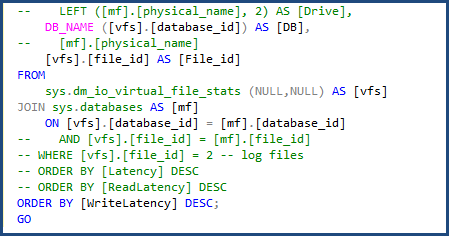
I was able to modify the script to use sys.databases in the join to get the database name and remove the portion of the script to get the individual file names since we will only be dealing with a single data and log file. You can see the changes I had to make in the following image:

IO_script_changes

When I ran the file-stats-over-a-period-of-time script after, making the same change to sys.databases and removing the references to file_id in the join, it failed due to Azure SQL Database v12 not supporting global ##temp tables.

Once I changed all the global ##temp tables to local, I had another issue with the script unable to drop existing temp tables that were used, because local #temp tables cannot be referenced directly by name the way global ##temp tables can, but this was easy to overcome by changing such checks to OBJECT_ID('tempdb..#SQLskillsStats1'). I made the same change for the second temporary table, and updated the block of code at the beginning and end of the script.

I had to make one more change and remove [mf].[type_desc] and LEFT ([mf].[physical_name], 2) AS [Drive] since those are dependent on sys.master_files. The script was then complete and ready to use with Azure SQL Database.

I use the file-stats-over-a-period-of-time regularly when troubleshooting performance issues. The cumulative data has its purpose, but I’m more interested in specific segments of time when user workloads are being ran.

With file stats, we are concerned with our latency per database file and how we can tune to help reduce overall I/O. The approach is the same as SQL Server, where you need to tune your queries properly and have the correct indexes. If the workload is just too large, then you have to move to a faster performing DTU database tier. For me, this is great: you just throw hardware at it; but it's not really hardware in the traditional sense. With Azure SQL Database, you get to start with a less expensive tier and scale as your business and I/O demands grow – essentially by just flipping a switch.

Trying to find the best method for obtaining wait stats was easier. The standard script that many of us use still works, however it’s pulling wait stats for the container in which your database is running. Those waits still apply to your system, but can include waits incurred by other databases in the same container. Azure SQL Database contains a new DMV, sys.dm_db_wait_stats, which filters to the current database. If you’re like me and primarily use Paul's wait stats script that omits all the benign waits, just change sys.dm_os_wait_stats to sys.dm_db_wait_stats. The same change works for the waits-over-a-period-of-time-script as well, but you also have to make the change from global variables to local.

When it comes to finding high cost queries, one of my favorite scripts to run finds the most used execution plans. In my experience, tuning a query that is called 100,000 times per day is usually a bigger win than tuning a query that has the highest IO but is only run once per week. The following query is what I use to find the most used plans:

SELECT  usecounts ,
        cacheobjtype ,
        objtype ,
        [text]
FROM    sys.dm_exec_cached_plans
        CROSS APPLY sys.dm_exec_sql_text(plan_handle)
WHERE   usecounts > 1
        AND objtype IN ( N'Adhoc', N'Prepared' )
ORDER BY usecounts DESC;

When using this query in demos, I always flush my plan cache to reset the values. When I tried running DBCC FREEPROCCACHE in Azure SQL Database, I was given the following error:

It turns out that DBCC FREEPROCCACHE is not supported in Azure SQL Database. This was troubling to me, what if I’m in production and have some bad plans and want to clear the procedure cache like I can with the box version. A little Google/Bing research lead me to find the Microsoft article, "Understanding the Procedure Cache on SQL Azure," which states:

SQL Azure currently doesn’t support DBCC FREEPROCCACHE (Transact-SQL), so you cannot manually remove an execution plan from the cache.  However, if you make changes to the table or view referenced by the query (ALTER TABLE and ALTER VIEW) the plan will be removed from the cache.

In discussing this with Kimberly Tripp after not seeing that described behavior, it does not flush the plan from cache, but it does invalidate the plan (and then the plan will be eventually aged out of the cache). While this is helpful in certain situations, this was not what I needed. For my demo I wanted to reset the counters in sys.dm_exec_cached_plans. Generating a new plan would not give me the desired results. I reached out to my team and Glenn Berry told me to try the following script:

ALTER DATABASE SCOPED CONFIGURATION CLEAR PROCEDURE_CACHE;

This command worked; I was able to clear the procedure cache for the specific database. Database Scoped Configurations is a new feature added in SQL Server 2016 RC0; Glenn blogged about it here: Using ALTER DATABASE SCOPED CONFIGURATION in SQL Server 2016.

I am excited to move several of my own databases into Azure SQL Database, and to continue learning about the new features and scalability options. I am also looking forward to working with SQL Sentry Performance Advisor for Azure SQL Database, which was introduced with v10. I am most interested in experimenting with the DTU Usage dashboard, which Mike Wood described in his recent post.

The post Getting Started Tuning Performance in Azure SQL Database appeared first on SQLPerformance.com.

10 May 20:39

Announcing updates to the SQL Server Incremental Servicing Model (ISM)

by SQL Server Team

Recently, we announced an update to the Incremental Servicing Model for SQL Server. The details of the changes in the SQL Server Incremental Servicing Model can be found in this blog post.

You should plan to install a SQL Server Cumulative Update with the same level of confidence you plan to install SPs (Service Packs) as they are released. This is because Cumulative Updates are certified and tested to the level of Service Packs. Also, Microsoft CSS data indicates that a significant percentage of customer issues are often previously addressed in a released CU, but not applied proactively. More so, CU’s contain added value over and above hotfixes. These also may contain supportability, logging, and reliability updates enhancing the overall experience.

10 May 20:39

SQL Server 2016 Query Store: How to fix problems you face for slow running queries

by Sergio Govoni

This article allows us to focus on a new feature of SQL Server 2016 known as Query Store. We will talk about performance issues related to the query plan choice change and how the Query Store can help us to identify queries that have become slower.


Introduction

Have you ever experienced to have your system slowed down or completely down? What happens? Everyone is waiting for you to fix the problem as soon as possible! The Boss is over your desk! Have you ever experienced to upgrade an application to the latest version of SQL Server and facing an issue with plan change that slows your application down? Query plan choice change can cause these problems. A performance problem related to the system database tempdb is not as hard to fix as a problem related to a query plan changes. You know, query plan changes give you more and more problems. As far as the tempdb is concerned, you can move it into a faster hard-drive or you can increase the number of the tempdb files, but when you have to find the slow running queries you have to figure out why they are slow!

Detecting and fixing problems you face for slow running queries takes you long because you have to look into the plan change as well as the lock occur and a question grow up in your mind: What was the former plan like? So you try to find out an answer for this question, but, has the Data Collector been activated on the server? If the Data Collector hasn’t been activated the only tool you have to investigate slow running queries is the plan cache, but it may not be suitable for troubleshooting. When memory pressure occurs on the server, the queries you are finding could be already gone away from the cache. Finally, when you have the issue on your hands, can you modify the query text? If you cannot, do you know the system stored procedures to create and manage the Plan Giude?

Supposing you are given a query with two predicates on it, one predicate has the highest selectivity, which plan is the best? Supposing you are given a query with two joint tables, for example you have the table A Joined to the table B. Which is the best way to implement the Join? A Joined to B or the opposite? Imagine now a query that has 80 joint tables. Each color in the following picture represents an execution plan generated and evaluated by the Query Optimizer for the same query. In practice we have hundreds or thousands possible plans for a query with medium complexity.

Picture 1 – Execution Plans (Projects PICASSO: http://dsl.serc.iisc.ernet.in/projects/PICASSO)

SQL Server Query Optimizer considers many plans, but when your data changes, it might select a different plan. Usually when it crosses a boundary, performance is approximately the same, but sometimes, the actual performance is visibly different.


What does the query store do for you?

The Query Store stores all the plan choices and related performance metrics for each query, it identifies queries that have become slower recently and it allows DBAs to force an execution plan easily! If you force an execution plan for a particular query, it makes sure your changes work across server restart, upgrades, failover and query recompiles.


How the Query Store captures data?

Every time SQL Server compiles a query, a compile message comes into the Query Store and the execution plan of the query is stored. In the same way, when a query is executed, an execute message comes into the Query Store, the runtime statistics are stored into the Query Store after the query has been executed. Query Store aggregates the information according to the time granularity you have chosen, the aggregation will be done in memory (because we don't want to kill the server) and then, based on the database option DATA_FLUSH_INTERNAL_SECONDS, aggregated data will be stored on disk in a background asynchronous way like the checkpoint mechanism.


Picture 2 – How the Query Store captures data

I have just told you that the aggregation is done in memory and not on the disk, so suppose an unexpected shutdown occurs, how many in memory data would be lost? If you keep a smaller number of data in memory, you will have bigger IO cost and a smaller number of information will be lost in case of an unexpected shutdown, otherwise, if you keep a bigger number of data in memory, you will lose a larger number of data in case of an unexpected shutdown, but you will have smaller IO cost. This setting is your choice! The important thing is that you have the possibility to choice! If you want to see data captured by the Query Store, you need a tool that combines both In-Memory and On-Disk statistics. Each DMV related to the Query Store, joined In-Memory and On-Disk data. For example, the sys.query_store_runtime_stats table valued function groups In-Memory and On-Disk data in a unified place, so you can use it your scripts or in your application.

Bear in mind, when memory pressure occurs on the server, some data In-Memory will be flushed to the disk in order to release the memory for others.. read the complete article here..


Additional resources about SQL Server Query Store are available here on docs.com:

Enjoy the Query Store!

10 May 20:38

SQL Server 2016: The STRING_SPLIT Function

by Artemakis Artemiou [MVP]
A long-awaited string function added to SQL Server 2016 is STRING_SPLIT. As the name implies, this function splits the given character expression using the separator set by user. Let's see some examples of using the STRING_SPLIT function. -- --Example #1 -- DECLARE @string AS VARCHAR(250); SET @string = '1-2-3-4-5-6-7-8-9-10'; SELECT  Value FROM STRING_SPLIT(@string, ','); --Output:
10 May 20:38

Using Artificial Intelligence to Fight Smog in China

by A.R. Guess

by Angela Guess Will Knight recently wrote in the MIT Technology Review, “From the street, through Beijing’s heavy smog, it can sometimes be hard to make out IBM’s Chinese headquarters: a towering office building with a distinctive undulating architectural flourish and a large company logo at the top. But just a short distance away, on […]

The post Using Artificial Intelligence to Fight Smog in China appeared first on DATAVERSITY.

10 May 20:38

Do you fail over your clusters?

by GrumpyOldDBA
This may sound somewhat strange but what I actually mean is do you actively run your production servers on alternate nodes? Generally I will run alternate nodes based around application releases where we have an agreed outage. Just this last week it was...(read more)
10 May 20:37

Microsoft Introduces Several New and Improved Machine Learning Bots

by A.R. Guess

by Angela Guess Michelle Fitzsimmons reports in TechRadar, “As someone on Twitter said, if ‘bots’ was on your Build 2016 drinking game card, you’d be long dead. But while Microsoft is all about getting developers to create intelligent app companions to make our lives easier, is there any impressive machine learning the Redmond firm is […]

The post Microsoft Introduces Several New and Improved Machine Learning Bots appeared first on DATAVERSITY.

10 May 20:37

Microsoft SQL Server Developer Edition is now free

by SQL Server Team

This post was authored by Tiffany Wissner, Senior Director of Data Platform Marketing

Exciting news! Starting today, SQL Server 2014 Developer Edition is now a free download for Visual Studio Dev Essentials members (you will be prompted to sign in to Visual Studio Dev Essentials before you can download SQL Server 2014 Developer Edition). We are making this change so that all developers can leverage the capabilities that SQL Server 2014 has to offer for their data solution, and this is another step in making SQL Server more accessible. SQL Server Developer Edition is for development and testing only, and not for production environments or for use with production data.

Visual Studio Dev Essentials is Microsoft’s most comprehensive free developer program ever, with everything you need to build and deploy your app on any platform, including state-of-the-art tools, the power of the cloud, training, and support.

SQL Server 2014 Developer Edition offers the full feature set of SQL Server 2014 Enterprise Edition, and allows you to build almost any kind of data solution on top of SQL Server. SQL Server 2014 delivers mission critical performance across all workloads with in-memory with in-memory built-in, faster insights from any data with familiar tools, and a platform for hybrid cloud enabling organizations to easily build, deploy, and manage solutions that span on-premises and cloud. It also delivers peace of mind with the fewest security vulnerabilities of any enterprise database six years in a row. [1] To learn more about the value proposition of SQL Server 2014, read the datasheet.

SQL Server 2016 Developer Edition, when released later this year, will also be free. To learn more about the exciting new features in SQL Server 2016, read the datasheet.

SQL Server Developer Edition does not include a licensed OS, such as a license for Windows 10 included on a new laptop. 90 to 180 day free trials of Windows and Windows Server are available on the TechNet Eval Center.

For customers needing a comprehensive database development solution, we also offer Visual Studio Professional and Visual Studio Enterprise subscriptions. Visual Studio subscriptions provide additional benefits, including:

  • Past and current versions of SQL Server (including Enterprise edition)
  • Past and current versions of Windows and Windows Server for dev/test
  • A monthly Azure credit of $50 to $150 to use for running dev/test workloads, including Azure SQL Database, SQL Server running in Azure Virtual Machines, and much more
  • 2 or 4 incidents with Microsoft Technical Support
  • Visual Studio Professional or Visual Studio Enterprise, for state-of-the-art database development
  • Source code management/version control, work item management, builds, and more using Team Foundation Server and Visual Studio Team Services
  • And much more…

Click here to download SQL Server 2014 Developer Edition from Dev Essentials. You will be prompted to sign in to Visual Studio Dev Essentials before you can download SQL Server 2014 Developer Edition.


[1] National Institute of Standards and Technology Comprehensive Vulnerability Database, February 1, 2016

10 May 20:37

BI’s Not Dead

by andyleonard
Timo Elliot [ Blog | @timoelliott ] wrote yesterday that BI is Dead and Julie Koesmarno [ Blog | @mssqlgirl ] was kind enough to tweet about it. The compelling point in Mr. Elliott’s post is: “The most charitable view is that Gartner feels it has to exaggerate the demise of BI in order to get customers to pay attention to the changes before it’s too late.” Mr. Elliott goes on to point out Gartner is redefining the term “BI” to apply only to what most BI folks now refer to as “self-service BI.” But...(read more)
10 May 20:37

Very pleased to see free developer edition of SQL Server

by Greg Low

I spend a lot of my time working with ISVs (or software houses) and with individual developers. For SQL Server to have a long-term future, we need to be appealing to more and more new developers, to get them to understand that SQL Server is a great platform for building their applications above.

One of the most important aspects of this right up front, is making it really frictionless to get started with SQL Server.

In the past, it has at times been very difficult to purchase SQL Server Developer Edition. To me, that’s been ridiculous if we want to attract new developers to the platform. I have a friend who, a year or so back, wanted to get Developer Edition and spent weeks (literally) trying to find out how to buy it. In the USA, it was available in the Microsoft store. You could pay $40 and download it. If you had an MSDN subscription, it was also just available for download. But for some reason that I’ll never fathom, it wasn’t available in the Australian Microsoft store and you had to purchase it from a license vendor instead.

Because Developer Edition was a low-cost item, the license vendors weren’t interested in it. Even when I spoke to the local Microsoft sales subsidiary, after two weeks I couldn’t find out how to buy it either. The local sales team seems to be basically goaled on Enterprise Edition sales, so a Developer Edition license didn’t even feature on their radar.

Sadly, by comparison, my friend downloaded PostgreSQL and was using it 15 minutes later. This situation could not continue.

The Visual Studio team had been rightly proud of their Visual Studio Community Edition and how well it was going. It was just a free download.

I was a very vocal member of a crowd asking “Where is the SQL Server Community Edition?”.

Well this week, our pleas have been answered. Any developer can just join the Visual Studio Dev Essentials program and then download SQL Server Developer Edition for free.

I’ve got much more to post about what else we need to do to help get the new developers but credit must be given where it’s due. Thanks for listening Microsoft !

10 May 20:37

The New Era of Business Intelligence

by A.R. Guess

by Angela Guess TechFinancials reports, “IT industry veteran Dan Sommer, the senior director: market intelligence lead at Qlik, says that companies need to move beyond traditional BI and embrace the endless possibilities that connecting people with data and ideas will bring. Sommer was in South Africa to discuss business analytics market trends with particular reference […]

The post The New Era of Business Intelligence appeared first on DATAVERSITY.

10 May 20:37

Preview the Microsoft JDBC Driver 6.0 for SQL Server

by SQL Server Team

We are pleased to announce the second community technical preview release of the Microsoft JDBC Driver 6.0 for SQL Server! The updated driver provides robust data access to Microsoft SQL Server and Microsoft Azure SQL Database for Java-based applications.

What’s new

Always Encrypted

You can now use Always Encrypted with the Microsoft JDBC Driver 6.0 for SQL Server Preview. Always Encrypted is a new SQL Server 2016 and Azure SQL Database security feature that prevents sensitive data from being seen in plaintext in a SQL instance. You can now transparently encrypt the data in the application, so that SQL Server will only handle the encrypted data and not plaintext values. If a SQL instance or host machine is compromised, an attacker can only access ciphertext of your sensitive data. Use the JDBC Driver 6.0 Preview or ADO.NET driver to encrypt plain text data, store the encrypted data in SQL Server 2016 CTP (and above) or SQL Azure Database. Likewise, use the driver to decrypt your encrypted data.

Internationalized Domain Names (IDNs)

IDNs allow your web server to use Unicode characters for server name, enabling support for more languages. Using the new Microsoft JDBC Driver 6.0 for SQL Server Preview, you can convert a Unicode serverName to ASCII compatible encoding (Punycode) when required during a connection.

Table-Valued Parameters (TVPs)

TVP support allows a client application to send parameterized data to the server more efficiently by sending multiple rows to the server with a single call. You can use the JDBC Driver 6.0 Preview to encapsulate rows of data in a client application and send the data to the server in a single parameterized command.

Azure Active Directory (AAD)

AAD authentication is a mechanism of connecting to Azure SQL Database v12 using identities in AAD. Use AAD authentication to centrally manage identities of database users and as an alternative to SQL Server authentication. The JDBC Driver 6.0 Preview allows you to specify your AAD credentials in the JDBC connection string to connect to Azure SQL DB.

AlwaysOn Availability Groups (AG)

The driver now supports transparent connections to AlwaysOn Availability Groups. The driver quickly discovers the current AlwaysOn topology of your server infrastructure and connects to the current active server transparently.

Roadmap

We are committed to continuously updating the JDBC driver to bring more feature support for connecting to SQL Server, Azure SQL Database, and Azure SQL DW. Please stay tuned for upcoming releases that will have additional feature support. This applies to our wide range of client drivers including PHP 7.0, Node.js, ODBC, and ADO.NET which are already available.

10 May 20:36

Scaling Azure VM’s

by James Serra

There are so many benefits to the cloud, but one of the major features is the ease of use in scaling a virtual machine (VM).  A common scenario is when you are building an application that needs SQL Server.  Simply create a VM on the Azure portal that has SQL Server already installed (or choose an OS-only VM and install SQL Server on your own if you will be bringing a SQL Server license over).  When choosing the initial VM, choose a smaller VM size to save costs.  Then as your application goes live, scale the VM up a bit to handle more users.  Then watch to see the performance of SQL Server.  If you need more resources, scale the VM up again.  If you scale too much so the VM is being under utilized, just scale it back down.

All this scaling can be done in a few mouse clicks with the resizing taking just a few minutes (or even just a few seconds!).  Compare this to scaling on-prem: review hardware, order hardware, wait for delivery, rack and stack it, install OS, install SQL Server, then hope you did not order too much or too little hardware.  It can take weeks or months to get up and running!  Then think of the pain if you have to upgrade the hardware: repeat the same process above, then backup and restore the databases, the logins, sql agent jobs, etc, and restore them on the new server and repoint all the users to the new server.  Ugh!

Let me quickly cover the process of scaling a VM in Azure to show you how easy it is.  First you select your VM in the Azure portal and choose “Size” under Settings:

Picture1

Under “Choose a size” will be a list of all the available VM sizes you can scale to.  Some VMs may not appear in the list if you are in a region that does not support them, so keep this in mind when choosing the region for your initial VM:

Picture5

Some of the VMs in the “Choose a size” list will be “active”, meaning you can select them, and resizing requires just a VM reboot.  The VMs that are active depends on if the current VM size is in same family (see list below), or if the Azure hardware cluster that the current VM resides in supports the new VM size (which you are not able to tell ahead of time – click here for more info):

Picture2

If you see VMs in the “Choose a size” list that are grayed out and not selectable, it means the VM is not in the same family and the hardware cluster does not support the new VM size.  No problem!  If you are using the Azure Resource Manager (ARM) deployment model you can still resize to any VM, you just need to first stop your VM.  Then go back to the “Choose a size” list and you will see all the VMs are now active and selectable.  Just remember to restart the VM when the scaling is complete.

Resizing a VM deployed using the Classic (ASM) deployment model is more difficult if the new size is not supported by the hardware cluster where the VM is currently deployed.  Unlike VMs deployed through the ARM deployment model it is not possible to resize the VM while the VM is in a stopped state.  So for VMs using the ASM deployment model you should delete the virtual machine but select the option to keep the attached storage (OS and data disks) and then create a new virtual machine in the new size and reattach the disks from the old virtual machine.  To simplify this process, there is a PowerShell script to aid in the delete and redeployment process.

So once you choose the VM to scale to, you will see:

Picture3

and in a few minutes, or even seconds if the VM is stopped, you will see:

Picture4

If you needed to stop your VM, the next step is to restart it.  If you did not need to stop it, you are ready to go!

More info:

Anatomy of a Microsoft Azure Virtual Machine

10 May 20:36

WhereYouAt BUILD 2016 Demo

by Steve Lasker

Last week at build, Scott Hanselman and Scott Hunter presented an ASP.NET Core app we called Where You At. We were quite excited at the response and set of questions that arose. In response, we wanted to write a series of blog posts, each of us covering the different aspects of what we built, why and what we learned.

Where did the demo idea come from and why?

With all the buzz around cloud languages, such as Node.js and GO, we asked ourselves, how can we demonstrate the value of ASP.NET Core as a language to be used everywhere? .NET isn’t just a Microsoft stack, limited to IIS, Windows and Azure. .NET Core can run on the Mac and Linux as well. Scott Hunter, Scott Hanselman and I had been going back and forth on various demo ideas. Hanselman suggested pins on a map. Hunter wanted to get Red Hat involved. I wanted to show multiple containers and the Dev/Ops workflow.

What better way to show ASP.NET Everywhere, but to actually run it everywhere?  What if we could run it on all the top clouds including AWS, Google, Docker and of course Azure? Getting the crowd engaged with the map was hook.

The Demo Prototype

Here’s the demo script as we envisioned it

Ask the audience to hit https://aka.ms/WhereYouAt

  1. They see a page that asks them to submit their location
    WhereYouAt-TellMe
    • Prompted to capture the city only
  2. Display shows bing maps, with pushpins globally
    MapMockup
  3. As customers start submitting their location, pushpins show up with a flag indicating which cloud processed their request (Azure, AWS, Google, DockerCloud)
  4. Scott Expands the lower section of the screen showing a view of Azure, Amazon, Google and DockerCloud, all running ASP.NET Linux Containers
    CloudCandyBarMockup
  5. As the system receives requests, we’ll see them allocated to the different cloud providers running another ASP.NET Core Linux images. The images are instanced on demand, round robin across the various cloud providers
  6. The web page shows:
    • Groupings for Azure, AWS, Google, Digital Ocean and Docker
    • Number of containers concurrently running in each cloud
    • Number of tasks processed
    • Number of unique users
  7. Container Chaos Monkey
    • Randomly click the red [x] to kill a container
    • Notice the system self heals and replaces the container near instantly, including adding to the load balance

As you can see, we had a prioritized list, with aspirations to play a little container chaos monkey. Scott could randomly kill individual containers, or hosts and the container orchestration systems would self-heal. As it evolved, we ran out of time, but we also recognized the value of container orchestration systems wasn’t the value prop we were trying to take on for this demo.

The Team

  • We assembled a team to and outlined what we needed:
  • UI
  • Services
  • Architecture for how this would be deployed
  • Development environment including a repo, build system and the set of tools we needed
  • Production cloud hosting – the container orchestration systems to host the app
  • Load testing, to make sure we didn’t crash and burn in a very visual fireball, just as we’re demonstrating the value of containers and the cloud to achieve scaling
  • Our team was initially made up of:
    • Scott Hanselman
      Load balancing and worked across the board, jumping in to solve problems wherever they came up. Scott has quite the network of people, not the least of which from his Azure Friday channel 9 recordings.
    • Maria Naggaga Nakanwagi
      The user interface, including all HTML, JavaScript and API calls from the client
    • Glenn Condrom
      The API services, including Azure Storage
    • Steve Lasker
      Cloud deployments, containerization and automated VSTS build steps, API services

The Architecture

Since we wanted to show multiple clouds, we needed a way to load balance across the clouds. Scott Hanselman had done a Friday Azure show on Traffic Manager, which seemed perfect for what we wanted.

Within each cloud, we had aspirations of dynamically scaling the app on demand. This meant docker hosts and container instances would change over time. Each cloud orchestration system has a means of providing dynamic discovery services, so we wanted to take advantage of them within the each cloud. Each cloud would load balance amongst itself, and we’d use Traffic Manager to load balance across the different clouds.

Our diagram looked like this. You’ll notice Docker Cloud has a load balancer as a container. We’ll discuss that in more detail below.PhysicalArch

Cloud Specific Deployments

Azure

  • Azure Container Service – for container management, using Mesos
  • Azure Load Balancer – A nice feature of ACS is the dynamic integration with the Azure Load Balancer using the PaaS layer. This means you can defer the load balancing configuration and reliability to ACS as it dynamically integrates with the Load Balancer. There are inner communications where’ you’ll likely want direct control over a load balancer such as HAProxy or NGinX. However, the front of your cloud, it’s pretty common to use a PaaS load balancer.

AWS

Docker Cloud

Docker hosts the container management layer in their cloud, while they defer the VM instances to be one of the other public clouds, including AWS, Azure, Digital Ocean and others. Docker is focusing on the docker orchestration services, as opposed to competing with actual hosting services. In this case, I of course chose Azure to host my VMs, which I was able to simply slide the slider for the number of instances.

DockerCloudCreateInstances

The Docker Tutorials walked through using HAProxy as a load balancer, deployed within the service definition. This is why you see a load balancer container running within the Docker Cloud. This can be accomplished through any cloud, and is a good example for how you can, and likely would use each configuration.

Google

I had hoped to deploy with Google Kubernetes as well. I had this partially setup, however the Google kubectl api isn’t supported Windows, so changes were always an additional challenge. Many of their APIs require a bash environment. I thought about using the pending Ubuntu on Windows option, but we were running out of time, and I wasn’t intending to do a cloud compete story, so we made a scoping cut. Kubernetes has some great networking features that make service discovery, and container port management simpler, but we just didn’t have the time to do everything.

Automated Builds

As a team making frequent changes, working across the country, on different time zones with different time slices of work, we needed an automated build system.

I had been working with Donovan Brown on our Visual Studio Team System docker integration. He had built some VSTS build steps that worked with ASP.NET Beta 6, but we needed some updates to work with RC1. We also wanted a Docker Compose step to deploy multiple containers for validation before deploying to the various clouds. The Visual Studio Team System Release Management team had been building some Visual Studio Team System Docker Build Steps. This was a great chance to test them out, provide some feedback for how to integrate the Docker Tools for Visual Studio dockerfiles we added to a project, and automate the builds.

Here’s our automated build goals, and where we landed using the preview of Visual Studio Team System Docker Extension:

  • As code was checked into https://github.com/shanselman/aspneteverywheredemo automate the build
    VSTSCI
  • Build a docker image to another Linux VM named AzureBuildVSTSDockerBuild
    • The Linux VM was provisioned with a pre-release version of the Azure Driver for Docker-Machine. This simplifies the configuration and provides Azure ARM based VM configurations, and port provisioning
    • We considered running Docker on the build agent, but wound up using separate Linux VMs
    • The dockerfile is nested in the Docker sub folder, and it’s the .release version. As scaffolded by the Docker Tools for Visual Studio
    • The Image name uses my registry hive, with the project name and the $(Build.BuildNumber) VSTS Variables
    • The Docker Context is set to the root of the project to capture the .dockerignore file, and have the correct context for adding files to the image
    • The working directory was left as the default
  • Compose up the collection of images for testing
    • This turned out to be more problematic. We ran into issues where the previous containers were still running. As it turned out, the demo only utilized a single container, so we punted this for now. We’ll work on fixing compose to support docker-compose kill scenarios, including having the previous version of the compose file.
  • Test the image(s)
    • We took the common shortcut, and didn’t write tests. This bit us several times, see below for lessons learned.
  • If tests complete, push the image to the registry, as versioned with a build number
    VSTSDockerPush
    • Using the same docker build VM (azurebuild)
    • Pushed the image, using the $(Build.BuildNumber) tag
  • Push the image to a staging server, that always has the last built image running for manual validation
    VSTSDockerPush
    • This should have been compose as well, but we only had the one image
    • The host is another Linux VM w/Docker, provisioned with docker-machine to avoid conflicts with the CI build docker host
    • Because this went to another host, we had to first push to the registry, so we could pull to this secondary host. In a container workflow, once you build an image, you use that same image. Rebuilding the image introduces the possibility of differences to surface.
    • Image name uses the $(Build.BuildNumber)
    • Set the container name to our project
    • Set the ports to 80:80, otherwise the container would not be accessible through the host
    • With the current Docker Tools for Visual Studio, we must set the environment variables. This will change as this shouldn’t be required to simply run a dockerfile
  • Tag the image latest
    VSTSTagLatest
    • Using the same host that we pushed for staging, although we could have used the build host as well
    • Uses the generic, Run a Docker command action
    • Tags the image from our build number to latest
  • Push the latest image to the registry
    VSTSPushLatest
    • Uses the Docker build step, with the Push an image action
    • Uses the same host that we tagged latest. This is important as until we push the image somewhere, the only place that image exists as tagged is the same host. You can see this with the docker images command
    • References the latest tag. Since the only thing we’ve changed is the tag, you’ll notice the push goes super-fast. Docker is smart enough to know the images layers haven’t changed, and it just tells the registry to update the latest tag to the same layers of our image with the latest build number
  • Automate the various clouds to re-deploy the latest image(s)
    VSTSDeployToACS
    • In full transparency, this was another fail, and we just didn’t have the time to “do it right”. While Mesos and Marathon have great REST APIs, the March 2016 implementation of ACS requires SSH tunneling. We tried a quick hack to tell Marathon to re-deploy the app, using the latest tag. This didn’t always work, so we disabled it.

Configuring the Docker Steps

Configuring the actual docker steps was quite easy. The VSTS RM team has done a great job providing help with the ?’s next to each control. Being able to copy/paste the contents of the cert files from the docker-machine sub directory was pretty straight forward.
Configuring the build agent to work with Docker was a bit tedious as it needed a number of dependencies, such as Node, NPM and bash. We discussed various options, such as a pre-configured hosted service. However, we also know that developers use various configurations, and may depend on specific versions of the docker client. For now, we’re focusing on custom build agents. But, something we brainstormed a bit was a shared container build system, where you’d provide VSTS a build image, which we’d provide a base image. There’s more to imagine here, but we certainly didn’t have time for build, so the idea is on our backlog for now, and we just worked through the installation steps.
We’ll document configuring a Docker Build agent in another post.

Docker Registry (hub)

A key aspect of any container workflow is a Docker Registry. It’s your repo for images. In the container workflow, you don’t deploy code, you deploy validated images. In most cases, you’ll likely want to deploy a private registry, close to your container orchestration system. For instance, AWS has a private docker registry, but only in their east coast data center. Azure ACS will soon have private registry support as well, without having to stand it up as a container.

Since we were deploying the app across multiple clouds, and we were perfectly fine having our images available to the public, we used docker hub for our whereyouat image. You can see the various images, including the VSTS build number as tags. Yup, we had 157 builds to complete this demo, and that’s only because we didn’t always have automated CI configured. …because we never wrote tests and didn’t want to break our deployed app.

The Development Environment

Our development machines were:

The project evolved

  • We started off with the standard ASP.NET RC1 empty project template LadyNaggaga (Maria) added
  • Glenn optimized the project to supporting just the CoreCLR. This reduced our image size, and improved our docker build times as we needed fewer nugets. It also exposed a hidden issue that DotNetWatch, used for the Edit & Refresh docker scenarios only works with dnx451.
  • Glenn added some locations API as well as the first bit of TableStorage
  • I added the Docker Support which scaffolds out the various dockerfiles used to containerize the app.
  • Changed from using port 5000 on the container, and port 80 on the host, to simply using port 80 on both. Since the containers aren’t competing with IIS or IISExpress, it’s easier to just configure these to port 80. We’ll be changing the default in release 0.20 of the Docker Tools for Visual Studio
  • Glenn added a settings class to retrieve the Cloud_Name and other values set with Environment Variables
  • Maria added the push pins
  • Scott had his first ahh haa moment for why we test code in a container before checking it in as we stumbled upon the dreaded “works on my machine”, but no in the cloud issue, which was a simple case sensitivity issue, but we wrestled with Git on Windows as it didn’t see the file changed because Windows doesn’t care about Index and index
  • I added the counts API, and had to revive my LINQ GroupBy query syntax skills, wishing we using SQL with TSQL and a server side query processor so we didn’t have to pull all the data locally
  • I added the Load Testing APIs, with random lat/long data that I didn’t really care the randomness looked like an asteroid soaring through the sky
  • Scott and I realizing our scalability problems weren’t related to how we were load balancng across the clouds, but rather we were only bringing back the first 1,000 rows from Azure Storage
  • Put some safeties in, limiting the total results to 20k rows. That should be enough, right?   Hmmm, don’t underestimate the Hanselman possy. Or, the fact that we didn’t limit users from constantly clicking the “tell me” button
  • Brute force disabled the APIs as people kept hitting the site, and we’re now only showing AWS as the cloud serving all the requests, because AWS comes before Azure, and we limited the total row count to 20k

Global Testing

To see how well this was working, and if Traffic Manager was going to route traffic appropriately, we needed some global testing. We asked the Docker development team we’ve been working on who work across several locations, including Paris, Barcelona and San Francisco

We asked the Microsoft Regional Directors to tell us WhereYouAt, and got a breadth of coverage. Including an instance in the middle of the ocean Blake Helms predicted a container ship. This was our first true validation, and we were feeling better about the distributions


MapRDs


Load testing a cloud deployment

We knew we had to load test this thing, or we were destined for failure. We knew there were lots of tools out there, but where to start? Anytime you scope load testing, you need to start with your lower and upper bounds of what you hope to prove. When I asked Scott how many people he figured, we assumed 1,500 in the room. And a maybe a few thousand watching online. So, we estimated around 5,000 users.

What we thought of:

  • Users will come from around the world
  • Load test serving pages to thousands of concurrent users
  • Load test writing to Azure Storage concurrently
  • Pulling thousands of map points to load the bing map
  • Our app used JavaScript to get the lat/long location, which wasn’t as easy as testing from a load balancer
  • We need an API that generates a random lat/long that can be called with a simple GET API call
  • How would load be distributed, and would we accidently make AWS look much better than Azure ACS

What we didn’t think of/realize:

  • Traffic Manager is highly efficient at picking the most performant node in its list for routing, based on where the user is coming from
  • Traffic Manager is sticky, and integrates with DNS so the client doesn’t need to request a route from Traffic Manager each time the same client makes a request
  • If you run a load test from the same machine, Traffic Manager won’t send traffic to the various nodes
  • We need to run tests from various regions to see how it would perform
  • Where I happened to deploy the various Docker Host Instances across the various clouds would have an impact on where Traffic Manager routed request
    • I chose East US for AWS as it was the only location AWS hosts a private Docker registry – although I didn’t use it
    • I chose West US for ACS, as it’s close to where I’m working – Redmond
    • I chose Central US for Docker – ummm, I don’t remember why. It might have been the default
  • If you don’t implement Random correctly, you can get an interesting plot of points.
    MapNonRandomPoints
  • Azure Storage returns just 1,000 rows by default. And, if you hash by Cloud_Name, you can get skewed results as only the first thousand rows are returned, which might just happen to be AWS – as AWS comes before Azure.
  • If you fix the random generator, and run load tests for long periods of time, each request is written to Azure Storage, and when you request “all points”, that the map can fill up quickly. This is what I called global coverage:
    GlobalCoverage

We needed real help with Load Testing – bring in the experts

As we got closer to the demo, (two nights before the demo, in the lobby of the hotel around 10pm), Scott(s) and I realized we still hadn’t load tested this thing to our comfort. Scott Hunter offered the ASP.NET Performance team’s assistance. Sajay Antony and Siva Garudayagari jumped in and asked what they could do to help. They’re also writing up their posts, coming soon.

The Results

As you likely saw, the demo went pretty smoothly. We collaboratively predicted most of the embarrassing failure points, and didn’t crash and burn. At least not during the demo.
FinalMap

FinalCounts

Why did AWS get more hits?

We debated showing the actual results. What might someone infer from this data? Was there anything to deduct from this? Should someone conclude some sort of cloud shoot out? The answer is yes, there is something to deduce, as there always is, but it wasn’t a cloud performance comparison as we didn’t optimize anything. In fact, my initial attempt to be equal may have skewed the results.

We haven’t yet drilled deep into the data. But, we wanted to be transparent, as there’s always something to learn.
My working theory is this. If you look at the map, I just happened to provision AWS on the east coast.

CloudDistroMap

Just a quick comparison to the results map shows the majority of traffic came from the east US, and Europe. I just wasn’t thinking globally when deploying the docker hosts, and under estimated the breadth of the Hanselman Possy. We may do this demo again, and will definitely take into account the global presence, not to mention the global footprint we can provide with Azure.

Lessons Learned

  • Real user testing is required to get real results. Automate what you already know, but personal interaction is required
    • Having a few friends and family test earlier in the week, gave us the confidence the load balancer was working as expected. Having the RDs test it the day of verified we weren’t going to flop on our face
  • If you want to create random points across the globe, you can’t just instance a new Random object each time. See Scotts fix here
  • We still make mistakes with checking in secrets. While we knew didn’t want to check-in the Azure Storage key, we needed it during development. ASP.NET has a feature for setting environment variables, but the value is stored in your launchSettings.json file, which is a project file. As I fixed a case sensitivity issue, I accidently checked in the launchSettings.json file. I reverted it, but I had to go back and change the key, and ask the rest of the team to change their keys as well.
  • ASP.NET Core has a secret management feature, but you have to know to look for it, and I shouldn’t just use the shiny thing in the properties window that looked like the right feature
    • Action Item: Even if we built a feature to store environment settings per user, and didn’t check them in by default, environment variables are not secure when using Docker Containers, and it’s recommended to use alternative solutions, such as KeyVaults. For our Docker Tools for VS, I’ve added KeyVault integration so we can help you, and us, do the right thing by default.
  • Testing in a container is key, even for simple fixes
    • There are lots of differences between Linux and Windows. Even Windows Client and Server are different. I caught a change for the final map, and while I fixed the file name with a simple VS auto-complete gesture, I was too rushed and didn’t bother to test this in the container before checking in. And, I didn’t notice the Map folder name was also not cased properly.
  • Edit & Refresh would have been really helpful, and we need to get it fixed for .NET Core in RC2
  • We should have limited the users to submitting one location
  • We should have implemented telemetry with App Insights to see more information regarding where users were coming from and who was hitting our super-secret APIs
  • We need to fix DotNetWatch to work with the Core CLR for Edit & Refresh with ASP.NET RC2
  • Automation will save you time, if you invest the time:
    • We prioritized the automated Docker Builds with the Docker Tools for VSTS extension, as it’s part of the e2e scenarios we were targeting at //build. I deferred the automated deployments to Azure ACS and AWS as it was going to take some extra work that I didn’t think I had time to do. Docker Cloud was able to hook the registry. Generally speaking, I wouldn’t suggest this approach in production, unless you’re deploying a single container. If you only put containers in the registry that have been validated, and/or you only tag it latest if it’s valid, you can be ok, as we were for this demo. However, if you’re application is made up of several images, you’ll want to test the collection of images before pushing an update, or individual image pushes may destabilize your container deployed solution
      DockerCloudInstances
    • Action Item: Work on automated deployments from VSTS to various clouds, so we can help you do the right thing, deploy an update after your tests are complete. Not, just hook registry updates.
  • Nothing beats trying it out
      • I’ve been working on docker tools since last summer, and it’s been a blast. I’ve talked to many customers trying to get their head around docker, startups that have been using docker in production for 18 months and enterprises that have worked through the critical security reviews.
      • I’ve deployed a number of apps to single docker hosts, and even some demos to Azure ACS, Amazon Container Service, Google Kubernetees and Docker Cloud. However, I hadn’t yet lived the life of a real app life cycle.
      • Until you really walk in the footsteps of your customer, or the scenario you wish to deploy, you just don’t what you don’t know.
      • Build an app. Deploy it to the cloud. Understand the Dev/Ops lifecycle, and don’t just assume someone on the Ops side will pick it up and figure it out.
      • Attempt to implement best practices. When you can’t; don’t get blocked. Hack something to keep moving forward. Take a note, and come back later when you’ve learned more about the total scope of problems you’re facing.
      • Have real customers try it out.
      • Understand your user distribution, load and list what you know might fail, and watch for things you might not know will fail.
      • Live it, learn it, rinse, repeat.

References:

We had a lot of fun building this demo, and we’ve learned a lot to improve the product.

What have you learned? What would you like to see? What are your biggest pain points?

Please give the Docker Tools a try, and please do give us the feedback

Most of all, thanks for your interest in the work we love to do

Steve

10 May 20:35

Security and flexibility with SQL Server 2016’s hybrid cloud solutions

by David Hobbs-Mallyon

The cloud is now a fact of business life, and adoption is growing fast. Findings from a 2016 survey by RightScale found 95 percent of respondents are now using the cloud. Perhaps more noteworthy is the increase in hybrid cloud adoption from 58 percent to 71 percent year-over-year.

The fact that the cloud has become so ubiquitous — coupled with the fact that data is driving business success, raises the question: What is the best way to extract the highest value from both the cloud and a data platform?

In other words, does it make more sense to get native cloud capability built into your data platform with SQL Server 2016? Or does it make sense to spend a lot of extra money cobbling together cloud capabilities onto Oracle and to pay for costly support in order to piece it all together?

Microsoft has invested heavily in the former option, building cloud capabilities into SQL Server. SQL Server 2016 is architected to work smoothly with the cloud in a hybrid environment that helps organizations realize the benefits of hyperscale cloud. And SQL Server and Microsoft Azure work better together because the Microsoft hybrid cloud technology provides a consistent set of tools and processes between on-premises and cloud-based environments. This means that SQL Server 2016 is designed to work in a hybrid cloud environment in which data and services reside in various locations.

As a result, it is now much easier to move databases to the cloud. The list of scenarios supported in the SQL Server 2016 wave includes Stretch Database, Always Encrypted, faster hybrid backups and high availability, and disaster recovery scenarios to back up and restore on-premises databases to Microsoft Azure and place SQL Server AlwaysOn secondaries in Azure.

Upcoming blogs from engineers working on these capabilities will cover the technical details. To set the stage for those drilldowns, it’s important to have an overview of the business implications of some of the hybrid cloud functionality built into SQL Server.

Stretch Database – built-in innovation, only in SQL Server

The mounting cost of storing ever-expanding amounts of data is an issue facing most organizations. In fact, many companies don’t accurately know the actual cost they’re incurring for data storage per gigabyte per month. Hardware, maintenance and software required for data storage are generally tracked, but the time DBAs invest is not.

And that time could be significantly affecting how much bandwidth employees have to perform productive, non-maintenance tasks and strategic efforts. (To learn more, see Joe Yong’s Channel 9 presentation, “Stretching On-Premises Databases to the Cloud.”)

To appreciate the impact on the DBAs’ time, consider that it’s not uncommon for a single Online Transaction Processing (OLTP) table to have a billion unpartitioned rows, or considerably more. This means that backup and restore times could require many hours, especially if the data set includes cold data (i.e., infrequently accessed data) that needs to be brought back online to complete a full database restore. Because business users require IT to retain cold data, this situation can mean increasingly high storage costs and the likelihood that IT and business will have to deal with an inability to meet Service Level Agreements (SLAs) for operations, such as database indexing and backup and restore.

To address this productivity hit and to transparently offer near-infinite capacity with low TCO storage, Microsoft has introduced the revolutionary SQL Server 2016 Stretch Database, which no other database vendor can provide today or in the near future.

Giving real-world and community context to the business impact of this unmatched technology, SQL Server expert and consultant, Mike Lawell of Linchpin People, explains: “Stretch Database is a feature we’ve all dreamed about but couldn’t imagine ever being implemented. It will allow production databases to offload ‘older’ [cold] data to an ‘archive’ location in the Microsoft Azure cloud without losing access to the data. This is huge for the clients that refuse or are unable to let go of their data. Many enterprises need quick access to their data for compliance reasons, and now they can now push that data up to the cloud. This will save large amounts of money in storage cost and still allow ready access for compliance audits.”

Always Encrypted

As data becomes the center of digital business, IT security has to be focused on data. For more information, see the July 10, 2015, Forrester report (The Future Of Data Security And Privacy: Growth And Competitive Differentiation Vision: The Data Security And Privacy Playbook). With this focus, organizations need to think of data security and privacy as a way to differentiate themselves from their competition. For example, companies that can assure that customer and business data are secure have a competitive edge over companies that don’t make data security a priority. So to remain competitive,  business and technical decision makers need a data platform with built-in security, and they need a strategy that takes advantage of such capabilities.

SQL Server has built-in security that includes Always Encrypted, a feature that gains important new and unique enhancements in SQL Server 2016. With Always Encrypted, SQL Server is the first data platform that provides query-able encryption. Now, data can be encrypted while at rest and in motion (both on-premises and in the cloud), and the new Transparent Queryable Encryption lets users query that data while it is encrypted, with very little overhead.

With Always Encrypted, SQL Server 2016 helps organizations guarantee that the data and the corresponding keys are never seen in plain text on the server. Always Encrypted capabilities ensure that DBAs and other high-privileged but unauthorized users cannot access sensitive data stored in a SQL Server database.

As we believe the cited Forrester report highlighted, excellent data security can help organizations compete. And if there is any doubt about the importance of advanced security technology, consider the results of a recent independent study by King Research, “Enterprise Application Security Market Research Report.” For this study, more than 400 InfoSec professionals rated the importance of various criteria for selecting security products on a scale of 1 to 10. Respondents rated “Security Advantage by Using Superior Technology” at a very high 7.5 on that scale.

SQL Server 2016 Always Encrypted technology helps protect your data at rest and in motion, on-premises and in the cloud, with master keys sitting with the application, without application changes. SQL Server provides superior data platform security technology that can serve as the foundation for a comprehensive data security strategy to help your organization compete.

Simplify operations

As upcoming technical blogs will explain in detail, SQL Server 2016 enhances the built-in administrative tools that work with the cloud, including backup to Azure, migration of on-premises SQL Server to Azure and the ability to easily add an Azure node to an AlwaysOn Availability Group in a hybrid environment.  In addition, SQL Server has several options for backing up to Azure, including managed backup, backup to Azure Block Blobs and Azure Storage snapshot backup. SQL Server 2016 has made enhancements in each of these backup options.

Built-in value

All of this built-in cloud functionality makes SQL Server the industry leader in value. Microsoft continues to build in innovation so that organizations do not have to purchase expensive add-ins in order to get the benefits of the cloud with security, simplicity and consistency across on-premises and the cloud.

See the other posts in the SQL Server 2016 blogging series.

Try SQL Server 2016 RC

10 May 20:35

Dear Attendee: My Slides Will Not Match the Handouts

by Karen Lopez


Sorry...not sorry

Dear Conference Attendee:

I started out writing this as an apology.  But it’s not.  I’m sorry that it isn’t.  Months ago, I was required to submit my slides to your conference organizers for reasons:

  • there may be a review committee that reviews the content for offensive and unacceptable words, images or demos – and, yes, I’m sad that this is even needed.
  • there may be a review committee that checks to see if I mentioned my own name more than once in the entire deck, even at the end of the deck where I want to tell you can reach out to ask me more if you want to.  Yes, this is a real thing.
  • there may be a review committee that measures font sizes and types to see if they exactly match that of the official conference template, which will be ugly, unreadable, and bullet-point driven, but required for all speakers to use.  Yes, font measuring is a real thing. 
  • there may be a review committee that counts the number of words on a slide and deletes the “extra” words. Yes, this really happened to me.
  • there may be a review committee that fixes all the trademark names.
  • the organizers might have been burnt too many times by speakers who weren’t ready with a slide deck the day of the event—and yes, I am sad this is even needed.
  • the organizers might need to print the handouts of the slides months in advance – so they tell me.

Some of those are great reasons, some of them awful.  But they are reasons the organizers require slide decks to be submitted months in advance of the event.

Stuff Changes

But in those months between the time I submitted the deck and I show up to present, the world has changed.  I say that one day in cloud time is equal to one month in boxed software time.  So 2 months in cloud tech is like a 5 years delay in talking about traditional software and hardware releases.

The products, services and features I am presenting about will have changed.  Their names might have changed.  They may have been bought by another company.  They may have had a new release. They might have new features.  They might have deprecated features.  They may have changed their license agreements.  They might have gone bankrupt. They might have disappeared.  They might have changed their architectures.  Anything and everything might have happened in the months between my deck being uploaded somewhere until the time those pieces of paper are handed out to you upon registration.

I Change, Too

In the weeks between my submitting the slide deck and actually giving the presentation, I think of a great way of presenting a concept. Or I think of a new thing I want to point out.  Or I experience a failure along the way that I want to share.  Don’t get me started on fixing typos or other inaccuracies.  Yes, I know that I shouldn’t make mistakes.  But I do.

Maybe I hear about something I didn’t know about when I did the deck. Maybe I realized that something that was true when I developed the deck is no longer exactly true. The point is, I am constantly thinking abut making my presentations better.

But What About…?

I know some of you are saying “What paper handouts?”  Yes, some conferences still give you printouts on dead trees, especially for half and full-day seminars.  I know you are thinking “Can’t you just send them updated slide decks?”  Yes, I can.  Sometimes that works, most times it does not. Sometimes we speakers are penalized for doing so.

But this happens even with digital decks.  I can send revised slides and sometimes someone on the other end will update the deck produced for download.  Sometimes they will not. We speakers mostly have no control over that.

I’ve also heard about people who completely redo a presentation so that the slides from before aren’t even recognizable.  That’s not what I’m talking about here.  I’m talking about a few new slides, some changed ones, maybe some replaced ones.  I want to be able to do that in the 2-3 months between submission time and class time.  I want to make it better for you, the attendee.

I’ve also been asked “Why don’t you just print out new handouts for the attendees?” and “Why don’t you email out the updated slides before the event”.  I have done that for my formal training classes (of course).  But for organized events, I may not have the authority to do that.  At some events the distribution of all materials is forbidden. I also don’t have access to attendee email addresses to distribute them, either.

What I Do to Minimize the Impact of Changes

When I have enhanced my slide deck in those months, I do the following:

  1. Provide the whole current deck on my website for download
  2. Provide the whole new deck on a thumb drive for you to “download” at the event
  3. Provide the organizers with the updated deck
  4. Encourage everyone to learn how to leverage the mark up features of the apps they have on their tablet and laptops.  These are a true timesaver for me.
  5. Describe, while presenting, why there is a new or different slide.

Yes, I know you want the paper copy for taking notes and marking up the deck.  I’m not happy, either, that these decks had to be provided from a 2-3 months ago reality.  I know many of you will be unhappy.  You will mark down my speaker score because I included new slides to show new functionality (this happened to me two years ago at an event). I know you will leave an evaluation rating and comment that my slides should have matched the handout.  I want you to do that if that’s what is important to you.

But I’m not going to apologize for the paper handouts being out of date.  It’s a physics problem.  My only way to fix this is to be able to bend time so that I can see the world as it will be 60-90 days in the future. Trust me: if I could do that, I would be presenting at a much different event.

So cut speakers some slack.  You really do want them to enhance their slides, fix mistakes, update for new information and maybe even make them prettier in the months before the event.  If you have other ideas about how I can make the impact of change easier on you, let me know.

Good speakers want you to learn, have fun doing it AND have something to take home with you to remember what you learned.  Help us help make that happen for you.

10 May 20:34

Revolv, the Internet of Things, and Temporary Hardware

by A.R. Guess

by Angela Guess Steven J. Vaughan-Nichols recently wrote in ComputerWorld, “When Google’s Nest acquired Revolv in 2014, it was buying what was thought of as the Rosetta Stone of the Internet of Things (IoT). Revolv enabled users and vendors to connect their gear together regardless of their connection protocols, from Bluetooth and Wi-Fi to ZigBee […]

The post Revolv, the Internet of Things, and Temporary Hardware appeared first on DATAVERSITY.

10 May 20:34

Nvidia Unveils Powerful New Chip for Machine Learning

by A.R. Guess

by Angela Guess Don Clark reports in The Wall Street Journal, “Nvidia Corp. is stepping up plans to expand beyond computer graphics into the field of artificial intelligence, unveiling an unusual processor for the purpose and a computer that uses it to solve scientific problems at extremely high speed. The company on Tuesday said the […]

The post Nvidia Unveils Powerful New Chip for Machine Learning appeared first on DATAVERSITY.

10 May 20:34

Deliver modern reports with SQL Server 2016 Reporting Services

by SQL Server Team

This post was authored by Riccardo Muti, Senior Program Manager, SQL Server Reporting Services.

Why should you upgrade your reporting platform? You might think of it as a cost of doing business considering your operational processes that depend on it, but recent research suggests that it can be a strategic investment as well.

Forrester Research recently noted that “Companies with richer, more accurate information about their customers and products than their competitors will gain substantial competitive advantage” (Forrester Research, The Forrester Wave™: Enterprise Business Intelligence Platforms, Q1 2015). Indeed, a modern reporting platform is critical to delivering valuable information to the right people in the right format.

Today’s leading organizations have realized the return on this investment and are continuing to invest to stay ahead: the fastest-growing companies (those growing faster than 15% year-over-year) planned to invest 38% more of their IT budgets in business analytics and reporting than did their slower-growing competitors.

Historically, organizations needed to produce reports in the traditional form of paginated documents, ideal for exporting to Word or PDF or for printing. They needed to produce “fixed” layout documents that always looked “exactly so,” even though people may have been using different computers and screen resolutions to view them. Organizations still face these needs, but with many enterprise reporting platforms developed years ago, designing modern-looking reports can be a challenging and tedious task.

Meanwhile, technological shifts have influenced the way we work and organizations’ reporting requirements have grown more varied and challenging. Business users are doing more and more on their mobile devices and need to view reports on smartphones and tablets while they’re away from their desks. Solutions originally designed for PCs, however, often deliver a suboptimal experience. If you’ve ever tried to view a report layout designed for a landscape-orientation PC screen or for an 8.5″ x 11″ document on a smartphone, you’ve probably found the experience cumbersome.

SQL Server Reporting Services

Since its introduction 12 years ago, SQL Server Reporting Services has emerged as a market leader and key component of Microsoft’s business intelligence platform – the most-adopted enterprise BI platform, based on a 2014 survey (Forrester Research, 2015). Countless organizations run their operations on Reporting Services and rely on it to deliver information critical to their success.

SQL Server 2016 overhauls Reporting Services to provide a modern, on-premises solution for deploying and managing reports within your organization. You can continue to create traditional, paginated reports (what you’ve always thought of as Reporting Services reports), plus you can now create mobile reports that are optimized for smartphones and tablets. To top it all off, you have a modern web portal where you can view all your reports in one place.

SQL Server Reporting Services

Modern paginated reports

SQL Server 2016 Reporting Services modernizes and enhances paginated reports in several ways. As a report designer, you’ll find modern styles for charts, gauges, maps and other data visualizations, enabling you to create beautifully modern reports more quickly and easily than ever. In addition to the pre-existing chart types, you’ll find two new ones – Treemaps and Sunburst charts, which are ideal for visualizing hierarchical information. And as you design parameterized reports, you now have direct control of the position of each parameter so you can arrange them the way you like, including across several columns to make the best use of wider screens.

Daily Store Report

To design reports, you’ll find modern versions of familiar tools. For example, Report Builder now sports a modern look-and-feel. And if you’re a developer who prefers designing reports in Visual Studio, you can now do so in Visual Studio 2015, where you can take advantage of Visual Studio projects, source control and more. When developing report logic or custom extensions to the platform, you can now write or integrate with code using the .NET Framework 4.6. When it comes to development environments, Forrester ranked Microsoft’s BI platform the strongest, with a 5.00 rating on a five-point scale (Forrester Research, 2015).

You’ll find a number of new features when viewing reports as well. In addition to exporting reports to Word, Excel, PDF and other formats, you can also export them to PowerPoint presentations. Report items become individual PowerPoint objects, so you can move and resize them to customize your presentation. Likewise, in addition to monitoring important metrics and trends by delivering reports to your email inbox, you can now pin report charts, gauges and maps to your Power BI dashboards.

Responsive mobile reports

Responsive Mobile Reports

SQL Server 2016 Reporting Services introduces mobile reports to address the need for responsive-layout reports that adapt to different screen shapes, sizes and orientations. Mobile reports dynamically adjust the content depending on whether you’re using a phone, tablet or PC, and even as you rotate your device.

Mobile reports are built on Datazen technology that Microsoft acquired in 2015 and on the idea that a “mobile-first” approach, designed from the outset for mobile devices, delivers the optimal experience for viewing reports on phones and tablets. You can create mobile reports using the SQL Server Mobile Report Publisher app and view them using either the Power BI mobile app or your browser. (A preview is available today in Power BI for iPhone and iPad, and coming soon to Power BI for Windows and Android).

Paginated reports and mobile reports are complementary; you can choose the type of report that best fits your needs on a case-by-case basis. When you need to generate and deliver a precisely-formatted document, you’ll want a paginated report; when optimizing for phones and tablets, you’ll want a mobile report.

We’ll take a closer look at mobile BI in SQL Server 2016 Reporting Services in an upcoming post.

A modern web portal to view all your reports

Web Portal

With SQL Server 2016 Reporting Services also comes a modern web portal where you can view and manage all your reports – both paginated and mobile, in one place. Built from the ground up on HTML5 technology and designed for modern browsers, it works great across Edge, Internet Explorer 10 and later, Chrome, Firefox and Safari.

The web portal also introduces features such as key performance indicators (KPIs), a way to monitor important metrics and trends at a glance:

Monthly Sales

You can now favorite the KPIs and reports that matter most to you and see them in one personalized view without the clutter. As an organization, you can even customize the web portal with your logo and color scheme.

A roadmap for the future

Reporting Services features prominently in Microsoft’s reporting roadmap as the on-premises solution for delivering reports to users. SQL Server 2016 advances that roadmap with the overhaul of Reporting Services into a modern reporting platform and the addition of mobile BI. Looking beyond SQL Server 2016, you’ll be able to publish Power BI Desktop reports to Reporting Services as well, providing an on-premises solution for self-service BI.

Try it now

Download SQL Server 2016 RC and try the new Reporting Services today. It works with current and previous versions of SQL Server Database Engine, so whether or not you’re upgrading your databases, you can upgrade to a modern reporting platform. To learn more, read the Reporting Services team blog, join the conversation on Twitter: @SQLServerBI (#SSRS) or check out the video below.

See the other posts in the SQL Server 2016 blogging series.

Try SQL Server 2016 RC

10 May 20:33

Power BI Embedded

by Prologika - Teo Lachev

Embedding reports is an extremely popular scenario for ISVs and developers coding external (customer-facing) applications. As I wrote a while back in my “Power BI Embedded Dashboards Without Authentication UI” blog, Power BI supports REST APIs that allow developers to embed dashboards and reports. However, these APIs don’t support custom security so you have to provision users with Power BI. Furthermore, a hybrid architecture (reports definitions in the cloud and data on premises) requires Power BI Pro license for each user. This pricing model could quickly become overly expensive if you have to onboard hundreds of users.

Power BI Embedded, available for preview on April 1st, aims to remove these obstacles. Designed as an Azure service, it doesn’t require changes to the application security. For example, if your application uses Forms Authentication, users can still continue logging in using a user name and password. The application then calls the Azure APIs to obtain an authorization token that is passed onto Power BI. Once the user is authenticated, the app uses the Power BI REST APIs to embed Power BI content. The other benefit from the Azure integration that the application developer no longer have to work with OAuth API to handle security, as explained in more details here. Power BI Embedded also introduces a new licensing model, where you’re priced per the number of dashboard and reports views that your users render instead of by user. Notice that the licensing terms state that “you may use the Power BI Embedded service within an application you develop only if your application (1) adds primary and significant functionality to our [Power BI] service and is not primarily a substitute for any Power BI service, and (2) is provided solely for external users. You may not use the Power BI Embedded service within internal business applications”.

On the downside, the preview doesn’t support refreshing imported Power BI Desktop models. As far as direct connectivity, the preview is currently limited to Microsoft Azure data sources that support basic security (Azure SQL, Azure SQL DW, and HD Insight Spark). So, no support for SSAS yet as SSAS is not available (yet) as PaaS. This limitation also prevents implementing multi-tenant solutions (a must for most ISVs), where the user is authorized to see only a subset of data. Microsoft has provided a sample ASP.NET MVC app and excellent step-by-step documentation to help you get started. Below is a snapshot of the app, which I customized to display embedded custom reports that are demonstrated in the Prologika Power BI showcase.

Power BI Embedded is the missing piece that many ISVs need to integrate interactive Power BI reports and dashboards in their offerings. Although still lacking in features, Power BI Embedded has a bright future.

040716_1237_PowerBIEmbe1.png


10 May 20:33

Champions of the Citizen Data Scientist Movement

by A.R. Guess

by Angela Guess Katherine Noyes recently wrote in ComputerWorld, “When Mark Pickett was a captain in the Marines, he knew he couldn’t be there to make every decision for his soldiers. ‘You can’t rehearse every scenario, and there will be times when you can’t communicate,’ he explained. ‘You want to groom your Marines to be […]

The post Champions of the Citizen Data Scientist Movement appeared first on DATAVERSITY.

10 May 20:30

Reasons to upgrade SQL Server

by Rob Farley

With SQL Server 2005’s extended support ending today, it seems appropriate to write a post about “My Favourite SQL Server Feature” for T-SQL Tuesday this month, hosted by Jens Vestergaard (@vestergaardj). TSQL2sDay150x150

The thing is that when I consider reasons to upgrade from SQL Server 2005, I see a ton of features that could be leveraged in later versions. You could use availability groups, or columnstore indexes, or spatial. You could use the Tablix control in SSRS, or project-based SSIS configurations... so many reasons. But of course, if you’re feeling stuck on older versions, then it’s the backwards-compatibility of SQL Server that is the key. The new features can come later, once you’ve moved to a later version.

Now, I appreciate that if you have outer joins that use the “*=” syntax, then upgrading is going to take some effort. That does need to be fixed before you can move to later versions.

You see, what I love the most about SQL Server today, and giving reasons to upgrade, is actually SQL Azure. If you have provisioned SQL Database in Azure, then your system is continually being upgraded. You are on the newest version of the platform. There is no decision you can make to satisfy those people who say “Hang on, leave me on SQL Server 2008 R2, because my third-party product doesn’t support SQL Server 2012 yet...”

I can assure you that Microsoft does not want to break the code that you have running successfully in SQL Database. They will continue to improve the platform, and provide new features, but I’m confident that any code that you write today for SQL Database will continue to work there for a very long time.

And that gives me hope for on-prem SQL Server environments too. I feel confident that things I do today, whether I’m dealing with new SQL 2016 work, or back as far as SQL 2008 R2, will continue to work in future versions. Because Microsoft is in the business of upgrading you to the latest version.

My Windows machine pulls down updates automatically. My iPhone does the same. My SQL Database does. I would like my on-prem SQL Server to be doing the same, automatically deploying things into a SQL 2016 environment as it becomes available.

Get off SQL 2005 as soon as you can, and brace yourself for frequent upgrades. Microsoft recommends proactive upgrades from cumulative updates now, so I’m confident that it’s only a matter of time before upgrading becomes a continuous process on-prem, like it is in SQL Azure.

My favourite SQL Server feature is its backwards-compatibility.

@rob_farley

10 May 18:05

Azure Marketplace Resources for Startups

by Marc Gagné

The Azure Marketplace is like your app store for the cloud. It has 1000's of pre-configured solutions to help you get up and running. To learn more about the Azure Marketplace check out this overview post.

Special Offer For Tech Startups:
As an early stage tech startup you might be eligible for BizSpark which can provide up to $120,000 in free Azure credits. These credits can be applied to the VMs deployed from the Marketplace. Though if the publisher charges any costs above the base compute cost, you will have to pay for this directly, credits cannot be used in that case. The good news is many solutions in the Marketplace are free!

The Azure Marketplace Business Toolkit

Marketing

Website Analytics

Track visits to your website and run A/B test to see which message resonates and generates leads

SEO

Don’t leave your search engine ranking to chance. Check keyword density, saturation and backlinks to ensure you’re found

Content Management

Keep your website updated and relevant using an easy to use CMS

Surveys

Gather critical feedback quickly to guide your product roadmap

Sales

Customer Relationship Management

Track leads and conversation rates to help grow your business and identify sales gaps and efficiencies.

HR

Resource management

Gain insight into employees and track vendors without complicated spreadsheets

ERP

Manage your accounting, inventory, invoices, purchase, etc.

Development

Source Control

Source control, bug trackers, wikis and more.

DevOps

Deployment and configuration management.

Databases

Traditional relational database as well as NoSQL databases

Development Stacks

Search the Azure Marketplace

26 Mar 07:14

Soften the RBAR impact with Native Compiled UDFs in SQL Server 2016

by Arvind Shyamsundar

Reviewers: Joe Sack, Denzil Ribeiro, Jos de Bruijn

Many of us are very familiar with the negative performance implications of using scalar UDFs on columns in queries: my colleagues have posted about issues here and here. Using UDFs in this manner is an anti-pattern most of us frown upon, because of the row-by-agonizing-row (RBAR) processing that this implies. In addition, scalar UDF usage also limits the optimizer to use serial plans. Overall, evil personified!

Native Compiled UDFs introduced

Though the problem with scalar UDFs is well-known, we still come across workloads where this problem is a serious detriment to the performance of the query. In some cases, it may be easy to refactor the UDF as an inline Table Valued Function, but in other cases, it may simply not be possible to refactor the UDF.

SQL Server 2016 offers natively compiled UDFs, which can be of interest where refactoring the UDF to a TVF is not possible, or where the number of referring T-SQL objects  are simply too many. Natively compiled UDFs will NOT eliminate the RBAR agony, but they can make each iteration incrementally faster, thereby reducing the overall query execution time. The big question is how much?

Real-life results

We recently worked with an actual customer workload in the lab. In this workload, we had a query which invoked a scalar UDF in the output list. That means that the UDF was actually executing once per row – in this case a total of 75 million rows! The UDF has a simple CASE expression inside it. However, we wanted to improve query performance so we decided to try rewriting the UDF.

We found the following results with the trivial UDF being refactored as a TVF versus the same UDF being natively compiled (all timings are in milliseconds):

Interpreted (classic)

Native compiled (new in SQL Server 2016)

TVF

CPU Time

12734

8906

3735

Elapsed time

13986

8906

3742

As can be expected, the TVF approach is the fastest, but it is encouraging that the native compiled UDF reduced execution time by solid 36% even though the logic in the UDF was very trivial!

Test Scenario

In order to take this further, I decided to do some testing with a neutral workload. For this neutral test I used the DB1BTicket table which is 230+ million rows and in my test database had a Clustered Columnstore Index created on it.

In this test, I used two different types of UDFs: a trivial one and another one which has more conditional statements in it. The scripts for these are at the end of the post. The results with these different iterations are summarized in the table below:

Interpreted (classic)

Native compiled (new in SQL Server 2016)

TVF

Simple UDF

1672.239 seconds

796.427 seconds

10.473 seconds

Multi-condition UDF

3763.584 seconds

848.106 seconds

Not attempted

Side Note: Parallelism

It is well known that UDFs (even those which do not access data and just do computation) cause a serial plan to be used. Here is the plan with interpreted UDF – as you can see it is serial:

clip_image002[4]

Here is the plan with native compiled UDF – it is still serial:

clip_image004[4]

Lastly, here is the execution plan with TVF – as you can see it is a parallel plan:

clip_image006[4]

Here’s the million-dollar question to you: how badly do you want SQL Server to support parallel plans when UDFs are used anywhere in the plan? Do send us your feedback as comments.

Conclusion

While refactoring the scalar UDF as a TVF ultimately provided the best results, in cases where it is not possible to do this, using native compiled UDFs provides a very useful reduction in query execution time. Therefore, native compiled UDFs can be used as a mitigation or even considered a solution to those thorny cases where RBAR is absolutely necessary.

Appendix: UDF Definitions

Here is the simple UDF, in the classic T-SQL interpreted form:

CREATE FUNCTION dbo.FarePerMile ( @Fare MONEY, @Miles INT )

RETURNS MONEY

    WITH SCHEMABINDING

AS

    BEGIN

        DECLARE @retVal MONEY = ( @Fare / @Miles );


        RETURN @retVal;

    END;

GO


Here is the simple UDF written as a native compiled version:

CREATE FUNCTION dbo.FarePerMile_native (@Fare money, @Miles int)

RETURNS MONEY

WITH NATIVE_COMPILATION, SCHEMABINDING, EXECUTE AS OWNER

AS

BEGIN ATOMIC

WITH (TRANSACTION ISOLATION LEVEL = SNAPSHOT, LANGUAGE = N’us_english’)


DECLARE @retVal money = ( @Fare / @Miles)

RETURN @retVal

END

Here is the simple UDF refactored as a TVF:

                CREATE FUNCTION dbo.FarePerMile_TVF ( @Fare MONEY, @Miles INT )

RETURNS TABLE

AS

RETURN

    SELECT  ( @Fare / @Miles ) AS RetVal;

Now, the multiple condition UDF, in the classic T-SQL interpreted form:

CREATE FUNCTION dbo.FictionalPricingLogic

    (

      @RPCarrier VARCHAR(2) ,

      @Origin VARCHAR(3) ,

      @Fare MONEY ,

      @Miles INT

    )

RETURNS MONEY

    WITH SCHEMABINDING

AS

    BEGIN

        DECLARE @retVal MONEY;

        DECLARE @discount MONEY = 0; — discount percentage


        IF ( @RPCarrier = ‘DL’ )

            SELECT  @discount += 0.05;

        IF ( @RPCarrier = ‘AA’ )

            SELECT  @discount += 0.05;

        IF ( @Origin = ‘DFW’ )

            SELECT  @discount += 0.01;

        IF ( @Origin = ‘SEA’ )

            SELECT  @discount += 0.009;

        IF ( @Miles > 500 )

            SELECT  @discount += 0.01;


        SELECT  @retVal = @Fare * ( 1.0 – @discount );


        RETURN @retVal;

    END;

Here is the multiple condition UDF written as a native compiled version:

CREATE FUNCTION dbo.FictionalPricingLogic_Native

    (

      @RPCarrier VARCHAR(2) ,

      @Origin VARCHAR(3) ,

      @Fare MONEY ,

      @Miles INT

    )

RETURNS MONEY
WITH native_compilation
,schemabinding
,EXECUTE AS OWNER
AS
BEGIN
atomic
WITH (
TRANSACTION ISOLATION LEVEL = snapshot
,LANGUAGE = N’us_english’
)

        DECLARE @retVal MONEY;

        DECLARE @discount MONEY = 0; — discount percentage


        IF ( @RPCarrier = ‘DL’ )

            SELECT  @discount += 0.05;

        IF ( @RPCarrier = ‘AA’ )

            SELECT  @discount += 0.05;

        IF ( @Origin = ‘DFW’ )

            SELECT  @discount += 0.01;

        IF ( @Origin = ‘SEA’ )

            SELECT  @discount += 0.009;

        IF ( @Miles > 500 )

            SELECT  @discount += 0.01;


        SELECT  @retVal = @Fare * ( 1.0 – @discount );


        RETURN @retVal;

    END;

In this test, assume that it was not worth refactoring the multiple condition UDF as a TVF.

Appendix: Test Queries

Here are the sample queries used to test the performance of each of the above UDF variations:

SET STATISTICS TIME ON;

SET STATISTICS IO ON;


SELECT  AVG(dbo.FarePerMile(ItinFare, MilesFlown))

FROM    DB1BTicket;

GO


SELECT  AVG(dbo.FarePerMile_Native(ItinFare, MilesFlown))

FROM    DB1BTicket;

GO

The below query is the version with the TVF. Note the usage of CROSS APPLY:

SELECT  AVG(myTVF.RetVal)

FROM    DB1BTicket

        CROSS APPLY dbo.FarePerMile_TVF(ItinFare, MilesFlown) AS myTVF;

GO


SELECT  AVG(dbo.FictionalPricingLogic(RPCarrier, Origin, ItinFare, MilesFlown))

FROM    DB1BTicket;

GO


SELECT  AVG(dbo.FictionalPricingLogic_Native(RPCarrier, Origin, ItinFare,

                                             MilesFlown))

FROM    DB1BTicket;

GO