Shared posts

26 Mar 07:53

R

by Sergiy Baydachnyy

The R programming language is something that I cannot ignore anymore. The language is designed especially for developing statistical software and the language is very popular among data analysts. R implements many linear and non-linear algorithms and allows you to develop additional components in C, C++, Java and so on.

Looking at existing projects, libraries, books, you can find that R has the same popularity as Python among statisticians. At the same time, Python has strong support from Microsoft and other organizations. That is why I missed a very important news last year: Microsoft Corporation completed the acquisition of Revolution Analytics. The Revolution Analytics was founded in 2007 and it is the first company that provides commercial support for the R programming language. Let’s see that is happened since that time.

Azure Machine Learning Engine supports R

Microsoft Azure Machine Learning engine allows you to use Azure environment to train and evaluate machine learning models and publish them as web services to make prediction. The engine contains lots of ready to use blocks that allows you to select data columns, change columns’ properties, train your model using different algorithms and so on. However, if you want to implement your own blocks, you can use the R programming language.

clip_image001

In the current version of the Machine Learning engine, you can simply execute R scripts that can do anything with your data. Additionally, you can implement your own algorithm in the R programming language that you can use to train your model.

SQL Server 2016

SQL Server 2016 contains R services that allow you to execute R code directly in SQL Server. It allows you: to reduce data movement between SQL Server and an analytic engine, to use familiar Transact-SQL to execute R scripts and use returned data from R modules in stored procedures, to use some parallel and indexing features to increase performance for large datasets. In order to get more information about SQL Server R Services, I would recommend to visit the following link.

Visual Studio tools

Finally, Microsoft announced R Tools for Visual Studio.

clip_image003

The tools support IntelliSense, Debugging, R console, Variable Explorer, Plotting, Extensions and other features. Additionally, you can use Azure Machine Learning SDK that you can use in order to get access to datasets and manipulate them in Azure.

So, today we can see not just a programming language but tools and various engines that support the language. And it’s just beginning.

Summary

Two days ago, Satya Nadella delivered Data is the new electricity keynote at the Data Driven event. Looking at the keynote and other announcements, I can see big shift from Win forms/Web forms coders to data analysts. Today, it’s not enough to have access to data, you have to analyze and interpret it. Therefore, the R programming language is a great tool that can help you save much time.

26 Mar 07:53

How to deploy and use MySQL from the Azure Marketplace

by Marc Gagné

MySQL is a popular open source relational database especially for those building on the LAMP stack (aka Linux, Apache, MySQL, Perl/PHP/Python). Installing MySQL on your Linux server can be done manually by following these instructions and running sudo apt-get install mysql-server and configuring your system as needed.

However, there is an even easier way, which is to deploy a pre-configured, ready to run image for running MySQL on Microsoft Azure from BitNami.

Step 1: Deploy MySQL from Azure Marketplace

  1. Navigate to portal.azure.com
  2. Click + New
  3. Search for "MySQL" in the search box & submit
  4. Click MySQL by Bitnami
  5. Click Create

Step 2: Configure the Virtual Machine

MySQL like many solutions in the Azure Marketplace is a pre-configured virtual machine image, so you will need to define what kind of VM you need.

  1. Basics: Configure basic settings
    • Enter a Name for the Virtual Machine
    • Enter a User name for the default admin/root account
    • Select your preferred Authentication type & enter a password or SSH public key
      • For Linux it's recommended to use SSH Public Key. How to generate an SSH key on Windows & Mac/OSX.
    • Select the subscription to deploy the VM in.
      • More often than not you will not need to change this.
    • For Resource Group select an existing one (if this deployment is related to previous resources in Azure) or create a new one.
      • Not sure what a Resource Group is? A resource group is a container that holds related resources for an application. The resource group could include all of the resources for an application, or only those resources that are logically grouped together. Read more about resource groups.
    • Select a Location for the virtual machine
  2. Size: Choose virtual machine size
    • The size of your VM depends greatly on how often your MySQL server is queried, how long those queries take, how big the database is and more. If this is for dev/test purposes A1-A2 is likely good enough. If this is for production I would suggest looking at the D series of VMs or DS series if you need SSD for max disk performance.
  3. Settings: Configure optional features
    • All the defaults here are likey fine if you are just getting started
      • If however, you already have a web app or workload that needs to connect to the database be sure to deploy to the same vnet/subnet if possible.
      • To learn more about Virtual Machines be sure to check out the documentation
    • Click OK
  4. Summary
    • Click OK
  5. Buy
    • MySQL itself is free, however the VM it will be deployed on has a cost (based on the size and disk options you chose).
    • Click Purchase

In a few minutes you will have your new VM with MysQL already installed, network & endpoints configured and everything ready to get you going!

Step 3: Logging into the VM

  1. Use SSH to log into your server
    • ssh <user>@<vm_public_ip>
    • If you chose password you will be prompted for your password, otherwise if you chose to use your ssh public key you can specify it using -i identity_file.
    • Not sure about SSH? Click here to learn more on how to use SSH on Windows, Linux & Mac.

Step 4: Change the default password for MySQL

  1. Remember to change the default password for MySQL
    • mysqladmin -u root -p password
      • You will be prompted to enter your existing password which is bitnami and to confirm your new password.
  2. Verify your new password by logging into MySQL
    • mysql -u root -p

Next Steps

Need to know more about MySQL check out their documentation.

For more solutions that can be easily deployed check out the Azure Marketplace Gallery.

Follow me, @marc_gagne on Twitter.

26 Mar 07:45

Estimating Time

Corollary to Hofstadter's Law: Every minute you spend thinking about Hofstadter's Law is a minute you're NOT WORKING AND WILL NEVER FINISH! PAAAAAANIIIIIIC!
26 Mar 07:36

VIB requires VSAN 6.0.0-2.34 but the requirement cannot be satisfied within the ImageProfile

by Gabrie van Zanten

Today I tried to upgrade my ESXi hosts to ESXi 6.0 Update 2. Since it is just a home lab booted from USB and I don’t use update manager, the easiest way for me is to update using the downloaded ZIP bundle. In my SSH session I ran:

esxcli software vib update --depot=/vmfs/volumes/089a9186-25ef0236/iso/update-from-esxi6.0-6.0_update02.zip

But I now received the following error:

[DependencyError]
 VIB VMware_bootbank_esx-base_6.0.0-2.34.3620759 requires vsan >= 6.0.0-2.34, but the requirement cannot be satisfied within the ImageProfile.
 VIB VMware_bootbank_esx-base_6.0.0-2.34.3620759 requires vsan << 6.0.0-2.35, but the requirement cannot be satisfied within the ImageProfile.
 Please refer to the log file for more details.

Luckily, the solution was right before my eyes in the release notes (which I should have read BEFORE upgrading):

New Issue Attempts to upgrade from ESXi 6.x to 6.0 Update 2 with the “esxcli software vib update” command fail
Attempts to upgrade from ESXi 6.x to 6.0 Update 2 with the “esxcli software vib update” fails with error messages similar to the following:

[DependencyError]
 VIB VMware_bootbank_esx-base_6.0.0-2.34.xxxxxxx requires vsan << 6.0.0-2.35, but the requirement cannot be satisfied within the ImageProfile.
 VIB VMware_bootbank_esx-base_6.0.0-2.34.xxxxxxx requires vsan >= 6.0.0-2.34, but the requirement cannot be satisfied within the ImageProfile.

The issue occurs due to introduction of a new Virtual SAN VIB which is interdependent with the esx-base VIB and the esxcli software vib update command only updates the VIBs already installed on the system.

Workaround: To resolve this issue, run the “esxcli software profile update” as shown in the following example:

esxcli software profile update -d /vmfs/volumes/datastore1/update-from-esxi6.0-6.0_update02.zip -p ESXi-6.0.0-20160302001-standard


See full post at: VIB requires VSAN 6.0.0-2.34 but the requirement cannot be satisfied within the ImageProfile

26 Mar 07:00

Differences between ISNULL and COALESCE

by sqletips

I came across a question in the SQL Server MVP newsgroup recently about ISNULL and COALESCE usage. COALESCE basically translates to CASE expression and ISNULL is a built-in implemented in the database engine. Both ISNULL and COALESCE can be used to get the same results but there are some differences.

1. Data type determination of the resulting expression - ISNULL uses the first parameter type, COALESCE follows the CASE expression rules and returns type of value with highest precedence

2. The NULLability of result expression is different for ISNULL and COALESCE. ISNULL return value is always considered NOT NULLable (assuming the return value is a non-nullable one) whereas COALESCE is not. So the expressions ISNULL(NULL, 1) and COALESCE(NULL, 1) although equivalent have different NULLability values. This makes a difference if you are using these expressions in computed columns and creating key constraints or making return value of a scalar UDF deterministic so that it can be indexed.

Please note that I am referring to expressions that will alwahys return a non-NULLable value here. Otherwise, you can have ISNULL or COALESCE return NULL value just fine.

3. Validations for ISNULL and COALESCE is also different. For example, NULL value for ISNULL is converted to int whereas for COAELSCE you have to provide a type. Ex:

 ISNULL(NULL, NULL) -- is int

COALESCE(NULL, NULL) -- Will throw an error

COALESCE(CAST(NULL as int), NULL) -- it valid and returns int

4. ISNULL takes only 2 parameters whereas COALESCE takes variable number of parameters

5. COALESCE is based on the ANSI SQL standard whereas ISNULL is a proprietary TSQL function 

6.  You could get different plans for queries using ISNULL & COALESCE if the expressions involve scalar sub-queries. This will make a performance difference and queries with COALESCE often fare worse here. See below repro script:

use tempdb

go

create table t1 ( i int );

create table t2 ( i int );

create table t3 ( i int );

go

set showplan_text on;

go

select isnull((select i from t1 where t1.i = t2.i), (select max(i) from t3))

from t2;

select coalesce((select i from t1 where t1.i = t2.i), (select max(i) from

t3))

from t2;

go

set showplan_text off;

go

drop table t1, t2;

go

26 Mar 07:00

Converting from hex string to varbinary and vice versa

by sqletips

Converting hexadecimal values to varbinary and vice versa is now easier using the XQuery functionality available from SQL Server 2005. The code samples below show how to perform the conversion(s):

-- Convert hexstring value in a variable to varbinary:

declare @hexstring varchar(max);

set @hexstring = 'abcedf012439';

select cast('' as xml).value('xs:hexBinary( substring(sql:variable("@hexstring"), sql:column("t.pos")) )', 'varbinary(max)')

from (select case substring(@hexstring, 1, 2) when '0x' then 3 else 0 end) as t(pos)

go

-- Convert binary value in a variable to hexstring:

declare @hexbin varbinary(max);

set @hexbin = 0xabcedf012439;

select '0x' + cast('' as xml).value('xs:hexBinary(sql:variable("@hexbin") )', 'varchar(max)');

go


For more details on XQuery see link below:

http://msdn.microsoft.com/en-us/library/ms189075(SQL.100).aspx


In SQL Server 2008, these conversions are even more easier since we added support directly in the CONVERT built-in function. The code samples below show how to perform the conversion(s):

declare @hexstring varchar(max);

set @hexstring = '0xabcedf012439';

select CONVERT(varbinary(max), @hexstring, 1);

set @hexstring = 'abcedf012439';

select CONVERT(varbinary(max), @hexstring, 2);

go

declare @hexbin varbinary(max);

set @hexbin = 0xabcedf012439;

select CONVERT(varchar(max), @hexbin, 1), CONVERT(varchar(max), @hexbin, 2);

go


For more details on the new CONVERT binary styles see link below:

http://msdn.microsoft.com/en-us/library/ms187928(SQL.100).aspx

26 Mar 07:00

Avoid using JDK Date APIs to handle timezone sensitive date and time

by Peter Scharlock

JDK APIs for Class “java.util.Date” and “java.sql.Timestamp(subclass of Date) including getHours(), getMinutes(), getSeconds(), getTimestamp() allow you to retrieve date/time related information. However, the JVM (Java Virtual Machine) won’t handle timezone sensitive data properly using these APIs. As matter of fact, these APIs were deprecated starting JDK 1.1 (http://java.sun.com/j2se/1.5.0/docs/api/java/util/Date.html). But I am still seeing ISV developers use these APIs in their JAVA applications, leading to incorrect results or behavior.

What happens is when date/time data is inserted into the SQL Server database, it’s stored correctly in SQL Server. However, when the date/time is read using the APIs mentioned above, the retrieved value is implicitly  converted to “local time” depending on where the host of JVM (Java Virtual Machine) is. For example, when a java application reads “1/8/2009 3:30:00 AM” from SQL Server database, you would get different results depending on the location of the app.


SQL Server (in pacific time zone):

create table datetime_tbl (id INTEGER unique not null, dateTime_v DATETIME not null)

insert into datetime_tbl (id, dateTime_v) values (1, '2009-01-08 03:30:00')

go


Java application:

Statement s = connection.createStatement();

query = "select id, dateTime from datetime_tbl where id = " + 1;

s.execute(query);

ResultSet rs = s.getResultSet();

rs.next();

String localApptimezone = Calendar.getInstance().getTimeZone().getID();

// -8 is offset of GMT to read the time as pacific time.

java.util.TimeZone timeZoneP = new java.util.SimpleTimeZone(-8*3600000, "GMT-8 (Pacific)");

java.util.Calendar cal= java.util.Calendar.getInstance(timeZoneP);

Timestamp tStamp = rs.getTimestamp(2, cal);

System.out.println("local application timezone: " + localApptimezone);

System.out.println("time: " + tStamp.toString() + " in " + timeZoneP.getID());

Results (note: 1 hour difference for Arizona test):


Location of app/JVM

Result

Washington (Pacific time zone)

local application timezone: America/Los_Angeles

time: 2009-01-08 03:30:00.0 in GMT-8 (Pacific)

Arizona (Mountain time zone)

local application timezone: America/Phoenix

time: 2009-01-08 04:30:00.0  in GMT-8 (Pacific)


The recommended way of handling this type of scenario is to utilize DateFormat and avoid getTimestamp() and other aforementioned APIs. Alternatively, you can convert the date/time to character string directly.


Statement s = connection.createStatement();

query = "select id, dateTime from datetime_tbl where id = " + 1;

s.execute(query);

ResultSet rs = s.getResultSet();

rs.next();

String localApptimezone = Calendar.getInstance().getTimeZone().getID();

// -8 is offset of GMT to read the time as pacific time.

java.util.TimeZone timeZoneP = new java.util.SimpleTimeZone(-8*3600000, "GMT-8 (Pacific)");

java.util.Calendar cal= java.util.Calendar.getInstance(timeZoneP);

java.text.DateFormat dateFormat = java.text.DateFormat.getInstance();

dateFormat.setTimeZone(timeZoneP);

System.out.println("local application timezone: " + localApptimezone);

System.out.println("time: " + dateFormat.format(cal.getTime()) + " in " + timeZoneP.getID());


Results (note: consistent results for both region tests as expected):


Location of app/JVM

Result

Washington (Pacific time zone)

local application timezone: America/Los_Angeles

time: 1/8/09 3:30 AM in GMT-8 (Pacific)

Arizona (Mountain time zone)

local application timezone: America/Phoenix

time: 1/8/09 3:30 AM in GMT-8 (Pacific)


Cross Posted from http://blogs.microsoft.com/mssqlisv
26 Mar 06:59

SQL Server 2005 / 2008 table partitioning : Important things to consider when switching-out partitions.

by Peter Scharlock

An ISV recently found an anomoly in their implementation of a "drop table partition" function which could lead to unexpected partitions being switched out.

Typically, to do this "drop partition logic" SQL Server partitions are manipulated using the following operations:

·      switch-out the partition which isn't needed anymore (or being archived) into an empty target table

·      merge / reset the partition function ranges of the partitioned source table. For example; move some of the remaining data into a new partition / filegroup

·      possibly drop the target table

The simple, standard way to switch-out a partition is to specify a partition number. The ISV implemented a select statement which used a boundary value of a partition range to return the corresponding partition number. Then the TSQL switch command was used to switch out this partition. This works fine as long as there is only one process doing the "switching".

But now let's assume that two processes would try this at the same time. Both processes will run the selects to get the partition numbers. Then the first one does the switch-out and the merge of the partition function. Unfortunately, the latter command will change the partition numbers as they are dynamically maintained by SQL Server. An activity like merge or splits of partitions will trigger a re-enumeration of all or parts of the partitions of a the table.

Afterwards the partition number which the second process got before the re-enumaration (tiggered by the first process) might not be accurate any more. A switch-out using the old partition number could result in switching out the wrong partition.

The solution is simple. We recommend using the $PARTITION function for the switch-out which allows you to specify a partition boundary value instead of a partition number.

The boundary values are not dynamic and therefore this issue won't come up.

Repro :

The repro script below does the following: 

·       create a partitioned test table with 5 boundary values: 1960, 1970, 1980, 1990, 2000

·       insert 1 row into the 1970 range, 2 rows into the 1980 range and 5 rows into the 1990 range

·       now switch out the 1970 range and the 1980 range by specifying the boundary values

·       as expected, three ranges remain: 1960, 1990 with 5 rows and 2000

·       now repeat the same test by specifying a partition number instead of the boundary value

·       the output after creating the test table shows partition number 2 for boundary 1970 and 3 for boundary 1980

·       using "hard-coded" partition numbers for the "switch partition" function simulates the select mentioned above

·       however, now the results look different. Like before the boundaries 1960, 1990 and 2000 remain  as expected. But the number of rows are not at all what we would expect!

·       instead of 5 rows for boundary 1990 we see only 2 ! What happened ?

·       well - the first process did the merge of the partition function. This changed the partition number of boundary 1990 from 4 to 3 and the one of  boundary value 1980 from 3 to 2. The call of the "switch partition" function with partition number 3 will now switch-out the rows of boundary value 1990. Therfore the 5 rows are gone and the 2 rows of 1980 will be kept. The merge function would still use the correct boundary value. So the list of boundary values looks ok but the content is wrong !


The solution to use the $PARTITION function also works in case two processes interfere between switch-out and the partition function merge.

TSQL Repro:


if exists ( select * from sys.procedures where name = 'dp_reset_test' )

drop procedure dp_reset_test


if exists ( select * from sys.procedures where name = 'dp_list_partitions' )

drop procedure dp_list_partitions


if exists ( select * from sys.procedures where name = 'dp_switch_partition_via_boundary' )

drop procedure dp_switch_partition_via_boundary


if exists ( select * from sys.procedures where name = 'dp_switch_partition_via_partno' )

drop procedure dp_switch_partition_via_partno


go

set nocount on

go


-- stored procedure to create partitioned test table

create procedure dp_reset_test

as

begin


if exists ( select * from sys.objects where name = 'dp_test1' and type = 'U' )

drop table dp_test1

if exists ( select * from sys.objects where name = 'dp_test1_clone' and type = 'U' )

drop table dp_test1_clone

if exists ( select * from sys.partition_schemes where name = 'ps_year' )

drop partition scheme ps_year

if exists ( select * from sys.partition_functions where name = 'pf_year' )

drop partition function pf_year


CREATE PARTITION FUNCTION pf_year (int)

AS

RANGE LEFT FOR VALUES ( 1960, 1970, 1980, 1990, 2000 )

CREATE PARTITION SCHEME ps_year AS PARTITION pf_year ALL TO ([PRIMARY])

create table dp_test1

( col1 int default 99 ,

col2 int,

col3 int primary key

) on ps_year(col3)

create table dp_test1_clone

( col1 int default 99 ,

col2 int,

col3 int primary key

)


insert into dp_test1 values ( 1966,1966,1966 )

insert into dp_test1 values ( 1971,1971,1971 )

insert into dp_test1 values ( 1972,1972,1972 )

insert into dp_test1 values ( 1984,1984,1984 )

insert into dp_test1 values ( 1985,1985,1985 )

insert into dp_test1 values ( 1986,1986,1986 )

insert into dp_test1 values ( 1987,1987,1987 )

insert into dp_test1 values ( 1988,1988,1988 )

print ''

end

go


-- stored procedure to print partitions info

create procedure dp_list_partitions ( @tabname char(20) )

as

begin

declare @p_number int

declare @p_rows int

declare @boundary_value int

declare p_details cursor for

select partition_number, rows, convert(int,sprv.value)

from sys.partitions sp,

sys.partition_functions spf,

sys.partition_range_values sprv

where object_id = OBJECT_ID(@tabname) and

spf.function_id = sprv.function_id and

sprv.boundary_id = sp.partition_number and

( sp.index_id = 1 or sp.index_id = 0 ) and

spf.name = 'pf_year'

order by partition_number


open p_details

FETCH NEXT FROM p_details

INTO @p_number, @p_rows, @boundary_value


print 'part no     ' +

'# rows        ' +

'boundary'


WHILE @@FETCH_STATUS = 0

begin

print convert(char(10), @p_number) +

'    ' +

convert(char(10), @p_rows) +

'    ' +

convert(char(10), @boundary_value)

FETCH NEXT FROM p_details

INTO @p_number, @p_rows, @boundary_value

end

close p_details

deallocate p_details

print ''

end

go


-- stored procedure to get rid of a partition by specifying the partion number

create procedure dp_switch_partition_via_partno ( @partno int, @boundary int )

as

begin

truncate table dp_test1_clone

alter table dp_test1 switch partition @partno to dp_test1_clone

alter partition function [pf_year]() merge range (@boundary)

end

go


-- stored procedure to get rid of a partition by specifying the boundary value

create procedure dp_switch_partition_via_boundary ( @boundary int, @merge_flag int )

as

begin

if( @merge_flag = 1 )

begin

truncate table dp_test1_clone

alter table dp_test1 switch partition $PARTITION.pf_year(@boundary) to dp_test1_clone

alter partition function [pf_year]() merge range (@boundary)

end

if( @merge_flag = 2 )

begin

truncate table dp_test1_clone

alter table dp_test1 switch partition $PARTITION.pf_year(@boundary) to dp_test1_clone

end

if( @merge_flag = 3 )

begin

alter partition function [pf_year]() merge range (@boundary)

end

end

go


-- test sample

-- create partitioned test table

execute dp_reset_test

print 'Test table with 5 boundary values : '

print ''

execute dp_list_partitions 'dp_test1'

print 'Switch partitions with boundary 1970,1980 via boundary value : '

print ''

execute dp_switch_partition_via_boundary 1970, 1

execute dp_switch_partition_via_boundary 1980, 1

execute dp_list_partitions 'dp_test1'


print 'as expected boundary values 1970 and 1980 are gone and 1990 remains with 5 rows'

print ''

print ''


-- reset test table

execute dp_reset_test

print 'Switch partitions with boundary 1970,1980 via partno : '

print ''

execute dp_switch_partition_via_partno 2, 1970

execute dp_switch_partition_via_partno 3, 1980

execute dp_list_partitions 'dp_test1'


print 'boundary values 1970 and 1980 are gone but 1990 remains with 2 rows which is unexpected !'

print ''

print ''


-- reset test table

execute dp_reset_test

print 'Switch partitions with boundary 1970,1980 via boundary value with '

print '"deferred merge of the partition function" : '

print ''


-- switch out only

execute dp_switch_partition_via_boundary 1970, 2

execute dp_switch_partition_via_boundary 1980, 2


-- merge partition function only

execute dp_switch_partition_via_boundary 1970, 3

execute dp_switch_partition_via_boundary 1980, 3

execute dp_list_partitions 'dp_test1'


print 'as expected boundary values 1970 and 1980 are gone and 1990 remains with 5 rows'

print ''

Cross Posted from http://blogs.microsoft.com/mssqlisv
26 Mar 06:59

Why did the size of my indexes expand when I rebuilt my indexes?

by Peter Scharlock

Recently I worked with a partner who was seeing some interesting behavior.  Upon rebuilding their indexes they noticed that the total space used by all indexes increased significantly.   The table has no clustered index but does have a total of nine non-clustered indexes. 

The sequence of events is as follows:

·       Step 1: Approximately 12 million rows are inserted into an existing table via some batch loading of the data. 


·       Step 2: All the indexes on the table are rebuilt using:


ALTER INDEX MyIndex ON MyTable WITH (SORT_IN_TEMPDB=ON, ONLINE=ON)

The sp_spaceused procedure was used before and after each of the steps above to measure the amount of space used by the table and indexes.  Here are the results:

BEFORE STEP 1:


sp_spaceused MyTable


Name          Rows         Reserved       Data          Index Size      Unused

------        ------       ----------     -------       ----------      -----------

MyTable       1156563588   324009704 KB   88318384 KB   235511080 KB    180240 KB


AFTER STEP 1, BEFORE STEP 2 (Data added, nothing done to indexes):


sp_spaceused MyTable


Name          Rows      Reserved       Data         Index Size   Unused

------        ------    ----------     -------      ----------   -----------

MyTable       1169556034 329729960 KB   89645944 KB 240051312 KB 32704 KB


AFTER STEP 2 (All indexes rebuilt):


sp_spaceused MyTable


Name          Rows      Reserved       Data         Index Size   Unused

------        ------    ----------     -------      ----------   -----------

MyTable       1169595370 459848840 KB   89649160 KB 363548216 KB 6651464 KB


Notice the size of the index after adding the rows to the table and then after rebuilding the indexes (highlighted in red above).  Before the rebuild the index size was approximately 240GB but after the rebuild it was nearly 365GB, an increase of nearly 50%.


It is also worth noting that in the above sample there were concurrent inserts against this table while the 12 million rows were added, as well as during the index rebuilds. This is why the indexes were rebuilt online and explains the differences in rowcount between each step.


Why did my index sizes increase so much?

The answer is related to the fact that 1) RCSI was enabled on the database and 2) the index was rebuilt ONLINE.   When RCSI is enabled on a database there is an additional 14 bytes appended to each row as it is inserted, updated or deleted.  This applies to the table as well as any index modified by the action. The purpose of this extra space is to maintain information about row versions that is needed for the RCSI functionality.  This is described in greater depth in the following blog: http://blogs.msdn.com/sqlserverstorageengine/archive/2008/03/30/overhead-of-row-versioning.aspx.

When an index is rebuilt using the option ONLINE=ON SQL Server will append these 14 bytes to every row during the rebuild.  However, when the index is rebuilt with the option ONLINE=OFF the 14 bytes are not appended but instead removed from any existing rows, unless the row is currently part of an active transaction.   The difference in behavior is by design.   When RCSI is not enabled, the above does not apply since there is no need to maintain row version information.

An existing index can be expected to increase in size after an online rebuild when either of the following is true.

1.       An index with existing data has been rebuilt offline prior to the online rebuild. In this case the size of the index will increase because the 14 bytes removed during the offline rebuild are added to each row during the online rebuild. 

2.       The database had existing data prior to RCSI being enabled.  In this case any online rebuild will add the additional 14 bytes to each row.


For this specific scenario the database had existing data prior to RCSI being enabled and these indexes were also rebuilt offline at some point in time before the online index rebuilds were performed.  

How much can I expect my indexes to grow in size?

The size increase as a percentage of the original index sizes will be dependent on the size of the index keys for the indexes.  This can be much higher in cases when the size of the key columns in bytes is relatively small. 

The below illustrates the approximate size of the index keys and the increase in size as a percentage of the key size for two of the nine indexes.  The Row Identifier below (RID) is added to each row since this table is a heap (no clustered index) and is used to identify the FILEID:PAGEID:ROWID for each index row.

CREATE UNIQUE NONCLUSTERED INDEX [NC_Idx_1] ON [MyTable]

(

      [Column1] ASC, --[PersonID] [numeric](16, 0)  (9 bytes)

      [Column2] ASC, --[int]                   (4 bytes)

      [Column3] ASC, --[varchar](20)                (20 bytes max)

      [Column4] ASC, --[varchar](20)                (20 bytes max)

      [Column5] ASC  --[char](10)                   (10 bytes)


--9+4+20+20+10+8(RID)=71 (Maximum original key size)

--                    +14 (RCSI – versioning information)

--                    =85

-- (~20% increase in size, could be more if varchar columns have <20 bytes)

)


CREATE UNIQUE NONCLUSTERED INDEX [NC_Idx_2] ON [MyTable]

(

      [Column2] ASC, --[int]                 (4 bytes)

      [Column5] ASC  --[char](10)           (10 bytes)


--4+10+8(RID)=22 (Approx. original key size)

--           +14 (RCSI – versioning information)

--            =36

-- (~60% increase in size)

)


As shown above, the additional 14 bytes introduced as part of the rebuild is significantly more as a percentage of the total row size for NC_Idx_2 than for NC_Idx_1.  For this particular example there were nine indexes on the existing table, five of which had relative small key sizes (similar to NC_Idx_2 above). This explains way there was such a large increase in size as a percentage of the original size.  In addition to the sp_spaceused procedure, the DMV sys.dm_index_physical_stats exposes a column avg_record_size_in_bytes which can be used to measure the average row size within an index before and after index rebuilds.  The avg_record_size_in_bytes includes the 14 bytes added by RCIS, if present, as part of the calculation.

Related to this behavior, there are some other interesting considerations.

1.       After an index is rebuilt offline, workloads that do many updates or deletes may introduce fragmentation to the index.  When an index is rebuilt offline any existing versioning information is removed from the row however any update or delete will add these 14 bytes back into to the row.  When data pages are nearly full, as is the case after index rebuilds, the increase in row size as a result of the addition 14 bytes may result in page splits.  This problem can be avoided by explicitly specifying a FILLFACTOR less than 100% when rebuilding an index.  This will leave free space on the data/index pages and reduce the likelihood of splits. This is not a consideration if indexes are rebuilt online since the row versioning information will exist on each row already.


2.       Data compression (in SQL Server 2008) performed on an index or table (either ROW or PAGE compression) using the ONLINE=ON option may result in less space saving than expected when RCSI is enabled due to the addition of the 14 bytes.  These 14 bytes are initialized with a timestamp and place holder for the version record pointer and the information is not compressed by either ROW or PAGE compression.  The stored procedure sp_estimate_data_compression_savings can be used as a method to measure the expected impact of data compression on the index.


It is possible that this behavior may change in a future release of SQL Server.

Cross Posted from http://blogs.microsoft.com/mssqlisv
26 Mar 06:59

Interesting issue with Filtered indexes.

by Peter Scharlock

Recently, an ISV I work with ran into an interesting problem with Filtered Indexes.

The application does all SQL INSERT, DELETE, and UPDATE operations using individual stored procedures. To improve performance, they decided to create a Filtered Index (new in SQL 2008) to restrict the data such that it does not contain NULL values, in this case drastically reducing the number of rows in the index. See documentation here: http://msdn.microsoft.com/en-us/library/ms175049.aspx

This all worked fine, until months later, when the ‘UPDATE’ stored procedure was updated as part of a routine application upgrade. The stored proc was replaced with a newer version using a TSQL script. After adding the ‘new’ stored proc the application was tested and the following was observed;

·       the SELECT statements accessing the table continued to use the filtered index

·       the ‘INSERT’, and ‘DELETE’ stored procs continued to work

·       However, the modified ‘UPDATE’ stored proc returned the following error:

InnerException: System.Data.SqlClient.SqlException: UPDATE failed because the following SET options have incorrect settings: 'QUOTED_IDENTIFIER'. Verify that SET options are correct for use with indexed views and/or indexes on computed columns and/or filtered indexes and/or query notifications and/or XML data type methods and/or spatial index operations.

Note that the error message is very explicit and actually points us to the source of the problem. Can you guess what it is?

You are correct! The TSQL script used SET options that were set differently for the new ‘UPDATE’ stored proc than they were originally, and they don’t conform to the rules required to utilize Filtered Indexes.  In this case, the SET QUOTED_IDENTIFIER was set to an invalid setting.

The solution to the problem was to recreate the stored proc using the ‘correct’ settings required to use Filtered indexes, documented here: http://msdn.microsoft.com/en-us/library/ms188783.aspx

The following simplified TSQL example shows the problem and the solution.

NOTE: the fact that Stored Procedures were used is important, because they ‘inherit’ the SET statement values they were created with, and NOT the values they are executed with.

USE USE master

GO

CREATE DATABASE FI_Test

GO

USE FI_Test

GO

SET ANSI_NULLS ON

GO

SET QUOTED_IDENTIFIER ON

GO

CREATE TABLE [FactSalesQuota](

      [SalesQuotaKey] [int] IDENTITY(1,1) NOT NULL,

      [EmployeeKey] [int] NOT NULL,

      [DateKey] [int] NOT NULL,

      [CalendarYear] [smallint] NOT NULL,

      [CalendarQuarter] [tinyint] NOT NULL,

      [SalesAmountQuota] [money] NOT NULL,

 CONSTRAINT [PK_FactSalesQuota_SalesQuotaKey] PRIMARY KEY CLUSTERED

([SalesQuotaKey] ASC) ON [PRIMARY]

) ON [PRIMARY]

GO

CREATE NONCLUSTERED INDEX FI_FactSalesQuota

ON FactSalesQuota(Employeekey,CalendarQuarter)

WHERE CalendarYear = 2009 -- <---- This makes it a Filtered index

GO

INSERT FactSalesQuota values(53,20090101,2009,4, 37000.00)

GO

SELECT * FROM FactSalesQuota

GO

CREATE PROCEDURE UPDATE_FactSalesQuota

 @EmployeeKey int,

 @CalendarYear smallint,

 @CalendarQuarter tinyint,

 @SalesAmountQuota money

AS

UPDATE FactSalesQuota

 SET SalesAmountQuota =  @SalesAmountQuota


 WHERE      EmployeeKey = @EmployeeKey and

            CalendarYear = @CalendarYear and

            CalendarQuarter = @CalendarQuarter 

GO

EXECUTE UPDATE_FactSalesQuota 53,2009,4,50000.00

GO

SELECT * FROM FactSalesQuota

GO


--- this was the script to update the sp

use FI_Test

GO

sp_rename UPDATE_FactSalesQuota , UPDATE_FactSalesQuota_V1

GO

SET ANSI_NULLS ON

GO

SET QUOTED_IDENTIFIER OFF -- <------ HERE is what caused the error

--SET QUOTED_IDENTIFIER ON -- <------ it will work if this is set correctly

GO

CREATE PROCEDURE UPDATE_FactSalesQuota

 @EmployeeKey int,

 @CalendarYear smallint,

 @CalendarQuarter tinyint,

 @SalesAmountQuota money

AS

UPDATE FactSalesQuota

 SET  SalesAmountQuota =  @SalesAmountQuota,

        DateKey = cast((CONVERT (char(8) ,getdate(), 112)) as int)

 WHERE      EmployeeKey = @EmployeeKey and

            CalendarYear = @CalendarYear and

            CalendarQuarter = @CalendarQuarter 

GO

--this fails

EXECUTE UPDATE_FactSalesQuota 53,2009,4,52000.00

GO

SELECT * FROM FactSalesQuota

GO

-- Now go back fix the script, and retry the sript and now it will work


Cross Posted from http://blogs.microsoft.com/mssqlisv

26 Mar 06:56

Enable business insights for everyone with SQL Server 2016: Part 2

by SQL Server Team

This blog post was authored by Kasper de Jonge, Senior Program Manager, SQL Server Analysis Services.


This is the second installment of a two-part series. If you missed it, please have a look at part one and learn how SQL Server Analysis Services (SSAS) provides fast access to data to allow analysis at the speed of thought. Read on to learn about the specific improvements made to SSAS for SQL Server 2016.

SQL Server 2016 Analysis Services improvements

SQL Server 2016 offers a number of significant enhancements compared to previous versions, such as:

  • The improved Tabular model allows BI developers to solve increasingly complex business problems in an agile and straightforward manner with out-of-the-box support for modeling and calculation scenarios such as percentile and many-to-many patterns.
  • Improvements to the DirectQuery storage mode allow BI developers to utilize data sets from different data sources directly without the need to move the data.
  • Improvements to the high-performing in-memory (VertiPaq) storage mode can enable analytics on large data sets at the speed of thought.

Many organizations today have built their infrastructure around the rich Semantic model and highly scalable Multidimensional models. In this release of SQL Server, we have improved or added some highly requested performance and manageability features, such as:

  • Distinct count ROLAP optimization for data sources like DB2 and Oracle allow for faster ROLAP performance.
  • Drill-through, multi-selection support with Excel 2016 allows for better drill-through support when using slicers and other filters on the PivotTable.
  • Check for corruption issues on database or individual objects with DBCC support for Analysis Services (supported for both Tabular and Multidimensional models).
  • Diagnose problems with xEvents, a lightweight tracing and performance monitoring system in SQL Server Management Studio (supported for both Tabular and Multidimensional models).
  • Visualize and explore existing models with Power BI and Power BI Desktop directly or through the enterprise gateway.

Tabular Semantic Model improvements

Organizations who want to use the lighter, in-memory and more agile way of building Semantic models can use the Tabular model introduced in SQL Server 2012. In SQL Server 2016, Tabular models received a number of updates; some of the enhancements to the Tabular Semantic Model in SQL Server 2016 are highlighted below:

  • Bi-directional cross filtering allows modelers to determine how they want filters to flow between two tables. In SQL Server 2014 and previous versions, Tabular models did not support scenarios such as many-to-many patterns without having to write complicated DAX expressions. However, now with support for bi-directional cross filtering, this and many other scenarios are available by simply changing the type of relationship.
  • An improved diagram view layout helps navigate complex models with ease. The design has been optimized to help BI professionals understand relationships in models easily and be able to immediately see the filter direction of a relationship and the cardinality of data.
  • More than 50 additional DAX functions and added support for variables in DAX help solve complex business problems faster.
  • A translated Semantic model enables business users in multinational organizations to access the BI Semantic Model in their preferred language(s).

DirectQuery improvements

Some companies may prefer to access data sources directly, because their data may be too large to be moved or they need real-time access. Microsoft in SQL Server 2016 provides the ability for BI developers to connect the Tabular BI Semantic Model to its underlying data directly with DirectQuery.

Here is an overview of the improvements to DirectQuery in SQL Server 2016:

Analysis Services improvements

With SQL Server 2016, Analysis Services is designed to be faster out of the box. By upgrading your existing server, you can benefit from these enhancements:

  • Improvements to existing DAX functions and query engine help increase performance for client tools like Excel and Power View when using Tabular models.
  • Additional DAX functions can be used to further optimize, measure and query performance. Power BI can detect that these functions are available in SQL Server 2016 Analysis Services and then use them to query the data. This can result in significant performance enhancements when compared with Analysis Services in SQL Server 2014.
  • Extensively reduced data load time through parallel partition processing.

BI developer productivity improvements

The following enhancements have been made to improve BI professionals’ and developer productivity in SQL Server 2016:

  • SQL Server Data Tools (SSDT) for Analysis Services is now available as part of SSDT Visual Studio 2015 Preview and can be downloaded here. This provides a single simplified installation experience for all of your SQL Server data tools that are now available in Visual Studio 2015.
  • Updates to the formula bar help write formulas with more ease by differentiating functions, fields and measures using syntax coloring. They provide intelligent function and field suggestions and tell if parts of DAX expression are wrong using error “squiggles.” The updates further enable the use of multiple lines (Alt + Enter) and indentation (Tab) while the formula bar also lets BI professionals write comments as part of the measures.
  • The new JSON-based Tabular Model Scripting Language (TMSL) allows for simplified scripting and development for Tabular models. It uses Tabular concepts instead of Multidimensional concepts, as was the case in SQL Server 2014. The changes to the metadata only impact a single object, resulting in faster metadata operations and enabling simple code merges in SSDT.
  • The new Tabular Object Model is part of Analysis Management Objects (AMO), the complete library of programmatically accessed objects that enables an application to manage a running instance of Microsoft SQL Server Analysis Services. With the Tabular Object Model, BI professionals can now use concepts familiar to the Tabular developer instead of using Multidimensional concepts. This allows for simpler and more readable code when developing against a Tabular model.

Getting started

This is an exciting time for SQL Server Analysis Services. SQL Server 2016 will provide many improvements for a wide range of use cases, from DirectQuery to modeling enhancements and developer productivity. Many of the performance enhancements can be enjoyed by just upgrading the server to SQL Server 2016, with no other changes required.

For more information and details on the changes made for SQL Server Analysis Services in SQL Server 2016, please visit the Analysis Services and PowerPivot Team Blog and part one of this blog post. Looking for a deep-dive into the updates to the Tabular semantic model and Analysis Services DirectQuery? Be sure to reference our video sessions from Data Driven 2016 to gain an overview and learn how to implement these updates.

See the other posts in the SQL Server 2016 blogging series.

Try SQL Server 2016 RC

26 Mar 06:56

Feedback on SQL Server Documentation

by simonsabin
I had this from the SQL Team. If you care about documentation please provide feedback. The SQL Server writers are working to improve the documentation on MSDN/BOL, and we need your help. Please consider taking this short, 9-question survey ( http://www...(read more)
26 Mar 06:55

Staples Rolls Out New System that Utilizes NLP and Machine Learning

by A.R. Guess

by Angela Guess Kim S. Nash recently wrote in the Wall Street Journal, “Staples Inc., facing tough competition in office supplies from online players, rolled out a new system Tuesday that taps natural language processing and machine learning. The Staples Easy System lets business customers reorder products through a mobile app or its familiar red […]

The post Staples Rolls Out New System that Utilizes NLP and Machine Learning appeared first on DATAVERSITY.

26 Mar 06:54

Recertification, too easy?

3 years I was awarded the MCSE: Data Platform certification and as per the recertification rules, I needed to recertify this year to keep it active. So shortly after Christmas I set about looking into what exams I needed to take and brushing up on all those new features in 2014 that I’ve yet to try out in anger.

It came as a bit of a nice surprise to find out that I was actually able to recertify by taking and passing a prescribed set of courses within the Microsoft Virtual Academy (MVA). The idea being is that you work through a list of courses with each course being divided up into modules, and each with training videos/slides and a set of test questions to confirm that you understand that module. Once you pass all modules in a course, you move onto the next course and the next etc. Once you have completed all the courses completely at your own pace (I think you need 10 IIRC ) then you get in contact with Microsoft and once they validate that you have completed the necessary courses from your MVA transcript then they award you the recertification by resetting the inactive date on your certification.

Microsoft’s explanation for offering this road to recertification is that you have already gained the certification in a controlled environment so you shouldn’t need to do any more exams. Hence just completing a number of modules within the MVA is enough to be recertified.

Based on my experience with all the modules I took, this got me thinking that exactly what is the point of recertification. I recall that when the recertification process came out a few years ago, it was to ensure that people stay current with the latest information and changes with that technology. Which is fair enough and I totally agree with that. The problem I found is that you didn’t really need to do any learning to pass each of the modules.

Within each section you can go straight to the questions and you are allowed to keep retaking the test questions until you hit the passing score. If you really do get stuck, then you can go and review the training material for that section. However, as you are told which answers you got incorrect from a finite set of questions for that section, it isn’t going to take anyone long to muddle through each section regardless. As you can do this from the comfort of your armchair you are free to use any other source of information to answer the questions as well.

It really feels like Microsoft have gone a bit too far to make it easier and cheaper (free?!) to appease anyone complaining about the recertification process and the reason to recertify is actually lost to just being a box ticking exercise.

I’m not going to be popular by saying that in fact I’d prefer to take a controlled test, and pay for it. The point of the exam in the first place is to distinguish you and it is an asset for your CV and one that you are willing to put effort and often money into attaining. Paying for the exam ensures that those that really want the (re)certification keep it. Those that don’t need it anymore won’t pay to recertify. Taking a traditional exam (proctored or otherwise) ensures that you are keeping up to date with the latest changes to the technology which is what employers want to see. You only get one chance to pass or require a complete retake. When employers realise that current recertification is so easy, the certs will lose their credibility and professionals are not compelled to keep studying the latest changes to stay certified.

I don’t know if this is some kind of intermediate solution before a longer term goal from Microsoft as it does feel like we are in a state of transition to something else far better. I really hope it is as I genuinely believe the current recertification process does little to keep you up bang up to date as it was sold previously when first introduced. I’ve not heard anything regarding an advanced certification since they pulled the MCM/MCA awards some time back and still wonder if we’ll ever see a master level certification again. I hope we see some kind of MVA/Proctored hybrid type testing come out in the future to mix the best of both worlds. i.e. easy and cheap to access on demand but controlled and validated. I love the certifications and I think they are highly valuable but recertification is just broken I feel. Microsoft muted that one of the reasons master certifications were pulled because they couldn’t recoup costs, but hang on, they can’t be making any money from a free recertification process either?.

Enjoy!..

Follow me on twitter @sqlserverrocks

Subscribe to my blog RSS feed

Comment on this or any of my posts or contact me directly from http://www.olcot.co.uk

26 Mar 06:53

What CIOs Need to Know About Automation Tools

by A.R. Guess

by Angela Guess Peter Bendor-Samuel recently wrote in CIO.com, “As a CIO, you’ve undoubtedly heard and read enthusiastic discussions around the benefits of automation. Beyond its cost savings due to people replacement, automation offers high value in the form of dramatic improvement to: Process efficiency, Cycle time (remember, speed is the new currency), Productivity, Quality […]

The post What CIOs Need to Know About Automation Tools appeared first on DATAVERSITY.

26 Mar 06:52

Techniques and Algorithms in Data Science for Big Data

by Keith D. Foote

In simple terms, Big Data – when combined with Data Science – allow managers to measure and assess significantly more information about the subtleties of their businesses, and to use the information in making more intelligent decisions. In 2011, during the period when the growth of Big Data was really gaining significant notice throughout the […]

The post Techniques and Algorithms in Data Science for Big Data appeared first on DATAVERSITY.

26 Mar 06:50

Changes to a Writable Partition May Fail Unexpectedly

by Paul White

If you use table partitioning with one or more partitions stored on a read-only filegroup, SQL update and delete statements may fail with an error. Of course, this is the expected behaviour if any of the modifications would require writing to a read-only filegroup; however it is also possible to encounter this error condition where the changes are restricted to filegroups marked as read-write.

Sample Database

To demonstrate the issue, we will create a simple database with a single custom filegroup that we will later mark as being read-only. Note that you will need to add in the filename path to suit your test instance.

USE master;
GO
CREATE DATABASE Test;
GO
-- This filegroup will be marked read-only later
ALTER DATABASE Test
ADD FILEGROUP ReadOnlyFileGroup;
GO
-- Add a file to the new filegroup
ALTER DATABASE Test
ADD FILE
(
    NAME = 'Test_RO',
    FILENAME = '<...your path...>\MSSQL\DATA\Test_ReadOnly.ndf'
)
TO FILEGROUP ReadOnlyFileGroup;

Partition function and scheme

We will now create a basic partitioning function and scheme that will direct rows with data before 1 January 2000 to the read-only partition. Later data will be held in the read-write primary filegroup:

USE Test;
GO
CREATE PARTITION FUNCTION PF (datetime)
AS RANGE RIGHT 
FOR VALUES ({D '2000-01-01'});
GO
CREATE PARTITION SCHEME PS
AS PARTITION PF
TO (ReadOnlyFileGroup, [PRIMARY]);

The range right specification means that rows with the boundary value 1 January 2000 will be in the read-write partition.

Partitioned table and indexes

We can now create our test table:

CREATE TABLE dbo.Test
(
    dt datetime NOT NULL,
    c1 integer NOT NULL,
    c2 integer NOT NULL,
 
    CONSTRAINT PK_dbo_Test__c1_dt
        PRIMARY KEY CLUSTERED (dt)
        ON PS (dt)
)
ON PS (dt);
GO
CREATE NONCLUSTERED INDEX IX_dbo_Test_c1
ON dbo.Test (c1)
ON PS (dt);
GO
CREATE NONCLUSTERED INDEX IX_dbo_Test_c2
ON dbo.Test (c2)
ON PS (dt);

The table has a clustered primary key on the datetime column, and is also partitioned on that column. There are nonclustered indexes on the other two integer columns, which are partitioned in the same way (the indexes are aligned with the base table).

Sample data

Finally, we add a couple of rows of example data, and make the pre-2000 data partition read only:

INSERT dbo.Test WITH (TABLOCKX)
    (dt, c1, c2)
VALUES 
    ({D '1999-12-31'}, 1, 1), -- Read only
    ({D '2000-01-01'}, 2, 2); -- Writable
GO
ALTER DATABASE Test
MODIFY FILEGROUP 
    ReadOnlyFileGroup READ_ONLY;

You can use the following test update statements to confirm that data in the read-only partition cannot be modified, while data with a dt value on or after 1 January 2000 can be written to:

-- Will fail, as expected
UPDATE dbo.Test
SET c2 = 1
WHERE dt = {D '1999-12-31'};
 
-- Will succeed, as expected
UPDATE dbo.Test
SET c2 = 999
WHERE dt = {D '2000-01-01'};
 
-- Reset the value of c2
UPDATE dbo.Test
SET c2 = 2
WHERE dt = {D '2000-01-01'};

An Unexpected Failure

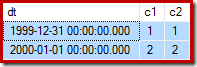
We have two rows: one read-only (1999-12-31); and one read-write (2000-01-01):

Table contents

Now try the following query. It identifies the same writable "2000-01-01" row that we just successfully updated, but uses a different where clause predicate:

UPDATE dbo.Test
SET c2 = 2
WHERE c1 = 2;

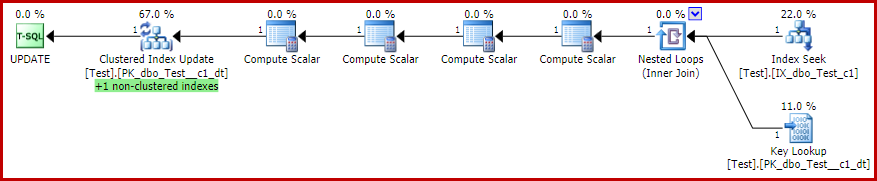
The estimated (pre-execution) plan is:

Estimated plan

The four (!) Compute Scalars are not important for this discussion. They are used to determine if the nonclustered index needs to be maintained for each row that arrives at the Clustered Index Update operator.

The more interesting thing is that this update statement fails with an error similar to:

Msg 652, Level 16, State 1
The index "PK_dbo_Test__c1_dt" for table "dbo.Test" (RowsetId 72057594039042048) resides on a read-only filegroup ("ReadOnlyFileGroup"), which cannot be modified.

Not Partition Elimination

If you have worked with partitioning before, you may be thinking that 'partition elimination' might be the reason. The logic would go something like this:

In the previous statements, a literal value for the partitioning column was provided in the where clause, so SQL Server would be able to determine immediately which partition(s) to access. By changing the where clause to no longer reference the partitioning column, we have forced SQL Server to access every partition using a Clustered Index Scan.

That is all true, in general, but it is not the reason the update statement fails here.

The expected behaviour is that SQL Server should be able to read from any and all partitions during query execution. A data modification operation should only fail if the execution engine actually tries to modify a row stored on a read-only filegroup.

To illustrate, let us make a small change to the previous query:

UPDATE dbo.Test
SET c2 = 2,
    dt = dt
WHERE c1 = 2;

The where clause is exactly the same as before. The only difference is that we are now (deliberately) setting the partitioning column equal to itself. This will not change the value stored in that column, but it does affect the outcome. The update now succeeds (albeit with a more complex execution plan):

Actual plan

The optimizer has introduced new Split, Sort, and Collapse operators, and added the machinery necessary to maintain each potentially-affected nonclustered index separately (using a wide, or per-index strategy).

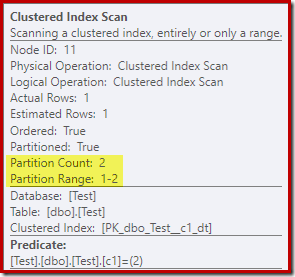
The Clustered Index Scan properties show that both partitions of the table were accessed when reading:

Clustered Index Scan properties

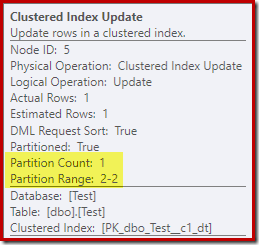
By contrast, the Clustered Index Update shows that only the read-write partition was accessed for writing:

Clustered Index Update properties

Each of the Nonclustered Index Update operators shows similar information: only the writable partition (#2) was modified at run time, so no error occurred.

The Reason Revealed

The new plan succeeds not because the nonclustered indexes are maintained separately; nor is it (directly) due to the Split-Sort-Collapse combination necessary to avoid transient duplicate key errors in the unique index.

The real reason is something I mentioned briefly in my previous article, "Optimizing Update Queries" – an internal optimization known as Rowset Sharing. When this is used, the Clustered Index Update shares the same underlying storage engine rowset as a Clustered Index Scan, Seek, or Key Lookup on the reading side of the plan.

With the Rowset Sharing optimization, SQL Server checks for offline or read-only filegroups when reading. In plans where the Clustered Index Update uses a separate rowset, the offline/read-only check is only performed for each row at the update (or delete) iterator.

Undocumented Workarounds

Let's get the fun, geeky, but impractical stuff out of the way first.

The shared rowset optimization can only be applied when the route from the clustered index seek, scan, or key lookup is a pipeline. No blocking or semi-blocking operators are allowed. Put another way, each row must be able to get from read source to write destination before the next row is read.

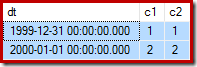
As a reminder, here is the sample data, statement, and execution plan for the failed update again:

Sample data

--Change the read-write row
UPDATE dbo.Test
SET c2 = 2
WHERE c1 = 2;

Pipelined update with rowset sharing

Halloween Protection

One way to introduce a blocking operator to the plan is to require explicit Halloween Protection (HP) for this update. Separating the read from the write with a blocking operator will prevent the rowset sharing optimization from being used (no pipeline). Undocumented and unsupported (test system only!) trace flag 8692 adds an Eager Table Spool for explicit HP:

-- Works (explicit HP)
UPDATE dbo.Test
SET c2 = 2
WHERE c1 = 2
OPTION (QUERYTRACEON 8692);

The actual execution plan (available because the error is no longer thrown) is:

HP actual plan

The Sort in the Split-Sort-Collapse combination seen in the earlier successful update provides the blocking necessary to disable rowset sharing in that instance.

The Anti-Rowset Sharing Trace Flag

There is another undocumented trace flag that disables the rowset sharing optimization. This has the advantage of not introducing a potentially-expensive blocking operator. It cannot be used in practice of course (unless you contact Microsoft Support and get something in writing recommending you enable it, I suppose). Nevertheless, for entertainment purposes, here is trace flag 8746 in action:

-- Works (no rowset sharing)
UPDATE dbo.Test
SET c2 = 2
WHERE c1 = 2
OPTION (QUERYTRACEON 8746);

The actual execution plan for that statement is:

Pipelined Update without Rowset Sharing

Feel free to experiment with different values (ones that actually change the stored values if you like) to convince yourself of the difference here. As mentioned in my previous post, you can also use undocumented trace flag 8666 to expose the rowset sharing property in the execution plan.

If you want to see the rowset sharing error with a delete statement, simply replace the update and set clauses with a delete, while using the same where clause.

Supported Workarounds

There are any number of potential ways to ensure that rowset sharing is not applied in real-world queries without using trace flags. Now that you know the core issue requires a shared and pipelined clustered index read and write plan, you can probably come up with your own. Even so, there are a couple of examples that are particularly worth looking at here.

Forced Index / Covering Index

One natural idea is to force the reading side of the plan to use a nonclustered index instead of the clustered index. We cannot add an index hint directly to the test query as written, but aliasing the table allow this:

UPDATE T
SET c2 = 2
FROM dbo.Test AS T WITH (INDEX(IX_dbo_Test_c1))
WHERE c1 = 2;

This might seem like the solution the query optimizer should have chosen in the first place, since we have a nonclustered index on the where clause predicate column c1. The execution plan shows why the optimizer chose as it did:

image

The cost of the Key Lookup is enough to convince the optimizer to use the clustered index for reading. The lookup is needed to fetch the current value of column c2, so the Compute Scalars can decide if the nonclustered index needs to be maintained.

Adding column c2 to the nonclustered index (key or include) would avoid the problem. The optimizer would choose the now-covering index instead of the clustered index.

That said, it is not always possible to anticipate which columns will be needed, or to include them all even if the set is known. Remember, the column is needed because c2 is in the set clause of the update statement. If the queries are ad-hoc (e.g. submitted by users or generated by a tool), every nonclustered index would need to include all columns to make this a robust option.

One interesting thing about the plan with the Key Lookup above is that it does not generate an error. This is despite the Key Lookup and Clustered Index Update using a Shared Rowset. The reason is that the nonclustered Index Seek locates the row with c1 = 2 before the Key Lookup touches the clustered index. The shared rowset check for offline / read-only filegroups is still performed at the lookup, but it does not touch the read-only partition, so no error is thrown. As a final (related) point of interest, note that the Index Seek touches both partitions, but the Key Lookup only hits one.

Excluding the read-only partition

A trivial solution is to rely on partition elimination so the reading side of the plan never touches the read-only partition. This can be done with an explicit predicate, for example either of these:

UPDATE dbo.Test
SET c2 = 2
WHERE c1 = 2
AND dt >= {D '2000-01-01'};
 
UPDATE dbo.Test
SET c2 = 2
WHERE c1 = 2
AND $PARTITION.PF(dt) > 1; -- Not partition #1

Where it is impossible, or inconvenient, to change every query to add a partition-elimination predicate, other solutions like updating through a view may be suitable. For example:

CREATE VIEW dbo.TestWritablePartitions
WITH SCHEMABINDING
AS
-- Only the writable portion of the table
SELECT
    T.dt,
    T.c1,
    T.c2
FROM dbo.Test AS T
WHERE
    $PARTITION.PF(dt) > 1;
GO
-- Succeeds
UPDATE dbo.TestWritablePartitions
SET c2 = 2
WHERE c1 = 2;

One disadvantage of using a view is that an update or delete that targets the read-only part of the base table will succeed with no rows affected, rather than failing with an error. An instead of trigger on the table or view might be a workaround for that in some situations, but may also introduce more problems…but I digress.

As mentioned previously, there are many potential supported solutions. The point of this article is to show how rowset sharing caused the unexpected update error.

The post Changes to a Writable Partition May Fail Unexpectedly appeared first on SQLPerformance.com.

26 Mar 06:50

Decisions @ the speed of thought with SQL Server 2016

by David Hobbs-Mallyon

In his 1999 book, “Business @ the Speed of Thought,” Bill Gates predicted the future “will be about velocity. About how quickly business itself will be transacted. About how information access will alter the lifestyle of consumers and their expectations of business…. When the increase in velocity is great enough, the very nature of business changes.”

That prediction seems almost prescient in 2016, as data has become the engine of business velocity, and anytime, anywhere access to that data is a requirement. The role of data in business decision-making is taking on ever greater importance, and the difference between success and failure can hinge on how fast you’re able to analyze data. As a result, business intelligence (BI) and advanced analytics (AA) are indeed changing the very nature of business.

Attesting to this point, research firms such as Gartner, Aberdeen and Forrester emphasize the business importance of advanced, agile, mobile — and speedy — data analytics. For example, when you consider Bill Gates’ prediction and the rapidly expanding role of data, BI and AA, it’s interesting to note that the February 2016 Gartner Magic Quadrant for Business Intelligence and Analytics Platforms positions Microsoft as a leader in both ability to execute and completeness of vision. Microsoft’s wide range of both on-premises and cloud capabilities, as well as Power BI, all contribute to Gartner’s assertion of Microsoft’s leadership.

SQL Server 2016: Technology @ the speed of business

With the recent launch of SQL Server 2016, it’s worth taking a look at how this release plays into Microsoft’s leadership and vision for BI and analytics. One example includes in-memory analytics improvements that enable significant data compression to speed up analytics query performance up to 100 times faster and empower employees to perform ad hoc queries much more quickly. Since the enhancements to SQL Server 2016 are based on technology that IT is already familiar with, IT can build on existing skill sets to perform modern BI and AA responsibilities and support a modern data strategy. For example, SQL Server 2016 lets IT transform data into easily understood, trusted data models with user access control to make sure only appropriate users see sensitive data. This means IT can transform complex data from multiple sources into powerful, scalable models that business analysts can easily understand and access by using familiar data analytics and discovery tools such as Excel or Power BI.

In addition, SQL Server 2016 includes R, the language used by data scientists for advanced analytics. With R and the in-memory capabilities of SQL, data scientists can add value in the creation of models and algorithms and run these in-database, reducing time and data movement. With ScaleR built into SQL Server 2016 R Services, typical memory limitations of Open Source R are eliminated and parallelization of scripts provides added benefits.

PolyBase in SQL Server 2016 enables database administrators and data analysts to use their existing T-SQL skills to extract value from both Hadoop unstructured data as well as structured data. Specifically on the import side, PolyBase lets analysts import external Hadoop and Azure blob storage data for persistent columnar storage. On the export side, PolyBase data can be exported from SQL Server tables to Hadoop or Azure blob storage for cold storage/archival while remaining queryable. PolyBase integrates seamlessly with all BI tools, including Microsoft’s BI tools such as SQL Server Analysis Services, SQL Server Reporting Services, Power BI and third-party tools like Tableau, Microstrategy and Cognos. In terms of mobile access, SQL Server 2016 delivers built-in mobile BI capabilities for both IT and business users. IT professionals have the tools they need to administer user access and shared data sets in one place.

Business users can then access insights in an intuitive, engaging way from their desktop and mobile devices and expect the insights to be optimized for different form factors and major mobile platforms. Find out more about these enhancements and innovations in upcoming blogs from the SQL Server engineering team. They’ll provide detailed discussions about the technology behind these enhancements and innovations.

Decisions @ the speed of thought

The amount of data available is expanding hugely, and the ability to quickly use that data in decision making is crucial. To this point, Michael Lock, vice president and principal analyst, Analytics and Business Intelligence, Aberdeen, emphasizes that his “research shows that companies experiencing rapid data expansion… are actually more likely to exploit the information to uncover business opportunities and drive growth,” and “expediting the transfer of information between relevant parties will pave the way for quicker decisions, fewer missed opportunities, and enhanced business performance as a result.”

Adding perspective to the relevance of this assertion, Forrester reports that 86 percent of marketing executives they surveyed agree that “predictive analytics helps evaluate opportunities to enter new markets.” And Gartner believes that half of large enterprises will be using advanced analytics tools by 2018 to gain competitive advantage. With all this in mind, find out how SQL Server 2016 can enable your business to take advantage of data to make decisions @ the speed of thought and transform your business.

See the other posts in the SQL Server 2016 blogging series.

Try SQL Server 2016 RC

26 Mar 06:49

BlueData Introduces New Innovations for Big-Data-as-a-Service

by A.R. Guess

by Angela Guess According to a new article, “BlueData, provider of the leading infrastructure software platform for Big Data, today announced the spring release for the BlueData EPIC software platform. With this new product release, available immediately, BlueData introduces several new enhancements to provide enterprise-class security and quality of service (QoS) for multi-tenant Big Data […]

The post BlueData Introduces New Innovations for Big-Data-as-a-Service appeared first on DATAVERSITY.

26 Mar 06:48

Data loading into Azure SQL Data Warehouse

by James Serra

Azure SQL Data Warehouse (SQL DW) is a new platform-as-a service (PaaS) that distributes workloads across multiple compute resources, called massively parallel processing (MPP).  Loading data into a MPP data warehouse requires a different approach, or mindset, than traditional methods of loading data into a SMP data warehouse.

To help you with understanding how best to load data into SQL DW, Microsoft has released an excellent white paper by Martin Lee, John Hoang, and Joe Sack.  It describes the SQL DW architecture and explores several loading techniques to help you reach maximum data-loading throughput and identify the scenarios that best suit each of these techniques.

Check it out: Azure SQL Data Warehouse loading patterns and strategies

More info:

Using SSIS to Load Data Into Azure SQL Data Warehouse

Migrating data to Azure SQL Data Warehouse in practice

26 Mar 06:48

Becoming a Multiplatform DBA.

by Maria Zakourdaev

I wonder if I had started my career as a PostgreSQL DBA or MongoDB DBA, would it be easier for me to accept the rapid growth and the variety of data storage solutions and our new reality of the Polyglot persistence?  


Polyglot is the term that came from the Ancient Greek meaning speaking many languages.  Polyglot persistence is about storing your data not only inside SQL Server but in multiple data storage technologies. Whatever suits better your application needs or sometimes even single application component.


Be prepared that tomorrow or next month one of developers will come up with some "other database" which (they will be 100% confident) will serve their application needs better. In  some situations they might be right. My own first natural reaction to those situations is to immediately start searching for "why not" arguments. To keep them in SQL Server. These days I try my best to hold this reaction and allow them to try. If it will work out - everyone will be happy. If not, everyone will learn.


If you push yourself to this change, you soon will realize that the learning curve is not that huge and you are not starting from zero level. Data can be modeled in various forms. Relational form, document form or key and value form but you already understand how to deal with data and how to take care of it. And believe me or not, the concepts are quite similar. 


Of course, your developer is now convinced that he will not need a DBA with his brand new NoSQL technology. Surprise him. You, as a DBA, and Mr. Developer have a strong focus and interest on an entirely different yet equally important aspects of the application infrastructure.

You know that  data must be backed up on some agreed schedule and from time to time it is beneficial to try and restore the backup to make sure it is useful.  Of course if data is important and needs to be persistent. 

After digging for a while you learn that the many open schema systems need someone to manage the schema anyway. Correct data types impact queries in ElasticSearch, Cassandra and some other systems that I have worked with.

Data modelling can be tricky and experienced DBA has a lot of added value there. Some queries might benefit from the pre-aggregations.

Monitoring your server is another huge topic. Monitoring free space, monitoring queries per second, events per second - trust me, Mr. Developer didn’t think about all this. He will be more than grateful to have you as a part of his project. He will re-learn to value DBA.


DBA stays DBA no matter which technology he is managing. Your experience is very valuable and you can append it to any technology you meet on your way.

26 Mar 06:47

Expanding the data footprint of SQL Server 2016 with PolyBase

by SQL Server Team

This post was authored by Casey Karst, Program Manager, SQL Server.

Changing data landscape

A lot has changed in the world of data over the last 10 years. The rise of connected devices, unstructured event data and ever-decreasing hardware prices has caused a Big Data boom. Solutions built on commodity hardware, such as Hadoop and HDFS (Hadoop Distributed File System), were developed to land machine-born, semi-structured data and deliver insights. This created new opportunities for generating value, but it has come at the cost of added complexity to enterprise data solutions. With the additional data also came the problem of having two or more disjoint datasets, some relational in SQL Server and some non-relational in HDFS. If a data analyst wanted to combine relational data with semi-structured data, they had to spend time and resources copying the data from one environment into the other, ultimately slowing the time to insight.

With PolyBase in SQL Server 2016, the days of disjoint relational and semi-structured data are over. With the combination of PolyBase and T-SQL, users can query data stored in HDFS as if it is local to the SQL Server, enabling a wide variety of new insights and scenarios.

PolyBase and T-SQL combo

Key scenarios

Because PolyBase allows you to interact with both SQL Server and Hadoop, three new scenarios are possible:

  • Ad hoc query of data stored in Hadoop and SQL Server 2016 using T-SQL
  • Import data from Hadoop or Azure blob storage into SQL Server 2016
  • Export “cold” relational data to Hadoop or Azure blob storage while keeping it query-able

When you run ad hoc queries over Hadoop data, PolyBase can intelligently leverage the compute resources of Hadoop. PolyBase can make a cost-based decision to push-down computation to Hadoop by generating MapReduce jobs on-the-fly, delivering the most optimal performance for your queries.

PolyBase: Bringing it all together

PolyBase extends the data footprint available for T-SQL queries by creating a structured definition in SQL Server of the semi-structured data stored in Hadoop and Azure blob storage. Once the structure is set up, users can interact with the data in nearly* the same way as data stored in SQL Server.

The three new data definition language (DDL) statements needed to structure external data are:

*A notable difference between external tables and local tables is that when an external table is deleted, the data remains intact on the external data source.

External data source

PolyBase supports the latest versions of Hortonworks and Cloudera distributions with SQL Server 2016. PolyBase will also support newer Hadoop versions within 90 days of their general availability. In addition to Hadoop distributions, PolyBase supports Azure storage blobs as external data sources.

For a full list of supported data sources, click here.

External file format

PolyBase supports Text, ORC, RC and Parquet file types in both compressed and uncompressed formats.
For more details on supported file types, see this how-to.

External table

PolyBase External Tables reference the data stored in a Hadoop cluster or Azure blob storage. For more details on how to create external tables, reference this site.

PolyBase scale-out groups for breakthrough query performance

For workloads that require querying large datasets in HDFS, it is suggested that you increase the resources on the SQL side for optimal performance. Rather than increasing the size of a single node, SQL Server 2016 introduces PolyBase scale-out groups as a method of distributing a query across multiple SQL Server instances, enabling parallelized computation and data ingestion. A scale-out group is composed of a head node, which users submit queries to and that holds the relational data for the query, and compute nodes, which parallelize the ingestion and computation of the data. Compute nodes are free to process other workloads while also being part of a PolyBase scale-out group.

Compute Nodes

Extra resources

Interested in getting started with all of the capabilities PolyBase for SQL Server 2016 offers? Learn more with the following links and watch the video below to learn how PolyBase enables you to query HDFS using T-SQL directly from SQL Server.

For general knowledge on some of the great enhancements provided by SQL Server 2016, be sure to check out the other posts in the SQL Server 2016 blog series.


Try SQL Server 2016 RC

26 Mar 06:47

Problems with WiFi Access and the Internet of Things

by A.R. Guess

by Angela Guess Peter Thornycroft recently wrote in NetworkWorld, “Most large enterprises run remarkably secure WLANs. They minimize open-authentication access points – and those use captive portals – and implement WPA2-enterprise authentication and encryption protocols, which are very difficult to crack. However, well-configured access points inhibit the growth of the Internet of Things (IoT) over […]

The post Problems with WiFi Access and the Internet of Things appeared first on DATAVERSITY.

26 Mar 06:47

R Consortium Funds Technical Initiatives, Events and Training to Support R Users

by A.R. Guess

by Angela Guess According to a recent article out of the company, “The R Consortium, an open source foundation to support the R user community and a Linux Foundation project, today is announcing funding for seven community projects and the formation of two technical working groups. These milestones advance the R Consortium’s mission to support […]

The post R Consortium Funds Technical Initiatives, Events and Training to Support R Users appeared first on DATAVERSITY.

26 Mar 06:47

House of Cards, Creativity, and Big Data

by A.R. Guess

by Angela Guess Shane Atchinson and Jason Burby recently wrote in The Next Web, “Data and creativity can work really well together. Don’t believe me? On February 1, 2013, a TV series called House of Cards debuted on the video streaming service Netflix. It proved an immediate hit. Two years later, it has a nine […]

The post House of Cards, Creativity, and Big Data appeared first on DATAVERSITY.

26 Mar 06:47

Big Data v. Little Data: How Much is Enough?

by A.R. Guess

by Angela Guess Carolyn Galvin recently wrote in iCrunchData News, “Much has been written about Big Data, including the insights that can be gleaned from thousands or millions of data points, especially in the data-rich B2C market. But what about Little Data? What can we learn from just a few data points? And when is […]

The post Big Data v. Little Data: How Much is Enough? appeared first on DATAVERSITY.

26 Mar 06:46

Docker For Windows Beta Released

by Steve Lasker

Today, docker announced and released a replacement for Docker Toolbox.

There are many enhancements, including my top …6

  1. Works with Hyper-V
    Docker Toolbox utilized VirtualBox. An alternate Virtualization technology that meant developers had to disable Hyper-V. Which means they can’t run VMs or the various developer emulators, which also use Hyper-V
  2. Starts automatically – no more docker-machine start default
    The docker process will start automatically, by default.
    D4WSettings
  3. Resolves much of the problems VirutalBox had with Volume Mapping
    VirtualBox used the c:\users directory, Which meant if you placed your project under c:\Source\Github, you couldn’t access your code from within the container. There in theory was a way to fix that, but we never did get it working. Now, it’s just a checkbox, provide your credentials for the host to mount the share, and voila. It’s just that easy.
    D4WVolumeMappingPowershellD4WVolumeMappingHost
  4. Terminal Window directly to the host
    There are times when you just want to jump on the host VM and see what’s going on. Including troubleshooting your own container configurations, or the sometimes connectivity issues between your client and the host. Just right-click Moby in the system tray and choose the Developer Console
    You’ll need to login first, so just enter root and hit enter. You can then run your standard docker commands
    D4WContextMenuD4WConsole
  5. Update Notifications
    In the spirit of ease of use, Docker has integrated auto update notifications, or the ability to disable it, and check for updates
  6. No need for docker-machine, sort of…
    This is slight bit of a change, and you may be switching between various hosts, including those in Azure or other hosts on your local network.
    You may be used to using docker-machine env [hostname] | Invoke-Expression
    Since Docker for Windows doesn’t depend on docker-machine, you actually need to clear the environment variables. Which is the default case.
    If you’re switching between an AzureHost and your Docker for Windows Host, use: docker-machine env -u | Invoke-Expression to clear environment variables.
    If you haven’t used docker-machine, then you’re good to go, and don’t need to use docker-machine.

Docker Tools for Visual Studio Update

We have been working with docker on their latest tools and will release an update to support the local docker host shortly.

Give docker a shout, and give it a whirl. Developing apps in containers is far easier than just treating docker as a deployment technology…

Steve

26 Mar 06:46

Clear-History Powershell Doesnt Clear the History

by Steve Lasker

PowerShell turns out has a great memory, and can help you with those tedious list of commands you’ve entered time over time. No worries if you’ve closed the PowerShell window, rebooted your machine, PowerShell will remember your history.
In most cases, that would be an awesome feature. However…. if you’ve ever tried to prep a VM, or otherwise tried to clear your history, perhaps a username and/or passowrd is in the list, you may wonder how to clear it.

You may find the Clear-History command. You may even run it. And, if you hit the up arrow, you’ll find your history now includes the Clear-History command…
Hmmm

Well, if you want to clear the history, or actually pre-load the history with a list of commands to be used in a Lab VM, here’s where you go:

%userprofile%\AppData\Roaming\Microsoft\Windows\PowerShell\PSReadline\ConsoleHost_history.txt

You can turn it off with:
Set-PSReadlineOption –HistorySaveStyle SaveNothing

Or point to a different location with:
Set-PSReadlineOption –HistorySavePath

And if you want to delete your history:
del (Get-PSReadlineOption).HistorySavePath

That’s it…

Yet another thing that’s really simple, once you know the answer…

Thanks to Jason Shirk from the PowerShell team


Steve

26 Mar 06:46

Some great docker tools

by Steve Lasker

Here’s a few docker tools I’ve started using to help diagnose issues:

Simple Docker UI

offered by felix

A Google Chrome Plugin that allows you to view your images and running containers – including the logs. No more docker ps, docker logs [container id]

ChromeSimpleDocker


DockerUI

by  Michael Crosby (crosbymichael.com), Kevan Ahlquist (kevanahlquist.com)

Run with the following command:

docker run -d -p 10.20.30.1:80:9000 --privileged -v /var/run/docker.sock:/var/run/docker.sock dockerui/dockerui

I’ve started deploying this on all my nodes when I’m looking to understand how containers are deployed and interacting

DockerUI


I’ll keep updating this as I find new tools.

If you have your favorite, comment away…

Steve

26 Mar 06:46

SQL Client Tools update for SQL Server 2016

by SQL Server Team

In SQL Server 2016 there have been several significant changes to the SQL Client Tools. Central to these changes are two primary goals:

  • The ability to ship tooling updates on a regular, monthly cadence
  • A single version of tools that work with all supported SQL Server versions on-premises or in a Virtual Machine, Azure SQL Database, and Azure SQL Data Warehouse

In addition to numerous new feature enhancements such as supporting Always Encrypted, Stretch Database, two-node basic availability groups for Standard Edition, PolyBase, Temporal Databases, and many more. There are also fundamental changes to SQL Server Management Studio (SSMS) and the other tools included in the SQL Server Client Tools package. These changes help align the release and distribution of the SQL Client Tools with the processes currently used by the SQL Server Data Tools.

Note: The SQL Client Tools package contains tools such as SQL Server Management Studio, Profiler, Database Engine Tuning Advisor, SQL Server PowerShell and several other management tools.

Monthly updates

SQL Server Management Studio now has a dedicated download page that’s updated each month with the latest version of the SQL Client Tools. This download is easily searchable via Bing and Google. The download link points to a self-contained install package that contains SQL Server Management Studio, the other SQL client tools and their dependencies. You do not need to be connected to the internet to install SSMS after you download the installer package.

Simpler, faster tools installation

Setup for the SQL Client Tools package has been re-engineered to be an independent, self-contained installation package. This package contains the SQL Client Tools and all of its required dependencies in a single file. The installation process has been simplified to be a single-click install experience.

Setup for SQL Server 2016 has been updated to use this new package as well. The Installation tab in setup now has two additional links added as shown below:

SQL Server Tools Update

Clicking the link to install the tools opens the MSDN download page in your default browser to optimize for easy access to the latest tools release. This download page has information on the latest update as well as the download link to the single file install package. For users who wish to install tools on numerous machines, this download package can be saved and included in a software distribution system, or simply saved on a file share for easy access or scripted install.

Visual Studio 2015 Shell

SQL Server Management Studio continues to be built on the Visual Studio Isolated Shell. It has now been updated from the VS 2010 shell to the VS 2015 shell. This provides SSMS with a modern foundation to build on. In upcoming monthly releases many of the experiences within SSMS will be migrated to take advantage of the new services this shell provides.

New telemetry and feedback

SQL Server Management Studio now collects feature usage telemetry. This telemetry is completely anonymous and provides the engineering team with visibility into which features in SSMS are most used, may be having issues, or could be improved. This enables the engineering team to do data-driven improvements in each monthly update in the areas that will help customers the most.

As the information is anonymous, customers should still use Connect or CSS to address specific issues they may be having with the tools. Those channels will continue to be the way to get personalized help and support.

Q&A

Will the full copy of SSMS installer be available for offline install (i.e. behind the firewall installs)?

Yes, the client tools package that includes SSMS will be available as a self-contained .EXE file. This .EXE will install SSMS and other client tools as well as all the required dependencies for the tools. This package can be saved locally and subsequently executed on machines not directly connected to the internet.

  • How large will this be?
    The download package is approximately 700 MB for the tools and all required dependencies. In future updates we plan on optimizing the download size for incremental updates and dependency checking.
  • Can this be pushed out via tools SCCM?
    As a self-contained executable, installing the tools package through a software distribution system such as System Center Configuration Manager should work fine.

Does this package include the SQL Management Tools and the ‘Advanced Management Tools’ (SSMS, ADV_SSMS features in setup lingo)?

Yes, the tools package contains all the tools that were previously included in the Management Tools Basic and Management Tools Advanced packages. These were the tools that would be installed if both tools check-boxes were selected in previous versions of SQL Server setup.

Does this copy of SSMS require a license for installation? Other than SQL Client Access License?

Specifics of licensing are covered in the EULA included in the tools package. All of the tools in the package are free and do not require a PID or license key to install.

Can I redistribute the SSMS installation package with my applications?

Yes, you can redistribute the SSMS installation package that you downloaded from the MSDN download page noted earlier. As part of its installation, your application installer can launch the SSMS installer, where users can view and accept the EULA included in the SQL tools package.

Can this version of SSMS connect to SQL Server 2008/2008R2/2012/2014/2016?

Yes, this version of SSMS works with all supported versions of SQL Server. There is no explicit block for SQL Server 2000 or SQL Server 2005, but some features may not work properly. In addition to on-premises versions of SQL Server, the monthly updates of SSMS are the best way to enjoy the latest updates in Azure SQL Database.

Will the version of SSMS I install be compatible with later versions of the engine (say I only update SSMS every six months and the engine every three)?

While there will not be a specific block, an “older” version of SSMS may not work properly with new features in a newer version of SQL Server. Older versions of SSMS will not have updates required for new features.

Is there a time-bomb associated with this SSMS installation?

No, the new version of SSMS will no longer have any form of time-bomb.

Is there a frequency at which it should be mandatorily upgraded?

It is not mandatory to update SSMS. Updates to the tools can be done at the frequency that best suits your needs. Each monthly update will include improvements and bug fixes and support for new features in Azure SQL Database. As a best practice, we strongly recommend that you install the latest monthly update of SSMS to ensure that you can enjoy the latest capabilities in the SQL platform and also stay current with enhancements and bug fixes. The SSMS download page will only offer the latest monthly update of SSMS and older monthly releases will not be available.

Will subsequent upgrades to SSMS require a reboot?

SSMS itself does not typically require a reboot. The typical cause of reboot is due to installs of the required version of the .Net framework. With this new version of SSMS, the tools no longer require .Net 3.5 installed; the framework version installed is .Net 4.6.1.

Also, If the tools are also installed on a machine with the engine, it is possible a reboot will be required if shared components are in use. We plan to remove all shared components between the tools and the engines in a subsequent monthly update, which will help remove potential reboots and reduce change of impact to engine behavior due to new shared components being installed. Until that time, the tools setup package will warn users about any potential impact.

Can I have multiple copies of the new SSMS installed on the same machine?

No, only a single copy of this new generation of SSMS can be installed on a given machine, as each monthly update will update the previous install. However, you can install the new SSMS side-by-side with SSMS from previous versions of SQL Server. For example, SSMS 2014 can be installed side-by-side with the latest monthly update on the same computer.

What will be the last version on the RTM DVD?

SSMS will no longer be on the RTM DVD; it is available as a separate download.  As mentioned above, how often to update is up to the user and off-line installs are fully supported.

What if you need to patch SSMS? Does it come in a CU fix?

As SSMS is not embedded as a feature of the engine setup, it no longer requires CU updates. This means SQL Server 2016 CUs and SPs in the future will no longer contain updates for SSMS. Fixes will be done primarily through the monthly updates. Hence, it may be necessary to update to a newer monthly update to get a particular bug fix. The tools are still fully supported through the existing support processes with CSS.

Why are some deprecated tools like Profiler still included?

Though some tools, such as Profiler, have been announced as deprecated many users still depend on them in day to day operations. The deprecation announcement is indication that the tool or technology will not see future advancement. With further enhancement in mainline tools such as SSMS, deprecated tools may be removed in a future update.