Shared posts
T-SQL Tuesday #85
Just The Fax, Ma'am

Gus had been working at his new job for a month. Most of his tickets had been for front-end work, making it easier and more efficient to manage the various vendors that the company did business with. These were important flags like "company does not accept UPS deliveries" or "company does not accept paper POs". The flags had been previously set via an aging web-based UI that only worked in Internet Explorer 6, but now they were migrating one at a time into the shiny new HTML5 app. It was tiring work, but rewarding.
Unfortunately, as is so often the case, Gus quickly became pigeonholed as "the flag guy". Whenever it came time in the project to add new flags, there was no question who'd get the ticket. Gus could think of nothing he looked forward to less than touching the Oracle-based backend to the product, but unfortunately, it was his burden to bear.
Adding flags to the database involved going through a special Database Committee. This was separate from the usual change request process. The committee was formed from all 6 of the company's database experts, and they personally reviewed every change. Worse, they were stodgy as all get-out. Any small error would get the change thrown out and the requestor berated for "wasting my time", along with a good helping of grumbling about "kids these days" and "narcissistic millennials" to boot.
Gus submitted his change request asking for a new field 2 weeks ahead of when it was slated to go live, just in case. Submissions were due by Monday and were discussed on Thursday, with the results posted first thing Friday morning on the bulletin board outside the breakroom. Gus filled in every field carefully, checking the whole thing twice—all but the title, which he'd written as "New Database Feild". On Tuesday, he realized his typo. He quietly edited the form, saved it, then crossed his fingers.
Friday rolled around and his change wasn't on the list, neither accepted nor rejected. Chewing his lip, Gus pulled up the change system and skimmed for his change.
It was marked auto-rejected.
"What did you do?" demanded Chuck, the senior developer who'd been mentoring him.
"I don't know!" Gus replied. "Do you think it was the typo? But I fixed it on Tuesday!"
Chuck slapped his forehead with his palm. "You changed the form? Don't ever change the form after it's submitted! That's grounds for automatic rejection!"
"It's okay," Gus said weakly. "We still have another week."
Chuck just looked at him, shaking his head as he walked away.
Gus spent the rest of the day focusing on the tedious form. There were dozens of fields, each with vague instructions, many demanding long explanations. Gus wouldn't be at the meeting to explain his change; he had to convince the committee it was necessary through the form alone. Worse, when he submitted it, it routed through an approval process that required him to chase down no less than 6 individuals to fill out their parts of the form.
"Yes, it's the same one as last week. Just put the same thing you did then. No, sorry, I don't know why it was rejected," he lied. "Can you just sign?"
Monday came and went without another auto-rejection. Gus checked compulsively every day at lunchtime, waiting for the other shoe to drop, but his request made it to Thursday without incident. Finally, Friday came, and he made the trek to the breakroom to check the list.
His change had been rejected.
He didn't know why. He didn't care why. The application needed to be up and running for the first of the month—the following Tuesday. There was no time to try again. Gus walked over to Chuck's cube, his mind whirling. "What do you know about data hiding?"
Chuck's face fell. He rubbed his face with one hand. "Dammit, this is why I try to pull front-end tickets."
"You gotta help me, dude. I'm dying here!"
"Okay, okay, let me think. I've heard about some guys slipping an extra so-called check-digit into integer fields. You have to mask it out before the code gets to it, but ..."
Gus grimaced. "I'd never get all the spots, I barely know the app."
"You're sure you can't push back on the deadline?"
"Yeah. Can't we find a field that's unused or something?" Gus begged.
An hour and dozens of SELECT statements later, they did just that. The Fax field wasn't populated in the old system; not a single vendor had a fax number worth recording. The new system hadn't bothered porting it over at all. Gus and Chuck hooked the flag up to the existing field. No muss, no fuss, and no database review.
 [Advertisement] Manage IT infrastructure as code across all environments with Puppet. Puppet Enterprise now offers more control and insight, with role-based access control, activity logging and all-new Puppet Apps. Start your free trial today!
The Infrastructure
George had just escaped from his job, a WTF-laden hellhole where asking for a test database to reproduce an issue resulted in the boss spending hours and hours hand-typing and debugging a fresh SQL script based on an old half-remembered schema.
Initech promised to be a fantastic improvement. “We do things right around here,” his new boss, Harvey, told him after hiring him. “We do clean coding. Our development systems and libraries are fabulous! And each of our programmers get a private office with its own window!” Yay, no more cubicle!
George climbed over the required HR training videos, slideshows, and a Himalayan mountain’s worth of paperwork, then headed to his new desk where a budget small-form factor PC with a single 17“ LCD monitor waited for him. ”Yeah, that’s real fabulous," he thought to himself. But perhaps it was just a placeholder system, quickly dug up from elsewhere in the building, to get him started while they ordered a proper developer-grade PC.
It booted up and George realized he didn’t know his account credentials, so he wandered on down to the IT office to get set up.
The IT Office, from the outside, appeared to be a large corner office, but inside it was cold and dark and of uncertain size, with the windows covered by blackout curtains and hidden oscillating fans blasting a chilly breeze through the office. All the room’s light coming from a single small table lamp situated at the sole occupant’s desk. Piles of unsorted equipment and cabling were scattered across the floor, barely visible in the poor lighting, a veritable obstacle course for any visitors with poor eyesight or agility. In contrast to the rest of the room, the desk itself was absolutely spotless, neatly holding the lamp, a keyboard and mouse, and one nice 40" display–nothing else. Not even a telephone. An empty office chair sat in front.
As he entered the blackness, George could hear a rapid-fire chorus of clicking sounds–the kind that usually meant your hard drive had kicked the bucket–clustered around one floor-based pile of machinery which was only visible due to the incessant flashing of LEDs it possessed–LEDs which blinked in perfect time to the various patterns of clicks emanating from the area.
George coughed to make his presence known, and the IT guy appeared near the desk with such silence that George wondered if he had materialized like a ghost. Due to the placement of their sole source of light, George could not even make out his features.
“Hi, I’m George,” he introduced himself, extending a hand the man did not accept. “I just started here and I need an account.”
The IT worker grunted slightly. He proceeded straight to one formless pile of equipment and sat down cross-legged next to it, right on the floor, moving so silently that George almost wondered if he had only imagined it. He made some barely-discernible motions in the dark, and a moment later a previously-hidden LCD monitor flickered to life, bringing new light into the room which allowed George to perceive that the monitor was precariously situated upon a pile of about five budget PC towers from at least a decade ago, heaped up like a deranged game of Jenga, the entire fixture surrounded by dark, snakelike cables of various types whiched meandered to and fro throughout the room.
The screen came to, and George watched in fascination as it presented a Windows Server 2000 login screen. He then realized in repugnance that this pile of equipment was the very same one radiating the sickly click of dying hard disks. Surely this was not the company’s domain controller!
The IT guy entered his login information, and upon his hitting “Enter”, the violent ticking of hard disks became frantic. The screen froze for a long moment–at the time it seemed like minutes–before switching to the classic desktop environment of an operating system serving well beyond its prime. The shadowy IT guy fished a mouse from somewhere in the darkness, almost as if by magic, and balanced it upon his scrawney left knee so he could use it. He clicked on the “Start” button.
Nothing visibly happened at first, but the frenzied jackhammer of “Clicks of Death” told George everything he needed to know about the company’s IT infrastructure. Many long moments later, the Start Menu itself appeared, slowly drawing line-by-line into the desktop space at a painfully-slow rate. It completed rendering and the brutal ticking sound diminished somewhat.
The IT guy attempted to open up the user manager, but as he clicked on its entry, the screen abruptly flashed to the bluest shade of blue, overlaid by a page of cryptic white text. George’s jaw dropped in horror but the other man remained perfectly silent. He reached a hand into the darkness and expertly stabbed the server’s reset switch with such ease that George surmised this to be a common occurrence, common enough for him to have developed impeccable muscle memory for the task.
The system reset, flashed through its power-on self test, presented a RAID option ROM full of warnings about disk failure (which the IT guy completely ignored), and sat at the Windows 2000 Server loading screen for an eternity as its hard disks struggled from within to escape by the combined force of a dozen demon-possessed jackhammers.
“Um, maybe I’ll just come back later?” George offered.
“NO!” The man nearly shouted his first utterance since George met him, his retort sudden and forceful enough for George to flinch.
And so George waited quietly, half-frozen in place by fear, watching the ghostly form of the company’s IT guy as he struggled through two more Blue Screens of Death on the company’s primary server before successfully opening the user manager and creating a domain account for George. Then he flourished, somehow producing a completed sticky note as if from thin air, and presented it to George. “It is done. Now go.”
George took the sticky note and left the IT office as quickly and quietly as he could, carefully stepping around nigh-invisible pyramids of computer equipment and treacherous bundles of cable, eager to put the experience behind him and never step foot into the IT office again.
As he entered the light outside the office, he peeked at the note which was scrawled with his username and password. But as he returned to his own desk to try the new login credentials, he could not expunge from himself an intense sense of doom, a growing despair that he had left one hellhole and entered a new dimension of pain and WTF-ery…
 [Advertisement]
Atalasoft’s imaging SDKs come with APIs & pre-built controls for web viewing, browser scanning, annotating, & OCR/barcode capture. Try it for 30 days with included support.
[Advertisement]
Atalasoft’s imaging SDKs come with APIs & pre-built controls for web viewing, browser scanning, annotating, & OCR/barcode capture. Try it for 30 days with included support.
Easter Eggs

Ada worked in QA in the Netherlands, testing a desktop application for a German bank. The app was simple: a C/C++ app that scanned in paper forms, read them with OCR, and processed their contents. It was constructed, as was the fashion at the time, from a number of separate DLLs, each serving one and only one purpose. It was usually fairly boring work, but it was paying for her education, so it was worth putting up with.
One day, however, it stopped being boring. The error message she was looking for was meant to say something along the lines of Name field is not filled out, indicating that—surprisingly enough—the name field was blank. Pretty routine test. The message that appeared, however, was ... different. It read, You stupid woman.
Ada stared at the message for a moment, then looked around, trying to see if anyone was snickering. Was this a prank? Was someone mad at her? Did they deliver her a dud build just to insult her? Or had her computer been hacked? Was she seeing things? Going insane? What the heck was going on here?!
"Nobody's going to believe this," she muttered to herself as she took a screenshot. Then she printed it and carried it to her coworker's cube. "Bernd, I know this is weird, but ..."
No sooner had Bernd seen the screenshot than he pinched the bridge of his nose, looking tired. "Thanks. I'll take care of it."
"You believe me?" she blurted before she'd even realized it.
"Yeah. I know exactly what happened here."
Slowly, she managed to coax the story out of him. You see, in the Netherlands, you're forced to work your notice period, with no option to leave earlier; you're expected to be professional enough to keep doing your job the whole time. At this company, the notice period was two months ... and Edwin, one of their colleagues, hadn't been very pleased with the company when he'd resigned.
"I'm still trying to find all the blasted things," Bernd confessed to Ada.
"It can't be that hard," she protested. "We've been over this thing a dozen times in the last two months."
"He only left last week," said Bernd. "And a lot of them are on random timers. They don't show up every time, only one in three, or after it's been open for ten minutes, or an hour, or a day."
Ada whistled. "Are they all this bad?"
"This one's my favorite," he said, pulling a screenshot off his cube wall. It was a message box just like the one she'd found, only this one read Give me back my bike!—a reference to WWII, when Germany had impounded bicycles in Holland to pay for the war effort.
"If the bank had seen this ..." whispered Ada, horrified.
Bernd nodded. "That one only showed up on Tuesdays."
With Ada's help, Bernd managed to remove another dozen message boxes before they shipped live—and three more after, under the guise of security patches. Starting with the next hire, the company shortened their standard leave back to the typical one month, and started a new policy: developers who were leaving the company would be moved to the testing department for the duration of their notice period, just in case.
[Advertisement] Manage IT infrastructure as code across all environments with Puppet. Puppet Enterprise now offers more control and insight, with role-based access control, activity logging and all-new Puppet Apps. Start your free trial today!
Pulling Teeth

"Jackie, Brian is leaving the company in two weeks," the boss revealed behind his closed office door. "You'll be taking over maintenance for CONLAB."
Jackie's eyes went wide. Brian was a guru within their IT department; his departure would surely cause a stir. CONLAB was just one of his holdings, a real database-maintenance workhorse that several large internal business units relied upon.
"To get you familiar with it, I'm gonna have you take over some of Brian's open feature requests," the boss continued. "I'll email you the details."
"Sure!" This was good. Jackie could learn the ins and outs of the code while Brian was still around.
"Great! Make sure to arrange some one-on-one time with Brian as soon as possible," the boss said.
Jackie was optimistic about his increased responsibility at first. He already maintained a few smaller apps, and was sure he could make CONLAB "his" fairly quickly.
Unfortunately, getting his feet wet was hard when the pool turned out to be a desert mirage. Brian's calendar in Outlook was unpopulated. His cube was always empty. He never answered emails, never signed into Lync, and let every phone call dump to voicemail. Wall-to-wall meetings? Flaking out? Either was possible.
"Don't worry," the boss told Jackie. "I'll tell Brian to give you some time on his schedule."
Nothing came of this confident offer. As the days slipped by, Jackie had to get creative. He pounced on Brian in the one place everyone wound up at one time or another: the restroom.
Jackie explained how he'd be taking over CONLAB once Brian was gone. "I wanna start working on feature requests right away, but I'll need access to the code first. Can you help me with that?" Granting the proper permissions would be a single mouse-click operation in their project management tool.
"Well, it's complicated," Brian said. "The project lives in two git repos: one with the supporting library, one with the app itself."
Jackie frowned. "Really? Why?"
"It'll make sense when you see it," Brian promised. "Let me finish some refactoring first, then I'll grant you access."
Three days passed with no further progress. Jackie managed to corner Brian in the bathroom and ask again.
"Give me two more days," Brian said.
The extended deadline didn't help. Desperate, Jackie sought help from Alisa, the system administrator, and her incredible sudo-powers.
"Based on file names, I think this is the library he was talking about." Alisa pointed to her laptop screen. "But there are two git repos holding different versions of it."
"Oh, geez." Jackie nursed his temple. "OK, let me try out the one that's been worked on more recently."
Once Alisa granted the proper permissions, Jackie returned to his desk to examine the library. Its codebase lacked comments. It contained an if-statement body that failed to fit vertically on his 23" monitor. But worst of all, there were no test cases to be found.
"There are test cases for the application that also cover the library," Brian revealed in the bathroom some time later. But access to CONLAB's application code remained out of reach.
Alisa and Jackie went through the entire list of projects in the project management system, opening any git repo whose name hinted at having something to do with CONLAB. In the process, they learned their boss kept sales figures and presentations in git, along with more personal items.
"Oh my God, is this a diary?" Alisa asked.
"Close it, close it! I don't wanna know," Jackie said, averting his gaze.
Alisa grepped through the file system. Nothing looked remotely like code for CONLAB. She checked every file server that Brian may have had access to. She checked file servers that Brian shouldn't have had access to. She checked local production servers and even remotely based client production servers. No sign of CONLAB's code.
"Maybe he's bypassing company policy and using some other version control system," Alisa suggested.
She searched for signs of Mercurial, Subversion, CVS, Bazaar, Fossil—all to no avail.
"Seriously, what the hell?" Alisa muttered.
Jackie shook his head, sullen. "Right now, I have two theories. Brian's either storing the code directly on his dev machine, or, CONLAB isn't actually an application at all."
"Not an application?" Alisa repeated.
"CONLAB has no UI. It just processes database entries. So it could just be a batch file running in the background all the time," Jackie explained, then straightened as a third possibility occurred to him. "Heck, that might even be giving Brian too much credit. Maybe he's been handling the database updates manually, every 12 hours, for years now."
Alisa's eyes went wide before she sobered again. "Today's Brian's last day. What'll you do?"
Jackie stood up and scouted past the cubicle walls. He saw the familiar flicker of bad flourescent bulbs, heard the laughter of coworkers talking about anything but work ... and spotted Brian heading toward the men's room for what might be the last time.
"I'm going in," Jackie replied.
 [Advertisement] Release!
is a light card game about software and the people who make it. Play with 2-5 people, or up to 10 with two copies - only $9.95 shipped!
[Advertisement] Release!
is a light card game about software and the people who make it. Play with 2-5 people, or up to 10 with two copies - only $9.95 shipped!
NoSQL .NET Core development using an local Azure DocumentDB Emulator
I was hanging out with Miguel de Icaza in New York a few weeks ago and he was sharing with me his ongoing love affair with a NoSQL Database called Azure DocumentDB. I've looked at it a few times over the last year or so and though it was cool but I didn't feel like using it for a few reasons:
- Can't develop locally - I'm often in low-bandwidth or airplane situations
- No MongoDB support - I have existing apps written in Node that use Mongo
- No .NET Core support - I'm doing mostly cross-platform .NET Core apps
Miguel told me to take a closer look. Looks like things have changed! DocumentDB now has:
- Free local DocumentDB Emulator - I asked and this is the SAME code that runs in Azure with just changes like using the local file system for persistence, etc. It's an "emulator" but it's really the essential same core engine code. There is no cost and no sign in for the local DocumentDB emulator.
- MongoDB protocol support - This is amazing. I literally took an existing Node app, downloaded MongoChef and copied my collection over into Azure using a standard MongoDB connection string, then pointed my app at DocumentDB and it just worked. It's using DocumentDB for storage though, which gives me
- Better Latency
- Turnkey global geo-replication (like literally a few clicks)
- A performance SLA with <10ms read and <15ms write (Service Level Agreement)
- Metrics and Resource Management like every Azure Service
-
- DocumentDB .NET Core Preview SDK that has feature parity with the .NET Framework SDK.
There's also Node, .NET, Python, Java, and C++ SDKs for DocumentDB so it's nice for gaming on Unity, Web Apps, or any .NET App...including Xamarin mobile apps on iOS and Android which is why Miguel is so hype on it.
Azure DocumentDB Local Quick Start
I wanted to see how quickly I could get started. I spoke with the PM for the project on Azure Friday and downloaded and installed the local emulator. The lead on the project said it's Windows for now but they are looking for cross-platform solutions. After it was installed it popped up my web browser with a local web page - I wish more development tools would have such clean Quick Starts. There's also a nice quick start on using DocumentDB with ASP.NET MVC.
NOTE: This is a 0.1.0 release. Definitely Alpha level. For example, the sample included looks like it had the package name changed at some point so it didn't line up. I had to change "Microsoft.Azure.Documents.Client": "0.1.0" to "Microsoft.Azure.DocumentDB.Core": "0.1.0-preview" so a little attention to detail issue there. I believe the intent is for stuff to Just Work. ;)
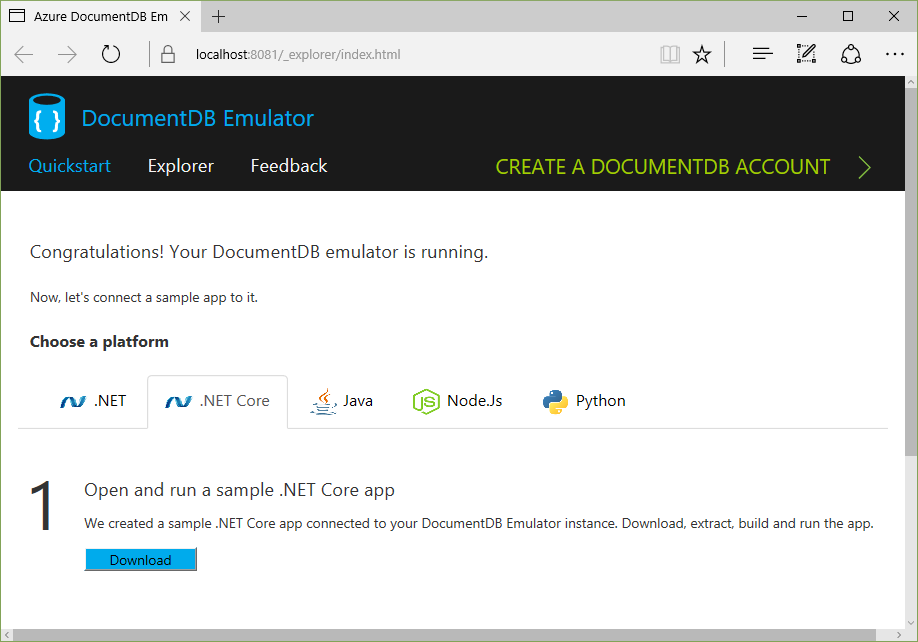
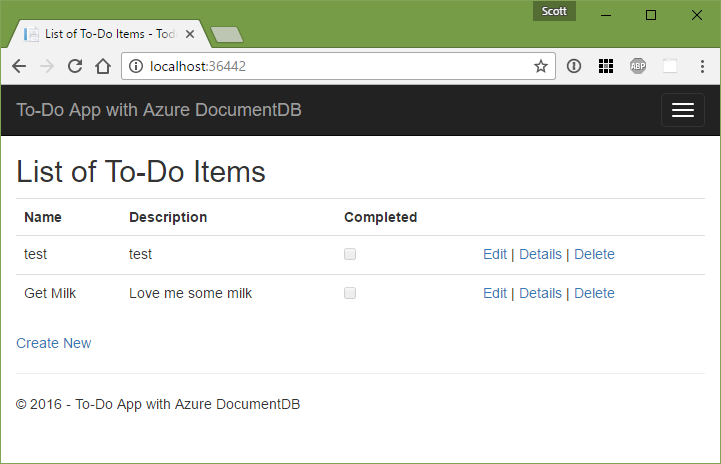
The sample app is a pretty standard "ToDo" app:
The local Emulator also includes a web-based local Data Explorer:
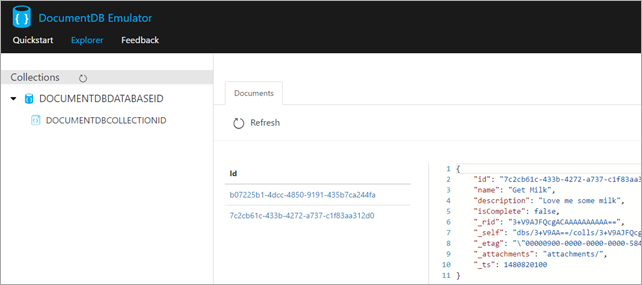
A Todo Item is really just a POCO (Plain Old CLR Object) like this:
namespace todo.Models
{
    using Newtonsoft.Json;
    public class Item
    {
        [JsonProperty(PropertyName = "id")]
        public string Id { get; set; }
        [JsonProperty(PropertyName = "name")]
        public string Name { get; set; }
        [JsonProperty(PropertyName = "description")]
        public string Description { get; set; }
        [JsonProperty(PropertyName = "isComplete")]
        public bool Completed { get; set; }
    }
}
The MVC Controller in the sample uses an underlying repository pattern so the code is super simple at that layer - as an example:
[ActionName("Index")]

public async Task<IActionResult> Index()

{

    var items = await DocumentDBRepository<Item>.GetItemsAsync(d => !d.Completed);

    return View(items);

}


[HttpPost]

[ActionName("Create")]

[ValidateAntiForgeryToken]

public async Task<ActionResult> CreateAsync([Bind("Id,Name,Description,Completed")] Item item)

{

    if (ModelState.IsValid)

    {

        await DocumentDBRepository<Item>.CreateItemAsync(item);

        return RedirectToAction("Index");

    }


    return View(item);

}
The Repository itself that's abstracting away the complexities is itself not that complex. It's like 120 lines of code, and really more like 60 when you remove whitespace and curly braces. And half of that is just initialization and setup. It's also DocumentDBRepository<T> so it's a generic you can change to meet your tastes and use it however you'd like.
The only thing that stands out to me in this sample is the loop in GetItemsAsync that's hiding potential paging/chunking. It's nice you can pass in a predicate but I'll want to go and put in some paging logic for large collections.
public static async Task<T> GetItemAsync(string id)
{
    try
    {
        Document document = await client.ReadDocumentAsync(UriFactory.CreateDocumentUri(DatabaseId, CollectionId, id));
        return (T)(dynamic)document;
    }
    catch (DocumentClientException e)
    {
        if (e.StatusCode == System.Net.HttpStatusCode.NotFound){
            return null;
        }
        else {
            throw;
        }
    }
}
public static async Task<IEnumerable<T>> GetItemsAsync(Expression<Func<T, bool>> predicate)
{
    IDocumentQuery<T> query = client.CreateDocumentQuery<T>(
        UriFactory.CreateDocumentCollectionUri(DatabaseId, CollectionId),
        new FeedOptions { MaxItemCount = -1 })
        .Where(predicate)
        .AsDocumentQuery();
    List<T> results = new List<T>();
    while (query.HasMoreResults){
        results.AddRange(await query.ExecuteNextAsync<T>());
    }
    return results;
}
public static async Task<Document> CreateItemAsync(T item)
{
    return await client.CreateDocumentAsync(UriFactory.CreateDocumentCollectionUri(DatabaseId, CollectionId), item);
}
public static async Task<Document> UpdateItemAsync(string id, T item)
{
    return await client.ReplaceDocumentAsync(UriFactory.CreateDocumentUri(DatabaseId, CollectionId, id), item);
}
public static async Task DeleteItemAsync(string id)
{
    await client.DeleteDocumentAsync(UriFactory.CreateDocumentUri(DatabaseId, CollectionId, id));
}
I'm going to keep playing with this but so far I'm pretty happy I can get this far while on an airplane. It's really easy (given I'm preferring NoSQL over SQL lately) to just through objects at it and store them.
In another post I'm going to look at RavenDB, another great NoSQL Document Database that works on .NET Core that s also Open Source.
Sponsor: Big thanks to Octopus Deploy! Do you deploy the same application multiple times for each of your end customers? The team at Octopus have taken the pain out of multi-tenant deployments. Check out their latest 3.4 release
© 2016 Scott Hanselman. All rights reserved.


IBM Unveils Watson-Powered Imaging Solutions for Healthcare Providers
by Angela Guess According to a new press release, “IBM today announced at the Radiological Society of North America Annual Meeting (RSNA 2016) it will preview new imaging solutions from Watson Health and Merge Healthcare (Merge; an IBM Company) designed to help healthcare providers pursue personalized approaches to patient diagnosis, treatment, and monitoring. The solutions […]
The post IBM Unveils Watson-Powered Imaging Solutions for Healthcare Providers appeared first on DATAVERSITY.
Using SQL Tools with SQL Server on Linux
Today, developers can use SQL Server in a variety of environments including on-premises, in datacenters, in virtual machines, in clouds such as Azure, AWS and Google, and also as a Platform as a Service (PaaS) offering with Azure SQL Database and Azure SQL Data Warehouse.
We recently announced SQL Server v.Next CTP1 on Linux and Windows, which brings the power of SQL Server to both Windows — and for the first time ever — Linux. Developers can now create applications with SQL Server on Linux, Windows, Docker, or macOS (via Docker) and then deploy to Linux, Windows, or Docker, on-premises or in the cloud.
As part of this announcement, we have released new SQL tools and also updated existing SQL tools. Developers can use these tools to connect to and work with SQL running anywhere, including SQL Server on Linux, Windows or Docker.
-
New mssql extension for Visual Studio Code: Get the free mssql extension from the VS Code marketplace and connect to SQL running anywhere, get IntelliSense and keyword completion while typing T-SQL queries, and run your queries to see results — all within Visual Studio Code and on Linux/macOS/Windows!

- New SQL command line tools for Linux: We’ve created Linux-native versions of your favorite SQL command line tools such as sqlcmd and bcp and sqlpackage and also added the new mssql-conf tool that lets you configure various properties for the SQL Server instance on Linux (e.g., SA password, TCP port and collation).
- New versions of SSMS, SSDT and SQL PowerShell: We have released updated versions (v17.0 RC1) of our flagship SQL Server tools including SQL Server Management Studio (SSMS), Visual Studio SQL Server Data Tools (SSDT) and SQL PowerShell with support for the SQL Server v.Next on Windows and Linux.

The picture below summarizes the expanded SQL tools portfolio with these announcements. Going forward, we plan to continue our close collaboration with customers and the broader SQL community to enhance our SQL tools portfolio and incrementally create multiplatform SQL tools for developers and database administrators.

Get started today
- Try the new getting started tutorials that show you how to:
- Install SQL Server on Linux/macOS/Docker/Windows
- Create a simple app using languages such as C#, Java, Node.js, PHP and Python with SQL Server
- Create a simple app using popular web frameworks and Object Relational Mapping (ORM) frameworks with SQL Server
- Try out some cool SQL Server features that can make your apps shine
- Get the latest v17.0 RC1 versions of SQL Server Management Studio (SSMS) and SQL Server Data Tools (SSDT)
- Get the mssql extension for Visual Studio Code, and develop apps with SQL Server on Linux/macOS/Windows
- Take a look at the source code for the mssql extension on github and submit your ideas and pull requests!
Connect with us
- Ask questions about SQL tools and share your feedback on Twitter: @sqltoolsguy and @sqldatatools
- Join the conversation at https://gitter.im/mssqldev and https://gitter.im/Microsoft/mssql
- Sign up to stay informed about new SQL Server on Linux developments
Learn more
- Read the detailed documentation
- Go to the next release of SQL Server webpage to get started with interactive SQL Server on Linux hands-on labs for Linux administrators new to SQL Server and for existing SQL Server database administrators new to Linux
- Visit the Connect(); to watch overview, security, high availability and developer tools videos about SQL Server on Linux on demand
Other videos in this series
- Watch the Microsoft Mechanics video to see how to get started with SQL Server on Linux in less than a minute
- SQL Server on Linux: overview
- SQL Server on Linux: high availability and security on Linux
- SQL Server + Node.js: what’s new
- SQL Server + Java: what’s new
- SQL Server + C#: what’s new
- SQL Server + PHP: what’s new
- SQL Server + Python: what’s new
SQL Server + Java: What’s new
Java continues to be one of the most widely used programming languages for a variety of application scenarios and industries. The Microsoft JDBC Driver for SQL Server is used to connect Java applications to SQL Server, whether SQL Server is hosted in the cloud or on-premises, or provided as a platform-as-a-service.
With the release of SQL Server v.Next public preview on Linux and Windows, the ability to connect to SQL Server on Linux, Windows, Docker or macOS (via Docker) makes cross-platform support for all connectors, including the JDBC driver, even more important. To enable Java developers to use the newest SQL Server features, we have been updating the JDBC driver with client-side support for new features, including Always Encrypted and Azure Active Directory Authentication.
We recently open sourced the Microsoft JDBC Driver for SQL Server. In doing so, we included the Java source code on GitHub (under MIT License). By making the project available on GitHub, we hope to facilitate a quicker feedback loop for Java developers. This feedback will be used to inform the prioritization of the developed features to support the variety of Java applications that connect to SQL Server. We want to get the community involved as much as possible in the design and implementation of features and welcome pull requests. We’ve also included build scripts if you’d like to build the jars on your own.
We have also made the connector available on the Maven Central Repository. Maven is popularly used by Java developers to build projects and manage dependencies. Maven support has been one of the most popular requests for the JDBC driver, and we hope that its availability on the Central Repository will make it easier to obtain and use the JDBC driver in new and existing projects. It’s as simple as adding the JDBC driver to your Maven project’s POM file.
This connector can be used to connect Java applications to Azure SQL Database, Azure SQL Data Warehouse and SQL Server (including SQL Server v.Next public preview). We have two jars available to support JRE 7 and 8. To start using the JDBC driver or upgrade your existing JDBC driver to the newest version, you can use one of the methods below:
- Add the corresponding JDBC jar (version 6.1.0.jre8 or 6.1.0.jre7) to your Maven project by adding it as a dependency using the code below:
<dependency>
<groupId>com.microsoft.sqlserver</groupId>
<artifactId>mssql-jdbc</artifactId>
<version>6.1.0.jre8</version>
</dependency>
- Build the corresponding jar for your JRE version (7 or 8) on your own through Maven or Ant build scripts available on GitHub and reference it in your application.
- Download the corresponding jar for your JRE version from Maven.
You can learn more about open sourcing the JDBC driver and support for Maven in this blog. We look forward to working more closely with the community to continue to bring the best support for Java applications connecting to SQL Server.
Get started today
- Check out the JDBC driver source code on GitHub! Make pull requests and let us know what you think.
- Add the JDBC driver from the Central Repository to your POM file in your Maven project.
- Try the new getting started tutorials that show you how to:
- Install SQL Server on Linux/macOS/Docker/Windows
- Create a simple app using Java and other popular programming languages with SQL Server
- Create a simple app using popular web frameworks and Object Relational Mapping (ORM) frameworks with SQL Server
- Use cool SQL Server features that can make your apps shine
Connect with us
- Join the conversation at https://gitter.im/mssqldev.
- Sign up to stay informed about new SQL Server on Linux developments.
Learn more
- Visit the Connect(); webpage to watch overview, security, high-availability and developer tools on-demand videos about SQL Server on Linux.
- Visit the webpage for the next release of SQL Server.
Other videos in this series
- SQL Server + Node.js: what’s new
- SQL Server + C#: what’s new
- SQL Server + PHP: what’s new
- SQL Server + Python: what’s new
- Watch the Microsoft Mechanics video to see how to get started with SQL Server on Linux in less than a minute
- SQL Server on Linux: use SQL Tools with SQL Server
How to Dive into Data Lakes and Not Drown
Kyvos Insights has a question for Enterprise Analytics executives: How are your Data Lakes working out for you? For many that embarked on journeys to stock up Hadoop based Data Lakes, with everything from structured transaction records to non-relational data such as log files, Internet clickstream records, sensor data, social streams, and so on, the answer has been […]
The post How to Dive into Data Lakes and Not Drown appeared first on DATAVERSITY.
SQL Server + Node.js – What’s new?
JavaScript is the most popular and active programming language among developers across various industries. Tedious Node.js connector is a JavaScript implementation of the Tabular Data Stream (TDS) protocol. This Node.js connector allows you to connect from platform of your choice to SQL Server on premise and in the cloud. Tedious is a native JavaScript connector that provides the npm install experience.

I’m pleased to share that Microsoft is now a collaborator for Tedious on GitHub and contributes actively to this community-initiated effort. The Tedious Node.js connector is:
- Cross-platform: You can connect to SQL Server anywhere from node.js from platform of your choice – be it Windows, macOS, or Linux.
- Open-source: As a matter of fact, it is a project initiated by the open-source community and continues to be driven by the community. This allows us to engage with developers on GitHub, develop transparently and gather feedback quickly.
- Officially supported: You can contact Microsoft Customer Service and Support (CSS) via phone, email, twitter, forums, etc. to report and get help with any issue.
We are fixing bugs found via issues reported on GitHub and are partnering with developers to make Tedious better. We are planning on adding support for advanced SQL Server features like Multi-Subnet Failover, Always On Availability Groups, Always Encrypted, Azure Active Directory (AAD), etc.
Windows Integrated Authentication is the most common issue reported by developers on GitHub and the top request from customers. In response to customer feedback we are working on adding support for it in the next release of Tedious.
Get started today
- Check out GitHub repo for Tedious and contribute.
- File issues for bugs, feature requests, questions, etc. on GitHub and help us prioritize.
- Follow the Google Group for discussions on Tedious.
- Try the new getting started tutorials that show you how to:
- Install SQL Server on Linux/macOS/Docker/Windows
- Create a simple app using languages such as C#, Java, Node.js, PHP and Python with SQL Server.
- Create a simple app using popular web frameworks and Object Relational Mapping (ORM) frameworks with SQL Server.
- Try out some cool SQL Server features that can make your apps shine.
Connect with us
- Join the conversation at: https://gitter.im/mssqldev
- Sign up to stay informed about new SQL Server on Linux developments.
Learn more
- We recently announced public preview of the next release of SQL Server on Linux and Windows which brings the power of SQL Server to both Windows – and for the first time ever – Linux.
- Visit the Connect(); webpage to watch videos on overview, security, high availability, and developer tools for SQL Server on Linux on-demand.
- Go to the next release of SQL Server webpage
Other videos in this series
- Watch the SQL Server on Linux: overview and Microsoft Mechanics video to see how to get started with SQL Server on Linux in less than a minute
- SQL Server on Linux: use SQL Tools with SQL Server
- SQL Server + Java: what’s new
- SQL Server + PHP: what’s new
- SQL Server + C#: what’s new
- SQL Server + Python: what’s new
Introducing SQL Server Premium Assurance
IT departments are in a fundamental state of change, with the drive for digital transformation creating many net new applications and moving others to the cloud. At the same time, companies must also maintain stable and secure operation of their existing applications databases. To provide better flexibility in managing these diverse priorities, Microsoft is announcing two new offerings to help you run applications longer without disruption: Windows Server Premium Assurance and SQL Server Premium Assurance. These offerings add six more years of product support for Windows Server and SQL Server versions 2008 and newer–for up to 16 years of total product support. The additional support minimizes the risk and costs associated with upgrading critical application databases, and helps to secure data and maintain regulatory compliance for six additional years.
To learn more about how Premium Assurance extends the product lifecycles for Windows Server and SQL Server, read the full Premium Assurance article on the Hybrid Cloud blog.
The “Shape Shifting” Role of the Chief Security Officer
Click here to learn more about author Luca Scagliarini. In a pre-internet world, the job of the Chief Security Officer (CSO) was primarily about protecting physical assets from external threats. With data breaches, leaks and hacking attacks regularly in the headlines, it’s clear that today’s threats are anything but simple or predictable, they’re complicated, potentially […]
The post The “Shape Shifting” Role of the Chief Security Officer appeared first on DATAVERSITY.
Memory Limits in SQL Server 2016 SP1
A few weeks ago, I made a pretty big deal about SQL Server 2016 Service Pack 1. Many features previously reserved for Enterprise Edition were unleashed to lower editions, and I was ecstatic to learn about these changes.
Nonetheless, I'm seeing a few people who are, let's say, a bit less excited than I am.
It's important to keep in mind that the changes here weren't meant to provide complete feature parity across all editions; they were for the specific purpose of creating a more consistent programming surface area. Now customers can use features like In-Memory OLTP, ColumnStore, and compression without worrying about the targeted edition(s) – only about how well they will scale. Several security features that didn't really seem to have anything to do with edition are opened up as well. The one I understood the least was Always Encrypted; I couldn't fathom why only Enterprise customers needed to protect things like credit card data. Transparent Data Encryption is still Enterprise-only, because this isn't really a programmability feature (either it's on or it's not).
So what's really in it for Standard Edition customers?
I think the biggest problem most people have is that max memory in Standard Edition is still limited to 128GB. They look at that and say, "Gee, thanks for all the features, but the memory limit means I can't really use them."
However, the surface area changes bring about performance improvement opportunities, even if that wasn't their original intention (or even if it was – I wasn't in any of those meetings). Let's take a closer look at a small section of the fine print (from the official docs):
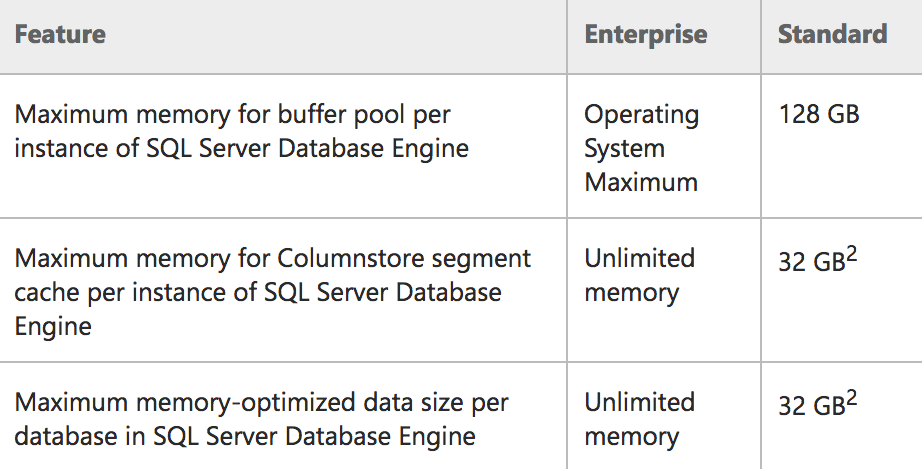 Memory limits for Enterprise/Standard in SQL Server 2016 SP1
The astute reader will notice that the buffer pool limit wording has changed, from:
To:
This is a better description of what really happens in Standard Edition: a 128GB limit for the buffer pool only, and other memory reservations can be over and above that (think pools like the plan cache). So, in effect, a Standard Edition server could use 128GB of buffer pool, then max server memory could be higher and support more memory used for other reservations. Similarly, Express Edition is now properly documented to use 1.4GB for the buffer pool.
You might also notice some very specific wording in that left-most column (e.g. "per instance" and "per database") for the features that are being exposed in Standard Edition for the first time. To be more specific:
- The instance is limited to 128GB of memory for the buffer pool.
- The instance can have an additional 32GB allocated to ColumnStore objects, over and above the buffer pool limit.
- Each user database on the instance can have an additional 32GB allocated to memory-optimized tables, over and above the buffer pool limit.
And to be crystal clear: These memory limits for ColumnStore and In-Memory OLTP are NOT subtracted from the buffer pool limit, as long as the server has more than 128GB of memory available. If the server has less than 128GB, you will see these technologies compete with buffer pool memory, and in fact be limited to a % of max server memory. More details are available in this post from Microsoft's Parikshit Savjani.
I don't have hardware handy to test the extent of this, but if you had a machine with 256GB or 512GB of memory, you could theoretically use it all with a single Standard Edition instance, if you could – for example – spread your In-Memory data across databases in Whether breaking your data up in this way is practical for your application, I'm not sure; I'm only suggesting it's possible. Some of you might already be doing some of these things to get better usage out of Standard Edition on servers with more than 128GB of memory.
With ColumnStore specifically, in addition to being allowed to use 32GB in addition to the buffer pool, keep in mind that the compression you can get here means you can often fit a lot more into that 32GB limit than you could with the same data in traditional row-store. And if you can't use ColumnStore for whatever reason (or it still won't fit into 32GB), you can now implement traditional page or row compression – this might not allow you to fit your entire database into the 128GB buffer pool, but it might enable more of your data to be in memory at any given time.
Similar things are possible in Express (at a lower scale), where you can have 1.4GB for buffer pool, but an additional ~352MB per instance for ColumnStore, and ~352MB per database for In-Memory OLTP.
But Enterprise Edition still has lots of upside
There are many other differentiators to keep interest in Enterprise Edition, aside from unlimited memory limits all around – from online rebuilds and merry-go-round scans to full-on Availability Groups and all the virtualization rights you can shake a stick at. Even ColumnStore indexes have well-defined performance enhancements reserved for Enterprise Edition.
So just because there are some techniques that will allow you to get more out of Standard Edition, that does not mean it will magically scale to meet your performance needs. Like my other posts about "doing it on a budget" (e.g. partitioning and readable secondaries), you can certainly spend time and effort kludging together a solution, but it will only get you so far. The point of this post was simply to demonstrate that you can get farther with Standard Edition in 2016 SP1 than you ever could before.
The post Memory Limits in SQL Server 2016 SP1 appeared first on SQLPerformance.com.
Backups – are you missing the point?
It’s a common question “Do you have a backup?” But it’s the wrong question. Very relevant for this month’s T-SQL Tuesday, hosted by Ken Fisher (@sqlstudent144), on the topic of backups.
I think the question should be “Can you recover if needed?”
We all know that a backup is only as good as your ability to restore from it – that you must test your backups to prove their worth. But there’s more to it than being able to restore a backup. Do you know what to do in case of a disaster? Can you restore what you want to restore? Does that restore get your applications back up? Does your reporting become available again? Do you have everything you need? Are there dependencies on other databases?
I often find that organisations don’t quite have the Disaster Recovery story they need, and this is mostly down to not having practised specific scenarios.
Does your disaster testing include getting applications to point at the new server? Have anything else broken while you do that?
Does your disaster testing include a scenario where a rogue process changed values, but there is newer data that you want to keep?
Does your disaster testing include losing an extract from a source system which does incremental extracts?
Does your disaster testing include a situation where a well-meaning person has taken an extra backup, potentially spoiling differential or log backups?
Does your disaster testing include random scenarios where your team needs to figure out what’s going on and what needs to happen to get everything back?
The usefulness of standard SQL backups for some of these situations isn’t even clear. Many people take regular VM backups, but is that sufficient? Can you get the tail of the log if your VM disappears? Does a replicated copy of your database provide enough of a safety net here, or in general?
The key issue is not whether you have a backup. It’s not even whether you have a restorable backup. It’s whether you have what you need to survive if things go south – whichever southbound route you’ve been taken down.

PASS SQL Saturday #567 Slovenia Recapitulation
So it is over:-) The fourth SQL Saturday in Ljubljana, Slovenia, the last SQL Saturday in Europe this year… SQL Saturday #567. Probably still some time is needed to collect and sort the impressions. However, from my perspective, the conference was a huge success.
We have been all together, the attendees, the speakers, the sponsors, and the organizers, 240 out of 278 registered, having 86.33% attendance and less than 14% drop off rate. The drop-of rate makes our SQL Saturday again one of the most successful in the world. For me, this is very important. I really like when registered attendees show respect to speakers, sponsors and organizers, and simply come. I don’t like events where the drop off rate is 50% or even more. Although SQL Saturday is a free event, everybody should respect the fact that the speakers and the organizers are giving their free time, and the sponsors are giving the money.
The two pre-conference seminars help us closing the budget. Therefore, special thanks goes to the pre-conference speakers. Of course, besides the seminars, the sponsors are the ones who enabled the event.
On Saturday, we started with a short keynote. Surprisingly, most of the attendees, and not so surprisingly, all of the organizers were there:-)

Then we continued with the regular sessions. Except for the first time slot, when we had some issues with wireless, everything went smoothly. With 30 sessions in 5 tracks, the day was quite intensive.

Of course, we provided food and drinks. So far, there were no complaints, seems like the food was really good. No surprise for me, in Slovenia food is important, with bad food you get immediately bad evaluations, no matter of the quality of the presentations. Seems like the body food is more important than the food for the soul:-)

One of the special traditions of our SQL Saturday is also wine and schnapps tasting after the raffle, at the end of the event.

And we finished with speakers dinner and a party that for some lasted till the morning. Let’s skip the details here. For now, thanks to everybody involved in this great event!
Hope we all meet again next year!
SQL Server + PHP – What’s new
This post is authored by Meet Bhagdev, Program Manager, Microsfoft
PHP is one of the most widely used programming languages for web developers today. The Microsoft PHP Connector for SQL Server is used to connect PHP applications to SQL Server, whether SQL Server is hosted in the cloud, on-premises or provided as a platform as a service.
We recently announced SQL Server v.Next CTP1 on Linux and Windows, which brings the power of SQL Server to both Windows and — for the first time ever — Linux. Developers can now create applications with SQL Server on Linux, Windows, Docker or macOS (via Docker) and then deploy to Linux, Windows, or Docker, on-premises or in the cloud.
As part of this announcement, we have made some improvements to our PHP connector:
- SQL Server v.Next Support: You can now use the PHP connectors to connect to SQL Server v.Next CTP1 of SQL Server running anywhere, including SQL Server on Linux, Windows or Docker.
- Linux support: We’ve created Linux-native versions of sqlsrv and pdo_sqlsrv modules of the PHP SQL Server Connector. Now you can use the PHP Connector to connect to SQL Server on Ubuntu 15.04, 15.10, 16.04, Red Hat 6 and Red Hat 7.
- PHP 7.0 and 7.1 support: We have added support for the latest PHP runtimes for Windows and Linux with our releases on GitHub.
- PECL Install Experience for Linux: We have created native PECL packages for Linux. This enables developers to install, upgrade and uninstall the PHP SQL Server connector using the PECL package repository. This is explained in detail in our Getting Started tutorials.
- Community input for prioritization: We have also started using surveys on GitHub to guide our prioritization for features and improvements. Check our latest survey and let us know what you think.
Get started today
- Check out the PHP connector source code on GitHub and our packages (sqlsrv, pdo_sqlsrv) on PECL. Make pull requests and let us know what you think.
- Try the new getting started tutorials that show you how to:
- Install SQL Server on Linux or Windows or run on Docker in multiple platforms.
- Create a simple app using C#, Java, Node.js, PHP and Python with SQL Server.
- Create a simple app using popular web frameworks and Laravel with SQL Server.
- Try out some cool SQL Server features that can make your apps shine.
- Get the latest v17.0 RC1 versions of SQL Server Management Studio (SSMS) and SQL Server Data Tools (SSDT).
- Get the mssql extension for Visual Studio Code and develop apps with SQL Server on Linux/macOS/Windows.
Connect with us
- Join the conversation at https://gitter.im/mssqldev.
- Sign up to stay informed about new SQL Server on Linux developments.
Learn more
- Visit Connect(); to watch overview, security, high-availability and developer tools videos about SQL Server on Linux on demand.
Learn more
- Go to the next release of SQL Server webpage to get started with interactive SQL Server on Linux hands-on labs for Linux administrators new to SQL Server and for existing SQL Server database administrators new to Linux.
- Visit Connect(); to watch overview, security, high-availability and developer tools videos about SQL Server on Linux on demand.
Other videos in this series
- Watch the Microsoft Mechanics video to see how to get started with SQL Server on Linux in less than a minute.
- SQL Server on Linux: use SQL Tools with SQL Server
- SQL Server + Node.js: what’s new
- SQL Server + Java: what’s new
- SQL Server + C#: what’s new
- SQL Server + Python: what’s new
T-SQL Tuesday #85: Backup and Recovery
 It’s that time of the month… the time when all of the T-SQL bloggers have a party and blog about a specific topic. Unfortunately, it’s been a few months since I’ve written a T-SQL Tuesday post. I’m hopeful that I can use this post to get back in the groove and participate in this monthly party on a, well, monthly basis.
Kenneth Fisher is our host this month, and the topic that he has selected is about “Backup and Recovery”. Kenneth states:
Backups are one of the most common things DBAs discuss, and they are at once one of the simplest and most complicated parts of our whole job. So let’s hear it for backup and recovery!
This is so true. Now, I want to get back to regular blogging – but this seems like a topic that is going to be pretty popular. I would venture that almost everyone will be talking about some aspect of the BACKUP or RESTORE command and working with the databases directly, so I would like to approach this from a different perspective.
Availability Groups and default XE Sessions
In a prior T-SQL Tuesday post, we were challenged to “Sharpen Something”, and I blogged about my deficiency in Availability Groups. Well, I’ve been working with them for a bit now. However, I’ve noticed that when things go wrong, there are lots of places that you can look at for finding out where the problem lies. And if the problem lies in the cluster, it becomes even trickier. However, the cluster writes out some .xel files – XE log files – by default to the SQL Server’s log directory. You won’t find this XE session running – it’s one of the hidden default sessions that Jason Brimhall blogged about.
In addition to these XE sessions being hidden, they only keep a small amount of data in just a few files. If you are looking back in time to see what had happened, it’s quite possible that you will find out that these files have rolled over on you, and what you’re looking for just isn’t in there anymore. I found that files only 8 hours old were being deleted because of this. If you’re trying to investigate what happened a few days later, well, you’re just out of luck.
Backups – more than just databases!
So how does this talk of AGs pertain to this T-SQL Tuesday topic? It should be pretty obvious – we need to periodically grab all of the .xel files generated by the cluster, and move them to a different directory, with a different retention policy. Yup… we need to back up these files. Sometimes, we need to be backing up things other than the databases themselves.
I created a PowerShell script that takes a few parameters, then moves the files from the source directory to the destination directory. And then it deletes files from the destination directory that are over x days old.
The next step is to schedule this script to run. I created a job, with a job step that executes a powershell script, and I call it with the desired parameters:
& "ScriptFullyQualifiedName"
    -SourcePath C:\temp\source
    -DestinationPath C:\temp\destination
    -FileNamePattern "*.xel"
    -DaysToRetainDestinationFiles 5
When I ran this job, it completed successfully. However, in looking at the source directory, all the files were still there. What’s up?
After a lot of investigation, it turns out that these particular files are created by the system, and all other users need administrator rights to work with the files. Even if the user has “Full Control” permission on the directory and all files in it. Since running the script from a SQL job with administrator privileges is a pretty difficult thing to do, what I ended up doing was to create a scheduled task at the OS level, where I can set the task to “Run with highest privileges” – aka administrator. Now the files are being copied out to a different location, and they are being retained with a different retention policy.
Just ensure that you have the disk space that you need. You don’t want to be causing further problems…
The post T-SQL Tuesday #85: Backup and Recovery appeared first on Wayne Sheffield.
What is HTAP?
I have been seeing the term “HTAP” mentioned a lot recently, and I thought I would briefly explain the term. HTAP stands for Hybrid Transactional and Analytical Processing.
HTAP is used to describe the capability of a single database that can perform both online transaction processing (OLTP) and online analytical processing (OLAP) for the purpose of real-time operational intelligence processing. The term was created by Gartner in 2014.
In the SQL Server world you can think of it as: In-memory analytics (columnstore) + in-memory OLTP = real-time operational analytics. Microsoft supports this in SQL Server 2016 (see SQL Server 2016 real-time operational analytics).
To clarify the difference between OLTP and OLAP: OLTP, as well as Operational Data Stores (ODS), are operational workloads. They are low latency, high volume, high concurrency workloads that are usually used to operate a business, such as taking and fulfilling orders, making shipments, billing customers, collecting payments, and so on. On the other hand, OLAP are BI/EDW and considered analytics workloads. They are relatively higher latency, lower volume, and lower concurrency workloads that are used to improve the performance of a company, by analyzing operational, historical, and external data (“big data”), to make strategic decisions, or take actions, to improve the quality of products, customer experience, and so forth, as well as to do predictive analytics.
So a HTAP query engine must be able to serve everything, from simple, short transactional queries to complex, long-running analytical ones, delivering to the service-level objectives for all these workloads.
This does not replace the need for a separate data warehouse when you need to integrate data from multiple sources before running the analytics workload or when you require extreme analytics performance using pre-aggregated data such as cubes. Or when one server serving both OLTP and OLAP simply does not give you enough processing power and you need additional servers.
More info:
HTAP: What it Is and Why it Matters
Evaluating HTAP Databases for Machine Learning Applications
What is Hybrid Transaction/Analytical Processing (HTAP)?
Accelerate SQL Server 2016 HTAP performance with Windows 2016 and HPE Persistent Memory technology (video)
How HTAP Database Technology Can Help You
SQL Server + C#: What’s new
This post was authored by Andrea Lam, Program Manager, SQL Server
With the release of SQL Server v.Next public preview on Linux and Windows, the ability to connect to SQL Server on Linux, Windows, Docker or macOS (via Docker) makes cross-platform support for all connectors, including .NET Framework and .NET Core SqlClient, even more important. To enable C# developers to use the newest SQL Server features, we have been updating SqlClient with client-side support for new features.
In .NET Framework, we have provided client-side support for Always Encrypted and added Azure Active Directory as an authentication method. We’ve also added a new connection string parameter called “Pool Blocking Period.” It can be used to select the behavior of the blocking period when connecting to Azure SQL Database and SQL Server. Many applications that connect to Azure SQL Database need to render quickly, and the exponential blocking period can be problematic, especially when throwing errors. By adding the Pool Blocking Period parameter, we aim to improve the experience for connections to Azure SQL Database. Learn more about the new parameter here.
.NET Core is the cross-platform, open-source implementation of the .NET Framework. The project includes CoreFX, the foundational libraries of .NET Core. Cross-platform support allows developers to seamlessly run applications on their operating system of choice, regardless of the platform it was developed on. For example, an app developed on Windows can be deployed to macOS and Linux, without ever having to port any code. To connect apps written in .NET Core to SQL Server (hosted anywhere), developers can use System.Data.SqlClient available in CoreFX. By developing in .NET Core on GitHub, we have been able to get feedback quickly and are actively working to enable the breadth of application scenarios and workloads.
Get started today
- Check out CoreFX on GitHub! Make pull requests and let us know what you think.
- Try the new getting started tutorials that show you how to:
- Install SQL Server on Linux/macOS/Docker/Windows
- Create a simple app using C# and other popular programming languages with SQL Server
- Create a simple app using popular web frameworks and Object Relational Mapping (ORM) frameworks with SQL Server
- Try out some cool SQL Server features that can make your apps shine
Connect with us
- Join the conversation at https://gitter.im/mssqldev.
- Sign up to stay informed about new SQL Server on Linux developments.
Learn more
- Visit the Connect(); webpage to watch overview, security, high-availability and developer tools videos about SQL Server on Linux on demand.
- Visit the webpage for the next release of SQL Server.
Other videos in this series
- SQL Server + Node.js: what’s new
- SQL Server + Java: what’s new
- SQL Server + PHP: what’s new
- SQL Server + Python: what’s new
- Watch the Microsoft Mechanics video to see how to get started with SQL Server on Linux in less than a minute.
- SQL Server on Linux: use SQL Tools with SQL Server
SQL Server on Linux: How? Introduction
This post was authored by Scott Konersmann, Partner Engineering Manager, SQL Server, Slava Oks, Partner Group Engineering Manager, SQL Server, and Tobias Ternstrom, Principal Program Manager, SQL Server.
Introduction
We first announced SQL Server on Linux in March, and recently released the first public preview of SQL Server on Linux (SQL Server v.Next CTP1) at the Microsoft Connect(); conference. We’ve been pleased to see the positive reaction from our customers and the community; in the two weeks following the release, there were more than 21,000 downloads of the preview. A lot of you are curious to hear more about how we made SQL Server run on Linux (and some of you have already figured out and posted interesting articles about part of the story with “Drawbridge”). We decided to kick off a blog series to share technical details about this very topic starting with an introduction to the journey of offering SQL Server on Linux. Hopefully you will find it as interesting as we do! J
Summary
Making SQL Server run on Linux involves introducing what is known as a Platform Abstraction Layer (“PAL”) into SQL Server. This layer is used to align all operating system or platform specific code in one place and allow the rest of the codebase to stay operating system agnostic. Because of SQL Server’s long history on a single operating system, Windows, it never needed a PAL. In fact, the SQL Server database engine codebase has many references to libraries that are popular on Windows to provide various functionality. In bringing SQL Server to Linux, we set strict requirements for ourselves to bring the full functional, performance, and scale value of the SQL Server RDBMS to Linux. This includes the ability for an application that works great on SQL Server on Windows to work equally great against SQL Server on Linux. Given these requirements and the fact that the existing SQL Server OS dependencies would make it very hard to provide a highly capable version of SQL Server outside of Windows in reasonable time it was decided to marry parts of the Microsoft Research (MSR) project Drawbridge with SQL Server’s existing platform layer SQL Server Operating System (SOS) to create what we call the SQLPAL. The Drawbridge project provided an abstraction between the underlying operating system and the application for the purposes of secure containers and SOS provided robust memory management, thread scheduling, and IO services. Creating SQLPAL enabled the existing Windows dependencies to be used on Linux with the help of parts of the Drawbridge design focused on OS abstraction while leaving the key OS services to SOS. We are also changing the SQL Server database engine code to by-pass the Windows libraries and call directly into SQLPAL for resource intensive functionality.
Requirements for supporting Linux
SQL Server is Microsoft’s flagship database product which with close to 30 years of development behind it. At a high level, the list below represents our requirements as we designed the solution to make the SQL Server RDBMS available on multiple platforms:
- Quality and security must meet the same high bar we set for SQL Server on Windows
- Provide the same value, both in terms of functionality, performance, and scale
- Application compatibility between SQL Server on Windows and Linux
- Enable a continued fast pace of innovation in the SQL Server code base and make sure new features and fixes appear immediately across platforms
- Put in place a foundation for future SQL Server suite services (such as Integration Services) to come to Linux
To make SQL Server support multiple platforms, the engineering task is essentially to remove or abstract away its dependencies on Windows. As you can imagine, after decades of development against a single operating system, there are plenty of OS-specific dependencies across the code base. In addition, the code base is huge. There are tens of millions of lines of code in SQL Server.
SQL Server depends on various libraries and their functions and semantics commonly used in Windows development that fall into three categories:
- “Win32” (ex. user32.dll)
- NT Kernel (ntdll.dll)
- Windows application libraries (such as MSXML)
You can think of these as core library functions, most of them have nothing to do with the operating system kernel and only execute in user mode.
While SQL Server has dependencies on both Win32 and the Windows kernel, the most complex dependency is that of Windows application libraries that have been added over the years in order to provide new functionality. Here are some examples:
- SQL Server’s XML support uses MSXML which is used to parse and process XML documents within SQL Server.
- SQLCLR hosts the Common Language Runtime (CLR) for both system types as well as user defined types and CLR stored procedures.
- SQL Server has some components written in COM like the VDI interface for backups.
- Heterogeneous distributed transactions are controlled through Microsoft Distributed Transaction Coordinator (MS DTC)
- SQL Server Agent integrates with many Windows subsystems (shell execution, Windows Event Log, SMTP Mail, etc.).
These dependencies are the biggest challenge for us to overcome to meet our goals of bringing the same value and having a very high level compatibility between SQL Server on Windows and Linux. As an example, to re-implement something like SQLXML would take a significant amount of time and would run a high risk of not providing the same semantics as before, and could potentially break applications. The option of completely removing these dependencies would mean we must also remove the functionality they provide from SQL Server on Linux. If the dependencies were edge cases and only impacting very few customer visible features, we could have considered it. As it turns out, removing them would cause us to have to remove tons of features from SQL Server on Linux which would go against our goals around compatibility and value across operating systems.
We could take the approach of doing this re-implementation piecemeal, bringing value little by little. While this would be possible, it would also go against the requirements because it would mean that there would be a significant gap between SQL Server on Linux and Windows for years. The resolution lies in the right platform abstraction layer.
Building a PAL
Software that is supported across multiple operating systems always has an implementation of some sort of Platform Abstraction Layer (PAL). The PAL layer is responsible for abstraction of the calls and semantics of the underlying operating system and its libraries from the software itself. The next couple of sections consider some of the technology that we investigated as solutions to building a PAL for SQL Server.
SQL Operating System (SOS or SQLOS)
In the SQL Server 2005 release, a platform layer was created between the SQL Server engine and Windows called the SQL Operating System (SOS). This layer was responsible for user mode thread scheduling, memory management, and synchronization (see SQLOS for reference). A key reason for the creation of SOS was that it allowed for a centralized set of low level management and diagnostics functionality to be provided to customers and support (subset of Dynamic Management Views/DMVs and Extended Events/XEvents). This layer allowed us to minimize the number of system calls involved in scheduling execution by running non-preemptively and letting SQL Server do its own resource management. While SOS improved performance and greatly helped supportability and debugging, it did not provide a proper abstraction layer from the OS dependencies described above, i.e. Windows semantics were carried through SOS and exposed to the database engine.

In the scenario where we would completely remove the dependencies on the underlying operating system from the database engine, the best option was to grow SOS into a proper Platform Abstraction Layer (PAL). All the calls to Windows APIs would be routed through a new set of equivalent APIs in SOS and a new host extension layer would be added on the bottom of SOS that would interact with the operating system. While this would resolve the system call dependencies, it would not help with the dependencies on the higher-level libraries.
Drawbridge
Drawbridge was an Microsoft Research project (see Drawbridge for reference) that focused on drastically reducing the virtualization resource overhead incurred when hosting many Virtual Machines on the same hardware. The research involved two ideas. The first idea was a “picoprocess” which consists of an empty address space, a monitor process that interacts with the host operating system on behalf of the picoprocess, and a kernel driver that allows a driver to populate the address space at startup and implements a host Application Binary Interface (ABI) that allows the picoprocess to interact with the host. The second idea was a user mode Library OS, sometimes referred to as LibOS. Drawbridge provided a working Windows Library OS that could be used to run Windows programs on a Windows host. This Library OS implements a subset of the 1500+ Win32 and NT ABIs and stubs the rest to either succeed or fail depending on the type of call.

Our needs didn’t align with the original goals of the Drawbridge research. For instance, the picoprocess idea isn’t something needed for moving SQL Server to other platforms. However, there were a couple of synergies that stood out:
- Library OS implemented most of the 1500+ Windows ABIs in user mode and only 45-50 ABIs were needed to interact with the host. These ABIs were for address space and memory management, host synchronization, and IO (network and disk). This made for a very small surface area that needs to be implemented to interact with a host. That is extremely attractive from a platform abstraction perspective.
- Library OS was capable of hosting other Windows components. Enough of the Win32 and NT layers were implemented to host CLR, MSXML, and other APIs that the SQL suite depends on. This meant that we could get more functionality to work without rewriting whole features.
There were also some risk and reward tradeoffs:
- The Microsoft Research project was complete and there was no support for Drawbridge. Therefore, we needed to take a source snapshot and modify the code for our purposes. The risks were around the costs to ramp up a team on the Library OS, modify it to be suitable for SQL Server, and make it perform comparably with Windows. On the positive side, this would mean everything is in user mode and we would own all the code within the stack. Performance critical code can be optimized because we can modify all layers of the stack including SQL Server, the Library OS, and the host interface as needed to make SQL Server perform. Since there are no real boundaries in the process, it is possible for SQL Server to call Linux.
- The original Drawbridge project was built on Windows and used a kernel driver and monitor process. This would need to be dropped in favor of a user mode only architecture. In the new architecture, the host extension (referred to as PAL in the Drawbridge design) on Windows would move from a kernel driver to just a user mode program. Interestingly enough, one of the researchers had developed a rough prototype for Linux that proved it could be done.
- Because the technologies were created independently there was a large amount of overlapping functionality. SOS had subsystems for object management, memory management, threading/scheduling, synchronization, and IO (disk and network). The Library OS and Host Extension also had similar functionality. These systems would need to be rationalized down to a single implementation.
| Technologies |
SOS |
Library OS |
Host Extension |
|
Object Management |
✔ |
✔ |
✔ |
|
Memory Management |
✔ |
✔ |
✔ |
|
Threading/Scheduling |
✔ |
✔ |
✔ |
|
Synchronization |
✔ |
✔ |
✔ |
|
I/O (Disk, Network) |
✔ |
✔ |
✔ |
Meet SQLPAL
As a result of the investigation, we decided on a hybrid strategy. We would merge SOS and Library OS from Drawbridge to create the SQL PAL (SQL Platform Abstraction Layer). For areas of Library OS that SQL Server does not need, we would remove them. To merge these architectures, changes were needed in all layers of the stack.
The new architecture consists of a set of SOS direct APIs which don’t go through any Win32 or NT syscalls. For code without SOS direct APIs they will either go through a hosted Windows API (like MSXML) or NTUM (NT User Mode API – this is the 1500+ Win32 and NT syscalls). All the subsystems like storage, network, or resource management will be based on SOS and will be shared between SOS direct and NTUM APIs.

This architecture provides some interesting characteristics:
- Everything running in process boils down to the same platform assembly code. The CPU can’t tell the difference between the code that is providing Win32 functionality to SQL Server or native Linux code.
- Even though the architecture shows layering, there are no real boundaries within the process (There is no spoon!). If code running in SQL Server which is performance critical needs to call Linux it can do that directly with a very small amount of assembler via the SOS direct APIs to setup the stack correctly and process the result. An example where this has been done is the disk IO path. There is a small amount of conversion code left to convert from Windows scatter/gather input structure to Linux vectored IO structure. Other disk IO types don’t require any conversions or allocations.
- All resources in the process can be managed by SQLPAL. In SQL Server, before SQLPAL, most resources such as memory and threads were controlled, but there were some things outside it’s control. Some libraries and Win32/NT APIs would create threads on their own and do memory allocations without using the SOS APIs. With this new architecture, even the Win32 and NT APIs would be based on SQLPAL so every memory allocation and thread would be controlled by SQL PAL. As you can see this also benefits SQL Server on Windows.
- For SQL Server on Linux we are using about 81 MB of uncompressed Windows libraries, so it’s a tiny fraction (less than 1%) of a typical Windows installation. SQLPAL itself is currently around 8 MB.
Process Model
The following diagram shows what the address space looks like when running. The host extension is simply a native Linux application. When host extension starts it loads and initializes SQLPAL, SQLPAL then brings up SQL Server. SQLPAL can launch software isolated processes that are simply a collection of threads and allocations running within the same address space. We use that for things like SQLDumper which is an application that is run when SQL Server encounters a problem to collect an enlightened crash dump.
One point to reiterate is that even though this might look like a lot of layers there aren’t any hard boundaries between SQL Server and the host.

Evolution of SQLPAL
At the start of the project, SQL Server was built on SOS and Library OS was independent. The eventual goal is to have a merged SOS and Library OS as the core of SQL PAL. For public preview, this merge wasn’t fully completed, but the heart of SQLPAL had been replaced with SOS. For example, threads and memory already use SOS functionality instead of the original Drawbridge implementations.
The result is that there are two instances of SOS running inside the CTP1 release: one in SQL Server and one in SQLPAL . This works fine because the SOS instance in SQL Server is still using Win32 APIs which call down into the SQLPAL. The SQLPAL instance of the SOS code has been changed to call the host extension ABIs (i.e. the native Linux code) instead of Win32.
Now we are working on removing the SOS instance from SQL Server. We are exposing the SOS APIs from the SQLPAL. Once this is completed everything will flow through the single SQLPAL SOS instance.
More posts
We are planning more of these posts to share to tell you about our journey, which we believe has been amazing and a ton of fun worth sharing. Please provide comments if there are specific areas you are interested in us covering!
Thanks!
SQL Server next version Community Technology Preview 1.1 now available
Microsoft is excited to announce that the next version of SQL Server (SQL Server v.Next) Community Technology Preview (CTP) 1.1 is now available for download on both Windows and Linux. In SQL Server v.Next CTP 1.1, part of our rapid preview model, we made enhancements to several database engine and Business Intelligence (BI) capabilities which you can try in your development and test environments.
Key enhancements in SQL Server v.Next on Windows CTP 1.1 for Analysis Services tabular models include:
- New infrastructure for data connectivity and ingestion into tabular models with support for TOM APIs and TMSL scripting. This infrastructure enables:
- Support for additional data sources, such as MySQL. Additional data sources are planned in upcoming CTPs.
- Data transformation and data mashup capabilities.
- Support for BI tools such as Microsoft Excel enable drill-down to detailed data from an aggregated report. For example, when end-users view total sales for a region and month, they can view the associated order details.
- Support for ragged hierarchies in reports, such as organizational and account charts.
- Enhanced security for tabular models, including the ability to set permissions to help secure individual tables.
For more detailed information about Analysis Services in SQL Server v.Next CTP 1.1, see the Analysis Services Team Blog.
Key SQL Server v.Next on Windows and Linux CTP 1.1 database engine enhancements include:
- Language and performance enhancements to natively compiled T-SQL modules, including support for OPENJSON, FOR JSON, JSON built ins as well as memory-optimized tables support for computed columns.
- Improved the performance of updates to non-clustered columnstore indexes in the case when the row is in the delta store.
- Batch mode queries now support “memory grant feedback loops,” which learn from memory used during query execution and adjusts on subsequent query executions; this can allow more queries to run on systems that are otherwise blocking on memory.
- New T-SQL language features:
- Introducing three new string functions: TRIM, CONCAT_WS, and TRANSLATE
- BULK IMPORT supports CSV format and Azure Blob Storage as file source
- STRING_AGG supports WITHIN GROUP (ORDER BY)s
In addition, we have added support for Red Hat 7.3 and Ubuntu 16.10 to SQL Server on Linux.
For additional detail, please visit What’s New in SQL Server v.Next, Release Notes and Linux documentation.
Download SQL Server v.Next CTP 1.1 preview today!
SQL Server v.Next brings the power of SQL Server to both Windows – and for the first time ever – Linux. SQL Server enables developers and organizations to build intelligent applications with industry-leading performance and security technologies using their preferred language and environment.
Try the preview of the next release of SQL Server today! Get started with the preview of SQL Server on Linux, macOS (via Docker) and Windows with our developer tutorials that show you how to install and use SQL Server v.Next on macOS, Docker, Windows, RHEL and Ubuntu and quickly build an app in a programming language of your choice.
- Install on Red Hat Enterprise Linux
- Install on Ubuntu Linux
- Pull and run a Docker container on Linux, Windows, or macOS
- Download the preview for Windows
- Create a SQL Server on Linux virtual machine in Azure
- Install on SUSE Linux Enterprise Server (coming soon)
Visit the SQL Server v.Next webpage to learn more. To experience the new, exciting features in SQL Server v.Next and our rapid release model, download the preview on Linux and Windows and start evaluating the impact these new innovations can have for your business. Have questions? Join the discussion of the new SQL Server v.Next capabilities at MSDN. If you run into an issue or would like to make a suggestion, you can let us know at Connect. We look forward to hearing from you!
SQL Server vNext CTP 1.1 is Available!
Memory Latency and NUMA
Is It SQL now shows Availability Groups
The latest release of Is It SQL is out and includes a variety of features. I’d like to start with some screen shots of previous features. First up is database mirroring. You can see the mirroring status of a database when looking at the databases for a particular server.

For each database it will show the role, whether it’s synchronized or not, and whether the safety is on or off (synchronous vs. asynchronous). It will also show the send and redo queue for the database.
If you sign up for the newsletter (on the Is It SQL page) it will send instructions on enabling the Enterprise features. That includes a page showing all mirrored databases across all servers you’re monitoring. That page includes a “Priority” column that brings any database with issues to the top. If it’s disconnected or has a send or redo backlog it will bring it to the top of the list. If you have instances under multiple names, for example static DNS entries pointing to mirroring partners, it only shows each database once. That gives you a quick way to see all mirrored databases across your enterprise.
All tables are sortable by clicking on their heading. So you can sort these pages by the send queue or redo queue or the priority value I calculate or the database size or server or any other column. The size of the log also moved to its own column so it’s sortable now.

All the data is polled every minute from the servers and then displayed back on the web page. The pages auto-refresh every minute. Some data is polled in real-time when you refresh the page. This is indicated with a cool little lightning bolt by the section.

The availability group monitoring is still pretty basic at this point. After you add the nodes to be monitored it discovers any availability groups and displays them all together on a page. The data comes from the AG DMV’s. It is nice to have them all in one place and as easy to access as a web page.

The list of servers was just showing the bytes per second read and written for disk I/O. I’ve expanded this to include the IOPS, average I/O size, and the average latency. It includes that for both reads and writes. 318ms reads. Yuck. I hope yours are better!

At the bottom of each list of servers there’s a summary. It shows the total disk I/O, batches per second, RAM used, data file size and log files size. If instances are included multiple times it only includes it once. This also works for various tags. For example, I’ve tagged servers based on their data center so it’s easy to see how much traffic each data center is taking.
And that’s where we are so far. It’s a handy little utility all in a single 12MB executable. It’s easy to run as a service so it’s always available. I encourage you to sign up for the newsletter. It includes information on enabling the Enterprise features, tips and tricks, and new releases. You can download it from the Is It SQL page.
Nimble Storage Achieves Six-nines Availability Powered by InfoSight Predictive Analytics
by Angela Guess A new press release reports, “Nimble Storage (https://www.nimblestorage.com/), the leader in predictive flash storage, has announced its Predictive Flash Platform achieves over six-nines (99.999928%) availability, a new standard for uptime in the infrastructure industry. This level of availability translates to an impact of fewer than 25 seconds annually, empowering IT staff to […]
The post Nimble Storage Achieves Six-nines Availability Powered by InfoSight Predictive Analytics appeared first on DATAVERSITY.
Azure SQL DW: Moving to a different region with restore from backup option
Reviewers: Dimitri Furman, John Hoang, Mike Weiner, Denzil Ribeiro, Joe Yong
Background:
Azure SQL Data Warehouse service (SQL DW) uses a snapshot backup to back up your data at a regular (8 hour) interval. DBAs can use this backup to restore a SQL DW database into a new database in the same region, or to a paired region at a different geographical location. For details refer to this documentation. As an example, if you have an Azure SQL DW in West US, your paired region is East US. You can learn about the Region pairs here.
While you can use the backup to restore to a paired region, what about the scenario of moving your SQL DW database to a remote non-paired region, as an example, let’s say East Asia? You can export the data out to the blob storage in a region of your choice from SQL DW, and then reload it into the new database in East Asia. This is very cumbersome if you have hundreds of tables, and could also be error prone. You will also have to re-create all the database objects in the new database.
Is there an easier way? I am going to talk about a little known, but easy solution that can help you do just that in the next section.
Solution:
The “Create new SQL Data Warehouse” workflow allows you to create a new database from a backup. Let’s explore if it allows me to create a SQL DW database from backup to a region of your choice!
1. In Azure Portal, click on the + sign and choose Databases, then SQL Data Warehouse.

2. Enter a database name.
3. Create a new resource group or use an existing one.
4. From Select Source choose “Backup”. This will take you to a blade where you can see all your other SQL DW databases. Choose the one that you want to migrate to another region.

5. On the Server blade, create a new one in a location of your choice.

6. Back on the SQL Data Warehouse blade, click on Create.
7. Wait for it to get done.
How fast the backup is restored to a different region will depend on data size. The bigger the database, the longer it will take. As an example, a 1.7TB database was restored using the above method in 30 minutes.
Conclusion
For this process to work, your source SQL DW database must exist. It won’t work for a deleted SQL DW database. Once the new SQL DW database comes online, you can login and run some deterministic queries to make sure you have the exact data. While this restore is going on, if you are loading data to the source SQL DW, you may want to run your differential loads to the newly restored database and reconcile the differences since the restore. Once satisfied, you have the choice to keep both the SQL DW up and running or pause the source SQL DW database to save on cost, ultimately dropping the database at a future date.
Data gateway confusion
Microsoft has created data gateways as a way that cloud products such as Power BI and Azure Machine Learning can access on-prem data, often called a hybrid model. This is most useful for companies that do not want to put their data in the cloud, or there is simply too much data to upload to the cloud.
The confusion is that there are a number of different gateways, and some of those have been renamed multiple times. I’ll try to provide a quick summary to help you understand all the current options:
On-premises data gateway: Formally called the enterprise version. Multiple users can share and reuse a gateway in this mode. This gateway can be used by Power BI, PowerApps, Microsoft Flow or Azure Logic Apps. For Power BI, this includes support for both scheduled refresh and DirectQuery. To add a data source such as SQL Server that can be used by the gateway, check out Manage your data source – SQL Server. To connect the gateway to your Power BI, you will sign in to Power BI after you install it (see On-premises data gateway in-depth).
Personal gateway: This is for Power BI only and can be used as an individual without any administrator configuration. This can only be used for on-demand refresh and scheduled refresh (not DirectQuery).
To install either of these gateways, see On-premises data gateway. The differences between the two:

Data Management Gateway: This is the old solution for Power BI but still used for Azure Data Factory and Azure Machine Learning. You can download it here.
Here is the differences between the Data Management Gateway and the On-premises data gateway:
| Data Management Gateway | PBI On-Premises Data Gateway | |
| Target Scenarios | Use Data Management Gateway for building advance analytics solutions. With Data Management Gateway you can securely and efficiently transfer data between on-prem and cloud and integrate on-prem transformation with cloud. | Use the on-premises gateway to keep PBI dashboards and reports up-to-date with on-premises data sources. |
| Key Capabilities | Batch data transfer to/from a set of supported sources and destinations
Execute T-SQL against on-prem SQL Server |
DirectQuery to SQL Server
Live connection to Analysis Services Scheduled refresh against set of supported data sources |
| Cloud services it works with | Azure Data Factory
Azure Machine Learning |
Power BI
PowerApps (Preview) Azure Logic Apps (Preview) Microsoft Flow (Preview) |
Microsoft has another different gateway that is specific to the Azure Analysis Services (Preview) service, at least for now: On-premises data gateway.
Automating DBCC Page
Way back in 2006, Paul Randal documented DBCC PAGE on his Microsoft blog at http://blogs.msdn.com/b/sqlserverstorageengine/archive/2006/06/10/625659.aspx. In his post, you will notice that in order to return the output from DBCC PAGE to the screen, you need to enable trace flag 3604 first. The above blog post shows a few examples of the results and utilizing them for further actions. Unfortunately, this method requires manual intervention to get the necessary data from the page in order to work with it further.
You know, it sure would be nice if the manual intervention could be removed and to completely automate the task that you are looking for. This blog post is going to show you how this can be done, and it will give a few examples of doing so.
In a prior blog post, I introduced an optional setting to several DBCC commands: WITH TABLERESULTS. This returns the output in tabular format, in a manner that allows the output to be consumed. As it turns out, this optional setting also works with DBCC PAGE. You can see this by examining the database information page (page 9) of the master database:
DBCC PAGE ('master', 1, 9, 3) WITH TABLERESULTS;This statement, which can be run without the trace flag, returns the data on the page in 4 columns: ParentObject, Object, Field and VALUE. As it turns out, this particular page of every database has a lot of interesting information on it. Let’s automate grabbing a specific piece of information out of this page:
IF OBJECT_ID('tempdb.dbo.#DBCCPAGE') IS NOT NULL DROP TABLE #DBCCPAGE;
CREATE TABLE #DBCCPAGE (
       ParentObject VARCHAR(255),
       [Object]     VARCHAR(255),
       Field       VARCHAR(255),
       [VALUE]     VARCHAR(255));
INSERT INTO #DBCCPAGE
EXECUTE ('DBCC PAGE (''master'', 1, 9, 3) WITH TABLERESULTS;');

SELECT LastGoodDBCCDate = CONVERT(DATETIME, VALUE)
FROM   #DBCCPAGE
WHERE   Field = 'dbi_dbccLastKnownGood';
This wonderful snippet of code returns the last time a successful DBCC CHECKDB was run against the master database. Whoa… how sweet is that? When you discover a server where the CHECKDB job has been failing to the point that the job only has failed entries in the job history, you can now find out just how long it’s been since it was last run successfully.
The “trick” to making this work is to encapsulate the DBCC command as a string, and to call it with the EXECUTE () function. This is used as part of an INSERT INTO / EXECUTE statement, so that the results from DBCC PAGE are inserted into a table (in this case a temporary table is used, although a table variable or permanent table can also be used). There are three simple steps to this process:
- Create a table (permanent / temporary) or table variable to hold the output.
- Insert into this table the results of the DBCC PAGE statement by using INSERT INTO / EXECUTE.
- Select the data that you are looking for from the table.
By utilizing a cursor, you can easily spin through all of the databases on your instance to get when they last had a successful DBCC CHECKDB run against them. The following utilizes sp_MSforeachdb (which itself uses a cursor to spin through all of the databases) to do just this:
IF OBJECT_ID('tempdb.dbo.#DBCCPAGE') IS NOT NULL DROP TABLE #DBCCPAGE;
IF OBJECT_ID('tempdb.dbo.#CheckDBDates') IS NOT NULL DROP TABLE #CheckDBDates;
CREATE TABLE #DBCCPAGE (
       ParentObject   VARCHAR(255),
       [Object]       VARCHAR(255),
       Field           VARCHAR(255),
       [VALUE]         VARCHAR(255));
CREATE TABLE #CheckDBDates (
       database_name   sysname,
       LastCheckDB     DATETIME);

EXECUTE sp_MSforeachdb '
TRUNCATE TABLE #DBCCPAGE;
INSERT INTO #DBCCPAGE
   EXECUTE (''DBCC PAGE (''''?'''', 1, 9, 3) WITH TABLERESULTS;'');
INSERT INTO #CheckDBDates
SELECT ''?'', CONVERT(DATETIME, VALUE)
FROM   #DBCCPAGE
WHERE   Field = ''dbi_dbccLastKnownGood'';';

SELECT database_name,
       LastCheckDB
FROM   #CheckDBDates;
And here we have every database on your instance, and the date that DBCC CHECKDB was last run successfully against it – well, at least for the databases that sp_MSforeachdb didn’t skip (see http://www.mssqltips.com/sqlservertip/2201/making-a-more-reliable-and-flexible-spmsforeachdb/ for more information about this).
In summary, by utilizing the “WITH TABLERESULTS” option of DBCC, we can automate processes that use DBCC PAGE, instead of needing manual intervention to work your way through this.
In the next few installments, we’ll look at other uses of using “WITH TABLERESULTS” to automate DBCC output.
Previous related posts:
This post is re-published from my original post on SQL Solutions Group.
The post Automating DBCC Page appeared first on Wayne Sheffield.
New course: Installing and Configuring SQL Server 2016
Glenn’s latest Pluralsight course has been published – SQL Server: Installing and Configuring SQL Server 2016 – and is just over two hours long.
The modules are:
- Introduction
- Pre-installation Tasks for the Operating System
- Pre-installation Tasks for SQL Server 2016
- Installing SQL Server 2016
- Post-installation Tasks for SQL Server 2016
- Automating Common Maintenance Tasks
Check it out here.
We now have more than 146 hours of SQLskills online training available (see all our 49 courses here), all for as little as $29/month through Pluralsight (including more than 5,000 other developer and IT training courses). That’s unbeatable value that you can’t afford to ignore.
Enjoy!
The post New course: Installing and Configuring SQL Server 2016 appeared first on Paul S. Randal.