


Read more of this story at Slashdot.

Read more of this story at Slashdot.
Jay McDanielThis garbage has got to be stopped!
Read more of this story at Slashdot.

Read more of this story at Slashdot.

Read more of this story at Slashdot.

I hadn't heard of this term before, but it's an interesting one. The excerpt below is from an interview with Rebecca Solnit, author of A Paradise Built in Hell: The Extraordinary Communities That Arise in Disaster:
The term "elite panic" was coined by Caron Chess and Lee Clarke of Rutgers. From the beginning of the field in the 1950s to the present, the major sociologists of disaster -- Charles Fritz, Enrico Quarantelli, Kathleen Tierney, and Lee Clarke -- proceeding in the most cautious, methodical, and clearly attempting-to-be-politically-neutral way of social scientists, arrived via their research at this enormous confidence in human nature and deep critique of institutional authority. It’s quite remarkable.Elites tend to believe in a venal, selfish, and essentially monstrous version of human nature, which I sometimes think is their own human nature. I mean, people don't become incredibly wealthy and powerful by being angelic, necessarily. They believe that only their power keeps the rest of us in line and that when it somehow shrinks away, our seething violence will rise to the surface -- that was very clear in Katrina. Timothy Garton Ash and Maureen Dowd and all these other people immediately jumped on the bandwagon and started writing commentaries based on the assumption that the rumors of mass violence during Katrina were true. A lot of people have never understood that the rumors were dispelled and that those things didn't actually happen; it's tragic.
But there's also an elite fear -- going back to the 19th century -- that there will be urban insurrection. It's a valid fear. I see these moments of crisis as moments of popular power and positive social change. The major example in my book is Mexico City, where the '85 earthquake prompted public disaffection with the one-party system and, therefore, the rebirth of civil society.
Interesting article about the perception of hackers in popular culture, and how the government uses the general fear of them to push for more power:
But these more serious threats don't seem to loom as large as hackers in the minds of those who make the laws and regulations that shape the Internet. It is the hacker -- a sort of modern folk devil who personifies our anxieties about technology -- who gets all the attention. The result is a set of increasingly paranoid and restrictive laws and regulations affecting our abilities to communicate freely and privately online, to use and control our own technology, and which puts users at risk for overzealous prosecutions and invasive electronic search and seizure practices. The Computer Fraud and Abuse Act, the cornerstone of domestic computer-crime legislation, is overly broad and poorly defined. Since its passage in 1986, it has created a pile of confused caselaw and overzealous prosecutions. The Departments of Defense and Homeland Security manipulate fears of techno-disasters to garner funding and support for laws and initiatives, such as the recently proposed Cyber Intelligence Sharing and Protection Act, that could have horrific implications for user rights. In order to protect our rights to free speech and privacy on the internet, we need to seriously reconsider those laws and the shadowy figure used to rationalize them.[...]
In the effort to protect society and the state from the ravages of this imagined hacker, the US government has adopted overbroad, vaguely worded laws and regulations which severely undermine internet freedom and threaten the Internet's role as a place of political and creative expression. In an effort to stay ahead of the wily hacker, laws like the Computer Fraud and Abuse Act (CFAA) focus on electronic conduct or actions, rather than the intent of or actual harm caused by those actions. This leads to a wide range of seemingly innocuous digital activities potentially being treated as criminal acts. Distrust for the hacker politics of Internet freedom, privacy, and access abets the development of ever-stricter copyright regimes, or laws like the proposed Cyber Intelligence Sharing and Protection Act, which if passed would have disastrous implications for personal privacy online.
Note that this was written last year, before any of the recent overzealous prosecutions.
In these tumultuous times, it’s important for gun owners to have an intelligent, rational voice to speak up for their rights.
Lucky for us, we’ve got NSSF President Steve Sanetti.
In an interview with CNN’s Deborah Feyerick, Sanetti offered his take on the state of affairs for gun owners in Connecticut.
Specifically, Sanetti touched on the tragedy at Sandy Hook Elementary in Newtown, Conn.—where the NSSF is coincidentally headquartered—and urged lawmakers not to bend at the whim of a madman.
“What happened was a horrible, horrible, unspeakable tragedy. It’s a human tendency to try to want to make some sort of meaning out of a meaningless, senseless, brutal act,” Sanetti said. “But I do think they’re lashing out at the wrong people and the wrong objects. … Less than 3 percent of rifles are ever used in a violent crime of any sort, and yet, they’re demonizing the rifles because they look bad. They look like machine guns, which they’re not.”
Sanetti added the recently passed law in Connecticut—which bans over 100 firearms and limits magazine capacities to 10 rounds, among other regulations—will do little to prevent another tragedy like Sandy Hook.
When the law was signed by Connecticut Gov. Dannel Malloy on Thursday, April 4, the NSSF issued a statement regarding gun control legislation and its effect on violent crime—or its ineffectiveness.
“Gov. Dannel Malloy today signed into law a package of gun-control legislation that was assembled in secret by a small group of state legislators and that never received a public hearing. Most legislators had little time to even read the actual bill language,” the NSSF wrote. “The unfortunate results of this process, which made it appear that all points of view were being heard when in fact true expertise was shut out when it was most needed, means that mistakes in what is now enacted law will have to be corrected.”
One example, the NSSF wrote, is that the new law provides procedures by which vendors are required to carry out universal background checks in private transactions. However, that measure conflicts with federal law and essentially keeps private transactions from being carried out legally.
“We share the goal of wanting to make Connecticut safer for our citizens following the unspeakable tragedy at the Sandy Hook Elementary School,” the NSSF said. “In the end, however, public safety has not been enhanced and the unintended consequences of behind-closed-doors lawmaking will cause considerable confusion until the General Assembly corrects its mistakes.”
In his interview with CNN, Sanetti built on the NSSF’s statements by offering a common sense approach to gun regulations, focusing on the mental health aspect and a reformed background check system.
“Mental health records are not in the system. They’re supposed to be in the system for the last 20 years, but you find that most states—for valid privacy purposes—are not transmitting the mental health records in a searchable format so that when a background check is done, they can say whether or not this person is mentally qualified to have the gun,” Sanetti said. “We think that’s a scandal. We need to fix the background check system to import those mental health records with due concern for the privacy and [ethics] of mental health treatment. But we need to get those records in the system so that a dealer isn’t inadvertently delivering a gun to someone who’s mentally disturbed.”
Check out the full interview from CNN.
 I recently had to work on multiple issues simultaneously. After resolving the first issue I realized that I had committed the changes to a wrong branch. My challenge was to remove these changes from the code before further damage happens and that too in a quick time. I had few options in mind to resolve the situation; I can either remove all my changes in my next commit or revert back my mistaken commit. The best possible way I felt was to go with my second option i.e. undo my mistaken commit. Here are some tips on subversion to illustrate how I did it.
Undo an unwanted/mistaken commit
svn merge -r : http://example.com/repo
or
svn merge -c http://example.com/repo
revnum is the revision number of the unwanted/mistaken commit.
A few days back, I was working with one of my friends trying to fix a bug. I was using my friend’s laptop who, incidentally, was working on the same code base. My first challenge was to fix the code, once I did that I was ready to go ahead with committing the changes to the repo. But before I could realize that subversion took his username as author from the .subversion directory, the changes got committed. I fix the issue by using the below command:
Change the author of the commit:
svn ps –revprop svn:author “newauthor” -r http://example.com/repo
I would like to share an interesting command which I think is a cool feature in subversion: Resurrecting deleted items: I realized the importance of this command when I was working with my team on a project. I accidently deleted a file /trunk/secret in revision 10. After a few months, in revision 80, I had a situation to go back to the revision 10 file. I used the below command to resurrect the file:
svn copy -r9 http://example.com/trunk/secret ./secret
How about you? Have you been in a similar situation? What would you have done different? It would be particularly interesting if you can (concisely!) describe a situation that really demands similar behavior.
The post Tips on Subversion appeared first on blogs.collab.net.
Those who have rooted their Android device likely know the term ADB. That same group likely also knows that those ADB drivers often come with some headaches in terms of having the process run through with nothing in terms of errors. For those who have yet to see that term, ADB stands for Android Debug Bridge and thanks to Koush, the process of installing ADB should now be quite a bit easier.

We should mention right up front that we are talking Windows, and not Mac. That distinction aside, Koush has released a new tool called Universal ADB (Android Debug Bridge) Driver for Windows. This is available as of today and comes with mention that it should “work on all Android phones and for all versions of Windows.”
Further details on the process note that this is done automatically by installing ClockworkMod as a trusted certificate and publisher into the local machine’s certificate store during the setup process. In short, those looking to root should now be covered regardless of which device they happen to have or which version of Windows they are currently using.
The Universal ADB Driver is available by way of github and can be found using this link and then grabbing the installer file from here. One item pointed out was that Windows 8 users will have to choose the “More Info” and “Run Anyway” options after downloading. Just like that, Koush has come through and made the process of setting up ADB that much simpler.
[via Google+]
Read more of this story at Slashdot.

Jay McDanielGood!
Read more of this story at Slashdot.

Jay McDanielThe government knows too much about us already!
Read more of this story at Slashdot.

Read more of this story at Slashdot.

Read more of this story at Slashdot.

Read more of this story at Slashdot.

Read more of this story at Slashdot.

Read more of this story at Slashdot.

 With so many services like iCloud and Dropbox getting hacked these days, it's no surprise that more people want to pull their data off the cloud. Instead of missing out on those great syncing features, though, you can create your own cloud storage service that you control with a service called ownCloud. With it, you'll get syncing files, notes, calendars, and more. The best part: it only takes about five minutes to get it set up.
OwnCloud is free and open source software that operates as a very simple way to set up your own syncing, Dropbox-like cloud storage system on your own server or web site. It's robust enough that it has replaced Dropbox for me in all except a few choice cases. It's also quick and easy to set up, and doesn't require advanced technical knowledge. OwnCloud is about as powerful as Dropbox, but it also allows people to make and share their own apps that run on ownCloud including text editors, task lists, and more. That means you can get a little more out of it then just file syncing if you want.
 At the core of it, ownCloud offers up super easy file syncing from your desktop to the cloud. To get an idea of how it works, play around with the live demo here (it looks like the live demo might be down at the moment), and see a full list of its features here. Like Dropbox, you can access your files from anywhere, sync data, and share files with others.
Beyond that, you also get a music player built directly into ownCloud, a simple place to store contacts, a task manager, a syncing calendar, a bookmarking service, and a robust photo gallery. You'll be able to sync ownCloud with almost any desktop or mobile calendar and contacts app. That means if you want to ditch the likes of iCloud, ownCloud makes it easy to do. A recent update also added a simple install method so anyone can start using ownCloud right away.
You don't really need much to get started with ownCloud. Just gather up:
http://www.yourname.com through a web host (and you should), you can probably install ownCloud in a couple minutes. It sounds complicated, but you don't actually need to deal with things like PHP and MySQL for the simple installation of ownCloud. It does it all for you automatically. Just make sure your hosting service supports them.The nice thing about ownCloud is that it's compatible with just about any server you can imagine. We're going to stick with the simple web installer that works with an online hosting service, but if you want full control, it's easy to install on a Linux machine in your house, a number of service providers offer one-click installs, and hosts like Dreamhost even provide their own installation guides. You also want to take a look at your web host's Terms of Service to make sure they don't outrightly ban setting up your own cloud storage on their servers.
 As we mentioned early on, you have a lot of options for how to install ownCloud. For this guide, we'll keep it as simple as possible and use the web installer. With the web installer ownCloud automatically creates everything you need so you don't need any special skills to get it set up (if you have multiple users who will access ownCloud, it's recommended that you manually create a database):
http://www.yourdomainname.com/setup-owncloud.php.That's it. It's incredibly easy to set up as long as your web server meets the basic requirements listed in the first section. If not, ownCloud's guide for manual installations covers just about every other instance you could possibly run into.
 Now that you have ownCloud installed on your web server it's time to set up the desktop sync so the files in ownCloud are the same as on your computer. For this, you'll need to install the desktop client (Windows, Mac, or Linux).
From here, setup is pretty simple:
As with Dropbox, you can also simply drag files into the web interface to upload them and they'll be synchronized both locally and in the cloud, and you can share files with friends by selecting the "share" option when you mouse over a file.
For the mobile apps (Android/iPhone), you'll follow the same instructions to point the app to your ownCloud directory, then enter in your username and password. The mobile apps are notably barebones, but they function well enough for accessing files.
Now that the basic file syncing is out of the way, it's time to get all your other stuff synced up. This means synchronizing your calendar, address book, and music.
 If you use a calendar app that supports CalDAV, you just need to point it to your ownCloud installation:
Now, just open the settings of your favorite calendar app, and add your account in the CalDAV section. All your appointments will be dumped into ownCloud and synced across any other devices you connect to it.
 Similar to the Calendar, you can easily import and sync up your address book with ownCloud:
It will take a few minutes to get your contacts uploaded, but once they're up, you can synchronize them with any address book that supports CardDAV (most do).
 One of the most interesting things you can do with ownCloud is set up a personal cloud server for all your music. Just upload some MP3 files into ownCloud, and you immediately have access to them alongside a web player. That alone is useful, but you can also set up a desktop client to access those files.
Your ownCloud server is compatible with a few different music apps, but we like Tomahawk because it's simple, cross platform, and suprisingly powerful. Here's how to set up Tomahawk to read music from ownCloud:
http://yourdomain/owncloud/remote.php/ampache)Now, all the music you have stored on ownCloud will be playable in Tomahawk. If you're not a fan of the simplistic web player, Tomahawk works great.
 Now it's time to extend ownCloud's functionality further with apps. If you click your username from the ownCloud web interface and select "Apps" you're taken to a list of installable applications. You can also browse through a few more here.
To install any of these apps, just select the app, and click "enable." After a few moments, it will be installed and you'll find a new icon on the right panel. As you'd expect, the apps range in their usefulness, but here are a few I found helpful:
That's just a taste for what you can add to ownCloud, head over to the apps page for a full list.
The nice thing about ownCloud is that with the recently added web installer, pretty much anyone can get it up and running on their own web host in a matter of minutes. Once you're set up, you can extend that functionality as much as you want, or just use it as a cloud-based file syncing service. You won't find the same amount of in-app support on mobile devices as you would with Dropbox, but as a free, private cloud server ownCloud does its job very well.
Want to switch your DNS on your PC quickly and Easily? How about Switching from IPv4 and IPv6 interchangeably, and being able to backup and restore DNS settings (and categorize them in groups), and checking multiple response times to find the fastest DNS IPs, or even flushing the DNS cache?
DNS Jumper is a small Windows freeware that does all of the above. It is portable software and comes with command line support as well.

I am not going to say too much about this software, for this reason: those who are technically savvy are probably already interested in checking this software out, while those who do not know what DNS is should probably not bother with this at all. This leaves out a middle group (and I count myself among them) who know what DNS is but unsure of how this program can be useful to them. If you are wondering the same, I have a three pronged answer:
Would love to hear your guys’ comments on DNS Jumper, IPv6, and whatever comes to mind.
The post DNS Jumper: easy DNS switcher with IPv6 support appeared first on freewaregenius.com.
Jay McDanielSatire can be so much fun!
 |
| WASHINGTON, D.C. – Following on the heels of the establishment of Afghanistan as a gun-free zone, President Barack Obama has taken a bold step in ending the War on Terror by signing an executive order outlawing the Taliban. “It’s a simple and straightforward approach that’ll solve the insurgency problem overnight,” said White House spokesman Jay [...] |
If you are 17 or under, a federal prosecutor could have charged you with computer hacking just for reading Seventeen magazine online—until today.
It’s not because the law got any better. Earlier today, we wrote about news sites that alarmingly prohibit their youth audiences from accessing the news and the potential criminal consequences under the Computer Fraud and Abuse Act. In response, the Hearst Corporation modified the terms of service across its family of publications, including the Hearst Teen Network, which notably includes titles like Seventeen, CosmoGirl, Teen and MisQuince.
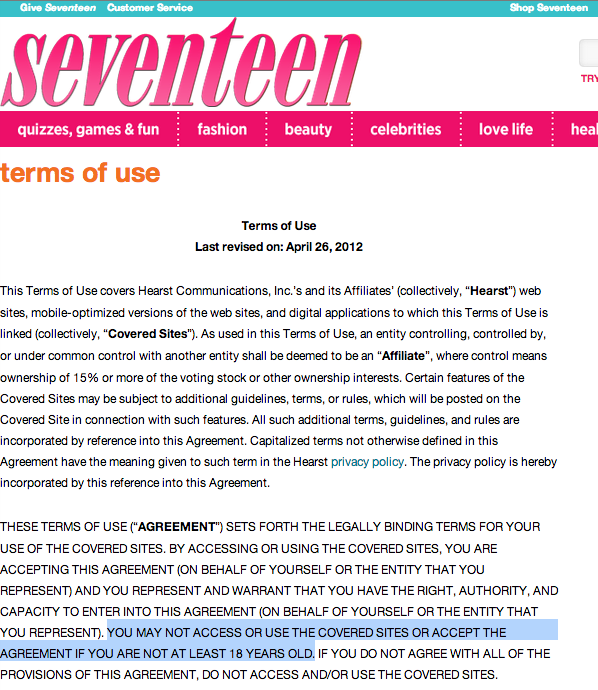 Seventeen highlights the absurdity of giving terms of service the force of law under the CFAA. It boasts a readership of almost 4.5 million teen readers with an average age of 16 and a half, and yet, until today, the average reader was legally banned from visiting Seventeen.com. That’s right, for a magazine dedicated to teen fashion, the publisher’s terms explicitly restricted online access to readers 18 and older. What’s worse, the Justice Department could choose to bring the might of the government to enforce this contract against a Seventeen reader who may never have even seen the agreement.
Federal prosecutors have argued in court that accessing a website in violation of terms of service is a crime. If the website’s terms, like Seventeen magazine’s previous version, explicitly state that you must be an adult to visit their sites or participate in their interactive features, then teenagers accessing the site “without authorization” under the CFAA and could be doing jail time, according to the DOJ.
Hearst removed the following line from the terms for publications ranging from the Houston Chronicle to the San Francisco Chronicle, from Popular Mechanics to Seventeen:
YOU MAY NOT ACCESS OR USE THE COVERED SITES OR ACCEPT THE AGREEMENT IF YOU ARE NOT AT LEAST 18 YEARS OLD.
The revisions are dated “April 23, 2013,” but presumably they meant April 3. Thank you Hearst, we appreciate your prompt response. But the real problem is the CFAA, which allows prosecutors to use these silly terms to manufacture computer crimes. And prosecutors have plenty of opportunities, as ridiculous terms of service abound throughout the Internet.
We also previously reported on a variety of other websites—including the New York Times, Boston Globe, and NPR—that have similar terms of service that restrict people 12-and-under from reading the news. Atlantic Wire expanded on our blog post by pointing to even more news sites that do the same thing. While these terms weren’t as absurd as Hearst’s, Atlantic Wire also highlighted the law’s farcical implications using photos showing which of Shaquille O’Neal’s children were allowed to visit a lengthy list of news sites.
Thankfully, the Ninth and Fourth Circuits have rejected the government’s aggressive interpretation of the CFAA (with amicus help from EFF), but the Justice Department has shown no signs that it has given up on aggressive interpretations. The vague language of the law could turn virtually every Internet user a potential criminal, allowing the Justice Department to use their discretion to go after any citizen they don’t like, rather than only harmful criminals the bill was intended to stop.
Hearst changed its terms of use within a matter of hours and a couple of mouse clicks. Unfortunately, fixing the CFAA won’t be as simple. If the absurdity is getting to you, now would be the time to write your members of Congress, demanding they get on board with CFAA reform and reject the House Judiciary Committee proposal that would make this bad law worse.
Related Issues: Terms Of (Ab)Use Computer Fraud And Abuse Act Reform Related Cases: US v. Nosal US v. Drew


 || Join EFF
It's been nearly two years since we first reported about Lodsys, the patent troll who targeted app developers. You might remember that Lodsys had actually filed lawsuits against some app developers in Texas; that case was (and is) slowly moving forward. We hadn't heard anything else from Lodsys in the meantime and assumed (foolishly, perhaps) that it was waiting to see what the judge said. This week, that all changed. It appears that Lodsys sued at least ten more app developers—many smaller players along with larger ones such as Walt Disney.
First, a quick refresher on Lodsys: Lodsys claims that typical "click to upgrade" functionality found in apps infringes two patents that it owns. Lodsys starting by targeting iOS and Android app developers, sending letters demanding that those developers pay Lodsys a license fee (and providing proposed licenses like this one). Lodsys' claims on their face were troubling, but the story was more complicated. For starters, the technology that Lodsys claimed infringes its patents is provided to the app developers by Apple and Google. That's right, the developers don't even create this technology themselves. In other words, when they use this technology, they are taking on risks that they never could have contemplated. After countless app developers received these threatening letters, Lodsys went ahead and filed a lawsuit against 11 app developers in federal court in Texas. That case is still pending.
Now, to both Apple and Google's credit, each got involved to defend its app developers. Apple filed a Motion to Intervene in the lawsuit, arguing that the law (and its license covering the Lodsys patents) allows it to provide its app developers the technology at issue free from claims of infringement. The Court granted Apple's motion to appear in the case, which is good news, but it could still take years before there is a final ruling on its legal claims. (Note: a ruling in Apple’s favor would also bode well for Android developers, as Google could presumably make the same legal argument.)
Google took action of its own, filing a Request for Inter Partes Reexamination with the Patent and Trademark Office on the two patents Lodsys is asserting against app developers. A reexamination is a proceeding before the PTO, brought by a third party to challenge the validity of a patent. The PTO agreed to consider some of Google’s arguments, but it will likely take some time (though not as long as litigation) to get a decision—and then there is no guarantee that the patents will be fully invalidated. Perhaps more likely, the claims will be narrowed. If that happens, they remaining claims may or may not cover the in-app payment and upgrade functionality that Lodsys claims they currently do.
We've been watching these legal developments closely, and all seemed quiet on the Lodsys front. But, as we said above, this week, that all changed. Lodsys is back at it, and this time, again, it's doing more than merely threatening. It's actually filing lawsuits. These lawsuits against app developers are just part of a dangerous recent trend of patent trolls going after end-users. For example, a shadowy collection of shell companies has been blanketing the nation with letters demanding that companies pay them $1000 per employee for the privilege of using standard office technology like scanners and email. And another patent troll is targeting the podcasting community.
So what do you do if you're an app developer? First, you can check out the FAQs we provided when Lodsys first came on the scene. Second, you can reach out to the Application Developers Alliance (you should email patents@appalliance.org), an important group and ally in this fight that's working hard to organize app developers facing the Lodsys threat. Finally, continue watching this space for more updates; we'll continue to post news as it becomes available.
If you'd like help finding a lawyer, you can start by emailing EFF at info@eff.org. (If you’re a lawyer who is willing to help out, please email info@eff.org with your contact information or the contact information for your firm, and the states in which you are licensed to practice law with the subject line "Lodsys Attorney Addition.")
Related Issues: Patents Patent Trolls || Join EFF
During his first term, President Barack Obama declared October 2009 to be “National Information Literacy Awareness Month,” emphasizing that, for students, learning to navigate the online world is as important a skill as reading, writing and arithmetic. It was a move that echoed his predecessor's strong support of global literacy—such as reading newspapers—most notably through First Lady Laura Bush's advocacy.
Yet, disturbingly, the Departments of Justice (DOJ) of both the Bush and Obama administrations have embraced an expansive interpretation of the Computer Fraud and Abuse Act (CFAA) that would literally make it a crime for many kids to read the news online. And it’s the main reason why the law must be reformed.

As we’ve explained previously, in multiple cases the DOJ has taken the position that a violation of a website’s Terms of Service or an employer’s Terms of Use policy can be treated as a criminal act. And the House Judiciary Committee has floated a proposal that largely adopts the DOJ’s position, making it possible to prosecute a user for accessing website for a purpose other than intended by the publisher. For a number of reasons, including the requirements of the Children’s Online Privacy Protection Act, many news sites have terms of service that prohibit minors from using their interactive services and sometimes even visiting their websites.
Take, for example, the Hearst Corporation’s family of publications. If you read the terms of use for the Houston Chronicle, the San Francisco Chronicle, or Popular Mechanics websites, you’ll find this language, screamed in all-caps:
"YOU MAY NOT ACCESS OR USE THE COVERED SITES OR ACCEPT THE AGREEMENT IF YOU ARE NOT AT LEAST 18 YEARS OLD.”
In the DOJ’s world, this means anyone under 18 who reads a Hearst newspaper online could hypothetically face jail time. But Hearst’s publications aren’t the only ones with overly restrictive usage terms. U-T San Diego and the Miami Herald have similar policies. Even NPR is guilty, saying teenagers can’t access their “services” (including the site, NPR podcasts and the media player) without a permission slip:
“If you are between the ages of 13 and 18, you may browse the NPR Services or register for email newsletters or other features of the NPR Services (excluding the NPR Community) with the consent of your parent(s) or guardian(s), so long as you do not submit any User Materials.”
Some sites must have recognized the problem and crafted their policies to only forbid users under the age of 13. These include the New York Times, the Boston Globe, and the Arizona Republic. NBCNews.com uses this wording:
"By using or attempting to use the Site or Services, you certify that you are at least 13 years of age or other required greater age for certain features and meet any other eligibility and residency requirements of the Site.”
This means that inquisitive 12-year-olds who visit NBCNews.com to learn about current events would be, by default, misrepresenting their ages. Again, this could be criminal under the DOJ's interpretation of the CFAA.
We’d like to say that we’re being facetious, but, unfortunately, the Justice Department has already demonstrated its willingness to pursue CFAA to absurd extremes. Luckily, the Ninth Circuit rejected the government’s arguments, concluding that, under such an ruling, millions of unsuspecting citizens would suddenly find themselves on the wrong side of the law. As Judge Alex Kozinski so aptly wrote: "Under the government’s proposed interpretation of the CFAA...describing yourself as 'tall, dark and handsome,' when you’re actually short and homely, will earn you a handsome orange jumpsuit."
And it’s no excuse to say that the vast majority of these cases will never be prosecuted. As the Ninth Circuit explained, “Ubiquitous, seldom-prosecuted crimes invite arbitrary and discriminatory enforcement.” Instead of pursuing only suspects of actual crimes, it opens the door for prosecutors to go after people because the government doesn’t like them.
Unfortunately, there’s no sign the Justice Department has given up on this interpretation outside the Ninth and Fourth Circuits, which is why the Professor Tim Wu in the New Yorker recently called the CFAA “the most outrageous criminal law you’ve never heard of.”
The potential criminalization of terms of service is a prime reason that Congress needs to overhaul CFAA and it’s certainly why the House Judiciary Committee should abandon the seemingly DOJ-drafted bill it floated recently and instead sit down with Rep. Zoe Lofgren, Rep. Darrell Issa, and others to negotiate real reform.
Are you a minor with a thirst for information? You, and your parents who vote, should together tell Congress to fix CFAA.
Related Issues: Computer Fraud And Abuse Act Reform || Join EFF
The federal appeals court in New York affirmed yesterday that Internet streaming service Aereo is not infringing copyright when it enables users to stream broadcast TV to Internet devices. The Court of Appeals for the Second Circuit upheld the trial court's decision not to shut down Aereo while the case is pending. This decision is a win for Aereo, its customers, and for future innovators with the audacity to improve the TV-watching experience without permission from copyright owners.
Aereo placed hundreds of tiny antennas on a Brooklyn rooftop. For a fee, New Yorkers can rent an antenna and receive local television on any Internet-connected device. The major American TV networks sued Aereo, claiming that it was making "public performances" of their broadcasts, something that copyright law reserves to copyright holders. The case quickly became a battle of metaphors: the networks argued that Aereo was acting like a cable system, which must have a license from copyright holders, while Aereo argued that its system was more like a personal "rabbit ears" antenna, which requires no permission from broadcasters. The trial court declined to shut Aereo down before trial, and the networks appealed that decision. EFF, together with Public Knowledge, filed amicus briefs in both courts supporting Aereo's right to innovate in the personal TV technology space.
The appeals court came down firmly on the side of the "rabbit ears" metaphor:
It is beyond dispute that the transmission of a broadcast TV program received by an individual’s rooftop antenna to the TV in his living room is private, because only that individual can receive the transmission from that antenna, ensuring that the potential audience of that transmission is only one person. Plaintiffs have presented no reason why the result should be any different when that rooftop antenna is rented from Aereo and its signals transmitted over the internet.
The court also rejected the networks' argument that Aereo's individual transmissions over the Internet to each subscriber should be "aggregated" together into a single public performance. "If the potential audience of the transmission is only one subscriber," said the court, "the transmission is not a public performance." The court concluded that because each Aereo user receives TV signals using a unique antenna, and because the signal from that antenna goes only to one subscriber, Aereo was not making public performances, and copyright law simply doesn't touch Aereo's system.
The decision is a positive step because it repudiates the "permission culture" worldview of the TV networks and their allies. The networks, joined by ASCAP, sports leagues, and a former Register of Copyrights, argued essentially that anyone who profits from copyrighted works must be made to pay, and that if a company like Aereo builds a business that copyright law doesn't touch, the court should try to rewrite the law. Courts can't do that, of course. Copyright law has never regulated all possible uses of creative works. Many uses are free for everyone, without payment or permission, and private, personal transmission of free TV is one of them.
This is also a great decision because it gives companies like Aereo an incentive to put TV technology firmly under the viewer's control. The same features that put Aereo's system beyond the reach of copyright law also mean that the viewer can record what she wants to record, rewind and fast-forward at will, watch on any Internet-connected device, and retain all of the control that an old-fashioned rabbit ears and VCR allowed - and still get all the flexibility of an Internet-based service. If Aereo had built a system resembling video-on-demand or pay-per-view, with customer choices strictly controlled from above, the court likely would have shut them down as infringing. By helping themselves, Aereo also put customers in control of their TV experience. That's an example of what good law should do.
A beloved star of one of the networks seeking Aereo's demise - PBS's Fred Rogers - testified in 1979 about the importance of video technology that empowers the individual:
Some public stations, as well as commercial stations, program the "Neighborhood" at hours when some children cannot use it ... I have always felt that with the advent of all of this new technology that allows people to tape the "Neighborhood" off-the-air, and I'm speaking for the "Neighborhood" because that's what I produce, that they then become much more active in the programming of their family's television life. Very frankly, I am opposed to people being programmed by others. My whole approach in broadcasting has always been "You are an important person just the way you are. You can make healthy decisions." Maybe I'm going on too long, but I just feel that anything that allows a person to be more active in the control of his or her life, in a healthy way, is important.1
Aereo, and other innovators that will surely follow, also allow people to be more active in the control of their lives. Yesterday, besides upholding the law as Congress wrote it, the appeals court followed Mister Rogers' wise approach.
|| Join EFF
Today a wide range of organizations and legal experts from across the political spectrum—including EFF—sent a letter to the House Judiciary Committee protesting their proposed draft of draconian changes to the Computer Fraud and Abuse Act.
Since the death of activist and Internet pioneer Aaron Swartz in January, people from across the political spectrum have urged Congress to reform the CFAA, given its harsh penalties for "crimes" that result in little or no economic harm as well as the Justice Department's interpretation of terms of use violations that leaves virtually every Internet user a criminal.
Rep. Zoe Lofgren has been working hard on crafting reform and EFF has already published its own proposed fixes to the CFAA. We urge the House Judiciary committee to drop this draconian draft and work with Rep. Lofgren and outside groups to reform the CFAA. The CFAA should not engulf security researchers, innovators, and everyday Internet users. It should instead be used for its original, intended purpose: to go after malicious criminals who could cause real harm and economic damage.
You can read the full text of the letter and download a copy of the PDF version below.
Files:Dear Representatives Goodlatte, Conyers, Sensenbrenner and Scott:
We, the undersigned organizations and individuals, oppose draft legislation reportedly slated for consideration this month to amend the Computer Fraud and Abuse Act by increasing penalties and expanding the scope of conduct punishable under the statute.
Ensuring the security of U.S. computer systems and protecting user privacy require strong federal laws to deter and punish those who maliciously attack U.S. networks. However, the CFAA does far more than this important task: the law endangers ordinary Internet users, academics, researchers and entrepreneurs.
As currently written, the CFAA imposes criminal and civil liability for accessing a protected computer without or “in excess of authorization.” “Exceeds authorized access” is vague, and the government and civil litigants have pressed courts to find CFAA violations whenever someone uses computers in a fashion that the system owner doesn’t like. This means private companies write federal criminal law when they draft their computer use policies. As a result, CFAA cases have been brought against users who violate websites’ terms of service (TOS), employees who violate their employers’ policies, and customers who breach software licenses.
A talented and promising young man, Aaron Swartz, recently took his own life while awaiting trial under the CFAA. Aaron’s death has prompted an outcry for CFAA reform from legislators, law professors and Internet users across the political spectrum—including many who thought Aaron should have been prosecuted, but not under the CFAA and not under threat of such harsh penalties.
Unfortunately, the draft under discussion is a significant expansion of the CFAA at a time when public opinion is demanding the law be narrowed. This language would, among other things:
- Obliterate the sensible line between criminal attackers and legitimate users who are authorized “to obtain or alter the same information” but do so in a manner or with a motive disfavored by the server owner or expressed in unilateral terms of service (TOS) or contractual agreements;
- Substantially increase maximum penalties for many violations to 20 years or more, giving prosecutors a heavy hammer to hang over individuals charged with borderline offenses, and ensuring even minor violations with little or no economic harm (which ought to be misdemeanors at most) will be punished as felonies; and
- Make all CFAA violations a RICO predicate.
On its face, the bill might appear to limit the application of CFAA section (a)(2)’s “exceeds authorized access” crime by specifying categories of information protected from such access. To the contrary, the change expands the statute’s reach by criminalizing activities “involving” broad categories information. As a result, the bill would make it a felony to lie about your age on an online dating profile if you intend to contact someone online and ask them personal questions. It would make it a felony for anyone to violate the TOS on a government website. It would also make it a felony to violate TOS in the course of committing a very minor state misdemeanor.
It is unreasonable to expand CFAA penalties when the statute already makes illegal so much of what Americans do with computers every day. Expanding the scope of the CFAA to cover even more conduct is even more dangerous. This bill would give prosecutors and civil litigants a free hand to go after employees, social networking users, academics, researchers and other computer users for common online activities.
We therefore urge the Committee to reject the proposed draft language, including increased penalties. Instead, this Committee should adopt amendments that would bring the CFAA into the 21st century, with sensible fixes that will protect the ordinary Internet user, while addressing the serious problem of malicious computer attacks.
Sincerely,
Laura W. Murphy, Director, Washington Legislative Office
American Civil Liberties UnionJessica McGilvray, Assistant Director
American Library AssociationKatie McAuliffe, Executive Director
Americans for Tax Reform’s Digital LibertyLeslie Harris, President and CEO
Center for Democracy & TechnologyFred L. Smith, Founder and Chairman
Competitive Enterprise InstituteBeck Bond, Political Director
CREDO ActionDavid Segal, Executive Director
Demand ProgressCindy Cohn, Legal Director
Electronic Frontier FoundationHolmes Wilson, Co-Director
Fight for the FutureMatt Wood, Policy Director
Free Press Action FundWayne T. Brough, Ph.D., Chief Economist and Vice President, Research
FreedomWorksOrin S. Kerr, Professor of Law
George Washington University*Paul Rosenzweig, Visiting Fellow
The Heritage Foundation*Kyle O’Dowd, Associate Executive Director for Policy,
National Association of Criminal Defense LawyersJennifer Granick, Director of Civil Liberties
Stanford Center for Internet and Society*Berin Szoka, President
TechFreedom*(Affiliation listed for identification purposes only)
 cfaa_letter_to_judiciary.pdf Related Issues: Computer Fraud And Abuse Act Reform || Join EFF
One of my personal goals for 2012 was to learn tubular lock picking and become proficient enough to share my knowledge with everyone here on ITS Tactical. It took me a few more months than I would have liked, but today I’ll be walking you through how to pick tubular locks.

Tubular locks are commonly found on small gun safes, vending machines, computer locks, etc. In fact, what prompted me to get into tubular lock picking, other than for Locksport purposes, was when my son lost his key to a small handgun safe he was using for his Airsoft pistol.
Commonly thought to be more secure and more resistant to picking than standard pin and tumbler locks, I’ve found that with the help of a tubular lock pick, they’re much easier and faster to pick.
If you’re familiar with past discussions we’ve had on ITS, you’ll hopefully know what I mean when I refer to pin and tumbler locks, the kind you commonly find on your front door. Tubular locks are very similar to pin and tumbler locks and are actually a tubular pin-tumbler lock. Also known as Ace locks, axial pin-tumbler locks and radial locks.

All the features of a standard pin-tumbler lock are still there, just configured in a circular pattern rather than inline as standard pin-tumbler lock is. In fact, while the purpose of this post is to explain tubular lock picks, specifically built for picking tubular locks, they can also be picked with common single-pin picking. Only with a lot more effort.
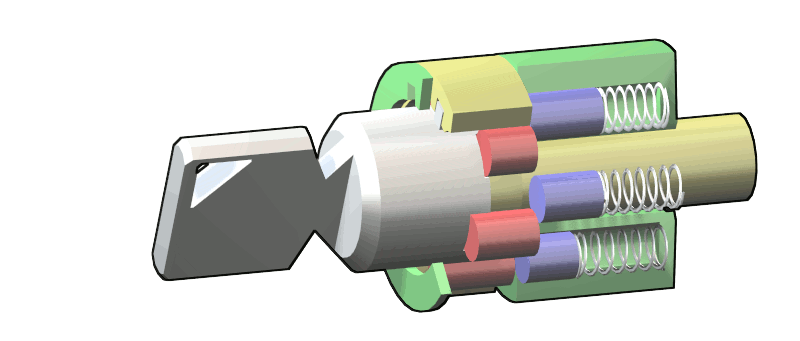
As you’ll notice in the photo of the tubular lock pick trainer above, you have the spring, key pins (red) and driver pins (gold). This is also represented in the diagrams below as (red) key pins and (blue) driver pins.

Each complete pin stack is pushed with help from it’s spring towards the front of the lock. This binds the shear line and prevents the plug from turning (colored yellow in the diagrams.) The difference with a tubular key and a standard key is that instead of the cuts of a key, a tubular key has half-cylinder indentations with map to the height of the pin stack. It also means that duplicating a tubular key requires different machinery.

The top center of the interior of a tubular key features a raised protrusion that aligns the key in it’s proper configuration to map to each pin-tumbler stack. When the key is inserted, those mapped heights align, causing the shear line to separate and allow the plug to turn from the outer shell (green in the diagram below.)
Standard configurations for tubular lock picks are 7 pin, 8 pin and the less common 10 pin. Some tubular locks are even six pins and while I haven’t personally tried it, the 7 pin tubular lock pick should work on the 6 pin lock. I suspect this is the case, as I’ve used an 8 pin tubular lock pick to pick “some” 7 pin tubular locks.

The parts of a tubular lock pick include independent needles that correspond with each independent pin stack. These needles are held under tension with the use of the rotating collar.


Below the needles, but before the handle, there’s a washer that facilitates resetting the tubular lock pick. This brings us to the first step in using a tubular lock pick.


Now comes the amazing part. With the collar tightened down, you now hold a key in your hand that will open the tubular lock over and over again. With a tubular lock decoder you can actually measure the height of each pin as is corresponds in a clockwise pattern around the tubular lock pick. With that “code” you can have a locksmith create a duplicate key. That, or you can take your now decrypted tubular lock pick to a locksmith and have them reproduce a key.

It’s actually scary how easy it is to not only open tubular locks, but to continue to open them over and over again. To me, these are less secure than household pin and tumbler locks, due to the ease of creating a new key. There are of course ways of impressioning a key blank on a standard pin-tumbler lock, but take much more effort than the tubular lock pick does.

There’s even more to tubular locks that I’ll save for a future discussion, but if you’re interested in jumping ahead, google how to pick a tubular lock with a ballpoint pen.
As always, our goal with providing locking picking information is to continually break down the illusion of security you may depend on to keep your family and personal effects safe. Through gaining more knowledge of this skill-set, you can make more informed decisions when it comes to protecting your valuables.
Remember, locks and security in general is only to buy you time. They’re there to keep honest people honest.


