Shared posts

03 Apr 15:18

Suede shoes and suits

by Torsten

Suit-suede-shoes-Pitti-Uomo-The-Journal-of-Style-1 Suit-suede-shoes-Pitti-Uomo-The-Journal-of-Style-2 Suit-suede-shoes-Pitti-Uomo-The-Journal-of-Style-3

The Prince of Wales of the 1920s authorized combining suits and suede finish shoes. As I understand it, the PoW paired a medium or light grey flannel suit with brown oxford buckskin shoes.

Nowadays, suede finish shoes have spread to worsted blue and grey suits. While I recognize that few dressing rules and norms apply anymore, I do find the combination off now and then. The smooth worsted and the “dirty” suede become an odd couple easily.

I like how the man on the left in upper photo approaches the configuration. Instead of the common brown suede shoes, he sports a pair of black suede monks with his striped navy blue suit.

Another solution, if you prefer brown suedes, is choosing a French blue or lighter blue suit. It makes the suit less formal, and it brings it closer to the nature of brown suede.

Source: The Journal of Style in Italy


Follow the Journal of Style on Twitter: @JournalStyle Follow the Journal of Style on Facebook
03 Apr 15:07

kgoldschmitt: Randall Roberts – “In place of the concept album...


kgoldschmitt:

Randall Roberts – “In place of the concept album these are ‘concept songs.’”

03 Apr 13:04

DuckTales Remastered will answer the big questions

by JC Fletcher
firehose

what
why

DuckTales Remastered will answer the big questionsWayForward will add context to the bizarre storyline in the DuckTales game, in its remake DuckTales Remastered. Capcom producer Rey Jimenez revealed to Siliconera that a new cutscene is among the material being added in the remake, explaining the setup for the whole game - why Huey, Dewey and Louie need rescuing.

The famous Moon level also gets a bit of backstory. "In the NES version, you fight a big rat and it didn't explain why you're fighting a rat on the moon," Jimenez noted. "That's explained in here because there are rats they're experimenting on and you let them loose and that becomes the rat down there. Also, how does Scrooge McDuck breathe on the moon? We explain that as well."

In other words, it's going to be less of a duckblur.

JoystiqDuckTales Remastered will answer the big questions originally appeared on Joystiq on Tue, 02 Apr 2013 18:30:00 EST. Please see our terms for use of feeds.

Permalink | Email this | Comments
03 Apr 12:55

50 Amazing jQuery Plugins That You Should Start Using Right Now

by Martin Angelov
firehose

"Long Press is a jQuery plugin that eases the writing of accented or rare characters. Holding down a key while typing will bring a bar with alternative characters that you can use. The plugin also has a github page."

50 Amazing jQuery Plugins That You Should Start Using Right Now

jQuery has a wonderful community of programmers that create incredible things. However, it may become difficult to sift through everything that is released and find the gems that are absolute must-haves. This is why, in this post, you will find a collection of 50 new jQuery plugins and JavaScript libraries that, when applied with good measure, can make your sites a joy to use. The plugins are organized into categories for easier browsing. Enjoy!

Dialogs

The browser’s built-in dialogs are easy to use but are ugly and non-customizable. If you want your application to look sharp and professional, you will have to part with the loathed default look. The plugins in this section can substitute the built-in dialogs and can be readily customized.

1. Alertify.js

Alertify (github) is small library for presenting beautiful dialog windows and notifications. It is easy to customize with CSS, has a simple API and doesn’t depend on third party libraries (but plays nicely with them). To use it, include the js file and call the methods of the global alertify object:

// alert dialog
alertify.alert("Message");

// confirm dialog
alertify.confirm("Message", function (e) {
    if (e) {
        // user clicked "ok"
    } else {
        // user clicked "cancel"
    }
});
Alertify.js

Alertify.js

2. jQuery Avgrund

jQuery Avgrund (github) is another cool dialog solution. It is not as feature-rich as alertify, but it has the Wow! factor that your web app needs. The dialog is shown with an impressive animation that brings it into focus, while blurring and darkening the background.

jQuery Avgrund

jQuery Avgrund

Forms

Forms are tedious and boring. Everyone hates filling them. It is even a bigger deal if no client-side validation is present and we are forced to enter the data a second time. The plugins in this section attempt to make things better by enhancing your forms with useful functionality.

3. iCheck

iCheck (github) is a jQuery plugin that enhances your form controls. It is perfectly customizable, works on mobile and comes with beautiful flat-style skins. To use it, include the js and css files in your page, and convert all your radio and checkboxes with a few lines of jQuery.

$(document).ready(function(){
	$('input').iCheck({
		checkboxClass: 'icheckbox_minimal',
		radioClass: 'iradio_minimal'
	});
});
iCheck

iCheck

4. Long Press

Long Press is a jQuery plugin that eases the writing of accented or rare characters. Holding down a key while typing will bring a bar with alternative characters that you can use. The plugin also has a github page.

Long Press

Long Press

5. jQuery File Upload

jQuery File Upload (github) is a widget with multiple file selection, drag&drop support, progress bars and preview images. It supports cross-domain, chunked and resumable file uploads and client-side image resizing. Works with any server-side platform (PHP, Python, Ruby on Rails, Java, Node.js, Go etc.) and is easy to embed into your application thanks to a number of hooks and callbacks.

jQuery File Upload

jQuery File Upload

6. Complexify

Complexify (github) is a jQuery plugin that aims to assess how complex passwords are. You can use it in signup forms to present a percentage to users (like we did in this tutorial). With this plugin you can force passwords to contain a combination of upper/lowercase letters, numbers, special symbols and more. I should note that this is purely a client-side solution, which means that it can be circumvented. This is why you should also check the password complexity on the server side.

Complexify

Complexify

7. jQuery Knob

jQuery Knob (github) is a plugin for turning input elements into touchable jQuery dials. It is built using canvas, and is fully customizable by setting data attributes on the inputs like this:

<input class="knob" data-width="150" data-cursor=true data-fgColor="#222222" data-thickness="0.3" value="29">

The dials can be controlled using the mouse (click and drag; mousewheel), the keyboard, and by using touch on mobile devices.

jQuery Knob

jQuery Knob

8. Pickadate.js

Pickadate.js (github) is a jQuery plugin that creates a responsive and mobile friendly date selection widget. It is very easy to use and can be customized with CSS. To use it, include the js file and the stylesheet, and call the plugin on your input element:

$('.datepicker').pickadate();

The plugin takes lots of options which you can find in the docs.

Pickadate.js

Pickadate.js

9. Chosen

Chosen (github) is a powerful widget which converts a select input into a searchable dropdown list. It is easy to customize with CSS, and you can hook your own code thanks to a number of callbacks. The plugin also updates the original element (which is hidden) so that submitting it as a part of a form or reading it with JS will give you the correct result.

Chosen

Chosen

10. Fancy Input

Fancy Input (github) is a jQuery plugin that makes entering or deleting text in a textboox uber cool. It uses CSS3 animations to achieve the effect. To use it, simply include the JS file after jQuery, and call the plugin:

$('div :input').fancyInput();
Fancy Input

Fancy Input

11. Typeahead.js

Typeahead (github) is a fast autocomplete library by twitter. It is inspired by twitter.com’s search box and is full of features. It displays suggestions as users type, and shows the top suggestion as a hint. The plugin works with hardcoded data as well as remote data, and rate-limits network requests to lighten the load.

Typeahead.js

Typeahead.js

12. Parsley.js

Parsley.js (github) is an unobtrusive form validation library. It lets you validate form fields without having to write a single line of JavaScript. Instead, you have to place data attributes in the input fields that you need to be validated, and Parsley handles the rest. The library works with either jQuery or Zepto and is less than 800 lines long.

Parsley.js

Parsley.js

Page scrolling and Parallax

Single page websites that feature a parallax scrolling effect are popular these days. They will probably stay in fashion for some time, as they are perfect for sites with low information density and lots of photos – marketing sites, portfolios and more. These plugins aim to make them easier to develop.

13. Windows

Windows (github) is a plugin that lets you build single page websites with sections that take up the whole screens. The plugin gives you callbacks that are called when new sections come into visibility and handles snapping, so you can easily extend it with custom navigation menus or more. Here is an example:

$('.window').windows({
    snapping: true,
    snapSpeed: 500,
    snapInterval: 1100,
    onScroll: function(scrollPos){
        // scrollPos:Number
    },
    onSnapComplete: function($el){
        // after window ($el) snaps into place
    },
    onWindowEnter: function($el){
        // when new window ($el) enters viewport
    }
});
Windows

Windows

14. Cool Kitten

Cook Kitten (github) is a responsive framework for parallax scrolling websites. It organizes the sections of your site into slides and uses the jQuery Waypoints plugin to detect when they come into visibility, which causes the navigation menu to get updated.

Cook Kitten

Cook Kitten

15. Sticky

Sticky (github) is a jQuery plugin that gives you the ability to make any element on your page always stay visible when scrolling the page. This can come handy in your single-page website to present a sticky navigation menu or sharing bar. It is straightforward to use, the only option you may pass is a top offset:

$("#sticker").sticky({topSpacing:0});
Sticky

Sticky

16. Super Scrollorama

Super Scrollorama (github) is a jQuery plugin for cool scroll animations. It lets you define tweens and animations that are triggered when an element comes into view, or on specific scroll points.

$(document).ready(function() {
  var controller = $.superscrollorama();
  controller.addTween('#fade',
    TweenMax.from($('#fade'), .5, {css:{opacity:0}}));
});
Super Scrollorama

Super Scrollorama

17. Stellar.js

Stellar.js (github) is a jQuery plugin that provides parallax scrolling effects to any scrolling element. It looks for any parallax backgrounds or elements within the specified element, and repositions them when the element scrolls. You can control the scroll speed of the elements by using data attributes for a true parallax effect. To trigger the plugin, simply call it on your root element (or on window):

$('#main').stellar();
Stellar.js

Stellar.js

18. Scrollpath

Scrollpath (github) is another scrolling plugin, but what it gives you that the previous plugin does not, is the ability to define your own custom scroll path. The plugin uses canvas flavored syntax for drawing paths, using the methods moveTo, lineTo and arc. To help with getting the path right, a canvas overlay with the path can be enabled when initializing the plugin.

Scrollpath

Scrollpath

Text effects

There has been a huge improvement in web typography in the last few years. From just a handful of web-safe fonts that we could use not long ago, we now can embed custom fonts and enhance them with CSS3. The plugins in this section give you a great deal of control over text.

19. Textillate.js

Textillate.js (github) is a jQuery plugin that combines the power of animate.css and lettering.js, to apply advanced animations on text elements. The animations are CSS3 based, which makes them smooth even on mobile devices. There is a large number of effects to choose from.

Textillate.js

Textillate.js

20. Arctext.js

Arctext.js (demo) is a jQuery plugin that lets you arrange each letter of a text element along a curved path. Based on lettering.js, it calculates the right rotation of each letter and distributes the letters equally across the imaginary arc of the given radius, and applies the proper CSS3 rotation.

Artctext.js

Artctext.js

21. Bacon

Bacon (githug) is a jQuery plugin that allows you to wrap text around a bezier curve or a line. This gives you a great deal of typographic control, and as illustrated by the plugin’s home page, the ability to put bacon strips in the middle of your designs (finally!).

Bacon.js

Bacon.js

22. Lettering.js

Lettering.js (github) is a simple but effective jQuery plugin for better web typography. What it does, is split the textual content of an element into individual spans with ordinal .char# classes, so you can style each letter individually.

Lettering.js

Lettering.js

23. jQuery Shuffle Letters

jQuery Shuffle Letters (demo) is one of our experiments. It creates an interesting effect that randomizes the content of a text element. Here is how to use it:

// Shuffle the container with custom text
$('h1').shuffleLetters({
	"text": "show this text!" // optional
});

The text parameter is optional – if it is missing, the plugin will take the content of the element.

jQuery Shuffle Letters

jQuery Shuffle Letters

24. FitText.js

FitText.js (github) is a jQuery plugin for inflating web type. It automatically scales the text of an element to take up the full width of its container. This makes the layout responsive and looking sharp on any device.

FitText.js

FitText.js

Grids

The plugins in this section make it easy to organize content into grids. They calculate the best way to pack your items densely and align them in real time.

25. Gridster.js

Gridster.js (github) is a jQuery plugin that allows building intuitive draggable layouts from elements spanning multiple columns. You can even dynamically add and remove elements from the grid. Dragging an element causes the others to rearrange and free up place for it, which can be great for user-controlled layouts and dashboards.

Gridster.js

Gridster.js

26. Freetile

Freetile (github) is a plugin for jQuery that enables the organization of webpage content in an efficient, dynamic and responsive layout. It can be applied to a container element and it will attempt to arrange it’s children in a layout that makes optimal use of screen space, by “packing” them in a tight arrangement.

Freetile

Freetile

27. Stalactite

Stalactite (github) is a library that packs page content depending on the available space. It takes a lazy approach and sorts the elements sequentially with the scrolling of the page, which makes for an interesting effect.

Stalactite

Stalactite

Custom scrollbars

Something that we have all wanted to do in one point or another is to customize the appearance of the default browser scrollbars. Some browsers allow this, but it doesn’t work everywhere. The two plugins below make that possible.

28. nanoScroller.js

nanoScroller.js (github) is a jQuery plugin that offers a simplistic way of implementing Mac OS X Lion-styled scrollbars for your website. It uses minimal HTML markup and utilizes native scrolling. The plugin works on iPad, iPhone, and some Android Tablets.

nanoScroller.js

nanoScroller.js

29. jQuery Custom Content Scroller

jQuery Custom Content Scroller (github) is a custom scrollbar plugin that’s fully customizable with CSS. Features vertical/horizontal scrolling, mouse-wheel support (via the jQuery mousewheel plugin), scrolling buttons, scroll inertia with easing, auto-adjustable scrollbar length, nested scrollbars, scroll-to functionality, user defined callbacks and more.

jQuery Custom Content Scroller

jQuery Custom Content Scroller

Backgrounds

Full screen backgrounds are another popular design trend. The plugins listed here aim to make it easier to set a single image, a gallery or even a video as a background.

30. Tubular.js

Tubular.js is a jQuery plugin that lets you set a YouTube video as your page background. Just attach it to your page wrapper element, set some options, and you’re on your way:

$('#wrapper').tubular({videoId: '0Bmhjf0rKe8'});

The plugin also supports controlling the video with play/pause, setting the volume and more.

Tubular.js

Tubular.js

31. Backstretch

Backstretch (github) is a simple jQuery plugin that allows you to add a dynamically-resized, slideshow-capable background image to any page or element. It will stretch any image to fit the page or block-level element, and will automatically resize as the window or element size changes. Images are fetched after your page is loaded, so your users won’t have to wait for the (often large) image to download before using your site. For the curious, and those that don’t want to use plugins, there is also a technique that can set a full screen background image purely with CSS.

Backstretch

Backstretch

32. Supersized

Supersized (github) is an advanced full screen background plugin for jQuery. With it, you can show a set of photos as a slideshow that takes the full width and height of the page. This makes it perfect for photography sites, portfolios, or event sites. The plugin comes with lots of options, supports multiple transition effects and can be extended with custom themes.

Supersized

Supersized

Galleries and image effects

The plugins listed here aim to enhance the way visitors browse images on your site, and let you apply interesting effects that will make your galleries stand out.

33. jQuery TouchTouch

jQuery TouchTouch (demo) is a plugin we released last year that aims to be simple to use and to work on mobile devices. It uses CSS transitions to make animations smoother, and preloads images dynamically. Also, it can be completely restyled by modifying a single CSS file.

jQuery TouchTouch

jQuery TouchTouch

34. iPicture

iPicture is a jQuery plugin that can create interactive image walkthroughs. It can overlay tooltips and hints on top of the image, and presents rich content like HTML, photos and videos. It is easy to integrate into your site and can be customized and extended with CSS.

iPicture

iPicture

35. Adipoli jQuery Image Hover Plugin

Adipoli (demo) is a jQuery plugin for creating stylish image hover effects. With it, you can turn images black and white, apply popout, slice and box transitions. To use the plugin, you only need to include the necessary files and define the start and hover effects:

$('#image1').adipoli({
    'startEffect' : 'normal',
    'hoverEffect' : 'popout'
});

This makes it the perfect addition to your gallery or portfolio page.

Adipoli jQuery Image Hover Plugin

Adipoli jQuery Image Hover Plugin

36. Swipebox

Swipebox (github) is a lightbox plugin that supports desktop, mobile devices and tablet browsers. It understands swipe gestures and keyboard navigaton and is retina-ready. To enable it, include the plugin JS/CSS files, and add the swipebox class to the images that you want to show in a lightbox:

<a href="big/image.jpg" title="My Caption">
	<img src="small/image.jpg" alt="image">
</a>

Like the rest of the plugins in this collection, it can be customized entirely with CSS.

Swipebox

Swipebox

37. TiltShift.js

TiltShift.js (github) is a neat plugin that replicates the tilt-shift effect (which causes real-life object to appear as miniatures) using CSS3 image filters. The bad news is that this only works on Chrome and Safari at the moment, but support should gradually land in other browsers as well.

TiltShift.js

TiltShift.js

38. Threesixty.js

Threesixty.js (github) is a jQuery plugin that creates draggable 360 degree views. You have to provide the plugin with the path to a collection of images of your product (shot from different angles) and Threesixty.js will assemble them into a interactive view. You can drag or use the arrow keys to explore the object from different angles.

Threesixty.js

Threesixty.js

39. Swipe.js

Swipe.js (github) is another responsive slider. What makes it stand apart is that it is specifically targeted at touch devices. This allows it to not only understand gestures, but to also react to touch similarly to a native application. It has resistant bounds and  scroll prevention and is compatible with browsers from IE7 onward.

Swipe.js

Swipe.js

40. CamanJS

CamanJS (github) is a powerful image manipulation library, built on top of the canvas element. With it, you can manipulate the pixels of an image and achieve an almost Photoshop-like control. If you can remember, this is the library we used a few months ago to build a web app with filters similar to Instagram.

CamanJS

CamanJS

41. SpectragramJS

Spectragram (github) is a jQuery plugin that aims to make working with the Instagram API easier. It can fetch user feeds, popular photos, photos with specific tags and more.

SpectragramJS

SpectragramJS

Misc

This section holds plugins and libraries that don’t belong in the other categories but are worth the look.

42. jQuery Countdown

jQuery Countdown (demo) is a jQuery plugin that shows the remaining days, hours, minutes and seconds to an event, and updates the remaining time with an animation every second. It is easy to use – include the plugin JS and CSS files, and trigger it on document ready:

$('#countdown').countdown({
    timestamp   : new Date(2015, 0, 3) // January 3rd, 2015
}

The countdown will be presented in the #countdown div.

jQuery Countdown

jQuery Countdown

43. List.js

List.js (github) is a library that enhances a plain HTML list with features for searching, sorting and filtering the items inside it. You can add, edit and remove items dynamically. List.js is standalone and doesn’t depend on jQuery or other libraries to work.

List.js

List.js

44. jQuery PointPoint

jQuery PointPoint (demo) is a plugin that helps you draw users’ attention to a specific part of the page. It presents a small arrow next to the mouse cursor. This can be useful for pointing to missed form fields, buttons that need to be pressed, or validation errors that need to be scrolled into view.

jQuery PointPoint

jQuery PointPoint

45. Social Feed

Social Feed (github) is a jQuery plugin that presents a feed of the latest public updates on your social accounts. It has a clean design that is built using a template, which you can easily customize.

Social Feed

Social Feed

46. Hook.js

Hook.js (github) is an interesting experiment that brings the “pull to refresh” feature you often see in mobile apps, to the web. You can use this to update your mobile site with new content, fetch new posts and more.

Hook.js

Hook.js

47. jQuery PercentageLoader

PercentageLoader (bitbucket) is a jQuery plugin for displaying a progress widget in more visually striking way than the ubiquitous horizontal progress bar / textual counter. It makes use of HTML5 canvas for a rich graphical appearance with only a 10kb (minified) javascript file necessary, using vectors rather than images so can be easily deployed at various sizes.

Loader.js

Loader.js

48. Chart.js

Chart.js (github) is a new charting library that uses the HTML5 canvas element and provides fallbacks for IE7/8. The library supports 6 chart types that are animated and fully customizable. Chart.js doesn’t have any dependencies and is less than 5kb in size. Say goodbye to flash!

Chart.js

Chart.js

49. Tooltipster

Tooltipster (github) is a powerful jQuery plugin for displaying tooltips. It works on desktop and mobile browsers, gives you full control over the contents of the tooltips and supports a number of callback functions so you can hook it into your application. If you need something even more lightweght that doesn’t use JS at all, you can give a try to hint.css.

Tooltipster

Tooltipster

50. Toolbar.js

Toolbar.js (github) is a jQuery plugin that lets you display a neat pop-up menu. You can choose the actions and icons that are presented in the menu and listen for events. This is perfect for making more of the limited space of a mobile web app interface.

Toolbar.js

Toolbar.js

51. gmaps.js

gmaps.js (github) is such a useful library that I decided to include it in addition to the 50 plugins above. Gmaps is a powerful library that makes working with Google Maps a great deal easier. You can place markers, listen for events, set the coordinates, zoom level and more, all with a fluid jQuery-like syntax. This is like a breath of fresh air compared to the regular maps JS API, and I highly recommend it.

Gmaps.js

Gmaps.js

It’s a wrap!

You know of a cool plugin that deserves to be in this list? Share it in the comment section!

03 Apr 08:49

Nebula Debuts 'Cloud Computer' Based On OpenStack

by Soulskill
Nerval's Lobster writes "The Nebula One is being positioned as a 'cloud computer' that can connect preconfigured servers to a private cloud using an OpenStack-based OS. The idea, according to former NASA CIO Chris Kemp, is to spin up a private cloud in as little as an hour. Even so, while a pitch on the company's homepage (narrated by none other than Patrick Stewart) may sound like the company can take any old CPU, storage, and memory resources and combine them together, buyers actually have only a small selection of servers from which to choose. The company's secret sauce is its Nebula Cosmos software, based upon the OpenStack cloud OS, which pools all compute and local storage within a system to provide a cloud-level aggregation of resources for all users. Users are presented with quotas and limits, within which they can spin up their own instances, deploy applications, and manage their own storage resources. If that sounds somewhat simple, well, that's the whole point. Three key investors who backed Google—Andy Bechtolsheim, David Cheriton and Ram Shriram—have also put money into Nebula, and the company has operated quietly out of the spotlight for several years."

Share on Google+

Read more of this story at Slashdot.


03 Apr 08:48

Go Wild: Torchlight II Gets Mod Tools, Workshop Support

by Nathan Grayson
firehose

YES
YESSSSSSSSSSSS

By Nathan Grayson on April 3rd, 2013 at 8:00 am.

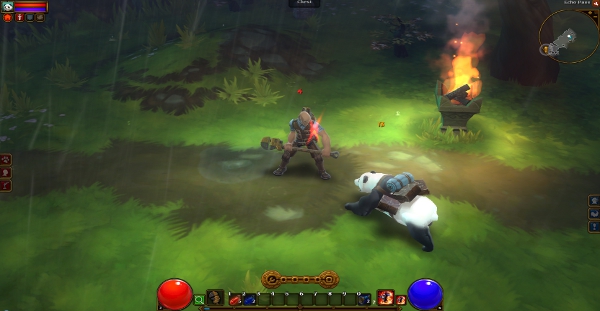
Reducing pandas to a subservient role after WoW did so much to elevate their societal status? Frankly, it's sickening.

Torchlight II‘s actually already seen some rather brilliant mods, which is impressive given that modders have only been able to paddle themselves through its stat-laden sea of systems with their wits. For its part, however, Runic promised official mod support ages ago, and now – after maybe a little more time than most people were expecting – it’s finally delivered. So then, what do burgeoning loot pinata crafters have at their disposal? GUTS. Which, honestly, was how I would’ve answered that question no matter what because I’m in a weird mood right now, but luckily, it’s actually relevant in this case! That, you see, is the name of Torchlight II’s spiffy new modding suite, and it locks in with Steam Workshop like a gem into a modding-suite-shaped socket.

There is also a panda.

The new update not only includes the GUTS modding tools (the capabilities of which you can beam directly into your brain tubules via this handy wiki), but also legendary weapons for every item class, new armor sets, new side dungeons, a Nether Realm area, and a handful of adorably huggable pets. Except for the headcrab. You probably shouldn’t hug the headcrab.

The panda, meanwhile, is a panda.

It’s quite an update, and the whole thing is, of course, completely free. You can grab it simply by starting up the game. So then, what types of mods do you want to see in Torchlight II? More new classes and items? Locations? A connection-requiring auction house that entirely defeats the central purpose of the game and disenfranchises hundreds of thousands of diehard fans, irreparably severing a bond forged by years of dedicated obsession?

Nah, that’d be crazy. I want more flavors of panda!

03 Apr 07:57

  MODOK by Giorgio Comolo

by brianbendis
firehose

modok + skull pile = TAmfingL


MODOK by Giorgio Comolo

03 Apr 07:50

Outlook.com calendar gets redesign, offers improved nav and sharing options

by Nicole Lee
firehose

Exchange ActiveSync

DNP Outlookcom calendar revamp unveiled, carries redesign through mobile

Now that Outlook.com seems to have its email product sorted, the folks up in Redmond have turned their attention to that other popular cloud service: the online calendar. Indeed, Outlook.com has completely revamped its digital planner, resulting in a clean and fresh redesign that is reminiscent of the company's other web products. Overall navigation is said to be more intuitive; for example, adding and editing events takes just one click, and a day view is presented just by selecting the date. Features include Exchange ActiveSync compatibility, integration with social networks like Facebook and LinkedIn, calendar-sharing with friends and family, the ability to import .ics files and more. As you might expect, the design philosophy carries over to the smartphone and tablet side of things as well. While we're not sure if the redesign is enough to woo fans over from its Mountain View counterpart, it's at least a lot easier on the eyes than it was previously. The new look is rolling out slowly starting today and will be available to all users this week.

Filed under: Internet, Microsoft

Comments

Source: Outlook Blog

03 Apr 04:56

Dust: An Elysian Tail, Mark of the Ninja and more XBLA titles marked down

by Griffin McElroy

By Griffin McElroy on Apr 02, 2013 at 11:45a

Dust: An Elysian Tail, Mark of the Ninja, Trials HD and a handful of other Xbox Live Arcade titles have been marked down today, though you'll need to be an Xbox Live Gold subscriber to access most of the deals.

The following titles are all available at half-price, and do not require you to be a Gold member to purchase them at a discount:

  • Trials HD — 400 Microsoft Points ($5)
  • Mark of the Ninja — 600 Microsoft Points ($7.50)
  • Dust: An Elysian Tail — 600 Microsoft Points ($7.50)
  • Deadlight — 600 Microsoft Points ($7.50)
  • A World of Keflings — 400 Microsoft Points ($5)

These titles are all half-off as well, but require you to be a Gold member to see the lower prices:

  • Quarrel — 200 Microsoft Points ($2.50)
  • Mercury — 200 Microsoft Points ($2.50)
  • Swarm — 200 Microsoft Points ($2.50)
  • Pool Nation — 400 Microsoft Points ($5)
  • Axel & Pixel — 400 Microsoft Points ($5)
  • Retro City Rampage — 600 Microsoft Points ($7.50)
  • Puzzle Arcade — 400 Microsoft Points ($5)
03 Apr 04:55

Neal Stephenson's sword fighting sim Clang on Steam Greenlight

by Jenna Pitcher

By Jenna Pitcher on Apr 03, 2013 at 12:21a

Neal Stephenson and Subutai Corporation's sword fighting simulator, Clang, is now on Steam Greenlight for the Steam community to vote for the title to launch on Windows PC and Mac via Steam.

"In many video games, sword fighting is all-important to the characters, and winning sword fights is how you level up your character and get more stuff," Stephenson wrote on Clang's Greenlight page. "Until now, the details of how real-life sword fighting actually works have not been built into those games and so it has never felt very real. It's time for that to change."

The development team have also released a video of the current playable alpha, highlighting development and future features of the game. The video shows an animation programmer using a Razer Hydra motion controller as he fights against a bot, using a style based on Fiore longsword from the 14th century.

He demonstrates gameplay mechanics such as the cut path, which helps players gauge distance and shows players where the cut will go. The gameplay footage also highlights red ghost swords that recommend the best guards against what the opponent is doing.

Clang's Kickstarter launched on June 9 of last year with a $500,000 goal and was successfully funded with a total of $526,125 in pledges. For those who didn't jump on the Kickstarter, the alpha version will be available to buy in a few months.

The video states that the Kickstarter deliverable is a prototype engineered to be easily upgradable and expanded upon later, as they get more funding they will add more weapons and different styles of fighting.

Going forward, Clang will be funded by selling phased releases on Steam, with the price gradually increasing as the game improves.

Clang's public release is slated for Q3 2013.

03 Apr 04:33

Peach has lived most of her life in castles filled with...

by 90s90s90s


Peach has lived most of her life in castles filled with lava

She spent her vacation hot-tubbing it up in an active volcano

She has been kidnapped to space

And the one time she actually got pissed off, she starred in her own game and rescued everyone with the power of emotion.

You think a tiny little laser explosion will break that iron princess demeanor?

Bitch, please.

Peach will wreck you.

03 Apr 04:29

AMD Releases UVD Engine Source Code

by Soulskill
An anonymous reader writes "Years of desire by AMD Linux users to have open source video playback support by their graphics driver is now over. AMD has released open-source UVD support for their Linux driver so users can have hardware-accelerated video playback of H.264, VC-1, and MPEG video formats. UVD support on years old graphics cards was delayed because AMD feared open-source support could kill their Digital Rights Management abilities for other platforms."

Share on Google+

Read more of this story at Slashdot.


03 Apr 04:27

electricknight: carryonmywaywardpug: thepliablefoe: Norwegian...


electricknight:

carryonmywaywardpug:

thepliablefoe:

Norwegian forest cats are the fucking best.

you came to the wrong neighborhood punk

Tough guy paw snapping

03 Apr 04:26

A Firefly Class House, Eh?

A Firefly Class House, Eh?

Submitted by: Unknown

Tagged: iPhones , fandoms , Firefly , g rated , AutocoWrecks Share on Facebook
03 Apr 04:26

Reeder for Mac and iPad Are Free for a Limited Time

by Thorin Klosowski
Click here to read Reeder for Mac and iPad Are Free for a Limited Time Mac/iPad: Our favorite RSS news reader, Reeder, is currently currently free for the iPad and Mac for a limited time, and the developer promises support is on the way for RSS alternatives to Google Reader. More »


03 Apr 04:22

Thin Mint Cookies

by jenna

So, this is the blog post in which I get to totally gush over my good friend, Sarah’s, new cookbook, More Peas, Thank You.

Y’all, I am in LOVE with this book. It’s truly wonderful. Like Sarah’s previous {ahem, New York Times Bestselling} cookbook, More Peas, Thank You delivers a happy helping of adaptable family friendly vegan and vegetarian recipes. What I love most though in the book, are the sweet and personal stories that Sarah shares along with the recipes. It’s one of those cookbooks that you can go to bed reading. I just love that!

I wanted to share a recipe from Sarah’s new cookbook today — a recipe I think you guys are going to love — and that is a vegan version of everyone’s favorite girl scout classic, thin mint cookies.

These cookies lasted approximately four hours in my house. That’s how delicious they are.

Vegan or not, I think these might be my new favorite cookie. And after you taste them for yourself, I think you’ll have to agree.

Now, I used to be a skeptic on the whole “using applesauce instead of butter” fad.

Okay, I’m still a little bit of a skeptic on most recipes, but I seriously couldn’t believe how well these turned out!!

Unlike traditional thin mint cookies, they are softer and cakier, which I happen to appreciate. Perhaps we should rename them to “thick mint cookies”? Heh. After baking, you douse these puppies in melted chocolate mixed with a teeny bit of coconut oil and peppermint extract.  They are so light, you feel like you can eat a whole stack in one sitting.

Not that I did that or anything.

I’ll stop gushing now and just give y’all the recipe. Make these soon! And pick up a copy of Sarah’s book while you’re at it. It’s beautiful and deserves a spot on your kitchen shelf.

Thin Mint Cookies

lightly adapted from More Peas, Thank You

Print this Recipe!

Ingredients:

1/2 cup whole wheat pastry flour

1/2 cup all purpose flour

1/2 cup sugar

1/2 cup cocoa powder

1/2 tsp baking powder

1/2 tsp baking soda

1/2 tsp salt

1/2 cup unsweetened applesauce

1/4 cup + 1 tsp coconut oil

1/4 cup nondairy milk (or regular milk)

2 tsp vanilla extract

1 cup chocolate chips

1 tsp mint extract

Directions:

Preheat your oven to 375 degrees.

Whisk together the flour, sugar, salt, cocoa, baking powder and baking soda. If the cocoa is extra clumpy, you may want to sift it. Set aside.

In another bowl, mix together the applesauce, 1/4 cup coconut oil, milk and vanilla. Add this to the dry ingredients and mix until a dough forms.

Drop tablespoons of dough onto parchment or silpat-lined baking sheets. With wet hands, gently flatten each mound of dough. Bake for 11-12 minutes until puffy then repeat with remaining dough.

To make the chocolate coating, melt together the chocolate chips, 1/4 tsp coconut oil and peppermint extract in a microwave safe bowl. This is easiest if you zap it in thirty second intervals then stir with a rubber spatula. Make sure all the chocolate chips melt! Dip cookies in the chocolate then place on a plate or back on the baking sheet. After you have dipped all cookies, place cookies in the fridge for 15 minutes to harden and set.

Enjoy!

Time:

45 minutes

Pin It
03 Apr 04:19

Pets Pls

Pets Pls

Lol by: Unknown

Tagged: scratch , communication , gif , Cats Share on Facebook
03 Apr 04:15

Beer Selection [Link]

by Gabe

Dr. Bunsen does an analysis of Beer Advocate:

Below I’ve plotted the bottom 10 and top 10 beer groups sorted by posterior probability of receiving a 5/5 rating, respectively. An interesting observation from this analysis is the positive correlation between alcohol concentration and posterior probability

I continue to love data driven drinking.

03 Apr 04:14

The Dangers Of Trusting Wikipedia With Your Life

Journalist Michael Moynihan was inspired to start a newspaper in Prague—or so his Wikipedia entry states. Never mind that he’s never been there. He investigates the perils of trusting the online encyclopedia when you’re a nobody—and when another guy with your name is identified as a “neo-fascist.”
03 Apr 04:13

Schusev State Museum of Architecture by Yuri Polonski, Anton...


Schusev State Museum of Architecture by Yuri Polonski, Anton Demakov, and Mark Ars

03 Apr 04:13

Saudi Arabia To Forcibly Paralyze Man For Crime He Committed 10 Years Ago

The reported sentencing of paralysis for a Saudi man as punishment for paralysing another man has been described as "outrageous" by a leading human rights group.
03 Apr 04:02

iOS 7 reportedly behind schedule, but will come with a new look

by Jeff Blagdon

Back when we learned that Apple’s VP of industrial design, Jony Ive, would be leading human interface development across the entire company, many hoped that he would make some big changes to iOS after years of iterations that appeared minor compared with the major overhaul of Android 4.0 and beyond. With the Worldwide Developer Conference looming just months away, all eyes are on iOS 7 development, and according to Daring Fireball’s John Gruber, the push to meet iOS development targets is requiring the company to repurpose resources from the OS X team.

"What I’ve heard: iOS 7 is running behind, and engineers have been pulled from OS X 10.9 to work on it."

This wouldn’t be the first time Apple had to shift engineering resources around in order to meet a deadline. Gruber points to Apple’s 2007 announcement that Mac OS X 10.5 Leopard would be delayed because the company took engineers off the project in order to prioritize on the iPhone. As a consequence, the iPhone made it to market on time in April, but Leopard was pushed back, from June to October.

It's not hard to imagine that the additional changes would take more time

Ive is reportedly pushing a more modern, "flat" design for the next installment of Apple’s mobile OS — iMore's Rene Ritchie writes that "Ive's work is apparently making many people really happy, but will also apparently make rich-texture-loving designers sad." It’s not hard to imagine that the additional changes would take more time to work through than a typical iOS update. But even if Apple is taking engineers off of the OS X team in order to focus on iOS 7, there’s still no indication that either the availability of the new mobile OS or Apple’s next iPhone, rumored to be arriving in summer, would be affected. The more likely case would be that lower-priority features planned for iOS 7 simply get postponed because of the time constraint. We just hope we aren’t stuck waiting forever for OS X 10.9.

03 Apr 04:01

Torment: Tides of Numenera delayed 'a few months' beyond Dec. 2014 release

by Xav de Matos
firehose

lol, expectations


With just under three days left in its highly successful Torment: Tides of Numenera Kickstarter campaign, developer InXile has revealed the spiritual successor to PlaneScape: Torment has been delayed.

Originally scheduled to launch in December 2014, a recent update on the project now confirms the team requires "a few months" past the planned date; tormenting fans with a wait into 2015.

"We purposely designed Torment to be modular so that, if we had additional funding, we could easily expand upon the game in ways that would make sense. Your support has exceeded our expectations. It is clear to us that to create as high quality a final product as we desire, and as you deserve, we're going to want more time than we had in our original schedule," Project Lead Kevin Saunders wrote in a Kickstarter update.

Saunders says that thanks to fans providing "enough resources to increase Torment's scope and quality bar," the team will use funds beyond the initial request of $900K to allow more time for "design, [iteration], polish and more."

Currently, Torment: Tides of Numenera's crowd-funding support rests at over $3.3 million. The developer has also added a number of stretch goals and items to acquire with a few extra dollars, including a digital comic from The Kingkiller Chronicle author Patrick Rothfuss.

JoystiqTorment: Tides of Numenera delayed 'a few months' beyond Dec. 2014 release originally appeared on Joystiq on Tue, 02 Apr 2013 21:15:00 EST. Please see our terms for use of feeds.

Permalink | Email this | Comments
03 Apr 03:59

Twitter creates more 'Cards' for displaying multimedia content, keeping with its 'build into Twitter' strategy

by Dieter Bohn

Twitter held an invite-only, closed-to-press developer event tonight, and the agenda was helping those developers build features that can appear on Twitter's website and in its own apps. The new cards that Twitter is offering will allow developers to display photo galleries, "deep-linking" to apps, media players, and more within a single tweet. The news comes from Dave McClure who, appropriately enough, is tweeting details about the new cards. Flickr, Path, and Foursquare have all taken to the stage to express their support for the new cards on Twitter. All Things D originally reported that Twitter would be expanding its Card options for developers last week.

Few were hoping that Twitter would be announcing some kind of reversal of its increasingly restrictive APIs for third party apps, and that definitely didn't happen. CEO Dick Costolo said last year that he prefers that developers "build into Twitter" instead of "build off Twitter," and that walled-garden philosophy is still in full effect. That philosophy cuts both ways: despite the new options for developers, it's unlikely they're going to herald a return of Instagram Cards displaying within Twitter — though Flickr is reportedly happy to be on board.

Developing...

03 Apr 03:59

BlackBerry 10 Can BBM Anything You're Watching, Even Porn

by Soulskill
redletterdave writes "The new BBM in BlackBerry 10 has the option to automatically share what music you're listening to as one's status update. As it turns out, this BBM feature in BlackBerry 10 can actually share anything you're listening to with your BBM network, including videos. Therefore, any videos viewed in the BlackBerry Z10 browser or media player will be displayed for all of one's BlackBerry contacts to see, even if you don't want your network to know you're watching certain videos."

Share on Google+

Read more of this story at Slashdot.


03 Apr 03:59

Chicken nuggets is like my family.  [reddit]


Chicken nuggets is like my family. 

[reddit]

03 Apr 03:59

[video] [h/t: cineraria]


[video] [h/t: cineraria]

03 Apr 03:25

High Moon Studios lays off 40 from the Deadpool team

by Jessica Conditt
firehose

great work, smell ya later

High Moon Studios lays off 40 from the Deadpool team Forty full-time employees from Activision's High Moon Studios were laid off today after completing their work on Deadpool, an Activision spokesperson tells Joystiq.

"Activision Publishing consistently works to align its costs with its revenues - this is an ongoing process," Activision says. "With the completion of development on Deadpool, we are taking a reduction in staff at High Moon Studios to better align our development talent against our slate. Approximately, 40 full-time employees will be impacted globally. We are offering those employees who are impacted outplacement counseling services."

Deadpool is slated for a launch this summer on PS3, Xbox 360 and PC.

JoystiqHigh Moon Studios lays off 40 from the Deadpool team originally appeared on Joystiq on Tue, 02 Apr 2013 19:15:00 EST. Please see our terms for use of feeds.

Permalink | Email this | Comments
03 Apr 02:51

Jon Stewart Comes To The Defense Of His Egyptian Counterpart

Egyptian prosecutors have issued an arrest warrant for comedian Bassem Youssef for insulting the Egyptian president. Jon Stewart responded.
03 Apr 02:38

TV Hosts Jimmy Fallon & Jay Leno Sing a Duet to Respond to ‘Tonight Show’ Rumors

by Rusty Blazenhoff
firehose

idek