Shared posts

17 Aug 04:07

Acid Rain Man (VOY S2E12)

by shows@maximumfun.org (Adam Pranica and Benjamin Harrison review Star Trek)
17 Aug 00:03

Breeding Fruit Flies in an Airtight Jar With Plants

by Life in Jars?

Is it possible to breed fruit flies in an airtight closed ecosystem? In this video I show you how I put some fruit flies in a jar, together with enough food to sustain the population for a while. Since this is an airtight jar, the flies need a source of oxygen, which is provided by the plants I added to the closed ecosystem as well. Is this a viable way to keep fruit flies as pets? We'll see...
Enjoy!

Merch:
https://bit.ly/3v7Cu83​​​​​

Patreon:
https://bit.ly/3vHtZAd

Patrons: Claudia Watrin, Justin Duch, Daniela Partington, Non Mea Culpa, Matilda Fiship, yumu arts, Aaron Croydon

Music:
Blakey's Burnout - John Deley
16 Aug 21:24

Feel Real

by Reza
16 Aug 21:23

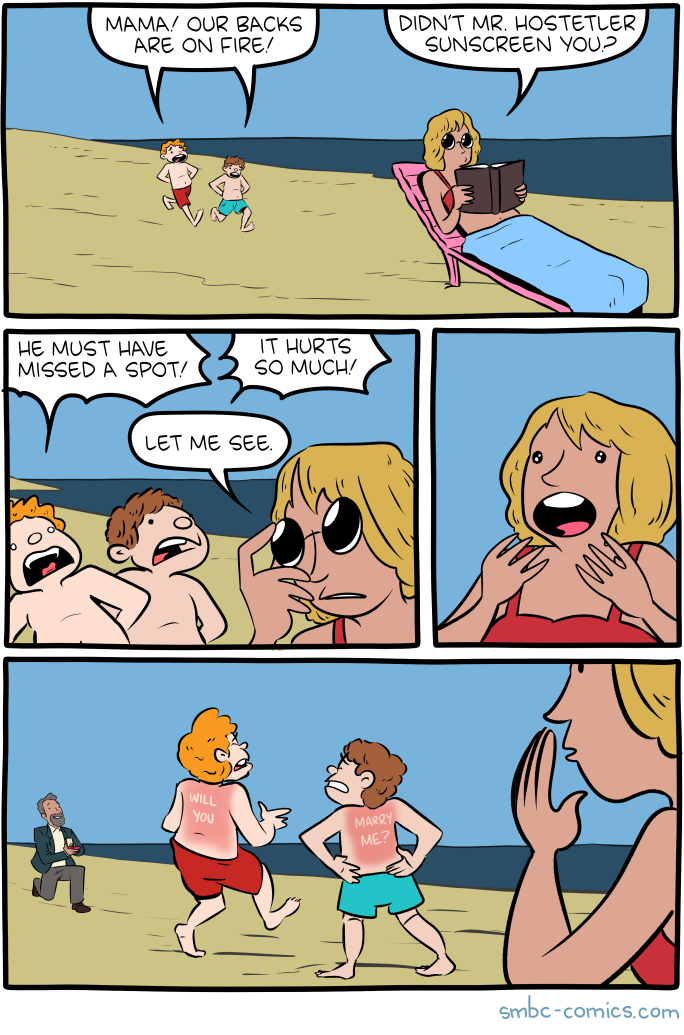
Saturday Morning Breakfast Cereal - Burn

by tech@thehiveworks.com


Click here to go see the bonus panel!

Hovertext:
Desperately hoping my comics never get brought up in a courtroom setting.


Today's News:
16 Aug 21:21

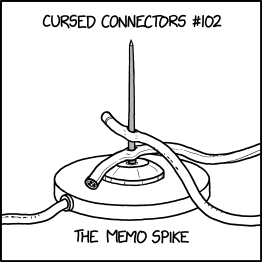
Memo Spike Connector

Backward-compatible with many existing cables, and can connect directly to phones or tablets if you press them down hard enough.
16 Aug 16:00

Need to share a PDF form? Here’s how to make a PDF fillable

by João Carrasqueira

How many times have you received a PDF file that needed to be filled in, but there was no convenient way to do it? We’ve all been there, and the hassle of printing a document or finding software you can use to fill in the form can be a bit annoying. Apps like Microsoft Word can in fact convert PDF files into an editable format, but they often ruin the formatting in the process, plus Microsoft Word isn’t exactly a free tool. Even if you’re not the one filling the form yourself, you might feel bad for not making it more convenient for other people to fill in your form. Thankfully, there are ways you can make your PDF file fillable for anyone who opens it.

The most official way to do this is, of course, using Adobe Acrobat DC (the paid version) on your desktop or laptop. But we’re big fans of free tools here, and we’re here to help you create a fillable PDF form for free. To do this, we’re going to be using an online tool called PDFescape. This tool is also available as a desktop app but, much like Adobe Acrobat, advanced editing features like these are paid. The online version is ad-supported, but you can use it for free. There are some limitations though — files must be less than 10MB in size and have less than 100 pages.

Create a fillable PDF from scratch

PDFescape gives you the option to either create your own PDF form from scratch, or upload a PDF file to edit. This can be useful if you’ve already created your form but didn’t know how to make it fillable. However, we’re going to start by making one from the ground-up. We’re going to use a simple form just to show you the possibilities.

  • Go to www.pdfescape.com/open and choose Create a new PDF Document. Choose the number of pages (up to 25) and the size of the page, then click Create.
  • Start by adding the text you want to your form. Click the Text button in the top left corner to add text. You can choose from a handful of fonts, font sizes, and other formatting options. Like we’ve said, we’re going for a pretty simple example here. Let’s say we’re creating a registration form for an event, for example. Here’s the basis for the form we want to create in our example.

The base of the PDF form, showing just text

  • Now, we have to add the form fields we want to use to make the PDF fillable. For the Name and Email fields, we’re going to want to use the Text form field type. This allows users to enter a single line of text. Click Form Field, choose the default type Text and click Select. Then draw the field where you want to place it. You can simply click anywhere to create a field there with default dimensions and resize it afterward, too.

A PDF form with a fillable text field
Once the field is created, you can fill it in yourself, as a way to give users a hint about what to write. A field called Name should be fairly self-explanatory, but it might be useful for others.

  • For the Country field, we can use a Dropdown field type.
    • Start by clicking Form Field, then choose the Dropdown type and click Select. Click where you want to place the field and resize it to your needs.
    • To add multiple options to the list, right-click the form field and choose Object properties.

Configuring a dropdown list for a fillable PDF

    • Add each option as a separate line next to Field options. Click OK once you’re done.
    • You now have a dropdown menu to select from the options you added.
  • For the age field, let’s say we only want to specify an age group. We can use a radio button for this. Here’s how:
    • Click Form Field, then choose the Radio type and click Select.
    • In order for the radio buttons to work as intended – as in, you can only select one – you need to create them all in one go. We’ll create six options here. You can also right-click one of the existing buttons and choose Duplicate to have it attached to the same group of buttons.
    • Now, radio buttons don’t come with labels, so you’re going to have to add them as text. In the end, it’ll look something like this:

Fillable PDF with radio buttons

  • Next, in order to choose interests, we’re going to go with regular checkboxes. Unlike radio buttons, these let you choose as many options as you want. Click Form Field, choose the Checkbox type, then click Select. Place as many checkboxes as you see fit. Much like radio buttons, checkboxes don’t have labels attached, so you’re going to have to add some text manually. Your form should look something like this, though hopefully with better alignment.


A fillable PDF with checkboxes


  • For the last field, the goal is to let the user write longer text, so instead of a standard text form field, we’re going to use a text paragraph. Click Form Field, select the Text Paragraph type, then click Select. Then, draw a box for the user to write text. With that, our form is complete.
  • Now, use the sidebar on the left and click the Save & Download PDF… button (the green square with two arrows). You’ll now have a proper PDF file. You can open it in any PDF reader, and it will be fillable. Here’s what it looks like filled in:


A fillable PDF form filled with a standard PDF reader

Now you can share your original file with anyone, and ask them to fill it in. Of course, you don’t have to design it the exact way we did it — we just wanted to show off some of the possibilities with a tool like this.

Use an existing PDF

While the steps above are definitely a valid way to create a fillable PDF file, it’s not always what you want. What if you received a PDF file and you want to turn that into a fillable form? Or maybe you used a more powerful tool like Microsoft Word to format the document, but now you want it to be fillable? PDFescape can do that too. Here’s a quick showcase of how it works:

Previously-created PDF file open in PDFescape

  • Your PDF will open, and now you have all the same tools as before to make it fillable.
  • Add all the fields you need to add here. You can still add more text, too, which is important if you want to use radio buttons or checkboxes. Here’s what we did in our example:

PDF file now with fillable fields

  • There’s no field for the signature, but you shouldn’t need one. Most PDF readers let you annotate the file, which can be used for a signature if necessary. For devices like tablets and convertibles, users can even use a digital pen to write their signature.

Creating fillable forms like this makes it much easier to get answers to forms, since the person filling them in doesn’t need any special software to do it. It may not work with very basic PDF viewers – like the pre-installed software on a phone – but if it allows annotations, you should be good. We filled these forms with the PDF viewer in Microsoft’s Edge browser.

This is one example of a tool that can create fillable PDFs, but there are others. LibreOffice is another free tool that lets you do this, for example. We went with PDFescape because it’s simpler and doesn’t require any kind of installation. We hope you found this guide useful. Be sure to let us know if there’s anything else we should add.

The post Need to share a PDF form? Here’s how to make a PDF fillable appeared first on xda-developers.

16 Aug 11:12

Tropics Update: Fred in the Gulf, Grace headed there

by Eric Berger

Good morning. A “cool” front has essentially stalled across the metro area, and this will lead to partly sunny conditions today and Monday, with about a 50 percent chance to rain to go along with temperatures in the low- to mid-90s. Some rains today could briefly pulse up into strong thunderstorms, so be weather aware if you are outdoors.

The main purpose of this post, however, is to discuss the tropics and impacts to the Gulf of Mexico. We have had lots of questions over the last day because a single model run of the GFS on Saturday appeared to bring “Hurricane Grace” toward Texas late this week. We cannot emphasize this enough: a single model run, especially an outlier, should always be looked up with a high amount of skepticism. Anyway, herein is what we know as of Sunday morning about Fred and Grace.

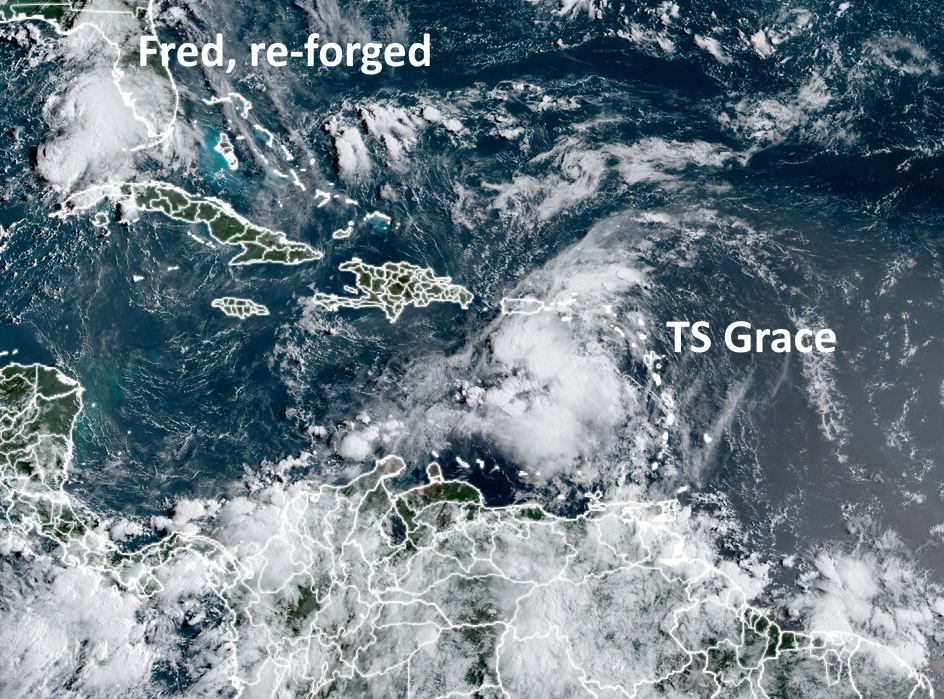
Satellite image showing tropical storms Fred and Grace on Sunday morning. (NOAA)

Tropical Storm Fred

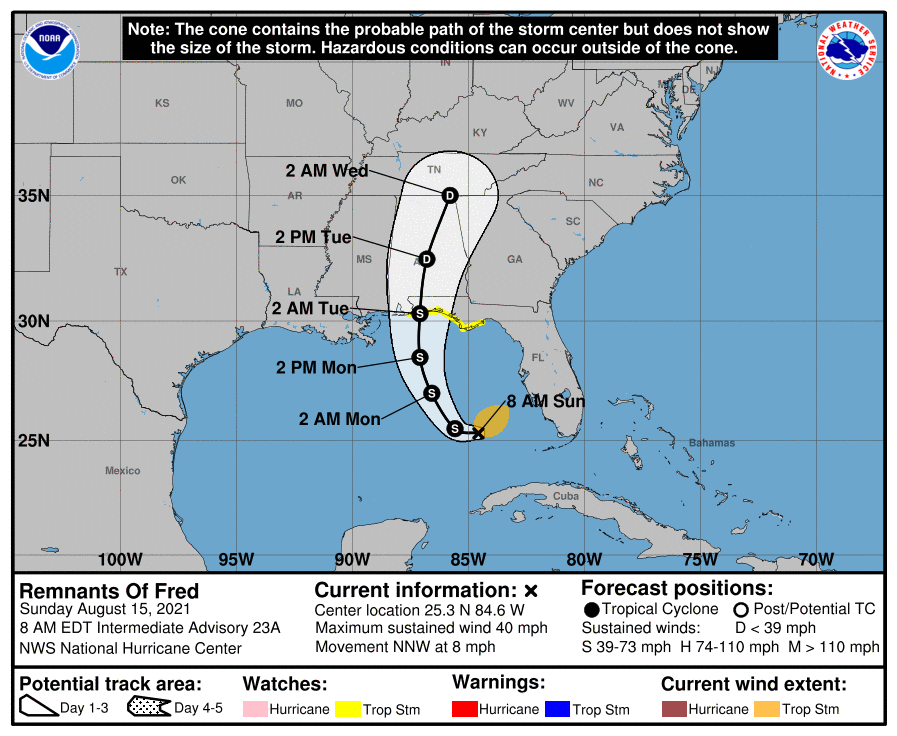
Fred has re-formed in the southeastern Gulf of Mexico, and confidence is fairly high that it will get pulled north later today, and head toward Alabama and the Florida Panhandle. Fred could become a strong tropical storm before landfall, so there may be some wind impacts in the Panhandle to go along with several inches of rainfall. By Tuesday afternoon it should be moving well inland and weakening quickly.

Track forecast for Tropical Storm Fred. (National Hurricane Center)

Tropical Storm Grace

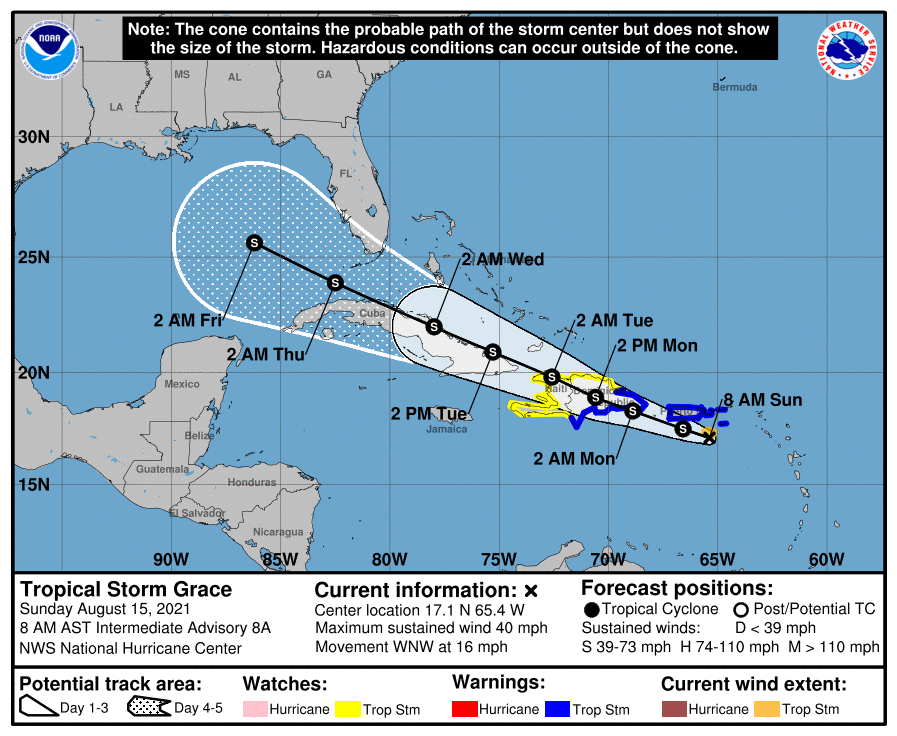
For our purposes, Grace is the storm of more interest, although the forecast is highly uncertain. As of 8am CT on Sunday morning, Grace is rather disorganized and barely a tropical storm. Its center is south of Puerto Rico and likely to move onshore Hispaniola (which is two countries, the Dominican Republic and Haiti) during the next 24 hours. After a devastating earthquake on Saturday the last thing Haiti needs is a tropical storm, but that is nonetheless what is coming on Monday.

Forecast track for Tropical Storm Grace. (National Hurricane Center)

The first real question is whether Grace survives its interactions with Hispaniola and Cuba from Monday through Wednesday. I think there is probably at least a 50 percent chance the tropical system gets shredded by the terrain of these two large Caribbean islands.

However, if some low-pressure center emerges into the Gulf of Mexico around Wednesday, what happens then? The environment in the Gulf of Mexico, in terms of dry air and shear, will be OK but not ideal for intensification. I would put the chance of Grace ultimately becoming a hurricane in the Gulf of Mexico at about 10 to 20 percent. That is a rough estimate based upon ensemble forecasts, and is only to help you calibrate your own expectations right now.

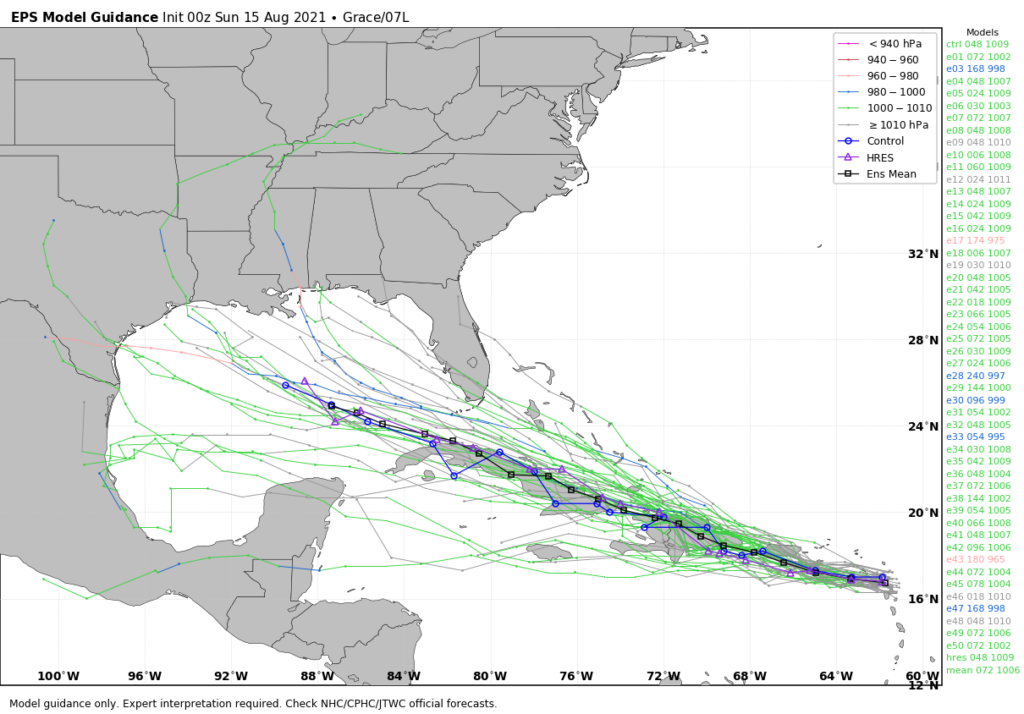
In terms of track, Grace is really hard to pin down because a) its center is ill defined, b) this center will likely to jump around as it interacts with land and/or re-forms in a new location, and c) where it would ultimately make landfall in the Gulf of Mexico is a forecast still 6 to 8 days from now. However, should a center survive interactions with the Caribbean Islands and emerge into the Gulf next week, I expect it would move more generally westerly, toward Texas or Mexico, with impacts perhaps next weekend.

European model ensemble forecast for Tropical Storm Grace. (Weather Bell)

However I can’t stress enough the uncertainty with all of this, and that there will probably be some wild swings in model forecasts in the coming days.

The bottom line is that we’re in the middle of August, and this is a time of year when we are always watching the tropics keenly. Any time there is the possibility of a low-pressure center entering the Gulf of Mexico during August we need to monitor it. And we will. But for now the overall chance that Grace becomes a serious and direct threat to Texas remains fairly low.

We’ll have a full update on Houston’s weather and the tropics on Monday morning.

16 Aug 11:11

Comic for 2021.08.14

New Cyanide and Happiness Comic
16 Aug 11:11

Comic for 2021.08.15

New Cyanide and Happiness Comic
16 Aug 11:11

Comic for 2021.08.16

New Cyanide and Happiness Comic
16 Aug 11:06

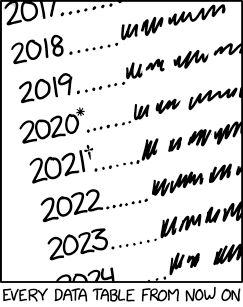
Every Data Table

I'm hoping 2022 is relatively normal because I don't know what symbol comes after the asterisk and the dagger.
16 Aug 11:02

Pine64 announces $399 e-reader with Linux and pen support

by Corbin Davenport

Hong Kong-based Pine64 has been selling single-board computers for years, but it might be best known for the PinePhone and PineBook Pro, some of the best ARM-powered Linux devices available right now. Now the company is branching out into e-readers, with the announcement of the PineNote — an e-ink Linux tablet with pen support and a price tag of $399.

“You’ve been asking us to create an e-ink device for years, and indeed we actually looked to make one as early as 2017,” the company wrote in a blog post. “Big brands heavily subsidize their e-readers via book sales and even if we sold an open e-reader at cost (or a loss), we still couldn’t possibly match popular devices’ price tag. Thankfully, the technology landscape and what is achievable using e-ink has significantly changed since 2017. Since the announcement of Rockchip’s RK3566 we knew our opportunity to create an open e-ink device had arrived. Early this year we made the decision to create the PineNote.”

PineNote internals

PineNote engineering prototype

The PineNote is intended to be one of the best e-ink devices available, with an ARM-based quad-core Rockchip RK3566 chipset, 4GB RAM, 128GB of eMMC flash storage, two microphones, two speakers, a USB Type-C port for charging and data, and 2.4/5GHz AC Wi-Fi. The inner frame is being built with a magnesium alloy, plus a “grippy” plastic on the back. Pine64 says the device will be just over 7mm in depth, beating out the 8.4mm Kindle Oasis 3 and 8.6mm Nook GlowLight Plus.

The e-ink panel measures 10.1 inches across, with an aspect ratio of 3:4 and a resolution of 1404×1872 (227 DPI). Pine64 says it can display 16 levels of grayscale at a refresh rate of 60Hz, and there will be a frontlight with adjustable colors (from cool white to warm amber). The higher refresh rate should make it a smoother experience than just about every other e-ink reader, but that also depends on software optimization.

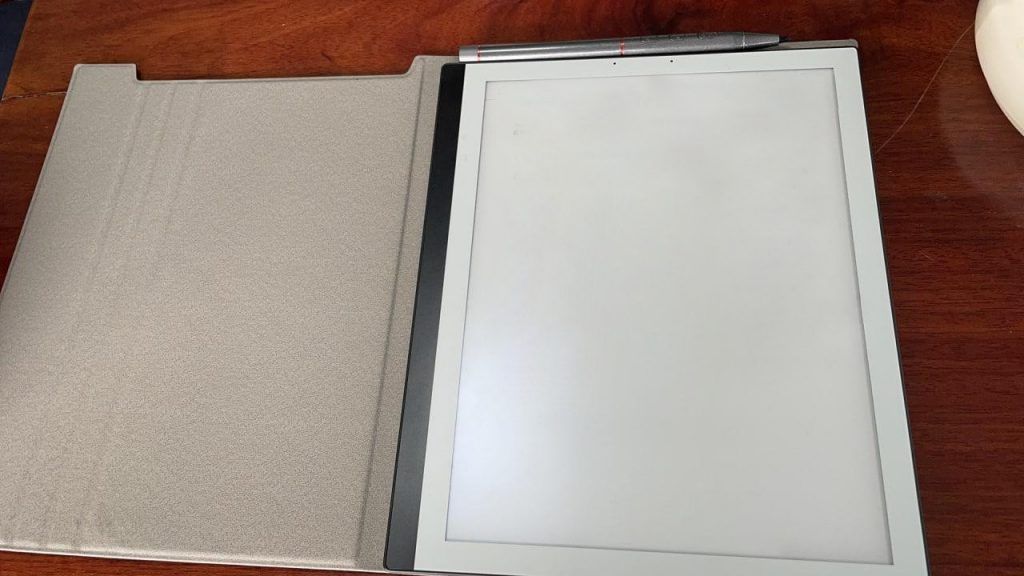
PineNote with magnetic cover and EMR pen

PineNote with magnetic cover and EMR pen

Speaking of software, Pine64 expects that the PineNote will ship with a custom Linux kernel out of the box, but work is underway to port the display driver to mainline Linux. The interface will either be KDE Plasma or Plasma Mobile. That should allow it to run any software compiled for ARM Linux, and perhaps Android applications through Anbox or WayDroid.

Pine64 will also sell EMR pens and magnetic covers for the PineNote, but the e-reader will support any Wacom EMR pen. The price tag is set for $399, and Pine64 hopes to start shipping it to early adopters “later this year” for software development.

The post Pine64 announces $399 e-reader with Linux and pen support appeared first on xda-developers.

15 Aug 02:33

Building a VIC-20 Kit Computer and X16 Update.

by The 8-Bit Guy
14 Aug 16:44

Now Streaming: BLAKE'S 7 Features Rebellion in Space, TIME Passes in Grief and Grim Reality

Two series, new to the BritBox streaming service, consider very different futures.

[Read the whole post on screenanarchy.com...]

13 Aug 15:16

How Texas Wildlife Crossings Are Saving Lives and Money

by Patricia Sharpe
The Robert L. B. Tobin Land Bridge in San Antonio.Its eyes two ghostly white spheres, a slim deer stands in the middle of the nighttime photo, serenely munching a branch. In the next picture, a coyote inspects the camera, its nose huge like that of a pet dog sniffing an iPhone. Then come fuzzy cottontail rabbits and a scraggly possum. Taken in April by trailside cameras, the black and white pictures are—in their low-res way—historic. They are the first official recordings of animals using the largest wildlife crossing in the United States: the new Robert L. B. Tobin Land Bridge on San Antonio’s North Side. Measuring some 150 feet in both length and width, the structure arches gently over the traffic on the six-lane Wurzbach Parkway below. The final portion of the bridge opened…View Original Post

The post How Texas Wildlife Crossings Are Saving Lives and Money appeared first on Texas Monthly.

13 Aug 12:16

I secretly moved people’s desks 2 inches and they freaked out, late-night work emails, and more

by Ask a Manager

This post, I secretly moved people’s desks 2 inches and they freaked out, late-night work emails, and more , was originally published by Alison Green on Ask a Manager.

It’s five answers to five questions. Here we go…

1. I secretly moved people’s desks two inches over and they freaked out

When I joined a new team several years ago, I was told by my new manager that I should move my things to their area on a different floor so I could sit with my team members, ASAP. Only they didn’t actually have a free space for me, and every table was occupied all the time.

I started asking people to get that done. I went to the office manager, who told me they could/would do nothing. I asked everybody on the floor how they felt about moving around teams — which already was happening every few months at that company, and since the floor I had to go to was now super full, there was enough room on other floors to hold several of the smaller teams, which everybody also said no to.

Nobody would budge. I spent an entire work week going around talking to people, trying to get a desk, all while my managers told me I had to move there RIGHT NOW or they would start to doubt my allegiance to the project, but would not do anything themselves to make that happen.

But hey, turns out there was actually enough room to seat more desks! If they were spaced a bit better, that should be doable! But a few people in the corner were steadfastly defending their space, which was almost twice as much as others had, whose backs were almost touching.

In all this stress, I hatched my plan: If I came in early and moved every row of tables 1-2 inches to the side, the added up space would allow us to squeeze in two more tables.

The day comes and people notice immediately. They get very angry and start blaming the cleaning crews. I confessed right then, and everybody was pissed at me.

How wrong was I? I do regret doing it, and wish there was a better way but it seemed like the only option. I feel like the anger I received is at least slightly out of proportion, and nobody ever said “finding a desk is not your job, your boss should be doing it” or “yeah, these people already here are not moving because they have seniority / a special deal / some other good reason and we must allow them to have twice as much real estate as everybody else.”

I don’t think you were wrong at all. What did your bosses expect you to do? You’d exhausted all other avenues, and they were threatening your job over it! And really, each person losing two inches is not an outrage when the alternative was you having absolutely nowhere to sit or getting fired for lacking the magical ability to conjure new space into existence. So no, you weren’t wrong. Your bosses were ridiculous and put you in an impossible position.

I do wonder if you went back to your bosses and laid it out really clearly: “I understand you want my desk in the X area. There’s currently no room there and no one is willing to move. The only options left that I can see are for me to sit in Y or Z instead or you could tell people they need to make room for me there. What makes sense?” If you didn’t do that, I would have advised it — but otherwise, this isn’t on you.

2. Sending work emails late at night

As a manager, new parent, and generally busy person, I work some strange hours. For example, yesterday I was online at 2 am (as my daughter woke me up during the night and I decided to use some time to clear my work inbox ahead of a busy Monday) and 10 pm (as I finished early to play with my daughter but needed to meet a deadline). I absolutely don’t expect these kinds of hours from my team or want to encourage people to work outside of hours if it doesn’t suit them, but sometimes these are the hours that suit me!

What can and should I do to make it clear that what I do isn’t what I expect from the team and that following my example won’t have any impact on my opinion of them or their performance? Working hours is part of my “welcome to the team” conversation and I do talk to each person about it periodically using phrasing like, “You may see some emails from me at strange times. This is because I don’t have a set working pattern and sometimes work early or late to allow me flexibility. I absolutely don’t expect anyone to reply to me or be checking their emails outside of their normal working hours so please work whatever hours suit you.” I feel like that’s clear but I just keep having “actions speak louder than words” going round my head.

I strongly recommend scheduling your emails to send during normal business hours! Write them as late at night as you want, but have them send the next morning.

I work strange hours too, and I used to send emails to my staff at all hours and think it would be enough to just tell them emphatically that I didn’t expect responses at that hour, that it was just my own preference and didn’t need to be theirs, and all the rest. I learned over time that it didn’t really work; people see you online then and worry it’s expected of them regardless. Or they happen to be up and online but not working, and then they see a work email come in from you on their phones so they decide they might as well answer it, and now other people are working at 2 am too. Or they don’t answer it but now they’re thinking about work at 2 am. It just creates pressure on people, no matter how diligent you are about telling them it shouldn’t.

Schedule your emails and it’ll be a non-issue. (Or, if you can’t schedule them, save them as drafts and send them the next day.)

3. How to quit at the same time as a teammate when we’re both going to the same competitor

After three years at my first post-college job, I’m ready to move on. My teammates and I have been consistently overworked for over a year, to the point where several of us have had mental breakdowns. The company doesn’t seem to care even as we repeatedly ask for help and more manageable workloads, so when an opportunity appeared to do a similar job at a competitor, I applied.

The work I do is a relatively new methodology, so there’s not a lot of people with the experience I have. I know from your blog not to assume you’re getting the job, but in all of the interviews I’ve had so far, the company has made it very clear they’re interested. I have a final interview coming up soon.

I feel a lot of guilt about quitting my job, even though I know I shouldn’t, but this is the first time I’ve left a job for a reason other than “I’m graduating.”

What complicates matters is that a teammate of mine applied for a different job on the same team at the competitor company and seems to be moving along in the process just as quickly. If one of us left, our whole team would be scrambling. Two people gone (and especially us in particular as the two most senior people on the team), and they won’t be able to function.

Assuming we both get the job (and I know that’s an assumption), what advice do you have for how we resign? Should we go to our shared boss at the same time? If one person goes first, how should we handle the conversations about replacing that person knowing we’re leaving too? Should we keep it a secret we’re going to the same place?

Definitely don’t jointly resign; do it individually. If the other person resigns before you’re ready to quit and you’re pulled into conversations about the plan for their absence, handle it exactly the way you would if you weren’t leaving. Until you have a job offer that you’ve accepted, you’ve got to proceed as if you’re not leaving (because you might not get the offer or you might not like the details of the offer). If you go second, it’s fine to say “I know this is bad timing,” but you also have nothing to apologize for. People leave jobs! It’s normal! Your company will make do. That would be true even if your company had treated you well, and it’s extra true when they haven’t.

You don’t need to keep it a secret that you’re going to the same place. You don’t need to proactively volunteer it if you think that will cause weirdness, but if you’re asked, there’s no reason you need to hide it. Do keep in mind, though, that some companies have people leave immediately without a notice period if they’re going to a competitor (still paying out their notice period unless they’re jerks), so plan for that if you think it’s possible.

4. How to find out a salary range

As a longtime reader (and occasional poster), I know one of your pet peeves is job listings that don’t include a salary range. A new law in Colorado addresses this and Lifehacker had an article today about how jobseekers can to use it to figure out what a job is worth no matter where they are, at least in the U.S.

This is a good tip.

5. The Mortification Week finale

I’ve been top heavy my whole life, and finally I had to have a significant breast reduction. I saw my body when they changed my bandages, and my new tatas were the most beautiful things I’ve ever seen, even with all the stitches and drains. This was major surgery so I was on a morphine drip. For some unknown reason, my husband thought it would be fine, just fine, if he let me have my cell phone while I was stoned out of my skull.

It’s good that my boss and I are close, because apparently, he was my first call post-surgery. He knew what I was having done – it’s not something I’d be able to hide and I was out of work for a few weeks – but I don’t think he was ready for a call like this:

Him: Hey, how are you doing? I’m surprised [Hubby] let you have your phone.
Me: (slurring badly) I made him gimme it. I hadda call you. I quit.
Him: You what?
Me: (enunciating carefully). I. QUIT.
Him: …Wait… what?
Me: I juss gotta look at my new girls and they are FREAKING HOT. I don’t needa work for you annymore. Me anna girls gonna go work at HOOTERS.
[sounds of choking laughter coming through the speaker as my hubby realizes his mistake and grabs for my cell phone]

Don’t think this hasn’t been mentioned a time or two in seventeen plus years together.

And with that, we say goodbye to Mortification Week.

Let’s end with this quote from Cringeworthy: A Theory of Awkwardness by Melissa Dahl: “The things that make you cringe are usually the things worth sharing, because they can help others feel less alone. … Little humiliations can bring people together, if we let them. The ridiculous in me honors the ridiculous in you.”

13 Aug 00:11

Not a White Christmas, Bloodhound

by kpodd@uxbridgeshimoda.com (Dan Kennedy and Benjamin Harrison)
It's 12-25-97 and the KPODD morning duo is in the studio despite it being Christmas morning. Fortunately, Producer Lynn let them take it easy, so they're looking back at a deep history of (until now) unheard clips! Well, at least unheard by their true fans. The haters in Chicago heard. Come along as Machine Bolt Kennedy and Él Farto play some poorly curated clips of their broadcasts before The Incident. Epic!
12 Aug 21:58

Mortification Week: the county lock-up, the disrupted town hall, and more

by Ask a Manager

This post, Mortification Week: the county lock-up, the disrupted town hall, and more , was originally published by Alison Green on Ask a Manager.

It’s Mortification Week at AAM and all week long we’ll be revisiting ways we’ve mortified ourselves at work (pulling comments and letters from the archives).

Here are 10 stories of other people’s mortifying moments that have been shared here over the years.

1. County lock-up

“A while back, we had a huge visit from our friends up in the C levels. One of my coworkers asked a VP if they had met before … at the county lock-up … in front of our CEO. Our boss looked like he was torn between strangling him or just crawling into a dark dark hole to die.”

2. The pep talk

“While sitting in the corner of a room, prepping for a client meeting, my friend witnessed the owner of the business pace into the room and begin a passionate self motivation ritual (i.e., ‘you can do this sh**, you’re the f***ing best, now get out there and win!’). And then he left – my friend froze as if he was hiding from a T-rex. Thankfully he lived to tell the tale.”

3. The spit cup

“My boss was in a meeting where the general made a big gesture and knocked his chewing tobacco spit cup into the lap of the admin assigned to take notes. My boss didn’t know generals could apologize that much! The general gave her the rest of the day and the next day off and he would clear it with her boss. And she was to send him the cleaning bill and if the outfit couldn’t be cleaned to send him the receipts for any replacement items.”

4. Not that

“I was in a departmental meeting once when our CFO said something about being really anal retentive and an older coworker piped up from across the room, ‘Oh, anal’s great! I love anal!’ It’s been at least a decade but every time I think about it I laugh so hard I see spots. Bless her heart.”

5. The technique

“I was 19 years old and working as the manager of a spa. Part of the massage therapist interview process is giving the management team a massage to demonstrate their techniques. This super buff, blond, surfer-dude type is practicing on me and I ask for my glutes to be worked on, as they are a problem area for me. He proceeds to take the sheet, pull it back to fully expose one cheek, and uses his hand to wedge it down my crack. Needless to say, that is not a normal draping technique and clients would have definitely come to me over that… We hired him, but he got a lot of draping training before he was allowed to work on clients. Definitely the most awkward day of work ever.”

6. We can’t date

“When I was 23 I was promoted into a leadership position. My then boyfriend (now husband) had been on that team for several years. To be up-front, I asked my boss if my relationship would cause problems with my new role. He paused and thought a bit before telling me that no, it’s still okay because we don’t supervise the same department or work together in a way that would be impacted by a relationship. He went on to explain that really in this role, I could date anyone at the location I wanted to except for him. He and I would just never work. I think he saw me start to laugh at the thought (he’s considerably older and I was 23!). Seeing my almost reaction, he made a comment about having a very busy dating life anyway. He’s still my boss several years later.”

7. The fire

“A coworker of mine was heating up a microwave meal and walked away while it was cooking since she could hear the ding from her desk (small office with a kitchenette). Well apparently she accidentally hit an extra zero on the time (think 50:00 minutes instead of 5:00) and after a while smoke ended up pouring out into the entire office. We all had to evacuate while the fire department showed up, but the real kicker was that our office was attached to a hotel and the entire hotel had to evacuate as well.”

8. The town hall

“The head of HR for a 16,000 employee company has a ‘town hall’ for all of HR – about 250 people. (I was one of them.) People dutifully call in and the meeting goes like this:

HR head: ‘So we’re really happy with our recruiting numbers—’

LOUD female voice: ‘YEAH, THE CRAMPS ARE HORRIBLE! WORSE THAN HAVING MY PERIOD AGAIN!!!’

248 people on call: ‘Could everyone please mute themselves??!!!’

HR head: ‘…so as I was saying—’

LOUD female voice: ‘I HAVEN’T HAD CRAMPS LIKE THIS SINCE I WENT OFF BIRTH CONTROL!!!’

(Now everybody is filling the chat with, ‘PLEASE everyone mute your phone!!!’ Literally a frantic avalanche of chat messages.)

LOUD female voice: ‘AREN’T YOUR PERIODS SUPPOSED TO GET LIGHTER AFTER YOU HAVE A VAGINAL BIRTH???’

HR Head: (tries to be funny) ‘Ummmm…sounds like someone is having some medical issues – could you please mute all phones…hahaha…’

This went on for a few minutes until someone figured out how to mute all callers. We figured that someone was on their cell phone talking to their doctor’s office while also having an open line into the call.

Most people knew who the voice was, and it was a really cranky person who was not well liked. Funniest part – some of the men were traumatized – same ones who constantly told dirty jokes.

We never had another HR town hall.”

9. The overshare

“A new coworker was introducing herself during a web conference. She went into great detail about her son’s relationship with his wife, how they had courted instead of dating, and went into great detail about what that meant in terms of intimate activity. I never found out exactly what others’ reactions were, but I was cringing all over.”

10. The pizza thief

“I used to work at a place that had more volunteers than employees, so parts of the building were open to the public. One day a coworker’s lunch was stolen from the kitchen, and it was some kind of specialty pizza that she was really craving. When she realized it was stolen, she was furious and asked the building supervisor to look at the security cameras. He agreed and then word went around the office at lightning speed that someone was about to get busted, so we all gathered around his computer to watch the footage.

At first we saw multiple volunteers in the kitchen. We all recognized all of them because they’re regulars. Then one by one they left until one guy remained, and at this point I started getting nervous because I knew the guy veeerrrrry well. But I thought surely he would never steal food. No way. He disappeared from the camera lens for a few minutes and I thought, oh thank god it wasn’t him. But then he juuuuuuust leaned back into the frame for a few seconds – just enough that you could clearly see him stuffing his face with a piece of pizza. And I wanted the floor to swallow me whole, because the culprit was MY DAD.

I just stood there in shock while all the other employees around me busted out laughing (except the pizza victim. she was still pissed). I took a lot of ribbing over this. The building supervisor took a screenshot of my dad’s face stuffed with pizza and people made all kinds of work-related memes with it. It was hilarious/mortifying. I’ve never had the courage to bring it up to my dad though. One day I will… Pizza victim confronted him though. I didn’t have to witness that, thankfully.”

12 Aug 18:05

A Tropical Storm Is On Track To Sweep The U.S. Gulf Coast This Weekend

by Scott Neuman
Tropical Depression Fred, currently off the coast of Cuba, is forecast to make landfall as a tropical storm in the vicinity of the Florida Keys by Saturday.

Tropical Depression Fred is expected to slowly regain strength before making landfall as a tropical storm in the Florida Keys on Saturday.

(Image credit: National Hurricane Center)

12 Aug 18:04

Mississippi's Hospital System Could Collapse Within 10 Days Under COVID's Strain

by Rachel Treisman
An ambulance arrives at the emergency department at AdventHealth hospital in Orlando in late July. Florida is one of several states seeing disappearing hospital capacity as COVID-19 cases surge.

COVID-19 cases are overwhelming the South. Arkansas set a record for hospitalizations, while officials in one Florida county are urging residents to "consider other options" before calling 911.

(Image credit: Paul Hennessy /SOPA Images/LightRocket via Getty Images)

12 Aug 17:36

Top Five: Aug. 12, 2021

by Glasstire

Glasstire counts down the top five art events in Texas this week. For last week’s picks, please go here.

Maria Cristina Jadick, Extreme Water Mystery Sand

1. The State of Sculpture: 10th Anniversary All-Member Exhibition of the Texas Sculpture Group
July 15 – September 12, 2021
San Angelo Museum of Fine Arts

From SAMFA:

“The San Angelo Museum of Fine Arts is pleased to host this special tenth-anniversary celebration of the Texas Sculpture Group. Originally planned for 2020 and postponed because of the COVID-19 pandemic, we now present works by over ninety different artists from all over Texas, and some living outside the state who have Texas ties. From traditional to cutting edge, small-scale to monumental, this all-member exhibition fills our expansive galleries (and the rooftop terrace), offering insight into the range of material, aesthetic, and conceptual possibilities that define contemporary sculpture.”

Alexis Pye, Man with Sheep, aka the Baptist, 2021. Oil, oil pastel, oil stick on canvas.

Charis Ammon, Lake, 2019. Oil on canvas.

2.a. Alexis Pye: The Real and the Fantastic / The Irrational Joys of the Axis
July 10 – August 21, 2021
Inman Gallery (Houston)

2.b. Charis Ammon: Stay
July 10 – August 21, 2021
Inman Gallery (Houston)

Via Inman Gallery:

“Although these are two separate exhibitions, common threads can be found between the artists’ works, notably in the dual presence and absence of the human figure, as well as in the viewer’s relationship to their works. Pye’s paintings feature portraits of Black men situated within a garden or foliage setting; her work, as she states, is meant to evoke ‘playfulness, wonder and blackness, as well as the joys amidst adversity.’ Meanwhile, Ammon’s paintings explore how surfaces tell human stories. She captures the passage of time and our presence in it, even though the spaces are void of figures. Humanity is instead present as a vestige in Ammon’s paintings of public, man-made spaces.”

3. Holding Space
July 31 – August 22, 2021
500X (Dallas)

From 500X:

“500X is proud to announce Holding Space, an inaugural juried exhibition for all artists over the age of 18 living in Texas that identify as Black, Indigenous, and People of Color. The 2021 juror is Daisha Board, curator, consultant, and founder of Black Sheep Art Culture.

“The gallery is open 12-5 pm on Saturdays and Sundays by appointment for regular hours (excluding special events).

“ABOUT THE JUROR: BLACK SHEEP ART CULTURE INC. courageously bridges the gap between traditional and non-traditional art spaces by making art accessible to the communities they serve. By promoting emerging and established BIPOC artists found locally, domestically, and internationally, Black Sheep Art Culture Inc. is able to create the much-deserved space BIPOC continues to strive for.”

Image via ICOSA

4. Existential Evocations
August 14 – September 4, 2021
Clamp Light Artist Studios & Gallery (San Antonio)

Reception: August 14, 2021 | 6–10 pm

From Clamp Light Artist Studios:

“Clamp Light Artist Studios & Gallery is proud to present Existential Evocations, a group exhibition organized by San Antonio-based independent curator Erin K. Murphy.

“Existential Evocations is the continuation of an art exchange between ICOSA collective of Austin and Clamp Light. Existential Evocations features a range of works by nineteen ICOSA artists: Leon Alessi, Amy Bench, Darcie Book, Shawn Camp, Veronica Ceci, Jonas Criscoe, Erin Cunningham, Brooke Gassiot, Mai Gutierrez, Sarah Hirneisen, Amanda Linn McInerney, Matt Rebholz, Tammie Rubin, Jana Swec, Michael Villarreal, Lana Waldrep-Appl, Alyssa Taylor Wendt, Jenn Wilson, and Suzanne Wyss. The exhibition brings together a selection of work in drawing, sculpture, photography, along with textiles, focusing on ideas of isolation, the banal, the surreal, and the extraordinary.”

Cheyenne Nevins, Untitled Space Opera. Photo credit: Gustavo Solorzano.

5. Annex Energy: University of Houston Grad and Undergrad Sculpture Exhibit
SITE Gallery (Houston)
May 1 – August 19, 2021
Closing: August 14, 2021 | 3–9 pm

From SITE Gallery:

“SITE Gallery Houston at Sawyer Yards is pleased to present Annex Energy by the University of Houston School of Art Sculpture Graduates and Undergraduates.

“For the past three semesters, UH sculpture artists have been forced to work in virtual isolation. Yet they have persevered through a difficult year of cancelled exhibitions, limited studio access and online-only classes. Despite the lack of real-world interactions, the sculpture artists have survived by sharing their creative energy and supporting each other through the bonds of a common pursuit. That is, pursuing artwork that excels despite and because of the struggles of the times–be it Covid, societal expectations, economic hardships, and beyond. The SITE Gallery Houston exhibition will provide a window into the COVID experience. The beehive cluster of circular rooms–each uniquely transformed–will together convey the energy and vitality of the Sculpture Program.

“Artists include: Jen Barker, Daniel Calderon, Noelle Dunahoe, Marley Foster, Nicolas Herrera, Randi Long, Jacinta Majithia, Blaize Marshall, Cat Martinez, Michelle Matthews, Tiffany Nesbit, Cheyenne Nevins, Katie Patzke, Brenna Rogers, Gustavo Solorzano, Stevie Spurgin, William VB, Jimena Vilchis, Michelle Vo, Debbie Vu, Marie Williams and Erick Zambrano.”

The post Top Five: Aug. 12, 2021 appeared first on Glasstire.

12 Aug 17:35

tell us your stories of triumphing over work jerks

by Ask a Manager

This post, tell us your stories of triumphing over work jerks , was originally published by Alison Green on Ask a Manager.

Earlier this week a commenter shared this magnificent story:

My first job out of college was a sales job with a very overbearing, bullying boss (he made at least one guy cry while I was there). I am a pretty deadpan guy, especially when I’m nervous, and my boss had a huge personality and wanted all his employees to be the same.

Whenever we had a sales appointments we would have to go over our deal in front of all 25ish people in the company, and invariably he would get mad that I wasn’t “excited” enough. I might have been broke working a 100% commission job, but I didn’t like being bullied, so I would turn my excitement meter down to zero whenever I presented. I got the point where I basically sounded comatose. Then I would drink a ton of Red Bull before I actually met with the client boost my energy to close the deal.

Eventually we started to get along, but for a while this guy couldn’t figure me out at all, especially since I was eventually one of the better salespeople in the office. I didn’t feel too bad because I knew that if I hadn’t been a strong performer, he would definitely have relentlessly bullied me.

Clearly we need to hear more stories of times you triumphed over a jerk at work. Pettiness is fine. Pettiness is what we’re here for. But we will also accept non-petty triumphs, such as the person who got back at a boss who made him swap roles with the boss’s friend’s son and take a drop in salary of tens of thousands of dollars with a few days notice. All stories of triumphs over jerks are welcome. 

Please share in the comments.

12 Aug 17:28

Teen Pregnancy with Drugs!

by Mary Kelly

pregnancy and drugs cover

Teen Guide to Pregnancy, Drugs, and Smoking
Hawksley
1989

My inner snotty self wants to joke that you should save the drugs and smoking until after the kids are born, since that’s when you will really need it, especially during the teen years.

I know back in the day most kids from junior high school onward had to do one of those papers about an “issue.” I actually haven’t had anyone ask me to get a book on this in quite a while. If they are doing this kind of project, they much prefer something like an article or two. Given this lovely cover, I can understand why. I do remember one young teen saying she wanted to do a paper on “the pros and cons of child abuse.” (I really want teachers to phrase this differently! And can we please do something about the pro child abuse crowd?)

I actually like this kind of question. Part of me wants to use this as an opportunity to talk to kids about library help in the future. Take the example above. I asked the teen to pretend there is no paper or pros and cons. I then asked why they thought this was something we should talk or write about. We are just talking and not trying to write a paper or talk about how many words or sources to use. Why is the topic important? What do we need to do?  Then I broke out the Holly phrase that is used when she is the supervisor or my editor: why should I care? This is usually her shorthand way of saying why should we spend time and money on something? Is it worth it? How easy is it to implement? What resources are needed? Who benefits if we do this?

When librarians add this to the reference interview, most teens will relax and talk. More often than not, they will have a couple of solid ideas or a thesis statement in less than 5 minutes. I also share that one of my regrets when I was in college is that I did NOT take advantage of the range of library services and help. I would have been such a better undergrad student.

This is a weeder. Time to upgrade.

Mary

all about chemicals that hurt the baby

illegal or street drugs

injecting drugs dangers

drinking

smoking


The post Teen Pregnancy with Drugs! appeared first on Awful Library Books.

12 Aug 15:06

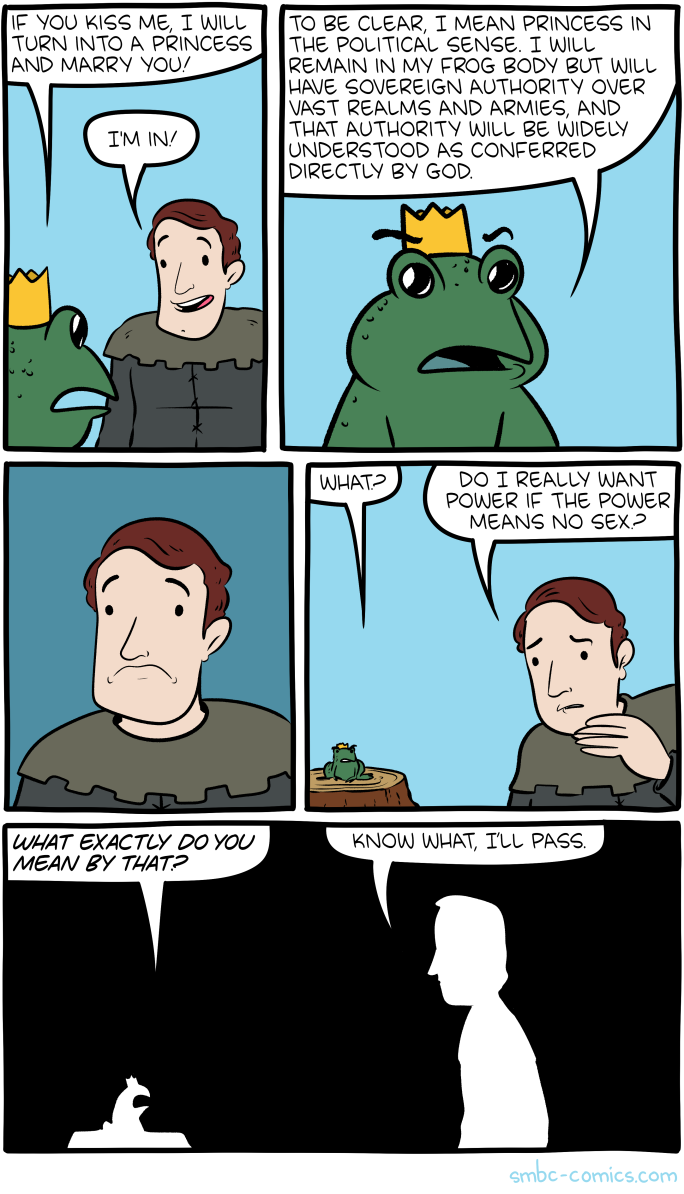
Saturday Morning Breakfast Cereal - Princess

by tech@thehiveworks.com


Click here to go see the bonus panel!

Hovertext:
With no offense meant to batrachological furry community.


Today's News:
12 Aug 14:23

Teen Money Advice

by Mary Kelly

title page for Dollars and Cents

The Teen-Age Consumer’s Guide
Dollars and Cents
McGough
1975

This is something from my teen years. It’s actually the kind of thing my parents would want me to read. I just want to chuckle at the prices of the mundane items. 25 cents for school supplies? Since I was 15 years old in 1975, I feel confident in comparing my budget strategies from then.

I didn’t get an allowance, but I was babysitting and I detasseled corn. When I turned 15, I got a job at Baskin-Robbins and made a whopping $2.50 per hour. My go-to purchases centered on albums (I always wanted to get into the Columbia record club, but I was warned off), cosmetics (remember Bonne Bell Lip Smackers?) and clothes, since my mother didn’t understand that JC Penney jeans were not that cool.

The other feature of this book is the resume advice. Try not to cringe. I really didn’t understand what a resume was until college. When I was a teen, most jobs were “fill out an application and we will call you.”

Fifteen year old me would not find this book particularly helpful. Old librarian me thinks it’s a weeder.

Mary

money problems-teens

teen resume example

Book and record clubs

typical expenses for a family of four

The post Teen Money Advice appeared first on Awful Library Books.

12 Aug 14:21

Comic for 2021.08.12

New Cyanide and Happiness Comic
12 Aug 14:19

New studies show evidence of Long Covid Penis Problems

by Thom Dunn
Cowboy Who?

Hard facts on why you should get vaccinated

"Long Covid," as many folks are calling it, is one of parts of this pandemic that I find most terrifying. Sure, some people who get COVID-19 just have to deal with a "bad cold." But others find themselves suffering from long-term debilitation, with a variety of wild symptoms, and no clear consistency in how or why these lasting effects come about. — Read the rest

11 Aug 18:18

It's Double 'Jeopardy!': Mike Richards And Mayim Bialik Will Be New Hosts

by Neda Ulaby

In a surprise move, Jeopardy! has selected actor Mayim Bialik and current executive producer Mike Richards as permanent new hosts of the game show.

(Image credit: Sony Pictures Entertainment; Francois Durand/Getty Images)

11 Aug 17:51

Ask Too Much

by Reza
10 Aug 19:35

Here’s why SteamOS switched from Debian to Arch Linux

by Craig Pearson

One of the many surprises of the Steam Deck announcement concerned SteamOS. The underlying software of SteamOS 2.0 was Debian (back when Steam Machines were a thing) but that’s been dropped for Arch Linux for version 3.0. Valve says the switch will let them use Arch’s rolling updates to keep their gaming slate up-to-date.

Read more