Shared posts

05 Apr 19:45

Pegleg Wants To Help You Find All Those Free, Full-Length Movies On YouTube

by Chris Velazco
pegleg

One of the worst kept secrets about YouTube is that it’s just teeming with full length movies, and I’m not talking about the ones that Google wants you to pay for. They’re not all that hard to come by despite the fact that uploaders presumably don’t want them getting yanked immediately, but those movies are there if you know where to look.

Thanks to a new (well, new to me anyway) web app, finding them just got a whole lot easier. Say hello to Pegleg, a simple, smart, and terribly handsome way to dig up those flicks on YouTube.

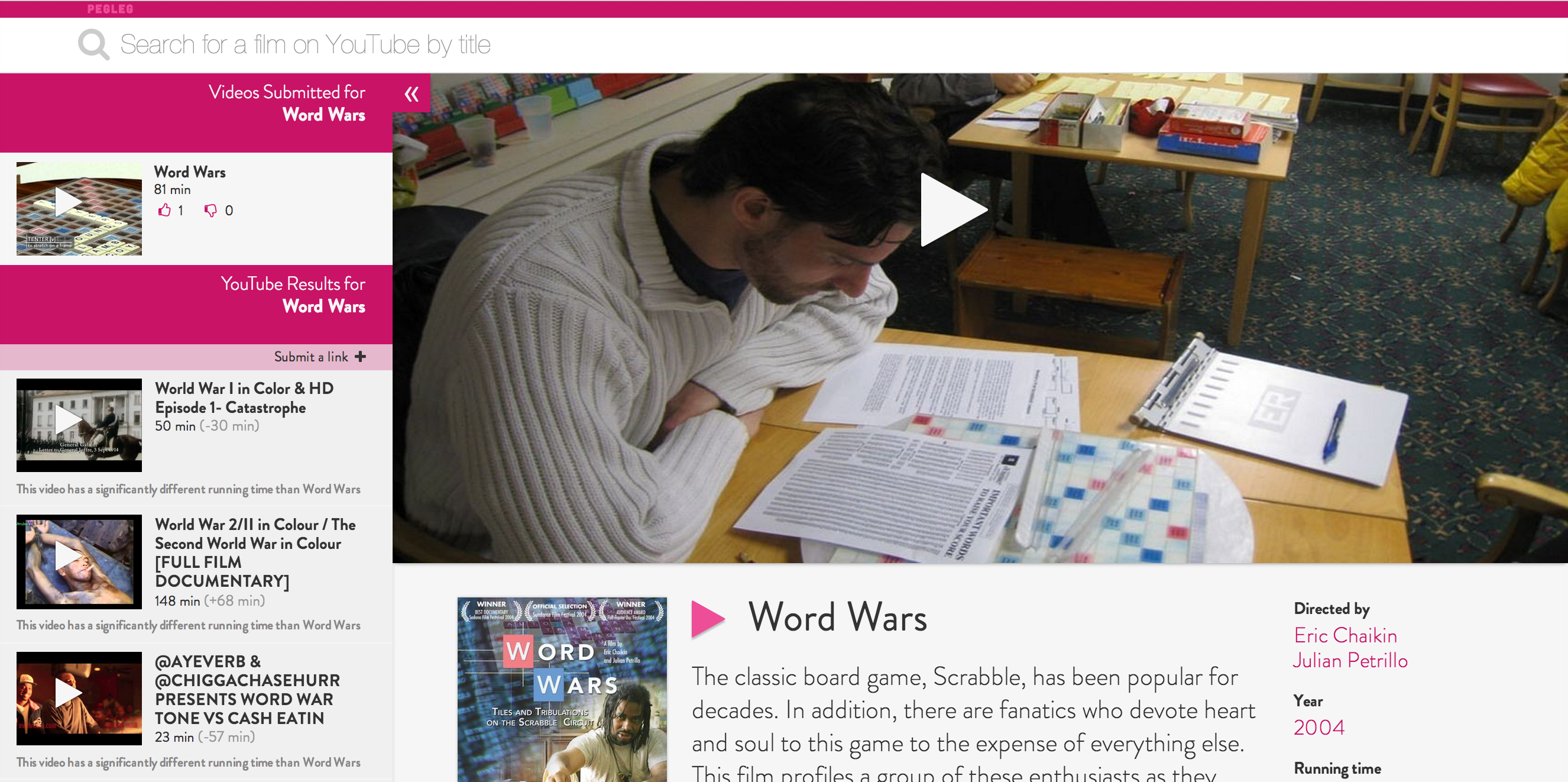
The concept is simple enough — Pegleg’s front page shows off all the films that users have already found, and those looking for something specific can either drill down by certain criteria or punch in the name of a movie they’d like to see. If the flick in question has already been added to the Pegleg collection you can watch it immediately. In the extremely likely event that the movie you’ve been jonesing for isn’t there yet, Pegleg will display a list of YouTube videos it thinks could be what you’re after, along with a little notification showing you how sure it’s actually a full-length movie based on the clip’s running time.

Right now Pegleg plays home to nearly 900 YouTube movie links that users have added to the system, with some of them naturally worth more of your time than others. It’s a remarkably polished project especially considering that Pegleg’s creator, Toronto-based developer Mina Mikhail, was mainly looking for a way to get better acquainted with developing in Meteor. Still, as neat as the project is, it’s very possible that by shining a light on all of these films lurking on YouTube Mikhail is actually making them (and potentially event Pegleg itself) a more prominent target for copyright takedowns. Over the past few days alone some 20 links were removed from Pegleg because the films they pointed to were removed by YouTube.

As far as Mikhail is concerned though, that’s just the nature of the beast. Takedowns can and will happen, but he finds it unlikely that these sorts of film uploads will ever completely disappear from YouTube. As some films are unceremoniously yanked from YouTube, others will certainly be uploaded in their place, and the ceaseless dance between copyright holders and YouTube-savvy film buffs continues on. Mikhail doesn’t intend for Pegleg to go dark anytime soon unless something truly dramatic happens, but let’s face it — people are going to upload and share these movies on YouTube no matter what ultimately happens to Pegleg.

“I’m not aiming to subvert the rights of content owners,” Mikhail notes in a blog post. “Pegleg is simply a response to the actual, current behaviours of friends and film-lovers around the world.”


05 Apr 12:39

Digital music licensing revenues top radio for first time in U.K.

by Dan Graziano
Spotify iTunes Digital Music Licensing Revenues New licensing agreements with Google Play, Microsoft (MSFT) and other services helped musicians generate more royalties in the U.K. from digital music services than radio for the first time last year, The Guardian reported. Songwriters earned a total of £51.7 million in the U.K. (roughly $77.7 million USD) in digital royalties, an increase of 32.2% from £39.1 million in 2011. Digital music services are now the single biggest source of income for musicians in the U.K., surpassing radio and live events. Online licensing revenues have doubled in the county since the arrival of download and streaming services such as Apple's (AAPL) iTunes Store and Spotify in 2008.
04 Apr 23:20

British Library to archive one billion UK web pages by year's end

by Chris Welch
Ethernet-internet-cord-stock_1020_large

In a bid to permanently preserve Britain's stamp on the internet, the British Library will kick off an ambitious plan Saturday that involves archiving each and every URL with a .uk suffix. Already tasked with collecting virtually every printed work that originates in the country, laws are now calling for the library to capture 4.8 million websites, which expands to a total of around one billion individual pages. As for how it's tackling the mission, it will be using an automated web crawler to comb through Britain's corner of the world wide web.

That's a lot of web crawling

The British Library started off on this quest way back in 2004 with the UK Web Archive, though it's been moving at what amounts to a snail's pace at this point....

Continue reading…

04 Apr 20:05

British Library to archive one billion UK web pages by year's end

by Chris Welch
Ethernet-internet-cord-stock_1020_large

In a bid to permanently preserve Britain's stamp on the internet, the British Library will kick off an ambitious plan Saturday that involves archiving each and every URL with a .uk suffix. Already tasked with collecting virtually every printed work that originates in the country, laws are now calling for the library to capture 4.8 million websites, which expands to a total of around one billion individual pages. As for how it's tackling the mission, it will be using an automated web crawler to comb through Britain's corner of the world wide web.

That's a lot of web crawling

The British Library started off on this quest way back in 2004 with the UK Web Archive, though it's been moving at what amounts to a snail's pace at this point....

Continue reading…

04 Apr 19:58

Facebook Home event replay now available

by Simon Sage

The live stream for the Facebook Home event has wrapped up, but the replay is available for those of you that want to really know the ins and outs, but missed the show the first time around. The short version is, Facebook is making a launcher that has a bunch of in-depth customizations for notifications, news feed, and chat. It's not a whole new operating system, but it does promise to be a unique experience - at least for those of us that spend a lot of time on Facebook. 

So, notice anything especially interesting from the live event that hasn't really been highlighted yet?


04 Apr 19:57

HTC First an EE exclusive in the UK

by Alex Dobie

HTC First

Facebook Home-powered phone will be exclusive to the UK's first 4G network

British mobile network EE has announced that it'll exclusively carry the new HTC First in the UK. The first handset to run the new Facebook Home suite out of the box, the HTC First also packs a Qualcomm Snapdragon 400 CPU, a 4.3-inch screen and 4G LTE connectivity.

No UK pricing or release date has been offered yet, but with the phone launching on Apr. 12 in the U.S. we'd imagine it'll be hitting British shores sooner rather than later.

More: HTC First forums

Source: EE on Twitter


04 Apr 19:52

A cat video about the science of cats

by Maggie Koerth-Baker

Two things I learned from this video:
1: I am my cat's Facebook page. That rubbing-up-against-you-and-leaving-scent thing? It's not just to mark you as "theirs". It's also a way of communicating information about themselves to other cats that you might encounter.
2: My cats poop in a box and bury it as a gesture of submissiveness to me. Good cats.


04 Apr 19:43

Take Better Notes by Structuring Them in a Hierarchy

by Thorin Klosowski

Take Better Notes by Structuring Them in a HierarchyEveryone has a different way of jotting down notes in a meeting or lecture, but if you need precision in your notes, The Atlantic suggests you stick with a rigorously structured order.

Notes exist to both help you learn material, and to help you recall it later. You have a lot of ways to boost your note taking skills, including simple things like underlining the important stuff, and making sure you actually reread those notes later on. That said, The Atlantic suggests a structured, hierarchal method works best:

The Journal of Reading compared different note-taking methods and found that the most rigorously structured—those with hierarchal ordering and numbered subsections—were of the highest quality and accuracy. A two-column method came in a close second; these notes were arranged such that the left column contained the information from the given event (i.e. the meeting, lecture or talk) and the right column was used later to fill out follow-up points and highlight key themes. Although these notes were significantly more precise than freestyle note-taking, there was little difference in the ability of the note-taker to recall the material.

The second method The Atlantic talks about is the Cornell note-taking method, but the hierarchy method is nice because it works both for paper notes and electronics ones. Of course, everyone's a little different, but if you find yourself having a little trouble understanding material because your note-taking method isn't structured, this is worth a try. Head over to The Atlantic for a few more tips on improving your notes.

How to Become a Masterful Note-Taker: 8 Lessons From Research | The Atlantic

Photo by English106.

04 Apr 19:42

How to Set Up Your Own Private Cloud Storage Service in Five Minutes with OwnCloud

by Thorin Klosowski

How to Set Up Your Own Private Cloud Storage Service in Five Minutes with OwnCloudWith so many services like iCloud and Dropbox getting hacked these days, it's no surprise that more people want to pull their data off the cloud. Instead of missing out on those great syncing features, though, you can create your own cloud storage service that you control with a service called ownCloud. With it, you'll get syncing files, notes, calendars, and more. The best part: it only takes about five minutes to get it set up.

OwnCloud is free and open source software that operates as a very simple way to set up your own syncing, Dropbox-like cloud storage system on your own server or web site. It's robust enough that it has replaced Dropbox for me in all except a few choice cases. It's also quick and easy to set up, and doesn't require advanced technical knowledge. OwnCloud is about as powerful as Dropbox, but it also allows people to make and share their own apps that run on ownCloud including text editors, task lists, and more. That means you can get a little more out of it then just file syncing if you want.

What You'll Get

How to Set Up Your Own Private Cloud Storage Service in Five Minutes with OwnCloudAt the core of it, ownCloud offers up super easy file syncing from your desktop to the cloud. To get an idea of how it works, play around with the live demo here (it looks like the live demo might be down at the moment), and see a full list of its features here. Like Dropbox, you can access your files from anywhere, sync data, and share files with others.

Beyond that, you also get a music player built directly into ownCloud, a simple place to store contacts, a task manager, a syncing calendar, a bookmarking service, and a robust photo gallery. You'll be able to sync ownCloud with almost any desktop or mobile calendar and contacts app. That means if you want to ditch the likes of iCloud, ownCloud makes it easy to do. A recent update also added a simple install method so anyone can start using ownCloud right away.

What You'll Need

You don't really need much to get started with ownCloud. Just gather up:

  • A web host that supports PHP5 and MySQL (or SQLite): This might sound a little jargony, but all it means is that you need to sign up for a service like Dreamhost (if you haven't already). If you already have a domain name like http://www.yourname.com through a web host (and you should), you can probably install ownCloud in a couple minutes. It sounds complicated, but you don't actually need to deal with things like PHP and MySQL for the simple installation of ownCloud. It does it all for you automatically. Just make sure your hosting service supports them.
  • A copy of ownCloud Server 5: You can install ownCloud in a variety of ways, but for our purposes we'll stick the simplest method: the web installer. If you know how to put a file onto your web site, you can install this. You'll just need to upload one file to your web host.
  • A URL for remote access: Since you'll likely want to tap into ownCloud from anywhere, you'll need a URL for doing so. If you don't already have a domain name, you can buy one, but if you do it's incredibly easy to set up ownCloud in a subdirectory of your site.

The nice thing about ownCloud is that it's compatible with just about any server you can imagine. We're going to stick with the simple web installer that works with an online hosting service, but if you want full control, it's easy to install on a Linux machine in your house, a number of service providers offer one-click installs, and hosts like Dreamhost even provide their own installation guides. You also want to take a look at your web host's Terms of Service to make sure they don't outrightly ban setting up your own cloud storage on their servers.

Initial Setup and Installation

How to Set Up Your Own Private Cloud Storage Service in Five Minutes with OwnCloudAs we mentioned early on, you have a lot of options for how to install ownCloud. For this guide, we'll keep it as simple as possible and use the web installer. With the web installer ownCloud automatically creates everything you need so you don't need any special skills to get it set up (if you have multiple users who will access ownCloud, it's recommended that you manually create a database):

  1. Download and save the web installer to your computer.
  2. Upload the setup-owncloud.php file to your web space using your host's web interface or an FTP app (our picks for Windows, Mac, and Linux are a good place to start if you don't have one).
  3. Enter the URL of the setup file into your web browser. It should something like http://www.yourdomainname.com/setup-owncloud.php.
  4. Follow the basic onscreen instructions to install ownCloud. After a couple of minutes it'll redirect you to the login page.

That's it. It's incredibly easy to set up as long as your web server meets the basic requirements listed in the first section. If not, ownCloud's guide for manual installations covers just about every other instance you could possibly run into.

Set Up Your Desktop and Mobile Sync

How to Set Up Your Own Private Cloud Storage Service in Five Minutes with OwnCloudNow that you have ownCloud installed on your web server it's time to set up the desktop sync so the files in ownCloud are the same as on your computer. For this, you'll need to install the desktop client (Windows, Mac, or Linux).

From here, setup is pretty simple:

  1. Open up the ownCloud software on your computer, and select "configure."
  2. Add the URL of your ownCloud server, and your login credentials.
  3. Now, you need to select the files and folders you want to sync. Click "Add folder..." and select a folder on your computer. All files here will now upload and sync automatically to ownCloud. You can add as many folders as you like.

As with Dropbox, you can also simply drag files into the web interface to upload them and they'll be synchronized both locally and in the cloud, and you can share files with friends by selecting the "share" option when you mouse over a file.

For the mobile apps (Android/iPhone), you'll follow the same instructions to point the app to your ownCloud directory, then enter in your username and password. The mobile apps are notably barebones, but they function well enough for accessing files.

Sync Up Your Calendar, Address Book, and Music

Now that the basic file syncing is out of the way, it's time to get all your other stuff synced up. This means synchronizing your calendar, address book, and music.

Sync Your Calendars

How to Set Up Your Own Private Cloud Storage Service in Five Minutes with OwnCloudIf you use a calendar app that supports CalDAV, you just need to point it to your ownCloud installation:

  1. Click the Calendar icon on the right side.
  2. Click the gear icon in the top right.
  3. Copy down the URL for your calendar (most calendars can access the simple URL, but OS X and iOS require a slightly different URL)

Now, just open the settings of your favorite calendar app, and add your account in the CalDAV section. All your appointments will be dumped into ownCloud and synced across any other devices you connect to it.

Sync Your Contacts

How to Set Up Your Own Private Cloud Storage Service in Five Minutes with OwnCloudSimilar to the Calendar, you can easily import and sync up your address book with ownCloud:

  1. Export your contacts from your address book into a VCF file.
  2. From ownCloud, select the "Contacts" sidebar, and click the gear in the bottom left corner.
  3. Click "Import" and select the VCF file you want to upload.

It will take a few minutes to get your contacts uploaded, but once they're up, you can synchronize them with any address book that supports CardDAV (most do).

Set Up a Music Server

How to Set Up Your Own Private Cloud Storage Service in Five Minutes with OwnCloudOne of the most interesting things you can do with ownCloud is set up a personal cloud server for all your music. Just upload some MP3 files into ownCloud, and you immediately have access to them alongside a web player. That alone is useful, but you can also set up a desktop client to access those files.

Your ownCloud server is compatible with a few different music apps, but we like Tomahawk because it's simple, cross platform, and suprisingly powerful. Here's how to set up Tomahawk to read music from ownCloud:

  1. From the ownCloud web interface, click your username and select "Personal."
  2. Copy down the URL listed as Media (it will read something like: http://yourdomain/owncloud/remote.php/ampache)
  3. In Tomahawk, head to the Preferences (Tomahawk > Preferences), and select "Services."
  4. Scroll down and select "Ampache."
  5. In the dialogue box that opens, enter in your ownCloud username and password, followed by the URL you copied above.

Now, all the music you have stored on ownCloud will be playable in Tomahawk. If you're not a fan of the simplistic web player, Tomahawk works great.

Add Apps and Extend OwnCloud's Power

How to Set Up Your Own Private Cloud Storage Service in Five Minutes with OwnCloudNow it's time to extend ownCloud's functionality further with apps. If you click your username from the ownCloud web interface and select "Apps" you're taken to a list of installable applications. You can also browse through a few more here.

To install any of these apps, just select the app, and click "enable." After a few moments, it will be installed and you'll find a new icon on the right panel. As you'd expect, the apps range in their usefulness, but here are a few I found helpful:

  • Journal: This is a simple journal and notes app that works with the Tasks app and the Calendar app. It also supports syncing if you're using a small selection of different apps on Linux or Android.
  • Tasks (available within ownCloud): Tasks is a simple to-do list that syncs with the calendar or stands on its own.
  • Bookmarks (available within ownCloud): Bookmarks turns ownCloud into a nice little cloud-based bookmarks manager, complete with tagging, filters, and a bookmarklet to easily bookmark any page.
  • Roundcube: Roundcube adds an email interface directly into ownCube provided your mailserver supports Roundcube and IMAP.

That's just a taste for what you can add to ownCloud, head over to the apps page for a full list.


The nice thing about ownCloud is that with the recently added web installer, pretty much anyone can get it up and running on their own web host in a matter of minutes. Once you're set up, you can extend that functionality as much as you want, or just use it as a cloud-based file syncing service. You won't find the same amount of in-app support on mobile devices as you would with Dropbox, but as a free, private cloud server ownCloud does its job very well.


04 Apr 19:40

Facebook Home Brings a Friend-Focused Home and Lock Screen to Android

by Kevin Purdy

Facebook Home Brings a Friend-Focused Home and Lock Screen to AndroidFacebook is not making its own phone, or a version of Android, because Facebook thinks Android works just fine. Their Facebook Home suite of apps, announced today, replaces the lock and home screens that normally hold your Android apps with updates, pictures, and messaging, all delivered through Facebook.

Put simply, Facebook thinks that you'd like to see photos and quips and links from friends, in simple full-screen display, on your phone, rather than always seeing rows of apps you might launch. That's what Facebook Home does, updating your phone with Facebook material you can double-tap to Like or comment on something. The notifications—which only come from friends, not apps and brands—will also stack up and be available to view or dismiss. Facebook Home also combines text messaging with Facebook messaging into an app called Chat Heads.

So what happens to your non-Facebook stuff? You can get to it by pressing on your own profile image in a button, roughly where the Android home button is now. You then see options to check your messages, look at your apps (divided into a "favorites" section and the full list), or head into the full Facebook app.

Facebook Home will be available starting April 12th in the Google Play Store. It's only going to support a few devices out of the gate (the HTC One X, One X+, the Samsung Galaxy S III, Note II, and soon the HTC One and Galaxy S4). Facebook says they're planning to bring it to more devices and many manufacturers have signed on to build phones with Facebook Home pre-loaded, starting with the upcoming HTC First. The pre-loaded phones will have a bit more integration, like system notifications inside Facebook Home.

For more details on how the software looks and works, check out the full walkthrough over at our sibling site, Gizmodo, and at Facebook's official announcement below.

Introducing Home | Facebook Newsroom

Original photo by Gizmodo.

04 Apr 13:49

Google forks WebKit with new Blink rendering engine for Chrome and Opera

by Dieter Bohn
Chromium_stock1_1020_large

Big news for the web today: Google has announced that it's going to stop using WebKit as the rendering engine that's behind displaying web pages in Chrome. Instead, it's forking WebKit to create its own rendering engine, called "Blink." The move, Google says, is to speed up development on Chrome thanks to reducing complexity. Chrome uses some slightly different processes for making web pages load (a "multi-process architecture," which helps keep your other tabs running when a web page crashes), and trying to mesh its technical setup with the rest of WebKit — most well known as Apple's rendering engine on Safari — was apparently making things more complicated than they needed to be.

What does this mean for the larger web? That...

Continue reading…

04 Apr 13:49

Google brings password and autofill syncing to Chrome for Android

by Chris Welch
Chrome-beta-android-browser-tabs-sync1_1020_large

If you've been syncing passwords and autofill entries with Chrome on the desktop, you can now access that information from an Android device. Google today rolled out an update to Chrome for Android that enables the functionality, which should make logging into websites and filling out forms a bit less laborious on the go. Those who've downloaded Google's beta version of Chrome — which lets users test out new features before they're widely released — have had access to the new syncing options since last month. Now everyone can take advantage of the added convenience; you just need to make sure you're signed into the same Google account across your mobile and desktop devices. If you're having trouble finding the new sync tools after...

Continue reading…

04 Apr 13:48

Cooliris Adds A Social Layer To Its Photo-Browsing Apps With ‘Endless Discovery' Features

by Anthony Ha
cooliris

Cooliris is aiming to make its photo-browsing experience more addictive today with the launch of new features in its iPhone and iPad apps that it describes collectively as an attempt to offer “endless discovery.”

The company, which is backed by Kleiner Perkins Caufield & Byers and others, offers users a single app where users can browse photos across multiple online services, including Facebook, Instagram, Flickr, Twitter, Google Drive, and more. CEO Soujanya Bhumkar has argued that most popular photo apps thus far have really been “camera” apps, focused on features that help users take and upload photos, whereas Cooliris really is optimized for photo browsing and discovery.

Until now, however, the apps have been limited to photos that users uploaded themselves to their own accounts. Starting today, they can also browse photos posted by their connections on these other services, including their Facebook friends, people they follow/who follow them on Instagram, and their Flickr contacts.

Bhumkar told me that this should lead to a big increase in user engagement. By making friends’ photos available, Cooliris has dramatically increased the library of content that’s viewable in the Cooliris apps. It could also mean that Cooliris’ cross-service capabilities are relevant to more users — you may not post photos to Facebook, plus Instagram, plus Flickr, but there’s a good chance that you have friends sharing on all of those services.

The Cooliris team stopped by the TechCrunch office earlier this week to show off the new features, and also to tout their new slogan, “Pixels are the new decibels.” As before, browsing photos feels like a really nice fit for the “3D wall” technology that Cooliris has been working on for years. This time around, what was particularly impressive was the way the app replicates many of the social browsing features available in each of the services that it integrates with. For example, not only can you browse your friends’ Facebook photos, but when you’re looking at a photo, you can easily jump to the photos of people who are also tagged in that image.

Cooliris is also announcing integration with Dropbox. Both Dropbox and Google Drive offer their own photo-browsing experiences, but their interfaces are really file- and folder-centric, whereas Cooliris is optimized for giving users the ability to browse a lot of high-quality photos. The app has also added features allowing users to bulk save their photos to a specific Google Drive or Dropbox folder.

Bhumkar also talked about the apps’ business model. He said that in the second half of the year, he plans to add a subscription option starting at $4 a month. He emphasized that you’re not paying for more storage (since the photos are stored in other services anyway), but rather additional features like support for video. He also plans to start offering digital booklets as a new way to share and browse photos, which will sell for one-off fees.

“We think that some people are going to be willing to pay to level up,” he said.

A couple of months ago, Cooliris announced that its apps have been downloaded 3 million times on iOS. This week Bhumkar also pointed out that Cooliris users are viewing 1,200 photos every minute.


03 Apr 23:43

Parents in danger of having six-year-old daughter taken away for letting her walk to their local post office on her own

by Cory Doctorow

A reader of Free Range Kids is in danger of having his six-year-old daughter taken into protective services custody because he let her walk a few blocks to the post office in their Ohio town. The kid, Emily, asked for a little independence, and was given permission to take some unsupervised, short walks. Neighbors and cops freaked out, detained her, detained her parents, sent CPS after them, and has made their life into a nightmare -- one that's just getting worse and worse.

Day 41: We are served with a complaint alleging neglect and dependency. The County wants to take Emily into “protective supervision” or “temporary custody.” The complaint contains many factual errors and inaccuracies.

There is also a motion for “pre-dispositional interim orders.” As I understand it, this is a mechanism by which CPS can intervene even before the merits of the case against us for neglect are even heard, but less decided. It is scheduled to take place more than a month before the hearing on the neglect charge. It asks the court to force my wife and I to “allow ______ County Children Services to complete an assessment with the family. This is including allowing the agency access in the home, allowing the agency to interview the children, and participate openly in the assessment process.” In other words, they want to search our house, interrogate the children, and force us to testify.

We are trying our best to raise Emily to be responsible, curious, and capable. We have chosen to include teaching her about using the library, navigating the neighborhood, and mailing letters as elements of her homeschooling. Needless to say, this entire ordeal has been quite distressing for the entire family, and we view it as a threat to our homeschooling her, our parental rights, and both my and Emily’s civil liberties. Since our family is being threatened by legal action, I have tried to confine my comments to a dispassionate statement of known facts.

As Lenore Skenazy notes, this shouldn't deter you from letting your own kids move independently about their towns: "I am posting this story NOT because it is common and we should all worry about being hounded by CPS if we let our kids go outside. I am posting it in utter outrage at the idea that a child on her own could be considered neglected or in danger when she is so obviously, clearly, and indisputably neither."

They're looking for pro bono legal assistance.

6-y.o. Who Walked Alone to Post Office May be Removed from Her Home


03 Apr 21:59

Google Announces Blink, Its Own Rendering Engine For WebKit

by Dan Rowinski

Google announced today that it is creating a new rendering engine, dubbed Blink, for the popular but controversial browser engine WebKit that powers browsers such as Chrome and Apple's Safari. The move effectively "forks" WebKit, splitting up a common code base that Google and Apple, among others, had shared.

Blink will be an open source part of Google’s Chromium project, one intended to simplify the architecture of WebKit and provide transparency to Google’s work on the standard.

The move to create Blink has been in the works for several weeks, Google said. and originated among the engineers working on Google’s WebKit team. The problem was that the same WebKit code base supports different ports of WebKit, thus slowing everybody down. If Google were to have its own open source rendering engine, the pace of innovation could increase. Theoretically.

“It has gotten to a point now where we think everybody could move faster if we didn't have to share the same code base for these different architectures,” said Linus Upson, VP of engineering on Google’s Open Web Platform team. “There is some advantage to sharing the same code base and you get efficiency of scale from doing that but there is also the cost of supporting different browsers, different ports, different architectures.”

Addressing the WebKit Monoculture

Several weeks ago, browser maker Opera said that it was ditching its own custom-built rendering engine Presto and going to WebKit and Chromium. This caused a minor firestorm among Web developers, particularly those afraid that Web competing Web standards were going to be a thing of the past and the standard would become WebKit by default. The argument was that other rendering engines, like Mozilla’s Gecko for Firefox and Microsoft’s Trident for Internet Explorer, would get pushed out of the market, especially in mobile.

Also, if WebKit had a monopoly on the Web, upstart browser makers using different rendering engine standards could be stifled.

By creating Blink, Google wants to assure browser developers that it's addressing some of those concerns. Upson said:

One of the things is that a few weeks back when Opera said it was going to start using WebKit and Chromium, a number of people expressed concerns that people expressed that that the Web, particularly the mobile Web, was becoming a WebKit monoculture and in that kind of world standards wouldn't matter because it just one implementation, the implementation becomes the standard.

We think that by doing this, it will really help strengthen standards on the Internet and address those concerns that people raised a few weeks back.

Google is trying to be a good Web citizen with Blink. It has set stringent guidelines for new features and APIs that emphasize standards, transparency and interoperability. Competition is also a good thing, Google says, because multiple rendering engines, like multiple browsers, will spur innovation and improve the health of the open Web platform.

“Everything we are doing is going to be open source, so it won't change the way we do things on a day to day basis,” said Alex Komoroske, product manager on Google’s Open Web Platform team. “It is not going to change how we work with other browser vendors, standards bodies like the W3C and IETF an things like that. Much in the same way when we launched Chrome, we still have people today that contribute to Firefox and also we share a lot of open source code between Mozilla and Chrome.”

Rethinking WebKit

With Blink, Google has been able to eliminate some of the constraints created by the single code base in a multi-process architecture. This has enabled Upson and his team to rethink many of the old problems that Google’s engineers had not solved because of the previous limitations. 

“Now that we have come to grips with it, we have been brainstorming our wish list for the architecture that can speed ability and performance,” Komoroske said.

Blink is a step in the road for Google and WebKit. The code base will not change on Day One. But it offers freedom to make changes that were engineers previously would not have considered.

“Now, with that constraint changed, I am seeing tons of ideas percolate up. I am not sure which ones are going to be meaningful and have a huge impact and which ones will just be minor improvements but just watching the mindset change has been different,” Upson said.

The danger comes from fragmentation. Too many cooks in the WebKit kitchen could create forks that make it harder for developers to create applications that are compatible across browsers. That is why Upson and Komoroske are stressing that Blink and Chromium will be compatible and that Google will be very transparent with the changes it makes. 

Some developers are optimistic about Blink.

“I think competition is a healthy thing in this arena,” said Dave Wasmer, an engineer with Boston-based mobile cloud services provider Kinvey. “With Opera's move to WebKit, lots of people were concerned about stagnation if browsers coalesced around a single rendering engine. As always, it is a balancing act. Too much fragmentation and proprietary, non-standard features, and we've got Browser Wars: Round 2. But Android has certainly helped push Apple to make iOS even better, and competition in browsers can certainly help. Overall, like I said, I'm cautiously optimistic.”

Is Blink good for WebKit and the Web? Let us know your thoughts in the comments. 

Top image courtesy Shutterstock

03 Apr 19:57

I'm Cory Doctorow, and This Is How I Work

by Tessa Miller

I'm Cory Doctorow, and This Is How I WorkWhen How I Work was just an idea, the Lifehacker team made a "yeah right, in your dreams, probably not gonna happen" list of people the series would feature. Cory Doctorow was toward the top. He's a hero of ours, and here are a few reasons why: He co-edits Boing Boing, one of the best blogs on the web. He writes award-winning sci-fi novels (as well as other fiction and non-fiction) and releases everything in print and under Creative Commons. He's a leader in the fight to make digital media free and easily sharable. He's been called "the William Gibson of his generation." He has an xkcd comic dedicated to him where he descends from "the blogosphere" wearing a red cape. Seriously. We caught up with Cory to find out what gear he can't live without, the best advice he's ever received, and the reason he jumped the Apple ship after nearly 30 years.

Current gig: Writer, blogger, activist, journalist
Location: Hackney, London, England
Current mobile device: Nexus 4
Current computer: Thinkpad X230 (replace a X220 that I dumped a cup of coffee into while touring last month—has a new 600GB Intel SSD that I just swapped from the old machine to the new)
One word that best describes how you work: Diligently

What apps/software/tools can't you live without?

Ubuntu and the suite of GNU tools in any robust Unix system. A good text editor (currently Gedit)—I keep all of my working files at .txts. A robust, highly configurable browser (Firefox/Firefox for Android). A fast RSS reader (presently Google Reader, likely to be Newsblur next). A tetherable mobile connection—I use EasyTether for Android to circumvent tether-blocking as deployed by some of the carriers I use around the world, especially Rogers in Canada. AirDroid for moving files on/off Android devices in my life. An external USB battery (currently PowerGen 5200mAh External Battery Pack).

I'm Cory Doctorow, and This Is How I WorkA rugged, roomy, weatherproof backpack (currently a Bagjack Skidcat). A moneyclip. A small, six-card credit-card wallet. LibreOffice spreadsheets for bookkeeping. GPG, cryptsetup, and TrueCrypt for information security. A high-performance mailer with functional scripting engine (currently Thunderbird with a ton of rules and a huge black-listed kill file and white-listed address book). A titanium Widgy keychain prybar (pictured at right)—useful as a pocket knife but flies (heh) under TSA/BAA radar. No-name, easy to replace earbuds with integrated mic for phone. Exeze waterproof MP3 player for swimming. AquaSphere Seal swim goggles—I swim everyday for about an hour and listen to last night's CBC's As It Happens news podcast. Exeze + Aquasphere are a reasonably priced, reliable goggles/MP3 combo. GoToob silicone bottles for shampoo/soap for the pool—these have strong, reliable suction cups that stick them perfectly to the shower wall.

A no-name, cheap mini screwdriver set—I get these confiscated about six times a year by airport security, especially the jerks at Gatwick airport, but it's worth buying a new set every time. Catering-sized sachets of Tabasco—these don't show up as liquid on airport scanners, unlike the mini bottles. I put Tabasco on everything. I'd use it for contact-lens solution if I could. Aeropress—the single most versatile and reliable way of making coffee, especially on the road. Perfect when paired with a Porlex hand-grinder.

What's your workspace setup like?

I have a mancave that's almost as big as our flat in East London, right beneath the London Hackspace. I have a desk up on breezeblocks that I can use as a standing desk, or with a cut-down treadmill, or with a tall lab chair. I have a Thinkpad dock attached to encrypted backup drive; high-quality, electrically isolated microphone; large monitor; external keyboard/mouse (Logitech Anywhere MX); external speakers; webcam, etc. Most of the stuff at the office is purely sentimental or storage (authors' copies take up a lot of room), but I couldn't live without my postal scales and stash of postage (minimizing wait-times at the stupid post awful). And my Historical Thesaurus of the Oxford English Dictionary, which I read through an articulated, illuminated circular magnifying lamp.

I'm Cory Doctorow, and This Is How I Work

Pictured above: A panorama of Cory's workspace.

What do you listen to while you work?

I use Banshee for GNU/Linux, and my daily playlist is a shuffled dynamic list of songs rated 4 or 5 stars that I haven't listened to in 30 days or more.

What's your best time-saving trick?

Anything I type into email more than twice I turn into a QuickText macro that I can invoke with a keyword and tab. I do this especially for repetitive questions and FAQs.

I also generally refuse to do email "interviews" except where I can dictate the answers and send a recording to the interviewer to transcribe at her/his end. I think this is a good balance between the laziness and convenience of "interviewing" someone by sending him a ton of short essay questions ("what is art?" "what is virtue?")

What's your favorite to-do list manager?

~/Desktop/todo.txt

Besides your phone and computer, what gadget can't you live without?

My Exeze underwater MP3 player. Swimming is AMAZING for my awful, crippling back pain, but it gets boring. Adding an hour-long newscast like As It Happens makes it fly past.

What everyday thing are you better at than anyone else?

Making breakfast. I make my family a 3-4 course, hot/cold tailor-made breakfast every morning, in 20 minutes flat, with handmade coffees.

What's your sleep routine like?

I'm an early riser. I get up at 5AM with my daughter. I use Klaxon for Android as my alarm, and an MP3 of a loon call as the alarm tone.

Fill in the blank. I'd kill to see ________ answer these same questions.

Bruce Sterling.

What's the best advice you've ever received?

Write every day. When you write every day, it becomes a habit and you do it automatically. Habits are things you get for free.

Is there anything else you want to add for readers/fans?

I used Apple products from 1979 (Apple ][+) until 2006, when I switched to Thinkpads running Ubuntu and, shortly thereafter, Android phones. It was infinitely easier than I expected, and has been revolutionary in terms of ease, convenience, and reliability.

No computer company in the world has a warranty program to match the extended warranty on the ThinkPads. For about $50/yr, you get next-day, on-site hardware replacement. That means that if your ThinkPad breaks down, the next day, a technician from IBM Global Services will come over to your house or office, pretty much anywhere in the world (IBM Global is GLOBAL) and fix it on your desk or kitchen table.

When I was a CIO, I used to write POs for $1MM+ worth of Apple equipment a year. The best day of AppleCare's life can't touch the worst day of the ThinkPad warranty. When you use something every day and earn your living with it, you need something that fails at least as well as it works.


The How I Work series asks heroes, experts, brilliant, and flat-out productive people to share their shortcuts, workspaces, routines, and more. Every Wednesday we'll feature a new guest and the gadgets, apps, tips, and tricks that keep them going. Have someone you'd kill to see featured, or questions you think we should ask? Email Tessa.

Top image remixed from gruntzooki (Flickr).

03 Apr 19:32

Amazon launches AutoRip for vinyl, pairs MP3s with your records

by Carl Franzen
Album-turntable-red_large

Earlier this year, Amazon launched a service called AutoRip for CDs, which gives customers free digital copies of every CD they purchased from Amazon going back to 1998 and going forward for new CD purchases. The copies can be streamed or downloaded as MP3s from Amazon's Cloud Player. It turns out, Amazon was only scratching the surface: starting today, the company is offering AutoRip for vinyl records purchased on Amazon since 1998 and for all new vinyl bought from the website going forward.

Continue reading…

03 Apr 19:32

Google+ gains support for full-resolution photos as service looks to replace Picasa

by Dante D'Orazio
Leadplus_large

It's no secret that Google wants Google+ to be central to the company's services, and part of that strategy includes making it a stronger platform for sharing photos. The company has now added support for full-size photo uploads to the social network, letting users post pictures larger than 2048 pixels wide, which was the previous limit. Google originally added this feature to its Android app back in December (and there were other, less obvious ways to upload full-resolution photos before), but now it's built into the desktop website.

There's a new checkbox in the settings menu to enable the feature — otherwise you'll still be limited to 2048 pixel-wide shots — but it's important to note that photos above that resolution threshold...

Continue reading…

03 Apr 19:31

Samsung and Mozilla collaborating on 'next generation' Android browser engine

by Aaron Souppouris
Samsung-galaxy-s-iii-jelly-bean_1020_large

Mozilla and Samsung have announced a partnership to build a new web browser engine for ARM devices and Android, Servo. Mozilla says the new engine will take advantage of "tomorrow's faster, multi-core" computing architectures, casting aside "old assumptions" about how a browser engine should work. Servo is being built using Mozilla's Rust programming language, which Samsung has helped with in recent months. Mozilla is making the Rust programming language available — in experimental form — to Android developers today, but there's no word on when the Servo engine will make an appearance.

Rather than designing a mobile web browser to challenge Google's Chrome — although that could be the end game here — Servo appears to be more of...

Continue reading…

03 Apr 19:24

Vdio Opens In The U.S. And UK With No Subs Model For Movies And TV, Rdio Users Targeted First

by Ingrid Lunden
vdio home scree

Vdio, a video streaming service created to complement the Rdio music service, is today making its first public, live appearance. The site — offering not all-you-can consume subscriptions but pay-per-view films and TV shows, with an emphasis on new releases — is opening for previews in the U.S. and UK, with $25/£20 gift certificates going out to people who are already subscribers to Rdio’s premium Unlimited tier, or who subscribe in the next 60 days.

I caught up with Rdio and Vdio CEO Drew Larner to talk about the new service. Before joining Rdio, Larner spent many years working in the film industry with executive roles at Spyglass Entertainment and Twentieth Century Fox, among others.

He admits that before finally opening up for a limited beta test in November 2012Vdio was in the works for a long time — it was part of the original vision of founder Janus Friis, who had also been one of the co-founders behind Skype, Kazaa and Joost. But it was only now that they were able to secure enough content deals that they felt good enough to for a proper launch.

“We are ingesting content from all the major players, with just a couple of missing pieces. It’s at 90 percent,” he told me. That list includes we have Fox, Warner Brothers, Paramount, MGM, Sony, CBS, ABC and Disney. Gaps include Lionsgate in the UK but not the U.S.

With Rdio often positioned as a competitor to Spotify, this move puts Rdio one step ahead of it, at the same time that reports have swirled that Spotify itself may move into video services at some point. (And the launch is also a nice way of the company trying to build up some more users for the Rdio service.)

On the other hand, there is some common ground here, too. For example, like Netflix, Spotify (and Rdio), Vdio will be putting a heavy emphasis on social discovery. Using the same structure as Rdio, users will for example be able to follow others on the network for film suggestions, and films that they view will be shown to others on the site, as well as on Facebook.

Although Vdio would like to apply a subscription model to video as Rdio does for music, for now it’s been unable to secure those deals with content owners for the newest, freshest content rather than back-catalogue titles, says Larner. It’s important for Vdio to have these new titles to differentiate from existing, large services like Netflix’s.

“In order to get Argo for example or Modern Family, those aren’t available in this window as part of a subscription service,” he says. “But that’s what we wanted to start with.”

In any case, he calls subscriptions and “obvious progression” that Vdio will be making over time.

Similarly, the plan is to extend the service to the rest of the 24 markets where Rdio is now live. That’s because, just as digital music has been called out for the challenges there are in making decent revenues and profit on such thin margins, the same exists in video, Larner says. “It’s all about scale in both music and video,” he says. “There is a bunch of streaming music players out there, and if you add them up globally, it’s still less than SiriusXM has. “It’s a long way to get to the tipping point.”

On the other hand, this also represents a lot of “green fields to be covered” by companies like his. “There is profitability to be reached by combining both video and music together,” and attracting more subscribers that way, Larner says.

Canada is likely to be the next market after the U.S. and UK for the service, Larner says.


03 Apr 19:23

Gmail Search's Autocomplete Gets Smarter Predictions, Using Past Searches To Help You Find Things

by Drew Olanoff
3276730958_eb24f1c1c5_z

The Gmail team announced some improvements for search within its product today, calling out better predictions for autocomplete based on who you contact the most and what you’ve searched for.

Given that Google is the king of search, this is a welcome and obvious improvement. Additionally, Gmail users and Google Apps for Business users will start getting some features that they didn’t have previously, including thumbnails from contacts.

Autocomplete and suggestions have been a huge part of Google’s main search product for a while now, and it’s pretty accurate based on trends that are going on in the world along with what you’ve searched for in the past.

Here’s what the Gmail team had to say about the improvements today:

If you’ve searched your email for “supercalifragilisticexpialidocious” or other lengthy phrases, it just got easier to find what you’re looking for. Autocomplete predictions in Gmail may now include your past Gmail searches.

Past searches as well as the new contact thumbnails shown below are rolling out to all Gmail users globally, including Google Apps for Business customers, over the next few days.

A good example of why this might be useful is if you search for emails from a specific person, like your boss, or if you’re someone who travels a lot and does searches for flight itineraries. It’s no Gmail Blue, but it will definitely save you time and effort.

Since Gmail’s goal is to collect all of your email communication without you having to worry about what to delete, with its archive feature, search is a key component that makes its service attractive. Globally, Gmail is the leading web-based email service, so it’s trying to roll out tweaks and new features like the refactored compose screen to help you get more done.

The company is putting more weight behind giving the service a better mobile experience as well, launching version 2.0 of its iOS client last December to mostly decent reviews.

In essence, Gmail has been in beta since it launched nine years ago, completely recreating the email experience that we were all accustomed to until 2004. With things like search, archive and threaded conversations, Google hopes to continue to make email faster and more responsive so that your inbox doesn’t become bloated with things that you’ll never read. And when you do need to read something, you can just search for it.


03 Apr 19:17

I’ll Download Game of Thrones from The Pirate Bay, Iron Sky Director Tells HBO

by Andy

It’s certainly been an eventful few days for smash-hit TV show Game of Thrones.

On Sunday and just before the premiere of the new season, HBO programming president Michael Lombardo went further than almost anyone expected by admitting that piracy does have an upside.

He described massive downloading of the show as “a compliment” and added that it does nothing to damage DVD revenues. A good thing, considering what followed next.

In their own inimitable way, on Monday at least a million file-sharers paid even more compliments to the show by setting a new BitTorrent swarm record.

But just when you thought Game of Thrones news and controversy was coming to an end, another influential industry player has thrown his hat into the ring.

Timo Vuorensola is a Finnish director and actor who recently directed the 2012 Disney movie Iron Sky. Like millions of others, Vuorensola is also a Game of Thrones fan but he’s hugely disappointed with the service being offered by the local arm of HBO.

“Your service sucks. I bought it because I wanted to be able to pay and watch legally some of my favorite TV-series, namely Game of Thrones,” he told the cable and satellite network in an open complaint.

“First, the quality you are claiming to be HD is far from HD; yes, resolution matches, but the picture looks rotten and crappy thanks to bad compression rates. The image snaps off and the buffering sucks on HD so badly that it renders the service practically unusable,” he continues.

HBO have been accused before of promoting piracy by failing to offer their product in a timely fashion in various countries around the world, but Vuorensola is unhappy with everything – timing, quality and price – all of which are driving people to torrents.

“In Finland we have a saying: ‘Pitäkää tunkkinne’. It means: I fucking tried to pay for this, but your service only promotes piracy through rather expensive pricing, shitty image quality — and, well, unfortunately also your programs are unnecessarily late,” he complains.

“[The] latest episode of GOT was already *everywhere* but on HBO Nordic, and I can’t see *any* reason you are putting a one-to-two day window to releasing stuff that’s going to explode on the Internet the moment it’s released,” he accurately adds.

And Vuorensola knows his stuff when it comes to the world of files and sharing. In addition to Iron Sky he’s also the director of two of the Star Wreck movies, a series of eight films available for free download under a Creative Commons license.

“You think fans are going to sit on their asses and wait obediently for when you finally grant your grace and decide to let the stuff float to the backwater countries like Finland and whatnot. I mean we live in 2013, not in 1993, there’s absolutely no motivation for such behavior,” he notes.

In what must be the final insult, Vuorensola tells HBO that while he will continue to grace the company with his money, he will shun their delivery service and begin obtaining Game of Thrones from the most notorious file-sharing site of all.

“So, here’s what I’m going to do: I will continue paying your monthly fee for the service because I support your taste in content, but the actual content I’m unfortunately forced to grab from Pirate Bay, because your service is atrocious,” he concludes.

That’s gotta hurt.

Source: I’ll Download Game of Thrones from The Pirate Bay, Iron Sky Director Tells HBO

03 Apr 12:23

Dinamotxt: SMS syncing with your tablet

by Andrew Martonik

Dinamotxt

You'll be able to text from your tablet with your carrier number, but there are some UI struggles along the way

As Android tablets become more and more popular -- especially the smaller 7-inch form factor -- they seem more natural to want to manage text messages from. Dinamotxt does just that by linking up your phone and tablet to give you full SMS syncing between the two. The back-end service works great and is a seamless experience when switching devices, but there are some unfortunate and confusing issues with the UI.

Hang with us after the break to check out Dinamotxt, a new app that lets your tablet cover your texting needs.

read more


03 Apr 12:22

EE launches the '4G Taxi' in London and Birmingham

by Richard Devine

Android Central

40 Hackney Carriages in London and 10 in Birmingham to offer free LTE for passengers

Not content with being the UK's only 4G LTE carrier thus far, EE is taking it's high speed data on the road by way of taxi. The carrier has made over 40 cabs in London and a further 10 in Birmingham to not only act as mobile advertisements for their LTE service, but will also offer free 4G data to passengers. 

Each taxi is adorned with an EE 4G Mifi which will provide its passengers with an LTE mobile hotspot to connect to while taking in their journey around the city. Useful? Perhaps. It's obviously all a big marketing exercise on EE's part, but in the centre of London, free LTE even for a short amount of time is worth making use of when 3G is traditionally sketchy in the busiest parts of London. So, if you're hailing a cab and one of these approaches, jump in and give it a whirl. 

Source: EE


03 Apr 12:17

Twitter creates more 'Cards' for displaying multimedia content, keeping with its 'build into Twitter' strategy

by Dieter Bohn
Blog-image_2_large

Twitter held an invite-only, closed-to-press developer event tonight, and the agenda was helping those developers build features that can appear on Twitter's website and in its own apps. The new cards that Twitter is offering will allow developers to display photo galleries, media players, "deep-link" to apps, and more within a single tweet. The news comes from Dave McClure who, appropriately enough, is tweeting details about the new cards. Flickr, Path, and Foursquare have all taken to the stage to express their support for the new cards on Twitter. All Things D originally reported that Twitter would be expanding its Card options for developers last week.

Twitter has gone into more detail in a blog post about the new features. It says...

Continue reading…

03 Apr 12:16

The cellphone is 40 years old today

by Aaron Souppouris
Marty-cooper-3_large

On April 3rd, 1973, Motorola engineer Marty Cooper placed the first public call from a cellphone. In midtown Manhattan, Cooper called Joel Engel — head of rival research department Bell Labs — saying "Joel, this is Marty. I'm calling you from a cell phone, a real handheld portable cell phone." The call was placed on a Motorola DynaTAC 8000x, which weighed 2.5 pounds, a far cry from today's 4-ounce handsets.

Last year, The Verge's Chris Ziegler sat down with Marty Cooper to discuss the history of the cellphone, the issues facing the current market, and the future of phones and spectrum. What better way to celebrate the forty-year anniversary of the portable phone than to hear from the man who invented it?

Continue reading…

03 Apr 12:12

Zynga's Real-Money Online Casino Is Now Live In The UK, With Minimum Bets Starting At £0.01

by Ingrid Lunden
zynga plus poker

This morning, as it said it would, gaming giant Zynga turned on Zynga Plus Casino and Zynga Plus Poker, its first real-money gaming sites, letting residents, initially only in the UK, deposit money to gamble online.

Anyone who has visited a real-world casino knows that the odds are stacked against you when you gamble. And Zynga’s new sites remind us that the same goes for virtual casinos, too. I’ve been playing Zynga’s games for the last half hour and have yet to win anything with my own hard-earned cash, but I have done a little better playing with Zynga’s play money.

You first need to register to get going on the site. Although Zynga gives you the option to play some games with play money — to test the waters — registering includes a requirement to enter payment information and put some real money on to the table.


Interesting to note that although Zynga is opening this first in the UK, users can already deposit five different currencies — pounds, dollars, euros, yen and Canadian dollars. The company does plan to extend into further markets where online gambling is regulated and Zynga is permitted, so perhaps it makes sense that it would be turning on that facility now.

I grew up in Las Vegas, and at different points both of my parents worked in casinos. But neither of those facts seem to have translated to me being much of a gambler. So, after depositing the absolute minimum of money into my new account — £10 was the requirement — I went straight for the low-hanging fruit: slots. Zynga, whose real-money efforts are being led by online gambling veteran Maytal Olsha, has been doing its research and knows that simple games like slots are the most popular way of bringing people on to the platform.

So for now this is where the bulk of the catalog rests, with 120 slot machine games on launch, many of them extensions of Zynga’s already-popular social gaming brands. You can see also how Zynga could use this in the reverse: popular brands that it might develop on its gambling portals could start to make appearances in its social games, too.

Other games are a bit more anonymous:

To play game you are taken to a little screen where you place your bet. Once you’re logged into the system you don’t need to add any security details for subsequent bets. Bets start at £0.01 per play for some of the slots, to £1.00 for table games like BlackJack. Popular branded games, like Farmville slots, start at a minimum of £0.30 per play.

I’ve so far not been able to play the more sophisticated games with my own money, because Zynga requires you to credit a higher amount to your account than I was prepared to deposit. But what it does offer is an option to play some of these with Zynga’s pretend money. There, I’ve been winning a few hands, but overall still looking at my basic account slowly diminishing.

The Poker site I’ve not gotten to work yet but this is what the welcome screen looks like so far:

Nor have I been able to activate the ehanced version of the site that you get when you add a desktop app. This apparently enhances and improves the experience for users, and Zynga is enticing users to go that extra mile also by adding more jackpots for those who download software, rather than simply opt for “Instant Play” online. This option, however, only appears to be open for Windows users at the moment — and I’m on a Mac.

As Kim noted yesterday, the UK online gambling market is already pretty competitive. But in its favor, Zynga has is some very strong wattage in the form of existing branding with some of its most popular social games leading the way in its online gambling efforts. While a lot of online gambling has been attractive for actual gamblers, what Zynga could bring to the table is a whole new class of people who have been initiated through its virtual-currency and free casual/social games, making it less of a niche activity and more of a recreational one.

The company has been slowly laying the groundwork for the gambling foray and launching now in the UK gives it a good place to test out what is working and what is not for when it extends online, real-money gambling to further countries later this year in Europe and beyond (those supported currencies should be one clue to where Zynga would like to go next, regulators allowing).

Given that Zynga built its business around social gaming, it’s noticeable how absent this is from the real-money experience. That could be because Zynga is testing out how people play its games when they are more anonymous — perhaps even more important for real-money games, where there may be some stigma attached to gambling, and moreso if you are losing horribly. But given how close social is to Zynga’s DNA it’s likely that we will see some walled-garden social elements appear here, too. There may even be some already in the poker rooms — which I have yet to be able to visit.

That’s not to say that Facebook and other platforms won’t be coming soon, given that both Facebook and mobile are already big businesses for Zynga.


03 Apr 12:12

Google Will Refresh Nexus 7 Tablet This Summer, May Drop Price To $149, Says Reuters

by Natasha Lomas
nexus 7

Google will refresh its Nexus 7 tablet this summer, launching a new version powered by Qualcomm’s Snapdragon processor around July, according to Reuters – which is about a year after it launched the original Nexus 7. The news agency said two unnamed sources also told it Google is aiming to ship between six and eight million of the tablets in the second half of the year.

Google has not released official sales figures for its $199 to $249 slate, which is made by Asus, but an analyst estimate pegged sales for 2012 at between 4.5 million and 4.8 million, suggesting Mountain View is hoping to grow Nexus 7 sales significantly this year – even by as much as almost double.

According to Reuters’ sources, the forthcoming version of the Nexus 7 will get some hardware improvements, with a higher screen resolution and a thinner bezel design both being mentioned. It will also use Qualcomm’s chipset in place of Nvidia’s Tegra 3 which was used in the original Nexus 7s. Qualcomm’s chip was chosen over Nvidia’s for “power reasons”, according to one of the sources. The slate will continue to be co-branded with Asus.

If Google is hoping to significantly ramp up Nexus 7 sales it’s possible it will drop the price to encourage adoption but Reuters’ sources said pricing is “yet to be determined and Google’s plans are fluid”. One option is for Google to retain the $199 entry level price. Another is to price the slate even lower, at $149, according to one of the sources. The old model would be discontinued. A key factor that could determine how Google ultimately decides to price the Nexus 7 is if Apple launches new iPads this year.

Reuters goes on to quote Fubon Securities analyst Arthur Liao noting that a ”zero-margin strategy” plays to Google’s core business strengths — underlining the reasons for Google to push the Nexus 7 price lower. “Ninety-seven percent of Google’s revenue comes from advertisement, so it needs to sell more mobile devices in order to reach more consumers,” he told the news agency.

Last fall Amazon refreshed its Kindle Fire line-up of tablets, including dropping the price of the old model to $159. So a $149 Nexus 7 would undercut Amazon’s cheapest slate — at least, for now. Last month Amazon was rumoured to be working on building a $99 tablet – a rumour the company denied, telling TechCrunch:  “We are already at the lowest price points possible for that hardware.”


03 Apr 12:10

Google Starts Counting Android Activations Based On A User Visit To Its Play Store

by Natasha Lomas
google-play-logo

Google has made a small but telling change to how it reports Android activation data for the benefit of its developer community, switching from reporting device activation based on a general or background check-in to its activation servers to — starting this month — counting only those devices where a user visits its Play Store. The shift is a subtle one but indicates that Google is trying to help developers identify active vs passive users of Android devices, to sort the wheat from the chaff as it were. (h/t to Android Beat for flagging the change.)

It’s also more proof, if proof were needed, that Google’s priority with Android has shifted from driving adoption of its platform (which has become the dominant smartphone platform, with a 70% global share at the end of 2012) to driving usage in ways that play nicely with its own ad-driven business priorities. In the early years of the platform Google used Android activations as a headline figure to market growth in Android adoption — so the more devices, the better. Now it is more concerned about de-emphasising those Android devices that don’t contain any Google services — and therefore don’t contribute to its coffers.

Mountain View noted the change to activations on its Android developer site, writing: “Beginning in April, 2013, these charts are now built using data collected from each device when the user visits the Google Play Store. Previously, the data was collected when the device simply checked-in to Google servers. We believe the new data more accurately reflects those users who are most engaged in the Android and Google Play ecosystem.”

Commenting on the change via Twitter, Enders Analysis analyst Benedict Evans noted: “Given the number of Android picture frames and smartphones-used-as-featurephones, devices hitting Play is a better metric than activations.”

The first swathe of activation data collected by Google — presumably using its new measure — shows the following breakdown of Android versions. It’s notable that Gingerbread (v 2.3.3 – 2.3.7) remains the version with the largest proportion of activations (39.7%), followed by Ice Cream Sandwich with 29.3% and Jelly Bean v 4.1.x with 23%:


We’ve reached out to Google to confirm this swathe of data, gathered during a two-week period ending April 32, was collected using the new Play measure — and will update this story with any response.

Google also reports screen size data for Android activations. Just 4.9% of activated devices over the two week period had an Xlarge screen size (of greater than 7 inches), while the vast majority (79.9%) were “normal” sized — from 3 inches to around 4.5 inches. The phablet and mini tablet containing category of ‘large’ took a 5.7% slice of the activations.


03 Apr 12:10

Shazam Partners With The ‘Spotify Of India', Saavn, To Improve Its South Asian Music Recognition

by Ingrid Lunden
Shazam Product Application Icon_iOS

Shazam — the smartphone media discovery app that is expanding from music into TV and advert discovery with the help of chief product officer Daniel Danker poached from the BBC – today announced a partnership with Indian music service Saavn – the self-proclaimed Spotify of India – to add Shazam’s recognition engine to Saavn’s catalog of South Asian music. Although Shazam is already used by 300 million people across 200 countries, it says that the Saavn agreement is the biggest deal yet for the company in the subcontinent.

Saavn, like Spotify, offers an ad-supported digital music service with more than 1 million tracks of Bollywood, Indian and regional South Asian music in its catalogue. The company recently launched a mobile web version of its music service, targeting the vast numbers of data-enabled phones in India and South Asia that lack the ability to run smartphone apps. Last year Saavn — already available in Gujarati, Hindi, Marathi, Tamil and Telugu — added an English language version of the service to compete with Spotify and other Western digital music services, many of whom have yet to launch in South Asia.

“It represents the largest partnership we’ve done in this region and they will help us provide our music fans with an amazing discovery experience,” said Will Mills, Director of Music and Content for Shazam, on today’s announcement. The deal will be exclusive for a period of time, which should help Saavn in its bid to compete against other music streaming services in the region, which include Eksur and Gaana. The Indian music industry is currently growing at a rate of 60% annually, with mobile music growing 17.6% in that time, and some of that is not domestic. “The expanding Indian-American population, which has jumped by 69% over the last decade, has a median income that is nearly double the national average of $49K/year,” notes Shazam. 

Saavn itself in January said it had 10 million monthly active unique users accessing its 1-million-track library. 

That library of 1 million tracks has already been merged into Shazam’s existing database of 27 million tracks. For Shazam’s 300 million users the partnership should improve the app’s ability to identify songs from the growing Bollywood music genres, while making Shazam a more appealing proposition for Indian smartphone users.

Saavn’s CEO, Vinodh Bhat, described the partnership as an “exciting evolution in our ability to both provide an enjoyable listening experience as well as provide an enjoyable discovery experience.”