Shared posts

05 Dec 00:26

The power of Search, now across apps

by Unknown
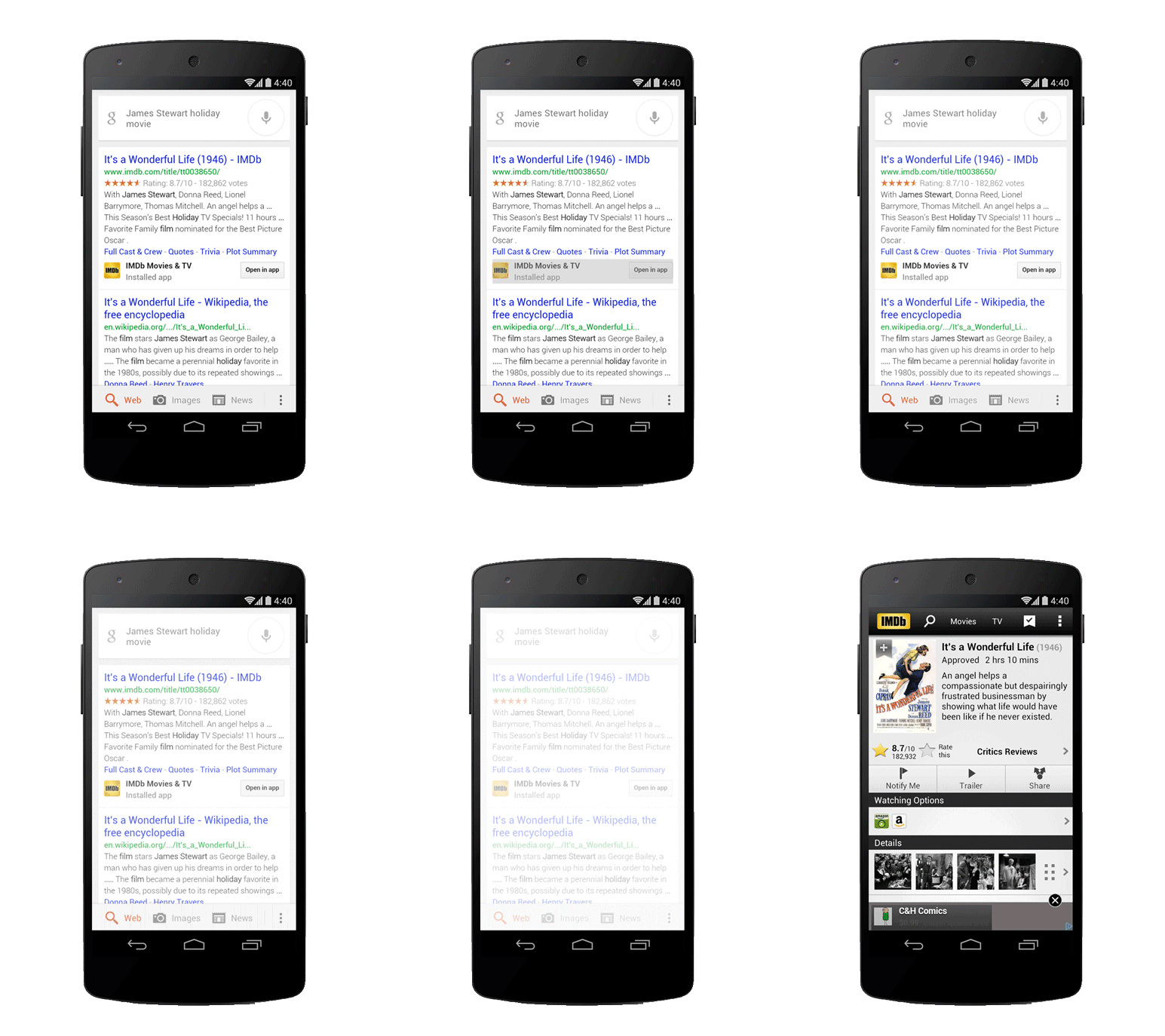
A task as simple as choosing a movie to see can actually be complex — and the information you want can be in several different places, often in apps. You might get your trivia from IMDb, the box office stats from Wikipedia and ratings from Rotten Tomatoes. Starting today, Google can save you the digging for information in the dozens of apps you use every day, and get you right where you need to go in those apps with a single search. Google Search can make your life a little easier by fetching the answer you need for you — whether it’s on the web, or buried in an app.

Getting you there faster
Let’s say you’re getting ready for the holidays but can’t remember the name of that classic Christmas movie you want to show your children. Now, you can use Google search to find the movie and learn more about it in one of your favorite apps.

Helping you find just the right app
Sometimes, the best answer for a search can be an app. Say you want to explore downhill skiing — now, you can just ask Google for downhill skiing apps and get a collection of useful apps.


These new features are rolling out now on Android (through the Google Search app or directly in Chrome and Android browsers). App listings for from Google Play will appear in search when they’re relevant. You’ll be able to search within a select number of apps initially (learn more). We’re working with developers to add more over the coming months (if you’re a developer, learn more). 

This is just one step toward bringing apps and the web together, making it even easier to get the right information, regardless of where it’s located.

Posted by Scott Huffman, VP of Engineering
04 Dec 22:22

Jane Austen MMO gets funding, promises 18th century delights

by Josh Lowensohn

Ever, Jane, the game that aims to let players live in "the virtual world of Jane Austen," is a go after hitting its funding this week. The Kickstarter project netted roughly $10,000 more than its $100,000 goal, and will take its current prototype into a completed game. That includes adding various game scenarios like dinner parties, hunting, and fishing, as well as expanding the world to include multiple villages. Some of the project's stretch goals (which were not reached) could have brought music, estate planning, and even virtual farming.

Continue reading…

04 Dec 22:22

Yahoo Closes Above $38 For The First Time Since Early 2006

by Alex Wilhelm
2013-12-04_13h22_10

Yahoo shares closed above the $38 mark today, cresting that barrier for the first time since early 2006 on the strength of a nearly 4 percent gain on the day.

Yahoo has since endured a long winter of CEO changes and lackluster direction. But the company’s shares have rallied strongly under the leadership of CEO Marissa Mayer, who took on the role in July 2012. While Yahoo still suffers from declining revenue from both search and advertising, Mayer’s time atop the company has seen it execute well on a mobile-first strategy. Mayer has also brought back to Yahoo prestige that it long lacked, helping it better hire and retain employees.

Investors have cheered its rapid-fire pace of acquisitions, but it’s important to keep in mind that Yahoo is set to cash in mightily when Alibaba goes public. The company did recently announce that when Alibaba does in fact float, it will manage to hold onto more of its shares. As Alibaba’s value has increased, so too has the monetary value of Yahoo’s massive stake in the firm, and thus the value of Yahoo itself. The combination of Mayer’s popularity, Yahoo’s growing mobile userbase (now more than 350 million monthly actives), and the Alibaba story have pushed the company’s value north.

Here’s the chart:

2013-12-04_13h10_04

Yahoo has yet to solve the problem of its slipping revenue. Recent hires - including the vaunted Couric and Pogue – directly indicate that Yahoo expects a renewed focus on content will help it drive its top line. However, a rising tide of mobile usage has yet to translate into new revenue.

Yahoo hasn’t proven synergy between the two gambits. Yahoo has enjoyed a torrid rise, but if it wants to continue its ride, showing year-over-year revenue growth will be mandatory.


04 Dec 21:25

Hotfile Shuts Down and Takes User Files With It

by Ernesto

hotfileEarlier today we reported that Hotfile and the MPAA have settled their legal dispute with a $80 million dollar settlement.

While the agreement left room for the file-hosting service to continue its operations by implementing a filtering mechanism, the company has decided to throw in the towel.

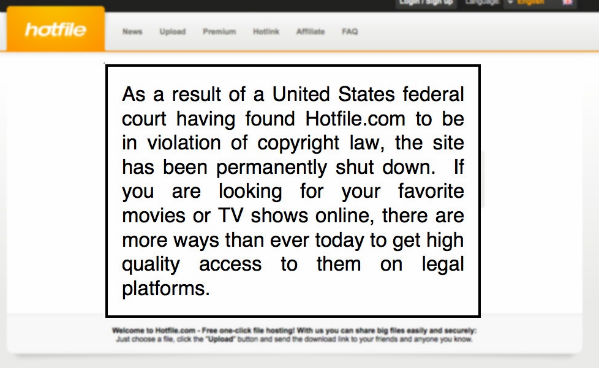
A few minutes ago the Hotfile site was replaced with an image with the following text:

“As a result of a United States Federal Court having found Hotfile.com to be in violation of copyright law the site has been permanently shut down. If you are looking for your favorite movies or TV-shows online, there are more ways than ever today to get high quality access to them on legal platforms.”

The notice in question is strikingly similar to the one isoHunt displayed last month following its defeat at the hands of the movie studios. The similarities suggest that both messages were drafted by the MPAA.

hotfile-gone

The decision to shut down the site without giving any notice whatsoever is causing problems among users and businesses who relied on Hotfile to store files and documents. Samsung firmware provider SamMobile, for example, has been forced to move its files to another hosting provider with a two day break in service.

“It will take at least 48 hours before we’re able to finish uploading all firmware, so do forgive us if you’re unable to get that firmware you wanted to download for the next couple of days,” SamMobile notes.

It’s unclear how many of the millions of Hotfile users stored files without a backup, but the number could easily run into the tens of thousands.

TorrentFreak has reached out to Hotfile to ask whether the company will offer a solution for affected users, but we have yet to hear back.

Following the Megaupload debacle early 2012 this is the second major blow for a US-linked cloud hosting provider. Needless to say, the recent events have put a serious dent in users’ trust, which may ultimately hurt the industry overall.

Source: TorrentFreak, for the latest info on copyright, file-sharing and VPN services.

04 Dec 21:24

Veronica Mars Movie Set For March 2014

Veronica Mars Movie Set For March 2014

School reunion time...

Thanks to the success of the Kickstarter effort, the film based on beloved, cancelled-too-soon ‘teen PI TV drama Veronica Marswas shot earlier this year. Creator / director Rob Thomas has been editing and test-screening the movie, and has now revealed to Entertainment Weekly that it’ll be out – in the States, at least – on March 14, 2014, almost a year to the day after the original fund-raising campaign kicked off.

Veronica (Kristen Bell) is returning in more ways than one. The film finds her headed back to her hometown of Neptune, California, after 10 years away, to aid former flame Logan (Jason Dohring), who has been accused of killing his pop star girlfriend.

While the original idea from Warner Bros. was to open in a limited release in cinemas and expand via digital platforms, the plan is now to give it a wider launch. Thomas seems pleased, especially since he went about making the film with more ambition than money even with the fund drive.

“There are smart ways to do a movie of this size – and we chose none of them,” he tells EW. “We are a low budget movie with big set pieces and 60 speaking roles. A murder mystery in a house would have been more cost effective. But I think we have managed to pull it off.”

With luck, Veronica will make her way to the UK soon after the American release. There’s a clip up at EW if you need a fix of classic Mars snark.


04 Dec 21:22

Good read: Andy Rubin now heading up Google's robotic moonshot

by Alex Dobie

Andy Rubin

Former Android head Andy Rubin has been busy since he stepped down to explore a "new chapter at Google." The New York Times reveals in an article today that Rubin has been heading up a new venture at the tech giant, and it's all about robots. Following the acquisition of seven companies over the past six months, Google is looking to create "a new generation of robots." For the moment the project isn't aimed at consumers, but at industry — specifically, electronics manufacturing, supply chain and logistics work, much of which is currently done by humans.

There are more details about possible uses for Google's future robot army in the full article, linked below. And while the project is admittedly a "moonshot," with a decade or more of development time ahead of it, it's easy to see the potential it brings. Rubin himself likens it to Google's self-driving car project — still in development, but now closer to reality than science fiction.

Read more: Google Puts Money on Robots, Using the Man Behind Android


04 Dec 21:17

Sugru To Offer A Kit To Attach Anything To Anything

by John Biggs
ZxiezkgRQMKE5NFWIO1S

While attaching one thing to another is a fairly basic process – epoxy is still a thing, after all – what do you use if you want to occasionally remove that thing from the other thing? The answer? Magnets. And Sugru.

Sugru, the rubbery, self-hardening material that allows you to fix nearly anything, is planning on offering a very simple connection kit for hardware hackers. It comes with four magnets and a bunch of Sugru. To use it you simply create a little mountain of Sugru, stick a magnet inside, and attach it to one surface. Then you do the same for the other surface. Once the material hardens, the magnets will hold your stuff together without slipping.

The kits will cost $16 when the company begins making them this year and they are offering pre-orders now. While this definitely isn't rocket science – any yutz can buy some magnets – it looks like the folks at Sugru have thought this through and are offering just the right magnets and just the right material for an ideal experience. In short, it looks pretty Sugreat.

Get it?


04 Dec 21:08

DHS stalls no-fly list trial by putting witness on no-fly list

by Cory Doctorow

Phil writes, "Edward Hasbrouck of the Identity Project is doing a fantastic job of reporting on-site from Ibrahim v. DHS, the first legal challenge of United States government's no-fly list that has ever seen a courtroom. On the first day of trial, the judge learned that the plaintiff's daughter, scheduled to testify, was delayed because she had been denied boarding of her flight because she was put a Department of Homeland Security no-fly list. DHS staff deny this. The government's lawyers told the judge that the daughter is lying. The airline provided documentation of the DHS no-fly order. The subject matter of this trial is intense---restriction of movement based on blacklists---but there's no sign of an end to the jaw-dropping entertainment."

“None of that was true,” Ms. Pipkin told the court this morning. “She didn’t miss the flight. She was there in time to check in. She has not been rebooked on another flight.” And most importantly, it was because of actions by the DHS — one of the defendants in Dr. Ibrahim’s lawsuit — that Ms. Mustafa Kamal, was not allowed to board her flight to SFO to attend and testify at her mother’s trial.

Ms. Pipkin said that Ms. Mustafa Kamal had sent her a copy of the “no-board” instructions which the DHS gave to Malaysia Airlines, and which the airline gave to Ms. Mustafa Kamal to explain as much as it knew about why it was not being allowed to transport her. Ms. Pipkin handed Judge William Alsup a copy of the DHS “no-board” instructions to Malaysia Airlines regarding Ms. Mustafa Kamal.

Major props to Malaysia Airlines for providing a copy of the DHS instructions to Ms. Mustafa Kamal. Other airlines receiving similar instructions have acquiesced to DHS orders to keep the instructions from the DHS, and the reasons for the airlines’ actions, secret from the would-be travelers whose rights are affected. So far as we know, this is the first time an actual no-fly order has been disclosed to a would-be traveler or potentially to the public.

Archive of Dr. Rahinah Ibrahim posts (Thanks, Phil!)


04 Dec 21:03

Starred Items!

We’re excited to announce that starred items are now live in The Old Reader.  This has been one of the most requested features and something we’ve felt belongs in the application for a long time.  Hotkey (f) and API support are also available.  Starred items will automatically be sent to pocket for users that have it activated.

As most of you know, our focus over the past few months was to increase performance and stability of The Old Reader.  We’ve made tremendous strides and can now focus on adding functionality and making this tool a long-term sustainable platform built for the Open Web.  The best is yet to come.

Thanks for using The Old Reader!

(www.catgifs.org/2013/09/07/cat-surprised-cat-animated-gif/)

04 Dec 14:09

I'm Sure You'll All Agree

by Bill Crider
04 Dec 14:07

The Wrecking Crew - documentary about the famed studio musicians of the 1960s and 1970s

by Mark Frauenfelder


I've seen the fantastic documentary, The Wrecking Crew, about the legendary group of studio musicians who played the instruments on a great many of the songs recorded by famous groups of the 1960s and 1970s. The documentary is finished, but the filmmaker (son of Wrecking Crew guitarist Tommy Tedesco) needs $250k to pay the licensing fees for the 120+ music cues in the film. He's launched a Kickstarter to raise the funds and is well over halfway towards his funding goal. I'm rooting for this to happen because this film deserves to be seen.

This is a documentary film about an elite group of studio session musicians in Los Angeles in the 1960’s who played on hits for the Beach Boys, Frank Sinatra, Nancy Sinatra, Sonny and Cher, Jan & Dean, The Monkees, Gary Lewis and the Playboys, Mamas and Papas, 5th Dimension, Tijuana Brass, Ricky Nelson, Elvis Presley, Johnny Rivers and Phil Spector's Wall of Sound and that’s just a few! The amount of work in which they were involved was tremendous.

"The Wrecking Crew" The Untold Story of Rock & Roll Heroes


04 Dec 13:59

Abandoned and hidden tube stations beneath London.

by Cory Doctorow


Tom writes, "Subterranean London is a strange and fascinating world, a labyrinth of underground tunnels that range from Victorian sewers to wartime bunkers. Among them is the famous London Underground network, known as the Tube due to the shape of its deep level tunnels. The network boasts around 40 ghost stations, from including entire stations that closed decades ago as well as disused platforms hidden behind iron gates in still operational hubs. This article looks at 13 of London's most impressive abandoned underground stations."

If you like this, check out Peter Laurie's classic Beneath the City Streets, a comprehensive list of subterranean shelters, bunkers, tunnels, and tubes (I drew on it heavily for Pirate Cinema).

To a pedestrian walking through Whitechapel, nothing remains to indicate where St Mary’s Station once stood. Flattened by a German bomb during WWII, while people cowered on the disused platforms below, the remains of the building were broken down and carted off in the ’40s, leaving no trace of the former entrance. Below the Earth though, it’s a different story. Closed down in 1938 and largely bricked up during the Blitz, St Mary’s nonetheless survives – a collection of grim, graffiti-encrusted corridors and tracks leading nowhere. In the 70-odd years since its abandonment, TFL have routinely repurposed various bits of the line, leaving very little to mark the resting place of this old East End station. What does remain is cold and bleak and difficult to access. However, a tiny portion still remains visible to those travelling on the District Line: an old connecting line known as St Mary’s Curve can just about be glimpsed when arriving at Aldgate station from the Western side.

13 Abandoned Stations & Disused Platforms of the London Underground [Urban Ghosts] (Thanks, Tom!)

(Images: Bowroaduk)


04 Dec 13:53

EE expands LTE footprint to 10 new markets, more to come by end of year

by Andrew Martonik

EE SIM

29 total markets to be lit up from today to Christmas

It has been just over a month since EE's last LTE expansion, and now the U.K. carrier is adding 10 more markets to the network. Going live today are the following markets:

  • Bath
  • Bournemouth
  • Brighton
  • Cambridge
  • Darlington
  • Newcastle-under-Lyme
  • Northampton
  • Poole
  • Portsmouth
  • Redcar

Now this doesn't come as a huge surprise to us, as our own Alex and Richard have been seeing EE LTE in some of the above markets prior to today, but it's always good to know when the expansion is official. EE is claiming that the expansion isn't done this year though, and that 19 more markets will be lit up with the higher-speed data by Christmas. Hit the break for the full list of areas.

Source: Engadget

read more


04 Dec 13:52

Sky Go tablet app now available

by Alex Dobie

Sky Go

Dedicated tablet app looks just like the phone equivalent 

British satellite broadcaster BSkyB has launched a dedicated tablet version of its Sky Go app, which allows subscribers to stream live TV and on-demand content to their Android devices. Sky says the app, like its smartphone counterpart, also gives customers access to more than 800 movies and a library of "hundreds" of entertainment shows and kids' content.

The launch of an official tablet app follows the gradual rollout of the Sky Go smartphone app over the past year — that app is available for a selection of popular Android devices sold in the UK. However the design of Sky Go for Android hasn't changed markedly in the tablet version — in fact it's almost identical to the phone version, leaving a lot of dead space on a 7-inch screen.

Sky Go for tablets is available now on Google Play for free, though you'll need a Sky subscription to use it. The app is compatible with "the majority of Android tablets that are 7 inches or larger and running Android 4.0 or later," according to the Play Store listing.

via: TheNextWeb


04 Dec 13:52

The Blacklist renewed for season 2!

http://tvbythenumbers.zap2it.com/2013/12/03/the-blacklist-renewed-by-nbc-for-second-season/219888/

It stars "Avengers: Age of Ultron" star James Spader and "Dollhouse"s Harry Lennix.

[ edited by Avengersfan on 2013-12-04 06:29 ]

04 Dec 13:47

The Next-Gen USB Plug To Be Smaller And Finally Reversible

by Matt Burns
IMG_8893

Our long worldwide nightmare is almost over. The next USB plug will finally be reversible just like Apple's Lightning connector. No more blindly jamming the connector towards the receptacle, just knowing that it's not going to work. In the near future, the plug will always be the right side up.

The upcoming connector, called Type-C, is designed for the USB 3.1 specification and scheduled to be finalized by the middle of 2014. The plug is said to be the size of the MicroUSB plug and sport an array of new features including scalable power charging and support data rates nearing 10 Gbit/s.

"While USB technology is well established as the favored choice for connecting and powering devices, we recognize the need to develop a new connector to meet evolving design trends in terms of size and usability," said Brad Saunders, USB 3.0 Promoter Group Chairman, in a released statement today (PDF). "The new Type-C connector will fit well with the market's direction and affords an opportunity to lay a foundation for future versions of USB."

The USB 3.0 Promoter Group didn't release a picture of the upcoming connector.

This plug will not mate with existing USB plugs and receptacles. This means, sadly, one day, the dozens of MicroUSB cables accumulating in a junk drawer will be obsolete. Your collection will be a relic. But, I for one, welcome the march of innovation with open arms just so I don't have to do the little dance flip-flopping dance every time I need to plug in a gadget.


04 Dec 13:45

Chrome apps could start coming to Android and iOS as early as next month

by Sean Hollister

In September, Google told us that Chrome Apps would come to mobile operating systems as well — that packaged versions of web apps could even be sold in Google Play and the iOS App Store, once the company had worked the kinks out. At the time, the company cautioned that such an idea was a ways away, that Google wanted to target Windows desktops first. But it seems that Chrome apps could arrive on Android and iOS sooner than we thought.. Google has figured out a way to port apps to mobile using a new set of tools, and it hopes to release a beta version of those tools as soon as next month.

Continue reading…

04 Dec 13:43

Three UK customers can now roam in the US for free

by Tom Warren

UK mobile operator Three is extending its free roaming destinations today. After initially rolling out free roaming to some European markets, Three now supports the US, Indonesia, Sri Lanka, and Macau. Three customers will be able to use their UK data, text, and calling allowance while in the US and 10 other countries for no additional cost. While a number of UK carriers offer roaming services across Europe, Three is the first to provide free data, calls, and text roaming to the US.

Three’s changes mirror a similar move by T-Mobile in the US to allow its customers to roam freely at no extra charge in over 100 countries around the world at 2G speeds. Traditionally, UK carriers force customers to purchase expensive data add-ons or pay...

Continue reading…

03 Dec 22:55

A Step-by-Step Guide to Getting Out of Debt

by Johnny Moneyseed

A Step-by-Step Guide to Getting Out of Debt

You're reading this because somewhere along the lines, you spent more than all of your money. You may have failed to control your impulses. Or maybe you were unprepared for the unexpected and ended up with so much debt from medical expenses that you're struggling to get by. Whatever the case may be, you have debt, and it needs to be eliminated.

This post originally appeared on Johnny Moneyseed.

I used to suck with money. It wasn't until I was about 25 years old when I started giving a shit about my finances. My wife and I had made some poor financial decisions—who hasn't?—all before we were officially deemed "The Moneyseeds," of course. We ended up with a mountain of debt, big enough to warrant its own ski lodge, and if it sold us season passes, we probably would have just added that to the pile as well.

Shortly after we decided to spend our lives together, we realized that our debt was a big, ugly problem and it needed to go. We began to look at our debt not as a monthly bill, but as financial shackles that were holding us down from making any progress in our new life.

Have you ever heard anyone say any of the following statements?

"Having more money would fix all of my problems. I would be out of debt so quickly!"

"This new iPhone is great, and thanks to my credit card it only costs me $20/month."

"I don't think getting out of debt is even possible. Where do you want to get dinner from tonight?"

These people are in debt denial. It's a serious case that affects around 50% of North American consumers. Basically, people think it's okay to carry debt. That it's okay to buy something now that costs $300+ and only pay the bare minimum every month to pay it off. Then, there are people that know that having debt isn't okay, but they have it anyway and spend most of their debt repayment money on stuff they absolutely don't need.

Fifty percent of U.S. households have credit card balances that are, on average, in the $14k range! Those same people are in front of you in line at Starbucks, they're browsing for new TVs at Best Buy, and they're getting box upon box delivered to their house through Amazon. They don't treat debt like a priority.

For you, reckless spending ends today. Follow this guide, and you won't just get out of debt, but you'll get out of debt way faster than you had ever imagined.

Step 1: List All of Your Debts, Their Balances, and Interest Rates

A Step-by-Step Guide to Getting Out of Debt

This should be a pretty obvious first move, but don't let the simplicity of it get the best of you. Get a piece of paper, a Google Spreadsheet, or open Notepad on your computer. Go to the website of every financial institution to which you owe money. Then, copy down all balances with their respective APRs (interest rate) exactly as they appear. It's also very beneficial to know what your minimum payments are for every account. After tracking down all of your debts, you'll have a decent idea of how much is owed. Let it sink in, but don't worry, in a few more steps we're going to start getting rid of it.

Step 2: Set Periodic Goals

Becoming a goal-oriented person is one of the most powerful things you can do for yourself, in finances and pretty much every other area of life. Goals allow us to break really hard things into manageable chunks that we can feel good about after we complete them.

When you set a goal to pay off your debt you first assess how much money you can contribute toward debt repayment every month. Then you can do a rough estimate of how long it will take you to get out of debt. (Debt / Monthly repayment = Amount of months until you're debt free). Just understand it could take longer than this to repay your debt, but this is a good way to understand roughly how much longer you have to bare this burden.

The big goal—the final goal—is to pay off all of your debt. That should be the end point of your timeline. Then, it's up to you what other goals you'd like to set. You could make every $5,000 mark a goal. Or every $10,000 for those with student loans. Once your goals are in place, they'll be almost impossible to ignore. This will push you toward accomplishing your goals way faster than you would have originally anticipated.

Step 3: Start Paying Off Balances from Highest to Lowest APR

A Step-by-Step Guide to Getting Out of Debt

There are a few trains of thought when it comes to the actual debt repayment portion. The first being: Pay balances low to high. This is dumb, because it doesn't take interest rates into consideration. The second, and more logical: Pay off the debt with the highest interest rate first, then work your way down.

Make the minimum payment possible for every account, besides the one that you're trying to eliminate first. This allows you to focus on it, and to lose the least to interest. I've heard of people going to debt consolidation counselors, and also of people who transfer all of their balances to new credit cards that have 0% APR for an introductory period. While in theory these ideas could work for you, they aren't the best ideas. Just imagine for a second: Why would anybody want to give you an unsecured loan to consolidate your debt? Or a 0% rate?

Step 3.14: Every Time You Pay Off a Debt, You Have More Money to Throw at the Next One

This concept is known as "snowballing." I think "avalanching" sounds cooler, so let's call it that instead. Now, when you've paid off a debt, you'll have freed up some money that you can now use in conjunction with the minimum payment that was already being made on the next debt down the list. Then when the next debt is paid off you keep the avalanche going.

Here's where you become whiny...

Step 4: Trade in Big Ticket Items

A Step-by-Step Guide to Getting Out of Debt

Do you have a shiny new-ish car or two in the driveway? You can significantly reduce your total debt by trading in your car for something cheap. If you can get $18,000 for a trade-in, and you can find a $10,000 car on the lot then you just came into $8,000 to help you pay off debt. If you can trade-in two cars and concede to just having one you could double or triple this amount.

You can further apply this to boats, yachts, jet-skis, snowmobiles, Segways, or any other ridiculous self-balancing modes of transportation. Now isn't the time to have toys. You can have toys when you're debt free.

Step 5: Sell Almost Everything

Now that ALL of your big ticket items have been either sold or traded in for less expensive versions, you can start becoming a professional Stuff seller. American houses and apartments are filled with crap we don't need. A good way to figure out what you do need: Carry around a notebook and write down every item that you use over the course of a given week. It's going to be a lot less stuff than you imagine. The rest—the crap that added to the debt problem—has to go. It's unnecessary and dragging down your recovery efforts. Get rid of the stuff. There's always time for stuff when you're debt free.

Step 6: Work, Work, Work

A Step-by-Step Guide to Getting Out of Debt

This one is going to blow your mind: To pay off debt faster you can work more. Overtime, second jobs, babysitting, etc. Check out this article I wrote about how to make more money. Pretty obvious, right? More money, more debt repayment.

Step 7: Reward Yourself

Achieving your goals, no matter how big or small should be celebrated. Don't take this to mean that you should go out and spend hundreds of a dollars at the Mall for paying off $100 of your debt. Instead, buy yourself a cup of coffee. For a free alternative you could guilt people into congratulating you by posting your achievements on Facebook.

Step 8: How to Use Windfall Money

A Step-by-Step Guide to Getting Out of Debt

My definition of windfall money is: Any money that you receive that didn't directly come from your employment. Tax returns, bonuses, inheritances, birthday money, wedding gifts, whatever. If you are in debt then windfall money isn't fair game. You should apply it directly to your debt. In most cases you're getting free money to pay your debt. You couldn't ask for a better gift, so don't blow it.

Step 9: Breakdance Party

You've made it. All of your debt is completely paid off, so you officially earn the right to have a breakdance party. Turn on some old school Run DMC, have a friend flick the lights on and off, throw down a cardboard box, and start busting out your best Suicide Rubberbands (learn how to do that move from a 12 year old).

Guide to Becoming Really, Really, Ridiculously Debt Free| Johnny Moneyseed


Johnny Moneyseed plans on fully funding a self-retirement by age 35 from a typical Middle Class salary. He has mastered the arts of saving and investing. He blogs to teach others to do the same: to stop unnecessary spending and to start living a First Class life.

Images via NotarYES, Burlingham, hans engbers, Halfpoint, and Rrraum (Shutterstock).

Want to see your work on Lifehacker? Email Tessa.

03 Dec 22:22

Laurel & Hardy Biopic In Development

Laurel & Hardy Biopic In Development

From Philomena co-writer Jeff Pope

After co-writing Philomena with Steve Coogan (and sharing the Venice Film Festival’s Best Screenplay Prize), Jeff Pope is not a man wanting for work. He’s already scored one job: writing a biopic of cinema comedy legends Stan Laurel and Oliver Hardy.

While the planned 90-minute film is likely to air on the Beeb over here, US audiences may end up seeing it on the big screen thanks to a deal with Philomena distributor The Weinstein Company. Stan And Ollie will focus on Laurel and Hardy’s 1953 tour of the UK. It came at a time when their fame was starting to decline and, after 106 films together, they were beset by personal issues.

The tour, however, was initially a big success, at least until Hardy suffered a heart attack and was ordered to relax. Though Laurel was offered a shot at a solo tour, he refused, and waited for his comedy partner to recover for their last few, triumphant performances, shortly after which Hardy died. There’s no word yet on who will play either man, so leave your casting suggestions in the comments or on that fine mess we call Twitter.


03 Dec 22:20

Google Wallet Cards Arriving Now, But Consumer Benefits Remain Unclear

by Sarah Perez
google-wallet-cardThose who signed up for the new Google Wallet debit card at the end of November are now receiving their cards in the mail, following the Thanksgiving holiday here in the U.S. This MasterCard-powered prepaid debit card allows you to link your online Google Wallet balance to a real, plastic card you can use at point-of-sale, at ATMs, or anywhere else a MasterCard is accepted, stateside.

03 Dec 21:09

ACTA about to be quietly written into Canadian law

by Cory Doctorow


Widespread, global protests killed ACTA, the secretive, over-reaching "Anti-Counterfeiting Trade Agreement," which imposed brutal copyright rules on its signatories. But now, the Canadian Conservatives have introduced Bill C-8, which turns ACTA's provisions into Canadian law, and they're fast-tracking it through with little debate or public input.

If passed, C-8 will further criminalize infringement (that is, put Canadians in jail for watching TV or listening to the radio the wrong way), turn the police into private copyright enforcers for the American entertainment industry, and interfere with the trade in legal generic drugs and other products.

What this exercise it will do – and has done – is to allow lobbyists with a maximalist agenda to use this fake problem of fakes to create the potential for interference with legitimate trade in parallel imports, vastly increased criminalization of everyday “infringement”, shifting of enforcement costs from the private sector to the taxpayer, and the interference with the transshipment of generic drugs and other legitimate products. The new law will allow incredible opportunity for abusive or even simply incompetent enforcement. This can be very costly to large and SME business, not to mention consumers. This is perhaps the most sweeping legislation in Canadian IP law in 70 years, and it is being done without adequate hearings, study or the demonstration of any need. Anyone looking for counterfeit products can find them on the street in mid-town and downtown Manhattan. One doesn’t find this kind of flagrant counterfeiting in Canada. The “evidence” of a major problem with counterfeit good that can’t already be dealt with via existing laws almost entirely anecdotal or absent. Piling on of responsibility to border officials is an unnecessary and costly mistake. The DNA and fingerprints of the movie and record industries are all over this bill.

Bill C-8 re Anti-Counterfeiting: Is Parliament Rushing to Respond to a Fake Crisis About Fake Products? (via Techdirt)

(Image: Stop Acta, a Creative Commons Attribution Share-Alike (2.0) image from 37642844@N03's photostream)


03 Dec 21:06

How to Pick Your Next Android Phone: 2013 Edition

by Eric Ravenscraft

How to Pick Your Next Android Phone: 2013 Edition

Put simply, there are too many Android phones out there. The only way to know which ones are worth your time is to follow tech news every day. For those that have other things to do, here's what matters when buying a new device.

For starters, the golden rule: there is no "best" Android phone. There's only the best Android phone for you. If you like it and if it's in your price range, it's your best Android phone and no one gets to tell you otherwise (unless you actually chose a sucky phone, in which case you probably didn't follow this guide very well). Also, we're going to cover mainly U.S. phones, but understand when it comes to buying unlocked international devices, you may need to do some research to ensure you're not buying a phone that's incompatible with your network.

When (and How Often) Should I Upgrade?

How to Pick Your Next Android Phone: 2013 Edition

When to upgrade is going to depend heavily on what type of user you are. Do you like keeping up with all the new hotness? Do you break your phones frequently? Can you afford to buy phones off contract when necessary? How upgrades apply to you will depend heavily on these factors, but in general here are your main options for upgrading your phones:

  • Regular two year contracts, for the average upgrader: Between AT&T, Verizon, and Sprint, most people sign up for a two year contract on their service anyway. T-Mobile, while it technically doesn't have a contract on service, will finance your hardware for two years. Without doing anything else, all four of these carriers will offer you the chance to upgrade after two years to a new device for relatively cheap or free. For most people who don't need to keep up with the Joneses, this is a perfectly fine interval.
  • Accelerated upgrade plans for the gadget nerds: All four of the major US carriers also offer some form of early upgrade plan. Whether or not it's worth taking advantage of is a whole guide unto itself, but the short version is, if you want to upgrade frequently, T-Mobile and Sprint are your best bets, but Verizon might be worth it if you upgrade all the time to phones that cost more than $600 a piece off contract.
  • Off-contract phones for the mid-cycle upgraders, or the non-commital: In the early days Android phones, if you wanted to buy a device without a contract subsidy, it could easily cost you upwards of $600. Today, you can buy the Nexus 5 for a starting price of $350, the Moto G for $179, and even the Moto X was on sale yesterday for $350. Not everything is available for cheap, but there are plenty of inexpensive options if you either hate contracts, or want to scratch that itch until your next upgrade cycle.

All of that being said, just because you can upgrade doesn't mean you should. We all get gadget lust, but a couple new features or a new version of Android are rarely worth an extra $300 every six months (much less $600+ for some of the pricier models).

What time of year to purchase your phone can also be a bit of a crapshoot. There's never a particularly good time where you're sure not to see a new phone get released, but there are bad times. While the following can change from year to year, here are some common hot periods of activity:

  • Spring (Samsung, HTC): Over the last couple of years, HTC, Samsung, and Google have all had major products or platforms to announce within the same short time span from around February to June. The One, One X, Galaxy S4, and Google Play Editions of both companies' major flagship phones were all announced sometime in this time frame over the last couple years. If you're a fan of Samsung or HTC and you're looking at an upgrade in February, it's probably best to wait a couple months.
  • Fall (Motorola, LG, Google): During the last couple of years, LG and Google have both announced or released major phones between August and November. This is in part due to the fact that for the last two years, LG has been the one making the Nexus line of phones. Motorola also joined the fray this year with its new Moto X and Moto G phones, released in August and November respectively. It's impossible to say Motorola's release schedule is a pattern until next year, but given that Google favors the fall (and Google owns Motorola), it wouldn't be surprising.

Of course, none of these times are very far away from another product launch and, in a way, that's the curse of Android. However, if you narrow it down by what manufacturer you want, you can usually pick out a pretty good time to buy a phone you're looking for.

What Features Really Matter in a New Phone?

How to Pick Your Next Android Phone: 2013 Edition

These days, it might almost be easier to list what doesn't matter. In the early days of Android phones, the spec war was all-important because getting a faster processor could mean the difference between a smooth experience and a totally janky one. Nowadays, with quad-core processors, 1080p displays, and widely-supported 4G radios, a better emphasis might be placed on striking the right balance.

That being said, here are some key features to look at when deciding on what phone to get:

Camera

The camera is easily one of the most important features you can look for in a new phone. Not only is a smartphone the only camera most of us will carry around, but it's also the feature with some of the widest variance between Android devices. Don't just go by the number of megapixels, though. It's fairly common knowledge now that more megapixels doesn't mean more better. Different manufacturers improve their cameras with different methods (for example, HTC famously launched a 4MP camera with bigger pixels to capture more light), but the best way to tell whether a phone's camera is good enough for your needs is to take a look at some comparison tests. You can get review samples from just about any moderately popular Android device somewhere online, and in many cases next to a few other identical shots from comparable phones.

Display

While we've covered whether or not you really need a 1080p display in your phone (tl;dr: unless you have a phablet, you're probably trading battery life and processing power for a visual benefit you can't discern), the difference between an AMOLED or LCD display can be a deciding factor for you. AMOLED displays tend to be brighter and more saturated, but use marginally less battery because they only light up the pixels they need. However, LCD displays can be more neutral and have realistic color representation. Ultimately, it's up to your preference, but when deciding which phone looks better, take a look at what type of display it is and how well it's calibrated, rather than trusting that the phone with more pixels will look better by default.

Battery Life

One of the few features in Android phones that hasn't been improved that much over the years is battery life. It's gotten better, but the amount of things we do with our phones has also increased, meaning those losses are somewhat negated. There are two main schools of thought when it comes to approaching the battery life problem. Some devices like the Note family or the MAXX line of phones choose to boost battery life by throwing in gigantic batteries, sometimes to the tune of 3,000 mAh or more. Other devices like the Moto X aim for hardware optimization to reduce battery usage and squeeze more power out of a regular-sized battery. Both options are good, but when in doubt, check some online battery comparisons to see which phones fare the best. Part of this may also be determined by how big you like your screen—if you like giant screens, then you'll probably end up with a big battery.

Manufacturer Skins

While your devoted Android enthusiast friend will tell you there's nothing better than #holoyolo, the truth is that each manufacturer puts their own spin on Android and it's not always horrible. Before you pelt me with fruit, here are some distinguishing features from various manufacturer skins:

  • HTC Sense: Blinkfeed and Peel. While it might sound like an entertaining comedy duo, Blinkfeed and Peel are two particularly awesome features built in to the HTC One. The former is a news feed of your social content that lives on your home screen and, contrary to initial impressions, is actually pretty useful. Peel, on the other hand, makes use of the infrared port on the One to control your television and other IR-enabled boxes.
  • Samsung Nature UX: Multi-Windows and Stylus Support. Samsung skins may be a bit of a crapshoot, but the one thing you can't deny is that they managed to make styluses cool again with the Note family of devices. The multi-window feature that eventually rolled out to most major Galaxy devices also allows users to run multiple apps at once, which makes good use of all that extra screen real estate.
  • Motorola: Touchless Controls and Active Notifications. Motorola's skin is perhaps the least invasive, but the company still makes some changes. For example, the Touchless Controls app allows you to issue voice commands to your phone without touching your device. Active Notifications allows you to see your upcoming messages, jump straight to certain apps, and even turns on the display as soon as you pick up the phone.

Stock Android is great, don't get me wrong. However, you can get almost all of the cool parts on nearly any device. If you want a little something extra, it's okay to check out what the manufacturer has added in. This should be relatively easy since most companies will advertise their exclusive features heavily. If you decide you don't like the skinned experience, you can usually root and install a custom ROM later.

Android OS Updates

This is something that was of the utmost importance back in the day but, as we've discussed before, the actual version of Android you're on is beginning to matter less and less. Jelly Bean (4.1) and up bring all the Google Now hotness that gets everyone drooling and Ice Cream Sandwich is the new lowest common denominator for app support, which means that an overwhelming majority of devices are already running a relatively modern version of the OS. With new Play Services features coming to devices running versions as old as Gingerbread, updates aren't as important as they used to be.

That being said, if you're a stickler for making absolutely sure you have the most up to date software, there are three device categories you can look into: Nexus devices, Google Play Editions, and certain Motorola handsets that have been minimally modified from stock Android. While the former two come with general promises to get timely updates, Motorola (now owned by Google) recently floored everyone by getting an update to KitKat well before even certain Google-blessed devices. Time will tell if the trend continues, but with Google looking over Motorola's shoulder, chances are good that it will. If you're not willing to take the bet, though, Nexus phones and Google Play Editions have still proven themselves to be safe havens for speedy updates.

What if I Care About Rooting?

How to Pick Your Next Android Phone: 2013 Edition

The landscape for rooting and installing custom ROMs on your phone has changed dramatically over the last few years. Between the proliferation of locked bootloaders and Nexus devices, there are now a few categories your phone can get lumped into that will determine how much support your phone will see. In descending order of likely support:

  • Nexus devices: These are Google's flagship phones and tablets and they're designed to be the go-to platform for developers. As such, they include the ability to unlock right out of the gate. Furthermore, Android enthusiasts (read: the ones who develop the ROMs you love) gobble them up like candy canes at Christmas.
  • Developer editions/Google Play Editions: Starting at Google I/O this year, Google started releasing stock Android versions of two major flagship phones: the HTC One and Samsung Galaxy S4. These unlock in the same way as Nexus devices, which means you don't need to wait around for someone to find an exploit to gain root access. It comes standard. The same applies to developer editions of major phones, which carriers sometimes offer, though it's not always guaranteed which devices will get a developer edition.
  • Popular phones: In the past, your best bet when it came to rooting and installing custom ROMs on your phone was to buy the hardware that everyone was getting and hope for the best. Except for those mentioned above, that rule still tends to hold true. We've also seen developers port the stock Android version of ROMs for the GPE editions of the HTC One and Galaxy S4 to the regular versions of those same phones, so if you want to try out a manufacturer-skinned device but still have some backup options, it's hard to go wrong with devices like these.

If rooting your phone is important to you, here's what you should definitely not get:

  • Obscure devices with low specs: It's probably possible to get root access on your Kyocera Rise of the Machines, but you shouldn't count on a ton of popular ROM support in a timely manner.
  • Devices with locked bootloaders: Locking a bootloader won't guarantee that you can't get root. However, with so many options available for phones that make root easily available, or at least don't lock bootloaders, developer attention isn't going to be as strongly focused on these devices as it has been in the past.
  • CDMA devices (when possible): The one rule that can negate all the others here is CDMA. Galaxy Nexus owners on Verizon and Sprint in particular have felt the sting of slow updates and minimal support because their devices are the CDMA variant of otherwise very open phones. It's not a guaranteed curse of no support, but if you want to raise your chances if getting in the fun developer party, stick with GSM phones like those on T-Mobile and AT&T.

When it comes down to it, most of the major Android phones on the market right now are pretty good and it's hard to go wrong if you find a device that's right for you. Find out what your priorities are, know what you need the device for, and find the one that does what you need. Everything else is comment thread fodder.

03 Dec 21:02

Three UK's 4G LTE now live for some customers in three cities

by Alex Dobie

Three

4G live for 'thousands' — but not all — customers in London, Manchester, Birmingham; staged rollout will bring LTE to 1.5 million by end of February

Without any sort of official announcement, British carrier Three's 4G LTE service has gone live for some customers in London, Birmingham and Manchester today. Based on tweets from Three's official Twitter account, "a few thousand" customers in these three cities have been given access to the new LTE service, and the operator has told Android Central that by the end of February 1.5 million customers with 4G devices will be able to use the network. That's the target timeframe for allowing anyone with a capable handset to use Three's 4G, but right now access seems to be determined by the luck of the draw.

The reason for this, Three tell us, is to ensure the smoothest possible rollout for its 4G network, though a side-effect of this staged rollout has been a stream of tweets from disgruntled Three subscribers. The carrier previously committed to a launch in London, Manchester and Birmingham in December, but made no mention of its plans to restrict this to a small number of customers at the get-go.

Three says it plans to clear up some of the confusion in a blog post in the near future. Naturally, we'll keep you posted as well. Meanwhile, if you're on Three in any of the launch cities, hit the comments and let us know if you've managed to get on the 4G network.


03 Dec 21:01

Terrifying new malware uses sound to spread, doesn’t need networks

by Chris Smith
Audio MalwareComputer scientists have developed an audio malware prototype that’s capable of establishing communication between devices that do not have an active network connection, Ars Technica reports. Instead, the lab-created malware uses the built-in microphones and speakers to send out a high-frequency signal from an infected computer to a different source. While it has limited use and can only send 20 bits of data per second to up to 65 feet the audio malware concept can still be used to send out significant data, including user and passwords for certain systems. Additionally, the distance can be increased by adding more attacker-controlled devices to repeat the audio signal.

Continue reading...
03 Dec 15:49

A conversation with Terry Pratchett, author of The Carpet People

by Advertiser

ADVERTISEMENT

Carpet People dof34Deep among the Carpet fronds, where the wild snargs prowl, the Munrung tribe has known peace for decades. But now the old order is unraveling, and a new story is in the making. A story of Fray, sweeping a trail of destruction; of villainous mouls, hungry for power; and of two noble brothers on the adventure of a lifetime.

It’s a story that will come to a terrible end—if someone doesn’t do something about it. If everyone doesn’t do something about it . . .

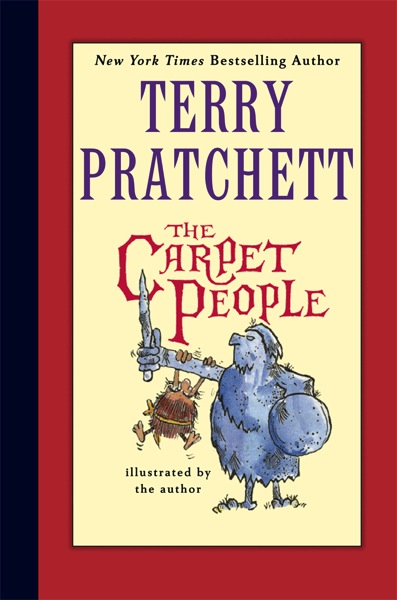
This special edition of Sir Terry Pratchett’s hilarious and wise first novel The Carpet People features his own illustrations, including never-before- published art, and revised text. Also included is an exclusive short story written by Terry at age seventeen, before he went on to create the phenomenally popular Discworld series and become one of the world’s most beloved storytellers.

Cory Doctorow and the famed author discuss building worlds, the legitimacy of authority, and the future:

Cory: You took a bunch of runs at building a world where a million stories could unfold—The Carpet People, Truckers, and, finally, Discworld. Is Discworld’s near-total untethering from our world the secret of its staying power?

Terry: It isn’t our world, but on the other hand it is very much like our world. Discworld takes something from this world all the time, shows you bits of the familiar world in new light by putting them into Discworld. Is that staying power? You tell me.

Carpetpeople01

Cory: What’s the secret to Discworld’s unplumbable depths, and is there something a big world lacks when compared to one that’s smaller (in more than one way), like the Carpet?

Terry: We know about Earth; we know an awful lot about the solar system. When you do Discworld, you, the writer, can more or less change anything if you want to, if you can make it fit. It means you’re god, and that’s a great responsibility. As a writer, you can take bits of the universe and put it in your own new universe. Working in Discworld, you use the word sandwich, and you think: Can I do this? Now I’ve got to have a reason why a sandwich is a sandwich—in our world, it was named after the man associated with its invention, the Earl of Sandwich. Can you have your own universe and still have sandwiches? You have to do it all yourself and decide if you need to open the door into our reality at the same time.

Once Discworld started moving, as it were, it started moving almost of its own volition, because I would write a Discworld novel, and that novel required that such and such should be available, or whatever, and that means that the next time, that’s real in Discworld and the thing grows. And I must say it grows to be rather bigger than a carpet—but with care, it can have just about anything in it.

I’m finishing up Raising Steam, in which the railroad comes to Ankh-Morpork, and an awful lot of things have to be made and discovered until you get to the top of that pyramid. You can’t have Vaseline until someone’s invented something else. You have to create and understand a lot of things before you can move on. And so, since I work on Discworld almost all the time, it grows because I need it to.

Cory: Do you think that there’s any way you could have kept us in the Carpet for anything like the number of books that we’ve gotten from Discworld?

Terry: I was about to say “No,” but right now I wonder. . . . If the idea had taken, I don’t know. I really don’t. But how would it be? It would be almost a kind of . . . People in the Carpet are more or less tribal. What would happen if I . . . You’ve got me thinking!

Carpetpeople03

Cory: So much of your work is about the legitimacy of authority. You write a lot of feudal scenarios, but you also seem like a fellow with a lot of sympathy for (and suspicion of!) majority rule. The witches gain authority through cunning and compassion (Nanny Ogg), through knowledge and force of will (Granny Weatherwax). Kings rule by divine right and compassion for the land; Vetenari, out of the practical fact of his ability to control the city’s factions. The Carpet People is shot through with themes of who should rule and why. Where does legitimate authority spring from?

Terry: The people! The only trouble is the people can be a bit stupid—I know that; I’m one of the people, and I’m quite stupid.

Lord Vetinari is that wonderful thing: a sensible ruler—that’s why he’s so popular. Everyone grumbles about him, but no one wants to chance what it would be like if he wasn’t there. I like Vetinari. I don’t mind authority, but not authoritarian authority. After all, the bus driver is allowed to be the boss of the bus. But if he’s bad at driving, he’s not going to be a bus driver anymore. Now, an interesting sideline on this is the question of the writer’s position is vis-à-vis authority.

A journalist looks at authority as a target as a matter of course. You don’t actually have to fire, but you see it as a target. Since I am tainted as a journalist, I can’t separate that out from being a novelist, and my personal view is that you look askance (at the least) at authority. Authority must be challenged at every step. You challenge authority all the time to keep it on its toes. Vetinari works because there aren’t enough people who think he’s doing a bad job; they’re all factions, in any case. So he balances the world. It’s not everyone being happy, but rather not too many of them being unhappy.

Read the entire interview here.

The Carpet People is now available wherever books are sold. Read an excerpt and learn more here.


03 Dec 15:13

Use the Hairy Arm Technique to Deal with Overly Critical Bosses

by Eric Ravenscraft

Use the Hairy Arm Technique to Deal with Overly Critical Bosses

Sometimes, bosses and clients only exist to find something wrong and correct it. If you're dealing with a particularly critical person, writer Oliver Burkeman suggests adding in an intentional flaw to distract them.

The idea is that when the client looks over your work, they'll find the obvious mistake and, feeling satisfied with having made some kind of input, leave the rest of the work alone. The name comes from one graphic designer who would leave a glimpse of his own hairy arm at the edge of an ad he presented to a client:

An American business consultant, Lawrence San, tells the following story about a colleague he calls Joe, who worked as a graphic designer in the days before computers. One of Joe's clients was forever ruining projects by insisting on stupid changes. Then something odd started happening: each time the client was presented with a newly photographed layout, he'd encounter the image of Joe's own arm at one edge of the frame, partly obscuring the ad. "The guy would look at it," Joe recalled, "and he'd say, 'What the hell is that hairy arm doing in there?'" Joe would apologise for the slip-up. And then, "as he was stalking self-righteously away", Joe said, "I'd call after him: 'When I remove the arm, can we go into production?' And he'd call over his shoulder, 'Yes, but get that arm out of there first!' Then I'd hear him muttering, 'These people! You've got to watch them like a hawk.'"

That arm, of course, was no error: it was introduced so the client could object, and feel he was making his mark – and justifying his salary – while leaving the ad untouched.

Of course, this technique only works on bosses who are notorious for finding flaws where there are none. If you're dealing with a reasonable client, distracting them with obvious problems can potentially set both yourself and them up for failure if they don't catch real issues. Use the technique carefully and sparingly.

The theory of the hairy arm: the tactical benefits of making deliberate mistakes | Oliver Burkeman

Photo by Rich Moore.

03 Dec 15:11

10 Google Chrome Extensions That Save Time And Keep You Organized

by Taylor Hatmaker

There are plenty of reasons Google's Chrome browser has led users to its green pastures in recent years. Chrome is fast and clean and it integrates deeply with Google. Perhaps best of all, Chrome boasts an ever-improving marketplace of lightweight software geared toward hacking your browsing experience into exactly what you’d like it to look and work like.

If you’re new to Chrome, thinking about switching or just looking for a little variety in your workflow, dive into our list of the best extensions for Chrome and start bettering your browser.

Pocket

This well-loved utility formerly known as “Read It Later” does just that. Pocket for Chrome is a great extension that lets you virtually dogear what you’re reading so that you can circle back to it later. That means you finally don’t have to read those 18 viral bait Buzzfeed lists in the middle of your workday—just save ‘em for later. Productivity win!

Download Pocket

Any.Do

Are you a copious "to do" list maker? If you are, Any.Do may just be the extension you've been looking for. Any.Do just keeps getting better. My favorite to do list manager around (I’ve tried a kajillion of them), Any.Do’s Chrome extension syncs your browser with its excellent mobile apps so that you never forget to remember that thing you didn’t want to forget to remember, no matter where you’re working.

Download Any.Do

Evernote Web Clipper

If you’re an Evernote person, this Chrome extension is a no brainer. Clip any bit of the Web you like, from a Facebook photo to a flight confirmation. Annotate your clip and file it away for later in Evernote by clicking the toolbar logo or right-clicking your mouse in Chrome itself.

Download Evernote Web Clipper

Prevent Duplicate Tabs

You've got to like an extension that just tells you what it does without having some fancy name. Prevent Duplicate Tabs does exactly what it says it does: closes old tabs or prevents you from opening new ones so that the damned things stop multiplying like rabbits. If you don’t find your yourself adrift in a sea of too many open browser tabs from time to time, you’re probably lying. Tab addiction is real, and sometimes we don’t even remember what we opened twenty tabs back.

Download Prevent Duplicate Tabs

Web Of Trust

Web Of Trust (WOT) is a browser classic. If you find yourself in the Web’s back alleys, whether on purpose or by accident, this extension will lead you back to safety. WOT rates each site you visit with a clear color-coded system based on crowdsourced browsing data so that you don’t get scammed, hacked or worse.

Download WOT

Switch To New Tab

Another aptly named extension. Switch To New Tab can shave seconds off a task you do about one million times a day. You ever click on a link but not know where the new browser window opened? This extension takes care of that by running in the background of Chrome so that every time you click a link, the new tab is front and center on your browser.

Download Switch To New Tab

Feedly

If you watched on in horror as Google axed Reader, you’ve probably heard of Feedly. An awesome way to subscribe to and consume the parts of the Web you want, Feedly is the best spiritual successor to Google’s late RSS reader. Feedly’s Chrome extension is basically a quick launch button, but it saves messing around with bookmarks and gets you to your custom Web portal in a click.

Download Feedly

StayFocusd

On a computer, concentrating on one task is… well, I don’t remember—I just tabbed out to check the weather. If you feel the Interweb creeping in around the edges of your online zen, StayFocusd for Chrome lets you rein in that Reddit addiction with custom time limits to block out distractions. StayFocusd allows users to set time limits for any websites they visit for the day. Once you go over your allotted time, the extension will block that website for the rest of the day. Helpful hint (or fair warning): Want to turn the Web off without, you know, turning the Web off? Choose the “nuclear option.”

Download StayFocusd

LastPass

Lastpass is a security essential. If it feels like you’re resetting a password for a compromised account every time you turn around (you are), Lastpass will keep your sprawl of passwords under encrypted lock and key—and save you time and time again. And hey, you don't have to actually remember your passwords.

Download LastPass

Extensity

Extensions can make your time sailing through browsers exponentially better, but managing them can be a major pain. Chrome’s native portal for tinkering around with your third-party party extensions can be a hassle. Extensity  helps you manage your extensions and makes toggling them on and off a breeze.

Download Extensity

Browser plugins can consume considerable system resources, especially in Chrome—already a notorious memory hog. Running extensions are treated like open tabs, but they’re even easier to forget about. Try them all on, but be sure to delete or disable any that didn’t quite fit. After all, the whole idea is to improve your browsing experience, not weigh it down.

03 Dec 14:22

HTC hit with major smartphone sales ban in the UK

by Brad Reed
HTC One Mini Sales BanThings just get worse and worse for HTC. Bloomberg reports that London Judge Richard Arnold has issued a sales ban against the HTC One mini smartphone in the United Kingdom for infringing upon Nokia-owned patents. Even more ominously, Arnold ruled that a similar sales ban could soon take effect for the flagship HTC One smartphone, although he's holding off on issuing an injunction so that HTC has time to appeal a ruling that will deal it "considerable" harm. Getting its top-selling phones banned in major markets is just about the last thing that HTC needs right now since it's already dealing with quarterly losses of $100 million and employees who have allegedly been stealing its trade secrets and selling them to a municipal government in China.
03 Dec 13:30

HBO shows now available on Google Play in the UK

by Alex Dobie

HBO on Google Play

Game of Thrones, True Blood, Boardwalk Empire, Girls and Veep available through Play Movies & TV

Google Play's library of TV content continues to expand, with the arrival of five HBO shows for British audiences. Game of Thrones, True Blood, Boardwalk Empire, Girls and Veep are now available in the UK through Google Play Movies & TV on the web and on Android devices. Episodes are priced at the usual levels — £1.89 for SD, £2.49 for HD, with season costs varying per show.

All three seasons of Game of Thrones are available, as are all episodes of Girls and True Blood aired to date. Also included are the first three seasons of Boardwalk Empire and the first season of Veep. The shows' arrival on Google Play in the UK comes a couple of months after a slightly different lineup of HBO broadcasting landed on the service in the U.S.

If you're in the UK, hit the source link to browse the available HBO content.

Source: Google Play