Shared posts

06 Apr 23:31

90Night Sets Alarm by Best Wake-up Times for Refreshing Sleep

by Mihir Patkar

90Night Sets Alarm by Best Wake-up Times for Refreshing Sleep

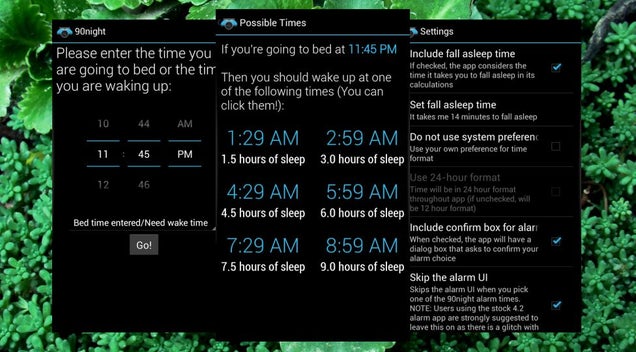
Android: A full 90-minute sleep cycle can ensure you wake up energized, and 90Night makes it simpler for you to get this sleep by letting you choose the best time to wake up.

The free Android app asks you to input the time you want to sleep and accordingly gives you a screen with different timings based on the 90-minute cycle. Choose the time you want and 90Night will automatically set an alarm for it.

In the app's settings, you can also add the amount of time it usually takes you to fall asleep so that 90Night can take that into account when giving you timings. Overall, it is a much easier process than setting an alarm yourself.

The app also works the other way around so that you can set the time you want to wake up and 90Night will give you options of what time you should go to sleep.

90Night (Free) | Google Play Store

06 Apr 20:24

Rightscorp Finds Scary Shortcut to Expose Alleged BitTorrent Pirates

by Ernesto

ip-addressWeek in and week out hundreds of U.S. citizens are dragged into lawsuits because their Internet account was used by someone to share copyrighted material.

These cases all follow a familiar pattern. The copyright holder files a lawsuit mentioning several IP-addresses, and asks the court for a subpoena to identify the account holders connected to it.

It’s then up to a judge to decide whether or not the subpoena should be granted. If it is, ISPs usually inform the affected customer who can then appeal the disclosure before a judge. If this fails, the personal details of the subscriber are handed over by the ISP, after which the affected user usually receives a settlement request from the copyright holder.

This is how file-sharing cases have worked for years, and on the surface it appears to be a fair process. However, for piracy monitoring outfit Rightscorp this process is proving too cumbersome. Instead of arguing their case before a judge, they’re using a shortcut that will be of great interest to copyright trolls.

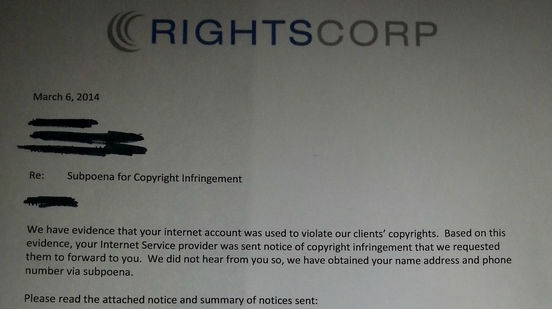
A few weeks ago several people received a settlement request from Rightscorp via snail mail. This is peculiar since the company generally doesn’t know who the account holder is. As opposed to classic copyright trolls, Rightscorp usually sends its settlement requests via DMCA requests.

Perhaps even more worrying, the settlement letter in question mentions a subpoena. Not a regular one, but a DMCA-subpoena, which bypasses the judge and only has to be signed off by a court clerk. In other words, Rightscorp used an uncommon shortcut to cheaply and quickly expose the alleged pirates, and the ISPs in question happily complied.

Rightscorp letter
rightscorp-subpoena-letter

Wondering why all other trolls aren’t doing the very same thing, we asked several legal experts for advice. Without exception they told us that DMCA subpoenas are not meant to be used against ISPs who only pass through information, only those who actually store content.

This was decided in a case between Verizon and the RIAA more than a decade ago, and has been upheld in subsequent cases.

“The RIAA v. Verizon case clarified that 512(h) subpoenas could only be issued to service providers who hosted infringing content directly on their servers. Because in filesharing cases the allegedly infringing material is stored on users’ systems, 512(h) subpoenas are inapplicable,” Cathy Gellis, a technology lawyer in the San Francisco Bay Area told TF.

So why is Rightscorp using these DMCA subpoenas? We asked the company, and CEO Christopher Sabec said that they believe the court made the wrong decision at the time. According to Sabec the verdict won’t hold up at the Supreme Court, so they’re ignoring it.

“The [RIAA vs. Verizon] Court case used flawed reasoning in concluding that an ISP such as Verizon is not a ‘Service Provider’ even though it clearly meets the definition laid out in the statute,” Sabec told us.

“The issue has actually not been addressed by the vast majority of Circuit Courts. We believe that the decision you cite will be overturned when the issue reaches the Supreme Court,” he adds.

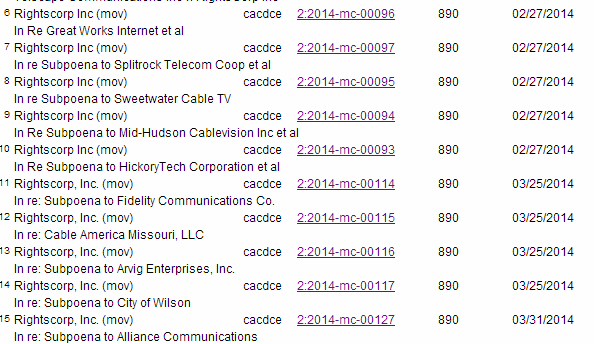
It’s worth noting that for now Rightscorp is avoiding any of the major Internet providers. Below is the list of ISPs that were targeted, which includes Fidelity Communication, Sweetwater Cable and even the City of Wilson. Of course, these smaller organizations are less likely to object.

Rightscorp targets
rightscorp-cases

The cases above make it clear that court clerks have no problem with signing off on these requests. As a result, Rightscorp obtained subpoenas for hundreds of IP-addresses at virtually no cost. In the case of Fidelity Communication alone, court records reveal more than a hundred pages of IP-addresses.

While it seems that Rightscorp is currently the only party to use DMCA subpoenas, it wouldn’t be a surprise if some of the classic copyright trolls now follow suit.

After all, it’s much easier to obtain people’s personal details when a judge isn’t looking over your shoulder.

Source: TorrentFreak, for the latest info on copyright, file-sharing and anonymous VPN services.

06 Apr 20:23

Sony Blocks Creative Commons Movie With Bogus DMCA Takedown

by Andy

sonyWe’ve reported on dozens of wrongful DMCA takedowns over the years, with each raising their own unique issues. Some are just sloppy efforts executed by careless anti-piracy companies while others have been carried out in a deliberate effort to stifle speech.

But while all wrongful takedowns have the potential to cause damage, few can be so clumsy and likely to enrage as the one carried out by Sony Pictures a few hours ago. If there was a competition to annoy as many people as possible with one click, Sony would definitely take the top spot. Here goes.

The Blender Foundation is the non-profit group behind the development of the open source 3D graphics program Blender. The Foundation is funded by donations with the aim of giving “the worldwide Internet community access to 3D technology in general, with Blender as a core.”

To showcase what Blender can do and promote the platform, since 2006 the Blender Foundation and Blender Institute have released movies including Elephants Dream and Big Buck Bunny.

Their third movie, Sintel, was released in 2010 and was funded by donations, DVD sales and other sponsorship. So that people were free to work with the movie, all animation data, characters and textures were released under Creative Commons Attribution License.

The open source beauty of Sintelsintel

Up until yesterday the movie was available on YouTube where it had been viewed millions of times. This version of the video is embedded in dozens upon dozens of news stories talking about the movie itself and the wider Blender project.

However, the beauty of Sintel has now been transformed into something infinitely less creative. Apparently Sony Pictures think they created and therefore own Sintel so on that basis have had the video blocked on YouTube on copyright grounds.

Sintel

If prizes were being handed out for the ‘best’ wrongful DMCA takedown likely to annoy the greatest numbers of people, Sony would be taking Olympic gold here.

Free and open source software – check.
Multiple instances of community funding via donation – check.
Creative Commons content censorship – check.
Blatantly claiming copyright on someone else’s content – check.
Shoot first, ask questions later mentality – check.

The only good thing to come out of this as far as Blender is concerned is all the free publicity they’re going to get in the next 48 hours. Bad publicity aside, *nothing* will happen to Sony – people aren’t going to like that either.

Source: TorrentFreak, for the latest info on copyright, file-sharing and anonymous VPN services.

06 Apr 20:22

Extended Godzilla Trailer Hits The Web

Extended Godzilla Trailer Hits The Web

Raze the red lanterns

If you’re among those eagerly awaiting the return of Godzilla to our screens via the filmmaking hand of Gareth Edwards, chances are you’ve already seen the trailer. But now Warners has put an extended version online for your viewing use. 

This expanded version of the promo, which had audiences applauding at CinemaCon a couple of weeks ago, ramps up the emotional beats while also allowing for a few more shots of the big guy doing his destructive thing.

Once again we kick off in flashback, with physicist Joe Brody (Bryan Cranston) facing a horrific situation that impacts his family. The authorities attempt to spin it as a natural disaster, but Brody suspects the truth and is trying to warn the world before we all get sent – in his words – back to the stone age.

Of course, few people listen and then the roaring, the stomping, the screaming and the running start. We’ll also meet Joe’ s soldier son Ford (Aaron Taylor-Johnson), his wife (Elizabeth Olsen) and their son (Carson Bolde), plus a variety of other characters impacted by the big G including Ken Watanabe’s scientist and Davis Strathairn’s military leader.

With Juliette Binoche, Sally Hawkins, Victor Rasuk and Akira Takarada among the cast, Godzilla will menace our cinemas on May 16. For expert insight into the new film from Gareth Edwards, check out our exclusive trailer breakdown. Gamera, meanwhile, has just realised he missed Mother’s Day and is scrambling to arrange flowers and/or time travel so he can get back in his mum’s good graces.


06 Apr 20:07

U.K. Startup SkillFlick Opens Its Doors As A Marketplace For Local Services

by Natasha Lomas
SkillFlick is a U.K. startup with the self-described aim of building an 'Airbnb for local skills'. The site was founded two years ago, launching in beta in January 2013 and is just opening up fully to the public this month. It's bootstrapped and is actively looking to raise a seed round now. Read More
06 Apr 20:06

Anti-Tech Protesters Are Telling Kevin Rose’s Neighbors That He’s A “Parasite”

by Anthony Ha
Google Ventures partner Kevin Rose says that his San Francisco home was visited by protesters today, who held up a banner calling him a "parasite" and distributed leaflets with the same message. What did he do to deserve this? Well, he invested in startups. Rose posted a photo on Instagram of what he said was a flier distributed to his neighbors. It says, in part: Read More
06 Apr 19:59

Best Android Apps for March 2014

by Simon Sage

We’ve got the best social, utility, and customization apps for Android launched in the last 30 days right here

In our ongoing quest to bring y’all the bestest the Google Play Store has to offer, we’re going to start rounding up our favorite Android releases every month.

Often these round-ups will include big releases that you might have missed throughout Android Central news stories or our picks of the week, but we’ll try to dig up some hidden gems for you too. We’ve already rounded up the month’s games, if you’re looking for more.

For March 2014, we've got a nice spread of apps. A bit of learning, a bit personalization, and a bit of social to check out. Go ahead and dive in!


06 Apr 19:59

Flixster movies app adds Chromecast support

by Simon Sage

The movie-tracking app Flixster had an update recently which added support to stream full shows and trailers to your big screen at home via Chromecast. The update also included the ability to load up movies onto the SD memory card, so long as it's a Samsung device.


06 Apr 19:58

Android TV interface and details leaked

by Simon Sage

Google is not done in your living room

A bunch of screenshots of a new set-top box by Google have been revealed by The Verge, detailing a new hardware and software system called Android TV. The idea here is to provide a framework for developers to create big-screen experiences in a sensible way. With a properly fleshed-out UI, Android TV looks like it will be aimed to compete squarely against Roku, Apple TV, and the recently-announced Fire TV. Android TV is probably better to look at this as a spiritual successor to Chromecast than the ill-fated Google TV, though Android TV and Chromecast will still require developers to create two distinct interfaces. Unlike Google TV, Android TV will be steering away from trying to be a big-screen computing platform, and be more of a simplified entertainment console.


06 Apr 19:58

U.K. carrier EE raising prices slightly on May 28

by Rene Ritchie

The U.K's EE network is set to increase prices by 2.7% — yes, two-point-seven-percent — on May 28, 2014. EE's new terms and conditions allow them to raise prices by the RPI (retail price index — i.e. the rate of inflation) once a year with 30 days notice.


06 Apr 19:56

Top 10 Apps and Services Made Better by Add-Ons

by Whitson Gordon

Top 10 Apps and Services Made Better by Add-Ons

The internet is filled with great apps and services to help you get things done. Alone, those services are powerful—but with a few choice add-ons, they're unstoppable. Here are ten services you can power up with extensions, scripts, and other apps.

10. Gmail and Thunderbird

Top 10 Apps and Services Made Better by Add-Ons

Gmail is powerful enough in its own right, but the right add-ons can make it even better, from small things (like make it easier to use) to big ones (like unsubscribing you from spam and cleaning up your inbox). Check out our list of Gmail-based browser extensions here, as well as these services that make it better. And if you're more of a desktop email guru, check out our list for Thunderbird instead.

9. Feedly

Top 10 Apps and Services Made Better by Add-Ons

If you follow more than a few blogs, it can get overwhelming quickly. Subscribing to their RSS feeds in an app like Feedly makes it much easier to get your news fix every day. Of course, no app is perfect, Feedly included—even though they're constantly adding new features. So if you want to improve your Feedly experience, check out these extensions and user scripts. With the right mix, you should be able to turn it into the perfect news reader for you.

8. Flickr

Top 10 Apps and Services Made Better by Add-Ons

Flickr's not one of those tools that everyone uses, but if you fancy yourself a photographer—even an amateur one—it's a great way to get your photos online and organized (especially with its 1TB of free space). With the right add-ons, though, you can make photos easier to upload, edit them online, or just find beautiful photos around the network. Check out this list of apps and extensions for more info.

7. Evernote

Top 10 Apps and Services Made Better by Add-Ons

Evernote, on its own, is an insanely powerful filing cabinet for everything in your brain. It's hard to even try and use all its built-in features. But if you have a more specific need that Evernote doesn't offer, like scanning documents from your phone or integrating with other apps, you can do that. This list of apps will get you started. And if you want to get a bit more physical, the Doxie scanner (and its app) turn Evernote into the perfect tool for going paperless.

6. YouTube

Top 10 Apps and Services Made Better by Add-Ons

You probably use YouTube every day, whether you like it or not. It's not the most obvious productivity tool, but it can be used as such—and it gets a lot better if you tweak it with add-ons and scripts. These tools will help you fix YouTube's biggest annoyances, like autoplay and advertisements, while these tools actually make it more powerful.

5. Facebook

Top 10 Apps and Services Made Better by Add-Ons

Ah, Facebook, The web site we all love to hate (or hate to love). Facebook's never really had a handle on what people want from the service, but thankfully, there are add-on developers that do. You've probably heard of Social Fixer, the add-on that makes Facebook infinitely better with its myriad of options, but it isn't the only tool out there. Other add-ons can make photos easier to view, remove ads and annoyances, and more. Check out our full list to see the possibilities.

4. Microsoft Office and Google Docs

Top 10 Apps and Services Made Better by Add-Ons

No matter what office suite you use, there are a ton of ways to boost its power with a few add-ons. If you're a Microsoft Office user, you already have a pretty powerful suite at your fingertips, but free add-ins can add things like tabs, search commands, dictionaries, and more—you can see some great examples here. If you're a Google Docs user, most add-ons are designed to link you into other web services like maps, video conferencing, or faxing. You can see a solid list of those here. Of course, there are add-ons for Google Docs that make it work more like a desktop suite, too.

3. XBMC

Top 10 Apps and Services Made Better by Add-Ons

XBMC is the ultimate customizable media center program, and while it's got some cool stuff baked in, some of its best content comes from add-ons. With add-ons you can stream content from your favorite cable channels, watch Netflix and Hulu, or even play video games. Head to the Add-ons section in XBMC to see what's available, but don't forget you can download add-ons from third parties too—like some of these awesome ones.

2. Dropbox and Google Drive

Top 10 Apps and Services Made Better by Add-Ons

Cloud storage is all the rage these days, but it's useful for a lot more than just storing your files. Add-ons let you upload and download files easier, but can also add extra features like music playback, collaboration, and more. Check out our favorite add-ons for Dropboxand Google Drive if you're interested in stepping it up. And if you only check out one add-on, make it Wappwolf, which can automate just about anything in your cloud storage.

1. Your Browser

Top 10 Apps and Services Made Better by Add-Ons

Obviously, you knew this was coming. Many of the above add-ons are, in fact, browser extensions, but there are also a lot of extensions built just to power up your web browsing itself. And there are more extensions than you could even count—some protect your privacy, some get you discounts when you shop, and some just make your browser easier to use. To get started, check out our Lifehacker Packs for Chromeand Firefox for the most essential extensions.

Title image remixed from tehcheesiong (Shutterstock).

06 Apr 19:55

Tweetz is a Simple, Attractive and Efficient Desktop Twitter Client

by Mihir Patkar

Tweetz is a Simple, Attractive and Efficient Desktop Twitter Client

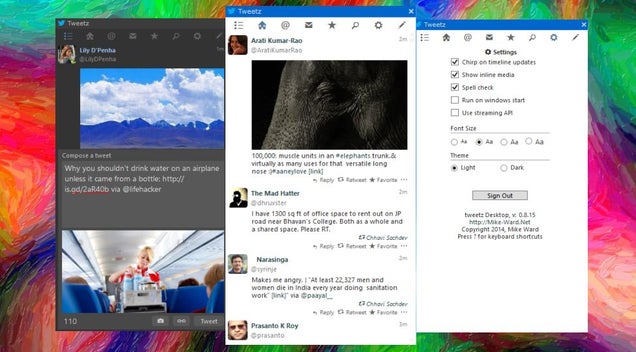
Windows: With MetroTwit shutting down, you might be looking for a new desktop Twitter client. Tweetz is a good option to consider if you don't need power tools but want a clean and simple interface for Twitter.

You can only see one column at a time, but there are a few buttons in the toolbar to cycle through the different columns available: unified timeline, home, mentions, messages, favorites, search, and settings. You can toggle between a light and dark theme, have a chirping sound notification for new tweets, and choose to show inline media.

The last buttons activates the Compose pane, which lets you write a message, attach photos, and shorten links. It works as expected, but it doesn't read through the people you follow to give you autocomplete suggestions when you type @ or #.

Power users will miss several elements. There is no support for lists, for instance. And you can't mute or set up filters for people or hashtags. Weirdly, there's no icon in the Windows taskbar when the app is running either, so the only way to access it is through Alt+Tab. Still, Tweetz is a good desktop client for the casual Twitter user, especially since it's free.

Tweetz (Free) | via AddictiveTips

04 Apr 22:02

My Spiroo Can Tell Your Doctor When You’re Out Of Breath

by John Biggs
Asthma sufferers use a tool called a peak flow meter to see how much air is passing out of their lungs. It is useful to assess when flare-ups are happening and what outside allergens or problems might be causing a bronchial flare-up. Until recently, all that was available to take this measurement was a very basic mechanical device. My Spiroo aims to fix that with a connected, ultraportable peak… Read More
04 Apr 22:02

Amazon announces Dash, a home barcode scanner and microphone

by Adi Robertson

The FireTV apparently isn't the only piece of hardware Amazon is announcing this week. The company recently put up a page for "Amazon Dash," a shopping accessory that it's offering for free to a limited number of AmazonFresh users. Dash, a roughly 6-inch-long plastic stick, includes a laser scanner and a microphone for voice search, either of which will let you add items to a shopping list. It connects via Wi-Fi to computers or mobile phones, from which you can actually view the list and order the items. Amazon is currently accepting applications from potential Dash testers, who presumably will need to be in one of the three AmazonFresh markets: southern California, San Francisco, or Seattle.

Amazon has long let you scan barcodes with...

Continue reading…

04 Apr 22:02

eBay adds virtual currency section to US website

by Chris Welch

eBay has added a new category for virtual currency, allowing its users to sell and exchange Bitcoin, Dogecoin, and other cryptocurrencies. First spotted by Coindesk, the section also allows the sale of shares in mining operations and mining contracts. However, these aren't your everyday auction listings. Most virtual currency listings on the site right now are classified ads, meaning that eBay isn't actually overseeing the individual transactions. You'll have to set up payment and other specifics privately with each seller. Some subcategories feature auction and Buy It Now listings, but it's not clear if these are permitted under eBay's rules — Coindesk reports that eBay UK forbids any listing type other than classifieds for virtual...

Continue reading…

04 Apr 19:41

Google's Night Walk gives you an immersive audio-guided tour of Marseille

by Jacob Kastrenakes

Google has experimented quite a bit with ways to make Maps more immersive, but no attempt yet may be as successful as its latest: Night Walk, a loosely guided tour through the streets of Marseille on one vibrant and beautiful evening. Night Walk starts you out in a small alley in the neighborhood Cours Julien and works a lot like Street View — you can look around in every direction and click wherever you want to zoom in or move ahead. In this case, a tour guide will introduce you to the city as you move along, directing you to look at art, landmarks, and gorgeous views, among much more.

Night Walk's goal is to make you feel like you're right there in the city, and it's fairly successful for an experience on your computer. The...

Continue reading…

04 Apr 17:03

How to Pick a Handbag That Doesn't Suck

by Melanie Pinola

How to Pick a Handbag That Doesn't Suck

Handbags are awesome. Not only do they carry our essentials, they also pull together our look and easily upgrade our wardrobe. Unfortunately, it's hard to find ones that don't suck.

Often, handbags aren't ergonomic or very functional even if they look nice. Conversely, sometimes the most functional handbags are the ugliest. Maybe that's why the average woman owns about 21 handbags and buys a new one every three months or so. Since handbags can cost a couple of hundred dollars, you want to make sure your investment is worth it.

So here's how to find the kinds of handbags that don't suck, by which we mean those that: won't kill your shoulders, fit you well, and have that happy marriage between great looks and practicality.

Style and Purpose

The first thing you should consider is when and how you'll use your next handbag. What will you carry in it? What outfits will you wear it with? How will you actually wear it? For example, if you're looking for an everyday bag for walking around the city, you might prefer a lightweight cross-body bag rather than a leather satchel with short handles. For work, you might choose a classic shoulder bag that's roomy enough, perhaps, to carry a small tablet or paperwork.

There are definitely lots of styles and materials to choose from, at least.

Handbag Fit for your Body Type

In addition to your handbag's purpose, you might want to choose a bag that flatters your body, much like you would choose any other fashion object. HSN has this guide to handbags for different body types:

The size of handbag should be proportionate to the person's body type

  • Short and petite women appear taller with small handbags and shorter with large handbags
  • Tall and slim women appear larger with small handbags and look best with midsize, large and oversized styles.

The shape of a handbag should be opposite of the person's body type

  • Short women look taller carrying a long rectangular handbag
  • Slim and tall women benefit from a round handbag

The length of a handbag – where the bottom hits the body – emphasizes that area

  • Short handbags make busts appear larger, so choose styles with longer straps to avert attention
  • Most women look good wearing handbags that hang to the mid-torso

They also suggest using handbags to balance out your figure. For example if you have a pear-shaped or triangle body type (waist and hips wider than your shoulders), a satchel handbag that falls between your waist and your hips could make your top area seem larger and balance out your figure. If you have a rectangle body type (shoulders, waist, and hips about the same width), a hobo or shoulder bag that falls at your waist could add slight curves.

When you try out a handbag at the store, be sure to check how it looks on you in a mirror so you choose one that compliments rather than clashes with your style.

Signs of Crappy vs. Quality Handbags

How to Pick a Handbag That Doesn't Suck

Everyone has different tastes and needs, but beyond style preferences, I think we can all agree we want a bag that will last more than a couple of years and that will serve its purpose, whether we're carrying just a few credit cards for a date night out or need to schlep around many gadgets for work.

Some signs of crappy handbags include:

  • Useless pockets or too many compartments. They might seem like they'd be great for organization, but interior and exterior pockets often aren't big enough or could be too big that your stuff will just disappear forever into.
  • Unreasonably heavy. A heavy handbag is a prescription for shoulder and back pain. The ideal weight of a handbag, according to a USDA study is under 2.2 pounds (meanwhile the average woman's handbag weighs 5.2 pounds).
  • Poor straps. Adjustable straps are best for flexibility and fit, but if the straps aren't adjustable, make sure they're not too long or short for your body. Also avoid straps that are pencil thin; they'll cut into your shoulders more and aren't ergonomic.
  • Low-quality materials. Leather bags should be soft and buttery, not plastic-like, stiff, or squeaky. Non-leather bags, such as canvas or fabric handbags, should be sturdy rather than thin (check if they've been coated for weather endurance). Also look at the interior lining, which shouldn't be flimsy, have tears in the corners, or loose.

Examine your handbag for:

  • Stitching. The stitching and seaming should be consistent throughout, without any loose or stray threads. If the bag has a pattern, the print should also match at the seams. Also tug on any embellishments like hanging pulls or chains to make sure they aren't loose and won't fall off.
  • Quality zippers and other hardware. One of the best signs of quality is how the zipper opens and closes—it should glide smoothly. Similarly, other closures like buttons or clasps should close neatly and easily.
  • Connections for the straps. The seams where the straps meet the bag body are very important, since those are high pressure areas. Also, Real Simple advises us to stay away from bags with handles that aren't stitched along the edges of the straps and that are only glued, because those handles will eventually separate.
  • Fewer seams and parts. The more parts (snaps, latches, buttons, etc.) there are to a handbag, the more ways your bag can break. Similarly, as Saddleback Leather explains, many pieces of leather stitched together into a sort of quilt means lots of seams—and a weaker bag.
  • Other fine details. Sometimes it's the little touches that show off a quality handbag. Things like feet on the bottom of the bag so it doesn't get dirty when you put it down, a key fob on the inside of the bag, a comfortable zipper pull, and exterior pockets with magnetic closures.

Your handbags should be a thing of beauty and a source of joy for you. Invest in quality ones and they'll last you many seasons.

Photos by Apolinarias (Shutterstock), Adrian Niederhaeuser (Shutterstock), ShotHotspot.com.

04 Apr 14:37

A Collection of Stunning Landscape Photographs

by Darlene Hildebrandt

This week’s collection of images to inspire you comes from 500px! Thanks to Evgeny Tchebotarev (founder of 500px) for letting us use these images, and for housing such a great website full of amazing images. To view any of them larger in all their glory, just click on the photo credit below the image.

Enjoy these amazing landscape photographs!

Photograph Vernazza at sunset by Fabrizio Lunardi on 500pxVernazza at sunset by Fabrizio Lunardi on 500px

Photograph First Contact by Max Rive on 500pxFirst Contact by Max Rive on 500px

Photograph Zaanse Schans by Iván Maigua on 500pxZaanse Schans by Iván Maigua on 500px

I hope you notice something about many of these images. What is it that makes them great photographs? I can think of at least THREE qualities exhibited by some or most of the images above that make them a cut above the average landscape photo. Can you tell me what those three things are? What do you see that makes them stand out?

Share in the comments if you think you know what I’m thinking!

The post A Collection of Stunning Landscape Photographs by Darlene Hildebrandt appeared first on Digital Photography School.

04 Apr 12:52

[App Roundup] Our Top Six Picks For The Best New Apps Of March 2014

by Michael Crider

nexusae0_ic_thumb_thumbAnother month has come and gone, which means a ton of app posts on Android Police to sift through. In point of fact, there were fewer notable apps released in March than in the last few months - that's why our primary picks are down to just six. But most of these should be useful to most users, with Per-App Modes and Pixl Preview applying only to root users and Photoshop owners, respectively.

Done With This Post? You Might Also Like These:

[App Roundup] Our Top Six Picks For The Best New Apps Of March 2014 was written by the awesome team at Android Police.


04 Apr 12:52

[Game Roundup] Our Top Seven Picks For The Best New Games Of March 2014

by Michael Crider

nexusae0_icon_thumb1_thumbThe Ides of March have come and gone, and the Android gaming scene is marching in step. Last month saw the inclusion of an impressive variety of both hardcore and casual games alike, including plenty with fascinating new ideas for gameplay. Here in no particular order are our picks for the top seven, plus a few honorable mentions. Just about everyone should be able to find at least one Android game they'll love among the following titles.

Done With This Post? You Might Also Like These:

[Game Roundup] Our Top Seven Picks For The Best New Games Of March 2014 was written by the awesome team at Android Police.


04 Apr 12:52

Google searches on mobile can now link directly to apps worldwide, supports 24 new apps

by Andrew Martonik

Creating a seamless experience for moving between search results and your own apps

Google has been experimenting with new ties between keyword searches on mobile and Android apps, and now that functionality is being expanded pretty dramatically. Back in 2013 Google started partnering with a selective few big names like IMDb, Wikipedia and Open Table to have an "Open in app" button placed in Google search results when performed on your Android phone. This means you can quickly jump from web search results right into an app without leaving the browser to track it down yourself.

Back then the functionality was very limited in terms of apps but was also U.S.-only. Today Google is expanding the contextual app linking to users worldwide who have their devices set to English, and is adding even more app partners. A full 24 apps are being added, with even more to come as Google is making it simple to get in touch and have your own app updated to participate in the program.


04 Apr 12:50

Britain is turning into a country that can't tell its terrorists from its journalists

by Cory Doctorow


Sarah Harrison, a British journalist who's worked with Wikileaks and the Snowden papers, writes that she will not enter the UK any longer because the nation's overbroad anti-terror laws, combined with the court decision that validates using them to detain journalists who are not suspected of terrorism under any reasonable definition of the term, means that she fears begin detained at the airport and then jailed as a terrorist when she refuses to decrypt her files and grant police access to her online accounts. Under the UK's Terrorism Act of 2000, journalists who write because they hope to expose and halt corruption are liable to being jailed as terrorists because they report on leaks in a way that is "designed to influence the government." And "the government," according to the Act, is any government, anywhere in the world -- meaning that journalists who report on leaks that embarrass any government in the world can be treated as terrorists in the UK.

Nor is this an idle risk: Glenn Greenwald's partner, David Miranda, was detained under terrorism rules when he transited through the UK, and a UK judge subsequently found that the detention was justified on these grounds, even though no one suggests that Miranda is involved in terrorism in any way. As Harrison writes, "Britain is turning into a country that can't tell its terrorists from its journalists."

The final paragraphs of Harrison's editorial sum it up neatly:

This erosion of basic human civil rights is a slippery slope. If the government can get away with spying on us – not just in collusion with, but at the behest of, the US – then what checks and balances are left for us to fall back on? Few of our representatives are doing anything to act against this abusive restriction on our press freedoms. Green MP Caroline Lucas tabled an early day motion on 29 January but only 18 MPs have signed it so far.

From my refuge in Berlin, this reeks of adopting Germany's past, rather than its future. I have thought about the extent to which British history would have been the poorer had the governments of the day had such an abusive instrument at their disposal. What would have happened to all the public campaigns carried out in an attempt to "influence the government"? I can see the suffragettes fighting for their right to vote being threatened into inaction, Jarrow marchers being labelled terrorists, and Dickens being locked up in Newgate prison.

In their willingness to ride roughshod over our traditions, British authorities and state agencies are gripped by an extremism that is every bit as dangerous to British public life as is the (real or imaginary) threat of terrorism. As Ouseley states, journalism in the UK does not possess a "constitutional status". But there can be no doubt that this country needs a freedom of speech roadmap for the years ahead. The British people should fight to show the government we will preserve our rights and our freedoms, whatever coercive measures and threats it throws at us.

Britain is treating journalists as terrorists – believe me, I know [Sarah Harrison/The Guardian]

(Image: I'm a photographer, not a terrorist, Russell Trow, CC-BY)


04 Apr 12:48

UK Tories call for a national of slaves

by Cory Doctorow
Charlie Stross is on fire in this essay on the true meaning of the UK Exchequer George Osborne's promise to produce a Britain with 100% employment: he is proposing nothing less than a nation of slaves.


04 Apr 12:47

GMusicFS Plays Google Play Music in Your Favorite Android Player

by Alan Henry

Android (4.0+, Rooted): We've highlighted several useful Android music players, but one big drawback to most of them is that they can't access or play music stored at Google Play Music. GMusicFS breaks down that wall and lets just about any Android player access all the tunes you have stored in the cloud.

The video above is a quick demo by the developer. The app works by mounting your Google Play Music tracks as a FUSE filesystem—one that most Android music players will check when you scan for new music. Since the music appears to be local, your favorite player will treat the files normally and play them seamlessly. Of course, because this all requires admin-level changes, it'll only work on rooted Android devices. Still, it may be a good price to pay to use your favorite player with your cloud-stored music collection.

XDA developer bubbleguuum came up with the tool, and has confirmed it works with most popular players, including our favorite, PowerAmp. It also supports previously mentioned n7player, and WInamp for Android. We tested it out and it works like a charm—as long as you have a supporting device and player (and most players should work.)

Hit the link below to make sure your device meets the system requirements, and to download the app—it's completely free, and the developer is actively working on it, so expect updates and changes.

[APP][4.0+][ROOT][1.0.13] GMusicFS: play cloud Google Music in music players apps | XDA Developers Forum

04 Apr 12:45

You Can Now Create Windows And Windows Phone Apps In One Go With Microsoft’s App Studio

by Alex Wilhelm
Microsoft's App Studio service is fun. At launch, it supported the creation of simple Windows Phone applications so everyone could get their hands dirty and build something. The service has been upgraded throughout its life, and today picked up a key update: The ability to create a combined Windows and Windows Phone application in one go. Read More
04 Apr 12:44

Project Ara video reminds us why we want a modular phone

by Rich McCormick

Google sold most of Motorola Mobility to Lenovo for $2.9 billion earlier this year, but it kept one small part of the phone manufacturer. Motorola's Advanced Technology and Projects group had been working on Project Ara when it was incorporated by Google — an ambitious plan for a modular smartphone that could retail for around $50, comprised of parts that users could purchase and swap in and out at their leisure. Now Phonebloks — a company who previously worked with Motorola to create a concept for a modular smartphone — has shown off how Project Ara is progressing in a video tour of Google's offices.

Continue reading…

03 Apr 22:57

Google Opinion Rewards expands to the Canada, Australia, and the UK

by Simon Sage

Opinion Rewards, a Google app that pays its users to fill out surveys, has just expanded beyond the U.S. into Canada, Australia, and the U.K.


03 Apr 19:20

Winnie the Pooh does Darth Vader

by Cory Doctorow

Here's voice-actor Jim "Winnie the Pooh" Cummings doing Darth Vader's lines from Star Wars in the voice of Winnie, and other key characters as Darkwing Duck and his other best-known voices; he appears with Lauren Landa, another voice actor with a distinguished resume of anime and game voices. It's pretty much perfect.

Jim Cummings CtCon 2013 - Star Wars with Winnie the Pooh (via Kelly the Mortal Girl)


03 Apr 19:19

White, right-wing terrorist busted...and hardly a peep

by Cory Doctorow


Last week, the FBI arrested Robert James Talbot Jr., 38, of Katy, Texas. Talbot was the self-styled head of the American Insurgent Movement, which openly plotted to massacre Moslems at mosques and kill them with automatic weapons, sought to rob armored cars, and recruited followers to sow more mayhem. Talbot is a violent Christian fundamentalist who advertised his intention to murder people wholesale.

Kudos to the FBI for arresting this fellow, but as Death and Taxes point out, where the hell was the national panic that attends every arrest of a jihadi terrorist, no matter how cracked and improbable his plan happened to be? Nowhere to be seen.

Now, if this was a recognition by the press that lone kooks are not an existential threat to the world -- even if they are capable of committing horrible, isolated crimes -- I'd be standing up and cheering. But if Talbot had been a brown-skinned conservative Muslim who'd been arrested after planning to attack Christian churches in America with bombs and machine-guns, I suspect there would have been screaming front-page headlines and round-the-clock intensive CNN coverage for days, not to mention grim, determined reporting on Fox News.


03 Apr 19:15

10 Things You Need To Know About The Amazon Fire TV

by Adriana Lee

Amazon has put Apple TV, Roku and Google's Chromecast in its crosshairs with its new Fire TV streaming device

The box comes with many of the standard Internet video features you'd expect from a modern set-top, along with some intriguing new ones—like predictive streaming, which anticipates what you'll want to watch next and auto-buffers it for you. It also includes some that other devices have played around with, but not perfected, such as voice search, "second-screen" features using phones and tablets, and plenty more. 

Amazon claims to have nailed them. If that's true, it might even justify the $99 retail price—no small matter, considering the Fire TV is at the upper end of a market filled with inexpensive rivals.

To help you decide if it's worth the cost, here's a quick guide to some of the Fire TV's major features. 

ASAP Predictive Streaming

Amazon's ASAP (short for Advance Streaming and Prediction) feature not only predicts what you’ll want to watch next, it gets the video ready for streaming by automatically starting the buffer. That means, when you hit it up, it will play right away. 

What you need to know: Even if the feature's not all that accurate, it's supposed to learn your tastes over time. This could be a really handy convenience that speeds up the streaming experience. But anyone sensitive about privacy will want to take note, as you may not like the idea of a tech company tracking your entertainment preferences.

Gaming

Fire TV aims to go well beyond Sudoku games and Angry Birds. The box offers first person shooters, side-scrollers and more, as well as multiple player mode. You can use the set-top's remote control or, optionally, a separate Bluetooth controller (available for $40).

What you need to know: Fire TV-specific versions of Mojang's Minecraft: Pocket Edition, Gameloft's Asphalt 8, and Telltale Games' The Walking Dead are heading to the Amazon device. The company has enlisted Disney, Gameloft, EA, Sega, Ubisoft and Double Fine to flesh out its gaming choices.

Amazon Game Studios also launched Sev Zero, its first game built from scratch for the Fire TV. The group describes it as "a fast-action third-person shooter experience ... with tower defense gameplay," and it's available for $6.99 (or free, with a Fire game controller purchase). 

As for actual gameplay, multi-player mode hooks friends up via mobile devices on Wi-Fi. The primary user, who plays using the actual television, would use the Bluetooth controller for a more direct connection. 

X-Ray (aka Kinda Sorta Karaoke) 

Ever wonder who that actor is? Or the name of a song that's playing? X-Ray can take care of that. The "second screen" feature works on mobile devices to pull in TV and movie data from IMDB—like credits, cast info, song names, trivia—for shows and songs that are currently streaming. It can even serve up lyrics as a tune plays. 

What you need to know: It only works on the Kindle Fire HDX at this time, though support for iPhones and iPads will launch later this year.

Voice Search

During the Fire TV announcement, Amazon VP Peter Larsen declared, "This is voice search that actually works." There’s an embedded microphone in the remote control, so users can search titles without fussing with directional buttons.

Searching for movie or TV shows one letter at a time on a directional pad is one of the biggest irritations of modern streaming. If Amazon can make this feature work well, that alone could accelerate this box's success. And make the streaming experience so much easier for us couch potatoes.

What you need to know: Well, Larsen's partially right. Voice works for searching movie titles by keywords, actor's names and such. There's even a dedicated button on the remote control for it. Unfortunately, the feature doesn't work for every app. Netflix and Hulu results wouldn't come up in our early tests with the device. And you know what that means—the hunt-and-peck search isn't extinct yet. But I cross my fingers that it will get better, because I’d love to kiss that annoyance goodbye for good. 

Password-Protected "FreeTime" Kids Section

There’s a lot of mature content out there, so the FreeTime app was retooled as a dedicated, kid-friendly safe zone that requires a password to exit. In other words, they can get in, but they can’t get out without knowing the magical “open sesame” for the egress. The parent creates profiles for each kid, setting what they can see and time limits based on type of content or time of day. Inside FreeTime, kids get a kid-friendly design, and parents know that the only thing their children see is what they picked for them. 

What you need to know: If you've already done the setup on your Kindle Fire tablet, the settings will sync to the Fire TV. The password feature's interesting, but the timer may be more so. Parents won't have to manually manage their kids' screen time, thanks to auto-shutoff—say, when it's time for bed or homework. Amazon says it will be available next month, but bear in mind that it will require a subscription. FreeTime Unlimited covers these features, plus unlimited access to movies and TV shows. Prime members get a discount: Instead of the regular $5 monthly per child (or $10 per family), they pay $3 per child (or $7 per family). 

Streaming Choices 

Leave it to Amazon to turn streaming into a comparison shopping experience. When you call up a movie or show, Fire TV puts all your available streaming options on the screen, so you can pick the one with the cheapest price.

What you need to know: The only services this works with right now, apart from Amazon Instant Video, are Prime Instant Video and Hulu Plus, which are subscription-only. And subscribers to those services get all of those shows and movies for free. The company says it will extend this capability to other providers, but until that happens, your only choice for renting or buying a movie á la carte is from Amazon. 

Casting

No streaming device is complete these days without casting. (Thank you, Chromecast. Or rather, DIAL, the protocol that lets multiple devices interact with each other.) With this, Fire TV users can fling Amazon streaming media from their mobiles to their televisions, and use those phones and tablets as remote controls or second screens.

What you need to know: The feature’s only available on Kindle Fire HDX to start, with iPhone and iPad support coming later this year (though, once again, it doesn't support other Android devices, like those from Samsung, HTC or Motorola). Kindle tablets can also mirror their displays on TV, and later this year, so will any Miracast-compatible devices. 

Photos

Fire TV has photo support at launch, so users can show off stored images, or snap them on the spot and have them displayed. Take a picture with your smartphone camera, and if it’s synced with Amazon’s Cloud Drive, it will automagically appear on the big screen. 

What you need to know: Amazon's primary photo feature is easy ... if you're an Amazon Cloud Drive user and sync your images from your phone to the service. But if you're not, take heart—you may be able to download a third-party app from a service you use to the Fire TV. (Of course, you may not. We'll see.)

Interface

In short, it looks pretty clean, managing to pack in quite a lot without appearing cluttered. There’s a rather Roku-like left sidebar for navigation, which conjures sections for Search, Movies, TV, Watchlist, Video Library, Games, Apps, Photos and Settings. 

What you need to know: If you're impatient, you'll appreciate the relative ease and speed of flipping through the pages and navigating to different screens. 

Performance

Perhaps more than anything else, the Fire TV is supposedly easy to use and extremely fast. Part of that’s due to the ASAP feature (above), but it also has plenty of horsepower under the hood to help the cause. 

What you need to know: If you're a hardware fanatic or A/V aficionado, you will love the Fire TV's specs. The box comes with a quad-core processor, dedicated GPU, 2 GB of memory, support for 1080p video, Dolby Digital Plus surround sound, and dual-band, dual-antenna Wi-Fi with MIMO. (That stands for “Multiple In, Multiple Out,” which basically offers faster wireless connection.) 

If you're not, think of it this way: This is not a Chromecast, which offers minimal hardware and basic casting features for a cheap $35 price tag. Fire TV is close to the polar opposite—more powerful specs and features, at nearly three times the price. 

That means shoppers will likely be choosing between this and an Apple TV or a Roku 3. Ultimately, it boils down to choosing a new set-top box with unique features for its growth potential, versus sticking with an established product.

Fire TV is available on Amazon online, with Staples availability starting April 5. Apps include Netflix, Prime Instant Video, Hulu Plus, YouTube, WatchESPN, Showtime, Amazon MP3 and Pandora, among others, as well as other fan favorites like Plex, RealPlayer Cloud and Bloomberg TV.

So at launch, Amazon's TV box already supports more streaming sources than Apple TV—though the latter could see some new partnerships and even a new model within mere months.

The Roku lineup, meanwhile, just got refreshed last fall, and last month added a new product, the Roku Streaming Stick

There are no shortage of choices for TV streaming. And it seems like Amazon threw everything but the kitchen sink in its slim little box, hoping to entice you. Let us know below if this sparks your interest, or if this Fire ought to just flicker out. 

Lead image by Adriana Lee for ReadWrite; all others by Dave Smith for ReadWrite