Shared posts

03 Apr 16:32

Best music player apps for Android

by Richard Devine

Get the best music experience on your Android phone or tablet with these great apps

Over the years music fans have gradually changed how they listen to their music, and what they listen to it on. With the rise of the smartphone, it's only natural that now the one device we carry with us everywhere is also our primary media player. On Android, we're also fortunate that there's a huge community of developers that create apps that can better the experience we're provided by the folks who made our phones.

The Google Play Store has many music-related apps to choose from, but some do stand out from the crowd. It'd be impossible to look at all of them, so here we've chosen some that we think are some of the best there is. Let's take a look.

DoubleTwist Cloudplayer
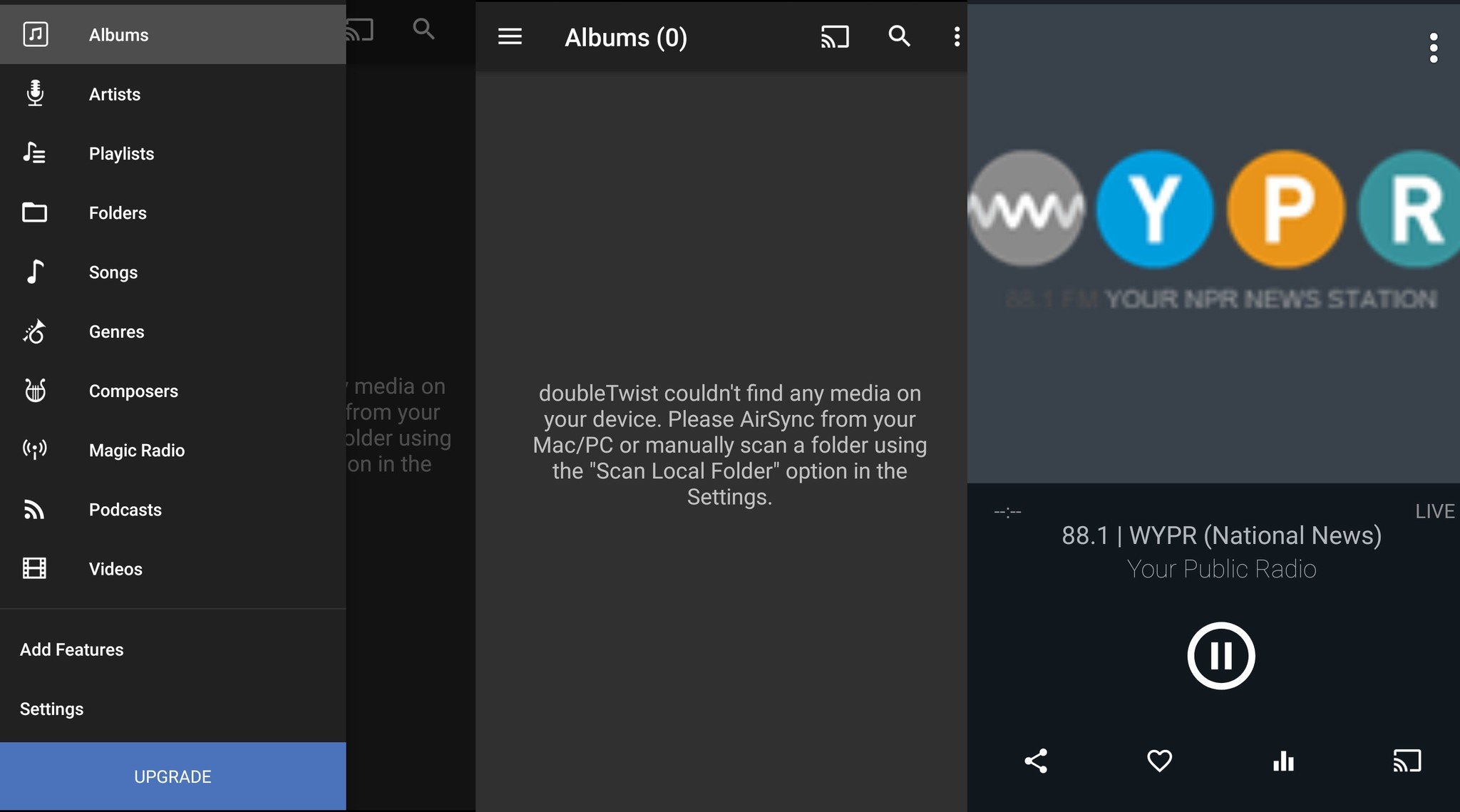
We've talked about DoubleTwist a lot around these parts and with good reason. DoubleTwist became a favorite of Android users that had deep roots in the iTunes ecosystem and still is. The base app has been replaced on this list by Cloudplayer, a newer offering that looks great and has hooks into some of the most popular cloud storage services to deliver your music.

We're not talking about hooking into streaming services, either. Create your own cloud streaming library with your own music, a Dropbox, OneDrive or Google Drive account, and DoubleTwist Cloudplayer. Access to these is unlockable via an in-app purchase, but the basic app is free. And the basic app will also play your lossless FLAC files.

That in-app purchase also unlocks AirPlay support and the equalizer tools to help you get the most from your music. And like the older app, you can still use it to listen to radio and podcasts, too, as well as now having support for both Android Wear and Android Auto. A pretty well stocked one stop shop for all your audio needs.

Find DoubleTwist on Google Play

Google Play Music

Not just a music player, but we have to include Google Play Music. While it doesn't have the deep customization or power features of something like Poweramp, it offers what many others do not; that huge cloud library for your own music. After all, without the music to listen too, what good is a killer music player?

That's not to say Google Play Music isn't a good music player, because it is. Being a Google product it integrates perfectly with your device – including the sweet lock screen artwork. But the real value is in that cloud storage. It means you can take your music collection with you on whichever Android and iOS device you own. Sure, you need to offline some of that from time-to-time, but it's always with you.

Google also has its own store and streaming service built into the same app making it a superb one stop shop for all your musical needs. What it lacks in features compared to others it makes up for the inconvenience.

Check out Google Play Music for yourself!

Shuttle Music Player

Shuttle is perhaps one you've not heard of before, but one that's definitely worth your attention. Unlike a heavy duty app with has tons of settings and customizations, Shuffle offers a portion of that with a much more lightweight look and feel.

It comes with a sleep timer, gapless playback, a choice of a few different themes, built-in equalizer and much more. And for the Materiyolo kids out there, it's pretty much perfect in how it looks. It comes in free and paid versions, but with the paid version just $0.99, it also represents fantastic value for money.

Grab Shuttle from Google Play

Amazon Music

Google isn't the only provider on Android offering an all-in-one store, cloud and player solution. Amazon has its own thing going on and combines its Prime Music streaming service with its music store and a decent looking music player all in one. If you're a Prime subscriber in selected markets you'll have Prime Music and so you'll need this on your phone. Amazon also offers you a cloud locker, much like Google, to access music you already own on any of your devices, and the app will play anything you have stored locally.

It doesn't offer some of the techy stuff that audio nerds will find in some other apps on this list but it does give you lyrics. Sing along while you're on the bus to work!

Take a closer look at Amazon Prime Music

GoneMAD Music Player

GoneMAD boasts over 250 customizations, so needless to say we're not going to talk about them all, here. Add to this over 1000 themes and what you've got is a music app that really can be tailored to suit your own personal tastes. On the techy front it boasts gapless playback, support for a whole bunch of formats including lossless audio, smart playlists, an equalizer, multi-window and much, much more. You can even go back to the old UI if you don't like how it looks right now.

The app is free to download for 14-days and after that, if you like it and want to keep using it, you'll need to buy the full version. And you might just want to do that.

Check out GoneMAD on Google Play

Rocket Music Player

Rocket is another hugely popular music player for Android with a bunch of good reasons to choose it. You've got a stylish minimalism mixed with a 5-band equalizer, folders support, Chromecast, video and podcasts and much much more.

That's just in the free app. If you upgrade to Premium you also get a bunch of different themes, support for lossless audio, a 10-band equalizer and a whole bundle of other features to perfect your audio experience.

Grab Rocket Music on Google Play

Pulsar

Not everyone has the budget to pay for a monthly subscription to get access to a decent music player, which is why Pulsar makes our list. Absolutely free, this pared down, Material Design app aims to get you to your music without any hassle involved.

Pulsar is absolutely free and even better, free of all advertisements. It doesn't offer many in-depth features but does include a pretty solid equalizer. It automatically syncs missing album artwork, has a home screen widget, Chromecast and Android Auto support, and access to Last.fm for playing the radio if that's your gig.

Find Pulsar on Google Play

Apple Music

An entire generation grew up depending on Apple for their Music needs thanks to iTunes. While you may not have a lime green iPod anymore, you can still access your library from your Android phone with Aplle Music.

Your subscription will give you access to streaming music services, but your Library will still hold all the music you already know and love. You can purchase and download music right to your phone, edit which items show up in your library when you open it, and you can add music to your Library if you listen to them while music is streaming.

For anyone who has already bought into the iTunes ecosystem, this is a great option to keep everything nice and streamlined. And for $9.99/month after the free trial, the streaming features are highly competitive.

Check out Apple Music on Google Play

Your picks?

There are plenty of great music players available for Android, but these are our picks for the best of the best. Do you have a suggestion that should have made this list? Is your favorite player here? Let us know about it in the comments below!

Updated December 2017: We've updated this post with new music player apps that are awesome on Android.
03 Apr 16:26

Popcorn Time Has A New Home

by Matt Burns
After a brief stint without a home, Popcorn Time is back online at Popcorn-time.tv. I give it two weeks until the site is pulled and it pops up somewhere else. Meanwhile the installer is actively traded on torrent sites and back on GitHub, showing that a program can exists, but perhaps not thrive, without a flashy front-end website. Read More
03 Apr 16:24

CCleaner Beta for Android Clears Call Logs, Caches, Uninstalls Apps

by Eric Ravenscraft

CCleaner Beta for Android Clears Call Logs, Caches, Uninstalls Apps

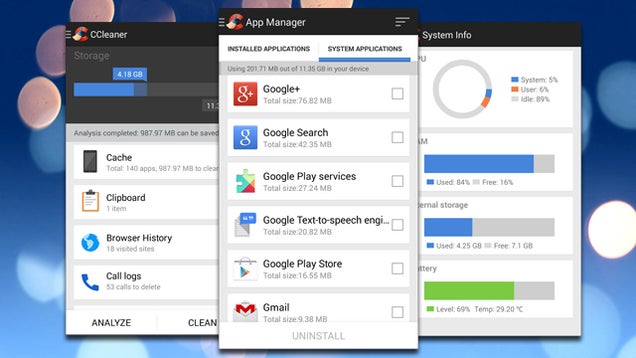
Android: CCleaner has always been one of our favorite maintenance tools on Windows . Now the app has come to Android with a variety of features to clean up, maintain, and optimize your Android device.

The app allows you to clear app cache and data, bulk uninstall unwanted applications, erase your browser history or call logs, and even remove your clipboard data. Some of the functions are already available in Android itself. However, having the features in one place (plus a few new ones) is extremely handy.

To use the CCleaner beta, you'll first need to sign up for the Google+ Community here and then install the application from the link below.

CCleaner | Google Play Store via Piriform

03 Apr 16:23

How to Make Google Drive Work Like a Desktop Suite

by Thorin Klosowski

How to Make Google Drive Work Like a Desktop Suite

Google Drive, and the apps in it—Docs, Sheets, and Slides—are great for people looking for a simple Office suite. It's free, makes collaboration easy, and pretty much anyone can use it. But if you're used to something more traditional, like Microsoft Office, you may be hesitant to use it. Here's how to make Google Drive work more like the desktop suites you're used to.

Why Google Drive?

Don't get us wrong, full office suites are great for people who work in offices and need a ton of specific features. You don't even need to pay for those features, as a suite like LibreOffice can do many of the same things as Microsoft Office. The thing is, most of us don't need the thousands of features Microsoft Office offers.

The more features exist, the more confusing a program gets, and while software like Word is great, it's also slow and hard to use if you just want to sit down and make something. More importantly, Google Drive actually makes certain tasks easier than a desktop office suite. Collaboration with large groups is significantly easier with Google Drive. Sharing documents doesn't require special software just to open, and you can access all your documents from anywhere on just about any device with an internet connection. What it lacks in power features it makes up for usability.

All that said, Google Drive definitely lacks a lot of features people need from an office suite. With some slight tweaking, you can make Google Drive do just about everything a common user could want.

Learn the Basics of What Google Drive Can (and Can't) Do

How to Make Google Drive Work Like a Desktop Suite

Google Drive encompasses a ton of different services, but the three apps it has to rival office suites are Docs (word processing), Sheets (spreadsheets), and Slides (presentations). Let's take a look at the more important features of Google's suite and how it relates to most desktop office suites:

  • Google Drive can open and edit Microsoft Office documents
  • Google Drive saves 30 days worth of versions of a document so you can go back and look at previous edits. That also means if you can restore an earlier version if you overwrite something important.
  • Google Docs supports a massive amount of templates, just like Office, for things like resumes, budget planners, syllabi, and more.
  • Google Docs features collaboration tools and notation options, but you'll need an add-on to get something closer to Word's "Track Changes" feature.
  • Like Office, Google Drive supports add-ons for added functionality
  • Google Docs' research tool makes it easy to store your notes and other research documents.
  • All Google Drive's files autosave to your Google Drive account so you can access them from any computer, phone, or tablet, any time.
  • Google Sheets supports basic formatting, formula editing, templates, spreadsheet functions, and filter views.
  • Google Slides doesn't have as many snazzy animation features as Powerpoint, but its simplicity makes it so anyone can build a good presentation in just a few minutes.

Google Drive has plenty of other features, but the above accounts for the bulk of functionality that crosses over between a desktop suite and Google Drive. Now, let's look at extending that functionality to make Google Drive useable by small businesses, writers, students, and anyone else looking to ditch their desktop suite.

Take Google Drive Offline

At a glance, it seems like Google Drive is online only. After all, it's a web app, right? But you can use all the apps in Google Drive offline, just like a desktop office suite if you set it up ahead of time. All you need is Google Chrome. Here's how to set it up:

  1. Go to drive.google.com in Chrome.
  2. Click "More" and select "Offline"
  3. Click the "Get the App" button to head to the Chrome Web Store and download the Google Drive app
  4. Once it's installed, click the Drive icon and then the "Enable Offline" button

To get the most out of this feature, you should enable offline mode on all the computers you work on. Now, the files you're working on will get synced to Google Drive, and you can work on them regardless of whether you have an internet connection or not. If you want a more traditional style folder access and local versions of your files, the Google Drive app makes it a little easier to access your files from your desktop.

Use Add-Ons in Google Docs

It's not a secret that Google Docs doesn't have the feature set of something like Microsoft Word. And for the most part, that's okay. But for the few features you do want, the recently introduced add-ons to Google Docs and Sheets makes it possible to add more advanced functionality—without the bloat or added cost. Here are just a few example of some of the more useful add-ons currently available:

  • Table of Contents: As the name implies, this add-on gives you a basic Table of Contents. Like the table of contents in Word, it's created dynamically as you type and add new sections. It's not quite as robust as the one in Word and probably won't work for your PhD thesis, but it provides an easy way to access various parts of a document.
  • EasyBib: Bibliographies are always a pain to type, but office suites made that a little easier by providing a simple way to add in sources without worrying about formatting. EasyBib does the same for Google Docs.
  • Track Changes: Word's real killer feature in collaboration is its Track Changes feature. This add-on brings that functionality into Google Docs.
  • Easy Header and Footer: Google Docs doesn't have an easy way to manage your headers and footers on the page like Word does. This add-on makes it slightly less painful by letting you bring in formatting from another document.
  • Consistency Checker: Word's consistency checker is helpful for large documents where you need to make sure you're not accidentally changing formatting consistency throughout. This add-on makes that possible in Docs.
  • DocumentMerge: Word's document merge is one of its most powerful features that most of rarely need, but this add-on make it possible with Google Docs.
  • Thesaurus: If you're not a fan of opening up a whole new tab to hunt for synonyms, this add-on brings a Thesaurus right into Docs.

Use Add-Ons in Google Sheets

How to Make Google Drive Work Like a Desktop Suite

Like Google Docs, Google Sheets has a ton of various add-ons that bring in new functionality. Most of these can't get you up to a powerhouse like Excel. Stil, combined with a basic understanding of formulas, they'll get you close enough if you only use spreadsheets for specific tasks:

  • Styles: Styles adds in the styling ability of Excel for when you want to make those spreadsheets more exciting than a series of black and white boxes.
  • Merge Values: It sounds boring, but Sheets was missing this pretty common spreadsheet function, so it's nice that this add-on makes it possible.
  • Advanced Find and Replace: Sheets has a simple find and replace function, but this add-on brings it more in line with Excel's.
  • More Fonts: As the name implies, this gives you access to a much larger library of fonts in Google Sheets.
  • Template Gallery: For those of us who aren't spreadsheet wizards, templates can make our lives a lot easier. While Sheets has its own set of templates, this add-on brings in a ton more.

Sheets still has a long way to go before it can even come close to replacing desktop spreadsheet program for businesses. That said, if you're just logging expenses, managing mailing lists, or tracking anything else in your life, Sheets does its job well.

Add Custom Functionality with Scripts

The add-ons and basic feature set of Google Drive are great, but if you really want to dig deeper you'll need to try out Google Apps Scripts. These scripts make it so you can add just about any feature you could imagine to Google Docs and Sheets. They're similar, in a way, to Office's Macros. These include simple functions like adding macros, to much more complicated actions like converting a Google Doc to Markdown.

You can browse scripts made by other people and add them into Sheets so you don't need to learn programming yourself. A lot of these scripts are moving over to add-ons, but they're still pretty useful as they are:

If you use a desktop program like Excel for a specific function that Sheets or Docs can't handle, someone probably made a script that'll add that functionality in. Obviously it won't always be the case, but it's worth looking for if you only have a couple of specific functions tying you down to your desktop software.

Familiarize Yourself with Google Slides

Google Slides is the presentation software worked into Google Drive. Unlike Docs and Sheets, you can't really extend the power of Slides much (yet). That said, it still has a rich feature set that most of us still make a good presentation since most of Powerpoint's features do more harm than good anyway.

The real trick with Google Slides is to just familiarize yourself with how it works and get used to the themes. Once you finish a presentation, you can export it in a bunch of formats—including Powerpoint—so you'll be able to run that presentation on any computer you run into (you can also just publish it online to make your life easier). You have a ton of options for free and cheap Powerpoint alternatives, but Google Slides gets the job done well enough for most of us.

Chances are that if you take a long look at what functionality you need from an Office Suite, you'll find that most of us can work inside the constraints of Google Drive. It's definitely more of a piecemeal approach. You're adding small bits of functionality instead of getting a whole package, but that means it's faster and easier to use.

Photos by psdgraphics, Kamenetskiy Konstantin, and Flame of Life.

03 Apr 13:05

Court Orders ISPs to Unblock “Pirate” Site

by Ernesto

filmakerzLast month the Public Prosecutor of Rome ordered Italian Internet providers to block access to 46 torrent, streaming and other file-sharing portals.

The crackdown was the largest enforcement action against copyright-infringing sites in Italy, and local authorities hinted that it wouldn’t be the last.

One of the sites affected by the blockades was Filmakerz.org, a video streaming portal that offers a variety of movies and TV-shows for free. Mainly popular among Italians, the site’s traffic plummeted as a result of the ban.

But while most blocked sites are quick to throw in the towel, Filmakerz.org decided to appeal the case, with success. This week the Court of Appeals overturned the blocking order against the site, ruling that it was too broad.

The panel of judges clarified that each blocking request should specify under what exact URLs copyrighted works are being infringed, instead of submitting a single domain name. Without the exact location of the infringing content, the court can’t verify the validity of the blocking request.

According to Fulvio Sarzana, the lawyer who represented Filmakerz.org, the ruling is a clear blow against the increasing censorship efforts in Italy. Sarzana says that the court specified two important ground rules.

“The first is that the Public Prosecutor must prove the existence of a for-profit motivation to get the blocking order,” the lawyer tells TF.

“The second is that parts of the site that contain legitimate content must not affected. This means that a partial seizure of an individual URL is preferred over the seizure of the entire site,” Sarzana adds.

The ruling comes at a crucial time, a few days after Italy’s independent Electronic Communications Authority (AGCOM) implemented new regulations that would allow foreign sites to be blocked more easily.

“The verdict is important because it shows that the order to block a site should be carefully decided, and is also important in the light of AGCOM rules,” Sarzana told us, adding that the regulation to block entire domains contradicts with European and Italian jurisprudence.

Following the Court of Appeals verdict, local ISPs have been instructed to unblock Filmakerz.org, which is expected to be accessible again soon. It is unclear whether any of the other blocked sites also plan to appeal the blockade, but with the appeal decision in Filmakerz’s favor it might be worth a shot.

Source: TorrentFreak, for the latest info on copyright, file-sharing and anonymous VPN services.

03 Apr 13:03

Documentary about UK counterculture in 1967

by David Pescovitz

Over at Dangerous Minds, Richard points us to this fantastic 1967 short documentary "It's So Far Out It's Straight Down" from Granada Television. Allen Ginsberg, Pink Floyd, the staff of the International Times underground paper, and Paul McCartney all make the scene.

"The straights should welcome the underground because it stands for freedom," Sir Paul says. "It’s not strange it’s just new, it’s not weird, it’s just what’s going on around."


03 Apr 13:01

The Best Tools and Apps to Make the Most of Flickr

by Alan Henry

The Best Tools and Apps to Make the Most of Flickr

Flickr is a great tool to organize your photos and share them with the world. Plus, ever since Flickr got an overhaul and tons of free space , it's a great place to back up your photos too. Still, it can be even better with a few useful tools from the user community. Here are some of the best.

Even if you haven't been there in a while, Flickr is still really popular with professional and amateur photographers alike. You can use it to find your next camera , or use all of that glorious space for files, not just photos if you want. If you do want to use it for photos, there are tons of third-party apps and utilities that make uploading faster, managing your photos easier, and help you discover new and interesting people to follow. Here are a few.

juploadr

The Best Tools and Apps to Make the Most of Flickr

juploadr is a cross-platform, java-based uploading tool to get photos off of your hard drive and up to Flickr easily. It's more than a bit dated, but it still works like a charm, and makes it easy to get your photos uploaded in batches, and keep them organized at the same time. It's not pretty either, but it gets the job done. Alternatively, you can just use Flickr's own drag-and-drop upload page, but it's a little on the slow side, and depending on your browser, it might not work terribly well.

If you're using OS X, you can use Flickr's old OS X uploader, which still works like a charm. If you have a few bucks, try FlickrExport for iPhoto and Aperture, which will set you back $20 for the iPhoto version or $24 for the Aperture version, but if you use those tools in addition to Flickr, it's worth the buy.

Flickr Mobile

The Best Tools and Apps to Make the Most of Flickr

Available for iOS and Android, the official Flickr mobile app gives you access to your photo collection on your phone or tablet. You can upload your own photos at full resolution, edit them, apply filters, resize them, crop them, flip them, or resize them before you save them. You can manage your account, manage your privacy settings, and more. About the only feature missing from the Flickr mobile apps that we wish it had was auto-upload, like Dropbox and Google+ both have. The mobile apps are both free, of course.

In addition to uploading and editing your own photos, Flickr's mobile apps also serve as a gateway to the rest of the site. You can explore Flickr's suggested images feed, interesting feed, search for something specific, find and join groups, or browse your contacts' photos.

Preloadr

The Best Tools and Apps to Make the Most of Flickr

Preloadr is a lightweight image editing tool for Flickr. Give the app permission to connect to your Flickr account, and you can select images you've uploaded already, crop them, rotate them, flip them, and resize them. You can even apply filters, see tags automatically added by your camera or uploading app, and more. If you really want to get dirty, turn on the advanced tools and move the image around a canvas, add text, scale the image up or down, and do some heavier editing tricks with it. Best of all, this is all through your browser. You don't need to install any additional tools, or open an image editor—and you won't have to download it and reupload your image once you're finished. Since the app lives on the web, you can access it anytime, as long as you're logged into Flickr, from any device.

Lurvely

The Best Tools and Apps to Make the Most of Flickr

Lurvely helps you find beautiful photography on Flickr. By default, you'll find photos from Flickr's "Interesting" stream, or in other words, snapshots that are popular with Flickr users. If you connect your own Flickr account, Lurvely will turn into a portal that shows you only photos you've faved, and suggestions for more great photos and photographers based on the ones you already like. It can be difficult to find really great, interest-based photo streams on Flickr without joining a bunch of photo pools and groups, but Lurvely makes it easy. They even have an FAQ that explains how the idea came to be.

Retrievr

The Best Tools and Apps to Make the Most of Flickr

Retrievr is a Flickr search tool that lets you find images by doing a rough sketch of them in the box to the left side of the page. It's more fun than functional, but if you have a deft hand, you might be able to find exactly the kind of image you're looking for. Sometimes you're really just looking for an angled shot of an object, for example, and can draw what you're thinking of in your head—in those cases, Retrievr can come in handy. It also lets you search by color, which is useful if you're trying to find an image to match a specific color scheme.

Perhaps most interesting though is that Retrievr is playing with an image upload-based reverse image search—something that you can do with Google Images and TinEye, but only for Flickr. It's not 100%, but I tried it and it worked pretty well—not at finding the exact same image mind you, but finding similar ones to explore.

Flickr Commons Map

The Best Tools and Apps to Make the Most of Flickr

Want to see interesting photos taken in your area, or see photos of a specific part of the world? The Flickr Commons Map shows you the most recently uploaded photos for any displayed map area. Just zoom in on the part of the world you're interested in, and you'll be able to drill down to see how many photos are available from that location or area. Once you've drilled down far enough, you'll get a popup over the map with thumbnails of the photos so you can browse them and then open them on Flickr.

It's worth remembering that the images come from Flickr Commons, so while you won't find photos other people are taking right now, you will find historic, archived, or other interesting shots that have been saved at Flickr for the benefit of everyone. You may even learn something about your community in the process.


These are just a few third-party tools that make Flickr a bit more interesting, and a bit more fun, too. There are plenty where these came from. Flickr has changed a lot in a few short months, but regardless of how you feel about all the interface and usability changes, it's still host to one of the web's biggest and most diverse and interesting collections of imagery. Hopefully these tools help you explore more of it.

Title photo by fotoscool (Shutterstock) and avNY (Shutterstock).

03 Apr 13:00

Fresh Meat: 10 new Android apps worth checking out

by Steve Raycraft

New apps need lovin’ too, right? Every day there are thousands of additions to the Google Play Store, but many go unnoticed and never receive the attention they deserve. We’ve shown in the past that this community can discover great apps and propel them to new heights. Our weekly Fresh Meat column highlights new apps with fewer than 100,000 installs. Browse our new Android app picks below and let us know which ones you enjoy.

Timehop

 Timehop

Description:  Timehop brings together your old photos and posts from your iPhone, Facebook, Instagram, Twitter and Foursquare and replays your past a day at a time. You’ll quickly fall in love with checking your daily Timehop. Give it a try today!


CameraCast for Chromecast

CameraCast

Description: After you connect to your Chromecast, the current image will be sent to your TV each time you tap the screen. Connect more than one device to the Chromecast to see pictures from all devices at once.


Blizzard AR Viewer

Blizzard AR

Description: The Blizzard® Augmented Reality Viewer app brings select images in the Diablo IIl®: Reaper of Souls™ Collector’s Edition art book to life through the power of animation. Airtime or Wi-Fi connection is required for use.


Reactr

Reactr

Description: Ever send a friend a photo or video and wanted to witness their reaction rather than waiting for the same old ‘LOL’ or ‘OMG’ response? Well, it’s now possible with Reactr.


Lingua.ly – collect new words

Lingually

Description: Lingua.ly turns any mobile device into a language learning experience. Type or paste words to enrich your vocabulary with our smart dictionary. Practice what you learned with personalized flashcards and fun games. See your new words in real articles from around the web that are just right for you


HTC Dot View

HTC Dot View

Description: Function meets form with this dual-purpose smartphone case that offers instant phone access while the case is still closed. Wrap-around protection with flashy Dot View™ cover lets you take calls, receive email notifications, schedule reminders, weather updates and more.


Game of Thrones News

GoT News

Description: Stay up to date with everything that is happening in the ‘Game of Thrones’ realm – News, Videos, Blogs and Books – all in one place.


Xbox One SmartGlass Beta

XB1 Smartglass

Description: ”Xbox One SmartGlass is the perfect companion app for your Xbox One, both in your living room and on the go. Connect and control your Xbox One. Stay connected with the games and gamers you like. Add a new dimension to your console entertainment with the mobile device you already own.”


WebDrive

WebDrive

Description: WebDrive, the world’s premier cloud storage access and file transfer client for the desktop, is now available on Android! WebDrive connects you to all the files on your storage servers and services in one easy to navigate interface. Instantly access all your files on the go.


 Coursera

Coursera

Description:  Coursera connects students, professionals and lifelong learners everywhere with free online courses from over 100 top-tier global universities and institutions. Browse courses and watch lectures from the world’s best instructors anytime, anywhere – on your commute or on the treadmill, whether you’re interested in cooking or computer science.


03 Apr 12:59

Angkor’s thousand-year-old temples are now Trekk-able on Google Street View

by Andrew Martonik

Google is expanding its Street View data again, this time adding more in-depth Trekker data (those are the sweet imaging backpacks) for Angkor's thousand-year-old temples in Cambodia. Clearly a very historic place that couldn't be mapped by traditional Street View equipment or even high-resolution satellites, this type of imagery really shows off the power of the Trekker program.


03 Apr 12:56

Tesco Buys Into Ad Tech As Big Data Division Dunnhumby Buys Sociomantic For Over $100M

by Ingrid Lunden
UK-based Tesco, the world's second-largest retailer after Walmart, has made a killing in its sector by jumping early into the use of big data, collected via loyalty cards as well as through stores and online, to figure out what its customers wanted to buy. Today, Dunnhumby, the data science group that helped Tesco with that effort, which Tesco eventually acquired, is making an acquisition of… Read More
03 Apr 12:54

Europe does what the US won't by agreeing to strong net neutrality law

by Aaron Souppouris

While Netflix battles ISPs like Comcast over net neutrality, the European Parliament has just voted in favor of a new law that would prevent similar issues occurring in Europe. The legislation calls for all internet traffic to be treated equally, "without discrimination, restriction or interference, independent of the sender, receiver, type, content, device, service or application." That means, within the EU at least, ISPs will not be able to give preference to one service over another, theoretically ensuring that customers will receive the maximum speeds possible from all websites. Although in practice there are numerous factors that can slow down sites and services, the net neutrality law would stop an ISP from being one of those...

Continue reading…

02 Apr 20:20

Put a Little Spring on Your Desktop with These Wallpapers

by Adam Dachis

Put a Little Spring on Your Desktop with These Wallpapers

Spring may not feel like it's here for everyone, but technically the seasons have changed. If you can't enjoy the weather outdoors, you can at least enjoy it on your desktop with these fresh, outdoor wallpapers.

Remember, we're now requesting your participation in the Wallpaper Wednesday series! You'll find a selection here, but post your favorites for this week's topic in the discussions below. Stick to our format as best you can, including a title, the image, resolution, and a link. Happy wallpapering!

Dew

Put a Little Spring on Your Desktop with These Wallpapers

Download This Wallpaper (1920x1200) | The Paper Wall

Snail

Put a Little Spring on Your Desktop with These Wallpapers

Download This Wallpaper (1920x1200) | The Paper Wall

Petals

Put a Little Spring on Your Desktop with These Wallpapers

Download This Wallpaper (1920x1200) | The Paper Wall

Cherry Blossoms

Put a Little Spring on Your Desktop with These Wallpapers

Download This Wallpaper (1920x1200) | The Paper Wall

Yellow Flowers

Put a Little Spring on Your Desktop with These Wallpapers

Download This Wallpaper (1920x1200) | The Paper Wall

Petal Due

Put a Little Spring on Your Desktop with These Wallpapers

Download This Wallpaper (2560x1600) | The Paper Wall

Sunrise

Put a Little Spring on Your Desktop with These Wallpapers

Download This Wallpaper (2560x1600) | The Paper Wall

Morning Dew

Put a Little Spring on Your Desktop with These Wallpapers

Download This Wallpaper (2560x1600) | The Paper Wall

For more great wallpapers, check out our previous Wallpaper Wednesdays. Got any great wallpapers you'd like to share? Email me a link with "Wallpaper Wednesday" in the subject line. Submitting your own work is highly encouraged!

02 Apr 19:49

The creeping threat of the Risk Perception Gap

by Maggie Koerth-Baker
Risk perception expert David Ropeik on why we fear the things we fear and the role of the media in making our perceptions of risk even more screwed up than they are naturally.


02 Apr 19:49

The Wil Wheaton Project: Talk Soup for Geeks

by Cory Doctorow
The wonderful, talented Wil Wheaton has landed a weekly show with SyFy, called the Wil Wheaton project: "a weekly roundup of the things I love on television and on the Internet, with commentary and jokes, and the occasional visit from interesting people who make those things happen. It’s sort of like Talk Soup for geeks." Congrats, Wil!


02 Apr 19:37

How Amazon Fire TV Stacks Up To Apple TV, Chromecast And Roku

by Darrell Etherington
Amazon has just announced its streaming TV media device, the Fire TV, and that means it now faces off against other tech giants and incumbents in yet another category. So how does the Amazon TK compare to the likes of the Apple TV, Google’s Chromecast and Roku’s lineup of streaming set-top boxes and new HDMI stick? Here’s a basic rundown. First-Party Content Amazon has a… Read More
02 Apr 19:36

Microsoft's new universal Windows apps run everywhere, from phones to the Xbox One

by Jacob Kastrenakes

Microsoft is introducing universal Windows apps, a way for developers to create a single app that works across Windows phones, tablets, PCs, and the Xbox One. "All of us want the same app experiences across all devices," David Treadwell, a Microsoft operating system executive said while introducing the new type of apps. "Yet today there’s no easy way to create apps that work across all form factors."

Continue reading…

02 Apr 19:35

Microsoft is bringing the Start Menu back

by Aaron Souppouris

Millions asked for it, and Microsoft is providing it: the old Start Menu is coming back. Kind of. At its Build conference today, Microsoft announced a new Start Menu that looks like a hybrid of the best of Windows 7 and Windows 8. It's around the same size as the Windows 7 menu, but also features miniature Live Tiles along one side.

In the same demonstration, Microsoft also showed a new mode that allows modern Windows 8 apps to run in the desktop environment inside their own windows. It's a return to Windows' roots for Microsoft, and will make a lot of keyboard and mouse users very happy. If any of these ideas sound familiar to you, that might be because they bear more than a passing resemblance to a concept by a graphic designer that T...

Continue reading…

02 Apr 16:42

Amazon Fire TV hands-on: Prime comes to your living room

by Dieter Bohn

Amazon has just unveiled Fire TV, its first attempt at a set-top box for streaming movies, television shows, photos, games, and more straight to your TV. The Fire TV is all black and consists of a small, square box that connects to your televisions along with an even tinier remote. When turned on, the FireTV immediately displays a selection of new movies and TV shows in addition to various apps and games that you may want to dive in to. Options to browse through specific categories appear on the left-hand side of the screen, but if you know what you're looking for, you can easily begin a search from any screen just by speaking into a microphone on the remote. It won't just search through Prime Instant Video either: Netflix, Hulu, and a...

Continue reading…

02 Apr 14:59

Purported Shots Of Upcoming Gmail Features Show A New UI, Pinned And Snoozed Messages, And More

by Michael Crider

unnamed (7)There's a new version of Gmail making the rounds at Google, if a couple of leaked screenshots from Geek.com can be believed. Those shots describe a radical user interface change and a handful of new features. Whether they're real and/or final or not is up for debate - even the report notes that the organizational features are mostly experimental at this point.

Screenshot____ 2014-03-26-1

Aside from the new flat look to the user interface and Google+-style rounded profile pics, the biggest change comes in the form of a new inbox view, with a focus on organizing messages by content.

Done With This Post? You Might Also Like These:

Purported Shots Of Upcoming Gmail Features Show A New UI, Pinned And Snoozed Messages, And More was written by the awesome team at Android Police.


02 Apr 14:39

UK opening up payments via mobile numbers this month

by Rich Edmonds

The Payments Council, which supervises banking transactions within the UK, has today announced ‘Paym’. This new service will enable account-holders to pay friends, family or other parties without having to abstract bank details and other personal information. Simply using a mobile number, UK consumers can wire funds in no time at all. Think of it as a unique account number all your contacts already have noted.


02 Apr 13:19

70 Must-See SF Movies

by Bill Crider
02 Apr 13:17

33 Best (And 3 WTF) New Android Games From The Last 2 Weeks (3/18/14 - 4/1/14)

by Michael Crider

gameroundup_icon_largeWelcome to the roundup of the best new Android applications, games, and live wallpapers that went live in the Play Store or were spotted by us in the previous 2 weeks or so.

Please wait for this page to load in full in order to see the widgets, which include ratings and pricing info.

Looking for the previous roundup editions? Find them here.

Featured App

Today's roundup is presented by Stock Tracker - Stock Prices from Handy Apps.

Done With This Post? You Might Also Like These:

33 Best (And 3 WTF) New Android Games From The Last 2 Weeks (3/18/14 - 4/1/14) was written by the awesome team at Android Police.


02 Apr 13:14

See all of your ratings and +1s in Google Play on the web

by Andrew Martonik

A new menu item is showing up for some users in the Play Store on the web, giving you a look at all of your +1 and comment activity in the store. This reflects a change that was added to the Play Store on Android back in December, letting you have a broad look at all of your Play Store engagement in one place.


02 Apr 13:13

doubleTwist updated with great podcast features, even in the free version

by Jerry Hildenbrand

Another complete podcast manager choice

doubleTwist has updated their Android app, bringing some great new features for folks who use it to listen to their favorite podcasts.

Today's new features are all available in the free, ad-supported mode, but of course are also available for premium customers. Here's the list of what's new:

  • Added related podcasts for many popular podcasts. These appear when you scroll to the bottom of the list of episodes on a particular podcast, although not all feeds have related podcasts.
  • Added podcast episode sorting options, so users can browse by chronological or reverse-chronological order.
  • Added support for password protected podcasts.
  • Added support for adding podcasts manually via URL, so that users can subscribe to podcasts that are not in the doubleTwist directory.

There are also a couple of features that aren't podcast-related — better Apple TV detection for easier sharing, and the ability to delete a song from the overflow menu.

A whole lot of Android users love doubleTwist, and features like these are the reason why. Give it a look by clicking the Google Play link at the top of the post.


02 Apr 13:10

Nest’s Learning Thermostat Lands In The UK, First Market Outside North America, £249 With Installation

by Ingrid Lunden
Hot on the heels of getting acquired by Google for $3.2 billion in January, connected device maker Nest is pressing on with its ambitions to shake up the world of “unloved” objects in the home. Today, it is launching the Nest Learning Thermostat in the UK — its first market for the device outside of North America. It will sell for £179 for hardware-only, or £249 with the… Read More
01 Apr 22:07

Complete Laundry Care Packs a Ton of Laundry Knowledge Into Your Phone

by Thorin Klosowski

Complete Laundry Care Packs a Ton of Laundry Knowledge Into Your Phone

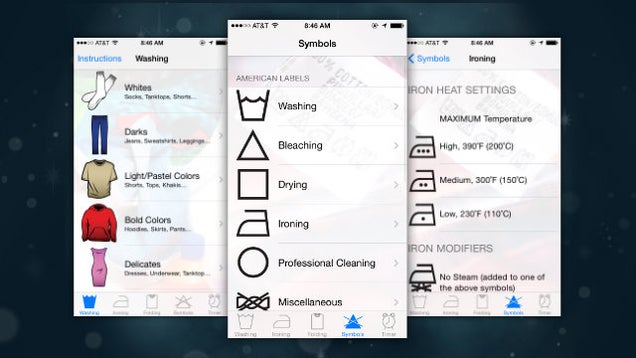
iPhone: Laundry isn't exactly rocket science , but with all the various care labels and instructions, it's easy to get confused on the proper washing techniques. Complete Laundry Care is a simple app that guides you through the process.

Complete Laundry Care doesn't do anything a quick Google search wouldn't, but it's nice to have all the info you could possible need about laundry in one place. The most helpful section here is a breakdown of what each symbol means, but the app also includes ironing instructions, suggested wash times for various materials, and plenty more.

Complete Laundry Care (Free) | iTunes App Store via Cult of Mac

01 Apr 20:03

'Top Gun 2' will feature Tom Cruise versus drones, says Jerry Bruckheimer

by Kwame Opam

The long-rumored Top Gun 2 is almost certainly happening, at least according to producer Jerry Bruckheimer. In an interview with The Huffington Post last week, Bruckheimer expressed how determined he is to make a follow-up to the 1986 classic, and hinted at what themes the movie will explore. In the sequel, Tom Cruise will reprise his role as Pete "Maverick" Mitchell, and face off against drones to prove just how essential volleyball-loving airmen are.

Continue reading…

01 Apr 20:00

Solving the Problem of Duplicate Photos

by Helen Bradley

I usually write about tips for Photoshop and Lightroom, but today I’m going to cover more of a workflow solution, solving the problem of duplicate photos on your computer or hard drives.

find-and-remove-duplicate-images-opener

If you’re like me, from time to time you’ve encountered the problem of duplicate photos. You might have imported a set of photos twice, accidentally duplicated a folder of photos, or you might have totally lost control of your photo collection to the extent that you now have multiple copies of your images and you don’t know where to begin finding, and cleaning them up.

While it’s easy enough to clean up a few duplicate images, if you have a lot of duplicates spread across multiple folders, the problem can be overwhelming. This is where some good software can make a big difference – the problem is finding that software.

There are a number of good quality, free programs that can help you find and delete duplicate photos if those images are in jpeg and tif formats. However, when you throw a folder of raw files at these programs, most of them flounder – they either don’t support raw formats or they don’t support a wide enough range of raw images to be of much use.

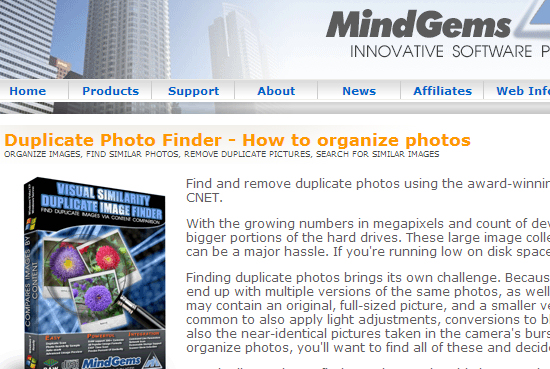
One program that can handle a wide range of raw formats and which is well up to the task of handling large image collections is Visual Similarity Duplicate Image Finder from MindGems (NOTE: this program is currently available for Windows computers only). This program comes in three versions – you will need the Professional version ($39.95) which can find duplicate photos, and which supports raw images – the entry level version doesn’t have this feature.

You can download a demo of Visual Similarity Duplicate Image Finder here. The demo is severely limited in its overall functionality, but it is very good for helping you decide if the program will work for you. You can scan folders for duplicates, view the first few that are found, and see a little of how the program will perform day to day.

find-and-remove-duplicate-images-1

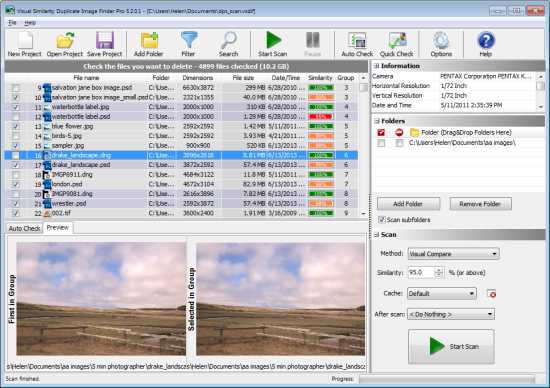
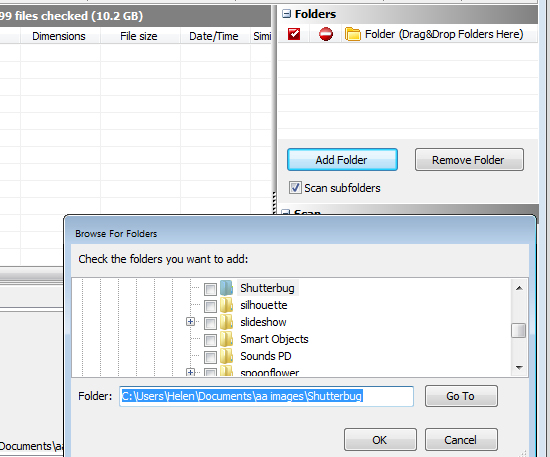
Once you download and install either the Demo or Pro versions, launch the program and on the right of the screen locate the Folders box. Drag and drop folders of photos that you want to search into the folders box or click Add Folder to browse to select one or more folders. You can select to scan subfolders of these folders if desired as well.

find-and-remove-duplicate-images-2

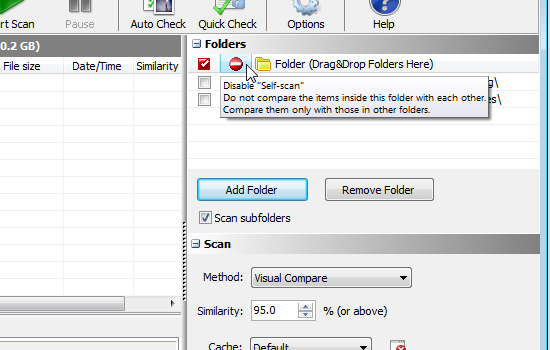
Once you have the folders selected, you need to decide if you want to compare images inside a folder or not – the program refers to this as “self-scan”. If, for example, you think that one or more folders may contain duplicate photos you would select self-scan so the program compares the images inside the folders with each other, as well as making comparisons between all the folders. You may disable this self-scan option if you have a folder of images and you want to import some additional images into that folder but need to check first that you won’t be importing duplicates.

find-and-remove-duplicate-images-3

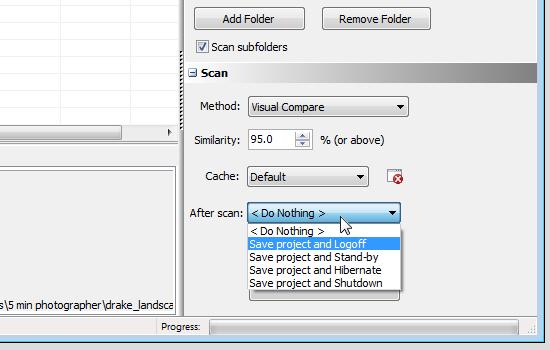
While the developer recommends leaving the program options at the default settings you can, if you wish to do so, change the scan method. The default is Visual Compare, but there are three other options: Hash, File Size and EXIF Date Time Original. If you leave the setting at Visual Compare you can determine the amount of similarity required between images for them to be considered duplicates – the higher the Similarity value the more similar they must be to be considered duplicates. The default is 95%.

If you are using the Pro version you can configure an After scan option so you can, for example, set the program to save the scan results as a project file and then close down the computer. This means you can run the application unattended and have it shut everything down when it is finished the scanning process.

find-and-remove-duplicate-images-4

This ability to save the scan results as a project is enormously useful because the scanning process can take some time. By saving the results to a file you can return at any time to work on the duplicates that were found without having to do a new scan. In the Demo version you cannot save and load projects.

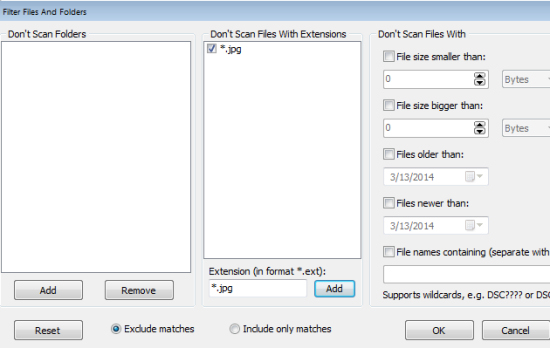
If you don’t want to include certain file types or folders in a scan click the Filter button to set a filter to filter out these files. There are other filter options too for file size and age of file.

find-and-remove-duplicate-images-5

To start the scan click the Start Scan button and wait until the scan is complete. Depending on the number of files involved this may take some time.

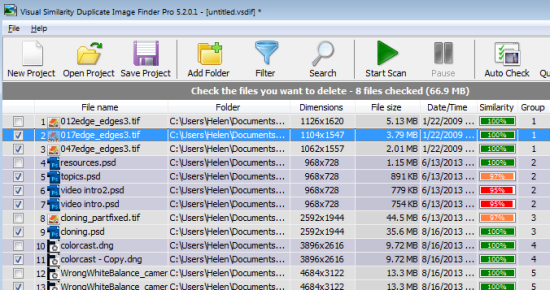
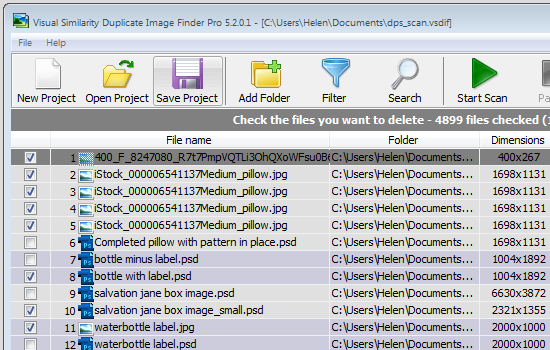
Once the scan is complete you will see a list of the identified duplicates. The list contains the filenames, folders, dimensions and file size as well as the date/time. Each set of duplicates is given a group number which is useful as there may be more than two duplicates. If you selected Visual Compare as the Scan method, then the percentage Similarity is also shown for each image.

find-and-remove-duplicate-images-6

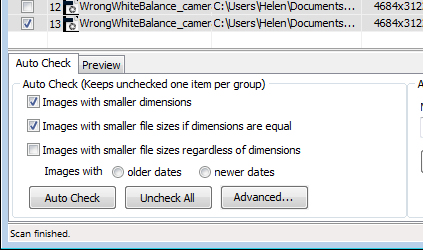
In the Auto Check panel you can have the program automatically mark the images for deletion according to rules you set. Options include Images with smaller dimensions, Images with smaller file sizes if dimensions are equal or Images with smaller file sizes regardless of dimensions. You can also choose to mark the images to delete as being those with the Older Dates or Newer Dates. This feature only selects the images and you can undo or change any selection before deleting the checked images.

find-and-remove-duplicate-images-7

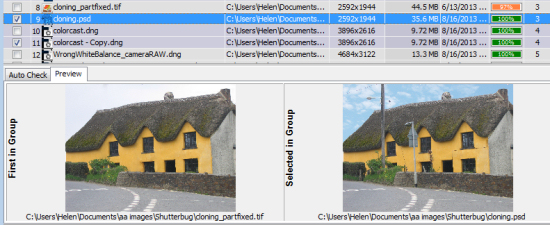
Click the Preview tab and you can make a visual check to see if the images are indeed identical or close enough that you will delete one of them. In many cases even images which are 99% similar can show significant differences so you will probably want to check all that are not 100% similar to decide what you want to do with them. The Preview panel makes this easy and you can, if necessary, click on an image in the Preview Panel to open it full screen size to check it and those similar to it.

find-and-remove-duplicate-images-8

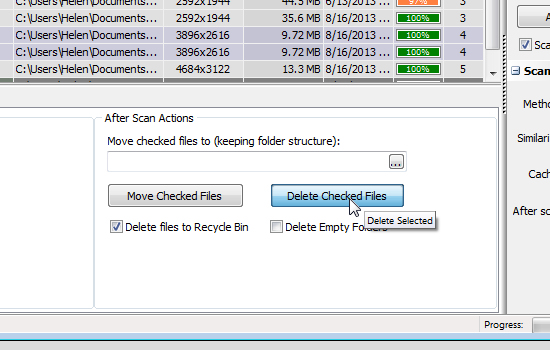
Once you have checked the images to delete, you can delete all of them in one step. You can send them to the Recycle bin, or you can move them to another location and, if desired, you can choose to automatically delete empty folders. It is also possible to delete images one at time by clicking on the file name and pressing Delete.

find-and-remove-duplicate-images-9

If you don’t complete all the work on your duplicates in one session, click Save Project to save the project file. Next time, click Open Project and select the project file to load it again and you can continue working immediately without having to scan first.

find-and-remove-duplicate-images-10

Visual Similarity Duplicate Image Finder is a professional tool and is designed to help manage large image collections. It has a lot of handy options that will speed up the process of determining what images are potential duplicates and for helping you to manage them according to your workflow requirements. When you consider the time that it will save you in organizing your image collection its purchase price looks like good value indeed.

Do you have other methods of sorting images? Please share your ideas in the comments below.

The post Solving the Problem of Duplicate Photos by Helen Bradley appeared first on Digital Photography School.

01 Apr 17:02

Top 10 most popular Android apps from last week: Dollarbird, HTC BlinkFeed

by Steve Raycraft

Every week we cover new Android apps with Fresh Meat on Wednesday, followed by Android Gaming on Thursday and Top 10 App Updates on Friday. When Monday rolls around, we look back to see which apps were the most appealing to our audience. Read on for the 10 most popular Android apps from last week.

1. HTC BlinkFeed

HTC Blinkfeed

App info: BlinkFeed aggregates social feeds, calendar items and other content into an easy to navigate interface.


2. Zoe

Zoe

App info: Zoe gives you up to 20 photos and a 3-second video to make a unique gallery to share with friends and family.


3. HTC Gallery

HTC Gallery

App info: The HTC Gallery provides you with a range of fast and easy ways to locate your photos. With Image Match, simply choose a photo with the object or person you want to find and it will locate similar images for you.


4. HTC Sense TV

HTC Sense TV

App info: Sense TV lets you control your set top box or TV, as well as helps you discover new TV shows and movies.


5. Photowall for Chromecast

Photowall

App info: Gather friends and share your photos on your TV with Photowall. Once you’re done, a YouTube video of your photowall is generated.


6. PushOn Icon Pack*

PushOn Icons

App info: The icons itself are transparent and the impressed effects of the icons should appear on all backgrounds besides pitch black and dark black backgrounds.


7. AcDisplay*

AcDisplay

App info: Using AcDisplay, you will see notifications light up your screen as they arrive and show as a circular icon with a timer ring, which is your chance to act on that notification before your screen times out again.


8. Lightning Launcher Home*

Lightning Launcher Home

App info: Lightning Launcher is a new app that lets you not only add pages to the left and right, but also above and below.


9. Dollarbird

Dollarbird

App info: Dollarbird is a new personal finance app that makes it easy to see where you spend your money.


10. HD Puzzle Kids & Toddlers Lite

HD Puzzle Kids

App info: HD Puzzle is a great app for the toddler in your life. Improve motor skills with these 48 bright colored puzzles.


Note:  To ensure that all apps receive a fair chance to make the list, we will retire any app that has made the list for 3 consecutive weeks and will place it in our Android and Me App Hall of Fame. We will post this Hall of Fame list in a dedicated series.

Any app with * next to the title indicates it will now be added to our Hall of Fame list and will no longer be listed in this article.

01 Apr 16:38

Houston family calls 911 when dad has psychotic episode; now sued by the deputy who killed him

by Cory Doctorow
When Marlene Yazar's husband Kemal experienced a psychotic episode, she was so scared for her safety and the safety of her children that she called 911. A paramedic arrived on the scene, but fled after Kemal threw a Bible at him. The paramedic called the police, and Harris County, TX Deputy Brady Pullen arrived on the scene. Ten minutes later, he and a colleague shot Kemal ten times, killing him. Then, he sued the Yazar family, naming Kemal's mother-in-law (who wasn't at home when the episode took place) because, according to him, the family were negligent in describing the threat the dead father, husband and breadwinner presented. Now, the family must not only mourn the passing of their dead loved one -- they have to defend themselves against a $100,000 lawsuit brought by the police officer who shot him dead.