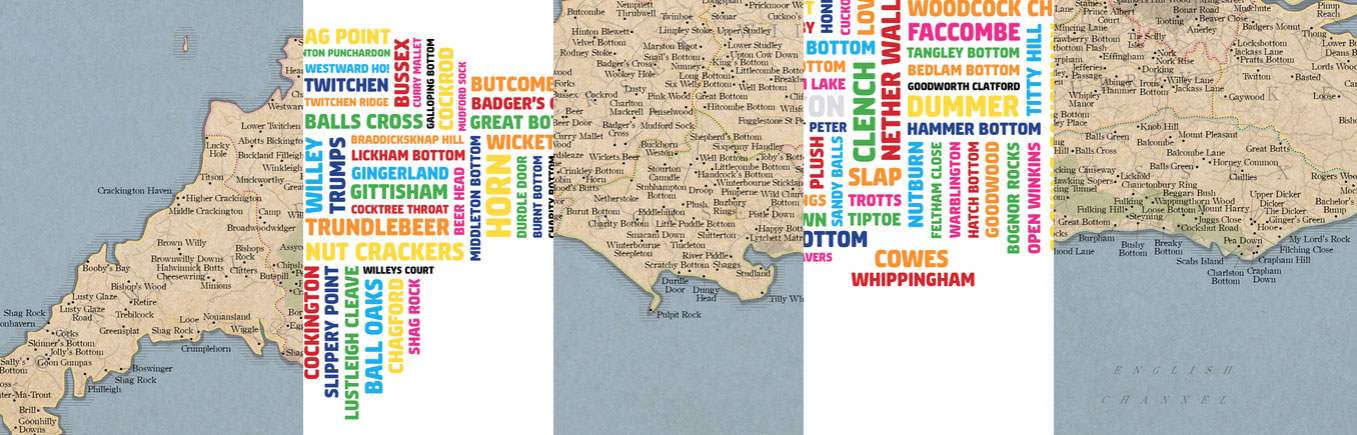
 Strumpshaw, Tincleton & Giggleswick sell this map, in traditional and wordcloud form, for £22. If you ever visit, take the time to visit beautiful Shitterton, Lickham Bottom, and Marston Bigot.
Bcstevieb
Shared posts
21 Nov 21:08
Strumpshaw, Tincleton & Giggleswick sell this map, in traditional and wordcloud form, for £22. If you ever visit, take the time to visit beautiful Shitterton, Lickham Bottom, and Marston Bigot.
Map of bizarre British place names
by Rob Beschizza
Strumpshaw, Tincleton & Giggleswick sell this map, in traditional and wordcloud form, for £22. If you ever visit, take the time to visit beautiful Shitterton, Lickham Bottom, and Marston Bigot.
21 Nov 21:07


The European Parliament is considering a call to break up Google
by Derek Kessler

Google is a big company, perhaps too big, according to the European Parliament. By far the dominant player on the internet thanks to its leading search engine, Google's size and power is reportedly worrying the European Parliament to the point that they're considering a draft motion that would call for Google to be split into multiple companies.
21 Nov 18:11


Amazon reportedly prepping ad-supported video streaming service
by Joseph Keller

Amazon is reportedly preparing a new video streaming service that would undercut its rivals, particularly Netflix. The service would not be attached to Amazon Prime, and though it would have ads, it's likely that consumers would still pay a subscription fee, however one significantly lower than what they pay now for Amazon's rivals like Netflix and Hulu.
21 Nov 18:10

Cyberwar is bullshit
by Russell Brandom
On Thursday, Amnesty International released a new tool called Detekt to tell if there's government spyware on your computer. It's basically an anti-virus scan, but the bugs it's looking for are really nasty. They're advanced bugs, designed to hijack your accounts and eavesdrop on your Skype calls, typically used by countries like Bahrain, Egypt and Vietnam to crack down on people they don't like.
21 Nov 16:37

Beijing's smog problem illustrated with a year's worth of daily photos
by Rob Beschizza
Beijing resident Zou Yi set out to illustrate the pollution problem in the city' by taking the same photo, at the same time each day, and creating a mosaic of the resulting images.
Read the rest
21 Nov 14:07
Ferret takes amazing leap
by Rob Beschizza
You know what's coming, but it doesn't make it any less breathtaking when it happens. [Video Link, via]
21 Nov 13:39

First 'Jurassic World' teaser rumbles into the past
by Tom Warren
Jurassic World is coming next summer, and the teasers begin today. While a full trailer is set to arrive on November 27th, today’s teaser brings viewers back to the exact Tyrannosaurus rex scene from the original movie. It could be a subtle hint that the upcoming movie might just try to recreate the magic of the original, or simply a clever way of generating some interest for the full-length trailer. There’s no goats or giant dinosaurs in shot, but the menacing footsteps and vibrating cups of water are a great reminder of what’s ahead when Jurassic World returns to the same island of Isla Nublar next year, 22 years after the original Jurassic Park.
21 Nov 13:37

Five Ways to Bounce Back From a Horrible Day
by Melody Wilding

Lousy days happen to all of us. Even a seemingly harmless wake-up-on-the-wrong-side-of-the-bed morning can send you into a funk. No matter how many happiness hacks or positive mantras you try to make it better, it can be hard to shake your grouchiness and glass-half-empty attitude.
This post originally appeared on The Muse.
And when a bad mood follows you to work, it can amplify all sorts of everyday annoyances and frustrations. Now, perhaps you're not able to hold it together in front of your boss when she criticizes your report. Or you're more prone to raise your voice at the intern when he makes copies in black and white instead of color like you asked. And you make absent-minded mistakes, like distractedly sending the wrong version of a document to a client.
While none of these are career-ending mistakes, their effects can leave you feeling down on yourself for days. Whatever the situation, you know you need to turn it around as soon as possible.
To help you do that, here are a few tips for turning a really, really bad day into a better tomorrow.
Identify the Real Problem
In the middle of a bad day, you're prone to making blanket statements like, "I feel so stupid" or "Nothing is going according to plan."
But pause your catastrophic thinking, and take a moment to identify the emotions behind those thoughts. Are you angry with a client? Disappointed with yourself?
It may sound simple, but applying a label to the emotion you're experiencing can discharge its hold on you and equip you to overcome the negative feelings. When you're flustered, your mind is cluttered, but research shows that putting your feelings into words can put the brakes on your emotional response and help you process the situation from a more rational, calm perspective. A thought becomes simply a thought; an emotion just an emotion.
For example, "I keep messing up at work, and I'm so frustrated with myself" becomes "I'm having the thought that I'm not doing enough at work, and I'm feeling frustration because of it." This mindfulness practice has been shown to improve behavior and problem solving.
Cancel the Pity Party
When you're having a bad day, your decision-making skills are hijacked, so avoid rash action. Read: Don't hit happy hour to drink your bad day away or delete the gigantic PowerPoint that's been the source of your frustration.
Instead, allow yourself a set amount of time to wallow, be angry, or be sad, and then move on. For example, give yourself the morning to emotionally work through whatever is gnawing at your last nerve, but commit to coming back strong after lunch. If you can't turn it around that quickly, listen to the advice "sleep on it." Sometimes, choosing to end one day and start fresh the next is the most powerful cure for a bad day.
Find Comfort Through Connection
When you're having a bad day, it's easy to self-sabotage—like wallowing alone. But resist the urge to isolate. We all have that one buddy who puts a smile on our face, no matter what, so see if you can arrange a quick coffee date with this person—or, if he or she lives far away, send an email or text. Reaching out to a friend and finding empathy in his or her response can have a comforting effect and help you feel accepted (bad days, grouchy moods, and all). Plus, it can be a great opportunity to ask for advice or a second opinion if you're facing a thorny situation at work.
If you don't feel like explaining the situation to a friend, try reading PostSecret or your favorite blog. Even those virtual connections can help you feel understood and reminds you that you're not alone—other people go through similar things every day.
Pay it Forward
Doing something to help others is a win-win—even if your primary intention is to lift your own mood and make you feel better.
Need ideas? Offer to mentor an a new intern at the office, help an elderly person in your building carry heavy bags, or finally donate to the charity you've been thinking about getting involved with. Not only will you be helping someone else, but you'll be able to take the focus off of yourself, which can put your bad day in perspective.
In fact, having this kind of giving attitude is key to being successful. Generosity helps elevate your reputation to multiply other people's successes, making you indispensable, management expert Adam Grant explains. So, find ways to help your co-workers, put more effort into answering emails, and, in general, make yourself a resource to others.
Take Care of Yourself, But Don't Over-Indulge
In theory, treating yourself sounds nice after a day when nothing's gone right, but it's actually the worst time to indulge. When your judgement is compromised, you could end up overdoing it, whether that means eating a few too many sweet treats or buying a $300 pair of shoes that definitely aren't in your budget. In the moment, it may make you feel great—but when it's time to pay your credit card bill, you'll likely be overcome by guilt and end up feeling even worse.
Instead of looking for a surface-level cure when you feel awful, ask yourself what you can learn from your feelings and implement a plan for change.
We've all heard the old saying that it's not how many times you fall down, it's that you find the strength to get back up. When you find yourself in a deep funk, keep in mind that horrible days happen to everyone—and they don't make you any less valuable of a person or employee. A little perspective, along with these tips, can help you bounce back next time one of those days happens to you.
5 Ways to Bounce Back From a Horrible Day | The Muse
Melody Wilding, LMSW is a psychology expert and licensed therapist who works with entrepreneurs and young professionals. Melody has worked with top performers running some of today's biggest startups along with published authors and media personalities. She has been featured on New York Magazine, FastCompany, Glamour, and more. Sign up for your free session at MelodyWilding.com and follow her on Twitter @MelodyWilding.
Image adapted from Sergey Nivens (Shutterstock).
Want to see your work on Lifehacker? Email Andy.
21 Nov 00:18


Google Play Music Starts Providing Shortcuts To Relevant YouTube Videos
by Liam Spradlin

Over the last few weeks, we've heard of a feature popping up for Google Play Music All Access users here and there (thanks for the tips!), whereby the app or web interface would link users to relevant music videos inside the app. When listening to or browsing music, the app would show a YouTube icon, sometimes in the center of the screen, sometimes weirdly positioned in the "now playing" bar. It was clear Google was still testing the feature but it looks like now, with the publication of an official change log for Play Music's latest update, Google may be flipping the switch on a wider basis.
Google Play Music Starts Providing Shortcuts To Relevant YouTube Videos was written by the awesome team at Android Police.
21 Nov 00:17


Chainfire Figures Out How To Root Lollipop Without A Modified Kernel
by Ryan Whitwam
 The newest beta of Chainfire's SuperSU comes with a major improvement—as of v2.27, you no longer need a modified kernel to gain root on Lollipop devices. This is a beta, and as Chainfire says, there's a chance you could break something and get in a bootloop. Still, this is a great development.


The old modded kernel won't cause any issues, but Chainfire is looking for feedback on the beta. If you're going to do that, you should flash back to stock and then re-root using the new beta.
Chainfire Figures Out How To Root Lollipop Without A Modified Kernel was written by the awesome team at Android Police.
20 Nov 21:48

What do your “keepsake passwords,” the ones drawn from life experience, say about you?
by Ian Urbina
 Few things are as universally despised as passwords. The strains they put on our memory, the endless demand to update them, their sheer number. But there is more to passwords than their annoyance. In our authorship of them, in the fact that we construct them so that we (and only we) will remember them, they take on secret lives.
Read the rest
Few things are as universally despised as passwords. The strains they put on our memory, the endless demand to update them, their sheer number. But there is more to passwords than their annoyance. In our authorship of them, in the fact that we construct them so that we (and only we) will remember them, they take on secret lives.
Read the rest
20 Nov 21:44


Corning Announces Gorilla Glass 4, Claims Twice The Strength Of Competing Glass
by Ryan Whitwam
 Odds are good that when you use a smartphone or tablet, you're touching Gorilla Glass. Since its debut in the original iPhone, Gorilla Glass has gone on to become the de facto standard for hardened glass on screens. Today the company is announcing Gorilla Glass 4, which it says is twice as durable as the competition.
Corning material scientists examined hundreds of broken devices in an effort to see how and why hardened glass fails.
Corning Announces Gorilla Glass 4, Claims Twice The Strength Of Competing Glass was written by the awesome team at Android Police.
20 Nov 21:43


Sony SmartWatch 3 Review: Excellent Battery Life, Acceptable Design
by Ryan Whitwam
 Sony was already an experienced veteran of the smartwatch market when Android Wear was announced. Of course, I don't mean that they were experienced selling them—oh, goodness no. Sony sure did make smartwatches, though. When asked if there would be an Android Wear device in Sony's portfolio, the company said it would continue to do its own thing. Well, that didn't last long. The SmartWatch 3 is essentially a beefed up version of Sony's past smartwatches running Android Wear, and that could make it a potent competitor in the burgeoning wearable wars.
Sony SmartWatch 3 Review: Excellent Battery Life, Acceptable Design was written by the awesome team at Android Police.
20 Nov 21:42


Google Contribute to make ad-free blogs a reality
by Dan Thorp-Lancaster

It looks like advertising isn't the only way way to fund your favorite sites anymore. Google announced a new program called "Contributor" today that allows people to contribute money to participating websites via a monthly subscription to get rid of ads.
20 Nov 17:56

Don’t Be Shy: Others Are Too Busy Worrying About Themselves to Notice
by Herbert Lui

Next time you're at the gym working out, meeting someone new, or out for the first time in a new outfit, remember that most other people are preoccupied thinking about themselves, so they're not paying attention to you and your worries.
Brett & Kate McKay explain in The Art of Manliness:
When you start feeling those symptoms of anxiety like clammy hands or butterflies in the stomach, don't concentrate on them. Recognize those feelings for what they are (a reaction to a perceived threat), remind yourself there really isn't a threat, and double down your focus on the person you're with. Really listen to what they're saying, ask follow up questions, and be genuinely curious about the person.
If you find yourself slipping back into self-conscious thoughts, remind yourself that no one is likely noticing how nervous you feel. Heck, other people probably aren't thinking very much about you because they're so wrapped up in their own thoughts or in what they're about to say.
You're definitely not the only self-conscious one in the room, and it's okay to feel shy or anxious. Accept it, and pull your mind back to what the person is saying, listen actively, and have fun.
Help for the Shy Guy: The Complete Guide to Overcoming Your Shyness | The Art of Manliness
Photo by Umberto Salvagnin.
20 Nov 17:55

How to Run Your Favorite Windows Programs on OS X with Wineskin
by Thorin Klosowski
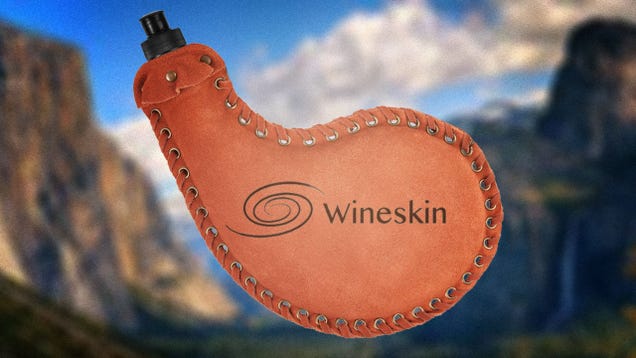
A lot of software comes out for Mac and Windows these days, but there are always a few games or apps that don't make it OS X. Thankfully, you can easily port many Windows programs to OS X with a free app called Wineskin.
Wineskin is a free, open source utility that ports Windows programs to OS X so you can run them natively. It's built on Wine, an engine made for developers to help the quickly port software. There are a few apps that do this, like previously mentioned WineBottler or commercial software like CrossOver, but we've had the best luck work with Wineskin.
Due to the way Wineskin works, you won't be able to play the newest, most graphically intense games or power-hungry software. But you can port older software and lightweight games that don't hog a ton of resources (like many indie games). For more intense programs, you'll likely want to dual boot Windows with Apple's Boot Camp software instead.
Software will likely run better with Boot Camp, but Wineskin is great because you can port your favorite program and run it right in OS X—without ever purchasing Windows or rebooting your computer. With that out of the way, let's port some software. We've tested Wineskin with a number of apps, but we'll use Torchlight II as our sample since the Mac port seems to be dead in the water.
Step One: Download Wineskin and Update the Wrapper
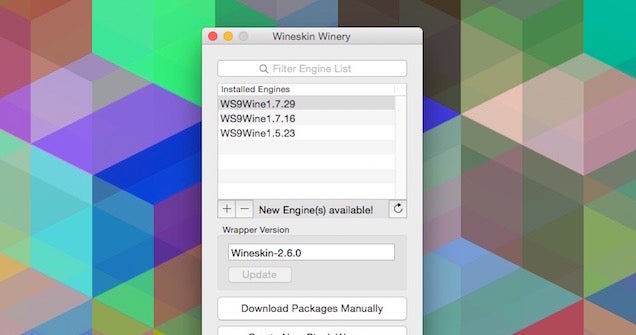
Before you start, you'll need to download Wineskin. Once you've got it, go ahead and drag the file to your Applications folder and launch it. If you haven't already, download the Windows installer for your program of choice as well (in this case, the Torchlight II installer).
Instead of always updating the program itself, you'll update two different things in Wineskin: the wrapper and the engine. You'll get to the engine in the next step, but you can update the wrapper version right now by just clicking on the "Update" button. A wrapper is a set of registry files and a fake C: drive. You'll need to make a new wrapper for each application you want to port.
Step Two: Install a Wineskin Engine

Next up, it's time to install a Wineskin Engine. This is where things get a little weird. An engine includes a bunch of settings that can help you run software. The newest version is WS9 1.7.29. You can download and use older Wineskin engines, and certain engines are more compatible with certain titles than others. Just click the "+" button and choose the engine you want to use for your software port.
When I first tried to run Torchlight II, I went with the newest version of the Wineskin engine and couldn't get it to work. So, I did some digging to figure out why. Thankfully, Wine HQ features a huge list of software compatibility. After searching for Torchlight II, I found that it only works with WS9 1.7.16.
So, before you pick your engine, dig around on Wine HQ to see what other people are saying about compatibility. The newest version isn't always the best, so pick whichever engine seems to have the most compatibility with the software you want to port.
Step Three: Create a Wrapper
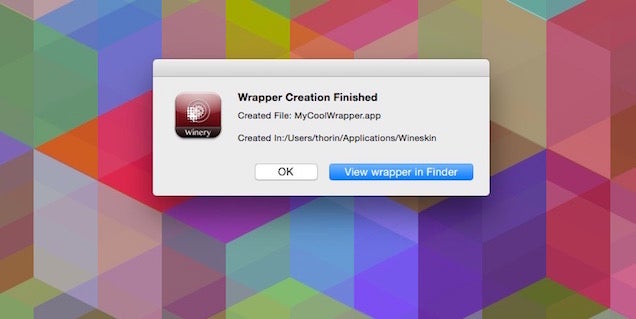
Now that you've picked your engine, it's time to create a wrapper:
- Click the "Create New Blank Wrapper" button and name your app. Wineskin will take a few moments to build the wrapper
- Now, you might get a few different notices to install software. I had to download and install Mono and Gecko. Go ahead and click the "Install" button on anything Wineskin asks you to
- When it's finished, you'll get a note asking you to open the file in Finder. Click "Yes" to open up a window in Finder
Your wrapper is now created. Before you can install software, though, you'll need to mess around with some options.
Step Four: Configure Your Wrapper

Next, it's time to make some tweaks to your wrapper. Double-click the file in Finder (You might get an error message the first time, just double-click it again if you do) and you'll open up the Wrapper settings.
You'll see three options here: Install Software, Set Screen Options, and Advanced. Unless you know your software is fully compatible with no additional settings, hold off on installing for now. Instead, click "Advanced."
The Advanced setting has a ton of options, and most of them are pretty confusing. On your main Configuration tab, you can set up a special Windows EXE file to open, change the app icon, and rename the app if you want. The Tools tab has a ton of different options to change up configurations, install special Winetricks to make software more compatible, and rebuild your wrappers. WineTricks is a script that installs basic components into your wrapper. These are usually Microsoft DLL files and fonts that can fix problems with your ports. There are a billion WineTricks to choose from, but you'll find guides for installing them here. The Options tab has more options for your software that include changing how a three button mouse works, how the ALT key works, and more.
At a glance, all this stuff is pretty overwhelming and hard to really understand. Don't worry though. You have a couple of options for figuring out which settings you need to alter.
The first place you should check is Wine HQ. If you're trying to install popular software, you'll usually find a guide for doing so on Wine HQ. Take a look at the Team Fortress 2 page as an example. Each bit of software you install needs a custom set of Wrapper settings, so prepare to dig into these pages each time you want to make your own port.
Unfortunately, Torchlight II doesn't have a very good page on Wine HQ. So, I turned to Google and found IAM SysAdmin's post on getting it to work. Here's the gist of what I had to configure just to give you an idea of what you can expect with this step:
- Click on the "Advanced" button.
- Click on the "Tools" tab at the top then "Winetricks".
- From the search field at the top type in "msxml3″ select it and run.
- Follow the steps to download the file, manually, and put it in the folder and re-run.
- Search for vcrun2010, select, and click on the Run button.
- Follow the prompts.
- Click on the "Close" button to close the Winetricks window.
- Under the Tools tab, click on "Config Utility".
- Click on the Graphics tab.
- Select "Automatically capture the mouse in full-screen windows".
- Click Apply.
- Click on the Libraries tab.
- Under "New override for library" select dwrite then click the Add button.
- Select the dwrite override then click the Edit button.
- Select Disable and click OK.
- Click Apply and OK.
Obviously, not all software requires this much configuration, but some of it will. Unless you're a Windows master who's great at reading error logs, I suggest hunting down working configuration settings before you try to install software.
Step Five: Install and Run Your Software

Now that all that configuration nonsense is out of the way, it's time to actually install your software.
- Click the "Install Software" on the Wineskin Advanced page.
- Click "Choose Setup Executable".
- Select your setup or install EXE you downloaded earlier (In the case of Torchlight II it's the Torchlight2_FullInstall_v1.21.exe file).
- Run through the setup just like you would if you were on a Windows computer.
When the installation process is complete, you should be able to run your software.
You'll find your ports in your Wineskin folder (User > Applications > Wineskin). Just double-click your newly created app to run it. If everything worked it'll load up and you can start using it as if it was a Mac app.
If you installed a game, you might want to pop into the Settings before you start and drop down any graphics settings. Since it's a hacked together port of software, things tend to be a bit slow, so you're better off starting with low graphics settings and moving up.
Step Six: How to Get Back to the Wrapper Configuration Page

If your software isn't working properly or you need to reconfigure some stuff, you can get back into the Wrapper settings without totally reinstalling everything:
- Head to your Wineskin folder (User > Applications > Wineskin)
- Right-click the app you want to edit and select "Show Package Contents"
- Double-click the Wineskin.app file to reopen the Wineskin settings
That's it! You can reconfigure any settings or mess around with different options if you need to.
You'll likely have mixed luck with porting your software, but it's worth a try and 20 minutes of your time if you want to run Windows software on your Mac desktop, without having to install a virtual machine or partition your drive with Boot Camp..
20 Nov 17:55

Control When and If Bundles Appear in Gmail's New Inbox App
by Tori Reid
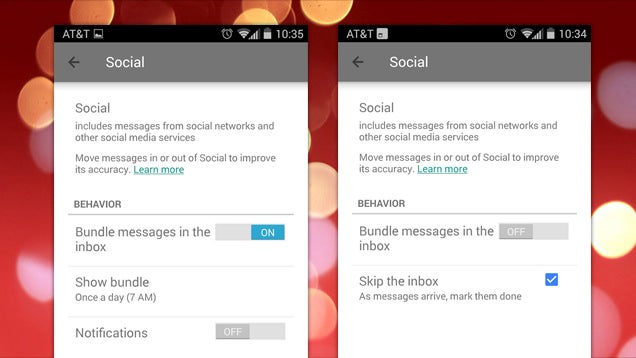
Android/iOS: Google's new Inbox app lets you bundle messages for easy organization. It's great, but there's more you can do with those bundles. After creating one, you can control how often a bundle appears, like once a day or once a week, or even have it skip the inbox altogether.
By default, bundles appear as messages arrive, which often causes more clutter than necessary. For example: It would be nice to have all your newsletters appear once a day, rather than throughout the day. With bundles you can make these types of changes. Set your less urgent bundles to show up once a day, once a week, or, if you're avoiding spam, never. It's easy:
- Head to Settings > Label Settings and Notifications.
- Tap the bundle you want to customize and find the "Behavior" section.
- Here you can turn off notifications, or tap "Show Bundle" to set whether you'd like to see messages as they arrive, once a day, or once a week.
It takes a couple extra steps to get the bundle to completely skip your inbox:
- From the "Behavior" section, turn the "Bundle the messages in the inbox" feature to off.
- Don't worry about the warning. Just tap OK.
- Now you'll see your behavior options have changed. Check the new "Skip the Inbox" box to keep the both bundle intact and hidden.
Skip the Inbox keeps the messages bundled and makes the entire bundle disappear, so make sure you check it. If you don't, the messages will start appearing individually. Use these settings to help you put the important messages in the forefront and block out the noise.
A bit about Bundles in Inbox | Official Gmail Blog
20 Nov 13:17

Blackpool's Broadway Hotel fines guests £100 for negative review
by Cory Doctorow
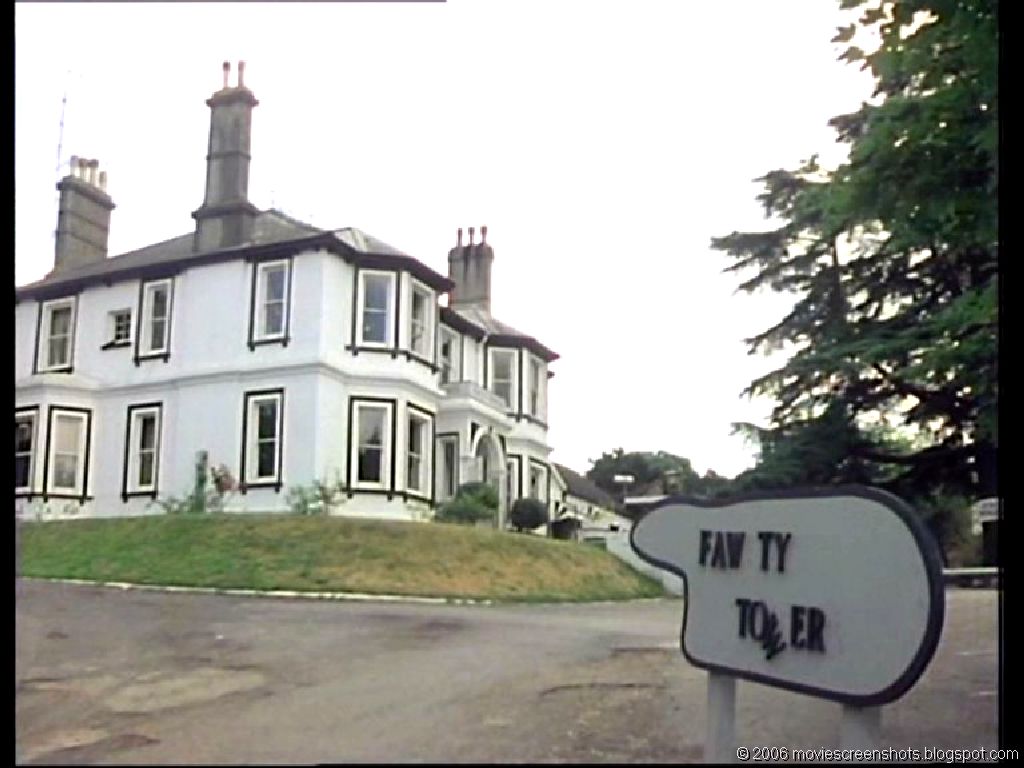
The hotel had no running water, miswired electrical outlets, and a contract with fine-print that said that they'd charge your credit card £100 if you posted a negative review on the Web.
Read the rest
20 Nov 13:14

Live the Legend with These Mythological Wallpapers
by Eric Ravenscraft

Nothing spurs the imagination quite like a good myth. Today's wallpapers invoke the power of history's greatest stories to bring the myths of yore to your desktop.
Remember, we're now requesting your participation in the Wallpaper Wednesday series! You'll find a selection here, but post your favorites for this week's topic in the discussions below. Stick to our format as best you can, including a title, the image, resolution, and a link. Happy wallpapering!
Desert Lords

Download This Wallpaper (1280x940) | Deviant Art
Green Man

Download This Wallpaper (1400x959) | Phil McDarby
Phoenix

Download This Wallpaper (1920x1080) | Deviant Art
Banshee

Download This Wallpaper (1430x832) | Deviant Art
Gryphon

Download This Wallpaper (1440x811) | Alpha Coders
Fairy

Download This Wallpaper (2560x1600) | Wallpaper Backgrounds
Cthulhu

Download This Wallpaper (2468x1440) | Imgur
Centaur

Download This Wallpaper (1920x1080) | Wallpaper Up
20 Nov 13:12


PSA: Unused Dynamic Quick Settings Toggles On Android Lollipop Will Disappear After A Month, But This Trick Makes Them Go Away Now
by Rita El Khoury
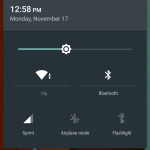
Google made a lot of interesting changes in its Quick Settings and Notifications drawer in Android Lollipop. One of these is the addition of dynamic toggles that don't clutter the drawer for everyone, but only appear once a user activates the corresponding option from Settings. This applies for example to the Hostpot and Invert Colors toggles. The problem is that once these toggles attach to your Quick Settings, there doesn't seem to be a way to make them go away, even when you switch the action back off.
PSA: Unused Dynamic Quick Settings Toggles On Android Lollipop Will Disappear After A Month, But This Trick Makes Them Go Away Now was written by the awesome team at Android Police.
20 Nov 13:02
 Last week, when Square started pre-orders for its chip-and-PIN-based hardware to upgrade the current mag-stripe equipment, we said it was probably a sign that the company was finally going to turn on more international services into regions like Europe, where the newer system reigns supreme. Looks like that’s just what Square has quietly started to do. Updated Square Register apps in… Read More
Square Register Now Available Globally On Android And iOS
by Ingrid Lunden
Last week, when Square started pre-orders for its chip-and-PIN-based hardware to upgrade the current mag-stripe equipment, we said it was probably a sign that the company was finally going to turn on more international services into regions like Europe, where the newer system reigns supreme. Looks like that’s just what Square has quietly started to do. Updated Square Register apps in… Read More
20 Nov 12:58
 Resistance is digital. Human rights charity Amnesty International is one of several organizations behind the release of a free, open source anti-surveillance tool called Detekt. Read More
Amnesty, EFF, Privacy International Put Out Free Anti-Surveillance Tool
by Natasha Lomas
Resistance is digital. Human rights charity Amnesty International is one of several organizations behind the release of a free, open source anti-surveillance tool called Detekt. Read More
19 Nov 22:28


36 Best New Android Apps And Live Wallpapers From The Last 2 Weeks (11/6/14 - 11/19/14)
by Michael Crider
 Welcome to the roundup of the best new Android applications, games, and live wallpapers that went live in the Play Store or were spotted by us in the previous 2 weeks or so.
Please wait for this page to load in full in order to see the widgets, which include ratings and pricing info.
Looking for the previous roundup editions? Find them here.
Featured App
Expense IQ - Expense Manager
This week's roundup is brought to you by Expense IQ - Expense Manager from Handy Apps.
36 Best New Android Apps And Live Wallpapers From The Last 2 Weeks (11/6/14 - 11/19/14) was written by the awesome team at Android Police.
19 Nov 22:24


Smartphone encryption could lead to death of a child, government claims
by Chuong H Nguyen

The U.S. government is fighting back against new encryption technologies on smartphones made by Apple and those using Google's latest version of Android. With a strongly worded argument, an official at the U.S. Department of Justice plainly stated that without access to a suspect's phone, a child could die in cases such as kidnapping.
19 Nov 22:16

Firefox drops Google as default search engine, signs five-year deal with Yahoo
by Russell Brandom

Today, Yahoo and Mozilla announced a five-year partnership that would make Yahoo the default US search engine for Mozilla's Firefox browser on mobile and desktop. In December, Yahoo will roll out an enhanced new search function to Firefox users, and will also support Do Not Track functions in Firefox as a result of the partnership. The agreement also sets the stage for future product integrations, but so far the companies are keeping quiet on what those might be. Firefox has lost market share in recent years but is still used by roughly 17 percent of webgoers. According to Mozilla CEO Chris Beard, Firefox users search the web more than 100 billion times each year, suggesting a major windfall for Yahoo as a result of the deal.
19 Nov 16:13
 The final traces of the old foursquare are being wiped from existence, as the new Foursquare is currently going out as an update to Windows Phone users. This summer, Foursquare made an announcement, to the shock of many, that it would be splitting its long-surviving check-in app into two separate applications: Swarm and Foursquare. Swarm, which launched shortly thereafter, would take over… Read More
The Old Foursquare Is Dead
by Jordan Crook
The final traces of the old foursquare are being wiped from existence, as the new Foursquare is currently going out as an update to Windows Phone users. This summer, Foursquare made an announcement, to the shock of many, that it would be splitting its long-surviving check-in app into two separate applications: Swarm and Foursquare. Swarm, which launched shortly thereafter, would take over… Read More
19 Nov 14:22


Microsoft Office Mobile update brings Dropbox integration
by Chuong H Nguyen
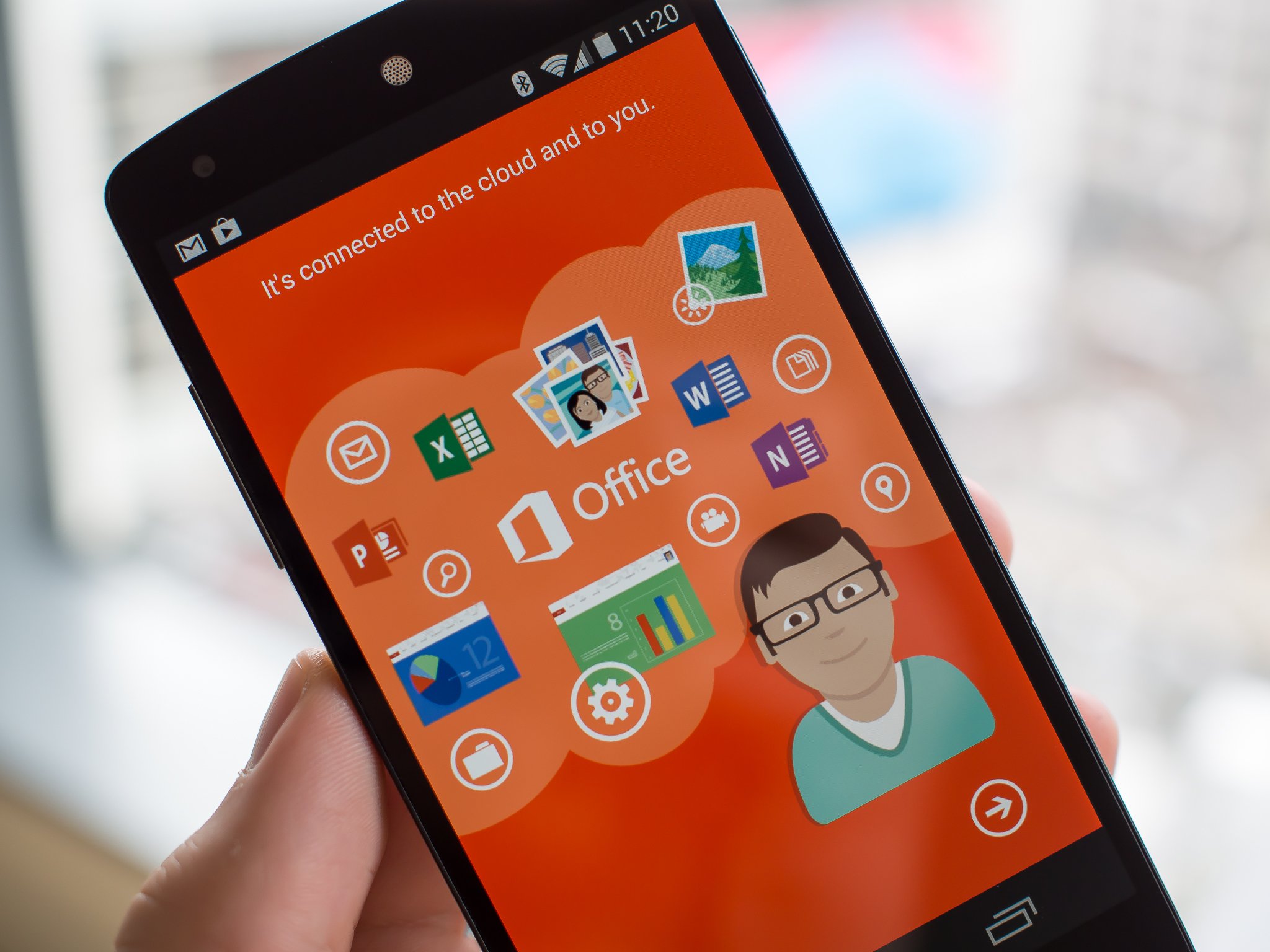
Microsoft has updated its Office Mobile app for Android, bringing with it Dropbox integration. The feature was announced a few weeks ago and the update now makes Dropbox support live, allowing users to open, edit, and save documents within their Dropbox cloud using the Office Mobile app.
19 Nov 14:21


O2 shows that sharing is caring with new bundles
by Rich Edmonds

UK mobile operator O2 has announced new plans for families and those with multiple handsets. Sharer and Family Sharer enables O2 subscribers to share data bundles of up to 8GB across multiple mobile devices attached to a single account. The new plans aren't limited to smartphones either as tablets and other data-connected hardware are all included.
19 Nov 14:16

Reduce Your Wardrobe Choices to Avoid Decision Fatigue
by Eric Ravenscraft

Anyone who's seen Steve Jobs or Mark Zuckerberg give presentations has probably asked why these wealthy, successful people wear the same clothes all the time. Here's one good reason: avoiding decision fatigue.
We have too many choices to make in a given day. Many aren't even worth the time it takes to process them ("paper or plastic"? who cares?), but that doesn't make them go away. As productivity site Elite Daily explains, eliminating the choices from your wardrobe is one fairly big way to boost your productivity by removing unnecessary choices:
This is all related to the concept of decision fatigue. This is a real psychological condition in which a person's productivity suffers as a result of becoming mentally exhausted from making so many irrelevant decisions.
Simply put, by stressing over things like what to eat or wear every day, people become less efficient at work.
That's not to say you can't have a variety of clothes. Tossing out your fancy dresses isn't going to help you on Monday morning. But having a pre-set look for the workweek along with five, slightly varying versions of it can take the stress off. It also makes processes like laundry easier. If all your shirts and pants or skirts go with each other, you don't have to worry which pieces need to be cleaned for which outfit. As long as you have a top and a bottom, you're good.
The Science Of Simplicity: Why Successful People Wear The Same Thing Every Day | Elite Daily
Photo by Vicki Burton.