Shared posts

07 Aug 12:54

Pentagon tells troops: Turn off fitness tracker GPS when you head to warzones

by Sean Gallagher

Enlarge / A heatmap of Strava "workout" data revealed sensitive locations around the world, including some mysterious places in Syria. (credit: Strava)

The Pentagon has now made it official. Eight months after a researcher discovered that the "heatmap" feature of the Strava fitness tracking community was revealing the location of US military facilities in Syria and other conflict zones as well as some troop movements, the Department of Defense has instructed troops headed to potentially hostile territory to turn off the Global Positioning System features of their fitness tracking gadgets and mobile applications.

In a memo obtained by the Associated Press, the new instructions state that “These geolocation capabilities can expose personal information, locations, routines, and numbers of DOD personnel, and potentially create unintended security consequences and increased risk to the joint force and mission." But Defense Department leadership stopped short of instructing troops to leave their wearable devices at home.

Instead, the memorandum instructs that the devices' geospatial tracking capabilities must be turned off in sensitive or dangerous operating areas where the exposure of location data could cause a "significant risk" to members of the military. Operational commanders will be given leeway to decide whether GPS tracking needs to be turned off by their troops based on the threat level in their area of operations.

Read 2 remaining paragraphs | Comments

25 Mar 15:55

La Cina accusa l’India di sconfinamento nel proprio territorio in Tibet - FOTO

by Daniele Particelli
23 Mar 16:50

Di liberismo, Paperino e mercati

by di Alessandro Gilioli

Ogni tanto un mio amico mi chiede perché non mi iscrivo ai radicali, visto che ne condivido tutte le battaglie civili. Gli rispondo che nello statuto dei radicali c'è scritto che è anche un partito "liberista" e io sono contro il liberismo, visto la catastrofe che ha provocato. Lui mi risponde che quella cosa che ha provocato la catastrofe non è il vero liberismo, ma una sua parodia, una sua brutta caricatura in cui la libera concorrenza è subordinata a intrecci, cricche e centri di potere. Io gli replico che vabbé, se la mettiamo così allora manco il comunismo era quello di Breznev, in teoria, ma dobbiamo fare i conti con la realtà storica, non con i nostri wishful thinking.

La discussione, come giusto, prosegue fino a che il tasso alcolico lo consente.

Tuttavia, in effetti, nel confronto attuale per l'egemonia culturale si pone una questione che è allo stesso tempo nominalistica e di sostanza.

Perché dopo trent'anni in cui il dogma prevalente in Occidente era "meno Stato più mercato", "basta lacci laccioli", "il privato è meglio del pubblico", adesso l'ago della bilancia sta andando dall'altra parte e ad accusare quella cosa lì - liberismo - non sono più solo veterocomunisti che rimpiangono i piani quinquennali ma molte, moltissime persone di semplice buon senso che pur senza aver letto le tabelle di Picketty hanno capito che forse si è andati un po' troppo oltre, ultimamente.

Un po' troppo oltre non solo in senso etico, ma anche pratico, cioè di sopportazione da parte dei più: quindi con rischi gravi per le stesse democrazie.

Ora, buttandola giù un po' la clava, ma nemmeno troppo: negli ultimi trent'anni in Occidente c'è stata una cosa (un modello, un "motore", forse perfino un'ideologia) che ha aumentato la forbice sociale, finanziarizzato l'economia, precarizzato il lavoro e il reddito, tolto potere ai governi eletti e impoverito il ceto medio a favore di una piccola élite di super ricchi.

Oggi nei confronti di questa cosa c'è un disagio diffuso, che assume talvolta nelle urne forme di ribellismo, ma anche di nazionalismo o peggio.

Come la dobbiamo chiamare questa cosa verso cui c'è diffusa incazzatura?

Grezzamente, forse, ma da molti di noi viene chiamata, appunto, liberismo o neoliberismo. Oppure globalizzazione liberista, nel senso che il disegno di cui sopra si è realizzato anche attraverso la globalizzazione tecnologica e dei mercati.

I sacerdoti del liberismo puro tuttavia ci dicono che sbagliamo, per i motivi addotti dal mio amico e anche per altre ragioni, come la forte presenza dello Stato in tanta parte dell'economia, le partecipate dei Comuni, il peso della spesa pubblica eccetera eccetera.

A me, francamente, di chiamare liberismo piuttosto che Pippo, Pluto o Paperino quella cosa là (quella che ha creato questo disastro, dico) interessa pochino.

Voglio dire, la disputa accademica su cosa dovrebbe essere il vero liberismo, chissenefrega, con rispetto. E se ai liberisti puri dà fastidio che venga usato il termine a loro tanto caro, ci dicano con cosa dobbiamo sostituirlo e tornino serenamente a vagheggiare il loro competitivismo perfetto.

Quello che mi interessa (molto più pragmaticamente) è che si prenda atto comunemente che quella cosa che ha vinto dagli '80 a oggi in Occidente - si chiami liberismo, Pippo, Pluto o Paperino - ha troppo aumentato la forbice sociale, troppo finanziarizzato l'economia, troppo precarizzato il lavoro e il reddito, troppo tolto potere ai governi eletti e troppo impoverito il ceto medio a favore di una piccola élite di super ricchi. Mettendo in ginocchio ogni più elementare senso di giustizia sociale e mettendo a rischio, ormai, le stesse democrazie.

Quindi occorre cambiare radicalmente. Andando nella direzione opposta rispetto a quella intrapresa trent'anni fa.

Ecco: non credo che la direzione opposta sia quella teorizzata nemmeno dal più puro dei liberisti.

Certo, poi nessuno è così naif da ignorare che gli strumenti di redistribuzione e socializzazione precedenti il 1980 oggi non funzionano più, che bisogna trovarne di nuovi ed efficaci, probabilmente transnazionali. E assai difficili da elaborare, così come da realizzare.

Ma intanto chiariamoci sul fatto che quel modello ha fallito - comunque lo si chiami - e che è tempo di lasciarcelo alle spalle. E di andare in direzione contraria.

01 Jan 15:22

This Is the Best of Lifehacker 2016

by Alan Henry

At the end of every year, we take a look back at our most popular posts to reminisce (and to help you catch any stuff you might have missed). Here’s one last look at our best posts in 2016.

Read more...

28 Feb 09:52

Top 10 Tools for a Free Online Education

by Melanie Pinola

For lifelong learners and self-made scholars, the internet is a priceless resource. Continue your education with these top free online tools.

Read more...


26 Nov 23:23

Do You Like What I Do For a Living?

by Bradley M. Kuhn

[ A version of this blog post was crossposted on Conservancy's blog. ]

I'm quite delighted with my career choice. As an undergraduate and even in graduate school, I still expected my career extend my earlier careers in the software industry: a mixture of software developer and sysadmin. I'd probably be a DevOps person now, had I stuck with that career path.

Instead, I picked the charity route: which (not financially, but work-satisfaction-wise) is like winning a lottery. There are very few charities related to software freedom, and frankly, if (like me) you believe in universal software freedom and reject proprietary software entirely, there are two charities for you: the Free Software Foundation, where I used to work, and Software Freedom Conservancy, where I work now.

But software freedom is not merely an ideology for me. I believe the ideology matters because I see the lives of developers and users are better when they have software freedom. I first got a taste of this IRL when I attended the earliest Perl conferences in the late 1990s. My friend James and I stayed in dive motels and even slept in a rental car one night to be able to attend. There was excitement in the Perl community (my first Free Software community). I was exhilarated to meet in person the people I'd seen only as god-like hackers posting on perl5-porters. James was so excited he asked me to take a picture of him jumping as high as he could with his fist in the air in front of the main conference banner. At the time, I complained; I was mortified and felt like a tourist taking that picture. But looking back, I remember that James and I felt that same excitement and we just expressed it differently.

I channeled that thrill into finding a way that my day job would focus on software freedom. As an activist since my teenage years, I concentrated specifically on how I could preserve, protect and promote this valuable culture and ideology in a manner that would assure the rights of developers and users to improve and share the software they write and use.

I've enjoyed the work; I attend more great conferences than I ever imagined I would, where now people occasionally walk up to me with the same kind of fanboy reverence that I reserved for Larry Wall, RMS and the heroes of my Free Software generation. I like my work. I've been careful, however, to avoid a sense of entitlement. Since I read it in 1991, I have never forgotten RMS' point in the GNU Manifesto: Most of us cannot manage to get any money for standing on the street and making faces. But we are not, as a result, condemned to spend our lives standing on the street making faces, and starving. We do something else., a point he continues in his regular speeches, by adding: I [could] just … give up those principles and start … writing proprietary software. I looked for another alternative, and there was an obvious one. I could leave the software field and do something else. Now I had no other special noteworthy skills, but I'm sure I could have become a waiter. Not at a fancy restaurant; they wouldn’t hire me; but I could be a waiter somewhere. And many programmers, they say to me, “the people who hire programmers demand [that I write proprietary software] and if I don’t do [it], I’ll starve”. It’s literally the word they use. Well, as a waiter, you’re not going to starve.

RMS' point is not merely to expose the false dilemma inherent in: I have to program, even if my software is proprietary, because that's what companies pay me to do, but also to expose the sense of entitlement in assuming a fundamental right to do the work you want. This applies not just to software authorship (the work I originally trained for) but also the political activism and non-profit organizational work that I do now.

I've spent most of my career at charities because I believe deeply that I should take actions that advance the public good, and because I have a strategic vision for the best methods to advance software freedom. My strategic goals to advance software freedom include two basic tenets: (a) provide structure for Free Software projects in a charitable home (so that developers can focus on writing software, not administration, and so that the projects aren't unduly influenced by for-profit corporations) and (b) uphold and defend Free Software licensing, such as copyleft, to ensure software freedom.

I don't, however, arrogantly believe that these two priorities are inherently right. Strategic plans work toward a larger goal, and pursing success of a larger ideological mission requires open-mindedness regarding strategies. Nevertheless, any strategy, once decided, requires zealous pursuit. It's with this mindset that I teamed up with my colleague, Karen Sandler, to form Software Freedom Conservancy.

Conservancy, like most tiny charities, survives on the determination of its small management staff. Karen Sandler, Conservancy's Executive Director, and I have a unique professional collaboration. She and I share a commitment to promoting and defending moral principles in the context of software freedom, along with an unrelenting work ethic to match. I believe fundamentally that she and I have the skills, ability, and commitment to meet these two key strategic goals for software freedom.

Yet, I don't think we're entitled to do this work. And, herein there's another great feature of a charity. A charity not only serves the public good; the USA IRS also requires that a charity be funded primarily by donations from the public.

I like this feature for various reasons. Particularly, in the context of the fundraiser that Conservancy announced this week, I think about it terms of seeking a mandate from the public. As Conservancy poises to begin its tenth year, Karen and I as its leaders stand at a crossroads. For financial reasons of the organization's budget, we've been thrust to test this question: Does the public of Free Software users and developers actually want the work that we do?.

While I'm nervous that perhaps the answer is no, I'm nevertheless not afraid to ask the question. So, we've asked. We asked all of you to show us that you want our work to continue. We set two levels, matching the two strategic goals I mentioned. (The second is harder and more expensive to do than the first, so we've asked many more of you to support us if you want it.)

It's become difficult in recent years to launch a non-profit fundraiser (which have existed for generations) and not think of the relatively recent advent of gofundme, Kickstarter, and the like. These new systems provide a (sadly, usually proprietary software) platform for people to ask the public: Is my business idea and/or personal goal worth your money?. While I'm dubious about those sites, I do believe in democracy enough to build my career on a structure that requires an election (of sorts). Karen and I don't need you to go to the polls and cast your ballot, but we do ask you consider if what we do for a living at Conservancy is worth US$10 per month to you. If it is, I hope you'll “cast a vote” for Conservancy and become a Conservancy supporter now.

09 Nov 11:26

Isolation

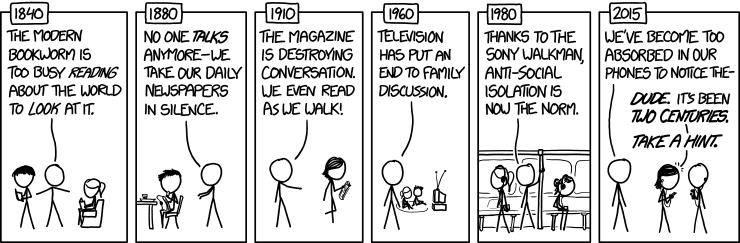
2060: The gregarious superintelligent AI, happily talking its way out of a box, is fast becoming a relic of the past. Today's quantum hyper-beings are too busy with their internal multiverse sims to even notice that they're in boxes at all!
22 Sep 13:54

Jaro Mail

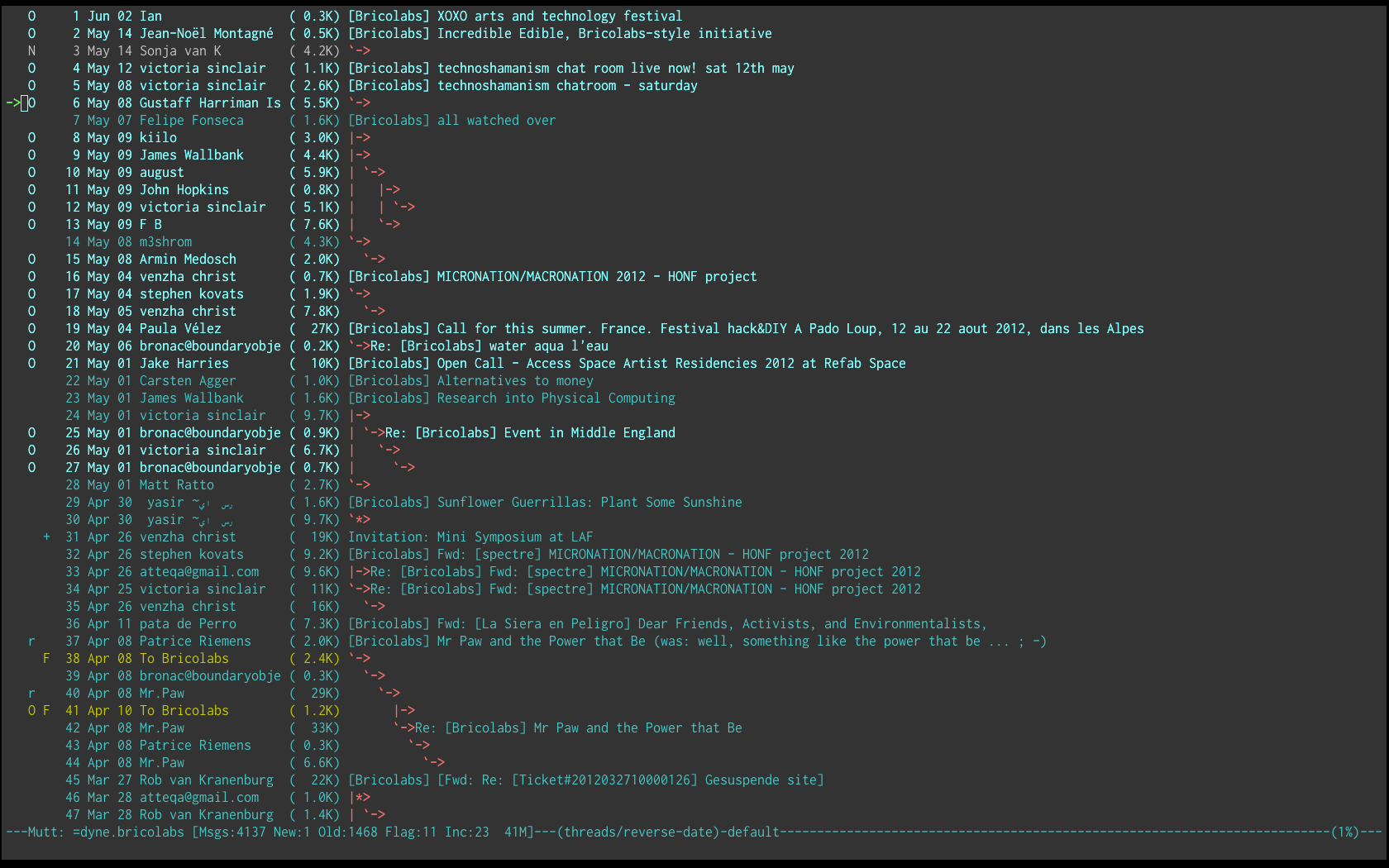
Jaro Mail:

A screenshot of Jaro Mail

Jaro Mail is an integrated suite of interoperable tools to manage e-mail communication in a private and efficient way.

A pre-configured ‘old fashioned’ mail setup that includes Mutt, Fetchmail, MSmtp, Notmuch and GnuPG.

06 Sep 19:59

Five Basic Hand Stitches You Should Know for Repairing Your Own Clothes

by Patrick Allan

Sewing may seem like one of those quaint, old-fashioned household chores that most people outsource today. Yes, having a good tailor is a wonderful thing, but there are certain clothing repairs and adjustments that are probably easier to do than you think. If you’ve popped a button on your shirt, worn down a hem on…

Read more...

28 Apr 20:05

Disabling MacBook Startup Sound in Linux

by Alexander Todorov

There is an easy way to disable the MacBook startup sound (boot chime) even after wiping out OS X and installing Linux.

This sound can be easily disabled if you mute the volume in OS X and shutdown the computer. The value is stored in NVRAM.

  1. Reboot the computer and hold Cmd+Alt(Option)+R. This will start OS X Internet recovery mode;
  2. Open the terminal and issue the following command

     nvram SystemAudioVolume=%00
    
  3. Reboot.

Voila. In Linux try this:

# efivar -l | grep SystemAudioVolume
 7c436110-ab2a-4bbb-a880-fe41995c9f82-SystemAudioVolume
 7c436110-ab2a-4bbb-a880-fe41995c9f82-SystemAudioVolumeDB

# efivar -n 7c436110-ab2a-4bbb-a880-fe41995c9f82-SystemAudioVolume -p
GUID: 7c436110-ab2a-4bbb-a880-fe41995c9f82
Name: "SystemAudioVolume"
Attributes:
    Non-Volatile
    Boot Service Access
    Runtime Service Access
Value:
00000000  00                                                |.               |

# efivar -n 7c436110-ab2a-4bbb-a880-fe41995c9f82-SystemAudioVolumeDB -p
GUID: 7c436110-ab2a-4bbb-a880-fe41995c9f82
Name: "SystemAudioVolumeDB"
Attributes:
    Non-Volatile
    Boot Service Access
    Runtime Service Access
Value:
00000000  00 
#

Note 1: Before disabling both variables had non zero values. Also SystemAudioVolumeDB doesn't seem to have any effect.

Note 2: RHEL or CentOS users need to rebuild efivar from the Fedora src.rpm.

Note 3: several Internet sources suggest that writing EFI variables from Linux may sometimes corrupt your Apple firmware. I didn't research this any further. If you happen to figure out how to successfully write to these variables under Linux please let everyone know in the comments (in case OS X recovery mode goes missing, you know).

Thanks to my reader Alexander, who gave me the hint in a previous blog post.

26 Jan 11:14

Piccole lezioni di Tsipras

by di Alessandro Gilioli

syriza-election-rally1

L’ho già detto e lo ripeto: non è che domani in Grecia inizia il radioso futuro del socialismo. Inizia semmai una sfida difficile e complicata. Che ritengo tuttavia da seguire in modo non neutrale: se non altro perché forse sta per nascere il primo governo europeo che non obbedisce alle ricette della Troika. Non è poca cosa, credo.

Nel frattempo, credo che la vittoria di Syriza possa mostrare due o tre cose.

Ad esempio, che la radicazione sociale ottenuta con il tempo e con la fatica non è affatto un dettaglio: anzi, è fondamentale. Secondo, che le pratiche personali e collettive sono condizioni igieniche di base, non solo per guardarsi allo specchio alla mattina ma anche per acquisire autorevolezza e consenso. Terzo, che il tormentone “si vince solo inseguendo il centro” è, o talvolta può essere, una sciocchezza totale.

Classe 1974, Alexis Tsipras inizia il suo percorso politico giovanile al fianco delle mummie della sinistra greca: nel Kke, il partito comunista ortodosso, già stalinista e comunque ancorato al marxismo-leninismo. Ma è un eretico e un movimentista, sicché se ne distacca presto per passare una formazione nuova nella galassia della sinistra locale, il Synaspismós, dove pure rappresenta l’ala più anticonformista e innovativa.

Nel 2001 cerca di venire in Italia, per il G8 di Genova, ma con i suoi compagni viene bloccato ad Ancona dalle nostre forze dell’ordine e rispedito ad Atene. Si rifarà due anni dopo, organizzando le proteste di piazza contro il Consiglio Europeo di Salonicco, che rappresentano un po’ l’atto di nascita della nuova sinistra in Grecia.

È così che nel 2006 Tsipras si lancia come candidato sindaco di Atene con una lista, Città aperta, che tenta di raccogliere le diverse anime della sinistra radicale in città: raccoglie un risultato record, oltre il 10 per cento, andando ogni giorno nei mercati e nei quartieri lontani dal centro a parlare di povertà, welfare, precarietà giovanile, ambiente, diritti delle donne.

È l’inizio di un percorso che lo porterà in pochi anni a rifondare tutta la sinistra greca, che come frazionismo e litigiosità non aveva nulla da invidiare alla nostra.

Puntando su obiettivi concreti, su diritti di base sempre più negati ai suoi connazionali, Tsipras riesce dal 2010 a fondere in Syriza le componenti più diverse, dai vetero-maoisti ai riformisti, dai neokeynesiani agli altermondialisti, dagli ecologisti ai trotskisti, giù giù fino al mondo dei movimenti e dell’associazionismo di base, perfino del nuovo mutualismo con cui nel suo Paese si cerca di far fronte alla crisi. Il tutto sulla base di un principio semplice ma dirompente: le ricette imposte dalla Troika servono solo ad aumentare la forbice sociale, a creare una piccola classe di super privilegiati e un’immensa classe di nuovi poveri.

La realtà, come noto, dà ragione a Tsipras, memorandum dopo memorandum.

In Grecia la classe media scompare o quasi, chiudono le scuole, gli ospedali mandano via chi sta male, gli ex colletti bianchi cercano cibo nei bidoni della spazzatura. Che cosa contano, di fronte a una realtà del genere, le vecchie identità ideologiche, le contrapposizioni personalistiche o di gruppo, i litigi che affondano le loro radici nelle dispute del secolo scorso? Niente – e Tsipras lo sa.

Così come sa che in politica non importa più solo quello che dici, ma anche quello che sei, cioè le tue pratiche personali: neanche i detrattori più accesi, ad esempio, ne mettono in dubbio l’onestà personale. E, al contrario di tanti altri leader politici della sinistra (anche italiana), Tsipras vive in una zona popolare e multietnica, non in un palazzo del centro storico. Da lì, ogni giorno, raggiunge il suo ufficio guidando una vecchia Skoda.

Questo tuttavia non basta, naturalmente, così come non basta la lotta contro la Troika. Ecco perché Tsipras fa di Syriza il primo partito che mette sul medesimo piano i diritti sociali e quelli civili: quindi nel suo programma ci sono allo stesso modo l’istruzione pubblica e il matrimonio gay, il controllo statale della banche e la depenalizzazione delle droghe, il salario sociale e la laicità dello Stato, la patrimoniale e il taglio delle spese militari, la tassazione delle rendite finanziarie e l’antirazzismo.

Il tutto, mescolato appunto con una robusta radicazione tra le persone: un lavoro intenso all’interno della collettività che crea legami molto forti con i ceti sacrificati dalla recessione, insomma consente a Syriza di proporsi come autentico soggetto sociale. I deputati di Tsipras escono dal Parlamento e vanno nelle case delle persone: se sono avvocati, offrono patrocinio gratuito ai lavoratori licenziati, alle famiglie sfrattate; se sono medici, aiutano nei centri di soccorso che tappano i buchi della sanità pubblica; oppure servono alle mense popolari o si arrampicano sui tralicci per riattaccare l’elettricità ai poveri a cui è stata tagliata.

In più, oltre ai programmi e alle pratiche, è anche una ‘rivoluzione cognitiva’ quella che Tsipras porta nella sinistra greca, cioè una mutazione di atteggiamento: rendendola un soggetto con ideali forti ma pragmatico, finalmente emancipato dal vecchio tic per cui «a sinistra ci si sentiva meglio nel perdere gloriosamente che nel vincere», come sintetizza l’intellettuale greco Costa Douzinas nel libro di Giacomo Russo Spena e Matteo Pucciarelli “Tsipras chi” (ah, leggetelo). Anche con imprudenza, se necessario: ad esempio scontrandosi con gli apparati del vecchio sindacato, rappresentativi ormai solo dei garantiti (sempre meno) e non della crescente marea di precari e disoccupati. O provando a rivolgersi anche a un elettorato tradizionalmente non di sinistra, come quello dei commercianti: pure loro impoveriti dalla crisi e soprattutto sempre più costretti a versare mazzette a questo o a quel politico di Nuova Democrazia e del Pasok.

Insomma: apertura mentale, movimentismo, innovazione, coraggio, utopia bilanciata dal pragmatismo.

Quello che qui non si è mai riusciti a fare: unirsi, cambiare nelle pratiche e nei linguaggi, uscire dal proprio recinto autoreferenziale e dalla propria ininfluenza, interpretando davvero il disagio dei ceti bassi e di quelli impoveriti dalla recessione.

25 Nov 10:38

Flashlight

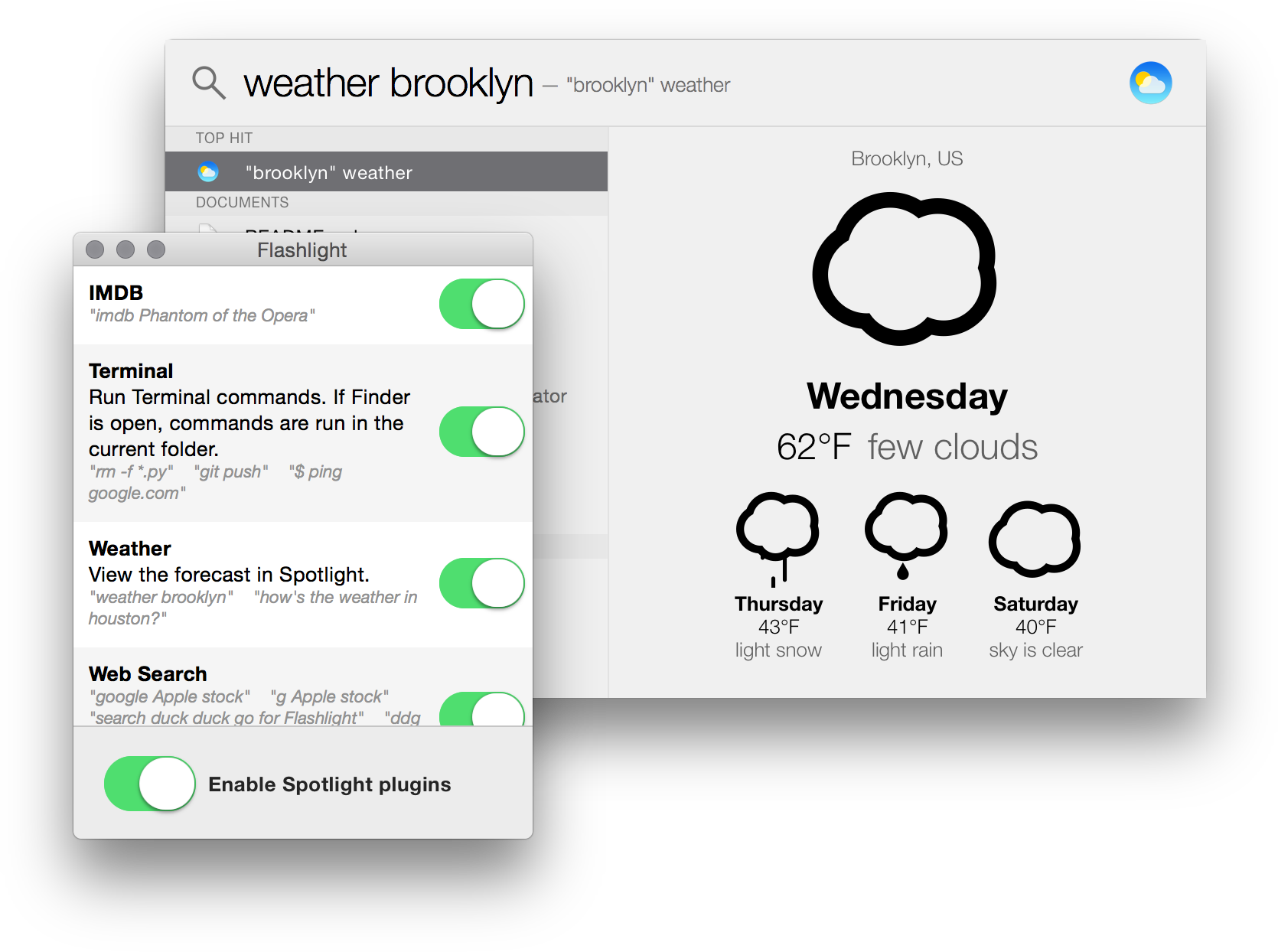
Flashlight:

A screenshot of Flashlight and its settings

The missing plugin system for Spotlight

Flashlight enhances Spotlight with quick weather forecasts, Wolfram Alpha search and lets you use Spotlight as a command line—handily, commands are run in the directory open in Finder.

You can write your own plugins in Python, too.

NB: the developer describes Flashlight as ‘very rough right now, and a horrendous hack, but a fun proof of concept’, so proceed with caution.

10 Oct 12:19

Edit

Edit:

A relaxing mix of Vi and Acme.

Edit takes Vi’s modal, keyboard-driven approach to text editing and, borrowing from Acme, blurs the boundaries between text editor and shell.

I realise the above might not make a great deal of sense if you’ve never used Vi nor Acme—the demo video on Edit’s homepage should clear up any confusion!

 See also

17 Aug 01:44

Understanding the Load Average on Linux and Other Unix-like Systems

by Chris Hoffman

Linux, Mac, and other Unix-like systems display “load average” numbers. These numbers tell you how busy your system’s CPU, disk, and other resources are. They’re not self-explanatory at first, but it’s easy to become familiar with them.

Click Here to Continue Reading


10 Mar 11:24

Using git - the next level

by Peter Hutterer

There's a million tutorials out there how to learn git. This isn't one of them. I'm going to assume that you learned git a while ago, you've been using it a bit and you're generally familiar with its principles. I'm going to show is a couple of things that improved my workflow. Chances are, it will improve yours too. This isn't a tutorial though. I'm just pointing you in the direction of things, you'll have to learn how to use them yourself.

Use tig

Seriously. Don't tell me you use gitk or git log is good enough for you. Use tig. tig is to git log what mutt is to mail(1). It has been the source of the biggest efficiency increase for me. Screenshots don't do it justice because the selling point is that it is interactive. But anyway, here are some official screenshots: tig blame shows you the file and the commits, you just need to select the line, hit enter and you see the actual commit. The main view by default shows you tags, branch names, remote branch names, etc. So not only do you immediately know which branch you're on, you will see local branches that have been merged, tags that have been applied, etc. It gives you an awareness that git log doesn't. Do yourself a favour, install it, use it for a day or two and I'm pretty sure you won't go back.

tig also supports custom configurations. Here is my $HOME/.tigrc:


bind generic X !git cherry-pick -x %(commit)
bind generic C !git cherry-pick %(commit)
bind generic R !git revert %(commit)
bind generic E !git format-patch -1 %(commit)
bind generic 0 !git checkout %(commit)
bind generic 9 !git checkout %(commit)~
bind generic A !git commit --amend -s
bind generic S !git show %(commit)
So with a couple of key strokes I can cherry-pick, export patches, revert, check out a single tree, etc. Especially cherry-picking is extremely efficient: check out the target branch, run "tig master", then simply select each commit, it "C" or "X" and done.

Use branches

Anytime it takes you more than 5 minutes to fix an issue, create a new branch. I'm getting torn between multiple things all the time. I may spend a day or two on one bug, then it's back to another, unrelated issue. With the review requirements on some projects I may have multiple patches waiting for feedback, but I can't push them yet. Hence - a branch for each feature/bugfix. master is reserved for patches that can be pushed immediately.

This approach becomes particularly useful for fixes that may need some extra refacturing. You start on a feature-based branch, but halfway through realise you need a few extra patches to refactor things. Those are easy to review so you send them out to gather reviews, then cherry-pick them to master and push. Back to your feature branch, rebase and you're done - you've managed two separate streams of fixes without interference. And most importantly, you got rid of a few patches that you'd otherwise have to carry in your feature branch.

Of course, it takes a while to get used this and it takes discipline. It took me a few times before I really managed to always work like this but the general rule for me is now: if I'm hacking on the master branch, something is off. Remember: there's no real limit to how many branches you can create - just make sure you clean them up when you're done to keep things easy for your brain.

Use the branch names to help you. You can rename branches (git branch -m), so I tend to name anything that's a bigger rewrite with "wip/somefeature" whereas normal bug fixes go on branches with normal names. And because I rebase local feature branches it doesn't matter what I name them anyway, the branches are deleted once I merge them. Branches where I do care about the branch history (i.e. those I pull them into master with a merge commit) I rename before pulling to get rid of the "wip" prefix.

Use branch descriptions

Hands up if you have a "devel" branch from 4 months ago. Hands up if you still remember what the purpose of that branch was. Right, I didn't think so. git branch --edit-description fires up an editor and lets you add a description for the branch. Sometimes a single sentence is enough to refresh your memory. Most importantly: when you task-switch to a different feature, edit the description to note where you left off, what the plan was, etc. This reduces the time to get back to work. git config branch.<branchname>.description shows you the description for the matching branch.

I even have a git hook to nag me when I check out a branch without a description. Note that branch descriptions are local only, they are not pushed to the remote.

Amend and rebase until the cows come home

The general rule: what is committed, doesn't get lost. At least not easily, it is still in the git reflog. So commit when you think you're done. Then review, test, add, and git commit --amend. That typo you made in line 4 - edit and amend. I have shell aliases for amend, rbs (git rebase -i) and rbc (git rebase --continue), and almost every commit goes through at least 3 amends (usually one because I missed something, one for that typo, one for commit log message editing). Importantly: it doesn't matter how often you amend. Really. This is local only, no-one cares. The important thing is that you get to a good patch set, not that you get there with one commit.

git commit --amend only modifies the last commit, to go back and edit the past, you need to rebase. So, you need to

Learn how to rebase

Not just the normal git rebase, the tutorials cover that. Make sure you know how to use git rebase --interactive. Make sure you know how to change the ordering of a commit, how to delete commits, how to abort a rebase. Make sure you know how to squash two commits together and what the difference is between squash and fixup. I'm not going to write a tutorial on that, because you can find the documentation is easy enough to find. Simply take this as a hint that the time you spend learning how to rebase pays off. Also, you may find git squash interesting.

And remember: even if a rebase goes bad, the previous state is still in the reflog. Which brings me to:

Learn how to use the reflog

The git reflog is the list of changes in reverse chronological order of how they were applied to the repository, regardless what branch you're on. So HEAD@{0} is always "whatever we have now", HEAD@{1} is always "the repository before the last command". This doesn't just mean commits, it remembers any change. So if you switch from branch A to branch B, commit something, then switch to branch C, HEAD@{3} is A. git reflog helpfully annotates everything with the type, so you know what actually happened. So for example, if you accidentally dropped a patch during a rebase, you can look at the reflog, figure out when the rebase started. Then you either reset to that commit, or you just tig it and cherry-pick the missing commits back onto the current branch. Create yourself up with a test git repository and learn how to do exactly that now, it'll save you some time in the future.

Note that the reflog is local only. And remember, if it hasn't been committed, it's not in the reflog.

Use a git push hook

Repeat after me: echo make > .git/hooks/pre-push. And no more embarrassment for pushing patches that don't compile. I've made that mistake too many times, so now I even use my own git patch-set command that will run a hook for me when I'm generating a patch set to send to a list. You might want to make the hooks executable btw.

02 Mar 16:37

Movie review: Particle Fever takes you inside the Large Hadron Collider

by John Timmer

The Large Hadron Collider is science on a grand scale: 27 kilometers of tunnel, building-sized detectors, data centers around the world, and thousands of engineers, physicists, and support staff to run the machine and sift through the massive amount of data it generates. It's also big in another dimension: time. It took years to build, had some false starts before it got running, and generated several years' worth of data before its summary achievement—the signal of the Higgs boson—rose high above background noise.

It's hard to put all of that into any sort of neat, compact narrative, much less one that's accessible to the general public. The people behind the film Particle Fever have tried and, remarkably, seem to have largely succeeded.

To make things manageable, the film focuses on just a handful of the cast of thousands that built and now run the LHC. Some of them are experimentalists; we see one named Monica Dunford in work gear and a hardhat, spending time on the detector, and later exulting when the machine fires up and all that work pays off: "First of all, I just have to say: data. It's unbelievable how fantastic data is." She also warns the unseen and unheard interviewer about some of the other characters that are interviewed for the film. "Hope the theorists aren't driving you crazy," Dunford says to the camera. "Don't listen to them, by the way."

Read 9 remaining paragraphs | Comments

20 Jan 15:18

Il Renzellum, il gioco e la candela

by di Alessandro Gilioli

La tesi dei renziani è nota: una nuova legge elettorale è urgente e se ne parlava da troppi anni senza concludere niente; il Porcellum faceva schifo ed è stato bocciato dalla Consulta; le riforme elettorali non si fanno a colpi di maggioranza ma parlando anche con le opposizioni; ma siccome il M5S non ha voluto confrontarsi in merito, ci restava solo da consultarci con l’altra maggiore forza d’opposizione: Forza Italia. Il capo di Forza Italia è Berlusconi, quindi potevamo incontrare solo lui.

In altre parole: il gioco valeva la candela.

Tesi rispettabile: basta vedere che cosa sono, nel caso, il gioco e la candela. Cioè com’è fatta la nuova legge elettorale, altrimenti detta Italicum o Renzellum, per ottenere la quale Berlusconi è stato legittimato come interlocutore principe nel ridisegno del Paese.


Il testo su cui si sta trattando lo sapremo solo oggi, quando verrà reso noto alla direzione del Pd, e non è detto che sia quello definitivo: infatti poi sarà oggetto (appunto) di ulteriori trattative fra partiti e ovviamente della discussione in Aula. Dove anche una piccola variazione tecnica – chessò, un paio di punti in più o in meno nella definizione del premio di maggioranza – può cambiarne radicalmente gli effetti. E il ripescaggio del doppio turno – notizia di questa mattina – è tutt’altro che secondario.

Al momento però alcune cose si possono già dire e alcune valutazioni già fare, per quanto provvisorie, per quello che se ne sa (nota a parte meriterebbe la scarsa trasparenza con cui finora sono stati gestiti processo decisionale e discussione pubblica).

1. I listini bloccati

Sono nove anni che ci diciamo tutti – tutti – che le liste bloccate sono inaccettabili perché tolgono ai cittadini il diritto di scegliere i loro rappresentanti e creano un Parlamento di cooptati; che permettono ai capi di partito di mettere in lista chi vogliono loro, compresi parenti, amici, mignotte e pregiudicati; che creano nei partiti medesimi meccanismi ultraleaderistici e leccaculistici, non premiando le competenze né la maturazione per merito di classi dirigenti preparate; eccetera eccetera.

Bene: con la riforma di cui si sta discutendo, dette liste bloccate rimangono. Unica differenza rispetto al Porcellum, sono liste “piccole”, cioè con pochi nomi (si parla di sei). Dei listini.

Ricordo che i listini non sono affatto una novità, in Italia. Sono stati introdotti dalla legge Tatarella per le Regioni (1995). Hanno portato, ad esempio, Nicole Minetti, al Consiglio Regionale lombardo, ivi inserita su pressione di Berlusconi e non esattamente per meriti politici. Alcune regioni – come appunto la Lombardia, dopo la vergogna Minetti – hanno quindi utilizzato la possibilità costituzionale di modificare la propria legge, abolendo questo listino.

Ecco perché sostituire i listoni bloccati con i listini bloccati, ecco, non mi sembra un grandissimo passo in avanti.

E l’alternativa non sono solo le ‘vecchie’ preferenze, come noto: ci sono sistemi (come in Inghilterra e in Francia, ma anche il fu Mattarellum) che “costringono” i partiti a proporre il nome migliore in ogni collegio (o almeno a escludere i peggiori, sennò non prendono voti) e “costringono” l’elettore a decidere per chi votare guardando in faccia l’unica persona che dovrebbe rappresentarlo.

Qualche buona considerazione, in merito, la fa qui Cristiana Alicata, che è renziana e anti-preferenze, ma esprime molti dubbi pure su questo nuovo sistema dei listini bloccati.

2. Il premio di maggioranza e il ballottaggio

Le variabili che definiscono il premio di maggioranza, in generale, sono due: a quale soglia scatta e quanti seggi in più porta a chi eventualmente la raggiunge.

Secondo quanto si sa al momento, il Renzellum prevederebbe che la soglia sia il 35 per cento dei voti (quindi se una coalizione non ci arriva, non prende il premio) con il 15 per cento di premio (la coalizione che arriva al 35, si porta a casa un 15 per cento di seggi in più).

Nel caso nessuno raggiunga il 35 (dicono appunto gli ultimi rumor) si andrebbe al ballottaggio tra la coalizione arrivata prima e quella arrivata seconda.

Quale sarebbe l’effetto pratico?

Se prendiamo i risultati delle ultime elezioni, nessuna delle tre forze principali avrebbe preso il premio. Quindi ci sarebbe stato il ballottaggio (tra Bersani e Berlusconi) per decidere quale coalizione avrebbe governato. Forse ci saremmo risparmiati le larghe intese. Forse: dipende dall’entità del premio che sarebbe andato al vincitore del ballottaggio.

Gli ultimi sondaggi danno invece il Pd attorno al 30-32: quindi, in coalizione con Sel, potrebbe ambire a raggiungere il 35.

In questo caso la coalizione Pd-Sel si porterebbe comunque a casa una maggioranza parlamentare debolissima (35 più 15). Tipo quella di Prodi nel 2006. Minimo della governabilità con il minimo della rappresentanza: pessimo risultato.

Al ballottaggio invece si arriverebbe solo, come detto, se nessuna delle coalizioni al primo turno arrivasse al 35. C’è quindi (paradossalmente) da sperare che nessuna coalizione ci arrivi. Infatti in questo caso alla fine andrebbe al governo chi al ballottaggio ha avuto il gradimento di almeno la metà fra quanti sono andati a votare al secondo turno. La rappresentanza dell’esecutivo sarebbe un po’ più rispettata. Quanto alla governabilità, dipende di nuovo da quanto è il premio di maggioranza attribuito a chi vince nel ballottaggio. Se resta del 15, siamo daccapo come sopra.

Per questo il mio voto su questo punto è “boh”: aspettiamo che si dipani il pasticcio. Questione di ore, pare.

3. Sbarramento

Con il Porcellum lo sbarramento era del 4 per cento per le liste singole e del 10 per cento per le coalizioni. Adesso si parla di ribaltare la frittata: l’8 per cento per le liste singole e il 5 per le coalizioni. Un po’ una scemenza, perché basta che una lista si divida in due perché diventi una coalizione. Proprio come prima le coalizioni si travestivano da lista unica, presentando un unico simbolo, per sperare di superare lo sbarramento (vedi Sinistra Arcobaleno nel 2008 e Rivoluzione Civile nel 2013).

Quindi, in sostanza, si ritoccherebbe il Porcellum portando lo sbarramento dal 4 al 5.

Update: la proposta è per il 5% per i partiti in coalizione, dell’8% per le forze che si presentano da sole e il 12% per le coalizioni

Cambierebbe dunque poco, ma (nel caso) in peggio. Non dico che una minima soglia di sbarramento non ci debba essere (per evitare una frammentazione eccessiva del Parlamento e i partiti dello zero virgola) ma attenzione a negare la rappresentanza parlamentare a chi si porta a casa un milione e mezzo di voti. Non fa bene alla democrazia e neppure all’ordine pubblico: la “parlamentarizzazione” delle proteste, come noto, ne smorza spesso le cariche più estreme.

Fra l’altro, se una coalizione avesse i numeri per governare senza dover ricorrere agli accordi con i partiti minori esterni ad essa (come vuole Renzi, o almeno dice di volere) non si vede che problema alla governabilità possa creare garantire una rappresentanza anche a queste forze minori. Uno sbarramento alto ha un senso per togliere ai partiti piccoli il potere di ricatto verso la maggioranza: se questo potere di ricatto viene svuotata da un sistema con ballottaggio e premio realmente funzionante, quindi la governabilità non è più in discussione, bisogna garantire l’altro caposaldo della democrazia, cioè la rappresentanza delle minoranze.

Quindi?

Quindi okay, bisogna aspettare per vedere il testo definitivo. La presenza o meno del ballottaggio e la formula con cui questo viene previsto sono cose abbastanza dirimenti, imho. Al momento, con queste proposte, sono tutt’altro che sicuro che il gioco valeva (valga) la candela.

Voi?

15 Jan 11:31

100 Best Google Chrome Extensions Of 2013

by Waqas Ahmed

2013 is now gone, but before we jump to 2014 with new hopes and resolutions, it’s time to take a look at some of the best bits from last year. We’ve already shown you the best Android, iOSWindows Phone and Windows apps from last year, and now it’s time to look at browser extensions. So, let’s start with the most brilliant Google Chrome apps and extensions we covered in 2013. Some were simply updates that brought additional functionality to the table, some replaced Google’s boring New Tab page into something wonderful, while others simply made Chrome even better in other ways.

Best-Google-Chrome-Extensions-2013

Note that the order of appearance of extension in this list is merely based on our coverage time, and does not reflect any ranking.

1. YouTube Couch Mode (Control YouTube and Vimeo playback from your iOS or Android device.)

de Mobo

2. Surf (A BitTorrent extension that lets you search for and download torrents directly from within the browser.)

BitTorrent Surf search engine

3. Chime (Get desktop notifications for Gmail, Twitter, Facebook, Reddit, LinkedIn, Quora, Github, Flickr, Stack Overflow, and Foursquare.)

Chime setup

4. Google Multi-Account Launcher (Sign into and use multiple Google accounts within one Chrome window.)

Google Multi-Account Launcher

5. No Hulu Ads (Automatically mutes Hulu ads in Chrome, and then shows a desktop notification when the ad has ended.)

No Hulu Ads

6. Smooth Key Scroll (Remove scrolling jitter in Chrome when scrolling the web pages using the keyboard arrow keys.)

Smooth Key Scroll options

7. Cloudy (Attach files to your emails from a wide array of cloud services including Google Drive, Dropbox, Box, Facebook, Picasa,  and more.)

Cloudy dropbox

8. The Great Suspender (Suspend tab loaingd in Chrome to save memory and get smoother web browsing experience on old machines.)

The Great Suspender

9. Dead Simple Screen Sharing (Stream any tab activity to any other web browser, even on mobile devices.)

dead simple screen sharing

10. Image Size Info (Adds a ‘ViewImage Info’ option in the right-click context menu for images, allowing you to immediately view image size, dimensions and date.)

Image Size Info context menu

11. Holmes (Allows you to search through your bookmarks from Chrome’s Omnibar.)

Holmes options

12. YouTube Lyrics (Lets you view song lyrics from Grooveshark and YouTube; also available Firefox, Safari, Opera and IE.)

YouTube Lyrics

13. Text Mode (Hides obtrusive web page elements like images, videos and other content for a clean, distraction free browsing experience.)

text mode

14. Video Tape (Makes embedded YouTube videos sticky so you may explore the rest of the page while not losing focus on the video.)

Video Tape

15. OX: Bookmarks (Stores all bookmarks you create to a dedicated folder in your Bookmarks bar, letting you manage them based on read/unread criteria.)

OX Bookmarks

16. Magnifier For Facebook (View Facebook images in full size by hovering your mouse over them.)

Magnifier-for-Facebook_th

17. RapidReddit (Automatically opens very link you click on Reddit in a new tab, and removes clicked links from the main page.)

RapidReddit-for-Chrome

18. OneTab (Backup, restore, import and export Chrome tabs across computers.)

OneTab

19. SnapPea Photos (Manage photos stored on your Android phone or tablet from your PC in Chrome.)

SnapPea Photos code

20. News Hub (A small news reader that lets you add feeds via RSS links or by manual search.)

News Hub add

21. OmniTube (Lets you search YouTube from the Omnibar, providing suggestions as you type.)

OmniTube options

22. TabJuggler (Group or detach Chrome tabs into different windows, sorting them by title, hostname or URL.)

TabJuggler

23. Intab (Open new links in a sidebar visible from the same tab; you can also adjust the sidebar’s width.)

intab

24. Quick Bookmarks (Swaps the default New Tab Page of Chrome with a grid of your bookmarks, complete with folders.)

Quick-Bookmarks-Chrome-extension

25. Scroll Marker (Adds a horizontal line to the web page at your lowest scroll position so you don’t lose the point in the article you were last reading.)

Scroll Marker Options

26. Tabman Tabs Manager (Allows you to easily search and switch between the tabs open in the current window from a menu.)

Tabman-Tabs-Manager-(1)

27. Tab to Windows Keyboard Shortcut (Separates tabs in a new window based on predefined sections of the screen.)

Tab-to-Window-Keyboard-Shortcut-edit

28. Chromoji (Replaces the block characters that would normally appear in place of Emojis with the real Emojis.)

Chromoji

29. Feedly Reader (Gives a Google Reader-like interface to Feedly.)

Feedly-Google-Reader-theme

30. Sidewise Tree Style Tabs (An unconventional way of viewing Chrome tabs; also allows you to group or hibernate tabs.)

Sidewise Tree Style Tabs main panel

31. Chrome Office Viewer (Drag and drop your Word, PowerPoint, and Excel files into Chrome to view them.)

Chrome Office Viewer

32. Recent Bookmarks (Quickly view your latest bookmarks in a list sorted by date.)

Recent-Bookmarks-display-panel_

33. Print or PDF with CleanPrint (Trims all unwanted and obtrusive elements from webpages, making them clean and ready for print.)

Optimizing-cleanup_

34. YouTube Video Deck (Lets you manage your YouTube videos and subscriptions in an entirely new way.)

YouTube Video Deck add

35. Fruumo (New tab page replacement with date & time, weather, RSS feeds and other useful information.)

Fruumo

36. SoundControl (Control playback of Pandora, adds play, pause and skip song buttons.)

SoundControl Beta for Pandora Options

37. Mark As Read (Mark any online content as ‘Read’, ‘Reading’ or ‘Read later’ so that upon returning to it later, you recognize it instantly as such.)

Using Mark As Read

38. Cortex (Share content you find on the web with your friends on Facebook, Twitter, YouTube, and other social media accounts.)

Cortex Add

39. Middle Click Scroll (Quickly jump to the top or bottom of a webpage using your mouse’s scroll wheel and buttons.)

Middle-Click-Scroll-to-top-Chrome-extension

40. Do Not Track Me Facebook (Protect your privacy when browsing Facebook by preventing various tracking cookies from monitoring your activity.)

Do-Not-Track-Facebook-Chrome-extension

41. Black Menu (Places all Google apps and services in a simple, customizable panel for quick and easy access.)

Black Menu - Google Search

42. Disconnect (Blocks all tracking cookies, intrusive widgets and scripts on webpages to provide a distraction-free browsing experience.)

Disconnect Chrome

43. Silencer (Automatically hides updates from Facebook and Twitter that may contain spoilers of books, movies or TV shows.)

silencer

44. Incognito Tab Switch (Switch any Chrome tab between Incognito and normal modes.)

Incognito-Tab-Switch-Chrome-extension_

45. FooTab (Prevents tabs from automatically loading webpages until you manually click on them.)

Drag-n-drop-CRX-file-into-Chrome-Extensions-tab_

46. metroTab (Swaps the default new tab page with a Modern UI-based one, complete with live tiles and extra apps that mimic those in Windows 8.)

new tab  new metroTab

47. Omnibox Timer (Quickly set timers for different tasks and situations.)

Omnibox Timer

48. SimpleExtManager (Manage all your installed extensions, themes and apps from one single place.)

Extension-manager-Chrome

49. ViewTube (Keep YouTube in focus by opening it in a floating window; useful for viewing videos while surfing other websites.)

ViewTube - YouTube™ for Social Sites

50. Clipboard Sync (Syncs your clipboard data between Chrome instances running on different PCs.)

Clipboard Sync Options

51. cottonTracks (Automatically curated record of the best content you browse.)

cottonTracks

52. OneFeed (Another great new tab extension that shows you feeds curated from Facebook, Google+, Twitter and Instagram.)

OneFeed Page

53. Reader Filter ( Filter and hide news items in Feedly, The Old Reader, and InoReader using keywords or regular expressions.)

Settings - Reader Filter

54. Lightning Newtab (Brings a smart speed dial to the new page for easily accessing your favorite sites with a single click.)

add Lightning Newtab

55. Responsive Inspector (Easily inspect and analyze responsive web page designs.)

responsive inspector screenshot

56. PageEdit (Lets you modify web pages on the fly by turning the tab itself into a WYSIWYG editor.)

PageEdit

57. MakeGIF Video Capture (Create a GIF from any video that’s being played in an HTML5 player.)

start making GIF

58. Mikey For Gmail (Quickly find stuff in your Gmail account by sorting the items under relevant tabs.)

Mikey for Gmail

59. MetisMe Attachments Management System (Lets you conveniently manage email attachments from Gmail.)

MetisMe-Chrome-extension-for-Attachment-management

60. Spot (instantly create events in your Google Calendar from the content you come across while browsing.)

Spot Chrome Events On Page

61. Keeeb (Bookmark and sync certain pieces of information from web pages such as videos, photos and quotes.)

Rate Players During Live Football Matches With This iPhone App

62. Facebook Unseen (Disable those pesky ‘Seen and ‘typing’ indicators in Facebook Chat.)

Facebook Unseen enabled

63. Video Resumer (Pause a YouTube video and then resume it later from the exact same point where you left of, upon restarting Chrome.)

video resumer

64. Font Changer (Change the font styles of your favorite websites by defining your own custom font settings.)

Settings

65. Closed Tabs (Restore as many Chrome tabs as you want, in addition to selectively opening recently closed ones.)

Open Recent Tabs

66. Tab Resize (Easily split all your browser tabs into different windows in predefined or custom layouts.)

Tab Resize

67. Veritabs (The perfect way to organize your tabs vertically, letting you scroll through the tabs list using your mouse wheel.)

Veritabs

68. NiftySplit (Open links in a new window, which appears side by side with the page you were browsing.)

Open in new nitfy window

69. JellyReader (Store you RSS feeds on your Dropbox or Google Drive account.)

JellyReader

70. OX (Replace the default Chrome new tab page with important information or urgent bookmarks that need more attention.)

OX Welcome

71. Pixlr Touch Up (A feature-rich photo editor for fine-tuning your favorite images right within Chrome.)

Pixlr Touch Up

72. Evernote Web Clipper (Update to the popular Evernote Web Clipper that brings many awesome new features to the table including screenshot capturing, annotation, and sharing options.)

What’s New in Web Clipper for Chrome  Evernote - Google Chrome

73. Curiyo (Look up further information regarding anything you come across while browsing, using popular informational sites such as Wikipedia.)

Underline

74. Shiny Reddit (Browse reddit in a Pinterest-like UI.)

Shiny-Reddi-Chrome-extension_

75. Boomerang Calendar (Injects new life into Google Calendar, letting you schedule meetings and events right from your Gmail inbox.)

New Calendar Event

76. iCloud Bookmarks (Sync your bookmarks between iOS, Chrome and Firefox.)

Download iCloud Control Panel

77. Identify Mask (Log into multiple accounts on the same website without entering Chrome’s incognito mode.)

Identity Mask_New

78. Spot – Date Clipper for Google Calendar (Makes sure you never forget about any interesting events that you come across online.)

Spot - Date Clipper for Google Calendar 1

79. StartHQ (There’s no shortage of new tab extensions, but this one puts a few handy apps at your disposal, along with the ability to discover new sites from your friends.)

Register

80. Dictionary Bubble (Instant Dictionary) (View definitions, synonyms and adjectives of words on any web page by double-clicking them.)

Dictionary Bubble for Chrome

81. Scrollbar of Contents (Creates content-based section headings for pages along the scrollbar for easy in-page navigation.)

Scrollbar-of-Contents-Chrome-extension

82. Reddit Hover Text (Allows you to view content of any Reddit when you hover the cursor over it.)

Reddit Hover Text

83. Nimbus Web Clipper (Another handy web clipping extension that lets you save images and webpages to the cloud.)

Sign up

84. Grooveplayer (Control Grooveshark web player via a popup using Chrome’s experimental Panels feature.)

Groveplayer Desktop

85. Looper For YouTube (Auto-repeat or loop an entire YouTube video or only a selected part of it, as many times as you wish.)

Looper For YouTube 1

86. TabStats (Analyzes data about the tabs you’ve opened in Chrome, and presents some relevant stats about your browsing.)

TabStats

87. Kloudless (Allows you to integrate multiple cloud storage services with Gmail.)

Kloudless

88. Latis (Store and manage useful snippets of text, images and other content from your favorite webpages as stacks.)

GetLatis

89. iChrome (Love using Google Now on your mobile? This extension brings a similar UI to Chrome’s new tab page.)

iChrome

90. Vine For Chrome (Unofficial Vine extension that lets you access your Vine account and view Vines posted by others.)

Vine for Chrome_Popular

91. Spotflux Safe Browsing (Encrypt your internet connection, and protecting you from common security and privacy threats.)

Spotflux Safe Browsin

92. Google Voice Search Hotword (The official ‘OK Google’ hotword feature for triggering a voice search.)

Google Voice Search Hotword (Beta)

93. Evercontact (Instantly save contact details from any website to Google, Outlook and other such services with a click.)

Evercontact for Chrome 1

94. Fruumo Download Manager (Download manager for Chrome that carries several additional features not found in the default Downloads section.)

Fruumo Download Manager

95. Gravity Highlighter (Displays relevant and related content suggestions based on the webpage you’re currently viewing.)

Gravity Highlighter for Chrome 1

96. Momentum (New tab page replacement with captivating landscapes as background, and a big clock at the center.)

Momentum

97. Video Pinner (Pin YouTube videos and make them sticky so you may scroll down to the comments without losing focus on the video.)

Video Pinner_Disabled

98. Streamus (A unique music player for YouTube videos that lets you play just their audio in a popup without visiting the website.)

Streamus-YouTube-music-player-for-Chrome

99. Photon (A photo editor for Facebook based on Aviary that lets you edit photos within your Facebook account.)

Photon_Edit

100. SPOTS (An enticing new tab page replacement that puts loads of information, web apps, games and other content at your disposal.)

SPOTS - A better way to start

Check out our other year-end best-of compilations:

150 Best Windows Software Of Year 2013

172 Best Android Apps Of 2013

100 Best iPhone & iPad Apps Of 2013

40 Best Windows Phone Apps Of 2013

50 Best Firefox Addons Of 2013

Read 100 Best Google Chrome Extensions Of 2013 by Waqas Ahmed on AddictiveTips - Tech tips to make you smarter


12 Dec 02:03

Turn a Raspberry Pi into a Multi-Room Wireless Stereo

by Alan Henry

Turn a Raspberry Pi into a Multi-Room Wireless Stereo

Streaming music in any room is definitely a luxury, but it doesn't have to be an expensive one. Instructables user Piney shows us it's possible with a Raspberry Pi—or multiple Pis for multiple rooms—and you can control it all from your phone or tablet. Think of it as a budget-friendly Sonos.

Read more...


09 Dec 13:20

DashPlus Is a Powerful GTD-Style To-Do App with Gestures

by Thorin Klosowski

DashPlus Is a Powerful GTD-Style To-Do App with Gestures

iPhone: To-do apps are everywhere, but finding one that's feature-packed and based on the GTD system while still being easy-to-use is tough. DashPlus is based on Patrick Rhone's Dash/Plus system, but GTD-ers might want to take a look at it as well.

Read more...


09 Dec 13:19

Rivolta dell'Immacolata? 43 anni fa il golpe Borghese

by Mario Lucio

Golpe Borghese

Si chiamava golpe Bolghese, ma anche golpe dei forestali o golpe dell’Immacolata. Ed ecco che l’adesione di Forza Nuova allo sciopero dei Forconi, con la citazione esplicita, acquisisce nuovo senso:

«Questa protesta che passerà alla storia come la “Rivolta dell’ Immacolata” sarà il primo atto di una Rivoluzione Italiana che finalmente uscirà dall’orbita dei partiti, dopo vent’anni di frustrazioni legate a Berlusconi prima e a Grillo poi»

Golpe Borghese è il modo con cui si ricorda un colpo di Stato tentato in Italia fra il 7 e l’8 dicembre del 1970, organizzato da Junio Valerio Borghese, con il Fronte Nazionale.
Il “principe nero” (questo il soprannome di Borghese), già comandante della Xª Flottiglia MAS, annullò il golpe stesso mentre era in corso. Si tratta di una delle tante pagine della storia italiana che lascia spazio a una quantità enorme di interrogativi.

L’Italia a quel tempo era un paese di confine tra est e ovest, tra blocco comunista e patto atlantico. La scena politica era dominata dalla Dc, partito-Stato al governo, e dal più grande partito comunista d’Europa, all’opposizione. Il tentativo eversivo del Fronte Nazionale si inseriva in questo contesto, e contemplava il coinvolgimento del Dipartimento di Stato degli Stati Uniti, di Gladio, della P2 di Licio Gelli, del SID (Servizio Informazioni Difesa) con il suo capo, il Generale Vito Miceli, e dei vertici della mafia, Stefano Bontade e Gaetano Badalamenti.
Ricordiamo che il cronista Maro de Mauro fu ucciso dalla mafia proprio perché stava indagando sul golpe dell’Immacolata.

Al tentativo di colpo di Stato non mancarono l’appoggio di altre formazioni di estrema destra, come Avanguardia Nazionale di Stefano delle Chiaie,detto Er Caccola (il suo nome è finito in tutti i processi per strage negli anni di piombo). Delle Chiaie è tornato da poco sulla scena pubblica con il libro “L’Aquila e il Condor” (postfazione di Luca Telese), che ha presentato in molte parti d’Italia .

Anche gli ambienti militari non mancarono di sostenere il golpe di Borghese. Presero parte attivamente all’operazione, che venne denominata “Tora Tora Tora” (in ricordo dell’ attacco giapponese a Pearl Harbour), il generale dell’aeronautica Giuseppe Casero, il colonnello Giuseppe Lo Vecchio e il maggiore Luciano Berti. Interessante anche il coinvolgimento del colonnello dell’esercito, Amos Spiazzi, che avrebbe dovuto occupare Sesto San Giovanni a Milano (quartiere operaio e comunista). Spiazzi successivamente affermò che il rischio golpe non c’era mai stato realmente, perché i neofascisti insurrezionali sarebbero stati manovrati da Dc e Stati Uniti per accentuare la repressione nel paese e per contenere la minaccia rossa.

Il colpo di Stato era stato progettato con perizia a partire dal 1969, quando furono formate delle vere e proprie organizzazioni paramilitari. In combutta con alcuni vertici militari e membri dei Ministeri, il golpe prevedeva l’occupazione del Ministero dell’Interno, del Ministero della Difesa, delle sedi RAI e dei mezzi di telecomunicazione (radio e telefoni). Il piano comprendeva anche il rapimento del Capo dello Stato, Giuseppe Saragat.
I golpisti riuscirono ad entrare in quella notte, tra il 7 e l’8 dicembre, dentro il Ministero degli Interni (senza difficoltà alcuna) e ad impadronirsi di armi e munizioni. Altre forze “insurrezionali” presero posizione dentro il Ministero della Difesa, mentre un gruppo armato della Forestale si appostò non lontano dalle sedi Rai. Qui, una volta andata a buon fine l’operazione, sarebbe stato mandato in onda il proclama del principe nero.

Successivamente arrivò l’ordine di Borghese di fare marcia indietro. Non sono chiare le motivazioni di questa scelta. Quello che è certo è che il governo degli Stati Uniti era perfettamente informato di quanto stava accadendo, come attestato dal Freedom of Information Act del 2004. Washingotn avrebbe dato il supporto all’operazione solo nel caso in cui fosse stato coinvolto un personaggio politico italiano “di garanzia”. Ovviamente stiamo parlando di Giulio Andreotti, che sarebbe dovuto diventare presidente in pectore del governo post-golpe. Tuttavia non è chiaro se Andreotti venne a conoscenza dell’indicazione americana.

Borghese morì latitante in Spagna nel 1974. La vicenda processuale del golpe fu intricatissima e si concluse con un’assoluzione generale nel 1984.

Ovviamente il 9 dicembre non ci sarà nessun tentativo di colpo di Stato, anche se i fascisti amano far rivivere ricorrenze macabre. Tuttavia, preso atto delle modalità organizzative, degli intenti degli organizzatori, delle minacce fatte ai negozianti, potrebbero crearsi non pochi problemi. L’obiettivo è quello di creare confusione e di generare una reazione violenta. Ci auguriamo che le forze dell’ordine viglino in maniera accorta.

Forse gli organizzatori sperano di innescare un effetto Alba Dorata anche nel nostro paese, in vista delle elezioni europee. Se ci fossero disordini sarebbe un segnale inquietante e certificherebbero, ancora di più, il logoramento economico sociale e culturale dell’Italia, ma non solo. Se si verificasse il paventato blocco del paese, l’estrema destra farebbe un clamoroso favore all’esecutivo in carica. Ricordiamo, a tale proposito, che il fenomeno Alba Dorata, in Grecia, ha finito per legittimare l’ordine e le politiche di austerity del governo di larghe intese. I neonazisti (responsabili di omicidi, di aggressioni a stranieri e di usura) sono stati lasciati liberi di agire, per lungo tempo, al fine di azzerare qualsiasi possibilità di opposizione a Bruxelles e alle misure del governo Samaras, che stanno portando il paese allo sfinimento.

Rivolta dell'Immacolata? 43 anni fa il golpe Borghese é stato pubblicato su Polisblog.it alle 18:35 di domenica 08 dicembre 2013. Leggete le condizioni di utilizzo del feed.


18 Oct 11:52

Reato di negazionismo: no.

by Absinthe

Probabilmente deluderò qualcuno ma sono assolutamente contrario ad introdurre il reato di negazionismo, che punisca: chi “nega crimini di genocidio o contro l’umanità”.

Sono contrario per diverse ragioni, la prima è tecnica: si tratta di una definizione generica e indeterminata che cozza con il principio di tipicità della sanzione penale.

In base a questo principio – che deriva dell’art. 25 della Costituzione – le disposizioni penali devono essere formulate nella maniera più chiara e precisa possibile per dare a chiunque la capacità di comprendere quale condotta costituisca reato.

Chi “nega crimini di genocidio o contro l’umanità” è una definizione che non definisce affatto: il pensiero va ovviamente alla Shoah, come prima cosa, ma i casi di genocidio o di crimini contro l’umanità sono innumerevoli e non sempre su di essi esiste una convergenza degli studiosi o dell’opinione pubblica: basta pensare al genocidio armeno o alle guerre balcaniche.

Al di là dei casi più eclatanti come la Shoah, chi decide quando una tragedia storica costituisca un “crimine di genocidio o contro l’umanità”? A farlo, nel caso concreto, sarebbe il giudice penale e  non penso che questo sia desiderabile.

Il processo penale non è fatto per accettare verità storiche complesse e di portata così vasta come può essere un genocidio. Né credo che i giudici penali abbiano la competenza storica per farlo.

In secondo luogo, non credo che l’introduzione di una nuova figura di reato d’opinione sia opportuna; abbiamo già una legislazione penale sclerotica e sovradimensionata: non è il caso di allargarla per comprendervi anche i poveri idioti che negano la Shoah.

Non credo nemmeno che sarebbe utile da un punto rivista simbolico. A differenza di altri, non sono pregiudizialmente contrario a che il diritto penale svolga anche una funzione simbolica: con la sanzione penale il legislatore inevitabilmente segnala quali comportamenti l’ordinamento ritiene più gravi e inaccettabili. Questo può portare anche alla definizione di sanzioni per condotte che – in un determinato momento storico – destino una particolare preoccupazione per la loro gravità o diffusione.  Per questo non sono contrario a priori, ad esempio, alla definizione di un’aggravante per i reati motivati dal genere (quella che i giornali etichettano come la questione del “femminicidio”) o alla sanzione penale dell’istigazione all’odio omofobico (rimanendo tuttavia contrario al carcere per i reati non violenti).

Ritengo però che l’attuale legislazione penale non sia in grado di assumere una valenza simbolica proprio per il suo sovradimensionamento; se troppe forme di illecito sono sanzionate penalmente, il diritto penale non può svolgere una sanzione simbolica: perde la capacità di indicare quali comportamenti siano davvero ritenuti più gravi dal legislatore.

Solo dopo aver ridotto significativamente la portata del diritto penale e depenalizzato moltissime delle troppe e inutili figure di reato, avrà senso interrogarsi in concreto sulla funzione simbolica della sanzione penale. Per il momento, pensiamo a ridurre il diritto penale al minimo indispensabile. È molto più urgente. Santé

26 Aug 19:08

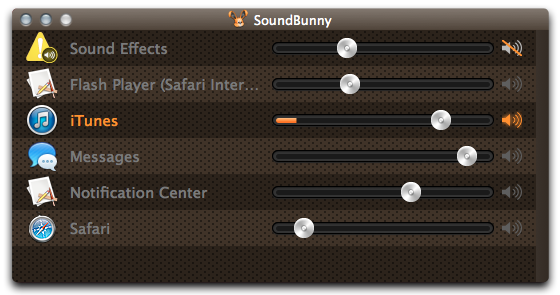
Mac Gems: Control sound volume on an individual app basis with SoundBunny

by Marco Tabini

Editor’s note: The following review is part of Macworld’s GemFest 2013. Every day (except Sunday) from mid-July until late September, the Macworld staff will use the Mac Gems blog to briefly cover a standout free or low-cost program. Learn more about GemFest in this Macworld podcast. You can view a list of this year’s apps, updated daily, on our handy GemFest page, and you can visit the Mac Gems homepage for past Mac Gems reviews.

There is nothing more jarring than a sound blaring unexpectedly out of your Mac’s speakers—something that always seems to happen when you’ve turned up the volume to listen to your favorite song on iTunes.

SoundBunny 1.0.3 helps protect you against these auditory assaults by allowing to set the volume level of each running app individually. Thus, you can let your Beethoven play the way it was intended—with the volume set to eleven—while Mail can notify you of new messages at a lower level that doesn’t make it sound like a confused airline pilot is attempting to land a 777 in your backyard.

SoundBunny is a very useful little utility despite being constrained somewhat by what OS X allows it to do; according to the developer, it cannot control USB or FireWire speakers, and is incompatible with certain rare kinds of apps that output their sounds using specific operating system libraries.

To read this article in full or to leave a comment, please click here