You can make one of five craft beers: golden American Pale Ale, hoppy American IPA, dry Czech Pilsner, full-bodied English Stout, or zesty Belgian-style Witbier.
Just launched: RESET is a four-week course created by Jocelyn K. Glei that shows you how to work in a way that is intentional, energizing, and inspiring.
Jocelyn is a dear friend of mine and the force behind the fantastic podcast Hurry Slowly, as well the editor of one of my favorite newsletters. She is a thoughtful, smart, grounded and heart-forward human.
And I think she is onto something, pointing out, how we’re in the grip of a more, better, faster mentality that drains our energy and makes us feel like we’re never doing enough. Her 4 week course advocates for a new way of working — a heart-centered approach to productivity that’s nurturing, intentional, and inspiring.
It starts January 19th and is designed as a 4-week course, everyone starting at the same time. This allows Jocelyn to support you with live Q&As every week as you integrate the concepts. The course consists of 12 video lessons form the core of RESET — each lesson is about 15-20 minutes long. In total, watching all the videos takes just under 4 hours. Additional materials, like the “reset rituals,” are self-paced so it’s all about how much you want to put into the course.
A vintage British sportscar is a wonderful thing. Inimitable style and luxury, beautiful curves, and a soundtrack that could make even Vinnie Jones shed a tear. However, even under the most diligent maintenance schedule, they are known, above all, for their unreliability. As the value of such cars is tied heavily to their condition as unmodified examples, owners are typically reluctant to make modifications to remedy these issues.
However, things are starting to change. Cities across the world are enacting measures to ban fossil fuel vehicles from their streets, and sales of such vehicles are similarly going to be banned entirely. The automotive industry is preparing for a major pivot towards electric drivetrains, and no carmaker will be left untouched. In this landscape, it’s not just Tesla and Nissan who are selling electric cars anymore. Luxury brands are beginning to deliver electric vehicles, too.
What This Means for Classic Cars
Luxury brands trade on history and cachet; perhaps the former even more than the latter. There’s a reason why Ferrari and Porsche are household names, while Koenigsegg are more well known among the Top Gear set. Immaculate examples of historically relevant cars regularly change hands for millions of dollars, and brands will often invite only their most loyal and famous customers to buy their limited edition cars.
This strong focus on history is reflected in how automakers treat the glory models from their past. It’s possible to ring up Porsche and get just about any part you could imagine for a 911 from model year 1964 to 2018. Try calling Ford up and asking for a new gearbox for your 1988 Tempo AWD and you’ll likely be out of luck.
Aston Martin and Jaguar are two such brands with a storied history and are a huge presence in the classic car market. Unfortunately, they’re also known for their legendary unreliability and the spectre of Lucas electrics which haunts many British car owners worst nightmares. This can make it hard for owners to drive and enjoy their classics.
All is not lost, however. Jaguar is already selling the I-PACE electric SUV in several markets, and Aston Martin plans to launch the Rapide-E early next year. Both companies now have experience with electric drivetrains, and are bringing it to bear on some of their most celebrated past models.
In the Jaguar, the electric drive package is styled to recall the aesthetics of the original XK engine.
The E-type, commonly referred to as “the most beautiful car of all time”, is the first car to get the electric treatment from Jaguar Land Rover Classic Works, an official department of the company dedicated to working on the older members of the fleet. Billed as the E-Type Zero, the package consists of a full drivetrain conversion, as well as a completely new dashboard with modern gauges and an infotainment screen. Power was limited to 295 horsepower to avoid having to update the suspension and brakes to cope with the extra power, changing the character of the car.
Meanwhile, Aston Martin is gearing up to retrofit the DB6, again with a full drivetrain swap, but limiting interior changes to a single screen added to the interior. The conversion is designed to fit as neatly as possible, picking up the original engine and transmission mounts. Figures aren’t available yet, but we’d suspect power to be less than 400 horsepower due to the limitations of the original chassis and handling package.
Why?
The simple fact is supply and demand. Owners of these classics have money to burn, and now that reliable electric drivetrain technology is within reach, a conversion package backed by the factory is an attractive prospect.
This confusing vision coming to a classic car show near you!
A key consideration is that both Aston Martin and Jaguar have stressed that their conversions are completely reversible — requiring no permanent changes to the original vehicle. This is key, as owners of investment-grade classics are reticent to drill holes in priceless original bodywork.
With a factory conversion, it’s possible to enjoy a classic sportscar in a whole new way, with improved reliability and no worries about dodgy workmasnship from an aftermarket supplier. No more shall the E-type and DB6 owners struggle with post-winter oil changes and can after can of starting fluid — it will be as simple as plug in, and go.
The Trickle Down, Or Not
It’s true enough that most automotive trickles down from the pointy end to the common commuter car, given enough time. Things like satellite navigation and power windows were once expensive luxuries, which are now de rigeur on most cars.
The cars of Looper, set in 2044, were retrofitted with all manner of solar panels and exhaust recirculation systems. We suspect the future won’t be quite like this, but it’s a compelling aesthetic for sure.
However, it’s unlikely you’ll see electric conversion kits from more mainstream automakers anytime soon, and once again, it comes down to basic economics. A full drivetrain conversion is expensive to engineer, and the labor costs to install are somewhere between painful and a house deposit — and that’s not even counting the parts.
There are packaging issues, too. Front-engined, rear wheel drive sports coupes from yesteryear like the E-Type and the DB6 had big, long 6 cylinder engines, or in some cases, even V12s. With the combustion engine and fuel tank removed, there’s plenty of space to work with. Contrast that with a modern front wheel drive hatchback, and things are a little more cramped.
Unfortunately, it simply doesn’t make sense to spend tens of thousands of dollars converting a mid-2000s commuter car to electric drive. Range would be short compared to modern all-electric cars due to the limited space available to retrofit a battery pack, and there may be safety concerns as to how to put in necessary battery cutoffs to aid emergency crews in the events of crashes and fires. For the cost of a conversion, it would make far more sense to buy a brand new electric car, rather than converting a not-particularly-desirable hatchback or SUV from the last 20 years.
What We Expect To See Next
There is a lot of work ongoing in this space, with both automakers and third-party shops developing electric drive packages for retrofit purposes. Typically, we see these going into passion projects, like the Electric GT Ferrari 308. There’s also madcap drag racing projects like this 1981 Honda Accord with a Tesla drivetrain — a truly impressive hack.
In the coming years, we expect to see packages for more of the classics, particularly those where the electric drivetrain can solve issues or improve performance above and beyond that of the original combustion motor. A drop-in swap for an air-cooled 911 might have a decent take rate, but the purists love those cars for the character of the engine above all else. However, a classic 4×4 Ford Bronco, already a darling for engine swappers looking for more performance, would be a perfect candidate — the low-down torque from electric drive would be ideal in many off-road scenarios.
In any case, the focus will likely remain on producing reversible swaps for the more popular classic cars out there, where sales volumes can help defray the development costs of the conversion. There’ll also likely be more off-the-wall motorsport and enthusiast DIY builds, too. However, the benefits simply aren’t there to convert the grocery getters and kid haulers of the world, and they’re likely best replaced with a nice new electric automobile from the showroom floor.
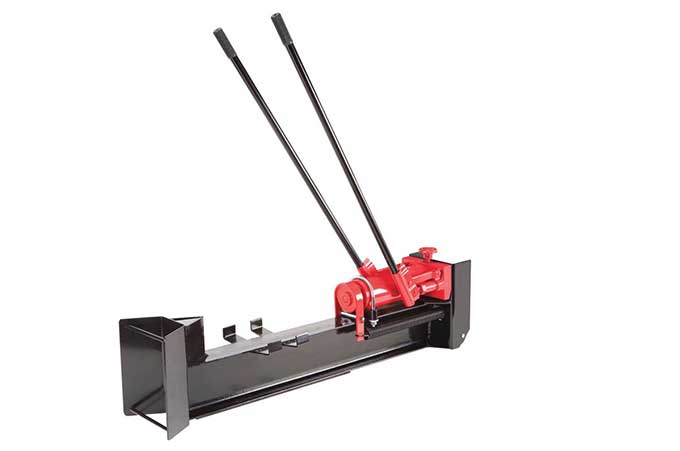
This log splitter ($115) was an impulse purchase at Harbor Freight, but has reliably split my knotty, gnarly oak firewood for 5 years now. Even large trunk rounds split easily with a bit of strategizing. I don’t go through a huge amount of firewood in a season — maybe 1/2 a cord or so. One thing that isn’t obvious: The left handle produces twice the piston movement as the right one. So you use the left one to advance the log into the bit, then once it tightens up you use the right one to power through it. Much safer than swinging a maul, and you still get a bit of a workout!
The internet is awash with an unimaginable amount of data. Nearly every piece of information in the world today is available online. Not all of it is in dull datasets and spreadsheets. Creative data visualization has turned unknowable information into stories. You can check how diverse a city is or slip back in time to pour through archaic manuscripts preserved for centuries.
There are many websites working to present data in a more visual and interactive manner. Here are the eleven most beautiful websites for data nerds.
The Pudding publishes visual data essays on a wide selection of topics you wouldn’t normally find on other platforms. That includes questioning whether pop lyrics are getting more repetitive, a three-dimensional model of the world’s population across several periods, analysis of film dialogues by gender, and fantastic visual explainers.
Also, the majority of these are depicted in 3D. They’re also interactive so that you can explore by simply navigating around.
This data-centric website, as the name suggests, lets you study viruses and examine them through 3D models. Virus Explorer also offers insights on a host of other characteristics of a specific virus such as whether a vaccine is available for them, their structure, genome type, and more. What’s more, you can view them in relative sizes to further understand the differences.
Recommended: Browse through Click & Learn for more interactive educational resources.
Flag Stories is the ultimate destination for people who are fascinated by the world’s various flags. The website comes with tens of intriguing illustrations which present flags like you would have never seen before.
Some of our favorites are the Most Used Flag Elements that tells you which shape is the most popular among flag makers (no surprises there, rectangle won), all the flags stacked like a Tetris game, dominating layouts, and more.
Skyscraper Page compares each and every one of globe’s skyscraper on a scale that everyone can grasp. The website’s database houses tens of thousands of tall buildings, all of which are placed side-by-side on a common chart. You can, of course, categorize them based on cities or countries.
It also lists additional information on the skyscrapers such as when was it built, the designer behind it, height, and more.
PBDB Navigator is a goldmine for palaeobiology students, professionals, and enthusiasts. The service lets you browse the world through space, time, and taxonomy. It features all the essential and advanced tools you would require for visualizing the globe at a particular age whether it’s the Jurassic period or when an organism was first discovered according to geologic time.
Ever wonder how two locations differ in size but you can’t visualize it through sheer numbers? Try MAPfrappe. It allows you to put places on top of each other so that you can truly picture the differences.
MAPfrappe works by outlining the first place you’d like to include and then, select the second one. Once done, it overlaps both of them giving a concise understanding of the size variances.
Information is Beautiful is similar to The Pudding but with a lot more topics and colors. The website, as you’d expect, presents data from a vast number of subjects in attractive designs that help you make comparisons. You can grasp how trillion dollars look like, the story of the world’s biggest data breaches, and even get a scene-by-scene breakdown of true story-based movies to see how precisely accurate they are.
The Colors of Motion is another astonishing website for data nerds which explores the use of colors in movies. The site breaks down every frame to a color and stacks all of them together to form mesmerizing charts and posters of iconic films like Blade Runner 2049, A Beautiful Mind, and more. You can even buy the posters from The Colors of Motion for a starting price of $20.
Bird Sounds is part of Google Experiments and lets you play and learn sounds of over ten thousand birds. The app’s homescreen lists all the available sounds based on their frequency profiles which you can click to play and reveal the corresponding bird. In addition, there’s an option to search.
Pixel Chart comes with the ability to decompose any picture into thousands of pictures. Their color intensities are mapped on a histogram. The website is perfect for photography geeks who are looking to expand their knowledge.
Along with the snazzy animations, Pixel Chart also shows the maximum pixel count of a picture and can group the pixels by lightness, hue, saturation, and more.
The New York Public Library’s collection of ancient items in the public domain is another captivating data-oriented app you should check out. It contains hundreds of thousands of items dating back to the eleventh century. Letters by historical figures, the seventh map of Europe, vintage photos, and more treasures. The web app even lets you sort all of these by century, genre, collection, and color.
Data can be boring. But it also depends on the eye of the beholder. Visualizations reduce the overwhelm and can give you a bird’s eye view of rich data. But are you a data nerd who really wants to roll up your sleeves? Then don’t forget the vast open resources offered by the likes of Google’s Dataset Search tool.
Just because you’re in the middle of a phone call, it doesn’t mean you can’t multi-task and use your device for other purposes at the same time.
If you want to know what you can do on your iPhone while talking, keep reading. We’re going to find out.
1. Start a Second Call
? Whilst on a call to my Mum on my iPhone SE, managed, with my ear to put her on hold, select Apple support and dial the number. Trouble is that it was a US number and cost me £1.25 for 6 seconds. Then managed to phone a vet! ?
It’s not the 1990s anymore. These days, you can start a simultaneous second call and jump between the two with a tap of the button.
Joking aside, this has practical benefits. For example, you can keep your place in a hold queue, or call a colleague to check specific details during a business call.
To start a second call while talking on your phone, tap on Add Call from the in-call menu. You can either select one of your contacts, or tap the Keypad tab to enter a number manually.
2. Switch to FaceTime
To switch to FaceTime, tap the FaceTime icon on the in-call menu.
If the person you are talking to is a fellow iOS user, you can convert your phone call into a FaceTime call. FaceTime lets you see each other on the screen and introduces additional features such as Memoji, Live Photos, and incoming call alerts.
3. Make Conference Calls
Surprisingly few people are aware of this trick. Your iPhone offers an easy way to create conference calls for up to five people. To begin, follow the same steps as detailed above for starting a second call (press the Add Call button).
Once the receiving party has accepted your call and you’ve established a connection, the on-screen in-call menu on your iPhone will change and reveal a couple of new options.
Tap on the Merge Call button, and the two phone calls will connect on a single line. To add more participants, repeat the Add Call > Merge Call process.
If one member of the conference call hangs up (including you), the other callers will stay connected.
4. Put the Phone on Speaker
This is an obvious one, but for the sake of completeness, we’ll mention it.
To put your iPhone on speakerphone, tap on the Speaker button on the in-call menu. The call audio will then play through your device’s speakers instead of the earpiece.
5. Browse Your Contacts
We’ve all been there. You’re chatting with someone on the phone when they ask if you’ve got the number of a friend, business contact, or colleague.
It’s easy to search your contact list while you’re in a call on iOS. You don’t even need to return to the home screen first. Instead, there is a dedicated Contacts button on the in-call menu.
Using this method (rather than accessing your contact list through the Add Call button) means you won’t accidentally end up making a second call while you’re searching for information.
6. Respond With Instant SMS
Phones have a habit of ringing at the most inopportune moments. Whether you’re about to start driving or standing up to give a big presentation, there are times when you need to speak to the caller, but you’re unavailable at the precise moment.
One way to acknowledge the caller without getting bogged down in a lengthy chat or instant messaging thread is to send an automatic SMS to the person.
To send a message, tap on the Message button while the phone is ringing. There are three pre-written options: Sorry, I can’t talk right now, I’m on my way, and Can I call you later?. You can also enter a custom message by tapping on the appropriate option.
You can overwrite the three default options by going to Settings > Phone > Respond with Text and entering your desired phrases.
7. Mute the Call
This is another obvious one, but the ability to mute a call is vital. You can use it if you need to chat privately with someone in person while you’re on a call, or if you’re in a conference call and there’s too much distracting background noise.
To mute a call on iOS, tap on the Mute button from the on-screen in-call menu.
8. Set a Call Reminder
There’s a second option available to you while the phone is ringing—you can set a reminder for yourself. It’s another feature that’s useful in situations where you can’t answer and don’t want to forget to return the call later.
Two reminders are available. The first will automatically remind you about the missed call in one hour. The second will trigger a reminder when it detects you have left your present location.
The second is more useful if you’re stuck in conferences and meeting rooms. If you’re driving, cooking, showering, or performing some other short-term task, use the time-based reminder.
For the location reminder to work, you need to ensure that the Reminders app is allowed to access your location. To enable the feature, go to Settings > Privacy > Location Services and set Reminders to While Using the App.
9. Play a Game
Let’s wrap up with two fun tricks you might not think of. After all, everything on your phone is available if you return to the home screen.
If you have an iPhone 8 or earlier, tap the Home button to return to the iOS home screen. For users of an iPhone X or later, swipe up from the bottom of the screen.
Now you can entertain yourself while you wait for the hold queue to get smaller or for the other person to stop talking. Just open your favorite game in the usual way, and it will work.
10. Listen to a Video or Podcast
Did you know that your iPhone can play audio from both your call and apps like YouTube simultaneously? The call will not mute while you play other audio.
This means that you can watch a video, listen to music, or play a podcast while also keeping an ear on the conversation. Return to the home screen using the instructions detailed above, then open your app of choice.
More Useful iPhone Tips for You
The in-call options on an iPhone are diverse. They allow you to perform any number of tasks to keep your day moving in the right direction.
Many email servers prevent you from sending (or the recipient from receiving) messages over a certain size. When this problem happens most users don’t know how to send large files. To send large files via email, you can either upload your attachment to cloud storage and get a link to email the recipient or use a file sharing service.
Whatever method you choose, in the long run, you won’t be restricted by size limits and you can reduce the clutter from your inbox too. We’ll show you some easy ways to send large files for free.
With Gmail, you can send attachments limited to 25MB and receive files of up to 50MB. It makes sense to use the built-in Google Drive to send big files. Open your Gmail account and click the Compose button. Click the Google Drive icon at the bottom of the compose window.
The Insert files using Google Drive window appears. Select the files you want to attach. At the bottom of the page, decide how you want to send the file.
Drive link works for any files stored in Drive, including files created using Google Docs, Sheets, Slides, or Forms.
Attachment only works for files that weren’t built using Docs, Sheets, or Slides.
Then click Insert.
Gmail checks to see if your recipients have access to the file. If they don’t, it’ll prompt you to change the sharing settings of your file stored in Drive before sending the message. You can set permissions to prevent the file from getting misused and send them to selected recipients.
When you try to attach one or more files that are over 33MB in size, Outlook.com will prompt you to upload the files to your OneDrive account. If you follow this prompt, the file gets uploaded to the OneDrive Email attachments folder. The recipient will receive a link to the file instead of the file. You can also share a file from OneDrive with a limit of 2GB.
Once the file gets uploaded, choose if people can edit the file or only view it. Select Change permissions and decide what you want to do with a file you just shared. There are two options you can choose from.
Recipient can view: Others can copy or download your file without signing in.
Recipient can edit: Others can edit, add or delete files in a shared folder.
If you use Dropbox, then the Dropbox for Gmail Chrome extension can let you send, preview files and links without leaving your Gmail window. The extension adds a Dropbox icon to the compose window. Click the Dropbox icon and choose the file from your Dropbox account. A link gets attached, instead of a file in the email message.
As a recipient, you get rich previews of all Dropbox links shared in emails. Just like attachments, you can use these links to download the files directly from Gmail or add it to your Dropbox. With a free Dropbox account, you get a maximum file size limit of only 2GB.
If your file transfer fails, then it could be due to multiple reasons— your shared link or request could have generated a large amount of traffic or exceeded the bandwidth and download limits. For more details, see the Dropbox bandwidth restrictions page.
If you want to send large files via email, you can use iCloud Mail Drop feature. When you send an email of size more than 20MB, Mail Drop automatically kicks in. Instead of sending the file through the Apple email server, it uploads the file to iCloud and posts a link or preview to your recipients. The link is temporary and will expire after 30 days.
If the recipient also has macOS 10.10 or later, the attachment gets quietly auto-downloaded in the background. And if you’re sending it to another email provider, the message contains an indication of the file’s expiration date and a Click to Download link.
With Mail Drop, you can send big files up to 5GB in size. You can send them from Apple Mail, the Mail app on iOS, and iCloud.com on Mac and PC. Mail Drop support every file types and attachments don’t count against your iCloud storage. For more details, see Apple’s Mail Drop limits page.
Firefox Send is a useful option to transfer big files with people who don’t want to rely on Google, Microsoft, or Apple. It lets you upload and encrypt large files (up to 1GB) to share online. To use Firefox Send, you don’t have to install an add-on. Point your web browser to the Firefox Send homepage and click the Select a file to upload button.
Once the uploading gets completed, Send creates a link which you can then send it via email. At a time, you can send a link to 20 recipients (one download per recipient). You can also set a password to encrypt the file. Each link created by Send will expire after 24 hours. The file also gets deleted from the Mozilla server and leaves no traces.
You can email large files up to 5GB, and every single file should not exceed 200MB. Then click Encrypt Your Files option and set a password.
pCloud will not send the password to your recipient on your behalf. You can share your files with 10 recipients at once. Type in their email addresses in the Send to field. Type an optional message and click Send Files. Your recipients will receive an email link after a few hours. The link remains valid for seven days. You’ll get a reminder a day before the expiration date.
DropSend allows you to quickly send large files from its homepage without signing up. Type the recipient’s and your email address, browse to the file location, and click the Send Your File button.
Before sending the file, make sure to complete the verification procedure. The free plan gives you a maximum file size limit of 4GB and five sends per month. The link remains valid for seven days.
The premium plan increases the limit to 8GB with 15–45 sends per month. There is no limit on the downloads, and you can specify the validity of the link from 1–14 days. DropSend uses 256-bit AES security to keep your files secure.
The paid plan also gives you access to DropSend Direct. It’s a nifty drag-and-drop uploader for Mac and PC to upload and send large files. DropSend also offers Outlook plugin and mobile apps for Android and iOS.
SendThisFile is a different kind of file sharing service. It places limits on the number of transfers you do rather than on the individual file size itself. Create a free account and click the Send Files button to start uploading files. Type in the recipient email address and click Send. The free plan lets you send files up to 2GB with unlimited file transfer.
The premium plan starts with 25GB encrypted file transfer and remains valid for six days. The paid plan also includes Outlook plugin, option to use password protected download capabilities, and embed files on your website with access control features. All plans include AES–256 encryption and 128-bit TLS encryption for end-to-end-transmission.
Managing Large Email Attachments
When you want to send large files via email, it’s always wise to rely on specialized, secure cloud storage and transfer tools. The services discussed in this article are some of the best ways to send large files without any issues and for basic use they’re free.
Also, remember that emails travel across multiple servers on its way to the recipient. An attachment you send from an email service can get rejected by another email provider. If you use Apple Mail, make sure to read this piece on how to avoid common issues with attachments.
Downloading a film from a website implies some form of piracy. However, public domain movies can be freely, and legally, downloaded. And these aren’t unwatchable B-movies either. In just a few clicks, you can download and watch some brilliant films.
In this article, you’ll learn what public domain actually means, before we recommend the best public domain movie sites available online…
What Is Public Domain?
Simply put, a public domain definition means creations which lack exclusive intellectual property rights. The most common reason a movie, television show, or book has fallen into the public domain is the passage of time.
For example, many public domain movies are older silent or black and white films, since they were created before copyrights were established. Alternatively, their copyright may simply have lapsed. Additionally, many works fall under the public domain because the creator declined copyright.
Aside from cinema, you can find TV shows, music, and even images in the public domain. Software created before 1974 slides into the public domain too. Still, you’ll want to be careful when downloading. Occasionally, copyright changes, so always double check before streaming or downloading a film.
While there’s variety in available public domain flicks, some genres outshine others. Notably, public domain horror movies abound. For instance, you can download the likes of George A. Romero’s genre-defining Night of the Living Dead, and Vincent Price hit The House on Haunted Hill.
Likewise, you’ll find loads of solid sci-fi flicks. Darkly comedic science fiction romp A Boy and His Dog, Gamera the Invincible, and Kong Island are all public domain movies. Granted, much of what you’ll find would benefit from the Mystery Science Theater 3000 (MST3K) treatment. Not surprisingly, several titles have including public domain horror movies Horrors of Spider Island and Manos: the Hands of Fate.
As the name suggests, Public Domain Torrents features torrents of public domain movies and shows. This veritable treasure trove of films and shows features tons of cult classics.
Although many sites exist for free, legal movie downloads, Public Domain Torrents remains one of the top sources. On the left-hand sidebar, there’s a fantastic public domain movie database. It’s segmented by categories, so you’ll find genres including action/adventure, animation, sci-fi/fantasy, and westerns.
Despite its retro web design, Public Domain Torrents offers a bevy of public domain movies from a variety of genres. Movies are available in a variety of formats including AVI, iPod MP4, and PlayStation Portable MP4.
Over on Archive.org, there’s a thriving catalog. You can sort its public domain movies list by genre, year, and more. Unlike Public Domain Torrents, films are available for direct download as well as torrents. However, specific format options depend on the title in question.
While there’s some crossover with other sites, Archive.org touts a tremendous catalog. In its movie vault, you’ll find classics like the groundbreaking noir flick The Hitch-hiker, and thriller He Walked By Night.
Unfortunately, Archive.org is ridden with multiple copies of uploaded movies. Sure, this means you might find a higher resolution copy of a certain video, but it also requires slogging through duplicates. Still, it’s an incredible source for movies, TV shows, and public domain music. Whereas Public Domain Torrents only hosts downloads, you can stream straight from Archive.org.
Similarly, Public Domain Movies serves as an impressive public domain movie database. It’s packed with quality films such as 20,000 Leagues Under the Sea. Because you can stream movies without downloading, it’s an excellent option. But there are download options available as well.
Most movies benefit from a substantive synopsis and cast list. For this reason, Public Domain Movies provides a fertile landscape for free, legal cinema. Though the user interface is aesthetically pleasing, there’s no search feature. Nevertheless, sorting by genre will help you navigate this extensive collection of films.
Though Public Domain Flix appears to almost entirely consist of embedded YouTube videos, it’s a nifty resource. Here, you can stream thousands of movies. Site navigation is simple thanks to a robust search feature. There’s also a brief synopsis of each movie.
Unfortunately, Public Domain Flix lacks download options. However, its excellent layout and descriptions still make it a phenomenal public domain movies site.
While most public domain movie sites yield streaming and download capabilities, OpenFlix is a bit different. Rather than concentrating on movie hosting, OpenFlix is merely a public domain movie database. But it excels at delivering a catalog of films.
Essentially, it’s the Wikipedia of public domain movies. You can search or browse by genre. Clicking into a movie’s entry, you can read plot synopses, DVD quality ratings, and more. Plus, there’s essential information such as the year of release and country of origin.
Although you can’t actually download directly from OpenFlix, it provides what’s arguably the definitive public domain movies list. There are links to Amazon DVDs of titles, or you can use OpenFlix to find what to watch, then download or stream elsewhere.
The Best Public Domain Sites for Movies
Although you’re unlikely to cancel your Netflix subscription based on the public domain movies available online, they’re another option when you want something to watch.
If we had to pick one site to bookmark it would be Archive. org for the sheer number of films available. Despite its lack of video content, OpenFlix is also a must-bookmark. Its information about public domain movies is unrivaled.
Whichever site you choose to use, ultimately, you can find hours of entertainment online completely free, and legal to download or stream. So you’d be a fool to pass up the opportunity.
Historical landmarks like the pre-Columbian metropolis Teotihuacan, the famed Egyptian pyramids, and the enigmatic Easter Island enrapture us with their mystique. And they grow even more fascinating with each new discovery. From fine banquets at King Arthur’s purported birthplace to an Aztec ball-court-turned-execution-ground to salacious Pompeiian wall art, each of these finds illuminates history’s most […]
I have descending into the YouTube click hole. Forget TV, movies, Netflix; I spend most of my discretionary media time watching YouTube tutorials. I go to them whenever I need to learn anything, and in particular when I need to make or repair anything. Nothing appears missing in the YouTubeverse. The most obscure esoteric subject, item, skill, technique, problem will have five videos dedicated to it. At least one will be good. Against this very uneven quality of the average random YouTube episode, I have discover a good shelfful of dependable high-quality YouTube channels dispensing amazing information on a regular basis. Below are the YouTube channels I currently subscribe and return to often. They are informational, rather than entertaining, and they are biased to makers and do-ers. I have divided them into four groups: Experimenters, Makers, Explainers, and Nichers — esoteric interests that probably won’t appeal to many. Don’t take the categories too seriously; there is much overlap. I emphasize that these are the channels I personally subscribe to, and so reflect my interests, and do not include such obvious other maker-type channels like food, cooking, travel, makeup simply because those are not my interests. But I for sure have missed some great channels. So in the comments please tell me what channels you subscribe to. To be most useful, state what they are about, and why you think they should be included. I’ll check them out, and if they resonate with me, I’ll add them to the list. — KK
EXPERIMENTERS
Cody’s Lab
This is my all around favorite at the moment. Cody specializes in chemistry. He’ll make frozen solid oxygen in his kitchen, or try to walk on a pool of mercury, or purify gold from jewelry he bought on ebay. He famously made gunpowder from a year’s worth of his own urine. Whenever he needs a chemical, he’ll just make it from other cheaper chemicals. He imitates the crude materials of the original alchemists who first made the compounds. It’s inspirational because his stuff is so jury rigged you realize you can do this too. He is a good explainer and is also seriously into other stuff like bees, astronomy,and unusual garden plants. He likes to recreate classic science discoveries.
How to Make Everything
Very cool site. This guy attempts to remake crucial materials like glass and iron from elemental materials, or less essential things like fireworks, candle wax or sunscreen. In a classic video he documents how he made a sandwich from scratch, growing his own wheat, and raising his own turkey meat. The sandwich only cost him $1,500.
King of Random
Older videos in the archives of this channel offer very explicit instructions for making things, like your own rocket engines from hardware store chemicals, or blow darts, or water balloon slingshots. Recent videos spend more time on doing science stunts and unusual experiments, and less on how to. But still with a good maker vibe.
Backyard Scientist
While there is a large stunt aspect to this channel filmed in a suburban backyard — like pouring molten aluminum into a watermelon — the host does a lot of research to explain what’s going on scientifically. Come for the dangerous explosions, stay for the science.
Applied Science
This guy tinkers with high-end esoteric scientific equipment, like home-made electron microscopes, and also invents new instruments and techniques. It’s advanced tinkering, which requires attention to details and supplies most weekend tinkers won’t have. But he is very good at teaching what he learns.
Mark Rober
Mark Rober was in the news recently as the ex-NASA scientist who make a thief tracking package that was a glitter bomb. But with many million followers, he’s made many other equally cool science experiments. He tested out the absolutely best way to make the fastest pinewood derby using science, how to drop eggs from a roof without breaking, and so on. There’s no how-to; it’s kind of a one-man mythbuster.
Project Farm
Project Farm features very thorough, scientific tests of workshop tools and products. He’ll test 10 brands of duct tapes, or 15 different kinds of chain lube, or the best penetrating oil, or best AA battery, with quantitative measurements, and then he’ll post the results. You could skip to the end for the winner, but there is a joy and education in watching his elaborate and thorough process.
MAKERS
I Like to Make Stuff
Bob Clagett likes to make a refreshingly wide variety of things, far more variety than most YouTubers. Furniture, household items, crazy toys, backyard projects for kids, home improvements, and odd ball experiments, like customizing your car horn. He is incredibly prolific and he works in wood, metal, 3D printing, and electronics. He’s pretty good with the how-to, and has a great series of workshop tips videos.
Adam Savage’s Tested
A group effort by Mythbuster Adam Savage and his current Tested teammates. There’s a range of videos from a weekly chat session, to Adam interviewing his heros but the best are the one-day builds that follow Adam as he build props in his shop. He’s a fabulous teacher and eager to show and tell.
Izzy Swan
The ultimate do-it-yourselfer. He bootstraps his own shop tools starting with a $20 skill saw and going from there. Lots of fun backyard and workshop projects with in-depth how to. Great at sharing tricks and techniques.
Jimmy Diresta
Diresta is a professional maker who works very quickly. He rapidly makes stuff in metal, wood, plastic, leather, paper and does old tool restorations. Half of his work is for clients, half his own art. His videos are long wordless time lapses of him working. His methods are always creative and fun to watch. (His Patreon supporters get access to his narration of this workflow.) His series of tips videos, where he instructs, are the best — real pro tips, delivered succinctly.
Matthias Wandel
In addition to showing how he makes all his shop tools himself using plywood and other off-the-shelf parts, Matthias constructs cool devices like marble mazes, pipe organs, wooden gears, unusual jigs mostly from plywood. He is a very gentle, meticulous teacher.
Frank Howarth
This guy creates a lot of innovative wooden bowls and unconventional wooden furniture with high craftsmanship. He also makes his own tools, uses laser cutting a lot, and occasional experiments with the video form itself. Most of his videos is just a time record of his work, with his very mellow narration overlaid afterwards. The adjectives I associate with Howarth are “careful” and “exact.”
FliteTest
Let’s see how many things — a chair, a pizza box — we can get to fly. What’s the smallest plane we can make? What’s the biggest cardboard plane we can make? In each episode this small gang of enthusiasts take on a different challenge to create a never ending variety of flying machines. They show their work, and provide plans. So far, there is almost nothing that haven’t been able to fly with some control. It’s a fun course in aviation.
Paul Sellers
A born teacher, Paul Sellers emphasizes learning new skills in how to work wood on his channel. He’s been a daily woodworker for 50 years. You’ll learn way more than in most schools. Basic skills as well as advance techniques.
Colin Furze
Frenetic, fast-paced, noisy, non-stop loud mouth, blazing builds of home made jet powered vehicles, crazy cannons, backyard explosives and other things that might kill or maim you. Outrageous machines. Entertaining primarily.
Alec Steele
Extreme blacksmithing, especially esoteric knives and swords.
Simon Leach
A professional potter gives lessons as he makes piles of pottery.
Tom Fidgen Unplugged Workshop
Although there are few recent posts, the archives of this channel are all about woodworking with hand tools. Totally unplugged. The advice and instructions are pretty timeless.
Kyle Toth
This guy’s claim to fame is making massive bowls and innovative wood stuff on a lathe. No instructional, just time lapses as he works.
EXPLAINERS
Vihart
There are other math video channels, but Vi Hart’s math tutorials are in a league of her own. She is unorthodox, playful, fun, creative, nerdy, brilliant, inventive, educational, and one of the best things on YouTube. You don’t need to know much math to get something from her creations.
AvE
I have never encountered anyone with as much knowledge of materials, electronics and manufacturing processes than the faceless host of this entertaining channel. In a riot of cheerful creative cussing (often politically incorrect), this Canadian pair of hands (no one has seen his face or knows his name) takes apart tools and dissects their every component, commenting on how they were made and might be improved. It’s a university course in modern manufacturing techniques. Because of his creative patter, you’ll either love him or hate him.
James May Reassembler
A well-known TV celeb in England re-assembles antique machines, such as a old lawn mower, from the parts laid out in his basement while reminiscing about the machines.
Primitive Technology
Without ever speaking a word, the mysterious man wearing only blue shorts is recreating civilization one prehistorical invention at a time. Watch as he makes fire from sticks, a house from mud and fire, and his clothes from plants. He is now trying to make iron from rocks.
Veritasium
This is perhaps the most scientific of the explainers, with interviews and explanations by working scientists, in addition to the host. In addition to explaining interesting discoveries, there is a lot of explaining about science itself.
On this very popular channel, host Destin goes deep into a science puzzle or new discovery, and explains it with creativity and intelligence. He’ll try to make a physical demo to prove his points, which is very compelling. His demos are often clickbait — like shooting a gun underwater, or trying to undo a tattoo — but the clicks are well-deserved.
Practical Engineering
We are surrounded by sophisticated technology in our roads, bridges, towers, tunnels — our infrastructure. This channel examines and explains with clever physical demonstrations how things work.
NICHERS
Clickspring
Watch as a human makes a clock by hand, crafting tiny gears and screws with hand tools, the way it was done centuries ago.
Locklab
Group effort in lock picking. Various members share their video tips on picking locks; the harder, weirder, rarer, the better. Viewers send in “challenge locks” to see if they can stymie the pros.
Hamster Miniature Studio 2
Japanese guy who makes exact dollhouse scale miniatures. Not just furniture, but food, package goods, electric appliances, and sundry extras like Amazon boxes!
Kaplamino
All kinds of chain reactions, from mega domino runs to mega marble machines.
Steve1989
Have you ever wondered what an old army ration meal tasted like? No? Then this channel is not for you. Steve collects MRE (Meals Ready to Eat) — often, but not always, military meals, both today’s and yesterday’s from institutions around the world — unboxes them, gives you all the minute details of where the food and ingredients come from, and then eats it. Then he rates them.
We had very simple expectations when we stopped by this 1960s-era survivor: just basic burgers, fries, and a milkshake under an old canopy. This place shattered them. For the last few months, we’ve been sticking with some local favorites. We haven’t traveled much or gone exploring, although we do have some promising trips penciled in … Continue reading Small’s Drive-In, Athens TN
Before I start a new painting, I usually draw what I want in Adobe Illustrator, and then transfer a printout of that drawing to canvas or board to paint. I’ve tried opaque projectors, but the image is faint (at least on the el-cheapo projector I use) and I don’t really have room to set it up. I’ve also tried using a piece of paper that I’ve rubbed pencil or charcoal on, but that produces a blurry line.
Eventually I considered the possibility that there might be a transfer paper for artists. Of course, there is one. It’s called Saral Transfer Paper, and it works like a dream. It comes in five different colors, but I can get away with blue and white. It leaves a clear, thin line that erases easily and doesn’t mess up the color of the paint I use. I’m already hooked on it for life.
If you send a self-addressed, stamped envelope to Saral, they’ll send you free samples in all five colors.
Goals and resolutions might be top-of-mind right now but science reveals failure meeting our goals might not be due to our efforts or intentions, but instead, by how we set those goals. Here are ten tips to help you succeed.
You need to care for your iPhone. After all, they cost a lot of money. You probably want to avoid splashing out on a new one every 12 months.
To prolong the life of your iPhone, you should to perform some regular maintenance tasks—both for the hardware and software.
Physical iPhone Maintenance Tips
Let’s begin with some physical maintenance tips that’ll help keep your iPhone looking great and working well.
1. Clean the Charging Port
If you’re having difficulty charging your phone, something as simple as a clogged Lightning port is often to blame.
To dislodge the gunk, your first port of call should be a toothpick or the SIM removal tool that came with your phone. Take care to act very delicately. Make sure you don’t damage the contact points with over-zealous actions.
If this doesn’t work, you can try a can of compressed air. Apple recommends against using canned air and other cleaning products, but a quick blast might help dislodge particularly sticky debris. Hold the can close to the charging port, but don’t put the nozzle inside.
And if you still can’t charge your device, you might have a hardware issue. Contact Apple Support for assistance.
2. Clean the Speaker and Microphone
Cleaning an iPhone’s speaker and microphone is important. Failure to do so can affect call quality, music playback, and your ability to control Siri.
To begin the cleaning process, grab a soft-bristled toothbrush and (very) gently rub it over the two openings to loosen the debris. Next, grab a piece of tape and gently press it over the area to collect the dust and lift it away.
Do not use compressed air. The powerful force can damage the speaker and microphone’s membranes.
3. Clean the Phone
Phones are dirty and germ-ridden because we carry them everywhere. You need to give your device a bit of a polish every so often.
Apple recommends that you use a soft, damp, lint-free cloth. Avoid getting water in the various ports, buttons, and other openings. And never use anything that’s abrasive, as iPhones are coated in a fingerprint-resistant oil repellent. It’s natural to see it wear down over time, but heavy cleaning could prematurely remove this.
4. Clean the Headphone Jack
If you own an iPhone 6s or earlier, your device still has a headphone jack. You should clean it out regularly to prevent a buildup of dust and fluff.
To clean the headphone jack on an iPhone, use the same compressed air method as described earlier. A cotton swap can also prove useful. If you’re not having any luck with those, you can use a toothpick as a last resort.
iPhone Software Maintenance Tips
The four physical tips we discussed cover the basics, but there’s a lot more you can still do. (Check out our guide on how to clean a dirty iPhone to learn more.) Now it’s time to cover some other virtual and software-based iPhone maintenance tasks you need to do regularly.
5. Manage the iPhone Battery
Often, people’s biggest gripe with their smartphone is the battery life. If you’re a heavy user, it’s a struggle to make your battery last all day. The situation only worsens as your battery ages.
One way you can alleviate the problem slightly is to recalibrate your iPhone battery on a regular basis. The process can help the battery drain more slowly and increase its overall lifespan.
The iPhone also comes with a bevy of battery settings. Fiddling around with them can help you squeeze out a bit more juice. To learn about these and more, check our complete iPhone battery guide.
6. Create More iPhone Storage Space
iPhone: need more storage, delete videos Me: delete all my photos? iPhone: naw need more storage, delete the videos Me: you want my first born son in exchange for more storage?
The high price of top-tier iPhone models leads many to settle for one with less internal storage.
That storage fills up quickly, especially if you take a lot of photos and receive constant messages from friends and family.
You don’t want to hit your storage limit in an inopportune moment, leaving you unable to take photos or download new apps. Therefore, it’s wise to spend some time pruning your phone’s data every now and again.
In addition to media files, you can clear out browser data, delete apps, and remove offline files. We’ve written a guide on how to create free space on iOS if you’d like more information.
7. Back Up Your Data
It’s impossible to overemphasize the importance of backing up your data. I speak from personal experience after putting my wife’s iPhone through the washing machine a month after the arrival of our new baby. Goodbye, precious photos.
There are two primary ways to back up iOS—using iTunes or iCloud. You can also use a third-party option.
“Have you tried turning it off and on again?” is the oldest advice in the book. It’s also surprisingly apt for smartphone maintenance. How often do you really restart your phone? If you don’t let the battery run out, the answer is probably “never.”
Rebooting your iPhone has a ton of benefits, including fixing memory leaks, freeing up RAM, preventing crashes, and improving battery life.
9. Update Your Apps
This one is a no-brainer. However, it’s amazing how many people let dozens of updates sit without taking the trouble to download and install them. Updated apps bring new features, better security, and a more stable user experience.
You can see if you have any app updates pending by opening the App Store and tapping on the Updates tab.
We recommend turning on automatic updates. To enable automatic updates on iOS, go to Settings > [Name] > iTunes and App Store and slide the toggle next to Updates into the On position.
10. Check App Settings
Apps’ settings menus change over time. Thus, you should occasionally run through menus to ensure that apps are still set up in the way you want them to be. You might even find some settings that let you use less mobile data.
This is especially true for social media apps, which have a nasty habit of automatically opting you into their privacy-eroding “new features.”
Learn How to Tweak Your iPhone
If you follow the tips discussed above, you’ll be well on the way to a smoother iPhone experience. Of course, if you want to improve your experience further, there are lots of other tricks for this. We’ve explained the best tweaks all iPhone users should make.
Craigslist is an interesting part of the internet’s legacy. Founded over 22 years ago as an email distribution list, the site has steadfastly refused to change its minimalist design and easy-to-use posting system. Craigslist remains a favorite shopping site to sell stuff locally hunters and an enduring site to post your classified ads for free.
Other sites like Craigslist want to sell stuff online too. Most of those alternatives to Craigslist have failed before anyone knew they existed. Still, there are a few which managed to withstand the web’s churn and have endured as a viable choice to Craigslist.
Let’s look at several other online classified sites where you can sell old and new stuff online with a few clicks.
Oodle is both a site like Craigslist and an anti-Craigslist at the same time. The basic concept of posting online classifieds is the same, but it embraces Facebook to provide a more personal experience and recommendations from friends.
It uses the same technology that powers Facebook Marketplace. You don’t have to use Facebook to post, but you have to connect your profile to your genuine Facebook profile.
Oodle’s focus on social networking makes it a bit less intuitive for people looking to find items in a specific category. Some people will prefer this design, and others will find it frustrating.
There’s a lot of activity on Oodle. You can not only sell your stuff online but also use it to find jobs nearby. This site seems to do a better job of providing geographically relevant results than many competitors and there is support for several countries besides the United States. The site operates in Australia, Canada, India, Ireland, New Zealand, and the United Kingdom.
Sell.com is not as old as Craigslist but not by much as it started in 1999. It started its life with only buying and selling ads. Today, it covers other kinds of classifieds like Pets and Animals, Jobs, and Services.
The site also does not categorize classifieds by region automatically, though there is the option to enter your zip code. You can also drill down to the city of your choice and then refine it with an advanced search.
Want to save yourself some time?
Log-in to the site and set up an alert to match new ads to your keyword. Sell.com allows you to make your ads more visible on the site by paying money. You’ll find eBay-like features such as seller ratings and a shopping cart. Products are more visible thanks to the thumbnails.
Do note that there’s no charge to browse, make offers, or buy items and services on Sell.com. But, you have to pay a small fee to list and sell items and services.
Here’s another internet veteran of the buy and sell industry. Geebo has never obtained the household name status of companies like Craigslist and eBay but has remained relevant for anyone who’s looking for an alternative classified site.
Like most classified sites, the design is simple, but like eBay Classifieds it is far more colorful and modern than Craigslist. Another similarity is this site’s focus on the United States.
Geebo uses the tagline “safe community classifieds” and claims to have a more personal atmosphere than the competition. The site’s blog does spend a lot of time bashing the competition for sketchy practices, but otherwise, the site isn’t any safer than any other online classified site.
There was a hint of Facebook’s own market when we talked about Oodle. There are already thousands of groups on Facebook that have the same idea at their heart but the Marketplace makes it a bit more organized. Think of it as a more specialized corner where you can do a more localized search for stuff you want to buy and sell.
Snap a photo and publish it to sell your stuff. To buy stuff, type the keywords and filter by location, category, and price or through a map.
With the community-powered marketplace, you can “know” the person you are dealing with through their social profile. That’s always a wise precaution before any big-ticket purchase even though it can be a hotbed for scammers too.
Check the listings carefully and the Facebook public profile behind it. Opt for verified profiles on the Marketplace. You can talk to the seller using Facebook Messenger to negotiate a final price and close the sale. If you spot a red flag, be careful of the details you give out.
Marketplace is available in the Facebook app and on desktops and tablets. Look for the Shop icon at the bottom of the app on iOS or at the top of the app on Android.
LetGo follows the template of Facebook Marketplace and others with its large thumbnails. But it seems to do a better job than Facebook with its pinpoint filters. It is a mobile app first and website second.
For instance, it’s much easier to click a photo and load the information with the apps. It uses artificial intelligence to categorize the product and title it. Also, the in-app chat platform is a must when you want to talk to the buyers and sellers.
Letgo is free and doesn’t charge sellers a fee for posting their listings. You don’t have to give a percentage of your sales either. Letgo offers in-app purchases to allow you to feature your listing. It’s an optional feature that you can pay for to highlight your product amidst the crowd.
Craigslist is barebones. Several alternatives have found a home in mobile apps because it is easier to click, upload, and list the stuff you want to sell online. So pick one that reaches the largest audience or has a thriving community. Even selling internationally is no longer hard.
There are a lot of sites like Craigslist, but these were picked because of their strong user communities. A classified site is not of much use if no one ever visits it. Today you can take your pick from social shopping apps and many niche apps that list only one or two categories.
Keep searching for good bargains on Craigslist but don’t stop yourself from listing your stuff on other classified sites too.
Thousands of mobile apps launch every day. Someone has to build them. If you want to turn app development into a new career, the Ultimate Mobile App Development Certification Bundle should be your starting point. This huge learning library includes six courses and over 63 hours of video tutorials. You can get it now for just $41 at MakeUseOf Deals.
Code for a Living
Building apps is a lucrative business. Talented developers earn six-figure salaries at startups, while others turn freelance or code their own apps for profit. No matter which path you’re aiming for, this bundle provides the perfect launchpad.
The training starts from scratch, showing you how to work with all the latest development tools. Through hands-on video lessons, you learn how to build iOS and Android apps with Flutter, Dart and Kotlin. These frameworks allow you to build apps faster than coding by hand.
The bundle also helps you build an exciting Android portfolio, connect third-party platforms to iOS apps, and create your own Instagram clone. If that wasn’t enough, you also get a crash course in UX/UI design.
You should come away with a great portfolio of working apps, plus a certificate of completion from each course.
63 Hours of Training for $41
You can grab the bundle now for $41 and save over $1000 on the standard price. It makes a really smart personal investment and a great gift for aspiring developers.
Our verdict of the Flow: Despite some app issues, the Flow air quality is one of the most essential and vital devices you can buy today. 810
It’ll come as no surprise to you that every day we breathe polluted air. The air quality varies wildly by climate, country, and even street. Poor air quality can cause a whole range of complications, not least to yourself and your family’s health.
But what if you could monitor the air quality where you are right now? That’s the objective of Plume Labs, a French startup who have just launched their first mobile air quality tracker: Flow, available now for $180.
Design
Flow is a small, palm-sized device designed to monitor air quality on the go. It represents Plume Labs first hardware product, but it doesn’t show. It’s an attractive device that has had a lot of attention paid to the design.
The upper portion of Flow has many small holes located all around the device to allow air to pass into the sensors beneath. However, those air holes result in the device not being waterproof, so you need to take extra care in rainy conditions. Flow’s inconspicuous design means you won’t feel embarrassed to carry it around with you.
The attention to detail continues with the vegan leather strap attached to the top. The strap is soft and isn’t a struggle to open or close. Flow is relatively unique in that the device is portable. Most smart or connected air quality monitors are designed to be left at home or the office, not carried around with you throughout your day.
The lower portion of the front of the device is dedicated to a touch sensitive pad, which acts as the only button. Pressing down on the pad activates or wakes Flow out of its passive collection mode. A circle of LEDs around the pad illuminate in response to the surrounding air quality.
The charging port is at the bottom of the device, which sounds quite awkward. However, Plume Labs have thought this through too. Included is a small docking station for you to pop your Flow into. It’s not fiddly or difficult, and the spacing on the dock has been designed so that Flow slots perfectly onto the USB-C charging port. This is especially useful as battery life is around a day, so you’ll need to charge the device quite frequently.
How It Works
Flow collects and stores air quality data throughout the day, no matter where you take it. Pressing the pad on the front of the device will light up the LEDs different colors depending on the air quality around you. The colors are mostly what you’d expected: red for bad, green for good, and … blue for somewhere in between.
Since there is no universal standard measure of air quality that combines all the different particulates, Plume Labs has developed their own. But they first need data to feed into that model. The holes around the outside of Flow allow air to enter into the sensors, and the air is distributed using a 5mm internal fan. A laser fires at the air, and the dispersed light is converted into electrical energy.
To measure the Nitrogen Dioxide (NO2) and volatile organic comound (VOC) particles, the air is passed over a heated membrane which allows those particles to pass. The energy required to keep the membrane at 350 degrees Celsius is then recorded. Plume Labs has developed a neural network to process all the incoming data and to convert it into useful air quality readings.
Whatever environment you’re in, you are unlikely to want to pour over mountains of data to work out whether the air is dangerous or not. That’s where the Flow Air Quality Index (AQI) comes in handy. It turns that data into a single number that will indicate the quality of the air around you. It’s this number that is used to inform the colored LEDs on the front of the device.
Flow App & Setup
While it’s great to be able to get a quick overview of the air quality directly from Flow, the data behind the AQI may help inform how best to protect ourselves. Plume Labs developed an app to go alongside Flow, and the device’s initial setup is initiated from there too.
The hardware has been meticulously designed, but unfortunately, the app experience doesn’t quite live up to those heights. Once you’ve created an account and set up your device, the app is mainly used for viewing Flow’s data. Unlike some other wearable devices, there doesn’t seem to be any background Bluetooth connection between Flow and your phone. This isn’t a problem in itself as background sync can drain the battery. Also, Flow doesn’t need a permanent connection since it isn’t receiving any data.
However, it does mean that when you open the Flow app, you need to wait for the data to download. This is a somewhat slow process, hampered further by difficulties maintaining an active Bluetooth connection with the device. Sometimes, no matter what I tried, I couldn’t get the app to acknowledge Flow. I use the Google Pixel which has been known to have Bluetooth issues. However, Flow would always be shown in the available Bluetooth devices, but just not on the Flow app.
The only way to resolve the issue was to disassociate Flow from my account, a process that should allow re-connection. Unfortunately, to reconnect Flow, you have to factory reset it, permanently deleting all the data stored on the device. As there is no background sync, any data recorded since you last synced your Flow is lost.
Viewing Air Quality Data
For the most part, the data synced properly between Flow and the app. Once there, you have the opportunity to browse historical data. Any readings taken while your Flow is connected to the app will be geo-tagged too so you can get an insight into where air quality varies.
The app’s home screen is a timeline of days your Flow has recorded data. The top of the page shows today’s data while connected. Scrolling through the list takes you through older entries. Each day is summarized with a location, the average AQI, and a severity rating. Tapping on an entry allows you to see the day in more detail, with average PM2.5, PM10, NO2, and VOC values displayed.
A graph underneath these average values shows how the AQI varied throughout the day. If you tap and drag on the chart, the values will change to show you the precise readings at those times of the day. This works, but it doesn’t seem to be the best way of browsing the data. There is no way to compare days, locations, or exposures. The timeline is a nice way to present the data, but opening each day’s readings is a little tedious, and doesn’t help you to identify trends in the data.
An Essential Device
Air quality is a concern no matter where you are. From cars to planes, to electricity production pollutants are all around us. This makes Flow, and the insights it provides, invaluable. It is a well-designed, portable air quality monitor that can keep you informed about the air you breathe at the touch of a button. The positive thing here is that Plume Labs got the crucial part of the experience right; the hardware.
The connection issues and in-app data analysis are frustrating for those of us that want to drill down further into the data, but software can be updated and improved. Given the time they’ve spent developing the Flow, it seems likely that Plume Labs will iron out some of these issues.
The air we breathe is vital to our health. Many of us pay close attention to or at least have an awareness of the health merits of the food we eat, and air quality should be no different. Flow marks the first time that data is readily available to you whenever you need it. For that reason alone, the Flow may be one of the most essential and vital devices you can buy.
Commentary: I put off reading David Foster Wallace's famously encyclopedic book for two decades. Finally digging in was the best and worst thing I did this year.
Nick Laracuente was driving through rural Millville, Kentucky, one foggy morning in 2008 while on a honeymoon road trip with his bride, Tiffany, when he crested a rise and saw the turrets of a limestone castle break through the mist. “It looked like something out of a horror movie,” Laracuente says. Laracuente had stumbled upon the Old Taylor Distillery, a local landmark built by Col. E.H. Taylor in 1887, abandoned for decades, and recently reinvented as Castle & Key distillery. He didn’t know it then, but both bourbon and Col. Taylor would soon play a significant role in Laracuente’s archaeological career.
photo: Courtesy of Nick Laracuente
Nick Laracuente at work.
Born on an army base in Wurzburg, Germany, Laracuente moved often as a child, living in at least a dozen locales before his father retired while based at Fort Knox, Kentucky. His mother is a Kentucky native, and Laracuente has always considered the Bluegrass state home. He graduated from Tulane University in 2003 with a degree in archaeology and spent several years surveying old plantations in Louisiana for the National Park Service. He then investigated the impact of historic weather events on Florida’s Spanish missions for his master’s thesis. Wary of the esoteric and transitory life of an academic, Laracuente and Tiffany moved back to Kentucky, where he currently works for the Kentucky Heritage Council. One day a neighbor mentioned that Canada Dry once produced a Kentucky-made bourbon, which resulted in a road trip to survey several historic distillation sites, which led Laracuente to begin seeking out and documenting even more sites in his free time.
For example, in 2014 the record of a bitter lawsuit led him to the Jack Jouett House Historic Site in Woodford County. Jouett is famous for riding to warn Virginia Governor Thomas Jefferson of approaching British troops during the Revolutionary War. He also operated a distillery, which he sold to a neighboring family for 1,400 gallons of whiskey. The family never paid, and the two parties feuded in court for nearly a decade. “In all of those documents, while they’re calling each other drunks and liars and whatever, they include details about the distillery,” Laracuente says. “We were able to use those landmarks to figure out exactly where the distillery was.”
The biggest find in Laracuente’s archaeological career is the one that led him back to Col. Taylor. In 2016, a work crew was renovating a nondescript storage area at Frankfort’s Buffalo Trace Distillery into an event space when they punched through a concrete floor and heard rubble tumble into a void below. Distillery representatives called Laracuente to check it out. Further investigation revealed a mishmash of ornate pillars and remnants of walls, along with large, brick-constructed fermenting vats that had once been lined in copper. Working from an old fire insurance map, lithograph drawings and clues revealed during a year-long archaeological excavation, Laracuente helped piece together the story of what’s today known as “Bourbon Pompeii.”
photo: Courtesy of Nick Laracuente
A look at the Old Taylor Distillery before the restoration.
In 1860, Col. Taylor had purchased a defunct distillery on the site, tore it down and built a larger, more modern operation. That building was struck by lightning and burned to the ground a decade later, and Taylor used the insurance money to construct an even larger operation, the O.F.C. Distillery. “He rebuilt it within a year, so he didn’t have time to clean it all up and make a clean surface,” Laracuente says of how the ruins of three distilleries were buried and forgotten.
Laracuente has since gained a degree of notoriety. He’s featured in the documentary NEAT: The Story of Bourbon and has presented at the New Orleans Bourbon Festival, among other events. But it’s his 7-year-old daughter and occasional field companion, Rosemary, who succinctly distills the essence of his work. “I like the things, but it’s more cool learning the stories about the people who used the things,” she once told her father. “I had tears in my eyes I was so proud,” Laracuente says. “It’s more than just the bourbon—there’s a story behind every bottle.”
Training your chickens to return to their coop is a great way to protect your chickens from predators. Chickens that have established the coop as their home will return to it naturally each evening. You can also train your chickens to return to the coop when you call them in case you spot a daytime predator or need to clean their area of the yard. Chickens do not learn as quickly or as easily as dogs do, but with a little patience you will find that training chickens to return to their coop is fairly easy to do.
Prepare your chicken coop. Before you can train your chickens to return to the coop in the evening, you need to ensure the coop is set up properly for your chickens. A basic chicken coop should provide at least twenty-four square feet of space and multiple places for chickens to perch.[1]
Make sure there is a plentiful supply of food and water inside the chicken coop.
Wood beams mounted horizontally can provide good perching space for chickens.
If you are raising chickens for egg production, make sure there are enough chicken nesting boxes for each hen (usually one box per four hens will suffice).
Check the temperature inside the coop. Coop training requires that you keep your chickens inside the coop for a prolonged period of time. It’s important that you make sure your chickens won’t be too hot or they could suffer from health issues.[2]
Your chicken coop should not exceed 70 degrees Fahrenheit during coop training.
Install fans to reduce the temperature of your coop if it is too hot.
You may want to consider relocating your chicken coop to a shadier area of your yard if high temperatures continue to be an issue.
Keep your chickens confined to the coop for a week. Chickens are often stressed by a transition from one coop or yard to another. Young chickens that are transitioning into living in a coop may take even longer to adjust. Forcing the chickens to remain inside the coop for a week will force them to roost in the coop and begin to consider it a home.[3]
Make sure your coop allows you to easily replace food and water dishes without allowing the chickens to escape the coop. Most coops have small doors designed specifically for this purpose.
The bedding at the bottom of the coop will be very messy after a week, so make sure to remove soiled bedding at the completion of the week.
Allow the chickens to leave the coop after a week. After a week, open the door to the coop and allow the chickens to wander out into your yard or the area you have fenced in for them. Try not to interfere with them and instead allow them to wander freely.[4]
If the chickens do not return to the coop at dusk, it means they have not properly adjusted to it.
You may have to confine the chickens to the coop for another week in order to ensure they accept it as their home and a safe area.
Once the chickens have adjusted to the coop as their new home, they will return to it naturally when they sense danger, want to rest, or at sundown each day.
Choose one consistent sound as your call. Chickens are not as skilled at interpreting human sounds as dogs are, so it’s important that you choose one distinct sound as your chicken call. Using a consistent sound of any sort may work, but by using a tool instead of your voice, others can call the chickens for you if you aren’t present to call them.[5]
A whistle or bell are both excellent options to use as a chicken call. You could also try banging a bowl or cup on the side of the coop.
If you choose to use your voice, make sure it is a distinct sound that you do not make regularly when not calling your chickens.
Use treats to train your chickens. You will need to train your chickens to associate the sound of your chicken call with getting a treat in order to get them to come whenever you call. Choose a treat that your chickens do not normally eat otherwise they may grow tired of the treat.[6]
Bird seed mixed with meal worms serves as an excellent treat that you can spread around inside the coop each time you sound the chicken call.
Watermelon wedges also serve as good chicken treats, but because they are hard to scatter the less dominant chickens may not be able to get to the treats.
Let the chickens see you with the treats. As you train your chickens to respond to your chicken call, make sure they can see the bag or box of treats as you approach and make the sound. Your chickens do not necessarily need to see the treats for the training to work, but it will often go faster if they see the treats during the early stages of training.[7]
Let the chickens see you approach their coop with the treats as you prepare to sound your chicken call.
Chickens will come to associate your behavior with getting treats as well as the call itself.
Use your chicken call and toss treats into the coop. By scattering treats into the coop while you use your chicken call, you will help the chickens begin to associate the sound with both treats and returning to their coop.[8]
Repeat this process two to three times per day for about a week to establish the pattern in the chicken’s minds.
If your chickens aren’t interested in the treats you are using, try switching to bits of corn.
Be patient. Your chickens may not understand the process quickly. You may need to sound the chicken call and make sure they see you distributing the feed a number of times before they start to understand. Early on, the noise will not attract chickens, only the smell and sight of the treats will.[9]
Once one chicken figures out the process, it will begin to respond more quickly. Other chickens will follow suit soon after to ensure they get a share of the treats.
Chickens are less likely to respond to this training if they have eaten recently or have only left the coop a short time ago.
Start concealing the treats when you call your chickens. Once your chickens are starting to respond well to the chicken call, start approaching the coop without keeping the treats visible. Once you sound the call, remove the treats from where you’ve hidden them and distribute them like normal.[10]
Hiding the treats will help ensure the chickens respond to the call and not the visual que of the treats.
If your chickens become accustomed to coming without seeing treats, that is one step closer to simply coming when they’re called.
Continue to repeat this process until the chickens return to the coop reliably each time they are called.
Identify the source of the stressor in the coop. Sometimes chickens that have been coop trained will vacate their coop and refuse to re-enter it. This is often caused by a predator entering the coop or the conditions in the coop being unhealthy for the chickens.[11]
Look for any areas that a predator could have gained access to the coop and secure it.
Ensure the coop is relatively clean and the food and water are easy to access. Also check the temperature to make sure it is not exceeding 70 degrees Fahrenheit.
The stressor that caused the chickens to leave must be identified and resolved prior to retraining your chickens to return to the coop.
Catch your chickens. Once you have made sure the coop is safe for your chickens, you will need to catch or corral them all back into the coop. If your chickens are able to walk around a large yard, it may be difficult to catch them all.
Try approaching sleeping chickens at night slowly with a flashlight. Don’t shine the light directly on the chickens as it may wake them. Once you’re close, gently pick each chicken up and return it to the coop.
Use food to distract a chicken during the day, then approach it slowly from behind. Once you are close enough, gently pick the chicken up and return it to its coop.
Confine your chickens to the coop for a week. Once all of the chickens are back in the coop, secure the coop and keep the chickens confined to it for a week. This will re-establish the coop as their safe haven and home in the minds of the chickens.[12]
Release the chickens again after a week. If they do not return to the coop that night, check the conditions of the coop again to make sure the water and food can be reached by all chickens and the temperature is below seventy degrees.
Secure the chickens for a second week if they do not begin returning to the coop at dusk and the coop is in good condition.
Tales told around the world tell of cities or islands that have been lost to the waves. Geomythologists investigating such tales discovered that some of them really happened.
Predictive analytics powered by AI have the potential to change customer experience. These 10 companies show that it’s possible to predict the future and do it in a way that keeps customers happy and coming back for more.