Shared posts

26 Apr 18:18

World Stone Skimming Championship in Easdale Island, Scotland

The World Stone Skimming Championship.

On the last weekend in September, people from around the world head to a tiny Scottish island, each hoping to earn themselves a world champion title.

Easdale Island is a tiny little island (population: 62) that was once the heart of the Scottish slate mining industry. But after a storm in 1881 flooded the quarries, the mining equipment was stranded underwater, with no way of retrieving them.

Easdale recovered from this loss and now has a thriving tourist industry. The islanders put the disused quarries to good use for swimming, and more recently, the World Stone Skimming Championships.

The World Stone Skimming Championship began in 1983 after an alleged argument in the island's only pub over who could skim stones the farthest. The competition was resurrected again in 1997 and has continued to grow in popularity. It now attracts competitors from as far afield as Japan and New Zealand.

Winning the championship is no easy feat, as competitors must follow a set of strict rules. Each contender, who must use stones made of naturally formed Easdale slate, only has three attempts, and the skimmed stone has to bounce on the surface of the water at least two times to be considered valid. Fortunately, there are several categories for entrants to compete within, including one for “old tossers.”

It's a joyful, at times whimsical, event. People don all sorts of costumes, so scanning the crowd is just as fun as skimming the stones.

26 Apr 18:18

Aston Martin teases Vantage AMR's honest-to-goodness manual transmission - Roadshow

by Andrew Krok
A surprise, to be sure, but a welcome one.
26 Apr 18:00

I’m a College Student. Here’s Why I Oppose Socialism.

by Courtney Joyner

In the 2016 presidential primaries, 2.1 million people under age 30 voted for democratic socialist Bernie Sanders. But do young Americans really know what it means to live under socialism?

Cambodia, like other countries in the past and present, offers clear evidence of the outcomes of socialist policies such as the Green New Deal championed today by many liberals in the U.S. 

Bopha Sayavong, a family friend of this reporter, lived in Cambodia in the 1970s when it was under both socialist and communist control. She survived the government’s work camps and was able to come to America in 1981.

“People that refer to themselves as the millennial [generation], they have no clue what socialism is,” Sayavong, now a pharmacist in Illinois, told me. “I lived in both socialism and communism, and then I lived in the world of the U.S. One thing I can tell you is there is no place like the U.S.” 

However, the enthusiasm with which millennials advocate socialist policies suggests an ignorance about history, markets, and government. This is in part due to the failures of the education system. 

Liberal arts courses in the United States are ripe with the opportunity to teach the proper context needed to understand the consequences of socialism and communism.

However, the education system’s failure to connect the dots leaves students with the impression that socialism is a venture yet to be tested. 

“People think it’s so wonderful, it’s so fantastic, but that’s not true,” Sayavong said. “It’s just like a painting–it looks fantastic. But when you live in it, then you know it. It brings me pain to even think that our children go that far [consider socialism].”

Refugee


Bopha Sayavong at a refugee camp in the Philippines in 1979. (Photo courtesy of Bopha Sayavong)


American college students have the luxury of viewing the world from an ivory tower, combating injustice through thought experiments. 

Students approach the world’s problems as if this were a game in which there are no consequences, and every variable is easily known and controlled. They say: ”If we could remove markets, there would be no poverty, and if the government made the decisions, there would be no oppression.”

This critique of higher education has been made many times over many years by conservative academics. William F. Buckley Jr. shocked the academic world with his 1951 book, “God and Man at Yale,” and its scathing critique of the liberal bias at Yale University.

Still, to this day higher education don’t provide a more rounded view of the world. 

History classes fail to teach that notions such as socialism already have failed the test of time, and the outcomes have birthed nothing but pain and suffering. 

For example, 2 million people died between 1975 and 1979 at the hands of the communist Khmer Rouge regime. Headed by Pol Pot, that regime put Cambodians, including Sayavong’s family, in work camps. 

That’s almost as many dead as the number of young Americans who voted in 2016 for Sanders.

Other such experiments include the Soviet Union, Vietnam, Cuba, and now Venezuela, all of which produced some of the most severe human rights violations known to man. 

Economics classes in college fail to teach students that capitalism provided ubiquitous products such as the iPhone that almost every student takes for granted. These classes also fail to teach that competition and innovation provide affordable goods and services, as opposed to oppressing the poor. 

Lauren Chen, a conservative YouTube blogger based in Canada, stated the issue clearly April 14 on “The Ben Shapiro Sunday Special” when she said: “Millennials don’t know who people like Pol Pot, or Stalin, or Mao are, which is kind of to me what being a millennial is all about–all of the enthusiasm with none of the knowledge.” 

Just as college campuses don’t solve the world’s problems, Capitol Hill doesn’t solve the country’s problems. A few congressmen can’t pull a few levers and push a few buttons to secure equality. 

The swipe of a pen at the bottom of a nonbinding resolution “creating” the Green New Deal doesn’t eradicate poverty. 

“I do believe in equality,” Bopha Sayavong told me. “I want … no rich, no poor, all even; but as a human being, think about it: If the government tells you what to do, how to eat, how to breathe, how could that be equal? They are above you.” 

Firsthand experience with socialism and communism has been around to offset academia’s utopian visions for a long time. 

Perhaps because unlike baby boomers and Generation X they don’t have wars to fight, millennials and Generation Z have the privilege to disengage from history. 

--

This article has been republished with permission from The Daily Signal.

[Image Credit: Michael Vadon CC BY-SA 4.0]

26 Apr 16:11

The Best Free Alternatives to Paid Streaming Services

by Kris Wouk
alternatives-paid-services

Taken individually, streaming services aren’t that expensive. It’s $5/month here, and $10/month there. However, once you start paying for a few streaming services those costs can add up. And before you know it, you can find yourself spending $100/month.

If you’re looking to cut down on unnecessary spending, switching from paid streaming services to free streaming services can make a huge difference. And to help you achieve this, we have found the best free alternatives to the biggest paid streaming services.

To keep things simple we have focused on three different types of streaming service: Live TV streaming, on-demand streaming, and music streaming. So even if the service you pay for isn’t mentioned by name, these free alternatives are worth checking out.

If You Pay for Sling TV or YouTube TV, Try Pluto TV

Pluto TV on various devices

Live TV streaming services are often the most expensive streaming services you can pay for. While there are cheaper options like Philo TV, which starts at $16/month, even Sling TV will cost you at least $25/month. For other options like DirecTV Now, you can pay as much as $135/month.

Pluto TV, on the other hand, is entirely free and offers more than 100 channels. You’ll find movies, sitcoms, dramas, and even a smattering of sports available, all streaming live 24 hours a day. The service also offers on-demand movies and TV shows.

Much of the content on Pluto TV is already available online in one way or another, whether it’s on YouTube or through another company’s website. What makes Pluto TV useful is how it gathers this free content into one place and presents it in a familiar format.

The Drawbacks of Pluto TV

While it has plenty to offer, Pluto TV isn’t a complete replacement for your live TV streaming service of choice. Sports coverage is one area where Pluto TV is seriously lacking. You’ll find sports commentary and replays, but if you’re looking for live sports, you won’t find them here.

You’re also not going to get the latest episodes of your favorite TV shows. While you’ll find re-runs of shows that are still airing new episodes, they won’t be coming to Pluto TV anytime soon.

One more drawback is the ads. These aren’t much of a problem with live TV, since we’re already used to seeing these on paid live TV services anyway. With on-demand content though, the ads can get annoying.

If You Pay for Netflix or HBO Now, Try Tubi TV

Tubi TV on an iPad

Compared to live TV streaming services, on-demand services like Netflix, Hulu, and HBO Now don’t cost as much. However, you may not use them as much as you thought you would, which means you’re spending money for no reason. This is especially true if you subscribe to multiple services.

If you’d like to cut one or more of these services without giving up on on-demand TV shows and movies, give Tubi TV a try. It’s entirely free of charge, relying instead on ad revenue. That said, the ads aren’t any more obnoxious than what you’ll find on Hulu’s cheapest plan.

While you’ll also find on-demand content with Pluto TV, Tubi’s library is much larger. The service has content from more than 200 partners, including Lionsgate, MGM, Paramount, and Starz. The service even has a “Not on Netflix” section that makes it ideal as a supplemental service to Netflix.

The Drawbacks of Tubi TV

Tubi TV generally has a wealth of content available, but there are some areas where its library seems lacking. TV comedies are one example. Unless you’re looking for older sitcoms like Alf or 3rd Rock From the Sun, there isn’t much for you here.

One other drawback with Tubi TV is the lack of subtitles. Because only some of Tubi’s content partners provide subtitles, you won’t find subtitles available for every video. This won’t be an issue for everyone, but it could be a deal breaker for some, especially since there is no way of filtering by the availability of subtitles.

If You Pay for Spotify or Apple Music, Try Spotify Free

Spotify screenshot

It seems like most people pay for a music streaming service such as Apple Music or YouTube Music Premium these days. The vast majority of them start at $9.99/month, which isn’t all that much for access to millions of songs. The surprising thing is just how much they offer for free, especially Spotify.

If you let your Spotify Premium subscription lapse, you might not even notice at first, especially if you mainly use the app on a computer. That’s an indicator of just how much you get with a free Spotify account. You can listen to most of your favorite artists, playlists, and other songs without problems.

On a mobile device, the free account is more limited. You can only listen to artists and albums in Shuffle mode. You’ll also hear ads every few songs. Still, it’s surprisingly capable for something that’s free to use.

The Drawbacks of Spotify Free

Aside from what is already mentioned above, there are a few more drawbacks with a free Spotify account. The first is that with some new releases, you won’t be able to listen to them until they’ve been out for a couple of weeks.

The other, more glaring drawback is audio quality. While Spotify Premium streams at a 320 kbps bitrate, the free version streams at 160 kbps on your computer or 96 kbps on your mobile device. This is a drop in quality that won’t be noticeable to everyone, but will be noticeable to the audiophiles out there.

Furthermore, on the Free tier, you can’t save songs to your device for offline playback. This means if you live in an area with spotty cellular reception, you may end up without access to music for long periods at a time.

Other Free Alternatives Worth Considering

Streaming services aren’t the only services with monthly fees that can chew a hole in your wallet. Audible is the go-to source for audiobooks for many people, and the service starts at $14.95/month.

Popular as it is, Audible isn’t the only place you can get audiobooks. If you’re looking to save money on this front, take a look at our guide to getting audiobooks on the cheap.

Another Amazon service, Kindle Unlimited, promises an all-you-can-eat buffet of books for $9.99/month. Instead of paying for this service, these websites that all Kindle owners should know about can help you save some serious dough.

Looking for Even More Free Content?

To keep things easy, in this article we have focused on one recommendation for each category of streaming service. However, there’s obviously more than one alternative worth considering.

Take movies, for example. If you’re looking for even more free movies to watch, here are the best free movie streaming sites that won’t cost you a cent.

Read the full article: The Best Free Alternatives to Paid Streaming Services

26 Apr 16:10

The Mac Terminal Commands Cheat Sheet

by Rahul Saigal
mac-terminal-cheatsheet

macOS is an intuitive operating system, so you don’t have to spend lot of time learning the basics; Knowing this, why should you learn and take advantage of the Unix command line available on your Mac? We have four good reasons:

  1. There are dozens of open source and freely available Unix-based apps. You don’t have to spend money on these.
  2. When you’re having difficulty searching for files in Spotlight, you can turn to Unix search tools. They’re way more powerful than Spotlight.
  3. You can manage files, folders, and file archives in an automated manner. Setting up a cron job will handle this automatically.
  4. It gives you more power and control over your system.

With so many Mac commands, it’s often difficult to remember and use them all. We’re here to help with a detailed cheat sheet of Mac Terminal commands you can use to unlock enhanced productivity on your system.

Launch the Terminal app from Applications > Utilities or search for it via Spotlight. Then you can get started with some of the powerful commands below.

The Mac Terminal Commands Cheat Sheet

Command Action
Shortcuts
Tab Auto-complete file and folder names
Ctrl + A Go to the beginning of the line you're currently typing on
Ctrl + E Go to the end of the line you're currently typing on
Ctrl + U Clear the line before the cursor
Ctrl + K Clear the line after the cursor
Ctrl + W Delete the word before the cursor
Ctrl + T Swap the last two characters before the cursor
Esc + T Swap the last two words before the cursor
Ctrl + L Clear the screen
Ctrl + C Kill whatever you're running
Ctrl + D Exit the current shell
Option + → Move cursor one word forward
Option + ← Move cursor one word backward
Ctrl + F Move cursor one character forward
Ctrl + B Move cursor one character backward
Ctrl + Y Paste whatever was cut by the last command
Ctrl + Z Puts whatever you're running into a suspended background process
Ctrl + _ Undo the last command
Basics
/ (Forward Slash) Top level directory
. (Single Period) Current directory
.. (Double Period) Parent directory
~ (Tilde) Home directory
sudo [command] Run command with the security privileges of the super user
nano [file] Opens the Terminal editor
open [file] Opens a file
[command] -h Get help about a command
man [command] Show the help manual of the command
Change Directory
cd Home directory
cd [folder] Change directory, e.g. cd Documents
cd ~ Home directory
cd/ Root of the drive
cd - Previous directory or folder you last browsed
pwd Show your working directory
cd.. Move up to the parent directory
cd../.. Move up two levels
List Directory Contents
ls Display the name of files and subdirectories in the directory
ls -C Force multi-column output of the listing
ls -a List all entries including those with .(period) and ..(double period)
ls -1 Output the list of files in one entry per line format
ls -F Display a / (slash) immediately after each path that is a directory, * (asterisk) after executable programs or scripts, and @ after a symbolic link
ls -S Sort files or entries by size
ls -l List in a long format. Includes file mode, owner and group name, date and time file was modified, pathname, and more
ls -lt List the files sorted by time modified (most recent first)
ls -lh Long listing with human readable file sizes in KB, MB, or GB
ls -lo List the file names with size, owner, and flags
ls -la List detailed directory contents, including hidden files
File Size and Disk Space
du List usage for each subdirectory and its contents
du -sh [folder] Human readable output of all files in a directory
du -s Display an entry for each specified file
du -sk* | sort -nr List files and folders, totaling the size including the subfolders. Replace sk* with sm* to list directories in MB
df -h Calculate your system's free disk space
df -H Calculate free disk space in powers of 1,000 (as opposed to 1,024)
File and Directory Management
mkdir <dir> Create new folder named <dir>
mkdir -p <dir>/<dir> Create nested folders
mkdir <dir1> <dir2> <dir3> Create several folders at once
mkdir "<dir>" Create a folder with a space in the filename
rmdir <dir> Delete a folder (only works on empty folders)
rm -R <dir> Delete a folder and its contents
touch <file> Create a new file without any extension
cp <file> <dir> Copy a file to the folder
cp <file> <newfile> Copy a file to the current folder
cp <file>~/<dir>/<newfile> Copy a file to the folder and rename the copied file
cp -R <dir> <"new dir"> Copy a folder to a new folder with spaces in the filename
cp -i <file><dir> Prompts you before copying a file with a warning overwrite message
cp <file1> <file2> <file3>/Users/<dir> Copy multiple files to a folder
rm <file> Delete a file (This deletes the file permanently; use with caution.)
rm -i <file> Delete a file only when you give confirmation
rm -f <file> Force removal without confirmation
rm <file1> <file2> <file3> Delete multiple files without any confirmation
mv <file> <newfilename> Move/rename
mv <file> <dir> Move a file to the folder, possibly by overwriting an existing file
mv -i <file> <dir> Optional -i flag to warn you before overwriting the file
mv *.png ~/<dir> Move all PNG files from current folder to a different folder
Command History
Ctrl + R Search through previously used commands
history n Shows the previous commands you've typed. Add a number to limit to the last n items
![value] Execute the last command typed that starts with a value
!! Execute the last command typed
Permissions
ls -ld Display the default permission for a home directory
ls -ld/<dir> Display the read, write, and access permission of a particular folder
chmod 755 <file> Change the permission of a file to 755
chmod -R 600 <dir> Change the permission of a folder (and its contents) to 600
chown <user>:<group> <file> Change the ownership of a file to user and group. Add -R to include folder contents
Processes
ps -ax Output currently running processes. Here, a shows processes from all users and x shows processes that are not connected with the Terminal
ps -aux Shows all the processes with %cpu, %mem, page in, PID, and command
top Display live information about currently running processes
top -ocpu -s 5 Display processes sorted by CPU usage, updating every 5 seconds
top -o rsize Sort top by memory usage
kill PID Quit process with ID <PID>. You'll see PID as a column in the Activity Monitor
ps -ax | grep <appname> Find a process by name or PID
Network
ping <host> Ping host and display status
whois <domain> Output whois info for a domain
curl -O <url/to/file> Download file via HTTP, HTTPS, or FTP
ssh <username>@<host> Establish SSH connection to <host> with user <username>
scp <file><user>@<host>:/remote/path Copy <file> to a remote <host>
Homebrew
brew doctor Check brew for potential problems
brew install <formula> Install a formula
brew uninstall <formula> Uninstall a formula
brew list List all the installed formulas
brew search Display available formulas for brewing
brew upgrade Upgrade all outdated and unpinned brews
brew update Fetch latest version of homebrew and formula
brew cleanup Remove older version of installed formula
brew tap homebrew/cask Tap the cask repository from GitHub
brew cask list List all installed casks
brew cask install <cask> Install the given cask
brew cask uninstall <cask> Uninstall the given cask
Search
find <dir> -name <"file"> Find all files named <file> inside <dir>. Use wildcards (*) to search for parts of filenames
grep "<text>" <file> Output all occurrences of <text> inside <file> (add -i for case insensitivity)
grep -rl "<text>" <dir> Search for all files containing <text> inside <dir>
Output
cat <file> Output the content of <file>
less <file> Output the contents of <file> using the less command that supports pagination and more
head <file> Output the first 10 lines of <file>
<cmd> > > <file> Appends the output of <cmd> to <file>
<cmd> > <file> Direct the output of <cmd> into <file>
<cmd1> | <cmd2> Direct the output of <cmd1> to <cmd2>

Next, Customize the Terminal

There are lot of commands in this cheat sheet. But you don’t have to learn all of them at once! Pick a few that integrate well with your workflow and save you the most time. Once you’ve mastered these commands, there’s still more to learn about the Terminal to enhance your experience with it.

For further reading, we’ve looked at how to customize the Mac Terminal and make it more useful.

Read the full article: The Mac Terminal Commands Cheat Sheet

26 Apr 16:10

Which iPad Should You Buy? Find the Best iPad for You

by Tim Brookes
which-ipad

When the iPad first launched in 2010, there was only one model available. Now, there are five different iPad models to choose from, each with their own benefits and drawbacks to consider.

What makes the iPad Pro different to the iPad Air? Which is the most affordable iPad? Which iPad should you buy? Let’s take a look at the lineup and help you find the best iPad for you.

Best iPad Overall: iPad Air

iPad Air iPad Air Buy Now On Amazon $436.60

The iPad Air is the Apple tablet with the broadest appeal. The iPad Air provides the right balance between value and power to suit most users. It features a 10.5-inch display and is powered by Apple’s A12 Bionic chip which was first introduced alongside the iPhone XS and XR in late 2018.

That means the Air can handle most tasks you throw at it, including demanding 3D games and resource-intensive digital audio workstations. The 10.5-inch display is large enough to provide clear benefits over a smaller smartphone display, without being so large that it’s unwieldy.

Compatibility with Apple’s Smart Keyboard attachment is a bonus for students or anyone who anticipates using their tablet for writing purposes. There’s also support for the first generation of Apple Pencil which is perfect for handwritten notes, annotating PDFs, or doodling and sketching.

There are some limitations placed on the Air that defies its broad appeal. It uses a dated chassis that first appeared when the original iPad Air was released in 2013. You can unlock it with the slightly outmoded Touch ID fingerprint sensor, and it’s only available in capacities of up to 256GB.

Anyone considering the pricier iPad Pro should first look at the iPad Air. Its A12 Bionic chip doesn’t quite meet the dizzying heights of its more expensive counterparts, but overall the iPad Air provides a tremendous amount of bang for your buck in a neat little package.

Best iPad for Artists: iPad Pro 12.9-Inch

iPad Pro camera setup

By virtue of the larger screen, it’s hard not to recommend the iPad Pro 12.9-inch to anyone looking at using their tablet for artistic purposes. Coupled with the second-generation Apple Pencil, the iPad Pro is a force to be reckoned with for digital artists who want to sketch, paint, and refine their ideas on a tablet.

The 2020 edition of the iPad Pro is equipped with a 10MP Ultra Wide camera, 12MP Wide lens, studio-quality mics, and a LiDAR Scanner. The latter addition is an entirely new feature for Apple’s tablet lineup. The scanner measures the distance to surrounding objects up to five meters away. Coupled with the iPad Pro’s other sensors, this allows for a more professional video and photo editing workflow, as well as improved AR performance.

But for most other users, the 12.9-inch iPad Pro will likely feel a bit big. It’s too large to hold with one hand comfortably, so it’s not ideal for browsing Facebook on the couch. Its size also makes it a little harder to transport in a small bag. One of the reasons consumers turn to tablets is for their superior portability, so this is worth keeping in mind.

The brains of the operation is Apple’s A12Z Bionic processor, making the device more powerful than many Windows computers. In essence, this means the iPad Pro will be able to handle more intensive processes, though much of the extra grunt is put to use simply driving the larger display. This includes capturing and editing 4K video, for example.

When you buy an iPad Pro, you’re paying for a flagship user experience. The redesigned iPad Pro features the smallest bezel on any Apple tablet ever and also incorporates Face ID biometrics first seen on the iPhone X.

Best Workhorse iPad: iPad Pro 11-Inch

iPad Pro with Magic Keyboard

The iPad Pro 11-inch might be able to replace your laptop when coupled with the Smart Keyboard Folio. While iPadOS isn’t as powerful as macOS or Windows, the vast selection of apps available helps make up for it. The iPad Pro costs as much as a mid-range laptop—a price that doesn’t include the optional keyboard or stylus accessories.

The latest iteration of the iPad Pro is designed with iPadOS 13.04 in mind. This revision of the iPad’s operating system brings with it the ability to use a trackpad with your Apple tablet. Not only has this feature been explicitly designed for the iPad, rather than directly importing the Mac experience, but there’ll also be a new detachable keyboard—the Magic Keyboard—to go alongside the update.

While your own experience may vary, typing on the Smart Keyboard Folio is a pleasant experience. Despite sitting almost flat against the desk, the keyboard is comfortable and allows you to type at speed as a comparably-sized MacBook would. This wasn’t the case with Apple’s original 9.7-inch iPad Pro folio, which felt cramped.

Furthermore, the A12Z Bionic chip found inside the iPad Pro outshines many laptops in terms of raw power and overall system performance. You’ll have no problems editing 4K videos in iMovie, playing intensive 3D games, or using two apps side-by-side with all that power at your disposal. Fortunately, aside from the size, both the 12.9-inch and 11-inch models of the iPad Pro come equipped with the same hardware and software.

The iPad Pro has a redesigned chassis and tiny bezel. It includes Face ID for unlocking your tablet with a glance, rather than a fingerprint. It also comes in sizes of up to 1TB, compared to the iPad Air’s 256GB.

Best iPad for Tight Budgets: iPad

Seventh-generation iPadApple’s entry-level tablet is known simply as the iPad. The main attraction here is the iPad’s price; it is significantly cheaper than Apple’s other tablets. The iPad received a refresh in 2019, evolving the iconic device to its seventh generation.

The iPad comes with a 10.2-inch display and is powered by Apple’s A10 Fusion chip. This was first introduced in 2016 alongside the iPhone 7. However, despite not being a cutting edge device, the iPad is still a capable tablet for everyday tasks. It will give you no problems browsing the web, checking social media, responding to email, streaming videos and music, and even playing most games.

The seventh-generation iPad was also the first device to ship with Apple’s latest tablet-specific operating system, iPadOS. In many other respects, the iPad is similar to the iPad Air, albeit 0.07 pounds heavier. They both feature an eight-megapixel rear-facing camera and have up to 10-hour battery life. The iPad is somewhat lacking in the front-facing camera, taking 1.7-megapixel photos compared to the iPad Air’s 7-megapixel captures.

The tablet is compatible with the first-generation Apple Pencil and also supports the Smart Keyboard, as well as third-party Bluetooth keyboards. While Face ID is available for iPhone and iPad Pro users, the iPad ships only with Touch ID. Like many Apple products, the iPad is available in a variety of storage capacities up to 128GB.

Best Portable iPad: iPad mini

iPad mini iPad mini Buy Now On Amazon $499.99

In March 2019, Apple updated the iPad mini line which hadn’t seen a refresh since 2015. The updated tablets feature the same A12 Bionic chip found in the iPad Air and iPhone XS. That means they’ve got enough power under the hood to chew through most apps and processes.

But the main reason to choose the iPad mini is its form factor. With a 7.9-inch display, the iPad mini can fit into a small handbag or large pocket. Its width and height resemble many hardback books, and so it makes a compelling e-reader too.

Apple’s smallest tablet fits inside the same chassis as its predecessor. There’s also a Touch ID fingerprint scanner for unlocking and making purchases. You can get the iPad mini in sizes of up to 256GB. Ultimately, the main reason to pick up a Mini is that you want a very small tablet.

Which iPad Should You Buy?

You might think the best iPad would be the most expensive; the iPad Pro. However, the iPad Air is probably the best tablet on this list. Not only is it compatible with the first generation Pencil and Smart Keyboard folio, it’s decent value too.

Whatever you buy, make sure you buy with future use in mind because Apple tablets tend to last. By far one of the most important things to consider is how much storage you need. Chose the wrong size, and you’ll be locked into a battle of creating free space on iOS.

Read the full article: Which iPad Should You Buy? Find the Best iPad for You

26 Apr 16:07

The 5 Best Online Tools to Calibrate Your Monitor

by Saikat Basu

Your new computer is ready and just waiting for that nudge of the mouse. Wait! Have you forgotten something? Monitor calibration is one of the basic steps most of us forget or ignore.

Pixel perfect monitor calibration is a cardinal rule for photographers and graphic artists. If you are either of those, you know all about monitor calibration. Others should read on.

Why Is Display Calibration So Important?

A good monitor is expensive. But its impact will be lost if you don’t take the pain to carefully (and intermittently) calibrate your monitor. The colors on the screen may not be the exact match of what they actually are.

Just imagine that you took a beautiful panoramic snap and downloaded it to your computer. Only to find out that the blue of the sky or the green of the grass doesn’t resemble the one you saw through the viewfinder.

Today, it’s a lot about watching online movies, snapping digital photos and sharing image files. Color calibrating monitors is important to get as close to the real thing as possible.

Graphics professionals will pick up serious color accuracy test tools for the job like the Datacolor Spyder5Elite S5EL100 Monitor Calibration System. Some of you will go with the default monitor calibration software built into the OS.

But we can also take some online help from these simple monitor calibration websites that have existed for a long time.

1. Photo Friday

Calibrate monitor with Photo Friday

Photo Friday is a photography site. Think of the challenges involved in adjusting the brightness and contrast of a shot and you get the reason why you should calibrate your monitor. So, drop down to the link for their monitor calibration tool at the foot of the homepage or hit the link above.

The site offers this simple one-page monitor calibration tool to adjust the brightness and contrast of your screen with the help of the grayscale tones. The idea is to tweak the monitor settings (or buttons) so that you can clearly distinguish the transition of tones from true black to true white.

After calibration, the blacks should look black and without any hint of grey.

The instructions start off by telling you to dim the lights and hit F11 for viewing the grayscale chart in full-screen mode. Observe your monitor from your normal viewing distance.

2. The Lagom LCD Monitor Test Pages

Online monitor calibration with The Lagom LCD Monitor Test Pages

The Lagom LCD Monitor Test Pages are a far more comprehensive set of tools than Photo Friday. The site includes a series of test patterns that start from checking contrast to checking for response times of your monitor. It is recommended to go through the tests in the order they are placed.

For instance, use the first few images to check brightness, contrast, and sharpness. With those set, use a latter test like the “Viewing Angle” to see if the display changes brightness or colors in the corners.

For a beginner, it might seem overwhelming. But, the test patterns come with helpful explanations. The developer also states that you can put the images on a USB drive and try them in the computer store when shopping for an LCD monitor. A 120KB ZIP file download is included.

3. Online Monitor Test

Screen calibration with the Online Monitor Test page.

The Online Monitor Test website has a range of interactive tests to fix your screen colors. The menu appears when you move your mouse to the top. Start off with a test checks brightness and contrast across the B/W tonal spectrum. It is similar to the test we covered on the Photo Friday website.

Next, the Color Range test checks if your monitor can smoothly produce color gradients. From the menu, you can pick different color charts.

Look for “ghost images” or image trails in the Trailing test. Move the box across the screen and check if any trails are produced. The controls and options to change the color and shape of the box are placed at the bottom.

The Homogeneity test helps to pinpoint damaged pixels and faulty monitors with backlight bleeding. 1:1 Pixel mapping and testing for a blurring of Text are the last two tests on the lineup. While the former is not so much an issue with LCD computer monitors, the latter is worth a tryout if you feel that screen text is not crisp enough.

If you are setting up a dual monitor, try the Text Reproduction test across the connected displays and test for input lag.

4. Monitor Calibration and Gamma Assessment

Gamma assessment page

Remember, we were talking about Gamma values just a while back? Well, this whole page and the test associated with it is devoted to it. The importance and process are clearly laid out and it’s helpful for any tyro. The most important takeaway is that color saturation and hue change with gamma values.

These things come to the fore when you are trying to use color correction in Adobe Premiere Pro and other video editing tools.

The author also provides a series of “Gamagic” test patterns you can use to calibrate your monitor. Fall back on your eyes and adjust the gamma setting with the monitor controls until all the squares match up with their backgrounds as closely as possible.

5. W4ZT

W4ZT

This single page screen calibration chart has few of the test images we have already covered in the earlier tools. Go through the color, greyscale and gamma adjustments.

The one feature going for it is that it is easy to understand. Just follow the instructions and you will be able to tune your monitor for optimum viewing.

How Is Your Own Color Perception?

All you need is a good eye. But, how is your own color perception? Take this quick (but fun) color challenge test to find out.

Also, before you start off fine-tuning your monitor, follow these three rules first:

  1. Turn on your monitor and allow it to warm up for 30 minutes or so.
  2. Set your monitor at the highest native screen resolution it supports.
  3. Get familiar with the display controls for your monitor.

You monitor also might have a calibration software in your computer.

Windows 10 comes with the Windows Calibrate Display Color. You can access it from Start > Control Panel > Appearance and Personalization > Display. Or, simply search from the Cortana search box with a keyword like “calibrate”.

On the macOS Sierra, use the Display Calibrator Assistant. You can access it from Apple menu > System Preferences > Displays > Color > Calibrate. Or you can also use Spotlight.

Most users don’t need to browbeat themselves over the steps or depend on third-party tools. Unless you are a professional photographer or a graphic designer who needs high-fidelity colors, these basic tools should be enough.

Check out the best 4K monitors or best cheap gaming monitors if you’re looking to upgrade. And if you’re interested in using more than one monitor at a time, take a look at how easy the setup can be:

Image Credit: By Claudio Divizia/Shutterstock

Read the full article: The 5 Best Online Tools to Calibrate Your Monitor

26 Apr 16:06

7 Simple Single-Purpose Online Photo-Editing Apps to Bookmark

by Shubham Agarwal
online-photo-editing-apps

There are countless photo-editing apps out there. But these are often serious programs that allow you to tweak every little detail of your image to make them Instagram-ready.

However, at times, you may just want to perform a quick edit without having to learn the ropes. So here are the simple, single-purpose photo-editing apps you need to bookmark.

1. Remove and Change Backgrounds

Remove backgrounds from images web app

Removing backgrounds from images sounds like a challenging task. But Remove.bg means it’s now just a click away. With this free web app, you can effortlessly extract foreground subjects from your shots and add a new background. And all you need to do is upload the photograph.

Remove.bg then instantly gets rid of the background and presents you a PNG file containing just the foreground. All without you having to manually cut the borders or crop the subject.

You can either download that image or employ Remove.bg’s editing tools for switching to a new background. For that, you have the option to feed in another photo or choose a solid color. The app even lets you erase portions of the foreground. And you can then save the file in low or medium resolutions.

If you’d like the highest quality 4K and HD files, you can pay for the premium subscription. Remove.bg doesn’t permanently store your data, so you can safely transfer your personal photos without worrying about privacy.

Use: Remove.bg

If Remove.bg didn’t do the trick, here are some more ways to remove backgrounds from images.

2. Redact and Blur Portions of an Image

Redact and Blur parts of images web app

Before sharing personal pictures or screenshots online, most of us redact the information we don’t want the world to see. The best way to do that, however, is no longer through a dedicated photo editing app. Instead, you can just use Redacted.

Redacted is a free web app where you can simply upload the image and blur parts of it in seconds.

Once you have dropped the picture on this tool, you have a straightforward editor where you can drag your mouse over the portions you want to hide. You can shift between three filters, including the usual blur effect, a solid black overlay, and the standard redacted filter.

In addition, you can increase and decrease the opacity level, and that’s about it. You can click the Download button to grab the resulting image, which won’t have any watermarks and retains the original resolution.

Use: Redacted

3. Compress and Resize Images

Squoosh compress and resize images

Next up is Squoosh, which lets you easily compress and resize images. As soon as you have transferred the file, you get access to a host of handy utilities. For starters, you can reduce the size while retaining most of the details. You can manually define the quality level too.

Apart from that, Squoosh comes with the ability to resize pictures to a precise resolution and you can even shrink the color palette for further bringing down its volume.

There are a handful of advanced settings available as well, like picking the compression method Squoosh applies. You can also compare the before and after shots using a draggable window.

Use: Squoosh

4. Colorize Black and White Photos

Colorize black and white photos

Colorizing monochrome photos is the kind of skill that’s generally limited to professionals who know their way around advanced platforms like Photoshop. While that’s still largely true, there is a web app which allows you to bring color back to a black and white shot.

Colorful Image Colorization is an app developed by a company called Algorithmia and powered by a set of computer vision algorithms. The framework is trained on a vast dataset and feeds in color by detecting the object.

So, for example, if there’s a tree in the picture, it will paint it green. We tested the app, and in most situations it performed much better than we were expecting.

The app simply asks for the image’s URL, or you can upload it from your computer. It then takes a minute or two and produces the colorized outcome. You have the option to compare the result and download a watermarked version of it as well.

Unfortunately, the only way to lose the watermark is by cropping it out.

Use: Colorful Image Colorization

5. Upscale Low-Resolution Images

Letsenhance upscale images

Even in this age of HD content, you could end up dealing with a low-resolution image. Thankfully, there’s an undemanding method for upscaling these.

A web app called Let’s Enhance can improve any picture’s resolution and quality in minutes. You can choose to enhance all the details or just add the missing textures as well as saturation. Interestingly, it does that without making the image appear oversharpened or overprocessed.

Let’s Enhance, however, is not free, with $4.99 buying you 20 images. Thankfully, there is a trial available that allows you to convert five files.

Use: Let’s Enhance

6. Erase Objects From Photos

deepangel remove objects from images

One of the most common annoyances of photography is people constantly ruining your frames. If you couldn’t retake the picture at the time, this MIT-developed tool lets you deal with the problem in post.

Called Deep Angel, it can erase about 100 different types of objects from your images. This includes dogs, people, sports balls, and cellphones. Once you’ve selected the object you wish to remove, you will have to upload the image and wait for Deep Angel to process it.

After it has generated the output, you can view it, compare it with the original, and save it in the highest possible resolution. As you might expect, Deep Angel doesn’t always work, and in complex scenes it will struggle to cleanly eliminate the object. It is free though, and you can try it as many as times as you’d like.

Use: Deep Angel

7. Turn Your Photos Into Art Using AI

Turn images into art web app

Prisma is one of the best-known photo editing apps. But for a number of reasons we suspect you don’t use it very often these days.

Enter GoArt, a free online tool that transforms your images into art with the same procedure and results. It has tons of filters for you to experiment with, and even has an intensity meter you can modify to your liking.

Use: GoArt

When You Need to Do More With Your Photos

These web apps all do one thing and one thing only. And that means you can use them when you want without having to learn any new skills. Thus making your photos look better in a matter of seconds.

However, you’re still likely to need to turn to a fully fledged photo editor from time to time. And when you do, here are the best photo editing programs for newbie photographers.

Read the full article: 7 Simple Single-Purpose Online Photo-Editing Apps to Bookmark

26 Apr 16:03

Endangered Species: North Carolina Barbecue

by Dacey Orr

Is it time for followers of the Carolinas’ true ’cue—pork only, cooked over wood only—to put out the fire and call in the hogs?

If you’re looking for omens, signs and portents, I can give you the three usually required in declaring trends, all in North Carolina in just four months: In December, owner Keith Allen quietly announced the closing of Allen & Son in Chapel Hill, considered by many to be the perfect fulcrum between Eastern North Carolina and Lexington barbecue styles. Allen opened in 1970, when he was 19, and still cooked every shoulder over wood. That was followed in January by the closing of Bill’s Barbecue in Wilson, founded by the late Bill Ellis in 1963. And then, in March, came the most startling loss of them all: Wilber’s in Goldsboro, founded in 1962 by barbecue icon Wilber Shirley, was shuttered for nonpayment of taxes.

For followers of pit masters, that’s a loss of 161 years of combined history. And that’s definitely the pits. As dire as it sounds, though, it’s worth remembering that the path of Carolinas barbecue was never carved from stone. It’s more like a dirt road that gets paved, and widened, and paved again.

A lot of the beloved family-owned barbecue “joints” that dot the Carolinas look like something out of the 1960s, with their imitation-pine paneling and fading portraits of World War II battleships. That’s because they were out of the 1960s, when cars and gas were so cheap, people took country drives just for entertainment.

Maybe what’s happening in barbecue now shouldn’t surprise us. Aging owners and tiny restaurants can’t hang on forever. It’s tough to make a living off a $4 chopped-pork sandwich, especially if you have to chop down a tree to cook it.

photo: Peter Frank Edwards

Inside Wilber’s, in Goldsboro, North Carolina.

The old places are beloved in their small towns, but not every old joint still has barbecue worth a special trip. If we’re being honest with ourselves, plenty of the small places that shifted away from wood cooking to survive now make better chili dogs and fried chicken. As an author and former food editor for The Charlotte Observer, I’ve been exploring Southern barbecue icons for thirty years, and I’ve eaten more musty coleslaw and wan, greasy shreds of pork than I care to remember, often at places that locals declare the best barbecue in the world.

Instead, we’re seeing a splintering of worlds: There are the fad barbecue restaurants, where you can pile Texas brisket, Memphis ribs, and Carolina chopped pork all on one plate. You can find versions in any city in the South now—look for vintage license plates on the walls and Edison bulbs dangling over the bar taps with craft brews. 

Then there are the artisan places, like Rodney Scott’s in Charleston, probably the only restaurant that looks like a Burger King but takes its mission seriously enough to rake in a James Beard Award for its chef. And Scott has plenty of company: Lewis Donald of Sweet Lew’s in Charlotte, Wyatt Dickson and Ben Adams of Picnic in Durham, Elliott Moss of Buxton Hall Barbecue in Asheville. They may charge more than Keith Allen ever dreamed, but they’re also pursuing barbecue with the intensity of a religion, tying their futures to real-wood pits or pedigreed, old-breed hogs. They charge more for food that’s worth more.

The pursuit of better (or at least, more thoughtful) barbecue hasn’t just meant a change in cooking methods and higher-quality ingredients. The location of barbecue is also changing. Instead of small towns and country crossroads, the new barbecue temples are in cities, where they can draw more customers, both locals and visitors, who don’t blanch at a $10 sandwich and a $16 mixed-meat plate.

photo: Denny Culbert

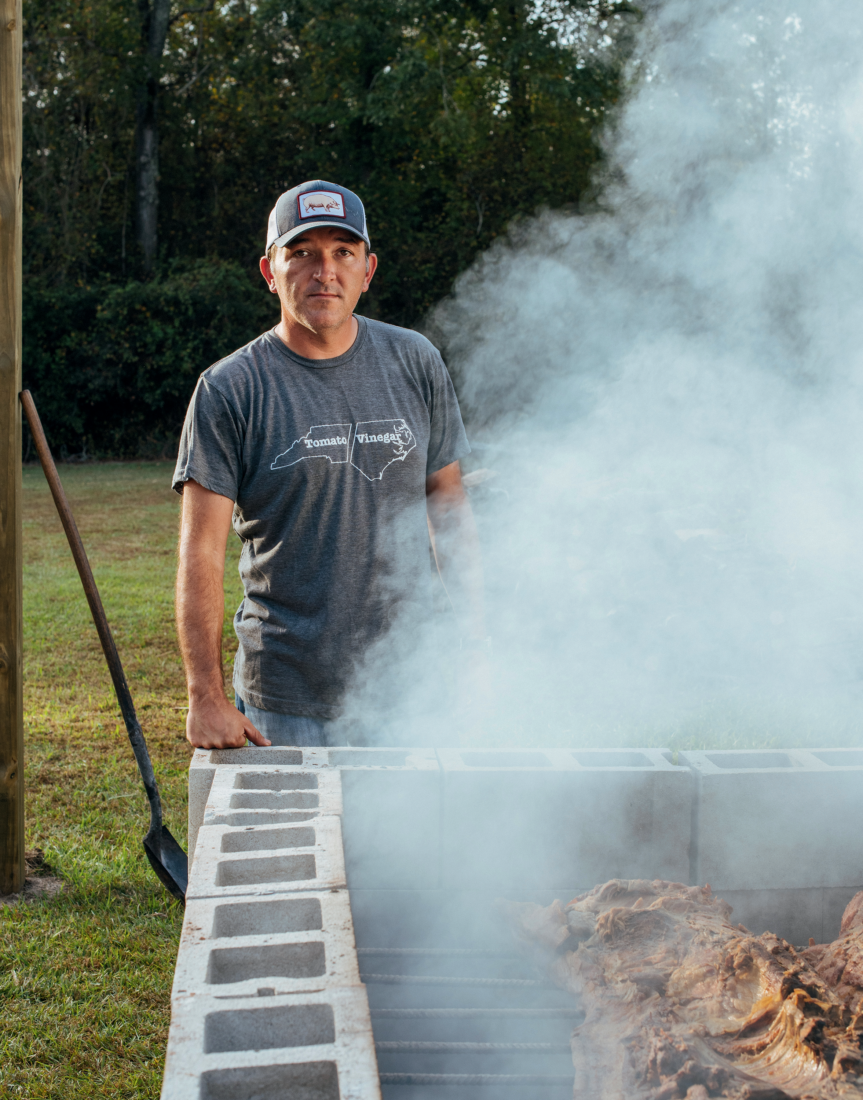
Sam Jones at the concrete-block barbecue pit he built in the backyard of his Ayden, North Carolina, home.

Sam Jones, the scion of the Skylight Inn family, still runs his family’s small barbecue joint in rural Ayden,  North Carolina, population 5,000, but also built a much larger, modern restaurant down the road in Greenville, a university city with 92,000 people. Jones is a pragmatist: He knows the romance of the old-style barbecue world draws customers, but he knows the economic model has to change, too. As he told me in a recent Garden & Gun interview:

“The media has created this persona of a pit master, standing in a smoky haze with the sun at his back in the door of the cookhouse, with smut on his face and dirty pants. And if I’m that guy, I’m not running my business.”

Keith Allen, Wilber Shirley, and Bill Ellis would probably see his point.

The post Endangered Species: North Carolina Barbecue appeared first on Garden & Gun.

26 Apr 16:03

The Southerner’s Guide to Record Store Day

by Dacey Orr

“Nothing can replicate the intimacy of putting on your favorite album.” When it comes to the power of playing records, David Swider, owner of Oxford, Mississippi’s End of All Music, is here to spread the gospel. “Vinyl is the most engaging way to enjoy the music you love. You get the beautiful artwork, the liner notes, the physicality of it. It makes you slow down, and in 2019, there’s really nothing else like that.”

Though streaming services dominate much of today’s music consumption, Swider isn’t the only one embracing nostalgia. Every spring since 2008, vinyl fanatics across the globe have gathered to celebrate Record Store Day, this year on Saturday, April 13. The idea was conceived at a 2007 gathering of shop owners and industry pros in Baltimore, Maryland, and has now spread to nearly 1,200 independent stores in the U.S., plus countless more abroad. At the crack of dawn, music lovers queue up outside neighborhood shops to snag limited-edition records released exclusively for the occasion. A number of locations book live, in-store performances, too—this year, Nashville’s Grimey’s will host Music City acts Anderson East and Alanna Royale, as well as Charleston-based SUSTO; at Greenville, South Carolina’s Horizon Records, former Band of Horses guitarist Tyler Ramsey will take the stage.

photo: Courtesy of Grimey's

Nashville-based country-rock outfit the Wild Feathers perform at Grimey’s on Record Store Day 2017.

The list of titles released on Record Store Day, totaling at more than four hundred this year, has grown significantly since the event’s inception. The selection ranges from reissued classics to brand-new material, extended cuts of beloved albums to unearthed forgotten recordings. Participating shops place orders for these titles, but the records are pressed in limited quantities, making each copy a rare find. “We stock as many RSD exclusives as we can get our hands on, but they’re available on a first-come first-serve basis,” notes Andy Vaughn of Huntsville, Alabama’s Vertical House Records.

photo: Courtesy of Horizon Records

Shoppers browse records at Horizon Records in Greenville, South Carolina.

In 2019, local record shops still play a key role in the Southern music scene. “It’s a matter of community,” says Gene Berger of Horizon. “They give like-minded travelers and collectors a common watering hole.” The stores are essential hubs for artists, too: “Most shops serve as a connection point for local and regional bands,” echoes John Miller, a co-owner of Memphis’ Shangri-La Records. “And in many ways, a record store is a tourism office as well, helping visitors connect with the culture of the city.”

Record Store Day attests that people still crave the physical process of buying music, from chatting with shop owners to hearing the first scratch of the needle. As Vaughn puts it, “People still like to spend their money on actual, tangible media. Every year we see more and more folks starting a collection.”

photo: Courtesy of End of All Music

Vinyl collectors line up outside of End of All Music in Oxford, Mississippi, on Record Store Day 2017.

Ahead of Saturday’s festivities, we’ve rounded up special RSD releases from fifteen Southern artists, spanning genres and generations. This weekend, visit a local shop to hunt down a copy of your own. “When the next big thing in music comes around, you’ll be glad you held onto your records,” Swider vows. “We promise.”


Al Green, The Hi Records Singles

Mississippi’s Fat Possum Records has complied a box set of Green’s 70s-era singles, including “Let’s Stay Together” and “I’m Still In Love With You.” The RSD package also includes a hard-cover book filled with photos and essays by music critics Bob Mehr, Geoffrey Himes, and others on the heart of Memphis soul.


Allman Brothers Band, Bear’s Sonic Journals: Fillmore East. February 1970

This concert recording pulls from three nights of Allman Brothers shows in February 1970, just one year before the legendary live album At Fillmore East was recorded in the same venue. Among these early tracks is the first known concert recording of “In Memory of Elizabeth Reed.”


Anderson East, Alive in Tennessee

Nashville up-and-comer Anderson East releases a live recording of his September 2018 Ryman gig, featuring tracks from his albums Delilah and Encore.


Aretha Franklin, The Atlantic Singles 1967

Fans of the Queen of Soul, rejoice; RSD delivers a limited-release box set containing a collection of seven-inch singles, among them the iconic “Chain of Fools” and “Respect.”


B-52s, Mesopotamia

This special reissue of the Athens-based band’s 1982 EP is newly available on light blue, twelve-inch vinyl, featuring classic grooves “Loveland,” “Deep Sleep,” and “Mesopotamia.”


Emmylou Harris, The Studio Albums 1980-83

Snag five essential Harris albums—Roses in the Snow, Evangeline, Cimarron, Last Date, and White Shoes—on black vinyl, as well as a bonus single of “That Lovin’ You Feelin’ Again,” featuring Roy Orbison.


Elvis Presley, Live at the International Hotel: Las Vegas, NV, August 23, 1969

Following his unforgettable ’68 Comeback Special, the King burst back onto the scene with a show at Vegas’ International Hotel. Live at the International Hotel is the only-ever released audio from the concert, bookended by “Blue Suede Shoes” and “Can’t Help Falling In Love.”


Julien Baker, Red Door/Conversation Piece

Memphis-born singer-songwriter Julien Baker treats fans to two previously-unavailable tracks—a live recording of “Red Door,” and “Conversation Piece,” an unreleased song from 2017’s Turn Out The Lights.


James Brown, Sho Is Funky Down Here

This psychedelic, instrumental album is regarded as something of an oddity in the Godfather of Soul’s repertoire. The RSD release is the 1971 record’s first reissue, including a booklet with extensive annotation, liner notes by Brown historian Alan Leeds, and never-before-seen photos.


John Hiatt and Lilly Hiatt, You Must Go!/ All Kinds of People

A pair of Nashville musicians—also father and daughter—try their hand at one another’s work. Southern rocker Lilly Hiatt covers a track from her dad’s 1995 album, Walk On, and John lends his voice to a song off Lilly’s 2017 release, Trinity Lane.


John Paul White, The Hurting Kind (Deluxe)

Formerly of the Civil Wars, the Alabama-based singer-songwriter is back with his latest solo project, co-produced by the Alabama Shakes’ Ben Tanner. This deluxe record promises exclusive bonus tracks available only on the RSD edition.


Louis Armstrong, Disney Songs the Satchmo Way

Originally released in 1968, Disney Songs was one of Armstrong’s last studio recordings. Of the album, the trumpeter-singer said, “I haven’t enjoyed anything better than our recording session since—well, I can’t remember when.” Re-released for RSD, the record includes sing-alongs from “When You Wish Upon a Star” to “The Bare Necessities.”


Marc Maron/Various Artists, In The Garage: Live Music from WTF with Marc Maron

Podcast host Marc Maron has chatted with countless musicians in his garage, many of whom have laid down a track or two during their interviews. In the Garage is the first and only compilation of those recordings, featuring solo acoustic performances by Jason Isbell, Margo Price, and others.


6 String Drag, The Jag Sessions (Rare & Unreleased 1996-1998)

Raleigh-based 6 String Drag offers up a rare collection of live tracks and demos, many of which later appeared on the Americana act’s hit ’97 album, High Hat. 


Steve Earle, El Coyote/Don’t Let the Sunshine Fool You

Following his Guy Clark tribute album released earlier this spring, modern-day Texas outlaw Steve Earle offers a few additional, solo-recorded Clark tracks that didn’t make the record.

The post The Southerner’s Guide to Record Store Day appeared first on Garden & Gun.

26 Apr 15:57

Painting the Town

by Dacey Orr

Ten years ago, most residents would have confessed that there wasn’t a whole lot to do in little Lake City, South Carolina. But ever since the businesswoman Darla Moore, who hails from the area, instituted ArtFields in 2013, the once-struggling tobacco town has transformed into a mecca for artists and art lovers the South over.

photo: Courtesy of Artfields

”The Good of the Hive,” painted by Matthew Willey in 2018, includes over 300 honeybees and is part of a larger initiative in which Willey is painting 50,000 honeybees in murals across the world.

The nine-day celebration imports four hundred works of art, which get displayed in the library, barbershops, galleries, and banks for the tens of thousands of visitors to peruse, while they also enjoy street entertainment and workshops. This year, April 26–May 4, ArtFields is giving away more than $145,000 to the winning artists—the top two will be chosen by a jury of professionals and two more by spectators, and more than a dozen runners-up will receive prize money as well. “Winning makes a significant impact on these artists’ lives,” says Kevin Lassen, who has volunteered with ArtFields since its inception and joined the team full-time in 2016.

photo: Courtesy of Artfields

Street entertainment in front of longtime Lake City boutique All in the Fam.

One could say the same for the community, which retains the top four pieces from the festival for Lake City’s permanent collection. “I grew up in Sumter, which is about forty-five minutes away,” Lassen says. “Lake City was just a place you drove through to get to the beach. Now there are new businesses all over the place. The transition is astounding.”

MORE: HEAR ABOUT LAKE CITY’S RENAISSANCE ON THE G&G PODCAST

The post Painting the Town appeared first on Garden & Gun.

26 Apr 15:57

In Search of a Southern Cole Slaw Tradition

by Dacey Orr

Like barbecue, mayonnaise brands, and martinis, Southerners can get particular about their coleslaw. There’s the creamy kind, of course, found on potluck tables across the South. In West Virginia, the slaw might get a splash of buttermilk. In parts of North Carolina, ketchup finds its way into the mix. And tucked into pockets where Tennessee, Georgia, and Alabama meet, you’ll find one unique style of slaw that goes by two different names: Hot slaw and pool room slaw.

These slaw cousins are bright yellow, courtesy of plain yellow mustard from a squeeze bottle, not mustard seeds or turmeric or anything remotely fancy. And they’re often quite spicy, thanks to a generous dose of chile pepper heat. Thus the “hot” name. With finely grated fresh cabbage—one whirl of the food processor away from total pulverization—and a golden color, both resemble chow-chow, the pickled-cabbage staple of many Southern Appalachian kitchens. The consistency nestles comfortably onto hot dogs, burgers, or barbecue sandwiches—the kinds of foods that would be served in a pool hall.

I grew up in the one-stoplight town of McCaysville, Georgia, right on the Tennessee state line. My grandfather—J.J.—was the pool shark at a pub back when transient workers came through the area for copper mining. The bar owner would call him in to win money for the house. I never saw him in action, but I imagined him celebrating his wins with a slaw dog and a draft. So you might think I’d be on the pool room slaw side of the naming line. But no. At our house, slaw was slaw.

Just forty miles away from McCaysville, though, at the other end of the Ocoee River, in Cleveland, Tennessee, Fuzz’s Hot Slaw reigns supreme. Its lineage goes back to a 1950s drive-in theatre called Star Vue, where hot slaw accompanied concession-stand hot dogs.  William Lloyd Callaway (AKA “Fuzz”) liked to garden and cook, so he tinkered with his grandmother’s slaw recipe, which was based on Star Vue’s, until he developed his own, giving it away to family and friends in Mason jars for easy transportation. When he passed, Fuzz’s daughter Laney Callaway and a family friend Priscilla Morris decided to carry on Fuzz’s tradition in a more official way. They’ve just inked a distribution deal for the slaw with Food Lion.

photo: Courtesy of Betty Jo's

Betty Joe’s Hot Slaw, based in Huntsville, Alabama.

Moving west from Cleveland to Nashville, there’s another hot slaw brand created by a child in homage of a parent: Betty Jo’s Gourmet Slaw. This slaw’s namesake had seven daughters in Florence, Alabama, where hot slaw is famed at Bunyan’s Bar-B-Q, which opened in 1972. As Betty Jo’s family grew, it became harder to afford restaurant outings. She developed her own recipe to accompany roasted weenies on wire coat hangers at home.

“Mom took it to another level,” says Betty Jo’s daughter Torey Boman. After Betty Jo passed, her friends approached the daughters: “We’re gonna be out of slaw soon, so y’all better get in there and figure it out,” Boman recalls. The sisters would come home from school to find “cabbage everywhere,” says Bridgette Johnson, so it didn’t take them long to figure out the recipe. With the help of more family members, Boman and Johnson moved the operation to a commercial kitchen and launched an official bottling operation in 2011; the slaw is available in hot or mild flavors in specialty shops and grocery stores around the region. It’s especially popular in Nashville, where I live now. At Lockeland Table in East Nashville, chef Hal Holden-Bache buys Betty Jo’s slaw by the case and uses it to top a grilled pork loin and collard greens dish.

photo: Mayter Scott

Pork loin and collards, topped with Betty Joe’s Hot Slaw, at Nashville’s Lockeland Table.

These days, Boman runs the business and a Betty Jo’s food truck out of Huntsville, Alabama, close to another mustardy slaw mecca just across the Alabama line: Fayetteville, Tennessee. That’s the spot where hot slaw seems to morph into pool room slaw.

Honey’s Restaurant has been making pool room slaw since 1923. While the family carried the last pool table off the premises in 2006, the slaw—and its name—endured. It’s made in big batches and sold at the local grocery, too. Next door at Bill’s Cafe, a different variation of mustardy-sweet slaw is spooned on burgers as well where guests can still play pool and smoke.

After tasting them both, I headed into a bookstore nearby to try and put this slaw quest to rest. But the woman behind the counter said her family prefers yet another version at a place called Ken’s Famous Slawburger. And with that news, she sent me on down the road. When it comes to food traditions, the path to discovery never ends.

The post In Search of a Southern Cole Slaw Tradition appeared first on Garden & Gun.

26 Apr 15:56

Oven-Fried Fish Sliders

by Florida Sportsman Editor

Smaller buns, bigger flavor make for better bites of fish sandwich.

Sliders are a good choice to make when you have a few odd-sized filets to feed a number of folks. Served here with Veggie Stix on the side.

Fishing gets better when springtime brings warmth to Florida’s coastal waters. Better fishing means better catches, and cleaning tables often showcase a diverse mix of species, including spotted seatrout, sheepshead, redfish and small snappers. But a mixed bag of fish sometimes means that anglers come home with a bunch of different fillets of varying sizes, shapes and textures. Most have firm, white flesh and take to lots of recipes, but sometimes there’s just not enough to make a solo meal just of one species. Fish sandwiches are a good solution. And small, three-to-four-bite-sized “sliders” are the perfect vehicle for some chunks of tasty, tender, but mixed-species fish. This oven-fried version is lighter fare that should have your guests asking for an extra helping.

Oven-Fried Fish Sliders

Serves 2, adjust accordingly

Ingredients

  • 2 small firm fish fillets, each cut into 3 even pieces
  • 1 cup all-purpose flour, divided
  • 1 tsp. ground black pepper
  • 1 tsp. salt
  • 3 tbsp. cornstarch
  • 1 large egg white
  • ½ cup cold beer
  • 1 cup Panko bread crumbs
  • Cooking oil spray
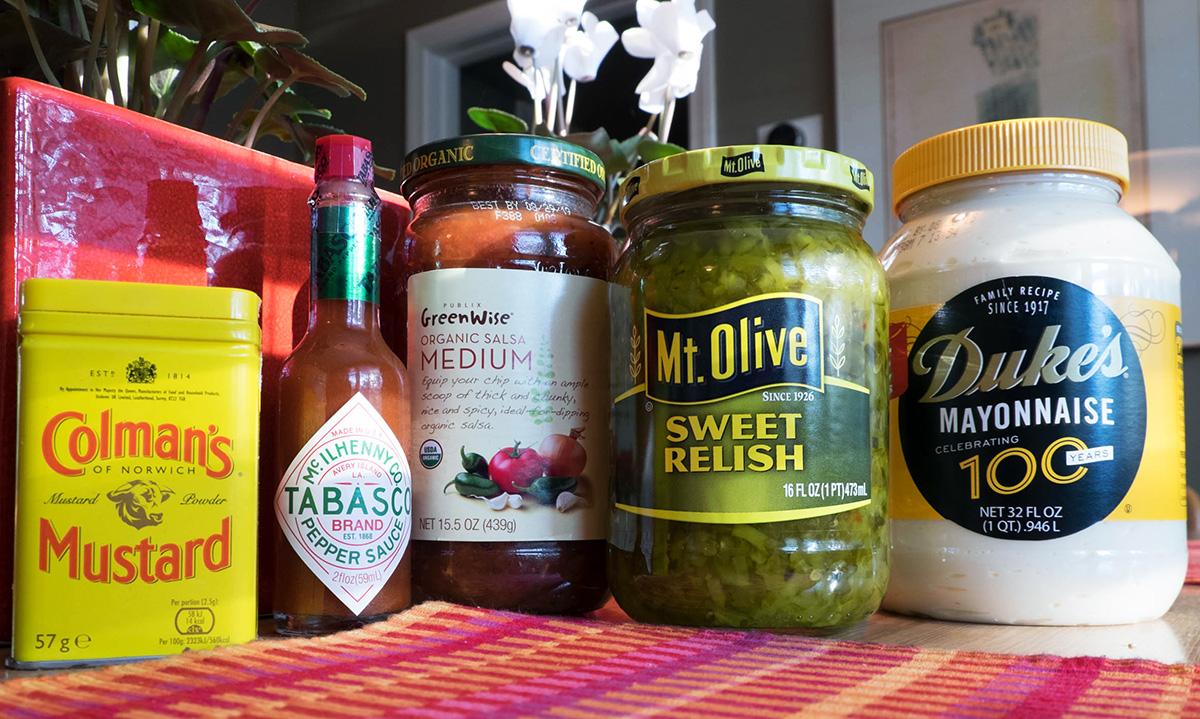
  • 1 cup mayonnaise
  • 2 tbsp. salsa
  • 2 tsp. sweet pickle relish
  • 1 tsp. dry mustard Tabasco sauce (to taste)
  • 6 slider rolls (Martin’s Party-Size Potato Rolls are a good choice)

Directions

Preheat oven to 400 degrees. Spread the bread crumbs on a cookie sheet and toast in the oven until browned. Remove and let cool. Then, combine half the flour, pepper, salt, and cornstarch in a bowl, add the egg white, the beer and whisk together thoroughly. Dredge the fish into the second half of the flour, and then dip the fish pieces into the batter and coat with the bread crumbs. Assemble on an oiled rack, spray with a light spritz of oil and bake for about 10 minutes, turning over at 5 minutes. Be sure to spray the other side when you flip the fish. Assemble sliders and top with a sauce of mayonnaise, salsa, pickle relish, mustard and Tabasco. Lettuce and tomatoes are optional, but recommended. FS

First Published Florida Sportsman Magazine March 2018

The post Oven-Fried Fish Sliders appeared first on Florida Sportsman.

26 Apr 15:53

Loosen Plier Joints with Valve Grinding Compound

by mark

I don’t know how good pliers are made (rivet joints and box joints) so that they don’t seize up immediately. One extra whack of the big factory hammer seems to me like it’d wreck most efforts to make a good pair of pliers, or almost anything with a similar joint. They usually seem to get it close enough though, so good on ‘em.

Too many pliers at the stores are packaged so you can’t really get a good feel for the condition of a tool’s joint before you walk away (with it or without). I’ve got a few pliers with silky joints, and they’re an absolute pleasure to use. I’ve had (past tense!) some with sorta sticky joints that were more than a little irritating to use. I’ve had a few that were pretty well stuck, and so got zero use.
Breaking them in just didn’t seem to be worth the effort.

Bought another German pair around Christmas, mail order, good sale price. Too sticky to use. Dang. So I checked the solution machine at YouTube and got this:

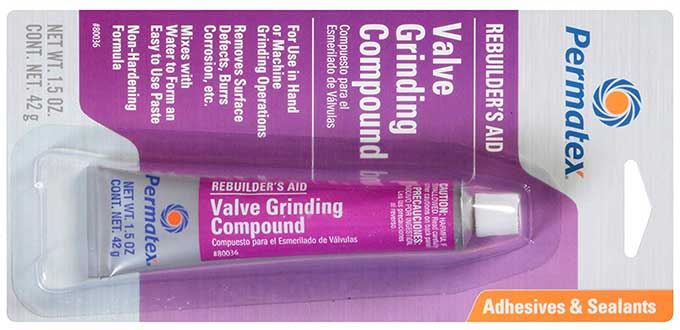
Some Permatex compound ($5), some WD40, not a whole lot of work, and Bang! All my previously irritating pliers are silky! I’ve even picked up some truly rusty old abused pliers at Flea Markets and now they’re silky too. Last weekend I found a pair of Kraeuter pliers (a model last made in 1921) and, after some restoration work, they may be better than new. The process is cheap, only a little bit messy and easy to clean up. Rescue those pliers! Oh, and that new German pair (from NWS) is now terrific!

-- Wayne Ruffner

Permatex 80036 Valve Grinding Compound ($5)

Available from Amazon

26 Apr 15:50

Radio Controlled Clock (“Atomic Clock”)

by mark

We keep a wall clock in our main morning shower/prep area. The one we’ve been using for years was starting to get a bit unreliable. Time to upgrade? Oh, yeah. La Crosse makes a clock with a radio in it ($29) to sync to WWV, the USA’s broadcast time sync signal from a high-grade atomic clock source in the NIST system.

It was surprising to find the LaCrosse clock to be essentially the same price as “normal” clocks. (BTW, these are “radio controlled clocks”, not atomic clocks per se, but you get it.) We picked up a 10″ model. Once it did its thing and got synched, it’s to-the-second accurate. Piece of cake! It was a cool process to see, too. Not your normal tech. (It was weird at the start of DST: The overall system uses UTC, so that kicked in at 2a on the GMT timezone — several hours in advance of when it kicked in locally. Didn’t expect that, but NBD.)

So, for those who’ve known about and perhaps discounted these things as expensive or complicated, they’re not. (There are some reviews where a few people didn’t get them to work, perhaps they were defective or in a bad place. If that happens to you, move it or try a replacement. It’s overall a good system.)

-- Wayne Ruffner

La Crosse Technology Atomic Analog Wall Clock 10″ Silver ($29)

Available from Amazon

26 Apr 15:50

Outback Ripper Flashlight

by mark

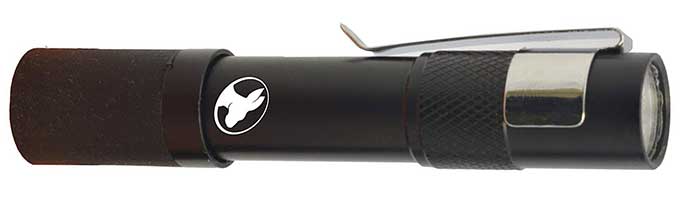
I’ve owned the Outback Ripper Flashlight ($10) for a couple of years and it is an amazingly good flashlight, especially for its size.

First of all, it does not have all the annoying “modes” that many of the LED flashlights seem to have adopted. Just two choices, on or off. Nothing confusing about that.

Second, it has a clip that at first glance you think is on upside down. However, it’s perfectly placed if you want to use it on your hat as a headlamp. And, of course, it still works just fine to keep it in your pocket as well.

The next awesome feature is the rubber bite ring at the back. This makes it easy and comfortable to hold the flashlight in your mouth when working on close up projects. And the size of the light means your mouth doesn’t get tired nearly as fast.

I also have a hack for those who wear glasses. I take an elastic hair tie and wrap it around the body of the flashlight three or four times. I can then push my glasses temple (the part that goes over your ear) through the hair tie so the light stays on the side of my glasses. Makes a great head mount when you don’t have a hat to which to clip the light.

The Outback Ripper comes in several colors like black, blue, red, and gun metal. $10 on Amazon Sometimes you can find them at farm supply stores (Cal Ranch, etc.) for $5 each.

-- James Brown

Outback Ripper Flashlight Hands Free Bite Grip or Hat/Pocket Clip ($10)

Available from Amazon

26 Apr 15:48

How to Pack for a Backpacking Trip

Packing for a day hike is easy, but packing for a three-week backpacking trip can be daunting. Here's a simple way to do it.

26 Apr 15:46

How to Drink Scotch, According to a World-Famous Whiskey Expert

Notable tasters have at least minimal rules and guidelines for drinking whiskey. But those of Jim Murray, author of Whiskey Bible, are especially rigorous.

26 Apr 15:14

The Father of the Dune Buggy Opens Up About His Legacy and VW’s Electric Homage

Bruce Meyers, creator of the Meyers Manx, arguably started modern recreational off-roading with the dune buggy. What does he think of VW's new electric homage, the VW ID Buggy? We found out.

26 Apr 15:13

Yes, You Still Need a Compass. This One Is Great, and Affordable

Your phone might have a handy Maps app, but a compass is still an essential backup for outdoor adventuring.

23 Apr 15:48

The 5 Best Free Tools to Make Infographics Online

by Khamosh Pathak
slides

An infographic is a visual way of presenting information. Whether you’re explaining a complex concept or conveying data, using an Infographic is more engaging than using plain old text.

The infographic formula has been perfected over the years. You do your research, collect your data or points, and lay it out in logical sections. You then use data visualizations to convey the important information along with some supportive text.

But how do you go from researching and drawing to a finished infographic if you have no design skills to speak of? Thankfully, there are a host of free tools available online, and this article lists the best free tools for making infographics.

1. Canva

Canva Infographic Maker

Canva is the preferred design tool for non-designers. You’ll find an easy to use interface, an extensive collection of free assets like photos and icons, and easy export options. And most of the features in Canva are available to use for free.

It’s a similar story with the Canva Infographic Maker. Similar to the presentation maker, you start with a template. You can then change any text, delete any image, or move any icon to suit your needs. You can even add your own images like logos and assets.

Canva itself has more than two million assets you can pick from (most of the images are either free or cost $1 for a single use license).

The simplicity of the app is also its limitation. If you find a template that’s a perfect fit (and the chances are that you will), it will be smooth sailing. Edit the text, move things around and call it a day. If you don’t, creating an infographic from scratch is a long and painstaking process. But if that proves to be the case, you should look at the alternative options below.

2. Visme

Visme Infographic Tool

If a simple template doesn’t meet your needs, try using Visme. It’s a versatile infographic creation tool built on a block system. After logging in, you can browse through the collection of templates and see if anything strikes your fancy.

But the best way to approach Visme is to create your own infographic from scratch using blocks. The chances of finding the perfect infographic template are much lower than finding an infographic block.

After you’ve created a blank template, head over to the Suggested Content section to browse through blocks for headers, stats, figures, graphics, diagrams, and more. When you see something that appeals to you, just click on it to add it to the block. Then you can resize and edit it.

You can also import elements created from other apps and websites. For example, you can use one of the best free online flowchart makers to create a flowchart and then import it into Visme.

If you don’t want to create an entire infographic from scratch, that’s OK too. Every template in Visme is built on the same blocks framework. So it is easy to delete and edit parts of the infographic by changing the blocks. This is a much easier thing to do than editing a full template in something like Canva.

For example, in Canva, you can only change the background of the entire infographic. But in Visme, every block (or section) of the infographic can have its own individual background, be it a photo or a solid color.

Visme’s free plan gives you access to five projects, but there are limited templates and you can only download your infographic as a JPG file. To download it as a PDF and to get access to premium templates, you’ll have to sign up for the standard plan at $14/month.

3. Piktochart

Piktochart infographic maker

In terms of performance, Piktochart stands somewhere between Canva and Visme. Its editor is more versatile and has a lot more features. While it does have a block system, it doesn’t have a block-based template gallery. They are only useful as section dividers and for making it easy to change backgrounds of particular sections.

However, Piktochart shines when it comes to design and aesthetics. You can make cool infographics with Piktochart templates. Both its templates and the interface are more polished than Visme. Piktochart templates will give your infographics a professional touch as if they were designed by a professional designer.

But as Piktochart doesn’t have a block-based gallery, you’re left to your own devices. If you import a template and don’t like a couple of sections, or if they don’t meet your needs, you’ll have to create everything from scratch on your own.

But there are a couple of tools that almost make up for this shortcoming in Piktochart. After you’ve created the empty block, you can use the Photo Frame tool to add a photo inside a circular or stylized frame. The extensive Chart tool will help add a visualization in a dozen different styles directly in the infographic.

The free Piktochart plan lets you download the infographic in PNG (you can also download blocks individually). The $25/month Pro plan lets you download the infographic as a PDF, without a watermark, and gives you access to more than 800 templates.

4. Venngage

Venngage template infographic maker

Venngage is a bit of a step up from Canva. While it doesn’t boast the blocks system like Visme, it has myriad tools for adding text, assets, photos, graphics, and charts.

You can choose a template to edit, or start with a blank canvas. To make editing easier for a big infographic, you can group elements and lock them as well. Using the grouping feature, you can duplicate the functionality of a block. This will help you visually differentiate different parts of the infographic.

To create new parts for your infographic, use one of the sections from the left sidebar to get started. You can add icons, charts, maps, photos, and more.

5. Infogram

Infogram interactive charts infographic maker

Infogram is an incredibly powerful visualization tool. But the free plan has limited export options. It only lets you embed the infographic on your blog, along with the Infogram watermark. You can’t download the infographic as an image or a PDF.

If you’re okay with this limitation, sign up for an Infogram account and start making an infographic by creating a blank canvas or choosing a template. Use the left sidebar to navigate through all the available templates for charts, text, and graphics. With a single click, you can import a chart. Then use the right toolbar to add data, edit the styling, and finalize the placement.

Infogram’s templates are quite basic. Infogram is best used as a data visualization tool. If you run a blog, creating visuals such as animated or interactive charts, and then embedding them in your article text can be a good way to engage your audience.

Of course, you can use other tools to make charts—here’s how to make a chart in Excel, for example—but Infogram gives you the ability to create visually striking interactive charts simply by entering the required data.

Infogram’s $19/month plan lets you create private projects, download images, and access more than 100 premium templates.

Canva Does a Lot More Than Just Infographics

If you want to create a simple text- and graphic-based infographic, Canva is the best option. If your infographic is going to be heavy on the charts and custom sections, use Visme. And if you want to focus more on aesthetics, Picktogram’s gorgeous templates should prove useful.

Infographics are not the only thing you can create in Canva! Canva has free templates for dozens of different graphic design formats. Check out some of the things you can create with Canva with zero effort.

Read the full article: The 5 Best Free Tools to Make Infographics Online

23 Apr 15:46

5 Sites and Apps to Find Movies & TV Shows to Watch on Netflix

by Mihir Patkar
find-movies-netflix

The question most of us have in our free time isn’t whether or not to stream something, it’s, “What should I watch on Netflix?” Here are a few quick ways to get an answer.

Netflix is constantly tweaking its interface to tell you to watch certain shows and movies, but sometimes, it seems like Netflix pushes its own productions too strongly while ignoring more worthy options. Third-party recommendation engines, like those in this list, can be better at finding something more suited to your palate.

1. What The Hell Should I Watch On Netflix (Web): One Pick At a Time

What the hell should I watch on Netflix recommends movies and TV shows quickly

If you don’t want to spend time tweaking a bunch of filters to find exactly what you’d like, this is the simple option. What The Hell Should I Watch On Netflix (WTHSIWON) focuses on speed and simplicity, giving you one pick at a time.

First, choose whether you want movies, TV shows, or anything at random. In the second step, choose the genre. You’ll immediately get a recommendation, complete with a trailer and a recommendation.

If it’s not what you’re looking for, WTHSIWON offers a few other options at the end of the recommendation, each with an alternative to something you might have found off-putting about the main choice.

WTHSIWON is quick and clutter free. The curated lists of movies are generally rated well on movie databases.

2. FlixWatch (Web): “Best of Netflix” Lists, By Region

Flixwatch recommends "best of" lissts for different genres on Netflix

Maybe you don’t want one recommendation but prefer to go through a list of them and choose your favorite? FlixWatch has those readymade lists for different categories, all sorted by the country you’re in.

Each country’s sub-section has lists for the 50 best movies or TV shows across genres like crime, action, comedy, family, drama, documentaries, and so on. The list has the movie’s or show’s title, a brief description, and the cast and crew details.

You can click “More Info” to find out things like the IMDb and Metacritic rankings, but I think it’s better to skip directly to the “Watch On Netflix” link which has better details, including trailers.

3. Compare Movies (Web): Compare Movies and TV Shows

Compare multiple movies and TV shows side by side

Your friends have recommended a few things. You need to decide what to watch next. Put them all in Compare Movies to see their major details next to each other, to make it easier to choose.

Whether it’s a movie or a TV show, Compare Movies helps in figuring out the next thing to stream. Each movie or show appears as a long vertical column, and you can add as many other columns next to it as you like. The entire comparison can be shared as a link with anyone.

Details include things like what awards the movie has won, how many seasons a show has, the major cast and crew, and its IMDb and TMDb ratings. Quick links for videos and images will take you to YouTube playlists of trailers or best moments.

4. Shufflix (Web): Random Episodes of Favorite TV Shows

Shufflix plays a random episode from your favorite TV show on Netflix

In the pre-streaming days, there was a certain charm to switching on your TV to find a rerun of an episode from one of your favorite TV shows. You weren’t picking what to watch, it was random; but you knew it was enjoyable. Shufflix adds that serendipity to Netflix.

The website first asks you to choose the country you watch Netflix in, and then shows a catalog of the many TV series available in your region. It’s a mix of different genres, and all are generally popular shows.

Pick one, and Shufflix chooses a random episode from it, along with the basic information of what happens in that episode. You can choose to watch the episode, or ask Shufflix to recommend another.

Shufflix works on both computers and mobile browsers. Tap the “watch now” button on mobile and it’ll directly open the episode in your Netflix app.

5. Netflix-Codes (Web): Easily Browse Secret Netflix Categories

Netflix Codes is the easiest way to browse netflix's secret categories

Netflix’s worst-kept secret is that it has a large number of hidden categories to classify and tag movies and shows, which are never shown to the user. These secret codes help find new content, but it has always been a pain to input and browse them. Until Netflix Codes came along.

This site is the most eye-pleasing and organized way to check all the secret categories in Netflix. You get larger categories (for example: action and adventure, thriller, documentaries, comedies, etc.) as well as sub-categories in each (for example: martial arts movies, LGBT dramas, deep sea horror movies, military documentaries, etc.). The link is available right next to it, which you can click and browse in Netflix.

You’ll be surprised by just how many classifications Netflix has, which is unavailable for a regular user to browse through the app or web interface. Netflix Codes is a game-changer to find things you’ll like.

Recalibrate Your Netflix Recommendations

All of these alternatives wouldn’t be needed if Netflix’s recommendations worked well. Nonetheless, Netflix has a strong algorithm that figures out your tastes in movies and TV shows, based on what you watch and your ratings. But over time, this can go out of whack.

When you have some free time, it would be worth your while to recalibrate your Netflix recommendations, so that they are more helpful. Till you find that time, you can stick to the above apps and sites to quickly find something worth watching.

Read the full article: 5 Sites and Apps to Find Movies & TV Shows to Watch on Netflix

23 Apr 15:38

How To Fight And Win The Negativity Spiral

by Paloma Cantero-Gomez, Contributor
Negative spirals are those patterns that make us slip from feeling positive and capable of getting results into a negative fog that make us feel all our actions are pointless and doomed to failure. Mini versions of them are played out every day. Find the four steps to play them around!
23 Apr 13:48

These 3 Computing Technologies Will Beat Moore's Law

by Stephen McBride, Contributor
“Moore’s law” observes that computing power doubles roughly every two years. This has led to exponential growth in computing power. However, within the next few years, Moore’s law will break down. When this happens, three exciting computing technologies will pick up.
23 Apr 11:05

Chalking Tires and the Fourth Amendment

by Orin Kerr

In a new case, Taylor v. City of Saginaw, the Sixth Circuit has ruled that the common practice of parking enforcement officers "chalking" a tire to see if the car has been moved violates the Fourth Amendment.  I'm not sure the decision is correct.  But it's plausible on current law, and it raises some really interesting conceptual issues.

Here's an overview of the new case and some thoughts on whether it's right.

First, the facts.  Alison Taylor gets a lot of parking tickets, and she decided to make a federal case out of it.  Specifically, she sued the city of Saginaw in federal court.  She alleged that her constitutional rights were violated by practice of "chalking" her tire to figure out if she had overstayed the time she was permitted to park her car.

I don't know of any other cases in which "chalking" was alleged to violate the Fourth Amendment.  But the Sixth Circuit ruled that it did, in a decision authored by Judge Donald joined by Judge Kethledge and Judge Keith.  And the court's reasoning seems broadly applicable to all of our cars, not just Alison Taylor's.

Here's the court's thinking.  First, the court reasons that the chalking is a search of the car because it is a trespass on to the car to obtain information under United States v. Jones.  It's a trespass under Jones, the court says, because it satisfies the common law trespass test:

In accordance with Jones, the threshold question is whether chalking constitutes common-law trespass upon a constitutionally protected area. Though Jones does not provide clear boundaries for the meaning of common-law trespass, the Restatement offers some assistance. As defined by the Restatement, common-law trespass is "an act which brings [about] intended physical contact with a chattel in the possession of another." Restatement (Second) of Torts § 217 cmt. e (1965). Moreover, "[a]n actor may . . . commit a trespass by so acting upon a chattel as intentionally to cause it to come in contact with some other object." Id. Adopting this definition, there has been a trespass in this case because the City made intentional physical contact with Taylor's vehicle. As the district court properly found, this physical intrusion, regardless of how slight, constitutes common-law trespass. This is so, even though "no damage [is done] at all." Jones, 565 U.S. at 405 (quoting Entick v. Carrington, 95 Eng. Rep. 807, 817 (C.P. 1765)).

Next, it is an act conducted to obtain information, as Jones requires:

[O]nce we determine the government has trespassed upon a constitutionally protected area, we must then determine whether the trespass was "conjoined with . . . an attempt to find something or to obtain information." Id. at 408 n.5. Here, it was. Neither party disputes that the City uses the chalk marks for the purpose of identifying vehicles that have been parked in the same location for a certain period of time. That information is then used by the City to issue citations. As the district court aptly noted, "[d]espite the low-tech nature of the investigative technique . . . , the chalk marks clearly provided information to Hoskins." This practice amounts to an attempt to obtain information under Jones.

Having concluded that the chalking was a search, the court then concludes that it was unreasonable and therefore unconstitutional.   The basic idea here is that no exceptions to the warrant requirement apply, so by default the warrantless search is unlawful.  First, the automobile exception does not apply:

The automobile exception permits officers to search a vehicle without a warrant if they have "probable cause to believe that the vehicle contains evidence of a crime." United States v. Smith, 510 F.3d 641, 647 (6th Cir. 2007) (citation omitted). No such probable cause existed here. Thus, the automobile exception is inapplicable.

Next, the search was not reasonable under the community caretaker exception:

The City fails to carry its burden of establishing that the community caretaker exception applies in this instance. First, on these facts, the City fails to demonstrate how this search bears a relation to public safety. The City does not show that the location or length of time that Taylor's vehicle was parked created the type of "hazard" or traffic impediment amounting to a public safety concern. Nor does the City demonstrate that delaying a search would result in "injury or ongoing harm to the community." Washington, 573 F.3d at 289. To the contrary, at the time of the search, Taylor's vehicle was lawfully parked in a proper parking location, imposing no safety risk whatsoever. Because the purpose of chalking is to raise revenue, and not to mitigate public hazard, the City was not acting in its "role as [a] community caretake[.]" Id. at 287.

And finally, the search was not justifiable based on a general interest in having an orderly parking system:

While the City is entitled to maintain efficient, orderly parking, the manner in which it chooses to do so is  not without constitutional limitation. As the Supreme Court explains, "the [Fourth] Amendment does not place an unduly oppressive weight on [the government] but merely . . . an orderly procedure. . . ." Jeffers, 342 U.S. at 51 (citation omitted).

The City does not demonstrate, in law or logic, that the need to deter drivers from exceeding the time permitted for parking—before they have even done so—is sufficient to justify a warrantless search under the community caretaker rationale. This is not to say that this exception can never apply to the warrantless search of a lawfully parked vehicle. Nor does our holding suggest that no other exceptions to the warrant requirement might apply in this case. However, on these facts and on the arguments the City proffers, the City fails to meet its burden in establishing an exception to the warrant requirement.

Here are a few thoughts on the case:

(1) From a practical perspective, this is a really important decision.  It concludes that a routine practice that wasn't thought to be illegal (if it was thought of at all) is actually unconstitutional. I'm not sure if the decision is correct.  And as I'll explain below, there are several plausible but debatable moves in the opinion.  But this decision is now binding in the Sixth Circuit and may also be followed elsewhere:  Traffic enforcement officers around the country should be paying attention to this.

(2)  Is the decision right?  As I said above, I'm not sure.  United States v. Jones introduced the idea of the trespass or physical intrusion test for searches in 2012.  As I've written before, Jones could mean a lot of different things. It's just not yet clear what the standard is or how it should apply.  Given that, I think the result in Taylor is plausible but that it's also subject to several plausible objections.

(3) Start with the question of trespass.  First, the court takes from Jones the idea that the test is "common law trespass."  Maybe that's the test.  But maybe it's not.  The Court in Florida v. Jardines notably did not describe the Jones test as a trespass test. Instead, Jardines described the test as "physical intrusion."  That's potentially pretty different.  And assuming the test is common law trespass, figuring out what kind of trespass test that meant is actually pretty tricky.  Maybe it's the Restatement test, but maybe it's something different.

(4) I'm also not sure of the court's  conclusion that the chalking was "to obtain information," needed to satisfy the search test from Jones.  That's certainly a possible result.  But it also strikes me as a somewhat awkward fit.

Here's the context.  In Jones, the officer installed the GPS device on a suspect's car and then obtained GPS info from it as the car was tracked for 28 days.  The majority ruled this a search in part on the ground that installing the GPS was done to obtain information—specifically, the stream of data from the GPS that would provide the location of the car to which it was attached.  Here's the most relevant discussion of the intent test from Footnote 5 of Jones:

Trespass alone does not qualify, but there must be conjoined with that what was present here: an attempt to find something or to obtain information.

Related to this, and similarly irrelevant, is the concurrence's point that, if analyzed separately, neither the installation of the device nor its use would constitute a Fourth Amendment search.  Of course not. A trespass on "houses" or "effects," or a Katz invasion of privacy, is not alone a search unless it is done to obtain information; and the obtaining of information is not alone a search unless it is achieved by such a trespass or invasion of privacy.

The Sixth Circuit in Taylor sees that element satisfied by the chalking.  And it is no doubt true that the officer chalked the car with the ultimate goal of finding out a fact—whether the car had moved.  That may be right under Jones.

On the other hand, it seems like a somewhat unusual application of the intent test.  I would think the Fourth Amendment idea of a "search" of a person's "effects" ordinarily implies intent to obtain information from the effect searched.  Normally, searching a box means getting information from inside the box.  Searching a home means getting information from inside the home.

In Taylor, however, the officer's plan is to place his chalk on the car and then come back later and see if the chalk moved—thus giving the officer a clue about whether the car moved.  That's information about the car, but it seems removed from a search of the car itself.  After all, the car is just out in public.  It is sitting on a public street for anyone to see.  And the officer is just looking at the chalk the officer placed.  Is it really a search of the car at Time A to see at Time B if the chalk moved between Time A and Time B?

Maybe yes.  Maybe the problem is that Jones itself was an awkward fit.  The obtaining of information in Jones was also just ultimately about the car and where it had been in public, as well. And the Supreme Court apparently found that sufficient.  But it's at least a question worth raising: Are there limits on what kind of information the government needs to want to obtain, and from what, and when, to satisfy the Jones test?

(5)  Assuming the chalking is a search, the next question is whether it is constitutionally reasonable.  I agree with the Court's analysis of the automobile exception and the community care-taking exception.  But I suspect some courts might disagree with the Sixth Circuit's reasonableness analysis on the ground that chalking is a de minimis search as part of a regulatory scheme.  It's just putting a temporary mark on a tire, it causes no damage, and it doesn't reveal anything.  Some courts have articulated doctrines that allow low-level searches as reasonable based on a balancing of interests without particularized suspicion.   I can imagine that as a possible path for other courts.  We'll see.

(6) I have to wonder how much this issue matters in a world of smart phones.  Everyone is now carrying around a camera.  Instead of chalking the tire, the parking folks can just take a picture of the car.  They can figure out if the car moved by comparing the pictures at Time A and Time B to see if the car is in the same place.  It may be more complicated or expensive than chalking, but it avoids the Fourth Amendment concern by just observing what is in public without any physical attachment to property.

(7) Finally, it's not at all clear what if any remedies may be applicable.  Chalking is common and hasn't been thought to be illegal.  Given that, qualified immunity should attach and civil suits against the officers won't work.  And it's not clear that there is any exclusionary rule available in an enforcement action to pay the parking ticket, as that is a civil proceeding and the exclusionary rule may not apply under United States v. Janis.

[UPDATE #1: Some readers suggest in that I should offer a more complete survey of remedies that are available in (7) above. In that case, I should note that civil suits should be available against municipalities that have a chalking policy, and injunctive relief may be available. For an overview of Fourth Amendment remedies, see this paper at pages 239-45.]

[UPDATE #2: Thinking about the case some more, let me add a new point (8).  There's a way to read the Sixth Circuit's decision a lot more narrowly than I have above, and many others have elsewhere.  Here's how. The ruling in Taylor was based on a motion to dismiss under Fed. R. Civ. Pro. 12(b)(6).  This means that when Taylor sued, the defendants (the city and officer) responded that the case should be tossed out at the outset because the complaint itself didn't establish a plausible case.  The court in Taylor is just ruling on that, and it isn't actually offering a full ruling yet on the constitutionality of the search.  Ordinarily, the government has the burden of showing that a warrantless search was reasonable.  But the government hasn't had the opportunity to make that showing yet, as we're just going on the complaint.

This means, if I'm understanding the civil procedure aspects of this case correctly—I'm a crim pro prof, not a civ pro prof—the rulings that the court offers on reasonableness are particularly tentative.  Now that the case goes back down to the district court on remand, the civil defendants can make different arguments about why the searches were reasonable and can offer new evidence to support their reasonableness arguments (both old and new, if applicable).  The Sixth Circuit's opinion notes this very briefly near the end:

Nor does our holding suggest that no other exceptions to the warrant requirement might apply in this case. However, on these facts and on the arguments the City proffers, the City fails to meet its burden in establishing an exception to the warrant requirement.

I had missed this in part because the court offers a pretty thorough discussion of several fact-specific exceptions to the warrant requirement.  It's a little bit unusual to see that given the procedural posture.  But I think the procedural posture of the case may end up being important, as it means that the court could issue a new ruling reaching a different result when the case is more fully litigated.]

23 Apr 10:55

KeepTruckin Reaches $1.4B Valuation After $149M Fundraise In Latest Sign Of Cash Pouring Into Trucking Industry

KeepTruckin raised $149 million led by Greenoaks Capital to expand its technology for truckers in the latest sign of cash pouring into the trucking industry. The San Francisco-based company, which was on Forbes' Next Billion-Dollar Startups list last fall, has ...
23 Apr 10:52

The Complete BMW Buying Guide: Every Model, Explained

BMW produces the “ultimate driving machine" and uses a Germanic alphanumeric naming system. Here's what you need to know before shopping.

19 Apr 16:05

Putz-n-Glo Indoor Black Light Miniature Golf, Rapid City, SD

Feature: Rock 'n' Roll-themed indoor black light 18-hole miniature golf course. ...
19 Apr 16:05

Atlanta Cyclorama, Atlanta, GA

Feature: Sound 'n' light multimedia recreation of The Battle of Atlanta. ...
19 Apr 16:03

Ram Island

Just off the coast of Maine, Ram Island is a rugged retreat in the middle of Wheeler Bay. The former sheep pasture consists of four buildings organized around a central...

Visit Uncrate for the full post.