KWBaker
Shared posts
Goats take over deserted British town during stay-at-home directive
♥ / Make It Remote: A Survival Guide for the Future of Work
A big thank you to Make it Remote for sponsoring my blog and RSS feed this week.
So you’re stuck working from home, and aren’t sure how to stay productive… You’re in luck: This is the toolkit for you. Make It Remote is written based on over a decade of experience managing remote teams. Download today!
Inside, you’ll find resources for both business leaders and team members, including:
– A comprehensive road map for implementing a remote working approach in your business.
– A step-by-step guide to creating your own remote work policy.
– Suggested tools and resources for working remotely.
– Tips and tricks for time management, remote meeting facilitation, and more!
Even better? For every download we get between now and April 5th, we’ll donate a meal to someone in need (up to 10,000 meals in total!). ALSO (!) if you do choose to donate when you download, we’ll share 50% of the proceeds with food banks and organizations focused on water, sanitation, and hygiene.
Finally, we also have a special edition for teachers and students! If that is you, check out the toolkit here.
The dark side of dog food
|
Sponsored by
|
 |
Butylated Hydroxyanisole. Sodium Tripolyphosphate. Propylene Glycol.
These aren’t just fancy words used to thin out the competition at a high school spelling bee. They’re also common ingredients in store-bought dog food.
Yup, that big sack of kibble with the smiling corgi on the front is actually not as good for your faithful companion as you think.
Along with other unsavory additions like rendered fat, animal digest, and “meat meal” (“meat meal”???), dry dog food contains all sorts of nasty ingredients — like the ones above, which can also be found in detergent, insecticide, chemical preservative, and even antifreeze.
And you want to feed that to Fido? We think not.
So, where exactly did these sad, stomach-churning mixes come from? How did they make it onto the shelves of your friendly neighborhood pet store? And — most importantly — what should you be feeding your pets?
Lend us your leashes and we’ll walk you through how we ended up here.
“WANT THE REST OF MY MARROW?”
The original dog diet consisted of little more than table scraps. We’re talkin’ meat, bones, and whatever else could be scavenged between meals.
This approach to feeding our four-legged friends remained status quo until the first commercially-prepared pet food was formulated. In 1860, English businessman James Spratt created the original “dog biscuits” using a blend of wheat meal, veggies, beetroot and beef blood. Mmmm… beef blood.
Dog biscuits became quite popular (enough so for his recipe to get acquired by another company and brought to the U.S. in the 1890s), but the real dietary shift came with the introduction of Ken-L-Ration canned dog food in the 1920s.
MADE WITH 100% REAL HORSE MEAT!
Developed using a mixture of dehydrated horse meat and grain, Ken-L-Ration’s new alternative was a notable shift in our approach to pet food — and soon, this more affordable canned food soon made up 90% of the market.
As the country entered lean times around World War II, rationing of meat and metal meant dry dog food became the de facto standard for our faithful sidekicks. Soon after the war ended, the trend of convenience and affordability exploded thanks to a new process known as “extrusion.”
Extrusion made manufacturing dog food at scale much easier… but that simplicity only papered over a much uglier truth about this new air-puffed kibble: it was nasty.
HIGH HEAT, LOW STANDARDS
At its core, the kibble-making process is two things: 1) Complicated. 2) Gross.
Here’s how it works:
First, all sorts of different (loosely regulated) ingredients come together through “rendering” — the process of combining all the parts that go into kibble prior to it being extruded.
The catch? Pet food standards are much lower than human food, meaning the scraps we can’t use can be used in kibble. This includes:
- Hair, bones, and beaks
- Digestive systems and udders
- Expired packs of meat (with wrapping still on)
- Remains of diseased animals or even euthanized pets (!!!)
Have we lost you yet? Yeugh.
Rendering this mishmash creates an ingredient known as “meal.” Meal then undergoes extrusion, which involves being cooked under extremely high temperatures — up to 392 degrees Fahrenheit. — until much of the nutritional value of the “food” (if you can even call it that) is stripped out.
Once it’s heated enough, the meal puffs up into those familiar brown squares known as kibble… except now, additional nutrients and minerals have to be injected back in to cover for what was lost during extrusion.
Easy to make? Check.
Cheap to buy? Check.
Good for your golden retriever? Er, not exactly… but thanks to some well-placed lobbying and a heavy advertising push, dog owners in the latter half of the 20th century were wholly convinced that the only logical food to feed Fido was this factory-made kibble.
And that, my fine friends, has continued alllll the way to today.
THE DOG DAYS ARE OVER
The explanation for why we still buy our dogs bags of this highly-processed food is simple — it’s what we’ve been led to believe is appropriate, even healthy, for our pets.
(Hey, we said it was simple, not logical.)
Lucky for our canine companions, in recent years we’ve begun to see the value in balanced diets featuring fresh, high-quality ingredients.
One leader in the better food movement? The Farmer’s Dog.
By putting quality, freshness, and customization first (and ditching the kind of chemicals that even a high schooler in advanced literature can’t spell) they’re showing dog owners the impact a proper diet can have on your pet’s life… and the negative effects of the old approach, like:
- This black-and-white beauty who gained weight, suffered higher pet insurance premiums, and vomited on the carpet almost daily
- The precious pug who lost all his hair and had to be hand-fed
- The diarrhea-stricken dalmatian who racked up thousands of dollars in vet bills
When each of these poor pups made the switch to real food, their problems subsided.
It’s this belief — that better food makes for better health — that has helped companies like The Farmer’s Dog make waves in the pet food industry.
By focusing on custom meal plans and fresh ingredients that cater to the specific needs of each dog, they’re helping happy hounds live healthier lives and solve the multitude of problems that highly-processed dog food usually exacerbates.
It’s a big step forward for the industry and, more importantly, a wake-up call to owners everywhere.
ONE SIZE DOES *NOT* FIT ALL
Gone are the days of canned horse meat and chemical mash-ups created to imitate real food. With companies like The Farmer’s Dog leading the way, we now know just what a difference your dog’s diet can make — which is exactly why it’s so important to make sure it’s fresh, wholesome, and perfect for them.
A subscription to their food delivery service that’s tailored to your pup’s particular needs starts at around $3 a day. But knowing you’re feeding your dog fresh food (and not Butylated Hydroxyanisole)? Now that’s priceless.
The post The dark side of dog food appeared first on The Hustle.
Free: Austin City Limits Opens Up Video Archives During COVID-19 Pandemic

Austin City Limits--an PBS music program recorded live in Austin, Texas--has decided to open its archives "as a gift to music fans during the current live music moratorium." They write: "Starting March 23, the perennial television series will make fan-favorite episodes from the recently broadcast Season 45 available for streaming, in addition to the entire slate of programs from the previous two seasons of the acclaimed concert showcase. Over 35 ACL installments will be available to stream free online at https://www.pbs.org/show/austin-city-limits/ offering a wide variety of music’s finest from every genre. here’s something for everyone: an electrifying hour with guitar hero Gary Clark Jr.; an epic stage journey with 2020’s Grammy-winning global pop phenom Billie Eilish; supergroup The Raconteurs, featuring Jack White and Brendan Benson, in an all-out hour of pure rock and roll."
Get more information here, and stream episodes here.
Above you can watch Robert Plant on Austin City Limits during a show recorded in 2016.
Would you like to support the mission of Open Culture? Please consider making a donation to our site. It's hard to rely 100% on ads, and your contributions will help us continue providing the best free cultural and educational materials to learners everywhere.
Also consider following Open Culture on Facebook and Twitter and sharing intelligent media with your friends. Or sign up for our daily email and get a daily dose of Open Culture in your inbox.
Related Content:
The Met Opera Streaming Free Operas Online to Get You Through COVID-19
Free: Austin City Limits Opens Up Video Archives During COVID-19 Pandemic is a post from: Open Culture. Follow us on Facebook, Twitter, and Google Plus, or get our Daily Email. And don't miss our big collections of Free Online Courses, Free Online Movies, Free eBooks, Free Audio Books, Free Foreign Language Lessons, and MOOCs.
Stream All 18 Hours of Ken Burns’ Baseball for Free on What Would Have Been Opening Day

Baseball season won't start today, on what would have been Open Day. So here's your next best bet. As Sam Barsanti writes at AV Club, "PBS and the world’s preeminent director of extremely watchable and extremely long documentaries have a special treat: The entirety of Ken Burns’ Baseball—over 18 hours—is now available to stream for free on the PBS website and all of its related apps."
It's no coincidence that Burns' documentary becomes free during COVID-19. On Twitter, Burns adds: "With events canceled & so much closed, I asked @PBS to stream BASEBALL for free so we can participate in the national pastime together. Watch at the link below or on any streaming device. And please look out for those with greater needs. Play ball."
Stream the videos here.
Would you like to support the mission of Open Culture? Please consider making a donation to our site. It's hard to rely 100% on ads, and your contributions will help us continue providing the best free cultural and educational materials to learners everywhere.
Also consider following Open Culture on Facebook and Twitter and sharing intelligent media with your friends. Or sign up for our daily email and get a daily dose of Open Culture in your inbox.
Related Content:
Free: Austin City Limits Opens Up Video Archives During COVID-19 Pandemic
The Met Opera Streaming Free Operas Online to Get You Through COVID-19
Stream All 18 Hours of Ken Burns’ Baseball for Free on What Would Have Been Opening Day is a post from: Open Culture. Follow us on Facebook, Twitter, and Google Plus, or get our Daily Email. And don't miss our big collections of Free Online Courses, Free Online Movies, Free eBooks, Free Audio Books, Free Foreign Language Lessons, and MOOCs.
Watch 3,000+ Films Free Online from the National Film Board of Canada

What, exactly, is Canada? The question sometimes occurs to Americans, living as they do right next door. But it might surprise those Americans to learn that Canadians themselves ask the very same question, living as they do in a country that could be defined by any number of its elements — its vastness, its multiculturalism, The Kids in the Hall — but never seems defined by any one of them in particular. Many individuals and groups throughout Canadian history have participated in the project of explaining Canada, and indeed defining it. Few have done as much as the National Film Board of Canada and the filmmakers it has supported, thanks to whom "three thousand films, from documentaries to narrative features to experimental shorts, are available to stream free of charge, even for Americans."
Those words come from The Outline's Chris R. Morgan, who writes that, "for the 'Canuckophile' (not my coinage but a term I happily own), the NFB’s Screening Room is one of the supreme pleasures of the internet. Since 1939, the NFB has facilitated the telling of Canada’s story in its people’s own words and images."
Morgan points up to such NFB-supported productions as 1965's Ladies and Gentlemen … Mr. Leonard Cohen, which "follows the titular 30-year-old poet giving witty readings, partying, and living around Montreal," and the 2014 Shameless Propaganda, described at the Screening Room as an examination of "Canada's national art form." That art form developed in the years after the NFB's founding in 1939, a time when its founding commissioner John Grierson called documentaries a "hammer to shape society."

Not that most of what you'll find to watch in the NFB's screening room comes down like a hammer — nor does it feel especially propagandistic, as we've come to understand that term in the 21st century. Take, for instance, the documentary portraits of Canadian writers like Margaret Atwood and Jack Kerouac.
The latter lead a life described by filmmaker Herménégilde Chiasson as "a Franco-American odyssey," which will remind even the most Canada-unaware Americans of one thing that clearly sets Canada apart: its bilingualism. That, too, provides material for a few NFB productions, including 1965's Instant French, a short about "the adventures of a group of businessmen who are forced into taking French lessons to stay competitive in their field."
"At first put out by this news," continues the description at the Screening Room, "one by one they begin to realize that gaining fluency in another language has its benefits." Hokey though it may sound — "definitely a product of its time," as the NFB now says — a film like Instant French offers a glimpse into not just Canada's past but the vision for society that has shaped Canada's present and will continue to shape its future. You can browse the NFB's large and growing online archive by subject (with categories including literature and language, music, and history) as well as through playlists like "Expo 67: 50 Years Later," "Extraordinary Ordinary People," — and, of course, "Hockey Movies," which reminds us that, elusive though Canadian culture as a whole may sometimes feel, certain important parts of it aren't that hard to grasp.
Find more free films in our collection, 1,150 Free Movies Online: Great Classics, Indies, Noir, Westerns, etc..
Note: An earlier version of this post appeared on our site in June 2019.
Related Content:
Watch More Than 400 Classic Korean Films Free Online Thanks to the Korean Film Archive
Based in Seoul, Colin Marshall writes and broadcasts on cities, language, and culture. His projects include the book The Stateless City: a Walk through 21st-Century Los Angeles and the video series The City in Cinema. Follow him on Twitter at @colinmarshall, on Facebook, or on Instagram.
Watch 3,000+ Films Free Online from the National Film Board of Canada is a post from: Open Culture. Follow us on Facebook, Twitter, and Google Plus, or get our Daily Email. And don't miss our big collections of Free Online Courses, Free Online Movies, Free eBooks, Free Audio Books, Free Foreign Language Lessons, and MOOCs.
Explore the Entire World–from the Comfort of Quarantine–with 4K Walking Tours

Many of us right now are sheltering in place, or in quarantine, dreaming of that day when we can once again travel the world. And that day will come, friends, that day will come.
But until then, there are already several YouTube channels set up to provide you with a chance to go on walking tours around the world, with only the sounds of the environment in your headphones.
I was alerted to this by good friend Phil Gyford, who found this via Sarah Pavis (via FaveJet), and provided several links to this large selection of virtual traveler. Your mileage my vary, as they say, but here’s some trips I found particularly relaxing in these anxious times.
Above, I started here with this walk through Pimmit View Park in Falls Church, Virginia. Despite an umbrella dipping into view, I found this a relaxing walking in the rain through a verdant wonderland, with occasional pauses to admire the flowing streams. Lovely.
From here I was feeling a bit peckish, so I bopped over to the Phatra Market in Bangkok to have a look at the various foods on offer. LazyTourist, the person who filmed this, never strays too long at any stall, but knows enough to linger.

A YouTuber called 4K Urban Life produces the occasional walking tour of European cities, and here they show us Tuscany, starting in a very non-descript sidestreet until venturing out into the heart of old Italy. This one is nearly four hours long, so bring a bottle of wine but skip the sunscreen. Enjoy the lack of social distancing, and pray for Italy.

Night has fallen and it’s time to venture out into the West End of London in this evocative video from Watched Walker. It’s rainy and wet, but no matter, the streets of London look lovely and this hour-plus takes us through “Covent Garden, Leicester Square, Piccadilly Circus, Oxford Circus, Oxford Street, Carnaby Street and Soho.”

Now let’s drop in on one of New York City’s most popular tourist destinations, Times Square. Wind Walk Travel Videos has a lot of these short (30 mins or less) visits to American locations, and this is one of their most popular. Try not to think about how empty these spaces are now, and enjoy the ambience, sketchy Elmo and all.

Here’s Rambalac walking Shinjuku at night, checking out the side streets and testing out his binaural mic. This is a treat with headphones on, so make this full screen and order in some ramen.
A final thought: recently I’ve been focusing on 4K “remastering” (by way of AI) of turn of the (20th) century films, a look back to a different age. In these above videos, we can see the tradition continues, a fascination in watching life go on as we sit and look into our devices. Think on both those long since deceased folk in the 1900s and a record of our once-normal lives (only a month ago, as of this writing), and keep them both in your hearts.

Related Content:
A 5-Hour, One-Take Cinematic Tour of Russia’s Hermitage Museum, Shot Entirely on an iPhone
Ted Mills is a freelance writer on the arts who currently hosts the Notes from the Shed podcast and is the producer of KCRW's Curious Coast. You can also follow him on Twitter at @tedmills, and/or watch his films here.
Explore the Entire World–from the Comfort of Quarantine–with 4K Walking Tours is a post from: Open Culture. Follow us on Facebook, Twitter, and Google Plus, or get our Daily Email. And don't miss our big collections of Free Online Courses, Free Online Movies, Free eBooks, Free Audio Books, Free Foreign Language Lessons, and MOOCs.
This Typing App Saves Me Countless Seconds Each Day, and They Really Add Up
A text expander is a vital tool every professional typist should be using.

Cooking And Coping: Making Slow-Cooked Jerk Pork Ribs With Erin Billups In New York City

Every Homeowner Should Avoid These 5 Costly Mortgage Refinancing Mistakes
How to Buy a Laptop for Your Kid—or Revive an Old One

With millions of kids home from school and parents juggling childcare and working from home, many families are finding they don’t have enough computers to go around. Due to sudden demand and supply-chain issues, new laptops, including many of our picks, are in short supply. So what should you do if you need a laptop for your kid right now?
Styrofoam balls reacting to various sound frequencies
1067 points, 56 comments.
Secret Doomsday Ranch In Colorado Sees Spike In Interest...
THE GREAT WAIT...
Gov. issues stay-at-home order for South Florida...
Virginia Shut Until June...
Prolonged Lockdowns Ahead...
APRIL CANCELED...
How dire projections, grim images dashed Trump Easter plan...
500 homeless sleep in Vegas parking lot after vagrant tests positive...
SHOCK VIDEO: Cars wait in long line at Pennsylvania food bank...
Tampa megachurch pastor arrested after leading packed services...
New Yorkers who break distancing rules face fines...
Record number of 911 calls...
UPDATE: Field hospital set up in Central Park...
Queens Stadium to Be Converted Into Temporary Unit...
Dead bodies loaded into trucks...
Hamptons Houses Now Luxury Bunkers...
Doctors Warn Virus Persists 8 Days After Symptoms...
Giving Birth In Time Of Pandemic 'Absolutely Terrifying'...
Elderly woman dies after smacked for not social distancing...
Domestic Abuse Calls Skyrocket...
IRS orders office evacuation, affecting most agency employees...
Trash Industry Braces for Deluge of Infectious Waste...
WHOLE FOODS employees planning nationwide 'sick-out'...
Dolly Parton Says Pandemic Message From God: Holding Us Up To Light...
SICK MAP...
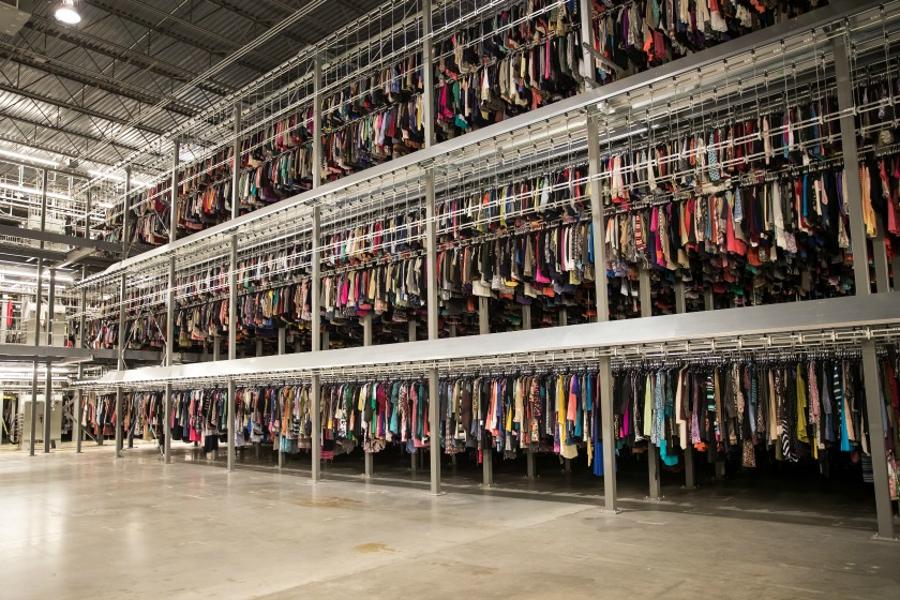
Used Clothing Resale A Rising Opportunity For Retailers Large And Small
How To Hedge Your Portfolio As Rally In Stocks Is Flashing Warnings

9 Solid Reasons to Subscribe to DVD Netflix
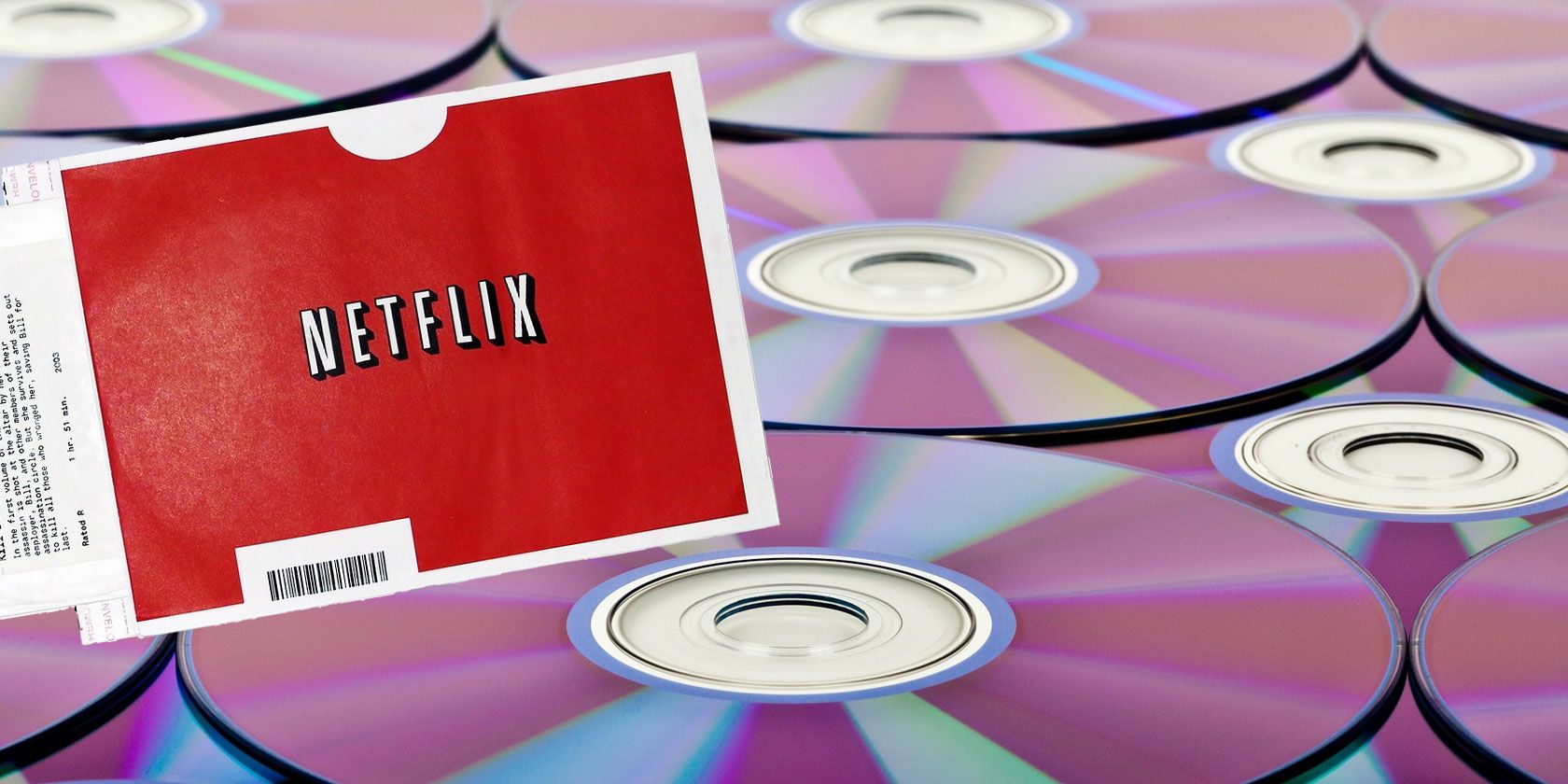
Netflix was founded in 1997, continues to make money, and dominate the streaming space. However, while Netflix’s streaming service gets all of the attention, Netflix’s DVDs-by-mail service continues to provide tons of benefits.
Millions of users still subscribe to DVD Netflix. While much smaller than its streaming service, Netflix rentals have their own advantages. From a massive library to the convenience of receiving movies in the mail, here are some reasons to subscribe to DVD Netflix.
1. The DVD Netflix Library Is Massive
The biggest reason to subscribe to DVD Netflix is its superb selection of films. While Netflix’s streaming service offers a large (but dwindling) collection of movies and shows, there’s much more available on a physical disc. Many new releases hit dvd.netflix.com well before making their way to the streaming service.
Where DVD Netflix truly shines is with its catalog of older flicks and independent films. 2018 indie sci-fi gem The Endless is only available to rent on physical media, as is comedy Half Magic. If you want to watch classics such as Planet of the Apes, Saving Private Ryan, and 20,000 Leagues Under the Sea, you’ll need a DVD Netflix subscription.
You won’t find many obscure titles such as Koyaanisqatsi, 1978’s The Legacy, and the tragically underappreciated biopic Basquiat on streaming services. Even many recent releases such as Murder on the Orient Express, Annihilation, and Hereditary aren’t available to stream on Netflix. Ultimately, if you want the largest selection of films available to rent, the DVD Netflix catalog boasts the most variety.
2. There’s No Need to Rely on the Internet
If you subscribe to DVD Netflix, no internet, no problem. Although most of us can rely on having an active and fast internet connection all of the time, there are many situations where it’s not available.
Maybe there’s a service outage, you’re traveling, visiting a friend, or staying with your not-so-great aunts who don’t even have a computer or Wi-Fi. Whatever the reason, its lack of reliance on a stable internet connection makes DVD Netflix a fantastic option.
3. Get DVDs Delivered Straight to Your Door
Getting a DVD from Netflix is as simple as adding it to your queue and waiting for it to show up in your mailbox. Unlike Redbox, you don’t have to venture out in public. As such, Netflix’s DVD service offers unparalleled convenience, only bested by streaming services.
Similarly, returning a Netflix DVD requires merely resealing the disc in its included return envelope and putting it back in your mailbox.
4. Blu-rays Are Available for HD Rentals
Even with upscaled DVDs, they’re not going to look as crisp as a full 1080p or 4K Blu-ray. Thankfully, DVD Netflix offers a high definition Blu-ray subscription. You’ll have access to picture quality six times that of a DVD.
Are you a sound buff? Remember that Blu-ray offers an upgrade there as well. You can sit back and enjoy Dolby Digital DTS-HD Master Audio or Dolby Digital 7.1 from your home system.
5. DVD Netflix Is Very Cost-Effective
When looking at Netflix’s DVD plans, there are are two options. The standard Netflix DVD service costs $7.99/month. This plan lets you have one disc out at a time, unlimited discs per month, no late fees, and free shipping and returns.
The premier plan priced at $11.99/month lets you have two discs out at a time. You’ll also receive all of the other DVD Netflix benefits.
The price goes up to $9.99/month and $14.99/month if you want to include Blu-ray discs in the mix.
Even with the highest-priced plan, you’re paying basically the price of one Blu-ray purchase or a trip to the cinema for limitless rentals. And if you change your mind, you can stop paying at any time in the same way you can cancel your Netflix subscription.
6. Use an App to Manage Your DVD Queue

Just because DVD Netflix uses physical discs doesn’t mean it’s behind the times. Its diversification is just one part of how Netflix makes money.
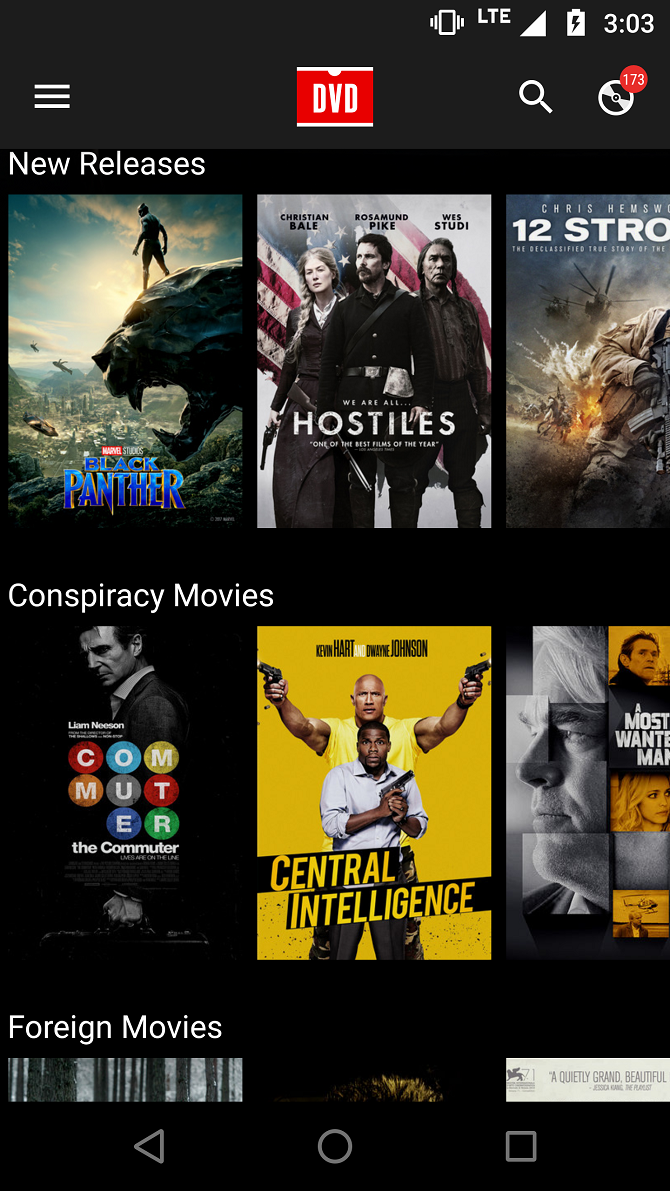
Like its streaming counterpart, there’s a mobile app for managing your queue. The DVD Netflix app for Android and iOS allows you to manage your DVD queue on the go. It’s a useful feature that simplifies staying up to date with the current DVD Netflix library.
Download: DVD Netflix for Android | iOS (Free)
7. Gain Access to DVD Extras
If you’re a film buff, you probably enjoy geeking out over DVD extras such as deleted scenes, commentary tracks, and storyboards. Streaming-only services often lack such amenities.
For those that only care about the feature film itself, streaming movies on Netflix is fine, but for making-of featurettes, behind-the-scenes videos, and more, you’ll need a physical disc.
8. There’s Virtually No Competition
Streaming services abound, from comprehensive platforms like Netflix and Hulu to niche sites such as Shudder. However, this diversity is absent in the DVDs-by-mail space. There aren’t really many DVD Netflix alternatives.
As virtually the only DVDs-by-mail provider, DVD Netflix stands apart from the competition. With a bevy of streaming sites, including many free movie streaming sites, DVD Netflix is in a unique position as the exclusive provider of a service focused on physical media.
9. Feel Connected with Movies
While you don’t have to be subscribed, these benefits will make you want to watch more movies. The DVD Netflix Blog offers a veritable treasure trove of information, from what’s coming soon to its roster of discs, to round-ups of the best kids’ books-turned-movies, and genre analysis.
Via its social media channels like Instagram and Twitter, DVD Netflix regularly gives away swag. There’s also DVD Chat hosted on Twitter, where film fiends can talk about cinema. Overall, DVD Netflix truly fosters a sense of community.
Physical Media Is Still a Thing!
Streaming may reign supreme as the most popular content delivery system, but physical media still has many benefits. Accordingly, DVD Netflix is totally worth the price of a monthly subscription. And if you don’t have a media player, check out this list of the best region-free players for DVD and Blu-ray.
Whether you exclusively stream your movies these days or still maintain a DVD Netflix subscription, you can learn more about the company in our ultimate guide to Netflix.
Read the full article: 9 Solid Reasons to Subscribe to DVD Netflix
Nextdoor’s Help Map Helps You Help Neighbors
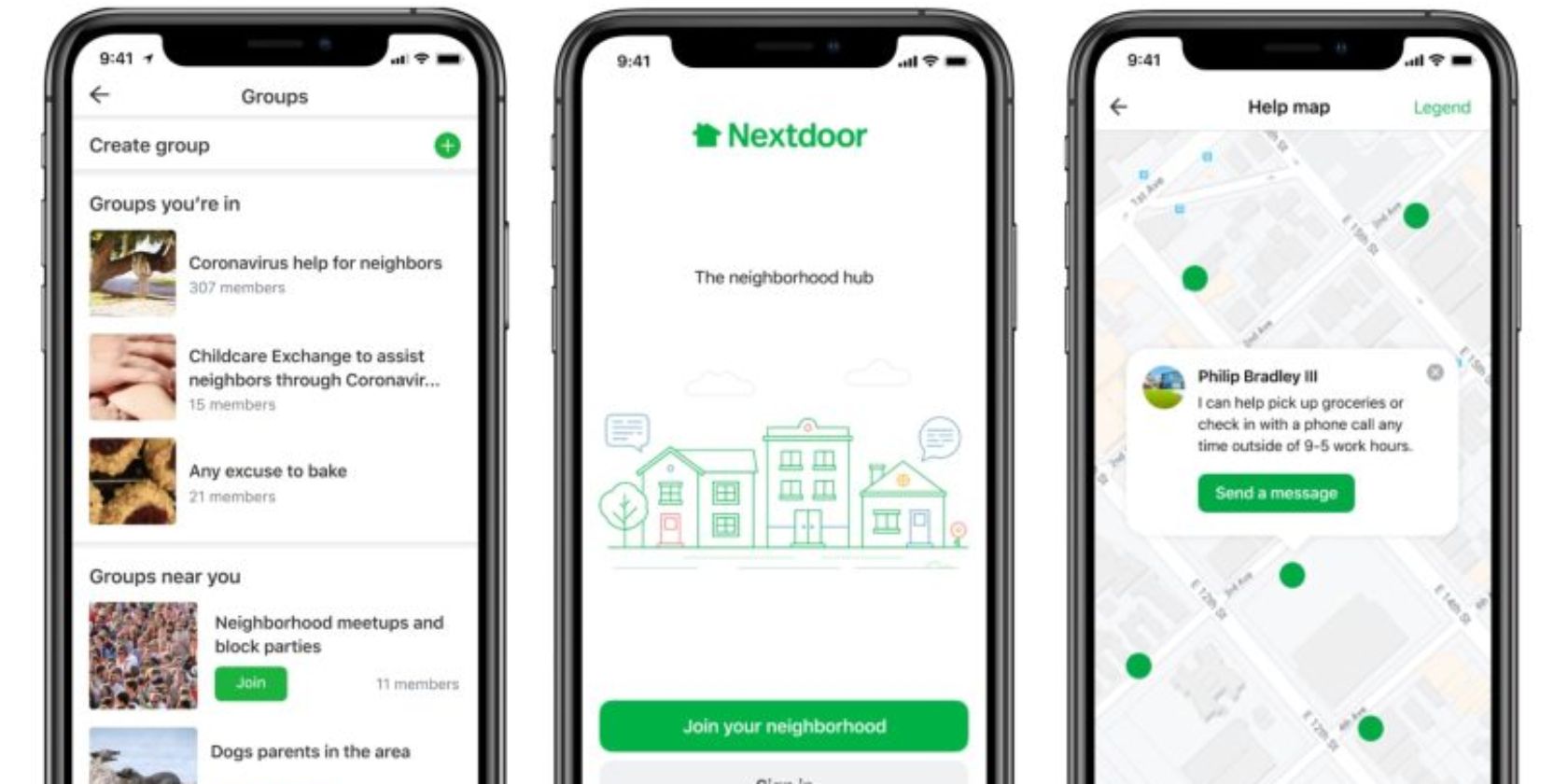
Nextdoor has launched two new features which could prove invaluable during the COVID-19 crisis we’re currently living through. Help Map lets you volunteer to help your neighbors in need, while Nextdoor Groups allows you to create groups with like-minded individuals.
For the uninitiated, Nextdoor is a social network focused on local connections. It lets you connect with your neighbors, giving you a hub to share information, organize events, and recommend tradespeople. And it’s proving its worth amidst the COVID-19 crisis.
Nextdoor Launches Features to Help Communities
In a post on the Nextdoor Blog, the social network introduces Help Map and Groups. Help Map is a brand new feature that seems tailor-made for this moment in time. Nextdoor Groups has been in beta for a while, but is now being made available globally.
Help Map is an interactive map which lets you offer help to those in need. This could be getting medicines or groceries for sickly neighbors under quarantine. Or checking in on elderly neighbors who may be feeling even more lonely now than usual.
???We just released 2 new features to help spread #kindnessnextdoor. Nextdoor Groups aids the organization of local help groups & Help Map is an interactive map of your neighborhood where you can mark yourself able to help neighbors in need. https://t.co/SSdGXSIOk9 #COVID19
— Nextdoor (@Nextdoor) March 18, 2020
Nextdoor Groups allows you to form groups of like-minded people or with specific purposes in mind. Examples include moms struggling to manage childcare while the schools are closed or people interested in keeping fit but struggling with motivation.
According to Nextdoor, groups have been forming organically since the COVID-19 crisis kicked in. However, the social network is now going to help more to form by encouraging members to “turn active conversation threads into groups”.
Remember to Take Care of Your Mental Health Too
These features could prove invaluable for people struggling to cope with this pandemic. While Nextdoor is popular, it’s nowhere near as big as some other social networks. These features could help it to shine at what is becoming an international time of crisis.
The COVID-19 crisis is going to be tough for a lot of people, with health and money worries sure to come to the fore. Which makes it even more essential that we all look after our mental health. To help, check out these positivity apps that can boost your spirits.
Read the full article: Nextdoor’s Help Map Helps You Help Neighbors
Lockdown Entertainment for Families

Engaging in self-isolation or national lockdown is not easy. If you have children, things are even tougher. Fortunately various tech companies are here to help. Christian Cawley and Gavin Philips look at the latest developments, from free Amazon Prime and Audible to top YouTube channels for 24/7 entertainment.
We also have some thoughts on enforced home schooling (as opposed to the planned variety).
Really Useful Podcast Season 5 Episode 8 Shownotes
We start off this week looking at how Big Tech is helping families deal with the unscheduled school holidays happening across the Northern Hemisphere
- Rent movies still playing in theatres
- Use Scribd free for 30 days
- Get Audible Stories for free
- Enjoy Amazon Prime Video free
We’ve got some personal ideas on how to cope with lockdown as a family and as individuals, too.
- Get your kids fit daily with Joe Wicks, The Body Coach
- Chill out daily with your kids thanks to Cosmic Kids Yoda
- Learn daily with Maddie Moate and Greg Foot
- Astronaut Scott Kelly shares his self-isolation tips
- How Sir Walter Raleigh coped with incarceration in the Tower of London
This week, MakeUseOf is giving away an awesome customizable electronic pixel art backpack
You can leave a review on Apple Podcasts to help us reach more listeners. You’ll find us on:
See you next week for the final show of the current run.
Read the full article: Lockdown Entertainment for Families
How to Look Good on a Webcam When Video Chatting
With video conferencing, vlogging, and even appearing on TV via remote link on the rise, looking good on webcam is increasingly important. But so many people get it wrong. Experts, politicians, YouTubers, even models and style experts can end up looking terrible on webcams.
So, how does one look good for a webcam? Simply, make the most of what you’ve got. Learn how by following these tips to get you looking your best for the camera.
13 Ways You Can Look Better on Your Webcam
Looking good when on a video chat is vital. While one or two people you’re close to might not mind you looking a mess, this isn’t usually the case.
Here are 13 things you can do to look better on webcam calls and recordings:
- Use a good quality webcam
- Sound great with a decent microphone
- Look presentable with clothes and makeup
- Have a tidy background
- Don’t get too close or too far away
- Light from the front, not behind
- Look at the camera, not the screen
- Look up at the webcam, not down
- Don’t move around too much
- Establish a dedicated space for webcam recordings and chats
- Rehearse to improve your confidence
- Check the results with a friend
- Be yourself
With so much to consider, let’s explore these tips in detail so you can look good on a webcam today.
1. Look Good With a Quality Webcam
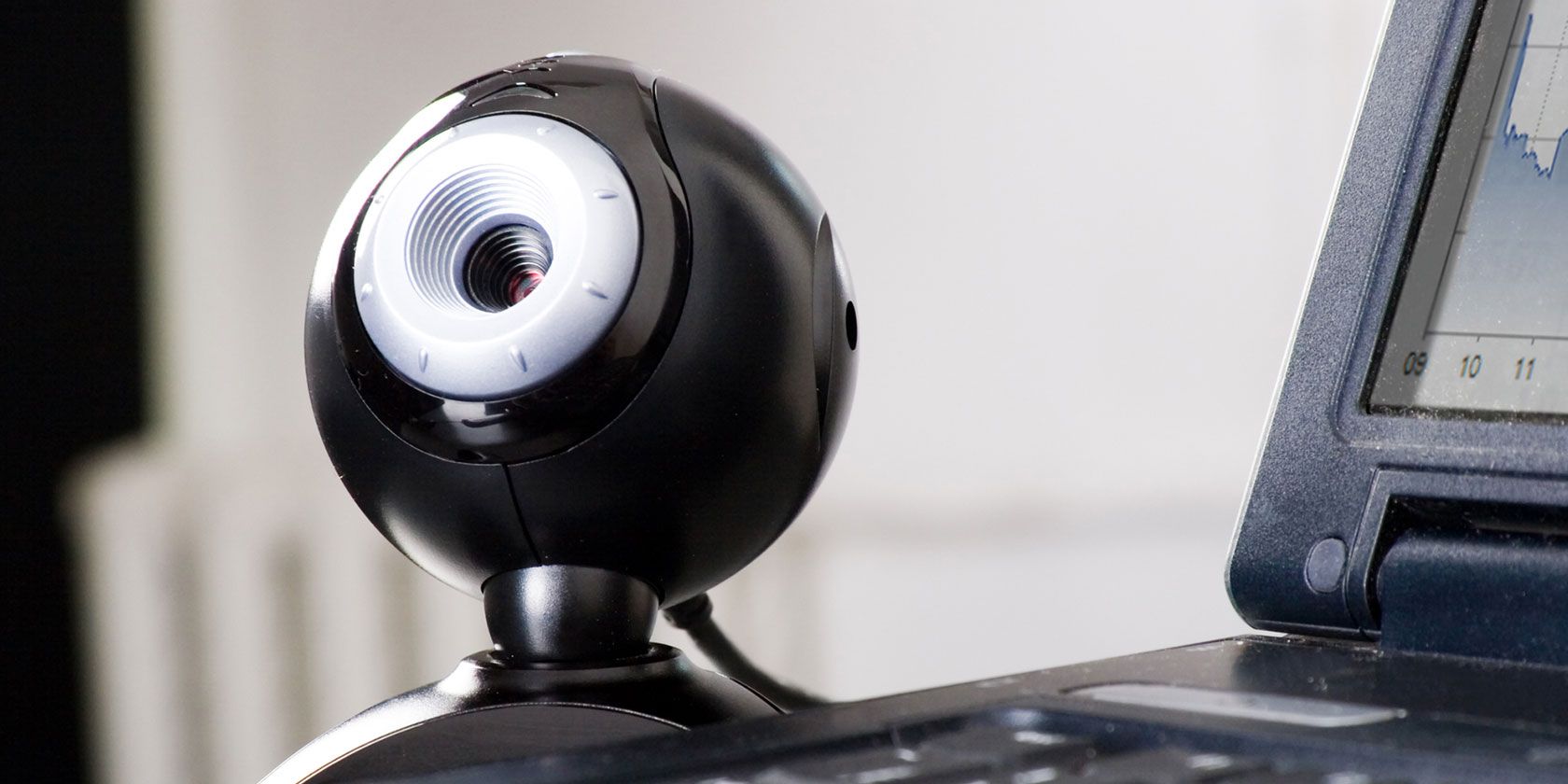
Using a cheap webcam will leave you with sub-par results. If you’re serious about looking good, get a decent external webcam.
Anivia 1080p HD Webcam W8 Anivia 1080p HD Webcam W8 Buy Now On Amazon $69.99Leave plenty of time between hooking it up and using it. Take the time to test it, preferably with the chat software or video recording app you’re using. This gives you the opportunity to make any adjustments to the set up.
2. Improve Webcam Audio with a Good Mic
Built-in mics on laptops, some desktops, and webcams are typically mediocre. To sound good on webcam, it’s smarter to use a dedicated microphone. A great selection of dedicated microphones is available. Adding one to your setup will improve your overall presentation and complement the quality of your new webcam.
A good option is the Blue Snowball iCE, a USB microphone that works with desktop and laptop computers.
Blue Snowball iCE USB Mic Blue Snowball iCE USB Mic Buy Now On Amazon $49.97Not sure how to install a mic? Check these no-hassle ways to connect a microphone to your PC.
3. Look Good on Webcam: Make Yourself Presentable
Presentation is key to looking good on a webcam. It doesn’t matter if you’re working from home for a video chat or being interviewed on TV.
Just be sure to get out of your pyjamas into some more suitable attire. You might be at home, but first impressions count, and pyjamas say, “I just got up.”
Take the time to prepare your hair and teeth. Sort out stray hair, floss and brush your teeth, and have if necessary. If you need makeup, leave plenty of time to apply it. This is particularly important with high definition video.
For clothing, rely on darker tones. Bright clothes can be off-putting and play havoc with lighting. Keep it muted.
4. Check Your Background on Webcam
A plain white wall is boring, but piles of junk are both distracting and unpleasant. See what you can do to create a pleasant background with no mess and very few visual distractions.
If this isn’t possible, some webcam apps can blur your background. For example, Skype features a background blurring tool that you can toggle for video calls. Other webcam apps include similar tools.
You might also try a webcam background that attaches to your chair.
Webaround Portable Webcam Background Webaround Portable Webcam Background Buy Now On Amazon $65.00These come in grey, blue, and green for chromakey use. This means you can set a different background, although in most cases this is only suitable for post-production. But if you’re using your webcam for recording videos to upload to YouTube, this is an ideal background cheat.
5. Get the Distance Right
A distracting element for any webcam conversation is a subject that is too far away—or too close!
It’s best to maintain a static distance with your webcam. A good rule of thumb is to keep the camera about an arm’s length from you.
6. Light From the Front and Look Great
If it’s at all possible to relocate the lights before you use a webcam, then do so. Too much light from behind will dim you out completely.
Try to shine light on yourself from the front, preferably from slightly above. If there’s a window in the room, try to face that as natural light from the window is best.
It’s difficult to avoid glare and washout but try out a few different positions to get the best results. If you don’t have a handy window or lamp, consider using an external monitor behind your webcam. Just bring up something very white on-screen and turn up the brightness.
A phone or tablet computer can also help here. You can also buy desktop lamps for improved video call lighting.
8-inch LED Selfie Ring Light 8-inch LED Selfie Ring Light Buy Now On Amazon $29.99These devices are affordable and ideal for indoor video on a PC webcam or mobile device.
7. Remember to Look at the Camera
All too often, especially during webcam chats, the image of the person you’re speaking to can distract you. The result is you’re looking slightly away from the camera, rather than at it.
So, remember to look at the camera. You can help yourself here with a few tricks:
- Point a sticky note with an arrow at your camera
- Move your chat window as close to the camera as possible
- Write prompts on a stick note and place it next to the camera
Looking down when you’re supposed to be looking at the webcam can be disconcerting for the viewer. Take a moment to practice this with your device’s webcam app.
8. Use the Best Webcam Angle: Look Up at the Camera
A slight change in camera positioning could make a world of difference. This is particularly important whether you’re vlogging, appearing on TV, or attending an online job interview.
Looking up shows you in the best possible light. If you’ve worked on the other presentation aspects, ignoring this tip could ruin your hard work so far.
In short, when you’re looking down at a camera, you’re giving yourself a double chin. If that wasn’t bad enough, looking down can also and show off your nose hairs.
Looking up is far more flattering. Position the webcam to suit; if you’re using a laptop, place it on a few books for elevation.
9. Minimise Your Motion, and Don’t Lean In
Moving around too much on a webcam can cause problems. First, too much motion can be distracting. Second, it can cause pixilation of the video stream, resulting in a drop in quality. Keep as still as possible so the focus remains on what you’re saying.
Meanwhile, be careful not to lean back or forward. Leaning back too far will distract the viewer and result in them losing attention; leaning in can be intimidating.
10. Set Up A Dedicated Webcam Space
If you’re using your webcam often, you may want to set up your space, so you have a decent background. This includes maintaining front lighting and keeping your webcam at a good height.
Ensure you keep your webcam equipment, comb, decent shirt, and basic makeup ready, too. Be prepared and you’ll be able to jump into webcam chats at short notice and look as good as possible.
11. Be Confident on Webcam: Rehearse!
Knowing what you’re going to say boosts confidence and will help to make a good impression.
If you’re having a meeting, make sure you know the main points you need to get across. Need statistics or other data to hand? Make sure you have it ready before your webcam chat starts, just as you would for an in-person meeting.
If you’re doing a show, make notes and practise just like you would for any public presentation.
12. Check the Results With A Friend
If you’re unsure about your set-up, arrange a Skype chat with a trusted friend and ask for their opinion. They should be able to help you spot any problems with how you look, lighting, background, and how you sound.
Do this ahead of time so there is opportunity to make the necessary changes before your webcam call or recording.
13. Be Yourself
A desire to look good can easily lead to copying and imitating other people. Don’t!
Just be yourself and stay calm. If you’ve followed all the steps so far, you should be confident that you look your best and are prepared to be on camera. So, just keep smiling and stay cool.
Use These Tips to Look Good on Your Webcam
Whether you’re making vlogs, video calls, joining video conferencing sessions for work, or appearing as a guest on network or online TV, the tips listed here can help you look good on a webcam.
First impressions count: don’t let yourself down by being untidy, unprepared, and uncertain. Need a webcam in a pinch? You could record your vlog or make the video call on your phone. If you must use a PC, here’s how to use your Android phone as a webcam for your computer.
Read the full article: How to Look Good on a Webcam When Video Chatting
What Is My Phone’s IMEI? Here’s What You Need to Know

You may have heard your insurance company or law enforcement encourage you to record your IMEI. You might have even seen it in your phone’s settings or device packaging. What isn’t so clear is what the IMEI number is actually for.
So, what exactly is an IMEI number, and how do you find yours?
What Is an IMEI Number?
The International Mobile Equipment Identity—or IMEI—is a unique numerical identifier for every mobile device.
This number helps to differentiate each device from one another. If you take your phone in for repair, they will track it using the IMEI to distinguish it from the other millions of iPhones, for example.
A standard IMEI number is a 14 digit string, with an additional 15th check digit for verifying the entire string. There is also a 16 digit variation that includes information on the device’s software version, known as the IMEISV.
Since 2004, the IMEI appears in the format AA-BBBBBB-CCCCCC-D. The sections labeled A and B are known as the Type Allocation Code (TAC). The TAC portion of the IMEI identifies the manufacturer and model of the device. For example, the Google Pixel TAC code is 35-161508, while the iPhone 6s Plus is 35-332907.
Some models have multiple TACs depending on revision, manufacturing location, and other factors. For example, the iPhone 5C had five different TAC codes.
The six C digits represent your device’s unique serial number, and the handset manufacturer defines these. The D portion of the IMEI is a check digit that ensures the IMEI meets the Allocation and Approval Guidelines. The check digit is displayed on packaging to prevent incorrect IMEI recording, but it doesn’t make up part of the documented IMEI.
While the IMEI number is undoubtedly significant, it isn’t the only regulatory requirement for your smartphone. Manufacturers have to abide by regulations for each region they want to sell their devices in. The IMEI doesn’t show that the equipment meets any of those other safety and regulation requirements.
Finding Your IMEI
There are a couple of ways you can go about finding your device’s IMEI. The most universal approach is to head to your device’s dialer app. Tap in *#06# and the IMEI will be displayed on the screen.
If you have an Android or iOS device, then the IMEI can be found under Settings too. On iOS head to Settings > General > About and the IMEI will be displayed. Copying the IMEI is as simple as tapping and holding on the number. Android devices may vary, but generally heading to Settings > About Phone should display the IMEI.
If you can’t access your device, there are other ways to find your IMEI too. The retail packaging should have a label with the IMEI displayed. If your device has a removable battery, then the IMEI is often listed underneath the battery. Many devices have the IMEI printed on the back. Others, including the iPhone 6s and above, have the IMEI inscribed on the SIM tray.
However, if you are about to purchase a new device, particularly a second-hand one, you’ll want to verify it’s status using the IMEI, too. To do this, head over to IMEI.info and enter the smartphone’s IMEI number.
This free tool will tell you a bit about the device, as well as offer you additional services like a basic blacklist check. If you want to gain even greater clarity, IMEI.info has premium services like a separate blacklist check for each major US carrier and a SIM-lock status tool.
If you’re after the information in a hurry, and don’t mind paying for it, the premium service CheckMEND offers a Device History Check for just under a dollar.
What Is an IMEI Number Used For?
The IMEI’s primary purpose is to equip your device with a unique ID number. So, in practice, the IMEI is very similar to the Vehicle Identification Number (VIN) used in the automotive industry. Although sometimes confused, the IMEI number is entirely separate from your SIM number and cannot be changed.
When you connect to a cell network, the provider captures both numbers to enable their service. The SIM number identifies your subscriber account, while the IMEI only identifies the device.
If your device is lost or stolen, you can contact your provider who may be able to place a block on the IMEI number, preventing it from being used to connect to the network. Your provider may also be able to contact other networks, asking them also to block the device. Once you’ve done so, you can then use built-in tools to find your phone’s location.
Law enforcement often keep records of lost and recovered phones, identified by their IMEI. Since there is no good reason to change the device’s IMEI, the practice is illegal in many regions.
While it may be illegal to change the IMEI of a device, it does happen. Thieves, in particular, will attempt to take non-blacklisted numbers and apply them to their stolen devices to make them usable again. For this reason, we recommend that you never share or post your IMEI number online, or else you may find your device cloned.
We advise against sharing personal data online more generally, too.
Have You Recorded Your IMEI?
The IMEI number is one of the most important and unique ways of identifying your device. If you haven’t already, you should locate it and take note of it right away.
Keep a record of your IMEI somewhere safe, so it’s there if you ever need it. If you are looking for a digital safe, then a password manager might even do the trick.
That said, if you’ve found or recovered someone else’s smartphone, you may be wondering how to get it back to them. In that case, you’ll want to know what to do if you find a lost or stolen iPhone.
Read the full article: What Is My Phone’s IMEI? Here’s What You Need to Know
Ultimate Microsoft Office Mastery: 90+ Tips, Tricks, and Tutorials for You

Use Microsoft Office every day? Check out our tips, tricks, and tutorials that’ll turn you into an efficiency machine with both Microsoft Word and Microsoft Excel.
Microsoft Office is powerful; there’s a reason why nearly every serious business in the world relies on it for office productivity. Yes, Microsoft Office can be daunting to learn, what with all of its crazy menus and features—but it doesn’t have to be difficult at all.
If you use either Microsoft Word or Microsoft Excel on a regular basis and want to become a more fluent user, we have all kinds of tips, tricks, and tutorials that’ll help you effortlessly learn the ins and outs of each program. You’ll be a master in no time!
Getting Started With Microsoft Office
If you’re a new user, or if you don’t even have Microsoft Office yet, you may want to check out our articles on how to acquire a copy of Microsoft Office for free—without breaking the law. Did you know you can even use Microsoft Office on Linux computers?
- How to Get a Microsoft Office License for Free
- How to Get a Microsoft Office License for Cheap
- How to Install Microsoft Office on Linux
- How to Cancel an Office 365 Subscription and Get a Refund
Once Microsoft Office is installed, you may also want to make a few tweaks and install a few add-ins that’ll ease your overall experience:
- How to Disable the Microsoft Office Upload Center
- The Best Microsoft Office Password Recovery Tools
- Productivity Add-Ins for Microsoft Office You Should Install
Mastering Microsoft Word
Beginner Tips for Microsoft Word
The first step to getting comfortable with Microsoft Word is making sure it’s set up properly. With a few tweaks to the settings, and some familiarity with basic features, you’ll feel much more at home when using the software:
- Microsoft Word Settings You Should Definitely Tweak
- Useful Microsoft Word Tips & Tricks You Should Know
- Hidden Features of Microsoft Word That’ll Make Your Life Easier
And then once you’re comfortable with Microsoft Word, that’s when you’ll want to check out our various tutorials on how to do things with it, which will give you a quick boost to productivity:
- How to Make Your Microsoft Word Documents Look Professional
- How to Make Your Microsoft Word Tables Look Pretty
- How to Reduce the Size of a Microsoft Word Document
- How to Move and Rearrange Pages in Microsoft Word
- How to Format and Manage Lists in Microsoft Word
- How to Create Empty Lines in Forms With Microsoft Word
- How to Clear Recent Documents History in Microsoft Word
- How to Recover an Unsaved Microsoft Word Document in Seconds
Advanced Tips for Microsoft Word
After acquainting yourself with the basics of Microsoft Word, that’s when you’ll be ready to try full-fledged projects that are more than just simple essays and typed reports. Here are some of the cooler things you can do with Microsoft Word:
- How to Import Data Into a Microsoft Word Document
- How to Make a Custom Cover Page in Microsoft Word
- How to Create an Annotated Bibliography in Microsoft Word
- How to Create Flowcharts With Microsoft Word
- How to Build a Mind Map in Microsoft Word
- How to Make a Graph Paper Template in Microsoft Word
- How to Make Index Cards in Microsoft Word
- How to Make a Logo Using Microsoft Word
Useful Templates for Microsoft Word
Don’t have time to make new documents from scratch? You aren’t alone. That’s why you should check out our roundups of the best Microsoft Word templates for all kinds of needs and use-cases:
- Best Microsoft Word Templates for Cover Pages
- Best Microsoft Word Templates for Table of Contents
- Best Microsoft Word Templates for Flowcharts
- Best Microsoft Word Templates for Mind Maps
- Best Microsoft Word Templates for Meeting Agendas
- Best Microsoft Word Templates for Timesheets and Hours Tracking
- Best Microsoft Word Templates for Event Invitations
- Best Microsoft Word Templates for a Business Requirements Document
- Best Microsoft Word Templates for Business Plans
Mastering Microsoft Excel
For many, Excel is the much tougher software compared to Word. Numbers and formulas will do that to you. That’s why before you dive into our Excel tips and tricks, we recommend starting with these introductory articles:
- Tips for How to Learn Excel Quickly
- Essential Excel Formulas and Functions Cheat Sheet
- How to Print Your Excel Spreadsheet Step-by-Step
Beginner Tips for Microsoft Excel
The first and most important skill to learn in Microsoft Excel is understanding worksheets and tabs. Check out our beginner articles that teach you how to set up, edit, recover, and compare Excel worksheets with ease:
- How to Work With Worksheet Tabs in Microsoft Excel
- How to Recover Unsaved or Overwritten Microsoft Excel Files
- How to Convert Delimited Text Files to Microsoft Excel Spreadsheets
- How to Compare Two Microsoft Excel Files
And then learn the other essential skills that’ll give you a leg up when it comes to creating and modifying Excel spreadsheets. There’s a lot of cool stuff you can do, and most of it’s quite easy once you know how to do them:
- How to Hide and Unhide Columns and Rows in Microsoft Excel
- How to Hide and Unhide Anything in Microsoft Excel
- How to Freeze, Unfreeze, and Lock Rows, Columns, and Cells in Microsoft Excel
- How to Flip Cells and Switch Rows or Columns in Microsoft Excel
- How to Deselect Cells in Microsoft Excel (Without Starting Over)
- How to Create a Dropdown List in Microsoft Excel
- How to Create a Checklist in Microsoft Excel
- How to Create a Bulleted List in Microsoft Excel
- How to Create a Custom List in Microsoft Excel
- How to Create a Box and Whisker Plot in Microsoft Excel
- How to Create a Flowchart in Microsoft Excel
Advanced Tips for Microsoft Excel
Microsoft Excel is a powerhouse application, and with a bit of know-how, you can effortlessly pull off some crazy cool tasks. Here are some of the more advanced techniques you can use to manage your Excel worksheets:
- Essential Microsoft Excel Formulas That Solve Real Life Problems
- How to Do Basic Data Analysis in Microsoft Excel
- How to Create Self-Updating Microsoft Excel Charts
- How to Split a Microsoft Excel Spreadsheet Into Separate Files
- How to Merge Microsoft Excel Files and Sheets
- How to Extract a Number or Text From Microsoft Excel
- How to Use Goal Seek and Solver in Microsoft Excel
And there are plenty of more advanced tricks you can use to automate much of the process when dealing with complex Excel spreadsheets, and these automations will save a ton of time over the long run:
- Microsoft Excel Autofill Tricks to Build Your Spreadsheets Faster
- Microsoft Excel Lookup Functions to Search Spreadsheets Efficiently
- Microsoft Excel Formulas That Can Do Amazing Things
- How to Make Your Own Microsoft Excel Keyboard Shortcuts
- How to Save Time by Using Macros in Microsoft Excel on Mac
- Mistakes to Avoid When Programming Microsoft Excel Macros
Useful Templates for Microsoft Excel
Who has the time to build new Excel spreadsheets from scratch? Whether for personal or business use, you should consider downloading one of the many free templates available on the web and customizing it to your specific needs:
- How to Make a Personal Budget With Microsoft Excel
- The Best Microsoft Excel Templates for Managing Your Finances
- The Best Microsoft Excel Templates for Tracking Health and Fitness
- The Best Microsoft Excel Templates for Getting Things Done
- The Best Microsoft Excel Templates for Organizing Your Life
- The Best Microsoft Excel Templates for Project Management
Read the full article: Ultimate Microsoft Office Mastery: 90+ Tips, Tricks, and Tutorials for You
The Most Beautiful Gardens Around the World You Can Tour Online

Review: Mophie Powerstation Go
The Maker’s Muse
Got a tip to share? Tools to recommend? Shop tales to tell? Talk to me.
The Maker’s Muse
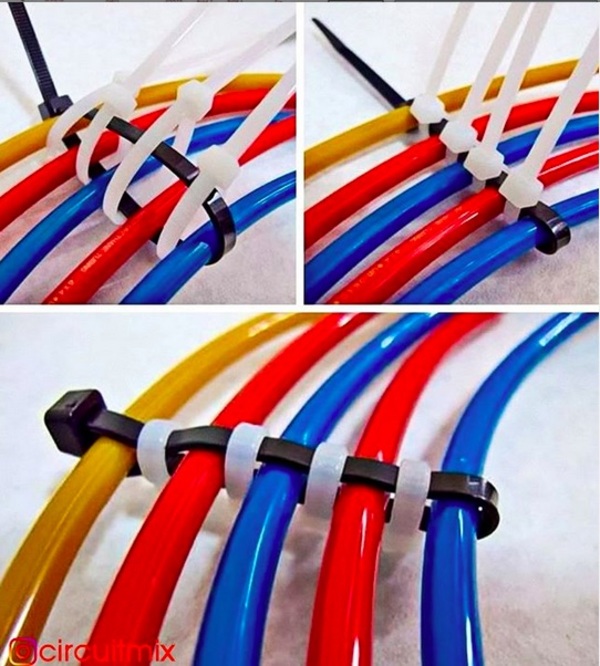
Cable wrapping with zip-ties, via @circuitmix on Instagram
Stenciling on Corrugations
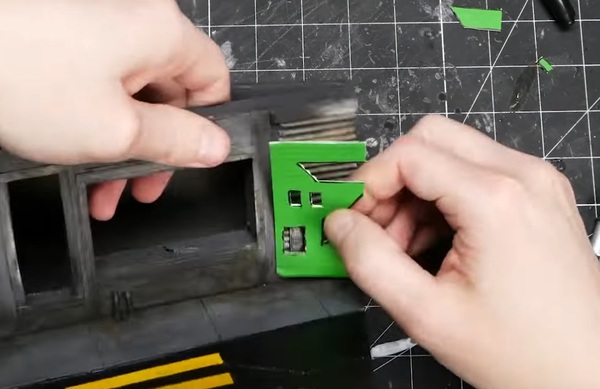
Let those corrugations get up close and personal
In a recent episode of Black Magic Craft, Jeremy builds a very cool cyberpunk diorama. In the video (at 12:42 ), he shares a nifty tip for anyone who paints stencils onto corrugated surfaces. To create some techie-Asian-looking graffiti, Jeremy cut out his stencil on the back (non-corrugated side) of a scrap piece of the same corrugated material he wanted to paint on. By mating the two corrugated sides (stencil and paint surface) you can spray your stencil with it tight against the paint surface to minimize overspray.
Sean Ragan on Nibblers
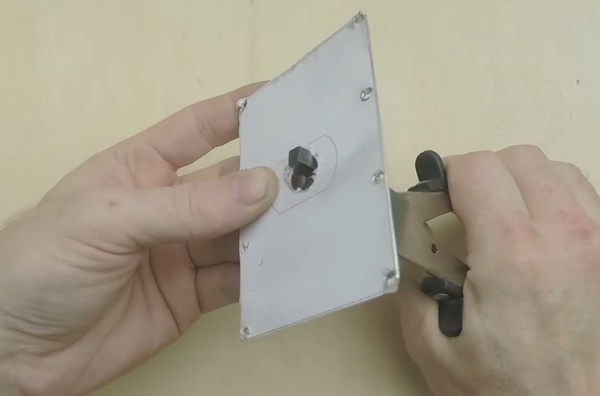
It ain’t fast, but it works.
In this Cool Tool video, Sean Ragan shows a few of the ways that most any maker can benefit from owning a nibbler tool. I actually don’t have one and have wanted to get one for years. I’m planning on buying the $13 model that Sean links to in the video’s description.
Open Source COVID-19 Medical Hardware FB Group
I’ve always felt as though the maker movement and open source hardware could do a world of good in addressing pressing global and local issues. Attention makers: That moment has arrived. For those who think they can offer their talents in developing solutions to medical hardware problems, there’s a new Facebook group, called Open Source COVID-19 Medical Hardware. It’s very inspiring to see people roll up their sleeves and pool their expertise in groups like this. Many more groups, dealing with logistics, software, data analysis, and more are rapidly popping up. Grab a bucket, folks. We’re going to be at this for a while.
Jewelry Clamps

Look to jeweler’s tools for use in other types of close up, small-scale making.
In this Adam Savage Favorite Tools video, he recommends looking at jewelry maker’s tools for things like clamps for small objects. In the video, he looks at a ring clamp, a hand vise, and an engraving ball clamp. I would also add to that a bench pin. This is a V-shaped protrusion that juts out from the edge of your workbench, allowing you to access angles on small workpieces that you can’t otherwise. Here’s a combo ring clamp and bench pin for under $19.
Learn to Solder
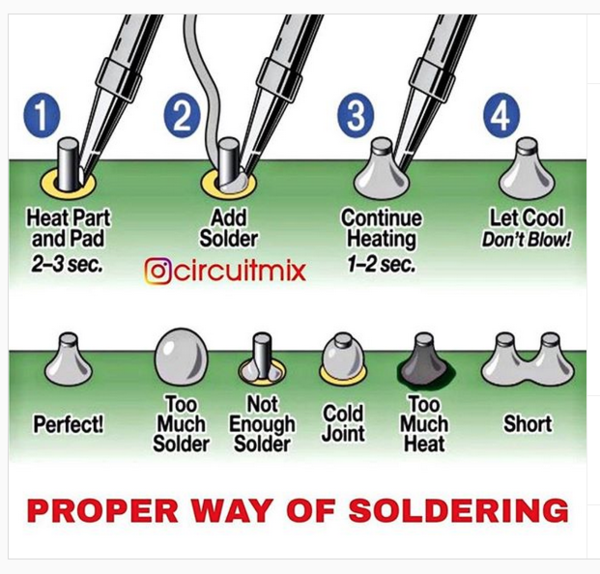
It’s really this easy.
At Make:, we used to tell people that two of the most essential maker skills are soldering and sewing. So many people are intimidated by soldering, but they shouldn’t be. This graphic, from Circuitmix on Instagram, pretty much tells you everything you need to know. This, a decent, hot iron, and some practice, and you’re good to go. If you need more guidance, there are tons of tutorials and videos online. Now, while we’re all shut-ins, is a great time to break down and acquire these skills if you don’t already have them.
Shop Talk: Homely Tools
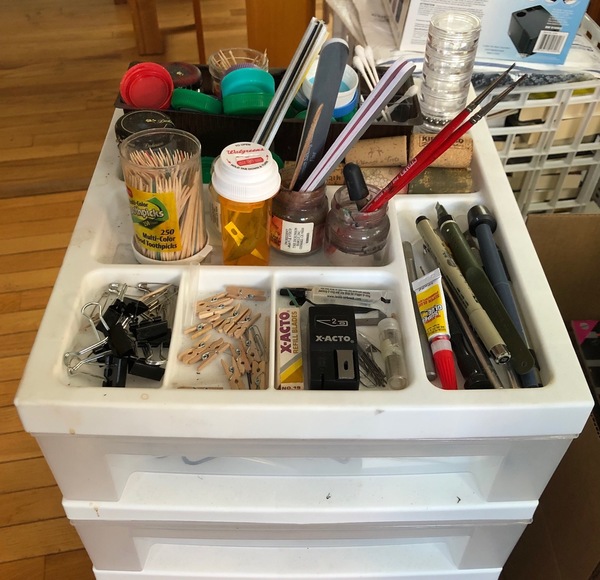
My “homely tools” cart in my shop: toothpicks, safety pins, cotton swabs, binder clips, corks, bottle caps, and more.
I am a big fan of what I call “homely tools.” These are tools that are so plain, so pervasive, that we don’t even think about them when we talk tools – but they remain central to our making. These are things like toothpicks, safety pins, markers, basic house tools (slotted screwdriver, kitchen-drawer hammer), etc. What are some of your favorite homely tools? Please tell me a story about them. Send pictures.
[Gareth’s Tips, Tools, and Shop Tales is published by Cool Tools Lab. To receive the newsletter a week early, sign up here.]
Best Meal Delivery Services - CNET
How to Partition Your External Time Machine Hard Drive
Now that almost every Mac ships with a speedy solid-state drive, many of us have learned to live with smaller storage capacities in our computers. At the same time, external hard drives are cheaper than ever. That means it’s easy to get yourself an external drive big enough to partition for both Time Machine backups and external storage.
If you plan to use a drive for both of these purposes, there are a couple of points you need to know first. We’ve explained everything below, including how to store files on your Time Machine hard drive without even partitioning it first.
How Time Machine Works
Time Machine works by creating historic backups of your Mac. This means it keeps older copies of files even after you edit or delete them, until a time when you need more storage for newer backups. Thanks to these historic backups, you can travel back in time to restore your Mac’s data from days, weeks, or months ago.
In contrast, the alternative to historic backups is to overwrite the previous files every time you back up your Mac. With this method, you’d have no way to retrieve a deleted file if you already made a new backup. Obviously, that isn’t particularly useful.
The downside to Time Machine’s historic backups is that the oldest files remain on your drive until it runs out of storage. You might not care to have extensive backups of files you deleted years ago, in which case there are better uses for your external drive.
Be Careful When Storing Files on Your Time Machine Drive
The more you use a mechanical item, the more likely it is to fail. Your external hard drive is no exception; it has moving parts that read and write data, which can give out over time.
If you choose to use your Time Machine drive as external storage, you might shorten its lifespan by doing so. This is because the drive will carry out many more read and write actions as you save, edit, and delete extra files.
It’s also worth mentioning that Time Machine doesn’t back up any extra files you keep on your external drive. Even if it did, you’d lose the original files and the backup at the same time if your drive stopped working.
We strongly suggest you keep multiple backups in different places for any important data.
Store Files on Your Time Machine Drive Without a Partition
Technically, there’s no need to partition your hard drive if you want to use it for external storage as well as Time Machine backups. All you need to do is start copying files and folders onto the drive using Finder.
If your Time Machine backups are encrypted, you might need to authenticate changes to the drive with your administrator password.
Just make sure you don’t edit or save anything to the Backups.Backupdb folder. This is where Time Machine stores all its backups.
As your external drive runs out of storage, Time Machine deletes the oldest files from the Backups.Backupdb folder to make space for new ones. If your files are in that folder, Time Machine might delete them as well.
You might want to create a new folder, called Files, to clearly separate your files from your Time Machine backups.
The Pros and Cons of Avoiding a Partition
The above method is the quickest and easiest way to save files on your external Time Machine drive. Unlike using a partition, which we’ll explain below, you can start saving files to the drive without erasing all your existing Time Machine backups first.
But the lack of a partition also means your Time Machine backups will continue to swell in size until they take up all the free space on your external drive. Although Time Machine won’t delete your personal files when this happens, it might take up more space than you want it to.
That’s why a partition is the most practical long-term solution. You can allocate a set amount of space for your Time Machine backups and for your file storage so neither one hogs the available storage.
Create a Partition to Store Files on Your Time Machine Drive
After you partition a hard drive, your Mac sees each partition as a separate drive. They have distinct names, varying amounts of storage, and can use different formats. You even need to eject each partition separately before you can safely unplug your drive.
Unfortunately, creating a new partition often erases your external drive. That means you may lose any existing Time Machine backups. You can make a Time Machine backup after partitioning the drive, but your backup history will restart from that point forward.
When you partition your hard drive, you get to choose how much space to allocate for your Time Machine backups. We recommend that you allow two to four times the size of your Mac’s internal drive. If you don’t want years’ worth of backups, you can reduce this size as you see fit. However, you shouldn’t go smaller than double the size of your Mac.
For example, if you have a 128GB MacBook, you should allocate at least 256GB for Time Machine backups. If you can spare more space, definitely do so.
How to Partition Your External Drive
- Connect your external hard drive to your Mac. Then go to Applications > Utilities and launch Disk Utility.
- If you can’t find it, press Cmd + Space to search for Disk Utility using Spotlight.
- Select your external drive from the sidebar and click the Partition button. Use the Add (+) option to create a new partition and choose the Name, Format, and Size for each partition by selecting it in the diagram.
- Your Time Machine partition must use the Mac OS Extended (Journaled) format, but your file storage partition can use any format. Choose ExFat if you plan to use it with Windows; otherwise choose Mac OS Extended (Journaled).
- When you’re ready to create your partition, click Apply, followed by Partition. When the process completes, you should see each partition as a separate drive in Finder.
- If you can’t partition your external drive, you may need to reformat it first. Select your drive in the sidebar and click the Erase button. Choose any name and select the Mac OS Extended (Journaled) format. After erasing the drive, return to step two above.
After partitioning your drive, you need to set up Time Machine again. To do this, open the Apple menu and go to System Preferences > Time Machine. Click Select Disk and choose your new Time Machine partition to start creating a backup.
Remember that your Time Machine backups will start from scratch from this date forward. Also, don’t forget that you need to create separate backups for anything in your file storage partition.
Better Use for Your Mac Storage
If you don’t need access to five years’ worth of backups—and you’re careful about keeping your most precious data safe—you probably don’t need too much space for Time Machine. By partitioning your drive, it’s easy to create a separate space for Time Machine backups alongside other media or files you want to store.
If you find you’re still running short on storage, you’ll be glad to know that external hard drives are cheaper than ever. Take a look at the best external drives for a Mac to find out what options are available.
Read the full article: How to Partition Your External Time Machine Hard Drive
The Ultimate Online Shopping Guide: 50+ Essential Tips, Tricks, and Secrets

We have all the tips, tricks, tutorials, and guides you’ll need to become a master of shopping online. Find better deals, avoid tricky scams, and save money!
Online shopping has exploded so much in the past decade that brick-and-mortar stores are closing in response. And in America, over half of all online shopping is done through Amazon. With free two-day shipping via Amazon Prime, it’s no wonder that people are coming to rely on the e-commerce giant for nearly everything.
But online shopping can be a huge money sink if you aren’t careful. On the one hand, it’s incredibly easy to overspend if you’re careless; on the other hand, you can save a LOT of money if you’re patient and know how to snag deals and bargains as they come.
Here’s what you need to know about being a better, smarter, and faster online shopper.
The Best Sites for Online Shopping
Amazon is the king of all online retailers, and that won’t be changing anytime soon. But that doesn’t mean you always have to shop at Amazon. Indeed, you might want to shop elsewhere for any number of reasons:
- Amazon vs. eBay: Which Is Better for Online Shopping?
- What Is Wish? Is It Safe for Online Shopping?
- The Best Sites to Buy and Sell Used Stuff Online
- The Best Online Shopping Sites With Free 2-Day Shipping
- The Best Online Shopping Sites With Free International Shipping
- The Best Chinese Shopping Sites That Ship to the US
- The Best Bargain Sites That Are Cheaper Than eBay
- The Best Online Shopping Sites for Cheap Electronics
- The Best Auction Sites for Incredible Bargains
Where to Shop Online for Specific Items
At the end of the day, there are dozens of excellent online retailers out there. Many of them are niche and specialized in a certain category of items, so don’t expect to find a full-blown replacement for Amazon. Rather, when you’re in the market for something specific, consider these sites instead:
- The Best Sites to Buy Books Online
- The Best Sites to Buy College Textbooks Online
- The Best Sites to Buy Used Computer Parts
- The Best Sites to Buy Refurbished Mac Laptops
- The Best Sites to Buy Cool T-Shirts Online
- The Best Sites to Buy Stuff for Your Pets
- The Best Sites to Buy Event Tickets
- The Best Sites to Buy Concert and Sports Tickets
Tips When Shopping on Amazon
It’s hard not to shop on Amazon these days. The next time you find yourself browsing the available wares, make sure you employ these tips and tricks to make sure you’re always getting the best deals and making the most of what Amazon offers:
- The Amazon Index: Every Feature and Service, Explained
- The Best Amazon Price Watch Trackers for Bargain Hunters
- How to Use PayPal on Amazon
- How to Use Advanced Search on Amazon to Find What You Want
- How to Sort Amazon Search Results by Number of Reviews
- How to Become an Amazon Vine Reviewer and Get Free Stuff
Every so often, you’ll run into issues when shopping on Amazon. Don’t get too hung up on it as that’s to be expected with an operation as monolithic as Amazon. Just take the necessary steps to avoid scams and rectify issues:
- How to Spot Fake Reviews on Amazon
- How to Check Amazon Seller Feedback and Avoid Scammers
- How to Return an Item on Amazon and Get Your Money Back
- What to Do If Your Amazon Order Never Arrived
If you find yourself ordering from Amazon often, you may want to consider upgrading to Amazon Prime. It’s not too expensive and comes with all kinds of benefits beyond free two-day shipping:
- Amazon Prime Benefits You’ve Probably Overlooked
- Monthly vs. Annual: Which Amazon Prime Membership Should You Get?
- How to Share Amazon Prime With Family
- What Is Amazon Prime Pantry? Everything You Need to Know
- What Is Amazon Prime Reading? Everything You Need to Know
- What Is Amazon Twitch Prime? Everything You Need to Know
Tips When Shopping on eBay
Want to buy something used or unusual? You’ll probably find it on eBay. As one of the world’s largest online marketplaces, you’ll find all kinds of stuff that you won’t elsewhere. Just be careful and always triple-check listings before committing to a purchase:
- Common eBay Scams to Be Aware Of
- eBay Online Shopping Tips You Must Know
- eBay Advanced Search Tips for Serious Shoppers
- How to Start Winning eBay Auctions With Automatic Bidding
Tips When Shopping on AliExpress
AliExpress offers some of the cheapest prices you’ll find anywhere on the internet, but it comes at a price: slow shipping speeds and higher risk of fraudulent goods. Here’s what you need to know before ordering anything on AliExpress:
- Is AliExpress Legit and Safe for Online Shopping?
- Tips for Shopping Safely on AliExpress (to Avoid Frauds and Scams)
How to Effortlessly Find Bargains, Deals, and Coupons
Hunting deals and coupons can be mentally exhausting. Fortunately, there are all kinds of websites, apps, and tools out there that will handle it for you. For very little effort, you can save tons of money with every purchase:
- The Best Sites for Finding Going Out of Business Sales
- The Best Sites for Online Coupons and Promotional Codes
- The Best Cashback Sites for Additional Savings at Checkout
- The Best Cashback Apps
- The Best Price Comparison Apps
- The Best Coupon Apps for Deal Hunters
- The Best Coupon Apps for Groceries
When Online Shopping Goes Wrong
Have you been scammed by an online retailer? Is a company refusing to honor their refund policy? Want to put an online shop on blast for terrible customer service? Check out these handy sites that let you do just that:
More Online Shopping Tips
- Refurbished vs. Used vs. Certified Pre-Owned: Which Is Better?
- Crucial Terms Every Online Shopper Should Know
Read the full article: The Ultimate Online Shopping Guide: 50+ Essential Tips, Tricks, and Secrets
Smithsonian Open Access Project
My history of cyberpunk series continues on Adafruit. You can see the content to date on this link.
***
Do you have my book, Tips and Tales from the Workshop? You can buy it here.
***
Tips? Tools? Tales? You know where to find me.
Smithsonian Open Access Project
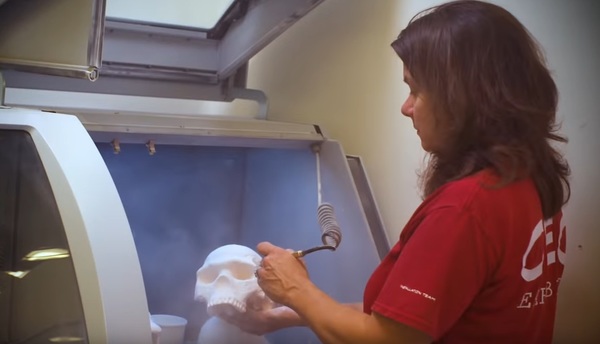
Thousands of scans to download and use in projects.
“People everywhere can now download, remix and share Smithsonian Open Access content for any purpose, for free, from portraits of historic Americans to 3D scans of dinosaur fossils. What will you create, imagine and discover?” When I toured the digital design lab at the Smithsonian’s Office of Exhibits Central nine years ago, the staff talked about this as a future fantasy. So wonderful seeing it come to fruition.
Caster “Collars” for Your Mobile Benches

Keep cords and other entanglements from your cart wheels with PVC collars.
Dave Wilkins, in the FB group, Shop Hacks (private, ask to join), shared this brilliant idea. He saw a guy’s shop table where he was using plastic collars around his casters to prevent his table from getting tangled in power cords. The above image is of Dave’s clamp cart using pieces of 6” PVC for his collars.
Using Magnets to Catch Filings from Drilling
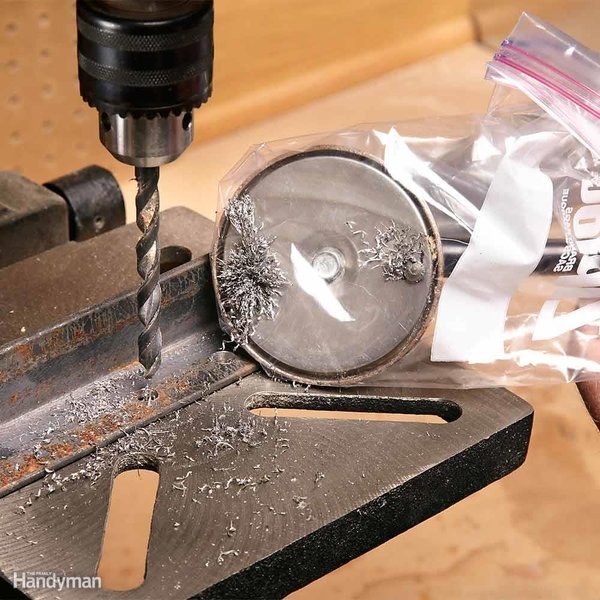
Image from Family Handyman magazine.
TOYS! Heat-Set Inserts Tool
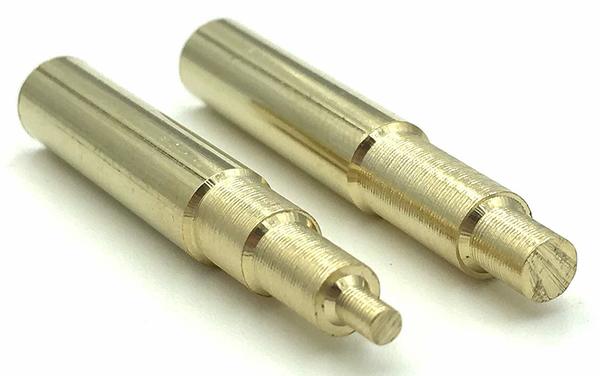
The right tool for the job.
I’ve written about using threaded brass inserts for 3D prints that need to be screwed/unscrewed. To heat the inserts, you can just use the tip of your soldering iron. But there are also dedicated heating tips for your iron that are the correct diameter for the inserts.
Making Tough Sanding Strips for Hand Sanding and Rounding
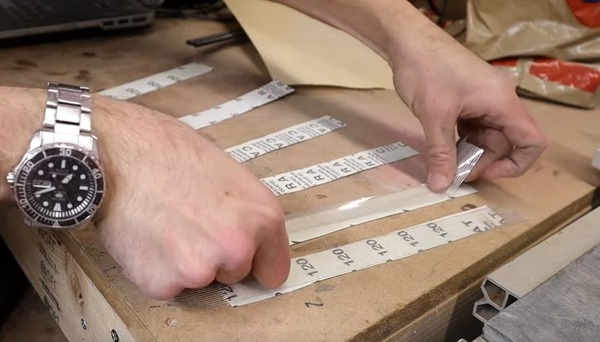
Making your own bendy sanding strips for those hard-to-reach places.
In his latest Graz Makes video, my pal John Graziano gives a wonderful little knife-making 101 as he fashions a beautiful stone-washed kitchen knife out of 1095 steel. In the video, Graz shares a great sanding tip. You can make durable sanding strips for sanding curves and other rounded/odd shapes by cutting 1″ strips of sandpaper and then backing them with 1″ fiberglass-reinforced postal tape. You can see him applying the technique at 17:53 in the video.
Making a Router Jig for Cutting Circles

That’s not a tiny banjo, that’s Adam’s circular routing jig.
In a recent One Day Build, where Adam Savage builds himself a poker table, he shows off a simple jig he made that attaches to the base plate of his router and is marked at 1″ intervals for the center pivot point. Like most Savage videos, there are lots of other great tips in here, like kerfing wood to create curves, a recommendation for a 22-gauge nailer, the wonders of biscuit joiners and wood glue, some smart safety tips, and more.
Life Hack: Multibag Your Trash
This might be more about me and my own eccentricities, but I loath emptying the trash and especially putting a new bag/liner in the can. I just realized that I can put 3 or 4 bags in at the same time and then just remove the inner bag to empty. This is also helpful if there’s a leak in one bag. I especially like doing this for bathroom trashcans. OK, maybe this is just me. Moving along…
Shop Talk: We Get Letters

Adequate shop light for under $50 and less than 30 minutes of work.
Michael Una: “Just wanted to let you know that I read about LED shop lights in the last issue, immediately ordered them, and installed them in my garage workshop this past weekend. They’re great and I love them. Huge thanks for the tip. My shop lighting has always been non-ideal and that is no longer the case. The LED strips are so lightweight that it’s super easy to just zip-tie them anywhere. Took me like less than half-an-hour to mount all 6 of them to cover my entire (half-garage) shop. It was super satisfying. For the one over my bench (pictured here), I already had a fluorescent ballast mounted there. The bulbs had recently burned out, so I just unplugged it and zip-tied the LED tube to it. Convenient and expedient :)”
Reader Steve: “One thing to add to the ‘Label Your Warts’ article, also label which is positive and negative and the output power. I’ve been able to use old warts for products that didn’t come with them or I couldn’t find its original wart. When I get rid of broken items, I keep the warts.”
[Gareth’s Tips, Tools, and Shop Tales is published by Cool Tools Lab. To receive the newsletter a week early, sign up here.]
Become an Overnight Netflix Pro: 50+ Tips and Tricks You Should Know

Whether you’re thinking about getting Netflix or you’ve been a subscriber for years, we have all the tips and tricks you’ll need to get the most entertainment for your dollar.
Netflix remains the king of online streaming services despite all the competition that has cropped up over the years. It’s easy to use, has a large library of original and licensed content, and can be watched from pretty much any internet-connected device—not to mention that Netflix now supports offline viewing via downloads!
Don’t have a Netflix account yet? Not sure if it’s worth getting in your situation? It’s true, Netflix isn’t right for everyone. That’s why we recommend reading these important articles before you dive in with a free 30-day trial of Netflix:
- Reasons Why You Should Subscribe to Netflix
- Reasons Why You Might Want to Skip Subscribing to Netflix
- Reasons Why You Should Consider DVD Netflix
- The Pros and Cons of Binge-Watching TV Series
New to Netflix? Get Started With the Basics
Everyone knows that Netflix is an online streaming service for movies and TV series, but it’s understandable if you have questions beyond that. Here are a few articles that’ll help you get better acquainted with what Netflix offers:
- How Many People Can Watch Netflix at Once?
- How Much Data Does Netflix Use While Streaming?
- How to Download Netflix Videos for Offline Viewing
- To Which Folder Does Netflix Download Videos?
Essential Netflix Tips and Tricks
Once you start using Netflix for the first time, there are a few things tweaks you’ll want to make to improve the viewing experience:
- How to Make Netflix Better With a Few Settings Tweaks
- How to Change the Netflix Playback Speed
- How to Delete Recently Watched on Netflix
- Tips for Managing What You Watch on Netflix
- Tips for Finding New Stuff to Watch on Netflix
Do you watch Netflix on a smartphone, tablet, or TV? Check out these tips:
- Save Space on Android by Moving Netflix Content to an SD Card
- How to Watch Netflix on Your TV: 5 Simple Ways
- How to Watch Netflix With a Raspberry Pi
Advanced Netflix Tips and Tricks
After you’ve been using Netflix for a few months, you’ll want to take things even further with some tips and tricks that will impress your friends and family.
For example, if you want to watch Netflix content that isn’t available in your country:
- How to Watch Everything on Netflix in Any Country
- How to Change Your Netflix Region and Watch Region-Blocked Content
- Which VPNs Still Work With Netflix?
- How to Watch Netflix Together With Friends Far Away
Netflix also has “secret codes” that you can use to discover tons of content that may not be immediately discoverable through the usual menus:
- Secret Netflix Codes to Help You Find New Content
- How to Enter Netflix’s Secret Codes
- The Netflix Secret Codes Cheat Sheet
Problems With Netflix? Common Issues and Fixes
Sometimes you may run into problems when trying to watch Netflix. These issues could stem from the device or app you’re on, the internet connection you’re using, etc. Check out our articles on how to get Netflix working again:
- Common Netflix Issues and How to Fix Them
- Common Netflix Error Codes and What to Do When You See Them
- Netflix Keeps Stopping? Simple Fixes for Playback Issues
What to Watch on Netflix: Our Recommendations
There’s a lot of stuff to watch on Netflix, if only you know where to look. Our team at MakeUseOf has watched hundreds of combined hours of Netflix content, and we’ll point you to all the best stuff to watch so you don’t waste any time:
Documentary
- The Best BBC Documentaries on Netflix
- The Best Food Documentaries on Netflix
- The Best Science TV Shows on Netflix
- The Best Travel Documentaries on Netflix
- The Best True Crime Documentaries on Netflix
- The Best War Documentaries on Netflix
Drama
- The Most Inspiring Movies on Netflix
- The Best British Crime Dramas on Netflix
- The Best Nordic Noir Dramas on Netflix
- The Best Original Netflix Movies
- The Best Period Dramas on Netflix
- The Best Stephen King Movies on Netflix
- The Best Superhero Movies on Netflix
- The Best World War II Movies on Netflix
Comedy
- The Best Sitcoms on Netflix
- The Best British Comedies on Netflix
- The Best Dark Comedies on Netflix
- The Most Relaxing Shows on Netflix for When You’re Stressed
Animated
Seasonal
- The Best Romantic Comedies on Netflix for Valentine’s Day
- The Best Movies on Netflix for a Great Date
- The Best Movies on Netflix for Mother’s Day
- The Best Movies on Netflix for Father’s Day
- The Best Horror Movies on Netflix for Halloween
- The Best Movies on Netflix for Jump Scares
- The Best Zombie TV Series on Netflix
Read the full article: Become an Overnight Netflix Pro: 50+ Tips and Tricks You Should Know
5 Remote Work Resources to Work From Home Productively

If you’re new to remote working or trying to figure out how to work from home, the internet has your back. These tips, tools, and articles will help you be productive from anywhere.
The Coronavirus threat has led to a surge in the number of people working from their homes. It’s not a normal environment for many, but hey, remote working isn’t a new concept. People have been doing it for a long time, and you can draw upon their experience and advice.
In fact, even if you have been a non-office worker for some time, you can still gain a lot from the new tools and tips cropping up in the wake of this outbreak.
1. WFH Manual (Web): Tools, Tips, and Tweets
The WFH Manual is a newly put-together website aimed at helping those who have no prior experience of remote working. It aims to get the best guides on the web, robust tool and resource kits, and it also highlights the best tweets.
Since the outbreak, experienced remote workers have been sharing many of their best tips and tricks through Twitter. From setting up workstations to forming productive habits and routines, the WFH Manual has curated insightful tweets and threads. The page only has the first tweet in the chain, so make sure you click to read the full thread and check comments from other users for additional tips.
WFH Manual has two other sections: Practices and Resources. In Practices, you’ll find articles and guides by both managers and employees about working remotely and staying productive. Resources focuses on app curation and software stashes, along with a few tweets gathering recommendations for apps.
2. Remote Work Resources (Web): Mega-List of Remote Links
Recruitment agency Springworks compiled a mega-list of the best links about working from home. The spreadsheet has over 300 items, spanning a variety of categories like articles, tools, books, podcasts, and products.
It’s a simple four-column spreadsheet that gives you the title, author, URL, and type of content. Helpful tags like “For employer” and “For employee” will help you avoid unnecessary clicks, and you can also sort by category. It’s especially useful for in-depth articles and free ebooks about working from home, which are otherwise scattered across the web. Look for the “guide/ebook” tag to find those free ebooks.
The list includes some of the other resources mentioned in this article, along with many others. You can download the full Remote Work Resources list by sharing your email address, and you can suggest more links to add through a simple form.
3. Remote.Tools (Web): The Best Remote and Work From Home Apps
There are many, many, many websites that aggregate the best apps for remote workers or work-from-home needs. Remote.Tools stood out for me because of how easy it makes the search and discovery of these tools.
The popular products (this week, all-time) is a user-controlled chart where apps rise and fall in rankings based on upvotes. Clear categories make it easy to find the right tool for you. The search function is actually good at finding apps.
After you’re done finding the apps you need, you should also check out their Remote Work 2020 Guide. It has a neat history and addresses all the major issues. And if you’re starting remote work because of the coronavirus threat, the makers put together an Emergency Remote Work Kit to get you started. Both the guides have advice for both managers and employees.
4. Best Remote Work Communities (Web): Slack Channels to Simulate Office
It can get lonely working from home, especially if you are used to chatting with colleagues as you go about your day. Hopefully, your company has set up a workplace messenger like Slack or Microsoft Team. But in case they haven’t, you can join one of the open-for-all remote work communities.
OWL Labs rounded up 36 of the best remote work Slack chatrooms that you can join. With most, as long as you are registered on Slack, you’ll be able to join immediately. Some of them have an invitation process, but it’s generally approved quickly. OWL has general remote working as well as specialized communities for creatives, women, product people, designers, etc.
To search for other Slack communities that would be more in tune with your location, language, profession, or tastes, check out Slofile. It’s a directory of Slack communities with easy search, as well as options to filter by category, language, and region.
5. Hallway and Work From Home Party (Web): 10-Minute Video Watercooler Breaks
A text chat is nice, but it’s not the same as those water-cooler breaks catching up with office buddies. And if you live alone, it can feel weird not to speak to anyone for hours on end while you’re isolated. Hallway is here to fill that void without affecting your productivity.
It integrates into Slack and schedules video calls with colleagues, with a 10-minute time limit. That time limit is important because video calls have a tendency to go on for longer, so this feels more like a real break. If you want to talk for longer, you can use a Zoom or Google Meet video chatroom instead.
If you are a freelance worker, you won’t have colleagues to schedule that call with. So you can hop on to the Work From Home Party, an open video chat on Zoom. Start it up, say hi, and join the conversation. There’s no compulsion to talk or interact, so it might just give you that office feel you’re looking for.
Of course, you don’t have to use either of these if you want a longer video call. There are some excellent free video conference apps for office meetings and friendly calls, some of which don’t even need you to register to use.
The MakeUseOf Remote Working Mega-Guide
The main thing to remember about working from home is that in the end, it’s work. You need to follow your routine as you would at the office, set up a work desk, and get your productivity tools in shape.
Over the years at MakeUseOf, we have given tons of advice about all of these topics which can help you be productive while working remotely. To find any subject you might need help with, check our mega-guide of links to past articles and tips at the remote work hub.
Read the full article: 5 Remote Work Resources to Work From Home Productively