Shared posts

22 Mar 21:06

The HTML Essentials Cheat Sheet: Tags, Attributes, and More

by Akshata Shanbhag
A screenshot of HTML code

Building webpages begins with HTML. Beautifying them and making them interactive comes later. But to start creating functional static websites, you need an understanding of HTML. (Want a quick introduction to this markup language? Read our HTML FAQ.)

As part of learning the language, there’s a long list of elements you need to add to your HTML vocabulary. And this task can seem daunting at first, which is why we have come up with the following cheat sheet. It gives you an easy way to discover/understand/recall HTML elements any time you need them.

The cheat sheet covers tags and attributes for structuring webpages, formatting text, adding forms, images, lists, links, and tables. It also includes tags that were introduced in HTML5 and HTML codes for commonly used special characters.

FREE DOWNLOAD: This cheat sheet is available as a downloadable PDF from our distribution partner, TradePub. You will have to complete a short form to access it for the first time only. Download The HTML Essentials Cheat Sheet.

The HTML Essentials Cheat Sheet

Shortcut Action
Basic Tags
<html> ... </html> The first and last tag of an HTML document. All other tags lie between these opening and closing tags.
<head> ... </head> Specifies the collection of metadata for the document.
<title> ... </title> Describes the title for the page and shows up in the browser’s title bar.
<body> ... </body> Includes all content that will be displayed on the webpage.
Document Information
<base/> Mentions the base URL and all relative links to the document.
<meta/> For extra information about the page like author, publish date, etc.
<link/> Links to external elements like style sheets.
<style> ... </style> Contains document style information like CSS (Cascading Style Sheets).
<script> ... </script> Contains links to external scripts.
Text Formatting
<strong> ... </strong> OR
<b> ... </b>
Makes text bold.
<em> ... </em> Italicizes text and makes it bold.
<i> ... </i> Italicizes text but does not make it bold.
<strike> ... </strike> Strikethrough text.
<cite> ... </cite> Cites an author of a quote.
<del> ... </del> Labels a deleted portion of a text.
<ins> ... </ins> Shows a section that has been inserted into the content.
<blockquote> ...
</blockquote>
For displaying quotes. Often used with the <cite> tag.
<q> ... </q> For shorter quotes.
<abbr> ... </abbr> For abbreviations and full-forms.
<address> ... </address> Specifies contact details.
<dfn> ... </dfn> For definitions.
<code> ... </code> For code snippets.
<sub> ... </sub> For writing subscripts
<sup> ... </sup> For writing superscripts.
<small> ... </small> For reducing the text size and marking redundant information in HTML5.
Document Structure
<h1..h6> ... </h1..h6> Different levels of headings. H1 is the largest and H6 is the smallest.
<div> ... </div>
For dividing content into blocks.
<span> ... </span> Includes inline elements, like an image, icon, emoticon, without ruining the formatting of the page.
<p> ... </p> Contains plain text.
<br/> Creates a new line.
<hr/> Draws a horizontal bar to show end of the section.
Lists
<ol> ... </ol> For ordered list of items.
<ul> ... </ul> For unordered list of items.
<li> ... </li> For individual items in a list.
<dl> ... </dl> List of items with definitions.
<dt> ... </dt> The definition of a single term inline with body content.
<dd> ... </dd> The description for the defined term.
Links
<a href=””> ... </a> Anchor tag for hyperlinks.
<a href=”mailto:”> ... </a> Tag for linking to email addresses.
<a href=”tel://###-###”> ... </a> Anchor tag for listing contact numbers.
<a name=”name”> ... </a> Anchor tag for linking to another part of the same page.
<a href=”#name”> ... </a> Navigates to a div section of the webpage. (Variation of the above tag)
Images
<img />
For displaying image files.
Attributes for the <img> tag
src=”url” Link to the source path of the image.
alt=”text” The text displayed when a mouse is hovered over the image.
height=” ” Image height in pixels or percentages.
width=” ” Image width in pixels or percentages.
align=” ” Relative alignment of the image on the page.
border=” ” Border thickness of the image.
<map> ... </map> Link to a clickable map.
<map name=””> ...
</map>
Name of the map image.
<area /> The image area of an image map.
Attributes for the <area> tag
shape=” " Shape of the image area.
coords=” ” Coordinates of the map image area.
Forms
<form> ... </form> The parent tag for an HTML form.
Attributes for the <form> tag
action=”url” The URL where form data is submitted.
method=” ” Specifies the form submission protocol (POST or GET).
enctype=” ” The data encoding scheme for POST submissions.
autocomplete Specifies if form autocomplete is on or off.
novalidate Specifies whether the form should be validated before submission.
accept-charsets Specifies character encoding for form submissions.
target Shows where the form submission response will be displayed.
<fieldset> ... </fieldset> Groups related elements in the form/
<label> ... </label> Specifies what the user should enter in each form field.
<legend> ... </legend> A caption for the fieldset element.
<input /> Specifies what type of input to take from the user.
Attributes for the <input> tag
type=”” Determines the type of input (text, dates, password).
name=”” Specifies the name of the input field.
value=”” Specifies the value in the input field.
size=”” Sets the number of characters for the input field.
maxlength=”” Sets the limit of input characters allowed.
required Makes an input field compulsory.
width=”” Sets width of the input field in pixels.
height=”” Sets height of the input field in pixels.
placeholder=”” Describes expected field value.
pattern=”” Specifies a regular expression, which can be used to look for patterns in the user’s text.
min=”” The minimum value allowed for an input element.
max=”” The maximum value allowed for an input element.
disabled Disables the input element.
<textarea> ... </textarea> For capturing longer strings of data from the user.
<select> ... </select> Specifies a list of options which the user can choose from.
Attributes for the <select> tag
name=”” Specifies name for a dropdown list.
size=”” Number of options given to the user.
multiple Sets whether the user can choose multiple options from the list.
required Specifies whether choosing an option/s is necessary for form submission.
autofocus Specifies that a drop-down list automatically comes into focus after a page loads.
<option> ... </option> Defines items in a dropdown list.
value=””
Displays the text for any given option.
selected Sets default option that is displayed.
<button> ... </button> Tag for creating a button for form submission.
Objects and iFrames
<object> ... </object> Describes the embedded filetype.
Attributes for the <object> tag
height=”” The height of the object.
width=”” The width of the object.
type=”” The type of media the object contains.
<iframe> ... </iframe> An inline frame for embedding external information.
name=”” The name of the iFrame.
src=”” The source URL for the content inside the frame.
srcdoc=”” The HTML content within the frame.
height=”” The height of the iFrame.
width=” ” The width of the iFrame.
<param /> Adds extra parameters to customize the iFrame.
<embed> ... </embed> Embeds external application or plugin.
Attributes for the <object> tag
height=” “ Sets the height of the embed.
width=” “ Sets the width of the embed.
type=”” The type or format of the embed.
src=”” The source path of the embedded file.
Tables
<table> ... </table> Defines all content for a table.
<caption> ...
</caption>
A description of the table.
<thead> ... </thead> Headers for each column in the table.
<tbody> ... </tbody> Defines the body data for the table.
<tfoot> ... </tfoot> Describes the content for the table’s footer.
<tr> ... </tr> Content for a single row.
<th> ... </th> The data in a single header item.
<td> ... </td> Content within a single table cell.
<colgroup> ...
</colgroup>
Groups columns for formatting.
<col> A single column of information.
HTML5 New Tags
<header> ... </header> Specifies the webpage header.
<footer> ... </footer> Specifies the webpage footer.
<main>...</main> Marks main content of the webpage.
<article>...</article> Specifies an article.
<aside> ... </aside> Specifies sidebar content of a page.
<section>...</section> Specifies a particular section in the webpage.
<details> ... </details> For describing extra information.
<summary> ... </summary> Used as a heading for the above tag. Is always visible to the user.
<dialog>...</dialog> Creates a dialog box.
<figure>...</figure> Used for including charts and figures.
<figcaption> ... </figcaption> Describes a <figure> element.
<mark>...</mark> Highlights a specific part of the text.
<nav>...</nav> Set of navigation links on a webpage.
<menuitem>...</menuitem> A particular item from a list or a menu.
<meter>...</meter> Measures data within a given range.
<progress>...</progress> Places a progress bar and tracks progress.
<rp>...</rp> Displays text that do not support Ruby annotations.
<rt>...</rt> Displays East Asia typography character details.
<ruby>...</ruby> A Ruby annotation for East Asian typography.
<time>...</time> Identifies time and date.
<wbr> A line break within the content.
¹HTML5 Character Objects
&#34 ; OR
&quot ;
Quotation marks
&#60 ; OR
&lt ;
Lesser than sign (<)
&#62 ; OR
&gt ;
Greater than sign (>)
&#160 ; OR
&nbsp ;
Non-breaking space
&#169 ; OR
&copy ;
Copyright symbol
&#8482 ; OR
&ucirc ;
Trademark symbol
&#64 ; OR
&Uuml ;
“at” symbol (@)
&#38 ; OR
&amp ;
Ampersand symbol (&)
&#8226 ; OR
&ouml ;
Small bullet
¹Ignore space before semicolon while typing HTML character.

Build a Website for Hands-On Experience

Once you have understood the basics of HTML code and have a working knowledge of CSS and JavaScript, try your hand at building a website. Also, be sure to save our CSS3 properties cheat sheet and JavaScript cheat sheet for future use!

Read the full article: The HTML Essentials Cheat Sheet: Tags, Attributes, and More

21 Mar 22:41

Dead & Company Announces Couch Tour, Letting You Stream Free Concerts at Home

by OC

More free music/entertainment to carry you through these bleak, strange times. Dead & Company (the surviving members of the Grateful Dead plus John Mayer and Oteil Burbridge) are making concerts free to stream at home. And the first one gets underway tonight.
They announced on Twitter:

Stay at home this weekend and tune in to “One More Saturday Night”, a new #CouchTour series featuring your favorite Dead & Company shows, for FREE.   We’re kicking things off with the 12/2/17 Austin show this Saturday at 8pm ET/ 5pm PT on http://nugs.tv and on Facebook!
Click the links above to watch the show. Until then, you can watch a set above, recorded live in Atlanta's Lakewood Amphitheatre, back in June 2017.

Also find a trove of 11,000+ recorded Grateful Dead shows in the Relateds below.

Would you like to support the mission of Open Culture? Please consider making a donation to our site. It's hard to rely 100% on ads, and your contributions will help us continue providing the best free cultural and educational materials to learners everywhere.

Also consider following Open Culture on Facebook and Twitter and sharing intelligent media with your friends. Or sign up for our daily email and get a daily dose of Open Culture in your inbox. 

Related Content:

Live Performers Now Streaming Shows, from their Homes to Yours: Neil Young, Coldplay, Broadway Stars, Metropolitan Operas & More
11,215 Free Grateful Dead Concert Recordings in the Internet Archive

The Grateful Dead Play at the Egyptian Pyramids, in the Shadow of the Sphinx (1978)

The Longest of the Grateful Dead’s Epic Long Jams: “Dark Star” (1972), “The Other One” (1972) and “Playing in The Band” (1974)

Bruce Springsteen Releases Live Concert Film Online: Watch “London Calling: Live In Hyde Park” and Practice Self Distancing

Dead & Company Announces Couch Tour, Letting You Stream Free Concerts at Home is a post from: Open Culture. Follow us on Facebook, Twitter, and Google Plus, or get our Daily Email. And don't miss our big collections of Free Online Courses, Free Online Movies, Free eBooksFree Audio Books, Free Foreign Language Lessons, and MOOCs.

21 Mar 14:04

This New Motorcycle Might Be the Coolest Sub-$10,000 Ride We’ve Ever Seen

The Indian Scout Bobber Sixty packs dark good looks, 999 ccs and 78 ponies into a package that starts at just $8,999.

21 Mar 13:58

Arnold Schwarzenegger having some party


Tags: Snout

905 points, 55 comments.

21 Mar 13:55

Now Seems Like a Good Time to Review Some of the Best Ways to Work Out at Home

Thinking of taking a break from the germ, ahem, gym? Here are a bunch of other great ways to break a life-affirming sweat.
20 Mar 21:12

Privateer Rum Invites You To Tip Your Bartenders Via Venmo

by Jeanne O'Brien Coffey, Contributor
Bartenders miss their jobs, which they really can’t do from home.
20 Mar 21:08

Six Best Toilet Paper Substitutes from Nature

by Bill Heavey
Slippery elm leaves, Osage orange, and the large, soft leaves of the mullein plant can work as t.p. substitutes.
Slippery elm leaves, Osage orange, and the large, soft leaves of the mullein plant can work as t.p. substitutes. (Alamy Stock Photo/Dave Hurteau/)

As I write this, Charmin, Cottonelle, and Downy Soft toilet paper, to name a few, are “currently unavailable” on Amazon. This verifies what you’ve always suspected: When things get scary in the U.S., the first thing most of us think about is pooping. The average American goes through 30 rolls of t.p. a year, which is kind of impressive but still not a reason to stock an entire wall of your basement with them. Seventy percent of the world’s population doesn’t even use bathroom tissue. They use a variety of things, including, in some countries, the left hand. I have no intention of covering that technique here.

People have always devoted a lot of thought to cleaning their backsides. As early as the 6th century, the Chinese scholar Yan Zhitui wrote that he preferred not to use paper containing quotations from the sages. The first task-specific toilet paper was invented in China in 1391. The sheets were initially intended for the royal family. They were big and perfumed. A 16th century French writer recommended “the neck of a goose that is well downed.” Doesn’t sound like a bad idea. On the other hand, it’s tough stockpiling goose necks.

The Romans pooped communally—just like they did most things—and used a sea sponge attached to a stick to clean themselves. Between uses, the stick was plunged into sea water. This, incidentally, is where the phrase, “the sh*tty end of the stick” comes from. The Vikings used old sheep wool and smooth pottery shards. They were hardy people. The Eskimos used two of the better t.p. substitutes: snow in the winter and tundra moss when it was available. Snow, incidentally, is often ranked both as one the best and one of the worst alternatives by natural-bathroom-tissue experts. On the plus side, it is fantastically effective, both smooth for comfort and mildly abrasive for effective cleaning. What’s more, it can be custom-shaped. On the minus side, it’s really cold. It’s also wet. A wet butt is not a good thing.

In this country, until the late 1800s, it was common to find a corncob hanging from a string in the outhouse. I know, I don’t want to think about it either. Seems like it would start out too smooth and end up too rough. And, of course, it was communal. Really, I have no idea why it was so widely used.

The Sears catalog changed everything and was a quantum leap in bathroom technology. It was free, contained hundreds of soft, uncoated pages, and gave you something to read in the meantime. The sort of toilet paper we use today wasn’t commercially available until 1857. Gayett’s Medicated Paper for the Water Closet contained aloe and was marketed as being good for hemorrhoids, which were called “piles” back in the day. The patent for rolled t.p. was granted in 1891. Fun fact for settling bar bets: The original patent drawing shows the paper unspooling from the top rather than the bottom. This is the only sensible way to do it, but some people like to quibble.

If you find yourself in a survival situation—or if you just can’t buy toilet paper anywhere right now—you’ve got options. Believe it or not, smooth stones, like river rocks, of a fairly small size are considered one of the better choices for the task. Not particularly absorbent, but better than a corn cob. The cones of Douglas fir trees are recommended because they are said to be comparatively soft. “Comparatively” is the key word here. A handful of grass stalks, all carefully and tightly bundled and then folded over to create a “brush” is another popular alternative on survivalist websites. It actually looks sort of doable.

But if my ass were on the line, I’d reach for one of these six options, at least one of which is available anytime and almost anywhere in the great outdoors.

1. Moss

A handful of soft moss is just the thing.
A handful of soft moss is just the thing. (Artem Makarov, Usplash.com/)

The gold standard among natural toilet papers. Think of it as green Charmin. Moss is soft, absorbent, and full of iodine, a natural germ killer. It grows all over the country, and not just on the north side of trees. Don’t be particular about species. For one, it’s extremely difficult to identify. For another, it doesn’t matter. Go for it. Make sure you have more than you think you’ll need. (Note: This should probably go without saying, but the time to go look for wiping material is before you lower your trousers. It’s a lot harder to move around afterward.)

2. Old Man’s Beard

A bunch of old man’s beard or Spanish moss gathered from tree limb will do the job.
A bunch of old man’s beard or Spanish moss gathered from tree limb will do the job. (Jael Vallee, Usplash.com/)

There are 87 kinds of old man’s beard, including Spanish Moss (sort of, it’s complicated) and similar lichens. They all grow on trees and look like tangled fishing line (but make much better, softer wiping material). It also contains usnic acid, which is effective against Streptococcus and Staphylococcus bacteria. Dried, it also makes a great fire starter. Win-win.

3. Lamb’s Ear

Lamb’s ear leaves are soft and absorbent.
Lamb’s ear leaves are soft and absorbent. (Mnsnoddy from Pixabay/)

Another standout. It’s not native but grows throughout the U.S. The leaves are big, quite soft, and absorbent. They are said to feel like sitting on a cloud, which may be stretching things a bit. Lamb’s ear has natural antibiotic qualities that makes it nice on your backside. It also makes a great alternative to a band-aid if you don’t have any.

4. Mullein

Mullein leaves are much like lamb’s ear’s, but usually bigger.
Mullein leaves are much like lamb’s ear’s, but usually bigger. (Nature Photographers Ltd./Alamy Stock Photo/)

Similar to Lamb’s Ear and found in all 50 states. You just can’t do better than those big, soft, absorbent leaves. It’s also fairly sturdy, which reduces the chance of poking through it. Throughout history, mullein has been used by just about everybody for just about everything. Tribes in the Southwest smoked it to treat mental illness. Eastern tribes used the leaves to treat colds, bronchitis, and asthma. Choctaws used a poultice of its leaves for headaches. Early European settlers used common mullein seeds to paralyze fish. The seeds were crushed and put into diked areas of slow water. Today, mullein leaves are occasionally used to fashion insoles for weary hikers. You can’t do that with real toilet paper.

5. Slippery Elm

Slipper elm leaves have a somewhat rough texture that help achieve that clean feeling.
Slipper elm leaves have a somewhat rough texture that help achieve that clean feeling. (Dorling Kindersley/Alamy Stock Photo/)

Okay, these leaves are not soft and absorbent. If anything, they’re kind of like sandpaper because the hairs on them contain silica crystals. On the plus side, that is the same property that makes them effective at cleaning. Just be gentle.

6. Osage Orange

The crevices and bumps of the young Osage orange fruit aid in removal.
The crevices and bumps of the young Osage orange fruit aid in removal. (Zoonar GMBH/Alamy Stock Photo/)

It’s said to be one of the best butt wipes ever, but only during a small window of time. The mature fruit is too big to get into the relevant area. What you want is young fruit. The small crevices and bumps on its surface are said to be of the ideal texture for cleaning. You want to make sure to use undamaged fruit, because Osage orange contains a sticky sap that you really don’t want back there.

Finally, a couple words of caution. If you can’t find any of the six above and decide instead to just reach for whatever leaf is handy, give it at least a cursory glance before putting it into action. Most will be fine, but you’ll want to stay away from anything on this list: “10 Stinging, Burning, and Downright Deadly Poisonous Plants”.

Also, wash your hands. I know you are already doing a lot of that lately, but fecal bacteria is a major cause of backcountry nausea, diarrhea, and vomiting. There’s only one right way to do it, assuming you’ve got a companion. After you’re done, have someone squirt some water and some soap into your hands. Your contaminated hands shouldn’t touch anything. Wash thoroughly. Then, you can get back to scouring the internet for toilet paper.

18 Mar 21:31

Your COVID-19 Update

by Erick-Woods Erickson

I want to bring everyone, subscribers and the general public, up to speed on the latest COVID-19 data, including some potentially good news about warming weather. As always, remember that you get the most out of this by being a subscriber.

Please recommend this to your friends by clicking the button below.

Share Erick Erickson's Confessions of a Political Junkie

The Bailout

The financial strain on our private sector economy is nuts right now. Small businesses are closing and big businesses are laying people off.

The House Democrats’ plan is deeply flawed because it puts a burden for paid leave on small businesses and not big businesses. As Congressman Chip Roy (R-TX) points out, it does no good to burden small businesses by mandating they cover paid leave if that mandate puts them out of business. Large businesses are exempted from the requirement.

What President Trump is now outlining is a good thing. Send money directly to the workers who need it. Help small businesses with low interest (preferably no interest) loans, and prop up our banking and airline systems. While I am not a fan of bailing out airlines considering how they nickel and dime us, they actually do need the help as this is not their fault. They’re moving heaven and earth to make sure their companies are stable and they are still having trouble.

President Trump is showing the leadership the media and the Democrats have demanded. The press cannot help but attacking him nonetheless, but the public should be grateful.

Now we need Senate Republicans to fix what the House Democrats screwed up. Yes, deficits and debt matter. But right now we actually do need the federal government to engage financially to help Americans. This is another reminder that we need to work harder in good times to put us on more sound financial footing.

The bottom line is this: if I get a check I’ll use it at a small business to help them. But I know people who need this money to pay bills and buy food because they suddenly and unexpectedly find themselves without jobs. Likewise, the government would be smart to give no-interest loans to businesses with less than 100 employees (spitballing here) to keep payroll going while employees are stuck at home. Delay repayment till January, spread out those payments over several years, and make repayment to the government a non-waivable part of the bankruptcy code in case the business still folds.

There are way more small businesses in America than large businesses and they employ more people, have the tightest margins, need the most help, and have the fewest lobbyists to advocate for them in Washington.

Hopeful Research

The University of Maryland has some research that does lend credence to the idea that COVID-1 doesn’t perform well in warm weather. From the research:

In a new paper published on the open-data site SSRN, the researchers found that all cities experiencing significant outbreaks of COVID-19 have very similar winter climates with an average temperature of 41 to 52 degrees Fahrenheit, an average humidity level of 47 to 79 percent with a narrow east-west distribution along the same 30-50 N” latitude. This includes Wuhan, China, South Korea, Japan, Iran, Northern Italy, Seattle, and Northern California. It could also spell increasing trouble for the Mid-Atlantic States and -- as temperatures rise -- New England.

“Based on what we have documented so far, it appears that the virus has a harder time spreading between people in warmer, tropical climates,” said study leader Mohammad Sajadi, MD, Associate Professor of Medicine in the UMSOM, physician-scientist at the Institute of Human Virology and a member of GVN.

Severity of Infection

I realize this comes from Chinese data, which is suspect, but this also seems to reflect the global experience now, so I feel comfortable sharing it.

Symptoms of Infection

Likewise, one more chart for you. This gives a breakdown of expected symptoms. In particular, however, if you have nasal congestion and fluid in your ears, you probably have allergies or a head cold. If you have a fever and dry cough, you may have the virus.

White House Guidelines to Help Stop the Spread

The White House put these out yesterday. Bottom line is to distance yourself from others for the next fifteen days. Do this and help slow the spread. Remember, this is about managing the spread and saving as many lives as possible. Do your part.

Audit of the Spread

In the United States, at this writing, there are 5,853 cases. Most of them are mild cases. 97 people have died, though I see news reports that we’ve actually crossed 100 deaths. Just about all of them are 65 or older and most had pre-existing conditions. Technically, only 17 people have recovered, but that’s because testing is in short supply still so lots more have recovered, but only 17 are confirmed recovered.

Here is the Johns Hopkins University dashboard on the data.

17 Mar 17:37

5 Email-Cleaning Ways to Organize and Manage Your Inbox

by Mihir Patkar
clean-email

Is email taking up more time than it should? There are better ways to organize and tame your inbox so that you have more energy and space for other things.

Gmail is the world’s biggest email service today, and that’s why most of the methods and apps in this article focus on Gmail users. However, the tricks here can easily be applied in other email apps, and most tools have a how-to for that on their website.

1. You vs. Your Inbox (Web): 4 Strategies for Inbox Management

You vs. Your Inbox series talks about the best methods to organize your email

Everyone has their own cool trick to get control of their inbox. Forge magazine started an insightful series called You vs. Your Inbox to highlight some of the best strategies. Currently, there are four articles with different ideas about tackling inbox overload. Read them all, they offer different perspectives on dealing with email.

One article talks about how the secret is sending better emails. If you compose emails that make it clear what the response should be, there will be less confusion and fewer ambiguous messages sent back and forth. Another talks about how you should check email in sessions, and have a purpose assigned to each session.

The third email management system is about triaging your inbox with labels, making it easier to sort and filter the messages. And finally, one strategy talks about how it’s not important to have inbox zero, which has one of the best pieces of advice: “It’s important to remember that email itself isn’t work.”

2. Instaclean (Android, iOS): Find Senders and Subscriptions You Don’t Open

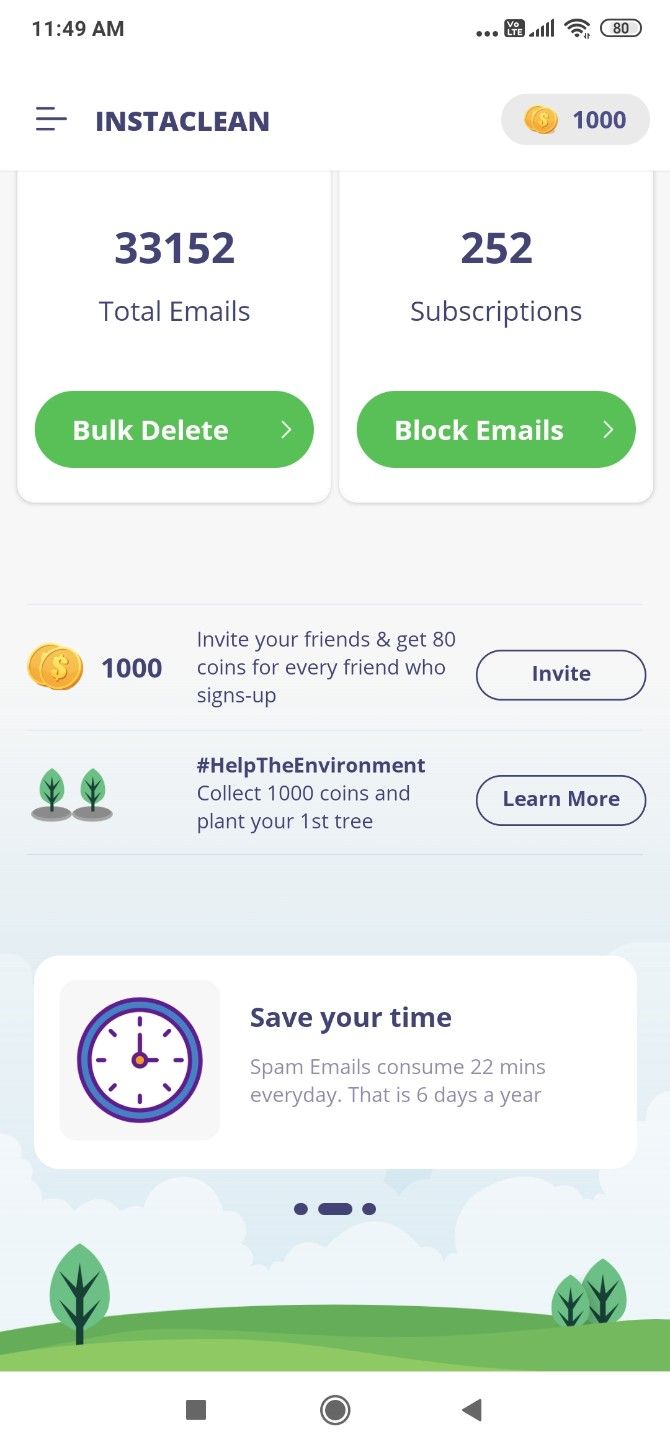
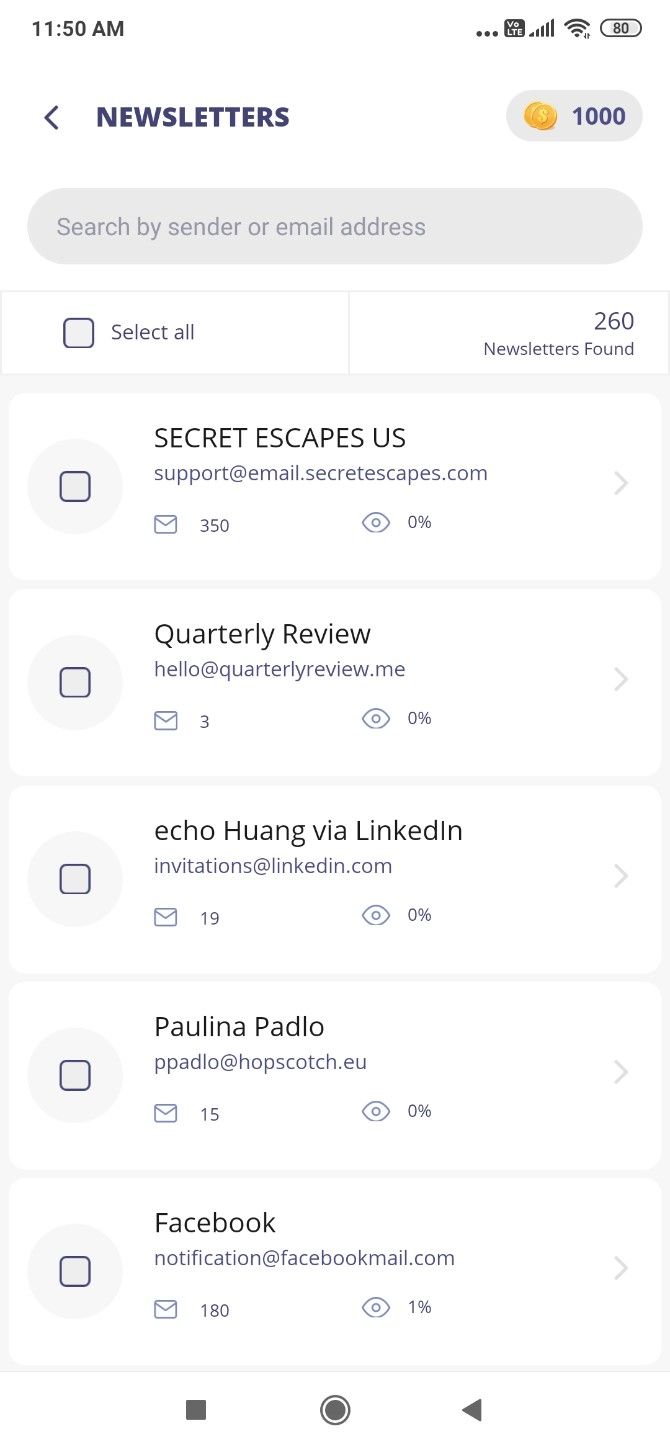
Instaclean is one of the best free apps to manage your inbox. It lets you delete and block unwanted newsletters. And it shows you senders who are clogging up your inbox when you don’t even read their messages.

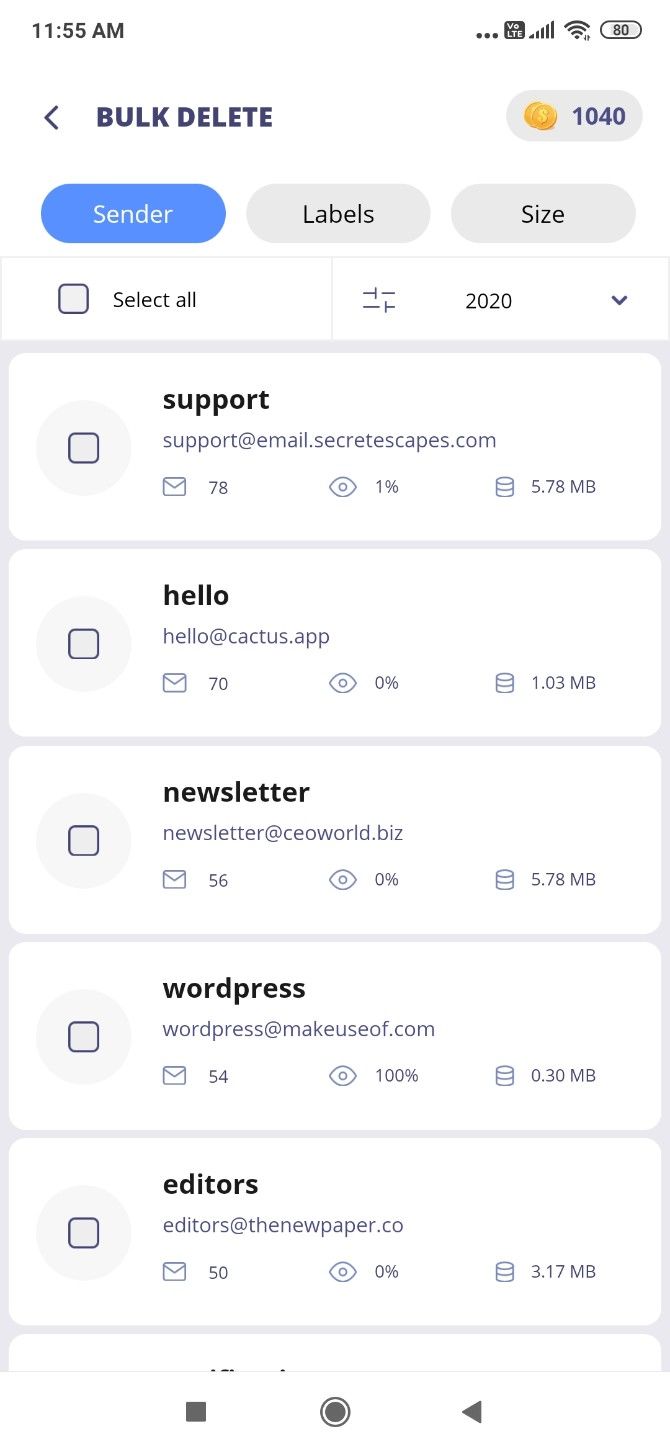
Bulk Delete sorts emails by sender, showing you how many of their messages are in your inbox and how many of them you have ever opened. If someone is sending you many emails and you open 0-1% of them, you might want to block that sender and delete all their messages still in your inbox. Emails can be sorted by sender or size.

The app also finds all the subscriptions you are getting emails from, which aren’t being sent to spam. In a few taps, you can block all such emails you no longer want to receive. It doesn’t delete all subscriptions, and you’ll have to do multiple passes. In a way, that’s good because you don’t want to accidentally remove something you like.

Each action (delete or block) rewards you with coins. Once you collect 1000 coins, you can use them for a good cause by asking Instaclean to plant a tree on your behalf. You can also earn coins by referring the app to friends.

Download: Instaclean for Android | iOS (Free)

3. Paced Email (Web): Get Frequent Emails as Batches and Summaries

Paced Email gives you an email alias to batch newsletters

Not every newsletter is unwanted, but it might be coming to you too often. Similarly, even if a colleague is trigger-happy with sending bulk emails on the office chain, you can’t ignore them. Paced Email lets you turn frequent messages into batches, so they land in your inbox when you want.

Register at the website to get your personal email alias, for example, john.doe@daily.paced.email. Then go to the newsletter, chain, or service that is mailing too often, and change your email address to this alias. Paced will then batch all emails from it and send it as a daily digest. If you want an email sooner, login to the website and trigger an immediate digest.

You also can also specify how often you want to receive emails from that service. By default, it’s daily as the email alias indicates, but you can change it to “weekly” or “monthly”. Paced will then send batches according to your preferences.

4. Slimbox (Web): Batch All Newsletters in Gmail

Slimbox finds newsletters in your inbox to turn them into a batch email

More than anything else, email newsletters are probably clogging up your inbox. Slimbox is an easy way to turn them into a single batched message, without having to unsubscribe or delete them.

There are a few reasons that make Slimbox better than the average app for batching. First, it’s verified by Google, so you can sign in to your Gmail or Google Apps inbox with the assurance that your data is safe. Second, Slimbox doesn’t make you change your email address in other services like Paced requires.

Once you’re logged in, the app will scan all your messages and prepare a list of frequent newsletters. You can choose to continue having them sent to your inbox or to put them into the daily Slimbox blast. Slimbox will send that email once a day (you can set your timezone), which hosts all the other emails you missed. It doesn’t affect your existing Gmail filters.

You can check your Slimbox at any time by signing into the site, change which senders go to the inbox or Slimbox, and so on. The service is free for a month to test it out, after which it costs $1 per month.

5. gfeed (Android, iOS): Scrolling Feed for a Faster Inbox

Try out gfeed and you’ll wonder why Gmail doesn’t have this option already. The app turns your inbox into a continuous scrolling feed of messages, like any social network. Images show up in preview, with the first few lines of the message below it.

To expand a message, tap the image, subject, or “more” link. There, you can reply to (or reply all) and forward that message through gfeed itself. This is good for basic text replies, but you’re mostly better off replying through the official Gmail app.

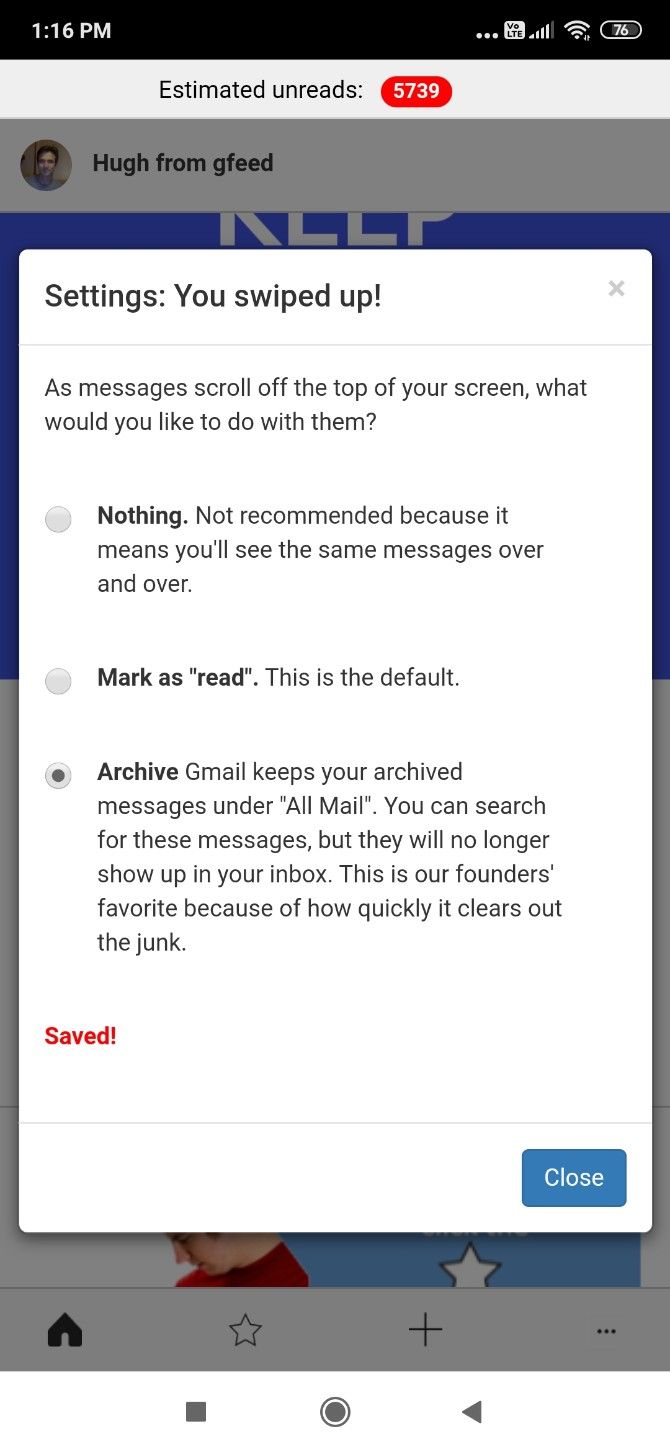
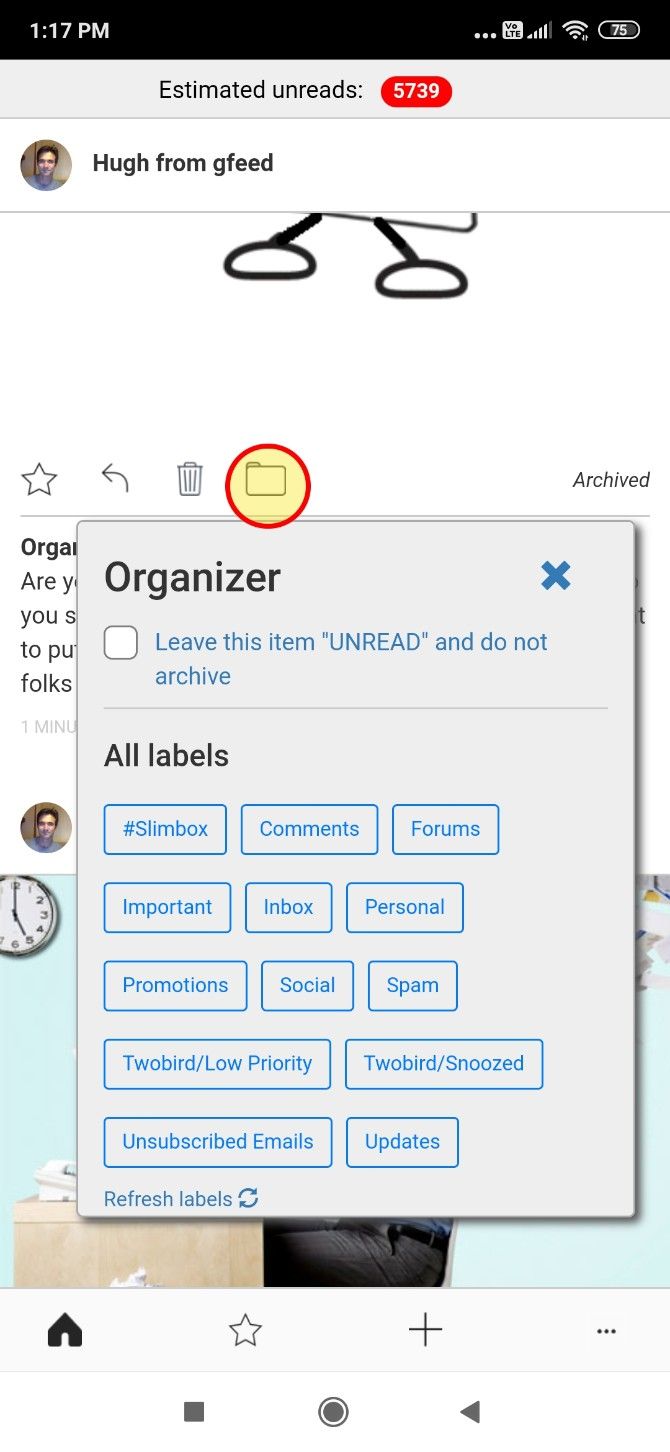
Every time you scroll past a message, gfeed will automatically mark it as read or archive it, depending on your settings. You can also star a message, or tag it with a label to add a filter. When you open Gmail, you can see those messages under that filter.

If you spend too much time going through your inbox, gfeed is among the best apps to speed up how you organize email.

Download: gfeed for Android | iOS (Free)

Archive Old Emails for Inbox Zero

Through one of these apps or a combination of multiple methods, that cluttered mess of emails should finally become much more manageable. Whether you’re aiming for inbox zero or a more organized inbox, don’t forget to check out the tools already available.

For example, the most overlooked feature is the “Archive” button in email apps. It’s an excellent way to free up your inbox while still keeping emails available for search later. Here’s how you can archive old mails and reach inbox zero.

Read the full article: 5 Email-Cleaning Ways to Organize and Manage Your Inbox

16 Mar 19:01

Photos: See How Coronavirus Has Left U.S. Cities Eerily Deserted

by Carlie Porterfield, Forbes Staff
Coronavirus pandemic fears have kept people from some of the busiest places in the U.S.
16 Mar 18:58

Security Cam Survives Direct Hit from Nashville Tornado, Records the Whole Thing

by DL Cade

A security camera in the heart of Nashville, TN somehow managed to survive a direct hit from the devastating EF3 tornado that ripped through the city on March 3rd. The resulting footage is eye-opening.

The video was first shared on Twitter a few days ago by Metro Nashville PD.

“This was recorded by an MNPD Safety Camera mounted at Jefferson Street & 3rd Ave N,” reads the caption. “The camera continued to record on battery power for a short time after it lost electricity. Despite water damage to the camera housing, the stored video survived.”

The tornado really starts to hit around the 25 second mark, and by 45 seconds the scene looks apocalyptic. Sparks fly as wires are severed, stop lights go flying, and debris is dragged across the frame, before the camera is completely swallowed up in the water and wind. It’s a miracle the security cam wasn’t ripped off its perch.

For a second-by-second breakdown of the footage that was captured and what was happening on the scene during this harrowing 2-minute clip, check out this in-depth report by the Washington Post. As you can see from their satellite maps, the core of the tornado struck the camera “almost dead on” as it carved a path through downtown Nashville.

16 Mar 17:04

The History of the Plague: Every Major Epidemic in an Animated Map

by Colin Marshall

All of us have tried to come to grips with the coronavirus in different ways. Here on Open Culture we've featured online courses to get you conversant in the science around the pandemic, but readers of this site will also have sought out the most pertinent works of history and literature. That goes especially for those in need of reading material while in states of quarantine or lockdown (self-imposed or otherwise), and any list of recommended books must include Daniel Defoe's A Journal of the Plague Year and Albert Camus' The Plague. (I recently wrote about the experience of reading that last in Korea, where I live, for the Los Angeles Review of Books.) Both fictionalize local outbreaks of the bubonic plague, but how far and wide did that horrific and much-mythologized disease actually spread?

You can see exactly how far and wide in the animated historical map above, created by a Youtuber called EmperorTigerstar. It mainly covers the period of 431 BC to 1353 AD, during most of which the plague looks to have occurred in Europe, the Middle East, and Africa with some regularity. Up until the 1330s, the outbreaks stay small enough that you may have to view the map in fullscreen mode to ensure that you even see them.

But even the most casual students of history know what happened next: the best-known occurrence of the Black Death, whose peak lasted from 1347 to 1351 and which claimed somewhere between 75 to 200 million lives (including roughly half of Europe's entire population). Rendered, suitably, in black, the plague's spread comes eventually to look on the map like a sea of ink splashed violently across multiple continents.

The plague hardly died with the 1350s, a fact this map acknowledges. It would, writes EmperorTigerstar, "take years to go away, and even then there would be local outbreaks in individual cities for centuries." These Black Death aftershocks, "big in their own right," include the Great Plague of Milan in the 1630s, the Great Plague of Seville in the 1640s, and the Great Plague of London in the 1660s — the subject of Defoe's novel. When Camus wrote The Plague in 1947, the Algerian city of Oran in which he set its story had experienced its last outbreak of the disease just three years before (at least the fifth such experience in its history). Though harrowing stories are even now coming out of places like modern-day Milan, the coronavirus has yet to match the gruesome deadliness of the plagues featured in either of these books. But unless we understand how epidemics afflicted humanity in the past, we can hardly handle them properly in the present.

Related Content:

Free Courses on the Coronavirus: What You Need to Know About the Emerging Pandemic

Bill Gates Describes His Biggest Fear: “I Rate the Chance of a Widespread Epidemic Far Worse Than Ebola at Well Over 50 Percent” (2015)

The 1855 Map That Revolutionized Disease Prevention & Data Visualization: Discover John Snow’s Broad Street Pump Map

The Strange Dancing Plague of 1518: When Hundreds of People in France Could Not Stop Dancing for Months

200,000 Years of Staggering Human Population Growth Shown in an Animated Map

Animated Map Shows How the Five Major Religions Spread Across the World (3000 BC – 2000 AD)

Based in Seoul, Colin Marshall writes and broadcasts on cities, language, and culture. His projects include the book The Stateless City: a Walk through 21st-Century Los Angeles and the video series The City in Cinema. Follow him on Twitter at @colinmarshall or on Facebook.

The History of the Plague: Every Major Epidemic in an Animated Map is a post from: Open Culture. Follow us on Facebook, Twitter, and Google Plus, or get our Daily Email. And don't miss our big collections of Free Online Courses, Free Online Movies, Free eBooksFree Audio Books, Free Foreign Language Lessons, and MOOCs.

16 Mar 17:00

Use Your Time in Isolation to Learn Everything You’ve Always Wanted To: Free Online Courses, Audio Books, eBooks, Movies, Coloring Books & More

by Colin Marshall

"I have never let my schooling interfere with my education." Mark Twain may or may not have actually said that, but either way the sentiment resonates — and with a new strength now, since schools have closed all over the world in an attempt to halt the spread of the pandemic coronavirus. For many, this period of isolation (self-imposed or otherwise) represents an opportunity to rediscover the value of education: not the kind directed by an institution, but the much more valuable kind that runs on one's own steam. If you count among that select group of self-educators (or educators of children whom you can no longer send to school), we here at Open Culture have spent nearly the past decade and a half amassing just the resources you need.

At our selection of more than 1,500 free online courses, you can take deep dives into subjects from archaeology and architecture to law and literature to physics and psychology. (We've even got courses specifically designed to help you understand the coronavirus itself.) If you've been meaning to catch up on the work of the aforementioned Twain — or that of Dostoevsky, Wittgenstein, Kafka, and Proust, among others — he appears in our roundup of more than 800 free eBooks.

Should you prefer reading through earphones while exercising or cleaning — especially important activities these days — we can also offer you more than a thousand free audiobooks, whether you prefer Isaac Asimov or Jane Austen, Adrienne Rich or Charles Bukowski. (You can also get audiobooks from Audible if you sign up for a free 30-day trial there.)

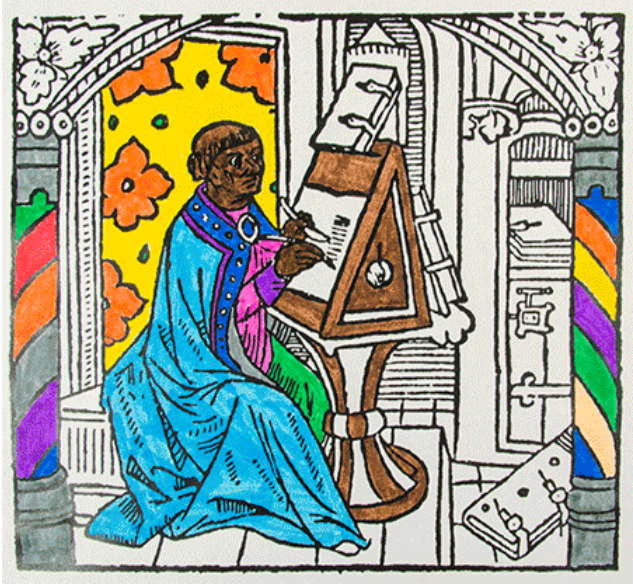
While quarantine puts a temporary stop to many of our usual activities, it shouldn't get in the way of movie night. Our collection of 1,1500 free movies will cover all your movie nights through the time of the coronavirus and then some, including as it does classic films noirs, thriller and horror pictures (including some by no less a suspense master than Alfred Hitchcock), documentaries, and even the fruits of the film industries of countries like Russia and South Korea. And though we can't get enough cinema here at Open Culture, it's hardly the only visual art form we feature: you might spend some time, for instance, with this collection of two million images from 30 world-class museums. This range of art also appears in free museum-produced coloring books geared to all ages.

If you'd like to use your time of "social distance" to develop skills other than coloring, we can point you toward resources for learning to cook, to draw (like an architect, like a Japanese mangaka, like Lynda Barry), to play the guitar, and to practice yoga. Bear in mind also the online-education offerings from Masterclass we've featured here on Open Culture, from "Margaret Atwood Teaches Creative Writing" to "David Sedaris Teaches Storytelling and Humor" to "Werner Herzog Teaches Filmmaking." Those aren't free, but everything else in this post is, including our collection of online language-learning resources. Having spread through world travel, the coronavirus will keep many wary of going abroad in the foreseeable future. But when the pandemic ends, you'll want to be prepared to enjoy foreign lands again. Italy, a country especially hard-hit by the virus, will surely welcome all the visitors it can get. Until then, why not get a grasp on its language — and its cuisine — with a course like MIT's "Learn Italian with Your Mouth Full"?

Related Content:

Free Courses on the Coronavirus: What You Need to Know About the Emerging Pandemic

Coursera Providing Free Access to Its Course Catalog to Universities Impacted by COVID-19

Why You Should Read The Plague, the Albert Camus Novel the Coronavirus Has Made a Bestseller Again

Quarantined Italians Send a Message to Themselves 10 Days Ago: What They Wish They Knew Then

Based in Seoul, Colin Marshall writes and broadcasts on cities, language, and culture. His projects include the book The Stateless City: a Walk through 21st-Century Los Angeles and the video series The City in Cinema. Follow him on Twitter at @colinmarshall or on Facebook.

Use Your Time in Isolation to Learn Everything You’ve Always Wanted To: Free Online Courses, Audio Books, eBooks, Movies, Coloring Books & More is a post from: Open Culture. Follow us on Facebook, Twitter, and Google Plus, or get our Daily Email. And don't miss our big collections of Free Online Courses, Free Online Movies, Free eBooksFree Audio Books, Free Foreign Language Lessons, and MOOCs.

16 Mar 16:57

How to Organize Your Photos on iPhone

by Shianne Edelmayer
iphone-photo-management

Few mobile devices offer you better photo quality than the iPhone. From its high-pixel resolution to the ease of syncing photos across all Apple products, Apple’s smartphone cameras are usually the number-one choice for capturing images.

Unfortunately—because it’s so easy to take good pictures—that also means you’ll end up with a lot of them. If you have thousands of pictures and you’re running out of space, here’s how to organize photos on your iPhone using several different methods.

Before You Begin: Some General Space-Saving Tips

Save Space on Your iPhone iCloud Photos

While we’re definitely going to break down the specific ways that you can organize your photos, we also wanted to give you a few space-saving tips to start:

  1. Always review your photos. It’s easy to take a few photos and forget about them, but those “few photos” can add up. To avoid a future backlog, get into the habit of looking over your photos after you’ve shot them. Quickly decide on which ones to delete.
  2. Don’t keep near-duplicate photos. Taking a bunch of photos back-to-back is a good way to give yourself a lot of options, but if the photos are nearly identical, you don’t need all of them. Get in the habit of deleting redundant copies to reduce photo storage clutter.
  3. Optimize your iPhone storage. On your iPhone under Settings > Photos, you’ll see an option called iCloud Photos. If you turn this setting on, your phone will automatically upload and store your full-sized photos in your iCloud account.

Now that you know about the different ways you can save some space, let’s talk about organizing your images in more detail.

1. How to Organize Photos on Your iPhone by Date

Every time you take a picture, a small piece of metadata is attached to that image. Part of this data is the date of capture, which allows you to search and organize your photos by date.

To organize iPhone photos by the date taken:

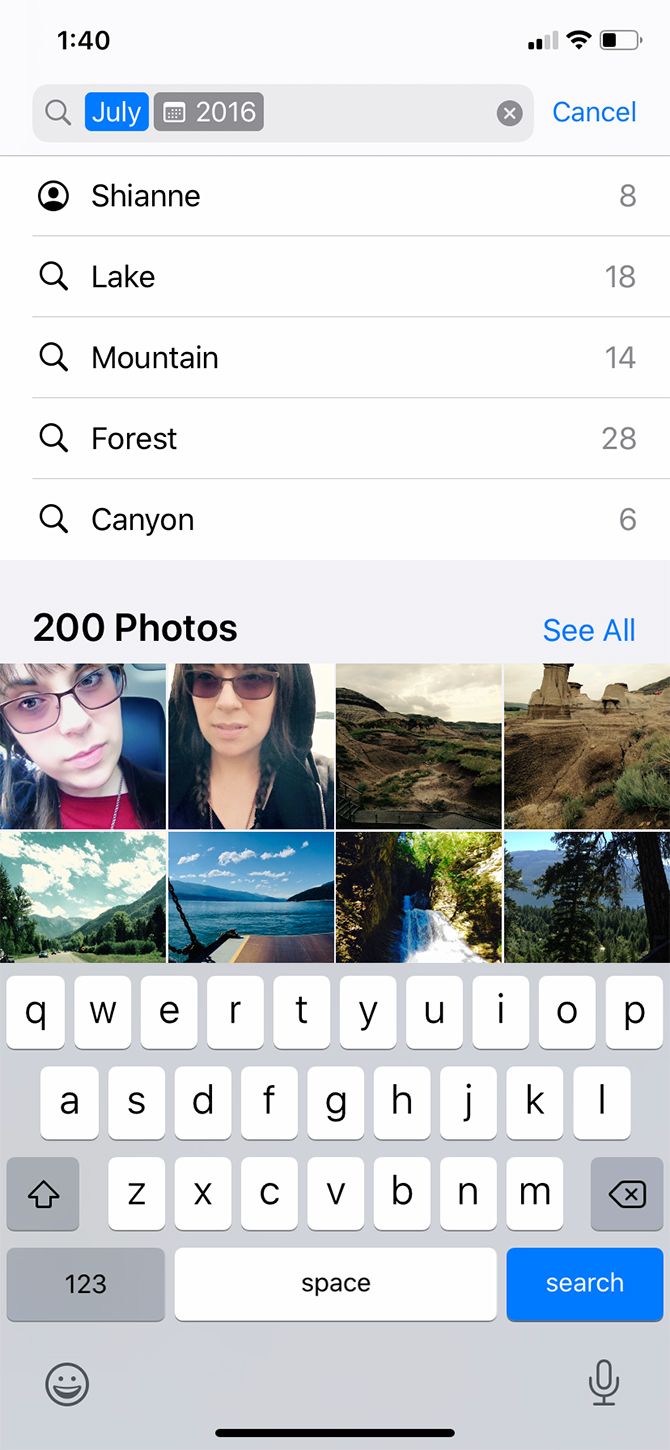
  1. Open the default Photos app and tap on the Search icon.
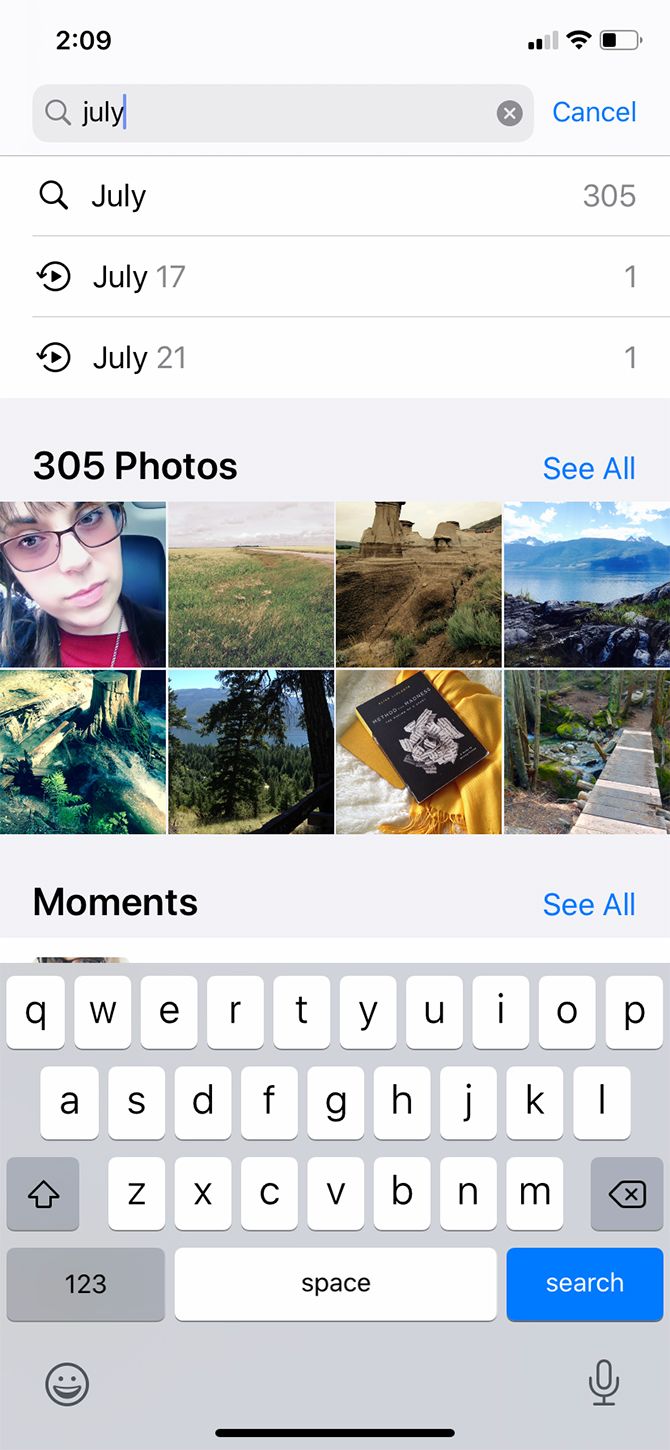
  2. In the search bar, type in a month or event. In this case, I chose “July.”
  3. When you type “July,” your phone will pull up all the photos that you took in that month. From there, you can narrow down your selection further.
  4. For instance, you might search for all the photos you took in July of 2016.

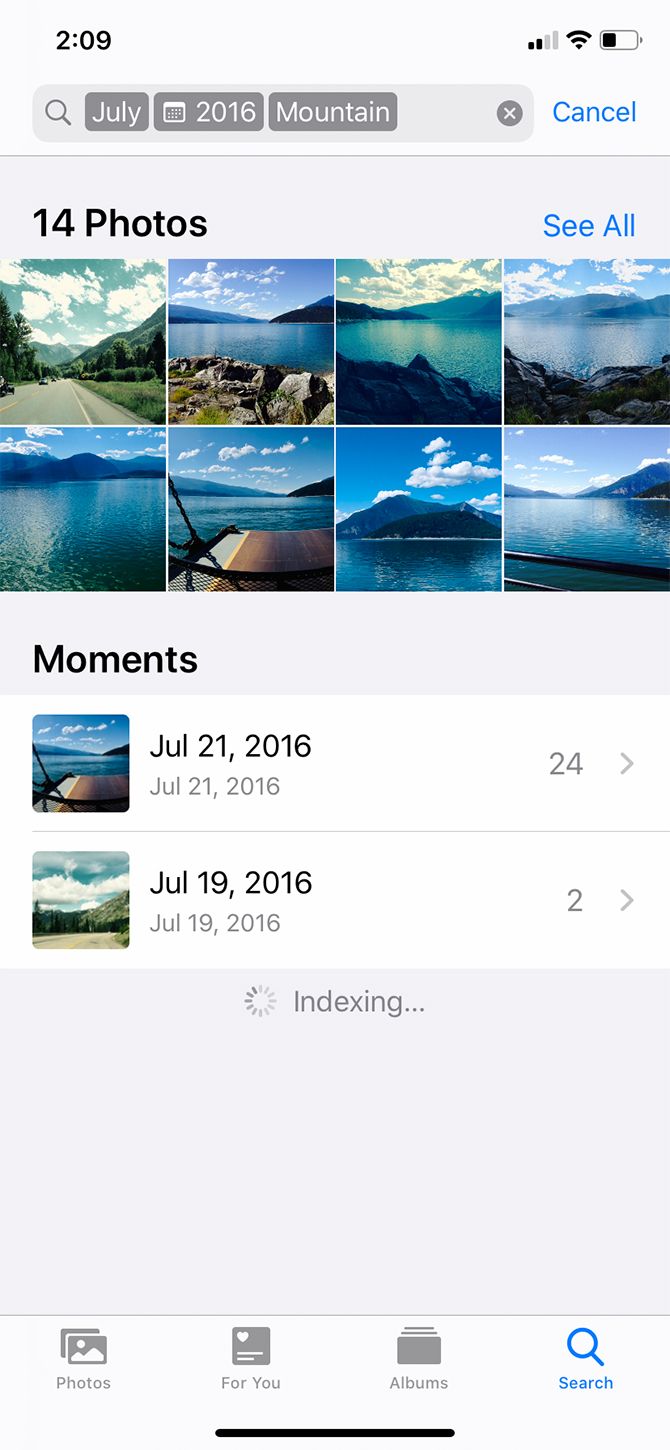
Another great feature about searching and organizing your photos by date is that the iPhone recognizes the content inside those pictures.

For example, I can narrow my search results again by using the tag “mountain.” This will pull up all the pictures of mountains that you took during July 2016.

2. How to Organize Photos on Your iPhone by Name

The next best way to organize photos on your iPhone is by name. This is a really handy method to find pictures of you or your friends.

Modern iPhones contain facial-recognition software. When you upload a picture, your phone will automatically detect and recognize different faces. It will then designate each of these unique faces as a “person.” Using this, Photos will group pictures of that person together, regardless of date or event.

However, organizing your photos by name requires a bit of setup. Here’s how to do it:

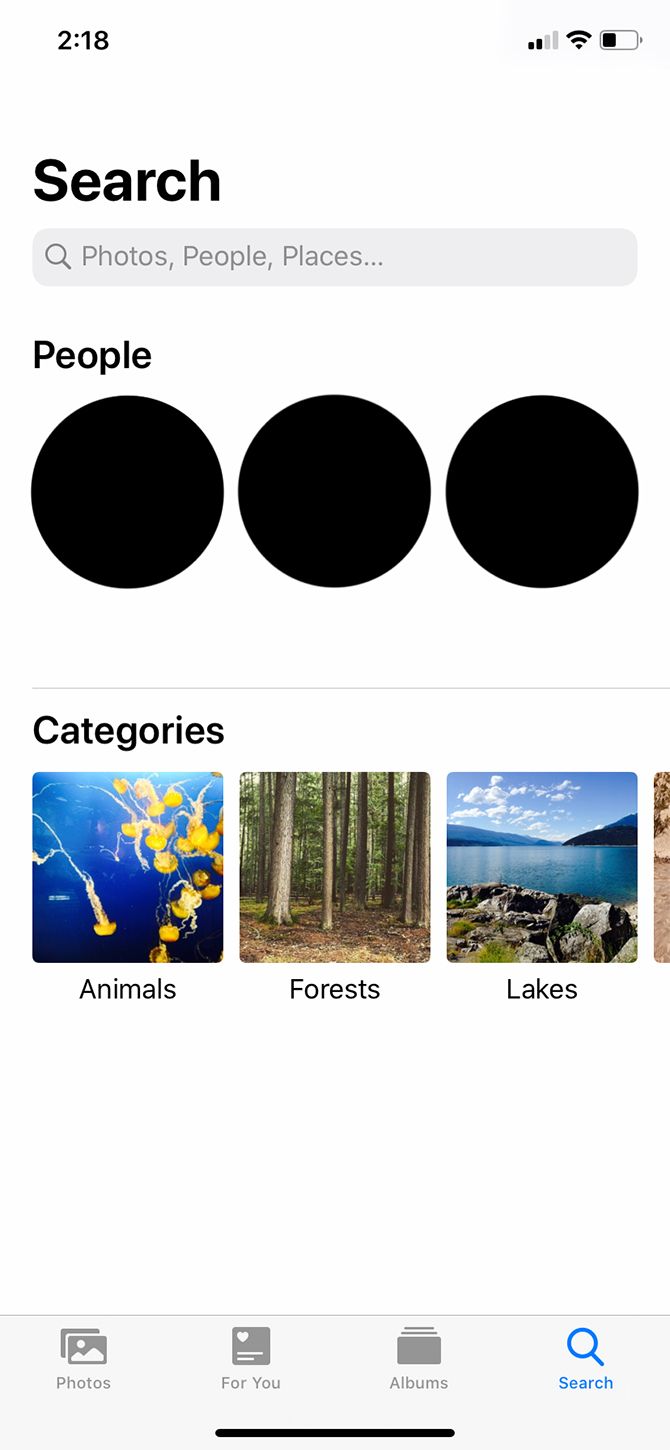
  1. First, go into the Photos app and tap Search.
  2. Under People, you’ll see a bunch of circles with faces in them. Select one of those faces and you’ll see a directory of all the pictures that contain that person.
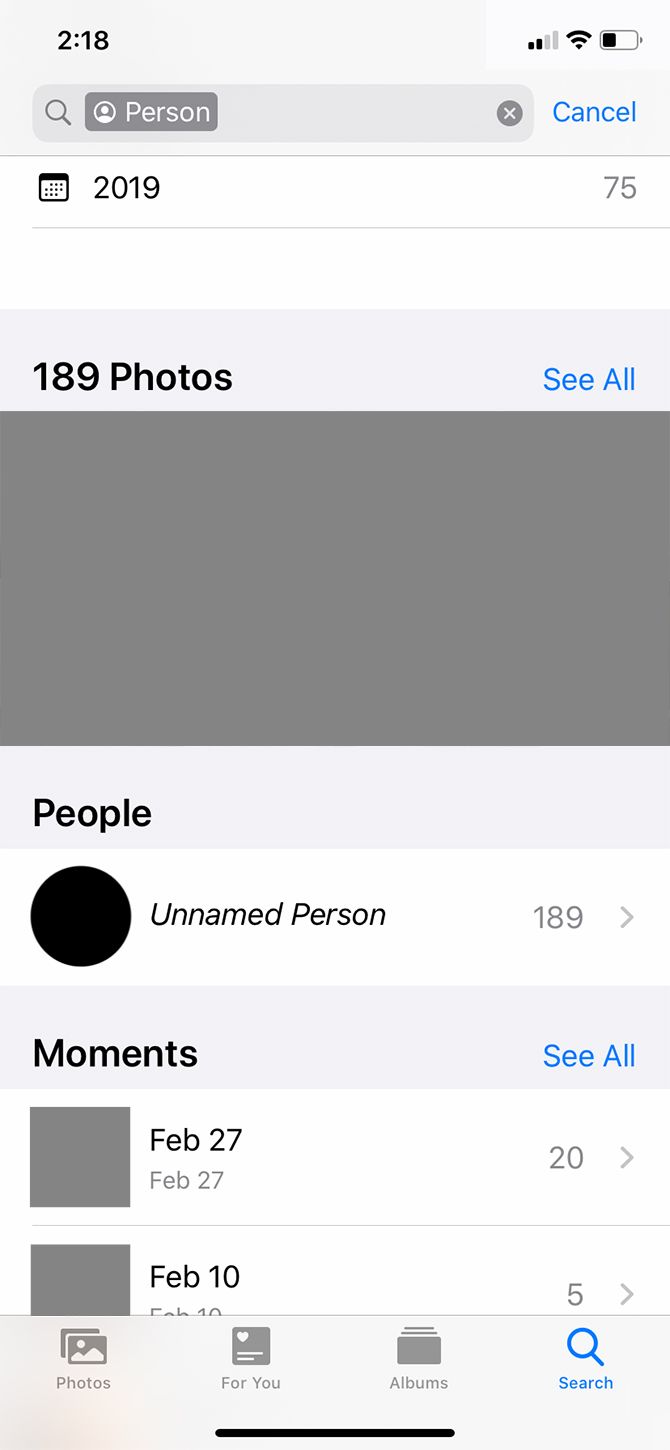
  3. You might also see a line that says Unnamed Person next to that person’s circle.
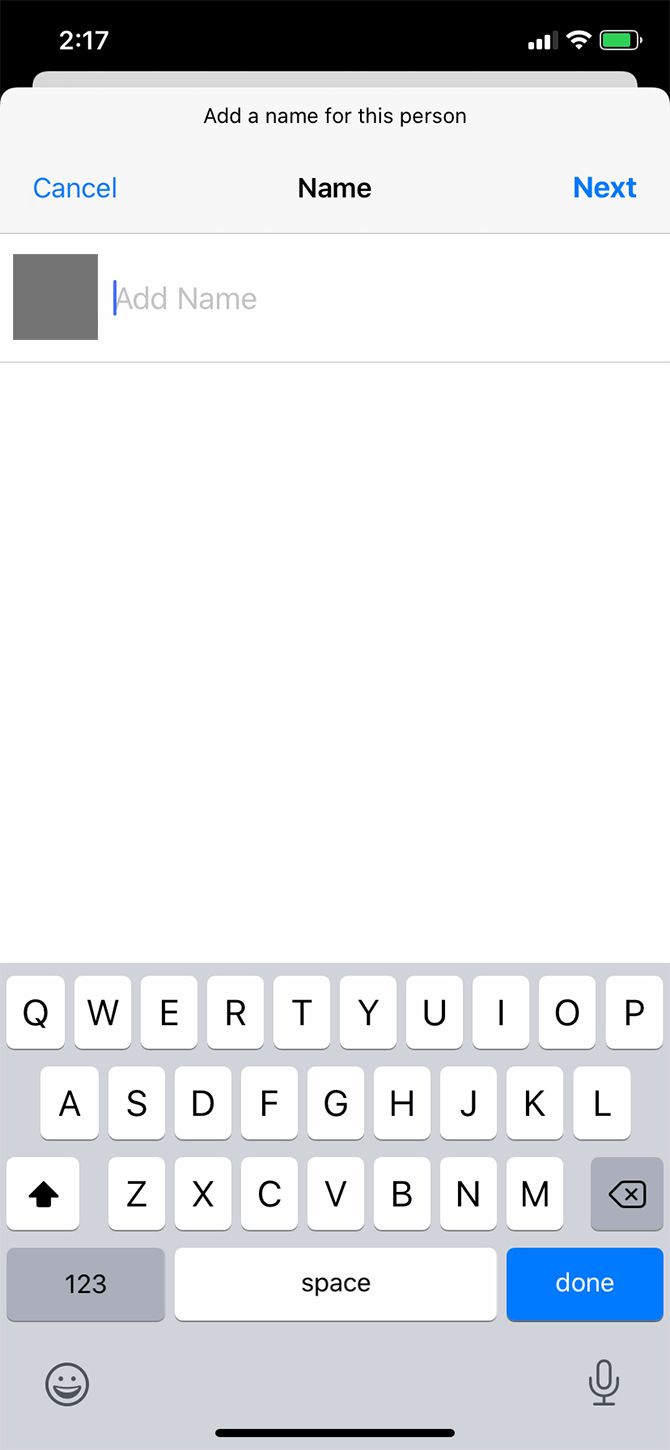
    1. To name them, tap on Unnamed Person > Add Name. Type their name in. Then tap Next > Done.

After you name that person, all photos with their face will automatically be tagged and searchable by their name.

If you go into the Albums section of the Photos app, you’ll also see that your device automatically creates an album for this person under People & Places.

3. How to Organize Photos on Your iPhone by Location

Another really great way to organize your iPhone photos is by location. Like the previous organization method, however, this one requires some work to get ready.

When you take a picture with your iPhone, the picture’s metadata automatically records the location of your photo—so long as you have Location Services turned on for your camera.

To turn on Location Services:

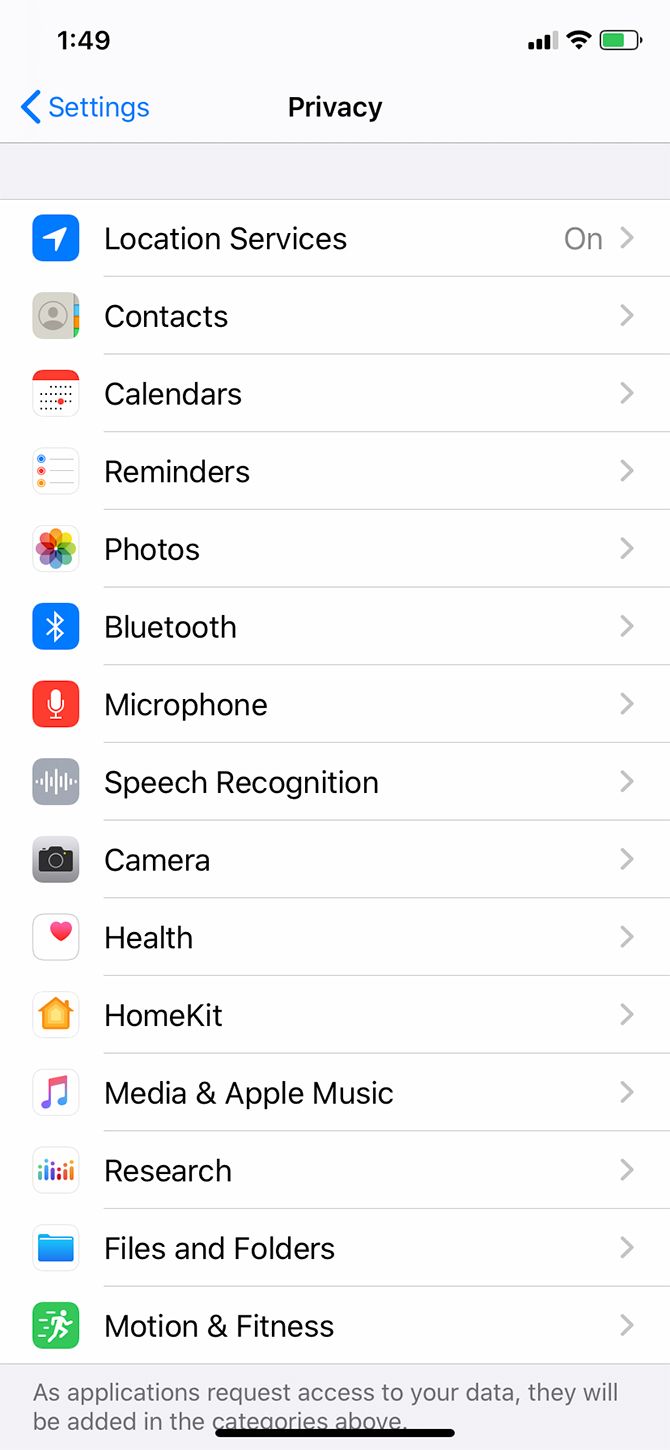
  1. Open the Settings app.
  2. Scroll down to Privacy.
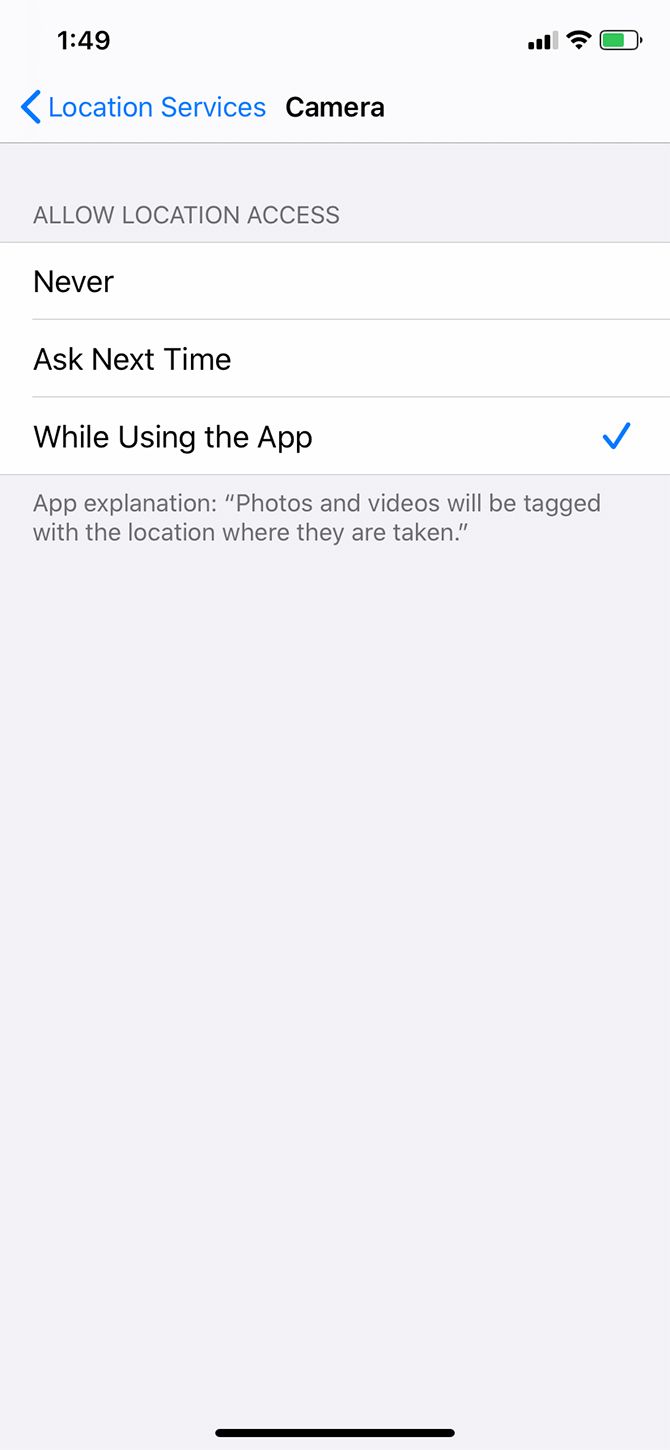
  3. Choose Location Services > Camera.
  4. Once you’re on Camera, tap Allow Location Access While Using the App.

Now that this setting is turned on, your iPhone will automatically geotag new images. It will then sort these location-based photos into a pre-made album.

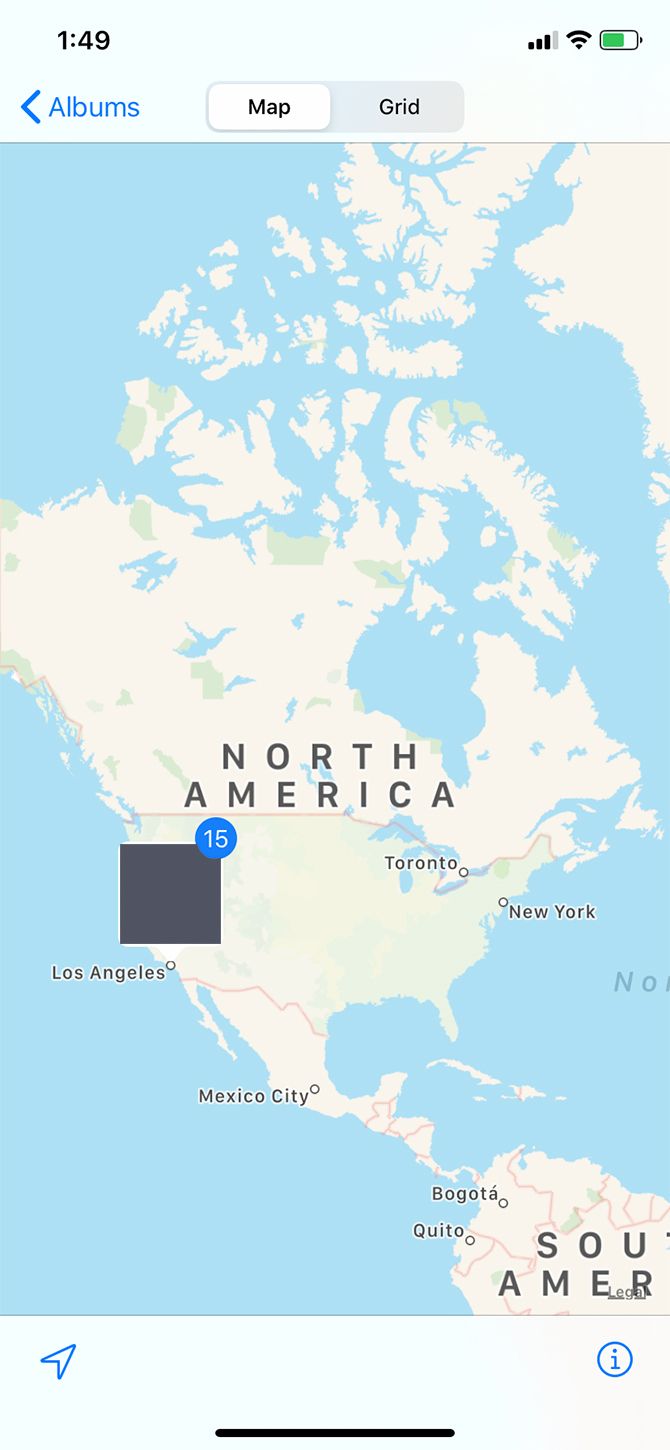
To view your pictures:

  1. Go to the Photos app.
  2. Under Albums > People & Places, tap on Places.
  3. On the map, tap on the thumbnail of the place that you want to view. You’ll see all the pictures from that location.

4. How to Organize Photos on Your iPhone Into Albums

Now let’s say you want to organize your photos into albums. This is the most straightforward method that people use to arrange their pictures, as it’s a good way to group photos that span multiple locations, dates, people, or events.

Basically, manual albums are good for anything that your iPhone can’t automatically sort on its own.

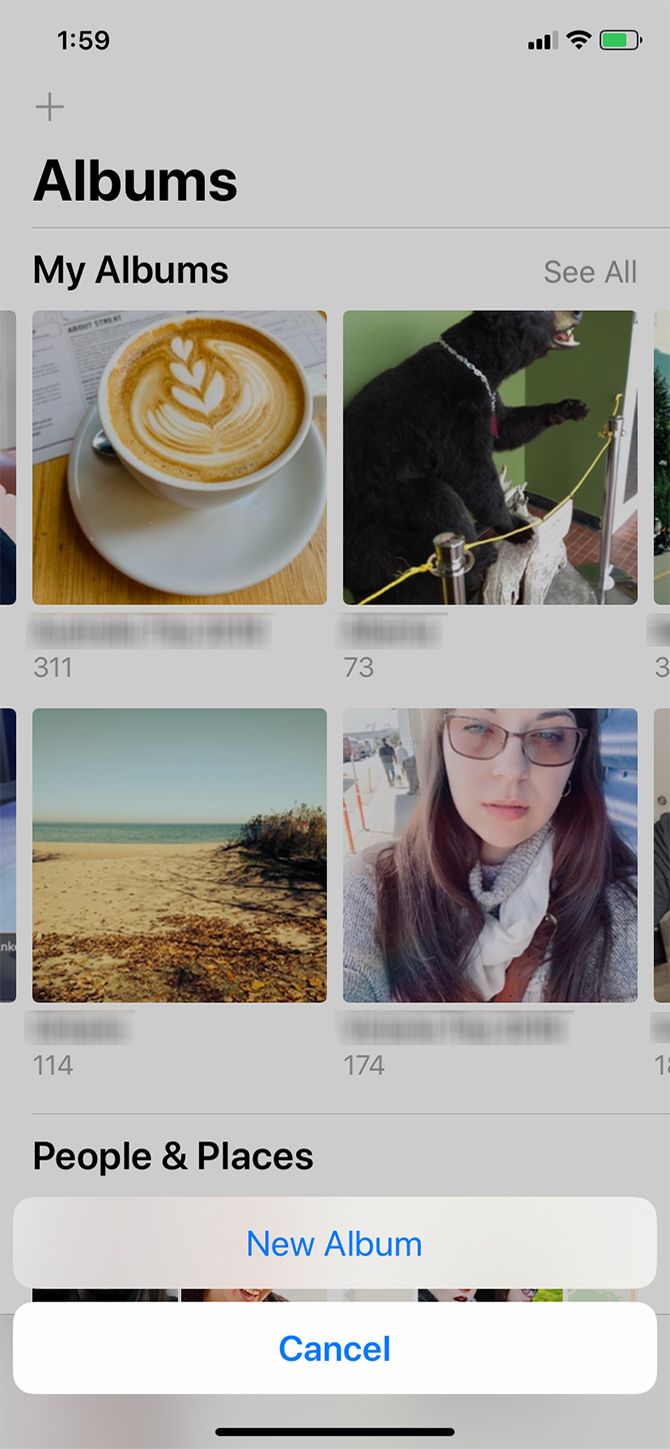
To create a new photo album:

  1. Launch the Photos app and tap on Albums.
  2. In the top-left corner of the screen, tap on the Plus (+) sign.
  3. Choose New Album.
  4. Once you tap New Album, you’ll be prompted to name the album. After you name it, choose Save.
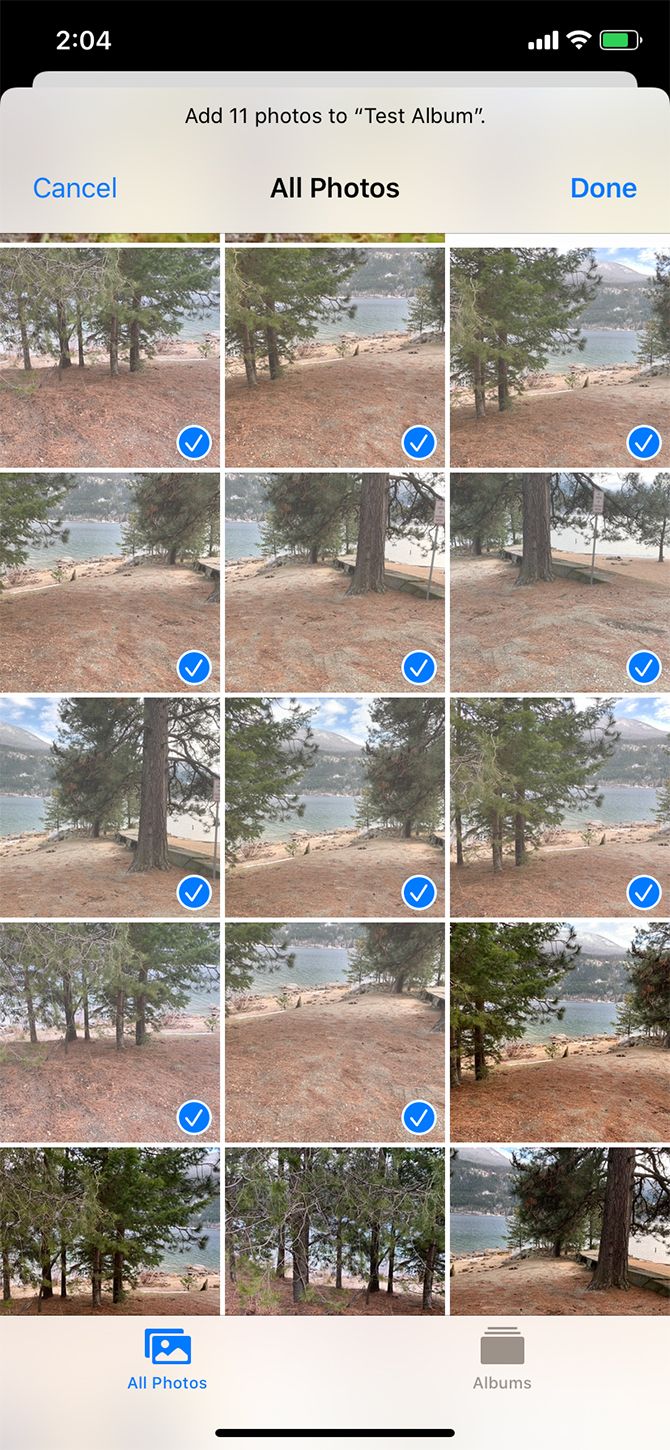
  5. Once the album is named, you can begin adding photos.

If there are photos on your phone that you forgot to add to the album:

  1. Go to your Albums section. Tap on Recents or My Photo Stream.
  2. Tap Select in the top-right corner.
  3. Select the photos that you want to add.
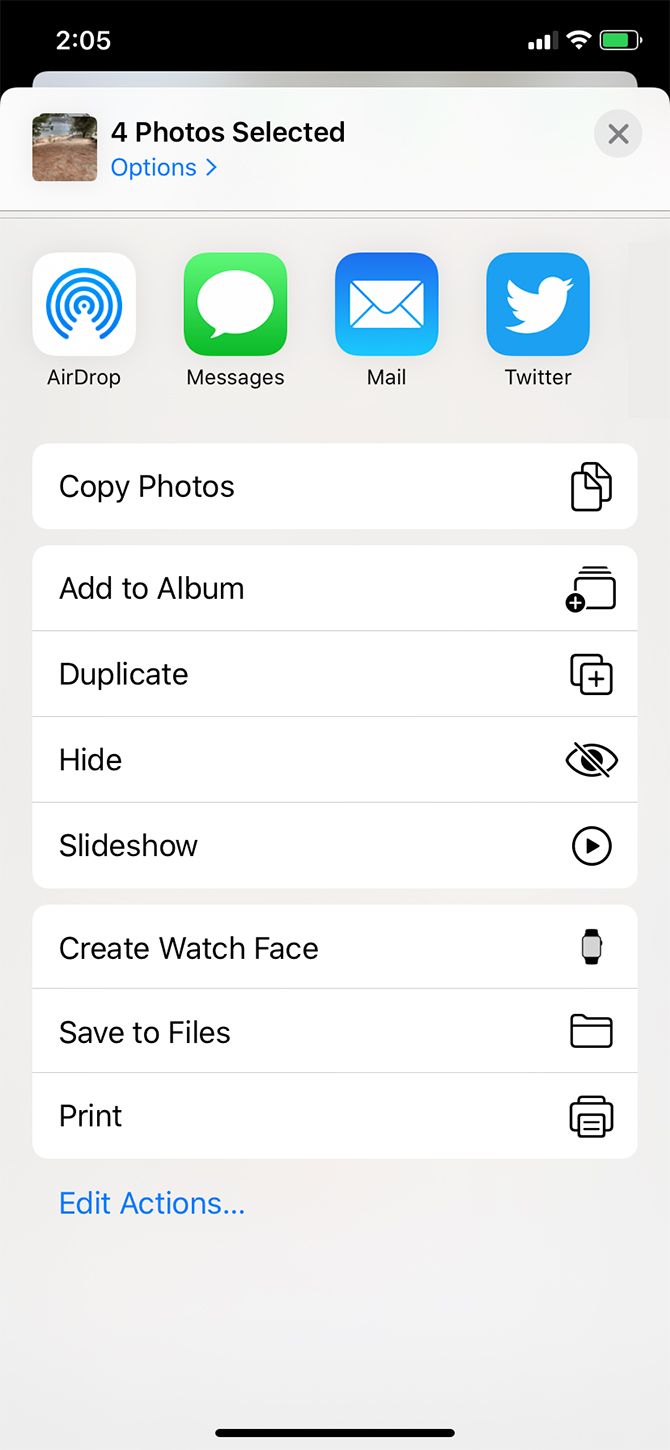
  4. Tap on the upward-facing arrow, located in the bottom-left corner of your screen.
  5. Select Add to Album. Choose the album you want to add these photos to.

From here on—whenever you need to find photos from a multi-day event—you should be able to go into your Photos app and view the appropriate album.

5. How to Organize Your iPhone Photos on Your Computer

Organize Photos on iPhone on Computer

There is yet another way that you can organize your iPhone photos: through your iMac or MacBook computer.

If you have the latest version of macOS installed on your computer, you should have a built-in utilities app called Photos. This app corresponds with your iPhone’s Photos app.

When you upload pictures from your iPhone to your computer, the app should work in a very similar manner. Once again:

  • The Photos app allows you to sort through your photos by People, Places, and date.
  • You can tag people’s faces to organize their photos by name.

To learn more about this app, check out our starter tips for managing your Mac photo library.

Better Organize Photos on Your iPhone

With a couple quick tips and tricks, you’ll be well on your way to organizing photos on your iPhone. Like Google Photos, Apple’s built-in Photos app is an incredibly powerful tool, and one you should take advantage of.

There is another way you should organize and clean up space on your iPhone: deleting duplicate images. Here’s how to delete duplicate photos on your iPhone using free or nearly free apps.

Read the full article: How to Organize Your Photos on iPhone

16 Mar 16:57

5 Free and Modern Online Image Editors to Replace Clunky Programs & Apps

by Mihir Patkar
Modern Online Image Editors

You don’t need to download software like Photoshop for basic photo editing. Everything you need can be found in your browser with these five free online image editors.

There are a few cool one-click photo enhancement websites, but sometimes, you need to do more. Whether you need to edit images in large batches, remove backgrounds from GIFs, or just add filters and stickers, there’s a simple and excellent online image editor for that.

Oh, and let’s also revisit a new version of one of the most popular photo editors ever.

1. Photostack (Web, Android): Batch Resize Images, Add Watermarks

Batch resize images and add watermarks with Photostack

Photostack would be a truly useful tool for bloggers, influencers, social media marketers, and anyone else who works with many images online regularly. This app does a few things and does it perfectly.

You can upload images through your hard drive, through Dropbox, or add links. Once the image batch is set, there are three things the app lets you do:

  1. Resize by width: You don’t need to worry about the height of the image. Simply put the width you want it to be, and Photostack will resize and scale.
  2. Add a watermark: You’ll need to upload the watermark to Photostack, where you can choose the position as well as set the size and opacity.
  3. File format and name: You can export all these images in JPEG, PNG, or WebP. You can also set a file name, and Photostack will add numbers with space in between the name and number.

You can download the images in a zip file or as separate files. Photostack also lets you remove EXIF data in the editing process. The app also works offline once you’ve opened it, and has a mobile version too.

Download: Photostack for Android (Free)

2. Doka Photo (Web): Easy, Free, Fast Image Editor with Filters and Markup

Doka Photo is an easy, free, and fast online image editor to use in browsers

There are a lot of free online photo editors to make an image look exactly like you want it to. I find myself going back to Doka photo editor often because it’s free, easy, and fast while offering most of the features I need.

It feels like a lot of the tools you are accustomed to using with apps like Instagram. Once you upload an image to Doka, you can crop, rotate, flip, and resize it. You can alter its colors (brightness, contrast, exposure, and saturation). You can add different filters. And you can markup the image with arrows, text, squares, circles, or by drawing on it.

The controls are easy, as is customization for each element. For example, if you draw an arrow, you can change it to double-headed, change its thickness, and so on. Doka doesn’t do anything fancy, but it does the basics really well.

3. Unscreen (Web): Remove Backgrounds from GIFs and Videos

Unscreen's smart AI removes backgrounds from GIFs and videos

It’s shocking what artificial intelligence can do these days. A short while ago, removing backgrounds from a simple photo required a good designer. Now Unscreen uses AI to remove backgrounds from GIFs and videos with astonishing ease.

You can upload a video or a GIF, or copy-paste links directly. Unscreen even has an easy option to search Giphy for the right GIF. Once you select or upload what you want, the AI goes to work. It’ll identify one foreground element and remove all background elements. You can’t choose what it sees as foreground and background though.

After removing the background, you’re ready to alter the GIF or video. You can keep the background transparent, add a solid color, or add a different image or moving video from the gallery. You can’t upload a custom background yet.

Unscreen works only on animated images and videos, so you can’t work with photos on it. But you don’t need Photoshop for that, there are several other easy ways to remove backgrounds from images.

4. Pixi Worker (Web): Easily Add Text, Stickers, Shapes to Photos

Pixi Worker image editor adds stickers, texts, speech bubbles, and other shapes to photos

If you want to make alterations to images like adding stickers, speech bubbles, and so on, Pixi Worker is an excellent online photo editor. It is much easier to operate than others and has more customization too.

Apart from drawing on the image, you can add text, shapes, stickers, and frames. The number of options in each is remarkable. For example, you can choose from a large collection of fonts that you won’t find in other apps. When you’re adding stickers, you can choose between emoticons, speech bubbles, doodles, landmarks, and other elements.

With such a large variety, you can get more creative with how you markup images. Along with that, Pixi Worker has all the usual image editing tools you would expect. You can crop images, resize them, change colors, and so on. The only markup tool Pixi Worker misses is watermarking.

5. Pixlr X and Pixlr E (Web): All-New Versions of Popular Image Editor

The new Pixlr X and Pixlr E are amazing online image editing apps that don't need Flash

For the longest time, Pixlr was the gold standard of online image editors. But then it was bought by Autodesk and the web dumped Adobe Flash, making it obsolete. Well, now the original developer is back in charge and has rewritten the photo editor in Canvas/WebGL to make it leaner, faster, and better than ever before.

It now comes in two avatars: Pixlr X and Pixlr E. Both versions work in any modern browser and have many of the same tools. They look modern and have all the features that any image editor should have. In both versions, you can search Unsplash for stock images or upload your own pictures from the hard drive or a URL.

Pixlr X is better suited for regular users who want basic tools and a lot of help, like a handy “auto-fix” button for optimal lighting of the photo. It has a sparse toolbar too. Pixlr E adds a few more tools, like layers, lasso and brush tool, a history pane, cloning, and so on. Try both the tools and see which one you like more, they’re free anyway.

Also, both Pixlr X and Pixlr E work perfectly in mobile browsers, in case you need a robust image editing app on your smartphone.

Replace Photoshop With Web Apps

These aren’t the only image editing web apps, and in fact, there are several we have covered already. Pixlr E comes close as a great alternative for Adobe Photoshop, but there are perhaps even better tools for it.

So, go ahead and try these free online replacements for Photoshop, especially Photopea.

Read the full article: 5 Free and Modern Online Image Editors to Replace Clunky Programs & Apps

16 Mar 16:56

100+ Effective Tips for Saving Money

by Akshata Shanbhag
Hand holding out a fan made of dollar bills

Want to build an emergency fund or save enough money to fulfil a long-standing dream? Maybe you just want to stop living paycheck to paycheck. Whatever your money goals happen to be, you can inch closer to them with a few changes to your lifestyle and habits. Our cheat sheet below can help you with that.

The cheat sheet covers more than a hundred ideas to help you save money. Pick your favorites and start applying them to your life.

Don’t dismiss any of the ideas as too simple, trivial, or insufficient to make a significant difference to your finances. Remember, it’s okay to start small and build better money-saving habits over time. And the cumulative impact of baby steps needs to be seen to be believed!

FREE DOWNLOAD: This cheat sheet is available as a downloadable PDF from our distribution partner, TradePub. You will have to complete a short form to access it for the first time only. Download 100+ Effective Tips for Saving Money.

100+ Effective Tips for Saving Money

Tips
Banking, Bills, and Payments
■ Set up automatic transfer of money from every paycheck to a savings account.
■ Avoid ATM withdrawals that will cost you fees.
■ Pay your bills on time to avoid late fees.
■ Stash away money from windfalls and refunds instead of spending it.
■ Declutter subscriptions and memberships often.
■ Cancel automatic subscriptions and memberships.
■ Round up purchases to the nearest dollar and add the difference to your savings.
■ Shop around for better deals on broadband, credit cards, insurance, phone plans, and streaming subscriptions.
■ Refinance your mortgage and auto loan.
■ Switch to a high-yield savings account.
■ Pay your credit card dues in full every month to avoid paying interest.
■ Switch from monthly to half-yearly or yearly insurance payments to avoid unncessary fees.
■ Look for hidden fees on every purchase.
■ Pay attention to incorrect charges on bills so you can dispute said bills.
■ Get multiple quotes for services to get cheaper deals.
■ Find ways to save tax on your earnings.
■ Sign up for customer rewards programs.
■ Get overdraft fees waived if possible.
■ Opt out of overdraft protection (and keep a close eye on your account balance.)
Home
■ Get an energy audit of your home.
■ Switch to energy-efficient lighting and appliances.
■ Develop energy-efficient habits, such as switching off the lights while leaving a room.
■ Unplug inactive appliances or plug them into a power strip so you can turn everything on and off with the press of a button.
■ Switch to solar-powered gadgets where feasible.
■ Keep your automobiles and electronics in top shape.
■ Avoid electronic and automobile upgrades for novelty value.
■ While buying a phone, buy a model or two older than the latest one.
■ Ditch your landline.
■ Lower the temperature on your thermostat.
■ Switch to a programmable thermostat.
■ Don’t heat unused rooms.
■ Insulate your home well.
■ Use fans instead of air conditioning.
■ Install faucet aerators to reduce water costs.
■ Fix leaky faucets and other broken items around the house.
■ Pick up housewares from yard sales.
■ Move furniture around to give your home a simple makeover.
■ Cook meals at home. (But skip recipes that require buying ingredients you probably won’t use again.)
■ Carry water and coffee from home.
■ Eat seasonal foods.
■ Eat local foods.
■ Buy staples in bulk and during sales.
■ Cut down on one supermarket trip every month and shop from your pantry instead.
■ Don’t shop when you’re hungry.
■ Get creative with leftovers.
■ When possible, choose potluck meals over catered ones for events.
■ Make meal-planning a habit to avoid ordering takeout.
■ Buy a crockpot for filling yet inexpensive meals.
■ Make your own cleaning supplies.
■ Declutter your stuff and stop paying for a storage unit.
■ Switch to cold water for doing laundry.
■ Switch from a dryer to a clothesline for drying clothes.
■ Adopt a pet instead of shopping for one.
■ Groom your pet yourself.
■ Buy locally made pet food.
■ Swap pet-watching duties with another pet owner.
Entertainment and Lifestyle
■ Cancel costly packages and add-ons from your cable TV subscription. OR
Switch from cable TV to streaming services.
■ Lower your cell phone bill by getting rid of extras.
■ Borrow books and DVDs from public libraries.
■ Play board games instead of going to the mall.
■ Swap clothes, books, games, music, sports equipment, and other supplies with friends and family.
■ Make your next holiday a staycation.
■ Choose AirBnbs over hotels when you travel.
■ House swap with friends and family for a vacation.
■ Time a vacation to coincide with the end of a work trip and in the same location.
■ Travel hack.
■ Build a minimalist wardrobe.
■ Avoid buying clothes that need to be dry cleaned.
■ Cut your own hair.
■ Volunteer as a model at a beauty school for free/discounted haircuts and other beauty treatments.
■ Use up toiletries and cosmetics before buying new products.
■ Switch to inexpensive/drugstore brands for toiletries and cosmetics.
■ Make your own shampoo.
■ Shop from duty-free stores when you travel internationally.
■ Pay in cash whenever possible.
■ Pick free online tutorials over paid classes when you can.
■ Find free/inexpensive hobbies and activities for yourself and for your kids.
■ Keep an eye out for free local events, classes, and workshops.
■ Create a shopping list and stick to it.
■ Buy with reward points.
■ Run the household on one person’s paycheck and save the rest.
■ Walk where you can. It gives you a free workout and saves on transportation costs.
■ Reduce the number of cars you own.
■ Wash your car yourself.
■ Stick to the speed limit to avoid fines as well as inefficient gas usage.
■ Ride a bike instead of driving a car.
■ Take public transport more often.
■ Carpool more often.
■ Work from home more often.
■ Move closer to work.
■ Move to a cheaper neighborhood.
■ Move to a smaller home.
■ Cut down on smoking and alcohol.
■ Reduce meat consumption.
■ Split restaurant meals.
■ Ask for a doggy bag to take leftovers home.
■ Empty coins into a piggy bank.
■ Buy used, refurbished, or open-box electronics.
■ Use free and open-source software.
■ Watch free movies online instead of going to the theater.
■ Buy thoughtful, yet inexpensive gifts.
General
■ Replace disposables with reusables.
■ Sell items you don’t use.
■ Rent instead of buying, when possible.
■ Buy multipurpose items.
■ To save money in the long run, don’t skimp on quality.
■ Buy used items when you can.
■ Choose generic brands over name brands.
■ Shop around for deals, discounts, and coupons.
■ Use cashback cards, apps, and sites.
■ Clip coupons.
■ Avoid impulse buys.
■ Downgrade your subscriptions.
■ Downsize your orders.
■ Consider going without.
■ Learn DIY skills using free online resources.
■ Trade goods and services with friends and family.
■ Join local freecycling groups to donate/request useful items.
■ Look for free solutions (if feasible) to replace items and services you’re paying for.

You’re Richer Than You Think!

Track where your money goes. Pay yourself first. Make it automatic. With this simple three-step plan and the ideas mentioned in the cheat sheet above, you can turn your financial life around. If you need some tech-based help along the way, use these free sites and apps to reduce spending and save money.

Read the full article: 100+ Effective Tips for Saving Money

16 Mar 16:24

Coronavirus Map: How To Track Coronavirus Spread Across The Globe

by Trevor Nace, Contributor
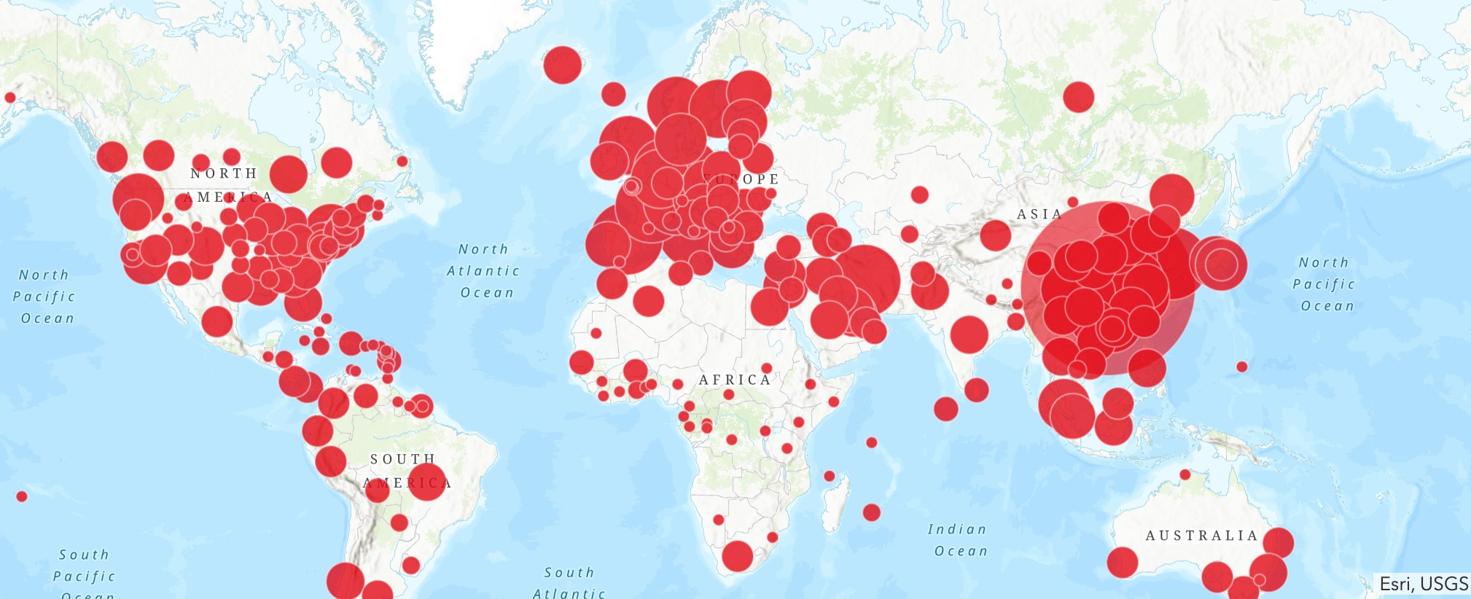
As COVID-19 (coronavirus) spreads across the globe, it is helpful and interesting to track the transmission patterns through a coronavirus map.
16 Mar 16:18

Scientists Create Focus-Free Camera Using an Ultra-Flat Lens

by Michael Zhang

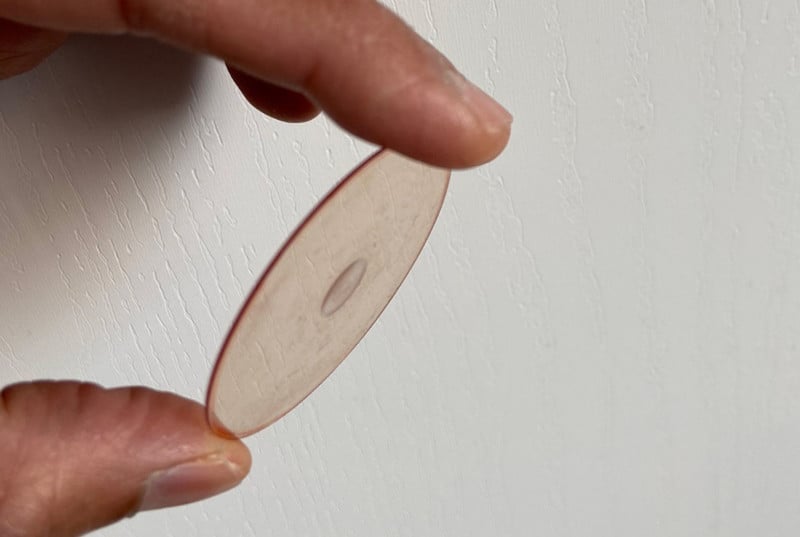
Scientists have created a new focus-free camera using an ultra-flat lens that “eliminates the need for focusing.” The development could have an impact on both photography and a wide range of industries.

The research is being done by a team led by Electrical and Computer Engineering Professor Rajesh Menon of the University of Utah, who reported the development of the lens back in October 2019.

Using that lens, which only measures about 1/1000th of an inch thick, Menon and his team created a new camera that doesn’t need to be focused. While traditional camera lenses use multiple lens elements and need to adjust the relative positioning of those elements to nail focus on subjects, the new flat lens provides “extreme depth-of-focus imaging” that keeps all subjects in focus.

In an article published in the journal Optica, the researchers describe how they used nanostructures on the surface of the flat lens to precisely control the way light travels through it. Subjects that are various distances from the camera are all in focus. Here’s a video with two clips shot with the flat lens in front of a conventional camera sensor:

“The new lens eliminates the need for focusing and allows any camera to keep all the objects in focus simultaneously,” Menon tells Business Wire. “Conventional cameras also use multiple lenses to keep different colors of light in focus simultaneously. Since our design is very general, we can also use it to create a single flat lens that focuses all colors of light, drastically simplifying cameras even further.”

The researchers say their latest breakthrough came when they realized that there were other ways to direct light besides using traditional lenses to turn parallel light waves into spherical ones that converge on a focal spot.

“In stark contrast to what is taught in optics textbooks, our research has shown that there is more than one way that light transmission is affected by an ideal lens – a concept known as pupil function,” Menon says. “This opened essentially infinite possibilities for the lens pupil function, and we searched through these possibilities for one that achieved an extreme depth of focus.”

Menon believes the lens and camera could one day be used in everything from still photography on smartphones to medical imaging to self-driving cars.

“Our flat lenses can drastically reduce the weight, complexity and cost of cameras and other imaging systems, while increasing their functionality,” he says. “This research is a good example of how abandoning traditional notions can enable devices previously considered impossible. It serves as a good reminder to question dictates from the past.”

(via Phys.org and Business Wire)


Image credits: Header photo by Rajesh Menon, University of Utah. Video by Apratim Majumder, Sourangsu Banerji, Monjurul Meem, Rajesh Menon, University of Utah

15 Mar 18:13

Mexico Is Considering Closing Its Border To Stop Americans Bringing Wuhan Coronavirus Into Country

by Nickarama
Irony, thy name is Wuhan coronavirus. Via Daily Mail: For once, the conversation over closing the US-Mexico border is being driven b Mexican health officials who say they are considering shutting out Americans to keep coronavirus out of their country. There are currently more than 2,000 cases of the virus in the US and it […]
15 Mar 17:41

What does the coronavirus mean for business?

by Conor Grant

By Conor Grant

Whether you’ve been told to work from home indefinitely, leave your college campus mid-semester, or cancel plans to catch a Broadway show or an NBA game, you’ve probably seen the coronavirus affect your life by now.

And if you’ve been watching the markets — which have been tumultuous, to say the least — you’ve probably realized the coronavirus is having a big impact on the business world, too.

Over the coming weeks and months, few aspects of business won’t be affected to some degree by the coronavirus. 

But how deep will its impact go?

To answer that question, we’ve canvased the country, talking to business owners, workers, and consumers, and evaluating the effect on major institutions, events and markets.

Below, we break down how all those groups have been impacted, how they’re responding, and what to look out for in the coming weeks:

1. Business owners

Impact: The coronavirus is scattering workforces, straining supply chains, and diminishing demand, making it more expensive for businesses to operate and harder to sell their products.

Response: Businesses are telling their employees to work from home (if they can), adjusting their forecasts downward, and developing contingency plans to continue operating.

Some examples:

More than 150 publicly traded businesses have issued warnings to their investors, detailing temporary store closings, lost sales, and other missed revenue.

Boeing halted hiring and eliminated overtime to conserve cash as its stock has dropped.

Companies — like Hilton, eBay, Disney, United Airlines, and Royal Caribbean Cruises — are opening credit lines to make sure they have enough cash to finance their operations.

What to watch:

Workforces will continue to evolve. New positions will emerge (experts recommend that businesses appoint “coronavirus coordinators,” for example), and after the pandemic ends some of these roles — particularly ones that cater to remote workers — may continue. Other companies may realize some positions should remain remote.

Businesses will develop new ways to sell… or fail. The success of these strategies — revamped online sales funnels, virtual experiences — will determine which companies survive and which don’t. Airlines, for example, are particularly vulnerable: A British airline called Flybe has already gone out of business.

Contingency plans will crop up everywhere. As businesses learn where their single points of failure were, companies that survive will take steps to reduce future risk. Many employers — including the federal government — are scrambling to develop work-from-home policies.

2. Workers

Impact: The coronavirus is making it more dangerous to commute to work on public transportation and more dangerous to work in crowded places.

Response: Employees with flexible employers are working from home and trying their best to stay productive. Employees with less flexible employers — or jobs that can’t be done remotely — are attempting to stay healthy at work and demanding protections from their employers.

Some examples:

Employees at Facebook. Google, Amazon, and other large tech companies were asked to work from home. 

Amazon offered employees unlimited sick days — but only people infected with the coronavirus are entitled to pay.

Meanwhile, employees at restaurants and other service industry businesses that require in-person work are protesting their lack of access to paid sick leave.

On the other hand, Trader Joe’s employees — who also can’t work remotely — gained access to a new paid sick leave program. 

And some employees working in jobs that could expose them to the virus — like baristas at Starbucks — even became eligible to earn “catastrophe pay.”

What to watch:

Unprotected workers are going to get loud. Criticisms about the lack of paid sick leave and benefits for gig workers were already common, and now the pandemic has thrown those issues into the limelight.

Employers will get serious about remote work. Companies that had only dipped their toes into developing remote work policies will now be forced to develop them to attract — and support — remote workers.

3. Consumers

Impact: The coronavirus is discouraging consumers — including normal folks like this elderly couple — from going out to buy non-essential items. 

Response: A slowdown in non-essential spending has already begun, and economists estimate spending on food services, arts and accommodations will drop 80% and spending on public transportation will drop 67% if the pandemic continues. At the same time, however, consumers have increased spending on certain products (like surgical masks and other hygiene products) which has led to price gouging.

Some examples:

Aerial photos show that some of the world’s most popular travel destinations are nearly empty of tourists.

Desperate cruise companies and airlines are waiving change fees and offering steep discounts to attract customers.

Amtrak cancellations are up 300%.

Some movie theaters are promising to put empty seats in between viewers to get moviegoers through their doors.

People have been panic-buying toilet paper across the US even though there’s no sign of a shortage.

Small bottles of hand sanitizer have been re-sold for $138.

Packages of Lysol wipes that normally retail for less than $14 have been spotted on resale for $220.

What to watch:

There will be lots of steep sales. Consumers in general — and travelers in particular — who are willing to keep spending will find “bargains for the brave” (trips from New York to Miami for $51?!).

Price gouging will continue. Since ecommerce companies like Amazon and eBay aren’t equipped to fully police their platforms, price gougers will continue jacking up prices of essential items — and panicked shoppers will continue buying them (in some markets, security guards have been assigned to protect the TP).

4. Markets

Impact: The coronavirus has disrupted the global economy by causing producers to reduce output, distributors to interrupt shipping, and consumers to limit spending.

Response: Investor uncertainty led to a mass selloff of stocks that sent global indexes tumbling, ending an historic 11-year bull market. 

Some examples:

America’s 3 major stock indexes had their worst day since 1987 yesterday.

Oil prices had their worst day since 1991 earlier this week.

Trading halted in the US this week when the New York Stock Exchange tripped a so-called “circuit breaker” to slow the sell-off. 

What to watch:

‘Safe’ assets will surge in popularity. Already, purchases of gold have increased dramatically. And, given the volatility of traditional stable assets like government bonds, investors might opt instead for other options like cryptocurrency.

National governments will step in. Japan’s government quickly approved a $4B stimulus package, and the US Federal Reserve plans to inject $1.5T into the economy to prevent further “disruption.”

5. Major Institutions and Events

Impact: The coronavirus made it difficult for large groups of people to gather safely in the same place, challenging the institutions of government, education, healthcare, and mass entertainment.

Response: Colleges and universities, local governments, and major entertainment providers all began developing new ways to serve large audiences without requiring in-person attendance. Solutions range from full-blown suspensions of operations (pro sports leagues) to complex contingency plans (voting systems).

Some examples:

Healthcare systems and hospitals across the country have been treating patients via telemedicine to limit contagion. Resources at American hospitals are already strained — the number of beds available fell 16% between 1975 and 2018.

Colleges and universities cancelled in-person classes and moved them online, which could pose huge problems for students without backup plans: ½ of students at community college and about ⅓ of students at 4-year colleges suffer from food or housing insecurity.

Major events across the world — St. Patrick’s Day parades across the US, Tokyo’s famous Cherry Blossom Festival, and Texas’ SXSW — have been cancelled.

Local governments are debating whether to transition to “remote vote” systems for upcoming elections.

Disneyland is closing for the rest of the month, and all of New York’s Broadway theaters are shutting their doors (until at least April 13th).

The NBA, NHL, and Major League Soccer suspended their seasons, and MLB postponed the start of its season.

What to watch:

Online conferencing is set to boom. As doctors turn to telemedicine and schools turn to tele-education, the value of good online conferencing tools is clearer than ever.

Virtual reality is about to surge. Businesses that normally require in-person visits — museums, conferences, concerts, sports games — are losing revenue, which will likely inspire investment in virtual alternatives. Some museums in both America and China have already begun using live streaming platforms like Taobao Live to take “visitors” on virtual tours.

Data privacy will become even more important. As businesses ask students, patients, and customers to share private information across digital platforms, they’ll face even more pressure to keep that data secure.

The post What does the coronavirus mean for business? appeared first on The Hustle.

15 Mar 17:41

Insights from the front lines: How the outbreak is affecting your world

by Nick DeSantis

By Nick DeSantis

Our Trends community is full of entrepreneurs whose businesses are fighting serious headwinds as the virus spreads. We asked how their companies have been affected, and the contributions poured in.

Here are a few of their stories.

‘The numbers are staggering’

Natasha Miller’s company has already lost $100k in known business. 

That might not sound like a lot for an outfit that brought in $4m+ of revenue last year, but Miller knows it’s going to get worse. Her company, San Francisco’s Entire Productions, specializes in corporate events for companies like Uber.

She told The Hustle that her business had 178 events in the pipeline that would go to contract in the next few months.

“If I owned a company,” she said, “I would not be signing contracts for events until I know they can happen.”

Miller now expects her business to do about half of what it brought in last year.

“The numbers are staggering,” she said, and they’ll force business leaders to make hard choices. One thing she’s considering: contracts that are more open-ended, which come with more risk.

How can businesses bounce back? By banding together, promoting each other, and making use of mentoring resources, like the free program offered by the nonprofit Pacific Community Ventures.

‘We need them … to remain active so we can stay alive’

When those events get canceled, the consequences run downstream. Just ask Alex Bradberry.

Bradberry is the founder of The Sparkle Bar, a hair-and-makeup business in Scottsdale, Arizona. She noticed something as events in her area started getting called off: so did appointments.

“Clients are the lifeblood of The Sparkle Bar and we need them…to remain active so we can stay alive,” Bradberry said in a Facebook post. So far, she can’t quantify the hit to her business’s bottom line — but she’s worried about having enough business to support her 13 employees.

How’s Sparkle Bar adapting? By looking for new opportunities to shore up revenue. One of them: An online hair-and-makeup consultation known as a “virtual edit.”

‘Even firing someone who royally screwed up sucks’

Brent Hulderman is thinking big and small about how he can trim the fat. 

As the owner of Absolute Recovery, a repossession company in Charlotte, North Carolina, he’s been hoping to buy the property he’s leased for the last 5 ½ years.

He finally has a deal he’s happy with — but now he’s not sure he wants to part with the $70k he’ll need to do it. He’s scrutinizing expenses everywhere — even down to paper shredding.

With ~15 employees, he’s mostly out of day-to-day operations. But now he’s thinking about what roles he might have to cut back on. “Even firing someone who royally screwed up sucks because you know they have bills and a family,” he told us. “So doing it out of necessity is worse.”

‘Pressure is a good thing’

Brian de Groot’s business, Dispatch Custom Cycling Components, is seeing a surprising uptick: custom bike components are up 30% recently. Why? He chalks it up to warming weather and an increase in remote workers who want to “satisfy the distraction itch.”

Even so, de Groot is troubled by something larger — what he calls a lack of leadership in the business community. 

He says there’s an important distinction between “managing to a quarter” and managing for the long-term. “Short-term, I can see how some will suffer,” he said in a Facebook message, “but out of 2001 and again in 2008, we created some of the most amazing businesses of our time. Pressure is a good thing.”

The post Insights from the front lines: How the outbreak is affecting your world appeared first on The Hustle.

15 Mar 17:40

Uncertainty is scary. We can find the unseen opportunity

by Sam Parr

By Sam Parr

Each morning I get a coffee and hard-boiled egg from the Working Girls’ Cafe, a small business near our office. The owner, Ajmal, started it in 1994 when he moved from Afghanistan. He gives me a free coffee every once in a while. Nice guy.

This morning Ajmal told me business is down 50% this week and he expects it to get worse. “But we’ve survived worse and came out stronger,” he said.

This corona thing is scary. I’m not really afraid of getting sick — statistically, I’ll be fine. It’s the uncertainty of everything. That’s what’s jarring.

But when I get out of my stupid little internet bubble and talk with people like Ajmal, I feel inspired. The Hustle audience is more ambitious than the average person, so not everyone will relate to this. But where there’s turmoil, a lack of resources, a lost battle — there’s an advantage, unseen opportunity, and a way to turn sh*t into gold.

I don’t know what the advantage is right now. But it’s there. And if we stay on the offense and look hard enough, we’ll find it. 

As a community, let’s try to lean into this moment. And if you have ideas, I have a Twitter thread here. Tell me what you’re seeing out there.

The post Uncertainty is scary. We can find the unseen opportunity appeared first on The Hustle.

11 Mar 16:34

How to Change Your Netflix Region and Watch Region-Blocked Content

by Georgina Torbet

Want to change your Netflix region? If you want content that’s only available in the United States or United Kingdom, you need a VPN and a little know-how. This guide covers exactly what steps you’ll need to take to get the content you need.

Jump ahead:

Requirements

Why Might You Want to Change Your Netflix Region?

Have you ever seen an online recommendation of something to watch on Netflix, but when you go to Netflix you can’t find the show or movie? Or maybe you’ve noticed that when you travel abroad, the content available to you on Netflix changes?

This is because Netflix offers different content to users depending on where in the world they are accessing the service from. It doesn’t matter if you registered your account and you pay for it in Canada, for example—if you travel to the US, you’ll see US content when you log in to Netflix.

So what do you do if you want to watch Netflix UK, say, when you’re in the US? In that case, you’ll need to change your Netflix region. Here, we’ll show you how to watch Netflix from other countries, so you can view more content or keep watching your favorite shows even when traveling abroad.

How to Use a VPN to Change Your Netflix Region

Fortunately, there is a way to change your Netflix region by using a service called a Virtual Private Network (VPN). A VPN works by encrypting all the data that your device sends over the internet, and routing that data through a server in another country.

Using an encrypted VPN service has two effects:

  1. Encryption prevents third parties, like your Internet Service Provider, from observing the contents of your internet traffic.
  2. Routing your traffic through a VPN server allows you to watch content on a site like Netflix as if you were in a different country, effectively allowing you to change your Netflix region.

To make this work, you’ll need a trustworthy VPN provider which usually means you’ll have to pay for your VPN. Free VPNs are available but they come with many compromises so you should avoid using free VPNs.

Step 1: Choose a VPN Provider

To begin, you’ll need a VPN provider that works with Netflix. Netflix tries to prevent users from accessing their service using a VPN, so many VPN connections are blocked. If you try to access Netflix using a blocked VPN, you’ll get an error message.

There are some VPNs that do work with Netflix. However, remember that Netflix is constantly updating its VPN detection, so these servers or providers could stop working in the future. For now, though, we’ve had success using Netflix with VPNs including Surfshark, Mullvad, and CactusVPN, but our preferred VPN for accessing Netflix is ExpressVPN. (Use this link to get discounted plan rates!)

Step 2: Install the VPN Client

After choosing a VPN provider, you need to install a VPN client onto the device you’re going to use to access Netflix. Here’s how to do that:

  • Go to the website of your VPN provider. For this example, we’ll use SurfShark.
  • Find the Apps or Download section and download the app for your particular operating system or device.
  • Click the Download button to download an .exe (or executable) file for Windows, or follow the link to the app store for Android or iOS devices.
  • Once the app is downloaded, Windows users should open the .exe to install the VPN client onto your device.
  • The app will install. Once it’s installed, you can open the app and log in using your username and password.

Step 3: Connect to a Server

Now you can start using your VPN client. Once you’re logged in, look for a section of the app called Locations or Countries. This is where you can select which VPN server you want to connect to.

You should connect to a server in the country you want to watch Netflix from. So, for example, if you’re based in France but you want to watch content from Netflix US, you should connect to a US server.

You can choose any city within the country, as it doesn’t matter for accessing Netflix. Select a server and click on it to connect.

Once you’re connected, all of your traffic will be routed via the server in the location you’ve chosen.

Step 4: Watch Your Content on Netflix

Now all you need to do is go to the Netflix website, log in with your usual account details, and start watching content from the new location.

For example, having connected to a server in the US, we were able to access all the “Rocky” movies which were not available on Netflix in the country of testing, Germany.

This same method works to access Netflix from other countries too. You can connect to a server in Japan to access anime on Netflix, or use a server in Sweden to watch Scandinavian crime dramas which aren’t available elsewhere in the world.

Issues to Consider When Using a VPN With Netflix

As mentioned in the section on picking a VPN provider, no VPN is guaranteed to work with Netflix all of the time. You might sometimes connect to a server, but find that you get an error message when you try to stream content from another country on Netflix.

If this happens, you can switch to another server in the same country. Just find another server in your VPN client and try that one. Sometimes, this will work as only certain servers are blocked. This is why it’s helpful to have a VPN provider with many servers available.

If you want to change your Netflix region without using a VPN, you could try a proxy service instead. However, remember that a proxy will not encrypt your data so it is more risky in terms of security. (What’s the difference between a proxy and VPN?)

How to Change Your Netflix Region Permanently

Finally, if you are relocating to a new country, you might want to change your Netflix region permanently. As long as Netflix is available in your new country, it will be easier for you to pay for your subscription if your Netflix account is set to the same region where you live.

There will likely be a difference in monthly price between your old and new countries. If you wish to be billed in the currency of your new country, you will need to cancel your Netflix account and restart it in your new country. This is rather inconvenient but you won’t lose your profiles and once it’s done you can access content from your new country easily.

If you have relocated and you want to watch content from your old country, then use a VPN or proxy as described above.

Use a VPN to Access Netflix From Other Countries

Using a VPN, you can easily change your Netflix location to access content from other regions. However, you should also know that using a VPN to change your region is against Netflix’s terms of service. Although we’ve never heard of Netflix banning anyone for using a VPN, technically it is possible that your account could be suspended if you are caught using a VPN to access the service.

Read the full article: How to Change Your Netflix Region and Watch Region-Blocked Content

11 Mar 16:33

The 10 Best Commuter Bikes for Every Kind of Road and Rider

No matter how precarious the path to your office is, our favorite bikes — from pedal-assist and gravel to folding and fixie — can get you there in style.

11 Mar 16:33

Ever Wonder What That Extra Lace Hole on Your Gym Shoes Is For? We Found Out

Your athletic shoes likely have an extra lace eyelet, and you might not know how to use it correctly... until now.

11 Mar 16:32

The 9 Best Non-Alcoholic Beers You Can Drink in 2020

Non-alcoholic beers have come a long way since the days of Prohibition. Here are nine brews you'll actually want to sling back.

11 Mar 16:32

Here’s Our First Great Look at the All-New Ford Bronco

Leaked Bronco photos are coming fast and furious as the launch approaches. Here's the four-door.

11 Mar 16:30

An Old Marathoner’s Physiology

by Franzified

October 2019. Then fifty-nine-year old Tommy Hughes just finished the Frankfurt Marathon with a stunning single-age world record time of 2:27:52. Less than four minutes later, the Irishman’s son Eoin crossed the line as well, with a time of 2:31:30. With their combined time of 4:59:22, they earned a spot in the Guinness World Record book for the fastest father-son duo.

Their performances also got them into the Journal of Applied Physiology, which last month published the results of a series of physiological tests on them by a research team led by Romuald Lepers of the University of Bourgogne Franche-Comté in France, working with colleagues at the University of Toulon and Liverpool John Moores University in Britain. The data yields some insights into what makes the elder Hughes unique, and perhaps offers a note of optimism for the rest of us.

What did the scientists find out about Tommy's body? What can we learn from his physiology? And what does the data tell us? The answers to these questions over at Outside Online.

(Image Credit: Deep RiverRock Belfast City Marathon/ Facebook)

11 Mar 16:29

Easy Real Estate Photography Tips for Better Interior Photos

Easy Real Estate Photography Tips for Better Interior Photos

Photo by Michael Glass on Unsplash

It’s hard to sort through real estate photography tips online because you’re never quite sure what competing information to listen to, and this is especially true when it comes to grabbing the “perfect shot,” because the “perfect shot” is different to everyone.

But, there are some real estate photography basics just about everyone agrees on. In an attempt to boil down all the information floating around online, I wrote this real estate photography tips list for people just starting out in the trade. 

But, don’t thank me, thank Mango Street for creating the awesome video on which I based this list. It’s filled with real estate photography tips for shooting interiors, but more importantly, it’s only a few minutes long, so even if you’re cramped for time, you can catch their tips. 

Check out the video above, and for more details, keep reading below! 

Table of Contents:

Shoot From the Hip

real estate photography tips 1

Photo by Chastity Cortijo on Unsplash 

This is one of those photography tips made popular in street photography. But you can use a version of it to take better real estate photos, too. 

With street photography, you’re literally shooting from the hip - just holding your camera low and snapping away. 

Shooting from the hip in real estate photography is a little different in that it refers to shooting from hip height with your camera on a tripod. 

Doing so allows the room to appear neutral with natural-looking lines. For instance, if you shoot from eye height, the image can have odd angles and look as though you’re looking down into the room rather than across it. 

In the image above, this issue is rectified by shooting at hip height. Notice how the vertical lines are parallel with the edges of the frame - just what you want!

Quick tip: Always use a tripod to ensure you get a perfectly sharp image. Even if you feel as though you have steady hands, they aren’t as steady as a tripod!

real estate photography tips

Photo by Random Sky on Unsplash

Shooting from hip height can also have the added benefit of making a room appear larger. 

When people are shopping for properties online, they typically want large spaces. This is especially important with high-dollar or corporate clients. 

In the image above, dropping the eye level to hip height allows more of the incredible view to be taken in by potential buyers. Since views often sell properties, this is a simple trick to both improve your photos and make a sale more likely.


Recommended Real Estate Photography Reading:


Bring Props 

real estate photography interior photos 3

Photo by NeONBRAND on Unsplash

One of the hardest real estate photography tips to listen to is this: view your furniture as people.  

Now, I understand that doesn’t make sense right off the bat, but in real estate photography, the furniture is an important subject. If you’re switching to real estate photography after having worked in another photography niche, then you’re going to need to get used to viewing your furniture as one of the stars of the show.

But, sometimes the star of the show needs makeup. For instance, a coffee table without a book can look pretty bland. Or, a shelf without any plants just sort of looks like a boring shelf. 

real estate photography tips 4

Photo by Hutomo Abrianto on Unsplash

I always recommend real estate photographers bring a few books, small plants, neutral-colored throw blankets and pillows to their shoots to liven up any particularly boring shots. 

Though many realtors ask their clients to stage their properties (or stage the property for them), this isn’t always the case. It never hurts to have a few eye-catching accessories in your trunk to bring a little more interest to your interior real estate photos. 

Quick tip: Composition works the other way around as well. Did the homeowner forgot some dish soap by the sink? Remove it. Is a dog bed in the corner of the room making your shot look messy? Put it in a room you’ve already shot. Adding accessories can benefit your shots, but so too can decluttering!

Use Natural Light

real estate photography 5

Photo by Random Sky on Unsplash

Real estate photography interior photos that use artificial light almost always look less welcoming. Artificial light can cast harsh shadows on walls and ceiling fixtures and mess with the color temperature of your shot. 

As such, it’s important to shoot during the most bright time of day (typically between 10am and 3pm), that way the property is as filled with light as possible. 

But using natural light doesn’t just offer the benefit of looking better. It’s also free! 

Why would you want to lug around expensive lighting equipment when you can just rely on natural light while also getting a better result? 

If you use HDR techniques and bracket your exposures, you can merge them together in post-processing to create a final image that is well-exposed throughout.

Doing so means you don’t have to worry about blown-out highlights or blocked up shadows. Instead, the images you create showcase the room’s features and help you put the property’s best foot forward. 

If you’re not sure how to merge bracketed images together, check out the tutorial video above for a quick primer. 

Learn More:

Use a Wide Lens

real estate photography interior photos 6

Photo by Ashkan Forouzani on Unsplash 

While it’s great to have a wide variety of lenses to choose from, you’ll probably find yourself reaching for two lenses the most often: either a 24mm or 35mm and your nifty fifty.  

The 24mm or 35mm is just wide enough to capture an entire room without being so wide that the room starts to look warped and distorted. This is a great option for exterior photography as well because it allows you to highlight the property in the context of its surroundings. 

You can use your nifty fifty to snap close-up images of details you love about the property - interesting architectural details, custom features, and the like. 

Granted, these focal length recommendations assume that you’re shooting with a full frame camera. If you use a crop sensor camera, you’ll need to take its crop factor into account.

Join a Real Estate Photographer Class

how to photograph interior spaces 7

photo by dusanpetkovic via iStock 

Real estate photography is a high stakes game because one client can make or break your career.  

With that being said, you should exert additional energy into learning everything there is to know about how to photograph interior spaces, but moreover into learning everything there is to know about real estate photography as a whole. 

Fortunately, others have learned the ins and outs of real estate photography through trial and error so you no longer have to.

real estate photographer pro

I joined Real Estate Photographer Pro based on the recommendation of a friend and I’ve never looked back.  

Real Estate Photographer Pro has a ton of features like video tutorials, a members-only Facebook group, downloadable pictures, templates and presets, and, most importantly, access to a live Q&A every week. This course is basically a networking seminar and a certificate all wrapped into one. 

Plus, if you purchase a membership and don’t love it as much as I do, there’s a 30-day money back guarantee. With no risk to you, why not give it a try?

You might just find that the tips you learn with Real Estate Photographer Pro help take your business to the next level. 

Learn More:


We Recommend


11 Mar 16:28

The Essential Gear You Need to Stay Productive While Working From Home

A home office tailored to working from home consistently varies drastically from one that's for the occasional Sunday night catch-up.