![[After setting your car on fire] Listen, your car's temperature has changed before.](http://imgs.xkcd.com/comics/earth_temperature_timeline.png "[After setting your car on fire] Listen, your car's temperature has changed before.")
Shared posts
22 Jun 06:47
RetailMeNot
by mark
Donretail me mot

This discount code source really works. Whenever you are about to make a purchase online, you should go to RetailMeNot to check to see if it has discount coupons for your merchant. There’s a good chance you’ll find current codes, and you’ll also see the likelihood that they’ll work based on previous user’s experience. It’s a clean interface telling you what the discount is, when it expires and what percent chance it will work. In my experience, the probabilty is good if the codes are rated high. They also seem to have codes for pretty obscure and specialized stores I would not have expected. I’ve saved a lot of money this way and wish I knew about it long ago.
There are a lot of discount coupon sources on the web but most of these are subscription types: you are bombarded with sales offers on an ongoing basis. RetailMeNot is different: You solicit the exact discounts you need only when you need them. Instead of bombardment, you get discounts on demand. My kind of shopping.
And if you really want to browse for hot deals, they have current bargain discounts on their front page. But their real asset is discount codes on demand.
-- KK
Sanjay and -1 others like this
26 Apr 16:20
Filed under: radio hacks


[Balint]‘s GNU Radio Tutorials
by Brian Benchoff

[Balint] has a bit of history in dealing with software defined radios and cheap USB TV tuners turned into what would have been very expensive hardware a few years ago. Now [Balint] is finally posting a few really great GNU Radio tutorials, aimed at getting software defined radio beginners up and running with some of the coolest hardware around today.
[Balint] is well-known around these parts for being the first person to create a GNU Radio source block for the implausibly inexpensive USB TV tuners, allowing anyone with $20 and enough patience to wait for a package from China to listen in on everything from 22 to 2200 MHz. There’s a lot of interesting stuff happening in that band, including the ACARS messages between airliners and traffic control, something that allowed [Balint] to play air traffic controller with a minimal amount of hardware.
Right now the tutorials are geared towards the absolute beginner, starting at the beginning with getting GNU Radio up and running. From there the tutorials continue to receiving FM radio, and with a small hardware investment, even transmitting over multiple frequencies.
It’s not much of an understatement to say software defined radio is one of the most versatile and fun projects out there. [Balint] even demonstrated triggering restaurant pagers with a simple SDR project, a fun project that is sure to annoy his coworkers.
Filed under: radio hacks
16 Mar 18:20


Cefaly Migraine Preventing TENS Headband Coming to U.S. Market (VIDEO)
by Editors

Migraines have been a challenging condition to treat, often requiring patients to take powerful drugs with substantial side effects. Now the FDA has given the first permission to market a device in the U.S. to help prevent the onset of migraines. The Cefaly from STX-Med out of Liege, Belgium is a non-invasive headband that delivers transcutaneous electrical nerve stimulation (TENS) to the trigeminal nerve known to be involved in pathophysiology of migraine headaches. The device is worn for up to 20 minutes per day and is indicated for migraine sufferers 18 years of age or older. As with other TENS devices, there might be a tingling sensation and a muscle may even contract on its own in the head.
The device was cleared through FDA’s de novo review process for low risk devices that can’t go through the 510(k) substantial equivalence standard. Results of a study of 67 patients in Belgium with migraines that don’t take drugs to treat the condition, as well as a satisfaction survey from more than two thousand users in France and Belgium led to the FDA’s positive review of the Cefaly. Here’s a company view explaining the product:
Product page: Cefaly…
Press release: FDA allows marketing of first medical device to prevent migraine headaches…
01 Feb 19:46
OverDrive is Getting Rid of DRM on Audiobooks
by Nathan
OverDrive is the leading distributor of ebooks and audiobooks to schools and libraries. They make borrowing ebooks from libraries easy for anyone with an ebook reader, tablet, computer or phone. And soon borrowing audiobooks is going to be a lot easier too. Earlier this week, OverDrive announced on their blog that they are going to […]


01 Feb 19:41
 We've seen a few apps that add Hollywood-type FX to your videos, but here's an app that does the same for your photos.
LensFX (free with some in-app purchase options) will let you take a photo, or load one from your camera roll. You can then choose ...
We've seen a few apps that add Hollywood-type FX to your videos, but here's an app that does the same for your photos.
LensFX (free with some in-app purchase options) will let you take a photo, or load one from your camera roll. You can then choose ...
LensFX for iOS 'Hollywoods' your photos
by Mel Martin
We've seen a few apps that add Hollywood-type FX to your videos, but here's an app that does the same for your photos.
LensFX (free with some in-app purchase options) will let you take a photo, or load one from your camera roll. You can then choose ...
05 Aug 16:10


How-to: Manage your iCloud account’s storage space
by Sarah Guarino

Apple gives iCloud users 5 GB of iCloud storage space. At first, 5 GB does not seem like a lot of storage space, however it is. For a majority of users it is plenty. For others, it isn’t. This storage space is for backups, documents and data, and email only if you are using a @mac.com, @me.com, or @icloud.com address…

To look at your iCloud settings to see what you are syncing and backing up, on your iOS device, open up settings, then tap on iCloud. In terms of storage space, if you have Contacts, Calendars, Reminders, Safari, Notes, Passbook (on iPhone) and Photo Stream turned on, these items do not take up any of the 5 GB of storage space. It is a good idea to have these on, as it allows the content to be synced to another iOS device, icloud.com, a Mac or a PC. It is also a good idea to turn these on, because what if you don’t have an iCloud backup or an iTunes backup of your iOS device and something bad happens to your device? Backing up and syncing your Contacts, Calendars, Reminders, Safari, Notes, and Passbook is free. Photo Stream is a different ball game.
Photo Stream doesn’t take up part of the iCloud storage space, but you are NOT able to access it on icloud.com. Photo Stream pushes any new pictures you take or import to your other devices for a total of thirty days. Photo Stream stores your last thousand pictures, in which you can then save them permanently to your other device.
Now let’s discuss how to check and see your iCloud storage. Tap on Storage & Backup.

On this screen, you will see your Total Storage and how much storage is available. I have used 3.7 GB. Down at the bottom it will ask you if you want to back up to iCloud. I highly recommend doing that, because for the most part it is very hassle free. he iCloud backup will:
Automatically back up your camera roll, accounts, documents and setting when this iPod Touch [iOS device] is plugged in, locked, and connected to Wi-Fi.
If you scroll all the way down towards the bottom it will show you when the device was last backed up to iCloud.
To determine the size of the backup files press the manage storage button.

If you have multiple iOS devices backing up on iCloud, it will list all of them. I have “THREE” devices backing up to iCloud. It will also show you how much space Documents & Data are taking up. If you are using Pages, Numbers, and Keynote, by tapping on each one, it will show you the size and break down for you how big each file is, and gives you access to delete the file.

Also down at the bottom, if you are using a @mac.com, @me.com, or @icloud.com email address it will show you how much space your Mail takes.

Note my mail is on the bigger side of 1.6 GB. This makes sense. I have and been using my account for ten years, have five hundred emails in my inbox, have never deleted my sent email for the past five years, and still have my original welcome to .Mac emails. For a majority of users, their mail size is typically a handful of MB.
If you click on one of the devices that is not the one you are currently using, all you will see is when the Latest Backup occurred, the Backup Size, and will have the option to delete the backup.

If you tap on the device you are actually using, you will see when the Latest Backup occurred, the Backup size, will have the option to delete the backup but now you also have backup options.

Here it shows you what on your device is backing up and how big the file is for that app. For the majority of the apps they are rather small. A couple of MB or KB. You can leave everything on. They are so small and insignificant (in terms of storage, maybe not data) that by turning each one off in the hopes of saving room in your iCloud is a waste of time. What is going to eat up the majority of the room is the Camera Roll. The Camera Roll is the place on your device where the pictures are being saved after you take them. If that number is close to 5 GB, you will have to make room so that way iCloud can back up your device. Backing up your photos through iCloud is a good idea and it works great, but it isn’t as ideal as one would like it to be. You cannot see the backup file itself. You cannot go into the backup file and just take the pictures out.
However, there are other options for backing up the photos that you take:
1. In iCloud, if you have the switch turned on for backing up the Camera Roll, it is going to back up EVERYTHING in your camera roll, the photos you backed up to your computer or Dropbox and your new pictures. iCloud doesn’t know which pictures are saved elsewhere or not. iCloud is just going to back up all of the pictures in your Camera Roll. If you then want to continue to use iCloud to back up your device, you would have to delete the photos out of your camera roll. Then you should be able to do a backup. If not, delete the ENTIRE backup that contained the huge camera roll, and then redo a backup with nothing in your camera roll.
2. You can always turn the switch off for backing up the Camera Roll in iCloud, and then you will be able to back up the rest of the files and data on your iOS device.
3. Use Dropbox to back up your pictures on your iOS device. Next week’s article will be about how to set up and use Dropbox.
4. Do not use iCloud. Back up your device the old fashion way. Plug it into your computer through iTunes. Press the Backup button.
5. Purchase more iCloud storage space. To do that you would press on the Change Storage Plan.
The iCloud packages are a yearly subscription. iCloud will charge the credit card you have on file associated with your Apple ID, or an iTunes gift card you have on file associated with your Apple ID.
My recommendations would be to do scenario 3 and scenario 5, as they are probably the easiest and most worry free.
For more news on icloud, How-To, and iCloud backup continue reading at 9to5Mac.
What do you think? Discuss "How-to: Manage your iCloud account’s storage space" with our community.
26 Jun 16:37
How Much is Your Gmail Worth?
by BrianKrebs
Doncloudsweeper
If you use Gmail and have ever wondered how much your account might be worth to cyber thieves, have a look at Cloudsweeper, a new service launching this week that tries to price the value of your Gmail address based on the number of retail accounts you have tied to it and the current resale value of those accounts in the underground.
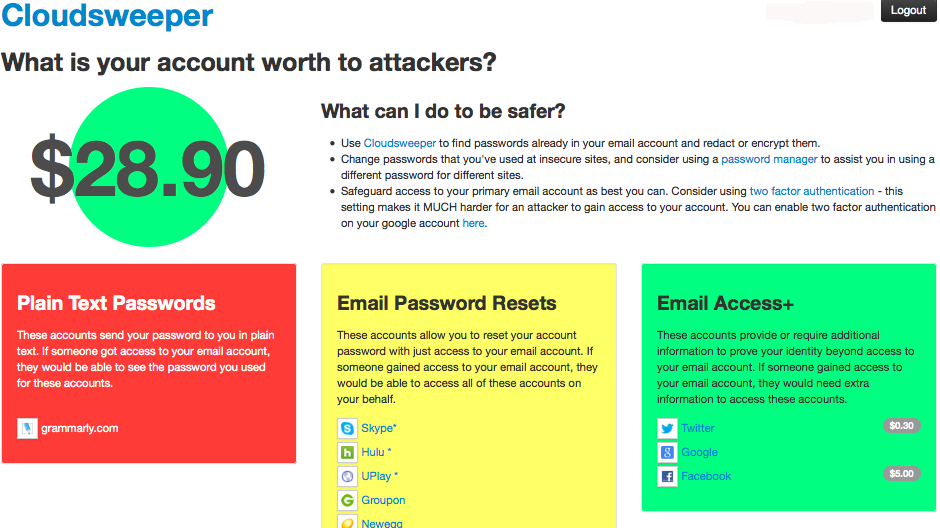
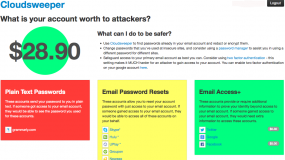
My Gmail was priced at $28.90.
The brainchild of researchers at the University of Illinois at Chicago, Cloudsweeper’s account theft audit tool scans your inbox and presents a breakdown of how many accounts connected to that address an attacker could seize if he gained access to your Gmail. Cloudsweeper then tries to put an aggregate price tag on your inbox, a figure that’s computed by totaling the resale value of other account credentials that crooks can steal if they hijack your email.
In a blog post earlier this month titled The Value of a Hacked Email Account, I noted that many people do not realize how much they have invested in their email account until that account is in the hands of cyber crooks. That post quoted prices from one seller in the cybercrime underground who buys compromised accounts, such as hacked iTunes accounts for $8, or credentials to Groupon.com for $5, for example.
Chris Kanich, assistant professor at UIC’s computer science department and principal organizer of the project, said Cloudsweeper’s pricing model is built on prices collected from multiple sellers across multiple underground forums and services. I ran one of my Gmail accounts through Cloudsweeper, and it determined my account would be worth approximately $28.90 to bad guys. While this is not a Gmail account I use every day, I was surprised at how many third party services I had signed up for using it over the years. According to Cloudsweeper, bad guys with access to my account could also hijack my accounts at Amazon, Apple, Groupon, Hulu, Newegg, Paypal, Skype, UPlay and Yahoo, to name a few.
Cloudsweeper uses the Open Authentication (OAuth2) protocol to connect to your Gmail account and search through messages. OAuth is an open standard for online authorization, and using it with Cloudsweeper does not require you to type in your password as long as you are already logged into the Gmail account that you’d like scanned. Cloudsweeper doesn’t keep your credentials, and it forgets about your visit and inbox after you log out of the service, or within 60 minutes of inactivity.
PLAIN TEXT OFFENDERS
Prior to performing a scan, the service asks users if they wish to participate in a study, which Kanich said gathers and securely stores non-personally identifiable information about Cloudsweeper users who opt-in. That data includes how many types of accounts each user has tied to their Gmail. The study also draws on data from the second core feature of Cloudsweeper: The ability to discover and then redact or encrypt passwords that various services may send to users in plain text.
UIC’s Kanich said the project would like to maintain anonymized statistical information — such as how many accounts and what type — about visitors’ use of the tool.
“So with the user’s expressed permission only, we’ll store stuff like, ‘there was a password that was duplicated in seven different emails and the user chose to redact them all,’” Kanich said. ”It’s a little bit funny because you don’t have to give us your password for Cloudsweeper to work, but a big reason you’re coming to us is so we can find your other account credentials.”
Click the blue “Cleartext Password Audit” button from the Cloudsweeper homepage and the service will scour your inbox for passwords that various third-party services may have sent to you in plain text. Cloudsweeper then lists the plaintext passwords alongside the names of the sites that sent them to you, and offers the options to encrypt or redact some or all of the passwords (or to do nothing, of course).
This process works by loading your messages via the Internet Message Access Protocol (IMAP), which lets users edit messages in their inboxes. Using IMAP, Cloudsweeper can redact or encrypt just the plaintext password in any email, leaving the rest of the message intact and untouched. Depending on how many messages you have in your inbox, this process may take quite some time.
Upon encrypting the password(s), the service presents a QR code that you can take a picture of with your mobile phone. You can also copy a longish decryption key and keep it somewhere safe. If you ever wish to un-encrypt the now obfuscated passwords, simply revisit Cloudsweeper and click the orange “Decrypt Messages” button from the homepage. Type or paste in your decryption key, or hold the QR code up to your computer’s Webcam and Cloudsweeper’s site will unscramble your encrypted passwords.
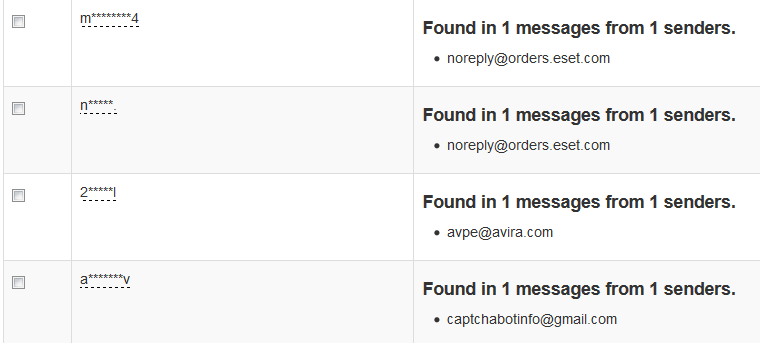
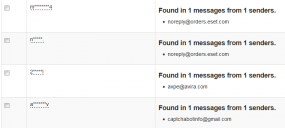
Plaintext passwords found by Cloudsweeper.
The password redaction/encryption feature is nifty, but it might be more trouble than it’s worth. After all, crooks who gain access to your Gmail account can simply request a new password from the site that sent it in the first place.
“That’s the biggest argument against this: That if you have access to the email account, you can just reset the password anyway,” Kanich said. “Right now, redacting the password is the closest thing to simply deleting the messages [containing plaintext passwords]. A lot of people do want to keep all of their email and don’t want to delete a lot of messages, even those that may have their passwords in them.”
Interestingly, as evidenced by the screenshot above, many of the passwords this tool detected as having been sent to my Gmail inbox in plain text came from antivirus vendors. Storing passwords in plaintext is a security no-no, and these firms should know better. I’ve encouraged readers to name-and-shame companies that perpetuate this practice by forwarding such emails to plaintextoffenders.com, which redacts and publishes these missives each day. Passwordfail.com maintains another list of plaintext offenders, and even has a browser extension to warn users before they register at a site that stores passwords in the clear.
As I noted in several recent posts, Gmail and other Webmail providers — Yahoo! and Hotmail/Live.com — all offer multi-step authentication; if you haven’t already protected your accounts with these features, please take a moment to click the relevant links in this sentence to learn more about how to do that (UIC’s Kanich said his group is looking at adding Yahoo to Cloudsweeper, but that Live.com doesn’t work with IMAP). See this post for a primer on picking and managing strong passwords.
Did you use Cloudsweeper to price your Gmail account? If so, leave a comment below and tell us about your experience.
18 Jun 16:29
How safe is your neighborhood? CrimeReports can tell you
by Mel Martin

CrimeReports is a free universal app for iOS that collects crime reports from your local police and sex offender locations from a federal data base, and then superimposes that information on a map. If your local police agency is participating, you can also get email alerts about local crime.
The app determines your location via GPS, and you can look elsewhere using any address in your contacts list. You can also just type in any address or location. Crime reports can be viewed from the last couple of days, or a more extended period. If you don't like the presets, you can type in your own range of dates.
Crime reports can appear on a map, or in a list. National sex offender data also appears alongside your local crime reports.
I found the app worked fine when testing it against several cities around the country. You have to zoom into neighborhoods before most of the data appears. When you click on an icon, you get the date of the crime, the location, and the address. In some areas, I only saw sex offender locations. This is because not all police departments submit crime data promptly or at all. The app has a request form to let your local police know you want to see this information. Usually, the sex offender info has a mug shot, and a specific address. I was a bit surprised how many people appeared in every area I checked.


CrimeReports is a handy, but sobering app, especially if you think you may live in a crime free area. You may find there is more going on in your neighborhood than you think. If you aren't seeing much information, it may be that your local police aren't sharing that data.
Other apps with similar features include CrimeMapping.com and Crime Watcher. Both apps are free. Crime Watcher seemed pretty buggy and had less information that CrimeReports.
CrimeReports requires iOS 3 or later, so it will run on a wide range of hardware.
How safe is your neighborhood? CrimeReports can tell you originally appeared on TUAW - The Unofficial Apple Weblog on Sun, 16 Jun 2013 16:00:00 EST. Please see our terms for use of feeds.
06 Jun 16:26
Plex media server on Apple TV ... without jailbreaking
by Steven Sande
DonPlex

So, you want access to Plex on your Apple TV but don't want to jailbreak the little black box to do so? Never fear -- a hack created by Plex users Baa, roidy and f00b4r called PlexConnect makes the popular media server software available to Apple TV owners without the need to jailbreak.
Like most workarounds, PlexConnect does involve a little deviousness. Users hoping to use PlexConnect run a program on a computer connected to the Apple TV that pretends to be Apple's own Trailers app. Next, a network setting is changed on the Apple TV, after which the Apple TV begins to accept Plex content.
Of course, a future Apple TV update could easily disable PlexConnect, but the Plex community is full of bright little stars who would probably be able to get the hack working again quickly. A video of PlexConnect at work, complete with loud nose breathing soundtrack, is embedded below.
Plex media server on Apple TV ... without jailbreaking originally appeared on TUAW - The Unofficial Apple Weblog on Wed, 05 Jun 2013 14:00:00 EST. Please see our terms for use of feeds.
Peconi likes this
No more posts. Check out what's trending.