Here is an interesting visual we designed based on Marcus Guido’s article “20 Differentiated Instruction Strategies and Examples”. The visual contains ideas and tips on how to personalize...
Sometimes you need to put a booklet together. Not a fancy booklet, either—a simple one for yourself or your friends, ranging from topics like recipes to book reports.
Enter BookletCreator, a simple tool that lets you instantly turn any PDF document to a printable booklet. While the software has been around for awhile, it’s still easy to use. Here’s how to use this printable booklet maker tool to convert a PDF to a booklet.
What Is a Booklet Creator?
BookletCreator is an extremely simple tool that lets you turn a PDF to a booklet. If you’re one of those people who prefers to read documents in paper format, and you don’t have the budget for something like InDesign, then this is the program for you.
Basically, BookletCreator reorders your pages in such a manner so that when the document is printed, it can easily be folded into a small book. No registration is required for the free trial. When you download the program, you simply have to complete these steps:
Upload your PDF
Run BookletCreator
Save the printable file to your computer
Print the booklet out
Thankfully, BookletCreator has both macOS and Windows versions, so you’re in luck no matter which platform you prefer. The developers also provide detailed, easy-to-follow instructions for BookletCreator that make it easy to get started.
For this tutorial, we’ll use the macOS version of BookletCreator.
How to Use BookletCreator
After you download the free trial of BookletCreator and open the program for the first time, you may see a popup notice similar to the one above. BookletCreator will tell you that because you’re using the trial version, only the first 16 pages of your document will be processed.
We did some investigating about this “hard limit” on how many pages you’re allowed to process. For the trial version, it seems that you’re able to create multiple booklets, so long as those booklets are under 16 pages each.
However, we’re not sure how long this free trial will last. The official documentation on these limitations in the Terms and Conditions section is scarce.
If you’re just using the free trial, press OK to proceed to the booklet making process. However, if you have a license number, enter it. In case you want to buy the program, press Buy Now. You can go to the company’s website to see the details on BookletCreator’s pricing plan.
Step 1: Add a PDF File to Your Booklet Creator
Once you’re past the loading screen, the first action you’ll need to take is adding your PDF file to BookletCreator. Press Add PDF File, as shown below in red. Find the PDF on your computer that you want to format, and add it.
It’s important to note that BookletCreator cannot “reorder” your text, or format it. All it can do is reshuffle the way your pages are laid out. That way, when you print them, you can turn your PDF into a double-sided booklet. So it’s important to get all that formatting sorted out ahead of time.
Step 2: Use Page Setup When You Convert a PDF to a Booklet
Next, you’ll need to finish the page setup for your booklet. BookletCreator automatically checks the Auto paper size option when you upload your PDF to the printable booklet maker, but you can also format this booklet to the paper size that’s best for you.
To do this, click on Page Setup. Once you’re there, you can format your document to fit any printer available with the specific dimensions you’re using to print.
You can also change the scale of the document, along with its orientation.
For booklets, in most cases it makes sense to print in Landscape orientation. BookletCreator automatically has this option checked, so keep that set. Once you’re done adjusting your specs, click OK. If you don’t want to manually adjust the page setup, click Cancel. Then check the Auto paper size option again.
We used the Auto paper size option in our testing, which worked well.
Step 3: How Many Pages per Booklet?
After you figure out your paper size, you need to decide how many pages you want within your booklet.
Because booklets are usually printed double-sided, all numbers for the pages show in sets of four. You have several options:
You can print All pages in your booklet, to the closest set of four that the program can manage. BookletCreator will not skip any pages, which means that if you have an odd number of pages, some of the pieces of paper in your final booklet will be blank. Use this if you’re not sure.
4 will have BookletCreator create multiple booklets with four pages each, to split up your PDF into manageable chunks.
8 will create multiple booklets with eight pages.
This continues down the line with 12 and so forth.
Please note: When using the free trial, you can only process booklets that contain up to 16 pages each. If you choose above the 16-page option, you may run into issues.
Step 4: Additional Booklet Options to Consider
Once you’ve figured out how many pages you want in your booklet, there are a few additional options you can adjust before you format the book. If you didn’t add page numbers to your original PDF file, you can do so now. The tool also lets you add some basic formatting to those page numbers, such as:
Letting BookletCreator know which pages to put the numbers on.
What those starting numbers should be.
Additionally, you can format the booklet for duplex printers, put the last page on the back cover, or have the document read from right-to-left instead of left-to-right.
Once you’re done formatting these options—if you need to format any of them—press Create Booklet. BookletCreator will create a new PDF specifically laid out in booklet format for you to print.
Step 5: Printing From Your PDF to a Booklet
The last stage of BookletCreator is the printing part, and it’s a simple but important step. Before you print, it’s recommended that you look at your document in an image previewing app to make sure that everything looks correct.
You’ll notice that the pages seem to be out of order, but they aren’t actually. This is just how a booklet looks before it’s stapled together. After you take a look, press Print.
If you have a double-sided printer, make sure that you turn off the double-sided print option on your device. If you don’t have a double-sided printer, you’ll need to feed the pages through manually.
You also need to make sure that you use the right-sized paper for your document when you print it. Because we just did a test booklet, the paper isn’t exactly the right size, but the print quality still turned out decently. Here’s the result:
As you can see, the double-sided printing works well. All the pages were in order, exactly as BookletCreator formatted them. Once printed, it was a simple matter of folding the printed pages and stapling the booklet together.
Use BookletCreator to Convert a PDF to a Booklet
BookletCreator will never have the fine-tuned controls of a program like Adobe InDesign. However, it’s quite simple to use and will work great for people who just need to make a printable booklet every once in a while.
“What draws us here is we believe in the power of creating environments where students can thrive.” – Meeno Rami
For the past couple of years I’ve been a live reporter at ISTE and for 2 years interviewed folks with my toddler, Savvy. This year I am attending the amazing ISTE conference virtually thanks to #PasstheScopeEDU and the #NOTatISTE19 team! Each day I will embed presentations or interviews that made an impression on me or share some exciting tweets and education technology news. Below I have embedded Valerie Lewis’ recording of Meeno Rami’s keynote from the Badge Summit pre-ISTE conference event. I have also included highlights from those who attended the inspiring and thought-provoking keynote. Meeno shared her thoughts and ideas on how we name, measure, and increase access to learning. One of her most powerful moments was sharing what we value in schools (grades, test scores, gpa, etc.) versus what we should value (solving problems, cultivating curiosity, learning how to learn, etc.). Meeno also shared how “Badging helps us move beyond the limits of our language and name things of value to the learner.” Her ideas, experiences, and examples inspires us to think about our own learning environments in our classrooms and schools and determine how we can create communities where students thrive because we value what matters most.
Wakelet is a great free curation tool to capture thoughts, reflections, and reactions from Twitter during a keynote and presentation. These are some of the highlights from Meeno Rami’s keynote.
Sign up for my In-Service / Graduate Fully Accredited online courses, Connected Educators: Harnessing the Power of Social Media for Professional Development, and Methodologies for Teaching English to Speakers of Other Languages.
If you are not at ISTE then check out ways this incredible infographic of ways to participate virtually created by @Edublogs.
What do Breaking Bad, Hannibal, and The Americans have in common? They’re all quality shows deserving of the awards that came their way. However, they’re also dark, heavy, and difficult to watch when you’re stressed. They’re definitely not relaxing TV shows.
Sometimes you just want to come home, plop down on the couch, and watch a palate cleansing-type of show to help you unwind. For that, you’ll want to check out these relaxing Netflix shows. You could even use these TV shows to help you fall asleep, if you want.
Imagine a talk show hosted by comedian Jerry Seinfeld where every guest is one of his famous friends. And then imagine it takes place inside a café as well as the car ride there. No scripts. No self-promotion. It’s entirely authentic, genuine, and absolutely hilarious.
Just look at the name of the show, it says it all: Comedians in Cars Getting Coffee. The episodes are about 15 to 20 minutes long, and each one features a vintage car picked by Seinfeld himself to match the personality of that episode’s guest.
It’s the ultimate show for when you want to shut off your brain and just have a laugh.
Bob Ross: Beauty Is Everywhere is basically the same thing as The Joy of Painting, but the episodes are taken from the 1991-1992 seasons of the show, and not all of the episodes are there.
But who cares? Nothing beats the feeling of watching Bob Ross paint up another scenic masterpiece, complete with his soft voice and gentle encouragements. Looking for a relaxing TV show you can fall asleep to? Then look no further.
Have you seen Jiro Dreams of Sushi? If you have and you liked it, then you really should watch Chef’s Table. Directed by the same person (David Gelb), Chef’s Table is one of the best Netflix documentaries for foodies.
Every episode focuses on the life and cuisine of a world-class Michelin-starred chef, and brings out the human element that’s often missing in food documentaries.
If that sounds boring, think again. Not only is Chef’s Table a beautifully shot show, it’s deeply engrossing and inspirational. The hours will melt away as you watch.
While Explained is a Netflix show, it feels more suited for a YouTube series in that every episode is about 15 minutes long, educational, entertaining, and entirely self-contained to a single per-episode topic.
There are Explained episodes for cryptocurrency, K-pop, esports, the stock market, cricket, the longevity of life, and more. It’s enough to give you a general understanding of a topic’s history and importance, and it’s presented in a mostly unbiased way that’s engaging—and surprisingly relaxing.
Also known as The Great British Bake Off, this show is perhaps the most wholesome reality TV competition you’ll ever watch (rivaled only by MasterChef Junior).
The Great British Baking Show has amateur bakers face off in a series of elimination rounds until there’s a winner. But the best part is that it’s devoid of the hardcore competitive spirit that props up most American reality shows. It oozes with kindness, humor, and great food.
Have you ever wanted to watch Big Brother or The Real World but without any of the fabricated drama or scripted narratives? Then you should give Terrace House a try.
Six strangers come together to live in a shared house for a month, with hidden cameras everywhere. However, this is a Japanese reality show, and there’s a different culture and atmosphere than what you normally see in American reality TV. It’s soft, it’s polite, and it’s a joy to watch.
The original Terrace House (Boys and Girls Next Door) ran for three years in Japan, but Netflix revived it in 2015 with Boys and Girls in the City. This was followed by the sequels Aloha State and Opening New Doors. Only the Netflix-produced ones are available on Netflix.
The world around us is incredible. We’re lucky to live on Planet Earth, surrounded by so much natural beauty, and Our Planet is a documentary series that brings the exotic jungles and deep ocean seas right onto your TV screen.
It’s hosted by Sir David Attenborough, who provides insightful and calming commentary and also fronts some of the best BBC documentaries on Netflix. The show was also film entirely in Ultra High Definition, which makes the visuals even more stunning. There’s something meditative about watching nature play out in some of the most remote corners of the world.
Samurai Gourmet is a light-hearted show that follows a newly retired Japanese man who roams his neighborhood and explores the rich culinary offerings therein.
In a word, Samurai Gourmet is refreshing. Few shows are as easy to watch as this one, and it demands nothing of you in return.
Aggretsuko is a Japanese anime that’s ultra cute, but it’s not a kid’s show. The cuteness contrasts against the main character’s mundane and frustrating office life, as well as her secret love of death metal karaoke.
The episodes are short at just 15 minutes apiece, so you can pop them on whenever you—like the main character—feel like you need to blow off some steam.
The World’s Most Extraordinary Homes is a documentary series fronted by British architect Piers Taylor and property developer (and actress) Caroline Quentin. They head to remote locations and check out some fantastic custom-designed homes, exploring how they’ve been built to adapt to their surroundings.
Though you might get a bit of house envy when watching it, this is still a delightful show to watch. Seeing the creativity on display is inspiring, but there’s also no drama or competition about it—this is purely a relaxing, friendly look at how other people live.
Use Meditation Tools to Relax Even More
These are some of the best TV shows to put on when you’ve had a stressful day and want something cheerful and fun to help you relax. Or even to fall asleep to.
Factile (former Jeopardy Rocks) is an excellent web tool that enables teachers to create multimedia quiz games for their classroom. Using a simple and intuitive gameboard, teachers will...
Draftback is a good web tool that allows you to playback the revision history of any Google Doc you can edit. You will be able to watch your edits roll out in a video player as if you are watching a...
August 19, 2017
CloudConvert is an excellent converter to use for converting almost anything you want. We have tried several converting utilities in the past and this one stands out from the...
A new clip for Netflix's Death Note shows the first encounter between Light (Nat Wolff), a young student, and Ryuk, a mischievous death god played by Willem Dafoe. With Ryuk's encouragement, Light decides to use his newfound power to cleanse the world of those he deems unworthy.
As you might guess, those semi-good intentions very quickly spiral out of control. "One thing I did when preparing for the film was make my own death note," said Wolff at the panel. "I thought, 'there's no way I was gonna be able to think of any names, because Light is such an evil sociopath." Read more...
We start our series of the Best Shots of All Time by looking at size, breaking down some of the best close-ups, mediums, wide shots, and extremes in film history. But it's not all about looking pretty, we dive deep into how and why each kind of shot is used.
If you needed an excuse to listen to even more of Adele's "Hello," then today is your lucky day.
Musical impersonator Anthony Vincent, of Ten Second Songs, has released a video in which he performs Adele's newest hit song in the styles of 25 different musicians and recording artists. From Janis Joplin, to Prince, to Backstreet Boys, to Guns 'N Roses, you can imagine exactly what it would be like if any of these classic artists chose to cover the heart-wrenching single
Also — it's a good reason to step away from the original version for a little while, especially if it made you weep uncontrollably. Read more...
Artist and sculptor Don Featherstone, best known for creating the world's most recognizable lawn ornament — a plastic pink flamingo — died on Monday morning. He was 79.
Featherstone created the flamingo for Union Products in 1958, shortly after graduating from art school. He continued to work at Union Products for 43 years.
Featherstone and his wife Nancy in Sept. 2012 at Harvard University.
Image: Charles Krupa/Associated Press
The pink lawn ornaments you know today were created using molds of Featherstone's clay sculptures, which he based on photos of flamingos found in National Geographic. The sculpting process took around three weeks. You can tell if your plastic flamingos are Featherstone originals by searching for the artist's signature on the flamingo's rear end. Read more...
Rapper 50 Cent had a somewhat embarrassing moment last week on the pitcher's mound when he threw what's being called one of the worst opening pitches in baseball history.
He addressed the haters on Tuesday during a Reddit Ask Me Anything session, attempting to explain his pitch at Citi Field stadium before the game between the Pittsburgh Pirates and the New York Mets.
"I have a skeletal muscle injury on my left shoulder from excessive masturbation so take it easy lol," 50 Cent wrote, prompting a barrage of hilarious responses
He is a dyslexic. He dropped out of school at 16. He started a student magazine. No, he didn’t know anything about the print business. He then started a mail-order record company to run the magazine. From there, he went on to open a record shop and then a recording studio. Today, he has 200 companies in more than 30 countries. You can bet that Sir Richard Charles Nicholas Branson didn’t know too much or have the skillsets to run all the companies by himself. You would win the bet. His secret? Probably, it can be summed up in one...
Read & Write is a Google Chrome Web App that increases the accessibility of the text of documents in your Google Drive account. After installing the app you will see a Read & Write tab appear at the top of your browser window whenever you have a document open in Google Drive. Clicking that Read & Write tab will open a menu of accessibility options.
Some of the accessibility options include a picture dictionary and a talking dictionary. To use either dictionary just highlight a word then click on the dictionary that you want to use. The dictionary that you select will pop-up in your document. Read & Write will also read the text of your documents aloud. In the settings menu you can select from nine voices and three playback speeds. Learn more about Read & Write in the video below.
To get Read & Write for Google for free, follow these directions from the developers. If you are a teacher, and do not already have Read&Write for Google installed, head to the Chrome Store and download it before registering for your free subscription. If you already have a trial or an expired trial, go to rw.texthelp.com/drive/home/RegisterTeacher and register by filling out the Teacher Registration form with your name, email, school, administrator, and other details that confirm your eligibility. Note: Be sure the email you provide is the same as the one you used to download Read&Write for Google. Click here to read the announcement from Text Help, the developers of Read & Write for Google.
Click here to register for the Practical Ed Tech Summer Camp. Discounted registration is still available.
This post originally appeared on Free Technology for Teachers
if you see it elsewhere, it has been used without permission.
Hello Cleveland! Grab your electric guitars and put on your tightest trousers - and get ready to rock!
The 1984 classic rockumentary This is Spinal Tap celebrates its 30th anniversary on Friday. What better way to celebrate than by remembering all the deep thoughts that Nigel, David, Derek and Mick have so graciously given to the world? The answer is none. None better.
There are plenty of hilariously insightful quotes to choose from but, as Nigel would argue, eleven is just better. Take a moment to remember the raucously decadent 80's cult classic with these extremely quotable lines. Read more...
February 22, 2014
Technology is transforming several key educational concepts and least of which is the concept of professional development. Just a decade ago, teachers were limited as to the type...
We've talked about the best ways to unclog a drain before, but these handy toilet-clearing tablets are helpful to have on-hand in case yours stops flushing the way it should. Plus, they're really easy to make.
In a world where your every move is tracked, what would you pay for a secure cellphone? Dr. Björn Rupp is willing to bet it’s about $3,500. His company, GSMK Cryptophone builds cellphones that are secure from the ground up. Running a home-brew version of Android, they allow for completely secure, end-to-end communication with most, if not all, of the smartphone features the security-conscious crave. The trick? Both parties in the conversation have to have their own Cryptophones, making them like a sort of James Bondian walkie-talkie.
I spoke with Rupp at his offices in Berlin where we sat behind his spy-proof, bulletproof glass windows and talked about the future of secure communications and how the Snowden affair affected sales of his pricey — if not important — cellphones.
John Biggs: Tell us what you do.
Björn Rupp: What we’ve been doing for 10 years now is secure communications in the broader sense. GSMK was the first, and still is the only company that offers defense-grade security on the commercial smartphones.
So, we take a standard commercial smartphone hardware platform, and we replace in higher format. There is voice encryption, message encryption and secure storage. And we invested our work in making sure that the phone itself is secure: no mobile viruses, no SIM duplicate texts. Also, no remote operator updates that some operator somewhere wants to do an official authorized update, which unfortunately happens to steal all your data, et cetera.
And so, that’s kind of what we do and what we have been doing for 10 years, and we have all these published source codes. You don’t have to trust us. You can verify on your own that the implementation, that the algorithms, are correct, that there are no back doors, which is of course always a concern in the industry.
We figured rather than have suppliers trust us, we found it better to give them the ability to review on their own, have the experts review if its implementation is correct.
JB: So you couldn’t turn just any smartphone into a Cryptophone?
BR: Not any smartphone, because if you want a hardened operating system, obviously, you need to have deep-level access to the OS.
JB: And there’s no way to download this and just, like, install on your phone? It’s a very specific hardened Android that you guys are using?
BR: The thing is you could provide application-level security in the form of a download. But the problem is that that would not meet the level of security that our customers would expect from us.
The problem is even if you have an encrypted communication link using application-level security, a determined attacker would then not go for the encrypted link. He would say, “Okay, it’s encrypted, I can’t break it.” But the intrepid attacker will attack the phone itself. And I don’t have to tell you about how many Android exploits there are out there. So it’s easy, it’s really easy to explore the commercial smartphone and open the microphone. And then you can just get the audio from the microphone even before it is encrypted.
That’s why we really put a lot of emphasis on the 360-degree security. Because otherwise, if you don’t provide that level of security, this hardened operating system, secure storage and so on, you’d create a false sense of security where people think, “Wow, great, I’m encrypted now.” But really, the determined adversary won’t care. He would attack the phone. It’s a proven scenario. You’ve seen that over and over again.
Just like in the computer. What I always worry about when people are using P2P and think they are safe now. I think of human rights activists in certain areas. They feel very confident that they use email encryption. But what they often don’t realize is that their laptops aren’t just secured at all. And someone who has in their cross hairs, and these guys had just encrypted e-mails then probably it’s a huge people. They’ll just plant a Trojan or a virus or whatever on the device and then get the data form there.
For our customers, whether they have this device or not can mean the difference between life and death in many cases. And so we don’t produce toys, but we produce tools. And we have to be able to stand behind that. The history of this company and the history of the people behind it is one of in-depth expertise in IT security.
JB: So, no iOS?
BR: No iOS, exactly. We’ve been working with Windows Mobile, Windows Phone since 2003. There was an offered platform and we had an agreement where we could actually use that. And now, the other obvious option is Android.
Our phones look just like any Samsung Galaxy phone. But you can see that on top of the regular role of Android communication buttons, you have a second role, which includes the secure equivalent. Here you have messaging. You have secure messaging, secure calls and so on. So you have your complete secure compartment, password-protected of course, for entering encrypted calls, secure storage and so on.
And we also have a few other nifty things like these new things. The baseband firewall constantly monitors what’s going on in the interface. So if someone here were trying to intercept us with an IMSI catcher, the phone would notice and tell you an unencrypted call is not recommended. And the phone will also detect active attacks against the baseband processor using over the air attacks. It’s cutting edge technology just to let you know that someone is actually attacking you.
JB: How often have you experienced even a rogue cell?
BR: Well, I mean I might not be the best guy to ask because my business does of course lead me to all kinds of interesting locations, but I have seen that often.
JB: Really?
BR: And when you’re near certain buildings, you can prove that there are people who are also interested in what is going on inside these buildings.
JB: Wow. But it’s not specifically a government thing, it’s basically corporate espionage?
BR: Yeah. Of course, given that these are the recent weeks, the focus has been on strategic surveillance by government agencies. But I’m actually surprised that no one’s really stressing how much tactical espionage is going on as well. I mean, there are other issues just because the stuff has become so cheap.
When you look at 10-20 years ago, these IMSI catchers or interception equipment was so expensive that it was exclusively made for law enforcement agencies. Nowadays, you can build an interceptor on your own with a laptop, a cheap Motorola phone, and of course some knowledge. But hardware is no longer an issue; just a few thousand euros or dollars, you’re in the game. And that means that the technology has now reached the reach of regular criminals on the street.
And of course, when you look at some of our bankers, our investment bankers, they have a multi-million-dollar transaction pending. They have potentially two choices. They either meet in London for discussing certain confidential aspects of the transaction, valuation, and due diligence and so on. Or they just use an encrypted phone because there have been documented cases where, of course, the temptation for the other side was just too high.
JB: In your experience, obviously, how much should the average person care about the government snooping out of cellular data or metadata? Is it to the extent that it’s as dangerous and upsetting as a multi-million-dollar deal going sour because somebody’s watching you from the closet, or is it just the general background? How important is it for your customers and yourself to guard against that versus, actually, industrial espionage and tactical espionage?
BR: Well, I have broad range of clients of course ranging from government agencies, large corporates, all the way down to private individuals. And of course there are different motivations and different scenarios.
When you look at banks, for instance, or energy companies where there’s also lots of competition in certain areas, there is an obvious business case. That’s easy to justify because these people know that they’re being bugged, either by their local counterparts or other interested parties.
Whereas for private individuals, I guess the question is, what value do you put on your privacy? There might not be a clear-cut case where John Doe on dispute can put a number to that. But I think it really touches on the philosophical aspect in the basic foundations of our society. You should have constitutional rights to communicate for you as everyone else, something into that. In principle, everyone should be protected by the right, but recent events have shown that that is not always enforceable. So, protecting yourself against that by technological measures is one of it.
In principle, that shouldn’t even be necessary. But unfortunately, it’s the same as email. You’d better encrypt your email even though many people don’t. That was a good idea. It’s a good question. And I think maybe what the recent events have shown us is that we’re just at the beginning of it. And we’re in this building in our society, how sensitive that matter really is. I mean, lots of people still post very private stuff on websites that they don’t even realize what the company is providing the services that they’re relying on. These are the full sharing or whatever, what they do with that. You can analyze photos, and I don’t have to tell you it’s possible.
But I think that we’re just at the beginning of heightened awareness where people realize what the risk is by just taking their communication electronically. Up until recently, most people just saw it as reasonably safe and, yes, there is the occasional hacker and blah, blah, blah. For many people, there was implicit trust in the service provider, and I think that is –
JB: Now, the government is the hacker?
BR: Yeah. It’s not just the government, of course. I mean there is also economic motivation for many companies to mine your data and to do with that whatever maximizes their profits. Of course, again, the recent weeks have put a lot of focus on large-scale government surveillance and that’s obviously a huge problem because it touches the foundations of our free society. But there are many other aspects of the game that also should be looked at very carefully from my point of view.
JB: And so, what are some very, very basic things that just average people can do to avoid it? I mean, potentially they should go to your website and buy a bunch of encrypted phones. But just at the very basic level, what should the average person do to protect at least some of their privacy?
BR: Well, getting encrypted phone is never a bad idea, of course. But I guess from a very basic, simple step that everyone can take is just to think twice before you give out your data. Be sparse with your personal data whether that means leaving cookies all over the web. Or whether that means handing over all kinds of documents or other electronic materials to service providers where you might get some value out of it but you don’t realize what price you’re paying.
There are easy steps to take like encrypt your emails. There is free software out there that allows you to do that. You can use to anonymize your browsing and so on and so on. But before you can even take these measures, just always think twice: “Do I really have to give out the data to someone? What are they likely going to do with it? Do they really need it? Do I want to provide the data to that company or to that agency or whatever?”
There are many conscious choices that you can make that people just hadn’t thought about so far because they were not very sensitive about what the consequences of them are today. It’s all the modern intelligence support systems and data mining software. You can just combine all this data in so many ways that are just not foreseen by the average user or the average person on the street.
JB: And how popular have the phones gotten? And you keep selling more and more of these things?
BR: We’ve been in the business for 10 years now. But what we have seen over the last years, it’s definitely again just rising awareness. Even for a small or medium-sized enterprise that does business at certain countries abroad, you just think, “We need to encrypt the phone.” Assuming you have your top salesperson in Beijing and you discuss the best and final offer with the CEO back home here in Europe or in the U.S. or wherever you think “it might be a really good idea to not do that in the open.”
I mean there were just too many of these companies that have noticed that their best and final offer was refused as a competitor comes in at just a few bucks cheaper. And so, we’ve seen lots of increase in these.
JB: Are these financed through Europeans and Americans. Are Europeans more paranoid than Americans?
BR: We’re active in over 50 countries worldwide, and it’s hard to say. Europe is our home market, but the U.S. is also a very important market for us for sure. We have a big presence there. Also in countries in Asia and other regions across the world, so it’s really hard to say.
Of course, again, Europe and U.S.A. are important markets for us, but I wouldn’t say that per se, a specific region is more paranoid than another. Even though, of course, there is, as you’ve probably experienced on your own, there is let’s say a certain attitude towards data protection and privacy here, for instance, in Germany, that goes above what you would find in other countries. But still, privacy is a right that everyone would like to enjoy, no matter what country you’re in. It just maybe makes a difference how immediate you see the threat to that privacy being endangered.
For instance, South America, we hardly have to do advertising because every couple of weeks, there is news that, “This official has been tapped. This industry executive has been tapped. And by the way, here are the juicy details of the latest phone call with the, blah, blah, blah.” So I mean, the people think they’re being tapped.
JB: So you separate out the encrypted actions. Is there a reason why somebody couldn’t do all of their communications with security? Does it just become impractical? Is it more complex for the average person?
BR: Not really. We’ve worked very hard to make sure that an encrypted call is just as easy to make as a normal call. But of course, if you want to enter into encryption, you need to have a partner with the other side that also has an encrypted phone.
So you’ll still have people; your circle of friends, business partners, whatever will just only have a regular phone. And so, with these, you cannot make encrypted calls of course.
JB: So you sell these to CEOs and hang out with individuals. Is there any evidence that more average consumers are getting interested in these categories very much? Like bankers with millions of dollars to transact or extremely wealthy individuals or people with very, very sensitive information.
BR: That appeared to be the case a few years ago. But as I explained, in the past few years, we’ve seen that propagate. Again, 10 years ago, it was large corporations. Now, it’s also small and medium enterprises. And we’ve just recently had people who are just doing business trips and just said, “We’ve had issues with security so I need these things.”
Managing a classrooms full of students with 1:1 iPads presents the challenge of getting them on the same page, literally. Trying to manage differentiated groups requires a good tool for organizing resources. QR codes are one quick and easy solution.
Use a QR scanner on your iPad to quickly jump to any website
Here is an example I created with informational text at three different reading levels. To use this with students, simply project the graphic to a screen, point a QR scanner app at the appropriately colored QR code, and watch the device jump right to the designated page.
Just think about how many ways you could use this in a 1:1 iPad classroom.
I finished Bruce Lesh’s Why Won’t You Just Tell Us the Answersa week or so ago and would recommend it. He does not use PBL per say in his classroom, but his method is very compatible with it. He does spend a bit too much time at the beginning and the end (to be honest I quit reading after Chapter 8) justifying his methods vs. traditional history class which I find unnecessary. If you need to be convinced that reading from a history book, listening to lectures, copying answers to the questions at the end of the chapter are not good teaching methods than I have little hope for you.
His core method is to have students look at the text, context, and subtext of historical sources both primary and secondary. He presents historical questions (like DQ’s) to his students and then supplies them with historical artifacts to have them struggle with historical interpretation just like historians do. He really outlines some nice lessons in the meat of the book and even lists the primary sources that he uses.
I thought it would be easy to locate them online since most are old and must be in the public domain, but I have struggled so far. So I want to ask fellow social studies teachers, have you found his resources? Do you have your own that you use? Do you have a go-to place to find resources? Any help or suggestions would be greatly appreciated.
This also had me thinking that a good history book would simply be a list of driving questions for each part of history and then a bunch of student-friendly excerpts from primary and secondary sources.
The National Board of Governors Common Core Standards expect technology to facilitate learningthrough collaboration, publishing, and transfer of knowledge. Educators want students to use technology to work together, share the products of their effort, and employ the skills learned in other parts of their lives.
Finally, a 7th grade (8th grade I hear is due in August) tech curriculum that addresses those needs. Published by Structured Learning, it includes:
32 units, each aligned with Common Core and ISTE
Grades 6-8 Scope and Sequence (aligned with Common Core and ISTE)
Step-by-step weekly lesson units
Articles that address tech pedagogy
Each lesson reflects Common Core emphasis on comprehension, problem-solving, critical thinking, preparing students for career and college
Students are expected to understand the process, not replicate a skill
Focus is on transfer of knowledge and blended learning
Site Licenses–if you want these Common Core lessons available in all classrooms, across all platforms (iPads, desktops, laptops, more) for one low price
Technology is now an exciting and undeniable part of education. The widespread adoption of online learning and collaboration tools is allowing teachers to use real time feedback to personalize instruction for their students, identify and aggregate trends in their own classrooms, and become part of a global network of educators. It’s time to take a considered look at these new technologies and ask how they can be used to maximize the effectiveness of public education resources.
As the world’s largest K-12 social learning platform, with almost 20 million users, Edmodo is at the forefront of the movement toward a more connected and effective K-12 classroom. The 2013 California eLearning Census: Between the Tipping Point and Critical Mass reported that 39 percent of school districts in the state are using Edmodo’s free platform as their Learning Management System (LMS). Yet Edmodo has consistently declined to participate in Requests for Proposals (RFPs) for LMS, most recently for Los Angeles Unified School District (LAUSD).
We’d like to take this opportunity to explain to you why Edmodo will continue to opt out of these RFPs and invite you to join us in starting a national conversation about the next generation of learning management solutions.
First and foremost Edmodo is not an LMS. Edmodo is a free, teacher-centered social learning platform. Powered by a global network of teachers and students, Edmodo emphasizes collaboration, discovery and sharing of new resources and best practices, access to the latest educational apps, and classroom management tools. Edmodo’s grassroots usage can thrive alongside official LMS deployments and in many school districts, Edmodo is used as a no-cost LMS alternative.
Defining Edmodo as an “LMS” would be in conflict with our core values. Our vision has always been to ensure that all schools, teachers and students enjoy equal access to the best learning platform for classroom management, communication and online learning. The only way to guarantee permanent, universal access is to make the platform free. We’ve been able to accomplish this without making any compromises to functionality or support. Our business model helps districts forego the hefty fees of an LMS and instead redirect those resources toward high quality content aligned with Common Core Standards or professional development activities that better prepare teachers for modern learning environments.
This Summer, Edmodo will convene a Superintendents’ Roundtable in Silicon Valley to discuss “Beyond Learning Management Systems – What’s Next?” At this roundtable, we will explore the fiscal implications of a shift from complex, costly and outmoded LMS to free, collaborative solutions that are embraced by teachers, students, and parents. This is an important conversation given that free learning resources like Edmodo did not exist when the legislation was codified that now informs nationwide spending decisions.
In the coming weeks we will provide more information about the date and location of the Superintendents Roundtable and the application process.
We look forward to working with you to address this important issue and shaping the future of K-12 education.
If you’ve been swearing all year to get students online using some of those amazing digital tools. I have some ideas for you. These seven projects will be so much fun, they will eagerly welcome the new school year, hoping you have more toys for them to learn.
The trick with so many of these online sites is: Let students explore. Don’t rush them. Don’t teach them every twist and turn. Don’t expect perfection. Expect inquiry and enthusiasm and self-paced discovery. Let them solve problems as they create.
Here are seven ideas for amazing end-of-year projects that leave students thinking the school year is ending too soon:
End-of-year Multimedia Summative
Students take pictures of each other holding up favorite projects or working on tech skills–humorously, of course. Use these pictures in an Animoto movie to share light-hearted details of their Year in Tech. Open it with a magazine cover of student (created in Big Huge Labs). Accessorize with music, transitions, and text bubbles. Save to class network and load onto the school set of iPads. Students can play these movies on the last day of class as they celebrate the end of school. If you don’t have iPads, gather students in comfortable seating, play a student video as they reflect on another successful year of Tech.
Tips and Tricks Trading Cards
Create trading cards (in Big Huge Labs) for next year’s students that share grade-level hints and tips about thriving in tech class
Voki Cheerleader
Create a Voki that will greet next year’s students with attaboys when they most need it–you can do it–just two more minutes of typing! You are blazing! And you almost never look at your fingers–woah!
Introductory Movie
Create a movie of the school for prospective students. Walk around the campus sharing what goes on in the gym, the science lab, lockers. It should be upbeat and positive, underscoring activities that make the school a uniquely great learning environment
Digital Welcome Book
Create a digital ‘Welcome’ book, telling next year’s new students how to keep track of log-ins, what the computer UN and PW is, the best approach to keyboarding, when Minecraft Mania time is, and anything else you decide is important for new students. Maybe do the Classroom tour that the teacher usually does on the first day of school. Walk around the classroom pointing out where the bulletin boards are with important news, what the ‘Evidence Board’ is, how to use the printer, where to get new headphones/pencils if yours disappear–which are the best headphones. Tape this as a movie that can be played on an iPad. Next year students will each receive an iPad at the classroom door with instructions on how to activate their student-guided tour.
Jeopardy Summative
Play Tech Class Jeopardy! There are a lot of online templates for Jeopardy. Simply use questions that sum up the year’s worth of tech knowledge or take the questions from the students. What do they think was most important? Divide the class into teams, give them study guides to prepare. While they study, you create the game slides, and then play on the last day. An alternative to this is to have each team create their own Jeopardy game, with questions of their choice, and spend 15 minutes on each game–see who wins.
Summer Padlet
Put up a Padlet (the new name for Wallwisher) on the class website, blog or wiki (in my case, the class internet start page) inviting all students to add notes about what they’re doing this summer. Keep these up all summer, until the new school year. Students can check in while on vacation and add notes for classmates about what they ended up doing even though they planned something else.


 ThunderSoft Blu-ray Ripper is an easy to use and powerful Blu-ray ripper software that can rip and convert Blu-ray to lossless MKV and MP4 video formats. With the latest technologies, it can rip any Blu-ray/DVD with fast and efficient processing. For the output, lossless MKV, MP4 format make sure you get 100% quality of the original image after conversion.
ThunderSoft Studio provides Special Price(at least 50% discount) for GAOTD users to get lifetime license of ThunderSoft Blu-ray Ripper and many other software.
ThunderSoft Blu-ray Ripper is an easy to use and powerful Blu-ray ripper software that can rip and convert Blu-ray to lossless MKV and MP4 video formats. With the latest technologies, it can rip any Blu-ray/DVD with fast and efficient processing. For the output, lossless MKV, MP4 format make sure you get 100% quality of the original image after conversion.
ThunderSoft Studio provides Special Price(at least 50% discount) for GAOTD users to get lifetime license of ThunderSoft Blu-ray Ripper and many other software.

 If you like these ideas, take one of my courses (CE credit or graduate course credit for a CSU Master of Education) or check out my books. Ask me about training your teachers, ShellyTerrell@gmail.com!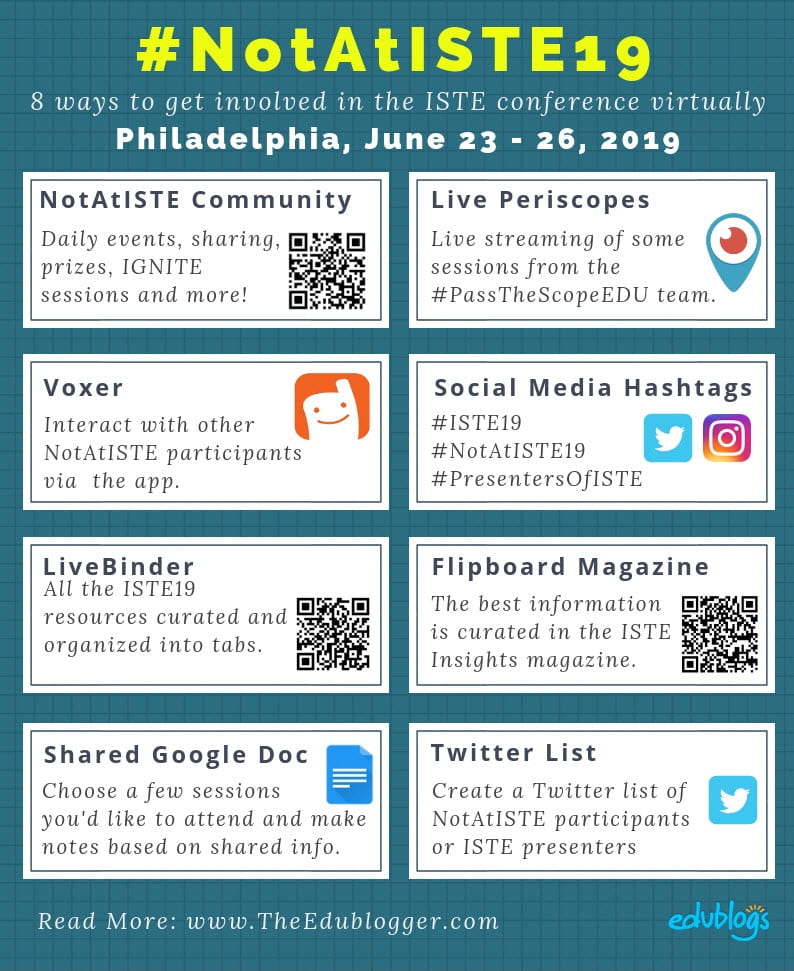



/https%3A%2F%2Fblueprint-api-production.s3.amazonaws.com%2Fuploads%2Fstory%2Fthumbnail%2F74807%2F1709a03e-3717-4437-9b90-1e7fe642d2b7.jpg)


/https%3A%2F%2Fblueprint-api-production.s3.amazonaws.com%2Fuploads%2Fstory%2Fthumbnail%2F52042%2Faefae0f2-891f-4cde-8d46-ae4fab241f3b.jpg)

/https%3A%2F%2Fblueprint-api-production.s3.amazonaws.com%2Fuploads%2Fstory%2Fthumbnail%2F44225%2F95b19ee3-64ba-4ae3-9312-4a82c7d8ac5c.jpg)


 Read & Write for Google is a fantastic Chrome app that was initially free then moved to a premium subscription model. Today, I learned that it is again free for educators.





 I finished Bruce Lesh’s Why Won’t You Just Tell Us the Answers a week or so ago and would recommend it. He does not use PBL per say in his classroom, but his method is very compatible with it. He does spend a bit too much time at the beginning and the end (to be honest I quit reading after Chapter 8) justifying his methods vs. traditional history class which I find unnecessary. If you need to be convinced that reading from a history book, listening to lectures, copying answers to the questions at the end of the chapter are not good teaching methods than I have little hope for you.

 The National Board of Governors Common Core Standards expect technology to facilitate learning through collaboration, publishing, and transfer of knowledge. Educators want students to use technology to work together, share the products of their effort, and employ the skills learned in other parts of their lives.


 I have some ideas for you. These seven projects will be so much fun, they will eagerly welcome the new school year, hoping you have more toys for them to learn.