Shared posts

11 Jan 09:33

Die Zeugin hat keine Lust

by Udo Vetter

Die heutige Verhandlung verlief erfreulich. Draußen warteten acht von neun geladenen Zeugen, aber keiner von ihnen wurde gebraucht. Nach einem Rechtsgespräch war die Richterin bereit, das Verfahren einzustellen. Die Staatsanwältin erfreulicherweise auch. Die Zeugen durften also wieder gehen.

Ganz zum Schluss verkündete die Richterin noch einen Beschluss. Sie belegte Zeugin Nummer neun mit einem Ordnungsgeld über 100 Euro. Die Zeugin, berichtete die Richterin, habe sie am Vortag angerufen und gefragt, ob sie kommen muss. Das bejahte die Richterin, doch die Zeugin sah das wohl eher als unverbindliche Bitte. Die Richterin dagegen meinte, die Zeugin habe keinen Grund vorgebracht, der sie juristisch entschuldigte.

Nach längerer Diskussion erklärte die Zeugin der Richterin, sie werde auf keinen Fall kommen. Und wenn man sie irgendwann mal zwinge, was man ja gern versuchen könne, dann sei es halt so, dass sie sich an rein gar nichts erinnern werde. Ein schlechtes Gedächtnis sei ja nicht verboten, so sinngemäß.

Ich würde die Geschichte gar nicht erzählen, wäre die Zeugin nicht Polizeibeamtin. Deshalb will es die Richterin auch nicht bei dem Ordnungsgeld belassen. Sie schickt eine Info an den Polizeipräsidenten. Ob das was bringt, würde mich dann bei Gelegenheit doch interessieren.

Flattr this!

11 Jan 09:33

Zuma: Start erfolgreich, Satellit tot

Der letzte Start eines geheimen Militärsatelliten durch SpaceX soll nicht erfolgreich verlaufen sein. Klare Aussagen scheitern an der strengen Geheimhaltung. Golem.de trägt zusammen, was bisher bekannt ist. Eine Analyse von Frank Wunderlich-Pfeiffer (SpaceX, Raumfahrt)
11 Jan 09:33

Apple's privacy feature costs ad companies millions

11 Jan 09:32

Introduction to Game Development with Unity and C#

by Lance Talbert

Some time ago, if you wanted to make a video game, then you at least needed to know how to write code. You had to figure out how to program everything from player input to graphics rendering. Suffice it to say, you had to know a lot about programming in order to begin thinking about making your own games.

Thankfully, times have changed, and some companies have set out to remove many of the boundaries of video game development with the development of game engines like Unity. With the creation of these game engines, budding game developers no longer need to figure out how to program their own physics and animations. These game engines provided the tools necessary to begin working on your dream game without needing to spend hours learning how to build your own engine from the ground up. That option still exists for those who want it, but for many the allure of getting straight into game development overrides the desire to make your own engine from scratch. Engines such as Unity allow those who lack some of the more advanced programming skills to still create the game they envision in their minds.

However, it’s not quite as simple as downloading a program and making the next epic first person shooter from there. If you’ve never worked in game development, or indeed done any programming before, there are still a few items you have to learn ahead of time. Rest assured, these first few steps are nothing too complex, but you have to start somewhere. We’re going to start as basic as possible by drawing some text to the screen. Before we can even begin this, however, it’s helpful to know what a game engine is.

What is a Game Engine?

A game engine is simply defined as a software framework that is designed specifically for video game development. There are a lot of different game engines out there, ranging from beginner friendly programs like Game Maker Studio to large and complex engines like Unreal Engine 4. For the sake of this conversation, we’ll keep the focus on the Unity game engine. Video game engines have been used for a variety of different games from small indie games to large ‘AAA’ games created by well known companies like Epic Games and Capcom. Both individuals and teams have benefited greatly from the development of these engines, allowing them to save time, money, and resources and instead put all that where it really matters – the game itself. Figure 1 is the Unity Logo.

Figure 1: The Unity logo

Simply put, if these tools didn’t exist, there’s a large number of games that would not have seen the light of day. In a large team, game engines have helped speed up the creation of games and have allowed even more creativity to flow into a project. Game designers need to have some basic knowledge of programming to begin with, but before the development of modern game engines, designers could have often given a task like making a lever for the player to interact with to a programmer so they could save time and focus more on designing their game. But this took away time from the programmer to work on some of the bigger tasks that were needed like programming artificial intelligence. Now we have programs like Unity that simplify the process so much that even designers can work on making smaller objects for their project while a programmer can stay focused on more complex tasks.

Installing Unity

With the knowledge of what a game engine is, it’s time to download Unity and get started creating your first project. However, the installation may be a bit more involved than you think. You’ll first be downloading what’s called The Unity Download Assistant, a small program that lets you decide which components of the Unity game engine you wish to download and install. There’s the option to install Unity without the download assistant, but it’s generally simpler to use the download assistant. This is because the assistant will help you download and install various Unity components at once rather than installing different components individually. For first time users, having to seek out each individual component can be a chore, so it’s advised you use the download assistant.

After running the download assistant, you’ll be greeted with an introduction and a license agreement. Once you get past those, you’ll see several components that you can install shown in Figure 2. Most of the components available relate to building your projects for certain platforms like Android and WebGL. You can ignore those for the time being if you’d like and just focus on installing the base engine, the documentation, standard assets, and an example project if you want it. In addition, you’ll at least want to install the web player and windows build support components. If you have Visual Studio already installed on your machine, then you won’t need to worry about installing that now. However, if you do not have Microsoft’s Visual Studio on your computer, then you can still use Unity’s MonoDevelop to write the C# code that will be used in the later example. There is a setting you can change later to make Visual Studio the default code editor for your Unity projects. Figure 2 below shows the recommended components for this project.
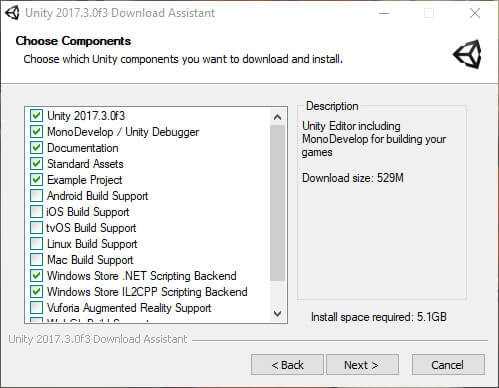
Figure 2: Selecting components to install with the help of Unity’s Download Assistant

The next screen asks you where you wish to download and install the engine and its components. You can leave everything as is here if you don’t have a specific location on your computer in mind. There’s also the option of having the download assistant put all the downloaded files into your downloads folder or somewhere different if you’d like. It’s doubtful you’ll need these again once the installation is done, so you can tell the program to download to a temporary location and delete the files when finished. After this, the download assistant will begin downloading the engine and whatever components you selected and then install everything onto your machine. Keep in mind that this process could take a while depending on how much you’re installing and what your internet connection is like.

Thankfully the final step before creating your project is pretty simple. Once the download assistant finishes installing the engine and you launch Unity, you’ll see a screen asking you to sign into your Unity account or create one. After this, you’ll need to enter a serial number if you decided to buy the engine, or if you’re using the free version you can simply select Personal Edition and move on from there. You’ll have one more license to agree to, then Unity will activate and you can begin working on your first Unity project. Now comes the fun and exciting part.

Getting Familiar with Unity

It’s finally time to create your first Unity project. Do this by clicking New as shown in Figure 3.
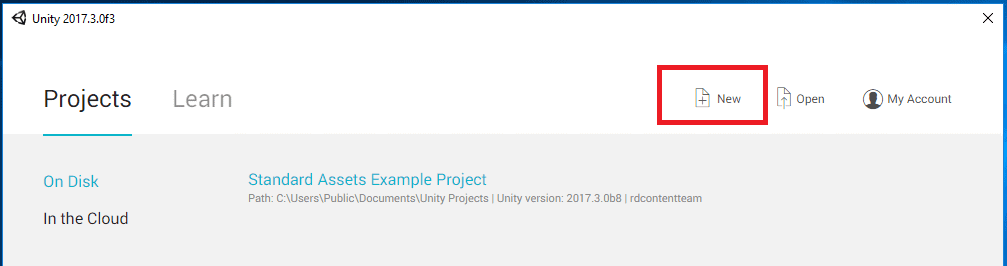
Figure 3: Create a new project

You’ll want to give the project a name and decide if it’s a 2D or 3D game. For right now, either option is fine for what you’ll be doing. It can always be changed midway through the project if you wish. A file location will also need to be set before you create the project. The default location will be sufficient for the project, or you can set it in a more convenient place in your computer. Figure 4 shows the screen.
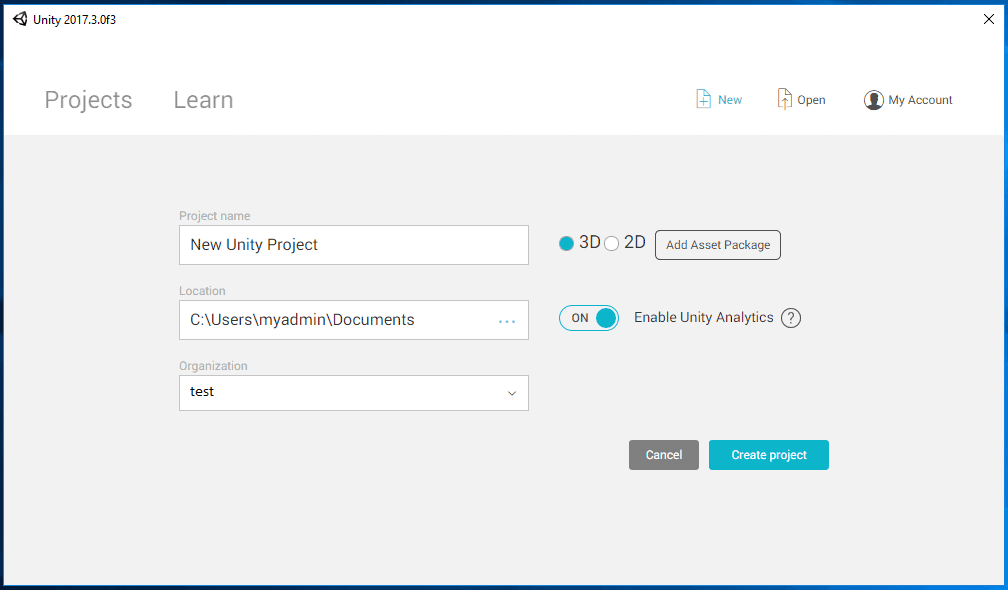
Figure 4: Project properties

Click Create Project. Unity will take a moment to create your project and then open to reveal an empty scene with a camera and a directional light. Figure 5 shows the project.
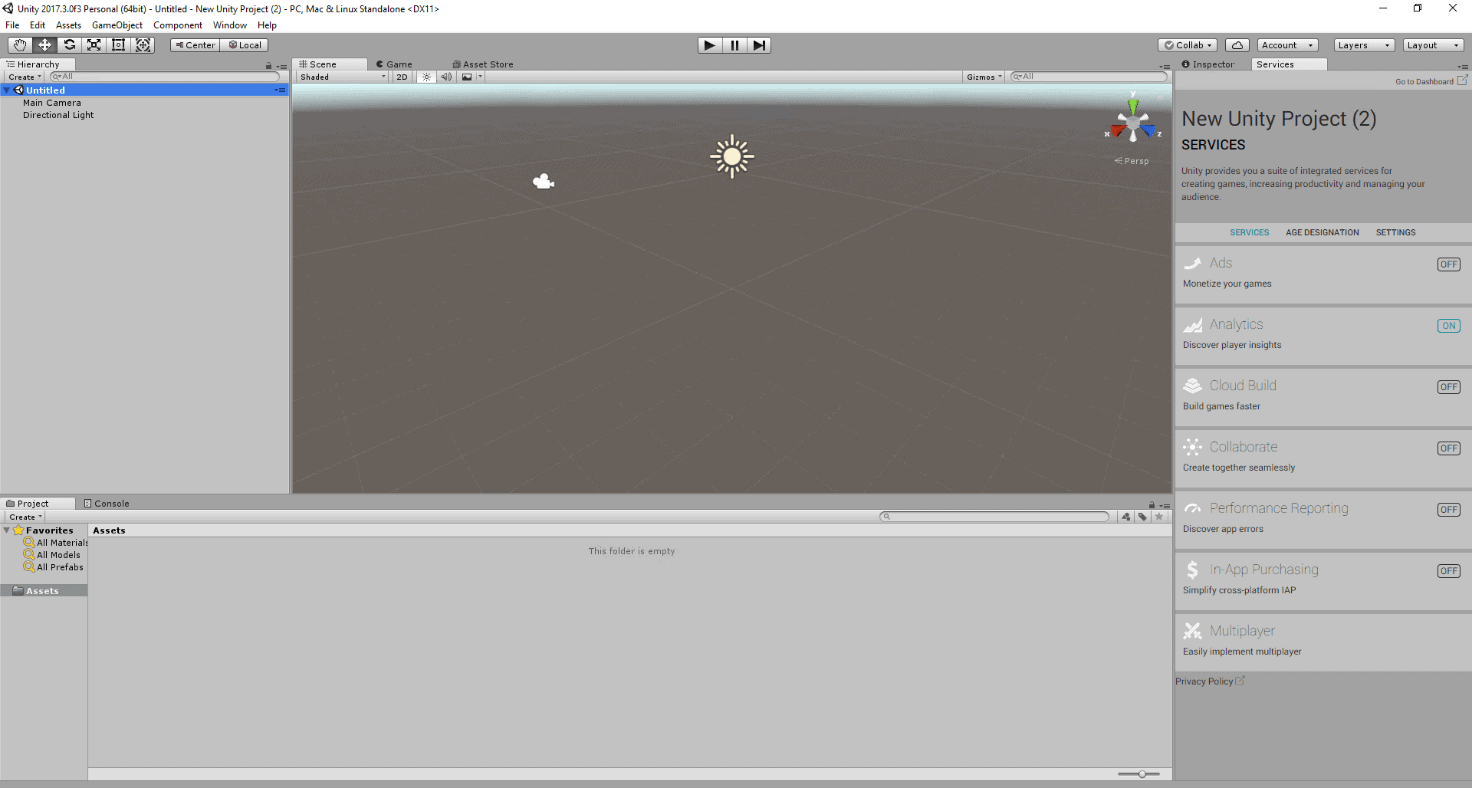
Figure 5: The Unity project

Let’s figure out what you’re going to do before you get started. The goal for the first Unity project is quite simple; make something happen. This can be a task like building a basic scene, creating a simple character, or having a sound play when the game starts. Perhaps the simplest task that will introduce one to both the Unity editor and how to have it and Visual Studio work together would be to put text on the screen.

You should first go over what is on the screen and understand the different windows you’ll be using.

Most likely, the first thing you’ll notice is what’s known as the Scene window. Here you’ll be able to select objects by simply clicking on them, or dragging objects from the assets window below into the scene window. You can right-click and drag anywhere in the Scene window to move the editor camera around your scene. For this project, you probably won’t be using this window too much. Just behind that you’ll see the Game window, which is the window where your game will be played whenever you’re ready to test anything. The more important items you’ll be using to make your project happen will most likely be on the right side of the editor.

The Hierarchy window and the Inspector window to the right shown in Figure 6 are perhaps the two most important windows you’ll be using during any given project. The Hierarchy shows a list of objects that currently exist in your game’s scene and allows you to select the objects by simply clicking the name. In doing so, you’ll see the current properties of the object and information about the components attached to it. Components give the object properties and behaviours in the game. You will be working in the Inspector window quite a lot as we make this project happen.
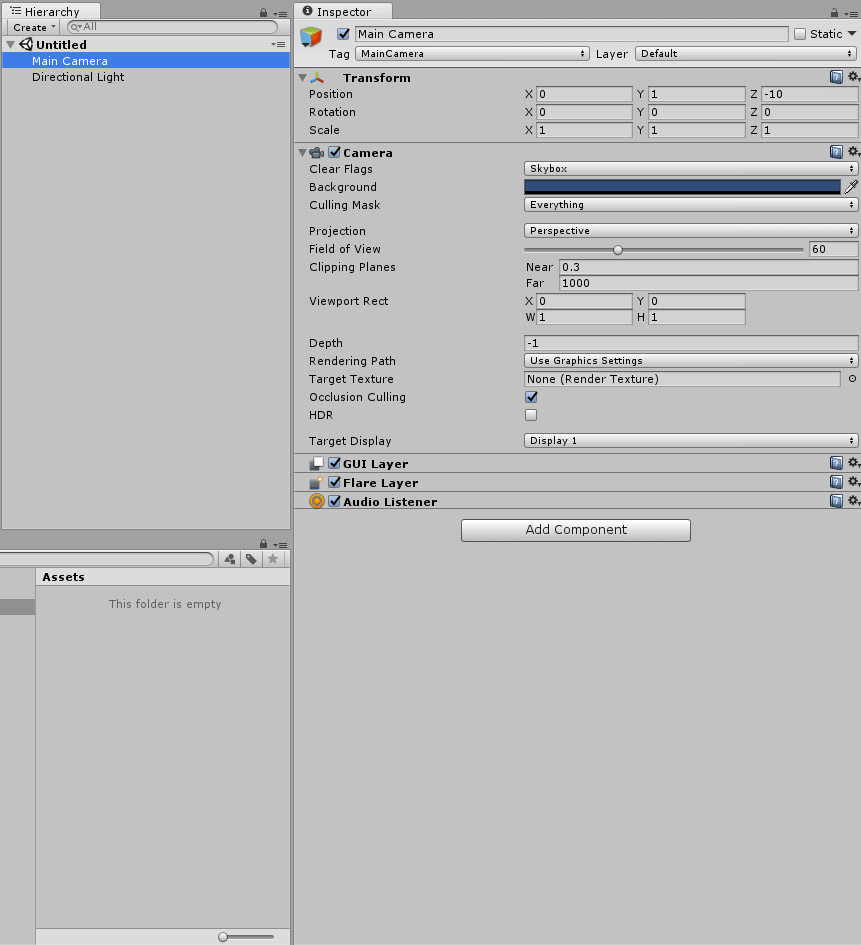
Figure 6: The Hierarchy window on the top left, the assets window in the bottom left, and the inspector window to the right

The First Program

Unity makes it incredibly easy to create what’s known as the GUI (Graphical User Interface) that you’ll need to make this first project. All you have to do is go to the hierarchy window and click the Create button near the top. From there you would go to UI, then select Text and right away you’ll have two new objects appear in your hierarchy. A Canvas object will appear that holds all GUI elements, and a Text object as a child of the canvas object shown in Figure 7.
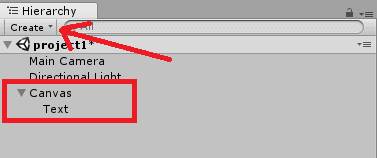
Figure 7: Create a Text object

It’s possible that you may need to move your text around a little before you can see it on the game window. You can do this by changing the Pos X and Pos Y fields in the text object’s Rect Transform component in the Inspector window. Another way to move an object is to click on it in the Scene window and move it around using the mouse. Should you move the object this way, it may be helpful to switch the scene window from a 3D view to a 2D view. In the top left corner of the scene window there’s a button that says 2D that you can press to accomplish this. Recommended Pos X and Pos Y values for this project are fifty for each field. You can get a good idea of how the text will look when playing the game by looking at the Game window. Figure 8 shows the Text object on the Game screen.

Figure 8: The Text object

The Text object will say ‘New Text’ by default. If you wanted to, you could go to the text object’s Text property in the inspector and change the text to anything you want such as ‘Hello World.’ However, changing the text in this way does not really demonstrate how Unity and Visual Studio can work together. What you should do instead is create a script that will change the text at the start of the program. To do this, you can select the text object and choose Add Component near the bottom of the inspector window. After clicking that button you may select New Script towards the bottom. You can also type ‘new script’ in the search bar that appears for easier access. Select C# as the language you wish to use, and give your new script the name ‘HelloWorld’. Figure 9 shows the dialog.
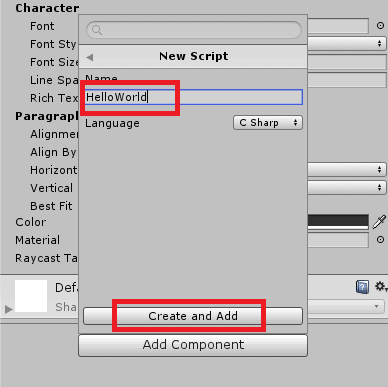
Figure 9: Create a new C# script

Click Create and Add and then Unity will create a script for you and attach it to the text object. You should now see the script in the Assets window as shown in Figure 10.
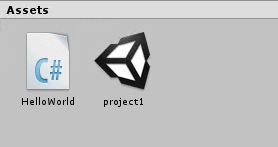
Figure 10: The new HelloWorld script

It’s also visible in the Inspector window shown in Figure 11.
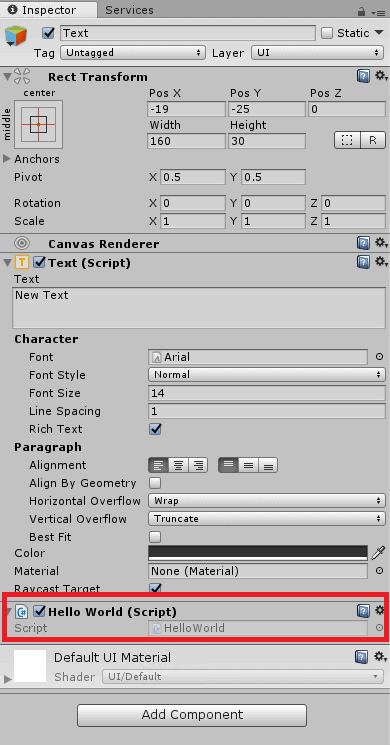
Figure 11: The HelloWorld script in the Inspector window

Now it’s time to open Visual Studio and write the code that will change the text. You can open Visual Studio by double clicking the script either in the Assets window or the Inspector window when the text object is selected. After Visual Studio finishes loading the project and file, you’ll see a few lines of code are already created. Two functions, Start and Update, will be in the body of the class, and above those a few libraries have been included. The function you want to look at today is the start function, so you can comment out the update function if you’d like. By this point your screen should look like Figure 12.
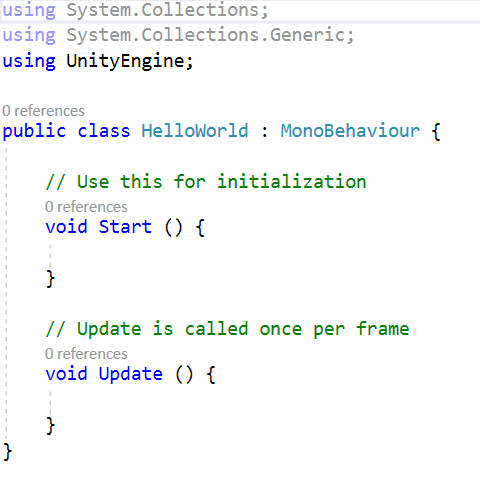
Figure 12: The initial code window

Just underneath the line that says using UnityEngine you’ll need to type in one more line, using UnityEngine.UI; . This library allows us to change via code different UI (User Interface) elements within the project such as the Text object’s text as well as health bars and UI images. You’ll then need to write a line of code just above the Start function, public Text gameText; in order to use the text object. You have to make the object public in order to make certain edits in the Unity editor, and it also must be a Text object since we’re specifically wanting to change text. The gameText part of the code is simply the name you’ve given this particular variable. It can be called whatever you want, so long as it makes sense to you.

There’s just a couple steps left to take before this project does what we want it to. Inside the Start function you must add a new line of code that says gameText.text = “Hello World!”; and then the program is complete! This line simply changes what the text will be in the Unity editor, and it will change this text the moment you begin playing the game. When it’s all finished the code should look like Listing 1.

Listing 1: The completed code

using System.Collections;
  using System.Collections.Generic;
  using UnityEngine;
  using UnityEngine.UI;
  public class HelloWorld : MonoBehaviour {
      // Use this for initialization
      public Text gameText;
      void Start () {
          gameText.text = "Hello World!";
      }
  	
  	// Update is called once per frame
  	void Update () {
  		
  	}
  }

Now save the code and go back to Unity, so that Unity can use the code you have written. If you don’t, nothing will happen when you play the game.

The final step is a simple one. Select the Text object in the Hierarchy window and then scroll down in the Inspector window scroll as far down as you can. In the Hello World script component, you created earlier you may notice an empty field that wasn’t there before. This is the result of typing the public Text gameText line in your Visual Studio code. All you need to do is click and drag your Text object from the hierarchy into the Game Text field in the Hello World component. You can also click the small, circular button to the far right of the Game Text field. Doing this will bring up a window that you can select the Text object in. Once you have selected your Text object, the Inspector window should end up looking like Figure 13.
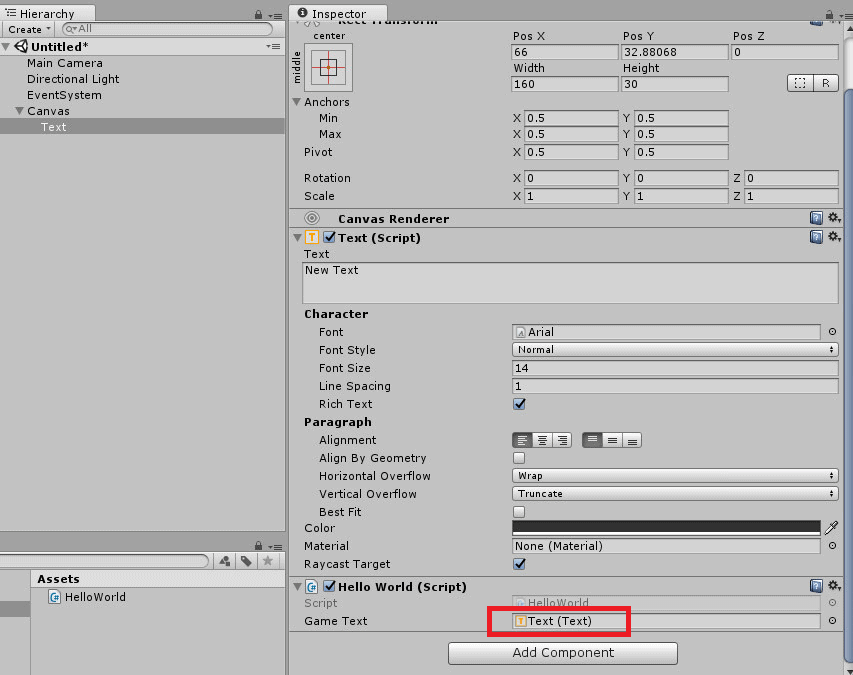
Figure 13: Configuring Game Text

Once that happens, go ahead and play your game by clicking the play button at the top of the Unity editor and watch your text change from ‘New Text’ to ‘Hello World.’

Conclusion

This is perhaps the simplest project one can make in Unity, but it’s our hope that it helps newcomers take that first step into learning the Unity engine and begin to understand what it’s all about. One of the nice aspects of Unity is how well documented it is, so it’s very easy to find tutorial videos and help on whatever kind of project you’d like to make. Unity Technologies themselves have created several tutorial videos to help you learn how to make a simple ‘Roll-a-ball’ game or even learn how to make your game create scenes procedurally. That’s before even mentioning the several hundred tutorial videos out on the internet that can help you with more specific tasks.

Both small teams and large developers have used Unity to create their video games, some of which you might have even heard of. It just takes time and some initiative to make your idea come to life. Thankfully, game engines like Unity are here to make it that much easier for you to accomplish your goals. With the help of tools like Unity, the only real limitation is your own imagination. Perhaps the engine can help you expand on your own ideas and see what you’re truly capable of.

The post Introduction to Game Development with Unity and C# appeared first on Simple Talk.

11 Jan 09:32

Study suggests sugar alternative contributing to C. diff epidemic

11 Jan 09:32

Hamburg: Gericht verhängt bislang höchste Strafe gegen G20-Randalierer

by ZEIT ONLINE: Zeitgeschehen -
Bei den G20-Krawallen warf er eine kaputte Flasche auf Polizisten: Dafür muss ein Hamburger mehr als drei Jahre in Haft – länger als von der Staatsanwaltschaft gefordert.
11 Jan 09:32

Große Koalition: Wie gestern ist das denn!

by ZEIT ONLINE: Wirtschaft - Petra Pinzler
Schlechter hätte die Sondierung nicht starten können: Union und SPD streichen den Klimaschutz zusammen. Das mag die SPD beglücken, aber es ist das falsche Signal.
11 Jan 09:29

Glasfaser: Verkehrsministerium verschleiert Vectoring-Förderung weiter

Wenn das Bundesverkehrsministerium weitere 30.000 km neue Glasfaser feiert, ist damit nicht gesagt, wie viel Vectoring-Ausbau hier gefördert wird. Wir haben genauer hingesehen. Eine Analyse von Achim Sawall (Breitband, Glasfaser)
11 Jan 09:29

Security: Das Jahr, in dem die Firmware brach

2017 wurde viel Firmware und andere grundlegende Computertechnik produktiv auseinandergenommen und kaputt gemacht. Gut so, denn die Fundamente moderner Computer sind oft brüchig. Eine Analyse von Hauke Gierow (Security, WLAN)
11 Jan 09:28

DAB+: Weiße Flecken beim Digitalradio sollen 2018 gestopft werden

Bis zu 24 weitere Sendeanlagen könnte es 2018 für den ersten nationalen DAB+-Mux geben.Der Netzausbau beim digital-terrestrischen Radio DAB+ soll 2018 weiter gehen. Im Idealfall soll es 24 neue Standorte für den ersten bundesweiten Multiplex geben.
11 Jan 09:25

BeA: Bundesrechtsanwaltskammer stellt Zahlungen an Atos ein

Der Softwaredienstleister Atos und damit indirekt auch dessen Partner Governikus werden laut Medienberichten von der Bundesrechtsanwaltskammer (Brak) nicht mehr für das Besondere elektronische Anwaltspostfach (BeA) bezahlt. Die mit Sicherheitsproblemen behaftete Lösung für Anwälte soll umfassend und transparent geprüft werden. (Atos, Server)
11 Jan 09:25

Grundlagen ‚Benutzerdefinierte Listen‘: Welche Möglichkeiten bieten sie, wann sind sie Excel überlegen?

by Thomas Maier
Welche sinnvollen Einsatzmöglichkeiten gibt es für die seit SharePoint 2013 verfügbaren benutzerdefinierten Listen? Die einfache Antwort lautet: Listen bieten sich sehr oft dann an, wenn auch ein Excel-Arbeitsblatt zur Erfassung [...]

[Den vollständigen Beitrag finden Sie auf der Website]
11 Jan 09:25

Elektroauto: Automanager rechnen mit Scheitern des Batterieantriebs

Der Siegeszug des Elektroautos scheint für die Autoindustrie unaufhaltsam. Doch eine anonyme Umfrage unter Top-Managern zeigt noch eine große Skepsis beim Batterieantrieb. Von einem anderen System wird hingegen der Durchbruch erwartet, selbst in China. (Elektroauto, CCC)

11 Jan 09:24

In Kalifornien ist ein Gesetzentwurf eingereicht, den Verkauf von Benzin-Autos ab 2040 zu verbieten

by Andreas Demmig

Der demokratische Abgeordnete Phil Ting stellte das „Clean Cars 2040 Gesetz“ vor, um Klimawandel durch die Reduzierung der Treibhausgasemissionen von Fahrzeugen zu verhindern. Würde das Gesetz verabschiedet werden, würde das verlangen, dass alle nach dem 1. Januar 2040 verkauften Personenkraftwagen emissionsfreie Maschinen haben müssten.

„Kalifornien hat die Nation seit langem mit der Förderung des Umweltschutzes und der öffentlichen Gesundheit durch visionäre Politik und technologische Innovationen angeführt“, sagte Ting am Mittwoch in einer Erklärung. „Es ist an der Zeit, dass wir den Weg für einen emissionsfreien Verkehr frei machen und wichtige Schritte unternehmen, um unsere ehrgeizigen Emissionsreduktionsziele zu erreichen.“

Der Milliardär und Umweltaktivist Tom Steyer, der derzeit eine Kampagne zur Amtsenthebung von Präsident Donald Trump laufen hat, unterstützte die Gesetzesvorlage.

„Diese Gesetzgebung ist mehr als je vorher notwendig, um die Gesundheit der Kalifornier zu schützen, gut bezahlte Arbeitsplätze für saubere Energie zu schaffen und die Rolle unseres Bundesstaates als globaler Klimaführer zu stärken“, sagte Steyer in einer Erklärung.

Das neue Gesetz würde nicht für Nutzfahrzeuge mit einem Gewicht von mehr als fünf Tonnen gelten. Es würde auch nicht für Autos gelten, die von Leuten besitzt werden, die von anderswo nach Kalifornien umziehen.

Ting folgt dem Beispiel von Ländern wie Norwegen, Großbritannien und Frankreich, die sich verpflichtet haben, den Verkauf von Autos mit Benzinantrieb in den kommenden Jahrzehnten zu verbieten.

Dies ist die erste Gesetzgebung dieser Art, die in den Vereinigten Staaten eingeführt wurde.

Erschienen auf The Daily Caller am 03.01.2018

Übersetzt durch Andreas Demmig

http://dailycaller.com/2018/01/03/california-lawmaker-introduces-bill-to-ban-gas-powered-cars-by-2040/

* * *

Vorstehender Link des Business Insiders, zu

Diese Länder verbieten Benzinautos bis 2040


Der Business Insider zitiert aus dem letzten Bericht .pdf der

  1. Norwegen wird ab 2030 nur noch Elektro- und Hybridfahrzeuge verkaufen.

… Jahr 2017 machten Elektro- und Hybridfahrzeuge 2016 28% des Marktanteils in Norwegen aus.

  1. Die Niederlande sagten, dass sie ab 2025 nur Elektrofahrzeuge verkaufen werde.

Auf Elektrofahrzeuge und Hybridfahrzeuge entfielen   laut IEA-Bericht im Jahr 2016 6% des niederländischen Marktanteils .

  1. Indien hat ehrgeizige Ziele für die Elektrifizierung und sagt, dass es ab 2030 nur noch Elektro- und Hybridfahrzeuge verkaufen wird.

Indien hat noch keine Infrastruktur zur Unterstützung von batteriebetriebenen Fahrzeugen aufgebaut, weshalb sie nur einen winzigen Marktanteil ( weniger als 1% ) aufweisen.

  1. China hat gesagt, dass es schließlich nur elektrische und hybride Fahrzeuge verkaufen wird, aber hat noch eine konkrete Zeitlinie festgelegt.

…. machten Elektro- und Hybridfahrzeuge 2016 1,4% des chinesischen Marktanteils aus .

  1. Großbritannien will ab 2040 den Verkauf von Benzin– und Dieselautos verbieten

…. Elektrofahrzeuge entfielen 1,4% des Fahrzeugmarkt britischen Anteils im Jahr 2016

  1. Frankreich will ab 2040 den Verkauf von Benzin– und Dieselautos verbieten, mit dem Ziel: CO2 neutral ab 2050

…machten Elektro- und Hybridfahrzeuge 2016 1,4% des französischen Pkw-Marktanteils aus .

  1. Städte wie Barcelona, Kopenhagen und Vancouver wollen ab 2030 den Verkauf von Benzin– und Dieselautos verbieten.

Die Bürgermeister von Los Angeles, Mexiko-Stadt, Seattle, Barcelona, ​​Vancouver, Mailand, Quito, Kapstadt und Auckland haben sich am Montag verpflichtet, bis 2030 Gas- und Dieselfahrzeuge aus „großen Teilen“ ihrer Städte zu verbannen.


In dem Bericht ist auf Seite 13-14  u.s. Grafik zu finden.

Links blaue Kurve : fallende Kosten je KWh in USD – rechts: Potential bei 100 USD/KWh

Links: gelbe Kurve: Energiedichte in Wh/L, rechts Potential bei 400 KWh/L

Bemerkung: Im Gegensatz zu den Vorhersagen von 2009, … ist das eine Projektion

11 Jan 09:23

WhatsApp Encryption Security Flaws Could Allow Snoops to Slide into Group Chats

10 Jan 17:07

Why Leaf Shutter Lenses Matter (2013)

10 Jan 17:01

Kabelnetz: Vodafone-Kunde erhält statt 200 nur 2 MBit/s

Zu viele Kunden von Vodafone müssen sich ein Netzsegment teilen. Das hat für einige zur Folge, dass die Datenrate viel zu niedrig ist. Der Node wird nun ausgebaut. (Bundesnetzagentur, Vodafone)
10 Jan 17:01

Der Preisvergleich: ICE-Sprinter oder Flugzeug - wie komme ich günstiger nach Berlin?

by Dpa Deutsche Presse-Agentur
Die Bahn hat auf ihrer Paradestrecke Berlin-München die Kinderkrankheiten überwunden. So wie es aussieht, hat sie bereits zahlreiche bisherige Fluggäste für sich gewonnen.
10 Jan 16:39

Bloß ein Textbaustein

by Udo Vetter

Behördenschreiben sind ja gerne mal kompliziert formuliert. Mitunter so kompliziert, dass sogar ihre Verfasser sie nicht verstehen…

Wie im Fall der Mandantin, die von der Polizei zu einer erkennungsdienstlichen Behandlung vorgeladen wurde. Es ging um eine ED-Behandlung, also Fotos, Fingerabdrücke etc., „für die Zwecke des Erkennungsdienstes“ nach § 81b StPO.

In dem Schreiben setzte der zuständige Polizeibeamte meiner Mandantin eine Frist, innerhalb der sie freiwillig auf der Woche erscheinen könne. Diese Frist betrug „zwei Wochen ab Bestandskraft dieses Bescheids“. Nach Ablauf der Frist werde meine Mandantin „polizeilich vorgeführt, notfalls mit einfacher körperlicher Gewalt“.

Nun ja, was soll ich sagen. Es waren genau zwei Wochen und zwei Tage seit dem Tag vergangen, als der Brief bei meiner Mandantin ankam. Und jetzt stand der Beamte vor der Tür und wollte meine Mandantin mitnehmen. So wie er sich am Telefon anhörte, hatte er auch jede Menge Spaß dabei. Wobei ich ihm immerhin zu Gute halte, dass er an Ort und Stelle bereit war, erst mal mit mir über die Sache zu sprechen.

Wie sich herausstellte, konnte er mit der Formulierung „zwei Wochen ab Bestandskraft dieses Bescheids“ nur insoweit was anfangen, als er das mit den zwei Wochen verstand. Die seien ja nun mal rum, meinte er. Das mit der Bestandskraft sei ein Textbaustein, das stehe nun mal so drin, spiele aber keine Rolle.

Das sah ich anders. Eine Anordnung zur ED-Behandlung für „Zwecke des Erkennungsdienstes“ (also zur Verbrechensvorbeugung) ist ein ganz normaler Verwaltungsakt. Sofern der Beamte nicht ausdrücklich den Sofortvollzug anordnet, kann er nicht unmittelbar aus dem Bescheid vorgehen. Vielmehr hat man als Bürger einen Monat Zeit, Klage zu erheben (stand so auch in der Rechtsbehelfsbelehrung, gleichfalls ein Textbaustein). Tut man dies innerhalb der Monatsfrist nicht, wird der Bescheid bestandskräftig. Aber auch nur dann.

So ganz glaubte mir der Polizist nicht, was ich ihm erzählte. Aber immerhin rang er sich durch, mal mit einem Juristen im Polizeipräsidium zu sprechen. Das Telefonat dauerte vielleicht zwei Minuten, dann verabschiedete sich der Polizist recht höflich. Ich hatte ein wenig das Gefühl, er war heilfroh, bis dahin die Handschellen am Hosenbund gelassen zu haben.

Er braucht auch gar nicht so schnell wieder zu kommen. Wir haben mittlerweile fristgerecht Klage erhoben. Bis über diese entschieden ist, wird der Bescheid ebenfalls nicht bestandskräftig.

Hoffentlich ist das zumindest klar.

Flattr this!

10 Jan 16:14

CCU-2 Firmware V2.31.25 verfügbar (Update)

by HomeMatic-INSIDE
Seit gestern steht ein Update auf Version 2.31.25 der CCU2-Firmware bei eQ-3 zum Download bereit. Die 2.31.23er-Version wurde entfernt. Ein entsprechender Hinweis auf der Startseite des WebUI sollte ebenfalls auf diese Aktualisierung hinweisen. Neben diversen Fehlerbehebungen und Erweiterungen wurden in dieser Version auch einige neue Komponenten integriert - darunter auch eine Unterstützung für Philips Hue (ab Bridge 2.0).
Änderungen gegenüber der Vorgängerversion (2.31.23) sind fett hervorgehoben!

Changelog

Neue Geräte:
  • Philips Hue (Ab Philips Hue Bridge 2.0)
  • HmIP-PMFS (Homematic IP Netzausfallüberwachung (ELV-Bausatz))
  • HmIP-WHS2 (Homematic IP Schaltaktor für Heizungsanlagen–2-fach)
  • HmIP-SMI55 (Homematic IP Bewegungsmelder für 55er Rahmen–innen)
  • HmIP-SWO-x (Homematic IP Wettersensoren–basic/plus/pro)
  • HmIP-MOD-RC8 (Homematic IP Modulplatine Sender–8-fach (ELV-Bausatz))
  • HmIP-STHO (Homematic IP Temperatur-und Luftfeuchtigkeitssensor–außen)
  • HmIP-WGC (Homematic IP Garagentortaster)
  • HmIP-SPDR (Homematic IP Durchgangssensor mit Richtungserkennung)
Fehlerbehebungen:
  • Falsche Kanalzuordnung eines Konfigurationsparameters des HmIP-BSM behoben.
  • Fehlende Optionen innerhalb von Programmen (VALVE_STATE, Systemvariablen) korrigiert.
  • Fehler bei Zeitumstellung in der Logikschicht behoben.
  • In einer Heizungsgruppe gemachte Einstellungen wurden korrekt an die Geräte
    übertragen, das virtuelle Gerät der Heizungsgruppe zeigte nach Neuaufruf allerdings
    wieder die Default-Einstellung.
  • HmIP-BBL/BROLL/FBL/FROLL – Im Bedienelement unter Status & Bedienung wurde
    unter Umständen eine falsche Behanghöhe angezeigt.
  • Bei einer direkten Verknüpfung zwischen einem Homematic Rauchwarnmelder und
    einem Rollladenaktoren fuhr der Aktor unter Umständen nicht hoch.
  • Fehlerhafte Quick-Veto Berechnung korrigiert.
  • Einige Kanalparameter bestimmter Dimmer konnten nur geändert werden, wenn die Experteneinstellungen aktiviert waren.
  • Nach Hochladen einer Geräte-Firmwaredatei, wurde unter Favoriten angegeben, dass die Firmwaredatei fehlerhaft ist.
Erweiterungen / Verbesserungen:
  • Bei Jalousieaktoren mit Lamellenverstellung wird bei Betätigung der Auf/Ab-Tasten des nicht mehr die letzte Lamellenposition angefahren.
  • Bei den Geräten HmIP-BBL/-BROLL wird die automatische Kalibrierfahrt sowie die automatische Kompensation der Motoreinschaltverzögerung nur angeboten, wenn der Kanalparameter „Automatische Erkennung der Endposition“ aktiv ist.
  • Ein HmIP-SPI kann nun unter Status & Bedienung und in Programmen deaktiviert werden.
  • HmIP-SMO - Grenzwert für bedingtes Senden korrigiert.
  • Geräte-Posteingang überarbeitet. Die Geräteübernahme ist nun erst nach Überprüfung aller Kanäle möglich.
  • Der Bootvorgang des HM-Server wurde optimiert.
  • Der Anlerndialog zeigt nun nur noch die Bereiche laufender Interfaces.
  • HmIP-SMO/SMI/SPI erhalten zukünftig einen neuen Kanal, der es ermöglicht die Bewegungserkennung für einen gewünschten Zeitraum zu unterdrücken. Damit der Kanal zur Verfügung steht, muss das Gerät mit der neuesten Firmware versehen werden, sowie ab- und wieder neu angelernt werden.
Sonstige Änderungen:
  • Logmeldung des groupdevice.service von info auf debug geändert.
  • API-Change – Der Methode User.getLanguage() wird nun nicht mehr der Username übergeben, sonder die User-ID.
  • Die Logikschicht der ReGaHss Community Version wurde aktualisiert.
Known Bugs:
  • Die schaltbaren Steckdosen von OSRAM-Lightify und Philips Hue werden als Dimmaktoren behandelt. Damit ist das Schalten dieser Geräte per WebUI nur eingeschränkt möglich.
10 Jan 14:56

MeToo: Catherine Deneuve wirbt für "Freiheit zu belästigen"

by ZEIT ONLINE: Zeitgeschehen -
Die Schauspielerin und weitere Frauen erkennen sich in der gegenwärtigen #MeToo-Debatte nicht wieder. Sie warnen vor einem "Klima einer totalitären Gesellschaft".
10 Jan 12:10

Slack System Status

10 Jan 12:08

Spectre & Meltdown: Windows 7-Nutzer werden Auswirkungen deutlich spüren

by Albert Jelica

Microsoft hat kürzlich den Notfall-Patch für die Spectre- und Meltdown-Prozessorlücken ausgerollt, welche vorrangig Intel-Geräte hart treffen. Seit dem Rollout hatte Microsoft ausreichend Zeit, um unterschiedlichste Geräte zu testen und die Performance-Auswirkungen zu evaluieren.

Aufgrund eines Fehlers im Prozessordesign von Intel, AMD und ARM entstand eine sehr schwerwiegende Sicherheitslücke, wodurch Angreifer selbst über den Browser Passwörter von Nutzern hätten stehlen können. Die Behebung der Lücke erfordert einen tiefen Eingriff ins System, welcher den User-Mode im Arbeitsspeicher komplett vom Kernel trennt. Das wirkt sich auf die Performance aus und diese Auswirkungen sprach Microsoft nun an.

Den Blog-Post nutzte Windows- und Devices-Chef Terry Myerson für einige Statements, welche in gewisser Weise zur aktuellen Politik des Konzerns passen. Die Sicherheitslücke spielt Microsoft momentan jedenfalls in die Hände, während man den Vorfall bei Intel am liebsten schnellstmöglich vergessen möchte.

Windows 7-Nutzer werden Auswirkungen spüren

Besonders nützlich ist die Sicherheitslücke aus dem Grund, dass man erneut die höhere Sicherheit und natürlich die Betriebsgeschwindigkeit von Windows 10 betonen kann. In dem Statement lässt der Microsoft-Manager wissen, dass vor allem Windows 8- und Windows 7-Nutzer die Performance-Auswirkungen auf älterer Hardware deutlich spüren werden. Dies liegt daran, dass Windows 7 und Windows 8 mehr Nutzer-Kernel-Transitionen besitzen aufgrund mittlerweile veralteter Design-Entscheidungen. Microsoft geht davon aus, dass die Nutzer mit Prozessoren vor 2015 unter Windows 7 und 8 die deutliche Performance-Reduktion spüren werden.

Prozessor: Je älter, desto stärker sind die Auswirkungen

Unter Windows 10 werden neuere Prozessoren ab 2016 keine spürbaren Performance-Auswirkungen zeigen und in Benchmarks dürften diese nur im einstelligen Bereich sein.

Prozessoren, welche vor 2015 gekauft wurden, und heute in Windows 10-Maschinen genutzt werden, dürften leichte Performance-Auswirkungen in Benchmarks bemerken und einige Nutzer könnten diese auch im Alltag bemerken.

Hierzu wird Microsoft in den kommenden Wochen weitere Benchmark-Tests veröffentlichen, denn das Unternehmen dürfte wohl ausreichend Hardware besitzen, um sehr ausführliche Tests durchzuführen. Je häufiger Microsoft diese Sache aufbringt, desto mehr schadet man Intel, was wiederum der eigenen Windows 10 ARM-Strategie nur zuträglich ist.


Quelle: Microsoft

Der Beitrag Spectre & Meltdown: Windows 7-Nutzer werden Auswirkungen deutlich spüren erschien zuerst auf WindowsArea.de.

10 Jan 12:08

Confidential metrics for Snapchat features

10 Jan 12:06

It's not just you: The Philips Hue update system is overwhelmed today

by Russell Holly

It turns out these smart bulbs are kinda popular.

Philips used CES as a perfect opportunity to drop a big feature update into its app today but in order to use that app all of the bulbs in your home need to also be updated. This isn't usually a big deal, but because so many people are trying to update their Hue bulbs today the servers at Philips are a little overwhelmed.

Long story short, it's going to be a little while before you get access to this new feature. If you're not excited about constantly checking the update screen in the Hue app until the update is finally ready, Philips has a solution for you.

It's not enabled by default because a random blinking light in your home is disconcerting, but Philips offers the ability to silently auto-update your bulbs when an update is available. You can pick a specific time to have these updates installed, and doing so makes it possible for the update to be downloaded to the hub during non-peak times. Here's how that works in the official Hue mobile apps:

10 Jan 12:05

Trends to Avoid When Founding a Startup

10 Jan 12:03

Honduras: Schweres Erdbeben löst Tsunami-Warnung aus

by ZEIT ONLINE: Zeitgeschehen -
Das Beben der Stärke 7,6 ereignete sich weit draußen im Meer, direkte Schäden gab es kaum. Doch neun Karibik-Staaten wappnen sich für eine mögliche Tsunami-Welle.
10 Jan 12:02

The case of Reply Log Manager not letting lagged copy lag

by The Exchange Team

In a previous blog post Ross Smith IV had explained what the Replay Lag Manager is and what it does. It's a great feature that's somewhat underappreciated. We've seen a few support cases that seemed to have been opened out of the misunderstanding of what the Replay Lag Manager is doing. I wanted to cover a real world scenario I had dealt with recently with a customer that I believe will clarify some things.

What is a Replay Lag Manager?

In a nutshell, Replay Lag Manager provides higher availability for Exchange through the automatic invocation of a lagged database copy. To further explain, a lagged database copy is a database that Exchange delays committing changes to for a specified period of time. The Replay Lag Manager was first introduced in Exchange 2013 and is actually enabled by default beginning with Exchange 2016 CU1.

To understand what it is let's look at the Preferred Architecture (PA) in regards to a database layout. The PA uses 4 database copies like the following:

clip_image002

As you can see the 4th copy is a lagged copy. Even though we're showing it in a secondary site, it can exist in any site where a node in the same DAG resides.

The Replay Lag Manager will constantly watch for any of the three things to happen to the copies of DB1. Ross Smith's post does a wonderful job of explaining them and how Exchange will take other factors (i.e. disk IO) into consideration before invoking the lagged copy. In general, a log play down will occur:

  • When a low disk space threshold (10,000MB) is reached
  • When the lagged DB copy has physical corruption and needs to be page patched
  • When there are fewer than three available healthy HA copies for more than 24 hours

A log "play down" essentially means that Replay Lag Manager is going to force that lagged database copy to catch up on all of the changes to make that copy current. By doing this it ensures that Exchange maintains at least 3 copies of each database.

When things are less than perfect…

In the real world we don't always see Exchange setup according to our Preferred Architecture because of environment constraints or business requirements. There was a recent case that was the best example of Lag Replay Manager working in the real world. The customer had over 100 DB's, all with 6 copies each. There were 3 copies in the main site and 3 copies in the Disaster Recovery site with one of those copies at each site being lagged. The DB copies were configured like this for all databases.

clip_image002[5]

As you can see in this particular instance the lagged copy at Site A was being forced to play down while the other copy showed a Replay Queue Length (RQL) of 4919. This case was opened due to the fact that the lagged DB copy at Site A was not lagging.

The customer stated that the DB was lagging fine until recently. However, after a quick check of the Replay Queue Length counter in the Daily Performance Logs it didn't appear to have ever lagged successfully for this copy.

So, what we're seeing is the database has 6 copies, 2 lagged but 1 of those lagged copies isn't lagging. Naturally, you may try removing the lag by setting the -ReplayLagTime to 0 then changing back to 7 (or what it was before). You may even try recreating the database copy thinking something was wrong with it. These still don't cause Exchange to lag this copy.

The next step is to check if it's actually the Replay Lag Manager causing the log play down. You can quickly see this by running the following command specifying the lagged DB\Server Name. On this example will use SERVER3 as the server hosting the lagged copy of DB1.

Get-MailboxDatabaseCopyStatus DB1\SERVER3 | Select Id,ReplayLagStatus
Id                                      : DB1\SERVER3
ReplayLagStatus                         : Enabled:False; PlayDownReason:LagDisabled; ReplaySuspendReason:None;
Percentage:0; Configured:7.00:00:00; MaxDelay:1.00:00:00; Actual:00:01:22

What we see is that the ReplayLagStatus is actually disabled and the PlayDownReason is LagDisabled. That tells us it's disabled but it doesn't really give us more detail as to why..

We can dig further by looking at the Microsoft-Exchange/HighAvailability log and we see a pattern of 3 events. The first event we encounter is the 708 but it doesn't give us any more information than the previous command does.

Time:     11/31/2017 3:32:55 PM
ID:       708
Level:    Information
Source: Microsoft-Exchange-HighAvailability
Machine:  server3.domain.com
Message:  Log Replay for database 'DB1' is replaying logs in the replay lag range. Reason: Replay lag has been disabled. (LogFileAge=00:06:00.8929066, ReasonCode=LagDisabled)

The second event we see has a little more information. At this point we know for sure it's the Replay Lag Manger because of its FastLagPlaydownDesired status.

Time:     11/31/2017 3:32:55 PM
ID:       2001
Level:    Warning
Source: Microsoft-Exchange-HighAvailability
Machine:  server3.domain.com
Message:  Database scanning during passive replay is disabled on 'DB1'. Explanation: FastLagPlaydownDesired.

On the third event we see the 738 which actually explains what's going on here.

Time:     11/30/2017 1:50:15 PM
ID:       738
Level:    Information
Source: Microsoft-Exchange-HighAvailability
Machine:  server3.domain.com
Message:  Replay Lag Manager suppressed a request to disable replay lag for database copy 'DB1\SERVER3' after a suppression interval of 1.00:00:00. Disable Reason: There were database availability check failures for database 'DB1' that may be lowering its availability. Availability Count: 3. Expected Availability Count: 3. Detailed error(s):
SERVER4:
Server 'server4.domain.com' has database copy auto activation policy configuration of 'Blocked'.
SERVER5:
Server 'server5.domain.com' has database copy auto activation policy configuration of 'Blocked'.
SERVER6:
Server 'server6.domain.com' has database copy auto activation policy configuration of 'Blocked'.

The "Availability Count: 3. Expected Availability Count: 3." is a tad confusing but the heart the issue is in the detailed errors below that…

It's Replay Lag Manager doing it… but why?

The entire reason for this blog post comes out of the fact that we've seen the Replay Lag Manager blamed for not letting a lagged copy lag. So, the next step someone will do is to disable it. Please don't do that! It only wants to help!

Let's look at how we can resolve the our above example. The logs are showing that it's expecting 3 copies but there aren't 3 available.  How can that be? They have at least 4 copies of this database available?!? If we run the following command we see a hint at culprit.

Get-mailboxdatabasecopystatus  DB1 | Select Identity,AutoActivationPolicy
Identity          AutoActivationPolicy
--------          --------------------
DB1\SERVER1 Unrestricted
DB1\SERVER2 Unrestricted
DB1\SERVER3 Unrestricted - Lagged Copy (Not lagging)
DB1\SERVER4 Blocked
DB1\SERVER5 Blocked
DB1\SERVER6 Blocked - Lagged Copy (Working)

There it is! There are 6 database copies, however, the copies in Site B are all blocked due to the AutoActivationPolicy. Now things are starting to make sense. In the eyes of the Replay Lag Manager those copies in Site B are not available because Exchange cannot activate them automatically. So, what's happening is the Replay Lag Manager only sees the 2 copies (in the green square below) as available. Therefore, it forces a play down of the logs on the lagged copy to maintain it's 3 available copies.

clip_image002[8]

That explains why the lagged copy at Site A isn't lagging but why is the lagged copy at Site B working fine? This is because from the perspective of that database there are 3 available copies in Site A once that lagged copy was played down.

That's cool… how do I fix it?

There are essentially two ways to resolve this example and allow that lagged copy at Site A to properly lag.

The first way is to revisit the decision to block Auto Activation at Site B. The mindset in this particular instance was that their other site was actually for Disaster Recovery. They wanted some manual intervention if databases needed to fail over to the DR site. That's all well and good but it doesn't allow for a lagged copy at Site A to work properly due to the Replay Lag Manager. The customer did actually end up allowing 1 copy at the DR site (site B in our example) for Auto Activation. To do this you can run the following command:

Set-Mailboxdatabasecopy SERVER4\DB1 -DatabaseCopyAutoActivationPolicy Unrestricted

The other option here would be to create another database copy at Site A. Obviously, that's going to require a lot more effort and storage. However, doing this would allow for the Replay Lag Manager to resume lagging on the lagged database copy.

I hope this post clarifies some things in regards to the Replay Lag Manager. It's a great feature that will provide some automation in keeping your Exchange databases highly available.

Michael Schatte

10 Jan 11:07

MIT HAKEN UND ÖSEN – Photovoltaik und Vulkane

by Admin

Das Jahr 1816 gilt als das »Jahr ohne Sommer«. In vielen Ländern schien über ein Jahr lang kaum die Sonne, heftige Regenfälle verwüsteten das Land; in Europa und in den Vereinigten Staaten fuhren die Bauern Missernten ein, Hungersnöte brachen aus; weniger allerdings in Russland, dessen Zar Getreide in die Schweiz liefern ließ.

Ein Jahr zuvor, im April 1815, brach auf der anderen Seite des Erdballes der Vulkan Tambora aus. Eine gewaltige Explosion schleuderte den oberen Teil des Vulkans in die Luft, verkleinerte den Berg von 4.300 Meter Höhe auf nur noch 2.800 Meter. Er spie ungeheure Mengen an giftigen Gasen und Asche in die Luft. Die Explosion vernahm man noch in 1.500 Kilometer Entfernung. Die Asche breitete sich meterdick über riesige Flächen aus, zerstörte alles Leben. 100.000 Menschen sollen gestorben sein.

In der westlichen Hemisphäre gilt dieser Ausbruch als eine Ursache für die katastrophale Wetterverschlechterung. Wie weit der Ausbruch des Vulkans an der dramatischen Verschlechterung des Wetters beteiligt war, ist noch nicht ganz geklärt. Schließlich gab es schon seit 1812 eine Reihe von kalten und regnerischen Jahren verbunden mit Missernten. Aber keine Frage: Der Vulkanausbruch schleuderte gewaltige Mengen an Asche und Feinstaub in die oberen Luftschichten der Atmosphäre. Der Vulkan liegt dicht am Äquator, ausgestoßene Gase und Ascheteilchen geraten in die globalen Windströmungen und werden rund um den Globus verteilt. Das geschieht bei näher an den Polen gelegenen Vulkanen eher nicht.

Eine solche Naturkatastrophe bekommt ganz neue, bisher ungeahnte Folgen für ein Land, das seine Energie aus sogenannten »Erneuerbaren« bezieht. Was geschieht also, wenn wieder ein Vulkan ausbricht? TE-Leser Wolfgang Kohl fragt, welche Auswirkungen auf die alternative Stromversorgung ein Vulkanausbruch mit global weitflächiger und monate- oder gar jahrelanger stark verminderter Sonnenstrahlung haben kann? Denn in der bisherigen Diskussion über alternative Energien hat er noch nie etwas darüber gelesen, wie derartige Naturkatastrophen in ihren Auswirkungen eingeschätzt werden.

Da lohnt ein Blick schon einmal auf den Normalbetrieb von Photovoltaik-Anlagen. Wer in Städten in Wüstengebieten sein Auto nur zwei oder drei Tage stehen lässt, sieht hinterher nichts mehr durch seine Scheiben und muss durch eine Waschstraße fahren. Es sind permanent ungeheure Mengen an feinem Staub in der Luft, die sich auf alle Flächen absetzen. Fensterreinigern jedenfalls geht die Arbeit nie aus.

Das Gleiche passiert auch mit Photozellen. Auf denen setzt sich eine Schicht Staub ab und vermindert den Lichteinfall. Das kann bis zum völligen Blockieren des Lichteinfalls führen, wenn die komplette Fläche der Solarzellen mit Staub, Schmutz oder gar Schnee bedeckt sind. Bis zu 25 Prozent reduziert sich der Ertrag einer Photovoltaik-Anlage bei nur leichter Verschmutzung.

In staubigen und trockenen Regionen bildet sich innerhalb weniger Tage eine geschlossene Decke an Staub und Schmutz auf den Photozellen und reduziert bis verhindert die Stromerzeugung. In trockenen und staubigen Ländern lassen sich die Auftraggeber meist bestätigen, dass die Photovoltaikanlagen sich selbst reinigen. Hier sind die Oberflächen speziell beschichtet; das soll verhindern, dass sie sich zusetzen. Letztlich aber ist ein kräftiger Wüstenstaub stärker.

In Deutschland sind die meisten Module auf Dachschrägen befestigt. Hier sorgt Regen für eine gewisse Reinigung der Oberflächen. Dennoch sammeln sich gerade über längere trockene Zeiten Staub und Laub auf den Flächen an und vermindern die Leistung. Abrieb von Bremsstäuben, Zement und Kalkstäube sind aggressiv und fressen sich in das Glas. Zusätzlich können Moose und Algen wachsen. Es muss also gereinigt werden, wenn der Ertrag nicht zu stark vermindert werden soll.

Problematischer sind Anlagen, die auf flacheren Dächern von Ställen zum Beispiel montiert wurden. Die Landwirte lockten die großen Flächen, doch die warme Luft, die Tiere abgeben, strömt nach oben und zieht über die Lüftungsöffnungen der Dächer ab. Mit im Gepäck haben sie Staub und Ammoniakverbindungen aus dem Stall. Das legt sich über die Glasflächen und reduziert ebenfalls den Lichteinfall. Solarmodule putzen – es ist immer wieder nett anzuschauen, welche neuen Berufsbilder ein solches Gebilde wie die Energiewende produziert.

Bereits im Normalbetrieb also beeinträchtigen Staub und sonstige Stoffe in der Luft den Betrieb von Photovoltaik-Anlagen. Wir wollen uns besser nicht ausmalen, was geschieht, wenn ein Vulkan ausbricht, die Erde verdunkelt und die vollkommen ()oder überwiegend) auf Photovoltaik und Windenergie verlegte Energieerzeugung empfindlich stört. Klar ist, dass eine solche Naturkatastrophe erhebliche Auswirkungen auf die Energieversorgung eines Industrielandes wie Deutschland hätte. Man kann davon ausgehen, dass die meisten Photovoltaik-Anlagen keinen Strom mehr liefern werden, wenn sich eine Ascheschicht auf die Module legte und zudem von der Sonne weniger Licht durch die Luftschichten käme.

Das ist glücklicherweise nur in Deutschland so. Die Nachbarländer verfügen über konventionelle Kohle- und Kernkraftwerke. Wir können den Strom aus Frankreich und Tschechien bekommen. Später werden wir in Russland und China um Energie bitten und betteln.

Wie wacklig die sogenannten erneuerbaren Energien sind, erwies sich gerade wieder beim jüngsten Hochwasser. Die ach so natürliche Wasserkraft zeigte, wie weit der Rückschritt ins Mittelalter gediehen ist: Bei den jüngsten heftigen Regenfällen und Schneeschmelzen mit hohem Wasseraufkommen produzierten die Wasserkraftwerke – nein, nicht, wie man angesichts der Wassermassen vermuten könnte, gigantische zusätzliche Mengen an Strom, nein, sie mussten – abgeschaltet werden. Abgeschaltet! Zu viel Wasser!

Denn einmal war die Differenz zwischen Ober- und Unterwasser zu gering, der Druckunterschied vor und nach der Wasserturbine so gering, dass kaum mehr Strom erzeugt werden konnte. Zudem liefen die Wasserkraftwerke Gefahr, dass die mitgeführten Unratmassen die Turbineneinläufe mit ihren Rechenwerken verstopfen. Äste, ganze Baumstämme, tonnenschwer, reißen die Fluten mit, zudem viel Laub – tödlich für jede Turbine. Im Winter droht bei Eis sogar die Zerstörung des Wasserkraftwerkes. Deshalb haben die alten Wassermühlenerbauer früher einen separaten Zulauf zum Mühlrad angelegt, den sie bei Eisgang sperren konnten.

Zu viel Wasser ist also nichts für die Stromerzeugung aus Wasserkraft. Genauso wie zu viel Wind schädlich für die Windräder ist. Bei kräftigem Wind und Sturm knicken sie um wie Streichhölzer. Damit sie nicht in Gefahr geraten, auseinanderzufliegen, müssen sie bei starkem Wind abgeschaltet werden. Die Flügel werden in eine sogenannte Segelstellung gestellt, bieten so dem Wind kaum Widerstand und laufen weniger Gefahr, von Orkanböen zertrümmert zu werden.

»Erneuerbare« Energien also sind sehr anfällig gegenüber Unbilden der Natur. Zu viel Wind, zu viel Wasser oder gar ein Vulkanausbruch mit Ascheregen – kein Strom. Fein, dass die Grünen den großen Fortschritt, eine einigermaßen unabhängige und günstige Energiequelle geschaffen zu haben, jetzt wieder rückgängig machen wollen.

Der Beitrag erschien zuerst bei Tichys Einblick hier

10 Jan 09:15

Neuinstallation hilft: Ikea Trådfri verliert nach Update Homekit-Verbindung

Ikea hat ein Update veröffentlicht, das seine Trådfri-Produktreihe in Verbindung mit Apples Homekit erhebliche Probleme bereitet. So verliert die Smart-Home-Lösung ihre Verbindung zu Homekit. Eine Neuinstallation soll das Problem lösen. (Ikea, Apple)