Shared posts

25 Jun 21:19

How to Use Entra Workbooks in Microsoft 365 

by Sudha

Admins, on your checklist of must-dos, monitoring Microsoft 365 user activities, Entra ID sign-ins, and identity protection risk analysis top the charts. You might start by peeking into Microsoft 365 audit logs and sign-in data for improved identity and access management. But wait, here’s the twist! 🙄 

❌ Sorting through a heap of Microsoft 365 audit logs filled with all sorts of user and application activities can be overwhelming. And trying to make sense of specific details using filters? Let’s just say it’s no walk in the park. 💯 

❌ You know, pictures are worth a thousand words and all that! Unfortunately, Microsoft 365 audit and sign-in logs lack visually engaging representations for vital aspects such as Microsoft 365 apps, sign-ins, Conditional Access, and SSPR. 📊 

But don’t worry! Microsoft gave two extra tools to help you out: Log Analytics and Microsoft Entra workbooks. Let’s see how these tools make Microsoft 365 monitoring job a whole lot easier! 👇 

What is Log Analytics in Microsoft Azure? 

You might be wondering why we’re discussing Log Analytics when our focus is Workbooks. That’s a valid question! Workbooks rely on Log Analytics to fetch Entra Logs. So, let’s see about it in detail! 

Log Analytics in Microsoft Azure helps you to collect, analyze, and visualize data from Azure Monitor logs. With Log Analytics, you can monitor Azure AD sign-in logs, user provisioning status, application activities, and monitor Conditional Access policies by querying data using the “Kusto Query Language (KQL)”. 

How to Use Log Analytics in Microsoft Entra ID? 

To use Log Analytics in Microsoft Entra ID, you need to do the following steps.

1. Create a Log Analytics Workspace in Microsoft Azure: 

To create a Log Analytics workspace, you need an active Azure subscription. And then the first step involves configuring a dedicated Log Analytics workspace in Azure Monitor. This workspace acts as a secure central repository for your log data. 

2. Configure Diagnostic Settings in Entra ID

Within the “Monitoring & health” section of Entra ID, you need to configure diagnostic settings. This allows you to specify which logs (such as audit logs and sign-in logs) you want to collect and stream them to the designated Log Analytics workspace you created in Azure Monitor. 

3. Analyze Data Using Kusto Query Language (KQL)

Once the data is collected in the workspace, you can utilize KQL to write queries for searching and analyzing the logs in Log Analytics. This enables you to identify trends, patterns, and potential security threats in Microsoft 365. 
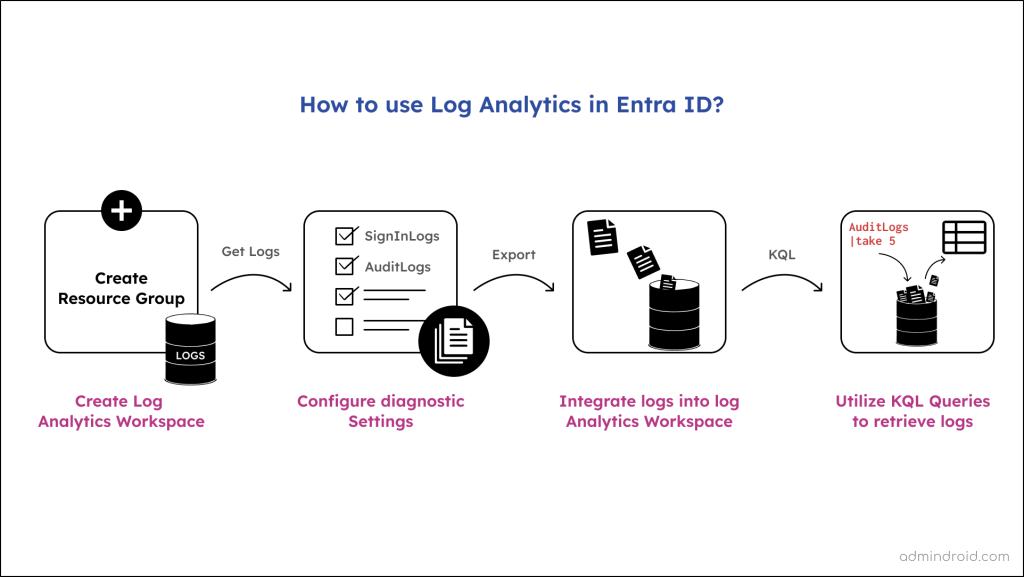
To run the KQL queries in Microsoft Entra Log Analytics and get audit or sign-in logs, follow the navigation below. 

Microsoft Entra admin center → Monitoring & health → Log Analytics 

Merely clicking on the “Log Analytics” option in Entra ID will throw you a below error message. 

Log Analytics integration not enabled. This Microsoft Entra tenant is not currently enabled to send logs to Log Analytics. 

To view and access Log Analytics, you need to satisfy the first 2 points. 

P.S: Above is an overall comprehensive explanation of how Log Analytics gives us data. Don’t worry about the above steps, we have detailly explained them as they are the prerequisites for workbooks in Entra ID.

Pros of Using Log Analytics in Microsoft Entra ID 

  • Log Analytics allows you to get alerts for risky sign-ins in Microsoft Entra ID, which will notify you via email when the conditions are met. 
  • You can export query results, including the count of MFA prompts by CA policy, security defaults, per-user MFA, and more. 
  • You can adjust the time frame of your queries to focus on specific periods of data. 
  • Instead of starting from scratch, you can take advantage of pre-built queries for quicker analysis. 
  • You can refine your query results by applying filters, sorting them in a desired order, and grouping related data together using KQL. 
  • Logs such as Azure AD user sign-in logs, audit logs, Conditional Access policies and others can be visualized using bar charts for easier auditing. 

Cons of Microsoft Entra Log Analytics 

  • Analyzing data in Log Analytics means running queries one by one, and there’s no built-in dashboard to see multiple query results at once.  
  • Plus, it lacks some visualization options, such as maps or customizable tiles, which would make it easier for beginners to interpret the data. 

These downsides really affect Log Analytics in Microsoft Azure. Having consolidated reports and better visuals is crucial for understanding things well and making quick decisions. But where can we find something that meets these needs? Don’t worry! There’s a better solution coming up – Microsoft Entra workbooks. 🚀 

What is Workbooks in Entra ID? 

Microsoft Entra workbooks are used to customize your own interactive dashboards using data from different Azure resources. With workbooks, you can generate visually appealing and easy-to-understand reports and charts on Microsoft 365 logs, offering a consolidated view of your required data. 😎 

Workbooks are available both in Microsoft Entra ID and Azure Monitor. While the concepts and processes remain consistent across both types of workbooks, there are some distinctions. Workbooks in Microsoft Entra ID specifically focus on identity and access management scenarios alone. For example, with Azure workbooks for Entra ID, you can 

✅Monitor risky sign-ins in Microsoft 365.  
✅Audit Microsoft 365 user and admin activity
✅Export Microsoft 365 SSPR status reports
✅Investigate Azure AD protection risky users
✅Get service-principal sign-in report
✅Monitor sign-in logs in Microsoft 365
✅Get the last successful sign-in date report for Microsoft 365 users

Benefits of Microsoft Entra Workbooks: 

  • Shareable Reports: The reports you generate using your queries are easily shareable. This means you can effortlessly obtain and share handy reports on the effectiveness of Conditional Access policies, SSPR, and other crucial access management data with your co-admins.  
     
  • Parameter-based Filtering and Visualization: Importantly, you can use parameters as filters to obtain your desired Entra user activities alone from a heap of sign-in and audit logs. Additionally, you can present this data with a variety of visualizations like pie charts, bar charts, and tiles, which will be useful to identify and troubleshoot security gaps effectively. 

How to Use Azure AD Workbooks? 

Just clicking on the “Workbooks” option in Entra ID won’t be enough; you’ll encounter the same error message as you would in the Log Analytics section. 

To access and create identity workbooks in Microsoft Entra, there are a series of steps. Before getting into the steps, check the respective roles and licenses needed. 

Subscription  License  Role  
Azure Subscription  Microsoft Entra ID Premium P1  Read-only access: (To view only, query data in workbooks) 
Reports Reader 
Security Reader 
Global Reader  

Update: (Extra capability to create and edit diagnostic settings to send to Log Analytics workspace) 
Security Administrator   

Here are the detailed steps to use Entra workbooks in Microsoft 365. 

  1. Create a Log Analytics workspace in Microsoft Azure Monitor
  2. Configure diagnostic settings in Microsoft Entra ID
  3. Use Workbooks to analyze Microsoft Entra activity logs

1. Create a Log Analytics Workspace in Microsoft Azure Monitor

As mentioned earlier, a Log Analytics workspace serves as the logical storage unit where your log data is collected and stored. Entra workbooks will utilize the data from this workspace and present you with a visual representation of Entra logs. 

 So, you need to create a Log Analytics workspace by following the steps below. 

1. Sign in to the Azure portal
2. In the search box, type “Log Analytics workspaces” and select it from the search results. 
3. Click on “+ Create” to start creating a new workspace. 
4. On the “Create Log Analytics workspace” page, you’ll need to specify the following options: 

  • Subscriptions: Choose your Azure subscription from the dropdown menu. 
  • Resource Group: Select an existing resource group from the dropdown menu or create a new one by clicking “+ Create new” and providing a name. 
    • The resource group is a logical container that helps you organize and manage related Azure services. 
  • Workspace name: Enter a suitable name for your workspace. 
  • Region: Choose the Azure subscription location from the dropdown menu, such as “Central US”

5. After filling in these options, click on “Review + Create” at the bottom of the page. 
6. Once the validation is passed and there are no errors, click on “Create” to deploy the workspace in Azure. 
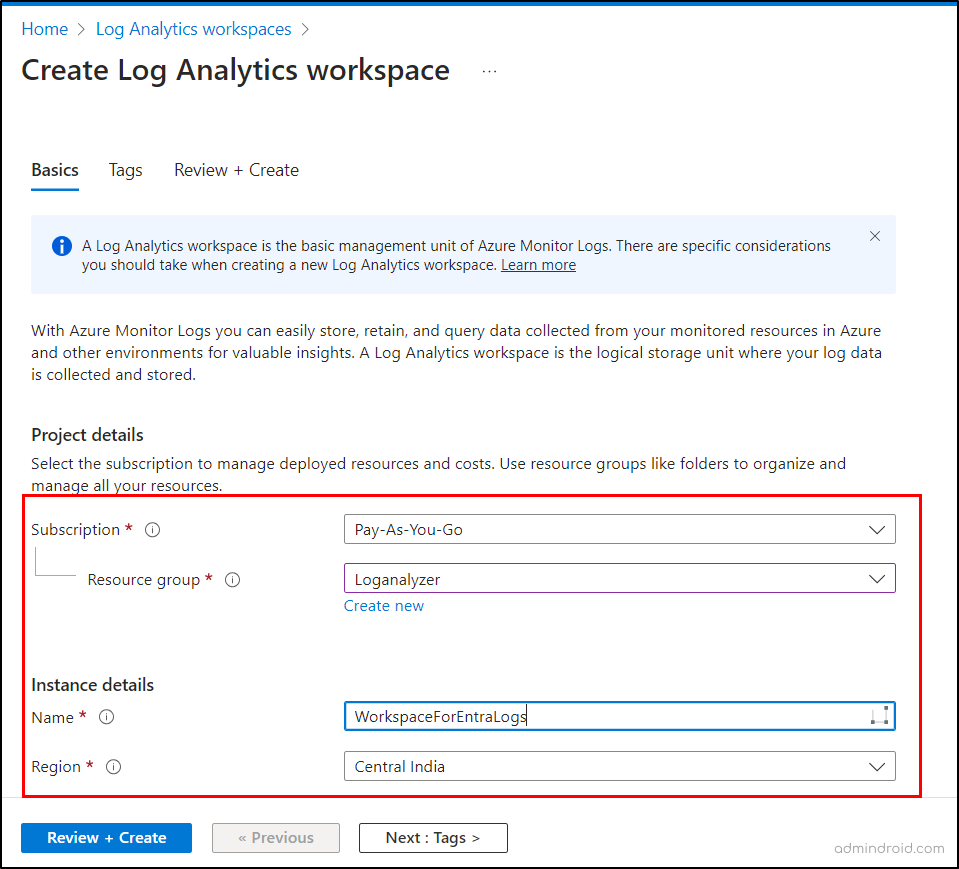
Create a Log Analytics Workspace to use Microsoft Entra workbooks
Create a Log Analytics Workspace

You might think that by creating a workspace, we’ve cleared the prerequisite for accessing workbooks. However, that’s not the case. Think of it like setting up a storage place without any data stored in it yet. To use workbooks and produce user-friendly, interactive logs and data dashboards, you must fetch data into the workspace. To do it, let’s follow the steps below.

2. Configure Diagnostic Settings in Microsoft Entra ID 

Diagnostic settings in Entra ID are used to fetch Entra logs and metrics from a resource to a destination. You can create up to five diagnostic settings to export various logs and metrics to different destinations. 

This is a crucial step, as it enables us to fetch Microsoft Entra activity logs to a Log Analytics Workspace using this feature. 

To configure diagnostic settings for Microsoft Entra logs, follow these steps: 

1. Sign in to the Microsoft Entra admin center. 
2. Navigate to the Identity section and select “Diagnostic settings” from the Monitoring & health section. 
3. Click the “+ Add diagnostic setting” link. 
4. Provide a suitable name for your new diagnostic setting. 
5. Under the Logs section, choose categories like AuditLogs, SignInLogs, or any other Entra logs you wish to export and analyze. 
6. In the Destination details section, select the “Send to Log Analytics workspace” option. 
7. Specify the respective subscription and the created Log Analytics workspace from the dropdown. 
8. Finally, proceed to save the diagnostic settings. 
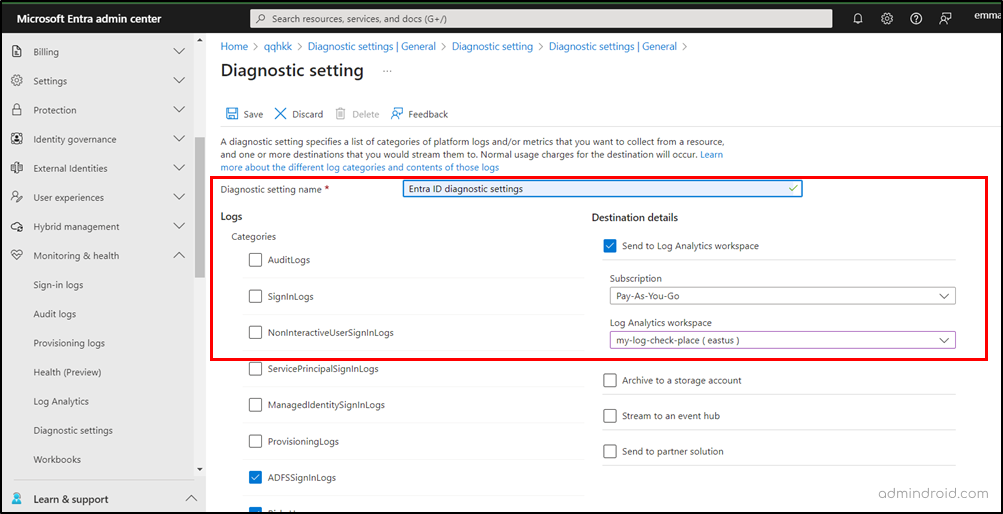
Configure Diagnostic Settings to use Microsoft Entra workbooks
Configure Diagnostic Settings in Microsoft Entra ID

3. How to Use Microsoft Entra Workbooks to Analyze M365 Activity Logs? 

That’s it! You have successfully exported the Entra logs to the dedicated Log Analytics workspace. Now, you can analyze identity and access management activities via workbooks. 

To access Microsoft Entra workbooks, navigate to 

Microsoft Entra admin center Monitoring & health Workbooks 

Once done, you will be landed on the Workbook page with four tabs. 

  • All: Shows all the items, such as workbooks, public templates, and my templates. 
  • Workbooks: Lists all your created or shared workbooks. 
  • Public Templates: Displays ready-to-use workbook templates from Microsoft. 
  • My Templates: Templates that are shared with you. 
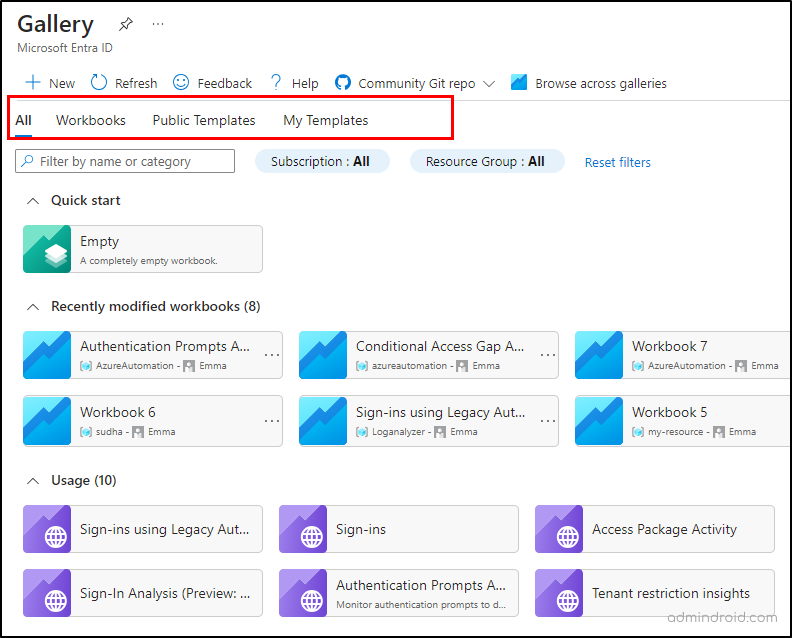
Microsoft Entra Workbook Gallery Page

Microsoft provides public templates designed to serve as starting points with reusable capabilities, classified under different categories.  Some of the public templates are, 

Authentication Prompts Analysis Workbook 

With this authentication prompts analysis workbook, you can get, 

  • Count of MFA prompts by authentication method, device state, application, user. 
  • Average MFA prompts based on applications. 
  • Total count of interactive and non-interactive sign-ins. 
  • MFA prompts by CA policy, security defaults, per-user MFA, and more. 
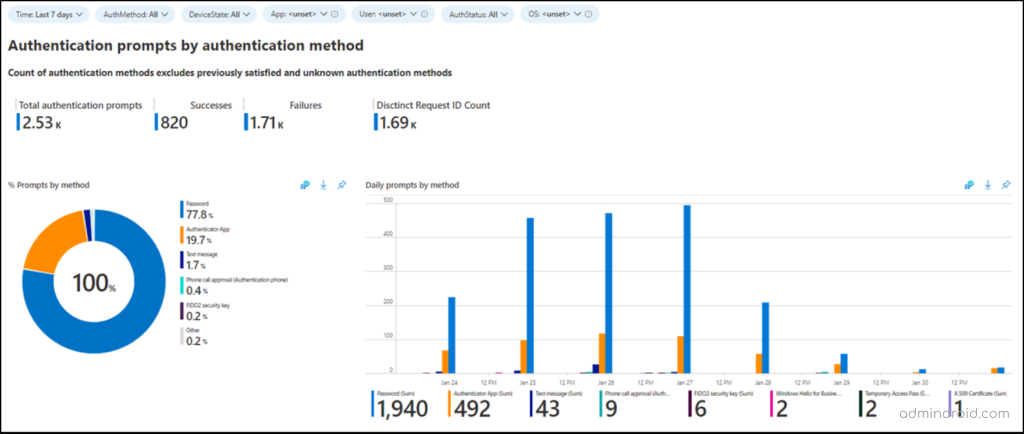
How to use Microsoft Entra Workbooks for Authentication Prompt analysis
Authentication Prompt Analyzer Workbook

Conditional Access Gap Analyzer Workbook 

With this workbook, you can get, 

  • Sign-ins using legacy authentication in Microsoft 365. 
  • Number of sign-ins by application not satisfied by CA policies. 
  • High-risk sign-ins bypassing Conditional Access policies. 
  • Conditional Access policy impact on sign-ins. 
  • Named locations with no Conditional Access. 
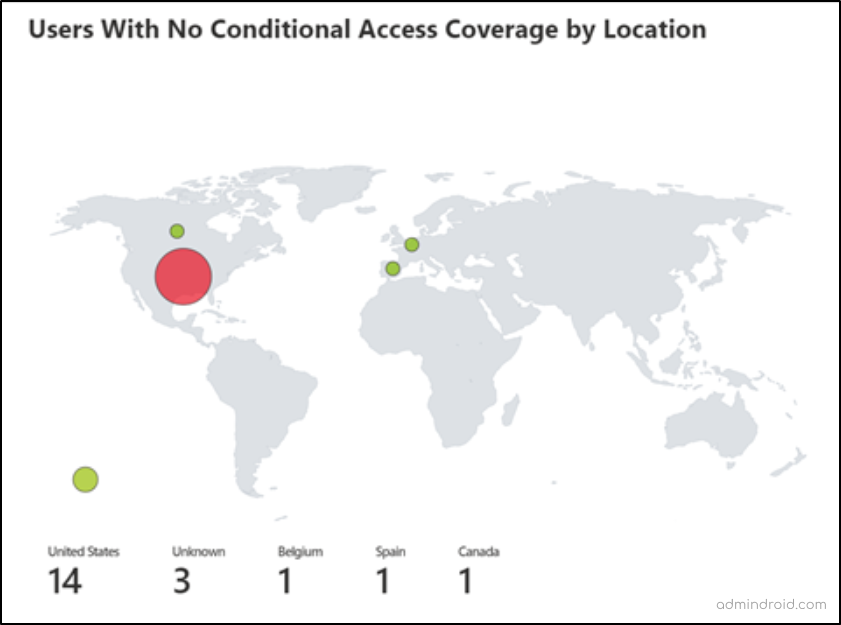
How to use Entra workbooks in Microsoft 365 to analyze Conditional Access Gap
Conditional Access Gap Analyzer Workbook

Cross-tenant Access Activity Workbook 

With this workbook, you can get, 

  • List of inbound and outbound access activity by tenant ID. 
  • Sign-in status for inbound and outbound collaboration. 
  • Applications accessed by inbound and outbound collaboration. 
  • Number of external tenants with cross-tenant access activity. 
  • Inbound sign-ins from external Microsoft Entra organizations. 
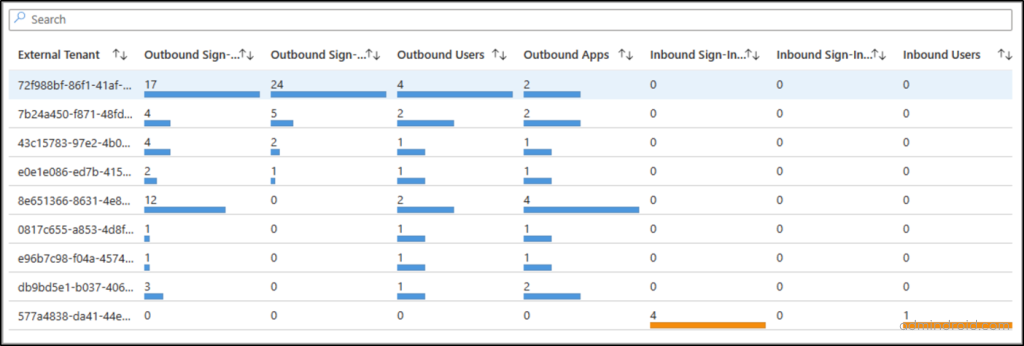
  • All outbound sign-ins by your users to external Microsoft Entra organizations. 
Cross-tenant Access Settings Workbook

Sign-ins Analysis Workbook (Preview) 

With this sign-in failure analysis workbook, you can get, 

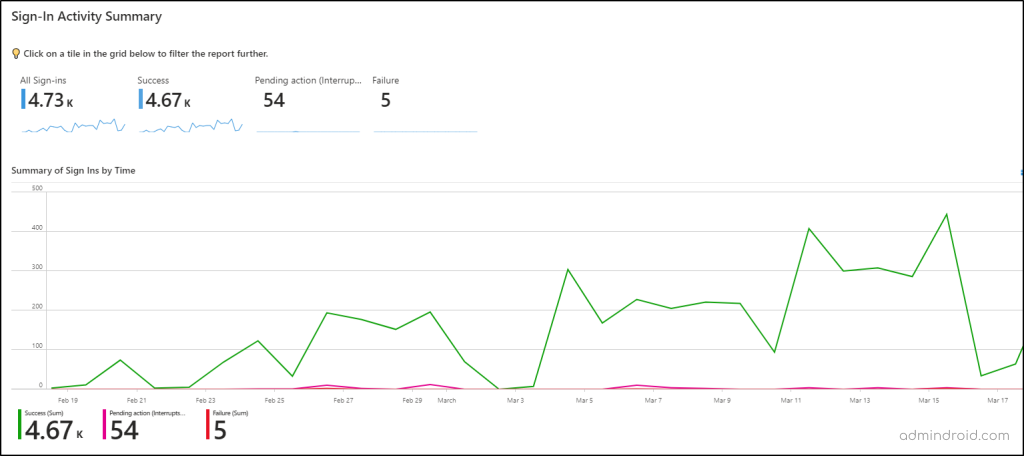
  • Summary of Entra ID sign-ins. 
  • Top sign-in errors by Microsoft 365 user and IP. 
  • Sign-in by location.
Sign in Analysis Preview Workbook

When you open a pre-built template, a workbook is automatically generated and filled with the content from the template. This allows users to quickly access pre-configured structures and data. But you can also edit the built-in templates based on your requirements. Let’s see that in detail! 

Edit Workbook Templates in Microsoft 365 

Initially, the Workbook templates are presented in a read-only format, ensuring the preservation of the original template. However, users can modify the default template using the “Edit” option, accessible under each object in the workbook.  
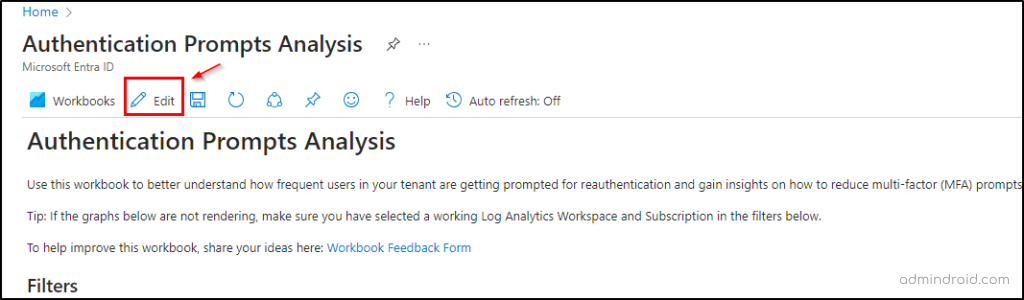
Edit a Microsoft Entra Workbook

This enables users to tailor texts, parameters, links, and queries according to their requirements. For example, you can tweak the pre-built workbook templates to, 

✅ Conditional Access policies in report-only mode. 
✅ Get sign-ins successfully blocked sign-ins by CA policy. 
✅ Find applications not protected by CA policies. 
✅ Export M365 users’ self-service password reset status. 
✅ Get Conditional Access policies require MFA for admins portals. 
✅ Monitor sign-in logs of Microsoft 365 admins.   
✅ View all Microsoft 365 users’ last logon time. 
✅ Check the last login date for admins. 
✅ Get MFA-enabled users report. 
✅ List Office 365 users without MFA. 
✅ Audit Office 365 user activity report.   
✅ Export Office 365 users’ activity history for the past 90 days. 
✅ Get service principal sign-in count over time. 
✅ Analyze excessive MFA prompts on specific users. 
✅ Get risk-based Conditional Access policies. 

Upon completing the modifications, users can save the Workbook by selecting “Done Editing” and providing necessary details such as an appropriate name, subscription, resource group, and location. Subsequently, the modified workbook is stored in the “Workflows” gallery tab, offering easy access and management for future use. 

Summing Up 

The best part? You can also craft your own personalized Entra workbook tailored to your specific insights on Entra activity logs effortlessly. How? Stay tuned for our upcoming blog where we will guide you through each step, empowering you with the complete know-how to create a personalized workbook in Entra ID. 

We trust this blog has provided you with an overall understanding of how to use Entra workbooks effectively. Moreover, if you have any queries, don’t hesitate to reach out to us. We’re here to help. 

The post How to Use Entra Workbooks in Microsoft 365  first appeared on AdminDroid Blog.

17 Jan 20:12

CISA and FBI Release Updated Guidance on Product Security Bad Practices

by CISA

In partnership with the Federal Bureau of Investigation (FBI), CISA released an update to joint guidance Product Security Bad Practices in furtherance of CISA’s Secure by Design initiative. This updated guidance incorporates public comments CISA received in response to a Request for Information, adding additional bad practices, context regarding memory-safe languages, clarifying timelines for patching Known Exploited Vulnerabilities (KEVs), and other recommendations.

While this voluntary guidance is intended for software manufacturers who develop software products and services in support of critical infrastructure, all software manufacturers are strongly encouraged to avoid these product security bad practices.

CISA and FBI urge software manufacturers to reduce customer risk by prioritizing security throughout the product development process. For more information and resources, visit CISA’s Secure by Design webpage or learn how to take CISA’s Secure by Design Pledge.

23 Nov 01:15

Steam Cuts the Cord For Legacy Windows, macOS

by BeauHD
The latest Steam client drops support for operating systems older than Windows 10 or macOS 10.15 Catalina. "That means Mac users can't run 32-bit games anymore, as all macOS versions from Catalina onward only run 64-bit binaries," reports The Register. From the report: [I]f you have a well-specified older Mac, here is another reason to check out Open Core Legacy Patcher. For now, macOS 10.15 Catalina will do but we suspect it won't for long. This version of Steam uses the equivalent to Chrome 126: "Updated embedded Chromium build in Steam to 126.0.6478.183." However, versions since Chrome 128 require macOS 11 or newer. For now, Catalina will work -- but the next significant Steam update will update Chromium as well, and there's a high probability that that will drop support for 10.15. So, if you're using OCLP to install a newer macOS, you should probably go directly to Big Sur. In The Reg FOSS desk's testing, we found that Big Sur ran reasonably well on a machine with Intel HD 520 graphics, although the same hardware ran very poorly with macOS 12 Monterey. Unfortunately, the inevitable end is in sight for older Macs. That said, the November 2024 Steam client update brings several "wins," including a built-in Game Recording feature, an upgraded Chromium browser engine, and the new "Scout" Linux runtime environment for improved compatibility and performance, especially on the Steam Deck and Linux distros. Additionally, it delivers bug fixes and enhancements for modern OS users.

Read more of this story at Slashdot.

11 Nov 22:25

Poultry Shears Completely Changed My Thanksgiving Prep

by Allie Chanthorn Reinmann

I once tried to spatchcock a Thanksgiving turkey with a regular pair of kitchen shears. It didn't go so well. For those who don’t know, spatchcocking is also called butterflying, and it requires that you remove the bird’s backbone in order to roast it flat instead of 3D like it is typically. In my unprepared scenario, it took two people to finally get the job done and I walked away with a blister. But spatchcocking isn't difficult to do—with the right tools. Once I got my hands on a pair of poultry shears, it changed my future Thanksgivings forever.

Whether you’re breaking down a chicken into quarters or spatchcocking a 20-pound turkey, poultry shears are essential. Please note that these are not regular kitchen shears, nor the random craft scissors you happen to keep in the kitchen drawer—genuine poultry shears are special. With Thanksgiving on the horizon, there’s no better time to get yourself a pair. 

What are poultry shears, exactly?

Regular kitchen shears closely resemble multi-purpose scissors—they have straight blades, with thumb and finger hoops—but their shape is a bit stockier. You can use kitchen shears to trim vegetables, snip scallions into rings, or even cut pizza into slices, but these scissors are not terribly helpful for butchering. I can personally tell you that using these to cut through raw turkey bones is like using a fork to drink your morning coffee. 

Poultry shears are indeed scissors, but they’re designed specifically to slice through the meat and bone of chicken, turkey, pheasant, and other fowl. The shape, size, and design of these scissors makes this tough job a much lighter lift. The blades are fairly narrow and curved upward, making it easier to navigate the chicken cavity or get through hard to reach places while keeping your hand out of the way. The cutting edges of the blades have serrated segments, which reduces slipping and makes it easier to cut through bones. 

Crucially, poultry shears are spring-loaded. Part of what made my regular-kitchen-shears experience so unfortunate was that my grip strength was absolutely exhausted. The spring-loaded action makes cutting easier and faster. Additionally, they’re usually made of durable, hard-wearing stainless steel, so they’re easy to clean, and stay sharp and in good shape for years. 

When can you use poultry shears?

If you plan on spatchcocking a turkey this year, poultry shears are an absolute must. Doing this cooks the bird more evenly, leads to crispy skin instead of the often soggy thighs, and can knock off an hour or more from your total cooking time. Here’s how to spatchcock a chicken; you use the same steps for a turkey.

Poultry shears aren't just for November; they're indispensable throughout the year. You can use them to butcher fish, or crack and divide lobster or other crustaceans. Use your poultry shears to trim off loose fat from any cut of meat. Naturally you'll want to reach for them whenever you’re breaking down a chicken into drums, thighs, wings and breasts before cooking (or freezing for easy dinners throughout the week), or after roasting to divide the bird for serving. 

If portioning or carving large chickens or turkeys with a knife has ever felt unwieldy (the bird juices can make the whole business rather slippery), you might find that using poultry shears feels safer and more comfortable. That alone is worth the purchase. Consider it a small investment for a much better Thanksgiving. 

22 Oct 00:31

The Evolution of Linux Package Management and Its Impact on Modern Computing

by George Whittaker
The Evolution of Linux Package Management and Its Impact on Modern Computing

Introduction

If you’ve ever used a modern Linux distribution, you’ve likely experienced the convenience of installing and updating software with a single command. Package managers, the tools behind this ease of use, have become a cornerstone of the Linux ecosystem, providing a structured and efficient way to manage software. However, the history of Linux package management is a long and evolving journey, beginning in the days when installing software was a manual, tedious, and error-prone process.

In this article, we’ll take a look at the evolution of Linux package management, from the early days of manual installations to today’s advanced, automated tools. We’ll explore how package managers were developed to address growing user demands, dependency problems, and the need for more efficient software distribution. By the end, you’ll have a deep understanding of how Linux package management has evolved and where it might be headed in the future.

The Early Days: Manual Installation of Software

The Beginning of Linux Distributions

When Linux was first introduced in the early 1990s, it was an exciting but highly technical operating system. Unlike today, there was no easy way to install software with a single command. Early Linux distributions, such as Slackware and Debian, required users to manually download source code, compile it, and install it themselves.

Tarballs and Source Code Compilation

In the early days, software was distributed in tarballs—compressed files that contained the source code of a program. Users had to unpack these tarballs, typically with the command tar -xvf, and then compile the software on their system. This was often a multi-step process that required running a configuration script (./configure) to check for system dependencies, compiling the source code into executable binaries using make, and finally installing the program with make install.

This process gave users maximum control but was fraught with difficulties:

07 Oct 00:35

Unified Linux Wine Game Launcher (UMU) gets a first official release

by Liam Dawe
Unified Linux Wine Game Launcher (UMU) from Thomas "GloriousEggroll" Crider version 1.1.1 is out now as the first official release to help improve Linux desktop and Steam Deck gaming.

.

Read the full article on GamingOnLinux.

01 Sep 00:23

Rebel FM Episode 634 - 08/30/2024

This week we're surprised to find ourselves talking about the Black Ops 6 multiplayer beta, but we've also got chat about Squirrel With a Gun, Tetris, and plenty of other stuff too. This week's music: PLAIINS - Slow Rotting, Fast Decay
29 Aug 15:25

How AitM Phishing Attacks Bypass MFA and EDR—and How to Fight Back

by info@thehackernews.com (The Hacker News)
Attackers are increasingly using new phishing toolkits (open-source, commercial, and criminal) to execute adversary-in-the-middle (AitM) attacks. AitM enables attackers to not just harvest credentials but steal live sessions, allowing them to bypass traditional phishing prevention controls such as MFA, EDR, and email content filtering. In this article, we’re going to look at what AitM phishing
16 Aug 21:42

Free classic RTS OpenRA mod 'Command & Conquer - Combined Arms' has a huge overhaul

by Liam Dawe
If you love your classic RTS games, especially those from Westwood like Command & Conquer and Red Alert, you need to play the OpenRA mod Command & Conquer - Combined Arms.

.

Read the full article on GamingOnLinux.

12 Aug 16:24

Chained for attack: OpenVPN vulnerabilities discovered leading to RCE and LPE

by Microsoft Threat Intelligence

Microsoft researchers recently identified multiple medium severity vulnerabilities in OpenVPN, an open-source project with binaries integrated into routers, firmware, PCs, mobile devices, and many other smart devices worldwide, numbering in the millions. Attackers could chain and remotely exploit some of the discovered vulnerabilities to achieve an attack chain consisting of remote code execution (RCE) and local privilege escalation (LPE). This attack chain could enable attackers to gain full control over targeted endpoints, potentially resulting in data breaches, system compromise, and unauthorized access to sensitive information. Exploiting these vulnerabilities, however, necessitates user authentication and a deep understanding of OpenVPN’s inner workings, alongside intermediate knowledge of the operating systems. Today, we presented this research and demonstrated the discovered attack chain in our session at Black Hat USA 2024.

OpenVPN is widely used by thousands of companies spanning various industries across major platforms such as Windows, iOS, macOS, Android, and BSD. As such, exploitation of the discovered vulnerabilities, which affect all versions of OpenVPN prior to version 2.6.10 (and 2.5.10), could put endpoints and enterprises at significant risk of attack.

We reported the discovery to OpenVPN through Coordinated Vulnerability Disclosure (CVD) via Microsoft Security Vulnerability Research (MSVR) in March 2024 and worked closely with OpenVPN to ensure that the vulnerabilities are patched. Information on the security fixes released by OpenVPN to address these vulnerabilities can be found here: OpenVPN 2.6.10. We strongly urge OpenVPN users to apply the latest security updates as soon as possible. We also thank OpenVPN for their collaboration and recognizing the urgency in addressing these vulnerabilities.

Below is a list of the discovered vulnerabilities discussed in this blog:

CVE ID OpenVPN component Impact Affected platform
CVE-2024-27459 openvpnserv                              Denial of service (DoS), local privilege escalation (LPE) Windows
CVE-2024-24974 openvpnserv                              Unauthorized access  Windows
CVE-2024-27903 openvpnserv Remote code execution (RCE) Windows
Local privilege escalation (LPE), data manipulation Android, iOS, macOS, BSD
CVE-2024-1305 Windows TAP driver  Denial of service (DoS)  Windows

In this blog post, we detail our analysis of the discovered vulnerabilities and the impact of exploitation. In addition to patching, we provide guidance to mitigate and detect threats attempting to exploit these vulnerabilities. This research emphasizes the need for responsible disclosure and collaboration among the security community to defend devices across platforms and build better protection for all, spanning the entire user-device ecosystem. The discovery of these vulnerabilities further highlights the critical importance of ensuring the security of enterprise and endpoint systems and underscores the need for continuous monitoring and protection of these environments.

What is OpenVPN?

OpenVPN is a virtual private network (VPN) system that creates a private and secure point-to-point or site-to-site connection between networks. The OpenVPN open-source project is widely popular across the world, including the United States, India, France, Brazil, the United Kingdom, and Germany, as well as industries spanning the information technology, financial services, telecommunications, and computer software sectors. This project supports different major platforms and is integrated into millions of devices globally.

OpenVPN is also the name of the tunneling protocol it uses, which employs the Secure Socket Layer (SSL) encryption protocol to ensure that data shared over the internet remains private, using AES-256 encryption. Since the source code is available for audit, vulnerabilities can be easily identified and fixed.

OpenVPN analysis

We discovered the vulnerabilities while examining the OpenVPN open-source project to enhance enterprise security standards. During this research, we checked two other popular VPN solutions and found that at the time they were impacted by a vulnerability (CVE-2024-1305). Following this discovery, we started hunting for and uncovered additional vulnerable drivers with the same issue and decided to investigate open-source VPN projects. Upon confirming that the same vulnerability was located in the OpenVPN open-source repository, our research then focused on examining the architecture and security model of the OpenVPN project for Windows systems.

OpenVPN architecture

OpenVPN server client architecture

OpenVPN is a sophisticated VPN system meticulously engineered to establish secure point-to-point or site-to-site connections. It supports both routed and bridged configurations, as well as remote access capabilities, making it a versatile choice for various networking needs. OpenVPN comprises both client and server applications, ensuring a comprehensive solution for secure communication.

With OpenVPN, peers can authenticate each other through multiple methods, including pre-shared secret keys, certificates, or username/password combinations. In multi-client server environments, the server can generate and issue an individual authentication certificate for each client, leveraging robust digital signatures and a trusted certificate authority. This ensures an elevated level of security and integrity in the authentication process, enhancing the overall reliability of the VPN connection. 

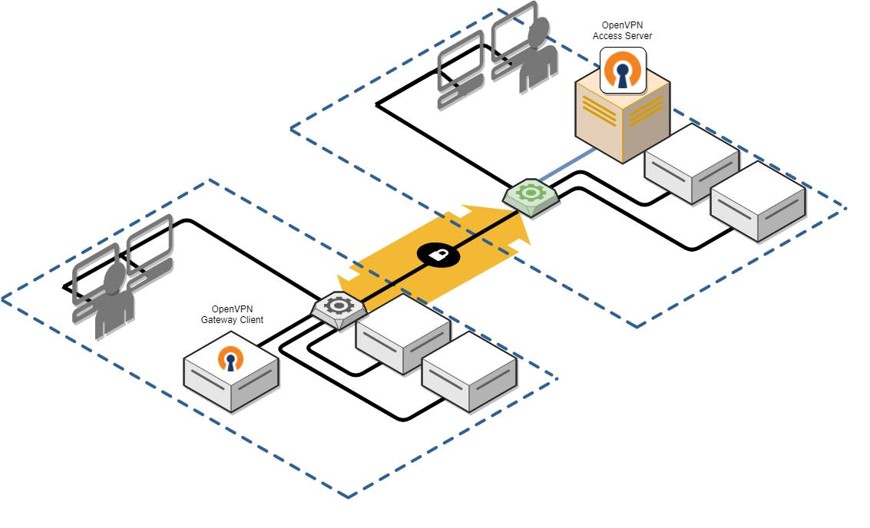
Diagram of OpenVPN's client server depicting the connection between the Gateway Client and the Access Server
Figure 1. OpenVPN client server model

Client-side architecture

The client-side architecture is where we discovered the additional three vulnerabilities (CVE-2024-27459, CVE-2024-24974, and CVE-2024-27903):

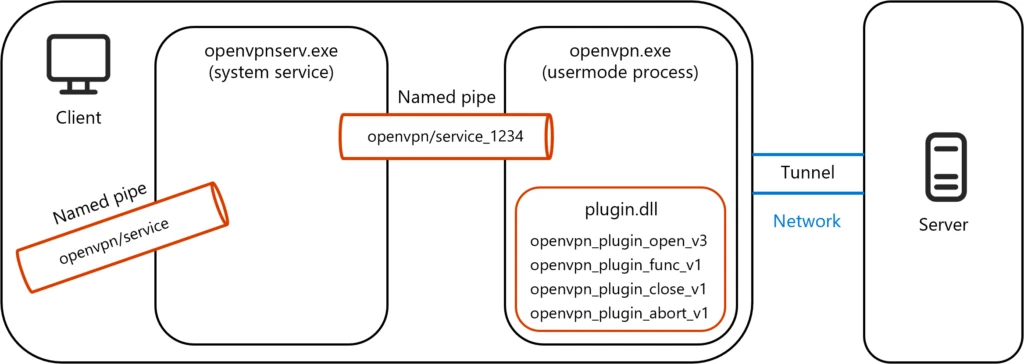
OpenVPN’s client architecture can be summarized in the following simplified diagram:

Diagram depicting the loaded plugin with the openvpn.exe usermode process connected by a named pope to the openvpnserv.exe system service within the client. The client is connected to the server via a tunnel.
Figure 2. OpenVPN client architecture with loaded plugin.dll

openvpnserv.exe and openvpn.exe

The system service launches elevated commands on behalf of the user, handling tasks such as adding or deleting DNS configurations, IP addresses, and routes, and enabling Dynamic Host Configuration Protocol (DHCP). These commands are received from the openvpn.exe process through a named pipe created for these two entities, such as “openvpn/service_XXX” where XXX is the thread ID (TID) that is being passed to the newly created process as a command line argument.

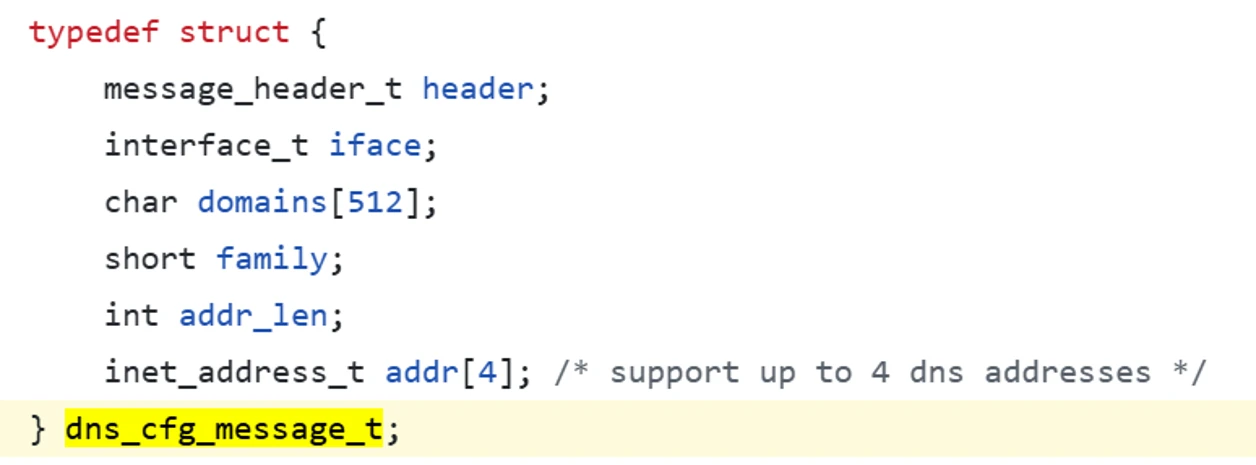
The launched commands arrive in the form of a binary structure that contains the relevant information for the specific command, with the structure being validated and only then launching the appropriate command. The below figure displays an example of the structure that contains information for adding/deleting DNS configuration:

Screenshot of code depicting the DNS configuration managing structure
Figure 3. OpenVPN DNS configuration managing structure

Additionally, openvpnserv.exe serves as the management unit, spawning openvpn.exe processes upon requests from different users on the machine. This can be done automatically using the OpenVPN GUI or by sending specifically crafted requests. Communication for this process occurs through a second named pipe, such as “openvpn/service”.

Openvpn.exe is the user mode process being spawned on behalf of the client. When openvpn.exe starts, it receives a path for a configuration file (as a command line argument). The configuration file that’s provided holds different information.

A lot of fields can be managed in configuration files, such as:

  1. Tunnel options
  2. Server mode options
  3. Client mode options

Plugin mechanism in openvpn.exe

Another mechanism of interest for us is the plugin mechanism in openvpn.exe, which can extend the functionality to add additional logic, such as authentication plugins to bring authentication against Lightweight Directory Access Protocol (LDAP) or Radius or other Pluggable Authentication Module
(PAM) backends. Some of the existing plugins are:

  1. Radiusplugin – Radius authentication support for open OpenVPN.
  2. Eurephia – Authentication and access control plugin for OpenVPN.
  3. Openvpn_defer_auth – OpenVPN plugin to perform deferred authentication requests.

The plugin mechanism fits into the earlier diagram, as shown in Figure 2.

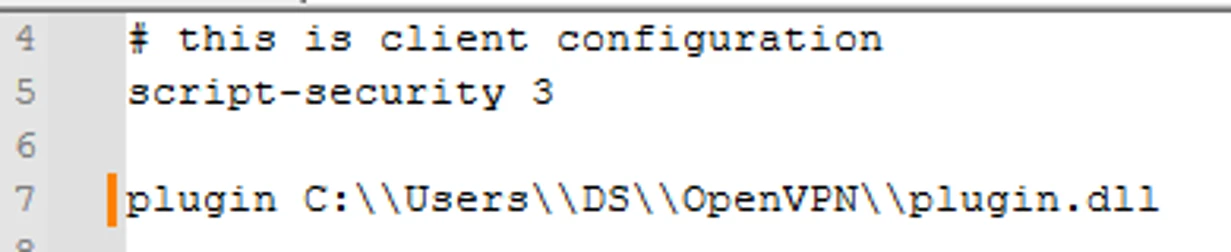
The plugin is loaded as a directive in the configuration file, which looks like:

Screenshot of code depicting the client directive to load the plugin
Figure 4. OpenVPN client directive to load plugin

Furthermore, the number of callbacks defined in the plugin launch on behalf of the loading process (openvpn.exe), such as:

  1. openvpn_plugin_func_v1 – This function is called by OpenVPN each time the OpenVPN reaches a point where plugin calls should happen.
  2. openvpn_plugin_{open, func}_v3() – Defines the version of the v3 plugin argument.

OpenVPN security model

As previously mentioned, we discovered four vulnerabilities on the client side of OpenVPN’s architecture.

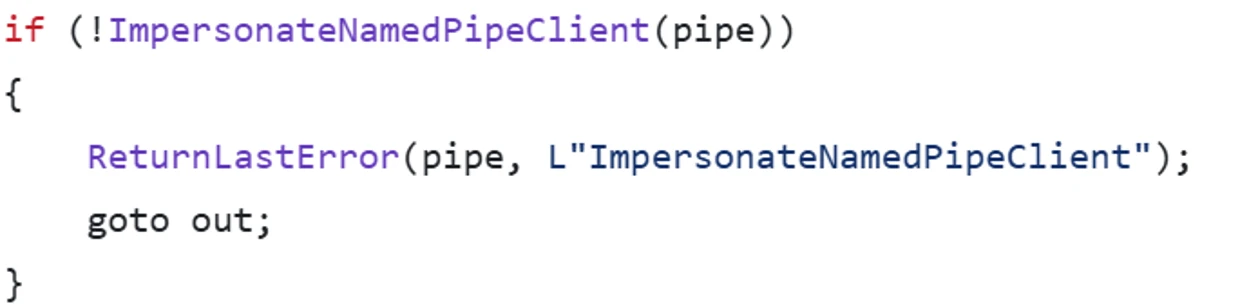
As described before, openvpnserv.exe (SYSTEM service) spawns the openvpn.exe process as a result of the request from the user. Furthermore, the spawned process runs in the context of the user who requested to create the new process, which is achieved through named pipe impersonation, as displayed in the below image:

Screenshot of code depicting named pipe impersonation
Figure 5. Named pipe impersonation

The ImpersonateNamedPipeClient function impersonates a named pipe client application.

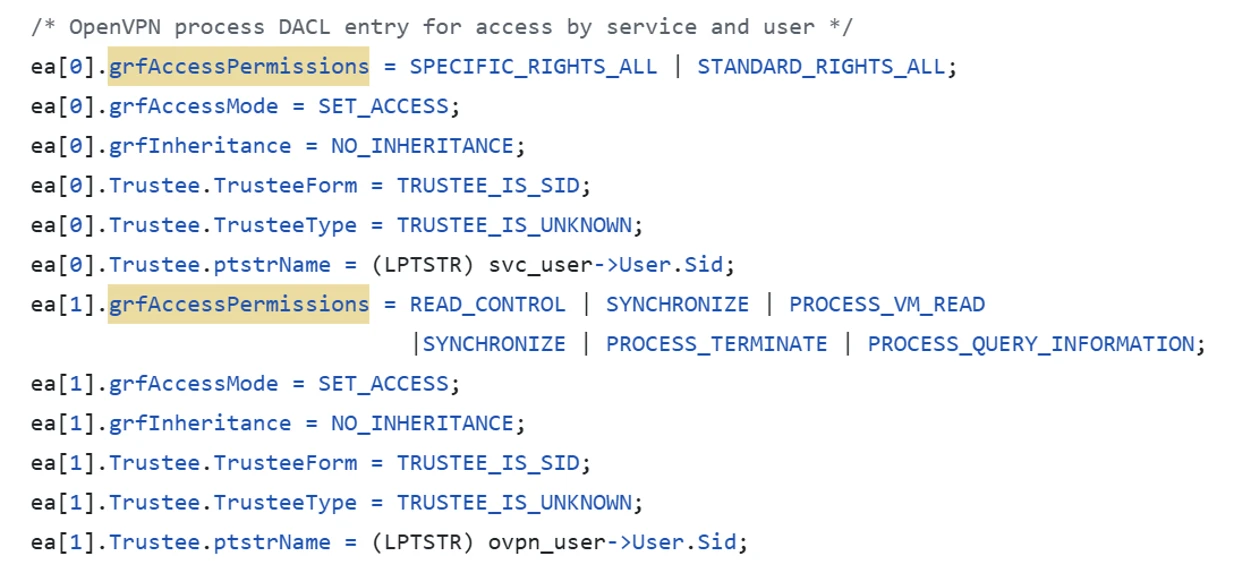
Furthermore, to prevent unwanted behavior, specific EXPLICIT_ACCESS must be granted for any new process:

Screenshot of code depicting explicit access being granded for OVPN DACL
Figure 6. Explicit access for OVPN DACL

This explicit access, in addition to the earlier described “elevated commands” launched by openvpnserv.exe on request from the openvpn.exe process, and other comprehensive inspection of the passed arguments  ensure that malicious behavior cannot be launched in the name of the impersonated user.

Vulnerability analysis

CVE-2024-1305    

We identified a vulnerability in the “tap-windows6” project that involves developing the Terminal Access Point (TAP) adapter used by OpenVPN. In the project’s src folder, the device.c file contains the code for the TAP device object and its initialization.

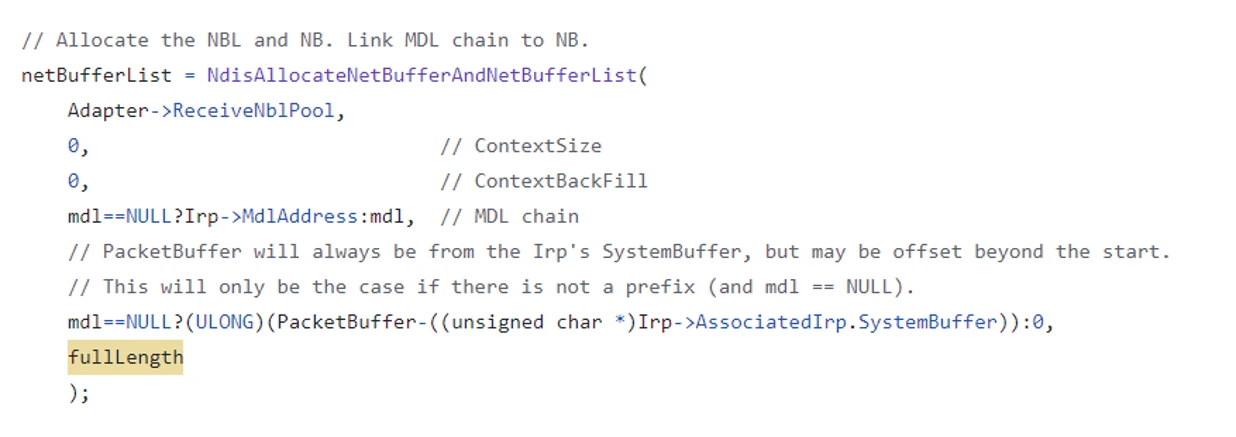
In the device.c file, the CreateTapDevice method initializes a dispatch table object with callbacks for methods managing various Input/Output Controls (IOCTLs) for the device. One of these methods is TapDeviceWrite, which handles the write IOCTL.

Screenshot of code depicting where the wild kernel overflow vulnerability is located
Figure 7. Wild kernel overflow vulnerability location

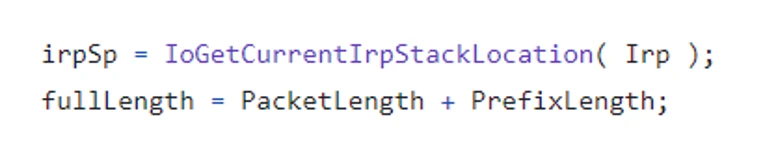
The TapDeviceWrite method performs several operations and eventually calls TapSharedSendPacket. This method, in turn, calls NdisAllocateNetBufferAndNetBufferLists twice. In one scenario, it calls this function with the fullLength parameter, defined as follows:

Screenshot of code depicting the integer overflow
Figure 8. Integer overflow

Both PacketLength and PrefixLength are parameters passed from the TapDeviceWrite call and, therefore, attacker controlled. If these values are large enough, their sum (fullLength) can overflow (a 32-bit unsigned integer). This overflow results in the allocation of a smaller-than-expected memory size, which subsequently causes a memory overflow issue.

CVE-2024-27459  

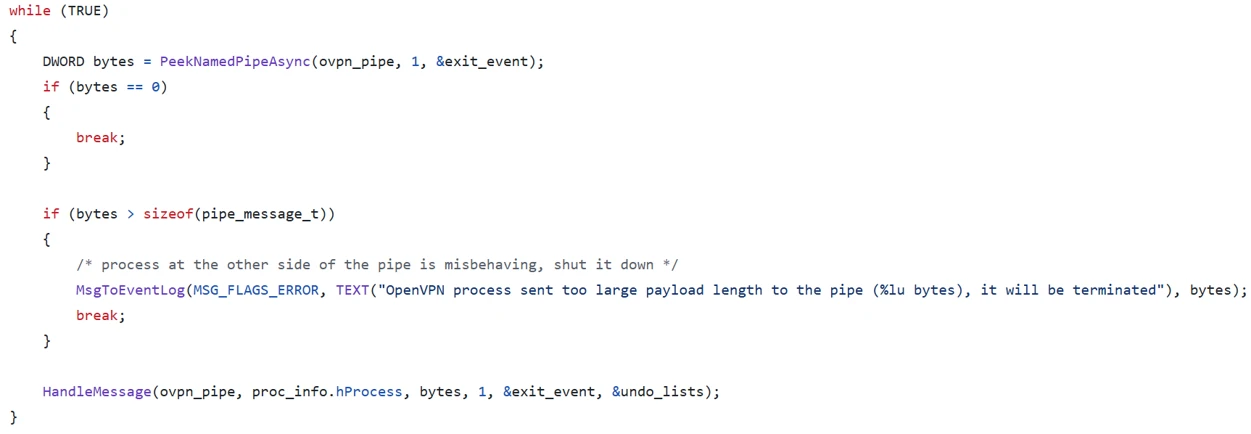
The second vulnerability that we discovered resided in the communication mechanism between the openvpn.exe process and the openvpnserv.exe service. As described earlier, both of which communicate through a named pipe:

Screenshot of code depicting the size being read from a named pipe
Figure 9. Reading size from a named pipe

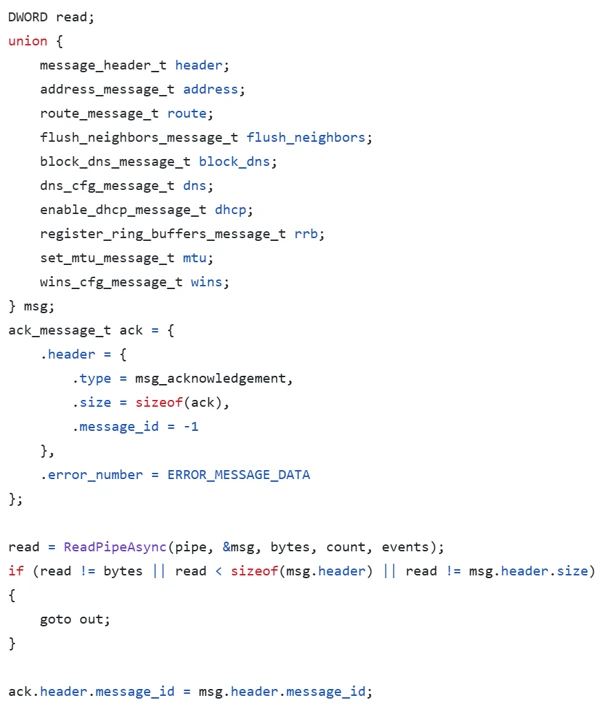
The openvpnserv.exe service will read the message size in an infinite loop from the openvpn.exe process and then handle the message received by calling the HandleMessage method. The HandleMessage method reads the size provided by the infinite loop and casts the read bytes into the relevant type accordingly:

Screenshot of code depicting the stack overflow vulnerability location
Figure 10. Stack overflow vulnerability location

This communication mechanism presents an issue as reading the “user” provided number of bytes on to an “n bytes” long structure located on the stack will produce a stack overflow vulnerability.

CVE-2024-24974  

The third vulnerability involves unprivileged access to an operating system resource. The openvpnserv.exe service spawns a new openvpn.exe process based on user requests received through the “\\openvpn\\service” named pipe. This vulnerability allows remote access to the named service pipe, enabling an attacker to remotely interact with and launch operations on it.

CVE-2024-27903  

Lastly, we identified a vulnerability in OpenVPN’s plugin mechanism that permits plugins to be loaded from various paths on an endpoint device. This behavior can be exploited by attackers to load harmful plugins from these different paths.

Exploiting and chaining the vulnerabilities

All the identified vulnerabilities can be exploited once an attacker gains access to a user’s OpenVPN credentials, which could be accomplished using credential theft techniques, such as purchasing stolen credentials on the dark web, using info-stealing malware, or sniffing network traffic to capture NTLMv2 hashes and then using cracking tools like HashCat or John the Ripper to decode them. The discovered vulnerabilities could then be combined to achieve different exploitation results, or chained together to form a sophisticated attack chain, as detailed in the below sections.

RCE exploitation

We first explored how an attacker could achieve remote code execution (RCE) exploitation using CVE-2024-24974 and CVE-2024-27903.

To successfully exploit these vulnerabilities and achieve RCE, an attacker must first obtain an OpenVPN user’s credentials. The attacker’s device must then launch the NET USE command with the stolen credentials to remotely access the operating system resources and grant the attacker access to the named pipes objects devices.

Next, the attacker can send a “connect” request to the “\\openvpn\\service” named pipe to launch a new instance of openvpn.exe on its behalf.

Screenshot of code depicting the initialization of OpenVPN from a remote location
Figure 11. Initializing OpenVPN from a remote location (in which {TARGET_MACHINE_PLACEHOLDER} can be substituted by a different end point)

In the request, a path to a configuration file (\\\\DESKTOP-4P6938I\\share\\OpenVPN\\config\\sample.ovpn) is specified that’s located on the attacker-controlled device. A log path is also provided into which the loaded plugin will write its logs (“–log \\\\\{TARGET_MACHINE_PLACEHOLDER}\\share\\OpenVPN\\log\\plugin_log.txt\).

The provided configuration has instructions to load malicious plugin, as such:

Screenshot of code depicting the malicious plugin loading directive from a remote location
Figure 12. Malicious plugin loading directive from a remote location

After successful exploitation, the attacker can read the log provided on the attacker-controlled device.

Screenshot of the plugin log on the attacker-controlled device
Figure 13. Plugin log on the attacker-controlled device

LPE exploitation

Next, we investigated how an attacker could achieve local privilege execution (LPE) using CVE-2024-27459 and CVE-2024-27903. To successfully achieve an LPE exploit in this context, an attacker must load a malicious plugin into the normal launching process of openvpn.exe by using a malicious configuration file.

First, the attacker will connect to a local device “\\openvpn\\service” named pipe with a command that instructs openvpnserv.exe to launch openvpn.exe based on the attacker-provided malicious configuration.

Screenshot of code depicting initializing OpenVPN from a local configuration
Figure 14. Initializing OpenVPN from a local configuration

The malicious configuration will include a line like the below example:

Screenshot of the malicious plugin loading directive from the local location
Figure 15. Malicious plugin loading directive from the local location

For the malicious plugin to successfully communicate with openvpnserv.exe, it must hijack the number of the handle used by openvpn.exe to communicate with the inner named pipe connecting the openvpv.exe process and the openvpnserv.exe service. This can be achieved, for instance, by parsing command line arguments, as displayed below:

Screenshot of code depicting parsing command line arguments to extract the thread ID
Figure 16. Parsing command line arguments to extract the thread ID (TID)

This works because when the openvpn.exe process spawns, it’s being passed the TID (as a command line argument) that the inner named pipe (which is being used for communication between this specific OpenVPN instance and the openvpnserv.exe service) will have. For instance, if the inner named pipe created is “\\openvpn\\service_1234” then openvpn.exe will be launched with an extra argument of 1234.

Screenshot of code depicting the thread ID being passed as a command line argument
Figure 17. Passing the TID as a command line argument

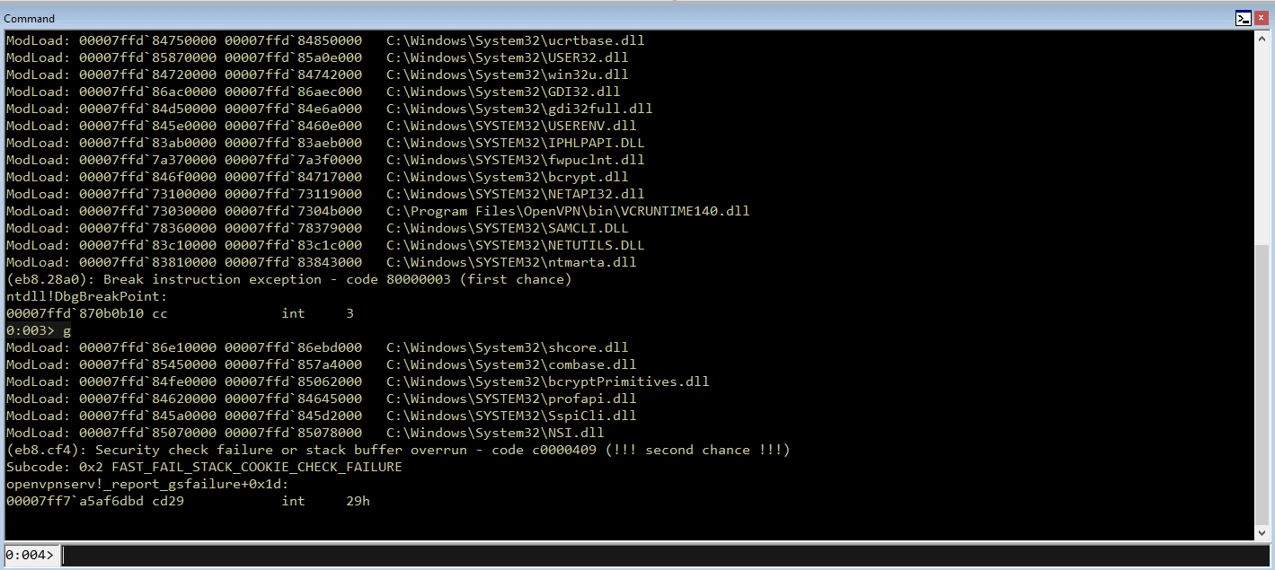
Next, attackers can exploit the stack overflow vulnerability by sending data bigger than the MSG structure. It is important to note that there are stack protection mechanisms in place, called stack canaries, which make exploitation much more challenging. Thus, when triggering the overflow:

Screenshot of code depicting the stack overflow being triggered
Figure 18. Stack overflow triggered

After the crash of openvpnserv.exe, the attacker has a slot of time in which they can reclaim the named pipe “\\openvpn\\service”.

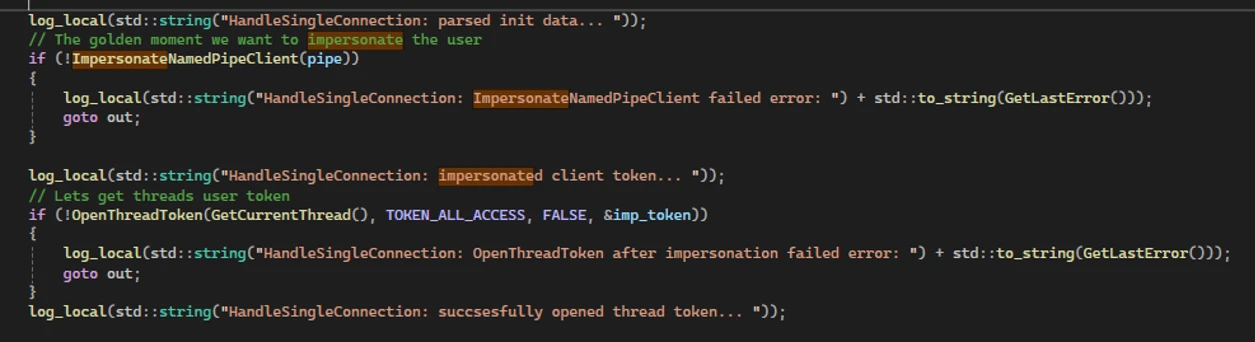
If successful, the attacker then poses as the server client side of the named pipe “\\openvpn\\service”. From that moment on, every attempt to connect to the “\\openvpn\\service” named pipe will result in a connection to the attacker. If a privileged enough user, such as a SYSTEM or Administrator user, is connected to the named pipe, the attacker can impersonate that user:

Screenshot of code depicting impersonation of a privileged user
Figure 19. Impersonating a privileged user

The attacker can then start an elevated process on the user’s behalf, thus achieving LPE.

Chaining it all together

As our research demonstrated, an attacker could leverage at least three of the four discovered vulnerabilities to create exploits to achieve RCE and LPE, which could then be chained together to create a powerful attack chain.

A number of adjustments are needed for the full attack chain to be exploited as presented in this blog post, mainly the malicious payload that crashes openvpnserv.exe and the malicious payload that actually behaves as openvpnserv.exe after openvpnserv.exe is crashed all have to be loaded with the malicious plugin. After successfully achieving LPE, attackers will use different techniques, such as Bring Your Own Vulnerable Driver (BYOVD) or exploiting known vulnerabilities, to achieve a stronger grasp of the endpoint. Through these techniques, the attacker can, for instance, disable Protect Process Light (PPL) for a critical process such as Microsoft Defender or bypass and meddle with other critical processes in the system. These actions enable attackers to bypass security products and manipulate the system’s core functions, further entrenching their control and avoiding detection.

Critical importance of endpoint security in private and enterprise sectors

With OpenVPN being widely used across various vendors, industries, and fields, the presented vulnerabilities may impact numerous sectors, device types, and verticals. Exploiting these vulnerabilities requires user authentication, a deep understanding of OpenVPN’s inner workings, and intermediate knowledge of the operating system. However, a successful attack could significantly impact endpoints in both the private and enterprise sectors. Attackers could launch a comprehensive attack chain on a device using a vulnerable version of OpenVPN, achieving full control over the target endpoint. This control could enable them to steal sensitive data, tamper with it, or even wipe and destroy critical information, causing substantial harm to both private and enterprise environments.

The discovery of these vulnerabilities underscores the importance of responsible disclosure to secure enterprise and endpoint systems, in addition to the collective efforts of the security community to protect devices across various platforms and establish stronger safeguards for everyone. We would like to again thank OpenVPN for their partnership and swift action in addressing these vulnerabilities.

Mitigation and protection guidance

OpenVPN versions prior to 2.5.10 and 2.6.10 are vulnerable to discussed vulnerabilities.

It is recommended to first identify if a vulnerable version is installed and, if so, immediately apply the relevant patch found here: OpenVPN 2.6.10.

Additionally, follow the below recommendations to further mitigate potential exploitation risks affiliated with the discovered vulnerabilities:

  • Apply patches to affected devices in your network. Check the OpenVPN website for the latest patches.
  • Make sure OpenVPN clients are disconnected from the internet and segmented.
  • Limit access to OpenVPN clients to authorized users only. 
  • Due to the nature of the CVEs, which still require a username and password, prioritizing patching is difficult. Reduce risk by ensuring proper segmentation, requiring strong usernames and passwords, and reducing the number of users that have writing authentication.

Microsoft Defender XDR detections

Microsoft Defender for Endpoint

The following Microsoft Defender for Endpoint alert can indicate associated threat activity:

  • Suspicious OpenVPN named pipe activity

Microsoft Defender Vulnerability Management

Microsoft Defender Vulnerability Management surfaces devices that may be affected by the following vulnerabilities used in this threat:

  • CVE-2024-27459
  • CVE-2024-24974
  • CVE-2024-27903
  • CVE-2024-1305

Microsoft Defender for IoT

Microsoft Defender for IoT raises alerts for the following vulnerabilities, exploits, and behavior associated with this threat:

  • Suspicion of Malicious Activity

Hunting queries

Microsoft Defender XDR

Microsoft Defender XDR customers can run the following query to find related activity in their networks:

This query identifies connection to OpenVPN’s named pipe from remote host:

DeviceEvents  
| where ActionType == "NamedPipeEvent"
| extend JsonAdditionalFields=parse_json(AdditionalFields)
| extend PipeName=JsonAdditionalFields["PipeName"]
| where PipeName == "\\Device\\NamedPipe\\openvpn\\service" and isnotempty( RemoteIP) 

This query identifies image load into OpenVPN’s process from share folder:

DeviceImageLoadEvents 
|where InitiatingProcessFileName == "openvpn.exe" and FolderPath startswith "\\\\"

This query identifies process connect to OpenVPN’s named pipe as server which it is not openvpnserv.exe:

DeviceEvents  
| where ActionType == "NamedPipeEvent"
| extend JsonAdditionalFields=parse_json(AdditionalFields)
| extend PipeName=JsonAdditionalFields["PipeName"], NamedPipeEnd=JsonAdditionalFields["NamedPipeEnd"]
|where PipeName == "\\Device\\NamedPipe\\openvpn\\service" and NamedPipeEnd == "Server" and InitiatingProcessFileName != "openvpnserv.exe"

Microsoft Sentinel

Microsoft Sentinel customers can use the TI Mapping analytics (a series of analytics all prefixed with ‘TI map’) to automatically match the malicious domain indicators mentioned in this blog post with data in their workspace. If the TI Map analytics are not currently deployed, customers can install the Threat Intelligence solution from the Microsoft Sentinel Content Hub to have the analytics rule deployed in their Sentinel workspace. More details on the Content Hub can be found here:  https://learn.microsoft.com/azure/sentinel/sentinel-solutions-deploy.

List of devices with OpenVPN vulnerabilities

DeviceTvmSoftwareVulnerabilities
| where OSPlatform contains "Windows"
| where CveId in ("CVE-2024-27459","CVE-2024-24974","CVE-2024-27903","CVE-2024-1305") 
| project DeviceId,DeviceName,OSPlatform,OSVersion,SoftwareVendor,SoftwareName,SoftwareVersion,
CveId,VulnerabilitySeverityLevel
| join kind=inner ( DeviceTvmSoftwareVulnerabilitiesKB | project CveId, CvssScore,IsExploitAvailable,VulnerabilitySeverityLevel,PublishedDate,VulnerabilityDescription,AffectedSoftware ) on CveId
| project DeviceId,DeviceName,OSPlatform,OSVersion,SoftwareVendor,SoftwareName,SoftwareVersion,
CveId,VulnerabilitySeverityLevel,CvssScore,IsExploitAvailable,PublishedDate,VulnerabilityDescription,AffectedSoftware

Named pipe creation activity of OpenVPN

let PipeNames = pack_array('\\openvpn/service','\\openvpn/service_','openvpn','openvpn/service','\\openvpn\\service_');
DeviceEvents
| where TimeGenerated > ago(30d)
| where ActionType == "NamedPipeEvent"
| where ProcessCommandLine contains "openvpn.exe" or InitiatingProcessCommandLine contains "openvpn.exe"
| extend Fields=parse_json(AdditionalFields)
| where Fields.FileOperation == "File created"
| where Fields.PipeName has_any (PipeNames)
| project TimeGenerated,ActionType,DeviceName,InitiatingProcessAccountDomain,InitiatingProcessAccountName,InitiatingProcessFolderPath,
InitiatingProcessCommandLine,ProcessCommandLine,Fields.FileOperation,Fields.PipeName

Vladimir Tokarev

Microsoft Threat Intelligence Community

References

Learn more

For the latest security research from the Microsoft Threat Intelligence community, check out the Microsoft Threat Intelligence Blog: https://aka.ms/threatintelblog.

To get notified about new publications and to join discussions on social media, follow us on LinkedIn at https://www.linkedin.com/showcase/microsoft-threat-intelligence, and on X (formerly Twitter) at https://twitter.com/MsftSecIntel.

To hear stories and insights from the Microsoft Threat Intelligence community about the ever-evolving threat landscape, listen to the Microsoft Threat Intelligence podcast: https://thecyberwire.com/podcasts/microsoft-threat-intelligence.

The post Chained for attack: OpenVPN vulnerabilities discovered leading to RCE and LPE appeared first on Microsoft Security Blog.

07 Aug 00:32

WordStar 7, the Last Ever DOS Version, Is Re-Released For Free

by BeauHD
An anonymous reader quotes a report from The Register: Before WordPerfect, the most popular work processor was WordStar. Now, the last ever DOS version has been bundled and set free by one of its biggest fans. WordStar 7.0d was the last-ever DOS release of the classic word processor, and it still has admirers today. A notable enthusiast is Canadian SF writer Robert J Sawyer, who wrote the book that became the TV series Flashforward. Thanks to his efforts you can now try out this pinnacle of pre-Windows PC programs for professional prose-smiths. Sawyer has taken the final release, packaged it up along with some useful tools -- including DOS emulators for modern Windows -- and shared the result. Now you, too, can revel in the sheer unbridled power of this powerful app. The download is 680MB, but as well as the app itself, full documentation, and some tools to help translate WordStar documents to more modern formats, it also includes copies of two FOSS tools that will let you run this MS-DOS application on modern Windows: DOSbox-X and vDosPlus. "The program has been a big part of my career -- not only did I write all 25 of my novels and almost all of my short stories with it (a few date back to the typewriter era), I also in my earlier freelance days wrote hundreds of newspaper and magazine articles with WordStar," says Sawyer.

Read more of this story at Slashdot.

06 Aug 00:04

Detect compromised RDP sessions with Microsoft Defender for Endpoint

by SaarCohen

Human operators play a significant part in planning, managing, and executing cyber-attacks. During each phase of their operations, they learn and adapt by observing the victims’ networks and leveraging intelligence and social engineering. One of the most common tools human operators use is Remote Desktop Protocol (RDP), which gives attackers not only control, but also Graphical User Interface (GUI) visibility on remote computers. As RDP is such a popular tool in human operated attacks, it allows defenders to use the RDP context as a strong incriminator of suspicious activities. And therefore, detect Indicators of Compromise (IOCs) and act on them.


That’s why today Microsoft Defender for Endpoint is enhancing the RDP data by adding a detailed layer of session information, so you can more easily identify potentially compromised devices in your organization. This layer provides you with more details into the RDP session within the context of the activity initiated, simplifying correlation and increasing the accuracy of threat detection and proactive hunting.  


Remote session information 

The new layer adds 8 extra fields, represented as new columns in Advanced Hunting, expands the schema across various tables. These columns enrich process information by including session details, augmenting the contextual data related to remote activities.


  1. InitiatingProcessSessionId - Windows session ID of the initiating process 
  2. CreatedProcessSessionId - Windows session ID of the created process 
  3. IsInitiatingProcessRemoteSession - Indicates whether the initiating process was run under a remote desktop protocol (RDP) session (true) or locally (false).  
  4. IsProcessRemoteSession - Indicates whether the created process was run under a remote desktop protocol (RDP) session (true) or locally (false).  
  5. InitiatingProcessRemoteSessionDeviceName -   Device name of the remote device from which the initiating process’s RDP session was initiated. 
  6. ProcessRemoteSessionDeviceName - Device name of the remote device from which the created process’s RDP session was initiated. 
  7. InitiatingProcessRemoteSessionIP - IP address of the remote device from which the initiating process’s RDP session was initiated. 
  8. ProcessRemoteSessionIP - IP address of the remote device from which the created process’s RDP session was initiated. 

The data will be available in the following tables: 


Table Name 

Initiating process 

Created Process 

DeviceEvents 

Yes 

Yes, where relevant 

DeviceProcessEvents 

Yes 

Yes 

DeviceFileEvents 

Yes 

No 

DeviceImageLoadEvents 

Yes 

No 

DeviceLogonEvents 

Yes 

No 

DeviceNetworkEvents 

Yes 

No 

DeviceRegistryEvents 

Yes 

No 


Detect human-operated ransomware attacks that use RDP 

Defender for Endpoint machine learning models use data from remote sessions to identify patterns of malicious activity. They assess user interactions with devices via RDP by examining more than 100 characteristics and apply a machine learning classifier to determine if the behavior is consistent with hands-on-keyboard-based attacks. 


Image 1: Ransomware attack incident investigationImage 1: Ransomware attack incident investigation


Detect suspicious RDP sessions 


Another model uses remote session information to identify suspicious remote sessions. Outlined below is an example of a suspect RDP session where harmful tools, commonly used by attackers in ransomware campaigns and other malicious activities, are deployed, setting off a high-severity alert.  


SaarCohen_2-1721753186979.png


SaarCohen_3-1721753195215.png


This context is also available in Advanced Hunting for custom detection and investigation purposes.  

An Advanced Hunting query can be used to display all processes initiated by a source IP during an RDP session. This query can be adjusted to fit all the supported tables. 


DeviceProcessEvents 

| where Timestamp >= ago(1d) 

| where IsInitiatingProcessRemoteSession == "True" 

| where InitiatingProcessRemoteSessionIP == "X.X.X.X" // Insert your IP Address here 

| project InitiatingProcessFileName, InitiatingProcessAccountSid, InitiatingProcessCommandLine, FileName, ProcessCommandLine 


Another query can be used to highlight actions performed remotely by a compromised account. This query can be adjusted to fit all the supported tables. 


DeviceProcessEvents 

| where Timestamp >= ago(7d) 

| where InitiatingProcessAccountSid == "SID" // Insert the compromised account SID here 

| where IsInitiatingProcessRemoteSession == "True" 

| project InitiatingProcessFileName, InitiatingProcessAccountSid, InitiatingProcessCommandLine, FileName, ProcessCommandLine 


You can also hunt for tampering attempts. Conducting this remotely across numerous devices can signal a broad attempt at tampering prior to an attack being launched. 


DeviceRegistryEvents 

| where Timestamp >= ago(7d) 

| where RegistryKey == "HKEY_LOCAL_MACHINE\\SOFTWARE\\Policies\\Microsoft\\Windows Defender" 

| where RegistryValueName == "DisableAntiSpyware" 

| where RegistryValueType == "Dword" 

| where RegistryValueData == 1 

| where IsInitiatingProcessRemoteSession == true 


SaarCohen_1-1721753124145.png


Comprehensive endpoint security  

The ability to identify malicious use of RDP in Defender for Endpoint gives admins more granular visibility and control over detection, investigation, and hunting in unique edge cases, and helps them stay one step ahead of the evolving threat landscape.  

For more information:   

30 Jul 10:42

Onyx Sleet uses array of malware to gather intelligence for North Korea

by Microsoft Threat Intelligence

On July 25, 2024, the United States Department of Justice (DOJ) indicted an individual linked to the North Korean threat actor that Microsoft tracks as Onyx Sleet. Microsoft Threat Intelligence collaborated with the Federal Bureau of Investigation (FBI) in tracking activity associated with Onyx Sleet. We will continue to closely monitor Onyx Sleet’s activity to assess changes following the indictment.

First observed by Microsoft in 2014, Onyx Sleet has conducted cyber espionage through numerous campaigns aimed at global targets with the goal of intelligence gathering. More recently, it has expanded its goals to include financial gain. This threat actor operates with an extensive set of custom tools and malware, and regularly evolves its toolset to add new functionality and to evade detection, while keeping a fairly uniform attack pattern. Onyx Sleet’s ability to develop a spectrum of tools to launch its tried-and-true attack chain makes it a persistent threat, particularly to targets of interest to North Korean intelligence, like organizations in the defense, engineering, and energy sectors.

Microsoft tracks campaigns related to Onyx Sleet and directly notifies customers who have been targeted or compromised, providing them with the necessary information to help secure their environments. In this blog, we will share intelligence about Onyx Sleet and its historical tradecraft and targets, as well as our analysis of recent malware campaigns, with the goal of enabling the broader community to identify and respond to similar campaigns. We also provide protection, detection, and hunting guidance to help improve defenses against these attacks.

Who is Onyx Sleet?

Onyx Sleet conducts cyber espionage primarily targeting military, defense, and technology industries, predominately in India, South Korea, and the United States. This threat actor has historically leveraged spear-phishing as a means of compromising target environments; however, in recent campaigns, they have mostly exploited N-day vulnerabilities, leveraging publicly available and custom exploits to gain initial access. In October 2023, Onyx Sleet exploited the TeamCity CVE-2023-42793 vulnerability as a part of a targeted attack. Exploiting this vulnerability enabled the threat actor to perform a remote code execution attack and gain administrative control of the server.

Onyx Sleet develops and uses a spectrum of tools that range from custom to open source. They have built an extensive set of custom remote access trojans (RATs) that they use in campaigns, and routinely developed new variants of these RATs to add new functionality and implement new ways of evading detection. Onyx Sleet often uses leased virtual private servers (VPS) and compromised cloud infrastructure for command-and-control (C2).

Onyx Sleet is tracked by other security companies as APT45, SILENT CHOLLIMA, Andariel, DarkSeoul, Stonefly, and TDrop2.

Affiliations with other threat actors originating from North Korea

Onyx Sleet has demonstrated affiliations with other North Korean actors, indicating its integration with a broader network of North Korean cyber operations. Microsoft has observed an overlap between Onyx Sleet and Storm-0530. Both groups were observed operating within the same infrastructure and were involved in the development and use of ransomware in attacks in late 2021 and 2022.

Onyx Sleet targets

In pursuit of its primary goal of intelligence collection, Onyx Sleet has focused on targeting entities in the defense and energy industries, predominately in India, South Korea, and the United States. Recent attacks include the targeting of South Korean educational institutions, construction companies, and manufacturing organizations in May 2024. Onyx Sleet has also shown interest in taking advantage of online gambling websites, possibly for financial gain either on behalf of North Korea or for individual members of the group.

Onyx Sleet tradecraft

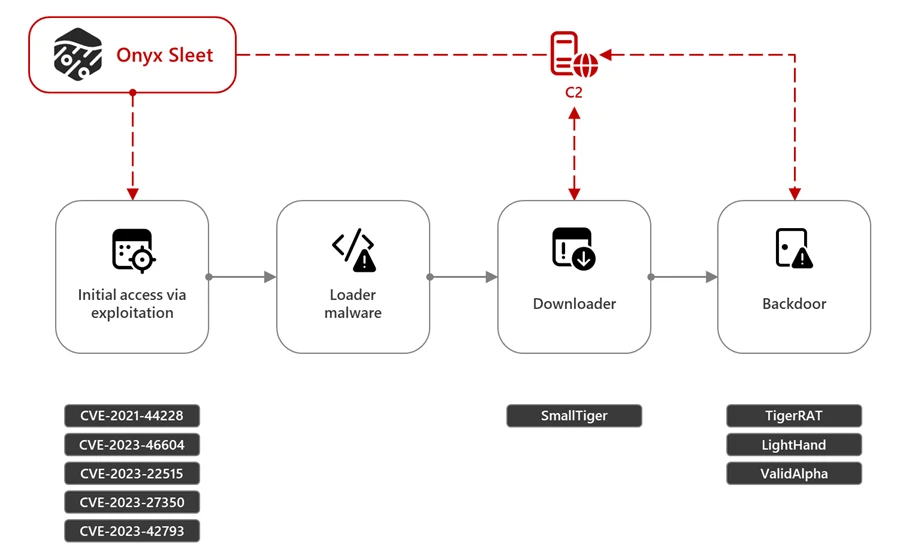
Onyx Sleet has used the same tactics, techniques, and procedures (TTPs) over extended periods, suggesting the threat actor views its tradecraft as effective. Onyx Sleet historically leveraged spear-phishing to compromise targets, and in more recent campaigns, they have been observed to primarily use exploits for initial access, alongside a loader, downloader, and backdoor as a part of its well-established attack chain.

A diagram of the Onyx Sleet attack chain. The chain begins with initial access via exploitation of several vulnerabilities, to a loader malware, a downloader, and finally a backdoor.
Figure 1. Onyx Sleet attack chain

Onyx Sleet nevertheless made some changes, for example, adding new C2 servers and hosting IPs, creating new malware, and launching multiple campaigns over time. In the past, Onyx Sleet introduced custom ransomware strains as a part of its campaigns. It also created and deployed the RAT identified by Kaspersky as Dtrack, which was observed in global attacks from September 2019 to January 2024. The Dtrack RAT follows the common attack chain used by Onyx Sleet and includes the exploitation of the Log4j 2 CVE-2021-44228 vulnerability for initial access and the use of payloads signed with an invalid certificate masquerading as legitimate software to evade detection.

Another example of Onyx Sleet introducing variations in the implementation of its attack chain is the campaign identified by AhnLab Security Intelligence Center (ASEC) in May 2024. In this campaign, the threat actor employed a previously unseen malware family dubbed as Dora RAT. Developed in the Go programming language, this custom malware strain targeted South Korean educational institutions, construction companies, and manufacturing organizations. 

Onyx Sleet avoids common detection techniques across its attack lifecycle by heavily using custom encryption and obfuscation algorithms and launching as much of its code in memory as possible. These tools and techniques have been observed in several reported campaigns, including TDrop2.

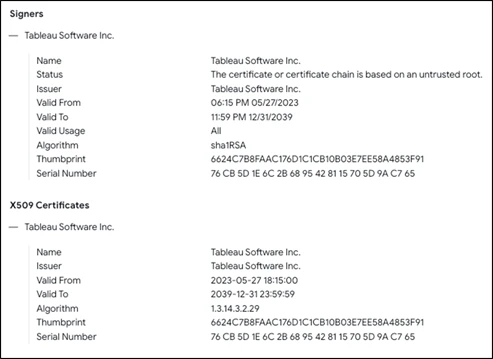
Onyx Sleet has also used several off-the shelf tools, including Sliver, remote monitoring and management (RMM) tools SOCKS proxy tools, Ngrok, and masscan. We have also observed Onyx Sleet using commercial packers like Themida and VMProtect to obfuscate their malware. In January 2024, Microsoft Threat Intelligence identified a campaign attributed to Onyx Sleet that deployed a Sliver implant, an open-source C2 framework that supports multiple operators, listener types, and payload generation. Like the Dtrack RAT, this malware was signed with an invalid certificate impersonating Tableau software. Further analysis revealed that this Onyx Sleet campaign compromised multiple aerospace and defense organizations from October 2023 to June 2024.

Information on the file signature for the fake Tableau Software certificate.
Figure 2. File signature showing the fake Tableau Software certificate (source: VirusTotal)

Apart from the previously mentioned Log4j 2 vulnerability, Onyx Sleet has exploited other publicly disclosed (N-day) vulnerabilities to gain access to target environments. Some vulnerabilities recently exploited by Onyx Sleet include:

  • CVE-2023-46604 (Apache ActiveMQ)
  • CVE-2023-22515 (Confluence)
  • CVE-2023-27350 (PaperCut)
  • CVE-2023-42793 (TeamCity)

In addition to these well-known and disclosed vulnerabilities, Onyx Sleet has used custom exploit capabilities in campaigns targeting users mostly in South Korea. In these campaigns, Onyx Sleet exploited vulnerabilities in a remote desktop/management application, a data loss prevention application, a network access control system, and an endpoint detection and response (EDR) product.

Recent malware campaigns

In December 2023, South Korean authorities attributed attacks that stole over 1.2 TB of data from targeted South Korean defense contractors using custom malware to Andariel. Microsoft has attributed several custom malware families used in the said attacks – TigerRAT, SmallTiger, LightHand, and ValidAlpha – to Onyx Sleet.

TigerRAT

Since 2020, Onyx Sleet has been observed using the custom RAT malware TigerRAT. In some campaigns using TigerRAT, Onyx Sleet exploited vulnerabilities in Log4j 2 to deliver and install the malware. When launched, this malware can steal confidential information and carry out commands, such as keylogging and screen recording, from the C2.

SmallTiger

In February 2024, ASEC identified SmallTiger, a new malware strain targeting South Korean defense and manufacturing organizations. During the process of lateral movement, this malware is delivered as a DLL file (SmallTiger[.]dll) and uses a C2 connection to download and launch the payload into memory. Microsoft researchers have determined that SmallTiger is a C++ backdoor with layered obfuscation, encountered in the wild as a Themida or VMProtect packed executable.

The SmallTiger campaign can be tied back to a campaign using a similar attack chain beginning in November 2023 that delivered the DurianBeacon RAT malware. In May 2024, Microsoft observed Onyx Sleet continuing to conduct attacks targeting South Korean defense organizations using SmallTiger.

LightHand

LightHand is a custom, lightweight backdoor used by Onyx Sleet for remote access of target devices. Via LightHand, Onyx Sleet can execute arbitrary commands through command shell (cmd.exe), get system storage information, perform directory listing, and create/delete files on the target device.

ValidAlpha (BlackRAT)

ValidAlpha (also known as BlackRAT) is a custom backdoor developed in the Go programming language and used by Onyx Sleet to target organizations globally in the energy, defense, and engineering sectors since at least 2023. ValidAlpha can run an arbitrary file, list contents of a directory, download a file, take screenshots, and launch a shell to execute arbitrary commands.

Samples of ValidAlpha analyzed by Microsoft had a unique PDB string: I:/01___Tools/02__RAT/Black/Client_Go/Client.go

Recommendations

Microsoft recommends the following mitigations to defend against attacks by Onyx Sleet:

  • Keep software up to date. Apply new security patches as soon as possible.
  • Turn on cloud-delivered protection in Microsoft Defender Antivirus, or the equivalent for your antivirus product, to help cover rapidly evolving attacker tools and techniques. Cloud-based machine learning protections block a majority of new and unknown variants.
  • Enable network protection to help prevent access to malicious domains.
  • Run endpoint detection and response (EDR) in block mode so that Microsoft Defender for Endpoint can help block malicious artifacts, even when your non-Microsoft antivirus does not detect the threat or when Microsoft Defender Antivirus is running in passive mode. EDR in block mode works behind the scenes to help remediate malicious artifacts that are detected post-breach.
  • Configure investigation and remediation in full automated mode to allow Microsoft Defender for Endpoint to take immediate action on alerts to help resolve breaches, significantly reducing alert volume

Microsoft Defender customers can turn on attack surface reduction rules to help prevent common attack techniques used by Onyx Sleet:

Detection details

Microsoft Defender Antivirus

Microsoft Defender Antivirus detects threat components as the following malware families:

Microsoft Defender for Endpoint

The following Microsoft Defender for Endpoint alerts can indicate associated threat activity:

  • Onyx Sleet activity group

The following alerts might also indicate threat activity related to this threat. Note, however, that these alerts can be also triggered by unrelated threat activity:

  • Document contains macro to download a file

Microsoft Defender Vulnerability Management

Microsoft Defender Vulnerability Management surfaces devices that may be affected by the following vulnerabilities used in this threat:

Microsoft Defender Threat Intelligence

Microsoft customers can use the following reports in Microsoft products to get the most up-to-date information about the threat actor, malicious activity, and techniques discussed in this blog. These reports provide the intelligence, protection information, and recommended actions to prevent, mitigate, or respond to associated threats found in customer environments.

Microsoft Sentinel queries

Microsoft Sentinel customers can use the TI Mapping analytics (a series of analytics all prefixed with ‘TI map’) to automatically match the malicious domain indicators mentioned in this blog post with data in their workspace. If the TI Map analytics are not currently deployed, customers can install the Threat Intelligence solution from the Microsoft Sentinel Content Hub to have the analytics rule deployed in their Sentinel workspace.

Use this query to assess the existence of vulnerabilities used by Onyx Sleet:

DeviceTvmSoftwareVulnerabilities  
| where CveId in ("CVE-2021-44228","CVE-2023-27350","CVE-2023-42793")   
| project DeviceId,DeviceName,OSPlatform,OSVersion,SoftwareVendor,SoftwareName,SoftwareVersion,  
CveId,VulnerabilitySeverityLevel  
| join kind=inner ( DeviceTvmSoftwareVulnerabilitiesKB | project CveId, CvssScore,IsExploitAvailable,VulnerabilitySeverityLevel,PublishedDate,VulnerabilityDescription,AffectedSoftware ) on CveId  
| project DeviceId,DeviceName,OSPlatform,OSVersion,SoftwareVendor,SoftwareName,SoftwareVersion,  
CveId,VulnerabilitySeverityLevel,CvssScore,IsExploitAvailable,PublishedDate,VulnerabilityDescription,AffectedSoftware 

Use this query to detect associated network IOCs:

let remoteip = dynamic(["84.38.134.56","45.155.37.101","213.139.205.151","109.248.150.147","162.19.71.175","147.78.149.201"]);
let remoteurl = dynamic(["americajobmail.site","privatemake.bounceme.net","ww3c.bounceme.net","advice.uphearth.com","http://84.38.134.56/procdump.gif"]);
DeviceNetworkEvents  
| where RemoteIP == remoteip or RemoteUrl == remoteurl 
| project TimeGenerated, DeviceId, DeviceName, Protocol, LocalIP, LocalIPType, LocalPort,RemoteIP, RemoteIPType, RemotePort, RemoteUrl

Use this query to detect associated file IOCs:

let selectedTimestamp = datetime(2024-07-17T00:00:00.0000000Z);  
let fileName = "SmallTiger.dll";  
let FileSHA256 = dynamic(["f32f6b229913d68daad937cc72a57aa45291a9d623109ed48938815aa7b6005c","0837dd54268c373069fc5c1628c6e3d75eb99c3b3efc94c45b73e2cf9a6f3207 ","29c6044d65af0073424ccc01abcb8411cbdc52720cac957a3012773c4380bab3","fed94f461145681dc9347b382497a72542424c64b6ae6fcf945f4becd2d46c32","868a62feff8b46466e9d63b83135a7987bf6d332c13739aa11b747b3e2ad4bbf","f1662bee722a4e25614ed30933b0ced17b752d99fae868fbb326a46afa2282d5","1b88b939e5ec186b2d19aec8f17792d493d74dd6ab3d5a6ddc42bfe78b01aff1","3098e6e7ae23b3b8637677da7bfc0ba720e557e6df71fa54a8ef1579b6746061","8daa6b20caf4bf384cc7912a73f243ce6e2f07a5cb3b3e95303db931c3fe339f","7339cfa5a67f5a4261c18839ef971d7f96eaf60a46190cab590b439c71c4742b"]);  
let SignerName = "INVALID:Tableau Software Inc.";  
let Signerhash = "6624c7b8faac176d1c1cb10b03e7ee58a4853f91";  
let certificateserialnumber = "76cb5d1e6c2b6895428115705d9ac765";  
search in (AlertEvidence,BehaviorEntities,CommonSecurityLog,DeviceBaselineComplianceProfiles,DeviceEvents,DeviceFileEvents,DeviceImageLoadEvents,  
DeviceLogonEvents,DeviceNetworkEvents,DeviceProcessEvents,DeviceRegistryEvents,DeviceFileCertificateInfo,DynamicEventCollection,EmailAttachmentInfo,OfficeActivity,SecurityEvent,ThreatIntelligenceIndicator)  
TimeGenerated between ((selectedTimestamp - 1m) .. (selectedTimestamp + 90d)) // from July 17th runs the search backwards for 90 days, change the above date accordingly.  
and   
( FileName == fileName or OldFileName == fileName or ProfileName == fileName or InitiatingProcessFileName == fileName or InitiatingProcessParentFileName == fileName  
or InitiatingProcessVersionInfoInternalFileName == fileName or InitiatingProcessVersionInfoOriginalFileName == fileName or PreviousFileName == fileName  
or ProcessVersionInfoInternalFileName == fileName or ProcessVersionInfoOriginalFileName == fileName or DestinationFileName == fileName or SourceFileName == fileName  
or ServiceFileName == fileName or SHA256 in (FileSHA256) or InitiatingProcessSHA256 in (FileSHA256) or Signer == SignerName or SignerHash == Signerhash or CertificateSerialNumber == certificateserialnumber )

Indicators of compromise

IP addresses

  • 84.38.134[.]56
  • 45.155.37[.]101
  • 213.139.205[.]151
  • 109.248.150[.]147
  • 162.19.71[.]175
  • 147.78.149[.]201

URL

  • hxxp://84.38.134[.]56/procdump.gif

Actor-controlled domain

  • americajobmail[.]site
  • privatemake.bounceme[.]net
  • ww3c.bounceme[.]net
  • advice.uphearth[.]com

SHA-256

  • TigerRAT
    • f32f6b229913d68daad937cc72a57aa45291a9d623109ed48938815aa7b6005c
    • 0837dd54268c373069fc5c1628c6e3d75eb99c3b3efc94c45b73e2cf9a6f3207
    • 29c6044d65af0073424ccc01abcb8411cbdc52720cac957a3012773c4380bab3
    • fed94f461145681dc9347b382497a72542424c64b6ae6fcf945f4becd2d46c32
    • 868a62feff8b46466e9d63b83135a7987bf6d332c13739aa11b747b3e2ad4bbf
  • LightHand
    • f1662bee722a4e25614ed30933b0ced17b752d99fae868fbb326a46afa2282d5
    • 1b88b939e5ec186b2d19aec8f17792d493d74dd6ab3d5a6ddc42bfe78b01aff1
    • 3098e6e7ae23b3b8637677da7bfc0ba720e557e6df71fa54a8ef1579b6746061
    • 8daa6b20caf4bf384cc7912a73f243ce6e2f07a5cb3b3e95303db931c3fe339f
    • 7339cfa5a67f5a4261c18839ef971d7f96eaf60a46190cab590b439c71c4742b
  • ValidAlpha
    • c2500a6e12f22b16e221ba01952b69c92278cd05632283d8b84c55c916efe27c
    • c1a09024504a5ec422cbea68e17dffc46472d3c2d73f83aa0741a89528a45cd1

Fake Tableau certificate

  • Signer: INVALID:Tableau Software Inc.
  • SignerHash: 6624c7b8faac176d1c1cb10b03e7ee58a4853f91
  • CertificateSerialNumber: 76cb5d1e6c2b6895428115705d9ac765

References

Learn more

For the latest security research from the Microsoft Threat Intelligence community, check out the Microsoft Threat Intelligence Blog: https://aka.ms/threatintelblog.

To get notified about new publications and to join discussions on social media, follow us on LinkedIn at https://www.linkedin.com/showcase/microsoft-threat-intelligence, and on X (formerly Twitter) at https://twitter.com/MsftSecIntel.

To hear stories and insights from the Microsoft Threat Intelligence community about the ever-evolving threat landscape, listen to the Microsoft Threat Intelligence podcast: https://thecyberwire.com/podcasts/microsoft-threat-intelligence.

The post Onyx Sleet uses array of malware to gather intelligence for North Korea appeared first on Microsoft Security Blog.

30 Jul 10:41

Windows Security best practices for integrating and managing security tools

by David Weston

Windows is an open and flexible platform used by many of the world’s top businesses for high availability use cases where security and availability are non-negotiable.

To meet those needs:

  1. Windows provides a range of operating modes that customers can choose from. This includes the ability to limit what can run to only approved software and drivers. This can increase security and reliability by making Windows operate in a mode closer to mobile phones or appliances.
  2. Customers can choose integrated security monitoring and detection capabilities that are included with Windows. Or they can choose to replace or supplement this security with a wide variety of choices from a vibrant open ecosystem of vendors.

In this blog post, we examine the recent CrowdStrike outage and provide a technical overview of the root cause. We also explain why security products use kernel-mode drivers today and the safety measures Windows provides for third-party solutions. In addition, we share how customers and security vendors can better leverage the integrated security capabilities of Windows for increased security and reliability. Lastly, we provide a look into how Windows will enhance extensibility for future security products.

CrowdStrike recently published a Preliminary Post Incident Review analyzing their outage. In their blog post, CrowdStrike describes the root cause as a memory safety issue—specifically a read out-of-bounds access violation in the CSagent driver. We leverage the Microsoft WinDBG Kernel Debugger and several extensions that are available free to anyone to perform this analysis. Customers with crash dumps can reproduce our steps with these tools.

Based on Microsoft’s analysis of the Windows Error Reporting (WER) kernel crash dumps related to the incident, we observe global crash patterns that reflect this:

FAULTING_THREAD:  ffffe402fe868040

READ_ADDRESS:  ffff840500000074 Paged pool

MM_INTERNAL_CODE:  2

IMAGE_NAME:  csagent.sys

MODULE_NAME: csagent

FAULTING_MODULE: fffff80671430000 csagent

PROCESS_NAME:  System

TRAP_FRAME:  ffff94058305ec20 -- (.trap 0xffff94058305ec20)
.trap 0xffff94058305ec20
NOTE: The trap frame does not contain all registers.
Some register values may be zeroed or incorrect.
rax=ffff94058305f200 rbx=0000000000000000 rcx=0000000000000003
rdx=ffff94058305f1d0 rsi=0000000000000000 rdi=0000000000000000
rip=fffff806715114ed rsp=ffff94058305edb0 rbp=ffff94058305eeb0
 r8=ffff840500000074  r9=0000000000000000 r10=0000000000000000
r11=0000000000000014 r12=0000000000000000 r13=0000000000000000
r14=0000000000000000 r15=0000000000000000
iopl=0         nv up ei ng nz na po nc
csagent+0xe14ed:
fffff806`715114ed 458b08          mov     r9d,dword ptr [r8] ds:ffff8405`00000074=????????
.trap
Resetting default scope

STACK_TEXT:  
ffff9405`8305e9f8 fffff806`5388c1e4     : 00000000`00000050 ffff8405`00000074 00000000`00000000 ffff9405`8305ec20 : nt!KeBugCheckEx 
ffff9405`8305ea00 fffff806`53662d8c     : 00000000`00000000 00000000`00000000 00000000`00000000 ffff8405`00000074 : nt!MiSystemFault+0x1fcf94  
ffff9405`8305eb00 fffff806`53827529     : ffffffff`00000030 ffff8405`af8351a2 ffff9405`8305f020 ffff9405`8305f020 : nt!MmAccessFault+0x29c 
ffff9405`8305ec20 fffff806`715114ed     : 00000000`00000000 ffff9405`8305eeb0 ffff8405`b0bcd00c ffff8405`b0bc505c : nt!KiPageFault+0x369 
ffff9405`8305edb0 fffff806`714e709e     : 00000000`00000000 00000000`e01f008d ffff9405`8305f102 fffff806`716baaf8 : csagent+0xe14ed
ffff9405`8305ef50 fffff806`714e8335     : 00000000`00000000 00000000`00000010 00000000`00000002 ffff8405`b0bc501c : csagent+0xb709e
ffff9405`8305f080 fffff806`717220c7     : 00000000`00000000 00000000`00000000 ffff9405`8305f382 00000000`00000000 : csagent+0xb8335
ffff9405`8305f1b0 fffff806`7171ec44     : ffff9405`8305f668 fffff806`53eac2b0 ffff8405`afad4ac0 00000000`00000003 : csagent+0x2f20c7
ffff9405`8305f430 fffff806`71497a31     : 00000000`0000303b ffff9405`8305f6f0 ffff8405`afb1d140 ffffe402`ff251098 : csagent+0x2eec44
ffff9405`8305f5f0 fffff806`71496aee     : ffff8405`afb1d140 fffff806`71541e7e 00000000`000067a0 fffff806`7168f8f0 : csagent+0x67a31
ffff9405`8305f760 fffff806`7149685b     : ffff9405`8305f9d8 ffff8405`afb1d230 ffff8405`afb1d140 ffffe402`fe8644f8 : csagent+0x66aee
ffff9405`8305f7d0 fffff806`715399ea     : 00000000`4a8415aa ffff8eee`1c68ca4f 00000000`00000000 ffff8405`9e95fc30 : csagent+0x6685b
ffff9405`8305f850 fffff806`7148efbb     : 00000000`00000000 ffff9405`8305fa59 ffffe402`fe864050 ffffe402`fede62c0 : csagent+0x1099ea
ffff9405`8305f980 fffff806`7148edd7     : ffffffff`ffffffa1 fffff806`7152e5c1 ffffe402`fe864050 00000000`00000001 : csagent+0x5efbb
ffff9405`8305fac0 fffff806`7152e681     : 00000000`00000000 fffff806`53789272 00000000`00000002 ffffe402`fede62c0 : csagent+0x5edd7
ffff9405`8305faf0 fffff806`53707287     : ffffe402`fe868040 00000000`00000080 fffff806`7152e510 006fe47f`b19bbdff : csagent+0xfe681
ffff9405`8305fb30 fffff806`5381b8e4     : ffff9680`37651180 ffffe402`fe868040 fffff806`53707230 00000000`00000000 : nt!PspSystemThreadStartup+0x57 
ffff9405`8305fb80 00000000`00000000     : ffff9405`83060000 ffff9405`83059000 00000000`00000000 00000000`00000000 : nt!KiStartSystemThread+0x34 

Digging in more to this crash dump, we can restore the stack frame at the time of the access violation to learn more about its origin. Unfortunately, with WER data we only receive a compressed version of state and thus we cannot disassemble backwards to see a larger set of instructions prior to the crash, but we can see in the disassembly that there is a check for NULL before performing a read at the address specified in the R8 register:

6: kd> .trap 0xffff94058305ec20
.trap 0xffff94058305ec20
NOTE: The trap frame does not contain all registers.
Some register values may be zeroed or incorrect.
rax=ffff94058305f200 rbx=0000000000000000 rcx=0000000000000003
rdx=ffff94058305f1d0 rsi=0000000000000000 rdi=0000000000000000
rip=fffff806715114ed rsp=ffff94058305edb0 rbp=ffff94058305eeb0
 r8=ffff840500000074  r9=0000000000000000 r10=0000000000000000
r11=0000000000000014 r12=0000000000000000 r13=0000000000000000
r14=0000000000000000 r15=000000000000
000
iopl=0         nv up ei ng nz na po nc
csagent+0xe14ed:
fffff806`715114ed 458b08          mov     r9d,dword ptr [r8] ds:ffff8405`00000074=????????
6: kd> !pte ffff840500000074
!pte ffff840500000074
                                           VA ffff840500000074
PXE at FFFFABD5EAF57840    PPE at FFFFABD5EAF080A0    PDE at FFFFABD5E1014000    PTE at FFFFABC202800000
contains 0A00000277200863  contains 0000000000000000
pfn 277200    ---DA--KWEV  contains 0000000000000000
not valid

6: kd> ub fffff806`715114ed
ub fffff806`715114ed
csagent+0xe14d9:
fffff806`715114d9 04d8            add     al,0D8h
fffff806`715114db 750b            jne     csagent+0xe14e8 (fffff806`715114e8)
fffff806`715114dd 4d85c0          test    r8,r8
fffff806`715114e0 7412            je      csagent+0xe14f4 (fffff806`715114f4)
fffff806`715114e2 450fb708        movzx   r9d,word ptr [r8]
fffff806`715114e6 eb08            jmp     csagent+0xe14f0 (fffff806`715114f0)
fffff806`715114e8 4d85c0          test    r8,r8
fffff806`715114eb 7407            je      csagent+0xe14f4 (fffff806`715114f4)
6: kd> ub fffff806`715114d9
ub fffff806`715114d9
                          ^ Unable to find valid previous instruction for 'ub fffff806`715114d9'
6: kd> u fffff806`715114eb
u fffff806`715114eb
csagent+0xe14eb:
fffff806`715114eb 7407            je      csagent+0xe14f4 (fffff806`715114f4)
fffff806`715114ed 458b08          mov     r9d,dword ptr [r8]
fffff806`715114f0 4d8b5008        mov     r10,qword ptr [r8+8]
fffff806`715114f4 4d8bc2          mov     r8,r10
fffff806`715114f7 488d4d90        lea     rcx,[rbp-70h]
fffff806`715114fb 488bd6          mov     rdx,rsi
fffff806`715114fe e8212c0000      call    csagent+0xe4124 (fffff806`71514124)
fffff806`71511503 4533d2          xor     r10d,r10d

6: kd> db ffff840500000074
db ffff840500000074
ffff8405`00000074  ?? ?? ?? ?? ?? ?? ?? ??-?? ?? ?? ?? ?? ?? ?? ??  ????????????????
ffff8405`00000084  ?? ?? ?? ?? ?? ?? ?? ??-?? ?? ?? ?? ?? ?? ?? ??  ????????????????
ffff8405`00000094  ?? ?? ?? ?? ?? ?? ?? ??-?? ?? ?? ?? ?? ?? ?? ??  ????????????????
ffff8405`000000a4  ?? ?? ?? ?? ?? ?? ?? ??-?? ?? ?? ?? ?? ?? ?? ??  ????????????????
ffff8405`000000b4  ?? ?? ?? ?? ?? ?? ?? ??-?? ?? ?? ?? ?? ?? ?? ??  ????????????????
ffff8405`000000c4  ?? ?? ?? ?? ?? ?? ?? ??-?? ?? ?? ?? ?? ?? ?? ??  ????????????????
ffff8405`000000d4  ?? ?? ?? ?? ?? ?? ?? ??-?? ?? ?? ?? ?? ?? ?? ??  ????????????????
ffff8405`000000e4  ?? ?? ?? ?? ?? ?? ?? ??-?? ?? ?? ?? ?? ?? ?? ??  ????????????????

Our observations confirm CrowdStrike’s analysis that this was a read-out-of-bounds memory safety error in the CrowdStrike developed CSagent.sys driver.

We can also see that the csagent.sys module is registered as a file system filter driver commonly used by anti-malware agents to receive notifications about file operations such as the creation or modification of a file. This is often used by security products to scan any new file saved to disk, such as downloading a file via the browser.

File System filters can also be used as a signal for security solutions attempting to monitor the behavior of the system. CrowdStrike noted in their blog that part of their content update was changing the sensor’s logic relating to data around named pipe creation. The File System filter driver API allows the driver to receive a call when named pipe activity (e.g., named pipe creation) occurs on the system that could enable the detection of malicious behavior. The general function of the driver correlates to the information shared by CrowdStrike.

6: kd>!reg querykey \REGISTRY\MACHINE\system\ControlSet001\services\csagent

Hive         ffff84059ca7b000
KeyNode      ffff8405a6f67f9c

[SubKeyAddr]         [SubKeyName]
ffff8405a6f683ac     Instances
ffff8405a6f6854c     Sim

 Use '!reg keyinfo ffff84059ca7b000 <SubKeyAddr>' to dump the subkey details

[ValueType]         [ValueName]                   [ValueData]
REG_DWORD           Type                          2
REG_DWORD           Start                         1
REG_DWORD           ErrorControl                  1
REG_EXPAND_SZ       ImagePath                     \??\C:\Windows\system32\drivers\CrowdStrike\csagent.sys
REG_SZ              DisplayName                   CrowdStrike Falcon
REG_SZ              Group                         FSFilter Activity Monitor
REG_MULTI_SZ        DependOnService               FltMgr\0
REG_SZ              CNFG                          Config.sys
REG_DWORD           SupportedFeatures             f

We can see the control channel file version 291 specified in the CrowdStrike analysis is also present in the crash indicating the file was read.

Determining how the file itself correlates to the access violation observed in the crash dump would require additional debugging of the driver using these tools but is outside of the scope of this blog post.

!ca ffffde8a870a8290

ControlArea  @ ffffde8a870a8290
  Segment      ffff880ce0689c10  Flink      ffffde8a87267718  Blink        ffffde8a870a7d98
  Section Ref                 0  Pfn Ref                   b  Mapped Views                0
  User Ref                    0  WaitForDel                0  Flush Count                 0
  File Object  ffffde8a879b29a0  ModWriteCount             0  System Views                0
  WritableRefs                0  PartitionId                0  
  Flags (8008080) File WasPurged OnUnusedList 

      \Windows\System32\drivers\CrowdStrike\C-00000291-00000000-00000032.sys

1: kd> !ntfskd.ccb ffff880ce06f6970
!ntfskd.ccb ffff880ce06f6970

   Ccb: ffff880c`e06f6970
 Flags: 00008003 Cleanup OpenAsFile IgnoreCase
Flags2: 00000841 OpenComplete AccessAffectsOplocks SegmentObjectReferenced
  Type: UserFileOpen
FileObj: ffffde8a879b29a0

(018)  ffff880c`db937370  FullFileName [\Windows\System32\drivers\CrowdStrike\C-00000291-00000000-00000032.sys]
(020) 000000000000004C  LastFileNameOffset 
(022) 0000000000000000  EaModificationCount 
(024) 0000000000000000  NextEaOffset 
(048) FFFF880CE06F69F8  Lcb 
(058) 0000000000000002  TypeOfOpen 

We can leverage the crash dump to determine if any other drivers supplied by CrowdStrike may exist on the running system during the crash.

6: kd> lmDvmCSFirmwareAnalysis
lmDvmCSFirmwareAnalysis
Browse full module list
start             end                 module name
fffff806`58920000 fffff806`5893c000   CSFirmwareAnalysis   (deferred)             
    Image path: \SystemRoot\system32\DRIVERS\CSFirmwareAnalysis.sys
    Image name: CSFirmwareAnalysis.sys
    Browse all global symbols  functions  data  Symbol Reload
    Timestamp:        Mon Mar 18 11:32:14 2024 (65F888AE)
    CheckSum:         0002020E
    ImageSize:        0001C000
    Translations:     0000.04b0 0000.04e4 0409.04b0 0409.04e4
    Information from resource tables:
6: kd> lmDvmcspcm4
lmDvmcspcm4
Browse full module list
start             end                 module name
fffff806`71870000 fffff806`7187d000   cspcm4     (deferred)             
    Image path: \??\C:\Windows\system32\drivers\CrowdStrike\cspcm4.sys
    Image name: cspcm4.sys
    Browse all global symbols  functions  data  Symbol Reload
    Timestamp:        Mon Jul  8 18:33:22 2024 (668C9362)
    CheckSum:         00012F69
    ImageSize:        0000D000
    Translations:     0000.04b0 0000.04e4 0409.04b0 0409.04e4
    Information from resource tables:
6: kd> lmDvmcsboot.sys
lmDvmcsboot.sys
Browse full module list
start             end                 module name

Unloaded modules:
fffff806`587d0000 fffff806`587dc000   CSBoot.sys
    Timestamp: unavailable (00000000)
    Checksum:  00000000
    ImageSize:  0000C000

6: kd> !reg querykey \REGISTRY\MACHINE\system\ControlSet001\services\csboot
!reg querykey \REGISTRY\MACHINE\system\ControlSet001\services\csboot

Hive         ffff84059ca7b000
KeyNode      ffff8405a6f68924

[ValueType]         [ValueName]                   [ValueData]
REG_DWORD           Type                          1
REG_DWORD           Start                         0
REG_DWORD           ErrorControl                  1
REG_EXPAND_SZ       ImagePath                     system32\drivers\CrowdStrike\CSBoot.sys
REG_SZ              DisplayName                   CrowdStrike Falcon Sensor Boot Driver
REG_SZ              Group                         Early-Launch
6: kd> !reg querykey \REGISTRY\MACHINE\system\ControlSet001\services\csdevicecontrol
!reg querykey \REGISTRY\MACHINE\system\ControlSet001\services\csdevicecontrol

Hive         ffff84059ca7b000
KeyNode      ffff8405a6f694ac

[SubKeyAddr]         [VolatileSubKeyName]
ffff84059ce196c4     Enum

 Use '!reg keyinfo ffff84059ca7b000 <SubKeyAddr>' to dump the subkey details

[ValueType]         [ValueName]                   [ValueData]
REG_DWORD           Type                          1
REG_DWORD           Start                         3
REG_DWORD           ErrorControl                  1
REG_DWORD           Tag                           1f
REG_EXPAND_SZ       ImagePath                     \SystemRoot\System32\drivers\CSDeviceControl.sys
REG_SZ              DisplayName                   @oem40.inf,%DeviceControl.SVCDESC%;CrowdStrike Device Control Service
REG_SZ              Group                         Base
REG_MULTI_SZ        Owners                        oem40.inf\0!csdevicecontrol.inf_amd64_b6725a84d4688d5a\0!csdevicecontrol.inf_amd64_016e965488e83578\0
REG_DWORD           BootFlags                     14
6: kd> !reg querykey \REGISTRY\MACHINE\system\ControlSet001\services\csagent
!reg querykey \REGISTRY\MACHINE\system\ControlSet001\services\csagent

Hive         ffff84059ca7b000
KeyNode      ffff8405a6f67f9c

[SubKeyAddr]         [SubKeyName]
ffff8405a6f683ac     Instances
ffff8405a6f6854c     Sim

 Use '!reg keyinfo ffff84059ca7b000 <SubKeyAddr>' to dump the subkey details

[ValueType]         [ValueName]                   [ValueData]
REG_DWORD           Type                          2
REG_DWORD           Start                         1
REG_DWORD           ErrorControl                  1
REG_EXPAND_SZ       ImagePath                     \??\C:\Windows\system32\drivers\CrowdStrike\csagent.sys
REG_SZ              DisplayName                   CrowdStrike Falcon
REG_SZ              Group                         FSFilter Activity Monitor
REG_MULTI_SZ        DependOnService               FltMgr\0
REG_SZ              CNFG                          Config.sys
REG_DWORD           SupportedFeatures             f

6: kd> lmDvmCSFirmwareAnalysis
lmDvmCSFirmwareAnalysis
Browse full module list
start             end                 module name
fffff806`58920000 fffff806`5893c000   CSFirmwareAnalysis   (deferred)             
    Image path: \SystemRoot\system32\DRIVERS\CSFirmwareAnalysis.sys
    Image name: CSFirmwareAnalysis.sys
    Browse all global symbols  functions  data  Symbol Reload
    Timestamp:        Mon Mar 18 11:32:14 2024 (65F888AE)
    CheckSum:         0002020E
    ImageSize:        0001C000
    Translations:     0000.04b0 0000.04e4 0409.04b0 0409.04e4
    Information from resource tables:
6: kd> !reg querykey \REGISTRY\MACHINE\system\ControlSet001\services\csfirmwareanalysis
!reg querykey \REGISTRY\MACHINE\system\ControlSet001\services\csfirmwareanalysis

Hive         ffff84059ca7b000
KeyNode      ffff8405a6f69d9c

[SubKeyAddr]         [VolatileSubKeyName]
ffff84059ce197cc     Enum

 Use '!reg keyinfo ffff84059ca7b000 <SubKeyAddr>' to dump the subkey details

[ValueType]         [ValueName]                   [ValueData]
REG_DWORD           Type                          1
REG_DWORD           Start                         0
REG_DWORD           ErrorControl                  1
REG_DWORD           Tag                           6
REG_EXPAND_SZ       ImagePath                     system32\DRIVERS\CSFirmwareAnalysis.sys
REG_SZ              DisplayName                   @oem43.inf,%FirmwareAnalysis.SVCDESC%;CrowdStrike Firmware Analysis Service
REG_SZ              Group                         Boot Bus Extender
REG_MULTI_SZ        Owners                        oem43.inf\0!csfirmwareanalysis.inf_amd64_12861fc608fb1440\0
6: kd> !reg querykey \REGISTRY\MACHINE\system\Controlset001\control\earlylaunch
!reg querykey \REGISTRY\MACHINE\system\Controlset001\control\earlylaunch

As we can see from the above analysis, CrowdStrike loads four driver modules. One of those modules receives dynamic control and content updates frequently based on the CrowdStrike Preliminary Post-incident-review timeline.

We can leverage the unique stack and attributes of this crash to identify the Windows crash reports generated by this specific CrowdStrike programming error. It’s worth noting the number of devices which generated crash reports is a subset of the number of impacted devices previously shared by Microsoft in our blog post, because crash reports are sampled and collected only from customers who choose to upload their crashes to Microsoft. Customers who choose to enable crash dump sharing help both driver vendors and Microsoft to identify and remediate quality issues and crashes.

Figure 1 CrowdStrike driver associated crash dump reports over time

We make this information available to driver owners so they can assess their own reliability via the Hardware Dev Center analytics dashboard. As we can see from the above, any reliability problem like this invalid memory access issue can lead to widespread availability issues when not combined with safe deployment practices. Let’s dig into why security solutions leverage kernel drivers on Windows.

Why do security solutions leverage kernel drivers?

Many security vendors such as CrowdStrike and Microsoft leverage a kernel driver architecture and there are several reasons for this.

Visibility and enforcement of security related events

Kernel drivers allow for system wide visibility, and the capability to load in early boot to detect threats like boot kits and root kits which can load before user-mode applications. In addition, Microsoft provides a rich set of capabilities such as system event callbacks for process and thread creation and filter drivers which can watch for events like file creation, deletion, or modification. Kernel activity can also trigger call backs for drivers to decide when to block activities like file or process creations. Many vendors also use drivers to collect a variety of network information in the kernel using the NDIS driver class.

Performance

Kernel drivers are often utilized by security vendors for potential performance benefits. For example, analysis or data collection for high throughput network activity may benefit from a kernel driver. There are many scenarios where data collection and analysis can be optimized for operation outside of kernel mode and Microsoft continues to partner with the ecosystem to improve performance and provide best practices to achieve parity outside of kernel mode.

Tamper resistance

A second benefit of loading into kernel mode is tamper resistance. Security products want to ensure that their software cannot be disabled by malware, targeted attacks, or malicious insiders, even when those attackers have admin-level privileges. They also want to ensure that their drivers load as early as possible so that they can observe system events at the earliest possible time. Windows provides a mechanism to launch drivers marked as Early Launch Antimalware (ELAM) early in the boot process for this reason. CrowdStrike signs the above CSboot driver as ELAM, enabling it to load early in the boot sequence.

In the general case, there is a tradeoff that security vendors must rationalize when it comes to kernel drivers. Kernel drivers provide the above properties at the cost of resilience. Since kernel drivers run at the most trusted level of Windows, where containment and recovery capabilities are by nature constrained, security vendors must carefully balance needs like visibility and tamper resistance with the risk of operating within kernel mode.

All code operating at kernel level requires extensive validation because it cannot fail and restart like a normal user application. This is universal across all operating systems. Internally at Microsoft, we have invested in moving complex Windows core services from kernel to user mode, such as font file parsing from kernel to user mode.

It is possible today for security tools to balance security and reliability. For example, security vendors can use minimal sensors that run in kernel mode for data collection and enforcement limiting exposure to availability issues. The remainder of the key product functionality includes managing updates, parsing content, and other operations can occur isolated within user mode where recoverability is possible. This demonstrates the best practice of minimizing kernel usage while still maintaining a robust security posture and strong visibility.

Figure 2 Example security product architecture which balances security and reliability

Windows provides several user mode protection approaches for anti-tampering, like Virtualization-based security (VBS) Enclaves and Protected Processes that vendors can use to protect their key security processes. Windows also provides ETW events and user-mode interfaces like Antimalware Scan Interface for event visibility. These robust mechanisms can be used to reduce the amount of kernel code needed to create a security solution, which balances security and robustness.

How does Windows help ensure the quality of security related third-party products?

Microsoft engages with third-party security vendors through an industry forum called the Microsoft Virus Initiative (MVI). This group consists of Microsoft and Security Industry and was created to establish a dialogue and collaboration across the Windows security ecosystem to improve robustness in the way security products use the platform. With MVI, Microsoft and vendors collaborate on the Windows platform to define reliable extension points and platform improvements, as well as share information about how to best protect our customers.

Microsoft works with members of MVI to ensure compatibility with Windows updates, improve performance, and address reliability issues. MVI partners actively participating in the program contribute to making the ecosystem more resilient and gain benefits including technical briefings, feedback loops with Microsoft product teams, and access to antimalware platform features such as ELAM and Protected Processes. Microsoft also provides runtime protection such as Patch Guard to prevent disruptive behavior from kernel driver types like anti-malware.

In addition, all drivers signed by the Microsoft Windows Hardware Quality Labs (WHQL) must run a series of tests and attest to a number of quality checks, including using fuzzers, running static code analysis and testing under runtime driver verification, among other techniques. These tests have been developed to ensure that best practices around security and reliability are followed. Microsoft includes all these tools in the Windows Driver Kit used by all driver developers. A list of the resources and tools is available here.

All WHQL signed drivers are run through Microsoft’s ingestion checks and malware scans and must pass before being approved for signing. Additionally, if a third-party vendor chooses to distribute their driver via Windows Update (WU), the driver also goes through Microsoft’s flighting and gradual rollout processes to observe quality and ensure the driver meets the necessary quality criteria for a broad release.

Can customers deploy Windows in a higher security mode to increase reliability?

Windows at its core is an open and versatile OS, and it can easily be locked down for increased security using integrated tools. In addition, Windows is constantly increasing security defaults, including dozens of new security features enabled by default in Windows 11.

Security features enabled by default in Windows 11

Area Feature
Hardware Security Baseline TPM2.0
Secure boot
Virtualization-based security (VBS)
Memory integrity (Hypervisor-protected Code Integrity (HVCI))
Hardware-enforced stack protection
Kernel Direct Memory Access (DMA) protection
HW-based kernel protection (HLAT)
Enhanced sign-in security (ESS) for built-in biometric sensors
Encryption BitLocker (commercial)
Device Encryption (consumer)
Identity Management Credential Guard
Entra primary refresh token (PRT) hardware protected
MDM deployed SCEP certs hardware protected
MDM enrollment certs hardware protected
Local Security Authority (LSA) PPL prevents token/credential dumping
Account lockout policy (for 10 failed sign-ins)
Enhanced phishing protection with Microsoft Defender
Microsoft Defender SmartScreen
NPLogonNotification doesn’t include password
WDigest SSO removed to reduce password disclosure
AD Device Account protected by CredGuard*
Multi-Factor Authentication
(Passwordless)
MSA & Entra users lead through Hello enablement by default
MSA password automatically removed from Windows if never used
Hello container VSM protected
Peripheral biometric sensors blocked for ESS enabled devices
Lock on leave integrated into Hello
Security Incident Reduction Common Log File Systems run from trusted source
Move tool-tip APIs from kernel to user mode
Modernize print stack by removing untrusted drivers
DPAPI moved from 3DES to AES
TLS 1.3 default with TLS 1.0/1.1 disabled by default
NTLM-less*
OS lockdown Microsoft Vulnerable Driver Blocklist
3P driver security baseline enforced via WHCP
Smart App Control*
*Feature available in the Windows Insider Program or currently off by default and on a path for default enablement

Windows has integrated security features to self-defend. This includes key anti-malware features enabled by default, such as:

  1. Secure Boot, which helps prevent early boot malware and rootkits by enforcing signing consistently across Windows boots.
  2. Measured Boot, which provides TPM-based hardware cryptographic measurements on boot-time properties available through integrated attestation services such as Device Health Attestation.
  3. Memory integrity (also known as hypervisor-protected code integrity or HVCI), which prevents runtime generation of dynamic code in the kernel and helps ensure control flow integrity.
  4. Vulnerable driver blocklist, which is on by default, integrated into the OS, and managed by Microsoft. This complements the malicious driver block list.
  5. Protected Local Security Authority is on by default in Windows 11 to protect a range of credentials. Hardware-based credential protection is on by default for enterprise versions of Windows.
  6. Microsoft Defender Antivirus is enabled by default in Windows and offers anti-malware capabilities across the OS.

These security capabilities provide layers of protection against malware and exploitation attempts in modern Windows. Many Windows customers have leveraged our security baseline and Windows security technologies to harden their systems and these capabilities collectively have reduced the attack surface significantly.

Using the integrated security features of Windows to prevent adversary attacks such as those displayed in the MITRE ATT&CK® framework increases security while reducing cost and complexity. It leverages best practices to achieve maximum security and reliability. These best practices include:

  1. Using App Control for Business (formerly Windows Defender Application Control), you can author a security policy to allow only trusted and/or business-critical apps. Your policy can be crafted to deterministically and durably prevent nearly all malware and “living off the land” style attacks. It can also specify which kernel drivers are allowed by your organization to durably guarantee that only those drivers will load on your managed endpoints.
  2. Use Memory integrity with a specific allow list policy to further protect the Windows kernel using Virtualization-based security (VBS). Combined with App Control for Business, memory integrity can reduce the attack surface for kernel malware or boot kits. This can also be used to limit any drivers that might impact reliability on systems.
  3. Running as Standard User and elevating only as necessary. Companies that follow the best practices to run as standard user and reduce privileges mitigate many of the MITRE ATT&CK® techniques.
  4. Use Device Health Attestation (DHA) to monitor devices for the right security policy, including hardware-based measurements for the security posture of the machine. This is a modern and exceptionally durable approach to ensure security for high availability scenarios and uses Microsoft’s Zero Trust architecture.

What is next?

Windows is a self-protecting operating system that has produced dozens of new security features and architectural changes in recent versions. We plan to work with the anti-malware ecosystem to take advantage of these integrated features to modernize their approach, helping to support and even increase security along with reliability.

This includes helping the ecosystem by:

  1. Providing safe rollout guidance, best practices, and technologies to make it safer to perform updates to security products.
  2. Reducing the need for kernel drivers to access important security data.
  3. Providing enhanced isolation and anti-tampering capabilities with technologies like our recently announced VBS enclaves.
  4. Enabling zero trust approaches like high integrity attestation which provides a method to determine the security state of the machine based on the health of Windows native security features.

As we move forward, Windows is continuing to innovate and offer new ways for security tools to detect and respond to emerging threats safely and securely. Windows has announced a commitment around the Rust programming language as part of Microsoft’s Secure Future Initiative (SFI) and has recently expanded the Windows kernel to support Rust.

The information in this blog post is provided as part of our commitment to communicate learnings and next steps after the CrowdStrike incident. We will continue to share ongoing guidance on security best practices for Windows and work across our broad ecosystem of customers and partners to develop new security capabilities based on your feedback.

The post Windows Security best practices for integrating and managing security tools appeared first on Microsoft Security Blog.

28 May 00:23

DevOps Dilemma: How Can CISOs Regain Control in the Age of Speed?

by info@thehackernews.com (The Hacker News)
Introduction The infamous Colonial pipeline ransomware attack (2021) and SolarWinds supply chain attack (2020) were more than data leaks; they were seismic shifts in cybersecurity. These attacks exposed a critical challenge for Chief Information Security Officers (CISOs): holding their ground while maintaining control over cloud security in the accelerating world of DevOps.
07 Apr 02:24

Offline Security Intelligence Update is now in Public Preview

by Megha_Priya

We are extremely excited to share that Offline Security Intelligence Update is now in Public Preview!


Organizations can now update security intelligence (also referred to as “signatures”) on Linux endpoints with limited or no exposure to the internet using a local hosting server. Exercise better control over the download and deployment of signatures on their Linux servers running critical workloads.


In addition, these are the benefits of the new offline security intelligence update capability:

  • Control and manage the frequency of signature downloads on the local server and endpoints pulling signatures from the local server.
  • Get peace of mind by being able to test the downloaded signatures on a test device before propagating it to the entire fleet.
  • Reduce network bandwidth as now, on behalf of your entire fleet, only one local server will poll Microsoft Cloud to get the latest signatures.
  • Run any of the 3 major platforms  (Windows, Mac, Linux) on the local server without needing to install Defender for Endpoint.
  • Know you are getting the latest antivirus protection as signatures are always downloaded along with the latest compatible AV engine.
  • Trust that there are backups in case. For every update, signature with n-1 version is moved to a backup folder on the local server. In case of any issue with the latest signature, you can pull the n-1 signature version from the backup folder to your endpoints. On the rare occasion offline update fails,  you can also choose to fallback to online update directly from Microsoft Cloud.


How it works

Figure 1: High-level process flow diagram showing signatures downloading to local server and then being propagated to the Linux EndpointsFigure 1: High-level process flow diagram showing signatures downloading to local server and then being propagated to the Linux Endpoints

 

  • Organizations need to set up a local server that is reachable by Microsoft Cloud; ownership of the management and maintenance of the local server lies with the organization.
  • Signatures are downloaded from Microsoft Cloud on this local Web/NFS server by executing a script using cronjob/task scheduler on the local server.
  • Endpoints running Defender for Endpoint will pull the downloaded signatures from this local Web/NFS server at a user-defined time interval.
  • Signatures pulled on the endpoints from the local server are first verified before loading it with the AV engine.
  • To trigger and configure the update process, update the managed config json file on the Linux endpoints.
  • The status of the update can be seen on the mdatp cli.

Trevor_Rusher_2-1711993386175.png


Getting started

Please upgrade to the latest Defender for Endpoint agent version 101.24022.000 or above to experience the benefits. 


To configure Linux Endpoints and the local server please refer to our documentation.  

20 Feb 02:30

Lemmings, or how clever tricks make platforms more different than they seem

by Scali

The other day I read this in-depth article on font usage in early DOS games by VileR. Since some of the fonts were apparently stored not as 1-bit bitmaps, but as multiple bits per pixel, I was wondering when the usage of multicolour fonts became commonplace on the PC.

I randomly thought of Lemmings as a game that I recall using a very nice and detailed font. But that turned out to be quite the can of worms, so I thought I’d write a quick summary of what we uncovered.

Now Lemmings was a game originally developed on the Amiga, and then ported to many different platforms. I mostly played the Amiga game back in the day, although I did also have a copy of the PC version. I had a vague recollection that although the Amiga version did look somewhat better, the PC version used basically the same font as the Amiga version.

Let’s compare the Amiga and PC version of Lemmings. And while we’re at it, let’s throw in the Atari ST version as well. More specifically, let’s concentrate on the VGA version of Lemmings for PC. Then we have three machines that have roughly similar video capabilities. All three machines have a video mode of 320×200, and support a palette that can be user-defined by RGB values. The Atari ST supports 3 bits per component (512 colours in total), the Amiga supports 4 bits per component (4096 colours in total), and VGA supports 6 bits per component (262144 colours in total).

The Atari ST supports 16 colours at once, the Amiga supports 32 colours at once (or 64 colours in the special ‘Extra HalfBrite’ mode), and VGA supports 256 colours at once. So at first glance, all three machines appear to have similar capabilities, with the Atari ST being the most limited, and VGA being the most capable. But now let’s look at how the game looks on these three systems.

First, the original on the Amiga:

Then the Atari ST:

Okay, looks very similar at first glance, although there is something I couldn’t quite put my finger on at first glance. But let’s look at the VGA version first:

Hum, wait a second… When I look for screenshots on the internet, I also find some that look like this:

Are there different versions of Lemmings for PC? Well, yes and no, as it turns out. When you start the game, there is a menu that asks what machine type you have:

The first screenshot is from the game in “For PC compatibles” mode, the second screenshot is “For High Performance PCs”. So let’s call the first ‘lo’ mode, and the second ‘hi’ mode.

Okay, so let’s inspect things closer here. At first glance, the main level view appears to be the same on all three systems. That would imply that only 16 colours are used on all systems, otherwise the Atari ST would not be able to keep up visually with the others.

The only difference that stands out is that the Amiga and Atari ST have a blue-ish background colour, where the VGA versions are black. It’s not entirely clear why that is. Also, the blue background is used only for the level on Amiga, where the background is black for the text and icons. On the Atari ST, the background for the text is blue, and it only switches to black for the icons.

But then we get to the part that kicked this off in the first place: the font. On the Amiga we see a very detailed font, using various shades of green. On the Atari ST, we see a font that looks the same, at first glance (more on that later). On the ‘lo’ VGA version, we see a font with the same basic shape, but it appears to only have two shades: one green and one white.

The ‘hi’ VGA version however, looks different. For some reason, the font is not as high. Instead of the font filling out the entire area between the level view and the icon bar, there are 4 black scanlines between the level and the font. The icons are the same size and in the same position on screen, so effectively the font is scaled down a bit. It is only 11 pixels high, where the others are 15 pixels high. The font has more shades of green here: a number of 4 in total. Still less than on the Amiga (I count 7 shades there) and Atari ST (5 shades).

Okay, so there is something going on here. But what exactly? Well, we are being tricked! The game runs in a 16-colour mode on all three systems. However, if you inspect the screenshots closely, you will see that there are actually more than 16 colours on screen. As already mentioned, the font itself uses various shades of green. You don’t see that many shades of green in the level. That implies that the palette is changed between the level and the font.

This explains why the PC version has a ‘lo’ and a ‘hi’ version: Because VGA is not synchronized to the system clock, it is not trivial to change the palette at a given place on screen. While it is possible (see also my 1991 Donut), it will require some clever timer interrupts and recalibrating per-frame to avoid drift. So that explains why they chose to only do this on high performance PCs. On a slow PC, it would slow down the game too much. It also explains why there are 4 black scanlines between the level and the font. Firstly, because of all the different PCs out there, it is very hard to predict exactly how long the palette change takes. So you’ll want a bit of margin to avoid visible artifacts. Secondly, various VGA implementations won’t allow the RAMDAC to read the palette registers while the CPU is updating them. This can lead to black output or artifacts similar to CGA snow. But if all pixels are black, you won’t notice.

So apparently the ‘hi’ version does perform a palette change, where the ‘lo’ version does not. That means the ‘lo’ version can only use colours that are already in the level palette for its font. It also explains why the icons don’t have the brownish colours of the other three versions: the icons also have to make do with whatever is in the palette.

But getting back to the ‘hi’ version… Its icons still don’t look as good as the Amiga and Atari ST versions. We can derive why this is: we do not see any black scanlines between the font and icons. So we know that the ‘hi’ version does not perform a second palette change between font and icons. The Amiga and Atari ST versions do, however. On the PC, this wouldn’t have been practical. They would have had to sacrifice another few black scanlines, and the CPU requirements would have gone up even further. So apparently this was the compromise. That means that a single 16-colour palette is shared between the font and the icons.

Speaking of which, during the in-between screens, the VGA version also changes palette:

The top part shows the level in 16 colours. Then there are a few black scanlines, where the palette is changed to the brown earth colours and the blue shades for the font.

Mind you, that is still a simplification of how it looks on the Amiga:

Apparently the Amiga version changes the palette at every line of text. The PC is once again limited to changing the palette once, in an area with a few black scanlines. In this case, both the ‘lo’ and ‘hi’ versions appear to do the same. Performance was not an issue with a static info screen, apparently.

The Amiga uses 640×200 resolution here. The PC instead uses 640×350. That explains why the PC version has a somewhat strange aspect ratio for the level overview.

But getting back to the font and icons in-game. They do look a bit more detailed on the Amiga than on the Atari ST. And it’s not just the colours, it seems. So what is going on here? Well, possibly the most obvious place to spot it is the level overview in the bottom-right corner. Yes, it has twice the horizontal resolution of the other platforms. Apparently it is running in 640×200 resolution, rather than 320×200.

That explains why the icons look slightly different as well. They are a more detailed high-resolution version than the other platforms. And if we look closer at the font, we see that this is the high-resolution font that is also used in the other screen.

The Atari ST cannot do this, because it does not have a 640×200 mode that is capable of 16 colours. And for VGA, as already said, it’s not possible to accurately perform operations at a given screen position. So if you can’t accurately change palettes, you certainly can’t accurately change display resolution.

So there we have it, three systems with very similar graphics capabilities on paper, yet we find that there are 4 different ways in which the game Lemmings is actually rendered. Clever developers pushing the limits of each specific system.

I suppose the biggest unanswered question is: why does the VGA version have this limitation? Worst-case, you have 3 palettes of 16 colours on screen, which is 48 colours. In mode 13h, you can have 256 colours, so no palette changes would be required. Instead the developers appear to have chosen to use the same 16-colour mode for both EGA and VGA, and only improve the palette for the VGA version. This may be because they use EGA functionality for scrolling and storing sprites offscreen. In mode 13h you wouldn’t have that. You’d have to perform scrolling by copying data around in memory. That may have been too slow. And perhaps they weren’t familiar with mode X. Or perhaps they tried mode X, but found that it was too limiting, so they stuck with EGA mode 0Dh anyway. Or perhaps they figured they’d need separate content for a mode X mode, which would require too much extra diskspace. Who knows.

04 Jan 18:10

Beyond Protocols: How Team Camaraderie Fortifies Security

by Joshua Goldfarb

The most efficient and effective teams have healthy and constructive cultures that encourage team members to go above and beyond the call of duty.

The post Beyond Protocols: How Team Camaraderie Fortifies Security appeared first on SecurityWeek.

11 Nov 01:29

From classroom to cyberfront: Unlocking the potential of the next generation of cyber defenders 

by Tina Romeo

In a world where the digital frontier is expanding and cyberattacks are becoming more sophisticated with speed and scale, the guardians of our virtual realms have never been in greater demand.1 It’s important to leverage this year’s Cybersecurity Awareness Month to celebrate the people who keep us safe and to raise visibility on the need for education and awareness—for everyone. With a staggering 3.4 million unfilled cybersecurity jobs, almost 70 percent of organizations report not having enough cybersecurity staff to be effective.2

And security leaders are sounding the alarm as they want to keep cybersecurity professionals equipped with the right resources to avoid burn out. Yet, this isn’t merely about technical prowess. The ideal cybersecurity workforce harmoniously merges technical expertise with invaluable soft skills. While cutting-edge technology offers part of the remedy, the heart of our defense lies in human expertise—the minds that craft strategies, wielding these tools to ward off potential cyberthreats. The gap in cybersecurity talent is a collective concern, and Microsoft is eager to support the mission to bridge this gap through educational programs that include diversity, providing guidance to security professionals and their organizations on how to be cybersmart and generative AI technology to augment the talent that prevails.

A woman sitting in an office working at a computer near the window.

Be Cybersmart

Help educate everyone in your organization with cybersecurity awareness resources and training curated by the security experts at Microsoft.

Debunking myths about cybersecurity careers

There are still a lot of misconceptions about what is required to be a successful professional in this industry.

Common fallacies that may hold people back from exploring cybersecurity careers include that only science, technology, engineering, and mathematics graduates—or college graduates in general—can get cybersecurity jobs. The industry is growing more inclusively and attracting a broader range of people, including professionals outside IT. In fact, half of employees younger than 30 join the industry with a non-IT background.3 To take on cybersecurity challenges, security teams must be as diverse as attackers in terms of background, race, and gender. As we like to say, the door is open for anyone to become a cyber defender.

“Almost everything needs cybersecurity. It’s just going to keep growing and it will never go away, so we need more people in it. To get people into cybersecurity we need to break that stigma of what the industry is about. Cybersecurity is not just coding, and we legitimately need all types of people, like psychology majors, English majors, business majors, besides computer science, because there are so many different areas you can get into” says Caitlin Sarian, also known as Cybersecurity Girl, a prominent digital influencer that joined an episode of our Secure the Job Podcast and whose main goal is to help more people understand cybersecurity and consider joining the industry.

“We need to change the security narrative from fear-filled dark tones to hope-filled, optimistic, innovative tones for several reasons. First and foremost, security is a prime driver for innovation, and it needs to inspire and empower people. If we don’t involve everyone, if we continue to think of security as exclusive and fear-filled, then we are creating barriers to entry for defenders to participate,” says Vasu Jakkal, Corporate Vice President, Security, Compliance, Identity, and Management, Microsoft.

Creating real impact in a new and more diverse generation of cybersecurity experts

We take the cybersecurity talent gap seriously and are committed to doing our part to help close it. In 2021, we launched a national campaign with United States community colleges to skill and recruit 250,000 people into the cybersecurity workforce by 2025 and in summer 2023 we made this mission global by expanding this program to 28 countries. Furthermore, the school 42 initiative provides Microsoft Cybersecurity Curriculum and facilitates the completion of Microsoft Certification (SC900) in campuses worldwide. Additionally, with programs like Technology Education and Learning Support (TEALS) and the Last Mile Microsoft Scholarship, and partnerships with organizations such as Codepath, we’re not only taking computer science and cybersecurity learning to students, but we’re also going the full circle in providing the financial support many families need to enable students to continue their educational pathway.

However, there is still a long way to go, and we know that one way to reduce the skills gap is to bring more underrepresented groups into the workforce. One important effort we’ve been focusing on is attracting more women to the industry. Women offer diverse points of view, deep analytics and risk assessment skills, and emotional intelligence that are hallmarks for a successful cyber defender, but they represent around only 25 percent of the cybersecurity workforce today.4 In a Microsoft-commissioned survey, we learned that the reasons for this underrepresentation include gender bias, not enough female mentors and role models, insufficient education opportunities, and uncertainty about cybersecurity career pathways.5 That’s why we partner globally with projects that practice similar values and have the same commitment to diversity in cybersecurity, such as Minorities in CybersecurityExecutive Women’s Forum, and WOMCY. In the United States, two of our main education partners, Women in Cybersecurity (WiCyS) and Girl Security, have been recently recognized by the White House’s National Cyber Workforce and Education Strategy as key players in changing the diversity landscape of the cybersecurity workforce.

“Part of the challenge is driving the message that diversity is not just about numbers. It’s about innovating security solutions that we can’t possibly conceive right now because we don’t have diverse voices in the room to yield those outcomes. When we bring first-generation college and immigrant students to the table, the effects are remarkable.”

—Lauren Buitta, Chief Executive Officer and Founder, Girl Security

At Microsoft we’ve also been using technology innovation to spread interest in cybersecurity while doing it earlier in the process, as early exposure strongly impacts career choices in the future. To help with that and to enable kids from all ages to behave safer online, we’ve developed the Minecraft Education Cybersecurity Collection, with levels that go from kindergarten to college and focus on teaching cyberskills at every level with fun, accessible lessons for the modern digital citizen, followed by learning resources.

This graphic shows the Minecraft Education Cybersecurity Collection games.

How AI is empowering a stronger workforce

The latest generative AI revolution has gotten plenty of people excited because of its potential to advance business initiatives, but there’s also a great potential impact of AI adoption in cybersecurity talent. Vasu Jakkal recently shared how AI can improve cybersecurity by harnessing diversity and offered other suggestions for how to encourage cybersecurity interest.6 Human ingenuity and expertise will always be a precious and irreplaceable component of security, and AI has the power to tip the scales in favor of cyber defenders by augmenting human capabilities, enabling machine speed cyberthreat detection, and fostering a stronger collective skillset of diverse backgrounds and points of view.

Among other things, generative AI also has the potential to expand the number of cybersecurity professionals and help them refine and strengthen their skills. Using AI tools in recruiting can also help “transcend biases, optimize talent acquisition, promote inclusive training and education,” and lead to more hiring of diverse candidates.7

Recognizing the increasing importance of AI skills in the global workforce, Microsoft has launched the AI Skills Initiative to enhance AI education and address emerging skills gaps. In partnership with LinkedIn, the initiative offers a Professional Certificate on Generative AI and the Generative AI Skills Grant Challenge, a collaboration with other organizations that focus on underserved communities.

Champion the advocacy to propel cybersecurity education and careers forward

There is a lot we all can do to support cybersecurity education and help narrow the skills gap. If you’re a security professional, consider being a sponsor for someone or supporting one of these many mentoring programs mentioned in this blog.

Many remain unaware of the vast opportunities awaiting them in cybersecurity, so we invite you to amplify these prospects to a broader audience. Check with your local area school if they have a TEALS program and let them know about the career path the Last Mile Education Fund offers. Amplify free cybersecurity content, training, and learning opportunities by earning a Microsoft and LinkedIn’s Career Essentials Certificate and show the wonders the Minecraft Cybersecurity education game can provide to the younger generation.

In the spirit of security being a team sport, explore our Cybersecurity Awareness Website to continue your education and to help educate your organization and community. It takes a village to make a difference in the lives of others and to support our cybersecurity professionals who tirelessly keep us safe. It is vital that no matter what role we play in our workplace, family or community, we all become a cyber defender.

Learn more

To learn more about cybersecurity best practices and educational opportunities, visit our Cybersecurity Awareness Website.

To learn more about Microsoft Security solutions, visit our website. Bookmark the Security blog to keep up with our expert coverage on security matters. Also, follow us on LinkedIn (Microsoft Security) and Twitter (@MSFTSecurity) for the latest news and updates on cybersecurity.


1Microsoft Digital Defense Report 2023, Microsoft.

2Cybersecurity Workforce Study, ISC2. 2022.

3Attracting Young Talent to the Growing Cybersecurity Industry, JonesPR. May 13, 2020.

4Empowering Women to Work in Cybersecurity Is a Win-Win, BCG. September 7, 2022.

5Results based on March 2022 IWD Survey commissioned by Microsoft in partnership with WE Communications.

6How AI can improve cybersecurity by harnessing diversity, according to Microsoft Security’s Vasu Jakkal, Dan Patterson. August 25, 2023.

7The Power of AI to Enhance Diversity in Security: Strengthening Defences through Inclusion, LinkedIn. July 2, 2023.

The post From classroom to cyberfront: Unlocking the potential of the next generation of cyber defenders  appeared first on Microsoft Security Blog.

04 Nov 00:16

Distribute Cybersecurity Tasks with Diffusion of Responsibility in Mind

by Lenny Zeltser

The notion that security is everyone’s responsibility in computer systems dates back to at least the early 1980s when it was included in a US Navy training manual and hearings in the US House of Representatives. Behind the pithy slogan is the idea that every person in the organization contributes to its security program. Even if the company has employees with “security” in their title, they cannot safeguard information assets on their own. After all, people outside the security team are the ones who deliver services, build products, or otherwise engage in business activities that require making security-related decisions.

Can Everyone be Responsible?

How might we distribute cybersecurity tasks and operationalize the perhaps utopian idea that "security is everyone's responsibility"? After all, the diffusion of responsibility principle suggests that people feel less responsible when they are part of a group, possibly because they think someone else will take action.

Saying that security is “everyone’s responsibility” might lead to it being “nobody’s responsibility.” To distribute security responsibilities among the stakeholders, we need to counteract the diffusion of responsibility. We should clarify expectations, hold people accountable, and establish a personal connection between the stakeholders and the affected items.

Clarify Expectations

Cybersecurity leaders generally design and manage the security program, which is the structure within which the organization can achieve its security objectives. Within that program, teams with “security” in their name have responsibilities such as:

  • Identifying and tracking the remediation of security vulnerabilities
  • Engineering systems for enforcing security measures
  • Monitoring and investigating security events
  • Documenting secure configuration guidelines, templates, and practices
  • Providing security guidance to business stakeholders
  • Noticing when security expectations aren't followed

Who should be fixing vulnerabilities, incorporating security principles into projects, and deploying technology in a security-appropriate way? In most cases, these tasks are distributed throughout the organization. 

Members of specific teams are typically  assigned security responsibilities in the company’s security policies and procedures, which communicate expectations such as:

  • DevOps or IT teams patch systems according to risk-based, agreed-upon timelines.
  • Procurement or Legal teams incorporate security reviews of vendors according to a defined process and include necessary security requirements in contracts.
  • People or HR teams screen new hires according to specific background check requirements.

For capturing expectations in great detail, we can use some form of a responsibility matrix, such as RACI, to capture who should be responsible, accountable, consulted, and informed for specific security-related activities. In addition to documenting expectations, the discussions that lead to creating a responsibility matrix can surface disagreements or coverage gaps so the organization has the opportunity to address them.

More broadly, organizations typically rely on the security awareness program to clarify which security responsibilities apply to all personnel, including items such as:

  • Handling information according to the company’s guidelines and the organization’s approach to data classification
  • Watching out for suspicious activities that might indicate a cybersecurity event or a scam and reporting them for investigation
  • Using established templates, libraries, and standards that incorporate security requirements or guardrails when engaging in business activities
  • Reaching out to the security team for guidance as appropriate, such as when launching new projects that require security or privacy considerations

Having clarified what members of the company’s cybersecurity program should do, we need to consider how to track whether these responsibilities are followed and, where practical, enforce the expectations.

Enforce Accountability

Even with the best intentions, those whose primary job isn’t cybersecurity will sometimes forget or not follow through on their security-related responsibilities. To increase the chances that the distributed security measures will be in effect, we can use a combination of three approaches:

  • Enforce security expectations using technology to prevent insecure choices or actions. For example, security teams can configure user authentication to require two-factor authentication (2FA) instead of merely reminding employees to enable 2FA. In another example, software development tools can be set up to block code commits that include secrets or vulnerable dependencies. Such measures eliminate the opportunity for non-compliance; however, direct enforcement doesn’t work for all security controls and situations. For instance, some applications don’t allow the organization to centrally control 2FA settings.
  • Implement guardrails against severe risks when people take actions or make decisions outside the boundaries the organization considers reasonable. For example, infrastructure-as-code tooling, such as Terraform, allows the creation of preapproved modules with minimum security requirements while letting engineers control other aspects of the infrastructure. Similarly, software developers might need to follow strict change control practices in production while having more leeway in dev environments. Another example of guardrails is the use of network security measures, such as DNS filtering, to restrict access to dangerous website categories.
  • Monitor for gaps and take action when the right security steps aren’t taken. Observing security-related activities through log aggregation is a part of this. Another is continuous compliance monitoring, which aims to automate the tracking of security controls. For instance, to confirm that background checks occur, we can query HR and background-checking systems to detect missed employee screenings. Also, modern asset management approaches involve gathering data from multiple sources to identify gaps; for example, organizations can correlate data from systems management and endpoint security tools to identify systems with missing security agents

Of the many security controls, ensuring accountability for patch management is particularly challenging because this practice often distributes responsibilities across multiple teams. The software might be patched by DevOps, IT, developers, external vendors, and so on. It’s even possible to assign some patching responsibilities to end users as long as accountability is tracked. For example, people might be allowed to install approved applications that are not centrally managed by the IT team. In that case, the individuals should be keeping the apps up-to-date. Organizations can use automated tools to track when the apps are not maintained and contact end-users reminding them to take action (see a real-world example of this).

Make It Personal

We’ve been exploring ways of counteracting the diffusion of responsibility principle as we distribute security tasks. Communicating expectations and enforcing accountability is a part of the effort to ensure that people don’t ignore their responsibilities. Another way to fight the diffusion of responsibility is to establish a personal connection between the person and the task at hand. What does this mean in the context of cybersecurity?

People get accustomed to the systems they use at work. Many start to think of the company-supplied laptop as “their” laptop. To some extent, they consider the folders where they keep work documents as “their” folders and the applications they’ve customized as “their” apps. The security team can point to this attachment to highlight the person’s connection to such assets, so they’re more likely to remember their related security responsibilities. For example:

  • When end users have patching responsibilities for their laptops, for instance, if they need to reboot the system or allow an update to be applied, remind people that these are their systems. Keeping the laptop in top shape allows them to do their best work.
  • When people need to remember to include security in projects or design discussions, highlight the benefits of keeping their data secure, which they’re more likely to achieve when considering a security expert’s advice. Addressing security risks upfront will minimize the chances of a disruption to their project.
  • When highlighting the need for colleagues to safeguard data shared with third parties, point out that their interactions might be compromised if they don’t follow the necessary security measures. Not only will the company look bad if the data is mishandled or misused, but so will they.

When sharing security responsibilities across stakeholders, also point to the shared business objectives that the organization’s personnel are looking to achieve. To be successful, colleagues should understand the organization’s business goals and how their security responsibilities can enable or hinder the company from reaching them. By framing security tasks in that context, you’re more likely to establish a security program that scales in a way that security will truly be everyone’s responsibility.

16 Aug 18:26

How to Make Sure Your Paint Job Doesn’t Peel, Bubble, or Discolor

by Jeff Somers

It’s often said that painting is the home project that gives you the most bang for the buck. A fresh coat of paint can make a room feel brighter, bigger (or more intimate) or give your exterior an entirely different character, and you don’t need a ton of skills or special equipment to accomplish it.

Read more...

02 Aug 18:14

The Accessories That'll Make You Actually Use Your Water Bottle

by Amanda Blum

Somewhere there’s a student of human behavior who can explain why, for so long, I have surrounded myself with water bottles, yet still remained dehydrated. I had several good reasons for this—which I will get to—but whatever the cause, I was determined to fix it. Fortunately for me, the solutions were only a few…

Read more...

27 Jul 15:04

How Information Disclosure Vulnerabilities Can Wreck Your Organization’s Security

by Chioma Ibeakanma

Your organization's security is a vital part of your business. Think about the data you store on your servers. Is it safe from unauthorized users? Are bits of private information like source codes and API keys inadvertently disclosed on your applications?

18 Jul 16:21

Portal Prelude: RTX Is Out Today and We’ve Got the Scoop on RTX IO, RTX Remix, and Much More from NVIDIA

by Alessio Palumbo

Portal: Prelude RTX

Today, NVIDIA has readied a big surprise called Portal: Prelude RTX for PC gamers. Designed as the latest showcase title for RTX Remix, Portal: Prelude RTX will be available on Steam starting at 12 PM PT as a free download to all owners of the original game.

It is a community remaster of Portal: Prelude, the fan-favorite award-winning mod for Valve's game. It's the first game made by modders who had early access to the RTX Remix creator toolkit, and it was designed to leverage all of NVIDIA's cutting-edge technologies: path tracing, NVIDIA DLSS 2 and 3 (which boost performance by 5X at 4K and max settings, according to NVIDIA, allowing 80+FPS on RTX 4080 and 4090 GPUs), NVIDIA Reflex, and NVIDIA RTX IO. The long-awaited suite of GPU-based loading and decompression technologies debuts here, delivering 5X faster texture load times in Portal: Prelude RTX and reducing occupied disk space by 44%.

On top of that, the remaster packs a challenging 8-10 hour campaign composed of 19 new test chambers, new advanced gameplay mechanics, and a fully voiced story with NPCs.

Wccftech has the scoop on Portal: Prelude RTX and all its features, thanks to a chat with Nyle Usmani, Product Manager for RTX Remix at NVIDIA. As a side note, there's a new Game Ready driver available for download today, optimized for this RTX remaster.

What was involved in adding RTX to Portal: Prelude RTX?

We developed RTX Remix to make it easy to turn RTX On in classic games. Using RTX Remix, all of the geometry, textures, and lights from Portal Prelude were converted to USD (the universal scene descriptor file format) and then imported into the application to be further modified. Every asset in the game was either ported into Portal: Prelude RTX from Portal With RTX or remade by the mod team by hand via Omniverse connected applications like Blender. In total, the mod team made hundreds of new props and textures for this remaster, all gorgeously rendered with physically accurate materials and immense detail for 4K gaming.

RTX Remix includes a custom D3D9 runtime that can act in place of the D3D9 runtime that the game ships with–this allows us to replace the old rendering APIs and systems with RTX Remix’s 64-bit Vulkan ray traced renderer. This enables the addition of path tracing to classic games and it all updates in real-time as lights and objects move. Light can be cast from behind the player or from another room, and in Portal: Prelude RTX, light even travels through portals. Glass refracts light, surfaces reflect detail based on their glossiness, objects can self-reflect, and indirect light from off-screen illuminates and affects everything you see. DLSS 3 allows us to target an incredibly accurate simulation of light while keeping the experience smooth and FPS high.

On top of the graphical changes, Portal: Prelude RTX also includes updated gameplay and fully voice acted dialogue, making this the definitive way to play the game.

How many people worked on this project?

It was a surprisingly small team. We actually reached out to the original creator of the Portal Prelude mod, Nicolas “Nyko18” Grevet and talked him into coming out of modder retirement and spearheading the project. He partnered with well-known modder David “Kralich” Driver-Gomm. The mod team behind the remaster was five people in total, including two voice actors from the mod community.

How much time did it take from start to finish?

The team of five people had Portal: Prelude RTX completely remastered in less than eight months.

Does Portal: Prelude RTX support Ada Lovelace's hardware path tracing optimizations, like Shader Execution Reordering (SER), Displaced Micro-Mesh (DMM), and Opacity Micro-Maps (OMM)?

Portal: Prelude RTX uses the newest version of the RTX Remix runtime, which includes superior denoisers and improvements to CPU and GPU performance for existing path tracing techniques.

For Portal: Prelude RTX and future NVIDIA RTX Remix mods, the NVIDIA RTX Path Tracing SDK has been enhanced, improving denoiser performance and quality. This is particularly beneficial at lower resolutions, where gamers with older GeForce RTX GPUs can have a better experience.

Portal: Prelude RTX supports Shader Execution Reordering (SER). SER dynamically reorganizes inefficient ray tracing workloads into considerably more efficient ones, further accelerating GeForce RTX 40 Series performance. This leads to better efficiency and eventually better performance.

Opacity Micro Meshes (OMM) increase real-time performance and memory compression for complex geometry, further accelerating GeForce RTX 40 Series ray tracing performance, and with new CPU optimizations debuting in Portal: Prelude RTX, players receive even faster performance.

NVIDIA DLSS 3 and NVIDIA Reflex also make an appearance in Portal: Prelude RTX but have both been upgraded to their newest versions for improved performance, even better image quality, and more responsive gameplay. The game also features NVIDIA RTX IO, enabling incredibly fast loading.

The rest of the tech is pretty consistent with Portal With RTX.

Portal: Prelude RTX is the first game to feature RTX IO. What is RTX IO exactly?

RTX IO is a suite of technologies that enables rapid GPU-based loading and asset decompression with optimizations through our Game Ready Driver for both the DirectX and Vulkan APIs. RTX IO is based on GDeflate, an open GPU compression standard contributed by NVIDIA, which is utilized by both Microsoft’s DirectStorage and new Vulkan Extensions. Portal: Prelude RTX leverages the new Vulkan Extensions.

NVIDIA RTX IO delivers up to 5X faster texture load times in Portal: Prelude RTX and utilizes 44% less disk space! This is a huge boon to modders as they can design their assets in the highest fidelity while taking up a smaller footprint on people’s hard drives.

Does Portal: Prelude RTX only work on NVIDIA GPUs?

Portal: Prelude RTX uses Vulkan ray tracing and should run on any Vulkan RT-capable graphics card. We’ve optimized the game to ensure a good experience on all RTX GPUs, but Portal: Prelude RTX is best experienced on RTX 40 Series GPUs with DLSS 3 due to how intensive and cutting edge path tracing is.

So NVIDIA RTX IO works on AMD and Intel GPUs, correct?

Yes. If a developer implements RTX IO, they get cross-platform support for DirectStorage and Vulkan.

Does RTX IO use tensor cores?

No. RTX IO leverages the open standard GDeflate, which is designed to run on as many parallel cores in the GPU as possible. GDeflate is an open GPU compression standard contributed by NVIDIA.

Is RTX IO compression lossy or lossless?

GDeflate is lossless.

How is the work on the RTX Remix creator toolkit coming along? Do you have an ETA to share on when it might enter early access?

Nicolas Grevet and David Driver-Gomm are the first modders to receive the RTX Remix creator toolkit. We will be expanding the group of modders with early access soon.

What do you think about the community's creations since you released the RTX Remix runtime?

We love it. There is a community-run Discord group where 5,000 modders are utilizing the RTX Remix runtime to remaster over 80 games. The degree of passion we’ve already seen is mindblowing, and I’m struggling to grasp what they’ll produce when we finally put the creator toolkit in their hands. We encourage anyone interested in RTX Remix mods to join the “RTX Remix Showcase” Discord group and take a look.

Can creators expect increased stability for mesh hashes in future versions of RTX Remix?

One of the earliest changes we implemented with the runtime was improving our mesh hashing system to increase stability–it is something we are always keeping our eye on. RTX Remix is groundbreaking tech in that visuals and assets are being replaced on the fly at playback but it's always unfortunate when something breaks and a new asset fails to render at full fidelity or as a replaced asset.

We can confirm our new runtime allows for much more stable meshes in Portal: Prelude RTX than was present in Portal with RTX and due to the speedup in asset streaming with RTX IO, assets load in at full quality at lightning-fast speeds.

Will there be any way to improve particle physics and/or smoke, for instance, at some point?

We had predicted when we open sourced the RTX Remix runtime that modders might contribute code to the runtime that could modernize fluid simulation for smoke and fire. So far, there hasn’t been a community effort on this front. We do find this space interesting but have nothing to announce today.

What about a potential scripting language to add new functionality to games?

It would be cool to enable scripting for dynamic conditional replacements. For example, make the lights turn off when a user enters a room or add fog in a room when a certain asset flies in.

As of now, we have nothing to announce, but it’s the kind of addition we predicted could happen when we open sourced the RTX Remix runtime.

Do you plan to improve the accessibility of using RTX Remix?

The RTX Remix runtime is open source and available for anyone to dig into. We are always working to make the tool as easy to use as we can. And for those who want to dive deep, we are very active in the aforementioned community run Discord and are always keeping an eye on projects that are evolving quickly.

Again, we encourage anyone interested in RTX Remix mods to join the Discord group.

Is there anything else you wish to add about what's next for this tool?

We are hyper focused on getting the RTX Remix creator toolkit available to more people as soon as we can, and we can’t wait to see what modders do when they get their hands on it. We hope everyone enjoys playing Portal: Prelude RTX, the first mod made by the community with early access to the RTX Remix creator toolkit. It’s a sign of what’s to come with respect to RTX Mods that push the graphical horizon.

Thank you for your time.

Written by Alessio Palumbo
11 Jul 18:51

Manage security settings for Windows, macOS, and Linux natively in Defender for Endpoint

by DanLevyMS

As advanced threats such as ransomware continue to increase in velocity, and sophistication, organizations are evolving their endpoint security strategies away from point solutions to a more holistic security approach focused on vendor consolidation. At the same time, we continue to see a gap between security and IT teams to achieve a seamless and effective operating model for effective endpoint security.  


While many endpoint security solutions now provide some level of endpoint management experience that include capabilities such as device inventory and policy authoring, they are often disconnected from the tools IT teams use to do many of the same things. This combination leads to a lack of visibility and coordination among these two groups, leaving too much room for security gaps to grow.


Microsoft believes organizations can protect their endpoints more effectively by bringing their security and IT teams closer together. Today we are excited to announce the public preview of a unified security settings management experience that offers a consistent, single source of truth for managing endpoint security settings across Windows, macOS, and Linux.  It is built into the Microsoft 365 Defender portal, and therefore easily accessible for security teams, but built on the powerful capabilities of Microsoft Intune.


Starting today, customers will benefit from a host of new capabilities:

  • Native security settings management capabilities in Defender for Endpoint that support Windows, macOS, and Linux
  • Existing endpoint security policies are automatically ingested in the Microsoft 365 Defender portal
  • Create and edit AV policies directly from the Microsoft 365 Defender portal
  • Policies are automatically synced with Microsoft Intune to ensure coordination between IT and Security teams for organizations who use Intune as a full management suite.
  • A new list on the device page, that shows all security policies and their settings
  • Simplified device onboarding: Removal of Azure Active Directory hybrid join as a management prerequisite


Cross-platform support

Security administrators can now use the security settings management capabilities in Defender for Endpoint to manage their security configuration settings across Windows, macOS and Linux devices without the need for separate management tools, or updates to IT resources.


Managing security policies in the Microsoft 365 Defender portal

Up until today, security administrators were required to use additional tools to manage their endpoint security settings, which can slow down response. The new integration of Microsoft Intune’s endpoint security experience into the Microsoft Defender for Endpoint bridges this gap to help organizations better protect themselves by operating from a single portal.


While Microsoft Intune is not a requirement, the seamless sync offers additional benefits for organizations using both products. All data is shared, always in sync and therefore ensures that IT and security teams share single source of truth for both IT administrators using Microsoft Intune and Security administrators – thanks to this integration, both administrators will see the same data between their portals, preventing confusion, misconfigurations and potential security gaps.


Simplified device onboarding

For organizations that wanted to use security settings management capabilities in the past, Defender for Endpoint required all devices to fully register with Azure AD. This required fixing of pre-existing misconfigurations that prevented devices from successfully joining their identity inventory. Starting today, devices no longer need to be joined to the organizations Azure AD and can instantly be managed with Defender for Endpoint. This significantly simplifies the onboarding process and security settings can be deployed to all in-scope devices immediately.


Let’s take a look at the new, integrated experience.


Manage your security policies

View all your Intune security policies directly in the Microsoft 365 Defender portal by going to Configuration Management > Endpoint Security Policies. You can filter the list as well as search for specific policies using the built-in ‘filter’ and ‘search’ capabilities.


Image 1: Security policy interface in the Microsoft 365 Defender portalImage 1: Security policy interface in the Microsoft 365 Defender portal
 

AV policies for Windows, Linux and MacOS can be created from the portal.

Image 2: Create a new policyImage 2: Create a new policy


The device page includes a list of received policies, as well as their respective settings and status:


Image 3: New device pageImage 3: New device page


With this update we want to make sure that the transition is seamless for all existing customers. Here is how the transition will work:


  • All Windows devices that previously used this management feature, will seamlessly transition to use the new, lightweight mechanism.
  • Devices that were previously managed by Defender for Endpoint but had enrollment errors will now seamlessly be enrolled.
  • Devices that are already fully registered with Azure AD and are receiving policies, will remain registered to Azure AD and continue to receive policies.


Get started today!

While this change doesn’t require any immediate administrative action, you can take the following actions to prepare for this upgrade:

Step 1: Turn on preview features

Make sure you have preview features enabled in order to use Native Security Settings Management for Microsoft Defender for Endpoint 

  1. In the Microsoft 365 Defender portal navigation pane, select Settings > Endpoints > Advanced features > Preview features.
  2. Toggle the setting On and select Save preferences.


Step 2: Review how Settings Management for Microsoft Defender for Endpoint is configured 

We recommend navigating to the Microsoft 365 Defender portal and reviewing which devices you intend to manage using by Defender for Endpoint at Settings > Endpoints > Configuration management > Enforcement scope. Make sure the feature is turned on, and that for each Operating System, your management preferences have been configured accurately.  Advanced configuration options which were available until today remain effective and are outlined in our main documentation.


Image 4: Security settings management configurationImage 4: Security settings management configuration


Step 3: Create a dynamic AAD group to automatically target devices with policies


To ensure that all endpoints enrolled with security settings management capabilities for Defender for Endpoint receive policies, we recommend creating a dynamic Azure AD group based on the devices’ OS Type. Note that you can now also dynamically group servers in Azure AD.

By targeting security policies to these dynamic Azure AD groups, all devices managed by Defender for Endpoint will automatically be protected - without requiring admins to perform any additional tasks like creating a new policy or fine tuning existing ones.


Important :
If until today you’ve been creating dynamic Azure AD groups based on the “MDEManaged” or "MDEJoined" system labels, these are currently not supported for new devices that enroll using Defender for Endpoint settings management. If you still intend to dynamically group devices in Azure AD based on this criterion, we recommend using the “Management Type = microsoftSense” attribute instead.


More information:

08 Jul 22:30

Hiding In The Windows Event Log

by Unknown

In May 2022, Kaspersky published a write-up on a newly-discovered campaign where malware authors wrote shellcode to the Windows Event Log. This was pretty interesting, and just about 4 months later, Tim Fowler published this blog post over at BlackHillsInfoSec, digging into this a bit deeper and offering several variations of the technique up to red teamers.

Now, I found this technique interesting, not because it's not really something I'd seen before, but because of how Windows Event Logs, and just "Event Logs" prior to Vista, have been used by DFIR analysts. Back in the days of WinXP and Windows 2000/2003, there were The Big Three...Security, System, and Application Event Logs. With the advent of Vista, and then Windows 7, the numbers of Windows Event Logs available to analysts exploded; on my Windows 10 system, a 'dir' of the winevt\logs folder reveals 400 files with the ".evtx" extension. However, not all logs are populated, or even enabled. 

However, this doesn't mean that these logs are used during analysis; in fact, much like the Registry, the Windows Event Logs are largely misunderstood by a great many analysts, to the point where I've seen log collection processes that are still restricted to just the Security, System, and Application Event Logs. Further, there seems to be a great deal of Windows forensic analysis training that persists in identifying Windows Event Log records solely by their event ID, even when it's been stated and shown that event IDs are not unique. For example, we often refer to "event ID 4624" when identifying successful login events, but when the event source is "EventSystem", that event ID has an entirely different meaning and significance. And there's nothing the prevents someone from creating an application that writes it's logs to a current or it's own Windows Event Log, using the same event ID. In just the past year, I've seen several tools used by threat actors that create Windows Event Log records, two of which use event ID 0 (zero) for everything, literally every record written, regardless of the message, is event ID 0.

In short, using a Windows Event Log file as a persistent repository is a great idea because responders and analysts aren't likely to look there, nor consider it as a source. I found the use of the "Key Management Service" Event Log pretty interesting, because while it's enabled on the systems I have access to, it's not populated on any of them. 

So, I went ahead and tried a variation of one of Tim's commands, as illustrated in figure 1.

Fig. 1 - Powershell command 


The resulting WEVT record can be seen in figure 2.

Fig. 2 - Resulting Windows Event Log record


This is the first record written to that WEVT file on this system, and as you'd expect, the file last modification time reflects that. This illustrates why this particular Windows Event Log file serves as a pretty decent persistent repository. You could change the log file used, but you'd have to find one that either is extremely low volume, or enable one that is similarly low volume. A Windows Event Log that regularly has records written to it does not serve as a suitable persistence mechanism, unless you're able to increase the size of the file,

Tim goes on in his article to extend the technique beyond what Kaspersky discovered, and what this really demonstrates is that there's a great deal that can be done with a few simple (native) tools, some knowledge, and some imagination. And, what makes it "interesting" is that it relies on a data source not often leveraged or exploited by analysts.

Tools like Chainsaw and Events Ripper would not be effective for detecting the use of this technique, particularly if the Windows Event Log used for this technique was not included in the collection process. An Events Ripper plugin that listed all source/ID pairs and their frequency might provide a pivot point for the analyst, but a timeline of system activity would certainly show any suspicious records, again, as long as the impacted WEVTX log is included in the collection process.

This StackOverflow question resulted in several ways to create Windows Event Log records using native methods such as eventcreate.exe, Powershell, etc.  Note that using eventcreate.exe is restricted to just the Application Event Log, but the availability of anything written to this (or another) Windows Event Log can be adjusted by the file size and retention settings.

05 Jul 18:46

Noclip saved a decade of lost video game history

by Tiago Manuel

Video game history preservation is on a roll

It's a great time for video game history buffs. Just last week, we saw unreleased footage of the GameCube's first reveal. Today, we learned that Noclip, a Youtube channel famous for video game development documentaries, has just salvaged an entire decade of lost video game history.

https://www.youtube.com/watch?v=7KKCWGN2fBs

The findings consist of dozens of boxes filled with video tapes. Why tapes? Because the internet was very slow back in the day. Even in the early '00s, most video game reporting took place on TV, and only a select number of big tech and gaming websites ever got to do such coverage. Thus, most of the good stuff like trailers, gameplay captures, and interviews showed up on TV once and then disappeared forever. The few things that made their way onto the Internet featured absolutely abhorrent image and sound quality.

Noclip claims that this massive amount of footage was days away from getting dumped into a landfill, meaning it nearly shared the same fate as the infamous  E.T. The Extraterrestrial Atari cartridges.  

Their plan for video game history preservation

Noclip acquired so many tapes that they can't even pinpoint how much quality footage they now own. It's one of those rare "good" problems! The team is now going through all the tapes to find anything they deem to be of historical value, and will subsequently upload all of their findings in high resolution on a new video gaming history-dedicated Youtube channel (as well as Archive.org and some other methods). As for the already existing Noclip channel, the team is naturally planning on using the footage to create new documentaries.

Sadly, tapes degrade over time. A few of these have already sustained so much damage that either show nothing or seemingly preview an unknown video game adaptation of The Ring. There's a ticking clock hanging over the people at Noclip as they try to save as much footage as they can. They have limited resources, so they urge anyone who wants to help by subscribing to their Patreon.

Such efforts quench our nostalgia thirst, yes, but that's not the most important part. We need them especially because the preservation of video game history — and of all types of media, really— is at risk. Big streaming platforms don't seem to care about keeping anything that's not an immediate hit. Hell, even Nintendo, a company full of widely beloved games and characters, seems surprisingly adamant in eradicating even their own perfectly sustainable preservation platforms.

Here's hoping that the sheer joy so many get out of seeing these efforts come to fruition might help bring some sense into the minds of big companies.

The post Noclip saved a decade of lost video game history appeared first on Destructoid.

28 Jun 22:44

What Is ‘Roof Ponding’ (and What Can You Do About It)?

by Jeff Somers

The roof is one of the most important aspects of your home. If your roof fails you, it kicks off a domino effect of water, structural, and possession damage that makes your comfortable space uncomfortable, unattractive, and potentially dangerous if mold takes root. When it’s doing its job and keeping us dry, we tend…

Read more...

24 Jun 21:28

DFIR Core Principles

by Unknown

My copy of "Forensic Discovery"
There are a lot of folks new to the cybersecurity industry, and in particular DFIR, and a lot of folks
considering getting into the field. As such, I thought it might be useful to share my view of the core, foundational principles of DFIR, those basic principles I return to again and again during investigations, as well as over the course of time. For me, these principles were developed initially through a process of self-education, reading all I could from those who really stood out in in the industry. For example, consider the figure to the right...this is what pages 4 and 5 of  my copy of Forensic Discovery by Farmer and Venema look like. The rest of the pages aren't much different. I also have a copy of Eoghan Casey's Handbook of Digital Forensics and Investigations, which is in similar "condition", as are several other books, including my own.

The thing we have to remember about core principles is that they don't change over time; Forensic Discovery was published in 2005, and Casey's Handbook, 5 yrs later. But those principles haven't changed just because the Windows operating system has evolved, or new devices have been created. In fact, if you look at the index for Farmer and Venema's book, the word "Windows" never appears. My last book was published in 2018, and the first image covered in the book was Windows XP; however, neither of those facts invalidate the value of the book, as it addresses and presents the analytic process, which, at it's root, doesn't significantly change.

The principles I'm going to share here do not replace those items discussed through other media; not at all. In fact, these principles depend on and expand those topics presented in other books.

Principle 1
The first thing you have to understand about computer systems is that nothing happens on a computer system without something happening; that is, everything is the result of some action.

I know this sounds rudimentary, and I apologize if it sounds overly simplified, but over the course of my career (spanning more than 2 decades at this point) in various roles in DFIR, one of the biggest obstacles I've encountered when discussing a response with other analysts is that things don't just happen for no reason. Yes, it's entirely possible that any given, random bit on a hard drive may change state due to a fluctuation of some kind, but when it comes to a field in an MFT record (deleted vs in use file) or a Registry value changing state (1 to 0, or reverse), these things do not simply happen by themselves.

Let's say, for example, that a SOC analyst receives an alert that the "UseLogonCredential" value has been set to "1". This is a pretty good detection indicating that something bad has already happened, and that something bad is likely to happen in the very near future, as well. However, this does not just happen...someone needs to access the system (via keyboard or remotely) with the appropriate level of privileges, and then needs to run an application (RegEdit, reg.exe, another program that accesses the appropriate API functions...) in order to make the change.

Principle 2
Locard's Exchange Principle is one of Chris Pogue's favorites, to the point where he discusses it in his courses at OSU! This principle states that when two objects come into contact with each other, material is exchanged between them. This applies to the digital realm, as well; when two computers come into "contact", "material" or data regarding the connection and interaction is exchanged between them. Some of this data may be extremely transient, but due to advancements in computer use functionality, the fossilization of this data begins pretty quickly. That is to say that some of these artifacts are "stored" or logged, and those log entries can exist for varying amounts of time. For example, a record written to the Security Event Log may be overwritten within a few days (or even hours, depending upon the audit configuration and activity on the endpoint), but records written to other Windows Event Logs may exist for years without the risk of being overwritten. Evidence of activity may be written to the Registry, where it may exist until explicitly removed.

But the point of this principle is that something, some artifact of activity as a user or threat actor interacts with an endpoint will be created, and may continue to exist for a significant period of time.

Principle 3
This brings us to the third principle, direct vs indirect artifacts. This is something of a reiteration of section 1.7 (Archeology vs Geology) of Farmer & Venema's book; table 1.3 at the bottom of pg 13 essentially says that same thing. However, this principle needs to be extended to address more modern operating systems and applications; that is, when something happens on an endpoint...when a program is executed, or when a user or threat actor interacts with the endpoint in some way, there are artifacts that are created as a direct result of that interaction. For example, a threat actor my copy a file over to the endpoint, writing it to the file system. Then they may execute that program, redirecting the output to a file, again writing to the file system.

Think of this as a video camera pointed directly at the "scene of the crime", recording direct interactions between the threat actor and the target victim.

There are also "indirect" artifacts, which are those artifacts created as a result of the program or threat actor interacting with the ecosystem or "environment". 

A great way to think of indirect artifacts is having video cameras near the scene of a crime, but not pointed directly at the scene itself. There may be a video camera across the street or around the corner, pointed in a different direction, but it captures video of the threat actor arriving in a car, and then leaving several minutes later. You may notice that the back seat of the car seems to be fuller than when it arrived, or the end of the car near the trunk (or "boot") may be lower to the ground, but you do not see exactly which actions occurred that resulted in these apparent changes.

A great thing about both direct and indirect artifacts is "fossilization", something mentioned earlier, and to be honest, stolen borrowed from Farmer and Venema. Everything that happens on an endpoint is the result of something happening, and in a great many cases, these artifacts are extremely transient. Simply put, depending upon where those artifacts exist in the order of volatility, they may only exist for a very short period of time. In their book, Farmer and Venema discussed "fossilization", specifically in the context of deleted files with *nix-based file systems. Operating systems have grown and evolved since the book was published, and a great deal of usability features have been added to operating systems and applications, significantly extending this fossilization. As such, while direct artifacts of user or threat actor interaction with an endpoint may not persist for long, fossilization may lead to indirect artifacts existing for days, months, or even years.

For example, let's say a threat actor connects to an endpoint; at that point, there is likely some process in memory, which may not exist for long. That process memory will be allocated, used, and then freed for later use, and given how "noisy" Windows systems are, even when apparently idle, that memory may be reused quickly. However, direct artifacts from the connection will very often be logged, depending upon the means and type of access, the audit and logging configuration of the endpoint, etc. If this process results in the threat actor interacting with the endpoint in some way, direct and indirect artifacts will be logged or "fossilized" on the endpoint, and depending upon the configuration, use, and subsequent interaction with the endpoint, those fossilized artifacts may exist for an extended period of time, even years.
14 Jun 10:46

Everyone seems to be losing their minds over the Windows XP Professional Key

by neozeed

algorithm being cracked.

But of course, how does that help me?

Unironically, I had purchased this for a whopping £4.68

No, really here’s the receipt. What a bargain!

Of course this is a legit copy with a legit key. But the online activation servers are all gone, and it looks like I’d have to call someone asking about my 22 year old copy of Windows, that I’ll load up and quickly forget.

Since I’m going to use QEMU, 0.90 with pcap support I thought I’d share the startup options:

set loopback=\Device\NPF_{3DF0EC5D-7FBE-46DF-ACF8-EF5D8679A473}
set vmnet1=\Device\NPF_{3BC364F4-5A15-405D-926C-C594383F0323}
qemu -m 512 -L pc-bios ^
-hda xphome.vmdk ^
-soundhw es1370 ^
-net nic,model=pcnet,macaddr=52:24:00:33:00:01 ^
-net pcap,devicename=%loopback% ^
%1 %2 %3 %4 %5 %6

I had high hopes for this thing. Clearly misplaced ambitions.

First up, it’s an upgrade version. So that means instead of installing XP I had to waste my time installing NT Workstation 3.51, then installing XP. Yuck. And of course it just want small FAT disks of the 2/4 gigabyte boundary type as it’s 1994. Not the bright future of 2002’s Windows XP.

I don’t know why Qemu 0.90 has issues with XP detecting the CD-ROM drive, but yeah that sucked. I wanted to load up some more insane SNA experiments, but there is no DLC / 802.2 driver for XP Home. wow.

At least once it’s satisfied, we can format the disk as one big happy partition, and we can get on with our lives.

Installation is rather uneventful, however we are instantly reminded that we have only 30 days to go. Since we have that nasty CD-ROM issue that means shutting down, and booting back up, but with this fun program on an ISO image, xp_activate.

I did try to make a call, to activate my Windows, but the connection was terrible and I’m not even sure if these numbers were right. No I mean I know they didn’t work.

So I did what all legit users end up doing, using the crack for my 21 year old copy of Windows.

And just a few clicks later, it was done.

Windows XP Home is activated.

I don’t know if it’s even really going to last, I didn’t try anything else, actually I already deleted it. And the XP folio is back on the bookshelf.

Not only is there no DLC, did you know you can’t uninstall TCP/IP? At least you can unbind it from your NIC. While it does have IPX/SPX there is no built in Netware client. When they said HOME they meant it!