A chimp named Chacha escaped from his enclosure at the Yagiyama Zoological Park in Japan and ran around a neighborhood for two hours. He was shot with dart from a tranquilizer gun and fell from his perch on a telephone poll. It looked like quite a fall, but zoo officials say he is OK.
Television footage showed Chacha perched atop the pole, agitated and screaming at zoo workers below. Even after being shot by a sedative arrow in the back, he desperately tried to escape, dangling from a power line.
He finally fell head down into a blanket held by a dozen workers on the ground.
At this point, no one who watches John Carney’s movies is likely to mistake his feelings about the transformative power of music. His debut film, the raw and aching Once, features Glen Hansard and Markéta Irglová as two lonely people making music together to express the emotions they can’t voice to each other. Carney’s more visibly commercial 2013 film Begin Again was initially called Can A Song Save Your Life?, and the plot is one long series of affirmations around that question. Its protagonists, played by Keira Knightley and Mark Ruffalo, are both dealing with broken romances and failed careers, and they find the satisfaction and success they’ve been missing by teaming up to record an album. And now, Carney’s new musical Sing Street...
In-ear headphones are good, but sometimes you just need something more substantial
On and over-ear headphones aren't the most convenient things in the world, and as such many will turn to in-ear options for things like the daily commute or hitting the gym. But if you want that all-encompassing experience and the best sound quality possible, you're likely going to want a good set of cans.
To help get you started if you're in the market for a new pair we've rounded up some of Mobile Nations' finest headphone wearers to tell you what their favorites are and why.
You can find a great set of headphones across the price spectrum, and we've got options from the relatively inexpensive to the downright luxurious.
Sub-$100
DJ Reyes - Skullcandy Navigator
When sitting at home at my desk, or couch, I prefer to reach for over-the-ear headphones rather than in-ear ones and my preferred choice is the Skullcandy Navigator. I can adjust them exactly to how I want them on my head and they're ever so comfortable too, thanks to the memory foam ear pieces. I wear glasses and I can wear these for a lengthy period of time without feeling like my glasses are slowly being used to crush the sides of my head.
Apart from comfort, the Navigator has decent sounds too. Nice 'bassy' tones good enough for me. It's got a 1.2 metre cord which is definitely a plus and they're detachable too. There's also an in-line microphone plus volume keys whic always come in handy if I need to take a call. I can't go without a pair of headphones without an inline microphone.
This model has been around for a while but they're comfortable and meet my sound needs exactly the way I want.
Simply put, the Bang & Olufsen BeoPlay H6 headphones have fantastic balanced sound. Too many headphones these days have terribly distorted sound profiles that pump up the bass way too much and even play too much with the high trebles. I want to hear my music how it was meant to be heard, how the musicians recorded it and how they worked with the studio to master it. And for that, I turn to my H6 headphones — clean, crisp, and balanced.
On top of that, the B&O H6's are impressively lightweight. Unlike some other manufacturers *cough*beats*cough* that have been accused of adding weight to their headphones to make them feel premium, the H6 headphones embrace being lightweight. This makes them easy to justify packing and even easier to wear for hours and hours. My only real knock is the lack of noise cancellation — I've got a pair of Bose QC25 noise-cancelling headphones that I use for flying; they don't sound as good, but they're great for the droning noise of a jetliner.
And then there's style. Sure, it doesn't impact how they sound, but if you're the least bit style conscious you want your headphones to at least look decent if you're going to wear them in public. B&O's gear has always been simply stylish. Like their sound, the H6 headphones have a clean and tidy look to them, but you can still pick from a mix of colors to find the pair that match your personal style.
Sure, there's no upper limit to how much you can spend on headphones, but that's a game of diminishing returns — at a certain point you start spending exorbitant amounts of money and only getting marginal improvements in return. At around $300, the Bang & Olufsen H6's hit the sweet spot — they're pricier than some may consider spending on headphones, but they're not yet at that point where you're pouring money down the drain in search of the absolute best audio quality.
I've been using a pair of the first generation Sennheiser Momentum headphones for a couple of months now, and I've been pleased with the results. Generally I've got headphones on all day long, so comfort is a high priority. To that end, the Momentum headphones are extremely light and have a wide range of adjustability. While contact along the top with the head is minimal, the insulation around the ear is thick without adding too much pressure. That means you get all of the sound without anything leaking out (or in, for that matter). In terms of audio quality, the Sennheiser Momentum is very well-balanced. There's sufficient bass without going overboard, good volume, and crystal clarity.
The wiring side deserve some recognition too. The headphone jack has sturdy construction with an articulated joint. This makes me feel confident about longevity, as the jack is common place for wear-and-tear to do the most damage. Higher up is an in-line microphone and media playback controls. These support both Google Now and Siri prompts. The one catch is that you'll need to buy a separate cable for Android volume control.
Personally, I don't like going on the move with a big pair of headphones, but for those that do, the Sennheiser Momentum comes with a hard carrying case and spare cable which can be easily swapped in should your wire get damaged.
These headphones are a little on the older side now, which means you can get a pretty great price for them. Based on my experience, I would consider splurging on the second-generation Sennheiser Momentum headphones, especially since you can get those with the Android cable in the box, or as a wireless version.
The Bose QC25's are my favorites for many reasons:
First, they're comfortable and the materials used are quality. Put them on and they stay put, and are very easy to adjust.
Second, they look great. I went with the white and tan combo, and they really do look sharp. Other color combos are available, and Bose does run limited editions from time to time, so keep an eye open for those if you're interested.
Third, they're actually quite compact. I always carry these in my backpack, as they take up very little room. Very handy when traveling or on the go.
Fourth (and speaking of travel), there's nothing better for noise canceling in my opinion. If you travel by plane a lot, you MUST consider these. You don't realize how loud the engine noise is on a plane until you put on the QC25's and turn them on! The noise cancelling makes a big difference, and helps me focus on work, reading, or get a more restful nap while in the air.
When flying I always go for noise-canceling headphones as the engine noise has shown to cause or enhance fatigue when traveling. I already have enough stress when flying that the loud constant humming of the jet engines is something I like to avoid.
Bose has a great reputation (plus they are based only a few miles from me) that I prefer their style and technology. Over-the-ear can be tricky as usually I have experienced discomfort after a few hours at the apex of the skull. I have never had that issue with Bose, which even after 5 or 6 hours still feel just as comfortable on my head as when I first put them on.
Make no mistake: they are not cheap. But they will the only over-the-ear headphones you need to buy making it a worthy investment. Don't try to save yourself $50 and go for the next-best thing, just try these on instead.
Jerry Hildenbrand - OPPO PM-3 Closed-Back Planar Magnetic Headphones
I'm one of those people who puts too much thought and too much money into audio equipment. I demand a certain level of quality from the music I purchase, as well as the equipment I use. I've been a longtime user of Sony studio over-the-ear cans (because of the wonderfully flat audio profile and excellent sound quality at moderate volume) but recently I found my next purchase — OPPO's PM-3 'phones.
They aren't exciting when it comes to they way they look. They fit well, but I've tried others who fit just as well. I'm impressed by the weight, but that also isn't why I'm saying the PM-3s are the best. It's all about how they sound to me.
They are true audiophile equipment, with a modest (for high-end audio equipment anyway) price tag. Isolation is excellent, even with the relatively light weight and easy fit — you don't have to have cans squeeze the hell out of your head to get immersed in your music with the PM-3s. Your music sounds fantastic. Everything is balanced, with just a bit of roll off at the high end of the spectrum. Bass and mids are damn near perfect, and distortion is nowhere to be seen at normal (read: LOUD AS HELL) listening volumes. If you have high quality music files, and high-end equipment to drive them, you won't be disappointed.
I've tried hundreds of pairs of headphones. The folks at my local Crutchfield and Musician's Friend know me by name. The OPPO PM-3s sound as good as models costing thousands of dollars. If want more from your music, a pair of PM-3s and a good amp/DAC combo is a great way to get it.
Logitech is known for making great quality speakers and they did not disappoint me when it came to over-the-ear headphones. The bass booms inside my head when I'm blasting heavy beats, but it also brings the noise when I'm shredding metal. The highs and lows are perfectly balanced and music come through crystal clear at low and high volumes. When I've got the volume down low, I can hear what's going on around me, which I appreciate when I'm riding my bike on city streets.
The ear cup has a nice thick cushioned soft leather padding. The headband is tight enough to feel secure without hurting my head. A lot of over-the-ear headphones are too big for me, but the UE 9000 fit perfectly. There are on-board controls for playback and volume right on the outside of the ear cups when I'm listening wirelessly. Or, if I want to connect to my iPhone using the 3.5mm cable, I have the added bonus of a working microphone for taking calls.
Logitech's UE 9000 are, by far, the best over-the-ear headphones I've every used.
Urban landscape photography, pretty much involves city skyline images. Iconic shots of skylines and many cities of the world are instantly recognizable.
See if you find these images inspiring, and if you can name the cities:
Microsoft first unveiled its Skype for Web service almost a year ago, but to make video or audio calls you needed to download a plugin or extension for your browser. Microsoft is now starting to roll out Skype for Web without any plugins, as part of the company's commitment to supporting the WebRTC standard.
Skype voice and video calls are supported, alongside group video and voice calling. Microsoft is only supporting the Edge browser initially on Windows 10, but the plan is to allow all browsers to access Skype for Web without plugins once Chrome and Firefox support the H.264 video codec. While video and voice calling works on the web, Skype screen sharing and calling landlines will still require a plugin.
“I’m a bestselling author!” That’s a statement bound to elicit cheers . . . but what does that mean, exactly? Well, it means that your book sold better than a lot of other books. But in what category? Tracked by whom? Backed by what data?
I am a bestselling author in the usual, traditional sense — on the New York Times bestseller list, Publishers Weekly, Wall Street Journal, USA Today. But there are a lot of other bestseller lists… and they keep proliferating. Amazon in particular has launched so many esoteric bestseller categories it’s hard to keep track of them. (Like the Steampunk Short Story Collections Featuring Vampires bestseller list. That’s not a real one… at least I don’t think so.)
I am also a publisher, and my mid-sized house, WordFire Press, has released over 300 titles from 73 authors… and as such, I get to look at the actual numbers. One of our WordFire books was a #1 bestseller on the Amazon “holiday anthologies” bestseller list — a #1 bestseller! Wow! In actual numbers, that translated to about 80 copies sold. (But, hey, it’s still a “#1 Bestseller!” if I wanted to call it that.)
But I am also the author, and publisher, of a lot of “invisible bestsellers” — books that actually sell more than many titles on even the major lists, but are released through non-traditional channels and thus are never tracked. Right now, in fact, we have eighteen titles this week alone that have sold enough copies to hit the New York Times and Publishers Weekly bestseller lists… but they are tracked by neither.
An innovative way for indie authors and publishers to distribute their titles is via “book bundles,” the big daddy of which is Humble Bundle. Each bundle is a grab bag of titles – for instance, the current WordFire Press Sci-Fi Specials Humble Bundle has eighteen books. Readers choose the amount they want to pay (as little as $15 for the whole batch), and a portion of the proceeds goes directly to the designated charities — in this case the Challenger Learning Centers for Space Science Education and the Emergency Medical Fund for the Science Fiction Writers of America. All the authors in the bundle help to promote, in a grassroots effort, and the money gets divided up in the end.
Last week, the WordFire Press bundle sold 5,000 copies. By contrast, in order to hit the current Publishers Weekly hardcover fiction bestseller list (which, unlike most lists, posts actual numbers), a book needs to sell only 2571 copies (as did The Other Side of Silence by Philip Kerr, landing on the PW list at slot #15). That means every single one of the books in the WordFire Sci-Fi Specials Humble Bundle sold nearly twice as many copies needed to hit the bestseller list. In fact, at those numbers, all eighteen titles in the bundle would have qualified to land between spot #8 and #9.
But nobody tracks the sales of books via Humble Bundle or Storybundle or any of the other competitors, because the price is variable and because it goes through non-traditional distribution channels. (In my heart, as proud publisher, I still think they’re all bestsellers.)
We don’t do it to hit the bestseller lists though – we do it to know that many thousands of people are reading the titles. And because we get the warm fuzzy feeling to know we’ve raised a significant amount of money for the Challenger Learning Centers and for the Emergency Medical Fund. (Since the company's launch in 2010, Humble Bundle has raised more than $71 million through the support of its community for a wide range of charities, providing aid for people across the world.)
The WordFire Sci-Fi Specials bundle runs only for five more days, through April 20, 2016 at 11 a.m. Pacific time, after which it will no longer be available. And then we’ll find some other way to support our authors... whether or not the besteller lists notice us.
Not all important scientific research is cool looking, or has a cool name. But now and then you get something with both. These self-assembling carbon nanotubes are created with a process called Teslaphoresis. If you’ve read a more impressive-sounding sentence today, I’d like to hear it. Read More
The Department of Homeland Security has advised that PC owners uninstall Apple's QuickTime for Windows, after two vulnerabilities were discovered in its code. Because Apple is no longer updating the Windows version of the software, the DHS says "the only mitigation" is to remove the software entirely, or else risk "loss of confidentiality, integrity, or availability of data, as well as damage to system resources or business assets."
The government's advice echoes that offered by security firm Trend Micro, whose Zero Day Initiative first noted the two QuickTime for Windows vulnerabilities. The company says it's not aware of any successful attacks that have used the security holes so far, but says that because Apple will not be issuing...
The European Parliament yesterday passed an initiative that will enable EU intelligence agencies to collect and share information on airline passengers, as lawmakers move to tighten border security amid concerns over privacy. The Passenger Name Record (PNR) directive, approved by a large majority, aims to facilitate information sharing among EU member states and close some of the intelligence gaps that terrorists have exploited.
Under the directive, European security agencies will have access to information on all passengers traveling in and out of the EU, including their names, email addresses, itineraries, passport data, and how they paid for their tickets. This data is already collected by airlines, but the directive will make it...
Podcasts are finally coming to Google Play Music, after the service announced it was adding the format back in October. According to an internal NPR email obtained by Android Police, Google has informed the public radio network that the podcasting platform will launch on Monday, April 18th, nearly six months after the initial announcement.
"Google will launch podcasts on Android and other platforms next Monday, April 18, inside of Google Play Music, a streaming service similar to Apple Music," NPR stated in a letter to its members, while also noting the information was under embargo and shouldn't be shared (so much for that).
Although it seems highly probable that podcasts will be available on Google Play Music next week, this wouldn't...
Instagram wants to show you the best videos without completely destroying the sanctity of your main feed, so today it overhauled the Explore page with a slew of new video channels. Most importantly, there’s a personalized “Videos You Might Like” feed that draws from across the network. There’s also themed, hand-curated channels, like one for Coachella, and feature… Read More
The crowdfunded, critically successful fan-film Prelude to Axanar has been in Paramount's cross-hairs since late last year, when the studio filed suit against the film's producers.
The "super-injunction" (previously) is a weird feature of English and Welsh law through which the very wealthy can hire bulldog lawyers to get judges to pass an order prohibiting any newspaper or journalist from disclosing true facts about them, on pain of jail-time.
(more…)
Bored of Chrome? Sick of the fact you can’t customize Safari? Wish Firefox was just a little better? Vivaldi, a new web browser built on Chromium, wants to tap into your distaste for boring, modern, everyman browsers with a highly customizable, power-user browser. Let’s see how it stacks up.
What Is Vivaldi?
Vivaldi is built by a company headed by Opera ex-CEO, Jon von Tetzchner. That Opera street cred should give you a pretty good idea of what to expect from Vivaldi as a whole. Vivaldi is a browser made for people who prefer a long list of features over mass market appeal. It’s a browser for people who like to tinker and tweak, and make the most of every little feature available to them. It is still built on Google’s open-source version of Chrome, Chromium, which means you’ll have access to pretty much every popular browser extension (although not some notable essentials, like LastPass, sadly).
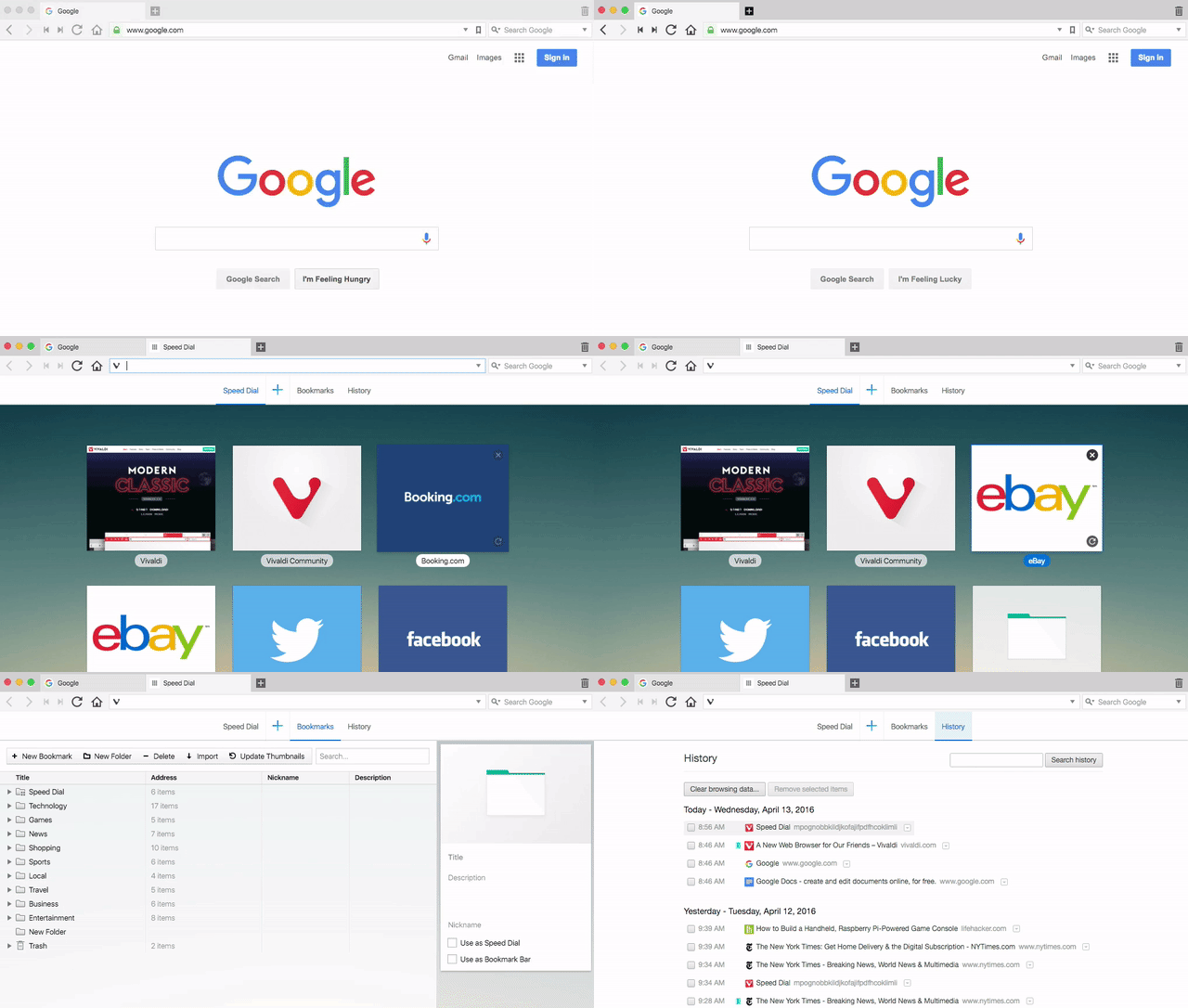
When you first launch Vivaldi, it doesn’t look much different than any other browser. But what separates it from the rest of the pack is all the little features tucked away.
Vivaldi Has Tons of Ways to Keep Your Tabs Organized
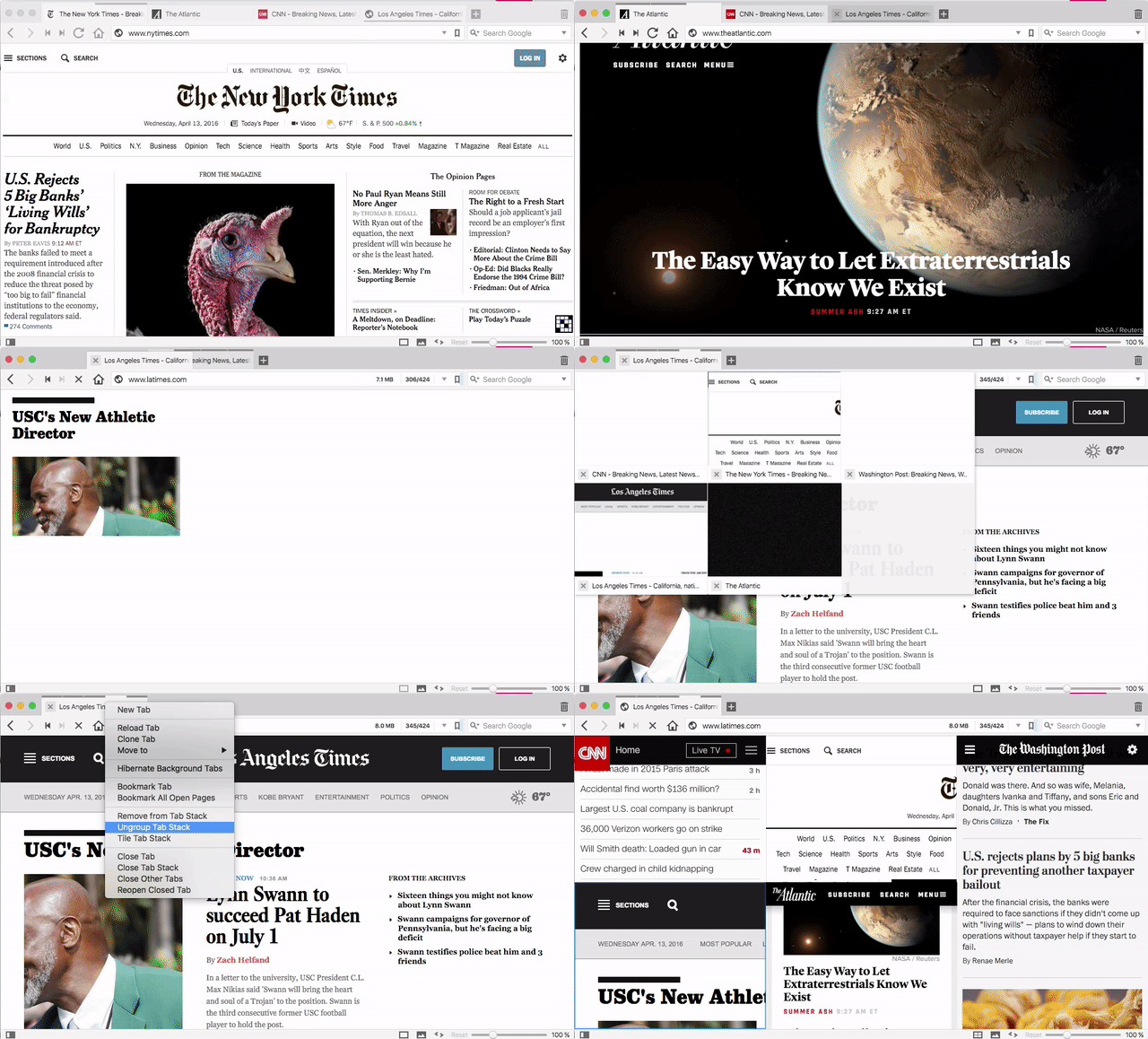
Whether you love tabs to organize pages or hate them for being distracting, tabs are here to stay. Vivaldi introduces a few new tricks we haven’t seen in browsers before to make managing them a little easier, including a handy stacking system and a useful preview feature.
Tab Stacks and Stack Tiling Organize Tab Overload
One of Vivaldi’s more forward thinking features is how it handles tabs. As always, you can open up a ton of tabs and they’ll dutifully line up horizontally. If you’d prefer a little more organizational control, Vivaldi has a feature called Tab Stacks.
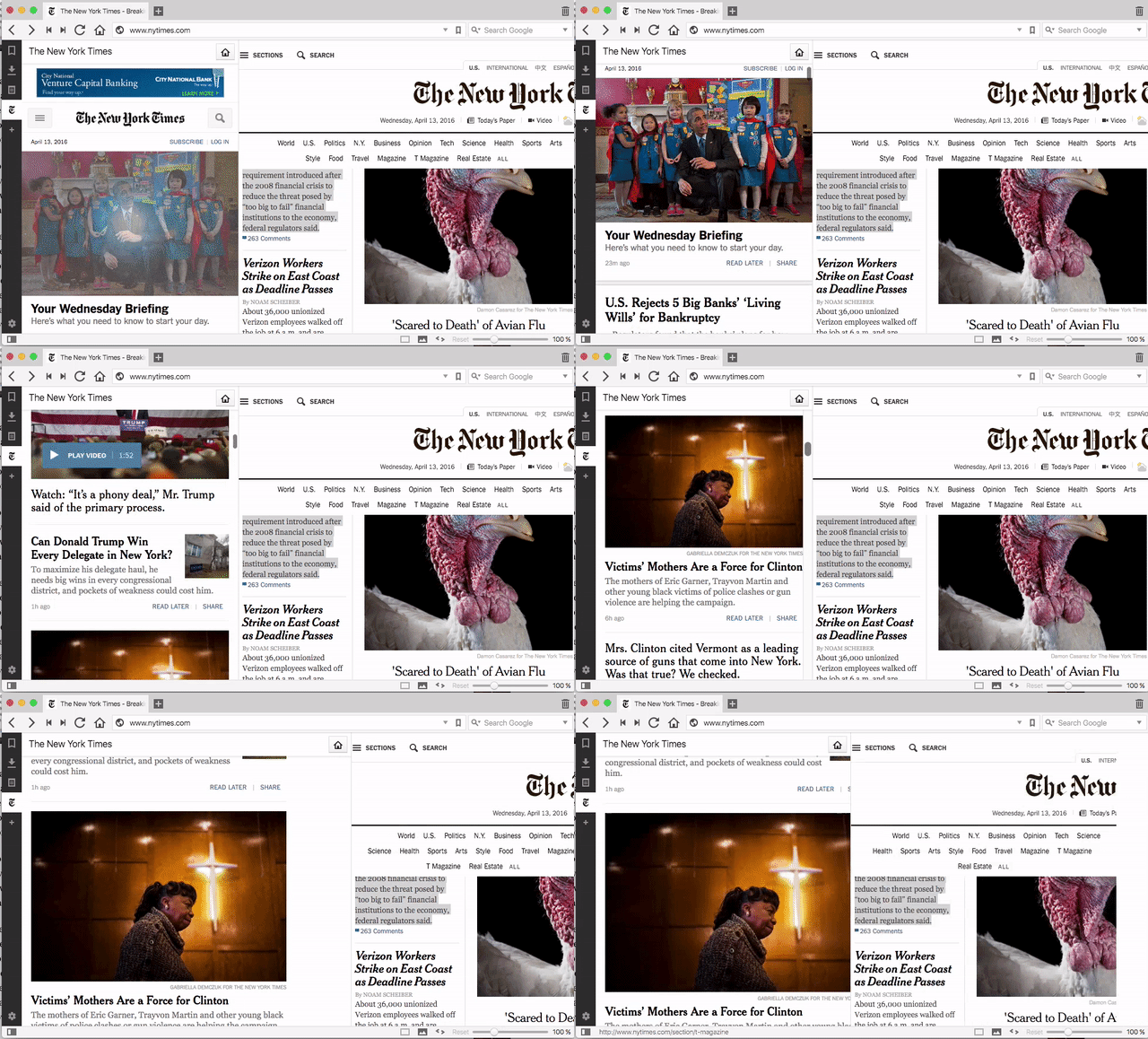
To use Tab Stacks, just drag one tab on top of another. That’ll create a stack. Then you can hover over that stack to individually select a tab inside it. You can also right-click the tab and select “Tile Tab Stack” to see a grid view of all the pages in a stack at once, laid out nicely so you can select one to read. You can change the look of that grid to suit your tastes. You’ll need to tinker around with it a little, but it’s useful for anyone who likes to keep a ton of tabs open on a lot of sites all at once.
If you tend to view a lot of the same sites daily, you’ll also appreciate Vivaldi’s session feature. Once you have a set of tabs open that you want to save, click File, then Save Open Tabs as Session, and give it a name. You can then reopen that set of tabs, set up exactly the way you saved it, just by clicking File and choosing Open Saved Session.
See Quick, Thumbnail Previews of Your Open Tabs
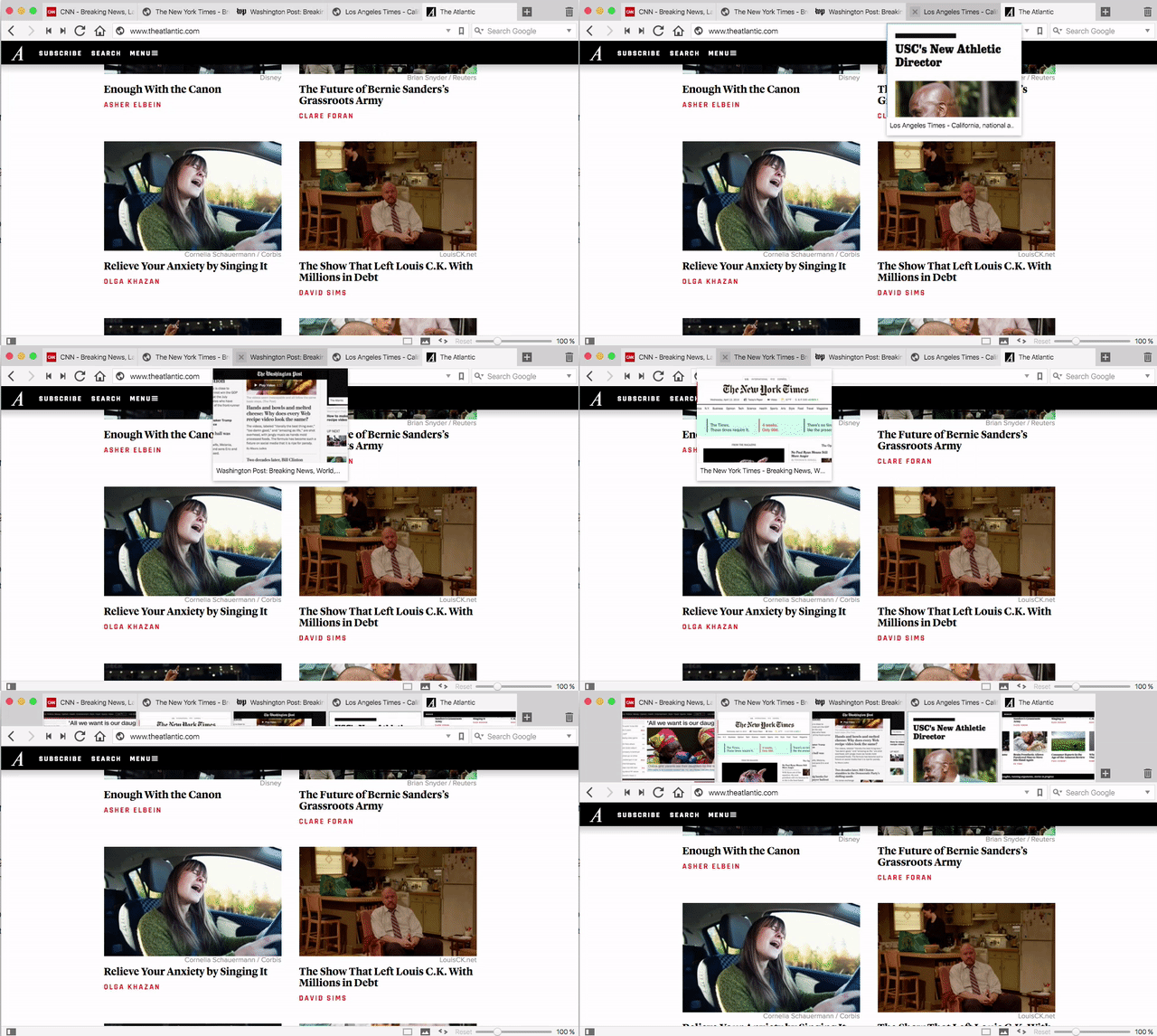
Tab stacks might be the shiniest tab tool in Vivaldi’s shed, but it’s not the only one. It also offers a few ways to get a view of the content hiding behind a tab without actually switching to it, like Windows taskbar previews. You can mouse over an individual tab to get a visual preview, or you can click and drag the tab menu down to reveal a thumbnail of all your open tabs.
Quick Commands Are Like a Mini-Spotlight for Your Browser
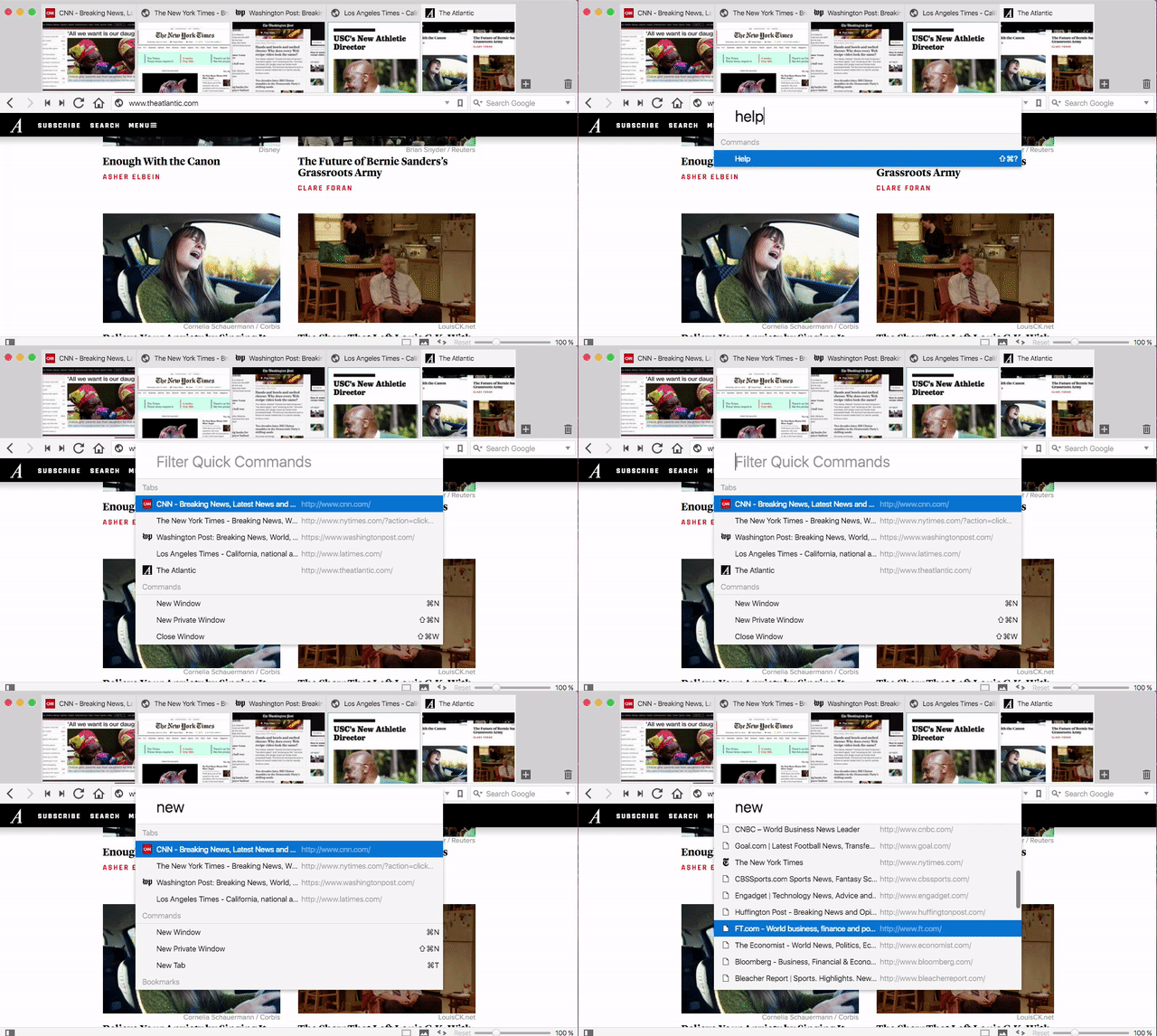
Tap F2 anywhere in Vivaldi and you’ll get the Quick Commands menu. Here, you can search through titles of open tabs, dig around for something in your bookmarks, or just search for a keyboard shortcut. It makes it so you can pretty effectively launch or search for anything you’ll need without ever laying your hands on a mouse.
Create Your Own Keyboard Shortcuts and Mouse Gestures
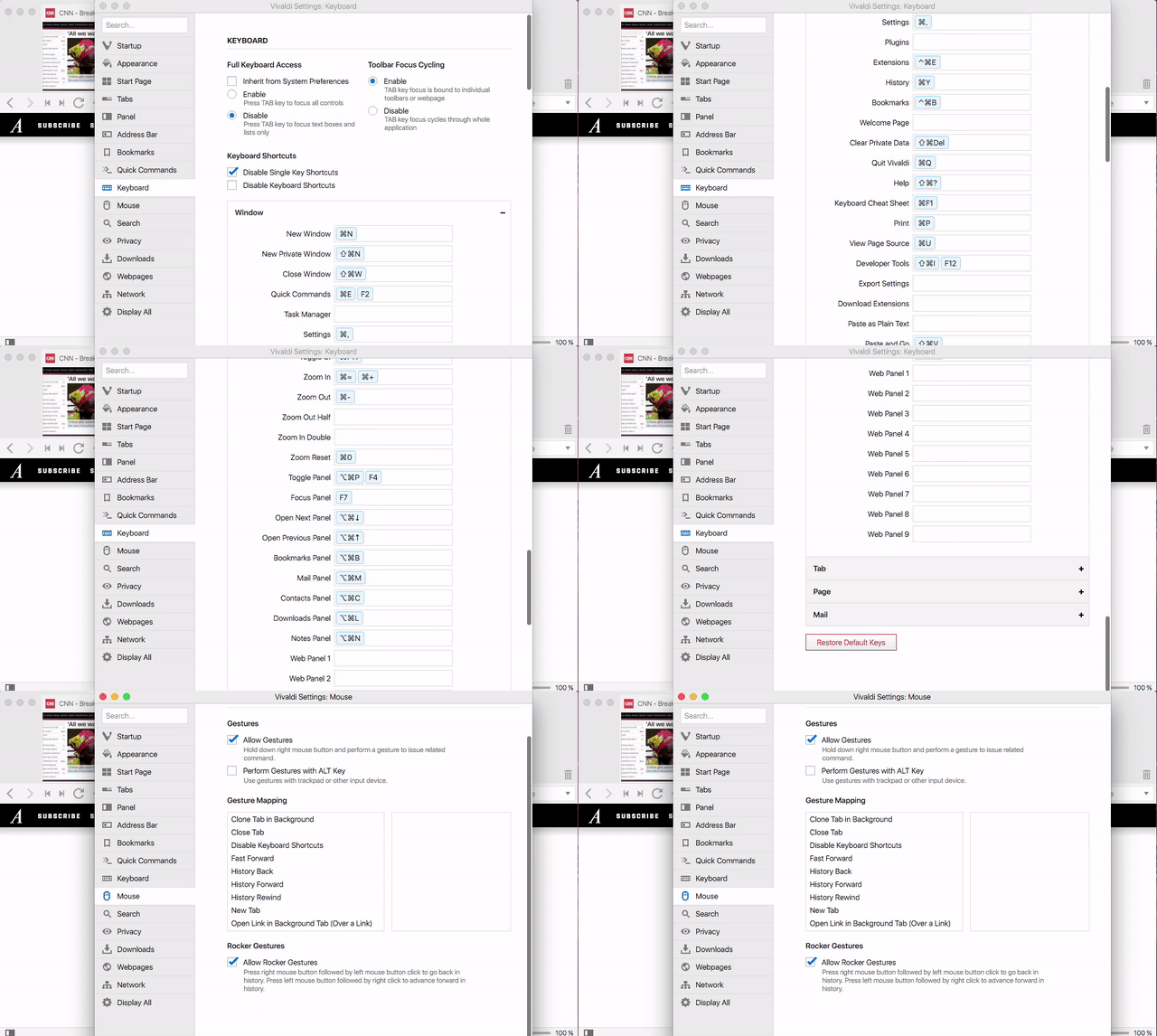
Not a fan of default keyboard shortcuts? No problem, viewing and changing them is easy. Just pop into the Settings panel and click the Keyboard tab. Here, you can view and customize every single action in Vivaldi with whatever keyboard shortcut you want.
Vivaldi also has Mouse Gestures baked in. You can quickly create custom gestures for navigation, like opening or closing tabs, moving forward or back, and opening new tabs or opening a link in a new tab. These gestures are triggered either when you hold down the right mouse button and “draw” the gesture with your mouse, or when you hold down the Alt key and do the same thing. For example, you can draw an L shape to fast forward, or fling your mouse to the left to go back.
All About the Sidebar, Vivaldi’s Most Useful Feature
The sidebar is one of Vivaldi’s best features. You can open it by clicking the icon in the bottom-left corner of the browser. The sidebar houses four different features, all of which are useful, but two are pretty special.
Web Panels Put Two Sites Side-by-Side
Web panels are possibly the most useful feature in the sidebar. It’s like a “picture-in-picture” view for your browser, so you can view two sites together, side by side, and it’s especially useful if you’re comparing two stories, opening a related link on one page in the sidebar (or browsing something like Imgur or Reddit where you’d like the main site in the sidebar and the new site next to it.) This works best for web sites optimized for mobile, since the sidebar view will almost always be a streamlined, mobile-friendly version. To add a new site, just click the “+” icon in the sidebar and type in the URL.
Make Quick Notes About the Pages You’re Viewing
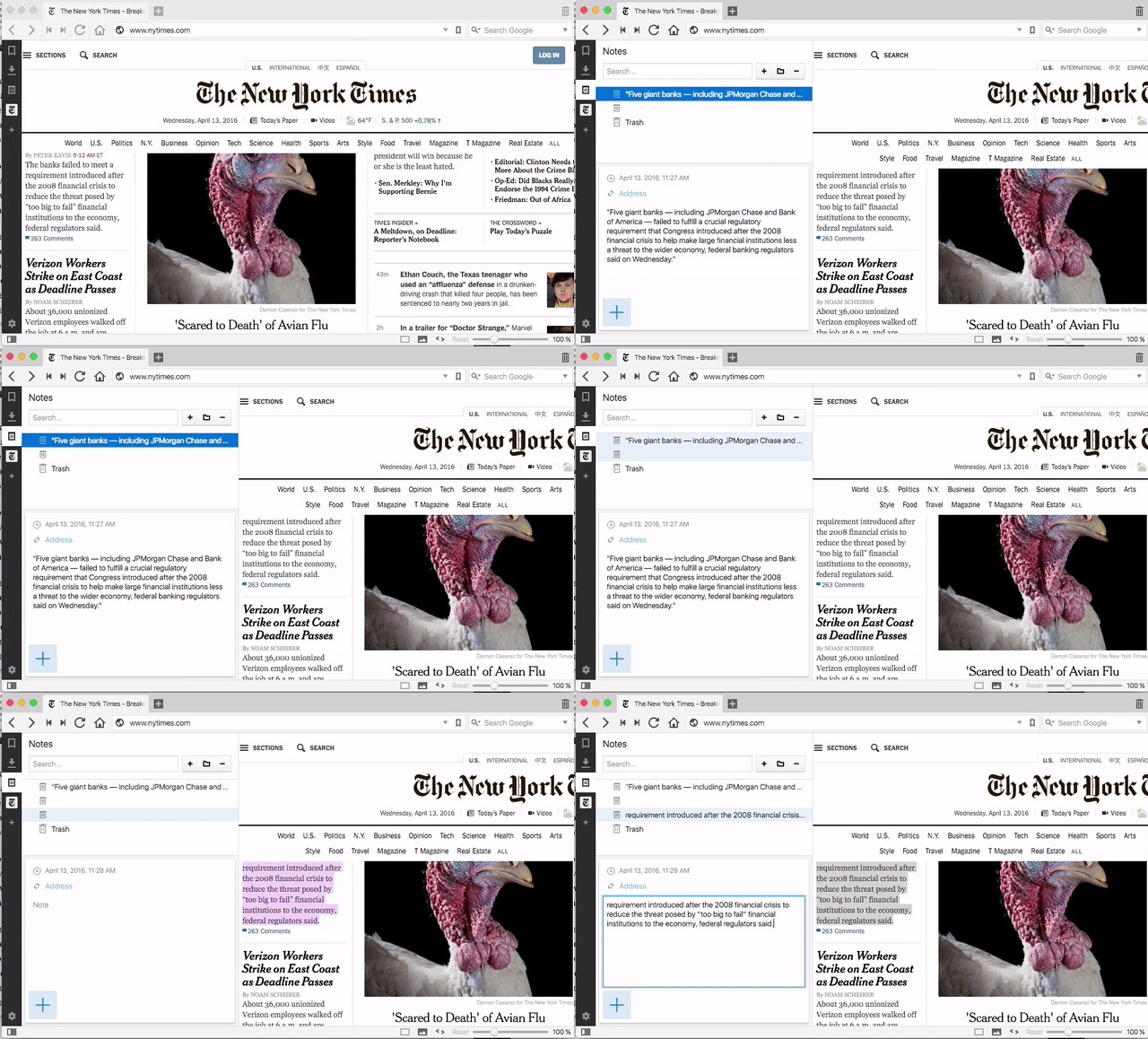
The sidebar also houses a pretty useful notes feature. You can store as many notes as you want here, and add in links and images. Oddly, it doesn’t automatically populate the link section with your current URL, nor does it pull up the page you were browsing when you reopen the note. Regardless, if you’ve ever wanted to be able to make quick notes right from within your browser without installing another extension to do it, here you go.
Quickly Access All of Your Bookmarks
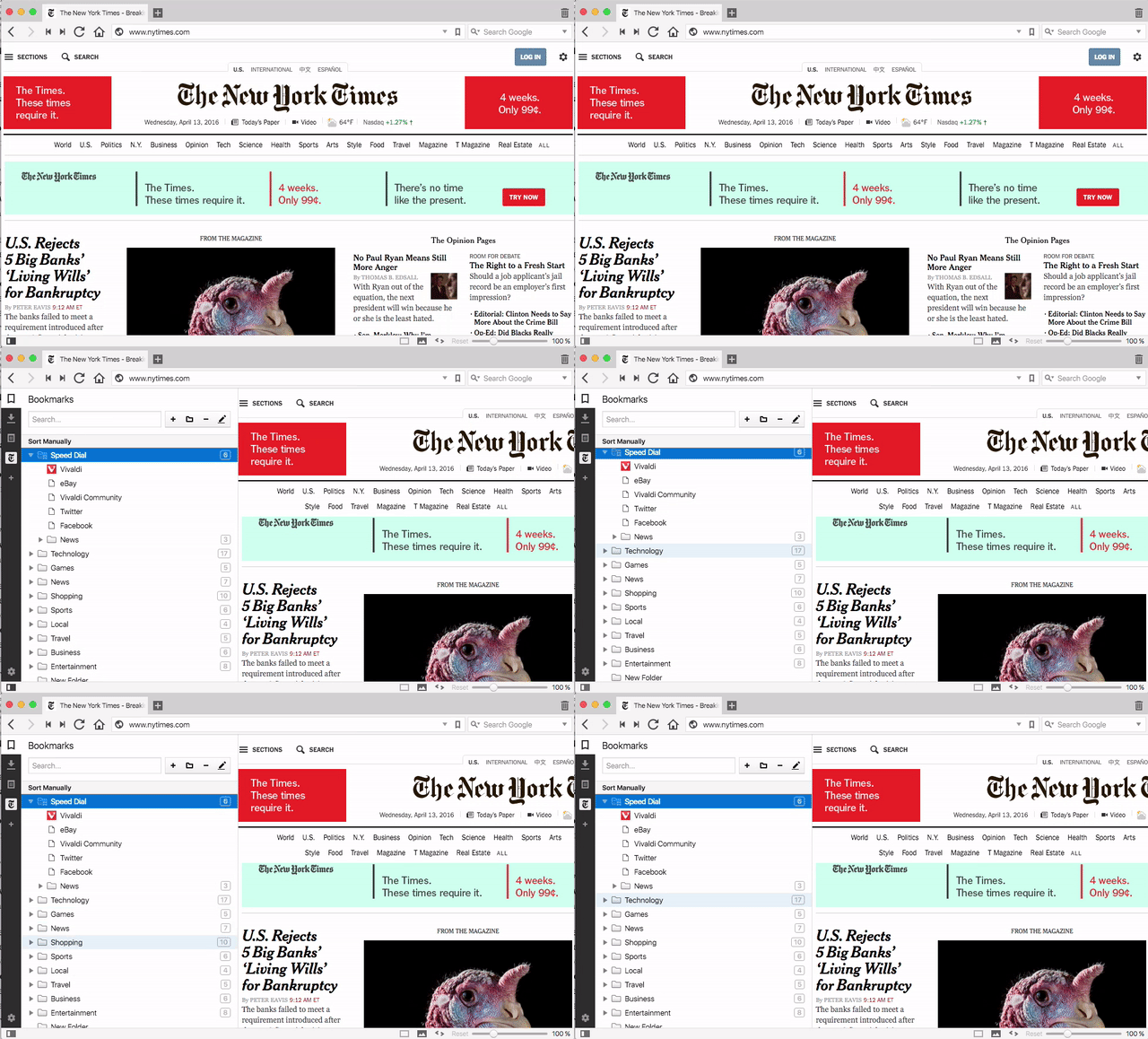
This might look familiar to Firefox users, but one click opens all of your bookmarks in a pane to the left of your browsing window. The built-in search function is a nice touch, especially if you have a lot of stuff in there, but it’s nothing other browsers don’t have—it’s just well executed and presented.
See All of Your Recent Downloads
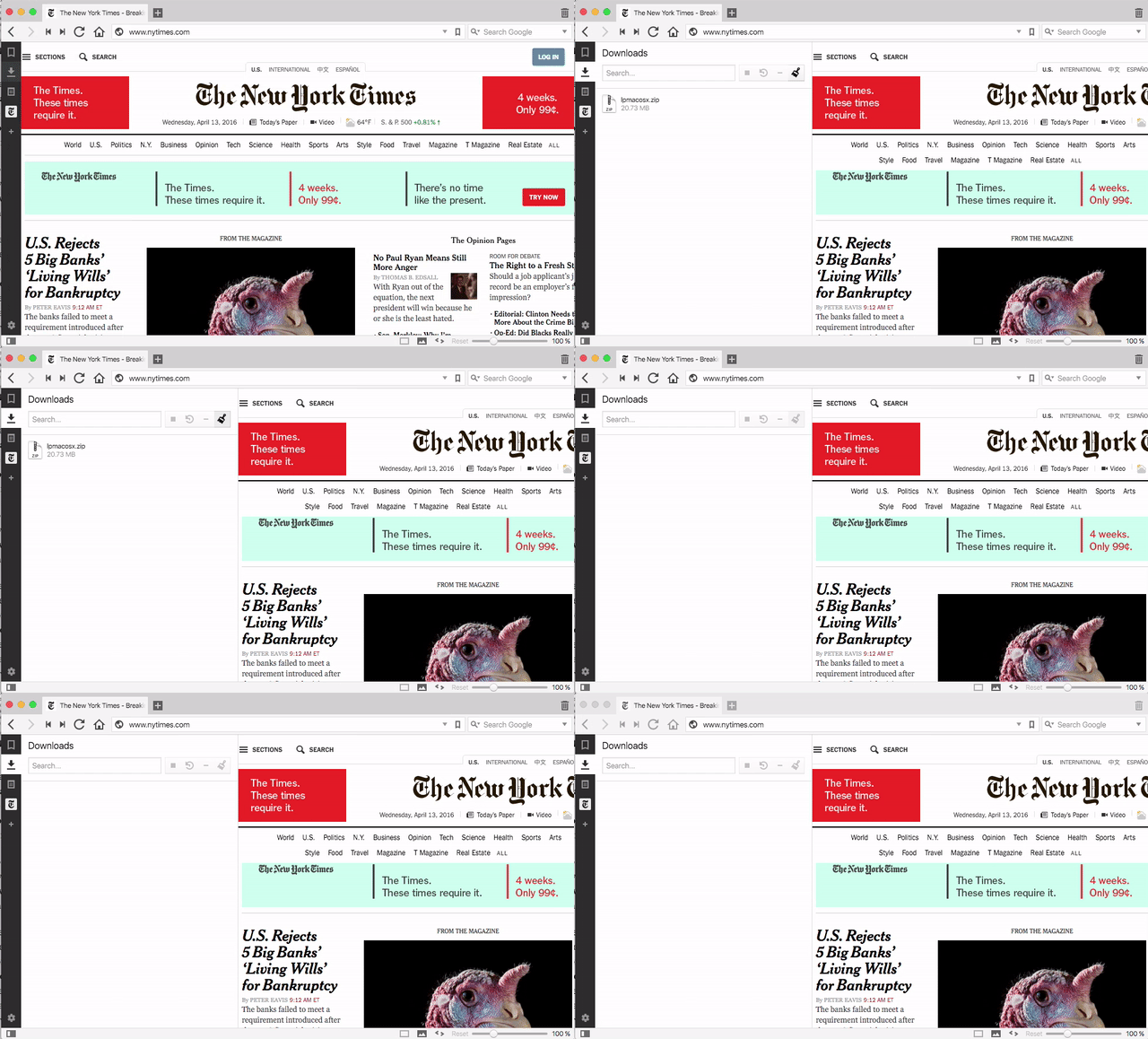
The next option in the sidebar is your list of current and finished downloads. You can click the file to open it or click the paintbrush icon to clear out your cache, click any item to open it directly in your default app for that file type, or click any stopped or failed download to retry it.
The New Tab Page Is Familiar and Customizable
The first thing you’ll see when you open up Vivaldi is the new tab page. You’ll find a familiar speed dial of your favorite web sites, and you can remove pages quickly, click an ddrag to move them around, or add new sites by clicking the “+” icon. The tab at the top of the page allows you to access bookmarks and history as well. You can even create a second (or third, fourth, and so on) speed dial page for more particular needs. For example, you can have one for work and one for regular browsing, and switch between them whenever you want. If you hop into the Preferences (File > Preferences), you can change the background color, number of columns, and more.
Quirky, Useful Features You Won’t Find in Chrome or Firefox
Even at a glance, Vivaldi does things differently than other browsers. Here’s how to make sense of some of its stranger (but still useful) features.
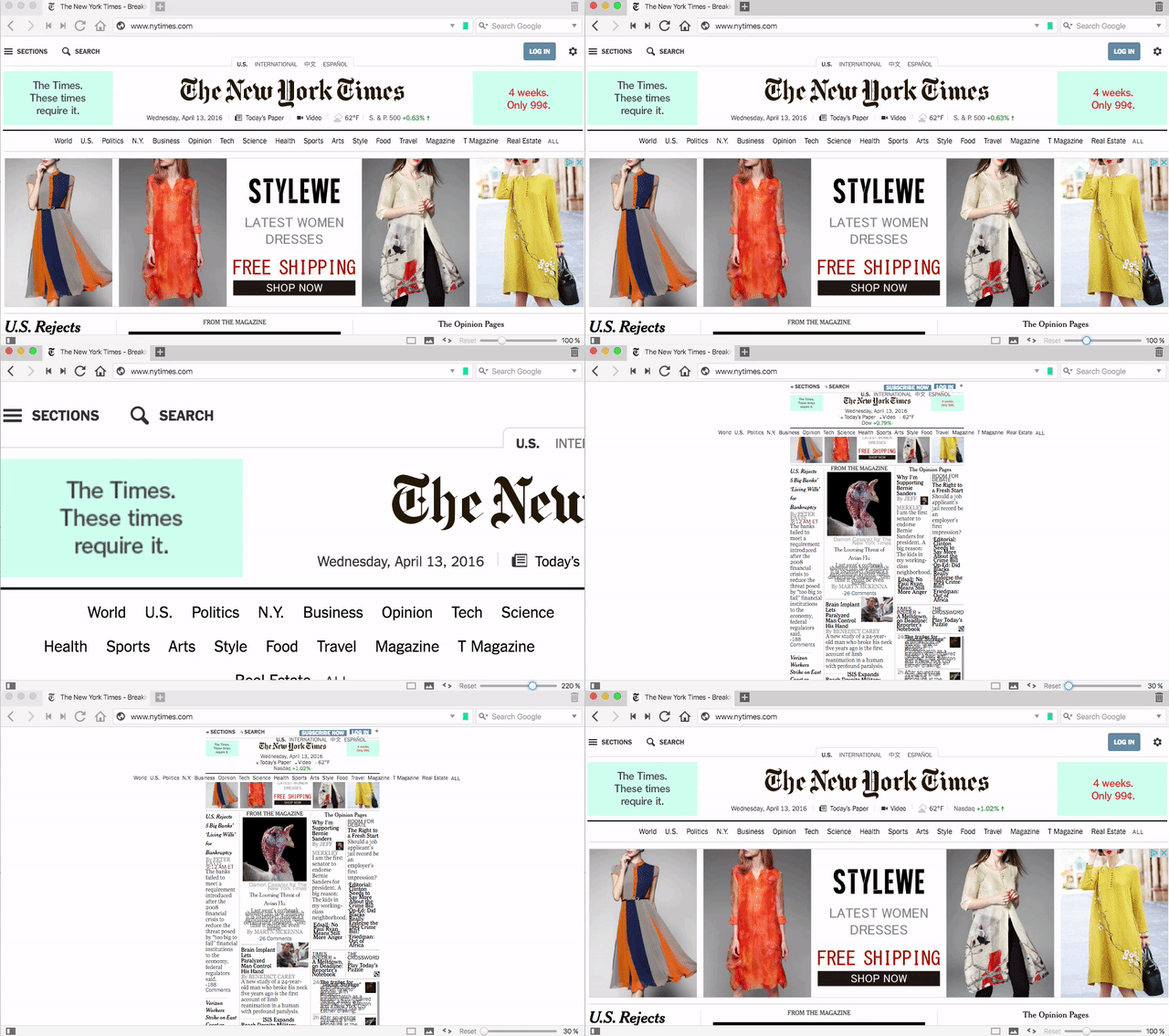
Zoom Slider Enlarges and Shrinks Pages with Ease
At the bottom of Vivaldi, you’ll notice the zoom slider, which does what its name implies. It’s especially useful on a site with obnoxiously small text. If you’re more of a keyboard shortcut person, tapping Ctrl (Cmd on Mac) and the “+” or “-” keys works too, the same as any other browser—but the slider is pretty useful to have, and more granular to use.
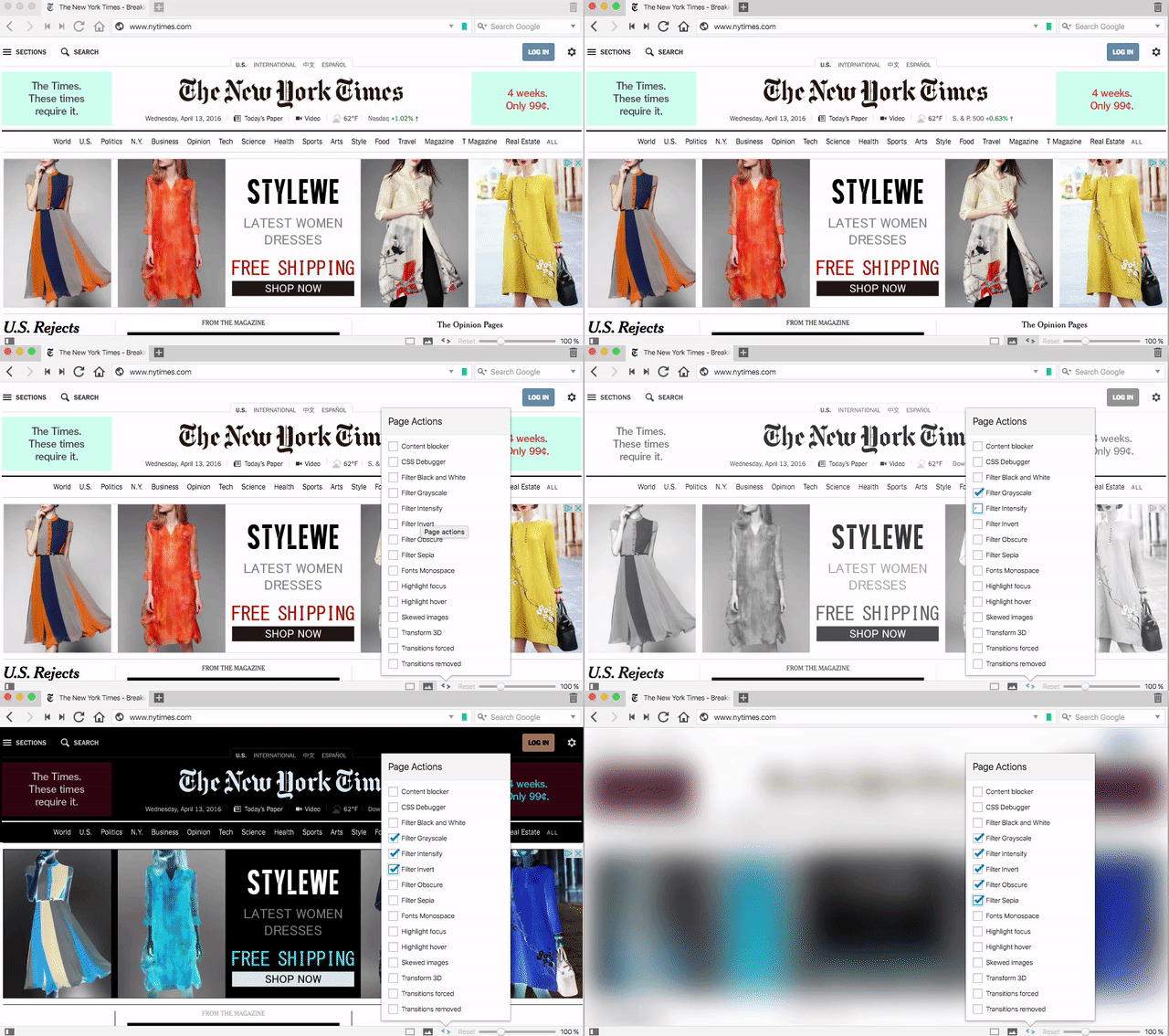
Page Actions Customize the Look and Feel of a Web Site
Page Actions are a weird and wonderful way to transform pages for easy reading, or just to suit your preferences. Click the “< >“ icon in the bottom-right corner, and you can select a number of filters to run a page through. Some options are more useful, like the built-in content blocker that hides ads and tracking cookies, or a CSS debugger that helps you get around broken scripts. You can also do weird things like change everything to grayscale, switch the font to monospace, or highlight whatever your mouse is focused on.
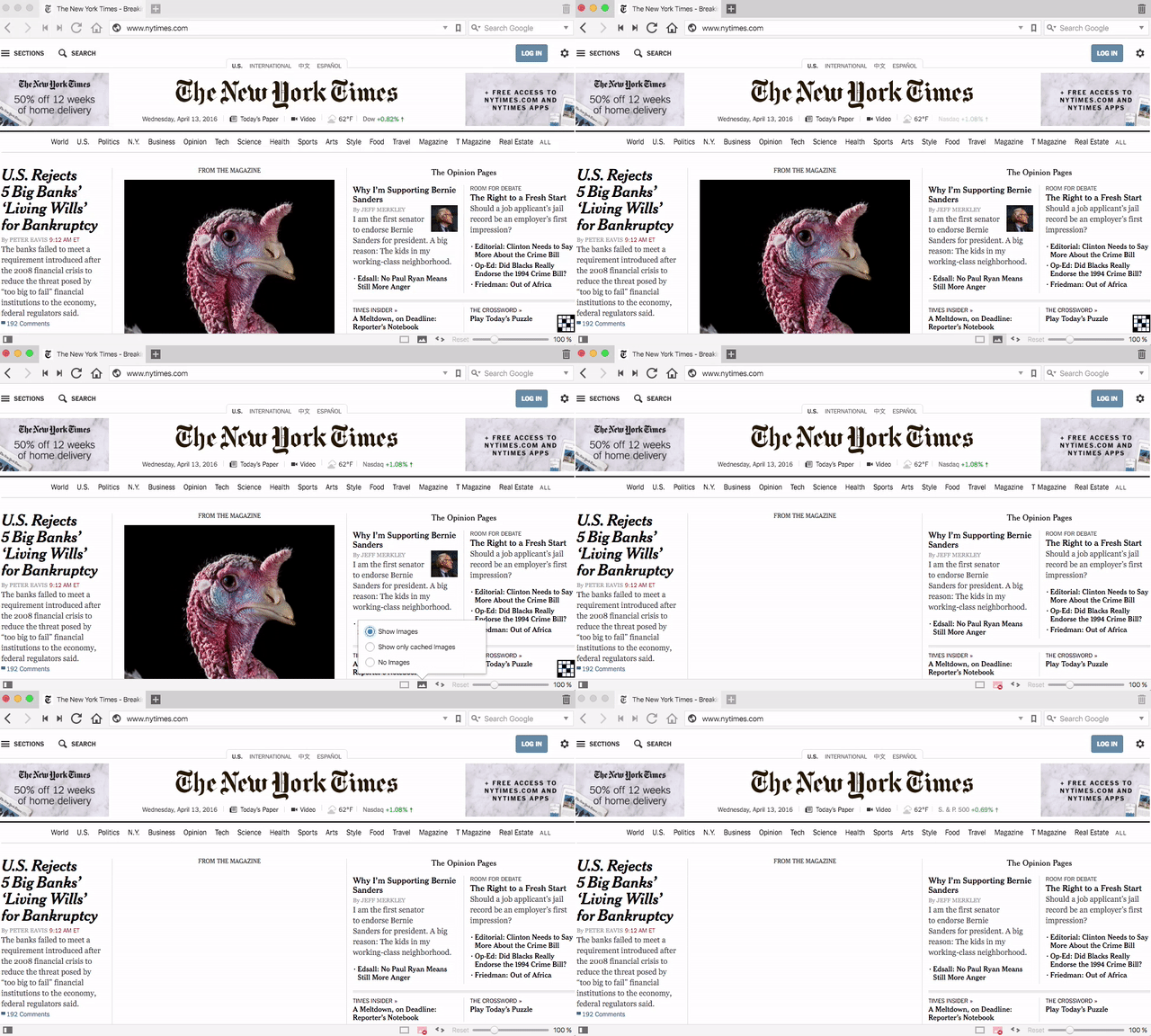
Kill All the Images with a Click
Not a fan of heavy, slow-loading images? Or just want to save a little bandwidth when you’re browsing on a slow or tethered connection? Click the image icon in the bottom-right corner, then select the “No Images” option.
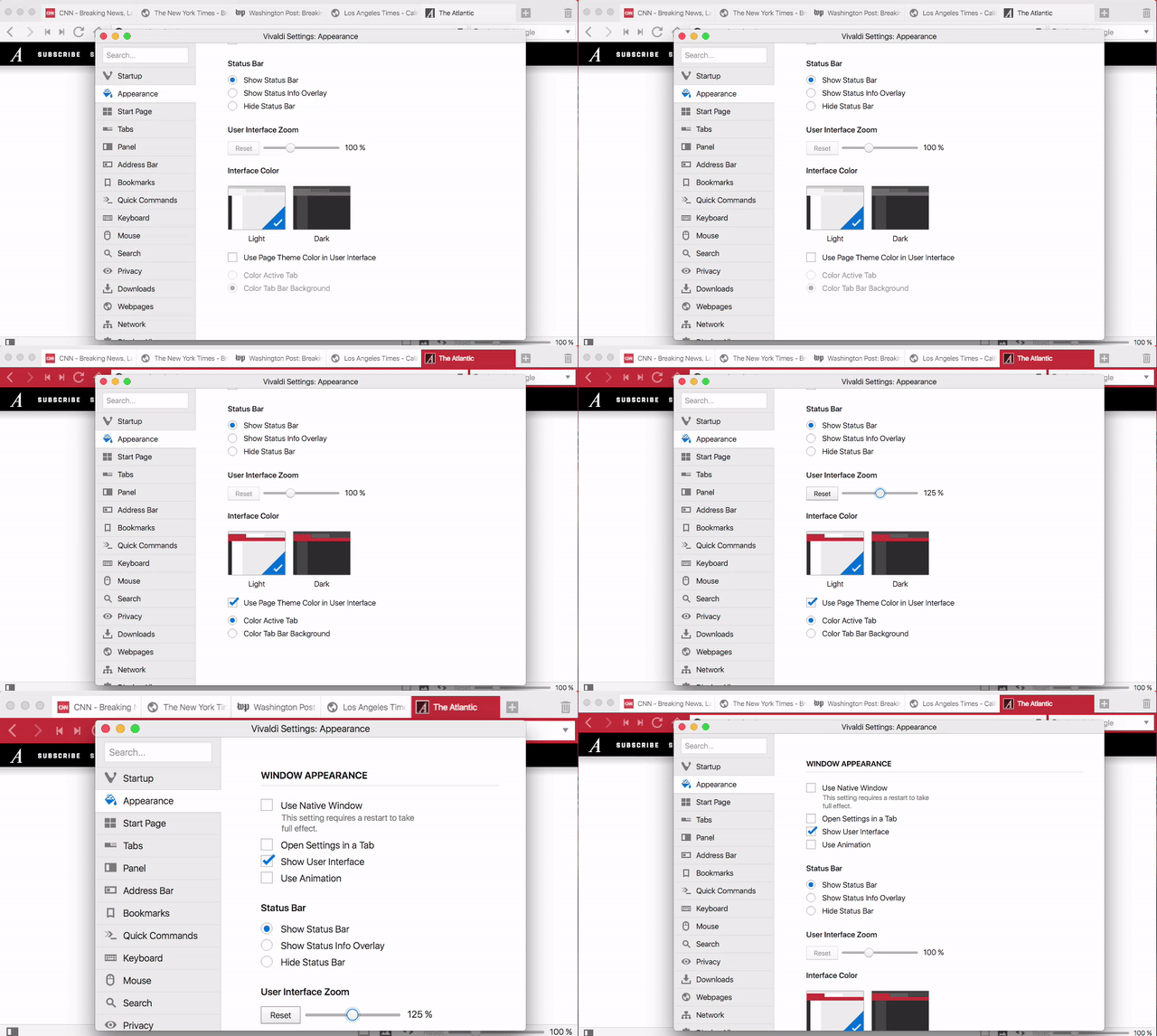
Customize Vivaldi’s Look and Feel
You can also customize a lot of how Vivaldi looks, but you might still be surprised at just how much you can change around. A lot of this is similar to what you’ll find in Chrome, but it’s impressive how much you can alter, even for people familiar with Chrome’s options. Here’s a list of just some of the things you can do:
Choose a light or dark theme
Adjust the size of the user interface
Completely remove the interface
Show or hide the status bar
Make tabs appear as colors based on the web site you’re viewing, or make the whole top bar change color
Alter the start page background color or add a background image
Adjust the number of tiles in the speed dial on the start page
Move the tab bar to the top, left,right, or bottom
Move the panel to the left or right
Move the address bar to the top or bottom (for some reason)
Show or hide the bookmarks bar
Select whether the bookmark bar shows text, icon, or both
You can also toggle off just about every feature in Vivaldi, so if something’s in your way or you just don’t like it, you can completely remove it and never think about it again.
There are more features tucked away in Vivaldi that we didn’t cover here, but you should have a pretty good idea of what to expect from the browser. After using it for the last week, I’ve found the Tab Stack and Tab Tiling incredibly useful, but the fact that LastPass doesn’t currently work in Vivaldi prevents me from using it full time. While Chrome extensions are supported, that doesn’t mean they all work well. Vivaldi is still new, and just because it’s out of beta doesn’t mean it doesn’t still have bugs. PCWorld took a look at its performance and found that Vivaldi’s pretty slow compared to other browsers. In my experience, it feels a little sluggish compared to Chrome when rendering a page, but it’s not extremely noticeable.
Still though, Vivaldi has a lot going for it in terms of features. Whether you want out of Chrome but you aren’t a fan of Firefox, or you fancy yourself a power user and want a browser you tweak to perfectly to suit your needs, it’s worth a look.
If your household is anything like mine, objects have a mysterious way of moving into the wrong rooms. Fix that constant problem by remembering ABC: Always be carrying.
Before you leave a room, check if there’s something that belongs somewhere else so you can grab it and move it.
I’m not sure where I heard this advice, but since learning it, I’ve always got something in my hands, tidying as I go. (And, yes, I know “carrying” has a different meaning when it comes to guns, but that’s not what we mean here.)
Eight months ago, Thebearpoker received a text message photo from someone he didn't know. He decided to play along, not realizing he'd embarked on a long, strange trip.
Thebearpoker says, "At this point I rejected a phone call from her." Here's the voicemail she left:
Hey (Name on my VM) Why don't you answer your phone? This is Dawn. I know you know Bobbie and Travis. Its too coincidental. I am forwarding all the messages that I forwarded to you, to Bobbie's phone. But I do know that you know them, cause its the same area code, the same prefix as Fort Myers FL. I'm not stupid. If you have the guts, call me back (Insert her phone number here). You are a friend of both of them. I'm not stupid.
Boots the Chemist started out as a family-run business whose Methodist founders believed in civic duty and public service, spreading across the country and providing front-line medical services to Britons, making 40% of their revenues from government compensation for NHS service.
(more…)
Google is introducing a new series of Nexus phone cases today, and they're a lot more interesting than the average snap-on shell. They're called Live Cases, and that's a fitting name, because these cases can actually interact with your phone. For one, snapping the case onto a Nexus phone will customize it with an animated wallpaper. The case also has a button on it that you can set up to launch a specific app.
The case only comes in one shape for each Nexus phone, but what it looks like can be customized quite a bit. Google allows you to print either a photo or a map on the case, and it provides tools to customize them with different filters and color schemes. The choices you make on those will affect what the case's animated wallpaper...
A Charlie's Angels reboot is on the way, and Elizabeth Banks is attached to direct. According to Entertainment Weekly, Sony confirmed the news this week at CinemaCon as they unveiled their upcoming slate of films including James Wan-directed Robotech film and the promised 22 Jump Street-Men in Black crossover.
At first glance, Save to Google looks similar to browser extensions like Pocket or Readability, which allow users to save articles from the web and read them later. How is it different? First, Save to Google lacks a major feature of these read-it-later extensions, which strip away CSS and HTML formatting to present clean, plain-text articles that users can access on websites like Pocket and Readability. Save to Google doesn't work like this. Instead, it effectively turns google.com/save into a dressed-up...
Senators Richard Burr and Dianne Feinstein released the official version of their anti-encryption bill today after a draft appeared online last week. The bill, titled the Compliance with Court Orders Act 2016, would require tech firms to decrypt customers’ data at a court’s request. Read More
ESPN and the International Drone Racing Association (IDRA) have announced a partnership to broadcast drone racing live on TV, starting with a three-day event in New York City this August. The sport is being positioned as the niche interest it still is — with the NYC championship streaming live on online channel ESPN3 before being edited down to a one-hour TV broadcast — but ESPN is certainly dreaming big about its future. "Drone racing is currently seeing an unprecedented rise in popularity," said the network in a press release, "and is poised to become the next behemoth racing sport alongside NASCAR and Formula 1."
Whether that's true or not remains to be seen, but the sport is certainly building momentum. Drone racing leagues of all...
Do your sandwich a favor and do more than just toss it in a plastic baggie. Wrap it like this with a sheet of wax paper and keep it from getting crushed in your lunch bag. It won’t leak, it’ll stay dry, and it’s perfect for eating on the go without a mess (or saving one half for later.)
You can use waxed paper, parchment paper, or even foil if you prefer. Here’s how to do it:
Tear about a foot of paper and place it on a flat surface with your sandwich in the middle. The top of the sandwich should be facing away from you.
Bring the top and bottom edges of the paper together over the sandwich and fold down in half inch increments until the paper is flush with the sandwich. This helps the sandwich stay secure in the paper during transport.
Fold the sides of the paper into triangles, creasing the bottom of the triangle where it meets the side of the sandwich. Fold under the sandwich. Tape the points of the triangles together if you like.
Sound familiar? That’s how most delis and other sandwich shops wrap flat sandwiches. Cut your sandwich in half if you like to eat it that way, or you think you might not finish the whole thing. Wrap in a layer around the whole thing to keep the halves together. If you prefer a reusable option, there are plenty of cloth sandwich wrappers you can buy online (like this one from Amazon). For a step-by-step visual guide, check out the link below.
After separating from eBay, PayPal has been on a march to grow both its international business and transactions beyond basic e-commerce. Today it is taking a step to do both, with the U.K. launch of PayPal Credit — a service that lets consumers use their PayPal accounts to spread out online payments for goods as a replacement for traditional credit cards. It will give consumers… Read More
Former Reuters journalist Matthew Keys was sentenced today to two years in prison on hacking charges. He faced a maximum sentence of 25 years. During his sentencing hearing, Keys tweeted, “This whole process has been exhausting.” Keys was convicted last October of violating the Computer Fraud and Abuse Act (CFAA), in a bizarre case that led to the temporary defacement of a… Read More
According to a new offender manual from Texas Department of Criminal Justice, prisoners whose families maintain a social media presence to call attention to their incarceration will be liable to harsh punishment, including up to 45 days in solitary, loss of privileges, and extra work duty.
(more…)





























 Not all important scientific research is cool looking, or has a cool name. But now and then you get something with both. These self-assembling carbon nanotubes are created with a process called Teslaphoresis. If you’ve read a more impressive-sounding sentence today, I’d like to hear it. Read More


 Instagram wants to show you the best videos without completely destroying the sanctity of your main feed, so today it overhauled the Explore page with a slew of new video channels. Most importantly, there’s a personalized “Videos You Might Like” feed that draws from across the network. There’s also themed, hand-curated channels, like one for Coachella, and feature… Read More








 Senators Richard Burr and Dianne Feinstein released the official version of their anti-encryption bill today after a draft appeared online last week. The bill, titled the Compliance with Court Orders Act 2016, would require tech firms to decrypt customers’ data at a court’s request. Read More


 After separating from eBay, PayPal has been on a march to grow both its international business and transactions beyond basic e-commerce. Today it is taking a step to do both, with the U.K. launch of PayPal Credit — a service that lets consumers use their PayPal accounts to spread out online payments for goods as a replacement for traditional credit cards. It will give consumers… Read More
 Former Reuters journalist Matthew Keys was sentenced today to two years in prison on hacking charges. He faced a maximum sentence of 25 years. During his sentencing hearing, Keys tweeted, “This whole process has been exhausting.” Keys was convicted last October of violating the Computer Fraud and Abuse Act (CFAA), in a bizarre case that led to the temporary defacement of a… Read More